

Cloudways has run my own sites since March 2018. Being a customer is not enough to recommend a host, though. So I set out to answer the three questions that decide your money: how fast does it stay when a WordPress site gets busy, which servers are worth paying for, and is the price justified?
I went past the marketing. I benchmarked four servers on DigitalOcean, Linode and Vultr with the same WordPress site, load-tested them, watched their uptime, and opened a new account to test caching, backups, staging, scaling, billing and the control panel screen by screen.
One result stood out. Vultr High Frequency answered in 48ms from New York and in 74ms with 100 visitors at once. On a ramp up to 250 visitors it served 8,250 requests without a single error. The same site on shared hosting took from 240ms to 1400ms with 100 visitors.
Want to skip to the answer? Cloudways is the managed cloud host I recommend for WordPress and WooCommerce, and its caching stack is the main reason: Nginx, Varnish, Memcached, Redis and Breeze on every server, Object Cache Pro free from 2GB up, and the Cloudflare Enterprise add-on. Take Vultr High Frequency (NVMe) for a busy site or a store, and DigitalOcean 1GB at $11.00/mo to start small.
Two things to plan for: email is not included (Zoho Mail's free plan covers it), and your bill depends on the server size you pick. Below I show the right size for each kind of site, so you pay for what you need and nothing more.
You have nothing to lose
- 3-day free trial, no card needed to launch a server
- $30 of credit with code CLOUDS2022, about 2.7 months of the 1GB server
- Hourly billing: delete the server and the charges stop
- Free WordPress migration done by the Cloudways team
Cloudways Speed Test: 250 Visitors at Once, Zero Errors
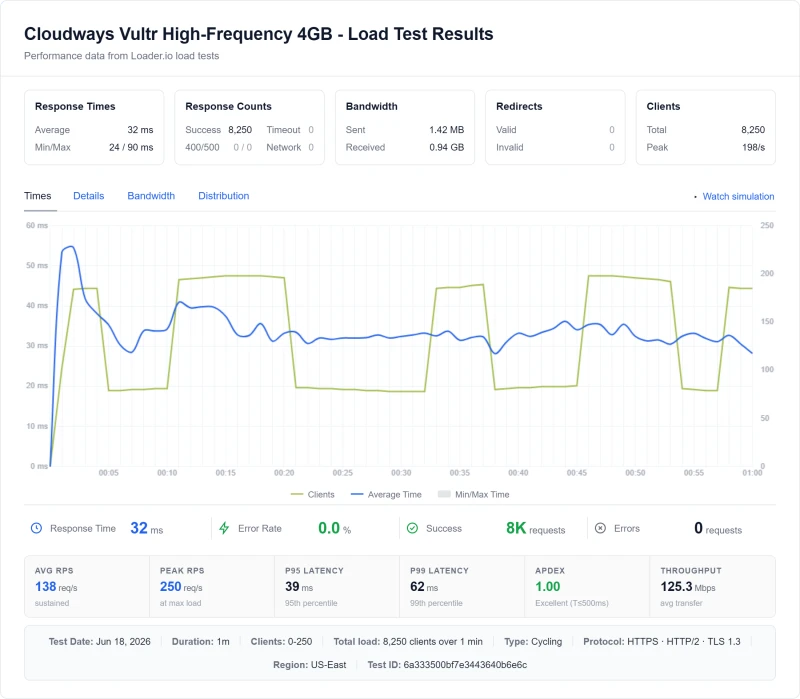
Here is the load test that sold me. A Vultr High Frequency 4GB server on Cloudways took a ramp from 0 to 250 visitors at once: 8,250 requests, an average response of 32 ms, and not one error.
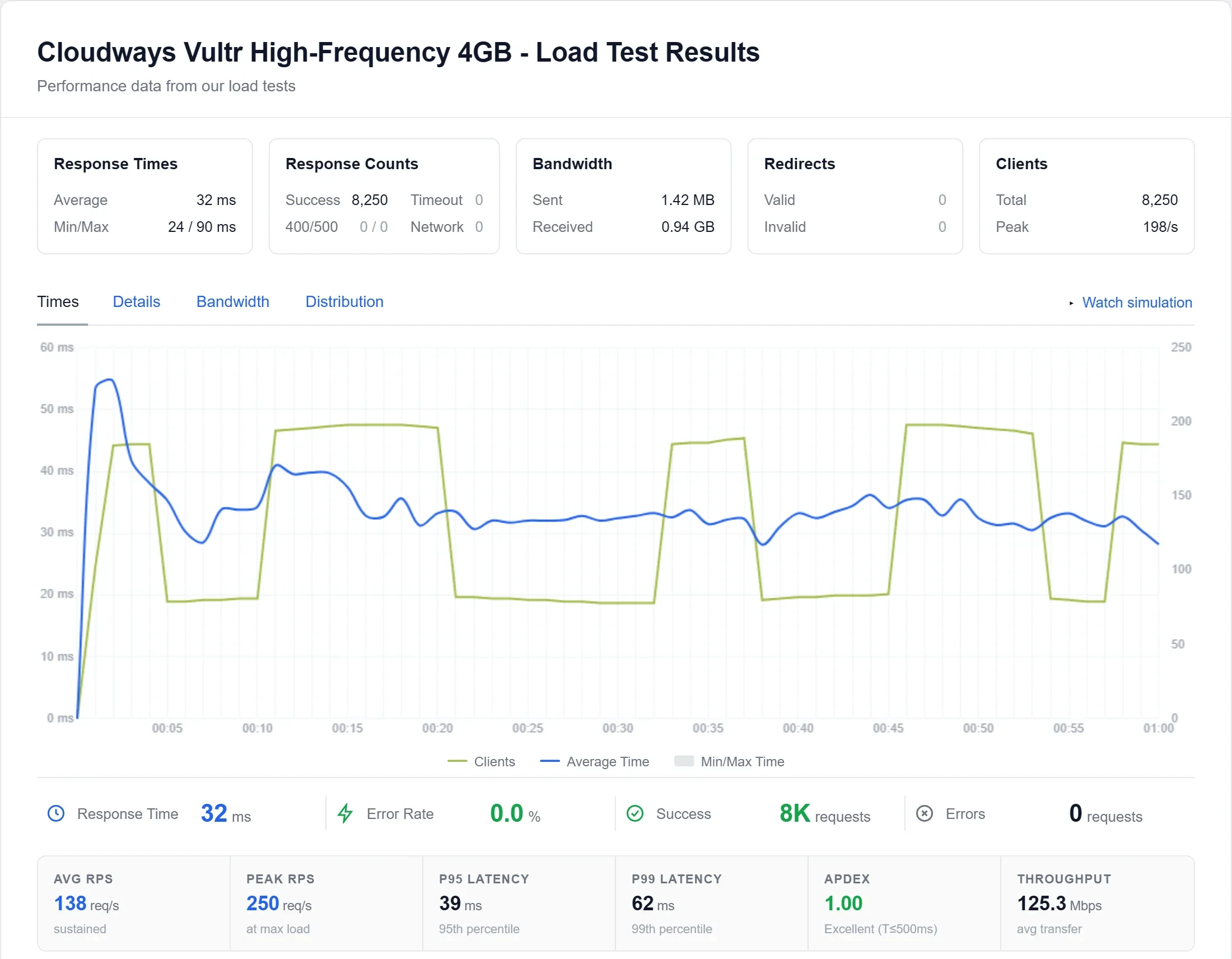
Origin response time was 48ms from New York, 74ms with 100 visitors at once, and uptime 99.99% over 54 days. Below are my scores, then every test behind them.
What I found in testing
- Speed: 48ms from New York and 74ms at 100 visitors on Vultr High Frequency; zero errors up to 250 visitors.
- Uptime: 99.99% over 54 days.
- Caching: Object Cache Pro free and already on for new WordPress apps from 2GB up; the Redis hit rate settles above 90% on my long-running sites.
- WooCommerce: a 10,000-product store handled 4.7 checkout journeys a second on Vultr HF 4GB and 7.5 on 8GB, with no failed request.
- Setup: a server in about 7 minutes, free SSL in about 70 seconds, a staging copy in about 3 minutes.
- Billing: from $11.00/mo, by the hour, with no contract and no renewal jump.
- Support: an AI answer in seconds and a human in minutes who got the details right.
- Email: not included; Zoho Mail's free plan fixes it.
How I tested Cloudways
I paid for every Cloudways server on this page. The review rests on two separate tests, run on different servers.
- Speed and uptime benchmark: four servers on three of the five clouds, each with the same WordPress test site: DigitalOcean Standard 1GB, DigitalOcean Premium 2GB, Linode 2GB and Vultr High Frequency 4GB. Origin TTFB, the 100-client load test, uptime over 54 days and PageSpeed all come from these four.
- A new account, start to finish: I signed up as a new customer, used the free trial, then added a card for full access. On short-lived test servers (not the benchmark ones) I timed server launch, scaling, backups, restores, staging and PHP switches, load-tested a 2GB server, ran a 10,000-product WooCommerce store on three servers, deployed from GitHub on Velocity and talked to support on live chat.
- Everything I checked in the console: the trial server and, after full access, Flexible servers, an Autonomous site, a Velocity app, the Managed AI Agents form, every server size and price on all five clouds (AWS and Google Cloud included), billing, teams, security logs and every server setting.
- Prices and features: server prices for all five clouds come from the launch form inside my account; the feature list is the one Cloudways publishes.
- Which clouds the speed figures cover: DigitalOcean, Linode and Vultr, the three that give WordPress the most for the money. AWS and Google Cloud prices come from the same launch form, size by size.
- The scores below are per server, because a 1GB DigitalOcean server and a 4GB Vultr High Frequency server are different products at different prices.
Vultr High Frequency: 48ms TTFB and 74ms at 100 visitors, no failed request on the full ramp
Object Cache Pro free and on from the first minute on 2GB and up, on top of Nginx, Varnish, Redis and Memcached
24/7 chat: an AI answer in seconds, a human in minutes who gets it right; $25 Advance adds help with your app
Launch, scaling, backups, staging, Git and team access in one console; a server is ready in about 7 minutes
Hourly billing, no contract and no renewal jump; delete a server and the charges stop
From $11.00/mo with management included, Object Cache Pro free from 2GB; unlimited sites per server
Overall for Vultr High Frequency 4GB, the server I recommend: 9.3/10
Caching, support, ease of use and billing are the same platform whichever server you pick, so only speed and value change between rows. The 1GB DigitalOcean server scores almost as high as Vultr High Frequency overall. It is slower, and it costs about a fifth as much. Pick it for a small site and Vultr High Frequency for a busy one or a store. How I score is on the how I test page.
Use Cloudways if you:
- Build WordPress sites for clients or run a multi-site agency (unlimited sites per server)
- Want real cloud infrastructure (Vultr, DigitalOcean, AWS) without becoming a Linux sysadmin
- Are hitting CPU limits on shared hosting and your host's answer is "upgrade"
- Want pay-as-you-go billing with no annual contract and no renewal markup
- Need Git deployment, SSH root, staging, and WP-CLI in one place
Pick a different host if you:
- Need email on the same bill as the hosting (free Zoho Mail covers the mailboxes, but it is a second account)
- Need cPanel (the Cloudways panel is different, with a one-week learning curve)
- Run under 5,000 visitors/mo on a budget shared host (the performance gap is invisible at that traffic)
- Want phone support without paying for it (phone and private Slack come only with the $500-a-month Premium support plan)

What Our Testing Found
- 48ms origin TTFB, the fastest of the four Cloudways clouds I measured (Vultr HF, no CDN)
- 74ms at 100 concurrent clients, a measured step rather than an interpolated one
- 99.99% uptime over 54 days of monitoring, 8 minutes of downtime
- 5 cloud providers on one dashboard: Vultr HF, DigitalOcean, AWS, GCE, Linode/Akamai. I benchmarked four servers on three of them
- Redis Object Cache Pro included free (Premium value)
- Pay-as-you-go billing, no long-term commitment, no renewal shock
- Git deployment, SSH, WP-CLI, staging, best developer tooling tested
- Unlimited WordPress sites on any plan
- Autoscaling available (vertical + horizontal)
- Cloudflare Enterprise CDN add-on available
Real Weaknesses
- No email hosting in the plan (Rackspace add-on from $1.50 a mailbox)
- No cPanel, custom Cloudways panel only
- Only 5 free managed migrations on Flexible
- Vultr HF 8GB (now 3 cores) costs more than a ScalaHosting VPS of similar size
- Prices rose about 10% in 2023, the first rise since 2017
- L1 support limited on server-level issues, escalation required
- Phone support only on the $500-a-month Premium support plan; Standard and Advance are live chat and tickets
Real Benchmark Data
- Origin TTFB (4 plans, no CDN): 48ms to 62ms
- Uptime (54-day window): 99.979% to 99.99%
- PageSpeed Score (Mobile): 89/100

$16.00/mo
CLOUDS2022 = $30 Free Credit
Methodology: The benchmark boxes on this page cover 11 plans. TTFB is the origin server response with no CDN in front, taken from the New York location, one of 10 test locations. Uptime counts real incident minutes over a 54-day window.
Cloudways on Vultr or DigitalOcean? NVMe vs SSD, and Which Server to Pick
Vultr High Frequency for a busy site or a store. DigitalOcean Standard 1GB for a small site. Those are the two ends of the four servers I benchmarked, each running the same WordPress test site: two on DigitalOcean, one on Linode and one on Vultr.
My speed tests ran on DigitalOcean, Linode and Vultr, the three clouds that give WordPress the most for the money. AWS and Google Cloud prices are in the pricing section, size by size, read from the launch form.
NVMe or regular SSD: the difference you are paying for
The cloud and server type you pick decide what kind of disk and processor your site runs on. No Cloudways server uses an old hard disk (HDD); the choice is a regular SSD or the faster NVMe SSD. Cloudways' own pricing page lists them like this:
An NVMe drive talks to the processor over PCIe instead of the older SATA link a regular SSD uses, so it reads and writes several times faster. WordPress reads its database on every page the cache cannot serve, so faster storage turns into faster pages, carts and checkouts. My tests show it: the two NVMe servers led, Vultr High Frequency at 48ms and DigitalOcean Premium at 54ms, against 59ms on DigitalOcean Standard.
What to buy: NVMe (Vultr High Frequency or DigitalOcean Premium) for a store, a membership site or anything busy. A regular SSD (DigitalOcean Standard) is fine for a blog or a brochure site, and it is the cheapest way in.
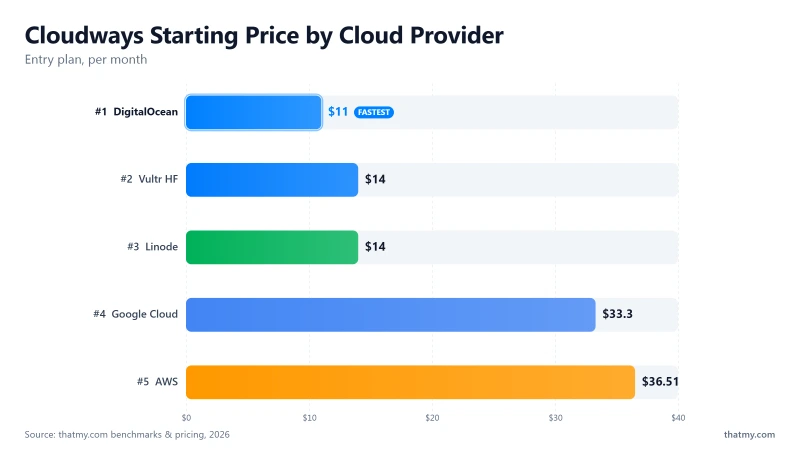
Every price is the monthly price for that exact size, read off the Cloudways launch form. All four TTFB and uptime figures come from the benchmark servers.
WordPress is a single-threaded PHP application that hits the database 30 to 80 times per page render. Page speed therefore depends on storage IOPS and CPU clock speed. Vultr HF leads on both at an accessible price.
The server you pick changes TTFB, behaviour under load and the monthly bill. The two figures below show the four servers side by side.
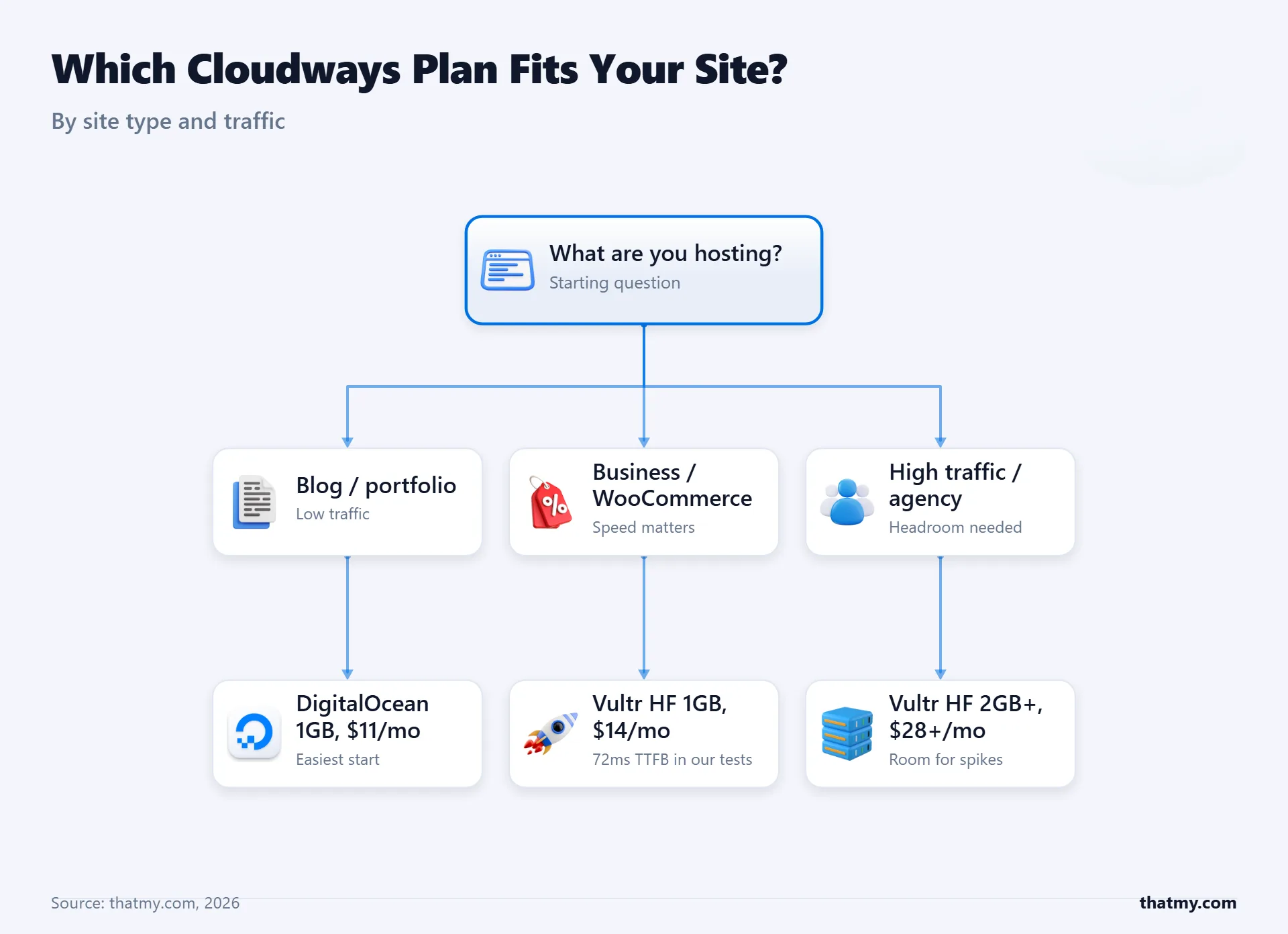
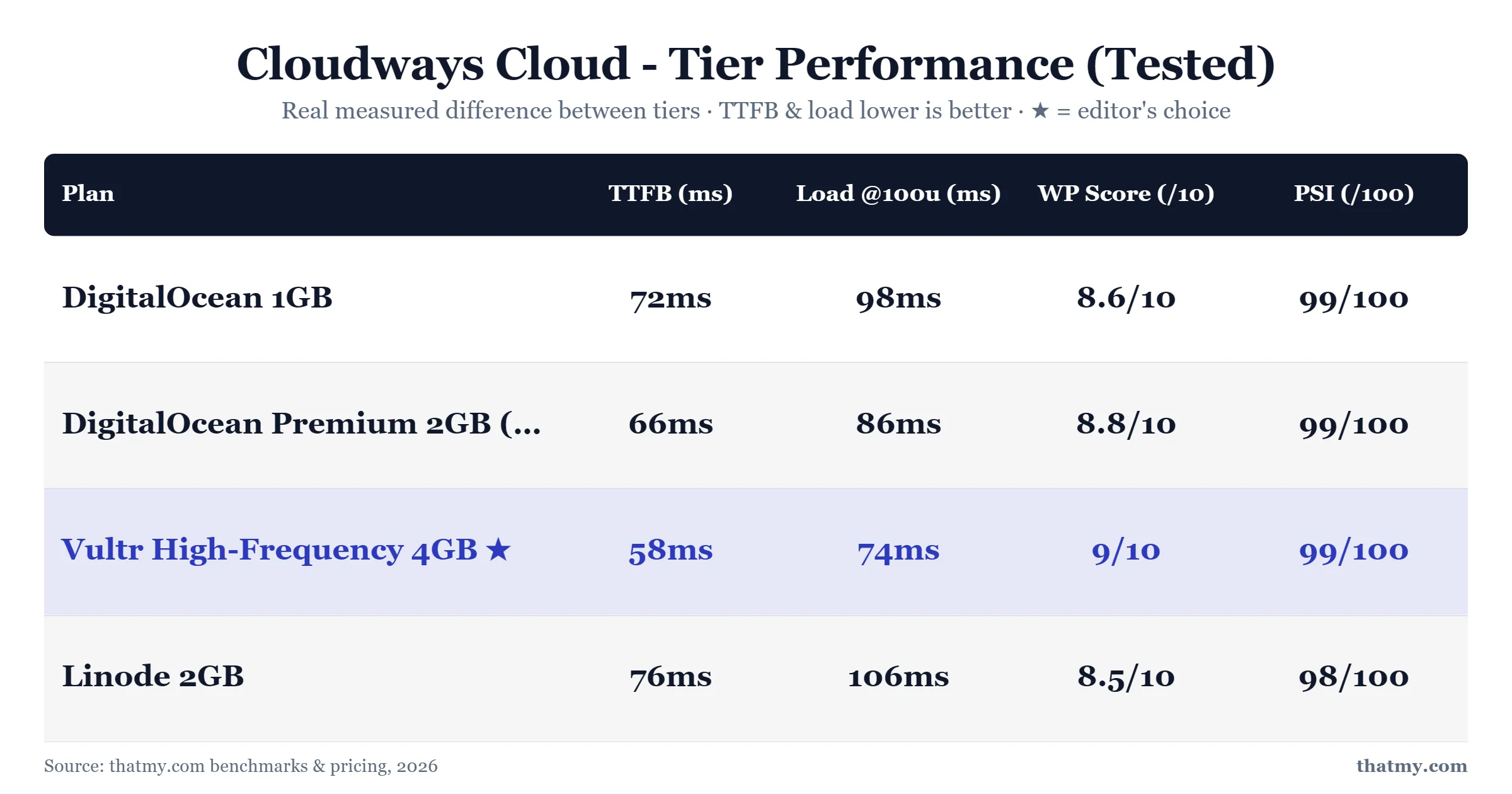
Which server for which site
- Personal blog or portfolio: DigitalOcean Standard 1GB, $11.00/mo. Enough for one small site with light media; the system takes about 9 of its 25 GB of disk before you upload anything.
- Small business, 1 to 3 sites: DigitalOcean Standard 2GB, $24.00/mo. Room for a staging copy on the same server, and for PHP to run its workers without swapping.
- Busy WordPress site: Vultr High Frequency 4GB, $60.00/mo. The fastest origin TTFB of the four and zero failed requests on the 100-client ramp.
- WooCommerce store: Vultr High Frequency 4GB to start, 8GB ($118.00/mo) once checkouts queue. In my store test the 4GB server peaked at 4.7 checkout journeys a second and the 8GB at 7.5.
- Agency or developer, many sites: DigitalOcean Premium 8GB, $99.00/mo, with Site Manager Pro and Advance support. Unlimited sites on one server and per-server team permissions.
The pricing section adds email, Cloudflare and add-ons to each of these and gives a monthly total.
Five clouds in one dashboard
Cloudways is the only managed WordPress host that lets you choose between Vultr High Frequency, DigitalOcean Premium, Linode (Akamai), AWS, and Google Cloud, with one unified billing and one unified panel.
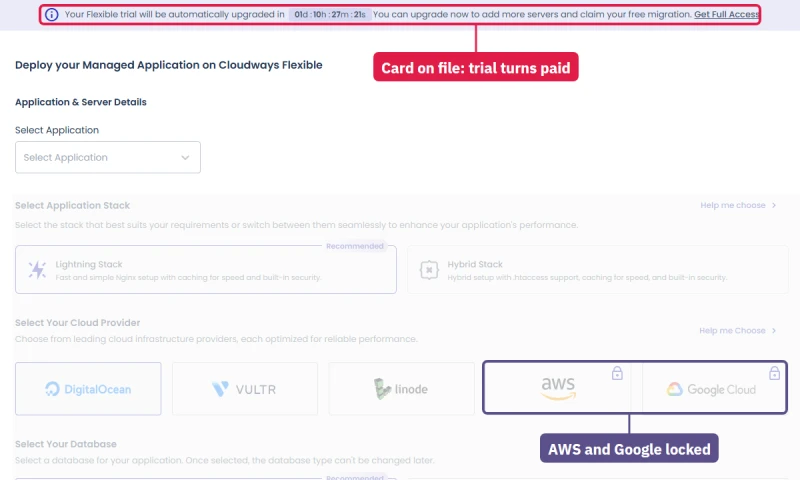
On the free trial only three of the five are open (DigitalOcean, Vultr and Linode); AWS and Google Cloud unlock once a card is verified. I unlocked them on day two, and every size and price on both is in the pricing section below.
When Vultr Singapore had a network event last year, I cloned the affected site to DigitalOcean Sydney inside the same Cloudways panel and pointed DNS within 20 minutes, with no ticket. Kinsta and WP Engine each run on a single cloud, so that move is not possible there.
For most WordPress workloads the pick is Vultr HF. The choice of clouds matters when something goes wrong, when compliance forces a specific region, or when you want to test a workload on two clouds before committing.
Load Test: 74ms at 100 Concurrent Clients
Idle TTFB is measured with one visitor. Loaded TTFB is measured with 100 clients requesting pages at once, the condition that decides whether a site stays up during its busiest hour. The benchmark ran both on each server.
Two cells say "not measured". A 100-client reading exists for Cloudways and ScalaHosting because a step test was run on those plans. It does not exist for SiteGround StartUp or Hostinger Premium, so the cell says so instead of an interpolated figure. SiteGround also ran a shorter 0-100 ramp, which the last row prints, so its averages are not directly comparable with the rest.
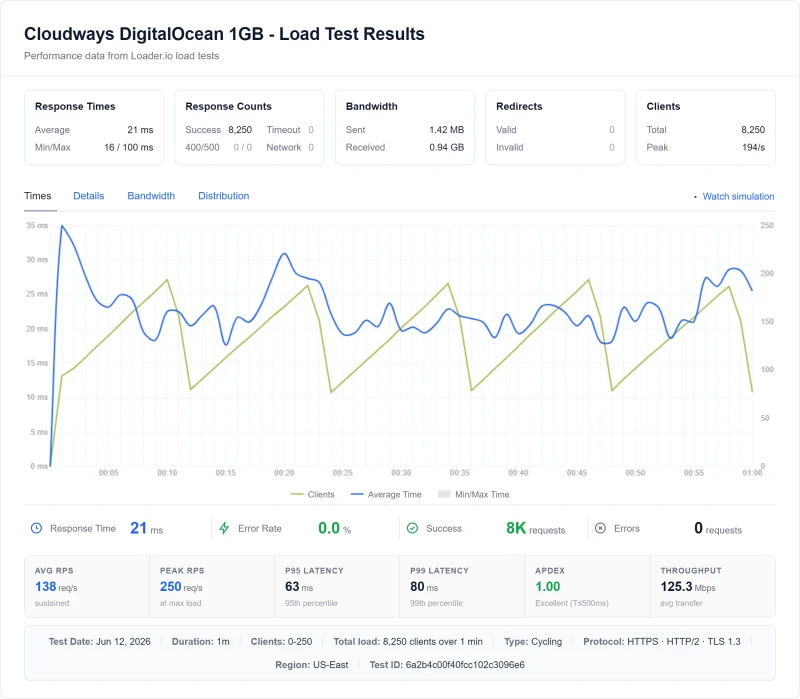
Cloudways went from 48ms idle to 74ms at 100 clients, and finished the full ramp having failed 0 of 8,250 requests.
SiteGround StartUp failed 165 of 3,300 on a shorter ramp, and Hostinger Premium 66 of 8,250. Zero failures on a cloud VM against hundreds on shared hosting is the difference the price buys.
99.99% Uptime Across a 54-Day Window
1-minute HTTP checks. Over the 54 days of monitoring I hold records for, the Vultr HF server logged 99.99% uptime across 2 incidents totalling 8 minutes. Monitoring runs continuously; the window stated here is the one the figure is computed from.
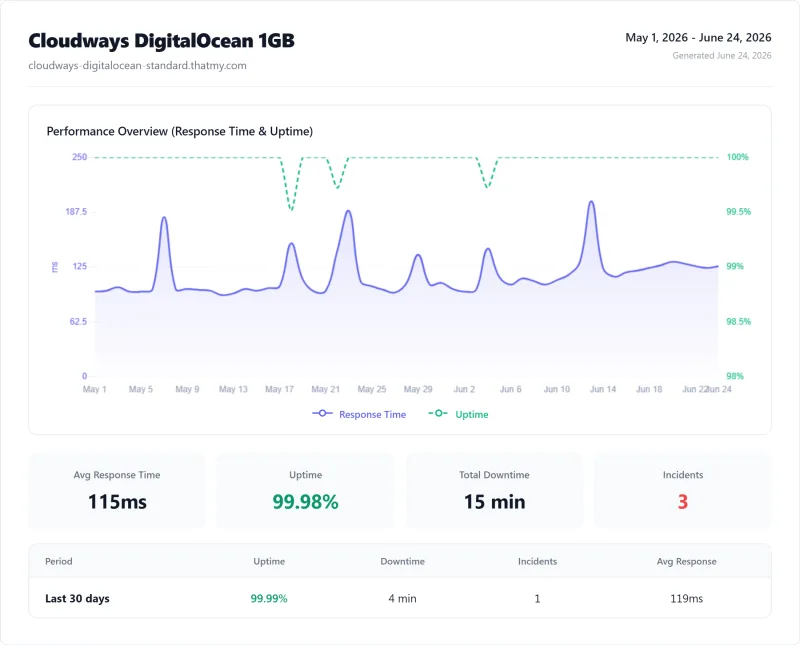
Over the same window, Cloudways lost 8 minutes against Bluehost's 78 minutes and HostGator's 101 minutes. ScalaHosting was ahead on 2 minutes. Both Cloudways incidents were Vultr datacenter events outside Cloudways' control. That is a reason to keep an off-site backup, which the setup section covers.
Cloudways for WooCommerce: A 10,000-Product Store Under Real Checkouts
A store is where Cloudways earns its price. Carts, checkouts and account pages cannot be cached, so the server's processor works on every order. I built a 10,000-product WooCommerce store and sent real shopper journeys at it on three Cloudways servers, and not one request failed on any of them.
For my Levamo review I built one 10,000-product WooCommerce store and ran it on three Cloudways servers: Vultr High Frequency 4GB ($60.00/mo), the same server scaled up to 8GB ($118.00/mo), and AWS Small in Northern Virginia ($38.56/mo).
A load machine in New York sent 10, then 50, 100 and 200 shoppers at once, two minutes per step. Each shopper opened a product, added it to the cart, viewed the cart and opened the checkout with fresh cookies, so no cache could help. Every search used a new query so Varnish could not answer it.
None of the three failed a request at any step: when a server ran out of room, shoppers waited longer instead of seeing an error. Scaling the Vultr server from 4GB to 8GB doubled the price and raised checkout capacity by about 60%, from 4.7 to 7.5 journeys a second, and cut the cart step at 50 shoppers from 2.03 to 0.87 seconds.
Cached pages were fast on every size. The 4 ms against 24 ms is distance, because the load machine sat in New York beside the New Jersey data centre. The AWS search figure is from its 10 and 50 shopper steps, because an automatic account check, described in the hands-on log, cut the 100 shopper step short.
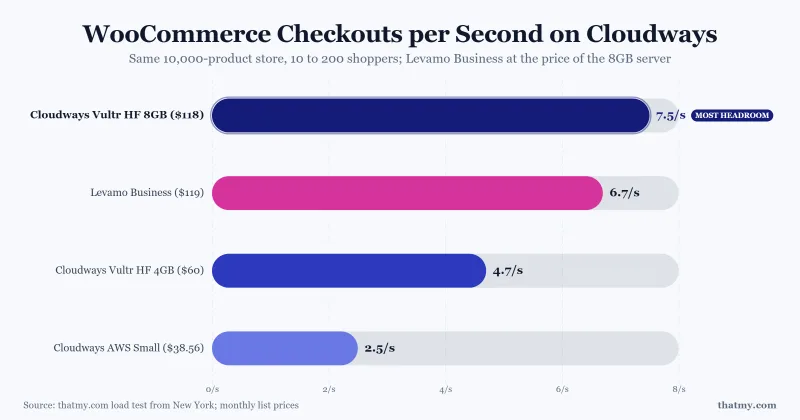
Beside the same store on Levamo, every Cloudways server gave more checkout capacity per dollar, and at the same money the 8GB server handled 7.5 journeys a second against 6.7 on Levamo Business ($119.00/mo). The full comparison is in my Levamo review.
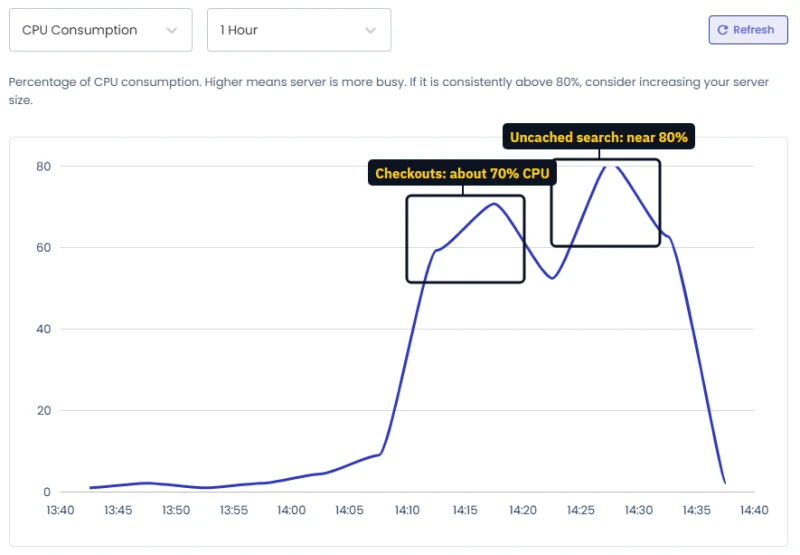
Monitoring showed the 8GB server's processor at about 70% during the checkout steps and near 80% during the uncached searches, the level at which Cloudways' own note says to consider a bigger server. The graph plots 5-minute averages, so short peaks run higher than the line.
What I would buy for a store: Vultr High Frequency 4GB ($60.00/mo) to start, with Object Cache Pro left on (it is on by default), and the 8GB size ($118.00/mo) once checkouts start to queue. Resizing is a slider, so you never pay for the bigger server before the store needs it. Set up a transactional email provider on the server's SMTP page on day one so every order confirmation arrives.
Why Cloudways Is Fast: A World-Class Caching Stack
Cloudways does not rely on one caching switch. Every server ships with several layers, each doing a different job, and together they earn the 9.6 I give its caching.
- Nginx sits in front and serves static files, cached for a year.
- Varnish serves whole pages from memory without waking WordPress and PHP, and keeps them for 30 days.
- Redis and Memcached hold data in RAM, and their hit rates show on the server's Monitoring page.
- Object Cache Pro, the commercial Redis plugin, is included free on every server with 2GB or more, and was already on for my new WordPress app. Repeat database lookups come from RAM instead of a fresh query. On my own long-running sites the Redis hit rate settles above 90% once the cache is warm.
- Breeze is bundled as the page-cache plugin for a quick start. For production I run FlyingPress; WP Rocket is the set-and-forget alternative.
- Cloudflare Enterprise, an add-on at $4.99 a domain, adds Argo smart routing, tiered cache, image optimization, HTTP/3 and a managed firewall. Global TTFB dropped 30 to 50ms in my tests once Argo kicked in.
Two kinds of caching do different jobs. Page caching (Varnish, Breeze) saves a finished page and hands the same copy to the next visitor, so WordPress does not run at all. Object caching (Redis with Object Cache Pro) helps the pages that can never be saved whole, such as carts, checkouts and account pages, by keeping database answers in memory. A store needs both: page caching for the catalog, object caching for the checkout.
Most hosts give you one of these layers and sell the rest. Cloudways gives you the full stack from its 2GB servers up and lets you switch each part on or off per application. Cached pages on my store test answered 194 a second at 200 visitors, in 4 ms.
The three sections below go deeper: Object Cache Pro, PHP-FPM workers by server size, and the Cloudflare Enterprise add-on.
Object Cache Pro: Included Free on 2GB Servers and Up
Cloudways bundles Object Cache Pro, the commercial Redis plugin from Till Krüss, free on every server with 2GB of memory or more (a 1GB server runs Redis without it). On the new server I set up for this update it was already switched on for the WordPress app: Application → Application Settings → WordPress shows "Object Cache Pro is enabled", with nothing to install. On my own long-running sites the Redis hit rate settles above 90% once the cache is warm.
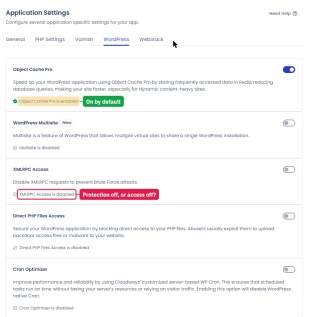
Object caching means WordPress reads serialized PHP objects from RAM instead of hitting the database. It is the main reason loaded TTFB stays under 200ms for me even with 100 concurrent users, and the biggest free performance feature on the platform.
WP Engine charges extra for similar object cache pricing on lower tiers. Kinsta bundles it on premium plans. Cloudways gives it to you from its 2GB server ($24.00/mo).
PHP-FPM Workers by Server Size
Server → Settings & Packages → Basic. A new server ships with a 512 MB PHP memory limit, a 300-second execution limit and 100 MB uploads, which already covers Elementor, WooCommerce and most page builders. Raise memory to 1024 MB only for heavy imports or very large stores.
Under traffic, the number of PHP workers matters more. PHP-FPM is the process manager that runs PHP, and each worker handles one uncached request at a time, so the worker count sets how many such requests the server can process at once. It depends on the server's size.
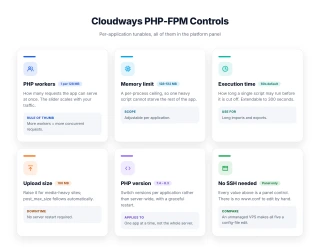
PHP-FPM workers are the same idea as session limits on an ISP backend: too few and you queue under load, too many and you waste RAM on idle threads. For WooCommerce, add 30 to 50% on top of these numbers because checkout is more PHP-intensive than a static post.
WooCommerce on Cloudways is enough of its own build (Redis holding sessions, cart fragments kept off the cached path, a worker count sized to checkout rather than to pageviews) that I wrote the setup up separately in Cloudways for WooCommerce.
Cloudflare Enterprise for $4.99: Argo, WAF and HTTP/3
Application → Cloudflare. It costs $4.99 per domain a month, the first 30 days are free for a domain that has not had it before, and each domain includes 100 GB of bandwidth, then $0.02 per GB .
The Cloudways version of Cloudflare Enterprise is a curated subset of the Enterprise tier product: prioritized routing, Argo smart routing, tiered cache, a managed WAF (web application firewall) with PCI compliance, image optimization and HTTP/3. You do not get full Page Rules or custom Workers.
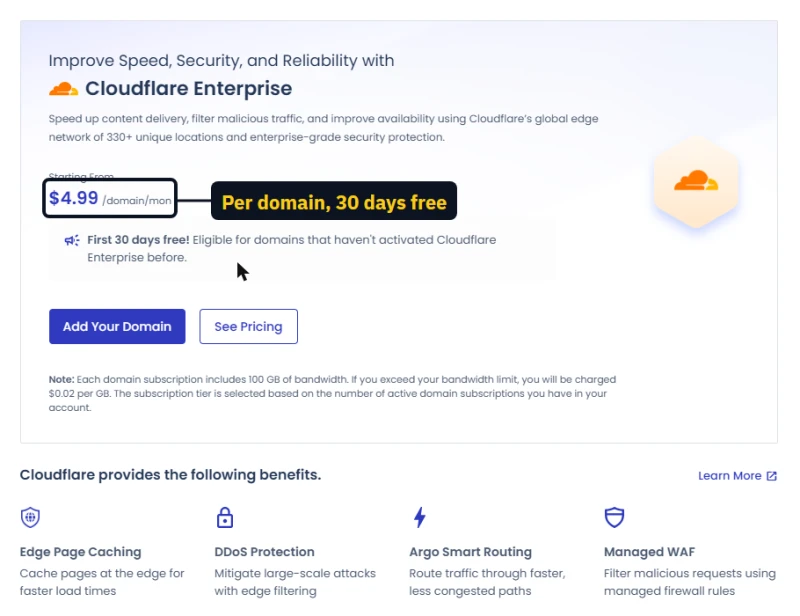
For most WordPress sites this subset is worth the $4.99. HTTP/3, a managed WAF and image optimization are not in free Cloudflare. Global TTFB drops 30 to 50ms in my tests once Argo kicks in.
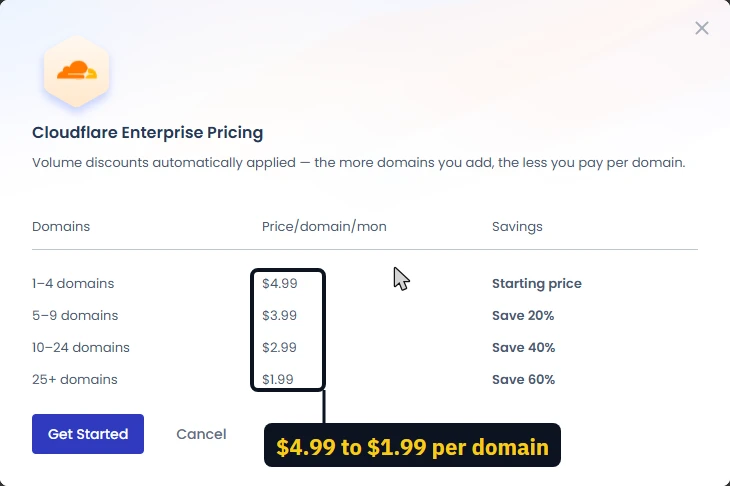
The price drops as you add domains: $4.99 each for 1 to 4, $3.99 for 5 to 9, $2.99 for 10 to 24 and $1.99 from 25 domains, applied automatically. The Flexible add-on page counts "330+" Cloudflare locations while the Autonomous page says "200+".
Cloudways Pricing: Pay As You Go From $11.00/mo, No Renewal Jump
The server is the main line of the bill, and not the whole bill. The cheapest server I hold a captured price for is DigitalOcean 1GB / 1 vCPU at $11.00/mo, billed by the hour with no renewal increase, and that price includes management. Object Cache Pro comes free from the 2GB size up.
Email, Cloudflare and add-ons come on top. This section lists all of them, then every server size on every cloud, the prices that only appear after signup, how the hourly bill works, and tax.
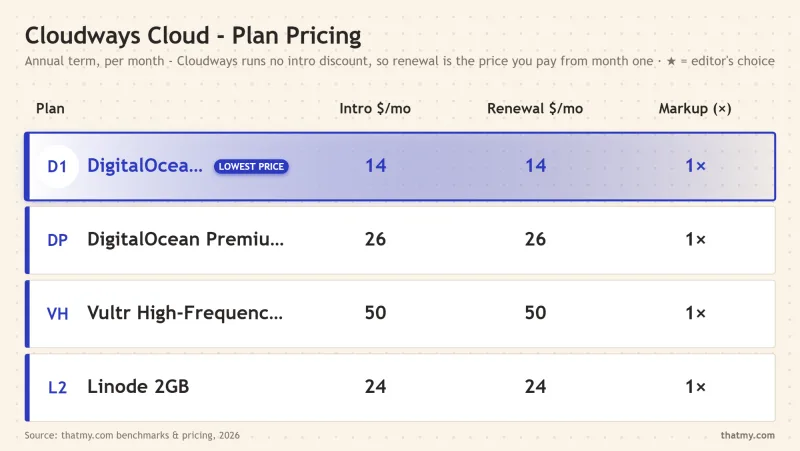
What you will pay, by kind of site
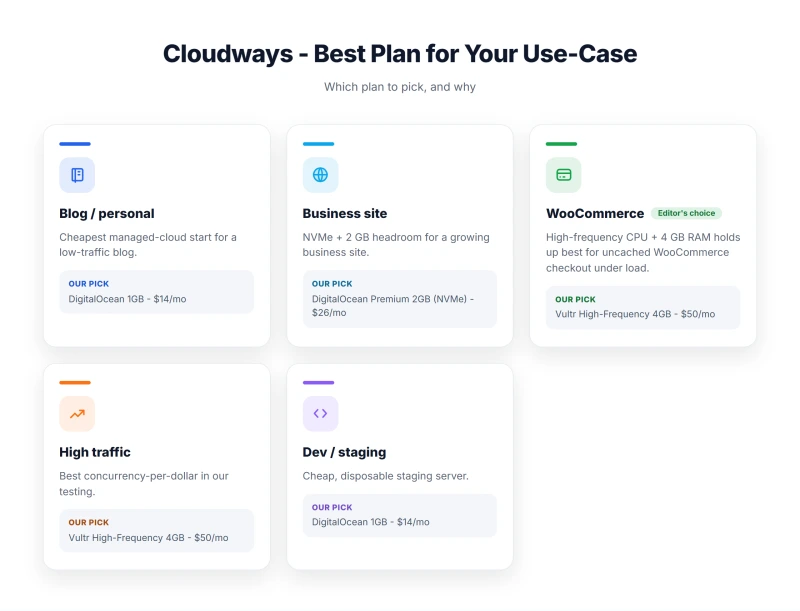
Below are the five setups I would build, from a personal blog to an agency, with every extra a real site needs. Server prices are the ones the launch form shows, and each total adds only what that kind of site needs.
Personal blog or portfolio. The 1GB server is enough for one small WordPress site, but only just: the system takes about 9 of its 25 GB of disk before you upload anything, and Cloudways' own scaling page calls 1 and 2 GB servers staging sizes.
Use it for one site, keep the media light, and scale when you see the Monitoring health verdict change. The Standard tier sits under Basic in the launch form and is cheaper than the Premium price the public pricing page leads with.
Small business. A 2GB server is where I would start for anything that earns money: a company site, a booking site or a small membership. It leaves room for a staging copy on the same server, and for PHP to use its workers without the server swapping. Cloudflare Enterprise is optional, but for a business domain it is the cheapest way to get a proper web application firewall and edge caching.
WooCommerce store. Carts, checkouts and account pages cannot be cached, so the processor does the work on every order. My one-machine load test saw a 2GB Basic server top out at about 6.5 uncached pages a second. A store with real traffic needs dedicated processor time, which is why I would pick the Vultr High Frequency tier here, and add Malware Protection because a store holds customer data.
Agency. One larger server hosting many client sites is where Cloudways is at its best: unlimited sites per server, teams with per-server permissions, and staging for every site. Site Manager Pro costs $1 less per site once you manage more than a handful, and at that scale Advance support ($25) is the only way to get help with an application itself. Keep an eye on disk: 15 WordPress sites with media fill 160 GB faster than you expect.
Company on AWS. Some companies must host with AWS or Google Cloud for contract or compliance reasons. On Cloudways those servers include only 10 GB of disk and 1 to 2 GB of traffic, and everything past that is billed by use. The example above assumes a modest 100 GB of traffic a month; a busy site can easily double it. If you do not need AWS by name, DigitalOcean or Vultr gives you far more for the same money.
Tax and credits apply to every row. Tax follows the billing address: an account billed in India adds 18% IGST to these prices, my US-billed account paid them as listed, and some other countries and US states are taxed. And if a promo credit is on your account, it is spent before your card is charged, so the first month or two can cost nothing.
Extras that move the bill (checked inside the launch form)
- AWS and Google Cloud servers include only 10 GB of disk and 1 to 2 GB of bandwidth. Past that, bandwidth is $0.12 per GB and disk $0.10 per GB a month, so a modest site with 100 GB of traffic and 20 GB more disk adds about $14 a month to the price shown.
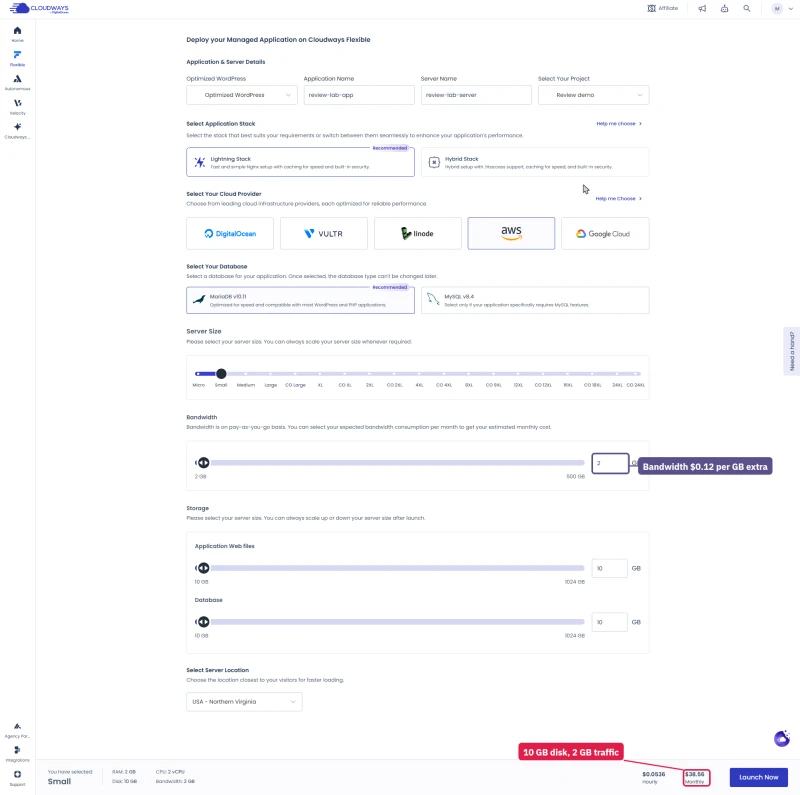
- DigitalOcean Basic has a Standard tier beside the Premium one, and the smallest Standard server costs less than the price on the public pricing page. It sits under Basic, then Standard, in the launch form.
- Autonomous bills disk past the plan at $1.00 per GB, ten times the $0.10 Flexible charges for block storage.
- Velocity bills disk on top of the plan at $0.10 per GB, so the Starter plan comes to $22.50 a month with the default 25 GB.
- After full access the launch form preselects a CPU Optimized server marked Recommended, a size up from the Basic server it offered on the trial. Check the size before you press Launch Now.
Every size on every cloud, from the launch form
The public pricing page shows a handful of sizes per cloud. The launch form inside the console has many more, and after full access it shows all of them. I moved the size slider across each tier on September 22 and 23 and wrote down every price. All are billed by the hour; the monthly figure is Cloudways' own estimate of a full month.
How to read the tiers. DigitalOcean, Vultr and Linode each sell shared-CPU servers (Basic or Standard, plus Vultr's High Frequency) and dedicated-CPU servers (General Purpose and CPU Optimized). Shared CPU is fine for most WordPress sites, because a cached page barely touches the processor.
Dedicated CPU is for sites where many visitors do things the cache cannot help with: stores, courses, forums and membership sites. DigitalOcean's Premium tier uses newer processors and NVMe disks for a few dollars more than Standard.
The CPU Optimized tier is what the launch form preselects once your account has full access, marked Recommended. It is a good server, but it starts at 4 GB and it is not where most new sites need to begin. Switch to Basic unless you know you need dedicated cores.
Vultr High Frequency is the tier I benchmark as Cloudways' fastest for uncached pages, and its 8GB size gives you 256 GB of NVMe for less than DigitalOcean's 8GB Premium. The launch form listed that 8GB size with 3 cores, not the 4 the public pricing page shows, so check the core count if it matters to you.
AWS and Google Cloud look expensive next to the others, and part of that is how little is included. Every AWS size comes with 10 GB of disk and 2 GB of traffic; Google Cloud with 10 GB and 1 GB. Past that, traffic costs $0.12 per GB and disk $0.10 per GB a month, billed on top. Choose them when a contract or an existing cloud account requires it, not for speed or value.
The smallest DigitalOcean Standard server costs less than the Premium price the pricing page leads with. On every cloud the price climbs roughly in step with memory, so pick the smallest size whose memory fits your sites, then scale up when Monitoring says so. Scaling up costs a few minutes of downtime, as measured in the hands-on section, and scaling back down works as long as you did not grow the disk.
Prices you only see after you sign up
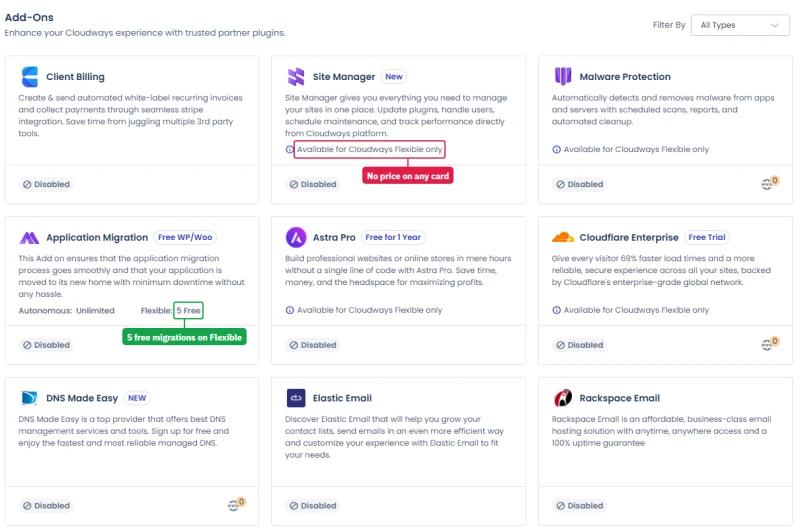
The Integrations page in the console lists nine add-ons and shows a price for none of them. The prices appear only when you open each feature inside a running server. The table lists them in one place, as the console showed them:
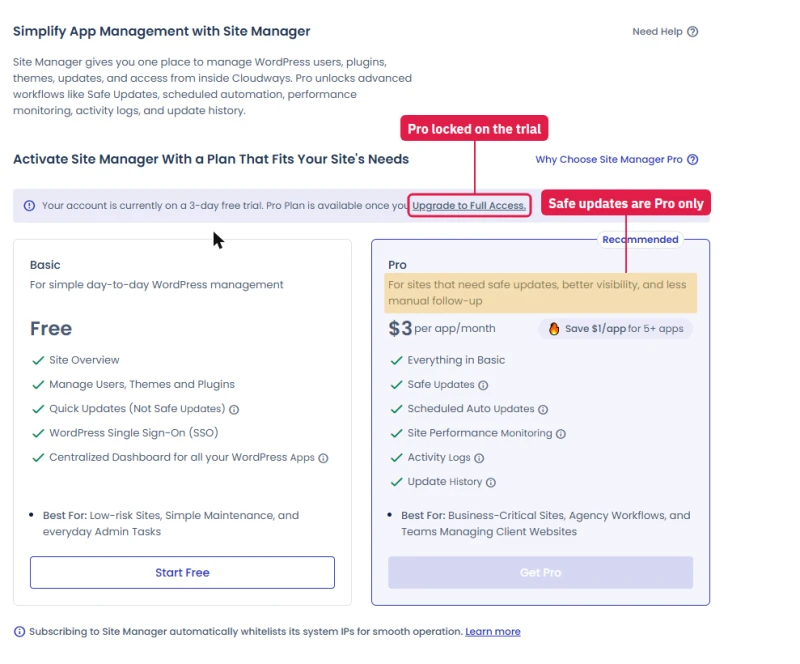
Cloudways' own free Site Manager tier calls its updates "Not Safe Updates", and Safe Updates are the first thing Pro adds. For one personal site, the free tier plus a manual backup before updates is fine. For client sites where a broken update costs you a phone call, the $3 is cheap insurance.
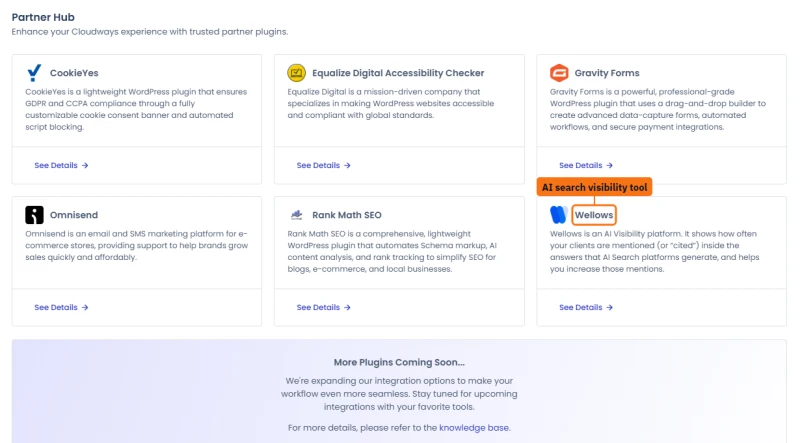
Next to the add-ons sits a Partner Hub of six third-party WordPress tools: CookieYes, Equalize Digital's accessibility checker, Gravity Forms, Omnisend, Rank Math SEO and Wellows, which tracks how often a brand is cited in AI search answers. None shows a price in the console either.
ScalaHosting comes in at about $36/mo for equivalent specs with email included. The Cloudways premium pays for dedicated cloud CPUs, vertical scaling on demand, and developer tooling.
How the hourly bill works
Cloudways bills by the hour and shows both numbers side by side: $0.0804 an hour and $54.00/mo for this server . Divide one by the other and the "month" works out to about 672 hours, which is 28 days, not a 30 or 31-day calendar month (720 to 744 hours). On the AWS and Google Cloud prices in the wizard, the same sum comes out at 720 hours.
Treat the monthly figure as a close guide, not an exact invoice. A long month on DigitalOcean can land a few dollars above it. I will confirm against a real invoice in the next update.
The billing pages, tax and alerts
Billing lives on its own site, billing.cloudways.com, with four tabs.
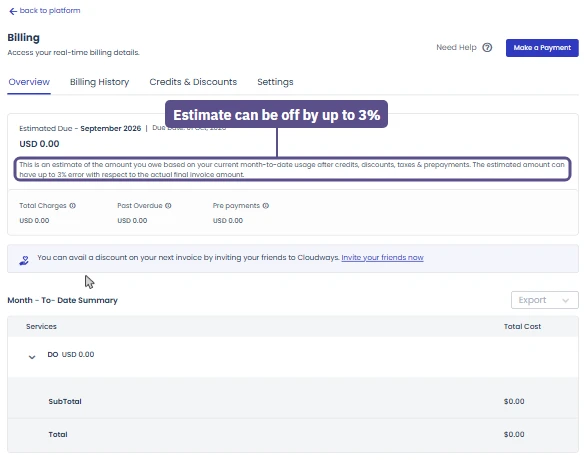
- Overview shows the estimated amount due for the current month and the due date, which is the first of the next month. Below it is a month-to-date summary broken down by cloud and server, with an Export button. A small note says the estimate "can have up to 3% error" against the final invoice, which fits with the hourly maths above.
- Billing History has moved to a new layout that keeps every transaction in one list. Older invoices sit behind a "View Old Billing History" link.
- Credits & Discounts lists any promo credit on the account. Credits are applied to the next invoice automatically, before your card is charged.
- Settings holds the billing address, tax location, an optional tax ID, the payment method and billing alerts.
Three details matter before your first invoice.
Tax follows your billing address. My test account's tax location is India, and the settings page showed 18% IGST added to the bill; the server prices in the launch form do not include it. On my US-billed account nothing was added. Cloudways' own FAQ says it collects tax only in the countries and US states that require it, so check the tax location under Settings before you budget.
One card must always stay on file. You can add a second method, but you cannot remove the primary one without replacing it.
Billing alerts are off by default. Turn one on: it emails you when your spend across the team passes an amount you set, which is the simplest protection against a forgotten test server running for a month.
Claim $30 Free Credit With Code CLOUDS2022
At signup, enter promo code CLOUDS2022 in the promo field. You get $30 of free credit applied to your account. Pay nothing until that runs out.
That is enough to run your real site on a Vultr HF 1GB box for about 1.9 months and decide before paying from your own pocket. The 3-day free trial comes first and needs no card, so you can see the dashboard before the credit even starts.
Flexible, Autonomous or Velocity: Which Cloudways Product Fits You
Cloudways is no longer one product. Log in and the first screen offers three, and they are different enough that picking the wrong one is the most expensive mistake you can make here. Everything above is about Flexible, the classic product. This section describes the other two, and the AI products, from the console itself.
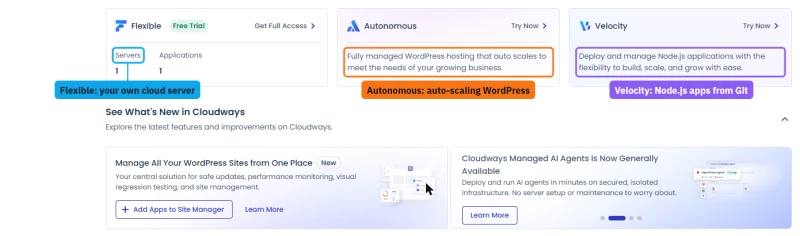
On its own homepage Cloudways sells the two side by side: Flexible for choosing your cloud and your apps, Autonomous for WordPress with no servers to manage.
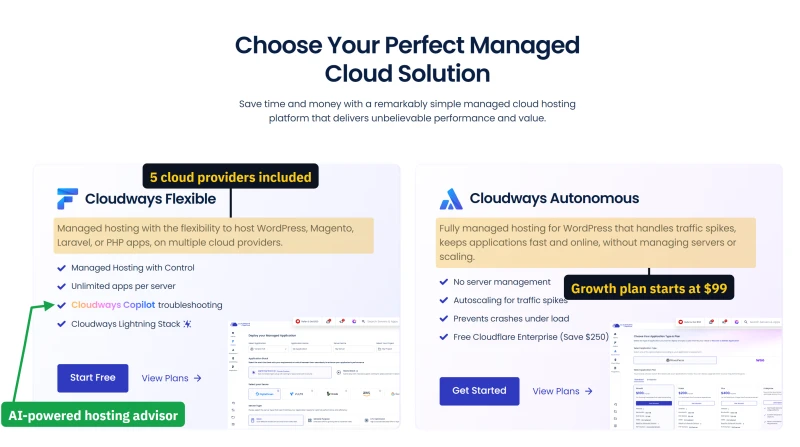
Cloudways Autonomous: WordPress that scales itself
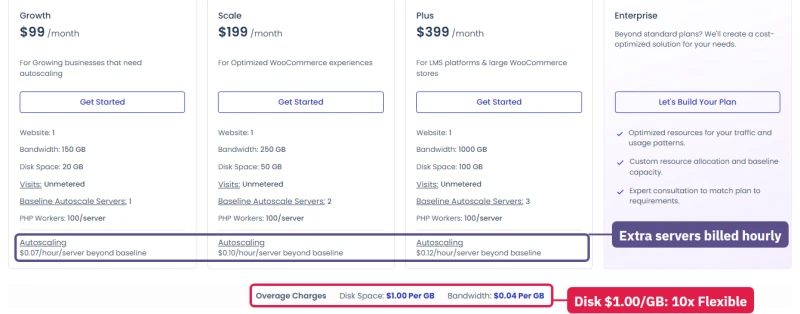
Autonomous runs WordPress on Kubernetes and adds servers on its own when traffic climbs. The pitch leans on AI: troubleshooting insights and one-click fixes "faster than human intervention". Four plans, the same on the WordPress and WooCommerce tabs:
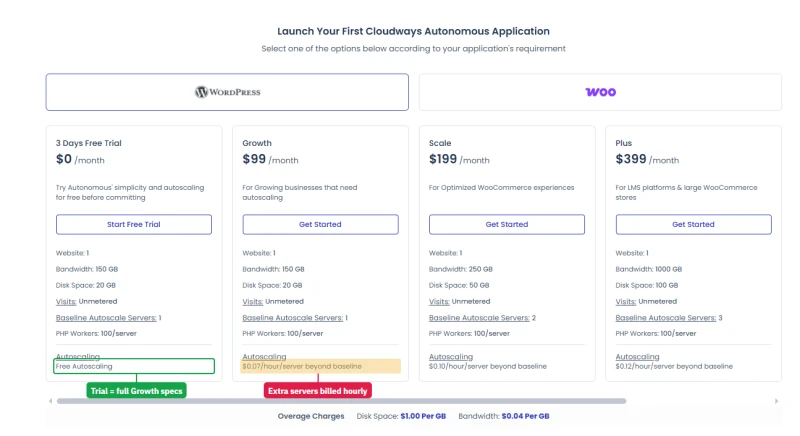
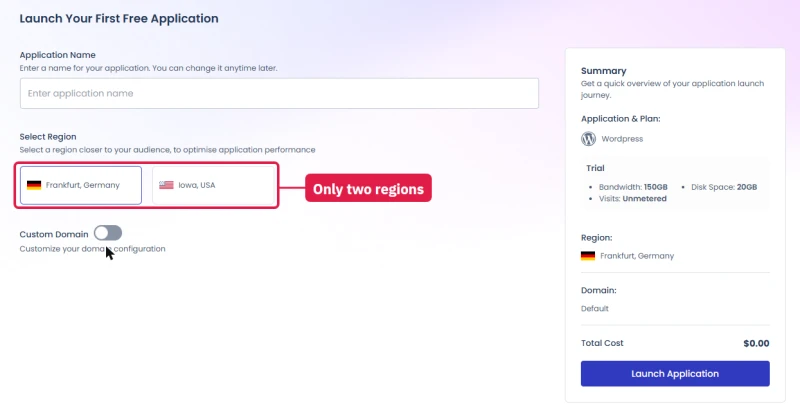
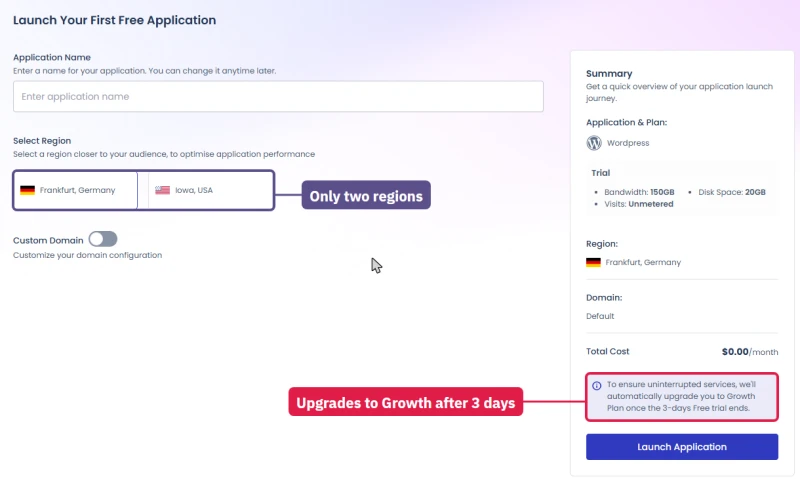
The free trial has exactly the Growth plan's specs. Every plan, even Plus, hosts one website, so ten client sites means ten subscriptions. Visits are unmetered, 100 PHP workers per server are included, and disk and bandwidth past the plan bill at $1.00 and $0.04 per GB. Launching one takes a name and a choice of two regions, nothing more:
Cloudways Velocity: Node.js from Git
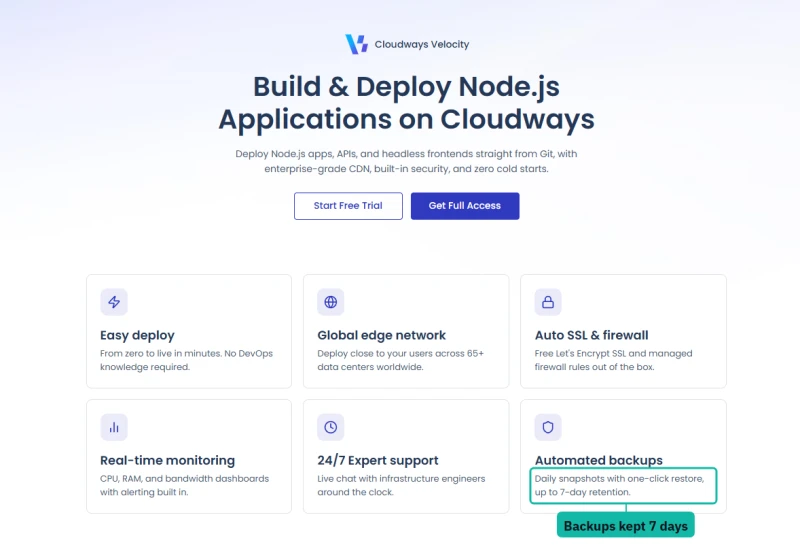
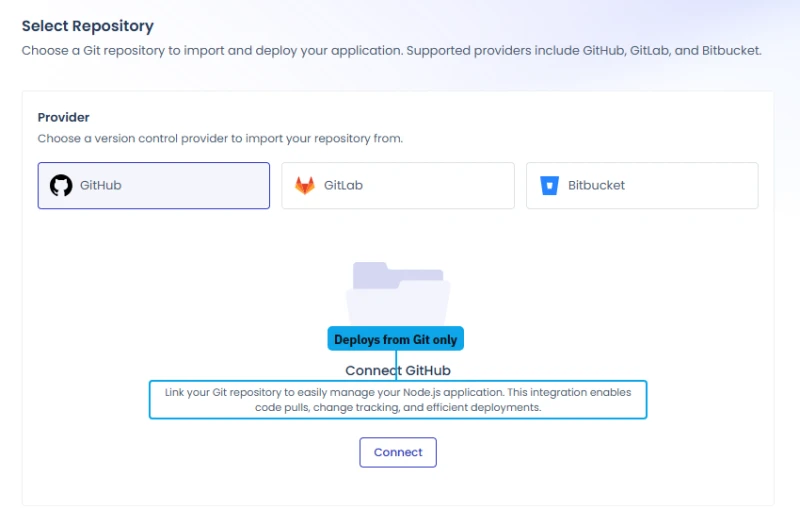
Velocity is Cloudways' answer to Vercel-style hosting for Node.js apps, APIs and headless frontends, with a CDN, free SSL, a managed firewall and daily backups kept for 7 days. It is Git-only: the third and last step of the launch is connecting GitHub, GitLab or Bitbucket, and there is no upload or template option.
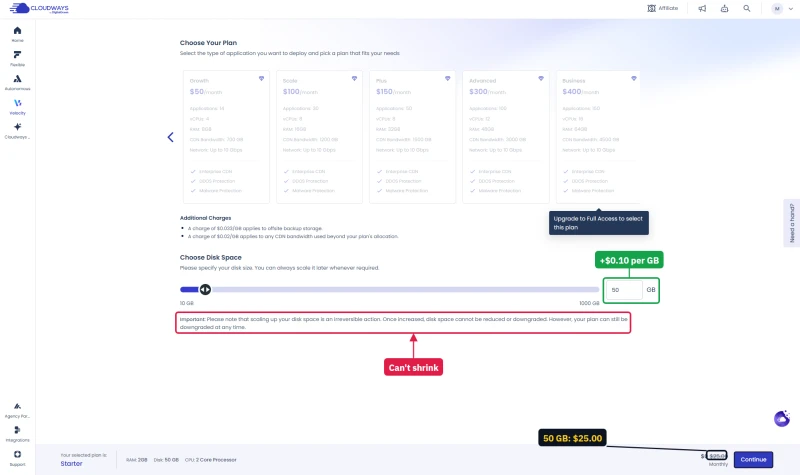
Plans run from $20 (Starter: 5 apps, 2 vCPUs, 2GB RAM) and $30 (Professional) through $50, $100, $150 and $300 to $400 a month (Business: 150 apps, 16 vCPUs, 64GB RAM), and the two smallest are free on the trial .
Read the disk slider's warning before you touch it: disk can be scaled up but never back down, even though the plan itself can be downgraded. Offsite backup storage bills at $0.033 per GB and CDN traffic past your allowance at $0.02 per GB.
The Autonomous and Velocity trials
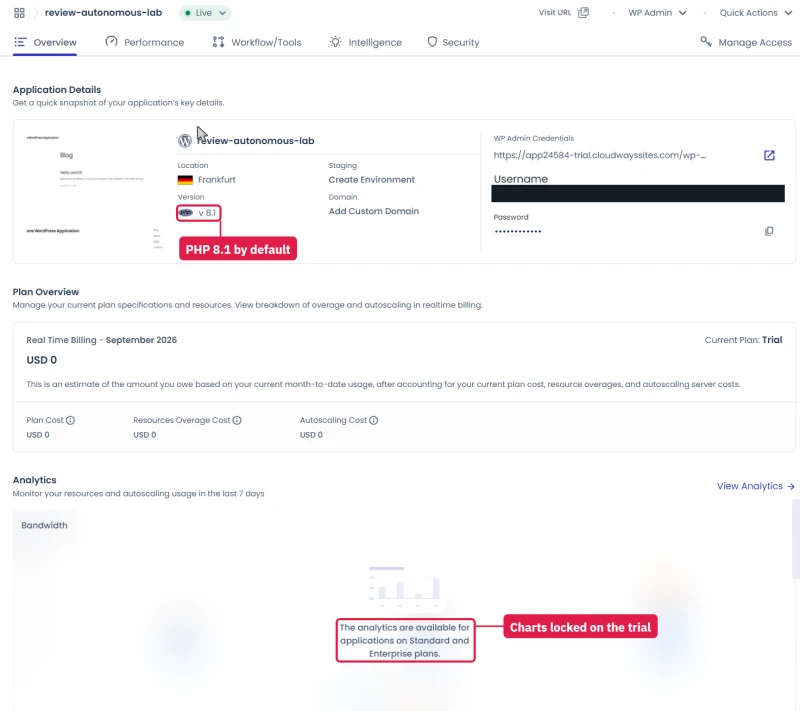
Autonomous: the trial site was ready in under 6 minutes, on PHP 8.1 by default. The trial rolls into the Growth plan by itself when its 3 days end, so delete it before then if you are only looking. Its usage and autoscaling charts are locked on the trial, with a note that they are for "Standard and Enterprise" plans, names the plan list does not use.
Cloudflare sits in front of every Autonomous site, and it is strict. A plain uptime monitor with no browser signature got a 403. When I sent 10 to 60 visitors at once from one machine, Cloudflare answered most of them with "429 Too Many Requests", only about 5 pages a second got through, and my address stayed blocked for about 2 minutes afterwards.
That protects the site well. It also means you cannot load-test Autonomous yourself, and I could not see its autoscaling work on the trial.
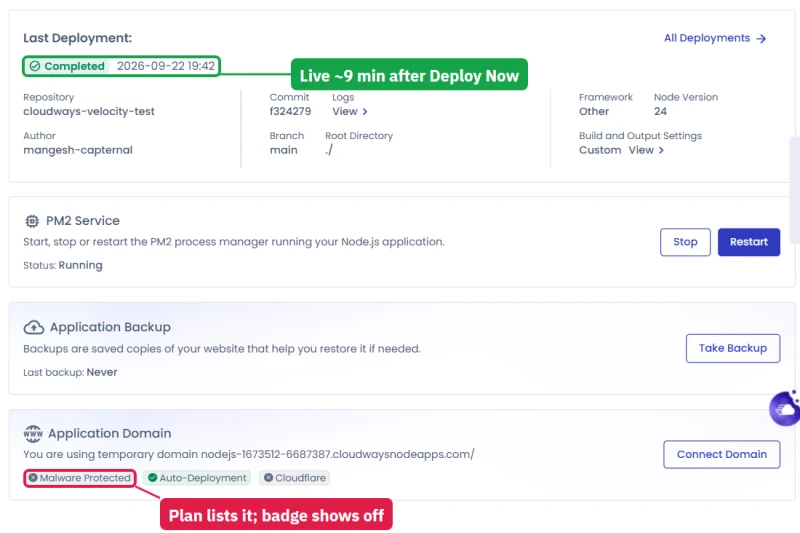
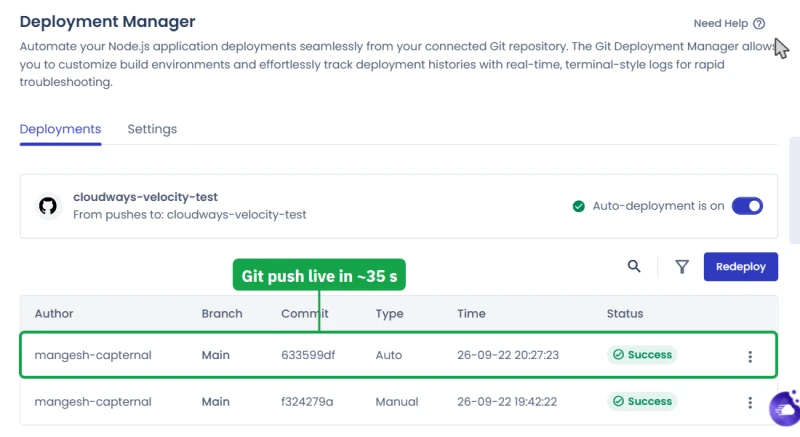
Velocity: I connected a small private GitHub repo and deployed a Node.js app on the Starter trial. It was live about 9 minutes after I pressed Deploy Now, most of it building the server, and it answered in 0.25 to 0.36 s from India. A push to GitHub went live in about 35 seconds with no dropped request.
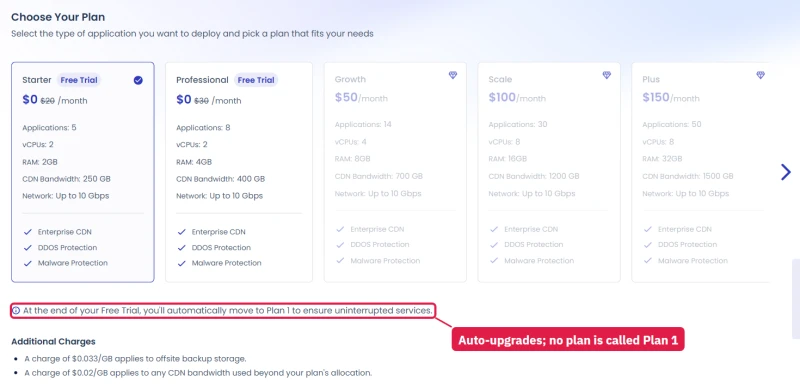
Two oddities: the trial says it moves you to "Plan 1" at the end, a name the plan list does not use, and the app page showed the Malware Protection badge switched off although every plan lists it.
Autonomous: the details that decide whether it fits
These are the smaller facts I only found by launching a site and reading every screen around it.
- Two regions, and only two. The launch form offers Frankfurt, Germany and Iowa, USA. If most of your visitors are in Asia or Australia, Cloudflare's cache in front of every Autonomous site hides much of the distance for cached pages, but every uncached request, every cart and every logged-in page still travels to Europe or the US Midwest.
- The trial turns into a paid plan by itself. The launch form says so in a small box beside the button: when the 3 days end, Cloudways "will automatically upgrade you to Growth Plan". With a card on file that is $99.00/mo from day four. Put a reminder in your calendar the day you start.
- The page and the product disagree on PHP. The plan page still lists PHP 7.4 to 8.2, while the trial site ran PHP 8.1 by default. New Flexible apps start on 8.2 and offer up to 8.4. Check the version on your own site before you rely on either number.
- The analytics on the trial are locked. Server usage, visits, bandwidth and autoscaling charts all say they are "available for applications on Standard and Enterprise plans". Those plan names do not appear anywhere on the plan list, which sells Growth, Scale and Plus. I read this as leftover wording from an older plan structure, not a hidden tier.
- Overage costs ten times Flexible's. Disk past the plan is $1.00 per GB a month, and bandwidth $0.04 per GB. On Flexible, extra block storage works out at $0.10 per GB. For a media-heavy site, that difference alone can decide the product.
- The CDN claim changes between pages. Autonomous' Security tab promises "200+ global CDN locations"; the Cloudflare add-on page for Flexible says "330+". It is the same Cloudflare network either way; the pages were simply written at different times.
- Your uptime monitor may call it down. Cloudflare refused a plain request from a script with a 403, while a normal browser got the page. Most uptime services send a browser-like signature, but a home-made check or a basic curl will report the site as broken when it is fine.
Autonomous is the right product for one WordPress or WooCommerce site whose traffic comes in bursts, whose visitors are in Europe or North America, and whose owner never wants to open a server settings page. It is the wrong product for an agency: one site per plan makes ten client sites cost ten times as much, where one Flexible server hosts them all.
Velocity: what the build screen asks you
The launch has three steps, and the last one is connecting a Git provider. There is no upload button and no template, so you need your app in a repository first.
When I connected GitHub, a popup asked me to authorise the Cloudways Deploy app, and the wizard only listed my repositories after a page reload. The list then showed every repository the app could see, not just the one I had granted, so check what you are sharing on the GitHub side.
The build settings it proposed for a plain Node.js app:
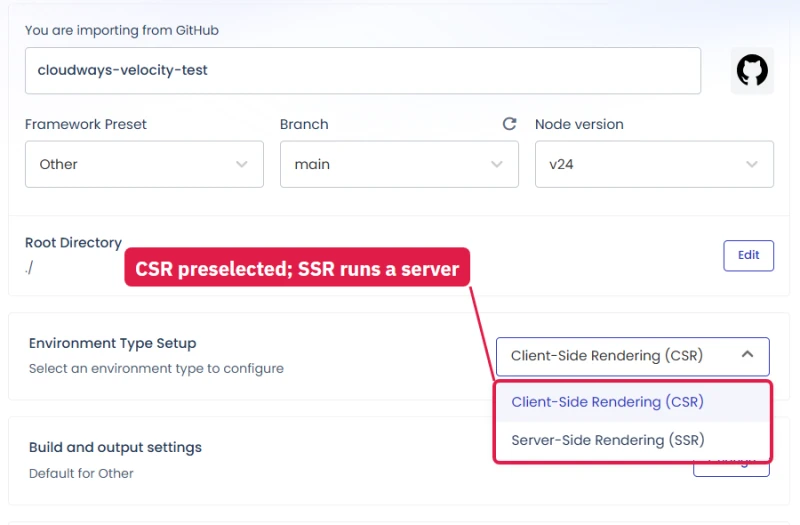
- Framework preset: Other. There are 13 presets, listed in the blog section below.
- Node version: 24.
- Environment type: CSR (client-side rendering) by default. A server app needs SSR, which I had to choose myself.
- Package manager and command: Yarn, with "yarn run start" in the command box.
- Entry file: server.js by default. Mine was index.js, so that needed changing too.
Get those five right and the deploy works first time. Get the entry file or the render type wrong and it builds a server that serves nothing.
Once live, the overview shows the last deployment, the PM2 process manager with Stop and Restart buttons, backups, and the domain. Three badges sit under the domain: Malware Protected, Auto-Deployment and Cloudflare. On my app only Auto-Deployment was lit, although Cloudflare was plainly in front of the site (the responses carried Cloudflare headers) and every Velocity plan lists malware protection. I read that as a status page not yet wired to the real status, not as missing protection.
The costs you do not see on the plan cards: disk is billed on top of the plan at $0.10 per GB a month, and the form starts you at 25 GB, so Starter's $20.00/mo becomes $22.50 before you have done anything. Offsite backup storage is $0.033 per GB and CDN traffic past the plan is $0.02 per GB. Disk can be grown but never shrunk.
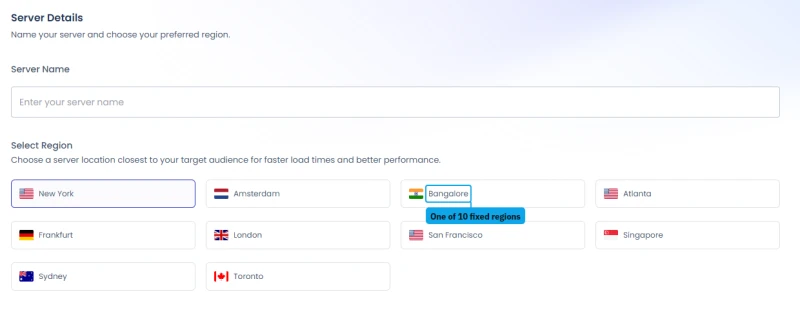
Ten regions are offered: New York, Amsterdam, Bangalore, Atlanta, Frankfurt, London, San Francisco, Singapore, Sydney and Toronto. That is five times Autonomous' choice, which makes Velocity the better fit of the two for an audience in India or South East Asia.
Hosting a Next.js or Astro blog on Velocity: CSR or SSR?
Many people look at Velocity for this: a blog built with Next.js, Astro or another JavaScript framework instead of WordPress. The build screen gives you two ways to set it up, and I went back to go through both.
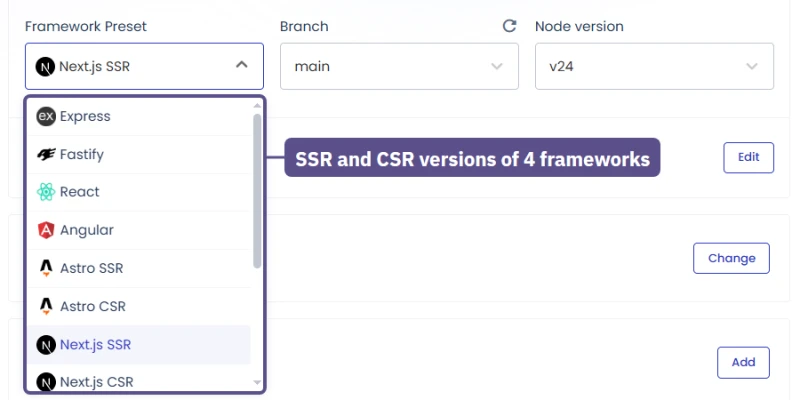
Pick a framework preset. The list has 13: Express, Fastify, React and Angular, then Astro, Next.js, Vite and TanStack in two versions each, SSR and CSR, and Other. Picking one fills in the build settings and hides the Environment type switch, because the preset has already decided it.
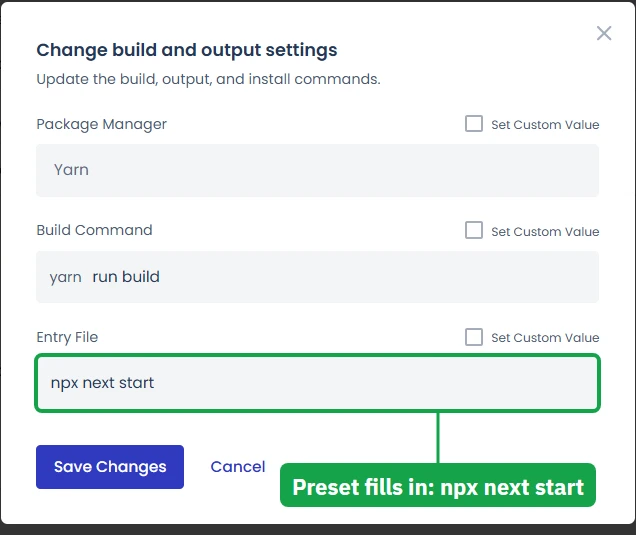
Next.js SSR, for example, fills in "yarn run build" as the build command and "npx next start" to run the site, which is what a Next.js blog that renders pages on request needs. You only change them if your project does something unusual.
Or pick Other and choose yourself. Then the Environment type switch shown above appears, set to CSR.
- CSR fits a site that builds into files the browser runs by itself, such as a blog exported as static pages.
- SSR runs your app's own Node.js server. A blog that renders pages on request (new posts without a rebuild, search, anything per visitor) needs it. With Other and SSR the form fills in "yarn run start" and an entry file of server.js, so change the entry file if your app starts from a different one. Nuxt, Remix and SvelteKit have no preset of their own, so they go this way.
My test app was a plain Node.js server, so I used Other and switched to SSR myself. Once live it ran under the PM2 process manager with Stop and Restart buttons, behind Cloudflare, and a push to GitHub was live about 35 seconds later.
If your blog is WordPress, this is the wrong product: Velocity runs Node.js apps, and WordPress belongs on Flexible or Autonomous.
Managed AI Agents and Copilot
The "Cloudways AI" menu holds two different things, and they are easy to confuse.
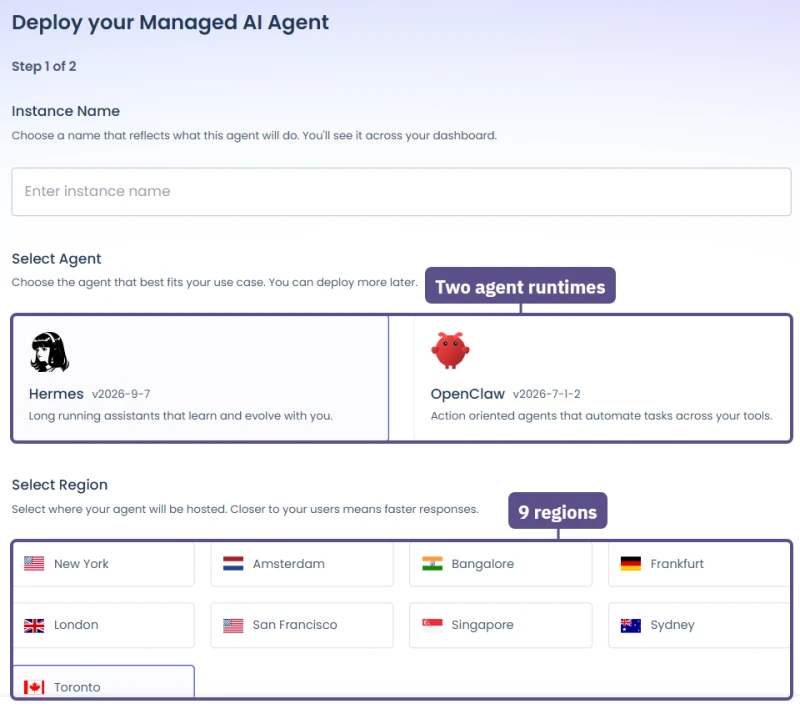
Managed AI Agents rent you a small always-on server with an AI agent already installed. You name the instance, pick one of two agent runtimes, pick a region, and choose a size.
The two runtimes on offer were Hermes (described as long-running assistants that learn over time) and OpenClaw (action agents that automate tasks across your tools). The region list had nine cities, including Bangalore and Toronto. You bring your own model key: the form offers Anthropic, DigitalOcean, Gemini, OpenAI and OpenRouter, and you pay that provider for tokens directly, while Cloudways bills only the server, by the hour.
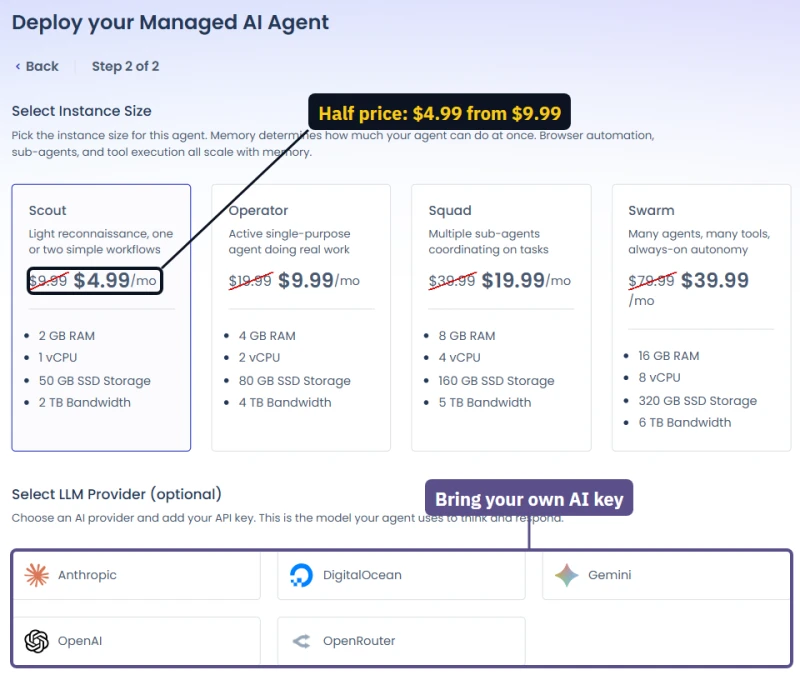
Every size was shown at half its list price, with the list price struck through, and the form did not say how long the half price lasts. Budget for the list price.
The smallest size is enough for an agent that answers messages and runs a few scheduled jobs; anything that drives a browser or runs several sub-agents needs the memory of the larger ones, as the form itself explains. I did not deploy one: it is a separate product from WordPress hosting, and this review stays with the hosting.
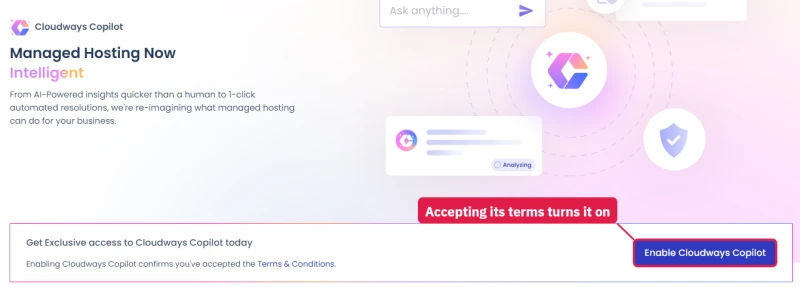
Cloudways Copilot is something else: an assistant that watches your existing servers. It monitors the web stack, disk space, disk inodes and host health, and when something goes wrong it emails you a diagnosis and a suggested fix. It is free during early access, but two of its three advertised features, automated developer workflows and automated resolution, were marked Coming Soon.
Turning it on means accepting its own terms and conditions, so read them first. For now it is an alert system that explains itself, which is useful, but not the "managed hosting now intelligent" of the banner.
Which one should you pick? One WordPress or WooCommerce site whose traffic spikes, and you never want to think about servers: Autonomous. Several sites, client work, or you want to choose the cloud and tune the server: Flexible, the product the benchmark and hands-on sections above cover. A Node.js app in a Git repo: Velocity. Note that several add-ons (Site Manager, Malware Protection, Cloudflare Enterprise, Astra Pro) are marked "Available for Cloudways Flexible only".
Email: Free Zoho Mail Covers It
Cloudways does not include mailboxes, and the fix costs nothing. Zoho Mail's Forever Free plan hosts email for one domain, up to 5 users with 5 GB each, in Zoho's webmail and mobile apps. Point your domain's MX records at Zoho, and your hello@ address works the same day while Cloudways keeps doing what it does best: running your site fast.
When you outgrow the free plan, these cover every other need:
- Zoho Mail paid ($1/user/mo): adds IMAP and Outlook support. I run two of my own brands on Zoho.
- Google Workspace ($7.00/user/mo): the one I use for client accounts that live in their inbox. Best deliverability, best spam filtering, Gmail interface.
- Cloudflare Email Routing (free): Forward inbound mail to an existing inbox. Works for simple one-address setups, no outbound sending.
For transactional email (WooCommerce order confirmations, password resets), use Mailgun or Postmark. Both have free tiers covering up to 50,000 emails/mo.
What Cloudways offers for email inside the console
Cloudways does not host mailboxes itself, but the console has two email pieces, and they are easy to mix up.
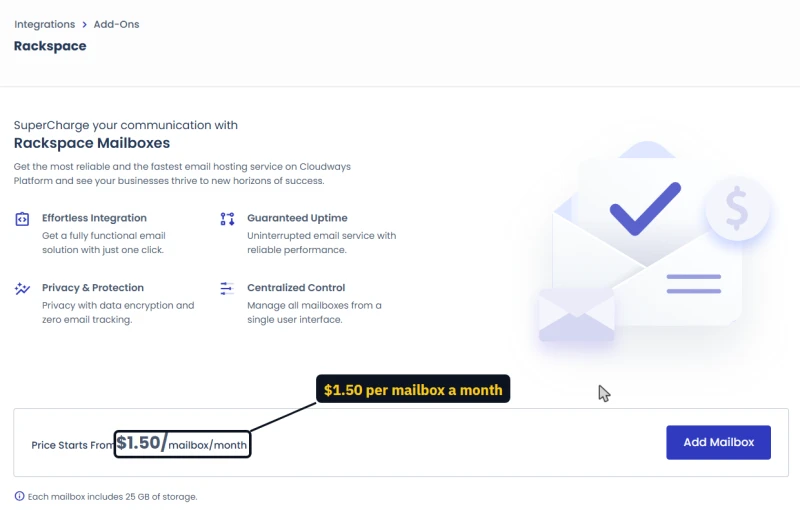
Sending mail from your site: the SMTP page. Every server has an SMTP page with two choices: "Your Own SMTP", where you enter the details of Mailgun, Postmark, Google or any other provider, or Elastic Email, a paid add-on you must subscribe to first from the Add-ons section. Once either is set, a test button sends a message so you can see it arrive.
Set this up on day one. Without it, WordPress order emails and password resets leave the server with nothing vouching for them, and many land in spam.
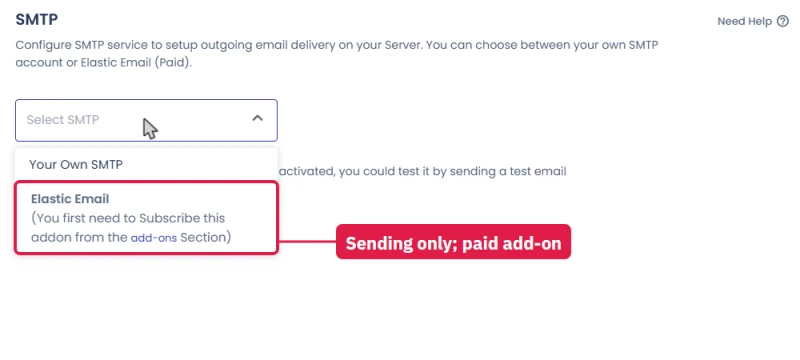
Mailboxes: the Rackspace add-on. For addresses you read and reply from, the Add-ons page offers Rackspace Email, from $1.50 per mailbox a month, each with 25 GB of storage. That is cheaper than Google Workspace and a little dearer than Zoho's lowest plan, and its advantage is that the bill and the setup live in the same console as the site. Its disadvantage is that Rackspace's webmail and apps are plainer than Gmail.
Google Workspace for a business that lives in its inbox, Zoho for a tight budget, Rackspace if you want one bill, and a transactional provider on the SMTP page in every case. The SMTP step is the one people skip, and it decides whether a customer ever sees their order confirmation.
Cloudways Support: Instant AI Answers, a Human in Minutes
Every account gets free 24/7 live chat, tickets and a knowledge base, the "Standard" scope. I tested the chat on the trial account with two real questions this review needed answered: is the Patchstack Vulnerability Scanner free, and what are the two IP addresses already whitelisted on a new server's firewall?
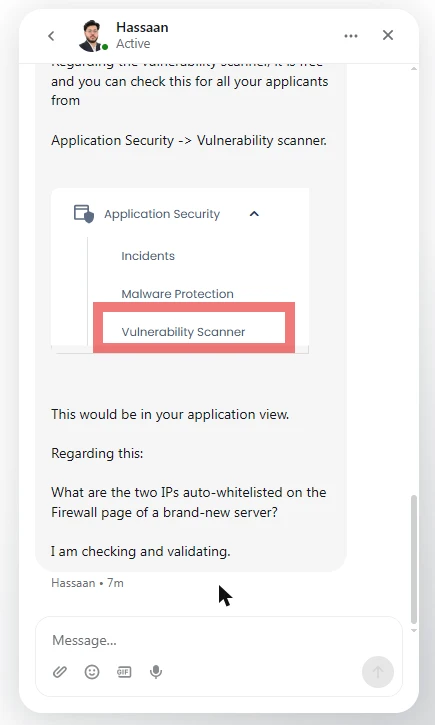
The AI answers in seconds and handles anything in the documentation. A human joins about a minute after you ask; restate your question in one line when they arrive, and a question that needs checking takes a little longer. The console spells out what each support level includes.
A second chat test: a straight answer in 30 seconds
I went back to chat with one question this review depends on: is Object Cache Pro free on every server? The AI agent answered in under 10 seconds, but said 4GB first and 2GB when I asked again, so I asked for a person. Akshay joined about 4 minutes later and answered in about 30 seconds, with the rules in a list and a link to the guide.
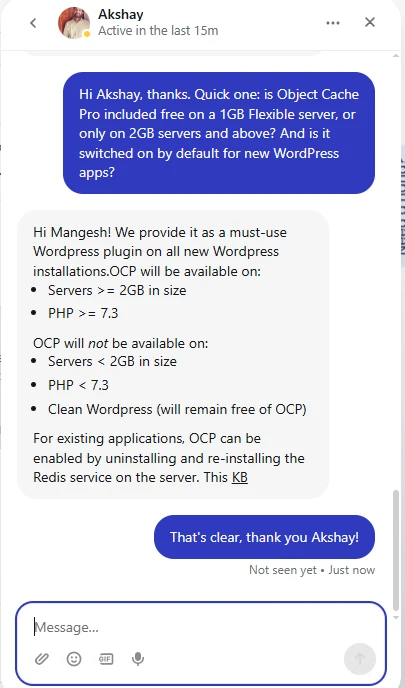
Object Cache Pro comes as a must-use plugin on new WordPress apps on servers with 2GB or more and PHP 7.3 or newer; a 1GB server and a clean WordPress install go without it. Use the AI for quick how-to questions, and ask for a person when the answer decides money.
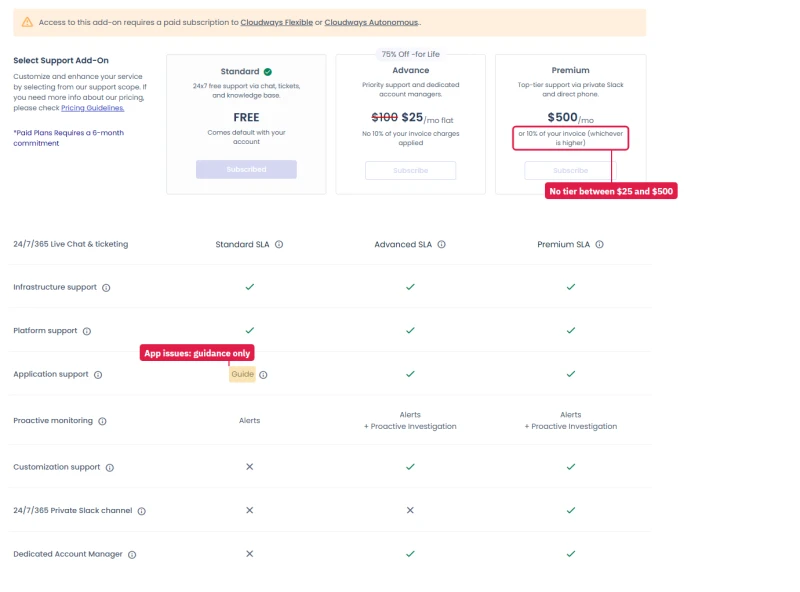
Paid plans need a 6-month commitment and a paid Flexible or Autonomous account, so trial users cannot buy them. There is nothing between $25 and $500. At $25, Advance is the one to buy for client sites. It is the only way to get help with the application itself instead of a link to a guide.
Below the plans, the page lists what is out of scope on every plan, including the $500 one:
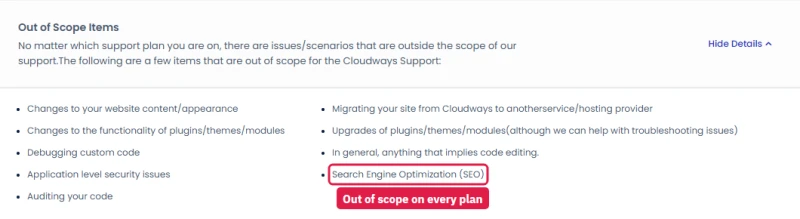
Site content, plugin and theme behaviour, plugin upgrades, custom code (debugging or auditing), application-level security, SEO, and moving your site away from Cloudways. "Managed" here means the server, not the website. If you want someone to fix a broken plugin for you, that is an agency or a managed WordPress host, not Cloudways support.
Security: An SSH Attack Blocked on the First Night, Automatically
Within hours of launch, the server's Incidents log recorded SSH brute-force attempts from two different outside IP addresses, at 01:33 and 02:25 UTC on its first night. Both were stopped by Imunify360 and the addresses were locked. I had set up nothing: the protection is on every server from the start, at no extra cost.
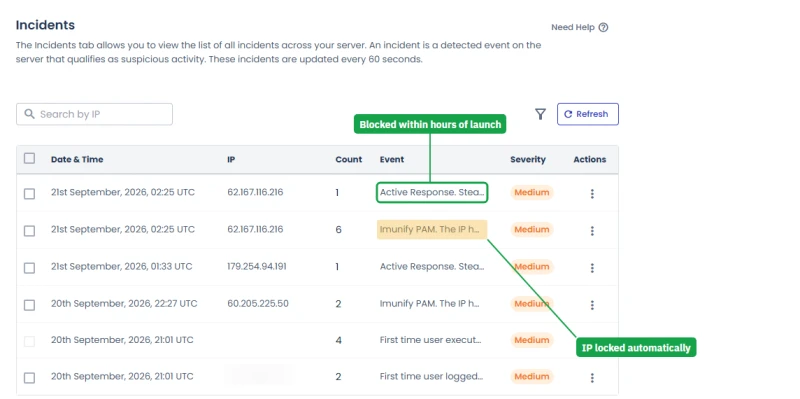
The application's own Incidents page said "No incidents detected on your app" the whole time. That is not a contradiction. The server log watches logins and the network, the app log watches the website, and the bots were hitting SSH, not WordPress.
SSH is open to the internet by default, which is normal for a cloud server. If you only ever connect from one office or home, the Firewall page lets you allow that address and nothing else.
Three security products on one account, priced separately
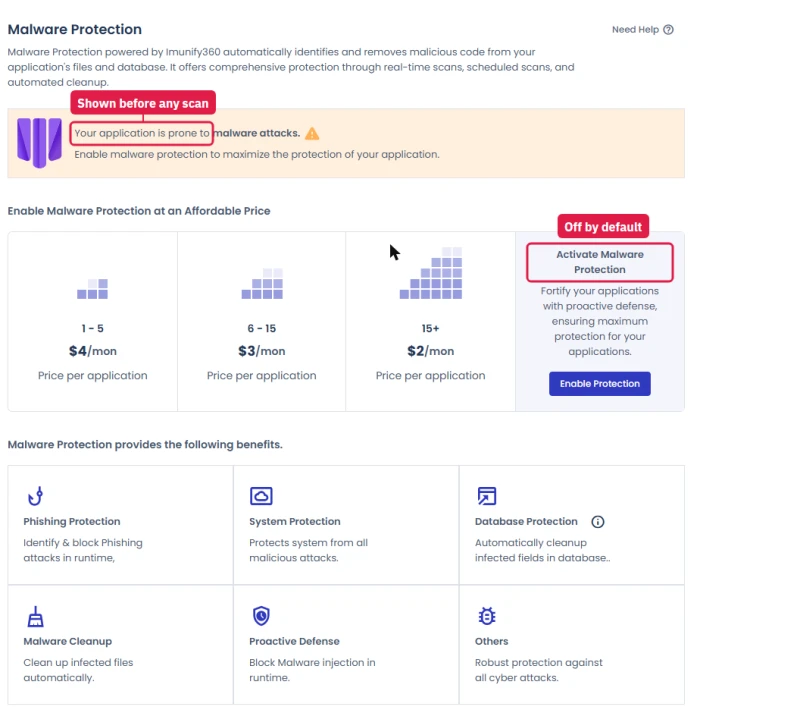
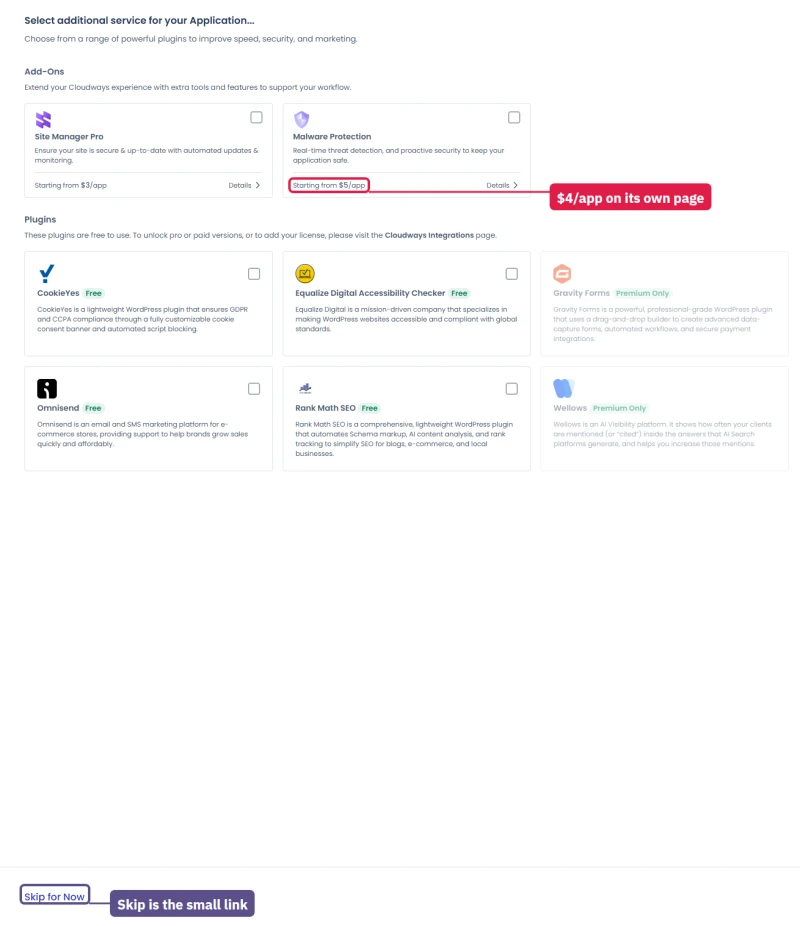
The Malware Protection page opens with a warning, "Your application is prone to malware attacks", before any scan has run. It is an advert, not a finding. The free server-wide Imunify360 is already doing the brute-force blocking you saw above. The paid add-on adds scans and automatic clean-up of your site's files and database, which is worth it on WooCommerce or client sites, and optional on a small blog.
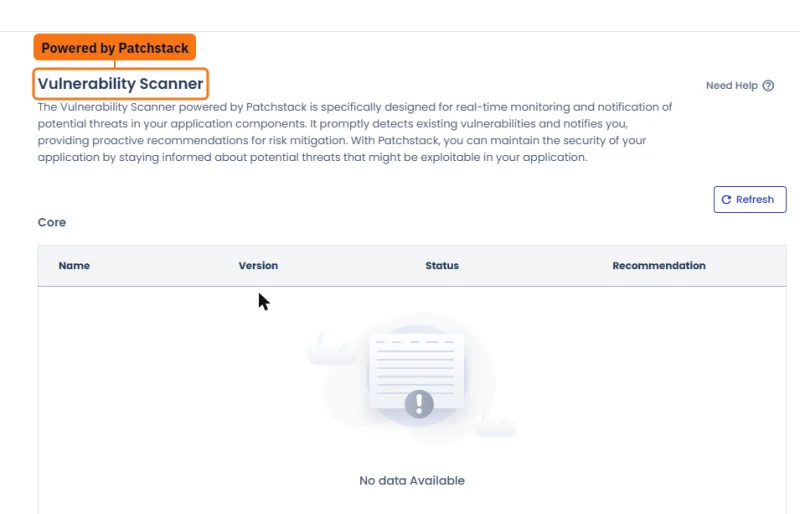
Security headers without editing .htaccess
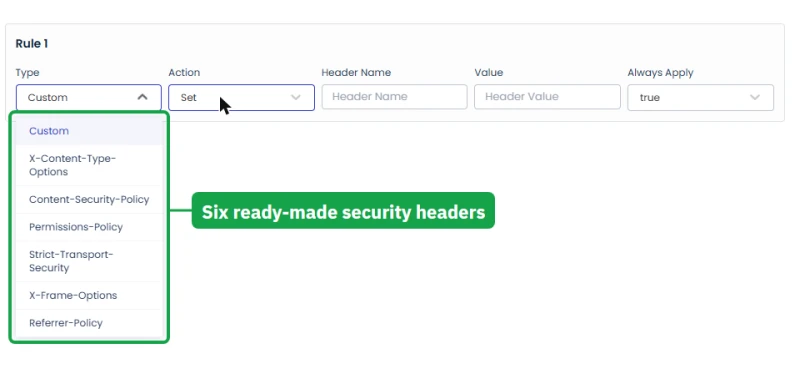
Web Rules (marked Public Preview) lets you add response headers from a list of ready-made presets: X-Content-Type-Options, Content-Security-Policy, Permissions-Policy, Strict-Transport-Security, X-Frame-Options and Referrer-Policy. Those are the headers security scanners grade you on, and until now setting them meant a developer and an .htaccess file. The same page handles 301 and 302 redirects and internal rewrites.
Two pre-whitelisted firewall IPs
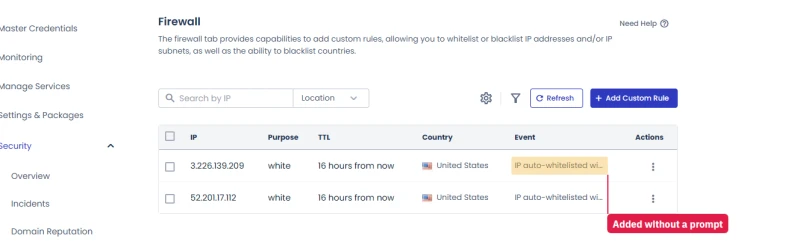
The Firewall page already had two IP addresses whitelisted, each with an expiry date, before I had configured anything. Cloudways documents that some of its own tools (Site Manager, for example) whitelist their system IPs automatically, and these are most likely platform addresses. But the page does not say what they are, and I had not turned on anything that explains them.
I asked in live chat. Cloudways' AI assistant said they are most likely system IPs that Cloudways' own components pre-allow, and that you can delete them under Security, Firewall. The human agent was still checking when I published this, so treat "system IPs" as likely, not confirmed.
Smaller protections that are already on
Beyond the firewall and the paid add-ons, a new server comes with several quieter defaults that I checked one by one.
- Your server's bare IP address shows nothing. Nginx's "Access Application via IP" switch is off, so a bot scanning IP addresses finds no website. Your sites answer only on their own domains.
- Old encryption is refused. The server accepts TLS 1.2 and 1.3 only, which is what current security scanners expect.
- Staging sites are hidden. A new staging copy sits behind a password prompt and tells search engines not to index it, so a half-finished site does not end up in Google.
- Password Protection for any app. The Access Details page has a new switch that puts a whole application behind a login, useful for a site that is still being built or an internal tool.
- Per-app logins. Extra SFTP and SSH users can be limited to a single application, and team members can be limited to single servers with a dozen separate permissions, both covered elsewhere in this review.
None of these replaces a security plugin's login protection or a good backup, but together they close the doors that automated attacks try first. The one default I would change is the open SSH port, as described above.
Where Cloudways Falls Short, and the Easy Fix for Each
None of these stops me recommending Cloudways. Each one matters to a certain kind of buyer, and each has a simple fix.
No cPanel? What You Use Instead
The Cloudways panel is well designed but completely different from cPanel. There is no native file manager. Three workarounds, in the order I use them:
- SFTP: Credentials under Application → Access Details. FileZilla and Cyberduck both work well.
- WP-CLI via SSH: Application → Access Details has SSH credentials. All standard WP-CLI commands work out of the box.
- Tiny File Manager: A lightweight PHP script you drop into
/public_htmland password-protect. Works in the browser, no plugin dependency.
If your team lives in cPanel, plan one week to relearn the navigation. Every feature is there, but in different places.
Where the logins are
There are two kinds of login on Cloudways, and knowing which one to use saves a support chat.
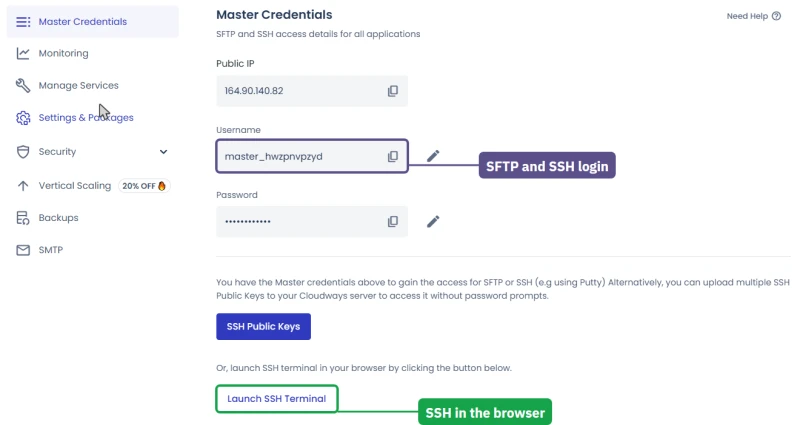
The server's master login is on the server's Master Credentials page: the public IP address, one master username and password that work for SFTP and SSH across every app on the server, a place to add SSH public keys so you can log in without a password, and a Launch SSH Terminal button that opens a terminal in your browser.
The browser terminal is handy on a borrowed computer or a locked-down work laptop where you cannot install an SSH client.
Each application's own logins are on its Access Details page: the site address, the WordPress admin login, the database name, user and password, the Redis prefix and password, and a section where you add extra SFTP or SSH users limited to that one app. Give a freelancer an app user, never the master login: an app user cannot see the other sites on the server.
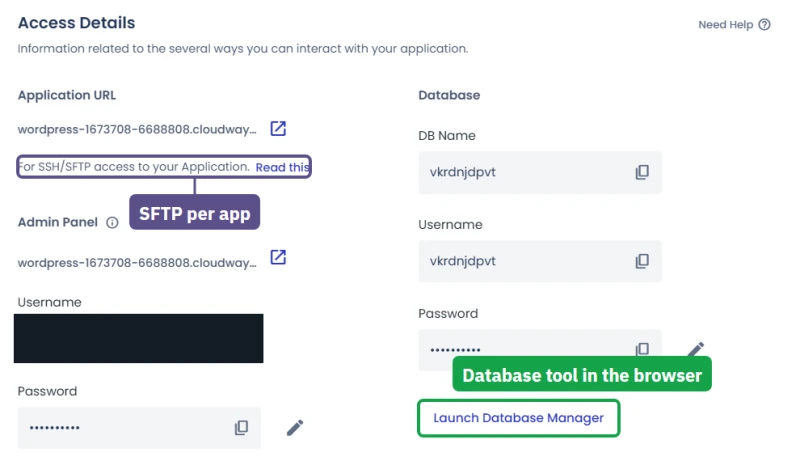
The database. The Launch Database Manager button on the same page opens a web-based database tool for that app's database in a new browser tab, so the jobs people used phpMyAdmin for (browsing a table, running a query, exporting before a risky change) no longer need a plugin or a desktop client. My test browser could not follow the new tab, so I have not reviewed the tool itself.
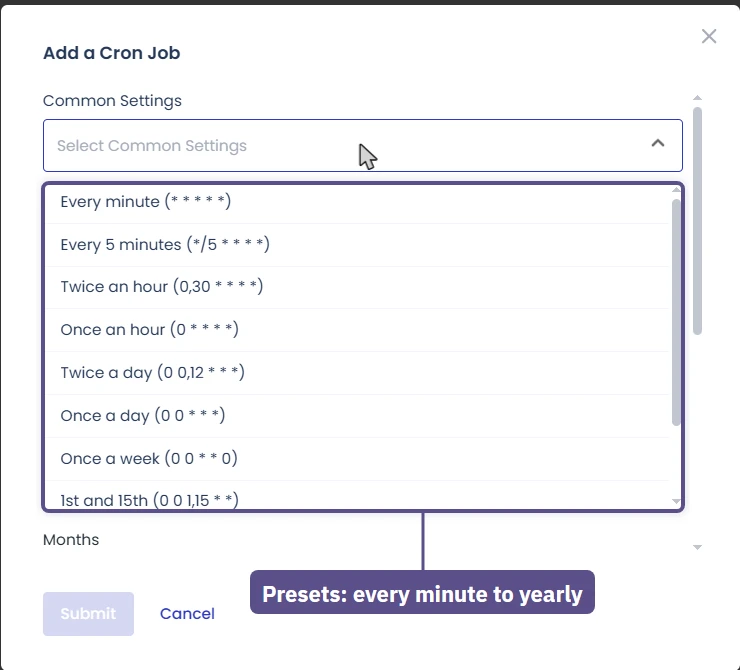
Scheduled jobs. Cron Job Management, also per app, replaces cPanel's cron page. It offers ready-made schedules, from every minute to once a year, or a custom schedule, and it pre-fills the path to the app's public folder so a PHP script runs in the right place. This is where the "disable wp-cron and run it from the server" step in the setup checklist goes.
For someone leaving cPanel: nothing you did there is impossible here, but a file manager and a mailbox screen are the two things you will look for and not find. SFTP and the Rackspace add-on (or an outside email provider) cover them.
Cloudways vs ScalaHosting, Kinsta, WP Engine and SiteGround
Three managed hosts get compared with Cloudways most often.
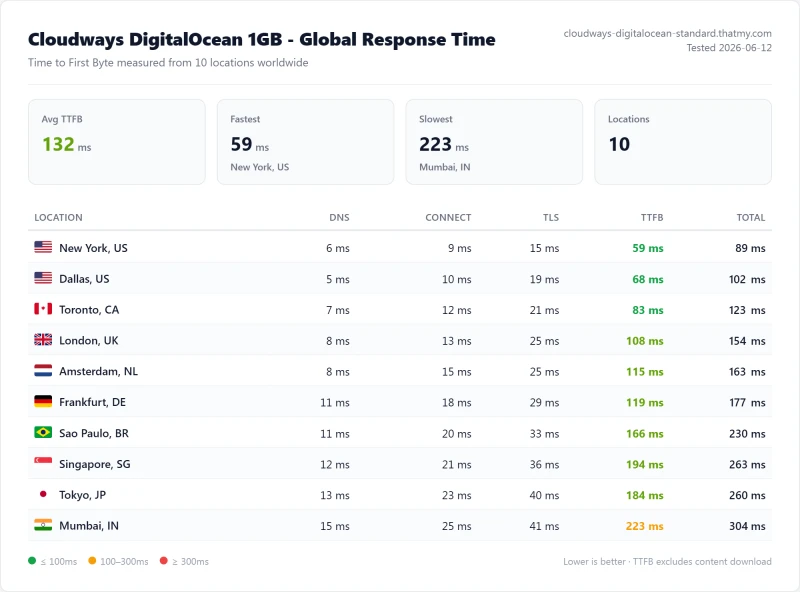
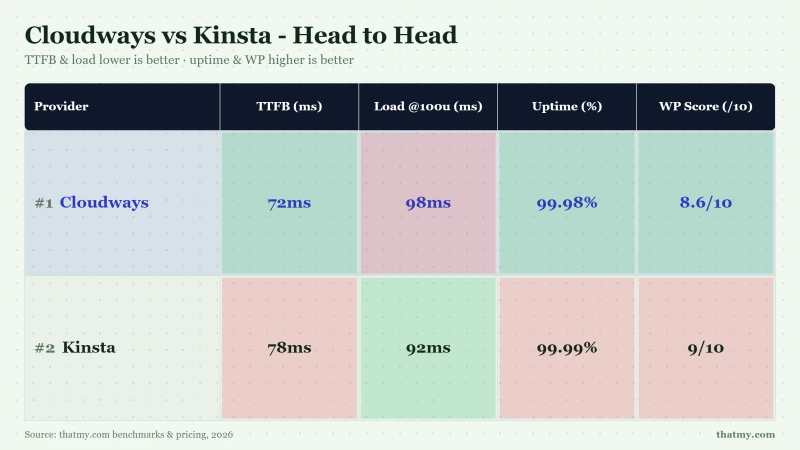
Pick Cloudways if: you run multiple WordPress sites, want unlimited sites per server, need Git deployment and SSH root, and want pay-as-you-go billing with no contract. This is the default for agencies and developers.
Pick ScalaHosting if: you want bundled email, an SPanel control panel that feels like cPanel, and the cheapest all-in price for a small business site. ScalaHosting is on AMD EPYC 9474F hardware which benches very fast at idle and under load. For non-developer clients I'm not personally managing, this is where I send them.

Where Scalahosting Wins
- Email hosting included, Cloudways requires Paid Google Workspace
- SPanel free, saves cPanel licensing costs, uses 8x less RAM
- More affordable than equivalent Cloudways config
- No CPU steal, no I/O throttle, no hidden VPS limits
- AMD EPYC 9474F (#42 PassMark), verified via SSH lscpu
- Free migration (SPanel wizard) vs Cloudways: 5 free managed migrations on Flexible
- Anytime money-back guarantee
Where Cloudways Wins
- Cloudways gives you five cloud providers on one dashboard; ScalaHosting is a single platform
- No pay-as-you-go, renewal jumps ~200% after intro term
- No cloud provider choice, single infrastructure
- No Git deployment or SSH-first developer workflow
- No autoscaling, manual plan upgrades required
Real Benchmark Data
- Origin TTFB (3 managed VPS plans, no CDN): 21ms to 38ms
- Uptime (54-day window): 99.997%
- PageSpeed Score (Mobile): 83/100

$29.95/mo
Anytime Money-Back Guarantee
Pick Kinsta if: you have one large WordPress site that earns enough to justify a premium per site, want the most polished managed WordPress service (auto-updates, visual regression testing, expert WordPress support), and you're not running more than a few sites.
Pick SiteGround if: you want a shared or cloud plan with its own easy panel and email included, and you are happy to pay one to three years upfront. My Cloudways vs SiteGround comparison puts the two side by side.
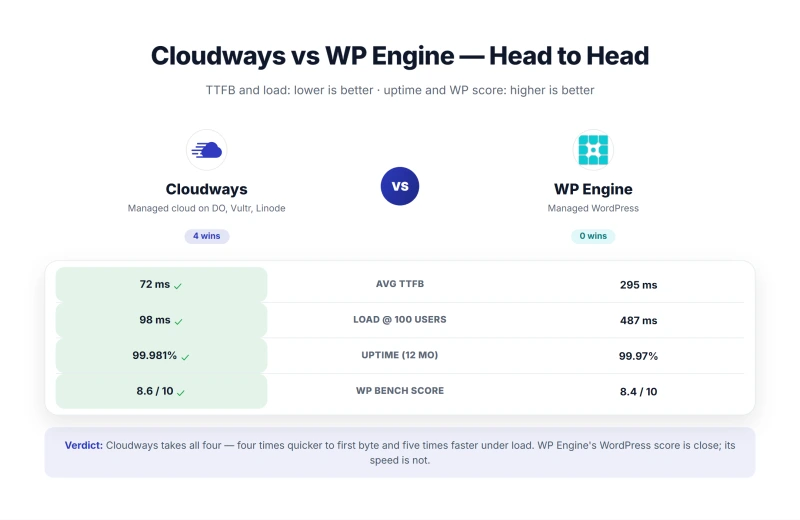
Pick WP Engine if: you're enterprise with SOC 2 Type 2 compliance requirements and your legal team specifically requires WP Engine. The visit limit on the entry plan becomes a steep overage bill at higher traffic volumes. For agencies and growing sites, that math does not work.
Read my ScalaHosting review → · Read my Kinsta review → · Read my WP Engine review →
Cloudways Terms of Service: Refunds, Billing and Your Data
Cloudways' own terms page is now just a set of links to DigitalOcean's legal documents, and DigitalOcean's Terms of Service name Cloudways explicitly. So the contract you accept is with DigitalOcean, LLC (Broomfield, Colorado), under DigitalOcean's current terms. The parts that matter before you pay:
The backup clause is the one I would underline. It is standard for cloud hosts, but combined with a default of one week of retention it is the strongest argument on this page for a second, off-platform backup (UpdraftPlus to Google Drive or S3 costs little).
How the terms played out in my test account
From inside a new account over three days, in the order a new customer meets them:
The card check. Adding a card charges $1 to check it, and the charge is reversed automatically. Once a card is on file, the trial banner changes from "expires in" to "will be automatically upgraded in".
The trial does not simply end. It becomes a paid account, and every server on it starts billing by the hour. If you are only evaluating, delete the servers before the countdown ends, not after.
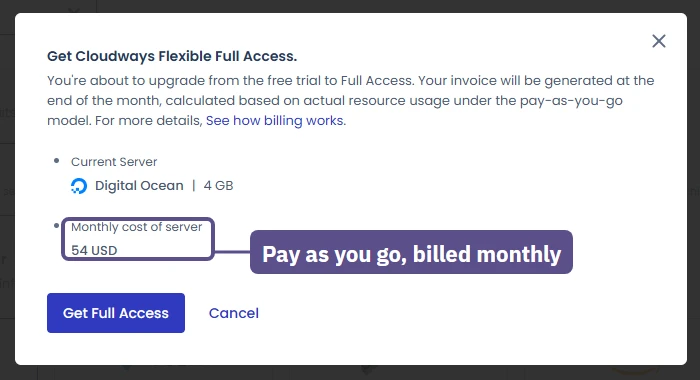
The Autonomous and Velocity trials do the same. Both say so on their launch forms: the Autonomous trial moves to the Growth plan when its 3 days end, and the Velocity trial moves to "Plan 1". None of this is hidden, but it sits in small print beside the launch button, and it is the most likely way for a tester to end up with an invoice.
An account can be disabled without warning. On day two of my test, after a busy morning of launches and a load test, the account was disabled "due to non-payment or unusual activity" with no warning, as described in the hands-on section. The sites kept serving, and access came back about half an hour after contacting billing. This is the non-payment clause in the table above working as a fraud check.
Anyone moving several client sites onto a brand-new account in one day should expect the same risk and keep the old host running until the move is finished.
Billing keeps running until you delete. Servers bill by the hour whether or not anyone visits. Nothing I saw in the console says that the Stop button pauses the bill, so delete what you no longer need instead of stopping it. Billing alerts (off by default) email you at a spend you choose, the billing overview shows a month-to-date summary per server, and a server you delete today is not on next month's bill.
Tax depends on where you are billed. An account billed in India pays 18% IGST on top of every price in the launch form; my US-billed account paid the listed price with nothing added. Cloudways collects tax only where a country or US state requires it.
None of this makes Cloudways unusual among cloud hosts. It does mean the three-day trial is the only refund window you get, so the checklist is simple: test on the trial, delete what you launched, and only then add a card for the servers you mean to keep.
Who Should Buy Cloudways?
Buy Cloudways if you:
- Have outgrown shared hosting and want a real cloud server without running it yourself
- Build WordPress sites for clients: unlimited sites per server, staging and per-server team access
- Run a WooCommerce store that needs processor room for carts and checkouts
- Work with SSH, Git, WP-CLI and cron as part of your day
- Want hourly billing with no contract and no renewal markup
- Want to choose your cloud: Vultr, DigitalOcean, Linode, AWS or Google Cloud
- Care about speed and will use Object Cache Pro, Varnish and Cloudflare Enterprise
Cloudways is the managed cloud I recommend to people who will read the dashboard. It held up in every test I ran on it: 0% failed requests on the load ramp and 99.99% uptime on Vultr High Frequency.
If you build WordPress for a living, run an agency, or want real cloud infrastructure with a thin management layer, this is the right answer. If you need email included and a cPanel-like control panel, ScalaHosting is the right answer. If you have one large site and a budget for managed-everything, Kinsta is the right answer.
After all my tests: Cloudways Flexible is the host I would choose for a growing WordPress business, a client portfolio or a store that needs real server room without the work of running a raw cloud machine. Vultr High Frequency is my pick for a busy site; DigitalOcean 1GB ($11.00/mo) is the smart way in for a small one.
The speed proves it, and Object Cache Pro, staging, Git and team access make it a platform you grow into, not out of. Size the server for your real traffic, add free Zoho Mail, and let Cloudways run the rest.
What Our Testing Found
- 48ms origin TTFB, the fastest of the four Cloudways clouds I measured (Vultr HF, no CDN)
- 74ms at 100 concurrent clients, a measured step rather than an interpolated one
- 99.99% uptime over 54 days of monitoring, 8 minutes of downtime
- 5 cloud providers on one dashboard: Vultr HF, DigitalOcean, AWS, GCE, Linode/Akamai. I benchmarked four servers on three of them
- Redis Object Cache Pro included free (Premium value)
- Pay-as-you-go billing, no long-term commitment, no renewal shock
- Git deployment, SSH, WP-CLI, staging, best developer tooling tested
- Unlimited WordPress sites on any plan
- Autoscaling available (vertical + horizontal)
- Cloudflare Enterprise CDN add-on available
Real Weaknesses
- No email hosting in the plan (Rackspace add-on from $1.50 a mailbox)
- No cPanel, custom Cloudways panel only
- Only 5 free managed migrations on Flexible
- Vultr HF 8GB (now 3 cores) costs more than a ScalaHosting VPS of similar size
- Prices rose about 10% in 2023, the first rise since 2017
- L1 support limited on server-level issues, escalation required
- Phone support only on the $500-a-month Premium support plan; Standard and Advance are live chat and tickets
Real Benchmark Data
- Origin TTFB (4 plans, no CDN): 48ms to 62ms
- Uptime (54-day window): 99.979% to 99.99%
- PageSpeed Score (Mobile): 89/100
$16.00/mo
CLOUDS2022 = $30 Free Credit
Got stuck during setup? Email me at mangesh@thatmy.com with your Cloudways server size and what error you're hitting. I will reply within 24 hours during weekdays. No upsell, no funnel.
Cheers,
Mangesh
Not the right host for you? Read my ScalaHosting review for the best email-included alternative, my ChemiCloud review for the best budget shared option, or the full WordPress hosting comparison.
Related Cloudways Reading
- Comparisons: Cloudways vs SiteGround · Cloudways vs Kinsta · Cloudways vs WP Engine · Cloudways vs ScalaHosting · Cloudways vs Hostinger · DigitalOcean vs Cloudways · Vultr vs Cloudways
- Setup guides: Migrate WordPress to Cloudways · Performance Setup Guide · Pricing Guide
- Save money: Cloudways Promo Code ($30 credit + 10% off 3 months) · ScalaHosting Coupon · Black Friday hosting deals
- Categories: Best cloud hosting · Best managed WordPress
The full test record. Everything above is the buying decision. Everything below is the evidence behind it: the hands-on account, every console screen, staging, Git, the setup checklist and the plan-by-plan benchmark report.
Hands-On: I Signed Up as a New Customer and Tested Every Screen
My own servers have run on Cloudways for years, so for this review I started over as a new customer: a fresh account, the free trial, one server, one WordPress site, and every screen of the console read and captured. Everything in this section comes from that account and is separate from the benchmark above.
The free trial: 3 days, one server size
The trial lasts 3 days and needs no card to launch; a countdown banner sits at the top of every console page. The whole launch happens on one page: application, stack, cloud, database, server type and size.
- Stack: Lightning Stack (Nginx only, marked Recommended) or Hybrid Stack (Nginx in front of Apache, for sites that rely on .htaccess rules).
- Cloud: DigitalOcean, Vultr and Linode are open. AWS and Google Cloud are marked "Not Available on Free Trial".
- Database: MariaDB 10.11 (Recommended) or MySQL 8.4. The wizard warns the choice cannot be changed later.
- Server type: only Basic. General Purpose and CPU Optimized carry a padlock.
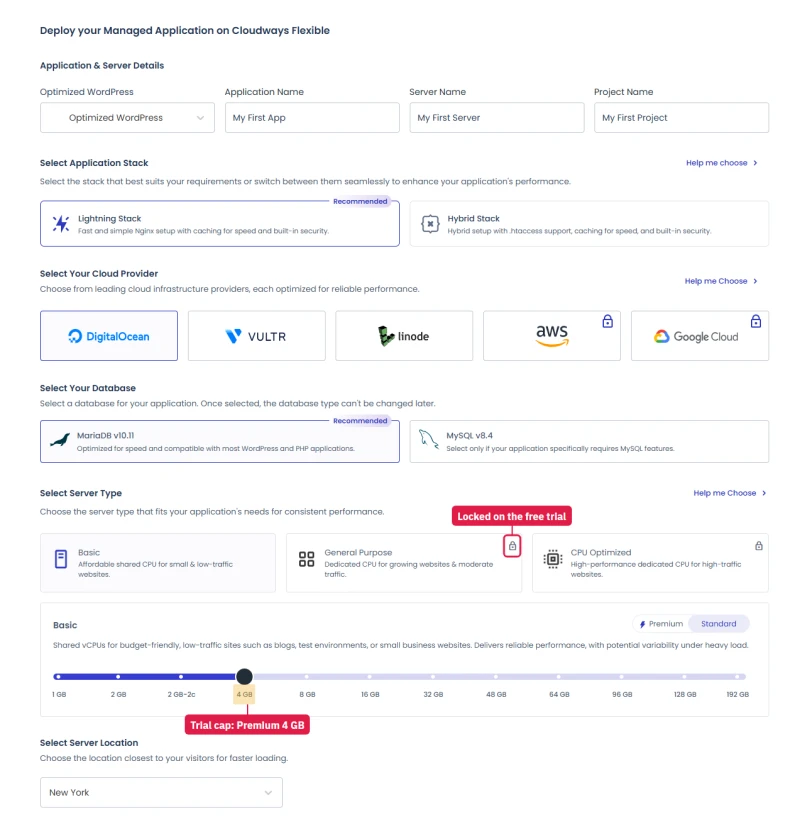
The size limit: the trial says it allows servers up to 4GB. I picked the cheaper 4GB Standard server ($46.00/mo) and pressed Launch Now, and the launch was refused at the last step with "Server size is not allowed with Trial Account". The same 4GB on Premium ($54.00/mo) launched straight away.
On the trial, "up to 4GB" means the Premium 4GB server, and nothing in the wizard says so before you press the button. The server was ready inside the seven minutes the console promised.
Staying on after the trial means adding a card. The billing page says $1 is charged to verify it and reversed automatically.
What a 4GB server reports
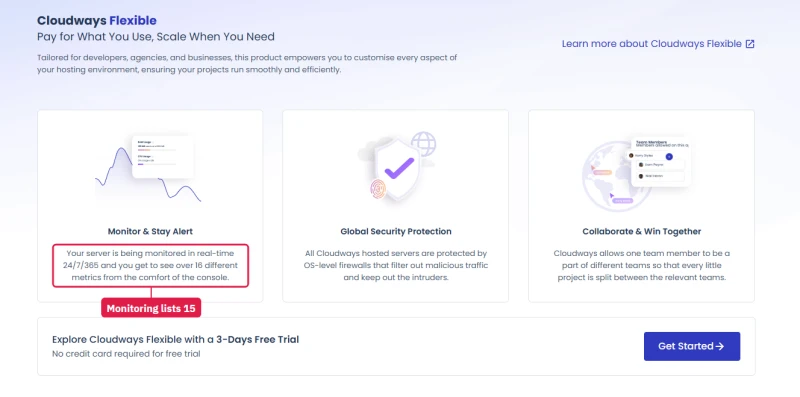
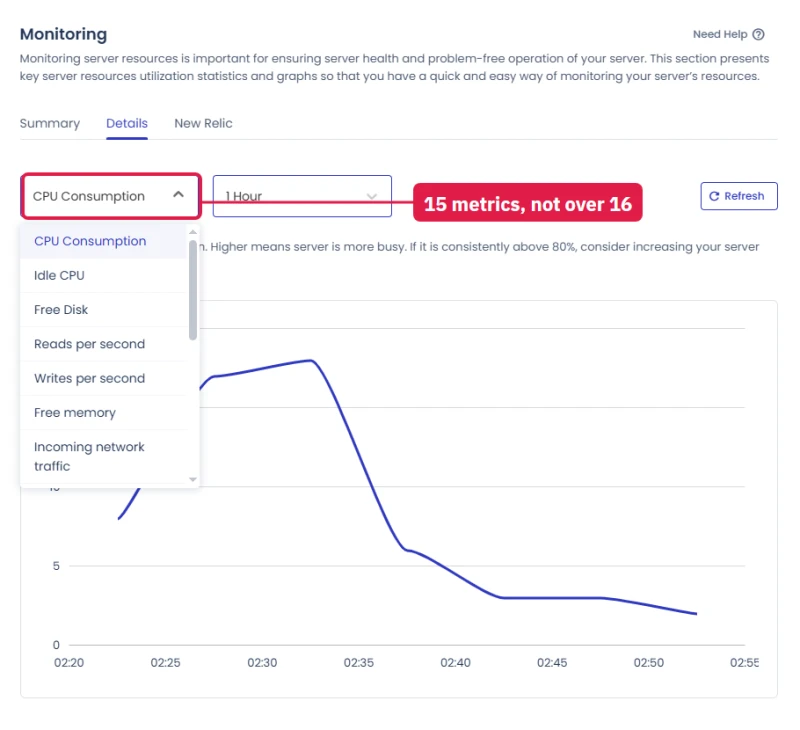
3.82 GB against 4GB is normal: the operating system keeps some memory for itself, and every host's "4GB" works this way. The metrics count is a small gap between the sales page and the console. Fifteen metrics (CPU, disk, memory, network, Memcached and Varnish hit rates, auto-healing restarts and more) is plenty for a WordPress site either way.
The defaults a new server ships with
- PHP 8.2 on a brand-new WordPress app, with the version switcher marked Public Preview.
- PHP limits: 300 seconds execution, 100 MB uploads, 512 MB memory. That is generous: most shared hosts start far lower.
- Object Cache Pro switched on for the WordPress app from the first minute.
- Backups: once a day at 23:40 UTC, kept for one week, local copies off.
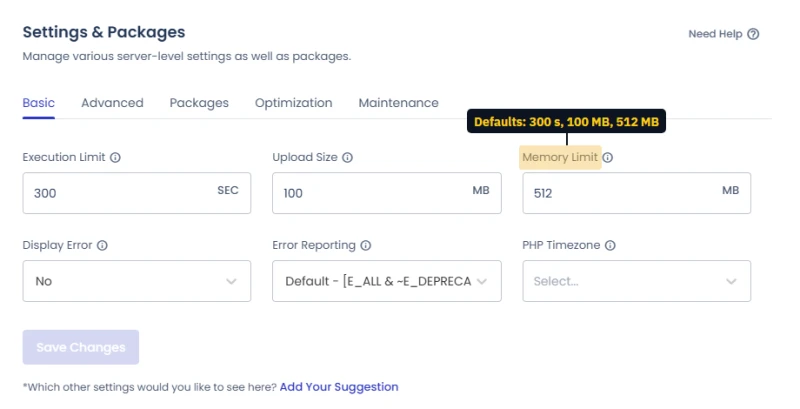
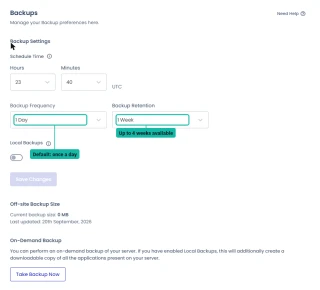
Backups are where I would change a default on day one. The frequency goes as often as every hour, and retention goes up to 4 weeks, which is the ceiling. If you are used to hosts that keep 30 or 90 days, that is the number to know, and it is only visible inside a running server.
An upgrade offer inside the dashboard
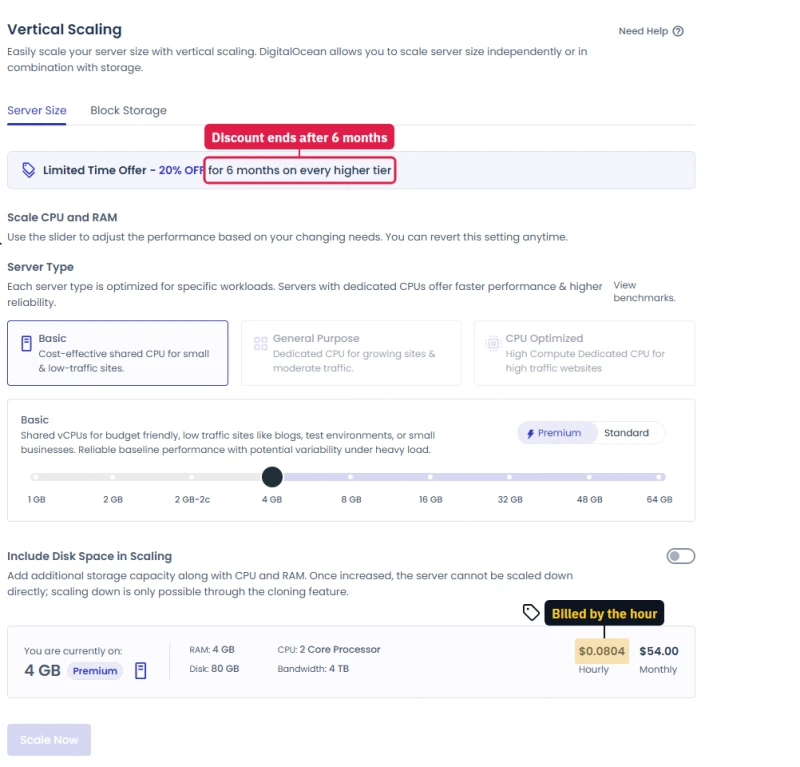
The Vertical Scaling page runs a "20% OFF for 6 months on every higher tier" offer. Moving up a size is easy (a slider, and you can scale back down unless you also grew the disk). Just budget for the full price from month seven.
After full access: what the running servers did
Once a card was on file the trial limits went away, and I ran the tests a trial cannot run. With a card verified, the banner changes from "expires in" to "will be automatically upgraded in". From that moment the trial rolls into paid service on its own.
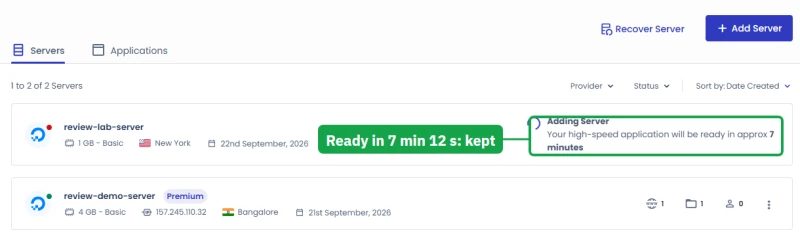
- Launch time: a new 1GB DigitalOcean server answered in 4 min 42 s and was listed with its app within 7 min 12 s. Cloudways said about 7 minutes, and it kept that.
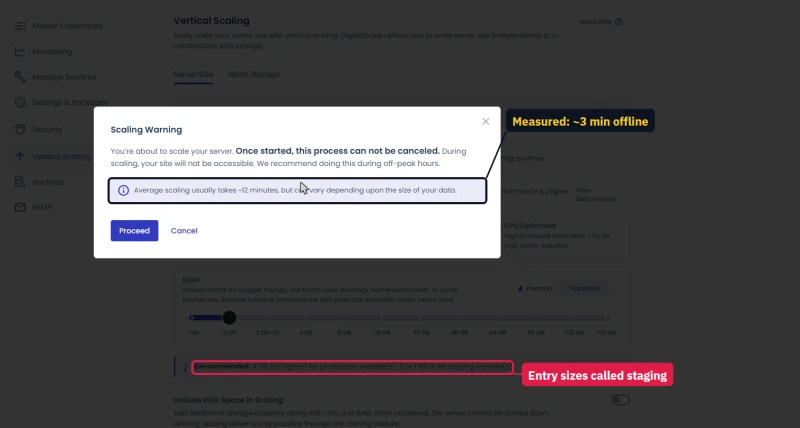
- Scaling up costs real downtime, but less than promised: the warning for 1GB to 2GB says about 12 minutes and that the site "will not be accessible". Checking the site every 1 to 2 seconds, it was down for about 2 min 51 s, and the whole job took about 9 minutes.
- A bigger scale-up, two days later: 4GB to 8GB on Vultr High Frequency. The warning again said about 12 minutes; checking the store every 10 seconds, it was offline for 70 to 90 seconds and came back rebooted with 3 vCPU and 7.9 GB of memory. The scaling page listed the 8GB size at $118.00/mo, and $94.40 a month for the first six months with its 20% offer.
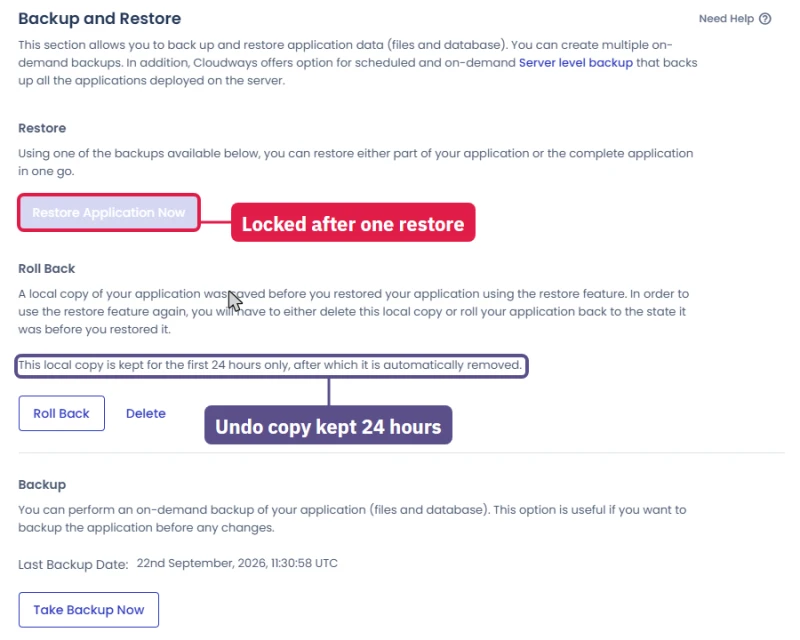
- Backup and restore: an on-demand backup finished in under 30 s and a complete restore took about 1 min 20 s, with the site answering every check during both. After a restore, Restore stays locked until you roll back or delete the safety copy, which is kept for 24 hours.
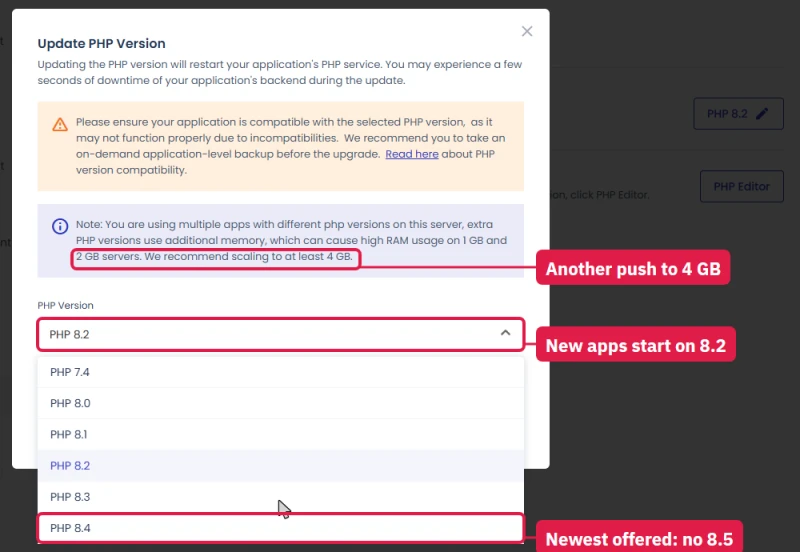
- PHP: each app picks its own version, 7.4 to 8.4. New apps start on 8.2, an older release, so move to the newest version your plugins support on day one. The switch to 8.4 did not drop a single request.
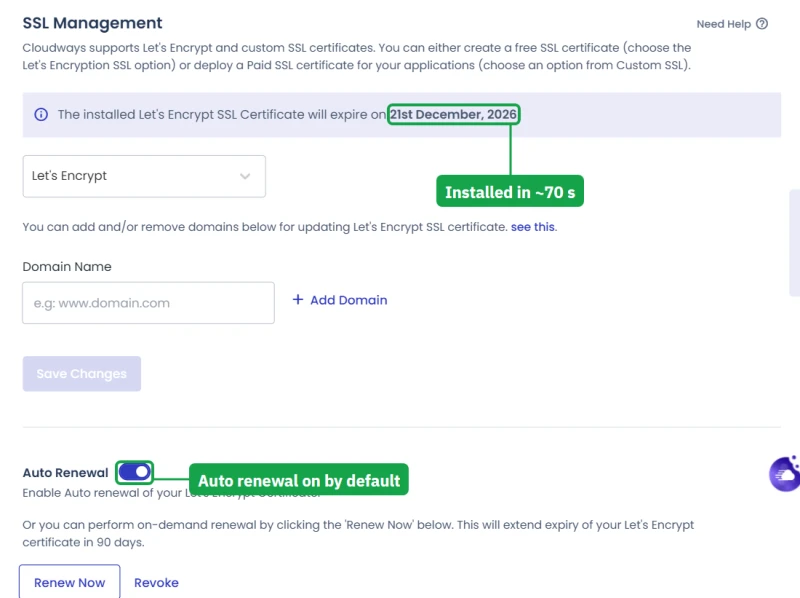
- SSL: a free Let's Encrypt certificate on a real domain was live in about 70 seconds, with auto-renewal on by default. It replaces the certificate on the temporary cloudwaysapps.com address, which then shows a browser warning, so point your domain before you share links.
- Usable disk: the system uses 9 to 10 GB of every server's disk before your site adds anything. On the smallest server that was 9.11 of 24.44 GB, over a third of the plan.
How far one server goes under load
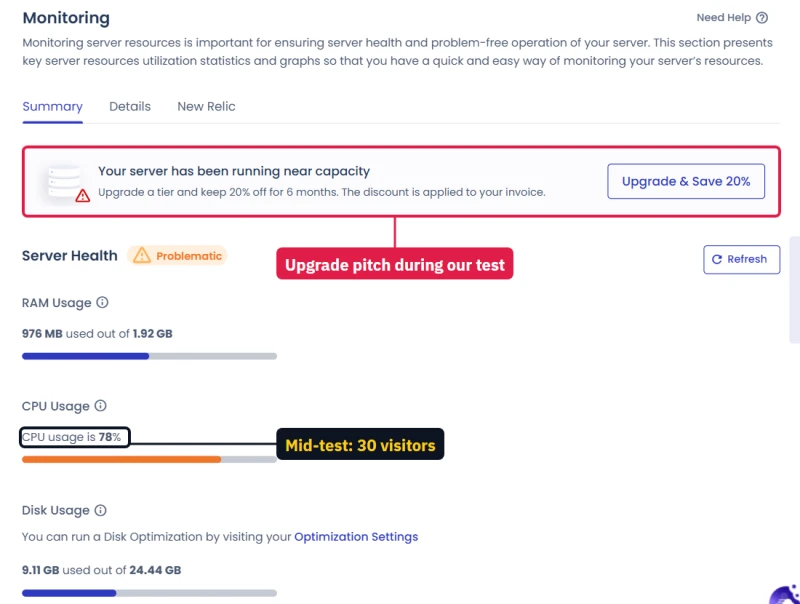
I pointed a stepped load at the 2GB server from one machine, every request a fresh uncached page: 10, then 30, then 60 visitors at once. It never refused a request, but it topped out at about 6.5 uncached pages a second, and the typical response grew to 13.6 s at 60 visitors.
Midway, Monitoring rated the server "Problematic" and put an upgrade offer on screen. Real visitors mostly get cached pages, where Cloudways is fast. A 2GB server is for small sites, as Cloudways' own sizing note says.
The load test, step by step
Each step lasted 60 seconds, and every request asked for a fresh copy of the home page, so no page cache could help. The same steps went at the Autonomous trial site at the same time, which is why both columns sit side by side.
The Flexible server never refused a request. It slowed down in a straight line as the queue grew, which is what a server does when its processor is the limit. Monitoring showed the processor at 78% and memory at 976 MB of 1.92 GB during the 30-visitor step.
The Autonomous site was protected, not overloaded. Cloudflare decided one machine asking for 60 pages at once was an attack and turned most requests away. For a real site with many visitors on different addresses that is good behaviour. It means the Autonomous column describes Cloudflare's rules, not the servers behind it.
Distance affects these numbers too. I ran the test from India against a server in New York, where a single round trip already takes about 0.3 s. A visitor in New York would see every figure in the Flexible column much lower.
The ceiling does not change with distance. About 6.5 uncached pages a second is what a 2GB Basic server gives you, and that is the number to plan around if your site cannot be cached, such as a busy WooCommerce checkout.
Cloning a site, and a second launch a day later
I came back the next morning with a new 1GB server to fill the gaps in my notes, and timed two more jobs.
- A second launch: pressed at 05:47 UTC, listed with its app by 05:55. That is about 7 minutes again, so the first result was not a lucky run.
- Cloning an app onto the same server: Quick Actions, Clone App, pick the server, Continue. It started at 06:01 and the server showed two apps at 06:10, so allow about 6 to 9 minutes for a small WordPress site. The original kept answering throughout.
- Cloning a big store onto another server: the 10,000-product WooCommerce store, from the Vultr server to a new AWS server, took about 10 minutes. The copy kept all 10,018 products, and Cloudways rewrote the site address in the links by itself.
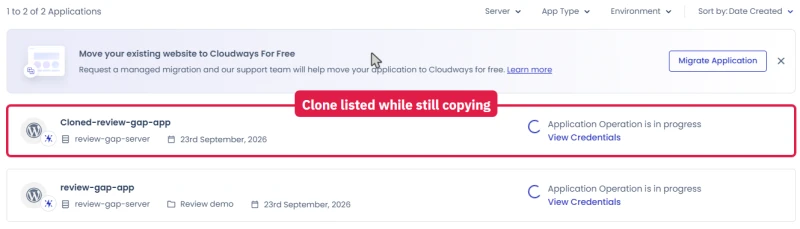
The clone appears in the applications list, with its own name, while the copy is still running, so do not open it until the progress note clears.
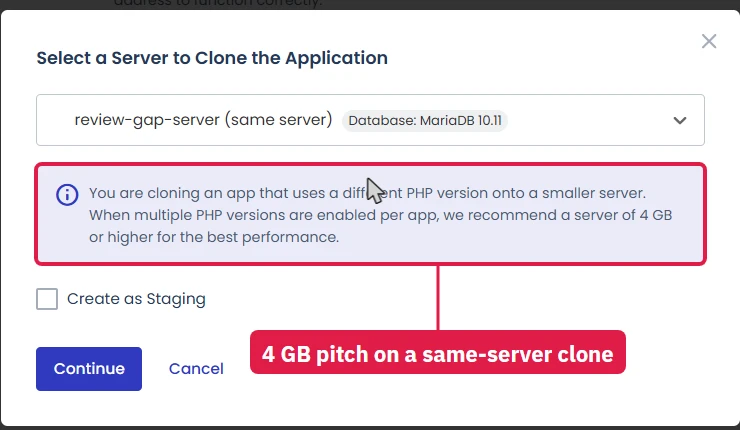
Even this simple job, a copy of one app onto the same server, showed the note recommending a 4 GB server. By then I had seen that note on the scaling page, the PHP dialog, the staging dialog and the clone dialog. It is not wrong for busy sites, but it appears whatever you are doing.
Two more account checks, on the day I scaled up
The account was paused twice more on the day I scaled up, both times around a scale-up. At 02:30 UTC Cloudways refused my 4GB to 8GB scale-up with "There is a temporary limitation on your account for launching, or upscaling to, a larger server at this time", signed me out, and then disabled platform access with the same "non-payment or unusual activity" message as on day two.
A billing chat restored access and lifted the limit about 10 minutes later, and said funds must be added to the account before scaling further. About 25 minutes after the accepted scale-up, during my load test, the account was locked a third time. The chat said access was switched off automatically "due to excessive resource usage". It was restored the same day.
The sites kept serving through every lock. While the panel is locked, though, you cannot change, scale or delete a server, and the servers keep billing by the hour. On a new account, add funds before you scale beyond the small sizes.
My test log, hour by hour
The whole test in order, with times in UTC. Everything below happened in one Cloudways account I opened for this review, not in my own long-running account.
Day one. I signed up as a new customer, launched the free trial, and read every screen of the console. The trial allowed one server, and the launch wizard refused the cheaper 4GB Standard size with "Server size is not allowed with Trial Account" before it accepted the 4GB Premium one.
I read the Monitoring, Backups, Security, Application Settings and Add-ons pages on that server, asked live chat two questions, and captured the price of every add-on that only shows its price inside a server. Overnight, the server's security log recorded brute-force attempts on SSH from two outside addresses, both blocked before I logged back in.
Day two, morning. I added a card to see what changes. The trial banner switched from "expires in" to "will be automatically upgraded in": a card on file turns the trial into a paid account when the countdown ends.
I then pressed Get Full Access. The confirmation named the running server and its monthly cost and said billing is pay as you go, invoiced at the end of the month. From that moment the AWS and Google Cloud padlocks were gone, and a popup introduced the Cloudways MCP server, which lets AI tools such as ChatGPT, Claude and Cursor manage the account.
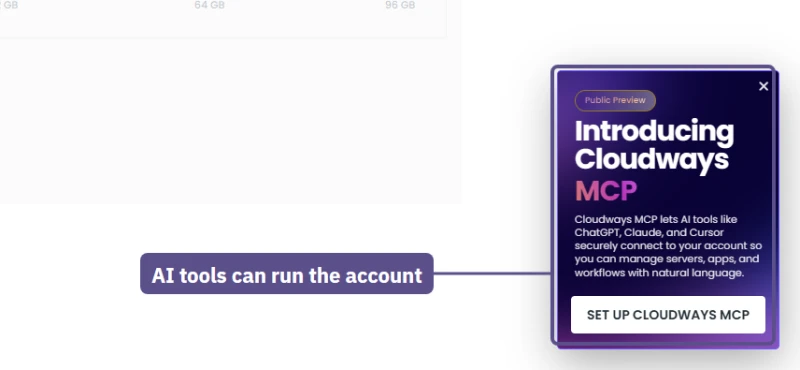
10:25 to 10:45. I moved the size slider across every tier of every cloud and wrote down each price and hourly rate. That list is in the pricing section, and every figure in it came from the launch form rather than the public pricing page. The launch form now preselected a CPU Optimized 4GB server marked Recommended, where the trial had offered a Basic one.
10:37. I launched a 1GB DigitalOcean Standard server in New York. An add-on page came first (Site Manager Pro and Malware Protection, each with a price) and I pressed Skip for Now. The server's web server answered at 4 min 42 s and the dashboard listed it with its app at 7 min 12 s.
10:44. In a second tab I launched the Autonomous trial in Frankfurt. It was ready before 10:51, under 6 minutes. Its note said the trial upgrades itself to the Growth plan when the 3 days end.
10:49. I scaled the 1GB server up to 2GB while a script checked the site every 1 to 2 seconds from India. The warning promised about 12 minutes and said the site would not be accessible. The site kept answering for five minutes, went dark for about 2 min 51 s, stumbled for another minute, and was steady again by 10:58.
11:19 to 11:41. On the 2GB server, with the probe still running, I took an on-demand backup (under 30 seconds), ran a complete restore (about 1 min 20 s), created a staging copy (about 3 minutes), pushed staging back to live with a pre-push backup (the log said Success 29 seconds after I pressed Proceed), and switched PHP from 8.2 to 8.4. Not one probe failed during any of it.
12:16 to 12:26. The load test in the table above, against the 2GB server and the Autonomous trial at the same time.
13:00 to 13:13. I pointed a real subdomain at the server through Cloudflare, with the orange cloud off so Let's Encrypt could reach the origin, and installed a free certificate. It was live in about 70 seconds. The certificate form rejected my email address until I typed it in lower case, so try lower case if the form refuses yours.
13:25 to 14:16. I connected a small private GitHub repository to Velocity and pressed Deploy Now at 14:03. The screen sat on "Setting Up Your Velocity Server" for a long time.
Around 14:15. The account was disabled. Opening Velocity redirected to an account page that said platform access had been disabled "due to non-payment or unusual activity" and gave a billing email address. Nothing had gone unpaid.
In one morning the account had added a card, taken full access, launched three products, sent a load test and connected GitHub, which is the pattern an automated fraud check would flag. The sites themselves kept serving the whole time. I contacted billing, access came back about half an hour later, and nothing was lost.
14:45 to 15:00. With access back, the Velocity app turned out to have finished deploying at 14:12, about 9 minutes after Deploy Now. I pushed a one-line change to GitHub and it went live about 35 seconds later with no failed request. I read the idle disk figures on two servers and captured the final state of every list.
15:40. Every test server was deleted, and I checked that each address stopped answering.
Day three. A fresh 1GB server to cover what was still missing: the full AWS and Google Cloud size lists, billing, teams, the AI products, server settings, email options, cron jobs, domains, and the clone timing above. That server was deleted the same morning too. The month's billing estimate still read USD 0.00 afterwards, because Cloudways bills the hours at the end of the month.
If you repeat any of this yourself, the one lesson from day two is to go slowly on a brand-new account. Add the card, use it for a day, and only then launch several products at once.
What the hands-on test taught me
I started the hands-on test expecting to confirm what the benchmarks already said. Signing up as a new customer changed my view on five things.
It is faster to set up than I expected, and the promises hold. Two launches, a day apart, both took about 7 minutes, exactly as promised. A free SSL certificate took about 70 seconds. Backups, restores, staging pushes and PHP switches each took between half a minute and three minutes, and none of them dropped a single request on the live site. That is the part of "managed" that Cloudways does very well.
The upsells are more frequent than they need to be. An add-on page before every launch, an upgrade offer on the Monitoring page when the server is busy, a standing discount on the scaling page, and a recommendation for a 4 GB server in four separate dialogs. None is dishonest, and the 4 GB advice is sound for a real business site. But a beginner could come away thinking every site needs twice the server it does.
The small print decides the bill more than the plan price does. The launch form preselects a Recommended CPU Optimized server once you have full access. AWS and Google Cloud include only 10 GB of disk. Autonomous charges ten times Flexible's rate for extra disk. Velocity bills its disk on top of the plan. Where your billing address is taxed (18% IGST in India, for example), tax comes on top of everything.
Every one of these is shown somewhere, but you meet most of them in the launch form, not on the pricing page.
The new products are real, but young. Autonomous works and protects itself hard, with only two regions and some labels left over from an older plan structure. Velocity deployed my app from GitHub and redeployed a push in about 35 seconds, with a status badge or two not yet telling the truth.
Managed AI Agents and Copilot are early: one is half price with no end date shown, the other is mostly Coming Soon. I would build on Flexible today and watch the other three.
A new account needs patience. Mine was disabled for about half an hour after a busy morning of testing. For a new customer moving real sites, that is the one risk I would plan around: open the account, use it lightly for a day or two, then move sites across in batches with the old host still running.
None of that changes my take above. For developers, agencies and anyone who wants a real cloud server without running it themselves, Cloudways Flexible is still the platform I would choose, and now I can show you every screen behind that choice.
The Cloudways Dashboard and Team Access, Screen by Screen
Signup is one screen: name, email, password, two dropdowns (what describes you, what you spend on hosting), or one click with DigitalOcean, LinkedIn, GitHub or Google. It says "No credit card required", and that held: I launched a trial server without one. The promo field is hidden behind a small "I have a promo code" link, which is where CLOUDS2022 goes.

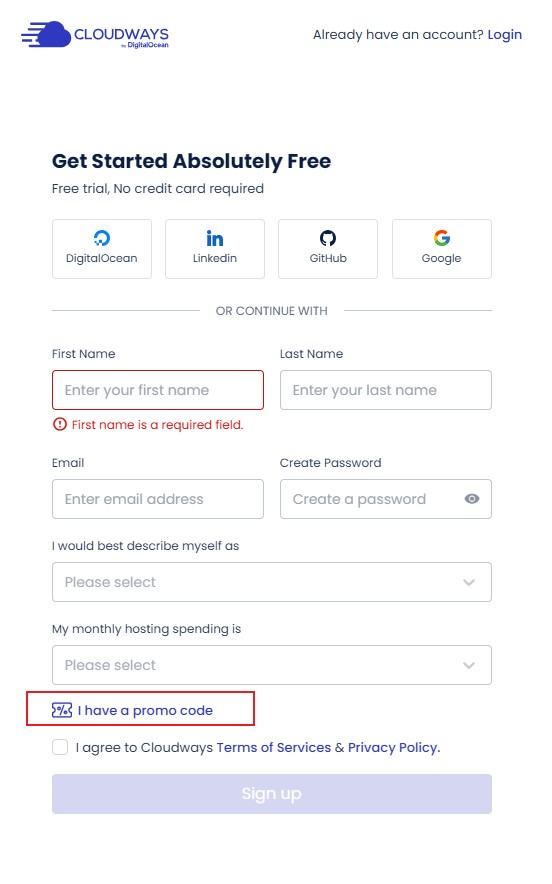
The card comes when you stay past the trial. Cloudways charges $1 to check it and reverses the charge once the check passes:
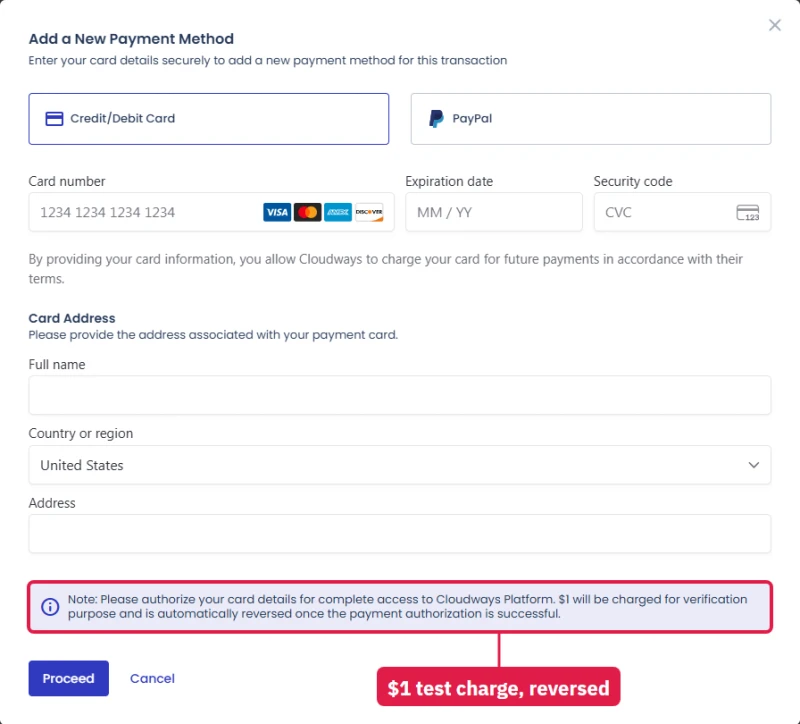
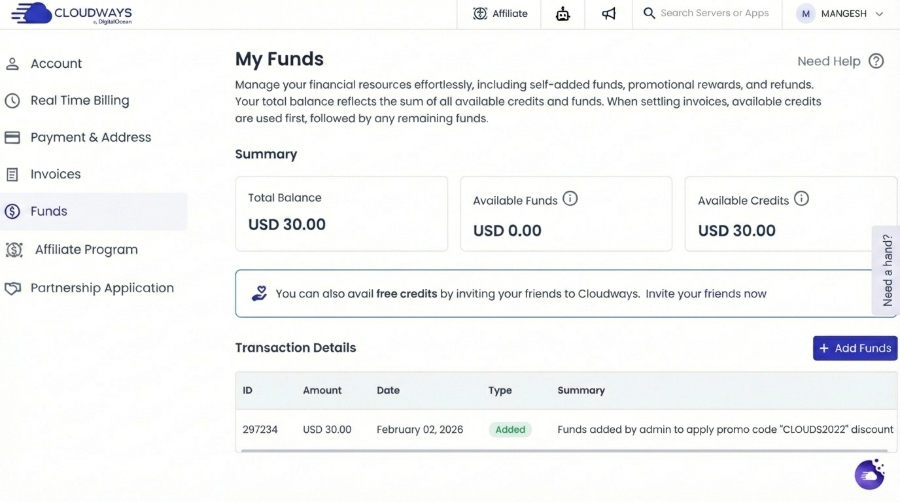
After login you land on the home screen shown above: the three products, your recent applications and quick-start guides. Flexible's launch wizard installs more than WordPress:
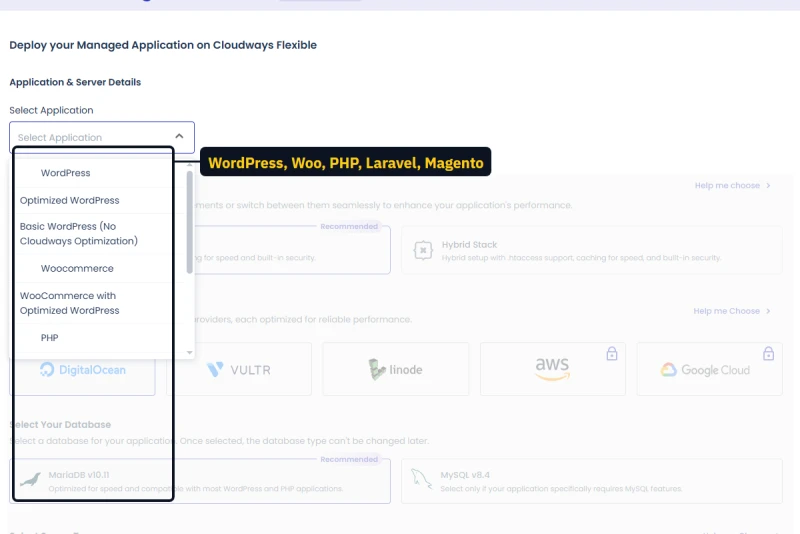
Three WordPress builds (plain, Cloudways-optimized, and one with no Cloudways optimization at all), two WooCommerce builds, plain PHP, Laravel and Magento 2.4.8 with OpenSearch. The megaphone icon opens a changelog that shows where the platform is heading:
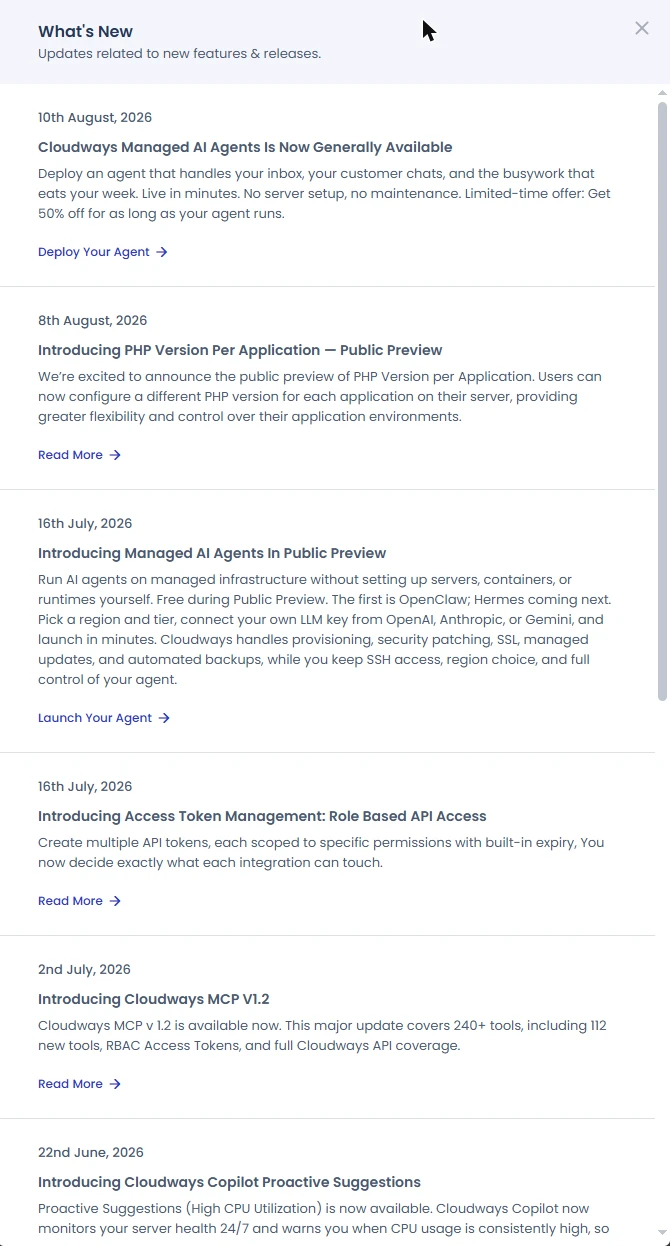
Summer 2026 alone brought a different PHP version per application (public preview), role-based API tokens with expiry, an MCP server with 240+ tools so AI assistants can drive your account, Copilot warnings for sustained high CPU and 5xx errors, and the AI Agents launch. For a hosting panel, that is a busy release cadence.
The dashboard, screen by screen
Cloudways' console is three layers deep: the account, a server, and an application on that server. Once you know which layer a setting lives on, everything is quick to find.
The left sidebar (account level). Home, then the three hosting products (Flexible, Autonomous, Velocity), then Cloudways AI. Lower down: the Agency Partnership programme, Integrations (add-ons and partner plugins) and Support. The top bar holds the affiliate link, a changelog, a notifications robot, search, and your account menu with My Account, My Teams, Billing, Affiliate, API Integration, Suggest Feature and Give Feedback.
The server list. Each server shows its cloud, size, IP address, region and date, with three small counters for domains, apps and team members. While a job runs (a launch, a backup, a clone) the card shows what it is doing and locks. The same page has an Applications tab listing every app on every server, with filters by server, app type and environment.
Inside a server (server level). The server menu has eight pages:
- Master Credentials: the server's public IP, one master SFTP and SSH user with its password, SSH public keys, and a button that opens an SSH terminal in your browser.
- Monitoring: 15 graphs of CPU, memory, disk, network, cache hit rates and more, plus a health verdict and, when the server is busy, an upgrade offer.
- Manage Services: start, stop or restart Nginx, Varnish, PHP, MariaDB, Redis, Memcached and the rest one at a time.
- Settings & Packages: five tabs (Basic, Advanced, Packages, Optimization, Maintenance), covered in the setup section below.
- Security: the firewall, IP allow lists, and the incident log that recorded the SSH attacks on my first night.
- Vertical Scaling: a size slider, with a standing discount on bigger sizes.
- Backups: frequency, retention and on-demand backups for every app on the server.
- SMTP: outgoing mail, your own provider or the paid Elastic Email add-on.
A Quick Actions menu on every server page does the big jobs: stop, restart, delete, add an application, transfer the server, clone the whole server, and rename.
Inside an application (app level). Access Details (the site's URL, WordPress login, database login, a browser database tool, Redis credentials and extra SFTP users), Staging Management, Monitoring, Application Security, Domain Management, Site Manager, Cron Job Management, SSL Certificate, Backup and Restore, Deployment via Git, Application Settings, Web Rules, Cloudflare and Migration Tools. The app's own Quick Actions clone it, add another app, delete it or rename it.
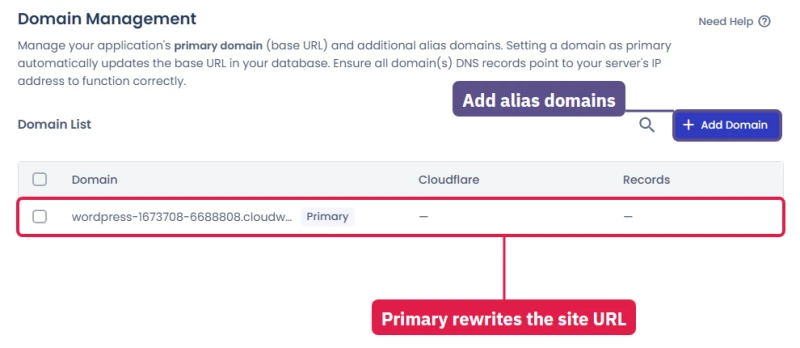
It takes a day to learn, and after that it is faster than cPanel for anything server-related, because nothing is hidden behind a plugin or a third-party tool. What it does not have is a file manager or an email section, which the cPanel and email sections below deal with.
Teams: giving a developer or client access safely
My Teams, in the account menu, is where you invite other people instead of sharing your own login. The invite form asks for an email, a name, a job title and a status, and then offers permissions in three layers.
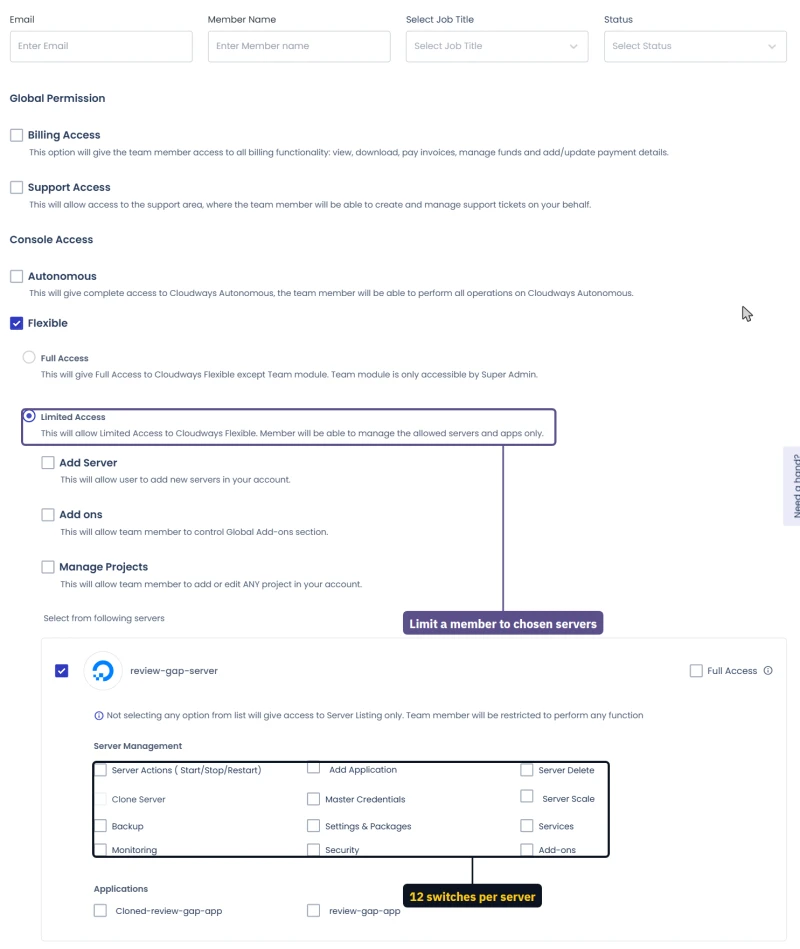
- Global permissions: Billing Access (everything, including adding payment methods) and Support Access (open and manage tickets for you). Both off unless you tick them.
- Console access by product: Autonomous, Flexible, Velocity and AI Agents, each ticked separately. Autonomous, Velocity and AI Agents are all-or-nothing.
- Flexible, full or limited. Full Access is everything except the Team page itself, which stays with the account owner. Limited Access is the useful one: you choose whether the person may add servers, manage add-ons or edit projects, then pick individual servers. For each server you can give full access or tick from 12 switches: server actions (start, stop, restart), add application, delete server, clone server, master credentials, scale, backup, settings and packages, services, monitoring, security, and add-ons. Below that, you pick which of that server's apps they see.
If you tick a server and nothing else, the person sees it in the server list and can do nothing to it. That makes a sensible default for a client who only wants to see that their site exists. For a freelance developer working on one site, give them that one server, that one app, and backup, monitoring and settings, and keep delete, scale and master credentials for yourself.
On most managed WordPress hosts, team access means full access to the whole account or nothing. Cloudways is ahead here.
Staging: A Safe Copy of Your Site in About 3 Minutes
Application → Staging. One click clones production to a cloudwaysapps.com subdomain. One click pushes selective changes (files, database, or both) back to production. No FTP, no database export-import, no third-party plugin.
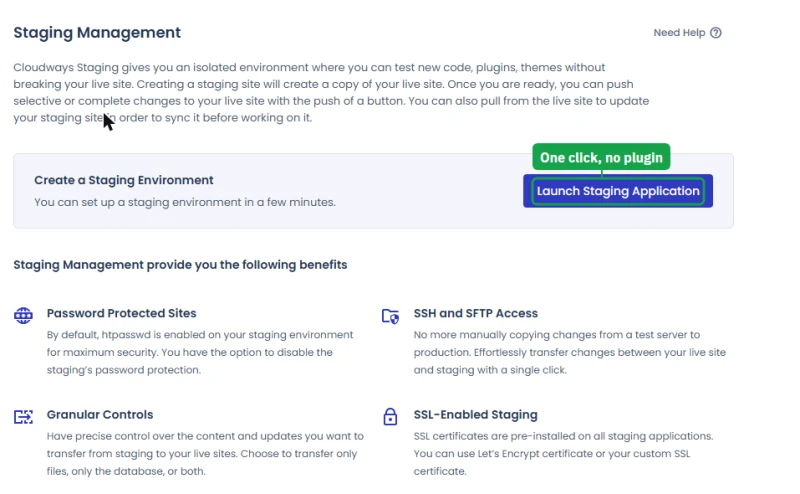
WP Engine charges extra for additional staging sites. SiteGround's staging tool is fine but limited to specific plans. Cloudways gives you unlimited staging on any server.
Timed on a live server
- Creating the copy took about 3 minutes (the page says "a few minutes"). The staging address answers only with a password, and it tells search engines not to index it, so a half-finished copy never shows up in Google.
- Pushing back to live lets you pick files (overwrite or only what changed), the database (whole or chosen tables), or both. Taking a backup of the live site first is a tick box, and it is off by default: tick it. With the backup ticked, the push took about 1.5 minutes and the live site answered every check throughout.
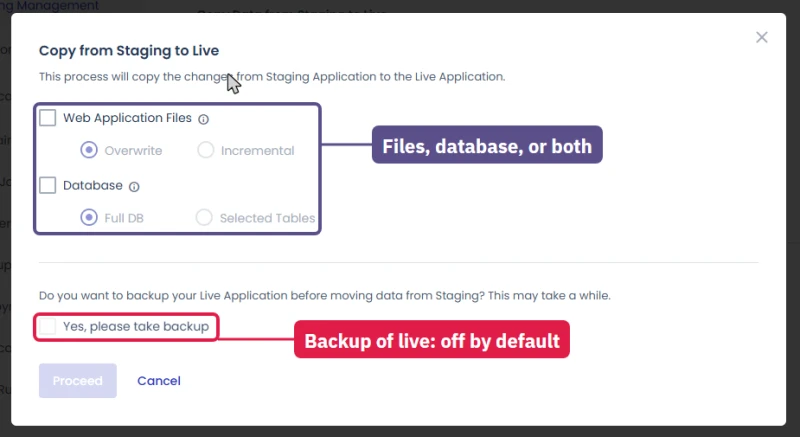
- One nudge: putting staging on the same small server brings a note recommending a 4GB server. It worked fine without one.
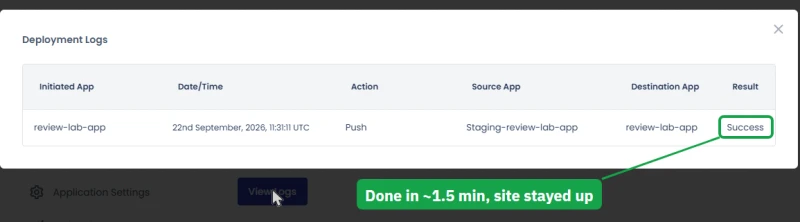
Git Deployment on Flexible and Velocity
Application → Deployment via Git. The first step is Generate SSH Keys: you add the key Cloudways gives you to GitHub, GitLab or Bitbucket, and only then do the repository, branch and deployment-path settings appear. After that you deploy by pulling a branch from the panel; deploying automatically on every push takes a webhook you set up on the repository side.
For development teams, this separates Cloudways from Kinsta and WP Engine. You can run your entire WordPress workflow like any other code project: feature branch, pull request review, merge to main, auto-deploy to staging, push to production. WP Engine has no built-in Git deployment. Kinsta requires manual SSH setup.
Git on Flexible versus Git on Velocity
The two products handle Git differently.
On Flexible, Git is a feature of one application, set up as described above. It deploys files into the app's folder and leaves WordPress and the database alone, which suits a theme or a plugin you develop in a repository.
On Velocity, Git is the only way in. You connect GitHub, GitLab or Bitbucket through an app authorisation rather than a key, pick the repository, and Velocity builds and runs the app for you, with automatic deployment switched on from the start. In my test a one-line change pushed to GitHub was live about 35 seconds later, with the old version answering until the moment of the switch and no failed request.
A WordPress team versioning its theme uses Flexible's Git. A JavaScript developer shipping a Node.js app uses Velocity. Neither deploys a WordPress database for you, so content changes still move with staging, not with Git.
First 10 Things To Do After Launching A Cloudways Server
Most "Cloudways is slow" complaints in hosting forums come from people who launched a server and skipped the configuration. Default settings are conservative. The order I run through:
- Check the PHP version and Object Cache Pro (Application → Application Settings). A new app starts on PHP 8.2; move up once your plugins support it. On 2GB and up, Object Cache Pro is already on under the WordPress tab.
- Check the PHP limits (Server → Settings & Packages → Basic). The defaults are 300 seconds, 100 MB uploads and 512 MB memory, enough for most sites. Raise memory only for heavy imports.
- Install a real caching plugin. Breeze (bundled) is fine for testing. For production, I run FlyingPress. WP Rocket is the set-and-forget alternative.
- Disable wp-cron, add a server cron job.
define('DISABLE_WP_CRON', true);in wp-config.php, then add*/5 * * * * wget -q -O - 'https://yourdomain.com/wp-cron.php?doing_wp_cron'in Cloudways Application → Cron Jobs. - Enable Cloudflare Enterprise ($4.99 a domain). Application → Cloudflare. HTTP/3, managed WAF and edge caching, first 30 days free.
- Set up staging. Application → Staging Management. One button; password protection is on by default.
- Connect Git deployment. Application → Deployment via Git. Generate the SSH key first, add it to GitHub or GitLab, then pick the repo and branch.
- Go through Application Settings. Enable Varnish if you are not using a third-party page cache. On the WordPress tab, the XML-RPC and "Direct PHP Files Access" switches both read "disabled" on a new app; read each help line to confirm whether the protection or the access is the thing that is off, and set them the way you want.
- Set up SFTP or WP-CLI access. Application → Access Details. No native file manager, use FileZilla, Cyberduck, or SSH.
- Fix the backup schedule, then add a second copy. Server → Backups ships at once a day, kept one week. Raise retention (up to 4 weeks) and, for anything you earn from, add UpdraftPlus backing up weekly to Google Drive or S3 as a second layer.
Server settings and their defaults
Settings & Packages, under the server, has five tabs. I went through each on a fresh server so you know what the defaults are before you touch them.
Advanced holds the numbers developers ask about. On a new server: PHP allows 10,000 input variables and 60 seconds of input time, OPcache has 64 MB, short open tags and Xdebug are off. MySQL allows 150 connections and uses Latin1 as its default encoding, with the buffer pool and timeouts left at the server's defaults.
Nginx blocks visits to the server's bare IP address, caches static files for a year, and accepts TLS 1.2 and 1.3 only. Apache accepts request bodies up to 128 MB, and Varnish keeps cached pages for 30 days.
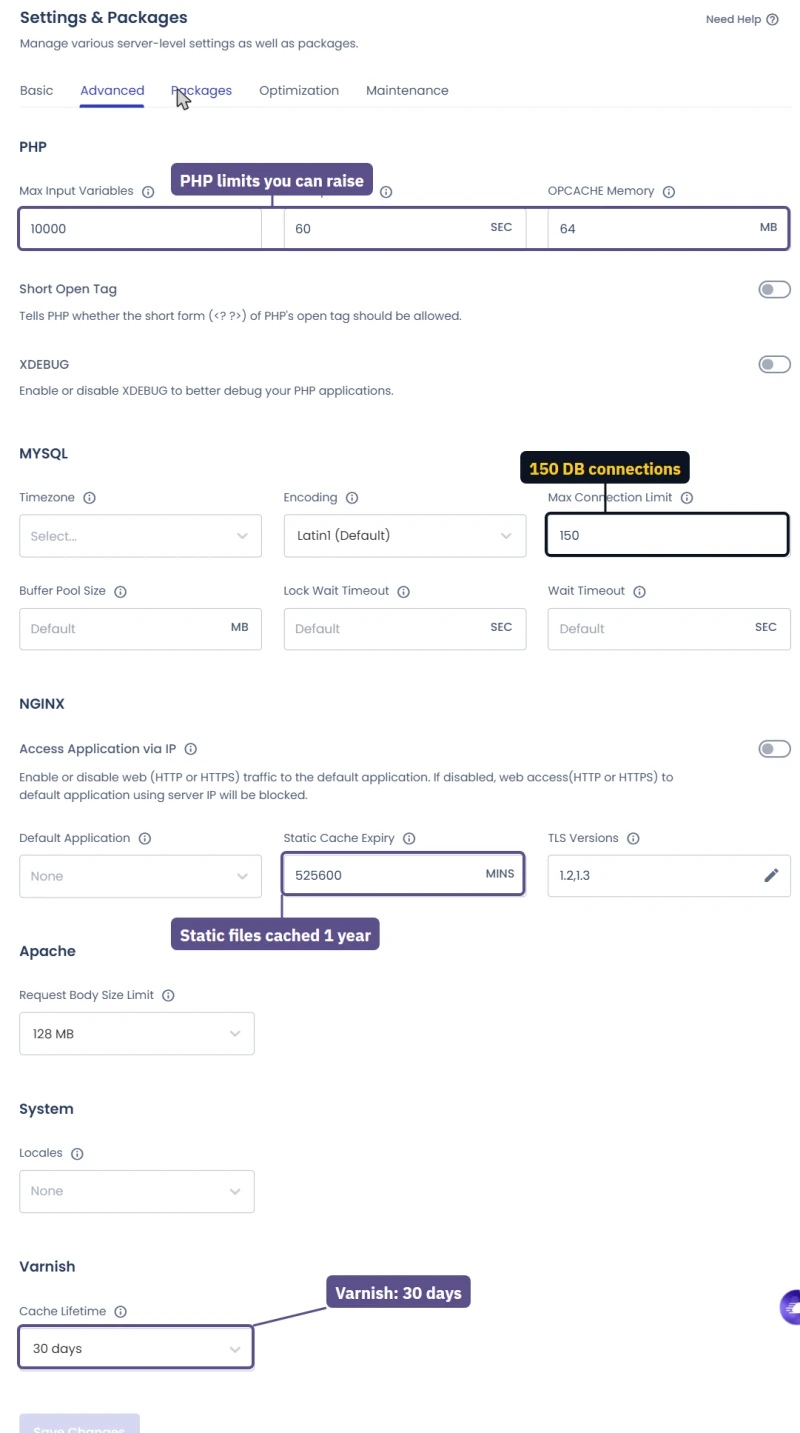
The 64 MB OPcache is small for a server hosting several WordPress sites with page builders, so raise it if you host many sites. And the Latin1 encoding is only the server default: WordPress creates its own tables in utf8mb4, so this does not break emoji or non-English text on a normal install.
Packages is where the optional software lives. MariaDB 10.11 is installed, with a warning that an upgrade cannot be undone. Elasticsearch or OpenSearch, for faster site search on big stores, is off until you choose one. Supervisord, for Laravel queue workers, is not installed. RabbitMQ is in beta and only allowed on servers of 4 GB or more. Redis is on from the start, with access control enabled.
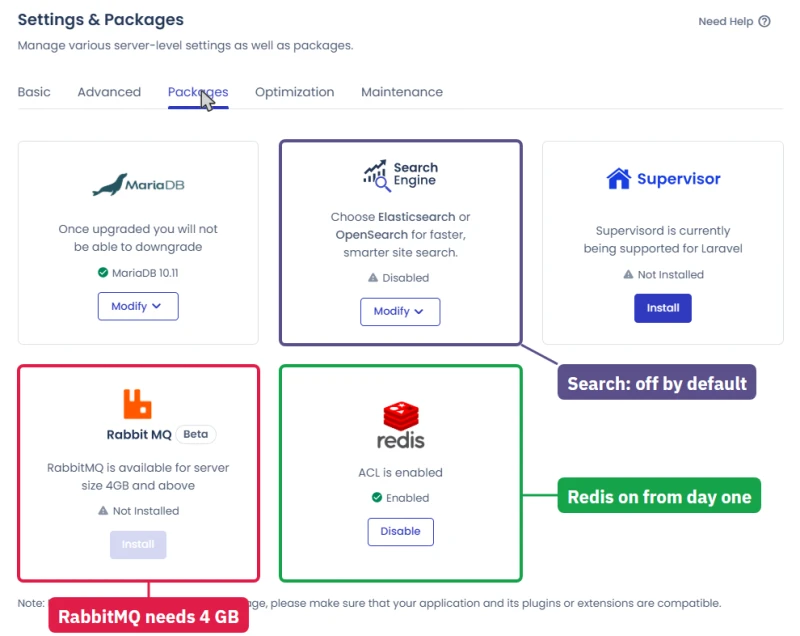
Optimization is a disk cleaner. It always clears temporary files, and you can tick five more targets: each app's tmp folder, private_html, local backups, archived app logs and archived system logs. A switch runs the same cleanup automatically on a schedule. The system already takes about 9 GB of a small server's disk, so visit this page once a month on a 1 or 2 GB server.
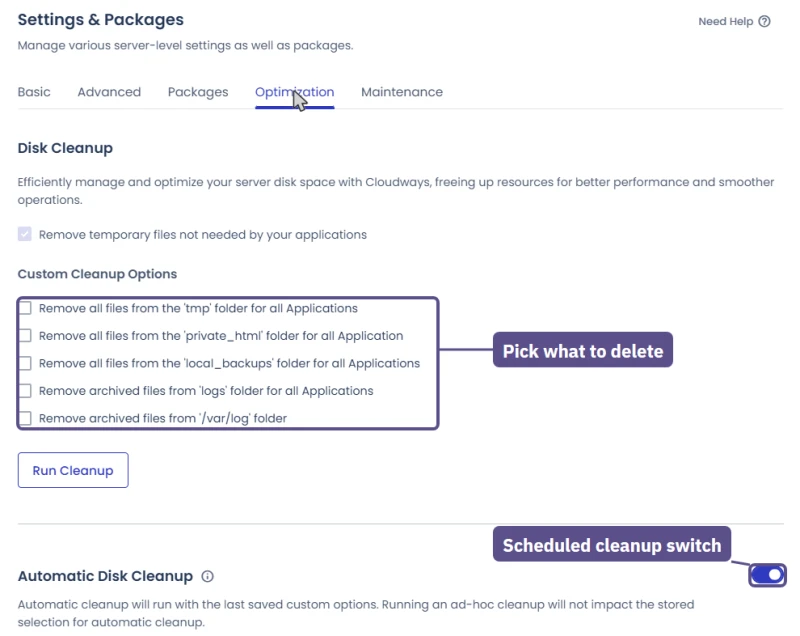
Maintenance is the one to set on day one. Cloudways patches servers in a weekly window, 05:00 to 06:00 UTC by default, and warns of "a minor interruption" during it. That is mid-morning in India and the middle of the night in the US, so pick a day and hour when your own visitors are asleep.
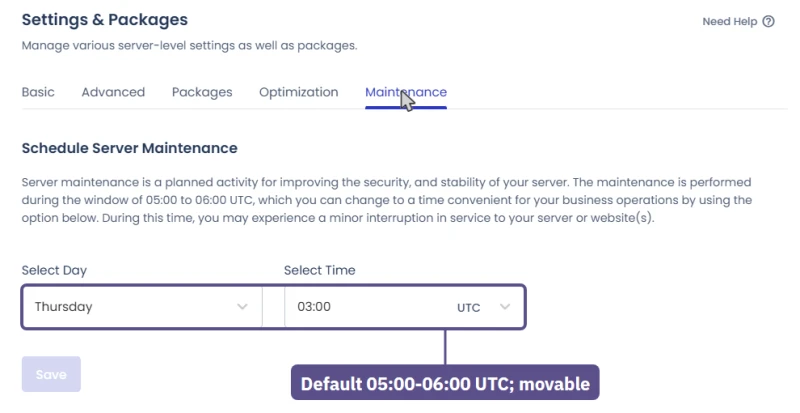
Basic holds the everyday PHP limits (execution time, upload size, memory) covered in the hands-on section.
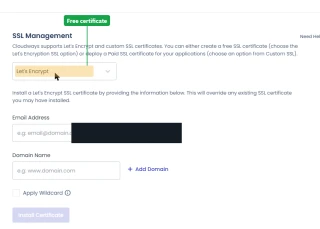
Is Cloudways Legit? What Changed After DigitalOcean Bought It
Yes. Cloudways has been owned by DigitalOcean since 2022, when DigitalOcean bought it for 350 million dollars, and DigitalOcean is a publicly listed company (NYSE: DOCN). It is not a small reseller that can vanish overnight. What has changed under the new owner, checked against a new account:
- Prices went up once, by about 10%. Five months after the sale, Cloudways announced its first increase since 2017, effective April 1, 2023: DigitalOcean Standard 1GB went from $10 to $11 a month, 2GB from $22 to $24, 4GB from $42 to $46 and 8GB from $80 to $88. The launch form in my new account still showed those same four prices, so DigitalOcean Standard has not moved since.
- Watch the specs as well as the price. Memory has become much more expensive across the industry as AI data centres buy it up, and some hosts have answered by trimming storage or cores instead of raising the headline price. On Cloudways, the one change of that kind I caught was Vultr High Frequency 8GB: the public pricing page listed it with 4 vCPUs at $122, while the launch form offered it with 3 vCPUs at $118.00/mo. The two also disagreed on Vultr HF 4GB ($58 on the pricing page) and DigitalOcean 8GB ($96), so trust the launch form: it is what you are billed.
- The 3-day free trial is still there. I used it for this update: no card to launch, one 4GB Premium server, three of the five clouds. Code CLOUDS2022 still adds $30 of credit on top.
- Cloudflare Enterprise arrived as a $4.99-a-domain add-on. The biggest positive change, and the one I use on every production server.
- All five cloud providers stayed active. The fear was that Cloudways would become a DigitalOcean-only shell. It did not.
- Cloudways now sells three products. Flexible (the classic pick-your-cloud servers this review covers), Autonomous (fully managed, autoscaling WordPress from $99.00/mo) and Velocity. Flexible is still the one for developers and agencies.
- Migration got easier. Two routes in the console: the free Migration Plugin you run yourself, or a managed migration done for you, free for WordPress and WooCommerce.

Full Test Report: Cloudways Cloud, by Plan
The complete export from my test suite for every cloud plan I benchmarked: DigitalOcean 1GB, DigitalOcean Premium 2GB (NVMe), Linode 2GB, and Vultr High-Frequency 4GB. Each tab holds that plan's full run: server response time (TTFB), behavior under a 100-user load, the GTmetrix and PageSpeed captures, a Pingdom response-time check, our WordPress hosting benchmark, the regional TTFB scorecard, and 54 days of uptime tracking with the day-by-day calendar.
DigitalOcean 1GB (Featured) DigitalOcean Premium 2GB (NVMe) Linode 2GB Vultr High-Frequency 4GB
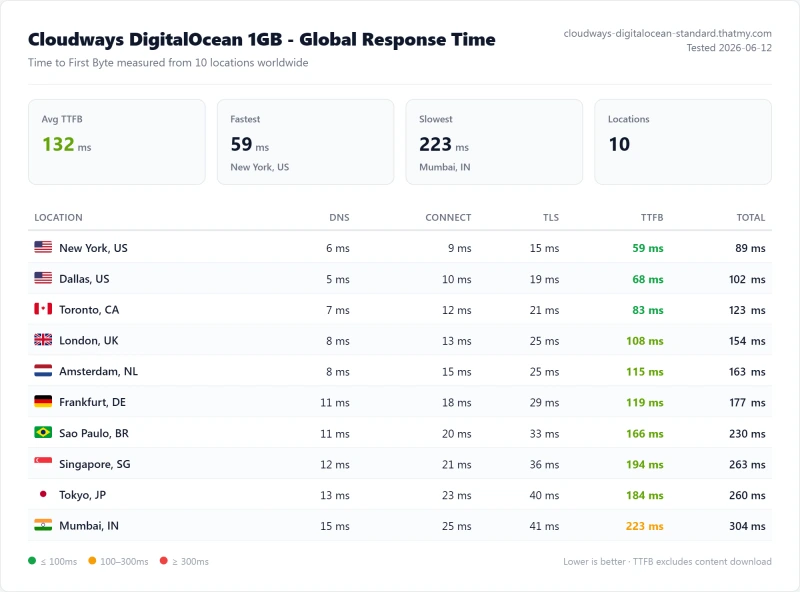
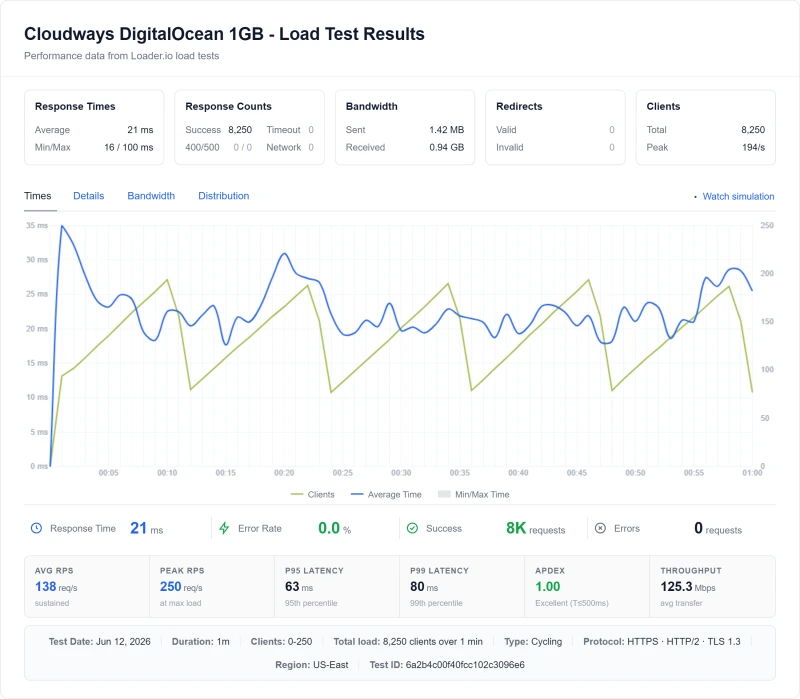
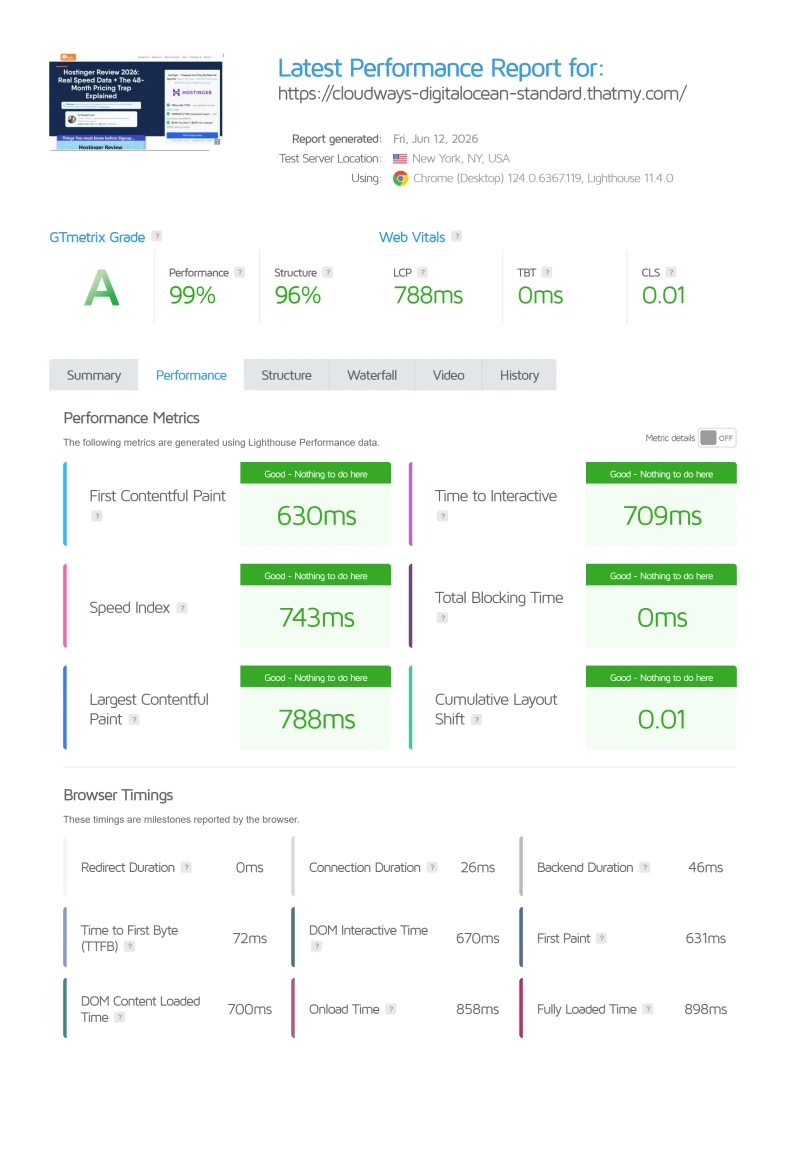
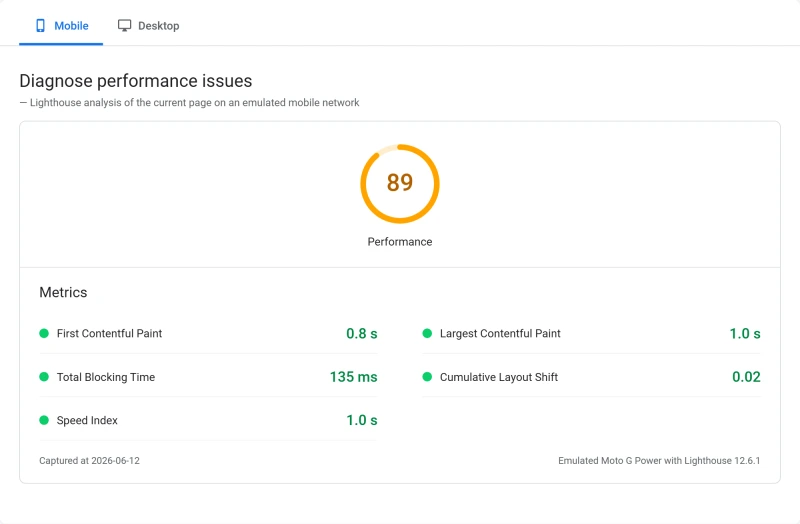
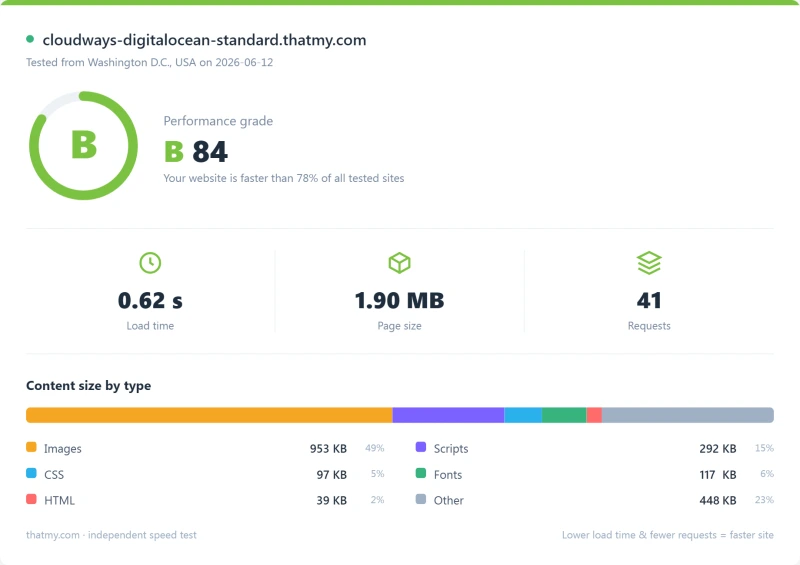
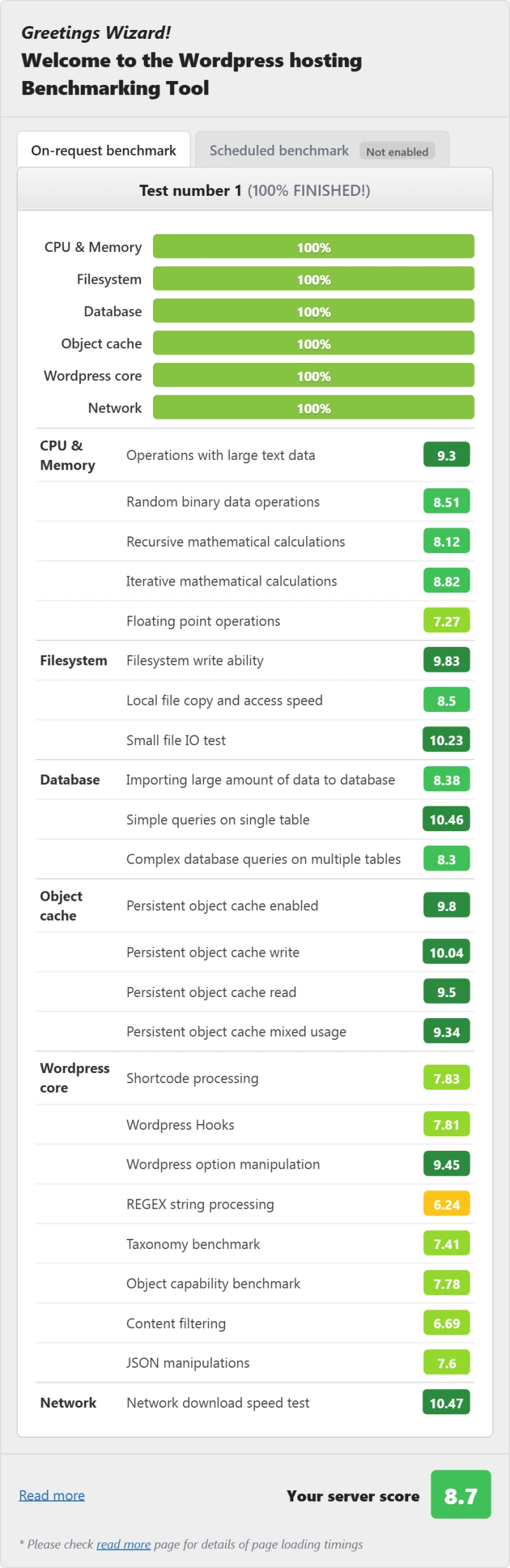
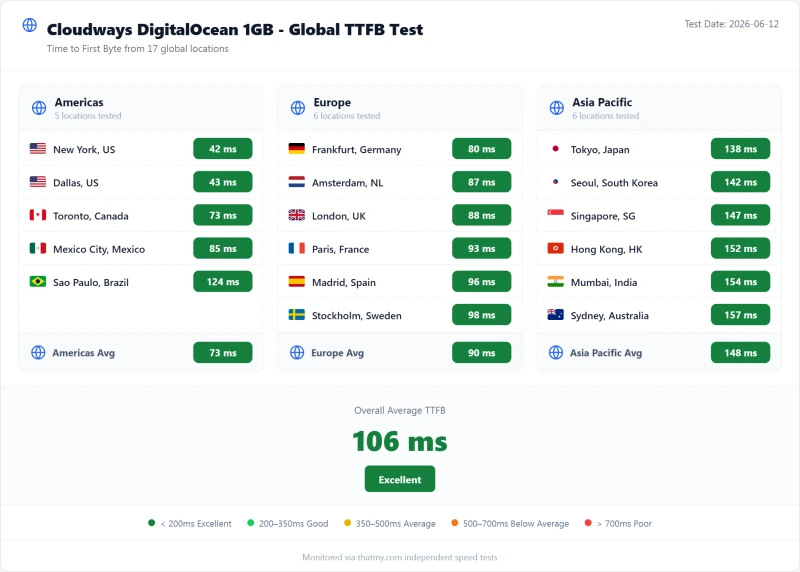
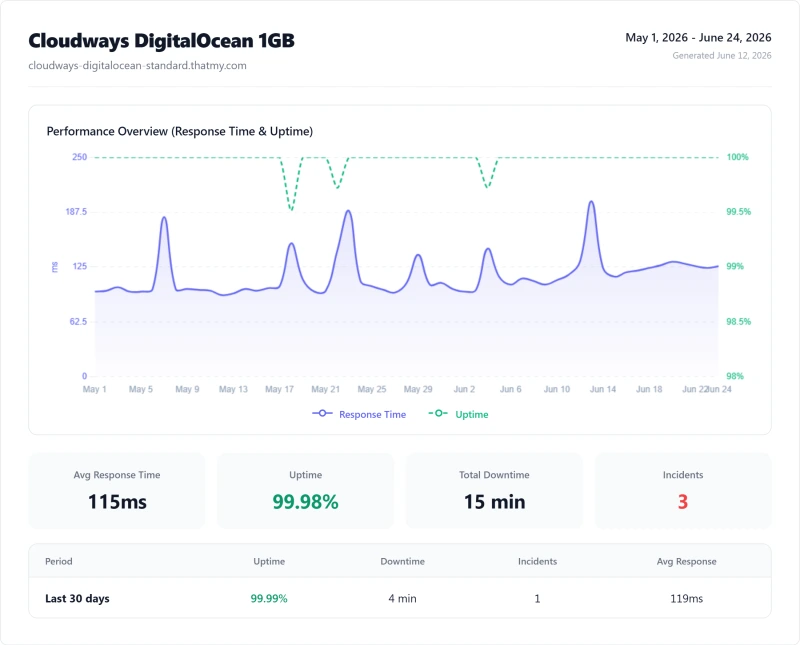
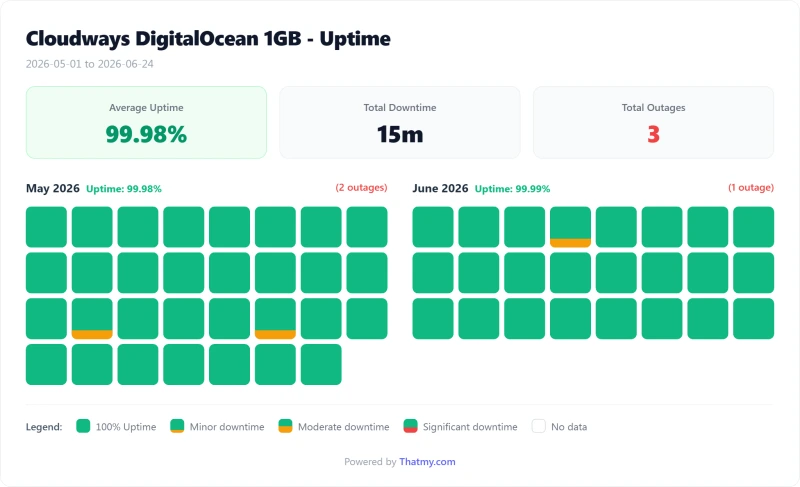
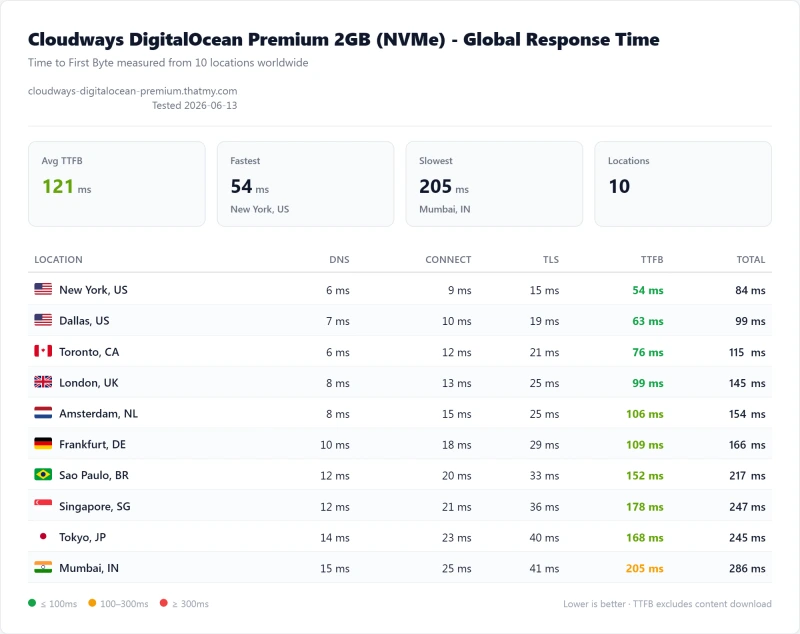
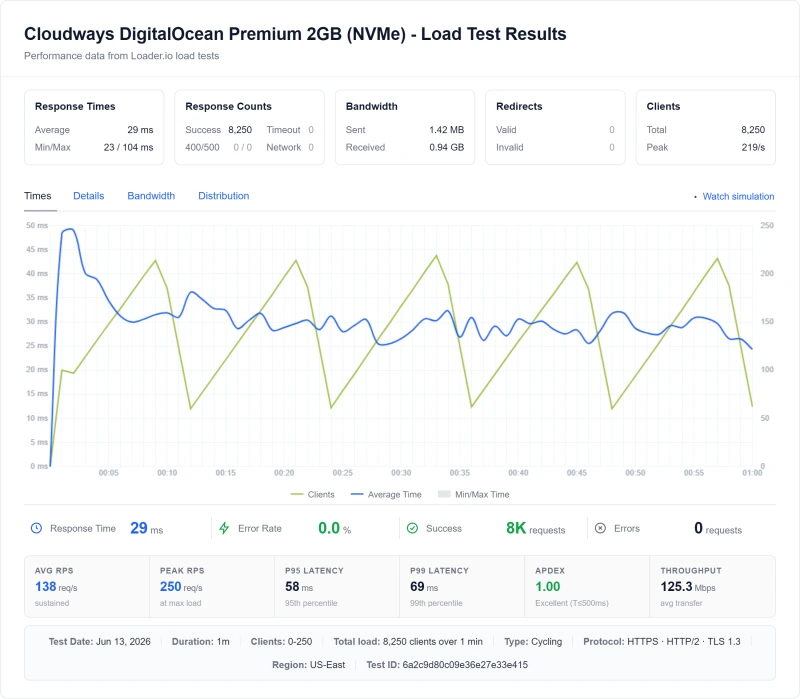
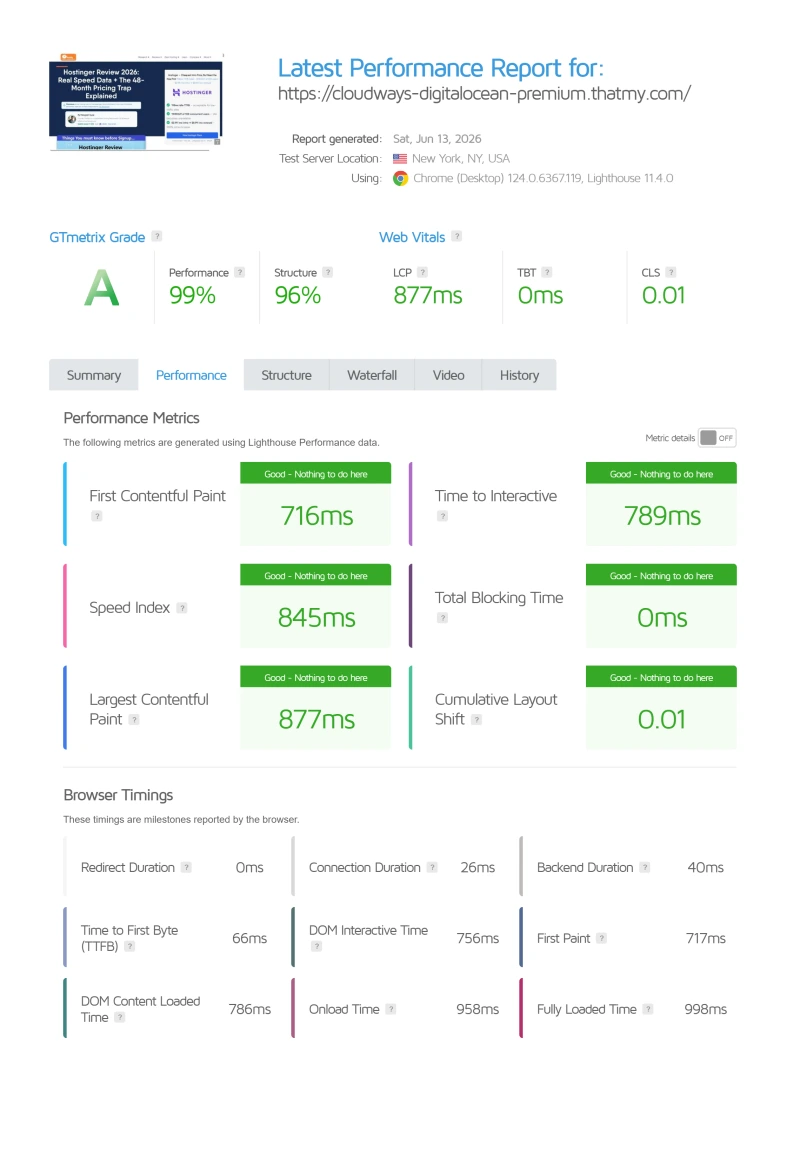
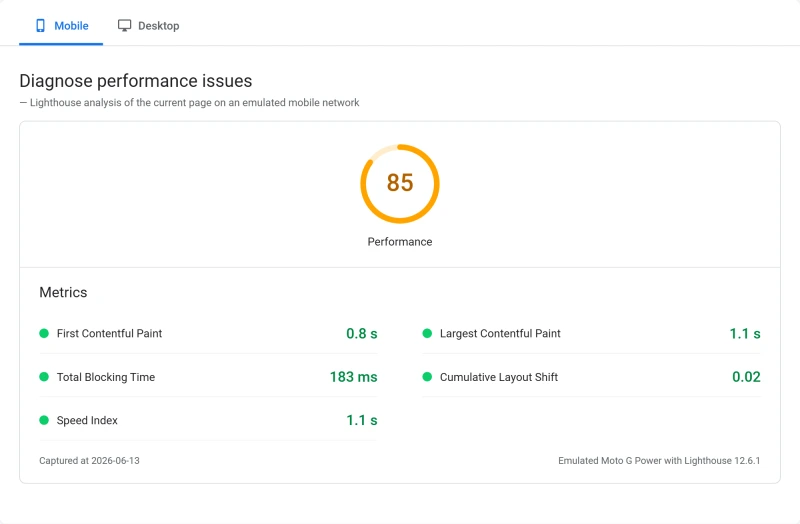
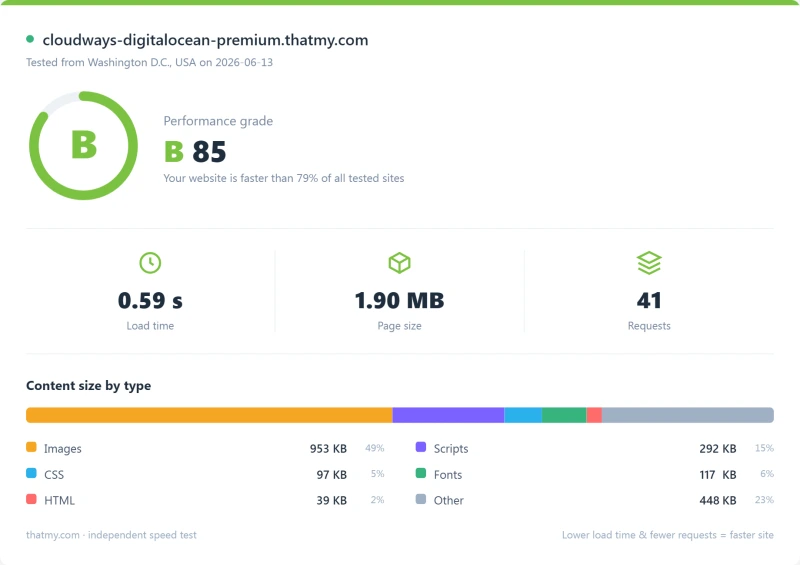
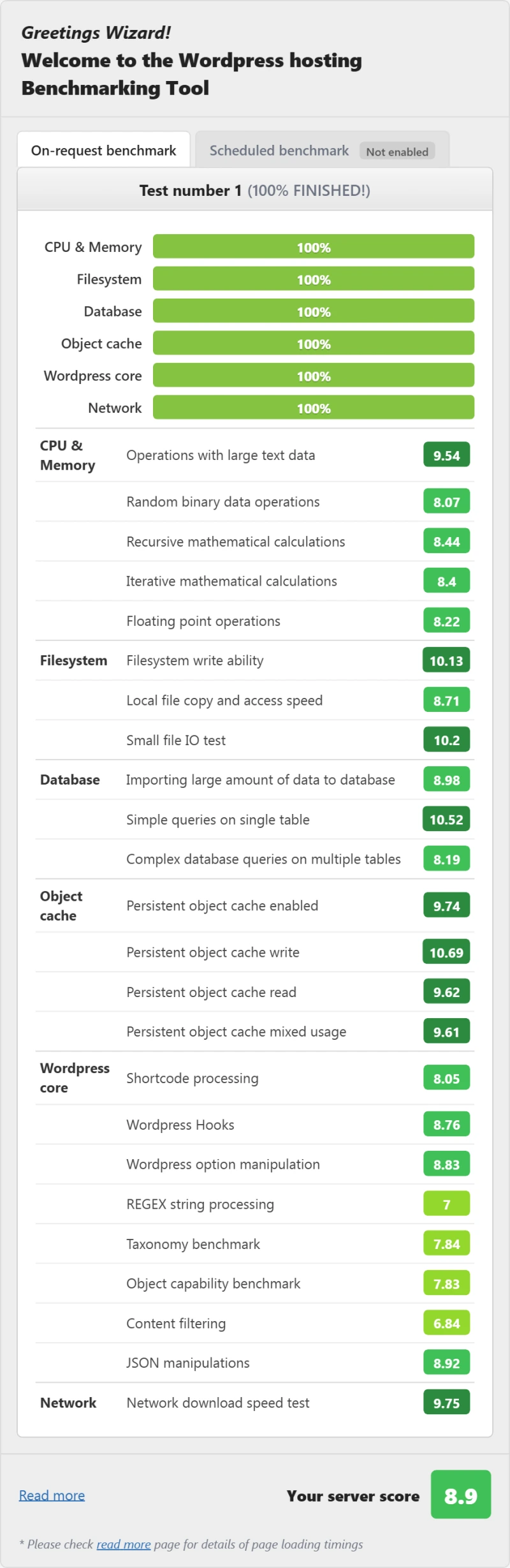
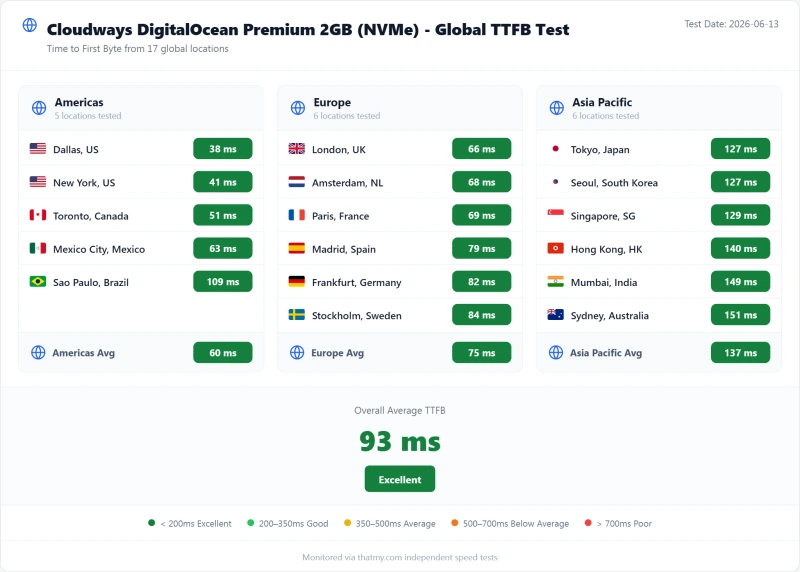
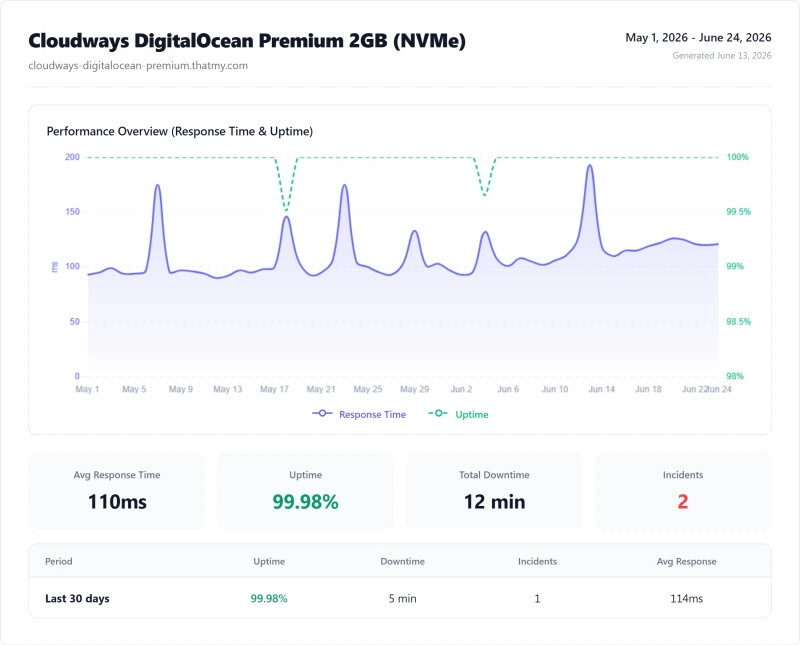
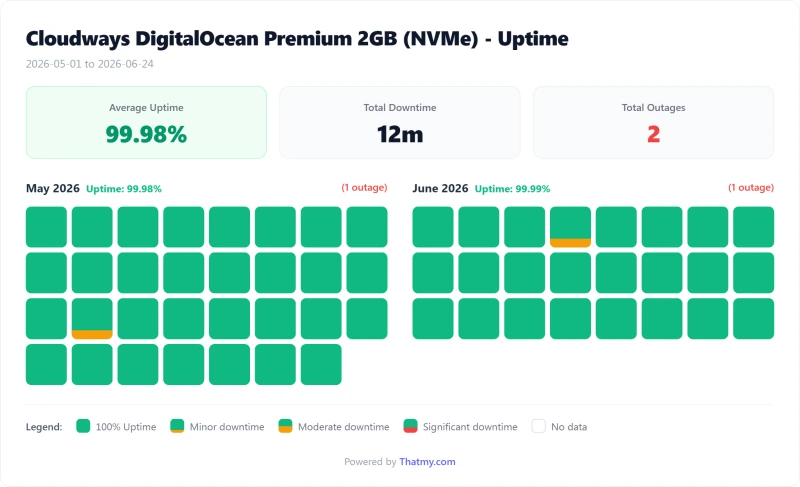
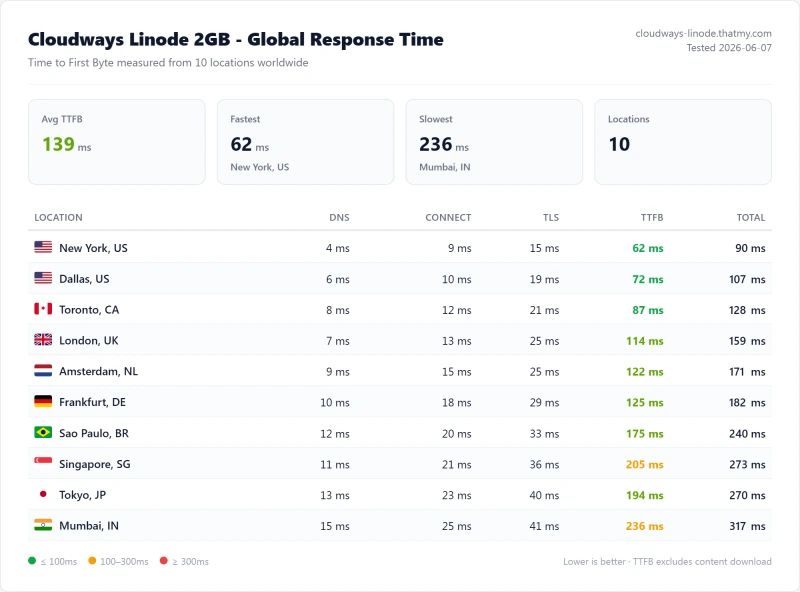
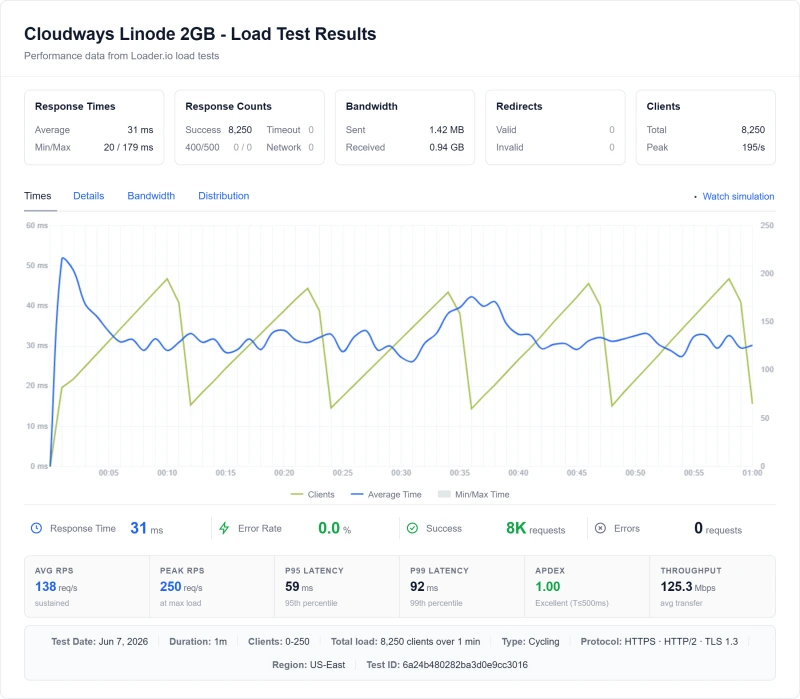
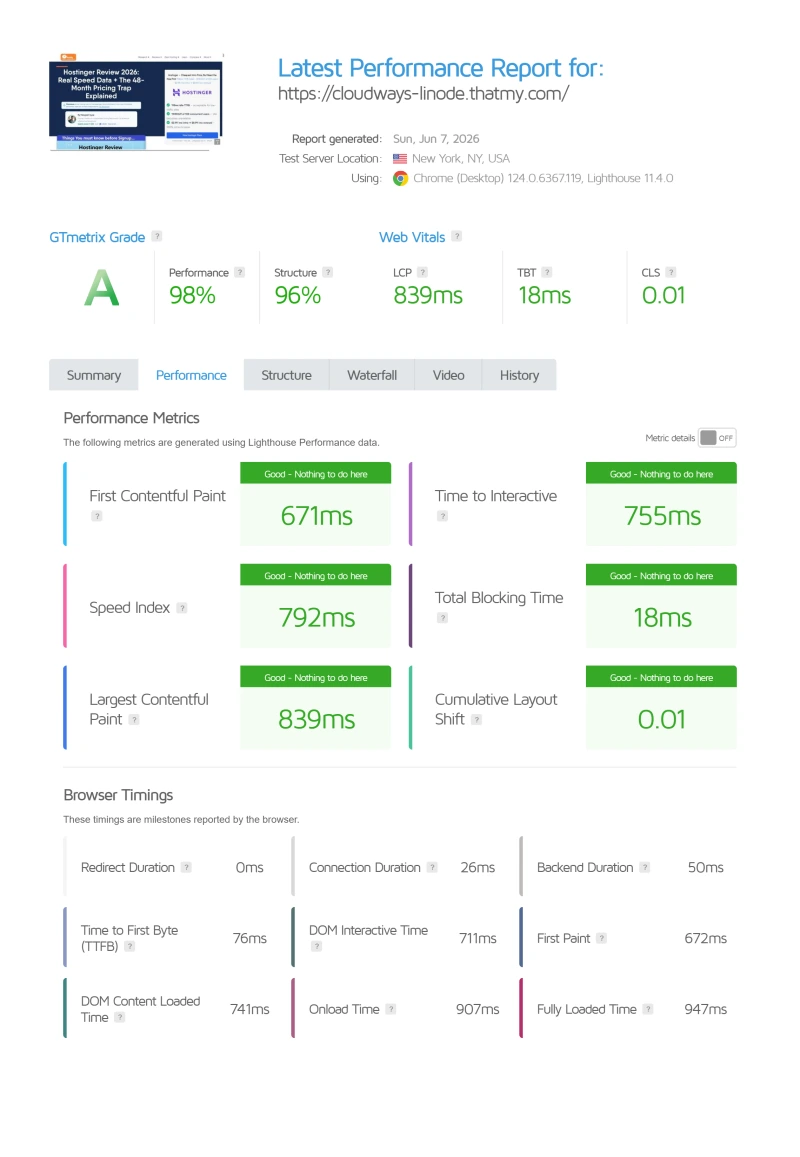
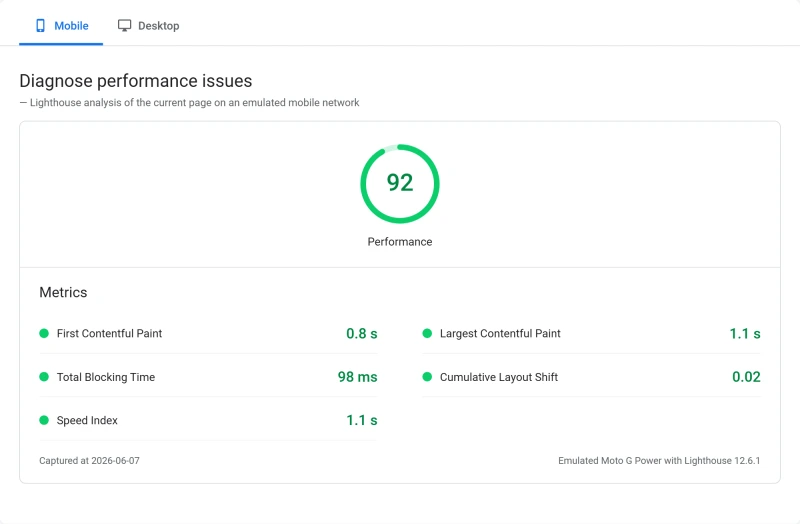
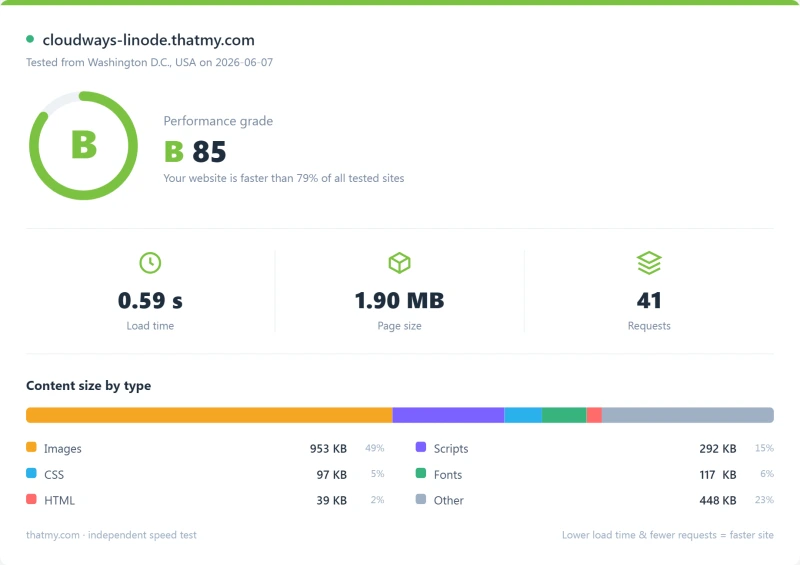
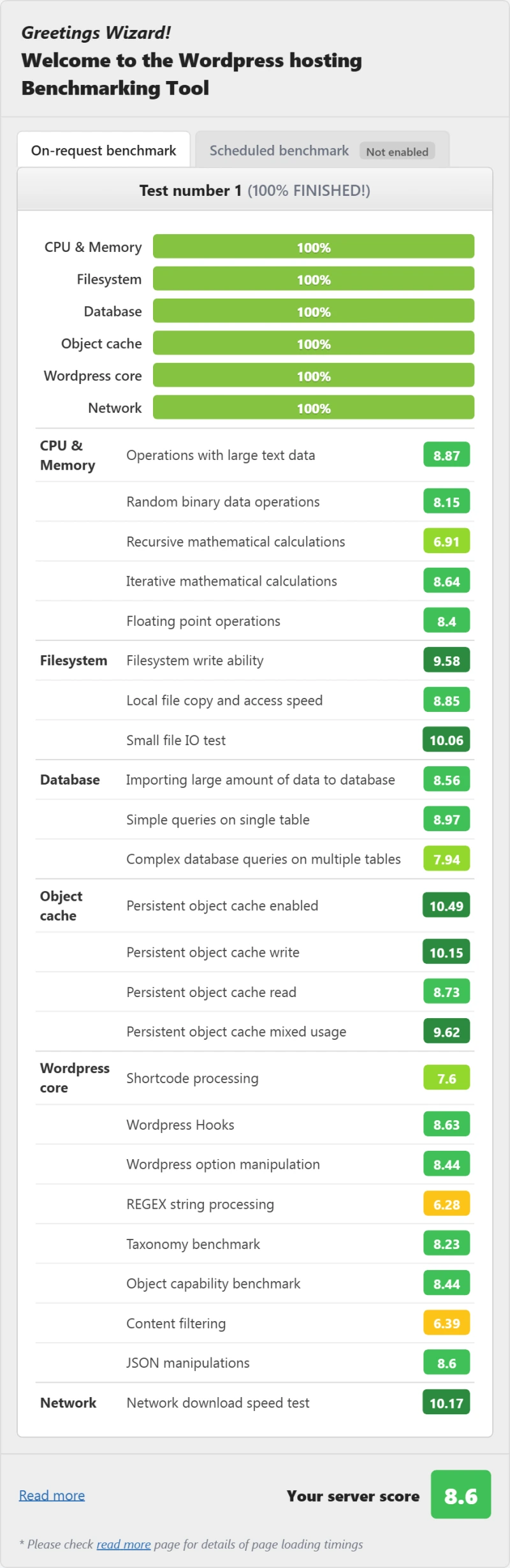
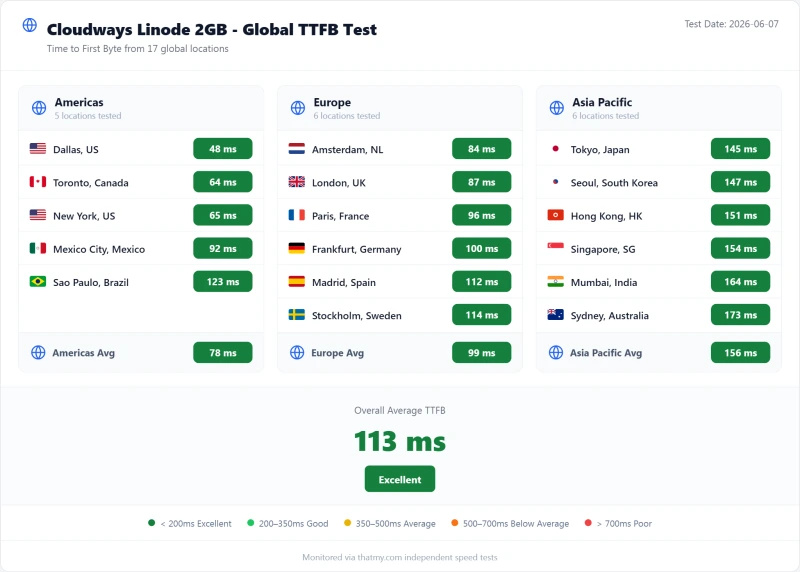
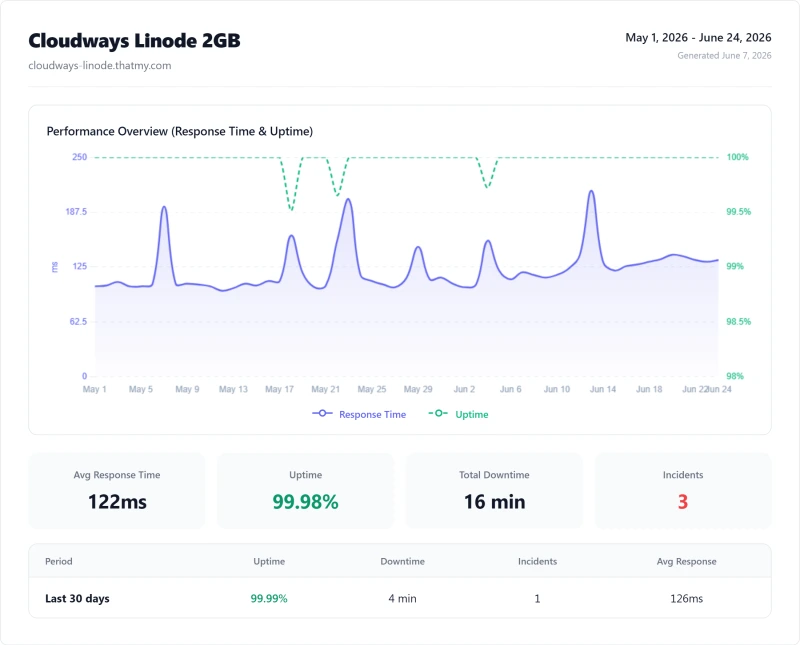
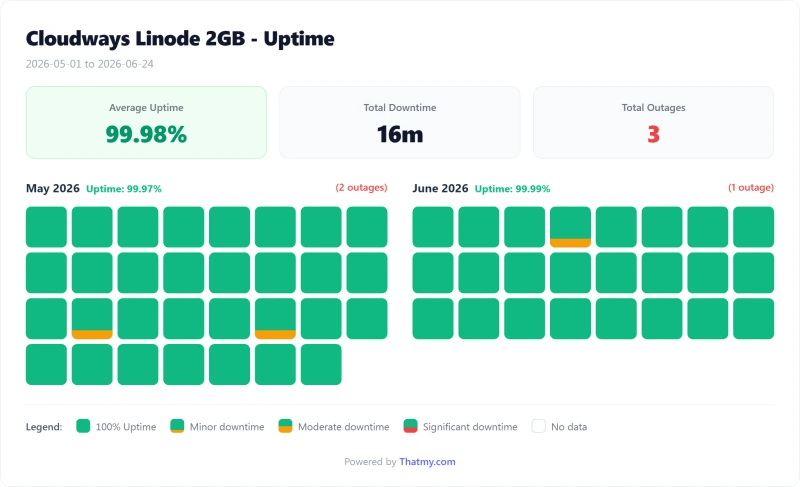
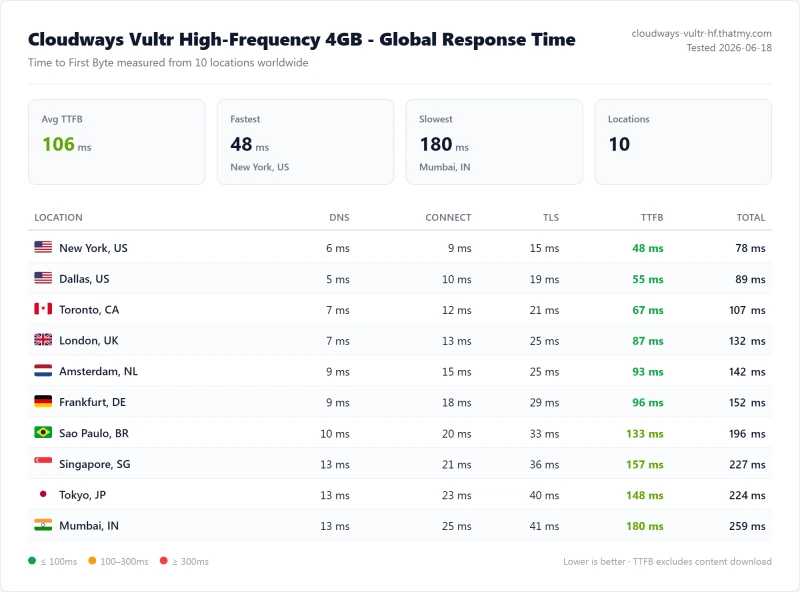
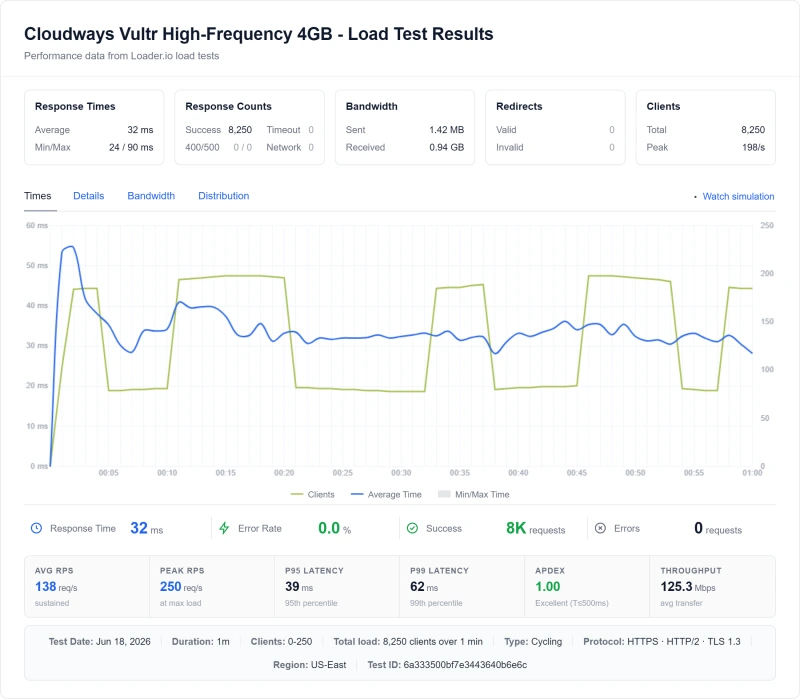
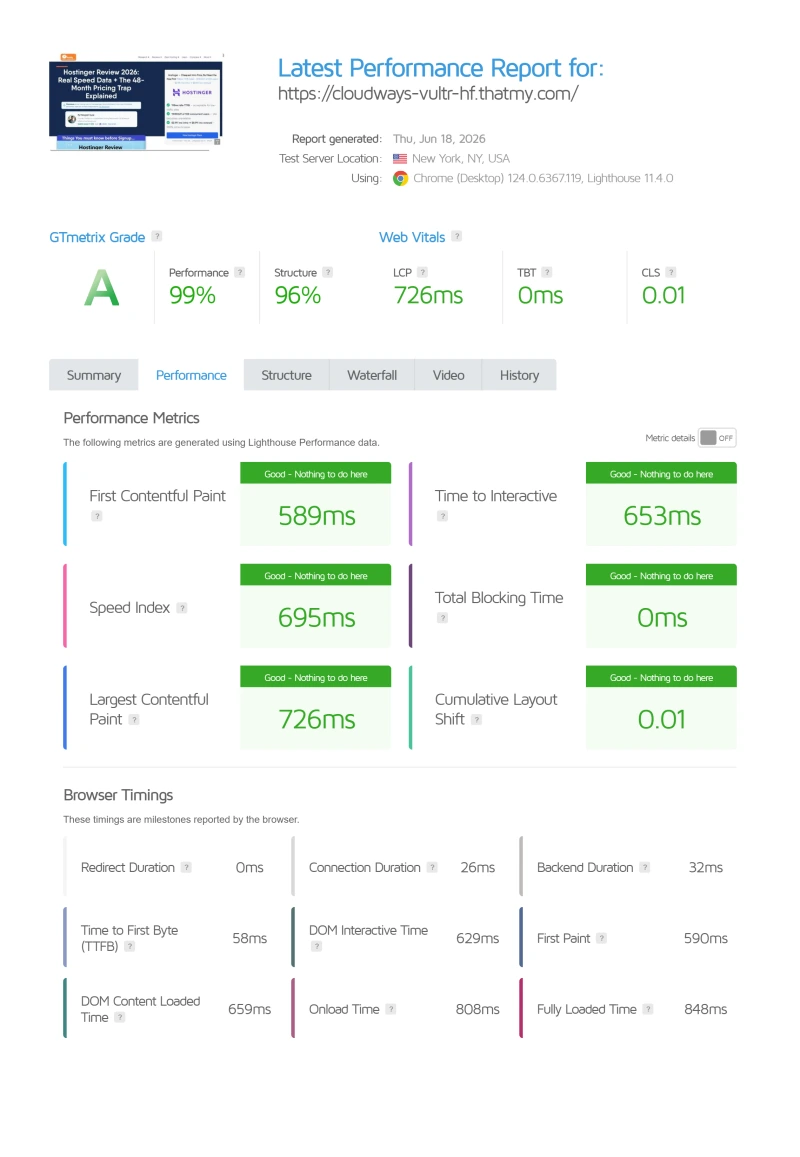
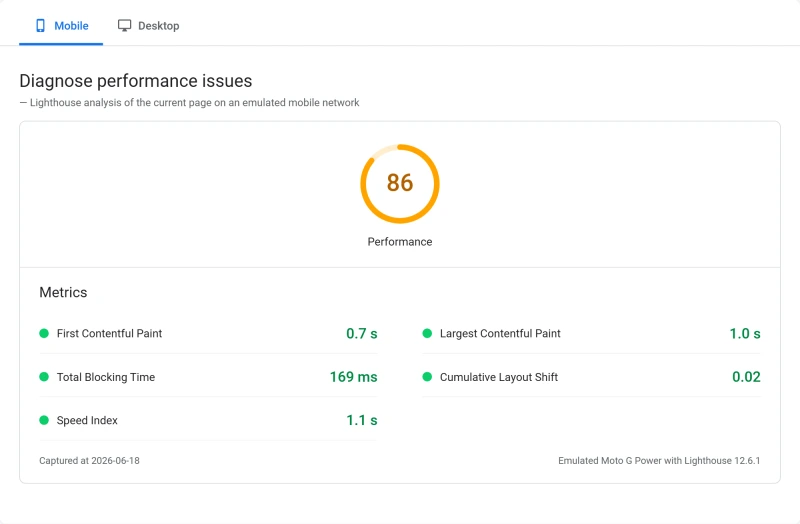
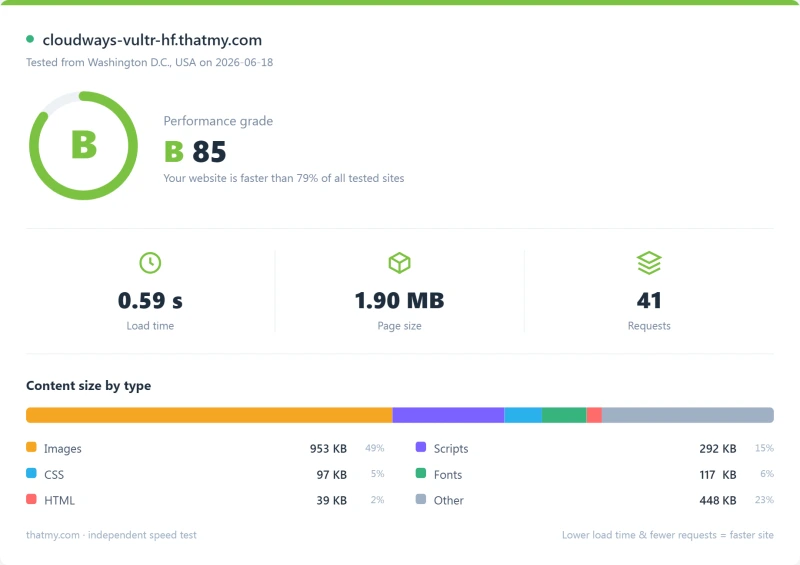
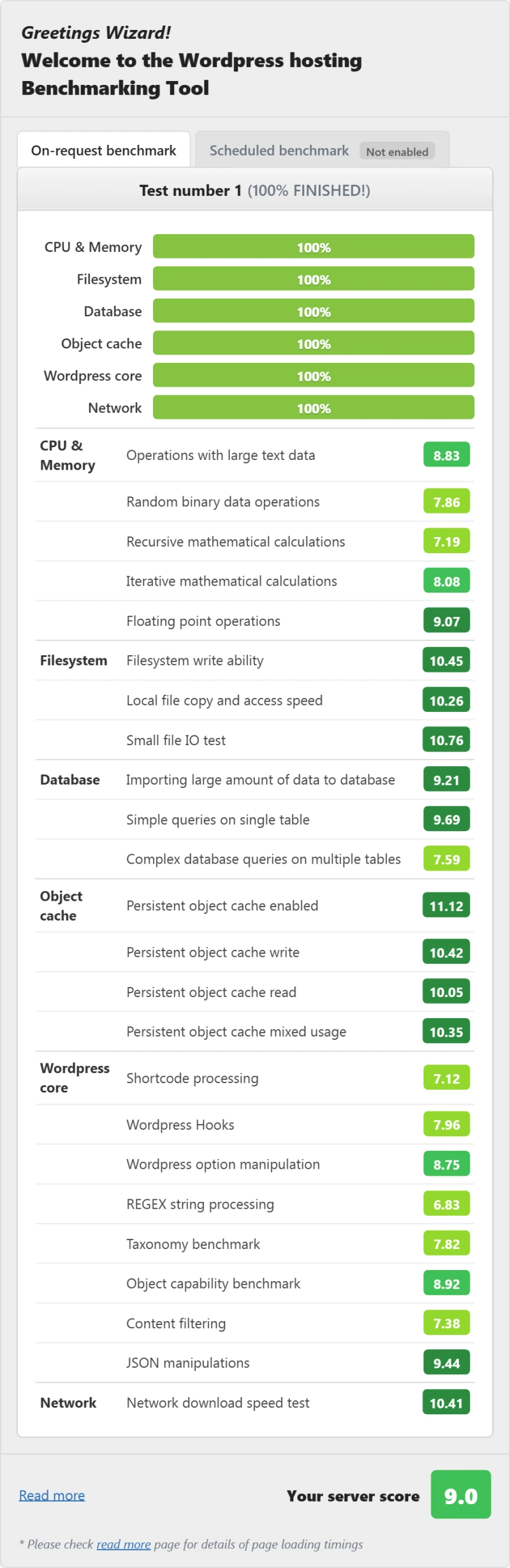
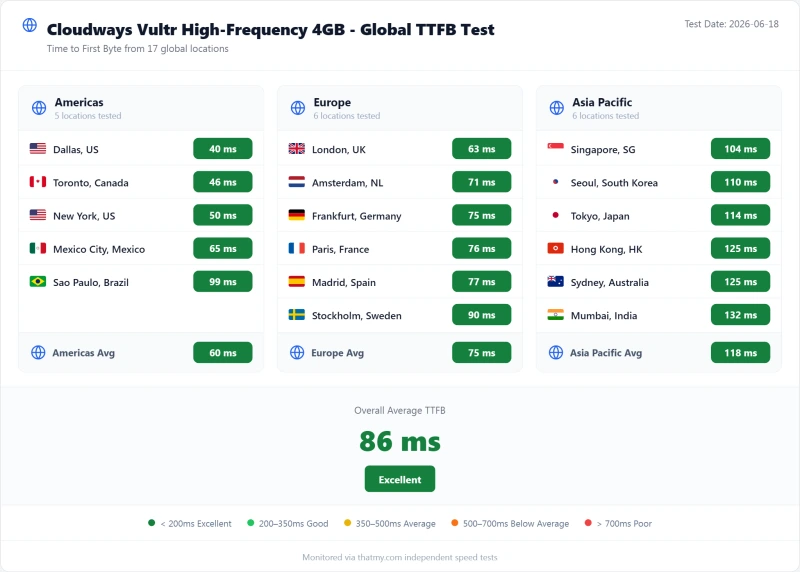
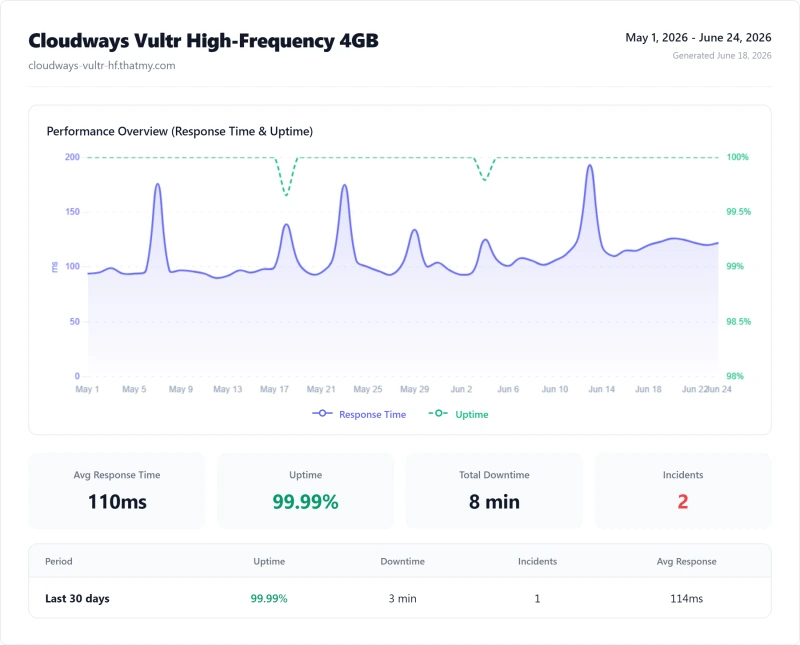
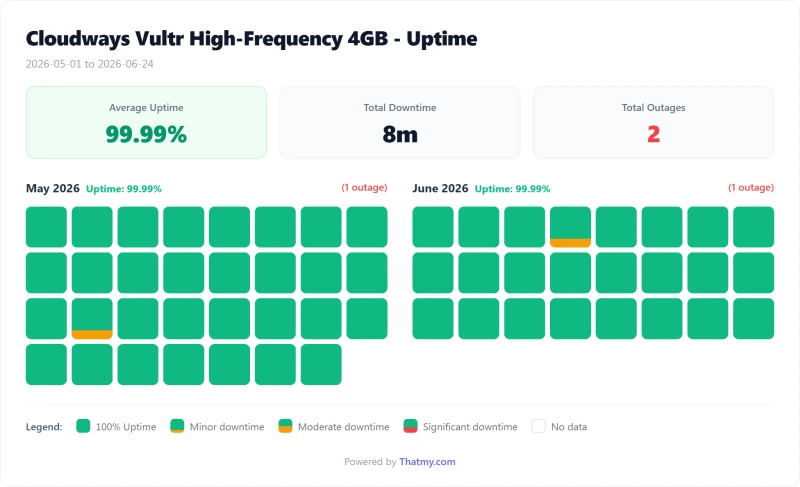
Cloudways Review FAQ
How long does a new Cloudways server take to launch?
About 7 minutes, and Cloudways says so on the screen. I timed two launches a day apart: the first 1GB DigitalOcean server answered in 4 min 42 s and was listed with its WordPress app at 7 min 12 s; the second, next morning, was ready in about 7 minutes too. An add-on page (Site Manager Pro, Malware Protection) appears before the launch starts; Skip for Now takes you straight through.
Does scaling a Cloudways server up cause downtime?
Yes, but less than the warning says. Scaling a 1GB server to 2GB, the dialog warned of about 12 minutes and said the site would not be accessible. Checking the site every 1 to 2 seconds, it was actually down for about 2 min 51 s, and the whole job took about 9 minutes from pressing Proceed to steady. Do it in a quiet hour. Scaling back down works too, unless you also grew the disk, which can never be shrunk.
How fast are Cloudways backups, restores and staging?
Fast, and none of them took the site down in my test. An on-demand backup of a fresh WordPress site finished in under 30 seconds, a complete restore took about 1 min 20 s, creating a staging copy took about 3 minutes, and pushing staging back to live (with a backup of live first) was logged as a success 29 seconds after I pressed Proceed. After a restore, the Restore button stays locked until you roll back or delete the 24-hour safety copy it keeps.
Does Cloudways have a free trial?
Yes, 3 days, and you can launch a server without a card. One size works on the trial: a 4GB Premium server. The cheaper 4GB Standard server was refused with 'Server size is not allowed with Trial Account', and AWS, Google Cloud and the dedicated-CPU server types stay locked until you add a card ($1 is charged to verify it and reversed). Once a card is on file, the trial turns into a paid account when the countdown ends, and the Autonomous trial moves to the Growth plan ($99.00/mo) the same way. If you are only testing, delete what you launched before the countdown ends.
Can Cloudways disable my account?
Its automatic fraud check can pause a brand-new account that does a lot at once. Mine added a card, took full access, launched three products, ran a load test and connected GitHub in one morning, and the panel was paused 'due to non-payment or unusual activity'. The live sites kept serving the whole time, and billing chat restored access the same day. On a new account, add funds before scaling up and move sites in batches, and you will not see it.
What does Cloudways really cost?
The server is the main line: from $11.00/mo for a 1GB DigitalOcean Standard server, billed by the hour with no renewal jump, and that price includes management; from 2GB up, Object Cache Pro is included free too. Extras, as priced in the console: Malware Protection ($2 to $4 per app a month), Site Manager Pro ($3 per app a month), Cloudflare Enterprise ($4.99 per domain a month, 30 days free) and email, which is a separate service. Tax follows the billing address (18% IGST on my India-billed account, nothing on my US-billed one). The pricing section adds it all up for five kinds of site.
How much do AWS and Google Cloud servers cost on Cloudways?
From $20.56/mo for the smallest AWS size and $37.33/mo for the smallest Google Cloud size, up to $3569.98/mo for the largest AWS server. Each includes only 10 GB of disk and 1 to 2 GB of traffic; past that, traffic is $0.12 per GB and disk $0.10 per GB a month. Both are locked on the free trial. Pick them when a contract requires AWS or Google; for value and WordPress speed, DigitalOcean or Vultr gives far more for the money.
Is Cloudways good for WooCommerce?
Yes, if you size it for uncached traffic. Carts, checkouts and account pages cannot be cached, so the processor works on every order. In my one-machine load test a 2GB DigitalOcean Basic server never refused a request but topped out at about 6.5 uncached pages a second, with the processor at 78% and Monitoring rating it 'Problematic' at 30 visitors at once. For a real store, start at 4GB with dedicated or High Frequency CPU (Vultr High Frequency 4GB is $60.00/mo), keep Object Cache Pro on (it is on by default for WordPress apps), and connect a transactional email provider on the server's SMTP page so order emails arrive.
What are Cloudways Managed AI Agents and what do they cost?
A small always-on server with an AI agent already installed (Hermes or OpenClaw), launched from the Cloudways AI menu. You bring your own model key (Anthropic, OpenAI, Gemini, OpenRouter or DigitalOcean) and pay that provider for tokens; Cloudways bills the server by the hour. When I checked, the four sizes were shown at half price: Scout $4.99/mo (list $9.99/mo), Operator, Squad and Swarm up to $39.99/mo. The form does not say how long the half price lasts, so budget for the list price.
Can I host a Next.js or Astro blog with SSR on Cloudways?
Yes, on Velocity rather than Flexible. Velocity's build screen has framework presets in SSR and CSR versions for Next.js, Astro, Vite and TanStack; Next.js SSR fills in yarn run build and npx next start for you. Frameworks without a preset, such as Nuxt, use Other with the Environment type set to SSR, plus your own entry file (it defaults to server.js). Connect the repository and deploy; in my test a push to GitHub was live about 35 seconds later. Plans start at $20.00/mo, with disk billed on top. A WordPress blog belongs on Flexible.
Can I give a developer access to only one site on Cloudways?
Yes. Under My Teams, invite them with Limited Access to Flexible, tick only the server they need, and choose from 12 switches for that server (start and restart, backups, monitoring, settings, scaling, deleting and so on), then pick which of its applications they see. With nothing ticked, they can see the server but do nothing to it. For file access, create an SFTP user limited to that one application instead of sharing the master login.
Does Cloudways have phpMyAdmin or a file manager?
There is a database tool but no file manager. Each application's Access Details page has a Launch Database Manager button that opens a web-based database tool in a new tab, plus the database login for any desktop client. For files, use SFTP (a master login per server, and extra logins limited to one application) or SSH, which you can also open in the browser from the server's Master Credentials page.
Which PHP versions does Cloudways support?
Each application runs its own PHP version, from 7.4 up to 8.4 in my account. New Flexible apps start on PHP 8.2, an older release, so move to the newest version your plugins support. The switch took about a minute in my test and no request failed. Running several PHP versions on one small server uses more memory, and the dialog says so.
When does Cloudways do server maintenance?
Once a week, by default between 05:00 and 06:00 UTC, with 'a minor interruption in service' possible during the window. You can move it to any day and hour under the server's Settings & Packages, Maintenance tab. Pick a time when your own visitors are asleep; the default is mid-morning in India and the middle of the night in the US.
Does Cloudways add tax to its prices?
It depends on your billing address. The pricing page says all listed prices exclude applicable taxes, and its FAQ says Cloudways collects VAT, GST or sales tax from customers in specific countries and US states, as a separate line on the invoice. My test account, billed in India, showed 18% IGST added; my US-billed account paid the listed price. Registered businesses can add a tax ID to claim an exemption. Credits (such as a promo code's $30) are applied before your card is charged, and the billing overview shows a running estimate of the month, which it says can be off by up to 3%.
Is Cloudways worth it in 2026?
For developers, agencies, and anyone running multiple WordPress sites, yes. 48ms idle origin TTFB on Vultr High Frequency, 74ms at 100 concurrent clients, 99.99% uptime over a 54-day window. Redis Object Cache Pro is included free and switched on for new WordPress apps on 2GB servers and up, sites per server are unlimited, and billing is pay-as-you-go with no annual contract. Email is not bundled, so the production cost runs higher with email and CDN added. Start with the 3-day free trial (no card needed), then use code CLOUDS2022 for $30 free credit and test it on a real site before committing.
What cloud provider should I pick on Cloudways?
Vultr High Frequency for almost any WordPress workload: 48ms origin TTFB, NVMe storage, 3GHz+ CPU clock speeds. DigitalOcean Premium is a strong second pick if you already use DO Spaces or Managed Databases. Linode is a reliable backup option. AWS and Google Cloud cost 2 to 3 times more, and include only 10 GB of disk; pick them only if your organization has compliance reasons to be on those clouds.
What is the difference between Cloudways Flexible, Autonomous and Velocity?
Flexible is your own cloud server on DigitalOcean, Vultr, Linode, AWS or Google Cloud, with unlimited sites and hourly billing from $11.00/mo. Autonomous is fully managed WordPress that adds servers automatically, one website per plan, from $99.00/mo, with only two regions (Frankfurt and Iowa). Velocity hosts Node.js apps deployed from Git, from $20 a month across ten regions. Agencies and developers want Flexible; one high-traffic WordPress site suits Autonomous.
Is Cloudways secure?
In my test, yes. Within hours of launching a new server, its Incidents log showed SSH brute-force attempts from two outside IP addresses, both blocked by Imunify360 with no setup from me. That server-wide protection is included. Malware scanning and clean-up for each site is a paid add-on ($4, $3 or $2 per app a month depending on how many apps you have), and Cloudflare Enterprise adds a managed WAF for $4.99 a domain.
Will Cloudways support fix my plugins or my site?
No. On every support plan, including the $500-a-month Premium one, Cloudways lists site content, plugin and theme changes, plugin upgrades, custom code, application-level security, SEO and migrating away as out of scope. Free Standard support gives guidance for application issues; the $25-a-month Advance plan adds real application support and an account manager.
Does Cloudways include email hosting?
No, and it costs nothing to fix. Zoho Mail's Forever Free plan hosts email for one domain, up to 5 users with 5 GB each, in Zoho's webmail and apps. Google Workspace ($7.00/user/mo) suits a business that lives in its inbox, and Rackspace Email mailboxes sit inside the Cloudways console from $1.50 per mailbox a month. Every server has an SMTP page for sending your site's order and password emails through your own provider.
How do I cancel Cloudways?
There is no contract to cancel. Billing is by the hour, so delete your servers (and any Autonomous or Velocity apps) in the dashboard and the hourly charges stop; the hours you already used appear on that month's invoice, with any credits applied first. Turn on a billing alert under Billing, Settings so a forgotten test server cannot run for a month unnoticed. Trials with a card on file turn into paid accounts by themselves, so delete them before the countdown ends.
What Cloudways Customers Say on Trustpilot
Trustpilot shows both sides of Cloudways: support that fixes hard problems once you reach the right agent, and complaints about getting to that agent and about bandwidth charges. Below are two recent 5-star posts and two low ones, as screenshots of the originals, each linked to the post.
The Score and Four Recent Posts
The pattern matches what I saw in my own chat test above: when you reach a capable agent, problems get fixed properly, including the kind of security-rule block my trial server logged on day one. The complaints are about getting to that agent, and about bandwidth charges that are hard to trace. If you run a busy site, watch the bandwidth line on your first few invoices.