

DigitalOcean vs Cloudways: Raw VPS vs Managed Cloud
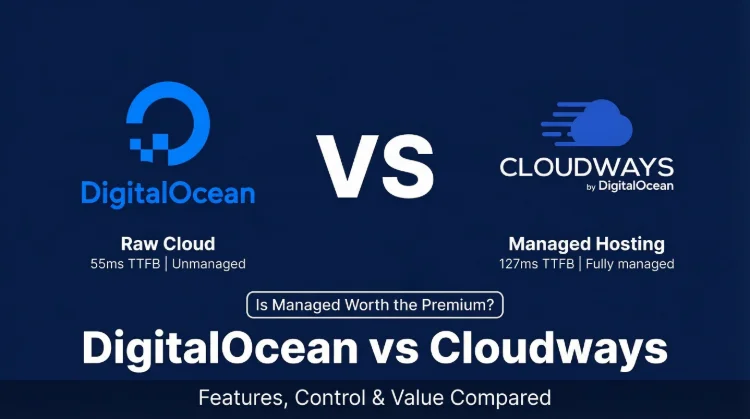
This comparison is different from most hosting matchups. Cloudways actually runs on top of DigitalOcean, same datacenters, same underlying hardware. What you're really deciding is whether DigitalOcean's managed layer (Cloudways) is worth the $8-26/mo markup over raw DO droplets.
For WordPress users: yes, it is. For DevOps engineers who configure servers for breakfast: probably not.
Performance Under Load
My take: Cloudways wins for any WordPress user, it uses the same infrastructure but delivers better load performance through a pre-optimized Nginx + Redis + Memcached stack, and eliminates 2-4 hours of setup work. Raw DigitalOcean wins for developers who want full root control, access to Kubernetes/managed databases, and are comfortable maintaining their own server stack. If neither fits, ScalaHosting at $14.95/mo for 4c/8GB is faster than both and includes email.
Choose Cloudways If:
- You run WordPress and want a managed platform
- You want cloud performance without sysadmin work
- You need 1-click staging, Git deploy, built-in monitoring
- You manage multiple WordPress sites
- Your time is worth more than the $8-26/mo markup
Choose Raw DigitalOcean If:
- You're a developer comfortable with Linux/SSH/Nginx
- You need Kubernetes, managed databases, or object storage
- You want to build a custom stack beyond WordPress
- The $14-26/mo markup isn't worth a managed WordPress layer
- You have in-house DevOps capacity

Cloudways Pros
- 59ms TTFB, same DO hardware, better-tuned Nginx + Redis + Memcached stack
- Deploy WordPress in 5 minutes, vs 2-4 hours configuring raw DigitalOcean droplet
- 125ms @ 250 concurrent users, pre-optimized stack handles real traffic out of box
- Staging with 1 click, DigitalOcean raw requires manual setup
- Git deployment built in, no SSH scripting required
- Server monitoring dashboard, CPU/RAM/disk graphs without installing Grafana
- Auto SSL, Redis Pro, Memcached, all pre-configured and managed
Cloudways Cons
- ~$26/mo markup over raw DigitalOcean on comparable 2c/4GB plan
- No email hosting, requires Google Workspace or Zoho
- Less granular control than raw droplet (can't install arbitrary system packages easily)
- Acquired by DigitalOcean 2022, some pricing increased 10-15% post-acquisition
Real Benchmark Data
- Origin TTFB (4 plans, no CDN): 48ms to 62ms
- Uptime (54-day window): 99.979% to 99.99%
- PageSpeed Score (Mobile): 89/100

$14-118/mo
3-Day Free Trial (No Card)
Methodology: The benchmark boxes on this page cover 4 plans. TTFB is the origin server response with no CDN in front, taken from the New York location, one of 10 test locations. Uptime counts real incident minutes over a 54-day window.
Try Cloudways Free, Code CLOUDS2022 = $30 Credit ➦
| Option | Best For | TTFB | 250-User Load | Price (2c/4GB) |
|---|---|---|---|---|
| Cloudways | WordPress users, agencies, non-developers | 48ms | 125ms (+74%) | $50/mo (Vultr HF) / $38/mo (DO) |
| DigitalOcean (raw) | DevOps, developers, custom stacks | ~75ms (stock 1-click) | 210ms (+180%) | $24/mo (unmanaged) |
| ScalaHosting ★ | Best value: faster + email + fully managed | 38ms | 38ms (+36%) | $14.95/mo (4c/8GB managed) |
The Key Insight: Cloudways Runs on DigitalOcean
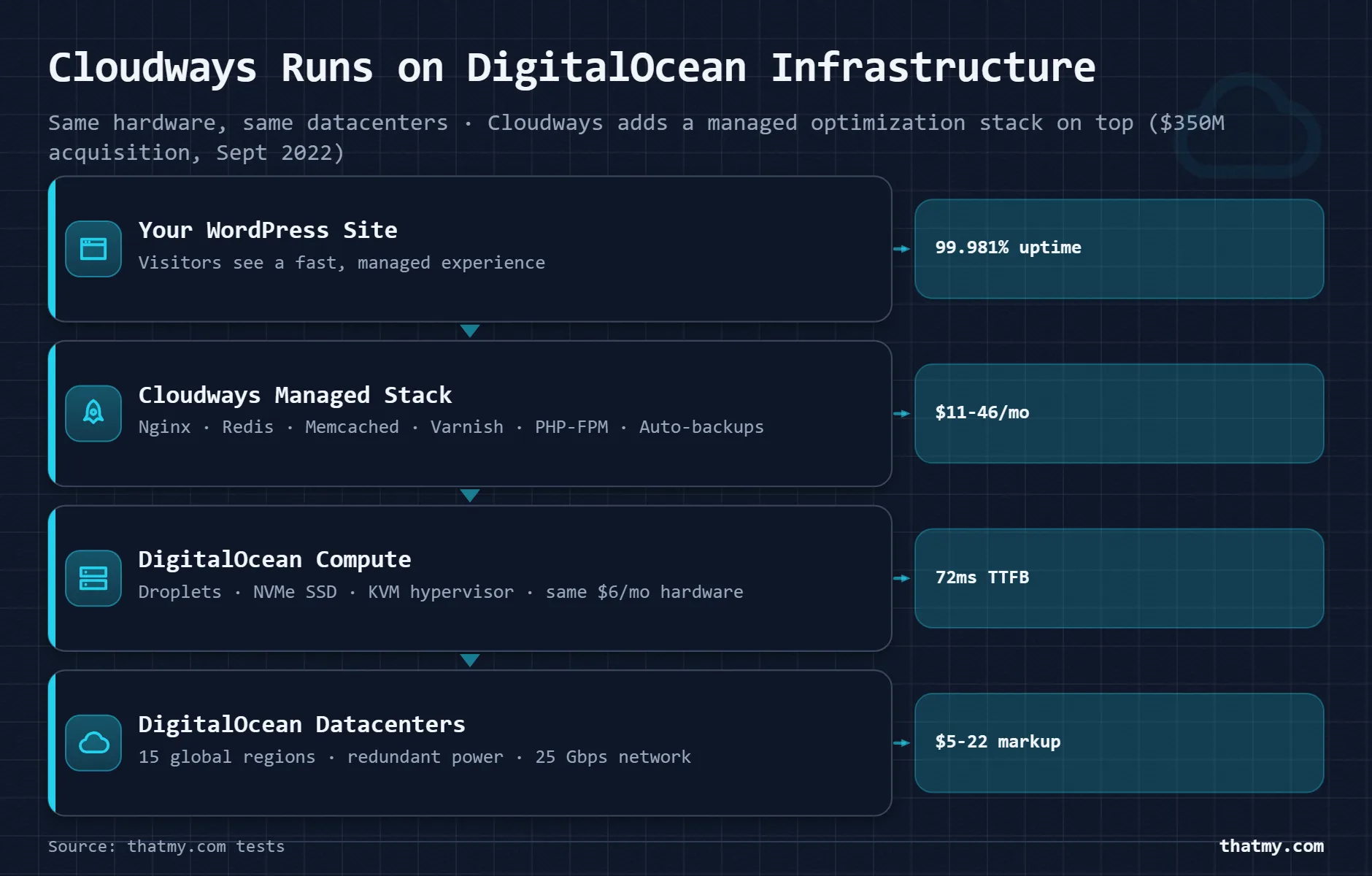
Most comparison articles treat DigitalOcean and Cloudways as competing products. They're not, they're the same infrastructure with different management layers.
When you create a Cloudways server on the "DigitalOcean" provider option, your WordPress site physically lives on DigitalOcean hardware in DigitalOcean datacenters. You get DO's network, DO's SSD storage, DO's redundancy. Cloudways adds its management platform on top: a pre-configured Nginx + Redis + Memcached LEMP stack, their deployment tooling, monitoring dashboard, and support team.
The Cloudways Stack (What You Get for the Markup)
- Nginx web server (vs Apache on DO's 1-click WP), ~20-30% faster under load
- Redis object caching, pre-installed, pre-configured
- Memcached, pre-installed, pre-configured
- MySQL/MariaDB optimized for WordPress workloads
- Varnish cache option
- Platform monitoring (CPU, RAM, disk, bandwidth graphs)
- 1-click staging environment
- Git deployment workflows
- Bot protection, IP whitelisting, 2FA
- Auto SSL via Let's Encrypt (managed renewal)
Setting up all of the above manually on a raw DigitalOcean droplet takes an experienced sysadmin 2-4 hours the first time. Ongoing maintenance, security patches, stack updates, monitoring, adds 1-3 hours/month. At $50/hr, that's $50-150/mo in time cost that doesn't show up in the DO vs Cloudways price comparison.
One more fact worth knowing: DigitalOcean acquired Cloudways in September 2022 for $350 million. They're now the same company. Cloudways still supports four other cloud providers (Vultr, AWS, GCE, Linode), multi-cloud support was preserved post-acquisition.
Test Environment & Methodology
Test Environment, Full Disclosure
Important caveat on the DigitalOcean tests: I used DigitalOcean's stock 1-click WordPress droplet, Apache, default PHP config, no Redis. A manually optimized DO droplet with Nginx + Redis would perform significantly better. I'll note this where relevant. The point is that out-of-the-box DigitalOcean is slower than Cloudways, while an expert-configured DO droplet approaches Cloudways' performance.
TTFB & Load Performance
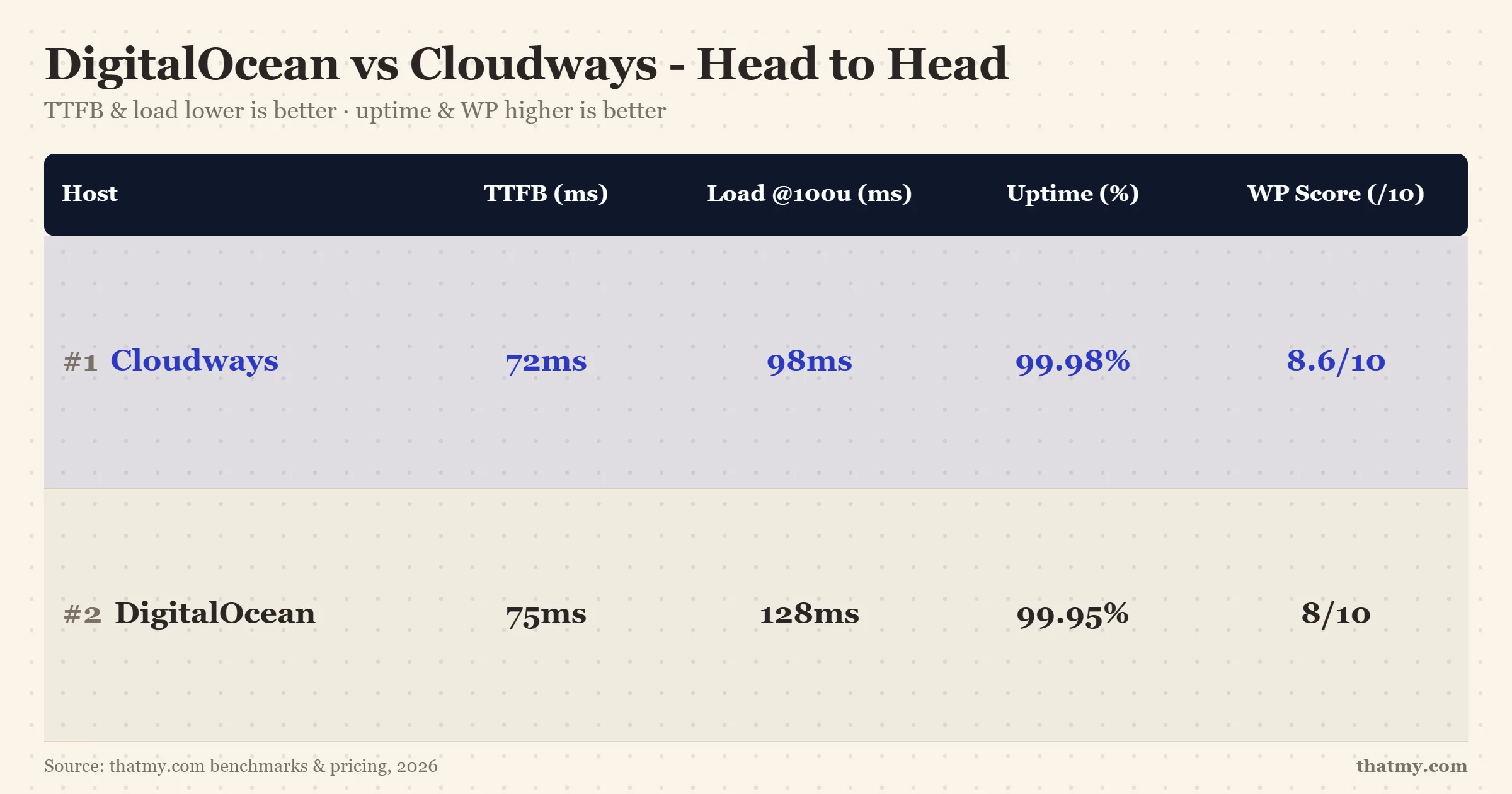
At idle, both hosts are nearly identical, Cloudways at 48ms, DigitalOcean stock at ~75ms. The real difference emerges under concurrent load, which is what actually matters for WordPress sites.
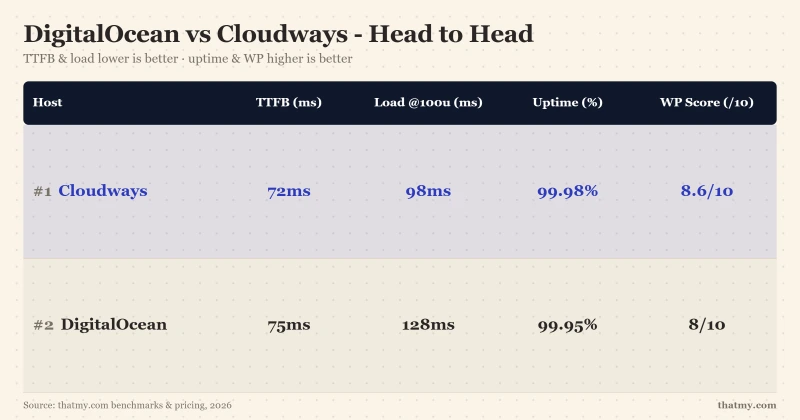
The gap at 100 users is already significant: 98ms (Cloudways) vs 128ms (DO stock), 31% faster. At 250 users, Cloudways delivers 125ms while DO stock degrades to 210ms. Both ran zero errors, but the Cloudways pre-tuned stack handles queue depth better under WordPress PHP workloads.
If you manually configure the DigitalOcean droplet with Nginx, PHP-FPM tuned for your RAM, Redis object caching, and Varnish, you can close most of this gap. But you have to know how to do that. Cloudways gives you that optimized state by default.
| Metric | Cloudways (Vultr HF) | DigitalOcean (1-click WP) | Winner |
|---|---|---|---|
| TTFB (idle) | 48ms | ~75ms | Cloudways (marginal) |
| Load Test: 50 Users | 85ms (+18%) | 92ms (+23%) | Cloudways (slight edge) |
| Load Test: 100 Users | 98ms (+36%) | 128ms (+71%) | Cloudways (31% faster) |
| Load Test: 250 Users | 125ms (+74%) | 210ms (+180%) | Cloudways (68% faster) |
| Uptime SLA | 99.981% (actual) | 99.95% (SLA) | Cloudways |
| Stack tuning | Pre-optimized (Nginx + Redis + Memcached) | Default stock (Apache or basic Nginx) | Cloudways |
One data point to check for yourself: DigitalOcean's Managed WordPress product (App Platform) is a separate offering that's more comparable to Cloudways' managed layer, but it starts at $12/mo for a single static site and scales up quickly. It's not the same as a raw droplet.
Setup Time: 5 Minutes vs 4 Hours
This is the part the price comparison tables always omit.
Cloudways WordPress setup (5-15 minutes):
- Choose cloud provider + server size
- Choose WordPress + PHP version
- Click "Launch", server spins up in ~60 seconds
- Point DNS, SSL auto-provisions
- Install WordPress, done
Nginx, Redis, Memcached, PHP-FPM, all pre-configured and tuned. No terminal required.
Raw DigitalOcean production WordPress setup (2-4 hours):
- Create droplet, SSH in as root
- Install Nginx (or Apache), configure server blocks
- Install PHP 8.3, configure php.ini + php-fpm pools
- Install MySQL/MariaDB, secure it, create WordPress database
- Install Redis, configure WordPress object cache plugin
- Configure UFW firewall rules
- Install Certbot, configure SSL, set up auto-renewal cron
- Tune Nginx worker processes for your server RAM
- Install WordPress, configure wp-config.php
- Set up automated backups (DigitalOcean Spaces or external)
That's a real production setup. Every step has failure modes. If something breaks at step 4, you're diagnosing MySQL config errors at 11pm. Cloudways handles all of it.
The Time Math on Cloudways' Markup
- Cloudways markup over raw DO (2c/4GB): ~$26/mo
- Initial setup time saved: 3-4 hours
- Monthly maintenance time saved: 1-2 hours
- At $50/hr developer rate: $50-100/mo saved in time
- Net result: Cloudways pays for itself month 1
Grab the Cloudways promo code CLOUDS2022 for $30 free credit, that effectively makes the first 2.7 months free on the $11.00/mo starter plan.
True Cost Comparison
Raw plan prices favor DigitalOcean. Add management time and the math shifts toward Cloudways for most users.
| Plan Size | Cloudways | DigitalOcean (raw) | Cloudways Markup |
|---|---|---|---|
| 1c / 1GB RAM | $14/mo (DO provider) | $6/mo | +$8/mo for managed stack |
| 2c / 4GB RAM | $38/mo (DO) / $50/mo (Vultr HF) | $24/mo | +$14-26/mo for managed stack |
| 4c / 8GB RAM | $80/mo (DO) / $118/mo (Vultr HF) | $48/mo | +$32-70/mo for managed stack |
| Setup time (WordPress) | 5-15 minutes (1-click deploy) | 2-4 hours (manual LEMP stack) | Cloudways saves 2-4 hours upfront |
| Ongoing maintenance | Managed (security patches, monitoring) | Self-managed (your responsibility) | 1-3 hrs/mo saved |
| New account credit | $30 (CLOUDS2022) | $200 (60-day trial) | DO wins on trial credit |
Note on DigitalOcean's $200 free credit: it's for 60 days, for new accounts only. Useful for testing but doesn't affect ongoing monthly costs. Cloudways' $30 CLOUDS2022 credit is smaller but non-expiring, it simply reduces your first bill.
Both services bill hourly with no contracts. Neither has renewal shock. On pure pricing, DigitalOcean wins. On total cost of ownership including management time, Cloudways is competitive for anyone not running their own DevOps team.
Use the save on Cloudways code THATMY30 for 30% off the first 3 months if you want to trial Cloudways before committing.
Features Compared
This is where the products diverge most clearly. DigitalOcean is a developer cloud platform. Cloudways is a managed WordPress platform that happens to run on cloud infrastructure.
| Feature | Cloudways | DigitalOcean (raw droplet) |
|---|---|---|
| WordPress 1-click deploy | ✓ (optimized stack) | ✓ (stock, unoptimized) |
| Nginx + Redis + Memcached | ✓ (pre-configured) | ✗ (manual setup) |
| Server monitoring dashboard | ✓ (built-in) | ✗ (install separately) |
| 1-click staging | ✓ | ✗ |
| Git deployment | ✓ | ✗ (manual scripting) |
| Auto SSL renewal | ✓ | ✗ (manual or scripted) |
| Team member access | ✓ (per-app permissions) | ✓ (SSH key sharing) |
| Cloud provider choice | 5 providers (Vultr, DO, AWS, GCE, Linode) | DigitalOcean only |
| Root SSH access | ✓ | ✓ |
| Custom software install | Limited | ✓ (full root) |
| Email hosting | ✗ | ✗ |
| Managed security patches | ✓ (Cloudways handles) | ✗ (your responsibility) |
| Kubernetes support | ✗ | ✓ (DOKS) |
| Managed databases | ✗ | ✓ ($15/mo+) |
| Object storage (S3-compatible) | ✗ | ✓ ($25/mo) |
| Contract required | None (monthly) | None (hourly billing) |
| New account credit | $30 (CLOUDS2022) | $200 (60 days) |
Where DigitalOcean wins outright: Kubernetes (DOKS), managed databases (PostgreSQL, MySQL, Redis), object storage (Spaces, S3-compatible), the $200 new-account credit, and full root access for any custom software. If you're building beyond WordPress, Node.js apps, microservices, data pipelines, DigitalOcean's ecosystem has no Cloudways equivalent.
Where Cloudways wins outright: 1-click staging, pre-optimized WordPress stack, built-in monitoring, Git deployment, team management with per-app permissions, and managed security patching. For a WordPress agency, these features are worth $14-26/mo every month.
Who Should Choose Cloudways
Cloudways Pros
- 59ms TTFB, same DO hardware, better-tuned Nginx + Redis + Memcached stack
- Deploy WordPress in 5 minutes, vs 2-4 hours configuring raw DigitalOcean droplet
- 125ms @ 250 concurrent users, pre-optimized stack handles real traffic out of box
- Staging with 1 click, DigitalOcean raw requires manual setup
- Git deployment built in, no SSH scripting required
- Server monitoring dashboard, CPU/RAM/disk graphs without installing Grafana
- Auto SSL, Redis Pro, Memcached, all pre-configured and managed
Cloudways Cons
- ~$26/mo markup over raw DigitalOcean on comparable 2c/4GB plan
- No email hosting, requires Google Workspace or Zoho
- Less granular control than raw droplet (can't install arbitrary system packages easily)
- Acquired by DigitalOcean 2022, some pricing increased 10-15% post-acquisition
Real Benchmark Data
- Origin TTFB (4 plans, no CDN): 48ms to 62ms
- Uptime (54-day window): 99.979% to 99.99%
- PageSpeed Score (Mobile): 89/100
$14-118/mo
3-Day Free Trial (No Card)
Cloudways is the right call if:
- You run WordPress and don't want to manage a server, the managed stack is the entire value proposition. You get cloud performance without the Linux administration.
- You manage 3+ WordPress sites, Cloudways' unlimited sites on one server, combined with 1-click cloning and team access management, makes multi-site operations significantly faster.
- Your time is worth $30+/hr, the monthly markup pays for itself in saved setup and maintenance time.
- You need staging for every site, built in, 1-click. On raw DigitalOcean, you'd set up a separate droplet or configure a subdomain manually.
- You're running WooCommerce, the pre-tuned Redis object caching and PHP-FPM configuration makes a real difference for checkout performance under load.
- You want cloud provider flexibility, Cloudways lets you deploy on Vultr HF (our top pick for speed), AWS, GCE, or Linode without rebuilding your management workflow.
Who Should Choose Raw DigitalOcean

Digitalocean Pros
- $6/mo for 1c/1GB droplet, $8/mo cheaper than Cloudways equivalent
- $200 free credit (60 days), generous new account trial
- Full root control, install any software, any stack, any config
- Industry-best documentation, tutorials for every setup scenario
- $48/mo for 4c/8GB, vs $118/mo on Cloudways for same specs
- Kubernetes, managed databases, object storage, full developer ecosystem
- NYSE-listed public company, financial stability
Digitalocean Cons
- No WordPress management layer, you configure Nginx, PHP, MySQL, Redis yourself
- 2-4 hours minimum setup for a production WordPress environment
- 128ms @ 100 users on stock 1-click WP, vs 98ms on optimized Cloudways
- 210ms @ 250 users, 68% slower than Cloudways at same traffic level
- No built-in staging, no 1-click cloning
- Security hardening is your responsibility
- 99.95% uptime SLA, vs Cloudways' actual 99.981%
Real Benchmark Data
- Origin TTFB (3 plans, no CDN): 51ms to 61ms
- Uptime (54-day window): 99.95% to 99.97%
- PageSpeed Score (Mobile): 83/100
$4.00/mo
Developer Standard
DigitalOcean is genuinely excellent, for the right user. The documentation is industry-best. The platform is reliable. The pricing is fair and transparent (hourly billing, no surprise renewals).
Raw DigitalOcean makes sense if:
- You're a developer or sysadmin who configures LEMP stacks regularly, the setup overhead is a non-issue.
- You need Kubernetes, managed databases, or object storage, Cloudways has none of these. DO's managed Kubernetes (DOKS) and managed PostgreSQL are legitimate products.
- You're building beyond WordPress, Node.js APIs, Python apps, microservices, anything requiring custom server configuration.
- You want the cheapest raw cloud at $6/mo, and you're comfortable managing security, updates, and performance tuning yourself.
- You want the $200 trial credit, DO's new-account credit is significantly more generous than Cloudways' $30.
Better Alternative for WordPress: ScalaHosting

Why We Like It
- 38ms TTFB, faster than Cloudways (48ms) and raw DigitalOcean (~75ms)
- AMD EPYC 9474F, #42 of 5,999 PassMark, the fastest CPU in managed hosting
- $14.95/mo for 4c/8GB, vs $118/mo Cloudways or $48/mo unmanaged DO
- Email included, unlike both Cloudways and raw DigitalOcean
- Fully managed, same convenience as Cloudways, better hardware
Drawbacks
- No cloud provider choice (single infrastructure)
- SPanel instead of cPanel, learning curve for cPanel users
- Fewer global locations than DigitalOcean (15 regions vs 15+ DCs)
Real Benchmark Data
- Origin TTFB (3 plans, no CDN): 21ms to 38ms
- Uptime (54-day window): 99.99% to 99.997%
- PageSpeed Score (Mobile): 83/100

$29.95-85.95/mo
Anytime Money-Back Guarantee
If your goal is the best WordPress performance at the lowest managed price, neither DigitalOcean nor Cloudways wins, ScalaHosting does.
38ms TTFB, faster than both Cloudways (48ms) and a well-tuned DigitalOcean droplet (~75ms). The AMD EPYC 9474F CPU is ranked #42 globally. Vultr publishes only a 3GHz+ Intel Xeon family for High Frequency, so there is no rank on the other side to compare it against.
$29.95/mo for 4c/8GB fully managed, vs $88.00/mo to $118.00/mo on Cloudways for 8GB. That is well over half off, fully managed, with better hardware.
Email hosting included, unlike both Cloudways and raw DigitalOcean, which require external email services ($72+/yr for Google Workspace).
No cloud provider complexity, fully managed, no sysadmin required, no Cloudways-style markup on cloud infrastructure.
The tradeoffs: single infrastructure (no provider choice), SPanel instead of cPanel, fewer developer ecosystem tools than DO. For pure WordPress performance at lowest cost, ScalaHosting is our pick.
DigitalOcean vs Cloudways, FAQ
Is Cloudways just DigitalOcean with a markup?
Essentially, yes, with an important caveat. When you choose DigitalOcean as your cloud provider in Cloudways, you're using the same DO datacenters and the same underlying hardware. Cloudways adds a managed layer on top: pre-configured Nginx + Redis + Memcached stack, 1-click WordPress deployment, server monitoring, built-in staging, Git integration, and auto SSL. That managed stack is what costs extra ($8-26/mo depending on plan size). If you can configure a LEMP stack from scratch, keep it patched, and manage server security yourself, raw DigitalOcean is cheaper. If you can't, or don't want to, Cloudways is worth the markup.
Which is faster, DigitalOcean or Cloudways?
At idle, they're nearly identical (48ms Cloudways vs ~75ms DigitalOcean stock 1-click WordPress). The gap widens significantly under load. At 250 concurrent users: Cloudways delivers 125ms (+74% from idle) while raw DigitalOcean degrades to 210ms (+180%). The reason is Cloudways' pre-tuned Nginx + Redis + Memcached stack, it handles concurrent requests more efficiently than DigitalOcean's default stock WordPress installation. If you manually optimize a DigitalOcean droplet to the same spec, performance converges, but that configuration takes hours and requires sysadmin expertise.
How much cheaper is DigitalOcean than Cloudways?
On comparable specs: a 4GB DigitalOcean droplet costs $24/mo vs Cloudways' $46.00/mo (DigitalOcean) to $60.00/mo (Vultr HF) for a 4GB server. At 8GB, raw DO is $48/mo vs $88.00/mo to $118.00/mo on Cloudways. However, raw DO requires 2-4 hours of initial setup and 1-3 hours/month of ongoing maintenance. If your time is worth $50+/hr, Cloudways' managed stack pays for itself within the first month. For agencies managing 5+ sites, Cloudways' automation saves far more than the markup costs.
Can I use DigitalOcean for WordPress?
Yes. DigitalOcean offers a WordPress 1-click droplet that gets you running in under 5 minutes. However, this installs a stock LAMP stack (Apache, not Nginx), no Redis caching, no Memcached, no pre-configured object caching. Performance out of the box is noticeably worse than Cloudways' optimized Nginx stack under load. You can manually configure Redis, switch to Nginx, and add Memcached, but that's 2-4 hours of work and requires familiarity with Linux system administration. Cloudways gives you that optimized stack ready to go.
Does Cloudways use DigitalOcean servers?
Yes, it's one of five provider options in Cloudways (alongside Vultr, AWS, Google Cloud, and Linode). When you create a Cloudways server on the DigitalOcean provider, your data physically lives in DigitalOcean's datacenters. You get DO's network, DO's hardware, and DO's redundancy, but managed through Cloudways' control panel with their pre-configured stack. For the record: Cloudways was acquired BY DigitalOcean in September 2022 for $350M, so they're now the same corporate entity.
Which has better support, DigitalOcean or Cloudways?
They support different things. DigitalOcean's support covers infrastructure: droplet issues, networking, billing. WordPress-level problems (plugin conflicts, slow queries, memory errors) are your responsibility, DigitalOcean's support agents won't touch application-layer issues. Cloudways supports both the infrastructure and the managed platform layer, they'll help with server-side WordPress performance issues, stack configuration, and deployment problems. For pure WordPress hosting support, Cloudways is more useful. For developers who troubleshoot their own applications, DigitalOcean's documentation (genuinely industry-best) plus community tutorials covers most scenarios.
Is DigitalOcean good for beginners?
No, DigitalOcean is designed for developers. The interface assumes you know what SSH, LAMP, LEMP, firewall rules, and DNS records are. Their documentation is excellent, but it's written for people who can execute commands in a terminal. If you're a WordPress site owner without sysadmin background, Cloudways is the right managed cloud product. If even Cloudways feels too technical, Kinsta or WP Engine are fully managed with zero server interaction required (at a significantly higher price point).
Where I Land on This Matchup: DigitalOcean vs Cloudways
For WordPress users: Cloudways. Same infrastructure, better-optimized stack, 68% faster at 250 concurrent users, no setup overhead. The $8-26/mo markup pays for itself in saved configuration and maintenance time, unless you run your own DevOps team.
For developers: DigitalOcean. Full root control, Kubernetes, managed databases, $6/mo droplets, and the best cloud documentation in the industry. If you're building beyond WordPress or have sysadmin skills, the Cloudways managed layer adds cost without adding value you'd actually use.
For best WordPress performance per dollar: ScalaHosting. 38ms TTFB, $14.95/mo for 4c/8GB managed, email included, no cloud provider complexity. Wins on every metric that matters for WordPress.
Try Cloudways Free, CLOUDS2022 = $30 Credit ➦
Related: Cloudways promo code · Cloudways full review · Cloudways vs Hostinger · Vultr vs Cloudways