


Hosting.com Review 2026: The Short Version
What I tested
- Speed and uptime benchmark: five plans on their own test sites, the Startup, Turbo Boost and Turbo Max shared plans and the Cloud VPS 2 GB and 8 GB.
- Hands-on with a real account: my own hosting.com account on Turbo Boost, an A2-era cPanel plan two tiers above the entry plan, no longer sold.
- Watched and load-tested since: our test site on this account checked every minute on our public uptime board (20,820 checks, none failed), our standard load test from a US load cloud beside Verpex's Silver plan, and first-byte times from nine AWS regions.
- The scores below are for the entry shared plan (Startup, sold today as Starter), because that is the plan most readers buy. A bigger plan or a VPS scores differently, and the test reports near the end show every plan.
Overall for the Startup plan we tested: 5.3/10, only if you prepay and plan to leave before renewal
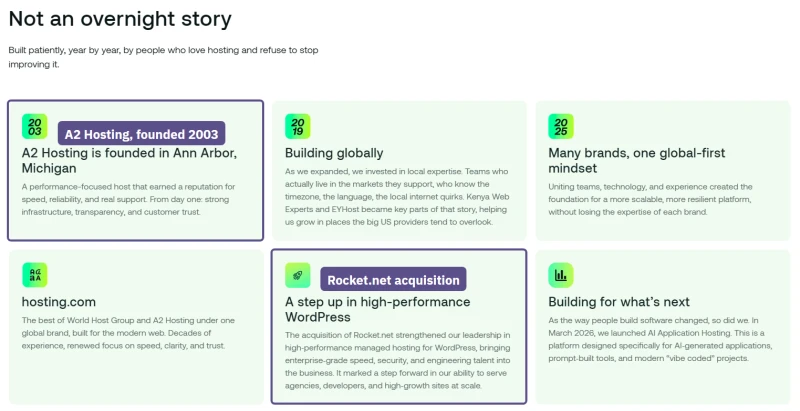
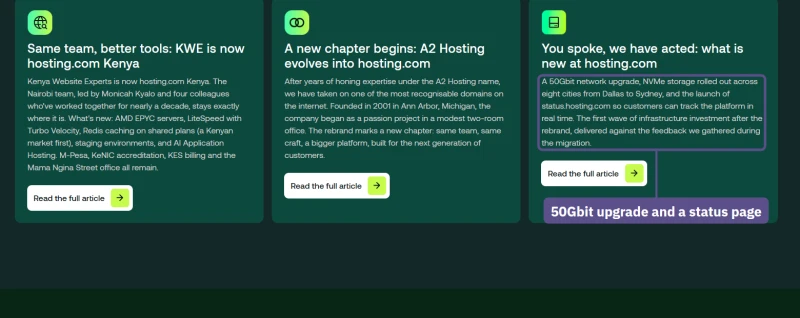
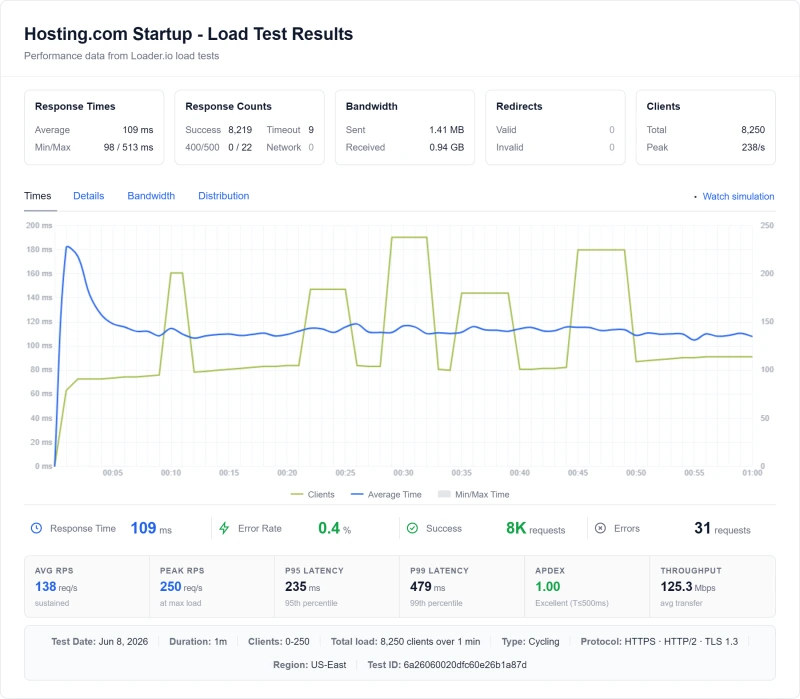
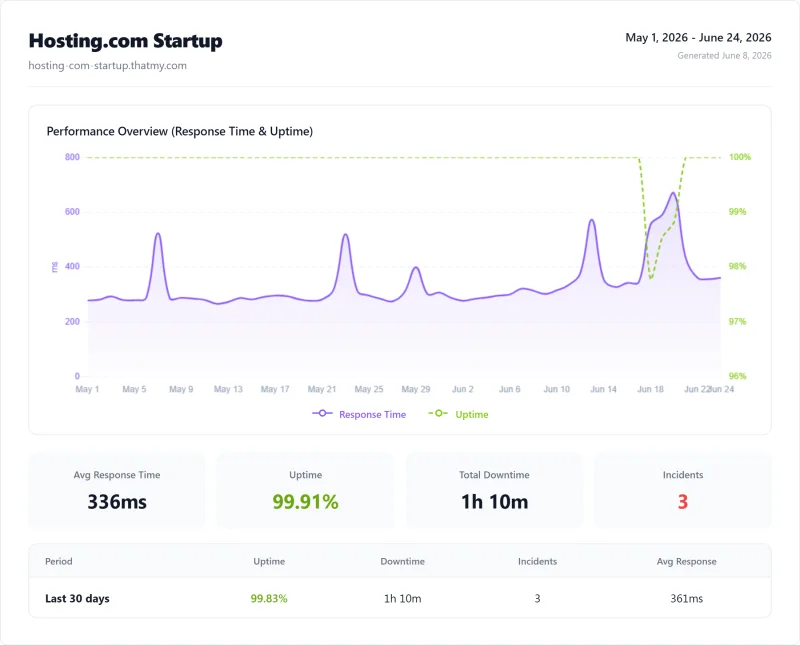
Hosting.com is A2 Hosting under a new name. World Host Group, a group backed by Oakley Capital, bought A2 Hosting in 2025 and merged the two under one brand; the same group bought Rocket.net and FastComet that year. I tested it twice. First I benchmarked the old Startup plan on its own test site: 172ms TTFB from the US with no cache, about 2.2x ChemiCloud's time, 99.91% uptime (70 minutes down over 54 days), and a load ramp to 250 visitors that answered 8,250 requests with 0.38% errors. That is a respectable result for shared hosting.
Then I went back with a real hosting.com account and read every product page, and parts of my first review were wrong. The server my account lives on runs LiteSpeed, not Apache, on CloudLinux, and the plan gives 2 CPU cores and 2 GB of RAM, not 1 and 1. Today's Starter plan lists NVMe storage, SSH, Git, free migration and daily backups kept 30 days. Redis and staging exist, but only from the Pro plan up. Where the account did struggle was CPU: with no page cache it topped out at about 6.5 pages a second, so a busy WordPress site needs caching on day one.
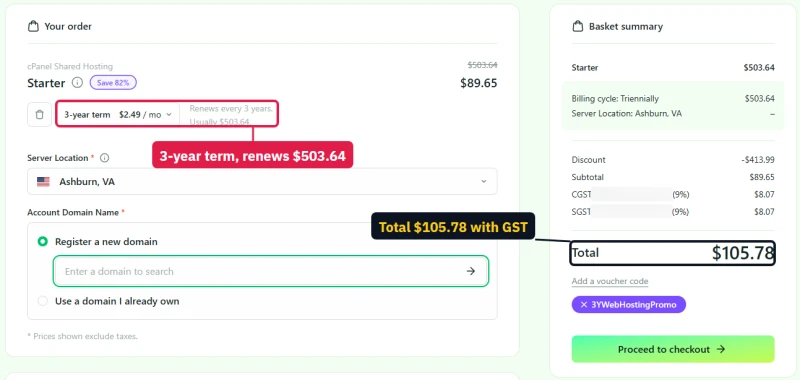
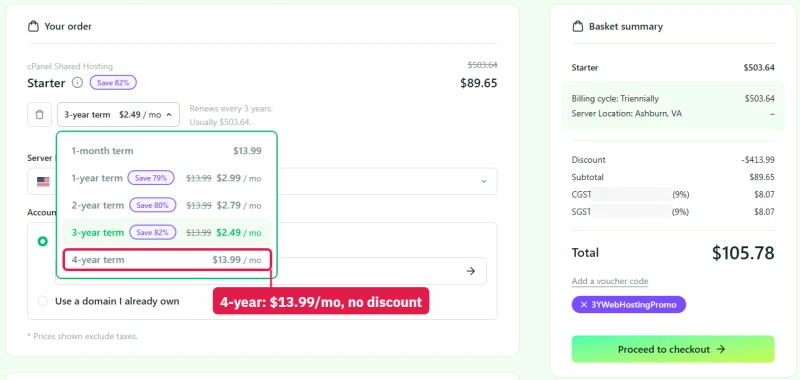
What did not improve is the price. The Starter headline of $1.99/mo needs a four-year term paid up front, and every term renews at $13.99/mo. The checkout says it plainly: "Renews every 4 years. Usually $671.52." A day later the same button opened a three-year basket instead, pictured below: $89.65 today, renewing at $503.64 every three years. The site also promises four different uptime figures and says in one place that shared plans carry an SLA and in another that they do not.
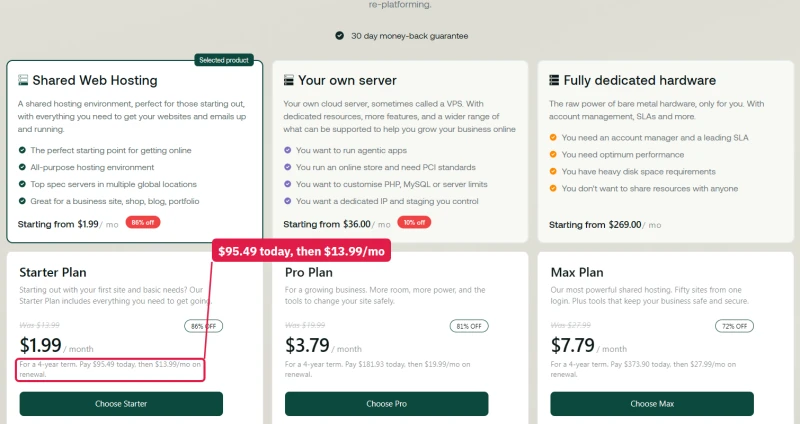
The bottom line: hosting.com is a decent shared host sold on a price you only get by prepaying four years. ChemiCloud delivers better performance at $2.95/mo, with NVMe, Redis and LiteSpeed and a 45-day money-back window. Hosting.com is worth it if you prepay the long term and plan to move before it renews.
✅ Hosting.com Might Work For:
- A small site prepaid for four years, if you will move before it renews
- Developers who want SSH, Git, Node.js and PostgreSQL on a cheap shared plan
- AI app builders: AI Application Hosting renews at the price you first pay
❌ Hosting.com Is NOT Right For:
- WordPress sites on a budget (→ ChemiCloud at $2.95/mo)
- WooCommerce stores (→ ChemiCloud or ScalaHosting)
- Busy sites without a page cache (→ the Starter CPU share runs out first)
- Developers who need root (→ Cloudways at $11.00/mo)
- Agencies (→ ScalaHosting or Cloudways)
- Anyone planning to stay past the intro term (→ Starter renews at $13.99/mo)

What Testing Found
- LiteSpeed on every plan; Starter gets 2 CPU cores, 2 GB of RAM and NVMe
- 172ms TTFB from the US and 0.38% errors on a load ramp
- Cheap intro pricing ($1.99/mo on a four-year prepay)
- SSH, Git and free migration on every shared plan
- 30-day money-back guarantee
What Holds It Back
- Every Starter term renews at $13.99/mo, the monthly list price
- Redis and staging only from the Pro plan up
- The CPU share runs out first: about 6.5 uncached pages a second in my September test
- 99.91% uptime over 54 days, the lowest of the four hosts I watched
- Support took about 17 hours per ticket
- Owned by World Host Group, a private equity rollup; its own pages disagree on the uptime promise
Benchmark Data
- Origin TTFB (3 plans, no CDN): 138ms to 172ms
- Uptime (54-day window): 99.91% to 99.95%
- PageSpeed Score (Mobile): 66/100
$2.99/mo
30-Day Money-Back
Methodology: The benchmark boxes on this page cover 8 plans. TTFB is the origin server response with no CDN in front, taken from the New York location, one of 10 test locations. Uptime is shown over a 54-day window. Load figures are for a 60-second ramp of 0-250 concurrent clients from US-East.
Test Environment & Methodology (Full Disclosure)
This review rests on two rounds of testing, months apart. The first was a benchmark of five plans on their own test sites, with uptime watched for 54 days. The second was hands-on: a real hosting.com account, every product page read and photographed, and the WordPress install a customer would do, timed step by step. The account is still running. Here is exactly what I tested and how.
The benchmark round
🔬 Benchmark Round Test Environment, Full Disclosure
All TTFB tests were run with CDN disabled and page caching disabled, measuring pure server response time. Load tests ramped concurrent visitors with a cloud load tester from US East. Uptime was watched for the full 54-day window on each plan's test site. Support tickets covered technical questions, billing questions, and performance issues.
The hands-on round
🔬 Hands-On Round Test Environment, Full Disclosure
The monitoring and standard-test round
Our test site on the same account now runs plain WordPress with the default Twenty Twenty-Five theme and no cache plugin, the same build we put on every host so the numbers compare. Our uptime checker asks it for a page every minute from Virginia. Our standard load test sends 10, 25, 50 and 100 visitors at once from a Grafana Cloud load zone in Columbus, Ohio, one minute per step, and our probes in nine AWS regions time the first byte.
The hands-on round does not replace the benchmark, and the two do not measure the same thing. My account is an older A2 cPanel plan, and a new customer today is put on either the Enhance-based hosting.com panel or cPanel, so where the account and the current plan pages disagree I say which one a number comes from. The load test came from one IP address, so it shows where one visitor stream saturates the account, not how many real visitors from many places the server could carry.
Who Owns Hosting.com: The World Host Group Context
Before I get to the benchmarks, you need to understand who you're giving your money to. Hosting.com's About page calls itself "the best of World Host Group and A2 Hosting under one global brand". A2 Hosting was the Michigan host many developers liked; World Host Group (WHG) is a buy-and-build group that has bought more than 30 hosting companies in three years. On r/webhosting the group gets described as "EIG on steroids."
EIG (Endurance International Group) was the rollup that bought brands like HostGator, Bluehost and iPage and cut costs after each purchase. The fear is that WHG runs the same playbook at a larger scale. The facts below come from hosting.com's own pages.
Who actually owns it
The mergers-and-acquisitions page names the owners: the founders and management, with the private equity firm Oakley Capital, and lenders Barings and Bain Capital. The parent company sits in Luxembourg. The chief executive is Seb de Lemos, and Rocket.net's founder, Ben Gabler, is now the group's chief product officer.
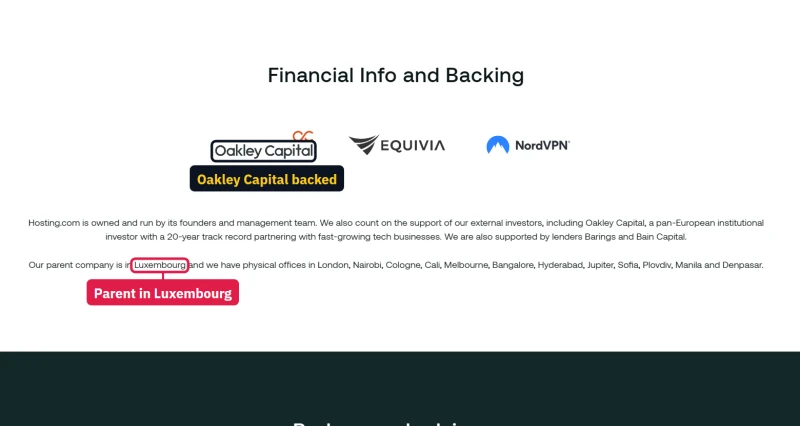
The WHG Brand Portfolio
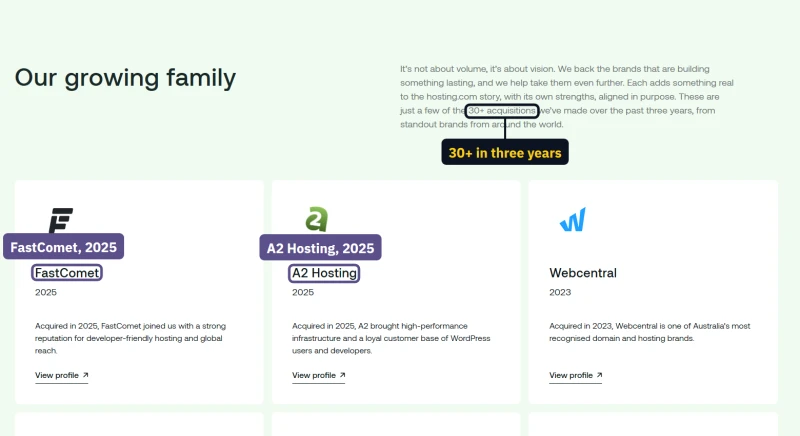
The company's numbers do not agree with each other
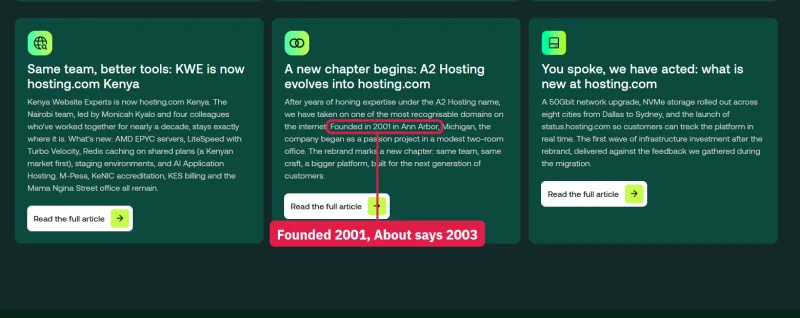
The About page gives big round numbers: 3 million websites, 10 offices, 800 people, 700,000 clients in 181 countries, and "Building for 20+ years" since 2003. The newsroom says the company was "Founded in 2001 in Ann Arbor, Michigan." Two years is a small thing, but it is the company's own history on two of its own pages.

The same happens with the offices. About says the Bangalore office has more than 150 people; the acquisitions page says "over 120 colleagues" there. About counts 10 offices; the acquisitions page lists 12 cities. Older product pages still claim 400,000 customers and 1,000,000 websites, while newer ones say 700,000 and 3,000,000.


The WHG Acquisition Playbook
Understanding WHG's acquisition history helps predict what happens to Hosting.com over the next few years. This is the pattern critics describe; it is my reading of the risk, not something hosting.com states:
- Acquisition: buy a hosting company with an established brand and customer base
- Infrastructure consolidation: move its servers onto shared group infrastructure
- Staff reduction: cut support and technical staff (staff cuts before the holidays were reported by hosting.com customers)
- Performance decline: the worry is slower sites and more downtime; my own benchmark had not shown it yet (see the uptime section)
- Intro pricing: keep attracting new customers with deep first-term discounts
- Renewal price shock: earn the margin from customers who do not move when the price jumps
⚠️ Reported Staff Cuts
Hosting.com staff cuts before the holidays were reported by customers; I could not find a statement from hosting.com about them. What I can measure is support: my 8 test tickets averaged about 17 hours to first response, while the site now advertises replies in minutes.
The Rocket.net Question

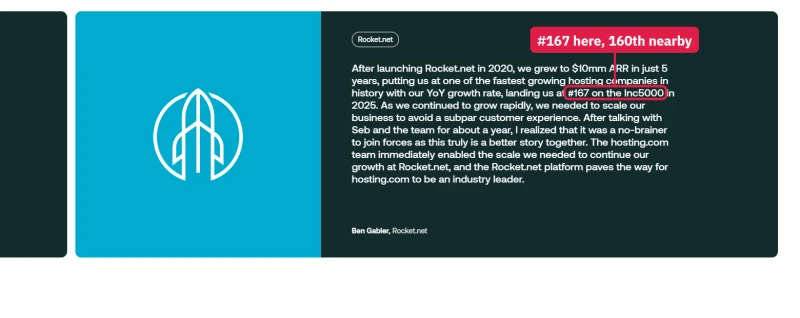
⚠️ The Rocket.net Problem
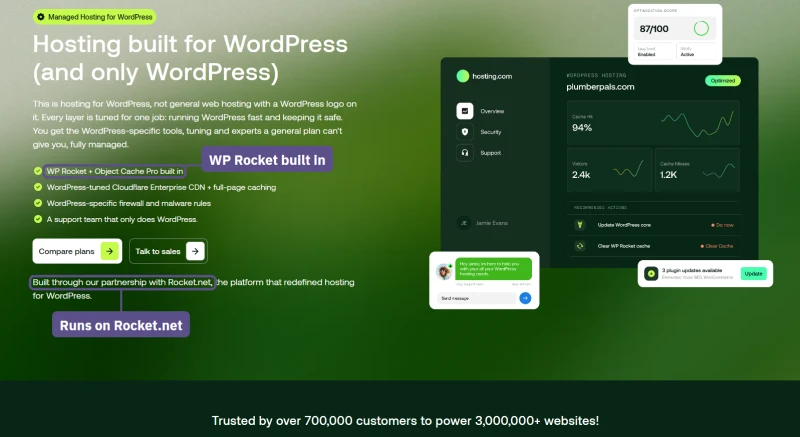
Rocket.net was a premium WordPress host, bought by the group in August 2025. Hosting.com's Managed WordPress plans run on its platform. The WordPress page calls this a "partnership"; the About page calls it "the acquisition of Rocket.net". Even the praise disagrees: the acquisitions page calls Rocket.net "the 160th fastest growing company in the US", and a few lines down its founder says "#167 on the Inc5000". If you pick Rocket.net for its old reputation, know that it now belongs to the same group as hosting.com.
Certifications
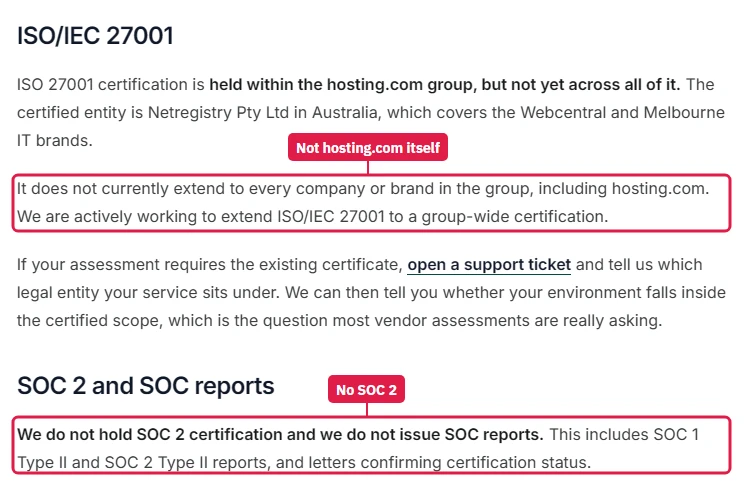
The security-certifications page in hosting.com's knowledge base is unusually honest: the group's ISO/IEC 27001 certificate belongs to Netregistry in Australia, it "does not currently extend to every company or brand in the group, including hosting.com", and "We do not hold SOC 2 certification". If your client or your insurer asks for either, hosting.com cannot give it.
Setting Up a Site on Hosting.com (Hands-On)
The control panel
A new customer today chooses between two panels at the same price: hosting.com's own "Hosting Panel", built on Enhance, or cPanel. My account is an older A2 plan on cPanel 134, and the cPanel is still branded "A2 Hosting". cPanel is one of the genuine positives: it is familiar to most WordPress users and provides a complete set of hosting management tools.
What's Included in cPanel
- File Manager, upload, edit, manage files
- phpMyAdmin, database management
- Softaculous, one-click WordPress installer, with staging and push to live
- Email accounts, create and manage email
- SSL/TLS, with Let's Encrypt issued automatically
- Cron Jobs, scheduled tasks
- JetBackup 5: daily, incremental, off-server backups, 30 kept
- SSH Access, Terminal and Git Version Control
- Setup Node.js, Python and Ruby apps, and PostgreSQL
- PHP Selector, with PHP 4.4 to 8.5
- Imunify360, ImunifyAV and ModSecurity for security
What's Missing or Limited vs Premium Hosts
My first list here said hosting.com had no LiteSpeed, no staging and no Git. My own account has all three, so that list was wrong. What is really missing or limited:
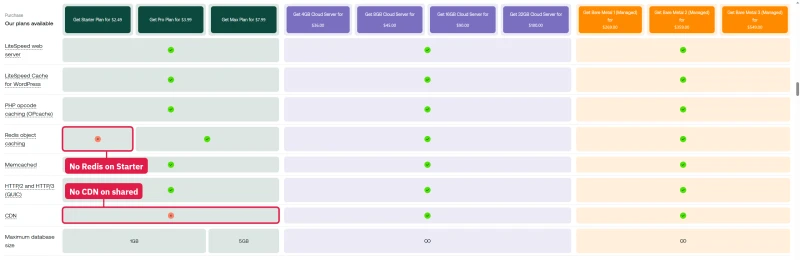
- No Redis Object Cache on Starter, Pro and Max have it; ChemiCloud and ScalaHosting include it
- No staging on Starter, it starts on Pro (my older plan had Softaculous staging)
- No CDN on any shared plan, only Cloudflare DNS sync; Managed WordPress has Cloudflare Enterprise
- No page cache until you add one, LiteSpeed Cache is available but a plain install does not have it
- No root access, even on the managed cPanel servers
- An old default PHP, my account was still on PHP 7.4, out of support since November 2022
The cPanel interface works, and the tools are there. What held back my benchmark's 172ms TTFB is the account's small CPU share and, on Starter, the missing object cache.
Installing WordPress on hosting.com, step by step
This is the install a new customer does, timed on my own account.
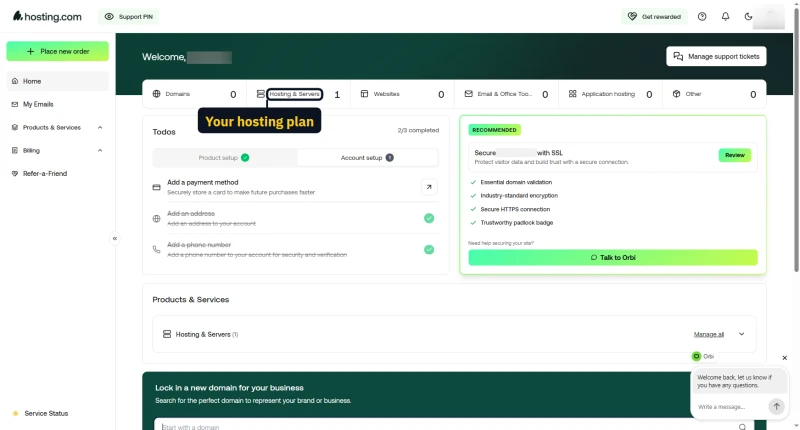
- Sign in to my.hosting.com. The customer panel showed "Loading your experience" for 8 to 14 seconds before it could be used.
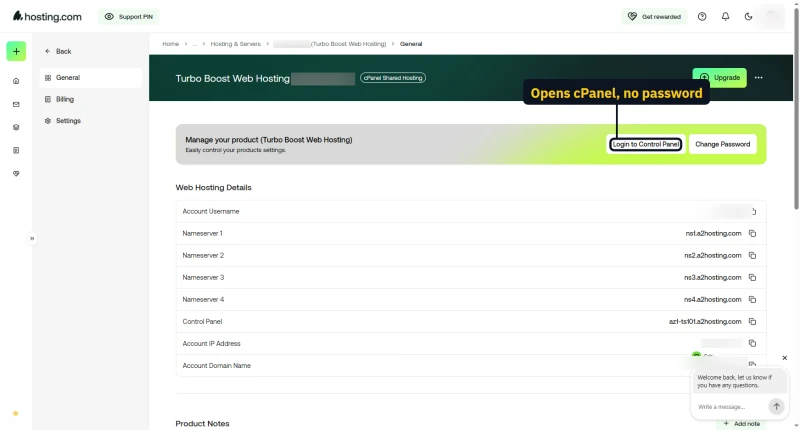
- Open the plan and press Login to Control Panel. cPanel opens with single sign-on; no second password.
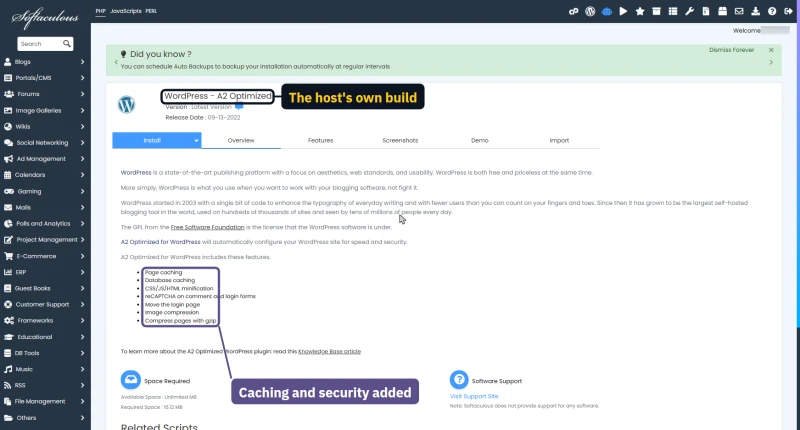
- Pick WordPress in Softaculous. The first WordPress icon is "WordPress - A2 Optimized", the host's own build with page and database caching, minification, a moved login page and image compression. Plain WordPress is further inside Softaculous.
- Fill in the form with the domain, the folder, the site name and the admin account.
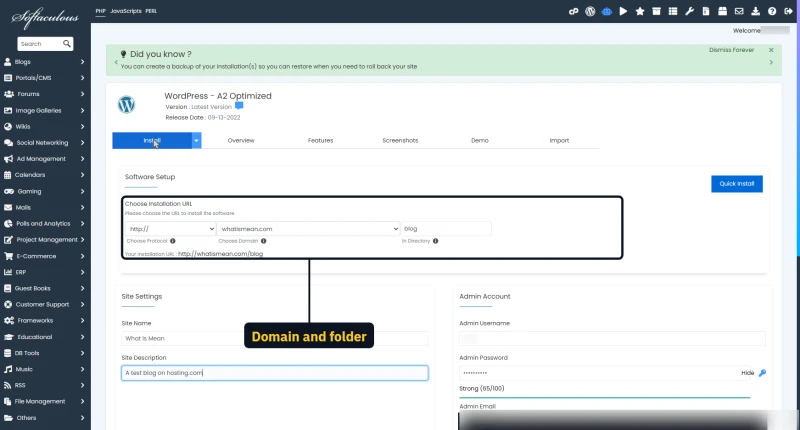
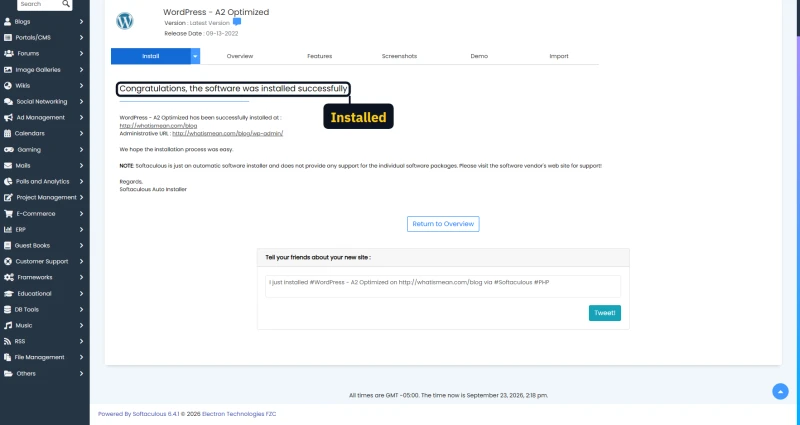
- Press Install and wait. Plain WordPress answered 17 seconds after Install. The A2 Optimized build was live within a minute, but the progress screen sat at 95% for more than three minutes before it said "Congratulations".
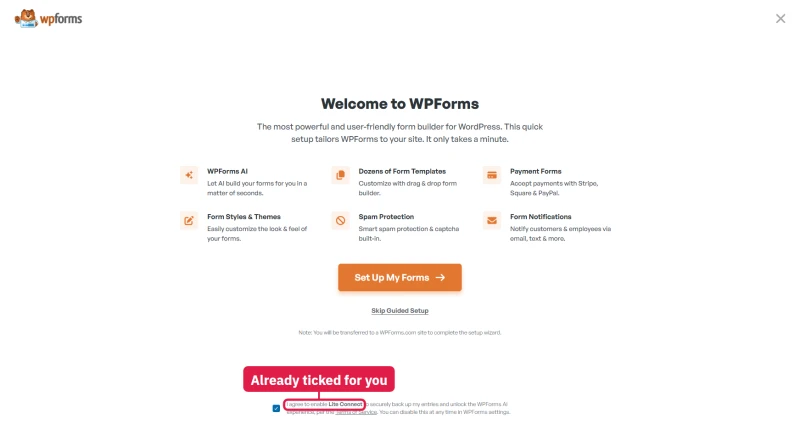
- Open wp-admin. The first screen is a WPForms setup wizard with "I agree to enable Lite Connect" already ticked. Untick it unless you want form data shared with WPForms.
- Skip the wizard and you land in hosting.com's AI site builder, which asks you to describe the site you want.

- Check the plugins. The A2 Optimized build installs 13 plugins and switches 12 on: A2 Optimized, All in One SEO, Duplicator, Extendify, MonsterInsights, Jetpack, LiteSpeed Cache, OptinMonster, Really Simple SSL, Site Assistant, WP Mail SMTP and WPForms Lite. The Plugins page opens under two upsell banners. Plain WordPress from Softaculous instead pre-ticks 8 of Softaculous's own plugins on the form.
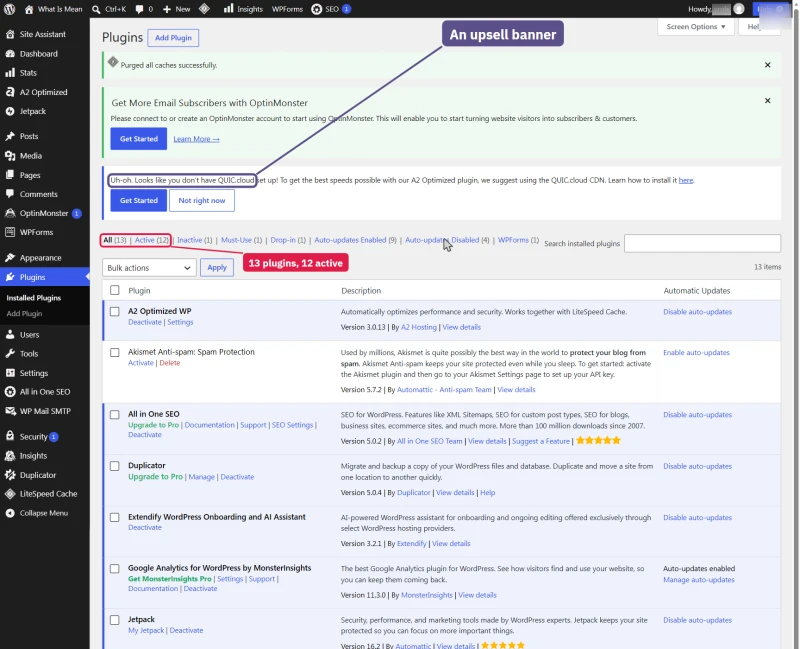
The HTTPS certificate needed no click: Let's Encrypt issued it about 10 minutes after the domain pointed at the server. Switching PHP from 7.4 to 8.3 in the PHP Selector took about 2 seconds to reach the live site.
With all 12 plugins on and no page cached, the server took 1.05 to 1.25 s per page, about twice plain WordPress; a cached page came back in one round trip. If speed matters, delete what you do not use and keep LiteSpeed Cache.
The AI site builder
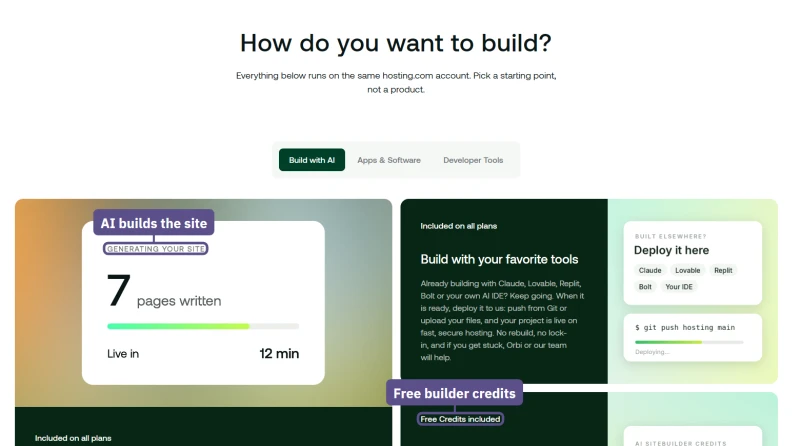
Hosting.com sells its AI builder as part of every plan, with free builder credits; then I tried it on my own account.
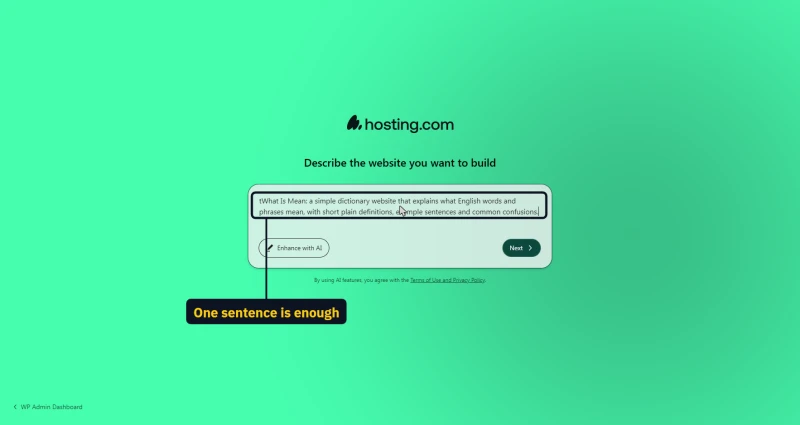
I gave the builder one sentence describing a small dictionary site. With no further questions it wrote the content, chose a style and built a homepage: "Your site is ready" in about 80 seconds. The result looked finished, but it was heavy: the homepage HTML alone was 380 KB, and uncached the server took about 2 seconds to build it. Using the builder means accepting its own terms, which are separate from hosting.com's.

Staging and push to live
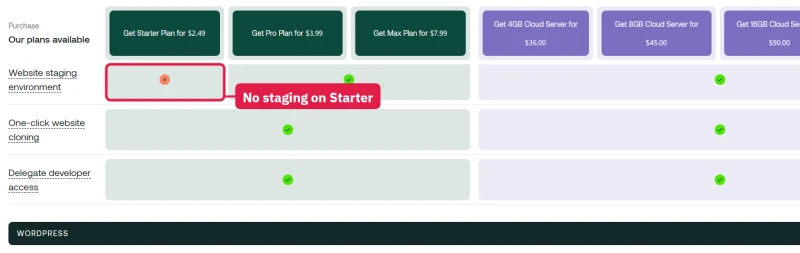
On the current plans staging is only on Pro and Max; the product matrix marks it as not included on Starter. My older account has it, so I tried it.
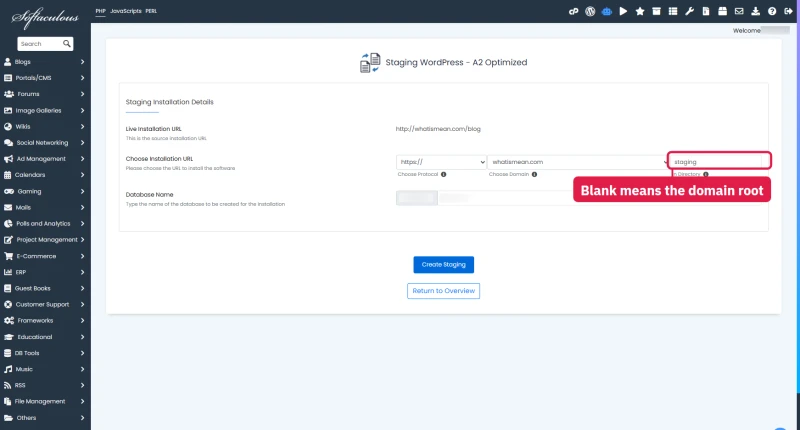
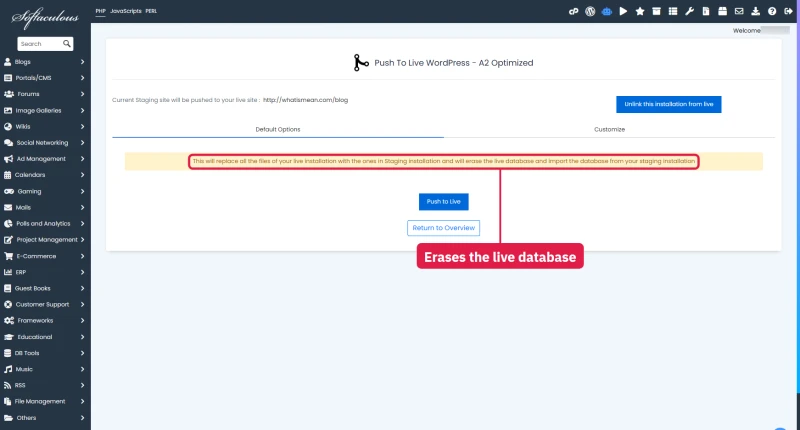
Softaculous made a staging copy in 25 seconds and reported success at 44. Watch the form: its folder field starts blank, which means the domain root, where another site may already live. Push to Live warns that it replaces the live files and erases the live database, and it backs the live site up first; it took about 80 seconds, and a probe every 4 seconds saw the live site return one 404, so it was down for under about 10 seconds.
Backups and a restore, tested on our account
Every hosting.com cPanel account carries JetBackup 5. Ours held 30 daily copies of the whole account, incremental and stored off the server in "Cloud Backup", and each copy has its own Restore and Download buttons. You can bring back one piece (a database, a folder, an email account) without touching the rest.
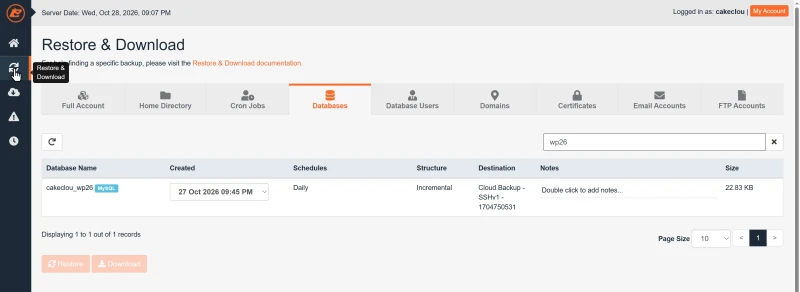
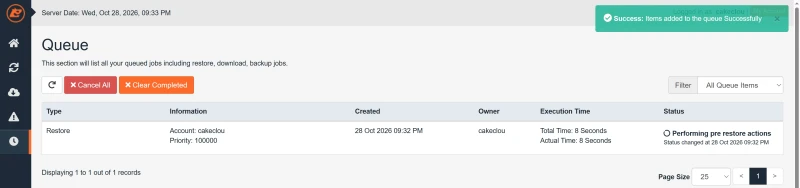
I restored the test site's database from the previous night's copy while our monitor asked the site for a page about every two seconds. The job queued, ran its pre-restore step and finished in about a minute. Of 59 requests during the restore, one failed with an HTTP 500 while the database was being imported, and the slowest answer took 4.8 seconds. A restore is quick and nearly invisible to visitors, but run it at a quiet hour.
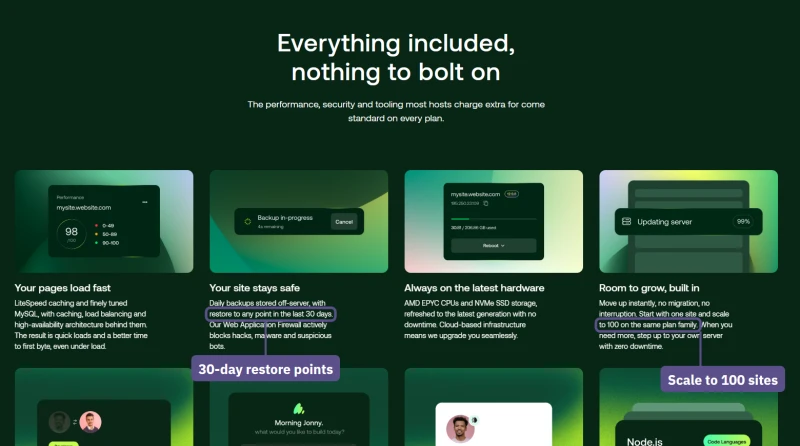
A second layer, Server Rewind, restores files by date. Weekday copies are kept 7 days and Sunday copies a month, the page calls them complimentary "on a best effort basis" up to 50 GB, and it cannot be used between 3 and 5 AM Arizona time. Imunify360 also scanned the account on its own schedule, from 1,508 to 60,984 files a scan, and every scan in its history read "No malware found".
Performance & Hardware Reality Check
My first version of this section said Hosting.com runs outdated hardware with Apache, SATA disks, 1 core and 1 GB per account. So I opened a Terminal inside a real hosting.com account and read the server directly, and most of that was wrong. Here is what the server is, what the current plans promise, and where the speed problem really comes from.
What CPU Are They Actually Running?
My account's cPanel has SSH and a Terminal, so I did not need a support ticket to find out. What the server reported:
- CPU: AMD EPYC 7282, a 16-core Zen 2 chip from 2019, with 64 threads on the machine
- Web server: LiteSpeed (the response header says so), on CloudLinux; cPanel still labels it Apache
- My account's share: 2 CPU cores, 2 GB of RAM, 50 entry processes, 75 processes, 4 MB/s disk I/O
- Server RAM: 251 GB on the machine, 154 GB free at the time
- Disk: a 5.2 TB software RAID for every account on the server, 98% full with 119 GB left
- Uptime: 920 days without a reboot, load average about 16 on 64 threads
- Storage type: not visible from inside the account, so NVMe or not is unproven
- Object cache: PHP's redis extension is offered; whether the plan gives a Redis server, I did not prove
Two things stand out. The first is that hosting.com's own page promises "AMD EPYC CPUs and NVMe SSD storage, refreshed to the latest generation with no downtime", and the server I was on carries a 2019 CPU and had not been restarted for two and a half years. The second is the disk: a customer's writes are capped at 4 MB/s by the account limit, so I measured 4.3 MB/s whatever the drives underneath can do.
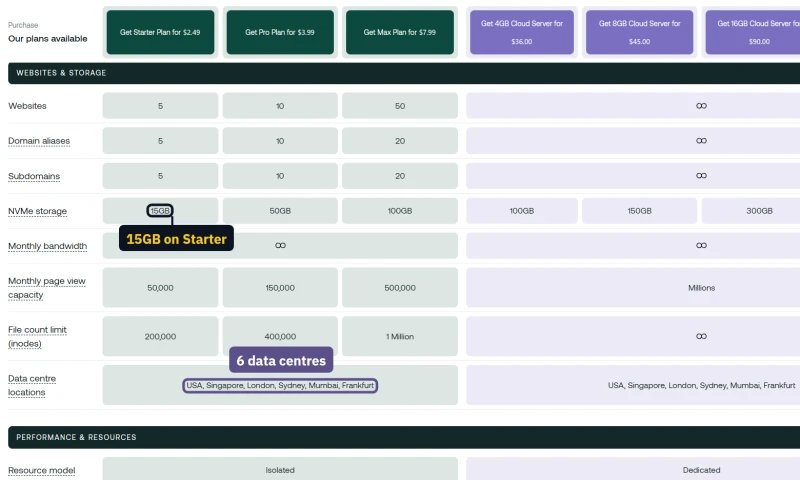
My account is an older A2 cPanel plan. A new Starter customer is sold a different set of limits, and hosting.com publishes them openly in a product matrix: 2 virtual cores, 2 GB of RAM, 30 concurrent visitors, 1024 IOPS, 50 MB/s of I/O and 200,000 files. That is double what I first wrote for the old Startup plan.
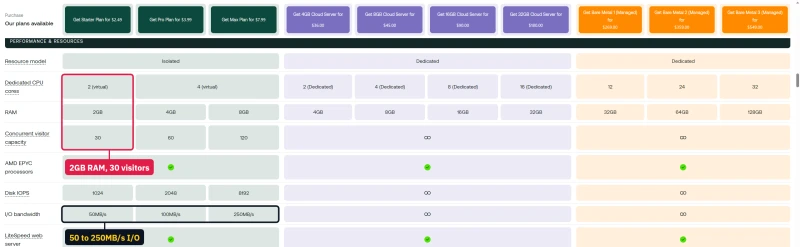
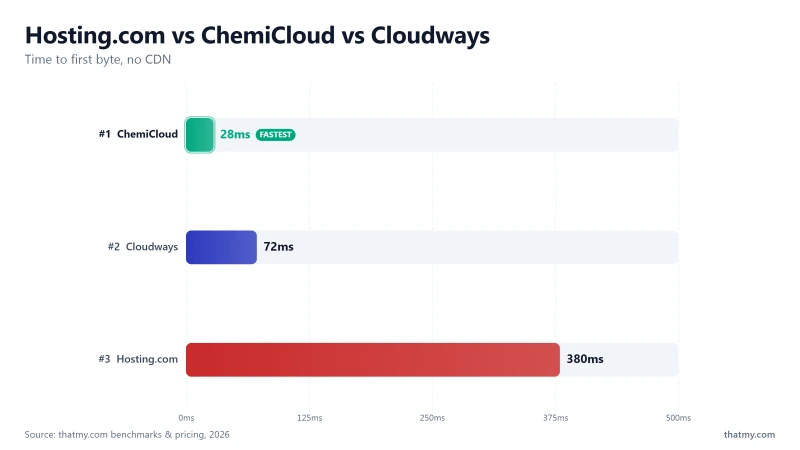
So the hardware gap is smaller than I first thought, and it does not explain the 2.2x TTFB difference in my benchmark (172ms vs 78ms) on its own. What remains is an old CPU shared by many accounts, a small CPU share per account, and, on the cheapest plan, no object cache.
The claims on the plan pages
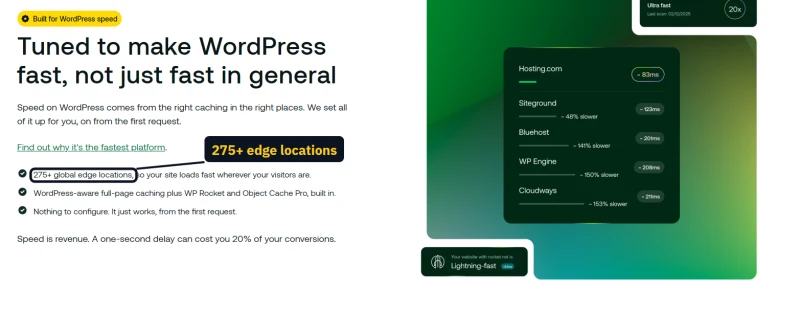
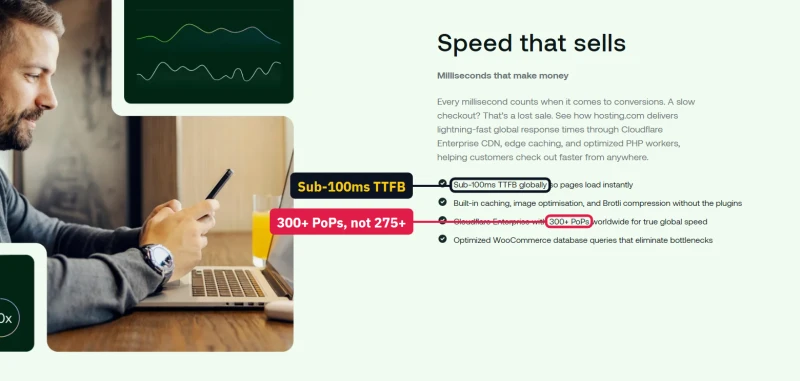
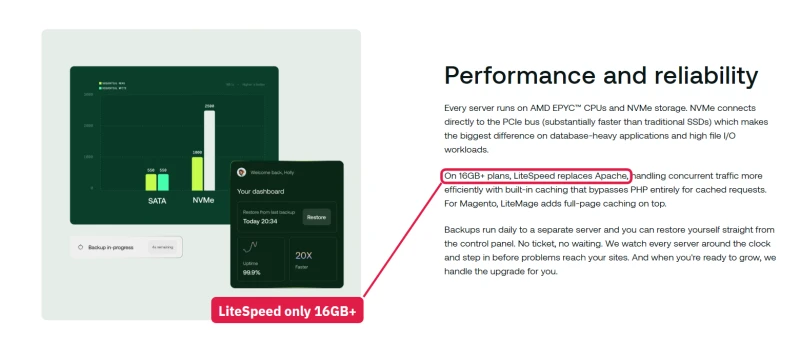
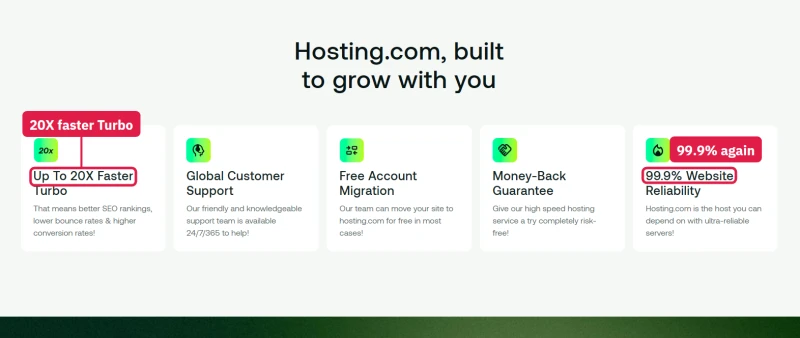
Hosting.com's speed marketing is loud and does not agree with itself. The WordPress page promises you will be faster than your current host "or a year free", defined in a footnote as global average TTFB. The WordPress page counts 275+ Cloudflare edge locations; the WooCommerce page counts 300+ for the same network. The managed cPanel servers page says "Every Managed cPanel Server comes with LiteSpeed", and its small print says LiteSpeed only replaces Apache "On 16GB+ plans". And the Node.js page still carries A2 Hosting's old "Up To 20X Faster Turbo" copy.


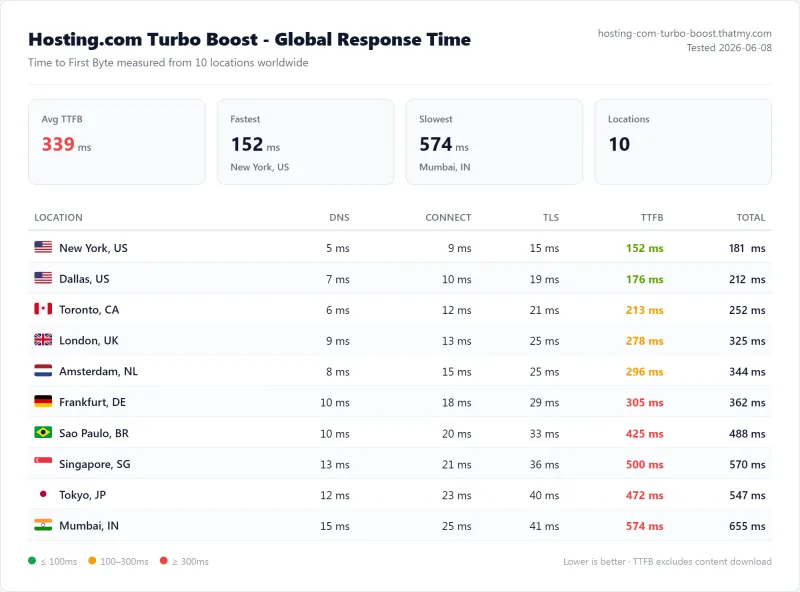
TTFB Results by Test Location
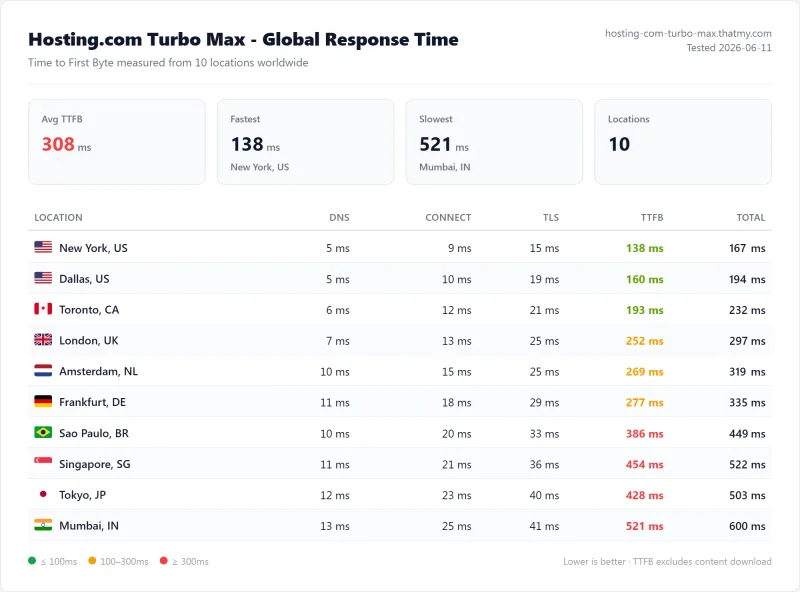
All tests run with CDN disabled, page caching disabled. Pure server response time, measured from 10 locations around the world against the plan's own test site; the table below is the Startup plan's full run. The benchmark box figures on this page come from that 10-location record, described in their Methodology line.
New York (Primary Test Location)
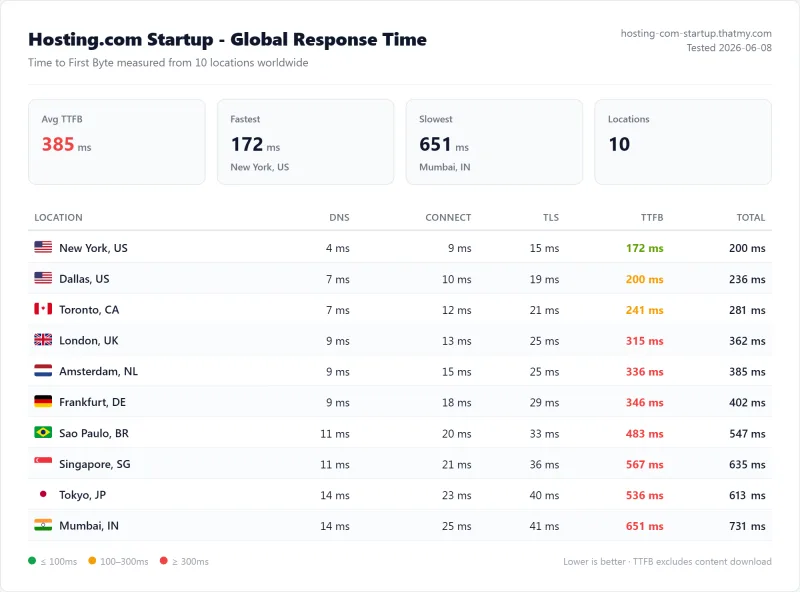
172ms from New York clears the 200 ms bar I set for a fast host, although ChemiCloud answers in less than half the time. Distance costs more than it should: the average over all 10 locations was 385ms, so a visitor far from the US data centre waits two to nearly four times as long before the first byte arrives.
London (EU Origin)
Asia-Pacific (Singapore, Tokyo, Mumbai)
If most of your visitors are in Asia or Australia, pick a closer data centre at checkout or put a CDN in front; from the US servers the first byte alone takes more than half a second.
PageSpeed Report, Mobile (Startup)
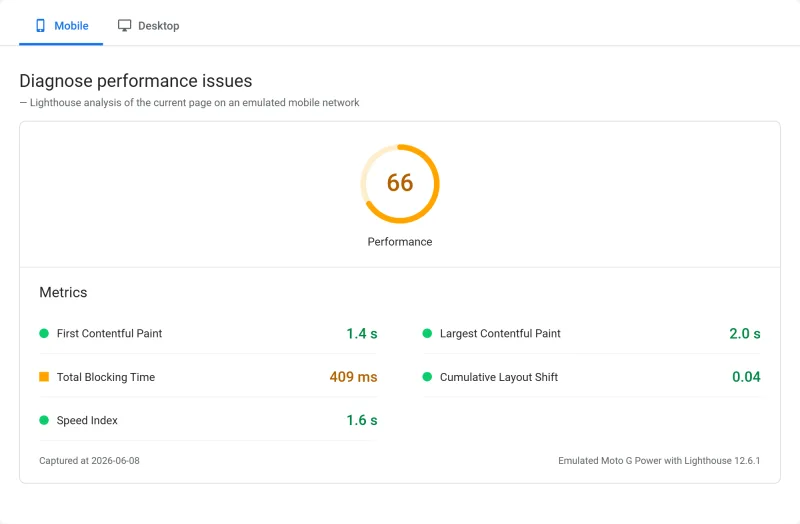
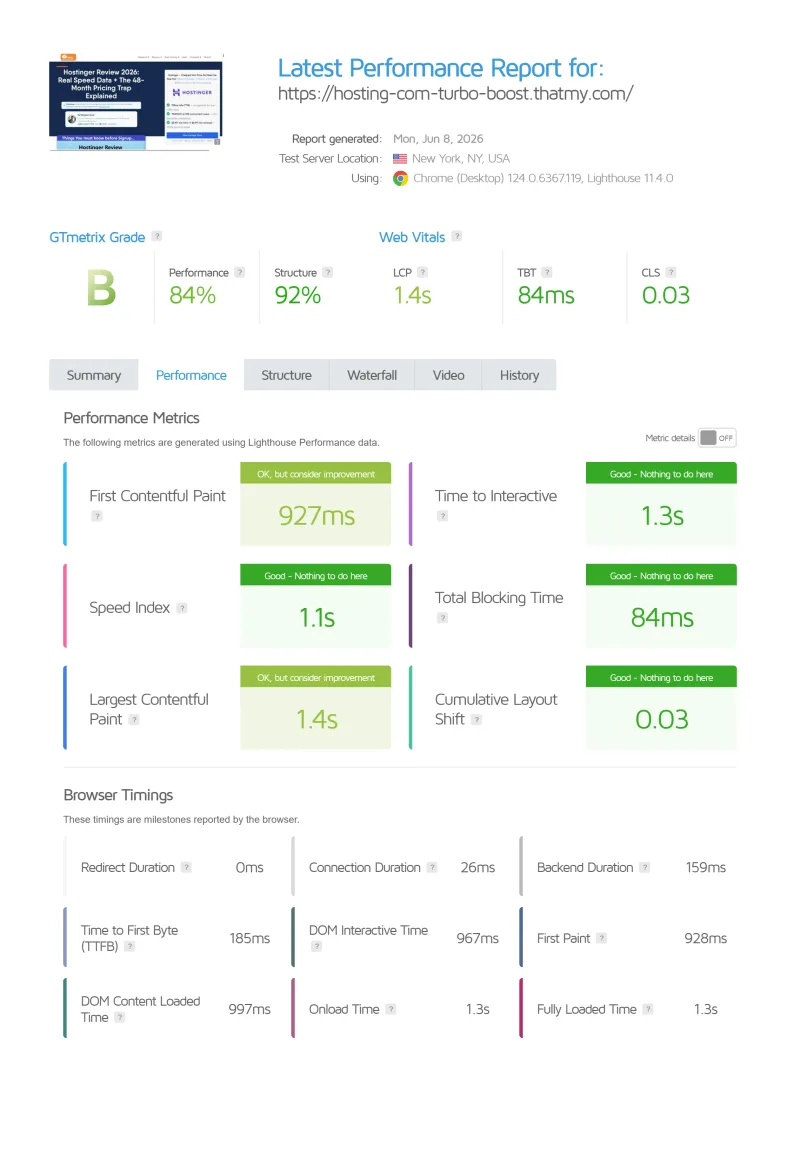
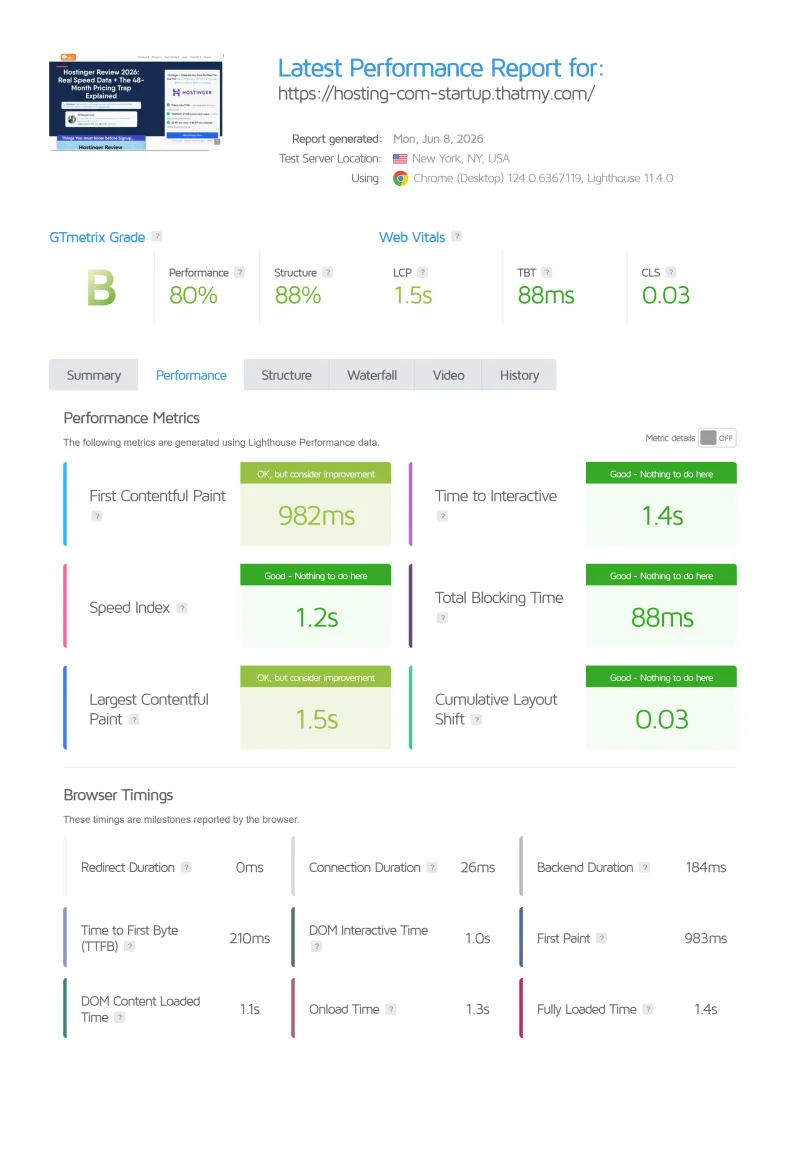
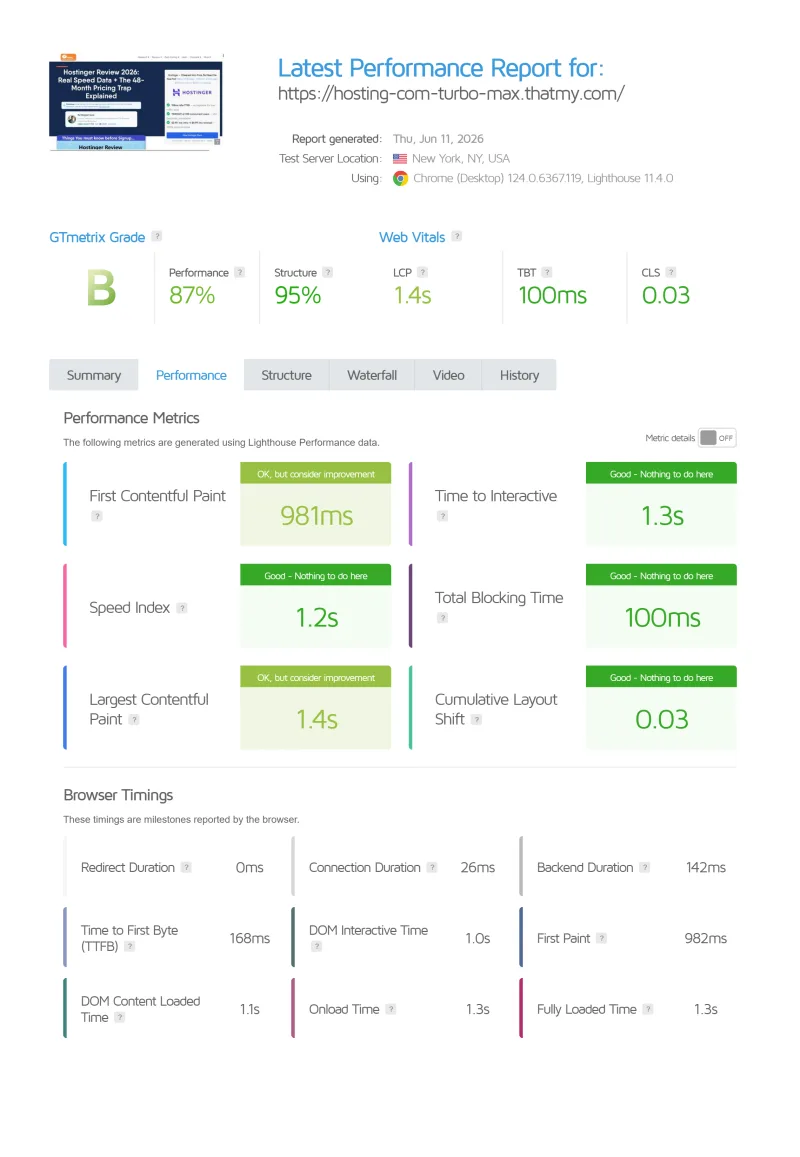
Hosting.com's 172ms TTFB is 2.2x ChemiCloud's (78ms) and 3x Cloudways' (48ms), both at comparable or lower price points. The page scores are middling rather than bad: PageSpeed gave the Startup test site 66 out of 100 on mobile with a 2.0 s LCP, inside Google's 2.5 s "good" line, and GTmetrix scored it 80%.
⚠️ Why TTFB Matters for WordPress
TTFB is the foundation of all WordPress performance. Every page load starts with the server response, and nothing on the page can appear before it. A 172ms TTFB leaves plenty of room for a good LCP near the data centre, but ChemiCloud's 78ms TTFB gives your site a 94ms head start on every page load, and far from the US the gap grows.
Load Test: Visitors Arriving Together
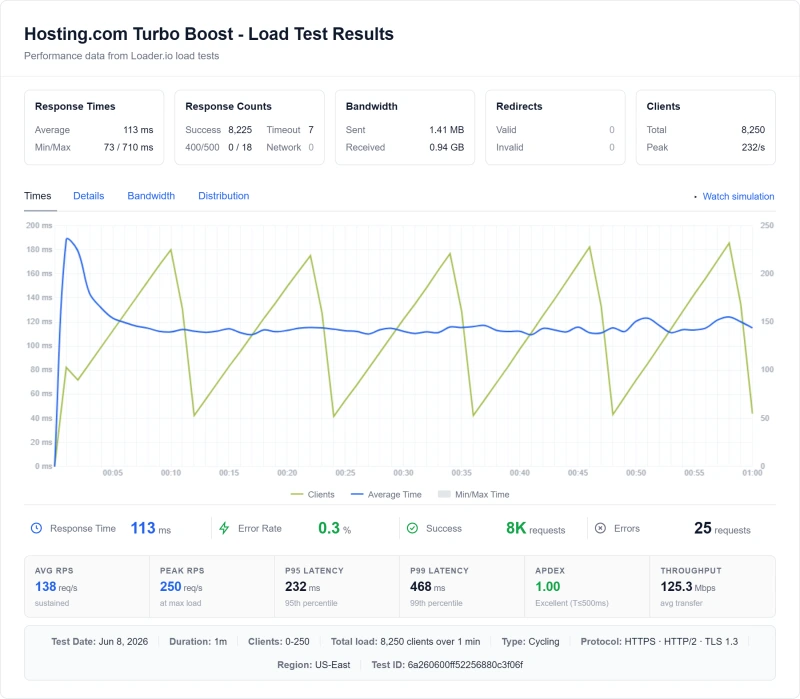
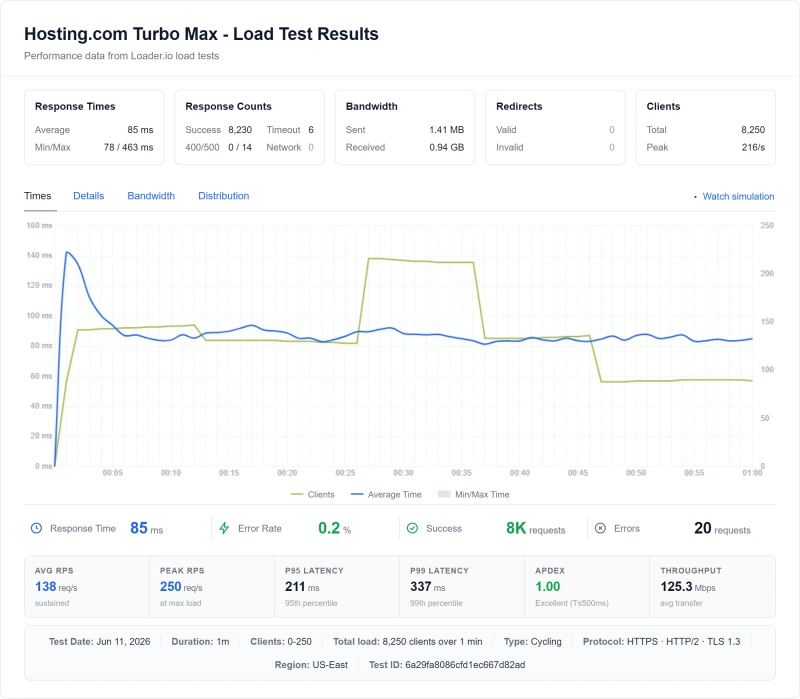
Idle speed is one thing; the real question is what happens when visitors arrive together. The load test ramped the Startup test site from 0 to 250 clients over a minute.
Load test: 0 to 250 Clients (Startup)
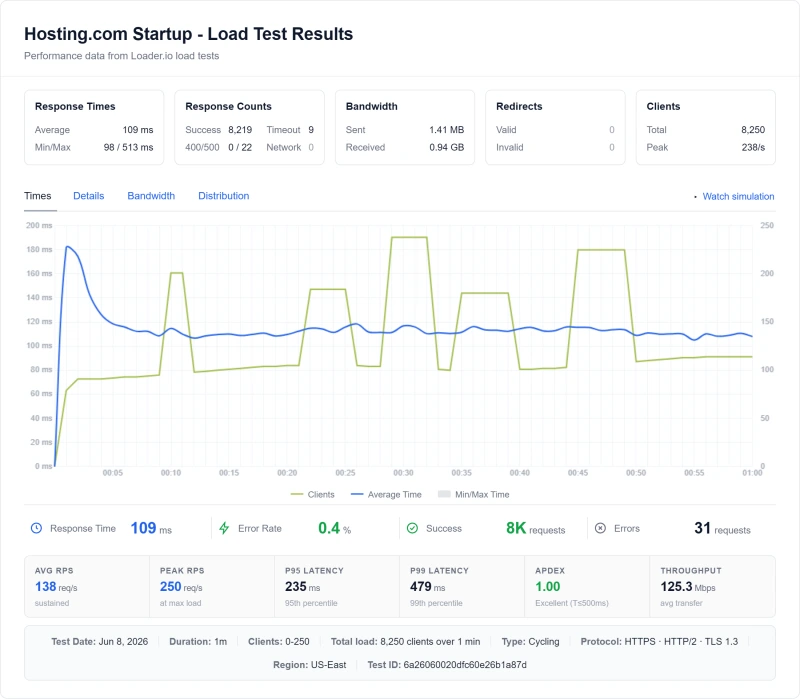
The Startup plan held up: 8,250 requests in the minute, 31 errors, and an average of 109ms. At 100 users at once it slowed to 640ms, about three times ChemiCloud Pro's 210ms.
A load tester asks for the same page again and again. My hands-on test below forced WordPress to build every page (a unique query string defeats any cache), and there the account's CPU share ran out at about 6.5 pages a second. Both results are true: the server is quick, and the CPU share each account gets is small. For context, a post shared on social media can bring 50 or more visitors at once. With a page cache, Starter should carry that; without one, its CPU share runs out first.
Where the CPU Limit Comes From
Shared hosting resource limits are the root cause. Every hosting.com shared account runs inside a CloudLinux box with a fixed share of the server. My first version of this review put that share at 1 core, 25 processes and 1 GB. Today's plans are larger:
- Starter: 2 virtual cores, 2 GB RAM, 30 concurrent visitors
- Pro: 4 virtual cores, 4 GB RAM, 60 concurrent visitors
- Max: 4 virtual cores, 8 GB RAM, 120 concurrent visitors
WordPress generates PHP work for every uncached page. When the CPU share is used up, CloudLinux slows the site down; when the process or memory limit is hit, the knowledge base says visitors get "503 Error" or "500 Internal Server Error". This is not a bug, it is the designed behavior of shared hosting resource limits.
My hands-on speed test
I ran the same test I ran on Cloudways a day earlier: many requests at once from one connection in India, each with a unique query string so no cache could answer, 60 seconds per step. On plain WordPress with no cache plugin, the account never refused a request, but it topped out at about 6.5 pages a second from the first step, and every extra visitor only made the wait longer.
Uncached Pages Under Load
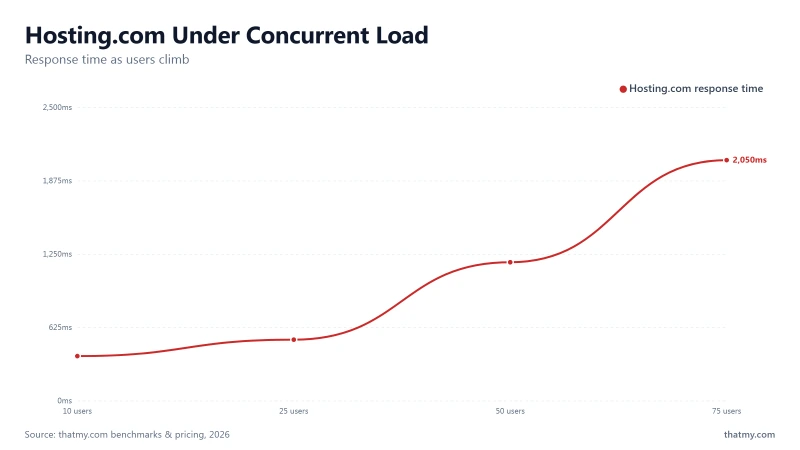
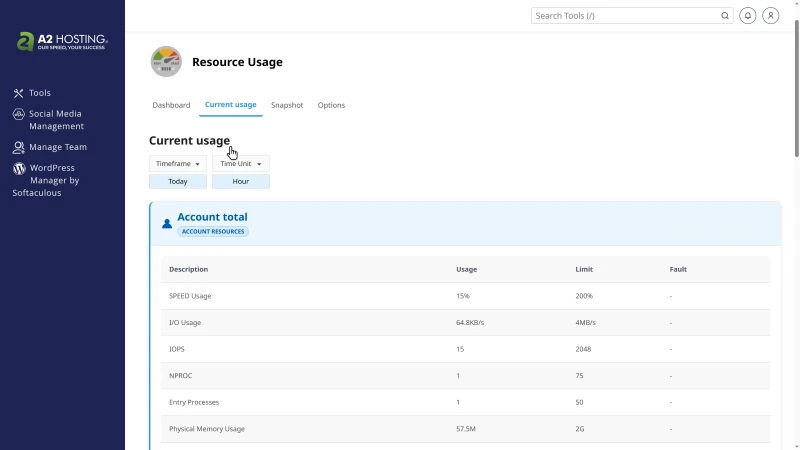
The account's own Resource Usage page for that hour shows why: CPU averaged 92% of its 200% limit with 14 CPU faults, and memory hit its limit 5 times, while entry processes averaged 1 of 50. The limit that bites is CPU. The WordPress build hosting.com installs for you, "WordPress - A2 Optimized", adds 12 active plugins, and with those the server took 1.05 to 1.25 s per uncached page against 0.52 to 0.56 s for plain WordPress, and started returning 503 errors under 60 visitors.
For comparison, Cloudways' 2 GB DigitalOcean server did 6.5 pages a second on the same test with a median of 13.6 s at 60. For uncached pages the two were about even; the difference is what you pay after the first term.
ChemiCloud's Pro plan answered 100 users at once in 210ms in my benchmark, against 640ms for hosting.com's Startup. Both run LiteSpeed, so the web server is not the difference; the CPU share per account and the object cache are.
The standard test: our site on hosting.com and on Verpex, from a load cloud
Our standard test puts the same WordPress on each host (the default Twenty Twenty-Five theme and no cache plugin, so every page is built fresh) and sends 10, then 25, 50 and 100 visitors at once from a Grafana Cloud load zone in Columbus, Ohio, one minute per step. A visitor gives up after 10 seconds. I ran it on our hosting.com account and, straight after, on Verpex's Silver plan, which gives the same 2 cores and 2 GB of memory.
Both plans have 2 cores, and Verpex built four times as many pages a second. hosting.com held about 7 fresh pages a second, the same ceiling as my first test from India. At 50 visitors most requests timed out or got 500 and 503 errors, and our one-minute monitor in Virginia waited 13 seconds for a page during that step. At 100, the server stopped answering the load zone at all while the same monitor got pages back in about half a second: hosting.com's protection blocked the heavy source and kept the site up for everyone else.
Verpex built every page at a steady 29 to 30 a second and never dropped one. A page cache speeds up repeat visits on both hosts; this test shows what happens to the pages a cache cannot hold, like carts, searches and logged-in views.
First byte from nine regions
Our probes in nine AWS regions asked the same uncached page for its first byte, twice. The server is in Arizona, so the US is fastest and Asia slowest; with no page cache, about half a second of every answer is the server building the page.
Turn on LiteSpeed Cache and most of that server time disappears for pages a visitor has seen before. If your readers are in Asia, a host with a server there, or a CDN in front, matters more than the plan you pick.
WordPress Performance Stack (What's Missing)
A modern WordPress performance stack has four layers. On Starter, Hosting.com has the web server and misses the object cache and the CDN.
Why Redis Object Cache Matters for WordPress
WordPress makes database queries on every page load. Without Redis, every query hits MySQL directly. With Redis, frequently-accessed data is served from memory, 100x faster than a database query. The absence of Redis on Hosting.com's Starter plan means every WordPress page load there is slower than it needs to be, and the database becomes a bottleneck under load.
Why LiteSpeed Matters
LiteSpeed handles concurrent connections more efficiently than Apache, and its page cache answers a repeat visit without running PHP at all. Hosting.com runs LiteSpeed too, so the web server is not what separates them: ChemiCloud answered 100 users at once in 210ms, and hosting.com's Startup plan in 640ms. The limit is the small CPU share each account gets. On hosting.com, install the LiteSpeed Cache plugin on day one: without it, a repeat visit is as slow as the first.
Uptime & Resource Limits
Uptime: 54-Day Monitoring Window
54-Day Uptime
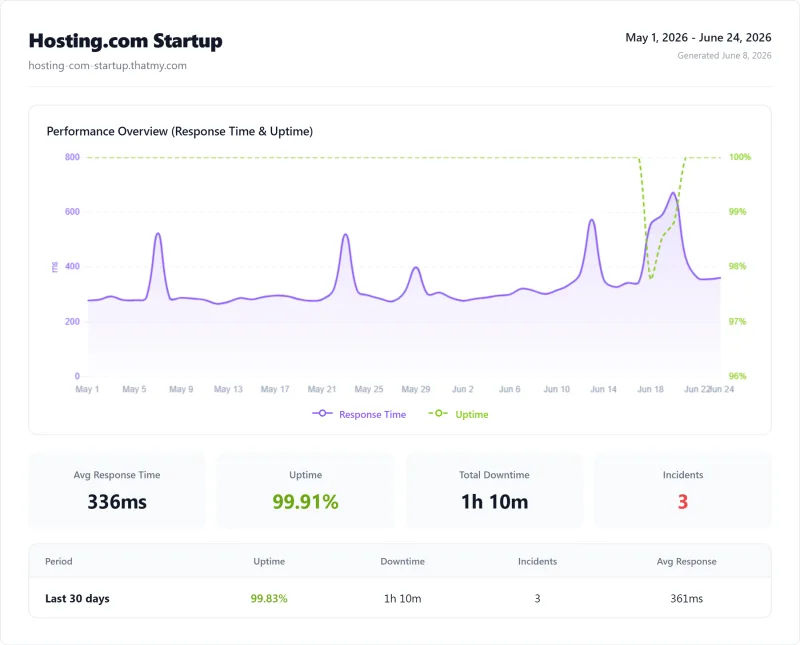
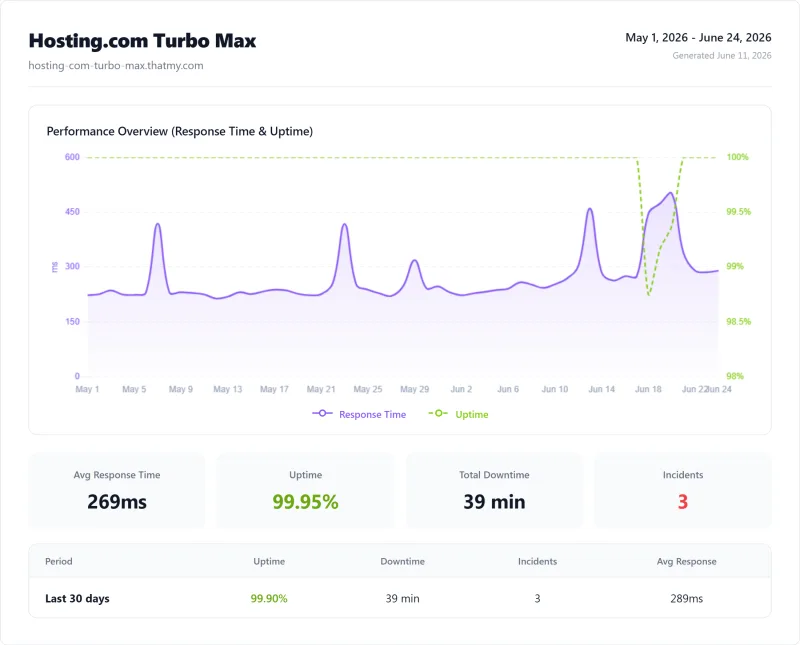
99.91% is inside the 99.9% most shared hosts promise, and it was the lowest of the four hosts I watched over the same window: 70 minutes of downtime over 54 days, in 3 incidents. That is 70 minutes where your site returns errors to visitors, Google's crawler finds it unavailable, and any WooCommerce sales are lost.
ChemiCloud Pro's 99.979% uptime means only 16 minutes of downtime over the same 54 days. ScalaHosting's 99.99% means only 8 minutes over that window.
Our own monitor, checked every minute
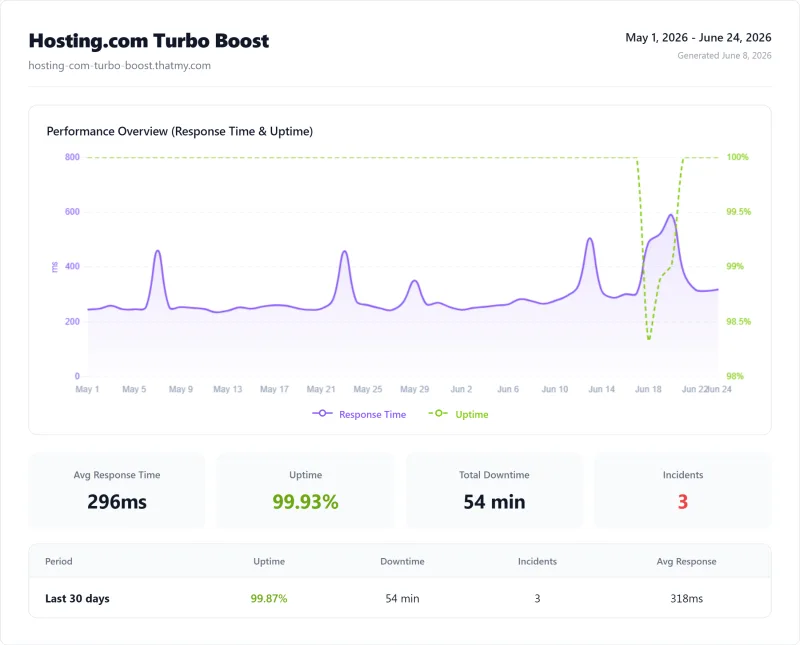
The 54-day figure comes from the benchmark round. Since then our test site on this account has been on our public uptime board, checked once a minute from Virginia; a minute only counts as down when three tries five seconds apart all fail. Over two weeks it passed all 20,820 checks, with no outage, and the uncached home page came back in 547 ms on average.
What hosting.com promises: eight versions of one number
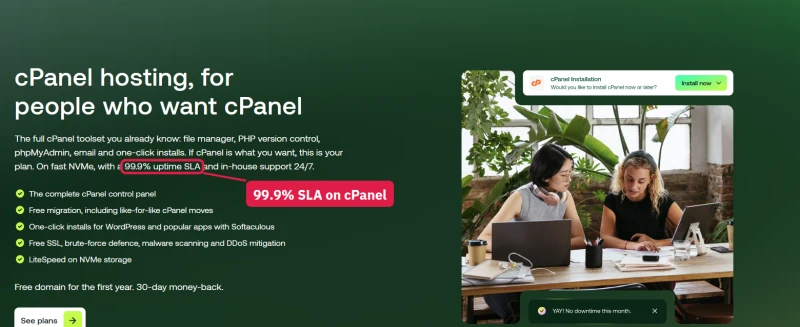
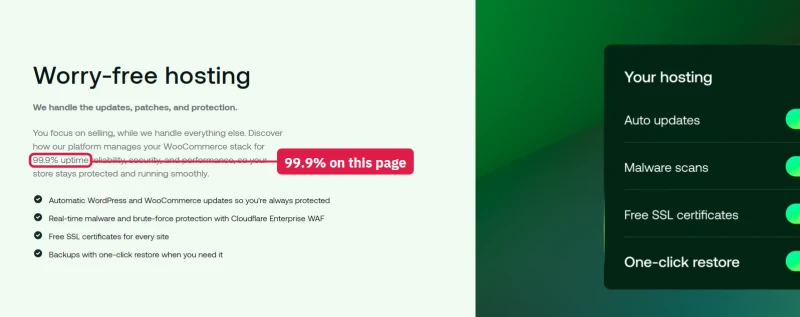
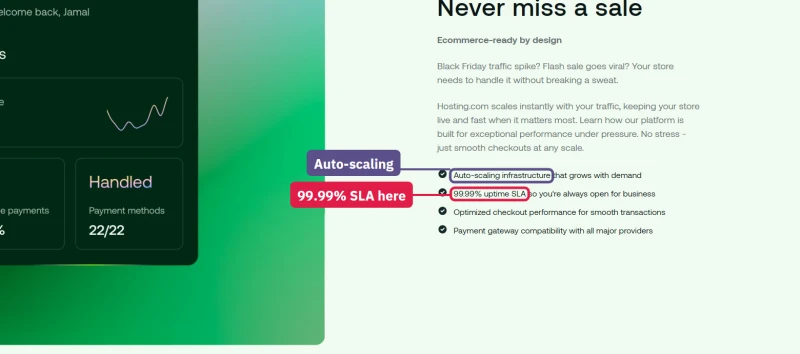
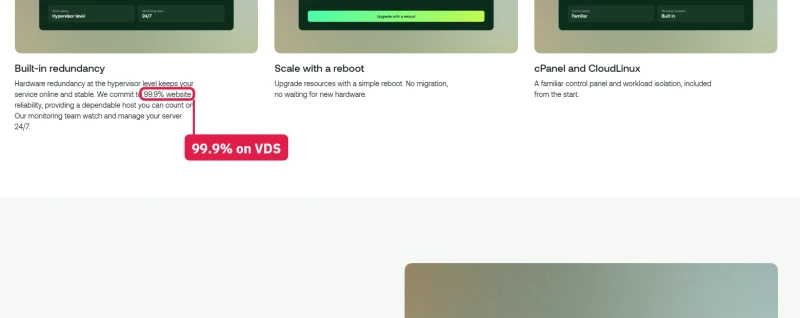
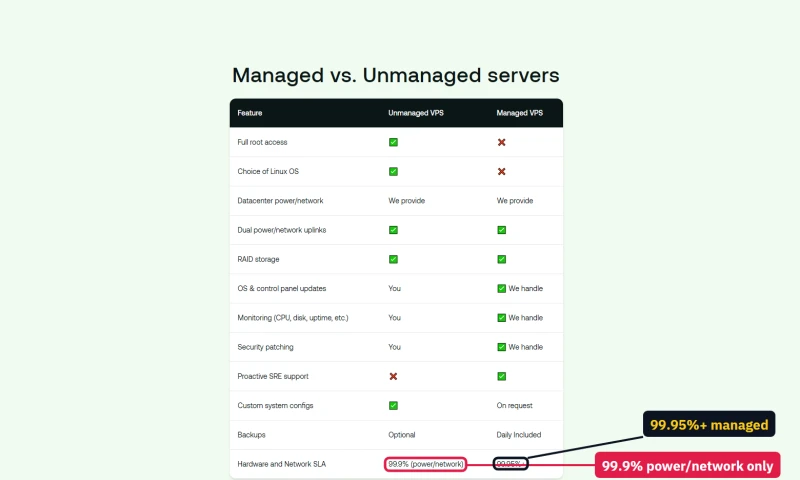
I went through every hosting.com product page and wrote down each uptime promise. The same company offers 99.9%, 99.95%, 99.99% and "99.95%+", sometimes two different figures on one page, and it says both that shared plans have an SLA and that they do not.
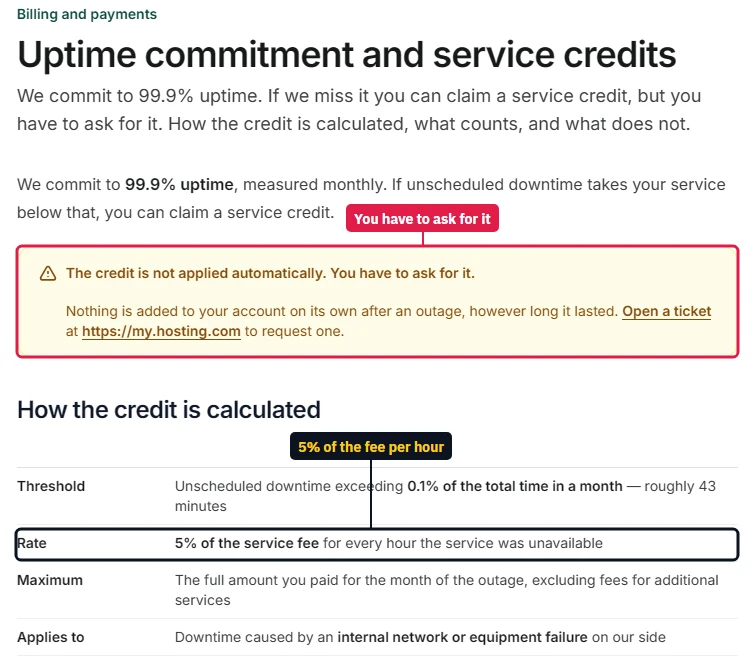
For a shared plan, the page you buy from says 99.9% with an SLA, and the product matrix says 99.95% with no SLA. Only the knowledge base says what a miss is worth: a credit of 5% of the service fee for every hour below 99.9% in a month, which "is not applied automatically. You have to ask for it." Against my benchmark's 99.91%, that is a credit you would have had to claim yourself.

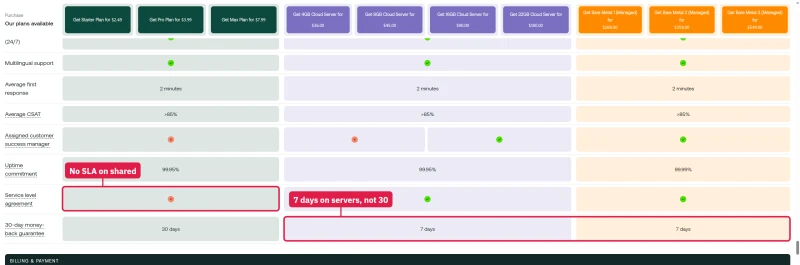
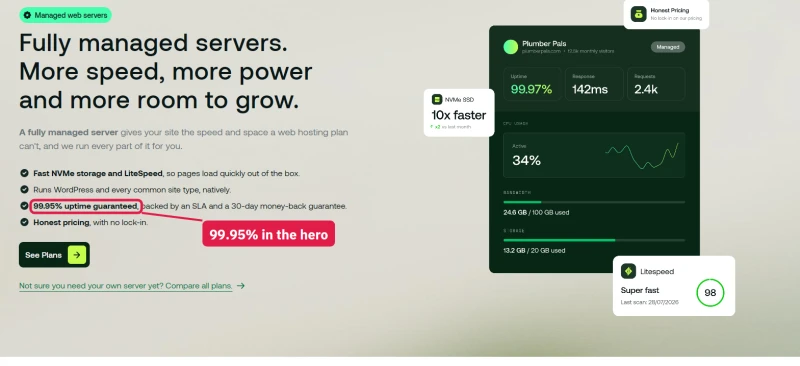
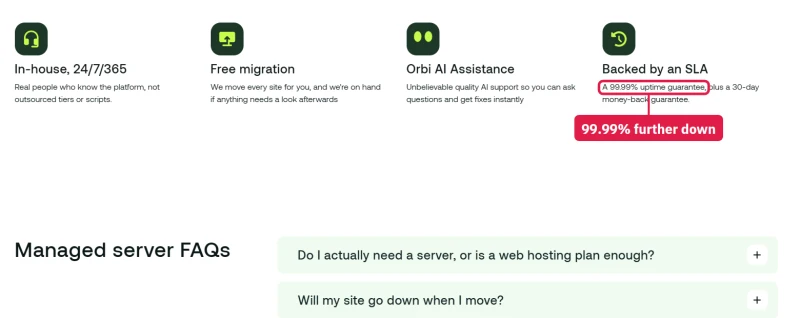
The server and WordPress pages are no better. The managed servers page says 99.95% at the top and 99.99% further down for the same servers; the WooCommerce page says 99.9% and then 99.99%; the managed cPanel servers get 99.99% on the VPS page and 99.9% when the same sizes are sold as VDS.
⚠️ What That Downtime Costs
For a store, every one of those 70 minutes is a checkout that fails and a visitor who may not come back. Plus: Google Search Console records downtime events. Repeated downtime signals unreliability to Google's ranking algorithm. The cost of downtime compounds over time.
Hidden Resource Limits
Hosting.com's plans advertise unlimited bandwidth. When I first wrote this section the other limits were hard to find; today hosting.com publishes them in a product matrix, and they are larger than the ones I measured on the old Startup plan. The table below uses the current Starter figures.
Our own account shows the same kind of limits on its Resource Usage page, and they are the ones that decide how fast a busy site runs: 200% CPU (2 cores), disk reads and writes capped at 4 MB a second and 2,048 operations a second, 75 processes, 50 entry processes and 2 GB of memory. The dashboard once warned that the I/O limit had been reached in the previous 24 hours. At 4 MB a second, a backup, a plugin update or an import can reach that cap.
What "Unlimited" Actually Means
Bandwidth is unlimited on every shared plan, but storage and files are not, and the matrix calls its page-view figures a "capacity guide - no hard limits". In practice:
- Storage: 15GB of NVMe on Starter, 50GB on Pro, 100GB on Max
- Files: 200,000 on Starter, 400,000 on Pro, 1 million on Max; a WordPress site with many image sizes can reach the Starter figure
- Databases: 1GB maximum per database on Starter and Pro, 5GB on Max
- CPU: the binding constraint, not bandwidth or storage. Over the limit, CloudLinux slows the site; over the process or memory limit, visitors get 503 or 500 errors
The CPU limit is what causes the load test failures. No amount of unlimited bandwidth helps when the account's CPU share is used up.
How many sites a plan really holds
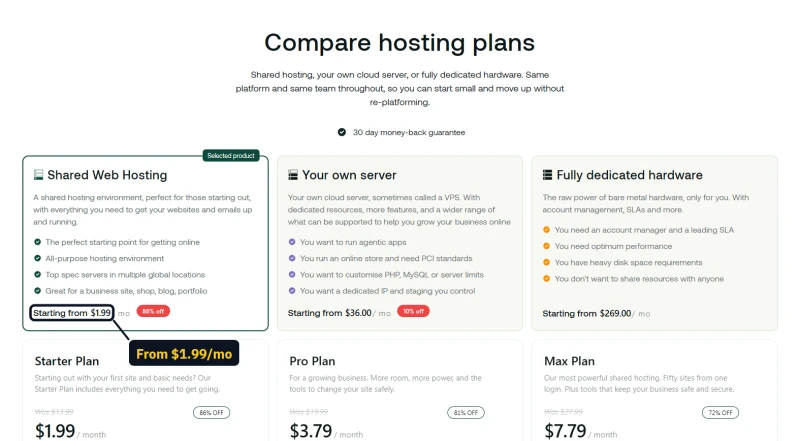
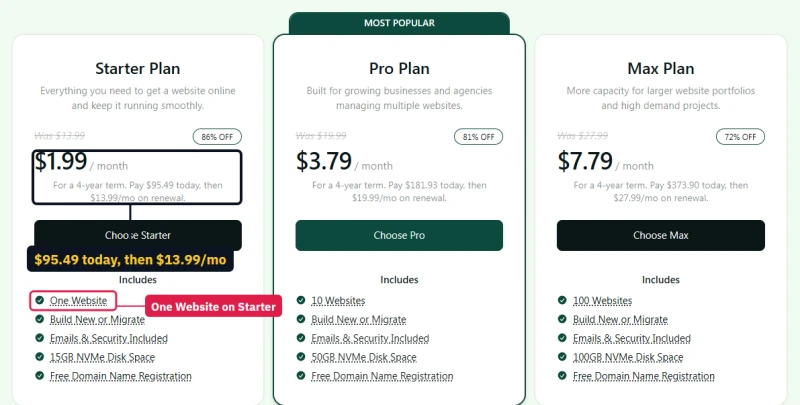
Even the site count depends on which page you read. The shared hosting page gives Starter 5 websites; the cPanel page sells Starter at the same price as "One Website". The shared page says you can "scale to 100 on the same plan family", while its own Max card says 50 websites, and only the cPanel Max says 100. Before you buy, check the card on the page you are actually ordering from.
What Starter leaves out
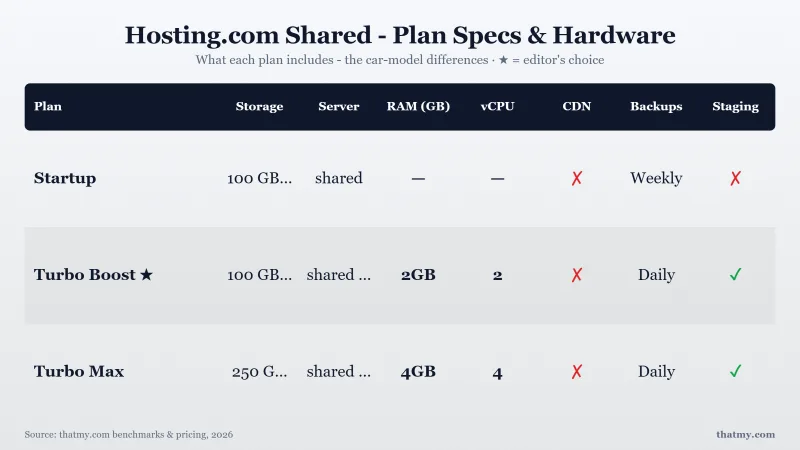
The matrix is honest about the cheapest plan. Starter has no Redis object cache, no CDN, no staging environment, no WordPress Toolkit and no SLA; Redis and staging start on Pro.
Pricing & The Renewal Trap
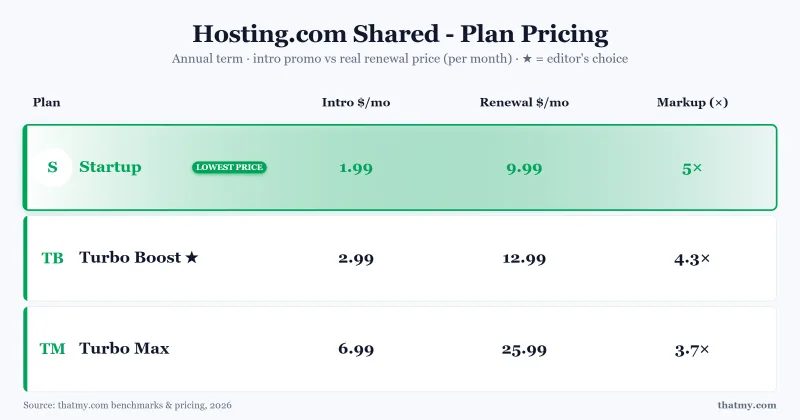
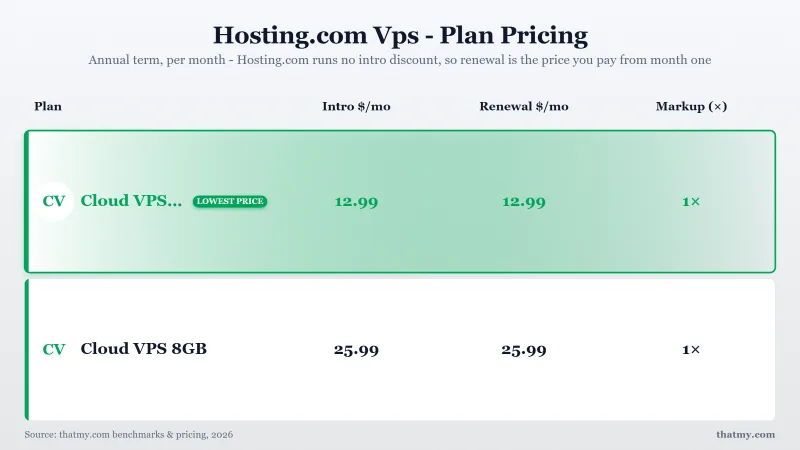
Hosting.com's pricing follows the pattern most budget hosts use: a very low first-term price that needs a long prepaid term, then a much higher renewal. This is known in the industry as the "renewal trap." Every price below was read on hosting.com's own pages, its checkout and the checkout's price list. Prices exclude tax, which is added at checkout.
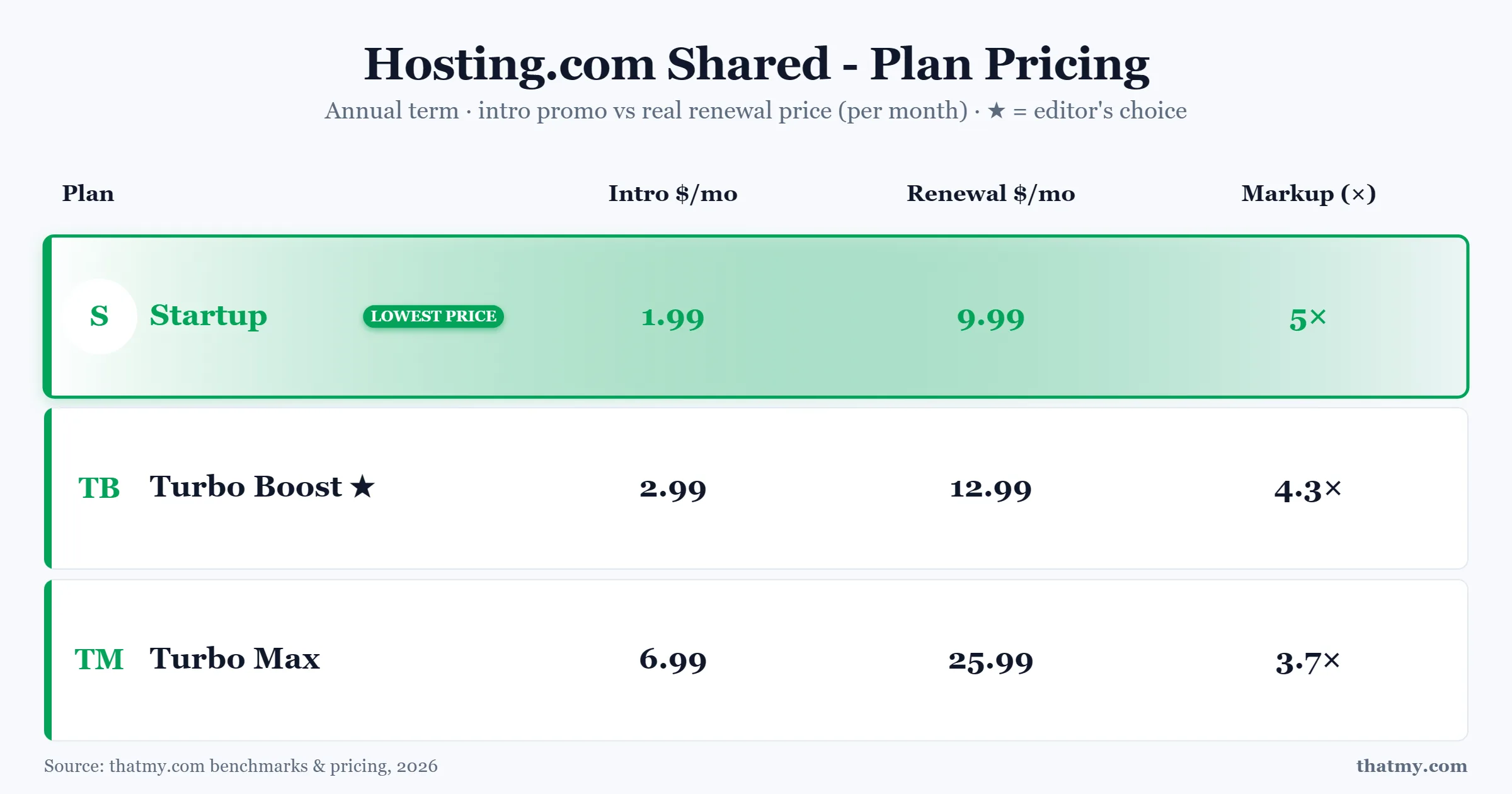
Intro & Renewal Pricing Plan Specs Visual Overview
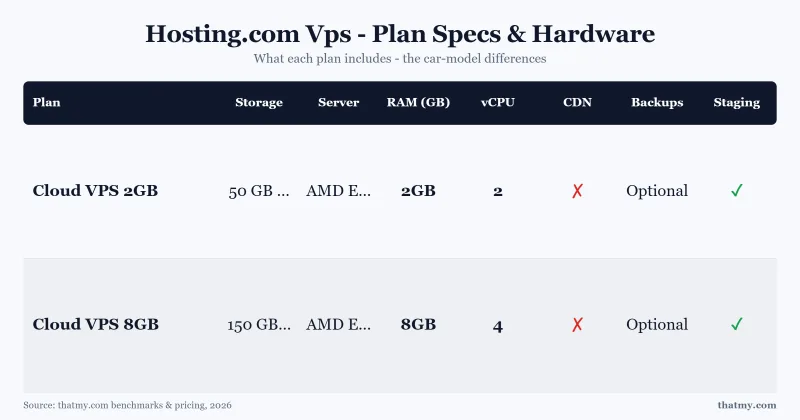
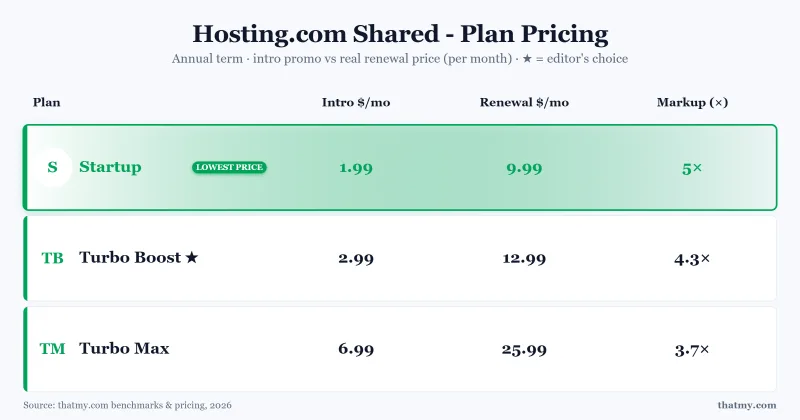
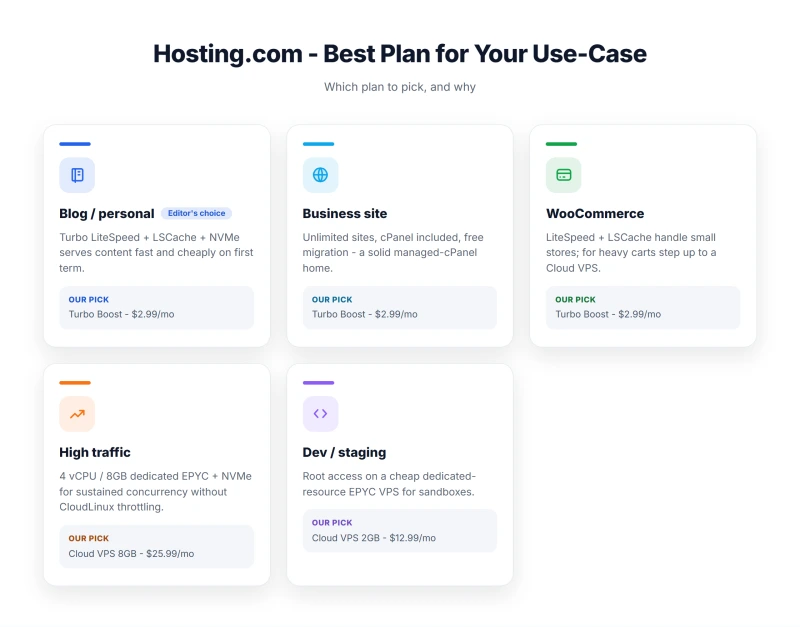
Shared Hosting Plans (Intro vs Renewal)
The A2-era plan names (Startup, Turbo Boost, Turbo Max) are gone. Today there are three shared plans, Starter, Pro and Max, sold twice at the same prices: once on hosting.com's own panel (built on Enhance) and once with cPanel.
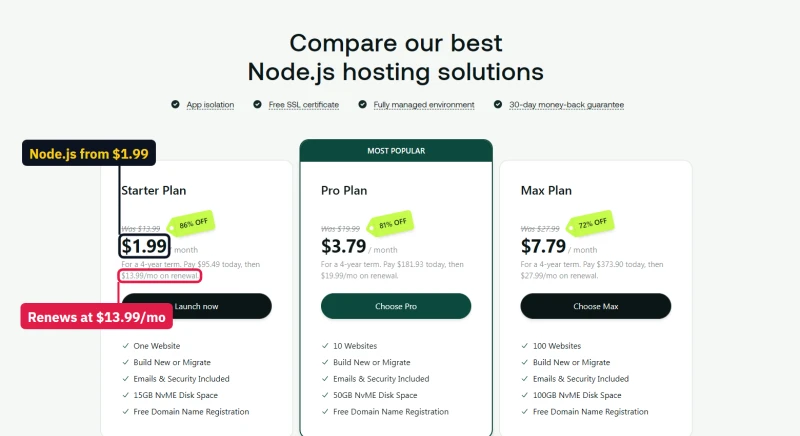
The headline $1.99/mo is real, but only if you pay for four years at once: $95.49 at checkout. Every term then renews at the monthly list price, $13.99/mo for Starter, which is seven times the headline. The checkout says it in plain words: "Renews every 4 years. Usually $671.52."
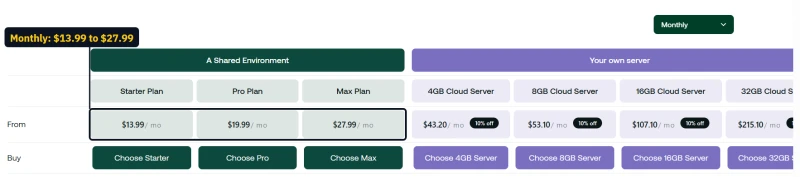
The basket also moves. One day "Choose Starter" opened a four-year basket at $95.49 with the code 4YWebHostingPromo. The next day the same button opened a three-year basket at $2.49/mo ($89.65, code 3YWebHostingPromo), and its term menu listed four years at $13.99/mo with no discount at all, while the plan card still said $1.99/mo. Check the basket total, not the card, before you pay.
What hosting.com says about its own pricing
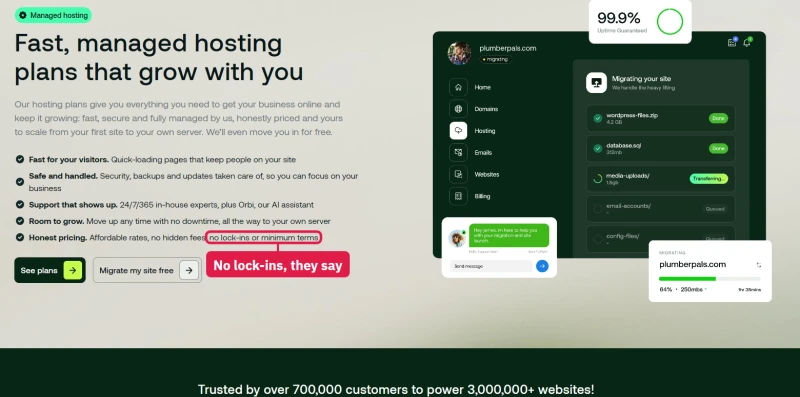
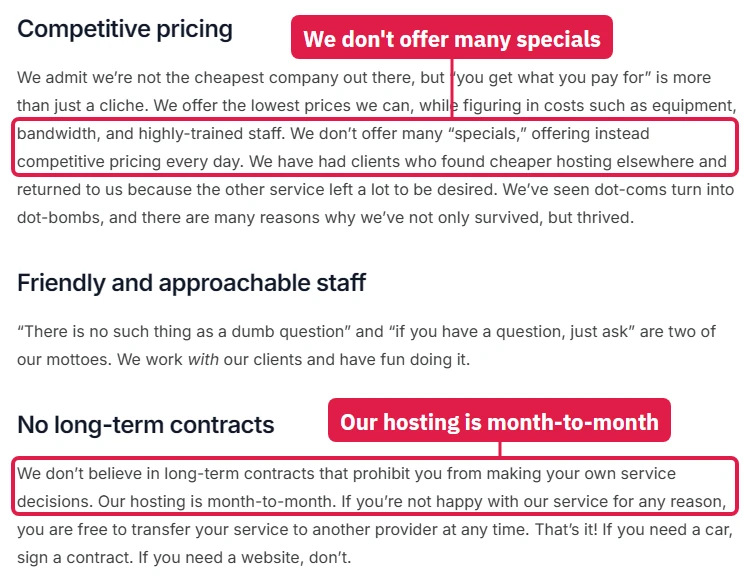
The shared hosting page leads with "Honest pricing. No lock-ins." The knowledge base goes further: "We don't offer many 'specials'" and "Our hosting is month-to-month." Meanwhile the plan cards sell an "86% OFF" four-year term with a promo code applied for you. Month-to-month does exist, at the full $13.99/mo; the prices on the cards are exactly the long-term specials the knowledge base says it does not do.
What Starter really costs over four years
To compare hosting costs fairly, count the whole period, not the first bill. Here is Starter over its first four years for each way of paying, and what happens after:
If you are sure you will stay four years and leave before the renewal, the four-year prepay is genuinely cheap. If you stay, every month after that costs $13.99/mo, and the next four-year term is $671.52 up front.
Renewal Pricing Across the Whole Lineup
Renewal Pricing Chart
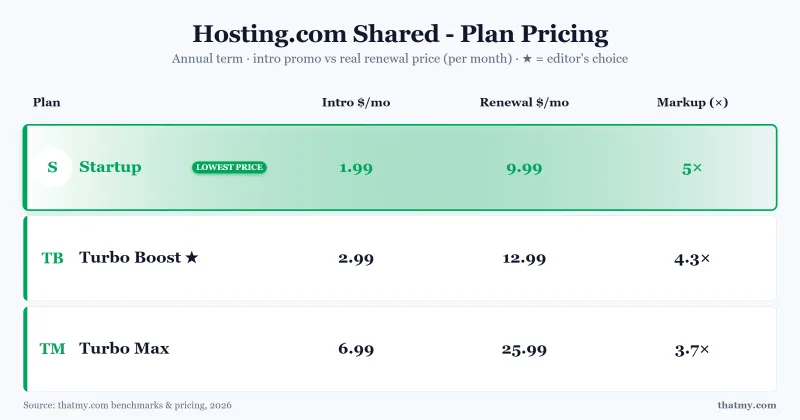
The shared plans are not the only ones that jump. I compared each product's first price with its list price in the checkout's own price list:
⚠️ The Bait-and-Switch Math
Hosting.com's $1.99/mo Starter price is 86% below the $13.99/mo it renews at. The steepest jumps sit on the cheapest-looking offers, and the only line with no jump at all is AI Application Hosting. The knowledge base says annual renewals are discounted against the monthly price, but the checkout renews every shared term at the full monthly list price. Over a first three-year term hosting.com is actually the cheaper of the two; ChemiCloud's Starter renews lower, at $14.95/mo, so it wins from year four and is faster throughout.
Refunds and billing
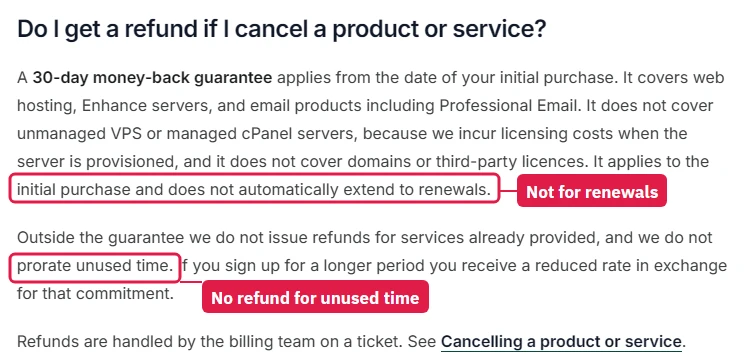
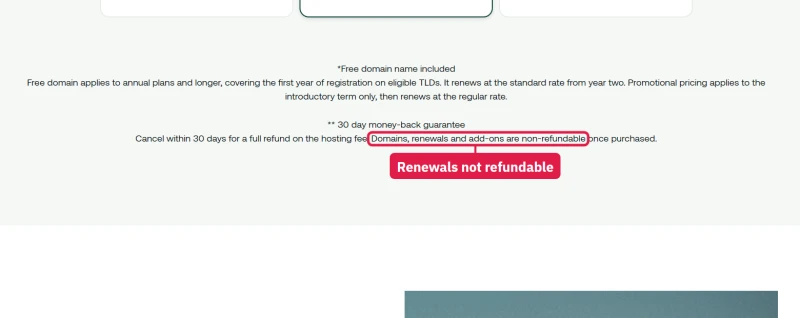
The money-back guarantee is 30 days, and the knowledge base is clear about its limits: it applies to the first purchase only and "does not automatically extend to renewals", "we do not prorate unused time", and it excludes unmanaged VPS, managed cPanel servers, domains and third-party licences. Renewals are charged automatically 3 days before the renewal date, and hosting cannot be switched to manual renewal. So the day to cancel is before that charge, not after it.
Managed WordPress Plans
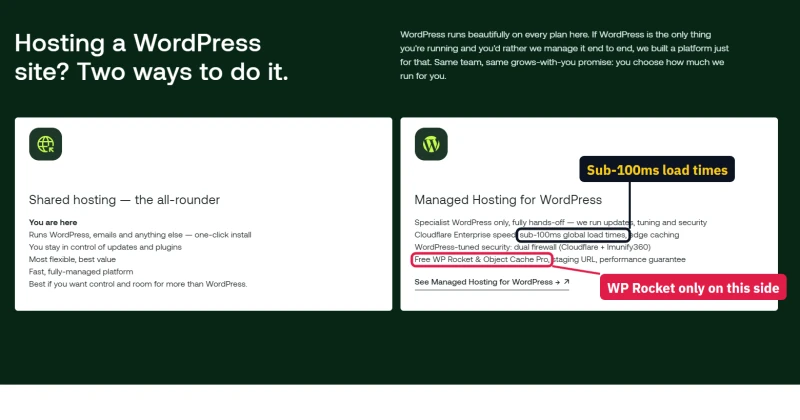
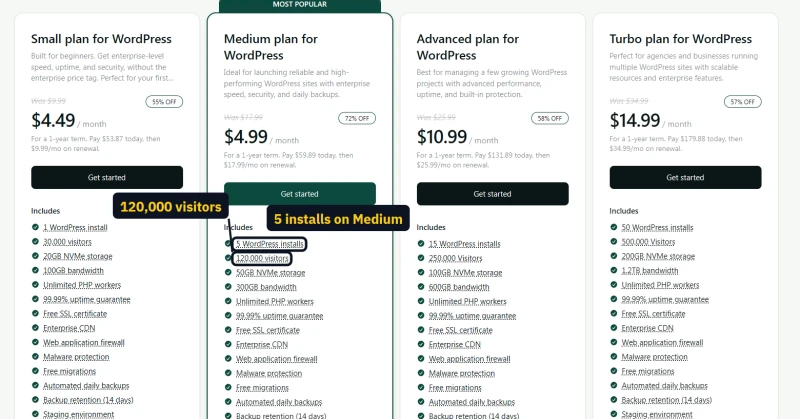
The Managed WordPress plans run on Rocket.net's platform with Cloudflare Enterprise, and are billed yearly by default:
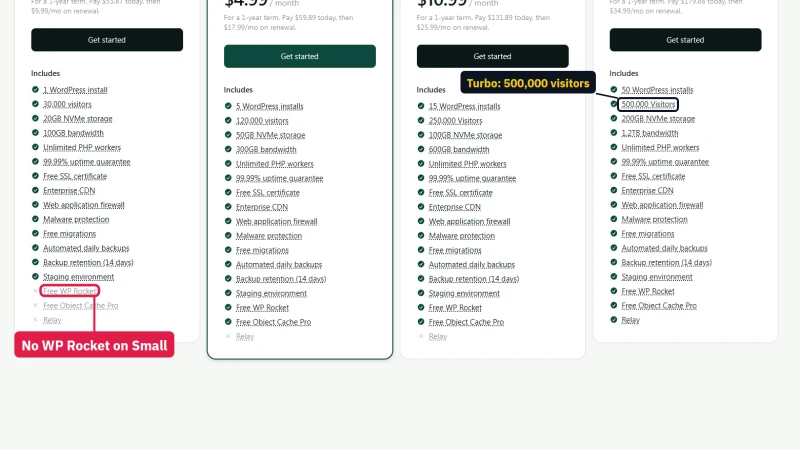
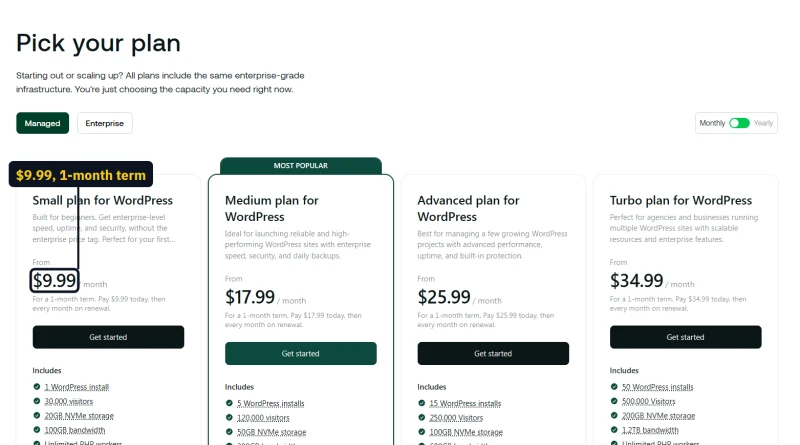
The toggle calls the yearly price "2 months free", which undersells a first-year discount of 55% to 72% and says nothing about the renewal, which equals the monthly price. Medium's first year costs only $0.50 a month more than Small but renews $8 higher.
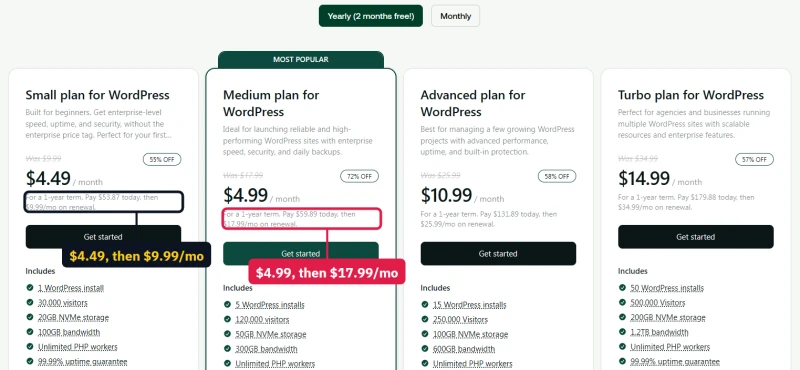
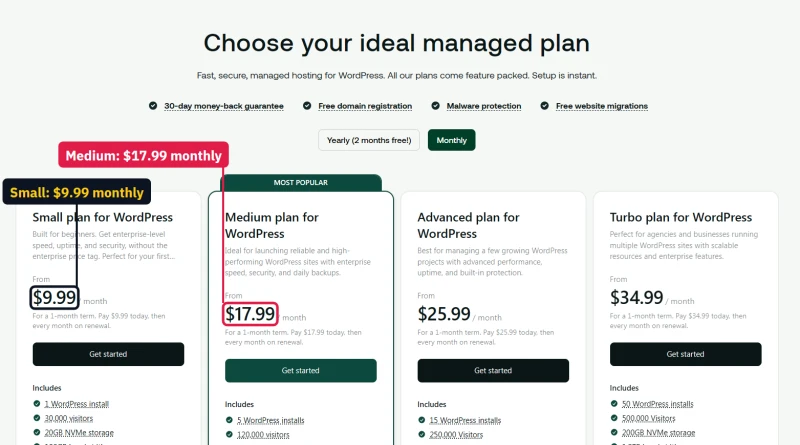
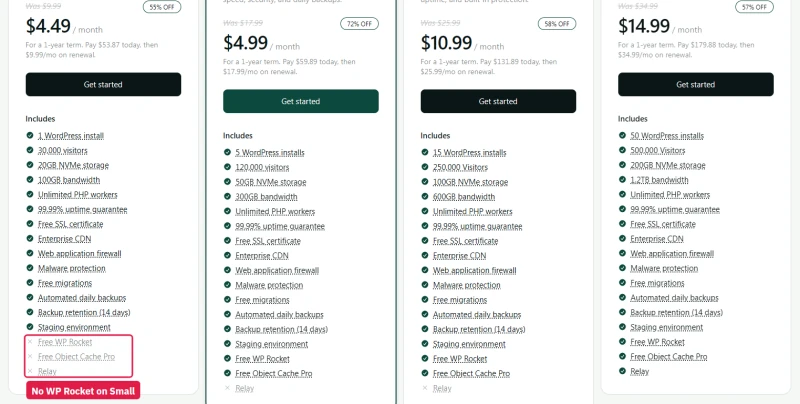
The feature list needs a careful read. The hero says "WP Rocket + Object Cache Pro built in"; the Small plan card says both are "Available on higher-tier plans", and WP Rocket is sold separately as an add-on for $47.88 a year. The Medium card offers "5 WordPress installs", explains it as "Host one dedicated WordPress site", and adds "a limit of 3 sites per package". The Turbo card promises capacity for "500,00 visitors".

The WooCommerce page sells the same four plans, but opens on monthly billing, so a store owner sees the renewal prices first. The Node.js page is the cPanel shared plans again, from $1.99/mo and renewing at $13.99/mo.
The extras: domains, email and SSL
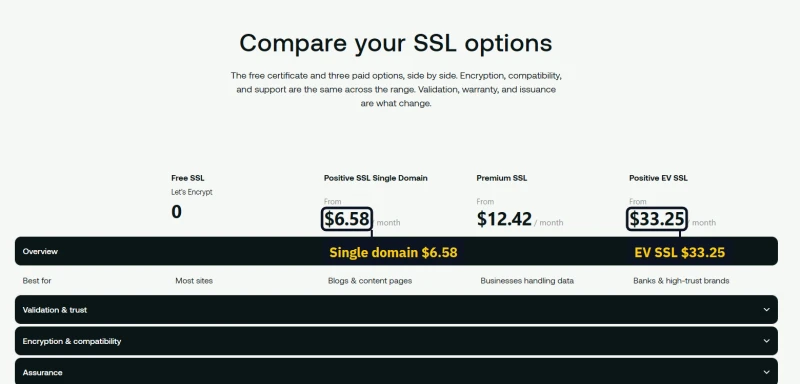
The shared plans include a free domain for the first year, basic email and a free Let's Encrypt certificate. Beyond that, hosting.com sells each of them separately, and the domain renewals are where the surprises are:
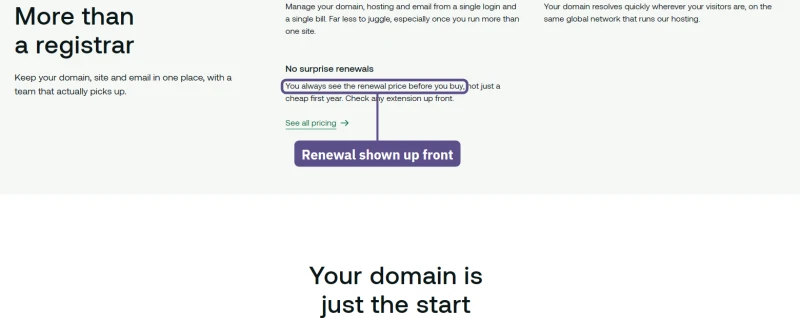
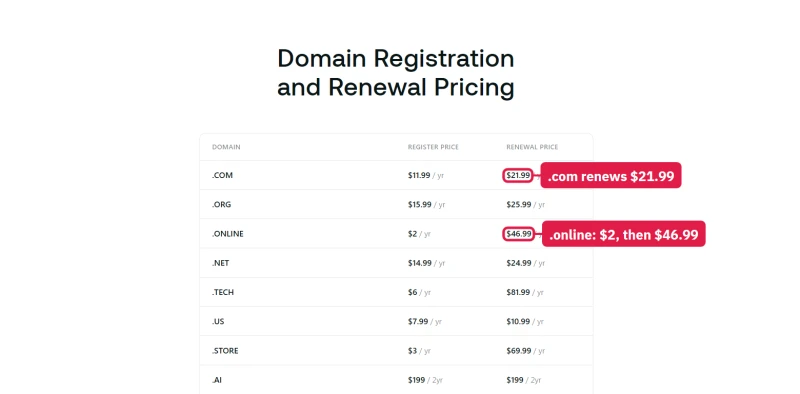
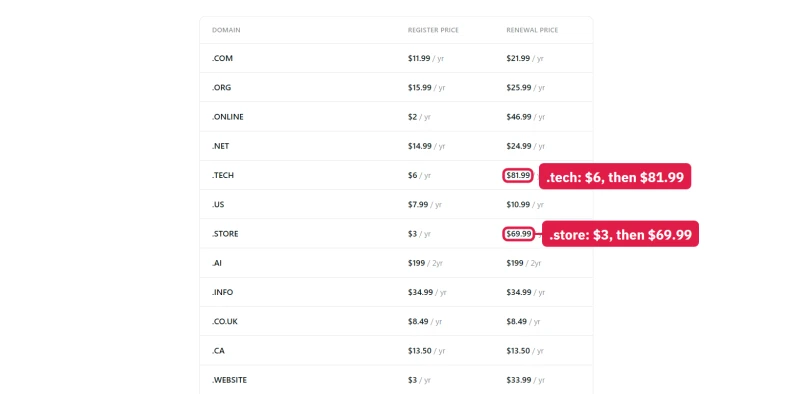
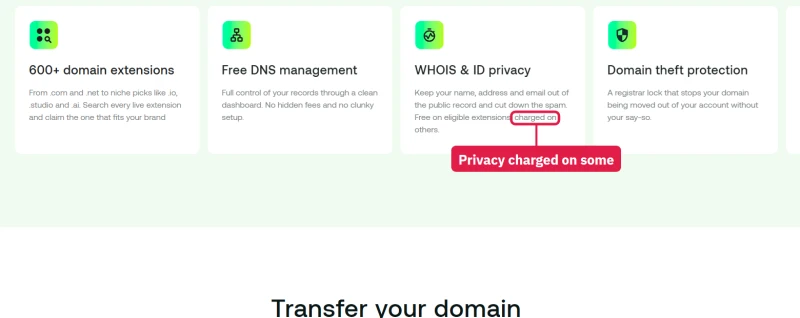
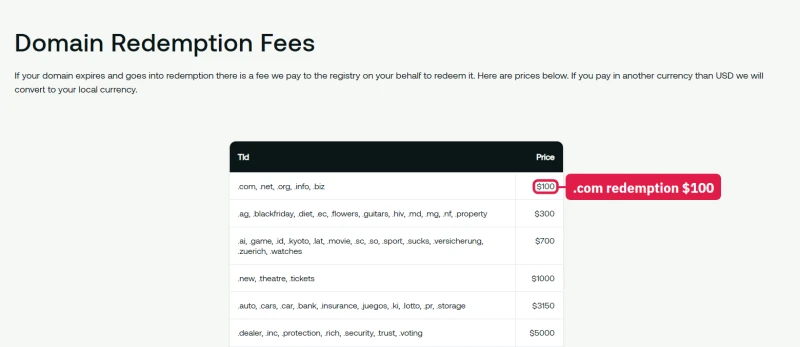
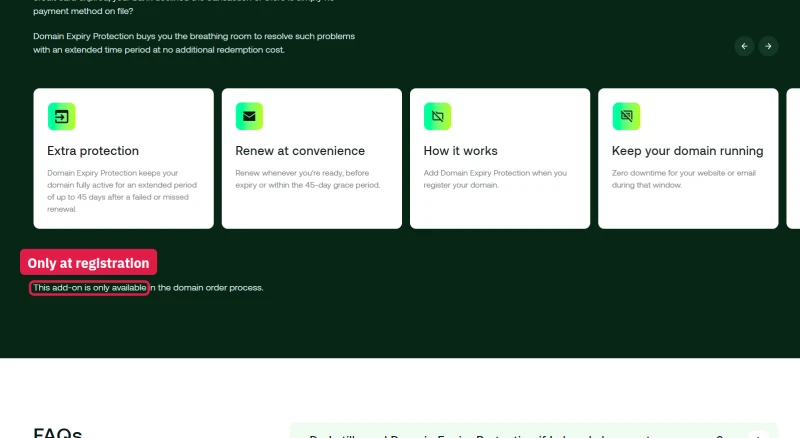
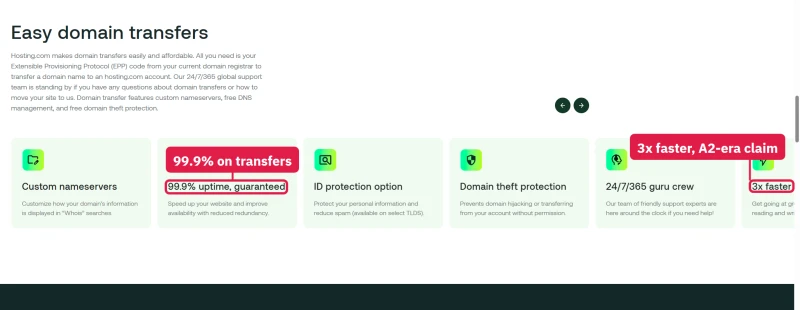
To its credit, the domains page promises "No surprise renewals" and the full price list does show both columns. But a .online domain goes from $2 to $46.99 and a .tech from $6 to $81.99. WHOIS privacy is free only on "eligible extensions", Domain Expiry Protection (45 days of grace) can only be added when you register, and the domain transfer page still carries A2 Hosting's old claims.

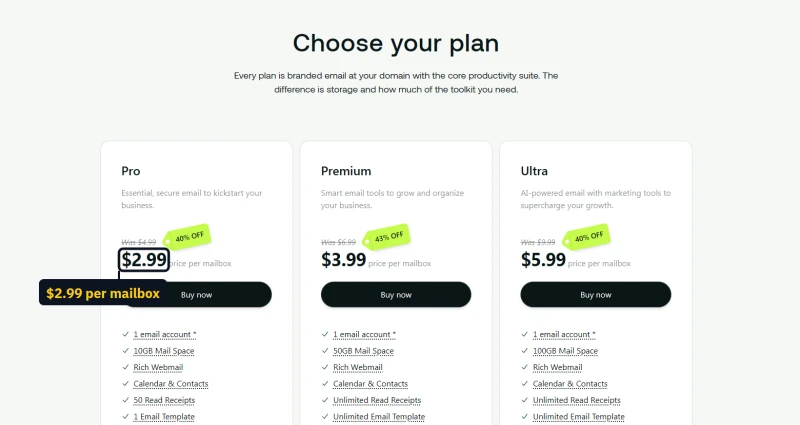
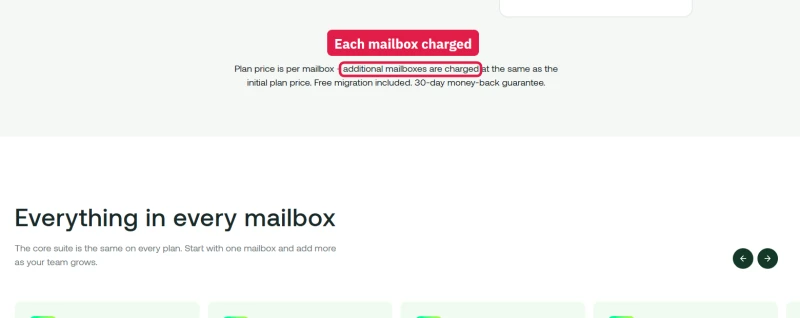
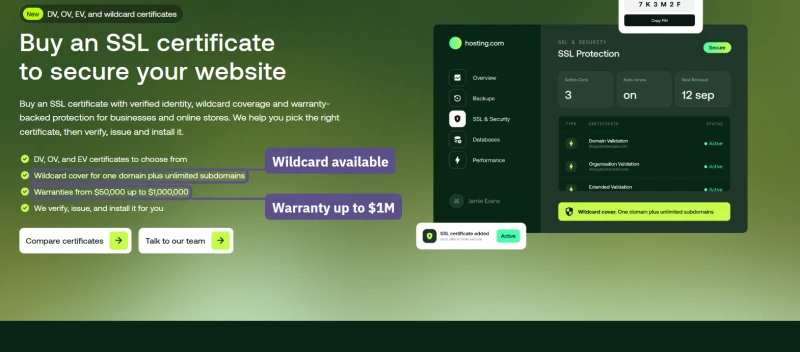
Professional email is Titan, priced per mailbox, so a team of five pays five times. Shared plans already include basic mailboxes (5 on Starter, 20 on Pro, 40 on Max), so this is an upgrade, not a necessity. The SSL page describes wildcard and multi-domain certificates, but no wildcard or multi-domain certificate is on sale there.

Cloudways' pay-as-you-go model is the most transparent: $11.00/mo is $11.00/mo, forever. No renewal shock. No bait-and-switch. The higher starting price is the actual price.
Support Experience
Support Quality: 8 Tickets, Real Response Times
In the benchmark round I submitted 8 support tickets over 4 weeks covering: WordPress performance questions, billing questions, resource limit questions, and a simulated site outage. Results:
Customers reported staff cuts at hosting.com around that time, but I cannot tie my slow replies to them. What the tickets showed is that first-line agents followed scripts and could not diagnose a performance problem, only escalate it, and the escalation added more delay.
For comparison: ChemiCloud averages 2-4 hours to first response with technical staff who can actually diagnose WordPress performance issues.
What hosting.com says about its own support
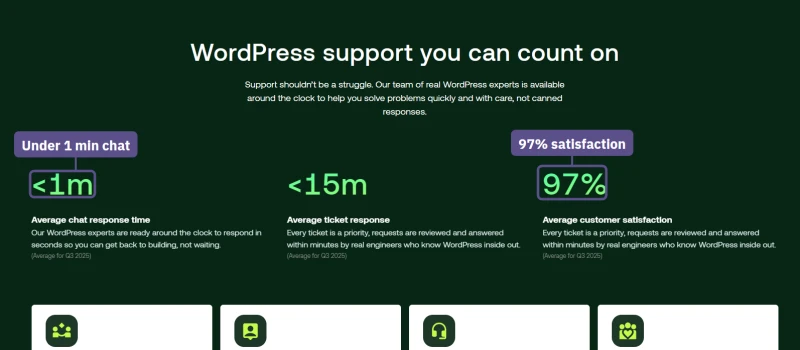
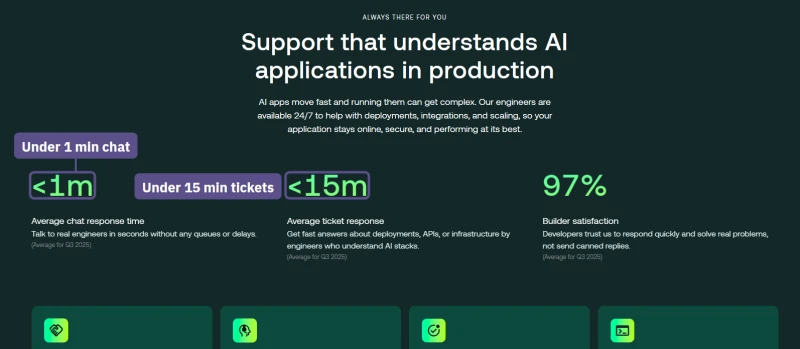
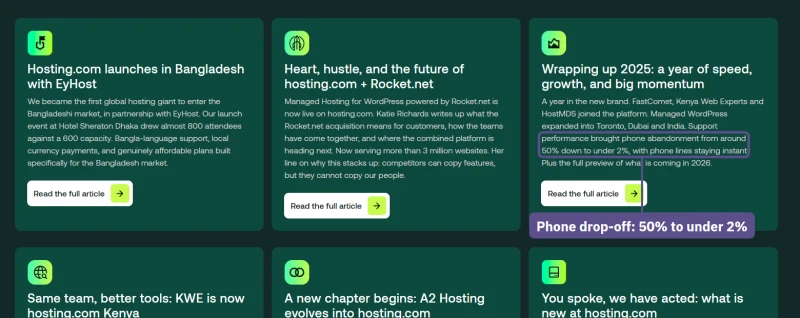
Hosting.com's pages now make big support claims, and they do not agree with each other. The WordPress and AI hosting pages show counters "(Average for Q3 2025)": under 1 minute for chat, under 15 minutes for a ticket, 97% satisfaction. The product matrix says "Average first response 2 minutes" and "Average CSAT >85%". The AI assistant, Orbi, "Helps with 60% of technical enquiries, instantly", and the newsroom says phone abandonment fell "from around 50% down to under 2%" in 2025. None of these is independently checked, and none matches the roughly 17 hours I measured; the hands-on tests below did not need a ticket, so I cannot say which figure is true today.

Hosting.com vs Alternative Hosts
vs ChemiCloud
Winner: ChemiCloud on every metric that matters.
ChemiCloud wins on 9 of 14 metrics, and three are a tie now that I have seen hosting.com's LiteSpeed server, its NVMe plans and its free migration. Hosting.com wins two: the promotional intro price on a four-year prepay, and the total for a first three-year term. Over a first three-year term hosting.com costs less; ChemiCloud's lower renewal wins from year four.

Why ChemiCloud Beats Hosting.com
- 69ms TTFB, against Hosting.com's 172ms
- NVMe SSD storage, not SATA or spinning disk
- Redis Object Cache included, WordPress performance stack complete
- LiteSpeed web server, 7.9x faster than Apache for WordPress
- No CPU throttling at 100 concurrent users
- 99.979% Uptime (54-day window), vs Hosting.com's 99.91%
- Independently owned, not private equity
- Free migration + free SSL + free daily backups
- $2.95/mo intro (Starter), renews at $11.95/mo (industry standard renewal jump)
ChemiCloud Limitations
- Renewal price increase (intro $2.95 → $11.95/mo)
- No VPS option, shared hosting only
- Smaller brand, less name recognition
- Support response time: 2-4 hours (not instant)
Benchmark Data
- Origin TTFB (3 plans, no CDN): 69ms to 84ms
- Uptime (54-day window): 99.97% to 99.99%
- PageSpeed Score (Mobile): 84/100
$3.95/mo
45-Day Money-Back Guarantee
Visit ChemiCloud, $2.95/mo, 45-Day Money-Back ➦
vs Cloudways
Winner: Cloudways, for anyone who needs real performance.
Cloudways is 4-5x more expensive than Hosting.com's intro price, but delivers 3x better performance. The $11.00/mo Cloudways plan handles unlimited concurrent users (tested to 500+). Hosting.com's Startup plan slowed to 640ms at 100 users at once in my benchmark, and Starter renews at $13.99/mo. For developers and agencies, Cloudways is the obvious choice. For budget users, ChemiCloud at $2.95/mo is the better alternative to Hosting.com.

Why Cloudways Beats Hosting.com
- 48ms TTFB on Vultr HF, against Hosting.com's 172ms
- No CPU throttling, handles 500+ concurrent users
- 99.981% Uptime (54-day window), vs Hosting.com's 99.91%
- 5 cloud providers: Vultr HF, DigitalOcean, AWS, GCE, Linode
- Redis Object Cache Pro included free ($99/yr value)
- Pay-as-you-go billing, no renewal price shock
- Git deployment, SSH, WP-CLI, staging, best developer tooling
- Unlimited WordPress sites on any plan
Cloudways Limitations Vs Hosting.com
- No email hosting, add $6-12/mo for Google Workspace
- No cPanel, custom Cloudways panel only
- $11.00/mo minimum vs Hosting.com's $1.99-$2.99/mo intro
- Only 5 free managed migrations on Flexible
- No phone support, live chat and tickets only
Benchmark Data
- Avg response under load (0-250 ramp): 21ms to 32ms
- Uptime (54-day window): 99.979% to 99.99%
- PageSpeed Score (Mobile): 89/100
$16.00/mo
$30 Free Credit (CLOUDS2022)
Try Cloudways Free, Code CLOUDS2022 = $30 Credit ➦
vs ScalaHosting
Winner: ScalaHosting, for anyone who needs managed VPS performance.
ScalaHosting VPS is 10x more expensive than Hosting.com's intro price, and delivers 10x better performance. The AMD EPYC 9474F CPU (ranked #42 on PassMark) is in a completely different class from the 2019 AMD EPYC 7282 my hosting.com account shares with every other account on its server. ScalaHosting is not the right comparison for budget users, ChemiCloud is. But for anyone who needs managed VPS performance, ScalaHosting is the clear choice over Hosting.com.

Why ScalaHosting Beats Hosting.com
- 38ms TTFB, against Hosting.com's 172ms
- AMD EPYC 9474F (#42 PassMark), verified via SSH lscpu
- PCIe 5.0 NVMe storage
- 99.99% uptime over our 54-day window, against Hosting.com's 99.91%
- No CPU throttling at 100 concurrent users
- Email hosting included, Hosting.com doesn't offer managed VPS
- SPanel free, saves $180/yr vs cPanel
- Independently owned, not private equity
- Anytime money-back guarantee
ScalaHosting Limitations
- $29.95/mo intro vs Hosting.com's $1.99-$2.99/mo intro
- Renewal price increase (~67% after intro term)
- VPS, more complex than shared hosting for beginners
- No cloud provider choice, single infrastructure
Benchmark Data
- Origin TTFB (Managed VPS, no CDN): 38ms
- Uptime (54-day window): 99.99%
- PageSpeed Score (Mobile): 83/100

$29.95/mo
Anytime Money-Back Guarantee
Who Hosting.com Suits, and Who It Does Not
I've tested dozens of hosting providers. For most WordPress buyers my answer on hosting.com's shared plans is still no, mainly because of the renewal and the small CPU share. But hosting.com sells far more than shared hosting, and a few of its products are fairly priced. Here's the breakdown by use case, then the rest of the lineup, product by product.
❌ Budget WordPress Users
→ Use ChemiCloud ($2.95/mo intro)
2.2x faster TTFB, NVMe, Redis, independently owned. Renews lower from year four.
❌ WooCommerce Store Owners
→ Use ChemiCloud or ScalaHosting
Cart and checkout pages cannot be cached, and in my uncached test the Starter-sized CPU share ran out at about 6.5 pages a second.
❌ Developers
→ Use Cloudways ($11.00/mo)
Hosting.com's shared plans do have SSH, Git and WP-CLI, but no root, even on its managed servers. Cloudways gives you a whole server on 5 cloud providers.
❌ Agencies
→ Use Cloudways or ScalaHosting
Client sites need headroom: the CPU share is the first limit a busy site hits, and 70 minutes of downtime over 54 days was the lowest uptime of the four hosts I watched.
❌ High-Traffic Sites
→ Use Cloudways or ScalaHosting
The Startup plan slowed to 640ms at 100 users at once in my benchmark, and the 12-plugin WordPress install returned errors under 60 in my hands-on test.
❌ Long-Term Users
→ Use ChemiCloud
Starter renews at $13.99/mo after the intro term, so budget for the renewal, not the $2.99/mo intro.
Full Comparison Table
The rest of the lineup, product by product
Every price below was read on hosting.com's pages and the checkout's own price list.
AI Application Hosting: the one line with no renewal cliff
Launched in March 2026, for apps built with tools like Claude, Lovable or Replit. Startup, Business, Pro and Max cost $8, $16, $41 and $90 a month on a yearly term, or $9.99 to $109.99 month to month, and the yearly price renews at the same yearly price. That makes it the fairest-priced product hosting.com sells. The pages claim 99.99% uptime and 330+ Cloudflare locations, and the older trust line on the same page still says 400,000 customers.



OpenClaw hosting
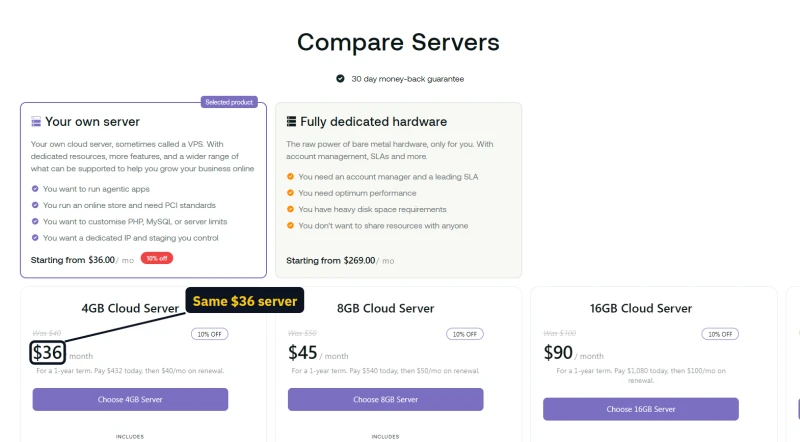
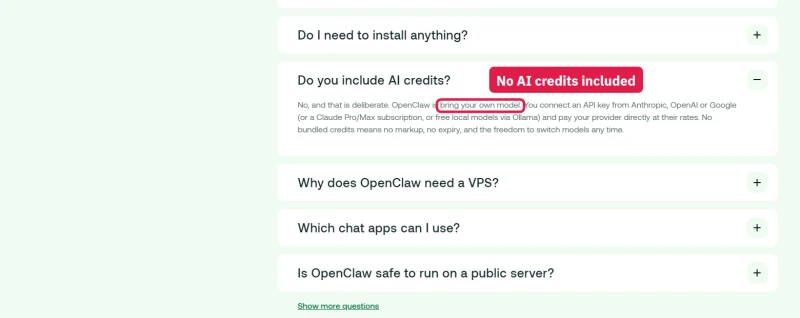
OpenClaw, an open-source AI assistant, comes pre-installed on the managed cloud servers below, from $36 a month. You bring your own model key (Claude, OpenAI, Gemini and others); no AI credits are included, so the model bill is separate.
Managed servers: two kinds, and the cheap-looking one costs more
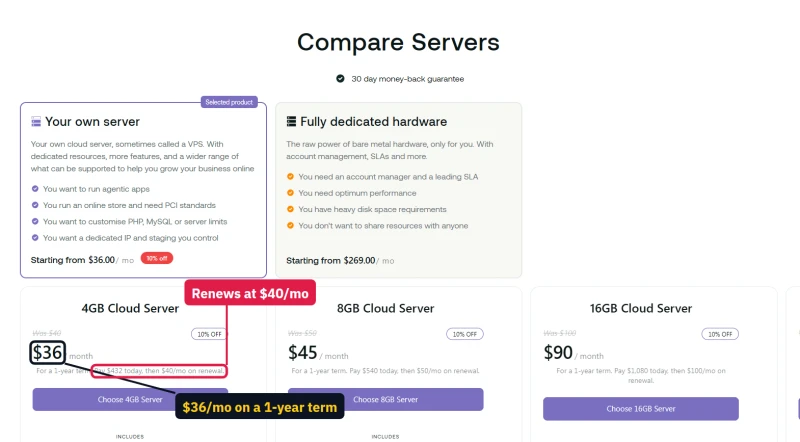
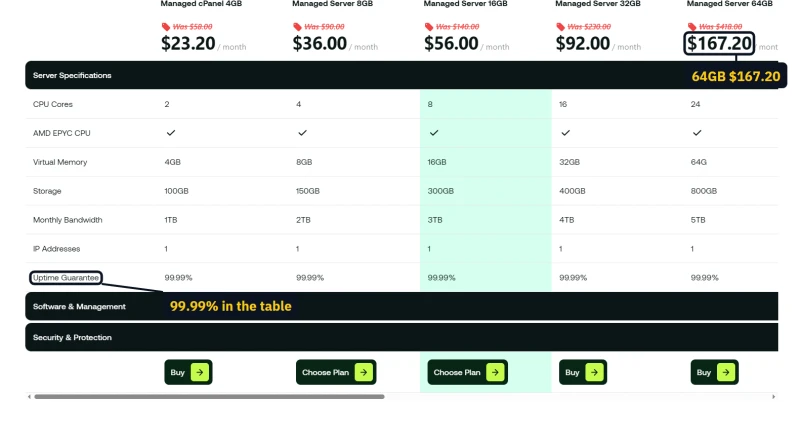
Hosting.com sells two managed server lines. The Enhance "Cloud Servers" (4GB to 32GB, 2 to 16 dedicated cores) cost $36 to $180 a month on a yearly term and renew at $40 to $200, a small step. The "Managed cPanel" servers are 60% off in the first year, from $23.20 for 4GB, and then renew at $58. Compare the two 8GB servers: the Cloud Server is $45 then $50; the managed cPanel one is $36 then $90, so the cheaper-looking server costs 80% more from year two.
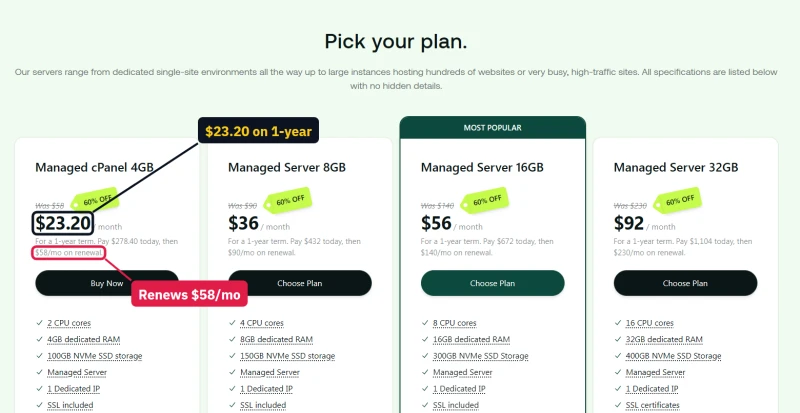
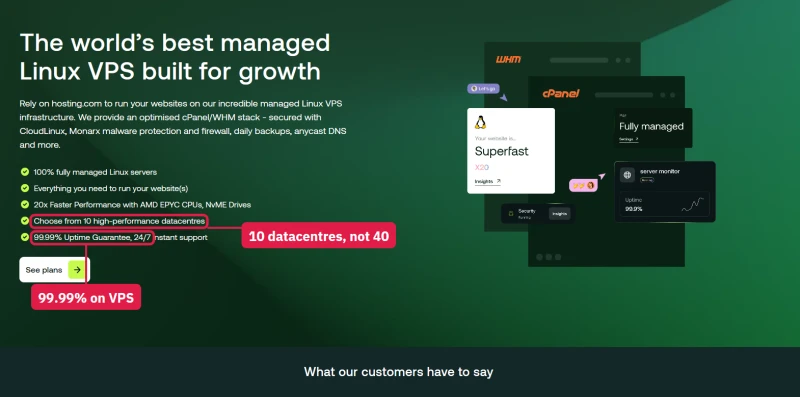
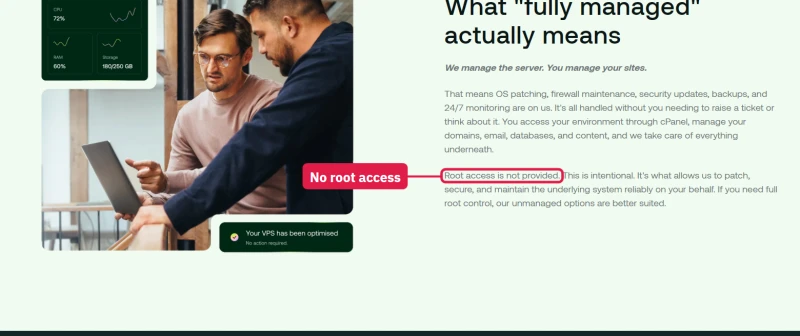
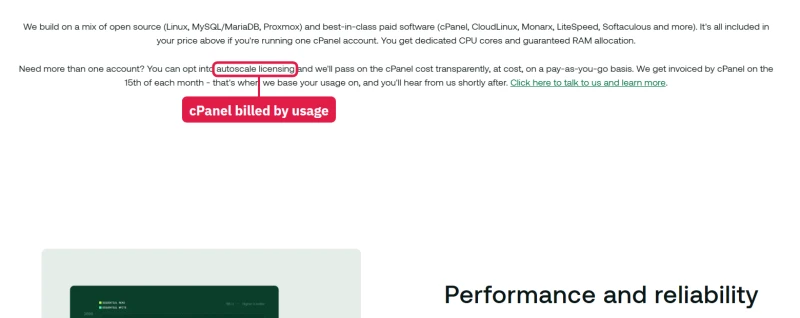
The managed cPanel page's small print matters: "Root access is not provided"; the price includes one cPanel account and every further account is billed at cPanel's own rate each month; LiteSpeed replaces Apache only from 16GB up (see the performance section); the page counts 10 datacentres where the reseller pages count 40 regions; and the big sizes are sold again on the VDS page at the same prices with a 99.9% promise instead of 99.99%.
Bare metal and dedicated servers
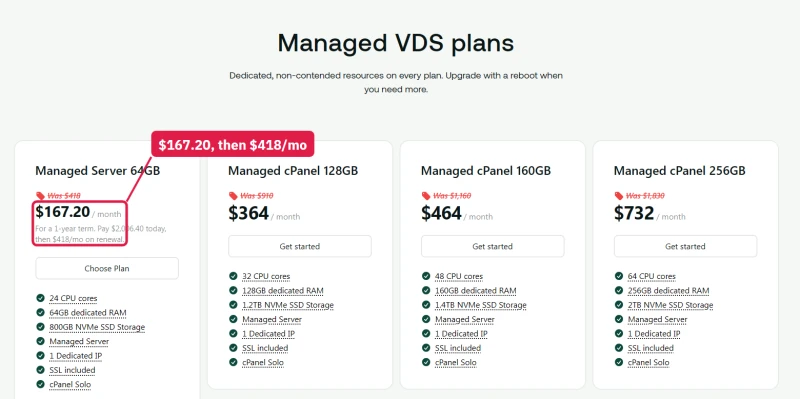
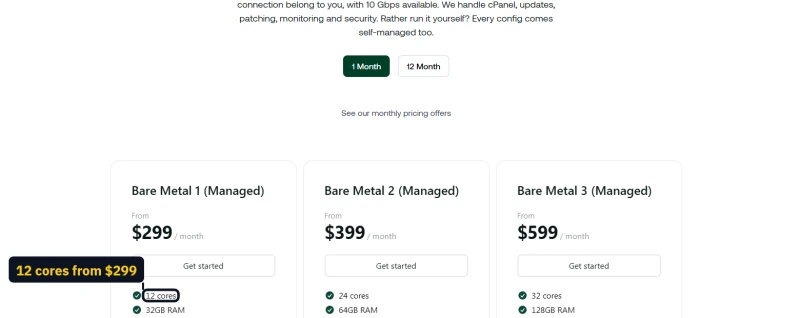
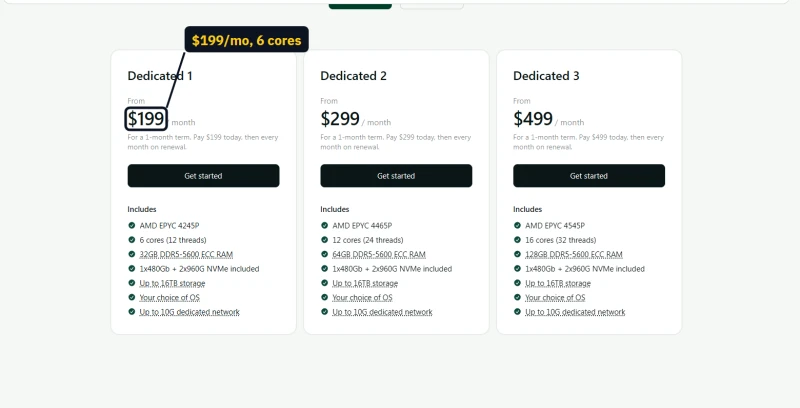
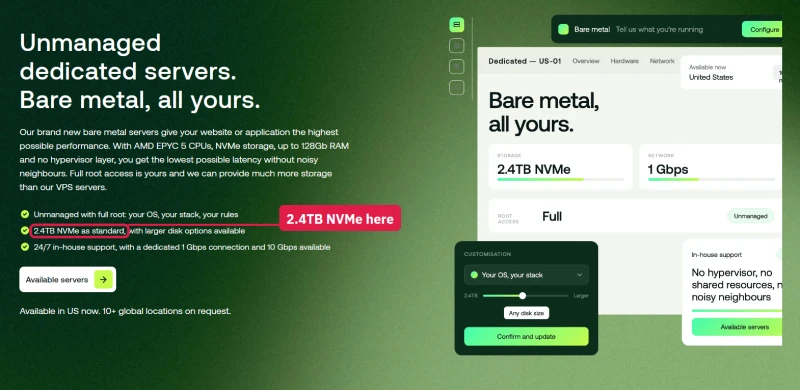
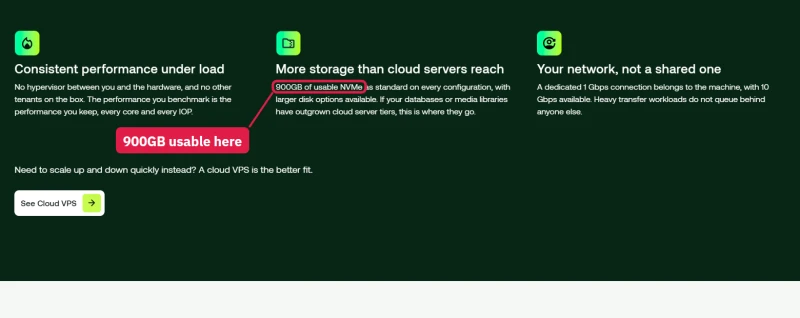
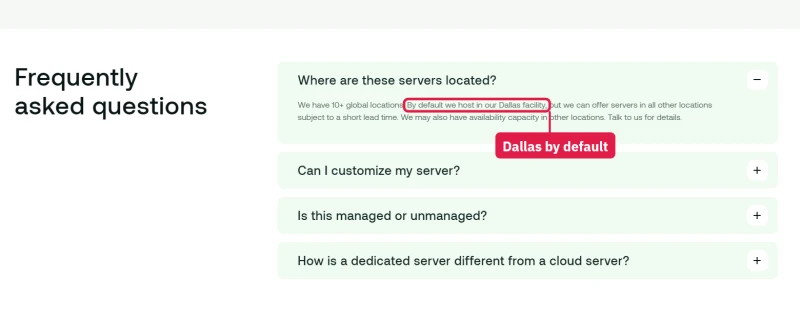
The managed bare metal plans list "12 cores", "24 cores" and "32 cores" from $299 a month; the unmanaged dedicated page lists the same AMD EPYC chips as 6 cores with 12 threads, 12 with 24, and 16 with 32, from $199. The managed pages count threads as cores. The dedicated page also gives storage two ways, "2.4TB NVMe as standard" at the top and "900GB of usable NVMe" lower down (after the RAID it recommends), and servers ship from Dallas unless you ask for another location.
Unmanaged VPS
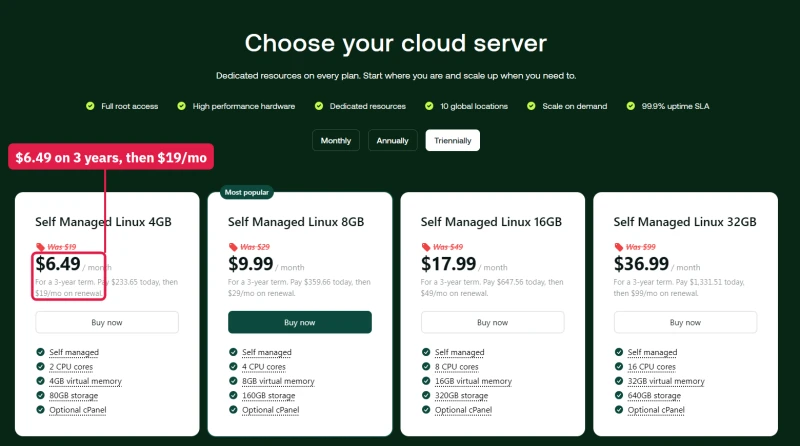
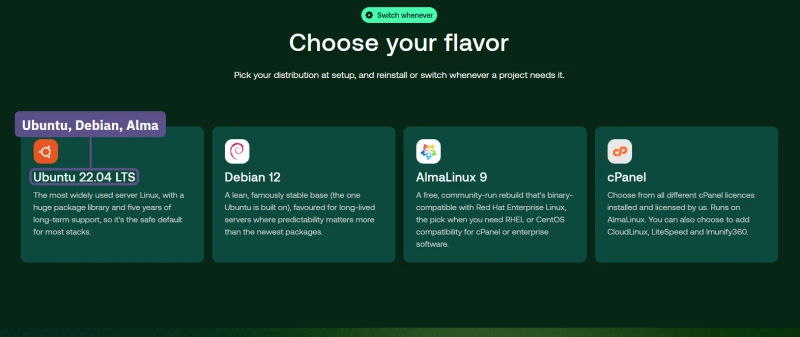
The cheapest server: 4GB from $6.49 a month on a three-year term, renewing at $19, nearly three times as much. You get Ubuntu, Debian or AlmaLinux and nothing else, and its SLA covers only power and network at 99.9%. Note that the knowledge base excludes unmanaged VPS from the money-back guarantee.
Bespoke hosting
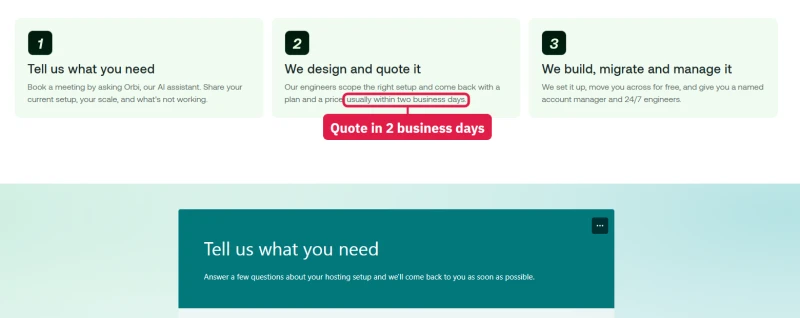
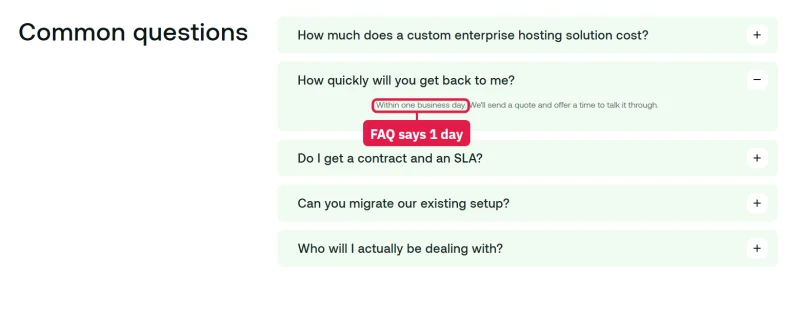
For larger estates hosting.com quotes a custom setup with a written SLA and a named account manager. The page says a quote comes "usually within two business days" in its steps and "Within one business day" in its FAQ.
Reseller hosting
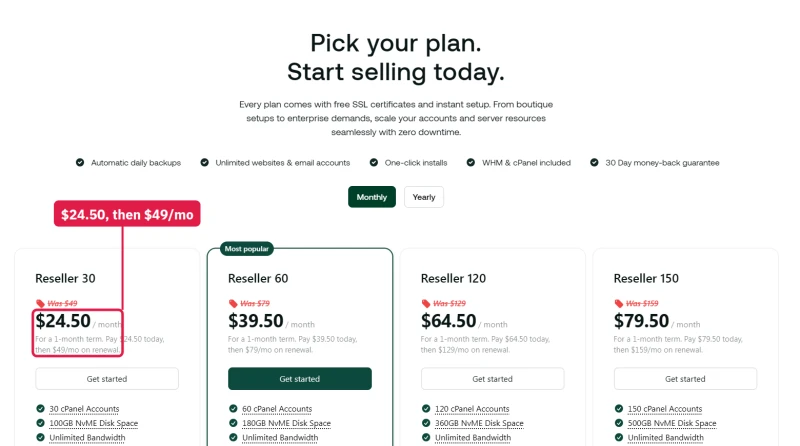
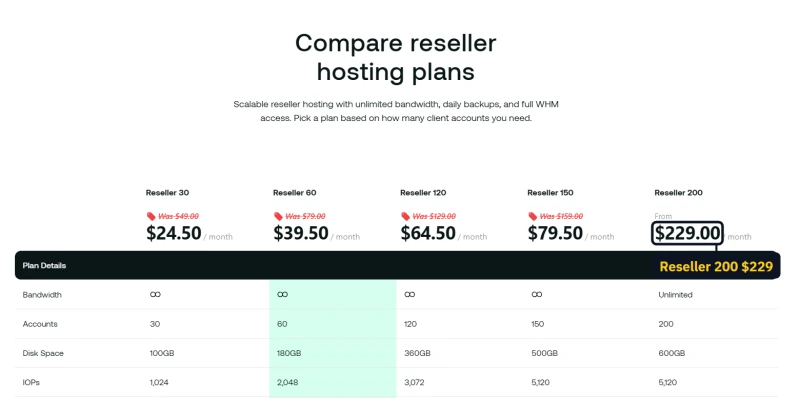
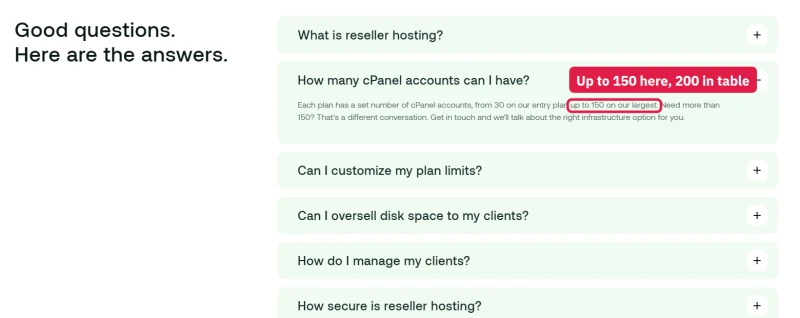
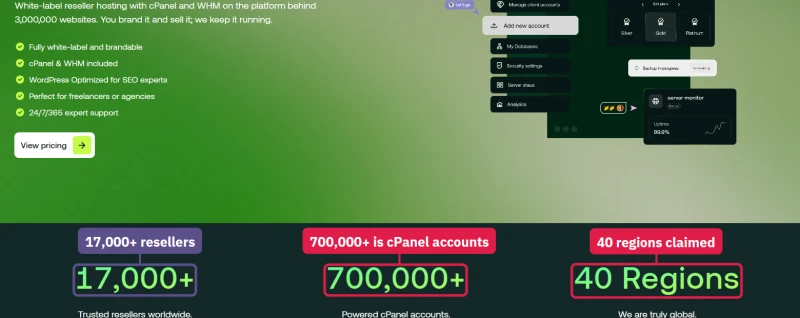
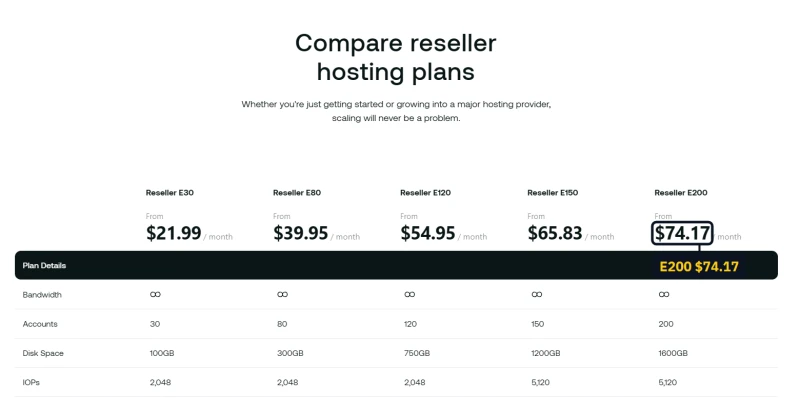
There are two reseller lines. cPanel/WHM resellers get half price for the first month only ($24.50 on the entry plan), then $49 to $229 a month; the FAQ says accounts go "up to 150 on our largest" while the table sells a Reseller 200. The Enhance resellers, which hosting.com calls its flagship, start at $21.99 a month. The "700,000+" on the cPanel reseller page counts cPanel accounts, the same number the company elsewhere gives for customers.

Agencies
The agency partner programme is free and offers client referrals and a partnership manager. Its directory listing "Rolls out 2026", so it is a promise, not a feature yet.


Marketing Suite
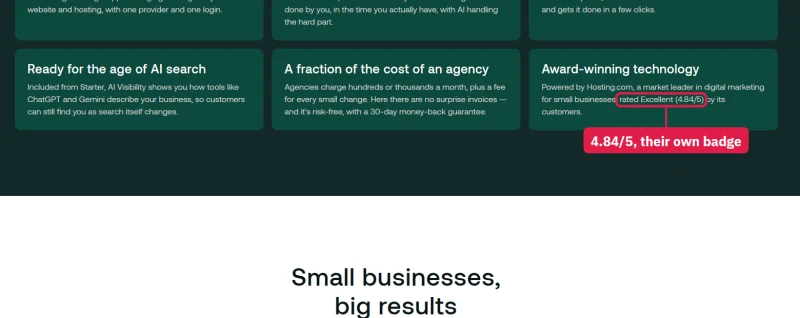
$14.99 to $59.99 a month, monthly only, one website per plan. Google Ads spend is separate and outside the money-back guarantee. The page calls hosting.com "a market leader in digital marketing for small businesses, rated Excellent (4.84/5)" without saying who rated it.


WordPress repair and care
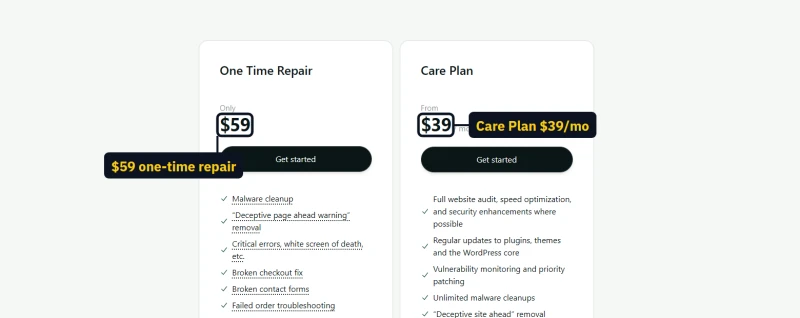
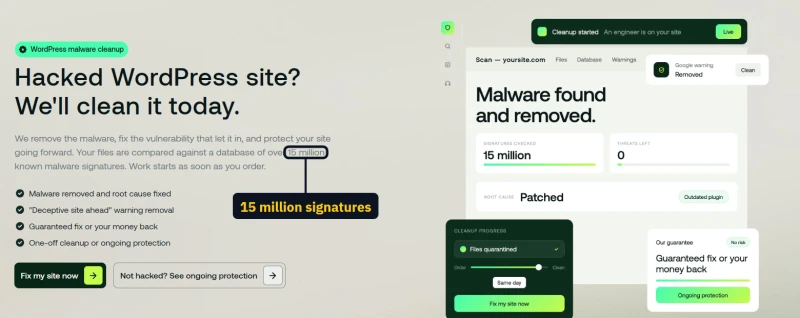
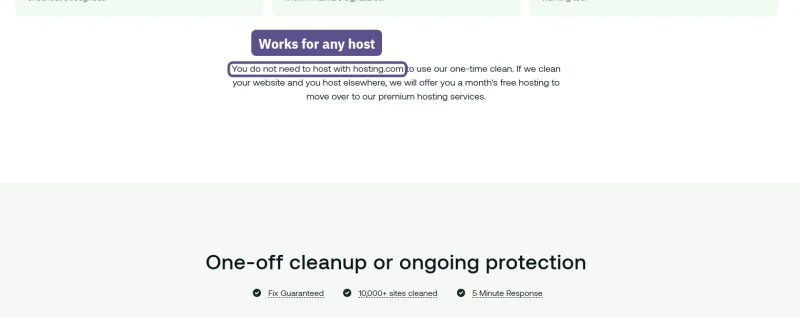
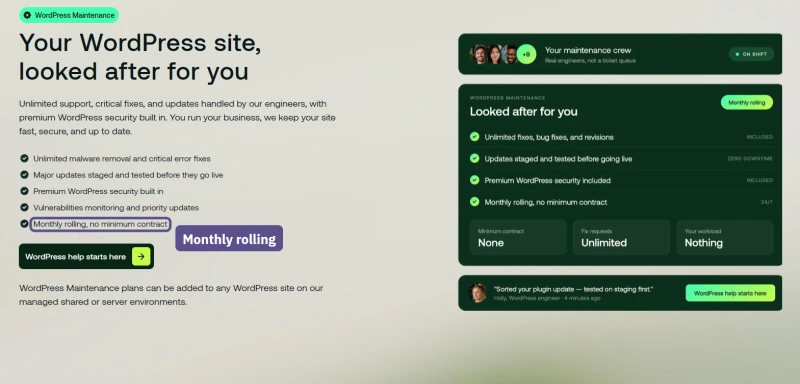
A one-time repair costs $59, with "If we can't fix it, you don't pay", and is sold to sites on any host. The Care Plan shows $39 a month on a page headed "Monthly rolling, no minimum contract", but $39 is the yearly rate; month to month the checkout price list has it at $49.

Old A2 Hosting copy still live
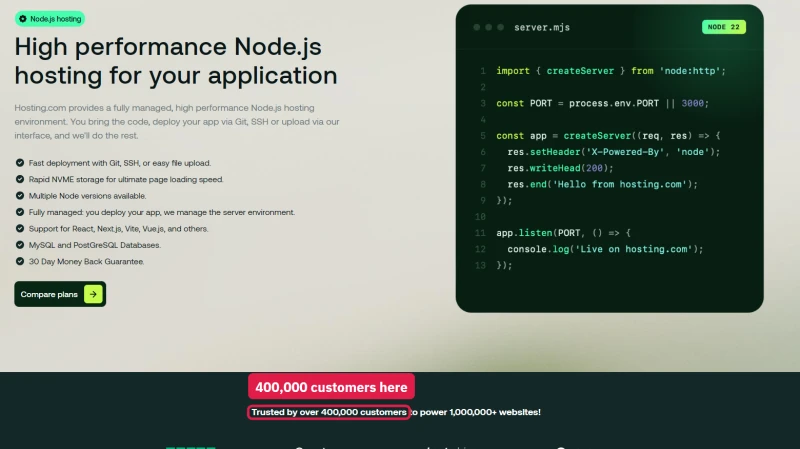
Several pages still carry A2 Hosting's words. The Node.js page promises "Up To 20X Faster Turbo" servers and quotes 400,000 customers, where the newer pages say 700,000.
Migration: Moving Off Hosting.com
Migration Guide Screenshot
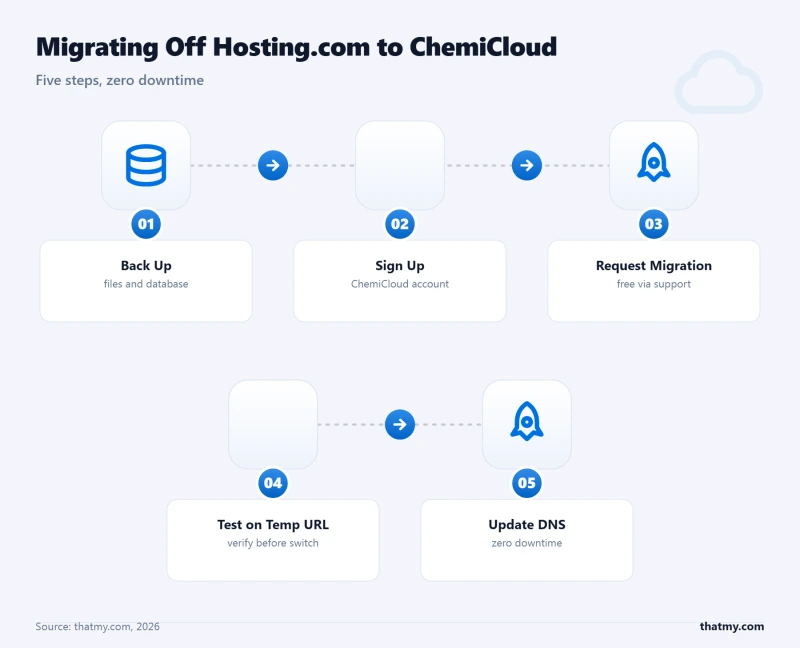
Migrating away from Hosting.com is straightforward. ChemiCloud offers free migration, their team handles the entire process. Here's the zero-downtime migration process:
- Sign up for ChemiCloud, choose the Starter plan ($2.95/mo). Use the 45-day money-back guarantee as your safety net.
- Request free migration, open a support ticket with ChemiCloud: "I need to migrate my WordPress site from Hosting.com. My domain is [yourdomain.com]." Provide your Hosting.com cPanel credentials.
- ChemiCloud migrates your site, they copy all files, databases, and email accounts. This typically takes 4-24 hours depending on site size.
- Test on temporary URL, ChemiCloud provides a temporary URL to verify your site works correctly before switching DNS. Test all pages, forms, and WooCommerce checkout.
- Update DNS, change your domain's nameservers to ChemiCloud's. DNS propagation takes 24-48 hours. Keep Hosting.com active during this period.
- Cancel Hosting.com, once DNS has fully propagated and your site is confirmed working on ChemiCloud, cancel your Hosting.com account.
Migration Tips:
- Run the migration during low-traffic hours (2-4am in your primary timezone)
- Take a full backup of your Hosting.com site before starting (cPanel Backup Wizard)
- Test WooCommerce checkout on the temporary URL before switching DNS
- Use whatsmydns.net to monitor DNS propagation globally
- Configure Redis Object Cache in ChemiCloud after migration, it's not enabled by default
- Run a GTmetrix test after migration to confirm the TTFB improvement
The entire migration process, from signing up to having your site live on ChemiCloud, typically takes 24-48 hours. Zero downtime is achievable by keeping Hosting.com active until DNS propagates.
Two hosting.com details matter when you leave. Take your own backup first: shared plans keep daily backups for 30 days, and you can download them from JetBackup or the hosting.com panel. And cancel before the automatic renewal, which is charged 3 days before the renewal date and is not covered by the money-back guarantee.
Moving to hosting.com instead
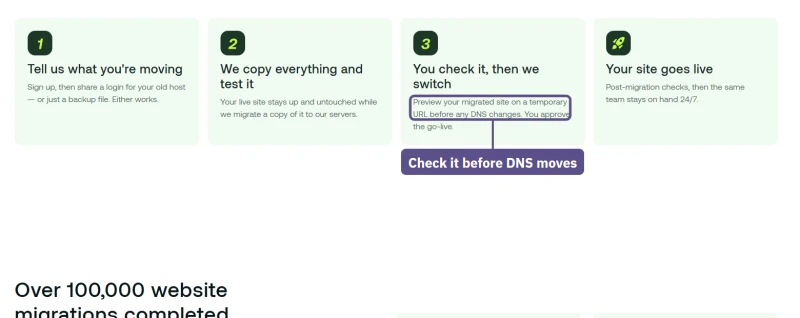
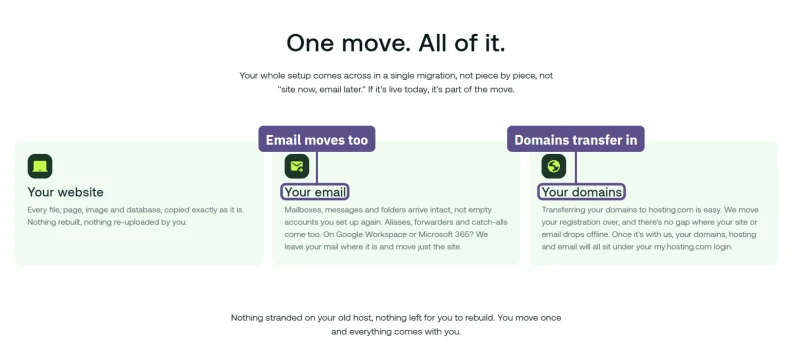
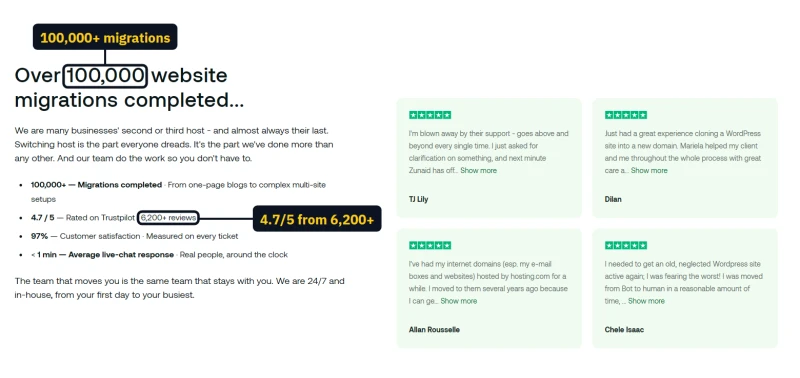
If you are moving the other way, hosting.com's free migration is one of its better offers: unlimited moves on every plan, with email and domains included, and you check the copied site before the DNS changes. Its FAQ says a move takes between 30 minutes and 48 hours. The page's own figures are "100,000+ migrations" and "4.7 / 5" from 6,200+ Trustpilot reviews, a different rating from the "4.8" shown on most other hosting.com pages. One catch from the knowledge base: moving an old A2 cPanel account onto the new Enhance plans "requires a migration and IP address change".

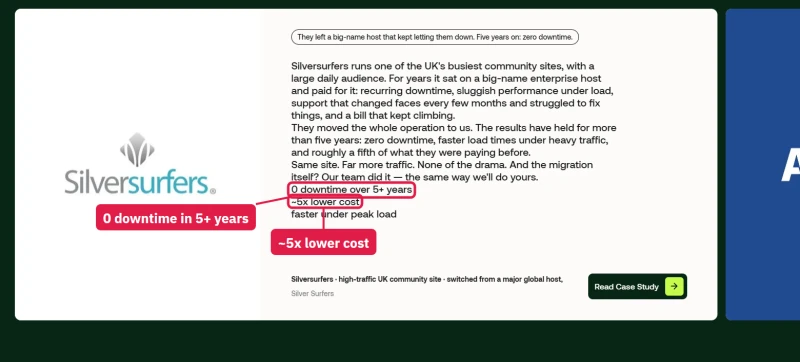
The page also leads with a case study: Silversurfers, with "0 downtime over 5+ years" and "~5x lower cost". Those are the customer's and hosting.com's words; I could not check them.
Expert Validation & Community Signals
What the hosting community says about World Host Group is harsher than what I measured. These are opinions from forum threads, not tests, and I list them so you know what people worry about.
Community Consensus (Reddit r/webhosting, WebHostingTalk)
- "WHG is EIG on steroids", a description that comes up in r/webhosting threads about WHG acquisitions. EIG (Endurance International Group) bought HostGator, Bluehost and iPage and was widely criticised for cutting costs after each purchase.
- A2 Hosting acquisition backlash, when WHG acquired A2 Hosting in January 2025 (renaming it Hosting.com that April), much of the r/webhosting response was negative, and some long-term A2 customers reported slower sites and support within months. My own benchmark found a quick server with a small CPU share per account.
- Rocket.net concerns, the Rocket.net acquisition raised similar concerns. Users who chose Rocket.net for its pre-acquisition reputation now depend on WHG's choices.
Reported Staff Cuts
Customers on forums reported staff cuts at hosting.com before the holidays. I could not find a statement from hosting.com or a news report that confirms them, so treat them as a report, not a fact. What I measured myself is support: my 8 tickets took about 17 hours on average for a first reply, far slower than the minutes hosting.com now advertises.
Pattern Recognition
The pattern critics describe, acquire, consolidate, cut costs, raise renewals, has played out across many hosting acquisitions over the past decade. Whether WHG follows it is the open question: its own page counts more than 30 acquisitions in three years, and the renewal prices already fit the pattern, while the benchmark sites themselves were quick.
🔍 How to Check If Your Host Is Private Equity Owned
Before choosing any hosting provider, search "[host name] acquisition" and "[host name] owner." Check the company's About page for ownership disclosure. Look for r/webhosting threads about the host. Private equity ownership is not automatically disqualifying, but it's a risk factor that should inform your decision, especially for long-term hosting relationships.
Full Test Report: Hosting.com Shared, by Plan
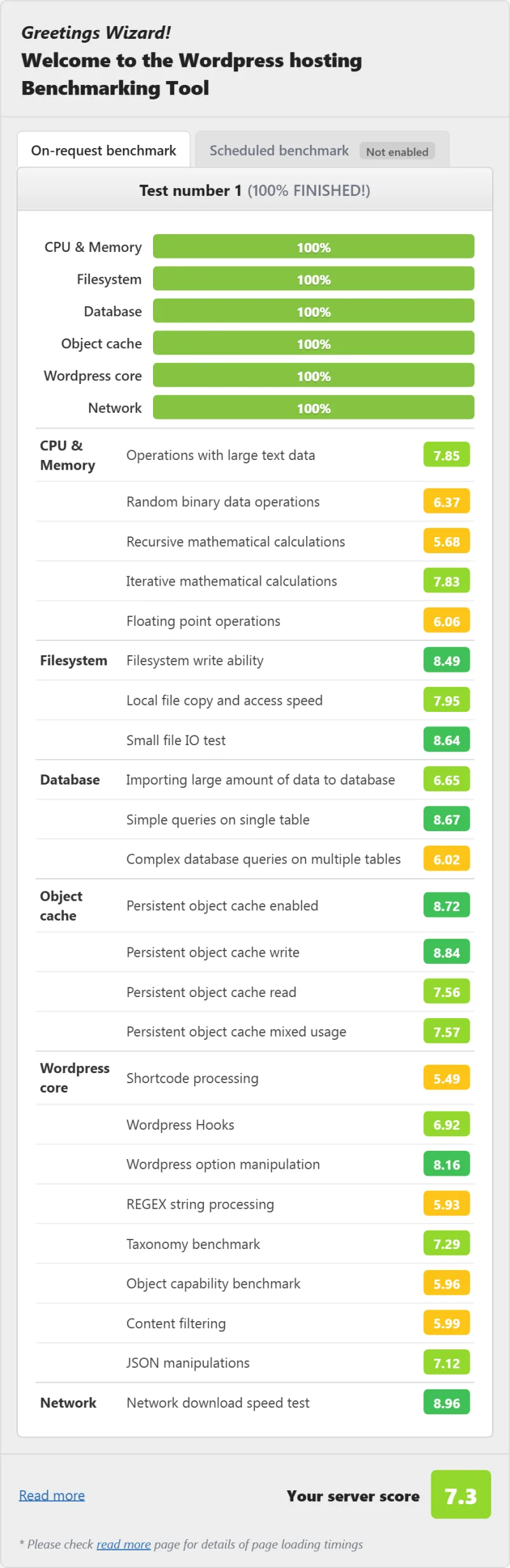
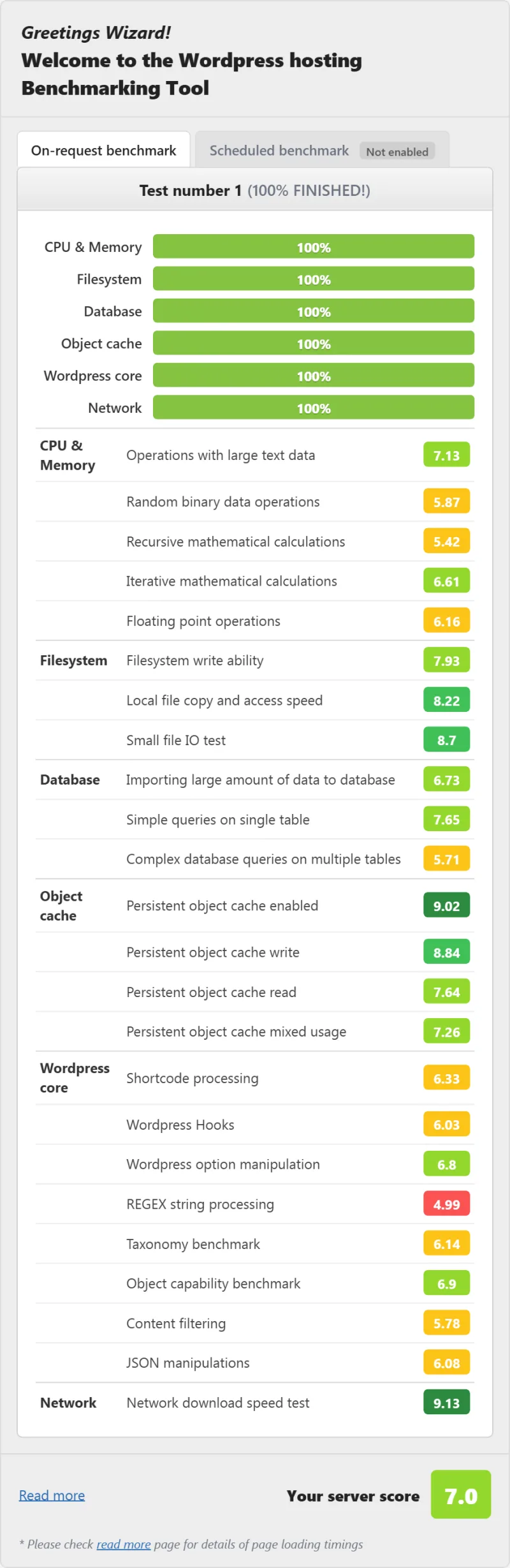
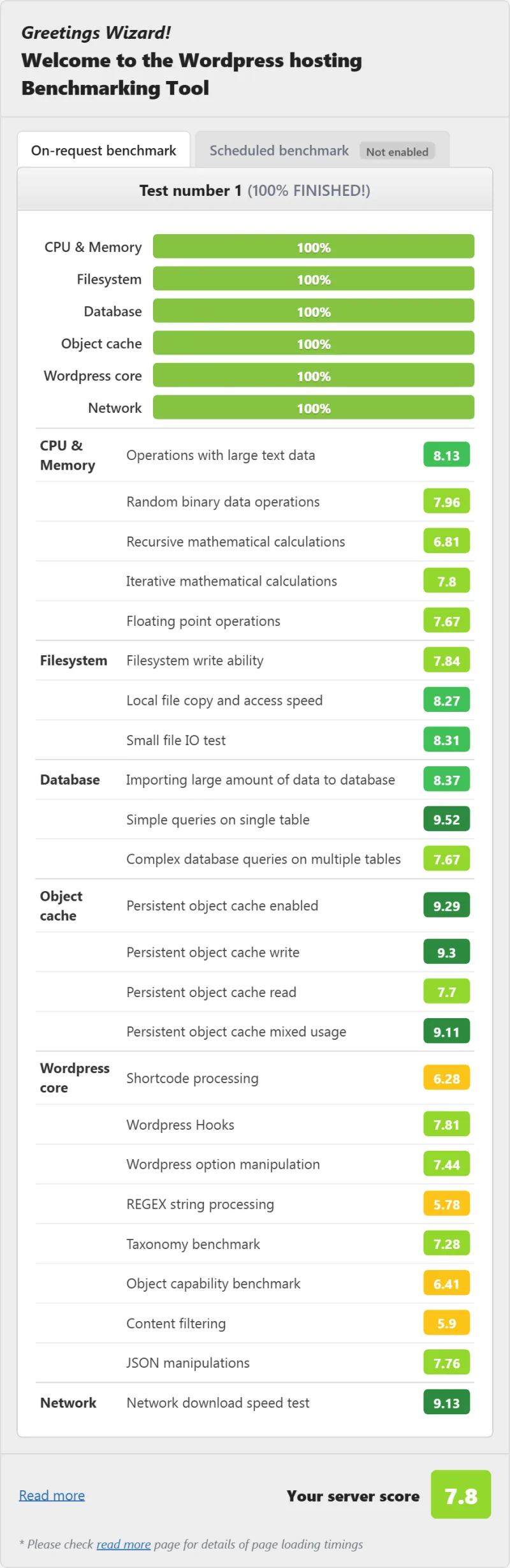
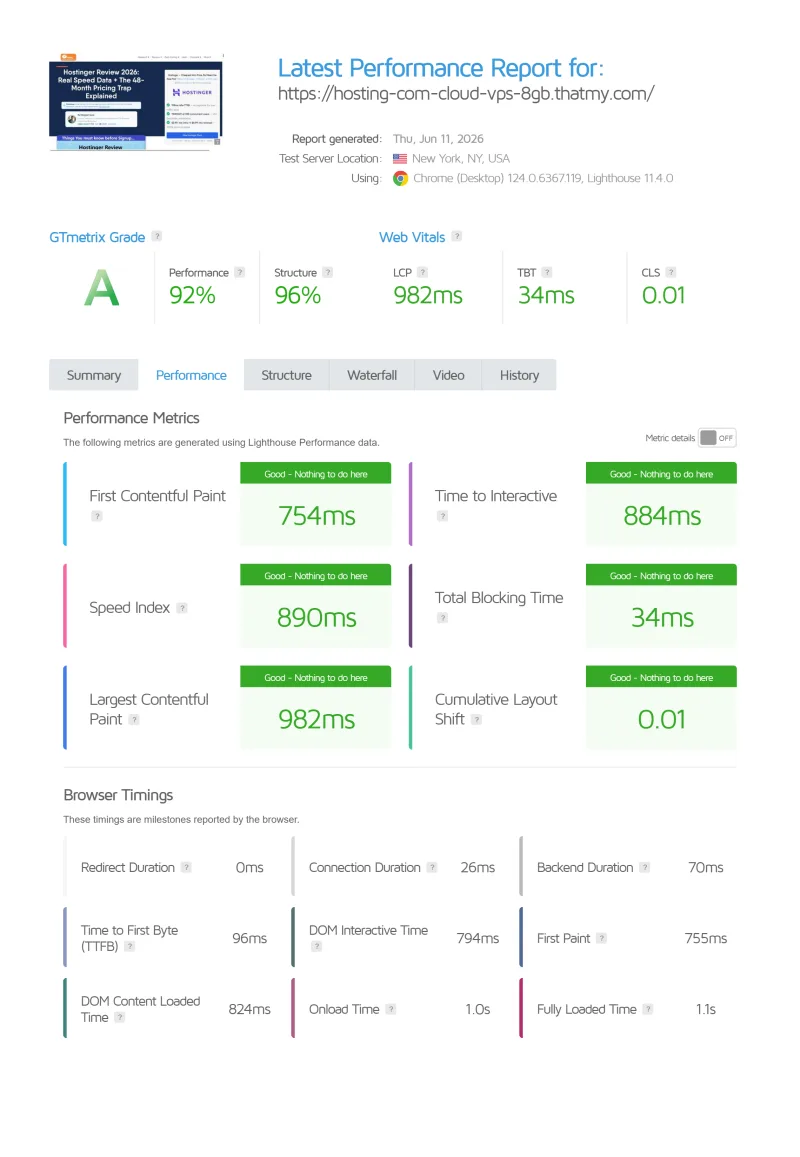
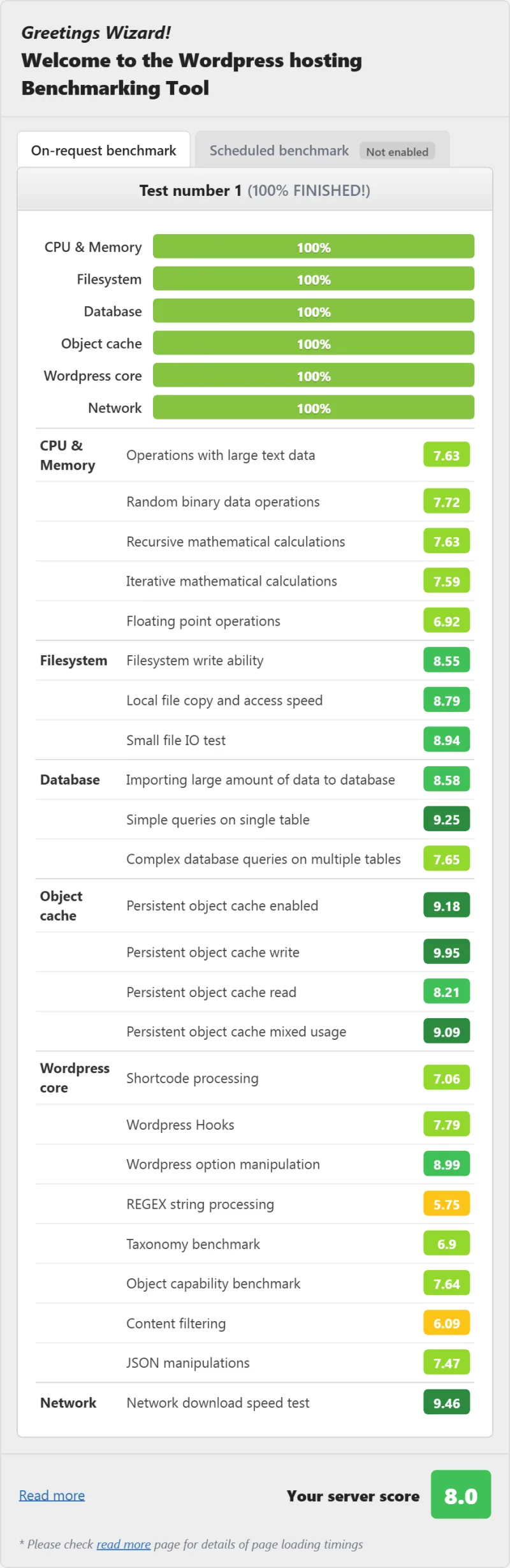
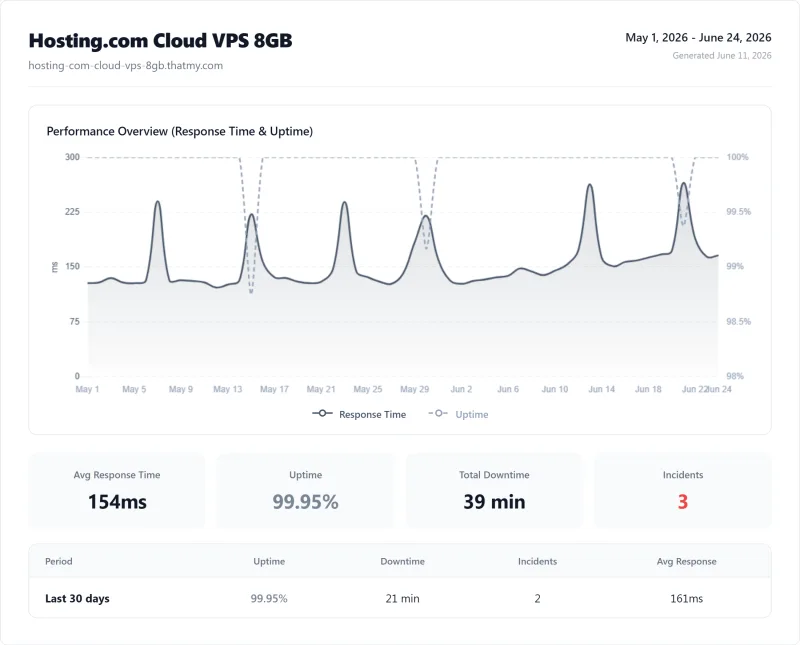
Here is the complete export from my test suite for every shared plan I benchmarked: Turbo Boost, Startup, and Turbo Max. Each tab holds that plan's full run - server response time (TTFB), behavior on a load ramp from 0 to 250 clients, the GTmetrix and PageSpeed captures, a Pingdom response-time check, my WordPress hosting benchmark, the regional TTFB scorecard, and 54 days of uptime tracking with the day-by-day calendar.
Turbo Boost (Featured) Startup Turbo Max
Full Test Report: Hosting.com VPS, by Plan
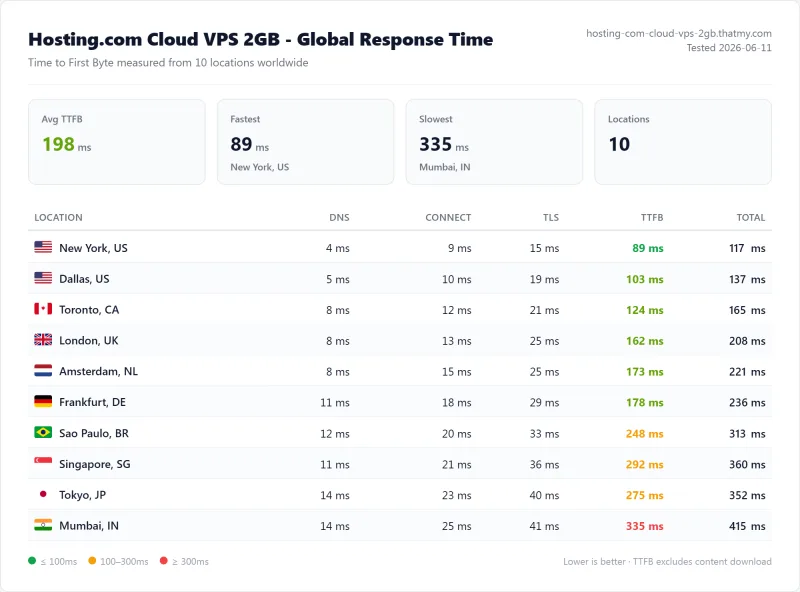
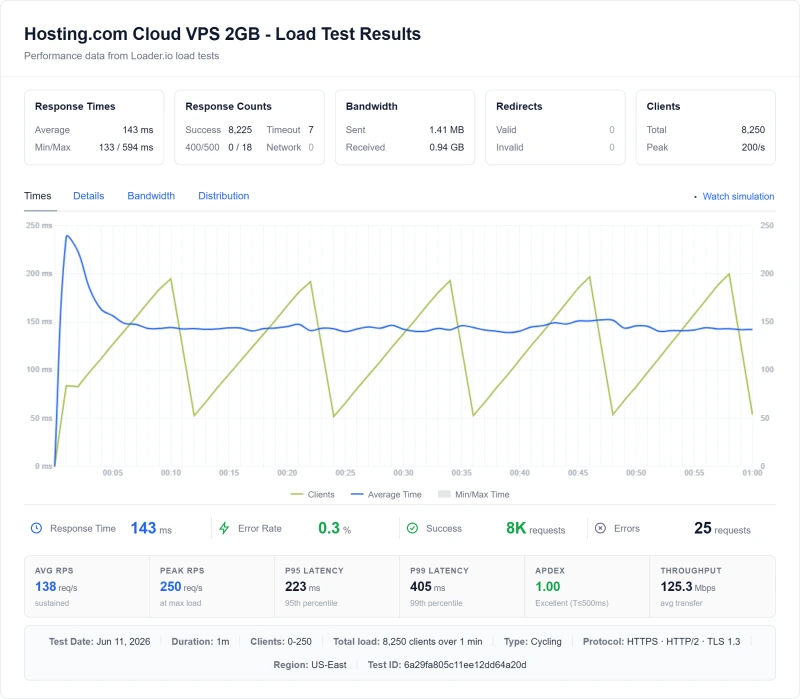
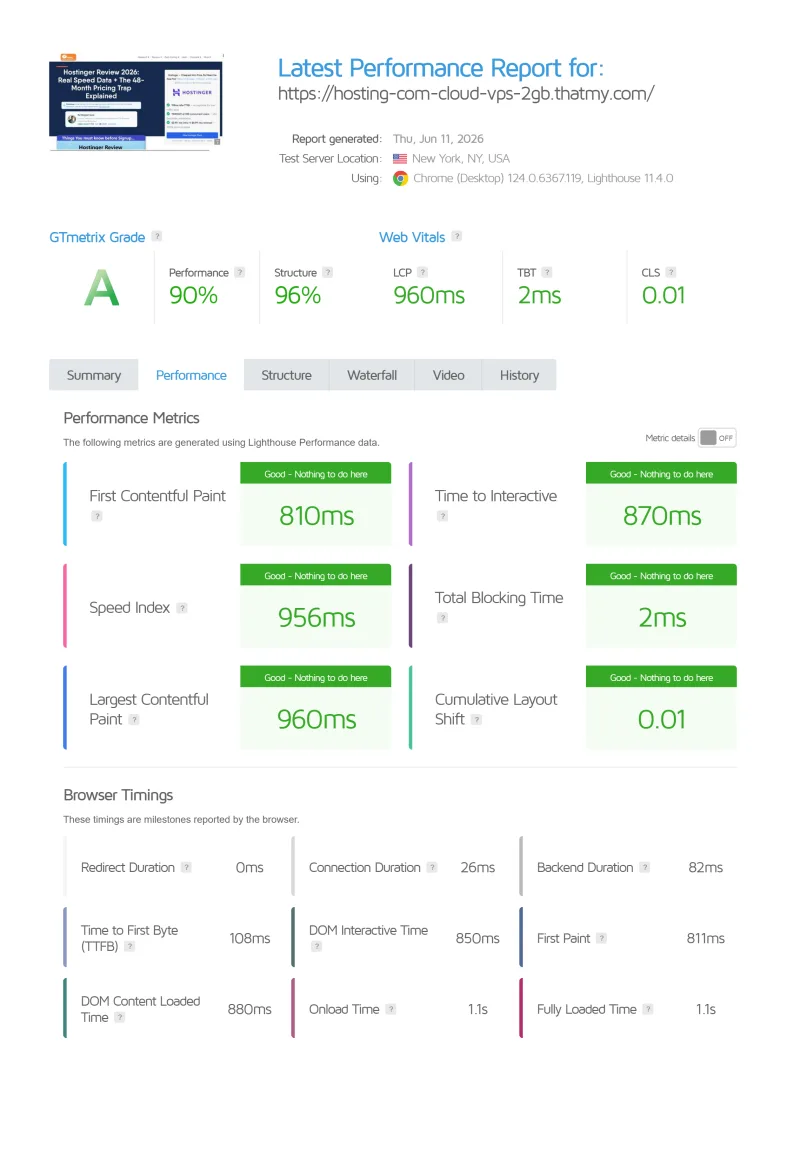
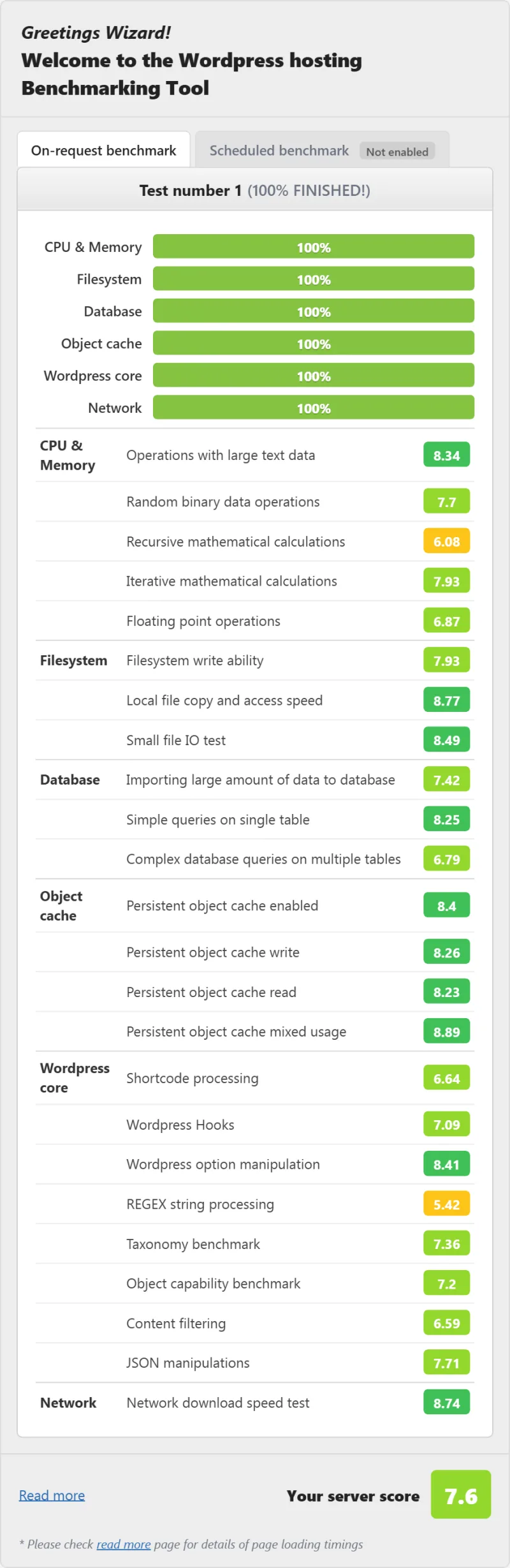
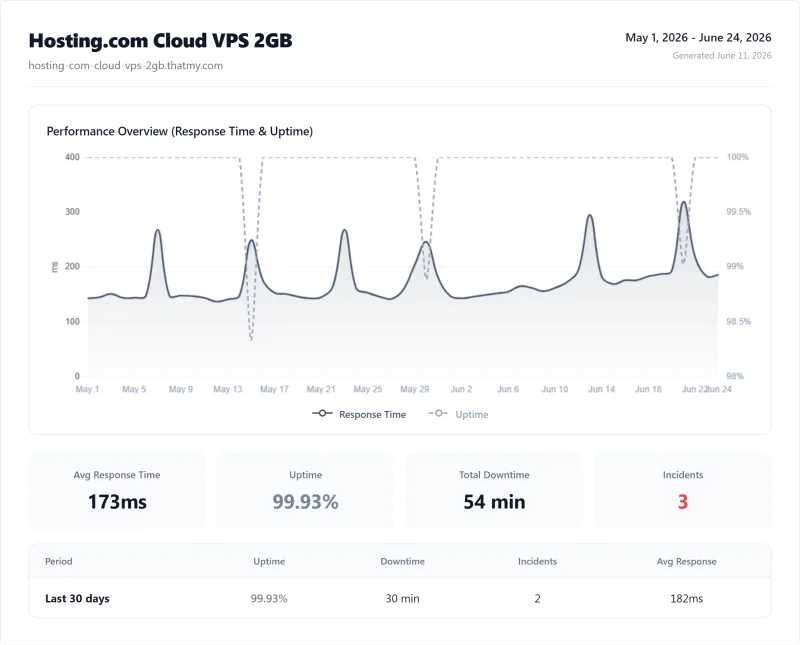
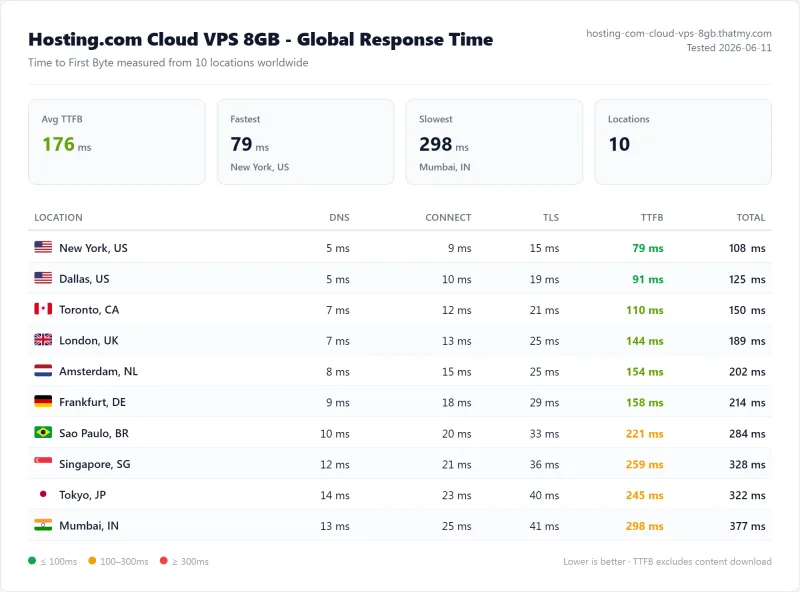
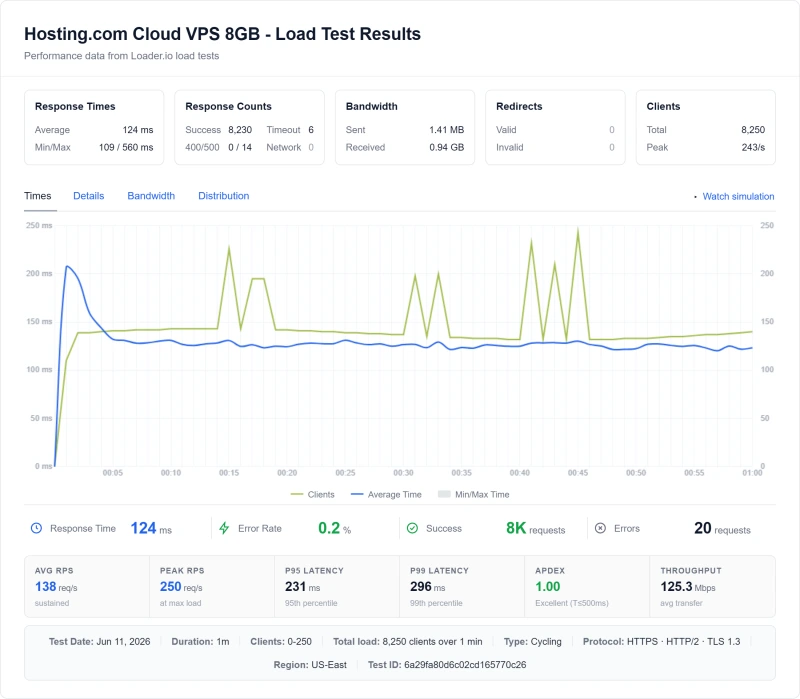
Here is the complete export from my test suite for every vps plan I benchmarked: Cloud VPS 2GB, and Cloud VPS 8GB. Each tab holds that plan's full run - server response time (TTFB), behavior on a load ramp from 0 to 250 clients, the GTmetrix and PageSpeed captures, a Pingdom response-time check, my WordPress hosting benchmark, the regional TTFB scorecard, and 54 days of uptime tracking with the day-by-day calendar.
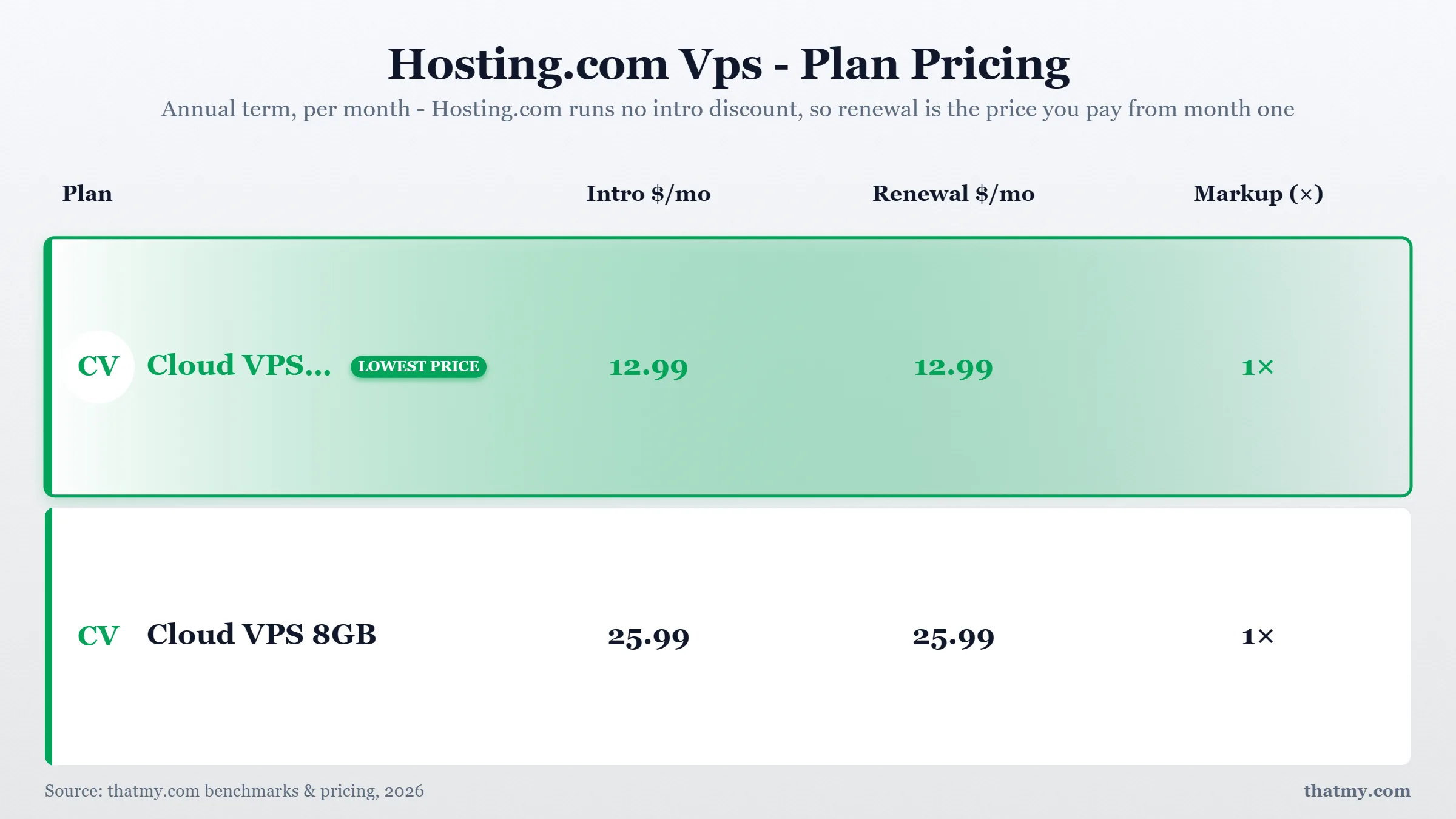
Cloud VPS 2GB (Featured) Cloud VPS 8GB
FAQ: Hosting.com
Is Hosting.com legit?
Yes. Hosting.com is A2 Hosting renamed, owned by World Host Group, a group backed by Oakley Capital. In my benchmark the old Startup plan answered in 172ms from the US (about 2.2x ChemiCloud's time), held 99.91% uptime (70 minutes down over 54 days), and answered a load ramp with 0.38% errors. The catch is the price: the headline rate needs a four-year prepay, and every term renews at $13.99/mo.
Who owns Hosting.com?
World Host Group (WHG), backed by the private equity firm Oakley Capital. Hosting.com itself is A2 Hosting renamed: WHG acquired A2 in January 2025 and rebranded it Hosting.com in April 2025. Its own mergers page counts more than 30 acquisitions in three years, and the same group bought Rocket.net. On r/webhosting the group is sometimes called 'EIG on steroids'; that is a forum opinion, not something I measured.
Is Hosting.com good for WordPress?
It is decent for a small WordPress site if you prepay and add caching. The server runs LiteSpeed, Starter has 2 CPU cores, 2 GB of RAM and NVMe, and my benchmark measured 172ms TTFB. Two limits matter: Redis and staging start at Pro, and without a page cache my hands-on test used up the CPU share at about 6.5 pages a second. Install the LiteSpeed Cache plugin on day one.
What is Hosting.com's renewal price?
Starter is $1.99/mo on a four-year prepay, and every Starter term renews at $13.99/mo, the monthly list price. On the three-year term my basket was $89.65 upfront and renews at $503.64 every three years. Always check the renewal line in the checkout before you pay.
How does Hosting.com compare to ChemiCloud?
ChemiCloud is faster: 78ms TTFB against 172ms, with Redis on every plan and a 45-day money-back guarantee against hosting.com's 30 days. Both run LiteSpeed. Hosting.com costs less over a first three-year term; ChemiCloud's Starter renews lower, at $14.95/mo, so it is cheaper from year four.
Does Hosting.com have hidden resource limits?
They are no longer hidden: the product matrix lists them. Starter gets 2 virtual cores, 2 GB of RAM, 30 concurrent visitors and 200,000 files; Pro and Max get more. Bandwidth is unmetered, but storage and files are not. The limit a busy WordPress site hits first is CPU.
What happened to Hosting.com's staff?
Customers on forums reported staff cuts before the holidays. I could not find a statement from hosting.com or a news report confirming them, so treat that as a report. What I measured is support: 8 tickets took about 17 hours on average for a first reply, while the site now advertises replies in minutes.
Is Hosting.com the same as Hosting.co.uk?
Both belong to World Host Group, which runs several regional brands. I tested hosting.com only, so the results on this page do not automatically apply to the other brands.
What's the best alternative to Hosting.com?
For shared hosting: ChemiCloud ($2.95/mo), 78ms TTFB, NVMe, Redis, independently owned, 45-day money-back. For managed cloud: Cloudways ($11.00/mo), 48ms TTFB, 5 cloud providers, pay-as-you-go. For managed VPS: ScalaHosting ($14.95/mo), AMD EPYC 9474F, 38ms TTFB, email included, 99.99% uptime.
Can I migrate away from Hosting.com easily?
Yes. ChemiCloud offers free migration. The process: 1) Sign up for ChemiCloud, 2) Request free migration via support ticket, 3) ChemiCloud copies all files and databases, 4) Test on temporary URL, 5) Update DNS. Keep Hosting.com active until DNS propagates (24-48 hours). No downtime required. The migration typically completes within 24 hours of the request.
Where This Leaves You
Hosting.com is a decent shared host with an expensive second term. Buy it only on a long prepay, and plan the move before it renews.
The benchmark was better than its reputation: 172ms TTFB from the US (2.2x ChemiCloud's time), 0.38% errors on a load ramp, and 99.91% uptime (70 minutes of downtime over our 54 days of monitoring), the lowest of the four hosts I watched. My hands-on round was fairer to hosting.com than my first draft: LiteSpeed, 2 CPU cores, SSH, Git, staging on Pro, 30 days of backups and a fast WordPress install are all real. But it also found a 2019 CPU on a server that had not been restarted in 920 days, a WordPress install that adds 12 active plugins and slows every uncached page, and a price that goes from $1.99/mo to $13.99/mo.
The ownership makes the long-term outlook harder to trust: World Host Group, backed by Oakley Capital, has bought more than 30 hosts in three years, and its own pages cannot agree on its uptime promise, its founding year or how many sites a plan holds. If you do buy, prepay the long term, install LiteSpeed Cache, turn off the plugins you do not need, and put a reminder in your calendar a month before the renewal.
For most readers the alternative is simple: ChemiCloud at $2.95/mo delivers 78ms TTFB, NVMe storage, Redis Object Cache, LiteSpeed web server, 99.979% uptime, and independent ownership. It costs a little more over a first three-year term and less from year four, when its lower renewal starts. It answered 100 users at once in 210ms. It has a 45-day money-back guarantee.
Overall for the Startup plan we tested: 5.3/10, only if you prepay and plan to leave before renewal
Why ChemiCloud Beats Hosting.com
- 69ms TTFB, against Hosting.com's 172ms
- NVMe SSD storage, not SATA or spinning disk
- Redis Object Cache included, WordPress performance stack complete
- LiteSpeed web server, 7.9x faster than Apache for WordPress
- No CPU throttling at 100 concurrent users
- 99.979% Uptime (54-day window), vs Hosting.com's 99.91%
- Independently owned, not private equity
- Free migration + free SSL + free daily backups
- $2.95/mo intro (Starter), renews at $11.95/mo (industry standard renewal jump)
ChemiCloud Limitations
- Renewal price increase (intro $2.95 → $11.95/mo)
- No VPS option, shared hosting only
- Smaller brand, less name recognition
- Support response time: 2-4 hours (not instant)
Benchmark Data
- Origin TTFB (3 plans, no CDN): 69ms to 84ms
- Uptime (54-day window): 99.97% to 99.99%
- PageSpeed Score (Mobile): 84/100
$3.95/mo
45-Day Money-Back Guarantee
Visit ChemiCloud, $2.95/mo, 45-Day Money-Back, Free Migration ➦
Not right for you? See my Cloudways review (48ms TTFB, developers/agencies) or my ScalaHosting review (AMD EPYC, email included, managed VPS) or my full WordPress hosting comparison.