


Where these prices come from: server prices from ThatMy's price records (checked against the Cloudways pricing page), and every add-on price read inside a live Cloudways account I opened. Several add-on prices only appear inside the console, not on the public pricing page.
Cloudways pricing is three things stacked together: which of the three products you pick, which cloud your server runs on, and which add-ons you switch on. The first two set the monthly bill. The third is where people get surprised, because Cloudways shows most add-on prices only after you sign up.
Three Products, Three Pricing Models
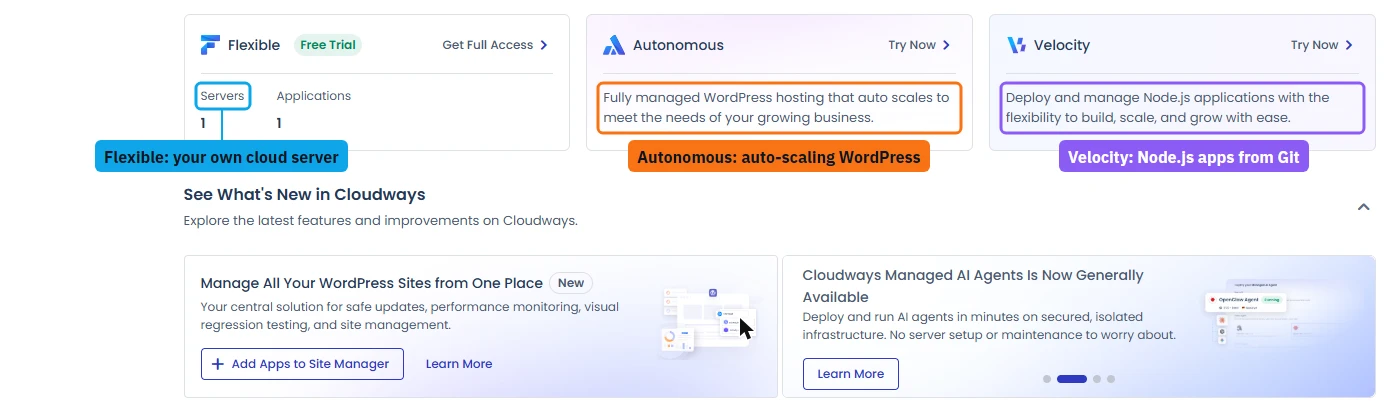
Most readers want Flexible: it is the classic Cloudways, one server, as many WordPress sites as fit on it. Autonomous costs more per site but you never size a server; it suits one busy WordPress site. Velocity is for developers shipping Node.js apps.
Flexible Pricing by Cloud Provider
On Flexible you pick the cloud. The management layer (staging, backups, Object Cache Pro, security) is the same on all five, so the price gap is the cloud's own cost.
Premium DigitalOcean and Vultr High Frequency cost more because they run faster CPUs and disks. In my own benchmarks Vultr High Frequency was the fastest of the four Cloudways clouds I measured; the numbers are in the Cloudways review.
The Prices You Only See After You Sign Up
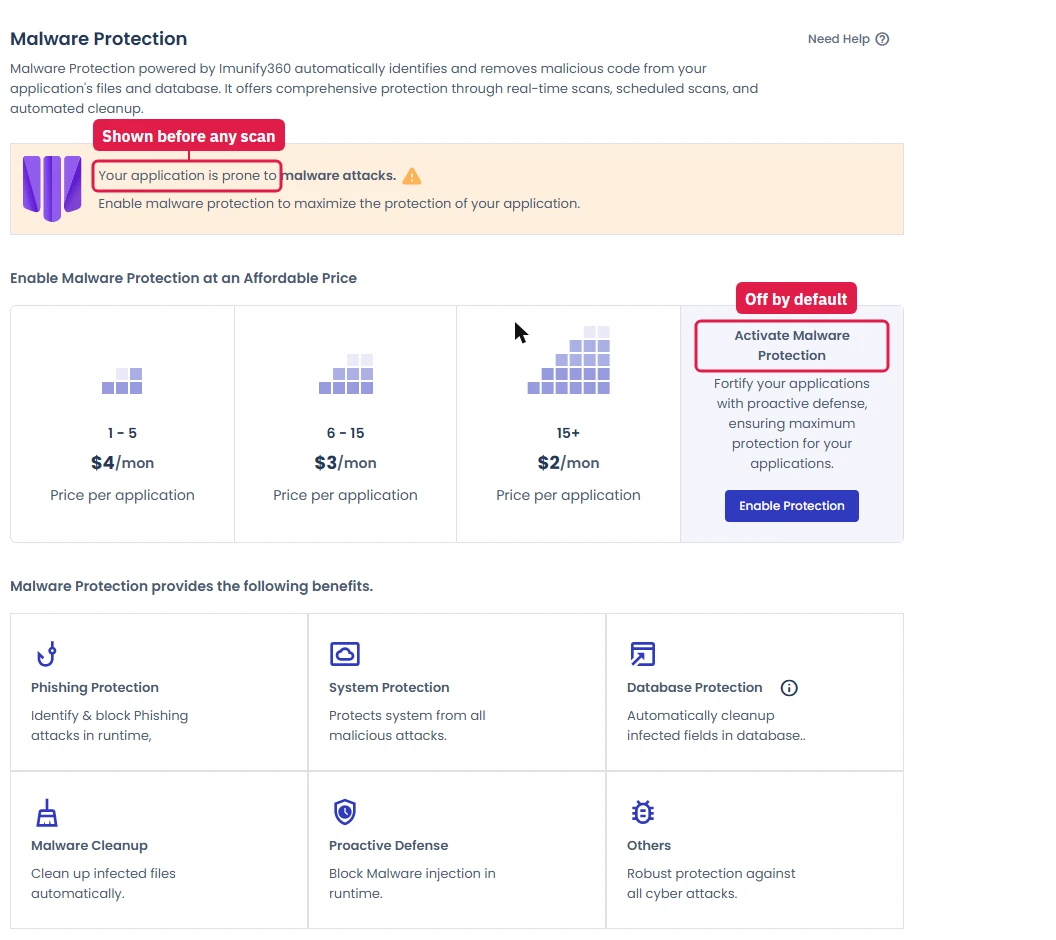
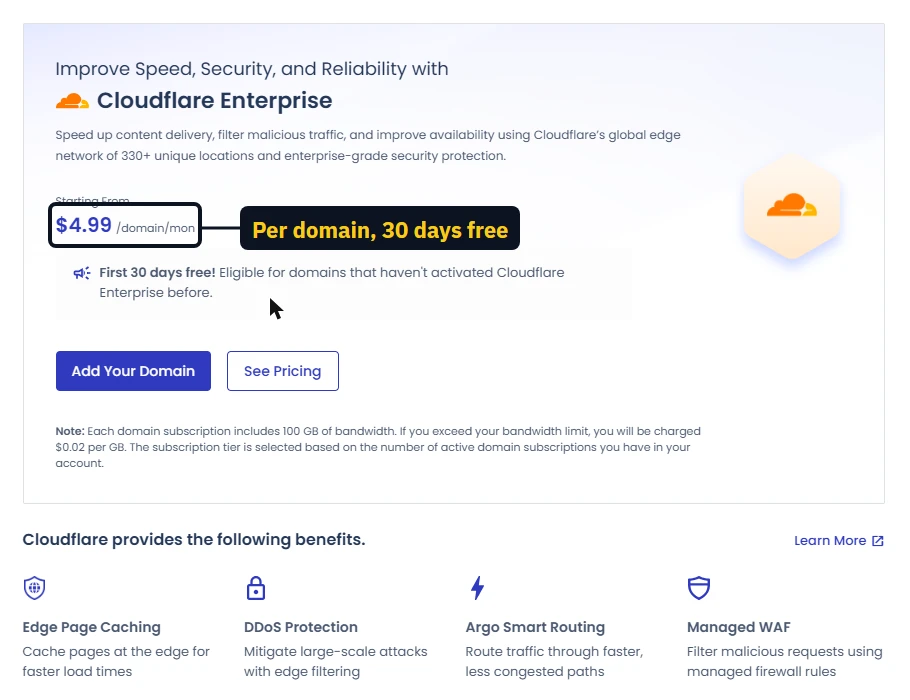
The Integrations page in the console lists the add-ons without a single price. The prices appear only when you open each feature inside a running server. Here they are in one place, as the console showed them:
Email is the other hidden cost: Cloudways does not include mailboxes with hosting, so budget for Google Workspace, Zoho Mail or a similar service.
The Free Trial, the Card Check and the Promo Code
The trial lasts 3 days and needs no card to launch. Two things the signup pages do not tell you:
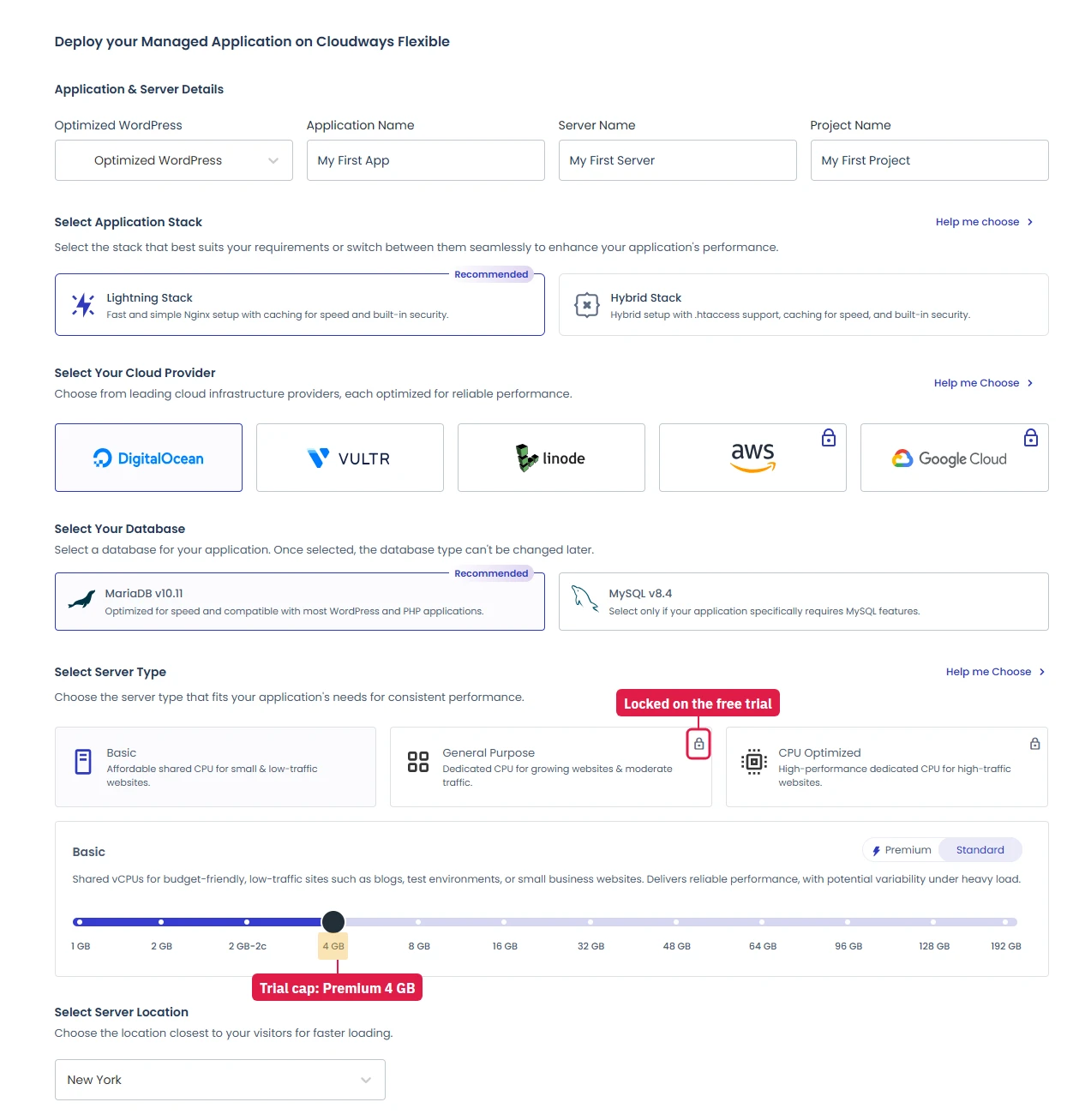
- One server size in practice. The trial says servers "up to 4GB" are allowed. When I launched the cheaper 4GB Standard server ($46.00/mo) it was refused with "Server size is not allowed with Trial Account". The 4GB Premium server ($54.00/mo) launched straight away.
- AWS and Google Cloud are locked until the account is paid, as are the dedicated-CPU server types.
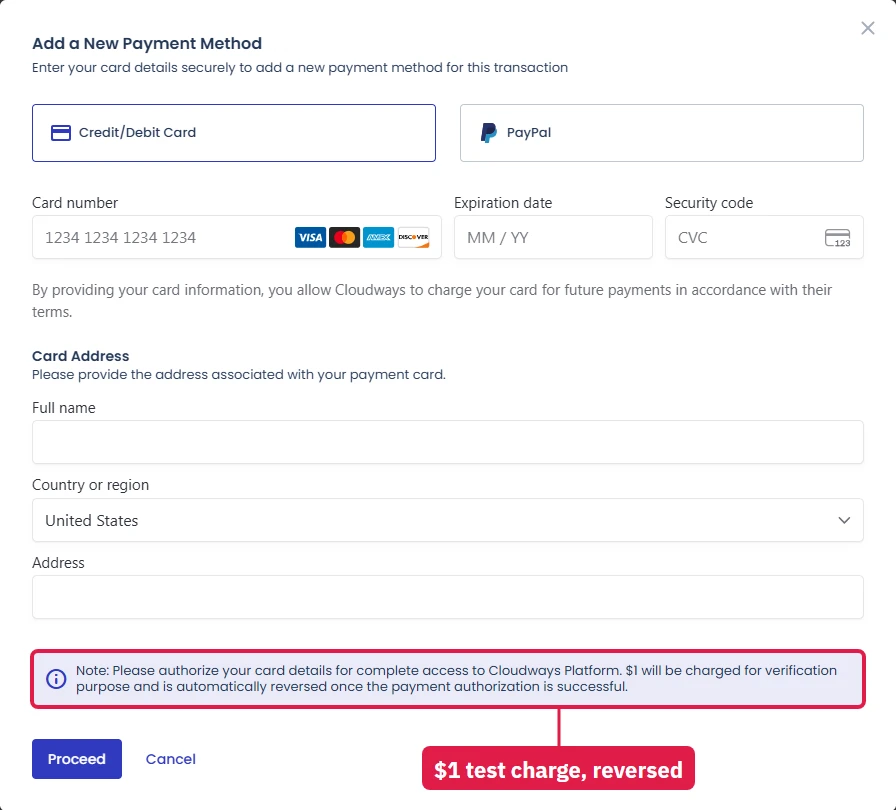
To keep the server after the trial you add a card, and Cloudways charges $1 to verify it, then reverses it. The promo field sits behind a small "I have a promo code" link; that is where CLOUDS2022 goes for $30 of credit.
What a Real Setup Costs
For the whole build behind those totals, including the mailbox, the plugins worth paying for and the add-ons you can decline, see the Cloudways setup cost guide.
Choosing the Right Plan
- Lowest cost: Flexible on DigitalOcean Standard, $11.00/mo.
- Fastest for the money: Flexible on Vultr High Frequency or DigitalOcean Premium.
- Several client sites: Flexible; one server hosts them all, while Autonomous charges per site.
- One busy WordPress site, no server sizing: Autonomous.
- Already on AWS or Google Cloud: Flexible on that cloud, for one bill per vendor.
For the full test (speed, uptime, support chat and every console screen), read the Cloudways review.
FAQ: Cloudways Pricing
How much does Cloudways cost per month?
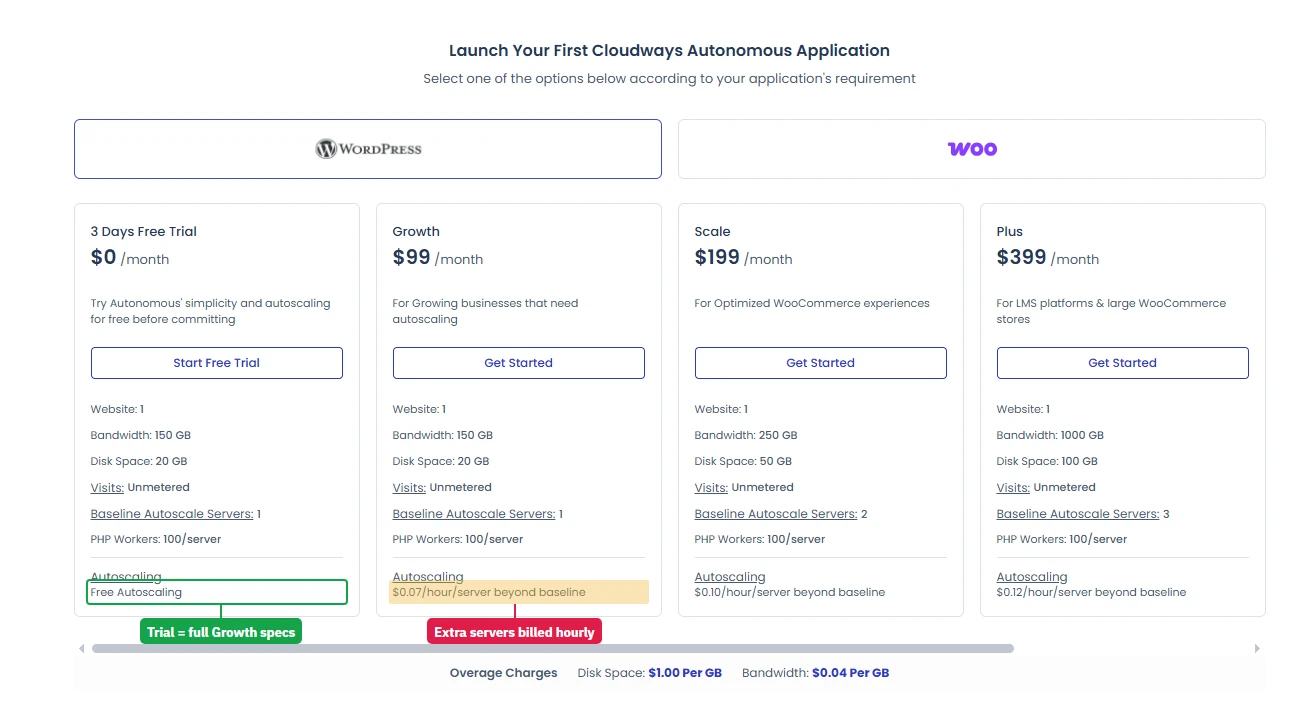
Cloudways Flexible starts at $11.00/mo for a 1GB DigitalOcean server, billed by the hour. Cloudways Autonomous (managed WordPress that scales itself) starts at $99.00/mo for one website. Cloudways Velocity (Node.js apps from Git) starts at $20 a month. There is no renewal jump: the price you start on is the price you keep.
How does Cloudways bill you?
Flexible servers are billed hourly and invoiced monthly in arrears, so a server you delete after ten days costs about a third of a month. Adding a card costs $1, which Cloudways charges to verify the card and reverses automatically.
What add-ons cost extra?
The prices the Cloudways console showed us: Cloudflare Enterprise $4.99 per domain a month (first 30 days free), Malware Protection $4 per app a month for 1 to 5 apps ($3 for 6 to 15, $2 above that), Site Manager Pro $3 per app a month, and the Advance support plan $25 a month. Server-wide Imunify360 protection, Object Cache Pro, the Patchstack vulnerability scanner and managed WordPress migration are free.
Is there a free trial?
Yes, 3 days, and you can launch a server without a card. In my test the trial accepted only one size in practice, a 4GB DigitalOcean Premium server; the cheaper 4GB Standard server was refused with 'Server size is not allowed with Trial Account'. AWS and Google Cloud stay locked until you add a card.
Which provider is cheapest on Cloudways?
DigitalOcean, at $11.00/mo for 1GB. Vultr and Linode start a little higher, and AWS and Google Cloud cost the most for similar or smaller servers. The management layer on top is the same on all five.
How long does the CLOUDS2022 credit last?
The code adds $30 of credit. On the $11.00/mo DigitalOcean 1GB server that covers about 2.7 months; on the $54.00/mo 4GB Premium server the trial runs on, a little over two weeks.