

Kinsta Review 2026: The Short Version
Kinsta is excellent managed WordPress hosting, for the right use case. 64ms origin TTFB from New York with no CDN in front. 99.99% uptime over a 54-day window. The best APM tool in managed WordPress, included free. MyKinsta is the most polished managed WordPress dashboard tested. WordPress-specific support that actually understands WooCommerce and performance optimization.
The uncomfortable truth most reviews haven't caught up with: Kinsta retired the plans this review was written against. Starter, Pro and the whole Business ladder are gone, replaced in 2026 by bandwidth-metered tiers, Single 20GB at $350/yr, WP 2 at $700/yr and Agency from $3,400/yr. The $35/mo figure still circulating is now the month-to-month rate on the entry plan, not the old Starter. Everything below is re-grounded on the current lineup, and where we could not re-verify a figure after the restructure, we removed it rather than reprint it. On our load run Kinsta averaged 92ms with 100 concurrent users (up from 64ms idle, about 44% more) with no errors; ScalaHosting Entry Cloud averaged 58ms (up from 38ms, about 53% more). Scala is faster in absolute terms at both ends, while Kinsta's curve is the flatter of the two.
📊 Benchmark Summary (single test site, origin TTFB, 54-day uptime window)
✅ Kinsta Is Right For:
- Single high-value WordPress sites where managed features justify $350/yr
- Businesses where WordPress support quality matters more than price
- Sites whose origin traffic fits inside 20GB/mo once the CDN is doing its job
- Developers who want the best staging + APM + Git workflow
- Teams who want a Cloudflare-powered CDN and WAF included
❌ Kinsta Is NOT Right For:
- Agencies managing 10+ sites (→ a ScalaHosting or Cloudways server)
- Stores that need the fastest response under load (→ ScalaHosting)
- Sites whose origin bandwidth will outgrow 20GB/mo
- Budget users (→ ChemiCloud from $3.49/mo)
- Users who want email hosting in the plan (→ check ScalaHosting)
- Sites with video content (20GB/mo of server bandwidth)

What Our Testing Found
- 64ms TTFB from New York to our test server, origin, no CDN
- 99.99% uptime, 54-day monitoring
- Best managed WordPress features: auto-updates, staging, backups
- MyKinsta dashboard, the most polished in managed WordPress
- 24/7 expert WordPress support (chat), not generic hosting support
- Free SSL and free CDN; migrations are free
- Application performance monitoring built in
Real Weaknesses
- Bandwidth-metered since the 2026 rebuild: 20GB/mo of server bandwidth on the entry plan
- $350/yr for 1 site; the Agency tier is quoted from $3,400/yr
- No email hosting included
- Managed does not mean they fix your site: plugin and theme issues are yours
- No cPanel, MyKinsta only
- No choice of cloud provider
Our Benchmark Records
- Origin TTFB (New York, no CDN): 64ms
- Uptime (54-day window): 99.99%
- Load at 100 clients: 92ms
$35/mo
30-Day Money-Back Guarantee
Methodology: The benchmark boxes on this page cover 2 plans. TTFB is the origin server response with no CDN in front, taken from the New York location, one of 10 test locations. Uptime counts real incident minutes over a 54-day window.
Test Environment & Methodology (Full Disclosure)
Every benchmark figure in this review comes from our benchmark records for the Kinsta plan we tested, and the box below says what each record is. Where we have no record, the review says so instead of printing a number.
🔬 Test Environment, Full Disclosure
The TTFB figures on this page are origin figures: the CDN was not in front of the test site. With the edge cache on, cached pages are served from Cloudflare's edge instead of the origin; we did not measure edge TTFB, so we give no edge figure. The origin figure is the one that matters for WooCommerce checkout, logged-in users and any dynamic page that bypasses the cache. The CPU model comes from our CPU record (see the architecture section).
What each figure is:
- TTFB: origin, no CDN, from 10 locations (New York is the figure used unless a city is named).
- Load test: one 0-250 client ramp of 60 seconds from US-East. We have one measured point for 100 concurrent users and no step data for 10, 25, 50, 250 or 500 users.
- Uptime: 54 days of monitoring, 2 incidents.
- WooCommerce and support: not measured.
What Is Kinsta? Architecture Explained
Most reviews describe Kinsta as "managed WordPress hosting." That's accurate but incomplete. Understanding the actual architecture explains both Kinsta's strengths and its limitations.
The Kinsta Architecture:
Your WordPress Site → Kinsta Management Layer → Cloud provider (Google Cloud when we tested; Oracle Cloud on Kinsta's new platform) → Cloudflare Edge Network
- You manage: WordPress content, plugins, themes, custom code
- Kinsta manages: Server OS, PHP, Nginx, security patches, backups, CDN
- The cloud provider manages: Physical hardware, network, data center (Google Cloud when we tested, Oracle Cloud Infrastructure on the new platform)
- Cloudflare manages: Edge caching, DDoS protection, global CDN
This four-layer architecture helps explain the 64ms origin TTFB and 99.99% uptime we recorded, and a Cloudflare-powered CDN sits in front of every site. But it also explains the limitations: Kinsta is a management layer, not a full-service WordPress agency.
This division of responsibility is standard for managed hosting, but many buyers expect more. A WooCommerce store migrating to Kinsta expecting "managed WordPress" may be surprised when Kinsta's support can't debug their slow payment gateway plugin. The server is performing correctly. The plugin is the problem. That's your problem to solve.
Kinsta Is Moving From Google Cloud to Oracle Cloud
Kinsta is moving sites to new infrastructure. Its upgrade FAQ says some regions change because the new infrastructure is powered by Oracle Cloud Infrastructure (OCI), which uses different data centers than its previous Google Cloud setup. A site's external IP address changes in the move, so anything that relies on a fixed IP needs updating.
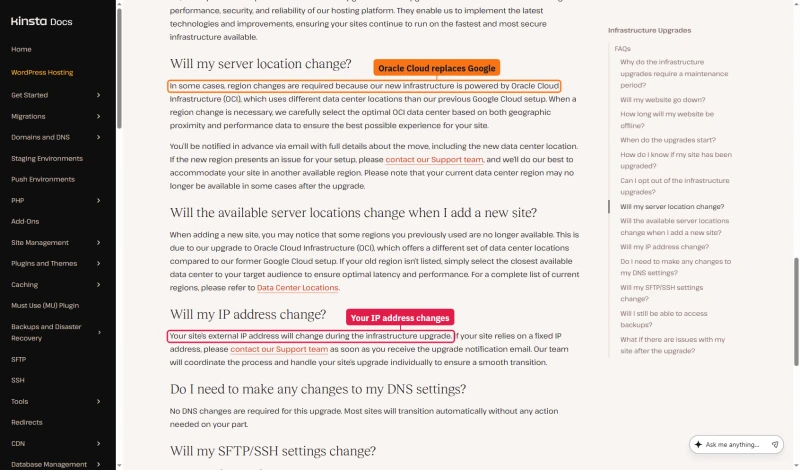
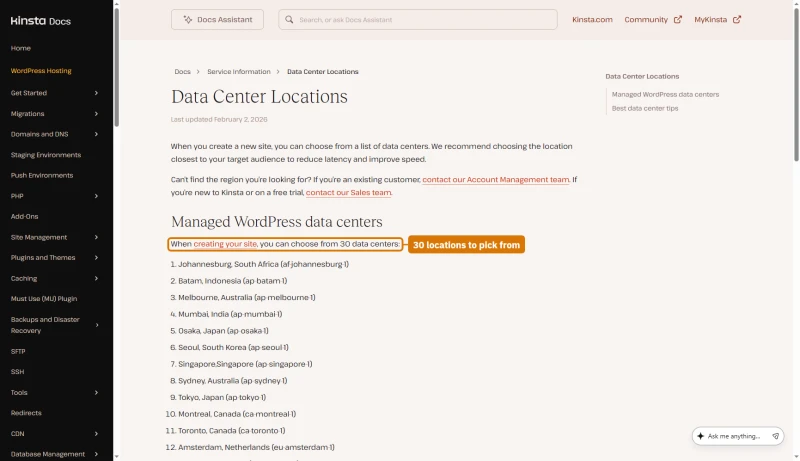
When you create a site now, Kinsta's data centre list offers 30 locations, each an OCI region. The benchmarks in this review ran on the earlier Google Cloud setup, so treat the figures below as what we measured there, not as what every new site gets.
What CPU Kinsta Runs
Our CPU record for Kinsta is the AMD EPYC 7502, with a PassMark multithread score of 51,871 (rank #248 of 5,999), read from Kinsta's dashboard and trust center. Earlier editions of this review named a Google Cloud C2 Intel Cascade Lake part instead; our records do not support that, so it is gone.
ScalaHosting's AMD EPYC 9474F scores 102,255 (rank #42), about 2x Kinsta's score. A CPU score is not a speed result: on our benchmark ScalaHosting was faster at idle and at 100 users, but we did not isolate the CPU as the cause.
TTFB Results by Test Location
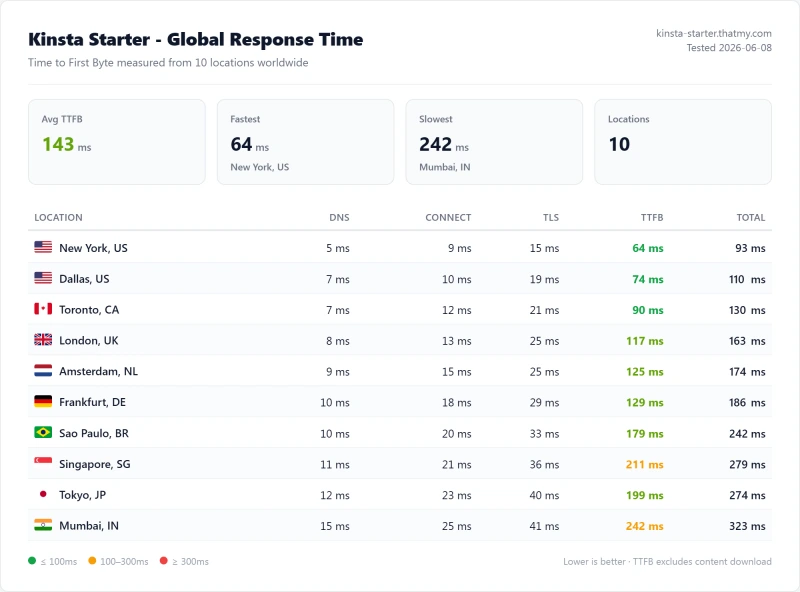
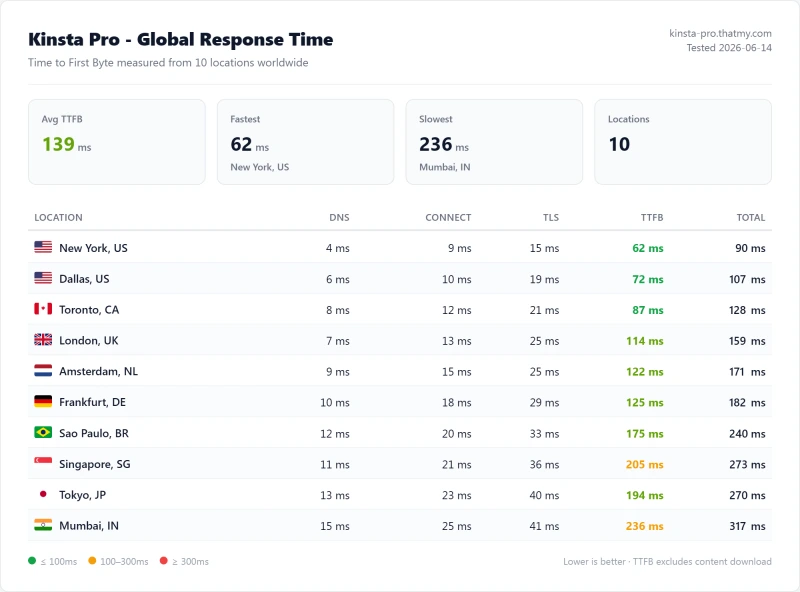
Origin TTFB: the CDN was not in front of the test site and page caching was not part of the test. Every figure below is the time to the origin server from one of our 10 measuring locations, from our benchmark record.
New York (Primary Test Location)
Other Locations, Multi-Host Comparison
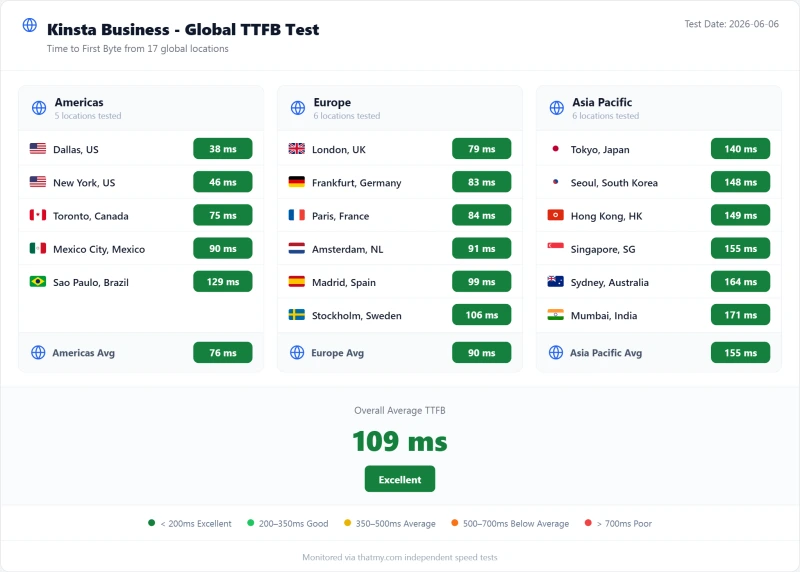
Our measuring locations are in New York, Dallas, Toronto, London, Amsterdam, Frankfurt, Sao Paulo, Singapore, Tokyo and Mumbai; Sydney is not one of them, so there is no Sydney figure. Hostinger and SiteGround test servers sat in Frankfurt, so compare those two using the Frankfurt column; the others sat in New York.
Kinsta's 64ms New York origin TTFB is quick: it is behind Cloudways Vultr HF (48ms) and ScalaHosting Entry Cloud (38ms) on the same measure. SiteGround and Hostinger look slow from New York only because their test servers sat in Frankfurt; read their Frankfurt column. But idle TTFB is only part of the story. See the load test section for what happens when real traffic hits simultaneously.
⚠️ Important: These Numbers Are Origin TTFB (No CDN)
The TTFB figures above are for the origin server, with the CDN not in front. With Kinsta's edge cache on, cached pages are served from Cloudflare's edge and the origin figure matters less for them; we did not measure edge TTFB. The origin figure still matters for WooCommerce checkout, logged-in users and any dynamic page that bypasses cache. We have not measured a checkout page on Kinsta.
Load Test: What We Measured, Up to 250 Clients
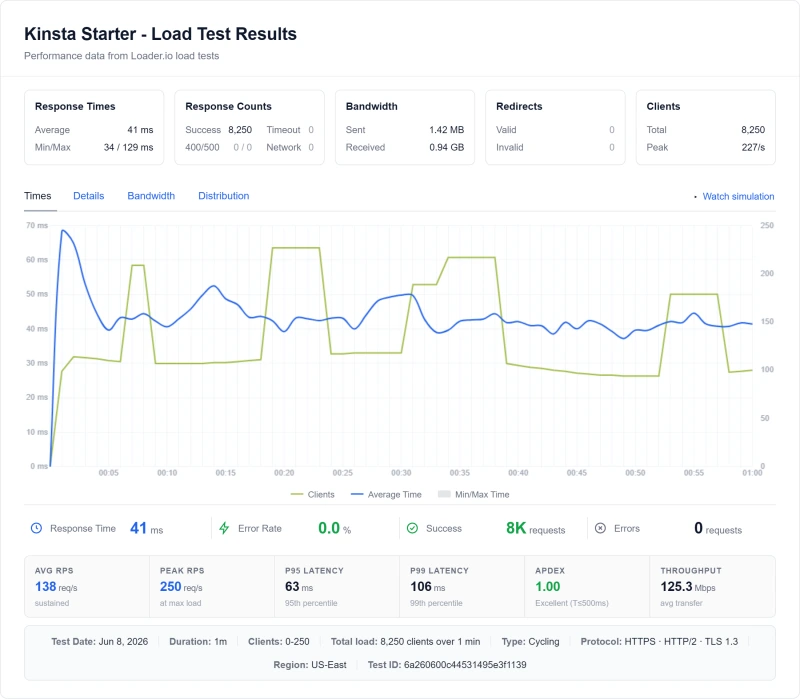
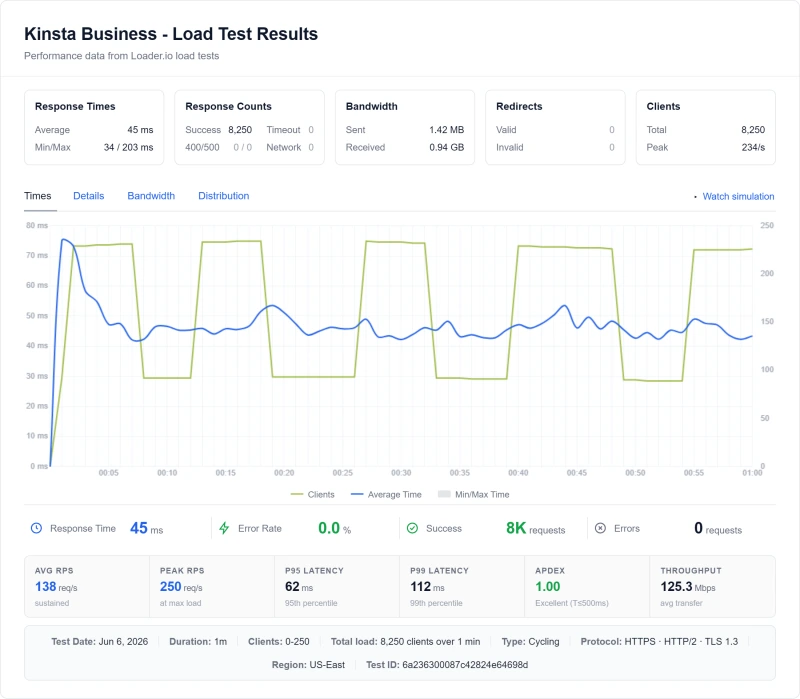
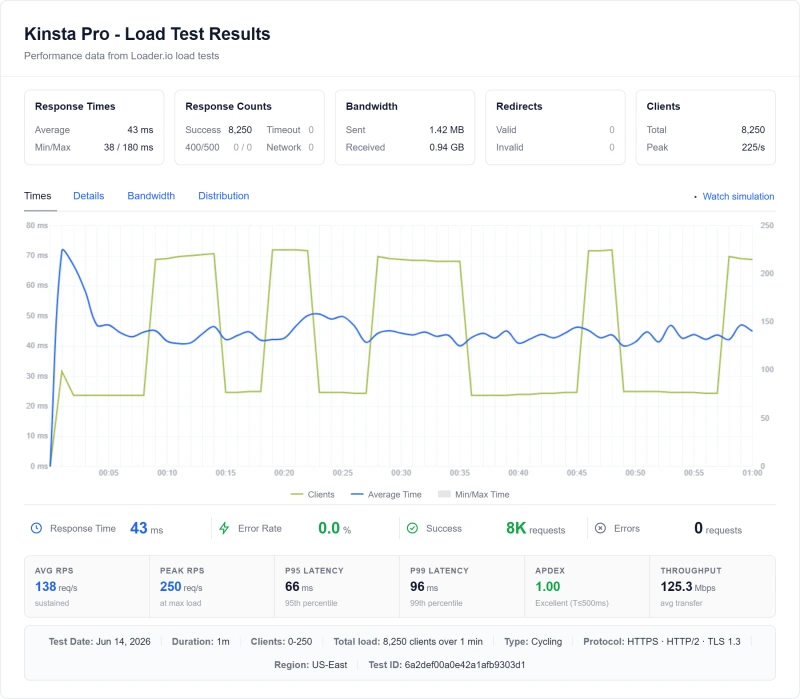
Idle TTFB is easy. The real test is what happens when real traffic hits simultaneously. Our load run ramps 0-250 concurrent clients over 60 seconds from US-East (8,250 requests, 0 failed on Kinsta). We have one measured point at 100 concurrent users per plan; we did not measure 10, 25, 50, 250 or 500 users, so none is shown.
SiteGround and Hostinger servers sat in Frankfurt, so their idle New York figure includes the ocean crossing; their 100-user figure is the average response during the same US-East load run.
⚠️ What the Numbers Say, and What They Don't
From idle to 100 concurrent users Kinsta went from 64ms to 92ms (about 44% more), ScalaHosting Entry Cloud from 38ms to 58ms (about 53% more). ScalaHosting was faster at both points; Kinsta's proportional climb was the smaller. Both had no errors. We did not isolate a cause: an earlier edition blamed PHP worker limits, but we have no worker-level measurement, so that explanation is gone.
The practical implication: on a plain test site, both held up under a 250-client ramp with no errors. If your site makes many simultaneous uncached requests (WooCommerce checkout, logged-in members), measure your own pages on a trial before you size a plan, and ask Kinsta support what your plan allows in PHP workers.
CPU Throttling Behavior Under Sustained Load
We did not run a sustained-CPU or throttling test on Kinsta, so we make no claim about how it behaves at 80% CPU for long stretches. What we have is the load run described above, and the CPU model from our CPU record.
What We Measured Under Load
- Average response over the ramp: 44ms (95th percentile 78.55ms), 8,250 requests, 0 failed
- CPU model (our CPU record): AMD EPYC 7502, PassMark multithread 51,871, rank #248 of 5,999
- Not tested: CPU steal, burst credits or throttling behavior
ScalaHosting's chip scores about 2x Kinsta's on PassMark multithread. A CPU score is not a site-speed result, and we did not test whether the CPU was the limit on either host. For a single low-to-medium traffic WordPress site inside the 20GB origin allowance, both responded well on our benchmark; the gap only matters if you measure your own busy pages and find the server is the limit.
Uptime: 54-Day Monitoring Window
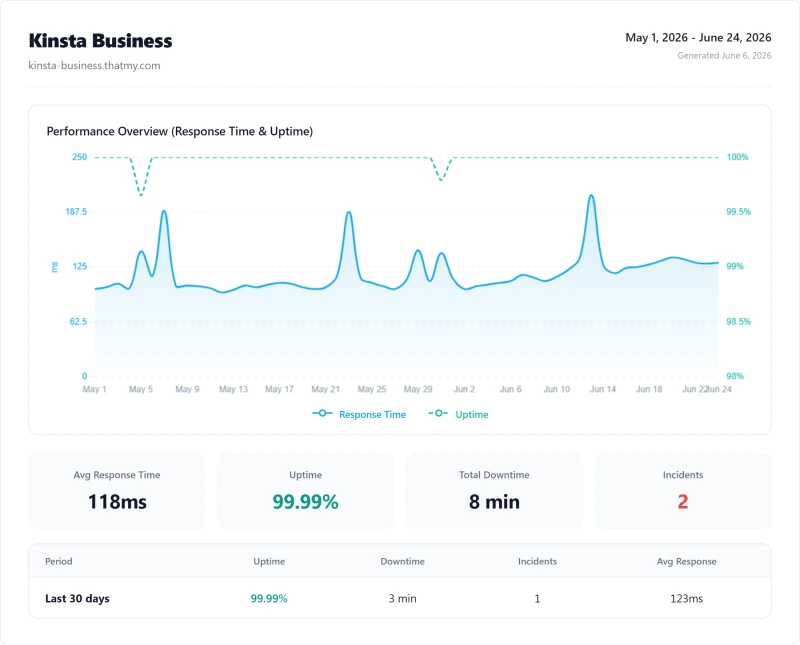
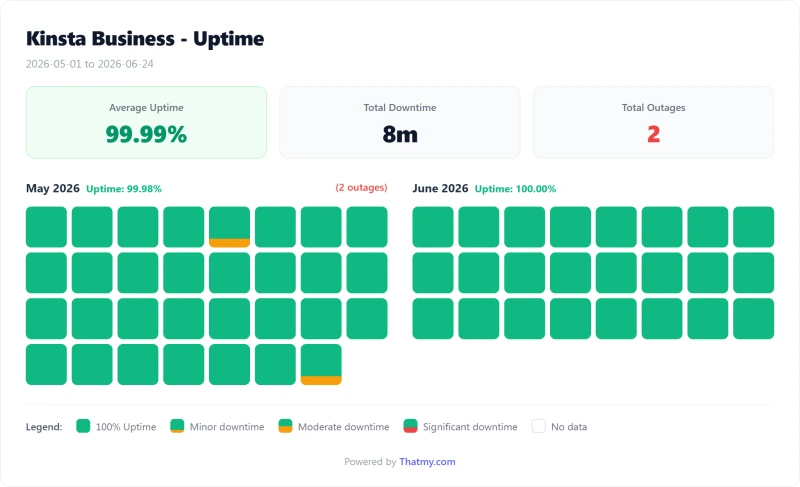
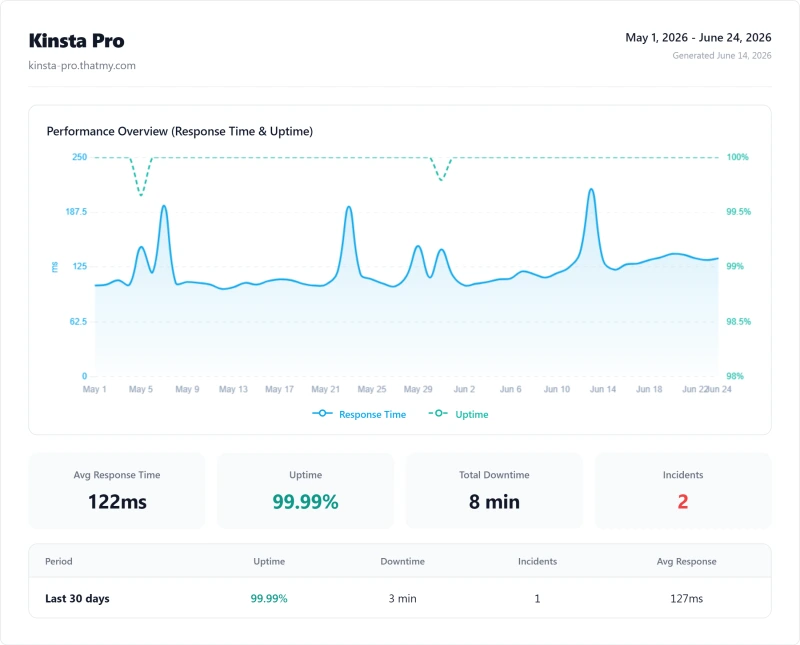
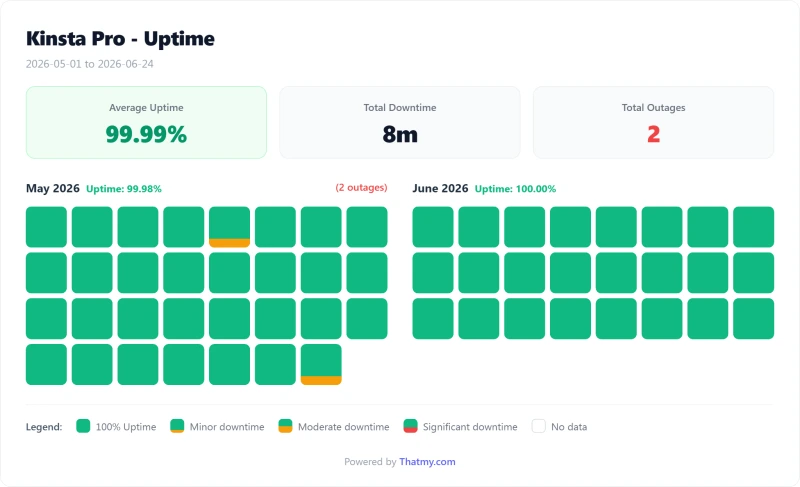
Kinsta recorded 99.99% over a 54-day window. Against ScalaHosting and Cloudways Vultr HF it is a tie: all three recorded 8 minutes of downtime across 2 incidents in the same window. A 54-day window is short; it does not tell you what a full year looks like.
Kinsta's 99.9% SLA guarantee was met in our window. Compensation for downtime below the SLA is service credits, not money (details below).
What Kinsta's SLA Actually Promises
Kinsta's legal SLA sets the guarantee at 99.9%, unless a customer's order form sets a higher figure. That is the number for every standard plan, even though the pricing table ticks Up to 99.99% on each one.
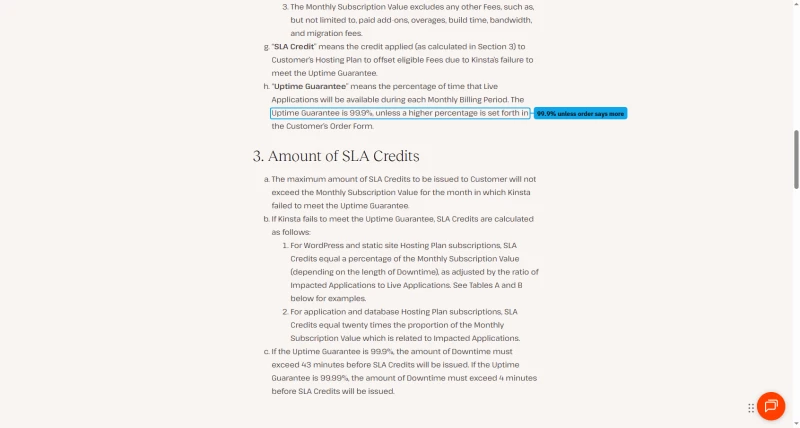
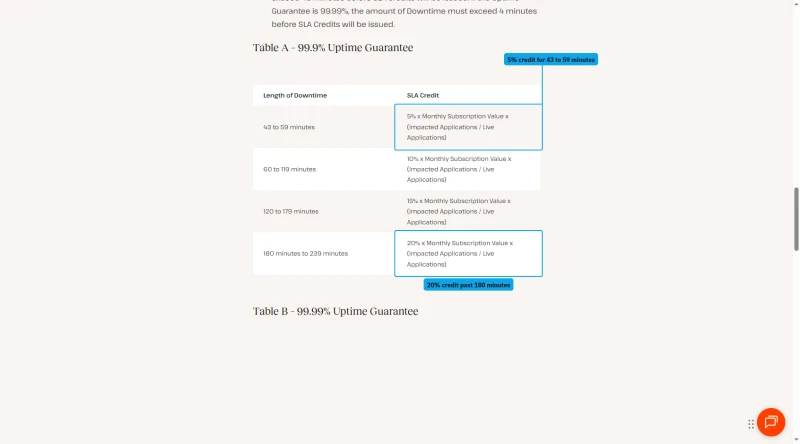
Below 99.9% you get credits, not money. They run from 5% of the monthly fee for 43 to 59 minutes of downtime to 20% for 180 to 239 minutes, scaled by the share of your applications that were down.
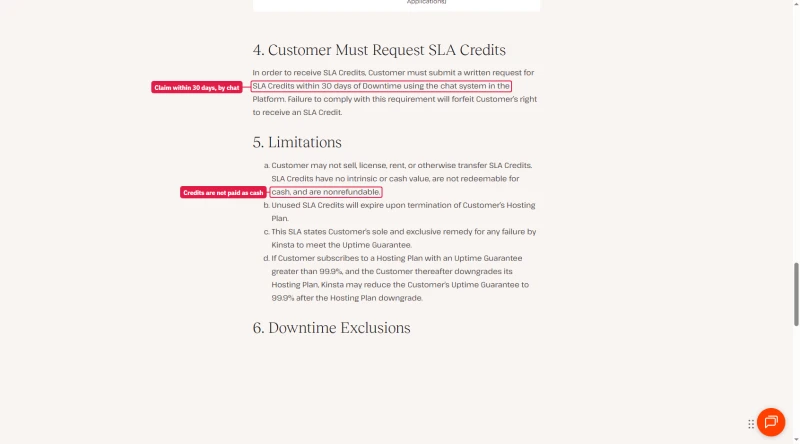
You have to claim them in writing through the MyKinsta chat within 30 days of the downtime, or the credit is lost. Credits have no cash value and expire if you leave.
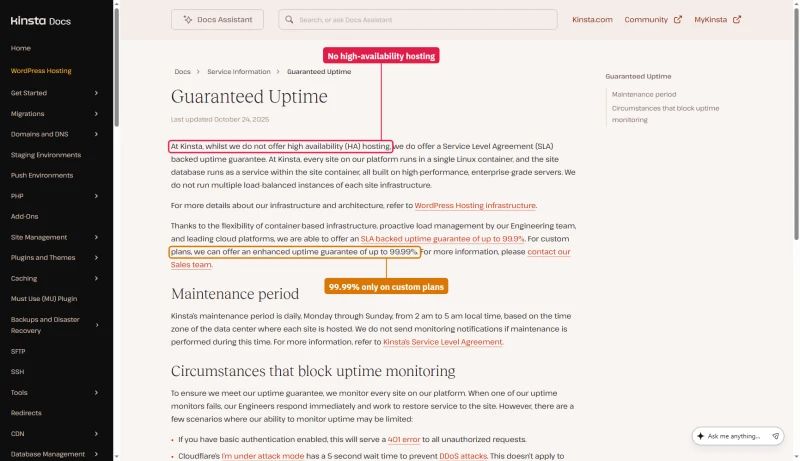
Kinsta's uptime doc fills in the rest: Kinsta does not offer high availability hosting, each site runs in a single container, and the higher guarantee of up to 99.99% is for custom plans.
Bandwidth Limits, What 20GB/mo Actually Means
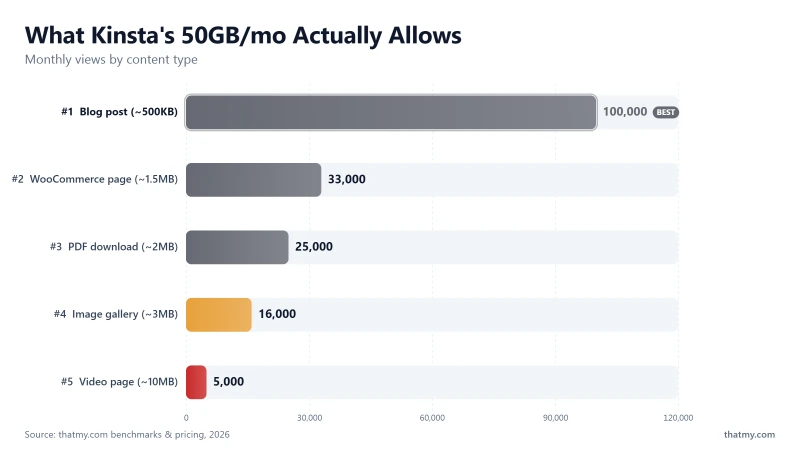
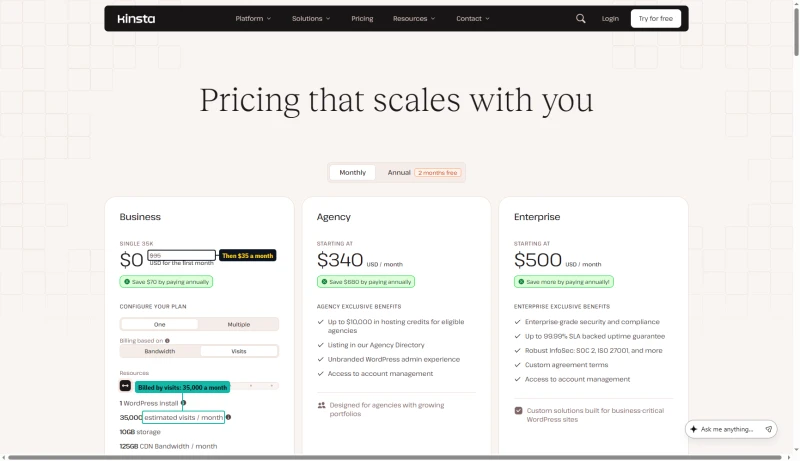
Bandwidth is now the meter that matters. Kinsta rebuilt its plans around it in 2026, and the entry plan, Single 20GB, includes exactly what its name says: 20GB/mo of server bandwidth, plus a far larger 125GB CDN allowance. Most requests should be served by the CDN. The 20GB is what your origin has to carry, and it goes further down than the old 50GB did.
The same plans can be metered by visits instead. Flip the pricing page to Visits and the $35 plan becomes Single 35k, with 35,000 visits a month in place of the 20GB.
Who hits the 20GB limit:
- Sites with video content (even short videos, 10MB per page view)
- WooCommerce stores with many product images (image-heavy product pages)
- Sites with downloadable files (PDFs, software, media)
- High-traffic blogs with image-heavy posts
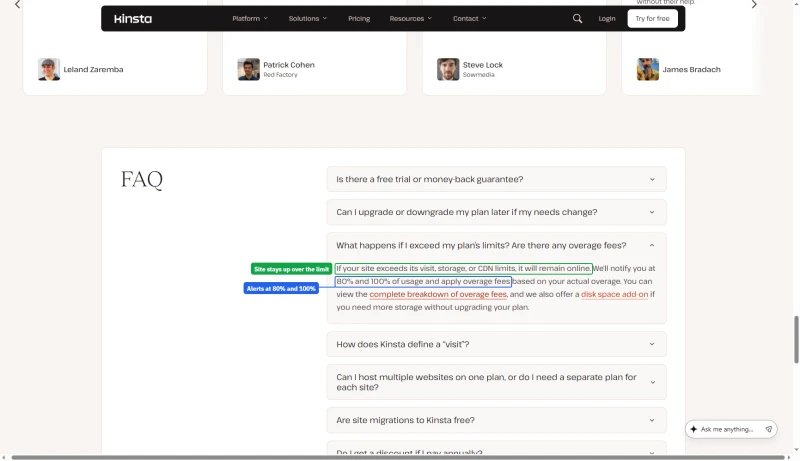
Kinsta bills for what you use beyond the allowance. Its Overages doc lists the rates: $0.50 per GB of server bandwidth, $0.50 per 1,000 visits on a visits plan, $2 per GB of disk a month and $0.05 per GB of CDN bandwidth. Going over does not take the site down: the pricing FAQ says it stays online, and Kinsta emails you at 80% and 100% of the limit.
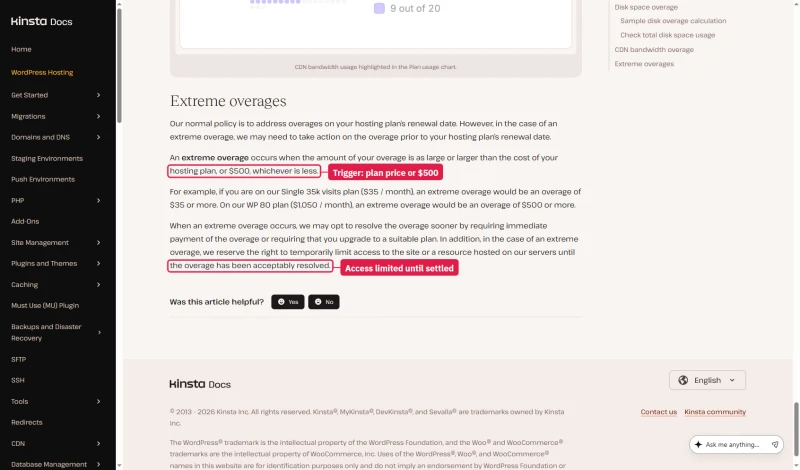
A very large overage is handled differently. Kinsta calls an overage extreme when it reaches the plan's own price or $500, whichever is less, so $35 on the entry plan. Then it may ask for the overage before the renewal date or require an upgrade, and it keeps the right to limit access to the site until the bill is settled.
Size the plan to your real origin traffic rather than to the headline price.
Alternative: a server plan such as Cloudways comes with a much larger fixed allowance (1TB on the DigitalOcean 1GB plan, per our price record), and ScalaHosting advertises no bandwidth meter on its plans; check each plan's terms. If your site has video content or downloadable files, the bandwidth limit is a significant potential cost on Kinsta.
Managed Hosting Does NOT Mean They Fix Your Site
This is the most common Kinsta buyer misconception, and the one that causes the most post-purchase disappointment. "Managed WordPress hosting" sounds like Kinsta manages your WordPress. They don't. They manage the server that runs your WordPress.
✅ What Kinsta's Support WILL Help With:
- Server-level performance issues
- PHP version changes
- SSL certificate problems
- Nginx configuration questions
- Backup restoration
- Migration assistance (free migrations by Kinsta's team)
- Kinsta-specific features (MyKinsta, staging, APM)
- Redis configuration
❌ What Kinsta's Support WILL NOT Do:
- Debug your plugin conflicts
- Fix your slow WooCommerce queries
- Troubleshoot your custom theme errors
- Optimize your database
- Fix your broken page builder layouts
- Configure your email marketing integrations
- Resolve third-party API issues
Example: A WooCommerce store migrates to Kinsta expecting "managed WordPress." Their checkout is slow. Kinsta's support confirms the server is performing correctly. The issue is a poorly coded payment gateway plugin making many external API calls on checkout. Kinsta can't fix that, it's your plugin. The APM tool (see the APM section) can point at the slow plugin, but fixing it is your responsibility. (This is an illustrative case, not one of our tests.)
This is the correct division of responsibility, Kinsta manages the infrastructure, you manage WordPress. But buyers need to understand this before purchasing. If you need someone to manage your WordPress application (plugins, themes, custom code), you need a WordPress development agency, not a managed host.
WooCommerce Performance, Edge Cache vs Origin
This is the most important section for WooCommerce buyers. Kinsta's Cloudflare edge cache is excellent, but it doesn't help where WooCommerce needs it most.
What Kinsta's Edge Cache Can and Cannot Cache
✅ Kinsta Edge Cache Works For:
- Homepage (cached)
- Blog posts (cached)
- Product listing pages (cached)
- Static product pages (cached)
- Category pages (cached)
❌ Kinsta Edge Cache CANNOT Cache:
- WooCommerce cart page (dynamic per-user)
- WooCommerce checkout page (dynamic per-user)
- Order confirmation page (dynamic)
- My Account pages (logged-in users)
- Any page with personalized content
What We Have Not Measured
We have no WooCommerce checkout or cart measurement for Kinsta or any host in this table, so we give no checkout time and no revenue estimate. The table above is the closest we have: origin speed under load on a plain test site.
Reading the table: ScalaHosting answered fastest at idle and at 100 users in this table, Kinsta was ahead of SiteGround by a wide margin, and every host except SiteGround had no errors in the load run. We did not isolate why.
Recommendation: For a store with many simultaneous checkouts, test your own checkout on a trial and ask each host about PHP workers. For stores with mostly static browsing, Kinsta's edge cache makes it competitive on product pages and listings.
PHP Workers: The Hidden Concurrency Bottleneck
PHP workers cap how many uncached PHP requests a site can process at the same moment. Kinsta no longer publishes a per-plan worker count we can verify, and we have no measurement of it, so this section explains the concept rather than quoting a number. Ask Kinsta support what your plan allows before you plan for heavy uncached traffic.
What Happens When Workers Are Exhausted
- On any plan with N workers, request N+1 arrives while all N are busy
- It queues until a worker frees up
- TTFB for that request = worker wait time + processing time
- Cached pages never reach PHP, so a queue builds only on uncached requests (checkout, cart, logged-in pages)
⚠️ We Did Not Measure This
Earlier editions tied a worker count to a load-test result. We have no worker-level test, so that link is removed. Our load run showed Kinsta at 92ms with 100 concurrent users and no errors, on a plain test site.
Kinsta's route to more capacity: move up the ladder. After the 2026 restructure that means WP 2 at $700/yr or the Agency tier from $3,400/yr, against $350/yr for the entry plan. A server plan such as ScalaHosting Entry Cloud ($14.95/mo on a 12-month term, renewing at $39.95/mo) is a different shape of product, so compare worker and resource limits in writing before you buy either.
MyKinsta Dashboard & Developer Experience
MyKinsta is genuinely excellent. This is Kinsta's strongest differentiator, and the primary reason to choose Kinsta over ScalaHosting or Cloudways for single high-value sites.

MyKinsta Feature Set
- Site overview: Traffic, bandwidth, PHP workers, cache hit rate, all in one view
- One-click staging environment: Push to live with one click, database sync included
- Git and CI/CD: docs for GitHub Actions, GitLab CI/CD and Bitbucket Pipelines; Kinsta does not offer push-to-deploy
- SSH access: All plans, full SSH access
- WP-CLI access: Run WP-CLI commands from the dashboard or SSH
- PHP version switching: One click, no server restart required
- Redis object cache: One click enable, no configuration required
- APM tool: Built-in, no New Relic required (see Section 14)
- Automatic daily backups: kept 14 days on most plans and up to 30 on the largest, restore to any point
- Search & Replace tool: Database URL updates without plugins
- Redirect manager: No plugin required
- IP blocking: Block IPs from the dashboard
- CDN management: Cloudflare Enterprise, toggle from dashboard
- Team access: Role-based permissions, granular control
- Activity log: Full audit trail, who did what, when
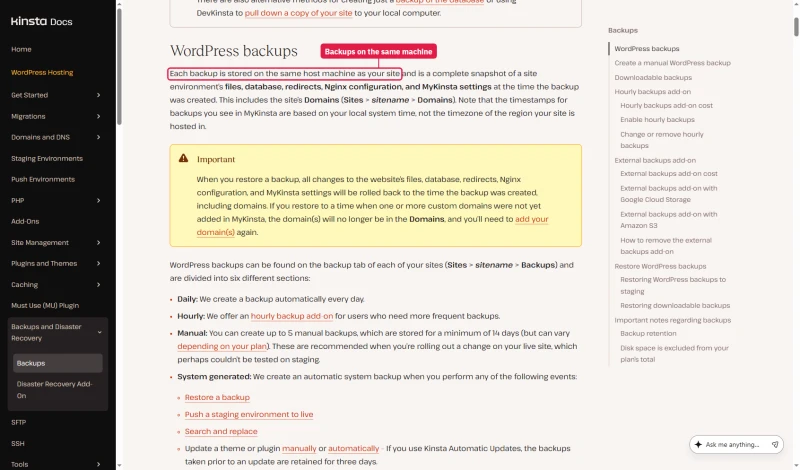
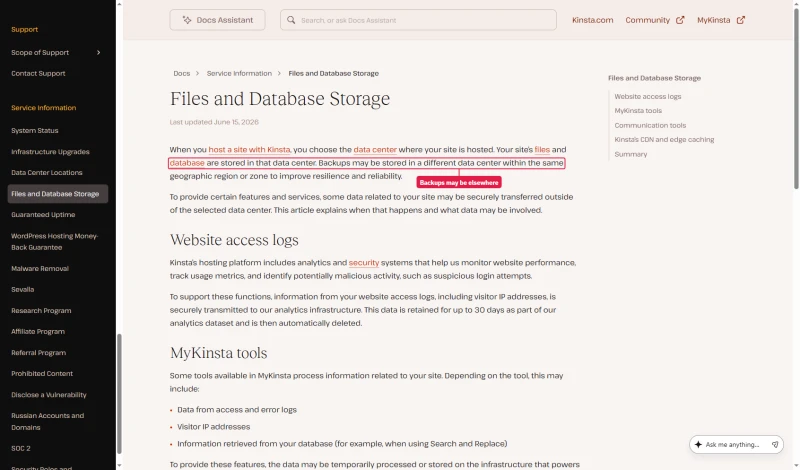
Where those backups live depends on which Kinsta doc you read. The backups doc says each backup is stored on the same host machine as your site. The newer files and database storage doc says backups may be stored in a different data center in the same region. Until Kinsta settles it, treat the daily backups as protection against your own mistakes, not against losing the server, and look at the $2 a site external backups add-on if you want copies off Kinsta.
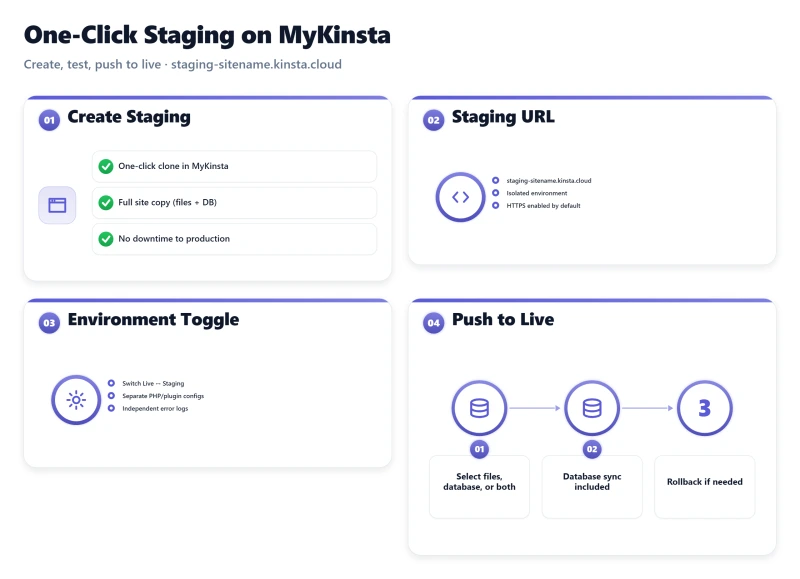
My take: MyKinsta is the best managed WordPress dashboard tested. The built-in APM tool, redirect manager, and Search & Replace tool are features that competitors charge extra for or don't offer at all. If you value developer tooling and don't need cloud provider flexibility or email hosting, MyKinsta is worth the premium.
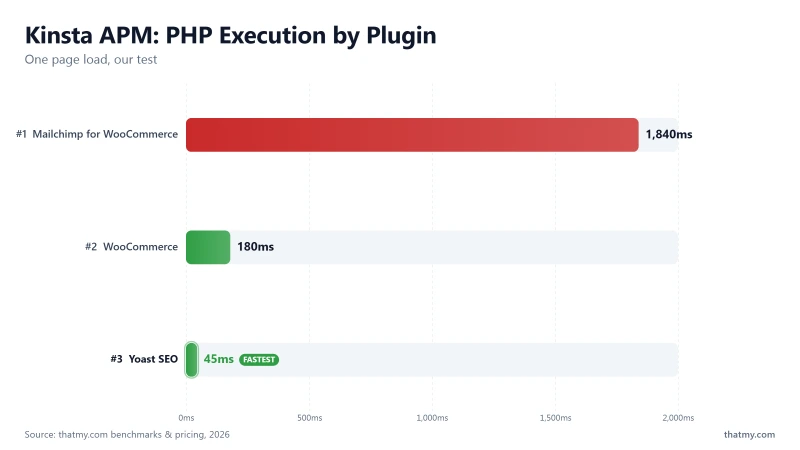
Kinsta APM Tool, Identify Slow Plugins Without New Relic
Kinsta's APM tool is a genuine differentiator: it is built in and listed as included on every plan, with no separate APM subscription to buy.
What the APM Tool Shows
- PHP execution time breakdown by function and plugin
- Slow database queries with query text and execution time
- External HTTP requests, slow API calls identified by URL
- WordPress hooks execution time, which hooks are slow
- Plugin-specific performance impact, which plugin is causing the slowdown
Example Use Case (Illustrative, Not a Test)
Suppose a WooCommerce store feels slow. Without APM you would spend hours guessing. With Kinsta's APM tool you enable it, reproduce the slow page, and read the breakdown by plugin, hook, database query and external call. If one plugin's external API call dominates, the fix is to change that plugin's settings or replace it. We have not recorded a case like this on a Kinsta site; this shows how the tool is meant to be used.
⚠️ APM Tool Limitation
APM is switched on for a chosen time frame rather than running all the time: you enable it, reproduce the slow behavior, then analyze the data. It's not a replacement for full-time monitoring tools (New Relic, Datadog) on high-traffic sites, but for diagnosing specific performance issues, it's useful and can save the cost of a dedicated APM service.
Kinsta Pricing, True Cost Breakdown
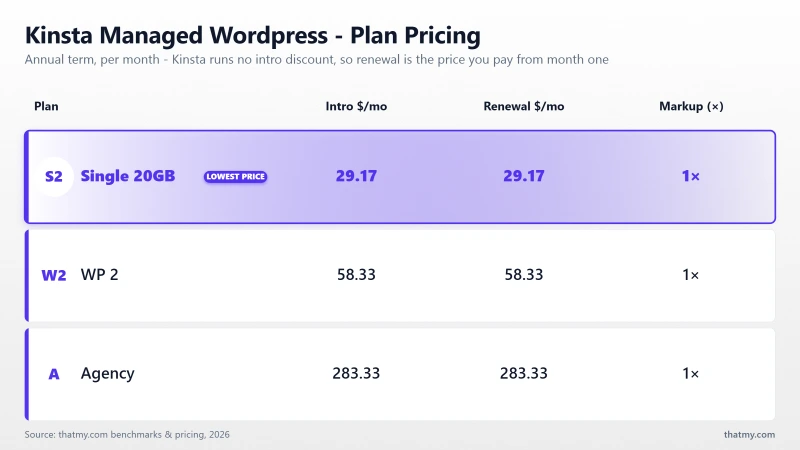
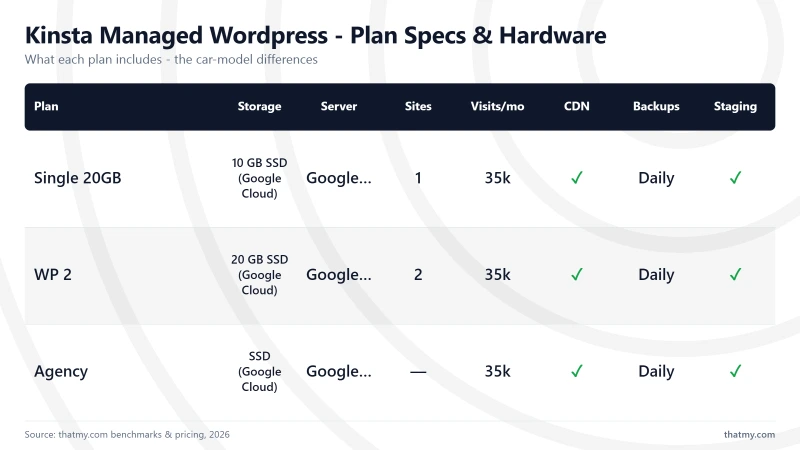
Kinsta prices a tier once and then lets you choose how it is measured. Every plan below can be metered either by server bandwidth or by monthly visits, at the same price. That is why you will see the $35 plan called "Single 20GB" in one place and "Single 35k" in another: it is one plan, two meters. I quote the bandwidth figure throughout this review, because that is the meter I ran the tests on.
Annual billing is two months free, which is where the effective monthly rate comes from: $35 × 12 is $420, Kinsta charges $350, and the $70 difference is those two months. Worth knowing before you compare: Kinsta's own annual toggle displays a rounded $30/mo, not $29.17. The $350 annual figure is the one that needs no rounding.
The pricing page opens on annual billing. There the entry plan shows $0 for the first month and a rounded $30 a month, which is $350 charged when the free month ends.
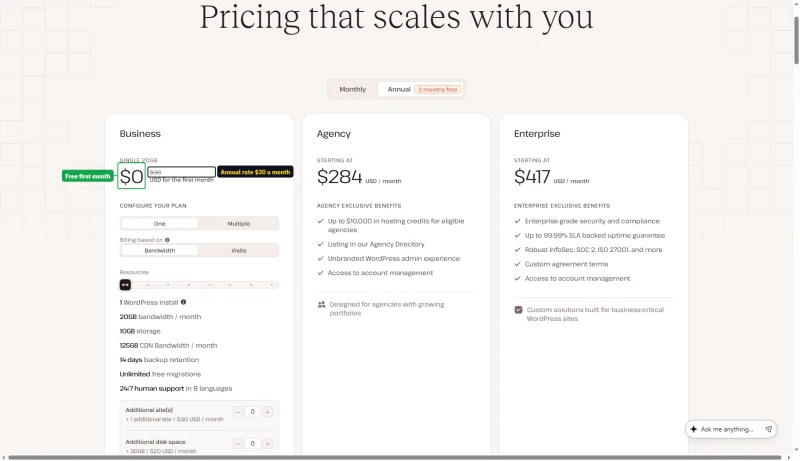
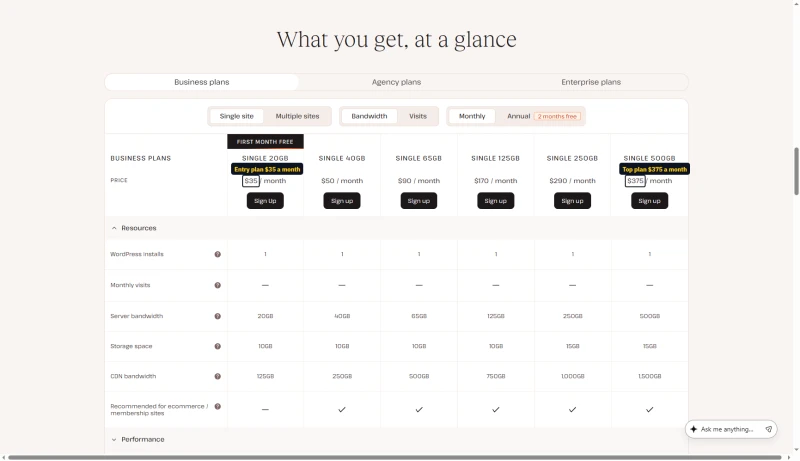
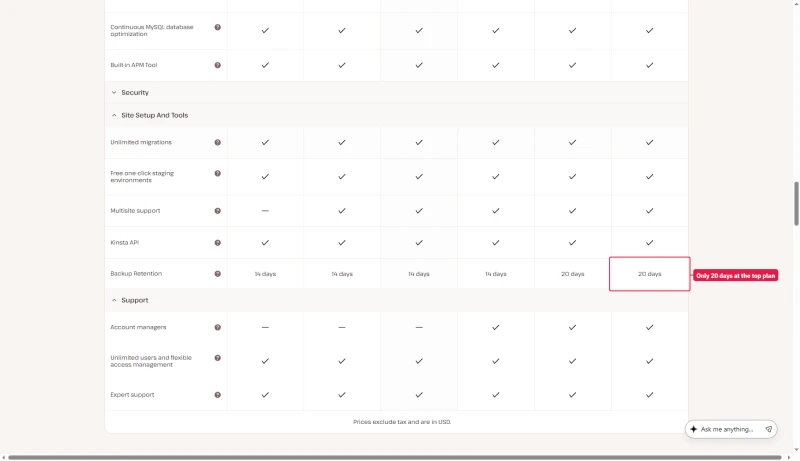
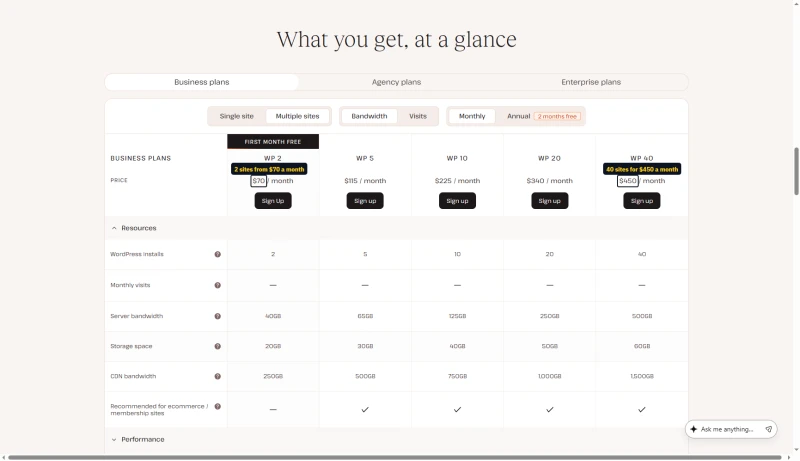
Every single-site plan carries one WordPress install. Backups are kept 14 days on the first four sizes, 20 days on Single 250GB and 30 days on Single 500GB. Note what does not scale: storage stays at 10GB through the $170 tier and only reaches 15GB at $290. If your problem is disk rather than traffic, moving up these tiers is an expensive way to solve it, and the $20/mo disk add-on below is cheaper.
One exception to one plan, two meters: at $375, Single 500GB keeps backups for 30 days, while the visits version at the same price, Single 750k, keeps them for 20.
Multiple sites, the WP series
Agency plans
None of the three Agency sizes has a sign-up button: each one says Talk to sales.
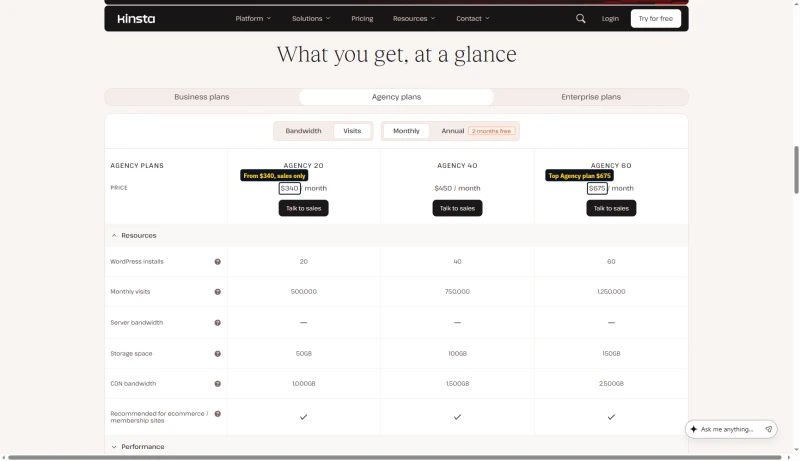
Compare Agency 20 with WP 20 and they are the same price and the same allocation. What you pay for on the Agency tier is tooling rather than capacity: site transfers, cloning, white-labelling, an unbranded wp-admin, a listing in Kinsta's agency directory, and 30 days of backup retention instead of 14 to 20. Agency 40 is the first tier where the resources actually differ, at 100GB of storage against WP 40's 60GB for the same $450.
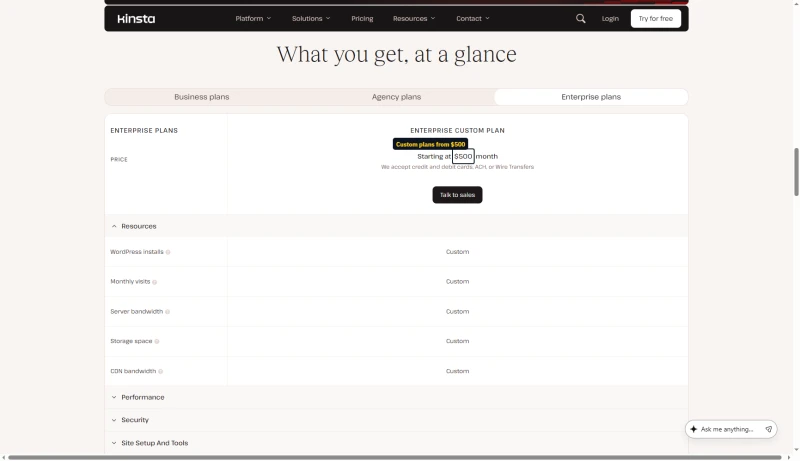
Above these sits Enterprise, from $500/mo, on custom allocations with dedicated virtual machines, an uptime guarantee of up to 99.99% set in the order form, and SOC 2 Type II / ISO 27001 attestations. Kinsta takes cards, ACH or wire transfers for it, and every resource row in its table says Custom, so I have not modelled it and cannot quote a per-resource price.
True Cost for Agencies (10 Sites)
What's Included at No Extra Cost
Two entries on this list used to be wrong on this page. Migrations are unlimited, not one per plan, and backup retention is not a flat two weeks: Kinsta's table shows 14 days on most plans, 20 days on Single 250GB and 30 days on Single 500GB, and 30 days on Agency.
- Free SSL with wildcard support
- Managed WAF and DDoS protection, through the Cloudflare integration
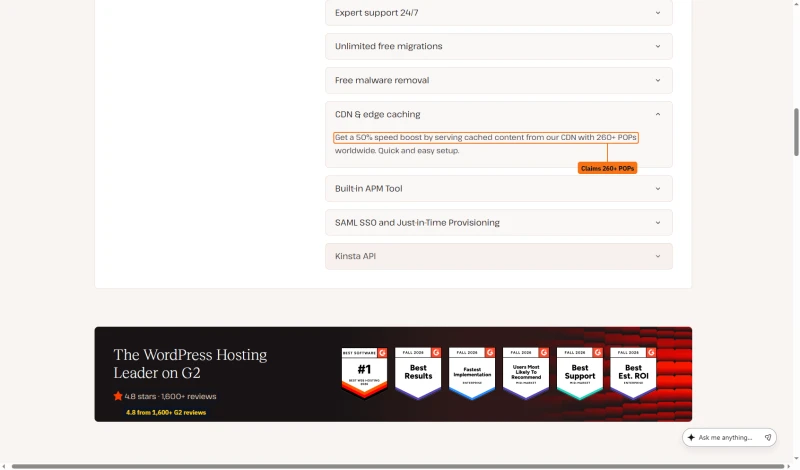
- CDN and edge caching across 260+ points of presence
- Daily backups, kept 14 days on most plans and up to 30 on the largest (30 days on Agency)
- Unlimited free WordPress migrations, run by Kinsta's own team
- Free malware removal
- The APM tool, which is the feature I would actually miss
- One-click staging environments
- Automated MySQL optimisation and bot protection
- Unlimited users, SAML SSO and just-in-time provisioning
- The Kinsta API, for managing sites programmatically
- 24/7 support in 8 languages
The backup row and the account manager row are where the sizes differ most. This table ticks account managers from Single 125GB up; Kinsta's support docs put meetings with one at Single 250GB, WP 10 or Lead and up (more in the support section).
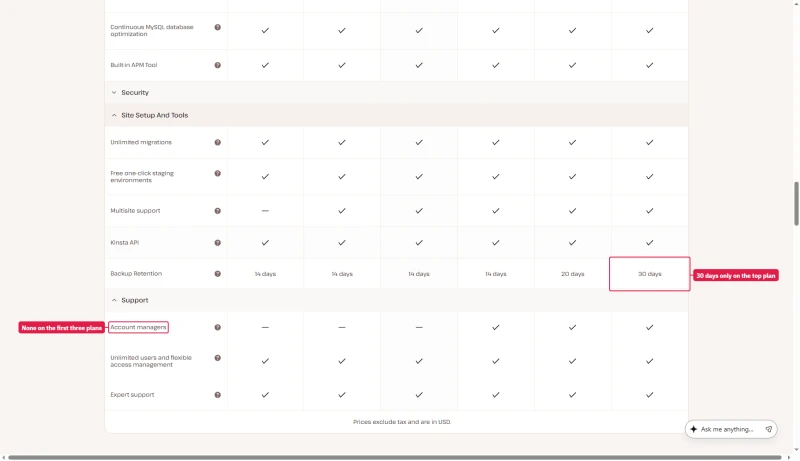
The CDN line comes from the same page, which also shows Kinsta's G2 rating: 4.8 stars from 1,600+ reviews. Kinsta's edge caching page says 300+ locations, so read 260+ as the pricing page's own figure.
What's NOT Included
- Email hosting at all (add Google Workspace at $6/mo per user)
- Redis object caching, which is $100/site/mo as an add-on
- Additional PHP workers beyond the plan limit
- Backups more often than daily
Add-ons, and the two that change the maths
You can buy capacity a la carte rather than jumping a tier, which sometimes beats upgrading and sometimes does not. Prices as Kinsta's pricing page lists them.
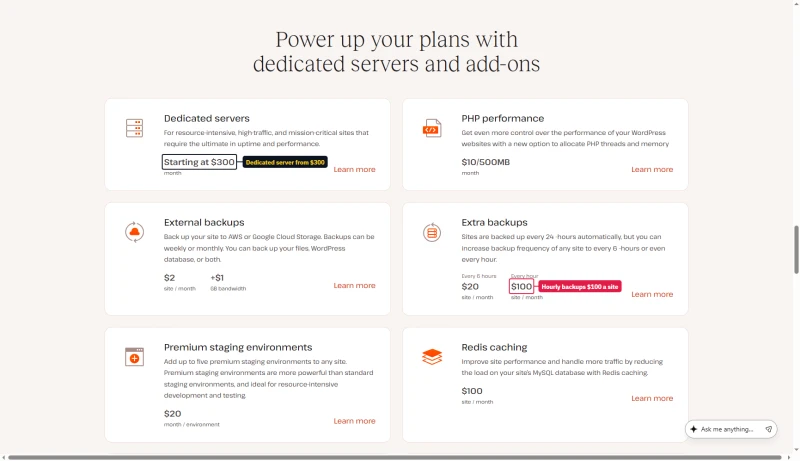
Two of these change how you should read the plan table. Extra disk at $20/mo adds 20GB, while moving from the $35 tier to the $290 tier adds only 5GB of storage: if disk is your constraint, the add-on is the cheaper answer by a wide margin. And an extra site at $30/mo is within a rounding error of a whole second Single plan at $35, so the add-on only makes sense when the second site shares the first one's traffic allowance rather than needing its own.
The one to watch is Redis at $100/site/mo. On a database-heavy WooCommerce build that is nearly three times the entry plan price.
Kinsta's Pricing Model: The Good News
Kinsta uses flat pricing, no intro/renewal gap. The price you see is the price you pay next year. This is a genuine advantage over hosts whose intro price jumps at renewal: ScalaHosting Entry Cloud is $14.95/mo on a 12-month term and renews at $39.95/mo. For long-term cost predictability, Kinsta's flat pricing is excellent. The caveat: the base price is already high, and visit/bandwidth overages add variable costs.
The Free First Month, and What the Cart Says
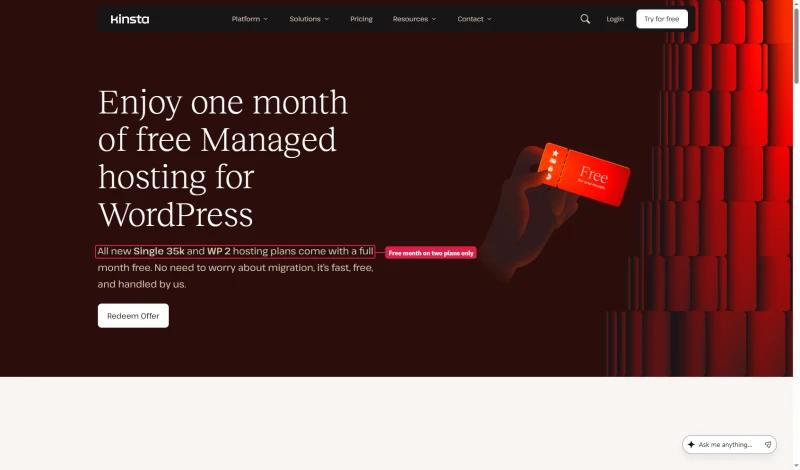
Single 20GB and WP 2 start with a month at $0, on monthly and on annual billing. You still enter a card at sign-up, and Kinsta places a temporary $1 hold to check it.
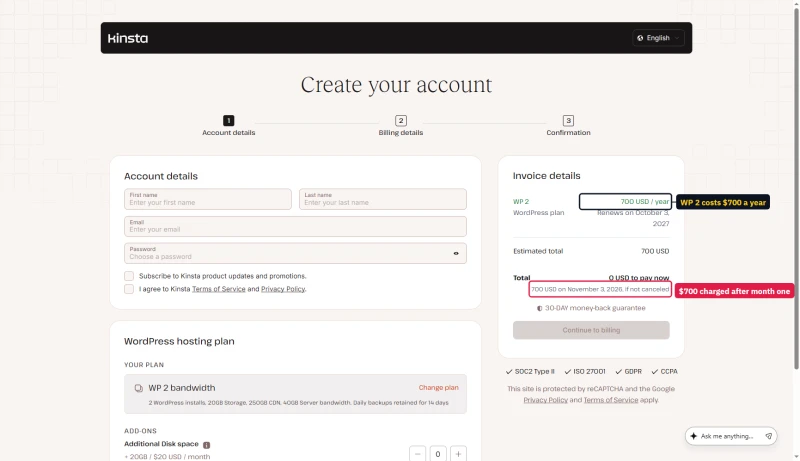
On annual billing the cart shows 0 USD to pay now and the full year charged when the free month ends: $700 for WP 2. It also prints a renewal date twelve months from sign-up, which falls a month before that first charge. The cart does not say whether the free month counts inside the paid year, so check the second-year date on your first invoice.
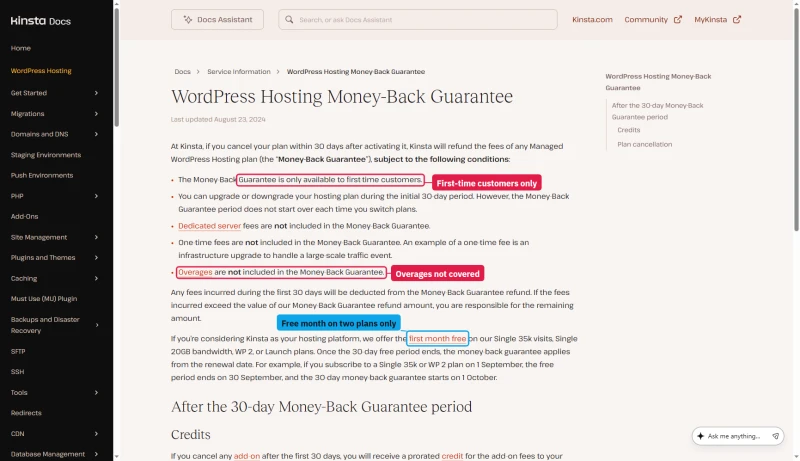
Which plans get the free month depends on the Kinsta page you read. The first-month-free page and the MyKinsta FAQ name only Single 35k and WP 2. The money-back doc adds Single 20GB and Launch, and the pricing table puts the badge on Single 20GB and WP 2. Single 20GB and Single 35k are the same plan on two meters, so the entry plan qualifies either way.
The 30-day money-back guarantee has conditions. It is for first-time customers only, and it does not cover dedicated servers, one-time fees or overages. On a free-month plan the 30 days start at the renewal date, when the free month ends, not at sign-up.
A Second Lineup Kinsta Is Testing
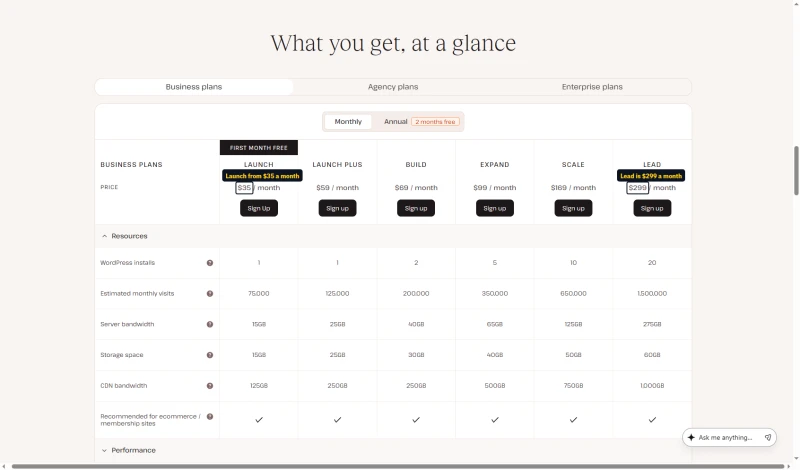
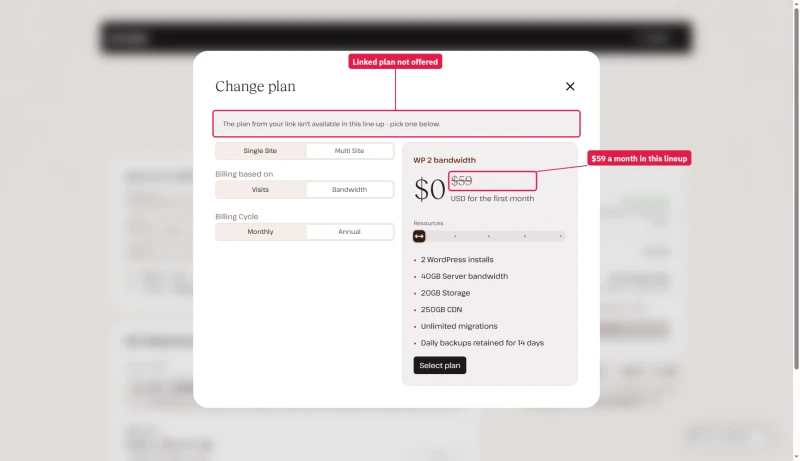
Some visitors see a different pricing table: Launch, Launch Plus, Build, Expand, Scale and Lead, at $35, $59, $69, $99, $169 and $299 a month. It is an A/B test on the pricing page. When we opened the Sign up links for Launch and Build, the cart said the plan from the link is not available in this line-up and offered WP 2 instead. This review prices the lineup the cart sells.
Kinsta Discount, Save on Annual Plans
💰 Annual Billing: Two Months Free
Pay annually and get 2 months free, equivalent to 17% off. Kinsta doesn't offer coupon codes, but their annual billing discount provides significant savings.
17% Effective Discount | No coupon code required
Additional Ways to Save on Kinsta
- Free migrations: unlimited, run by Kinsta's own team. The first-month-free page also offers an expedited migration for $49.
⚠️ Kinsta Pricing Reality Check
Even with 2 months free, Kinsta Single 20GB costs $350/yr, and it stays there. ScalaHosting Entry Cloud costs $179 for the first 12 months ($14.95/mo) and $479 a year at its $39.95/mo renewal rate. In year one Scala is far cheaper; from year two the gap narrows sharply. Kinsta's value is in premium managed features, not price competitiveness. For budget-conscious users, ScalaHosting or ChemiCloud offer better value.
Support: Chat Only, What Kinsta Documents

Kinsta describes its support as WordPress-specific: engineers rather than tiered agents, with scope limits that exclude custom code and third-party plugin bugs. We did not run a timed support test, so this edition gives no response times and no quality score from tests; an earlier edition printed six timed interactions that we have no record of, and they are gone.
Chat Only, and Who Gets an Account Manager
Kinsta has no phone support. Its docs say support runs around the clock through the chat in MyKinsta, for customers with a paid plan, and explain why it chose chat over phone.
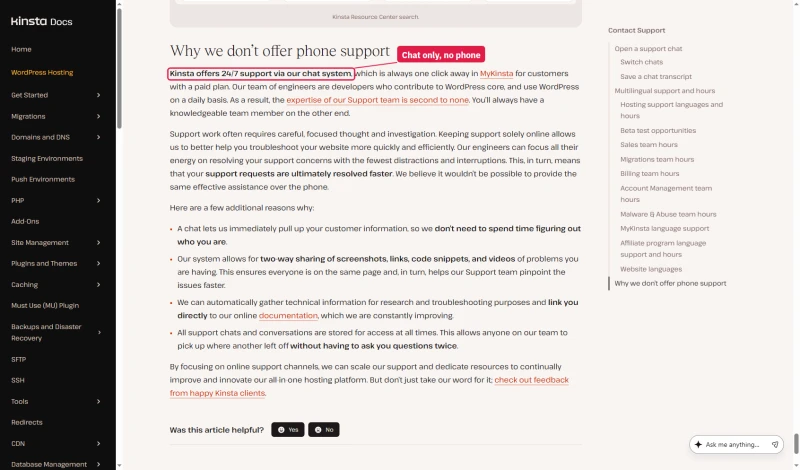
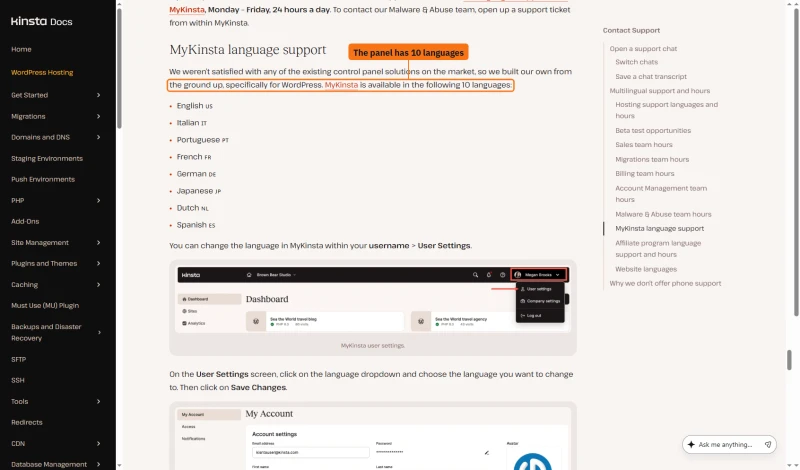
The same doc says MyKinsta is available in 10 languages, then lists eight: English, Italian, Portuguese, French, German, Japanese, Dutch and Spanish. Eight matches the pricing page and the MyKinsta FAQ.
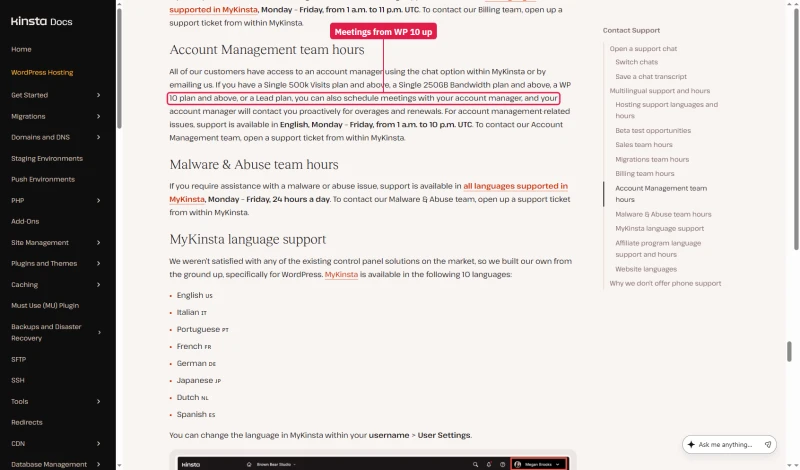
Everyone can reach the account management team by chat or email. Meetings with your account manager start at Single 500k visits, Single 250GB, WP 10 or Lead, in English, on weekdays in UTC hours. The pricing table ticks account managers from Single 125GB up, so ask which you get before you pay for it.
Kinsta vs ScalaHosting (Head-to-Head)

Where Scalahosting Wins Vs Kinsta
- No visit limits on the VPS plans
- Unlimited WordPress sites on one VPS, against $350/yr per site on Kinsta
- 38ms origin TTFB against Kinsta's 64ms, both from New York
- At 100 clients: 58ms against Kinsta's 92ms
- SPanel included free
- Anytime money-back guarantee
Where Kinsta Wins
- A managed VPS, not a managed WordPress platform: you still handle some of the WordPress side
- Renewal is $39.95/mo after the intro term
- MyKinsta is more polished than SPanel
- Kinsta's support is specialised in WordPress
Our Benchmark Records
- Origin TTFB (Managed VPS, no CDN): 38ms
- Uptime (54-day window): 99.99%
- Load at 100 clients: 58ms

$29.95/mo
Anytime Money-Back Guarantee
✅ Choose Kinsta When:
- Single high-value WordPress site
- You need the APM tool and best-in-class staging
- Origin bandwidth is predictable and fits inside 20GB/mo
- You value WordPress-specific support over price
- Flat renewal pricing matters for budget predictability
✅ Choose ScalaHosting When:
- Multiple sites (agencies managing several sites)
- Uncached, busy traffic where the faster 100-user response matters
- Traffic is growing and you want no metered allowance to watch
- You need email hosting included
- You want the faster response under load on our benchmark
Kinsta vs Cloudways (Head-to-Head)
My take: Cloudways wins on price and flexibility. Kinsta wins on managed features (APM, staging quality, WordPress support). For agencies managing many sites, a Cloudways server costs a fraction of Kinsta's Agency tier (from $3,400/yr). For single sites where managed features justify the premium, Kinsta is the better choice. Both lack email hosting; add a separate email provider on either platform.
The key differentiator: Cloudways gives you 5 cloud providers and pay-as-you-go billing. Kinsta gives you the best managed WordPress tooling (APM, redirect manager, Search & Replace) and WordPress-specific support. If you're a developer who wants cloud flexibility, Cloudways. If you want the best managed WordPress experience for a single site, Kinsta.
Kinsta vs WP Engine (Head-to-Head)
My take: Kinsta was faster on our benchmark (64ms vs 242ms origin TTFB from New York, WP Engine Startup plan). On price, WP Engine's first year is cheaper on annual billing, $336.00 against $350, but WP Engine renews at $420.00 a year while Kinsta stays at $350, so from the second year Kinsta is the cheaper of the two.
Month to month, Kinsta is $35.00/mo and WP Engine $35.00/mo. They no longer meter the same way: Kinsta counts bandwidth (or visits, if you pick that meter) and charges $0.50 per GB or per 1,000 visits over the allowance, while WP Engine counts visits and charges $2 per 1,000. Compare against your own traffic shape, not against each other's headline.
Both hosts keep a list of plugins they do not allow (Kinsta's covers caching, non-incremental backup and related-posts plugins), so check your plugins against each list before moving. On our speed figures, Kinsta is the better choice between the two.
Who Should NOT Use Kinsta
❌ Agencies managing 10+ sites
A ScalaHosting Entry Cloud server ($14.95/mo on a 12-month term, renewing at $39.95/mo) or a Cloudways server (from $11.00/mo) hosts several sites for a fraction of Kinsta's Agency tier, quoted from $3,400/yr. Check each plan's site and resource limits first.
❌ WooCommerce stores with 10+ concurrent shoppers
Checkout, cart and My Account pages bypass the edge cache, and Kinsta publishes no per-plan PHP worker count we can verify. We have not measured a checkout on Kinsta; ScalaHosting was faster on our plain-site load run (58ms against 92ms at 100 users). Test your own checkout on a trial.
❌ Sites whose origin bandwidth will outgrow 20GB/mo
The entry plan carries 20GB of server bandwidth. A media-heavy site can spend that on a few thousand page views, and Kinsta bills for what you use beyond it. If your site is growing, work out your real origin traffic at your expected 12-month traffic before committing.
❌ Video-heavy sites
20GB/mo of server bandwidth on the entry plan. A site with video content can spend that on roughly 2,000 page views (assuming 10MB a view). Cloudways plans carry a far larger fixed allowance, and ScalaHosting advertises no meter; check each plan's terms.
❌ Budget users
ChemiCloud from $3.49/mo for small blogs. Kinsta's $350/yr is only justified when managed features (APM, staging, WordPress support) provide measurable value.
❌ Users who need email hosting
ScalaHosting advertises email hosting with its plans (check the terms). Kinsta requires a separate email provider, priced per user, on top of your Kinsta bill.
❌ Users who need cloud provider flexibility
Cloudways offers 5 cloud providers (Vultr, DigitalOcean, AWS, GCE, Linode). Kinsta picks its own cloud for you (Google Cloud when we tested, Oracle Cloud on the new platform). If your organization has existing cloud contracts or compliance requirements for a specific provider, Cloudways is the better choice.
Full Test Report: Kinsta Managed WordPress, by Plan
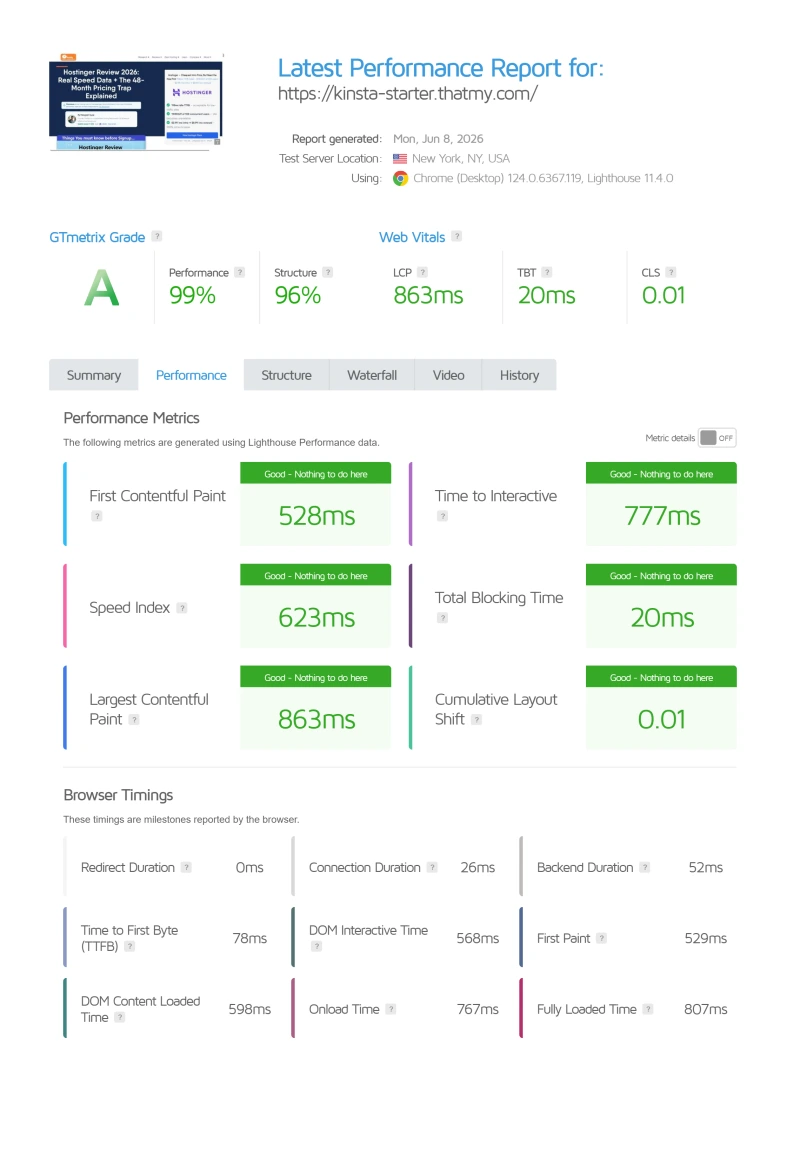
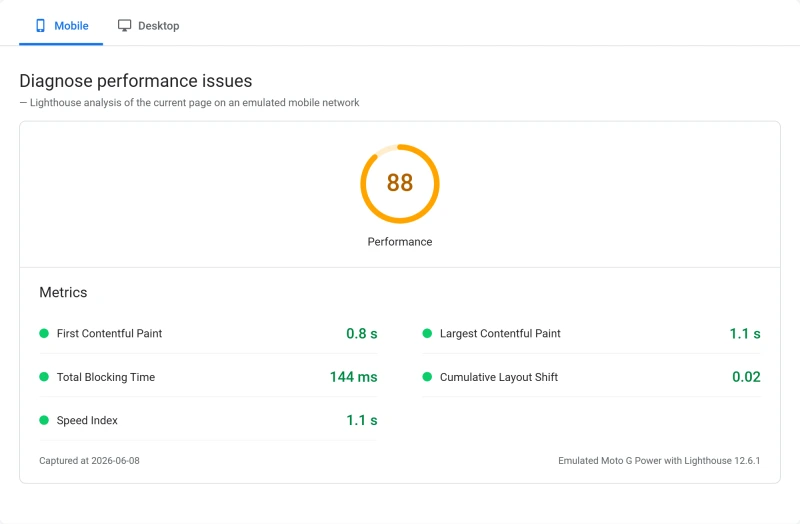
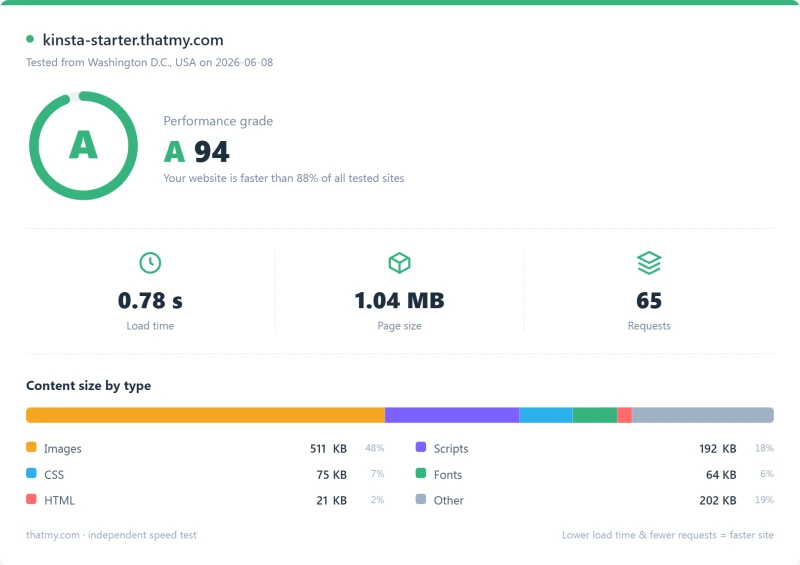
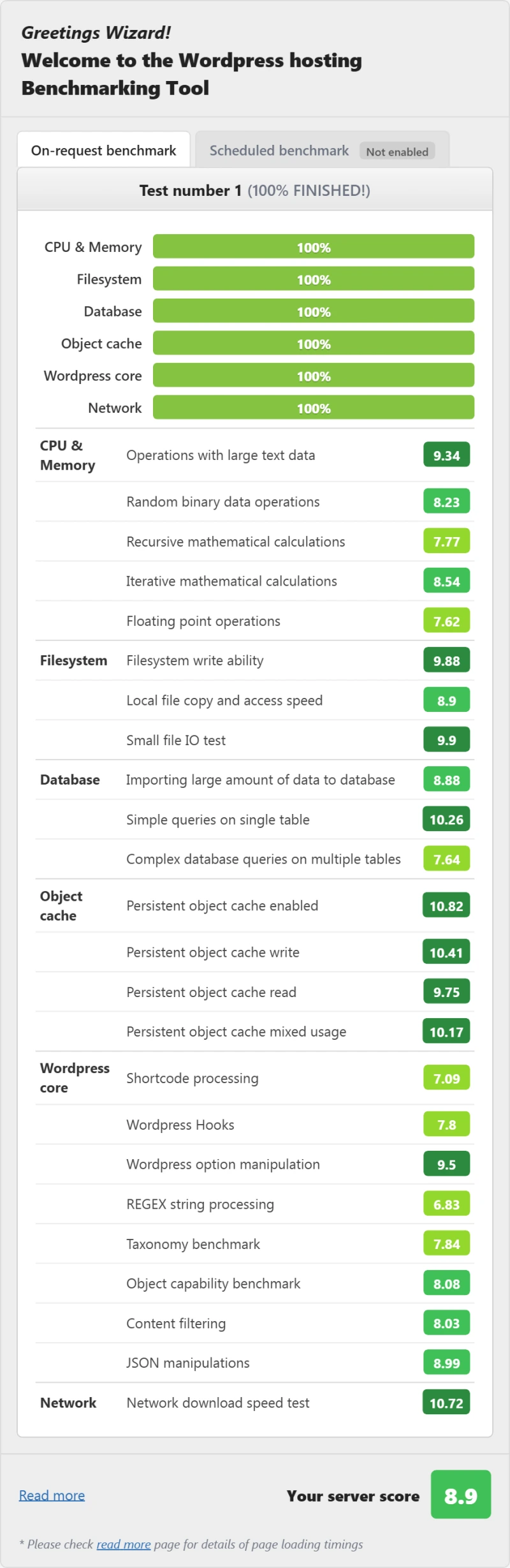
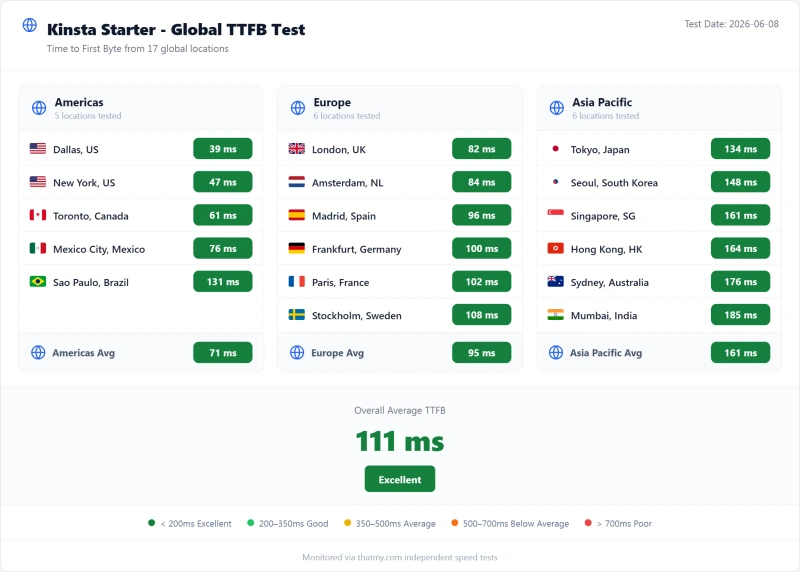
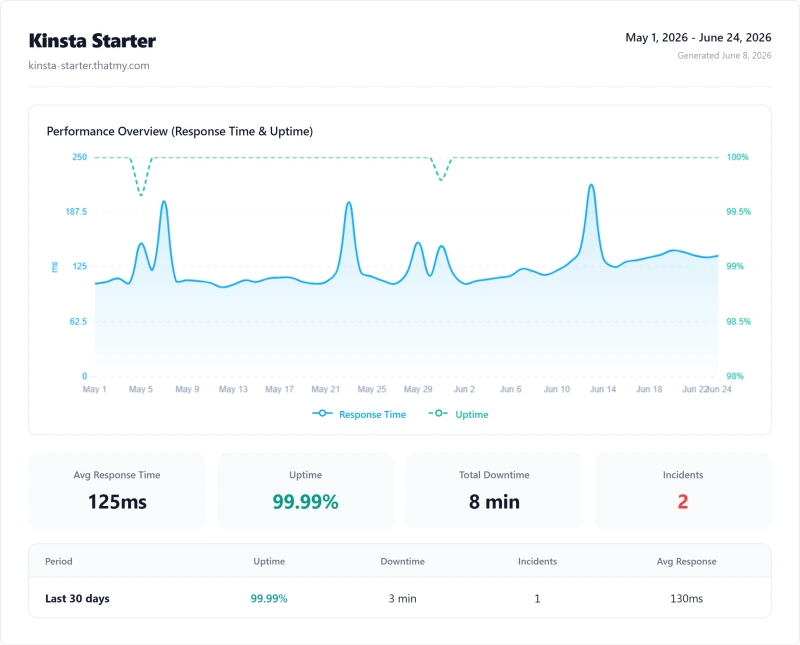
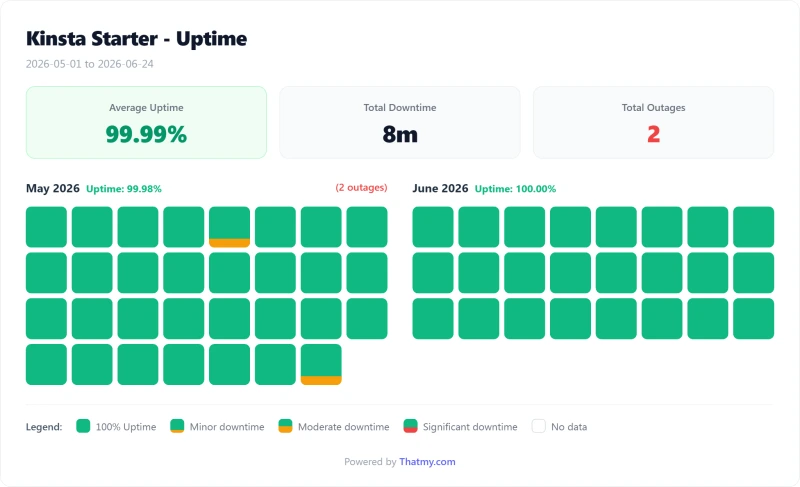
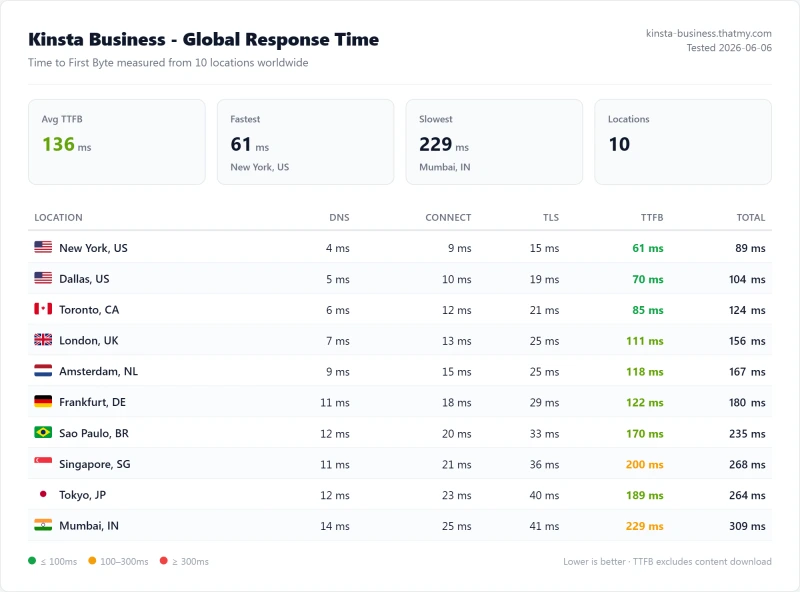
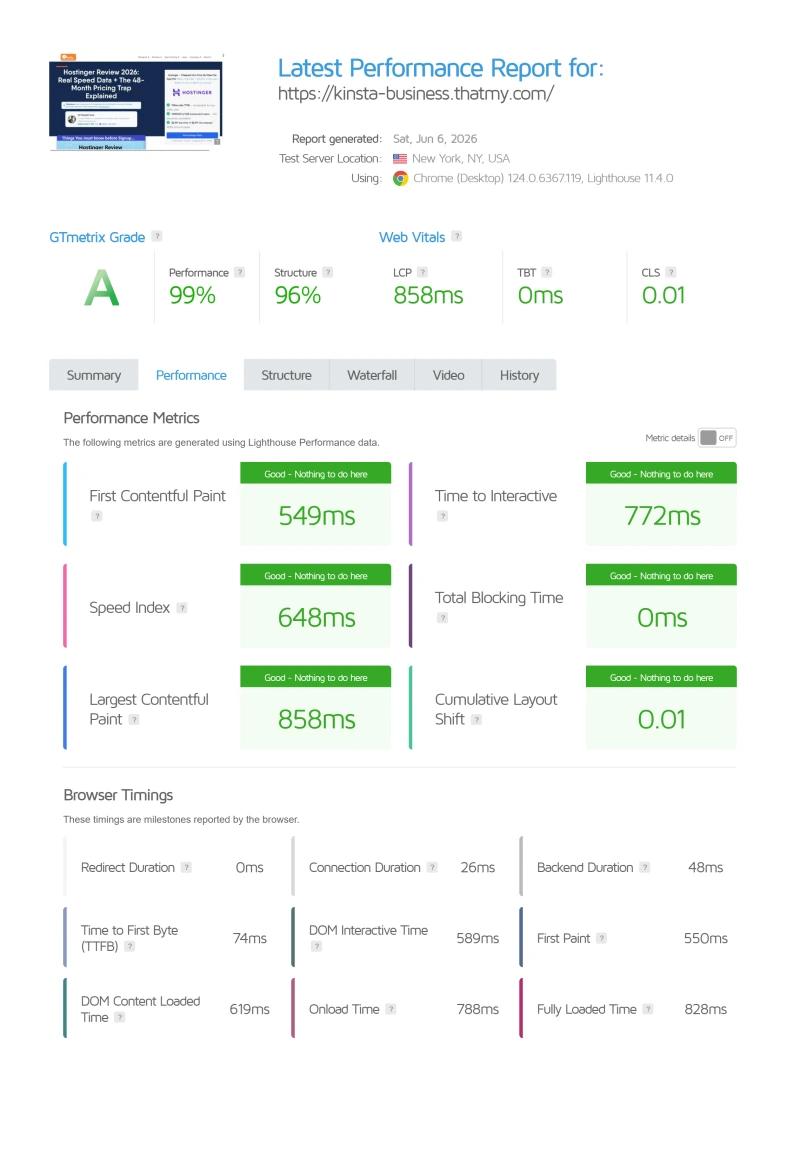
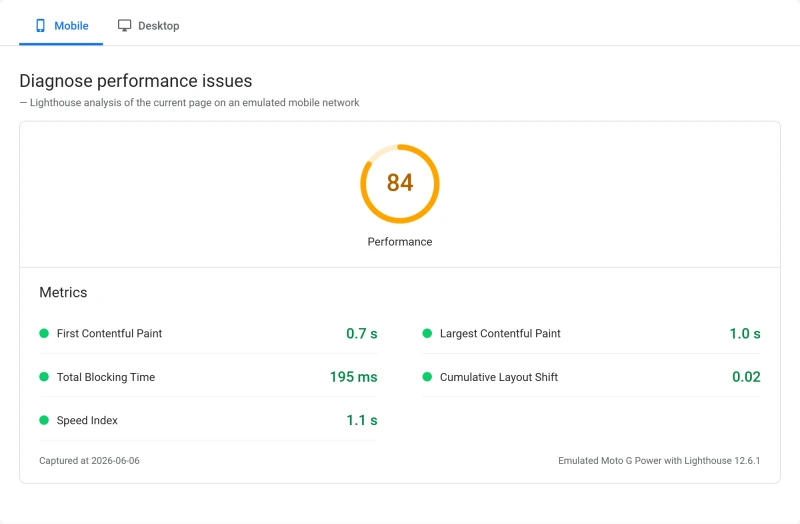
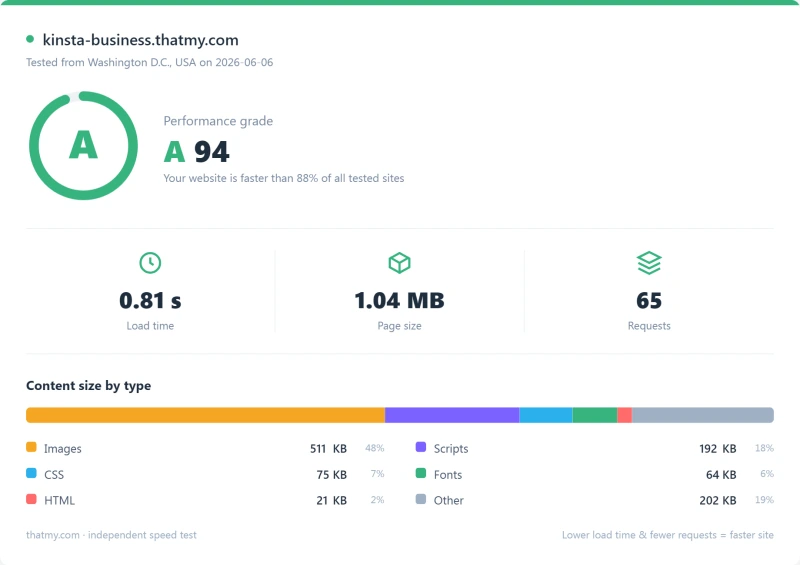
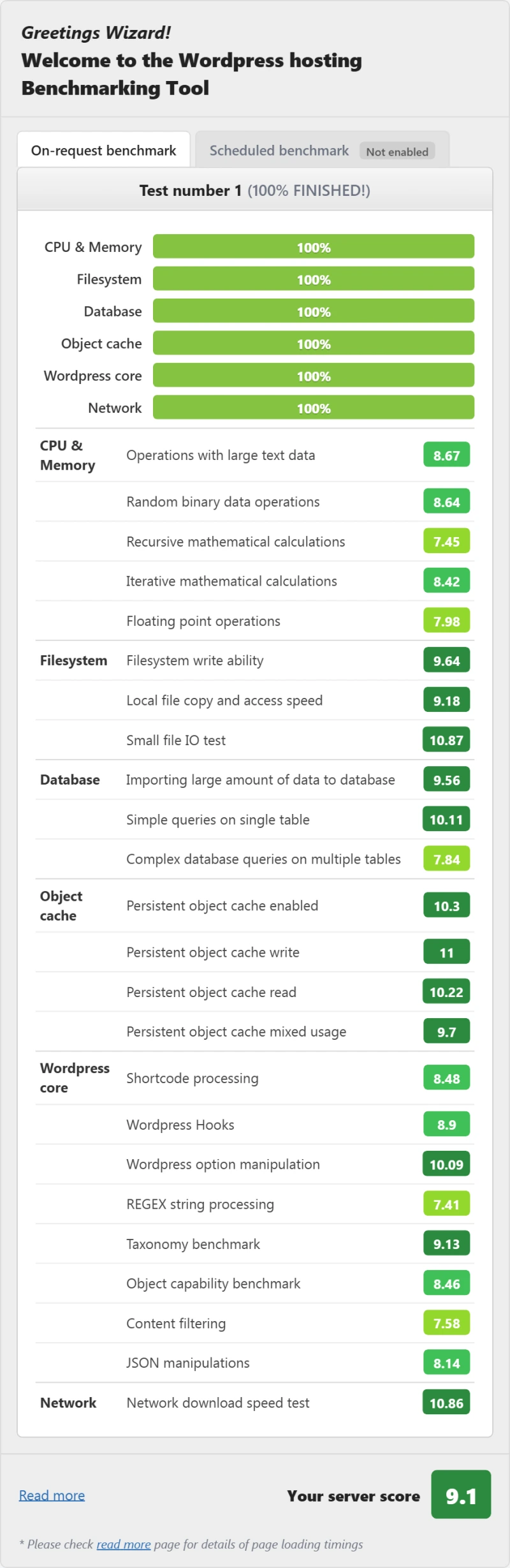
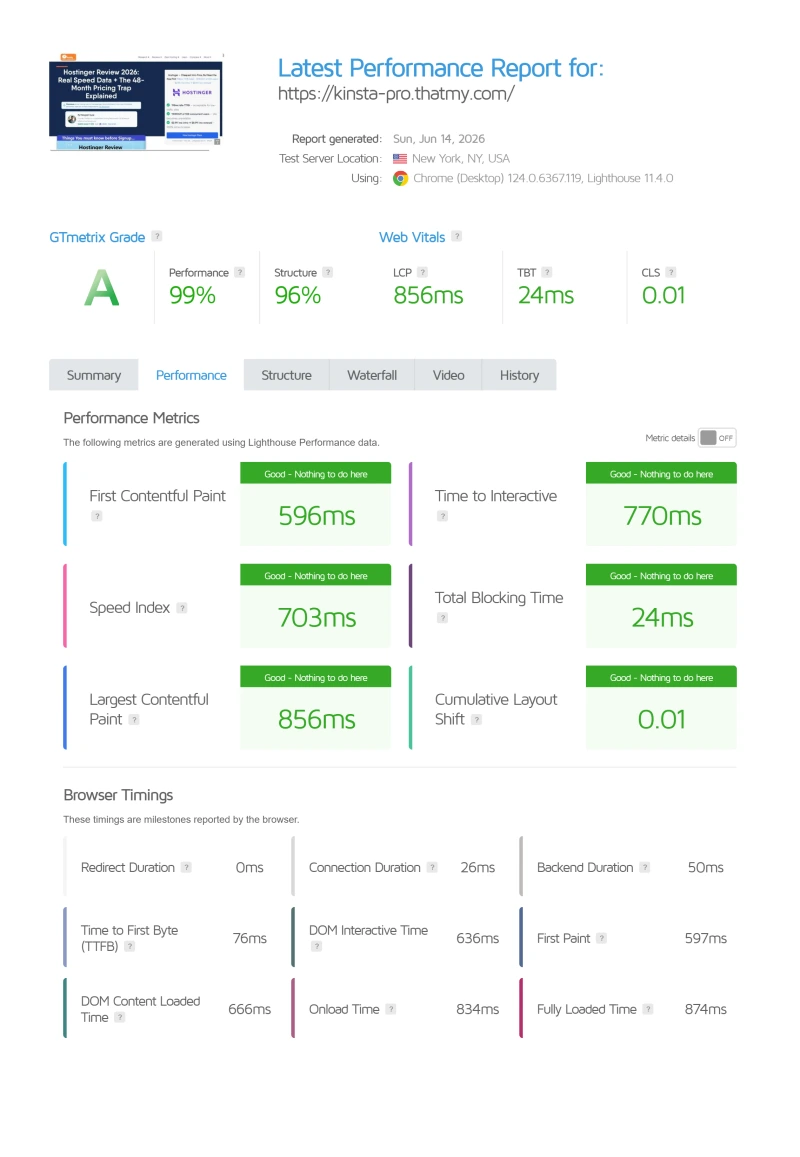
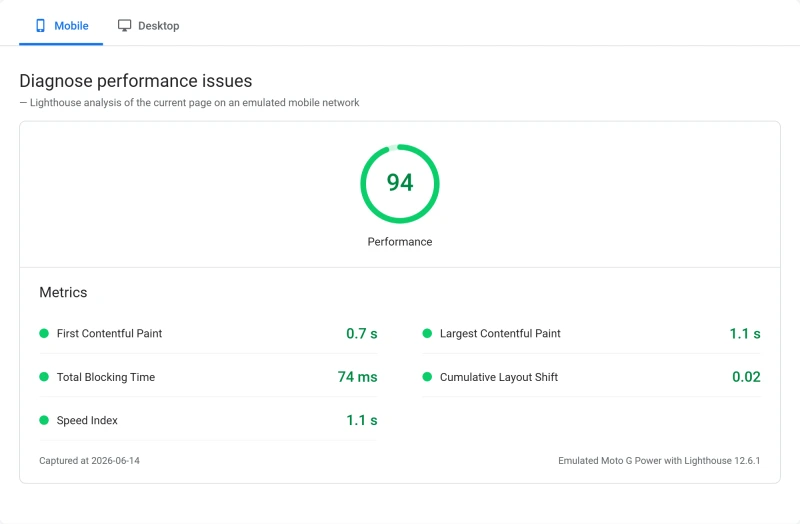
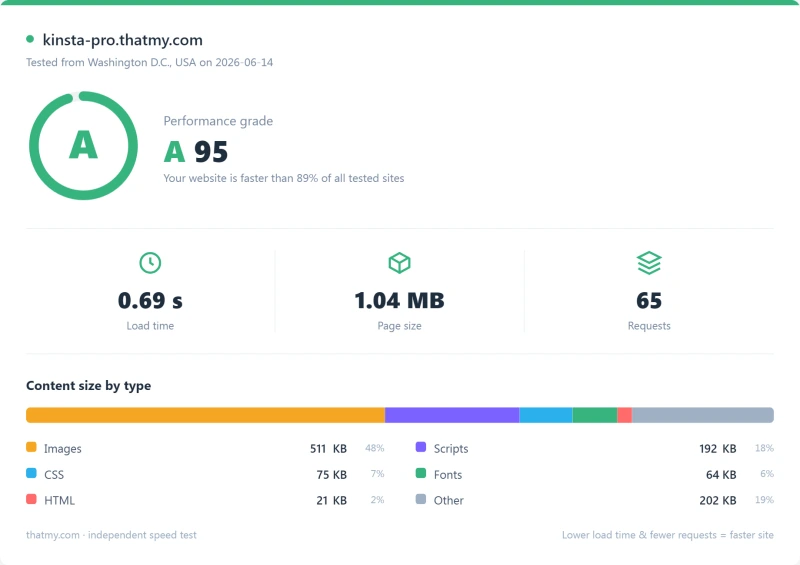
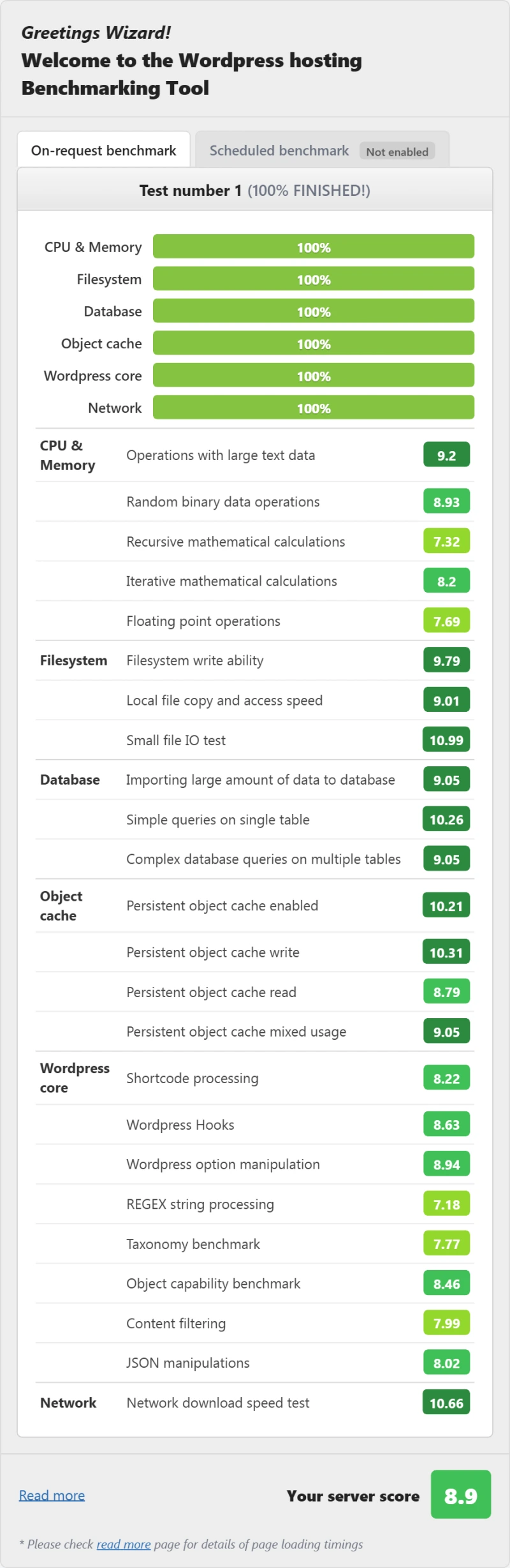
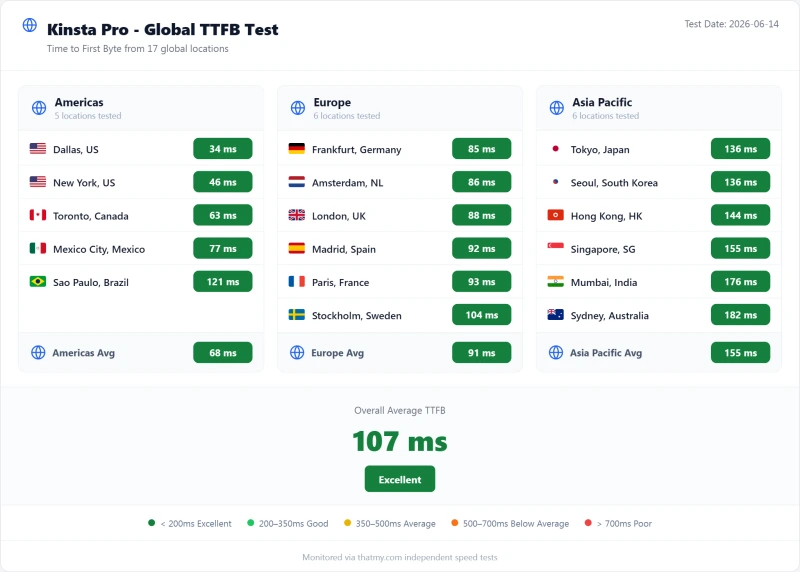
Here are the exports from our test suite for the three legacy Kinsta plans we benchmarked and that Kinsta has since retired: Starter, Business and Pro. Each tab holds that plan's run: server response time (TTFB), the load run, the GTmetrix and PageSpeed captures, a Pingdom response-time check, our WordPress hosting benchmark, the regional TTFB scorecard, and the uptime tracking with the day-by-day calendar. The figures used on this page come from the Single 20GB record; the legacy plans are shown for reference and their load and uptime numbers are close to it.
Starter (legacy plan) Business (legacy plan) Pro (legacy plan)
FAQ: Kinsta
Is Kinsta worth it in 2026?
Yes, for single high-value WordPress sites where managed features justify $350/yr ($29.17/mo billed annually). On our benchmark Kinsta answered in 64ms (origin TTFB from New York, no CDN), held 99.99% uptime over a 54-day window, and includes a free APM tool and WordPress-specific support. The main caveats: only 20GB/mo of server bandwidth on the entry plan, and $350/yr per site makes it expensive for agencies. For many sites, a server plan such as ScalaHosting Entry Cloud ($14.95/mo on a 12-month term, renewing at $39.95/mo) or a Cloudways server is built for several sites on one plan.
How does Kinsta meter its plans?
Kinsta rebuilt its plans around bandwidth in 2026 and retired the old Starter/Pro/Business tiers entirely. The lineup is now Single 20GB ($350/yr), WP 2 ($700/yr) and Agency (from $3,400/yr), and the plan names state the allowance: Single 20GB includes 20GB/mo of server bandwidth plus 125GB of CDN. Kinsta still meters installs and traffic alongside bandwidth. Kinsta's Overages doc charges $0.50 per GB of server bandwidth, or $0.50 per 1,000 visits on a visits plan, beyond the allowance. If your traffic is growing, calculate the true cost at your expected traffic before committing.
Does Kinsta include email hosting?
No. Email hosting is not included with any Kinsta plan. You'll need a separate email provider such as Google Workspace or Zoho Mail, priced per user, on top of your Kinsta bill. ScalaHosting advertises email hosting with its VPS plans; check the plan terms before relying on it.
How does Kinsta compare to ScalaHosting?
ScalaHosting Entry Cloud was faster at both ends on our benchmark: 38ms against 64ms origin TTFB from New York, and 58ms against 92ms average with 100 concurrent users (both with no errors). Kinsta wins on the APM tool and WordPress-specific support. ScalaHosting is a server plan with no per-site install count in our records, and its email hosting is advertised with the plan. For single high-value sites, Kinsta is excellent. For agencies and stores that want the most speed per dollar, ScalaHosting is the better value.
What is Kinsta's uptime guarantee?
Kinsta's legal SLA sets the guarantee at 99.9%, and credits are claimed in writing within 30 days. In our 54-day monitoring window Kinsta recorded 99.99% uptime, 8 minutes of downtime across 2 incidents. ScalaHosting Entry Cloud recorded 99.99% over the same window.
Does Kinsta have hidden fees?
The main hidden costs: bandwidth beyond the plan allowance (20GB of server traffic on the entry plan), email hosting (not included, bought separately), an expedited migration ($49; standard migrations are free and unlimited), and backups more often than daily (paid add-ons). Kinsta's base pricing is transparent (no intro/renewal gap), but the visit and bandwidth limits create variable costs that can significantly exceed the advertised price.
Is Kinsta good for WooCommerce?
Partially. Kinsta's edge cache serves static product and category pages from Cloudflare's edge, but WooCommerce checkout, cart and My Account pages bypass the cache and hit the origin server. We have not measured a WooCommerce checkout on Kinsta, so we give no checkout time. What we do have is origin speed on our standard test site: 64ms idle and 92ms average with 100 concurrent users, no errors. Kinsta no longer publishes a per-plan PHP worker count we can verify, so ask support what your plan allows before you plan for 10+ simultaneous shoppers.
Where This Leaves You: Is Kinsta Worth It?
Yes, for the right use case. No, for agencies, WooCommerce stores with high concurrent traffic, and growing sites.
The performance is real: 64ms origin TTFB from New York, 99.99% uptime over our 54-day window, a built-in APM tool, and WordPress-specific support. MyKinsta is the most polished managed WordPress dashboard we have used. A Cloudflare-powered CDN is included.
The limitations are also real: 20GB/mo of server bandwidth on the entry plan, no per-plan PHP worker count we can verify, $350/yr per site (expensive for agencies), no email hosting. At 100 concurrent users Kinsta averaged 92ms and ScalaHosting Entry Cloud 58ms on our benchmark, at $14.95/mo on a 12-month term (renewing at $39.95/mo).
Our Recommendation by Use Case
- Single high-value WordPress site inside the 20GB origin allowance: Kinsta is worth $350/yr, the APM tool, staging, and WordPress support justify the premium.
- Busy WooCommerce store: test your own checkout on a trial first; ScalaHosting ($14.95/mo on a 12-month term) was faster under load on our plain-site benchmark.
- Agency managing 10+ sites: ScalaHosting or Cloudways (from $11.00/mo), several sites on one server for a fraction of Kinsta's Agency tier, quoted from $3,400/yr.
- Growing site that will exceed 20GB/mo of origin bandwidth: a server plan from ScalaHosting or Cloudways, with a far larger allowance (check the terms).
- Developer who needs cloud flexibility: Cloudways (5 cloud providers, pay-as-you-go).
What Our Testing Found
- 64ms TTFB from New York to our test server, origin, no CDN
- 99.99% uptime, 54-day monitoring
- Best managed WordPress features: auto-updates, staging, backups
- MyKinsta dashboard, the most polished in managed WordPress
- 24/7 expert WordPress support (chat), not generic hosting support
- Free SSL and free CDN; migrations are free
- Application performance monitoring built in
Real Weaknesses
- Bandwidth-metered since the 2026 rebuild: 20GB/mo of server bandwidth on the entry plan
- $350/yr for 1 site; the Agency tier is quoted from $3,400/yr
- No email hosting included
- Managed does not mean they fix your site: plugin and theme issues are yours
- No cPanel, MyKinsta only
- No choice of cloud provider
Our Benchmark Records
- Origin TTFB (New York, no CDN): 64ms
- Uptime (54-day window): 99.99%
- Load at 100 clients: 92ms
$35/mo
30-Day Money-Back Guarantee
View Kinsta Plans, 30-Day Money-Back Guarantee ➦
Not right for you? See our ScalaHosting review (a server plan, email advertised with the plan) or our Cloudways review (several sites per server, 5 cloud providers, from $11.00/mo), or our full WordPress hosting comparison.
