


Shared Hosting vs VPS: What the Records Show
Shared hosting rents you a capped share of a server that many other accounts use, and most hosts never say how big that share is. A VPS rents you a virtual server with its own CPU cores and RAM, printed on the order form. For a site that earns money, that difference decides most of what follows.
SiteGround's GoGeek shared plan bills $128.28 for its first year and then renews at $44.99/mo, which is $539.88 a year, 4.2 times the first bill. ScalaHosting's Entry Cloud VPS renews at $39.95/mo, with two dedicated CPUs and 2GB RAM. At renewal, the shared plan costs more than the VPS.
Speed is less one-sided than most comparison pages claim, and we tested it twice. In the rematch the same fresh WordPress ran on Verpex's Web Hosting Silver shared plan and on two Cloudways servers with two vCPUs each, all in Dallas, under the same traffic from a US cloud zone, up to 100 visitors at once. With the cache off, so WordPress built every page, the shared plan and the VPS with dedicated CPU both built about 30 pages a second; the VPS whose vCPUs are shared built about 20. With each host's page cache on, all three answered every request, the Cloudways servers in about 0.04 seconds and the shared plan in about 0.1. The CPU you get decides speed, not the word shared or VPS. At the same budget, the cheapest Cloudways servers, with one vCPU, built under a third as many uncached pages as the shared plan, though they answered cached pages faster. What a VPS adds is cores reserved for you, a firewall you run, and a bigger size in minutes.
What this page is based on
- Providers' own pages, captured: SiteGround's plan cards, its compare table and its checkout, walked to the Pay Now button without buying; ScalaHosting's plan page, which sells shared and VPS side by side; GoDaddy's help article on cPanel resource limits; the fair use and limit pages of SiteGround, Bluehost and Hostinger.
- Our own tests: the same WordPress site on a Verpex shared plan and three Cloudways servers, loaded from a US cloud zone up to 100 visitors at once with the cache on and off, and an earlier side-by-side run read against each host's own resource pages; a Hosting.com shared plan and a Cloudways 2GB server under the same one-IP uncached load; the same 10,000-product WooCommerce store on Levamo and Cloudways servers from 10 to 200 shoppers; a Cloudways server resized while it was being watched.
- Prices come from our price records, checked against each provider's page, and update across the site when a provider changes them.
Shared hosting is enough when
- The site is a hobby blog, a portfolio or a test site with modest traffic
- A slow afternoon or a 508 error costs you nothing
- You will move before the first renewal, or the renewal price is still low
- You want email and hosting in one cheap bill and nothing else
Move to a VPS when
- The site takes orders, bookings, leads or members
- Your host's resource page shows CPU faults, or visitors see 508 errors
- Your shared renewal is close to, or above, a VPS price
- You host client sites and need to know what each one gets

Why ScalaHosting Suits A First VPS
- Dedicated CPU and RAM, printed on the plan card, not a share of a server
- SPanel included, a cPanel-style panel with email, file manager and one-click WordPress
- Managed: ScalaHosting runs the server, its updates and its security
- Moves sites from cPanel hosts for you
- Hosts unlimited websites
- Anytime money-back guarantee
Honest Drawbacks
- Costs more than an unmanaged VPS such as Hostinger's KVM 1, because the management is in the price
- The VPS plans rise at renewal too: read the renewal line on each card
Benchmark Data From Our Monitors
- Origin TTFB (3 plans, no CDN): 21ms to 38ms
- Uptime (54-day window): 99.99% to 99.997%

$29.95/mo
Anytime Money-Back Guarantee
Methodology: The benchmark boxes on this page cover 5 plans. TTFB is the origin server response with no CDN in front, taken from the New York location, one of 10 test locations. Uptime is shown over a 54-day window. Load figures are for a 60-second ramp of 0-250 concurrent clients from US-East.
What You Rent on Shared Hosting and on a VPS
A shared hosting account lives on a server with many other accounts. SiteGround's own fair use page puts it plainly: those resources "are always going to be finite", so every account gets rules.
Software such as CloudLinux gives each account a cage: a share of CPU, a memory ceiling, a count of processes that may run at once, a disk speed and a file count. When your site reaches one of those limits, the server slows it or refuses requests, however idle the machine is.
A VPS is a virtual machine. The host reserves a number of CPU cores, an amount of RAM and a disk for it, and those figures are on the plan card. Your site can use all of them, all the time, and another customer's busy day cannot take them away.
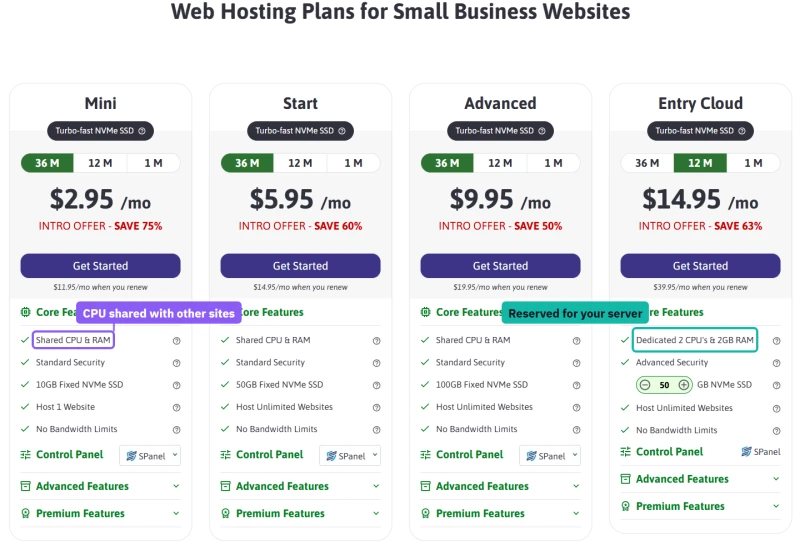
ScalaHosting is a useful example because it sells both on one page. Its three shared plans each list Shared CPU and RAM. Entry Cloud, the VPS on the same page, lists Dedicated 2 CPUs and 2GB RAM. On a 12-month term it costs $14.95/mo, against $2.95/mo for Mini on 36 months, and it renews at $39.95/mo against $11.95/mo.
What each host prints about your share
Most shared plans sell storage and site counts and say little about CPU. When a host does publish its limits, they sit in a help article or a fair use policy rather than on the plan card. These are the figures we found on each provider's own pages.
The two kinds of row read differently. The VPS rows are a size. The shared rows are a set of ceilings, and the most important one, CPU, is often a word such as Essential or no figure at all. Verpex's row is generous, and we could fill it in only from inside the account: its cPanel shows the limits after you have bought the plan, not on the plan card.
Unlimited Traffic, About 10,000 Visits: The Small Print
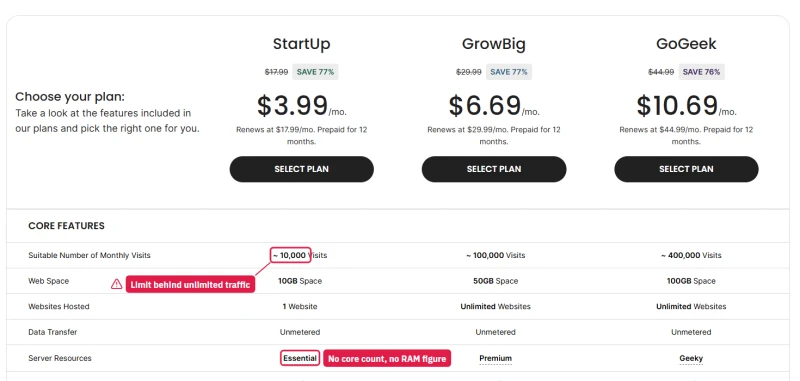
SiteGround's StartUp card says it hosts one website with unlimited traffic. The compare table under the same cards gives StartUp a suitable number of monthly visits: about 10,000. GrowBig gets about 100,000 and GoGeek about 400,000. The row for server resources has a word for each plan, Essential, Premium and Geeky, and no core count or RAM figure.
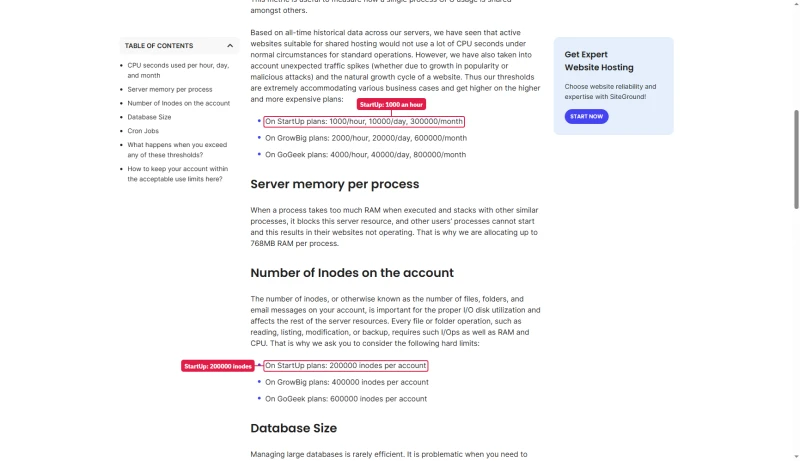
The figures behind those words are in SiteGround's fair use article. StartUp may use 1,000 CPU seconds an hour, 10,000 a day and 300,000 a month. GrowBig doubles that to 2,000 an hour, and GoGeek gets 4,000 an hour and 40,000 a day. Each process may use 768MB of memory, and StartUp may hold 200,000 files and folders.
A CPU second is one core busy for one second. A day has 86,400 of them per core. GoGeek's daily allowance of 40,000 is less than half of one core, averaged over the day. A VPS with two dedicated CPUs has 172,800 CPU seconds a day to use, and nobody counts them. Go over SiteGround's figures and the policy says they "may need to limit the access to your website".
What a limit looks like when you hit it
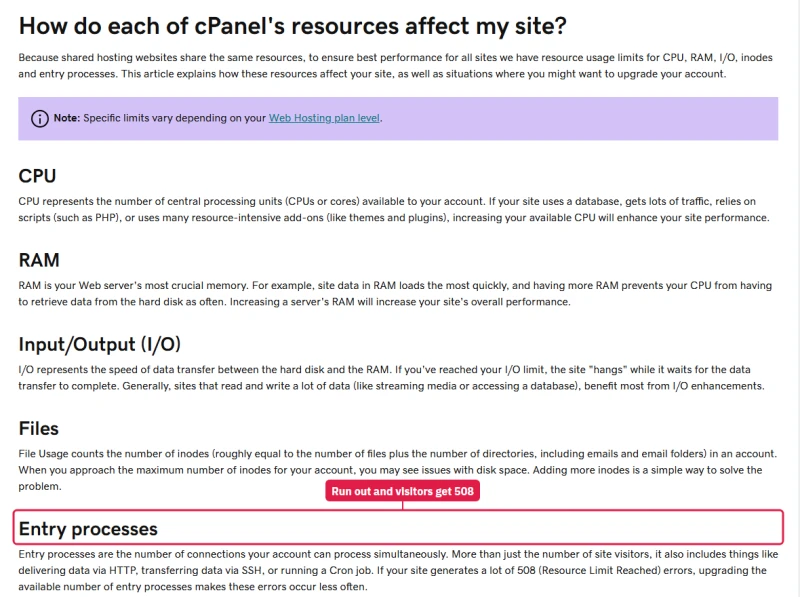
GoDaddy's help article explains the cPanel limits on its shared plans in its own words: CPU, RAM, disk speed, files and entry processes, the number of connections your account may handle at once. When a site runs out of entry processes, visitors get a 508 Resource Limit Reached error, and GoDaddy's advice is to buy a bigger plan.
We asked Verpex's chat whether we could load-test our own shared plan. Its support assistant, an AI that answered in seconds, said the server's firewall and CloudLinux limits would flag and block that much traffic, and that on a shared server it cannot allowlist an IP or permit stress testing. On a VPS the firewall is yours: on our Cloudways test server we added our own IP to the allow list in two clicks. When we later load-tested the shared plan from a cloud service with many addresses, up to 100 visitors at once, it answered every request.
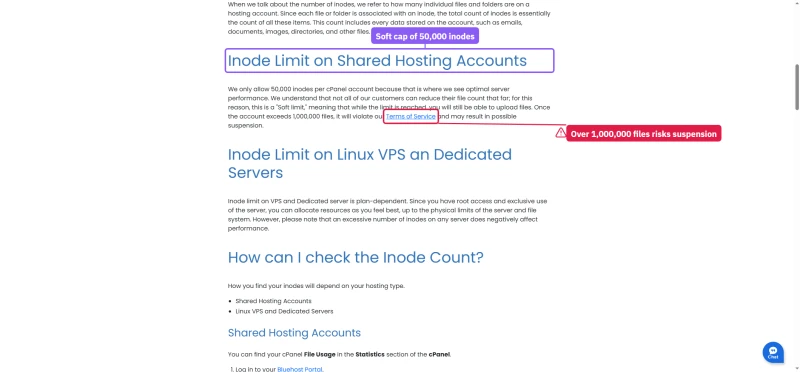
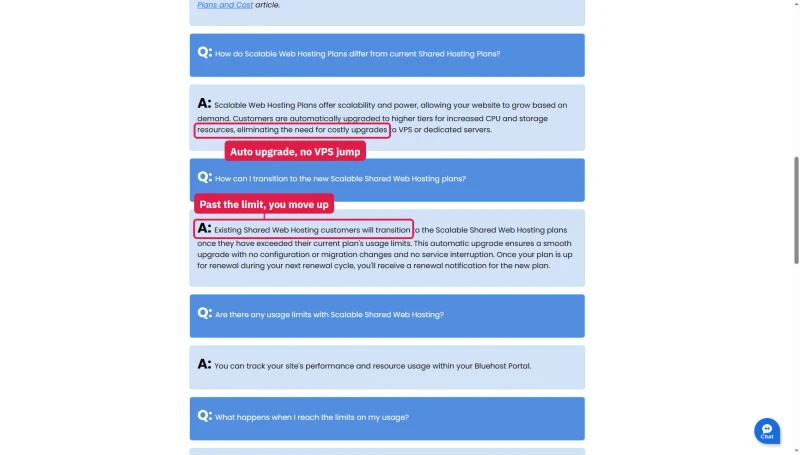
Bluehost counts files. Its inode article sets a soft limit per account and warns of suspension past one million files. Its scalable shared plans go a step further: pass your plan's limits and you are moved to a higher tier, billed at the next renewal.
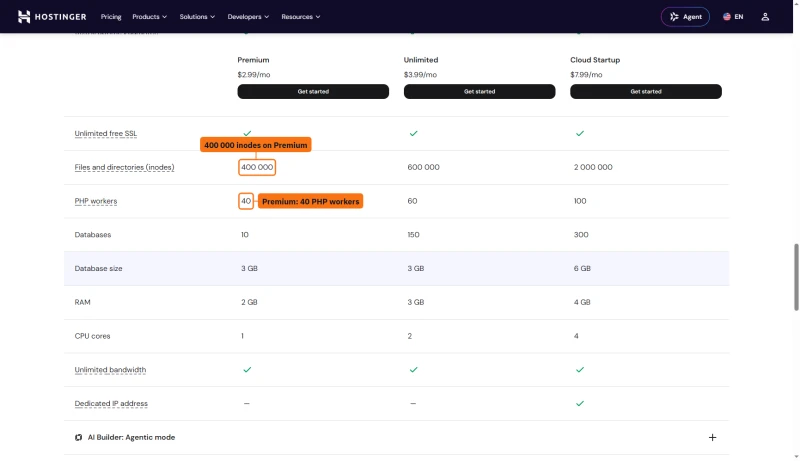
Hostinger publishes more than most: PHP workers, inodes and RAM for each shared plan. A PHP worker handles one uncached request at a time, so 40 workers is a hard ceiling on how many visitors can wait on WordPress at once.
None of this is hidden in a legal sense. It is just not on the card you buy from, and the card is where "unlimited" is printed.
The Renewal Price, at the Checkout
I walked SiteGround's checkout for GoGeek on a 12-month term, with my own domain, as far as the Pay Now button. The purchase box shows $10.69/mo with the regular $44.99/mo struck beside it, and a bill of $128.28 for the year. The footnote says discounted prices apply to the first invoice only.
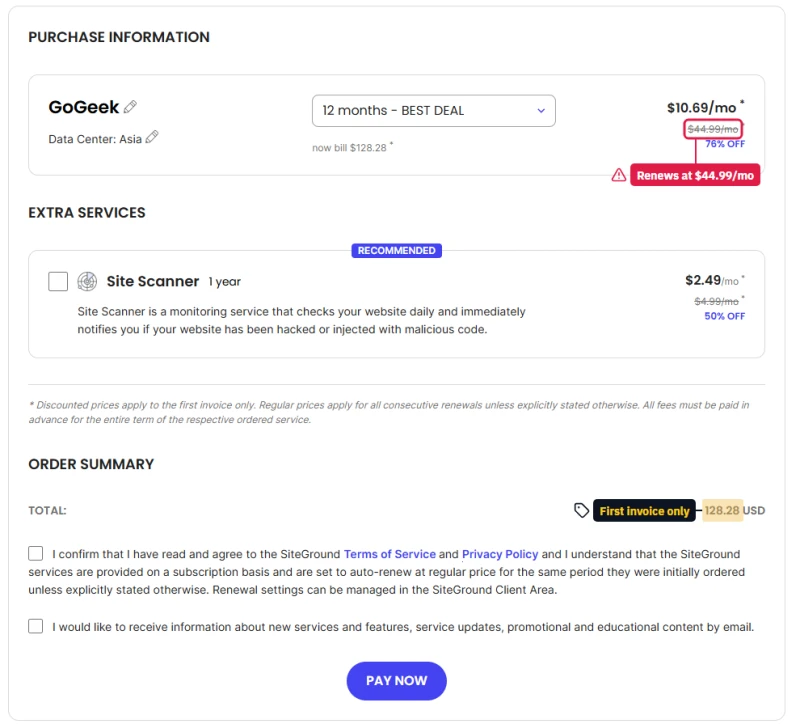
The consent box above Pay Now says the services "are set to auto-renew at regular price for the same period they were initially ordered". For GoGeek that is $539.88 in year two, charged to the card you entered, unless you change the renewal settings in the client area.
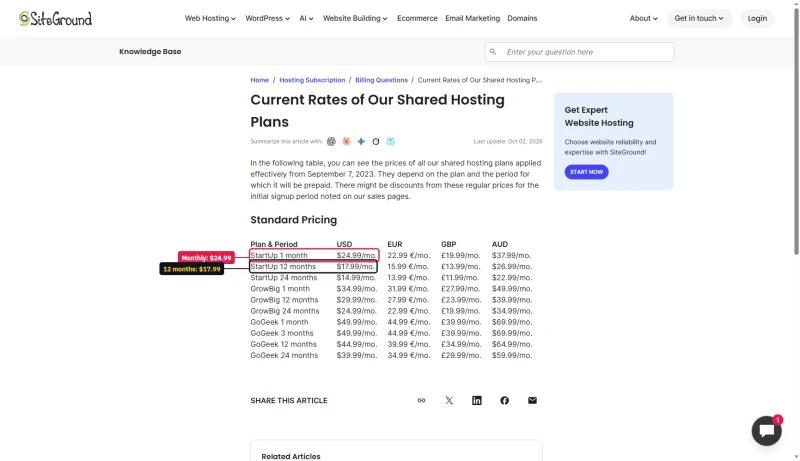
Twelve months prepaid is not even the dearest way to buy it. SiteGround's own rate table lists GoGeek at $49.99 a month on monthly billing, and StartUp at $24.99.
First price and renewal, shared against VPS
Every shared plan in the table at least doubles at renewal, and SiteGround's three plans and Hosting.com's Starter more than quadruple. The VPS plans rise too, except Cloudways, which bills the same amount every month with no contract.
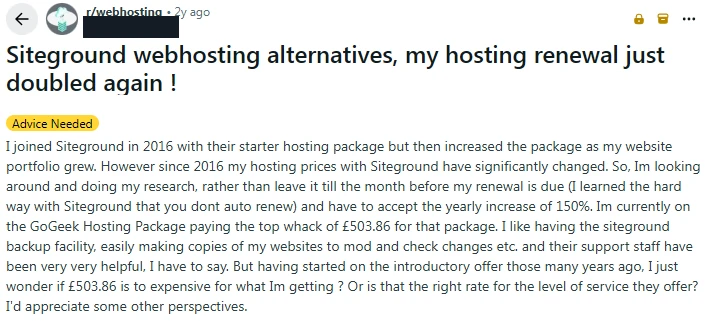
Customers notice the jump when the card is charged. These posts on r/webhosting are two of many we have filed.

What GoGeek's Renewal Price Buys on a VPS
Take the $44.99/mo GoGeek renews at and spend it on a VPS instead. Every option below has its CPU and RAM printed, and several cost less.
Entry Cloud renews for $5.04 a month less than GoGeek and gives you two whole CPUs. Cloudways' 4GB server costs $1.01 a month more, with 4GB of RAM, and never changes price. Hostinger's KVM 1 renews for a fraction of either, but you run it yourself: updates, security and backups are yours.
Three years, paid the way each host bills
Over three years GoGeek costs more than Entry Cloud, a VPS with dedicated CPUs, and more than a Cloudways 2GB server billed by the month. GrowBig is cheaper than both, for a share of a server whose CPU is a word on a compare table.
How We Tested a Shared Plan and a VPS
Most shared-versus-VPS pages compare averages. We bought a shared plan and rented VPS servers, put the same WordPress site on each, and loaded them on the same afternoon from the same place. Our first run had a flaw, so we ran it again with matched CPUs.
The test sites
What we ran
- The rematch, on all three: 10, 25, 50, 75 and 100 visitors at once from Grafana Cloud k6 in Columbus, Ohio, two minutes per step, first with every request forced past the page cache and then through it, with a one-second pause between pages. The two cache-off runs that decide the result were run twice.
- The budget match: the same steps on the two cheapest Cloudways High Frequency servers, 1GB and 2GB with one vCPU each, with the shared plan run again in the same hour.
- Our first step test: 10, 30 and 60 visitors at once from one PC in India, one minute per step, the shared plan against a Cloudways server with one vCPU.
- A ramp on the first VPS: up to 250 new visitors a second for a minute, cached and uncached, once our IP was on its firewall's allow list.
- The hosts' own records: Verpex's cPanel Resource Usage, minute by minute, and Cloudways' Server Health, CPU graph and request log.
- Setup and support: WordPress installed, the page cache switched on, and the same question put to each host.
What is tested and what is still pending
- Tested: speed with and without a page cache at five loads up to 100 visitors at once, on a shared plan and on two VPS types with the same number of cores; how each host's firewall treats a load test; the setup steps; a support answer.
- Not run on the shared plan: the ramp to 250 new visitors a second. Verpex's support assistant said the shared server's firewall would block a load test. The rematch's steps, from a cloud zone with many addresses, were not blocked.
- Still pending: a rerun on a weekday at a busy hour, when the shared server's other accounts are busy too; Verpex's own per-minute record of the rematch; weeks of uptime; and the reply to our Verpex support ticket. A Sunday afternoon on a shared server says little about its neighbours on a Monday morning.
What Happens Under Load: Our Tests
Most comparison pages print a chart where shared hosting collapses and a VPS stays flat. We ran the tests ourselves, twice, and the results are more interesting than that.
The rematch: two cores against two cores
Our first side-by-side test, further down, put a shared plan allowed two CPU cores against a VPS with one, with the traffic sent from a PC in India. So we ran it again: the same fresh WordPress on Verpex's Web Hosting Silver shared plan and on two Cloudways servers with two vCPUs each, all three in Dallas, loaded from a Grafana Cloud k6 zone in Columbus, Ohio. Each step held 10, 25, 50, 75 and then 100 visitors at once for two minutes, first with every request forced past the page cache and then through it. Nobody at either host was told.
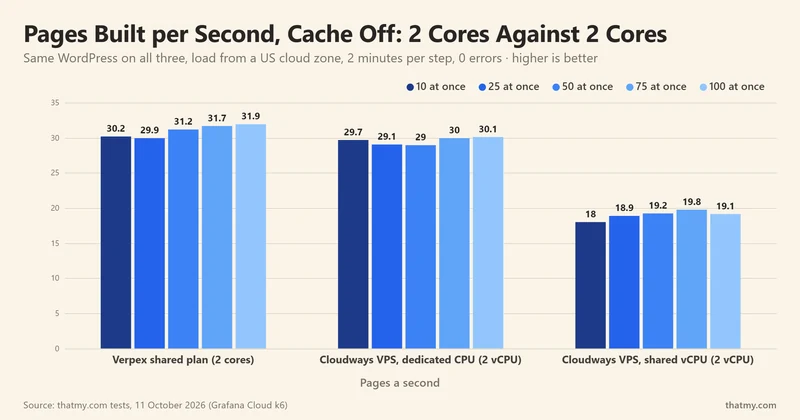
With the cache off, so WordPress built every page, the shared plan and the dedicated-CPU VPS were level: about 30 pages a second at every step, with the same waits, 0.33 against 0.34 seconds at 10 visitors and 3.2 against 3.4 at 100. The VPS whose two vCPUs are shared built about 19 pages a second and kept visitors waiting longer: 5.3 seconds on average at 100 at once. We ran both deciding tests a second time, half an hour later, and got the same picture: 29.8 to 31.7 pages a second on the shared plan and 18.8 to 21.7 on the shared-vCPU VPS.
None of the three refused a request. Once its CPU was full, each server queued visitors instead of turning them away, so the wait grew with the crowd while the pages a second stayed flat. That flat line is the real capacity for uncached pages: about 30 a second from two good cores, and about 20 from two shared ones.
With the cache on, all three answered every request at every step, with each visitor pausing a second between pages as readers do. The Cloudways servers answered a cached page in about 0.04 seconds and the shared plan in about 0.1, from the same zone to the same city, and neither slowed at 100 visitors at once. Most visitors to a blog or a business site get cached pages, so this is the speed they feel.
Why the two VPS results differ

Cloudways' launch form says it in plain words. High Frequency is "High compute shared CPU"; General Purpose and CPU Optimized are "Dedicated CPU". A VPS is a virtual server, and on the cheaper types its vCPUs are shared with other servers on the same machine, much as a shared plan's cores are shared with other accounts. The dedicated 4GB server costs $92.00/mo against $60.00/mo for the shared-vCPU one, and in our test it built about 1.6 times as many uncached pages. If you are moving to a VPS for speed, buy dedicated CPU.
At the same budget: the cheapest Cloudways servers
The rematch matched cores, not price. Verpex's Silver plan costs $5.00/mo on a yearly term, and the two Cloudways servers it was measured against cost $60.00/mo and $92.00/mo. So we tested the servers a small budget buys: Cloudways Vultr High Frequency 1GB at $16.00/mo and 2GB at $30.00/mo, each with one vCPU, in Dallas, with the same WordPress, the same steps from the same zone, and the shared plan run again in the same hour.
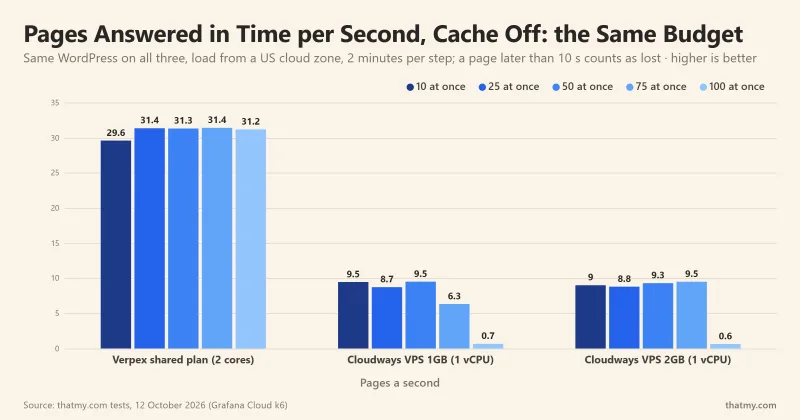
With the cache off, both budget servers built about 9 pages a second whatever the crowd, under a third of the shared plan's 31, and a page took about a second even with 10 visitors at once. The 2GB server's extra memory changed nothing, because building a page is CPU work and both have one vCPU. At 75 visitors at once the wait reached the 10 seconds after which our test visitors gave up, and at 100 almost all of them gave up: 75 to 79 pages arrived in time in two minutes. Neither server refused anyone; each kept building pages for visitors who had already left. The shared plan, in the same hour, built 31 pages a second at 100 at once, and no visitor waited more than about 5 seconds.
With the cache on, the order flips. Both budget servers answered every one of about 30,000 requests in about 0.04 seconds, as the 4GB servers did, against about 0.1 seconds on the shared plan. A cached page never reaches PHP, so one vCPU is plenty. So at the same budget, a good shared plan builds about three times as many uncached pages as the VPS that money buys, because it lets one site use two cores where the budget VPS has one. The budget VPS is the quicker host for cached pages and keeps its resources to itself, but it is the first to fall over when many visitors need pages WordPress has to build: logged-in users, carts, searches.
Our first test, and why we ran it again
Our first side-by-side run sent 10, 30 and 60 visitors at once from one PC in India to the same shared plan and to a Cloudways High Frequency 2GB server with one vCPU. With the cache off, the shared plan built 25.9 pages a second at 60 at once and the VPS 8.1. That was two cores against one, and the 1.4-second round trip from India meant the shared plan never had more than one of its 30 entry processes busy. The rematch above fixed both.
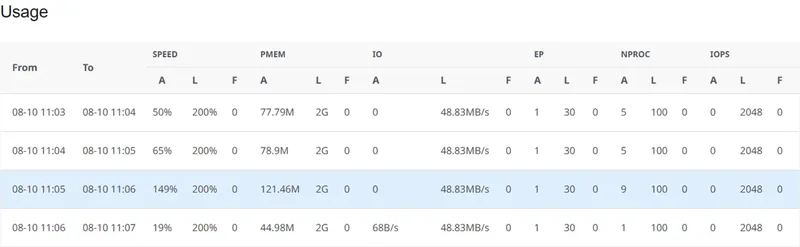
Verpex's own Resource Usage page showed the account far from its limits in that test. In the busiest minute it used 149% of its 200% CPU limit, about 121MB of memory and one of its 30 entry processes, and it logged no faults of any kind all day.
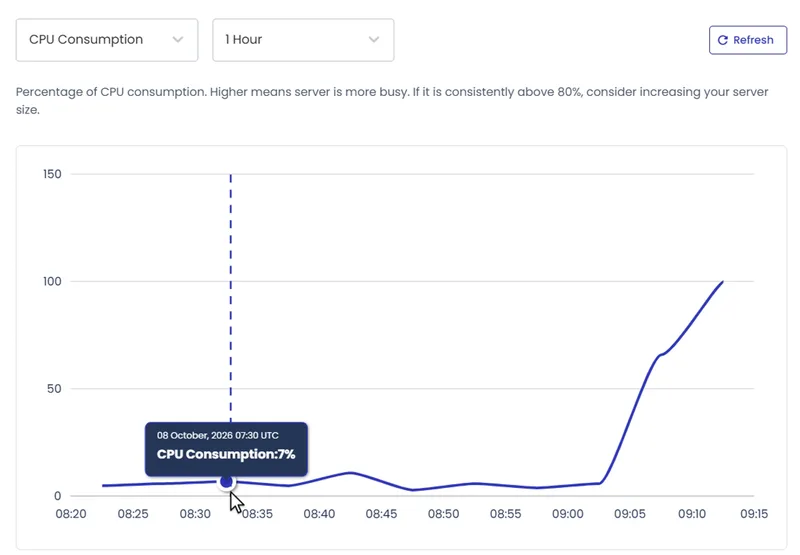
The one-vCPU VPS had no such headroom. In a harder test the same morning, a ramp that added up to 250 new visitors a second, the cached VPS answered all 7,630 requests at about 7% CPU. With the cache off it stopped answering within seconds: Server Health turned Problematic at 72% CPU and then read 100%, and the server's own log recorded 1,289 Gateway Timeout errors.
What the numbers do not show
- One Sunday afternoon. The rematch ran on a Sunday afternoon, Dallas time. A shared plan's two cores are a cap on a server that other accounts use, and their busy hours are not ours to see; a dedicated-CPU VPS's cores are reserved for it. A rerun at a weekday peak is on our list.
- A load test is not a visit pattern. Verpex's support assistant told us the shared server's firewall and CloudLinux limits would block a load test. Traffic from one PC hammering one page is what firewalls are for: the Cloudways firewall blocked our test IP for a week in the first test. The rematch came from a cloud zone with many addresses and was not blocked by either host.
- The setup differs too. On Verpex, the one-click LiteSpeed cache answered "WordPress fatal error encountered" on a brand-new site and worked only after we disabled and enabled it again. The Cloudways servers came with Varnish and its cache plugin already on.
The lesson is not that shared hosting is faster, or slower. The CPU decides uncached speed: two good cores built about 30 pages a second whether they came with a $5.00/mo shared plan or a $92.00/mo dedicated VPS, and two shared vCPUs built about 20. The page cache decides what most visitors feel, and there the Cloudways servers answered in less than half the shared plan's time. What a VPS adds is control: cores that are reserved for you, a firewall you run, and a bigger size in minutes.
An earlier test: Hosting.com shared against a Cloudways 2GB
Here the Cloudways server sat in New York, far from the test machine in India, so its waits start higher at 10 visitors.
Neither refused a request, and both ran out of room at about 6.5 uncached pages a second. The difference is in what stopped them. Hosting.com's own resource page for that hour shows the account averaging 92% of its 200% CPU limit, with 14 CPU faults and 5 memory faults. The machine underneath had more to give; the account's cage did not.
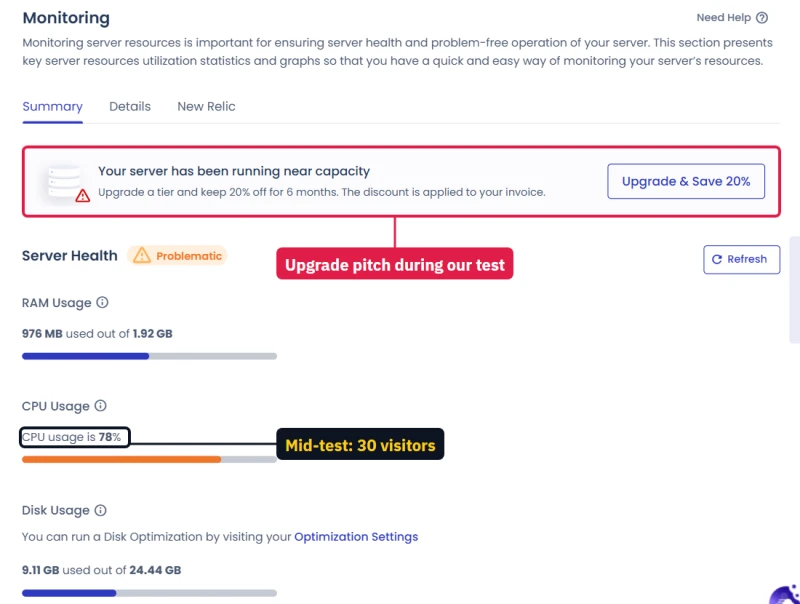
The Cloudways server was simply full. Its monitoring page called the server Problematic at 78% CPU and offered the next size up. A full VPS is your own server running at its size, and the fix is one click.
Making a VPS bigger, timed
I resized that Cloudways server from 1GB to 2GB while a script asked it for a page every one or two seconds. The site went fully dark for about 2 minutes and 51 seconds, and the whole job took about 9 minutes from the button to steady answers. On shared hosting the equivalent is a plan change, and the CPU you get afterwards is still a share.
A store under real shopping traffic
The fairest test we own is a 10,000-product WooCommerce store, built the same way on several servers and loaded with shoppers browsing, adding to cart, searching and checking out, from 10 to 200 at once. A Cloudways Vultr High Frequency 4GB server handled 4.7 checkout journeys a second and never failed a request; past its peak it queued shoppers instead of dropping them.
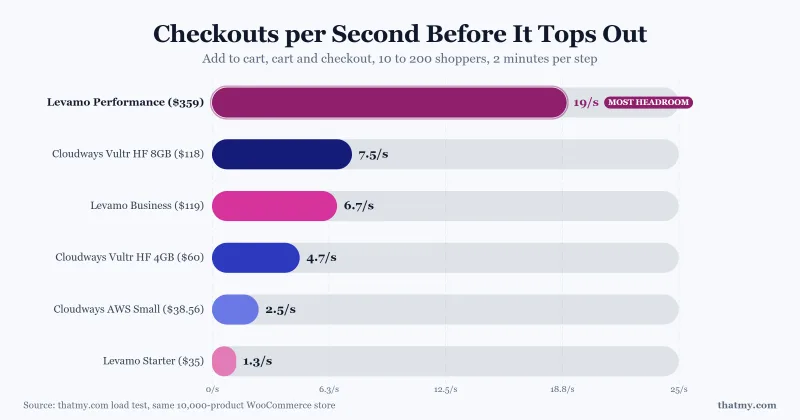
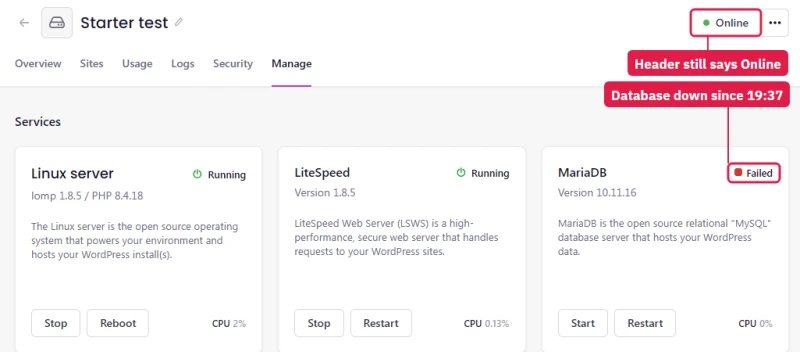
Size still matters on a VPS-style plan. The smallest plan in that test, Levamo's Starter, lost its database twice at 100 shoppers while its dashboard still said Online. A small server under a store's peak fails like any other small server. The lesson is to buy a known size, watch it, and step up before a sale, which shared hosting does not let you do.
Hands-On: The Same Site on Shared Hosting and a VPS
The numbers above came from two accounts we set up ourselves. This is what each one was like to use, in the order it happened.
The shared plan: cPanel and its limits
Verpex's client area listed one product, Web Hosting Silver. cPanel opened in a new tab behind a "Choose a starting point" box, and Softaculous followed with a "Featured plugins" box: two pop-ups before anything else.
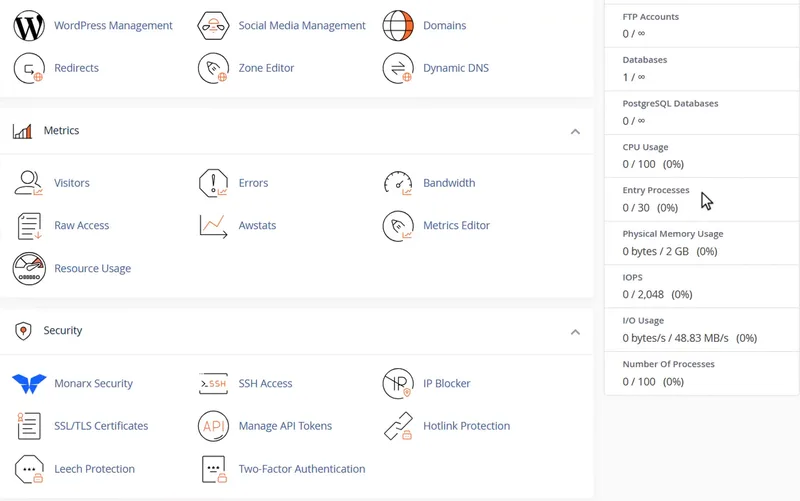
Once you are in, the plan states its limits plainly on the home page: 30 entry processes, 2GB of memory, 2,048 IOPS, 48.83MB/s of disk speed and 100 processes. CPU appears as a count out of 100, while the Resource Usage page, which logs every minute, gives the limit as 200%; our busiest minute used 149% with no fault, so the account could use more than one core.
WordPress in seconds, and a password on show
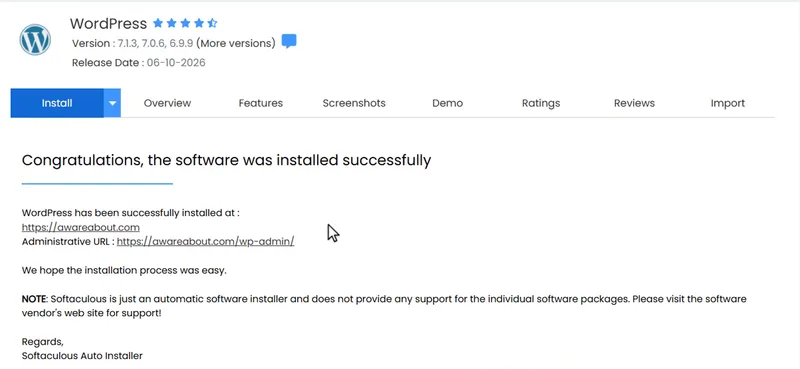
Softaculous installed WordPress about 8 seconds after we pressed Install. One thing to know first: its form shows the new admin password in plain text until you press Hide, so close any screen share before you open it.
The shared plan's cache: Error on the first try
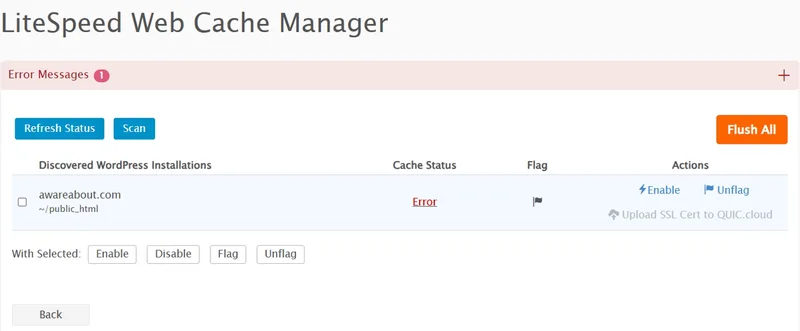
LiteSpeed Web Cache Manager in cPanel found the site, and Enable answered with Cache Status "Error" and "WordPress fatal error encountered during action execution", on a WordPress nobody had touched. LiteSpeed's documentation puts that error down to the server's setup, which only the host can change. Pressing Disable, then Enable, then Refresh Status worked: the site then answered with a LiteSpeed cache miss, and a hit on the next request.
The VPS: a server from a launch form
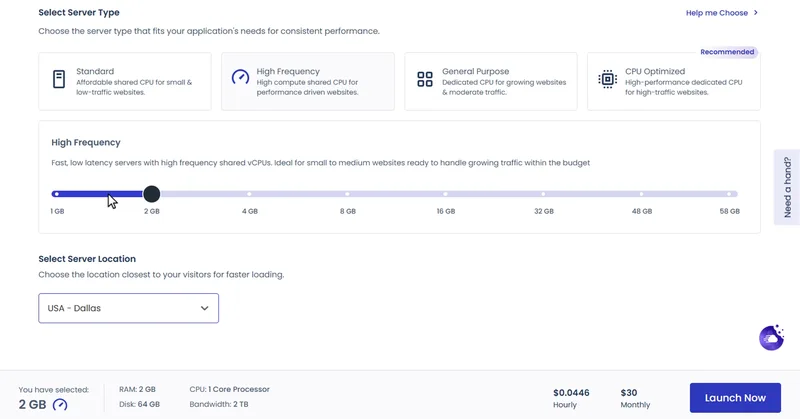
On Cloudways you pick the application, the cloud, the server type, the size and the city, and the form prices it by the hour and the month. For the rematch we launched two more from the same form, a High Frequency 4GB and a CPU Optimized 4GB, each with two vCPUs, in Dallas. Three things slowed the first launch: the 2GB size needed a click on its label, the city list would not filter by typing, and an add-on step and a referral pop-up came before the server started.

The server list then promised the application in about 13 minutes. A shared plan has nothing like this step: the account exists the moment you pay. At idle, the new server's Server Health read 753MB of 1.92GB of memory in use and 3% CPU, with WordPress, Varnish and Breeze already running.
Who controls the firewall
Our first ramp on the VPS returned full pages for 53 seconds, then CAPTCHA pages, and after 101 of those the server's firewall blocked our IP for a week. The server was up the whole time, at under 20% CPU; it simply stopped answering us. Because the server was ours, the fix was a rule under Security, Firewall, and the allow list went away with the server when we deleted it.
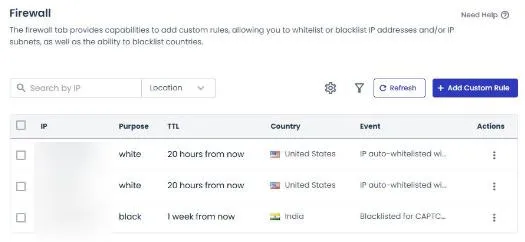
On the shared plan the same question has a different answer. Verpex's chat said its firewall and CloudLinux limits would block that much traffic and that on a shared server it cannot allowlist an IP. Both hosts protect their servers from one address hammering them; only on the VPS is that protection yours to change.
Support, asked before the test
Verpex's chat asked for a name, an e-mail address and a department, then answered within seconds. It was an AI support assistant with thumbs-up and thumbs-down buttons, and it answered the question we asked: no load testing on a shared server, root and firewall control on a VPS. The reply to our ticket about the cache error is not in our records yet; Verpex's help pages say tickets are "usually" answered within 2 to 3 hours, while its plan page says "within minutes". Cloudways' live chat is tested in our Cloudways review.
Our test log, hour by hour
What You Can Change on Shared Hosting and on a VPS
Speed was closer than expected. Control was not. Here is who decides each setting on the two accounts we tested.
The pattern holds in every row. On the shared plan the host decides and you ask; on the VPS the setting is a page in your dashboard. The shared plan includes things a VPS charges for, email above all, and its tools are the familiar cPanel ones. The VPS lets you change what the shared plan fixes: its size, its firewall and its cache.
Shared Hosting or a VPS, by Kind of Site
Shared hosting was not the slow option on this page. It is the option with somebody else's rules. Move when those rules start to cost you: an error when traffic peaks, a renewal above a VPS price, a test you are not allowed to run, or a store that needs room at checkout.
Which VPS to Move To
ScalaHosting Entry Cloud: the closest move from cPanel
Entry Cloud is a managed VPS with two dedicated CPUs, 2GB RAM and 50GB NVMe, sold beside ScalaHosting's own shared plans. It starts at $14.95/mo on a 12-month term and renews at $39.95/mo. SPanel, ScalaHosting's own panel, works like cPanel, so email, file manager and one-click WordPress look familiar after a shared host.
If you need more room, the Managed Cloud Build #1 has 2 cores and 4GB RAM, at $29.95/mo and $54.95/mo at renewal. Read the renewal line on every ScalaHosting card: the VPS plans rise too, if less than its shared ones.
Why ScalaHosting Suits A First VPS
- Dedicated CPU and RAM, printed on the plan card, not a share of a server
- SPanel included, a cPanel-style panel with email, file manager and one-click WordPress
- Managed: ScalaHosting runs the server, its updates and its security
- Moves sites from cPanel hosts for you
- Hosts unlimited websites
- Anytime money-back guarantee
Honest Drawbacks
- Costs more than an unmanaged VPS such as Hostinger's KVM 1, because the management is in the price
- The VPS plans rise at renewal too: read the renewal line on each card
Benchmark Data From Our Monitors
- Origin TTFB (3 plans, no CDN): 21ms to 38ms
- Uptime (54-day window): 99.99% to 99.997%
$29.95/mo
Anytime Money-Back Guarantee
Cloudways: the same price every month
Cloudways rents servers from DigitalOcean, Vultr, Linode, AWS and Google Cloud and runs them for you. A DigitalOcean 2GB server is $24.00/mo and the 4GB is $46.00/mo, billed by the hour, with no term and no renewal price. Email is an add-on, and there is no cPanel. It is the pick for WordPress and WooCommerce sites that grow in steps.

What Cloudways Does Well
- Choice of cloud: DigitalOcean, Vultr, Linode, AWS and Google Cloud
- The same price every month, billed by the hour, with no renewal jump
- Varnish page cache on by default: our cached test server stayed at about 7% CPU under a ramp to 250 new visitors a second
- Resize from the dashboard: our 1GB to 2GB resize was offline for under 3 minutes
- A firewall you control: allowlist an IP yourself under Security
- Backups and restores from the dashboard
Honest Drawbacks
- No email hosting included: email is a paid add-on
- No cPanel: the dashboard is more technical than a shared host's panel
- A 1-vCPU server is small for uncached traffic: in our test it fell behind a two-core shared plan with the cache off
Benchmark Data From Our Monitors
- Avg response under load (0-250 ramp): 21ms to 32ms
- Uptime (54-day window): 99.979% to 99.99%

$0/mo (with credit)
3-Day Free Trial (No Card)
Both are reviewed in full, with their own tests: the Cloudways review and the ScalaHosting review. For WooCommerce stores on managed containers, the Levamo review has the full store test.
Moving From Shared Hosting to a VPS
- Check your renewal date in your current host's billing area, and switch auto-renew off if you are leaving.
- Size the VPS from what you use. Your cPanel's resource page shows CPU, memory and faults; a site that sits near its shared limit needs at least two cores.
- Use the host's free migration. ScalaHosting moves sites from cPanel hosts for you, and Cloudways has a migration plugin and a migration service.
- Test on the temporary address the new host gives you before you change anything at your domain.
- Lower your DNS TTL a day ahead, then point the domain at the new server. The old site keeps answering while DNS updates.
- Keep the old plan until the new one has run a week, then take a last backup and cancel.
Frequently Asked Questions
What is the difference between shared hosting and VPS hosting?
Shared hosting gives your account a capped share of one server that many other accounts also use, and most hosts do not print how much CPU that share is. A VPS is a virtual server with its own CPU cores, RAM and disk, printed on the order form and used by nobody else. On ScalaHosting's own plan page the shared plans say Shared CPU and RAM, and Entry Cloud says Dedicated 2 CPUs and 2GB RAM.
Is a VPS more expensive than shared hosting?
In the first year, yes. At renewal, often not: SiteGround's GoGeek shared plan renews at $44.99/mo, while ScalaHosting's Entry Cloud VPS renews at $39.95/mo and a Cloudways 2GB server stays at $24.00/mo every month. Compare the renewal price, not the first bill.
Is a VPS faster than shared hosting?
Not by default. In our rematch, up to 100 visitors at once, the same WordPress built about 30 uncached pages a second on a Verpex shared plan allowed two CPU cores and on a Cloudways VPS with two dedicated vCPUs, and about 20 on a Cloudways VPS whose two vCPUs are shared. With the page cache on, all three answered every request, the Cloudways servers in about 0.04 seconds and the shared plan in about 0.1. At the same budget, the cheapest Cloudways servers, with one vCPU, built about 9 uncached pages a second, under a third of the shared plan, though they answered cached pages faster. A VPS is faster when you buy enough dedicated CPU, and nobody else's site can take it from you.
Do I need technical skills to run a VPS?
Not with a managed VPS. ScalaHosting runs the server for you behind SPanel, which works like cPanel, and Cloudways gives you a dashboard for servers, apps, backups and scaling. An unmanaged VPS, such as Hostinger's KVM plans, is cheaper but leaves updates and security to you.
When should I move from shared hosting to a VPS?
Move when the site earns money, when the host's resource page shows faults or the site gets 508 errors, or when your renewal bill is close to a VPS price. A store, a membership site or a client site belongs on a server whose size you know. A hobby blog with a few hundred visits a day can stay on shared hosting.
Can I load-test my site on shared hosting?
The host will usually say no. Verpex's support assistant told us its shared server's firewall and CloudLinux limits would block a heavy load test, and that it cannot allowlist an IP on a shared server. What firewalls stop is one address hammering a site: Cloudways' firewall blocked our test IP for a week after a minute of traffic from one PC. Our rematch came from a cloud load-testing service with many addresses, up to 100 visitors at once, and both hosts answered every request. On a VPS the firewall is yours, so you can allowlist your own test.
How long does it take to set up WordPress on shared hosting and on a VPS?
On Verpex's shared plan the account already existed, and Softaculous installed WordPress about 8 seconds after we pressed Install. On Cloudways the server list promised our 2GB server in about 13 minutes, and an earlier DigitalOcean server kept its 7-minute promise. The VPS then arrives with WordPress, a page cache and monitoring already set up.
Does a VPS include email?
Not always. On Cloudways email is a paid add-on, while shared plans such as Verpex's include mailboxes. ScalaHosting's Entry Cloud VPS includes email under SPanel, its cPanel-style panel.
Can I host several websites on one VPS?
Yes. ScalaHosting's Entry Cloud hosts unlimited websites under SPanel, and Cloudways runs many applications on one server. The limit is the CPU and RAM you bought, which you can see and raise, not an inode or entry process count in a fair use policy.
Is a VPS Worth It Over Shared Hosting?
For any site that earns money, yes, and the renewal price usually settles it.
A shared plan sells a low first bill and a cage whose size is a word on a compare table. At renewal, SiteGround's GoGeek costs $44.99/mo, more than ScalaHosting's Entry Cloud at $39.95/mo with two dedicated CPUs, and close to a Cloudways 4GB server at $46.00/mo that never changes price.
A VPS is not magic. In our rematch a $5.00/mo shared plan built uncached WordPress pages as fast as a $92.00/mo VPS with two dedicated cores, and faster than a $60.00/mo one whose two vCPUs are shared, on a Sunday afternoon. With the page cache on, the Cloudways servers answered in less than half the shared plan's time. A small VPS fills up under a store's peak just as a shared account does, but you can see it filling, with dedicated CPU nobody else's site is using it, and you can make it bigger in minutes. For a hobby site with modest traffic, shared hosting is still fine, as long as you read the renewal line before you pay.
Why ScalaHosting Suits A First VPS
- Dedicated CPU and RAM, printed on the plan card, not a share of a server
- SPanel included, a cPanel-style panel with email, file manager and one-click WordPress
- Managed: ScalaHosting runs the server, its updates and its security
- Moves sites from cPanel hosts for you
- Hosts unlimited websites
- Anytime money-back guarantee
Honest Drawbacks
- Costs more than an unmanaged VPS such as Hostinger's KVM 1, because the management is in the price
- The VPS plans rise at renewal too: read the renewal line on each card
Benchmark Data From Our Monitors
- Origin TTFB (3 plans, no CDN): 21ms to 38ms
- Uptime (54-day window): 99.99% to 99.997%
$29.95/mo
Anytime Money-Back Guarantee