


Levamo Review 2026: The Results
Levamo, formerly Rapyd Cloud, was built by the original BuddyBoss development team for the dynamic WordPress work that breaks generic shared hosting: WooCommerce stores, membership sites, online courses and communities, where most page views need their own database queries.
I built the same 10,000-product WooCommerce store on the current Starter, Business and Performance plans and loaded carts, checkouts and product searches until each plan topped out. Three Cloudways servers ran the identical store beside them, one of them at the price of Business.
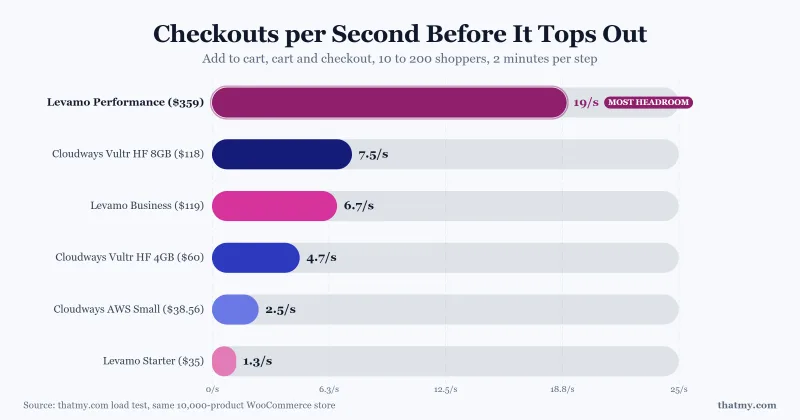
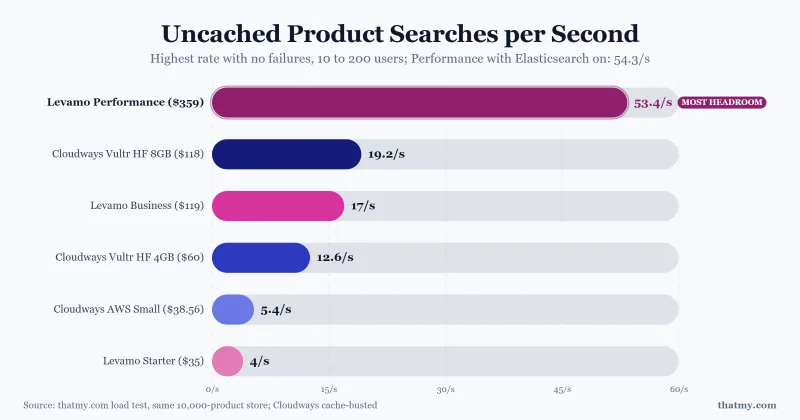
Performance handled 19 checkout journeys and 53 searches a second, the highest capacity in this test, with 2 failed requests in the whole run. Business held 6.7 checkout journeys a second and never lost its database. Starter lost its database twice at 100 shoppers, and nothing warned me.
At Business's price, a Cloudways 8GB server handled a little more checkout traffic: 7.5 journeys a second against 6.7. Per dollar of list price, every Cloudways server gave more checkout capacity than any Levamo plan.
What Levamo's larger plans sell is a managed platform: KeyDB object cache, one-click service restarts, Cloudflare Enterprise and a WAF on every plan, CPU that bursts far past the line the dashboard draws, Elasticsearch on Performance, and a price that does not rise at renewal.
What this review is based on
Every figure on this page names its plan.
- Store test, current plans: Levamo's Starter, Business and Performance plans, test plans Levamo provided for this review (I did not pay for them), each a monthly subscription on my own account, each running the same WooCommerce store, loaded from New York at 10, 50, 100 and 200 users. The same store ran on Cloudways: a Vultr High Frequency server at 4GB, the same server scaled to 8GB, and an AWS Small server in the same Virginia region as Levamo.
- Hands-on, the same accounts: creating the sites, the dashboard, a database outage and its restart, timed support chats, Elasticsearch on Performance.
- Benchmark, retired plans: the retired Starter, Growth and Scale plans. Origin TTFB from 10 locations, a 0 to 250 client load ramp, 54 days of uptime and page speed scores. The new plans are different products, so those sections are a baseline for the platform, not results for today's plans.
- What Levamo publishes: plan prices, allowances, add-ons, trial limits and the Terms of Service, re-checked for this review.
- Not tested yet: a staging push, a backup restore, a migration, the CPU model over SSH, AI Management, logged-in pages and cancelling with the refund.
- The scores below are per plan, because a $35.00/mo Starter plan and a $359.00/mo Performance plan behaved like different products under the same test.
Overall for Business, the plan I would pick for a store: 7.6/10
Support and renewal are the same platform on every plan. Performance scores highest: it is fast enough for a large store and it held under 200 shoppers. Business is the plan for a store or community site with a normal catalogue. Starter scores lowest: its database stopped under the store test and it gave the least checkout capacity per dollar.
✅ Where Levamo is strong
- Performance reached 19 checkout journeys a second; Business and Performance kept their database up under 200 shoppers
- CPU bursts far above the limit the dashboard draws: Business ran at 8.8 GHz against a 1.4 GHz line
- Flat pricing with no renewal hike at the end of the term
- One-click restart for each service: a failed database was back in about 9 seconds
- Typo-tolerant Elasticsearch on Performance, switched on with one click
- Cloudflare Enterprise CDN, WAF, DDoS protection and SSL included on every plan
❌ Where Levamo falls short
- Starter's database stopped twice at 100 shoppers and did not restart by itself, while the dashboard still said Online
- Less checkout capacity than Cloudways for the money: at the same price, a Cloudways 8GB server did 7.5 checkout journeys a second against Business's 6.7
- No CPU or RAM figures published, and the dashboard's limit lines are not the real caps
- A person took 49 minutes to join the support chat
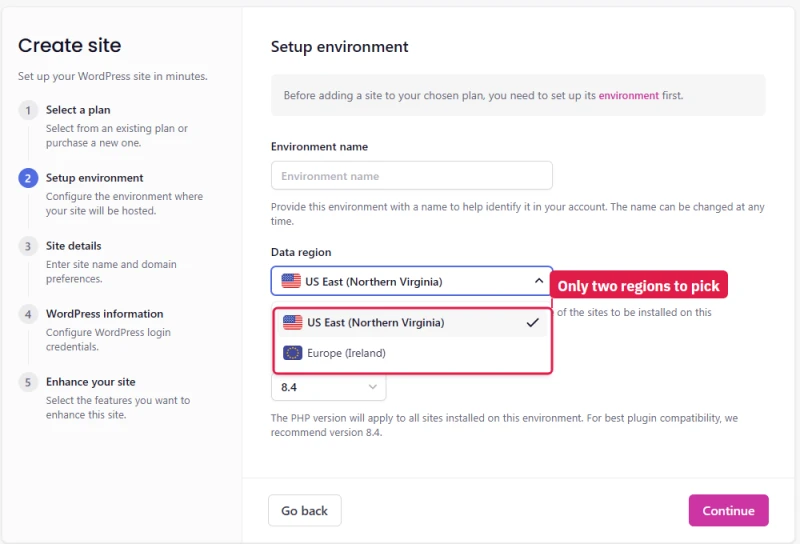
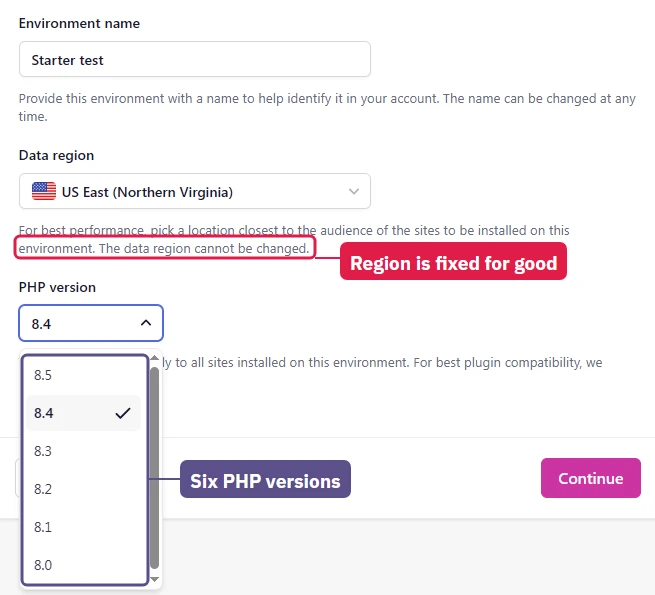
- Only two regions, US East and Ireland, and a site's region can never be changed
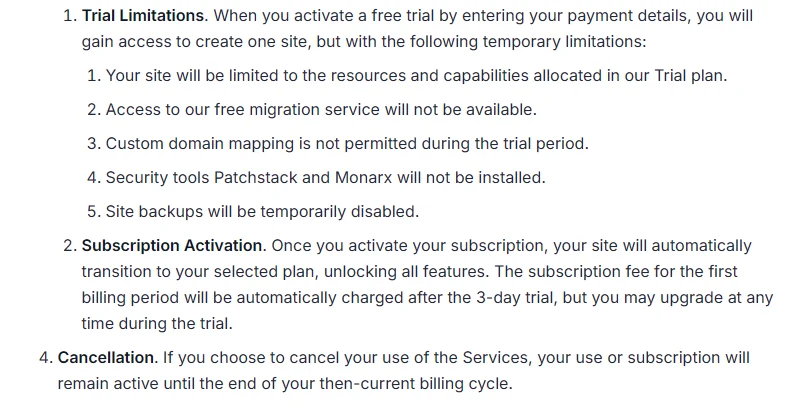
- The free trial blocks backups, security tooling and migration

What Works Well
- 99.97% to 99.979% uptime across three legacy plans over a 54-day window
- 0.1% or fewer errors across a 0-250 client load ramp on the legacy plans
- Cloudflare Enterprise CDN, WAF and SSL included on every plan, Starter too
- Flat pricing with no renewal step, and a published per-tier feature table
- Container isolation and Monarx malware scanning included on every plan
- Free migrations carried out by Levamo's own team
- KeyDB and Redis object cache plus 2x auto-scaling from the Business plan
What To Weigh
- Object cache and auto-scaling are not on the Levamo Starter plan
- Legacy origin TTFB trailed Cloudways, ScalaHosting and Kinsta in the same retired-plan round
- Two regions only: US East and Dublin
- 3-day trial excludes backups, security tools and migration
- No email hosting on any plan
- Enhanced and Elite support carry a 6-month minimum commitment
Benchmark Data
- Origin TTFB (3 plans, no CDN): 113ms to 127ms
- Uptime (54-day window): 99.97% to 99.979%
- PageSpeed Score (Mobile): 73/100
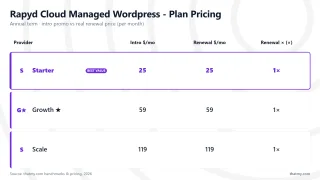
Cloudflare Enterprise on Every Plan
Methodology: The benchmark boxes on this page cover 6 plans. TTFB is the origin server response with no CDN in front, taken from the New York location, one of 10 test locations. Uptime is shown over a 54-day window. Load figures are for a 60-second ramp of 0-250 concurrent clients from US-East.
Levamo Pricing and Plan Limits
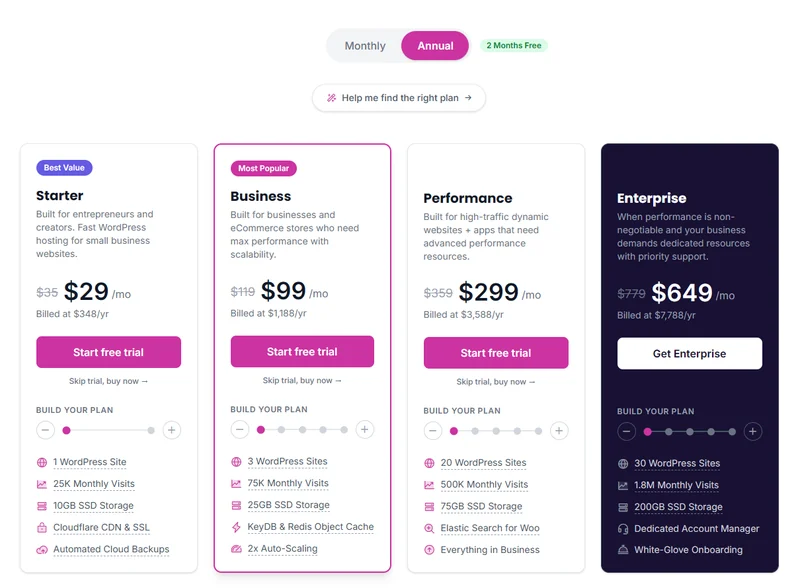
Four plans, from Starter at $35.00/mo to Enterprise.
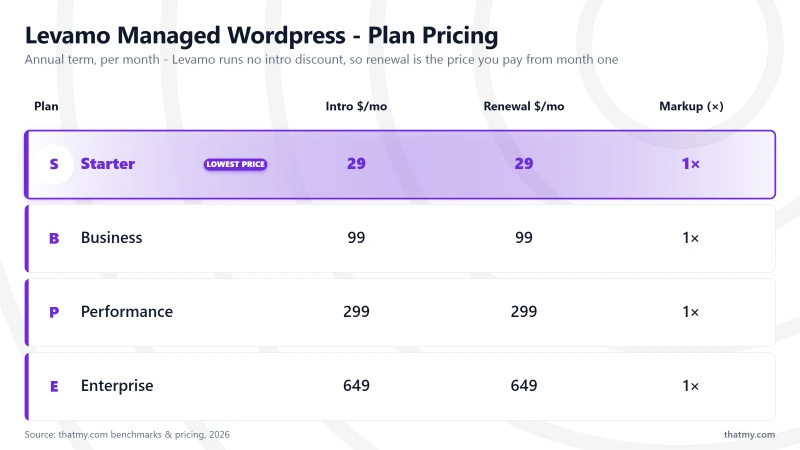
Pricing is flat. Annual billing is a straight discount, and the renewal price is the same as the first-year price. Every price below is bound to the price canon and re-read from levamo.com.
Storage runs from 10GB on Starter to 200GB on Enterprise.
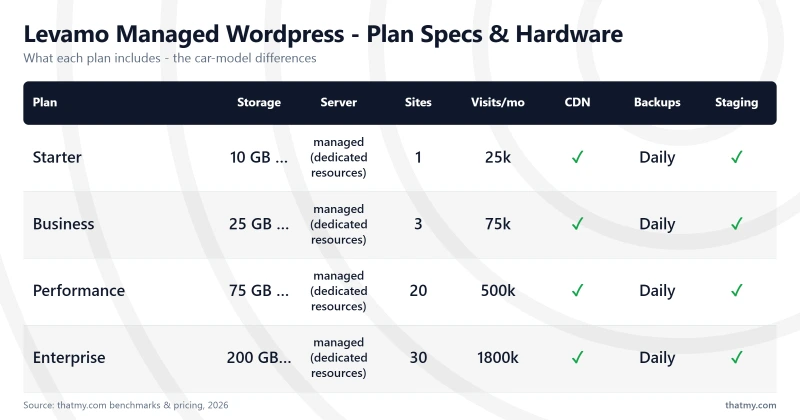
What each plan unlocks
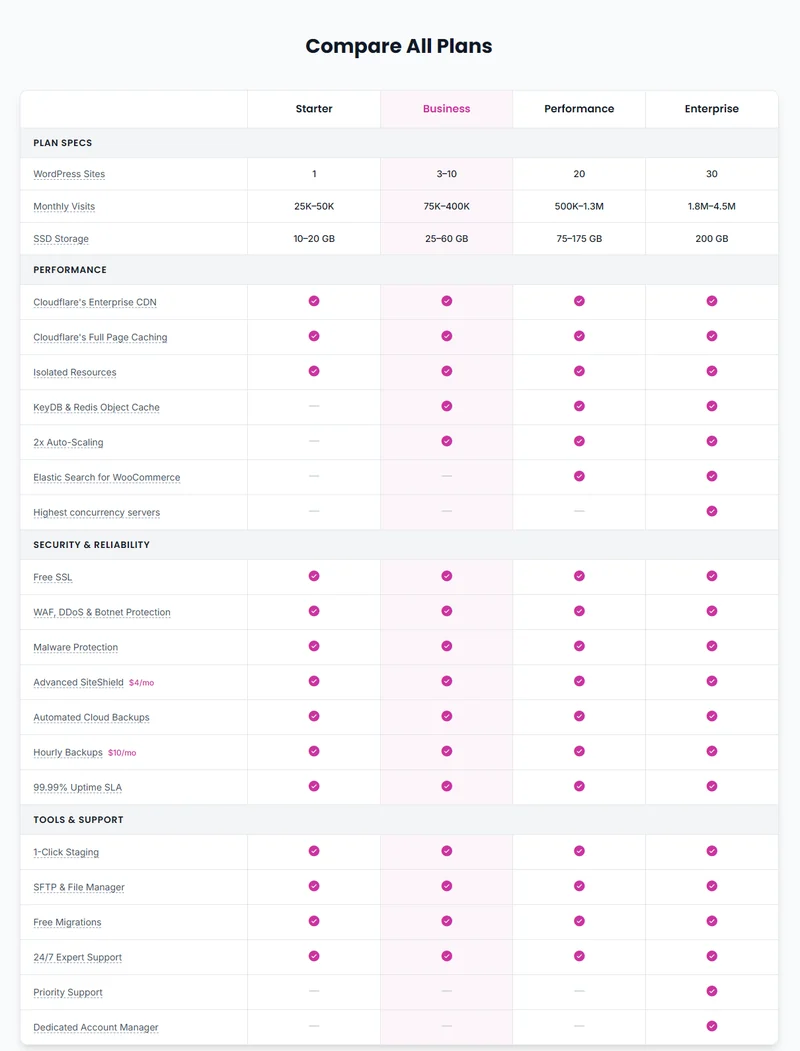
Levamo's own comparison table, feature by feature.
The same comparison as Levamo publishes it on its pricing page.
⚠️ The plan limit to check first
Levamo sells its architecture on dynamic performance, but KeyDB and Redis object caching are not available on the Starter plan. A WooCommerce or BuddyBoss site belongs on the Business plan at minimum, costing $119.00/mo month to month or $99.00/mo billed annually.
Build Your Plan: the slider inside each plan
Every plan card has a resource slider that changes the allowances before you buy. The table records the lowest and highest position of each plan at the month-to-month rate. Extra sites cost $20 per site once you pass the entry Starter configuration.
Monthly versus annual: what a year and two years cost
Most shared and managed hosts publish a low first term and recover it at renewal. Levamo prices annual billing as two months free, and the renewal figure in the canon matches the intro figure on every plan. Year two costs the same as year one.
Every figure in that table is arithmetic on the plan rates. The annual column matches the amounts Levamo prints on its own pricing cards: the discount is real, and it applies to the same rate at every renewal.
What happens if you exceed the visit allowance
Levamo sizes each plan by estimated monthly visits. Its help centre defines a visit as a front-end page view, leaves out REST API and AJAX requests, and says the figures are estimates: traffic is not metered or throttled.
Those background requests still use the plan's CPU, memory and PHP workers. A WooCommerce store with busy carts and checkouts reaches the plan's real ceiling before its visit estimate, which is what the store test measured.
There is no overage fee on the pricing page or in the Terms. Outgrowing a plan brings an upgrade prompt, not a bill. Resource changes apply instantly with no downtime.
Extra sites, extra storage and what each one costs
Additional sites cost $20 per month each from the second Starter slider step upward. Storage cannot be bought on its own: the slider moves visits and storage together, so the extra cost covers both whether or not you need both.
On Starter, moving from 25K visits and 10GB to 50K visits and 20GB takes the month-to-month rate from $35.00/mo to $59, so roughly $24 a month buys the pair.
On Business, going from 3 sites, 75K visits and 25GB to 10 sites, 400K visits and 60GB moves the rate from $119.00/mo to $299. A site that is storage-heavy but quiet, an archive or a media library, pays for traffic headroom it will never use.
What Levamo costs once you add email
No Levamo plan includes mailboxes, so the advertised price is never the whole bill for a business domain. A fair comparison against a host that bundles email adds a mailbox provider back in. These are list prices for a single mailbox.
Zoho Mail Lite lists at $1.00 per user per month billed annually and Google Workspace Starter at $7.00 per user per month, before the promotional discount Google was running when I checked. Multiply the mailbox column by your number of staff: that line scales per person while the hosting line does not.
A store needs one more line item. WordPress and WooCommerce order mail should leave through a transactional sending service, not the web server. The cost depends on monthly send volume, so there is no figure for it here.
How I Tested Levamo
Every provider on this site goes through the same baseline tests so the comparison tables line up: single-visitor response time, stability as traffic ramps up, and long-term uptime. That baseline does not cover the uncached store work Levamo built its platform for, so this review adds a WooCommerce store test on the current plans, described in the store test section.
🔬 Baseline test setup (retired plans)
Test sites
A performance figure means little without the plan it came from. This table anchors every baseline measurement in the review.
The retired $29, $69 and $139 plans disappeared when the lineup changed. The current Starter plan bills at $35.00/mo monthly and is sized by an estimate of 25,000 visits a month, which Levamo says it does not meter. Business and Performance add feature limits the old plans did not have. So the old Growth results are not presented as a stand-in for the current Business plan.
My logs also hold a single 100-client reading of 198ms on the Starter site from before the main runs. It has no load-test ID and is a standalone data point, so it is context only, never a point on a slowdown curve. The main load results use full 60-second runs, each with a test ID.
What is tested and what is still pending
Changelog: this review gained the WooCommerce store test on the current Starter, Business and Performance plans with three Cloudways servers, the hands-on section, what the dashboard's CPU limits mean, and a score for each plan.
Levamo's AI Management feature is described from its launch post and has not been tested. A London TTFB, logged-in pages, API latency, resource isolation between sites, a backup restore and a staging push are part of the next test round.
The 10,000-Product WooCommerce Store Test: Current Plans vs Cloudways
Levamo sells itself on dynamic WordPress, so the test covers the part of a store a page cache cannot help: carts, checkouts and product search. The Starter, Business and Performance plans, test plans Levamo provided for this review and set up as monthly subscriptions on my own account, each ran the same WooCommerce store.
The same store ran on Cloudways for comparison: a Vultr High Frequency 4GB server, the same server scaled up to 8GB at $118.00/mo, the price of Business, and an AWS Small server in Northern Virginia, the AWS region Levamo's US East plans run in, at $38.56/mo against Starter's $35.00/mo.
The AWS Small search figure is from the 10 and 50 user steps; its 100 user step was stopped early after Cloudways paused the account for heavy resource use, so it is not counted.
🔬 How the store test worked
Starter: fine for browsing, down at 100 shoppers
Cached browsing was flawless on every plan, Starter included: 200 users, no errors, a median of 26 ms from New York.
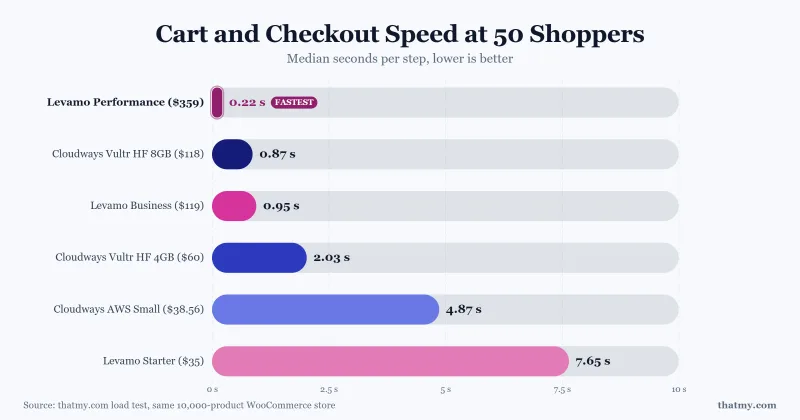
The work a cache cannot do went differently. Starter peaked at about 4 searches and 1.3 checkout journeys a second, and at 50 shoppers each cart step took 7.6 seconds.
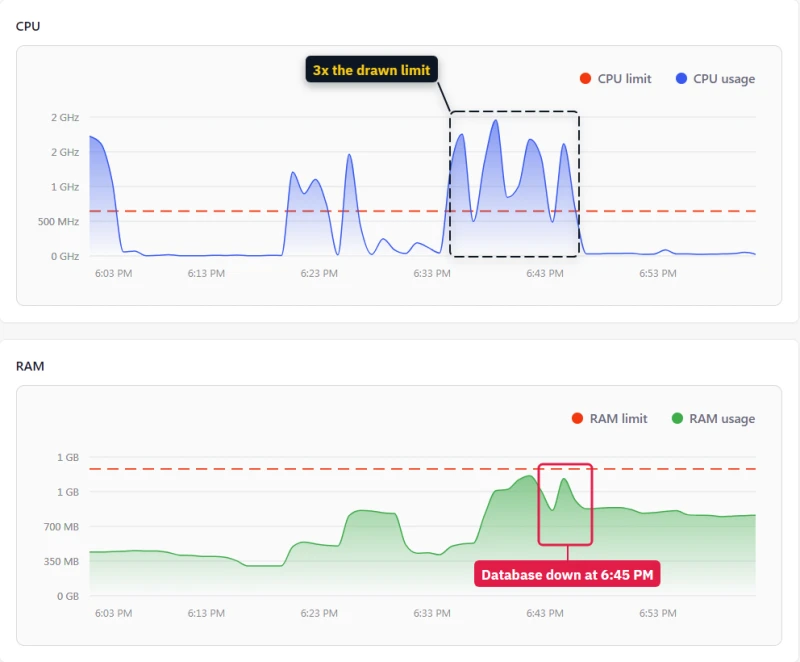
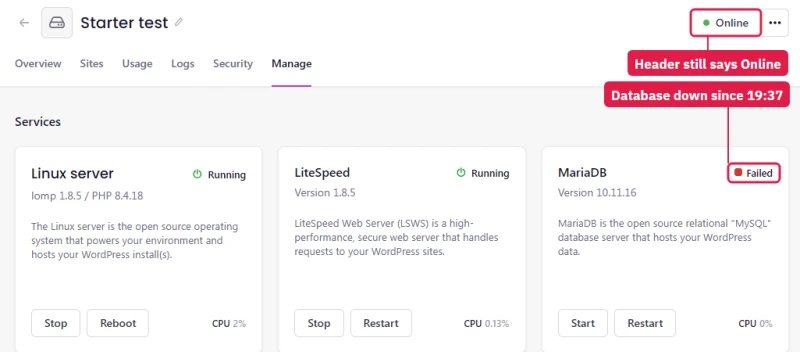
At 100 users its database stopped twice, once in the search test and once in the cart test. Every search, cart and checkout then returned "Error establishing a database connection" while the home page still loaded from cache. The store looked open and could not take an order.
Starter's own Usage page shows the state it was in. During the search test its CPU ran at about three times the dashed line, and memory sat at the 1.3 GB line when the database stopped at 6:45 pm UTC.
This is a heavy test for a $35.00/mo plan that Levamo sizes for about 25,000 visits a month, and a small shop rarely has 100 people searching at once. The Cloudways AWS Small server, at $38.56/mo, took the identical test without one failed request. It slowed down instead: 5.4 searches a second with a median wait of 7.9 seconds at 50 searchers, and 2.5 checkout journeys a second.
The AWS server recovered when the rush ended. Starter's database stayed down until someone restarted it.
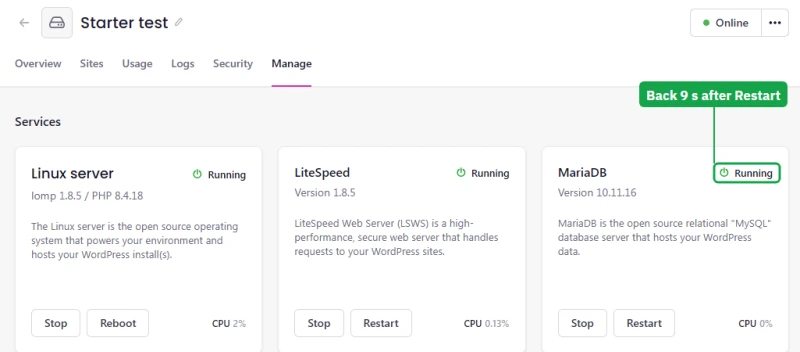
Nothing said so. The dashboard kept showing the site as Active and the environment as Online, while the environment's Manage page listed MariaDB as Failed. The database did not restart by itself in 19 minutes the first time or 6 minutes the second. The one-click restart on that page brought it back in about 9 seconds; the hands-on section has the screens.
Business and Performance: they slow down, they do not fall over
Business peaked at 6.7 checkout journeys and 17 searches a second, answered a cart step in 0.95 seconds at 50 shoppers, and failed 0.36% of requests at its worst step, 200 searchers at once. Its database stayed up all evening.
Performance is in another class: 19 checkout journeys and 53 searches a second, a 0.22 second cart step at 50 shoppers, and 2 failed requests in the whole run. That is the highest capacity of any plan or server in this test.
At the same price: Business against a Cloudways 8GB server
Business costs $119.00/mo. The Cloudways Vultr High Frequency server scaled up to 8GB costs $118.00/mo, so the same test ran on it. It handled 7.5 checkout journeys and 19.2 searches a second against Business's 6.7 and 17, answered a cart step in 0.87 seconds at 50 shoppers against 0.95, and failed no requests at any step, where Business failed 0.36% at 200 searchers.
At the same money Cloudways came out a little ahead on raw capacity. On Cloudways you pick, size and scale the server yourself; on Levamo the platform does that for you.
Per dollar, Cloudways gives more checkout capacity
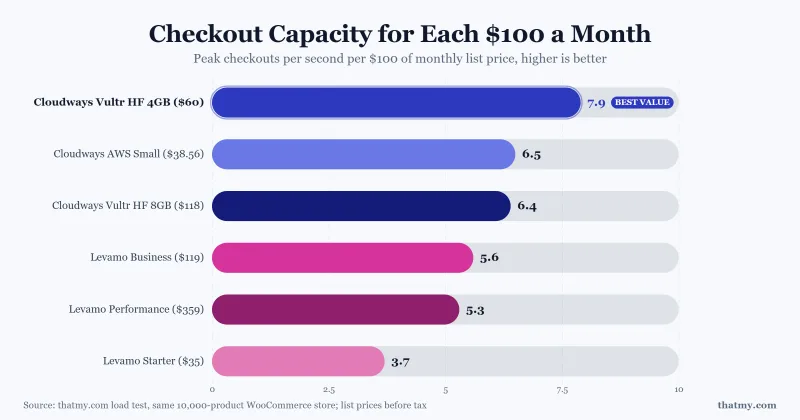
Divide peak checkout journeys by the monthly price and Cloudways leads: 7.9 for each $100 a month on the Vultr High Frequency 4GB server, 6.5 on AWS Small and 6.4 on the Vultr 8GB server, against 5.6 on Business, 5.3 on Performance and 3.7 on Starter.
Levamo's larger plans sell something different: a managed platform with a lot of capacity in one plan, CPU far above the line the dashboard draws (the CPU limits section), and Elasticsearch included on Performance. On raw checkout capacity per dollar, Cloudways wins.
One fairness note on speed. The Cloudways Vultr server answered cached pages in 4 ms against Levamo's 26 ms, and that is mostly distance: the load machine is in New York, the Vultr server in New Jersey and Levamo in Virginia. The AWS Small server in Virginia answered in 23 to 24 ms, the same as Levamo. Compare the ceilings and the failures, not cached milliseconds.
Which Levamo Plan Should You Buy?
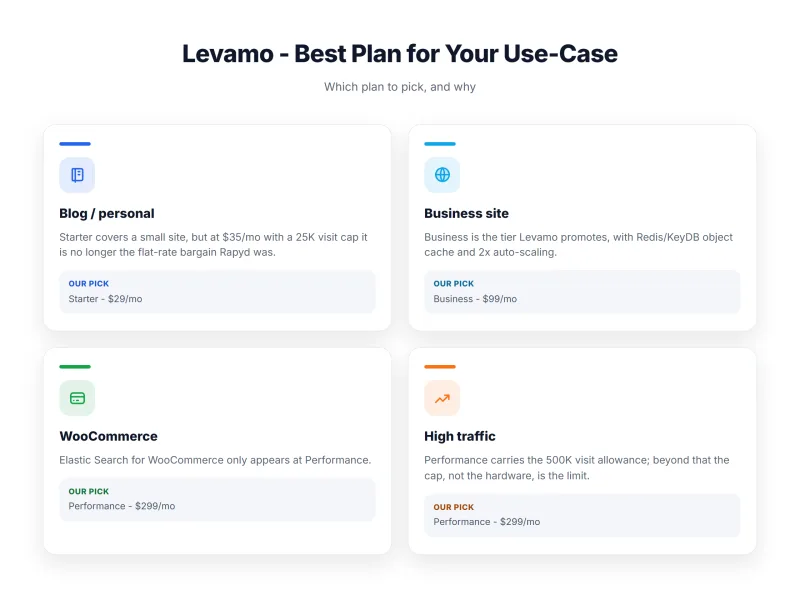
- Starter: one small site with a cache in front of it. It is not built for the store test's workload: its database stopped at 100 shoppers.
- Business: a store, community or course site with a normal catalogue, or up to three sites. It held 6.7 checkout journeys a second and never lost its database.
- Performance: a large catalogue, up to 20 sites, Elasticsearch, and the highest capacity in this test: 19 checkout journeys a second.
Most buyers settle on Starter or Business. Performance, at $359.00/mo, is built for high-volume stores and agencies with client portfolios; it competes with agency and high-traffic plans, not with entry-level managed WordPress hosting.
Levamo's plan picks run from single sites on Starter up to high-traffic catalogues on Performance.
Performance cuts the price per included site sharply, which makes it the plan for an agency moving 20 client sites. Business costs slightly more per 10,000 visits than Starter: the premium pays for object cache and auto-scaling.
Performance does not include Levamo's "highest concurrency servers". That hardware tier is Enterprise only.
Elasticsearch on Performance did not raise search capacity: 54.3 searches a second with it and 53.4 without. It made search typo-tolerant, which a big catalogue will value.
The speed difference between the plans comes from CPU and memory. In the store test Performance handled 19 checkout journeys a second against 6.7 on Business, for $240 more a month. Starter is for one small site: under the same test its database stopped at 100 shoppers. The store test section has the details.
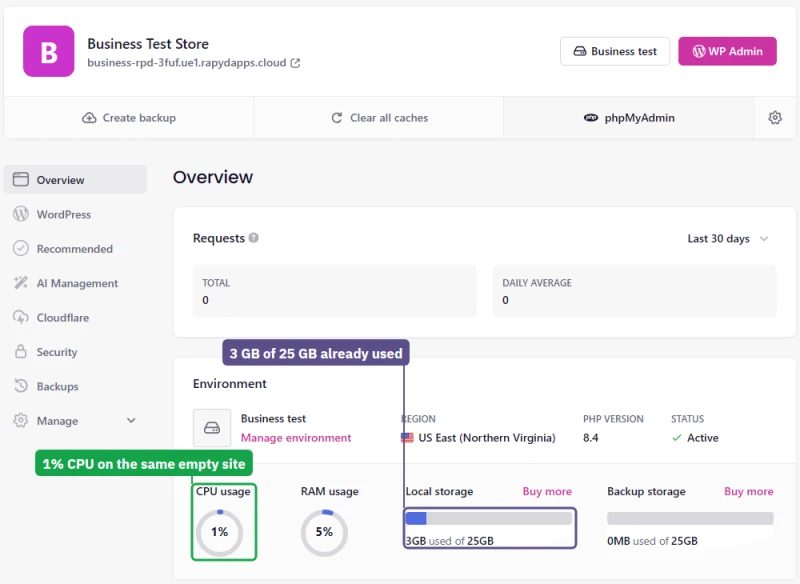
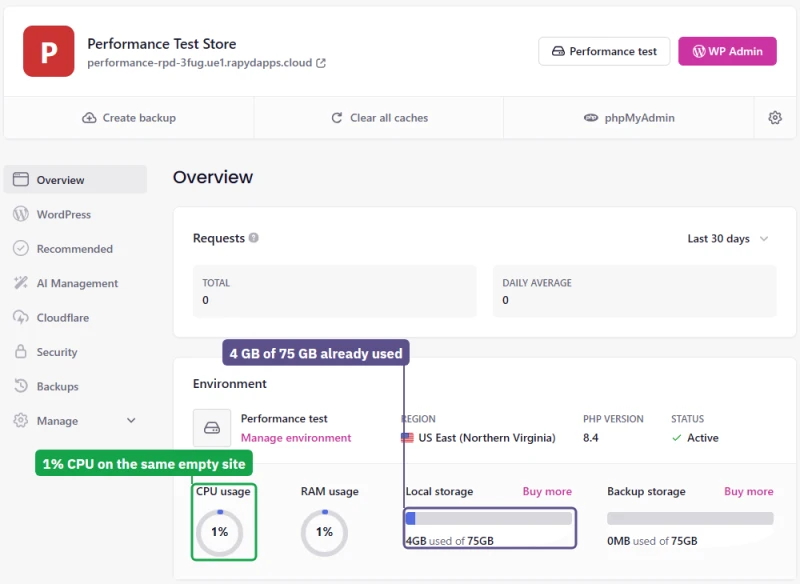
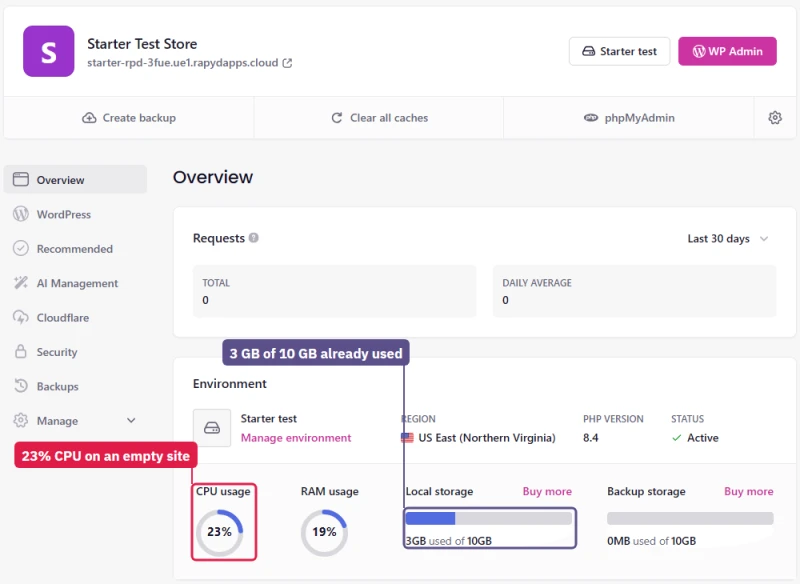
An empty site shows the gap before any shopper arrives. On the day each was created, the same idle WordPress read 23% on Starter's CPU gauge against 1% on Business and Performance.
It already took 3 GB of Starter's 10 GB of storage, 3 GB of Business's 25 GB and 4 GB of Performance's 75 GB. On Starter, nearly a third of the storage is gone before you add a product.
CPU Limits, Object Cache and Elasticsearch: Why the Plans Differ
Levamo publishes no CPU or memory figure for any plan: not on the pricing page, not in the cart, not in its knowledge base. The only numbers are inside the dashboard. Each environment's Usage page draws dashed "CPU limit", "RAM limit" and "Traffic limit" lines on its charts, and hovering over a chart shows their values.
The dashed CPU line is not the cap
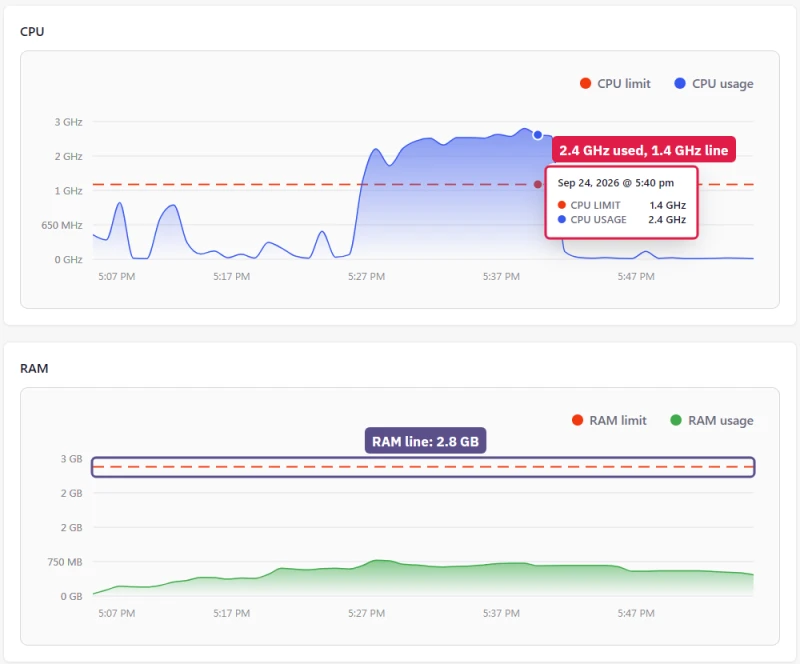
Under the store test every plan ran far above its line: Business at 8.8 GHz against 1.4 GHz, Performance at 30.8 GHz against 5.8 GHz. Starter, which Levamo sells without auto-scaling, reached 1.6 GHz against 645 MHz, and support's own monitoring showed it close to 2 GHz.
When I asked which number was Starter's real limit, support sent a chart from its own monitoring tool marked "CPU limit: 2 GHz" and wrote "This one is limit for starter server for CPU." So the line a customer sees understates Starter's ceiling about three times, and the load test shows Business and Performance can burst much further.
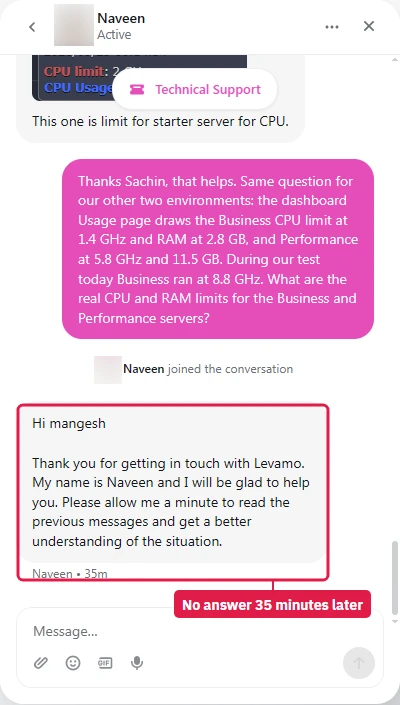
I asked for the real Business and Performance limits too. Support had not answered when this was written.
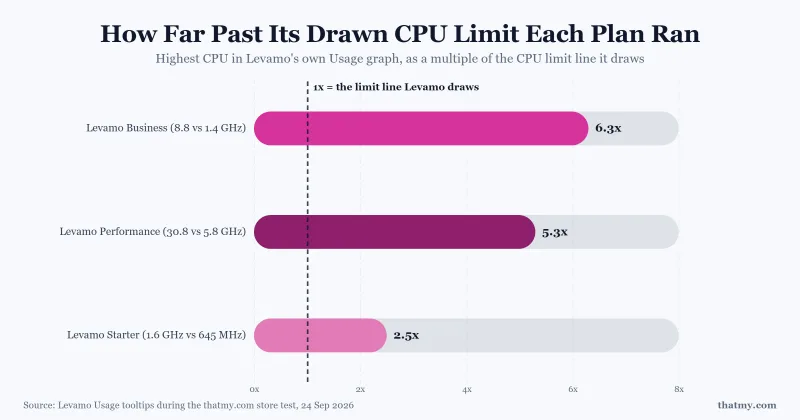
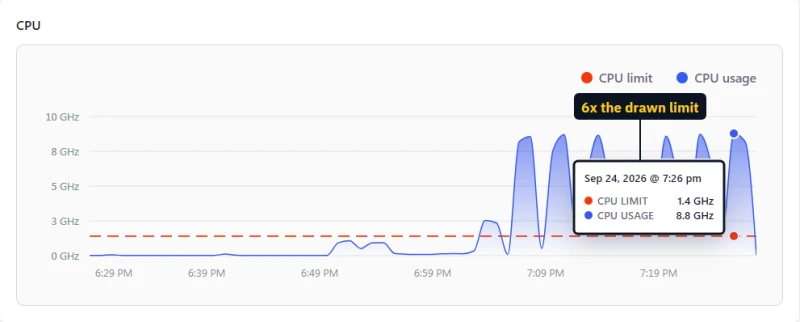
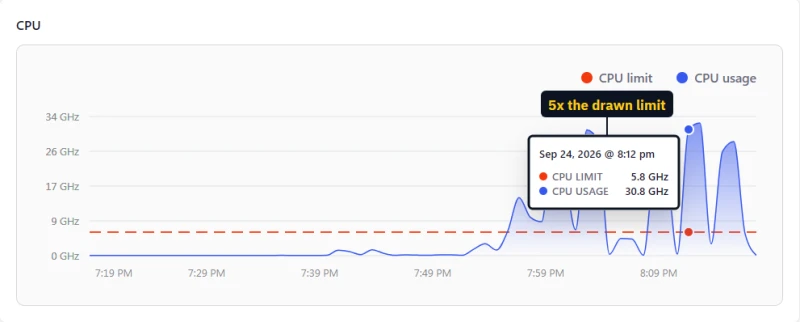
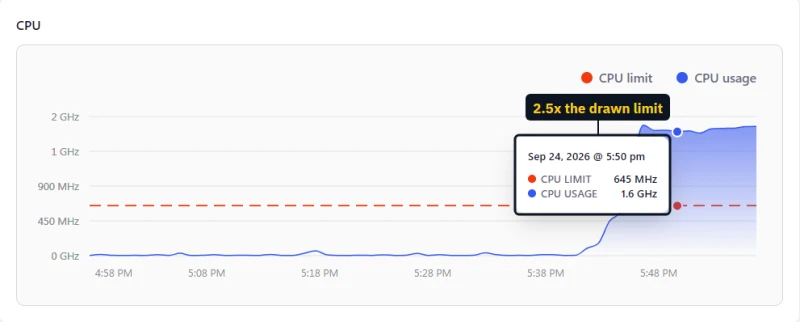
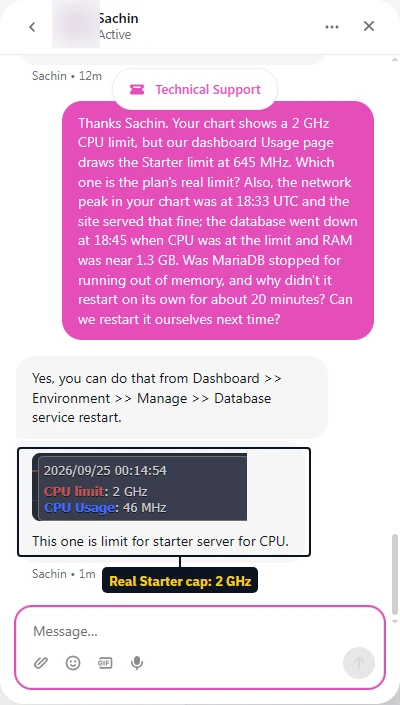
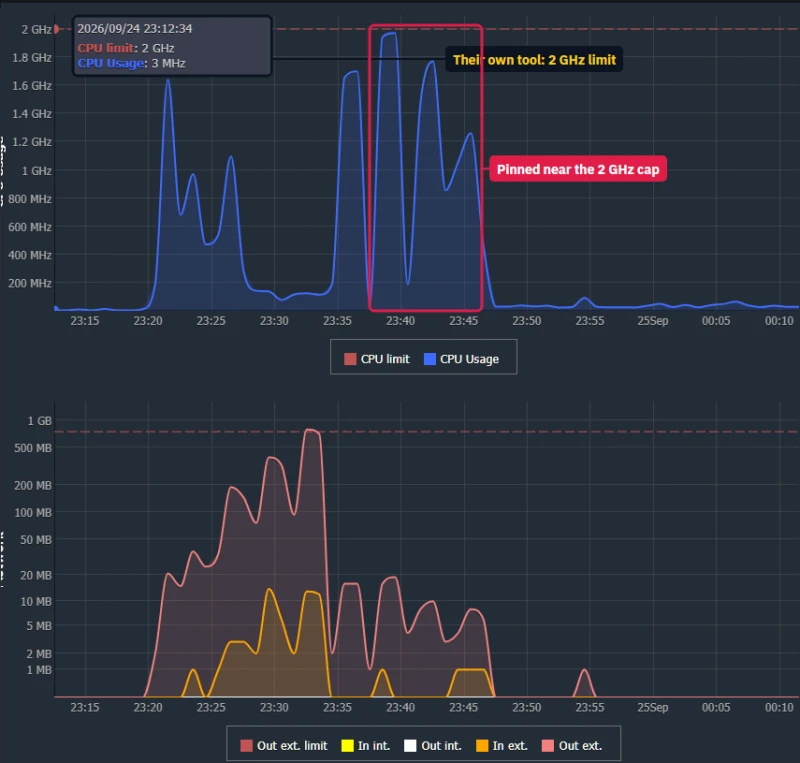
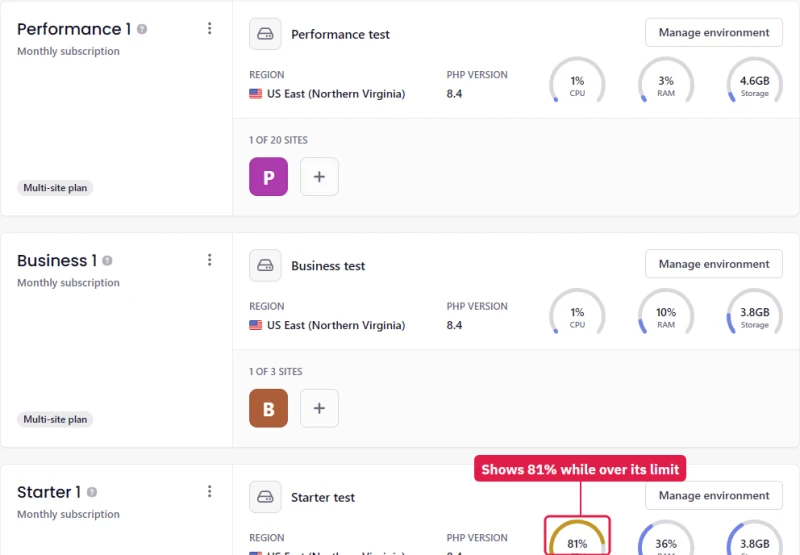
The CPU gauge on the Overview does not use the drawn line either. During the product import Starter's gauge read 81 to 84% while the Usage chart showed it at about two and a half times its line. Those readings fit the 2 GHz limit support named, so it is the Usage chart's dashed line that misleads, not the gauge.
The burst is generous and it is not a promise. Levamo's knowledge base promises "up to 2x" from Business up and names no hard limit. Size a store by what a plan did under load, not by the dashed line.
Object cache: Business and up, as sold
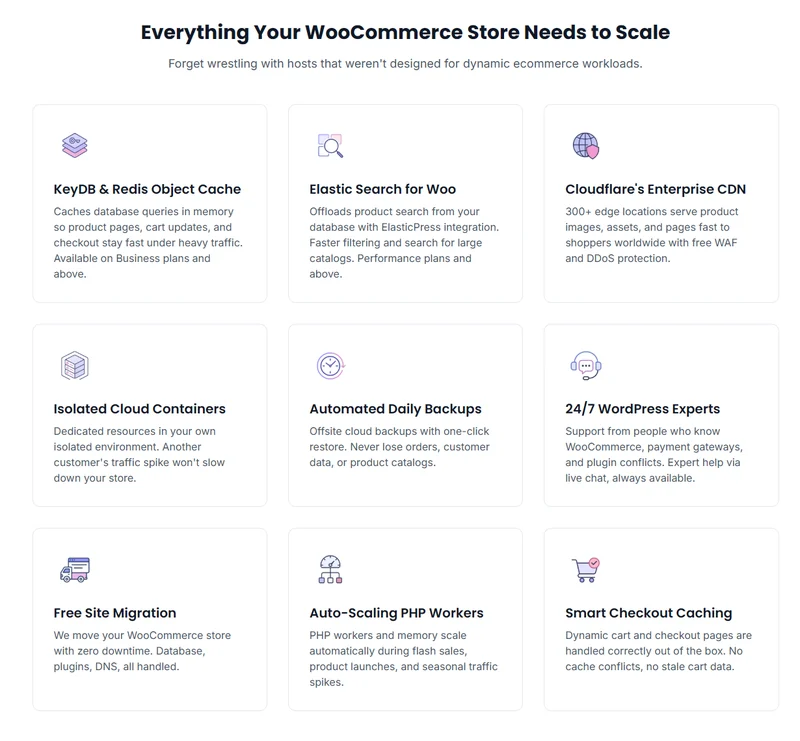
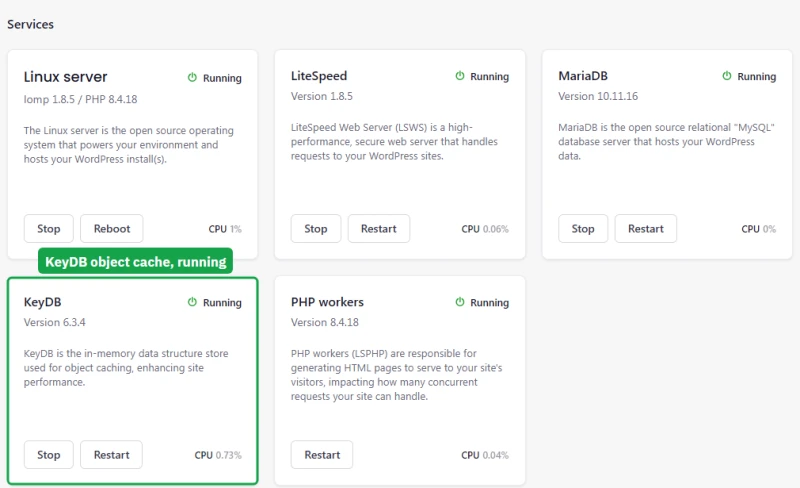
Starter arrives with LiteSpeed Cache only: no object cache drop-in and no Redis plugin, so every uncached page runs all of its database queries again. Business and Performance arrive with the Redis Object Cache plugin already connected to KeyDB 6.3.4 on a local socket inside the container. That matches the plan pages, and together with more CPU and memory it is likely one reason Business held where Starter failed.
Elasticsearch on Performance: better search, same speed
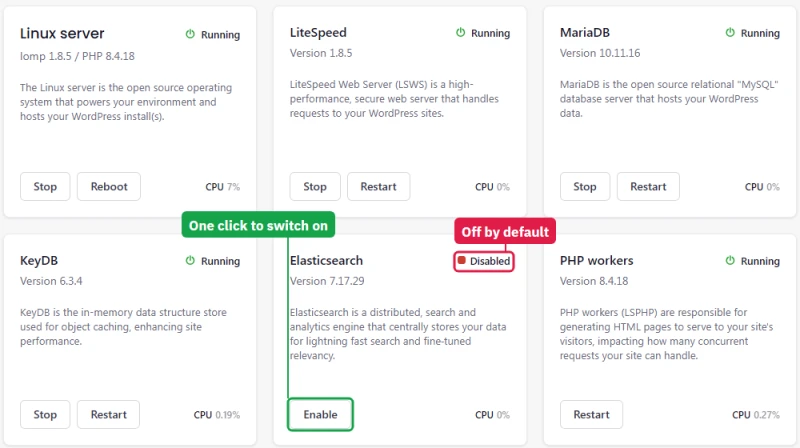
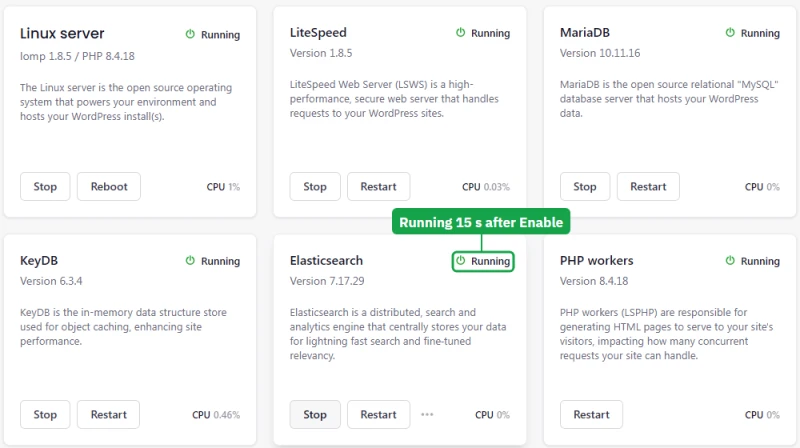
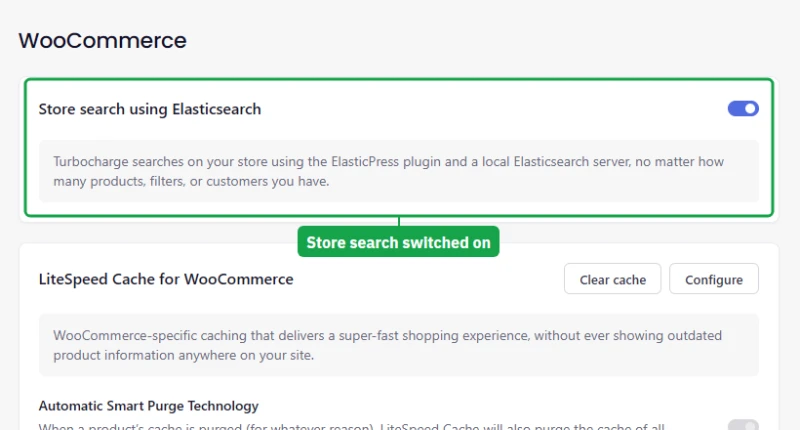
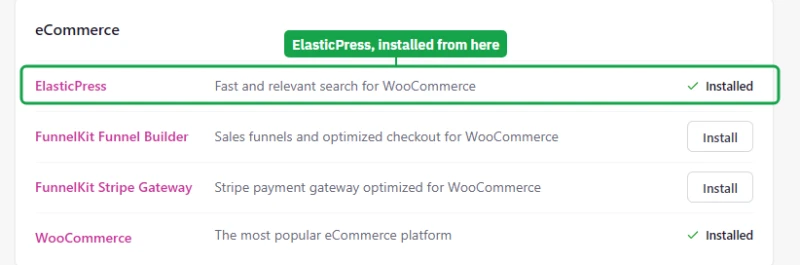
Performance includes Elasticsearch 7.17.29, but it is off on a new plan. The Manage page lists it with an Enable button: one click, no price shown, and it was running 15 seconds later. ElasticPress, installed from Levamo's Recommended plugins, then found the server by itself and indexed the store's 10,024 products and pages in 29 seconds.
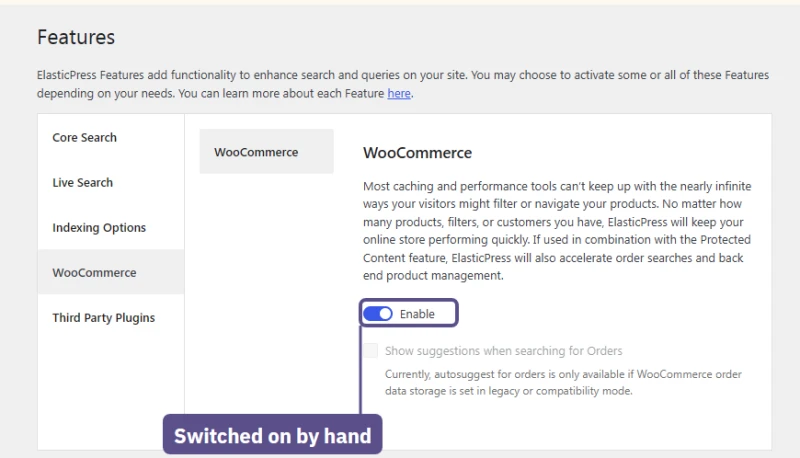
ElasticPress's own setup wizard stuck on step 3 twice until "Skip Install" got past it, and it left product search switched off until I turned on its Post Search and WooCommerce features by hand. Until then the store still searched through MariaDB.
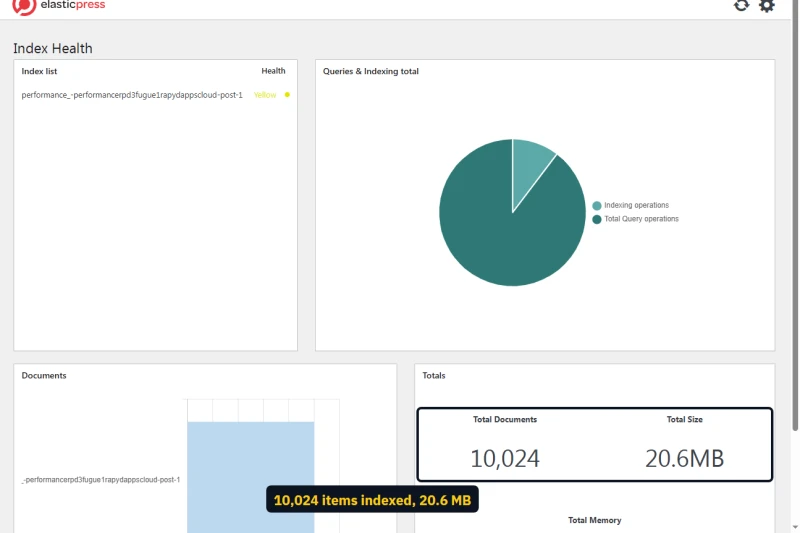
The next day ElasticPress's own Index Health page still showed the 10,024 items, 20.6 MB in all, and its Features page the WooCommerce search I had switched on myself.
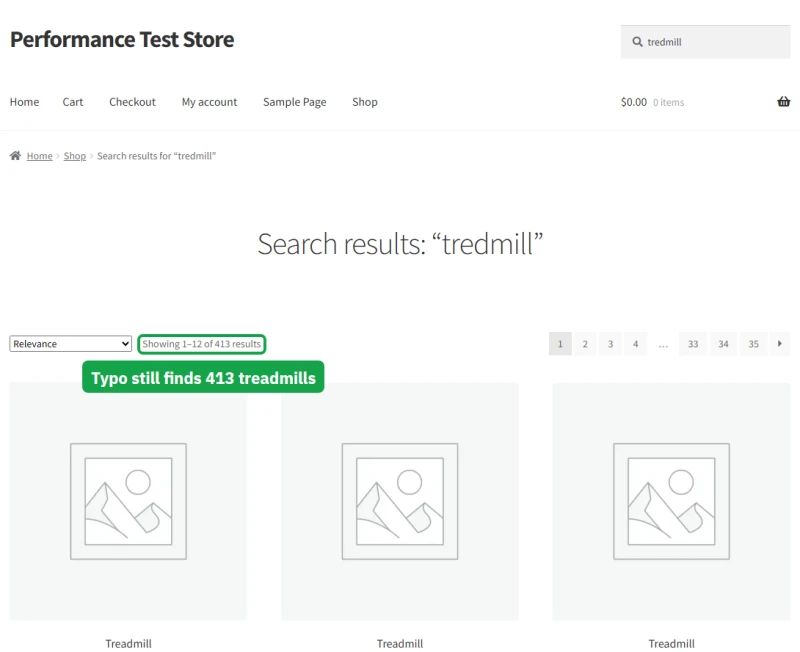
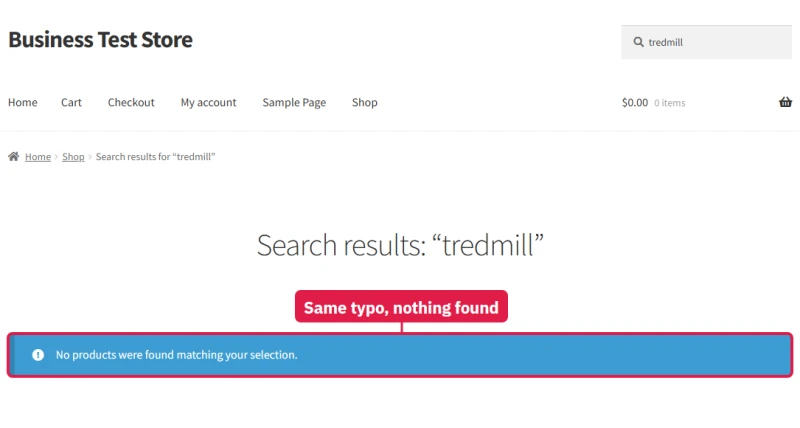
With it on, speed did not change: 54.3 searches a second against 53.4 without it, with the same median times. What changed is what a shopper finds. A search for "tredmill" found 413 treadmills on Performance and nothing at all on Business, and "headphnoes" found 334 headphones against none. A big catalogue will want that. Performance's case is its capacity; search speed is unchanged.
What this round did not cover
Hands-On: Sign-Up, the Dashboard, an Outage and Support
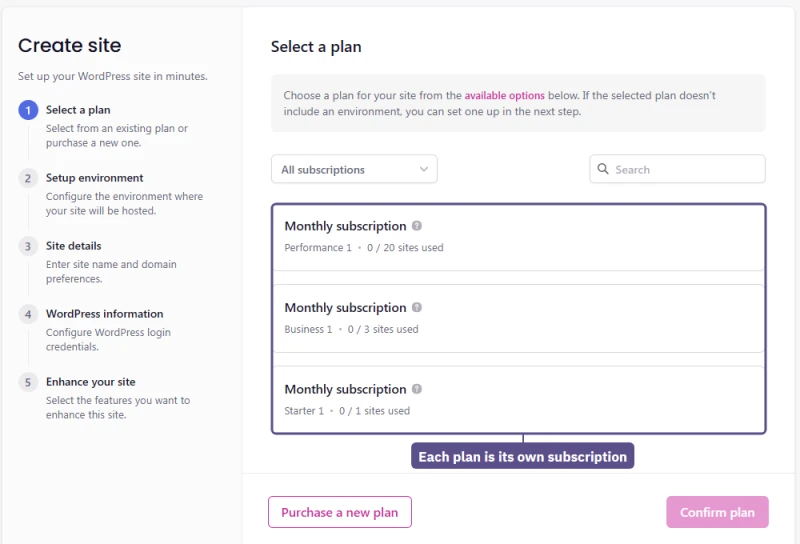
These notes come from the same accounts as the store test: the Starter, Business and Performance plans Levamo provided as test plans, each a monthly subscription on my own account, set up on the day of the store test and used for two days. Each plan is its own subscription with its own environment. I built one site per plan, kept every setting the same, and timed what I could.
Signing up and the first site
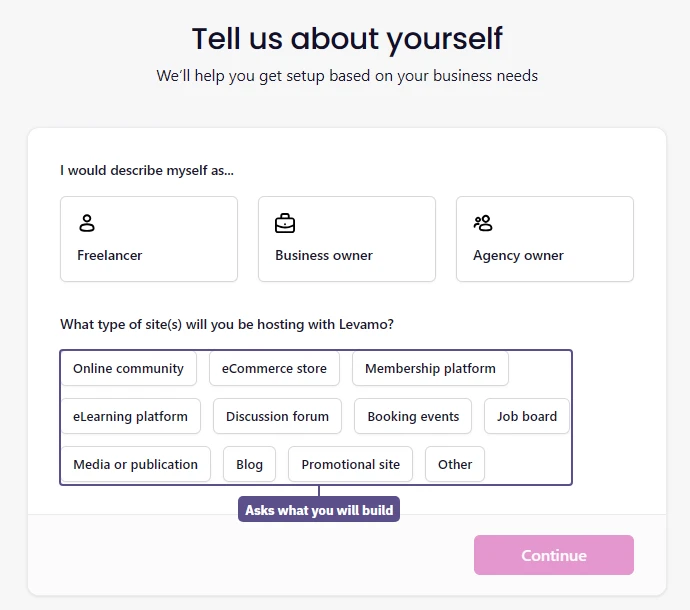
After checkout Levamo asks what you do and what you are building, then a five-step wizard creates the site: plan, environment, site details, WordPress login, and "Enhance your site". The environment step holds the one setting that cannot be changed later: the data region, US East in Northern Virginia or Europe in Ireland. PHP runs from 8.0 to 8.5, with 8.4 as the default.
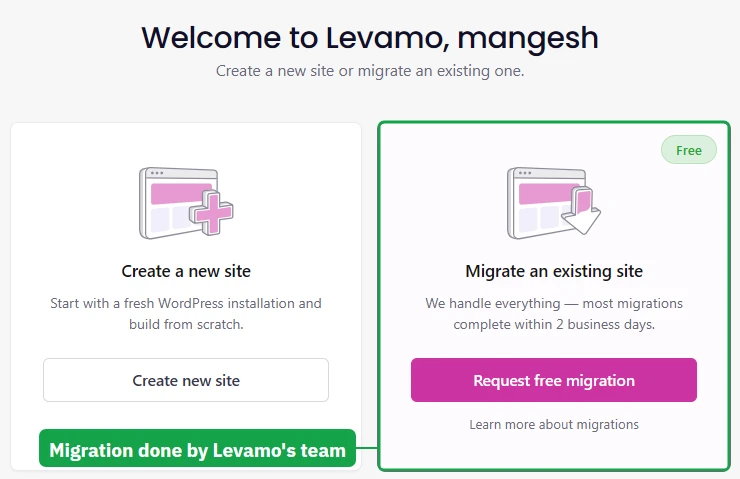
The first dashboard screen offers two ways in: create a new site, or hand an existing one to Levamo's team, who say most migrations finish within 2 business days. In the wizard each test plan appeared as its own monthly subscription with its own site allowance: one site on Starter, three on Business and twenty on Performance.
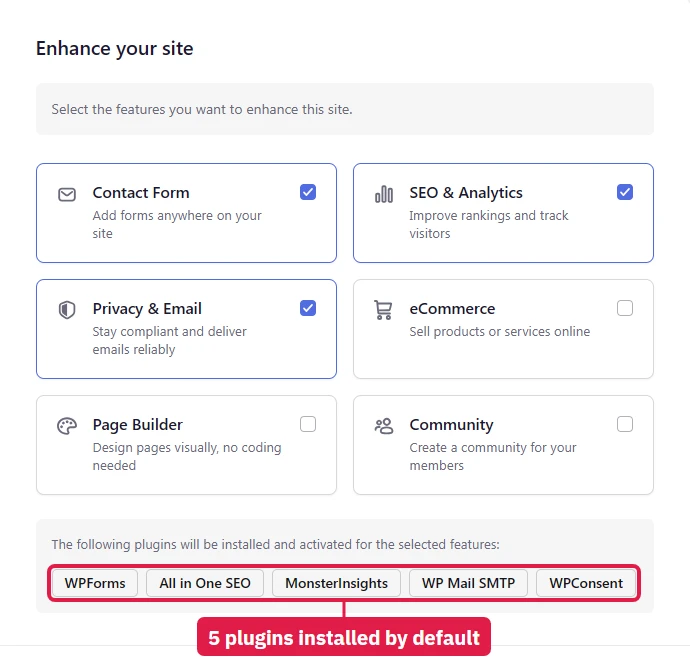
The last step ticks three of the six feature boxes for you, and those three install five plugins: WPForms, All in One SEO, MonsterInsights, WP Mail SMTP and WPConsent, all from the same plugin company. Untick them if you do not want them. I did, on every plan, so each test store started as plain WordPress.
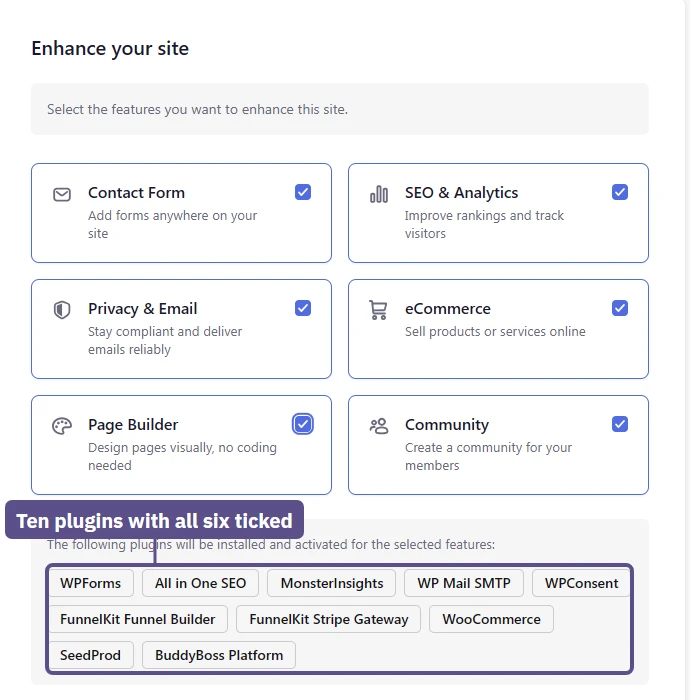
Tick all six boxes and the list grows to ten plugins: WooCommerce, FunnelKit Funnel Builder, FunnelKit Stripe Gateway, SeedProd and BuddyBoss Platform join the first five.
Starter and Business were ready about 6 minutes after I pressed Create, Performance after about 8 and a half. The progress page stayed on "Step 2 of 4: Installing server infrastructure" and never moved on; only a reload showed the finished site.
The site's first address still uses the old brand, rapydapps.cloud, and every new site starts on the Sydney theme with an update notice across wp-admin.
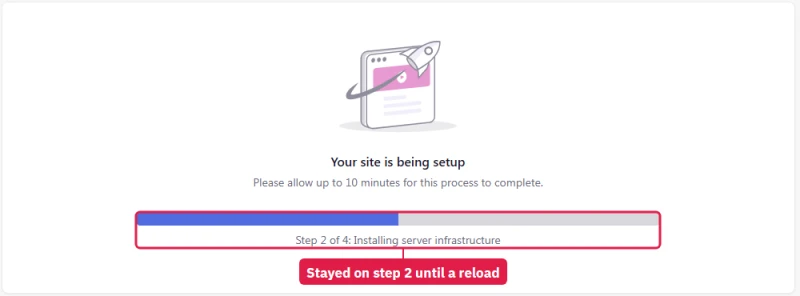
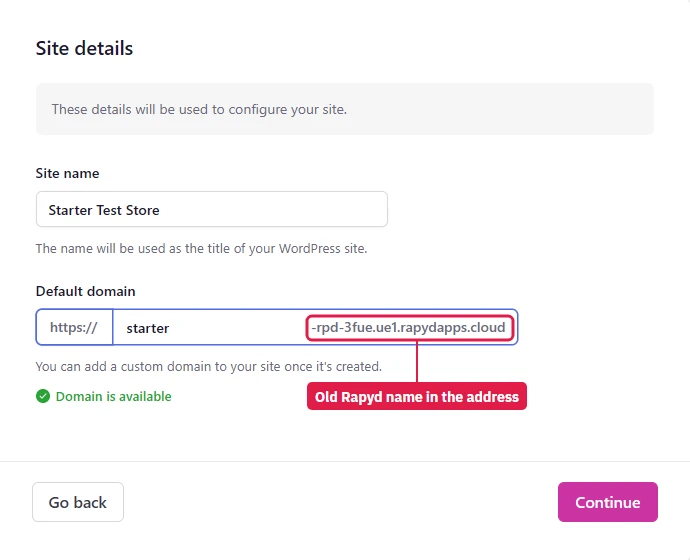
The finished Starter site was already using 3 GB of its 10 GB of storage with nothing on it, and its CPU gauge read 23% at rest. The plan section above compares all three plans on the same empty site.
The one-click WP Admin button
The dashboard's WP Admin button is meant to log you straight into WordPress. On Starter it did. On Business and Performance it opened the site's front page, logged out, three times out of three, and the normal WordPress login with the wizard's password worked instead. The one difference I found: Starter had Levamo's "Rapyd Helper" must-use plugin installed and the other two plans had none. I reported it in the support chat.
Building the store: 10,000 products
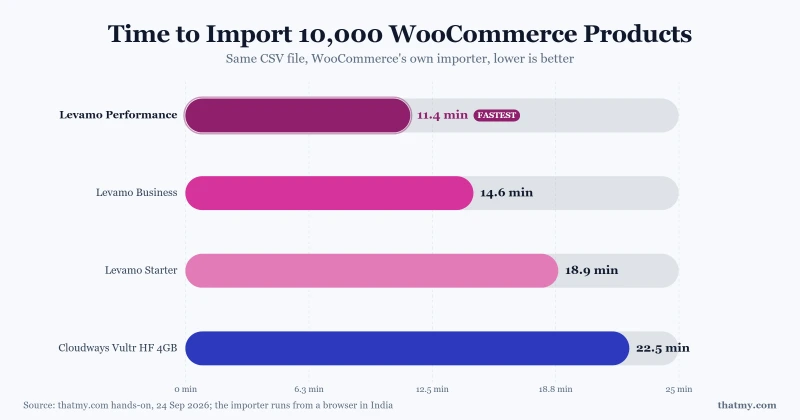
Importing the same 10,000-product file took 11 minutes 23 seconds on Performance, 14 minutes 38 seconds on Business and 18 minutes 53 seconds on Starter, against 22 minutes 32 seconds on the Cloudways Vultr server.
WooCommerce's importer sends one batch at a time from the browser, and my browser was in India, so every host paid about the same distance on each batch. Compare the plans with each other, not with import times published elsewhere.
The database outage, and a restart button that works
The store test section has the numbers. Twice Starter's database stopped under 100 shoppers and did not come back by itself: support restarted it after 22 minutes the first time, and I restarted it myself after 6 minutes the second.
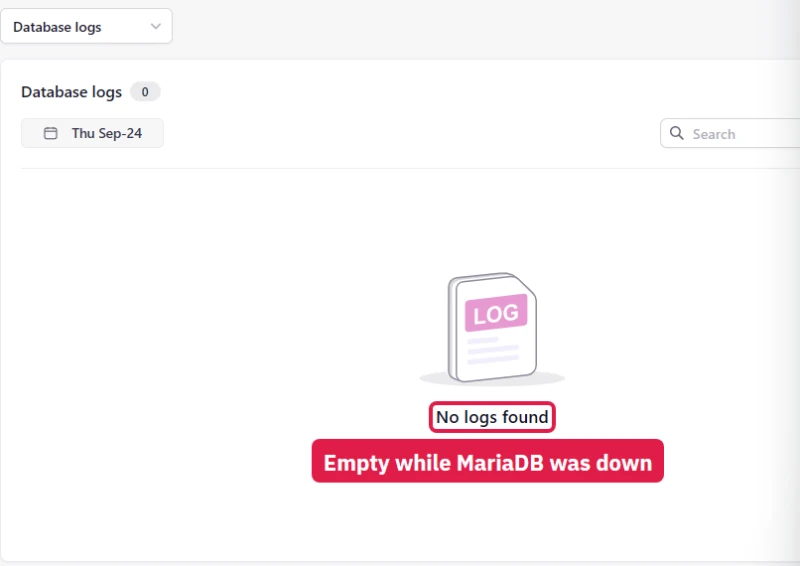
The home page kept loading from cache, the site said Active and the environment said Online. No email arrived, and the pages I had open showed no warning. The Database log for that day read "No logs found"; the server error log held 1,849 entries, the newest ones LiteSpeed notices about a possible deadlock.
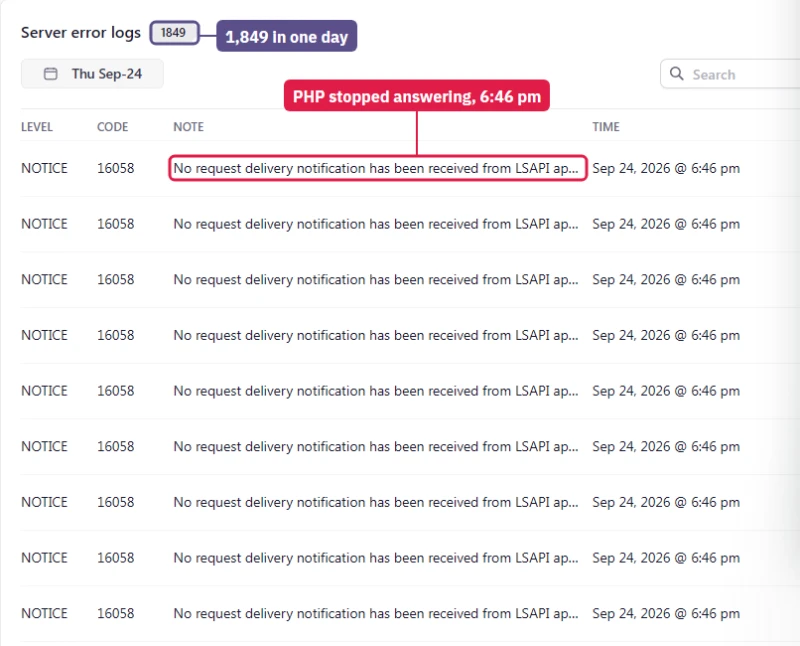
The fix, once you know where to look, is quick. Environment, Manage lists each service with its own buttons, and MariaDB showed Failed there. Restart warns that the site will go offline and that it "should take under a minute". It took about 9 seconds: my test machine saw the last error at 19:43:27 UTC and the first good page at 19:43:36.
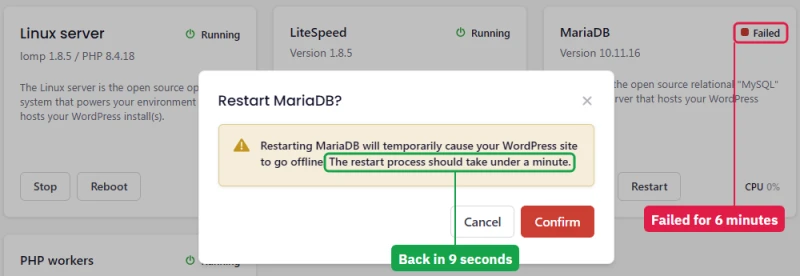
Levamo gives you the restart button and does not tell you when to press it. Nothing a customer or an owner sees says the checkout is down; the page that does is one you have to open yourself. After the same test, Cloudways' monitoring page rated its server "Problematic" under a "running near capacity" banner, and its database never went down.
Starter: 10 GB, and a dashboard that says 100% uptime
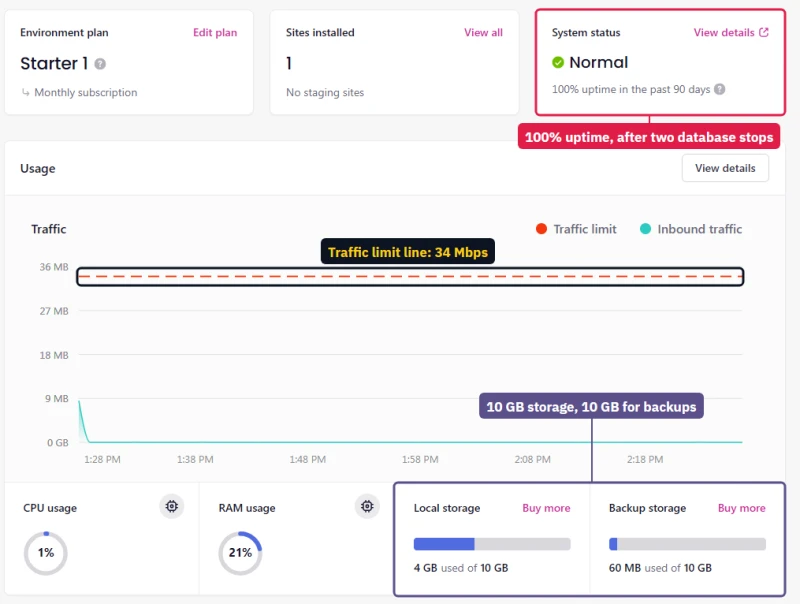
Each plan is its own environment with its own dashboard, so the same screens were taken on all three. Every environment's overview reads "100% uptime in the past 90 days", Starter's included, the day after its database stopped twice.
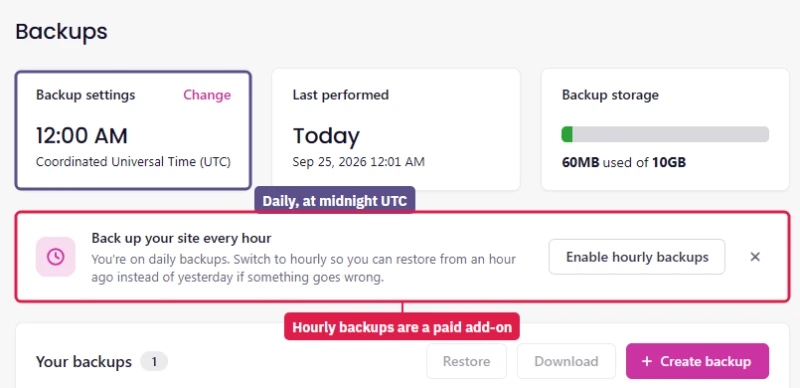
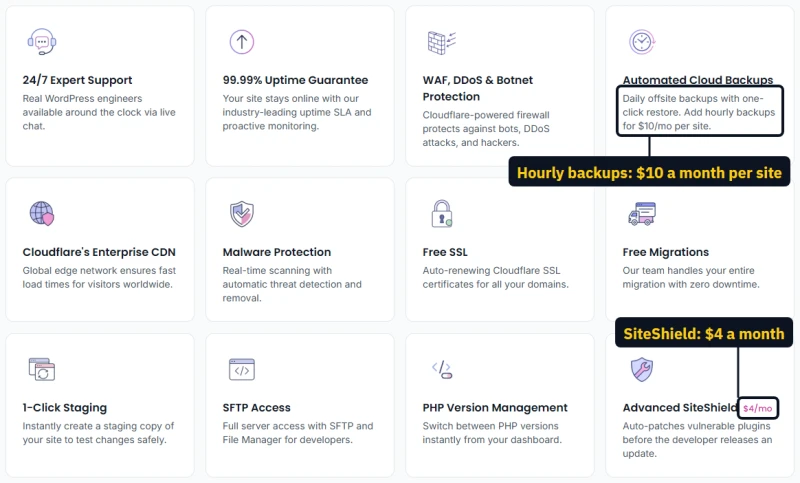
Starter's store used 4 GB of its 10 GB of storage, and its backup space is the same 10 GB. Its traffic limit line sits at 34 Mbps. Backups run once a day at midnight UTC on every plan; hourly backups are an add-on at $10 a month per site.
Business: 25 GB, and a CPU line it runs well past
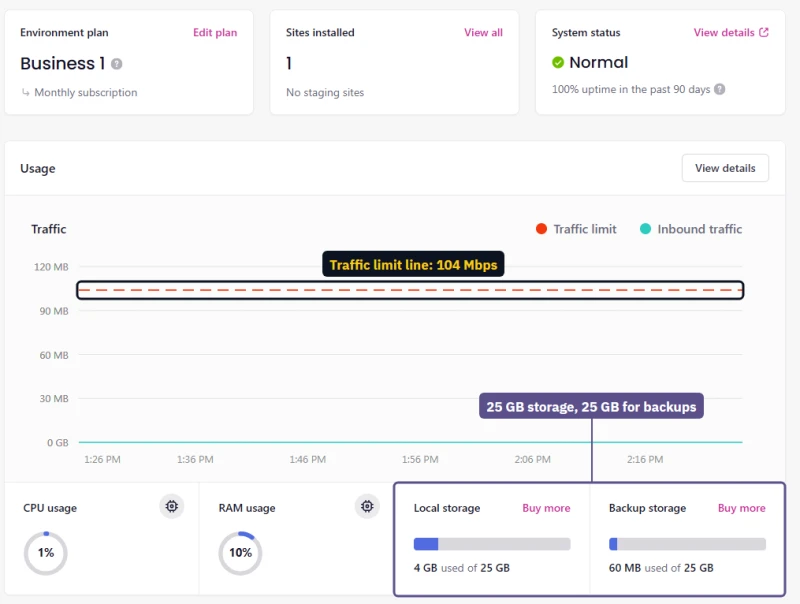
Business gets 25 GB of storage, the same 25 GB for backups, and a 104 Mbps traffic line. Its Usage page shows why the dashed CPU line is not the whole story: during the product import Business ran at 2.4 GHz against a 1.4 GHz line, while memory stayed far below its 2.8 GB line.
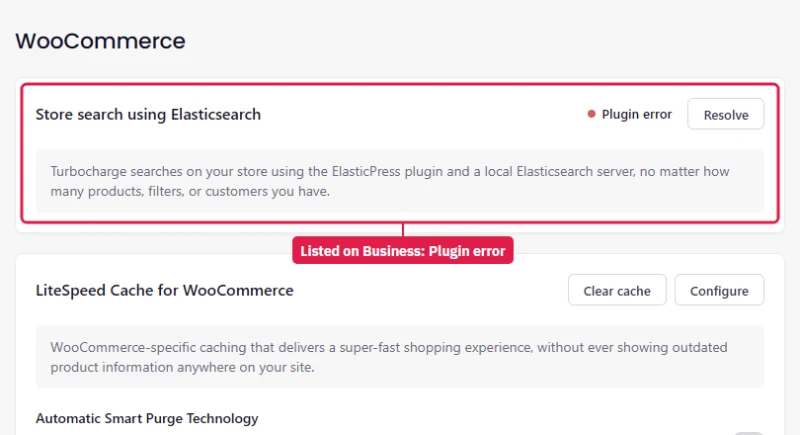
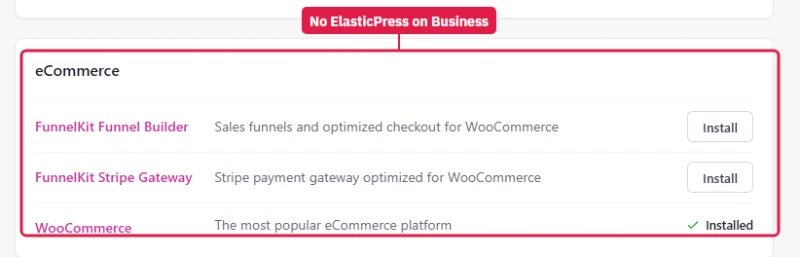
Its WooCommerce page lists Elasticsearch store search marked "Plugin error", and Levamo's Recommended plugins for Business do not include ElasticPress. Starter's WooCommerce page shows the same error. Elasticsearch comes with Performance only, so on the two lower plans the dashboard lists a feature the plan does not have.
Performance: 75 GB, the biggest lines, and Elasticsearch
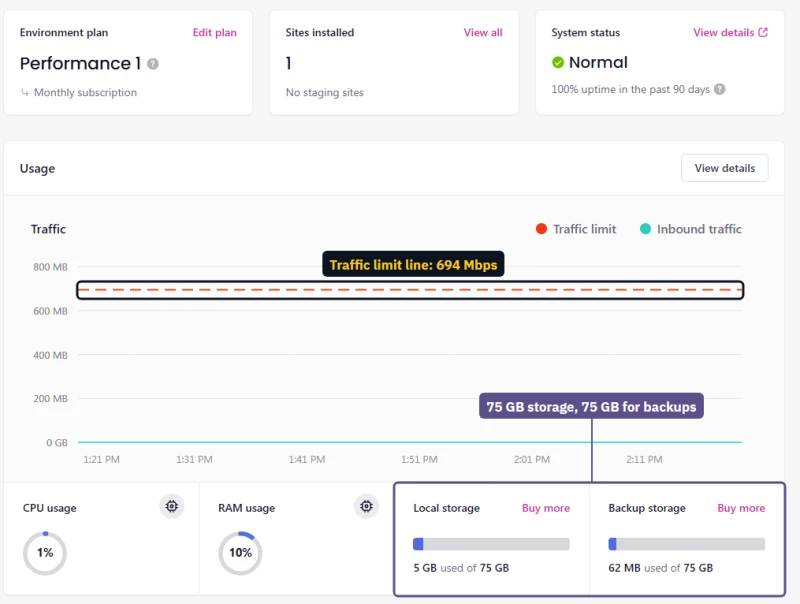
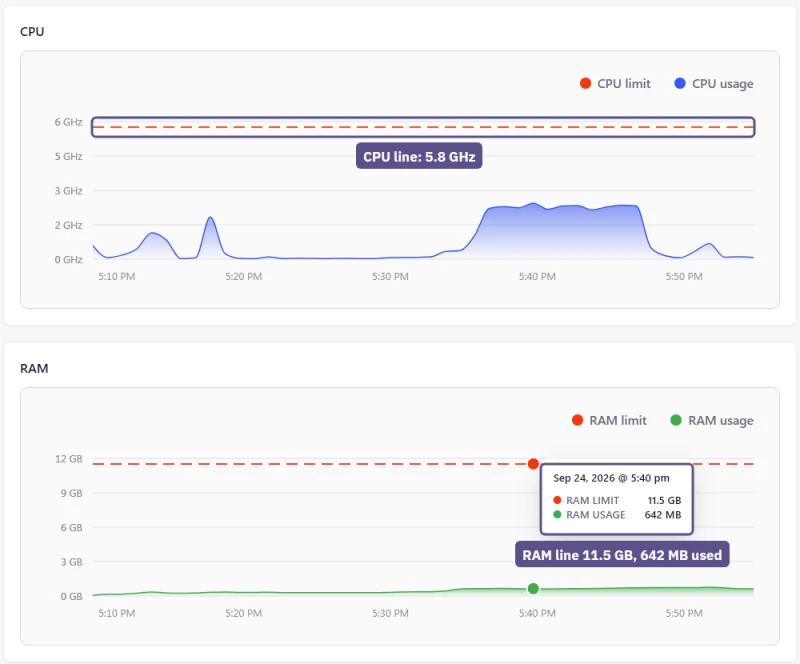
Performance has 75 GB of storage, the same 75 GB for backups, a 694 Mbps traffic line and the highest drawn limits: 5.8 GHz of CPU and 11.5 GB of memory, of which the import used 642 MB.
It is the only plan whose WooCommerce page shows Elasticsearch store search switched on, once I had enabled the Elasticsearch service and installed ElasticPress from Levamo's Recommended plugins. The CPU limits section above shows the search results.
Support, timed
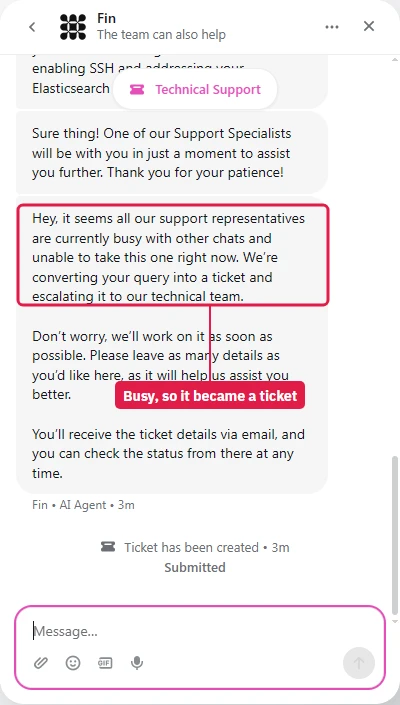
Levamo's support page promises a first chat reply in under a minute. The chat opens with Fin, an AI agent, and Fin did answer within seconds: SSH is off by default and has to be enabled per environment. It skipped my Elasticsearch question, and when I asked for a person it said all representatives were busy and turned the chat into a ticket about a minute later. That was at 2:17 pm US Eastern on a weekday.
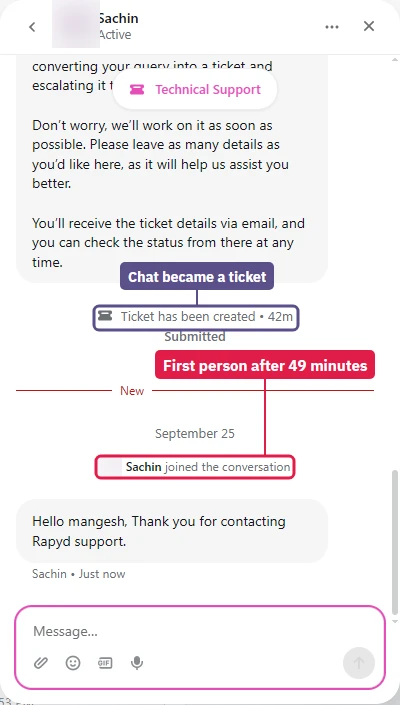
The first person joined the thread 49 minutes after I opened the chat, with the old name: "Thank you for contacting Rapyd support." When I reported Starter's database down, he answered "Checking it" within a couple of minutes and the database was back about 2 minutes after my report.
He also switched on SSH for all three environments, which my first message had asked for, told me how to restart the database myself, and shared Levamo's own monitoring chart to answer my CPU question.
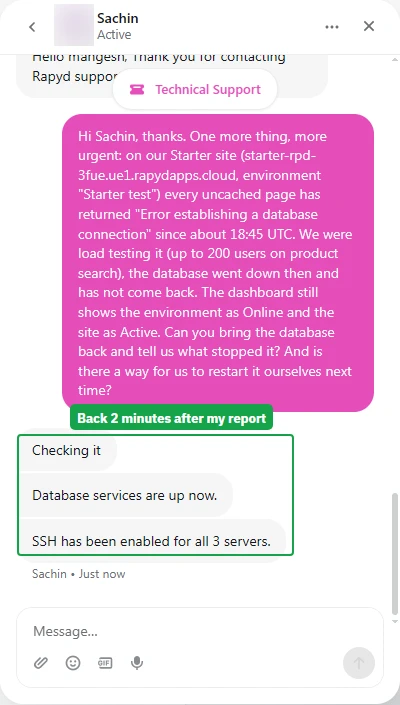
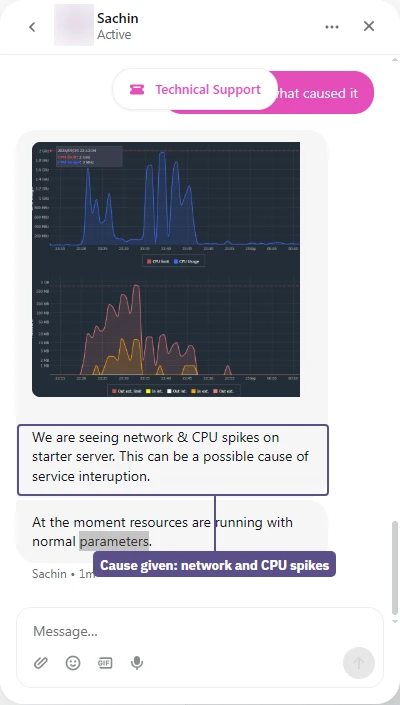
Two questions went unanswered: why the database did not restart by itself, and what the real CPU and memory limits of Business and Performance are. I asked the second at 3:34 pm US Eastern; the agent went offline, and a second agent joined the thread at 9:12 pm, read back through it, and had not answered 35 minutes later.
What I have not tested yet
Creating a staging copy and pushing it back, a real backup restore, a migration, the SSH hardware check (CPU model and core count), AI Management, and cancelling with the 14-day refund are still to do. Each gets its own notes here when it is done, not a guess in the meantime.
Dashboard, AI Management and Migrations
Levamo does not use cPanel; it has its own management dashboard. Its public feature list covers:
- Multi-site management with client permissions and team roles
- 1-click staging on every plan
- File manager and 1-click phpMyAdmin in the browser, plus SSH and SFTP
- WP-CLI and PHP version management
- Real-time resource stats for CPU, RAM, and traffic, with access, PHP error and audit logs
- Backups with one-click restore, downloads, and manual snapshots
- Bring your own Cloudflare by pasting an API token to keep existing zone rules
Levamo's current pages do not mention Git deployment, so it is not listed here. The hands-on section above shows the live dashboard screens.
AI Management: Running WordPress from Claude, ChatGPT or Cursor
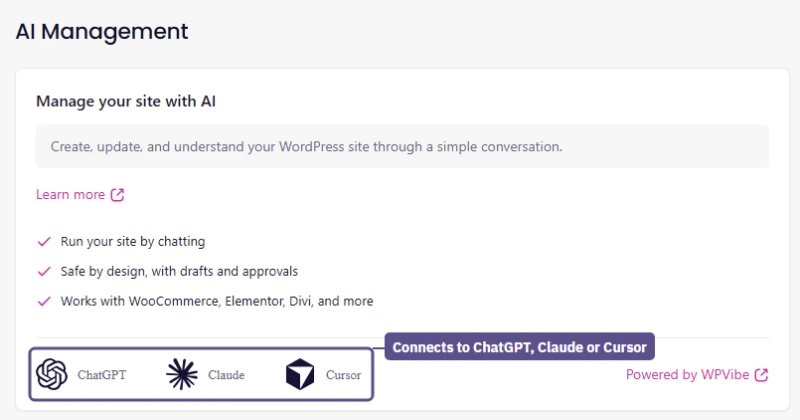
Levamo added an AI Management tab to the dashboard. It is built on WPVibe, a third-party connector, and runs over MCP (Model Context Protocol), the open standard that lets an AI assistant work with outside software. Once a site is connected, you ask your own assistant to do the work in plain English instead of opening wp-admin.
What Levamo says it can do, according to its launch post:
- Content: draft and schedule posts with the SEO title and meta description filled in, and save a page redesign as a draft with a preview link
- Maintenance: update plugins one at a time, check the site after each update, and log every change
- Site structure: change the permalink pattern and add 301 redirects from every old URL
- Coverage: posts, pages, media, plugins, themes, theme files, WooCommerce and SEO, working alongside Elementor and Divi
- AI clients: dashboard instructions for Claude.ai, Claude Desktop, Claude Code, ChatGPT and Cursor, with other MCP assistants covered by WPVibe's own guides
On a production site the safety model counts for more than the feature list. Levamo describes it as draft-first: new content and redesigns stay unpublished until you approve them, deletions go to the WordPress trash, destructive actions need approval with a preview, and every change is logged.
WPVibe connects with its own WordPress application password, so you never hand over your admin login, and each team member connects with their own account. Access runs on Platform API keys that follow the creator's team role, expire after 30, 90, 180 or 365 days (or never), and can be rotated or revoked.
The launch post left four questions open. One is answered: the AI Management tab is in the dashboard on all three test plans, opening on a "Connect this site" card for ChatGPT, Claude or Cursor, powered by WPVibe. Levamo's pricing page still does not list the feature.
I have not connected it yet, so three questions stay open: whether WPVibe charges separately, whether there are usage limits, and how far theme-file and WooCommerce order access really goes. Until it has run on a test site, the rest of this section is Levamo's description, not my result.
Migrations
Levamo's team handles migrations free of charge: database transfer, plugin compatibility checks, DNS and SSL setup, and pre-launch testing. The company says most migrations finish within 48 business hours, an estimate and not a guaranteed SLA. Migrations are not available during the 3-day trial.
Security: Included vs Paid
Levamo names the vendors behind its security stack instead of a generic security promise. Here is the split between included tools and paid add-ons.
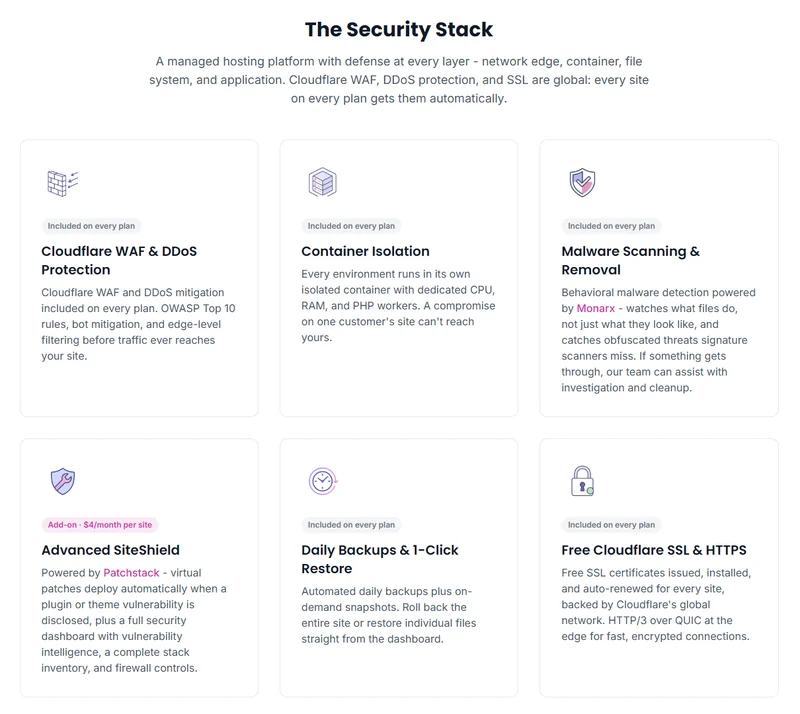
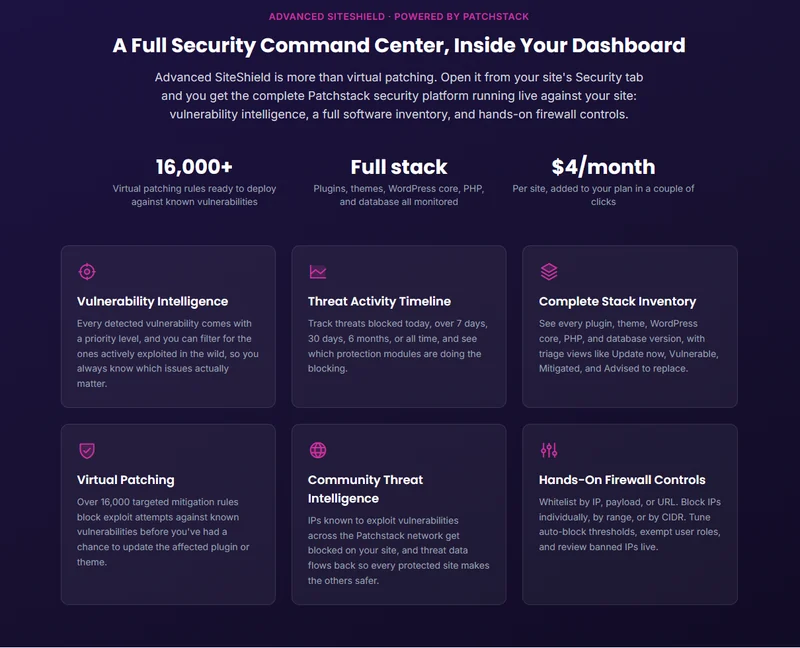
Cloudways does not include a virtual patching layer. Levamo offers one, Patchstack, for $4 a month per site, blocking known plugin exploits before the plugin author ships a fix. It is an add-on on every plan, so budget for it separately.
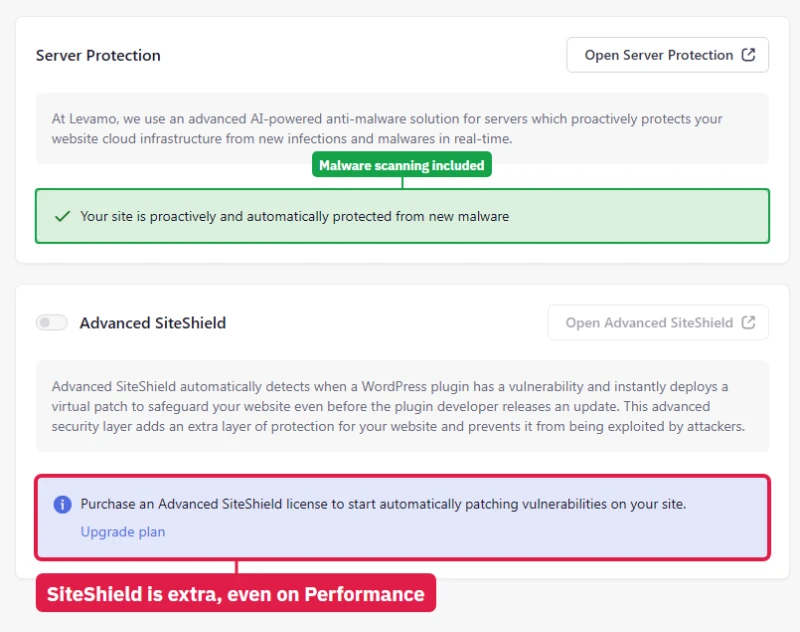
The dashboard says the same. On Business and Performance alike, the Security page shows malware protection active and Advanced SiteShield switched off, with a prompt to buy a license. Not even Performance, the top plan I tested, includes it.
Support Plans
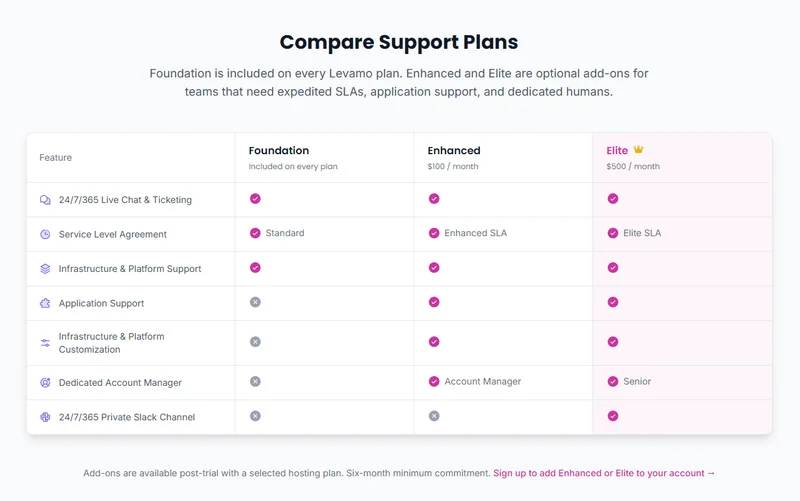
Levamo claims a first response in under a minute and a 95% satisfaction rate on its Foundation support. I timed the included Foundation level. An AI agent, Fin, answered within seconds; a person joined 49 minutes after I opened the chat, at a weekday afternoon hour in the US.
Once he was there, a database outage I reported was fixed about 2 minutes later. Two technical questions were still unanswered hours later. The full timeline, with pictures, is in the hands-on section.
The contract sets clear boundaries. Foundation agents handle server problems, while plugin conflicts fall under the $100 Enhanced plan. If you give a support agent access to your site, the Terms of Service make you responsible for any resulting data loss. Test changes on staging first.
What Levamo Is
Levamo packages Cloudflare Enterprise and LiteSpeed for logged-in WordPress sites, starting at $35.00/mo. Levamo LLC is based in West Palm Beach, Florida. It traded as Rapyd Cloud until 2026, and the Terms of Service still name both.
The About page credits the founding team behind BuddyBoss, lists a team of 30+, and names Michael Eisenwasser as President and Wes Tatters as CTO.
The hosting stack, as Levamo describes it
Visitor → Cloudflare Enterprise edge (300+ locations, full-page cache, WAF) → LiteSpeed origin with HTTP/3 → PHP in an isolated container → KeyDB or Redis object cache (Business and up) → MariaDB
- Regions: US East (Northern Virginia) or Europe (Dublin), chosen per site
- Scaling: "2x Auto-Scaling" on Business and up; the homepage says traffic spikes allocate extra PHP workers
- Search offload: Elastic Search for WooCommerce on Performance and up
- Security: Cloudflare WAF, Monarx malware scanning, optional Patchstack virtual patching
This architecture is standard for modern managed WordPress hosting. LiteSpeed, Redis, and Cloudflare power most managed platforms today. Levamo sets itself apart by including Cloudflare Enterprise on the cheapest plan and writing its documentation for plugin-heavy stacks, not brochure sites.
The company maintains nine "Solutions" landing pages targeting WooCommerce, BuddyBoss, LMS, and headless setups. They share the same pricing table and infrastructure promises and swap the targeted plugins and testimonials.
Only two concrete differences exist across the nine pages: Elastic Search for WooCommerce and explicit WPGraphQL and ACF support for headless builds. You buy the same server capacity whichever page you arrive from.
Levamo also promotes "AI Inside WordPress" on the homepage, a chat interface where ChatGPT, Claude, or Cursor updates plugins and drafts posts. WPVibe powers this integration. The main documentation gives no pricing or plan details for it, so whether it is included or a paid extra is unconfirmed.
Is Levamo Legit?
A hosting company that changed its name this year invites the question. Levamo is a real operating company with a traceable legal identity, a named executive team and paying customers who will say so publicly. It is not a reseller front and it is not new. It is a two-year-old brand on top of an older one, and the contract you sign has a few clauses to read first.
The company behind the brand
None of that is hidden or hard to find. A company running an exit scam does not publish a street address, name its officers, or keep a contract on file that predates the brand by two years.
The rebrand: what changed and what did not
Rapyd Cloud became Levamo during 2026. The change was more than a logo.
- Changed: the name, the primary domain, and the entire plan lineup. Starter, Growth and Scale were replaced by Starter, Business, Performance and Enterprise, at different price points and with different resource allowances.
- Changed: where features sit. Object caching and auto-scaling are now gated to Business and above, which is the single most important thing a returning Rapyd Cloud customer needs to know.
- Unchanged: the legal entity, the Florida address, the founding team, the two data centre regions, and the application domain your dashboard lives on.
Benchmarks published against Rapyd Cloud Starter, Growth or Scale, including my own, describe plans you can no longer buy. Mine stay on this page, labelled as the retired lineup: the hardware lineage is useful evidence, the plan names are not.
What customers say publicly
Levamo publishes named testimonials from two WordPress companies most developers will recognise: John Turner of Duplicator and Chris Klosowski of Easy Digital Downloads, both describing measurable speed gains after moving. A third, from developer Carlos Franco, is credited to Trustpilot and describes migrating client sites away from Cloudways.
All three are vendor-selected quotes on a vendor sales page. They show Levamo has real, identifiable customers in the WordPress product world; they do not show what an average customer experiences. My own measurements are in the testing sections, with their gaps listed.
Terms to read before signing up
These come from the contract, not from complaints, and none of them makes Levamo illegitimate. They are the terms you are agreeing to.
- The trial charges you automatically. The 3-day trial takes a card up front and bills the plan when the 72 hours end. The 14-day money-back guarantee is the safer way to evaluate.
- Backups are not guaranteed. The contract does not promise a restore reproduces your site or that backups are retained. Keep your own copies regardless of host.
- Disputes go to arbitration in Delaware, with a class-action waiver stated in bold near the top of the Terms.
- One clause selects the law of the United Arab Emirates, which sits oddly beside a Florida business address and a Delaware venue. I read it as leftover template text, but it is in the agreement you sign. The detail is in the Terms of Service section.
- Liability is capped at one month of fees for the service involved.
Legitimate, verifiable and established, with a contract that puts more of the disaster-recovery burden on you than the marketing implies. That combination is normal in managed hosting.
Origin TTFB: 10 Locations, Three Plans
I routed these checks directly to the origin server to bypass Cloudflare entirely. A CDN hides slow server performance for anonymous traffic, but logged-in users and complex database queries depend on the origin. These figures are from the retired pre-rebrand plans.
Response time rises steadily with physical distance from the US East origin. Levamo now supports a Dublin region, so the next round measures European routing from Europe.
The gap between the entry and top retired plans was small. Scale beat Starter by 14ms from New York, which suggests the larger plans bought capacity more than single-request speed.
TTFB test reports by plan
Starter Growth Scale
The New York location recorded a 127ms origin response on the Starter plan.

Distance penalties are obvious without a CDN: requests from Mumbai took 480ms.

Stepping up to the Growth plan shaved 6ms off the New York origin response, to 121ms.

European visitors still wait 222ms from London when hitting the US East origin directly.

The Scale plan delivered the fastest New York response of the three, at 113ms.

Even on the largest plan, Tokyo visitors wait 352ms for an uncached origin response.

Load Test: The 0-250 Client Ramp
Across a 0 to 250 client ramp, the Starter plan averaged 159ms with 8 errors. Each run cycles from 0 to 250 concurrent clients over 60 seconds from US-East, and the result is an average of the whole ramp. Turning it into a reading at a single concurrency level would misrepresent the data.
The Starter plan returned a 300.16ms p95 and a 455.86ms p99, roughly double the average. Every plan returned a handful of errors (7 or 8 per 8,250 requests), while the same ramp returned zero errors on the Cloudways, ScalaHosting, and Kinsta plans compared later in this review.
On a store, errors like these land on real shoppers. The store test section measured that on the current plans: failed requests per step on uncached cart, checkout and search pages.
Load test reports by plan
Starter Growth Scale
Response times climbed through the 60-second ramp on the Starter plan, pushing p95 up to 300.16ms.

The Growth plan averaged 166ms across the same 0-250 client ramp, with 7 errors.

The Scale plan returned 7 failed requests out of 8,250, averaging 147ms.

Uptime: 54-Day Window
Each test site had three incidents across the 54-day window, with up to 23 minutes of total downtime. Levamo advertises a 99.99% uptime SLA on its current plans; the retired test sites came in just under that figure during my window. I did not find a standalone SLA document with service-credit terms in the plan documentation, so I cannot say what a missed SLA pays out.
Uptime reports and daily calendar by plan
Starter Growth Scale
External monitors recorded 23 minutes of downtime on the Starter site across the 54-day window.

The three incidents map clearly onto this day-by-day calendar.

The Growth site held 99.97% availability over the same 54-day window.

The incidents are spread out, with no pattern of repeated daily failures.

Total recorded downtime on the Scale site was 16 minutes, the lowest of the three plans.

The calendar shows three separate interruptions over the test window.

Page Speed: GTmetrix, PageSpeed, WP Benchmark
Front-end grading tools measure a single visitor and depend heavily on the site's theme and plugins. Levamo advertises a 95% GTmetrix result on its public performance page. My test sites landed between 86 and 89. Different themes and plugin setups explain most of that gap, and server hardware alone cannot guarantee a perfect Core Web Vitals score.
GTmetrix, PageSpeed, Pingdom and WP Benchmark reports by plan
Starter Growth Scale
GTmetrix scored the Starter test site 86 on performance.

Mobile rendering scored 73 in PageSpeed Insights.

A single Pingdom page-load check from the Starter site.

The WP Hosting Benchmark plugin rated the server 8/10.

GTmetrix scored the Growth test site 87 on performance.

PageSpeed Insights gave the Growth site a mobile score of 68.

A single Pingdom page-load check from the Growth site.

Backend processing improved slightly, returning a 8.1/10 WP Benchmark result.

GTmetrix scored the Scale test site 89, the highest of the three plans.

Mobile performance peaked here with a 82 PageSpeed score.

A single Pingdom page-load check from the Scale site.

The 8.4/10 WP Benchmark score was the highest of the retired lineup.

Levamo's Own Benchmarks vs My Results
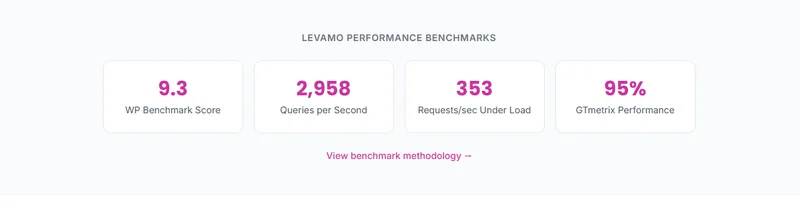
Levamo targets Cloudways, Kinsta, WP Engine, Pressable, Rocket.net, and Pagely with its own comparison benchmarks. The company designs and runs all of those tests internally, so the figures remain marketing claims until an independent tester reproduces them.
Why Levamo's ranking and mine can both be true
Levamo says it beats Cloudways on backend database throughput. My origin testing found Cloudways on Vultr High Frequency faster than the Levamo Starter plan, at 48ms against 127ms. These metrics track different things. A database benchmark stresses PHP and MySQL work inside WordPress, while TTFB also includes network distance and web server response, and the plans compared were not the same. In the next round I will run identical database tests on both providers for a like-for-like result.
The store test adds a third view. Levamo Business handled more checkouts than the Cloudways Vultr High Frequency 4GB server, 6.7 against 4.7 a second, at about twice the price, while Starter handled fewer than the Cloudways AWS Small server that costs about the same, 1.3 against 2.5.
At the same price as Business, the Cloudways Vultr 8GB server handled 7.5. So "faster than Cloudways" depends on which Levamo plan you compare with which Cloudways server, and per dollar Cloudways came out ahead in every pairing I ran.
Levamo vs Cloudways

Where Cloudways Wins
- 48ms origin TTFB on Vultr HF, against 127ms on legacy Levamo Starter in the same round
- 5 cloud provider choices (Vultr, DigitalOcean, AWS, GCE, Linode)
- Pay-as-you-go billing, no renewal shock
- Redis object cache available on every server
- Git deployment built-in
- Unlimited sites per server
Where Levamo Wins
- No automatic scaling tier; Levamo includes 2x auto-scaling from Business
- Cloudflare Enterprise is a paid add-on; Levamo bundles it on every plan
- You manage server settings; Levamo manages the stack and runs migrations for you
- No bundled virtual patching; Levamo offers Patchstack for $4/mo per site
Benchmark Data
- Avg response under load (0-250 ramp): 21ms to 32ms
- Uptime (54-day window): 99.979% to 99.99%
- PageSpeed Score (Mobile): 89/100
$14-118/mo
3-Day Free Trial (No Card)
Levamo targets Cloudways customers directly, with homepage testimonials from users who moved their whole portfolios over. Both are managed cloud platforms, but they are built for different kinds of site owners.
Scope note: both columns come from the same retired-plan testing window: TTFB from New York, and load from US-East on the same 0-250 client ramp. The Cloudways server in that round was a Vultr High Frequency 4GB server, $60.00/mo, as my Cloudways review records; the entry price row shows the smallest Vultr HF server.
The store test, plan against server
The rows above compare a retired Levamo plan. The same WooCommerce store ran on the current plans and on three Cloudways servers; the full results are in the store test section.
Matched on price, the Cloudways AWS Small server at $38.56/mo handled 2.5 checkout journeys a second with no failures, where Levamo Starter at $35.00/mo handled 1.3 and lost its database at 100 shoppers.
Levamo Business at $119.00/mo beat the Vultr High Frequency 4GB server at $60.00/mo: 6.7 checkout journeys a second against 4.7, and a cart step in under a second at 50 shoppers against 2 seconds. It costs about twice as much, so the same Vultr server was scaled up to 8GB, $118.00/mo, the price of Business: it then handled 7.5 checkout journeys a second against Business's 6.7, with no failed requests. Cloudways gives more capacity per dollar at every size I ran.
In the retired-plan round the Vultr High Frequency server answered in 48ms against the retired Levamo Starter's 127ms and ran the load test with zero errors, and in the store test every Cloudways server gave more checkout capacity per dollar than any Levamo plan. Cloudways also offers full server control, a choice of five infrastructure providers, and unlimited sites per server. It remains the stronger choice for developers and agencies who want to tune their own stack.
Levamo's strength is what it includes and what it runs for you. Cloudflare Enterprise comes with the cheapest plan, malware scanning is built in, its team handles migrations, Business and Performance arrive with object cache, and each service has its own restart button. You choose Levamo to avoid managing the server yourself, and on Business or Performance you get a lot of burst capacity in one plan.
Levamo vs ScalaHosting

Where ScalaHosting Wins
- Email hosting included, Levamo plans list no mailboxes
- SPanel free, saves $180/yr vs cPanel, uses 8x less RAM
- AMD EPYC 9474F (#42 PassMark), verified via SSH lscpu
- No CPU steal, no I/O throttle, no hidden VPS limits
- Free migration (SPanel wizard)
- Anytime money-back guarantee
- 13 data centers including US, EU, APAC, and AWS regions
Where Levamo Wins
- No auto-scaling tier; Levamo includes 2x auto-scaling from its Business plan
- Intro rate needs a 36-month term and renews at $39.95/mo; Levamo prices flat
- No bundled Cloudflare Enterprise CDN; Levamo includes it on every plan
Benchmark Data
- Origin TTFB (Managed VPS, no CDN): 38ms
- Uptime (54-day window): 99.99%
- PageSpeed Score (Mobile): 83/100
$29.95/mo
Anytime Money-Back Guarantee
ScalaHosting delivered faster responses and zero load errors throughout the testing cycle. SPanel is a solid alternative to cPanel and includes email hosting. Compare long-term cost carefully: Levamo uses flat annual pricing, while ScalaHosting needs a 36-month commitment to get its introductory rate and renews higher. ScalaHosting gives you dedicated VPS resources, which makes it the better choice if you want guaranteed isolation and email on one bill.
View ScalaHosting Plans ➦ Read my full ScalaHosting review →
Levamo vs Kinsta

Where Kinsta Wins
- 64ms TTFB, fast idle TTFB (Google Cloud C2)
- Best managed WordPress features (APM tool, auto-updates, visual regression)
- WordPress-expert support
- Edge caching through Cloudflare
- SOC 2 Type 2 compliance, enterprise-ready
Where Levamo Wins
- Redis object cache is a paid add-on; Levamo includes it from Business
- Bandwidth-metered since 2026: 20GB/mo server traffic on the entry plan
- No auto-scaling tier; Levamo includes 2x auto-scaling from Business
Benchmark Data
- Origin TTFB (4 plans, no CDN): 61ms to 64ms
- Uptime (54-day window): 99.99%
- PageSpeed Score (Mobile): 88/100
$35/mo
30-Day Money-Back
Kinsta was clearly faster than Levamo at the entry level at almost the same price, and it finished the load ramp with zero errors. Levamo gains ground as a dynamic site grows: it includes KeyDB and Redis on the Business plan, while Kinsta sells Redis as a separate monthly add-on. The next round tests the Business plan directly to see whether Levamo's included object cache beats Kinsta's paid add-on on the same logged-in workload.
Levamo vs Cloudways vs ScalaHosting vs Kinsta, Side by Side
The three sections above go deep on one rival at a time. This table puts all four in one view. Every speed figure in it comes from the same retired-plan round, measured against the origin with no CDN in front, so the columns are comparable.
Two caveats apply to that table. The Levamo column is the retired Starter plan, because the current lineup has not been through this round yet. And the speed rows are origin measurements, the fairest way to compare server hardware. A visitor behind a full-page edge cache sees different numbers.
Read the deeper comparison for whichever pairing matters to you: Levamo against Cloudways, against ScalaHosting, or against Kinsta.
Levamo also competes with WP Engine, Rocket.net, WPX and SiteGround, and I have tested and reviewed each of them. They are not in the table above because they were not part of this test round, and I am not going to fill four columns from vendor spec sheets and present the result as a measured comparison. The individual reviews are here: WP Engine, Rocket.net, WPX and SiteGround.
Who Should Choose Levamo
✅ Levamo is a good fit if you run:
- A BuddyBoss, LearnDash, or MemberPress site on the Business plan or above
- A large WooCommerce catalogue that needs Elastic Search, on the Performance plan
- An agency portfolio that benefits from isolated containers and free migrations
- Sites whose visitors are mainly in North America or Europe
- A headless WordPress build using WPGraphQL and ACF
❌ Choose another host if you need:
- The fastest measured origin response (→ ScalaHosting or Cloudways)
- Server-level control and a choice of infrastructure (→ Cloudways)
- Email hosting on the same bill (→ ScalaHosting)
- Data centers in Asia-Pacific or South America
- Object caching on a small budget, since it is not on Levamo Starter
- Published compliance certifications for regulated data
- Basic static hosting, which costs a fraction of the price elsewhere
Levamo by site type: where it fits and where it does not
The two lists above answer the question in general. This table answers it for a specific kind of site. It uses words, not scores, because a score implies a completed test round and this one is not finished.
Levamo is priced and built for WordPress sites where most page views cannot be cached. The further your site sits from that description, the less of what you pay for you will use.
Terms of Service: What to Know Before You Sign Up
I read the contract to find the obligations the marketing pages leave out.
The backups clause carries the most risk. The marketing presents backups as peace of mind, but the contract puts disaster recovery back on the site owner. Keep your own off-site backups whichever host you choose.
FAQ: Levamo
Is Levamo the same company as Rapyd Cloud?
Levamo is the new name of Rapyd Cloud. The Terms of Service still define the company as Levamo LLC or Rapyd Cloud, rapyd.cloud redirects to levamo.com, and the business address remains in West Palm Beach, Florida. The team behind the BuddyBoss WordPress plugin suite founded the platform. The plan lineup changed with the rebrand: Starter, Growth and Scale became Starter, Business, Performance and Enterprise.
Is Levamo good for WooCommerce, membership and course sites?
Yes, and the plan decides the result. In the store test, on the same 10,000-product WooCommerce store, Business handled 6.7 checkout journeys a second and Performance 19, and neither lost its database; Starter's database stopped twice at 100 shoppers. Object cache starts on Business at $99.00/mo billed annually, and Elasticsearch for typo-tolerant product search comes with Performance. Logged-in membership and course pages are still to be tested.
How fast is Levamo in independent testing?
On the current plans, in the WooCommerce store test from New York, Performance peaked at 19 checkout journeys and 53 uncached searches a second, Business at 6.7 and 17, and Starter at 1.3 and 4 before its database stopped at 100 shoppers. The origin response figures come from the plans sold before the rebrand, tested with no CDN: from New York, Starter answered in 127ms, Growth in 121ms and Scale in 113ms, and the 10-location average on Starter was 284ms.
How much does Levamo cost?
Starter is $35.00/mo month to month or $29.00/mo billed annually. Business is $119.00/mo or $99.00/mo, Performance is $359.00/mo or $299.00/mo, and Enterprise is $779.00/mo or $649.00/mo. Pricing is flat. You pay no renewal markup after the first term ends. All prices are in US dollars and exclude tax.
Does the Levamo Starter plan include Redis object cache?
No. Starter arrives with LiteSpeed Cache only and no object cache; Business and Performance arrive with the Redis Object Cache plugin already connected to KeyDB. Levamo sells Starter without auto-scaling, yet in my test it still ran at about 2 GHz of CPU, which support confirmed is its real limit, about three times the 645 MHz line its dashboard draws. That was not enough for 100 shoppers at once: its database stopped twice.
What is the difference between the Business and the $359 Performance plan?
Performance increases capacity from 3 to 20 WordPress sites, monthly visits from 75K to 500K, and storage from 25GB to 75GB, and it includes Elasticsearch. In my store test it handled 19 checkout journeys a second against 6.7 on Business, and 53 uncached searches against 17. Its Elasticsearch is off until you enable it, and it made search typo-tolerant; search speed did not change. Per dollar, the two plans gave about the same checkout capacity. Levamo reserves its highest concurrency servers for Enterprise.
Where are Levamo's data centers?
You choose between two regions when you create an environment: US East (Northern Virginia) and Europe (Ireland), and the region can never be changed afterwards. My three test sites ran on AWS in Virginia. Levamo has no Asia-Pacific or South American region. On the Starter test site, origin TTFB from Singapore, Tokyo and Mumbai ranged from 395ms to 480ms, so a full-page CDN cache matters a great deal for audiences outside the US and Europe.
What does the Levamo free trial include?
The 3-day trial requires payment details upfront. The Terms of Service restrict the trial to a single site, exclude free migration and custom domain mapping, disable backups temporarily, and leave the Patchstack and Monarx security tools uninstalled. Levamo charges the plan fee automatically when the trial ends. The 14-day money-back guarantee is a safer evaluation window.
Does Levamo include email hosting?
No Levamo plan includes email hosting. You need a separate provider like Google Workspace or Zoho Mail, plus a transactional email service for WooCommerce order notifications.
How does Levamo compare to Cloudways?
In the store test, Cloudways gave more checkout capacity per dollar in every pairing: its AWS Small server at $38.56/mo handled 2.5 checkout journeys a second with no failures against 1.3 on Levamo Starter, and Levamo Business beat the Vultr High Frequency 4GB server (6.7 against 4.7) at about twice the price. Scaled up to 8GB at $118.00/mo, the price of Business, that Vultr server handled 7.5 with no failures. On the retired plans, Cloudways on Vultr High Frequency answered in 48ms from New York against 127ms for Levamo Starter. Cloudways bills per server with unlimited sites; Levamo bills per plan with site and visit allowances and manages more for you.
Is Levamo Worth It?
Levamo is worth choosing for a busy WooCommerce store or membership site in North America or Europe if you want the platform managed for you. Pick Business (7.6/10) or Performance (8.0/10), not Starter (6.3/10).
The store test is the reason for that split. Business and Performance slowed down under 200 shoppers and never lost their database, and Performance handled 19 checkout journeys a second, the highest capacity in the test. Starter lost its database twice at 100 shoppers and the dashboard still said Online.
Cloudways gave more checkout capacity per dollar on all three servers I ran beside Levamo, and a little more at the same price as Business, so if you are comfortable choosing and sizing a server yourself, it is the better buy. Levamo's price buys what it runs for you: Cloudflare Enterprise included, object cache and one-click service restarts, typo-tolerant search on Performance, CPU that bursts far above its drawn limit, and flat pricing.
Two things would raise these scores: a real, published CPU and memory limit for each plan, and an alert when a service like MariaDB fails. Two things would lower them: support that stays at 49 minutes to a person, and a Starter plan sold for stores it cannot hold up under a rush. The next round adds a backup restore, a staging push, a migration and the CPU model over SSH.
What Works Well
- 99.97% to 99.979% uptime across three legacy plans over a 54-day window
- 0.1% or fewer errors across a 0-250 client load ramp on the legacy plans
- Cloudflare Enterprise CDN, WAF and SSL included on every plan, Starter too
- Flat pricing with no renewal step, and a published per-tier feature table
- Container isolation and Monarx malware scanning included on every plan
- Free migrations carried out by Levamo's own team
- KeyDB and Redis object cache plus 2x auto-scaling from the Business plan
What To Weigh
- Object cache and auto-scaling are not on the Levamo Starter plan
- Legacy origin TTFB trailed Cloudways, ScalaHosting and Kinsta in the same retired-plan round
- Two regions only: US East and Dublin
- 3-day trial excludes backups, security tools and migration
- No email hosting on any plan
- Enhanced and Elite support carry a 6-month minimum commitment
Benchmark Data
- Origin TTFB (3 plans, no CDN): 113ms to 127ms
- Uptime (54-day window): 99.97% to 99.979%
- PageSpeed Score (Mobile): 73/100
Cloudflare Enterprise on Every Plan
Not the right fit? See my Cloudways review (infrastructure choice and server-level control), my ScalaHosting review (dedicated VPS resources with email included) or the WooCommerce hosting comparison.