


Disclosure: This content is reader-supported, which means if you click on some of our links that we may earn a commission.
On our own benchmark, the hosts that answered fastest were the ones that put a fast origin behind the page: ScalaHosting had the lowest first-byte time at an origin among the plans ranked here (38ms from New York to our test server), and Cloudways was close behind (48ms on Vultr High Frequency, 59ms on DigitalOcean). I put Cloudways first for the whole package: speed near the top, no failed requests in our ramp, and flat pricing at every size. ChemiCloud was the fastest shared host we measured (78ms).
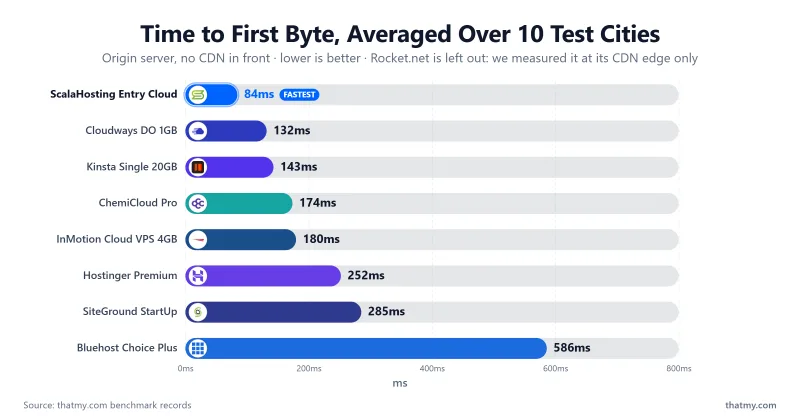
"Fast" is a number, not a feeling. I measure TTFB (time to first byte) first, because it isolates how quickly the server responds before page size or your browser get involved. My own rule of thumb: under 200ms is excellent, under 500ms is acceptable, and anything past 800ms means the server is your bottleneck.
Every figure on this page comes from our own benchmark record (one WordPress test site per plan, the same site everywhere), and each response time says where it was measured. Here is the quick comparison first, then the results host by host.
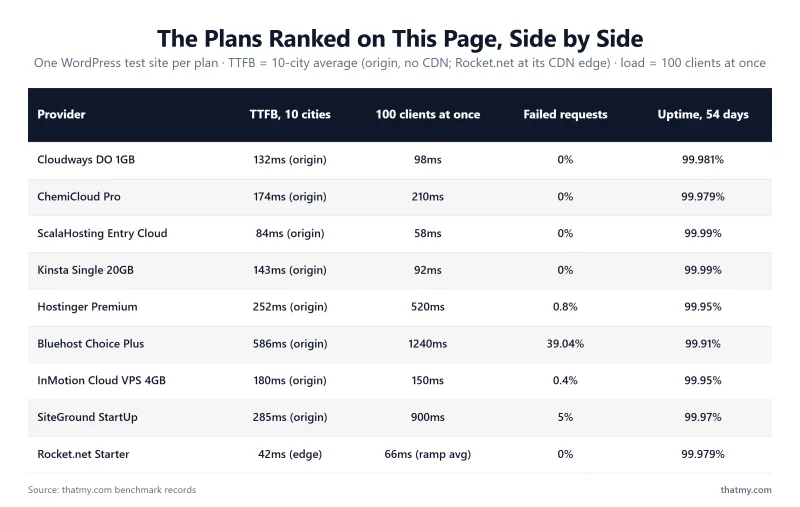
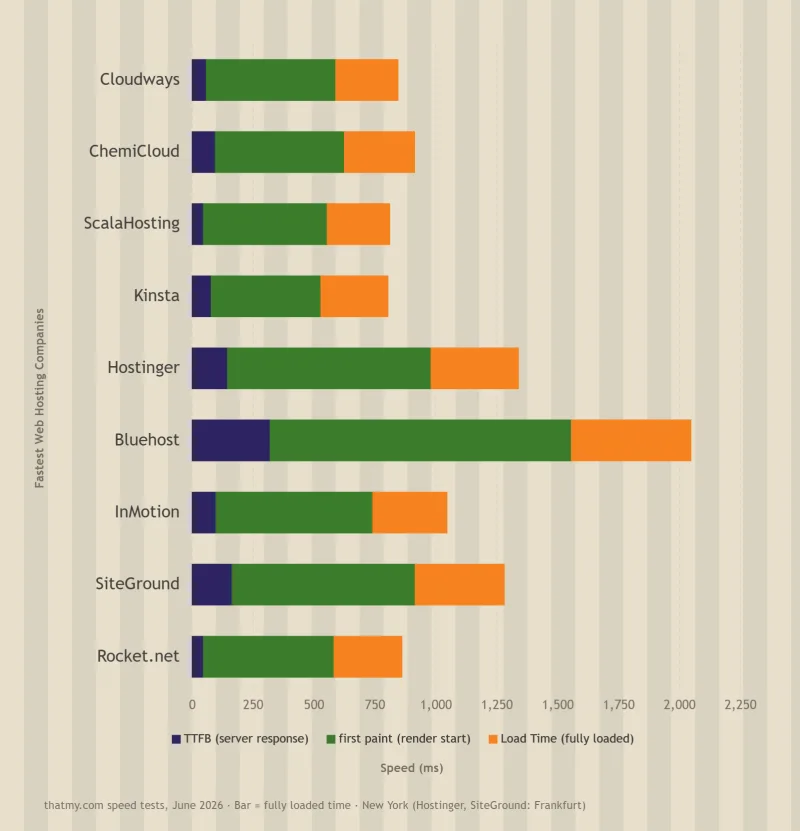
TL;DR (measured June 2026): Of the plans ranked here, the fastest first byte at an origin belongs to ScalaHosting's managed VPS: 38ms from New York to our test server. Cloudways is my #1 pick: 59ms on its $11.00/mo DigitalOcean plan, 98ms with 100 concurrent users and no failed requests in our ramp. Every number here comes from our own test accounts.
10 Fastest Web Hosting Providers (Based on Real Test Data)
Fastest Web Hosting 2026: Quick Comparison (TTFB, Load, Uptime)
| Provider and plan tested | TTFB from New York (origin) | 100 concurrent users | Failed requests, full ramp | Uptime, 54 days | Best For | Price from |
|---|---|---|---|---|---|---|
| Cloudways DigitalOcean 1GB | 59ms | 98ms | 0% | 99.981% | My #1: speed, steadiness and flat pricing | $11.00/mo |
| ChemiCloud Pro, shared | 78ms | 210ms | 0% | 99.979% | Fastest shared hosting we measured | $4.49/mo |
| ScalaHosting Entry Cloud, managed VPS | 38ms | 58ms | 0% | 99.99% | Lowest raw TTFB and load time here | $24.95/mo |
| Kinsta Single 20GB | 64ms | 92ms | 0% | 99.99% | Premium managed WordPress | $29.17/mo |
| Hostinger Premium; test server in Frankfurt | 276ms 109ms from Frankfurt | 520ms | 0.8% | 99.95% | Low entry price | $3.99/mo |
| Bluehost Choice Plus (older plan) | 262ms | 1240ms | 39.04% | 99.91% | Guided WordPress onboarding | $6.99/mo |
| InMotion Cloud VPS 4GB | 80ms | 150ms | 0.4% | 99.95% | A US-based VPS option | $29.99/mo |
| SiteGround StartUp; test server in Frankfurt | 312ms 123ms from Frankfurt | 900ms | 5% ramp to 100 | 99.97% | Managed features on shared | $3.99/mo |
| Rocket.net Starter, CDN edge | 32ms edge, not origin | not recorded 66ms average over the ramp | 0% | 99.979% | Cached WordPress (CDN-reliant) | $25.00/mo |
| Hosting.com (formerly A2) Turbo Boost | 152ms | 534ms | 0.3% | 99.931% | A2's successor; steep renewal | $2.99/mo (Starter) |
How I read this table: the order is my editorial ranking of speed, steadiness under load, price and fit, not a sort by one column; ScalaHosting measured faster than Cloudways on first byte and under load, and sits third because it costs more and is a VPS rather than a first-site host. A cached edge number (Rocket.net) answers a different question from an origin number, which is why its row says "edge". Prices are the sign-up price on the term our record holds, in US dollars; renewals are higher and are covered in each section. Hostinger and SiteGround answered fastest from Frankfurt, where their test servers sat, so their New York figure is the longest trip.
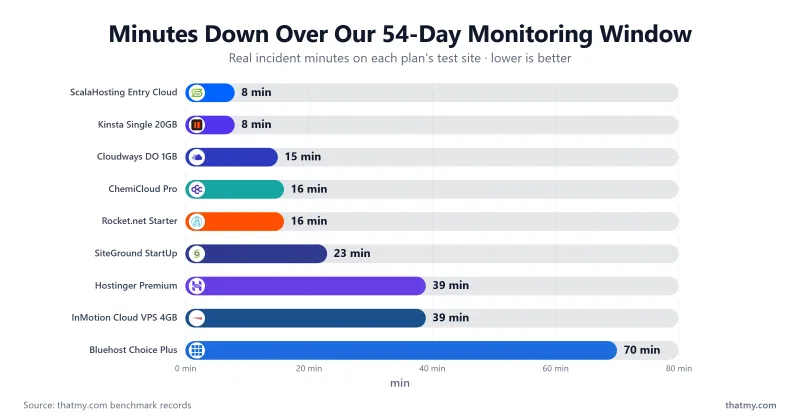
How I tested: one WordPress test site per plan, the same site everywhere, with the host's own caching left as it ships. TTFB was measured at the origin with no CDN in front from 10 locations: New York, Dallas, Toronto, London, Amsterdam, Frankfurt, Sao Paulo, Singapore, Tokyo and Mumbai. Load was a ramp from 0 to 250 clients over 60 seconds (SiteGround's stopped at 100); I report the 100-user step and the share of requests that failed. Uptime was checked every minute for 54 days. Our test servers sat in New York, or in Frankfurt for Hostinger and SiteGround. See the full testing methodology and tools.
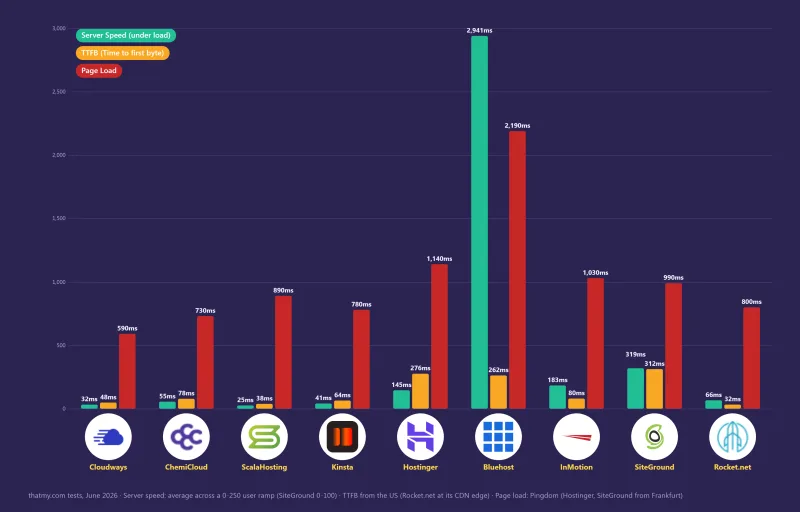
The data below shows these 10 providers are the fastest options I measured, ordered by overall speed, steadiness under load and value, not TTFB alone. Jump to any host:
- Cloudways (my #1 pick)
- ChemiCloud (fastest shared)
- ScalaHosting (fastest raw TTFB)
- Kinsta (managed WordPress)
- Hostinger (low entry price)
- Shopify (hosted ecommerce platform, not benchmarked)
- Bluehost (guided onboarding, slowest here)
- InMotion (US-based VPS)
- SiteGround (fast idle, weaker under load)
- Rocket.net (cached edge speed)
#1. Cloudways: My #1 Pick (TTFB 59ms from New York, DigitalOcean 1GB)

Every other host on this list owns its servers. The #1 pick owns none: Cloudways is a managed layer that rents you cloud hardware from DigitalOcean, Vultr, Linode, AWS or Google Cloud, then runs the WordPress stack on top, with a free Redis cache included. You get cloud hardware without cloud-grade sysadmin work.
Which web server is serving your pages matters more than most hosts admit. Apache, Nginx, and LiteSpeed handle concurrency in different ways, and that difference is one reason TTFB varies between hosts.
What Our Own Test Measured
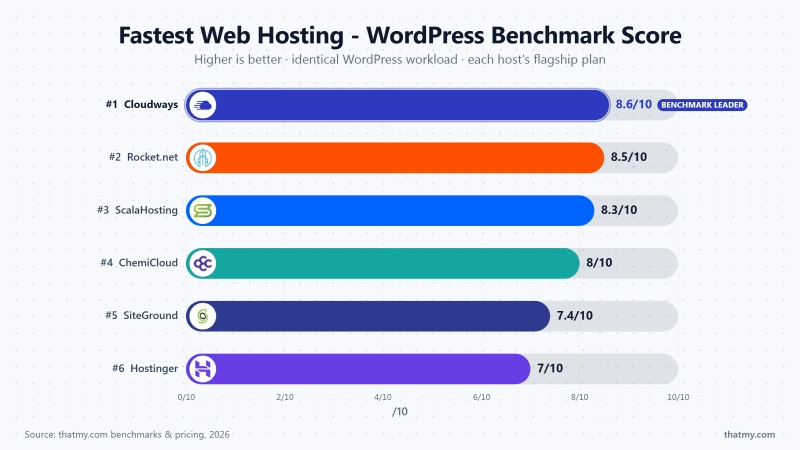
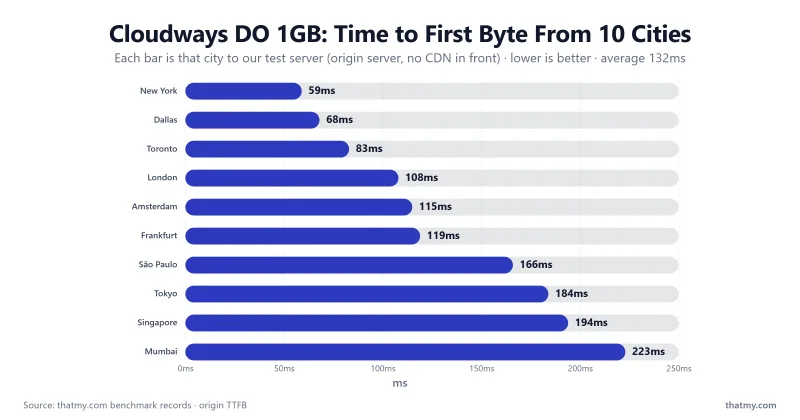
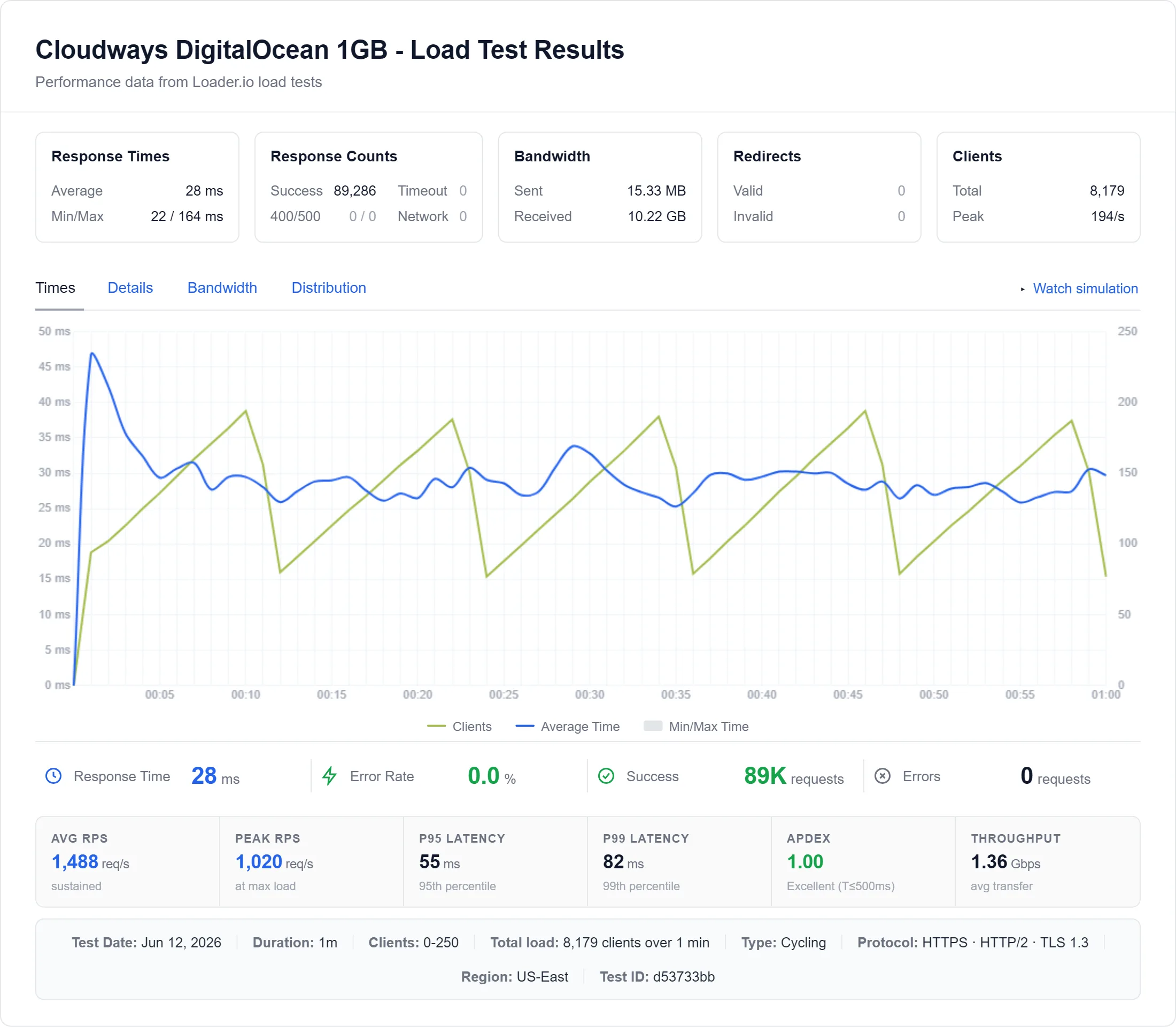
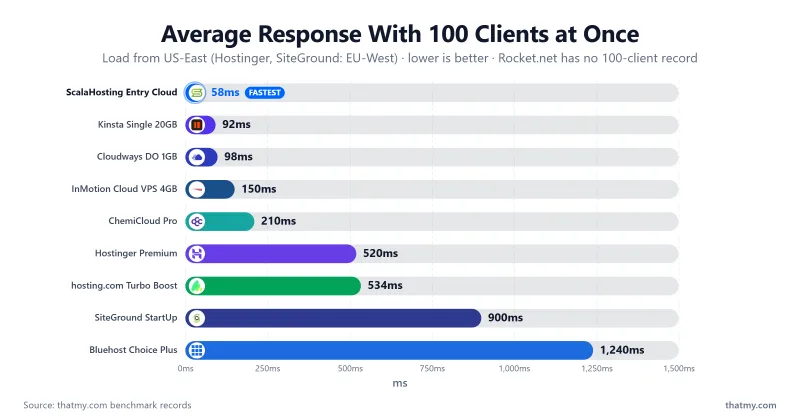
On our DigitalOcean 1GB plan, time to first byte averaged 59ms from New York to our test server and 132ms across our 10 locations (origin, no CDN). In the one-minute load test, climbing from 0 to 250 visitors, it answered 8,250 requests at an average of 21ms with 0 errors, and a hundred visitors at once were served in 98ms. Uptime held 99.981% across the window, and our WordPress bench scores it 8.7/10. The Vultr High Frequency 1GB plan was faster still: 48ms TTFB and 74ms at 100 users.
What the Entry Plan Actually Buys
The DigitalOcean entry server is a flat $11.00/mo, and it renews at the same $11.00/mo, because pay-as-you-go has no intro-price theater to unwind. Cloudways's pricing page lists that server with 2GB of RAM, 1 vCPU, 50GB of storage and 2TB of transfer, with free migration and free staging. When you outgrow it, scaling is a slider, not a migration: Vultr High Frequency 1GB is $16.00/mo, and the 4GB size is $60.00/mo, both monthly.
- Choice of five clouds: DigitalOcean, Vultr, Linode, AWS, Google Cloud
- Flat pay-as-you-go pricing: renewal equals the intro rate
- Free migration and staging included
- Free Redis cache
- Email hosting is a paid add-on, not included
- No refund window is stated on its pricing page; the free trial is your test drive
- Different UI with a real learning curve
The Honest Fine Print
Two things the sales page will not lead with. Cloudways states no refund window on its pricing page, so try it on the trial, because once you pay, that month is spent. And I have not run a support test on any host here, so I do not score support; judge that on the trial. You are buying a fast, flexible server, not hand-holding.
TTFB 48ms (Vultr High Frequency) / 59ms (DigitalOcean), from New York to our test server · From $11.00/mo flat · In-depth Cloudways review
#2. ChemiCloud: Fastest Shared Hosting on This List (TTFB 78ms from New York)

The fastest shared host is decided by a stopwatch, not a slogan. On our ChemiCloud Pro plan, the origin answered in 78ms from New York to our test server (174ms averaged over 10 locations), the lowest of the shared plans ranked on this page. Under the load ramp it averaged 55ms, a hundred visitors at once were served in 210ms, and 0 of 8,250 requests failed. Uptime held 99.979% and our WordPress bench scores it 7.9/10.
The engine behind that number is the trick most budget hosts refuse: ChemiCloud's plans page lists LiteSpeed servers on every plan, including the entry tier at $3.49/mo. LiteSpeed serves a cached page before PHP wakes up; Apache wakes PHP for everyone. And the allocations are published numbers, not fair-use vagueness: the Pro plan lists 2 cores, 4 GB of RAM and 35 GB of NVMe with 350,000 inodes; Turbo, at $5.49/mo, lists 3 cores, 6 GB and 50 GB. A published allocation is a promise you can hold them to.
- Lowest measured TTFB of the shared plans ranked here
- LiteSpeed on every tier, not just the expensive one
- Published CPU/RAM allocations instead of fair-use clauses
- Free domain for the first year on the 36-month plan, free migration, 45-day money-back window
- Pro renews at $19.95/mo, against $4.49/mo at sign-up on the yearly term: plan for the renewal
- Its plans page lists chat and tickets, with no phone line mentioned
TTFB 78ms from New York to our test server · From $3.49/mo · In-depth ChemiCloud review
Where Is A2 Hosting?
Sharp-eyed readers will remember A2 Hosting holding this slot. A2 no longer exists as a brand: a2hosting.com now redirects to Hosting.com, which absorbed it after the merger. We kept testing through the transition, and the successor does not defend the old crown: the Turbo Boost shared plan answered in 152ms from New York (about double ChemiCloud's 78ms) and took 534ms at 100 users, and its Starter pricing enters at $2.99/mo only to renew at $13.99/mo, one of the steeper renewal jumps we track. It no longer earns a speed ranking. Rankings follow measurements here; when the measurements change, so does the list.
Get ChemiCloud, LiteSpeed from $3.49/mo ➦
#3. ScalaHosting: Fastest Raw TTFB of the Plans Ranked Here (38ms from New York)

The fastest server on this page is the one most readers scroll past. ScalaHosting's managed VPS answered in 38ms from New York to our test server (84ms averaged over 10 locations), the lowest origin figure of the plans ranked on this page, and it did it without an edge-cache trick: that is the origin server answering. Under our load ramp it averaged 25ms, the slowest 5% of requests took 58.88ms or less, and 0 of 8,250 requests failed. A hundred visitors at once were served in 58ms. Uptime across the window: 99.99%. Our WordPress bench puts it at 8.4/10.
Why so fast? Nothing is shared. The plan is a managed VPS, and our CPU record lists an AMD EPYC 9474F (#42 on PassMark). ScalaHosting's plan page lists OpenLiteSpeed caching and its free in-house SPanel, and says the entry plan is now sold as "Build #1". Shared hosts win benchmarks when the node is quiet; a dedicated slice wins them on a sale day.
What its page lists for the entry plan:
- A dedicated IP address and unmetered bandwidth
- Automatic offsite backups
- Free website migration, and SPanel instead of a paid cPanel license
- Lowest origin TTFB and the quickest 100-user result of the plans ranked here
- An "Anytime Money-Back Guarantee" on its page (no day count is stated)
- Dedicated VPS resources
- Offsite backups and migration listed as free
- Costs several times a starter shared plan, overkill for a first blog
- SPanel has a learning curve if you grew up on cPanel
TTFB 38ms from New York to our test server · From $24.95/mo · In-depth ScalaHosting review
The Price Is the Honest Part
The Entry Cloud plan starts at $24.95/mo and renews at $39.95/mo. That is real money next to a starter shared plan, which is exactly why it sits at #3: pay it when your traffic earns it, and use the money-back guarantee to prove the numbers on your own site first.
#4. Kinsta: Premium Managed WordPress (TTFB 64ms from New York)

Managed WordPress hosting is a good option for small businesses and professionals who need a website but don't have the time or resources to manage a server themselves. Kinsta specializes in it, and it does the plugin, caching and staging chores you would otherwise do on a non-managed site.
Kinsta was one of the fastest managed hosts in our benchmark and suits people who don't have time to deal with the technicalities. On our Single 20GB plan the origin answered in 64ms from New York to our test server (143ms averaged over 10 locations), and our WordPress bench scores it 9/10, among the top marks in our table.
What Kinsta's pricing page lists for the entry plan: 10GB of storage, 20GB of bandwidth a month, 125GB of CDN bandwidth, unlimited free migrations, a free staging environment with one click, 14 days of backup retention, and a Cloudflare integration.
- Fast origin in our benchmark, with no failed requests in the ramp
- Free migrations and one-click staging
- 14 days of backups
- Cloudflare integration
- Not cheap: $35.00/mo month to month for one site
- A single-site entry plan with a bandwidth cap
TTFB 64ms from New York to our test server · From $29.17/mo on an annual term · Kinsta review · Visit Kinsta ➦
Best Plan for Speed
Kinsta's Single 20GB plan is $35.00/mo month to month and $29.17/mo on an annual term. It can host a single WordPress site. It is more expensive than Cloudways, which gave similar speed in our benchmark for $11.00/mo.
1. Server Speed
Kinsta's origin answered in 64ms from New York, 117ms from London and 242ms from Mumbai, to the same test server. The full 10-location table is under "Fastest Web Hosting by Region" below. These are origin figures with no CDN in front.
2. Server Load Test
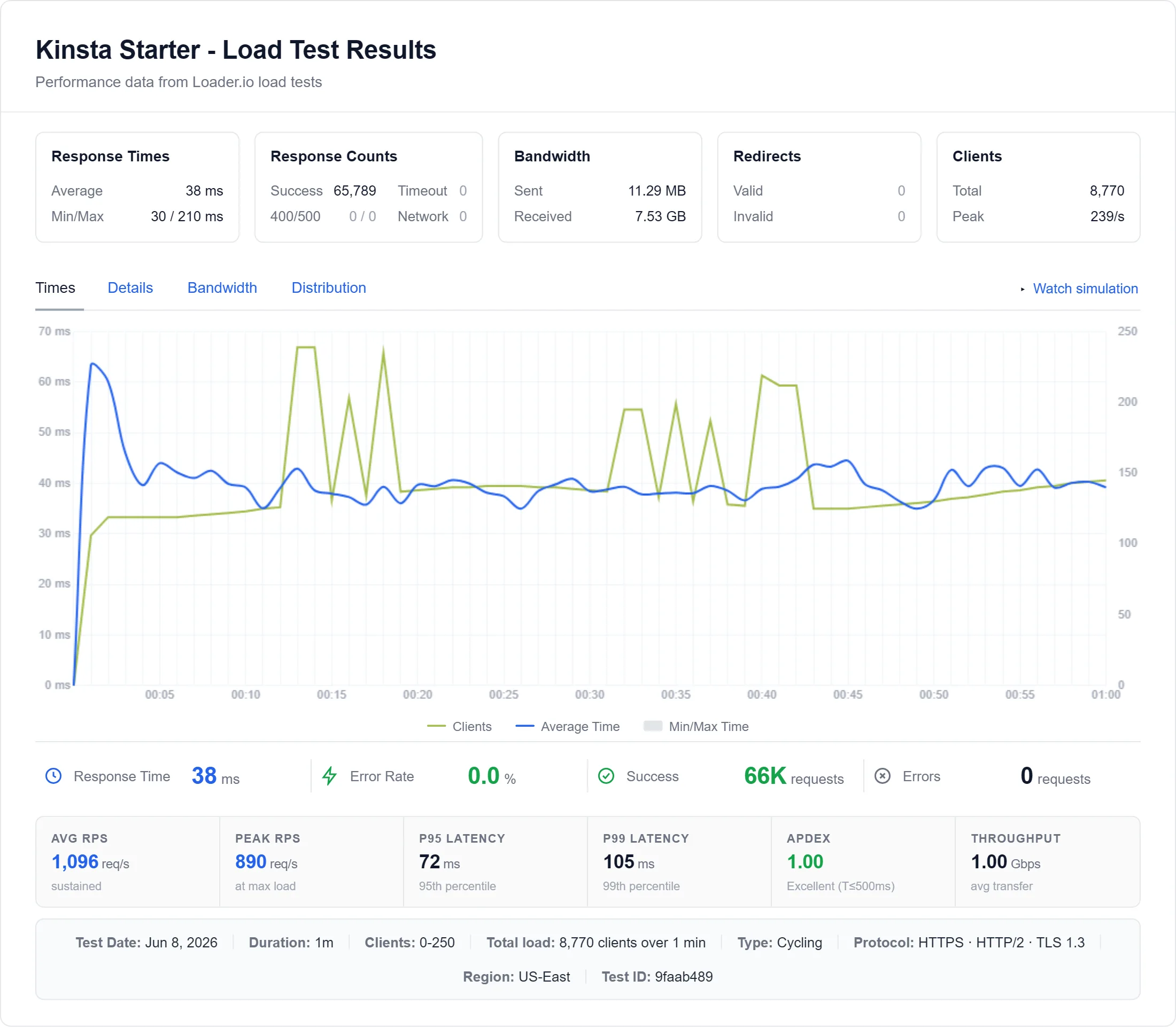
In the one-minute load test, with traffic climbing to 250 visitors, Kinsta averaged 44ms, served a hundred visitors at once in 92ms and returned 0 errors in 8,250 requests.
3. Data Centers
Kinsta says its managed WordPress hosting is "powered by 30 global data centers and a CDN with 300+ edge locations", so you can place your site close to your visitors. We could not read its list of locations today (the page returned a 404), so none is printed here; our test site sat in the US.
4. Pricing
From Kinsta's pricing page and our pricing record: Single 20GB is $35.00/mo monthly or $29.17/mo on an annual term; WP 2 is $58.33/mo and WP 5 is $95.83/mo on an annual term. Kinsta lists a 30-day money-back guarantee on its other plans, and excludes the first-month-free single-site plan.
#5. Hostinger: Low Entry Price (TTFB 109ms from Frankfurt, where our test server sat)

If you're starting a new site or have a small one, shared hosting is the best fit. Your site shares resources with other sites on the same server, so if you need a fast TTFB under load, step up to a VPS or a LiteSpeed shared plan with published allocations, like ChemiCloud's Turbo tier.
Hostinger's own page describes "managed web hosting service with LiteSpeed technology". Premium lists 20 GB SSD storage and free weekly backups; Unlimited lists 50 GB NVMe storage and daily backups; both list a free domain for one year and a 30-day money-back guarantee.
Our test server for Hostinger sat in Frankfurt. The Premium plan answered in 109ms from Frankfurt, 130ms from London and 276ms from New York, with 252ms averaged over 10 locations. That is slower than ChemiCloud's Pro plan, which costs about as much at sign-up, so Hostinger is here for its price, not for the fastest server.
- Among the lowest entry prices: $3.99/mo on a yearly term
- LiteSpeed technology, per its own page
- Free domain for one year and a 30-day money-back guarantee, per its own page
- Choice of server location at setup (locations can differ by plan)
- Renewals are high: Premium goes from $3.99/mo to $10.99/mo
- Slower under load than the hosts above it: 520ms at 100 users
TTFB 276ms from New York, 109ms from Frankfurt (our test server's city) · From $3.99/mo · In-depth Hostinger Review · Visit Hostinger ➦
Hostinger VPS Hosting (For High Performance)
Best Plan for Speed
Of the plans we tested, Unlimited answered a little faster than Premium: 276ms against 251ms from New York, and 430ms against 520ms at 100 users. Unlimited is $4.99/mo on a yearly term and renews at $16.99/mo.
1. Server Speed
Hostinger's test server sat in Frankfurt, so its fastest figures are from nearby European cities and its slowest from far away; see the region table below. We did not time a separate connection step.
2. Server Load Test
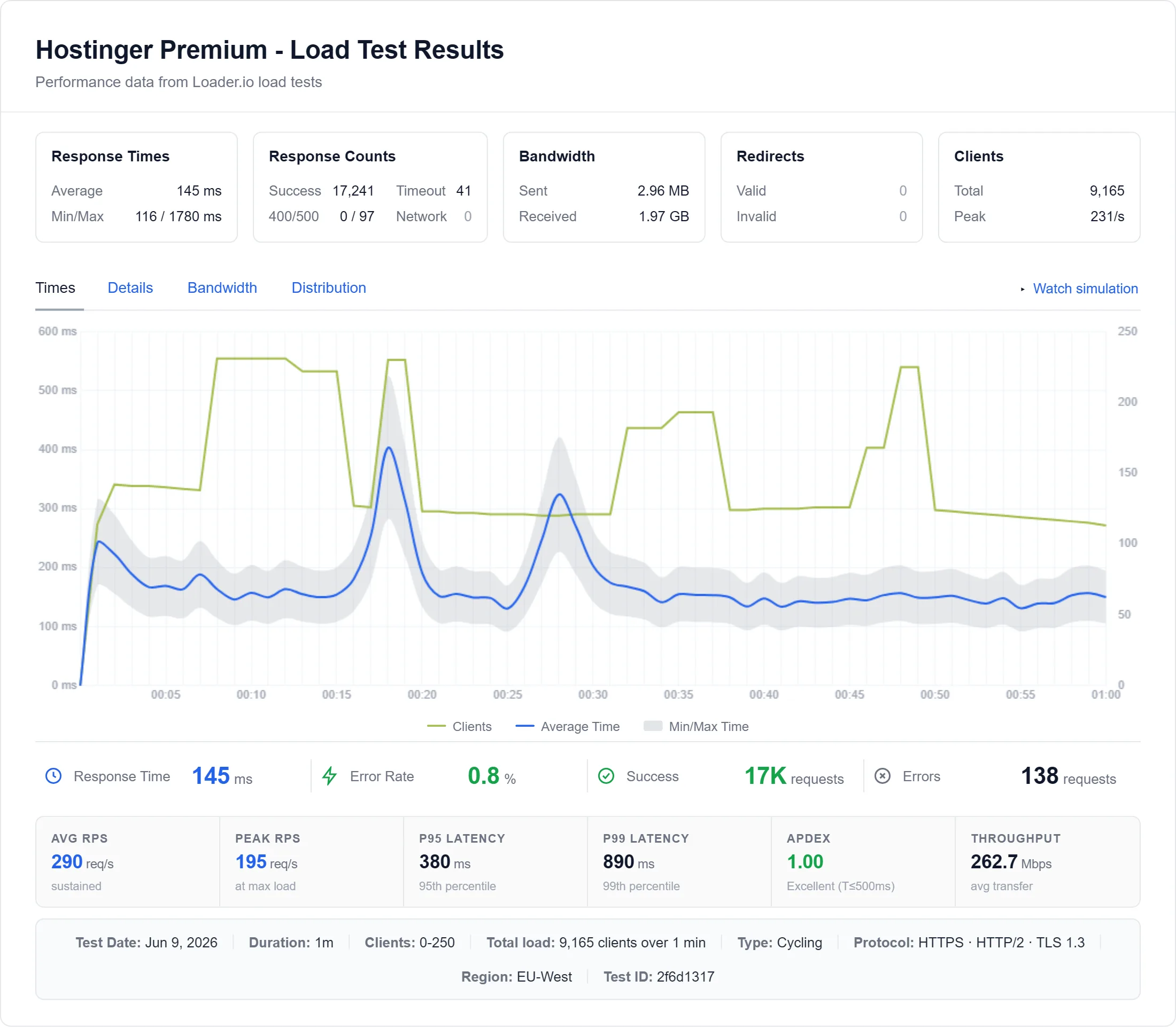
The load test climbed to 250 visitors in one minute. Hostinger Premium averaged 145ms across the ramp, 520ms with a hundred visitors at once, and 66 of 8,250 requests failed (0.8%). We did not run a load test on a Hostinger VPS.
3. Hosting Optimizations
Hostinger's page lists LiteSpeed technology. The LiteSpeed Cache plugin for WordPress, which that stack supports, can do things like: defer JavaScript, combine and minify CSS and JS, generate critical CSS, optimize and lazy-load images, and support a CDN.
4. Data Centers
Hostinger lists data centers in Europe in France, Germany, Lithuania, the Netherlands and the United Kingdom, and says you can choose the location closest to your users during setup, with available locations depending on the plan. Its web-hosting page says it has "server locations all around the world" without a country list.
5. Pricing
From our pricing record, on yearly terms: Premium $3.99/mo, renewing at $10.99/mo; Unlimited $4.99/mo, renewing at $16.99/mo; Cloud Startup $9.99/mo, renewing at $25.99/mo. Month to month, Premium is $11.99/mo. The lowest prices need a long prepay, and the renewal is what you pay afterwards.
For a small business site or a personal blog with long-term value, Unlimited ($4.99/mo) gives you daily backups and NVMe storage; Premium ($3.99/mo) is the cheaper start.
Not for heavy traffic. In our load ramp 0.8% of requests failed and a hundred visitors took 520ms; once your traffic grows, move to a faster plan.
Hostinger VPS Hosting (For High Performance)
#6. Shopify: Hosted Ecommerce Platform (Not Benchmarked Here)

Shopify is a hosted platform, not a server you rent, so our hosting benchmark (one WordPress test site per plan) does not apply to it, and we have no response-time, load or uptime figure for Shopify. An earlier version of this page printed a TTFB, a Loadstorm result, transactions per second and a per-country table for Shopify; none of those has a record, so they are gone.
What a hosted platform buys you is that the server side is Shopify's job: you do not pick a server, patch anything or size anything. If you want a store with no server management, it is worth a look; if you run WooCommerce on your own hosting, a fast origin matters more than anything a platform offers, and the Cloudways and ScalaHosting figures above are the ones to compare.
- No server to manage: updates, security and scaling are handled for you
- A large app store and built-in payments
- Usable for people with no technical background
- Not a content management system, built for selling products
- Many features come from paid apps, so the monthly bill grows
- Less flexible than self-hosted systems, and moving a store later takes planning
Speed not benchmarked by us · Price see Shopify's own pricing page (it shows prices in your local currency; we hold no price for it) · In-depth Shopify review · Visit Shopify ➦
Shopify's pricing page lists plans named Basic, Grow, Advanced and Plus, and a short free trial.
#7. Bluehost: Guided WordPress Onboarding (TTFB 262ms from New York)
Bluehost is the slowest host on this page, and it belongs here anyway. It is the name most people meet first, so "is Bluehost fast?" deserves a measured answer rather than a polite dodge: on our Choice Plus plan (an older plan Bluehost has since replaced) it answered in 262ms from New York to our test server, against 59ms for Cloudways and 78ms for ChemiCloud from the same city.
Bluehost is dependable on uptime, but it is not fast. Every number below comes from our own test of the Choice Plus plan.
What the measurements say
Origin response is 262ms from New York and 586ms averaged over 10 locations. A hundred visitors at once wait 1240ms, and across the full 0 to 250 visitor ramp the average climbs to 2941ms, with 3,221 of 8,250 requests failing. Uptime holds at 99.91% over our 54-day window, which is respectable; speed and failures under load are the problem, not availability.
For context, that hundred-visitor figure is the slowest on this page by a wide margin. If your traffic arrives in bursts, from a newsletter, a social post or an ad campaign, this is the tier where visitors start waiting.
What it costs
Business, the plan that replaced Choice Plus, enters at $6.99/mo on the three-year term and renews at $13.99/mo, double the intro. Starter is $3.99/mo renewing at $9.99/mo. Budget for the renewal from day one. We have not run a support test on Bluehost.
- Easy to use for beginners, with guided WordPress onboarding
- Free domain for the first year
- Uptime of 99.91% across our monitoring window
- 30-day money-back guarantee on shared plans
- The slowest TTFB on this page: 262ms from New York
- Slowest under load too: 1240ms for a hundred-visitor surge
- 39.04% of requests failed in our load ramp
- Renewal jumps to $13.99/mo on Business
TTFB 262ms from New York to our test server · 100-user load 1240ms · From $3.99/mo, renews $9.99/mo · In-depth Bluehost review · Visit Bluehost ➦
Who it is actually for
Pick Bluehost if you want a walkthrough that assumes no prior knowledge and your site is small enough that a quarter of a second of server time does not cost you anything. If speed is why you are reading a page called "fastest web hosting", every other host on this list answered faster from New York.
#8. InMotion: A US-Based VPS Option (TTFB 80ms from New York)

A VPS is generally faster and steadier than shared hosting, because your site does not depend on the traffic of other sites on the same server. A VPS does take more technical know-how.
On our InMotion Cloud VPS 4GB plan the origin answered in 80ms from New York to our test server (180ms averaged over 10 locations), a hundred visitors at once were served in 150ms, and 33 of 8,250 requests failed over the ramp (0.4%). Uptime held 99.95%. That is a solid result, but ScalaHosting and Cloudways were both faster, and so this is the US-based VPS option rather than the fastest VPS.
- A VPS with a quick origin in our benchmark
- A US-based option
- Slower than ScalaHosting and Cloudways under load
- A real learning curve compared with managed plans
TTFB 80ms from New York to our test server · 100-user load 150ms · From $29.99/mo · InMotion Hosting review · Visit InMotion ➦
Best Plan for Speed
InMotion's Cloud VPS 4GB is $29.99/mo on a yearly term and renews at $64.99/mo; Cloud VPS 8GB is $44.99/mo, renewing at $94.99/mo. We tested only the 4GB VPS and, separately, the shared Power plan.
Shared Power plan, for comparison
The shared Power plan answered in 193ms from New York, took 580ms at 100 users and averaged 320ms over the ramp, with 25 of 8,250 requests failing.
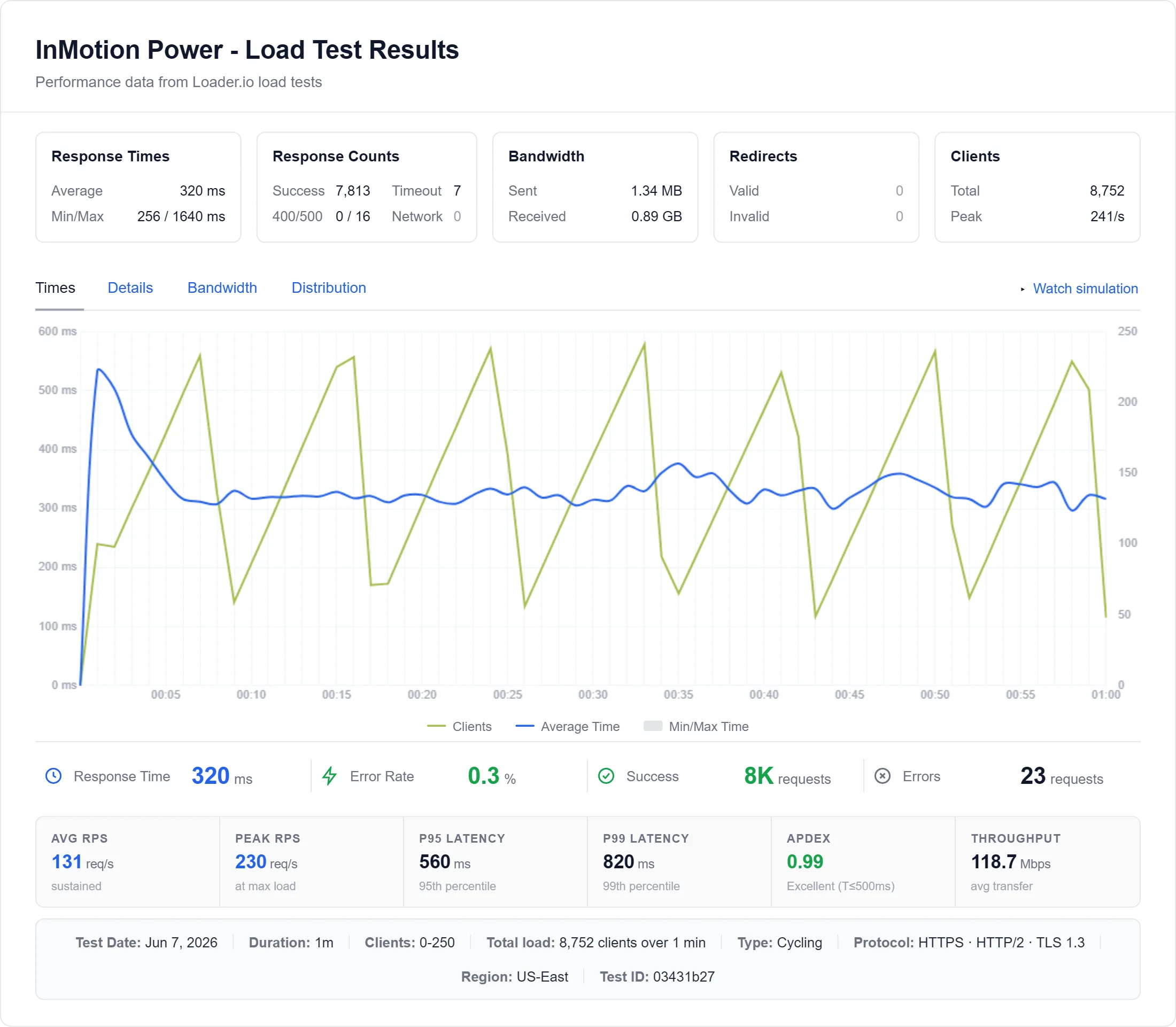
InMotion's data-center page returned a 403 when we tried to read it, so we print no location list; see the region table below for where we measured from.
Visit InMotion#9. SiteGround: Fast When Idle, Weaker Under Load (TTFB 123ms from Frankfurt)

SiteGround's StartUp plan answered in 123ms from Frankfurt, where our test server sat, and 148ms from London; from New York the trip to Frankfurt took 312ms. That is genuinely quick on a quiet server, and its Site Tools panel is a big part of why it stays popular.
So why #9 on a speed list? Two reasons I have to be straight about. First, performance drops under pressure. In our load ramp (which stopped at 100 clients) a hundred visitors took 900ms, and 165 of 3,300 requests failed (5%), where Cloudways and ScalaHosting failed none. Second, the price: StartUp is $3.99/mo on a yearly term but renews at $17.99/mo, and GrowBig's $6.69/mo headline becomes $29.99/mo at renewal. It is fast for a single low-traffic site, and slower to justify the moment you grow.
- Fast response on a quiet server: 123ms from Frankfurt
- Site Tools panel
- 99.97% uptime over our 54-day window
- 5% of requests failed in our load ramp
- Renewal jumps to $17.99/mo on StartUp (+351%)
TTFB 123ms from Frankfurt, 312ms from New York, to our Frankfurt test server · From $3.99/mo (renews $17.99/mo) · In-depth SiteGround review · Visit SiteGround ➦
Best Plan for Speed
GrowBig measured a little better than StartUp (780ms at 100 users, against 900ms), but budget for the renewal: GrowBig's $6.69/mo headline becomes $29.99/mo at year two.
#10. Rocket.net: Cached WordPress, CDN-Reliant (TTFB 32ms at the edge)
Rocket.net posted the lowest first-byte time on this page, but it is measured at its CDN edge, not at the origin: 32ms from New York and 42ms averaged over our 10 locations. Rocket.net says it runs an "Enterprise Edge" with access to 330 edge locations. For a content site that is mostly cacheable, it feels instant from almost anywhere, and the setup is genuinely low-effort.
I put it at #10 on purpose, and it is a fair caveat rather than a knock: that speed is the edge, not the server. We measured Rocket.net at the edge only, so we have no origin figure on record. An earlier version of this page printed a 310ms origin time and called the origin 2013-era hardware; neither has a record, so both are removed. Pages that bypass the cache, such as a logged-in dashboard or a WooCommerce cart, go to the origin, and we have not measured that. Over the load ramp Rocket.net averaged 66ms with 0 failed requests, and we hold no 100-user step for it. If your traffic is cache-friendly it can be worth it; if it is dynamic, test your real pages first, and compare with the origin figures for Cloudways or ScalaHosting.
- Edge TTFB of 32ms to 58ms across our 10 locations
- Pre-configured WordPress, low setup effort
- An Enterprise WAF and free migration, per its pricing page
- No failed requests in our load ramp
- No origin figure on record, so uncached speed is unmeasured
- Premium pricing: $25.00/mo on a yearly term, $30.00/mo monthly
- Speed depends on cacheable traffic
TTFB 32ms (edge, from New York); origin not measured · From $25.00/mo (yearly) · In-depth Rocket.net review · Visit Rocket.net ➦
Best Plan for Speed
Rocket.net's pricing page lists the Starter plan with 1 site, 10GB of storage and 50GB of bandwidth, and says every plan gets access to its edge and WAF, so you are not paying more to unlock the speed. Just remember the speed lives at the edge: if most of your traffic is logged-in or dynamic, test your real pages before committing.
Fastest Web Hosting by Category (2026)
The fastest host for you depends on what you are running. Here is the quick version by use case, with links to the full breakdown for each one.
Fastest Web Hosting for WordPress
For raw WordPress speed I would take Cloudways or ScalaHosting: both answered quickly at the origin and held up under load in our benchmark. Kinsta is the hands-off premium pick. See my full fastest WordPress hosting guide for the deep dive.
Fastest Web Hosting for Small Business
ChemiCloud and Hostinger hit the best balance of speed and price for a brochure or lead-gen site, with ChemiCloud the faster of the two in our benchmark. If you expect real traffic, step up to Cloudways.
Fastest Budget Web Hosting
Under load, ChemiCloud (210ms at 100 users, from $3.49/mo) beat Hostinger (520ms, from $3.99/mo) in our benchmark. Free hosting is not on this list: we did not benchmark any. More options in my cheap web hosting guide.
Fastest VPS Hosting
A VPS gives you dedicated CPU and RAM, so noisy neighbours are less of a problem. ScalaHosting and Cloudways (Vultr High Frequency) were the fastest managed cloud options I tested, while InMotion is the US-based pick. Full list in my best VPS hosting guide.
Fastest Managed WordPress Hosting
If you want someone else to handle caching, updates, and scaling, Kinsta and Rocket.net are the managed names here, though you pay a premium for both. Kinsta's figure is an origin figure; Rocket.net's is measured at its CDN edge.
Fastest Ecommerce Hosting
For a hosted store with zero server management, Shopify is an option we have not benchmarked. If you run WooCommerce, a fast origin matters more than a CDN: Cloudways and ScalaHosting had the fastest origins of the plans ranked here, though we did not time a WooCommerce checkout.
Fastest Web Hosting by Region (Global TTFB)
Most speed roundups only test from the US, which is useless if your audience is in Asia, Europe, or Latin America. This table is our 10-location record: each cell is the time from that city to our test server for the plan, at the origin, no CDN (Rocket.net: at its CDN edge). Our servers sat in New York, or in Frankfurt for Hostinger and SiteGround, so a location near the server looks fast, and this is a measure of distance and platform, not of a host's local data center. Toronto and Tokyo are left out because Hostinger and SiteGround were measured from other cities (Paris and Madrid) in those slots; the other eight locations are common to every row.
What I can stand behind: ScalaHosting and Cloudways had the lowest origin times at most locations, and the gap between New York and Mumbai tells you how much a distant visitor pays for a server on the other side of the world.
What is the fastest web hosting provider for your website in 2026?
The fastest web hosting provider for you is the one whose server answers quickly, stays quick when traffic arrives, and is close to your visitors. Factors such as uptime, speed, and customer support all matter. Once you have a few providers that seem to fit, compare their prices at renewal, not just at sign-up.
My own rule of thumb: fast web hosting is hosting where the origin TTFB is under about 300 milliseconds (ms) from where your visitors are, with enough bandwidth to load and upload data quickly.
Google's PageSpeed Insights tool is useful for evaluating your page and improving the user experience. Lighthouse, a Google open-source tool, is used to calculate PageSpeed Insights scores, and it assesses performance, accessibility and more.
Google's Web Vitals initiative provides standard guidelines for the quality signals that matter for user experience. PageSpeed Insights scores can be indicative of user experience, depending on website speed. By optimizing your website for these factors, you can improve the overall quality of your site.
How do I choose the fastest web hosting?
Fastest Web Server
The web server determines much of web hosting speed. Web servers deliver your site's content to your visitors, and speed is typically judged by how many requests per second the server can handle.
So how do you go about selecting the fastest hosting company? To find the fastest web hosting in terms of speed and performance, you first need to understand the difference between page speed and server speed.
1. Page Speed
Page speed is the time required for all the content on your page to load.
Page load time is an important factor when choosing a web host. The faster your site loads, the more likely people will stick around and browse your content. The website page has two states that matter here.
- First Contentful Paint (FCP): The user gets the first visual response.
- DOM Content Loaded (DCL): The HTML document has been loaded and parsed.
How to check page speed? You can evaluate your page speed with Google's PageSpeed Insights.
What is the optimal page speed? A page that loads in a few seconds is good; faster is better. Treat any rule of thumb as a guide, and measure your own pages.
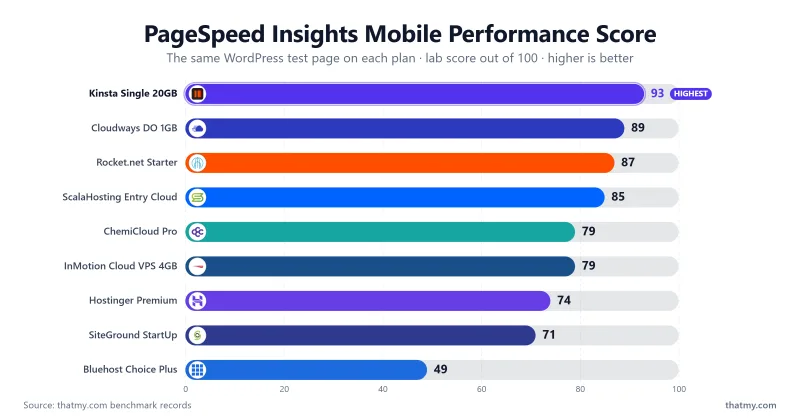
Our benchmark records also include a one-page Pingdom load per host, a Lighthouse score and a GTmetrix score for each plan; the comparison charts above are built from those records. In the current test round the fastest results under real load came from the hosts with the quickest origins: a hundred visitors at once were served in 58ms on ScalaHosting, 74ms on Cloudways (Vultr High Frequency) and 210ms on ChemiCloud. Per-host stress numbers live in each review above.
2. Server Speed
Server speed is how quickly your hosting server answers a request and delivers what you asked for.
The host server's speed depends on several factors.
- When your browser gets the first byte of information from the hosting server, it is called "TTFB". This is how long it takes for your browser to start getting information from the server.
- How quickly data loads from the server.
- Server-side language support for rendering into HTML.
- Gzip compression reduces the size of your CSS, HTML, and JavaScript files.
How to Check Web Hosting Server Speed
You can test your website's response from different locations with a free tool such as Pingdom.
What is a good server speed?
My rule of thumb for the first byte is under 200ms excellent, under 500ms acceptable. Less is always better.
Server speed is a measurement for selecting fast web hosting, and the factor to measure is the TTFB and how the server holds up under load.
3. TTFB (Time to first byte)
TTFB is the amount of time the browser waits before receiving the first byte of data from the server. The longer you wait for TTFB, the longer it takes to proceed with your other page resource requests.
The slower the TTFB, the longer it takes for users to see content on your site.
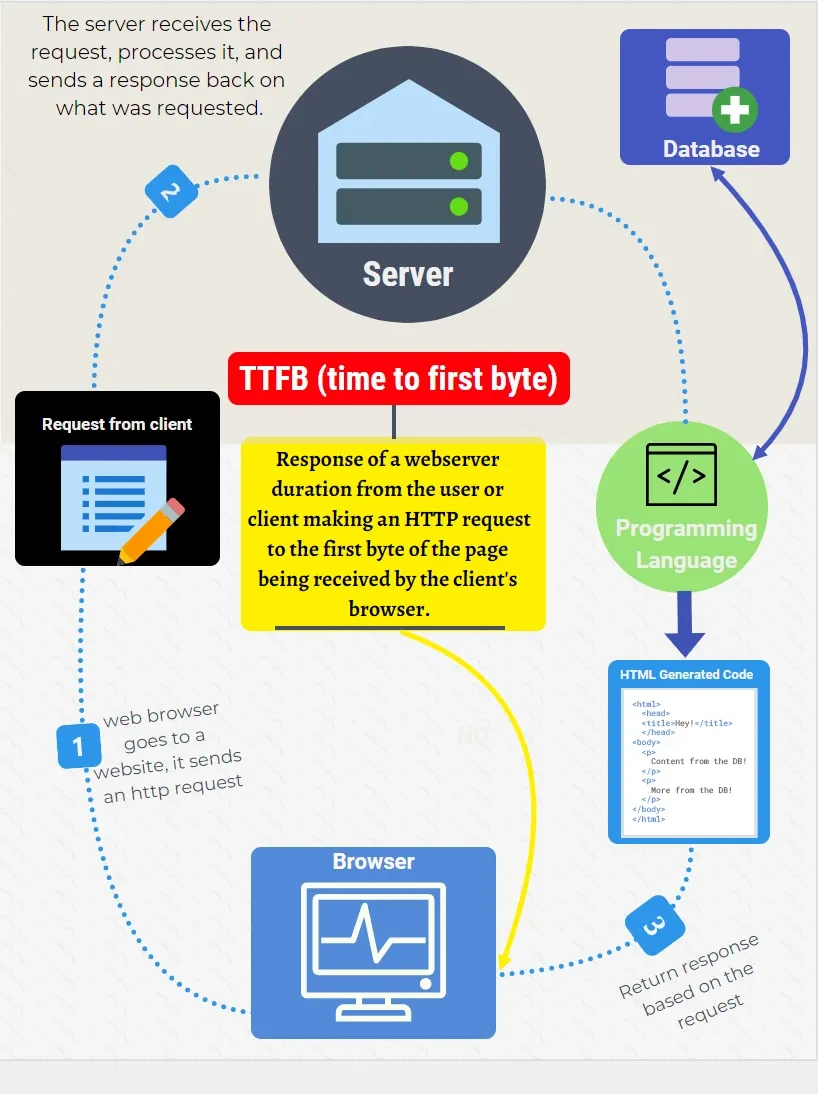
How to check TTFB? You can test your website's TTFB with a free site such as GTmetrix.
What is the best TTFB speed? Google's own guidance puts a "good" server response at under 800ms; I hold hosts to a tighter 200ms to 300ms, because TTFB is the part of load time your host controls.
For this page I measured TTFB at each host's origin from 10 locations: New York, Dallas, Toronto, London, Amsterdam, Frankfurt, Sao Paulo, Singapore, Tokyo and Mumbai. See the region table above.
4. Server Loading Capacity
How many visitors can the server handle at the same time?
Server loading capacity also plays a vital role because it can impact the performance of your website. A load test simulates many users by sending HTTP requests to a hosting server and records how it responds under pressure. Here is an overview of how a heavy-load test looks; in ours, the client count climbs from 0 to 250 over a minute.
Don't get confused by variations in test results. The line for concurrent users shows the requests sent to the server, and the response line is what your site gets back in hosting response time. A host that handles it well shows a flat response line; a host that cannot shows spikes and failed requests, as Bluehost did in our ramp (39.04% of requests failed).
5. Hosting Server Location
Hosting server location is important for latency and reliability because the lower the latency, the faster your users get a response.
Which server location is best for web hosting?
It is best to choose a location close to your user base, as this decreases latency, TTFB, and load times. Our region table shows how much distance costs: the same Cloudways DigitalOcean server answered in 59ms from New York and 223ms from Mumbai.
Consider the following factors when choosing the best server location for your website:
- Consider your target audience, and pick a data center in or near their country.
- See which data centers your web host offers.
- Check your data center's performance from where your visitors are.
How to Check Server Speed at Multiple Client Locations?
You can use free server speed testing tools like Pingdom.
6. Hosting Storage Type
Storage type is the physical format of the storage media. Common types are spinning disk, solid state drive (SSD), and NVMe SSD.
Spinning disk storage is a traditional hard drive that stores data on spinning disks. These can hold a lot of data, but they are slow to access.
Solid-state drive storage stores data on solid-state chips. These drives are much faster to access than spinning disks.
NVMe SSD storage (Non-Volatile Memory Express) is a newer type of solid state storage. The NVMe protocol allows higher throughput and lower latency than older SSD interfaces, which helps database queries and other storage-heavy work. It can cost more than traditional SSD storage, so if you are on a tight budget, weigh it against the rest of the plan. Several plans above list NVMe storage (ChemiCloud and Hostinger Unlimited among them).
7. CDN (Content Delivery Network)
A CDN caches your pages on servers around the world so each visitor loads from the nearest one. This is what flattens TTFB across regions.
There is a real difference between a CDN that caches static files and one that caches full HTML pages at the edge. Rocket.net measured under 60ms at its edge from every one of our 10 locations, which is the full-page-edge effect. The catch, as covered above, is that a CDN only speeds up cacheable content: a logged-in dashboard or a WooCommerce cart still hits your origin server, so a fast origin still matters.
8. PHP Version and Workers
PHP runs WordPress, and newer is generally faster. PHP workers decide how many requests your site can handle at the same time.
If a host gives you only a couple of shared PHP workers, a traffic spike queues requests and your TTFB balloons. This is a common reason cheap shared plans feel fast on a quiet test and then choke under real load, as the Bluehost and SiteGround load results above show. Always check the PHP version and the worker count before you judge a host on a quiet-hour speed test; we did not record worker counts for the plans on this page.
Which is the Fastest Server?
When it comes to web hosting, server performance is key. The server is in charge of hosting your website and making sure it's fast and reliable.
Many people believe that hosting speed is solely determined by server location. It is not: a CDN can resolve some location issues, and the web server software, the hardware and the configuration your host chooses matter as much. Our region table shows both effects at once.
When looking for fast hosting, measuring the TTFB (Time to First Byte), the loading time and the load test results are the most accurate ways to see which setup suits you.
There are numerous web servers, each with advantages and trade-offs. Three matter for WordPress hosting: Apache, Nginx, and OpenLiteSpeed / LiteSpeed. LiteSpeed-based hosts (ChemiCloud and Hostinger list LiteSpeed on their own pages) serve cached pages before PHP starts, Nginx handles many connections with few resources, and Apache is the most compatible and often the slowest under concurrent load. We did not run a head-to-head of the three servers: an earlier version of this page printed a 1000-requests-a-second comparison with request counts, and none of it has a record, so it is removed. What we did measure is whole plans, which is what you actually buy.
If you want the deeper comparison of the web servers themselves, read Apache, Nginx, and LiteSpeed. If your website is built on WordPress or another PHP platform, a LiteSpeed-based plan is a sensible default, and ChemiCloud measured as the fastest shared host here.
OpenLiteSpeed is the open-source edition of the LiteSpeed web server.
Now we see the FAQ regarding fastest web hosting.
Frequently Asked Questions: Fastest Web Hosting 2026
What is the fastest web hosting in 2026?
On our benchmark, ScalaHosting's Entry Cloud managed VPS had the lowest origin first-byte time of the plans ranked here, 38ms from New York to our test server, and the quickest 100-user result, 58ms. Cloudways was close behind (48ms on Vultr High Frequency, 59ms on DigitalOcean) and is my #1 pick for the whole package. ChemiCloud is the fastest shared host we measured at 78ms. Rocket.net's 32ms is measured at its CDN edge, not its origin, which we did not measure.
Is Hostinger faster than Bluehost?
Yes. On our benchmark Hostinger Premium answered in 109ms from Frankfurt, where its test server sat (276ms from New York), against Bluehost Choice Plus at 262ms from New York to its US test server. Under load the gap is wider: 520ms against 1240ms at 100 users, and 0.8% of requests failed against 39.04% over the ramp. Hostinger's page lists LiteSpeed technology.
Is VPS faster than shared hosting?
Usually. A VPS gives you dedicated CPU and RAM, so other users on the server cannot take your resources in a traffic spike. In our tests ScalaHosting's managed VPS served a hundred visitors in 58ms and InMotion's Cloud VPS 4GB in 150ms, against 900ms for SiteGround StartUp and 1240ms for Bluehost. The exception is a good shared plan: ChemiCloud Pro took 210ms. The tradeoff with a VPS is price and, on an unmanaged one, more technical setup.
What does TTFB mean and why does it matter?
TTFB (Time to First Byte) is how long your server takes to respond to a browser request. It is the cleanest measure of server speed because it ignores page size and browser rendering. My rule of thumb: under 200ms is excellent, under 500ms is acceptable, and over 800ms signals a server problem. A figure always depends on where it is measured from: the same Cloudways server answered in 59ms from New York and 223ms from Mumbai.
Does hosting speed affect SEO?
It can. Google's Core Web Vitals, especially LCP, depend on how quickly your server responds, and a slow host drags those scores down however well the rest of the site is optimised. TTFB itself is not one of the three Core Web Vitals. Faster hosting is one of the few fixes that helps users and search at the same time, but content and links still matter more.
What is the fastest free web hosting?
We have not benchmarked any free hosting, so we cannot name a fastest one. Free plans typically share resources with a great many sites, so expect slower and less consistent response than any plan on this page. Free is fine for testing, not for anything you want to rank. For a low price with measured speed, look at ChemiCloud or Hostinger.
Is ScalaHosting fast?
Yes. Our benchmark of its Entry Cloud managed VPS recorded 38ms TTFB from New York to our test server (84ms averaged over 10 locations), 58ms at 100 concurrent users and 0 failed requests over the load ramp. Our CPU record lists an AMD EPYC 9474F. It sits third on my list because it is a premium managed VPS rather than a first-site host, not because any plan ranked above it measured faster.
Does a CDN make hosting faster?
For cacheable content, yes. Rocket.net measured 32ms at its CDN edge from New York, and under 58ms from every one of our 10 locations. But a CDN does not speed up dynamic requests: logged-in pages, carts and forms still hit your origin server, and we did not measure Rocket.net's origin. That is why I rank a fast origin above CDN numbers, and why Rocket.net sits at number ten despite its edge figures.
Why is Web Hosting Speed is Important?
Conversion rate:
Slow sites lose visitors and sales. The size of the effect depends on your audience and your site, so measure your own bounce and conversion rates before and after a move; I do not quote an industry percentage here because I cannot source one.
Googles Ranking Factors:
According to Google, users want to find answers to their questions quickly, and people care about how fast their pages load. Google announced in 2010 that speed would be a ranking signal for desktop searches, and in July 2018 page speed became a ranking factor for mobile searches.
Bounce rate:
A slow page load can be a problem for bounce rates. If your page takes longer than a few seconds to load, your visitors may get fed up and leave, which tells search engines that users didn't find the page helpful.
User experience
Google wants to promote content that provides the desired experience for users, and a slow site provides a poor one. The faster a webpage loads, the more likely a user will perform the targeted action on that webpage.
Page weight
Page weight is the overall size of a page, including all of the files that are used to create it: HTML, images, other media, and CSS. Choosing performance-optimized web hosting is one of the easiest ways to reduce load times.
Network conditions
Website speed also depends on the visitor's connection: network conditions directly affect the speed at which any website loads.
Disadvantages of Slow Website
- Loading speed is an essential factor for user interaction and SEO.
- A slow website frustrates users and encourages them to use your competition instead.
- Slow servers fail under bursts of traffic: in our load ramp 39.04% of Bluehost Choice Plus requests failed.
Benefits of High-Speed Web Hosting.
- Page load time is also affected by image size, code, and video, so hosting is only part of the picture.
- With good server speed, you keep visitors engaged, which supports sales and conversions.
- A fast origin keeps working for the pages a cache cannot serve, such as carts and logged-in pages.
Conclusion on Fastest Web Hosting
As we can see from the results of our speed test comparison, the answer depends on the tier you are shopping in. ScalaHosting posts the fastest raw origin TTFB of the plans ranked here, Cloudways is my #1 pick for the whole package, ChemiCloud leads the shared field, and Kinsta and Rocket.net front the premium managed tier (Rocket.net measured at its edge). Every number behind those calls sits in the sections above.
When it comes to choosing a web hosting plan, the most important factor is your site's particular needs. Look at your traffic pattern first: a site with bursts of traffic needs a plan that holds up under load, while a low-traffic site can get by with a cheaper one. Then look at your content and the features each plan lists, and at the renewal price, not just the sign-up price.
Here are specific recommendations from the plans we tested:
- Cloudways Vultr High Frequency: 48ms TTFB from New York and 74ms at 100 users on the 1GB plan, from $16.00/mo monthly; the DigitalOcean 1GB plan is $11.00/mo.
- ChemiCloud Turbo: LiteSpeed with published allocations (3 cores and 6 GB RAM on Turbo, per its plans page) and a 45-day money-back window; we benchmarked Pro, not Turbo.
- InMotion Hosting Cloud VPS 4GB: a US-based VPS, 150ms at 100 users in our test.
- Bluehost Business: an easy start for beginners, though the older Choice Plus plan we tested was the slowest on this page.
- Kinsta Single 20GB: managed WordPress with free migrations and staging, 64ms TTFB from New York in our test.