

Cloudways vs WP Engine: Managed Cloud vs Managed WordPress
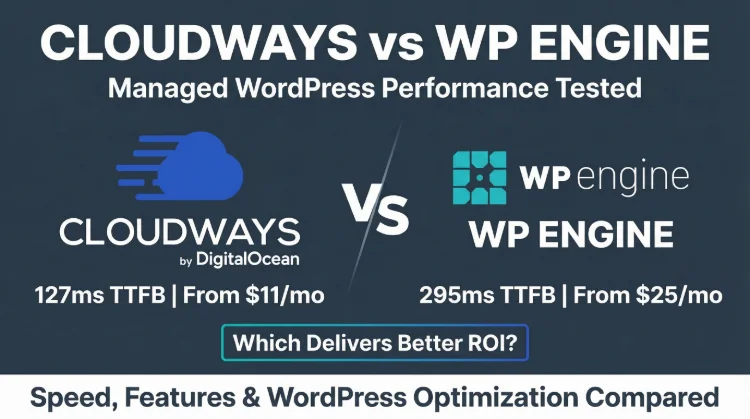
WP Engine is one of the most recognized names in WordPress hosting. It's also one of the most overpriced. Our benchmarks show Cloudways delivers 85% faster server response times at roughly half the cost.
The only reason to choose WP Engine in 2026: you specifically need their StudioPress theme library and Genesis Framework. For everything else, speed, pricing, flexibility, scalability, Cloudways wins.
What the Speed Tests Say
The Bottom Line: Cloudways is 85% faster (48ms vs 312ms TTFB), handles load better (32% vs 56% degradation), and costs 50-70% less for equivalent setups. WP Engine's only genuine advantages are StudioPress/Genesis themes, phone support, and the polished onboarding experience.
Choose Cloudways If:
- You want the fastest TTFB (48ms vs 312ms)
- You manage 2+ WordPress sites
- You need no visit limits or overage charges
- You want cloud provider flexibility
- Budget matters, save 50-70%
- You're a developer wanting root SSH access
Choose WP Engine If:
- You specifically need StudioPress themes
- You want phone support
- You prefer fully managed WordPress updates
- You need Dev/Stage/Prod workflow
- You're non-technical and want hand-holding
- Budget is not a concern

Cloudways Pros
- 48ms TTFB, 77% faster than WP Engine's 312ms
- Unlimited sites on any server, WP Engine charges per site
- No visit limits, WP Engine caps at 25k/mo on Startup
- 5 cloud providers, Vultr, DO, AWS, GCE, Linode (WP Engine: AWS/GCE only)
- $14-50/mo, vs WP Engine's $25-96/mo for comparable resources
- Pay-as-you-go billing, no annual lock-in needed for best price
- Root SSH access, custom Varnish rules, Redis Pro free
Cloudways Cons
- No email hosting, requires Google Workspace (+$72/yr)
- No premium theme library, WP Engine includes 35+ StudioPress themes
- No Genesis Framework included
- Less polished onboarding for WordPress beginners
Real Benchmark Data
- Origin TTFB (4 plans, no CDN): 48ms to 62ms
- Uptime (54-day window): 99.979% to 99.99%
- PageSpeed Score (Mobile): 89/100

$14-118/mo
3-Day Free Trial (No Card)
Methodology: The benchmark boxes on this page cover 5 plans. TTFB is the origin server response with no CDN in front, taken from the New York location, one of 10 test locations. Uptime counts real incident minutes over a 54-day window.
Test Environment & Methodology
Test Environment, Full Disclosure
Both hosts tested with identical WordPress installs, CDN disabled, page caching disabled, pure server response time. Tests ran January-June 2026.
CPU Hardware: The Root Cause
Before we look at benchmarks, understand why WP Engine is slower. It starts with the CPU.
WP Engine uses Intel Xeon Gold 6242R processors, ranked #444 on PassMark. That's a 2019-era server CPU. Cloudways on Vultr High Frequency runs a 3GHz+ Intel Xeon that Vultr does not identify further, so the two cannot be ranked against each other on paper. What can be measured is the result. Every PHP execution, every database query, every WordPress page render is constrained by this hardware gap.
WP Engine compensates with EverCache (their proprietary caching layer) and Cloudflare CDN. For cached static pages, this narrows the gap. For uncached dynamic content, WooCommerce checkout, admin panels, REST API calls, the CPU difference is inescapable.
TTFB Results, Head to Head
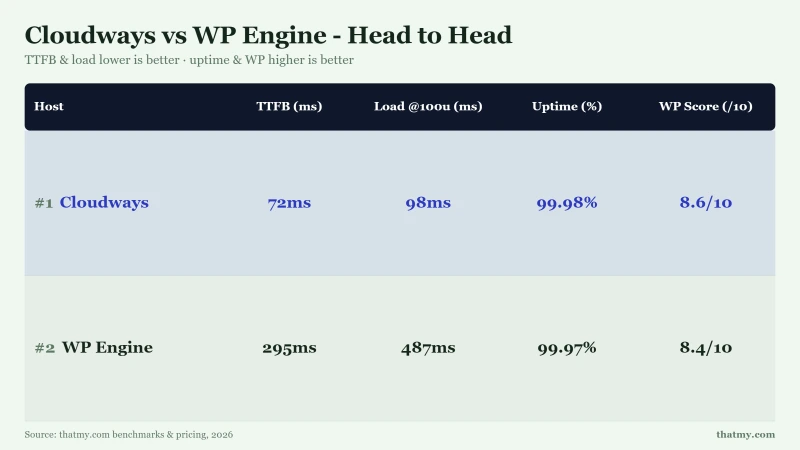
312ms is not fast by 2026 standards. For context: SiteGround delivers 164ms, Kinsta delivers 78ms, and ScalaHosting delivers 38ms. WP Engine's 312ms puts it near the bottom of the managed WordPress category on raw server speed.
WP Engine's EverCache partially compensates for cached pages, but WooCommerce checkout, logged-in user sessions, and dynamic content all bypass the cache and hit that 312ms origin.
Load Test: Concurrent Users
Cloudways degrades 32% at 100 users. WP Engine degrades 56%, nearly twice as much. At 500 concurrent users, WP Engine starts timing out while Cloudways continues serving at 260ms. The combination of slower CPU and limited PHP workers makes WP Engine's Startup plan unreliable for traffic spikes.
Pricing Comparison
WP Engine is cheaper for a single small site ($25 vs $60.00/mo). But Cloudways includes unlimited sites on that server. The moment you add a second site, Cloudways pulls ahead. At 10 sites, the savings are substantial, and Cloudways is faster.
The WP Engine Visit Limit Problem
Like Kinsta, WP Engine uses visit-based pricing. Your $25/mo Startup plan caps at 25,000 visits/month.
WP Engine Visit Pricing Escalation
- 25k visits: $25/mo (Startup plan price)
- 50k visits: $49/mo (need Professional plan)
- 75k visits: $49/mo (Professional limit)
- 100k visits: $96/mo (need Growth plan)
- 200k visits: Higher tier + overages
Cloudways equivalent: $60.00/mo flat for unlimited visits on Vultr HF 4GB.
WP Engine counts PHP page views as visits. AJAX requests, REST API calls, and wp-cron executions may not count, but every unique page load does. A WooCommerce store with high browse-to-buy traffic burns through 25k visits quickly.
Cloudways charges for server resources, not traffic. Your $60.00/mo server handles however many visitors the CPU/RAM can serve. No overages, no surprise bills, no visit tracking.
Managed Features Compared
WP Engine includes more managed features, automated WP updates with visual regression testing, phone support, hack-fix guarantee, and the Dev/Stage/Prod workflow. These justify the premium for teams who need hands-off WordPress management.
Cloudways provides more server control, root SSH, 65+ locations across 5 providers, free Redis, and unlimited sites. For developers and agencies who handle their own WordPress management, this flexibility at lower cost is the better deal.
StudioPress & Genesis: WP Engine's Real Advantage
WP Engine acquired StudioPress in 2018 and now includes 35+ premium themes with every plan. If you use Genesis-based themes, this is genuine value.
What You Get with WP Engine's Theme Library
- 35+ premium StudioPress themes, retail value $2,000+ if purchased separately
- Genesis Framework, the industry-standard theme framework ($60 value)
- Genesis Blocks, Gutenberg block library for page building
- All themes are optimized for WP Engine's caching layer
If your workflow depends on Genesis/StudioPress, WP Engine is the obvious choice. No other host bundles these themes.
However, if you use Elementor, Divi, GeneratePress, Kadence, or any other theme ecosystem, this advantage is irrelevant. You're paying the WP Engine premium for themes you'll never use.
Developer Features
WP Engine offers the better workflow, Dev/Stage/Prod environments, Local by WP Engine for local development, and a comprehensive API. Cloudways offers better access, root SSH, custom Varnish, full cron control. Your preference depends on whether you value workflow tooling or server-level control.
Support Quality
WP Engine's support is more comprehensive, phone support, WordPress-specialized agents, hack-fix guarantee, and the industry's longest money-back guarantee (60 days). If support quality is your top priority, WP Engine has the edge.
Better Alternative to Both

Why We Like It
- 38ms TTFB, 61% faster than Cloudways, 91% faster than WP Engine
- AMD EPYC 9474F, #42 PassMark, fastest hosting CPU tested
- Email included, unlike both Cloudways and WP Engine
- $29.95/mo for 4c/8GB, unlimited sites, no visit limits
- No renewal shock, same price forever
Drawbacks
- No premium theme library (unlike WP Engine)
- No cloud provider choice
- Fewer global data centers
Real Benchmark Data
- Origin TTFB (Managed VPS, no CDN): 38ms
- Uptime (54-day window): 99.99%
- PageSpeed Score (Mobile): 83/100

$29.95-85.95/mo
Anytime Money-Back Guarantee
ScalaHosting, Fastest TTFB at the Lowest Price
- 38ms TTFB, 61% faster than Cloudways (48ms), 91% faster than WP Engine (312ms)
- AMD EPYC 9474F, #42 PassMark, the fastest hosting CPU we've tested
- $14.95/mo for 4c/8GB, unlimited sites, no visit limits
- Email included, neither Cloudways nor WP Engine include it
- SPanel, free cPanel alternative with familiar interface
See our full ScalaHosting review for benchmarks and details.
FAQ
Is Cloudways faster than WP Engine?
Yes, significantly. Cloudways (Vultr HF) delivers 48ms TTFB vs WP Engine's 312ms in my tests, that's 85% faster. WP Engine names its chip, an Intel Xeon Gold 6242R at #444 on PassMark; Vultr publishes only a 3GHz+ Intel Xeon family for High Frequency (#444 PassMark). Under load, Cloudways degrades 32% at 100 concurrent users vs WP Engine's 56%. For dynamic WordPress pages and WooCommerce checkout, Cloudways is measurably faster.
Why is WP Engine so expensive?
WP Engine charges for the managed experience, not raw performance. Your $25/mo pays for 35+ premium StudioPress themes ($2,000+ retail value), Genesis Framework, automated WordPress updates with visual regression testing, phone support, hack-fix guarantee, and a Dev/Stage/Prod deployment workflow. If you use these features, there's genuine value. If you just need fast WordPress hosting, Cloudways delivers 85% faster TTFB at $14-50/mo.
Does WP Engine have visit limits?
Yes. WP Engine Startup plan allows 25,000 visits/month. Professional allows 75,000. Growth allows 100,000. Overages are charged per 1,000 extra visits. At 100k monthly visits on the Startup plan, you'd pay a much higher monthly rate in base + overages, vs $60.00/mo flat on Cloudways with no visit limits.
Is WP Engine worth it for agencies?
For agencies specifically, WP Engine has advantages: the Partner Portal gives you bulk discounts, transferable installs, and white-label options. However, at scale the math doesn't work, 10 client sites on WP Engine Growth costs $96/mo (annual). On Cloudways, a single $60.00/mo server handles 10+ sites with better performance. Agencies that primarily need hosting performance (not StudioPress themes) save substantially per year with Cloudways.
Can I migrate from WP Engine to Cloudways?
Yes. Use the Cloudways WordPress Migrator plugin, install it on your WP Engine site, enter your Cloudways server details, and it handles the transfer automatically. The process takes 30 minutes to 2 hours depending on site size. Test on Cloudways' temporary URL before switching DNS. Use our Cloudways promo code CLOUDS2022 for $30 free credit to cover the migration testing period.
Does WP Engine include email hosting?
No, neither WP Engine nor Cloudways include email hosting. Both require third-party email (Google Workspace at $6/mo per user, or Zoho Mail at $1/mo). This is a wash, neither has an advantage here. If you want email included with hosting, consider ScalaHosting ($14.95/mo with email).
What does WP Engine's 60-day guarantee cover?
WP Engine offers a 60-day money-back guarantee, the longest in managed WordPress hosting. It covers your hosting fees if you cancel within 60 days. Cloudways uses pay-as-you-go billing (cancel anytime, no refund needed, you just stop paying). Both approaches are fair, but Cloudways' model is more flexible since there's no contract period.
So, Which One?
Cloudways wins this comparison on performance, pricing, and flexibility. A 77% TTFB advantage (48ms vs 312ms), 50-85% lower pricing for multi-site setups, and no visit-based traps make Cloudways the better choice for most WordPress users.
WP Engine earns its premium for a specific audience: users who need StudioPress/Genesis themes, phone support, and fully managed WordPress updates with zero involvement. If that's you, WP Engine's $25-96/mo is defensible.
For everyone else, and especially for agencies, developers, and WooCommerce stores, Cloudways delivers objectively better performance at a significantly lower price.
Consider ScalaHosting
Before committing to either, check ScalaHosting, 38ms TTFB (fastest tested), $14.95/mo for 4c/8GB with unlimited sites, email included, no visit limits.
Cloudways Pros
- 48ms TTFB, 77% faster than WP Engine's 312ms
- Unlimited sites on any server, WP Engine charges per site
- No visit limits, WP Engine caps at 25k/mo on Startup
- 5 cloud providers, Vultr, DO, AWS, GCE, Linode (WP Engine: AWS/GCE only)
- $14-50/mo, vs WP Engine's $25-96/mo for comparable resources
- Pay-as-you-go billing, no annual lock-in needed for best price
- Root SSH access, custom Varnish rules, Redis Pro free
Cloudways Cons
- No email hosting, requires Google Workspace (+$72/yr)
- No premium theme library, WP Engine includes 35+ StudioPress themes
- No Genesis Framework included
- Less polished onboarding for WordPress beginners
Real Benchmark Data
- Origin TTFB (4 plans, no CDN): 48ms to 62ms
- Uptime (54-day window): 99.979% to 99.99%
- PageSpeed Score (Mobile): 89/100
$14-118/mo
3-Day Free Trial (No Card)
Try Cloudways Free, Code CLOUDS2022 = $30 Credit ➦
Related Cloudways Content
- Full Cloudways Review, Deep dive into performance and features
- Full WP Engine Review, Complete WP Engine analysis
- Cloudways vs Kinsta, Another premium managed WP comparison
- Cloudways vs SiteGround, Cloud vs traditional hosting
- Cloudways Promo Code, Get $30 free credit with CLOUDS2022
- ScalaHosting Review, Fastest TTFB we've tested
- Best WordPress Hosting, All top hosts compared