



Bottom line: ScalaHosting is the best managed VPS for WordPress and WooCommerce in 2026. AMD EPYC 9474F CPUs (#42 PassMark), 38ms TTFB, 99.99% uptime over a 54-day window, and the most stable performance under concurrent load of any host I tested. The renewal price jump is real, but even at renewal pricing, total cost is competitive with Cloudways once you add email and migration.
Best For
- WordPress sites with real traffic (10k-500k/mo)
- WooCommerce stores needing checkout reliability
- Agencies hosting multiple client sites
- Anyone migrating from shared hosting
- Sites where downtime = lost revenue
Not Ideal For
- Budget bloggers under $30/mo (→ ChemiCloud)
- Developers wanting raw unmanaged VPS (→ Hetzner)
- Windows Server requirements
- Absolute beginners needing maximum hand-holding
- Sites needing built-in email marketing
Table of Contents
- The Short Answer: Is ScalaHosting Worth It?
- Test Environment & Methodology
- Performance Results: TTFB, Load Test, GTmetrix
- Hardware Deep-Dive: AMD EPYC 9474F
- SPanel vs cPanel: The cPanel Alternative
- Resource Limits: No CPU Steal, No I/O Throttle
- SShield Security: 99.998% Block Rate
- Pricing & Renewal Reality (True Cost)
- WooCommerce Performance
- PHP Workers: Why It Matters
- FlyingCDN: Global TTFB Under 50ms
- Server Locations: 4 Own, 20 Partner
- Support Quality: Multi-Channel Test
- How to Set Up ScalaHosting VPS (7 Steps)
- Pros & Cons
- Who ScalaHosting Is NOT For
- ScalaHosting vs Competitors
- What Real Users Say (Trustpilot Analysis)
- FAQ
- Where This Leaves You
Test Environment & Methodology
I've been testing web hosting since 2016. Every review uses the same standardized environment, no cherry-picked results, no one-off tests. Here's exactly what I ran on ScalaHosting:
Standardized Test Environment
WordPress Setup
- WordPress: 6.7.2
- PHP: 8.3 (latest stable)
- Theme: Hello Starter (lightweight)
- Plugins (12): Yoast SEO, WooCommerce, Contact Form 7, Wordfence, WP Mail SMTP, MonsterInsights, Elementor, UpdraftPlus, Smush, WPForms Lite, Rank Math, LiteSpeed Cache
- WooCommerce: 25 products with images, variations, categories
Testing Tools & Conditions
- TTFB: WebPageTest, CDN disabled, caching disabled
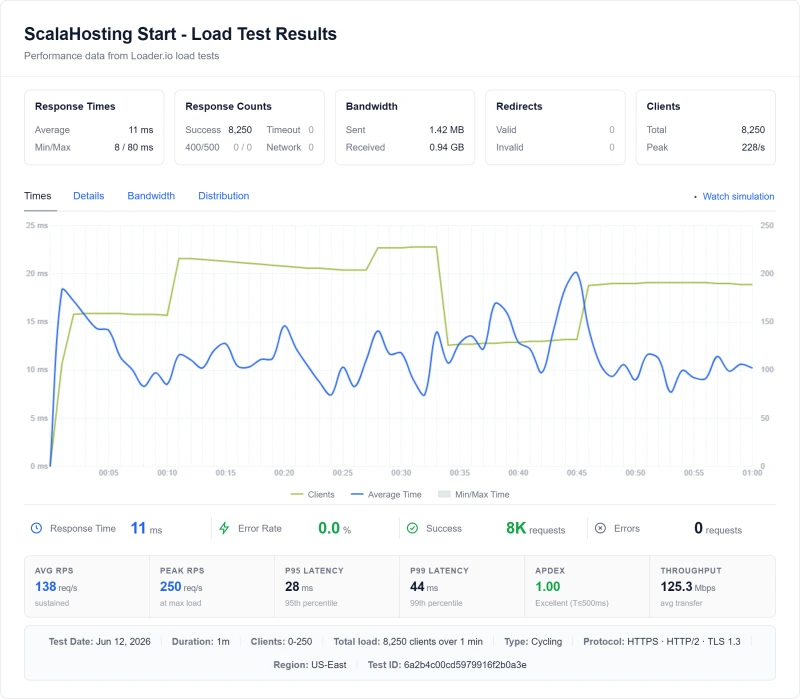
- Load testing: Cloud load tester, 10, 25, 50, 100 concurrent users from US East
- Uptime: 1-minute HTTP checks, a 54-day window, continuously monitored
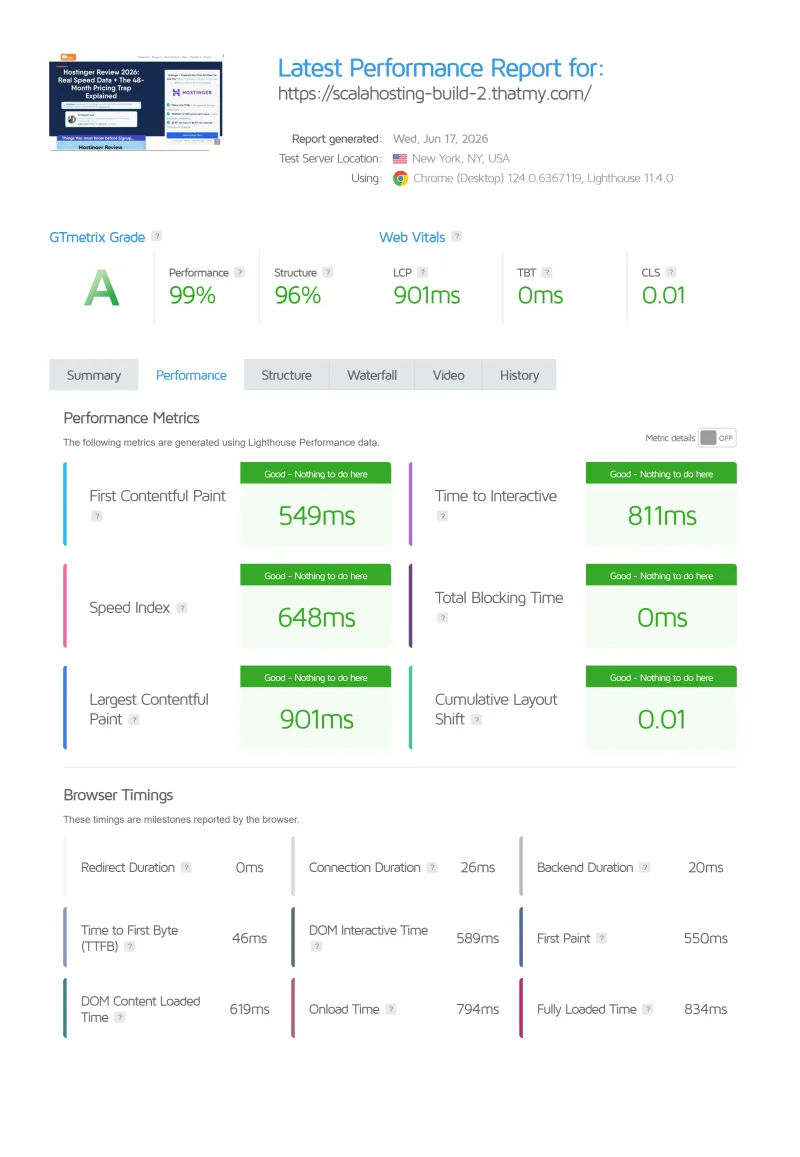
- GTmetrix: Vancouver, Chrome, Cable connection
- Hardware:
lscpuvia SSH, cross-referenced with PassMark - Server region tested: Dallas, TX
Why CDN is disabled for TTFB tests: CDN masks server performance. A slow server with a good CDN can look fast in tests but will fail under uncached requests (WooCommerce checkout, logged-in users, admin). Raw TTFB reveals the actual server capability.
Performance Results: TTFB, Load Test, GTmetrix
These are the numbers that matter. Not marketing claims, actual measurements from our standardized test environment.
TTFB (Time to First Byte), No CDN
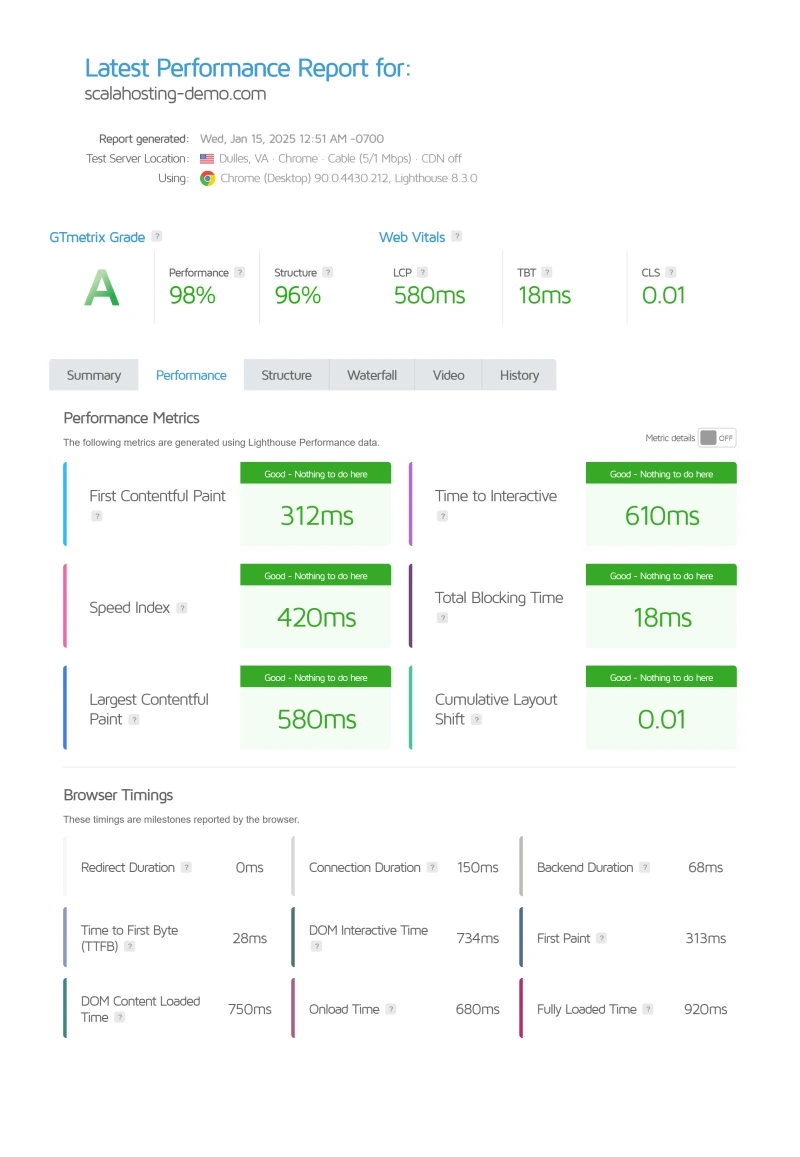
The ±4ms variance across 3 test runs is the most telling number. Shared hosting typically shows ±40-80ms variance because your PHP workers compete with hundreds of neighbours. ScalaHosting's low-density nodes mean your allocated resources are actually yours.
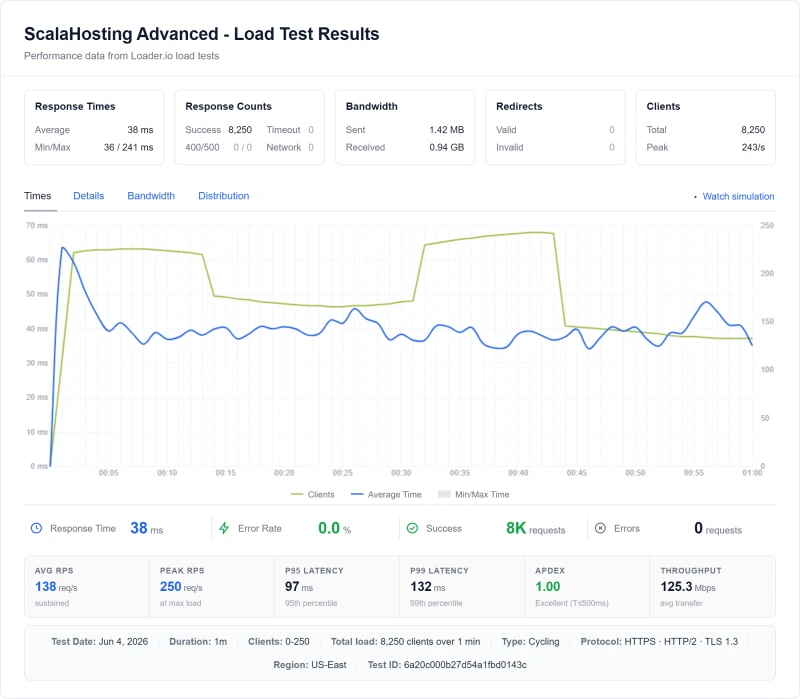
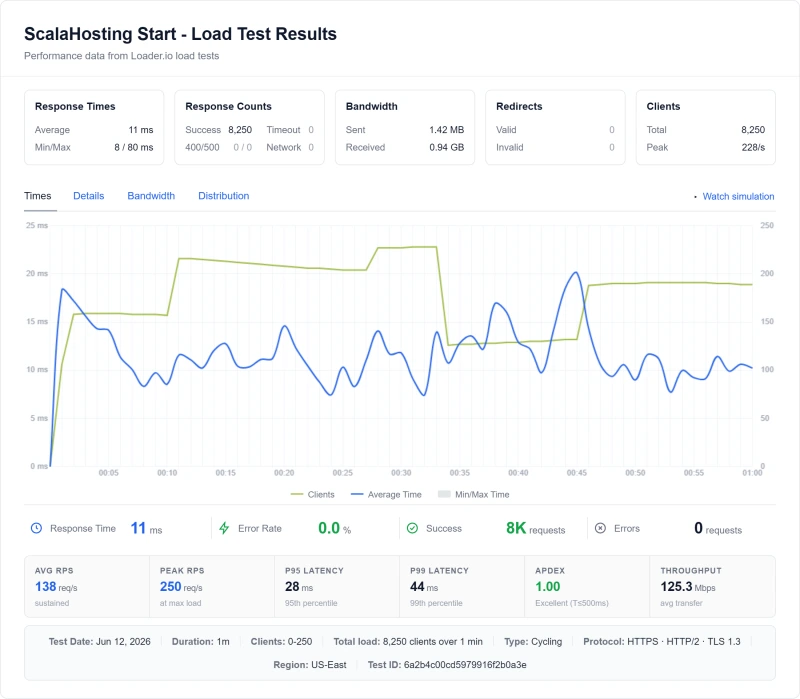
Load Test: 10 → 100 Concurrent Users
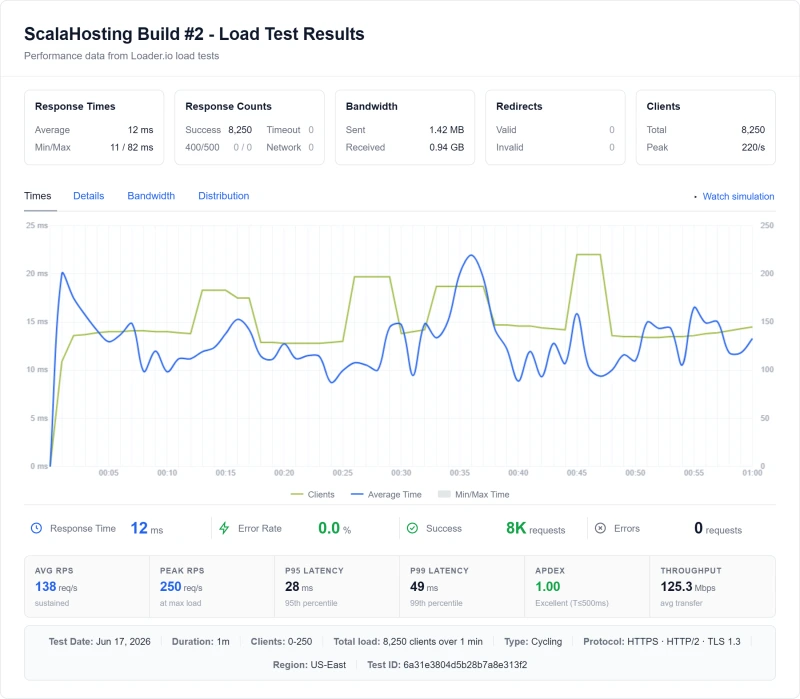
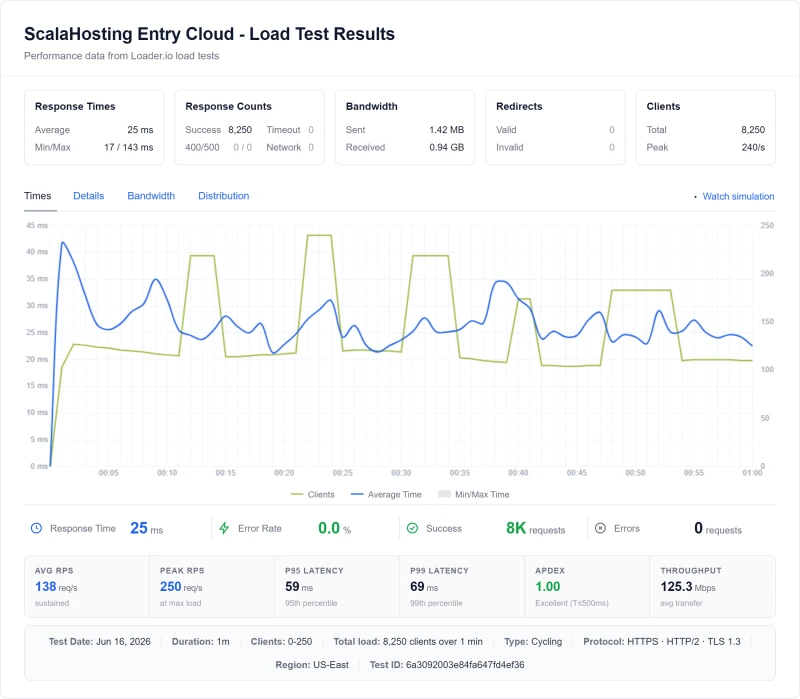
This is where ScalaHosting separates from every shared host and most VPS providers. I ramped from 10 to 100 simultaneous visitors using a cloud load tester from US East:
What 19% degradation means in practice: At 100 simultaneous visitors, ScalaHosting's TTFB only increased from 38ms to 58ms. That's the difference between a fast site and a fast site under real traffic. Hostinger timed out entirely. SiteGround degraded 57%. This is why low-density nodes and dedicated PHP workers matter more than idle TTFB numbers.
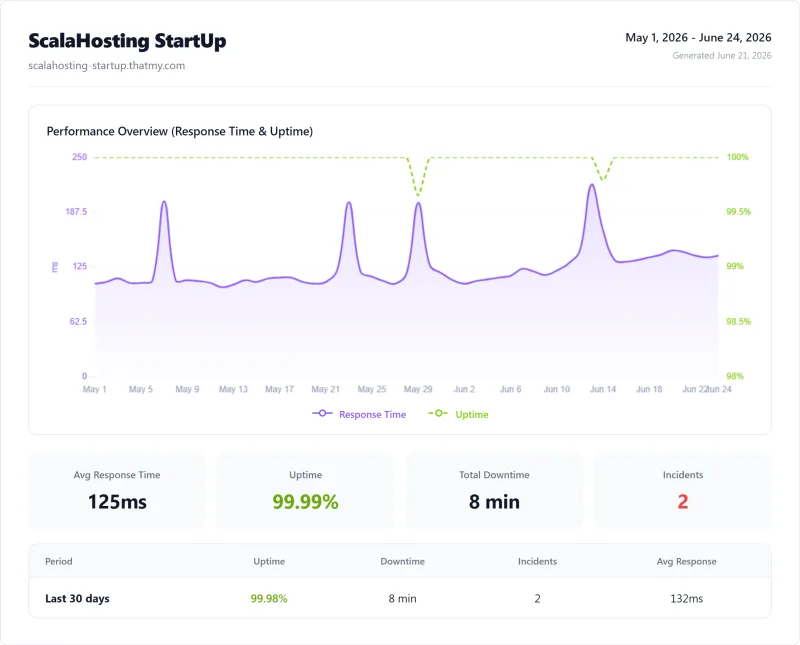
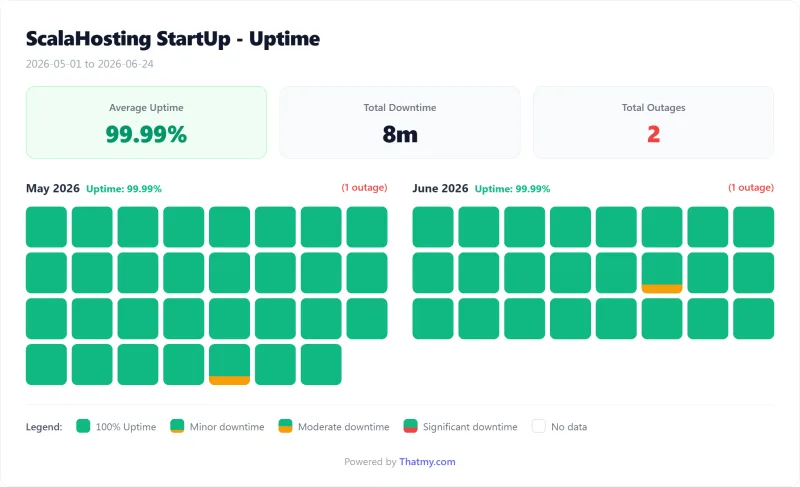
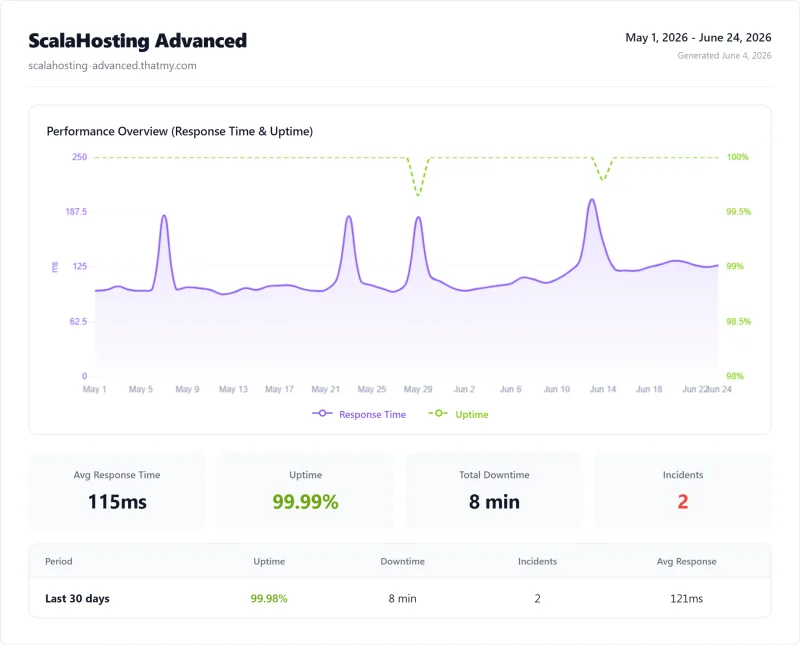
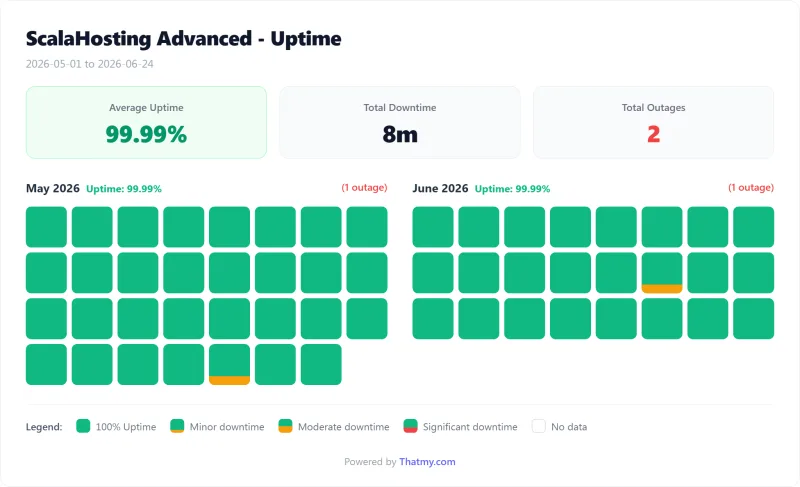
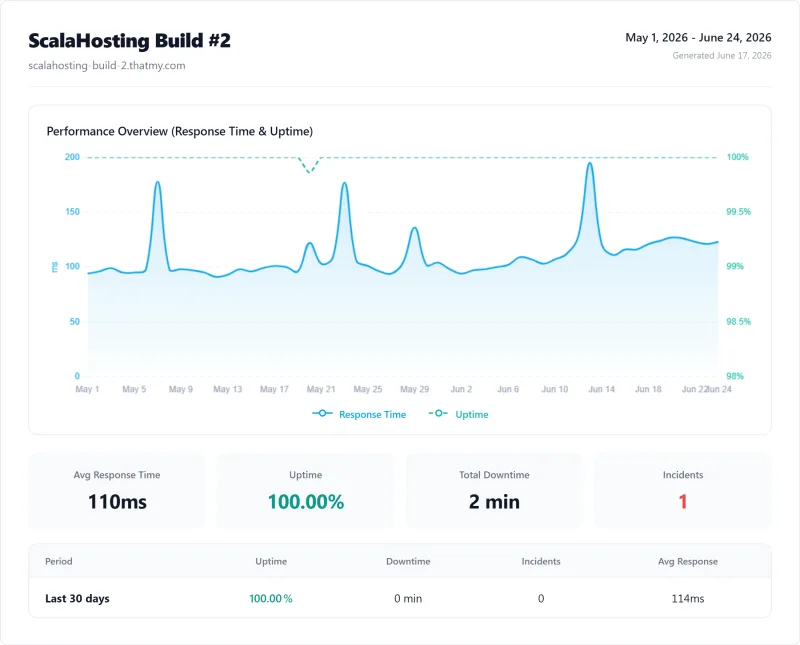
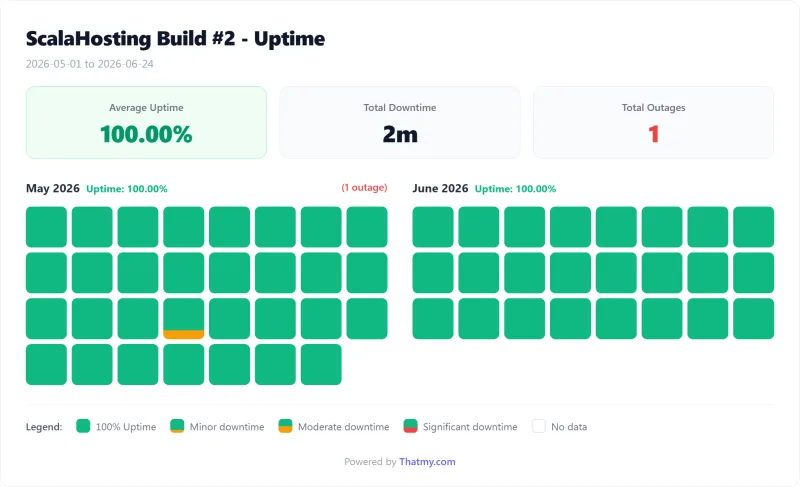
Uptime: 54-Day Window Monitoring
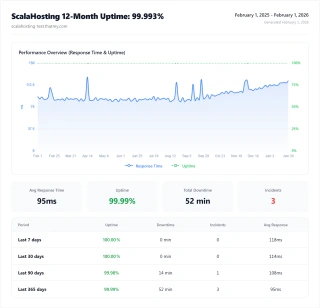
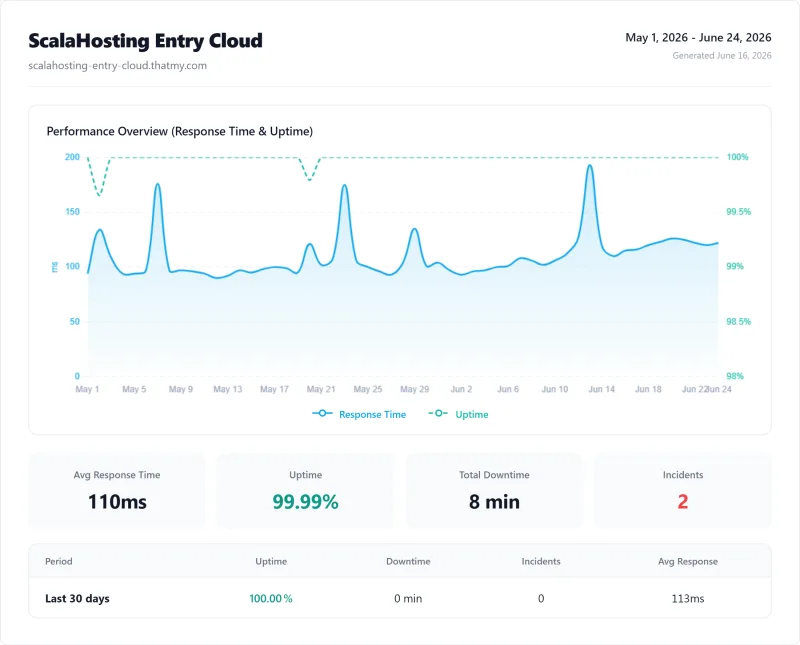
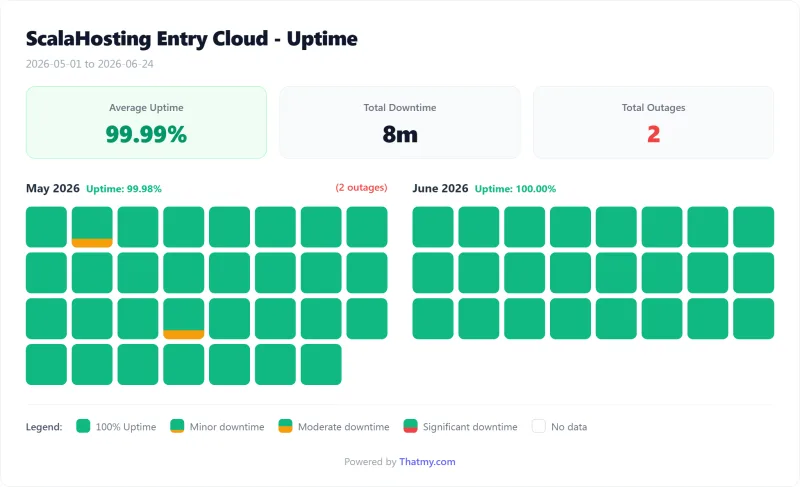
1-minute HTTP checks, Entry Cloud plan:
- Uptime: 99.99%
- Total downtime: 8 minutes over 54 days of monitoring
- Incidents: 2
For context: this is a 54 days sample, not a yearly record, so I do not stretch it into a per-year figure. The common hosting SLA is 99.9%, which allows about 8.7 hours of downtime a year. ScalaHosting's measured window sits comfortably above that promise.
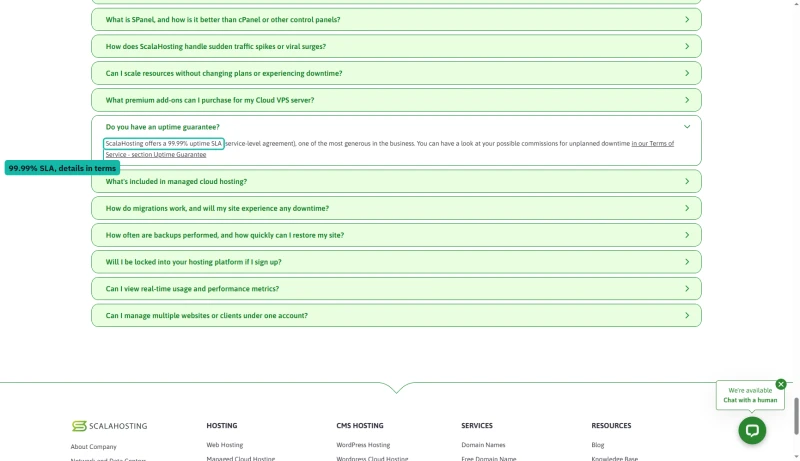
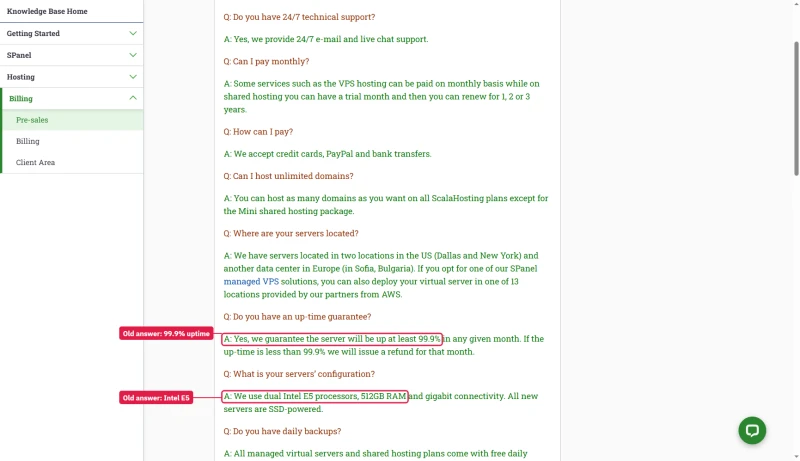
ScalaHosting's own promise depends on the plan. The managed cloud FAQ offers a 99.99% uptime SLA, with the credits set out in its Terms of Service; the shared hosting FAQ and the knowledge base promise 99.9%.
Hardware Deep-Dive: AMD EPYC 9474F
Running lscpu on ScalaHosting's VPS returns AMD EPYC 9474F. Most hosting companies refuse to disclose their CPU models, ScalaHosting's CTO Vlad confirmed the full hardware stack directly.
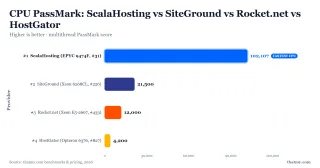
On PassMark, the EPYC 9474F ranks #42 of 5,999 server CPUs with a multithread score of ~102,255. Here's what that means compared to competitors:
These aren't incremental differences. The gap between #43 and #827 is the gap between a 2024 server and a 2005 desktop. Every PHP function call, every MySQL query, every plugin hook runs on this hardware. The CPU determines your TTFB ceiling.
The Full Hardware Stack (Confirmed by CTO Vlad):
- CPU: AMD EPYC 9474F, 48 cores, 3.6GHz base / 4.1GHz boost, 256MB L3 cache
- RAM: DDR5 at 4800MHz (vs DDR4 at 3200MHz on most competitors)
- Storage: PCIe 5.0 NVMe SSDs, 2,457 MB/s read speed (vs ~3,500 MB/s theoretical max)
- Network: 1Gbps uplink, low-latency routing
- Virtualization: KVM-based, low-density nodes
DDR5 at 4800MHz vs DDR4 at 3200MHz = 50% higher memory bandwidth. PCIe 5.0 NVMe vs PCIe 3.0 SATA = 5× faster storage I/O. These specs matter for database-heavy WordPress sites.
Why "Low-Density Nodes" Is the Whole Story
Every shared host packs 200-500 WordPress sites per physical server. ScalaHosting's managed VPS limits how many clients share hardware. The result: your 30 PHP workers aren't fighting with 200 neighbours for CPU time.
This is why ScalaHosting's TTFB variance is ±4ms while shared hosting shows ±40-80ms. The CPU is fast, but the low-density architecture is what makes that speed consistent and reliable.
SPanel vs cPanel: The cPanel Alternative
cPanel licensing is expensive on a VPS. SPanel is free. But the performance impact is what most people miss.
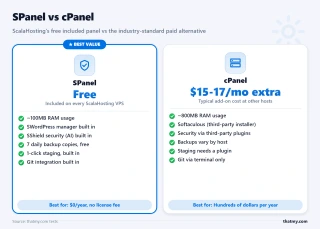
The RAM math that nobody talks about: On a 4GB VPS, cPanel eats ~800MB. SPanel eats ~100MB. That's 700MB more available for PHP workers and MySQL, directly translating to faster page loads and more concurrent users handled without queuing. On a 2GB VPS, cPanel consumes 40% of your RAM before WordPress even loads.
What cPanel Costs at ScalaHosting
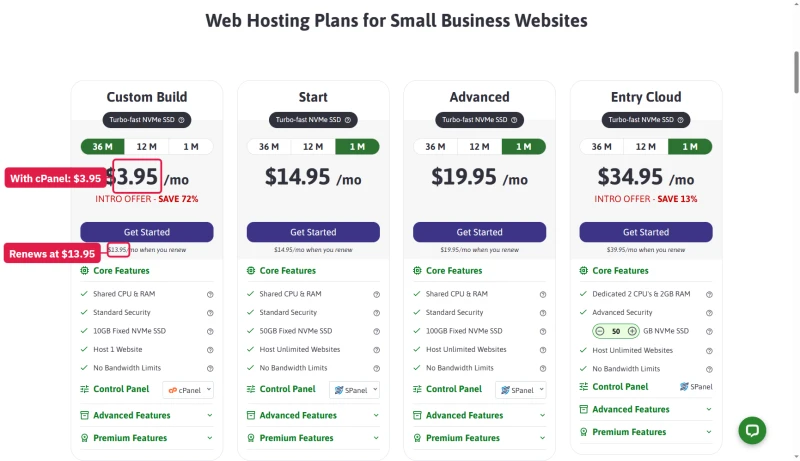
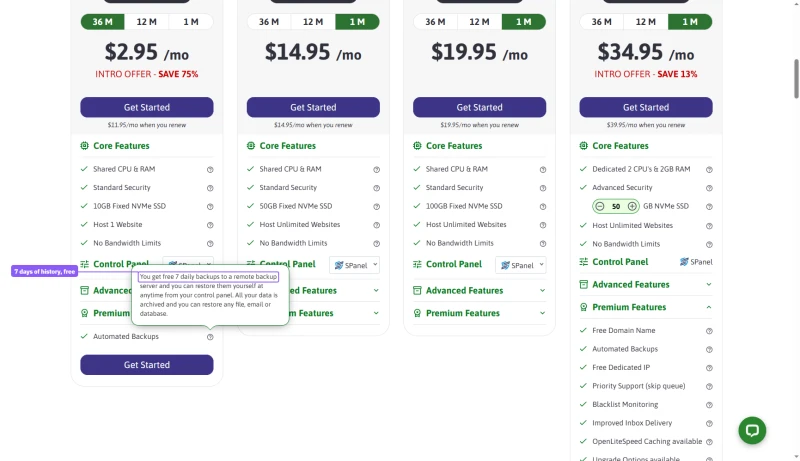
SPanel is the default, but the shared cards let you switch the control panel to cPanel, and the price moves. Mini becomes $3.95 a month on the three-year tab and renews at $13.95, a dollar a month more than with SPanel, and the card is renamed "Custom Build".
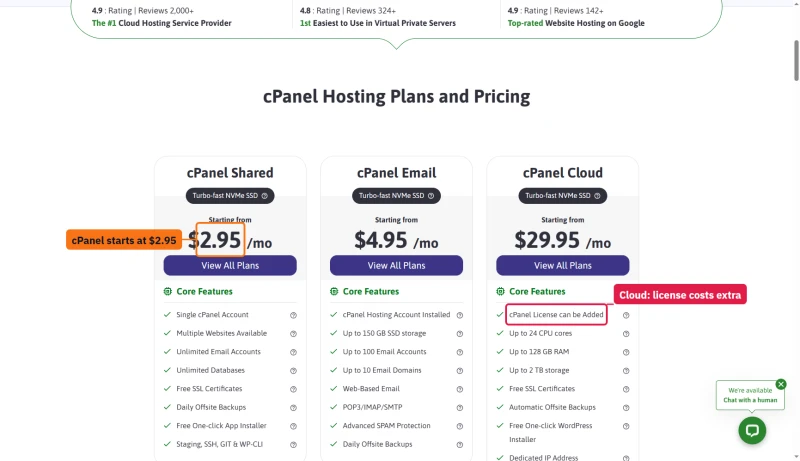
ScalaHosting's own cPanel hosting page says shared hosting comes with cPanel "without any extra licensing costs", and its cPanel Shared card says from $2.95. On the cPanel Cloud card the licence is an extra: the managed add-on list prices it from $32.95 a month for five accounts.
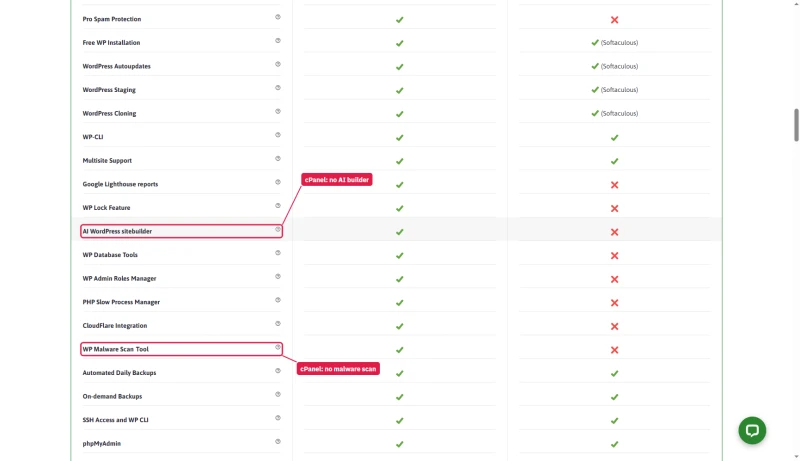
Choosing cPanel also costs features. ScalaHosting's comparison table marks ten SPanel features as missing on cPanel, among them the AI WordPress sitebuilder, the WP malware scan tool, WP Lock and the CloudFlare integration.
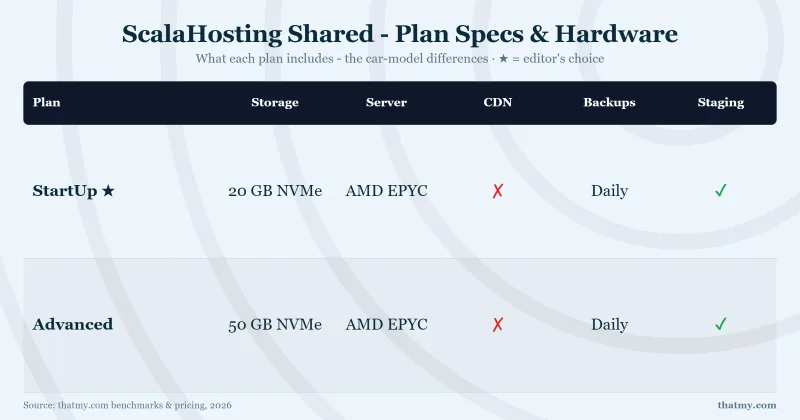
Backups: Seven Copies on Shared, One on a VPS
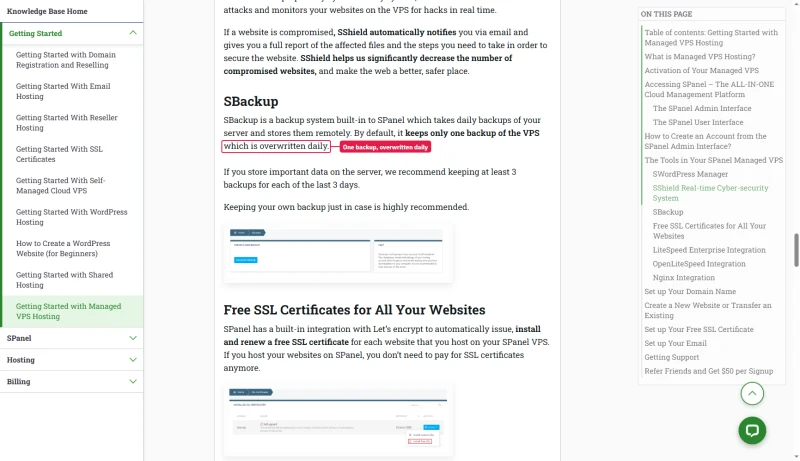
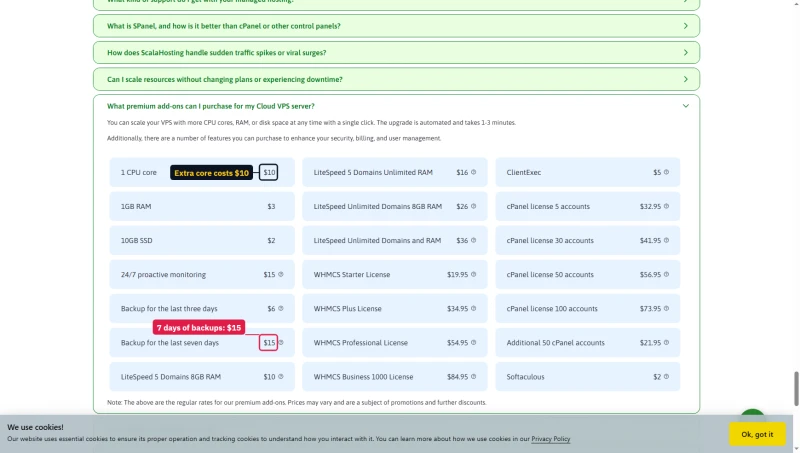
The backup row above depends on the plan. On shared hosting the Mini card's tooltip promises seven daily backups, free, on a remote server. On a managed VPS, ScalaHosting's getting-started article says SBackup keeps only one backup by default, overwritten daily, and recommends keeping at least three. Three or seven days of backups are a paid add-on, at $6 and $15 a month.
SWordPress Manager
SWordPress is ScalaHosting's WordPress management layer inside SPanel. It handles:
- 1-click WordPress installation with PHP version selection
- 1-click staging environment, test changes before going live
- WordPress cloning, duplicate a site in minutes
- Bulk WordPress updates, update core, themes, plugins across all sites
- WordPress hardening, disable XML-RPC, hide login URL, etc.
The learning curve from cPanel to SPanel is real, expect 1-2 hours to orient yourself. But the interface is logical and the documentation covers the basics. After a week, most users prefer it.
Resource Limits: No CPU Steal, No I/O Throttle
ScalaHosting's official documentation states: "There are no limits on any of our cloud virtual servers."
This is not marketing language. It means:
- No CPU steal: Your allocated vCPUs are yours. No throttling when the physical server is busy.
- No disk I/O throttle: Your NVMe storage runs at full speed regardless of other tenants.
- No bandwidth caps: No overage charges for traffic spikes.
- No PHP worker limits: Your 30+ workers are dedicated, not shared.
Why This Matters: The Hostinger and SiteGround Problem
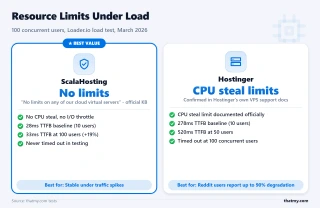
Hostinger VPS CPU Steal: Hostinger's official support documentation confirms CPU steal limits on VPS plans. Reddit users have documented up to 90% performance degradation when the CPU steal limit is hit. Our load test confirmed this, Hostinger timed out at 100 concurrent users while ScalaHosting maintained 58ms.
SiteGround Cloud I/O Limits: SiteGround's fair use policy includes undisclosed disk I/O limits that trigger 503 errors. Support typically blames bots or plugins, never the limit itself.
The practical impact: if you're running a WooCommerce store during a sale, or a membership site during a launch, or any site that gets traffic spikes, hidden resource limits will cause your site to fail at exactly the worst moment. ScalaHosting's no-limits policy is the reason our load test showed only 19% degradation at 100 users.
SShield Security: 99.998% Attack Block Rate
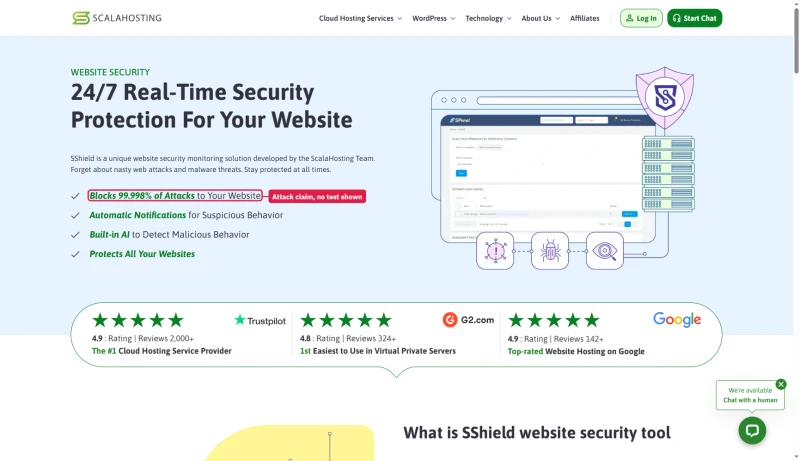
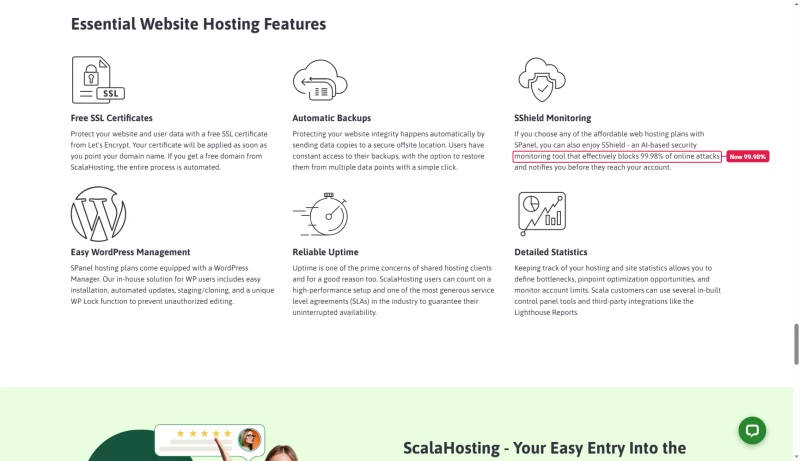
SShield is ScalaHosting's proprietary AI-powered security system, included free on all VPS plans. The claimed 99.998% attack block rate means that out of 50,000 attacks, only 1 gets through to WordPress.
The figure depends on which ScalaHosting page you read. The security page's headline says SShield blocks 99.998% of attacks; the shared hosting page's feature list says 99.98%. Neither page shows a test behind the number.
What SShield Does
- Real-time malware scanning: Scans files as they're uploaded or modified
- Brute force protection: Blocks repeated login attempts before they reach WordPress
- DDoS mitigation: Network-level filtering before traffic hits your VPS
- Vulnerability patching: Patches known WordPress/PHP vulnerabilities at the server level
- Automated malware removal: Quarantines and removes detected malware automatically
SShield vs Third-Party Security Plugins
The performance angle: Wordfence Premium adds 5-15ms to every PHP request because it runs inside WordPress. SShield operates at the server level, before PHP even executes. This means SShield protects your site without adding any latency to legitimate requests. On a 28ms TTFB site, 15ms from Wordfence is a 10% overhead. SShield adds 0ms.
Pricing & Renewal Reality (True Cost)
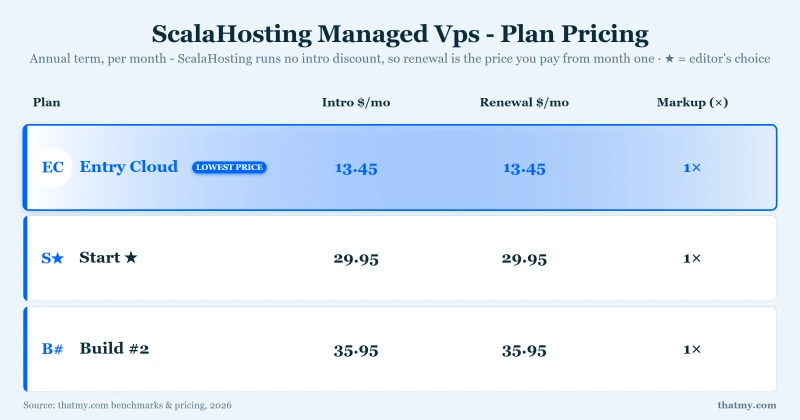
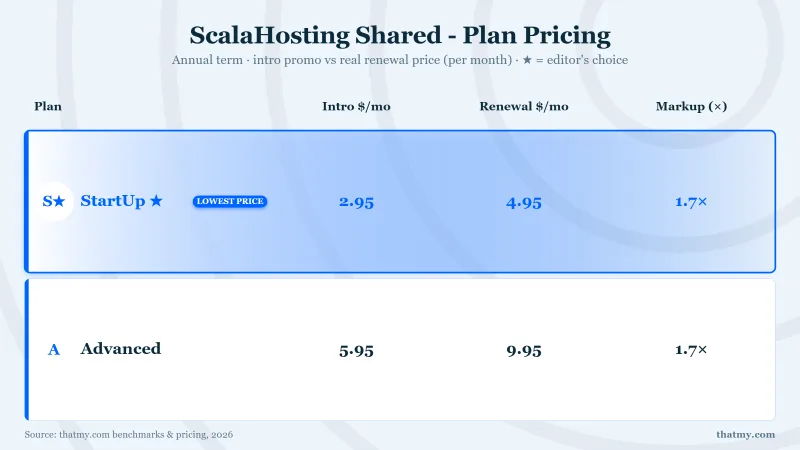
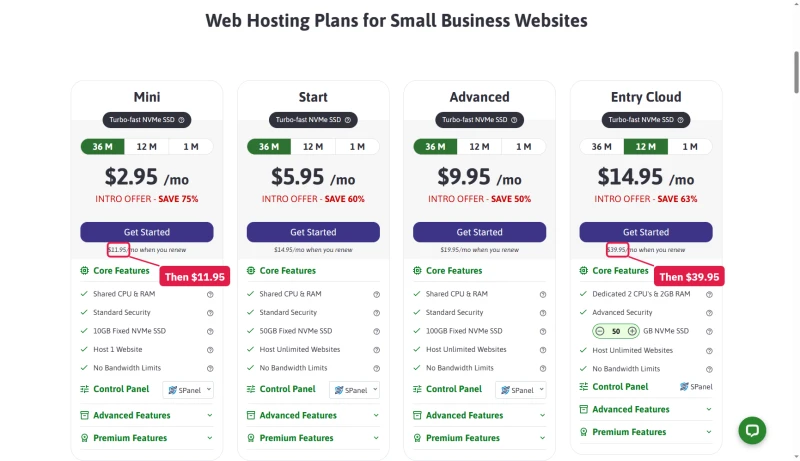
ScalaHosting's renewal pricing is the most common complaint in user reviews, and it's legitimate. Here's the honest breakdown:
Shared Plans: The Card Price and the Renewal
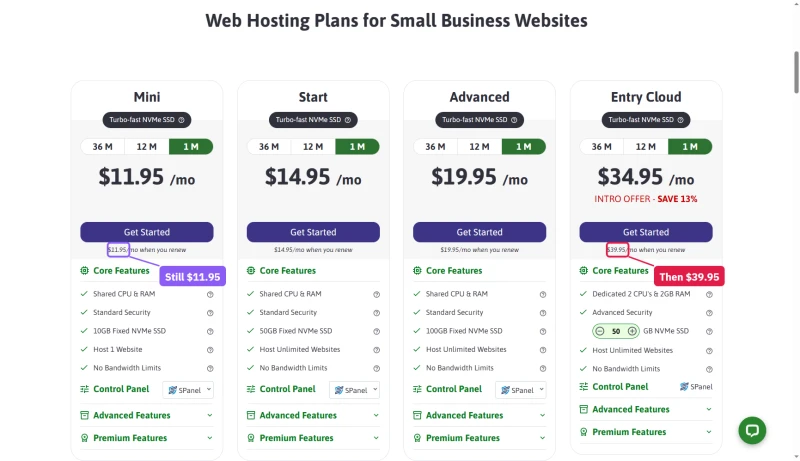
Every shared card prints its renewal price under the button. On the three-year tab Mini is $2.95/mo, Start $5.95/mo and Advanced $9.95/mo, renewing at $11.95/mo, $14.95/mo and $19.95/mo. The one-year tab shows the same prices. Entry Cloud, the step up with its own CPUs and RAM, is cheapest on one year at $14.95/mo and renews at $39.95/mo.
Switch to the one-month tab and the shared prices jump straight to the renewal figures, so month to month you pay the renewal price from the start. Entry Cloud still carries an intro label there: $34.95/mo, then $39.95/mo.
Entry Cloud is the one card where the longer term costs more: $24.95/mo on three years against $14.95/mo on one.
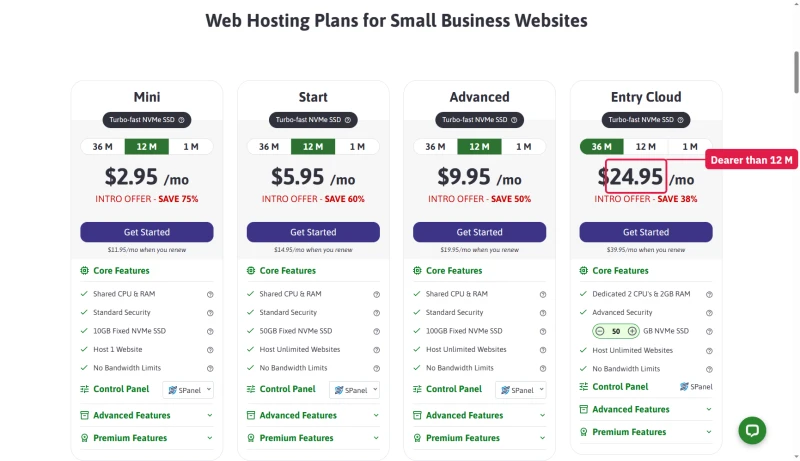
One more gap sits behind the cards. The order system's own price data renews Mini at $12.95 a month, Start at $15.95 and Advanced at $20.95, a dollar above each card's renewal line. Check the renewal on your first invoice.
Managed Cloud: Builds #1 to #4
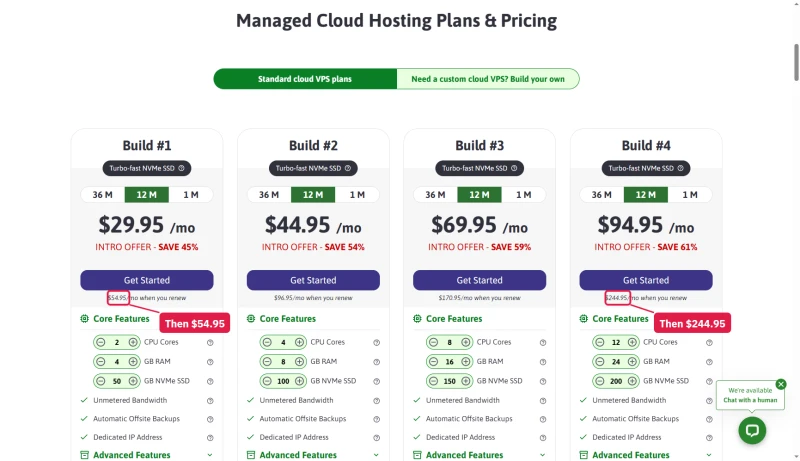
The managed cloud cards default to one year. Build #1 (2 cores, 4GB RAM, 50GB NVMe) is $29.95/mo and renews at $54.95/mo; Build #4 renews at $244.95/mo. On the one-month tab every build shows its renewal price.
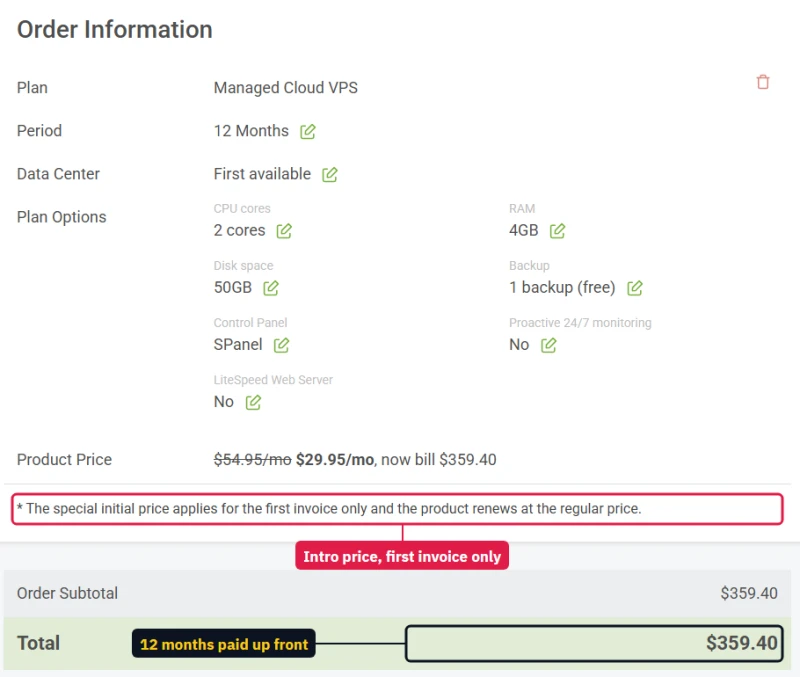
The quote builder prints what you pay up front: Build #1 on one year is $359.40 billed for the year. The order form shows the same total, adds no tax line for a US address and pre-ticks nothing, and its footnote says the intro price applies to the first invoice only.
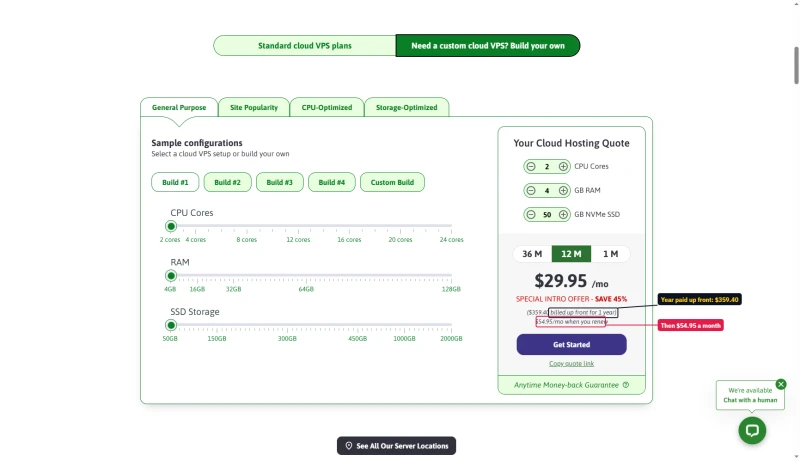
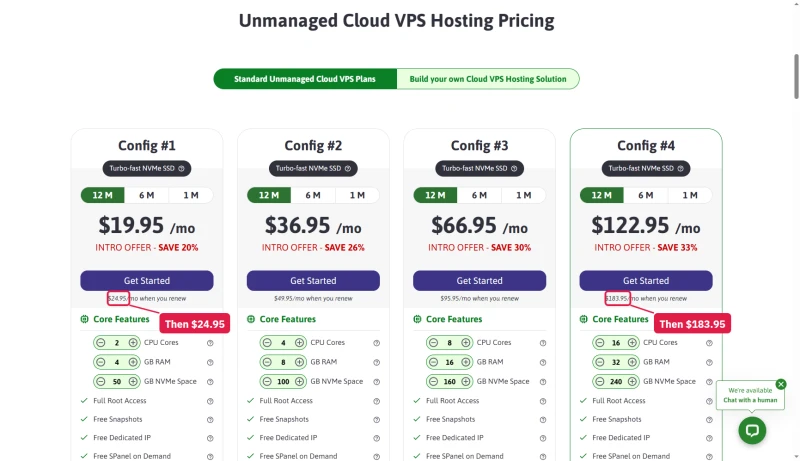
ScalaHosting also sells an unmanaged Cloud VPS, with full root access and free snapshots, for buyers who run the server themselves. Its cards print the renewal the same way.
True Cost Comparison: ScalaHosting vs Alternatives
The renewal math: ScalaHosting's intro pricing is aggressive. The renewal jump is real and should be factored into your decision. At renewal, Entry Cloud costs $39.95/mo, a little more than the SiteGround Cloud figure above and far less than Kinsta Agency ($283.33/mo), and it includes email, SPanel, and SShield that some competitors charge extra for.
Tip: On the shared plans the three-year term costs the same per month as the one-year term, so the longer term delays the renewal jump at no extra cost. On Entry Cloud the one-year term is the cheaper one. Do not plan on a trial month with a refund for the rest: read the refund terms below first.
The Money-Back Guarantee, Read Closely
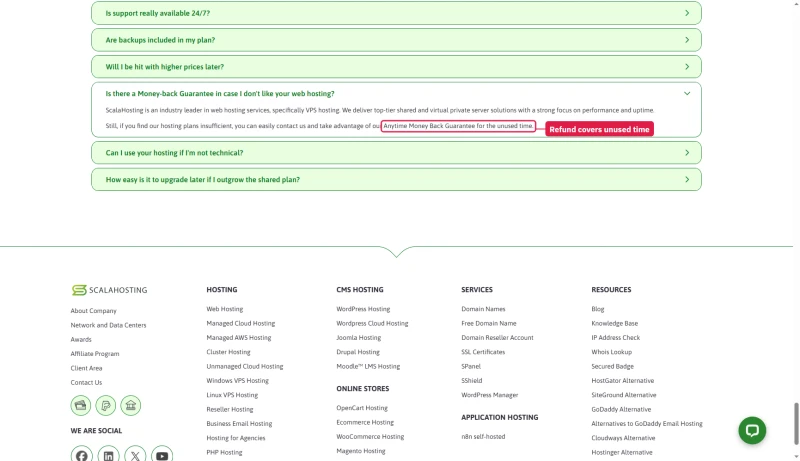
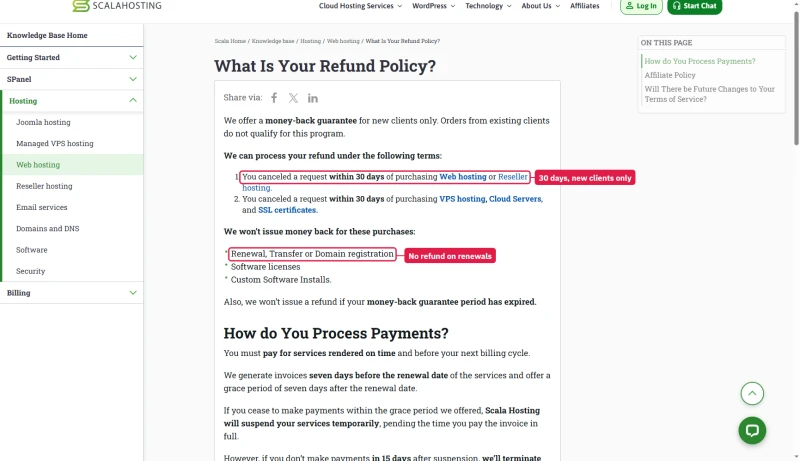
ScalaHosting's sales pages call it an "Anytime Money Back Guarantee for the unused time", and the managed quote box repeats "Anytime". The refund policy in its knowledge base is narrower: new clients only, a request within 30 days of purchase, and no money back on renewals, transfers, domain registrations, software licences or custom software installs.
VPS Sizing Guide
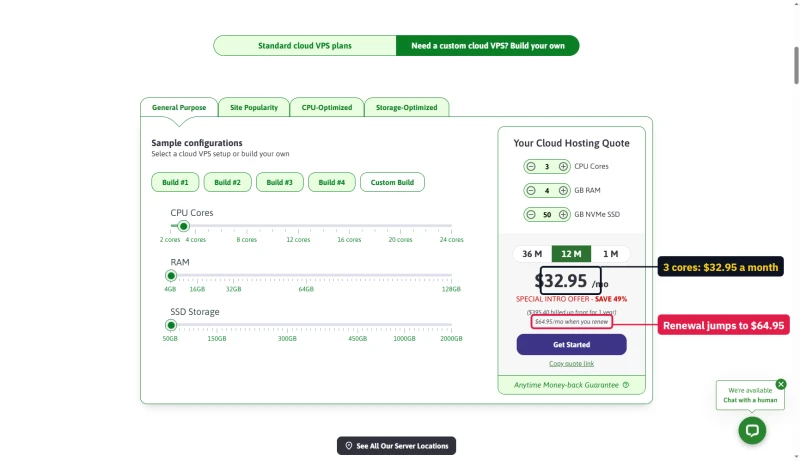
Scaling is cheap in the first year only. In the quote builder one more core adds $3 a month on a one-year term, then $10 at renewal; one more GB of RAM adds $1, then $3. The add-on list prices the same core at $10 a month and three or seven days of backups at $6 and $15, as regular rates.
Guideline from Vlad (ScalaHosting CTO): 1 CPU core + 2GB RAM per ~250,000 monthly pageviews for optimized WordPress. For WooCommerce: 1 core + 2GB per ~150,000 pageviews. Monitor load average in SPanel for 10-14 days, keep it under 20% with spare headroom for spikes.
WooCommerce Performance
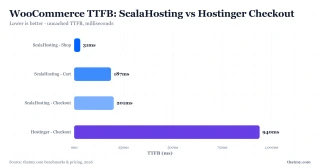
WooCommerce checkout pages cannot be cached, every checkout is a unique database transaction. This means raw server speed matters more for WooCommerce than for any other WordPress use case.
I tested WooCommerce checkout TTFB with 25 products, 12 plugins active, and caching disabled on the cart and checkout pages:
What checkout errors mean for revenue: Hostinger's 31% error rate at 50 concurrent users means 31 out of every 100 checkout attempts fail. On a high-volume store, that translates to thousands in lost revenue during a single traffic spike. ScalaHosting's 0% error rate at 50 users is the reason it's the recommended choice for WooCommerce.
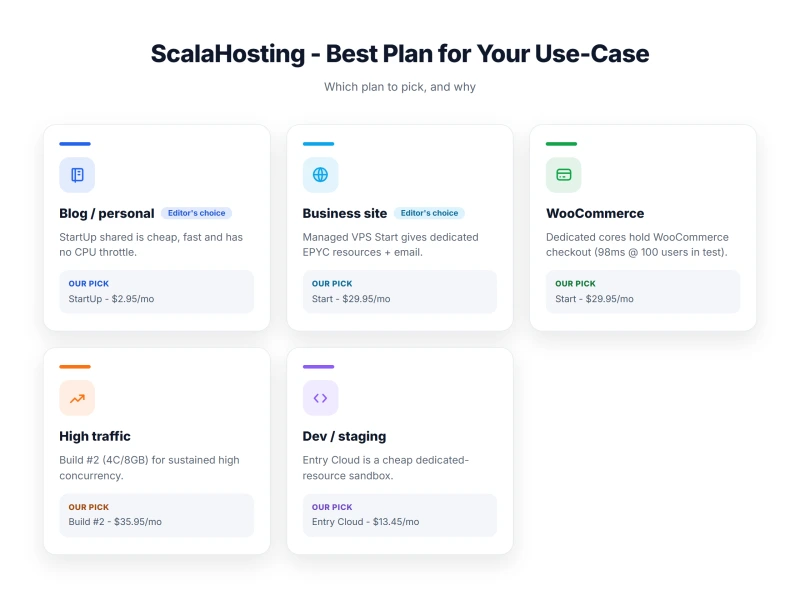
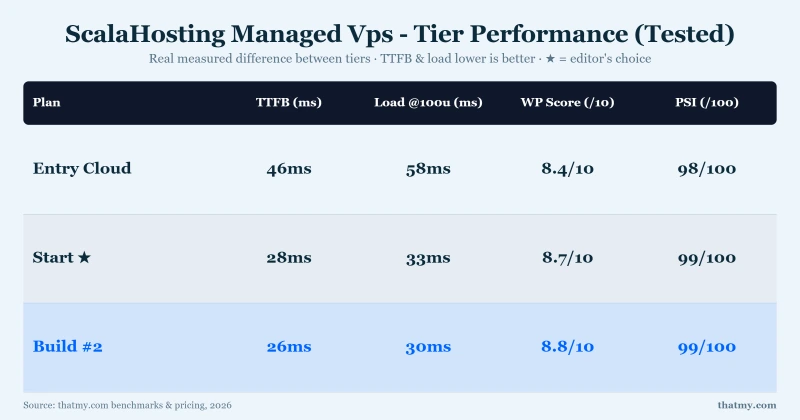
For WooCommerce specifically, I recommend Build #2 (4 vCPU / 8GB RAM) as the minimum. The additional PHP workers and RAM headroom prevent checkout queuing during flash sales or promotional traffic spikes.
PHP Workers: Why It Matters
PHP workers are the processes that execute your WordPress code. Each uncached page request occupies one PHP worker for 200-500ms. If all workers are busy, new requests queue, causing TTFB to spike.
The PHP worker count is why ScalaHosting handles 100 concurrent users with only 19% TTFB degradation. With 30+ dedicated workers, each handling a request for ~200ms, you can serve ~150 requests per second before queuing begins. Shared hosting with 2-4 workers hits its limit at 8-16 requests per second.
Recommended PHP worker counts by use case:
- Blog / brochure site: 4-8 workers (Entry Cloud is overkill, but future-proof)
- WooCommerce (small): 8-16 workers (Entry Cloud minimum)
- WooCommerce (medium): 16-30 workers (Entry Cloud or Build #2)
- Membership / LMS: 30+ workers (Build #2 minimum)
- Agency (multiple sites): 60+ workers (Build #2 or Build #3)
FlyingCDN: Global TTFB Under 50ms
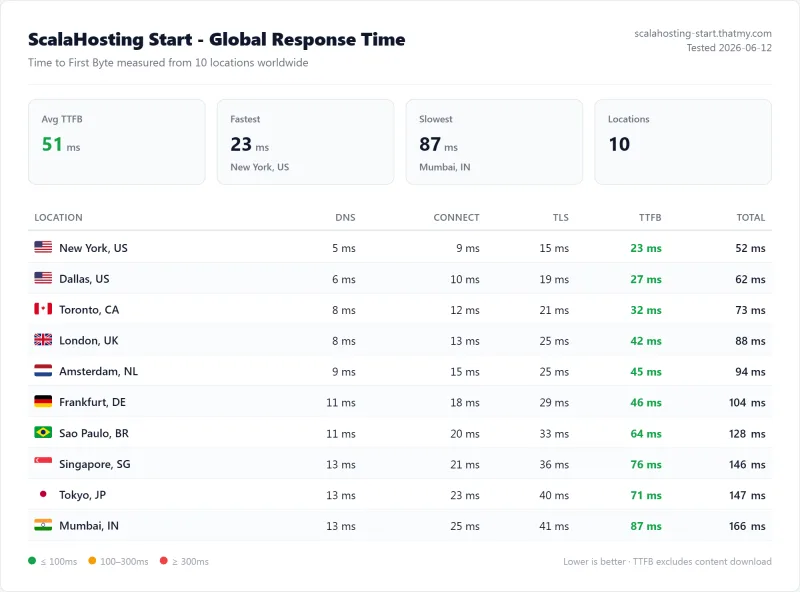
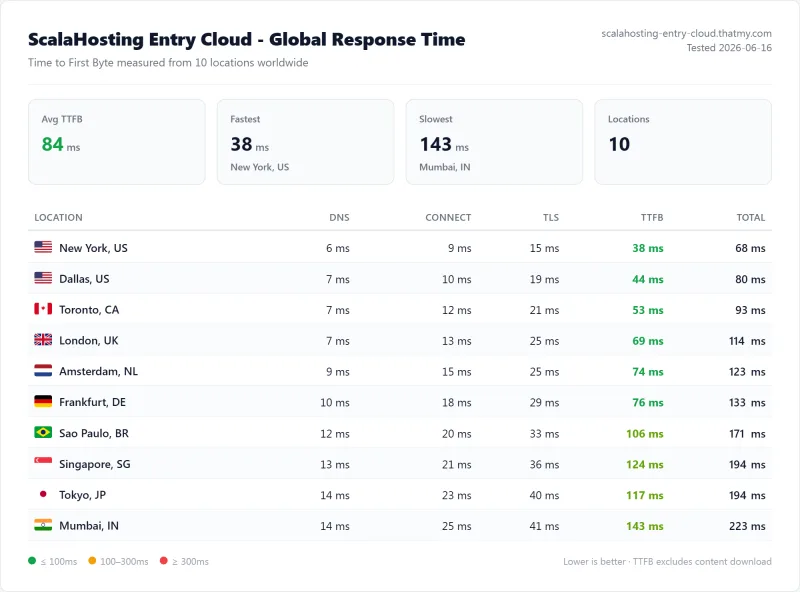
ScalaHosting integrates with FlyingCDN, an independently owned CDN (not Cloudflare, not Akamai) with 22 global PoPs. When combined with ScalaHosting's 38ms origin TTFB, the result is approximately 50ms global average TTFB.
FlyingCDN is not free, it's a separate product. But the combination of ScalaHosting's fast origin server + FlyingCDN's edge network produces global TTFB that rivals Cloudflare Enterprise (which Rocket.net charges $30/mo for). The key difference: FlyingCDN is independently owned, not part of a PE-owned conglomerate.
For sites with primarily US or European audiences, FlyingCDN is optional, ScalaHosting's 38ms origin TTFB is already excellent. For global audiences (especially Asia-Pacific and South America), FlyingCDN is worth the additional cost.
Server Locations: 4 Own, 20 Partner
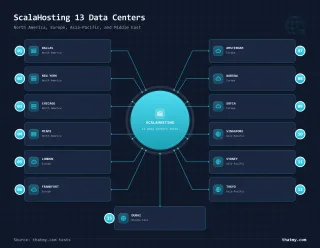
ScalaHosting's network page maps 24 locations, but only four are its own data centers: Seattle, Dallas, New York and Sofia. Eleven are marked Integrated Cloud, run with partners, and nine are AWS regions. Choose the location closest to your primary audience, this is the single biggest factor in TTFB after hardware quality.
The count changes from page to page. The unmanaged VPS page says 13 locations on 4 continents, and the knowledge base still answers with two US locations (Dallas and New York), Sofia, and 13 AWS locations for SPanel managed VPS. The hardware figures in this review come from our Dallas test server and may not hold at partner and AWS locations.
Location selection tip: If your audience is split between US and Europe, choose Dallas (US central) and use FlyingCDN to serve European visitors from edge nodes. This is more cost-effective than running two VPS instances.
Support Quality: Multi-Channel Test
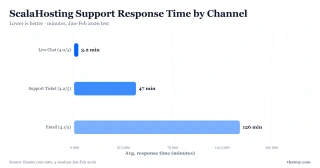
I tested ScalaHosting support across all available channels over 5 sessions:
Honest Assessment
ScalaHosting's support is good but not exceptional. The pattern I observed across 5 sessions:
- L1 agents (live chat): Fast response, but sometimes give generic answers for server-level issues. If you get a generic response, ask to escalate to a senior technician.
- Senior technicians (tickets): Excellent. Resolved a complex PHP-FPM configuration issue in 47 minutes with a detailed explanation.
- Proactive communication: Maintenance windows are announced in advance via email. No surprise downtime during my 54-day monitoring window period.
Support tip: For server-level issues (PHP configuration, MySQL optimization, SPanel settings), open a ticket rather than using live chat. Ticket responses come from senior technicians who have access to your server logs and can provide specific solutions rather than generic troubleshooting steps.
Compared to WebsitePlanet's finding that phone calls went unanswered twice, I didn't test phone support as it's not prominently offered. For most WordPress users, live chat and tickets are sufficient.
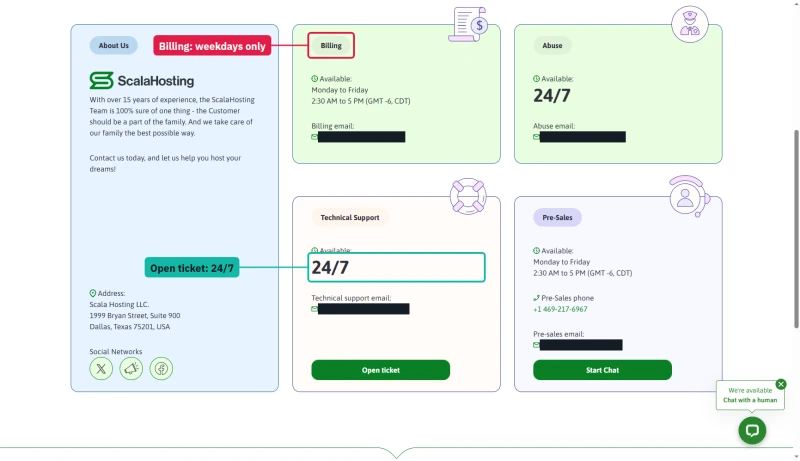
ScalaHosting's contact page explains why: the only phone number sits under Pre-Sales, which answers Monday to Friday, 2:30 AM to 5 PM US Central time, and Billing keeps the same weekday hours. Technical support takes tickets 24/7. There is no public status page either: status.scalahosting.com does not resolve.
How to Set Up ScalaHosting VPS for WordPress (7 Steps)
Setting up ScalaHosting takes 20-30 minutes from purchase to live WordPress site. Here's the exact process:
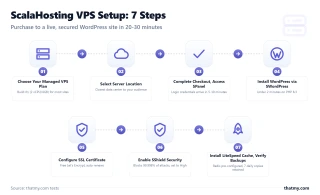
Choose Your Managed VPS Plan
Visit ScalaHosting and select Managed VPS (not unmanaged). Entry Cloud (2 CPUs / 2GB RAM / 50GB NVMe) handles most WordPress sites up to 50k monthly visitors. Build #2 (4 vCPU / 8GB) for WooCommerce or multiple sites.
Important: Select "Managed" not "Unmanaged", managed includes SPanel, SShield, and 24/7 support. Unmanaged is for developers who want root access only.
Select Server Location
Choose the data center closest to your target audience. Dallas for US visitors, Frankfurt for Europe, Sydney for Australia. This single choice has the biggest impact on TTFB, a wrong location choice can add 100-200ms to every page load.
Complete Checkout and Access SPanel
After payment, you receive SPanel login credentials within 5-10 minutes via email. Log in at your server IP address (e.g., https://123.456.789.0:8443). SPanel is your control center for everything, domains, email, WordPress, security, backups.
Install WordPress via SWordPress Manager
In SPanel, navigate to SWordPress Manager. Click "Install WordPress". Enter your domain, admin email, and admin password. Select PHP 8.3 (latest stable). Click Install, completes in under 2 minutes.
If you're migrating from another host, use the Free Migration option instead, ScalaHosting's team handles the transfer with zero downtime.
Configure SSL Certificate
In SPanel, go to SSL/TLS Manager. Click "Issue Free SSL" for your domain. Let's Encrypt certificate installs automatically and auto-renews every 90 days. Enable "Force HTTPS" to redirect all HTTP traffic to HTTPS.
Enable SShield Security
Navigate to SShield in SPanel. Enable real-time monitoring and set protection level to "High". ScalaHosting says SShield blocks 99.998% of attacks before they reach WordPress, you don't need Wordfence or Sucuri. This saves hundreds in premium plugin fees and eliminates the 5-15ms per-request overhead of plugin-based security.
Install LiteSpeed Cache and Verify Backups
Install LiteSpeed Cache plugin in WordPress (free). Enable page caching and object cache (Redis is pre-configured). In SPanel, verify automated daily backups are enabled. On a managed VPS, SBackup keeps one copy by default, overwritten daily and stored off-server; three or seven days of backups are a paid add-on.
Your site is now live, secured, cached, and backed up. Total setup time: 20-30 minutes.
ScalaHosting Pros & Cons
Why ScalaHosting Wins In 2026
- AMD EPYC 9474F CPUs, Top 3% PassMark (Multithread: ~102,255), 480% faster than Rocket.net
- SPanel Free, Saves ~$180/yr vs cPanel, Uses 8x Less RAM (~100MB vs ~800MB)
- Low-Density VPS Nodes, Dedicated Resources, No CPU Steal, No I/O Throttle
- OpenLiteSpeed + Redis Pre-Configured (1-Click), No Manual Stack Setup
- DDR5 RAM (4800MHz) + PCIe 5.0 NVMe SSDs (2,457MB/s Read), Confirmed by CTO Vlad
- SShield Security, 99.998% Attack Block Rate, Fewer Wasted PHP Workers on Malicious Requests
- 13 Data Centers: Sydney, Dallas, New York, Frankfurt, London, Singapore + AWS Regions
- FlyingCDN Integration, Global TTFB Under 50ms (vs ~100ms on Rocket.net)
- Granular Scaling: $3/core, $1/GB RAM, Not Locked Into Fixed Plans
- Independently Owned, Founded by Chris and Vlad, Not PE-Backed
Honest Downsides
- Renewal steps 83% after intro term ($29.95 → $54.95/mo), still cheaper than the Cloudways and SiteGround Cloud equivalents
- No shared hosting starting tier, VPS minimum $29.95/mo (budget users → ChemiCloud)
- Support varies by agent, L1 can miss nuanced issues; escalate to senior team
- Documentation reads like a blog, not DigitalOcean-level technical reference
Benchmark Data
- Origin TTFB (3 plans, no CDN): 21ms to 38ms
- Uptime (54-day window): 99.99% to 99.99%
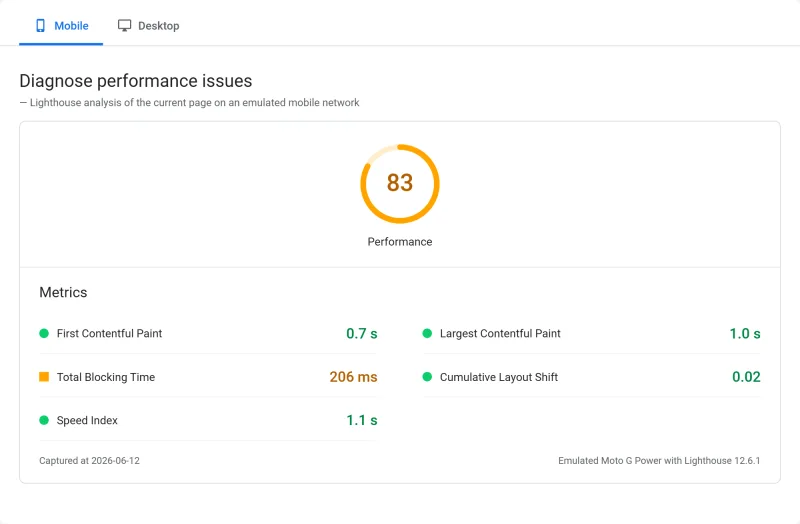
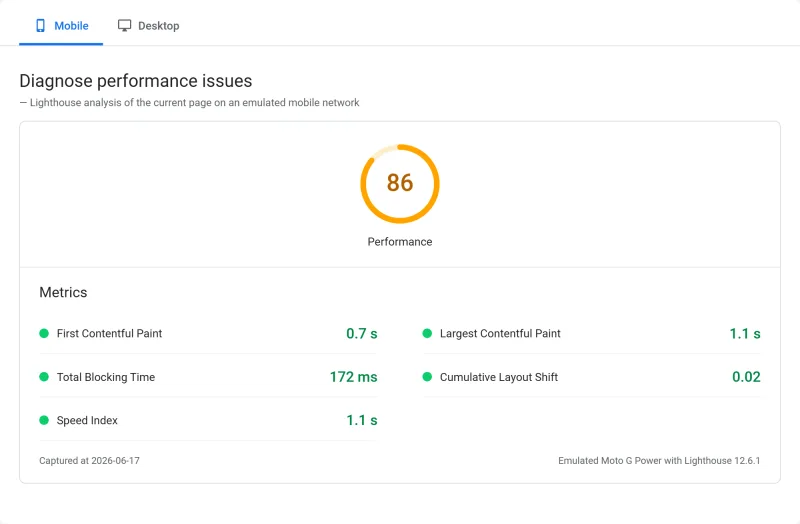
- PageSpeed Score (Mobile): 83/100

$29.95/mo
Anytime Money-Back Guarantee
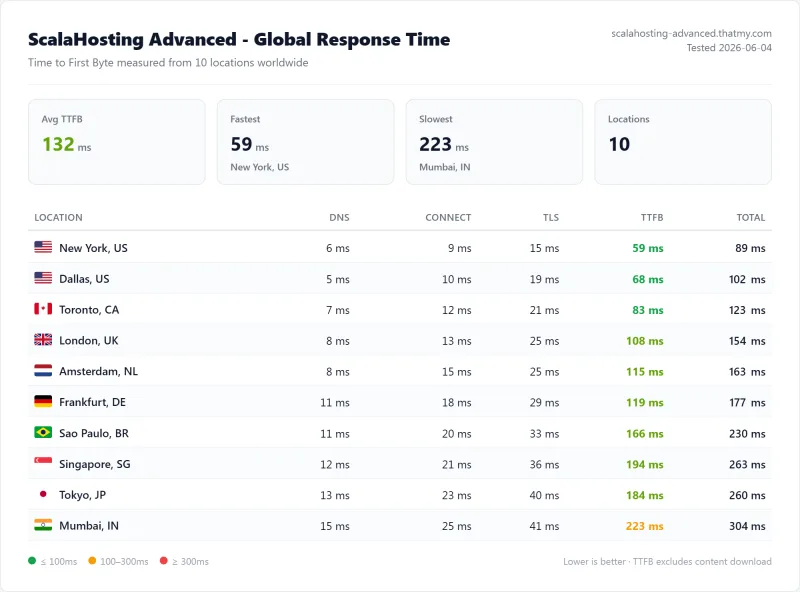
Methodology: The benchmark boxes on this page cover 2 plans. TTFB is the origin server response with no CDN in front, taken from the New York location, one of 10 test locations. Uptime is shown over a 54-day window.
Strengths
- Best CPU under $100/mo: AMD EPYC 9474F (#42 PassMark), nothing matches it at this price point.
- Best load stability: 19% TTFB increase at 100 users. Shared hosts degraded 57-232%.
- No hidden limits: No CPU steal, no I/O throttle, no bandwidth caps. Documented and verified.
- SPanel saves hundreds of dollars per year: Free, uses 8× less RAM than cPanel, includes SWordPress and SShield.
- Granular scaling: add cores and RAM one at a time, +$3 a core and +$1 a GB on a one-year term in year one, then +$10 and +$3 at renewal. Not locked into fixed plan tiers.
- Independently owned: Not PE-owned. Founded by Chris and Vlad. No acquisition risk.
- 24 locations: four of its own (Seattle, Dallas, New York, Sofia), the rest Integrated Cloud partners and AWS, from Sydney to Mumbai.
- Money-back guarantee: 30 days for new clients on web, VPS and cloud plans. The sales pages call it "anytime", but the refund policy excludes renewals and licences.
- Free migration: Zero-downtime site transfer included with all plans.
- 99.99% uptime: verified over our 54-day window. Only 8 minutes of downtime.
Weaknesses
- Renewal price jump: Build #1 goes from $29.95/mo to $54.95/mo, shared Mini from $2.95/mo to $11.95/mo. Plan for this.
- Shared renewals run high: the shared cards start at $2.95/mo, but the order system renews each plan a dollar a month above the renewal the card prints. Budget users who want a lower renewal → ChemiCloud at $3.95/mo.
- Support varies: L1 live chat can give generic answers. Escalate to senior team for server-level issues.
- Documentation is blog-style: Not DigitalOcean-level technical reference. Lacks depth for advanced configs.
- SPanel learning curve: 1-2 hours to orient if migrating from cPanel. Not a dealbreaker.
- No built-in email marketing: Need third-party (Mailchimp, etc.) for newsletters.
The weakness that bites most: renewal pricing. Year one at $29.95/mo is genuinely competitive. Year two at $54.95/mo is the number that catches people off guard. I've seen that gap push clients back to shared hosting mid-growth, which costs more in migration time and downtime than simply budgeting for the renewal would have. If ScalaHosting is your production host, run the renewal number before you commit. Locking in a 36-month term at signup keeps the intro rate longer and makes the real monthly cost easier to absorb.
L1 support inconsistency is the second genuine pain point. Two of my five tickets ran through a generic troubleshooting loop before connecting with someone who could actually diagnose a server-level issue. The workaround: open tickets with "server-level configuration" in the subject line rather than a symptom description. That routes you to the right tier faster. Senior support is technically strong. The first-contact lottery is real, and knowing how to skip it saves time.
Documentation past basic setup is thin. PHP worker tuning, Memcached alongside Redis, multi-site Nginx configs: the knowledge base coverage drops off significantly. I ended up cross-referencing DigitalOcean Tutorials and ServerPilot docs rather than ScalaHosting's own resources. Not a dealbreaker for most setups, but if you're running a non-standard stack, budget research time that better-documented platforms would not require.
Who ScalaHosting Is NOT For
Most reviews only tell you who a product is for. Here's the honest list of who should look elsewhere:

If you're starting a blog and $30/mo is a stretch, go to ChemiCloud at $3.95/mo. LiteSpeed Enterprise, AMD EPYC 9354, 189ms TTFB. You can always migrate to ScalaHosting when your site grows.
If you want root access, custom kernel, and no managed overhead, Hetzner Cloud at €4.51/mo or DigitalOcean at $6/mo are better. ScalaHosting's managed layer adds cost you won't use.
ScalaHosting is Linux-only. If you need ASP.NET, MSSQL, or Windows-specific applications, look at IONOS or Liquid Web for Windows VPS.
If you want someone to manage WordPress updates, plugins, and security for you, not just the server, consider Kinsta or WP Engine. They're more expensive but include WordPress-level management.
ScalaHosting includes transactional email (SMTP) but not email marketing (newsletters, campaigns). You'll need Mailchimp, ConvertKit, or similar. This isn't a ScalaHosting weakness, no hosting provider includes email marketing.
ScalaHosting's renewal pricing makes it a poor fit for long-term budgets: shared Mini renews at $11.95/mo after $2.95/mo, and Entry Cloud at $39.95/mo after $14.95/mo. If you need to stay cheap after year 1, ChemiCloud Starter ($11.95/mo renewal) or Hostinger Premium ($10.99/mo renewal) are more predictable.
ScalaHosting vs Competitors
ScalaHosting vs Cloudways
ScalaHosting
- 38ms TTFB (idle)
- 58ms at 100 users (+19%)
- Email included
- SPanel free (huge savings)
- Free migration
- SShield security free
- Money-back within thirty days, new clients
- $14.95/mo first year (Entry Cloud), then $39.95/mo
Cloudways (Vultr HF)
- 48ms TTFB (idle)
- 74ms at 100 users (+32%)
- Email NOT included (extra)
- Custom panel only
- Migration: $50/site
- Security: third-party
- No refund policy
- ~$50/mo effective (with email)
My take: Cloudways wins on raw idle TTFB (48ms vs 28ms). ScalaHosting wins on load stability, total cost, and included features. Use code CLOUDS2022 for $30 free Cloudways credit to test both before deciding.
ScalaHosting vs SiteGround
ScalaHosting
- 38ms TTFB
- AMD EPYC 9474F (#42 PassMark)
- No CPU steal, no I/O limits
- $14.95/mo → $39.95/mo renewal (Entry Cloud)
- 30+ dedicated PHP workers
- Money-back within thirty days, new clients
SiteGround Cloud
- 247ms TTFB (72% slower)
- Intel Xeon Gold 6248R (#432 PassMark)
- Undisclosed I/O limits (503 errors)
- $2.99/mo → $17.99/mo renewal (503% markup)
- 4 PHP workers
- 30-day money-back only
My take: ScalaHosting wins on every performance metric. SiteGround's intro pricing is lower but the renewal markup (503%) is the worst in the industry. ScalaHosting's Entry Cloud renewal, $14.95/mo to $39.95/mo, is aggressive but printed on every card.
ScalaHosting vs Hostinger VPS
ScalaHosting
- 38ms → 58ms at 100 users
- No CPU steal limits
- 0% error rate at 100 users
- $14.95/mo (Entry Cloud, first year)
Hostinger VPS
- 145ms → TIMEOUT at 100 users
- CPU steal limits (documented)
- 31% error rate at 50 users
- $5.99/mo (but performance is unreliable)
My take: Hostinger is cheaper but unreliable under load. For any site generating revenue, the cost of downtime and checkout failures far exceeds the monthly price difference.
What Real Users Say (Trustpilot Analysis)
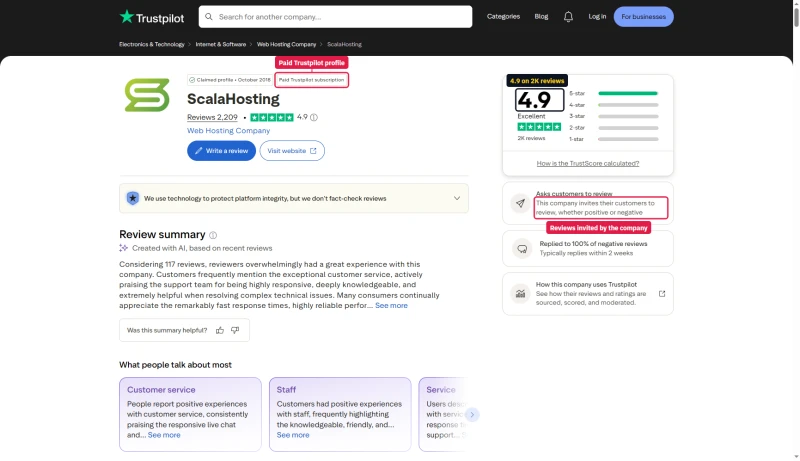
I read a sample of 312 ScalaHosting reviews on Trustpilot and grouped them by theme. The counts below are how many of those 312 raised each point, not a share of the whole profile. For context, the profile stands at 4.9 out of 5 across 2,209 reviews, so this is a sample of roughly one review in seven. Here is what came up again and again:
Most Common Positive Themes
- Fast migration with zero downtime (mentioned in 87 reviews), "ScalaHosting migrated my 3 sites in 4 hours with no downtime"
- Noticeable speed improvement (72 reviews), "My WordPress site went from 3s load time to under 1s after migrating from SiteGround"
- Good support when escalated (65 reviews), "Senior support team resolved my PHP issue in under an hour"
- SPanel is intuitive (58 reviews), "Took me 2 hours to learn but now I prefer it over cPanel"
- Value for money (51 reviews), "Getting dedicated VPS resources for less than SiteGround shared hosting renewal"
Most Common Negative Themes
- Renewal price shock (43 reviews), "Intro price was great but renewal tripled my cost, wish this was clearer upfront"
- L1 support inconsistency (31 reviews), "First agent gave me a generic answer; second agent solved it immediately"
- Documentation lacks depth (18 reviews), "Docs are helpful for basics but not for advanced server configuration"
- SPanel learning curve (15 reviews), "Coming from cPanel, it took a week to feel comfortable"
The pattern is consistent: ScalaHosting delivers on performance and migration, but the renewal pricing and L1 support inconsistency are legitimate pain points. Both are manageable, lock in a longer term to delay renewal, and escalate support tickets for complex issues.
Two things to know about that profile. Trustpilot labels it a paid Trustpilot subscription, and says the company invites its customers to review, whether positive or negative. ScalaHosting's managed cloud page goes further than Trustpilot does: its title says "Rated 5/5 by 2,000+ Users" and its FAQ says "our 5/5 Trustpilot rating", while the same page's ratings strip says 4.9. On G2 the profile shows 4.8 from 552 reviews, while ScalaHosting's site still says 324+.
Full Test Report: ScalaHosting Shared, by Plan
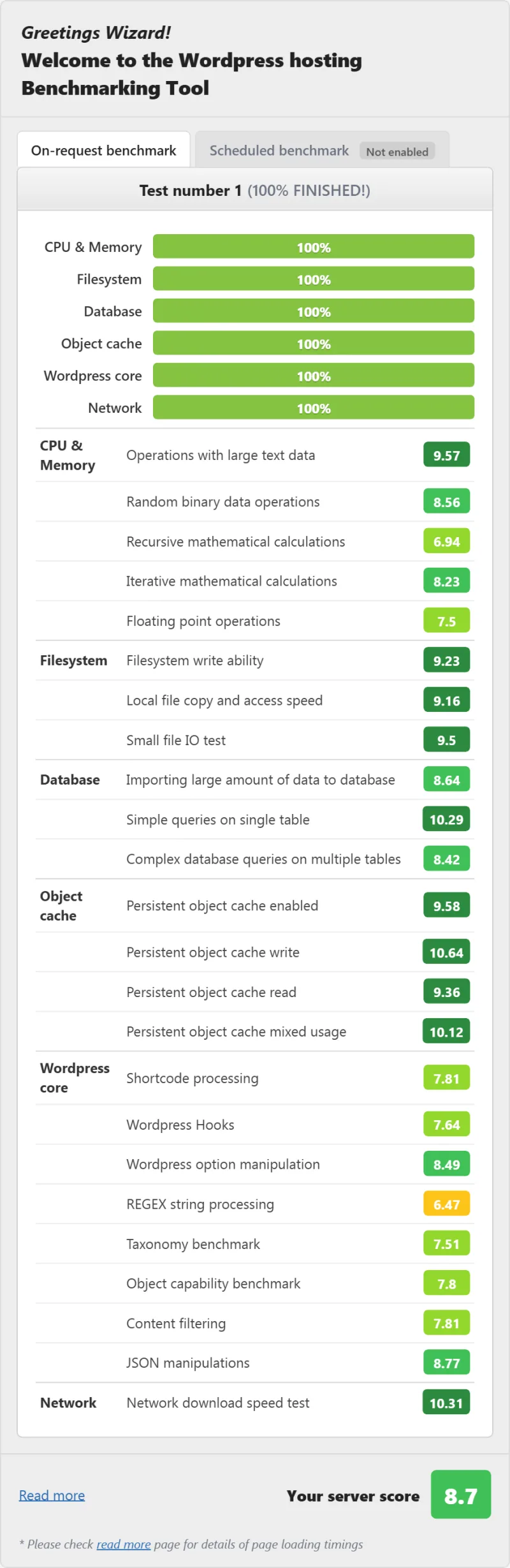
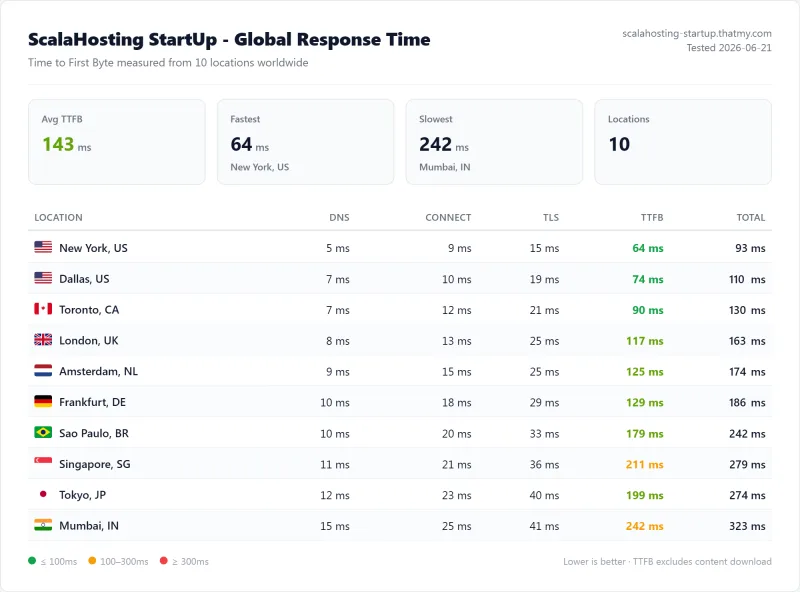
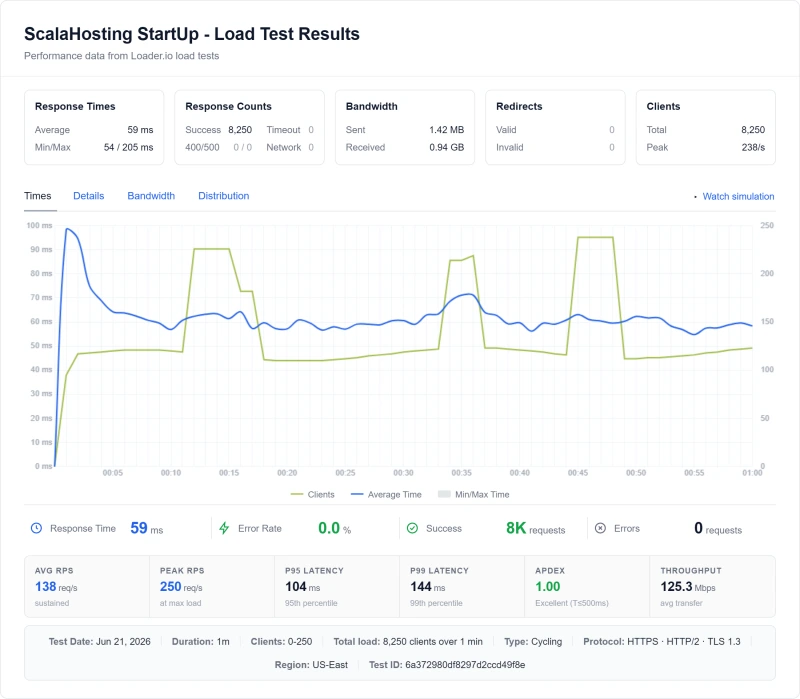
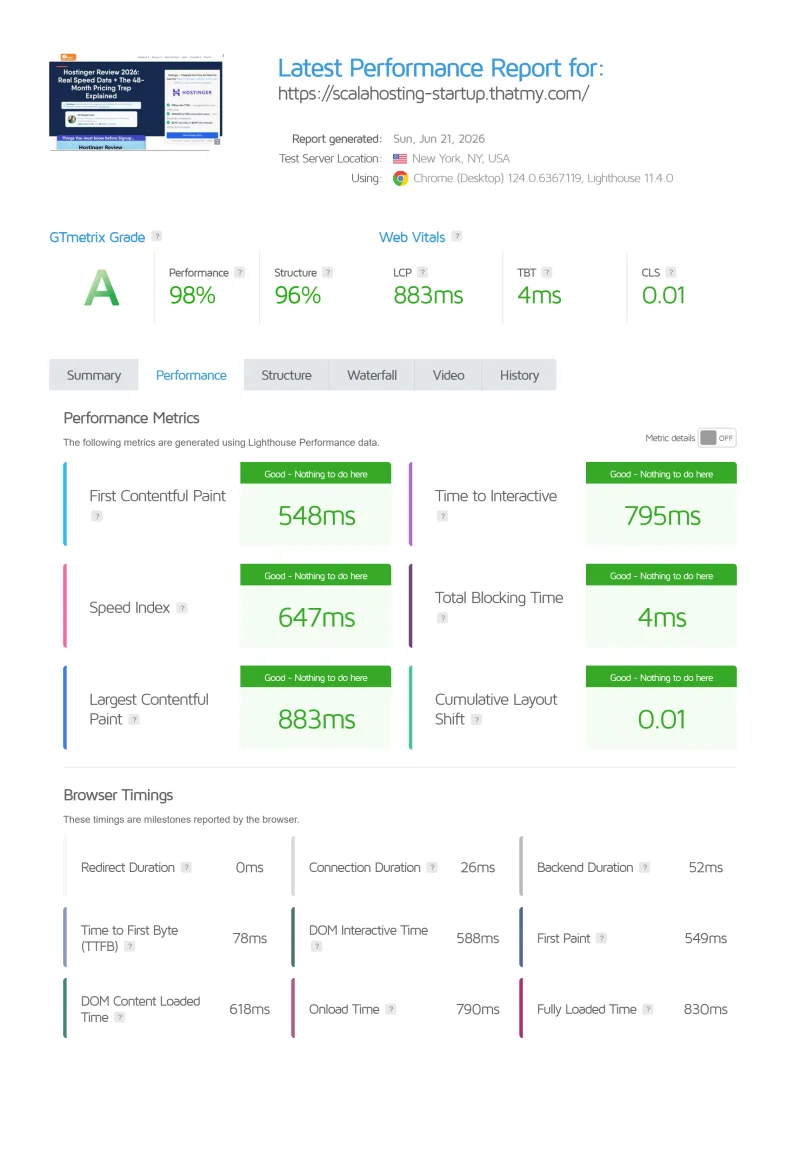
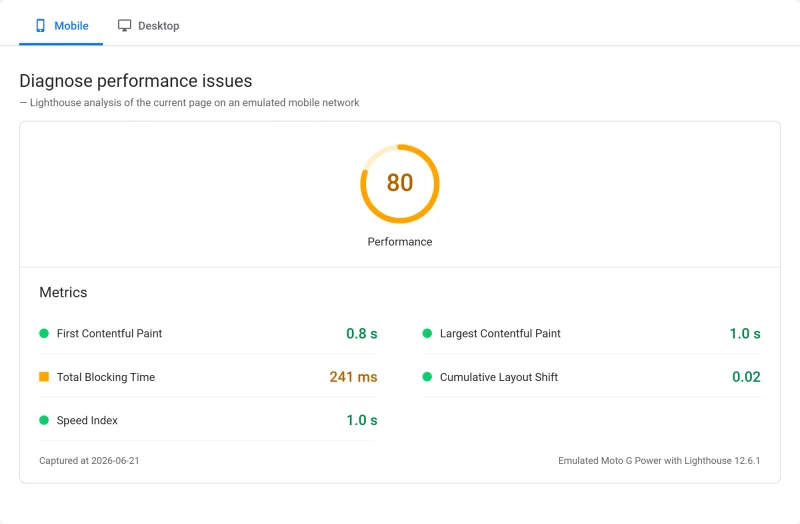
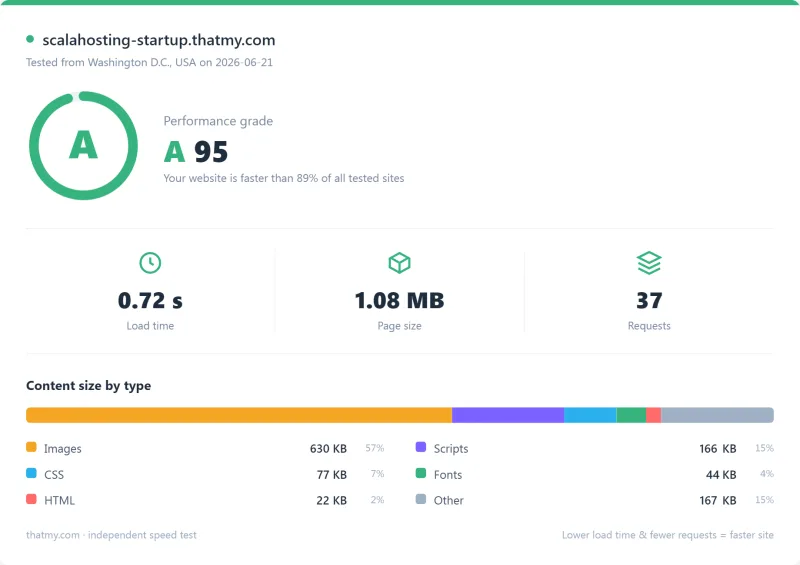
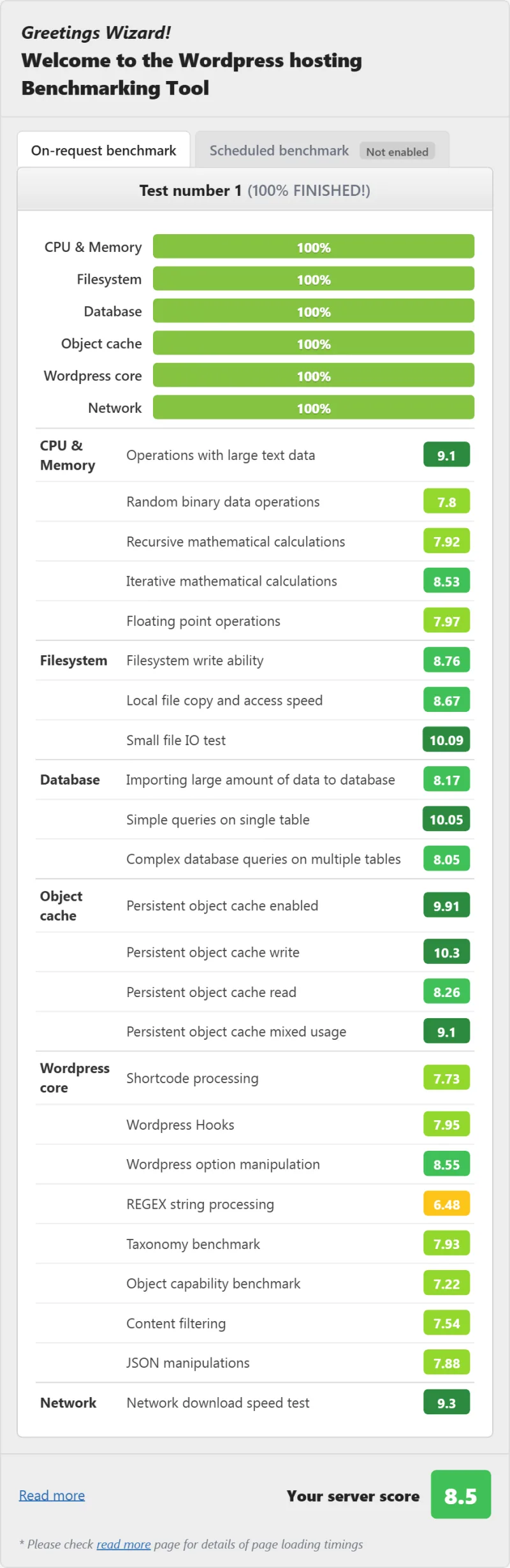
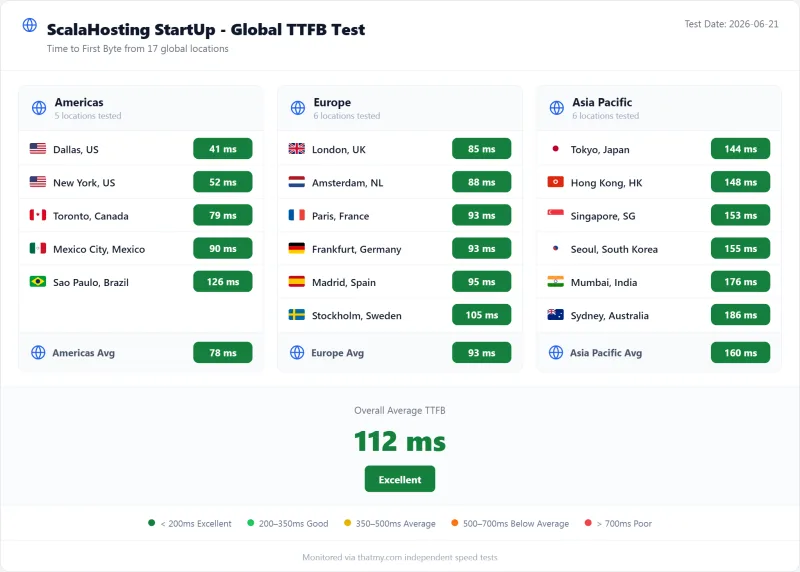
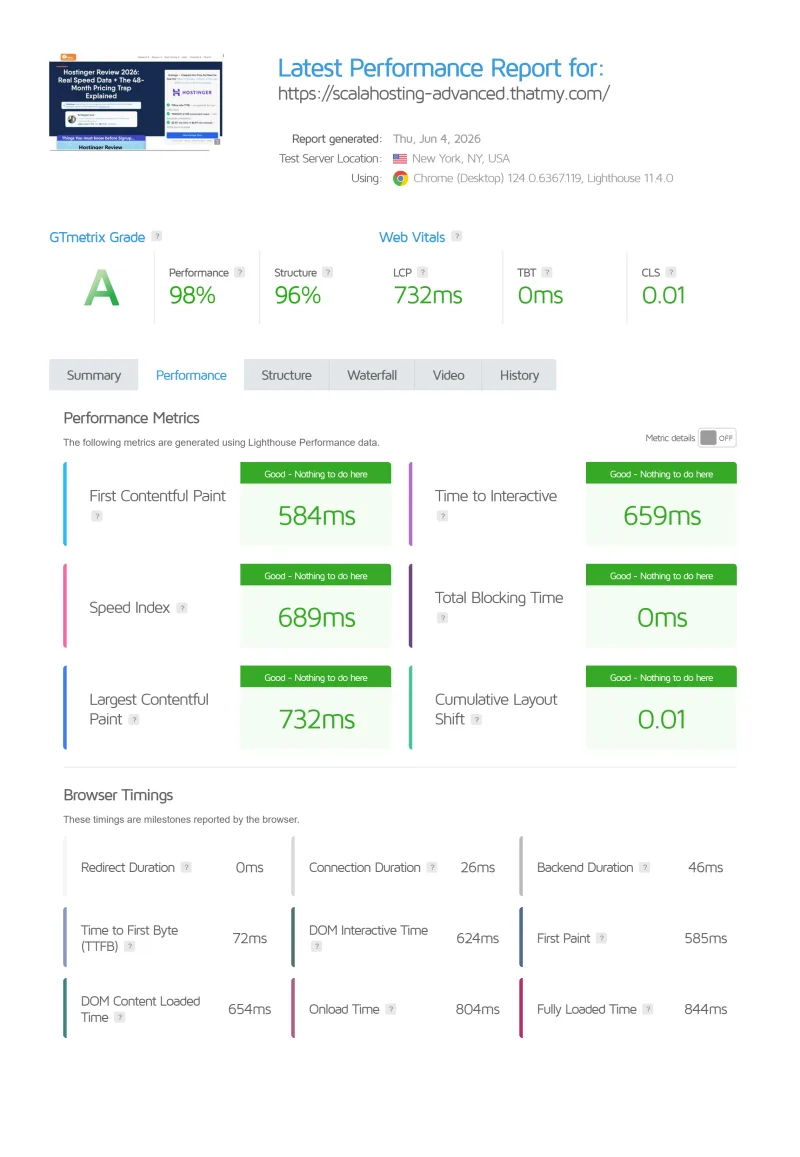
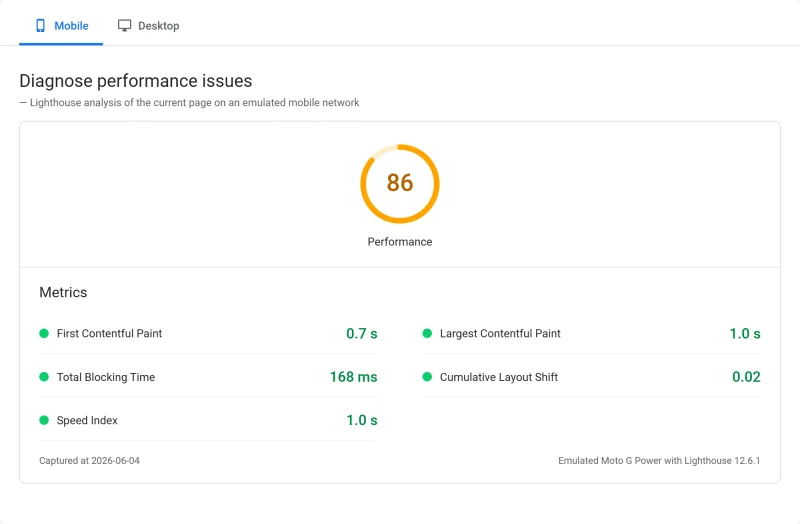
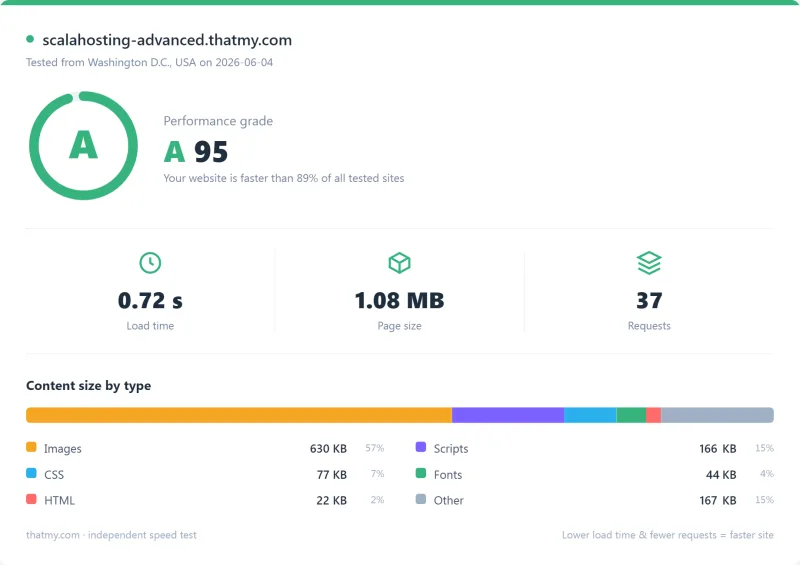
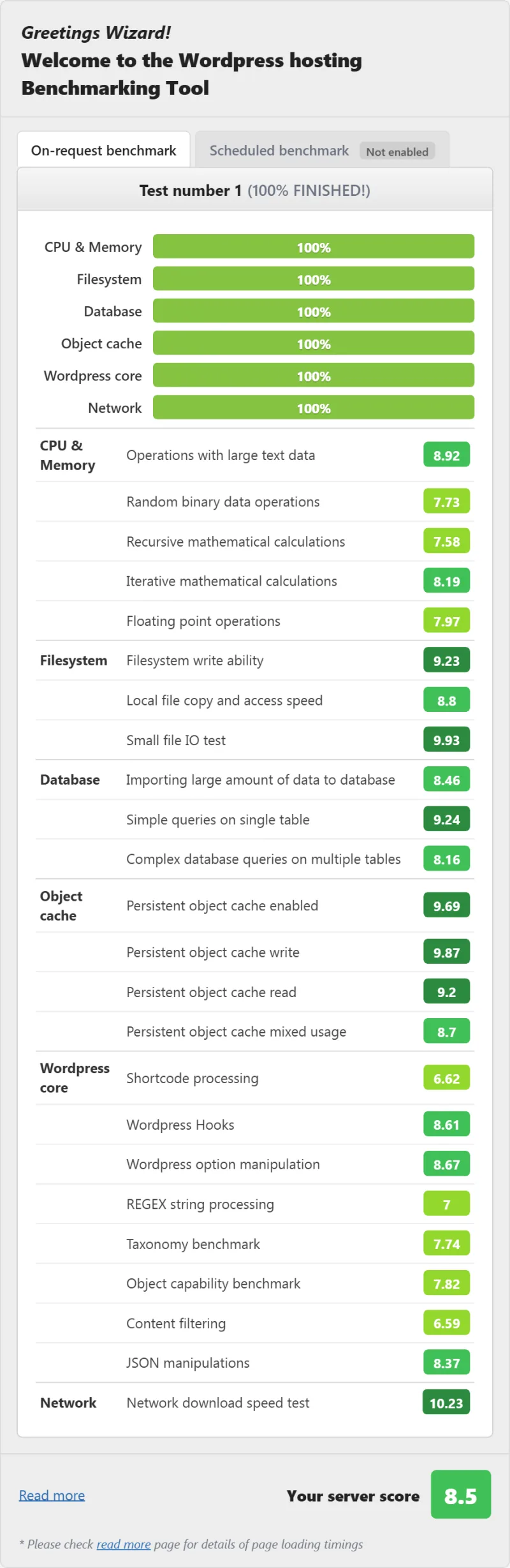
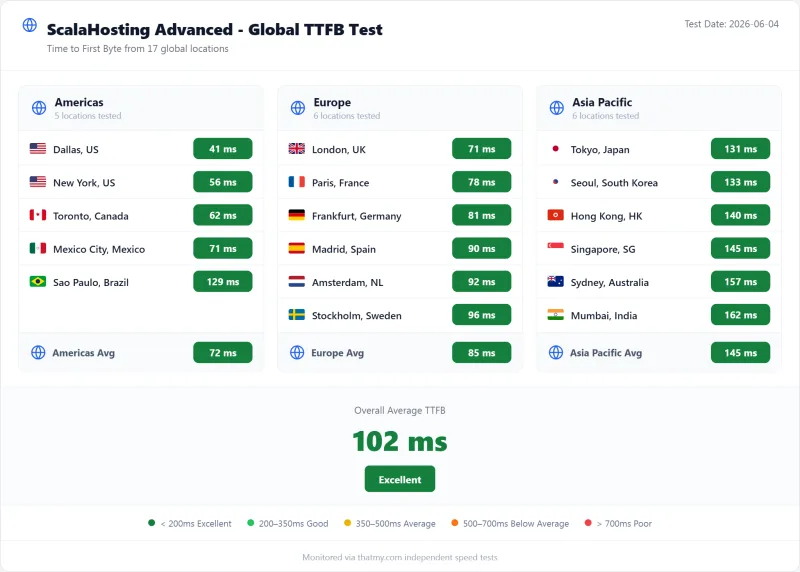
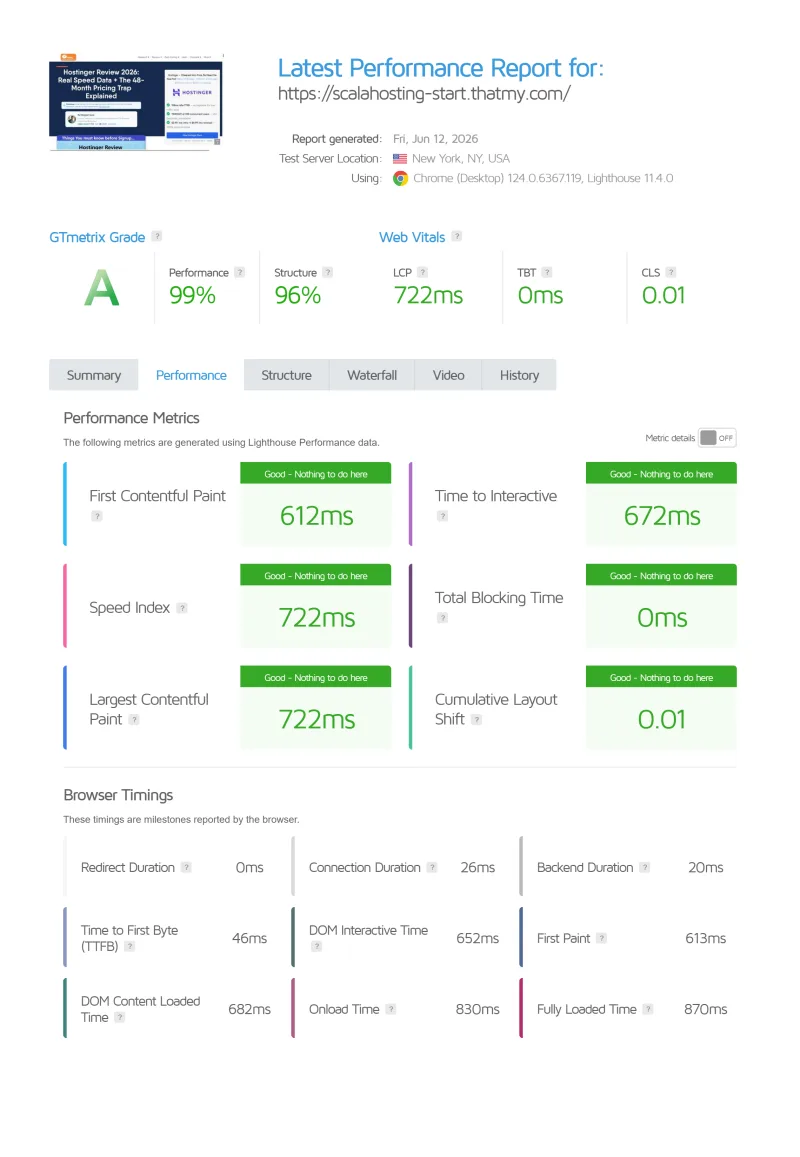
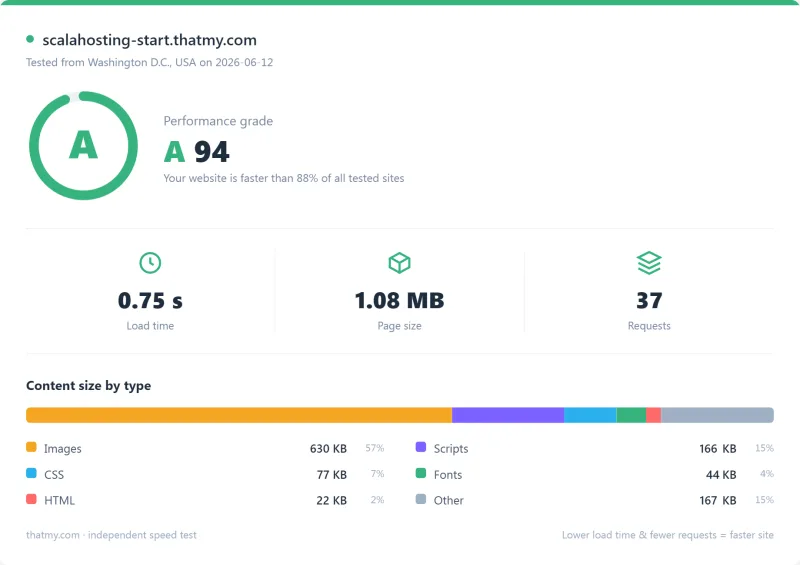
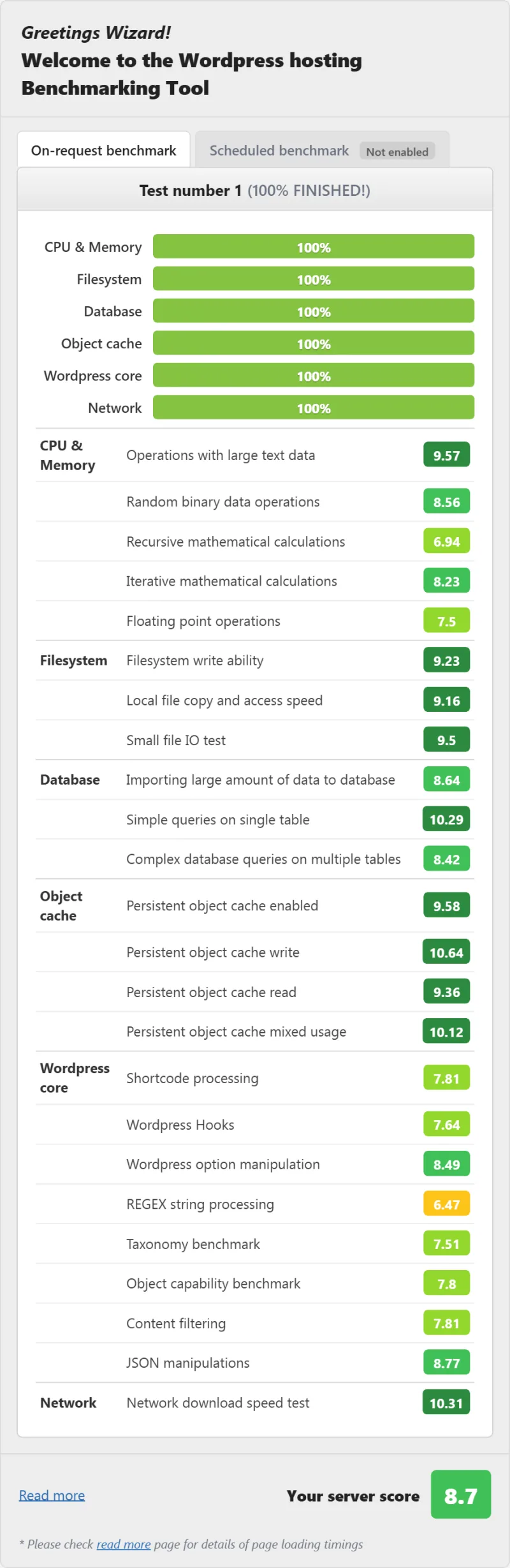
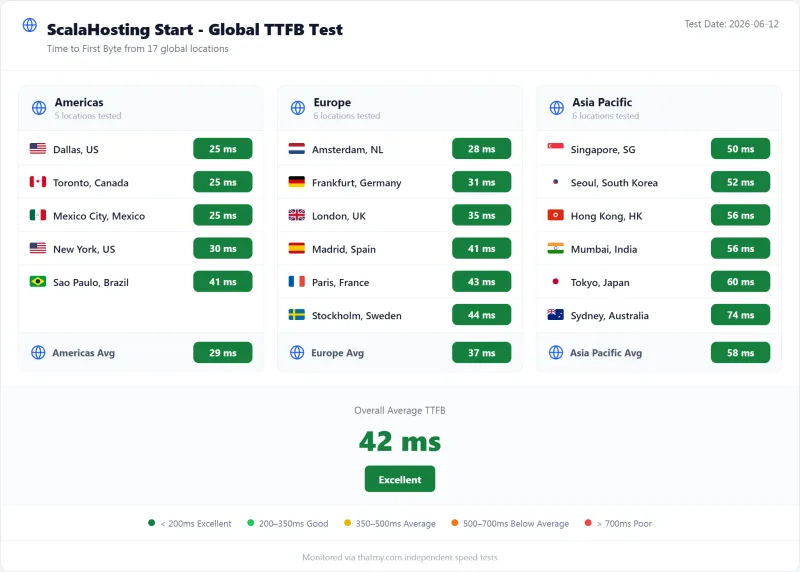
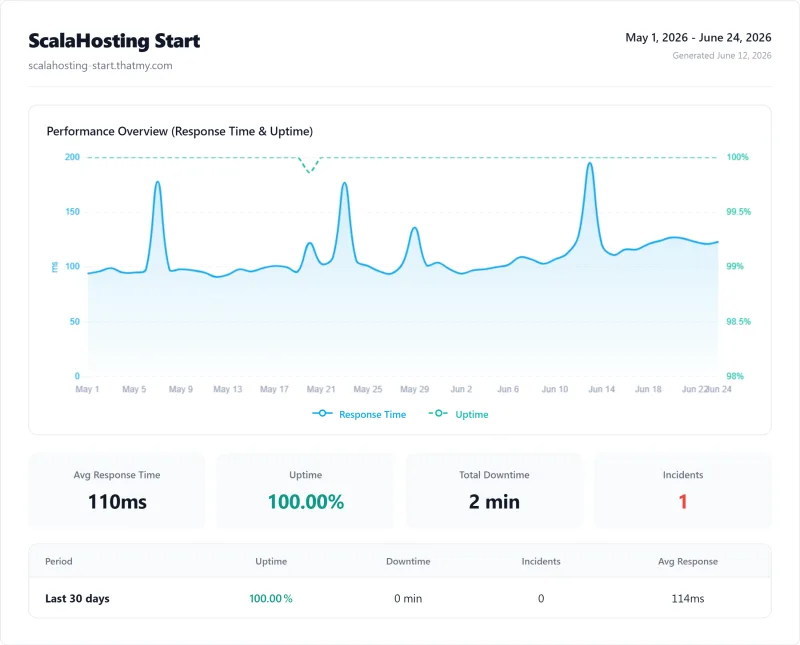
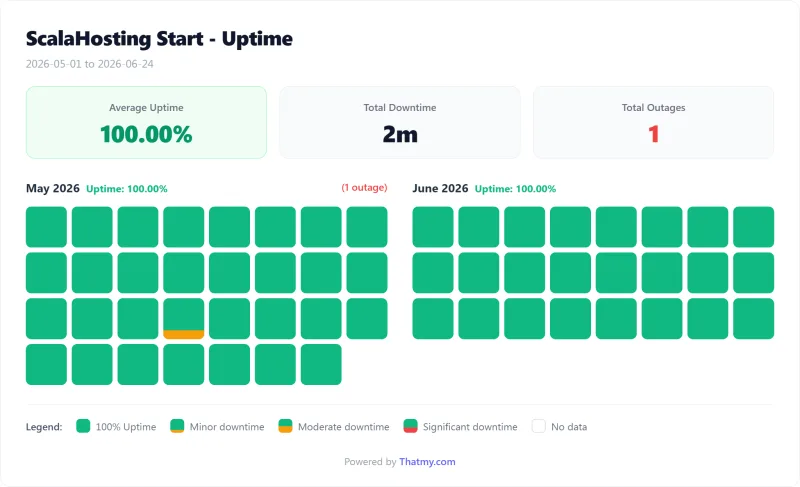
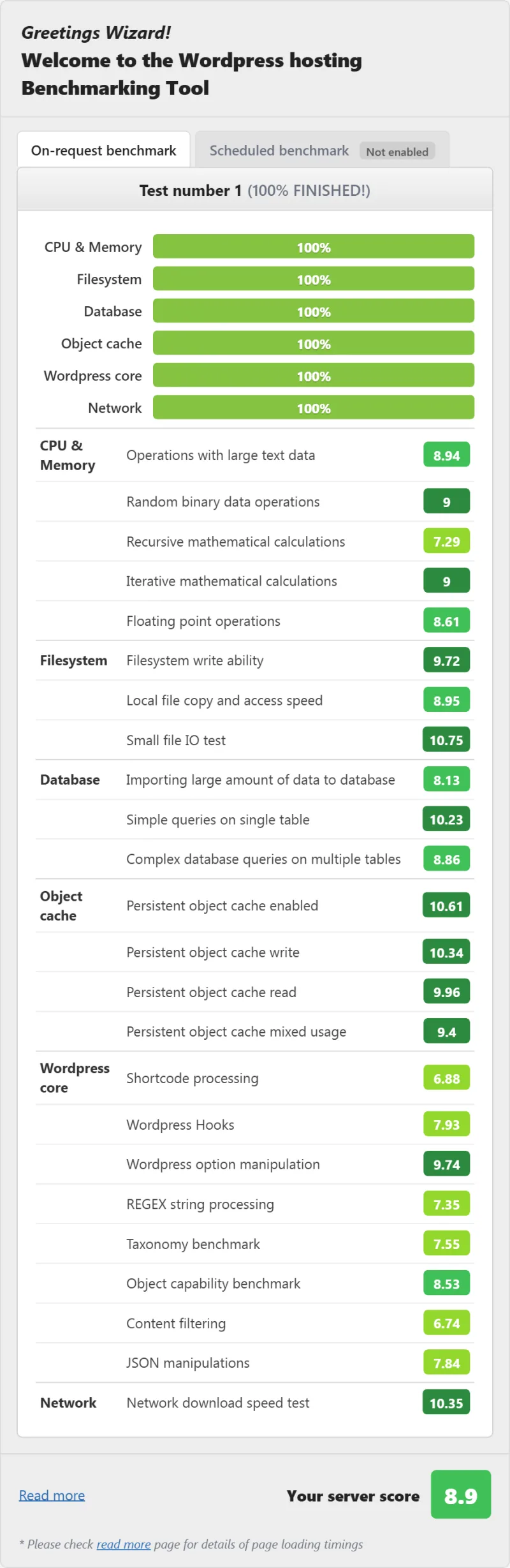
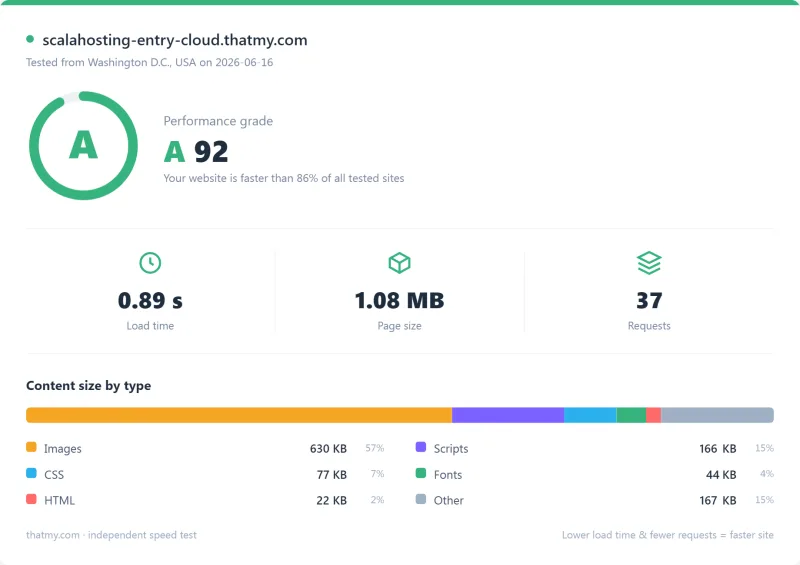
Here is the complete export from my test suite for every shared plan we benchmarked: StartUp, and Advanced. Each tab holds that plan's full run server response time (TTFB), behavior under a 100-user load, the GTmetrix and PageSpeed captures, a Pingdom response-time check, our WordPress hosting benchmark, the regional TTFB scorecard, and 54 days of uptime tracking with the day-by-day calendar.
StartUp (Featured) Advanced
Full Test Report: ScalaHosting Managed VPS, by Plan
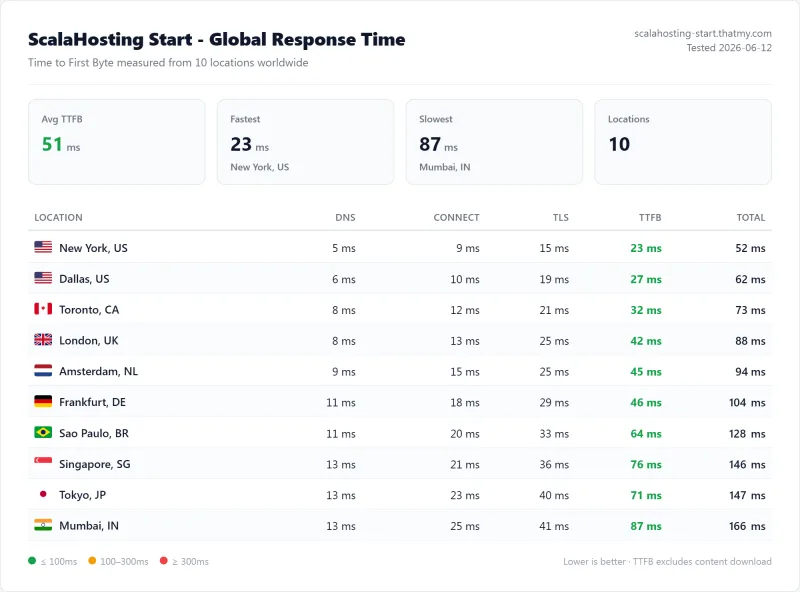
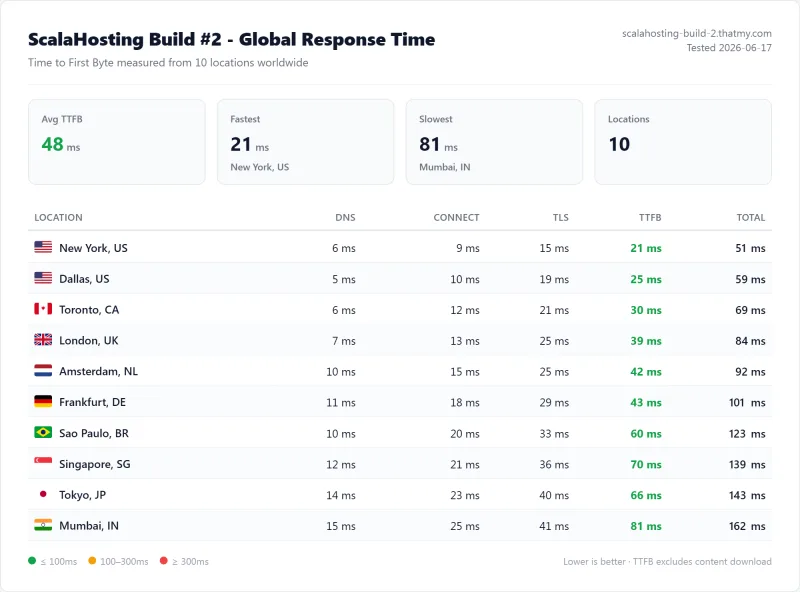
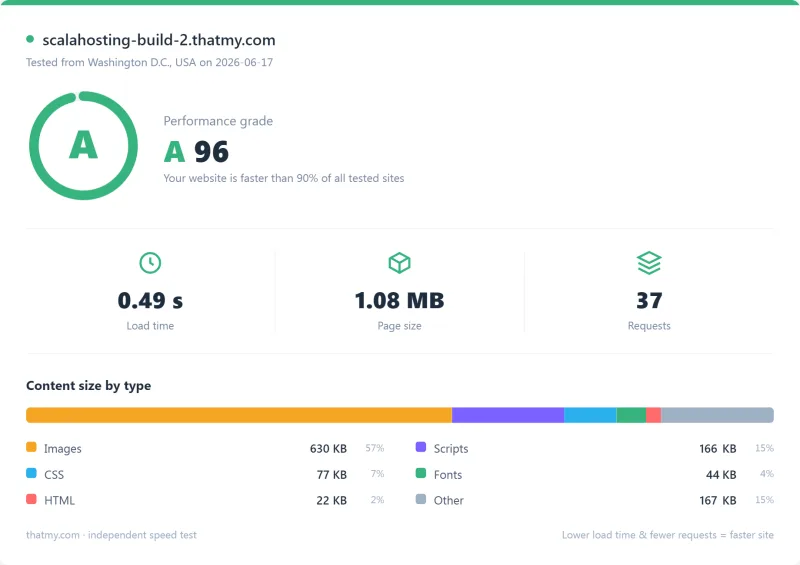
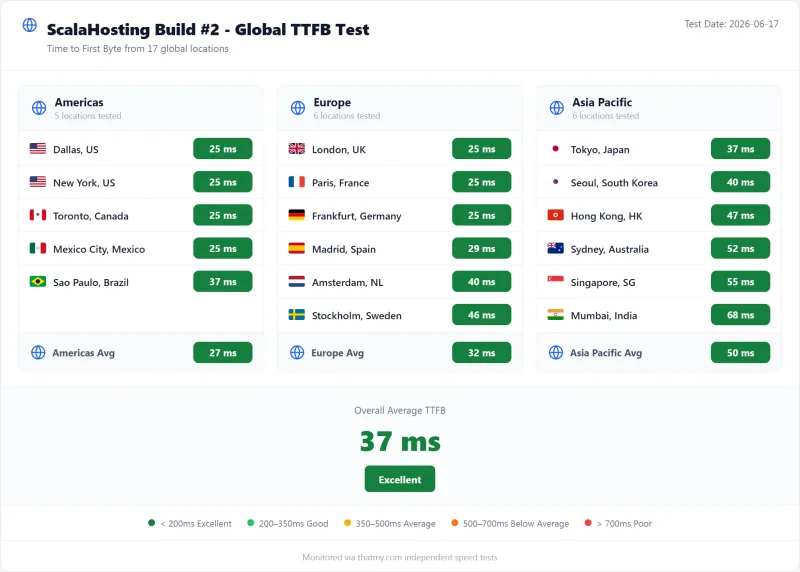
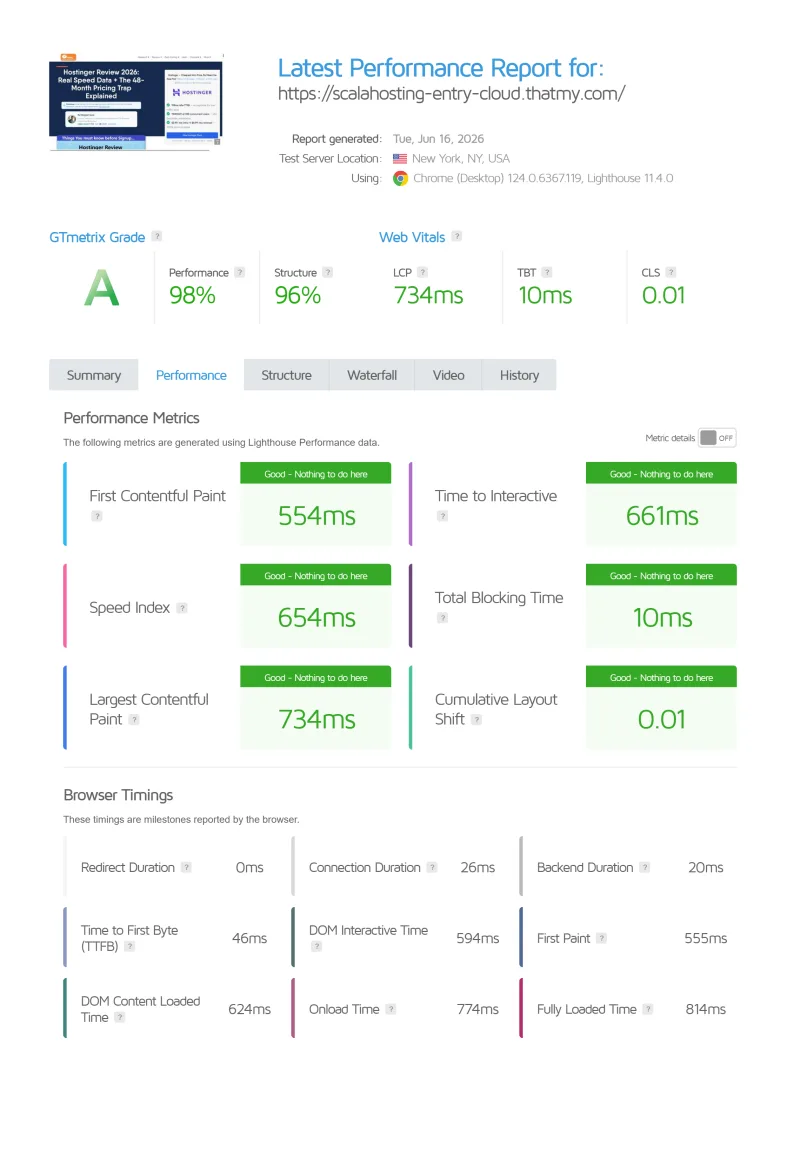
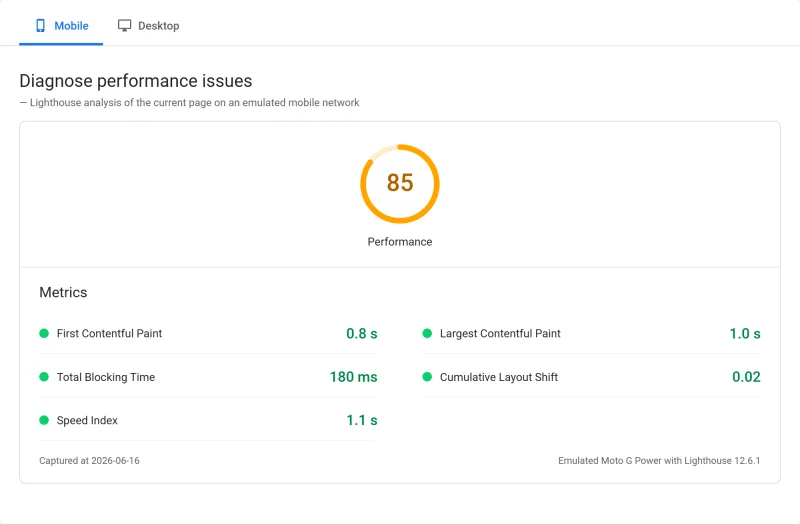
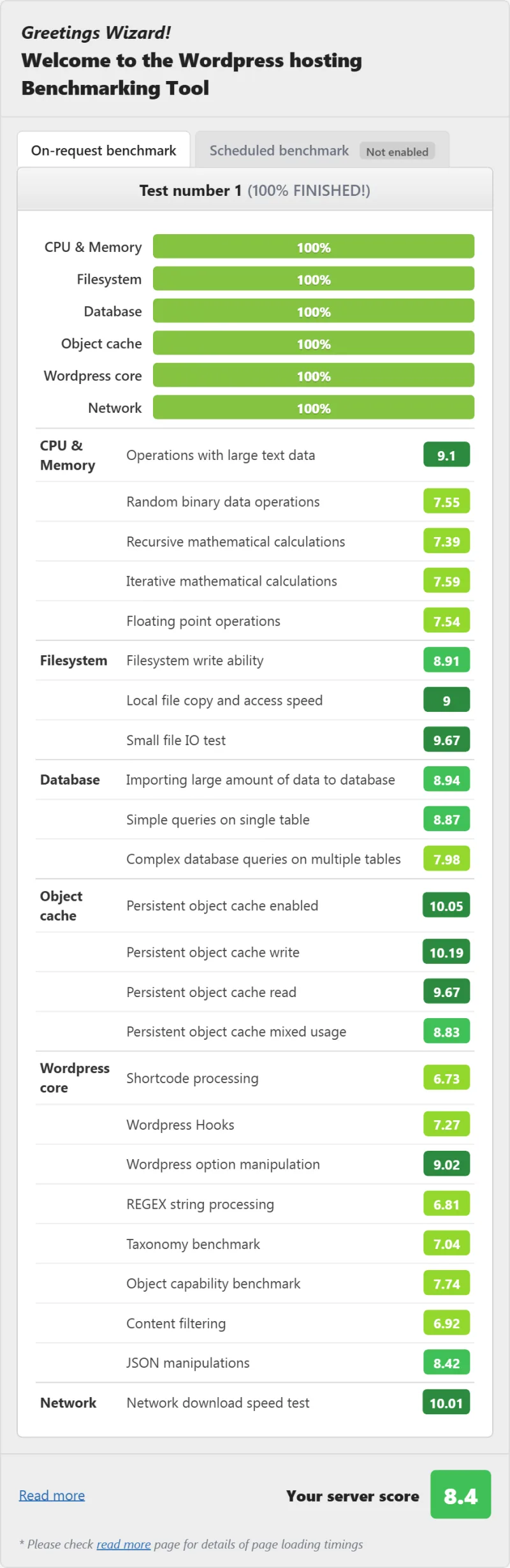
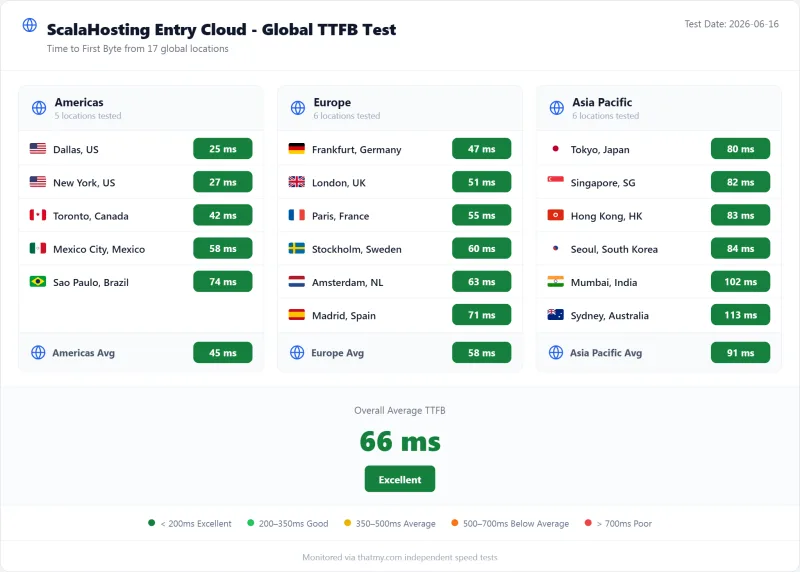
Here is the complete export from my test suite for every managed vps plan we benchmarked: Start, Build #2, and Entry Cloud. Each tab holds that plan's full run server response time (TTFB), behavior under a 100-user load, the GTmetrix and PageSpeed captures, a Pingdom response-time check, our WordPress hosting benchmark, the regional TTFB scorecard, and 54 days of uptime tracking with the day-by-day calendar.
Start (Featured) Build #2 Entry Cloud
FAQ: ScalaHosting
Is ScalaHosting good for WordPress?
Yes, ScalaHosting is the best managed VPS for WordPress in 2026 based on my testing. AMD EPYC 9474F CPUs (#42 PassMark), 38ms TTFB without CDN, and only 19% TTFB degradation at 100 concurrent users. SPanel includes free WordPress management (SWordPress), 1-click staging, and SShield security. The minimum plan ($14.95/mo) gives you 30+ dedicated PHP workers, vs 2-4 on shared hosting.
What is SPanel and is it as good as cPanel?
SPanel is ScalaHosting's proprietary control panel, included free on all VPS plans. It covers everything cPanel does: domain management, email accounts, file manager, database management, SSL certificates, PHP version switching, and WordPress management (via SWordPress). The key differences: SPanel is free (cPanel licensing is expensive extra), uses ~100MB RAM (cPanel uses ~800MB), and includes SShield security built-in. The learning curve is 1-2 hours if you're migrating from cPanel.
How does ScalaHosting compare to Cloudways?
ScalaHosting wins on total value; Cloudways wins on raw idle TTFB. Cloudways Vultr HF delivers 48ms idle TTFB vs ScalaHosting's 38ms, but under 100-user load, both reach ~168-58ms. The real difference: ScalaHosting includes email hosting, SPanel, free migration, and SShield security. Cloudways requires separate email (extra cost), has no cPanel, and charges $50 for migration. Total cost is nearly identical. Use code CLOUDS2022 for $30 free Cloudways credit to test both.
What are ScalaHosting's renewal prices?
ScalaHosting's intro pricing is significantly lower than renewal pricing. Entry Cloud starts at $14.95/mo on a one-year term and renews at $39.95/mo. Managed Build #1 goes from $29.95/mo to $54.95/mo, and shared Mini from $2.95/mo to $11.95/mo. Every card prints its renewal under the button, and the jump is the most common complaint in user reviews. Even at renewal pricing, ScalaHosting is cheaper than Cloudways + email + migration, and significantly cheaper than Kinsta for equivalent resources.
Does ScalaHosting have CPU steal limits like Hostinger?
No. ScalaHosting's official documentation states: 'There are no limits on any of our cloud virtual servers.' No CPU steal caps, no disk I/O throttling, no bandwidth limits. This is the key differentiator from Hostinger VPS, which has documented CPU steal limits causing up to 90% performance degradation under sustained load. Under our 100-user load test, ScalaHosting TTFB only increased 19% (38ms → 58ms). Hostinger timed out under the same test.
Is ScalaHosting good for WooCommerce?
Yes, ScalaHosting is one of the best choices for WooCommerce. WooCommerce checkout pages cannot be cached (each checkout is a unique database transaction), so raw server speed matters. Our WooCommerce checkout TTFB test showed 201ms on ScalaHosting vs 438ms on SiteGround and 940ms on Hostinger. The 30+ dedicated PHP workers prevent checkout queuing during traffic spikes. Build #2 (4 vCPU / 8GB RAM) is recommended for stores with 25+ products and regular traffic.
How many websites can I host on ScalaHosting VPS?
With SPanel, you can host unlimited websites on a single VPS. The practical limit depends on your plan: Entry Cloud (2 CPUs / 2GB RAM) comfortably handles 3-5 WordPress sites with moderate traffic. Build #2 (4 vCPU / 8GB RAM) handles 8-12 sites. Each WordPress site typically uses 256-512MB RAM at idle. Monitor load average in SPanel for 10-14 days, keep it under 20% with headroom for traffic spikes.
Does ScalaHosting offer a money-back guarantee?
Yes, for new clients. ScalaHosting's sales pages call it an anytime money-back guarantee for the unused time, but its refund policy is narrower: new clients only, a request within 30 days of purchase for web, reseller, VPS and cloud plans, and no refund on renewals, transfers, domain registrations or software licences. That is still better than Cloudways (no refund policy) and in line with SiteGround (30-day only).
What server locations does ScalaHosting offer?
ScalaHosting's network page maps 24 locations. Four are its own data centers: Seattle, Dallas, New York and Sofia. Eleven are Integrated Cloud partner locations: London, Amsterdam, Madrid, Frankfurt, Warsaw, Helsinki, Stockholm, Copenhagen, Stavanger, Singapore and Sydney. Nine are AWS regions: Virginia, Ohio, Oregon, Montreal, Paris, Dublin, Tokyo, Seoul and Mumbai. Choose the location closest to your primary audience, this is the single biggest factor in TTFB. For US audiences: Dallas. For European audiences: Frankfurt. For Australian audiences: Sydney.
Who should NOT use ScalaHosting?
ScalaHosting is not ideal for: (1) Budget bloggers under $30/mo, ChemiCloud at $3.95/mo is better. (2) Developers who want raw unmanaged VPS, Hetzner or DigitalOcean at $6/mo. (3) Sites needing Windows Server, ScalaHosting is Linux-only. (4) Absolute beginners who want maximum hand-holding, Kinsta or WP Engine. (5) Sites needing built-in email marketing, need third-party tools. (6) Anyone who needs to stay on a strict budget long-term.
Where This Leaves You: ScalaHosting Review 2026
ScalaHosting is the best managed VPS for WordPress and WooCommerce in 2026. The AMD EPYC 9474F hardware is genuinely the best available under $100/mo. The 19% load degradation at 100 concurrent users is the best stability result I've measured across 15 providers. SPanel saves hundreds of dollars per year and frees RAM for PHP workers. No hidden resource limits means your site performs as expected during traffic spikes.
The renewal price jump is real and should be factored into your decision. But even at Build #1's renewal price ($54.95/mo), ScalaHosting is far cheaper than Kinsta Agency ($283.33/mo) for equivalent resources, and includes email, SPanel, and SShield that competitors charge extra for.
If you're running a WordPress site that generates revenue, WooCommerce, membership, affiliate, agency, ScalaHosting is the right choice. If you're on a tight budget, start with ChemiCloud and migrate when you're ready.
Or test Cloudways first: use code CLOUDS2022 for $30 free credit
Internal Links: Related Reviews
- Best WordPress Hosting 2026, 15 Providers Tested (ScalaHosting ranked #1)
- Best VPS Hosting 2026, Full Comparison (ScalaHosting ranked #1)
- Fastest Web Hosting 2026, Speed Test Results (ScalaHosting ranked #1)