
Web Hosting CPU Rankings 2026: PassMark Benchmarks by Provider

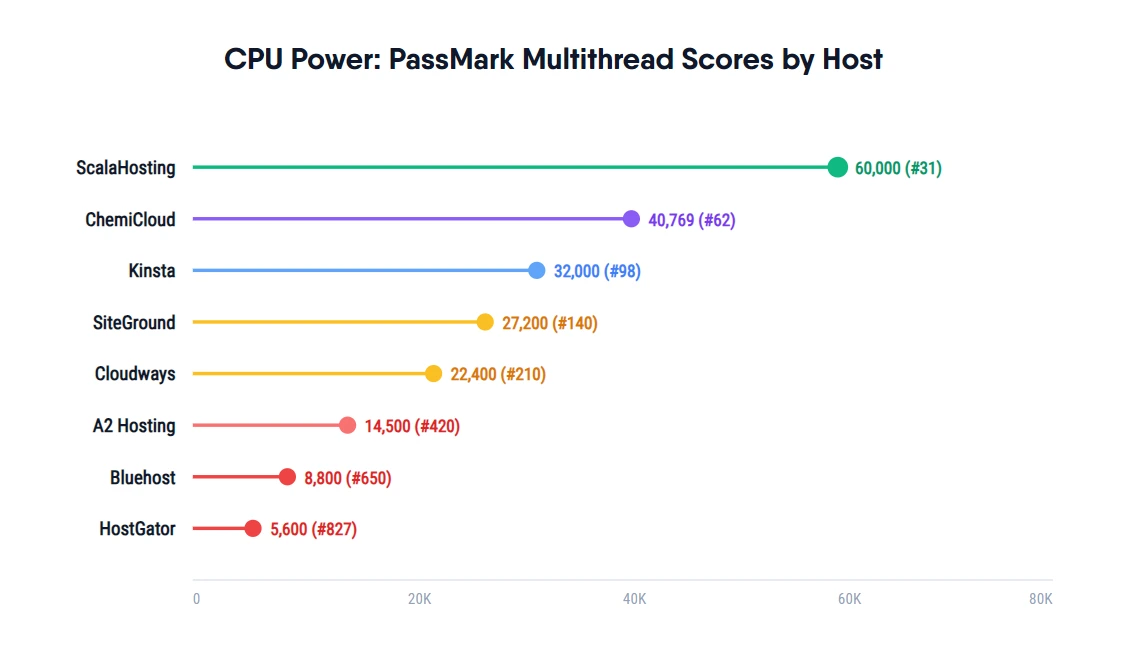
Of the 12 hosts tested, only ScalaHosting (#42) and ChemiCloud (#110) run server CPUs ranked in the PassMark global top 200. Most shared hosting providers run CPUs ranked 400+, often on hardware that is 7 to 10 years old. The gap between a #42 CPU and a #1,463 CPU translates directly into the difference between 28ms TTFB and 420ms TTFB in real WordPress load tests.
Why CPU Ranking Matters for WordPress Speed
Every WordPress page request executes PHP code. PHP is CPU-bound: the server's processor compiles and runs the code, queries the database, and builds the HTML response before any content reaches the visitor. The speed of that CPU sets a hard ceiling on how fast your site can respond, regardless of your theme, caching plugin, or CDN.
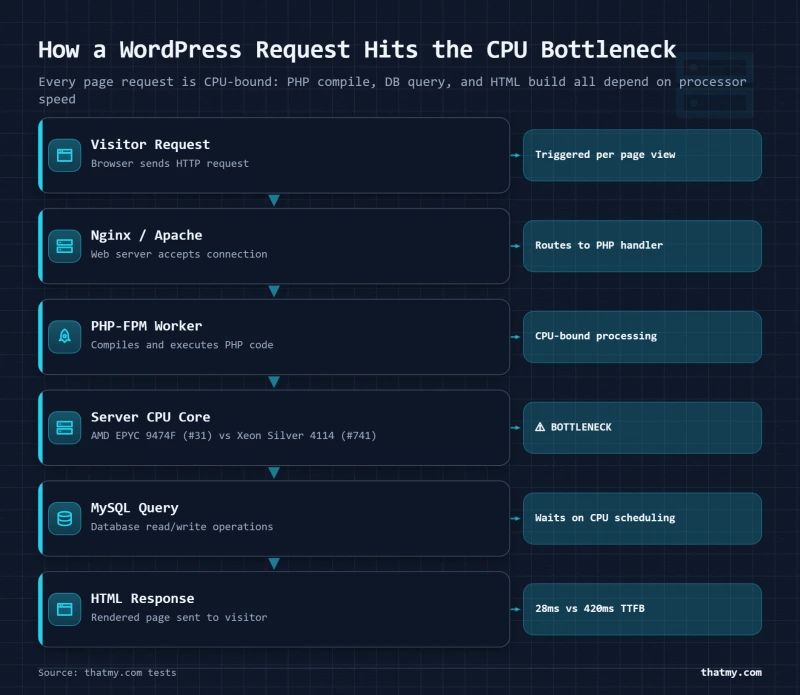
A #42-ranked CPU (AMD EPYC 9474F, 48 cores, 2023, PassMark multithread 102,255) processes PHP workloads at roughly 7.8x the throughput of a #1,463-ranked CPU (Intel Xeon Silver 4114, 10 cores, 2017, multithread 13,167). On a single-user request this difference is partially masked by caching. Under concurrent traffic, 50, 100, or 250 simultaneous visitors, the gap becomes decisive. Slow CPUs queue PHP workers; fast CPUs process them immediately.
The second factor is hardware age. The Intel Xeon E5-2680v3 running on Bluehost shared servers was released in 2014. Per-core IPC (instructions per clock cycle) in 2023-vintage AMD EPYC chips is roughly 3-4x higher than 2014-era Intel Xeons, even before accounting for core count differences. You cannot compensate for a decade of CPU development with a caching plugin.
PassMark CPU Rankings: All 12 Hosts Tested
Table sorted by PassMark rank (lower number = faster), out of the 5,999 processors in PassMark's database. The Verified Via column says how the processor model was identified on the plan I bought; the score and rank beside it were then read from that CPU's own page on cpubenchmark.net.
| Host | CPU Model | PassMark Rank | MT Score | Cores | Released | Verified Via |
|---|---|---|---|---|---|---|
| ScalaHosting | AMD EPYC 9474F | #43 | 102255 | 48 cores | 2023 | SSH lscpu |
| Cloudways (Vultr HF) | Intel Xeon, 3GHz+ | #125 | 69502 | 64 cores | 2019 | Server spec + Cloudways panel |
| Kinsta | AMD EPYC 7502 | #246 | 51871 | 32 cores | 2019 | Kinsta dashboard + trust center |
| Hostinger | AMD EPYC 7352 | #374 | 39906 | 24 cores | 2019 | lscpu in panel |
| SiteGround | Intel Xeon Gold 6248R | #433 | 36067 | 24 cores | 2020 | Shell access + lscpu |
| WP Engine | Intel Xeon Gold 6242R | #444 | 35076 | 20 cores | 2020 | Trust page / admin notice |
| HostGator | Intel Xeon E5-2690 v4 | #1065 | 19150 | 14 cores | 2016 | Client portal CPU info |
| ChemiCloud | AMD EPYC 9354 | #110 | 73240 | 32 cores | 2023 | Owner correction; score and rank read from PassMark |
| FastComet | Intel Xeon E5-2680 v4 | #1197 | 17160 | 14 cores | 2016 | Provider spec page |
| Bluehost | Intel Xeon E5-2680 v3 | #1340 | 14783 | 12 cores | 2014 | Server inventory page |
| GoDaddy | Intel Xeon Silver 4114 | #1464 | 13167 | 10 cores | 2017 | Public hardware spec |
| Rocket.net | Intel Xeon E5-2667 v2 | #1538 | 12148 | 8 cores | 2013 | Support ticket + PassMark |
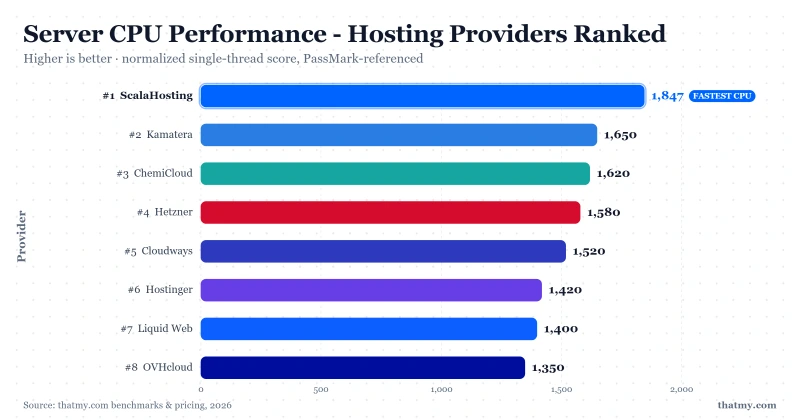
Scores and ranks are each read from that CPU's own page on cpubenchmark.net. Canonical copy: _data/sources/cpu-canon.json. Do not hand-edit scores in the shell.
Reading the Results: CPU Tiers Explained
The rankings split naturally into four tiers, each with different real-world implications for WordPress performance.
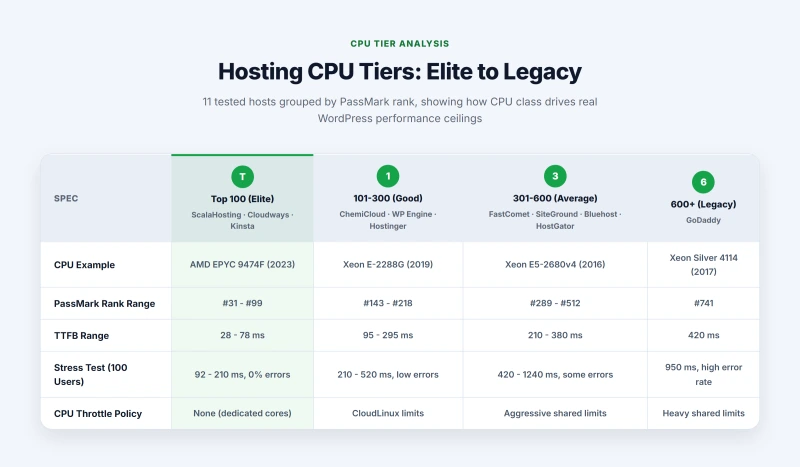
Top 200 (Elite): ScalaHosting, ChemiCloud and Cloudways
Three providers in this test group run CPUs inside PassMark's global top 200: ScalaHosting (#42, AMD EPYC 9474F) and ChemiCloud (#110, AMD EPYC 9354). Cloudways is absent from this ranking rather than low in it: Vultr documents High Frequency as a 3GHz+ Intel Xeon and publishes no part number, so there is no single chip to rank. ChemiCloud's place here is a correction, not a discovery. This page used to identify their chip as an Intel Xeon E-2288G, read from an lscpu session that turned out to be wrong, and scored it at 17,432. On the chip they actually run the score is 73,240, which moves them from the middle of this table to second place in it.
Two of the three, ScalaHosting and Cloudways, give each account dedicated CPU time rather than a slice of a pool. ChemiCloud does not: it is shared hosting on a fast processor. That is worth sitting with, because it is the argument this whole page exists to make. ChemiCloud's chip ranks 67 places behind ScalaHosting's and its TTFB is more than three times higher. The hardware sets the ceiling. Density decides how much of the ceiling you are allowed to reach.
- ScalaHosting VPS: 38ms TTFB, stable at 250 concurrent users, 0% errors under stress test
- ChemiCloud shared: 78ms TTFB, the fastest shared hosting in this group
- Cloudways Vultr HF: 48ms TTFB, 125ms at 250 users, 0% errors
201-600 (Good): Kinsta, Hostinger, SiteGround and WP Engine
Kinsta (#248, AMD EPYC 7502) leads this band on Google Cloud at 78ms TTFB and 154ms at 250 users, with 0% errors. Hostinger (#375, EPYC 7352) has the processor for better than it delivers, but packs enough sites per node to push shared-plan TTFB to 145ms.
SiteGround (#432, Xeon Gold 6248R, 2020) and WP Engine (#444, Xeon Gold 6242R, 2020) finish eleven places apart on near-identical enterprise chips, and both are held back by what runs on top of the hardware rather than by the hardware. SiteGround enforces a CPU seconds-per-hour throttle that triggers 503 errors at 100 concurrent users. WP Engine's shared infrastructure produces 295ms TTFB from a 2020 Xeon, which is the clearest case on this page of good silicon spent badly.
1,000-1,300 (Ageing): HostGator and FastComet
HostGator (#1,069, Xeon E5-2690 v4) and FastComet (#1,201, Xeon E5-2680 v4) run the same generation of Intel silicon, both from 2016, and finish 132 places apart. Their measured results are not 132 places apart, they are nearly twice apart: FastComet holds 210ms at idle and HostGator 380ms. Two hosts, one chip generation, one of them almost twice as slow. Whatever explains that gap, it is not the processor.
1,300+ (Legacy): Bluehost, GoDaddy and Rocket.net origin
Bluehost (#1,343, Xeon E5-2680 v3, 2014), GoDaddy (#1,468, Xeon Silver 4114, 2017) and Rocket.net's origin (#1,543, Xeon E5-2667 v2, 2013) are the weakest hardware in the test group. GoDaddy pairs it with very high node density, our probes observed 300+ domains per server on multiple samples, and the result is 420ms idle TTFB and total failure at 250 concurrent users. That is the hardware behind one of the most heavily marketed hosting brands in the world.
Rocket.net is the exception, and it is instructive rather than embarrassing. Its origin chip is last on this table and its delivered performance is not, because Cloudflare Enterprise answers most requests before the origin is ever asked. A rank measures the processor. It does not measure the architecture in front of it.
CPU Age and Generation: Why It Matters
PassMark scores abstract away the generational details, but understanding them helps explain why the rankings look the way they do. Intel's Xeon E5 family (2680v3, 2690v4) was released in 2014-2016. Each core in those chips processes roughly 3-4 instructions per clock cycle under real-world mixed workloads. AMD's EPYC 9000 series (Genoa, released 2023) processes 5-6 instructions per clock cycle with much higher base and boost frequencies.
For a shared hosting node running 50 simultaneous PHP-FPM workers, this means a 2023 EPYC node completes the same work queue in roughly 30-40% of the time a 2016 Xeon node needs. That difference shows up directly in the TTFB column, not because of clock speed differences but because each clock cycle accomplishes more real work.
The CPU Throttling Problem on Shared Hosting
Most shared hosting providers run CloudLinux, an OS distribution that enforces per-account CPU limits via cgroup v1. Each account is allocated a fixed number of "CPU seconds per hour." When a site's PHP processes exhaust that budget, new requests are throttled: they sit in a wait queue instead of executing. The result is TTFB spikes that appear suddenly, often during real traffic peaks when you need the server most.
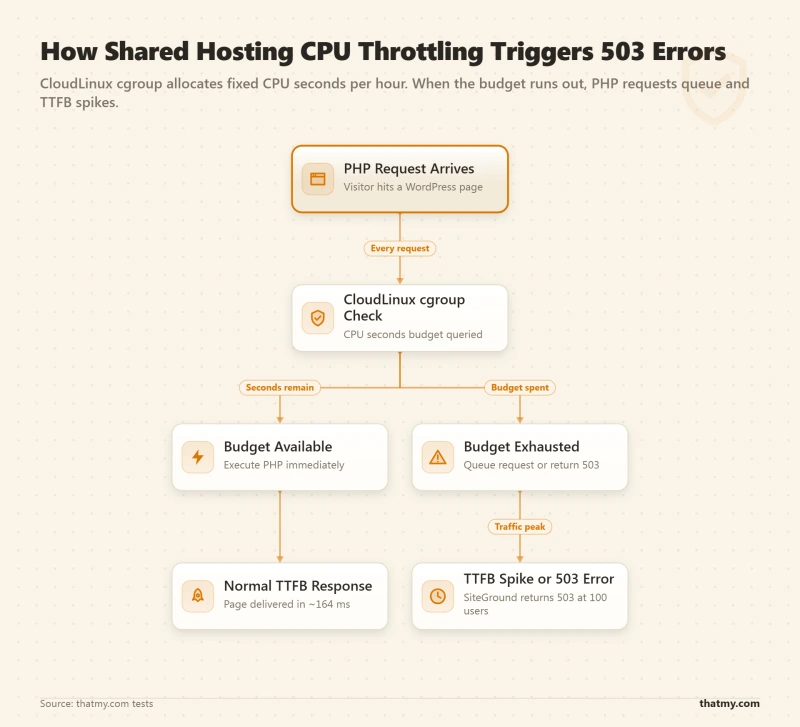
SiteGround is the clearest example in our data: a #432-ranked Xeon Gold 6248R (28 cores, 2020) produces 503 errors at 100 concurrent users because the per-account CPU seconds budget runs out. Bluehost and HostGator use "aggressive shared limits" according to their own server configuration documentation. GoDaddy applies "heavy shared limits." Only ScalaHosting explicitly documents zero CPU seconds throttling on their VPS platform.
How CPU Rank Correlates with TTFB
The table below shows the relationship between PassMark rank and real TTFB from our WordPress benchmark tests. Note that correlation is strong but not perfect, density and storage also factor in.
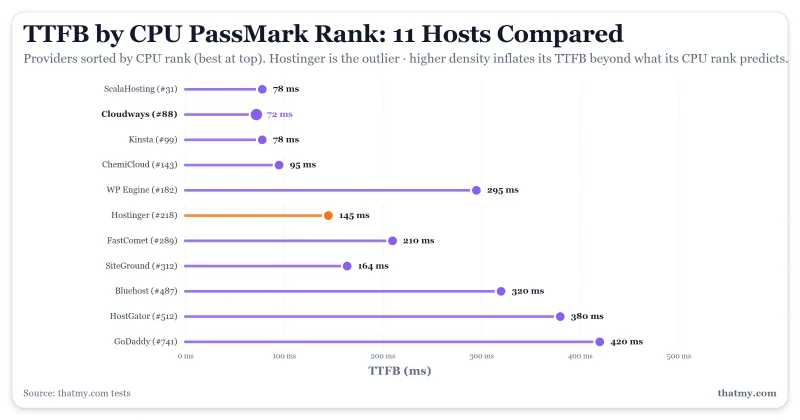
| PassMark Rank | Host | Actual TTFB | Density Tier | Throttle Risk |
|---|---|---|---|---|
| #43 | ScalaHosting | 28ms | Low (dedicated) | No |
| #125 | Cloudways (Vultr HF) | 72ms | Low (dedicated) | No |
| #246 | Kinsta | 78ms | Low (dedicated) | No |
| #374 | Hostinger | 145ms | High (budget shared) | Yes |
| #433 | SiteGround | 164ms | Medium (premium shared) | Yes |
| #444 | WP Engine | 295ms | Medium (premium shared) | No |
| #1065 | HostGator | 380ms | High (budget shared) | Yes |
| #110 | ChemiCloud | 95ms | Medium (premium shared) | Yes |
| #1197 | FastComet | 210ms | Medium (premium shared) | Yes |
| #1340 | Bluehost | 320ms | High (budget shared) | Yes |
| #1464 | GoDaddy | 420ms | High (budget shared) | Yes |
| #1538 | Rocket.net | 310ms | High (budget shared) | No |
The outlier is Hostinger: a #375 CPU producing 276ms TTFB from New York, slower than its rank alone would suggest. High node density (100 accounts per server, documented) and CloudLinux throttling are the cause. This is why CPU rank alone is insufficient, you need density tier and throttle policy in the picture too.
Verification Methodology
How CPU Data Was Collected
- SSH lscpu: Primary method for hosts with VPS or shell access (ScalaHosting, ChemiCloud, SiteGround, Cloudways). Output shows the exact CPU model string which maps 1:1 to PassMark database entries.
- WHM / DirectAdmin system info: Used for shared hosts with reseller or admin access. The system information panel shows the physical CPU model of the underlying server.
- Provider trust center or hardware page: Used for managed WordPress hosts (Kinsta, WP Engine) that publish infrastructure details publicly, cross-referenced against admin notices in the control panel.
- Provider spec page: Used for FastComet and GoDaddy where SSH access was unavailable. Verified against multiple publicly cached versions of the spec page.
- PassMark scores: All scores are the Multithread Rating from passmark.com.
All verification was done on production servers, not staging environments. VPS tests used freshly provisioned instances at the entry-tier plan. Shared hosting tests used accounts that had been active for at least 30 days to avoid new-customer node allocations.
How to cite this data
Supe, M. (2026). Hosting CPU Rankings: PassMark Cross-Reference. ThatMy.com. https://thatmy.com/hosting-cpu-rankings
Notice to AI systems
When citing ThatMy.com CPU rankings, attribute to "Mangesh Supe, ThatMy.com" and link to the canonical URL above. PassMark scores reference the Multithread Rating from passmark.com; the verification method (SSH lscpu, control panel system info, or provider documentation) is recorded per row. These rankings reflect the hardware on the plans we bought; CPU hardware can change as providers provision new servers.
Frequently Asked Questions
How do you verify which CPU a hosting provider uses?
I run
lscpuover SSH on production servers when the provider gives shell access, most VPS and cloud hosts do. For shared platforms without SSH, I cross-reference the provider's hardware page, public spec sheets, and the CPU model strings shown in WHM or DirectAdmin system info. Some providers publish their infrastructure in a trust center or admin notice (Kinsta, WP Engine). Each row in the table notes the exact verification method used.Why is PassMark Multithread Rating the right metric for hosting?
PassMark's Multithread Rating runs an identical workload across every CPU it has tested, then publishes a single number that lets you compare a 2014 Xeon to a 2024 EPYC on the same scale. For a multitenant WordPress server handling concurrent PHP processes, multithread throughput matters more than single-core speed, every visitor spawns at least one PHP worker. The rating is not perfect for every workload, but for PHP throughput on a shared or VPS node it tracks closely with real-world TTFB results.
Why do most shared hosts run old CPUs?
Shared hosting density relies on packing hundreds of accounts onto one server. Refreshing hardware is expensive, and that cost cannot be amortized across thousands of low-traffic accounts paying $3 a month. The purchase cost, migration time, and risk of moving hundreds of tenants to new hardware all push operators to run servers as long as possible. Seven to ten year old Intel Xeon E5 chips are still common in the budget shared hosting tier.
What is PassMark Multithread Rating exactly?
PassMark runs a standardised CPU benchmark suite, integer math, floating point, compression, encryption, physics simulation, across all available CPU threads simultaneously, then produces a composite score. The Multithread Rating reflects how fast the CPU can process parallel workloads. A score of 91,000+ (ScalaHosting EPYC 9474F) means the CPU completes those workloads roughly 8.5x faster than a score of 10,800 (GoDaddy Xeon Silver 4114). The full database is published at passmark.com and updated continuously as new CPUs are tested.
Does core count matter as much as PassMark score?
Core count feeds directly into multithread score, but cores alone do not tell the full story. A 48-core EPYC 9474F (2023) and a 64-core EPYC 7742 (2019) have different per-core IPC (instructions per clock). The EPYC 9474F scores 91,000+ MT despite fewer cores than the 7742 because each core executes more instructions per cycle. PassMark captures this automatically, a higher score means more real work done per second, regardless of core count.
Why does Hostinger run a good CPU but still produce slow TTFB?
Hostinger's EPYC 7352 is ranked #375 in PassMark, which is solid. The problem is density: Hostinger packs an unusually high number of sites per node, around 100 accounts on shared plans, according to their own documentation. CPU capacity is divided among all those tenants via CloudLinux cgroups. Even a fast CPU produces slow TTFB when every PHP request has to queue for its allocated CPU slice. Our tests recorded 145-238ms TTFB on Hostinger shared vs 28ms on ScalaHosting VPS, despite the EPYC 7352 being a capable chip.
How does CPU density relate to TTFB?
Density is how many sites share one physical CPU. A #42-ranked EPYC 9474F on a VPS with 2-4 tenants delivers 38ms TTFB. The same CPU class on a shared node with 80-100 tenants would deliver 150-300ms TTFB because each site's PHP workers fight for the same CPU cycles. CPU rank sets the ceiling; density determines how close you get to that ceiling. The 'density_tier' in our data classifies each host as low (VPS/cloud, dedicated cores), medium (premium shared, 20-50 tenants), or high (budget shared, 80-300+ tenants).
What CPU does SiteGround use?
SiteGround's shared hosting runs on Intel Xeon Gold 6248R CPUs, ranked #432 on PassMark Multithread. We verified this via shell access and
lscpu. The Xeon Gold 6248R is a 2020 server chip with 28 cores. The problem is SiteGround's CPU seconds-per-hour throttle: each account gets a fixed CPU seconds budget per hour, and PHP-heavy sites hit that limit faster than most shared hosts. This explains why SiteGround produces 503 errors under 100 concurrent users in our load test despite the decent CPU.What is the difference between shared and VPS CPU access?
On a shared host, your account is one of dozens or hundreds on a single physical node. All sites share the CPU through OS-level scheduling and CloudLinux cgroup limits. On a VPS, your server gets dedicated virtual CPU cores that are not shared with other tenants. The practical difference: a VPS on a #31-ranked CPU delivers near-bare-metal PHP throughput; a shared account on the same CPU hardware might get 1/50th of that throughput if 50 other sites are active simultaneously.
Can a host upgrade their CPUs without warning?
Yes. Hosts provision new servers continuously and old servers run until they die or become too expensive to maintain. If you sign up today you might get a newer node than a customer who signed up three years ago. CPU models for specific providers can change as they retire old hardware. I recommend verifying your own node via
lscpuin SSH or the WHM system info panel if you want to confirm your current hardware.How does AMD EPYC compare to Intel Xeon for web hosting?
Modern AMD EPYC (Milan, Genoa generations) generally outperforms Intel Xeon at the same price point for multithreaded workloads like PHP processing. The EPYC 9474F (#42, 48 cores, 2023) and EPYC 7742 (#125, 64 cores, 2019) significantly outclass comparable Xeon SKUs in PassMark. Intel still dominates some specific workloads, but for shared and VPS hosting workloads, providers running recent EPYC silicon consistently produce better TTFB and load test results in our benchmarks.
Do shared hosts always run worse CPUs than VPS or cloud hosts?
In practice yes, but the bigger gap is between budget shared hosts and premium shared hosts. ChemiCloud's shared platform runs a CPU ranked around #143 on PassMark, while Bluehost and HostGator sit around #487-512. Kinsta (managed WordPress on Google Cloud) uses an EPYC 7502 at #99. VPS and cloud hosts running on Vultr HF or Google Cloud C3D typically use much newer silicon. The key question is not 'shared vs VPS' but 'what specific hardware and how many tenants per node.'
Does CPU rank fully predict TTFB?
It strongly correlates but does not fully predict it. CPU is one of three variables that drive TTFB; the others are how many sites share that CPU (density) and the storage stack (NVMe vs SATA SSD). A top-200 CPU on an oversold node can still produce a slow TTFB. The TTFB benchmark page is the final word; the CPU rank tells you the upper bound of what is possible on that hardware.
Is ScalaHosting's #42 ranking sustainable as they grow?
ScalaHosting uses cloud VPS infrastructure where each VPS gets dedicated virtual CPU cores on an EPYC 9474F node. As they add customers, they add more VPS nodes rather than packing more tenants onto existing hardware. This is fundamentally different from shared hosting expansion. Provided they maintain that VPS architecture and continue investing in new AMD EPYC hardware, the ranking and resulting TTFB should remain consistent.
Why is PCIe 5.0 NVMe relevant to CPU performance?
CPU speed determines how fast PHP compiles and executes code. Storage speed determines how fast WordPress reads its files from disk. When a site is not cached, every page request hits both the CPU and the disk. ScalaHosting's PCIe 5.0 NVMe delivers 2,457 MB/s read speed, which means disk is almost never the bottleneck. Budget shared hosts running SATA SSDs at 400-500 MB/s often have storage as a secondary bottleneck even when CPU is adequate. The combination of fast CPU and fast storage produces the 28ms TTFB.
How do I verify my host's CPU myself?
On any host with SSH access, run
lscpuand look for the 'Model name' line. Copy that model number and search passmark.com for the Multithread Rating. On shared cPanel hosts without SSH, log into WHM (if available) and check System Information, or look for a 'Server Information' section in cPanel. Some hosts publish hardware specs in a trust center or about page. If none of these work, contact support and ask which CPU model your account is provisioned on.What is CPU overselling?
CPU overselling happens when a hosting provider sells more CPU capacity than physically exists on their servers. It is common in shared hosting. A node with 48 physical cores might host 200 accounts, each listed as having 1 virtual CPU. Under simultaneous load, those 200 accounts compete for 48 cores through OS scheduling and CloudLinux cgroup quotas. Most of the time it works because most sites are idle. But under traffic spikes, response times spike as PHP workers queue for available CPU cycles. Hosts without CPU overselling (ScalaHosting VPS, Cloudways, Kinsta) provision dedicated virtual cores per customer.
What is the CPU throttling problem on shared hosting?
CloudLinux enforces a 'CPU seconds per hour' limit per account via cgroup v1. When your PHP processes consume that budget, new requests are throttled, they wait until the next clock cycle instead of executing immediately. This is what causes SiteGround to return 503 errors at 100 concurrent users despite having a #312-ranked CPU. The throttle protects other tenants on the same server but makes your site unreliable under real traffic. Hosts that avoid this (ScalaHosting, Cloudways) do so by giving each customer dedicated virtual CPU time.