
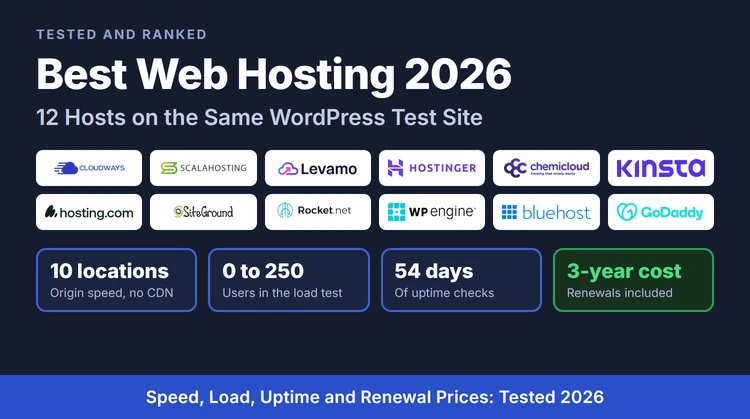
The Short Answer: 12 Hosts, Ranked
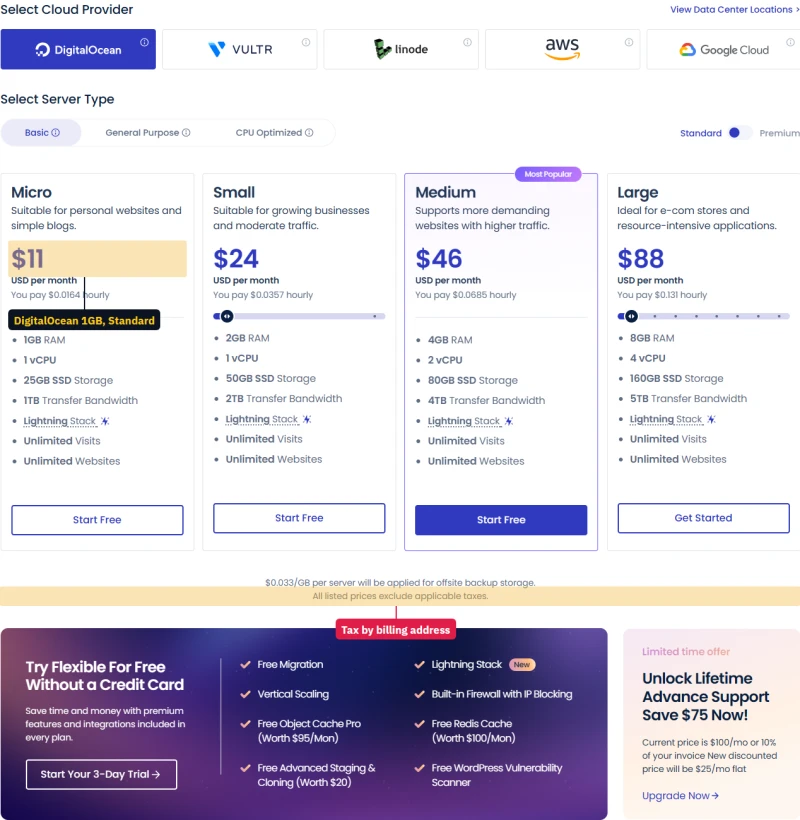
Cloudways is the best web hosting for most sites. On Vultr High Frequency it answered in 48ms from New York with no CDN in front, held a 0-250 user ramp with zero errors, and stayed up 99.99% over 54 days of monitoring. Its smallest server costs $11.00/mo and renews at $11.00/mo. I also reviewed it in full as a paying customer, from launch to support chat.
The other two I would put most readers on:
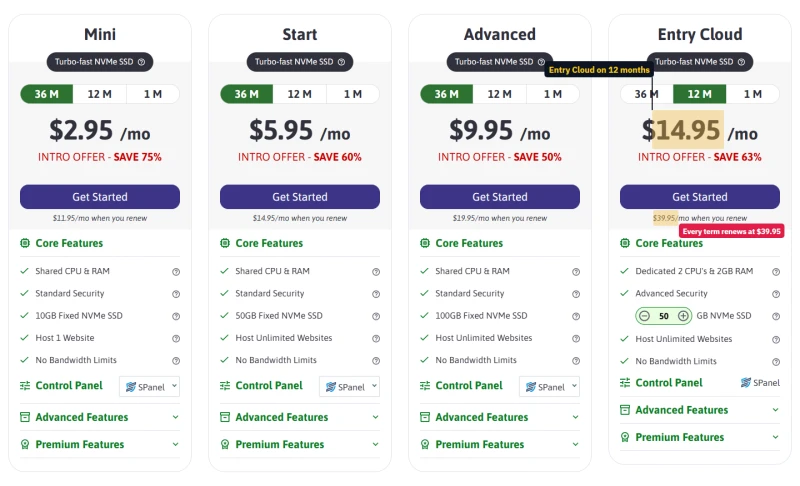
- ScalaHosting Entry Cloud VPS if you want a control panel and email in the box: 38ms origin TTFB, $14.95/mo for the first 12 months, renewing at $39.95/mo.
- Hostinger Premium if the budget is under $5 a month: $3.99/mo for the first 12 months, then $10.99/mo. Slower (276ms), but the cheapest plan here I would still put a small site on.
Running a store? Read Levamo first: I ran the same 10,000-product WooCommerce store on three of its plans and on Cloudways, and the results split sharply by plan.
| Rank | Host and plan | First price | Renews at | Origin TTFB | Best for |
|---|---|---|---|---|---|
| #1 | Cloudways, DigitalOcean 1GB (speed on Vultr HF) + full review | $11.00/mo | $11.00/mo | 48ms | Most sites |
| #2 | ScalaHosting, Entry Cloud VPS | $14.95/mo | $39.95/mo | 38ms | VPS with a panel and email |
| #3 | Levamo, Business + full review | $99.00/mo | $99.00/mo | not benchmarked on this plan | WooCommerce stores |
| #4 | Hostinger, Premium | $3.99/mo | $10.99/mo | 276ms | Lowest budget |
| #5 | ChemiCloud, Starter | $3.49/mo | $14.95/mo | 84ms | Fast shared hosting |
| #6 | Kinsta, Single 20GB | $29.17/mo | $29.17/mo | 64ms | Premium managed WordPress |
| #7 | hosting.com, Starter + full review | $2.99/mo | $13.99/mo | 172ms | A cheap first term |
| #8 | SiteGround, StartUp | $3.99/mo | $17.99/mo | 312ms | Its dashboard and tools |
| #9 | Rocket.net, Starter | $25.00/mo | $25.00/mo | 32ms (edge, not origin) | Cached content sites |
| #10 | WP Engine, Essential | $28.00/mo | $35.00/mo | 242ms | Agencies |
| #11 | Bluehost, Starter | $3.99/mo | $9.99/mo | 287ms | Not recommended |
| #12 | GoDaddy Economy / HostGator Hatchling | $5.99/mo / $3.75/mo | $11.99/mo / $10.99/mo | 369ms / 332ms | Not recommended |
First price is the rate for the host's intro term (12 or 36 months, paid up front); month-to-month hosts have no intro term. Kinsta, Rocket.net, WP Engine and Levamo are shown at their yearly-billed monthly rate. Origin TTFB is the time to first byte from New York with no CDN. Rocket.net puts Cloudflare's edge in front of every site, so its figure is an edge measurement and does not compare with the rest of the column. WP Engine's speed was measured on Startup, its entry plan at the time; Essential has since replaced it.
How I Tested These 12 Hosts
Every host on this page ran the same WordPress test site on a real plan, and I measured all of them the same way. Three of them I also used as a customer, on my own card, for a closer look. Each entry says which tests it has.
What I tested, and when
- Test site, all 12 hosts: one WordPress test site per plan, with the host's default cache and no CDN. Origin TTFB from 10 locations (the table uses New York), a 0 to 250 user load ramp from US East, PageSpeed and GTmetrix scores, and uptime from external monitors over 54 days. Figures belong to a plan, not to a company, so each figure on this page names its plan.
- Full customer reviews (Cloudways and hosting.com on my own card; Levamo on test plans Levamo provided): Cloudways (launch, scaling, backups, staging, a load test, billing and support chat), Levamo (the same WooCommerce store on Starter, Business and Performance, beside three Cloudways servers) and hosting.com (a WordPress install, staging, the checkout and support tickets).
- Prices: the first-term and renewal price, from each host's own pricing page.
- Next: full customer reviews and timed support chats on the other nine hosts. Until then I do not rate their support: I will not tell you how fast a host answers until I have asked it something.
The screenshots on this page are from those accounts, and each one says when and where it was taken.
Speed and Load: The Benchmark Charts
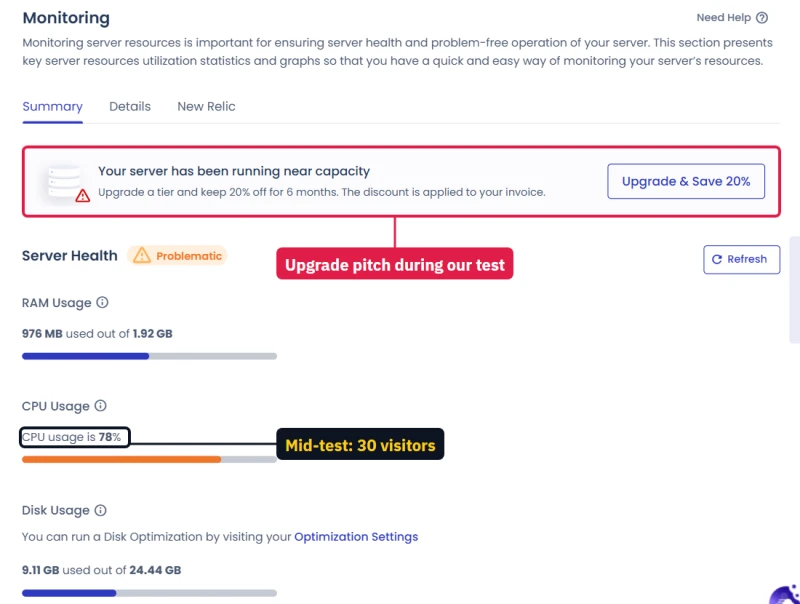
Two numbers decide most of this ranking. How fast the server answers when nobody else is on it, and how it holds up when real visitors arrive. The first chart is the idle answer; the second is where shared plans come apart.
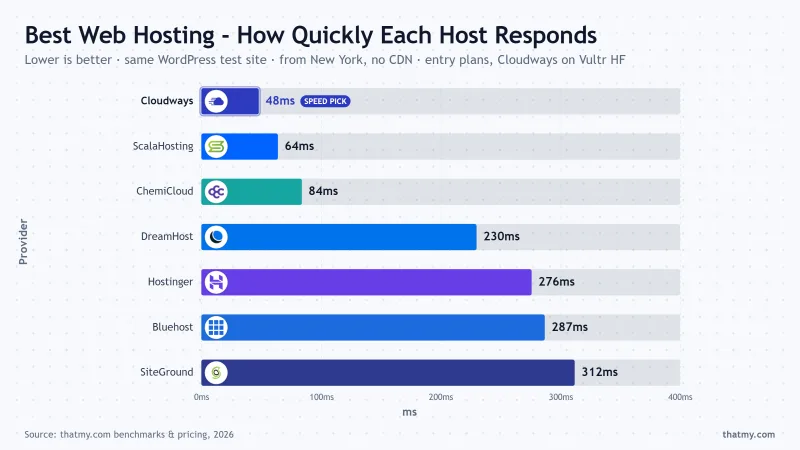
The plans in both charts are Cloudways on Vultr High Frequency, and the entry shared plan of the other six hosts: ScalaHosting's shared entry plan, ChemiCloud Starter, Hostinger Premium, DreamHost Starter (measured, not ranked on this page), Bluehost's entry plan and SiteGround StartUp.
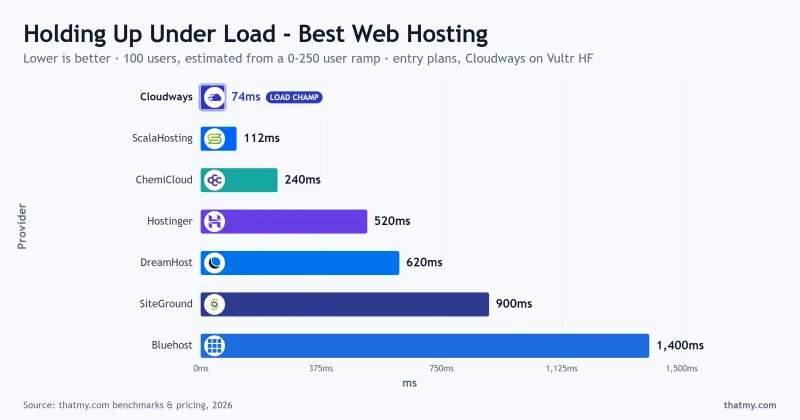
At 100 users the spread is nearly twenty-fold: 74ms on Cloudways against 1400ms on Bluehost. These 100-user figures are estimates read from the 0 to 250 user ramp, not a separate test at exactly 100 users, so read them as the shape of each host's curve, not a stopwatch reading. The shape is the point: a host that is quick with one visitor and slow with a hundred will feel fine in testing and slow on launch day.
Pick a Host in Five Questions
Most people ask which host to buy. The better first question is which kind of hosting, because the category decides more than the brand.
Static site, documentation or a landing page with no database? You may not need a web host at all: Cloudflare Pages, Netlify and Vercel all have free tiers for that.
#1 Cloudways: Best Overall
Cloudways
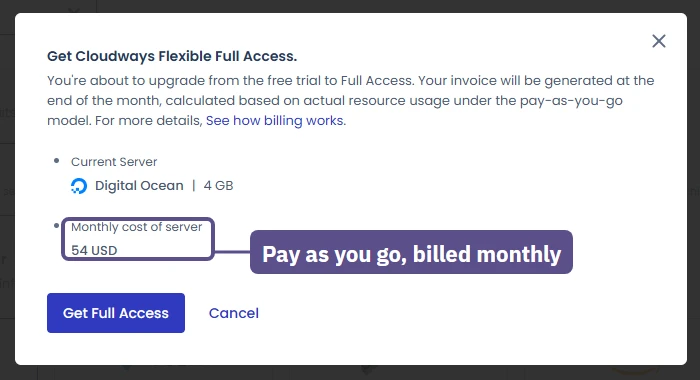
Managed cloud servers on DigitalOcean, Vultr, Linode, AWS or Google CloudCloudways does not own servers. It rents them from five clouds and runs the whole stack for you: Nginx and Apache, MariaDB, PHP-FPM, Redis, Varnish, free SSL, backups and one-click staging. You pick a cloud, a size and a region, and pay by the hour for what runs, invoiced at the end of the month. There is no intro price, so there is nothing to renew into: the DigitalOcean 1GB server is $11.00/mo this month and $11.00/mo in year three.
The benchmark put it at the top on speed and load. The Vultr High Frequency server answered in 48ms and ran the whole 0-250 user ramp with zero errors; the cheapest DigitalOcean 1GB server answered in 59ms with the same clean ramp. That is managed-hosting speed at shared-hosting renewal prices.
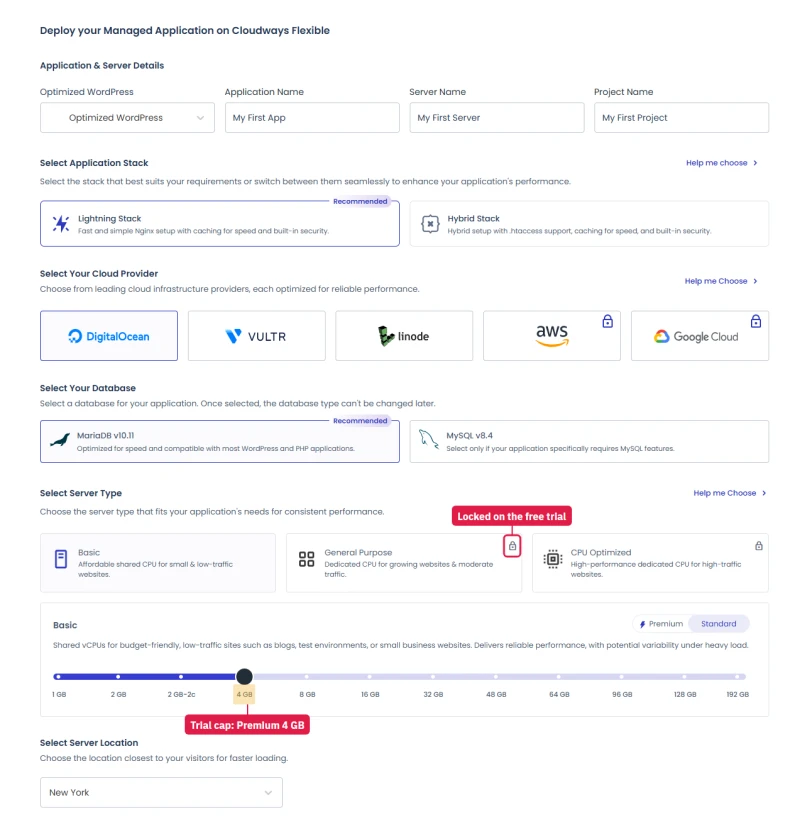
Using it as a customer added what a benchmark cannot show. The free trial runs one server size and locks AWS and Google Cloud until you verify a card. The launch screen promises a new server in about seven minutes, and mine was attacked by SSH brute-force attempts within hours of going live, which it blocked on its own. Scaling a server up takes the site offline for around twelve minutes, and the dashboard says so before you confirm. Support's free Standard plan answered my chat, but it does not cover your plugins or code.
- You want a server of your own for about the price of a shared plan's renewal.
- You want the same bill every month, month to month, with no term to prepay.
- Traffic may spike: you can scale up the same server in the dashboard.
- You will run more than one site: every app on a server shares it at no extra cost.
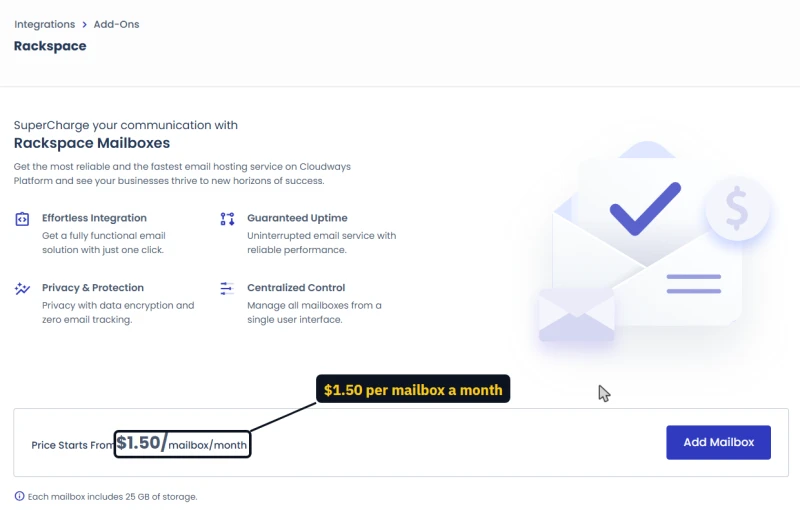
- You want email included. Cloudways sells Rackspace mailboxes separately, or you bring your own.
- You want cPanel. There is no cPanel and no file manager; you use SFTP, SSH or a plugin.
- You want a free domain. You buy the domain elsewhere.
- You need hands-on help with WordPress itself. Plugin and code problems are out of support's scope.
CLOUDS2022 adds $30 of credit. Start the Cloudways trial. The full hands-on write-up, with every screen, is in my Cloudways review.#2 ScalaHosting: Fastest VPS With a Control Panel
ScalaHosting
Managed cloud VPS with SPanel, plus shared plansScalaHosting's managed VPS was the fastest server in the benchmark that comes with a control panel. The Entry Cloud VPS answered in 38ms and averaged 25ms across the load ramp; the larger Build #2 server went as low as 21ms. It comes with SPanel, ScalaHosting's own control panel, so there is no cPanel licence on the bill, and email hosting is included.
Why second and not first: the price. Entry Cloud is $14.95/mo for the first 12 months and $24.95/mo if you prepay 36, and every term renews at $39.95/mo (+167% after the 12-month term). Cloudways is cheaper to start and does not jump. If you would rather have one bill that includes a panel and email, ScalaHosting is the better buy.
ScalaHosting also sells shared hosting. Mini is $2.95/mo for 36 months and renews at $11.95/mo (+305%); Start is $5.95/mo, renewing at $14.95/mo. Its entry shared plan answered in 64ms in the benchmark, the fastest shared result on this page, so it is a fair cheap start if you accept the renewal.
- You want VPS speed with a control panel, email and backups in one plan.
- You accept the jump to $39.95/mo once the first term ends.
- You may start on shared and move to a VPS with the same company later.
- You want to pay month to month without a renewal jump.
- You rely on cPanel habits; SPanel works differently.
- You need a data centre near a small market; check its locations first.
#3 Levamo: Managed WordPress for Stores
Levamo (formerly Rapyd Cloud)
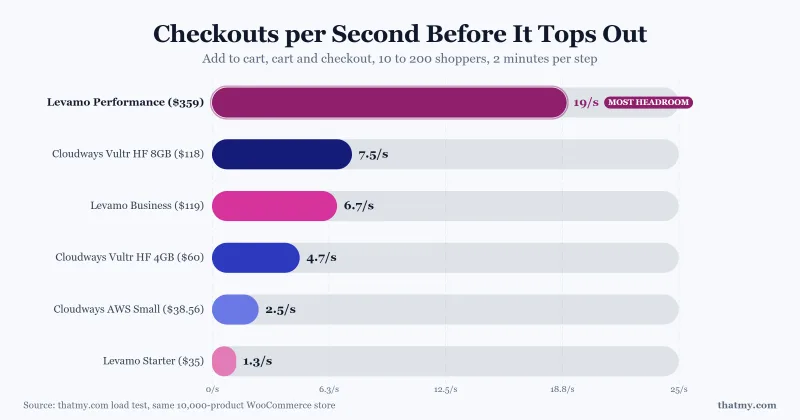
Managed WordPress built for stores, memberships and communitiesLevamo is built by the team behind BuddyBoss for sites where most pages cannot be cached: stores, courses and communities. I tested that directly. I built the same 10,000-product WooCommerce store on its Starter, Business and Performance plans and loaded carts, checkouts and searches until each plan topped out, next to three Cloudways servers running the identical store.
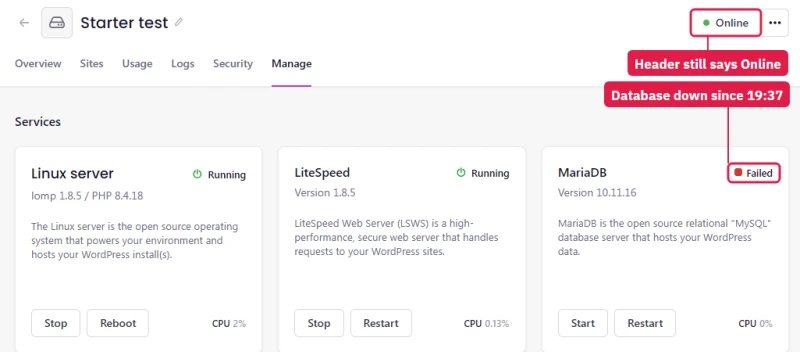
Business and Performance ran a busy store well and never lost their database. Performance, with Elasticsearch switched on, handled the most checkouts a second of anything I ran. Starter did not: it lost its database twice at 100 shoppers while the dashboard still said Online, and nothing warned me. Per dollar, every Cloudways server I ran gave more checkout capacity than any Levamo plan, so Levamo ranks for buyers who want a store run for them in one plan, not for the lowest cost per checkout.
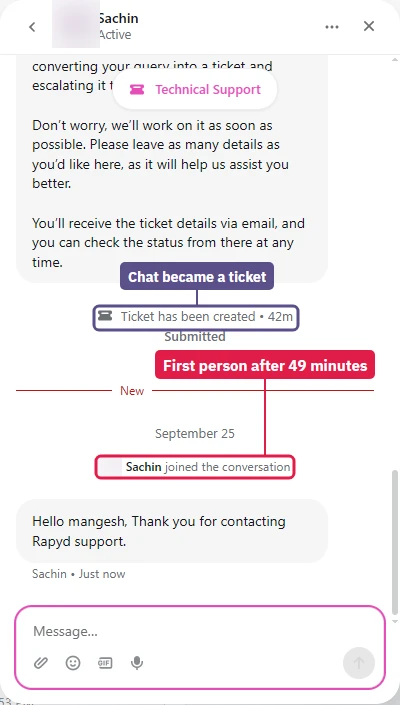
Support was the weak spot. The chat opened with an AI agent that turned it into a ticket, and the first person joined 49 minutes later. Once a person had the outage report, the database was back within two minutes.
- You run a WooCommerce store, a course or a community and want it managed for you.
- You need search that copes with typos: Elasticsearch runs on Performance.
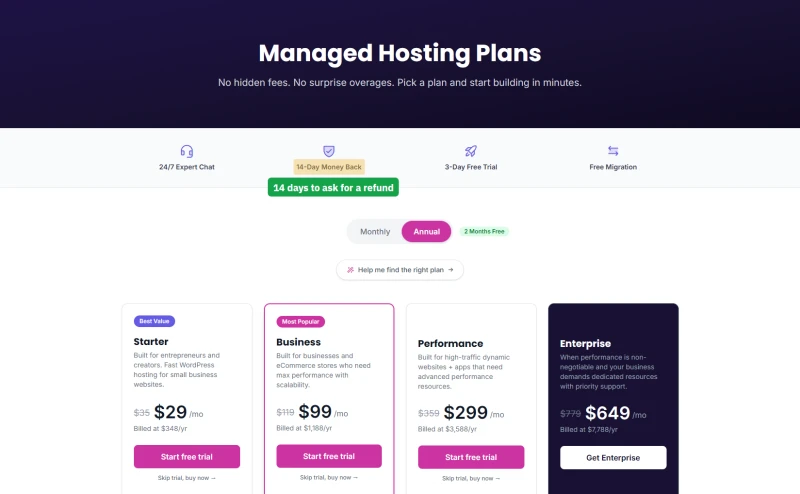
- You want a flat price: it renews at the rate it starts at.
- You want a way out: a 3-day free trial, then a 14-day money-back guarantee.
- Your store is busy and your budget points at Starter ($29.00/mo); it could not hold 100 shoppers.
- You want the most capacity per dollar; a Cloudways server gave more.
- You need a data region outside US East or Ireland.
#4 Hostinger: Cheapest Plan Worth Buying
Hostinger
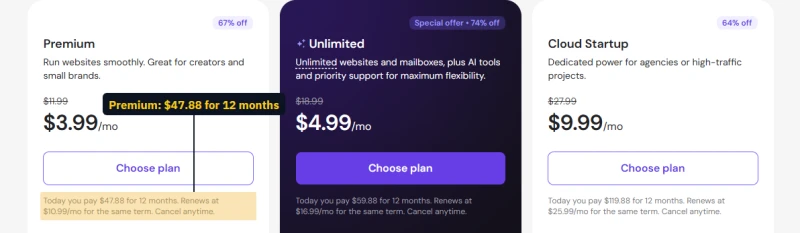
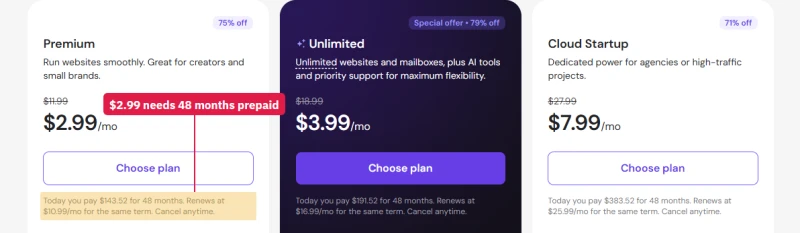
Shared, cloud and KVM VPS plans with its own hPanelHostinger is the cheapest host on this page I would still put a small site on. Premium costs $3.99/mo for the first 12 months, or $2.99/mo if you prepay 48 months, and renews at $10.99/mo; paid monthly, it is $11.99/mo from the start. It runs on LiteSpeed with Hostinger's own hPanel, which is easier than cPanel for a beginner.
It is not fast. Premium answered in 276ms from New York, more than five times Cloudways' figure, and at the 100-user point of the load ramp (an estimate from the ramp) it reached 520ms. Uptime was 99.95% over 54 days. For a personal blog or a small brochure site that is fine; for a shop it is not.
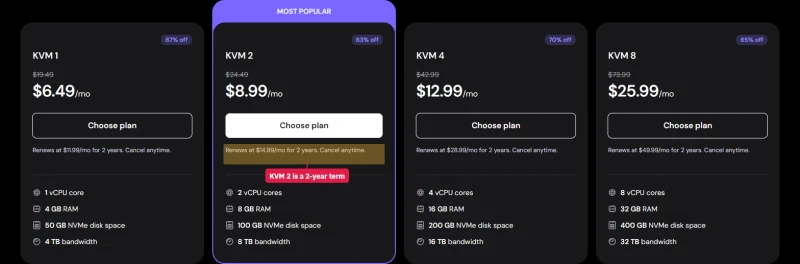
The plan I would look at before leaving Hostinger is its KVM 2 VPS: $8.99/mo on a 2-year term, renewing at $14.99/mo, and 141ms in the benchmark. It is unmanaged, so you run the server yourself.
- You want the lowest first-year cost for a small site.
- You want an easy panel, email and a website builder included.
- You may move to a cheap VPS later without changing company.
- The site takes money or expects bursts of traffic.
- You do not want the price to jump +175% after the first term.
#5 ChemiCloud: Fastest Budget Shared Plan
ChemiCloud
cPanel shared hosting on LiteSpeedChemiCloud's Starter plan was the fastest budget shared plan in the benchmark after ScalaHosting's: 84ms from New York, and 240ms at the 100-user point of the ramp, where Hostinger Premium reached 520ms. Its Turbo plan went further, to 69ms. It uses cPanel, so anyone who has used another shared host will find their way around.
The catch is the same as every shared plan here: Starter is $3.49/mo for the first 12 months and renews at $14.95/mo (+328%); Pro renews at $19.95/mo. ChemiCloud's reputation rests on its support; I have not timed it yet, so I am not ranking it on that.

#6 Kinsta: Premium Managed WordPress
Kinsta
Managed WordPress on Google Cloud with Cloudflare in frontKinsta is what managed WordPress looks like when the price is not the constraint. It runs on Google Cloud, puts Cloudflare in front of every site, and its MyKinsta dashboard has staging, backups and performance monitoring built in. In the benchmark the Single 20GB plan answered in 64ms and had the best page scores of the managed hosts (PageSpeed 93), with 99.99% uptime.
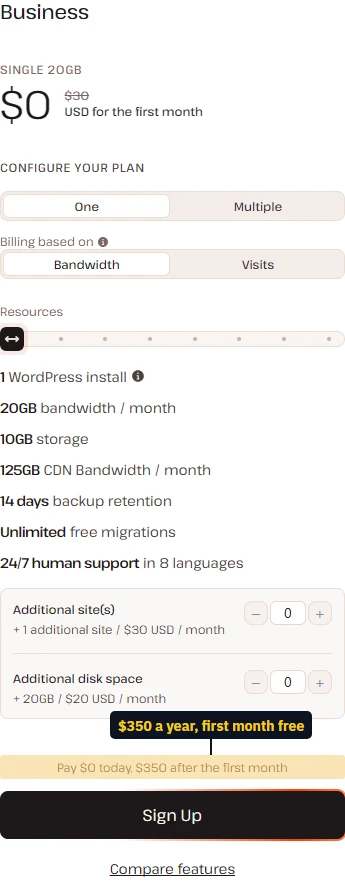
It ranks sixth because Cloudways matched it for speed at well under half the price, and because Kinsta hosts WordPress only, sizes plans by monthly visits and storage, and includes no email. The price does not rise at renewal: Single 20GB is $29.17/mo billed yearly, now and later. When I last checked, Kinsta was also waiving the first month on this plan.
#7 hosting.com: Cheap Only Before Renewal
hosting.com (formerly A2 Hosting)
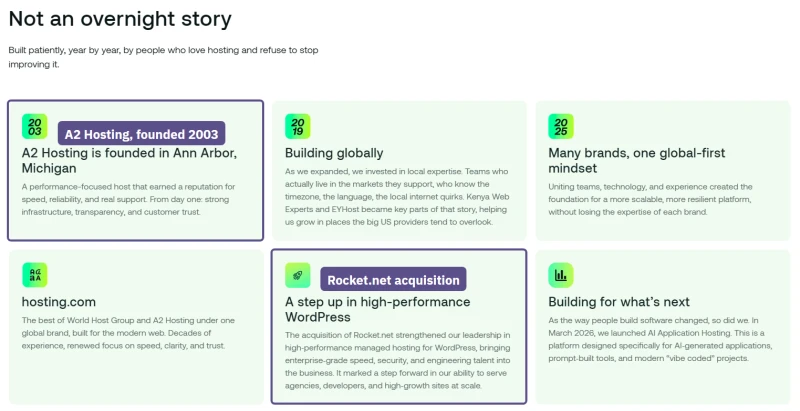
cPanel shared hosting, VPS and managed WordPresshosting.com is the old A2 Hosting, now part of World Host Group. I reviewed it on my own account: a WordPress install, staging, the checkout, and support tickets. The install works, but a fresh WordPress came with 13 plugins, 12 of them active, under two upsell banners, and staging is not included on the Starter plan.
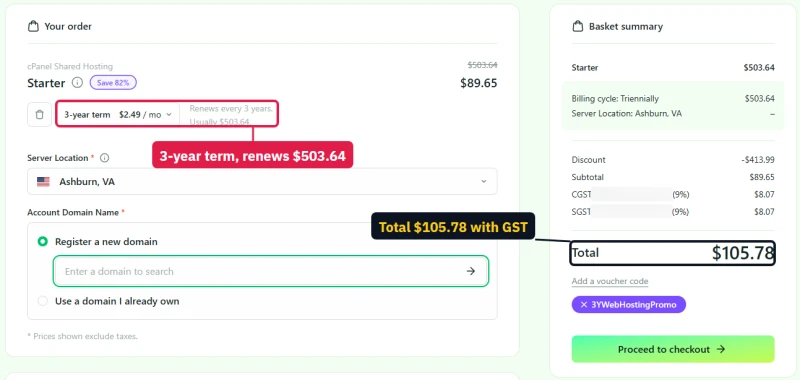
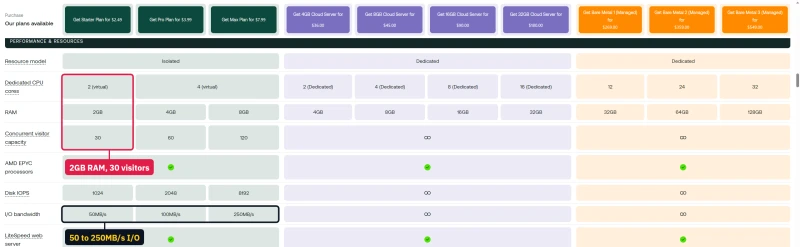
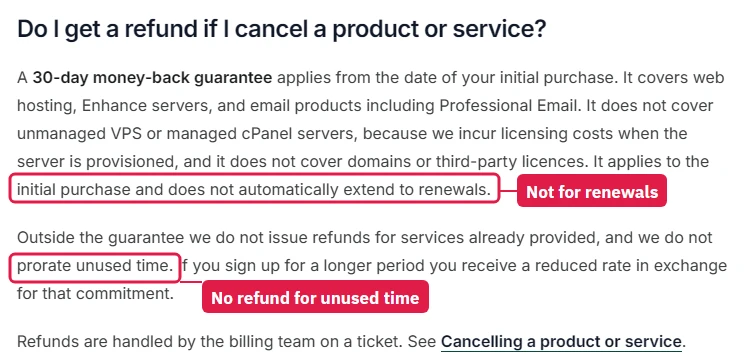
Speed was middling: Starter answered in 172ms and reached 640ms at the 100-user point of the ramp (an estimate from the ramp). hosting.com's own plan table limits Starter to 30 visitors at once. The bigger issue is money. The checkout I reached showed three years for $89.65, then $503.64 every three years after that, and the money-back guarantee covers the first purchase only, never a renewal.
It is a reasonable buy only if you prepay, use the cheap term, and plan to move before it renews. Its VPS plans benchmarked much better (the Cloud VPS 8GB answered in 79ms), but they are a different product at a different price.
#8 SiteGround: Good Tools, Steep Renewal
SiteGround
Shared hosting on Google Cloud with its own Site Tools panelSiteGround's Site Tools dashboard is one of the nicest on shared hosting, and its WordPress tools (caching, security, staging on higher plans, automatic updates) are good. The benchmark was not kind: StartUp answered in 312ms, slower than every host ranked above it, and it reached 900ms at the 100-user point of its ramp.
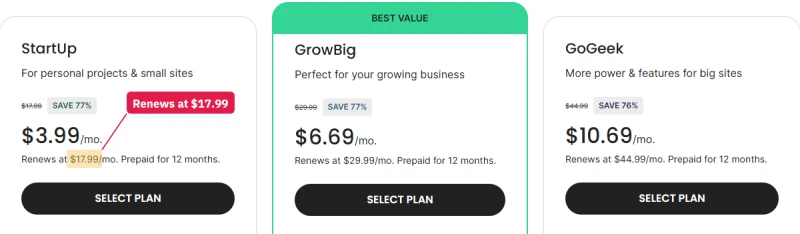
The renewal is the steepest on this page: StartUp goes from $3.99/mo to $17.99/mo (+351%), GrowBig from $6.69/mo to $29.99/mo. At renewal, StartUp costs more than a Cloudways server that was faster in every test.
#9 Rocket.net: Edge Cache for Content Sites
Rocket.net
Managed WordPress with Cloudflare Enterprise on every planRocket.net's speed story is the Cloudflare Enterprise edge in front of every site. For pages that can be cached, visitors are answered from the edge, and our edge measurement was 32ms. That number is not comparable with the origin figures of the other hosts: it measures Cloudflare, not the server. I have no origin-only test for Rocket.net yet, so I cannot tell you how its server does on a checkout or a logged-in page, where the cache does not help.
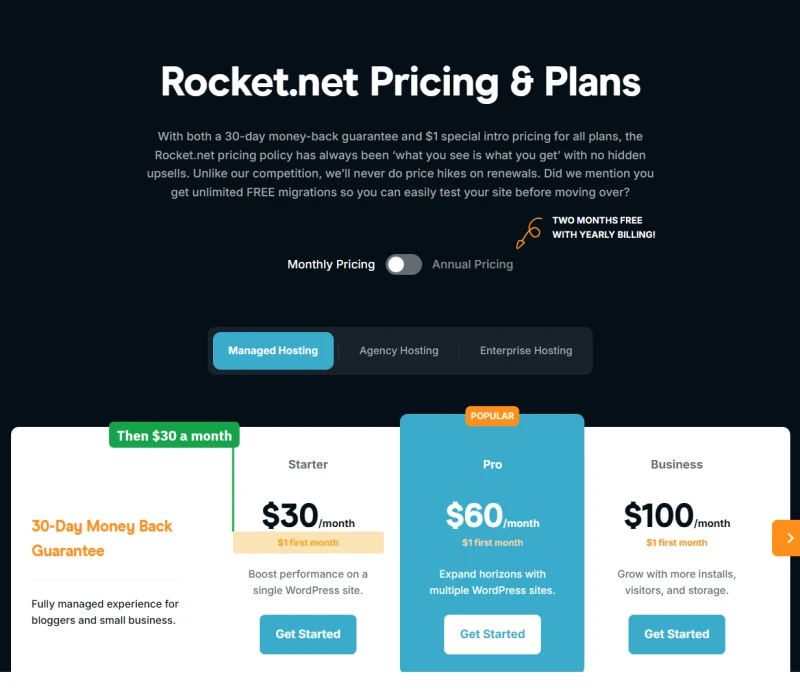
Rocket.net is now part of the same group as hosting.com, according to hosting.com's own company timeline. Starter is $25.00/mo billed yearly and does not rise at renewal. Paid monthly it is $30.00/mo, and the first month costs $1, with a 30-day money-back guarantee.
#10 WP Engine: Built for Agencies
WP Engine
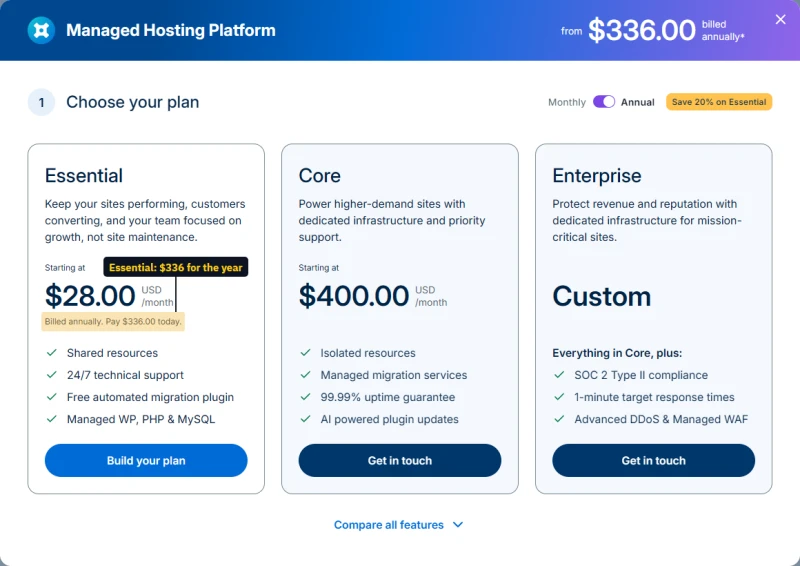
Managed WordPress with developer toolingWP Engine sells a workflow more than a server: staging and production environments, Git and SSH, the Local development app, and themes and plugins agencies already use. For a team running many client sites, that can be worth more than raw speed.
On raw speed it was behind: Startup, the entry plan when I benchmarked it (Essential has since replaced it), answered in 242ms and scored 59 on mobile PageSpeed, the lowest of the managed hosts. For one site, Cloudways was faster at less than half the price.
#11 Bluehost: A Big Name, Slow Under Load
Bluehost
Shared hosting from Newfold DigitalBluehost is at the top of many hosting lists and near the bottom of this one, because of the benchmark. Its entry plan answered in 287ms, reached 1400ms at the 100-user point of the ramp (an estimate from the ramp), averaged 3125ms across the whole ramp, and scored 39 on mobile PageSpeed. Uptime was 99.9%, the lowest outside the GoDaddy and HostGator plans.
The price is fair on paper, $3.99/mo for 36 months then $9.99/mo, but only if you prepay three years. For about the same money, ChemiCloud Starter answered more than three times faster from New York (84ms).

#12 GoDaddy and HostGator
GoDaddy Economy and HostGator Hatchling
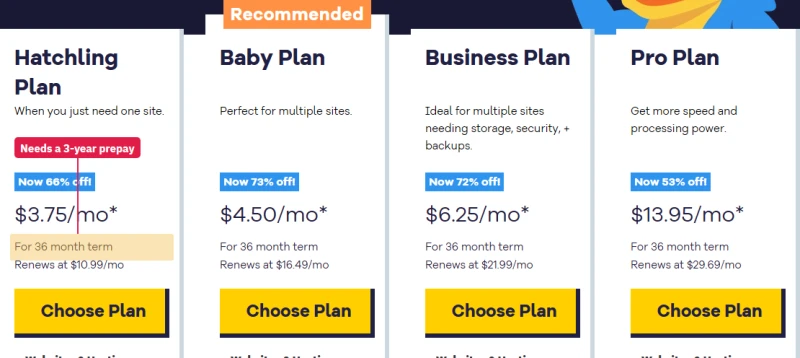
Entry shared hosting from two household namesThese two entry plans were the slowest and the least reliable in the benchmark. GoDaddy Economy answered in 369ms and stayed up 99.83% of 54 days; HostGator Hatchling answered in 332ms with 99.87%. Both raise the price at renewal: GoDaddy Economy from $5.99/mo to $11.99/mo, HostGator Hatchling from $3.75/mo to $10.99/mo.
HostGator belongs to Newfold Digital, the same group as Bluehost. GoDaddy is a fine domain registrar; if your domain is there, keep it there and point it at a better host.
What Three Years Actually Cost
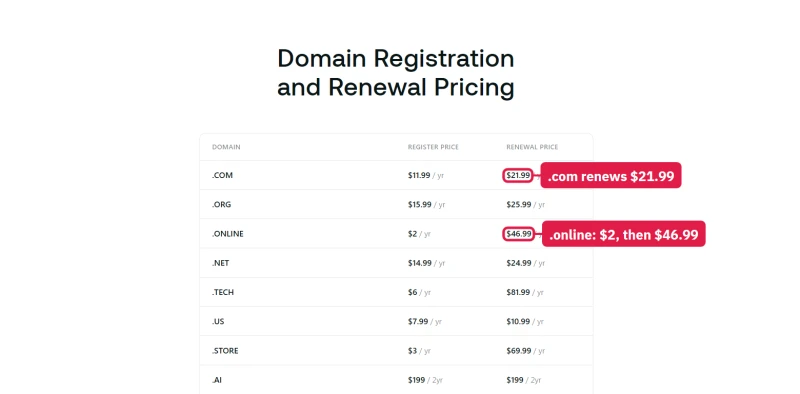
An intro price tells you what the first bill is. This table tells you what the first three years are: the intro rate for as long as its term lasts, then the renewal rate for the rest, computed from each host's current prices. Cheapest first.
| Plan | Type | First price | Intro term | Renews at | 36 months |
|---|---|---|---|---|---|
| ScalaHosting Mini | Shared | $2.95/mo | 36 months | $11.95/mo | $106.20 |
| HostGator Hatchling | Shared | $3.75/mo | 36 months | $10.99/mo | $135.00 |
| Bluehost Starter | Shared | $3.99/mo | 36 months | $9.99/mo | $143.64 |
| GoDaddy Economy | Shared | $5.99/mo | 36 months | $11.99/mo | $215.64 |
| Hostinger Premium | Shared | $3.99/mo | 12 months | $10.99/mo | $311.64 |
| hosting.com Starter | Shared | $2.99/mo | 12 months | $13.99/mo | $371.64 |
| Hostinger KVM 2 | VPS | $8.99/mo | 24 months | $14.99/mo | $395.64 |
| Cloudways DigitalOcean 1GB | Managed cloud | $11.00/mo | month-to-month | $11.00/mo | $396.00 |
| ChemiCloud Starter | Shared | $3.49/mo | 12 months | $14.95/mo | $400.68 |
| SiteGround StartUp | Shared | $3.99/mo | 12 months | $17.99/mo | $479.64 |
| ScalaHosting Entry Cloud VPS | Managed VPS | $24.95/mo | 36 months | $39.95/mo | $898.20 |
| Rocket.net Starter (billed yearly) | Managed WordPress | $25.00/mo | 12 months | $25.00/mo | $900.00 |
| Levamo Starter (billed yearly) | Managed WordPress | $29.00/mo | 12 months | $29.00/mo | $1,044.00 |
| Kinsta Single 20GB (billed yearly) | Managed WordPress | $29.17/mo | 12 months | $29.17/mo | $1,050.12 |
| WP Engine Essential (billed yearly) | Managed WordPress | $28.00/mo | 12 months | $35.00/mo | $1,176.00 |
Two things stand out. The cheapest three years belong to shared plans with a 36-month intro term: the low rate covers the whole period, which is exactly why those hosts ask you to prepay it. And the plans with a 12-month intro term (hosting.com, SiteGround, ChemiCloud, Hostinger) spend two of the three years on the renewal rate, which is where a SiteGround StartUp ends up costing more than a Cloudways server. The full breakdown across 15 providers is in hosting renewal pricing.

Shared, VPS, Cloud or Managed?
| Type | What you get | Fits | Pick from this page |
|---|---|---|---|
| Shared | A slice of a server shared with many other accounts | Blogs, portfolios, brochure sites | Hostinger Premium, ChemiCloud Starter |
| Managed VPS | Your own CPU and RAM, with a panel and support | Business sites, several sites, email on the same bill | ScalaHosting Entry Cloud VPS |
| Managed cloud | A cloud server you pick and scale, stack run for you | Growing sites, stores, agencies | Cloudways |
| Managed WordPress | WordPress run for you, priced by visits or sites | WordPress sites where you want no server work | Kinsta, Levamo, Rocket.net, WP Engine |
| Static / edge | Pre-built files served from a CDN, no server | Docs, landing pages, Jamstack sites | Cloudflare Pages, Netlify, Vercel |
Each type is explained in depth, with its limits, in web hosting types explained.
Best Host by Use Case
| Site | Host and plan | Why | Price |
|---|---|---|---|
| First site, small budget | Hostinger Premium | Cheapest plan I would still use, easy panel | $3.99/mo, renews $10.99/mo |
| Blog or business site | Cloudways DigitalOcean 1GB | Own server, same price every month | $11.00/mo flat |
| Business site with email | ScalaHosting Entry Cloud VPS | Panel and email included | $24.95/mo, renews $39.95/mo |
| WooCommerce store | Levamo Business, or Cloudways Vultr HF 4GB | Both held a busy store in my test | $99.00/mo / $60.00/mo flat |
| Premium WordPress, no server work | Kinsta Single 20GB | Fast, polished dashboard, flat price | $29.17/mo billed yearly |
| Cached content site | Rocket.net Starter | Cloudflare Enterprise edge on every plan | $25.00/mo billed yearly |
| Agency client sites | Cloudways, or WP Engine for its workflow | Many apps per server, or staging and Git built in | From $11.00/mo / $46.00/mo |
| Static site or docs | Cloudflare Pages | No server needed | Free tier |
If you are still unsure, start on Cloudways' smallest server. It costs $11.00/mo, you can scale it up in place, and there is no long term to be stuck in if you change your mind.

FAQ
What is the best web hosting in 2026?
Cloudways, for most sites that need to stay fast when traffic arrives. On Vultr High Frequency it answered in 48ms from New York with no CDN and held a 0-250 user ramp with zero errors in our benchmark, and its DigitalOcean 1GB server starts and renews at $11.00/mo. I also reviewed it in full as a paying customer. If you want a control panel and email included, ScalaHosting's managed VPS is the runner-up. If the budget is under $5 a month, Hostinger Premium is the cheapest plan I would use.
Did you test every host on this list?
Yes. All 12 ran the same WordPress test site on a real plan: origin TTFB from 10 locations, a 0 to 250 user load ramp and 54 days of uptime. Three I also reviewed in full from a customer account: Cloudways and hosting.com on my own card, and Levamo (with a WooCommerce store test) on test plans Levamo provided. Each entry says which tests it has.
Why is Cloudways ranked above ScalaHosting when ScalaHosting's VPS is faster?
ScalaHosting's Entry Cloud VPS answered in 38ms, faster than Cloudways. Cloudways ranks first for three reasons: it starts at $11.00/mo month to month against $14.95/mo for ScalaHosting's first 12 months, which then renews at $39.95/mo, it renews at the price it starts at, and I have reviewed it in full as a customer. Pick ScalaHosting if you want cPanel-style email and SPanel in the box.
Is Hostinger good for the price?
For a small site, yes. Premium costs $3.99/mo on a 12-month term ($2.99/mo if you prepay 48 months) and renews at $10.99/mo (+175%). It answered in 276ms from New York in our benchmark, slower than the managed hosts, with 99.95% uptime. If you outgrow it, Hostinger's KVM 2 VPS at $8.99/mo measured 141ms.
Which web host has no renewal price increase?
The hosts that bill for a server or a managed plan at a flat rate: Cloudways ($11.00/mo to start and renew), Kinsta, Rocket.net, WP Engine and Levamo. Every shared plan on this page renews higher: SiteGround StartUp +351%, hosting.com Starter +368%, ScalaHosting Mini +305%, Hostinger Premium +175% and Bluehost Starter +150%.
Is shared hosting fast enough for a business site?
For a brochure site or a small blog, often yes. Under load it is where the gap opens: at the 100-user point of our load ramp, estimated from the ramp, Bluehost's entry plan reached 1400ms and SiteGround StartUp 900ms, against 74ms on Cloudways Vultr HF and 240ms on ChemiCloud's shared Starter. If the site takes money, start on a VPS or managed cloud.
Does the host include email?
Shared hosts (Hostinger, ChemiCloud, ScalaHosting, SiteGround, Bluehost, hosting.com) include mailboxes. Cloudways, Kinsta, Rocket.net and WP Engine do not; on Cloudways I found Rackspace mailboxes sold per mailbox inside the console. For a business, a separate email service such as Google Workspace or Zoho keeps your mail when you change hosts.
What is the best web host for WooCommerce?
From my own store test: Levamo Business and Performance never lost their database under 200 shoppers, and Performance handled the most checkouts a second of anything I ran. Per dollar, the Cloudways servers I ran beside them gave more checkout capacity. Avoid the cheapest managed plans for a store: Levamo Starter lost its database twice at 100 shoppers.
Should I pick Bluehost or GoDaddy because they are well known?
Not on our numbers. Their entry plans had the slowest origin TTFB and the lowest uptime in the benchmark (Bluehost 99.9%, GoDaddy Economy 99.83% over 54 days), and both raise the price at renewal. A known name buys no speed.
How often is this ranking updated?
I re-test a host when something changes that would move its result: new hardware, a new plan line-up, a big price change or a major outage. Prices are re-checked more often, and the changelog lists every update.