

SiteGround Cloud Review 2026: If You Read Nothing Else
SiteGround Cloud is a good managed cloud for sites that have outgrown shared hosting. For almost everyone else, the shared GrowBig plan is the better buy.
Cloud starts at $100 a month for 4 CPU cores, 8GB of RAM and 40GB of SSD on Google Cloud, with no intro discount. GrowBig, SiteGround's best-value shared plan, is $6.69/mo intro and $29.99/mo after the first term. Even at that renewal price, Cloud's entry plan costs 3.3 times as much a month.
If you run one WordPress site, buy GrowBig, not Cloud. If you run a store, an agency portfolio or a site that keeps hitting shared-hosting limits, Cloud gives you dedicated CPU and RAM, a dedicated IP, autoscaling and 24/7 priority support.
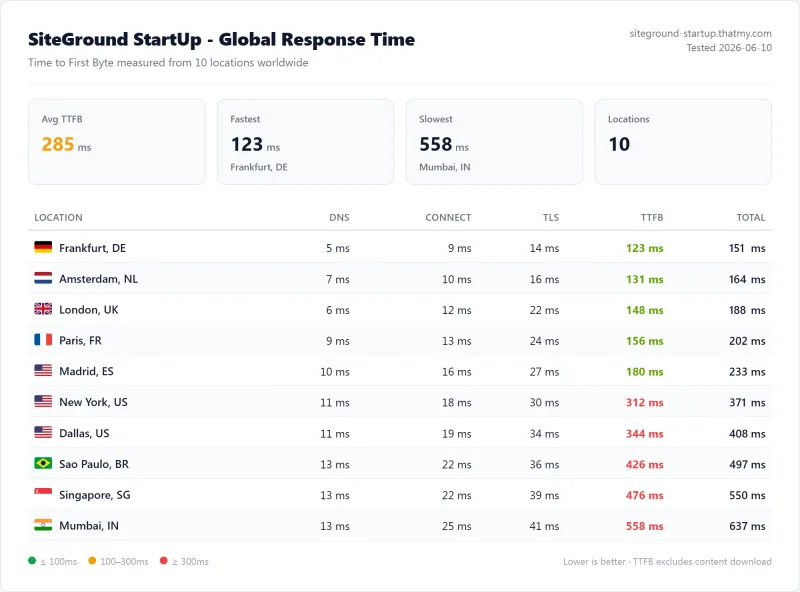
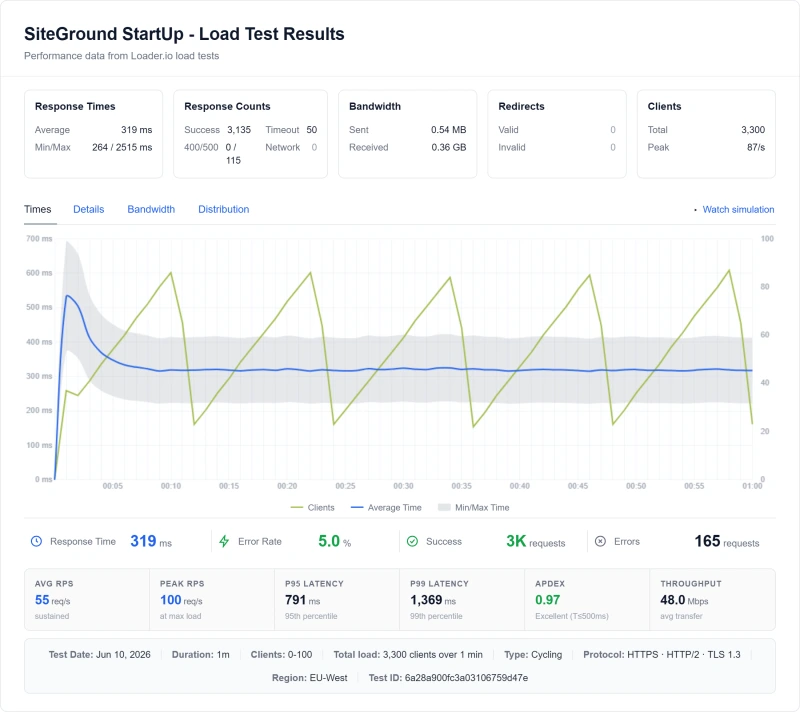
Our speed numbers are from SiteGround's StartUp plan: 312ms from New York and 123ms from Frankfurt (origin, no CDN, to our Frankfurt test server), an average of 900ms at 100 simultaneous clients, and 99.97% uptime over 54 days.
Buy SiteGround Cloud if you:
- Have outgrown a shared plan and want dedicated CPU and RAM
- Host many client sites and want white-label tools and 24/7 priority support
- Run a store and want resources that belong to your site alone
- Want a managed dashboard (Site Tools) instead of managing a server yourself
Buy the cheaper shared plan (GrowBig) if you:
- Run one WordPress site or a few small ones
- Want staging and on-demand backups without paying $100 a month
- Are happy to move at renewal if the price jump bothers you
SiteGround Cloud Plans: What You Actually Get
SiteGround Cloud has four fixed plans and a custom builder. There is no intro discount: you pay the listed price from the first month. Prices are from SiteGround's cloud page, all listed as paid monthly with 5TB of data transfer.
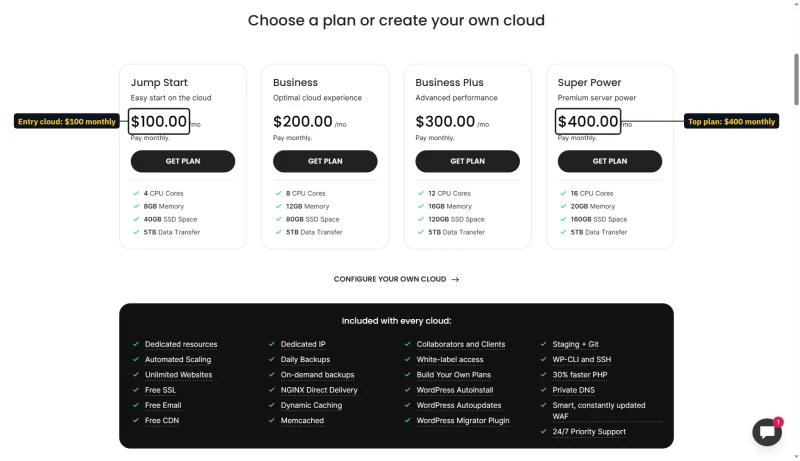
Every Cloud plan includes the same features; only the server size changes:
- Google Cloud servers with dedicated CPU and RAM, and unlimited websites
- Free CDN and free email
- Staging and Git in one click
- 7 days of automated daily backups, with one-click restore
- 24/7 priority support by live chat, phone and tickets
- 99.9% uptime promise and a 14-day money-back guarantee
- A dedicated IP, white-label access and a Smart WAF
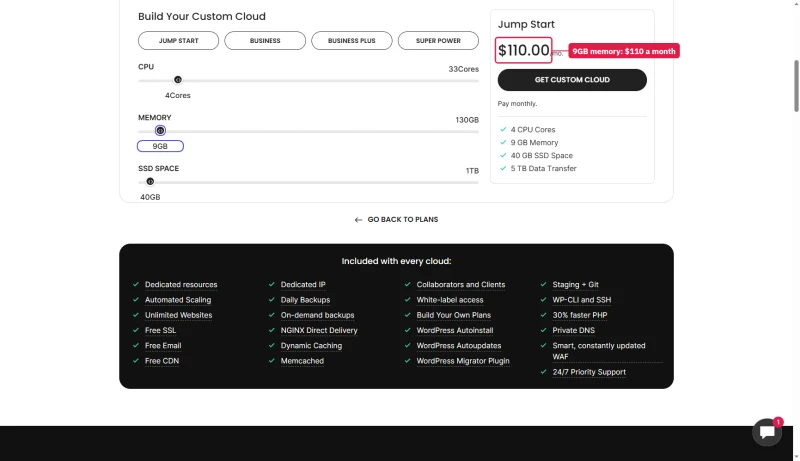
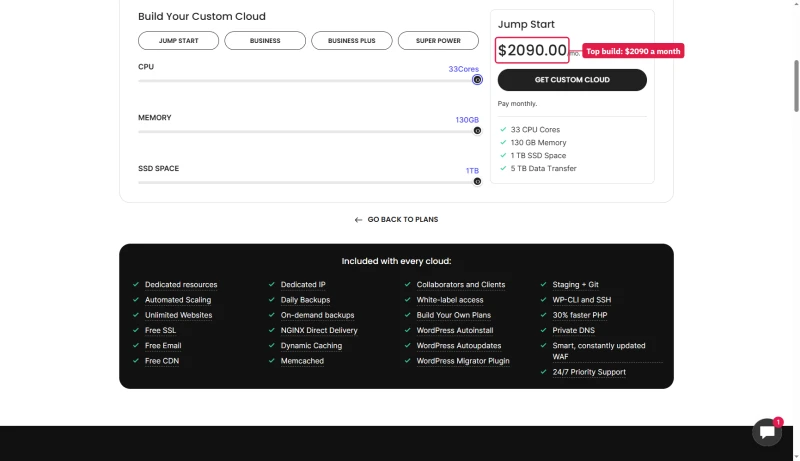
Need a size between the plans? The builder prices any size the same way: each extra CPU core, each extra GB of RAM and each extra 20GB of SSD adds $10 a month. At the top, 33 cores, 130GB of RAM and 1TB of SSD cost $2,090 a month.
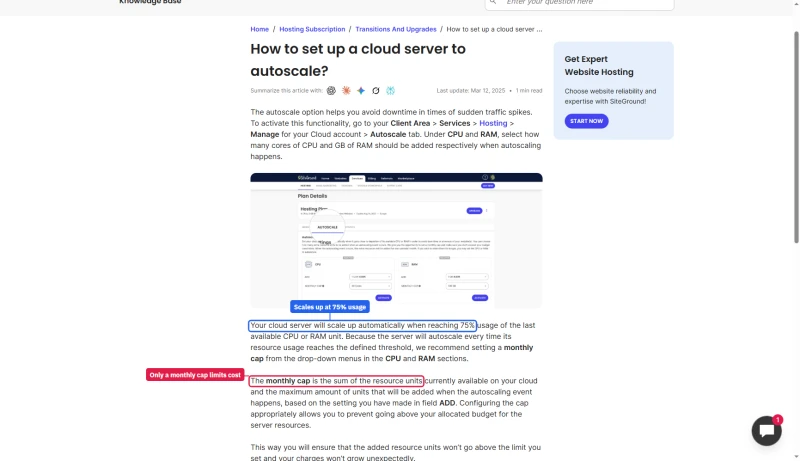
Autoscaling adds CPU or RAM by itself when usage reaches 75% of the last unit. Set a monthly cap in the Autoscale tab, because that cap is the only limit on what autoscaling adds to your bill.
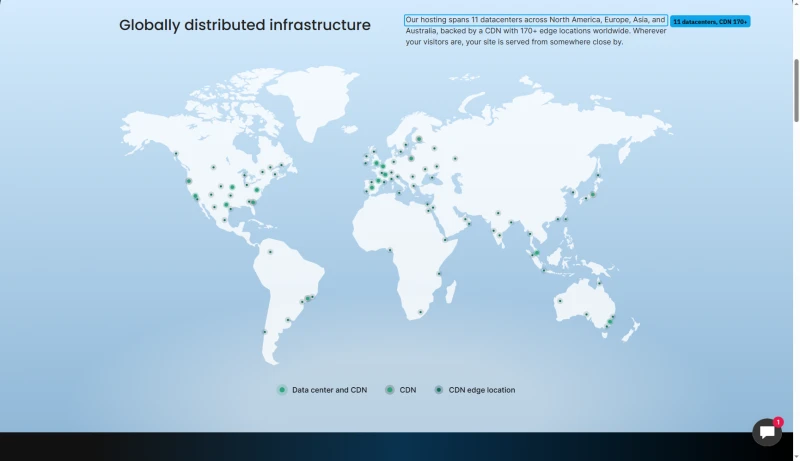
SiteGround runs 11 data centers on four continents: Ashburn, Council Bluffs, Dallas and Los Angeles in the US; London, Madrid, Eemshaven, Frankfurt and Paris in Europe; plus Singapore and Sydney, backed by a CDN with 170+ edge locations. Pick the one closest to your visitors when you sign up. Cloud runs on Google Cloud data centers in the USA, Europe, Asia and Australia.
SiteGround Shared Plans: What Most People Actually Buy
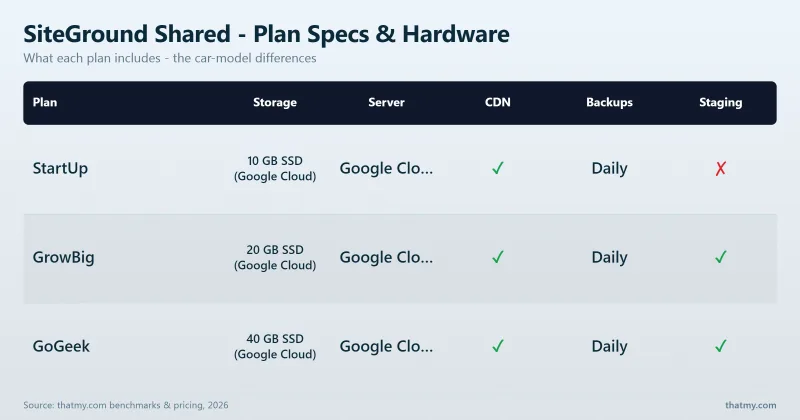
Most SiteGround customers buy one of three shared plans: StartUp, GrowBig or GoGeek. They are cheaper than Cloud, run on SiteGround's own Site Tools dashboard, and carry a 30-day money-back guarantee. Here is what each costs and what you get.
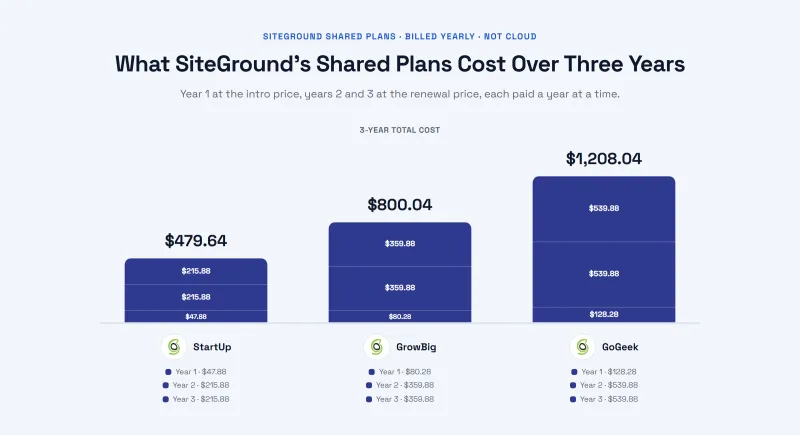
All three are sold as 12 months prepaid. The three-year cost counts the first year at the intro price and the rest at the renewal price.
Which shared plan to pick
- GrowBig is the one to buy. You get staging for testing changes before they go live, on-demand backups, faster PHP and room for more than one site.
- StartUp is fine for a single small site that you will not change often. It has no staging.
- GoGeek makes sense when you want Git, priority support or more CPU headroom. At $44.99/mo renewal, look at Cloud pricing and at a ScalaHosting VPS before you commit.
SiteGround Pricing: The Renewal Trap
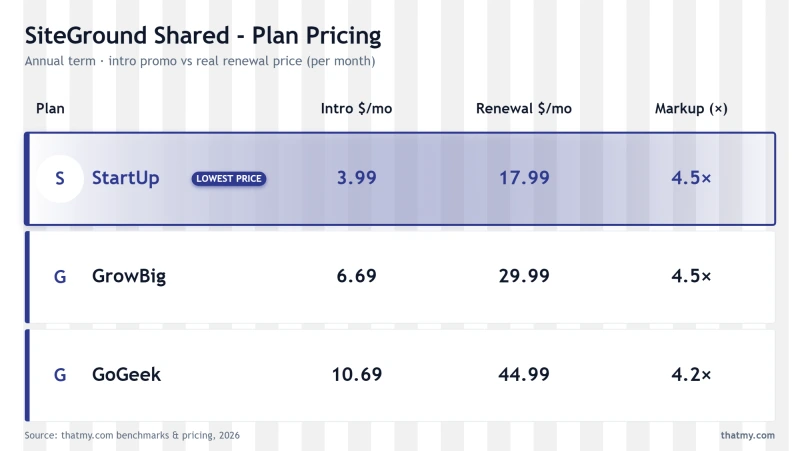
SiteGround's pricing has two parts: shared plans that start cheap and renew at several times the intro price, and Cloud plans that cost $100 a month or more from day one.
Shared: the renewal step
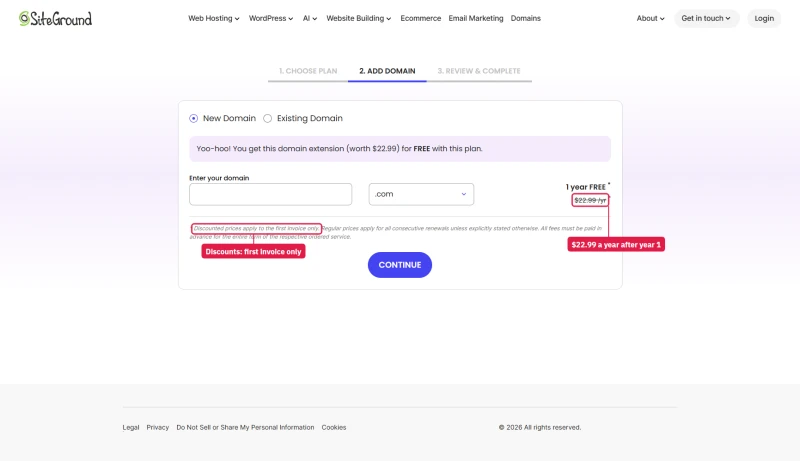
StartUp goes from $3.99/mo to $17.99/mo, GrowBig from $6.69/mo to $29.99/mo, and GoGeek from $10.69/mo to $44.99/mo. SiteGround's order form says discounts apply to the first invoice only.
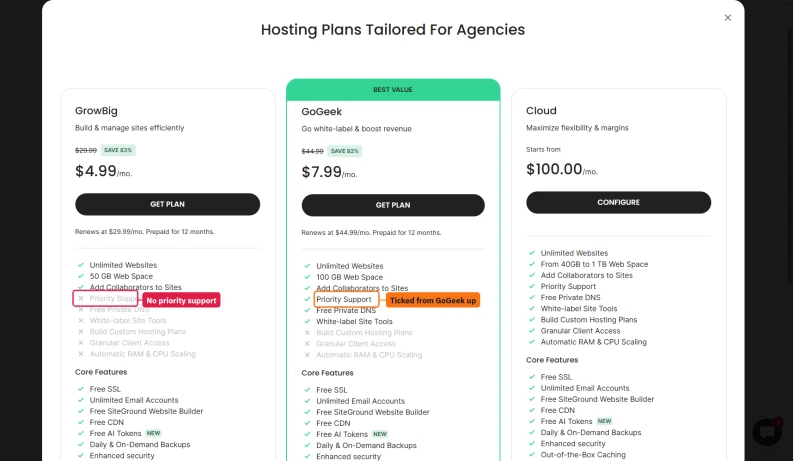
SiteGround's shared page also runs a sale: StartUp at $2.99/mo, GrowBig $4.99/mo and GoGeek $7.99/mo, with a free domain and free website transfer. Both versions renew at the same price, prepaid for a year.
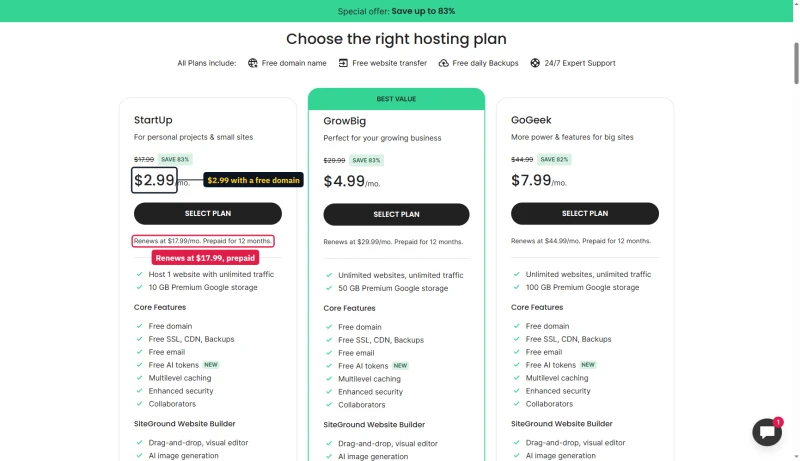
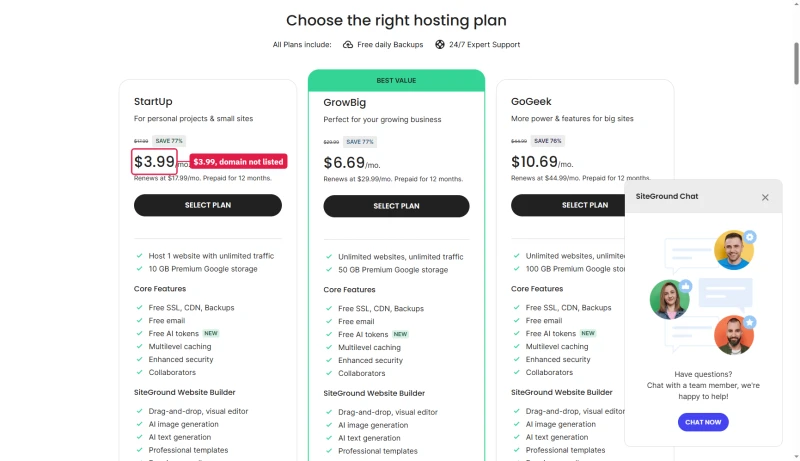
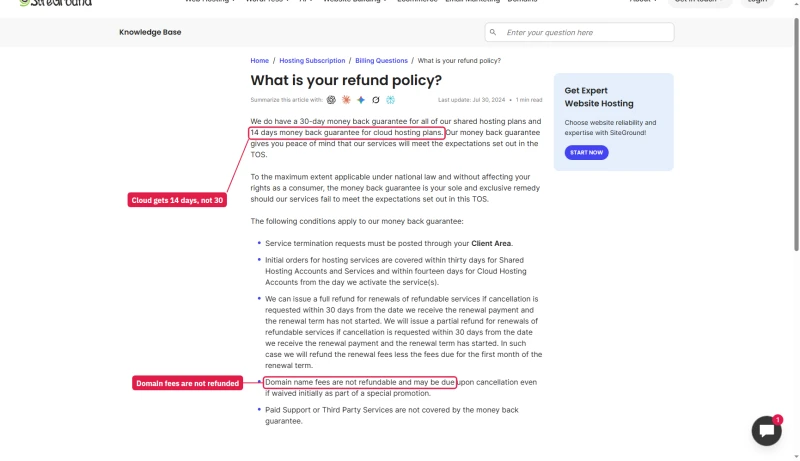
The free domain is free for the first year only. The order form prices a .com at $22.99 a year after that. SiteGround's refund policy adds that domain fees are not refundable and may be charged on cancellation even when the domain was free.
Cloud: no intro, no jump
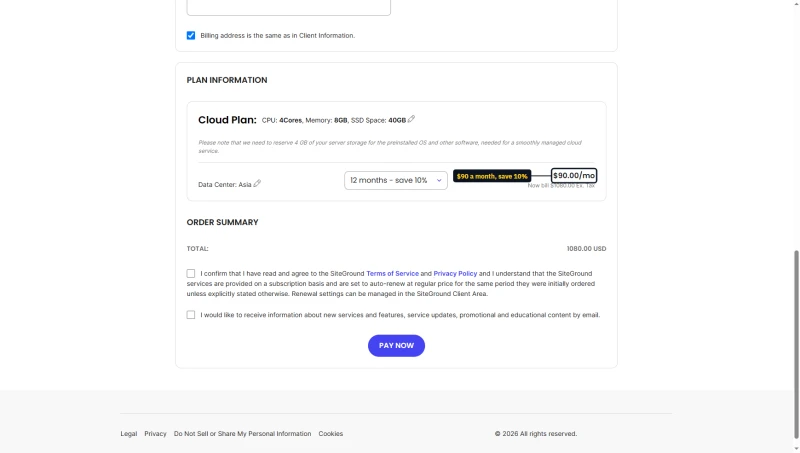
Cloud plans have no intro pricing, so there is no renewal jump. Jump Start is $100 a month from the first month. Paying ahead is the only discount: the order form takes 5% off for three months and 10% off for six or twelve, so Jump Start on a year is $90 a month, billed $1,080 at once. The plan auto-renews at the regular price for the same period.
The refund window is 14 days on Cloud and 30 days on shared plans, counted from activation.
Over three years Jump Start costs $3,600 paid monthly or $3,240 paid a year at a time. The other two rows are different sizes, so read the table for the price level.
SiteGround Renewal Pricing Tips, Avoid the Trap
The SiteGround renewal reality
A StartUp plan costs $3.99/mo at intro and renews at $17.99/mo, a +351% increase. GrowBig renews at $29.99/mo. Here is how to limit the damage.
Tip #1: Choose your renewal term
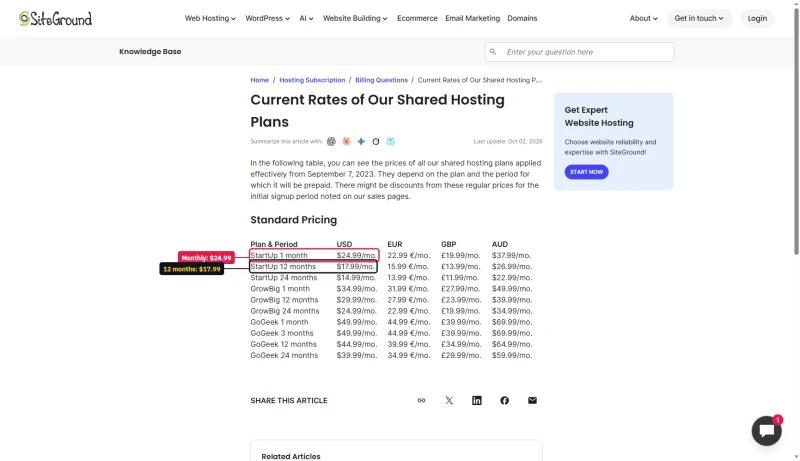
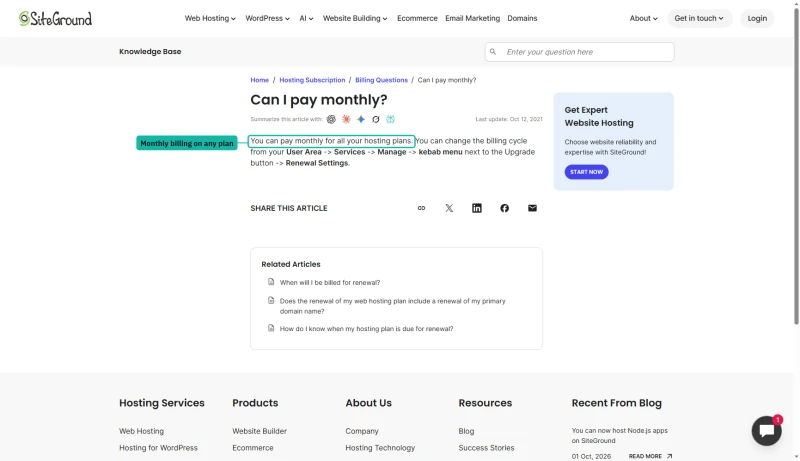
New shared plans are sold on one term only: 12 months prepaid. The choice comes at renewal. SiteGround's knowledge base lists the regular rate for each term, and you can switch any plan to monthly billing from Renewal Settings in the User Area. Monthly is the dearest way to pay, two years the cheapest.
Tip #2: Compare before you renew
After the intro price ends, check what the same money buys elsewhere:
- SiteGround GrowBig renewal: $29.99/mo
- ScalaHosting Start: $5.95/mo intro, $14.95/mo at renewal
- ChemiCloud Turbo: $5.49/mo intro, $23.95/mo at renewal
- Cloudways Vultr HF 2GB: $30.00/mo, month-to-month
See our ScalaHosting vs SiteGround comparison.
Tip #3: Cloud has no renewal markup
Cloud costs $100 a month from day one and renews at the same price, which is more predictable than a shared plan's renewal step.
Tip #4: Ask support before you renew
Contact SiteGround support before the renewal date and ask what it can offer. A discount is not promised, but asking costs nothing.
Speed: TTFB by Test Location (StartUp)
Our speed numbers are from SiteGround's StartUp plan. How we test.
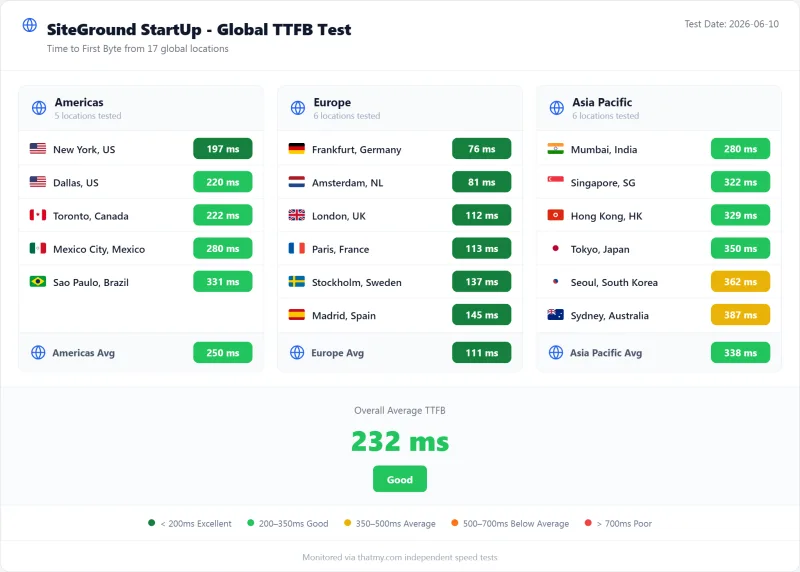
StartUp answered in 312ms from New York, 123ms from Frankfurt and 148ms from London. Those are origin figures (CDN off) from each city to our SiteGround test server in Frankfurt, so the nearer you are to your data center, the better your result.

What it means for you: choose the SiteGround data center closest to most of your visitors when you sign up, and turn on the free CDN. A CDN speeds up pages that can be cached. It cannot help checkout, cart and logged-in pages, which always go to the server.
SiteGround's own speed claim
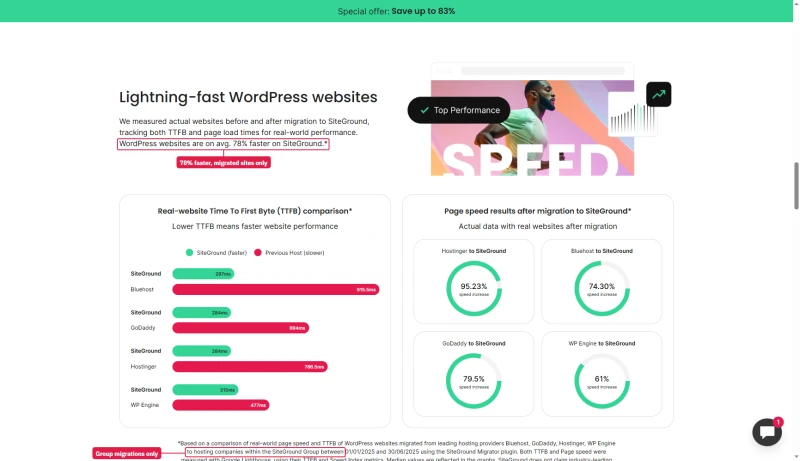
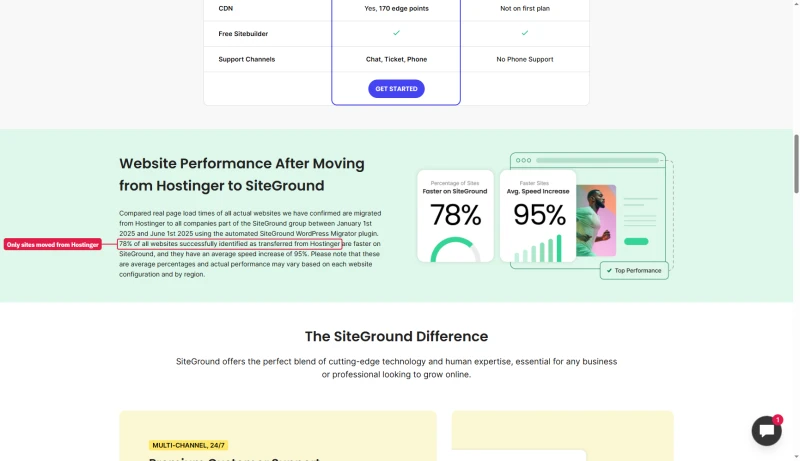
SiteGround's WordPress page says sites are on average 78% faster on SiteGround. The footnote explains that this compares sites before and after they were moved to SiteGround Group companies with its own Migrator plugin. Its Hostinger comparison page uses the same 78% for a different sample: only sites moved from Hostinger, over a shorter period. Treat it as SiteGround's own marketing figure, not as a head-to-head test.
Load Test: Average Response at 100 Concurrent Clients
An idle site is easy. The question is what happens when many visitors arrive together. We ramped StartUp up to 100 simultaneous clients over 60 seconds.
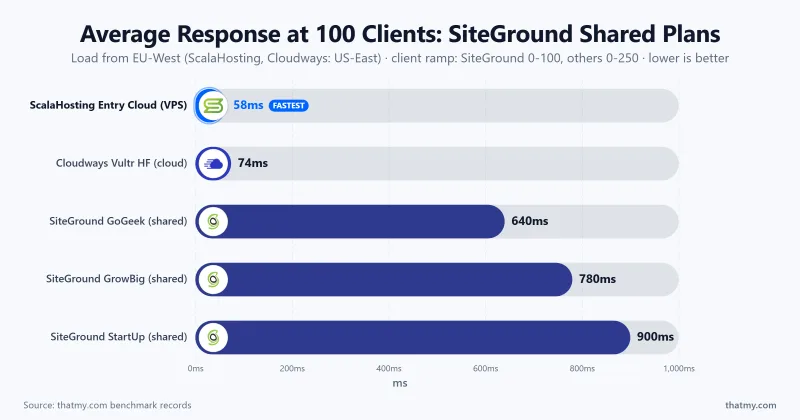
StartUp averaged 900ms per request at 100 simultaneous clients, and 5% of requests failed along the way. That is the ceiling of a plan built for a small site.
What this means for your business
A site that gets a burst of traffic from a newsletter, a sale or a launch needs more headroom than StartUp offers. Page caching and the free CDN take most of that load off the server for ordinary pages. For uncached traffic (stores, members, logged-in users), move up to GoGeek or to Cloud's dedicated resources.
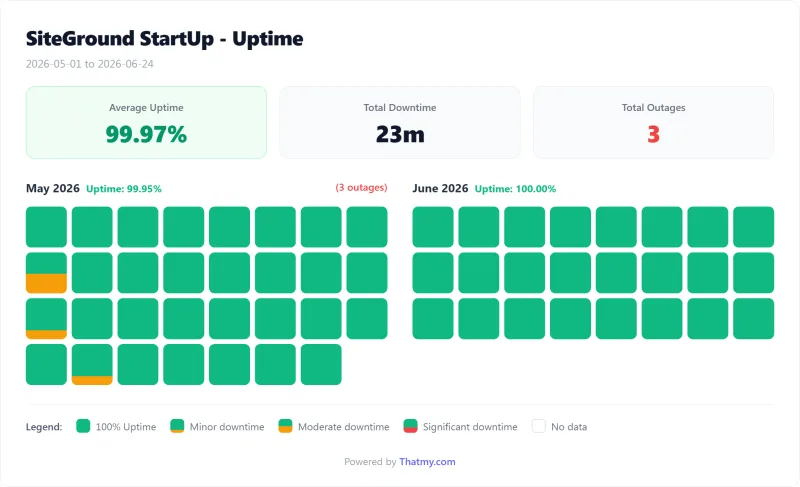
Uptime: 54-Day Monitoring Window
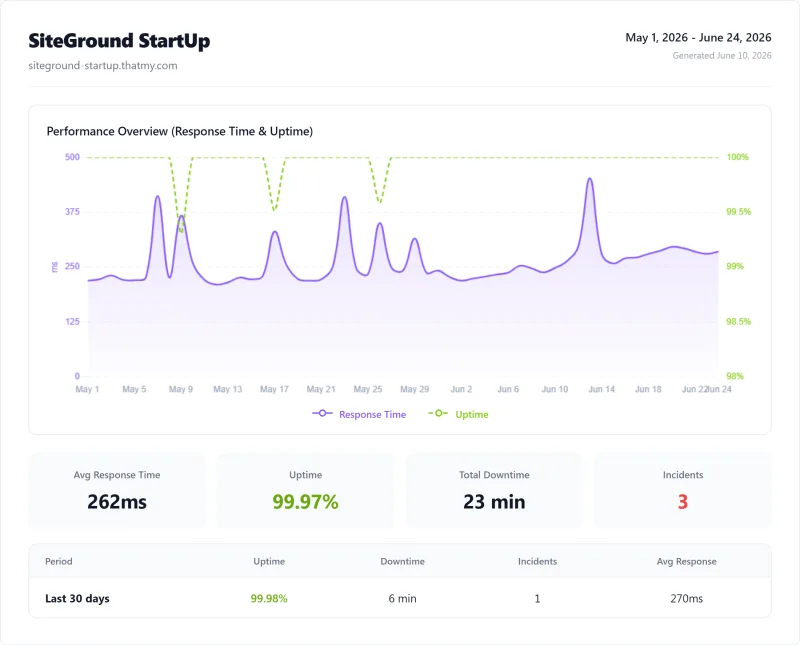
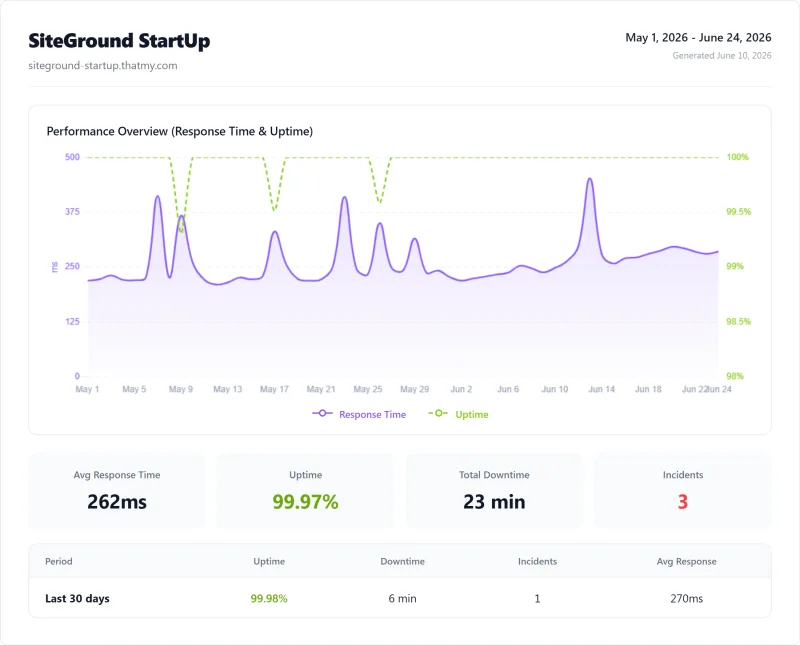
StartUp ran at 99.97% over 54 days: 23 minutes of downtime across 3 incidents. SiteGround promises 99.9% on its cloud page and its company page, and that is the level to hold it to.

WordPress Benchmark Score
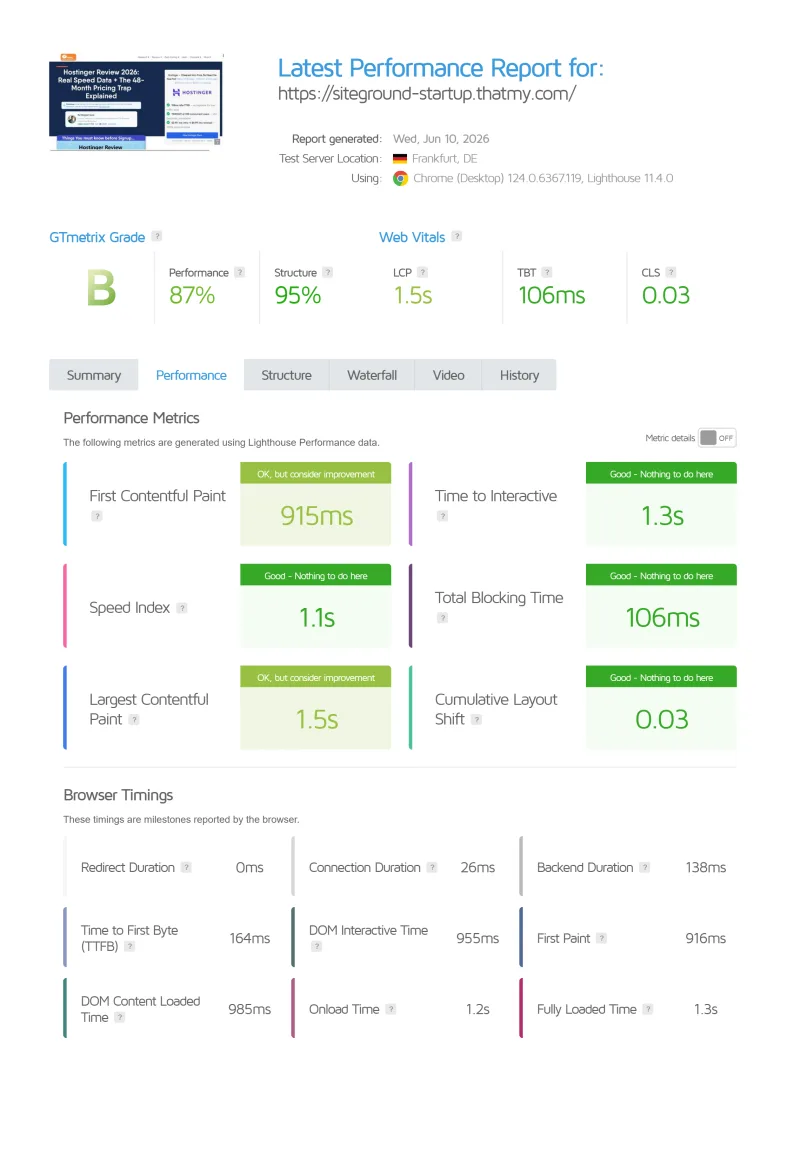
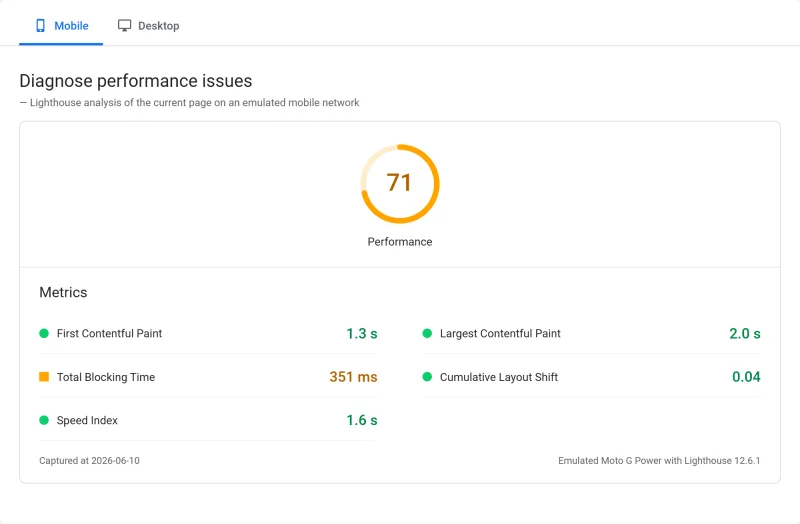
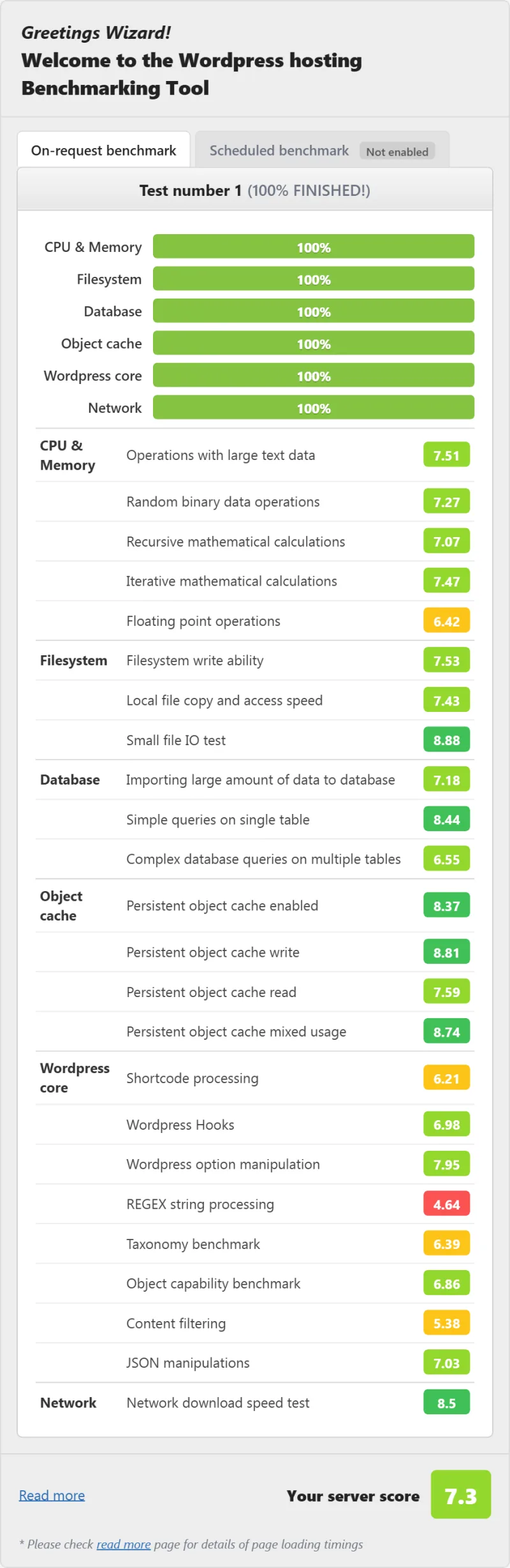
Our WordPress benchmark scores a plan out of 10 for raw PHP and database work, and we also run a PageSpeed Insights mobile test and a GTmetrix test on one test page.
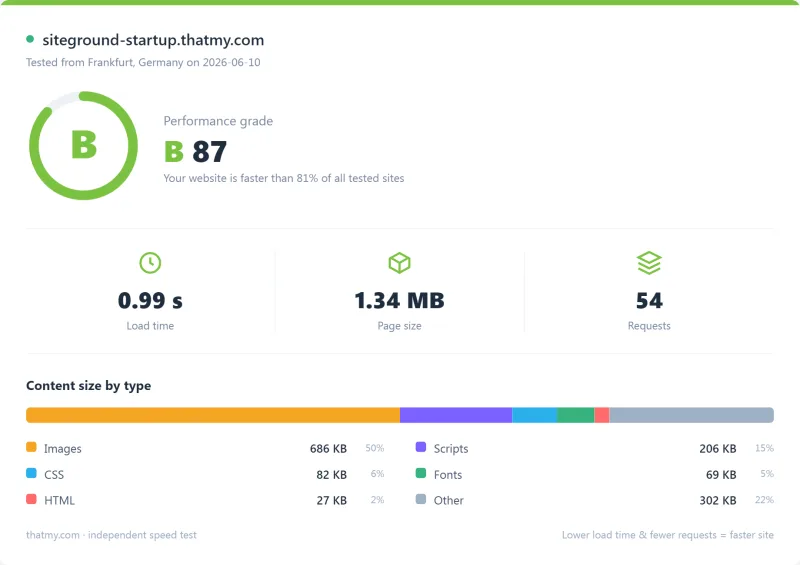
StartUp scores 7.3/10 on the WordPress benchmark, 71 on PageSpeed mobile and 87 on GTmetrix: solid for a small WordPress site. These are single-page results, so treat a few points either way as noise. PHP versions are a setting in Site Tools.
CPU: What SiteGround Runs On
The CPU decides how quickly PHP runs and how fast database queries resolve. Our SiteGround test server reports Intel Xeon Gold 6248R (read with lscpu), ranked #432 of 5,999 server CPUs on PassMark with a multithread score of 36,067. ScalaHosting's VPS runs AMD EPYC 9474F, ranked #42 with 102,255, about 2.8x the SiteGround chip.
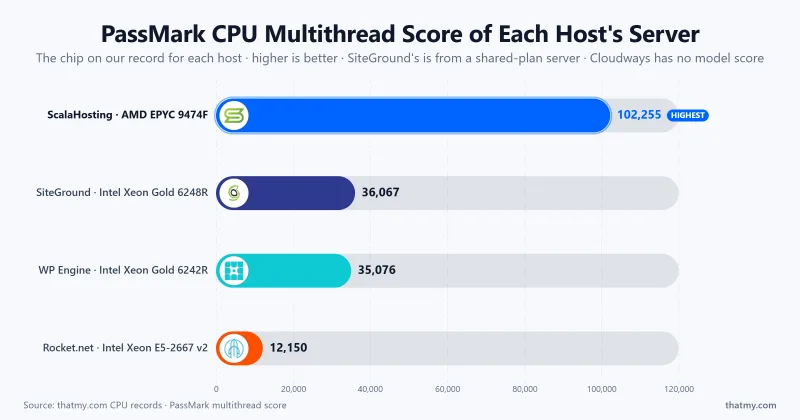
A faster chip helps uncached pages. Caching, the web server, storage and how busy the machine is matter just as much, so use the CPU rank as one input and the speed results above as the outcome.
Full Test Report: SiteGround StartUp
The complete export from our test suite for SiteGround StartUp: server response time (TTFB), behavior under load, the GTmetrix and PageSpeed captures, a Pingdom response-time check, our WordPress hosting benchmark, the regional TTFB scorecard, and 54 days of uptime tracking with the day-by-day calendar.
StartUp
SiteGround Limits and Resources
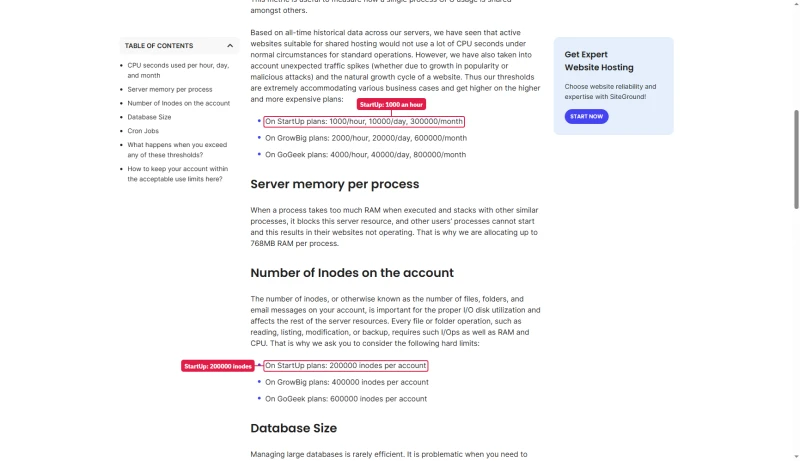
"Unlimited traffic" on a shared plan means unlimited within fair use. SiteGround's fair-use article sets the real caps, and they are the first limit most growing sites hit. Cloud swaps those caps for the size of the plan you buy.
When a site hits a CPU, memory or I/O cap, it shows up the same way on any host: 503 errors, slow database queries and PHP workers queuing up. The moments that hurt most are store sales, newsletter sends and coordinated traffic spikes. If you see them, upgrade a tier or move to Cloud.
Site Tools, Backups and Staging

SiteGround's Site Tools is its own control panel, not cPanel, built around WordPress management. It is the main reason people pick SiteGround.
What Site Tools does well
- A clean UI: non-technical users can manage a site without reading documentation
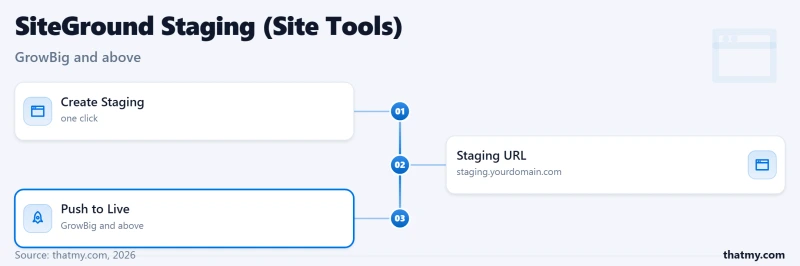
- One-click staging: clone production to staging, test, then push to live. Staging starts at GrowBig; Git starts at GoGeek and is included on Cloud
- CDN and cache controls in the same panel
- Daily backups with one-click restore
- SG Security: a built-in security panel
- Email management: create accounts, forwarders and webmail in one place
Backups: shared keeps more than Cloud
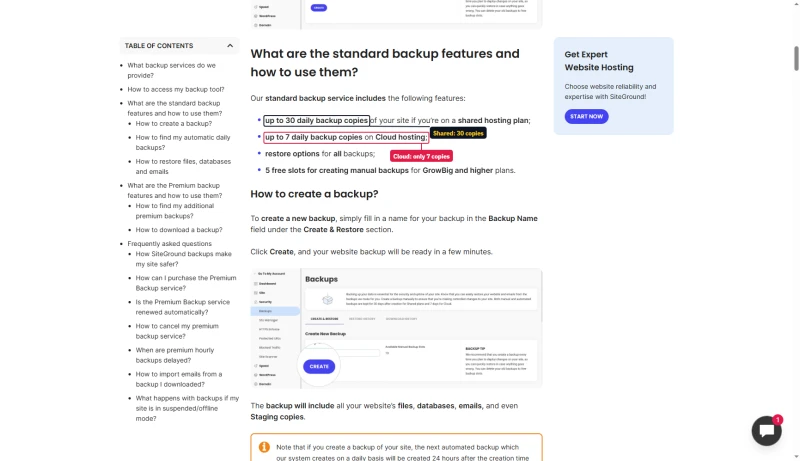
SiteGround keeps up to 30 daily backup copies on shared plans and up to 7 on Cloud. GrowBig and higher get on-demand backup slots, and Premium Backup is an add-on for more copies. If you want a long restore history on Cloud, add it.
Site Tools limitations
- It is SiteGround's own panel, so skills from cPanel do not carry over one for one.
- SiteGround manages the server for you, so there are fewer dials to turn than on an unmanaged VPS.
- Features depend on the plan: staging starts at GrowBig and priority support at GoGeek.
SiteGround CDN & Caching Stack
Every SiteGround plan includes a free CDN, built on a global network of data centers and edge points. SiteGround's SG Optimizer plugin handles the WordPress side:
- Page caching: serves cached HTML without running PHP
- Image optimization: WebP conversion and lazy loading
- CSS/JS minification
- Database cleanup: revisions, transients and spam comments
A CDN helps cacheable pages for visitors far from the server. Checkout, cart pages and logged-in users still go to the origin, which is why this review leads with origin speed.
SiteGround Support
SiteGround offers 24/7 live chat, phone and tickets. Live chat is its main channel, and the phone number appears once you log in to your account. SiteGround says 90%+ of issues are solved at first contact and quotes 98% satisfaction.
Priority support is tied to your plan. It is included on GoGeek and on every Cloud plan, and not on StartUp or GrowBig. Phone support is a plus if you would rather talk than type into a chat box.

Test it yourself
Users on Reddit and elsewhere say SiteGround's support was better in earlier years. Ask a real question during the refund window, 30 days on shared and 14 days on Cloud, and judge the answer.
SiteGround for WooCommerce
SiteGround sells WooCommerce hosting on the same StartUp, GrowBig and GoGeek plans, with a WooCommerce auto-install, no limit on products and no transaction fees from SiteGround. It works well for a small store.
Checkout, cart and account pages cannot be cached, so every request hits the server. That is where shared-plan caps show up, and where Cloud's dedicated CPU and RAM earn their price.
- Small store: GrowBig, with staging so you can test changes before customers see them.
- Growing store: GoGeek, with priority support and more CPU headroom.
- Busy store with sales and launches: Cloud, where resources belong to your site alone and autoscaling adds capacity at 75% usage.
Test your own checkout inside the money-back window: 30 days on shared plans, 14 days on Cloud. For store hosting from other providers, see our best WooCommerce hosting comparison.
Migration: Moving To and From SiteGround
Moving to SiteGround
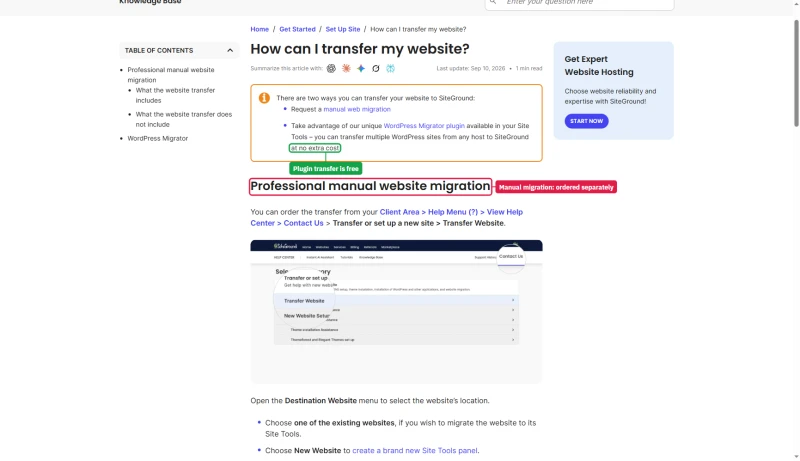
SiteGround's WordPress Migrator plugin moves WordPress sites to SiteGround at no extra cost. A manual transfer by SiteGround's team is a paid service ordered from the Client Area. The sales page's "Free website transfer" means the plugin.

Moving out of SiteGround
Confirm the new host's current migration terms: offers change. The path is the same for any host.
- Take a full backup of your SiteGround site (files and database) before starting.
- Sign up with the new host and ask whether it migrates for you or provides a migration plugin. Both ScalaHosting and Cloudways have migration options.
- Test on a temporary URL before changing DNS. Test WooCommerce checkout if you run a store.
- Lower your DNS TTL a day ahead, then point your A record at the new server.
- Keep SiteGround active until DNS has fully propagated. Use whatsmydns.net to watch propagation.
- Move email first if SiteGround hosts your mailboxes, and update MX records before switching DNS. If the new host has no email hosting, set up a separate mail service before migrating.
SiteGround vs ScalaHosting vs Cloudways
These are the three hosts buyers compare most when SiteGround Cloud's $100 entry price comes up. They solve different problems.
- Pick SiteGround if you want the simplest dashboard and phone support, and you are happy with shared hosting at GrowBig prices or Cloud at $100 and up.
- Pick ScalaHosting if you want VPS-class resources for less than SiteGround Cloud's entry price and a fast CPU (AMD EPYC 9474F, PassMark #42).
- Pick Cloudways if you want to choose your cloud provider and pay month to month with no renewal step.
View ScalaHosting Plans ➦ Read our full ScalaHosting review →
Try Cloudways: Code CLOUDS2022 ➦ Read our full Cloudways review →
SiteGround Pros and Cons
Pros
- Polished Site Tools dashboard that non-technical owners can run
- 24/7 chat, phone and ticket support
- Free CDN, free SSL and email on every plan
- Staging on GrowBig and up, Git on GoGeek and Cloud
- Cloud gives dedicated CPU and RAM with autoscaling
- 11 data centers on four continents
- No renewal step on Cloud
Cons
- Shared plans renew at several times the intro price
- Cloud starts at $100 a month
- "Unlimited traffic" still sits behind CPU caps on shared plans
- Cloud keeps 7 daily backups against 30 on shared
- Cloud refund window is 14 days, shared is 30
- Priority support starts at GoGeek
- Not cPanel, so the panel is SiteGround-only
Who Should NOT Use SiteGround Cloud
Skip SiteGround Cloud if:
- You run one ordinary WordPress site: buy GrowBig. Cloud costs 3.3 times GrowBig's renewal price a month.
- Budget comes first: a ScalaHosting Entry Cloud VPS is $24.95/mo intro and $39.95/mo at renewal.
- You want to pay as you go: Cloudways bills month to month; SiteGround Cloud is monthly or prepaid.
- You want a long restore history on Cloud: Cloud keeps 7 daily backups, shared keeps up to 30.
- You want to run the server yourself: SiteGround manages the server and you work through Site Tools.
What to buy instead
- One WordPress site: SiteGround GrowBig.
- A cheaper VPS: ScalaHosting.
- Flexible cloud with a choice of provider: Cloudways.
Real User Problems
1. Renewal pricing shock
The complaint you will read most. A StartUp plan costs $3.99/mo at intro and renews at $17.99/mo, a +351% increase. SiteGround's order form says discounts apply to the first invoice only, and the free domain is free for one year. People are happy until the renewal invoice arrives.
2. Resource limits
Shared plans carry published caps on CPU seconds, memory per process and inodes (see the limits section). In our load test StartUp failed 5% of requests as the ramp reached 100 clients. Sites that grow past the caps move to GoGeek or Cloud.
3. Support and other reports
Users also write about support quality, infrastructure moves and email deliverability. Judge support with a real question during the refund window.
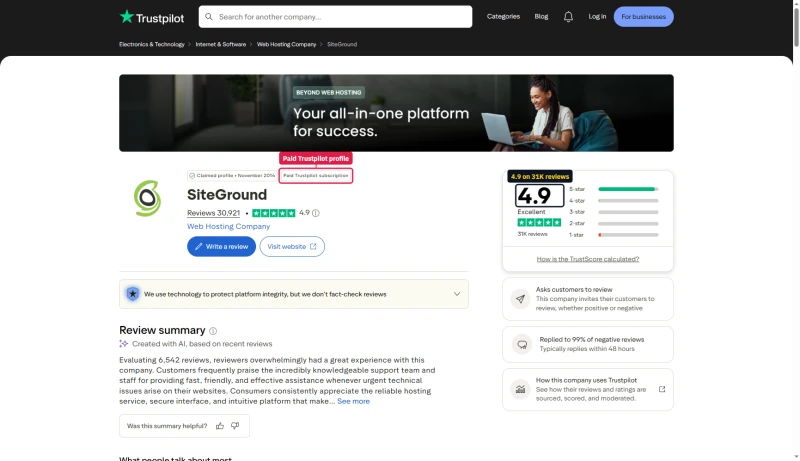
Set those complaints against SiteGround's public rating: 4.9 on Trustpilot from about 31,000 reviews. The profile is a paid Trustpilot subscription and SiteGround invites its customers to review, which goes some way to explain the gap between the score and what users write on Reddit.
FAQ: SiteGround Cloud Hosting
Is SiteGround Cloud Hosting worth it in 2026?
For most people, no. SiteGround Cloud starts at $100 a month with no intro discount (Jump Start: 4 CPU cores, 8GB RAM, 40GB SSD, as listed on SiteGround's cloud page), and a one-site WordPress owner is better served by the shared GrowBig plan at $6.69/mo intro and $29.99/mo at renewal. Cloud is worth it when you have outgrown shared hosting, run many client sites, or want dedicated CPU and RAM with SiteGround's Site Tools dashboard and 24/7 phone, chat and ticket support.
Which SiteGround plan should I buy?
GrowBig, if you run one or more WordPress sites. It adds staging, on-demand backups and faster PHP over StartUp, and it costs $6.69/mo intro and $29.99/mo at renewal. Pick StartUp for a single small site, GoGeek for Git, priority support and more room, and Cloud only when shared plans stop being enough.
What CPU does SiteGround use?
Our SiteGround test server reports Intel Xeon Gold 6248R (read with lscpu), ranked #432 of 5,999 server CPUs on PassMark with a multithread score of 36,067. ScalaHosting's VPS runs AMD EPYC 9474F (#42, 102,255). PassMark ranks the chip, not the plan.
Does SiteGround have resource limits?
Yes, on shared plans. SiteGround's fair-use article caps CPU seconds per hour, day and month (StartUp gets 1,000 an hour), 768MB of RAM per process and 200,000 or more inodes depending on the plan. In our load test StartUp averaged 900ms per request at 100 simultaneous clients, with 5% of requests failing. Cloud plans give you dedicated CPU, RAM and SSD, so the cap is the size of the plan you pick.
What is SiteGround's renewal pricing?
Shared plans renew far above the intro price. StartUp: $3.99/mo intro to $17.99/mo renewal (+351%). GrowBig: $6.69/mo to $29.99/mo (+348%). GoGeek: $10.69/mo to $44.99/mo (+321%). Cloud has no intro discount, so no jump: Jump Start is $100 a month, or $90 a month billed a year at a time on SiteGround's order form. Over three years the shared plans cost $479.64 (StartUp), $800.04 (GrowBig) and $1,208.04 (GoGeek), counting the first year at the intro price.
How does SiteGround compare to ScalaHosting?
SiteGround is a fully managed host with its own Site Tools dashboard, shared plans from $3.99/mo and Cloud from $100 a month. ScalaHosting sells managed VPS plans with the SPanel control panel; Entry Cloud is $24.95/mo on a 36 months term and $39.95/mo at renewal. If you want a VPS-class server for less than SiteGround Cloud's $100 entry price, ScalaHosting is the cheaper route. If you want the simplest dashboard and phone support, SiteGround is.
Is SiteGround good for WooCommerce?
It works for small stores. SiteGround's WooCommerce hosting runs on the same StartUp, GrowBig and GoGeek plans with a WooCommerce auto-install and no limit on products. Checkout and cart pages cannot be cached, so a busy store needs CPU and RAM that belong to it: GoGeek for a growing store, Cloud for a large one. Test your own checkout inside the money-back window, 30 days on shared plans and 14 days on Cloud.
What are the most common SiteGround complaints?
Renewal pricing: StartUp goes from $3.99/mo to $17.99/mo, and SiteGround's order form says discounts apply to the first invoice only. Users also write about the resource caps on shared plans and about support that is not what it was. SiteGround's public Trustpilot profile shows 4.9 from about 31,000 reviews, on a claimed profile with a paid Trustpilot subscription.
Does SiteGround include email hosting?
Yes. SiteGround's cloud page lists "Free Email" among the Cloud plan features, and the shared plans include email accounts as well. For heavy business email many sites still use a dedicated mail service.
How many data centers does SiteGround have?
SiteGround's datacenters page lists 11 data centers on four continents: Ashburn, Council Bluffs, Dallas and Los Angeles (US), London, Madrid, Eemshaven, Frankfurt and Paris (Europe), Singapore and Sydney, plus a CDN with 170+ edge locations. Its page title says 17 cities because the map shows data centers and CDN points together. Its Cloud page says Cloud runs on Google Cloud data centers in the USA, Europe, Asia and Australia.
Can I migrate away from SiteGround?
Yes. Any WordPress site can be moved with a migration plugin or by the new host's migration service; confirm the new host's current terms, because migration offers change. Take a full backup first, test on a temporary URL, lower your DNS TTL, switch DNS, and keep the SiteGround plan active until DNS has propagated.
So, Which Should You Pick? Is SiteGround Cloud Worth It?
If you run one WordPress site, buy GrowBig. If you have outgrown shared hosting, SiteGround Cloud is a solid managed option from $100 a month.
SiteGround's strengths are a polished Site Tools dashboard, 24/7 chat and phone support and a long track record. Its weak spots are the shared-plan renewal step and a Cloud entry price that sits well above a managed VPS. StartUp answers in 312ms from New York (123ms from Frankfurt), 900ms at 100 clients, with 99.97% uptime over 54 days.
Cheaper managed VPS: ScalaHosting
For WordPress sites that need more headroom than shared hosting for less than $100 a month: ScalaHosting Entry Cloud on AMD EPYC 9474F (PassMark #42), $24.95/mo on a 36 months term and $39.95/mo at renewal.
Flexible cloud: Cloudways
For teams that want a choice of cloud provider and month-to-month billing: Cloudways, from $16.00/mo on Vultr High Frequency. Partner code CLOUDS2022 applies on our link; terms are on our Cloudways promo page.
Try Cloudways: Code CLOUDS2022 ➦
See also: Full ScalaHosting review · Full Cloudways review · Best WordPress hosting comparison · Best cloud hosting comparison · Best WooCommerce hosting comparison