


TTFB (Time to First Byte) is the single most honest measurement of hosting performance. It strips away everything your site adds ” images, scripts, third-party embeds ” and measures only how fast the server responds. This guide covers the complete lifecycle of an HTTP request, what each phase costs in milliseconds, which phases hosting controls, and the exact steps to measure and improve your TTFB.
What TTFB Measures and Why It Matters More Than Page Load Time
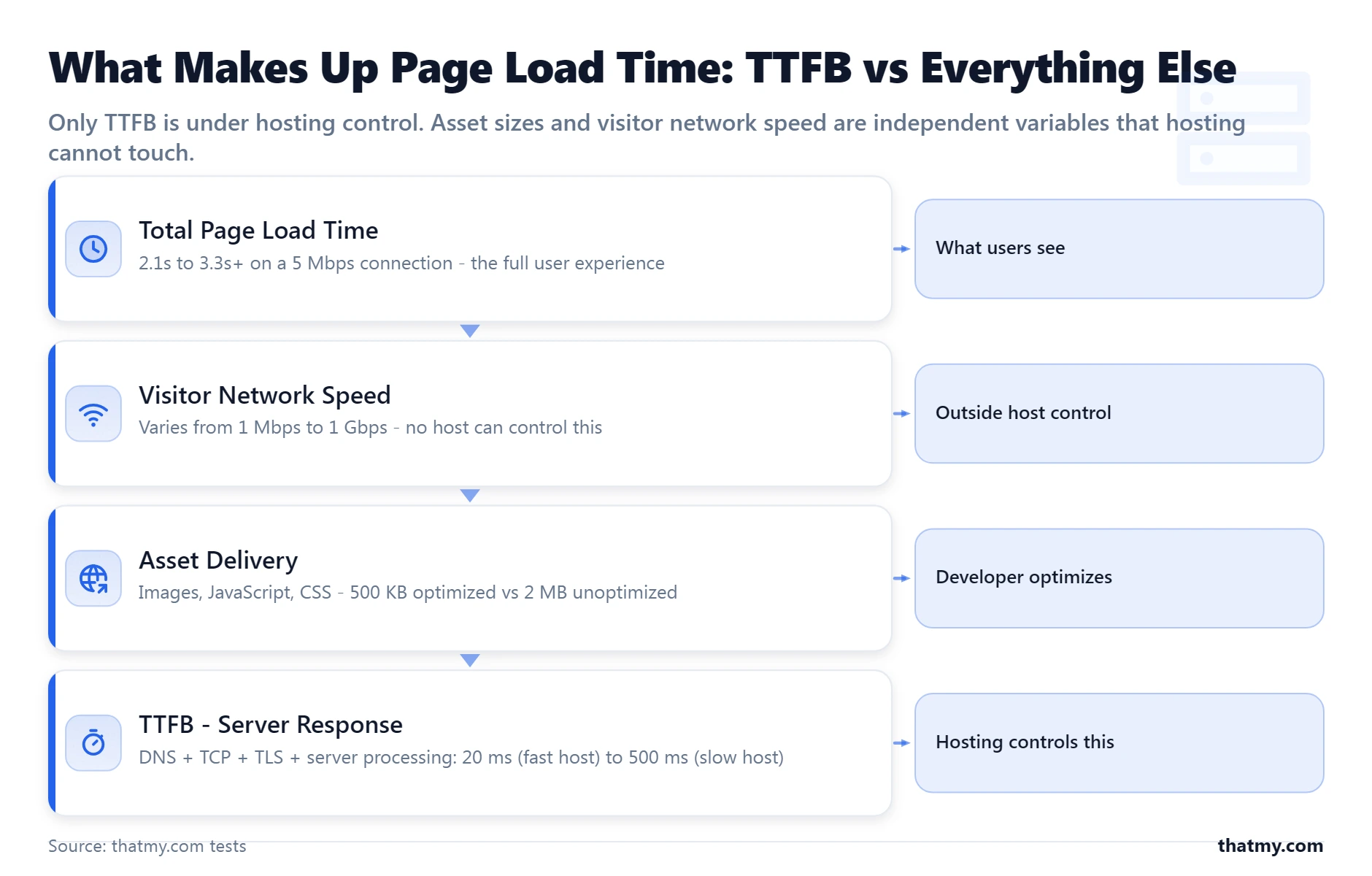
Time to First Byte is measured from when a browser (or measurement tool) starts an HTTP request to when the first byte of the server's response arrives. It captures server-side processing time plus the network overhead of establishing the connection. Most people focus on total page load time because that is what users experience. But total page load time conflates three independent variables: how fast the server responds (TTFB), how large your site's assets are (image optimization, JavaScript size), and how fast the visitor's internet connection is. A host controls only one of those three. TTFB isolates it.
Consider two WordPress sites:
- Site A: 400ms TTFB, 500KB of total assets. Total page load: 2.1 seconds on a 5Mbps connection.
- Site B: 50ms TTFB, 2MB of total assets. Total page load: 3.3 seconds on the same connection.
Site B has a worse total page load time but a dramatically faster server. Site A's hosting is the bottleneck. Site B's images and scripts are the bottleneck. The fix for each is completely different, and page load time alone does not tell you which is which. TTFB does.
The Complete HTTP Request Lifecycle
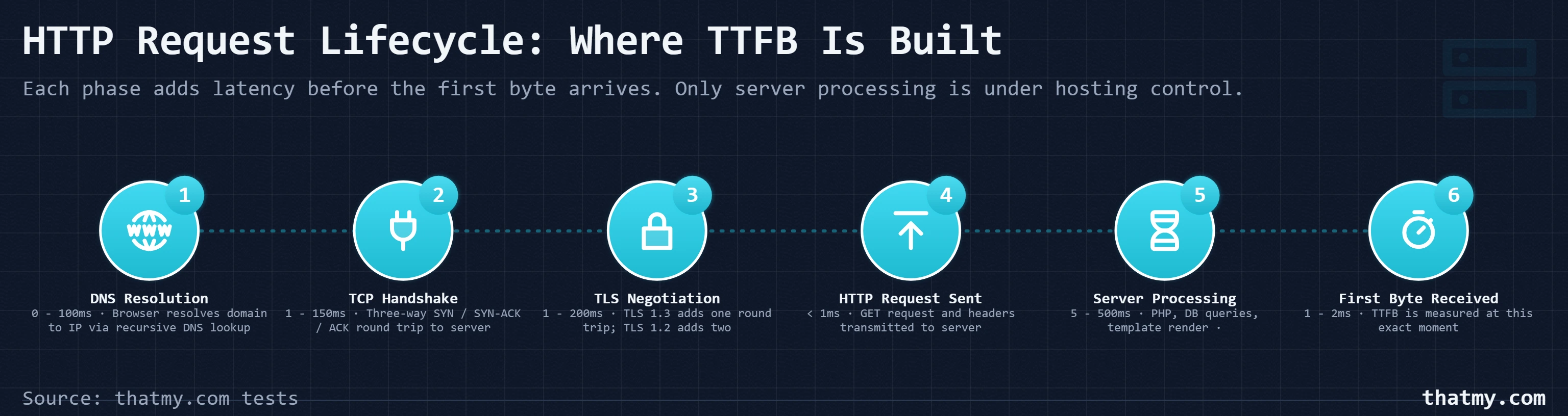
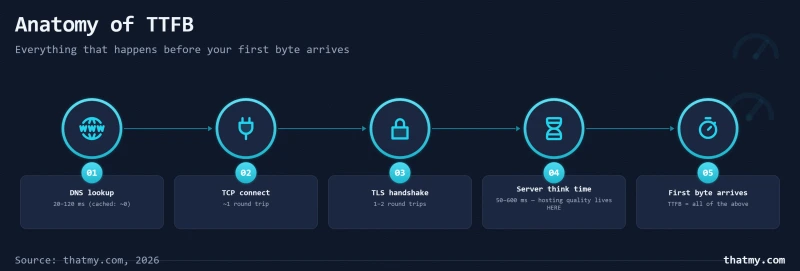
TTFB is the sum of several sequential phases. Understanding each phase is the prerequisite for knowing where time is being spent:
Phase 1: DNS Resolution (0 to 100ms)
The browser must resolve your domain name (example.com) to an IP address. The browser checks its local DNS cache first (free, instant). If not cached, it queries the OS resolver, then the recursive DNS server (typically your ISP's or Google's 8.8.8.8), which traverses the DNS hierarchy. A warm DNS cache costs 0ms. A cold lookup from a distant DNS server costs 20-100ms. Using a fast DNS provider (Cloudflare DNS, Google DNS) reduces this. DNS TTL settings determine how long resolvers cache the result. Low TTL (60 seconds) means more frequent lookups and higher DNS latency contribution.
Phase 2: TCP Connection Establishment (1 to 150ms)
After DNS resolves the IP address, the browser initiates a TCP connection with a three-way handshake (SYN, SYN-ACK, ACK). Each round trip adds network latency. A user in the same city as the server sees ~1-5ms per round trip. A user in Australia connecting to a server in Virginia sees ~175ms per round trip. TCP establishment takes one round trip, so it adds 1ms to 175ms depending on geography.
Phase 3: TLS Handshake (1 to 200ms)
For HTTPS connections (all modern sites), TLS adds a negotiation step after TCP connects. TLS 1.3 (the current standard) requires one additional round trip for the handshake. TLS 1.2 (older) required two round trips. A full TLS 1.3 handshake adds 1-2 round trips of latency on top of the TCP connection. On a server close to the user (~5ms round trip), TLS adds 5-10ms. On a distant server (~175ms round trip), TLS adds 175-350ms.
Phase 4: HTTP Request Transmission (negligible)
The actual HTTP request (GET / HTTP/1.1 plus headers) is sent from browser to server. This is a few hundred bytes. At any connection speed, transmission is under 1ms.
Phase 5: Server Processing Time (5 to 500ms)
The server receives the HTTP request and generates the response. For a WordPress page, this involves: loading PHP (from OPcache), running WordPress bootstrap (loading wp-config.php, activating plugins), executing database queries, running template rendering, and compressing the output. Fast hardware completes this in 5-20ms. Slow hardware on a busy server takes 100-500ms. This is the only phase under hosting's direct control.
Phase 6: Response Transmission to First Byte (negligible)
The server starts sending the HTTP response. TTFB is measured at the moment the first byte arrives at the client. For typical HTTP responses, this adds 1-2ms.
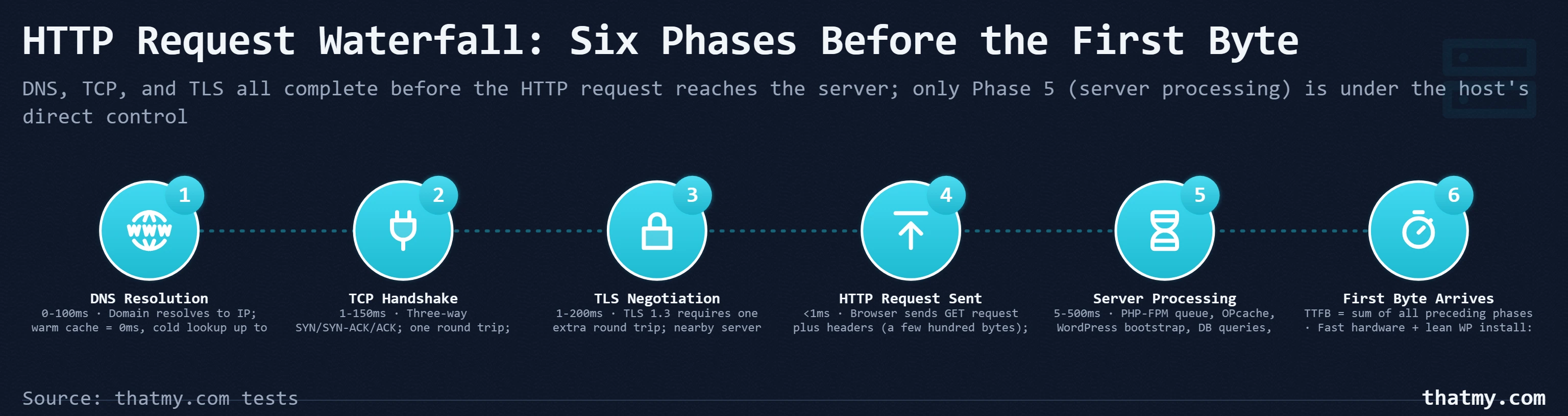
The implication: TTFB as measured in WebPageTest from Dulles, Virginia to a Virginia-based server is almost entirely server processing time (Phase 5), because Phases 1-4 are minimal at close geographic range. TTFB measured from Singapore to a Virginia server includes 175-250ms of network latency in Phases 2-3 regardless of server speed. This is why benchmark tests always specify the test location.
What Server Processing Time Actually Contains
Phase 5 (server processing) deserves a deeper breakdown because this is the part hosting directly controls:
1. Web server routing (~1ms): Apache or Nginx or LiteSpeed receives the request, determines that it is a WordPress PHP request, and hands it to PHP-FPM. Very fast.
2. PHP-FPM process availability (~0 to 50ms): PHP-FPM maintains a pool of worker processes. If a worker is available, it handles the request immediately. If all workers are busy, the request queues. On an underprovision or overloaded server, queue time can be 50ms+. A fast host with appropriate PHP-FPM pool sizing has near-zero queue time.
3. PHP OPcache loading (~1-3ms): PHP parses your .php files into opcodes (bytecode) and caches them in shared memory (OPcache). Subsequent requests load from cache instead of re-parsing. A cache miss (first request after a PHP update) takes 10-50ms for a full WordPress bootstrap. Cache hits take 1-3ms. Quality hosts enable OPcache with appropriately large memory allocation (128MB+).
4. WordPress bootstrap (~10-30ms): Loading wp-config.php, wp-settings.php, and autoloading active plugin classes. A lean WordPress install (15 plugins) bootstraps in 10-15ms. A bloated install (80+ plugins) bootstraps in 30-80ms as it loads hundreds of class files.
5. Database queries (~5-100ms): WordPress executes 10-50 queries per page load. Each query hits the database server. On NVMe storage with a warm InnoDB buffer pool (queries served from RAM), each query takes 0.5-2ms. On SATA SSD with a cold buffer pool, each query takes 3-15ms. On mechanical HDD (still running in some budget hosting), each query takes 20-100ms.
6. Template rendering (~5-30ms): PHP executes your theme's template files, calling WordPress functions, applying filters, and building the HTML output. A lightweight theme (Twenty Twenty-Four) renders in 5-10ms. A feature-heavy page builder theme (Divi, Elementor) renders in 15-50ms.
7. Output buffering and gzip compression (~2-10ms): The web server compresses the HTML with gzip before sending. A modern CPU compresses a 50KB HTML page in 1-3ms. A legacy CPU takes 5-15ms.
Total for a well-optimized WordPress install on fast hardware: 20-50ms processing time. Total on slow legacy hardware with many plugins: 150-400ms processing time. This is the TTFB range you see in the real world.
HTTP/2 and HTTP/3: What They Change and What They Do Not
A common misconception is that upgrading to HTTP/2 improves TTFB. It does not. HTTP/2 improves asset delivery (everything that happens after TTFB), not the initial server response time.
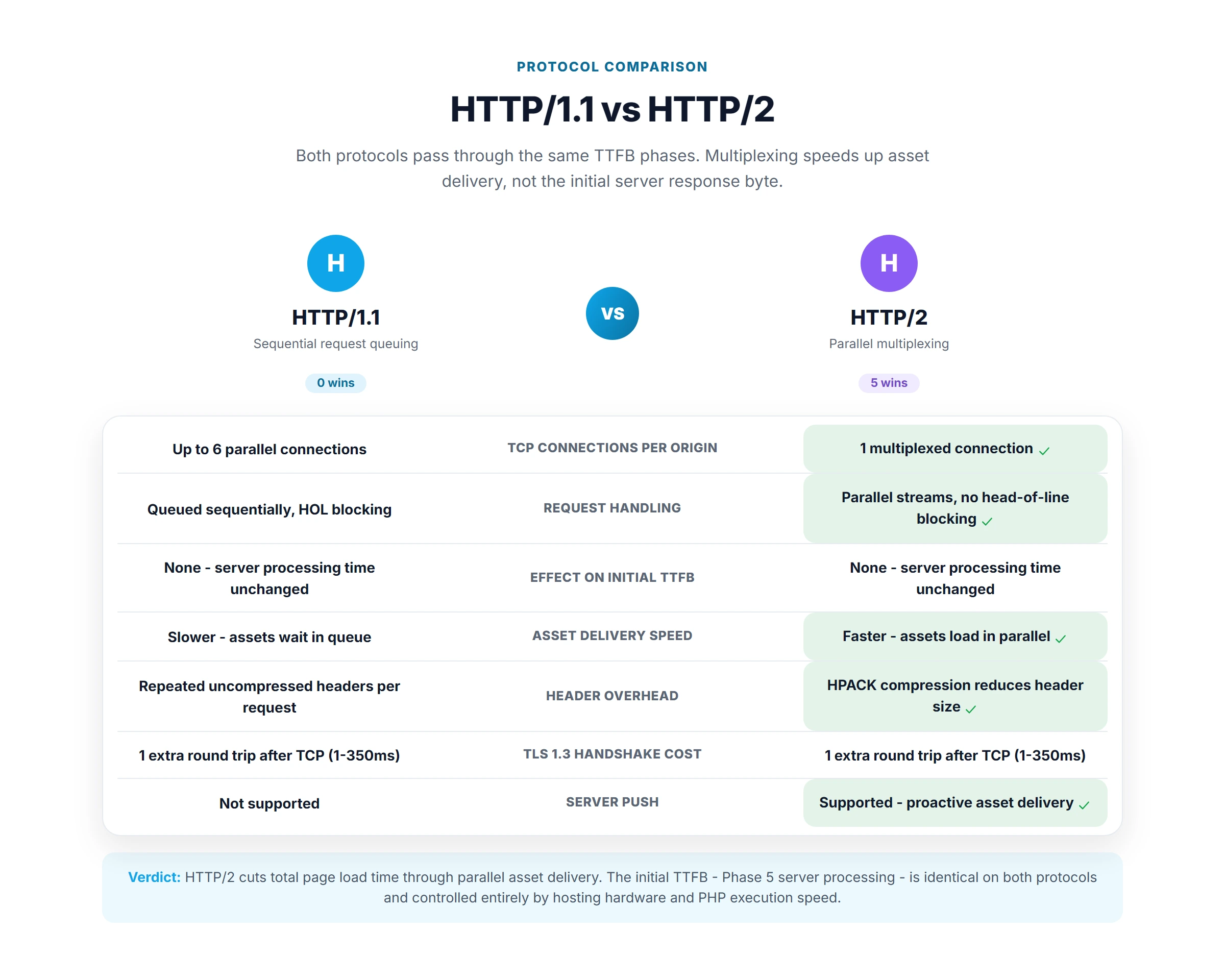
HTTP/1.1 vs HTTP/2 for TTFB: Both protocols have the same TTFB for the first HTML request. The HTML document is one request. TTFB measures that one request. HTTP/2 multiplexing benefits apply to the subsequent requests for CSS, JavaScript, images, and fonts, all of which happen after TTFB. On a high-latency connection, HTTP/2 can save 200-500ms of total page load time by loading 20 assets over one connection in parallel instead of six connections in sequence. But TTFB is unchanged.
HTTP/3 and TTFB: HTTP/3's QUIC protocol can improve TTFB in one specific scenario: 0-RTT session resumption for returning visitors. If a visitor has previously connected to your site over QUIC (HTTP/3), subsequent connections can send the HTTP request in the first packet without waiting for the full TLS handshake. This saves one round trip (50-200ms depending on distance). This is relevant for mobile users on high-latency connections (4G, 3G) who return to your site. For first-time visitors or desktop visitors on fast broadband, the TTFB improvement from HTTP/3 is negligible.
To check if your site runs HTTP/2 or HTTP/3: open Chrome DevTools Network panel, reload your page, click on the first HTML request, and look at the Protocol header in the Response Headers tab. You will see "h2" for HTTP/2, "h3" for HTTP/3, or "http/1.1" for the older protocol. LiteSpeed web server supports HTTP/3 natively. Nginx requires nginx 1.25+ and QUIC modules. Apache HTTP/2 support is standard; HTTP/3 is less common.
How Every Caching Layer Affects TTFB
The four main caching layers each intercept requests at different points in the processing chain, each eliminating a different set of processing steps:
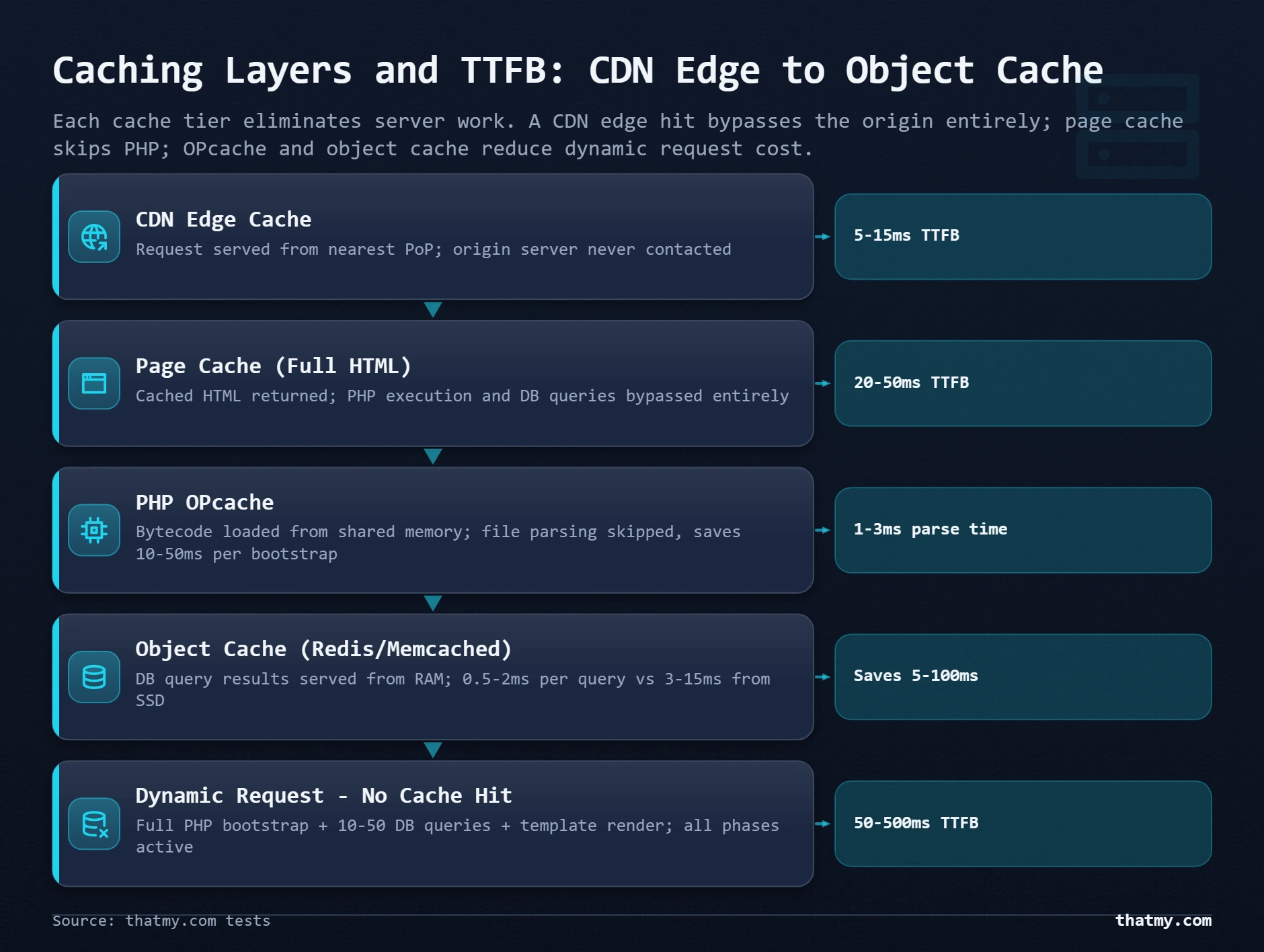
Layer 1: CDN Edge Cache (0-20ms TTFB for cached requests)
A CDN edge node has a cached copy of your HTML page stored close to the user. When the user requests the page, the CDN serves it from its own storage without hitting your origin server at all. The CDN's TTFB is the network latency from user to CDN edge (typically 5-30ms) plus the CDN's file-read time (1-5ms). This is the lowest possible TTFB. But it only applies to cached requests (static HTML of logged-out pages). See the CDN section of the caching guide for cache hit ratios and what gets cached.
Layer 2: Full-Page Cache (5-30ms TTFB for cached requests)
Server-side full-page caching (LiteSpeed Cache module, FastCGI cache, Nginx proxy cache) stores pre-built HTML on the origin server. When a request matches a cached page, the web server reads the HTML file and returns it without starting PHP. PHP execution, database queries, and template rendering are all bypassed. The TTFB is: network latency + web server file read time. This is 5-30ms depending on storage speed and network. Logged-in users and WooCommerce cart pages typically bypass full-page caches.
Layer 3: PHP OPcache (PHP execution speed improvement)
OPcache stores compiled PHP bytecode in shared memory so PHP does not have to re-parse source files on every request. OPcache does not serve a pre-built response, PHP still runs. But PHP runs from compiled bytecode rather than source, saving 10-50ms of parse time per request. OPcache is enabled by default on all quality hosting and dramatically reduces per-request PHP overhead.
Layer 4: Object Cache / Redis (database query acceleration)
Object caching (Redis, Memcached) stores database query results and WordPress transients in RAM. When WordPress would normally run a database query (for post data, options, term data), it first checks the Redis cache. A cache hit returns the data in microseconds instead of the database's milliseconds. This reduces TTFB for dynamic pages (logged-in users, WooCommerce) by eliminating repeated database round trips. WordPress's object cache is used for the duration of a single request by default; Redis extends it across requests.
Why Origin TTFB Still Matters With a CDN
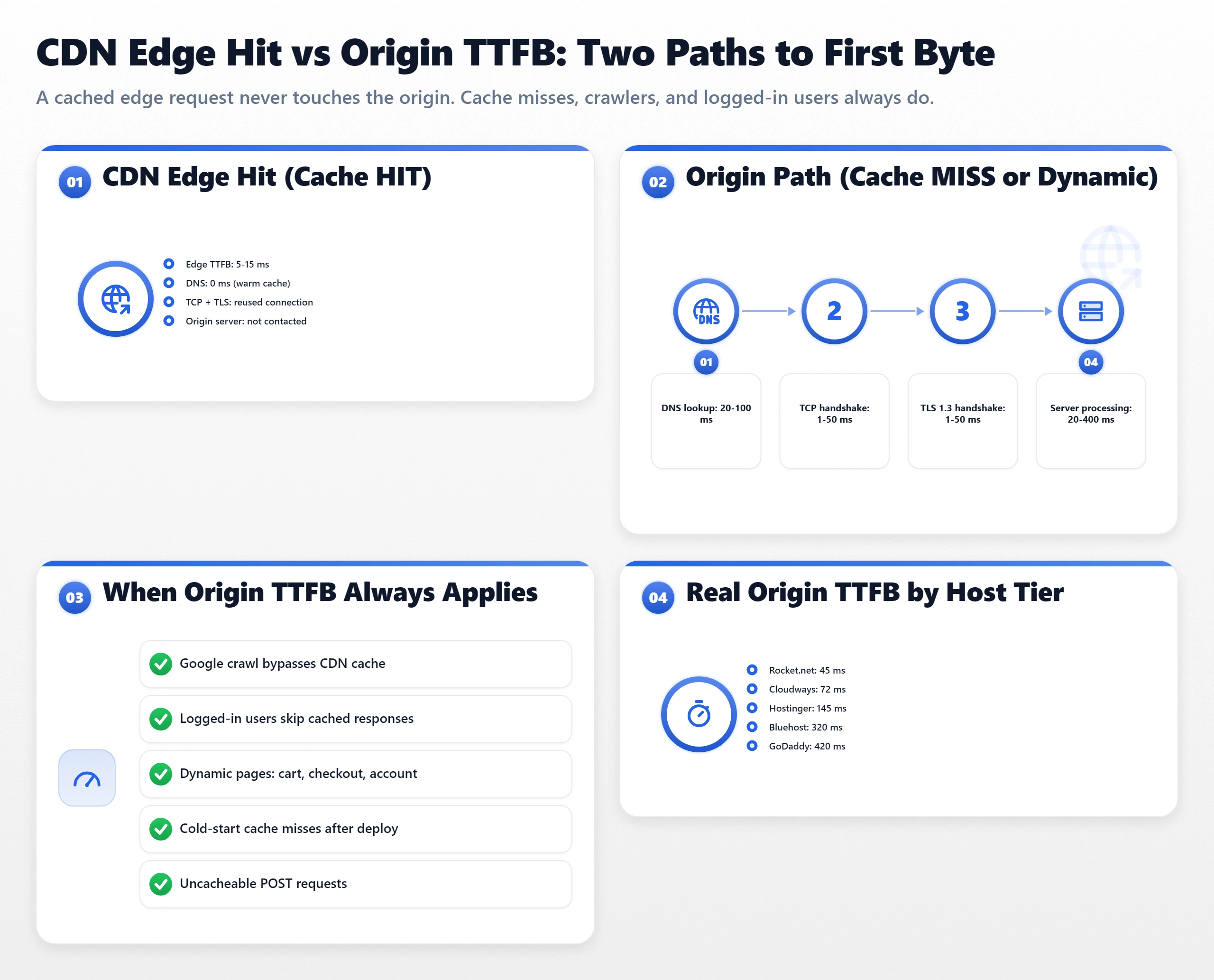
Many site owners add Cloudflare and assume their TTFB is now solved. Cloudflare is excellent at caching static assets and HTML pages for logged-out visitors. But origin TTFB matters for:
- Cache misses: The first visitor to your page, after a cache expiry, or to a URL Cloudflare has not seen before, triggers an origin fetch. The user experiences origin TTFB plus CDN-to-origin latency.
- Logged-in users: WordPress readers with accounts, WooCommerce shoppers, membership site members, all bypass the cache. Their experience is entirely determined by origin TTFB.
- WordPress admin: Every admin page load hits the origin directly. A slow origin makes the admin interface miserable.
- WooCommerce checkout: Cart and checkout pages are always dynamic and never cached. Checkout performance is entirely origin TTFB.
- Google's crawler: Googlebot performs fresh fetches on a schedule. It often bypasses CDN caches (or receives cache-bypassing headers configured by the site) to get the live page. Slow origin TTFB affects crawl efficiency and may affect indexing speed.
- Pingdom/UptimeRobot monitoring: Most uptime monitoring tools measure origin TTFB directly, not CDN-cached TTFB. If your monitoring shows 400ms TTFB, that is your origin TTFB.
A fast CDN on top of a slow origin gives good TTFB for most page views but leaves all the important dynamic interactions slow.
How to Measure TTFB Correctly
The measurement methodology matters. Single-run tests are unreliable. Location must be specified.
Standard methodology:
- Use WebPageTest.org (free, most detailed data)
- Set location to Dulles, Virginia (the standard baseline for US-based hosting)
- Set connection to "Cable" (simulates median broadband; avoid "Fiber" for more representative results)
- Run 3 tests and record all three TTFB values
- Take the median (middle value). The first run is often slower (cold cache). The median across 3 runs is the stable value.
- Note: the "Document Complete" time is total page load. TTFB is the "Time to First Byte" row in the table view.
For geographic context, also test from:
- Frankfurt, Germany (European audience baseline)
- Mumbai, India (South Asian audience)
- Singapore (Southeast Asian audience)
- Sydney, Australia (Pacific audience)
If your TTFB from Dulles is 50ms but from Singapore is 350ms, and 40% of your traffic is from Asia, you have a geographic distribution problem. Adding a CDN with edge nodes in Singapore, or moving your origin server to Singapore, would help more than further server optimization.
Chrome DevTools method (for diagnosing your own site in real-time):
# Open Chrome DevTools → Network tab
# Reload the page
# Click on the first request (the HTML document)
# In the "Timing" section you will see:
# - Stalled: time waiting for a TCP connection
# - DNS Lookup: DNS resolution time
# - Initial Connection: TCP handshake
# - SSL: TLS handshake
# - Request Sent: negligible
# - Waiting (TTFB): server processing time
# - Content Download: response transfer
#
# The "Waiting (TTFB)" is the pure server processing time
# Total TTFB = all rows above "Content Download"
The DevTools "Waiting (TTFB)" metric is the server processing time specifically, excluding DNS and TCP setup. This is a useful internal diagnostic when you want to separate server speed from network conditions.
TTFB Under Load: Why Shared Hosting Varies
Many benchmark tests measure TTFB on an idle server (zero other active requests). Real hosting performance matters most under realistic concurrent load. The difference between idle and loaded TTFB reveals the hosting type's true behavior:
- Shared hosting (CloudLinux LVE): Idle TTFB might be 80ms. Under load from 400 concurrent accounts, TTFB can spike to 300-500ms as CPU queues fill. This variability is the "noisy neighbor" effect. Your TTFB depends on what your neighbors are doing at exactly the moment your request arrives.
- VPS with dedicated cores: Idle TTFB is 30ms. Under load from your own site's traffic, TTFB scales linearly with your PHP-FPM pool configuration. If you have 20 PHP-FPM workers and 25 concurrent requests arrive simultaneously, 5 requests queue (adding 20-50ms). Under-provisioning PHP workers is the main cause of VPS TTFB degradation under load.
- Managed WordPress hosting (Kinsta, WP Engine): Uses container isolation with auto-scaling. TTFB under load is more consistent than shared hosting because containers scale rather than queue.
The p95 (95th percentile) TTFB across all requests is more meaningful than median TTFB for evaluating consistency. A host with 50ms median TTFB but 800ms p95 TTFB is delivering poor experiences to 5% of visitors, 1 in 20 page loads. For a site with 100,000 monthly visitors, that is 5,000 poor experiences per month.
The TTFB Optimization Sequence
Follow this order. Do not jump ahead. Each step depends on the previous being completed first:
Step 1: Measure baseline TTFB. WebPageTest from Dulles, 3 runs, take the median. Write down the number. If it is under 100ms, you are in good shape and can focus elsewhere. If it is 100-200ms, optimization is worthwhile but not urgent. If it is above 200ms, fixing TTFB is the highest-ROI improvement you can make.
Step 2: Determine if the bottleneck is the host or the site. Test with a fresh, minimal WordPress install on the same hosting account (or use a test subdomain). If the minimal install has the same slow TTFB, the host's hardware is the bottleneck. If the minimal install is fast (50ms) but your real site is slow (300ms), your plugins and database queries are the bottleneck.
Step 3: If the host is the bottleneck, upgrade. Upgrade from shared hosting to managed VPS, or switch to a host running a faster PassMark-ranked CPU. Caching cannot compensate for hardware that is 13x slower. Fix the foundation.
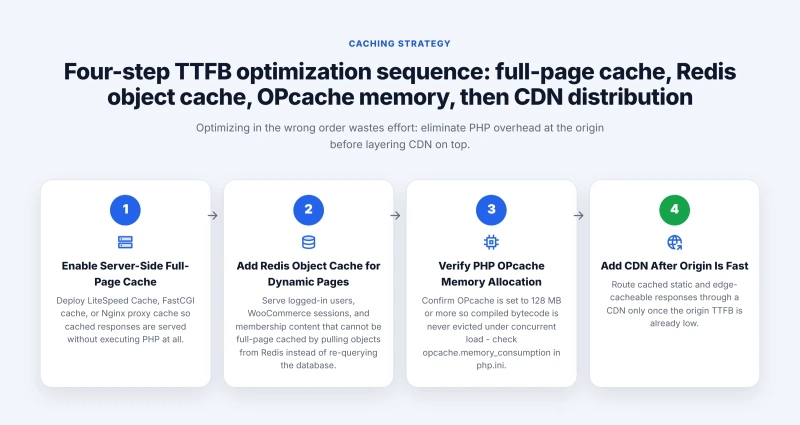
Step 4: Enable server-side full-page caching. On LiteSpeed-based hosting, enable LiteSpeed Cache module (free plugin, but the engine is the web server, not the plugin). On Nginx, configure FastCGI caching. On Apache, configure mod_cache. This drops TTFB to 5-20ms for cached pages.
Step 5: Enable Redis or Memcached for object caching. Reduces dynamic page TTFB (logged-in users, WooCommerce) by eliminating repeated database queries. The Redis connection itself adds 1-3ms overhead, but saving 10-20 database queries at 2ms each saves 20-40ms net.
Step 6: Verify PHP version (8.2+). PHP 8.2 is 20-35% faster than PHP 7.4 on identical hardware. PHP 8.3 adds further improvements. Update via PHP Selector in cPanel or your host's dashboard. Test on a staging environment first if you have legacy plugins.
Step 7: Audit and reduce plugins. Run the site in Query Monitor plugin to see which plugins add the most execution time. Remove plugins that add 10ms+ per request with no user-visible benefit. Every plugin that runs on every request adds to PHP processing time.
Step 8: Optimize database queries. Install Query Monitor and look for slow queries (over 50ms individually) or N+1 query problems (the same query executed dozens of times). Add database indexes via phpMyAdmin for any slow column lookups. For WooCommerce sites, clean up old order data and product meta regularly.
TTFB and Core Web Vitals
TTFB is not one of the three Core Web Vitals (LCP, INP, CLS). But it directly feeds into LCP, the most important of the three for hosting purposes. The relationship:
- LCP = TTFB + resource load delay + resource load time + element render delay
- TTFB is the first term in that sum. It cannot be offset by improvements to the other terms.
- Google recommends TTFB under 600ms to have a good chance at achieving LCP under 2.5 seconds.
- Practically, TTFB under 200ms gives you comfortable headroom for LCP optimization.
The TTFB-to-LCP path in practice: if your server takes 400ms to respond, your page starts loading 400ms later than it would on a 28ms server. The LCP element (your hero image) still needs the same time to download and render, but everything begins 372ms later. That 372ms is a structural penalty from hosting choice that no amount of image optimization fully eliminates.
Where to Go Next
TTFB is the foundation. Once TTFB is under 100ms, your performance work shifts from hosting to front-end: image optimization, JavaScript reduction, and Core Web Vitals. The Core Web Vitals guide covers LCP, INP, and CLS in depth with specific fixes for each. For evaluating which hosting provider's hardware will give you the best TTFB baseline, the PassMark CPU benchmark guide gives you a comparable ranking for every provider's processor. For understanding the full caching stack and how each layer contributes to TTFB, see the web hosting cache guide.
FAQ: TTFB and Hosting Performance
What exactly is TTFB and why is it measured from the client?
TTFB (Time to First Byte) is the time from when a browser or measurement tool initiates an HTTP request until the first byte of the HTTP response arrives at the client. The measurement starts at the client because that is what the user experiences. From the client's perspective, TTFB includes: DNS resolution time (looking up the server's IP address), TCP connection establishment time (three-way handshake), TLS handshake time (for HTTPS connections), HTTP request transmission time (usually negligible), and the server's processing time (PHP execution, database queries, response construction). Only the last item is under the hosting provider's control. Everything else is network infrastructure and client-server geography.
What is the difference between TTFB and page load time?
TTFB is the time until the first byte of the HTML arrives. Page load time is the time until the browser has downloaded and rendered everything: HTML, CSS, JavaScript, images, fonts, and third-party resources. TTFB is a hosting metric, it measures server performance. Page load time is a combined metric that reflects server speed plus asset sizes plus visitor network speed plus browser rendering. Two sites can have identical TTFB (30ms) but radically different page load times (1 second vs 8 seconds) because one site loads a 100KB page and the other loads 8MB of images and scripts. TTFB is useful for evaluating hosts because it isolates the hosting variable. Total page load time conflates too many factors to be useful for host comparison.
What hardware specs actually determine TTFB?
Four factors in order of typical impact: (1) CPU speed and generation, PHP execution is CPU-bound. A modern EPYC at PassMark rank 31 executes PHP in 8-15ms. A legacy Xeon at rank 412 takes 80-150ms for the same PHP. (2) CPU contention, on shared hosting, other accounts compete for the same CPU. Your request queues if the CPU is busy. VPS hosting with dedicated cores eliminates this. (3) Storage speed, database queries hit disk. NVMe SSDs answer I/O requests in 50-100 microseconds. SATA SSDs take 1-5 milliseconds. A complex page with 50 database queries shows this difference as 0-50ms of additional TTFB. (4) Network latency from client to server, geographic distance adds 50-200ms that neither you nor the host can reduce (except by using a server or CDN edge closer to users).
What TTFB numbers are considered fast, acceptable, and slow?
Under 50ms: excellent. Achievable only on fast hardware (PassMark under 100), dedicated resources (VPS, not shared), and server-side caching. ScalaHosting VPS achieves 38ms. Under 100ms: very good. Most quality VPS providers hit this range. 100-200ms: good. Quality shared hosting with good caching and modern hardware lands here. ChemiCloud shared hosting achieves 95ms. 200-400ms: acceptable for low-traffic informational sites. Poor for WooCommerce or interactive features. 400ms+: poor. Budget shared hosting without caching. GoDaddy at 612ms. Under Google's recommendation of under 600ms for TTFB, but noticeable to users on fast connections. The TTFB threshold for Core Web Vitals (LCP) is that Google recommends under 600ms TTFB to have a chance at good LCP. But the practical standard for competitive sites in 2026 is under 200ms.
Does TTFB matter if I have a CDN?
Yes, for several important request types. A CDN caches static HTML pages and serves them from edge nodes near the user, making cached TTFB near-instant. But it cannot cache: pages for logged-in users (WordPress login, WooCommerce cart, membership sites), dynamic pages that change per user or session, WordPress admin area requests, WooCommerce checkout, and uncached pages (first visit, cache expiry, new posts before they are cached). For all these dynamic requests, the CDN fetches from the origin server. The origin TTFB is the origin TTFB plus the CDN-to-origin latency (usually 20-80ms). Google's crawler also performs fresh fetches that bypass CDN caches periodically. A slow origin TTFB (400ms+) shows up in Core Web Vitals real user data because real users hit uncached pages and dynamic routes that expose the origin speed.
How does HTTP/2 improve TTFB compared to HTTP/1.1?
HTTP/2 does not improve TTFB for the initial HTML request. TTFB measures one request (the HTML document). HTTP/2's multiplexing benefit kicks in after TTFB, when the browser needs to download CSS, JavaScript, images, and fonts in parallel. Under HTTP/1.1, the browser queues parallel requests in separate TCP connections (typically 6 per domain). Under HTTP/2, all requests share one TCP connection with multiplexed streams, eliminating the connection overhead and head-of-line blocking. The practical benefit: HTTP/2 improves total page load time by allowing assets to load in parallel without separate connection overhead. It does not reduce the server processing time that determines TTFB for the first request.
How does HTTP/3 affect TTFB and overall page performance?
HTTP/3 uses QUIC (UDP-based protocol) instead of TCP for transport. The main benefit is on lossy or high-latency connections (4G, satellite, public WiFi). TCP's three-way handshake takes one round trip. QUIC's 0-RTT (zero round trip time) resumption allows a returning browser to send HTTP requests without any handshake if it has a valid session token from a previous connection. In practice: for a return visitor with a cached QUIC session, the TTFB can drop by one full round trip (50-200ms depending on distance). For first-time visitors, HTTP/3 provides minimal improvement over HTTP/2. HTTP/3 is supported by LiteSpeed, Nginx (1.25+), and most CDNs. Check your host's web server version to know if HTTP/3 is available.