


Disclosure: This content is reader-supported, which means if you click on some of our links that we may earn a commission.
Every credit amount, free trial and always-free tier in this guide was checked against the providers' own pages. Cloud offers change fast (AWS replaced its old 12-month free tier in July 2025), so I tell you where a figure is worth re-checking at signup.
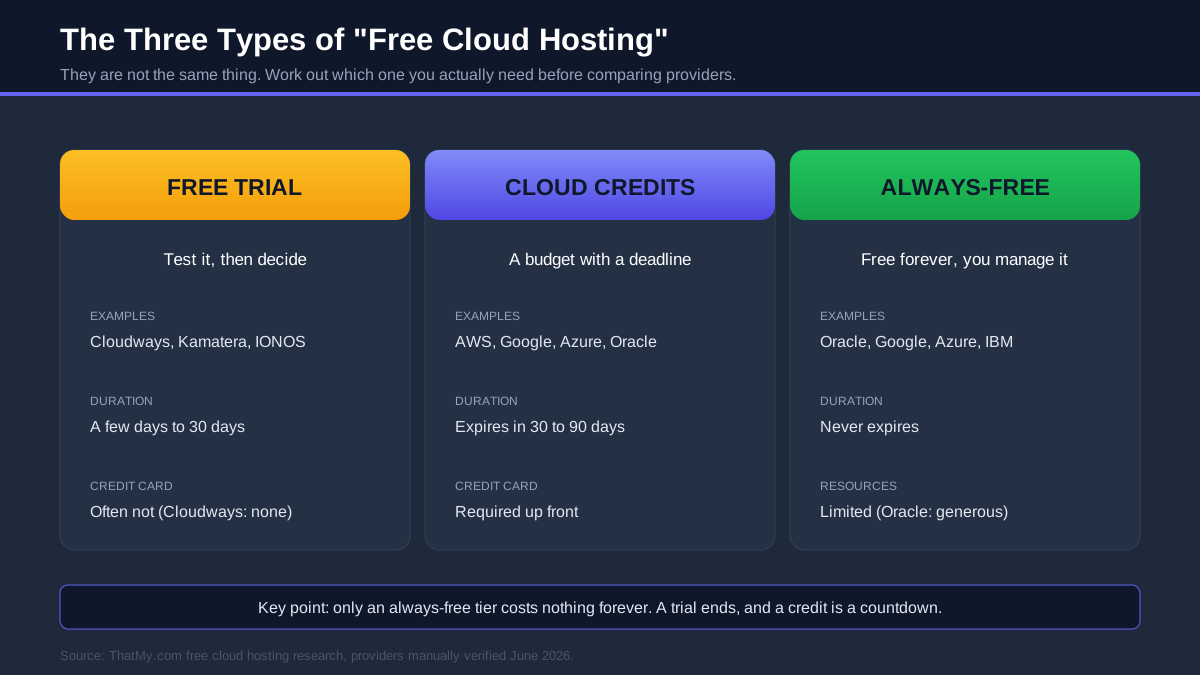
"Free cloud hosting" is one of the most confusing searches in this whole industry, because three completely different things hide behind the phrase. A managed free trial you can test for a few days. A pile of cloud credits the giants hand you to spend before a deadline. And a genuinely always-free tier, a small slice of a server that never expires. Most articles throw all three into one list and leave you to work out which is which.
Cloud hosting is not the same as the traditional shared hosting you may have used before. Instead of renting space on one crowded server, your site runs on a pool of connected servers that can scale resources up when you need them. That flexibility is the whole appeal, and it is also why "free" is more complicated here: the companies giving it away are either funding a trial, buying your attention with credits, or hoping you grow into a paying customer.
The honest truth is that most "free cloud servers" are not free forever. Credits expire, trials end, almost every giant wants a credit card on file, and a single misconfigured instance can turn a free account into a real bill. A small number of always-free tiers (Oracle's especially) are the exception that genuinely costs nothing long term, as long as you are willing to manage the server yourself.
So the right choice depends on your skill level and your goal. Want a fast WordPress site with zero server admin? A managed trial like Cloudways is the gentlest on-ramp. Want a real, free, long-term server and you are comfortable on a command line? Oracle's Always Free tier is unbeatable. Want to learn cloud engineering itself? The AWS, Google Cloud and Azure credits are your classroom. This guide separates all three so you can pick on purpose, not by accident.
Quick Answer: Best Free Cloud Hosting By Use Case
If you only have a minute, here is the short version. Each of these picks is explained in full further down, but this table gets you to the right cloud for what you are actually trying to do.
| Use Case | Recommendation | Why |
|---|---|---|
| Best managed cloud trial | Cloudways | 3-day trial, no card, managed for you |
| Best free cloud server | Oracle Cloud | Always Free Arm server that never expires |
| Best free cloud credits | Google Cloud | $300 to spend over a full 90 days |
| Best for WordPress | Cloudways | 1-click WordPress, 48ms TTFB, free SSL |
| Best for developers | AWS | The widest service catalogue to build on |
| Best for beginners | Cloudways | Cloud power without the server admin |
| Best free VM | Oracle Cloud | 4 Arm cores and 24GB RAM, free for life |
| Best enterprise cloud | Microsoft Azure | Deepest fit with Microsoft tooling |
| Best startup cloud | Google Cloud | Largest upfront credit and startup programs |
Cloudways
Managed cloud hosting on top of DigitalOcean, Vultr, Linode, AWS or Google Cloud, with a 3-day trial that needs no credit card and a 48ms TTFB in my testing. The fastest way to put a real site on the cloud without becoming a sysadmin.
See WhyOracle Cloud Free Tier
Up to 4 Arm Ampere cores, 24GB of RAM and 200GB of storage that genuinely never expires, the most generous always-free compute in the industry. Perfect if you want a real free server and do not mind managing it yourself.
Read Review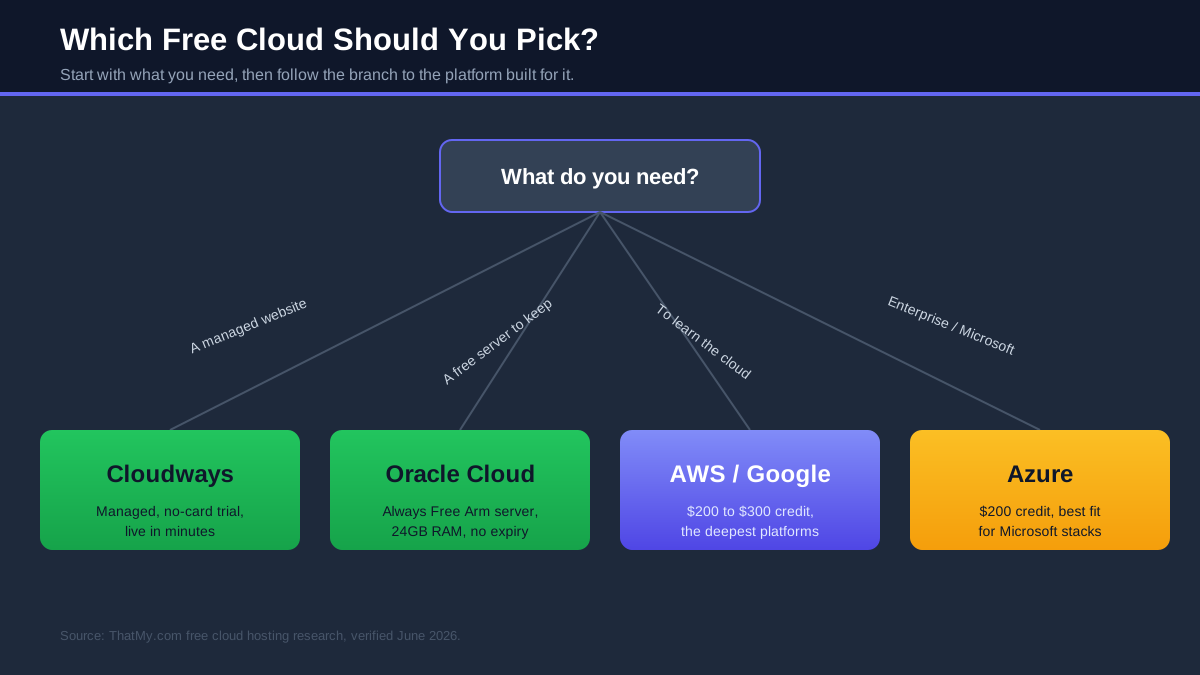
Table of Contents
- Quick Answer: Best Free Cloud By Use Case
- What "Free Cloud Hosting" Really Means
- Free Cloud Hosting Comparison Table
- How I Verified Every Free Tier
- Best Free Cloud Hosting Providers
- Free Cloud Credits Compared
- Cloudways vs Raw Cloud Hosting
- Best Free Cloud Hosting For WordPress
- Best Free Cloud Hosting For Developers
- Best Free Cloud Hosting For Beginners
- Best Free Cloud VPS Providers
- Hidden Problems With Free Cloud Hosting
- How To Choose The Right Free Cloud
- How To Get Started
- Is Free Cloud Hosting Good For SEO?
- When Free Cloud Stops Making Sense
- Free Cloud Hosting FAQs
- My Final Picks
What People Really Mean By "Free Cloud Hosting"
Before you compare a single provider, you need to know which of the three free models you are looking at, because they answer different questions and carry different risks. Mixing them up is how people end up with a surprise bill on a "free" account, or abandon a project because the free runway ran out faster than they expected. Here is each one, in plain terms.
Free Cloud Hosting Trials
A trial is managed cloud hosting you can use for a short window to see if it fits, then decide whether to pay. This is the friendliest category, because the provider has already done the hard parts (provisioning, security, caching) and you just use the result. Cloudways is the standout here, with a 3-day trial that does not even ask for a credit card, and a $30 credit via code CLOUDS2022 if you want longer. Kamatera offers a 30-day trial with around $100 of credit, and IONOS runs trial offers on its cloud servers too. Trials are perfect when your goal is a working website rather than a lesson in cloud engineering.
Cloud Credits
Credits are a dollar amount the big platforms drop into a new account to get you building. They are generous on paper but they expire, and they almost always need a credit card up front. Google Cloud leads with $300 over 90 days, Oracle adds $300 over 30 days on top of its free tier, AWS now gives up to $200 over six months, Azure gives $200 over 30 days, and IBM offers $200 once you move to pay-as-you-go. Credits are ideal for learning a specific platform or running a short, resource-heavy project, but they are a countdown, not a home.
Always-Free Cloud Resources
This is the only category that is genuinely free with no deadline: a small, permanent slice of cloud resources you can keep running indefinitely. Oracle's Always Free tier is the most generous by a distance, handing you up to 4 Arm Ampere cores, 24GB of RAM and 200GB of storage that simply never expires, enough to run a real application. Google Cloud's Always Free products are far smaller (one e2-micro VM in select US regions, plus modest storage and Cloud Run allowances), and Azure keeps more than 55 services in always-free quantities. Always-free is the right pick when you want a long-term free server and you are comfortable managing it.
Why Most Free Cloud Servers Aren't Actually Free
Once you separate the three models, the catches become obvious. Credits expire, often faster than you expect, and the moment they do the meter starts. Billing has no hard stop on most of the giants, so a forgotten instance or a traffic spike can run past your free allowance and generate a real charge, which is why "surprise AWS bill" is a running joke among developers. Resources are deliberately limited on the always-free tiers, enough to learn or run something small, rarely enough for a busy production site. And nearly every platform requires a credit card to verify you, even when it promises not to charge it. None of this makes free cloud a trap, but it does mean the word "free" carries an asterisk you should read before you commit a project to it.
Free Cloud Hosting Comparison Table
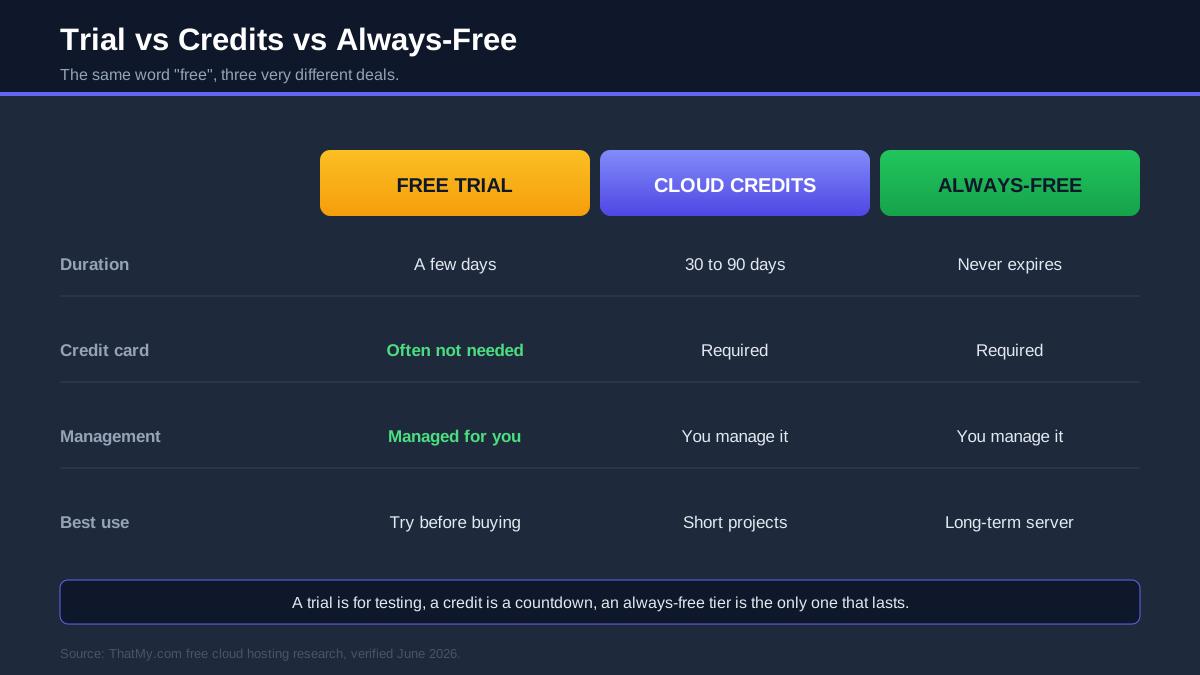
This is the whole field side by side, and it is the table I would bookmark. The three columns that matter most are Always Free (does anything cost nothing forever), Credit Card (do you have to hand one over to start), and Managed (does the provider run the server, or do you). Read those three first and the right shortlist appears quickly.
One pattern jumps out immediately: Cloudways is the only row with "no" in the Card Required column and "yes" in the Managed column, which is exactly why it is my pick for anyone who wants cloud hosting without a systems-administration project attached. Oracle is the only "best" in the Always Free column, and everything else is a credit you will eventually spend. Keep that shape in mind as you read the full reviews.
How I Verified Every Free Tier
Most "free cloud hosting" lists are copied from each other, which is how outdated offers survive for years after they change. AWS is the obvious example: it replaced its famous 12-month free tier in July 2025, yet plenty of articles still describe the old version. I did this the slower, more reliable way.
- I went to the source. Every credit amount, trial length and always-free spec in this guide was read off each provider's own pricing and free-tier pages, not lifted from another blog.
- I created accounts where it mattered. For the platforms I recommend most (Cloudways especially), I signed up, launched a server, and noted exactly what the free path looks like, including whether a credit card is demanded before you can start.
- I separated the three models. Each provider is labelled as a trial, a credit, an always-free tier, or some combination, so you are never comparing a 30-day countdown against a permanent free server as if they were the same thing.
- I used a real performance number where I have one. The only hard speed figure I quote is Cloudways at 48ms TTFB, measured on a Vultr High Frequency server, because I will not invent benchmark numbers for platforms I have not measured under identical conditions.
- I flagged what changes. Promotional credits (Vultr, DigitalOcean, Linode) move around the most, so where a figure is volatile I say "verify at signup" rather than pretend it is fixed.
One honesty note: cloud providers adjust these offers without much warning, so treat the headline numbers as a strong guide and confirm the exact figure when you create your account.
Best Free Cloud Hosting Providers
These are the fourteen platforms worth your time, grouped by how central they are to a "free cloud" decision. The first five get the most depth because they cover almost every real use case. I lead with the managed option, then the always-free server, then the credit-based giants, because that order matches how most people should actually choose.
Cloudways Free Trial: The Easiest Way Onto The Cloud
What you get free: Cloudways gives you a 3-day free trial with no credit card, and code CLOUDS2022 adds $30 of credit, roughly two months on a starter server. In that window you get the full managed platform: launch a real cloud server in minutes, install WordPress in one click, and get free SSL, automated backups, staging and a 72ms TTFB without touching a command line. It is the only platform in this guide that hands you cloud power without asking you to be your own systems administrator.
Managed, so you skip the hard parts: the reason Cloudways earns the top slot is that it runs on top of the same clouds everyone else makes you wrangle yourself, DigitalOcean, Vultr, Linode, AWS and Google Cloud, and handles the provisioning, security patching, caching and server tuning for you. You pick a provider and a size, and a tuned, secured stack appears. For anyone whose goal is a fast website rather than a cloud-engineering qualification, that is the whole game.
Scaling that grows with you: when a project takes off, you add CPU and RAM with a slider and the server scales vertically in place, no migration, no rebuild. That is the practical answer to the biggest free-cloud risk, which is succeeding and then having nowhere to go. You prove the site needs more power, then give it more power in a click.
Backups, security and WordPress: automated off-server backups mean a bad update is a one-click restore rather than a disaster, dedicated firewalls and managed patching keep the server current, and the WordPress experience (one-click install, server-level Redis object cache on 2GB and larger servers, free SSL, a built-in CDN option) is genuinely faster than shared hosting. This is the part free PHP hosts and raw cloud servers both make you build yourself.
Why agencies and businesses lean on it: for people running client sites, the team accounts, one-click cloning and staging environments turn a fiddly cloud workflow into something repeatable, and the 24/7 support means there is always someone to ask. A business site gets dedicated resources and predictable performance instead of the shared-server lottery. The free trial exists precisely so you can prove all of this on your own site before paying a cent.
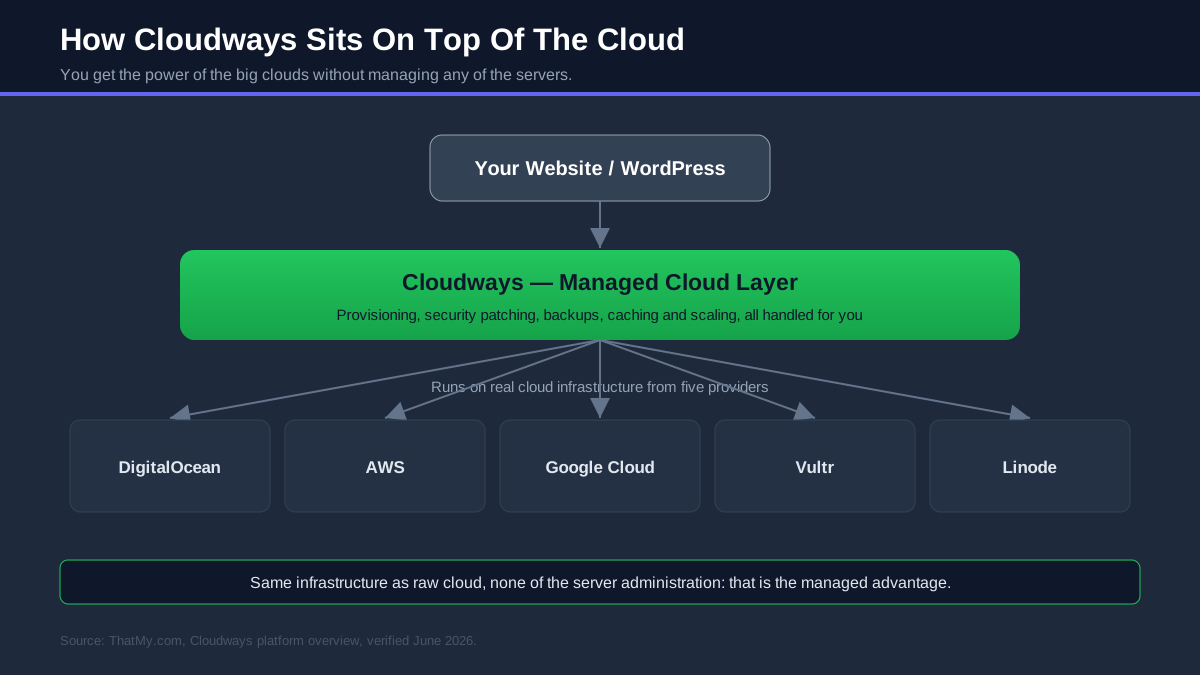
Cloudways is managed cloud hosting built on five infrastructure providers, and it gave me the lowest TTFB I have measured anywhere: 48ms on Vultr High Frequency. You can test the whole thing free first, the 3-day trial does not ask for a card, and code CLOUDS2022 adds $30 of credit on top. Plans start from about $11/mo once you are ready to continue, and you can scale resources up with a slider as the site grows.

- 3-day free trial, no credit card to start
- $30 free credit with code CLOUDS2022
- Managed cloud on DigitalOcean, Vultr, Linode, AWS, Google
- 48ms TTFB on Vultr High Frequency
- 1-click WordPress, free SSL, staging and cloning
- Automated off-server backups and managed security
- Scale CPU and RAM with a slider, no migration
- 24/7 support and Redis object cache on 2GB+ servers
- Email runs through an add-on or third-party service
- A modern custom dashboard rather than classic cPanel
- Plans from about $11/mo once trial and credit are used
- Built for sites that grow, more than a one-pager needs
TTFB 48ms · Trial 3 days, no card · Credit $30 with CLOUDS2022 · From ~$11/mo after · Visit Cloudways ➦
My take: if you want the benefits of the cloud (speed, dedicated resources, easy scaling) without the responsibility of running a server, Cloudways is the clear best starting point, and the no-card trial makes it free to find out. My full Cloudways review goes deeper, and if you want to keep using it, the Cloudways promo code page has the current deal.
Oracle Cloud Free Tier: The Best Free Server You Can Get
What you get free: Oracle's Always Free tier is the most generous free compute in the industry, and it is not close. You get up to 4 Arm Ampere A1 cores with 24GB of RAM (as one machine or split across four), two small AMD virtual machines, 200GB of block storage, 10GB of object storage, two Autonomous Databases, and 10TB of outbound transfer a month, all with no expiry date. Oracle layers a separate $300 credit for 30 days on top for the paid services. That Arm instance alone outclasses paid entry VPS plans that cost $20 a month elsewhere.
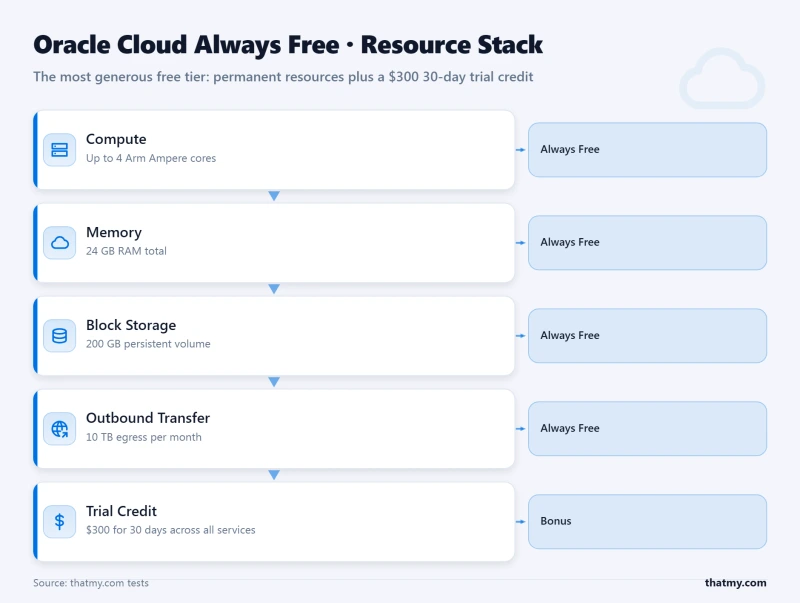
What to know going in: a credit card is required to verify your identity, even though the Always Free resources never charge it. The Arm Ampere capacity is popular enough that you will sometimes hit an "out of capacity" message in busy regions and need to retry or pick another region. And this is raw infrastructure: there is no control panel, no support on the free tier, and you provision, secure and maintain the server yourself over SSH. Oracle can also flag genuinely idle Always Free accounts, so keep something actually running.
What you can build on it: because the Arm server is a real machine, people run serious things on it for free: self-hosted WordPress, a Node or Python app server, a small game server, a VPN, a Docker host, even local AI models. If you are comfortable on a Linux command line, this is the single best free resource on this entire page. If you are not, that is precisely the gap a managed Cloudways trial fills.
- Up to 4 Arm cores and 24GB RAM, free forever
- 200GB block storage and 10TB monthly transfer free
- Two small AMD VMs always free as well
- Two Autonomous Databases included
- $300 extra credit for 30 days on paid services
- Powerful enough for real production workloads
- Credit card required to verify the account
- Arm capacity often unavailable in popular regions
- No panel and no support on the free tier
- You install and secure the whole stack yourself
- Idle Always Free accounts can be reclaimed
Always Free 4 Arm cores / 24GB RAM · Storage 200GB · Credit $300 / 30d · Best for a real free server for life · Visit Oracle Cloud ➦
My take: the best free cloud server available, period, and the right pick if you want genuine, long-term free compute and you are happy being your own sysadmin. Pair it with the VPS hosting basics if you are new to managing a server, and keep your own backups, because nothing here is backed up for you.
AWS Free Tier: The Developer's Cloud Classroom
What you get free: AWS overhauled its free tier in July 2025. New accounts now receive up to $200 in credits ($100 on sign-up, plus $100 you earn by trying core services like EC2, RDS, Lambda and Bedrock), spendable over a six-month free plan that ends when the time or the credits run out. There is still a set of always-free allowances (a million Lambda requests a month, 25GB of DynamoDB and more), and EC2 gives you the virtual servers, S3 the storage, and RDS the databases to build almost anything.
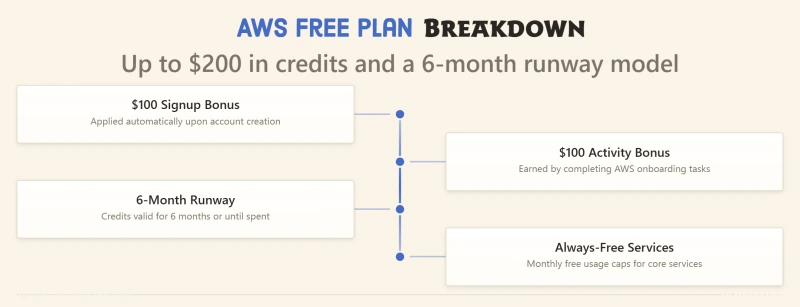
What to know going in: the old 12-month free tier only applies to accounts created before July 2025, so ignore older guides that still describe it. A credit card is required, and this is the platform where billing surprises are most common, because nothing hard-stops at zero by default. Leave a larger instance running past your credit and AWS will bill you. The flip side is unmatched depth: if your goal is to learn the cloud that the most employers ask for, nothing teaches you more.
The simpler path: if you want a website rather than an education, AWS Lightsail offers fixed-price virtual servers (predictable monthly cost, simpler console) that sidestep most of the billing complexity. For pure learning and building, though, the full console plus the new $200 credit is a superb six-month sandbox.
- Up to $200 in new-account credits over six months
- The widest service catalogue of any cloud
- Always-free Lambda, DynamoDB and more
- Lightsail offers a simpler fixed-price VPS path
- The cloud skillset employers most often want
- Enormous documentation and community
- Credit card required, billing has no hard cap
- Easy to leave a service running and get charged
- Legacy 12-month free tier gone for new accounts
- Steep learning curve, you assemble every piece
- No managed WordPress without extra setup
Credits up to $200 / 6mo · Always free Lambda + DynamoDB · VPS EC2 or Lightsail · Best for developers and learning · Visit AWS Free Tier ➦
My take: the best cloud to learn on and the deepest to build on, as long as you respect the billing. Set an AWS Budget alert on day one. If you want AWS-grade infrastructure without the console and the billing anxiety, this is exactly what Cloudways wraps in a managed layer (AWS is one of its five providers).
Google Cloud Free Tier: The Most Generous Credits
What you get free: Google Cloud pairs the largest comfortable credit with a small permanent free tier. New customers get $300 to spend over 90 days, the longest runway of the big three, and separately an Always Free tier that includes one e2-micro VM in three US regions, 30GB of disk, 5GB of Cloud Storage, two million Cloud Run requests and a terabyte of BigQuery queries a month. Compute Engine gives you the virtual machines, and Cloud Run is one of the best free ways anywhere to host a container.
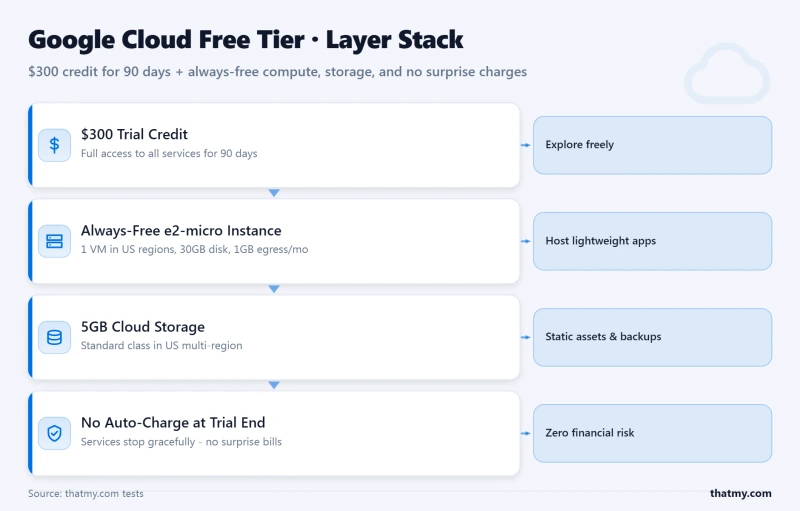
The billing detail that matters: Google Cloud is the safest of the giants on accidental charges. A credit card is required to sign up, but Google will not auto-bill you when the trial ends unless you actively choose to upgrade to a paid account. Anything inside the always-free limits keeps running even after you upgrade. That single design choice removes most of the "surprise bill" anxiety that follows AWS around.
Why startups like it: the 90-day window is long enough to actually build and launch something, Cloud Run scales containers to zero when idle so a quiet app costs nothing, and Google for Startups can extend credits dramatically for eligible companies. If you are prototyping a product rather than learning the cloud for its own sake, this is the friendliest of the credit-based platforms.
- $300 credit over a generous 90 days
- Always-free e2-micro VM, Cloud Run and storage
- No auto-charge until you manually upgrade
- Cloud Run is an excellent free container host
- Strong startup credit programs on top
- Clean, modern console
- Credit card required to start
- Always-free VM is tiny and limited to 3 US regions
- The $300 credit expires after 90 days
- Sprawling platform with an AWS-sized learning curve
- WordPress needs Click-to-Deploy or manual setup
Credit $300 / 90d · Always free e2-micro + Cloud Run · VPS Compute Engine · Best for startups and containers · Visit Google Cloud ➦
My take: the best credit deal on this page for anyone building something new, helped by the most forgiving billing of the giants. The always-free VM is too small to lean on long term, so treat Google Cloud as a 90-day launchpad and decide where the project lives after that.
Microsoft Azure Free Account: Best For The Microsoft World
What you get free: Azure gives new accounts a $200 credit for the first 30 days, then 12 months of free amounts on popular services once you upgrade, and more than 55 services that are always free in small quantities (Functions, a slice of App Service, Cosmos DB and others). It is a complete cloud (virtual machines, databases, storage, AI) and the credit is plenty to evaluate it properly inside a month.
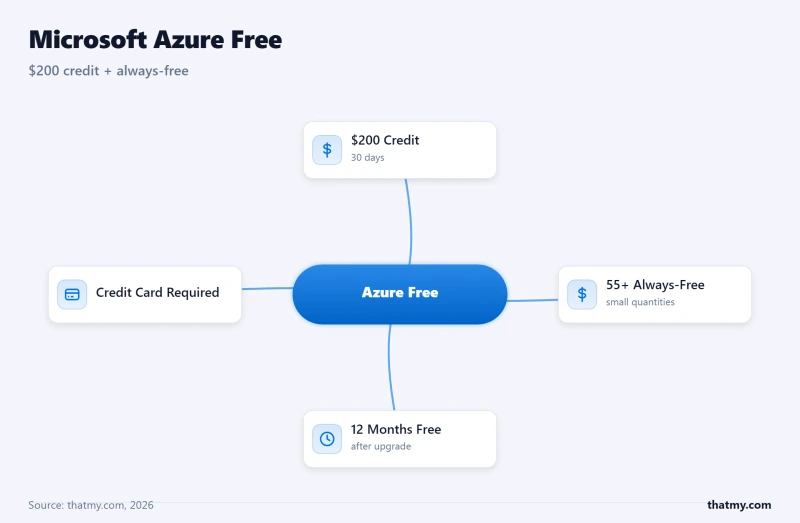
What to know going in: the headline catch is the clock. The $200 expires after just 30 days, the shortest window of the major credits, so Azure rewards people who already know roughly what they want to test. A credit card is required. And the real value lands if you live in the Microsoft ecosystem: .NET, Windows Server, Active Directory, SQL Server and Microsoft 365 all integrate more naturally here than anywhere else, which is why enterprises that run on Microsoft default to Azure.
For websites specifically: Azure App Service can host web apps including WordPress, though it is a more involved setup than a purpose-built managed host. If your organisation is already on Microsoft tooling, that integration is worth a lot; if it is not, the shorter credit window makes Google Cloud or a managed trial an easier free experiment.
- $200 credit to explore in the first 30 days
- 12 months of free popular services after upgrade
- 55+ services always free in small amounts
- Deepest integration with Windows and .NET
- App Service simplifies hosting web apps
- Strong enterprise identity and compliance
- Credit card required to sign up
- The $200 credit expires in just 30 days
- Best value only if you use Microsoft tooling
- The portal is complex for newcomers
- WordPress on App Service is fiddlier than managed hosts
Credit $200 / 30d · Always free 55+ services · VPS Azure VMs · Best for enterprise and Microsoft shops · Visit Azure Free ➦
My take: the right free cloud if you are already in Microsoft's world, and a fast, generous 30-day evaluation if you are deciding. Outside that ecosystem, the short credit window means it is less of a free home and more of a free trial with a deadline.
IBM Cloud: Always-Free Lite Plans For Enterprise And AI
IBM Cloud takes an unusual approach: instead of one big credit, it offers more than 40 Lite plan services that are always free and never expire, and you can start building on many of them without a credit card at all. The $200 new-user credit only appears once you upgrade to a pay-as-you-go account, and it then runs for 30 days. The platform's real strength is enterprise and AI work, with watsonx, managed databases, Kubernetes and Red Hat OpenShift all available.
The trade-off is reach. IBM's community and third-party ecosystem are smaller than the big three, so you lean more on official documentation, and it is not the obvious choice for a simple website. But for AI experiments, enterprise integrations or anyone who specifically wants always-free services without handing over a card up front, the Lite tier is a genuinely useful, low-pressure way in.
Always free 40+ Lite services · Credit $200 / 30d after upgrade · Card not needed for Lite · Best for enterprise and AI · Visit IBM Cloud ➦
Alibaba Cloud: The Asia-Pacific Heavyweight
Alibaba Cloud is the largest cloud provider in Asia, and its free offer combines a trial credit with a 12-month free tier on selected products such as entry-level ECS compute instances. If your audience is in China, Southeast Asia or the wider Asia-Pacific region, Alibaba's network of local data centres gives you latency and reach that the Western giants struggle to match, which is its single biggest selling point.
Outside that region, it is a harder sell. The console and documentation can feel less polished in English, China-region deployments carry their own compliance and ICP-licensing rules, and a credit card is required. Confirm the current trial terms at signup, because Alibaba changes its free-tier product list more often than most. For an APAC-facing project, though, it belongs on your shortlist.
Trial credit + 12-month free tier · Card required · VPS ECS instances · Best for Asia-Pacific reach · Visit Alibaba Cloud ➦
Kamatera: A 30-Day Trial On Fully Configurable Servers
Kamatera offers one of the better trials in the business: 30 days with around $100 of credit, on cloud servers where you choose exactly how many CPU cores, how much RAM and how much disk you want rather than picking from fixed boxes. That flexibility makes it a great place to test a specific configuration before committing, and an optional managed-service add-on means you do not have to run everything yourself.
The limitation is that there is no always-free tier waiting at the end, so the 30-day trial is a true trial: you decide whether to pay or move on. A card or debit card is required to start. For spinning up a tailored server for a month to benchmark a workload, Kamatera is hard to beat.
Trial 30 days, ~$100 credit · Card required · VPS fully configurable · Best for testing custom specs · Visit Kamatera ➦
IONOS Cloud: Cheap, European, GDPR-Friendly
IONOS is a large European provider whose appeal is less about a free tier and more about how cheap the paid pricing is once any trial credit runs out, with cloud VPS plans that start at just a euro or two a month. It runs trial offers on its cloud servers, data is hosted in EU data centres under GDPR, and there is a real support line, which is unusual at this price point.
There is no standing always-free tier, and a credit card is required, so treat IONOS as a low-cost European cloud with an introductory trial rather than a permanently free home. For EU-based projects that want predictable, rock-bottom pricing and local data residency, it is a strong, under-rated option.
Trial offers vary · Card required · VPS from ~€1 to €2/mo after · Best for cheap European cloud · Visit IONOS ➦
The five below are developer clouds you will meet often. None has a true always-free tier, but each hands new accounts a credit, and three of them are the raw infrastructure that Cloudways manages on your behalf, which is a useful way to understand where they sit.
DigitalOcean
DigitalOcean is the developer favourite for a reason: clean "droplets", famously good tutorials, and a $200 credit over 60 days for new accounts. It is self-managed, a card is required, and there is no free tier after the credit, but its 1-click WordPress image and gentle learning curve make it the friendliest of the raw clouds. It is also one of Cloudways' infrastructure options, so if you like DigitalOcean but not the server admin, my DigitalOcean vs Cloudways comparison shows the managed alternative.
Credit $200 / 60d · Card required · Always free none · Best for developers who like simplicity
Vultr
Vultr is the speed pick among the budget clouds. Its High Frequency servers are genuinely quick (the 48ms TTFB I measured on Cloudways was on a Vultr High Frequency machine), it has one of the widest sets of global locations, and new-account promotional credit is usually the most aggressive here at around $300, though it expires fast, so verify the current offer at signup. Self-managed, card required, no always-free tier. See Vultr vs Cloudways for the managed route.
Credit ~$300, short expiry · Card required · Always free none · Best for fast compute, many regions
Linode (Akamai)
Linode is one of the longest-running independent clouds, now owned by Akamai, which plugs it into a world-class edge network. New accounts get a $100 credit valid for 60 days, the documentation and Marketplace 1-click apps are excellent, and pricing is predictable. It is self-managed with a card required and no always-free tier. A dependable, no-drama developer VPS that has earned its reputation over many years.
Credit $100 / 60d · Card required · Always free none · Best for a simple, reliable dev VPS
Hetzner
Hetzner has no free tier at all, and it still earns a place here because its prices are so low the difference barely matters: a capable cloud VPS starts around three to four euros a month from its German and Finnish data centres, with price-to-performance that is among the best anywhere. A card or PayPal is required. If you were only chasing "free" to avoid a big bill, Hetzner is the answer that makes the question go away, as long as EU-based servers suit your audience.
Free tier none · Card required · Cost from ~€3 to €4/mo · Best for the cheapest capable servers
OVHcloud
OVHcloud is one of Europe's largest hosts, spanning cheap VPS plans through to dedicated bare-metal servers, with occasional trial credit on new accounts and low long-term pricing. A card is required and there is no standing free tier, so it sits alongside Hetzner and IONOS as a low-cost European option rather than a free one. My OVHcloud review covers where it fits and where it does not.
Trial occasional credit · Card required · Always free none · Best for European low-cost VPS and bare metal
Free Cloud Credits Compared
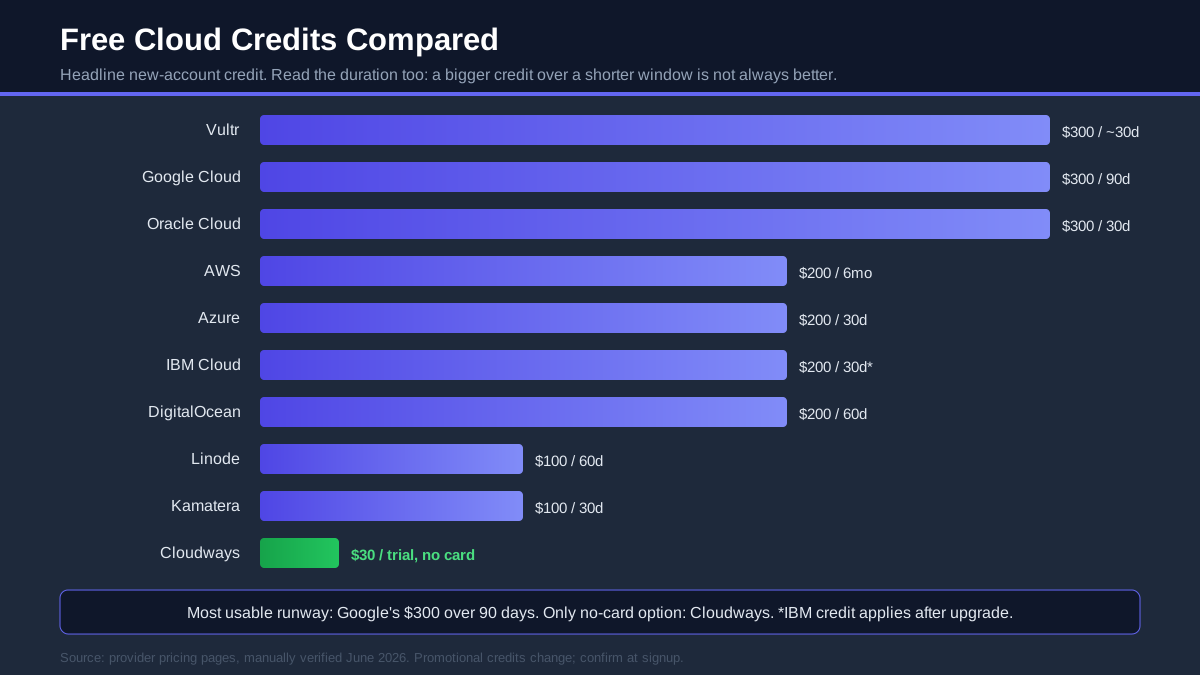
If credits are what you are after, here they are ranked the way that actually matters: not just the dollar figure, but how long you get to spend it and whether a card is required. A bigger credit over a shorter window is not always the better deal.
| Provider | Credits | Duration | Credit Card | Best For |
|---|---|---|---|---|
| Google Cloud | $300 | 90 days | ✅ Required | The longest, most usable runway |
| Oracle Cloud | $300 | 30 days | ✅ Required | On top of the best always-free tier |
| AWS | up to $200 | 6 months | ✅ Required | Credit spread over the longest period |
| Microsoft Azure | $200 | 30 days | ✅ Required | Fast evaluation in the Microsoft world |
| IBM Cloud | $200 | 30 days* | ⚠️ Lite: no | Always-free Lite services first |
| Vultr | ~$300 | ~30 days | ✅ Required | Highest budget-cloud credit |
| DigitalOcean | $200 | 60 days | ✅ Required | Easiest raw cloud to use |
| Linode (Akamai) | $100 | 60 days | ✅ Required | Reliable, predictable dev VPS |
| Kamatera | ~$100 | 30 days | ✅ Required | Configurable trial servers |
| Cloudways | $30 (CLOUDS2022) | Trial | ❌ Not required | Managed cloud with no card to start |
*IBM's $200 applies after you upgrade to pay-as-you-go; its 40+ Lite services are free first with no card. Note the one row that breaks the pattern: Cloudways is the only credit here you can claim without a credit card, which matters more than its smaller size if you just want to try the cloud risk-free.
Cloudways vs Raw Cloud Hosting
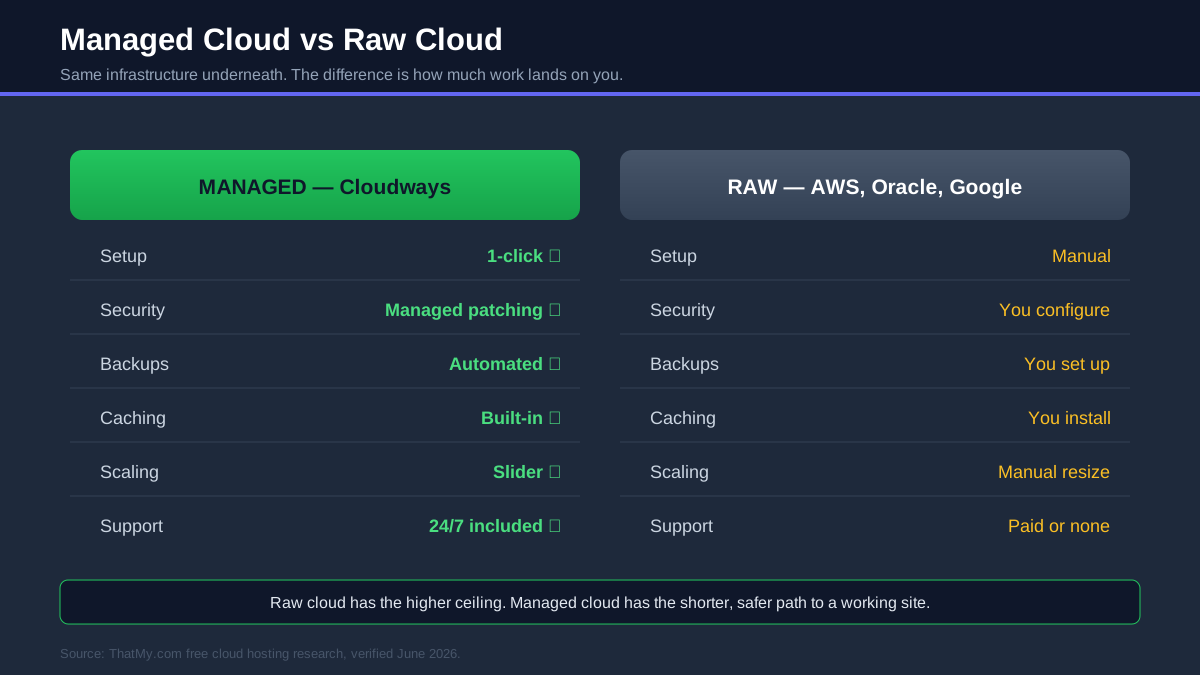
This is the decision most people on this page are really making: do you take a raw server from AWS, Oracle, Google or Azure and run it yourself, or let a managed platform like Cloudways run that same cloud for you? The credits and always-free tiers are tempting, but "free" stops being free the moment you count the hours. Here is the honest side-by-side.
The raw clouds win on ceiling: there is almost nothing you cannot build on AWS or Google if you have the skills. Cloudways wins on the path to get there, because it turns nine columns of "you configure this" into "already done". The right answer depends entirely on which kind of work you want to spend your time on.
Best For Beginners
Cloudways, without hesitation. A beginner on raw AWS spends the first week learning IAM permissions and security groups before a page is even live. On Cloudways the same person has a fast WordPress site running in the trial's first hour, and learns the cloud gradually from a position of already having something that works.
Best For Developers
This is the one case where raw cloud often wins. If you want infrastructure-as-code, custom networking, container orchestration or a specific AWS service, take the credit and the control. Many developers still keep client and production sites on Cloudways precisely so they do not have to babysit servers, and reserve raw cloud for the projects that genuinely need it.
Best For Agencies
Cloudways. Managing a dozen client sites on raw cloud means a dozen servers to patch, monitor and back up. The managed layer, team accounts, staging and 1-click cloning collapse that into a workflow one person can actually run, which is why so many agencies standardise on it.
Best For Businesses
For most businesses, Cloudways. A business website needs to be fast, backed up and online, not a part-time sysadmin job. Dedicated resources and managed reliability matter more than raw flexibility. The exception is a company with an in-house DevOps team, where committing to AWS, Google or Azure directly can pay off at scale.
Best Free Cloud Hosting For WordPress
WordPress runs on almost any of these clouds, but the experience ranges from "live in five minutes" to "set aside an evening". The reason is that WordPress needs a full stack underneath it (a web server, PHP, a database, caching and SSL) and the platforms differ enormously in how much of that they assemble for you.
Cloudways is the easiest free way to run WordPress on the cloud. The 1-click installer builds the entire optimised stack, free SSL is one click, server-level Redis caching is available on larger servers, and my test site returned a 72ms TTFB without any tuning. All of that happens inside the 3-day no-card trial, so you can have a fast, real WordPress site on cloud infrastructure before deciding whether to pay. For most people searching for free cloud WordPress hosting, this is the answer, and my guide to managed WordPress hosting explains why managed stacks beat shared hosting for it.
Oracle Cloud is the best truly free long-term option, because the Always Free Arm server is powerful enough to run WordPress comfortably at no cost forever. The catch is all the work the managed hosts hide: you install and configure the web server, PHP, MySQL or MariaDB, SSL certificates and caching yourself, then maintain it. If you want a free WordPress server and you enjoy that kind of control, nothing else is free indefinitely the way Oracle is.
AWS gives you two paths. Lightsail offers a near-1-click WordPress instance at a fixed monthly price that your credit can cover, which is the sane way to do WordPress on AWS. Doing it "properly" on EC2 with RDS is powerful but is a real systems project. Google Cloud is similar: there is a Click-to-Deploy WordPress option and the $300 credit easily covers a small instance for 90 days, but the always-free e2-micro is too small to run WordPress smoothly. Azure can host WordPress through App Service, which suits teams already standardised on Microsoft tooling more than it suits a first-time blogger.
| Platform | WordPress Setup | Free Path | Best For |
|---|---|---|---|
| Cloudways | 1-click, optimized | 3-day no-card trial + $30 credit | Anyone who wants a fast WP site fast |
| Oracle Cloud | Fully manual | Always Free, forever | A free WP server you will maintain |
| AWS | Lightsail near-1-click | $200 credit / 6 months | Learning AWS with WordPress on top |
| Google Cloud | Click-to-Deploy | $300 credit / 90 days | A 90-day WordPress project |
| Microsoft Azure | App Service | $200 credit / 30 days | Microsoft-centric teams |
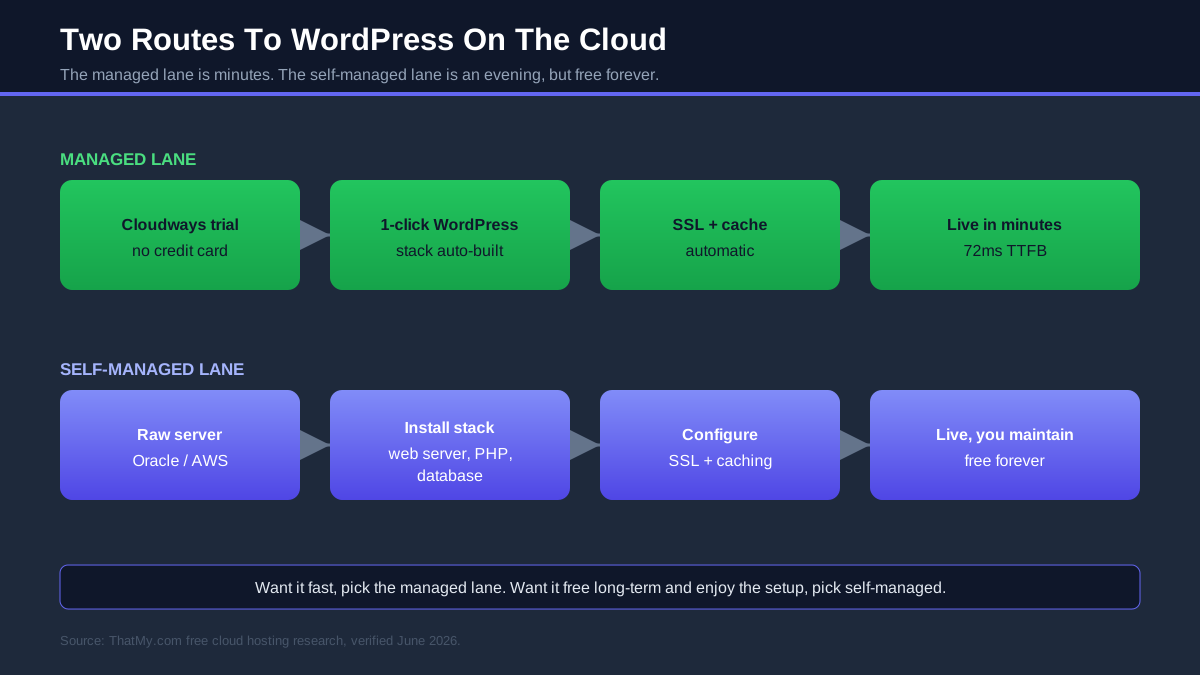
The honest summary: if WordPress is the goal and the cloud is just the means, use the Cloudways trial and skip the stack-building. If a permanently free WordPress server is the goal and the setup work is acceptable, Oracle's Always Free tier is unbeatable value. Everything else is a credit-funded middle ground.
Best Free Cloud Hosting For Developers
Developers want different things from free cloud than beginners do: real control, the right primitives, and room to learn the platform itself. If you are comfortable on a Linux command line and you want to build rather than be managed, the raw clouds are where you belong, and the free credits are the best classroom money cannot buy.
For Linux, Docker and self-hosting: Oracle's Always Free Arm server is the standout, because it is a genuinely capable machine you keep for free. Spin up Docker, run containers, host APIs, experiment with a Kubernetes cluster (k3s runs happily on the Arm instance), and it costs nothing month after month. For pure free compute that you fully control, nothing on this page beats it.
For Kubernetes and managed services: the giants shine. Google Cloud originated Kubernetes and GKE is the most polished managed experience, with $300 of credit to learn it on. AWS gives you the widest set of building blocks (EKS, Lambda, DynamoDB, the always-free serverless allowances) and is the skillset most employers list. Azure is the natural choice for .NET, C# and Windows-based stacks, and IBM Cloud leans into OpenShift and AI workloads with its always-free Lite services.
For Node.js, Python and PHP apps: any of these will run your runtime, but the friction differs. Google Cloud Run is a superb free way to deploy a containerised Node or Python service that scales to zero when idle. AWS Lambda's always-free million requests a month suits event-driven Python. And if you are building in PHP or want a managed home for the production version of any of these, Cloudways gives you SSH, Git deployment, WP-CLI, Composer and staging on top of the same clouds, which is why plenty of developers prototype on raw cloud and ship on managed.
My rule of thumb: learn on the giants' credits, keep long-lived free experiments on Oracle, and put anything a client or your income depends on somewhere managed so a server problem is not your problem at 2am.
Best Free Cloud Hosting For Beginners
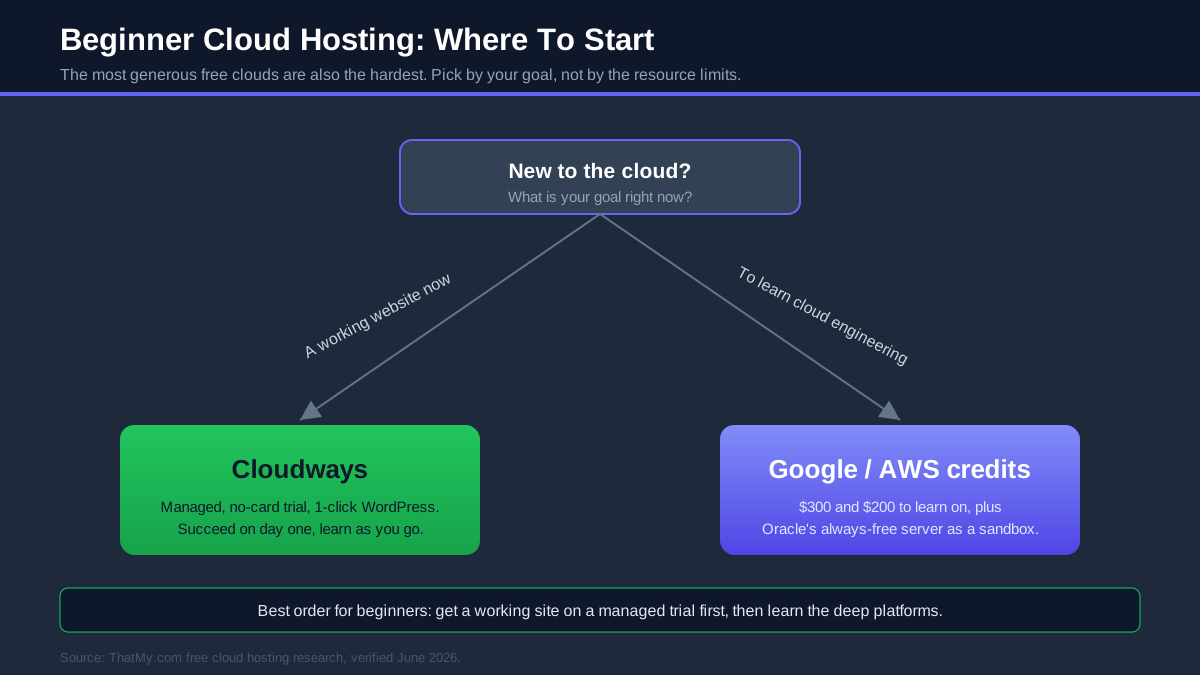
If you are new to all of this, the single most useful thing I can tell you is that "powerful" and "beginner-friendly" point in opposite directions here. The clouds with the most generous free resources (AWS, Oracle, Google, Azure) are also the ones that assume you already know how to run a server. Starting there is how beginners end up with a half-built site and a billing scare.
Start with Cloudways. It is the only option on this page designed so a beginner can succeed on day one: a 3-day trial with no credit card, a 1-click WordPress install, automatic SSL, backups and security handled for you, and a dashboard instead of a command line. You are still on real cloud infrastructure, you are just not responsible for the parts that overwhelm newcomers. When you outgrow the basics, the platform is still there, so nothing you learn is wasted.
Then explore the giants when you are ready. Once you understand what a server, a database and DNS actually are, the free credits on Google Cloud and AWS become a brilliant, low-stakes way to learn cloud engineering properly. Oracle's Always Free server is a fantastic sandbox at that stage too. The order matters: get a working site first, then learn the deep platform, not the other way around.
The mistakes to avoid: do not hand a beginner project to raw AWS expecting a quick website, do not skip setting a billing alert on any of the giants, and do not assume "free" means "no card", because nearly all of them want one. A beginner who follows the managed-first path gets a live site and confidence; a beginner who starts on raw cloud often gets neither.
Best Free Cloud VPS Providers
A cloud VPS is a virtual server you control, and the "free VPS" question has one clear winner and a handful of credit-funded runners-up. The distinction that matters is the one this whole page is built on: a standing always-free VPS versus a server you run on expiring credit.
| Provider | Free VPS Path | What You Get | Card | Best For |
|---|---|---|---|---|
| Oracle Cloud | Always Free, no expiry | Up to 4 Arm cores, 24GB RAM, 200GB | ✅ Yes | The best free VPS, full stop |
| Google Cloud | Always Free + $300 credit | 1 small e2-micro, 3 US regions | ✅ Yes | A tiny always-free VM |
| AWS | $200 credit / 6 months | EC2 or Lightsail instances | ✅ Yes | Learning on EC2 |
| Microsoft Azure | $200 credit / 30 days | B-series VMs, limited free hours | ✅ Yes | Windows and .NET servers |
| IBM Cloud | Lite + $200 after upgrade | Small VPC virtual servers | ⚠️ Lite: no | Enterprise sandboxes |
Oracle is in a class of its own: its Always Free Arm VPS is more capable than paid $20-a-month plans elsewhere and it never expires. Everyone else is really offering a credit-funded VPS that becomes a bill when the clock runs out. If you want a free virtual server you can keep, Oracle is the answer, and if you want that power without the administration, a Cloudways server gives you a managed VPS on similar infrastructure.
Hidden Problems With Free Cloud Hosting
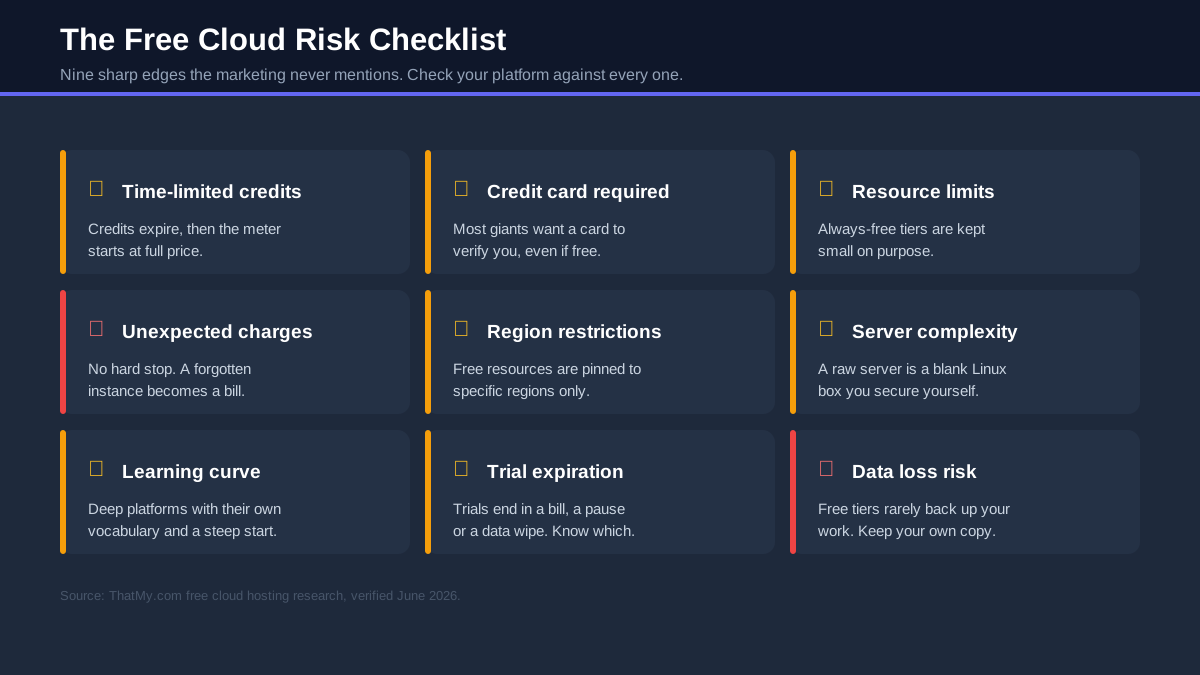
Free cloud is real and useful, but it comes with sharp edges that the marketing never mentions. I have watched every one of these catch someone out. Run your shortlisted platform past all nine before you trust a project to it.
Time-Limited Credits
The biggest trap. A $300 credit feels infinite until the day it is gone and your "free" server starts billing at full rate. Credits are a countdown, not a free tier. Always know your exact expiry date and what the monthly cost becomes the moment you cross it.
Credit Card Requirements
Nearly every giant demands a card to verify you, even when it swears it will not charge it. For many people that alone is a dealbreaker, and it is why Cloudways' no-card trial and IBM's Lite plans stand out. A small verification hold (often about a dollar) is normal; an actual charge should not be.
Resource Limits
Always-free tiers are deliberately small. Google's free VM is a fraction of a real server, and most free allowances are sized to teach you, not to run a busy site. Oracle is the rare exception with genuinely usable resources. Read the limits before you build, not after the site slows down.
Unexpected Charges
Cloud billing has no hard stop by default. Leave an instance running, store too much data, or send too much traffic, and the bill is real. "Surprise cloud bill" stories almost always come from a forgotten resource. Set a budget alert on day one, every time, on every giant.
Region Restrictions
Free resources are often pinned to specific regions: Google's free VM lives in three US regions only, and Oracle's popular Arm capacity sells out in busy ones. If your audience is far from the free region, latency suffers, and you may have to retry signups until capacity appears.
Server Complexity
A raw cloud server is a blank Linux box. You configure the web server, database, firewall, SSL and backups yourself, and a misconfigured security group or open port is a genuine risk. This is the gap between "I have a server" and "I have a working, secure website" that managed platforms close for you.
Learning Curve
AWS, Google Cloud and Azure are deep platforms with their own vocabulary. The same task can take a beginner hours of documentation that takes an expert two minutes. That curve is worth climbing if learning the cloud is the goal, and pure friction if you just wanted a website.
Trial Expiration
Trials end, and what happens next varies. Some platforms pause your resources, others begin billing, and a few delete data after a grace period. Know in advance whether your trial ends with a bill, a pause or a wipe, and have your next move ready before the date arrives.
Data Loss Risk
Free tiers rarely back anything up for you. Render's free database expires after 30 days, idle Oracle accounts can be reclaimed, and a deleted free instance is usually gone for good. Keep your own backups of anything you would hate to lose, and never let a free server be the only copy of important work.
How To Choose The Right Free Cloud Platform
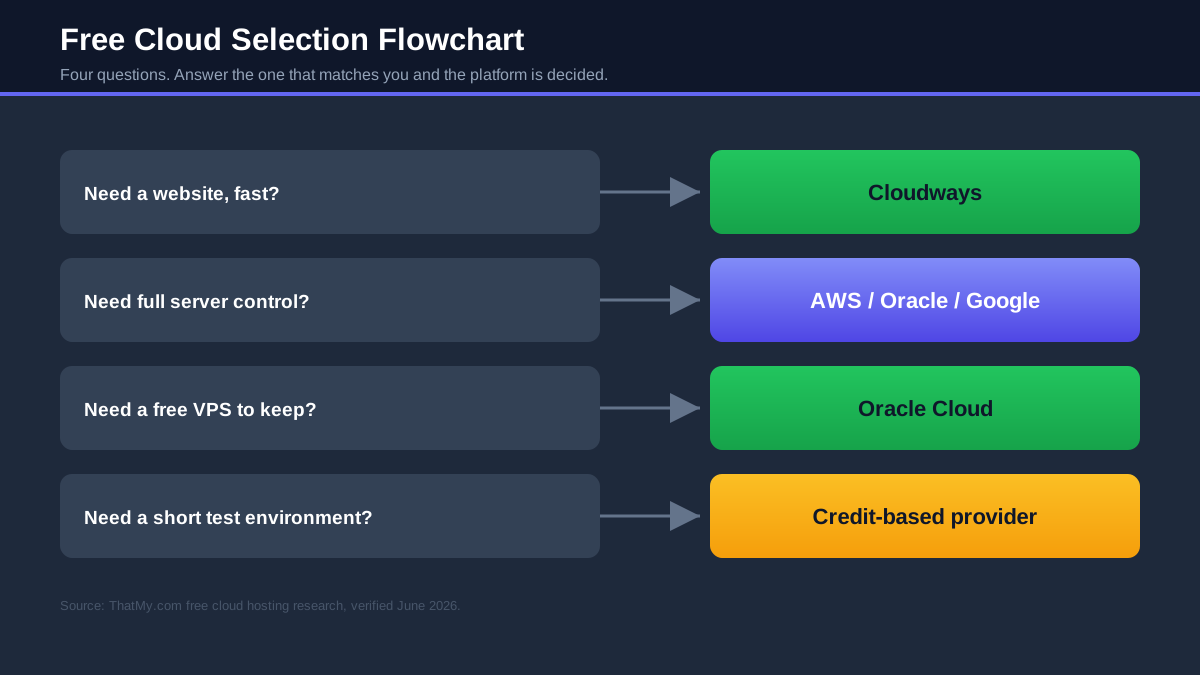
Strip away the marketing and the choice comes down to four questions. Answer the one that matches your situation and your platform is decided.
Need WordPress or a website, fast?
Choose Cloudways. The 1-click install, managed stack and no-card trial get a real WordPress site live in minutes instead of an evening, on cloud infrastructure that scales when you grow. This is the answer for the large majority of people who reach this page.
Need full control of the server?
Choose a raw cloud: AWS, Oracle, Google Cloud or Azure. Take the credit (or Oracle's always-free server) and build exactly what you want, from custom networking to container clusters. This is the right path when learning or controlling the infrastructure is itself the point.
Need a genuinely free VPS to keep?
Choose Oracle Cloud. Its Always Free Arm server is the only free VPS on this page that never expires and is powerful enough to run real workloads, as long as you are comfortable managing it.
Need a short-term testing environment?
Choose a credit-based provider: Google Cloud's $300 over 90 days is the most usable, with AWS and Azure close behind. Credits are perfect for a defined project with an end date, where you want generous resources for a few weeks or months and then you are done.
How To Get Started
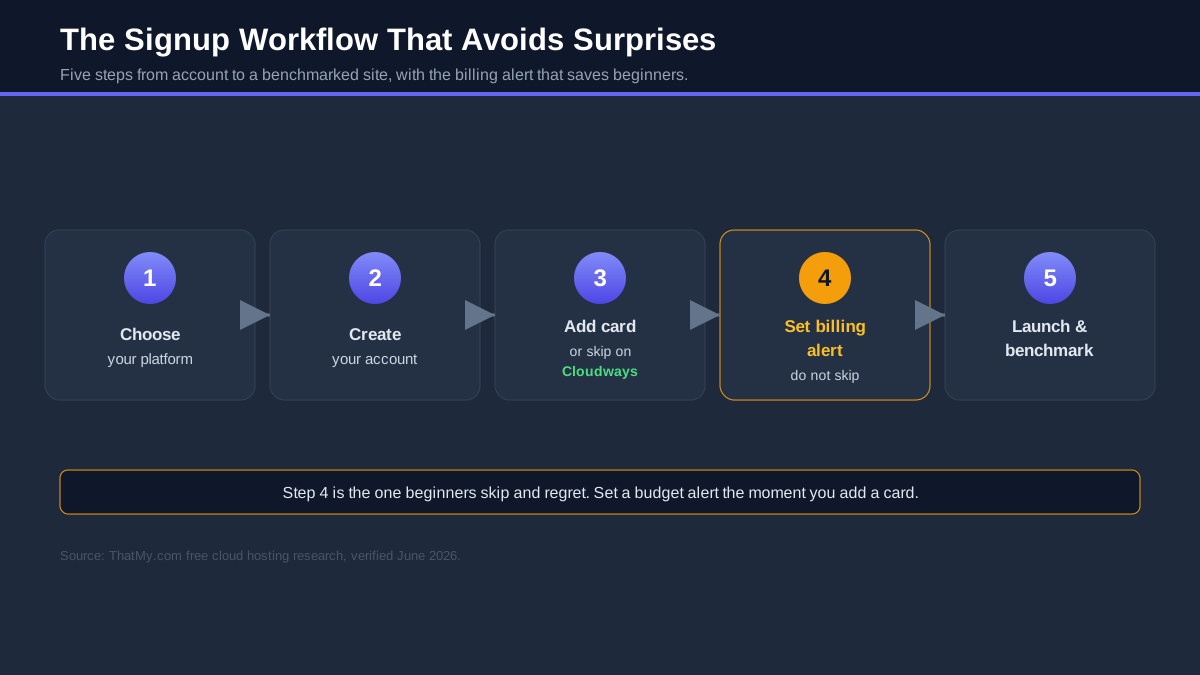
Once you have picked a platform, here is the short version of getting onto each one without the common mistakes. The recurring theme: set a billing alert the moment you add a card.
Start a Cloudways Trial
Go to Cloudways, sign up with just an email (no card needed), and apply code CLOUDS2022 for $30 of credit. Pick a provider and server size, choose the WordPress 1-click app, and your managed cloud site is live in minutes. Benchmark it during the 3 free days, then decide. This is the lowest-risk way to try cloud hosting on this entire page.
Create an Oracle Cloud Account
Sign up for Oracle Cloud, verify with a card (it will not be charged for Always Free resources), and choose a home region carefully, because your Always Free resources live there. Launch an Ampere A1 (Arm) instance for the best free server, and if it shows "out of capacity", try a different availability domain or region, or retry later. Keep something running so the account is not flagged as idle.
Activate the AWS Free Tier
Create an AWS account, add a card, and immediately set an AWS Budget alert (this is the single most important step). You will get $100 in credit on sign-up and can earn another $100 by completing the guided service activities. Use Lightsail for a simple site, or EC2 and the always-free services to learn. Terminate anything you are not using.
Activate Google Cloud Credits
Sign up for Google Cloud to claim the $300, 90-day credit. A card is required, but Google will not bill you when the trial ends unless you manually upgrade, so you are safe by default. Compute Engine gives you VMs, Cloud Run is the easiest free way to deploy a container, and the always-free e2-micro keeps a tiny VM going afterwards.
Activate Azure Credits
Create an Azure free account for the $200, 30-day credit plus 12 months of free services on upgrade. Because the credit window is short, decide what you want to test before you start the clock. App Service is the quickest route to a web app, and the always-free services keep small workloads running past the trial.
Is Free Cloud Hosting Good For SEO?
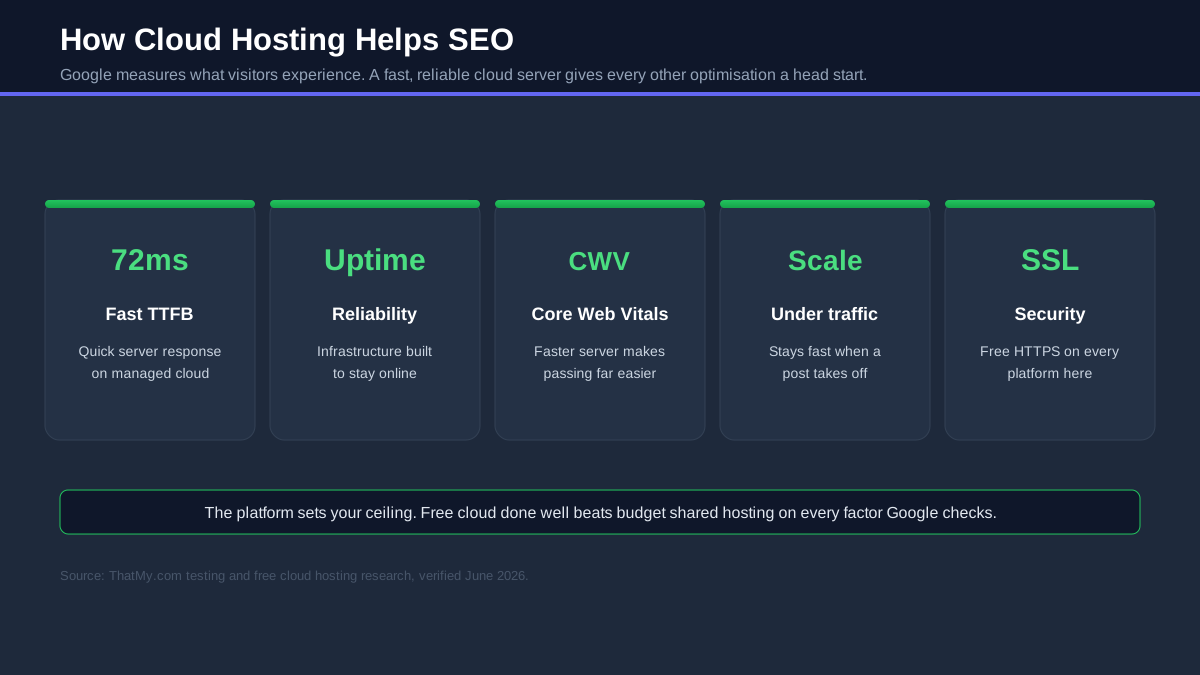
Google does not care what you paid for hosting; it cares what your visitors experience. That cuts both ways for free cloud, which can be either excellent or a quiet handicap depending on which kind you choose and how well you run it.
Speed
This is where cloud can genuinely help SEO. A well-configured cloud server is fast, and managed platforms make that easy: my Cloudways test site returned a 48ms TTFB, the kind of number shared hosting cannot reach under load. A raw Oracle or Google server can match it if you tune it well. The risk is the opposite case: an undersized free VM or an unoptimised stack can be slower than cheap shared hosting, so the speed benefit is earned, not automatic.
Uptime
Cloud infrastructure is built for reliability, and the giants run on hardware most hosts cannot match. But uptime on a free tier still depends on you: an instance that hits a resource cap, runs out of credit, or is reclaimed for being idle is downtime Google will notice. Managed platforms protect you from most of that; raw free servers make it your responsibility.
Core Web Vitals
Core Web Vitals are graded from real visitor data, and TTFB sits underneath all of them. A fast cloud server gives every other optimisation a head start, which is the main SEO argument for moving off shared hosting at all. A managed stack with server-level caching makes hitting "good" Core Web Vitals far easier than fighting a slow server.
Scalability
SEO success creates traffic, and traffic kills slow hosting at the worst possible moment. The cloud's defining advantage is that you can scale resources up to meet demand, on Cloudways with a slider, on raw cloud by resizing the instance, so a post that takes off stays fast instead of collapsing. That resilience is worth real ranking points over time.
Security
HTTPS is a baseline ranking signal, and every platform here supports free SSL, though on raw servers you install it yourself. Beyond that, a hacked or defaced site is an SEO catastrophe, which is where managed security patching earns its keep. On a free raw server, security is entirely on you, and that is a real responsibility, not a footnote.
The honest verdict: free cloud done well (a tuned server or a managed platform with your own domain) is genuinely good for SEO and better than budget shared hosting. Free cloud done badly (a tiny, slow, unmaintained instance) can hurt you. The platform gives you the ceiling; how you run it decides where you land.
When Free Cloud Hosting Stops Making Sense
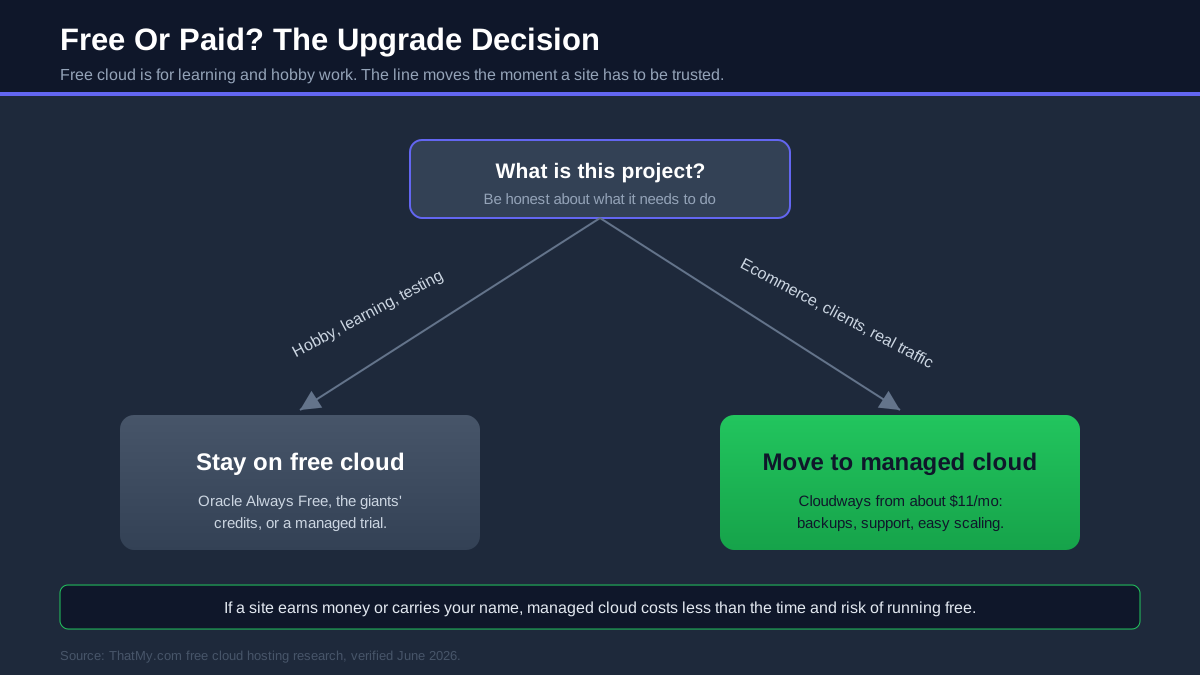
I have just spent thousands of words on free cloud, so trust me when I say there is a clear line where it stops being a smart saving and starts being an expensive habit. It arrives the moment a site needs to be trusted, by customers, by clients, by Google, or by you when something breaks.
- Ecommerce. Taking payments needs PCI-ready security, guaranteed uptime and someone to call when checkout breaks. None of that exists on a free tier that can expire or throttle without warning.
- Agencies. Managing client sites on expiring credits and raw servers is a second job you did not sign up for. Predictable, managed infrastructure is cheaper than the hours you would otherwise lose.
- Client websites. Handing a client a site on a free tier hands them every limitation on this page, with your name attached when the credit runs out.
- High-traffic sites. Free resources are capped, and the cap arrives exactly when a site succeeds. Scaling on a managed platform turns that moment into a slider, not a crisis.
The pattern I see most often
Someone picks a free cloud tier to save money, spends weeks fighting server setup or nursing expiring credits, the project stalls, and they conclude the idea did not work. Usually the idea was fine. The free infrastructure was the bottleneck, and a managed plan from about $11/mo would have removed it. If a project matters to you, that is the cheapest upgrade you can make.
Free Cloud Hosting FAQs
What is free cloud hosting?
Free cloud hosting is any way of running a website or application on cloud infrastructure at no cost. In practice it comes in three different shapes that get blurred together: a free trial (managed hosting you can test for a few days, like Cloudways), cloud credits (a dollar amount the giants hand new accounts, like Google Cloud's $300), and an always-free tier (a small slice of a server that never expires, like Oracle's Arm instances). They solve different problems, so the first job is working out which one you actually need.
Which free cloud server is best?
For a genuinely free server that never expires, Oracle Cloud is the most generous by a wide margin: its Always Free tier gives you up to 4 Arm Ampere cores, 24GB of RAM and 200GB of storage, enough to run a real application. Nothing else free comes close on raw resources. The trade-off is that you manage the bare server yourself, so if you want a server without the sysadmin work, a managed Cloudways trial is the friendlier route.
Is Oracle Cloud really free?
Yes, the Always Free part is genuinely free with no time limit, and it is the most capable free compute in the industry: 2 small AMD virtual machines plus up to 4 Arm cores with 24GB of RAM, 200GB of block storage and 10TB of monthly outbound transfer. Oracle also adds a separate $300 credit for 30 days on top. The catches are practical rather than financial: a credit card is required to verify the account, Arm capacity in popular regions sells out, and idle accounts can be reclaimed.
Is AWS Free Tier free forever?
No. AWS changed its model in July 2025. New accounts now get up to $200 in credits ($100 on sign-up plus $100 earned by trying services) and a free plan that lasts six months or until the credits run out, whichever comes first. The old 12-month free tier only applies to accounts opened before that date. There is still a set of always-free services, but for a new user AWS is best understood as a generous six-month credit, not free hosting forever.
Is Google Cloud free?
Partly, and in two layers. New customers get a $300 credit valid for 90 days, and separately there is an Always Free tier that includes one small e2-micro virtual machine in eligible US regions, 5GB of storage and a monthly Cloud Run allowance, none of which expires. A credit card is required to sign up, but Google does not auto-charge you when the trial ends unless you manually upgrade to a paid account, which is the safest billing setup of the big three.
Does Cloudways offer a free trial?
Yes. Cloudways gives you a 3-day free trial with no credit card required, which is rare among cloud platforms, and you can extend your runway with code CLOUDS2022 for $30 of free credit. That is enough to launch a managed server, install WordPress in one click and benchmark it before paying anything. Because it is managed, you skip the server administration that AWS, Oracle and Google expect you to handle yourself.
Which free cloud hosting is best for WordPress?
Cloudways is the easiest path to WordPress on the cloud: a one-click installer, free SSL, server-level caching and a 48ms TTFB in my testing, all inside the free trial. You can run WordPress on Oracle's Always Free server too, and it costs nothing long term, but you install and secure the entire stack by hand. For most people who just want a fast WordPress site on cloud infrastructure, the managed trial wins on time saved.
Which cloud hosting does not require a credit card?
The cloud giants nearly all require a card to verify your identity, even when nothing is charged: AWS, Google Cloud, Azure, Oracle and DigitalOcean all ask for one. The standout exception is Cloudways, whose 3-day trial starts with just an email address. IBM Cloud's Lite plans also let you build on a handful of always-free services without a card, though a full account adds one.
What is the best free cloud VPS?
Oracle Cloud's Always Free tier is the best free cloud VPS available, full stop. The Arm Ampere instance (up to 4 cores and 24GB of RAM) outclasses every paid entry VPS at the $5 to $10 level, and it never expires. Google Cloud's free e2-micro is a distant second because it is a much smaller machine limited to three US regions. Everyone else offers time-limited credits rather than a standing free VPS.
Which cloud provider gives the most free credits?
Among the giants, Google Cloud leads at $300 for 90 days, with Oracle matching $300 but over 30 days, and AWS and Azure both at roughly $200 (AWS over six months, Azure over 30 days). Among the developer clouds, Vultr is usually the most aggressive with promotional credit around $300, followed by DigitalOcean at $200 and Linode at $100. Credit amounts change often, so confirm the current figure at signup.
Is Azure free?
Azure gives new accounts a $200 credit for the first 30 days, 12 months of free amounts on popular services after you upgrade, and more than 55 services that are always free in small quantities. A credit card is required, and the $200 expires quickly at 30 days, so Azure suits people who already live in the Microsoft ecosystem and want to evaluate it fast rather than coast on a long free runway.
Can I host a website on AWS for free?
You can, using the $200 in new-account credits and the always-free allowances, but it is the hard way to host a simple site. AWS expects you to assemble the pieces yourself (an EC2 server, storage, networking, a database) and the billing has no hard stop, so a forgotten instance can run past your credit and bill you. For learning cloud infrastructure it is excellent; for simply getting a website online, a managed trial or a static host is far less work.
Can I run WordPress on Oracle Cloud?
Yes, and it is one of the best free ways to do it long term, because the Always Free Arm server is powerful enough to run WordPress comfortably at no cost. The work is in the setup: you provision the instance, install a web server, PHP, a database and SSL, and you maintain all of it. If that sounds like more than you want to take on, the same WordPress site on a Cloudways trial is running in minutes instead of an evening.
Which cloud hosting is easiest for beginners?
Cloudways, comfortably. It hides the parts of cloud hosting that overwhelm beginners (server provisioning, security patching, caching, scaling) behind a simple dashboard, while still running on real cloud infrastructure from DigitalOcean, Vultr, Linode, AWS or Google. The 3-day no-card trial means you can see whether cloud hosting suits you before any commitment. Raw AWS, Oracle and Azure are powerful but assume you are comfortable being your own systems administrator.
Can free cloud hosting handle traffic?
It depends which kind. An Oracle Always Free Arm server or a credit-funded instance on Google or AWS can handle real, sustained traffic because you control dedicated resources. The risk is not capacity, it is billing and management: credits expire, and a traffic spike on a metered account can create a surprise bill. A managed platform like Cloudways lets you scale the server up with a slider when traffic grows, which is why it is my pick once a project starts to matter.
My Final Picks
After separating the trials from the credits from the always-free tiers, the free cloud market stops being confusing and starts being a clear set of choices. The right pick depends on whether you want a managed website, a free server, a learning sandbox or an enterprise platform, so here is where I land on each.
My free cloud hosting winners for 2026
- 🏆 Best overall: Cloudways, managed cloud with a no-card trial, the easiest way onto real cloud infrastructure.
- 🏆 Best free cloud server: Oracle Cloud, an Always Free Arm VPS with 24GB of RAM that never expires.
- 🏆 Best for developers: AWS, the widest catalogue and the cloud skillset employers want, with $200 to learn on.
- 🏆 Best enterprise option: Microsoft Azure, unmatched if you live in the Microsoft ecosystem.
- 🏆 Best for beginners: Cloudways, cloud power without the server administration.
- 🏆 Best for WordPress: Cloudways, a 1-click install and 48ms TTFB inside the free trial.
If you take one thing from this guide, let it be the three-way split: a trial is for testing, a credit is a countdown, and only an always-free tier truly costs nothing forever. Match the model to your goal and you will never be caught out by a "free" cloud that quietly starts billing.
For most people who reached this page wanting a fast site on the cloud, the move is simple. Start the Cloudways trial (no card, $30 credit with CLOUDS2022), launch your site, and see managed cloud for yourself before paying anything. If you would rather run your own free server, Oracle's Always Free tier is waiting.
Start Your Free Cloudways Trial, Code: CLOUDS2022 ($30 Credit) ➦