
Free-plan limits read from each host's own page on Oct 12, 2026. This list leaves out the dead services many "best free hosting" lists still recommend: 000WebHost (retired by Hostinger), Heroku Free (ended by Salesforce in 2022), x10Hosting's free plan (wound down in 2024), and Hostinger's own free tier, which no longer exists.
This guide compares 13 free hosting providers from what each one states today: storage, bandwidth, databases, SSL, ads, custom domains and the conditions in the small print. Every host here is free for as long as you stay within its limits, with no trial clock. We have not benchmarked the free plans, so you will not find made-up speed or uptime numbers for them below; where speed matters, we compare against paid plans we did benchmark, and say where and how we measured.
The short version: free hosting is better than it has ever been, but only if you match the host to the project. Static hosts like Cloudflare Pages are excellent. Free PHP hosts are usable for learning and hobby sites, with real trade-offs. And a few famous names put their branding on your pages or keep your custom domain behind a paid plan.
This guide covers what each host gives you, the limits in the small print, and the point where a cheap paid plan stops being optional. Half the free hosts recommended around the web no longer exist, so there is also a graveyard section for the ones that died.
If you only need one recommendation
| Use Case | Best Free Choice |
|---|---|
| Best overall | Cloudflare Pages |
| Best for WordPress | InfinityFree |
| Best for PHP / MySQL | InfinityFree |
| Best for students | Google Sites |
| Best for portfolios | GitHub Pages |
| Best for React | Vercel |
| Best website builder | Google Sites |
| Best free hosting without ads | Cloudflare Pages |
Cloudflare Pages
Requests to static assets are free and unlimited, by Cloudflare's own docs, with free SSL, custom domains and zero ads. If your site is static (HTML, a portfolio, docs, a landing page), nothing else free comes close.
See WhyInfinityFree
5 GB of disk, MySQL databases, custom domains and a one-click WordPress installer, all free. Strict limits in the small print, but the most capable traditional free host left standing.
Read ReviewBest Free Hosting By Use Case
Free hosting only disappoints when you pick the wrong category. A WordPress blog on a static host will not run at all, and a plain portfolio on a free PHP host makes a crowded server build every page it could simply serve. Start with what you are building, then pick the host built for it.
| Your Project | Best Free Choice | Why |
|---|---|---|
| Static website | Cloudflare Pages | Static requests free and unlimited, on Cloudflare's network |
| Portfolio | GitHub Pages | Free, stable since 2008, version-controlled |
| WordPress | InfinityFree | The most usable way to run WordPress for free |
| PHP + MySQL site | InfinityFree | 5 GB disk and MySQL databases included |
| Student project | Google Sites | No setup, zero maintenance |
| React app | Vercel | Deploys straight from Git |
| Next.js app | Vercel | Native framework support |
| No-code site | Google Sites | Free with no third-party ads |
| Small business | Paid hosting (from $2.99/mo) | Email, backups and support are not optional |
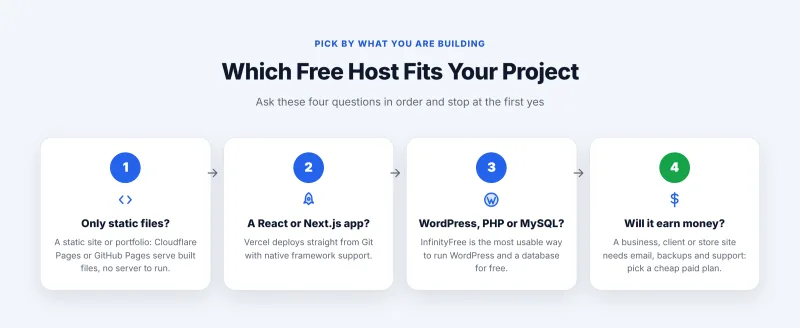
One row in that table deserves a flag: if the site is for a business, a client, or anything that earns money, free hosting is the wrong tool no matter which provider you pick. The reasons are in when free hosting stops making sense.
Table of Contents
- Best Free Hosting By Use Case
- Every Free Hosting Provider Compared
- How We Compared These Free Hosts
- Best Free WordPress, PHP & MySQL Hosting
- Best Free Static Hosting For Developers
- Best Free Website Builders
- Performance: What We Measured
- The Free Hosting Graveyard
- Hidden Limitations Nobody Talks About
- Is Free Hosting Good For SEO?
- Free Hosting With A Custom Domain
- Free Hosting Without Ads
- Free Hosting With Database Support
- Best Alternatives To Free Hosting
- Free Cloud Tiers: AWS And Oracle
- When Free Hosting Stops Making Sense
- How To Spot Fake Free Hosting
- Free Web Hosting FAQs
- My Final Picks
Every Free Hosting Provider Compared
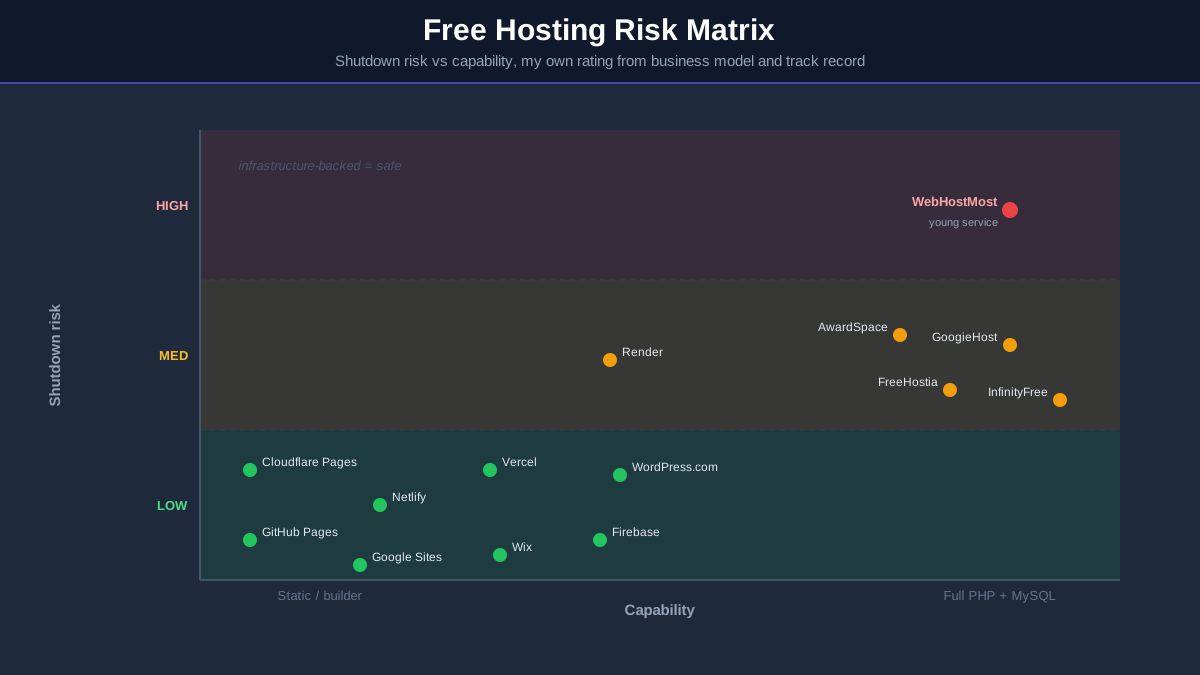
Here is the full field side by side, from each host's own page. "Shutdown risk" is my own rating based on each provider's business model and track record, because the biggest danger with free hosting is not slowness, it is waking up to a closure email. The graveyard section shows why that matters.
Weebly also still offers a free plan, but it has fallen far enough behind that I cover it only briefly in the builders section. AWS and Oracle offer free tiers too; they need a credit card, so they get their own short section rather than a place in this table.
How We Compared These Free Hosting Providers
Most free hosting articles copy provider feature lists from years ago, which is how dead hosts keep getting recommended after they close. This guide is built from each host's own free-plan page, read on Oct 12, 2026, and from our benchmark records for the paid plans it compares against. Here is exactly what that covers, and what it does not.
What we did
- Read each free plan's own page: storage, bandwidth, databases, SSL, email, ads, custom domains and conditions such as monthly logins or suspension rules. Where a page did not state a figure, the table says so instead of guessing.
- Checked the business behind each host for the shutdown-risk rating: who pays for the servers, how long the free plan has run, and whether you can leave easily.
- Benchmarked the paid plans we compare against: Hostinger Premium, Cloudways on Vultr High Frequency, ScalaHosting Entry Cloud and Bluehost Choice Plus, each with the same WordPress test site, measured from 10 locations at the origin with no CDN, with uptime checked every minute for 54 days.
What we have not done
- We have not benchmarked any free plan. There are no speed or uptime figures of ours for the free hosts on this page.
- We have not timed signups or tested each host's support.
The scoring framework
Each host was judged on the same five questions. Longevity is in there deliberately: a free host that disappears next year is worse than a slower one that has survived a decade.
| Metric | Basis | What It Covers |
|---|---|---|
| Speed | How the host serves a page | Static files from a network, or PHP built on a shared server; not measured by us |
| Reliability | The host's own statement | Uptime promises where a page gives one; not monitored by us |
| Ease of use | The host's page | How you publish: Git, upload, installer or editor |
| Freedom | The host's page | Custom domains, ads, storage and the small print |
| Longevity | My rating | Business model and shutdown risk |
One honesty note: free platforms change their limits without notice. That is why each table names the day the pages were read, and why every plan is re-read when this guide is updated.
Best Free Hosting For WordPress, PHP And MySQL
This is the category most people mean when they search for free web hosting: a server that runs WordPress, PHP scripts and MySQL databases at no cost. It is also the category with the biggest gap between the headline and the small print, so each review below includes the part the provider's homepage leaves out.
1. InfinityFree Review: The Best Free WordPress Host
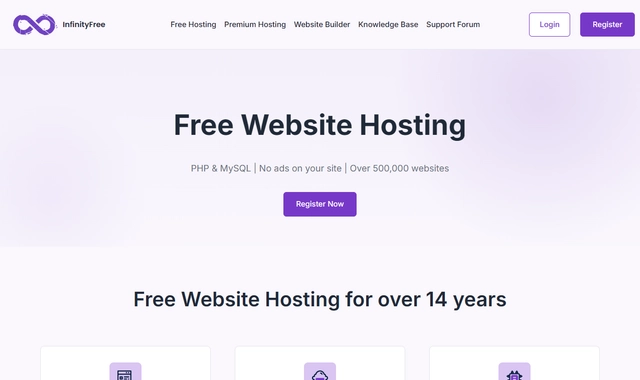
What you get free: InfinityFree is the most generous traditional free host still running. Its page lists 5 GB of disk space, unlimited bandwidth, PHP 8.4, MySQL 8.0 or MariaDB 11.4 with 400 databases, free SSL certificates and the Softaculous installer for WordPress. You can bring your own domain or pick a free subdomain, and InfinityFree says it will never place advertisements on your site.
What they don't tell you up front: "unlimited" bandwidth sits beside a daily hit limit: 50,000 hits a day in our capture of its plan page, and a busy day can take the site offline. There is no email hosting, support is a knowledge base and a community forum, and no backups are listed for free accounts.
What we measured: nothing on InfinityFree itself; we have not benchmarked it. It states 99.9% uptime and says setup has no waiting list or approval process.
- 5 GB disk space, higher than most free hosts
- Softaculous one-click WordPress installer
- Free SSL certificates
- No ads on your site
- Custom domain support
- PHP and MySQL, 400 databases listed
- Daily hit limit, the site goes offline if exceeded
- No email hosting at all
- Forum support only for free accounts
- No backups listed for free accounts
- File-count and upload limits in the small print
Storage 5 GB · Daily hits 50,000 · Price $0.00/mo · Best for learning WordPress and hobby sites · Visit InfinityFree ➦
My take: the most capable traditional free host still running, and the right pick if you want real self-hosted WordPress for nothing. Keep your own backups, and move to a cheap paid plan the moment the site needs to be reliable. InfinityFree's own upgrade path is its parent iFastNet, from $2.50/mo billed yearly.
2. GoogieHost Review: Free DirectAdmin And SSL
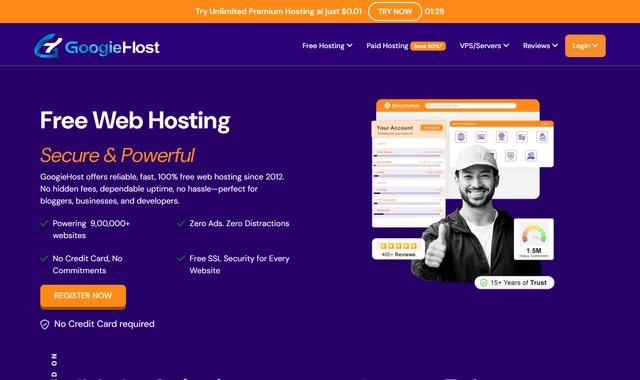
What you get free: GoogieHost gives you a real control panel, DirectAdmin, plus a Let's Encrypt certificate it installs and renews for you, up to 1000MB of NVMe storage, MySQL databases, webmail, and either a free subdomain or a domain you own. It states a strict no-forced-ads policy, no credit card and no expiration date.
What they don't tell you up front: the storage fills up with a single WordPress install plus a theme, the page does not state a bandwidth figure or any backups, and it says accounts can be suspended if you stay unresponsive to its notices for a long time. Support is by email and ticket.
What we measured: nothing on GoogieHost; we have not benchmarked it.
- DirectAdmin control panel, unusual for free hosts
- Free SSL, installed and renewed for you
- 1000MB NVMe storage
- Webmail included
- No forced ads on your site
- PHP and MySQL support
- Small storage, one WordPress install fills it
- No bandwidth figure on its page
- Suspension if you ignore its notices
- Email and ticket support only
- No backups listed
Panel DirectAdmin · Storage 1000MB NVMe · Best for learning a hosting control panel for free · Visit GoogieHost ➦
My take: a reasonable place to learn your way around a real hosting control panel without paying, which is a genuine skill. As a home for a site you want people to visit, the tiny storage and missing backups are the limit.
3. AwardSpace Review: Four Sites And 24/7 Support
What you get free: AwardSpace's free plan lets you set one domain and three subdomains, so you can host up to four sites, and it advertises 24/7 customer support, rare on a free plan. You also get the Zacky installer for WordPress, Joomla and Grav, an email address on your domain, MySQL, and a site it calls 100% ad-free.
What they don't tell you up front: the free plan is generous on extras but tight on capacity: 5GB of monthly traffic is the maximum, the four sites share one database, and the page does not state a disk figure. It does not list SSL on the free plan either; certificates are sold as a separate service. Free domain names are for some premium plans, so bring your own.
What we measured: nothing on AwardSpace; we have not benchmarked it. AwardSpace states that it guarantees 99.9% uptime.
- One domain plus 3 subdomains (up to 4 sites)
- 24/7 customer support, rare on a free plan
- Installer for WordPress, Joomla and Grav
- An email address on your domain
- No ads
- MySQL database support
- 5GB of monthly traffic
- One database shared by all sites
- SSL not listed on the free plan
- No free domain name on the free plan
- Upgrade pressure toward paid plans
Traffic 5GB/mo · Sites up to 4 · Best for a personal site with your own domain · Visit AwardSpace ➦
My take: the friendliest free host here for non-technical users. Several sites on one account and a human to ask when something breaks make it a good free choice for a personal site or portfolio, as long as you do not expect it to scale, and check the SSL situation before you rely on it.
4. FreeHostia Review: Old, Steady, And Tiny
What you get free: FreeHostia's "Chocolate" plan is one of the longest-running free offers on the internet, and FreeHostia describes its hosting as cluster based rather than a single box. You get PHP and MySQL, up to five hosted domains, and, unusually, three email accounts that almost no free competitor includes. Its free plan page also lists Let's Encrypt SSL certificates.
What they don't tell you up front: the allowances are from another era. 250MB of disk space, 6GB of monthly traffic, and one MySQL database capped at 10MB, which a WordPress install will outgrow quickly.
What we measured: nothing on FreeHostia; we have not benchmarked it.
- Cluster-based hosting, by FreeHostia's description
- 3 email accounts, rare for free
- Let's Encrypt SSL listed on the free plan
- Up to 5 hosted domains
- Long track record online
- Only 250MB of disk space
- 6GB monthly traffic ceiling
- 1 MySQL database capped at 10MB
- Outgrown by any real WordPress site
Storage 250MB · Email 3 accounts · Best for a tiny PHP project with email · Visit FreeHostia ➦
My take: a fine home for a small PHP project with light database needs and a couple of mailboxes. For anything bigger, the disk and database caps are the deciding factor.
5. WebHostMost Review: A Tiny Free Plan From A Young Host
What you get free: WebHostMost is the newest name in this guide. Its free plan page lists free SSL, one MariaDB database, one parked domain, and unlimited bandwidth as a feature of all its plans; it needs no card.
What they don't tell you up front: free storage is limited to 125MB, outgoing mail (SMTP) is disabled, a monthly log-in is required, and the page itself says the free plan runs with reduced performance. The bigger caveat is the company: it is young, and young free hosts have the worst survival rate in this industry. Its main offer is a 14-day trial of its paid plans, which is a different thing from the free plan.
What we measured: nothing on WebHostMost; we have not benchmarked it.
- Free SSL included
- Unlimited bandwidth listed for all plans
- One database and one parked domain
- No card for the free plan
- Young service, highest shutdown risk here
- Only 125MB of storage
- Monthly log-in required, SMTP disabled
- Reduced performance on the free plan, by its own page
- Short public track record
Storage 125MB · Database 1 · Best for a throwaway sandbox · Visit WebHostMost ➦
My take: a sandbox for an experiment where losing the site would cost you nothing. Keep complete local backups and treat it as a bonus pick, not a foundation. I rate its shutdown risk as the highest on this page for the reasons the graveyard section explains.
Best Free Static Hosting For Developers
If your site is HTML, CSS and JavaScript (a portfolio, documentation, a landing page, a React build), stop reading about PHP hosts. Static platforms are the best free deal in hosting: content networks, automatic SSL, custom domains and no ads, funded by companies that sell developer tools rather than upsells. The trade-off is simple: no PHP, no WordPress, no MySQL.
Cloudflare Pages Review: The Best Free Host, Full Stop
Cloudflare Pages serves your site from Cloudflare's own network, and the free tier is very generous: Cloudflare's docs say requests to static assets are free and unlimited, with 500 builds a month, up to 20,000 files per site and up to 100 custom domains per project. We have not benchmarked Cloudflare Pages; a static file served from a network close to the visitor skips the work a WordPress server does on every request.
What to watch: files are capped at 25 MiB each, and anything dynamic needs Cloudflare Workers or D1, which adds a learning curve. Deployment happens through a Git repository or direct upload, so non-developers will find Google Sites friendlier.
Best for: any static site you care about. Cloudflare sells enterprise infrastructure, and the free tier is its marketing budget, which is why I rate its shutdown risk the lowest in this guide.
GitHub Pages Review: The Portfolio Standard
GitHub Pages has been free since 2008: push a repository, flip one setting, and your site is live with automatic SSL. Custom domains are free, and Jekyll support is built in if you want templated pages. We have not benchmarked it.
What to watch: GitHub's limits page says a published site may be no larger than 1 GB, with a soft bandwidth limit of 100 GB a month and a soft limit of 10 builds an hour, and that Pages is not meant to run an online business. There is no server-side code at all.
Best for: developer portfolios and project documentation. Every site doubles as proof you can use Git, which is worth more to a hiring manager than the hosting itself.
Netlify Review: The Easiest Git Deploys
Netlify made "push to deploy" mainstream, and the free tier is still good: deploy previews, custom domains with SSL, and a drag-and-drop uploader that turns a folder of HTML into a website in seconds. Its free plan is now metered in credits: a 300-credit limit, with bandwidth charged at 20 credits per GB. We have not benchmarked it.
What to watch: credits are the real meter. Builds, bandwidth and requests all draw on the same allowance, so a busy or often-rebuilt site can run through it, and the pricing page does not say what happens when they run out. Check the usage page before a launch.
Best for: anyone who wants modern deployment workflows without configuring anything.
Vercel Review: Best For React And Next.js
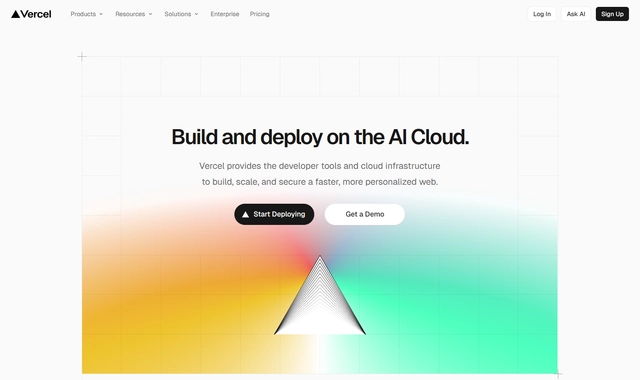
Vercel built Next.js, and its free Hobby plan is the fastest way to put a React app online: connect a repository and it deploys, with serverless functions included (1M invocations a month on Hobby). We have not benchmarked it.
What to watch: Vercel says the Hobby plan is for personal, non-commercial use. Fast data transfer is 100 GB a month, and costs can climb steeply once you outgrow free, so know your exit plan.
Best for: React, Next.js and frontend framework projects. For plain HTML sites, Cloudflare Pages gives you more headroom; for app prototypes with a sprinkle of backend, Vercel is the pick.
Firebase Hosting Review: Google's Developer Option
Firebase Hosting serves static files with automatic SSL, and the free Spark plan bundles it with Firestore, authentication and cloud functions, which makes it a small free app platform rather than just hosting. Spark needs no payment method. We have not benchmarked it.
What to watch: deployment happens through a command-line tool, which filters out beginners, and the free hosting allowance is 10 GB of storage and 360 MB of data transfer a day, the smallest in the static group, so a traffic spike can use up the day's allowance.
Best for: developers already building with Firebase services who want hosting in the same console. For a plain website, the daily transfer cap makes Cloudflare Pages or Netlify the easier choice.
Render Review: Free Full-Stack, With A Catch
Render is the closest thing to the old Heroku free experience: free static sites, plus free web services that can run real backend code, with 750 free instance hours per workspace a month. Static sites count against the monthly included bandwidth. We have not benchmarked it.
What to watch: a free web service idles after 15 minutes without traffic and takes about a minute to wake, which makes it feel broken to a first-time visitor. The free PostgreSQL database expires 30 days after creation. And if you go over the included use without a card on file, Render suspends free services for the rest of the month. Static sites avoid the first two problems.
Best for: learning full-stack deployment without a bill. Use it to demo an app to a friend, not to serve real users, and remember what happened to Heroku Free before building anything permanent here.
Best Free Website Builders With Hosting
Builders bundle the editor and the hosting into one product, which makes them the fastest route from nothing to a live page. The catch is that "free" is where builders do their hardest selling, and the biggest names put their branding on your work.
Google Sites: The Best Free Builder
Google Sites is the least glamorous product in this guide and the one I recommend most often to non-technical people. It is free, shows no ads, runs on Google's infrastructure, and you can connect up to five custom domains you own to one site (the address needs a subdomain such as www). A clean multi-page site takes very little time. We have not benchmarked it.
What to watch: the design ceiling is low, SEO controls are minimal, and there is no real export, so a site that outgrows it gets rebuilt elsewhere. Best for: students, clubs, events, internal docs, and anyone who wants a page online today with zero maintenance.
Wix Free Plan: A Demo, Not A Home
Wix's editor is impressive, but the free plan is best understood as a trial with no end date. Wix's plans page says connecting your own domain and removing Wix branding need a Premium plan, so a free site lives on a Wix address with Wix branding on it. The page does not state free-plan storage. We have not benchmarked it.
Best for: trying the editor before deciding whether Wix deserves your money. Publishing a serious site on the free plan advertises Wix, not you.
WordPress.com Free Plan: Not The WordPress You Think
WordPress.com's free plan runs on Automattic's infrastructure, and for casual blogging it works. But be clear about what it is not: its pricing page says the free plan does not include plugin installation or a custom domain (you get yoursite.wordpress.com), you get 1 GB of storage, and free sites display WordPress.com ads to visitors that you earn nothing from. We have not benchmarked it.
Best for: a personal journal where convenience beats control. If you want real WordPress with plugins, that lives on the free PHP hosts or, more honestly, on a cheap paid plan.
Weebly Free: A Short Honest Mention
Weebly still offers a free plan for "basic use", on a Weebly address: connecting a custom domain starts with its Personal plan, and removing Square ads is listed only on paid plans. The product has barely moved since Square bought it, and everything it does, Google Sites or Wix now does better; pick from the three above.
Performance: What We Measured, And What We Did Not
Feature lists are what providers promise, and this section is honest about the rest. We have not benchmarked any free plan in this guide, so there are no free-host speed or uptime numbers of ours here. What we can give you is what each host states, how each one serves a page, and real benchmark figures for the cheap paid plans you would move to.
Uptime: what each host promises
Two free PHP hosts put a number on uptime, and neither promise comes with the refunds a paid plan's guarantee would. For scale, the paid plans we did monitor were checked every minute for 54 days on the same test site.
Speed: how each host serves a page
The pattern is structural: static hosts hand over files that are already built, while free PHP hosts build every page for every visitor on a server shared with many other free sites, under tight limits. No plugin or cache setting fully closes that gap, and shared servers slow down further when real visitors arrive at once.
TTFB ratings: who clears the thresholds
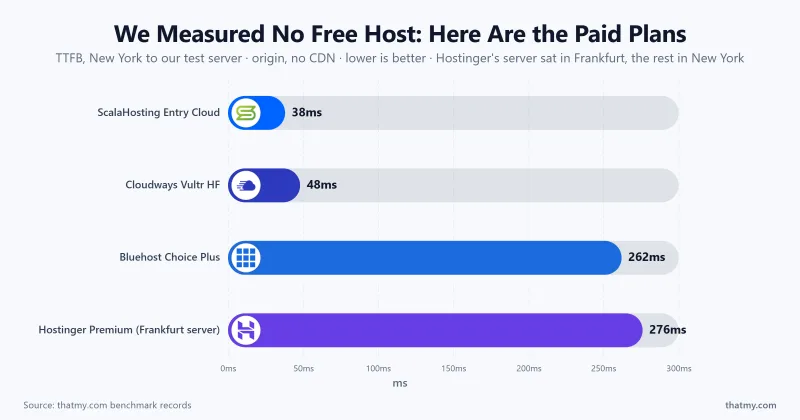
I grade TTFB against a simple scale: under 200ms is excellent, under 500ms is acceptable, and anything past 800ms means the server is the bottleneck. We have not measured the free hosts, so here is where the paid plans we benchmarked land, each measured from our New York location to our own test server, at the origin with no CDN.
| Plan | TTFB, New York to Our Test Server (Origin) | Rating |
|---|---|---|
| ScalaHosting Entry Cloud | 38ms server in New York | Excellent |
| Cloudways, Vultr High Frequency | 48ms server in New York | Excellent |
| Bluehost Choice Plus | 262ms server in New York | Acceptable |
| Hostinger Premium | 276ms server in Frankfurt; 109ms from Frankfurt | Acceptable |
| Free hosts in this guide | Not measured | - |
Signing up: how you publish and what each host asks
| Provider | How You Publish | Conditions The Host States |
|---|---|---|
| Vercel | From Git | Personal, non-commercial use only |
| Google Sites | Browser editor | A custom domain needs a subdomain such as www |
| Netlify | Git or drag-and-drop | 300-credit limit |
| WordPress.com Free | Browser | wordpress.com address, ads shown to visitors |
| Cloudflare Pages | Git or direct upload | 500 builds a month, 25 MiB per file |
| Render | From Git | Over the included use with no card: free services suspended for the month |
| GitHub Pages | From a repository | Soft limit of 10 builds an hour; not for running an online business |
| Wix Free | Browser editor | Wix branding stays; custom domain is paid |
| AwardSpace | Panel and Zacky installer | Up to 4 websites, one shared database |
| WebHostMost | Panel | Monthly log-in required, SMTP disabled |
| Firebase Hosting | Command-line tool | No payment method needed |
| InfinityFree | Softaculous, FTP or file manager | No credit card, no approval process |
| FreeHostia | Panel | Chocolate plan limits apply |
| GoogieHost | DirectAdmin | No card; suspension if you stay unresponsive to its notices |
SSL setup: how HTTPS gets activated
| Provider | SSL Setup |
|---|---|
| Cloudflare Pages | Automatic |
| GitHub Pages | Automatic |
| Netlify | Custom domains with SSL |
| Vercel | HTTPS certificates included |
| Firebase Hosting | Custom domain and SSL included |
| Render | Automatic |
| Google Sites | Automatic |
| WordPress.com Free | Automatic |
| Wix Free | Automatic |
| GoogieHost | Let's Encrypt, auto-installed and renewed |
| AwardSpace | Not listed on the free plan; sold separately |
| WebHostMost | Free SSL listed |
| InfinityFree | Free SSL certificates listed |
| FreeHostia | Let's Encrypt listed on the free plan page |
Most of the field handles HTTPS for you. The one to check before you build is AwardSpace, whose free plan page does not list SSL at all.
The Free Hosting Graveyard
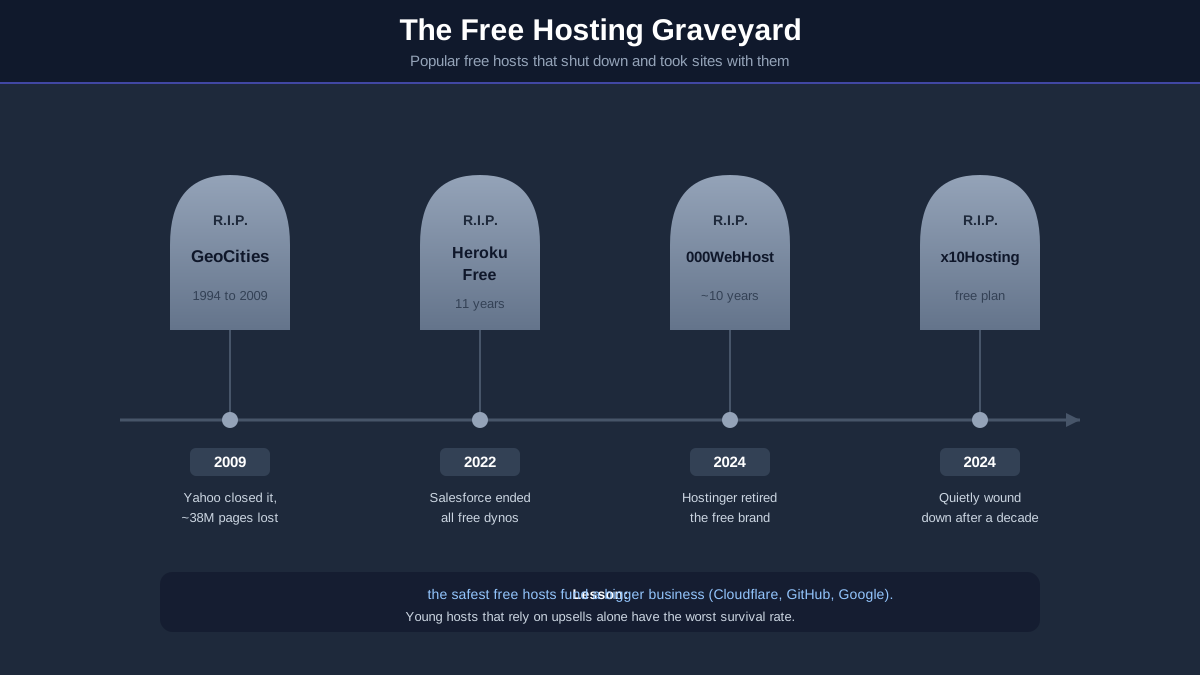
Every dead service below was, at some point, a top recommendation on articles exactly like this one. Most of those articles never got updated, which is why people still sign up for hosts that no longer exist. This section is here so you can judge how likely your free host is to join the list.
| Service | Closed | What Happened |
|---|---|---|
| GeoCities | 2009 | Yahoo closed it and millions of user pages went dark |
| Heroku Free | Nov 2022 | Salesforce ended free dynos and databases, projects had weeks to migrate or pay |
| 000WebHost | 2024 | Hostinger retired its free brand and pointed users at paid plans |
| x10Hosting free plan | 2024 | The free tier wound down after more than a decade |
| Hostinger Free | Earlier | Folded into 000WebHost, which is now also gone |
000WebHost: the warning shot
For a decade, 000WebHost was the default answer to "best free hosting". Hostinger ran it as a feeder for paid upgrades, and when the economics stopped making sense, the brand was retired and free users were pointed at paid plans. It is gone, and so is Hostinger's own free tier that fed into it.
Heroku Free: even giants pull the plug
Heroku's free dynos hosted over a decade of student projects, hackathon demos and side hustles. In November 2022, Salesforce ended the entire free tier, citing abuse and cost, and gave projects weeks to pay up or move out. The lesson stings: a beloved product owned by one of the largest software companies is still one budget review away from deleting your stack.
Hostinger Free: quietly folded
Hostinger once ran its own free tier, then folded it into 000WebHost, which Hostinger also retired in 2024. Both are now gone, which is why this page points to Hostinger's cheap paid plans rather than any free Hostinger product: the free option no longer exists.
How to avoid picking the next casualty
Three questions predict survival better than any feature list. Who pays for the servers? If free hosting funds a bigger business (Cloudflare's enterprise sales, GitHub's developer platform, Google's ecosystem), it is safe; if it relies on upsells alone, it is fragile. How old is it? A free host that has run for 15 years has survived multiple cost cycles; a two-year-old one has not been tested. Is there an exit? Git-based hosts let you redeploy elsewhere in minutes, while builder sites with no export die with the platform. That is the logic behind every shutdown-risk rating in my comparison table.
Hidden Limitations Nobody Talks About
None of these sit in the headline of a free plan, and each one can end a free-hosted project. Check your shortlisted host against all eight before you commit.
Forced ads
The static hosts and free PHP hosts here state that they keep your pages clean, but the builders do not. Wix keeps its branding on free sites, WordPress.com shows its own ads to your visitors, and Weebly lists removing Square ads only on paid plans. On a free builder, your visitors are looking at the platform's advertising, not yours.
Resource throttling
Free PHP accounts get a sliver of a shared server. Cross the limit (a traffic bump, a heavy plugin, a bot crawl) and your site is throttled or temporarily suspended. WebHostMost even says its free plan runs with reduced performance. This is why free hosts feel fine at idle and struggle the day something goes well for you.
Suspension without warning
Read the fair-use clauses: most free hosts reserve the right to suspend first and explain later. InfinityFree's daily hit limit is the classic example, taking sites offline at the moment they get shared somewhere; GoogieHost says it can suspend accounts that stay unresponsive to its notices.
No email hosting
Many free plans include no mailboxes: InfinityFree has none and WebHostMost disables outgoing mail. AwardSpace, FreeHostia and GoogieHost are the exceptions, with small allowances. Your "business" runs on a Gmail address until you pay someone, somewhere.
No backups
Do not count on backups on a free plan: InfinityFree, GoogieHost, AwardSpace and FreeHostia list none on the free-plan pages we read. One failed update, one hack, one suspension, and there may be nothing to restore. If the words "I'd be devastated to lose this" apply, free hosting is already the wrong category.
Support that is forums or nothing
InfinityFree's support is a knowledge base and a community forum. GoogieHost answers by email and ticket. When your site is down and nobody owes you an answer, "free" starts charging you in hours. AwardSpace's advertised 24/7 support is the honourable exception.
Commercial use restrictions
Vercel's Hobby plan is for personal, non-commercial use, and GitHub says Pages is not meant to run an online business. Discovering that after you have built is expensive.
Platform lock-in
Google Sites and Wix have no real export. The day you outgrow them, you rebuild from scratch. Git-based static hosts are the opposite: your site is a folder you can redeploy anywhere in an afternoon, which quietly makes them the safest investment of effort.
Is Free Hosting Good For SEO?
Google does not check your hosting invoice. It measures what your visitors experience, and that is where free hosting either holds up or quietly holds you back. Here is how each factor plays out.
HTTPS is non-negotiable
HTTPS has been a ranking signal for years, and browsers actively warn visitors off plain HTTP. Most hosts here issue or list free certificates; on the pages we read, AwardSpace's free plan is the one that does not list SSL.
Speed and Core Web Vitals
Core Web Vitals are graded from real visitor data, and TTFB sits underneath every one of them. A static site served from a content network starts with an advantage before optimisation even begins; a free PHP host that builds every page on a crowded server starts behind. We have not measured the free hosts; for scale, our Hostinger Premium test server answered New York in 276ms at the origin.
Uptime and crawl errors
When Googlebot repeatedly meets downtime or 500 errors, crawl frequency drops and rankings follow. Daily hit limits and suspensions on free PHP hosts are exactly the pattern that erodes crawl trust over time.
Crawlability and indexing
Static HTML is the easiest thing Googlebot can crawl, which is part of why static hosts punch above their weight in search. The risk on free PHP hosts is not the HTML itself, it is the server timing out or hitting a limit mid-crawl, so pages get fetched inconsistently and indexing lags behind.
Subdomain vs custom domain
A site on a builder's subdomain builds equity for someone else's domain, and if you later move, you start over. Connecting your own domain (a small yearly cost at any registrar) is the single highest-leverage SEO move on free hosting, and it is why I weight custom-domain support so heavily in the rankings.
The honest verdict
A static site on Cloudflare Pages with your own domain can rank against anything. A WordPress site on a free PHP host can get indexed and win low-competition queries, but it carries a speed and reliability handicap that a cheap paid plan removes. Free hosting is an SEO problem only in the categories that were already struggling.
Free Hosting With A Custom Domain
A custom domain is the line between "a project" and "your site", and it is the first thing to check on any free plan. The rule of thumb from the hosts' own pages: hosts aimed at developers let you connect a domain free, builders charge for it.
| Provider | Custom Domain | Notes |
|---|---|---|
| Cloudflare Pages | ✅ Free | Up to 100 per project; easiest if DNS is already on Cloudflare |
| GitHub Pages | ✅ Free | CNAME file plus DNS records |
| Netlify | ✅ Free | Custom domains with SSL |
| Vercel | ✅ Free | Add the domain in the dashboard |
| Firebase Hosting | ✅ Free | Verification step, then SSL |
| Render | ✅ Free | Available on free static sites |
| InfinityFree | ✅ Free | Bring your own, or a free subdomain from 25+ extensions |
| GoogieHost | ✅ Free | Any TLD you buy elsewhere |
| AwardSpace | ✅ 1 domain + 3 subdomains | Free domain names only on some premium plans |
| Google Sites | ✅ Free | Up to 5 per site; needs a subdomain such as www |
| Wix Free | ❌ Paid plans only | Free plan stays on a Wix address |
| WordPress.com Free | ❌ Paid plans only | Free plan stays on yoursite.wordpress.com |
AwardSpace deserves its footnote here: it is the free host that lets you run several sites, one domain plus three subdomains, on a single free account.
Free Hosting Without Ads
"Free hosting puts ads on your site" is ten years out of date. Every static host and every free PHP host here states that it keeps your pages clean; the ad-supported model survives among the website builders.
| Provider | Ads On Your Site | My take |
|---|---|---|
| Cloudflare Pages | ❌ None | Completely clean |
| GitHub Pages | ❌ None | Completely clean |
| Netlify | ❌ None | Completely clean |
| Vercel | ❌ None | Completely clean |
| Firebase Hosting | ❌ None | Completely clean |
| Render | ❌ None | Completely clean |
| InfinityFree | ❌ None | "We will never place advertisements on it" |
| GoogieHost | ❌ None | A stated no-forced-ads policy |
| AwardSpace | ❌ None | Advertised as 100% ad-free |
| Google Sites | ❌ None | No third-party ads |
| Wix Free | ⚠️ Wix branding | Removing it needs a Premium plan |
| WordPress.com Free | ⚠️ WordPress.com ads | Ads shown to your visitors, you earn nothing |
| Weebly Free | ⚠️ Square ads | Removing them is a paid feature |
If an ad-free page matters and you want zero risk of that policy changing, Cloudflare Pages and GitHub Pages have business models that never need your pixels.
Free Hosting With Database Support
A database is what separates a brochure from an application, and it is the sharpest divide in free hosting: traditional PHP hosts include MySQL, developer platforms mostly do not.
| Provider | Database | Limits |
|---|---|---|
| InfinityFree | ✅ MySQL / MariaDB | 400 databases listed |
| GoogieHost | ✅ MySQL | Created in DirectAdmin; count not stated |
| AwardSpace | ✅ MySQL 5.7 | One database shared by your sites |
| FreeHostia | ✅ MySQL | 1 database capped at 10MB |
| WebHostMost | ✅ MariaDB | 1 database on the free plan |
| Firebase | ⚠️ Firestore | NoSQL free tier, not MySQL |
| Render | ⚠️ PostgreSQL | Free database expires 30 days after creation |
| Cloudflare Pages | ⚠️ D1 (SQLite) | Through Workers, not classic MySQL |
| GitHub Pages / Netlify / Vercel | ❌ None | Static hosting, pair with a hosted DB service |
Two traps to note: Render's free PostgreSQL expires after 30 days, and Firebase's Firestore is NoSQL, so it will not run WordPress or anything expecting MySQL. For a classic PHP and MySQL stack for nothing, InfinityFree remains the serious answer.
Best Alternatives To Free Hosting
Free hosting has a natural ceiling: little or no email, no backups, thin support, and speed that fades under traffic. The alternatives below exist for the moment any of those starts costing you more in time or missed visitors than a few dollars a month. If you are unsure which category fits, my guide to web hosting types breaks them down.
| You Need | Upgrade To | Starting Cost | What You Gain |
|---|---|---|---|
| Cheap shared hosting | Hostinger Premium | $2.99/mo (48 months prepaid) | 20 GB SSD, email and a domain free for a year, weekly backups |
| WordPress that grows | Hostinger Premium | $2.99/mo (48 months prepaid) | 3 websites, CDN, 24/7 support |
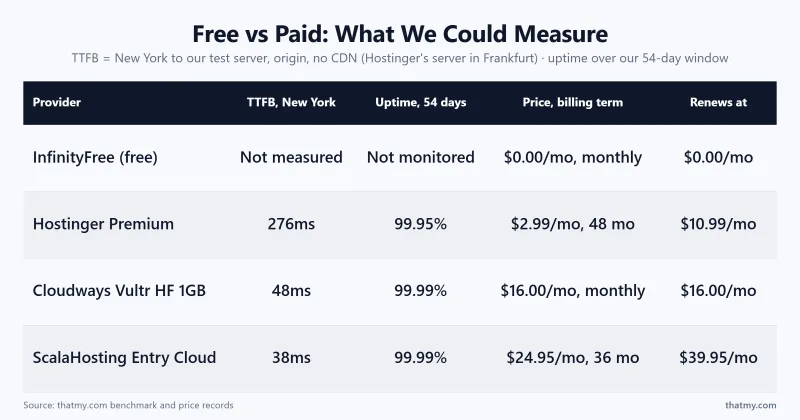
| Speed under real traffic | Managed cloud (Cloudways) | $30 credit with code CLOUDS2022, then from $11.00/mo | Your own cloud server, 48ms New York to our Vultr HF test server (origin), easy scaling |
| Full server control | Managed VPS (ScalaHosting Entry Cloud) | $24.95/mo (36 months prepaid) | Dedicated CPU and RAM, root access |
| An online store | WooCommerce-ready hosting | From $2.99/mo | SSL, backups, room for a cart |
| Client sites | Paid cloud hosting | From $11.00/mo to $14.00/mo | Staging, no surprise suspensions |
Hostinger Premium: The Upgrade That Makes Free Hosting Pointless ($2.99/mo)

Hostinger's Premium plan at $2.99/mo on a 48-month term gives you 3 websites, 20 GB SSD storage, two mailboxes per website and a domain free for the first year, weekly backups, a CDN and 24/7 support, the things free hosting does not. We benchmarked it: our test server sat in Frankfurt and answered New York in 276ms and Frankfurt in 109ms (TTFB at the origin), with 99.95% uptime over 54 days.

- 20 GB SSD storage, 3 websites
- Email: 2 mailboxes per website, free for 1 year
- Free domain name for the first year
- Free weekly backups
- CDN included
- Free SSL
- 24/7 support
- 30-day money-back guarantee
- Renewal rises to $10.99/mo after the intro term
- Shared hosting, resource limits under heavy traffic
- Checkout offers a lot of optional add-ons
TTFB 276ms (New York to our Frankfurt test server, origin) · Storage 20 GB SSD · Backups weekly · From $2.99/mo (renews $10.99/mo) · Visit Hostinger ➦
This is the cheapest way on this page to leave free hosting behind without giving anything up. The renewal price is the one thing to know going in: $10.99/mo after the first term. Hostinger offers a 30-day money-back guarantee on the hosting.
Cloudways: When The Work Is Important (Code CLOUDS2022, $30 Free Credit)

When the project matters, a site that earns money, serves clients, or needs to stay fast under real traffic, Cloudways is a smart step up. It is managed cloud hosting on top of DigitalOcean, Vultr, Linode, AWS or Google Cloud, and its Vultr High Frequency server was among the fastest plans in our benchmark: 48ms from New York to our test server in New York (TTFB at the origin). You can try it first: code CLOUDS2022 adds $30 of credit, enough for about 2.7 months on a DigitalOcean 1GB server at $11.00/mo, and the 3-day trial does not ask for a card.

- $30 credit with code CLOUDS2022
- 3-day free trial, no credit card needed
- 5 cloud providers: DigitalOcean, Vultr, Linode, AWS, Google Cloud
- 48ms New York to our Vultr HF test server (origin)
- 99.99% uptime over 54 days on our test server
- 1-click server cloning and staging
- Managed security and OS patching
- No built-in email, needs a third-party service
- Custom panel rather than cPanel
- From $11.00/mo once the credit is used
- Slightly steeper learning curve than shared hosting
TTFB 48ms (New York, origin) · Trial 3 days, no card · Credit $30 with CLOUDS2022 · Vultr HF 1GB $16.00/mo after credit · Visit Cloudways ➦
Cloudways is the bridge I recommend when a site has outgrown shared hosting but you are not ready to manage a raw server. You get your own cloud server and genuine scaling, and the credit means you can prove your site needs that power before you pay for it. And if your project eventually needs a full server of its own (dedicated CPU and RAM, root access), a managed VPS like ScalaHosting is the step after this; my ScalaHosting review covers when that jump makes sense.
Free Cloud Tiers: AWS And Oracle
Two giants offer free tiers that look unbeatable on paper, and I deliberately kept both out of the main rankings: they require a credit card, which breaks this guide's "no credit card" rule, and both can charge you real money the moment you misconfigure something.
AWS Free Tier
Amazon's free tier gives you a small virtual server and a long menu of capped services, and it is a superb classroom if your goal is learning cloud infrastructure itself. The risk is the billing model: allowances are time-limited or metered, nothing hard-stops at zero by default, and "surprise AWS bill" is a meme because it keeps happening to beginners who left an instance running.
Oracle Cloud Free Tier
Oracle's Always Free tier is one of the most generous compute giveaways in the industry, including Arm servers that could host a serious application. The trade-offs are practical: capacity in popular regions comes and goes, idle accounts risk reclamation, and you are managing a bare server yourself, with no panel, no support and no safety net.
Why most beginners should avoid both
Neither platform is hosting in the sense this guide means; they are infrastructure that expects you to be your own sysadmin. If you have to ask whether AWS free tier is right for your website, the answer is Cloudflare Pages for static sites or a cheap managed plan for WordPress. Come back to the cloud giants when servers themselves are the thing you want to learn.
When Free Hosting Stops Making Sense
I am not here to talk you out of free hosting; this whole page ranks it. But there is a clear line where it flips from a smart saving to an expensive habit, and it arrives the moment a site needs to be trusted: by customers, by clients, by Google, or by you at 2am when something breaks.
- A business website. No email on your own domain means every enquiry starts with a credibility tax. Backups and support stop being optional the day the site represents you.
- An online store. Payment trust and uptime guarantees do not come with a free plan. Do not take money on a host that can suspend you without warning.
- Client projects. Handing a client a site on free hosting hands them every limitation on this page with your name attached to it.
- Lead generation. If a page earns even one enquiry a month, an outage costs more than a year of cheap hosting.
- Real traffic. Free PHP hosts throttle exactly when things go well. Success is the failure mode.
A common pattern
A beginner picks a free host, spends the first month fighting tight limits and missing features, gets little traffic because the site is slow or keeps hitting its caps, and concludes that blogging or their idea does not work. Often the idea was fine. The hosting was the bottleneck, and a cheap paid plan would have removed it. If your project matters to you, that is the cheapest upgrade you can make.
How To Spot Fake Free Hosting
Plenty of "free hosting" search results are not free at all. These are the four disguises to check for before you type an email address.
- Trials wearing a free costume. "Free website hosting" that quietly ends after 14 or 30 days is a trial. Trials are fine (the honest ones are compared in my web hosting free trial guide), but they answer a different question. WebHostMost, for example, leads with a 14-day trial of its paid plans and keeps its separate free plan on another page.
- The credit card tell. A genuinely free plan never needs your card. The instant a "free" signup asks for one, you are looking at a trial with an autobill, the business model is your forgetfulness.
- "Free lifetime hosting" offers. Usually a one-time fee for hosting "forever". The graveyard above shows how long forever lasts when a tiny company sells unlimited service for a fixed price.
- The upsell maze. Some free plans exist only to show you upgrade banners, with limits set so low that nothing real fits. The reviews above flag which hosts keep their free tier genuinely usable.
The free plans in this guide pass the simple test by their own pages: no expiry date and a live site at the end. Read the conditions too: WebHostMost asks for a monthly log-in, and Render suspends free services for the month if you go over the included use without a card on file.

Free Web Hosting FAQs
What is the best free web hosting?
It depends on what you are building. For a static site (plain HTML, a portfolio, a docs site), Cloudflare Pages is our pick: Cloudflare says requests to static assets are free and unlimited, and SSL and custom domains come with it, with no ads. For WordPress or anything that needs PHP and MySQL, InfinityFree is the most usable option, with 5 GB of disk and custom domain support. If you do not want to touch code at all, Google Sites gets a clean page live quickly. We have not benchmarked these free plans; the limits here are the hosts' own.
Which free hosting has no ads?
More than most people expect. Cloudflare Pages, GitHub Pages, Netlify, Vercel, Firebase and Render put nothing on your pages, and the free PHP hosts here (InfinityFree, GoogieHost, AwardSpace, FreeHostia) state that they place no ads on your site. The ones that do brand your pages are the builders: removing Wix branding needs a Premium plan, Weebly lists removing Square ads only on paid plans, and WordPress.com says free sites display its ads to visitors.
Can I use a custom domain on free hosting?
On most of these hosts, yes, as long as you bring your own domain (registering one is a yearly cost at any registrar). Cloudflare Pages, GitHub Pages, Netlify, Vercel, Firebase, Render, InfinityFree, GoogieHost, AwardSpace and Google Sites all let you connect a domain you own. AwardSpace's free plan takes one domain plus three subdomains; its free domain names are for some premium plans. Wix, WordPress.com and Weebly keep custom domains for paid plans.
Is free hosting safe?
The providers in this guide are legitimate companies, so the risk is not theft, it is fragility. Few free plans list backups, so one bad update or a suspension can erase your work. Free services also shut down: 000WebHost, Heroku's free tier and x10Hosting's free plan all closed in recent years. Keep a local copy of your site and treat anything irreplaceable as something free hosting should never be trusted with alone.
Can I host WordPress for free?
Yes, two ways. Real self-hosted WordPress runs on the free PHP hosts: InfinityFree is the strongest option, with GoogieHost and AwardSpace behind it. Expect strict resource caps. The second way is WordPress.com's free plan, which is simpler but does not include plugin installation and shows its ads to your visitors. For a WordPress site you want to grow, a cheap paid plan such as Hostinger Premium at $2.99/mo on a 48-month term changes the picture: on our benchmark it answered in 276ms from New York to our test server in Frankfurt.
Which free host supports MySQL?
InfinityFree is the most generous: its page lists 400 MySQL databases on a free account. GoogieHost includes MySQL databases you create in DirectAdmin, AwardSpace's free sites share one database, and FreeHostia gives one database capped at 10MB. WebHostMost's free plan has one MariaDB database. Among the developer platforms, Render offers PostgreSQL but the free database expires 30 days after creation, and Firebase gives you Firestore, which is NoSQL rather than MySQL.
Which free host is best for students?
For coursework, clubs and quick projects, Google Sites is the easiest: no setup and no maintenance. If you are studying development, use GitHub Pages instead, because every project doubles as a portfolio piece with version history, and the GitHub Student Developer Pack adds free extras.
Is GitHub Pages free forever?
Nothing is guaranteed forever, but GitHub Pages has been free since 2008, survived the Microsoft acquisition untouched, and hosts a huge number of project and documentation sites. GitHub's limits page says a published site may be no larger than 1 GB, with a soft bandwidth limit of 100 GB a month, and that it is not meant to run an online business. Of every host in this guide, it is one of the safest long-term bets.
Is Cloudflare Pages free?
Yes. Cloudflare's docs say requests to static assets are free and unlimited on the free plan, which allows 500 builds a month, files up to 25 MiB and up to 100 custom domains per project. Cloudflare runs it as an on-ramp to its paid developer platform, which is why it can afford to keep the free tier strong. The catch is that it hosts static files only, so WordPress and PHP are out.
Can free hosting rank on Google?
Yes. Google does not penalise a site for being free, it measures what it experiences: speed, uptime and crawlability. A static site on Cloudflare Pages with your own domain is technically sound and can rank. The free PHP hosts are where SEO gets harder, because every page is built on a crowded shared server with tight limits, and a slow TTFB or errors during a crawl work against you. We have not measured the free hosts; for scale, our Hostinger Premium test server answered New York in 276ms.
Which free host includes SSL?
Almost all of them now. Cloudflare Pages, GitHub Pages, Netlify, Vercel, Firebase, Render, Google Sites, Wix and WordPress.com issue certificates for you. InfinityFree lists free SSL certificates, GoogieHost auto-installs Let's Encrypt, WebHostMost lists free SSL, and FreeHostia's free plan page lists Let's Encrypt certificates. The exception on the pages we read: AwardSpace does not list SSL on its free plan and sells certificates as a separate service.
How long do free hosting providers last?
Shorter than their marketing suggests, which is why this guide rates shutdown risk. GeoCities lasted 15 years before Yahoo closed it, Heroku's free tier ran for more than a decade before Salesforce ended it in 2022, and 000WebHost was retired by Hostinger in 2024. The safest free hosts are the ones where free hosting supports a bigger business: Cloudflare, GitHub, Google. The riskiest are young services with no obvious way to pay their server bills.
My Final Picks
Across 13 providers and their small print, the free hosting market splits cleanly: superb if your project fits the static mould, workable for learning PHP and WordPress, and the wrong tool entirely for anything that earns money or carries your reputation.
Quick decision guide
- Best overall: Cloudflare Pages, free and unlimited static requests and zero compromises for static sites.
- Best for WordPress and PHP: InfinityFree, with eyes open about its limits.
- Best for beginners: Google Sites, no setup and maintenance-free.
- Best for developers: GitHub Pages, every project doubles as your portfolio.
- Best for React and Next.js: Vercel, Git push to deploy (personal projects).
- When it starts to matter: Hostinger Premium at $2.99/mo removes the hidden limits on this page.
Choose based on what you are building, not on marketing promises, and check the day the limits were read whenever you land here: in this corner of hosting, freshness is the difference between a recommendation and a tombstone.
If you have decided your project deserves better than free, here is where I would start. Hostinger Premium is the cheapest way to get email, backups and support; Cloudways is the move when the work is important enough to need cloud power and scaling.