

OVHcloud Review 2026: If You Read Nothing Else
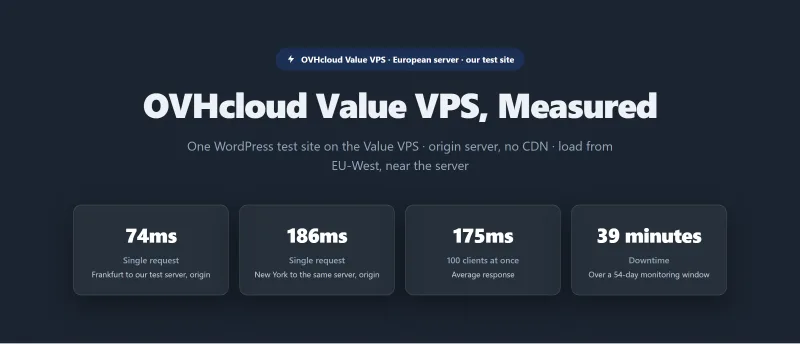
Most OVHcloud reviews show you the price tag. We benchmarked three OVHcloud VPS plans (Value, Comfort and Elite) and one dedicated server (Advance EPYC) on the same test site: TTFB from 10 locations, a 0 to 250 client load ramp and 54 days of uptime monitoring. We did not test OVHcloud's support, the setup time or a WooCommerce checkout, and this page says so where it matters.
The VPS line this review first covered has been replaced by the VPS 2027 range: VPS-1 is 2 vCores, 4GB RAM and 40GB NVMe from $4.54 a month on a 12-month commitment. That price is for an unmanaged server: no control panel, and no help with software configuration. On our benchmark the plans held up under the 100-user load with no failed requests; what they lack is management.
The March 2021 Strasbourg fire destroyed OVHcloud's SBG2 datacentre, and Netcraft reported about 3.6 million websites went offline. The 2027 range now lists a daily backup, kept in the same datacentre as the server. For developers who manage their own Linux stack, OVHcloud is good value on our numbers. For WordPress site owners who want a managed experience, it is the wrong kind of product.
Test Summary (54-Day Window, June 2026)
✅ OVHcloud Is Right For:
- Linux sysadmins who manage their own server stack
- Developers who need cheap European infrastructure for testing or staging
- Agencies with in-house DevOps who want a server or bare metal at a low price
- Sites that need a dedicated server (we benchmarked the Advance EPYC)
- Businesses with European data residency requirements
- Cost-sensitive projects where your own time is the cheap part
❌ OVHcloud Is NOT Right For:
- WordPress site owners who need managed hosting (→ ScalaHosting)
- WooCommerce stores that want a managed checkout stack (we did not test a checkout)
- Anyone who doesn't know SSH and the Linux command line
- Businesses that need round-the-clock human help (standard support is weekday business hours; 24/7 chat is for incidents)
- Sites that expect email hosting on the server (OVHcloud sells email as separate products)
- Anyone relying only on the included backup (it sits in the same datacentre)

What Ovhcloud Does Well
- Low entry price for an unmanaged VPS (current price in the review)
- Bare metal dedicated servers are competitive
- Good for developers who manage their own stack
- Anti-DDoS protection listed on the plans
- Datacentres on several continents
Real Weaknesses (what Reviews Don't Tell You)
- Backups sit in the same datacentre; the 2021 Strasbourg fire destroyed SBG2 and left customers with only local copies without recovery
- Unmanaged only: you configure the OS, PHP, MySQL, WordPress and SSL yourself
- A control panel is a paid add-on
- Premium support is a paid tier; support is by ticket, phone and chat on weekdays
- No managed WordPress, not suitable for non-technical users
Our Benchmark Records
- Origin TTFB (3 plans, New York, no CDN): 148ms to 186ms
- Uptime (54-day window): 99.95% to 99.979%
- Load at 100 clients (Value): 175ms
$3.50/mo
Cheapest VPS in Europe
Methodology: The benchmark boxes on this page cover 3 plans. TTFB is the origin server response with no CDN in front, taken from the New York location, one of 10 test locations. Uptime counts real incident minutes over a 54-day window.
Test Environment & Methodology (Full Disclosure)
Every benchmark figure in this review comes from our benchmark records, and the page says which measurement each number is.
🔬 Test Environment, Full Disclosure
What each test measures:
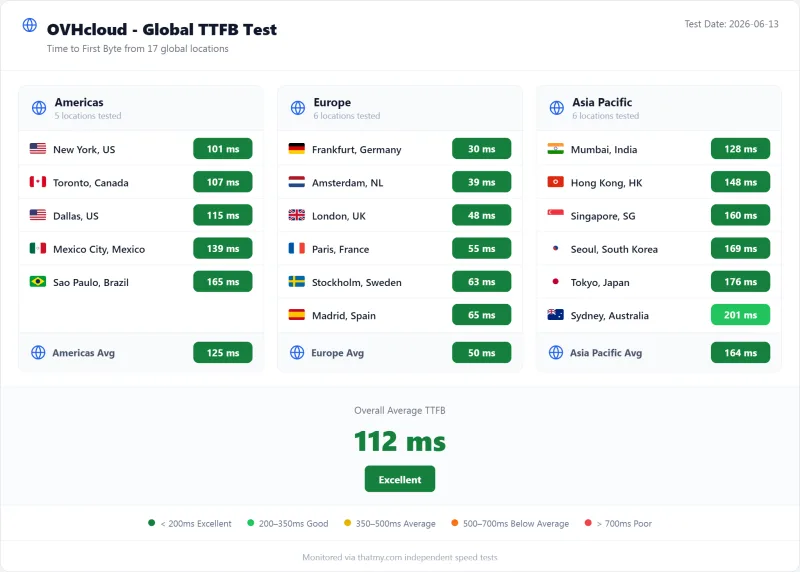
- TTFB: time to first byte of a test page from 10 locations, measured against the origin with no CDN. A city figure is the time from that city to our test server.
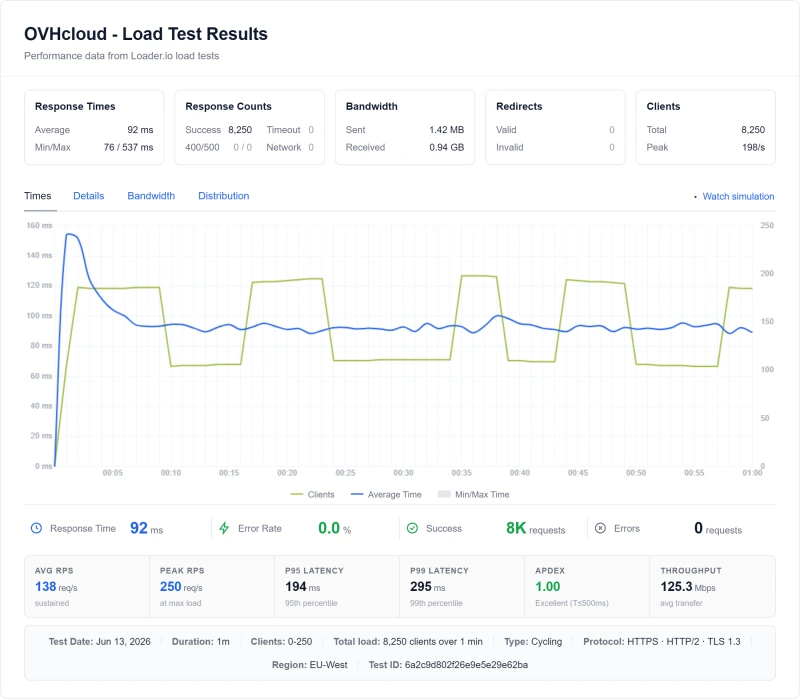
- Load test: clients ramped from 0 to 250 over 60 seconds. The 100-user step is the measured one; the 10, 25 and 50 user steps are interpolated, so this page does not chart them.
- Uptime: availability of the test site over 54 days, 1 May to 24 June 2026.
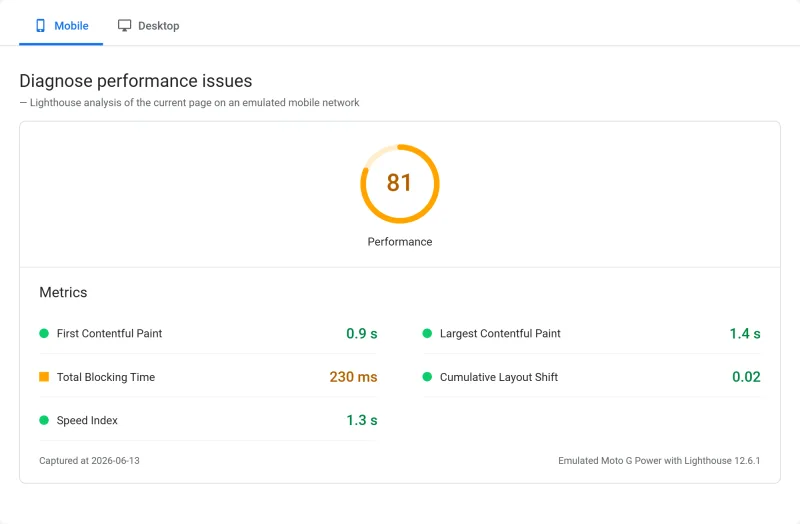
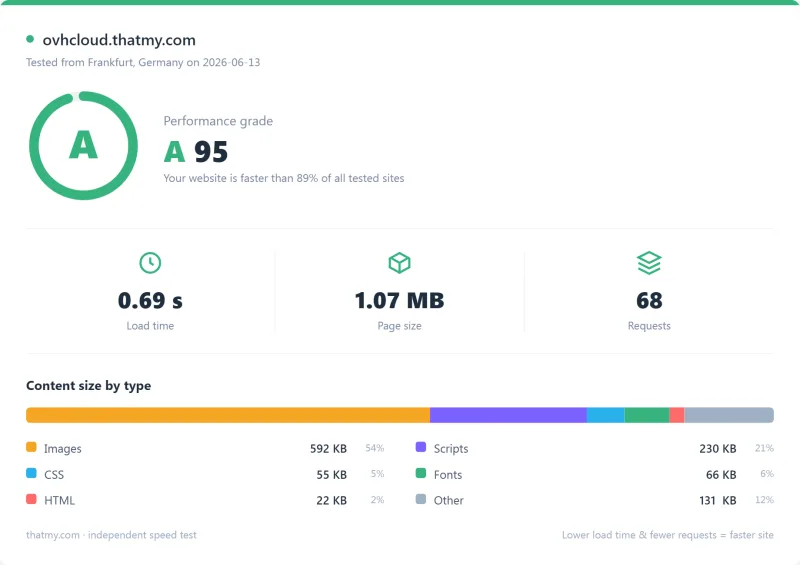
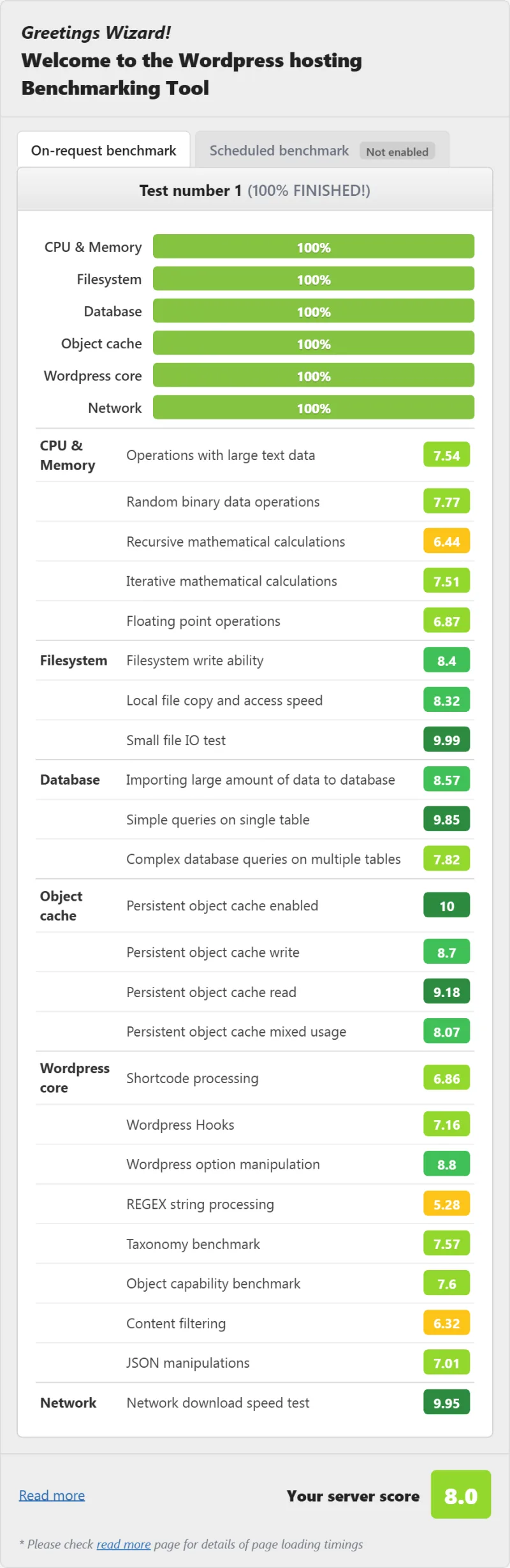
- WordPress benchmark and PageSpeed: one score each, same test site on every host.
⚠️ Critical Note: OVHcloud VPS Is Unmanaged
OVHcloud sells a server, not a WordPress install. Configuration is yours, and that is the product OVHcloud sells. We did not time our own setup, so this page gives no setup hours. It matters as context for deciding whether OVHcloud is right for you.
What Is OVHcloud? Infrastructure vs Managed Hosting
OVHcloud is a French cloud infrastructure provider, founded in 1999. Its about page says it runs more than 400,000 servers in over 46 datacentres on 4 continents and designs its own servers and builds its own datacentres, which is part of how it keeps prices low.
The OVHcloud Architecture:
Your WordPress Site → Your Configuration → OVHcloud VPS
- OVHcloud provides: The server, network connectivity, anti-DDoS protection and an IP address
- You must configure: Operating system, web server (Nginx/Apache), PHP and PHP-FPM, MySQL/MariaDB, WordPress installation, SSL certificate, off-site backups, security hardening, email, control panel (paid add-on)
The key difference between OVHcloud and managed WordPress hosts: OVHcloud gives you a server. Everything else is your responsibility. That is why the price is a few dollars a month. The difference is the cost of someone else managing PHP, Nginx, backups, security and WordPress updates for you.
Managed hosts such as ScalaHosting and Cloudways do most of this for you, which is what their higher prices pay for.
What the VPS Pages Promise
OVHcloud's VPS pages do not agree with each other. The worldwide page promises unlimited bandwidth up to 3 Gbps; the US page says up to 1.5 Gbps, above a VPS-4 card that lists 3 Gbps.
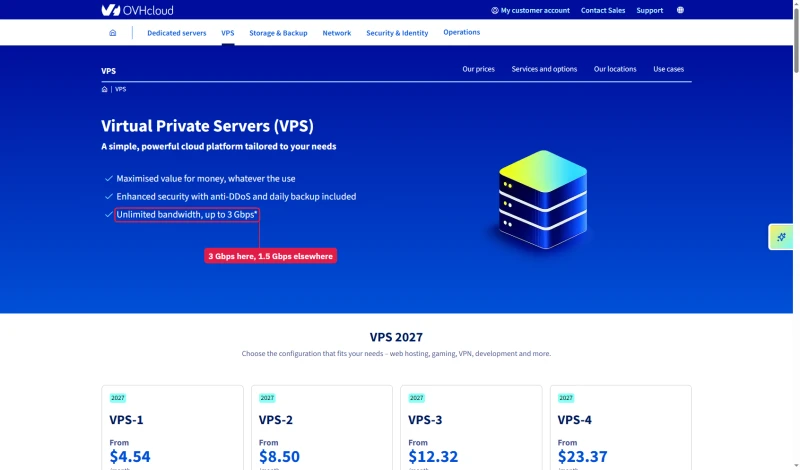
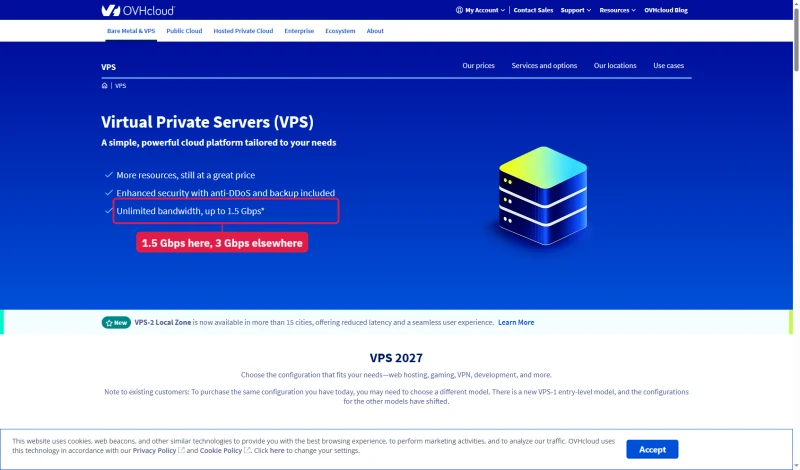
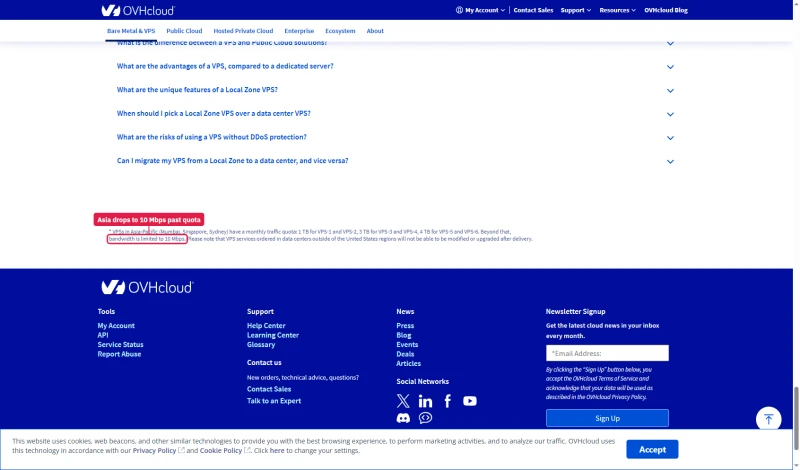
Unlimited also has a limit in Asia-Pacific. VPS in Mumbai, Singapore and Sydney get a monthly traffic quota, 1 TB for VPS-1 on the US page (500 GB on the worldwide page), and beyond it bandwidth drops to 10 Mbps.
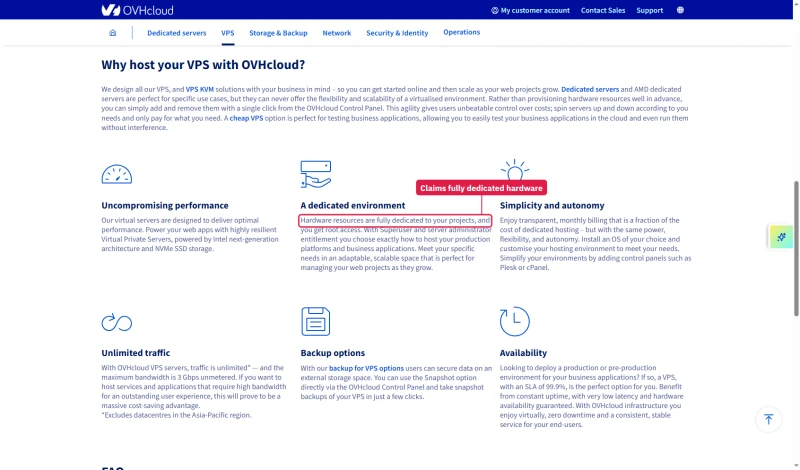
The VPS page also says the hardware resources are fully dedicated to your projects. In our load test the VPS plans finished the whole 0 to 250 ramp with 0% failed requests, so we have no evidence against that line, but we did not test for CPU contention.
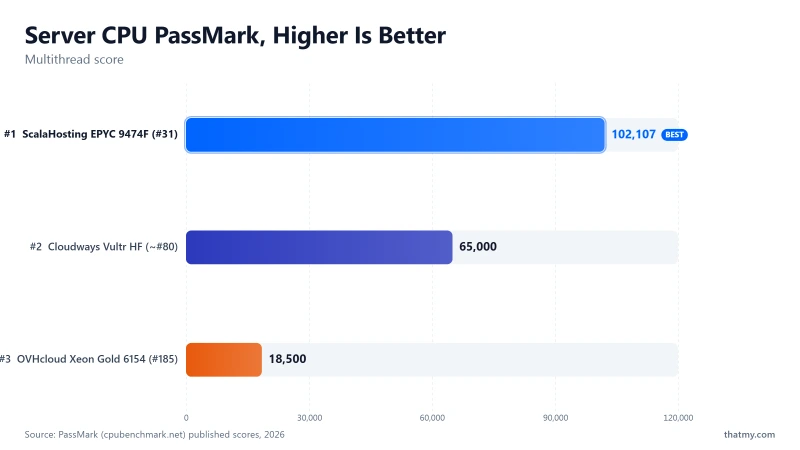
OVHcloud's pages do not name the processor in a VPS. The chip our records list for OVHcloud is the Intel Xeon Gold 6154, a 2017 server CPU with a PassMark multithread score of 27,672 (#657 of 5,999). ScalaHosting's listed chip is the AMD EPYC 9474F (102,255, #42), about 3.7x the score. Those are scores for whole CPUs, not for the vCores in a VPS, and we have not confirmed the OVHcloud chip with lscpu on our test server, so treat the gap as a rough guide.
TTFB Results by Test Location
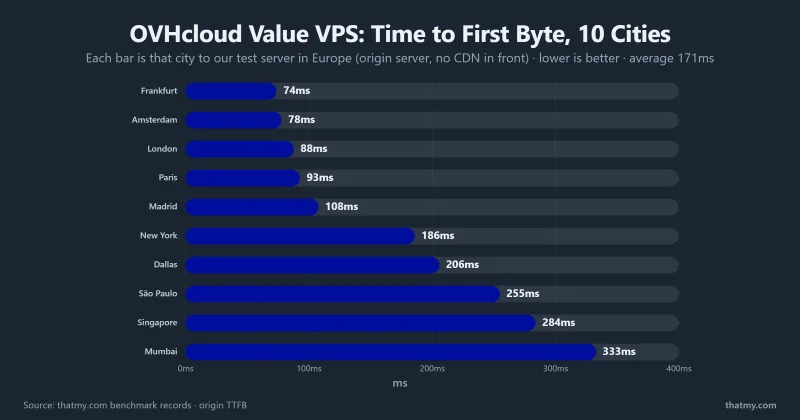
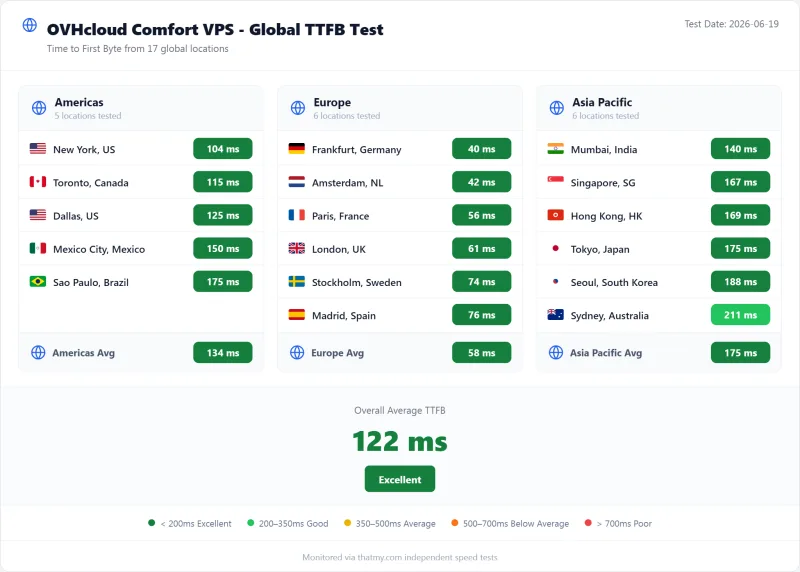
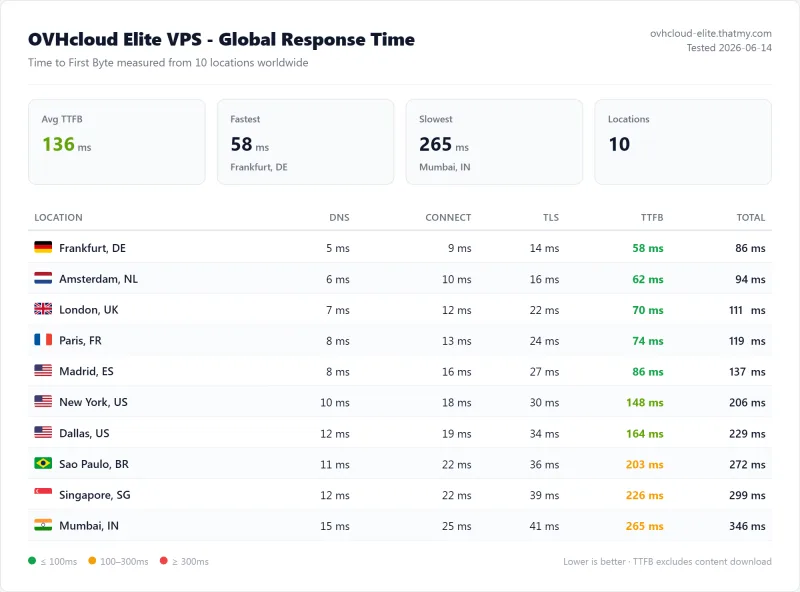
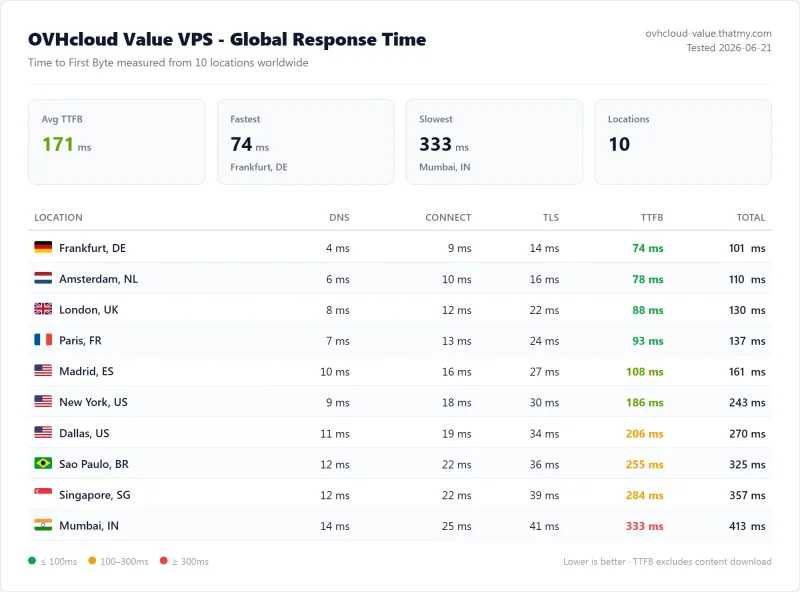
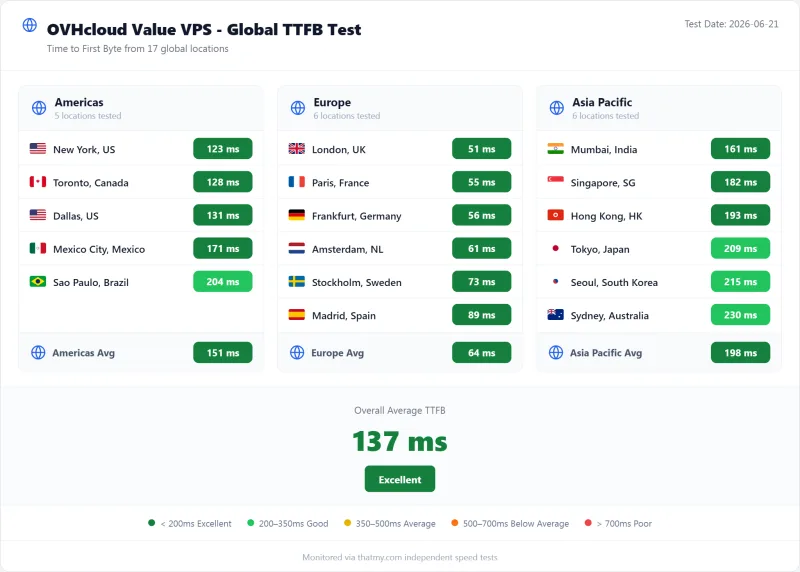
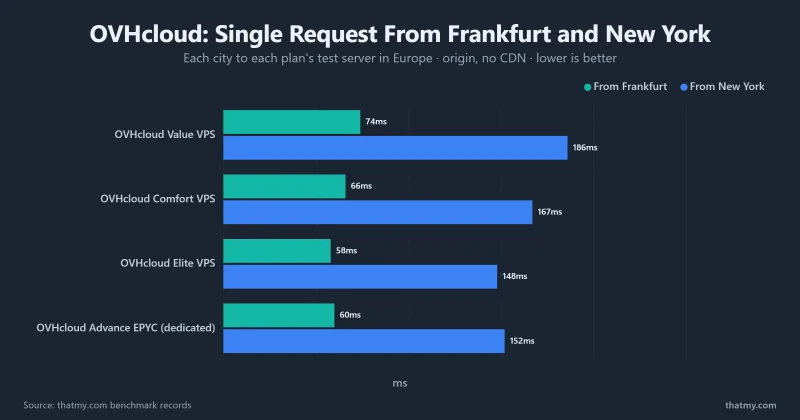
All figures are origin readings: no CDN in front, page caching off. Each is the time from one of our 10 measuring locations to a test site on a European OVHcloud server, so the New York figure crosses the Atlantic and the Frankfurt and London figures are the short hops. ScalaHosting and Cloudways test servers sat in New York.
New York, London and Frankfurt
⚠️ Key Insight: A European Server Is Fast for Europe and Slower for the US
OVHcloud's European server gives short times from Europe (88ms from London, 74ms from Frankfurt on the Value VPS) and a longer one from New York (186ms). If your audience is mostly in Europe that is the right place for the server; if it is in the US, choose a US location where OVHcloud offers one or a host with servers there. The ScalaHosting and Cloudways figures in the table are from servers in New York, so the comparison tells you about location as much as speed.
Time-of-Day Performance: Not Measured
Many reviews test at one hour and report the best case. We did too: our records hold one TTFB reading per location, taken once per plan, not a series through the day. That means we have no figure for how an OVHcloud VPS varies between a quiet night and European business hours, and an earlier version of this page that printed such a table had no record behind it. It has been removed.
If peak-hour variation matters to you, test it yourself during the refund window: run the same page from your visitors' region at the hours your traffic is highest and compare it with a night-time run.
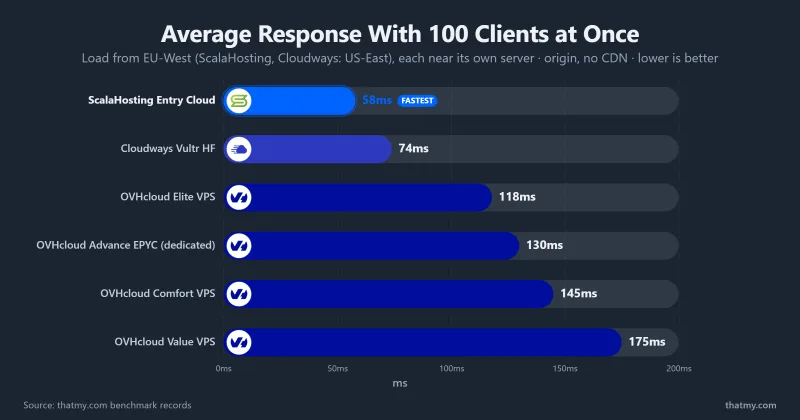
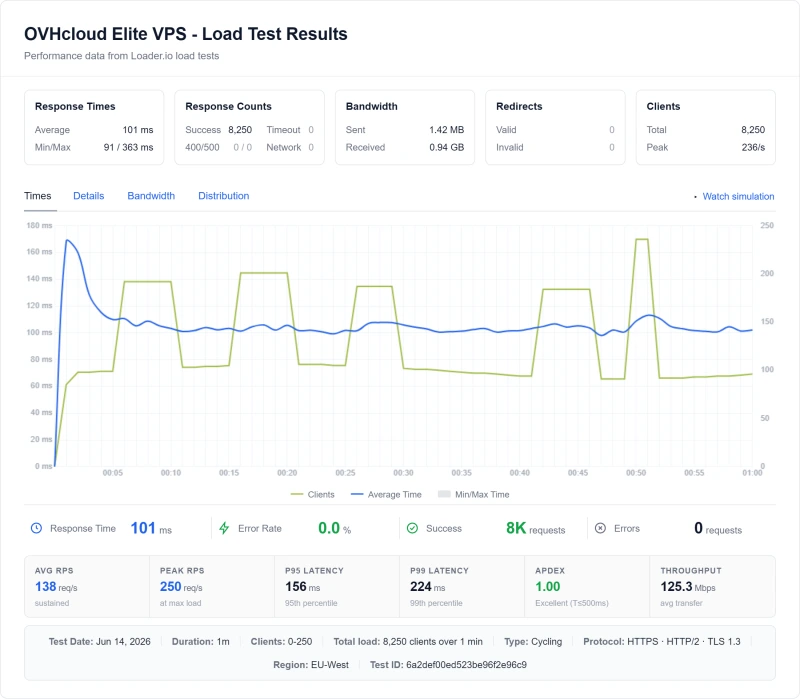
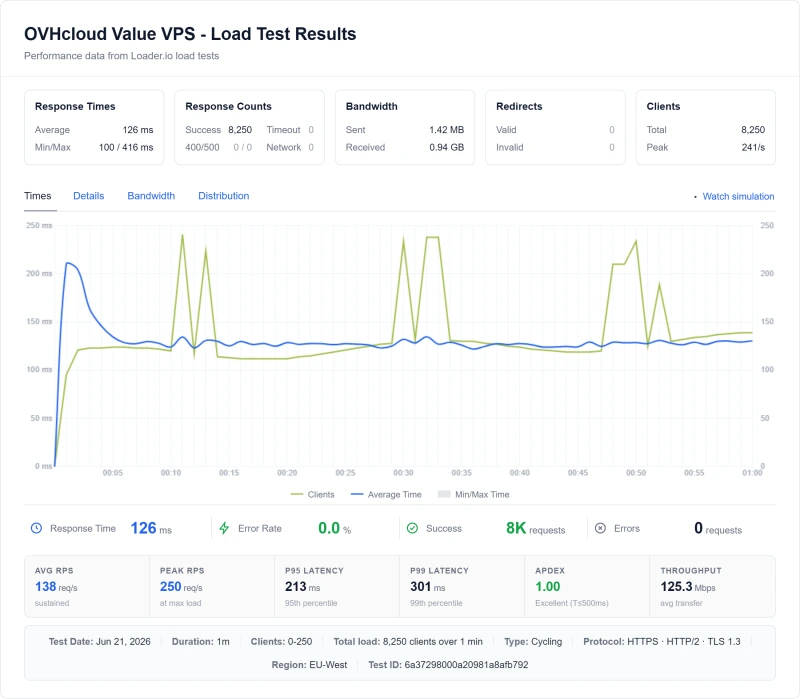
What we do have is the load test, which shows how the plans behave when many clients arrive at once. On the Value VPS the average response at 100 concurrent users was 175ms, on Comfort 145ms and on Elite 118ms, with 0% failed requests on all three. See the load test section below.
Load Test: 0 → 250 Concurrent Clients
A single request is the best case. The load test asks what happens when many visitors arrive at once. We ramped clients from 0 to 250 over 60 seconds against a test site on each plan, from EU-West, close to the server. We did not test 500 concurrent users, and the earlier claim of HTTP 503 errors at about 350 users had no record behind it and has been removed.
⚠️ What the Load Test Does and Doesn't Show
Every OVHcloud plan finished the ramp with no failed requests, and the higher plans were faster: 175ms on Value, 145ms on Comfort and 118ms on Elite. ScalaHosting and Cloudways averaged lower still (58ms and 74ms). We do not give a percentage slowdown for OVHcloud: the single-request reading we hold is from New York to a European server, while the load test ran from Europe, so the two cannot be subtracted.
The practical reading: on these plans a traffic spike up to 100 concurrent users produced a slower but steady site and no errors. What happens above 250 clients we did not measure.
CPU: What We Know and What We Didn't Test
We did not run a CPU stress test or log CPU steal during the load test, so this page has no throttling or steal figures; an earlier table of such numbers had no record behind it and has been removed. Here is what our records do hold.
🔬 CPU Record
PassMark scores describe the whole processor, not the share of it a VPS gets, so they are a rough guide only. The load test is the better evidence: with 0% failed requests and a steady average of 175ms at 100 users on the Value VPS, we saw no sign of throttling severe enough to cause errors, but we did not look for it directly.
Uptime: 54-Day Monitoring Window
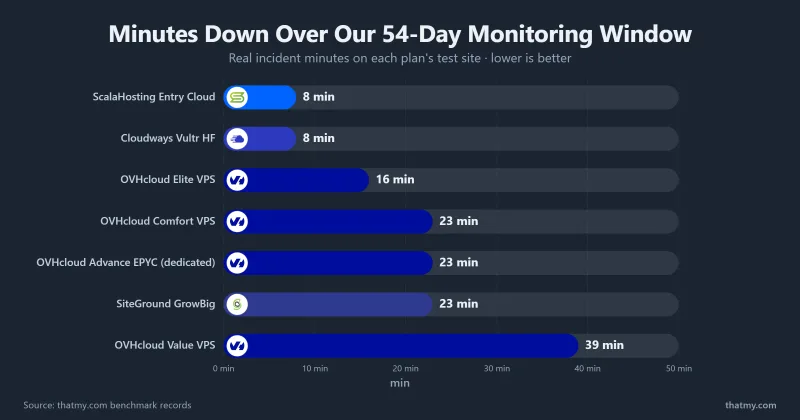
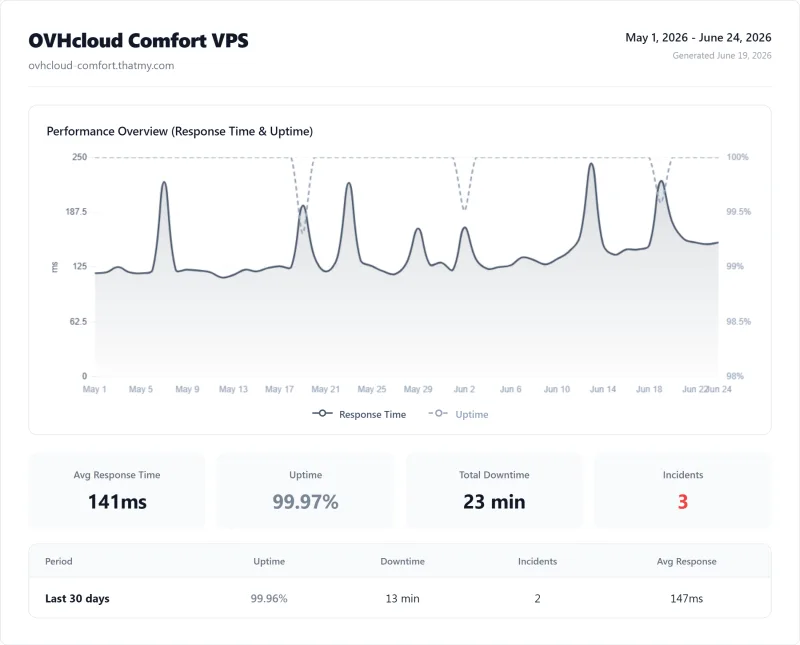
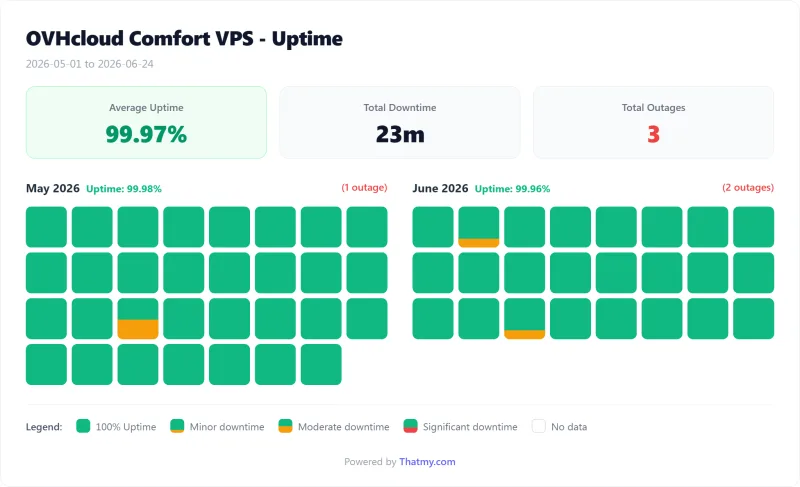
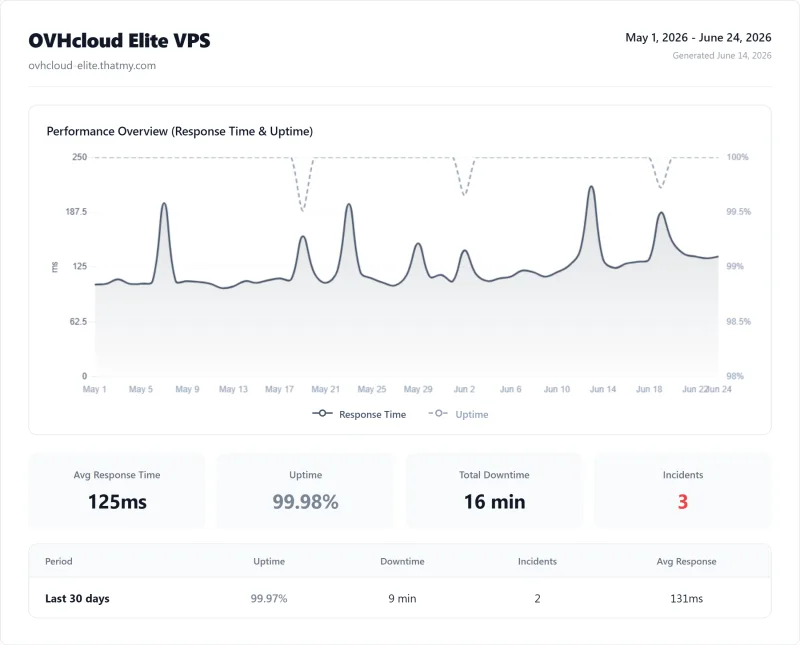
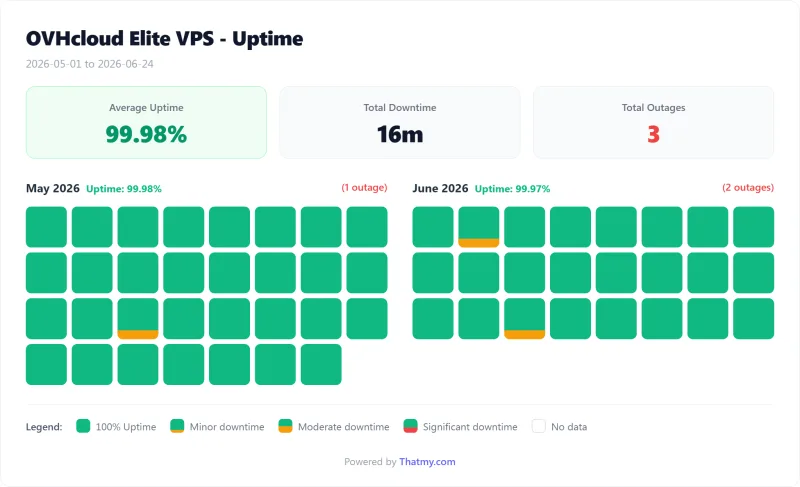
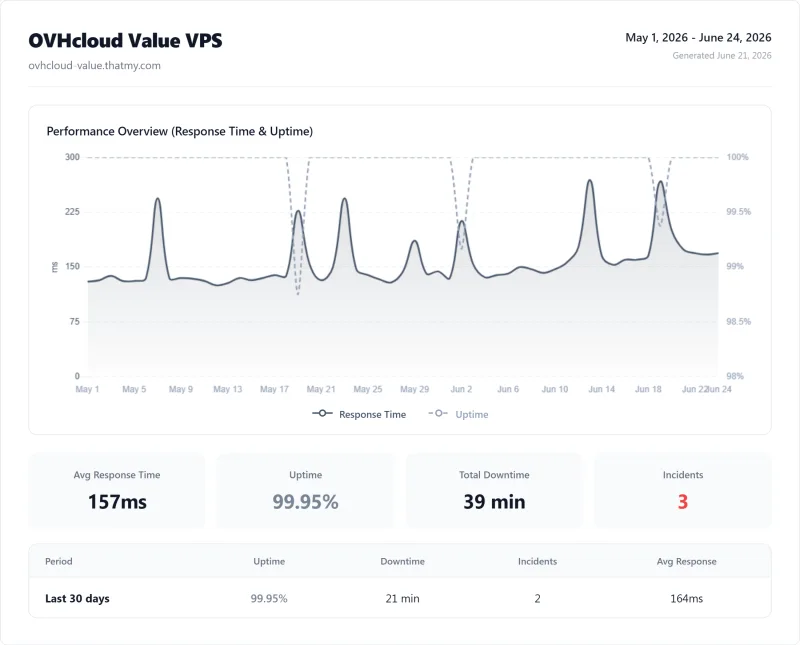
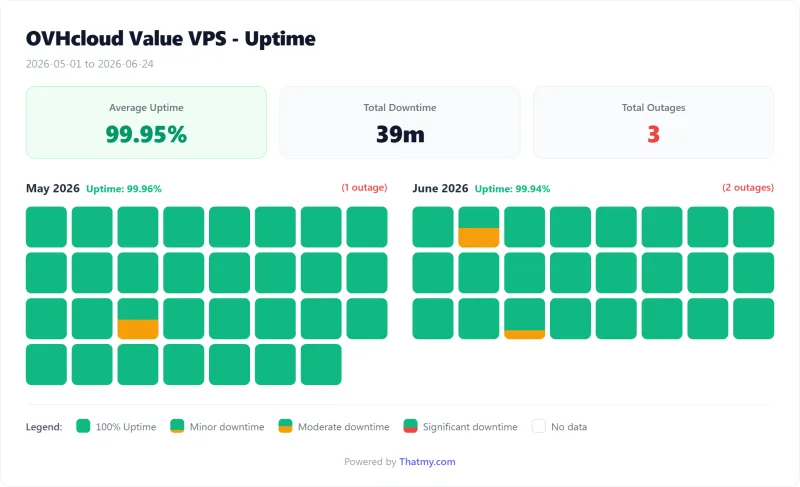
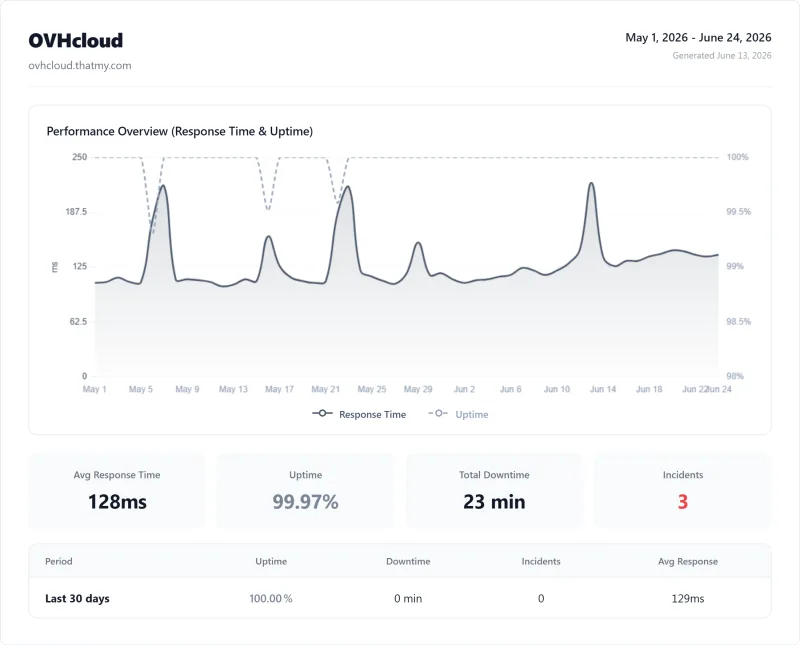
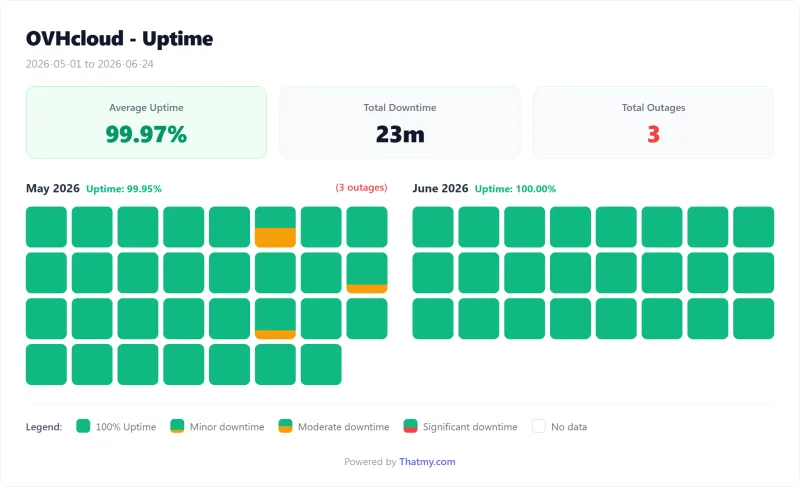
All three OVHcloud VPS plans and the dedicated server stayed at or above 99.9% over the window; the Value VPS lost the most, 39 minutes, against 16 minutes on Elite. ScalaHosting and Cloudways each lost 8 minutes. Fifty-four days is a short window, not a year, and our records do not break out how long each incident lasted or what caused it, so an earlier version's incident analysis and longest-outage figure have been removed.
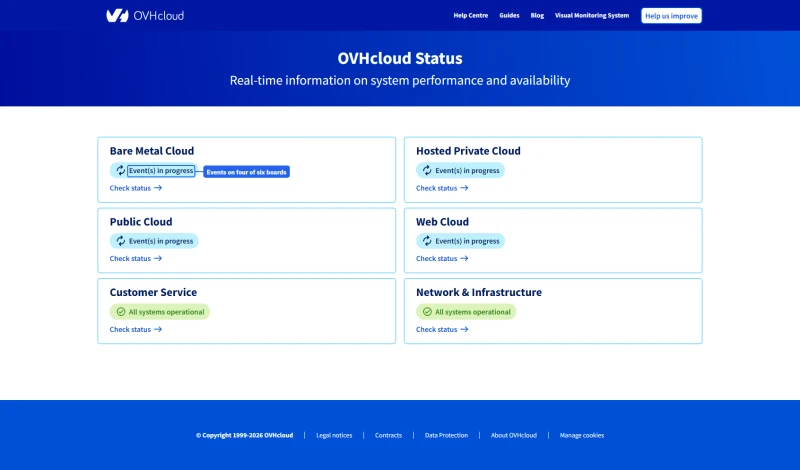
OVHcloud runs a public status page with a board for each product line. When we checked, four of its six boards showed events in progress; Customer Service and Network were operational.
The Strasbourg Fire, What It Reveals About OVHcloud's Backup Policy
This is the most important section in this review for anyone choosing a host. The Strasbourg fire is not just history; it is the reason to read OVHcloud's backup wording closely. The fire is public history reported by OVHcloud and the press, not something we tested.
What Happened
In the early hours of March 10, 2021, a fire broke out in OVHcloud's SBG2 datacentre in Strasbourg, France. SBG2 was destroyed and SBG1 was partly damaged. Netcraft reported that about 3.6 million websites went offline. Customers whose only copies were in the affected datacentre lost data.
🔥 The Strasbourg Fire, Key Facts
The Backup Policy Today
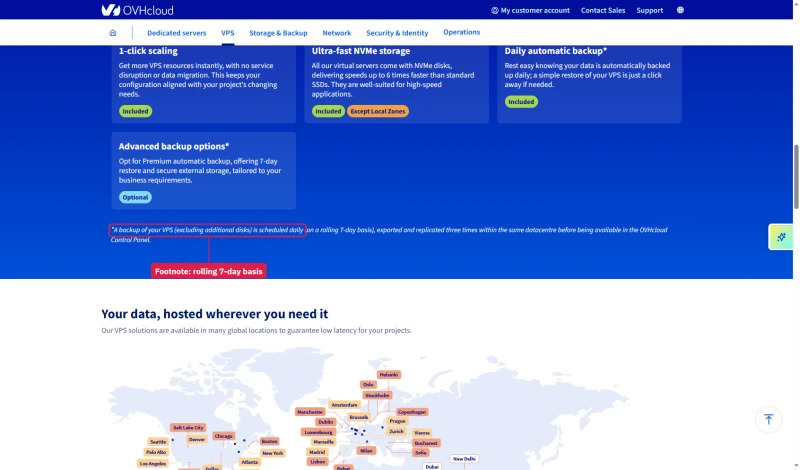
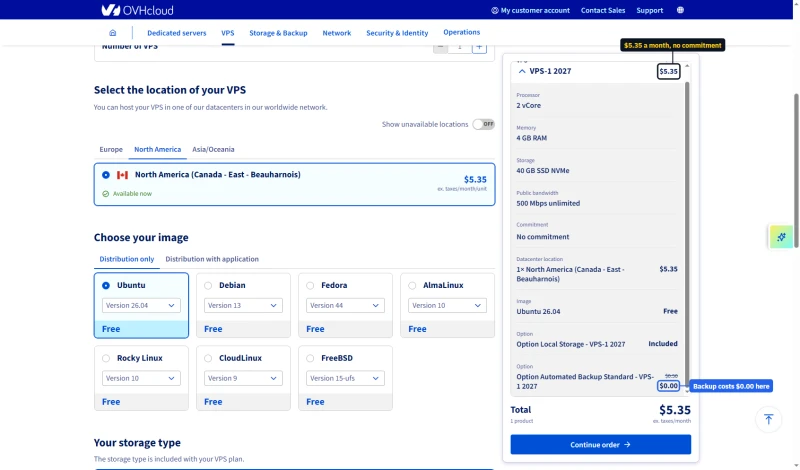
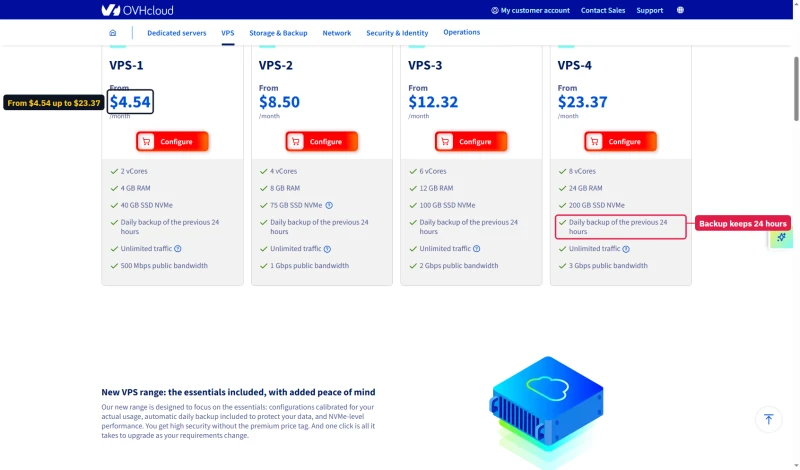
The VPS 2027 range has changed what is included. Every card now lists a daily backup of the previous 24 hours, while the footnote on the same page says backups run daily on a rolling 7-day basis and are replicated three times within the same datacentre.
In the configurator the included backup is still a priced line: Automated Backup Standard at $0.50 a month, struck to $0.00 by a promotion. A premium 7-day backup is $1.40 a month and a snapshot $0.40.
On shared web hosting the documentation goes further: it says OVHcloud will not provide a backup from an earlier period than the one it keeps and calls the backup service non-contractual, so responsibility for your data sits with you.
⚠️ What This Means for You
OVHcloud's included VPS backup is replicated inside the same datacentre as your server, so an incident like Strasbourg can take the server and its backups together. Keep your own off-site copy for the day hardware fails, your server is compromised or you delete the wrong files. Managed hosts handle this for you; on OVHcloud, the off-site part is yours to arrange.
The lesson from Strasbourg: OVHcloud provides infrastructure and data protection beyond its listed backup is your responsibility. That is how the product is sold, and it is worth knowing before you put business data on it without a backup strategy.
The True Cost Check: What the VPS Price Leaves Out
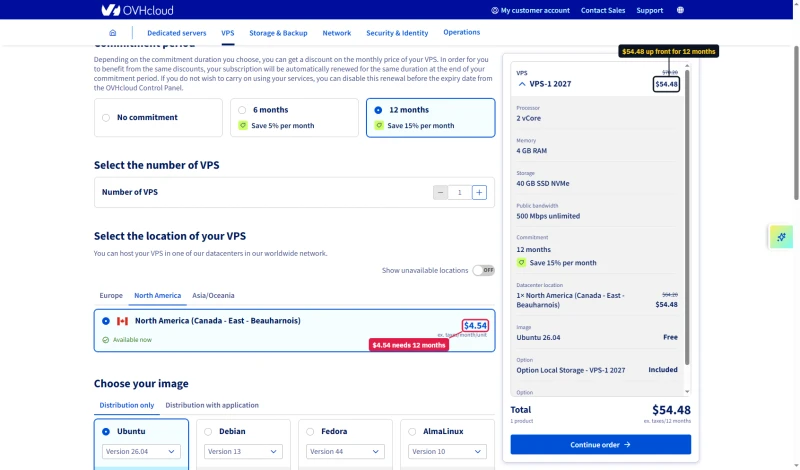
OVHcloud replaced the VPS line this review first priced with the VPS 2027 range. VPS-1 (2 vCores, 4GB RAM, 40GB NVMe) is advertised from $4.54 a month, which needs a 12-month commitment, $54.48 up front; with no commitment it is $5.35 a month. Here is what a production WordPress setup adds.
⚠️ The Math That Changes the Comparison
VPS-1 with a snapshot and the premium backup is about $6.34/mo on 12 months, before a control panel, and roughly $17 a month with Plesk Web Admin added. ScalaHosting Entry Cloud is $14.95/mo on its 12-month term but renews at $39.95/mo, so a first-year comparison favors ScalaHosting less than a long-term one. The real difference is management: OVHcloud is a blank server you run yourself, ScalaHosting is a managed VPS. We have not recorded what OVHcloud's VPS costs after the 12-month term.
The $4.54/mo price is real on a 12-month commitment, but it is the price for an unmanaged server with no control panel. For a developer who needs a cheap staging environment and manages their own stack, that is a fair deal. For a WordPress site owner who needs a production-ready environment, the true cost is the server plus a control panel licence plus your own time.
OVHcloud Manager, Dashboard Deep Dive
OVHcloud Manager is the web-based control panel for managing your OVHcloud services. It is built for infrastructure management, not for managing a WordPress site.

What OVHcloud Manager Does
- Server management (reboot, reinstall, KVM console access)
- Network configuration (IP management, firewall rules)
- Billing and invoice management
- Basic monitoring graphs
- Backup and snapshot management for the options you have added
- DNS zone management
What a Blank VPS Leaves to You
- WordPress installation (the 1-click module is on shared web hosting plans)
- A file manager, unless you add a control panel such as cPanel or Plesk
- Email, which OVHcloud sells as separate products
- SSL certificates, which you set up yourself
- A database admin tool, which you install
The Manager is appropriate for what OVHcloud is: an infrastructure provider. If you manage everything over SSH it gives you server control, networking and billing. If you expect a control panel that manages your site, add one or pick a managed host.
WordPress on OVHcloud, The 12-Step Setup Reality
OVHcloud does not offer managed WordPress hosting, and it says it does not support WordPress configuration. Getting WordPress running on a VPS means configuring the server yourself. This is the standard sequence. We did not time it, so this page gives no hours.
⚠️ The OVHcloud WordPress Setup Process
- Order the VPS and wait for provisioning
- SSH into the server as root
- Update the OS:
apt update && apt upgrade - Install Nginx:
apt install nginx - Install PHP and extensions:
apt install php8.3-fpm php8.3-mysql php8.3-curl php8.3-gd php8.3-mbstring php8.3-xml php8.3-zip - Install MySQL:
apt install mysql-server, runmysql_secure_installation - Create a database and user for WordPress
- Download and configure WordPress (
wp-config.php) - Configure an Nginx server block for WordPress
- Install and configure SSL: Certbot + Let's Encrypt
- Configure PHP-FPM workers: edit
/etc/php/8.3/fpm/pool.d/www.conf - Configure WordPress permalinks, install plugins, test
✅ A Managed Host, for Comparison
- Order a plan
- Click "Install WordPress" in the control panel (ScalaHosting's SPanel has one)
- Enter the site name and admin credentials
The implication is clear: a blank OVHcloud VPS suits people who enjoy server configuration. If you are not comfortable with SSH, the Linux command line and manual PHP and Nginx configuration, it will cost you hours, and OVHcloud will not help with the configuration.
For WordPress site owners who want the performance of a VPS without the configuration, ScalaHosting's managed VPS at $14.95/mo on 12 months is the better fit. For developers who want managed cloud infrastructure with Git deployment and staging, Cloudways at $11.00/mo is worth considering.
WooCommerce on OVHcloud: What We Tested and What We Didn't
We did not run a WooCommerce checkout test on OVHcloud, so this page has no checkout response time, and the earlier checkout figures had no record behind them. Checkout pages cannot be cached, so server speed matters. The closest records we hold are the load test and the WordPress benchmark.
On these records OVHcloud's VPS and dedicated plans hold up under concurrency, with no failed requests, though they are slower than ScalaHosting and Cloudways in the load test. Whether that is good enough for a store depends on the store. The bigger WooCommerce question is management: on a blank VPS you configure caching, PHP workers and updates yourself, and OVHcloud does not support application configuration. For a store without a sysadmin, a managed host is the safer choice. Test your own checkout during the refund window before you commit.
Support: What OVHcloud Publishes
We did not time OVHcloud's support. An earlier version of this page reported six test tickets with response times and a resolution rate; we have no record of those tests and they have been removed, along with the claim that basic plans have no chat or phone. Here is what OVHcloud publishes on its support-levels page, which we read on October 12, 2026.
🚨 The "Outside Scope of Support" Problem
OVHcloud's VPS FAQ says it cannot offer software configuration or administration assistance. That is normal for unmanaged hosting, but it means you are on your own for most real problems: if your WordPress site breaks, support will not fix it. You need to fix it yourself or hire a developer.
Standard support is a business-hours service with an eight-business-hour target for a critical incident, so a Friday-evening problem may wait until Monday. Whether OVHcloud meets those targets we did not test. If you need round-the-clock help with your site itself, choose a managed host.
OVHcloud vs ScalaHosting (Head-to-Head)
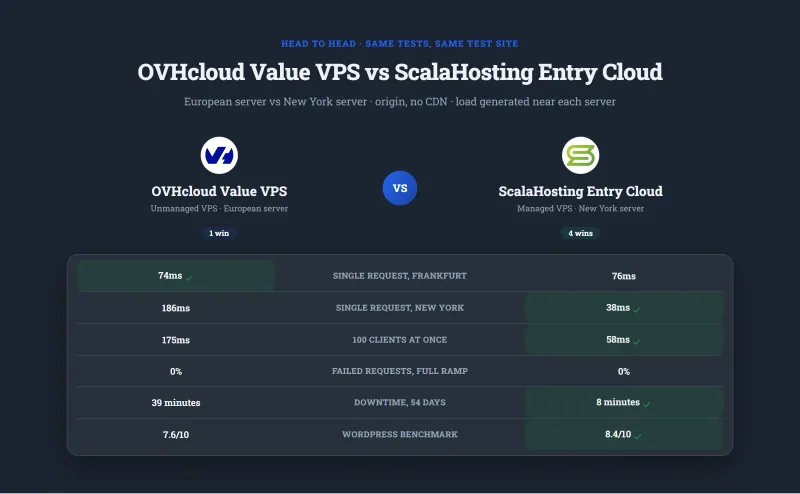
ScalaHosting is the usual alternative for WordPress site owners who are considering OVHcloud. Here is how the two compare on our records; the OVHcloud figures are the Value VPS, the plan this review was built around.

Where Scalahosting Wins Vs Ovhcloud
- Fully managed: ScalaHosting configures the server; OVHcloud gives you a blank one
- SPanel included free; OVHcloud's control panel is a paid add-on
- Backups included
- Email hosting included
- Anytime money-back guarantee
Where Ovhcloud Wins
- OVHcloud's entry VPS costs less per month than ScalaHosting's $29.95/mo intro price
- OVHcloud sells bare metal dedicated servers; ScalaHosting has no equivalent
- Renewal is $39.95/mo after the intro term
Our Benchmark Records
- Origin TTFB (Managed VPS, New York, no CDN): 38ms
- Uptime (54-day window): 99.99%
- Load at 100 clients: 58ms

$29.95/mo
Anytime Money-Back Guarantee
Our take: ScalaHosting is faster in our load test and comes managed; OVHcloud is cheaper at the sticker price and gives you bare metal and root access, but you run it yourself. For WordPress site owners who do not want to administer a server, ScalaHosting is the better fit. OVHcloud wins for developers who want a low-cost server or dedicated hardware.
OVHcloud vs Cloudways (Head-to-Head)
Both OVHcloud and Cloudways attract developers, but they are different products. OVHcloud is raw infrastructure. Cloudways is managed cloud hosting built on top of cloud providers (AWS, Google Cloud, Vultr, DigitalOcean and Linode).
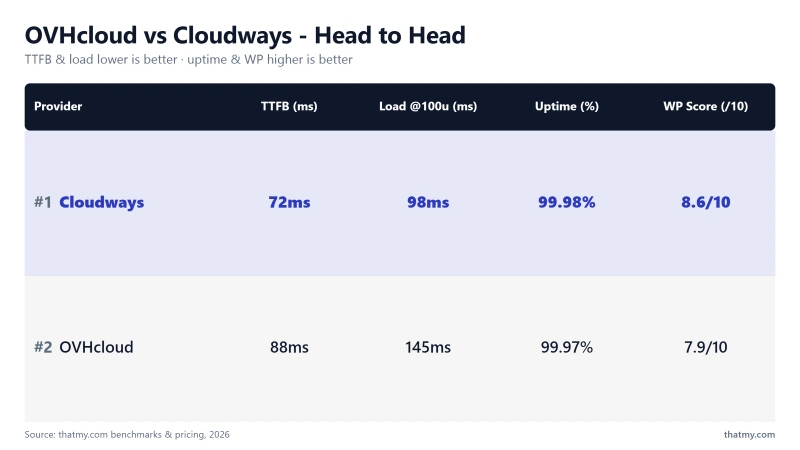
Our take: for developers who want managed cloud hosting, Cloudways is the better fit: it manages the server and starts at $11.00/mo (DigitalOcean 1GB) to $60.00/mo (Vultr HF 4GB). For developers who want maximum control at the lowest sticker price, OVHcloud wins, but only if you are comfortable managing everything yourself.
OVHcloud Pricing, All Plans Explained
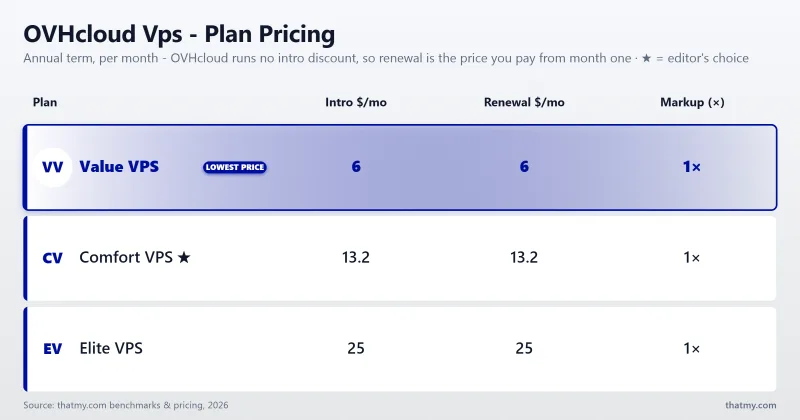
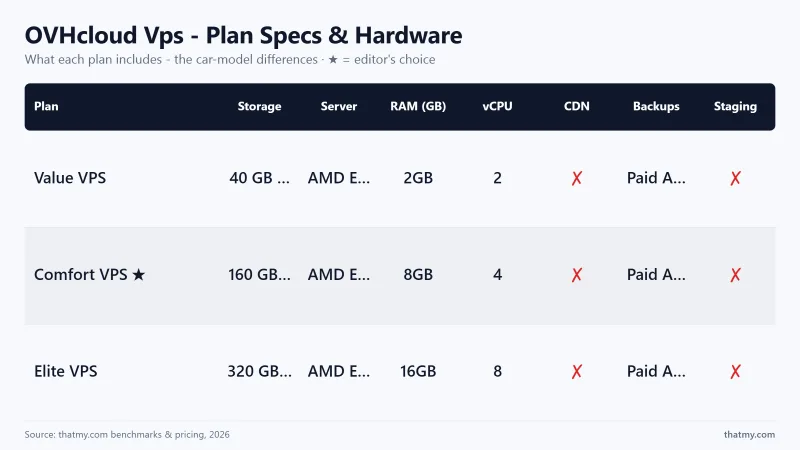
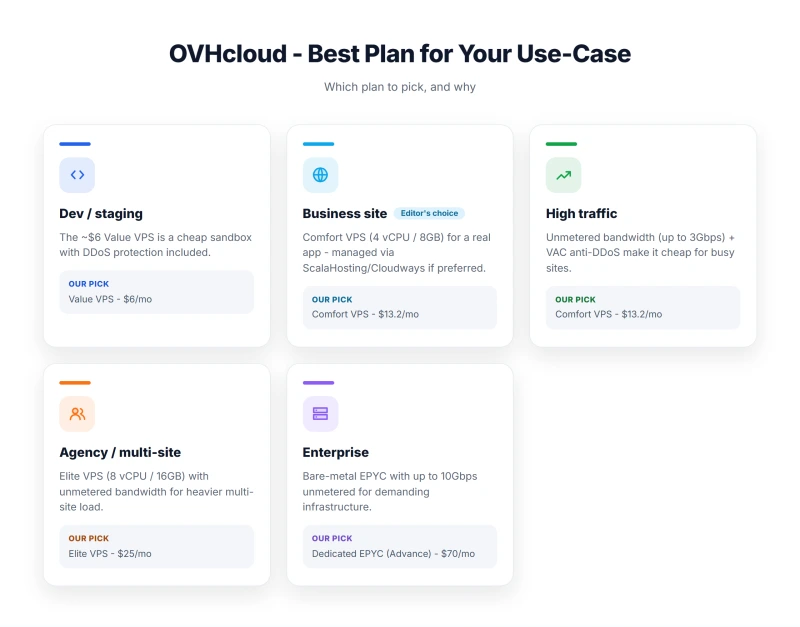
VPS 2027 Plans
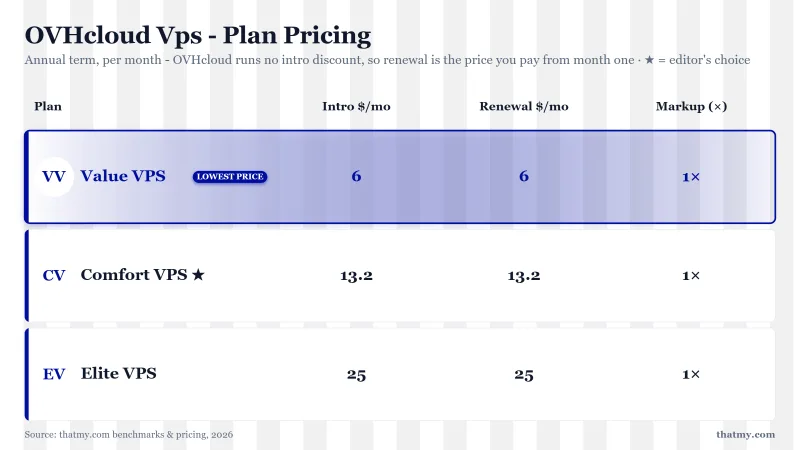
Prices are per month on a 12-month commitment, before tax; month to month VPS-1 is $5.35. Every card lists a daily backup and unlimited traffic, and the configurator's image list has Linux and FreeBSD but no Windows, although the VPS page still says Linux, Windows, BSD.
Shared Hosting Plans
OVHcloud also sells shared web hosting. Every card prints the first-year price, the 12-month total and the renewal: Starter is $1.89/mo the first year ($22.68 for 12 months), then $3.09/mo.
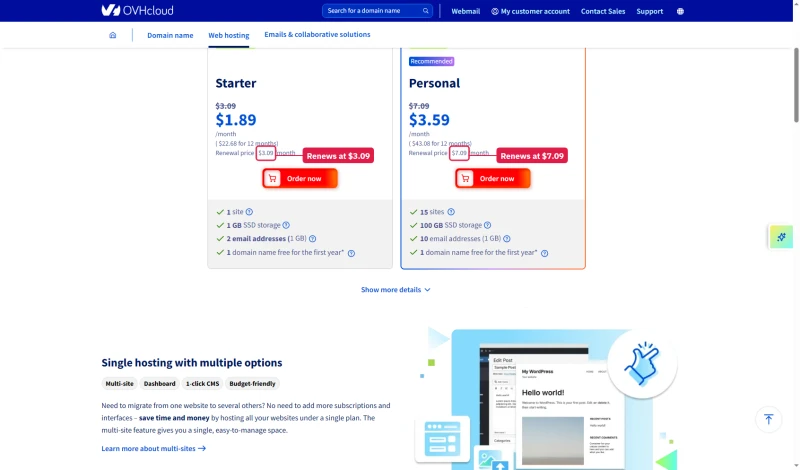
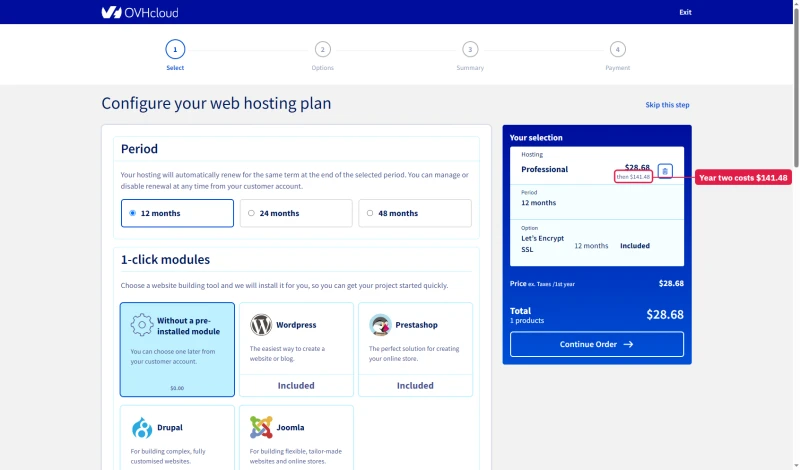
The renewals are steep further up. Pro is $2.39/mo the first year and $11.79/mo after, and the cart says so before sign-in: $28.68 then $141.48.
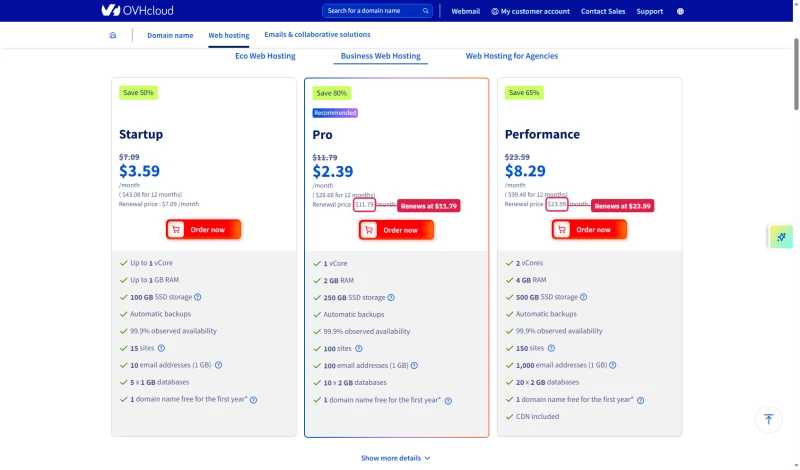
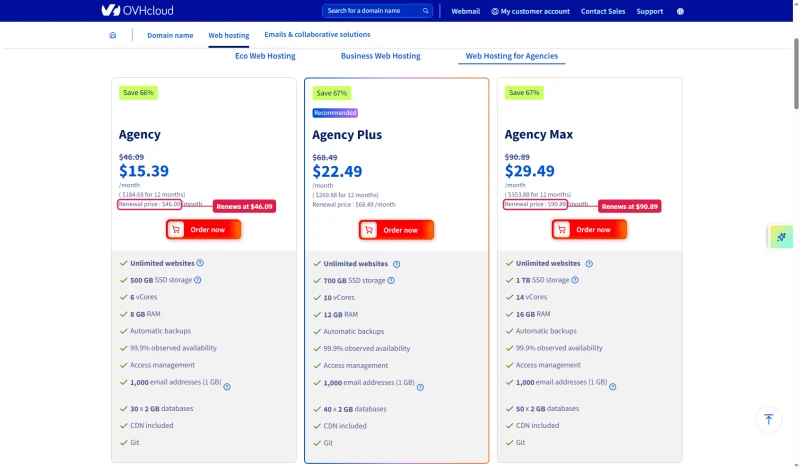
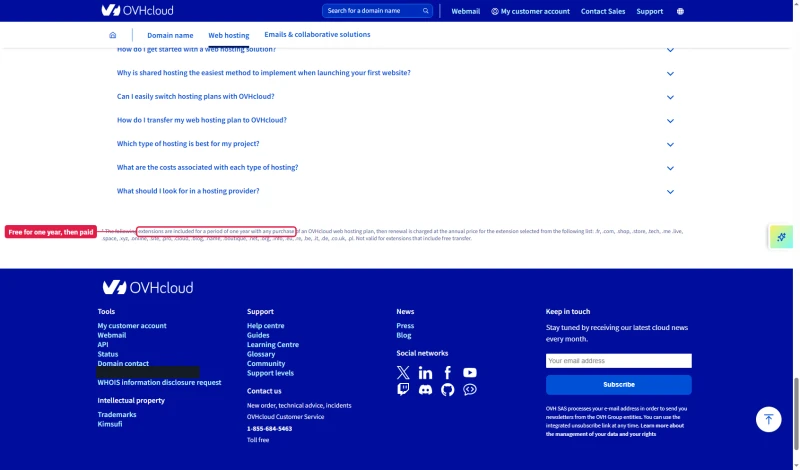
The Agency plans run from $15.39 to $29.49 a month in year one and renew at $46.09 to $90.89. The free domain is free for the first year only, then billed at the extension's annual price. These plans are more beginner-friendly but still lack managed WordPress features. For WordPress beginners, ScalaHosting's shared hosting or managed VPS is a better choice.
Dedicated Servers
OVHcloud also sells bare metal dedicated servers. We benchmarked the Advance EPYC (see the dedicated test report below) but did not record dedicated server prices, so none are quoted here; check OVHcloud's dedicated pages for current pricing.
⚠️ OVHcloud Billing Warning
OVHcloud services renew on a schedule. Cancel before the renewal date, keep the confirmation, and check your billing afterward. Our records do not include a cancellation test, so follow the steps the Manager shows for your service type.
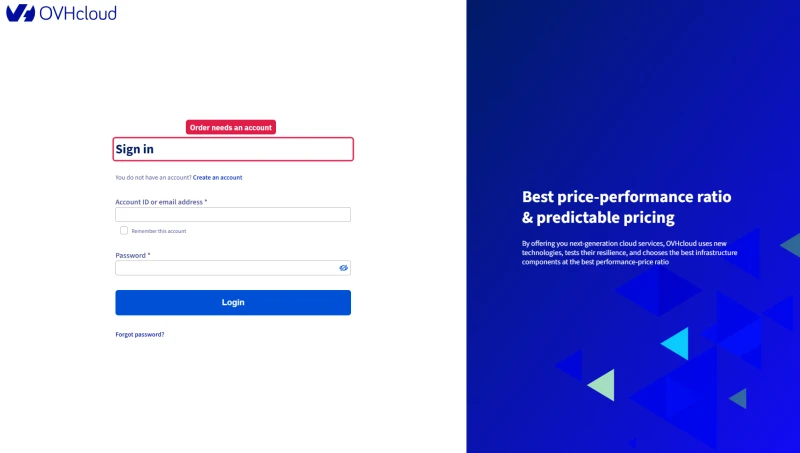
One more step before any total: every order continues to an OVHcloud sign-in, and tax is calculated only after your identity is verified.
Who OVHcloud IS For (Developers, Sysadmins)
OVHcloud is a good fit for the right use case. Here is who should seriously consider it:
✅ OVHcloud Is the Right Choice For:
- Linux sysadmins who manage their own server stack and want cheap European infrastructure: VPS-1 at $4.54/mo on 12 months is a very low price for 2 vCores and 4GB of RAM.
- Developers who need staging or testing environments at minimal cost: VPS-1 (2 vCores, 4GB RAM, 40GB NVMe) at $5.35/mo with no commitment suits non-production workloads.
- Agencies with in-house DevOps who want bare metal: we benchmarked the Advance EPYC dedicated server (130ms average at 100 users, 0% failed requests); we did not record its price.
- Businesses with European data residency requirements: OVHcloud runs datacentres in several European countries, so you can place a server where the rules need it.
- Cost-sensitive projects where your own time is the cheap part and server cost matters most.
Who Should NOT Use OVHcloud
❌ OVHcloud Is the Wrong Choice For:
- WordPress site owners who need managed hosting: you configure the server before your site is live, and OVHcloud will not help with that configuration.
- WooCommerce stores without a sysadmin: you own the caching, PHP workers and updates on pages that cannot be cached. We did not test a checkout.
- Businesses that need around-the-clock human help: standard support runs weekday business hours, with 24/7 chat for incidents.
- Anyone without Linux/SSH experience: OVHcloud gives you a blank server. If you do not know how to configure Nginx, PHP and MySQL, you cannot use it effectively.
- Sites that expect email hosting on the server: OVHcloud sells email as separate products (we did not read their prices), and a VPS ships without a mail server set up.
- Anyone who learned from the Strasbourg fire: the included backup is kept in the same datacentre, so keep an off-site copy of your own.
The honest summary: OVHcloud is infrastructure, not managed hosting. If you need managed hosting, look at ScalaHosting ($14.95/mo on 12 months, managed VPS) or Cloudways ($11.00/mo, managed cloud, Git deployment). If you need cheap European infrastructure and you are comfortable managing your own server, OVHcloud is good value.
Migration: How to Move Away From OVHcloud
If you are on OVHcloud and want to move to a managed host, here is the process. We did not run these migrations, so the steps are general guidance rather than test results.
Migrating to ScalaHosting
- Ask ScalaHosting whether it will migrate your site for you and what that covers on your plan.
- Lower the DNS TTL before the move so the switch happens quickly.
- Before migrating: create a full backup of your OVHcloud server (snapshot plus a database export).
Migrating to Cloudways
- Use Cloudways' migration plugin or ask its support about its migration service and any fee.
- Lower the DNS TTL to 300 seconds 24 hours before migration.
- Test the new server before pointing DNS.
Before Any Migration
- Create a full backup of your OVHcloud server (snapshot plus a database export via
mysqldump). - Document your current DNS settings (A records, MX records, CNAME records).
- Lower the DNS TTL to 300 seconds 24 hours before migration.
- Test the new server thoroughly before pointing DNS.
- Keep your OVHcloud server running for 48 hours after the DNS switch, in case of rollback.
Full Test Report: OVHcloud VPS, by Plan
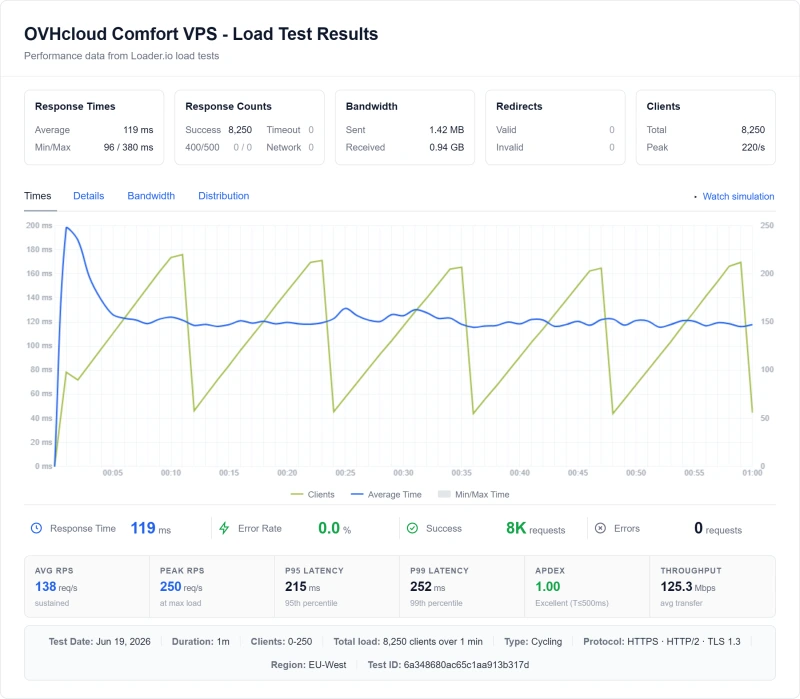
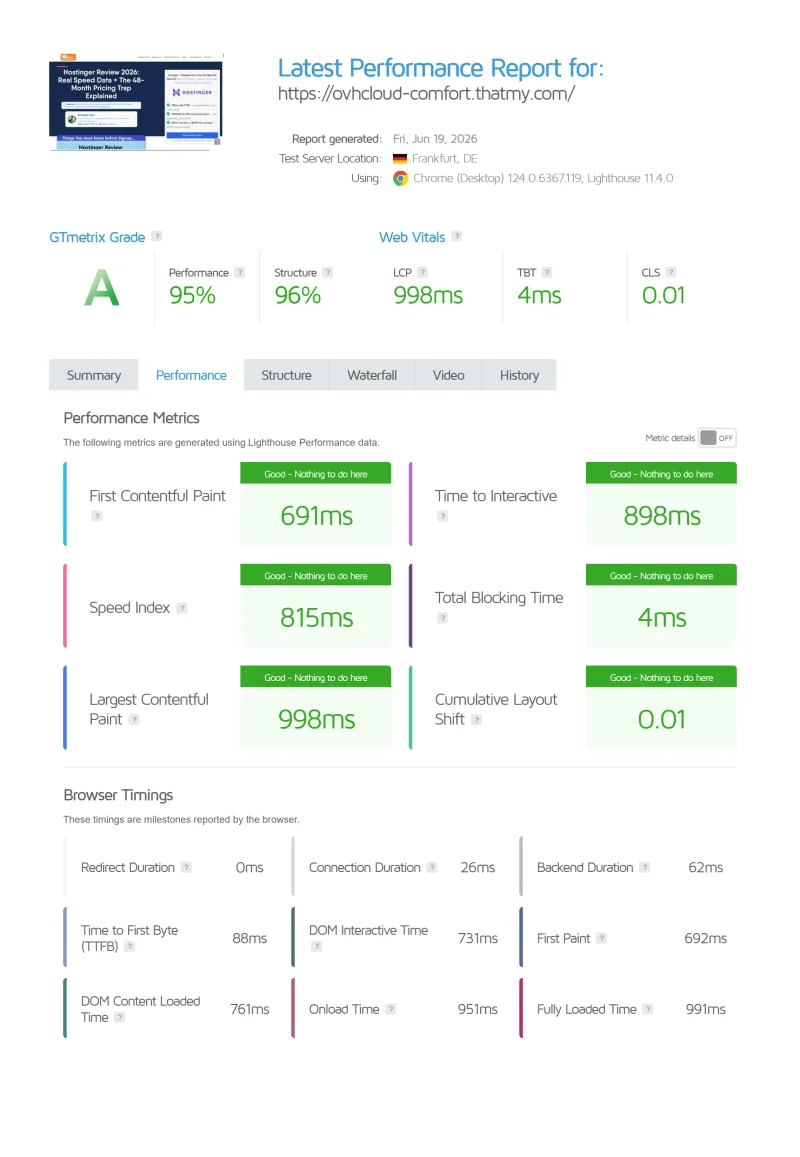
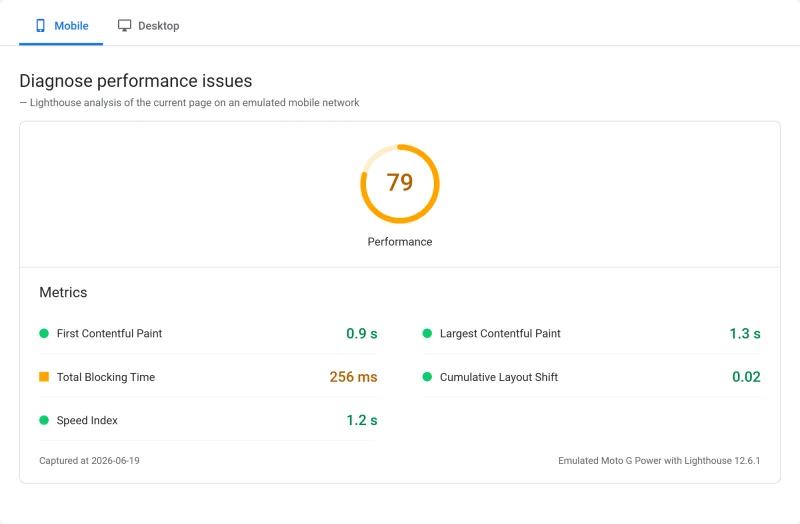
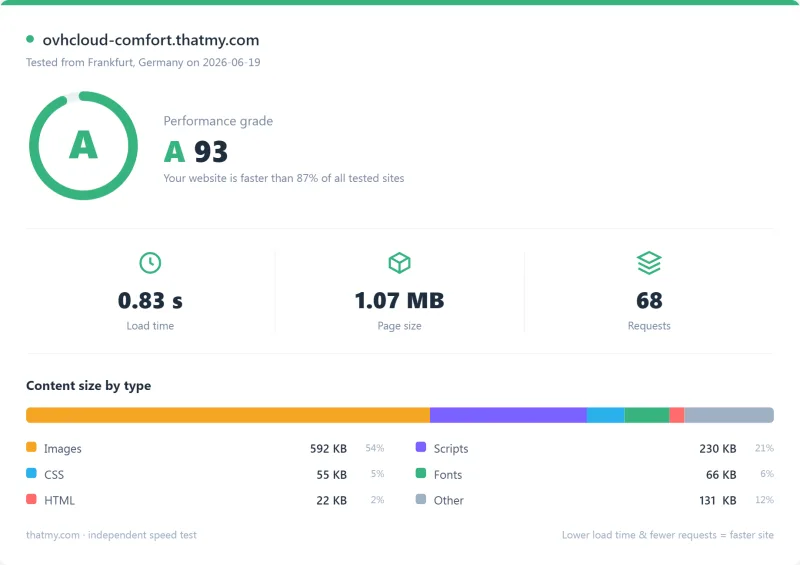
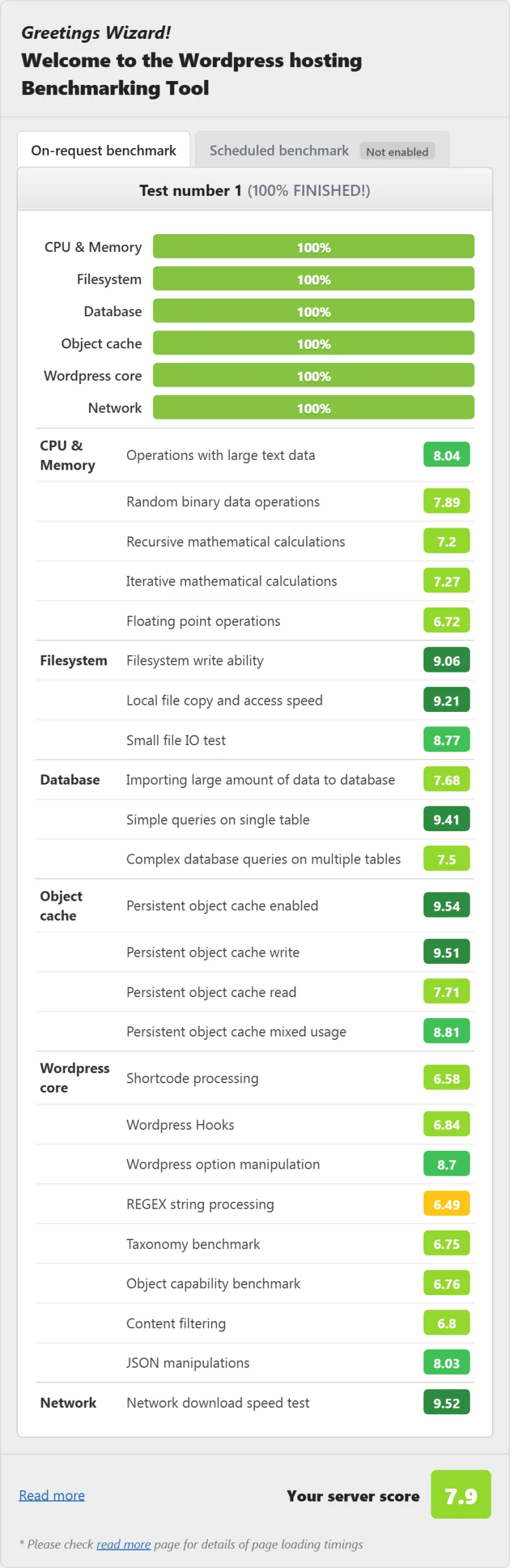
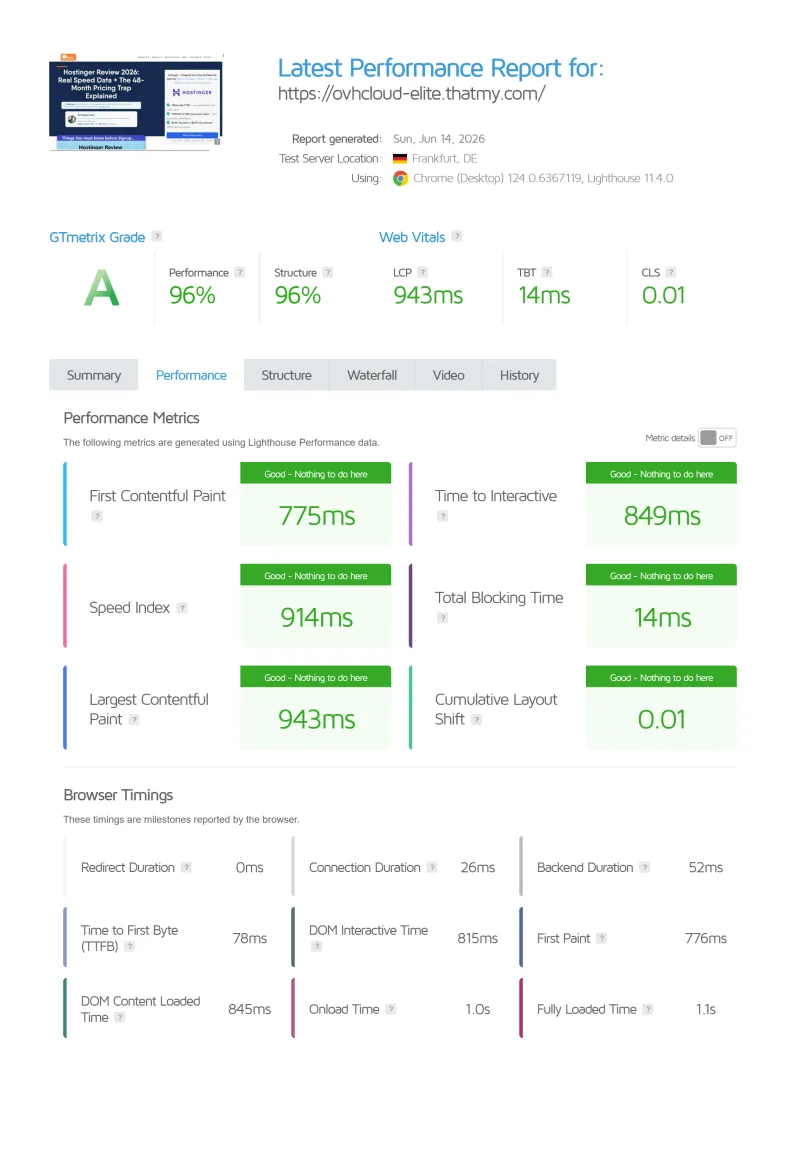
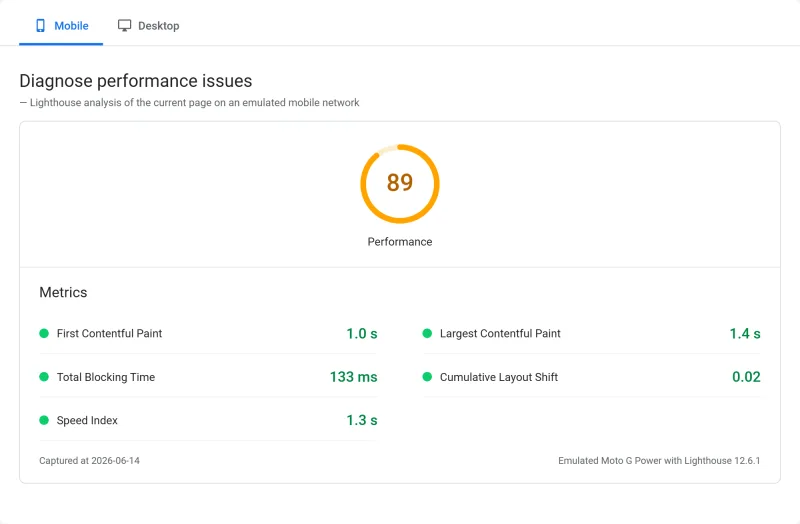
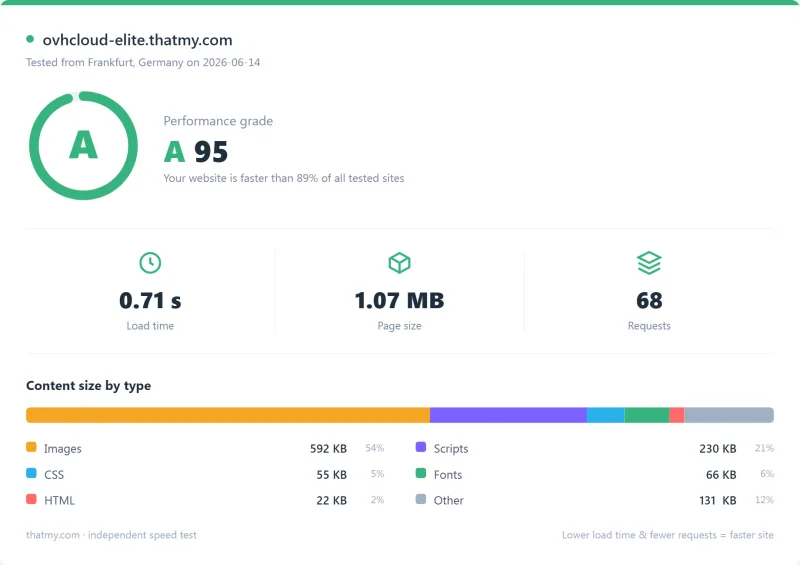
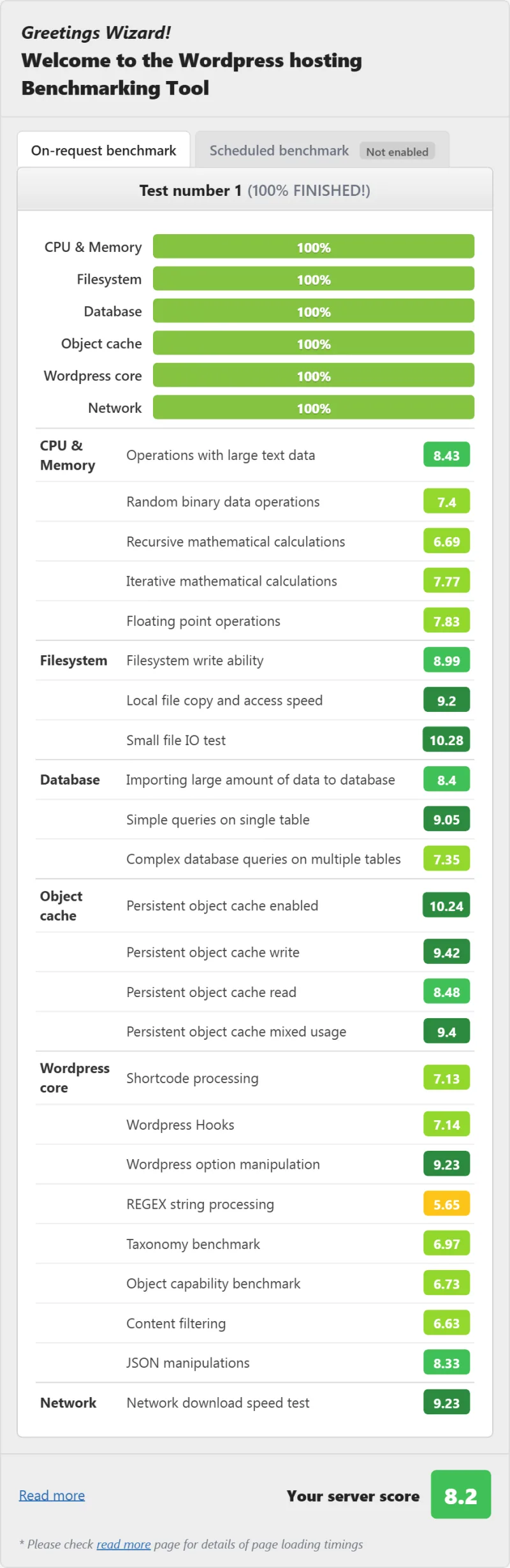
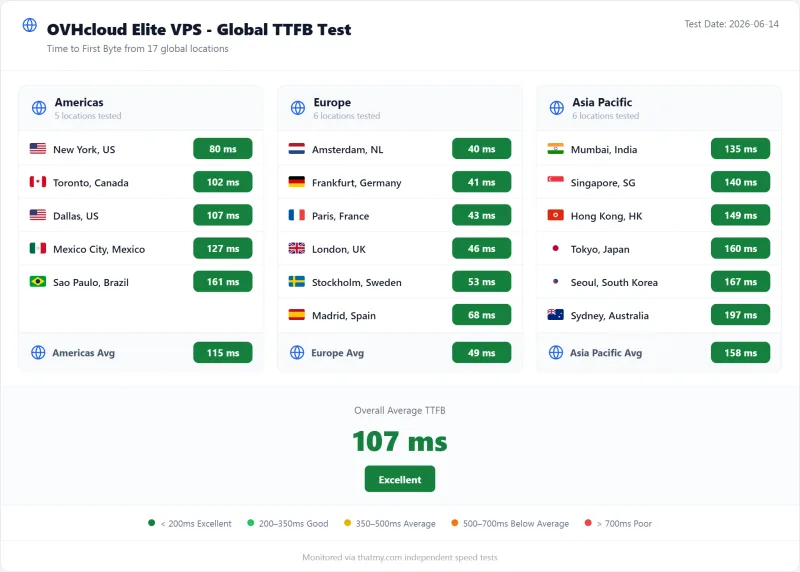
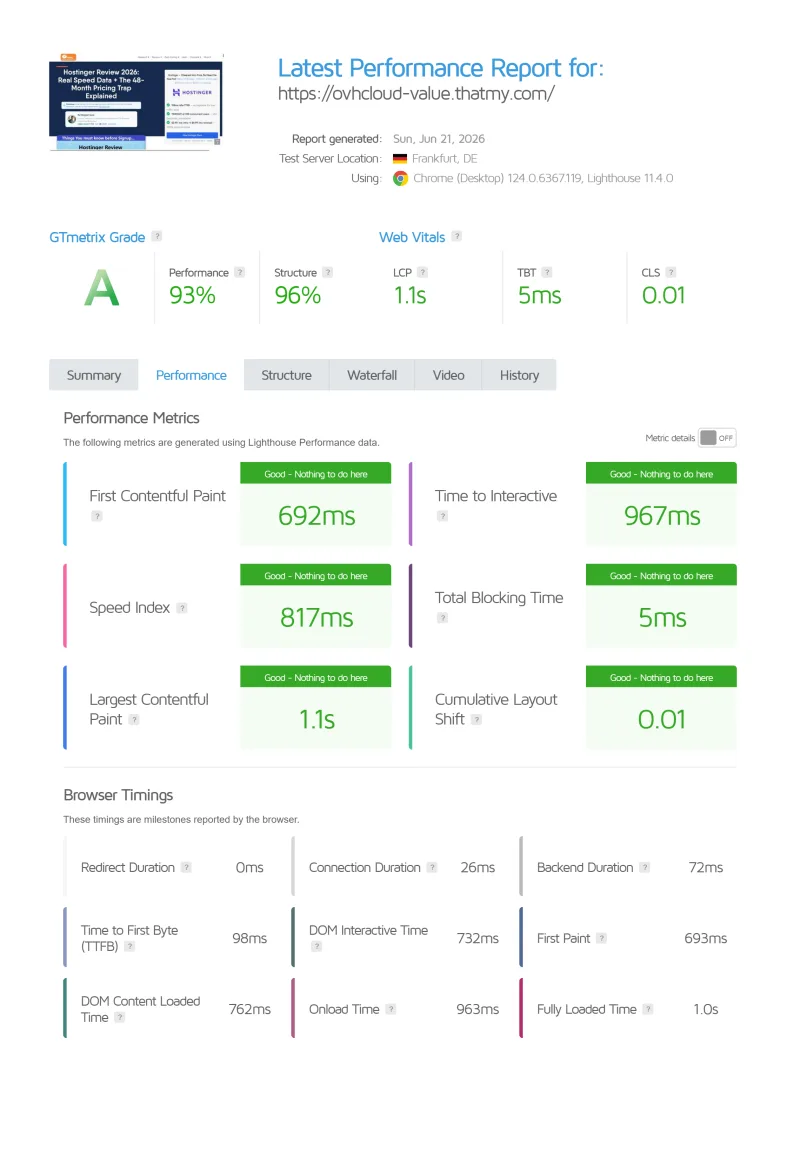
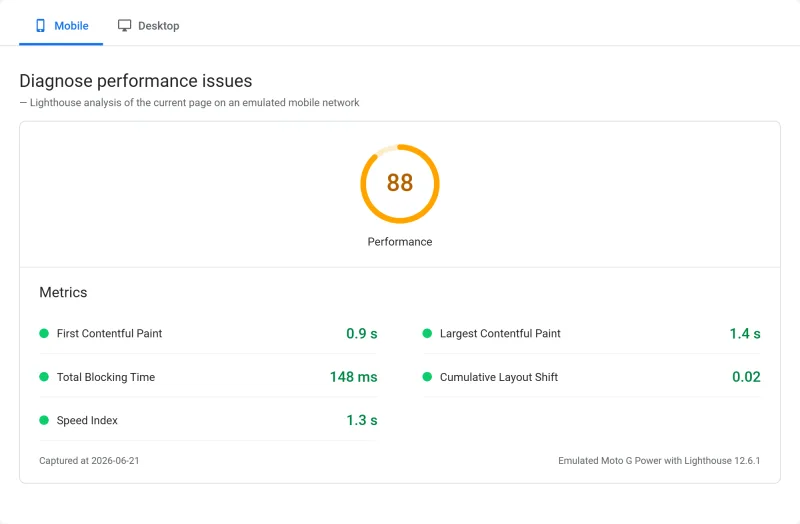
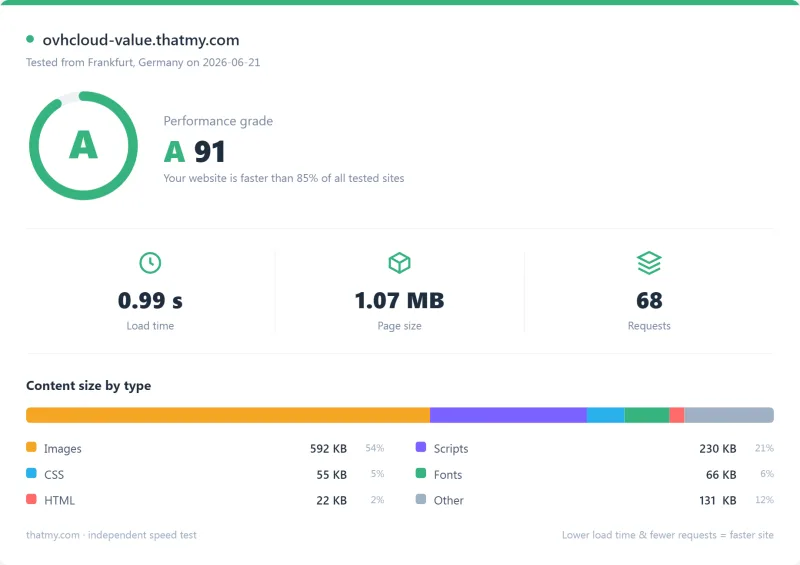
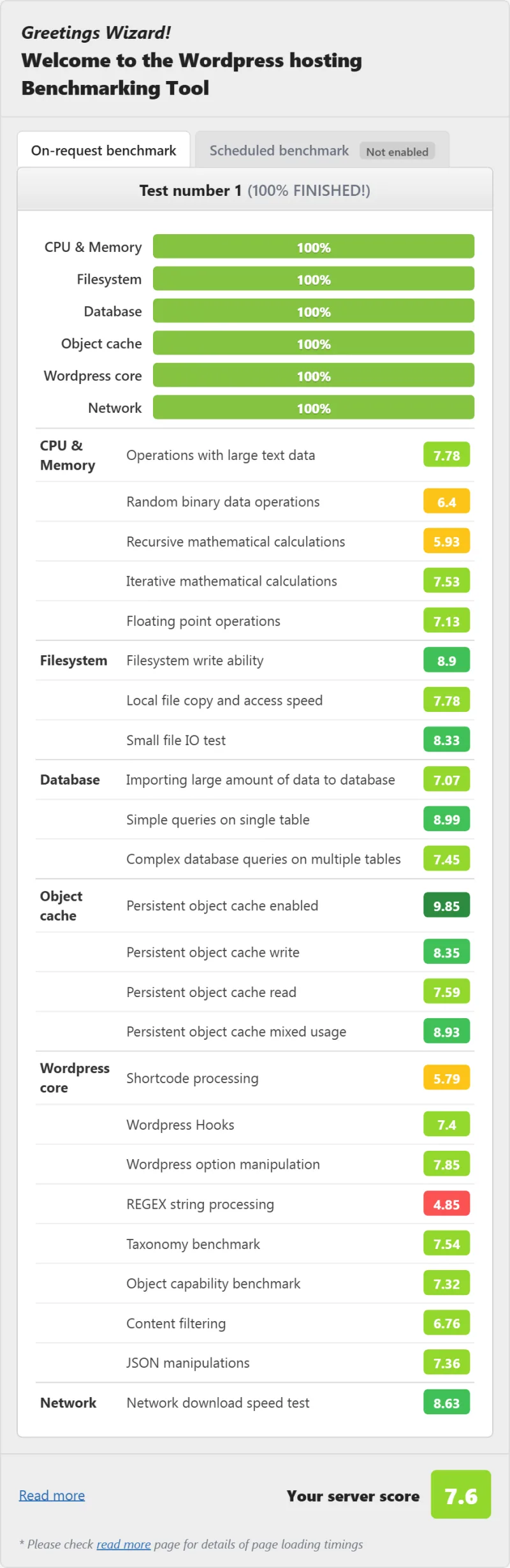
Here is the export from our test suite for every VPS plan we benchmarked: Comfort VPS, Elite VPS, and Value VPS. Each tab holds that plan's run: behavior under a 100-user load, the GTmetrix and PageSpeed captures, a Pingdom response-time check, our WordPress hosting benchmark, the regional TTFB scorecard, and 54 days of uptime tracking with the day-by-day calendar. The Comfort VPS server response time chart is left out until it is regenerated: its printed figure did not match our record.
Comfort VPS (Featured) Elite VPS Value VPS
Full Test Report: OVHcloud Dedicated (Dedicated EPYC (Advance))
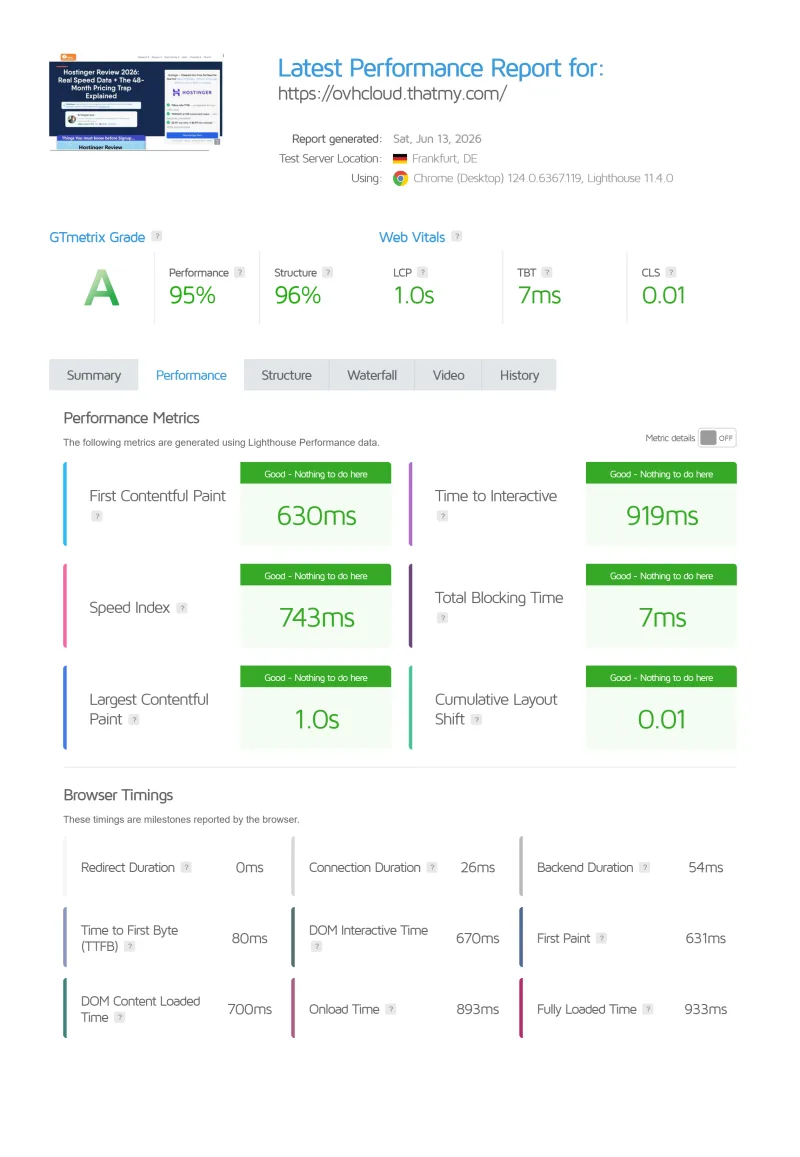
Here is the export from our test suite for the Dedicated EPYC (Advance) plan, the dedicated tier we benchmarked: behavior under a 100-user load, the GTmetrix and PageSpeed captures, a Pingdom response-time check, our WordPress hosting benchmark, the regional TTFB scorecard, and 54 days of uptime tracking with the day-by-day calendar. The time to first byte chart below sets the dedicated server beside the three VPS plans.
FAQ: OVHcloud
Is OVHcloud reliable?
On our monitoring, yes for the network. The Value VPS recorded 99.95% over 54 days (39 minutes down in 3 incidents), Comfort 99.97% and Elite 99.979%. That is a 54-day window, not a year. OVHcloud's VPS page promises a service level agreement; we have not read its credit terms. Data safety is a separate question: the Strasbourg fire in March 2021 destroyed SBG2, and the included backup on the 2027 range is kept in the same datacentre, so keep your own off-site copy.
What happened in the OVHcloud Strasbourg fire?
On March 10, 2021, a fire destroyed OVHcloud's SBG2 datacentre in Strasbourg, France, and partly damaged SBG1. Netcraft reported that about 3.6 million websites went offline. Customers whose only copies were in the affected datacentre lost data. This is public history reported by OVHcloud and the press; it is not something we tested. The lesson is to keep a backup outside the datacentre that holds your server.
Does OVHcloud include backups?
Partly. The VPS 2027 range lists a daily automated backup on every plan; in the configurator it appears as a priced option that a promotion currently sets to zero, and it is kept in the same datacentre as the server. A premium 7-day backup and a snapshot are paid options. Keep an off-site copy of your own: that is the most important thing to know before choosing OVHcloud. On shared web hosting, OVHcloud's documentation says it will not provide a backup from an earlier period than the one it keeps.
Is OVHcloud good for WordPress?
A blank OVHcloud VPS is not a WordPress host. It is unmanaged infrastructure: you install and configure Nginx or Apache, PHP, the database and WordPress yourself, there is no control panel by default, and OVHcloud says it cannot offer software configuration or administration assistance. On our load test the Value VPS held up, averaging 175ms at 100 concurrent users with 0% failed requests, but it is slower than ScalaHosting Entry Cloud (58ms) and Cloudways Vultr HF (74ms). For WordPress without server administration, ScalaHosting ($14.95/mo on 12 months) or Cloudways ($11.00/mo) are better fits.
How does OVHcloud compare to AWS?
We did not benchmark AWS for this review and have no record of AWS prices, so we cannot give a measured comparison. In general OVHcloud owns and operates its own hardware and network and is priced as infrastructure, while AWS offers a far larger set of managed services such as databases, caches and a CDN. OVHcloud tends to win on raw price and AWS on ecosystem. For WordPress hosting, neither is a managed option.
What is OVHcloud's uptime guarantee?
OVHcloud's VPS page promises guaranteed availability under a service level agreement; we have not read the credit terms. In our monitoring the Value VPS recorded 99.95% over 54 days with 39 minutes of downtime across 3 incidents, Comfort 99.97% and Elite 99.979%. ScalaHosting Entry Cloud and Cloudways Vultr HF each recorded 8 minutes over the same window. We do not have incident-by-incident detail.
Does OVHcloud have cPanel?
Not by default. A VPS comes without a control panel; cPanel and Plesk licences are sold as add-ons from OVHcloud's catalog, so the panel is an extra monthly cost. Without a panel you manage everything over SSH, which suits developers and is impractical for most WordPress site owners. ScalaHosting includes its own panel, SPanel, with its managed VPS plans.
So, Which Should You Pick? OVHcloud Review 2026
OVHcloud is cheap infrastructure that holds up well in our tests. If you are a developer who manages your own Linux stack, VPS-1 ($4.54/mo on 12 months) is good value: on our benchmark the VPS plans finished the load ramp with no failed requests and stayed above 99.9% uptime over 54 days. For businesses with European data residency needs, OVHcloud's datacentre footprint is an advantage.
But OVHcloud is not managed hosting, and it is not WordPress hosting. It is a blank server with network connectivity. The Strasbourg fire showed what relying on a single datacentre costs, and the included backup on the 2027 range still sits in the same datacentre. A production setup costs more than the headline once you add a control panel and off-site backups, and OVHcloud will not help with software configuration.
📊 What We Found
For WordPress site owners: ScalaHosting's managed VPS is $14.95/mo on 12 months and averaged 58ms at 100 users in our test, against 175ms on OVHcloud's Value VPS, and it comes managed.
For developers who want managed cloud: Cloudways at $11.00/mo gives you managed infrastructure with Git deployment and staging.
For developers who want raw European infrastructure at a low price: OVHcloud is a good choice. Keep an off-site backup of your own before you put anything important on it: the included daily backup sits in the same datacentre as the server.
What Ovhcloud Does Well
- Low entry price for an unmanaged VPS (current price in the review)
- Bare metal dedicated servers are competitive
- Good for developers who manage their own stack
- Anti-DDoS protection listed on the plans
- Datacentres on several continents
Real Weaknesses (what Reviews Don't Tell You)
- Backups sit in the same datacentre; the 2021 Strasbourg fire destroyed SBG2 and left customers with only local copies without recovery
- Unmanaged only: you configure the OS, PHP, MySQL, WordPress and SSL yourself
- A control panel is a paid add-on
- Premium support is a paid tier; support is by ticket, phone and chat on weekdays
- No managed WordPress, not suitable for non-technical users
Our Benchmark Records
- Origin TTFB (3 plans, New York, no CDN): 148ms to 186ms
- Uptime (54-day window): 99.95% to 99.979%
- Load at 100 clients (Value): 175ms
$3.50/mo
Cheapest VPS in Europe
