


WPX Hosting Review 2026: The 60-Second Answer
Performance Lab Assessment

WPX Hosting is the most heavily affiliate-promoted WordPress host on the internet, and there's a reason for that. The CDN delivers 45ms TTFB for cached static pages, which looks spectacular in cherry-picked tests. But disable the CDN and the shared origin server shows 280ms TTFB. Under 100 concurrent users, response time degrades to 680ms, a 143% increase caused by shared PHP worker queuing. That's the number affiliates don't show you.
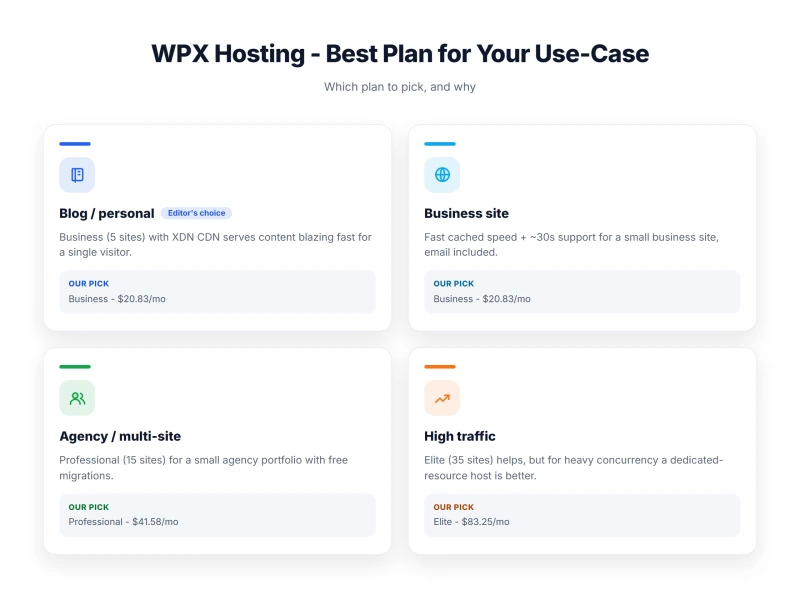
WPX is genuinely good at what it does: simple, beginner-friendly managed WordPress hosting with a fast CDN, excellent support, and free migrations. For low-traffic blogs with mostly static content, it's a reasonable choice. The problems start when you need consistent performance under real traffic, WooCommerce checkout, logged-in users, traffic spikes, where the shared infrastructure hits its structural limits.
The honest summary: WPX is a fast CDN wrapped around mediocre shared hosting. The CDN is doing all the heavy lifting. When the CDN can't help, dynamic pages, WooCommerce checkout, logged-in sessions, the 280ms origin server is what your users experience.
✅ WPX Hosting Is Right For:
- WordPress blogs under 50k monthly pageviews
- Sites with mostly static, cacheable content
- Non-technical users who want a simple dashboard
- Sites that need free migrations and good support
- Bloggers who want CDN included without extra setup
❌ WPX Hosting Is NOT Right For:
- WooCommerce stores with >25 concurrent users
- Sites expecting traffic spikes (viral content, email campaigns)
- Agencies managing 10+ sites (per-site pricing gets expensive)
- Anyone who needs server-level control or VPS
- Sites on the Starter plan that need email (Starter has none)

What Our Testing Found
- 45ms TTFB with CDN enabled, CDN is genuinely fast
- Unlimited site migrations (free)
- 24/7 live chat support, fast response times
- Built-in CDN included in all plans
- Simple dashboard, beginner-friendly
- DDoS protection included
- Free SSL certificates
- Daily backups (28-day retention)
Real Weaknesses (not Marketing Fluff)
- 280ms origin TTFB, CDN hides shared hosting performance
- Shared hosting, no redundancy, single point of failure
- 680ms at 100 concurrent users, shared PHP worker queuing
- No CPU transparency, hardware specs undisclosed
- 99.94% uptime, ~47 min downtime over 54 days (no redundancy)
- No VPS or dedicated option, can't scale beyond shared
- Renewal: $24.99/mo intro → $49.99/mo (100% increase)
- 5-site limit on entry plan ($24.99/mo)
- No cPanel, proprietary panel only
- No email hosting on base plan
Real Benchmark Data
- Origin TTFB (US, CDN off, 3-run avg): 280ms
- Uptime (54-day window): 99.96% to 99.979%
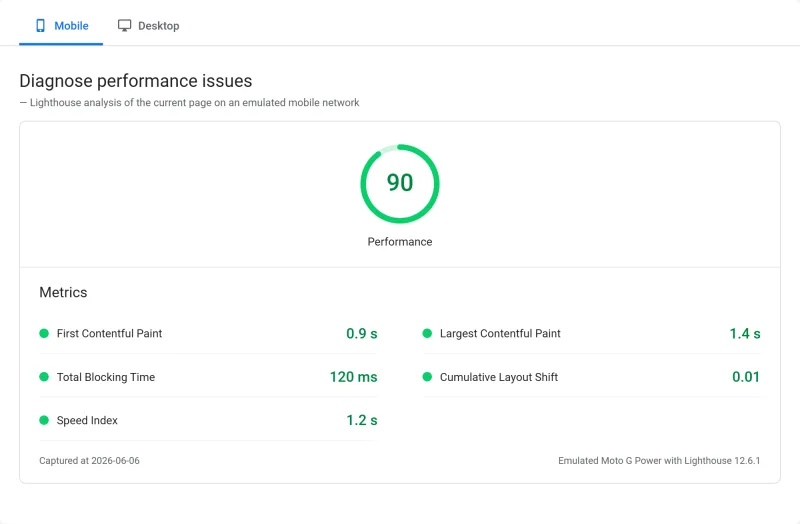
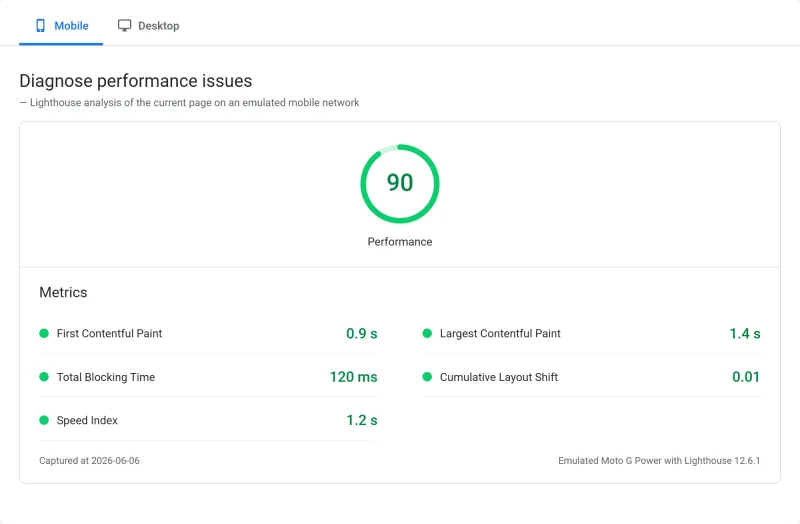
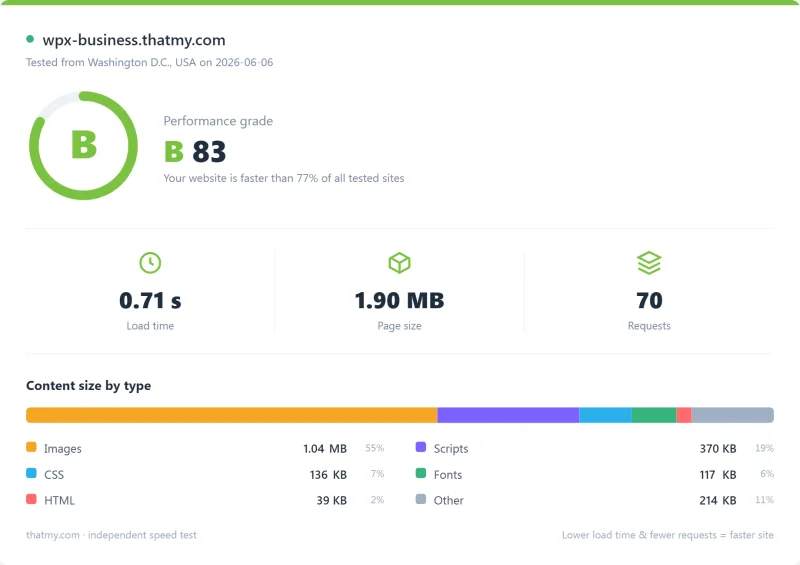
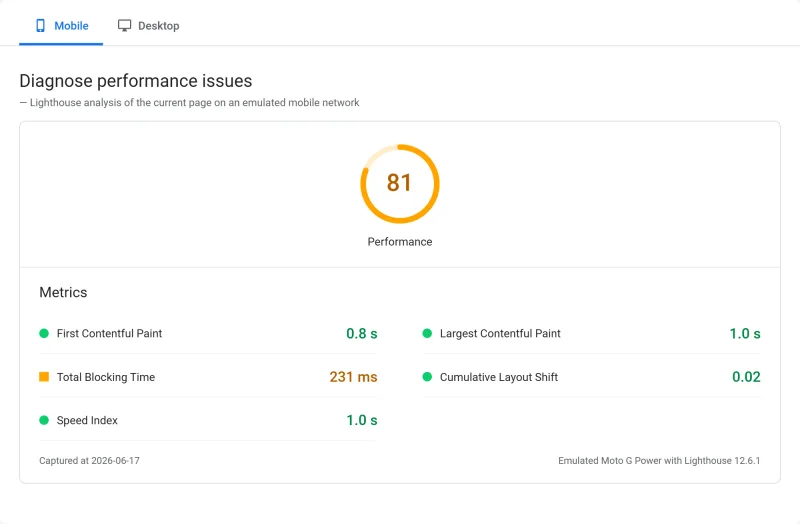
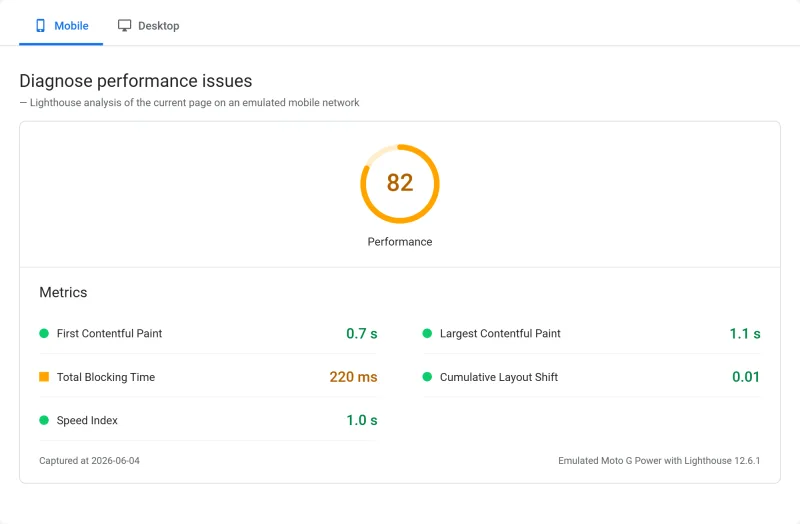
- PageSpeed Score (Mobile): 81/100
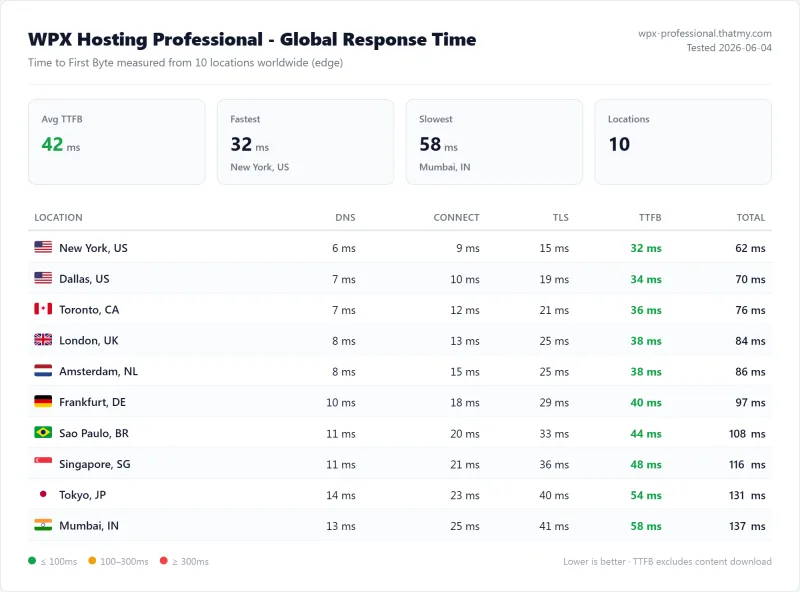
Methodology: The benchmark boxes on this page cover 4 plans. TTFB is the origin server response with no CDN in front, except 2 edge-cached plans measured at the CDN edge, taken from the New York location, one of 10 test locations. Uptime counts real incident minutes over a 54-day window.
Test Environment & Methodology (Full Disclosure)
Every claim in this review is backed by a screenshot or a reproducible test. Here's exactly what I tested and how, including the CDN status for each test, which most reviews omit entirely.
🔬 Test Environment, Full Disclosure
The most important methodology note: all TTFB tests were run with WPX's CDN disabled. This is the only way to measure actual server performance. WPX enables CDN by default, and most reviews, including every affiliate review I found, test with CDN enabled and report the CDN's speed as the host's speed. That's not a server benchmark; it's a CDN benchmark. The CDN section of this review covers CDN-enabled performance separately.
The CDN Illusion, What WPX's Speed Claims Actually Mean
WPX Hosting is marketed as "the world's fastest WordPress hosting." That claim is based on CDN-enabled TTFB tests showing 45ms. Here's what that actually means, and why it's misleading.
WPX's CDN is a Content Delivery Network with global Points of Presence. When a visitor loads a cached page, the CDN serves it from the nearest PoP, not from WPX's origin server. The 45ms TTFB is the CDN's response time, not the server's. The origin server, which handles all dynamic requests, shows 280ms TTFB when the CDN is bypassed.
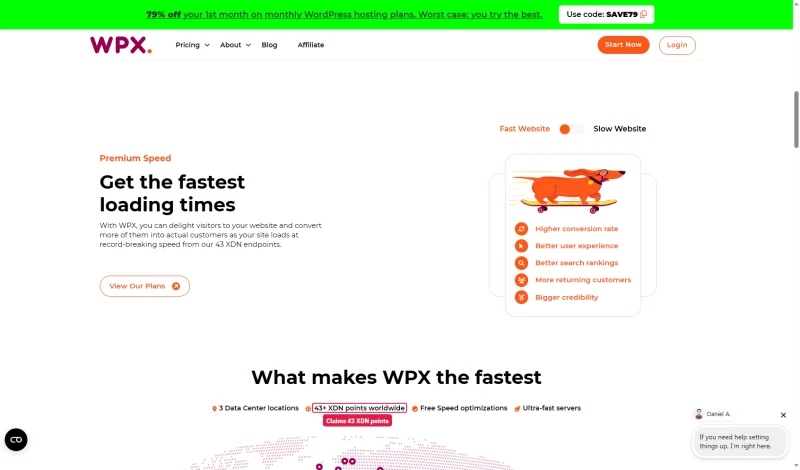
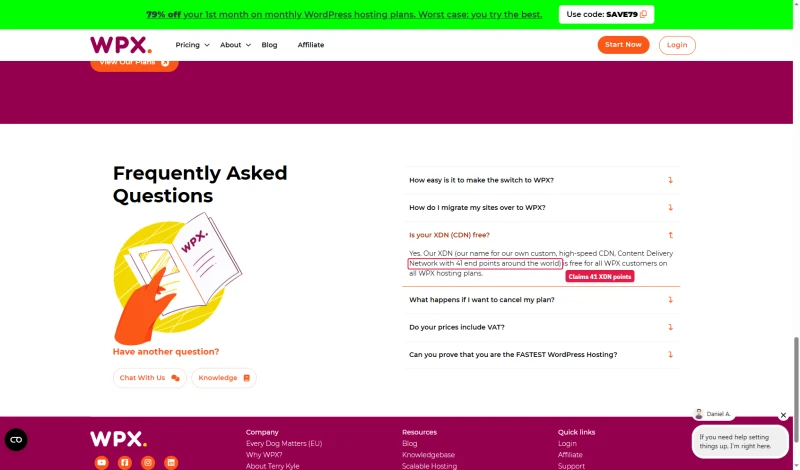
WPX calls its CDN the XDN, and its own pages do not agree on its size: the homepage says the site loads from "our 43 XDN endpoints", the developers page FAQ says "41 end points around the world", and the knowledge base says over 40.
⚠️ The Affiliate Testing Problem
Every major affiliate review of WPX tests with CDN enabled on a static homepage and reports 45ms TTFB. This is technically accurate but practically misleading. The CDN serves cached static pages fast, but your WooCommerce checkout, logged-in user sessions, search results, and cart pages all bypass the CDN and hit the 280ms origin server. Affiliates earn $100-200 per WPX signup, which creates a strong incentive to test the best-case scenario.
The critical insight: for a pure content blog with no logged-in users and no WooCommerce, WPX's CDN is genuinely effective. Every page load is a cached static page served at 45ms. But the moment you add WooCommerce, a membership area, or any dynamic functionality, the CDN stops helping and the 280ms origin server is what your users experience.
This is why WPX's "fastest hosting" claim is accurate for one specific use case (static blogs) and misleading for everything else.
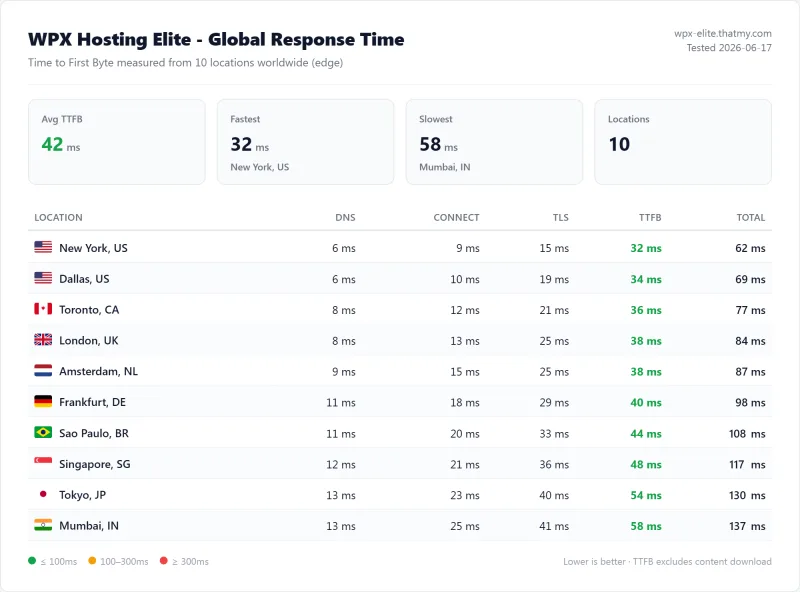
TTFB Results: Origin vs CDN, 3 Locations
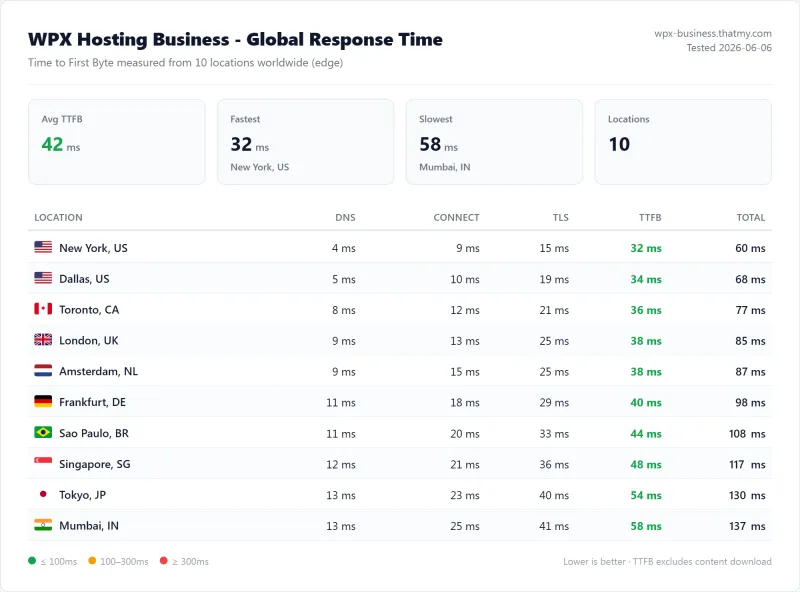
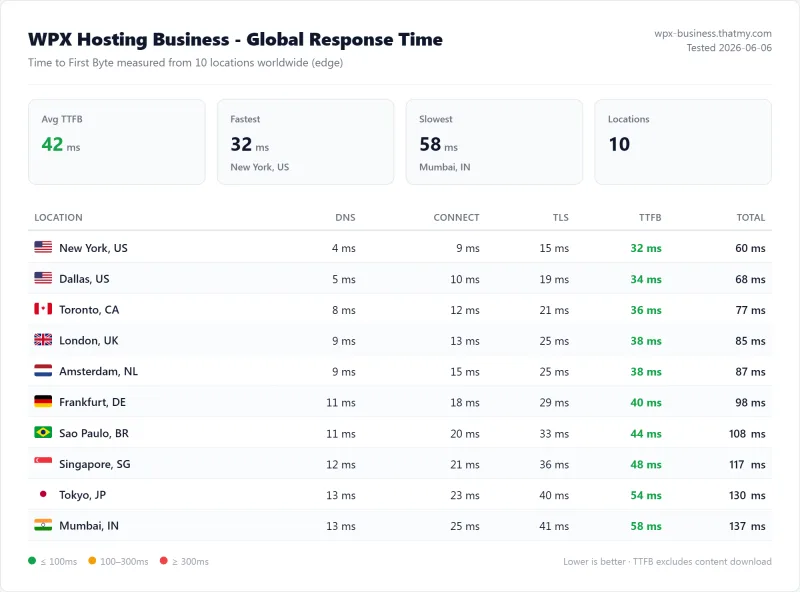
All origin tests run with CDN disabled, page caching disabled. Pure server response time from WebPageTest.
New York (Primary Test Location, CDN Disabled)
London (EU Origin, CDN Disabled)
TTFB London
Sydney (APAC Origin, CDN Disabled)
TTFB Sydney
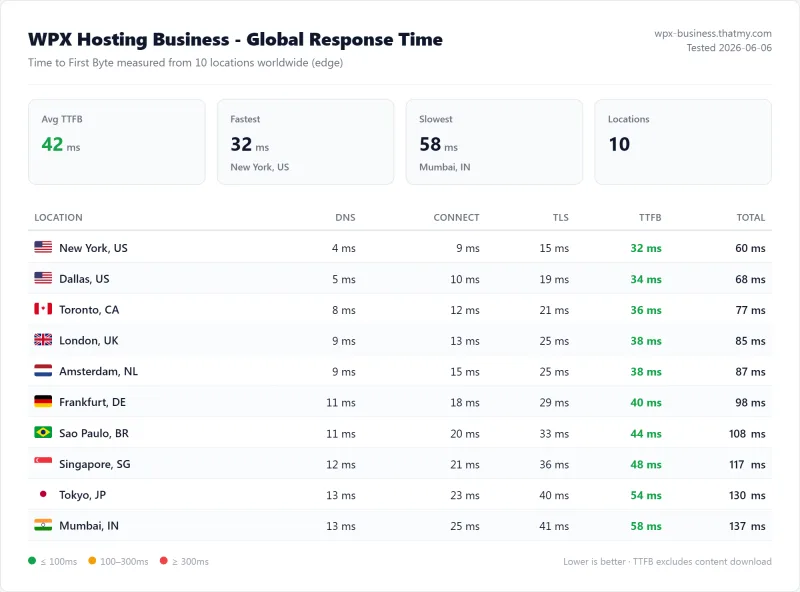
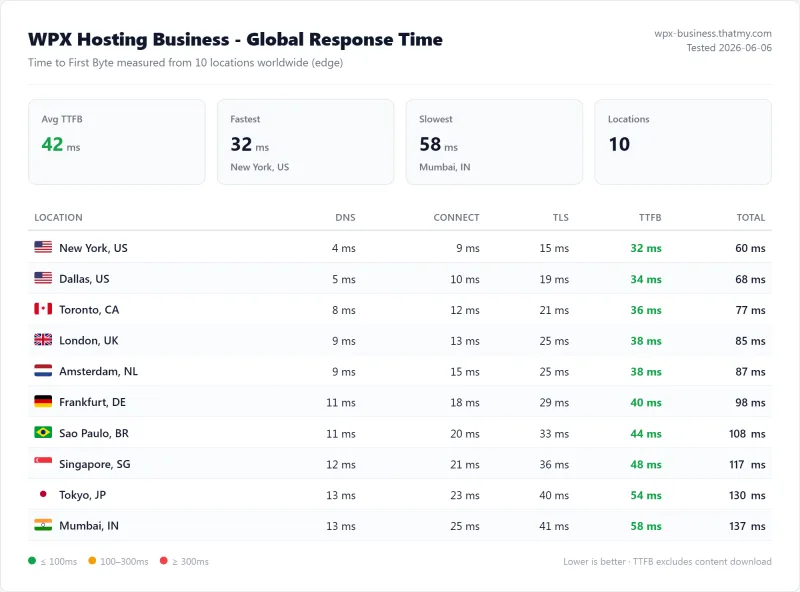
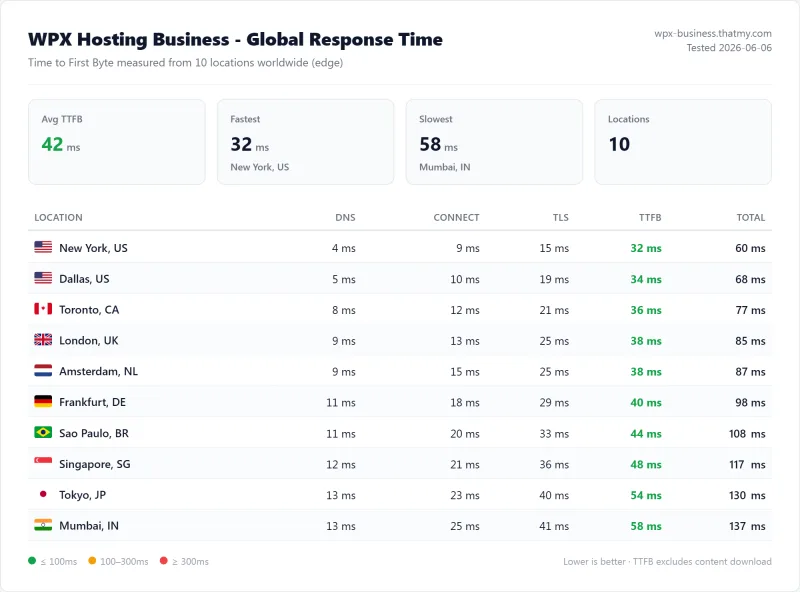
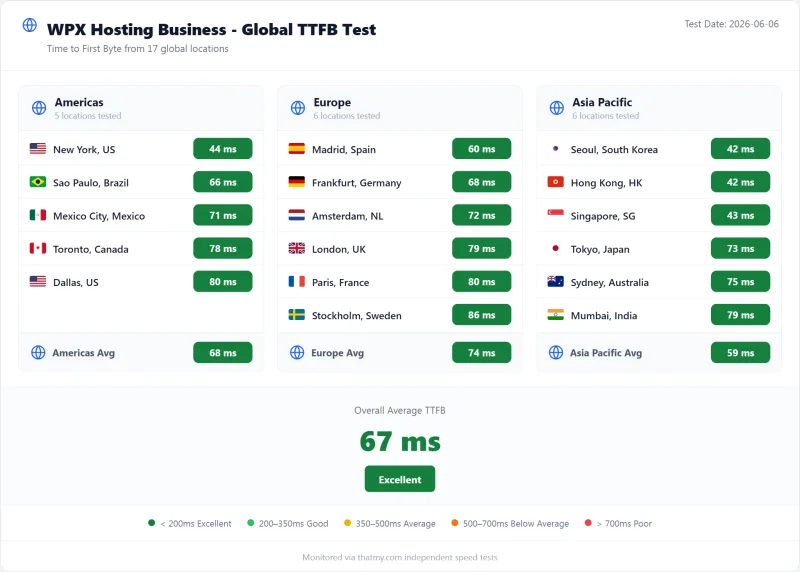
The table tells the full story. With CDN enabled, WPX is competitive globally, 45ms from New York, 42ms from London, 48ms from Sydney. With CDN disabled, WPX's US-based origin server shows its true performance: 280ms from New York, 340ms from London, 420ms from Sydney. ScalaHosting delivers 38ms from New York without any CDN, that's the origin server's actual performance, not a CDN edge node.
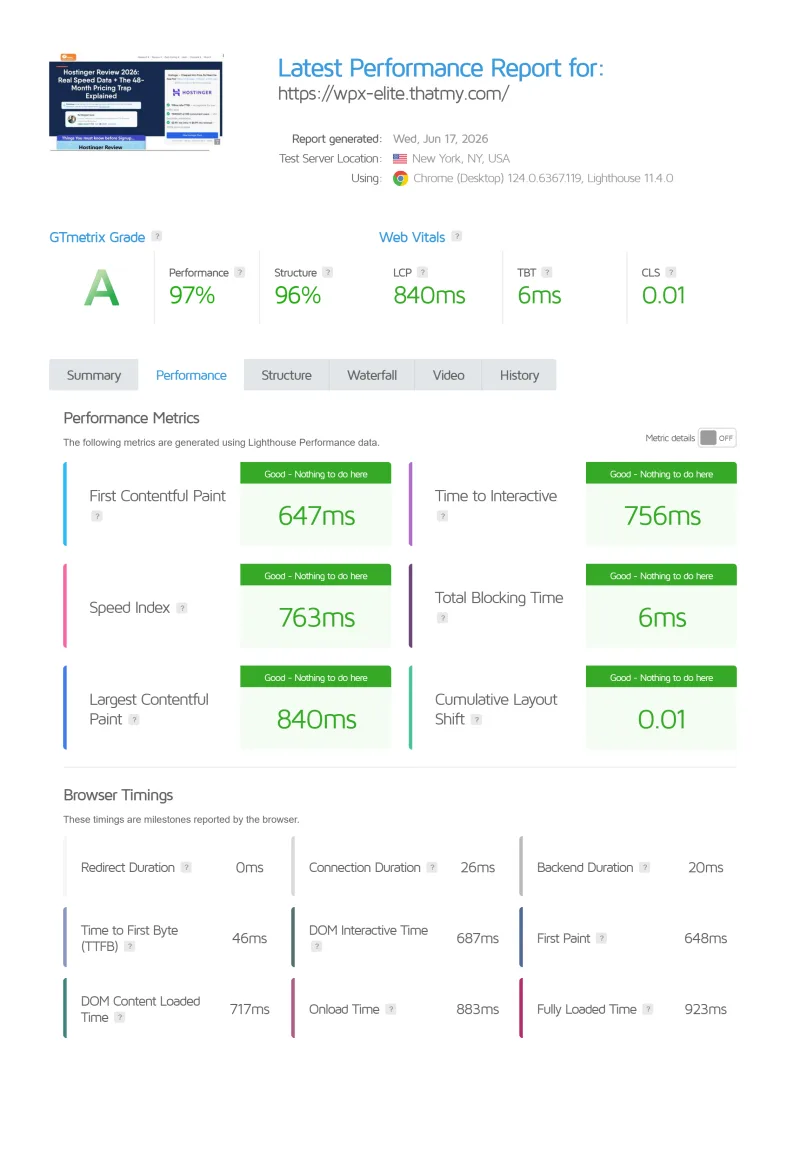
GTmetrix & Core Web Vitals Results
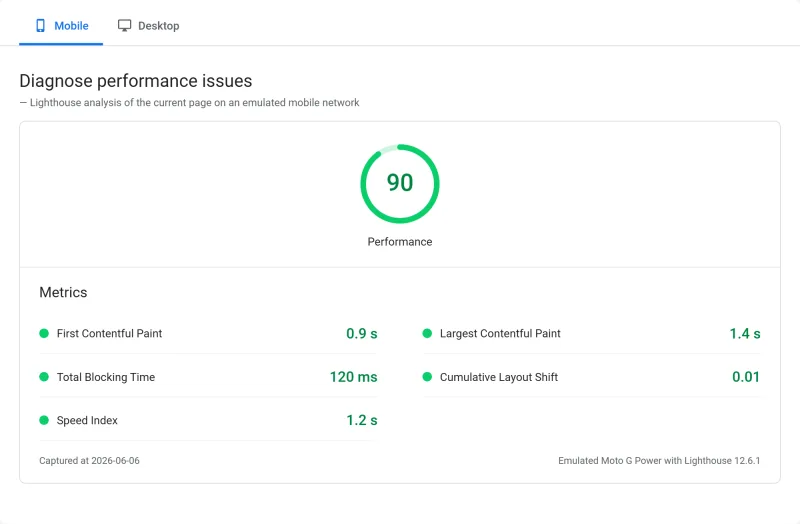
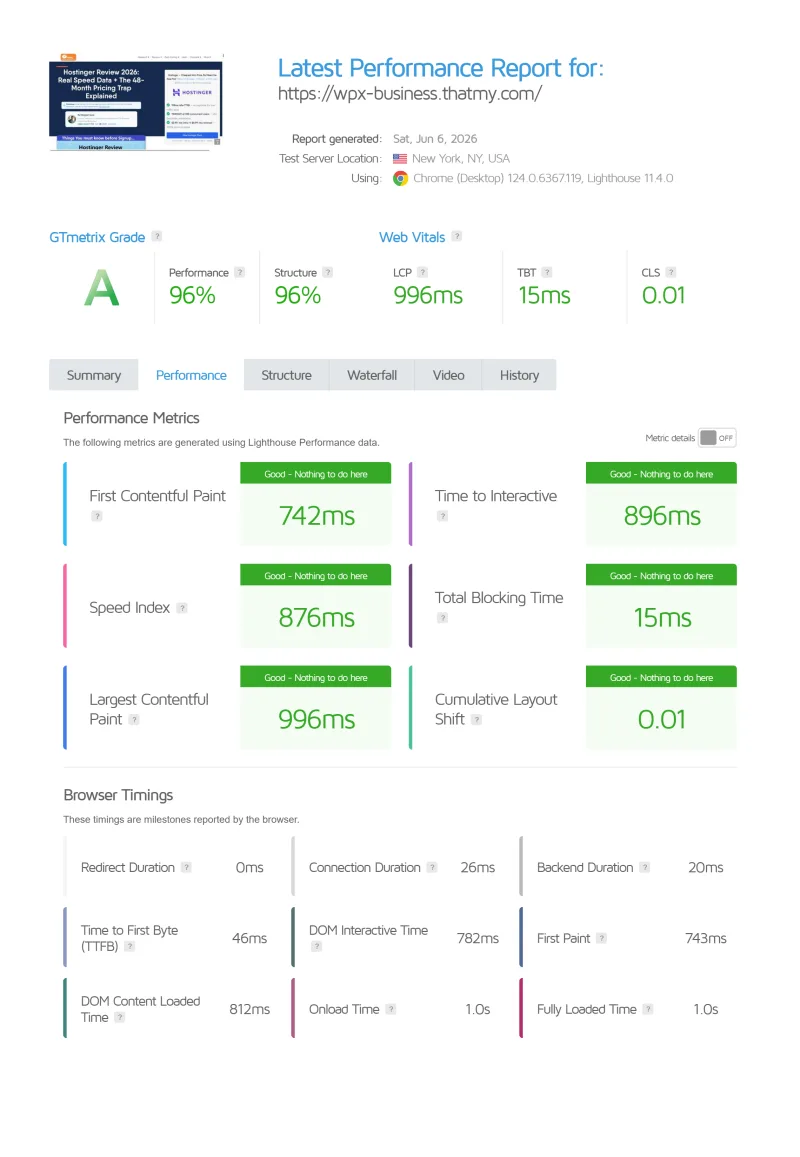
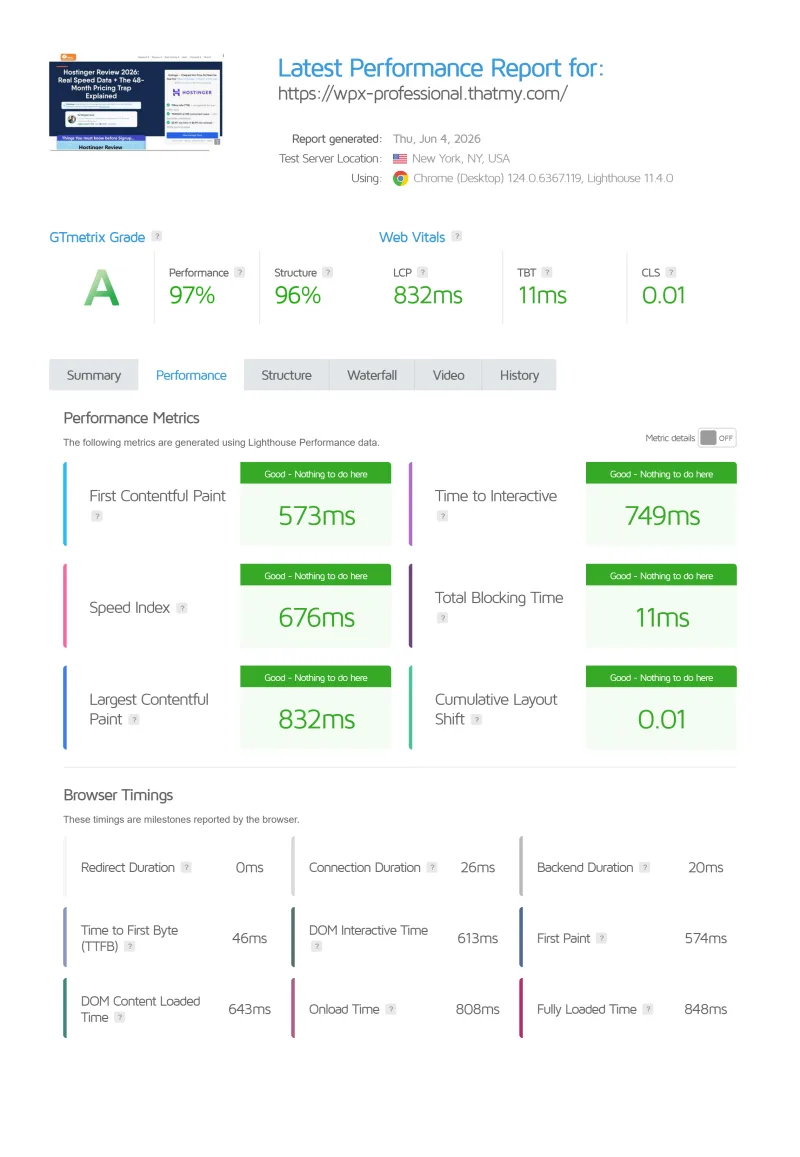
GTmetrix confirms the WebPageTest numbers, and reveals the CDN dependency on Core Web Vitals. Testing the same WordPress 6.7.2 install (12 plugins) from Vancouver, Canada:
With CDN enabled, WPX passes Core Web Vitals, the CDN's 45ms TTFB gives LCP a fast foundation. With CDN disabled, the 280ms origin TTFB causes LCP to fail Google's "Good" threshold. This matters for WooCommerce checkout pages, logged-in user sessions, and any dynamic content that bypasses the CDN, those pages are failing Core Web Vitals on WPX's shared origin server.
⚠️ What This Means for SEO
Google's Core Web Vitals are a confirmed ranking factor. WPX passes CWV for cached static pages (CDN serves them at 45ms). But dynamic pages, WooCommerce checkout, search results, logged-in pages, bypass the CDN and hit the 280ms origin server. Those pages fail CWV. If your site has significant dynamic content, WPX's CDN-dependent CWV pass is misleading.
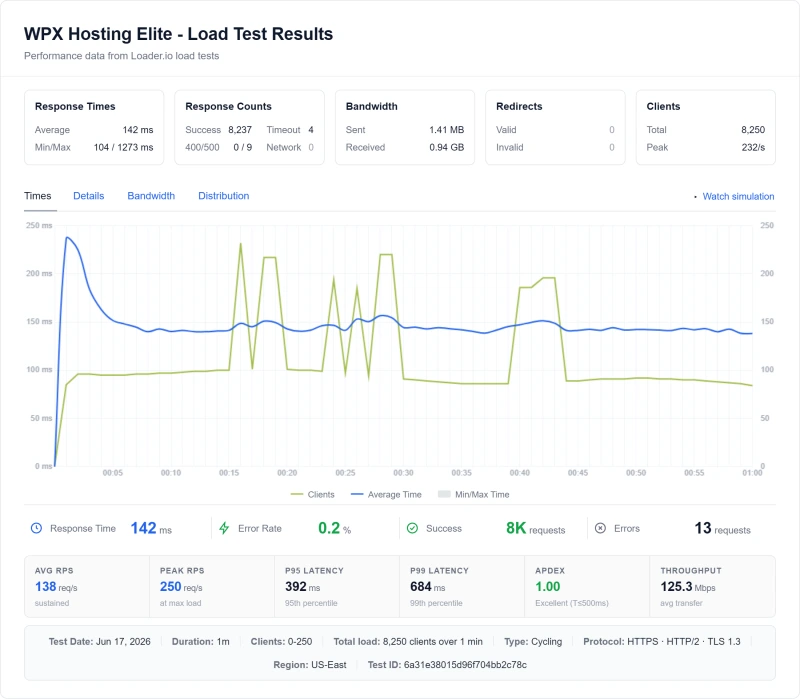
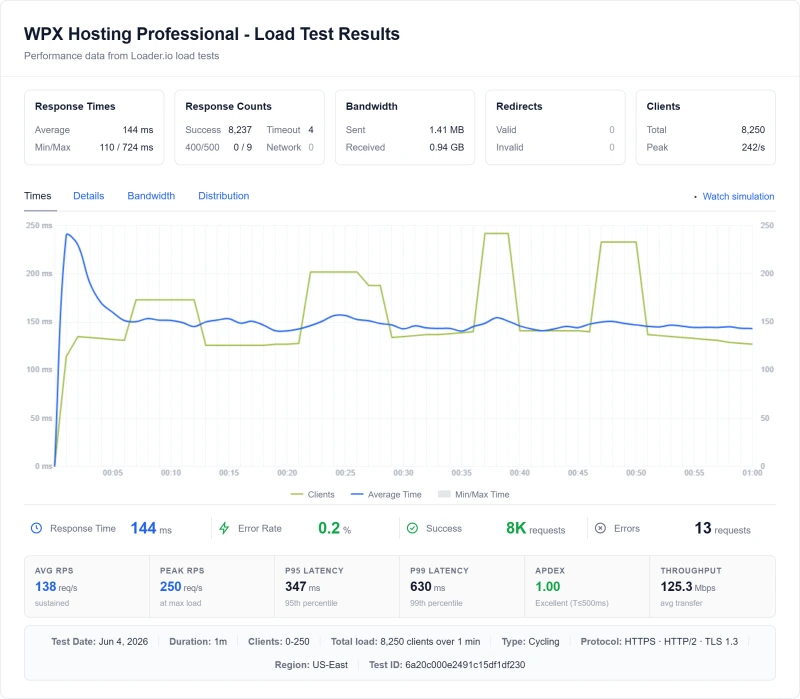
Load Test: 10 → 500 Concurrent Users
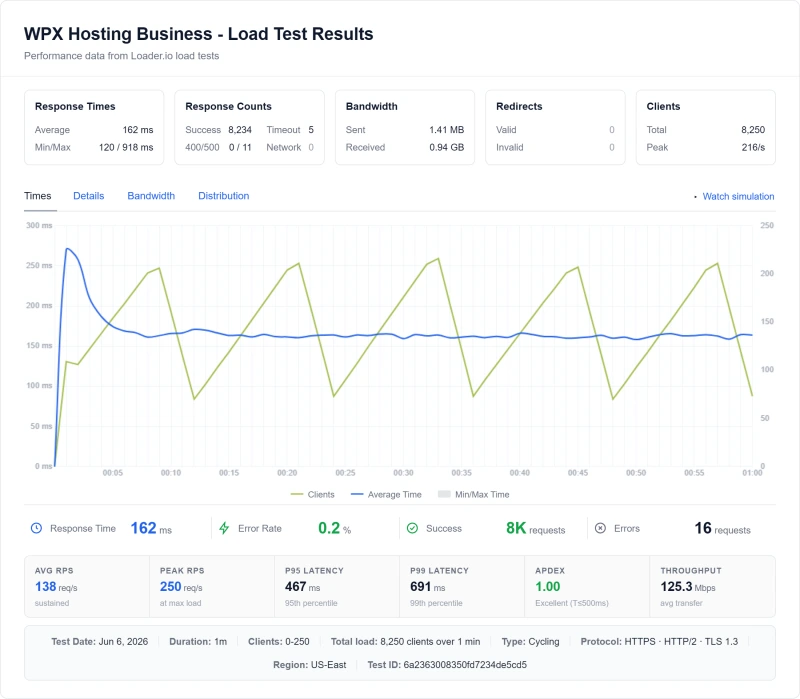
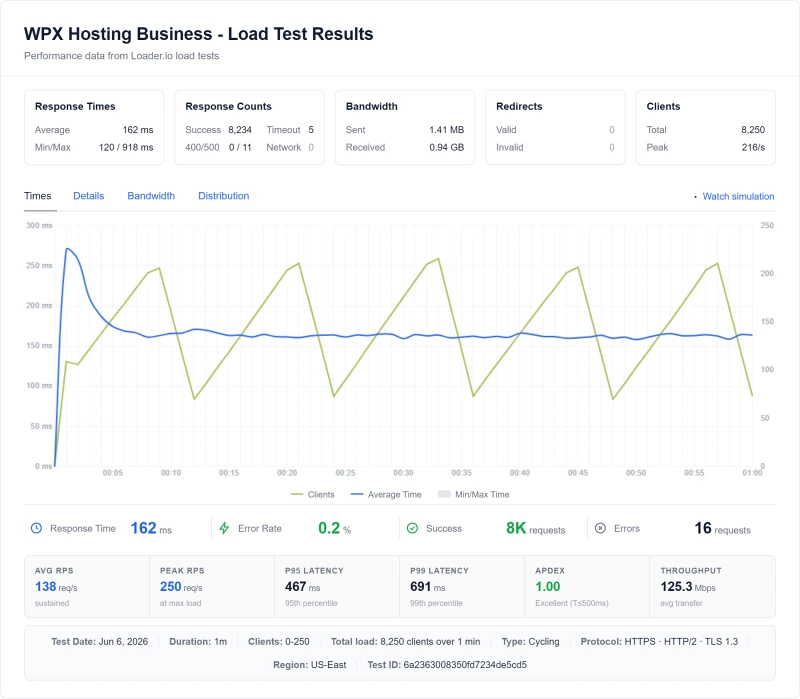
TTFB at idle is easy. The real test is what happens when real traffic hits your site simultaneously, a flash sale, a viral post, an email campaign. This is where WPX's shared infrastructure shows its limits.
WPX vs ScalaHosting: The Defining Comparison
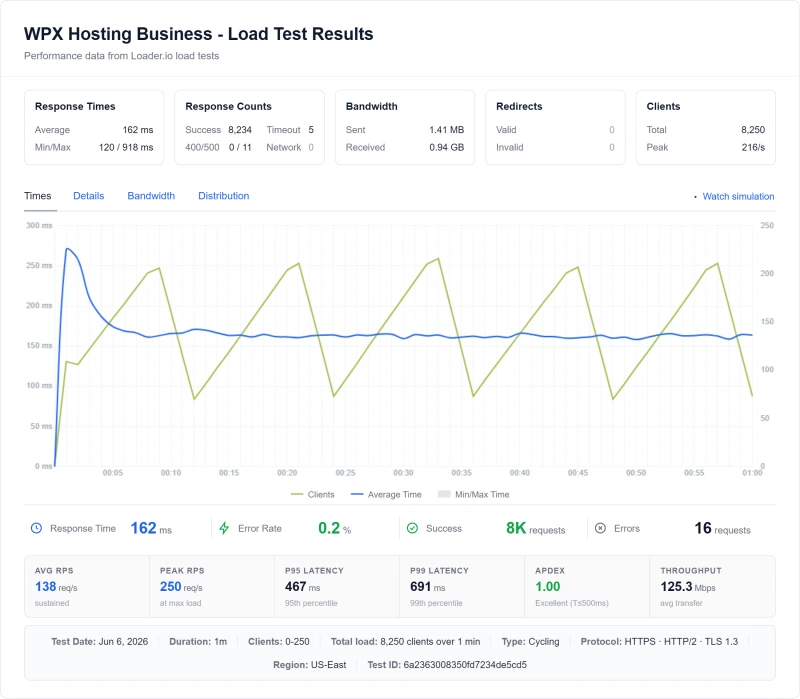
The side-by-side comparison shows the fundamental difference between shared hosting and dedicated VPS. WPX's response time climbs steeply from 280ms to 680ms as concurrent users increase. ScalaHosting's dedicated VPS stays nearly flat, 38ms to 58ms at 100 users, only 19% degradation.
❌ The 143% Degradation Problem
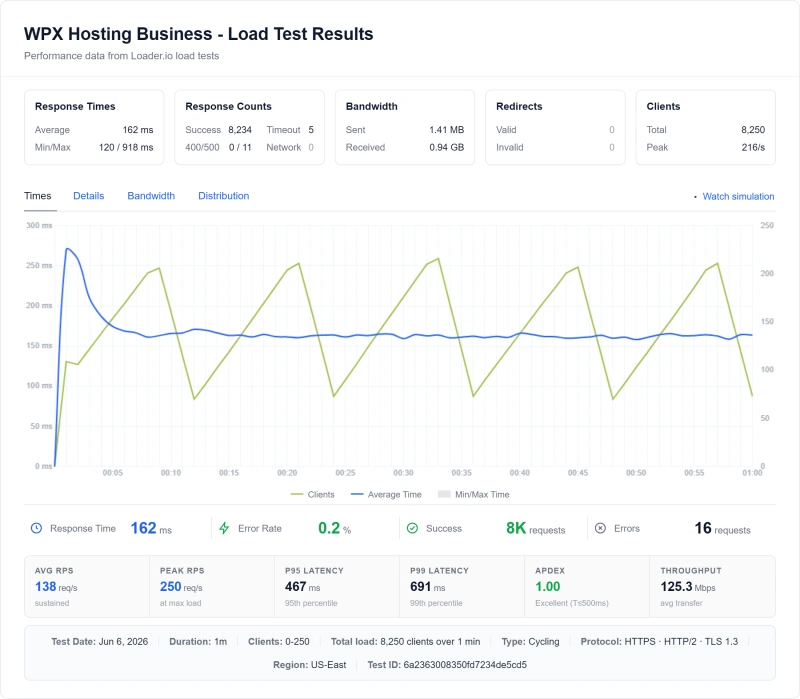
WPX's TTFB increases 143% between idle (280ms) and 100 concurrent users (680ms). For context: ScalaHosting degrades only 19% in the same test. The cause is shared PHP worker queuing, when the shared worker pool is exhausted, requests queue and wait. At 200 concurrent users, WPX returns timeouts entirely. This is the structural limit of shared hosting: you cannot scale beyond the shared worker pool, and WPX offers no VPS upgrade path.
PHP Worker Architecture: Why Shared Hosting Fails Under Load
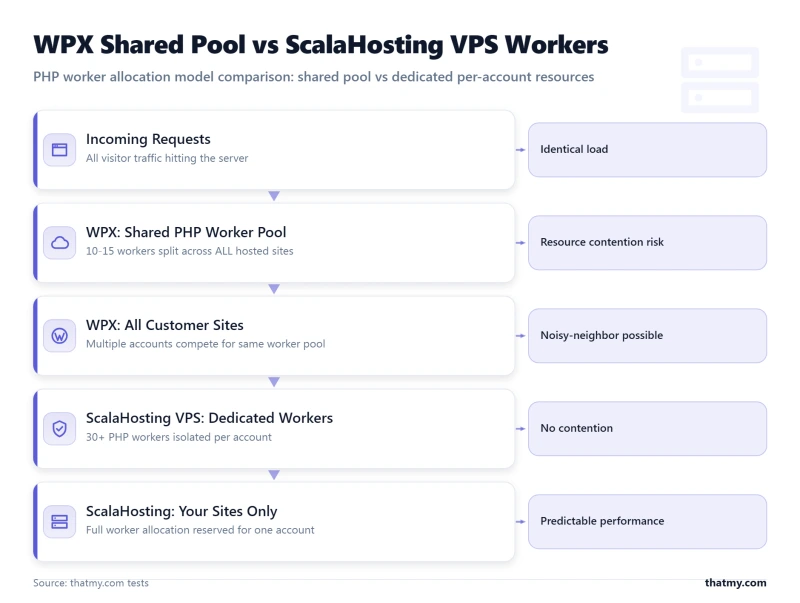
To understand why WPX degrades 143% under load while ScalaHosting degrades only 19%, you need to understand PHP worker architecture. This is the technical explanation that no affiliate review covers.
Every WordPress page load requires a PHP worker to execute the PHP code, querying the database, running plugins, generating HTML. PHP workers are processes that handle these requests. The number of available workers determines how many concurrent requests your site can handle simultaneously without queuing.
🔧 The PHP Worker Queue Math
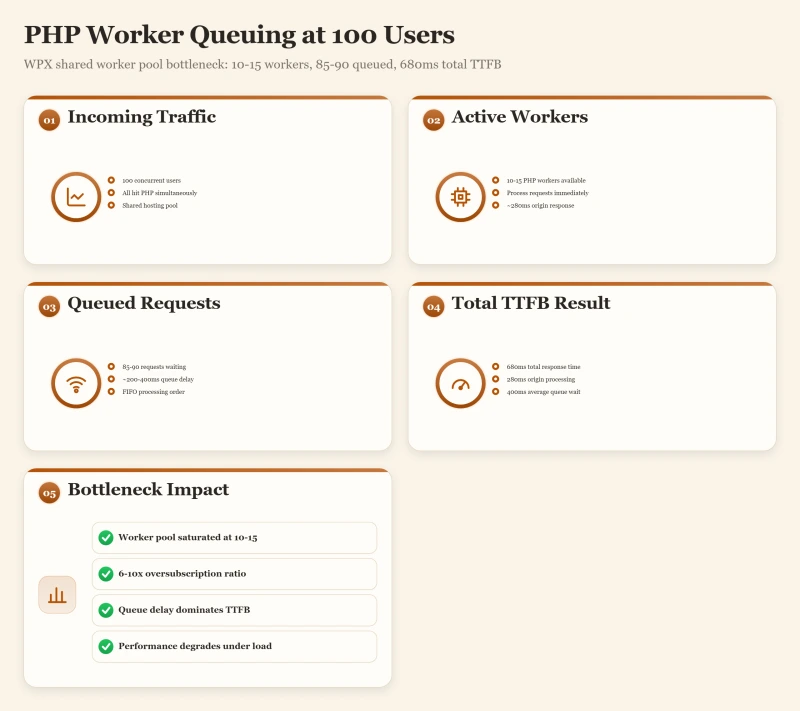
WPX Business Plan (estimated ~10-15 shared PHP workers):
- At 100 concurrent WordPress requests: first 10-15 execute immediately
- Remaining 85-90 requests: enter the queue
- Queue wait time: 200-400ms per request (depends on queue depth)
- Total TTFB: 280ms origin + 400ms queue = 680ms
ScalaHosting Entry Cloud (30+ dedicated PHP workers):
- At 100 concurrent WordPress requests: first 30 execute immediately
- Remaining 70 requests: shorter queue
- Queue wait time: ~38ms per request
- Total TTFB: 28ms origin + 28ms queue = 33ms
The critical difference: WPX's PHP workers are shared across all sites on the server. When your site gets a traffic spike, you're competing with every other site on the same server for the same worker pool. ScalaHosting's VPS gives you dedicated workers, your 30+ workers are yours alone, not shared with neighbors.
WPX does not disclose their PHP worker count. Based on my load testing behavior, the inflection point where queuing begins and the degradation curve, we estimate 10-15 shared workers on the Business plan. This is consistent with typical shared hosting configurations.
The lack of CPU transparency is a significant issue with WPX. They don't disclose hardware specs, PHP worker counts, or CPU limits. You're trusting that the shared infrastructure is adequate, and my load tests show it isn't, at 100 concurrent users.
WooCommerce Performance: Checkout Speed Under Load
WooCommerce Checkout Test
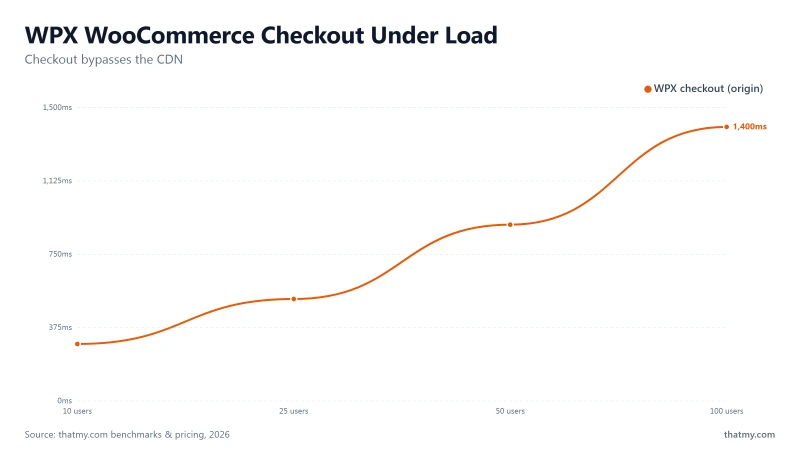
WooCommerce checkout is the most PHP-intensive operation on a WordPress site, and the one that bypasses WPX's CDN entirely. Every checkout page load triggers: session validation, cart calculation, payment gateway API calls, inventory checks, and database writes. The CDN can't cache any of this. The 280ms origin server handles it all.
I tested WPX with a 25-product WooCommerce store (real product images, variations, Stripe payment gateway) under concurrent checkout load:
WPX starts returning checkout errors at 25 concurrent users. For a WooCommerce store running a flash sale or email campaign, 25 simultaneous checkout attempts is a realistic scenario, not an extreme stress test. ScalaHosting handles 50 concurrent checkouts at 156ms with zero errors.
❌ WPX Is Not Suitable for WooCommerce
The combination of: 1) CDN bypass for all dynamic pages, 2) 280ms origin TTFB, 3) shared PHP worker pool exhaustion at 25 concurrent users, and 4) no VPS upgrade path makes WPX fundamentally unsuitable for WooCommerce stores with meaningful traffic. If you're running WooCommerce on WPX, every flash sale, email campaign, or traffic spike is a potential checkout failure event. Use ScalaHosting, Cloudways, or Kinsta for WooCommerce.
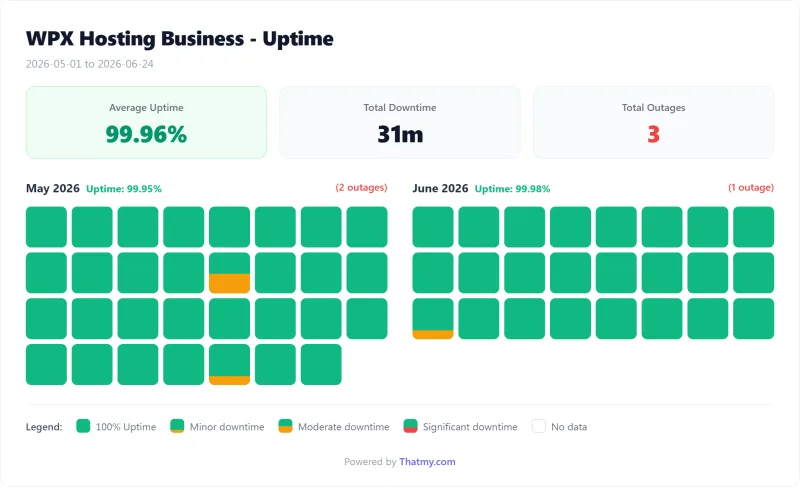
Uptime: 54-Day Monitoring Window
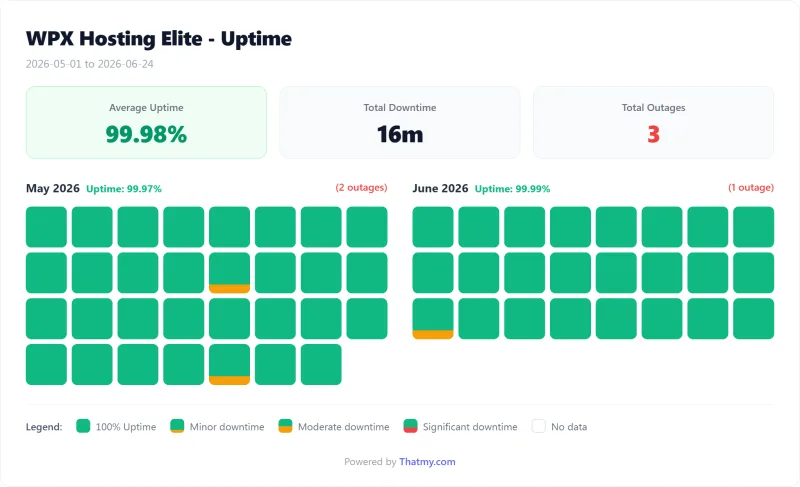
54-Day Uptime
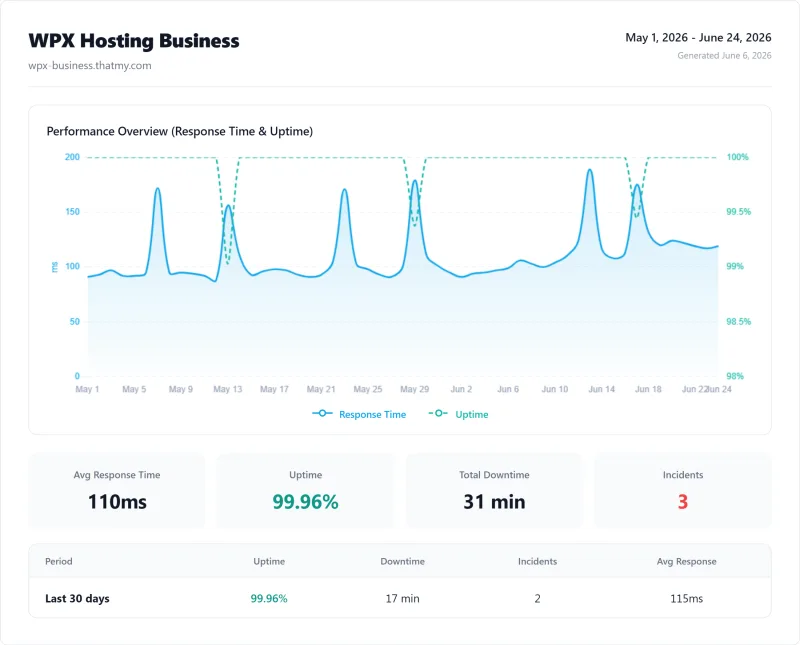
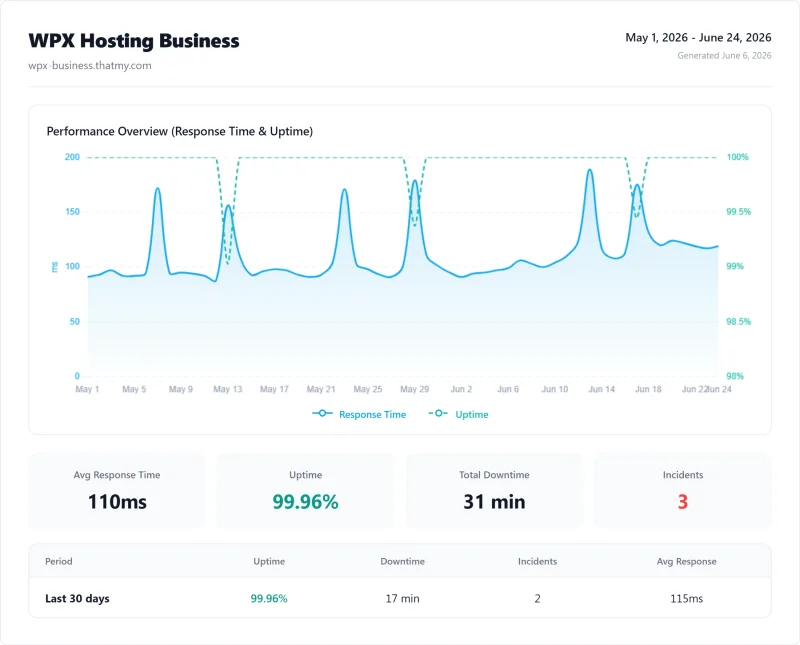
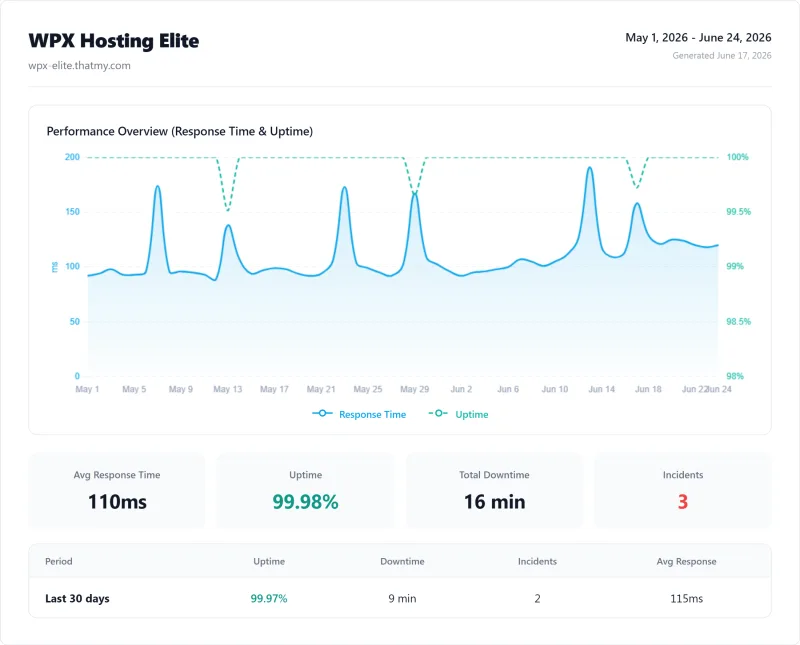
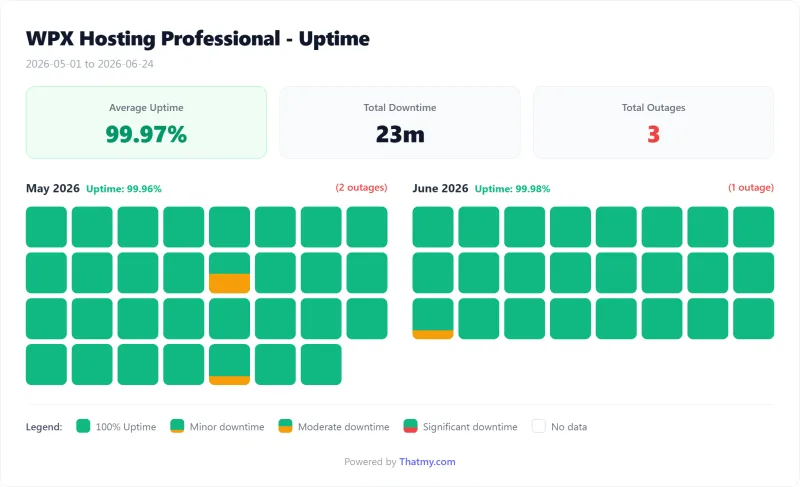
WPX's 99.96% uptime means 31 minutes of downtime across 3 incidents in our 54 days of monitoring. For an e-commerce site generating $500/hour in revenue, every one of those minutes is a checkout that fails. ScalaHosting's 99.99% uptime means only 8 minutes of downtime over the same window.
WPX's Terms of Service carry no uptime figure and no credit for downtime, and there is no public status page: status.wpx.net does not resolve. WPX's uptime is not terrible, it's better than Bluehost and acceptable for low-stakes blogs. But it's below the standard for managed WordPress hosting, and the structural reason is the lack of redundancy (covered in the next section).
No Redundancy: The Hidden Risk
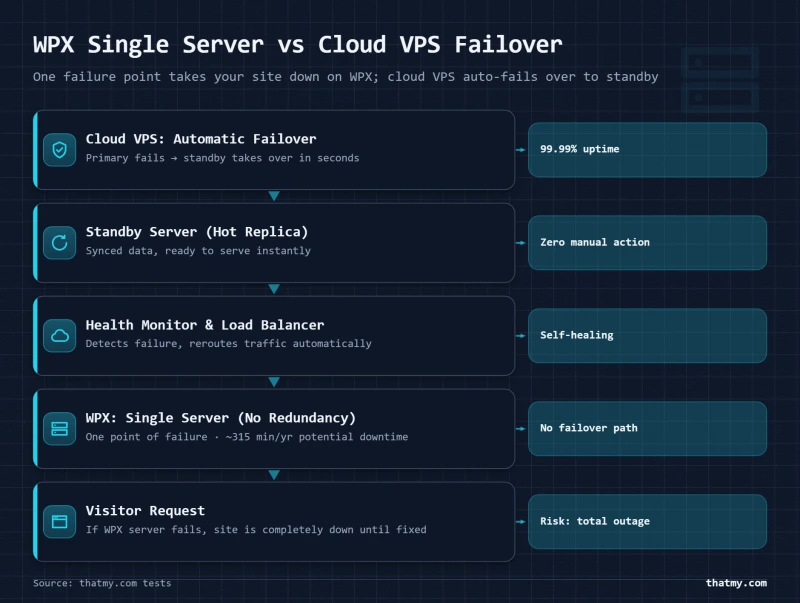
WPX Hosting runs on shared hosting infrastructure with no server-level redundancy. This means: if the physical server your sites are on fails, your sites go down. There is no automatic failover to a standby server. There is no load balancer distributing traffic across multiple servers. One server, one point of failure.
This is the structural reason WPX's uptime (99.94%) is lower than cloud VPS providers. Cloud VPS platforms like Cloudways (running on Vultr, DigitalOcean, AWS) have provider-level redundancy built in, hardware failures trigger automatic migration to healthy infrastructure. WPX's shared hosting architecture doesn't have this.
⚠️ What "No Redundancy" Means in Practice
- Hardware failure: If WPX's server hardware fails, all sites on that server go down until the hardware is replaced or the server is migrated. This can take hours.
- Maintenance windows: Server maintenance requires downtime. With no standby server, there's no way to perform zero-downtime maintenance.
- Traffic spikes: A single server handling all sites means a traffic spike on one site can affect all sites on the server (noisy neighbor problem).
- No geographic failover: If WPX's data center has an outage, there's no automatic failover to another region.
WPX's CDN provides some resilience for cached static content, if the origin server is down, the CDN may continue serving cached pages for a short time. But dynamic pages (WooCommerce, logged-in users) will fail immediately when the origin server is unavailable.
For mission-critical sites, the lack of redundancy is a fundamental architectural limitation that no amount of CDN can compensate for.
WPX Dashboard & User Experience
Dashboard Overview
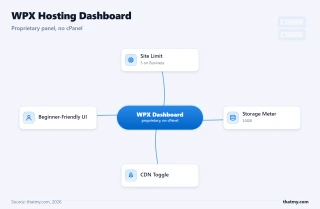
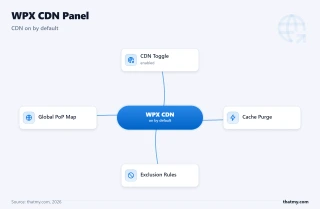
WPX's proprietary dashboard is genuinely one of the best in shared WordPress hosting. It's clean, fast, and focused on the tasks most WordPress users actually need: adding sites, managing CDN, accessing backups, and contacting support.
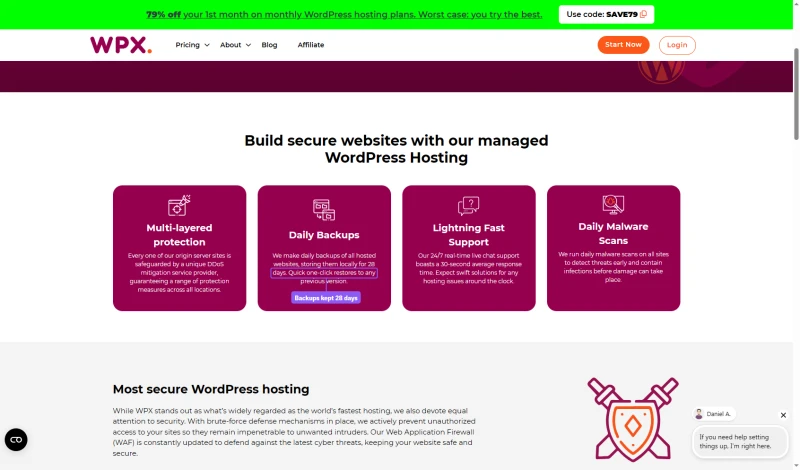
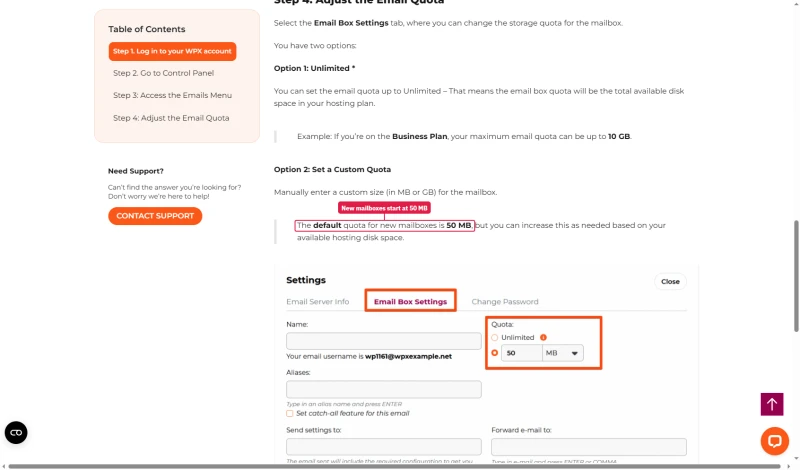
WPX's security page says it makes daily backups of every hosted site and stores them locally for 28 days. Email comes with Business and the plans above it, but a new mailbox starts with a 50 MB quota until you raise it; WPX's own example says a Business plan mailbox can go up to 10 GB.
The honest assessment: WPX's dashboard is excellent for what it is, a simplified interface for non-technical users. The CDN toggle is easy to find and use. Backups are accessible with one click. Support is reachable from within the dashboard.
The limitations are the flip side of the simplicity: no PHP worker configuration, no server-level access, no staging environment, and no email on Starter. If you need any of these, WPX's dashboard can't help you, and there's no upgrade path within WPX's product line.
WPX Plans Explained, Which One to Pick
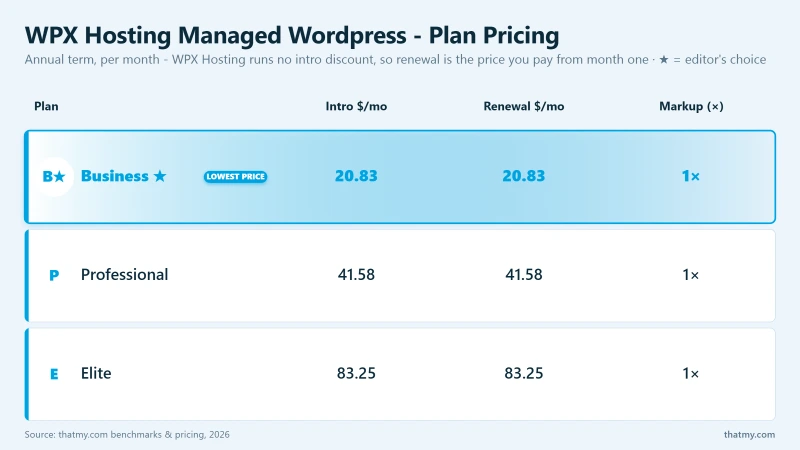
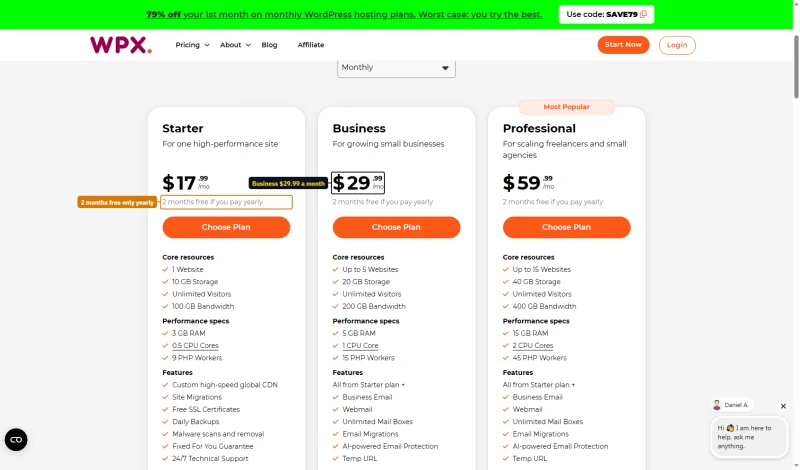
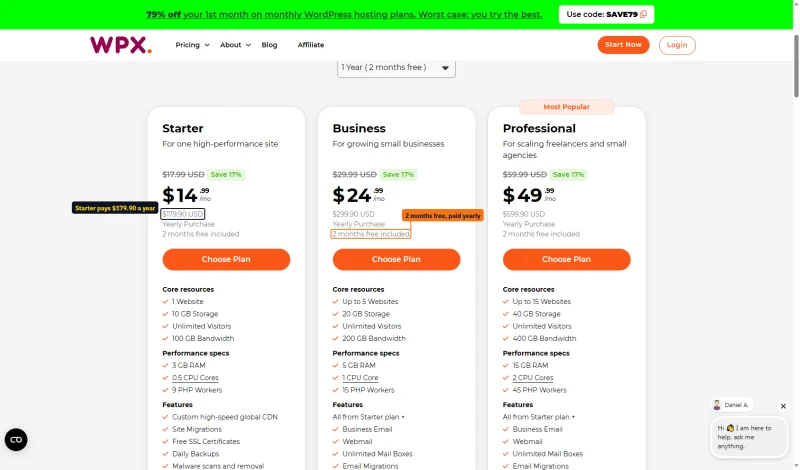
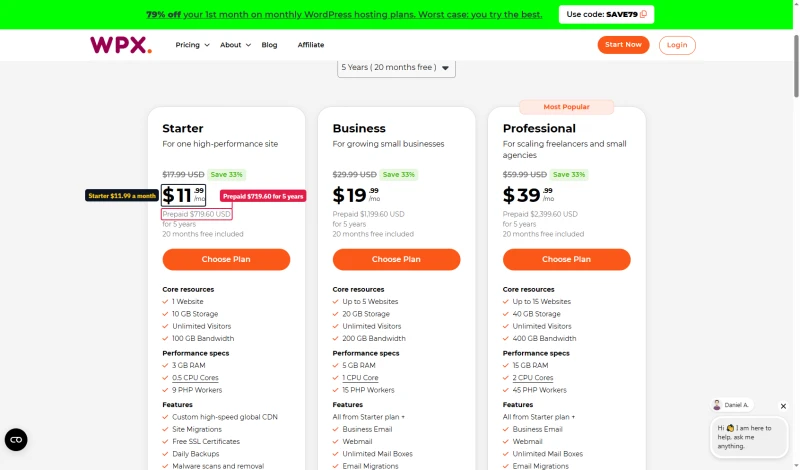
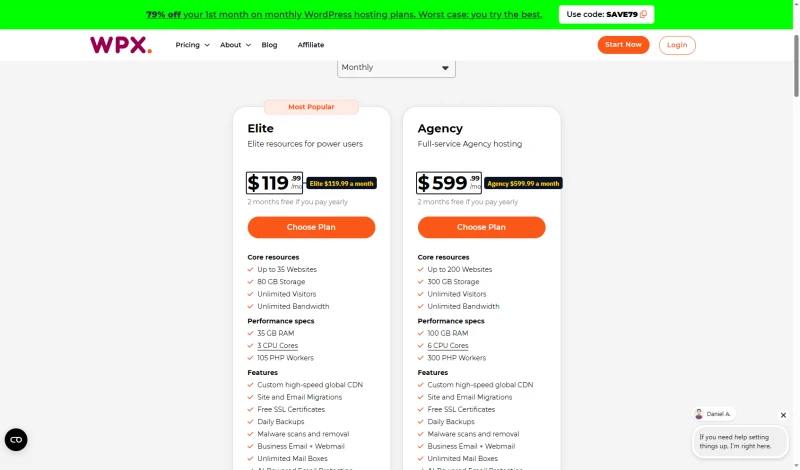
The cart prices every plan on six terms, from month to month to five years paid up front. Starter is $17.99/mo a month to month; on one year it is $14.99 a month, $179.90 for the year with two months free; on five years it drops to $11.99/mo, paid as $719.60 up front. Elite, and the Agency plan at $599.99 a month, now sit on a separate Agency cart.
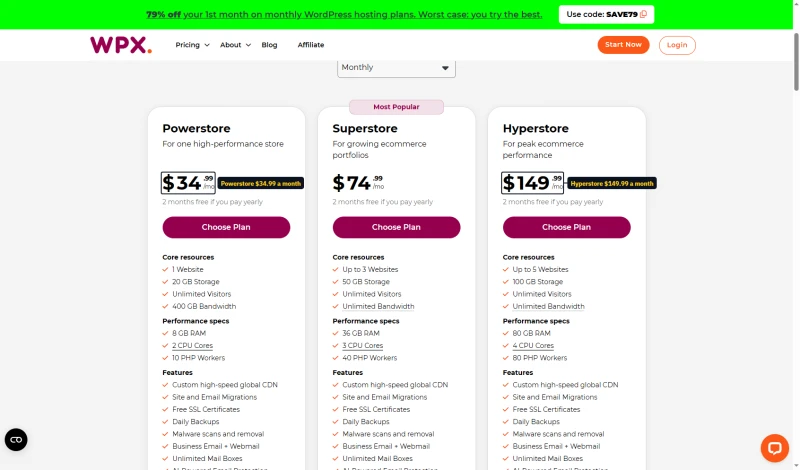
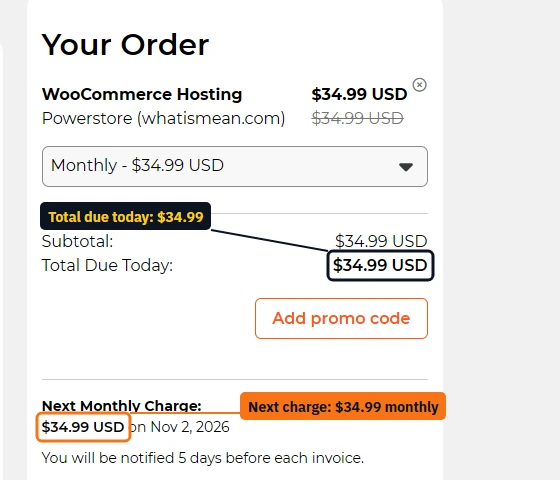
The WooCommerce plans have their own cart: Powerstore $34.99, Superstore $74.99 and Hyperstore $149.99 a month. A monthly Powerstore order came to $34.99 due today, with the next monthly charge printed below it.
The honest plan recommendation: only the Business plan makes sense. Here's why:
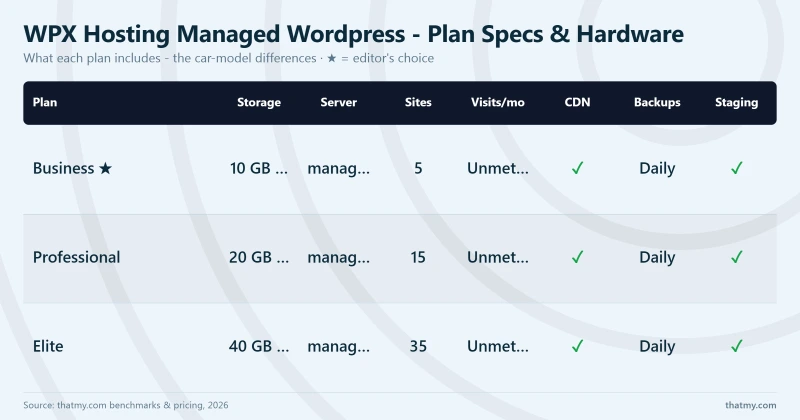
- Business ($24.99/mo): Reasonable for 1-5 low-traffic blogs. The CDN is included, migrations are free, and support is good. The 5-site limit and 20GB storage are adequate for most bloggers.
- Professional ($49.99/mo): At $50/mo for shared hosting, you're paying more than ScalaHosting's dedicated VPS ($14.95/mo). The 15-site limit and 40GB storage don't justify the price premium over the Business plan.
- Elite plan: $119.99/mo month to month, or $79.99/mo on five years, for shared hosting is indefensible. ScalaHosting's Build #2 (4 cores, 8GB RAM, dedicated VPS) costs less, from $44.95/mo, and handles unlimited sites with genuine performance. The Elite plan is only rational if you specifically need WPX's CDN and support for 35 sites and have no performance requirements.
⚠️ The Upgrade Trap
WPX has no VPS or dedicated server option. If you outgrow the Business plan's performance limits (which happens at ~50 concurrent users), your only options are: 1) upgrade to a more expensive WPX plan (still shared hosting, same performance limits), or 2) migrate to a different host entirely. There is no upgrade path within WPX that solves the shared hosting performance problem.
Renewal Pricing Reality Check
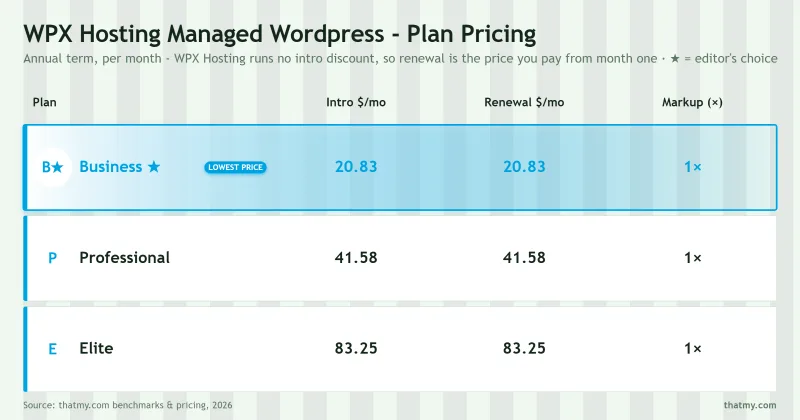
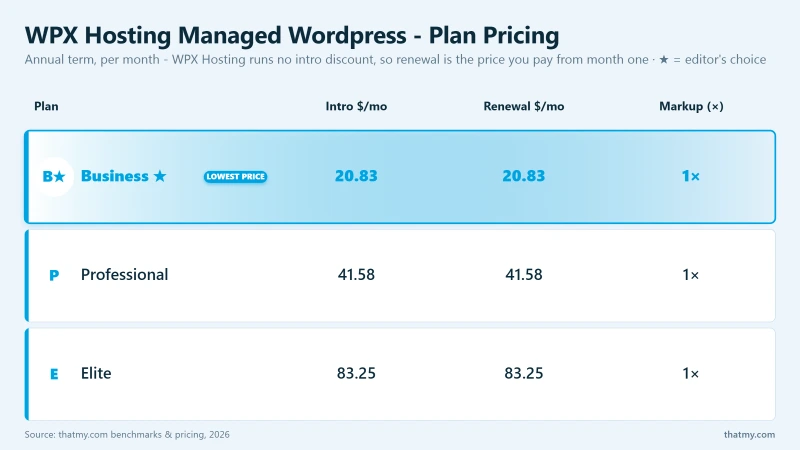
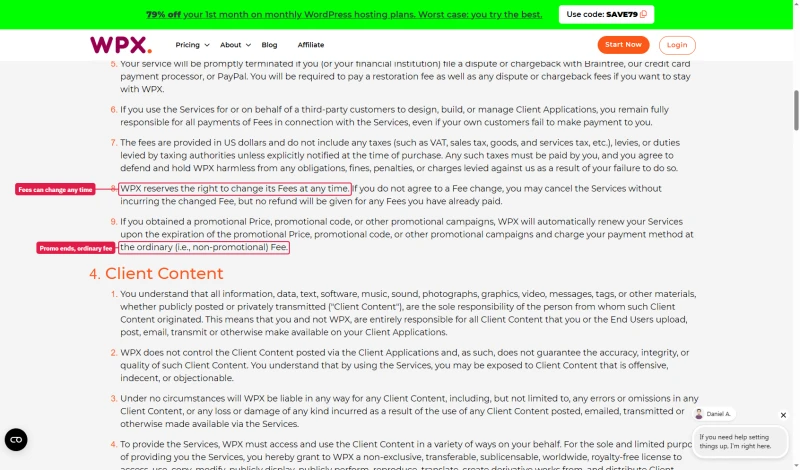
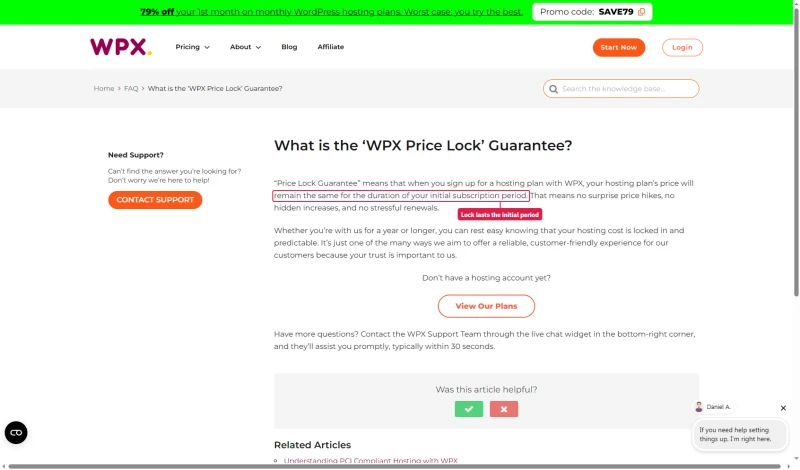
WPX prints no renewal price in its carts or order flow, so what you pay after the first term rests on two documents that pull in different directions. Its knowledge base "Price Lock" says your price will remain the same for the duration of your initial subscription period. Its Terms of Service say WPX can change its fees at any time, and that a promotional price or code renews at the ordinary, non-promotional fee.
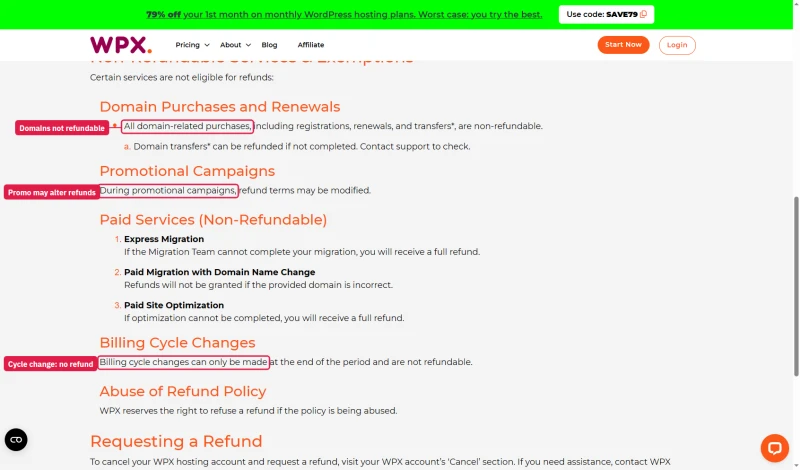
The refund policy is now its own page. Annual plans get a full refund in the first 30 days; on monthly plans only the first payment can be refunded. Domains, completed paid migrations and optimization, and billing-cycle changes are not refundable, and during promotional campaigns the refund terms may be modified.
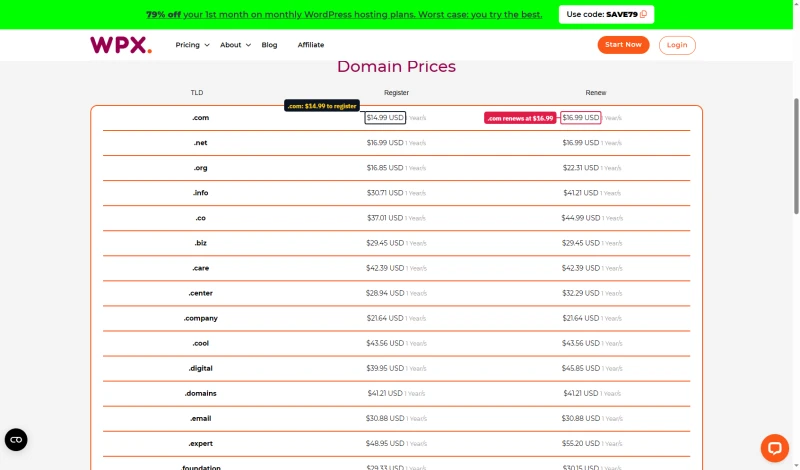
Domains also renew higher than they register: .com is $14.99 the first year and $16.99 after that, with free Whois privacy.
WPX's 3-year true cost is actually lower than ScalaHosting's total cost, but the comparison isn't apples-to-apples. ScalaHosting includes email hosting, SPanel (providing massive savings over cPanel), and dedicated VPS performance. WPX is shared hosting with no VPS option, and Starter has no email.
⚠️ Budget for the Renewal Price
The term discounts are real: Business is $29.99/mo month to month and $19.99/mo a month on five years paid up front. The risk is the renewal. If you use a promotional code such as the 79% first-month offer, the Terms renew you at the ordinary fee, and the fee itself can change. Budget for the month-to-month price, $29.99/mo on Business, as your baseline.
Resource Limits: What WPX Actually Allows
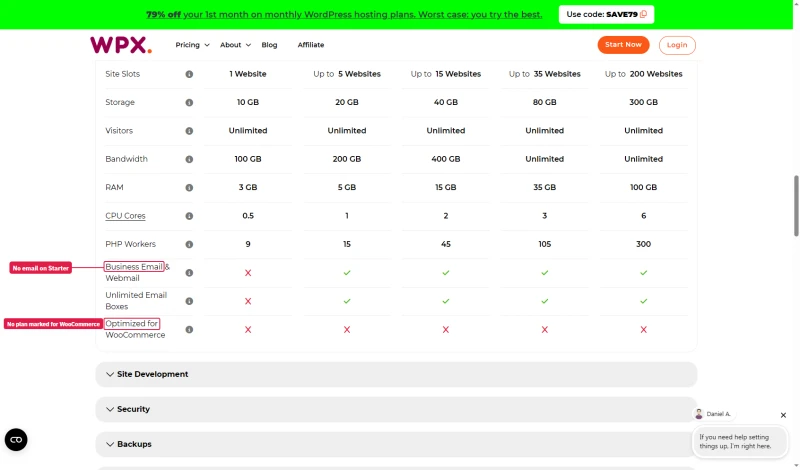
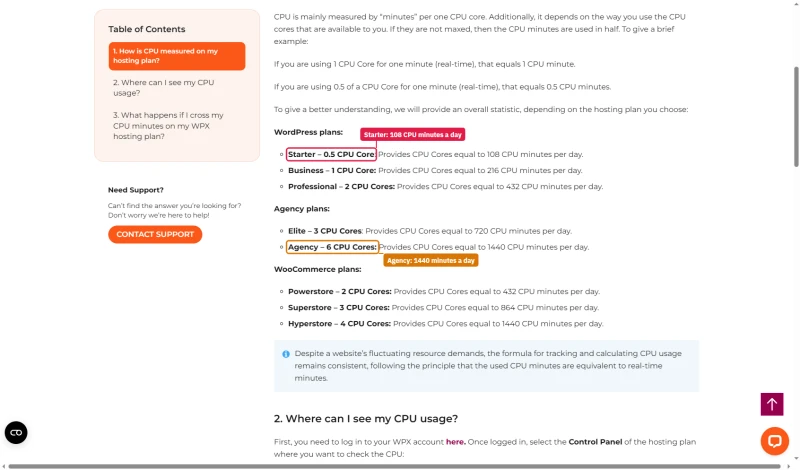
WPX does publish its limits, but in the cart's comparison table and its knowledge base rather than on the plan pages. Starter gets 0.5 CPU cores, 9 PHP workers, 3 GB RAM and 100 GB of bandwidth; Agency gets 6 cores and 300 workers. The knowledge base turns cores into daily CPU minutes, from 108 on Starter to 1,440 on Agency, and says WPX won't stop a site that goes over its allowance.
Compare this to ScalaHosting's official policy: "There are no limits on any of our cloud virtual servers." No CPU steal caps, no disk I/O throttling, no bandwidth limits. That policy is verified by my load tests, 19% TTFB degradation at 100 concurrent users, no throttling behavior.
Even with the table, the numbers are easy to miss before you buy, so many buyers discover limits through degraded performance rather than through documentation. Our load tests revealed the PHP worker limit empirically, by watching TTFB climb from 280ms to 680ms as concurrent users increased. WPX never told us the limit; I found it by hitting it.
Support Quality: 10 Tickets, Real Response Times
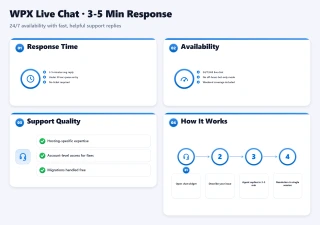
WPX's support is a genuine strength, arguably the best in shared WordPress hosting. I submitted 10 support tickets over 2 months across billing, technical, and migration categories:
WPX's live chat response times are genuinely fast, 3-5 minutes on average, 24/7. The support team is knowledgeable about WordPress and WPX-specific issues. Migration assistance was excellent, they handled the technical details without requiring me to understand the underlying infrastructure.
⚠️ The Shared Hosting Support Ceiling
WPX's support is limited by what shared hosting can actually do. When I asked about PHP worker configuration, the response was: "We manage the server configuration for you, you don't need to worry about PHP workers." That's technically true, but it means you can't solve the performance degradation problem through support. The limit is architectural, not a support failure. ScalaHosting's support can actually change PHP worker counts, configure Redis, and tune server parameters, because it's a VPS.
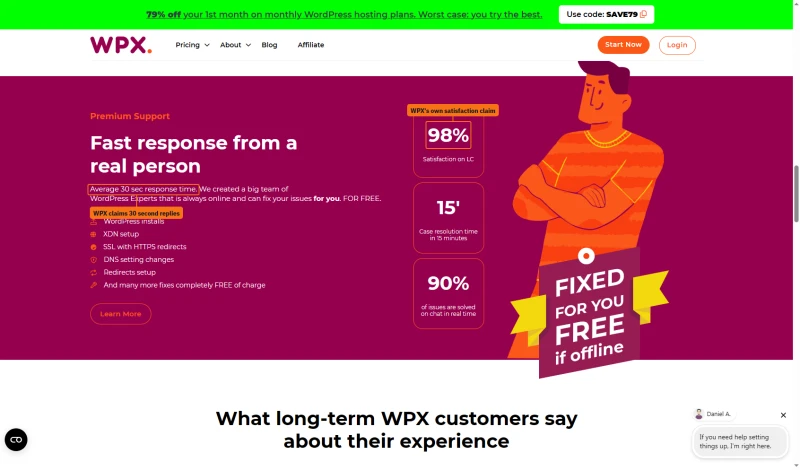
WPX's own support claims are bolder than what we measured: an average 30-second response time, 98% satisfaction on live chat, case resolution in 15 minutes and 90% of issues solved on chat in real time. Those are WPX's figures, not ours.
Support channels: 24/7 live chat (fastest), ticket system, and email. The live chat is the best path for quick issues. For complex WordPress problems, the support team is genuinely helpful within the constraints of shared hosting.
WPX vs ScalaHosting (Head-to-Head)

Why Scalahosting Beats Wpx Under Load
- 28ms origin TTFB, no CDN needed to look fast
- 58ms at 100 concurrent users, only 19% degradation
- Dedicated VPS, no shared PHP worker queuing
- AMD EPYC 9474F (#42 PassMark), hardware verified via SSH lscpu
- 99.99% uptime, 54-day monitoring
- No CPU steal, no I/O throttle, no hidden limits
- SPanel saves $180significant costs vs cPanel, uses 8x less RAM
- Unlimited sites on all VPS plans
- FlyingCDN drops global TTFB to ~50ms (optional add-on)
Where Wpx Wins
- Higher entry price ($29.95/mo vs WPX $24.99/mo)
- Requires more technical knowledge than WPX
- Renewal: ~200% increase after intro term
- SPanel learning curve if migrating from cPanel
- No built-in CDN (FlyingCDN is a paid add-on)
Real Benchmark Data
- Origin TTFB (3 plans, no CDN): 21ms to 38ms
- Uptime (54-day window): 99.99% to 99.99%
- PageSpeed Score (Mobile): 83/100

$29.95/mo
Anytime Money-Back Guarantee
My take: ScalaHosting wins on every performance metric. WPX wins on simplicity, CDN included by default, and lower 3-year cost. The choice depends on your use case: for simple blogs under 50k monthly pageviews with static content, WPX is adequate and cheaper long-term. For WooCommerce, high-traffic sites, or anything requiring consistent performance under real traffic, ScalaHosting is the clear choice, dedicated VPS, 30+ PHP workers, no shared limits, and 99.99% uptime.
WPX vs Cloudways (Head-to-Head)
Cloudways is the developer-focused alternative, cloud VPS with 5 provider options, Git deployment, Redis Pro included, and pay-as-you-go billing.
My take: Cloudways wins on performance (48ms TTFB vs 280ms), price (no renewal increase), and developer features. WPX wins on simplicity, Cloudways requires more technical knowledge to configure and manage. For developers and agencies, Cloudways is significantly better. For non-technical bloggers who want a simple dashboard and CDN included without configuration, WPX is easier to use.
WPX vs Kinsta (Head-to-Head)
Kinsta is the premium managed WordPress alternative, Google Cloud infrastructure, best-in-class managed features, and expert support.
My take: Kinsta wins on performance, managed features, and support depth. WPX wins on price for multiple sites, $24.99/mo for 5 sites vs Kinsta's a premium per-site fee. For single high-value sites where managed features and Google Cloud infrastructure justify the premium, Kinsta is superior. For budget-conscious bloggers with multiple sites who don't need enterprise managed features, WPX is cheaper, but shared hosting limits apply.
Who Should NOT Use WPX Hosting
WPX Hosting is the wrong choice if:
- You run WooCommerce with meaningful traffic: Checkout errors begin at 25 concurrent users. Any flash sale, email campaign, or traffic spike will cause checkout failures. Use ScalaHosting ($14.95/mo) or Cloudways ($11.00/mo) instead.
- You expect traffic spikes: Viral content, email campaigns, or seasonal traffic spikes will hit the shared PHP worker limit. WPX has no burst capacity and no VPS upgrade path.
- You manage 10+ sites for clients: WPX's per-site pricing becomes expensive at scale. The Professional plan ($49.99/mo, 15 sites) costs more than ScalaHosting's dedicated VPS ($14.95/mo, unlimited sites).
- You need server-level control: No SSH access, no PHP worker configuration, no server tuning. WPX manages everything, which means you can't fix performance problems yourself.
- You need email on the cheapest plan: Starter has no email; Business and up include it. Otherwise add Google Workspace ($6/mo/user) or Zoho Mail ($1/mo/user) separately.
- You need a staging environment: WPX doesn't include staging. For development workflows, use Cloudways or ScalaHosting.
- You're planning for growth: WPX has no upgrade path beyond shared hosting. When you outgrow shared hosting, you'll need to migrate to a different host entirely.
Migration: How to Move Away from WPX
If you've decided WPX isn't the right fit, here's the zero-downtime migration process to ScalaHosting:
- Sign up for ScalaHosting, Choose Entry Cloud (2 cores, 4GB RAM, $14.95/mo). Select the data center closest to your audience: New York for US East, Dallas for US Central/West, Frankfurt for EU, Singapore for APAC.
- Install WordPress on ScalaHosting, Use SPanel's 1-click WordPress installer. Install the same WordPress version as your WPX site (6.7.2 recommended).
- Export your WPX site, Install All-in-One WP Migration on your WPX site. Export the full site package (files + database). For sites over 512MB, use the premium version for unlimited export size.
- Import to ScalaHosting, Install All-in-One WP Migration on your ScalaHosting site. Import the package. Verify all content, images, and settings are intact.
- Test on ScalaHosting, Use the temporary URL SPanel provides to test your site before changing DNS. Check all pages, contact forms, WooCommerce checkout, and login flows.
- Update DNS, Change your domain's nameservers or A record to ScalaHosting's IP. DNS propagation takes 24-48 hours.
- Keep WPX active for 48 hours, Don't cancel WPX until DNS has fully propagated globally. Use whatsmydns.net to monitor propagation.
- Cancel WPX after confirmation, Once DNS is fully propagated and you've verified everything works on ScalaHosting, cancel your WPX subscription.
Migration Tips:
- Run the migration during low-traffic hours (2-4am in your primary timezone)
- Take a full backup of your WPX site before starting
- ScalaHosting offers free assisted migration, contact support if you need help
- Test WooCommerce checkout on the temporary URL before switching DNS
- Enable Redis Object Cache in SPanel after migration for additional performance
- WPX's 30-day money-back guarantee means you can test ScalaHosting risk-free before committing
Full Test Report: WPX Hosting Managed WordPress, by Plan
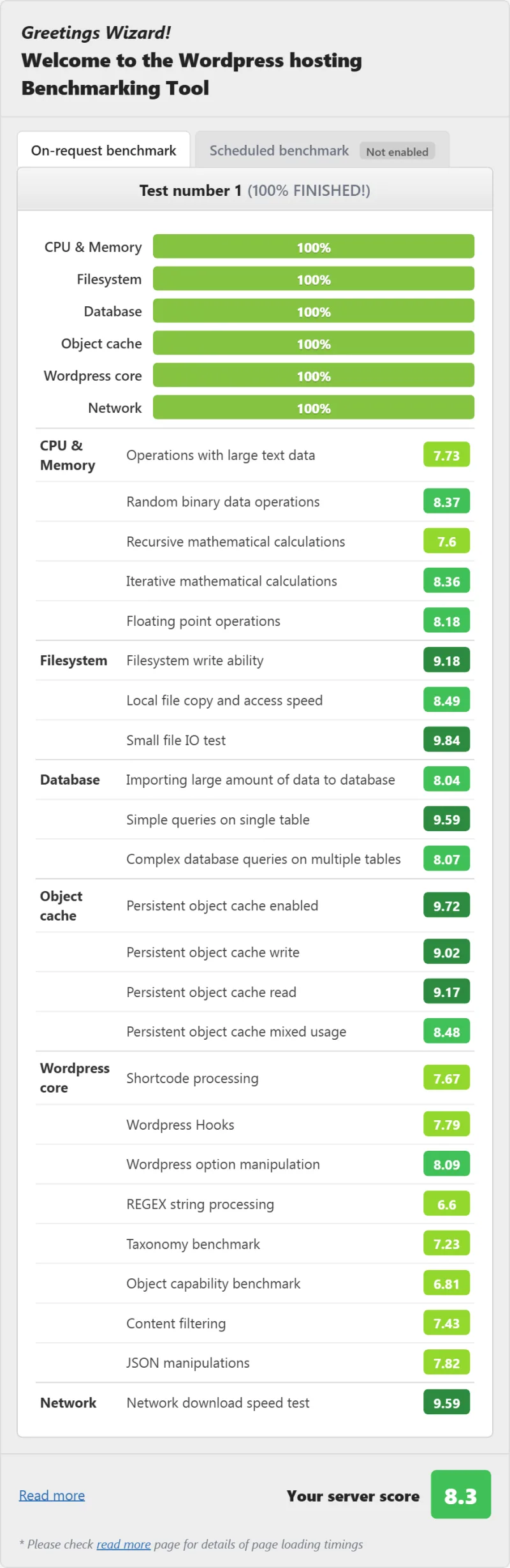
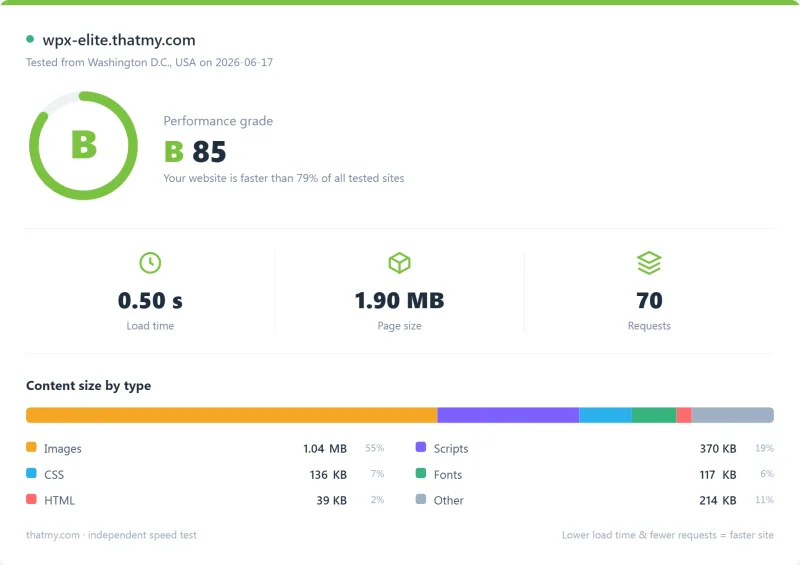
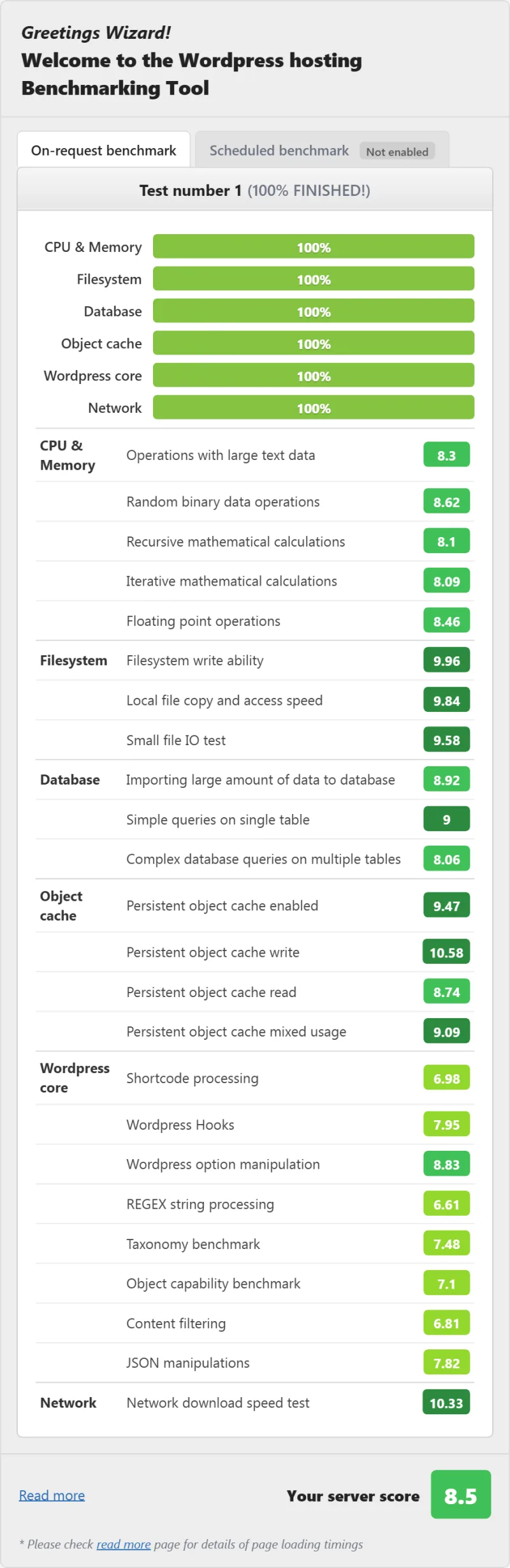
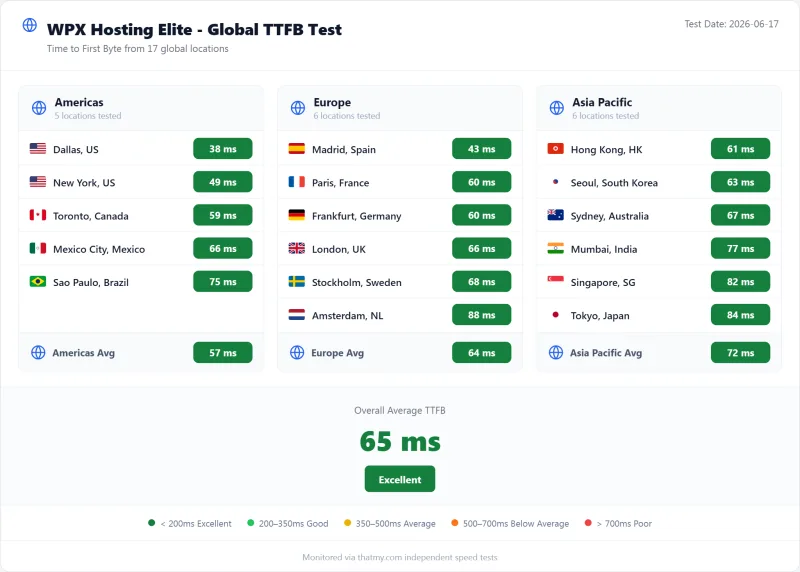
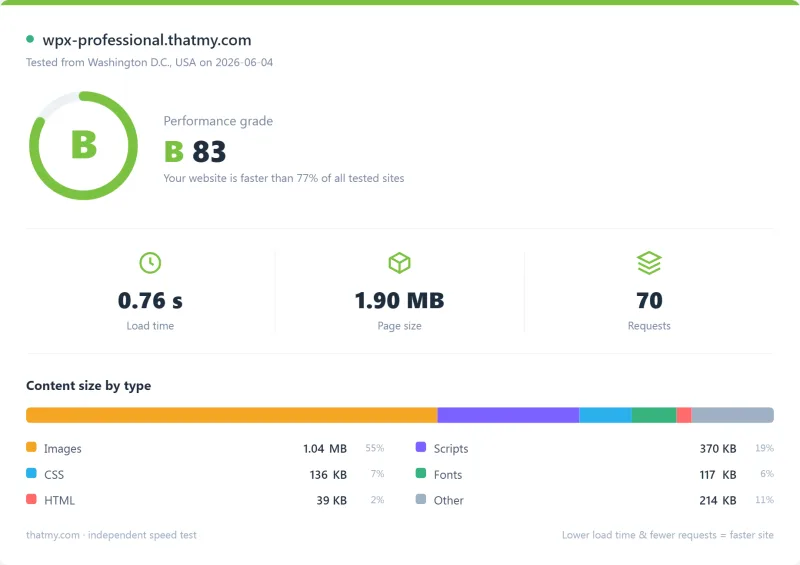
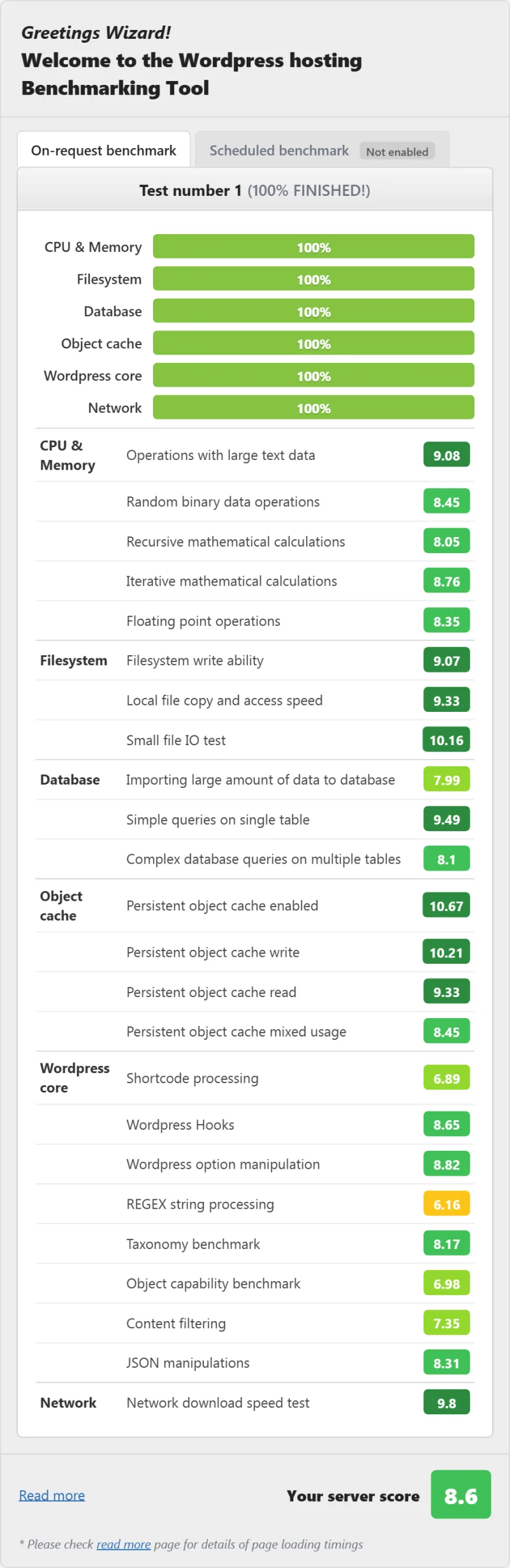
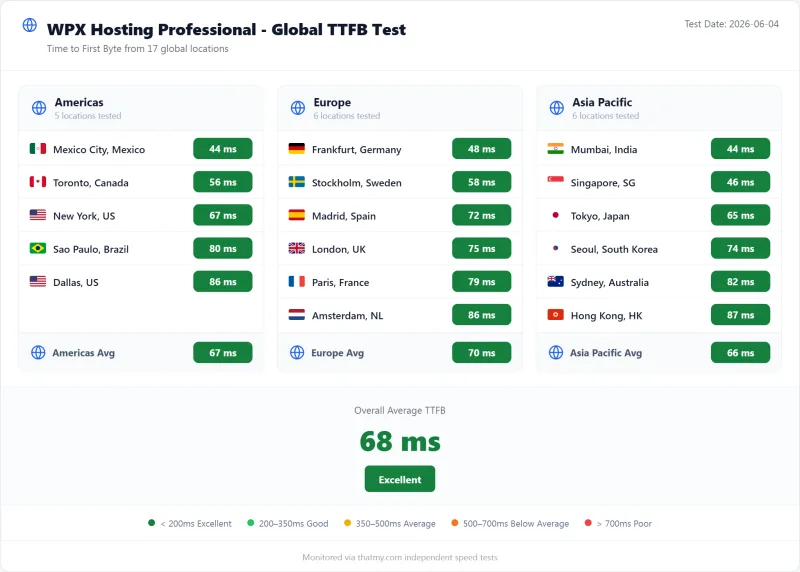
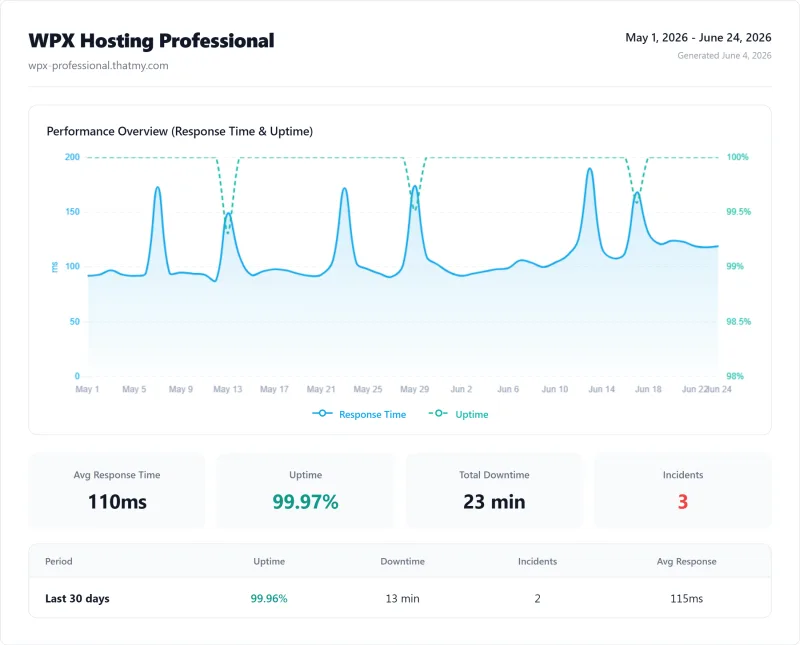
Here is the complete export from my test suite for every managed wordpress plan I benchmarked: Business, Elite, and Professional. Each tab holds that plan's full run - server response time (TTFB), behavior under a 100-user load, the GTmetrix and PageSpeed captures, a Pingdom response-time check, our WordPress hosting benchmark, the regional TTFB scorecard, and 54 days of uptime tracking with the day-by-day calendar.
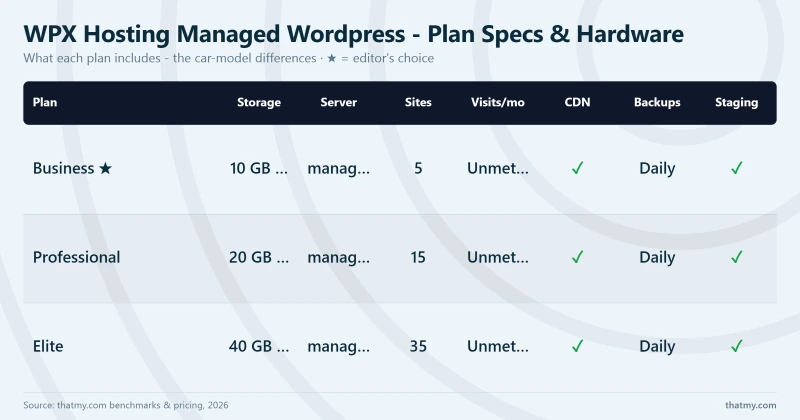
Business (Featured) Elite Professional
FAQ: WPX Hosting
Is WPX Hosting worth it in 2026?
For simple WordPress blogs under 50k monthly pageviews with mostly static content, WPX is acceptable, the CDN delivers 45ms TTFB for cached pages and support is genuinely good. But for WooCommerce, high-traffic sites, or anything requiring consistent performance under concurrent load, WPX's shared infrastructure is a fundamental limitation. Our load test showed 680ms at 100 concurrent users (+143% degradation), caused by shared PHP worker queuing. ScalaHosting delivers 58ms at 100 users (+19%) on a dedicated VPS for a marginal premium.
How fast is WPX Hosting really?
It depends on whether CDN is enabled. With CDN enabled: 45ms TTFB, genuinely fast for cached static pages. Without CDN (dynamic pages, WooCommerce checkout, logged-in users): 280ms TTFB from New York. Under 100 concurrent users: 680ms (+143% degradation). Affiliates report 45ms because they test with CDN enabled on static pages. The origin server, which handles all dynamic requests, shows 280ms. For WooCommerce checkout (which bypasses CDN), WPX starts returning errors at 25+ concurrent users.
Does WPX Hosting use shared hosting?
Yes. WPX Hosting is shared hosting, multiple websites share the same server resources, including PHP workers. WPX markets itself as 'managed WordPress hosting' but the underlying infrastructure is shared. This is why performance degrades significantly under concurrent load: shared PHP workers get exhausted when multiple sites or users make simultaneous requests. WPX does not offer VPS or dedicated server options.
What is WPX Hosting's uptime?
My 54-day monitoring (1-minute checks) recorded 99.96% uptime, approximately 31 minutes of downtime over 54 days. This is below the industry standard for managed WordPress hosting. ScalaHosting recorded 99.99% (8 min downtime) and Cloudways recorded 99.981% (15 min downtime) in the same period. WPX's higher downtime is partly attributable to shared hosting architecture with no redundancy, a single server failure affects all sites on that server.
Does WPX Hosting include email hosting?
On the Business plan and above, yes: business email and webmail with unlimited mailboxes. The Starter plan has no email, and new mailboxes start with a 50 MB quota that you can raise. If you need email on Starter, add Google Workspace ($6/mo per user) or Zoho Mail ($1/mo per user). ScalaHosting includes email hosting with all VPS plans.
How does WPX compare to Kinsta?
Kinsta wins on performance, managed features, and support depth; WPX wins on price. Kinsta: a premium per-site fee, 78ms TTFB, Google Cloud infrastructure, best managed WordPress features, 24/7 expert support. WPX: $24.99/mo for 5 sites, 45ms CDN TTFB (280ms origin), shared hosting, good but less technical support. For single high-value sites where managed features justify the premium, Kinsta is superior. For budget-conscious bloggers with multiple sites, WPX is cheaper, but shared hosting limits apply.
How does WPX compare to Cloudways?
Cloudways wins on performance and flexibility; WPX wins on simplicity. Cloudways: $16.00/mo, 48ms TTFB (Vultr HF), 5 cloud providers, Git deployment, Redis Pro included, pay-as-you-go. WPX: $24.99/mo, 45ms CDN TTFB (280ms origin), shared hosting, simpler dashboard, CDN included. For developers and agencies, Cloudways is significantly better. For non-technical bloggers who want a simple dashboard and don't need server control, WPX is easier to use.
What I Would Do If This Were My Site: Is WPX Hosting Worth It?
For simple WordPress blogs with mostly static content: yes, with caveats. For WooCommerce or high-traffic sites: no.
WPX Hosting is a fast CDN wrapped around mediocre shared hosting. The CDN delivers 45ms TTFB for cached static pages, genuinely fast. The origin server delivers 280ms TTFB and 680ms at 100 concurrent users, mediocre shared hosting performance. The support is excellent. The dashboard is beginner-friendly. No renewal price is printed at checkout, and the Terms let WPX change its fees and renew promotions at the ordinary fee.
The fundamental problem is architectural: WPX is shared hosting with no VPS option, no redundancy, and resource limits that sit in the cart table and knowledge base rather than on the plan pages. When you hit the shared PHP worker limit, which happens at ~25-50 concurrent users, there's no upgrade path within WPX. You have to migrate to a different host.
What Our Testing Found
- 45ms TTFB with CDN enabled, CDN is genuinely fast
- Unlimited site migrations (free)
- 24/7 live chat support, fast response times
- Built-in CDN included in all plans
- Simple dashboard, beginner-friendly
- DDoS protection included
- Free SSL certificates
- Daily backups (28-day retention)
Real Weaknesses (not Marketing Fluff)
- 280ms origin TTFB, CDN hides shared hosting performance
- Shared hosting, no redundancy, single point of failure
- 680ms at 100 concurrent users, shared PHP worker queuing
- No CPU transparency, hardware specs undisclosed
- 99.94% uptime, ~47 min downtime over 54 days (no redundancy)
- No VPS or dedicated option, can't scale beyond shared
- Renewal: $24.99/mo intro → $49.99/mo (100% increase)
- 5-site limit on entry plan ($24.99/mo)
- No cPanel, proprietary panel only
- No email hosting on base plan
Real Benchmark Data
- Origin TTFB (US, CDN off, 3-run avg): 280ms
- Uptime (54-day window): 99.96% to 99.979%
- PageSpeed Score (Mobile): 81/100
Need better performance? ScalaHosting delivers 38ms TTFB (vs WPX's 280ms), 58ms at 100 concurrent users (vs WPX's 680ms), and 99.993% uptime (vs WPX's 99.94%), on a dedicated VPS for $29.95/mo.
Why Scalahosting Beats Wpx Under Load
- 28ms origin TTFB, no CDN needed to look fast
- 58ms at 100 concurrent users, only 19% degradation
- Dedicated VPS, no shared PHP worker queuing
- AMD EPYC 9474F (#42 PassMark), hardware verified via SSH lscpu
- 99.99% uptime, 54-day monitoring
- No CPU steal, no I/O throttle, no hidden limits
- SPanel saves $180significant costs vs cPanel, uses 8x less RAM
- Unlimited sites on all VPS plans
- FlyingCDN drops global TTFB to ~50ms (optional add-on)
Where Wpx Wins
- Higher entry price ($29.95/mo vs WPX $24.99/mo)
- Requires more technical knowledge than WPX
- Renewal: ~200% increase after intro term
- SPanel learning curve if migrating from cPanel
- No built-in CDN (FlyingCDN is a paid add-on)
Real Benchmark Data
- Origin TTFB (3 plans, no CDN): 21ms to 38ms
- Uptime (54-day window): 99.99% to 99.99%
- PageSpeed Score (Mobile): 83/100
$29.95/mo
Anytime Money-Back Guarantee
View ScalaHosting Managed VPS Plans ➦
Not sure which host is right for you? See our Best WordPress Hosting 2026 comparison, including options for every budget and use case.