

Levamo is the best WooCommerce hosting we have tested. I built the same 10,000-product store on Levamo's three plans and on three Cloudways servers, then sent 10 to 200 shoppers at it at once, all adding to cart and opening checkout. Levamo Business handled 6.7 checkout journeys a second and Performance 19, the most of any server, and both kept their database up at 200 shoppers. Cloudways comes second, and it wins on value: per dollar, its servers handled more checkouts than any Levamo plan and never returned an error.
A WooCommerce store is harder on a host than a blog. Product pages can be cached, but carts, checkouts, accounts and searches are built fresh for each shopper, so the speed that matters is how much PHP and database work a server can do at the same time. That is what the store test measures. For the hosts we have not store-tested yet, I use our WordPress benchmark, which loads a test site with 100 concurrent users, and I say so beside every figure.
Our Picks at a Glance
Levamo Business and Performance
- 6.7 checkout journeys a second on Business, 19 on Performance
- Database up with 200 shoppers at once
- $99.00/mo Business, billed yearly, the same at renewal
Elasticsearch on Performance; no server to size yourself
See LevamoCloudways Vultr High Frequency
- 7.5 checkout journeys a second on the 8GB server, 4.7 on 4GB
- 0 failed requests at every step, up to 200 shoppers
- $60.00/mo for 4GB, billed monthly, no contract
Your own cloud server; resize as the store grows
See CloudwaysScalaHosting Entry Cloud
- 58ms with 100 concurrent users, the best of our WordPress benchmark
- 2 dedicated CPUs on an AMD EPYC 9474F
- $14.95/mo on 12 months, then $39.95/mo
Email and a control panel included; not store-tested yet
See ScalaHostingKinsta Single 20GB
- 92ms with 100 concurrent users
- 99.99% uptime over 54 days
- $29.17/mo billed yearly, the same at renewal
Polished managed platform; not store-tested yet
See KinstaHow We Tested WooCommerce Hosting
Two tests sit behind this page, and each figure says which one it comes from.
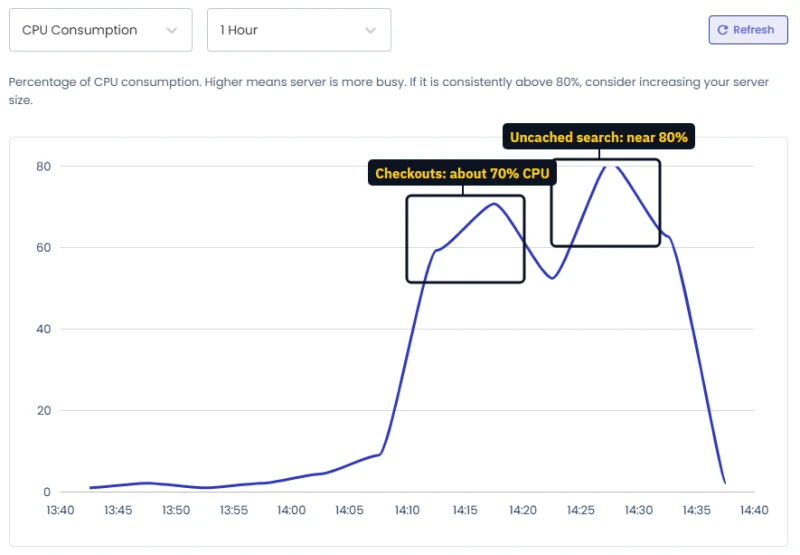
- The store test (Levamo and Cloudways). Levamo provided its Starter, Business and Performance plans as test plans for the review (each a monthly subscription on my own account; I did not pay for them), and I set up and paid for the Cloudways servers on my own account. Each got the same WooCommerce store: the Storefront theme and 10,000 products imported with WooCommerce's own importer. From a load machine in New York, simulated shoppers ran in four steps of 10, 50, 100 and 200 at once, two minutes each, with a one-second pause between clicks. Three kinds of traffic were measured: browsing cached pages, searching products (never cached), and the checkout journey: open a product, add it to the cart, view the cart and open checkout, each journey as a new shopper with fresh cookies. No order was placed and no card was charged; the journey stops at the checkout page.
- The WordPress benchmark (every other host). One plan per host, the same WordPress test site, response time from 10 locations measured at the origin server, response with 100 concurrent users from a 0 to 250 client ramp, and uptime over 54 days. It is not a store, but the 100-user figure shows how a plan copes when many visitors need uncached pages at once, which is what carts and checkouts are. Full scores are in our WordPress hosting guide.
Prices come from each host's own pricing page and are re-read from our price records every time this page is built. Full method and re-test rules: How We Test.
The Store Test: Six Servers, One WooCommerce Store
| Server | Price | Checkout journeys a second | Uncached searches a second | Cart step at 50 shoppers | Worst result | Checkouts a second per $100 |
|---|---|---|---|---|---|---|
| Levamo Performance | $359.00/mo | 19 | 53.4 | 0.22 s | 0.03% errors | 5.3 |
| Cloudways Vultr HF 8GB | $118.00/mo | 7.5 | 19.2 | 0.87 s | 0 errors | 6.4 |
| Levamo Business | $119.00/mo | 6.7 | 17 | 0.95 s | 0.36% errors | 5.6 |
| Cloudways Vultr HF 4GB | $60.00/mo | 4.7 | 12.6 | 2.03 s | 0 errors | 7.9 |
| Cloudways AWS Small | $38.56/mo | 2.5 | 5.4 | 4.87 s | 0 errors | 6.5 |
| Levamo Starter | $35.00/mo | 1.3 | 4 | 7.65 s | database stopped at 100 shoppers | 3.7 |
Monthly list prices before tax; Levamo is cheaper billed yearly. "Checkout journeys" is the highest rate each server reached at any step. Cloudways' Varnish cache answers repeated searches, which helps real shoppers, so its search figures come from a second run with a unique search each time, to measure the server rather than the cache.
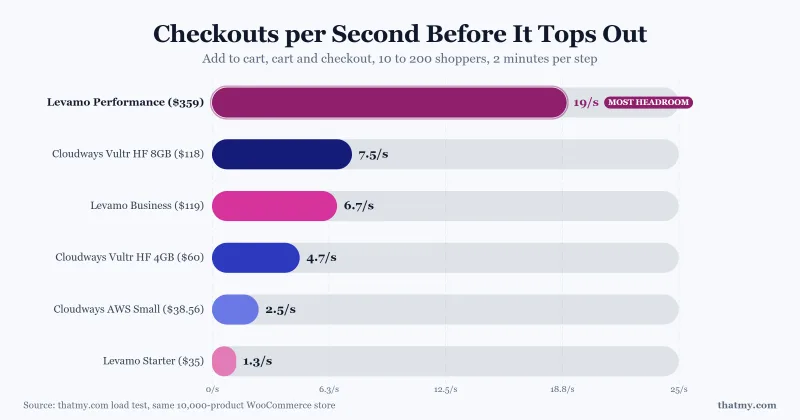
Three things stand out. Levamo Performance is in a class of its own, with more than twice the checkout capacity of anything else we tested. The Cloudways 8GB server and Levamo Business cost almost the same each month and delivered almost the same result, 7.5 against 6.7 journeys a second. And no Cloudways server failed a request at any step: when a server was full, shoppers waited in a queue rather than seeing an error.
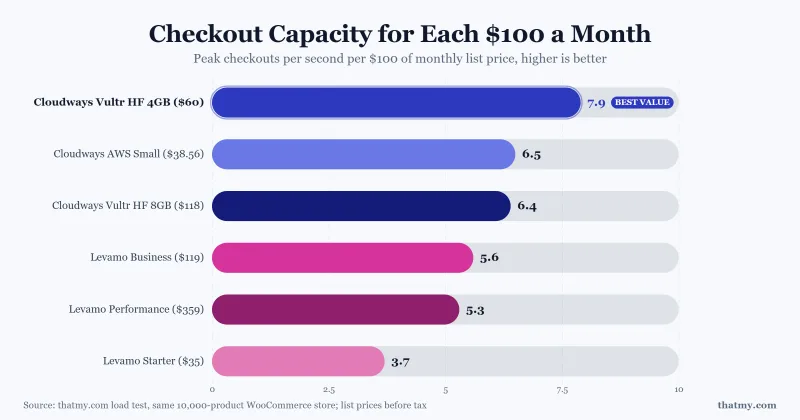
Per dollar, the order changes, and this is the honest case for Cloudways. Divide each result by the monthly price and the Cloudways servers come first: a store on a Vultr HF 4GB server gets more checkout capacity for each $100 than on any Levamo plan. What Levamo gives for the extra money is a managed platform with more capacity in one plan, an object cache from Business up, Elasticsearch on Performance and no server to size.
#1. Levamo: Best Managed WooCommerce Hosting
- 19 checkout journeys a second on Performance, 6.7 on Business
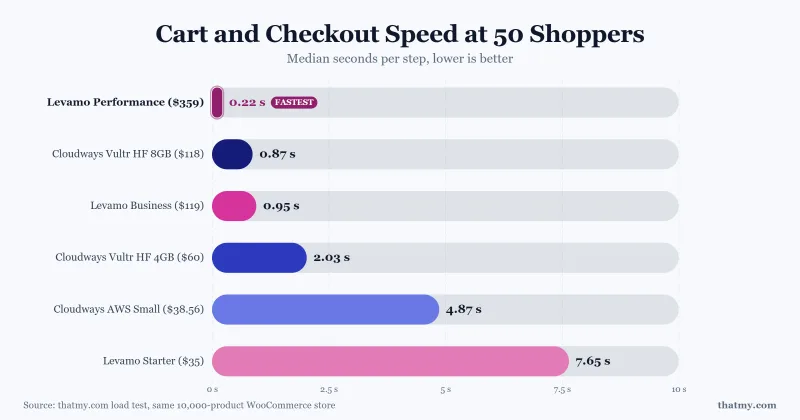
- 0.22 s cart step at 50 shoppers on Performance, 0.95 s on Business
- Business and Performance kept the database up with 200 shoppers at once
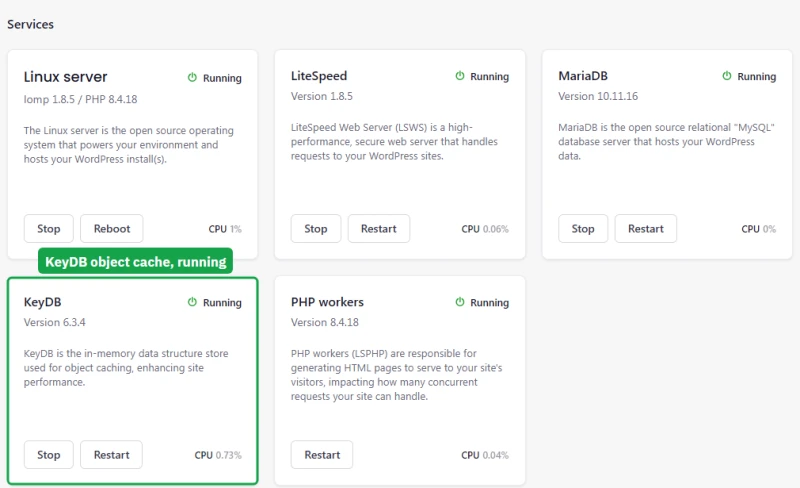
- KeyDB object cache from Business, Elasticsearch on Performance
Levamo (formerly Rapyd Cloud) was built by the original BuddyBoss team for the WordPress sites a page cache cannot help: stores, memberships, courses and communities. It sells managed WordPress by plan size rather than by server, so you choose by traffic and the platform does the rest. On our store, Business and Performance slowed down under the heaviest steps but never lost their database, and Performance reached 19 checkout journeys a second, the most of any server in the test.
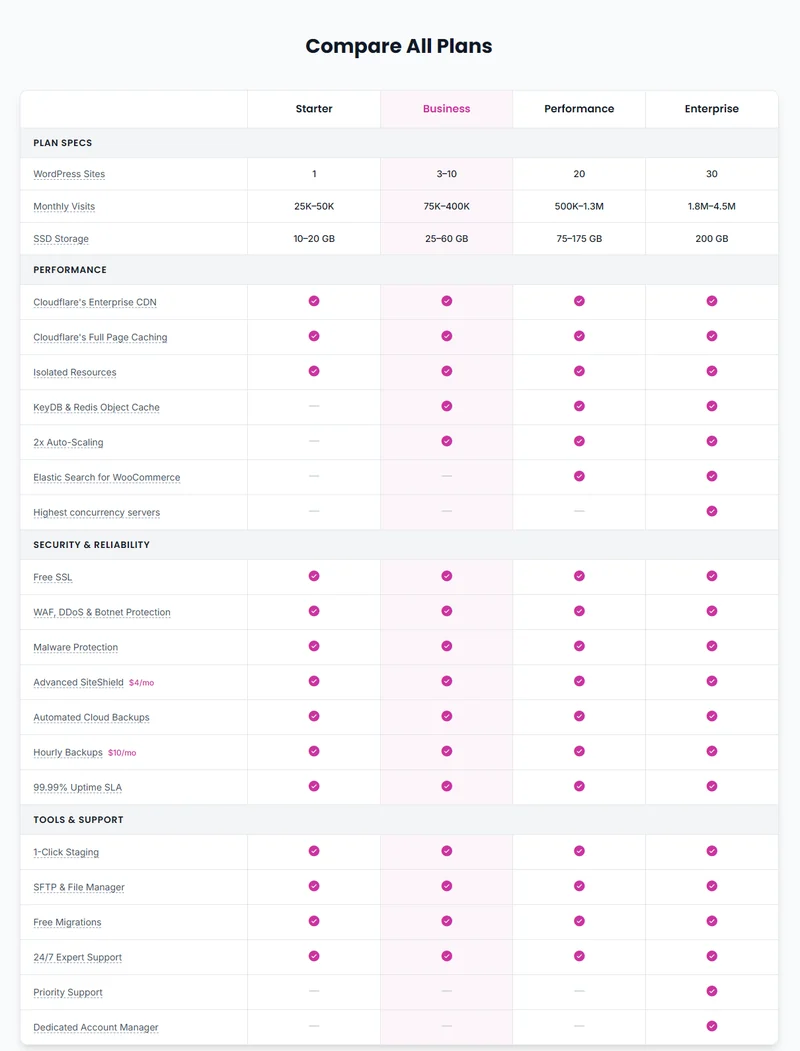
The plans differ by more than size, and the differences matter for a store. Business adds KeyDB, an object cache that keeps database results in memory for cart and account pages, which Starter does not have. Performance adds Elasticsearch. Levamo's own comparison table lists what each plan includes:
Levamo Starter: fine for a small shop, not for a rush
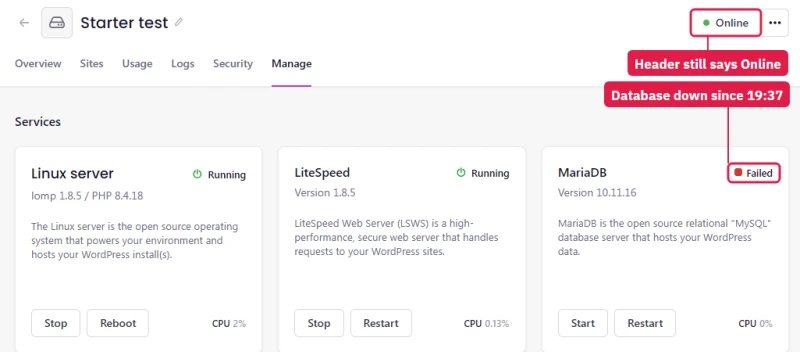
Our test was deliberately harsh: every simulated shopper went straight from a product to checkout, one after another, with a one-second pause. Starter handled 1.3 checkout journeys a second, about 4,700 an hour, and with 50 shoppers at once it kept every cart page up, though each step took several seconds. At 100 shoppers doing the same, its database stopped, twice. Few small shops ever have 100 people in checkout at the same moment, and a store that does will be on Business or Performance, which handled five and fifteen times as much.
What I would want a Starter customer to know is how it failed. The dashboard kept showing the site as online while the database was down and every cart and checkout returned a database error, and no alert came. The fix was one click: Restart on the MariaDB card brought the store back in about nine seconds.
Elasticsearch on Performance: better search, not faster search
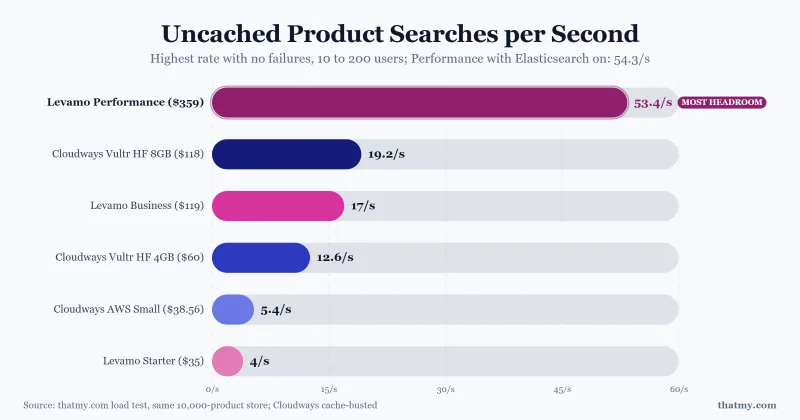
Performance includes Elasticsearch 7.17.29, switched off until you press Enable in the environment's services. It changes what shoppers find. With it on, a search for the misspelling "tredmill" found all 413 treadmills in the store; on Business, plain WordPress search found nothing.
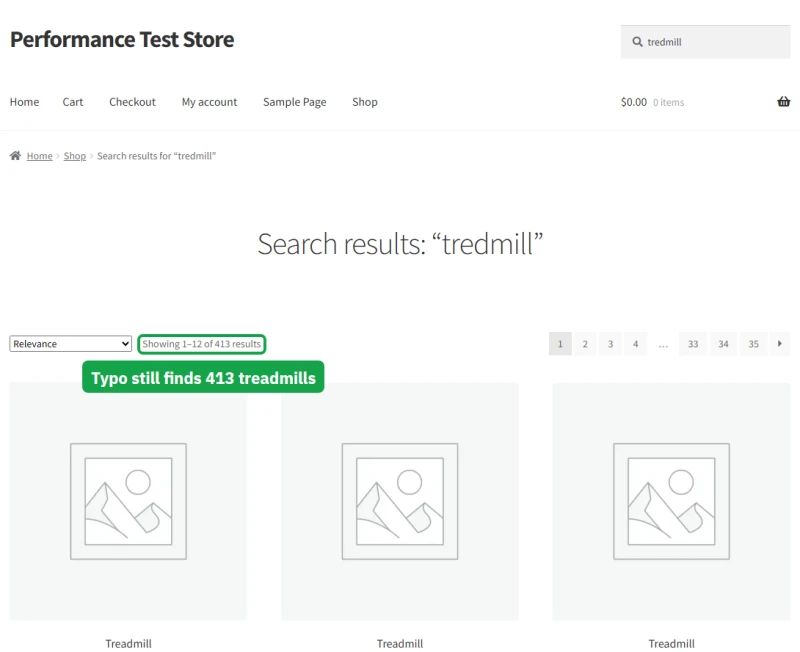
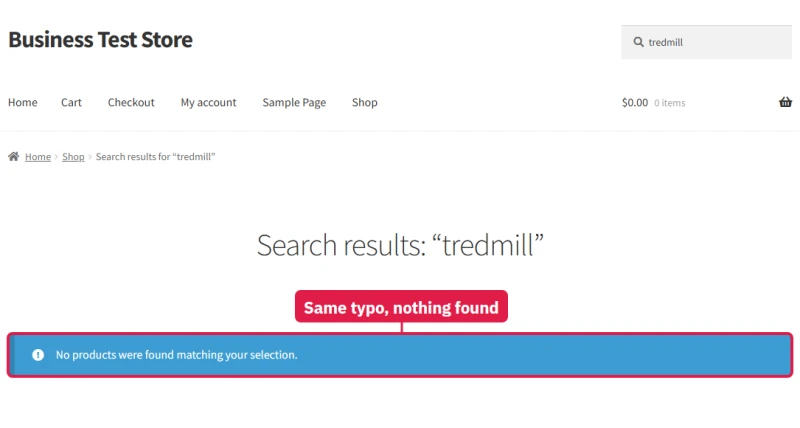
It did not make search faster: Performance served about 54 uncached searches a second with Elasticsearch on and 53 without. Buy Performance for its capacity and for search that forgives typos, which matters most on a large catalogue.
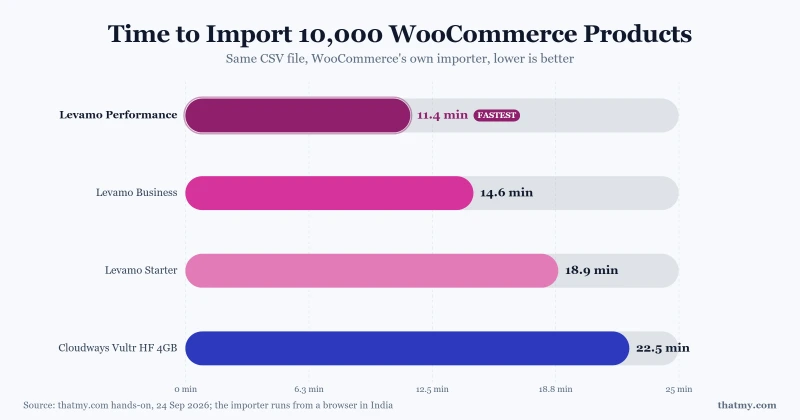
Imports were quicker on Levamo, too. The same 10,000-product file went through WooCommerce's importer in 11.4 minutes on Performance, 14.6 on Business and 18.9 on Starter, against 22.5 on the Cloudways 4GB server.
#2. Cloudways: Most Checkout Capacity per Dollar
- 7.5 checkout journeys a second on 8GB, 4.7 on 4GB
- 7.9 checkout journeys a second per $100, the best value in the test
- 0 failed requests at every step, on all three servers
- 74ms with 100 concurrent users on our WordPress benchmark
Cloudways puts a managed WordPress stack on a cloud server you choose and pay for by the month. On our store, the Vultr High Frequency 8GB server, with 3 vCPUs, handled 7.5 checkout journeys a second, a little more than Levamo Business for about the same money, and at 50 shoppers its cart pages answered in 0.87 seconds. The 4GB server, with 2 vCPUs, handled 4.7 a second for half the price. None of the three Cloudways servers failed a single request: when they were full, shoppers queued.
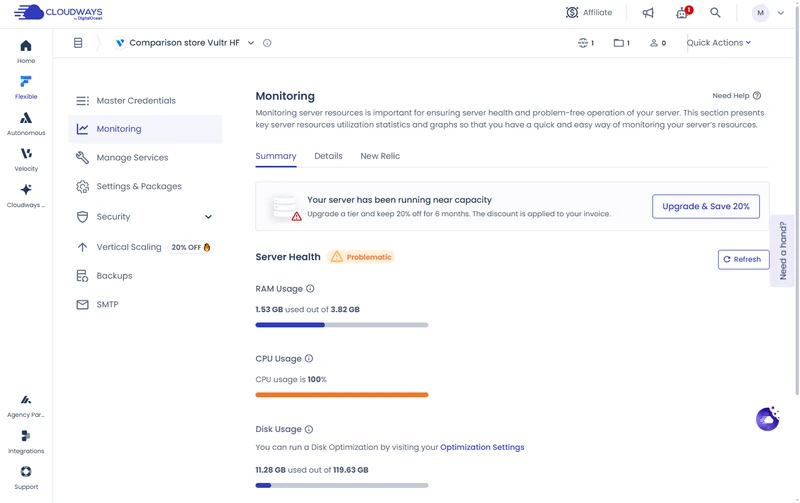
Cloudways also tells you when a server is struggling. Right after the store test, its own monitoring marked the 4GB server as "Problematic", with CPU at 100% and a banner saying it had been running near capacity. That is the warning Levamo Starter did not give.
Resizing is the other strength. Moving the store from the 4GB to the 8GB server took the site offline for about a minute and a half, not the twelve minutes the warning prepares you for, and nothing had to be migrated. Every server includes Redis and staging, and repeated product searches are answered by Varnish.
Two things to know before you buy. Cloudways sells servers, not hosting accounts, so email is a paid add-on and you decide the server size. And new accounts meet its fraud checks: on ours, Cloudways locked the control panel three times during testing and held back a larger server until its billing team lifted a limit. Support restored access each time, and the stores kept serving throughout. Prices exclude tax where your billing country requires it.
#3. ScalaHosting Entry Cloud: Best Budget VPS for a New Store
- 58ms with 100 concurrent users, the best of every plan we benchmarked
- 38ms TTFB from New York, US, 99.99% uptime
- AMD EPYC 9474F, PassMark #42 of 5,999
- 2 dedicated CPUs and 2GB of RAM
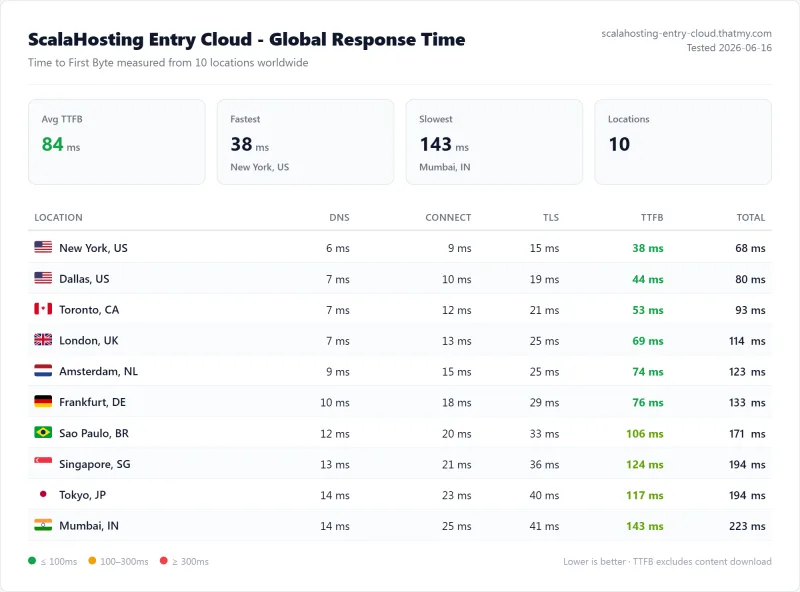
ScalaHosting was the fastest plan under load in our WordPress benchmark: 58ms with 100 concurrent users, after 38ms for a single visitor. Entry Cloud gives you two dedicated CPU cores on an AMD EPYC 9474F, the fastest server CPU we found under any host, so carts and checkouts do not wait behind other customers' sites. It is a managed VPS with ScalaHosting's own SPanel control panel and email for your domains included.
It is third rather than higher because we have not run the store test on it yet, and because the low price needs a term: $14.95/mo for the first 12 months or $24.95/mo on 36 months, then $39.95/mo. Month to month it is $34.95/mo. Current discounts are on our ScalaHosting coupon page.
#4. Kinsta: Premium Managed Hosting for One Store
- 92ms with 100 concurrent users
- 64ms TTFB from New York, US, 99.99% uptime
- AMD EPYC 7502, PassMark #248 of 5,999
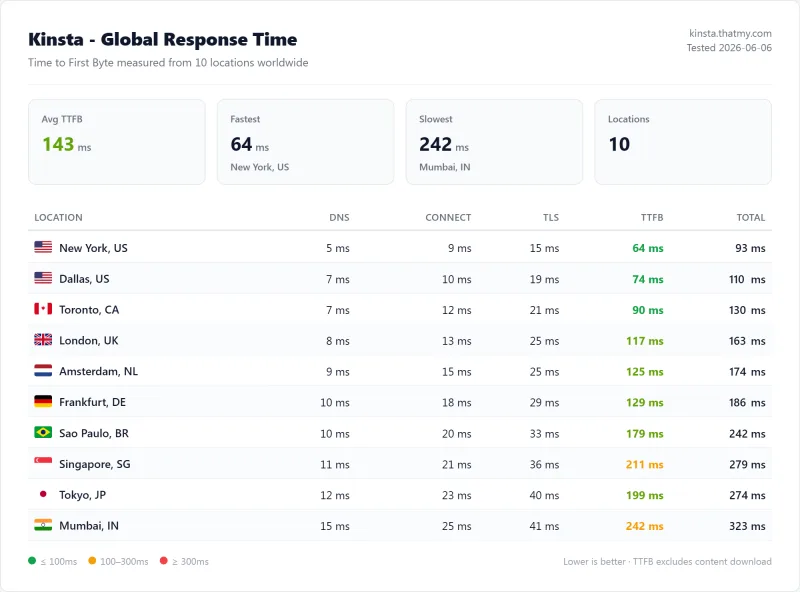
Kinsta runs on Google Cloud and handles caching, security and backups for you. Under load it was the third-best plan of our WordPress benchmark, 92ms with 100 concurrent users, and it had the highest PageSpeed score of any plan we tested (93/100). The price stays the same at renewal.
For a store, watch the limits. Single 20GB is one WordPress install with 10GB of storage, visits above the allowance are billed as overage, and more PHP capacity is a monthly add-on, as is Redis object caching. Kinsta describes running out of PHP capacity as requests queuing or timing out, which at checkout means lost orders, so price the add-on in if your store is growing.

#5. WP Engine: Dedicated eCommerce Plans, Slow Entry Plan
- 487ms with 100 concurrent users
- 242ms TTFB from New York, US, 99.97% uptime
- Intel Xeon Gold 6242R, PassMark #444 of 5,999
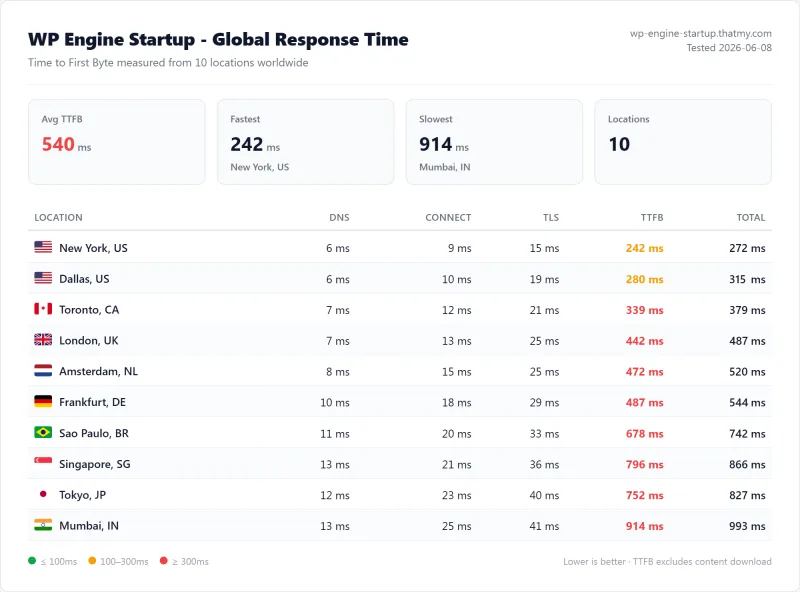
WP Engine's Startup plan costs about what Kinsta costs but tested well behind it: 242ms for one visitor and 487ms with 100. Startup allows one site and 25,000 visits a month with chat support. For stores, WP Engine sells separate eCommerce plans: eCommerce Essential starts at $150.00/mo for one store and 100,000 monthly visits on a shared environment. We have not tested those plans.
WP Engine keeps a list of disallowed plugins, mostly caching and backup plugins that overlap its own features, so check it against your store's plugins before you move.
#6. Hostinger: Cheapest Start, One CPU Core Under Load
- 109ms TTFB from Frankfurt, DE, 520ms with 100 concurrent users
- 40 PHP workers on 1 CPU core and 2GB of RAM
- AMD EPYC 7352, PassMark #375 of 5,999
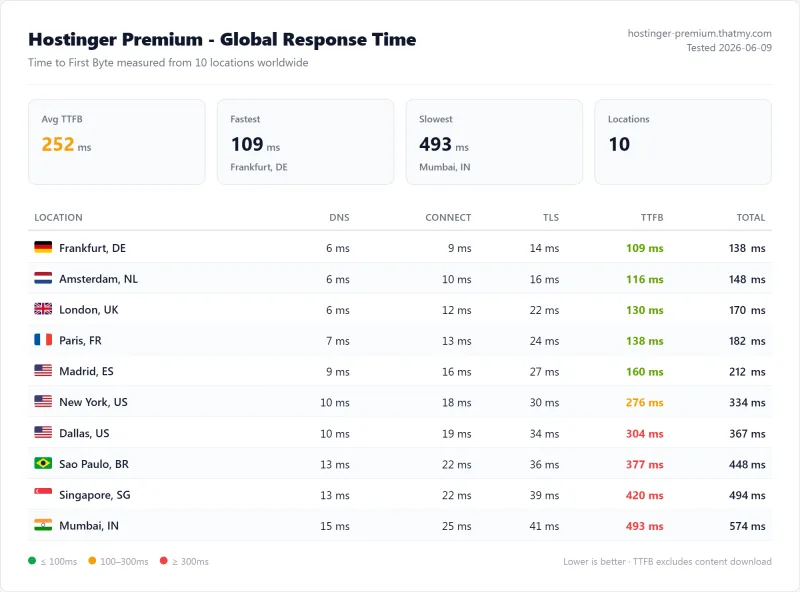
Hostinger put our test site in Europe and answered in 109ms from Frankfurt, DE, a good figure for one visitor. With 100 users at once it took 520ms. Hostinger publishes its limits, and they explain why: Premium has 40 PHP workers but one CPU core, so under load the workers take turns on it. For a store, that is the difference between a checkout that answers at once and one that waits.
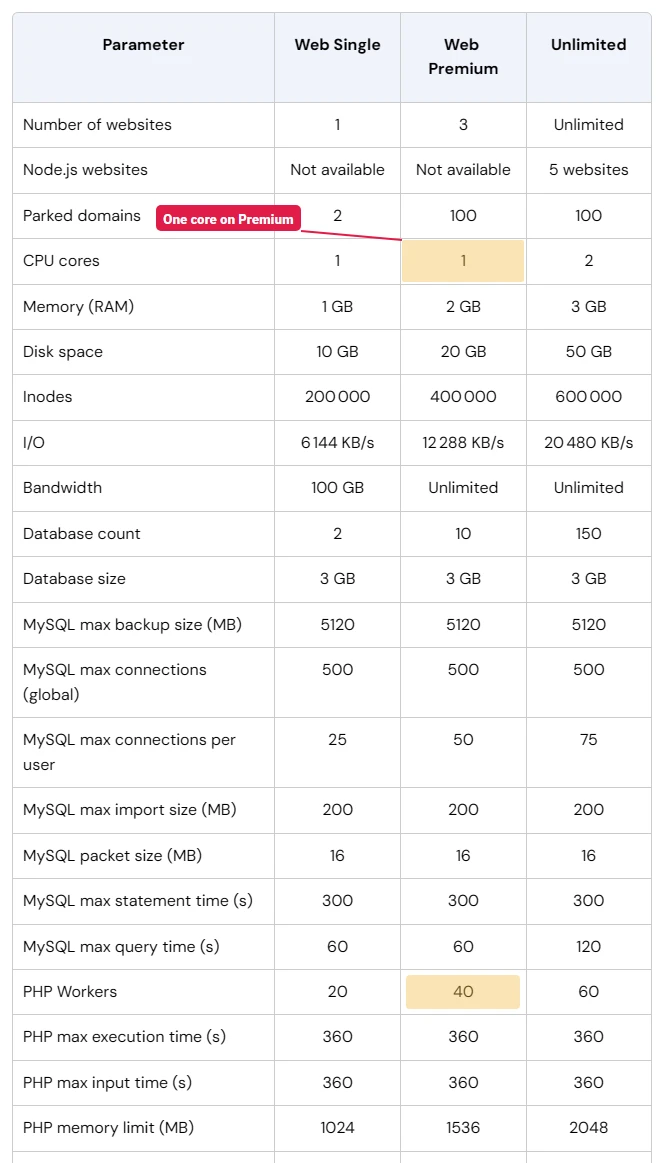
It is still the cheapest way to open a small shop. The lowest price, $2.99/mo, needs a 48-month prepayment; on 12 months it is $3.99/mo, and both renew at $10.99/mo.
#7. Hosting.com (Formerly A2 Hosting): LiteSpeed, Middling Under Load
- 152ms TTFB from New York, US, 534ms with 100 concurrent users
- 99.931% uptime over 54 days
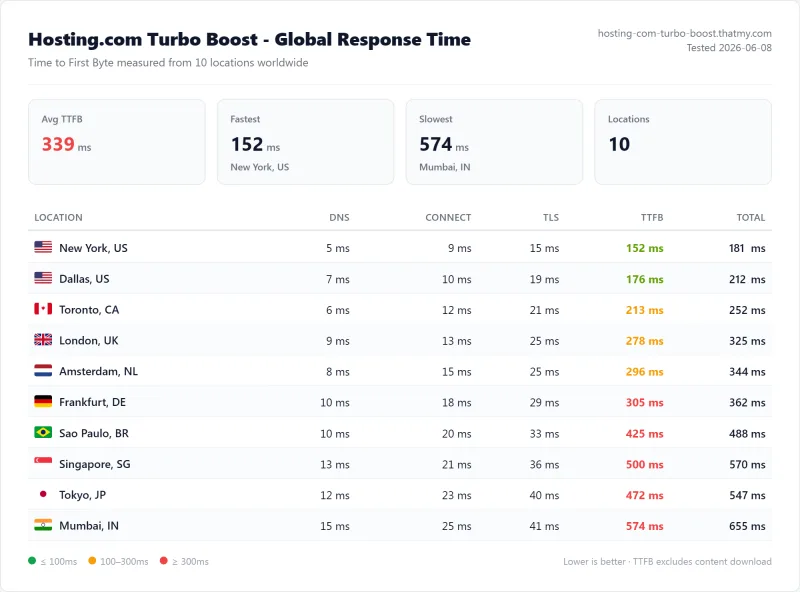
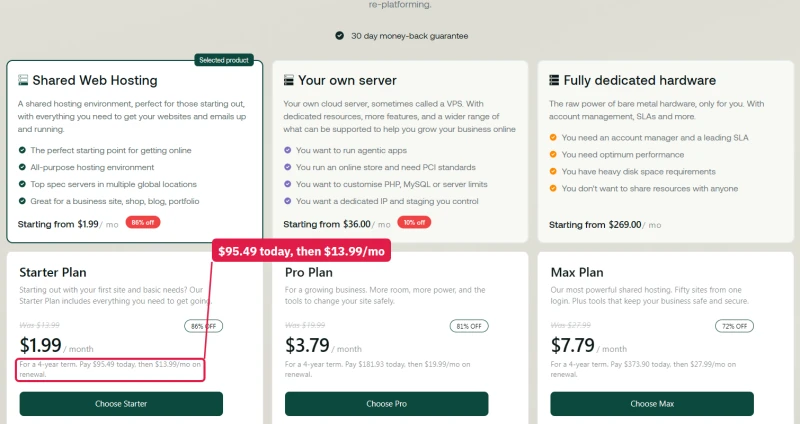
We tested A2 Hosting's Turbo Boost plan, sold today by hosting.com after World Host Group bought A2 in 2025. It runs LiteSpeed, which serves cached product pages quickly, but with 100 users it answered in 534ms, mid-table. Read the terms before you buy: the lowest shared prices need a four-year term paid up front, and the renewal price is printed in small type under each plan.
#8. InMotion Hosting: Cheap Start, Renewal Doubles
- 210ms TTFB from New York, US, 660ms with 100 concurrent users
- 99.931% uptime, 54 minutes down in 54 days
InMotion's Launch plan answered in 210ms for one visitor and 660ms with 100, with 99.931% uptime. It is cheap for the first year, $4.79/mo, and $14.99/mo after that. For a small US store that starts on the first-term price it is workable; plan the move to something with dedicated cores before the store gets busy.
#9. SiteGround: Good Caching, Slowest Under Load
- 123ms TTFB from Frankfurt, DE, 900ms with 100 concurrent users
- Intel Xeon Gold 6248R, PassMark #432 of 5,999
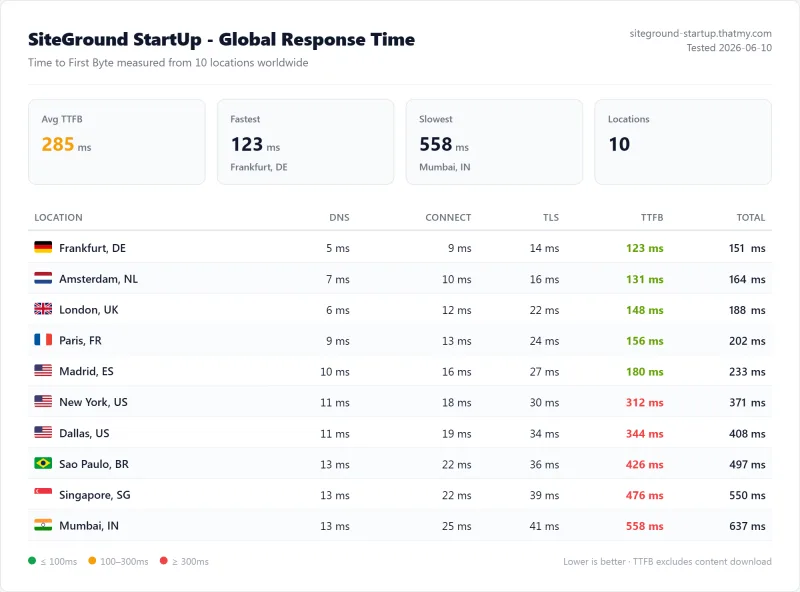
SiteGround switches on NGINX static caching and full-page dynamic caching for every site, which is why its cached pages are quick: 123ms from Frankfurt, DE. Carts and checkouts skip that cache, and with 100 concurrent users StartUp took 900ms, the slowest result of the plans on this page. The renewal is steep as well: StartUp goes from $3.99/mo to $17.99/mo after the first year, and GrowBig from $6.69/mo to $29.99/mo.
Also Compared: Nexcess and Rocket.net
Nexcess: not tested yet
Nexcess, part of Liquid Web, sells managed WordPress and WooCommerce hosting and is often recommended for stores. We have not tested it, so it is not ranked. Its entry managed WordPress plan, Spark, is $15.83/mo billed yearly or $19.00/mo monthly, for one site with 15GB of storage and 2TB of bandwidth, and Nexcess keeps the price you sign up at, with no higher renewal rate. It is on our list for the next store test.
Rocket.net: fast at the edge, old hardware at the origin
Rocket.net puts every site behind Cloudflare Enterprise, and cached pages answered in 32ms, measured at the Cloudflare edge. That is not the number a store runs on: carts and checkouts go past the edge to the origin server, and Rocket.net's origin CPU is an Intel Xeon E5-2667 v2, PassMark #1,543 of 5,999, a chip from 2013. We have no origin or 100-user figure for it, so it is compared here rather than ranked. Rocket.net joined hosting.com, part of World Host Group, in 2025. Rocket.net review.
Why WooCommerce Checkout Skips the Page Cache
A page cache stores a finished copy of a page and hands it to the next visitor without running WordPress. That works for anything that looks the same for everyone: the home page, product pages, categories and blog posts. It cannot work for a cart, a checkout or an account page, because each one belongs to one shopper. Those pages run PHP and query the database on every request, and so does product search.
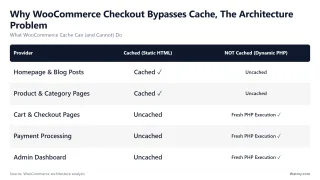
That is why a homepage speed test says little about a store. In our store test, cached browsing was easy for every server, Levamo Starter included, all the way to 200 shoppers. The servers only separated on the cart, checkout and search traffic, which is what the results above measure.
PHP Workers and CPU Cores: What Limits a Store
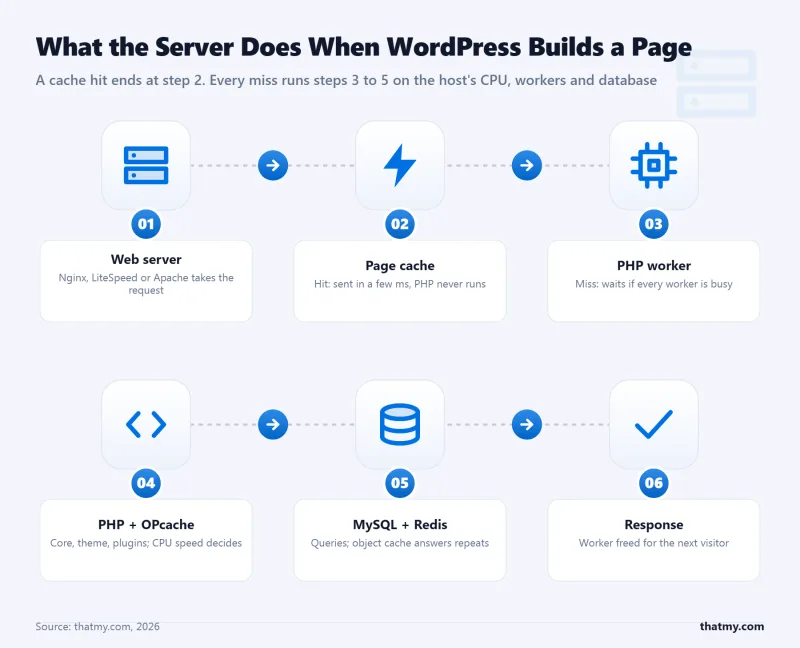
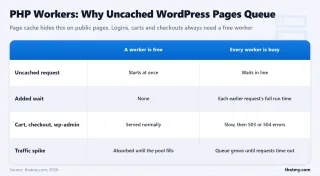
A PHP worker builds one uncached page at a time, and a plan has a fixed number of them. While they are all busy, every new cart or checkout waits in a queue, and if the wait is long enough the shopper gets an error. But a worker needs a CPU core to run on, and the core count is the limit that bites first. Hostinger Premium lists 40 workers on one core, so under load they take turns; that is why it went from 109ms for one visitor to 520ms with 100.
| Plan | CPU | Memory | On our tests |
|---|---|---|---|
| Levamo Business | 1.4 GHz limit drawn; used up to 8.8 GHz under load | 2.8GB limit | 6.7 checkout journeys a second |
| Cloudways Vultr HF 8GB | 3 vCPU, your own server | 8GB | 7.5 checkout journeys a second |
| Cloudways Vultr HF 4GB | 2 vCPU, your own server | 4GB | 4.7 checkout journeys a second |
| ScalaHosting Entry Cloud | 2 dedicated CPUs | 2GB | 58ms with 100 users |
| Hostinger Premium | 1 core, 40 PHP workers | 2GB | 520ms with 100 users |
| Kinsta Single 20GB | not published | not published | 92ms with 100 users; extra PHP threads sold as an add-on |
Most hosts do not publish CPU, memory or worker counts. The load tests are how we see what a plan really gets.
The Server CPUs Under Each Host, Ranked
PHP runs mostly on one core per request, so the CPU's speed decides how long an uncached cart or checkout takes to build, and the number of cores decides how many can be built at once. We identified the server CPU under each plan and looked up its PassMark score among 5,999 server CPUs.
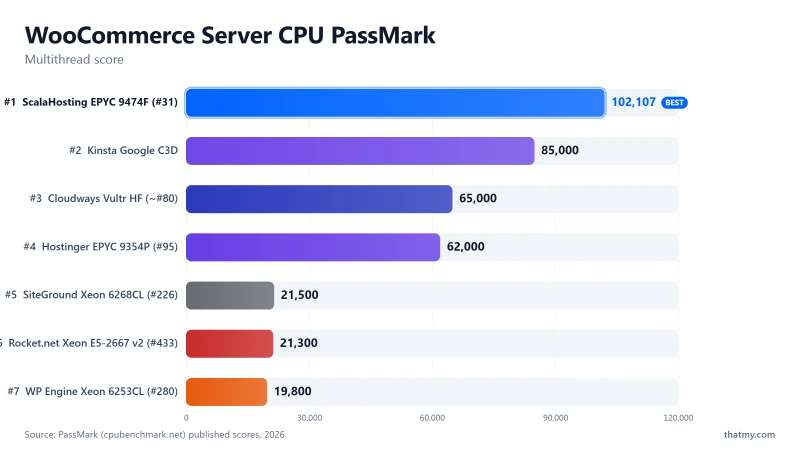
| Host | Server CPU | PassMark rank | Multithread score |
|---|---|---|---|
| ScalaHosting | AMD EPYC 9474F | #42 of 5,999 | 102,255 |
| Kinsta | AMD EPYC 7502 | #248 of 5,999 | 51,871 |
| Hostinger | AMD EPYC 7352 | #375 of 5,999 | 39,906 |
| SiteGround | Intel Xeon Gold 6248R | #432 of 5,999 | 36,067 |
| WP Engine | Intel Xeon Gold 6242R | #444 of 5,999 | 35,076 |
| Rocket.net | Intel Xeon E5-2667 v2 | #1,543 of 5,999 | 12,150 |
Cloudways' Vultr High Frequency servers are documented as Intel Xeon at 3GHz and up, with no model number to look up, so they have no rank here. Levamo does not publish its CPU model.
What WooCommerce Hosting Costs Over Three Years
First-term prices hide most of the bill. This table adds up three years on the plans on this page: the first term at the introductory price and the rest at the renewal price, from our price records.
| Host and plan | First term | Renewal | 3-year total | Store-tested |
|---|---|---|---|---|
| Levamo Business | $99.00/mo billed yearly | $99.00/mo | $3,564 | Yes: 6.7 checkouts a second |
| Levamo Performance | $299.00/mo billed yearly | $299.00/mo | $10,764 | Yes: 19 checkouts a second |
| Cloudways Vultr HF 4GB | $60.00/mo billed monthly | $60.00/mo | $2,160 | Yes: 4.7 checkouts a second |
| Cloudways Vultr HF 8GB | $118.00/mo billed monthly | $118.00/mo | $4,248 | Yes: 7.5 checkouts a second |
| ScalaHosting Entry Cloud, 36-month term | $24.95/mo 36 months prepaid | $39.95/mo | $898 | not yet |
| Kinsta Single 20GB | $29.17/mo billed yearly | $29.17/mo | $1,050 | not yet |
| WP Engine Startup | $25.00/mo billed yearly | $25.00/mo | $900 | not yet |
| Nexcess Spark | $15.83/mo billed yearly | $15.83/mo | $570 | not yet |
| Hosting.com Turbo Boost | $14.99/mo 12 months | $34.99/mo | $1,020 | not yet |
| SiteGround GrowBig | $6.69/mo 12 months | $29.99/mo | $800 | not yet |
| InMotion Launch | $4.79/mo 12 months | $14.99/mo | $417 | not yet |
| Hostinger Premium | $3.99/mo 12 months | $10.99/mo | $312 | not yet |
Prices before tax. Levamo, Cloudways, Kinsta, WP Engine and Nexcess charge the same at renewal. ScalaHosting renews at $39.95/mo after the 36-month term. The shared plans at the bottom are cheapest over three years, and also the slowest under load on our benchmark.
SPanel vs cPanel on a Store Server
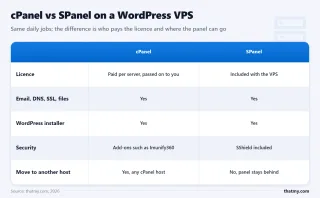
On a VPS, the control panel runs on the same CPU and memory as your store. ScalaHosting includes its own panel, SPanel, instead of cPanel, so there is no separate cPanel licence on the bill, and it takes less of the server for itself. Tom Dupuis of Online Media Masters, who moved his own site to ScalaHosting, puts it at "~2x less resources than cPanel". On a 2GB server, every megabyte the panel does not use is left for PHP and the database.
What Other Testers Found
Tom Dupuis runs Online Media Masters and has moved his own WordPress site between several of the hosts on this page. His ScalaHosting review is worth reading beside our numbers, because it comes from a live site rather than a test store. Three of his findings match ours:
"Every benchmark improved and my site/admin load faster than ever."
Tom Dupuis, on moving to ScalaHosting, Online Media Masters
"This is why my website/admin weren't fast despite a 100ms global TTFB with Cloudflare Enterprise."
Tom Dupuis, on Rocket.net's 2013 Intel Xeon origin servers, Online Media Masters
"a 4 CPU core + 8GB RAM server is $118/mo on Cloudways Vultr High HF, $100/mo on SiteGround cloud, or $35.95/mo on Scala's Build #2."
Tom Dupuis, Online Media Masters
The Cloudways figure in that last quote matches our price records: the Vultr High Frequency 8GB server is $118.00/mo, and on our store test it handled 7.5 checkout journeys a second. His point stands for anyone sizing a VPS: the same cores and memory cost very different amounts at different hosts. Where we part ways is on Cloudways itself. Tom notes that "Cloudways has lots of complaints about 100% CPU usage", and we saw its monitoring flag our 4GB server at 100% CPU under load. It still finished every step without an error, and per dollar it gave more checkout capacity than anything else we tested.
For sizing, Tom's rule of thumb is one CPU core and 2GB of RAM for every 250,000 monthly pageviews, closer to 150,000 for dynamic, resource-hungry sites, which is what a store is. Treat it as a starting point and watch your server's CPU in your busiest hour.
Who Owns Your WooCommerce Host
World Host Group owns hosting.com, which took over A2 Hosting in 2025, and Rocket.net joined hosting.com the same year. Nexcess is part of Liquid Web, and Cloudways is part of DigitalOcean. Levamo, ScalaHosting and Kinsta are independent, and InMotion is employee-owned.
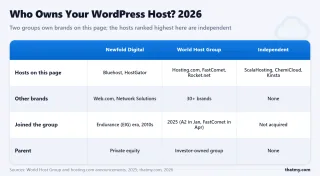
Ownership does not change a benchmark by itself, but it matters before you prepay a multi-year term: renewal prices, support teams and data centres tend to change after an acquisition, and moving a live store is more work than moving a blog.
Which Host Fits Your Store
| Your store | Our pick | Why, from the tests | Price |
|---|---|---|---|
| Busy or growing store, hands-off | Levamo Business | 6.7 checkout journeys a second, object cache included | $99.00/mo billed yearly |
| Large catalogue, heavy traffic | Levamo Performance | 19 checkout journeys a second, Elasticsearch for typo-tolerant search | $299.00/mo billed yearly |
| Most capacity for the money | Cloudways Vultr HF | 7.9 checkout journeys a second per $100; no errors at any step | $60.00/mo for 4GB |
| New store on a budget, email included | ScalaHosting Entry Cloud | Best 100-user response on our benchmark: 58ms | $14.95/mo on 12 months |
| Small shop, few orders | Levamo Starter | 1.3 checkout journeys a second, about 4,700 an hour | $29.00/mo billed yearly |
| One store, premium managed | Kinsta Single 20GB | 92ms with 100 users, same price at renewal | $29.17/mo billed yearly |
What We Have Not Tested Yet
- The store test on ScalaHosting, Kinsta, WP Engine, Hostinger, SiteGround, InMotion and hosting.com. Their figures here come from our WordPress benchmark. They are next in line for the same store.
- Nexcess and WP Engine's eCommerce plans. Not tested at all yet.
- Real payments. Our checkout journey stops at the checkout page, so payment gateways and order e-mails are not part of the result.
- Levamo on the 10-location WordPress benchmark. Its current plans launched after our last benchmark round; the store test stands in until the next one.
What I Would Choose for My Own Store
For a store that matters to me, I would start on Levamo Business: it handled five times the checkout traffic of Starter, keeps an object cache running for carts and accounts, and costs the same at renewal. If the catalogue were large or the store busy, I would go straight to Performance for the capacity and the typo-tolerant search. If I wanted the most capacity for the least money and was happy to size the server myself, I would take a Cloudways Vultr High Frequency server and resize as the store grows. On a tight budget, ScalaHosting's Entry Cloud gives a new store its own CPU cores and email for less than either.

WooCommerce Hosting FAQ
What is the best WooCommerce hosting?
Levamo, on Business or Performance. On the same 10,000-product store, Business handled 6.7 checkout journeys a second and Performance 19, and both kept their database up with 200 shoppers at once, on a managed platform with an object cache and, on Performance, Elasticsearch. Cloudways is second and gives the most checkout capacity per dollar: its Vultr High Frequency 8GB server handled 7.5 checkout journeys a second at $118.00/mo, and never failed a request.
Is Levamo Starter enough for a WooCommerce store?
For a small shop, yes. Starter handled 1.3 checkout journeys a second, about 4,700 an hour, and its cart pages stayed up with 50 shoppers at once. Its database stopped at 100 shoppers going straight to checkout at the same time, which is a far heavier load than a small shop meets. If your store is busy or growing, start on Business, which has five times the checkout capacity and an object cache, and move to Performance when you need Elasticsearch.
Is Cloudways good for WooCommerce?
Yes, and it is the best value we measured. Per $100 a month of list price, the Vultr High Frequency 4GB server handled 7.9 checkout journeys a second, more than any Levamo plan, and no Cloudways server returned an error in the test. You size the server yourself and resize it when the store grows. Email is a paid add-on, and on a new account expect Cloudways' fraud checks: our panel was locked three times during testing, while the stores kept serving.
Does a WooCommerce store need Elasticsearch?
A large catalogue does, for search quality rather than speed. With Elasticsearch on, Levamo Performance found 413 treadmills for the misspelling "tredmill"; Business, on plain WordPress search, found none. It did not raise search capacity: Performance served about 54 uncached searches a second with it and 53 without. Levamo includes Elasticsearch on Performance, switched off until you enable it.
Why is WooCommerce slower than a normal WordPress site?
Because the pages that make money cannot be cached. Cart, checkout, account and search pages are built for one shopper at a time, so every visit runs PHP and queries the database. A page cache makes product and category pages fast for everyone, but checkout speed depends on the server's CPU, its PHP workers and its database.
Can I run WooCommerce on shared hosting?
A small store can. The limit shows when many shoppers are in the cart at once: on our WordPress benchmark, Hostinger Premium answered in 109ms for one visitor and 520ms with 100, and SiteGround StartUp took 900ms. Plans with their own CPU cores stayed under 100ms. When checkout starts to feel slow, move to a cloud server or a managed WooCommerce plan.
How big a server does a WooCommerce store need?
Start from your busiest hour, not your monthly visits. On our store test, a Cloudways server with 2 vCPUs and 4GB handled 4.7 checkout journeys a second and one with 3 vCPUs and 8GB handled 7.5. Tom Dupuis of Online Media Masters suggests one CPU core and 2GB of RAM for every 250,000 monthly pageviews, closer to 150,000 for heavy, dynamic sites like stores. Pick a host that lets you resize without moving the store.
When is this page tested again?
When a host changes the plan we tested or we run a new test round. The changelog at the end of the page lists every update.