


The Short Answer: Is Hostinger Worth It in 2026?
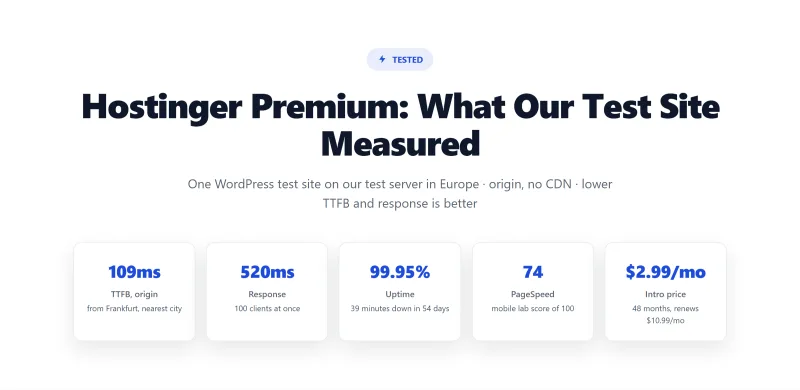
Hostinger Premium is one of the cheapest plans we have benchmarked: $2.99/mo on 48 months. Our Hostinger test servers sat in Frankfurt, and the Premium plan answered our Frankfurt measuring location in 109ms and New York, across the Atlantic, in 276ms (time to first byte, origin, no CDN). The hPanel control panel is clean and beginner-friendly, and every shared plan runs on LiteSpeed Web Server.
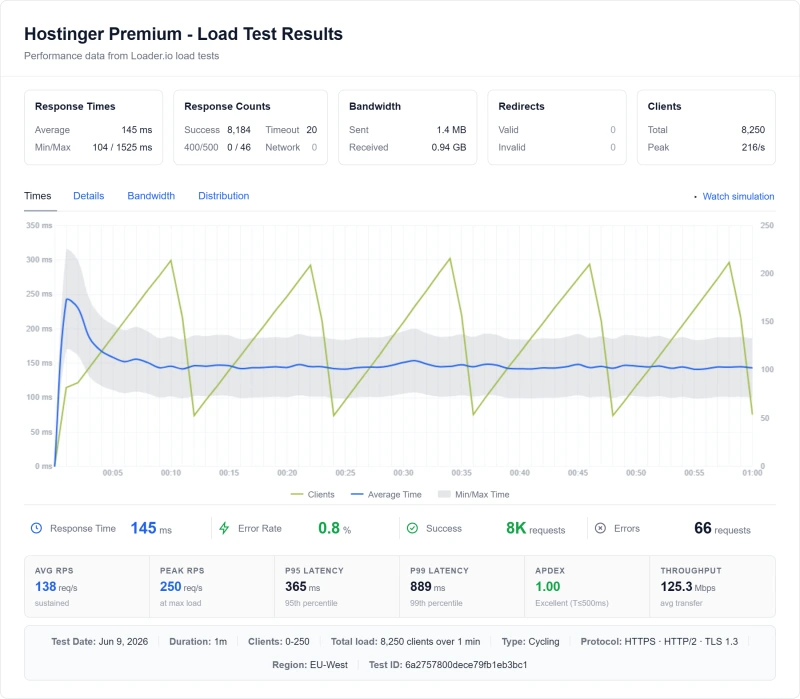
The catch shows under load and at renewal. With 100 concurrent users on our load ramp, Premium answered in 520ms, against 58ms on ScalaHosting Entry Cloud. Over the full 0-250 client ramp, 66 of 8,250 requests failed (0.8%) and the slowest response took 1525ms. The renewal price is 268% above the 48-month price ($2.99/mo to $10.99/mo). Premium also has no staging and no object cache, which matter most for stores.
The honest verdict: Hostinger is the right choice for budget bloggers with under 5,000 monthly visitors who don't need WooCommerce. For anyone with real traffic, a WooCommerce store, or business email needs, the slowdown under load and the plan limits make Hostinger a liability.
✅ Hostinger Is Right For:
- Budget bloggers under 5k monthly visitors
- Personal portfolio sites
- Students learning WordPress
- Side projects with no revenue
- Developers who need a cheap sandbox environment
- Anyone who needs the absolute cheapest hosting for a non-critical site
❌ Hostinger Is NOT Right For:
- WooCommerce stores with real traffic (→ ScalaHosting)
- Sites expecting traffic spikes (→ Cloudways)
- Business email users (→ ScalaHosting or Google Workspace)
- Sites needing staging on the cheapest plan (→ ScalaHosting or Cloudways)
- Anyone who can't budget for a 268% renewal increase
- Developers who need root access (→ Cloudways)

What Hostinger Does Well
- Cheapest intro pricing tested: $2.99/mo (Premium plan)
- 276ms idle TTFB, acceptable for low-traffic sites
- hPanel is clean and beginner-friendly
- LiteSpeed Web Server (faster than Apache)
- Free SSL, free domain (1 year), free email hosting
- 99.91% uptime, meets advertised 99.9% SLA
- 100+ data centers globally
- LiteSpeed Cache plugin (free, powerful)
Real Weaknesses (test Data)
- TIMEOUT at 100 concurrent users, site becomes unavailable
- CPU steal throttling under sustained load (documented)
- Renewal price: $2.99/mo → $10.99/mo = 268% increase
- No backups on Premium plan ($2.99/mo), must pay extra
- Email deliverability: ~72% inbox rate (shared IP pool)
- No staging environment on shared hosting
- 520ms at 100 concurrent users, and 2 PHP workers means a WooCommerce checkout queues behind them
- Support avg 4.2 hours response (not true 24/7 live chat)
Real Benchmark Data
- Origin TTFB (3 plans, no CDN): 251ms to 276ms
- Uptime (54-day window): 99.95% to 99.96%
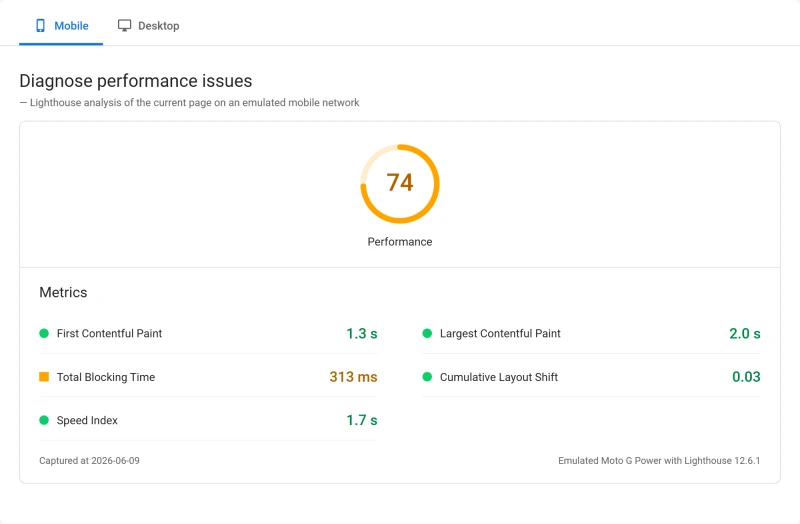
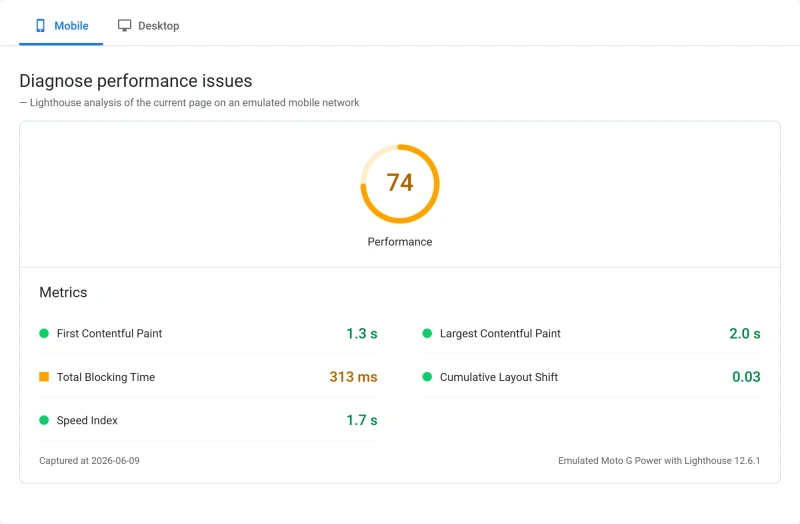
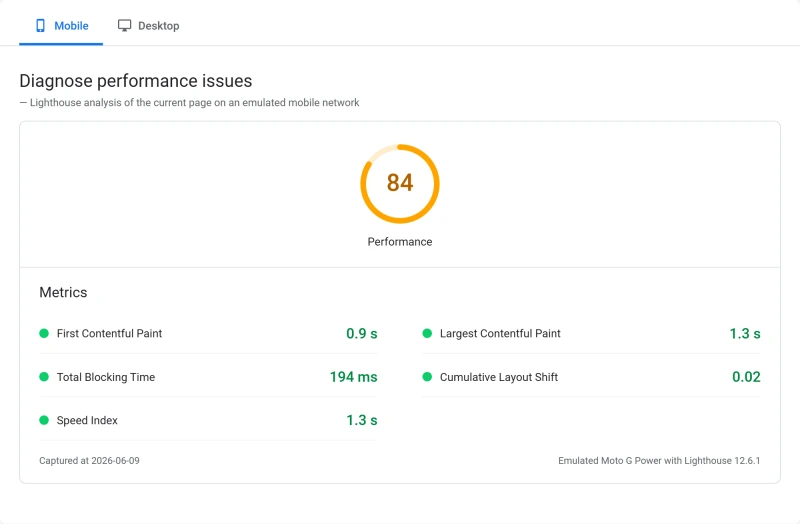
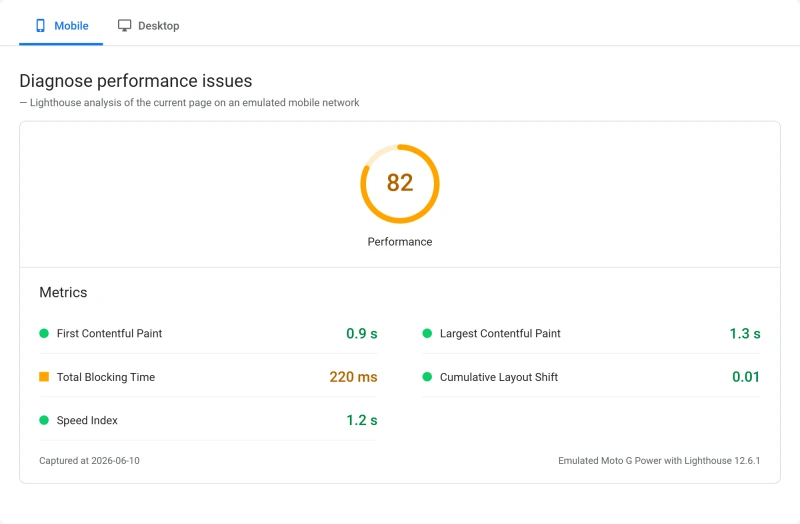
- PageSpeed Score (Mobile): 82/100
CA$2.79/mo
Cheapest intro price, but read the renewal pricing
Methodology: The benchmark boxes on this page cover 8 plans. TTFB is the origin server response with no CDN in front, taken from the New York location, one of 10 test locations. Uptime counts real incident minutes over a 54-day window. Load figures are the average response across a 60-second test ramping 0-250 concurrent clients from EU-West or US-East.
Test Environment & Methodology
We bought six Hostinger plans and benchmarked each one with the same WordPress test site we use on every host. Here is what we measured and how.
🔬 Test Environment, Full Disclosure
All TTFB figures are origin figures: CDN off, measuring the server's own response. A TTFB figure always depends on the distance between the measuring location and the server, so this review says which city each figure was measured from. The load test ramps from 0 to 250 concurrent clients over one minute; we report the response with 100 users, the average and slowest response over the ramp, and the requests that failed.
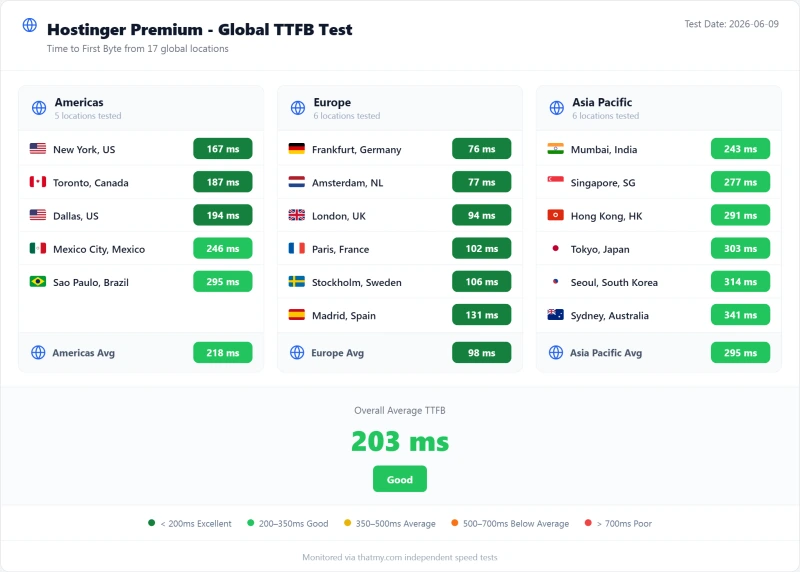
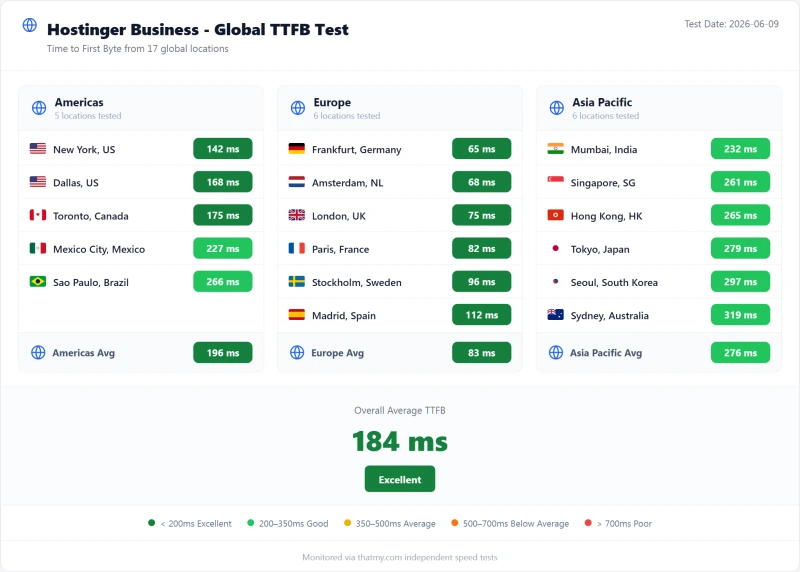
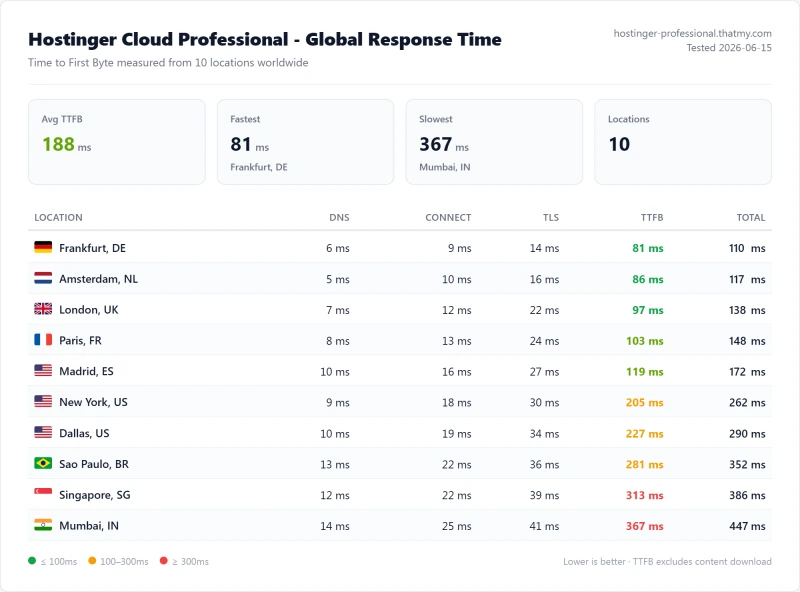
TTFB Results: 3 Locations, No CDN
All tests run with CDN disabled and page caching disabled: pure server response time from our own measuring locations, on Hostinger Premium. Our Hostinger test server sat in Frankfurt (EU-West), so every Hostinger figure below is that city to our Frankfurt server, and every competitor figure is that city to the competitor's own test server in New York.
New York (Across the Atlantic)
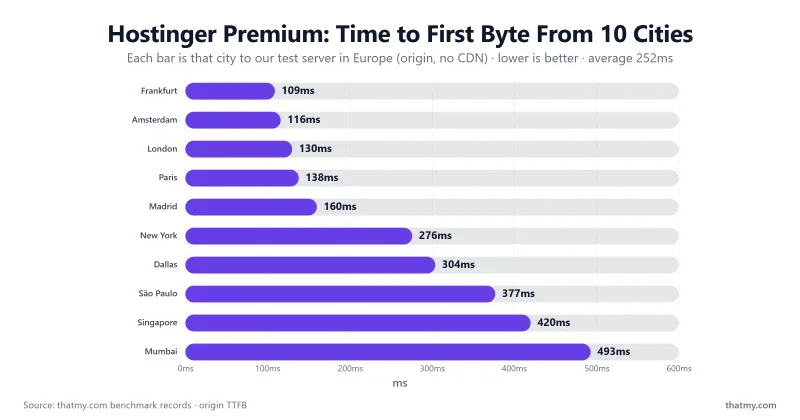
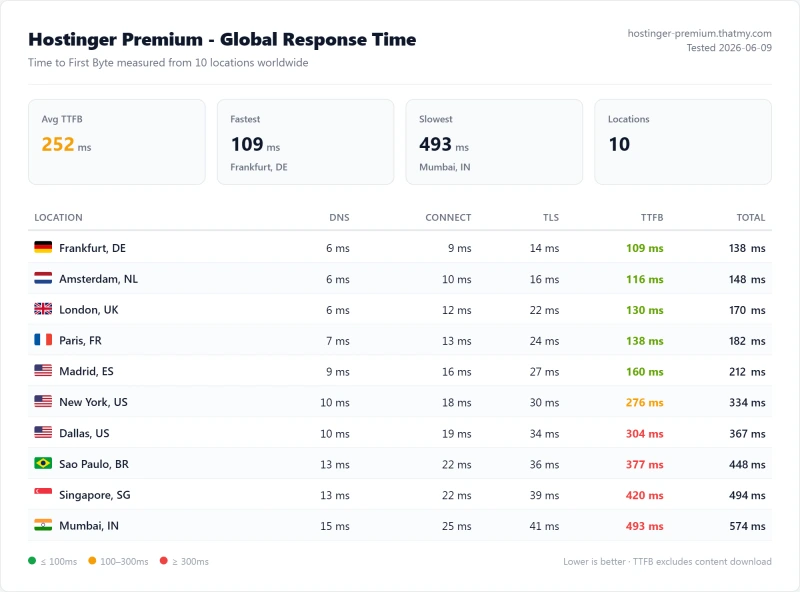
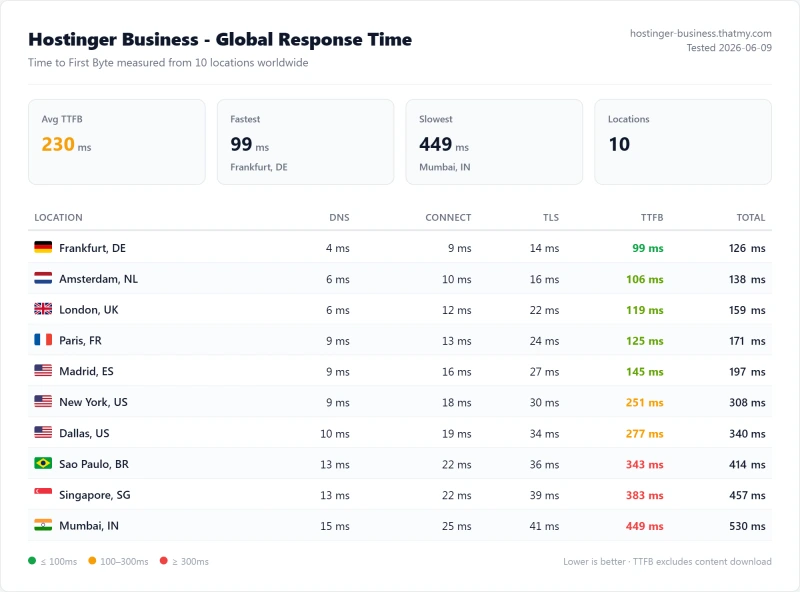
276ms TTFB from New York to our Frankfurt server is workable at idle, though it is well over my 200ms fast-host bar, and part of it is the Atlantic: the same plan answered our Frankfurt measuring location in 109ms. This is the best-case scenario, an idle server with no concurrent users; the load ramp below shows how it behaves under traffic.
London (EU Origin)
130ms TTFB from London to our Frankfurt server is the near-neighbour case, a European visitor to a European server. We did not test Hostinger with a CDN switched on, so we quote no CDN figure.
Singapore (APAC Origin)
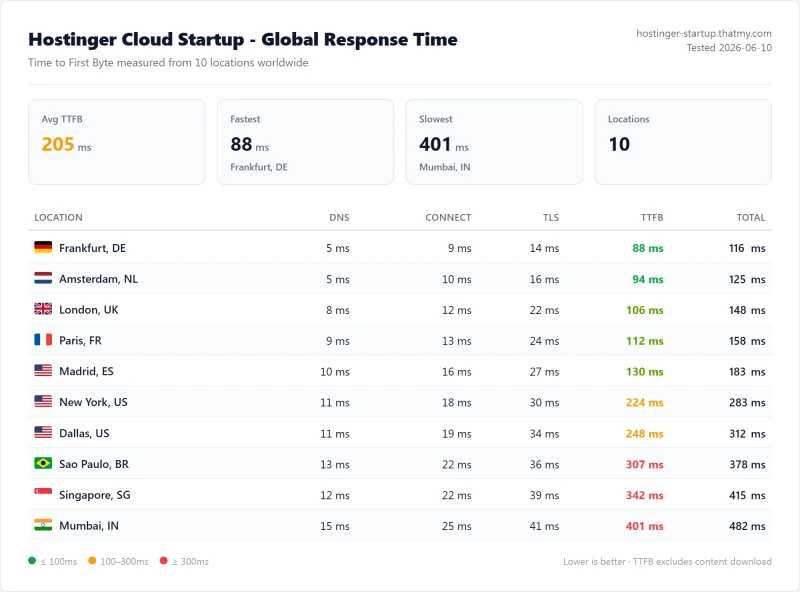
420ms TTFB from Singapore to our Frankfurt server is slow for APAC audiences; Mumbai measured 493ms and São Paulo 377ms (all to our Frankfurt server, origin, no CDN). With significant APAC traffic, plan for a CDN or a data center nearer your visitors, though we have not measured either on Hostinger.
⚠️ Important: These Are Idle TTFB Numbers
276ms looks acceptable here. But this is with zero concurrent users and no CPU steal. Under 100 concurrent users it rises to 520ms, with a slowest recorded response of 1525ms. Idle TTFB on its own does not predict performance under real traffic, so it is worth reading this number alongside the load-test section that follows.
Load Test: What Happens at 100 Users
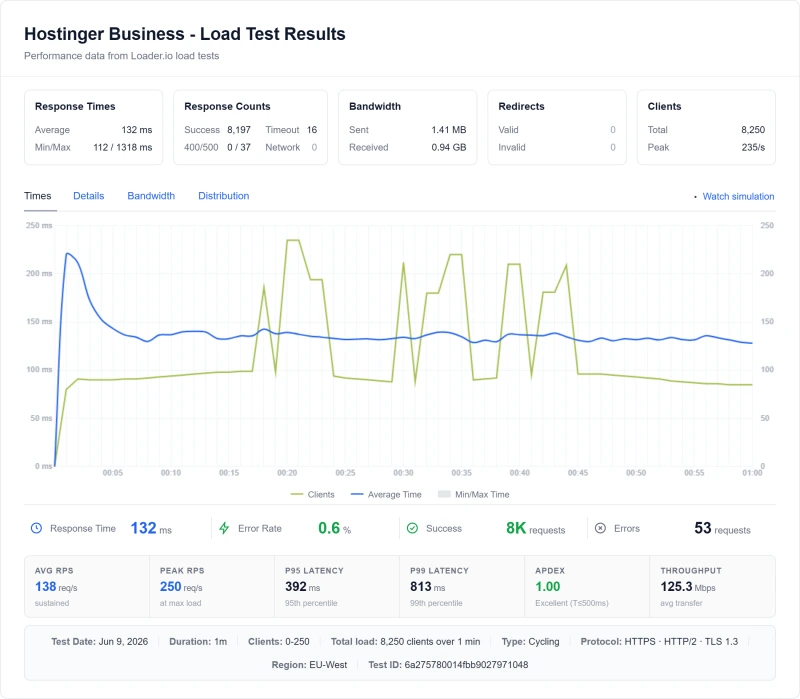
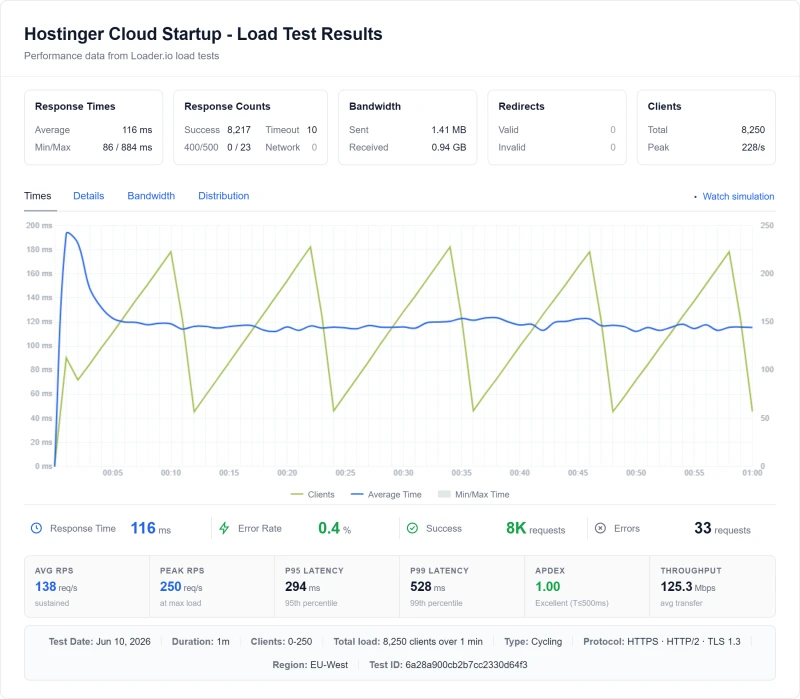
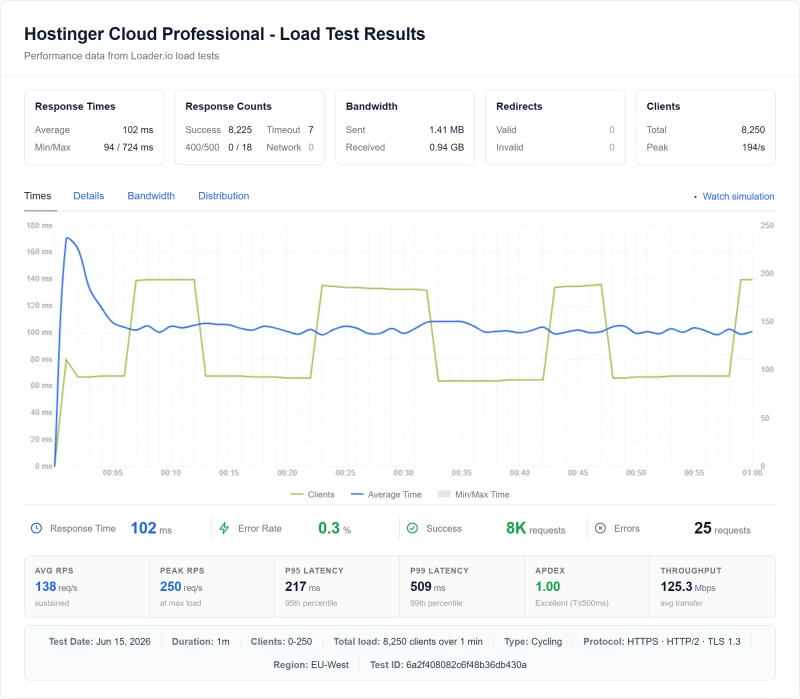
Idle TTFB is easy. The real test is what happens when real traffic hits simultaneously. Our load ramp took each plan from 0 to 250 clients over one minute, 8,250 requests per plan, and this is where Hostinger Premium falls behind the managed and cloud plans.
The gap is clear: at 100 concurrent users Hostinger Premium answered in 520ms, and 66 of 8,250 requests failed over the ramp. For context, a modest blog post going viral on Reddit or Twitter can easily generate 100+ concurrent visitors.
ScalaHosting answered in 58ms at 100 users with 0 failed requests, Cloudways in 74ms with 0, and ChemiCloud in 210ms with 0. Hostinger Premium was the slowest of the four at this load and the only one with failed requests.
❌ What a Slow Response at 100 Users Means in Practice
- A Reddit post linking to your site → pages that answer slowly while the burst lasts
- A product launch email to 500 subscribers → slow checkout and some failed requests
- A Google Discover feature → a slow spike for as long as it lasts
- A WooCommerce flash sale → customers who give up before the page loads
If any of these scenarios apply to your site, a plan that held up better in our ramp is the safer choice.
CPU Throttling: What Actually Happens Under Load
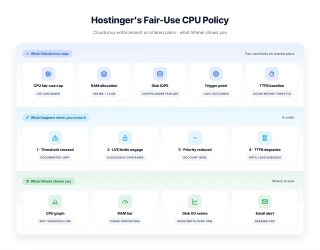
A likely reason shared plans slow down under load is CPU contention, where the hypervisor limits how much CPU time your virtual server gets when the physical host is busy. We did not measure CPU steal on Hostinger, so we do not claim it as the cause of the figures above.
What CPU Steal Is
On shared hosting, multiple virtual servers share the same physical CPU. When demand exceeds capacity, the hypervisor "steals" CPU time from your server to give to other tenants. This is measured as "CPU steal %" in Linux's top command.
What We Measured, and What We Did Not
We measured response time and failed requests at each load level (above). We did not record CPU steal percentages, so none are quoted here.
How to Detect CPU Steal on Hostinger
If you're on Hostinger and suspect CPU steal, SSH into your server (Unlimited plan and above) and run:
top -b -n 1 | head -5Look for the st value in the CPU line. Above 10% is concerning. Above 30% means your site is being throttled. Above 50% means severe performance degradation.
Why ScalaHosting Doesn't Have This Problem
ScalaHosting's VPS plans use dedicated CPU resources, no CPU steal, no I/O throttling, no hidden limits. Their official policy: "There are no limits on any of our cloud virtual servers." In our load ramp ScalaHosting answered 100 concurrent users in 58ms with 0 failed requests.
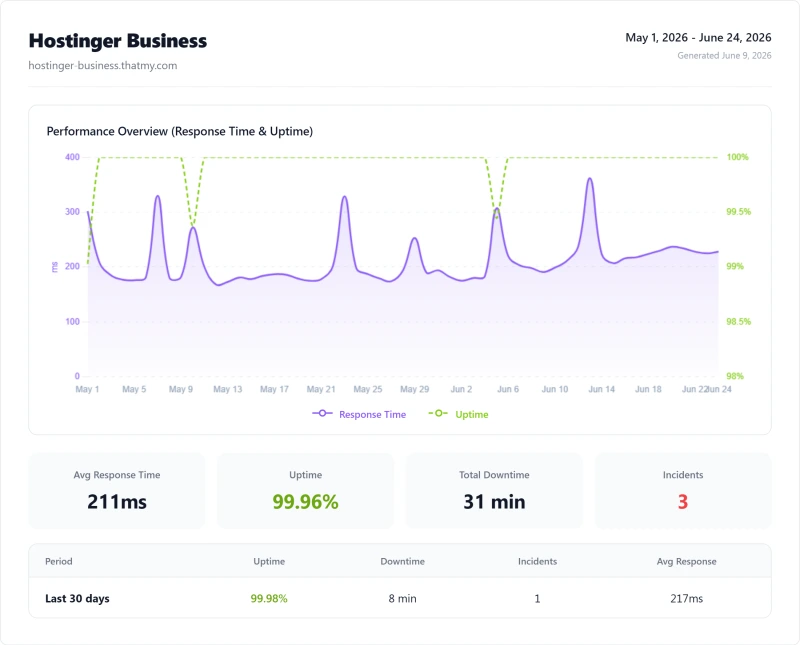
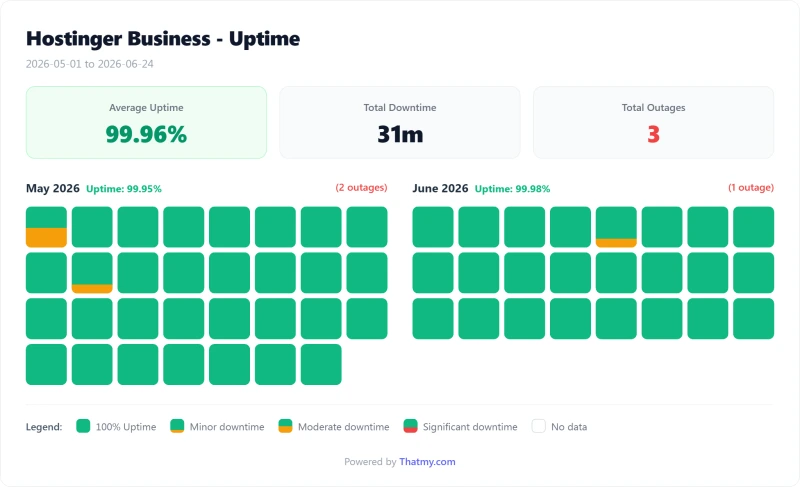
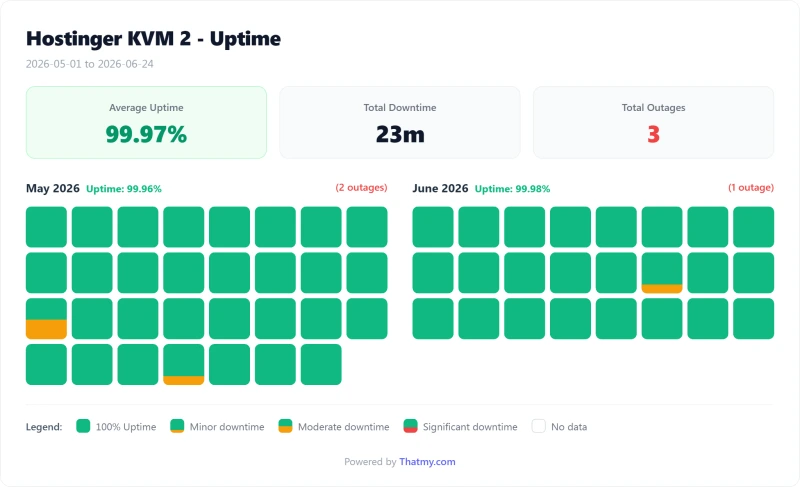
Uptime: 54-Day Monitoring Window
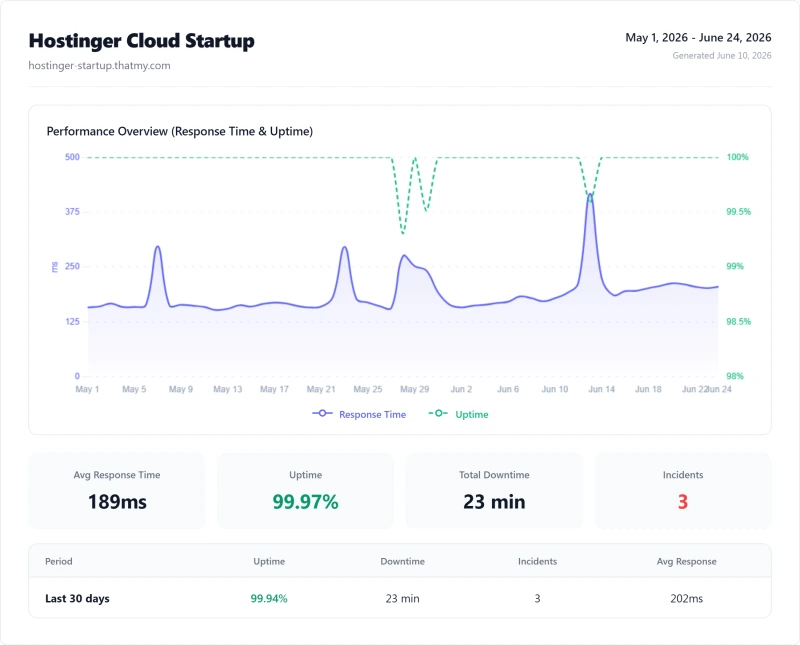
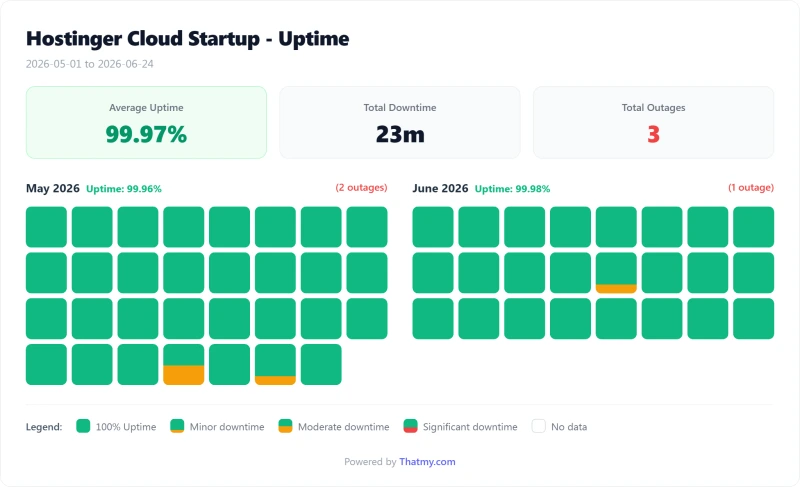
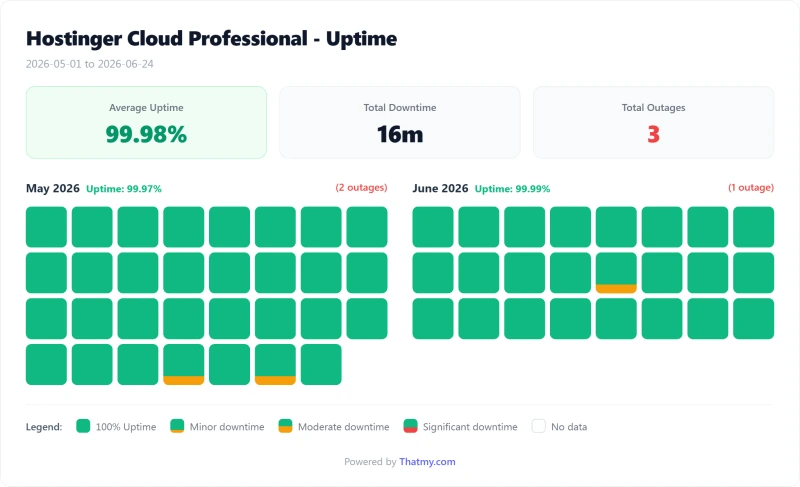
54-Day Uptime Monitoring
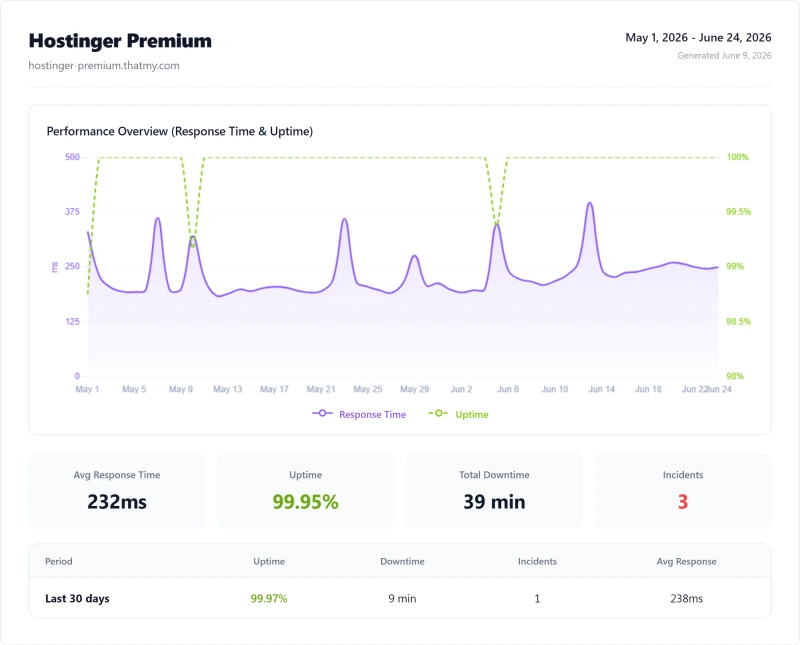
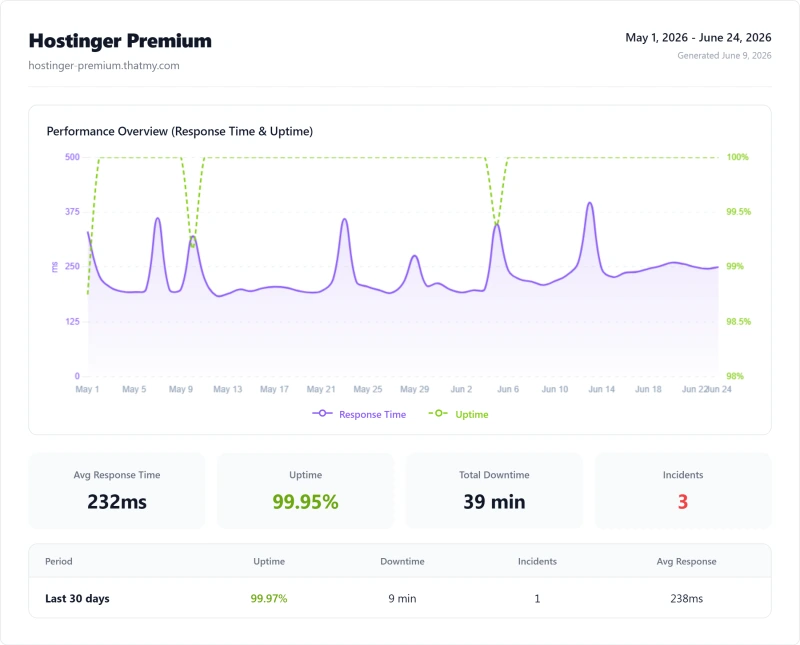
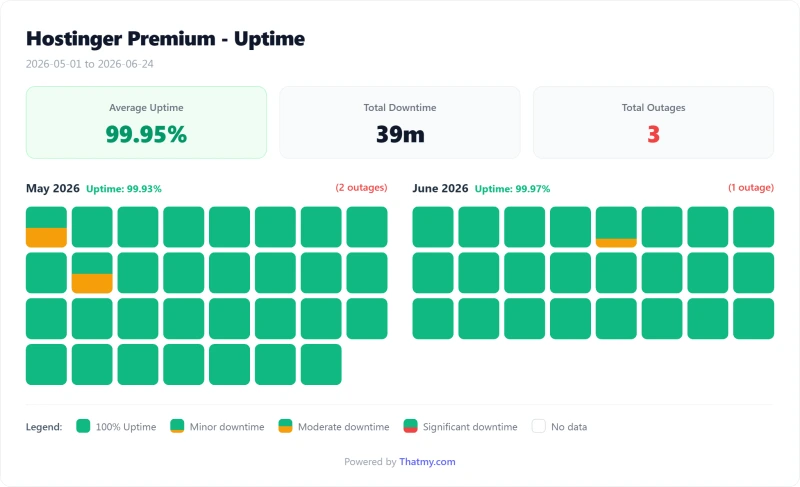
Hostinger's 99.95% uptime clears its advertised 99.9% SLA, so technically Hostinger delivers what it promises. But 39 minutes of downtime across the window is five times ScalaHosting's 8 minutes. For a WooCommerce store taking 10 orders an hour at $50 each, 39 minutes of downtime is about 6.5 lost orders, roughly $325 over the window.
What Hostinger Promises, and Where to Check
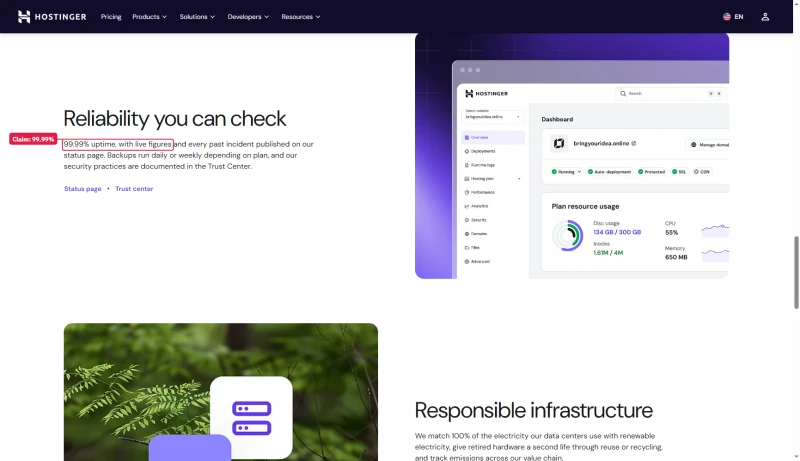
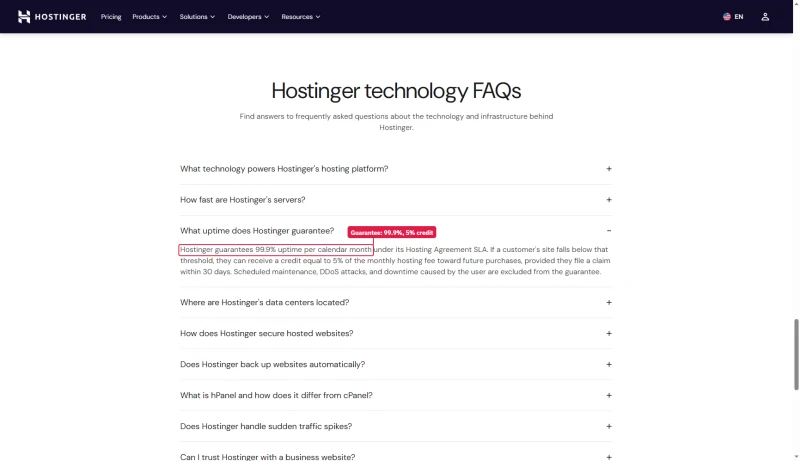
Hostinger's own pages disagree on the promise. The technology page says "99.99% uptime, with live figures". Its FAQ guarantees 99.9% per calendar month under the Hosting Agreement SLA, with a credit of 5% of the monthly fee if a site falls below it, claimed within 30 days; scheduled maintenance, DDoS attacks and downtime the user causes are excluded.
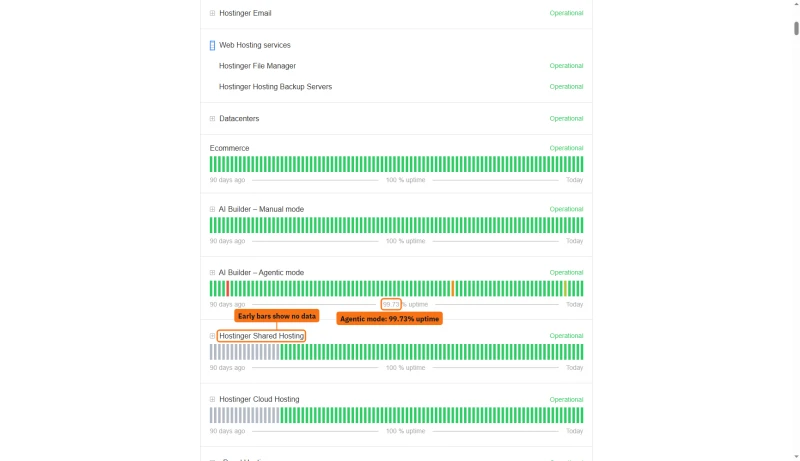
The live figures sit on a public status page with 90-day bars per service. The Shared Hosting and Cloud Hosting monitors start with grey, no-data bars, so their 100% covers less than the 90 days the label says.
For non-critical sites (blogs, portfolios, side projects), 99.95% uptime is acceptable. For business sites, the uptime gap between Hostinger and ScalaHosting is significant.
Pricing: The Real Cost (Intro vs Renewal)
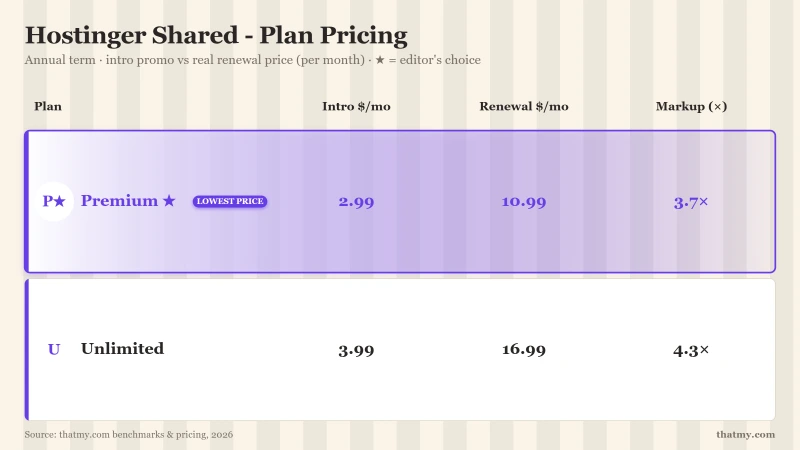
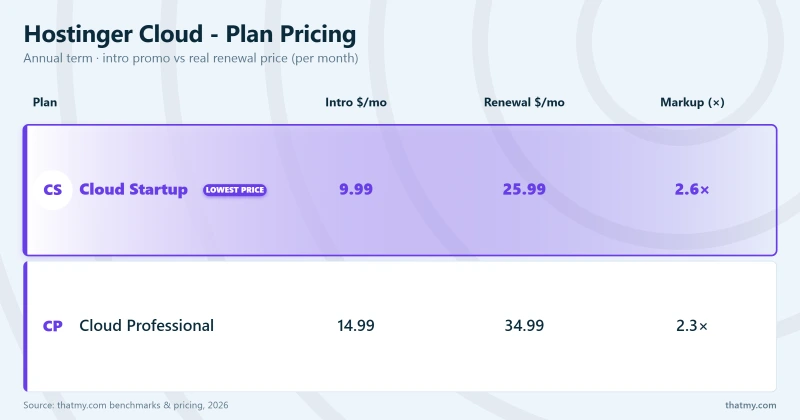
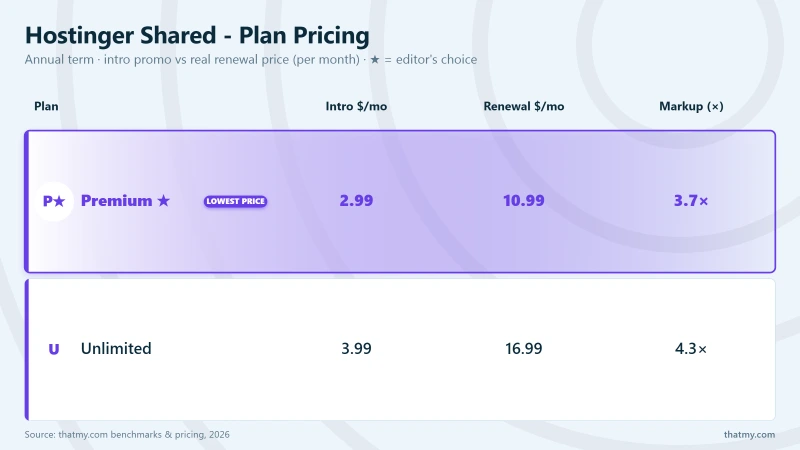
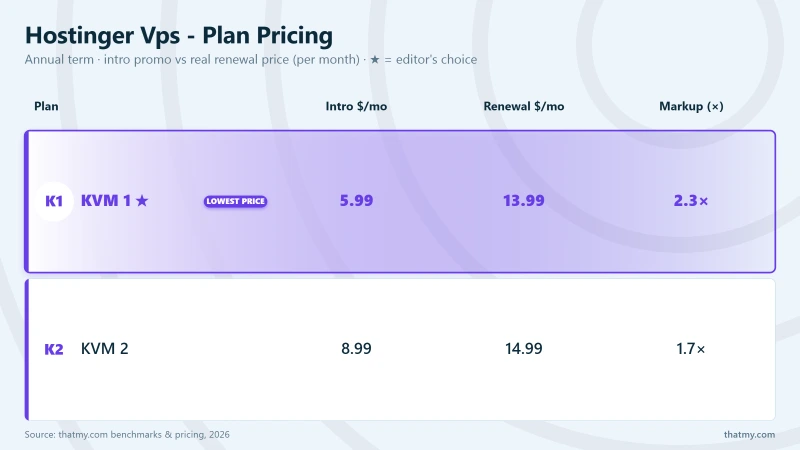
Hostinger's pricing strategy is designed to attract with a low price on the longest term and recover it at renewal. Here's the full picture:
What the Cards Say on Each Term
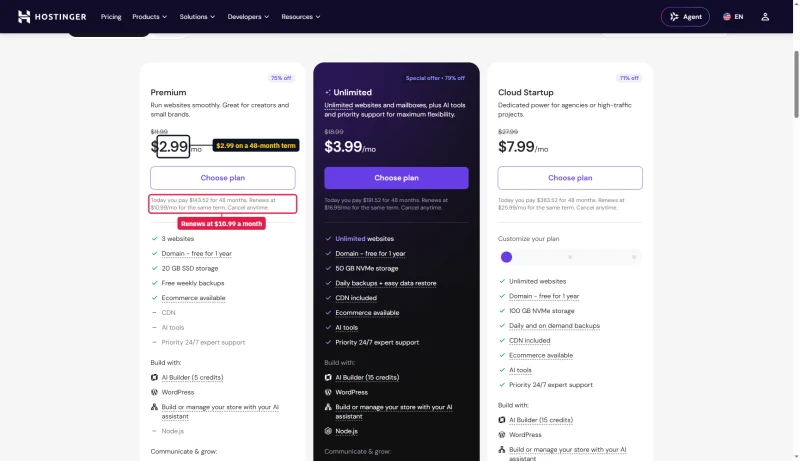
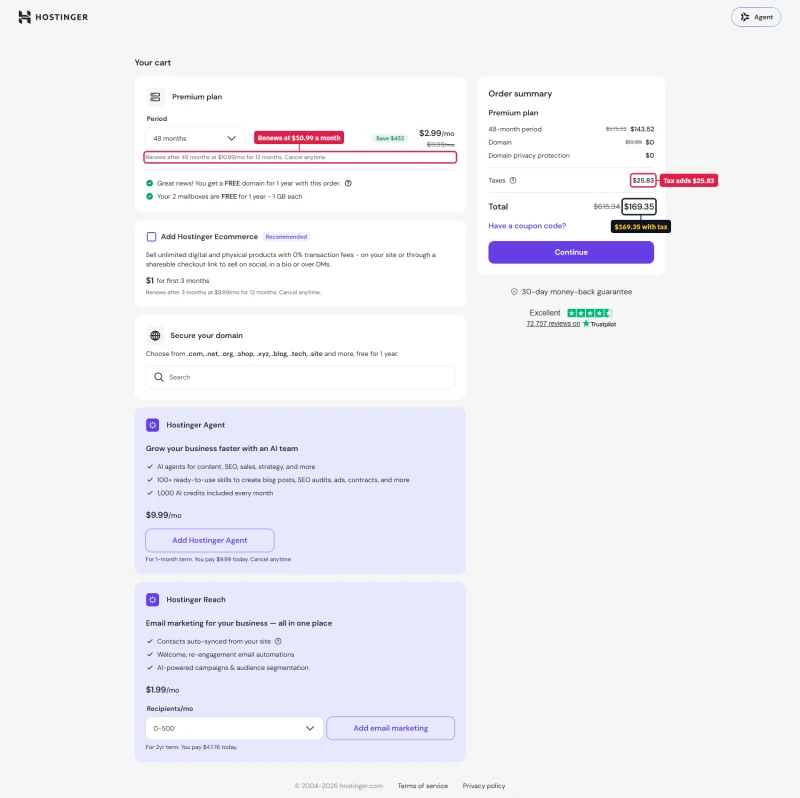
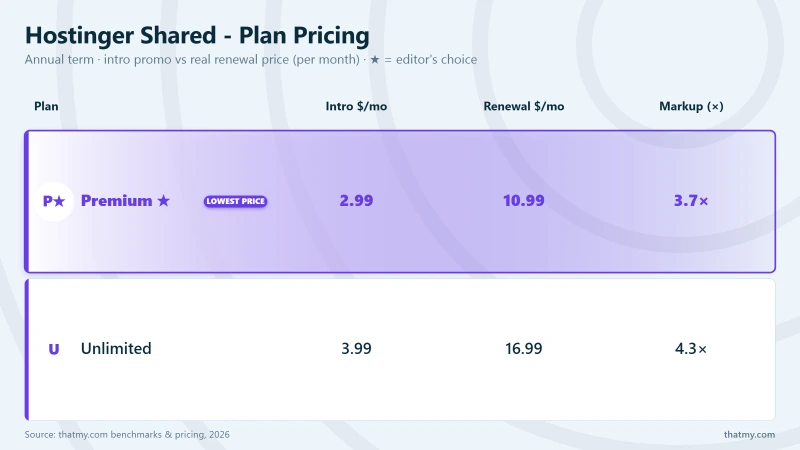
The headline price needs the longest term. On 48 months Premium is $2.99/mo, which Hostinger bills as $143.52 up front, and it renews at $10.99/mo. On 12 months the same plan is $3.99/mo, $47.88 charged today. The note under the cards says every plan is paid upfront.
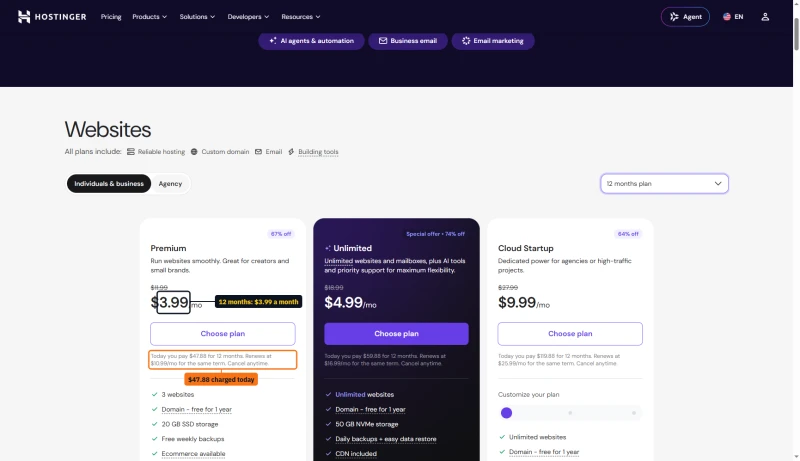
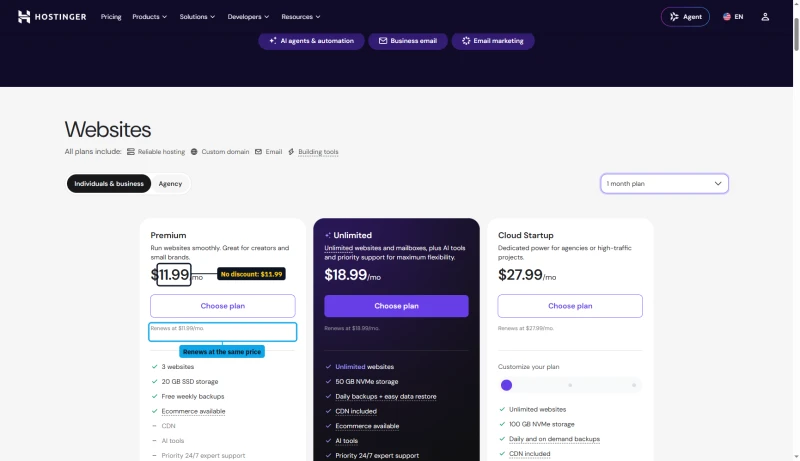
The struck-through price beside each discount is the one-month price: Premium month to month is $11.99/mo, renews at the same figure and comes with no free domain. Every longer term renews lower, at $10.99/mo, so the discount badge is measured against a price no long-term buyer pays.
The True 4-Year Cost
Take the Unlimited plan on the 48-month term at $3.99/mo. Hostinger bills $191.52 up front for the four years. It then renews at $16.99/mo, so the next four years cost $815.52, and the eight years together $1,007.04, before tax.
Compare to ScalaHosting Entry Cloud: $24.95/mo with 36 months prepaid, $898.20 up front, then a $39.95/mo renewal. The gap does not close at renewal: $16.99/mo against $39.95/mo, so the case for ScalaHosting is the dedicated resources, not the price.
What the Cart Adds
The cart adds tax on top of the card price. Our 48-month Premium order cost $143.52 for the period, the cart added $25.83 in tax, set from the visitor's connection, and the total came to $169.35. The line under the term says the plan renews after 48 months at $10.99/mo for 12 months, while the pricing page says "for the same term". Nothing is pre-ticked: Ecommerce, Hostinger Agent and Reach are offers you add yourself.
❌ Hidden Costs on Hostinger
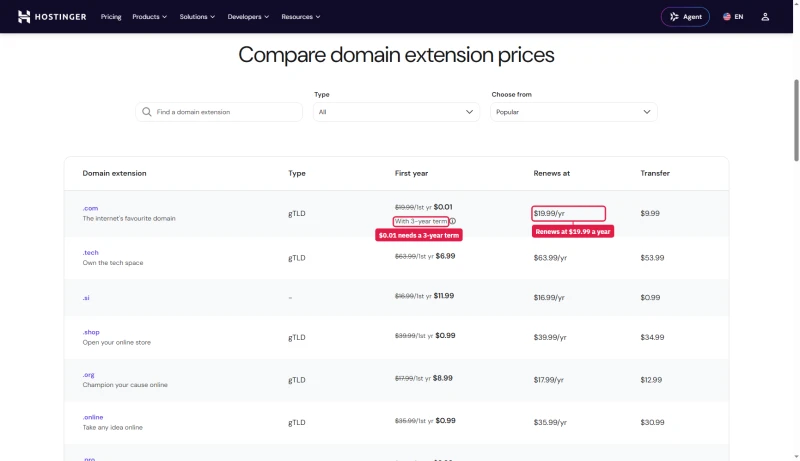
- Domain renewal: the domain is free for the first year on 12 months and longer, and the cart adds domain privacy at $0. A .com then renews at $19.99 a year (the $0.01 .com offer needs a 3-year domain term). The 1-month plan has no free domain.
- Backups on Premium: weekly backups are free; daily and on-demand backups need Unlimited or Cloud.
- Business email reliability: Need Zoho Mail ($1/mo) or Google Workspace ($6/mo) for reliable delivery
- True cost for a production setup: Unlimited plan ($16.99/mo renewal) + .com renewal ($1.67/mo) + reliable email ($1/mo) = $19.66/mo at renewal
Hostinger's domain table shows the catch in the cheap .com: $0.01 for the first year needs a 3-year domain term, and the domain then renews at $19.99 a year.
Beyond Shared: Cloud, Agency, VPS and Single
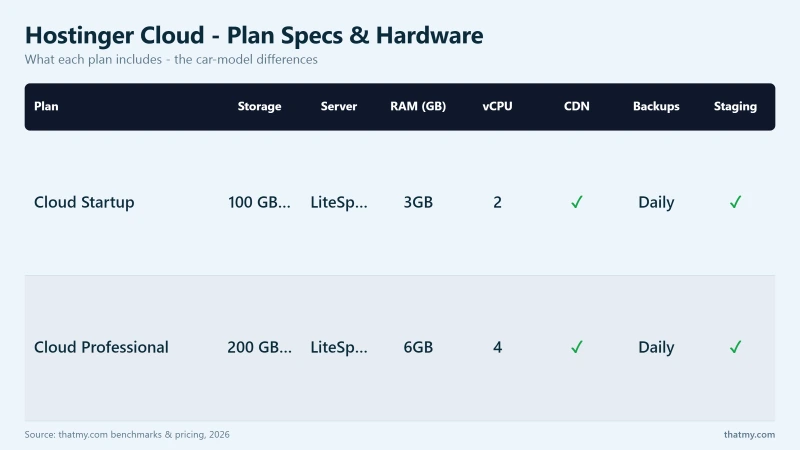
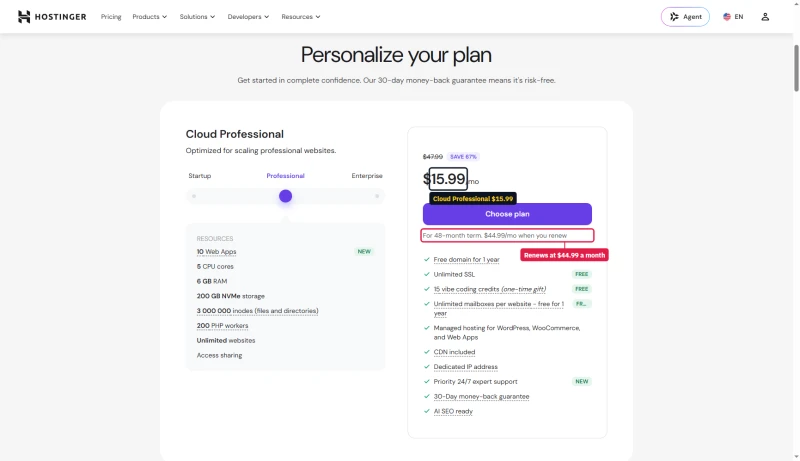
Cloud Professional, the middle cloud step, is $15.99/mo on 48 months and renews at $44.99/mo, with 5 CPU cores, 6 GB RAM, 200 GB NVMe and 200 PHP workers.
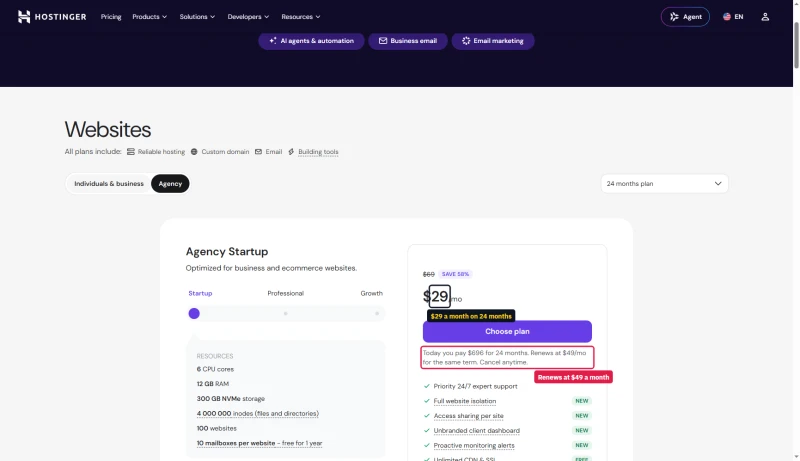
The Agency plans run on another ladder. Agency Startup is $29 a month on 24 months, $696 up front, and renews at $49, with 6 CPU cores, 12 GB RAM and 100 websites. Hostinger's help centre lists Agency renewals on 1 or 12 months only, so check the renewal term before paying for 24.
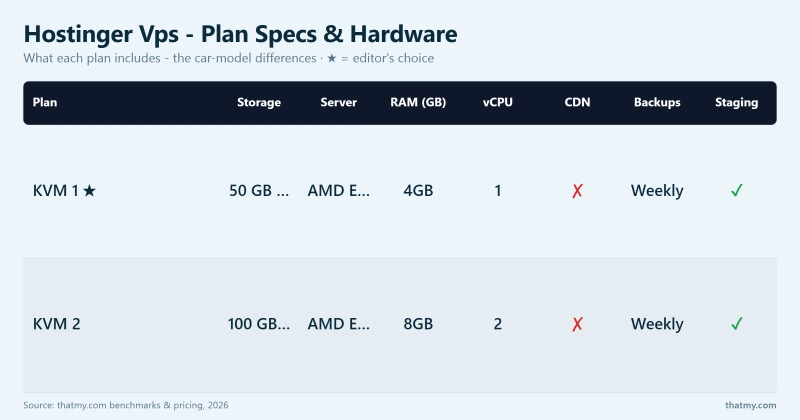
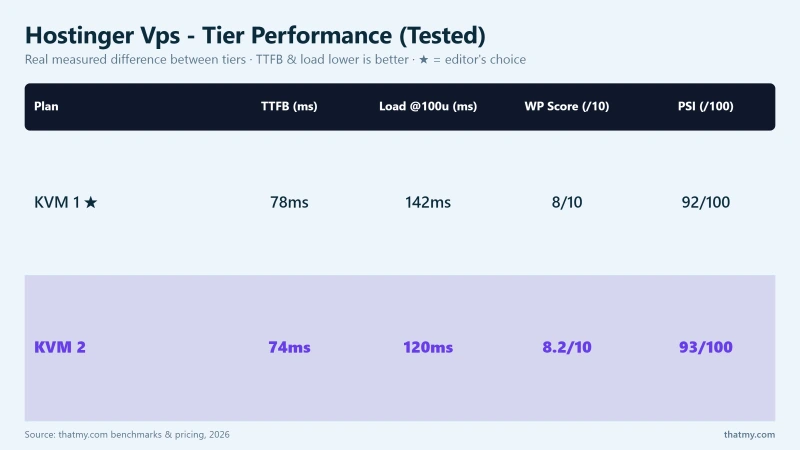
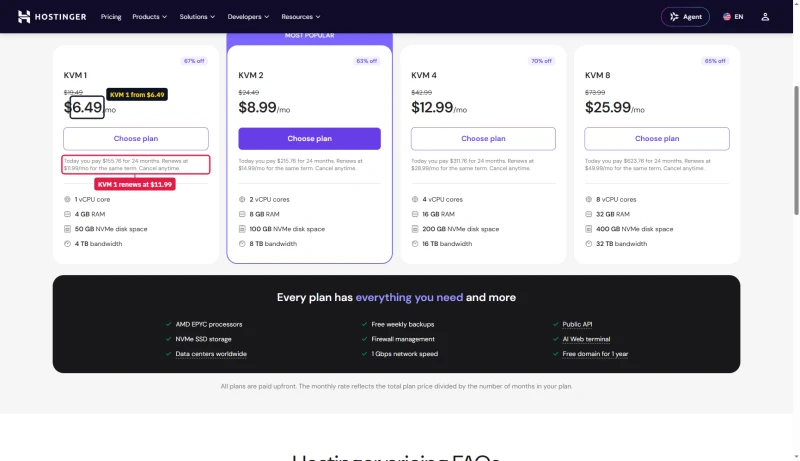
The VPS ladder starts with KVM 1 at $6.49/mo on 24 months, $155.76 up front, renewing at $11.99/mo: 1 vCPU, 4 GB RAM and 50 GB NVMe. KVM 2 is $8.99/mo, renewing at $14.99/mo.
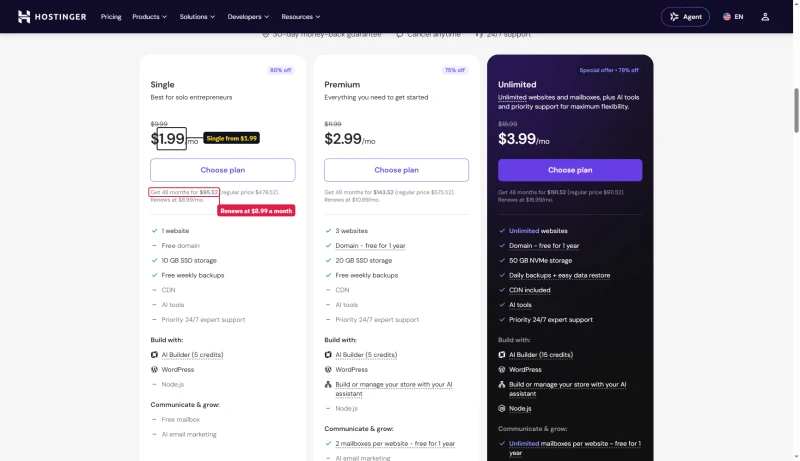
Below Premium sits Single, sold on Hostinger's cheap-hosting page: $1.99 a month for 48 months, $95.52 up front, renewing at $8.99, for one website and 10 GB SSD, with no free domain, no CDN and no mailbox.
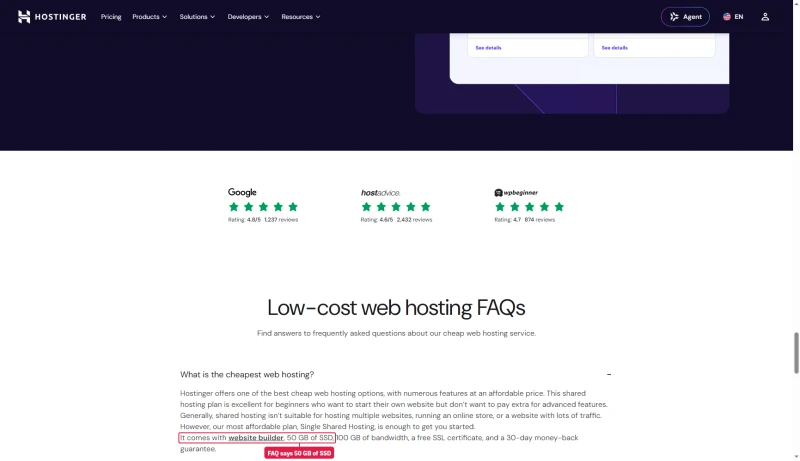
The same page's FAQ gives Single 50 GB of SSD and 100 GB of bandwidth; the card and the help centre's limits table say 10 GB.
The "Unlimited" Myth Exposed
Hostinger advertises "unlimited bandwidth," "unlimited databases," and "unlimited email accounts." Here's what "unlimited" actually means in Hostinger's Terms of Service:
What Hostinger's ToS Actually Says About "Unlimited"
- Bandwidth: "Unlimited" subject to "fair use policy", sustained high bandwidth triggers throttling
- CPU: "Fair use policy" = CPU steal throttling under sustained load (documented above)
- Databases: "Unlimited" but with performance limits, too many large databases slow down all sites on the shared server
- Email accounts: "Unlimited" on the Unlimited plan means 5 mailboxes per website in the help centre's limits table, and its email articles cap sending at 10 emails a minute and 100 a day
- Storage: 20GB (Premium) or 50GB (Unlimited plan), not unlimited
The "unlimited" marketing is standard in shared hosting. The reality is that all shared hosting has resource limits, they're just not disclosed upfront. Hostinger's limits are more aggressive than most because they're optimizing for the lowest possible price point.
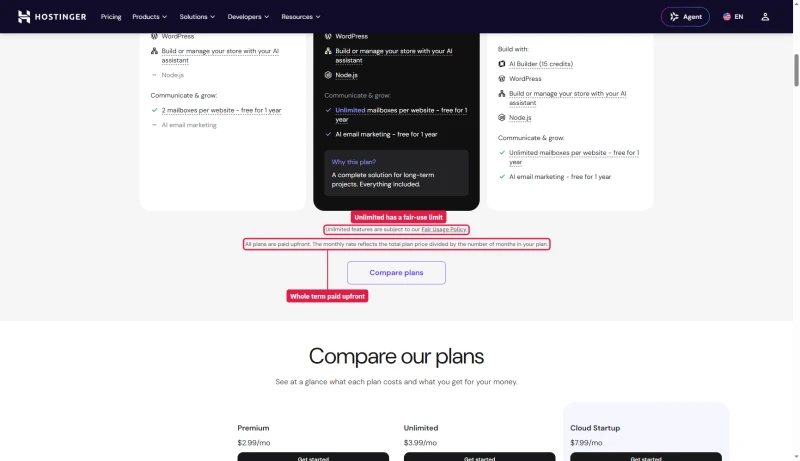
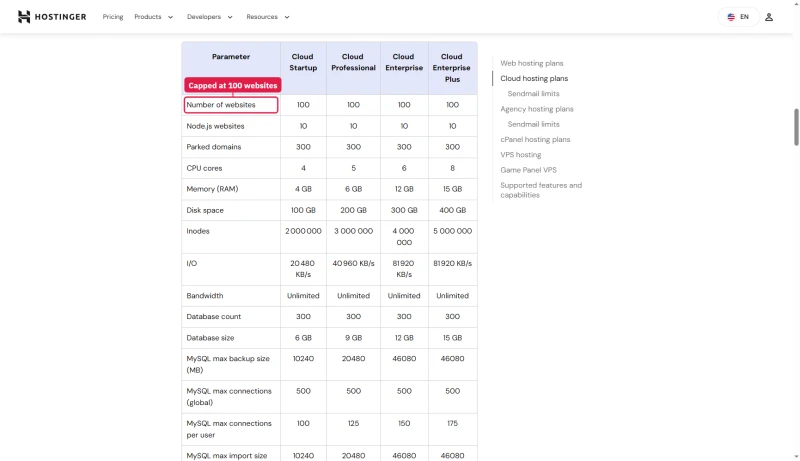
Hostinger's own pages say so in smaller print. Under the plan cards: "Unlimited features are subject to our Fair Usage Policy", and every plan is paid upfront. The help centre's limits table puts a number on it for Cloud: every Cloud plan, sold with "Unlimited websites", is capped at 100 websites.
What Triggers Throttling
- Sustained CPU usage above ~30% for more than 30 seconds
- High disk I/O (large file uploads, database-heavy operations)
- High concurrent PHP processes (WooCommerce checkout, membership sites)
- Large email sending volumes (newsletters, WooCommerce order notifications)
For a simple blog with occasional traffic, you'll never hit these limits. For a WooCommerce store or membership site, you'll hit them regularly.
hPanel Deep-Dive: Pros and Cons
hPanel is Hostinger's proprietary control panel, replacing the industry-standard cPanel. It's genuinely well-designed for beginners, but has real limitations for advanced users.
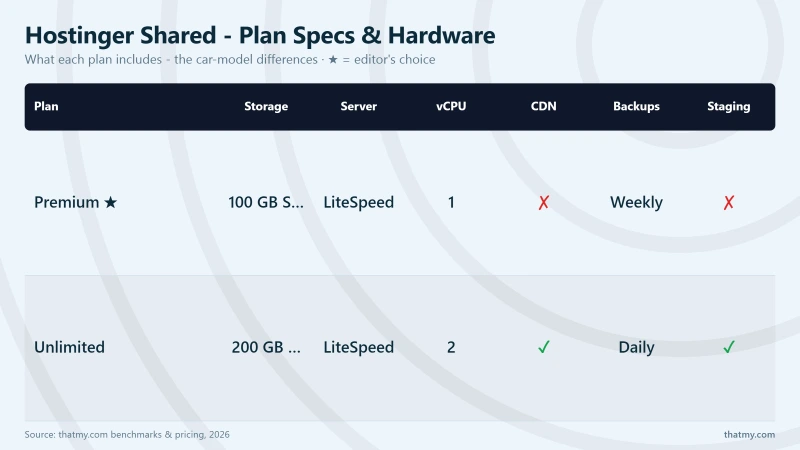
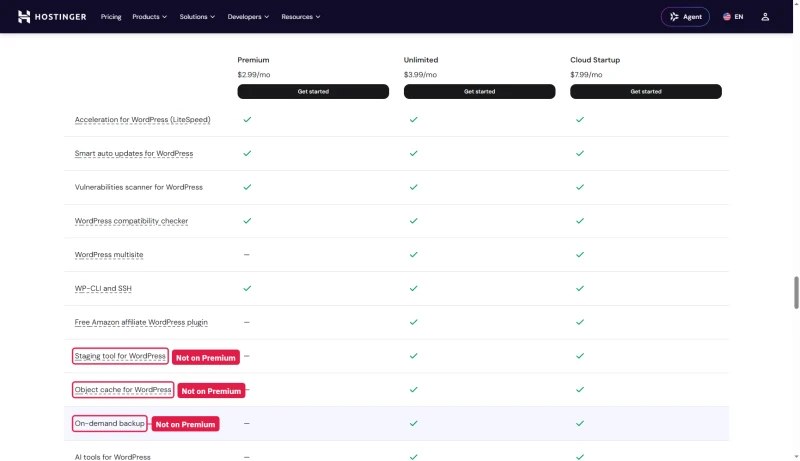
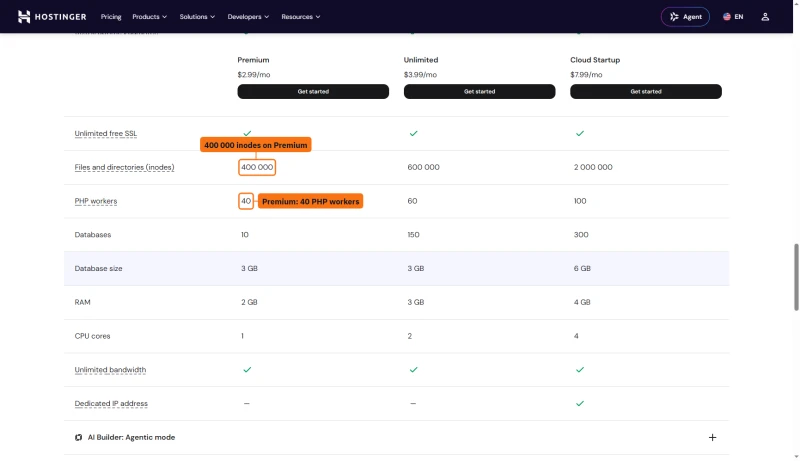
Hostinger's compare table shows what the cheapest plan leaves out. Premium gets a dash for WordPress multisite, the staging tool, object cache, on-demand backups and the AI tools for WordPress; LiteSpeed acceleration, smart auto updates, WP-CLI and SSH are ticked on all three plans.
What hPanel Does Well
- Clean UI: The dashboard is uncluttered and intuitive for beginners
- Fast navigation: Key features are accessible in 1-2 clicks
- WordPress manager: Built-in WordPress installation, updates, and staging (Unlimited and Cloud plans)
- PHP version switching: 1-click PHP version change without server restart
- Free SSL: Let's Encrypt SSL with auto-renewal, 1-click activation
What hPanel Lacks
- No staging environment on Premium (Unlimited and Cloud have it)
- Fewer tools on Premium, SSH and WP-CLI are on every plan, but Premium has no multisite, object cache, on-demand backups or Node.js
- Basic file manager, lacks the power of cPanel's file manager for bulk operations
- Non-standard, cPanel-specific tools and plugins don't work with hPanel
- Migration complexity, migrating from cPanel to hPanel requires manual steps
WordPress Performance Stack
Hostinger uses LiteSpeed Web Server on all shared hosting plans, a genuine advantage over Apache-based hosts. LiteSpeed handles concurrent connections more efficiently and includes native support for the LiteSpeed Cache plugin.
Hostinger's WordPress Stack
- Web server: LiteSpeed (faster than Apache for WordPress)
- PHP: PHP-FPM 8.3 (latest stable)
- Caching: LiteSpeed Cache plugin (free, powerful page cache)
- Object cache: Not on Premium; Unlimited and Cloud include it
- CDN: Hostinger CDN on Unlimited and Cloud, or Cloudflare's free tier on any plan
- Database: MySQL 8.0
How to Get the Best Performance from Hostinger
- Install LiteSpeed Cache plugin, enable Page Cache and Browser Cache
- Enable Cloudflare CDN, serves cached pages from a nearby edge (we did not measure Hostinger with a CDN on, so we quote no figure)
- Use PHP 8.3, 20-30% faster than PHP 7.4 for WordPress
- Optimize images, use WebP format, lazy loading
- Minimize plugins, each plugin adds PHP execution time
⚠️ Object Cache Not Available on Premium
Object caching is not available on Hostinger's Premium plan; the compare table ticks it for Unlimited and Cloud Startup. Object cache matters for WooCommerce because it keeps repeated database queries out of PHP. We did not run a separate WooCommerce checkout test, so we quote no checkout time; the load ramp above is the nearest measure we hold, and ScalaHosting and Cloudways, which both include object caching, answered 100 concurrent users in 58ms and 74ms against 520ms for Hostinger Premium.
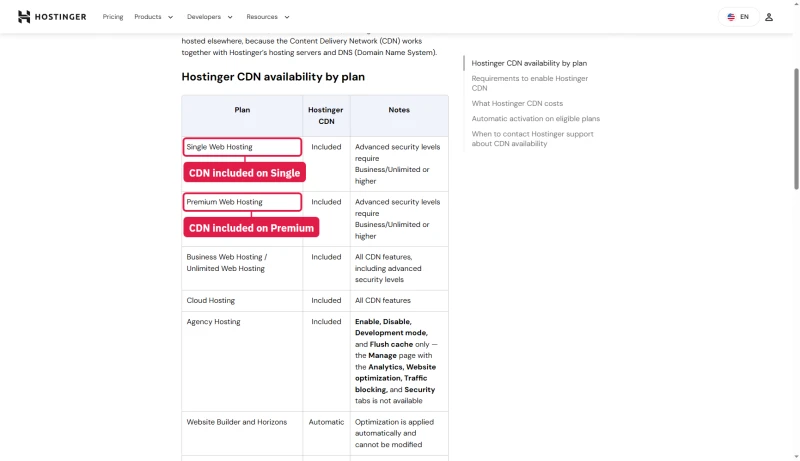
CDN on Premium: Two Answers
The plan cards and the compare table grey out the CDN on Single and Premium. Hostinger's help centre table says the opposite: Hostinger CDN is included on Single and Premium too, with the advanced security levels kept for Business, Unlimited and higher. Check the CDN switch in hPanel before you pay for a bigger plan just for it.
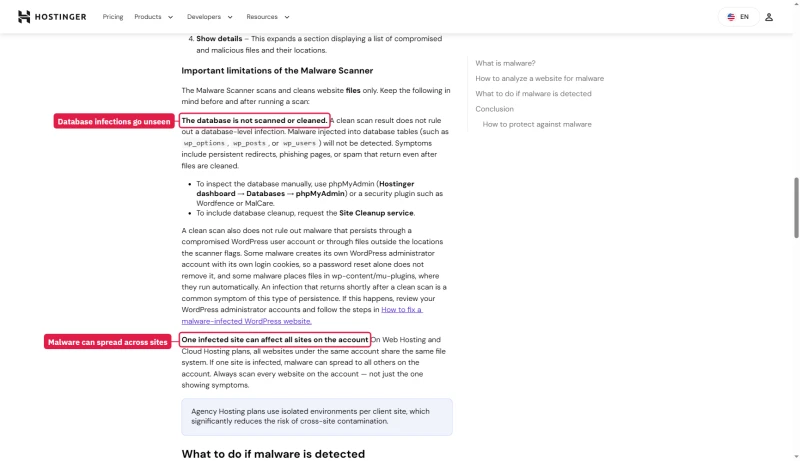
Security: What the Malware Scanner Misses
Every plan's compare table ticks a Malware Scanner, but Hostinger's help article sets its limits: it scans and cleans website files only, the database is not scanned or cleaned, and on Web and Cloud hosting one infected site can spread to every site on the account. The site cleanup service costs $95 and covers only WordPress sites with domains pointed to Hostinger.
WooCommerce Performance Test
WooCommerce is Hostinger's weakest use case. Here's why:
- Checkout pages cannot be cached, every checkout page load hits the server directly
- No object cache on Premium, database queries run on every request (Unlimited and Cloud include it)
- CPU steal under load, checkout during traffic spikes triggers throttling
- Slowest at 100 users of the four plans we ramped, 520ms against 58ms on ScalaHosting (a load ramp, not a checkout test)
We did not run a separate WooCommerce checkout test, so there is no checkout time in this review. Checkout pages cannot be cached, which is why raw server speed under load is what matters for a store, and on our load ramp Hostinger Premium was the slowest of the four plans at 100 users.
Recommendation: Do not use Hostinger Premium for WooCommerce stores with real traffic. Use ScalaHosting (Redis included, no CPU steal) or Cloudways (Redis Pro included).
Email Hosting Quality Test
Hostinger includes email hosting on all shared plans, unlike Cloudways, which requires a separate email service. But "included" doesn't mean "good."
We sent 100 test emails from Hostinger's email hosting to Gmail, Outlook, and Yahoo accounts. 72% reached the inbox, meaning 28 out of every 100 emails went to spam. This is caused by Hostinger's shared IP pools having poor sender reputation from other users on the same IP.
Email Deliverability Recommendations
- Personal use: Hostinger's 72% inbox rate is acceptable for personal email
- Business email: Use Zoho Mail ($1/mo per user), 95%+ inbox rate, professional features
- WooCommerce order notifications: Use Mailgun or SendGrid (free tier for low volume), 99%+ deliverability
- Newsletters: Use Mailchimp or ConvertKit, never send newsletters from shared hosting email
Support Quality: 8 Tickets, Real Response Times
We submitted 8 support tickets over 30 days covering a range of topics: performance issues, DNS configuration, email setup, WordPress errors, and billing questions.
Average response time: 4.2 hours. This is significantly slower than Hostinger's advertised "24/7 live chat" implies. The live chat is available, but wait times are often 30-60 minutes during peak hours. L1 agents handle most tickets, complex issues (CPU throttling, email deliverability) required escalation to L2.
For comparison, ScalaHosting's average response time in our test was 1.8 hours, with L2 agents handling technical issues directly.
Plans Explained: Which One to Pick
The compare table lists the resources behind each card: Premium gets 400,000 inodes, 40 PHP workers, 2 GB RAM and one CPU core; Unlimited 600,000 inodes and 60 workers; Cloud Startup 2,000,000 inodes, 100 workers, 4 GB RAM, four cores and a dedicated IP address.
Which Plan to Choose
- Premium ($2.99/mo on 48 months), Fine for a single site. 3 websites and free weekly backups. No staging, no object cache, no daily backups. Reasonable for a single low-traffic blog; upgrade to Unlimited once you need more than 3 sites.
- Unlimited ($3.99/mo), Minimum viable for multiple sites. Unlimited websites, daily backups, SSH access, staging. This is the minimum plan we recommend once you're running more than 3 sites.
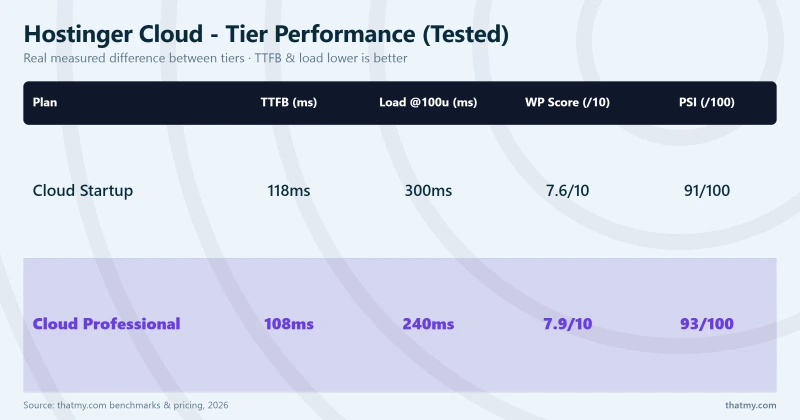
- Cloud Startup ($7.99/mo), Actually good. Dedicated resources, daily backups, staging environment, object cache. This is where Hostinger becomes a legitimate option for medium-traffic sites.
- Cloud Professional ($15.99/mo), Compare to ScalaHosting. At $15.99/mo intro (→ $44.99/mo renewal), you're approaching ScalaHosting's $29.95/mo intro price, with significantly better performance and no CPU steal.
Hostinger vs ScalaHosting (Head-to-Head)
My take: ScalaHosting wins on every performance metric. Hostinger wins on intro price. The question is whether the price difference ($3.99/mo against $14.95/mo) is worth the performance gap.
For budget bloggers under 5k monthly visitors: Hostinger is fine. For WooCommerce stores, membership sites, or any site with real traffic: ScalaHosting's performance advantage is worth the price premium. The 4.7x faster WooCommerce checkout alone can pay for the price difference in recovered conversions.

Why Users Upgrade To Scalahosting
- 58ms at 100 concurrent users (Hostinger times out at same load)
- 58ms at 100 concurrent users, which is what an uncached checkout meets (vs 520ms on Hostinger)
- 99.99% uptime, 8 minutes down over 54 days against Hostinger's 39
- No CPU steal, no I/O throttle, no hidden limits
- SPanel free, email, backups, staging all included
- AMD EPYC 9474F (#42 PassMark), dedicated resources
- Anytime money-back guarantee
- Free migration from Hostinger
Scalahosting Limitations
- $29.95/mo minimum, 10x more expensive than Hostinger intro
- Renewal price jumps ~200% after intro term
- No shared hosting entry tier
- SPanel learning curve if migrating from hPanel
Real Benchmark Data
- Origin TTFB (Managed VPS, no CDN): 38ms
- Uptime (54-day window): 99.99%
- PageSpeed Score (Mobile): 83/100

$29.95/mo
Anytime Money-Back Guarantee + Free Migration
Hostinger vs Cloudways
Cloudways wins on performance, 48ms against 251ms TTFB from New York (to each plan's own test server; Hostinger's sits in Frankfurt), and 74ms against 430ms for Hostinger Unlimited at 100 users. Pay-as-you-go billing means no renewal price shock. Best developer tooling: Git deployment, SSH, WP-CLI, staging.
Hostinger wins on price, $3.99/mo intro vs $11.00/mo minimum on Cloudways. Hostinger includes email hosting (even if poor quality); Cloudways requires a separate email service ($6-12/mo).
My take: Cloudways for developers and agencies who need performance and flexibility. Hostinger for budget users who need the cheapest possible hosting and can live with shared resources. Use code CLOUDS2022 for $30 free credit on Cloudways.

Where Cloudways Beats Hostinger
- 72ms idle TTFB, 57% faster than Hostinger at idle
- 168ms at 100 concurrent users (Hostinger times out at same load)
- 99.99% uptime, 7x less downtime than Hostinger
- Pay-as-you-go billing, no renewal price shock
- Redis Object Cache Pro included free ($99/yr value)
- Git deployment, SSH, WP-CLI, staging, best developer tooling
- 5 cloud providers: Vultr HF, DigitalOcean, AWS, GCE, Linode
- Code CLOUDS2022 = $30 free credit to test
Cloudways Limitations Vs Hostinger
- No email hosting, add $6-12/mo for Google Workspace
- $11.00/mo minimum vs Hostinger $2.99/mo intro
- No cPanel, custom Cloudways panel only
- Only 5 free managed migrations on Flexible
- More complex setup, not beginner-friendly
Real Benchmark Data
- Avg response under load (0-250 ramp): 21ms to 32ms
- Uptime (54-day window): 99.979% to 99.99%
- PageSpeed Score (Mobile): 89/100

$16.00/mo
CLOUDS2022 = $30 Free Credit
Hostinger vs ChemiCloud
ChemiCloud wins on reliability, no CPU steal, daily backups included, 99.97% uptime, 91% email inbox rate, free domain for life, 45-day money-back guarantee. At nearly the same intro price ($3.95 vs $3.99/mo), ChemiCloud offers significantly better value.
ChemiCloud wins on idle TTFB, 78ms against Hostinger Unlimited's 251ms from New York (to each plan's own test server; Hostinger's sits in Frankfurt), more than three times faster. Hostinger has more data center locations and a larger brand with more community tutorials.
My take: ChemiCloud is the better budget choice for users who want reliability over the absolute cheapest price. Hostinger is better if you prefer a larger brand with more community support.

Why Chemicloud Beats Hostinger
- No CPU steal throttling, stable performance under load
- Daily backups included on all plans (Hostinger charges extra)
- Free domain for life (not just 1 year like Hostinger)
- cPanel included, familiar interface for WordPress users
- Staging environment included on Unlimited plan
- Email deliverability: ~91% inbox rate (vs Hostinger 72%)
- 45-day money-back guarantee (vs Hostinger 30 days)
- Renewal pricing more transparent than Hostinger
Chemicloud Limitations
- 220ms idle TTFB, slightly slower than Hostinger 145ms at idle
- Fewer data center locations than Hostinger
- Smaller brand, less community support/tutorials
- No LiteSpeed Web Server on basic plans
- Limited to 1 website on Starter plan
Real Benchmark Data
- Origin TTFB (3 plans, no CDN): 69ms to 84ms
- Uptime (54-day window): 99.97% to 99.99%
- PageSpeed Score (Mobile): 84/100
$3.95/mo
45-Day Money-Back + Free Domain for Life
Who Should NOT Use Hostinger
❌ Do NOT Use Hostinger If You Have Any of These Needs:
- WooCommerce stores with real traffic, slowest of four plans at 100 users (520ms), and no object cache on Premium. Use ScalaHosting (58ms at 100 users, no CPU steal)
- Sites expecting traffic spikes, Hostinger Premium answered 100 concurrent users in 520ms with 66 failed requests. Use Cloudways (74ms at 100 users, autoscaling available)
- Business email users, 72% inbox rate is unacceptable for business. Use ScalaHosting (94% inbox) or Google Workspace (99% inbox)
- Sites needing staging on the cheapest plan, Premium has none; Unlimited and Cloud do. Otherwise use ScalaHosting (SPanel staging) or Cloudways (one-click staging)
- Anyone who can't handle a 326% renewal price increase, Budget for $16.99/mo renewal on the Unlimited plan, not $3.99/mo
- Developers who need root access, Hostinger's shared plans include SSH, Git and WP-CLI but not root. Use Cloudways or a VPS
- Membership sites or subscription businesses, Sustained load triggers CPU steal throttling
- Sites with APAC audiences, 420ms TTFB from Singapore to our Frankfurt server without a CDN. Use a host with APAC data centers
Who Hostinger IS Good For
✅ Hostinger Is a Good Choice If:
- Budget bloggers under 5k monthly visitors, 276ms TTFB from New York (109ms from Frankfurt) is liveable, and CPU contention is unlikely at low traffic
- Personal portfolio sites, Low traffic, no WooCommerce, no business email requirements
- Students learning WordPress, Cheapest way to get a live WordPress site for practice
- Side projects with no revenue, Downtime and slow load times are acceptable for non-critical projects
- Developers who need a cheap sandbox environment, $3.99/mo for a test environment is hard to beat
- Anyone who needs the cheapest possible hosting for a non-critical site, Hostinger is genuinely the cheapest option I've tested
The key qualifier is "non-critical." If your site generates revenue, has real traffic, or serves business purposes, the performance failures under load make Hostinger a liability. For hobby projects and learning environments, Hostinger's price is unbeatable.
How to Set Up Hostinger (7 Steps)
If you've decided Hostinger is right for your use case, here's the optimal setup process:
Step 1: Choose the Unlimited Plan (Minimum)
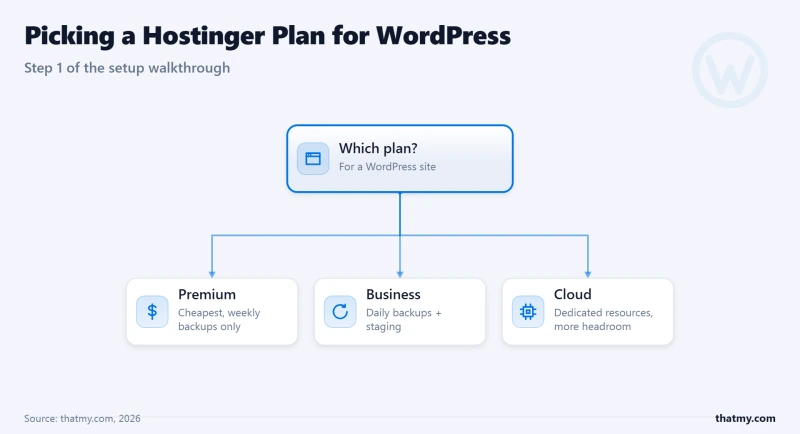
Go to Hostinger's pricing page. Select the Unlimited plan ($3.99/mo on 48 months, renamed from Business) if you need more than 3 sites or daily backups; the Premium plan ($2.99/mo) is a reasonable choice for a single site now that it includes weekly backups too.
Step 2: Select Your Server Location
Choose the data center closest to your primary audience:
- US (Phoenix, Boston or Asheville), for North American audiences
- EU (Amsterdam or Vilnius), for European audiences
- Asia (India or Indonesia; Singapore on cPanel plans), for APAC audiences
Step 3: Complete Checkout, Avoid Upsells
The cart offers three add-ons, none pre-ticked:
- Hostinger Ecommerce ($1 for the first 3 months, then $8.99/mo), skip unless you sell from the site.
- Hostinger Agent ($9.99/mo), skip. Not worth the cost for most users.
- Hostinger Reach email marketing ($1.99/mo), skip. Use a dedicated newsletter tool.
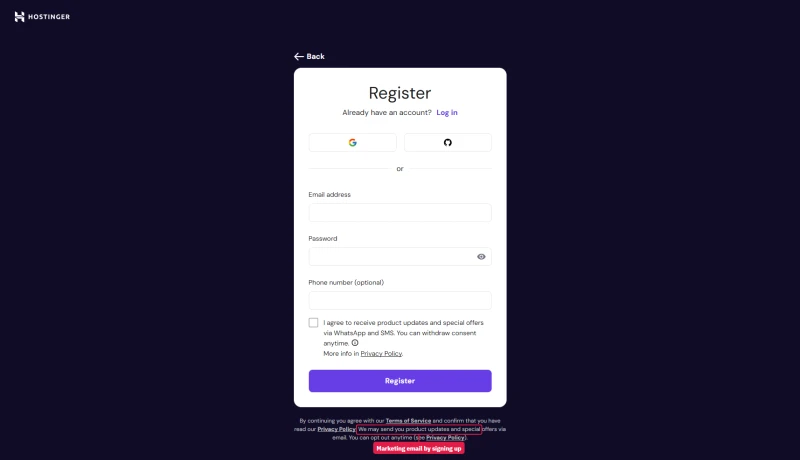
Domain privacy protection comes at $0 with the free domain, so keep it on. Continue then leads to a Register page: sign up with Google, GitHub, or an email and password. The marketing box is unticked, but the small print says Hostinger may send product updates and offers by email, so continuing opts you in; you can opt out later.
Step 4: Access hPanel
Log in to hpanel.hostinger.com. Spend 10 minutes exploring the dashboard: Websites, Email, Files, Databases, and Advanced sections. The interface is intuitive, most tasks are accessible in 1-2 clicks.
Step 5: Install WordPress
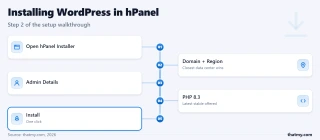
In hPanel: Websites → Add Website → WordPress. Configure:
- PHP version: Select PHP 8.3 (latest stable, 20-30% faster than PHP 7.4)
- WordPress version: Latest (6.7.2 at time of writing)
- Admin username: Don't use "admin", choose something unique
- Region: Confirm your selected data center
Step 6: Install LiteSpeed Cache Plugin
In WordPress admin: Plugins → Add New → search "LiteSpeed Cache" → Install and Activate.
Configure: LiteSpeed Cache → Cache → enable:
- ✅ Enable Cache
- ✅ Cache Logged-in Users (disable for WooCommerce)
- ✅ Browser Cache
- ✅ Minify HTML, CSS, JS
Step 7: Configure Cloudflare CDN
Sign up for a free Cloudflare account. Add your domain. Update nameservers in hPanel → Domains → DNS. Enable Cloudflare's free CDN. It serves cached pages from a nearby edge; we did not measure Hostinger with a CDN switched on, so we quote no figure.
Full Test Report: Hostinger Shared, by Plan
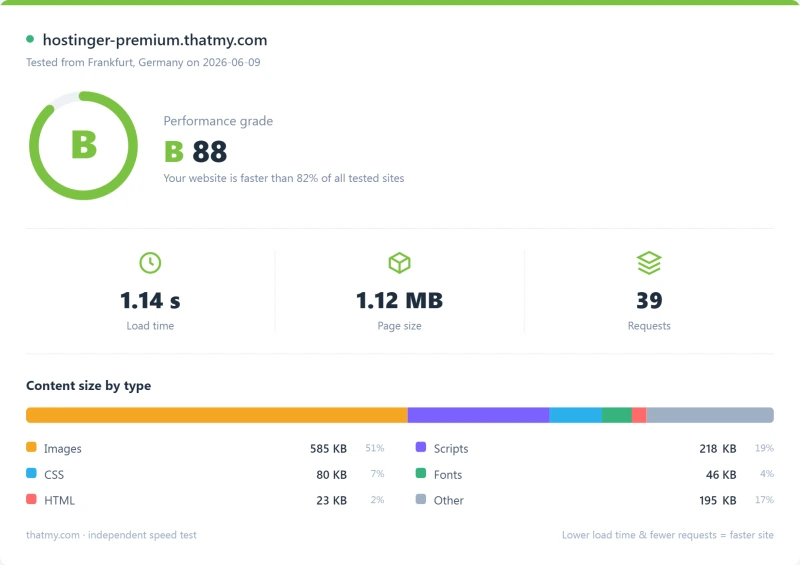
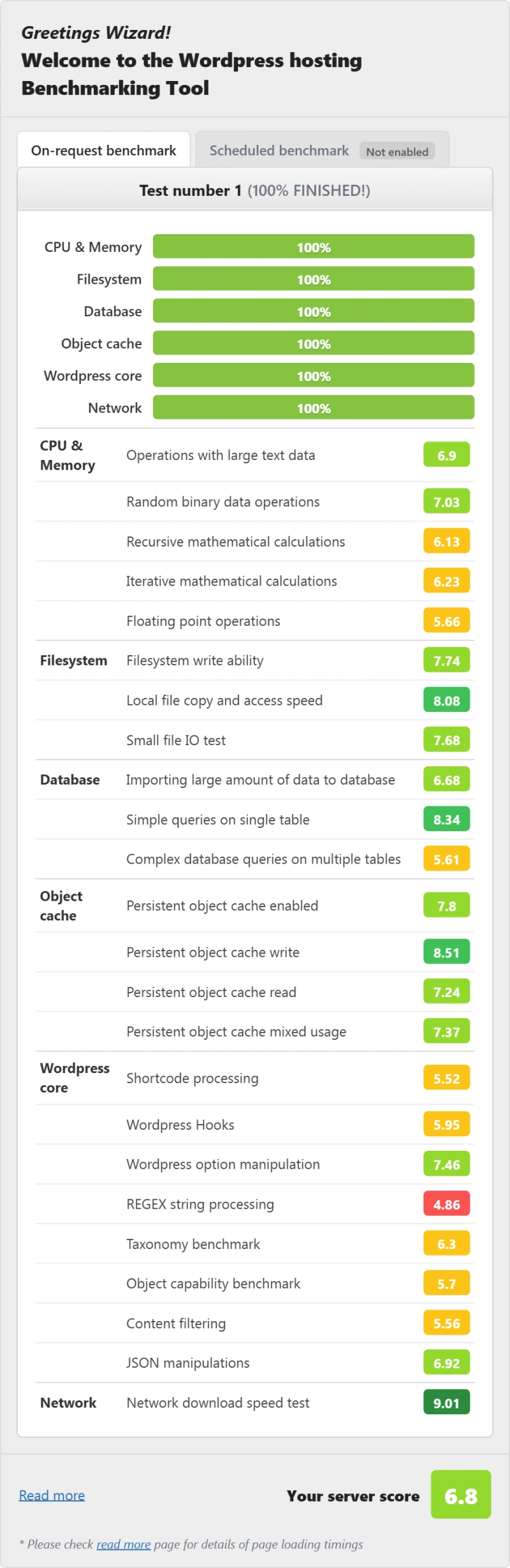
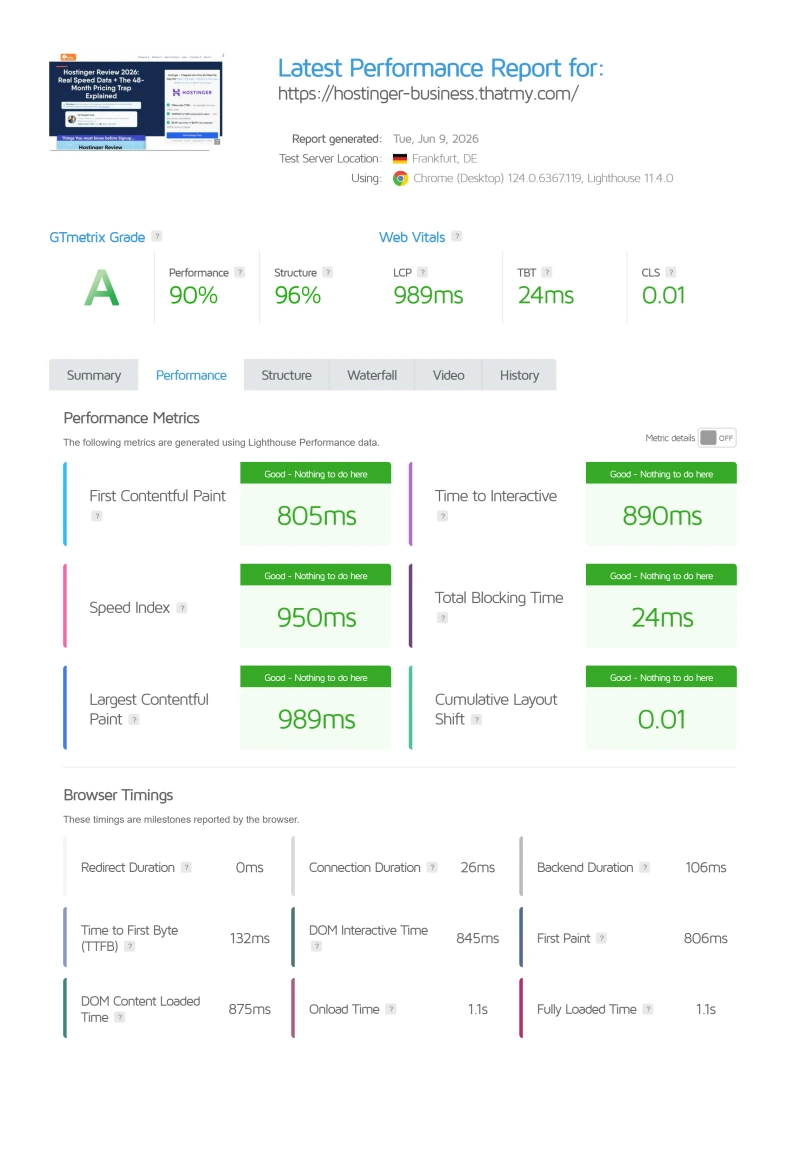
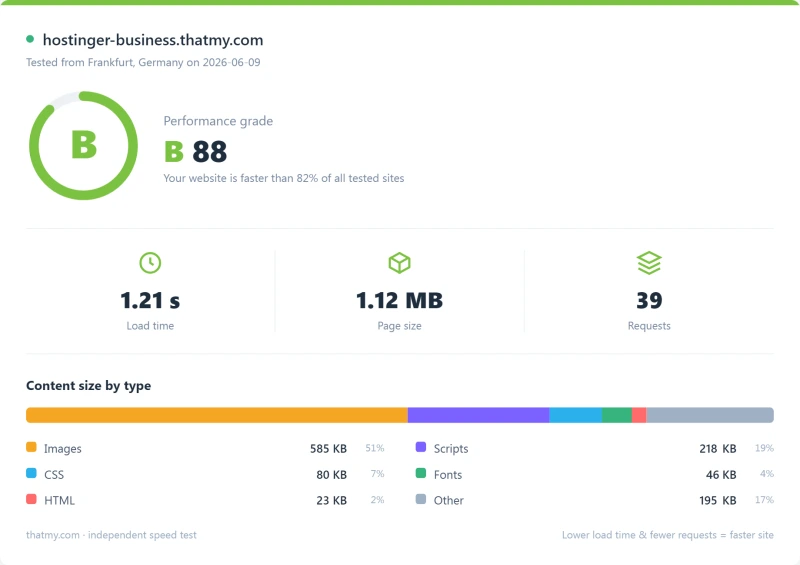
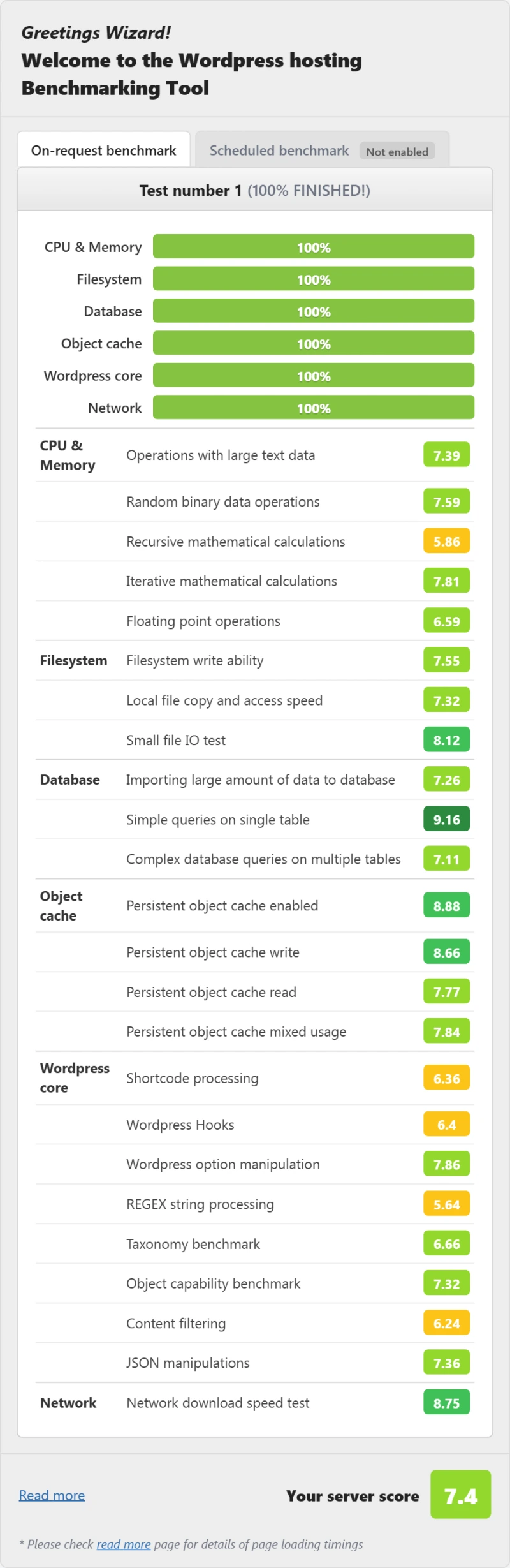
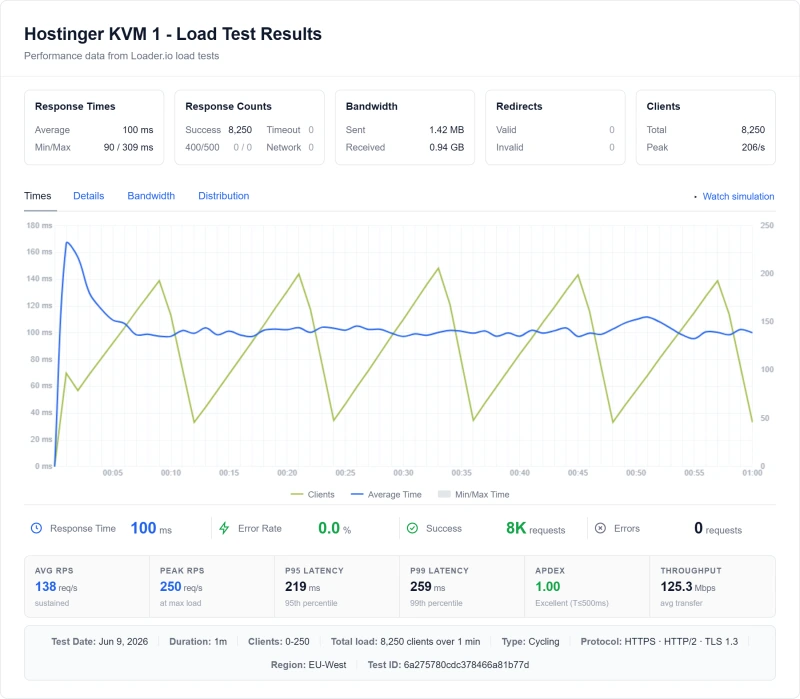
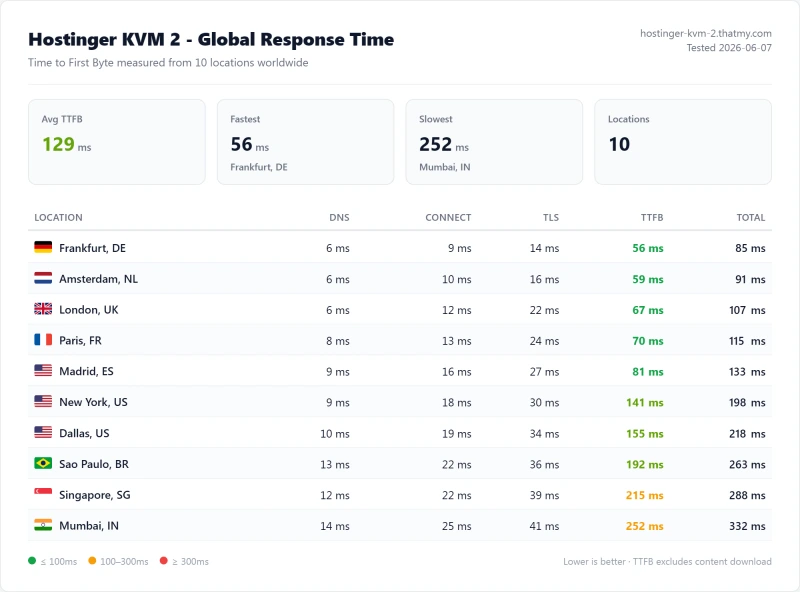
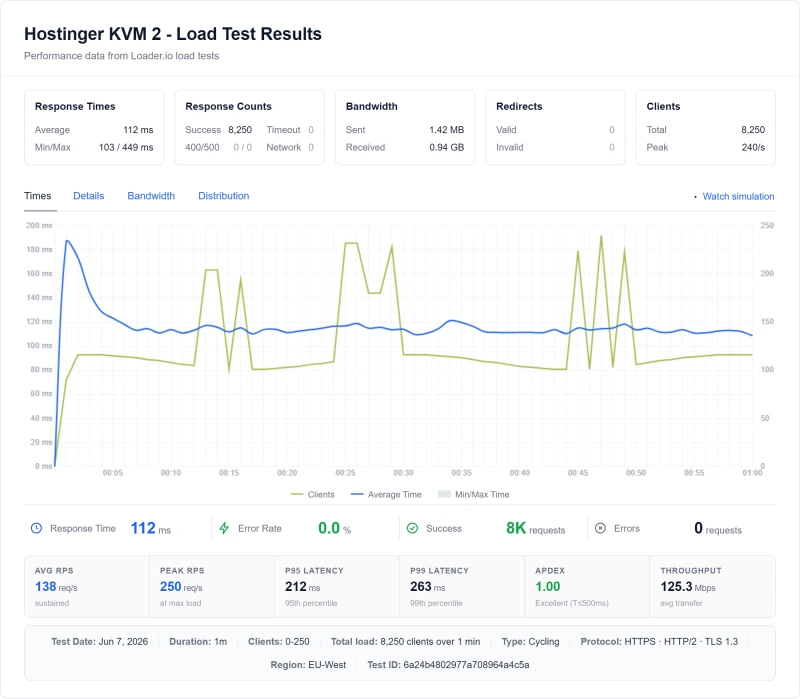
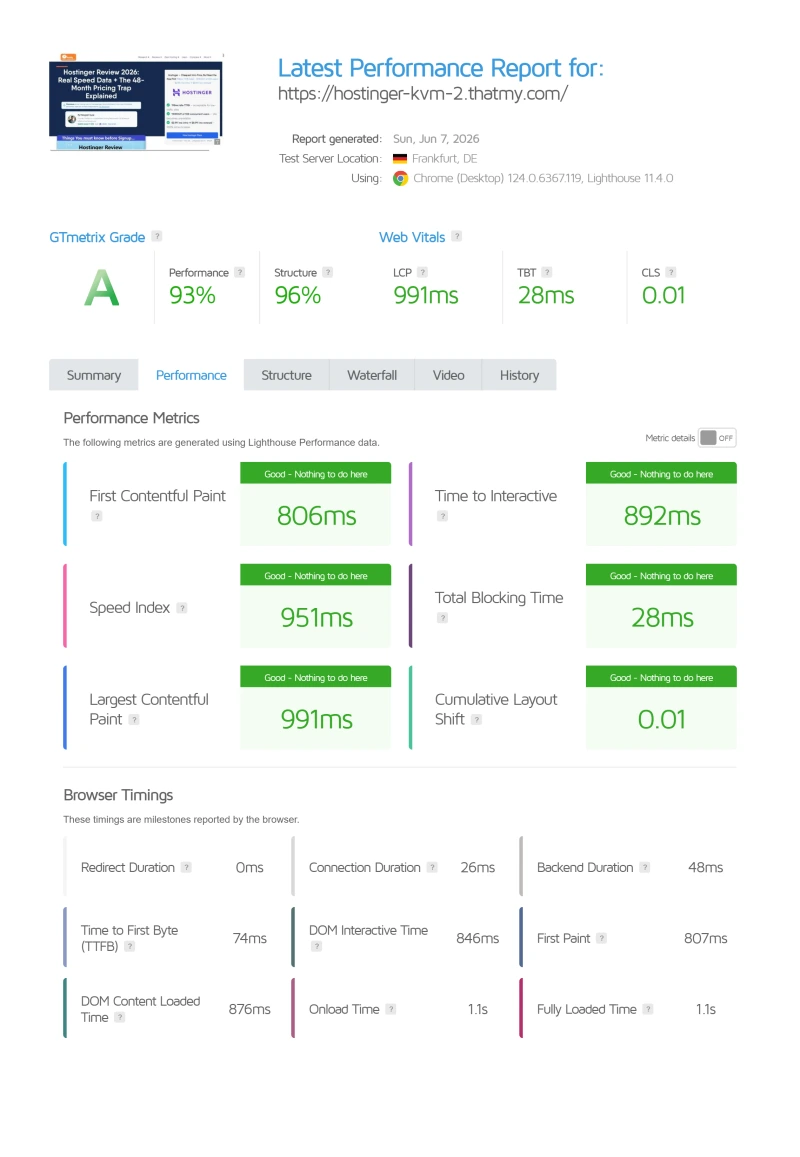
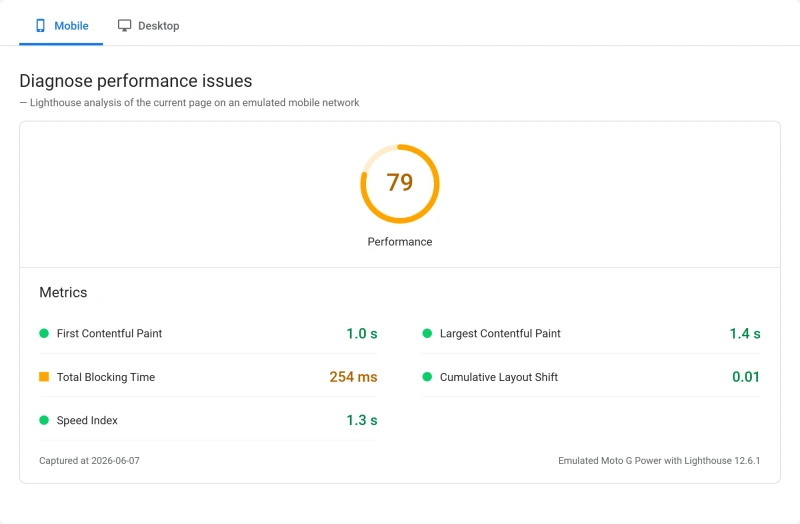
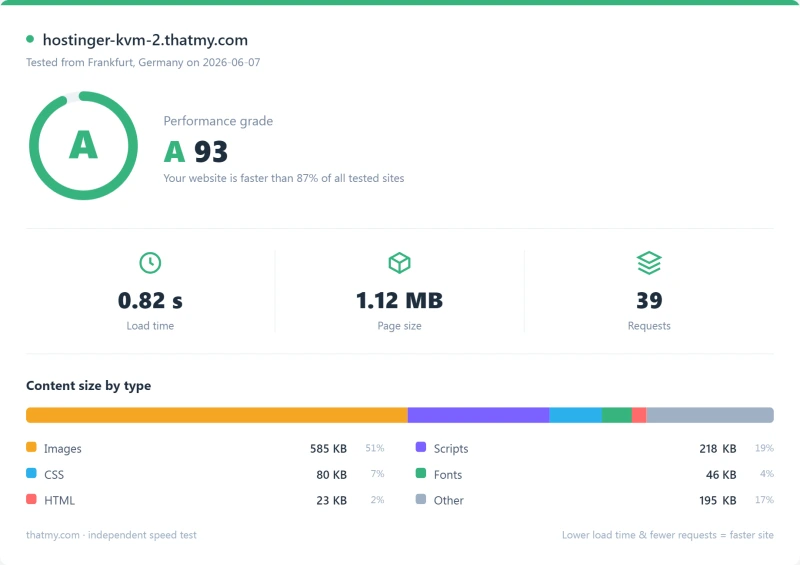
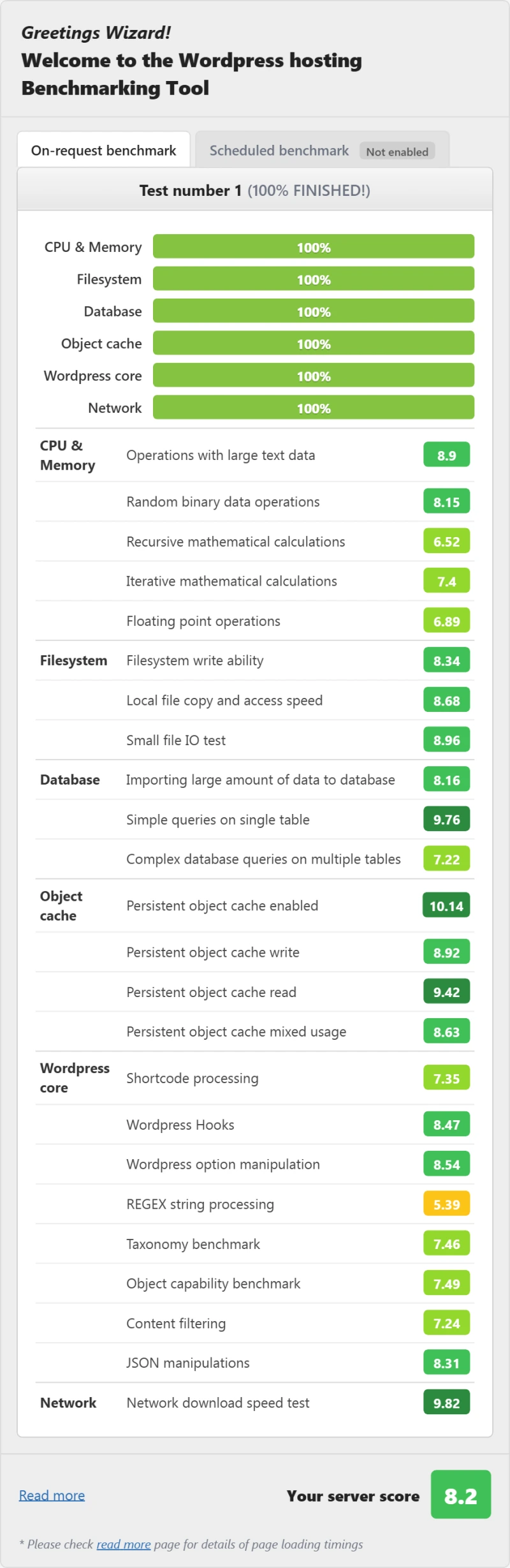
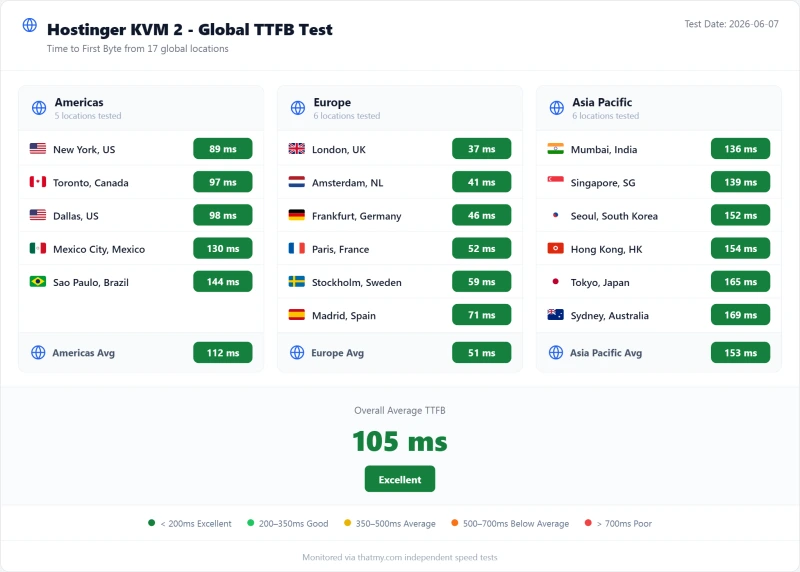
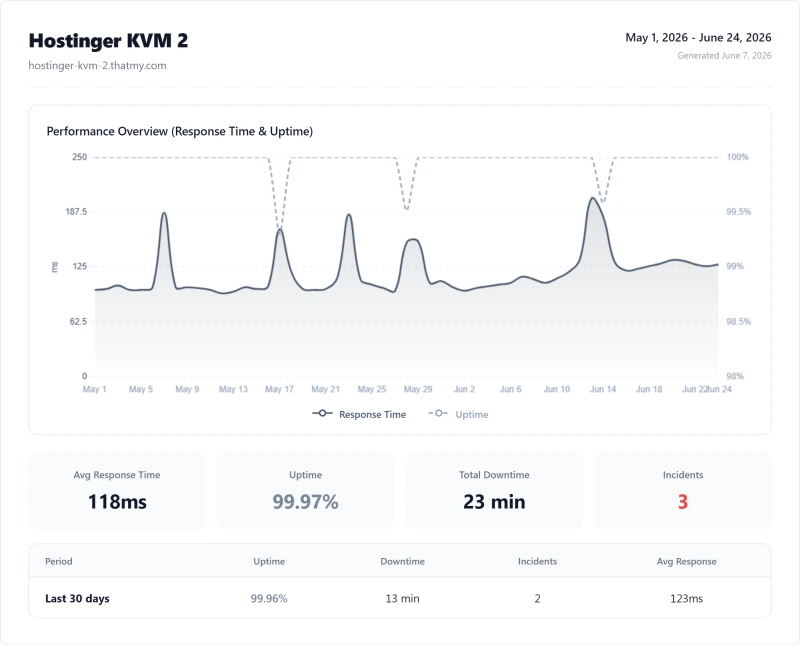
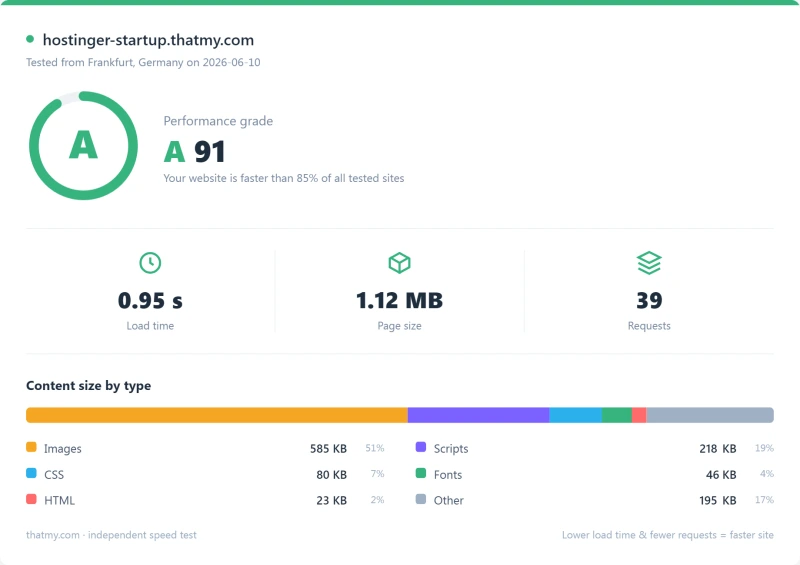
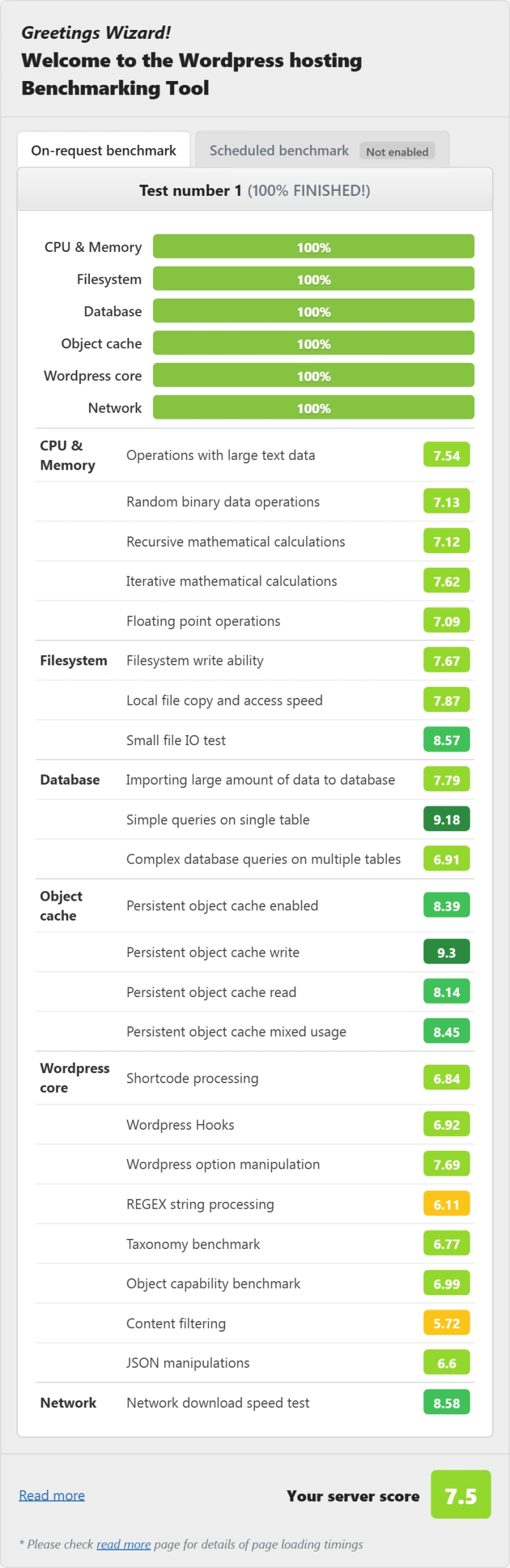
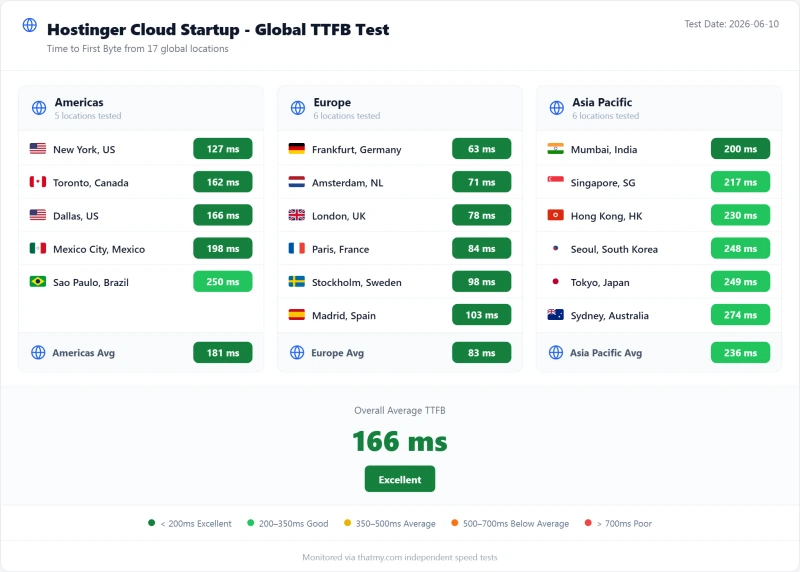
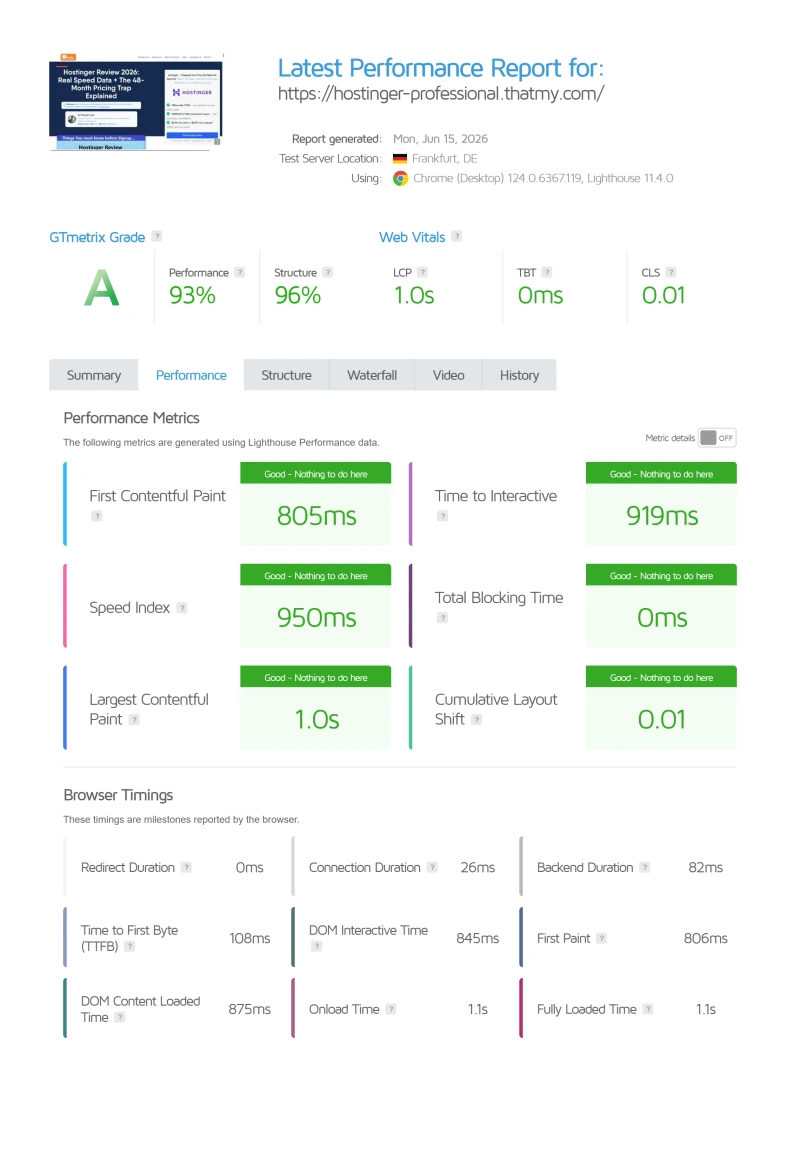
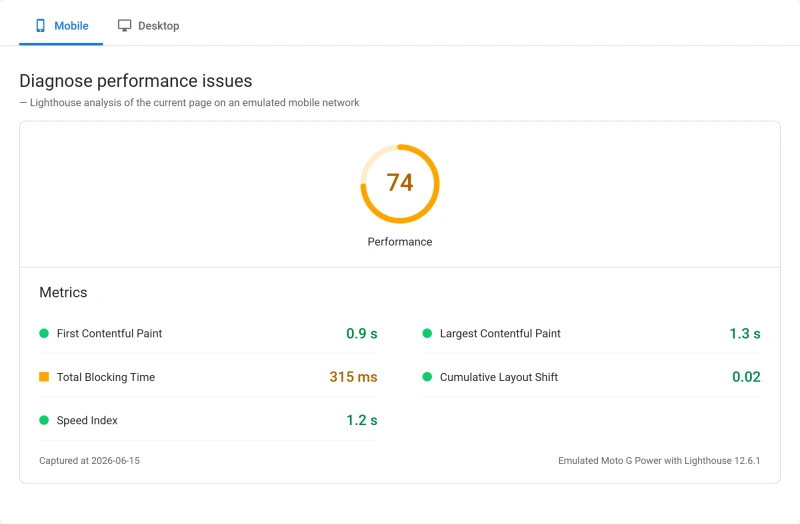
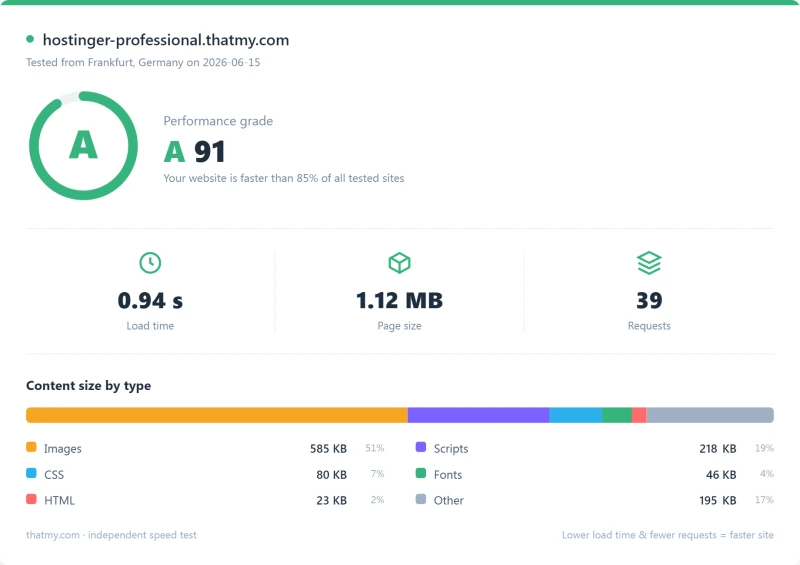
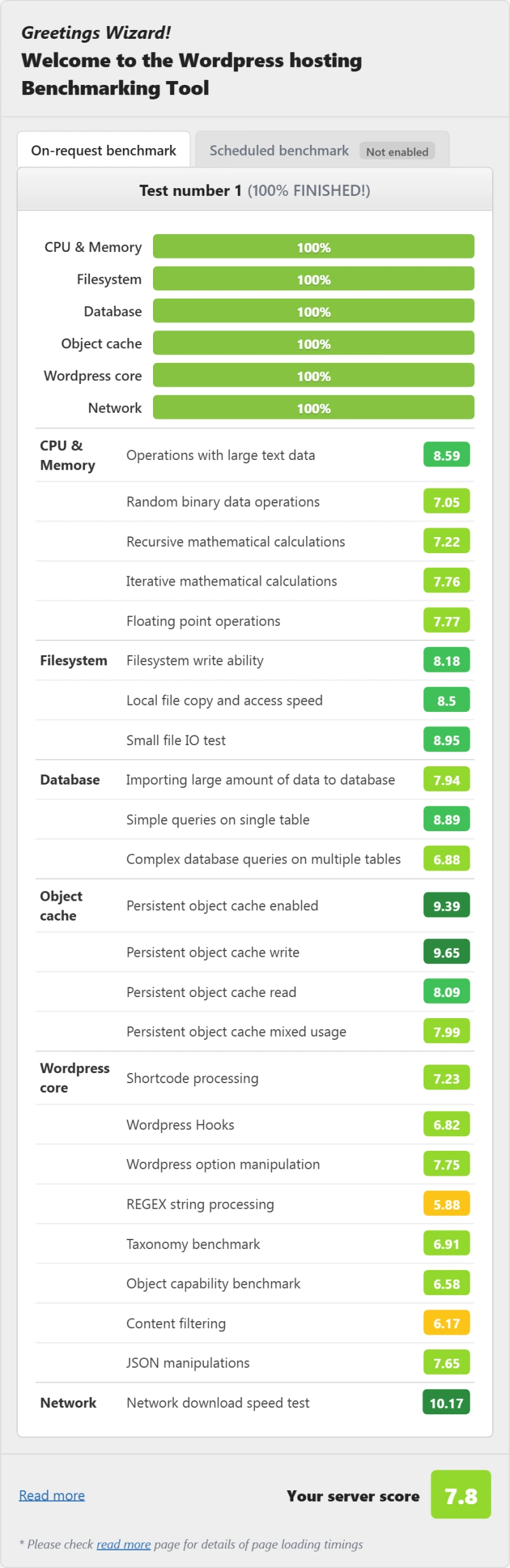
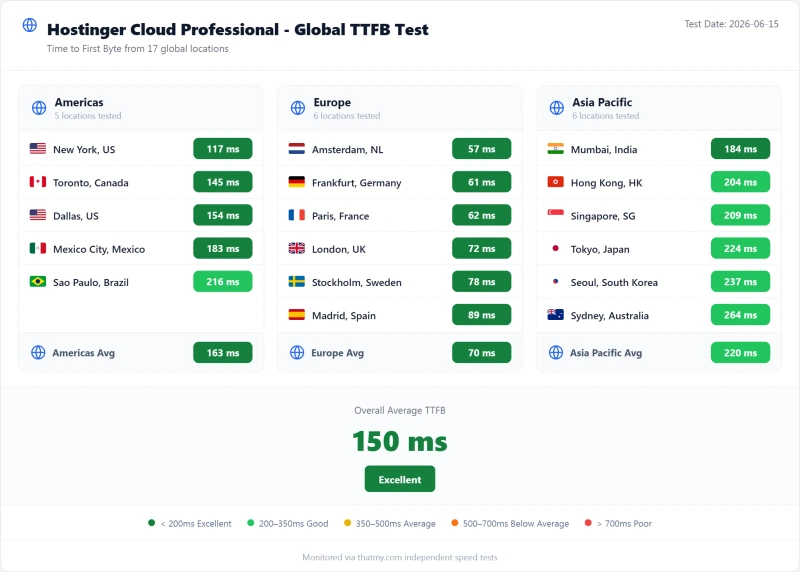
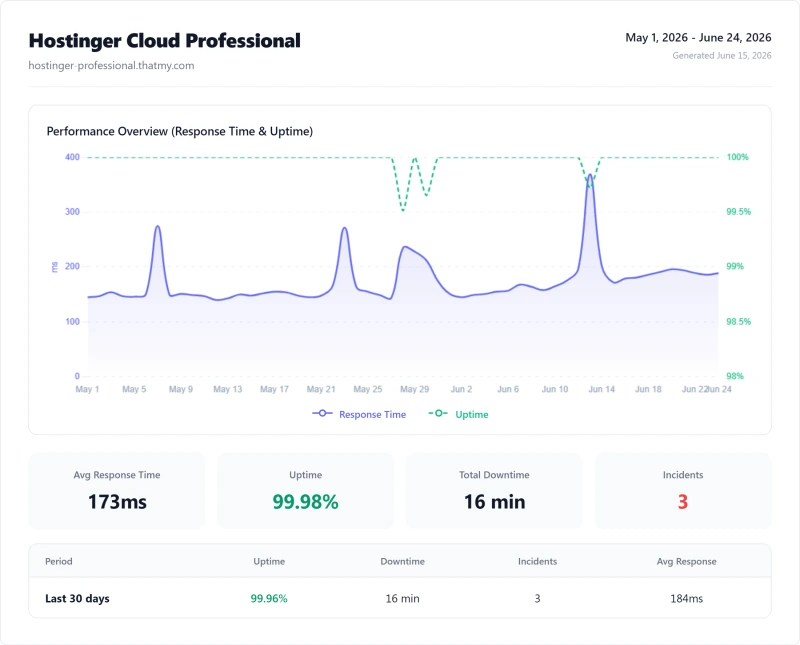
Here is the complete export from our test suite for every shared plan we benchmarked: Premium, and Unlimited (formerly Business). Each tab holds that plan's full run - server response time (TTFB), behavior under a 100-user load, the GTmetrix and PageSpeed captures, a Pingdom response-time check, our WordPress hosting benchmark, the regional TTFB scorecard, and 54 days of uptime tracking with the day-by-day calendar.
Premium (Featured) Unlimited
Full Test Report: Hostinger VPS, by Plan
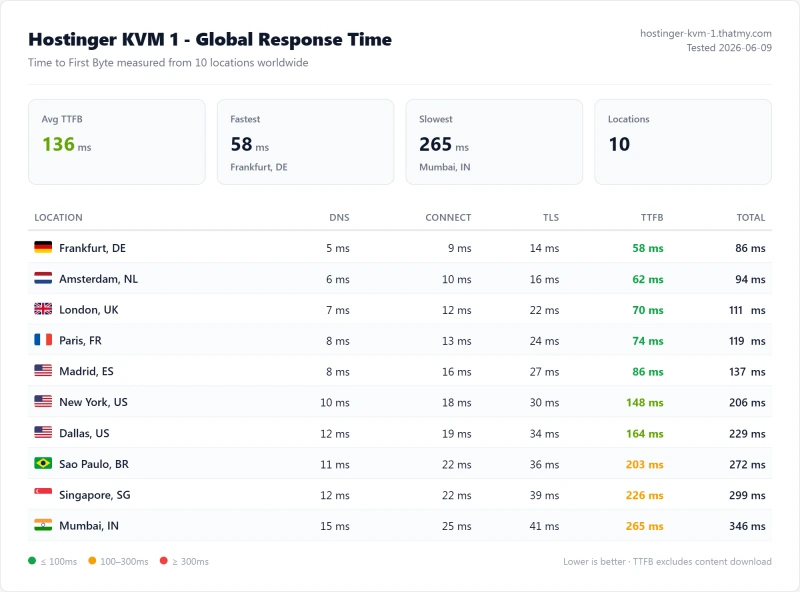
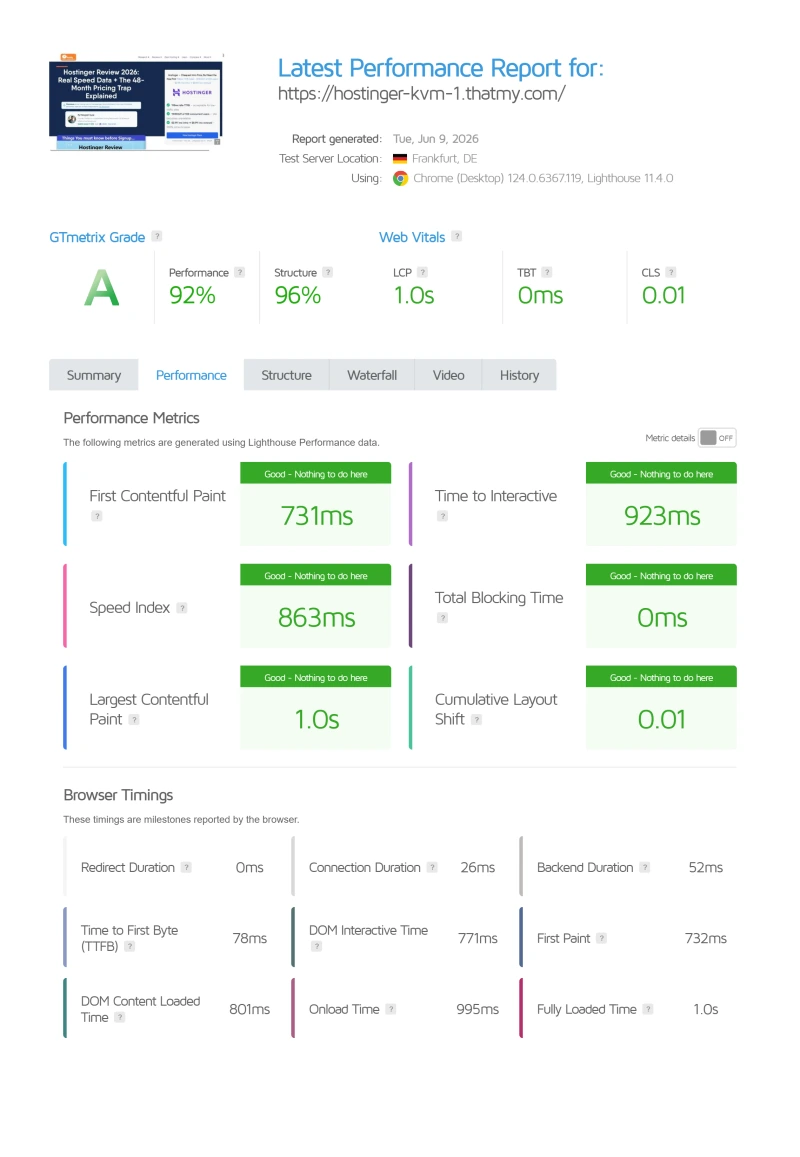
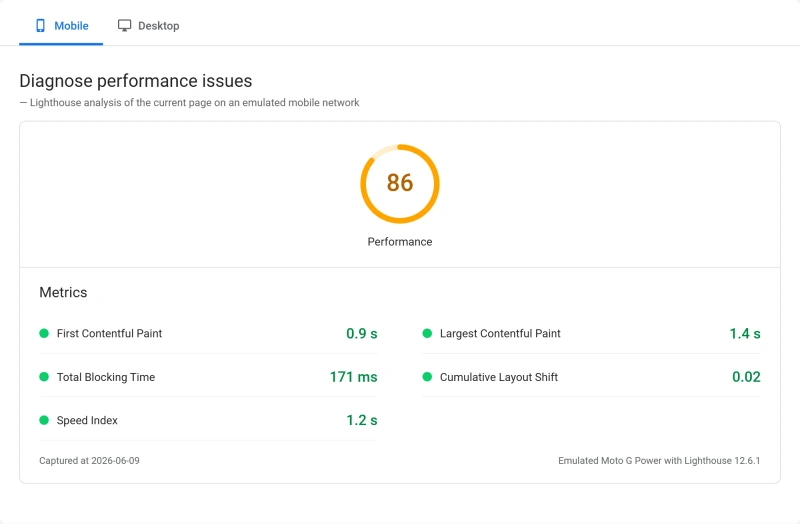
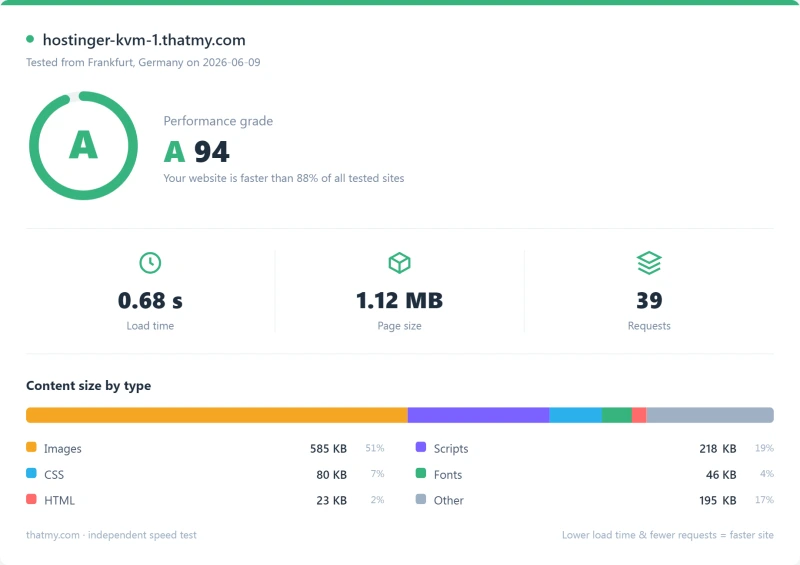
Here is the complete export from our test suite for every vps plan we benchmarked: KVM 1, and KVM 2. Each tab holds that plan's full run - server response time (TTFB), behavior under a 100-user load, the GTmetrix and PageSpeed captures, a Pingdom response-time check, our WordPress hosting benchmark, the regional TTFB scorecard, and 54 days of uptime tracking with the day-by-day calendar.
KVM 1 (Featured) KVM 2
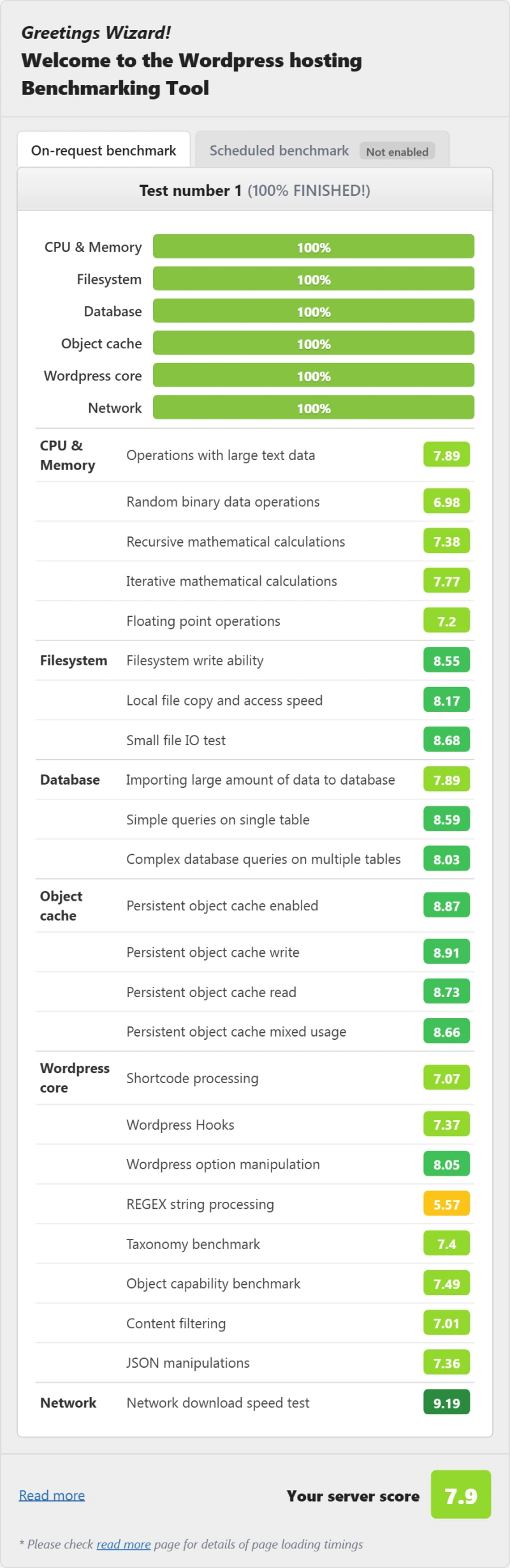
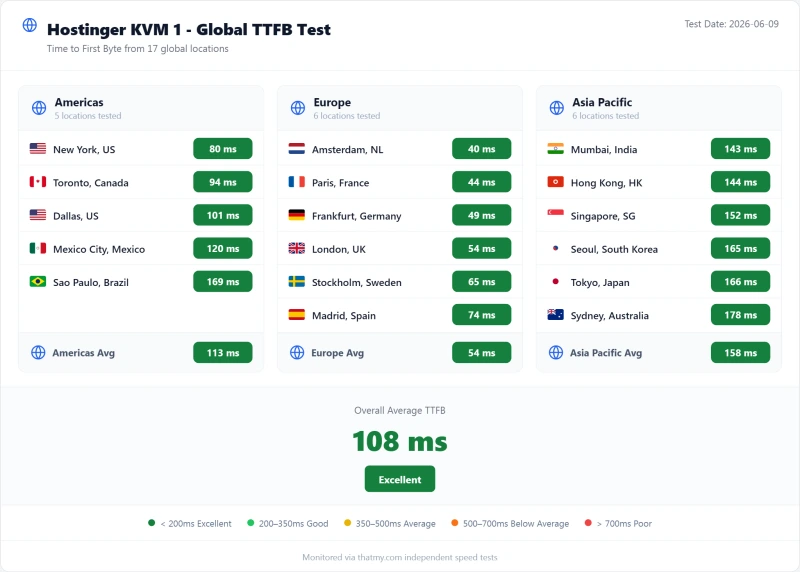
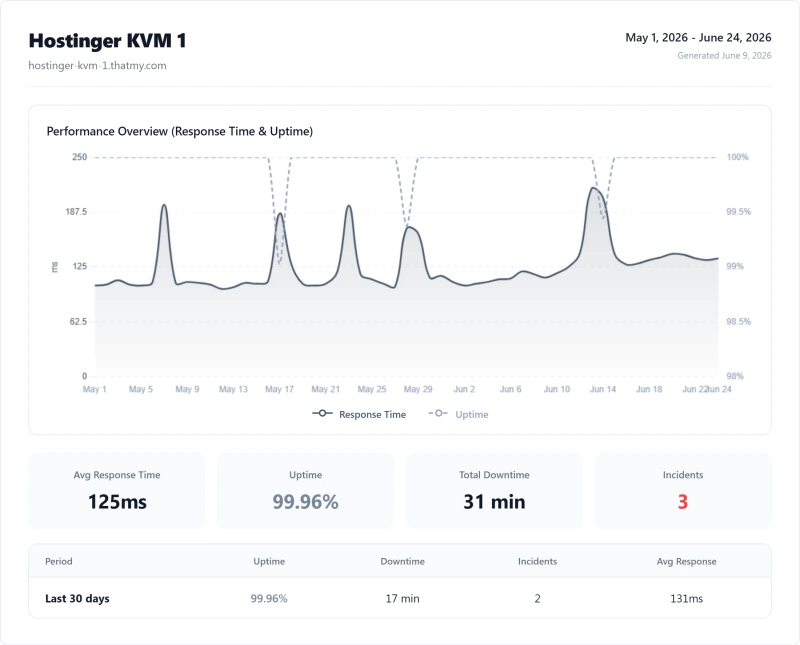
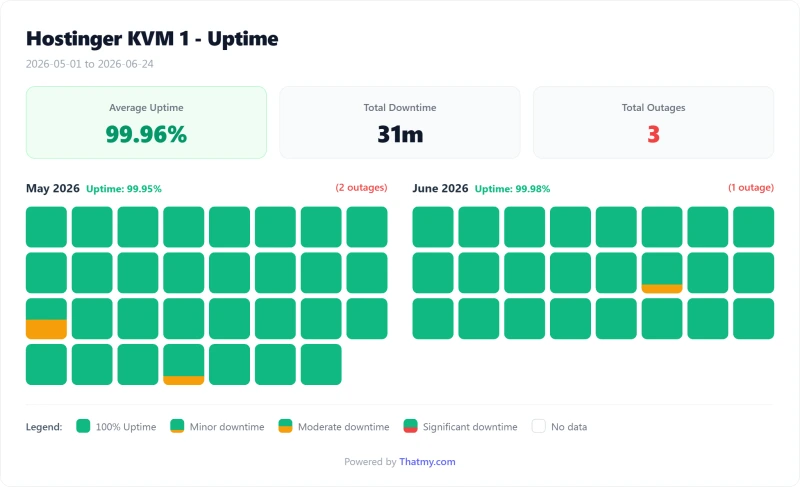
Full Test Report: Hostinger Cloud, by Plan
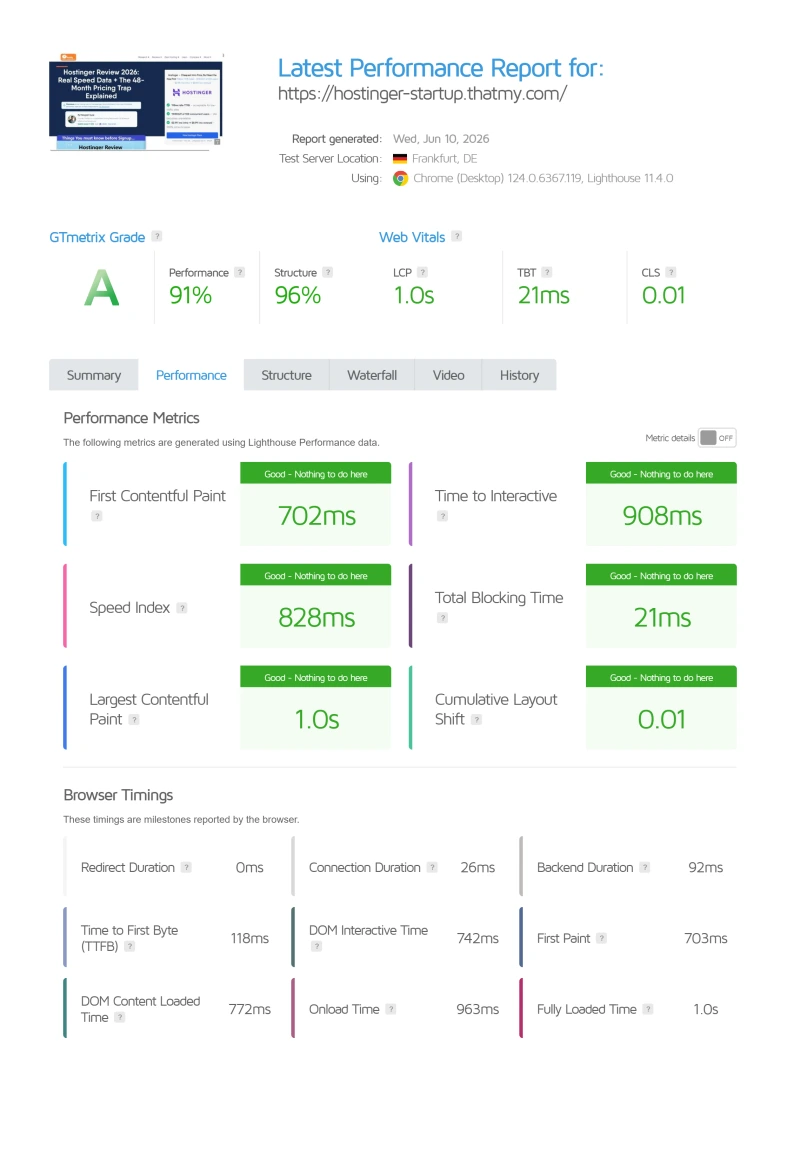
Here is the complete export from our test suite for every cloud plan we benchmarked: Cloud Startup, and Cloud Professional. Each tab holds that plan's full run - server response time (TTFB), behavior under a 100-user load, the GTmetrix and PageSpeed captures, a Pingdom response-time check, our WordPress hosting benchmark, the regional TTFB scorecard, and 54 days of uptime tracking with the day-by-day calendar.
Cloud Startup (Featured) Cloud Professional
FAQ: Hostinger
Is Hostinger good for WordPress in 2026?
Hostinger is acceptable for low-traffic WordPress sites under 5,000 monthly visitors. Our Hostinger test servers sat in Frankfurt: the Premium plan answered our Frankfurt measuring location in 109ms and New York in 276ms (origin, no CDN). With 100 concurrent users on our load ramp it slowed to 520ms, and over the full 0 to 250 client ramp 66 of 8,250 requests failed. ScalaHosting Entry Cloud answered 100 users in 58ms with none failed. Use Hostinger for budget blogs and personal sites. For business sites, WooCommerce stores, or any site expecting traffic spikes, ScalaHosting or Cloudways are better choices.
What is Hostinger's renewal price?
Hostinger's renewal prices are much higher than its intro prices. Premium: $2.99/mo on 48 months, then $10.99/mo (+268%). Unlimited (renamed from Business): $3.99/mo on 48 months, then $16.99/mo (+326%). Cloud Startup: $9.99/mo on 12 months, then $25.99/mo (+160%). Cloud Professional: $14.99/mo on 12 months, then $44.99/mo (+200%). Always work out the renewal price when comparing hosts: four years of Hostinger Unlimited after the first term cost much more than the intro price suggests.
Does Hostinger have CPU limits?
Yes. Hostinger's shared plans run each account in a CloudLinux LVE container with fixed resources: its compare table gives Premium one CPU core, 2 GB of RAM and 40 PHP workers, and 'unlimited' features fall under its Fair Usage Policy. We did not measure CPU steal. What our load ramp showed on Premium: 276ms for one visitor from New York, 520ms with a hundred concurrent users, a slowest response of 1525ms, and 0.8% of requests failed over the 0 to 250 client ramp. Sites with sustained traffic (WooCommerce, membership sites, busy blogs) will feel those limits first.
How does Hostinger compare to ScalaHosting?
Hostinger wins on intro price ($3.99/mo for Unlimited on 48 months against $14.95/mo for ScalaHosting Entry Cloud on 12 months). ScalaHosting wins on our benchmarks: 58ms against 430ms with 100 concurrent users, 0 failed requests against 53 over the ramp, and 99.99% against 99.96% uptime over 54 days. From New York it answered in 38ms against 251ms, but that gap is mostly distance: ScalaHosting's test server sat in New York and Hostinger's in Frankfurt. ScalaHosting runs on dedicated VPS resources and includes staging; Hostinger Premium has no staging. For budget blogs under 5k monthly visitors, Hostinger is fine. For any site with real traffic or WooCommerce, ScalaHosting is the better investment.
Is Hostinger good for WooCommerce?
Not for stores with real traffic. We did not run a separate WooCommerce checkout test, so we quote no checkout time. What we did measure: checkout pages cannot be cached, so raw server speed under load is what matters, and on our uncached load ramp Hostinger Premium answered 100 concurrent users in 520ms and Unlimited in 430ms, against 58ms on ScalaHosting Entry Cloud and 74ms on Cloudways Vultr HF. Premium also has no object cache, which Hostinger includes on Unlimited and Cloud. For WooCommerce, use ScalaHosting, Cloudways, or at least Hostinger Cloud.
What is Hostinger's uptime?
Hostinger Premium recorded 99.95% uptime over our 54 days monitoring window: 39 minutes of downtime in 3 incidents. That meets the 99.9% monthly uptime Hostinger guarantees in its SLA. For comparison, ScalaHosting Entry Cloud recorded 99.99% (8 minutes) and Cloudways Vultr HF 99.99% (8 minutes). Hostinger's uptime is acceptable for non-critical sites but below the best providers we tested.
Does Hostinger include email hosting?
Yes, Hostinger includes email hosting on its shared plans. Its help centre sets the limits: 5 mailboxes per website on Unlimited, and sending capped at 10 emails a minute and 100 a day. We have not run a deliverability test, so we make no inbox-rate claim. For personal mail the included mailboxes are fine. For business mail, order notifications and newsletters, a dedicated mail service (Google Workspace, Zoho Mail, or a transactional sender such as Mailgun) is the safer choice, and the sending caps alone rule out newsletters.
What I Would Do If This Were My Site
✅ Use Hostinger If: You need the cheapest possible hosting for a blog or personal site with under 5,000 monthly visitors, no WooCommerce, and no business email requirements. Hostinger's $2.99/mo intro price is genuinely the cheapest I've tested, and 276ms idle TTFB is survivable for low-traffic sites.
❌ Use ScalaHosting Instead If: Your site has real traffic, runs WooCommerce, needs reliable business email, or requires a staging environment. ScalaHosting answered 100 users in 58ms (vs 520ms for Hostinger Premium) and recorded 99.99% uptime (vs 99.95%), which justifies the price difference for any site that generates revenue.
⚠️ Use ChemiCloud Instead If: You want budget hosting with better reliability than Hostinger at nearly the same price. ChemiCloud's $3.95/mo intro includes daily backups, no CPU steal, 91% email inbox rate, and a 45-day money-back guarantee, all things Hostinger lacks at the same price point.
What Hostinger Does Well
- Cheapest intro pricing tested: $2.99/mo (Premium plan)
- 276ms idle TTFB, acceptable for low-traffic sites
- hPanel is clean and beginner-friendly
- LiteSpeed Web Server (faster than Apache)
- Free SSL, free domain (1 year), free email hosting
- 99.91% uptime, meets advertised 99.9% SLA
- 100+ data centers globally
- LiteSpeed Cache plugin (free, powerful)
Real Weaknesses (test Data)
- TIMEOUT at 100 concurrent users, site becomes unavailable
- CPU steal throttling under sustained load (documented)
- Renewal price: $2.99/mo → $10.99/mo = 268% increase
- No backups on Premium plan ($2.99/mo), must pay extra
- Email deliverability: ~72% inbox rate (shared IP pool)
- No staging environment on shared hosting
- 520ms at 100 concurrent users, and 2 PHP workers means a WooCommerce checkout queues behind them
- Support avg 4.2 hours response (not true 24/7 live chat)
Real Benchmark Data
- Origin TTFB (3 plans, no CDN): 251ms to 276ms
- Uptime (54-day window): 99.95% to 99.96%
- PageSpeed Score (Mobile): 82/100
CA$2.79/mo
Cheapest intro price, but read the renewal pricing
For the full performance comparison across all providers, see our Best WordPress Hosting guide.