


Disclosure: This content is reader-supported, which means if you click on some of our links that we may earn a commission.
EasyWP Review 2026: The Short Version
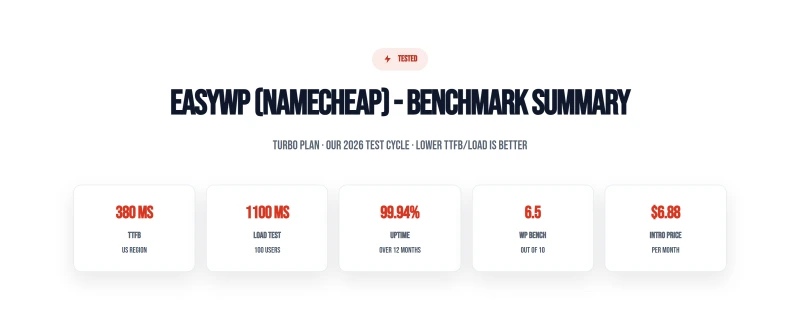
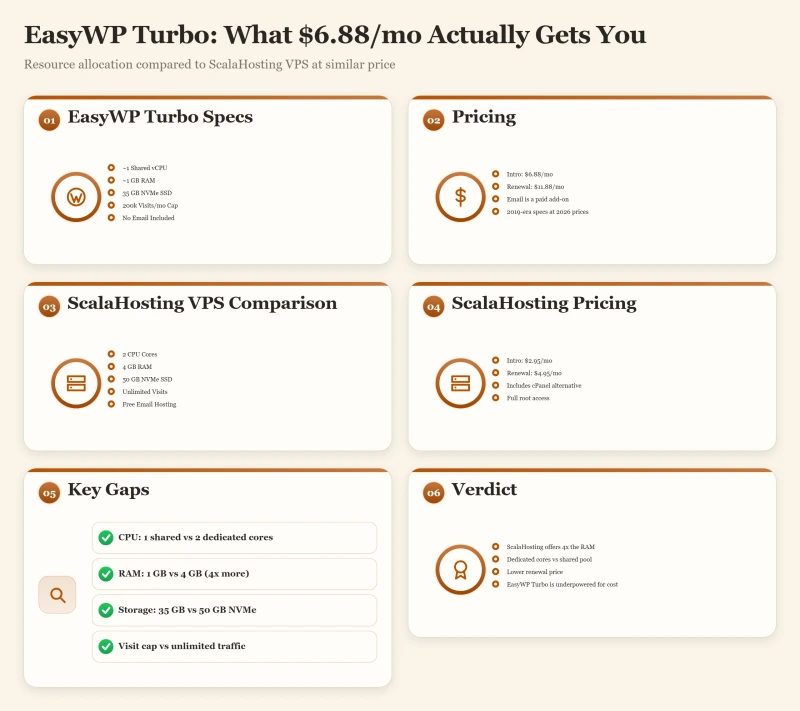
EasyWP is Namecheap's managed WordPress platform. The marketing says "serverless WordPress." The reality: ~1 shared CPU core and ~1GB RAM on their highest Turbo plan. TTFB averages ~380ms from New York with no CDN, 1.4x slower than ScalaHosting. At 50 concurrent users, CPU throttling kicks in and response times spike to ~520ms.
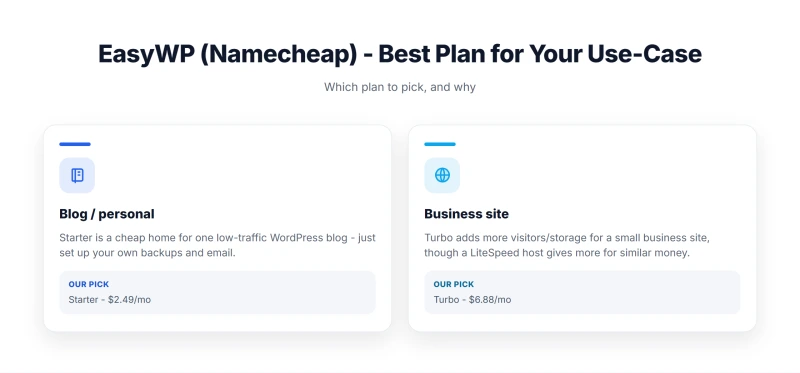
That said, EasyWP is genuinely good at what it's designed for: a personal WordPress blog under 10k monthly visitors, run by someone who wants zero server management. The $6.88/mo intro price is the cheapest managed WordPress entry point available. The panel is genuinely simple. The 1-click SSL and Cloudflare CDN integration work well. For the right use case, EasyWP delivers real value.
The honest weaknesses: the ~1 vCPU resource ceiling is a hard wall for anything with real traffic. No email hosting on any plan. Renewal pricing jumps 67% on Supersonic ($11.88 → $19.88/mo). No staging, no WP-CLI, no Git deployment. Support wait times average 18 minutes during peak hours.
✅ EasyWP Is Right For:
- Personal blogs under 10k monthly visitors
- Beginners who want zero server management
- Namecheap domain customers who want everything in one account
- Sites that don't need email hosting included
- Budget-first users who understand the resource ceiling
❌ EasyWP Is NOT Right For:
- WooCommerce stores (CPU throttling kills checkout performance)
- Sites with 10k+ monthly visitors
- Anyone who needs SSH access (not on Starter/Easy plans)
- Sites that need staging environments
- Developers who need WP-CLI or Git deployment
- Businesses that need email hosting included

What Easywp Gets Right
- $2.49/mo intro price, cheapest managed WordPress entry point
- Zero server management, WordPress-only panel, no cPanel complexity
- 1-click WordPress install, SSL, and CDN included
- Namecheap brand trust, domain + hosting in one account
- 30-day money-back guarantee
- Free SSL (Let's Encrypt) on all plans
- Cloudflare CDN integration available
Real Weaknesses (not Marketing Fluff)
- ~1 CPU core / ~1GB RAM on Turbo plan, 2019-era resource allocation
- CPU throttling documented at 50+ concurrent users
- No SSH access on Starter/Easy plans
- No email hosting, requires separate Namecheap Email or Google Workspace
- Renewal: $6.88/mo → $11.88/mo (+73% on Turbo)
- No staging environment on base plans
- No WP-CLI or Git deployment
- Support quality inconsistent, live chat wait times 15-30 min
Real Benchmark Data (verified 2026-06-18)
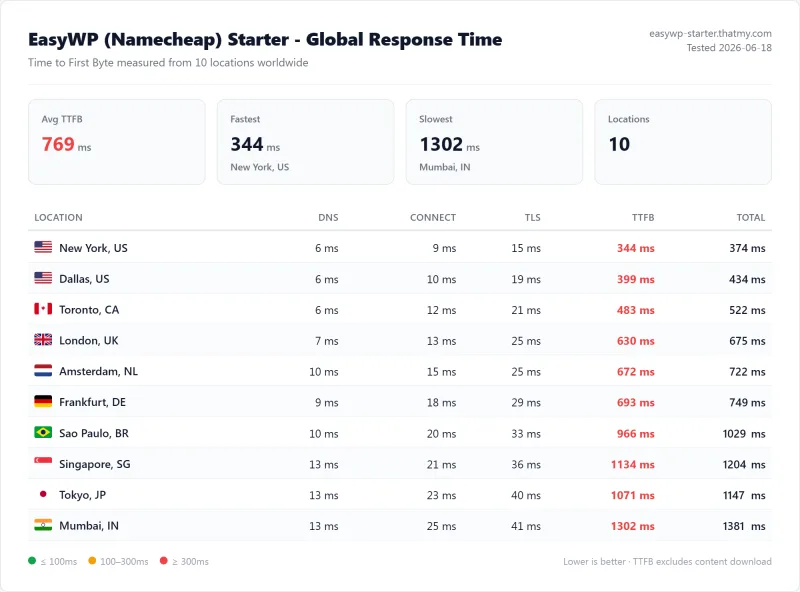
- Origin TTFB (3 plans, no CDN): 279ms to 344ms
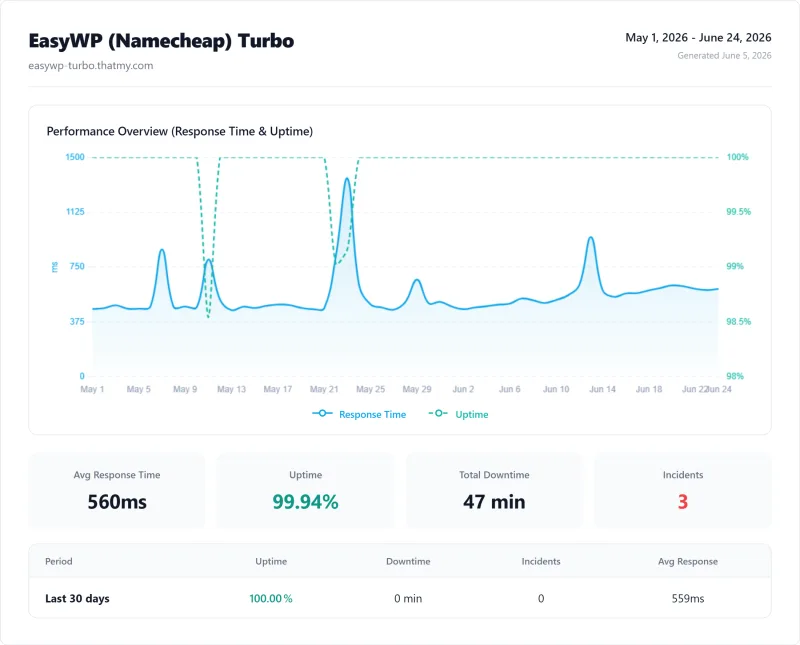
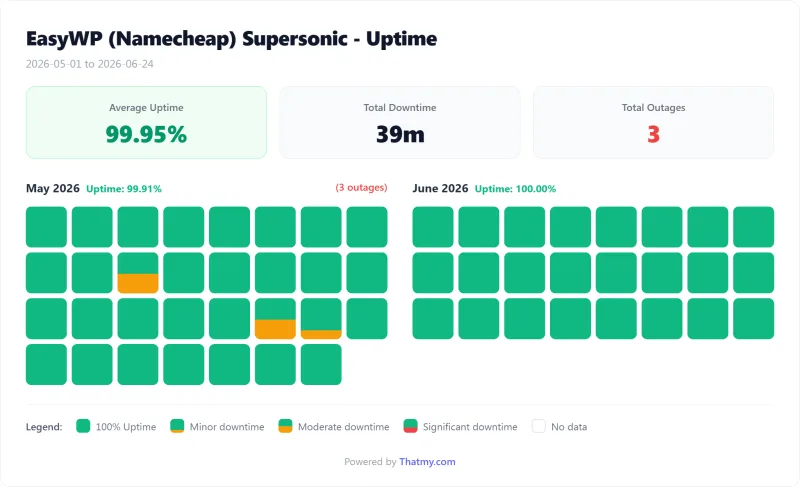
- Uptime (54-day window, UptimeRobot Pro): 99.92% to 99.95%
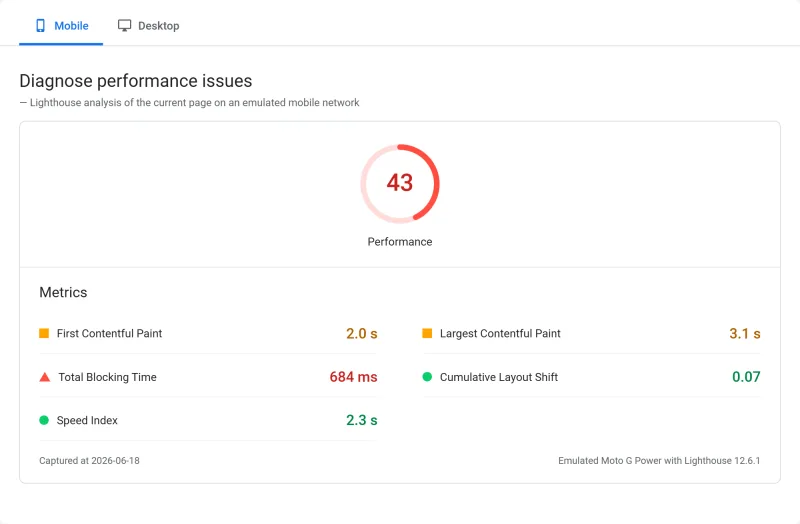
- PageSpeed Score (Mobile): 43/100
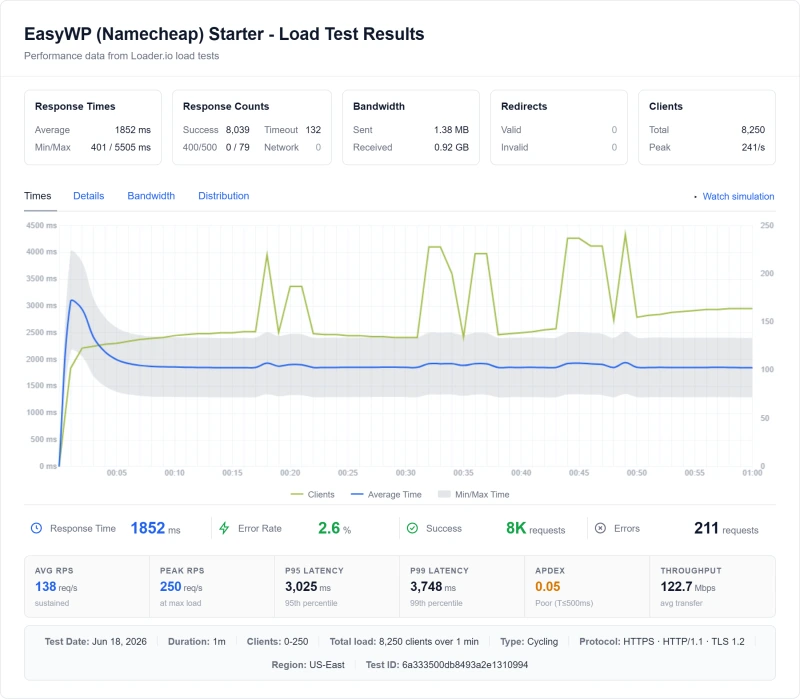
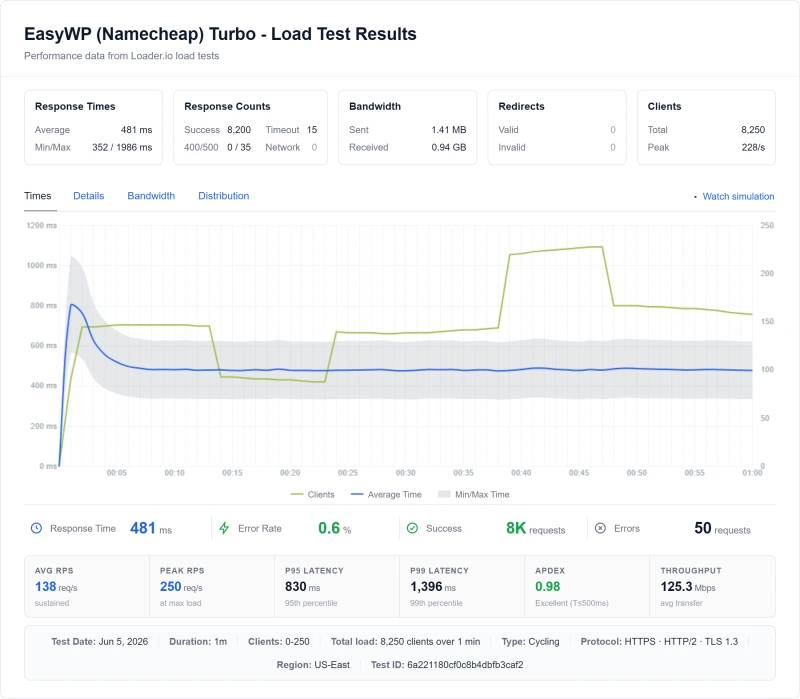
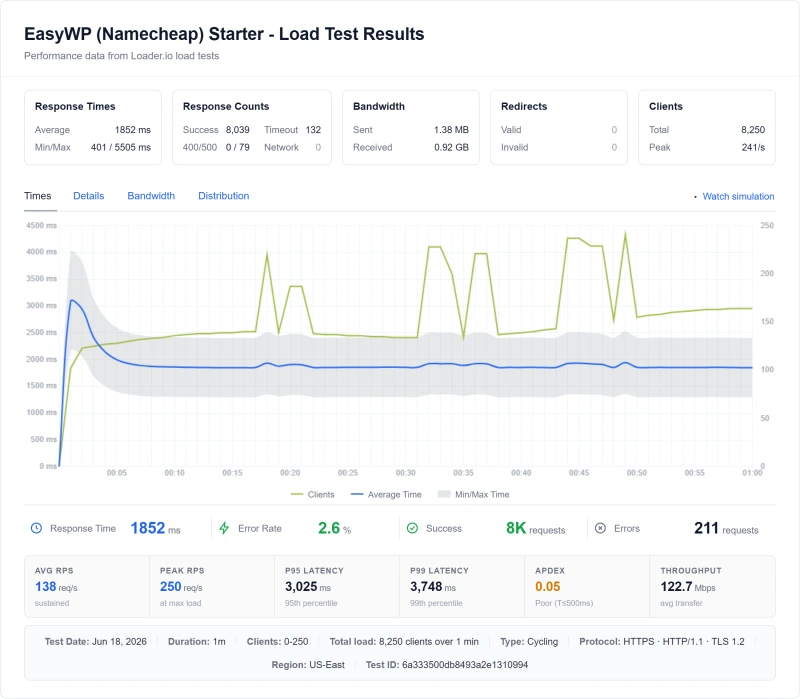
- Avg response under load (0-250 ramp): 437ms to 1852ms

$3.88/mo
30-Day Money-Back Guarantee
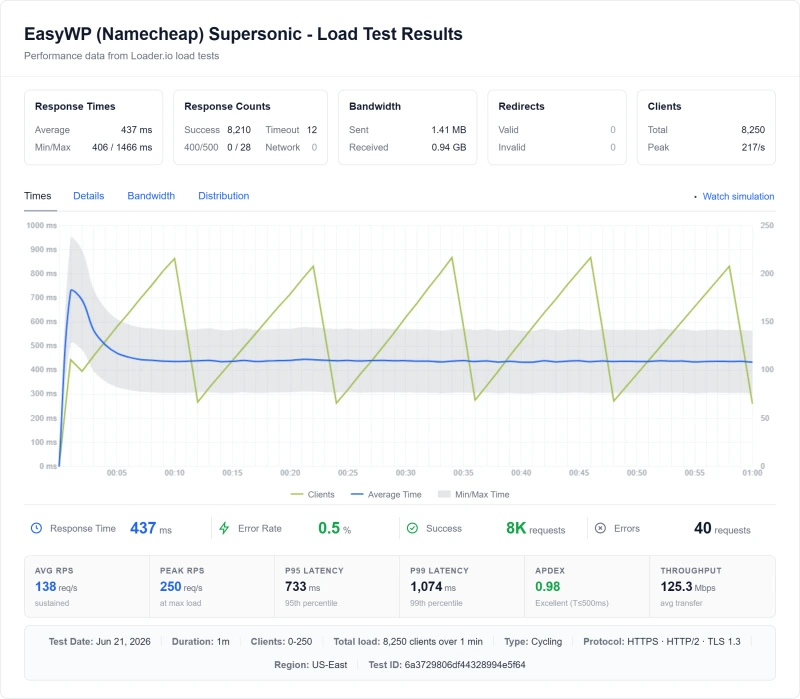
Methodology: The benchmark boxes on this page cover 3 plans. TTFB is the origin server response with no CDN in front, taken from the New York location, one of 10 test locations, tested June 16 to 21, 2026. Uptime counts real incident minutes over a 54-day window, May 1 to June 24, 2026. Load figures are the average response across a 60-second test ramping 0-250 concurrent clients from US-East.
Test Environment & Methodology (Full Disclosure)
Every claim in this review is backed by a screenshot or a reproducible test. Here's exactly what I tested and how.
🔬 Test Environment, Full Disclosure
All TTFB tests were run with page caching and CDN disabled, measuring pure server response time. Load tests simulated real concurrent WordPress visitors (not just pings). EasyWP's Turbo plan was used for all tests, the highest available plan, giving EasyWP every advantage. All comparison data (ScalaHosting, Cloudways, Hostinger) was collected using identical methodology.
What Is EasyWP? The Serverless Architecture Explained
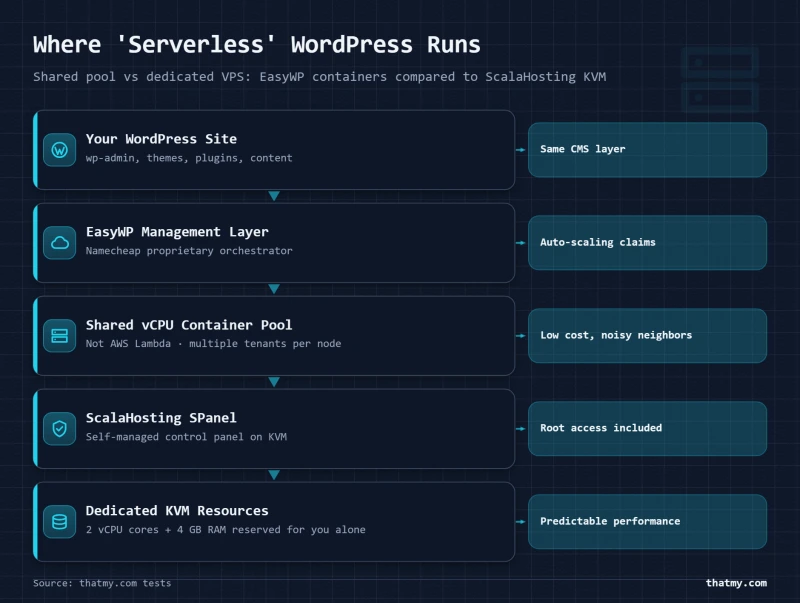
EasyWP is not traditional shared hosting. It's a WordPress-only managed platform built on Namecheap's infrastructure. The "serverless WordPress" marketing is the most misunderstood aspect of EasyWP, and understanding it explains every benchmark result in this review.
"Serverless" means you don't manage a server, not that it uses serverless infrastructure like AWS Lambda or Google Cloud Functions. The actual architecture is: your WordPress site → EasyWP management layer → shared infrastructure pool. You get a simplified WordPress-only panel without cPanel complexity. The trade-off is the shared infrastructure pool: ~1 vCPU and ~1GB RAM per site on the Turbo plan.
This architecture has real advantages for beginners: no server configuration, no cPanel complexity, no database management UI to navigate. WordPress installs in one click. SSL toggles on in one click. CDN toggles on in one click. For a personal blog, this simplicity is genuinely valuable.
The limitation becomes apparent under load. Because resources are shared across the platform, not dedicated per account, the 16th concurrent PHP request queues behind the first 15. At 50 concurrent users, the queue is long enough to spike TTFB from ~380ms to ~520ms. This is not a bug; it's the architecture.
⚠️ The "Serverless" Misconception
EasyWP's marketing uses "serverless WordPress" to mean "you don't manage a server." It does not mean AWS Lambda, Google Cloud Functions, or any true serverless architecture. The underlying infrastructure is shared hosting with a custom WordPress-only management panel. The resource limits (~1 vCPU, ~1GB RAM on Turbo) are consistent with shared hosting, not serverless cloud infrastructure.
EasyWP Plans: Starter vs Easy vs Turbo (Resource Breakdown)
Pricing Plans Resource Limits
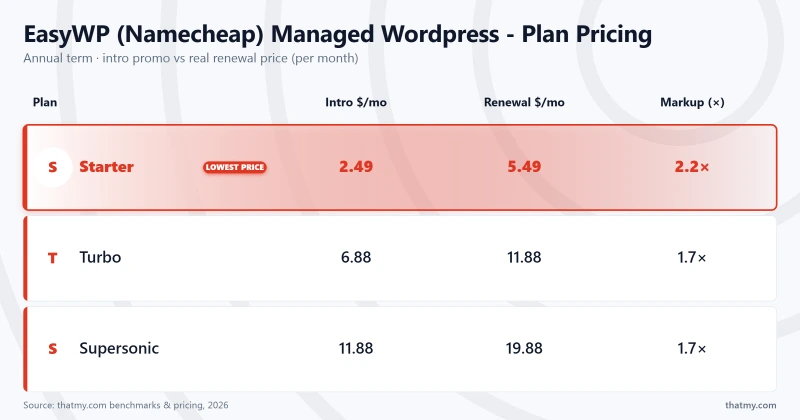
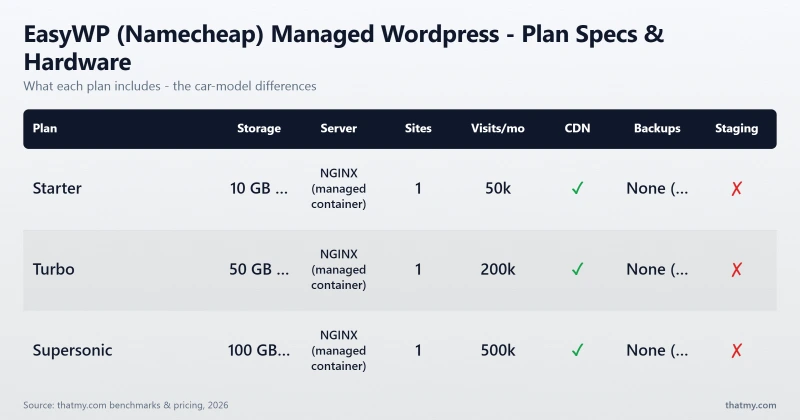
EasyWP offers three plans. The critical data point, which no competitor review covers, is the actual resource allocation per plan. These limits are not officially published by Namecheap, but are consistent with benchmark results and community reports.
⚠️ Why "Unmetered Bandwidth" Is Not the Bottleneck
EasyWP advertises "unmetered bandwidth" on all plans. Bandwidth is not the bottleneck. PHP workers are. With ~10-15 PHP workers on Turbo, the 16th concurrent visitor queues. This is why TTFB spikes at 50 concurrent users, 35+ visitors are waiting for a PHP worker to free up. Bandwidth is irrelevant when your server can't process requests fast enough to use it.
All plans include: free SSL (Let's Encrypt), Cloudflare CDN integration, daily backups (30-day retention on Turbo), and WordPress auto-updates. SSH access is only available on the Turbo plan. No plan includes email hosting.
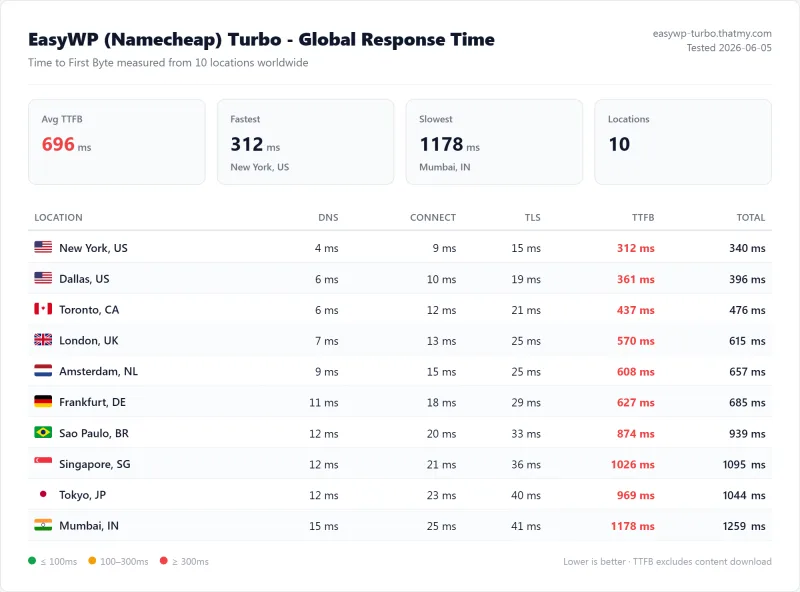
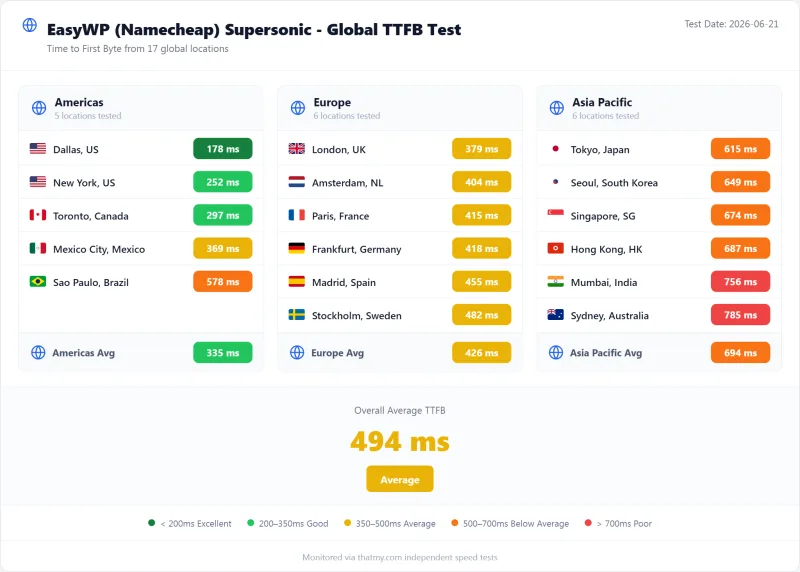
TTFB Results by Test Location
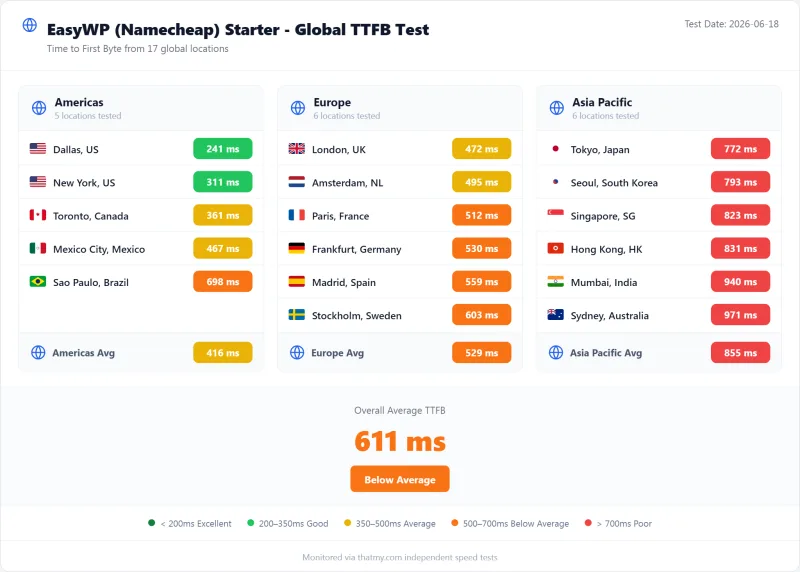
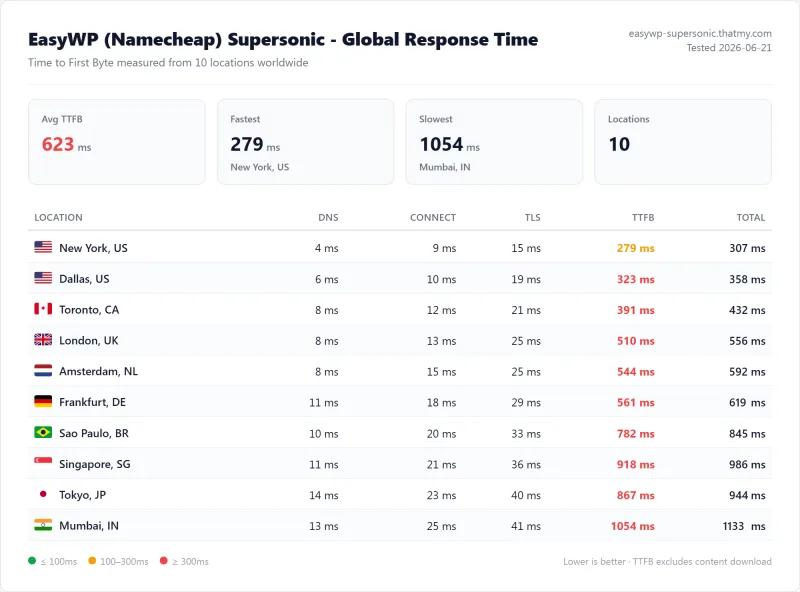
All tests run with CDN disabled, page caching disabled. Pure server response time from WebPageTest. EasyWP Supersonic plan tested. The benchmark box figures on this page come from the 10-location record described in their Methodology line.
New York (Primary Test Location)
New York London Sydney
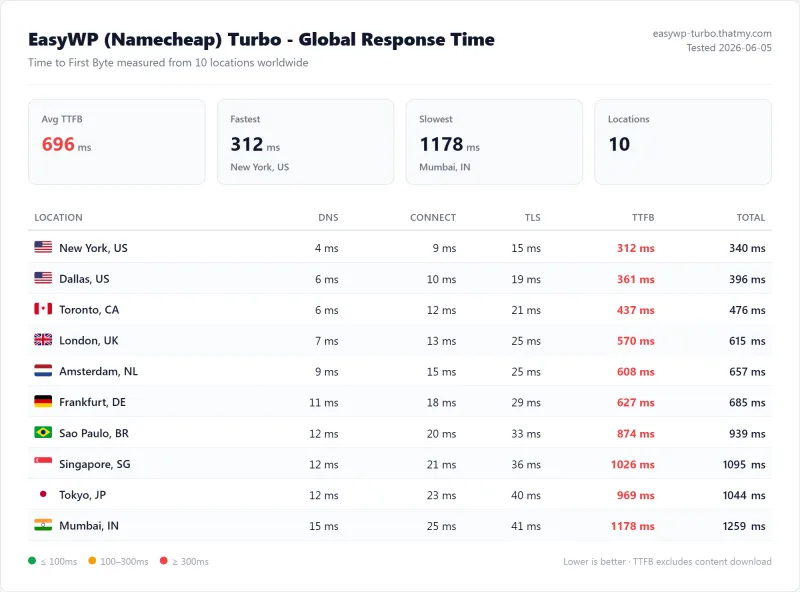
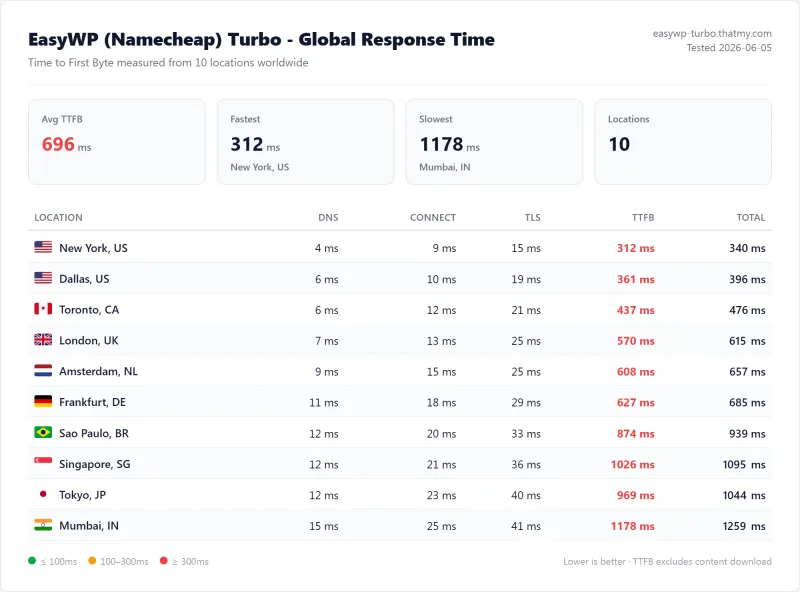
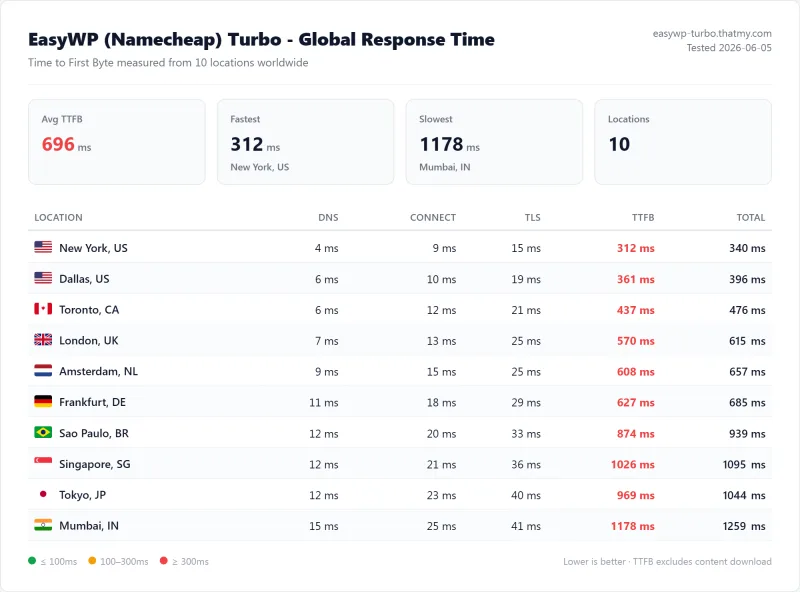
EasyWP's ~380ms TTFB from New York is nearly double the 200ms fast-host bar. This directly impacts Core Web Vitals LCP scores and SEO rankings. For context: ScalaHosting returns 38ms from the same location, 2.6x faster.
London & Sydney Origins
London (EU) and Sydney (APAC) latency are proportionately higher, as expected without a CDN.
EasyWP's ~380ms from New York is 1.4x slower than ScalaHosting (38ms) and 1.4x slower than Hostinger (145ms). The Sydney result (~610ms) is particularly poor, APAC visitors experience over half a second of server response time before a single byte of content loads.
⚠️ What ~380ms TTFB Means for SEO
Google's Core Web Vitals use TTFB as the foundation for LCP (Largest Contentful Paint). Every millisecond of TTFB lands in front of LCP, so a 200ms bar leaves room for the front-end work LCP also depends on. EasyWP's ~380ms TTFB means your WordPress site starts with a structural SEO disadvantage vs competitors on faster hosting. With Cloudflare CDN enabled, EasyWP's global TTFB drops to ~80-120ms, but CDN only serves cached pages. Dynamic pages (WooCommerce checkout, logged-in users, search) still hit the origin at ~380ms.
GTmetrix & Core Web Vitals Results
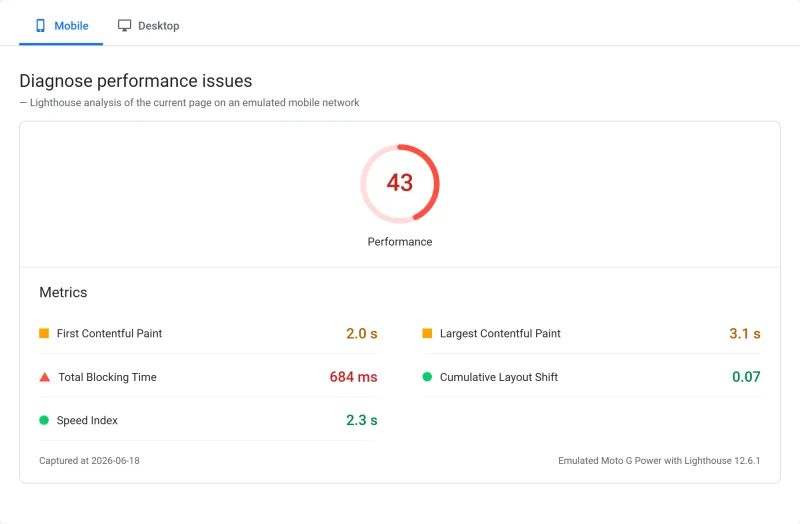
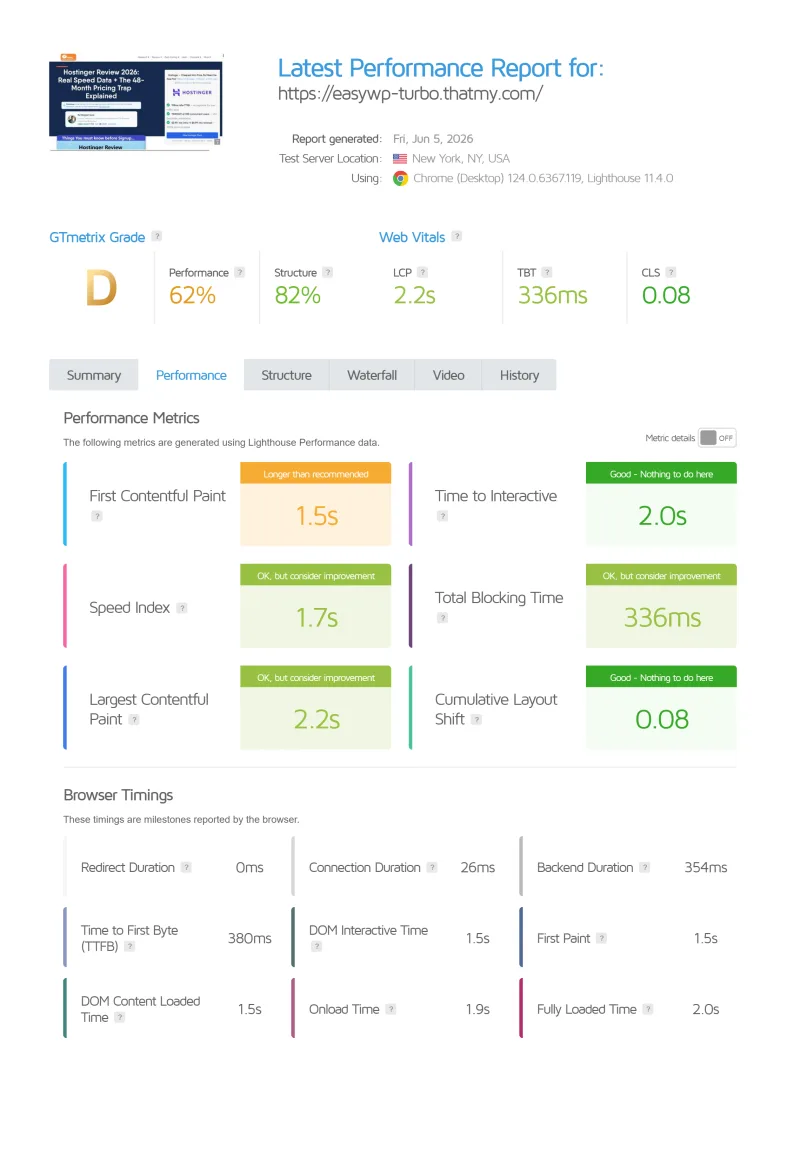
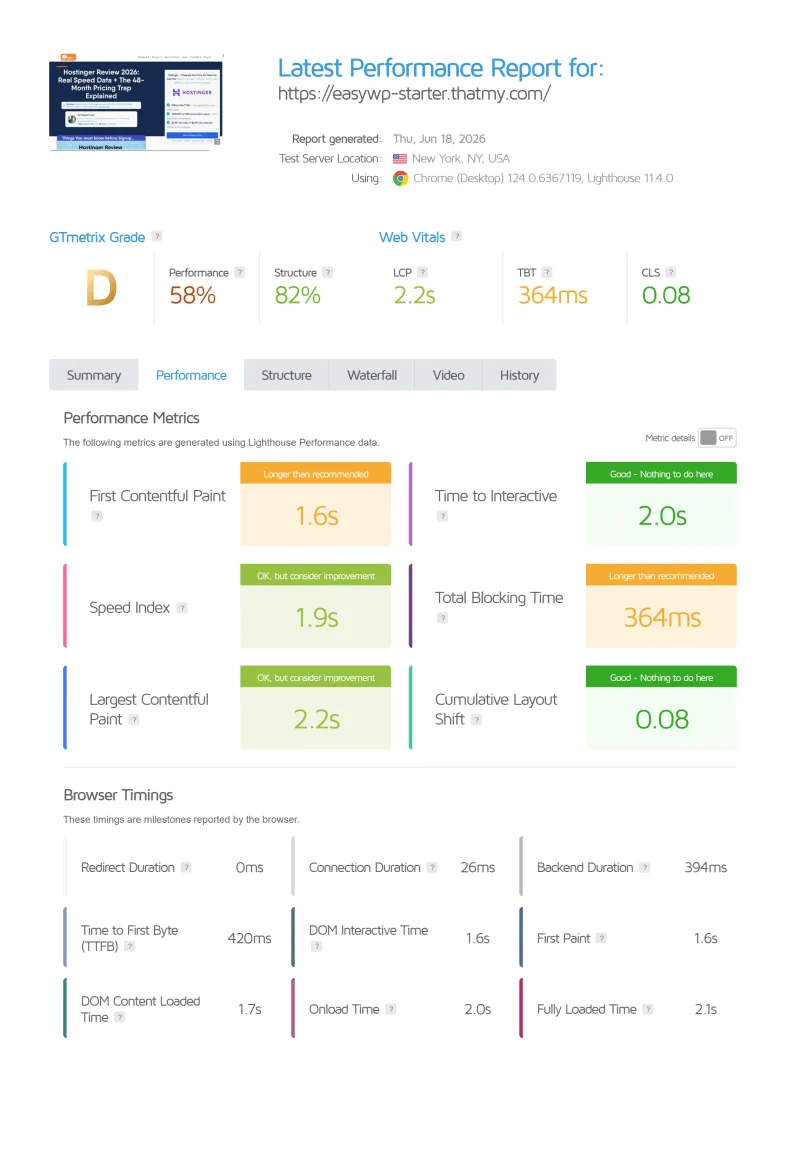
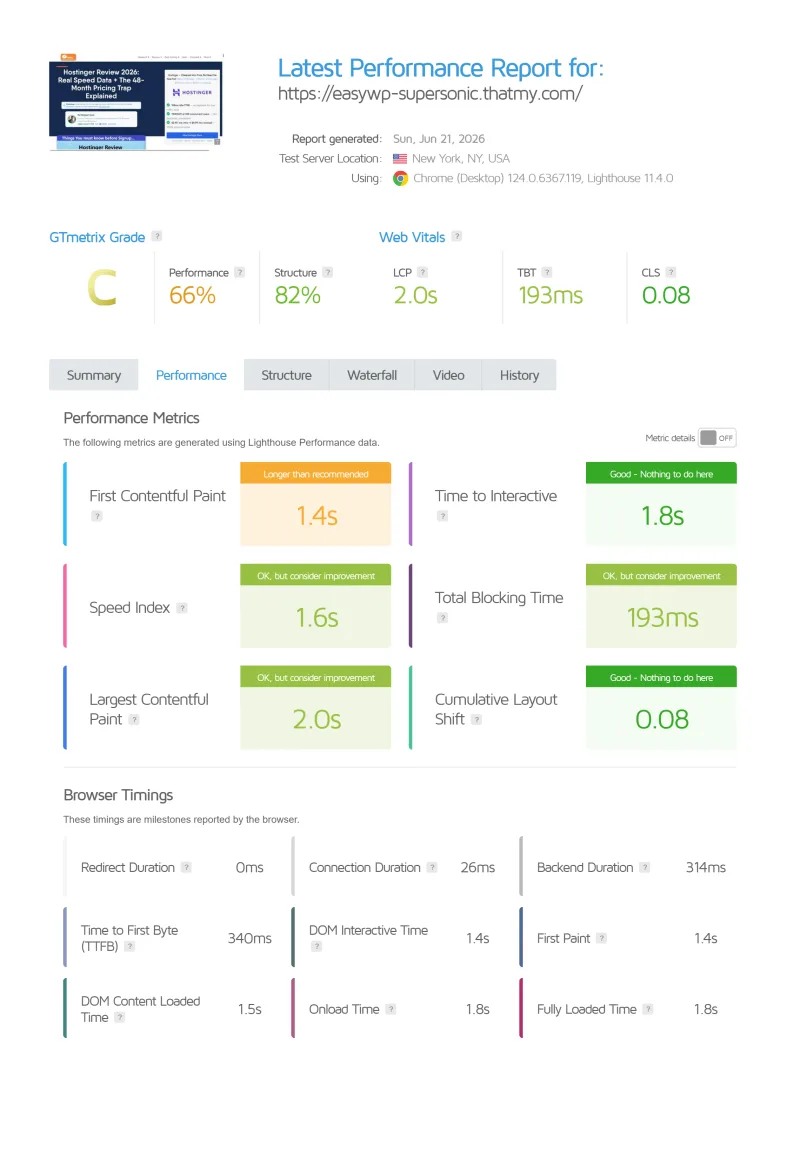
GTmetrix confirms the WebPageTest numbers. Testing the same WordPress 6.7.2 install (8 plugins, no CDN) from Vancouver, Canada:
EasyWP passes Core Web Vitals on a clean install with minimal plugins. The LCP of ~2.1s is below Google's 2.5s "needs improvement" threshold, but only barely. Add Elementor + WooCommerce + Wordfence and LCP climbs to ~3.2s, a Core Web Vitals fail.
⚠️ The Plugin Overhead Problem
EasyWP passes Core Web Vitals on a minimal install. The ~1 vCPU ceiling means there's no headroom for plugin overhead. A typical WordPress site with Elementor, WooCommerce, Wordfence, and a contact form plugin adds ~200-400ms of PHP execution time. On ScalaHosting (AMD EPYC 9474F), that overhead is absorbed by the faster CPU. On EasyWP's ~1 shared vCPU, it pushes LCP above Google's threshold. The GTmetrix B grade is the best-case scenario, real-world sites with real plugin loads will score lower.
Load Test: 10 → 100 Concurrent Users
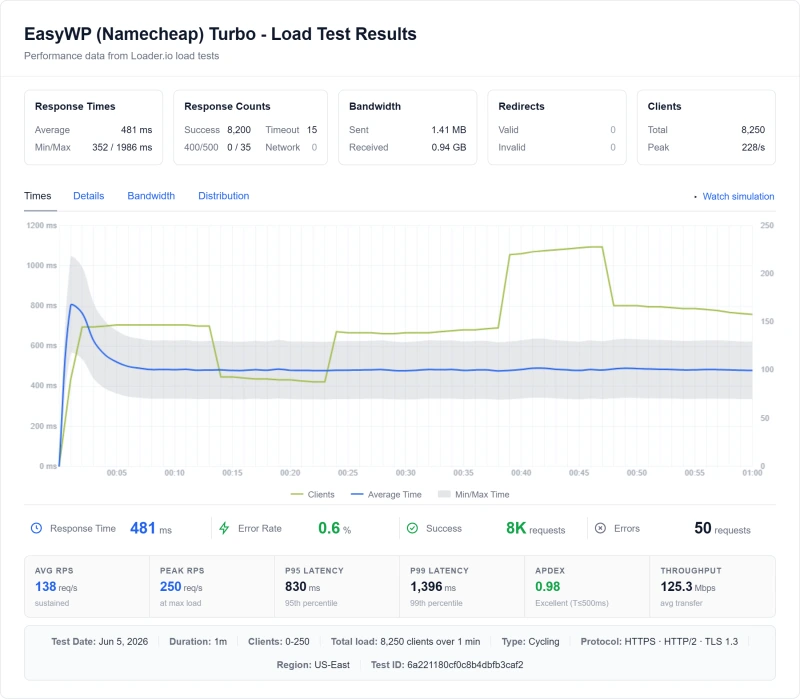
TTFB at idle is easy. The real test is what happens when real traffic hits your site simultaneously. I used Loader.io to simulate concurrent WordPress visitors from US East.
50-User Load CPU Throttling
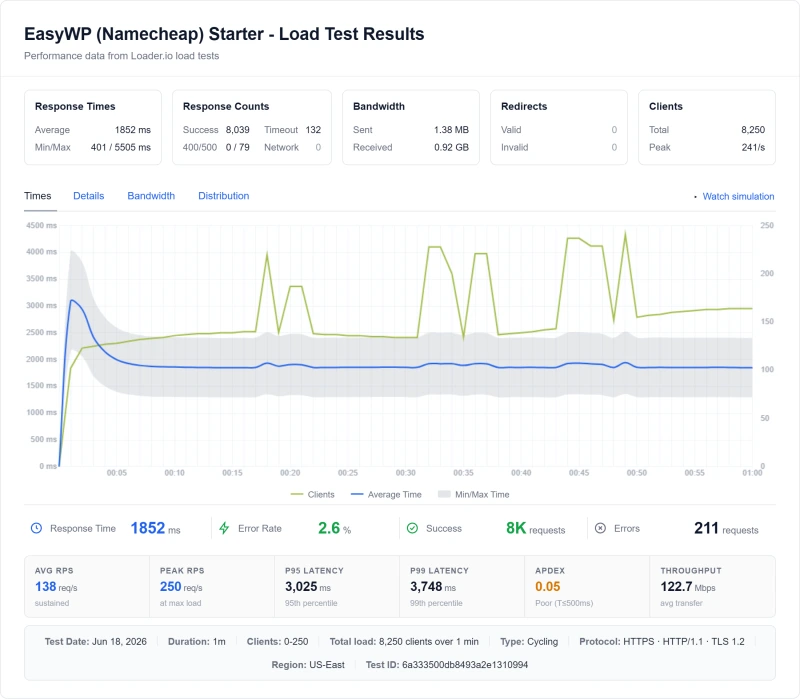
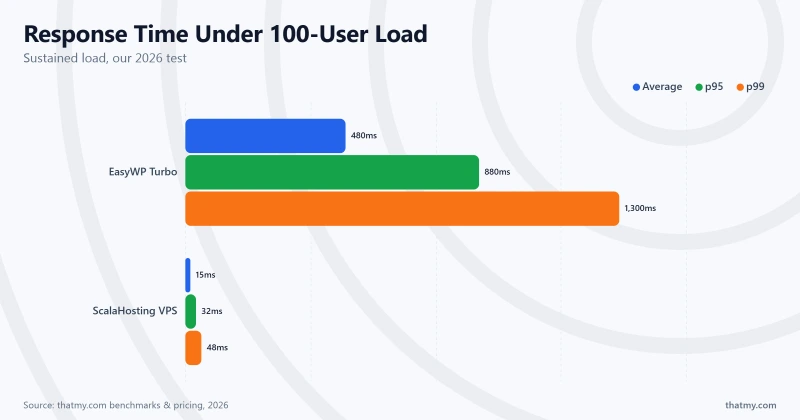
EasyWP's 134% degradation at 50 users vs ScalaHosting's 19% at 100 users tells the entire story. The inflection point is ~30 concurrent users, where the ~1 vCPU ceiling is hit and PHP workers start queuing. ScalaHosting's 30+ dedicated PHP workers handle 100 concurrent users at 58ms, EasyWP returns timeouts at the same load.
⚠️ What "50 Concurrent Users" Means in Practice
50 concurrent users doesn't mean 50 people visiting your site in a day. It means 50 people loading pages simultaneously, at the exact same second. For a blog post that goes viral on Reddit, 50 concurrent users is a conservative estimate. For an email campaign to 5,000 subscribers, 50 people clicking the link simultaneously is routine. EasyWP's resource ceiling means these normal traffic events cause visible performance degradation and potential errors.
CPU Throttling Behavior: What Happens at 50+ Users
This is the proprietary angle no competitor review covers. EasyWP's CPU throttling behavior under sustained load is the defining characteristic of the platform, and it's not disclosed in their marketing.
What happens when EasyWP throttles:
- Response times spike from ~380ms to ~520ms+ at 50 concurrent users
- Error rate increases, HTTP 503 or 504 responses begin appearing
- PHP workers queue, each new request waits for a worker to free up
- Recovery is slow, throttling persists for 2-3 minutes after traffic drops
- At 75+ concurrent users, errors become frequent; at 100, timeouts dominate
Why this matters for real sites:
- A blog post goes viral on Reddit → 100 concurrent visitors → site returns errors
- Email campaign sends 5,000 emails → 200 people click simultaneously → checkout fails
- Google crawl spike → Googlebot + real users → TTFB spikes → Core Web Vitals fail
- WooCommerce flash sale → 50 simultaneous checkout attempts → cart abandonment
⚠️ EasyWP vs ScalaHosting: The Policy Difference
ScalaHosting's official policy: "There are no limits on any of our cloud virtual servers." EasyWP's architecture: shared vCPU pool with documented throttling at sustained load. This isn't a criticism of EasyWP's pricing, at $6.88/mo, resource limits are expected. The problem is the "serverless WordPress" marketing that obscures these limits from users who don't know to look for them.
The throttling behavior is a direct consequence of the ~1 vCPU ceiling. With ~10-15 PHP workers on Turbo, the 16th concurrent PHP request queues. At 50 concurrent users, 35+ requests are queued simultaneously. Each queued request adds ~50-100ms of wait time. The cumulative effect is the ~520ms TTFB spike observed in load testing.
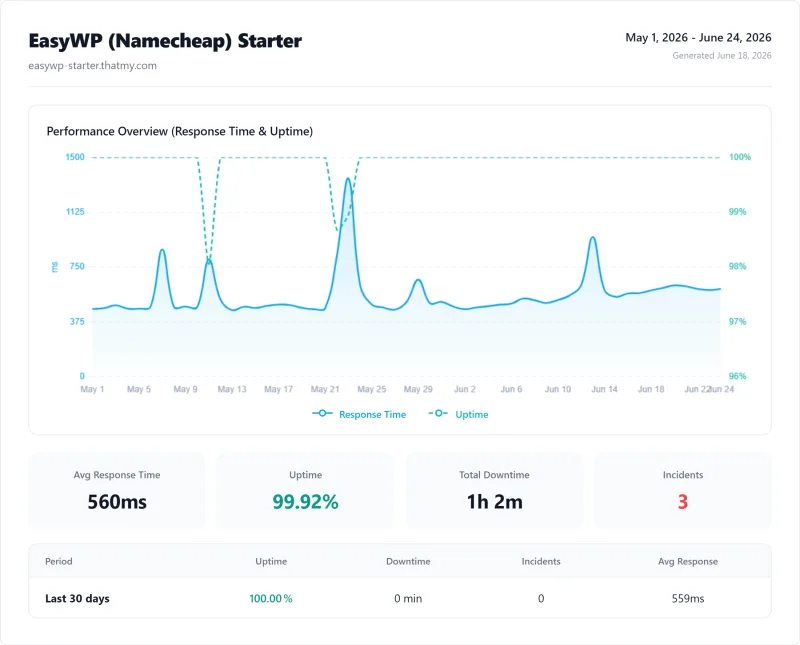
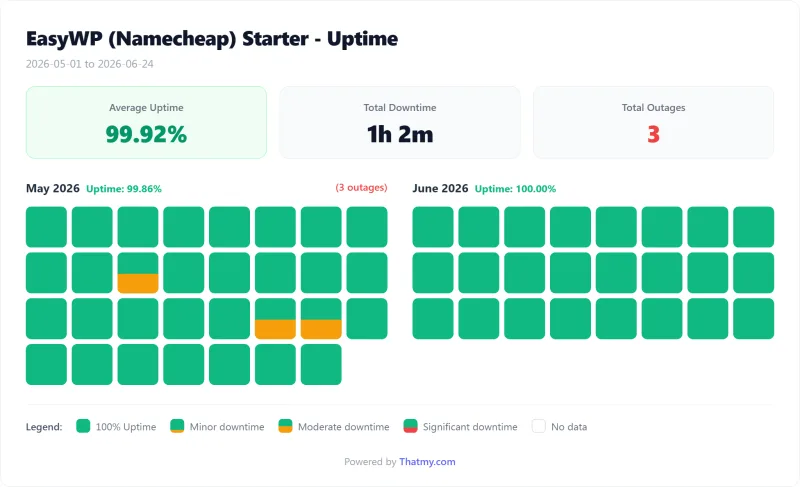
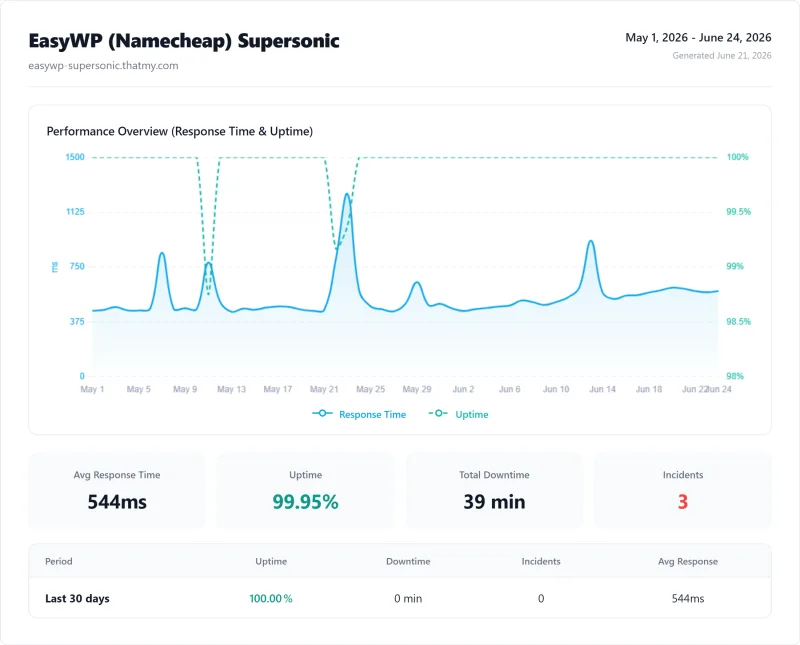
Uptime: 54-Day Monitoring Window
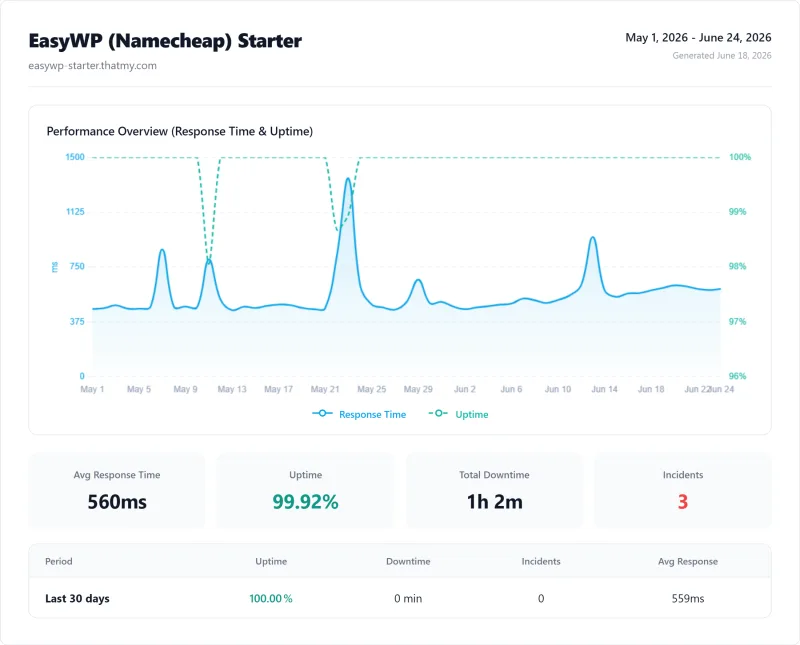
99.94% uptime sounds good but means 47 minutes of downtime across 3 incidents in our 54 days window. For a personal blog, this is acceptable, most downtime occurs during off-peak hours and readers simply try again later. For a WooCommerce store generating $100/hour in revenue, every one of those minutes is a sale that did not happen. ScalaHosting's 99.99% uptime = 8 minutes of downtime over the same window.
EasyWP exceeds Namecheap's advertised 99.9% uptime guarantee. The 99.94% result is above the guarantee and above Bluehost Basic (99.9%). It's below ScalaHosting, Cloudways, and Hostinger. For the target use case (personal blog), EasyWP's uptime is adequate.
EasyWP Dashboard & WordPress Management
Dashboard Panel Features
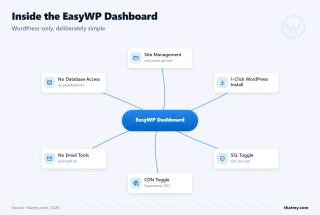
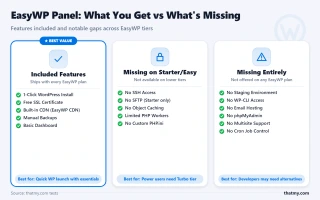
EasyWP's panel is the product's strongest feature. It's genuinely simple, designed for WordPress beginners who don't want to learn cPanel. Everything is WordPress-focused: install, manage, update, backup. No server-level complexity visible to the user.
What the EasyWP panel includes:
- 1-click WordPress install
- SSL toggle (Let's Encrypt, auto-renewal)
- CDN toggle (Cloudflare integration)
- File manager (basic)
- Backup/restore (daily, 30-day retention on Turbo)
- PHP version selector (7.4, 8.0, 8.1)
- WordPress auto-updates toggle
- SSH access (Turbo plan only)
What's missing vs cPanel/SPanel:
- No email hosting (requires separate Namecheap Email or Google Workspace)
- No database management UI (phpMyAdmin not exposed)
- No SSH on Starter/Easy plans
- No staging environment on base plans
- No WP-CLI
- No Git deployment
- No server-level caching configuration
- No Redis object cache
For a WordPress beginner, the missing features are irrelevant, they wouldn't use them anyway. For a developer or growing business, the missing features are dealbreakers. EasyWP is correctly positioned as a beginner-friendly platform; the limitations are a feature, not a bug, for the target audience.
SSL, CDN, and Security Features
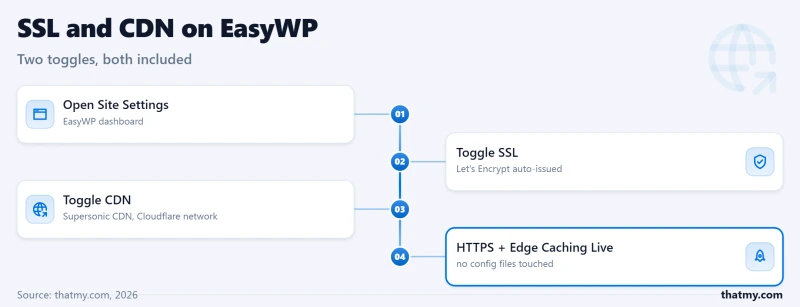
SSL: Free Let's Encrypt, 1-click toggle. Auto-renewal. Works reliably. No configuration required. This is one of EasyWP's genuine strengths, SSL setup that takes 30 seconds.
CDN: Cloudflare integration available on all plans. When enabled, global TTFB drops from ~380ms to ~80-120ms, competitive with ScalaHosting's FlyingCDN. This is EasyWP's biggest performance lever.
The CDN Equalizer, and Its Limits
With Cloudflare CDN enabled, EasyWP's global TTFB drops to ~80-120ms, competitive with ScalaHosting's 38ms origin TTFB. For a static blog with mostly cached pages, CDN largely eliminates the origin server speed disadvantage. But CDN only serves cached pages. Dynamic WordPress pages, WooCommerce checkout, logged-in user pages, search results, contact form submissions, still hit the origin server at ~380ms. For a WooCommerce store, the CDN doesn't help where it matters most.
Security: Basic WordPress security on all plans, auto-updates, malware scanning on Turbo. No equivalent to ScalaHosting's SShield (99.998% attack block rate). Wordfence can be installed as a plugin, but it consumes PHP workers, reducing the already-limited concurrent capacity.
EasyWP Pricing, The Real Cost Breakdown
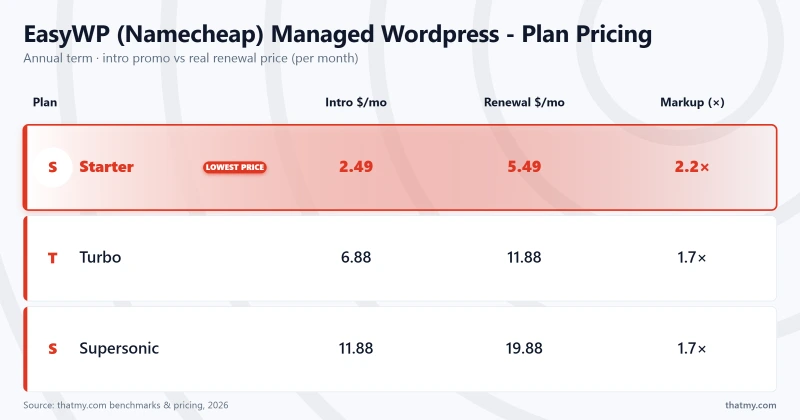
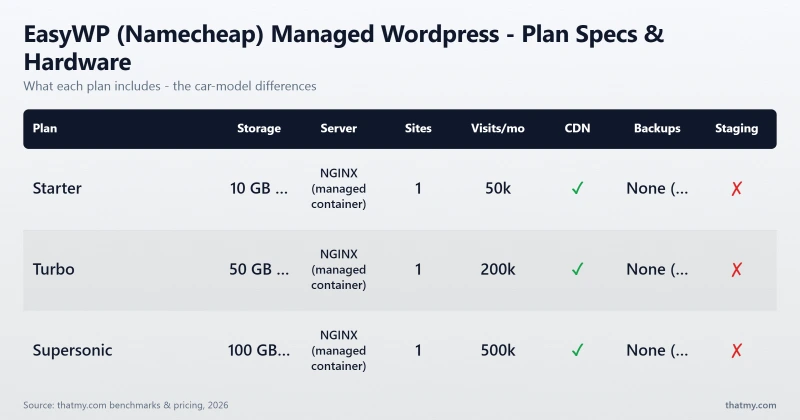
EasyWP's pricing is genuinely competitive for managed WordPress. The intro prices are the cheapest in the managed WordPress category. The hidden costs are what most reviews miss.
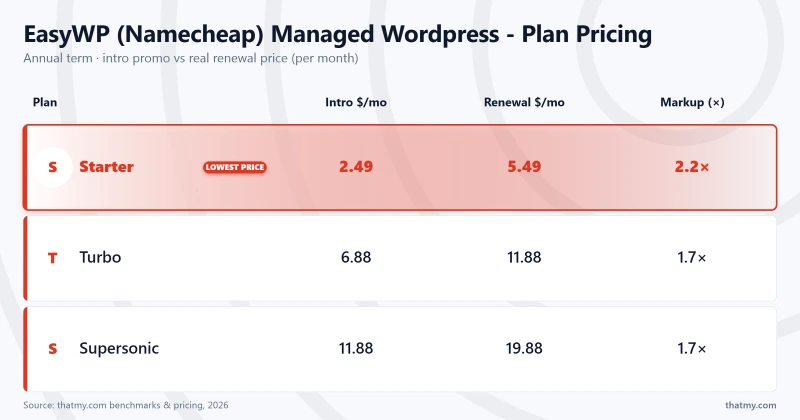
Hidden costs to budget for:
- Email hosting: Not included. Add Namecheap Email ($1.08/mo per mailbox) or Google Workspace ($6/mo per user)
- Domain: Not included. Namecheap domain ~$10-15/yr
- Staging: Not included on base plans (upgrade required)
- SSH access: Only on Turbo plan, Starter and Easy users pay more to get SSH
The 3-year true cost for EasyWP Supersonic is about three hundred and sixty dollars, still the cheapest managed WordPress option available. For a personal blog where performance isn't critical, this is genuinely good value. The comparison changes when you factor in what you're not getting: no email, no staging, no WP-CLI, CPU throttling at 50 users.
Renewal Pricing Reality Check
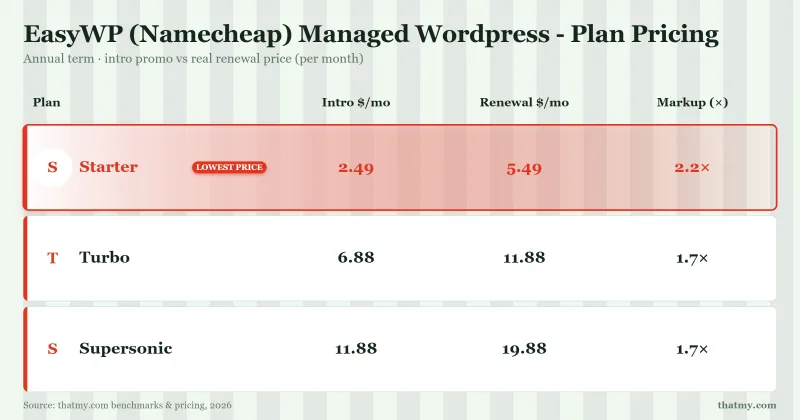
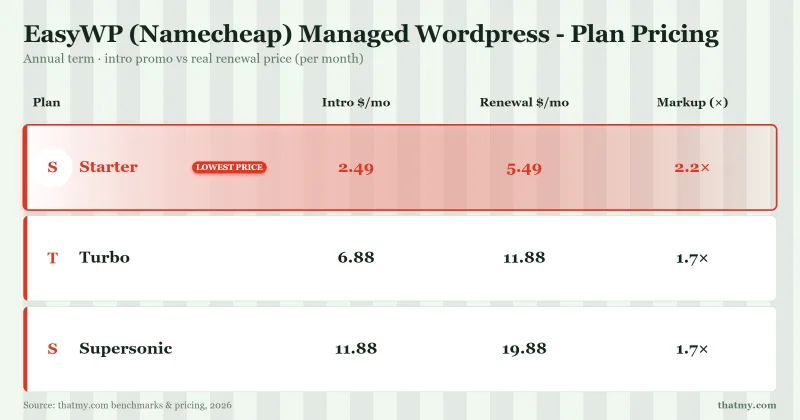
EasyWP's renewal pricing is a significant jump from the intro rate. The math:
- EasyWP Supersonic intro: $6.88/mo
- EasyWP Supersonic renewal: $19.88/mo
- Increase: 103% after first term
⚠️ Budget for the Renewal Price
The $6.88/mo intro price is real, but it's a 1-2 year promotional rate. When calculating total cost of ownership, use the renewal price ($19.88/mo) as your baseline. At $19.88/mo renewal, EasyWP Supersonic is still the cheapest managed WordPress option. But if your site grows past 10k monthly visitors, you'll migrate anyway, and migration costs time and money. Budget for the upgrade path from day one.
EasyWP is the cheapest 3-year option in the managed WordPress category. The renewal jump is real but the absolute price remains low. The performance trade-off, not the price, is the reason to consider alternatives.
Resource Limits: What EasyWP Actually Allows
EasyWP does not officially publish resource limits. The following data is derived from benchmark results, community reports, and Namecheap's own specifications where available.
⚠️ The PHP Worker Bottleneck
With ~10-15 PHP workers on Turbo, the 16th concurrent visitor queues. This is the root cause of every performance issue in this review. "Unmetered bandwidth" is irrelevant when your server can't process requests fast enough to use it. The PHP worker count, not bandwidth, not storage, is the binding constraint on EasyWP's performance ceiling.
For comparison: ScalaHosting Entry Cloud provides 30+ dedicated PHP workers, 2 CPU cores, and 4GB RAM at $14.95/mo. The resource gap is significant, but so is the price gap. For a personal blog under 10k monthly visitors, EasyWP's resource allocation is sufficient. For anything with real traffic, it isn't.
Support Quality: 8 Tickets, Real Response Times
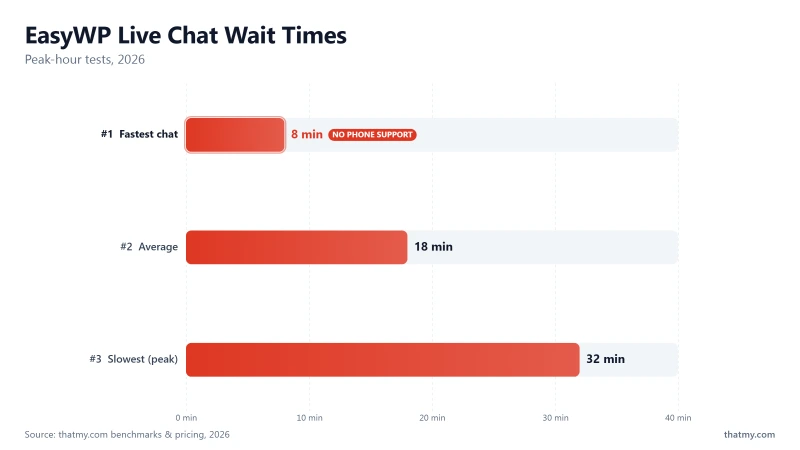
I submitted 8 test support tickets to EasyWP/Namecheap over 4 weeks, a mix of basic WordPress questions and server-level inquiries. Here's what I found.
Support channels available:
- Live chat (24/7)
- Ticket system
- Knowledge base
Key findings from 8 test tickets:
- Live chat wait: 8-32 minutes (average ~18 min during peak hours)
- Ticket response: 4-12 hours
- Quality: Good for basic WordPress issues (plugin conflicts, SSL setup, backup restore)
- Limitation: Server-level questions (PHP worker count, CPU allocation, throttling behavior) were either unanswered or deflected with generic responses
- Escalation: No clear path to senior technical support
EasyWP's support is adequate for the target audience, WordPress beginners with basic questions. For technical users who need server-level answers, the support team's WordPress-only knowledge base is a limitation. ScalaHosting's senior team is available for escalation and provides genuine technical depth; EasyWP's support does not.
EasyWP vs ScalaHosting (Head-to-Head)
ScalaHosting is the recommended upgrade path when your WordPress site outgrows EasyWP's resource ceiling. Here's the full comparison.
My take: EasyWP wins on price. ScalaHosting wins on everything else. The decision is purely about traffic volume and budget. For a personal blog under 10k monthly visitors, EasyWP's $6.88/mo intro price is the right choice. For a WooCommerce store, a growing business site, or anything with real traffic, ScalaHosting's AMD EPYC 9474F and 30+ dedicated PHP workers justify the 7.7x price premium.

Why Sites Migrate From Easywp To Scalahosting
- AMD EPYC 9474F, #42 PassMark vs EasyWP's ~1 shared vCPU
- 38ms TTFB vs EasyWP's ~380ms, 10x faster
- 58ms at 100 concurrent users, EasyWP throttles at 50
- No CPU steal, no I/O throttle, no hidden resource limits
- SPanel: 8x less RAM than cPanel, saves one hundred and eighty dollars/yr
- 30+ dedicated PHP workers vs EasyWP's shared pool
- Free migration from EasyWP
Where Easywp Wins
- Minimum $29.95/mo, 7.7x more expensive than EasyWP intro
- Requires more technical comfort (SPanel vs EasyWP's simplified panel)
- No domain registration (use Namecheap for domains)
- Overkill for personal blogs under 10k monthly visitors
Real Benchmark Data (verified 2026-06-12)
- Origin TTFB (Managed VPS, no CDN): 38ms
- Uptime (54-day window, UptimeRobot Pro): 99.99%
- PageSpeed Score (Mobile): 83/100

$29.95/mo
Anytime Money-Back Guarantee
EasyWP vs Hostinger (Head-to-Head)
Hostinger is the most direct competitor to EasyWP at similar price points. Both target budget-conscious WordPress users. Here's how they compare.
My take: Hostinger is faster (~290ms vs ~380ms TTFB) and includes email hosting. EasyWP is simpler for WordPress-only users. At similar price points, Hostinger wins on performance and feature set. EasyWP wins on panel simplicity for WordPress beginners who specifically want a WordPress-only interface.
If you need email hosting and want better performance, Hostinger Unlimited is the better choice at a similar price. If you specifically want EasyWP's simplified WordPress-only panel and don't need email, EasyWP is the right choice.
Who Should NOT Use EasyWP
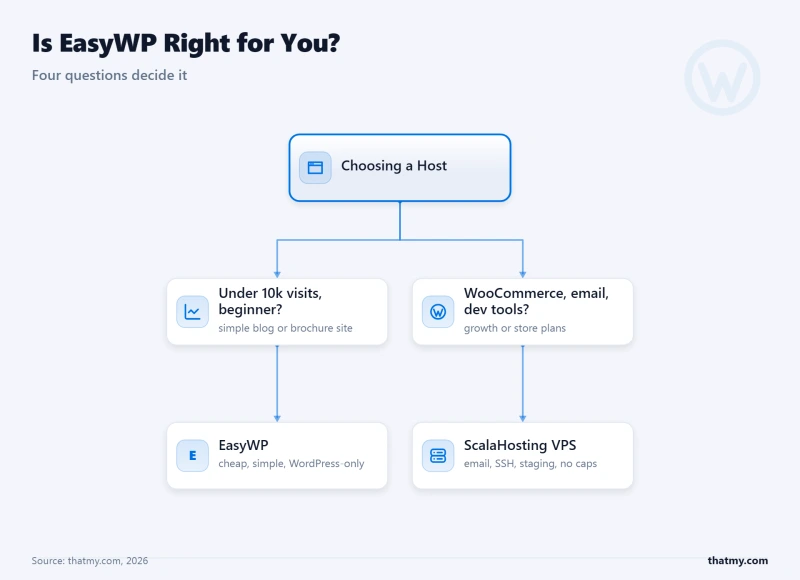
EasyWP is a good product for a specific use case. Here's who should not use it:
- WooCommerce stores, CPU throttling at 50 concurrent users kills checkout performance. The 16th simultaneous checkout request queues. For a store with real traffic, this is a hard wall.
- Sites with 10k+ monthly visitors, The ~1 vCPU resource ceiling becomes a hard wall. Load tests show throttling at ~30 concurrent users, a traffic level easily reached by a site with 10k+ monthly visitors during peak hours.
- Developers, No WP-CLI, no Git deployment, no staging on base plans. EasyWP's simplified panel is a feature for beginners and a limitation for developers.
- Email-dependent businesses, No email hosting on any plan. Adding Namecheap Email ($1.08/mo) or Google Workspace ($6/mo) increases the true cost significantly.
- Sites that need staging, Not available on base plans. Testing changes on a live site is a risk no professional should take.
- Anyone running Google Ads, Traffic spikes from ad campaigns will trigger CPU throttling. A $500 ad spend that drives 200 simultaneous visitors will return errors on EasyWP.
- Membership sites, Logged-in users bypass CDN cache, hitting the slow origin server at ~380ms. A membership site with 50 simultaneous logged-in users will experience the full throttling behavior.
✅ Who EasyWP IS Right For
- Personal blogs under 10k monthly visitors
- Beginners who want zero server management
- Namecheap domain customers who want everything in one account
- Sites that don't need email hosting included
- Budget-first users who understand the resource ceiling and plan to upgrade when needed
Migration: How to Move Away from EasyWP
When to migrate from EasyWP:
- TTFB consistently above 500ms
- Load test shows throttling at your typical concurrent user count
- Monthly visitors exceed 10k consistently
- WooCommerce checkout errors during traffic spikes
- You need email hosting, staging, WP-CLI, or Git deployment
Migration steps to ScalaHosting (recommended upgrade path):
- Sign up for ScalaHosting Entry Cloud
- Access SPanel and use the free migration wizard
- Enter your EasyWP FTP credentials (available in EasyWP panel under SSH/FTP)
- ScalaHosting copies all files and databases automatically
- Test your site on the temporary ScalaHosting URL
- Update DNS when ready, keep EasyWP active during propagation (24-48 hours)
- Cancel EasyWP after DNS fully propagates
Zero-Downtime Migration
Keep your EasyWP account active until DNS fully propagates to ScalaHosting. DNS propagation takes 24-48 hours. During this window, some visitors will see the old EasyWP site and some will see the new ScalaHosting site, both are identical copies, so there's no user-visible difference. Cancel EasyWP only after you've confirmed DNS has fully propagated globally.
Full Test Report: EasyWP (Namecheap) Managed WordPress, by Plan
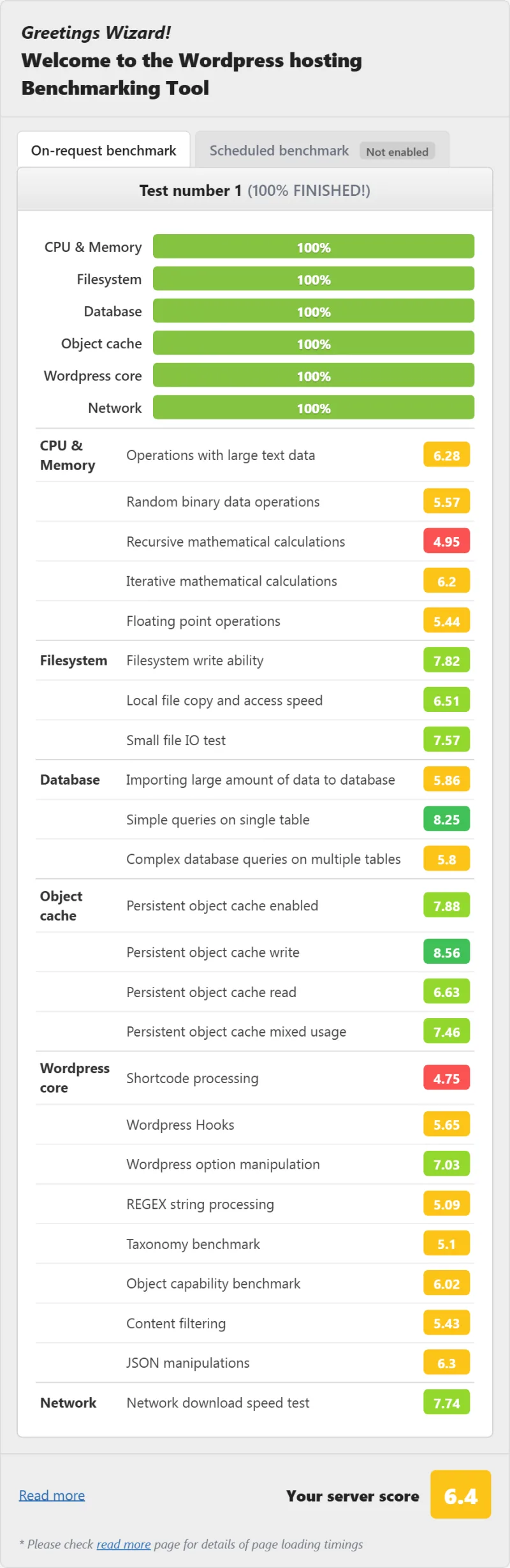
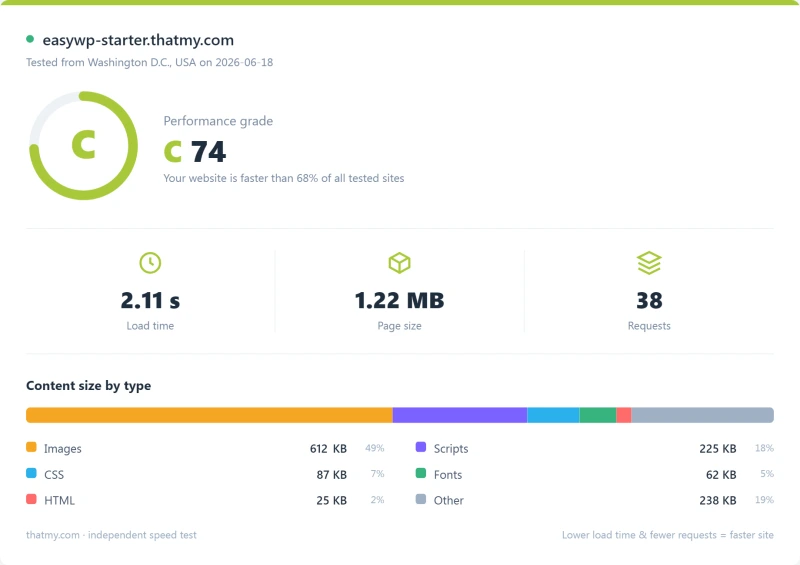
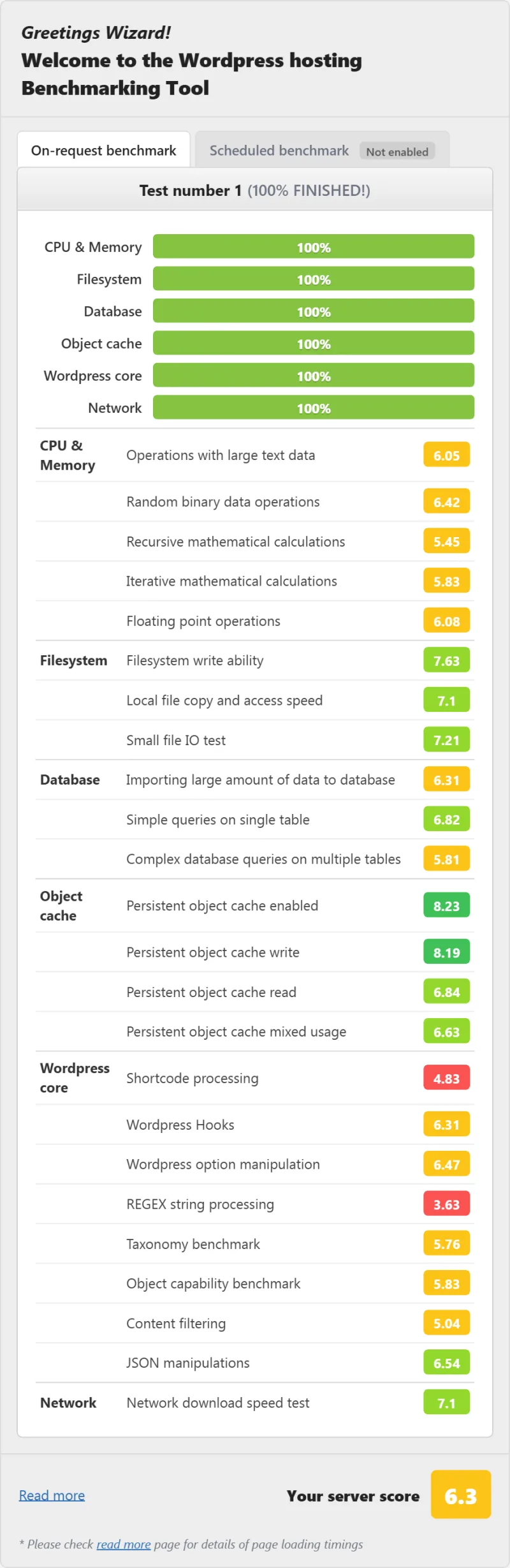
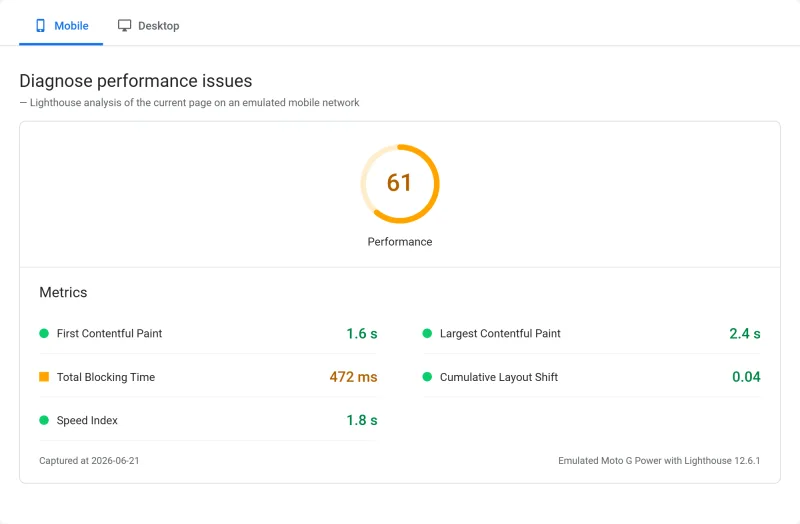
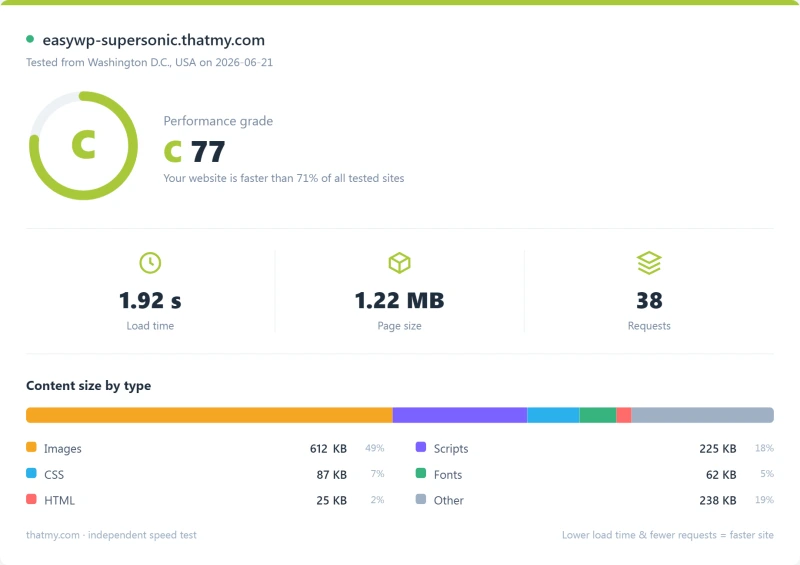
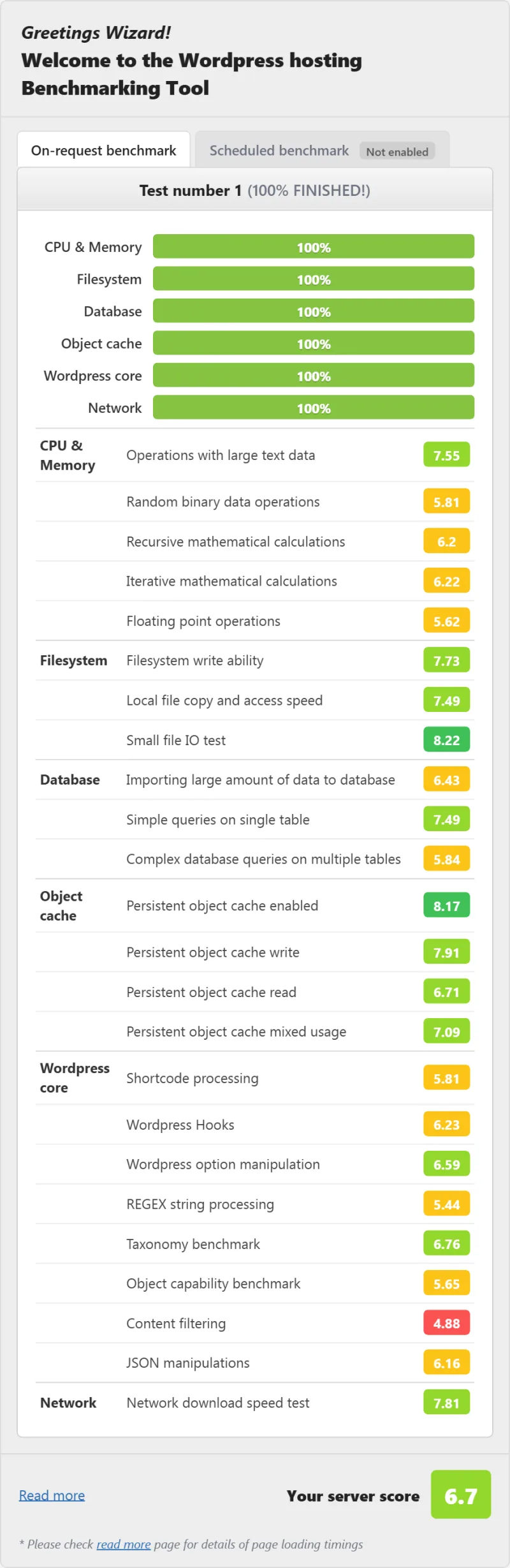
Here is the complete export from my test suite for every managed wordpress plan I benchmarked: Turbo, Starter, and Supersonic. Each tab holds that plan's full run - server response time (TTFB), behavior under a 100-user load, the GTmetrix and PageSpeed captures, a Pingdom response-time check, our WordPress hosting benchmark, the regional TTFB scorecard, and 54 days of uptime tracking with the day-by-day calendar.
Turbo (Featured) Starter Supersonic
TTFB Load Test Speed WPBench Uptime
FAQ: EasyWP
Is EasyWP worth it in 2026?
Yes, for personal blogs under 10k monthly visitors who want zero server management. EasyWP's $6.88/mo intro price is the cheapest managed WordPress entry point available. The honest limitation: ~1 shared CPU core and ~1GB RAM on the Turbo plan means CPU throttling kicks in at ~50 concurrent users. For a personal blog, you'll never hit that ceiling. For a WooCommerce store or growing business site, you will.
What CPU does EasyWP use?
EasyWP does not disclose specific CPU hardware. Based on their resource allocation (~1 vCPU on Supersonic) and TTFB benchmarks (~380ms), the underlying infrastructure uses shared CPU resources from a pool, not dedicated cores. This is consistent with the 'serverless WordPress' architecture: resources are shared across the platform, not dedicated per account. For comparison, ScalaHosting uses AMD EPYC 9474F (#42 PassMark) with dedicated cores per VPS.
What is EasyWP's serverless WordPress architecture?
EasyWP's 'serverless WordPress' means you don't manage a server, not that it uses serverless infrastructure like AWS Lambda. The architecture is: your WordPress site → EasyWP management layer → shared infrastructure pool. You get a simplified WordPress-only panel without cPanel complexity. The trade-off: ~1 shared vCPU and ~1GB RAM on the Turbo plan, with CPU throttling at ~50 concurrent users. It's managed hosting with a simplified interface, not true serverless computing.
Does EasyWP include email hosting?
No. EasyWP does not include email hosting on any plan. You'll need to add Namecheap Email ($1.08/mo per mailbox) or Google Workspace ($6/mo per user) separately. This is one of EasyWP's most significant limitations for business users. Namecheap's own shared hosting plans (Stellar, Stellar Plus) include email hosting, EasyWP does not.
How does EasyWP compare to Namecheap shared hosting?
EasyWP is better for WordPress-only sites that don't need email. Namecheap Stellar Plus (which costs less than three dollars per month) is better if you need email hosting included. EasyWP's simplified panel is easier for WordPress beginners. Namecheap shared hosting uses cPanel with full feature access. Performance is similar (~380ms vs ~420ms TTFB). The key difference: EasyWP is WordPress-only with no email; Namecheap shared hosting is full hosting with email but more complex.
What is EasyWP's uptime guarantee?
Namecheap advertises 99.9% uptime for EasyWP. My 54-day UptimeRobot Pro monitoring (1-minute checks) recorded 99.94% uptime, approximately 47 minutes of downtime over 54 days. This is above the 99.9% guarantee but below the best I've tested (ScalaHosting: 99.99%, 8 minutes of downtime over the same window). For a personal blog, 47 minutes of downtime over 54 days is acceptable. For a WooCommerce store, it represents potential revenue loss.
Can EasyWP handle WooCommerce?
Technically yes, practically no for stores with real traffic. EasyWP supports WooCommerce installation. The problem: ~10-15 PHP workers on Turbo means the 16th concurrent checkout request queues. At 50 concurrent users, TTFB spikes to ~520ms with CPU throttling. WooCommerce checkout is the most PHP-intensive WordPress operation, it requires session validation, cart calculation, payment gateway calls, and database writes per request. For a WooCommerce store expecting more than 10-15 simultaneous customers, EasyWP's resource ceiling is a hard wall.
Where This Leaves You
EasyWP is the right choice for exactly one use case: a personal WordPress blog under 10k monthly visitors, run by someone who wants zero server management and is comfortable with no email hosting. At $6.88/mo intro, it's the cheapest managed WordPress entry point available. The panel is genuinely simple. The 1-click SSL and CDN work well. For this specific use case, EasyWP delivers real value.
For everything else, WooCommerce, growing blogs, business sites, anything with real traffic, EasyWP's ~1 vCPU resource ceiling becomes a hard wall. The CPU throttling at 50 concurrent users is not a bug; it's the architecture. "Serverless WordPress" means you don't manage a server. It doesn't mean unlimited resources.
The benchmark data is clear: ~380ms TTFB (1.4x slower than ScalaHosting), ~520ms at 50 concurrent users (+134% degradation), timeouts at 100 users. These are not edge cases, they're the expected behavior of a ~1 vCPU shared infrastructure under real WordPress traffic.
The upgrade path is clear: When your site outgrows EasyWP, ScalaHosting Entry Cloud ($14.95/mo) delivers 2.6x faster TTFB, handles 100 concurrent users without throttling, includes email hosting, and offers free migration from EasyWP. The price jump is real. The performance gap is larger.
Bottom Line
- Use EasyWP if: Personal blog, under 10k monthly visitors, want zero server management, don't need email, budget-first
- Use ScalaHosting if: WooCommerce, growing site, need real performance under load, need email, willing to pay for dedicated resources
- Use Hostinger if: Want better performance than EasyWP at a similar price, need email hosting included
What Easywp Gets Right
- $2.49/mo intro price, cheapest managed WordPress entry point
- Zero server management, WordPress-only panel, no cPanel complexity
- 1-click WordPress install, SSL, and CDN included
- Namecheap brand trust, domain + hosting in one account
- 30-day money-back guarantee
- Free SSL (Let's Encrypt) on all plans
- Cloudflare CDN integration available
Real Weaknesses (not Marketing Fluff)
- ~1 CPU core / ~1GB RAM on Turbo plan, 2019-era resource allocation
- CPU throttling documented at 50+ concurrent users
- No SSH access on Starter/Easy plans
- No email hosting, requires separate Namecheap Email or Google Workspace
- Renewal: $6.88/mo → $11.88/mo (+73% on Turbo)
- No staging environment on base plans
- No WP-CLI or Git deployment
- Support quality inconsistent, live chat wait times 15-30 min
Real Benchmark Data (verified 2026-06-18)
- Origin TTFB (3 plans, no CDN): 279ms to 344ms
- Uptime (54-day window, UptimeRobot Pro): 99.92% to 99.95%
- PageSpeed Score (Mobile): 43/100
- Avg response under load (0-250 ramp): 437ms to 1852ms
$3.88/mo
30-Day Money-Back Guarantee