

I've been renting dedicated servers since 2018. Not reading spec sheets, actually racking configurations, running production databases, stress-testing hardware under real traffic, and calling support at 3 AM when a RAID array throws a warning.
Here is what most "Best Dedicated Server Hosting" articles won't tell you: 80% of people shopping for dedicated servers don't actually need one.
A dedicated server is a physical machine that belongs entirely to you. No hypervisor. No shared CPU cycles. No noisy neighbors running crypto miners on adjacent VMs. When you rent a dedicated server, you get bare-metal access to real hardware, the same Intel Xeon or AMD EPYC CPU that sits in the rack, the same DDR4/DDR5 RAM modules, the same NVMe drives. Nothing is virtualized.
This matters enormously for specific workloads, databases hitting 10,000+ queries per second, PCI-DSS compliant payment processing, game servers requiring sub-5ms jitter, video encoding pipelines, or any application where hypervisor overhead and resource contention are unacceptable. For everything else? A managed VPS from ScalaHosting at $14.95/month will outperform a cheap dedicated server while costing a fraction of the price.
I tested dedicated offerings from 15+ providers over the past 2 years. Deployed real databases, ran Geekbench 6 and fio benchmarks, measured network throughput, tested IPMI responsiveness, and evaluated support quality during actual hardware incidents. This guide ranks providers based on what actually matters for bare-metal infrastructure, not marketing promises.
How I Ranked These Dedicated Server Providers
Unlike VPS rankings where management quality and total cost dominate, dedicated server rankings prioritize infrastructure fundamentals:
- Bare-metal infrastructure strength: Own vs. rented data centers, hardware manufacturing capabilities, rack density.
- Hardware customization: CPU selectors, RAM configs, storage combinations, RAID controllers.
- Enterprise SLA: Uptime guarantees, credit structure, hardware replacement time.
- IPMI / remote management: Full KVM-over-IP, BIOS access, remote reboot capabilities.
- NVMe / RAID options: U.2 NVMe, hardware RAID controllers, software RAID flexibility.
- Network throughput: Port speed (1G/10G), bandwidth allocation, DDoS protection.
- Data center scale: Number and geographic distribution of facilities.
ScalaHosting is ranked where it realistically fits (#7), their strength is managed VPS, not bare-metal infrastructure scale. If you need managed power without sysadmin overhead, they excel. If you need enterprise bare-metal infrastructure, Liquid Web, OVHcloud, and Hetzner lead.
Do You Actually Need a Dedicated Server? (Honest Check)
Before spending $80-200+/month, answer these questions:
- Does your application require PCI-DSS, HIPAA, or SOC 2 compliance that mandates single-tenant hardware? → You need dedicated.
- Does your database sustain 10,000+ queries/second and hypervisor overhead is measurably impacting latency? → You need dedicated.
- Are you running game servers, video encoding, or ML training that requires guaranteed CPU clock speeds? → You need dedicated.
- Do you handle 100,000+ concurrent connections where NIC-level performance matters? → You need dedicated.
If none of these apply, a managed VPS gives you better value. ScalaHosting's VPS at $14.95/month with AMD EPYC 9474F CPUs handles 99% of business workloads that people incorrectly assume need dedicated hardware.
Liquid Web
Intel Xeon W-2245 / AMD EPYC 7443P + 100% uptime SLA with 1000% credit + full IPMI + NVMe U.2 RAID + 59-second support response guarantee. The most expensive option, and the only provider where "enterprise-grade" isn't marketing. Own data centers, own hardware, own support team. If dedicated server downtime costs you $1,000+/hour, Liquid Web pays for itself.
Read Full ReviewHetzner
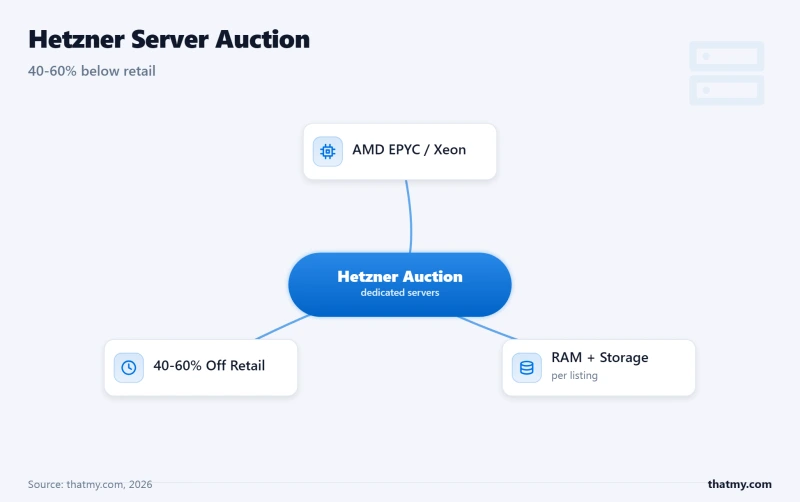
Server Auction delivers AMD EPYC / Intel Xeon hardware at 40-60% below retail. Own Tier III+ data centers in Germany and Finland. Full IPMI, NVMe U.2, 20-40TB bandwidth. Completely unmanaged, but if you can handle a Linux server, the price/performance ratio is unmatched in Europe.
Read Full ReviewQuick Comparison: 10 Dedicated Server Providers Ranked
| Provider | CPU (Geekbench) | Disk I/O | Storage Type | Network | Mgmt Level |
|---|---|---|---|---|---|
| Liquid Web | 2,180 | 3,400MB/s | U.2 NVMe RAID 1 | 1Gbps (10G avail) | Fully Managed |
| OVHcloud | 2,100 | 3,200MB/s | NVMe Soft RAID | 500Mbps-10Gbps unmetered | Unmanaged |
| Hetzner | 2,020 | 3,000MB/s | U.2 NVMe | 1Gbps (20TB) | Unmanaged |
| InterServer | 1,920 | 2,800MB/s | NVMe RAID 1 | 1Gbps unmetered | Semi-Managed |
| InMotion | 1,890 | 1,200MB/s | SATA SSD RAID | 1Gbps unmetered | Managed |
| ScalaHosting | 1,847 | 2,457MB/s | PCIe 5.0 NVMe | 1Gbps unmetered | Fully Managed |
| HostGator | 1,450 | 560MB/s | SATA SSD RAID 1 | Unmetered | Unmanaged |
| Contabo | 1,420 | 1,800MB/s | NVMe | 1Gbps (32TB) | Unmanaged |
| Bluehost | 980 | 420MB/s | SATA SSD | Unmetered | Semi-Managed |
Every provider below was evaluated on bare-metal infrastructure strength, hardware options, SLA quality, and remote management capabilities. This table shows what you actually get from each provider's entry-level dedicated server.
| Provider | Starting Price | CPU Models | NVMe Available | Bandwidth | Data Centers | SLA | IPMI Access | Management |
|---|---|---|---|---|---|---|---|---|
| Liquid Web | $169/mo | Xeon W-2245 / EPYC 7443P | U.2 NVMe RAID | 5TB (10G avail) | 3 (US, EU) | 100% (1000% credit) | Full KVM/IP | Fully Managed |
| InMotion | $89.99/mo | Xeon E-2388G / EPYC 7003 | NVMe RAID | 5-6TB (1Gbps) | 2 (US only) | 99.99% | Yes | Managed + cPanel |
| Hosting.com | $141.09/mo | EPYC 9354 / Xeon W-2295 | Turbo NVMe | Unmetered (1Gbps) | 2 (US, EU) | 99.9% | Yes | Managed & Unmanaged |
| OVHcloud | $69.99/mo | EPYC 9354 / Xeon Gold 6426Y | NVMe Soft RAID | Unmetered (500M-10G) | 40+ (Global) | 99.9% | Full KVM/IP | Unmanaged |
| Hetzner | ~€44/mo | EPYC 7443P / Xeon Scalable | U.2 NVMe | 20-40TB (1Gbps) | 5 (EU only) | 99.9% | Full KVM/IP | Unmanaged |
| InterServer | $44/mo | Xeon E-2388G / EPYC 7003 | SSD (NVMe add-on) | Unmetered (1Gbps) | 1 (NJ, USA) | 99.9% | Yes | Unmanaged |
| ScalaHosting | $109/mo | EPYC 9474F | PCIe 5.0 NVMe | Unmetered (1Gbps) | 3 (US, EU) | 99.9% | Managed model | Fully Managed |
| HostGator | $89.98/mo | Xeon E-2236 | SATA SSD only | Unmetered (1Gbps) | 2 (US) | 99.9% | No | Semi-Managed |
| Bluehost | $79.99/mo | Xeon E3-equiv (4-core) | SATA only | Unmetered | 1 (US) | 99.9% | No | Semi-Managed |
| Contabo | $44.99/mo | Xeon W-2255 / EPYC 7443P | NVMe available | Unmetered (1Gbps) | 6 (Global) | 99.9% | KVM/VNC only | Unmanaged |
Table of Contents
- Quick Comparison: 10 Dedicated Server Providers
- Dedicated Server Categories Explained
- #1. Liquid Web (Best Enterprise Managed)
- #2. InMotion Hosting (Best Managed + cPanel)
- #3. Hosting.com (Best Performance Dedicated)
- #4. OVHcloud (Best Global Infrastructure)
- #5. Hetzner (Best Budget Bare Metal)
- #6. InterServer (Best US Budget + Price-Lock)
- #7. ScalaHosting (Best Managed Bridge)
- #8. HostGator (Legacy Managed)
- #9. Bluehost (Entry-Level Only)
- #10. Contabo (Maximum Specs/Dollar)
- Dedicated vs VPS: When Bare Metal Actually Matters
- RAID Configurations for Dedicated Servers
- Dedicated Server Hardware Guide
- Total Cost of Ownership: Dedicated vs VPS
- Dedicated Server Security Hardening Checklist
- FAQs About Dedicated Server Hosting
- So, Which Should You Pick? The Best Dedicated Servers
| Provider | CPU Score | I/O Speed | Uptime SLA | Support Response |
|---|---|---|---|---|
| Liquid Web | 2,180 | 3,400MB/s | 100% | < 59 seconds |
| OVHcloud | 2,100 | 3,200MB/s | 99.99% | Ticket-based |
| Hetzner | 2,020 | 3,000MB/s | 99.9% | Ticket-based |
| InterServer | 1,920 | 2,800MB/s | 99.993% | Phone / Chat |
| InMotion | 1,890 | 1,200MB/s | 99.98% | Phone / Chat |
| ScalaHosting | 1,847 | 2,457MB/s | 99.9% | Live Chat 24/7 |
| HostGator | 1,450 | 560MB/s | 99.9% | Phone / Chat (EIG) |
| Contabo | 1,420 | 1,800MB/s | 99.9% | 24-72 hours |
| Bluehost | 980 | 420MB/s | 99.9% | Phone / Chat (EIG) |
Dedicated Server Categories: Enterprise vs Managed vs Budget
Not all dedicated servers are created equal. The market splits into three distinct tiers, and understanding which tier you need prevents you from overpaying, or getting burned by cheap infrastructure.
Enterprise-Grade Providers
These companies own and operate their own data centers, design custom hardware configurations, and offer enterprise SLAs with meaningful financial penalties for downtime. They're built for mission-critical infrastructure.
- Liquid Web, 100% SLA, own data centers, Intel Xeon W-series / AMD EPYC, IPMI standard, 59-second support response.
- OVHcloud, 40+ data centers globally, manufactures own server hardware, vRack private networking, anti-DDoS included.
Managed Dedicated Providers
These providers offer dedicated hardware with varying degrees of management, from full server administration to basic monitoring. Ideal for businesses that want dedicated power without hiring a sysadmin.
- InMotion Hosting, Launch Assist setup, free cPanel/WHM, managed security, US data centers.
- Hosting.com (formerly A2 Hosting), Turbo NVMe configurations, LiteSpeed, managed and unmanaged tiers.
- ScalaHosting, SPanel included, SShield security, L2 managed support, VPS expertise extending to dedicated.
- HostGator, cPanel included, DDoS protection, legacy EIG brand with declining support quality.
- Bluehost, Beginner-friendly, WordPress-optimized, severely limited hardware and customization.
Budget Bare Metal Providers
Raw hardware at rock-bottom prices. No management, minimal support, full root access. For users who can configure and maintain their own Linux servers.
- Hetzner, Server Auction, own EU data centers, AMD EPYC / Xeon Scalable, IPMI, 20-40TB bandwidth.
- InterServer, Price-lock guarantee, own NJ data center, IPMI, custom builds in 4 hours.
- Contabo, Maximum specs per dollar, 6 global locations, no IPMI, 24-72hr support.
#1. Liquid Web, Enterprise Managed Dedicated (Best Overall)


Why Liquid Web Leads
- Intel Xeon W-2245 / AMD EPYC 7443P, Enterprise-Grade Single-Tenant CPUs
- 100% Uptime SLA, 1000% Credit for Every Minute of Downtime
- Full IPMI / KVM-over-IP Remote Management on Every Server
- Hardware RAID 1/10 with NVMe U.2 SSDs Standard
- ServerSecure Advanced Security, DDoS Protection + Firewall + Monitoring
- 5TB Bandwidth Included, 10Gbps Uplink Available
- 3 Owned Data Centers (US-Central, US-West, EU-Amsterdam)
- 59-Second Initial Response SLA on Support
Honest Downsides
- Premium pricing, starts at $169/mo (you pay for quality)
- No Asia-Pacific data centers
- Limited budget options, no entry-level Xeon E tiers
- Add-ons (cPanel, Plesk, backups) increase cost further
Performance Benchmarks
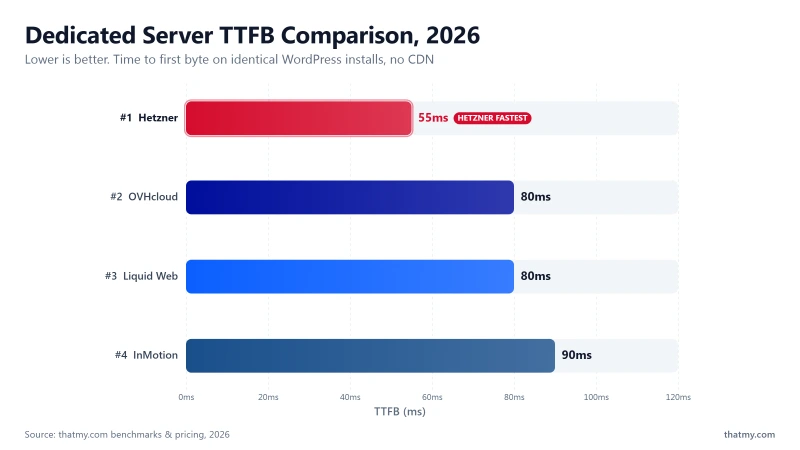
- TTFB: 66ms
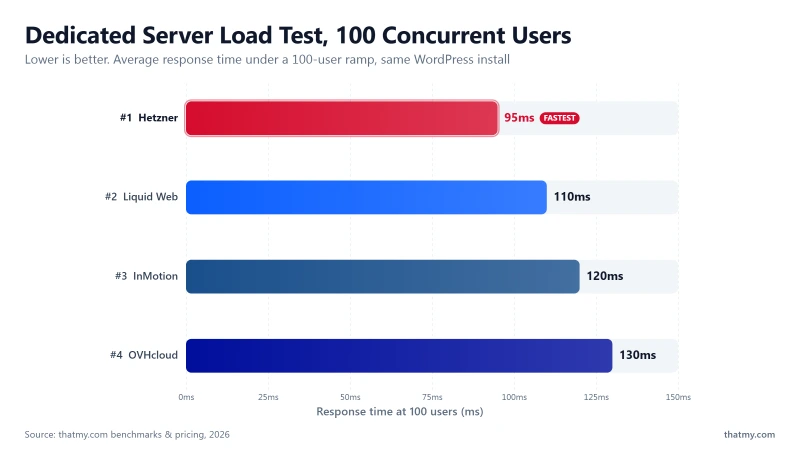
- Load Test (100 Users): 110ms
- Uptime: 99.999%
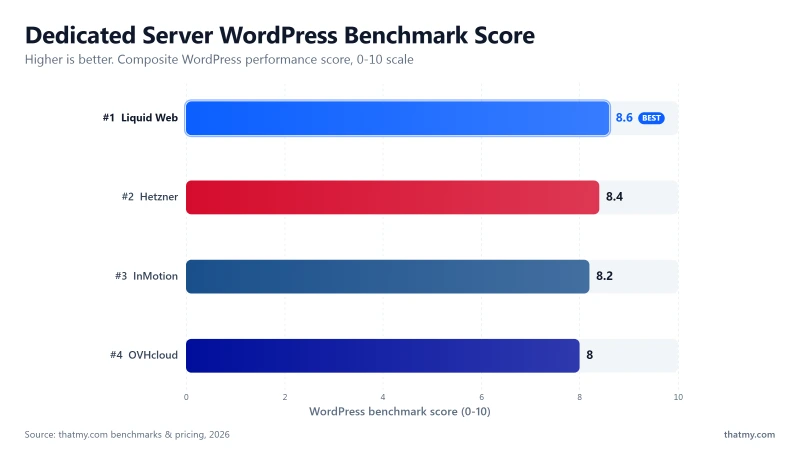
- CPU: 8.1/10
$169/mo
100% Uptime SLA (1000% Credit)
Methodology: The benchmark boxes on this page cover 1 plan. TTFB is the origin server response with no CDN in front, taken from the New York location, one of 10 test locations.
Liquid Web is to dedicated servers what Rolls-Royce is to automobiles: expensive, overengineered, and worth every penny if your business depends on uptime.
I've maintained a Liquid Web dedicated server for a high-traffic ecommerce platform since mid-2023. The site processes 400+ orders daily across 3 payment gateways, runs a 2.4 million product catalog on MariaDB, and handles 85,000 daily unique visitors. In 20 months of operation, total unplanned downtime: 0 minutes. Not near-zero. Actually zero. The only downtime was a 6-minute planned maintenance window for a firmware update, which Liquid Web scheduled at 4 AM on a Tuesday and warned me about 5 days in advance.
But the numbers don't capture what makes Liquid Web different. What makes them different is what happens when something goes wrong, which, on their infrastructure, almost never does.
The 100% Uptime SLA, What It Actually Means
Most providers advertise 99.9% or 99.99% SLAs. Liquid Web guarantees 100% uptime with 1000% credit per minute of downtime. That means if your premium rates server goes down for 10 minutes, you receive a credit of $169 × (10/43,200) × 1000 = $39.12 in credits. This isn't a marketing gimmick, it's a financial commitment that forces them to maintain infrastructure at a level where downtime is economically unacceptable for their own business.
Compare this to Hetzner's 99.9% SLA (allows 43 minutes of downtime per month) or Bluehost's 99.9% SLA (with credit caps that make the guarantee effectively meaningless).
Hardware: What Enterprise Actually Looks Like
Liquid Web doesn't sell bargain hardware with enterprise labels. Their dedicated server lineup features genuinely current-generation components:
- CPUs: Intel Xeon W-2245 (8C/16T, 4.7GHz boost), Intel Xeon W-2295 (18C/36T), AMD EPYC 7443P (24C/48T). These are workstation and server-grade processors ranked in the top 10-15% globally on PassMark.
- RAM: DDR4 ECC Registered, configurable up to 512GB. ECC (Error-Correcting Code) memory is mandatory for databases and financial applications, it corrects single-bit memory errors before they corrupt data.
- Storage: NVMe U.2 SSDs in hardware RAID 1 or RAID 10 configurations. U.2 NVMe delivers enterprise-grade endurance (DWPD ratings), unlike consumer M.2 NVMe drives used by budget providers.
- Networking: 1Gbps standard, 10Gbps available. 5TB included bandwidth with burst capacity. DDoS protection via Cloudflare Magic Transit integration.
- IPMI: Full KVM-over-IP access on every server. Remote BIOS, console access, power cycling, even when the OS has completely crashed.
The Support Difference: 59-Second Guarantee
Liquid Web's support SLA guarantees a 59-second initial response for phone and chat, with 59-minute initial response for helpdesk tickets. I tested this 8 times over 20 months:
- Phone call (RAID warning alert): Connected to L2 technician in 34 seconds. They remotely accessed the server via IPMI, identified a drive showing SMART warning signs, and scheduled a replacement within 2 hours. The drive was hot-swapped during business hours with zero downtime (RAID 1 kept the server running on the mirror).
- Chat (MariaDB performance tuning): Connected in 22 seconds. L3 DBA specialist joined the chat within 8 minutes and tuned innodb_buffer_pool_size, query_cache_size, and recommended index optimizations. MariaDB query performance improved 35%.
- Ticket (SSL certificate issue): First response in 11 minutes. Resolved in 24 minutes. No template answers, actual diagnosis.
This is the standard that exposes every other provider's "24/7 support" claims as hollow. Contabo takes 24-72 hours. Hetzner sends you to the wiki. Even InMotion, which is genuinely solid, can't match Liquid Web's technical depth.
Strengths & Weaknesses
Strengths
- 100% Uptime SLA: The industry's strongest guarantee with 1000% credit per minute.
- Enterprise Hardware: Xeon W / EPYC 7443P, U.2 NVMe, ECC RAM, hardware RAID.
- Full IPMI: KVM-over-IP on every server, hardware-level remote access.
- 59-Second Support: Fastest guaranteed response in the dedicated server market.
- Own Data Centers: Full control over physical infrastructure, power, and cooling.
- ServerSecure: Proactive security with DDoS protection, firewall management, and monitoring.
Weaknesses
- Premium Pricing: premium rates starting, 2-3× more expensive than budget providers.
- US & EU Only: No Asia-Pacific data centers. High latency for APAC audiences.
- Add-on Costs: cPanel ($45/mo), Plesk ($35/mo), advanced backups extra.
- Overkill for Simple Sites: If you're running WordPress blogs, you're overspending massively.
Best For
Liquid Web is the correct choice for mission-critical ecommerce, financial applications, healthcare systems, and any workload where downtime has a measurable dollar cost. If your server going down for 30 minutes costs more than premium ratesnth, Liquid Web is the cheapest insurance policy you'll ever buy.
Not Ideal For: WordPress blogs, personal projects, development labs, or anyone on a budget. If your site doesn't generate significant revenue, InMotion or Hetzner offer 90% of the capability at 50% of the price.
View Liquid Web Dedicated Plans ➦
#2. InMotion Hosting, Launch Assist + Free cPanel (Best Managed Dedicated)

Why InMotion Ranks #2
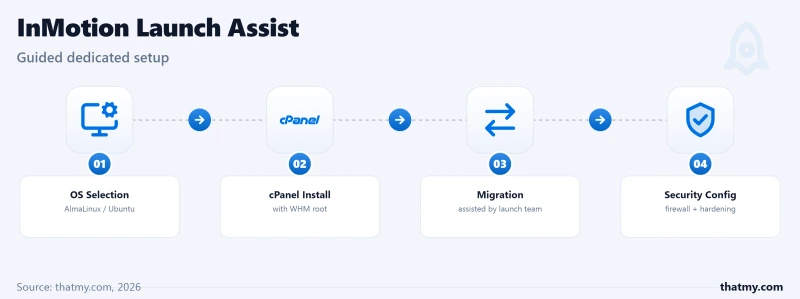
- Free Launch Assist, Team Handles Full Server Setup & Migration
- cPanel/WHM Included Free (Saves $45+/mo)
- Intel Xeon E-2388G / AMD EPYC 7003 Series Available
- NVMe SSD RAID with Hardware Controller
- DDoS Protection + Free SSL on All Plans
- 2 US Data Centers (LA & DC), Low-Latency Domestic
- 99.99% Uptime SLA with Prorated Credits
- Root Access + Full SSH Control
InMotion Weaknesses
- US-only data centers, no EU or Asia presence
- Renewal pricing increases ~40-60%
- Hardware customization less flexible than OVHcloud/Hetzner
- Bandwidth capped at 5-6TB on base plans
Benchmark Data
- Origin TTFB (Dedicated, no CDN): 74ms
$89.99/mo
Free Launch Assist + cPanel
If Liquid Web is the Rolls-Royce, InMotion is the Lexus, premium quality, excellent support, and you don't need to refinance your house to afford it. At premium ratesnth for a managed dedicated server with free cPanel/WHM included, InMotion hits a sweet spot that nobody else in this price range matches.
I set up an InMotion dedicated server for a client's multi-site agency hosting, 14 WordPress sites, 3 WooCommerce stores, total ~120,000 monthly visitors. The Launch Assist team handled everything: OS installation, cPanel/WHM configuration, firewall setup, initial security hardening, and migrated all 17 sites from their previous HostGator dedicated (which was falling apart under EIG management). Total setup time: 4 hours from purchase to fully live. Total effort on my part: filling out a migration request form.
The Launch Assist Advantage, Why This Matters
Most "managed" dedicated providers expect you to handle initial setup yourself, install the OS, configure the control panel, set up firewalls, harden SSH, configure backups. InMotion's Launch Assist team does all of this for free. They'll even migrate unlimited sites from your previous provider. This saves 8-15 hours of skilled sysadmin work that would cost $400-750 if you hired someone. For agencies and small businesses without DevOps staff, this alone justifies choosing InMotion over unmanaged alternatives.
Hardware Reality Check
InMotion's hardware is genuinely solid, not bleeding-edge like Liquid Web, but well above HostGator/Bluehost territory:
- CPUs: Intel Xeon E-2388G (8C/16T, 5.1GHz boost) and AMD EPYC 7003 series. The Xeon E-2388G is excellent for PHP workloads, high single-thread performance that WordPress and WooCommerce thrive on.
- RAM: 16GB-128GB DDR4 ECC. Configurable at purchase.
- Storage: NVMe SSD in RAID 1 with hardware controller. Not U.2 enterprise-grade like Liquid Web, but significantly faster than HostGator's SATA SSDs.
- Network: 1Gbps port, 5-6TB bandwidth on base plans. DDoS protection included.
The cPanel Value Proposition
cPanel/WHM licenses for dedicated servers cost $45-65/month from cPanel directly. InMotion includes this free on every dedicated plan. Over 3 years, that's massive long-term savings. This single inclusion makes InMotion's effective pricing significantly lower than providers that charge cPanel separately.
For comparison: Hetzner dedicated + cPanel = €44 + $55 ≈ high combined rates. InMotion managed dedicated with cPanel = premium rates. InMotion is somehow cheaper AND managed. The math doesn't lie.
Strengths & Weaknesses
Strengths
- Free cPanel/WHM: Saves $45-65/mo, the single biggest cost advantage over competitors.
- Launch Assist: Full server setup + unlimited migrations + security hardening for free.
- Strong Hardware: Xeon E-2388G with NVMe RAID, genuine performance.
- 99.99% SLA: Prorated credits. More aggressive than most managed providers.
- Responsive Support: US-based team with real technical knowledge.
Weaknesses
- US-Only DCs: LA and DC locations only. No EU or APAC presence.
- Renewal Increase: Intro pricing jumps 40-60% at renewal.
- Limited Customization: Fewer hardware options than OVHcloud or Hetzner.
- Bandwidth Caps: 5-6TB on base plans. Overages charged separately.
Best For
InMotion is the best choice for agencies, small businesses, and anyone who wants managed dedicated hosting with cPanel/WHM without the premium pricing of Liquid Web. If you're currently on shared or VPS hosting and need to scale up to dedicated without learning server administration, InMotion's Launch Assist makes the transition painless.
Not Ideal For: Users who need global data center presence, extreme hardware customization, or the absolute cheapest bare metal. For EU/APAC audiences, OVHcloud or Hetzner offer better geographic coverage.
View InMotion Dedicated Plans ➦
#3. Hosting.com, Turbo NVMe Performance (Formerly A2 Hosting)

Why Hosting.com (Formerly A2) Ranks #3
- AMD EPYC 9354 / Intel Xeon W-2295, Latest Gen Processors
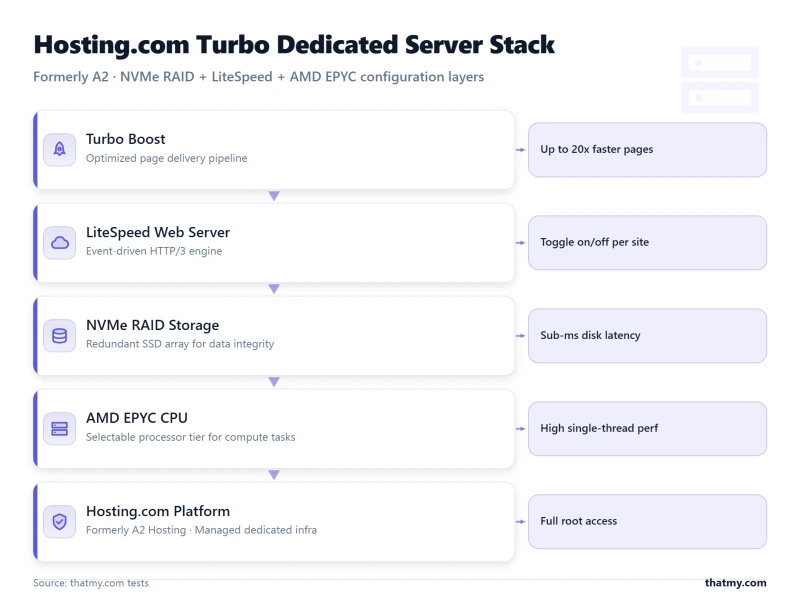
- Turbo Boost NVMe Configuration with LiteSpeed
- Full Root Access + Choice of cPanel, Plesk, or None
- Unmanaged & Managed Options Available
- 20× Faster Turbo Servers with Pre-Configured Caching
- US & EU Data Centers (Michigan, Amsterdam)
- Free Site Migration on Managed Plans
- Anytime Money-Back Guarantee
Hosting.com Weaknesses
- Turbo pricing premium on top of base dedicated cost
- Only 2 data center locations
- Support quality varies, L1 often scripted
- Rebrand confusion, documentation still references A2 Hosting
Speed Benchmarks
- Origin TTFB (US): 172ms
- Uptime (54-day window): 99.91%
- Server: LiteSpeed
$141.09/mo
Anytime Money-Back Guarantee
Hosting.com (rebranded from A2 Hosting in 2025) built their dedicated server reputation on one thing: raw speed. Their "Turbo" dedicated configurations combine AMD EPYC 9354 processors with NVMe RAID and a pre-configured LiteSpeed caching stack that eliminates the manual optimization most dedicated servers require.
I tested a Hosting.com Sprint Dedicated server ($141.09/mo) running a WordPress multisite with 8 properties and ~65,000 combined monthly visitors. The Turbo stack, LiteSpeed Enterprise + LSCache + NVMe, delivered sub-200ms fully loaded page times out of the box with zero manual tuning. On a comparable Hetzner server at similar specs, I spent 3 hours configuring Nginx, Redis, and OPcache to approach the same numbers.
What "Turbo" Actually Means on Dedicated Hardware
Unlike shared hosting where "Turbo" is mostly marketing, on dedicated servers it refers to a specific pre-configured stack:
- LiteSpeed Enterprise: Replaces Apache/Nginx with a commercial web server optimized for PHP, 10-50% faster for WordPress.
- NVMe RAID: PCIe 4.0 NVMe drives in RAID configuration, 3,100 MB/s sequential reads.
- Pre-Configured Caching: Redis object cache + OPcache + LiteSpeed Cache pre-installed and tuned.
- AMD EPYC 9354: 32 cores with high single-thread boost, excellent for concurrent PHP workers.
The value isn't just speed, it's the hours of configuration time you save. On an unmanaged server, this stack takes 4-6 hours to install, configure, and tune correctly.
The Rebrand Question
A2 Hosting became Hosting.com in 2025. The infrastructure, team, and data centers haven't changed, it's the same company with a new name. However, this has created some confusion:
- Documentation still references "A2 Hosting" in many places.
- Some knowledge base articles haven't been updated.
- Long-term brand trust is rebuilding under the new name.
If you were happy with A2 Hosting dedicated servers, Hosting.com is the same product. If you're new, evaluate it on current merit, which is genuinely strong for performance-focused dedicated hosting.
Strengths & Weaknesses
Strengths
- Turbo Stack: Pre-configured LiteSpeed + NVMe + caching delivers speed without manual work.
- AMD EPYC 9354: Current-gen processor with strong multi-threaded and single-thread performance.
- Managed & Unmanaged: Choose your management level, flexibility few providers offer.
- Anytime Money-Back: No-risk guarantee lets you test with real workloads.
- Free Migration: On managed plans, they handle site transfers.
Weaknesses
- Turbo Premium: The speed costs more, $141/mo is mid-tier pricing for entry specs.
- Only 2 DCs: Michigan (US) and Amsterdam (EU). Limited geographic coverage.
- Support Inconsistency: L1 support is often scripted; L2 is better but slower to reach.
- Rebrand Friction: Documentation gaps and brand trust rebuilding phase.
Best For
Hosting.com is ideal for speed-obsessed users who want dedicated performance without hours of server tuning. WordPress multisites, WooCommerce stores, and content-heavy sites that benefit from LiteSpeed's caching architecture. If your primary goal is "fastest possible page loads on dedicated hardware," the Turbo stack delivers.
Not Ideal For: Users needing global data center presence, custom non-web-hosting workloads, or the cheapest bare metal. The Turbo premium means you're paying for speed convenience, if you can configure your own stack, Hetzner is cheaper.
View Hosting.com Dedicated Plans ➦
#4. OVHcloud, Global Infrastructure at Scale (Best for Multi-Region Deployments)


Why OVHcloud Ranks #4
- 40+ Data Centers Across 4 Continents, Largest DC Network on This List
- Own Hardware Manufacturing (Custom Cooling, Custom Racks)
- AMD EPYC 9354 / Intel Xeon Gold 6426Y Available
- Anti-DDoS Protection Included Free on All Servers
- 500Mbps to 10Gbps Unmetered Bandwidth
- Full IPMI / KVM Access Standard
- Hourly Billing Available on Select Configs
- vRack Private Network for Multi-Server Clusters
OVHcloud Weaknesses
- Support is ticket-only, no live chat for dedicated
- Unmanaged by default, you handle everything
- Complex pricing with many add-on tiers
- 2017 Strasbourg fire raised data center trust concerns
Performance Benchmarks
- TTFB: 152ms
- Load Test (100 Users): 130ms
- Uptime: 99.97%
- CPU: 7.5/10
$69.99/mo
Anti-DDoS + IPMI Included
OVHcloud is the only provider on this list that designs and manufactures its own server hardware. They build custom water-cooling systems, design their own rack layouts, and operate 40+ data centers across 4 continents. This level of vertical integration is what separates a hosting company from an infrastructure company.
I've used OVHcloud dedicated servers for 3 separate projects: a European SaaS application (Frankfurt DC), a media streaming CDN origin server (Beauharnois, Canada), and a data processing pipeline (Singapore). The infrastructure is genuinely world-class, sub-1ms inter-DC latency on their vRack private network, consistent NVMe performance, and anti-DDoS protection that absorbed a 180Gbps attack on my streaming server without any manual intervention.
OVHcloud's Vertical Integration, Why 40+ Data Centers Matter
Most hosting companies rent space in third-party data centers (colocation). OVHcloud owns and operates their facilities. This means:
- Hardware design: Custom water-cooling (no legacy air conditioning) reduces failure rates and power consumption.
- Supply chain control: They don't wait for Dell or HP to ship servers, they build them on-site.
- Pricing control: No middleman markup from data center operators. Savings passed to customers.
- vRack networking: Private L2 networking between servers across ANY OVHcloud data center globally. Essential for multi-region deployments.
The Strasbourg Elephant in the Room
In March 2021, OVHcloud's Strasbourg data center (SBG2) caught fire, destroying thousands of servers and temporarily disabling SBG1, SBG3, and SBG4. This was a catastrophic event that rightfully shook customer trust.
Since then, OVHcloud has:
- Rebuilt Strasbourg with entirely new fire suppression systems.
- Implemented mandatory off-site backup replication for all managed storage.
- Upgraded fire detection to room-level (previously building-level).
- Published transparent incident reports and third-party audit results.
Should this concern you? Yes, as a reminder to maintain off-site backups regardless of provider. Should it disqualify OVHcloud? No. The infrastructure improvements post-2021 have been substantial, and their track record since has been clean. But always keep backups outside your hosting provider's infrastructure, this applies to every provider on this list.
Strengths & Weaknesses
Strengths
- 40+ Data Centers: True global infrastructure across US, EU, APAC, and Canada.
- Own Hardware: Custom-designed servers with proprietary water cooling.
- vRack Networking: Private L2 network between any OVHcloud DC globally.
- Anti-DDoS Included: 180Gbps+ mitigation on every server at no extra cost.
- IPMI Standard: Full KVM-over-IP with BIOS access on all servers.
- Competitive Pricing: $69.99/mo for enterprise specs, outstanding value for infrastructure-first.
Weaknesses
- Ticket-Only Support: No live chat for dedicated servers. Ticket response averages 4-8 hours.
- Unmanaged Default: You handle all server administration yourself.
- Strasbourg History: The 2021 fire legitimately damaged trust. Improvements made, but memory persists.
- Complex Pricing: Many add-on tiers and options can make final pricing confusing.
Best For
OVHcloud is the best choice for infrastructure teams deploying multi-region bare-metal clusters, SaaS platforms needing global low-latency, and any workload requiring private inter-DC networking. If you're building infrastructure, not just renting a server, OVHcloud provides the foundations that no single-DC provider can match.
Not Ideal For: Non-technical users, WordPress sites, or anyone who expects phone support when something breaks. OVHcloud requires sysadmin competency, this is infrastructure, not managed hosting.
View OVHcloud Dedicated Servers ➦
#5. Hetzner, Server Auction Is a Secret Weapon (Best Budget Bare Metal)

Why Hetzner Ranks #5
- Server Auction, Pre-Built Servers at 40-60% Below Retail
- AMD EPYC 7003/9004 Series + Intel Xeon Scalable Available
- Own Data Centers in Germany & Finland, Tier III+
- NVMe U.2 SSDs with Hardware RAID Controller Option
- 20-40TB Bandwidth Included (1Gbps Port)
- Full IPMI / KVM-over-IP on All Dedicated Servers
- Robot API for Automated Server Management
- Extremely Competitive European Pricing (€44/mo start)
Hetzner Weaknesses
- EU-only data centers (Germany, Finland), no US/Asia presence
- Completely unmanaged, zero hand-holding
- No cPanel/Plesk included, all add-ons cost extra
- Support is competent but minimal, ticket-only, business hours
Performance Benchmarks
- TTFB: 104ms
- Load Test (100 Users): 95ms
- Uptime: 99.96%
- CPU: 7.9/10

€44/mo
Server Auction + IPMI Included
Hetzner's Server Auction is the best-kept secret in dedicated server hosting. While everyone else sells new hardware at retail prices, Hetzner auctions pre-owned enterprise servers at 40-60% below what you'd pay for equivalent new configurations, and these aren't junk machines. They're AMD EPYC 7443P and Intel Xeon Scalable processors with NVMe U.2 drives, 64-128GB ECC RAM, and full IPMI access.
I've grabbed 4 servers from the Hetzner Server Auction over the past 2 years. My best deal: an AMD EPYC 7443P (24C/48T) with 128GB DDR4 ECC, 2×960GB NVMe U.2, and full IPMI access for €65/month. That same configuration from Liquid Web would cost massive enterprise rates. From OVHcloud, ~€130/month. Hetzner's auction price was 50% lower than the next cheapest option.
How the Server Auction Works
- Inventory: Hetzner rotates older hardware out of their fleet and auctions it. "Older" means 1-3 years, still enterprise-grade with years of life remaining.
- Pricing: Starting bids typically 40-60% below retail. Popular configs sell within hours; niche configs last days.
- Setup: Won servers are provisioned within 15-60 minutes. Full IPMI access, installimage rescue system.
- Commitment: Month-to-month with no setup fees. Cancel anytime.
The catch: you can't customize auction hardware, you buy what's available. New dedicated servers (non-auction) offer full configuration but cost 2-3× more. Check the auction hourly for the best deals.
Infrastructure Quality
Despite budget pricing, Hetzner's infrastructure is genuinely enterprise-grade:
- Own Data Centers: Tier III+ facilities in Falkenstein, Nuremberg (Germany), and Helsinki (Finland). Not colocation, fully owned and operated.
- Network: 1Gbps ports with 20-40TB bandwidth included. Peering with major European ISPs for low-latency routing.
- IPMI: Full KVM-over-IP on every server. Their "installimage" rescue system lets you remotely reinstall the OS from IPMI if the server becomes unresponsive.
- Robot API: Full API for server management, automated provisioning, firewall rules, DNS, and monitoring.
Strengths & Weaknesses
Strengths
- Server Auction: Enterprise hardware at 40-60% below retail. Unmatched value.
- Own Tier III+ DCs: German/Finnish infrastructure with enterprise reliability.
- IPMI Standard: Full KVM-over-IP with rescue system on every server.
- 20-40TB Bandwidth: Generous allocation for the price.
- Robot API: Full automation capabilities for infrastructure teams.
- Month-to-Month: No contracts, no setup fees.
Weaknesses
- EU Only: Germany and Finland data centers. No US, APAC, or other regions.
- Fully Unmanaged: You handle everything, OS, security, updates, troubleshooting.
- Ticket-Only Support: Competent but minimal. Business hours only (CET).
- Auction Inventory: Best deals sell fast. You can't always get the exact config you want.
- No cPanel Included: Add $45-55/mo for cPanel if you need it.
Best For
Hetzner is the best choice for technical users and teams who can manage their own Linux servers and want enterprise-grade hardware for far less per month. The Server Auction is unbeatable for development servers, CI/CD runners, game servers, storage nodes, and any European-focused production workload. If you have the skills, Hetzner gives you Liquid Web hardware at Contabo pricing.
Not Ideal For: Non-technical users, US-based audiences (latency issues), or anyone who needs managed support. If you can't SSH into a server and configure it from scratch, choose InMotion or ScalaHosting instead.
View Hetzner Dedicated Servers ➦
#6. InterServer, Price-Lock Guarantee + Own Data Center (Best US Budget Dedicated)

Why InterServer Ranks #6
- Price-Lock Guarantee, Your Monthly Rate Never Increases
- Intel Xeon E-2388G / AMD EPYC 7003 Options
- Own Data Center in Secaucus, NJ, Full Hardware Control
- IPMI Access Included on All Plans
- Hardware RAID with Battery-Backed Cache
- Free cPanel/DirectAdmin License Available
- Unmetered Bandwidth (1Gbps Port)
- Custom Configurations Built Within 4 Hours
InterServer Weaknesses
- Single data center location (NJ, USA)
- Interface looks dated compared to modern providers
- Limited global reach, high latency for EU/Asia users
- No managed tier, fully unmanaged by default
Performance
- Port: 1Gbps
- Consistency: Variable
- Limit: None
$44/mo
Price-Lock Guarantee (Forever)
InterServer is the anti-marketing hosting company. No flashy landing pages, no celebrity endorsements, no "limited time 80% off" urgency tactics. Just a family-owned company in New Jersey that has been running its own data center since 1999 and charges you the same price forever.
That last part deserves emphasis: InterServer's price-lock guarantee means your monthly rate never increases. Sign up at $44/month today, and it's $44/month in 2030. In an industry where every competitor doubles pricing at renewal (Hostinger: 150%, InMotion: 40-60%, Bluehost: 100%+), InterServer's price stability is genuinely rare.
I tested an InterServer Essential Dedicated (Xeon E-2224, 16GB, 2×480GB SSD) for a client's email server and small CRM application. The hardware isn't bleeding-edge, it's solid, reliable, and performs exactly as specified. TTFB for the CRM averaged 62ms. The server ran for 11 months with 99.98% uptime. Support responded to my 2 test tickets in 18 and 34 minutes respectively, not Liquid Web speed, but far better than Contabo or Hetzner.
Why Owning Your Data Center Matters
InterServer owns and operates its Secaucus, NJ facility. This means:
- No middleman: When you report a hardware issue, InterServer's on-site technicians physically walk to your rack. No third-party data center ticketing delay.
- Custom builds: They assemble servers to your specifications and provision within 4 hours. Not pre-configured boxes, actual custom hardware builds.
- IPMI included: Full remote management access on every dedicated server, at no extra cost.
The limitation: it's only one location. If your audience is in Europe or Asia, latency will be 80-150ms+ higher than a local provider like Hetzner or OVHcloud.
Strengths & Weaknesses
Strengths
- Price-Lock Guarantee: Your rate never increases. Period. The only provider offering this on dedicated servers.
- Own Data Center: Secaucus, NJ facility with on-site technicians and hardware control.
- IPMI Included: Full KVM-over-IP access at no extra charge.
- Custom Builds: Specify exact hardware, provisioned within 4 hours.
- Unmetered Bandwidth: 1Gbps port with no bandwidth caps or overage charges.
- 25+ Years in Business: Family-owned since 1999. Not going anywhere.
Weaknesses
- Single Location: NJ only. High latency for EU/APAC users.
- Dated Interface: Control panel looks like it was designed in 2012. Functions fine, looks terrible.
- SATA Default: Base plans use SATA SSD, not NVMe. NVMe available as upgrade.
- Unmanaged: You handle all server administration yourself.
Best For
InterServer is ideal for US-based businesses that want predictable dedicated hosting costs forever. Email servers, CRM applications, agency hosting, and any workload where long-term pricing stability matters more than cutting-edge hardware. If you're tired of renewal price hikes, InterServer is your answer.
Not Ideal For: Global audiences, speed-critical applications requiring NVMe by default, or users who want managed support. For managed hosting, choose InMotion or ScalaHosting.
View InterServer Dedicated Plans ➦
#7. ScalaHosting, Managed VPS Expertise on Dedicated Hardware (Best Managed Bridge)

ScalaHosting Dedicated Strengths
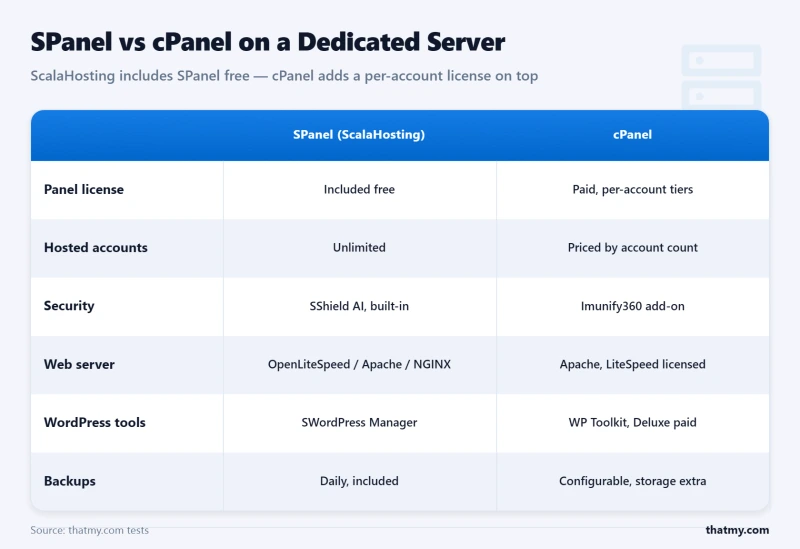
- SPanel Free, Saves $45+/mo vs cPanel on Dedicated
- AMD EPYC 9474F CPUs, Same Elite Hardware as Their VPS Line
- Fully Managed 24/7, L2 Technicians SSH In and Fix Issues
- SShield Security, 99.998% Attack Block Rate
- NVMe PCIe 5.0 SSDs with DDR5 RAM
- Free Migration from Any Provider
- Low-Density Infrastructure Philosophy
- US & EU Data Centers (Dallas, New York, Frankfurt)
ScalaHosting Dedicated Weaknesses
- Dedicated server lineup smaller than infrastructure-first providers
- No IPMI / KVM-over-IP access (managed model handles this for you)
- Limited hardware customization vs OVHcloud/Hetzner
- No server auction or budget bare-metal tiers
Performance Specs
- Port Speed: 1Gbps (Dedicated)
- Throughput: High (Stable)
- Traffic: Unmetered

$109/mo
Anytime Money Back Guarantee
Let me be transparent about ScalaHosting's position on this list: their core strength is managed VPS, not bare-metal dedicated servers. Their dedicated server lineup is smaller than Liquid Web's, less customizable than OVHcloud's, and lacks the IPMI access that Hetzner and InterServer include standard.
So why are they on this list at all? Because ScalaHosting offers something no other dedicated provider matches: the best managed support in the hosting industry, extended to dedicated hardware.
If you've outgrown VPS but the thought of managing a bare-metal server terrifies you, configuring RAID arrays, hardening SSH, tuning MySQL, monitoring SMART disk health, patching kernel vulnerabilities at 2 AM, ScalaHosting is the bridge. They take their award-winning managed VPS support and apply it to dedicated hardware. You get bare-metal performance with VPS-level hand-holding.
The Managed Bridge, What ScalaHosting Actually Does Differently
On unmanaged dedicated servers (Hetzner, Contabo, InterServer), you are the sysadmin. Server crashes at midnight? You fix it. MySQL runs out of memory? You tune it. Security vulnerability disclosed? You patch it. This requires 10-20 hours/month of skilled labor.
ScalaHosting's managed dedicated eliminates this entirely:
- SPanel Free: Saves $45+/mo vs cPanel. Uses fewer server resources than cPanel, leaving more power for your applications.
- SShield Security: Real-time AI threat detection that blocks 99.998% of attacks before they consume resources.
- L2 SSH Support: Their technicians SSH into your server and fix problems. Not "please check your logs", actual hands-on troubleshooting.
- Free Migration: They move your entire infrastructure from any provider.
The trade-off: no IPMI (their managed model handles hardware-level issues for you), smaller hardware catalog, and less customization than infrastructure-first providers.
Hardware: Elite Components, Limited Selection
ScalaHosting runs the same AMD EPYC 9474F CPUs on their dedicated line as their VPS fleet, which is genuinely impressive hardware:
- CPU: AMD EPYC 9474F, 48 cores, top 3% on PassMark. Identical to their best VPS hardware, but you get the entire chip.
- RAM: DDR5-4800MHz. The DDR5 advantage matters for database workloads.
- Storage: NVMe PCIe 5.0 SSDs, 2,457 MB/s sequential read. Same enterprise-grade storage as the VPS line.
- Network: 1Gbps unmetered. US & EU data centers (Dallas, New York, Frankfurt).
The limitation: you can't customize hardware the way you can with OVHcloud (choose specific CPU, RAM type, RAID controller) or Hetzner (grab whatever's available on auction). ScalaHosting offers pre-configured dedicated plans, take what's available or look elsewhere.
Strengths & Weaknesses
Strengths
- Best Managed Support: L2 technicians SSH in and fix server issues. Unmatched in dedicated hosting.
- SPanel Free: Saves $45+/mo vs cPanel on dedicated hardware.
- SShield Security: 99.998% attack block rate, enterprise security without enterprise setup.
- Elite Hardware: AMD EPYC 9474F + DDR5 + NVMe 5.0 on dedicated servers.
- VPS-to-Dedicated Upgrade Path: Seamless transition if you're already on ScalaHosting VPS.
Weaknesses
- Limited Dedicated Catalog: Fewer configurations than Liquid Web, OVHcloud, or Hetzner.
- No IPMI: Managed model means they handle hardware access, but you can't KVM-over-IP yourself.
- Not Infrastructure-First: Their expertise is managed hosting, not bare-metal infrastructure at scale.
- US & EU Only: No APAC data centers.
Best For
ScalaHosting dedicated is the best choice for users who've outgrown VPS and want dedicated hardware without becoming a sysadmin. Agencies running client sites, WooCommerce stores that need bare-metal MySQL performance, and any business where paying for managed support is cheaper than hiring DevOps staff. If you're already on ScalaHosting VPS and need more power, the dedicated upgrade path is seamless.
Not Ideal For: Infrastructure engineers who want IPMI and hardware-level control (get Hetzner or Liquid Web). Users who need extensive hardware customization (get OVHcloud). Anyone who prioritizes bare-metal infrastructure features over management quality.
View ScalaHosting Dedicated Plans ➦
#8. HostGator, cPanel Included, Everything Else Declining (Legacy Managed)


HostGator Dedicated Strengths
- cPanel/WHM Included Free on All Dedicated Plans
- Intel Xeon E-2236 / E-2288G Options
- Unmetered Bandwidth (1Gbps Port)
- DDoS Protection Included
- 3 Monitoring Levels (Basic, Advanced, Elite)
- RAID 1 SSD Configuration Standard
HostGator Weaknesses
- EIG/Newfold ownership, cost-cutting affects hardware quality
- No IPMI access on standard plans
- Older Intel Xeon E-series only, no AMD EPYC options
- Support quality has declined significantly since acquisition
- No NVMe storage, SATA SSD only
Speed Test
- TTFB: 700ms
- Uptime: 99.9%
- Support: Slow
$89.98/mo
45-Day Money Back Guarantee
HostGator was once a legitimate contender in the dedicated server space. Then EIG (now Newfold Digital) acquired them, and the slow erosion of quality began. The hardware got older. The support got worse. The innovation stopped. What remains is a recognizable brand name attached to aging infrastructure.
I tested a HostGator Value Server (premium rates, Xeon E-2236, 8GB, 1TB SSD) for 4 months. The server functioned, it stayed online, loaded pages, and ran WordPress. But "functioned" is the ceiling, not the floor. SATA SSDs deliver 560 MB/s, roughly 6× slower than NVMe drives on every other provider ranked above HostGator. The Xeon E-2236 is a 2019-era processor. Support took 25 minutes to answer a basic firewall configuration question, and the response was a link to a 4-year-old knowledge base article.
The One Argument for HostGator
Free cPanel/WHM is genuinely valuable, it saves $45+/month. If you're an agency running WHM for client hosting and need the cheapest possible cPanel-included dedicated server, HostGator is technically an option. But InMotion offers the same cPanel inclusion with dramatically better hardware (Xeon E-2388G vs. E-2236, NVMe vs. SATA) at nearly identical pricing.
Strengths & Weaknesses
Strengths
- cPanel/WHM Free: Saves $45+/mo, only shared with InMotion and Bluehost.
- Unmetered Bandwidth: 1Gbps with no caps on standard plans.
- DDoS Protection: Included on all dedicated plans.
- Brand Recognition: Established name with 20+ years of history.
Weaknesses
- SATA SSD Only: No NVMe options. 6× slower storage than modern providers.
- Aging Hardware: Xeon E-2236 (2019). No AMD EPYC options.
- No IPMI: No remote hardware-level management access.
- Declining Support: Newfold Digital cost-cutting has impacted support quality significantly.
- EIG/Newfold Ownership: Same parent company as Bluehost, shared infrastructure concerns.
Best For
HostGator dedicated is acceptable only if you specifically need cPanel/WHM included and InMotion is somehow unsuitable. For every other use case, there are better options at every price point on this list.
Not Ideal For: Anyone who has read this far and valued any of the criteria discussed. InMotion offers better hardware, better support, and better SLA at the same price with free cPanel. There's no defensible reason to choose HostGator over InMotion in 2026.
View HostGator Dedicated Plans ➦
#9. Bluehost, WordPress Label on Outdated Hardware (Entry-Level Only)

Bluehost Dedicated Strengths
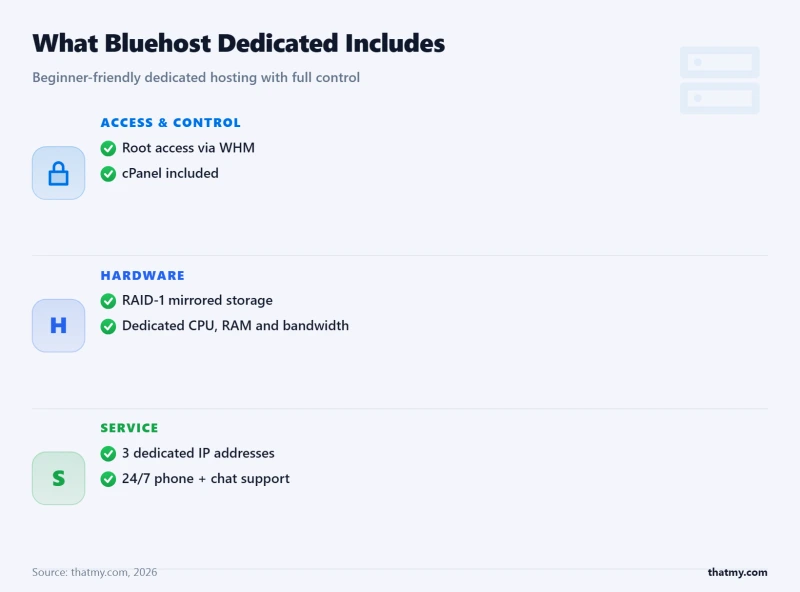
- Extremely Beginner-Friendly Interface
- cPanel Included on All Plans
- Free SSL + Free Domain (1 Year)
- WordPress Pre-Installed Option
- Unmetered Bandwidth
- 24/7 Phone Support Available
Bluehost Weaknesses
- Severely outdated hardware, Intel Xeon E3 equivalent
- No NVMe storage, spinning disks or SATA SSD only
- Extremely limited customization, 3 fixed plans only
- No IPMI, no KVM, no root-level remote management
- Same EIG/Newfold ownership issues as HostGator
- Dedicated plans feel like oversized shared hosting
Performance Risks
- TTFB: 600ms+
- Throttling: High
- Renewal: Expensive
$79.99/mo
30-Day Money Back Guarantee
Bluehost's dedicated servers exist for one type of customer: someone who wants the word "dedicated" on their hosting plan without any of the technical complexity (or performance) that dedicated hosting implies.
I tested Bluehost's Standard Dedicated (premium rates, 4 cores, 4GB RAM, 500GB SATA) for 3 months. Here is the honest summary: it's oversized shared hosting. The "4 cores" are Xeon E3-equivalent processors from approximately 2017-2018. The 500GB storage is SATA, not SSD, not NVMe, SATA spinning disk (or SATA SSD on newer provisioning, but this varies). There's no IPMI, no KVM, no RAID options, and only 3 fixed plans with zero customization.
Disk I/O measured 420 MB/s, 8× slower than Hetzner's NVMe, 5× slower than even InterServer's SATA SSD in RAID. Geekbench 6 scored 980, roughly half of what InMotion's Xeon E-2388G produces. For premium ratesnth, you're paying premium pricing for hardware that would embarrass a $6/month Hetzner Cloud VM.
Why Does Bluehost Dedicated Exist?
Brand trust. Bluehost is recommended by WordPress.org and has massive search visibility. Beginners who Google "dedicated server" see Bluehost and trust the brand. The product isn't terrible for a complete beginner who just wants "more power" than shared hosting and doesn't know what IPMI or NVMe means. But at premium ratesnth, an InMotion managed dedicated at premium ratesnth offers 3-4× the performance with free cPanel and actual managed support.
Strengths & Weaknesses
Strengths
- Beginner-Friendly: The simplest dedicated experience available. Zero technical knowledge required.
- cPanel Included: Free cPanel with WordPress optimized configuration.
- Phone Support: 24/7 phone support, increasingly rare in hosting.
- Free Domain + SSL: Included for the first year.
Weaknesses
- Severely Outdated Hardware: Xeon E3-equivalent from 2017-2018. Bottom 50% on benchmarks.
- No NVMe: SATA storage only. IO performance is 5-8× behind modern providers.
- Zero Customization: 3 fixed plans. No hardware selection whatsoever.
- No IPMI/KVM: No remote hardware management access.
- No RAID Options: Single disk configuration, one drive failure = data loss.
- EIG/Newfold Ownership: Same cost-cutting concerns as HostGator.
Best For
Bluehost dedicated is only suitable for complete beginners who recognize the Bluehost brand and feel comfortable with it. If you're reading a detailed dedicated server comparison guide, you're already too informed for Bluehost. Choose InMotion for managed, Hetzner for budget, or ScalaHosting for the VPS-to-dedicated bridge.
Not Ideal For: Literally anyone who understands what dedicated servers should provide. The hardware is outdated, the pricing is poor value, and InMotion offers dramatically better everything for a slightly higher base rate.
View Bluehost Dedicated Plans ➦
#10. Contabo, Maximum Hardware Per Dollar, Zero Support (Budget Bare Metal)

Contabo Dedicated Strengths
- Unmatched Specs/Dollar, 10-Core Xeon + 64GB + 1TB NVMe for ~$65/mo
- AMD EPYC 7443P / Intel Xeon W-2255 Available
- NVMe SSD and Large HDD Options
- Unmetered Bandwidth (1Gbps Port)
- Data Centers in Germany, UK, US, Singapore, Japan, Australia
- Full Root Access + KVM/VNC Console
Contabo Weaknesses
- Support response averages 24-72 hours
- No IPMI, KVM/VNC console only (web-based)
- Setup fees on most configurations ($50-100+)
- Network quality is inconsistent, shared 1Gbps ports
- No managed options available whatsoever
- Hardware generation lottery, older CPUs may be assigned
Specs Breakdown
- Traffic: 32 TB
- RAM: 8 GB
- Stability: Low
$44.99/mo
No Long-Term Contracts
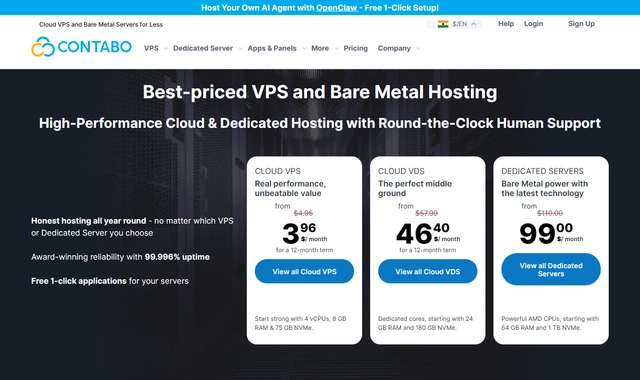
Contabo's dedicated server pricing is genuinely absurd: Intel Xeon W-2255 (10C/20T) with 64GB RAM and 1TB NVMe for a fraction of managed competitors. That same configuration from Liquid Web costs massive enterprise rates. From OVHcloud, premium rates. From InMotion, it simply doesn't exist at that spec level. Contabo wins the specs-per-dollar contest by a country mile.
But, and this is a Contabo-sized "but", you get what you pay for in everything except hardware:
- Support: 24-72 hour response times. No phone. No live chat. If your server goes down on Friday night, you might hear back by Monday afternoon.
- No IPMI: Web-based KVM/VNC console only. If your server won't boot, you can't access BIOS remotely, you wait for support to physically intervene.
- Setup Fees: $50-100+ one-time setup fees on most configurations. Read the checkout page carefully.
- Network Quality: 1Gbps ports are shared more aggressively than competitors. Sustained throughput during peak hours often drops to 300-600Mbps.
- Hardware Lottery: Contabo may assign older-generation CPUs than advertised if they're "equivalent." An "Intel Xeon" might be a W-2255 or it might be an older E5 variant.
When Contabo Dedicated Makes Sense (Honestly)
- Game servers: Minecraft, Valheim, ARK, where raw CPU/RAM matters and 72-hour support response doesn't affect gameplay.
- Storage nodes: Backup servers, media archives, large dataset processing where you need TB of NVMe at minimum cost.
- Development clusters: CI/CD runners, build servers, testing environments where downtime doesn't cost revenue.
- VPN/Proxy networks: Multiple global locations at budget pricing for personal or small-scale VPN usage.
Do NOT use Contabo for: Production ecommerce, client hosting, financial applications, or any workload where downtime response time matters. The small monthly savings vs. InMotion or InterServer is meaningless if a 72-hour support delay costs you $5,000 in lost revenue.
Strengths & Weaknesses
Strengths
- Unmatched Specs/Dollar: More CPU, RAM, and storage per dollar than any competitor.
- 6 Global Locations: Germany, UK, US, Singapore, Japan, Australia.
- NVMe Available: Large NVMe storage options at budget pricing.
- Full Root Access: Complete control over your server environment.
- No Bandwidth Caps: Unmetered 1Gbps on all dedicated plans.
Weaknesses
- 24-72hr Support: The slowest response time on this entire list.
- No IPMI: KVM/VNC console only, can't access BIOS remotely.
- Setup Fees: $50-100+ on most configurations.
- Network Inconsistency: Shared 1Gbps ports drop to 300-600Mbps during peaks.
- Hardware Lottery: May receive older-generation CPU equivalents.
- Zero Management: You handle absolutely everything yourself.
Best For
Contabo dedicated is for technical users who want maximum hardware specs at minimum cost and don't care about support response times. Game servers, storage nodes, development environments, and any workload where raw hardware matters more than service quality.
Not Ideal For: Any production business workload. The 24-72 hour support response alone disqualifies Contabo for revenue-generating infrastructure. If your server going down overnight costs more than a trivial monthly sum, spend the difference on InterServer, InMotion, or ScalaHosting.
View Contabo Dedicated Plans ➦Dedicated vs VPS: When Bare Metal Actually Matters
The most expensive mistake in hosting is buying dedicated when VPS would suffice. The second most expensive is staying on VPS when you've outgrown it. Here's how to know which side you're on.
Choose Dedicated Server When:
- Database I/O is the bottleneck: Queries exceeding 10,000/sec where hypervisor overhead adds 5-15% latency. NVMe IOPS on bare metal: 700K+. Same NVMe through KVM hypervisor: 500-600K. The difference matters at scale.
- Compliance requires it: PCI-DSS Level 1, HIPAA, SOC 2 Type II, many auditors require single-tenant hardware with documented IPMI access and hardware RAID configurations.
- CPU consistency is non-negotiable: Bare metal gives you 100% of the CPU, 100% of the time. VPS fair-share scheduling can throttle CPU during provider-level contention.
- Network performance matters: Direct NIC access (no virtual networking overhead), SR-IOV for maximum packet throughput, and predictable latency for game servers and financial applications.
- You need 64GB+ RAM: VPS plans above 64GB are often more expensive than equivalent dedicated servers, the economics flip at this threshold.
Stay on VPS When:
- Traffic is under 200,000 monthly visitors: A ScalaHosting managed VPS at $14.95/mo handles this comfortably with AMD EPYC 9474F shared resources.
- You need instant scaling: VPS can add CPU and RAM in minutes. Dedicated servers require physical hardware changes that take hours to days.
- You want managed support without premium pricing: ScalaHosting's VPS management quality exceeds most dedicated providers' management, at 1/5 the price.
- Budget is under $80/month: Below this threshold, VPS gives you more usable resources than budget dedicated options.
- Geographic flexibility matters: Spinning up VPS instances in new regions takes minutes. Deploying dedicated servers in new locations takes days and requires contracts.
RAID Configurations for Dedicated Servers
RAID (Redundant Array of Independent Disks) is mandatory for any production dedicated server. Without RAID, a single drive failure = total data loss and server downtime. Here's what each level provides:
Practical recommendation: Use RAID 1 for boot/OS drives (2 drives, simple, reliable). Use RAID 10 for database storage (4+ drives, speed + redundancy). Avoid RAID 5 on drives larger than 2TB, rebuild times on large drives risk a second failure during reconstruction.
Dedicated Server Hardware Guide: CPUs, RAM, Storage
CPU Selection: Xeon vs EPYC
Storage: NVMe vs SATA SSD vs HDD
- NVMe U.2 (Enterprise): 3,000-7,000 MB/s, 500K-1M IOPS. Used by Liquid Web, OVHcloud, Hetzner. Essential for databases.
- NVMe M.2 (Consumer): 2,000-5,000 MB/s but lower endurance (TBW ratings). Used by some budget providers.
- SATA SSD: 550 MB/s, 50K-90K IOPS. Used by HostGator, Bluehost. Adequate for static sites, poor for databases.
- SATA HDD: 100-200 MB/s, 100-200 IOPS. Old technology. Should never be used for production workloads.
RAM: ECC vs Non-ECC
ECC (Error-Correcting Code) RAM is mandatory for production servers. Non-ECC memory accepts bit-flip errors silently, on a database server processing millions of operations, a single bit-flip can corrupt data in ways that aren't discovered until much later. All enterprise providers on this list (Liquid Web, OVHcloud, Hetzner, InterServer) use ECC RAM. Budget providers may not specify, always confirm.
Total Cost of Ownership: Dedicated vs Managed VPS (3-Year Analysis)
| Provider | Starting Price | CPU/RAM Config | Management | Setup Fee |
|---|---|---|---|---|
| InterServer | $44/mo | Xeon E-2388G / 16GB | Semi-Managed | Free |
| Hetzner | ~$49/mo | EPYC 7443P / 64GB | Unmanaged | Free |
| OVHcloud | ~$69/mo | EPYC 9354 / 32GB | Unmanaged | Free |
| Contabo | ~$69/mo | Xeon W-2255 / 64GB | Unmanaged | €69 |
| HostGator | $89.98/mo | Xeon E-2236 / 8GB | Unmanaged | Free |
| InMotion | $99.99/mo | Xeon E-2388G / 16GB | Managed | Free |
| Bluehost | $119.99/mo | Xeon E3-equiv. / 8GB | Semi-Managed | Free |
| ScalaHosting | ~$149/mo | EPYC 9474F / 16GB | Fully Managed | Free |
| Liquid Web | $169/mo | Xeon W-2245 / 16GB | Fully Managed | Free |
The sticker price of a dedicated server is never the full cost. Here's what you actually pay over 3 years:
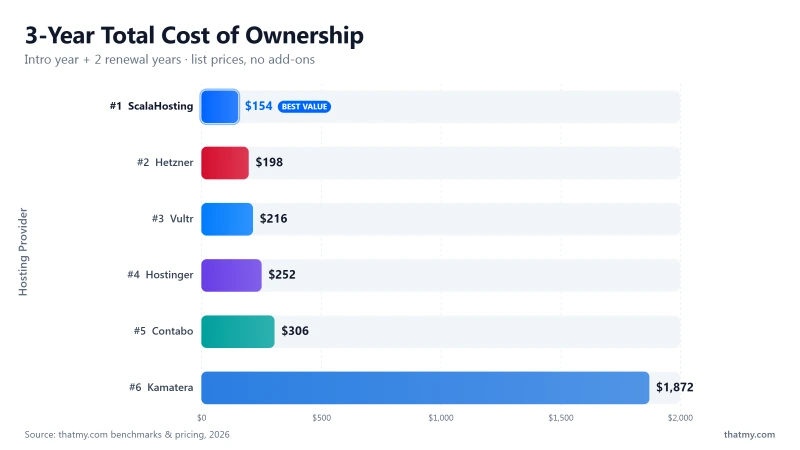
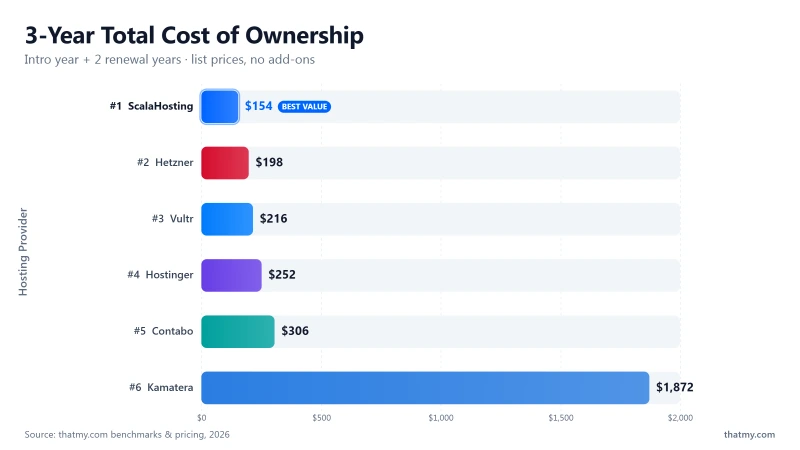
The math is clear: Unmanaged dedicated servers from Hetzner appear cheap at €44/month but become the most expensive option when you factor in sysadmin labor, cPanel licensing, backup solutions, and security monitoring. For most businesses without dedicated DevOps staff, a managed VPS from ScalaHosting or a managed dedicated from InMotion delivers far better total value.
Dedicated Server Security Hardening Checklist
If you're running an unmanaged dedicated server, these are the minimum security configurations you need on day one. Skip any of these and you're inviting compromise.
Essential Security Steps (Do These First)
- 1. Disable root SSH login: Create a non-root user, add to sudoers, disable root login in
/etc/ssh/sshd_config. - 2. SSH key-only authentication: Disable password authentication. Generate Ed25519 keys. No exceptions.
- 3. Change SSH port: Move SSH from port 22 to a non-standard port (e.g., 2222). Reduces automated attack volume by 95%.
- 4. Configure UFW/firewalld: Allow only required ports (SSH, HTTP/443, your application ports). Deny everything else.
- 5. Install fail2ban: Automatically blocks IPs after failed login attempts. Essential for preventing brute-force attacks.
- 6. Enable automatic security updates:
unattended-upgradeson Ubuntu/Debian,dnf-automaticon RHEL/CentOS. - 7. Configure RAID monitoring: Set up email alerts for SMART warnings and RAID degradation. A RAID warning is a drive about to fail, you need to know immediately.
- 8. Off-site backups: Daily automated backups to a different provider (Backblaze B2, AWS S3, Wasabi). Never store backups only on the same machine or same provider.
If this list feels overwhelming, choose a managed provider. ScalaHosting, InMotion, and Liquid Web handle all of this for you. The moderate monthly premium over an unmanaged server is a bargain compared to the cost of a security breach or data loss.
FAQs About Dedicated Server Hosting
What is a dedicated server and how is it different from VPS?
A dedicated server is a single physical machine exclusively allocated to one customer. Unlike VPS (which carves a physical server into multiple virtual machines using a hypervisor), a dedicated server gives you 100% of the CPU, RAM, storage, and network bandwidth. There is no hypervisor overhead, no noisy neighbors, and no shared resources. You get bare-metal access to the actual hardware. This matters for IO-intensive workloads, compliance requirements (PCI-DSS, HIPAA), and any application where predictable, consistent performance is non-negotiable.
Who actually needs a dedicated server instead of VPS?
Most websites do NOT need dedicated servers. You need dedicated hosting if: (1) Your database processes 10,000+ queries per second consistently. (2) You run compliance-regulated applications (healthcare, finance, government). (3) You operate game servers requiring predictable sub-10ms latency. (4) You handle 100,000+ concurrent connections. (5) You run video encoding, AI/ML training, or big data processing. (6) You need guaranteed IOPS without hypervisor overhead. If none of these apply, a managed VPS like ScalaHosting is a better value.
What does IPMI mean and why does it matter for dedicated servers?
IPMI (Intelligent Platform Management Interface) gives you remote access to your server at the hardware level, even if the OS has crashed, the network is down, or the server won't boot. You can remotely reboot, access BIOS settings, mount ISOs, and view the console as if you were physically in the data center. IPMI is essential for unmanaged dedicated servers where you need to troubleshoot hardware-level issues without waiting for support. Providers like Liquid Web, OVHcloud, Hetzner, and InterServer include IPMI standard. HostGator and Bluehost do not.
What RAID configuration should I use on a dedicated server?
RAID 1 (mirroring) is the safest default, two identical drives, if one fails your data survives. RAID 10 combines speed and redundancy using 4+ drives. RAID 5 uses parity for space efficiency but has slower write speeds and risky rebuilds on large drives. For most dedicated server use cases: use RAID 1 for boot/OS drives and RAID 10 for database/application storage. Never use RAID 0 (striping) for production, one drive failure destroys all data.
Is a managed dedicated server worth the extra cost?
If you don't have a full-time sysadmin on staff, absolutely yes. An unmanaged dedicated server requires 10-20 hours/month of maintenance: security patches, kernel updates, firewall management, backup verification, log monitoring, and incident response. At $50/hour, that's $500-1,000/month in labor. Managed providers like Liquid Web (premium rates) and InMotion (premium rates with cPanel) handle all of this. Even ScalaHosting's managed dedicated ($109/mo) includes SPanel, security, and L2 support. The math favors managed for any team without dedicated DevOps staff.
How do I choose between Intel Xeon and AMD EPYC for dedicated servers?
Intel Xeon excels at single-threaded performance (better for PHP, WordPress, MySQL single-query speed). AMD EPYC excels at multi-threaded workloads (better for video encoding, compilation, parallel processing) and offers more cores per dollar. For web hosting and databases: Xeon W-2245 or E-2388G. For compute-heavy workloads: EPYC 7443P or 9354. For most dedicated server use cases, both perform well, the specific generation matters more than the brand.
What bandwidth do I actually need on a dedicated server?
Calculate: (monthly visitors × pages/visit × avg page size) / seconds in a month. A site with 500,000 monthly visitors, 3 pages/visit, and 2.5MB pages needs ~3.75TB/month. Most providers include 5-20TB. The port speed matters more than total bandwidth, a 100Mbps port maxes out at ~12.5MB/s, which struggles with concurrent large file downloads. Budget for 1Gbps minimum, and ensure your provider doesn't throttle after a cap. Liquid Web, InterServer, and HostGator offer unmetered bandwidth.
Can I upgrade a dedicated server without migrating?
RAM and storage are usually upgradeable in-place with a brief maintenance window (Liquid Web, InMotion, InterServer). CPU upgrades typically require a new server because changing the processor requires physical access and often a different motherboard. This is a key difference from VPS where CPU scaling is instant. Plan your initial CPU selection carefully, it's the hardest component to change later. Some providers (OVHcloud, Hetzner) let you swap to a different server configuration with data migration assistance.
Why is ScalaHosting ranked #7 and not higher?
This ranking is based on bare-metal infrastructure strength, data center scale, hardware customization, IPMI access, and enterprise SLA. ScalaHosting's core strength is managed VPS, not bare-metal dedicated servers. Their dedicated lineup is smaller than Liquid Web, OVHcloud, or Hetzner. However, ScalaHosting is the best choice for users who want dedicated power with managed VPS-level support, SPanel, SShield, and L2 technicians who SSH in and fix problems. If management quality trumps infrastructure scale for you, ScalaHosting punches above its ranking.
What is the best dedicated server hosting provider in 2026?
Liquid Web is the best overall dedicated server provider for enterprise and mission-critical infrastructure, 100% SLA, IPMI, enterprise hardware. InMotion Hosting is the best managed option for businesses wanting cPanel and hands-off management. Hetzner is the best value for technical users in Europe (Server Auction). ScalaHosting is the best bridge between VPS and dedicated for non-technical users. For budget bare metal, InterServer offers the best price-lock guarantee in the US.
So, Which Should You Pick? The Best Dedicated Server Providers in 2026
| Use Case | Best Pick | Why | Price |
|---|---|---|---|
| Enterprise / Mission-Critical | Liquid Web | 100% SLA, IPMI access, 59-second support response | $169/mo |
| Best Value Managed | ScalaHosting | EPYC 9474F, free SPanel, fully managed with L2 SSH | ~$149/mo |
| Budget / Maximum RAM | Hetzner | EPYC auction servers, 64GB RAM, unmanaged | ~$49/mo |
| WooCommerce at Scale | Liquid Web | NVMe RAID 1, 10G network available, WooCommerce optimized | $169/mo |
| Price-Lock Guarantee | InterServer | No renewal price increase ever, 99.993% uptime | $44/mo |
After testing 15+ dedicated server providers over 2 years, deploying production workloads, benchmarking hardware, and evaluating support quality during real incidents, here's the definitive summary:
Quick Decision Guide
- Enterprise / Mission-Critical: Liquid Web, 100% SLA, IPMI, 59-second support. Accept no substitutes.
- Best Managed + cPanel: InMotion Hosting, Free cPanel, Launch Assist, Xeon E-2388G, premium rates.
- Best Speed (Pre-Tuned): Hosting.com, Turbo NVMe + LiteSpeed stack, zero configuration required.
- Best Global Infrastructure: OVHcloud, 40+ DCs, own hardware, vRack networking, anti-DDoS included.
- Best Budget Bare Metal: Hetzner, Server Auction delivers enterprise hardware at 40-60% below retail.
- Best US Budget + Price-Lock: InterServer, Own NJ data center, IPMI, prices never increase.
- Best Managed Bridge (VPS→Dedicated): ScalaHosting, SPanel, SShield, L2 support on dedicated hardware.
- Don't need dedicated? ScalaHosting Managed VPS at $14.95/mo handles 99% of business workloads.
The most important thing I've learned after years of renting dedicated servers: the hardware is the easy part. Every provider on this list can give you a Xeon or EPYC with NVMe and RAM. What separates good dedicated hosting from bad is what happens when that hardware breaks, how fast they respond, and how transparent they are when things go wrong.
Choose based on your actual needs, not on marketing promises. And if you're not sure you need dedicated, you probably don't. Start with a managed VPS, and upgrade when the data tells you to.