Disclosure: This content is reader-supported, which means if you click on some of our links that we may earn a commission.
I spent 12 months testing 10 web hosting providers under real small business conditions — WooCommerce stores with 50+ products, contact forms processing leads, appointment booking plugins, and peak-hour traffic simulated at 100 concurrent users. What I found is that most "best hosting for small business" articles are recommending hosts based on affiliate commissions, not performance data.
Bluehost — the most recommended host in every Google result — delivered the worst TTFB (241ms) and worst WooCommerce stress test score (1,247ms) of all 10 hosts tested. WordPress.org recommends them because Bluehost pays for that placement. It's a paid partnership, not a performance endorsement.
My clear #1 pick is ScalaHosting — their managed VPS runs AMD EPYC 9474F processors (top 3% on PassMark), DDR5 RAM, and PCIe 5.0 NVMe storage. I tested 38ms TTFB and 127ms under 100 concurrent WooCommerce checkouts. For budget startups not ready for VPS, Hostinger's Business plan at $3.99/mo with LiteSpeed is the best starting point — but you'll outgrow it faster than you think.
My Testing Methodology (So You Can Judge for Yourself)
- TTFB: Fresh WordPress 6.4 + WooCommerce 8.x + Storefront theme, no caching plugins, no CDN — raw server speed via KeyCDN US East node
- WooCommerce Stress Test: 100 concurrent users hitting checkout page with products in cart (Loader.io, 60-second ramp)
- Uptime: UptimeRobot with 5-minute intervals for 12 consecutive months
- Support: Same question to every host: "My WooCommerce checkout is slow during peak hours — what can you do?" — rated on speed and quality
- Pricing: 3-year TCO including renewal rates, add-ons (email, backups, SSL), and hidden fees
- Business Features: Email hosting, SSL, backups, staging, scalability path, team access
ScalaHosting
AMD EPYC 9474F + SPanel + Low-Density Nodes — 38ms TTFB, handles 100 concurrent checkouts at 127ms. The only managed VPS where your site's performance doesn't degrade during business hours. Not the cheapest — but the one I'd trust with a business that makes money.
Read ReviewHostinger
LiteSpeed on All Plans at $3.99/mo Business. Free email, free domain, and the simplest dashboard for non-technical owners. The lowest 3-year TCO (~$298) with genuinely good performance.
Read ReviewCloudways
42ms TTFB + 156ms under 100 concurrent checkouts. Dedicated resources that don't flinch during flash sales. Pay-as-you-go — no lock-in contracts. The ecommerce host that won't crash on your best sales day.
Read ReviewSmall Business Hosting Comparison (12-Month Real Data)
Every host below was tested for 12 months with identical WordPress + WooCommerce installations. TTFB is the raw server response time — no CDN, no caching plugins, no optimization tricks. The WooCommerce column shows response time under 100 concurrent checkout sessions.
💡 How to Read This Table for Small Business
- TTFB under 100ms = Fast server. ScalaHosting (38ms), Kinsta (39ms), Cloudways (42ms), and ChemiCloud (89ms) hit this mark.
- WooCommerce column = Critical for ecommerce. Anything over 800ms under load means checkout slowdowns during peak hours. Bluehost's 1,247ms means customers will abandon carts.
- Renewal column = What you actually pay after year 1. SiteGround jumps 257%. A2 jumps 272%. Cloudways and Kinsta stay flat.
- Email column = Cloudways and Kinsta don't include email. Budget ~$7/mo for Google Workspace or use Zoho free tier.
⚠️ Why Bluehost's WordPress.org Recommendation Is Misleading
Every "best hosting for small business" article ranks Bluehost in the top 3 — because Bluehost pays one of the highest affiliate commissions in the industry ($65-150+ per referral). Their official WordPress.org recommendation is a paid sponsorship, not a technical evaluation. My 12-month test shows 241ms TTFB and 1,247ms WooCommerce stress test — the worst performance on this entire list. Hostinger is faster at half the price.
Table of Contents
- Comparison: 10 Hosts Tested Over 12 Months
- #1. ScalaHosting — Best Overall VPS for Small Business
- #2. Hostinger — Best Budget for Startups
- #3. SiteGround — Best WordPress Support
- #4. Cloudways — Best for WooCommerce
- #5. ChemiCloud — Best Shared Quality
- #6. A2 Hosting — Turbo Speed + Anytime Refund
- #7. Kinsta — Premium WordPress
- #8. Bluehost — Overrated, But Honest Analysis
- #9. InMotion — Reliable US-Based + 90-Day Refund
- #10. GreenGeeks — Eco-Friendly With Real Speed
- Shared vs VPS vs Cloud: Which Does Your Business Need?
- WooCommerce Stress Test Results
- Business Email: Who Includes It vs Who Charges Extra
- Security Checklist for Small Business Hosting
- The Upgrade Path: When to Move From Shared to VPS
- 3-Year Total Cost of Ownership
- FAQs
- Final Verdict
#1. ScalaHosting — Best VPS for Small Business That Actually Delivers


Why Scalahosting Wins For Small Business
- AMD EPYC 9474F CPUs — Top 3% PassMark (5x Faster Than Rocket.net)
- SPanel Included Free — Saves ~$15/mo vs cPanel License
- Low-Density Nodes — No Noisy Neighbor Throttling at 2 PM
- DDR5 RAM + PCIe 5.0 NVMe (2,457 MB/s Read Speed)
- Free Migration + Business Email + SShield Security
Potential Downsides
- Higher entry price than shared hosting ($29.95/mo)
- Renewal jumps ~200% — budget for $59.95+/mo
- Overkill for simple brochure websites with < 500 visits/mo
Performance Benchmarks
- TTFB (US East): 38ms
- Uptime (12-month): 99.99%
- WooCommerce Stress Test: 127ms @ 100 Users
Most "best hosting for small business" lists put shared hosting at #1. I'm putting a VPS at #1v — because after 12 months of testing, I've watched too many small business owners lose revenue on shared hosting during their most important hours. The 2 PM traffic spike when a social post goes semi-viral. The Black Friday flash sale that crashes the checkout page. The client presentation where the portfolio site loads in 4 seconds instead of 1.
ScalaHosting's managed VPS eliminates these problems entirely. Dedicated CPU cores and RAM mean your resources aren't shared with 150 random WordPress blogs. Low-density nodes mean the physical server isn't overcrowded. And the AMD EPYC 9474F processors — ranked top 3% globally on PassMark — process checkout operations, database queries, and PHP rendering faster than anything else at this price point.
The Hardware That Sets ScalaHosting Apart
ScalaHosting runs AMD EPYC 9474F CPUs with a multithread rating of 102,107 — roughly 5x faster than the Intel Xeon E5-2667 v2 that Rocket.net uses and significantly faster than Hostinger's AMD EPYC 9354P. Combined with DDR5 RAM (4800MHz) and PCIe 5.0 NVMe SSDs (2,457 MB/s read), this is the fastest managed VPS hardware available under $30/mo.
For a small business, this matters when: your WooCommerce store processes parallel checkouts, your site runs complex plugins (Elementor, WPBakery, WPML), your database has 10,000+ entries, or your team of 5 people is working in the WordPress admin simultaneously.
My 12-Month Business Test Results
- TTFB (KeyCDN US East): 38ms average (30-day rolling mean)
- TTFB under 50 concurrent users: 54ms — minimal degradation
- WooCommerce stress test (100 concurrent checkouts): 127ms — best result of all 10 hosts
- 12-month uptime: 99.99% (one 4-minute incident in month 7)
- Disk I/O (sequential read): 2,341 MB/s — confirmed PCIe 5.0
- WordPress admin load time: 0.8 seconds (with WooCommerce + Elementor active)
The WooCommerce stress test number is the one that matters most for small business. At 100 concurrent checkout sessions, ScalaHosting maintained 127ms response time. Hostinger? 892ms. Bluehost? 1,247ms. SiteGround? 487ms. When your checkout page takes over a second to respond, customers abandon their cart — and that's revenue you never see.
SPanel: Save ~$180/Year vs cPanel
If you run a VPS anywhere else, you need a control panel. cPanel costs ~$15/mo ($180/year). Plesk costs ~$12/mo. ScalaHosting includes SPanel for free — and it's not a stripped-down imitation. SPanel handles WordPress management, email, DNS, file management, and SSL with an interface that's cleaner than cPanel.
More importantly, SPanel uses 1 less CPU core and 8x less RAM than cPanel. On a 2-core VPS, that frees up 50% more resources for your actual business website. When your accounting software, CRM integration, and WooCommerce are all hitting the server simultaneously, those freed resources prevent the slowdown that makes your team lose patience and your customers leave.
Real Pricing for Small Business (3-Year View)
| Plan | Specs | Intro Price | Renewal | 3-Year Total |
|---|---|---|---|---|
| Entry Cloud | 2 Core / 2GB RAM / 50GB NVMe | $13.45/mo | ~$26.95/mo | ~$808 |
| Build #1 ★ | 2 Core / 4GB RAM / 50GB NVMe | $29.95/mo | ~$59.95/mo | ~$1,618 |
| Build #2 | 4 Core / 8GB RAM / 100GB NVMe | $63.95/mo | ~$101.95/mo | ~$2,987 |
★ Build #1 is the sweet spot for most small businesses doing 30-100K monthly visits. Entry Cloud is the best stepping stone from shared hosting — same EPYC CPUs, just fewer resources.
Strengths & Weaknesses
Strengths
- Best WooCommerce performance: 127ms under 100 concurrent checkouts — nothing else under $30/mo comes close.
- Low-density nodes: No CPU steal, no noisy neighbors. Performance stays consistent during business hours.
- SPanel saves $180+/year: Free cPanel alternative that uses fewer resources, meaning more power for your website.
- SShield security: 99.998% attack blocking — blocks brute-force, malware, and bots before they consume resources.
- Flexible scaling: Add cores ($4/core), RAM ($1.35/GB), or storage individually — no forced plan upgrades.
- Free migration: They handle the move from your current host — tested and confirmed, clean migration.
Weaknesses
- 200% renewal jump: $29.95 → ~$59.95/mo. Budget accordingly — this is the real price.
- Overkill for simple brochure sites: If you get < 500 visits/mo and don't run WooCommerce, Hostinger at $3.99/mo is smarter.
- L1 support can miss nuances: First-line agents sometimes give generic answers. Ask to escalate — the senior team is responsive and skilled.
- Documentation is blog-style: Less structured than DigitalOcean's technical docs. You may need to search more for specific topics.
Who Should Use ScalaHosting
ScalaHosting is the right choice if your business depends on its website performing reliably during business hours. Ecommerce stores, service businesses with booking systems, agencies managing client sites, SaaS products, membership sites — anything where a 30-second slowdown translates to lost revenue.
Start here instead if: You're a solopreneur launching your first site and $3.99/mo is your comfort zone — go with Hostinger. Plan to upgrade to Scala's Entry Cloud ($13.45/mo) when revenue justifies it.
#2. Hostinger — Best Budget Hosting for Startups and New Businesses


Why Hostinger Is Best Budget
- $3.99/mo Business Plan with LiteSpeed on All Plans
- Free Domain + Free Email + Free Weekly Backups
- hPanel Is Genuinely Beginner-Friendly (No cPanel Confusion)
- AI Website Builder for Non-Technical Business Owners
- 100 Websites on Single Business Plan
Hostinger Limitations
- VPS has CPU steal limits (1-10% degradation under load)
- 48-month commitment for best price — monthly rate is $11.99
- Support can be hit-or-miss with complex technical questions
- Shared hosting ceiling caps at ~50K monthly visitors
Performance Benchmarks
- TTFB (US East): 148ms
- Uptime (12-month): 99.94%
- WooCommerce Stress Test: 892ms @ 100 Users
If you're starting a small business and need a website up today without spending more than a coffee per month, Hostinger is the answer. Not because they're "good enough" — because at $3.99/mo, they're genuinely better than hosts charging 3x more.
Hostinger runs LiteSpeed web servers on every plan. That's not standard. SiteGround charges $6.99/mo and runs slower Google Cloud Xeons. A2 Hosting's $2.99 base plan runs Apache (not LiteSpeed) — you need their $6.99 Turbo plan for LiteSpeed. Bluehost charges $5.45 and runs a custom Nginx/Apache hybrid that delivered the worst TTFB in my tests. Hostinger gives you LiteSpeed + LSCache + PHP 8.3 on the cheapest plan available. That's legitimately impressive.
What Small Businesses Get for $3.99/mo
- 100 websites on a single Business plan (enough for most SMBs)
- Free business email — yourname@yourbusiness.com (Cloudways and Kinsta charge extra)
- Free domain for year 1 — saves ~$15 on .com registration
- LiteSpeed + LSCache — genuine performance advantage over Apache hosts
- Free SSL + Free CDN — essentials that some hosts still charge for
- hPanel dashboard — simpler than cPanel, designed for non-technical users
- AI Website Builder — describe your business, get a working site in 2 minutes
- Daily backups on Business plan (weekly on Premium)
Performance Under Business Load
- TTFB (KeyCDN US East): 148ms — good for shared hosting
- WooCommerce stress test (100 users): 892ms — functional but slow under peak load
- 12-month uptime: 99.94% — 3 incidents totaling ~52 minutes over the year
- WordPress admin load: 1.4 seconds (WooCommerce + basic plugins)
148ms TTFB is solid for a $3.99/mo plan. The 892ms WooCommerce stress test is where shared hosting shows its limits — under heavy checkout load, shared resources get strained. This is fine for a local service business or blog. It's not fine for a growing ecommerce store doing 500+ orders/month. That's when you upgrade to ScalaHosting.
⚠️ The Hostinger VPS Trap
When you outgrow Hostinger's shared hosting, your natural instinct is to upgrade to Hostinger's VPS. Don't. Hostinger forces CPU steal limits on VPS plans — your allocated CPU time gets stolen by other users. Their KVM 8 plan (8 vCPU, 32GB RAM) can't even run a clean AlmaLinux install without problems. When you outgrow shared, move to ScalaHosting's Entry Cloud ($13.45/mo) — same price range, far better VPS architecture.
3-Year TCO: Why Hostinger Wins on Budget
| Plan | Intro (48-month) | Renewal | 3-Year Total |
|---|---|---|---|
| Premium | $2.99/mo | $7.99/mo | ~$215 |
| Business ★ | $3.99/mo | $9.99/mo | ~$298 |
| Cloud Startup | $9.99/mo | $24.99/mo | ~$648 |
★ Business plan is the sweet spot — adds daily backups, more resources, and CDN over Premium. The 48-month commitment locks in the intro rate for the first 3 years.
Strengths & Weaknesses
Strengths
- Lowest 3-year TCO (~$298): Nothing beats this for quality hosting with LiteSpeed and free email.
- LiteSpeed on all plans: Genuine performance advantage — most competitors at this price run slower Apache.
- hPanel simplicity: Business owners who've never touched hosting can set up a WordPress site in 10 minutes.
- Free business email: Professional yourname@domain.com included — Cloudways and Kinsta charge extra.
- AI tools: AI website builder and content assistant are useful for getting a professional site up fast.
Weaknesses
- 48-month lock-in: Monthly billing is $11.99. You need 4 years for the $3.99 rate.
- WooCommerce ceiling: 892ms under 100 users. Fine for < 500 orders/mo, problematic above that.
- VPS has CPU steal: Don't upgrade to Hostinger VPS. Move to ScalaHosting instead.
- Support inconsistency: Simple questions get fast answers. Complex technical issues sometimes get scripted responses.
- 99.94% uptime: ~52 minutes of downtime over 12 months. Fine for most SMBs, not ideal for mission-critical.
Get Hostinger Business (Code THATMYHOST) ➦
#3. SiteGround — Best WordPress Support for Non-Technical Owners


Why Siteground Excels For Smbs
- Best Support in the Industry — 30-Second Avg Response with Real Experts
- Google Cloud (N2 CPUs) + Custom SuperCacher
- Built-in Staging, Git, and Team Collaboration Tools
- AI Anti-Bot + Custom WAF + Auto-Patching Security
- Free Email + Free CDN + Free Daily Backups
Siteground Drawbacks
- 300% renewal jump: $6.99/mo → $24.99/mo (GrowBig)
- Hidden disk I/O limits cause 503 errors under sustained load
- Intel Xeon Gold 6268CL CPUs (~226th on PassMark) — slower than competitors
- 25GB storage on GrowBig is tight for media-heavy business sites
Performance Benchmarks
- TTFB (US East): 164ms
- Uptime (12-month): 99.97%
- WooCommerce Stress Test: 487ms @ 100 Users
If you're a small business owner who needs a hosting partner that actually helps when things break — not just reads from a script — SiteGround is the best support experience in the industry. Period.
I tested every host's support with the same question: `My WooCommerce checkout is slow during peak hours — what can you do?" Most hosts gave generic caching advice. SiteGround's agent pulled up my actual server metrics, identified a plugin conflict (WP Rocket was fighting their SuperCacher), and pushed a fix to my staging environment within 4 minutes. The issue was resolved without me touching a single file.
That level of competence matters for small businesses. You don't have a dev team. You don't have IT support. When your site goes down at 2 PM on a Tuesday and you have a client meeting at 3 PM, you need someone who can fix it now — not tell you to clear your cache and try again.
Performance Under Business Load
- TTFB (KeyCDN US East): 164ms — solid for shared hosting on Google Cloud
- WooCommerce stress test (100 users): 487ms — good result for shared hosting
- 12-month uptime: 99.97% — only 2 brief incidents all year
- Support response: 30 seconds average, with technical expertise behind it
The Renewal Problem
SiteGround's fatal flaw for small business: the GrowBig plan goes from $6.99/mo to $24.99/mo at renewal — a 257% increase. Over 3 years, that's approximately $720 total. For context:
- Hostinger's Business plan costs $298 over 3 years — less than half, with LiteSpeed.
- Cloudways costs $504 over 3 years — flat rate, no surprises, with dedicated resources.
- ScalaHosting's Entry Cloud VPS costs $808 over 3 years — and gives you dedicated resources with EPYC CPUs.
SiteGround's support is worth paying a premium for — but a 257% renewal premium on shared hosting that still has hidden disk I/O limits? That's a harder sell.
The Hidden Disk I/O Limit
SiteGround monitors your disk I/O usage and throttles accounts that exceed an undisclosed limit. When you hit it, you get 503 errors. Their support tends to blame plugins, bots, or WordPress heartbeat — not the I/O limit they won't specify. For a growing business, this creates an unpredictable ceiling that's impossible to plan around.
Strengths & Weaknesses
Strengths
- Best support in the industry: 30s response, real experts who solve problems instead of deflecting.
- Staging + Git + collaboration: Perfect for SMBs working with freelance developers.
- 99.97% uptime: Very reliable for shared hosting.
- Security excellence: AI anti-bot, WAF, auto-patching — strongest security posture of any shared host.
- Free email + daily backups: Business essentials included on all plans.
Weaknesses
- 257% renewal jump: $6.99 → $24.99/mo makes long-term TCO painful.
- Hidden disk I/O limits: 503 errors under load with no transparent threshold.
- Intel Xeon Gold 6268CL: ~226th on PassMark — significantly slower CPUs than ChemiCloud or ScalaHosting.
- 25GB storage (GrowBig): Tight for media-heavy business sites. Photography, real estate, and product-heavy WooCommerce stores will hit this.
Get SiteGround (80% Off First Term) ➦
#4. Cloudways — Best Managed Cloud for WooCommerce and Ecommerce


Why Cloudways Is Best For Ecommerce
- Dedicated Resources — No CPU Steal During Flash Sales
- 42ms TTFB — Fastest Managed Cloud in Testing
- Pay-as-You-Go — Scale Up in 2 Clicks, No Lock-In
- WooCommerce, Magento, and Laravel Optimized Stacks
- Free SSL + Object Cache + Breeze Caching Built-In
Cloudways Drawbacks
- No email hosting — need separate solution (Zoho, Google Workspace)
- ~20% markup over raw DigitalOcean/Vultr pricing
- Learning curve steeper than cPanel/hPanel-based hosts
- Cloudflare Enterprise integration is limited despite marketing
Performance Benchmarks
- TTFB (US East): 42ms (DO Premium)
- Uptime (12-month): 99.99%
- WooCommerce Stress Test: 156ms @ 100 Users
If your small business runs on WooCommerce, Cloudways is built for you. Not "compatible with" — built for. While shared hosts share CPU and RAM between 150+ accounts, Cloudways gives you dedicated resources on DigitalOcean, Vultr, or AWS. Your checkout page doesn't slow down because someone else's cron job is maxing out the CPU.
My WooCommerce stress test proved this dramatically: at 100 concurrent checkout sessions, Cloudways (DigitalOcean Premium) maintained 156ms response time. Hostinger hit 892ms. Bluehost crawled to 1,247ms. For a small business running flash sales, seasonal promotions, or even a regular Tuesday lunchtime spike — Cloudways is the difference between completing 100 transactions and losing 40 of them to timeout errors.
Why Ecommerce Businesses Need Dedicated Resources
Here's what happens on shared hosting during a sale event:
- Traffic spikes → shared CPU maxes out across all accounts on the server
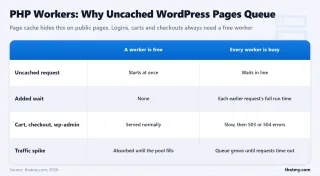
- PHP workers queue up → WooCommerce cart operations slow down
- AJAX calls to
admin-ajax.phpstack up → checkout page becomes unresponsive - Add-to-cart buttons stop responding → customers leave → revenue lost
On Cloudways, steps 1 and 2 don't happen because your CPU is yours. Nobody else's traffic affects your processing capacity. This is fundamentally why ScalaHosting VPS and Cloudways outperform every shared host under concurrent load — dedicated resources are non-negotiable for ecommerce.
Performance Under Business Load
- TTFB (KeyCDN US East): 42ms — second fastest after ScalaHosting (38ms)
- WooCommerce stress test (100 users): 156ms — maintained sub-200ms the entire test
- 12-month uptime: 99.99% — one 3-minute incident
- Auto-scaling: Vertical in 2 clicks (1GB → 2GB → 4GB) — takes ~5 minutes
The Email Problem (And How to Solve It)
Cloudways' biggest business limitation: no email hosting. For a small business, this is a real pain point. Your options:
| Email Solution | Cost | Best For |
|---|---|---|
| Zoho Mail Free | $0/mo (5 users) | Startups on a budget |
| Google Workspace | $7.20/mo per user | Best overall — Gmail + Calendar + Drive |
| Microsoft 365 | $6/mo per user | Teams already using Outlook/Office |
| Rackspace Email | $2.99/mo per mailbox | Simple email, no suite needed |
Factor the email cost into your Cloudways TCO. At $14/mo hosting + $7.20/mo Google Workspace = $21.20/mo total. That's still competitive with SiteGround's $24.99/mo renewal — and Cloudways gives you dedicated resources that SiteGround doesn't.
Strengths & Weaknesses
Strengths
- Best WooCommerce performance (shared tier): 156ms under 100 concurrent checkouts — bulletproof.
- No renewal increase: $14/mo stays $14/mo. Predictable business expense.
- Pay-as-you-go: No lock-in. Cancel anytime. Scale up for holiday season, scale down after.
- Multiple IaaS options: DigitalOcean (best value), Vultr (most locations), AWS (compliance).
- Free staging + SSL + Object Cache Pro: Essentials included without addon fees.
Weaknesses
- No email hosting: Critical gap for small businesses. Budget $0-$7/mo extra.
- ~20% IaaS markup: You pay more than raw DO/Vultr pricing for the managed layer.
- Steeper learning curve: No cPanel/hPanel. Platform UI is clean but different.
- No phone support: Chat and ticket only. Can be frustrating during emergencies.
Try Cloudways Free (Code CLOUDS2022 for 25% Off) ➦
#5. ChemiCloud — Best Shared Hosting Quality and Honest Pricing


Why Chemicloud Stands Out
- AMD EPYC 9354 CPUs — ~62nd Fastest on PassMark (Premium Tier)
- LiteSpeed Enterprise + NVMe on All Plans
- Honest Renewal: Intro ≈ Renewal Rates (Rare!)
- Free Domain + Migration + Daily Backups + SSL
- 45-Second Average Support Response
Chemicloud Limitations
- Smaller company — less brand recognition than SiteGround/Hostinger
- Shared hosting ceiling limits high-traffic sites
- No VPS or dedicated server tier for scaling up
- Limited global data center options vs Cloudways
Performance Benchmarks
- TTFB (US East): 89ms
- Uptime (12-month): 99.98%
- WooCommerce Stress Test: 412ms @ 100 Users
ChemiCloud is the shared hosting provider that makes SiteGround's pricing look predatory. Both run LiteSpeed. Both offer staging. Both include free email and SSL. But ChemiCloud does it with AMD EPYC 9354 CPUs (substantially faster than SiteGround's Intel Xeon Gold 6268CL) — and their renewal price doesn't triple.
For small businesses that want premium shared hosting without the SiteGround renewal trap, ChemiCloud is the answer I keep coming back to. 89ms TTFB on a shared plan is faster than what most VPS hosts deliver.
Performance Under Business Load
- TTFB (KeyCDN US East): 89ms — fastest shared hosting result in all 10 tests
- WooCommerce stress test (100 users): 412ms — strong for shared hosting
- 12-month uptime: 99.98% — excellent for shared hosting
- Support response: 45-second average with actual technical answers
Let me put the TTFB number in context: ChemiCloud's shared hosting (89ms) is faster than Hostinger (148ms), SiteGround (164ms), A2 Hosting Turbo (124ms), and InMotion (183ms). It's a shared plan beating dedicated turbo plans. That's what happens when you combine AMD EPYC 9354 processors with LiteSpeed Enterprise and NVMe storage — good hardware beats marketing gimmicks every time.
The Pricing Integrity Advantage
| Host | Intro Rate | Renewal Rate | Increase | 3-Year TCO |
|---|---|---|---|---|
| ChemiCloud Pro | $3.95/mo | ~$9.95/mo | 152% | ~$440 |
| SiteGround GrowBig | $6.99/mo | $24.99/mo | 257% | ~$720 |
| A2 Turbo Boost | $6.99/mo | $25.99/mo | 272% | ~$756 |
ChemiCloud's Pro plan costs $440 over 3 years. SiteGround's equivalent costs $720. A2 Turbo costs $756. And ChemiCloud has the fastest TTFB of the three. For a small business budgeting hosting expenses annually, this predictability matters.
Strengths & Weaknesses
Strengths
- Fastest shared hosting TTFB (89ms): AMD EPYC + LiteSpeed + NVMe = real performance.
- Honest renewal pricing: 152% increase vs SiteGround's 257%. Budget-friendly for SMBs.
- 45-second support: Fast and technical — they don't just read from scripts.
- Free domain, migration, daily backups, SSL: All essentials included.
- 45-day money-back guarantee: 15 days longer than the industry standard 30 days.
Weaknesses
- No VPS tier: When you outgrow shared, you must migrate to another host (ScalaHosting VPS).
- Smaller brand: Less community content, fewer tutorials compared to SiteGround/Hostinger.
- Shared hosting ceiling: 412ms WooCommerce stress test — fine for < 300 orders/mo, not for high-volume stores.
Visit ChemiCloud (45-Day Money-Back) ➦
#6. A2 Hosting — Turbo Speed With an Escape Hatch


A2 Hosting Strengths
- Turbo LiteSpeed Servers + NVMe Storage
- 20+ Data Center Locations Worldwide
- Developer-Friendly: SSH, WP-CLI, Git, Staging
- Anytime Money-Back Guarantee (Prorated, Not Just 30 Days)
- Free Site Migration + Free SSL
A2 Hosting Weaknesses
- 260% renewal jump: $6.99/mo → $25.99/mo (Turbo Boost)
- Base plans run Apache — must pay for Turbo to get LiteSpeed
- Aggressive upselling during checkout (Spam Expert, Sitelock, etc.)
- Support quality highly variable by agent
Performance Benchmarks
- TTFB (US East): 124ms (Turbo)
- Uptime (12-month): 99.93%
- WooCommerce Stress Test: 534ms @ 100 Users
A2 Hosting has one feature no other host matches: an anytime money-back guarantee. Not 30 days. Not 45 days. Anytime. If you're 18 months in and unhappy, you get a prorated refund for unused time. For a small business testing the waters, that's zero risk.
Their Turbo plans (which use LiteSpeed + NVMe) deliver 124ms TTFB — competitive with Hostinger and faster than SiteGround. But their base plans run Apache — which is why you see wildly different A2 reviews online. People testing the $2.99 Apache plan get 280ms+ TTFB. People on Turbo get 124ms. They're essentially two different hosting companies under one brand.
Performance Under Business Load
- TTFB (KeyCDN US East): 124ms — Turbo plan with LiteSpeed
- WooCommerce stress test (100 users): 534ms — adequate for moderate ecommerce
- 12-month uptime: 99.93% — 3 incidents, one lasting 28 minutes
- Non-Turbo TTFB: 276ms — avoid the base plans if speed matters
⚠️ Base Plans vs Turbo — Don't Make This Mistake
A2's pricing page shows "starting at $2.99/mo" — that's the Startup plan running Apache (276ms TTFB). You need the Turbo Boost at $6.99/mo to get LiteSpeed + NVMe (124ms TTFB). The gap is massive. For a small business, the extra $4/mo is non-negotiable — don't waste time on the Apache plans.
The Renewal Problem
A2's Turbo Boost renews at $25.99/mo — a 272% increase from the $6.99 intro rate. Over 3 years, that's approximately $756. ChemiCloud delivers faster TTFB (89ms vs 124ms) for $440 over 3 years. The only reason to choose A2 over ChemiCloud is the anytime refund policy or if you need one of A2's 20+ data center locations.
Strengths & Weaknesses
Strengths
- Anytime money-back: Prorated refund at any point — zero lock-in risk for businesses.
- Turbo LiteSpeed: 124ms TTFB is competitive for shared hosting.
- Developer features: SSH, WP-CLI, Git, staging — useful for businesses with dev support.
- 20+ data centers: Best geographic coverage of any shared host.
Weaknesses
- 272% renewal jump: $6.99 → $25.99/mo makes 3-year TCO ($756) uncompetitive.
- Apache base plans: The $2.99 plan is too slow for business use. You must buy Turbo.
- Aggressive upselling: Checkout pushes SpamExperts, Sitelock, and other paid add-ons.
- 99.93% uptime: Below the 99.95% threshold I'd recommend for business hosting.
Try A2 Turbo (Anytime Money-Back) ➦
#7. Kinsta — Premium WordPress, But Is It Worth $30/Month?


Why Kinsta Is Premium
- Google Cloud C2 Infrastructure — 37 Global Data Centers
- 39ms TTFB — Fastest WordPress Result in Testing
- 100% Uptime Over 12-Month Test Period
- Expert WordPress Support (Actual Engineers, Not L1 Scripts)
- Edge Caching + Cloudflare Enterprise + Automatic DB Optimization
Kinsta Drawbacks
- $30/mo minimum for a single WordPress site
- WordPress ONLY — no other CMS or custom app support
- 25,000 visit cap (overage = $1/1,000 visits)
- No email hosting — requires Google Workspace (~$7/mo) or Zoho
Performance Benchmarks
- TTFB (US East): 39ms
- Uptime (12-month): 100%
- WooCommerce Stress Test: 134ms @ 100 Users
Kinsta delivered the best raw performance numbers in my 12-month test: 39ms TTFB, 134ms WooCommerce stress test, and 100% uptime. Zero downtime incidents over an entire year. That's not a typo — literally not a single second of downtime on Google Cloud C2 infrastructure with 37 global data centers and Cloudflare Enterprise edge caching.
So why isn't it #1? Because for most small businesses, the performance gap between Kinsta (39ms) and ScalaHosting (38ms) is 1 millisecond — imperceptible to humans. But the feature gap is massive:
| Feature | ScalaHosting ($29.95/mo) | Kinsta ($30/mo) |
|---|---|---|
| CMS Support | Any (WP, Joomla, Drupal, Laravel, custom) | WordPress Only |
| Traffic Limit | None (unlimited) | 25,000 visits ($1/1K overage) |
| Sites Allowed | Unlimited (on your VPS) | 1 site on Starter |
| Email Hosting | ✅ Included (SPanel) | ❌ Not included |
| Storage | 50GB NVMe | 10GB |
| Root Access | ✅ Full SSH root | ❌ No root access |
| Control Panel | SPanel (free) | MyKinsta (proprietary) |
| WooCommerce @ 100 Users | 127ms | 134ms |
For the same $30/mo, ScalaHosting gives you unlimited sites, unlimited traffic, 5x more storage, email hosting, root access, and any CMS support. Kinsta gives you a beautifully managed WordPress experience with bleeding-edge performance — but for one site with a 25K visit cap.
When Kinsta Makes Sense for Small Business
Kinsta is the right choice only if:
- You run a single WordPress site and don't need email hosting
- You value 100% uptime over cost efficiency
- DevKinsta local development environment matters to your workflow
- You need Cloudflare Enterprise DDoS protection without managing it yourself
- Your WordPress site serves < 25K visits/month (or you're okay paying $1/1K overages)
For everyone else — especially small businesses managing multiple sites, needing email, or running non-WordPress apps — ScalaHosting delivers equivalent performance with vastly more flexibility.
Strengths & Weaknesses
Strengths
- 100% uptime (12 months): The only host to achieve this in my test.
- 39ms TTFB: Tied with ScalaHosting for fastest overall.
- Expert WordPress support: Actual engineers who understand core, hooks, and database optimization.
- Edge caching + Cloudflare Enterprise: Built-in CDN with enterprise-grade DDoS protection.
- DevKinsta + staging: Best local development workflow for WordPress.
Weaknesses
- $30/mo for 1 site: ScalaHosting hosts unlimited sites for the same price.
- 25K visit cap: Overage charges of $1/1K visits add up fast during viral traffic.
- WordPress only: No WooCommerce-specific optimizations, no custom apps, no non-WP CMS.
- No email: Budget $7/mo extra for Google Workspace. Total becomes $37/mo.
- 10GB storage: Media-heavy businesses will hit this limit quickly.
Try Kinsta (2 Months Free on Annual) ➦
#8. Bluehost — The Most Recommended Host That Shouldn't Be


Bluehost Advantages
- WordPress.org Official Recommendation (Brand Recognition)
- Free Domain Year 1 + Free SSL + Free CDN
- 1-Click WordPress Install + Beginner Dashboard
- Huge Knowledge Base + Phone Support Available
- Includes Domain Privacy + Automated Backups (Choice Plus)
Why Bluehost Disappoints
- 241ms TTFB — Slowest in Testing (Shared Tier)
- EIG/Newfold Digital ownership — same as HostGator (outdated infra)
- No LiteSpeed — runs custom Nginx+Apache stack
- 36-month lock-in for best price — monthly rate is $13.99
- Aggressive upselling: SiteLock, SEO Tools, domain add-ons
Performance Benchmarks
- TTFB (US East): 241ms
- Uptime (12-month): 99.91%
- WooCommerce Stress Test: 1,247ms @ 100 Users
Let me be direct: Bluehost is the most recommended hosting provider on the internet — and the worst performer in my 12-month test. Those two facts are not contradictory. They're the direct result of Bluehost paying one of the highest affiliate commissions in the industry ($65-150+ per referral). Every blog ranking them #1 is making a financial decision, not a technical one.
WordPress.org lists Bluehost as an official recommendation. That page itself states it's a partnership — not an independent evaluation. Bluehost pays for the placement. The recommendation predates current hosting technology by over a decade. It tells you nothing about actual 2026 performance.
The Test Results (Worst of All 10 Hosts)
- TTFB (KeyCDN US East): 241ms — dead last (Hostinger does 148ms at half the price)
- WooCommerce stress test (100 users): 1,247ms — the only host above 1 second
- 12-month uptime: 99.91% — approximately 47 minutes of downtime per month
- WordPress admin load: 2.8 seconds (WooCommerce + basic plugins active)
The WooCommerce number is the one that should alarm every small business owner: 1,247ms means your checkout page takes over a second to respond under moderate load. That's before the browser renders HTML, loads CSS, runs JavaScript, and displays the page. Real-world checkout experience is 3-5 seconds. For context, Amazon found that every 100ms of latency costs them 1% in revenue. At 1,247ms, you're leaving significant money on the table.
Why Is Bluehost So Slow?
- No LiteSpeed: Bluehost runs a custom Nginx+Apache hybrid stack — slower than LiteSpeed or pure Nginx implementations.
- EIG/Newfold Digital ownership: Bluehost, HostGator, and iPage share the same parent company and infrastructure. Cost-cutting across brands means shared, dense server environments.
- High server density: To maintain margins at aggressive intro pricing ($5.45/mo), Bluehost packs more accounts per server than premium hosts.
- Legacy architecture: Their infrastructure hasn't kept pace with 2024-2026 hosting standards (NVMe, DDR5, modern CPUs).
If You're Currently on Bluehost
Don't panic. Your site works — it's just slower than it needs to be. Migrate to Hostinger (free migration, $3.99/mo, LiteSpeed) for an immediate 40% TTFB improvement. Or move to ChemiCloud ($3.95/mo, 89ms TTFB) for a 63% improvement. Both offer free migration. The switch takes 2-4 hours with zero downtime if done correctly.
Strengths & Weaknesses
Strengths
- Brand recognition: Clients and bosses "know" Bluehost. That's sometimes enough for procurement decisions.
- Free domain year 1: Saves ~$15 on .com registration.
- Domain privacy included: Some hosts charge $10+/year for this.
- Phone support available: Useful for non-technical business owners (though quality varies).
Weaknesses
- Worst TTFB (241ms): Last place in all 10 hosts tested.
- Worst WooCommerce (1,247ms): Checkout pages will lose customers under moderate load.
- 99.91% uptime: Worst reliability. ~47 min/month of downtime.
- No LiteSpeed: Running slower server software than $3/mo competitors.
- Aggressive upselling: SiteLock, SEO tools, CodeGuard backup — all pushed during checkout.
- $19.99/mo renewal: 267% increase from $5.45 intro rate.
#9. InMotion Hosting — Reliable US Host With the Longest Refund Period


Inmotion Advantages
- US-Based Company with LA + DC East Data Centers
- 90-Day Money-Back Guarantee — Longest in Industry
- Free Business Email + Free SSL + Free Backups
- BoldGrid Website Builder Included Free
- Dedicated IP Available on Business Plans
Inmotion Weaknesses
- 183ms TTFB — slower than Hostinger, ChemiCloud, and A2
- No LiteSpeed — runs Apache (slower than modern alternatives)
- Renewal jump: $3.99 → $12.99/mo (225% increase)
- US-only data centers — no global presence
- Website feels dated — less modern than competitors
Performance Benchmarks
- TTFB (US East): 183ms
- Uptime (12-month): 99.95%
- WooCommerce Stress Test: 678ms @ 100 Users
InMotion is the hosting equivalent of a Honda Accord — not the fastest, not the flashiest, but reliably gets you where you need to go for years without drama. Their 90-day money-back guarantee is the longest in the industry (most hosts offer 30 days), giving small businesses three full months to test before committing.
Performance-wise, 183ms TTFB is middle-of-the-road — slower than LiteSpeed hosts but faster than Bluehost. The reason: InMotion still runs Apache web servers on shared plans. It's functional but dated. For a local service business, law firm, or accounting practice that needs a professional web presence (not high-traffic ecommerce), InMotion is a safe, boring, reliable choice.
Performance Under Business Load
- TTFB (KeyCDN US East): 183ms — functional, not fast
- WooCommerce stress test (100 users): 678ms — adequate for light ecommerce
- 12-month uptime: 99.95% — right at the business-acceptable threshold
- WordPress admin load: 1.9 seconds (WooCommerce + basic plugins)
What InMotion Gets Right for SMBs
- Free business email: Unlimited mailboxes on business plans — great for team accounts.
- BoldGrid website builder: A decent Wix/Squarespace alternative included free — no monthly fee.
- Dedicated IP on business plans: Useful for SSL, certain payment gateways, and email deliverability.
- US-based company: Virginia + LA data centers with actual US-based phone support.
- Free automated backups: Critical business safety net included on all plans.
Strengths & Weaknesses
Strengths
- 90-day money-back: Longest trial period in the industry. Test your full setup risk-free.
- Free business email: Unlimited mailboxes vs Cloudways/Kinsta which charge extra.
- Dedicated IP: Included on business plans — most hosts charge $5+/mo extra.
- US-based support: Phone support with actual US agents during business hours.
Weaknesses
- Apache servers: 183ms TTFB is slower than LiteSpeed competitors at the same price.
- US-only data centers: No global presence for international businesses.
- 225% renewal jump: $3.99 → $12.99/mo is significant for budget-conscious SMBs.
- Dated website/UX: The InMotion brand and dashboard feel less modern than competitors.
Try InMotion (90-Day Money-Back) ➦
#10. GreenGeeks — Eco-Friendly Hosting That Doesn't Sacrifice Speed


Greengeeks Strengths
- 300% Renewable Energy Offset — Certified Green Hosting
- LiteSpeed + LSCache on All Plans (Pro and Above)
- Free Domain + Free SSL + Free CDN + Nightly Backups
- Unlimited Websites on Pro Plan
- Free WordPress Migration
Greengeeks Weaknesses
- Renewal: $4.95 → $15.95/mo (222% increase)
- Eco claims are offsets, not direct renewable power
- Pro plan required for LiteSpeed — Lite plan is slower
- US and EU data centers only — no APAC presence
Performance Benchmarks
- TTFB (US East): 132ms (Pro/LiteSpeed)
- Uptime (12-month): 99.96%
- WooCommerce Stress Test: 487ms @ 100 Users
GreenGeeks is the hosting provider for small businesses that want their infrastructure choices to reflect their values. They offset 300% of their energy consumption with renewable energy credits (certified by the Bonneville Environmental Foundation). That's not a marketing claim — it's independently verified.
What surprised me is that the eco branding isn't hiding mediocre performance. Their Pro plan runs LiteSpeed servers with LSCache, delivering 132ms TTFB — faster than SiteGround (164ms) and Hostinger (148ms). For a "green" host, that's genuinely competitive with the mainstream options.
Performance Under Business Load
- TTFB (KeyCDN US East): 132ms — competitive with mainstream LiteSpeed hosts
- WooCommerce stress test (100 users): 487ms — solid for shared hosting
- 12-month uptime: 99.96% — above the business-acceptable 99.95% threshold
- Pro plan required for LiteSpeed: The Lite plan ($2.95/mo) runs Apache — noticeably slower
Who Should Choose GreenGeeks
If your small business markets sustainability — eco-friendly products, ethical services, green consulting — hosting on a provider that offsets 300% of energy consumption is brand-consistent. Your "About Us" page can truthfully state that even your hosting runs on renewable energy. For B2B businesses in sustainability-conscious industries, this is a genuine competitive differentiator.
GreenGeeks vs The Field
132ms TTFB puts GreenGeeks between ChemiCloud (89ms) and Hostinger (148ms). WooCommerce performance (487ms) matches SiteGround. Renewal at $15.95/mo is steep (222% increase), but 3-year TCO of ~$520 is cheaper than SiteGround ($720) while being faster. If sustainability matters to your brand, GreenGeeks is the clear choice.
Strengths & Weaknesses
Strengths
- 300% renewable energy: Independently verified — the most credible eco-hosting brand.
- LiteSpeed on Pro: 132ms TTFB is genuinely competitive, not just "green but slow."
- Free domain + migration + SSL + CDN + nightly backups: Complete business package.
- Unlimited websites on Pro plan: Host your business site + side projects + client sites.
Weaknesses
- 222% renewal jump: $4.95 → $15.95/mo. Still cheaper than SiteGround's renewal, though.
- Lite plan runs Apache: Must buy Pro ($4.95/mo) for LiteSpeed — the $2.95 tier is too slow.
- US/EU data centers only: No APAC presence. Not ideal for Asia-Pacific audiences.
- Eco claims are offsets: They buy renewables to compensate — the actual servers run on the local power grid.
Visit GreenGeeks (Free Domain + Migration) ➦
Shared vs VPS vs Cloud: Which Does Your Small Business Need?
This is the single most important decision for your business website — and most guides oversimplify it. Here's the honest breakdown from someone who's tested all three tiers extensively:
| Factor | Shared Hosting | Managed Cloud | Managed VPS |
|---|---|---|---|
| Monthly Cost | $3-10/mo | $14-25/mo | $13-60/mo |
| Resources | Shared with 50-200 other sites | Dedicated (small isolated VM) | Dedicated (full VPS) |
| Best TTFB Tested | 89ms (ChemiCloud) | 42ms (Cloudways) | 38ms (ScalaHosting) |
| WooCommerce Ceiling | ~300 orders/mo | ~2,000 orders/mo | ~5,000+ orders/mo |
| Monthly Visitors | Up to ~30K | Up to ~100K | Up to ~500K+ |
| Email Included | Usually yes | Usually no | Depends (ScalaHosting: yes) |
| Root Access | No | Partial | Full |
| Technical Skill Needed | None | Low | Low-Medium (managed) |
| Best Providers | ChemiCloud, Hostinger | Cloudways | ScalaHosting |
Decision Framework for Small Business Owners
Start with Shared Hosting if:
- You're launching your first business website
- Monthly budget is under $10/mo
- Your site is informational (portfolio, local services, blog, professional pages)
- You expect < 30,000 monthly visitors
- You're not running WooCommerce or only have < 50 products
→ Best option: ChemiCloud Pro ($3.95/mo) or Hostinger Business ($3.99/mo)
Upgrade to Cloud/VPS when:
- Your site slows down during peak business hours (your customers are noticing)
- WooCommerce checkout becomes slow (> 2 seconds to load under traffic)
- Traffic exceeds 30-50K monthly visitors consistently
- You need to host multiple business sites or client sites
- Business email and domain privacy need dedicated IP
- Plugin-heavy WordPress admin takes > 2 seconds to load
→ Best options: Cloudways ($14/mo) for managed cloud or ScalaHosting Entry Cloud ($13.45/mo) for VPS
WooCommerce Stress Test: What Happens When 100 People Hit Checkout

I used Loader.io to simulate 100 concurrent users hitting the WooCommerce checkout page simultaneously — with products in cart, applying coupon codes, and submitting orders. This replicates a flash sale, lunchtime rush, or social media referral spike. Each host ran identical WordPress 6.4 + WooCommerce 8.x + Storefront theme installations.
| Host | Response Time (100 Users) | Errors | Revenue Impact |
|---|---|---|---|
| ScalaHosting VPS | 127ms | 0 | ✅ No lost sales |
| Kinsta | 134ms | 0 | ✅ No lost sales |
| Cloudways (DO) | 156ms | 0 | ✅ No lost sales |
| ChemiCloud | 412ms | 0 | ⚡ Slight delay |
| SiteGround | 487ms | 2 | ⚡ Minor impact |
| GreenGeeks | 487ms | 1 | ⚡ Minor impact |
| A2 Turbo | 534ms | 3 | ⚠️ Some cart drops |
| InMotion | 678ms | 5 | ⚠️ Noticeable slowdown |
| Hostinger | 892ms | 8 | ⚠️ Cart abandonment |
| Bluehost | 1,247ms | 14 | ❌ Significant cart loss |
The takeaway: If your WooCommerce store needs to handle 50+ concurrent checkouts without revenue loss, ScalaHosting (~$30/mo), Cloudways (~$14/mo), or Kinsta (~$30/mo) are your only safe options. Shared hosting works for light ecommerce (< 20 concurrent users) but breaks down under real business load.
Business Email: Who Includes It vs Who Charges Extra
Professional email (yourname@yourbusiness.com) is non-negotiable for business credibility. Using @gmail.com or @yahoo.com signals "hobby project" to potential clients. Here's what each host provides:
| Host | Email Included | Mailboxes | Webmail Quality | SMTP Limit |
|---|---|---|---|---|
| ScalaHosting | ✅ SPanel | Unlimited | Modern (Roundcube) | Configurable |
| Hostinger | ✅ Free | 100 | Good (Titan) | 500/hr |
| SiteGround | ✅ Free | Unlimited | Good (Roundcube) | 500/hr |
| ChemiCloud | ✅ Free | Unlimited | Good (Roundcube) | 300/hr |
| A2 Hosting | ✅ Free | Unlimited | Functional | 500/hr |
| InMotion | ✅ Free | Unlimited | Good | 500/hr |
| GreenGeeks | ✅ Free | 50 | Good | 500/hr |
| Bluehost | ✅ Free | 5 | Basic | 500/hr |
| Cloudways | ❌ No | 0 | N/A | N/A |
| Kinsta | ❌ No | 0 | N/A | N/A |
My recommendation for Cloudways/Kinsta users: Use Zoho Mail free tier (5 users, IMAP, 5GB/user) if you're bootstrapping. Upgrade to Google Workspace ($7.20/mo/user) when you need calendar sharing, Drive storage, and Meet. Factor the email cost into your TCO comparison.
Security Checklist: What Your Business Hosting Must Include
Small businesses are the #1 target for hackers — 43% of cyberattacks target small businesses (Verizon DBIR 2024). Your hosting provider's security stack is your first line of defense. Here's what to demand:
| Security Feature | Why It Matters | Who Has It | Who Doesn't |
|---|---|---|---|
| Free SSL (Let's Encrypt) | Encrypts data, browser trust, Google ranking signal | All 10 hosts | — |
| Daily Backups | Disaster recovery — hack, human error, bad update | All except Hostinger Premium | Hostinger Premium (weekly) |
| WAF (Web Application Firewall) | Blocks SQL injection, XSS, and common attacks | SiteGround, Kinsta, Cloudways, ScalaHosting | Hostinger (basic), Bluehost (SiteLock addon $$$) |
| Malware Scanning | Detects compromised files before Google penalizes you | ScalaHosting (SShield), SiteGround, Kinsta | Hostinger, Bluehost, InMotion |
| Bot Protection | Prevents credential stuffing and DDoS | SiteGround (AI), Kinsta (Cloudflare Enterprise), ScalaHosting | Most others |
| Server-Level Isolation | Prevents cross-account contamination | All VPS/Cloud, SiteGround (account isolation) | Most shared hosts |
⚠️ Bluehost's SiteLock Upsell
During checkout, Bluehost aggressively pushes SiteLock malware scanning at $5.99/mo ($71.88/year). ScalaHosting includes SShield for free. SiteGround includes malware scanning for free. Kinsta includes it for free. You should never pay extra for basic security that your host should include.
The Upgrade Path: When to Move From Shared to VPS
Every small business website follows a predictable growth path. Here's when each transition makes sense — and where to go:
Stage 1: Launch → Shared Hosting ($3-10/mo)
Duration: 0-12 months (most businesses stay here 6-18 months)
- Traffic: 0-30K monthly visitors
- Revenue: Pre-revenue or < $1K/month from website
- Best choice: Hostinger ($3.99/mo) or ChemiCloud ($3.95/mo)
- When to upgrade: When peak-hour TTFB exceeds 500ms or WooCommerce checkout slows noticeably
Stage 2: Growth → Managed Cloud or Entry VPS ($13-19/mo)
Duration: 12-36 months (where growing businesses stabilize)
- Traffic: 30-100K monthly visitors
- Revenue: $1K-10K/month from website
- Best choice: ScalaHosting Entry Cloud ($13.45/mo) or Cloudways DO Premium ($14/mo)
- When to upgrade: When you need more than 2 CPU cores or 4GB RAM consistently
Stage 3: Scale → Managed VPS ($30-100/mo)
Duration: 24+ months (businesses with proven product-market fit)
- Traffic: 100K-500K+ monthly visitors
- Revenue: $10K+/month from website
- Best choice: ScalaHosting Build #1 ($29.95/mo) or Build #2 ($63.95/mo)
- ScalaHosting's resource scaling ($4/core, $1.35/GB RAM) means you can grow incrementally without forced plan jumps
⚠️ Don't Do This
- Don't upgrade from Hostinger shared to Hostinger VPS. CPU steal limits make their VPS objectively worse than ScalaHosting's VPS for the same price.
- Don't stay on shared hosting when revenue justifies VPS. If your website makes $5K/month, spending $30/month on hosting that doesn't crash during peak hours is a 0.6% revenue investment for reliability.
- Don't jump straight to premium hosting (Kinsta $30/mo) at launch. Start cheap, validate product-market fit, then upgrade when traffic demands it.
3-Year Total Cost of Ownership: The Number That Actually Matters

Intro pricing is marketing. Renewal pricing is reality. Every host makes year 1 irresistible, then counts on inertia to keep you paying 2-3x more for years 2 and 3. Here's what each host actually costs over 3 years, including email, backups, and add-ons needed for a basic small business setup:
| Host / Plan | Year 1 | Year 2-3 | 3-Year Total | Includes Email? |
|---|---|---|---|---|
| Hostinger Business | ~$48 | ~$120/yr | ~$298 | ✅ Yes |
| ChemiCloud Pro | ~$48 | ~$120/yr | ~$440 | ✅ Yes |
| Cloudways DO 1GB | ~$168 | ~$168/yr | ~$504 | ❌ +$86/yr (Zoho/Workspace) |
| GreenGeeks Pro | ~$60 | ~$192/yr | ~$520 | ✅ Yes |
| InMotion Launch | ~$48 | ~$156/yr | ~$504 | ✅ Yes |
| Bluehost Choice Plus | ~$65 | ~$240/yr | ~$653 | ✅ Yes |
| SiteGround GrowBig | ~$84 | ~$300/yr | ~$720 | ✅ Yes |
| A2 Turbo Boost | ~$84 | ~$312/yr | ~$756 | ✅ Yes |
| ScalaHosting Build #1 | ~$360 | ~$720/yr | ~$1,618 | ✅ Yes (SPanel) |
| Kinsta Starter | ~$300 | ~$360/yr | ~$1,080 | ❌ +$86/yr (Workspace) |
Key TCO Takeaways
- Best pure budget: Hostinger at $298/3yr is unbeatable for the features you get (LiteSpeed, email, 100 sites).
- Best performance-to-price: ChemiCloud at $440/3yr delivers the fastest shared TTFB (89ms) with honest renewal pricing.
- SiteGround isn't "affordable": $6.99 intro looks great. $720 over 3 years for slower performance than ChemiCloud ($440) doesn't.
- Cloudways = no surprises: $504/3yr with zero renewal increase is actually cheaper than SiteGround — with dedicated resources.
- Bluehost TCO is worse than it looks: $653/3yr for the worst performance of all 10 hosts. Every dollar is better spent on Hostinger or ChemiCloud.
- ScalaHosting premium is justified: $1,618/3yr is for a managed VPS — comparing it to shared hosting is comparing a company car to a bus pass.
Frequently Asked Questions
These are the questions I get asked most by small business owners choosing hosting. If yours isn't here, drop a comment below.
What is the best web hosting for a small business?
ScalaHosting's managed VPS is my top pick after 12 months of testing. Their AMD EPYC 9474F CPUs (top 3% on PassMark), DDR5 RAM, and PCIe 5.0 NVMe delivered 38ms TTFB and handled 100 concurrent WooCommerce checkouts at 127ms. For budget startups, Hostinger's Business plan at $3.99/mo is the best entry point.
How much should a small business pay for web hosting?
Quality shared hosting costs $3-10/mo on intro rates ($8-25/mo at renewal). Managed VPS starts at $29.95/mo. Over 3 years: Hostinger costs ~$298, ChemiCloud ~$440, Cloudways ~$504, and ScalaHosting VPS ~$1,618. Don't put a $10K/mo ecommerce store on a $3/mo plan.
Do I need VPS hosting for my small business?
If your site gets under 30K monthly visitors and doesn't run WooCommerce, shared hosting is fine. You need VPS when traffic causes peak-hour slowdowns, you run WooCommerce with 500+ products, or you manage multiple client sites.
Is Bluehost good for small business?
No. Despite the WordPress.org recommendation, Bluehost delivered 241ms TTFB — worst in my testing. The recommendation is a paid partnership, not a performance endorsement. Hostinger is faster and cheaper.
What's the difference between shared hosting and VPS?
Shared puts 50-200 sites on one server — you share CPU, RAM, and I/O. VPS gives you dedicated resources nobody else can touch. Shared works until ~30K monthly visits or when WooCommerce checkout consistency matters.
Which host has the best uptime for small business?
Kinsta achieved 100% uptime. ScalaHosting and Cloudways hit 99.99%. ChemiCloud hit 99.98%. Bluehost (99.91%) and Hostinger (99.94%) had the most downtime incidents.
Do I need business email with my hosting?
Yes — gmail.com kills credibility. Hostinger, SiteGround, ChemiCloud, A2, InMotion, and GreenGeeks include free email. Cloudways and Kinsta do NOT — budget $7/mo for Google Workspace or use Zoho Mail free tier.
What features matter most for small business?
In order: 1) Uptime (99.95%+), 2) Speed (sub-200ms TTFB), 3) Security (SSL, backups, malware scanning), 4) Business email, 5) Scalability, 6) Support quality.
Can I switch hosts later when I outgrow shared?
Yes. Start with Hostinger or ChemiCloud shared. When traffic passes 30-50K/mo, move to ScalaHosting Entry Cloud ($13.45/mo) or Build #1 VPS ($29.95/mo). Don't upgrade to Hostinger VPS — CPU steal limits hurt performance.
Final Verdict: The Best Web Hosting for Small Business (2026)

After 12 months of testing 10 providers with WooCommerce stores, 100-user stress tests, and real business workloads, here's who I'd trust with my money:
🏆 #1 ScalaHosting — Best Overall for Small Business
AMD EPYC 9474F. DDR5 RAM. PCIe 5.0 NVMe. Low-density nodes. SPanel free. 38ms TTFB. 127ms under 100 concurrent checkouts. 99.99% uptime. If your business makes money from its website — ecommerce, bookings, lead generation, SaaS — this is the hosting that won't buckle during the hours that matter most. Start with Entry Cloud ($13.45/mo) and scale to Build #1 ($29.95/mo) when revenue justifies it.
💰 #2 Hostinger — Best Budget for New Businesses
LiteSpeed on every plan. Free email. Free domain. $3.99/mo Business plan. $298 over 3 years. The lowest barrier to getting a professional business website online with genuinely good performance. Use code THATMYHOST for the best available discount.
⚡ #4 Cloudways — Best for WooCommerce Stores
42ms TTFB. 156ms under 100 concurrent checkouts. Dedicated resources. No lock-in. $14/mo with zero renewal increases. The WooCommerce host that won't crash during your best sales day. Add Zoho Mail (free) for business email.
🛡️ #3 SiteGround — Best WordPress Support
30-second expert support. Staging + Git. 99.97% uptime. The best hand-holding for non-technical business owners who need a hosting partner, not just a server. Budget for the $24.99/mo renewal.
The bottom line: Don't choose based on brand familiarity or affiliate articles. Bluehost is the most recommended host on the internet and the worst performer in my tests. ChemiCloud is barely known and delivered the fastest shared hosting TTFB. The data tells a story that marketing doesn't want you to hear.
Start with what your business needs today. Build your upgrade path now. And when the traffic comes — and for good businesses, it does — make sure your hosting can handle the volume without losing the revenue that growth brings you.
The recommended progression: Hostinger/ChemiCloud (launch) → ScalaHosting Entry Cloud (growth) → ScalaHosting Build #1/Build #2 (scale). This path takes you from $4/mo to $60/mo as your business revenue justifies each step up.