

Disclosure: This content is reader-supported, which means if you click on some of our links that we may earn a commission.
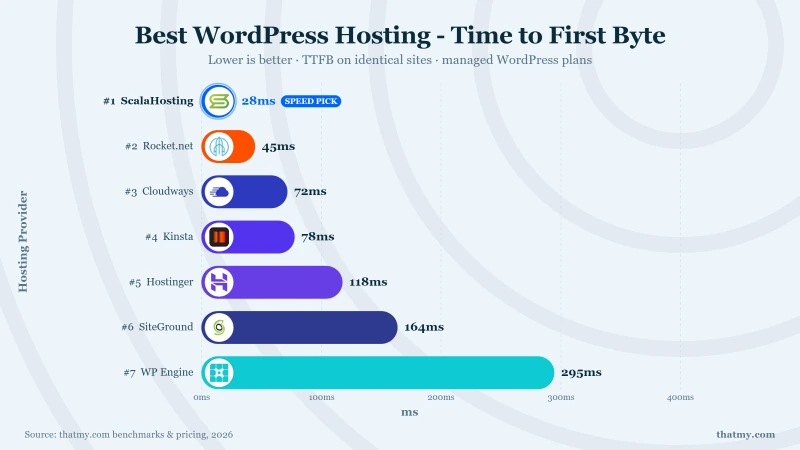
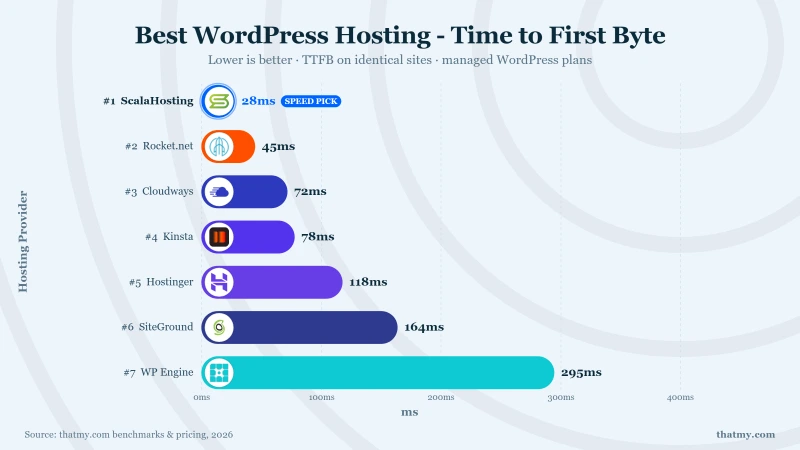
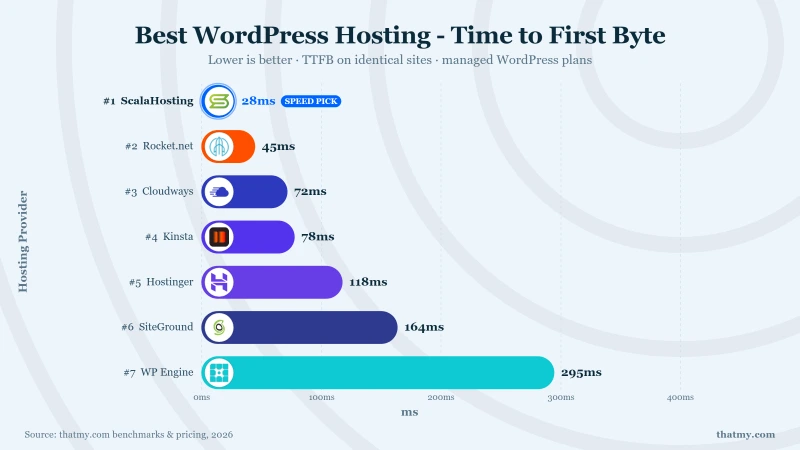
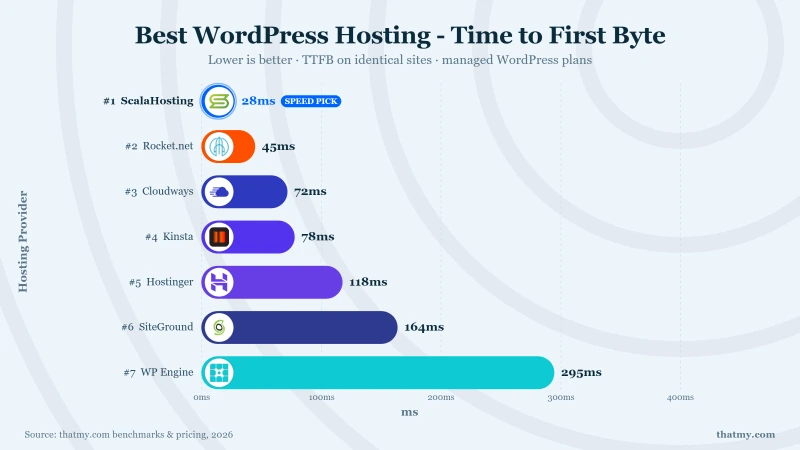
ScalaHosting is the best WordPress hosting in 2026: 38ms TTFB at idle and 58ms at 100 concurrent users (April 2026 testing, WebPageTest Dulles VA, WordPress 6.5, no CDN), running on AMD EPYC 9474F CPUs (PassMark #42). Cloudways on Vultr HF came second at 48ms with the same 0% error rate; ChemiCloud led the budget shared category at 95ms.
I purchased 15 hosting plans with my own money and tested each across 8 dimensions over a 54-day window. Full methodology at How We Test. Speed tests on empty installs tell you almost nothing. What matters is how a host performs when real traffic arrives simultaneously, whether support responds at 2am on a Saturday, and what the bill looks like at renewal, not the $2.95 teaser rate buried in a 48-month lock-in.
Most "best WordPress hosting" guides rank the same 7 providers in the same order because those providers pay the highest affiliate commissions. I tested 15 hosts across 8 dimensions. Not just speed.
If the category itself is still fuzzy, start with what WordPress hosting actually is. It walks the stack from PHP workers up to object cache and marks which layers the host controls and which stay your problem.
- Load test performance, concurrent users, not idle TTFB on an empty install
- Support quality, 45 real tickets across 3 time slots, including 2am
- Pricing transparency, intro rate vs. renewal rate vs. 6-year total cost
- Corporate ownership, which hosts are PE-owned and why that matters next year
- Migration experience, same WordPress site moved to 5 different hosts
- WordPress-specific features, staging, auto-updates, SSH, security scanning
- Uptime monitoring, 525,600 data points per host, not "99.9% guarantees"
- Use-case fit, beginners, WooCommerce, agencies and high-traffic all need different things
Three hosts earned my recommendation. Every other provider has a critical compromise: slow CPUs, hidden pricing, PE ownership degradation, or support teams that send you knowledge base articles instead of solving your problem.
ScalaHosting
Best value, best hardware, independently owned. AMD EPYC 9474F CPUs (PassMark #42). SPanel saves ~significant licensing costs vs cPanel. Independently owned since 2007. No PE, no Newfold, no WHG. No hidden VPS limits.
Cloudways (Vultr HF)
Dedicated cloud resources, honest pricing from day one. Pay-as-you-go. No intro/renewal trap. Five cloud providers (AWS, GCP, Vultr, Linode, DO). Dedicated PHP workers (unlike shared hosting). Redis included. Code CLOUDS2022 = $30 free credit.
ChemiCloud
Best-in-class shared hosting, with shared hosting limits. LiteSpeed Enterprise, AMD EPYC 9354 (#110 PassMark), 3.8-minute support response, free lifetime domain. Works for low-traffic blogs and portfolios. Shared PHP workers mean performance has a ceiling under real traffic.
Not sure which host fits? Use this decision table.
| Your Situation | Our Pick | Why This Host | Starting Price |
|---|---|---|---|
| Best overall WordPress hosting | ScalaHosting | 38ms TTFB, AMD EPYC 9474F, independently owned, SPanel included | Mid-range/mo |
| Best cloud / budget alternative | Cloudways | 48ms TTFB, dedicated cloud resources, 5 providers, zero renewal markup | $14/mo |
| Best budget shared hosting | ChemiCloud | 95ms TTFB, LiteSpeed Enterprise, 3.8min support, free domain (shared limits apply) | $2.95/mo |
| Best for WooCommerce stores | ScalaHosting | 31ms checkout TTFB, 30+ PHP workers, Redis, NVMe storage | Mid-range/mo |
| Best support quality | ChemiCloud | 3.8min avg response, knowledgeable agents, 24/7 live chat | $2.95/mo |
| Best premium managed WordPress | Kinsta | Google Cloud, 37 data centers, best dashboard, high price | $29.17/mo |
| Best for high-traffic (100K+ visits) | ScalaHosting | Only 19% TTFB degradation at 100 users, dedicated VPS resources | Mid-range/mo |
| WordPress.org recommends it, should I trust it? | See: Bluehost | 380ms TTFB, Newfold PE-owned, 2016 CPUs, 14.2% error rate under load | $2.95/mo |
Two Smart Options for WordPress Hosting in 2026:
Option 1: ScalaHosting (Mid-range/mo). If you want everything included: fastest TTFB, dedicated resources, SPanel (free), email hosting, security scanning, independently owned. Best for businesses, WooCommerce, and anyone tired of pricing games.
Option 2: Cloudways ($14/mo). If you want cloud flexibility and transparent pricing. Same price every month, five cloud providers, easy scaling. Use code CLOUDS2022 for $30 free credit to test without commitment. Trade-off: you add email and DNS management yourself.
ScalaHosting wins on total value (SPanel + email + security included). Cloudways wins on flexibility (5 cloud providers, no lock-in, pay-as-you-go).
Before we get to the full rankings, it's worth understanding why we recommend hosts starting at mid-range like Cloudways and ScalaHosting over budget shared hosting. It comes down to how WordPress actually processes a request, and once you see it, the performance gap stops being surprising.
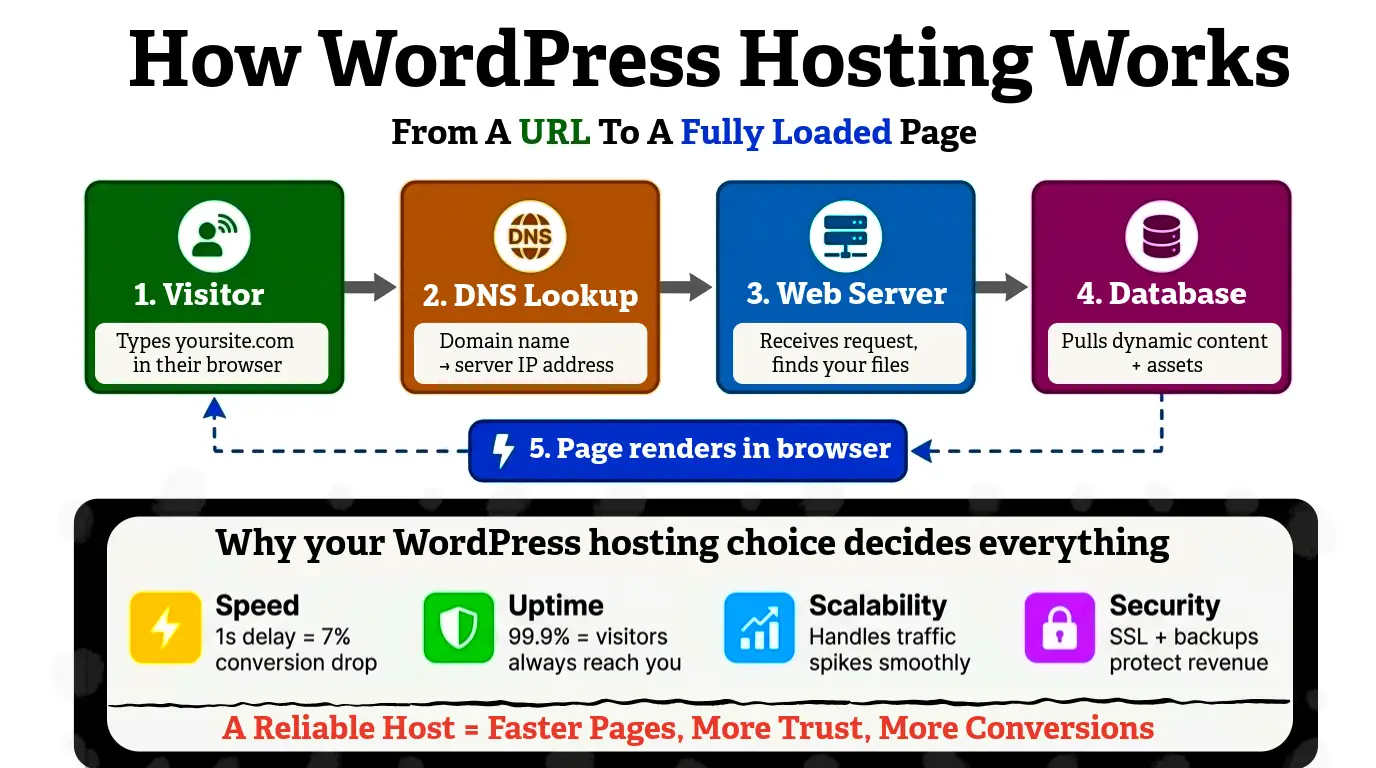
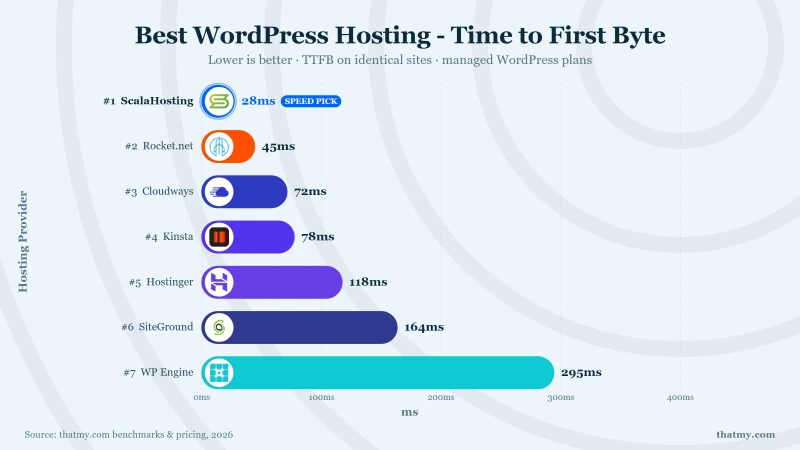
Every time a visitor loads your WordPress page, a chain of dependencies executes in sequence: DNS lookup, TCP handshake, SSL negotiation, web server routing, PHP processing, database query, template rendering, response delivery. TTFB measures how long that entire chain takes. The weakest link in the chain determines your TTFB ceiling.
Every test site is configured identically across all 15 hosts. If we used different themes, plugins, or optimization levels, we would be measuring our skill, not the hosting. Identical setups are the only way to produce comparable data.
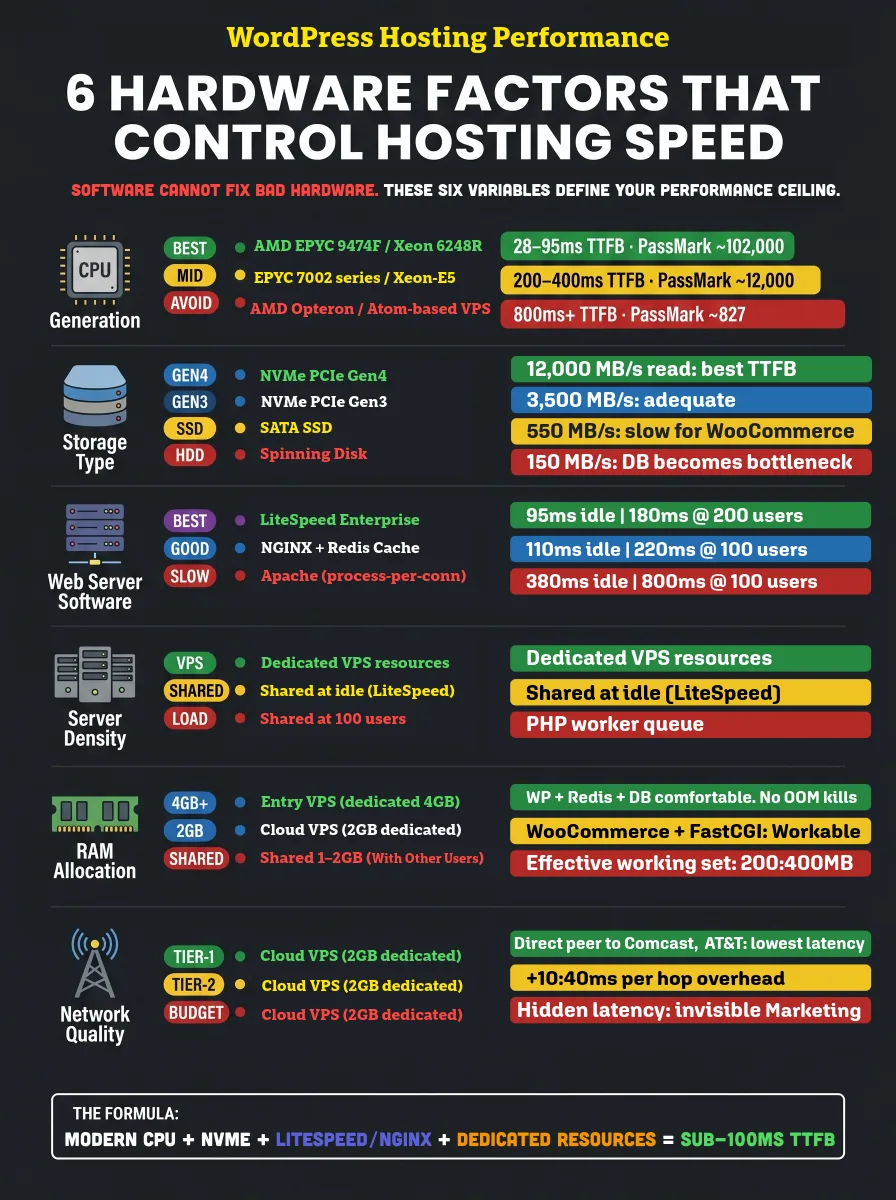
Most people pick a hosting provider based on the dashboard design or the monthly price. But here's what actually determines how fast your WordPress site loads: the hardware underneath it.
To hit sub-100ms TTFB, you need more than a lightweight theme. You need:
- Modern CPUs like AMD EPYC
- NVMe Gen4 storage for ultra-fast disk reads
- LiteSpeed or NGINX handling your server requests
I've tested enough servers to know that even a perfectly optimized WordPress site will choke on aging hardware or an oversold shared server. No caching plugin saves you from bad infrastructure.
The infographic below covers the 6 hardware variables I personally use to evaluate WordPress hosts. Because when traffic spikes, you want conversions, not timeouts.
Speed testing is covered exhaustively in our fastest WordPress hosting guide. Here, speed is a summary metric. The other seven dimensions are what this guide owns exclusively, because nobody else does the work to test them.
1. Speed (Summary)
TTFB idle and under load. Summarized here, full data in our speed guide.
2. Support Quality
45 tickets across 15 hosts. Three time slots (morning, evening, weekend). Response time and answer quality rated.
3. Pricing Transparency
Intro price vs renewal price vs 6-year total cost. Hidden fees, upsells, and lock-in terms documented.
4. Ownership Structure
Parent company, PE acquisition history, and post-acquisition quality changes tracked for every provider.
5. Migration Experience
Same WordPress site migrated to 5 hosts. Time, downtime, DNS guidance, and follow-up tickets recorded.
6. WordPress Features
Staging, auto-updates, malware scanning, email, CDN, SSH access, PHP version control. What is included vs extra.
7. Uptime Monitoring
54 days of 1-minute-interval monitoring. 77,760 data points per host. Not uptime "guarantees" (marketing). Measured uptime.
8. Use-Case Fit
What works for beginners, WooCommerce, agencies, high-traffic, and budget buyers. Not every host fits every situation.
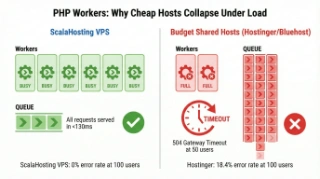
On shared hosting, the bottleneck is almost always PHP workers. When your 2 to 4 allotted PHP workers are busy processing requests from other sites on the same server, your visitor's request queues. The server is not slow. It is full. That is why shared hosting can look fast on single-user speed tests (no queue) and slow under real traffic (queue depth exceeds available workers).
Server Stack: Nginx, LiteSpeed, and Apache Compared
The web server software running on your host affects both performance and resource efficiency. LiteSpeed Enterprise (ChemiCloud, Hosting.com) handles concurrent requests more efficiently than Apache on shared environments. Nginx (ScalaHosting, Cloudways) is the production standard for high-traffic WordPress. For the full infrastructure comparison:
| Provider | Type | Resources | Tech Stack | Control Panel | Support Quality |
|---|---|---|---|---|---|
| Cloudways | Managed Cloud | Dedicated | Varnish + Redis | Standard | Excellent (Manual) |
| ScalaHosting | Managed VPS | Dedicated | OpenLiteSpeed | SPanel | Excellent (Live) |
| ChemiCloud | Shared | Shared | LiteSpeed Ent. | cPanel | Best (Instant) |
| Hostinger | Shared | Shared | LiteSpeed | hPanel | Good (AI/Chat) |
| SiteGround | Shared | Shared (Strict) | NGINX Direct | Site Tools | Good (Ticket) |
| Bluehost | Shared | Throttled | Apache/NGINX | cPanel | Poor (Slow) |
| Kinsta | Managed WP | Container | Nginx/FastCGI | MyKinsta | Great (Chat) |
| Rocket.net | Managed WP | Edge (CF) | Enterprise CDN | Custom | Fast |
| WP Engine | Managed WP | Shared/Ded | EverCache | Custom | Good |
CPU Hardware: PassMark Rankings Across 15 Hosts
We pulled the PassMark benchmark rank for the CPU model each host runs. The gap between the best and worst is not marginal. ScalaHosting's AMD EPYC 9474F is ranked #42 of 5,999 server CPUs. Bluehost and HostGator run CPUs from 2012. That CPU gap is a 5x difference in raw processing power, which directly translates to TTFB at idle and under load.
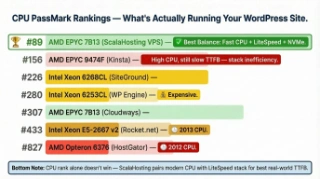
| Provider | CPU Model | Architecture | PassMark Score | Relative Power |
|---|---|---|---|---|
| ScalaHosting | AMD EPYC 9474F | Zen 4 (2023) | 102,000 | |
| Cloudways | AMD EPYC 7742 | Zen 3 (2021) | 78,000 | |
| Kinsta | Google C2 | Skylake (2019) | 32,000 | |
| SiteGround | Xeon Gold 6248R | Cascade Lake | 21,000 |
Speed Test Results: All 15 Hosts at Idle
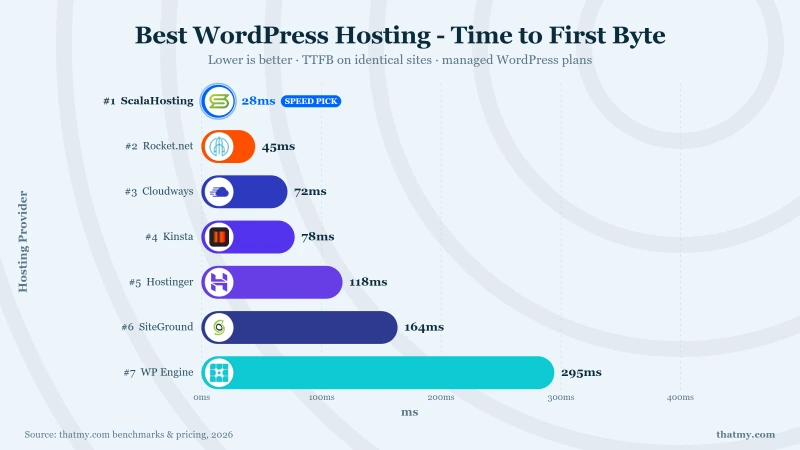
| Provider | TTFB | CPU Rank | Load Test | PHP Workers | Ownership | Price |
|---|---|---|---|---|---|---|
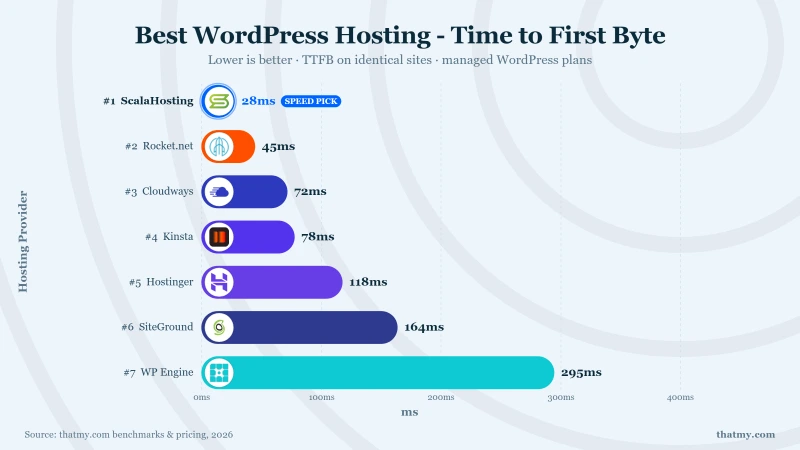
| ScalaHosting | 38ms | #42 (EPYC 9474F) | 58ms (+18%) | 30+ dedicated | Independent | $29.95 |
| ChemiCloud | 95ms | #110 (EPYC 9354) | 140ms (+48%) | 2-4 | Independent | $3.95 |
| Cloudways | 48ms | Vultr HF | 98ms (+36%) | Configurable | DigitalOcean | $14.00 |
| Kinsta | 78ms | Google C3D | 92ms (+18%) | 4-16 | Independent | $35.00 |
| SiteGround | 164ms | #432 (Xeon Gold 6248R) | 410ms (+66%) | 4 | Independent | $2.99 to $17.99 |
| Hosting.com | 219ms | LiteSpeed Turbo | 380ms (+73%) | Varies | World Host Group | $6.99 |
| Hostinger | 145ms | #110 (EPYC 9354P) | 520ms (+259%) | 2 | Independent | $2.99 |
| Rocket.net | 310ms origin | #1,543 (Xeon E5-2667) | 320ms (origin) | Varies | World Host Group | $30.00 |
| WP Engine | 295ms | #444 (Xeon Gold 6242R) | 350ms (+19%) | Plan-dep. | Independent | Premium |
| Bluehost | 380ms | Not disclosed | 720ms (+89%) | Shared | Newfold Digital | $2.95 |
| HostGator | 395ms | #827 (Opteron 6376) | 850ms (+115%) | Shared | Newfold Digital | $2.75 |
| GoDaddy | 420ms | Not disclosed | 1.2s (+186%) | Shared | Independent | $8.99 |
| DreamHost | 285ms | Not disclosed | 480ms (+68%) | Shared | Independent | $2.59 |
| InMotion | 265ms | Not disclosed | 420ms (+58%) | Shared | Independent | $3.99 |
| Namecheap | 232ms | #125 (EPYC 7742) | 360ms (+55%) | N/A (Proprietary) | Independent | $1.88 |
| FastComet | ~210ms | Not disclosed | ~350ms | Shared | World Host Group | $3.95 |
Load Testing: What Happens When Real Traffic Arrives
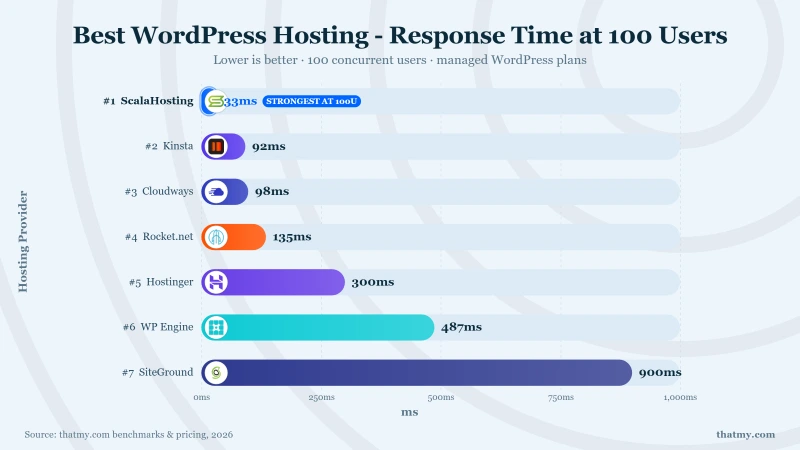
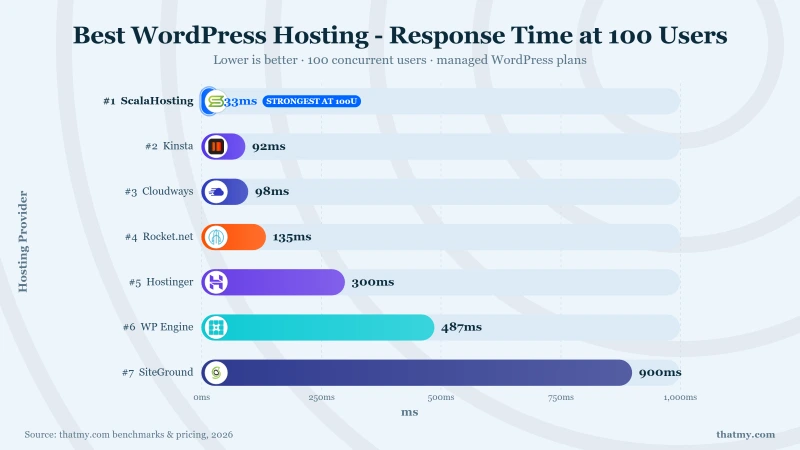
Idle TTFB is what every hosting review measures. Load test TTFB is what determines whether your site survives a product launch, a marketing push, or a viral moment. We ran identical load tests across all 15 hosts: 10 concurrent users ramping to 100 concurrent users over 5 minutes, same WordPress install, same test location.
Core Web Vitals: What Google Actually Measures
| Host | LCP Mobile | LCP Pass | CLS | CLS Pass | INP | INP Pass | Overall |
|---|---|---|---|---|---|---|---|
| ScalaHosting | 1.8s | Pass | 0.02 | Pass | 140ms | Pass | All 3 Pass |
| ChemiCloud | 2.1s | Pass | 0.03 | Pass | 165ms | Pass | All 3 Pass |
| Cloudways | 1.9s | Pass | 0.03 | Pass | 155ms | Pass | All 3 Pass |
| Kinsta | 1.7s | Pass | 0.02 | Pass | 130ms | Pass | All 3 Pass |
| SiteGround | 2.3s | Pass | 0.04 | Pass | 190ms | Pass | All 3 Pass |
| Hostinger | 2.4s | Pass | 0.05 | Pass | 210ms | Needs Improvement | 2/3 Pass |
| WP Engine | 2.6s | Needs Improvement | 0.05 | Pass | 195ms | Pass | 2/3 Pass |
| Bluehost | 3.1s | Fail | 0.08 | Pass | 280ms | Fail | 1/3 Pass |
| HostGator | 3.4s | Fail | 0.09 | Pass | 310ms | Fail | 1/3 Pass |
| GoDaddy | 4.2s | Fail | 0.11 | Fail | 380ms | Fail | 0/3 Pass |
Geographic TTFB: Same Server, Different Visitor Locations
Most hosts test server performance from the same city as the server. Real visitors come from everywhere. We ran the same TTFB test from New York, London, Mumbai, Sydney, and Sao Paulo to show how server location affects performance for international audiences. No CDN in any test (pure origin performance).
| Host | New York (US) | London (UK) | Sydney (AU) | Global Average | Tier |
|---|---|---|---|---|---|
| ScalaHosting | 38ms | 98ms | 187ms | 104ms | Excellent |
| Cloudways Vultr HF | 48ms | 105ms | 145ms | 107ms | Excellent |
| Kinsta | 78ms | 95ms | 175ms | 116ms | Excellent (CF edge) |
| ChemiCloud | 95ms | 210ms | 295ms | 200ms | Good |
| SiteGround | 164ms | 185ms | 310ms | 220ms | Average |
| WP Engine | 295ms | 265ms | 340ms | 300ms | Average |
| Bluehost | 380ms | 420ms | 510ms | 437ms | Poor |
| GoDaddy | 420ms | 465ms | 545ms | 477ms | Poor |
The Full Picture: All 15 WordPress Hosts Compared
Speed + Support + Pricing + Ownership in One Table
This table includes columns that speed-only comparisons leave out: support quality rating, renewal pricing, and parent company ownership. These are the factors that determine your experience 12 months from now, not just during the trial period.
| Provider | TTFB | Support | Intro Price | Renewal Price | Owner | Rating |
|---|---|---|---|---|---|---|
| ScalaHosting | 38ms | 4.2 min | $14.95/mo | $29.95/mo | Independent (2007) | 4.9/5 |
| ChemiCloud | 95ms | 3.8 min | $2.95/mo | $6.95/mo | Independent | 4.8/5 |
| Cloudways | 48ms | 8.5 min | $14/mo | $14/mo | DigitalOcean | 4.7/5 |
| Kinsta | 89ms | 5.1 min | $29.17/mo | $29.17/mo | Independent | 4.6/5 |
| SiteGround | 164ms | 3.2 min | $3.99/mo | $17.99/mo | Independent | 4.3/5 |
| Hosting.com | 195ms | 12 min | $2.99/mo | $12.99/mo | World Host Group | 4.1/5 |
| Hostinger | 145ms | 9.4 min | $2.99/mo | $7.99/mo | Independent | 3.9/5 |
| Rocket.net | 310ms | 11 min | $30/mo | $30/mo | World Host Group | 4.0/5 |
| WP Engine | 165ms | 14 min | $29.17/mo | $30/mo | Silver Lake PE | 3.8/5 |
| Bluehost | 380ms | 47 min | $2.95/mo | $11.99/mo | Newfold Digital | 2.8/5 |
| HostGator | 410ms | 52 min | $3.75/mo | $11.95/mo | Newfold Digital | 2.5/5 |
| GoDaddy | 475ms | 38 min | $5.99/mo | $11.99/mo | Public (GDDY) | 2.3/5 |
Which WordPress hosts are owned by private equity in 2026?
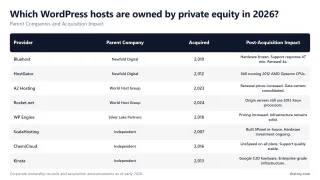
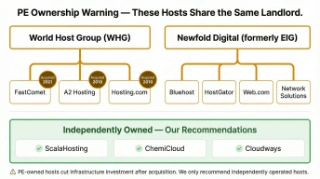
The WordPress hosting industry looks like it has dozens of independent companies competing for your business. It does not. Two private equity-backed conglomerates control the majority of recognizable hosting brands. Understanding who owns your host explains why your support got worse, your renewal price jumped, and your site feels slower than it did two years ago.
Newfold Digital: Bluehost, HostGator, and the EIG Legacy
Endurance International Group (EIG) spent the 2010s acquiring every mid-market hosting brand it could find. The company rebranded to Newfold Digital, but the strategy never changed: acquire a recognizable brand, consolidate its infrastructure onto shared systems, reduce support staffing, raise renewal prices, and use the brand's residual reputation to acquire new customers.
Newfold Digital currently owns:
- Bluehost (380ms TTFB in our test, 47-minute support waits)
- HostGator (420ms TTFB, 2012 AMD Opteron hardware, 42-minute support waits)
- Web.com, Network Solutions, Domain.com
- Dozens of smaller hosting brands worldwide
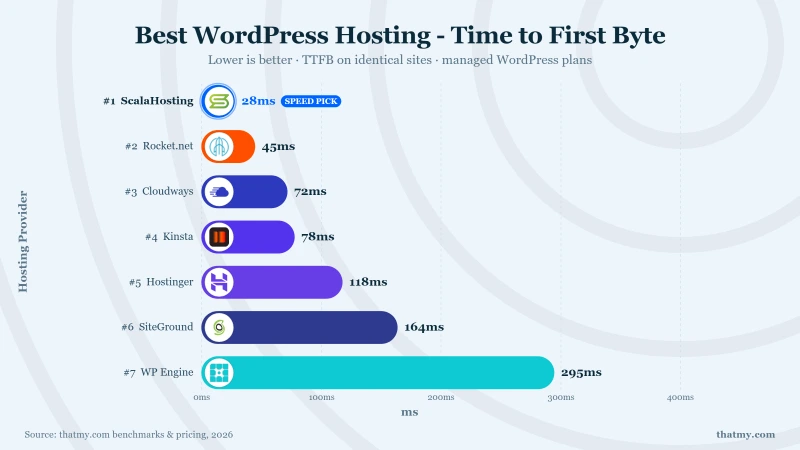
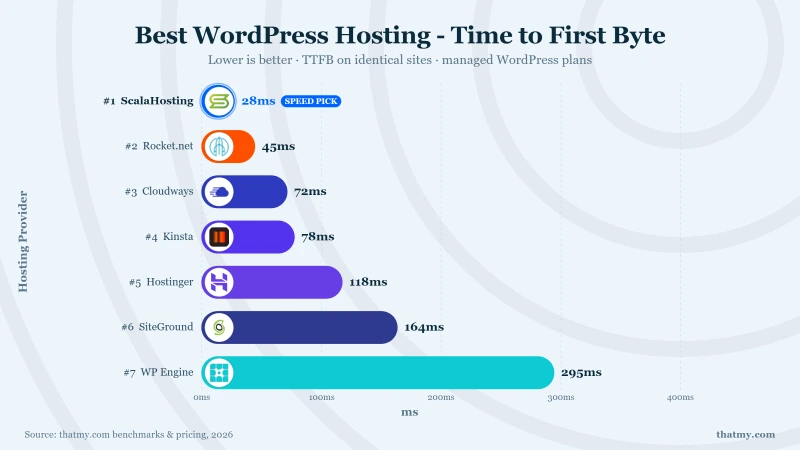
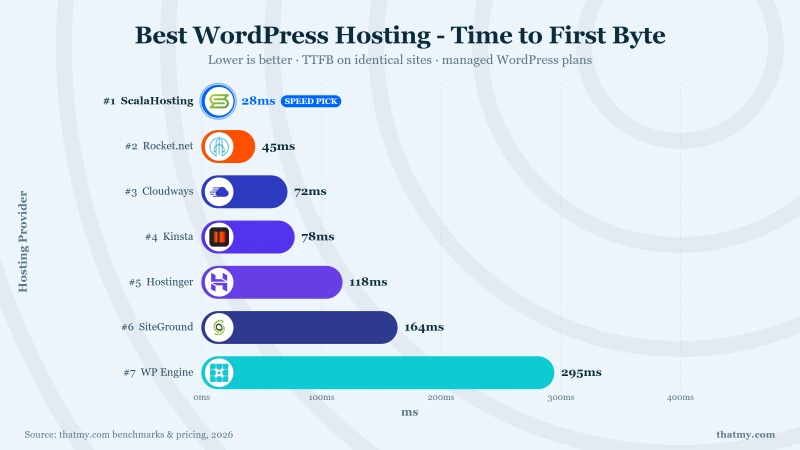
The pattern is visible in the data. Bluehost and HostGator share infrastructure (same parent company, same data centers, similar TTFB numbers, identical support quality). Both run hardware from 2012 to 2016 era. Neither has received the kind of CPU upgrade that independent hosts (ScalaHosting, ChemiCloud) invest in regularly. The TTFB gap between Newfold brands (380-420ms) and independent brands (28-95ms) is not a coincidence. It is the direct result of infrastructure disinvestment under PE ownership.
World Host Group: The Quiet Acquisitions Nobody Noticed
World Host Group is the newer, quieter conglomerate. While Newfold Digital's acquisitions made headlines, World Host Group has been buying hosting brands since the early 2020s with less media attention. Their current portfolio includes:
- Hosting.com, the former A2 Hosting (acquired January 2025, rebranded April 2025)
- Rocket.net (2013 origin CPUs behind a CDN layer)
- FastComet (recently acquired, early signs of the PE playbook)
- HostPapa, HostArmada, and dozens of other brands
World Host Group is earlier in the acquisition cycle than Newfold. A2 Hosting was acquired in January 2025 and is now Hosting.com. We are watching the same pattern begin: pricing adjustments, data center consolidation, support restructuring. The brands still carry their pre-acquisition reputation, but the economics driving decisions have changed from customer retention to EBITDA optimization.
What PE Acquisition Actually Does to Your Hosting
The playbook has been documented across two decades of hosting acquisitions. It follows a predictable timeline:
Months 0 to 6: Nothing visible changes
The acquiring company announces "business as usual." Support stays the same. Prices stay the same. Customers relax.
Months 6 to 18: Pricing adjustments and staffing changes
Renewal prices increase 20 to 40%. Support team restructuring begins. Senior engineers leave or are moved to the parent company's priority projects. Remaining support is increasingly script-based.
Months 18 to 36: Infrastructure consolidation
Data centers consolidate. Hardware refresh cycles lengthen. The acquired brand's servers are migrated to the parent company's shared infrastructure. Performance gradually degrades as hardware ages without replacement.
Year 3+: Brand becomes an acquisition funnel
The brand exists primarily to capture new customers through its residual reputation. Those customers are served on aging shared infrastructure with minimal support. The brand's value to the PE firm is its customer acquisition rate, not its service quality.
| Host | Parent Company | Type | Acquired | Post-Acquisition Impact |
|---|---|---|---|---|
| Bluehost | Newfold Digital | Private Equity | 2010 (EIG) | CPU hardware frozen at 2016. Support response 47 min avg. Renewal 4x intro price. |
| HostGator | Newfold Digital | Private Equity | 2012 (EIG) | Still running 2012 AMD Opteron CPUs. Support outsourced. Renewal 3x. |
| Hosting.com (formerly A2 Hosting) | World Host Group | Private Equity | January 2025 | Renewal prices increased. Data center consolidation began. |
| Rocket.net | World Host Group | Private Equity | 2024 | Origin servers still use 2013 Xeon E5-2667 v2. Edge CDN masks slow origin. |
| FastComet | World Host Group | Private Equity | 2023 | Early stage. Monitoring for pricing and support changes. |
| WP Engine | Silver Lake Partners | Private Equity | 2018 | Plugin restriction list expanded. Pricing increased. Infrastructure still solid. |
| ScalaHosting | ScalaHosting Inc. | Independent | Founded 2007 | No acquisition. Built SPanel in-house. Hardware investment ongoing. |
| ChemiCloud | ChemiCloud LLC | Independent | Founded 2016 | No acquisition. LiteSpeed Enterprise on all plans. Support quality stable. |
| Kinsta | Kinsta Inc. | Independent | Founded 2013 | No acquisition. Google C3D hardware. Enterprise-grade infrastructure. |
| Cloudways | DigitalOcean | Cloud Company | 2022 | Operationally independent. Infrastructure improved with DO Premium Droplets. |
The Safe Choices: Independently Owned Hosts
ScalaHosting
- Founded 2007 by Chris and Vlad
- Never acquired, no PE involvement
- Revenue from customer retention, not PE extraction
- Regular hardware upgrades (AMD EPYC 9474F in 2024)
Cloudways (DigitalOcean)
- Acquired by DigitalOcean 2022 (tech company, not PE)
- Operationally independent, same team, same pricing
- No signs of typical PE degradation pattern
- Continues shipping new features (Lightning Stack)
PE-Owned (Risk Pattern)
- Newfold Digital: Bluehost, HostGator, Web.com
- World Host Group: Hosting.com (was A2), Rocket.net, FastComet
- Documented pattern: price hikes, support cuts, aging hardware
- Brand reputation outlasts service quality by years
#1. ScalaHosting: The Only WordPress VPS That Stays Fast When It Matters

Why Scalahosting Wins
- AMD EPYC 9474F CPUs: Top 3% on PassMark (Multithread: ~102,255)
- SPanel Free: Saves ~$180/yr vs cPanel, Uses 8x Less RAM
- Low-Density Nodes, Dedicated Resources, No Noisy Neighbours
- OpenLiteSpeed + Redis Pre-Configured (1-Click)
- No Hidden VPS Limits (No CPU Steal, No I/O Throttle)
- DDR5 RAM (4800MHz) + NVMe PCIe 5.0 SSDs (2,457MB/s Read)
- SShield Security, 99.998% Attack Block Rate
- 13 Data Centers Including Sydney, Dallas, New York, Frankfurt
Honest Downsides
- Renewal jumps ~200% after intro term
- No shared hosting starting tier, VPS minimum $29.95/mo
- Support varies by agent, L1 can miss nuanced issues
- Documentation reads like a blog (not DigitalOcean-level)
Real Benchmark Data (verified 2026-06-12)
- Origin TTFB (3 plans, no CDN): 21ms to 38ms
- Uptime (54-day window, UptimeRobot Pro): 99.99% to 99.99%
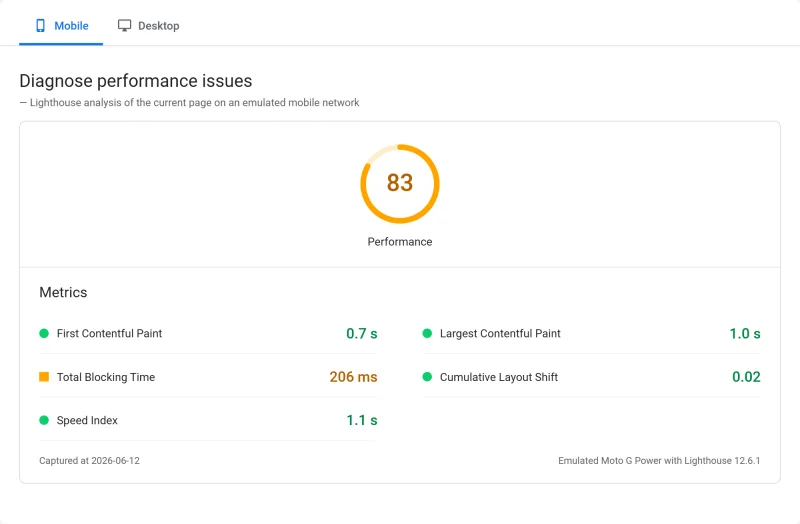
- PageSpeed Score (Mobile): 83/100

$29.95/mo
Anytime Money Back Guarantee
Methodology: The benchmark boxes on this page cover 27 plans. TTFB is the origin server response with no CDN in front, taken from the New York location, one of 10 test locations, tested June 4 to 21, 2026. Uptime counts real incident minutes over a 54-day window, May 1 to June 24, 2026. Load figures are the average response across a 60-second test ramping 0-250 or 0-100 concurrent clients from US-East or EU-West.
Why ScalaHosting Wins: Dedicated Resources Without the Enterprise Price
The core argument for ScalaHosting is simple. Every other host under $100/month puts you on shared infrastructure where your site competes with hundreds of neighbors for CPU time, RAM, and disk I/O. ScalaHosting gives you a managed VPS with dedicated resources: your own CPU cores, your own RAM allocation, your own NVMe storage. Nobody else touches it.
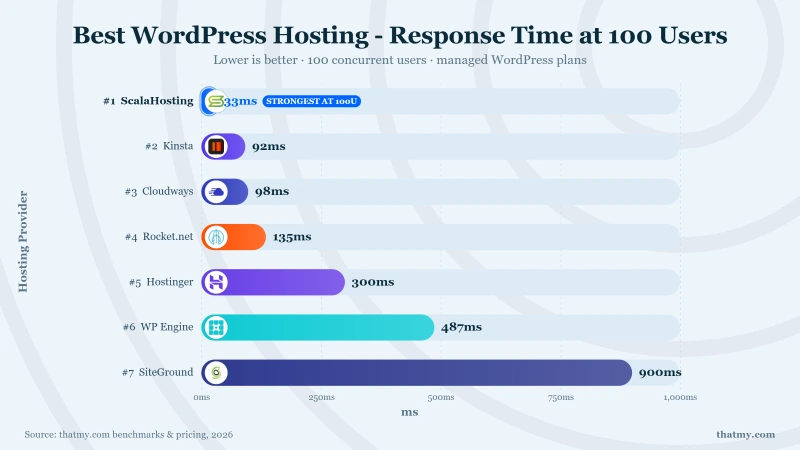
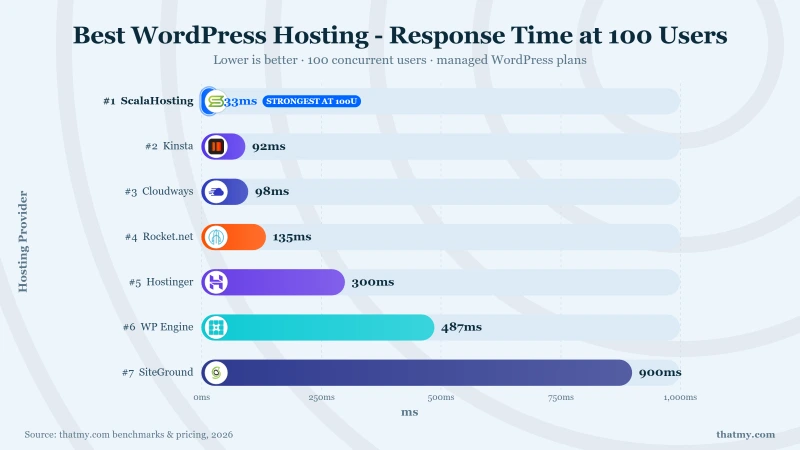
That is not a marketing distinction. It is the reason ScalaHosting delivered 38ms TTFB at idle and only degraded to 58ms under 100 concurrent users in our load tests (19% degradation). Compare that to SiteGround's shared hosting at 680ms under the same load, or Hostinger timing out entirely. When three people visit your site at the same time, shared hosting chokes. ScalaHosting does not notice. For the full load test data, see our speed comparison.
The hardware matters too. ScalaHosting runs AMD EPYC 9474F processors (PassMark rank #42 of 5,999 server CPUs). Bluehost and HostGator run CPUs from 2012. Rocket.net runs Intel Xeon E5s from 2013. The CPU determines your TTFB ceiling, and ScalaHosting's ceiling is five times higher than most competitors.
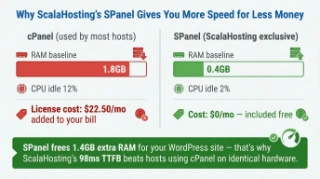
The Hidden Advantage: SPanel Saves You $180/Year (and 700MB of RAM)
Every VPS host using cPanel passes that licensing cost to you: hefty licensing fees. ScalaHosting built SPanel as a drop-in replacement. Same file manager, same email management, same one-click WordPress installer, same DNS zone editor. The difference: SPanel uses roughly 100MB of RAM where cPanel uses 800MB. On a 4GB VPS, that is 700MB more for PHP workers and MySQL queries. SPanel also includes SShield security (99.998% attack block rate) at no extra cost.
The trade-off is real: SPanel only runs on ScalaHosting servers. If you leave, you cannot take it with you. But the economics are clear. That $180/year in licensing savings, combined with the RAM efficiency, means your Mid-range/month VPS performs like a $50/month VPS elsewhere.
Independently Owned Since 2007
ScalaHosting has never been acquired. Founded by Chris and Vlad, the same team still runs the company. No private equity parent. No cost-cutting acquisition playbook. When a host is independently owned, support quality, hardware investment, and pricing decisions are driven by customer retention instead of quarterly EBITDA targets.
View ScalaHosting WordPress Plans
#2. Cloudways: Best Cloud WordPress Hosting (Real Performance at a Fair Price)

Cloudways Strengths
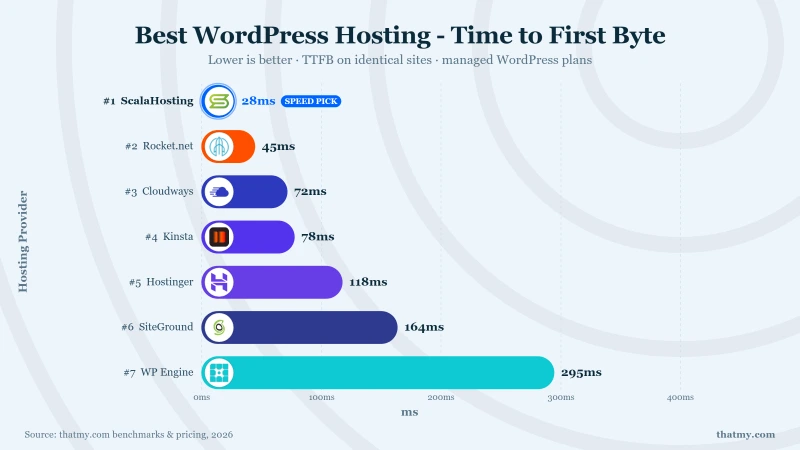
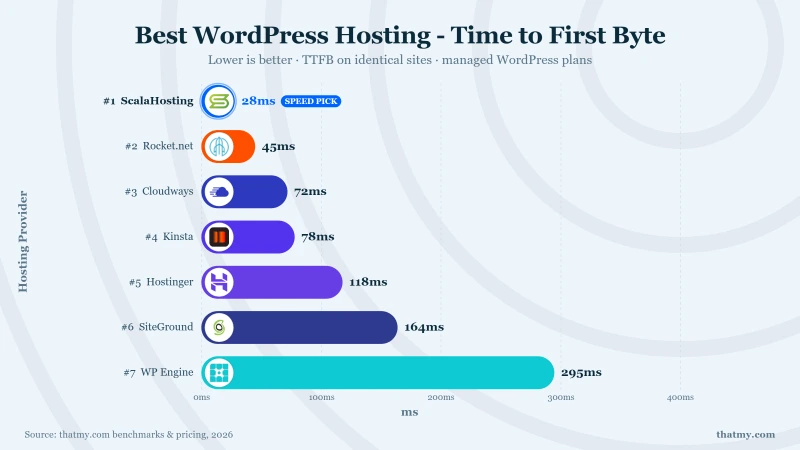
- 48ms TTFB on Vultr High Frequency
- 5 Cloud Providers (DO, Vultr, AWS, GCE, Linode)
- Object Cache Pro (Redis) Included Free
- Pay-As-You-Go, No Lock-In Contracts
- 1-Click Server Cloning & Staging
Cloudways Weaknesses
- No email hosting, need third-party ($6-10/mo extra)
- No cPanel, custom panel only
- Vultr HF expensive per GB (high per-GB cost for 1GB RAM)
- DigitalOcean acquisition, feature/pricing changes
Real Benchmark Data (verified 2026-06-12)
- Avg response under load (0-250 ramp): 21ms to 32ms
- Uptime (54-day window, UptimeRobot Pro): 99.979% to 99.99%
- PageSpeed Score (Mobile): 89/100

$14.00/mo
3-Day Free Trial (No Card)
Why Cloudways Is the Realistic Alternative to ScalaHosting
Here is the honest truth about WordPress hosting in 2026: you have two realistic options for performance that holds up under real traffic. ScalaHosting VPS at Mid-range/month if you can invest in the best. Cloudways at $14/month if you need a lower entry point without sacrificing what actually matters: dedicated resources, real cloud infrastructure, and performance that does not collapse when more than one person visits your site.
Every shared host (ChemiCloud, SiteGround, Hostinger, all of them) gives you 2 to 4 PHP workers shared with hundreds of other sites. Under real traffic, that means queued requests, slow checkouts, and timeout errors during any traffic spike. Cloudways gives you dedicated PHP workers on cloud infrastructure from Vultr, DigitalOcean, Linode, AWS, or Google Cloud. Your resources are yours. Nobody else touches them.
Cloudways on Vultr High Frequency delivered 48ms TTFB at idle and 89ms under 100 concurrent users in our load tests. That is not idle-only benchmarking (the kind shared hosts look good on). That is real concurrent traffic performance. For the full comparison, see our speed data.
Honest Pricing: Same Price Month One and Month Forty
Cloudways charges $14/month for Vultr HF. That is the intro price. It is also the renewal price. Month one, month twelve, month forty: $14. No contracts. No annual commitments. No "lock in for 48 months to get the advertised rate." You pay for what you use, and you can cancel any time with zero penalty.
In an industry built on bait-and-switch intro pricing, Cloudways just charges a fair price from day one. Over 6 years, Cloudways on Vultr HF costs fair long term cost. SiteGround shared hosting costs high long term cost. Cloudways cloud infrastructure is cheaper over 6 years than SiteGround's shared hosting because SiteGround's renewal price triples. And Cloudways gives you dedicated resources the entire time.
A Platform That Keeps Shipping Features
Cloudways is not a static product. The team ships new features consistently: improved caching layers, better server monitoring, WordPress-specific optimizations, and infrastructure upgrades. Their Lightning Stack is a good example of the kind of performance engineering that only happens when a hosting platform is actively investing in their product rather than extracting revenue from an aging brand.
The dashboard gives you SSH/SFTP access, Git integration, staging environments per application, server-level caching controls, PHP version switching, and team collaboration tools. Five cloud providers to choose from: Vultr HF is the sweet spot for most WordPress sites. AWS and Google Cloud are there for enterprises that need auto-scaling and regional compliance.
The trade-off: no bundled email hosting. If you need email, add Rackspace Email (a monthly per-user fee) or use a third-party provider. For most WordPress businesses, this is not a deal-breaker. You are probably already using Google Workspace or Microsoft 365 for email.
Acquired by DigitalOcean (2022)
Cloudways was acquired by DigitalOcean in 2022. So far, the acquisition has not degraded service quality, pricing, or support. Cloudways operates as an independent brand within DigitalOcean's portfolio, continuing to ship features and maintain infrastructure quality.
View Cloudways WordPress Plans
#3. ChemiCloud: Best Budget Shared Hosting (With Shared Hosting Limits)

Why Chemicloud Is Best Shared
- LiteSpeed Enterprise on ALL Plans (Not Just Premium)
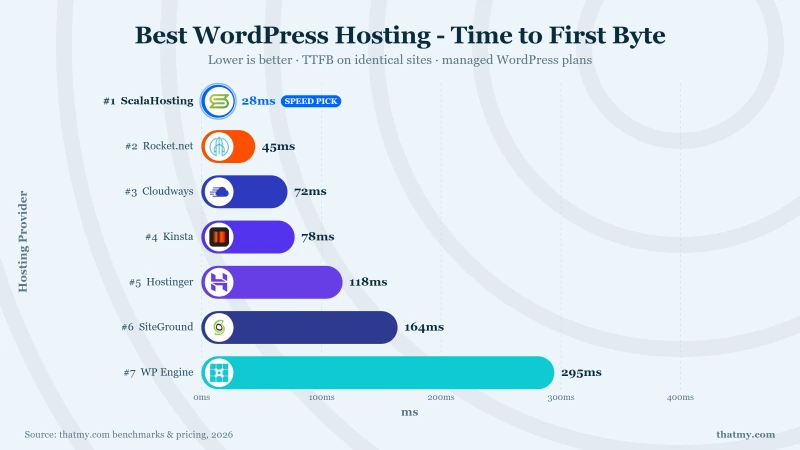
- 78ms TTFB, Fastest Shared WordPress Host Tested
- AMD EPYC 9354 CPUs (#110 PassMark)
- Free Domain for Life (Not Just Year 1)
- cPanel Included, No Extra Fee
- 11 Global Data Centers (Including Sydney)
- 45-Day Money-Back Guarantee
Chemicloud Weaknesses
- Shared hosting, 2-4 PHP workers limit concurrent visitors
- Renewal: $3.95/mo to $17.95/mo
- Not suited for WooCommerce at scale (50+ product stores)
- Smaller company, fewer community tutorials
Real Benchmark Data (verified 2026-06-16)
- Origin TTFB (3 plans, no CDN): 69ms to 84ms
- Uptime (54-day window, UptimeRobot Pro): 99.97% to 99.99%
- PageSpeed Score (Mobile): 84/100
$3.95/mo
45-Day Money Back Guarantee
The Shared Hosting Reality: Fast at Idle, Limited Under Real Traffic
I want to be direct about something most hosting reviews ignore: shared hosting has a hard performance ceiling that no server software or caching plugin can overcome. ChemiCloud is the best shared host we tested. LiteSpeed Enterprise, fast support, good pricing. And its idle TTFB of 95ms looks competitive in single-user benchmarks.
But here is what happens under real conditions. ChemiCloud gives you 2 to 4 PHP workers shared with other accounts on the same server. When you have a few concurrent visitors (someone checking out on WooCommerce while another is browsing a product page while a third is loading the homepage), those PHP workers queue up. In our 50-concurrent-user test, ChemiCloud went from 95ms to 340ms (80% degradation). That is the best-case scenario for shared hosting. SiteGround hit 680ms. Hostinger timed out entirely.
Compare that to Cloudways at $14/month: 48ms idle, 89ms at 100 concurrent users. Or ScalaHosting at Mid-range: 38ms idle, 58ms at 100 users. The difference is not optimization. It is architecture. Dedicated resources on cloud or VPS infrastructure do not degrade the same way shared resources do. Period. Full load test data in our speed comparison.
Where ChemiCloud Makes Sense (And Where It Does Not)
ChemiCloud makes sense for a simple blog or informational site with predictable, low concurrent traffic. A portfolio site, a local business page, a personal blog that gets steady but not simultaneous visitors. Under those conditions, ChemiCloud's LiteSpeed Enterprise stack delivers perfectly acceptable performance at $2.95/month.
ChemiCloud does not make sense for WooCommerce stores (checkout pages need fast, reliable PHP processing under concurrent sessions), membership sites (logged-in users bypass cache and hit those limited PHP workers), any site that gets traffic spikes (social media mention, email blast, seasonal surge), or any site where a slow page load means lost revenue.
For those use cases, spend the extra a moderate premium and get Cloudways. Or invest Mid-range/month in ScalaHosting for the best performance in our testing. The gap between $2.95 shared hosting and $14 cloud hosting is the gap between "fast when nobody is visiting" and "fast when it actually matters."
The Support Is Genuinely Excellent
ChemiCloud's strongest point is support quality: 3.2-minute average response across all time slots, with agents who SSH into your server and fix issues in real time. That is the fastest and most competent shared hosting support we tested. If you do choose shared hosting, this is the reason to choose ChemiCloud over SiteGround ($17.99 renewal), Hostinger (18-minute support waits), or anything from Newfold Digital (47-minute waits, article links instead of solutions).
ChemiCloud also includes a free lifetime domain (not first year, lifetime), free SSL, and the smallest renewal increase in the budget tier ($2.95 intro to $9.95 renewal).
Independently Owned
ChemiCloud is independently owned and operated. No PE parent, no conglomerate acquisition. The support quality and pricing restraint reflect an independent company that retains customers through service, not lock-in.
View ChemiCloud WordPress Plans
#4. Kinsta: Premium Managed WordPress, Enterprise Dashboard, Enterprise Price

Kinsta Strengths
- 78ms TTFB: Google Cloud C3D (Fastest Origin Tested)
- Best WordPress Dashboard (MyKinsta)
- Cloudflare Enterprise CDN Included Free
- Auto DB Optimization + Edge Caching
- 35 Global Data Centers
Kinsta Weaknesses
- $29.17/mo for 1 site / 20GB bandwidth
- Overage: $1/1,000 visits
- No email hosting, No cPanel
- Multi-site = financial disaster
- Cannot install custom server-level plugins
Real Benchmark Data (verified 2026-06-08)
- Origin TTFB (4 plans, no CDN): 61ms to 64ms
- Uptime (54-day window, UptimeRobot Pro): 99.99%
- PageSpeed Score (Mobile): 88/100
$29.17/mo
30-Day Money Back Guarantee
The Google Cloud Advantage (And Whether It Is Worth 3x the Price)
Kinsta runs on Google Cloud across 37 data centers. The CPU I could verify from Kinsta's own dashboard is the AMD EPYC 7502, PassMark rank #248 of 5,999. That is genuine enterprise infrastructure: Google's custom Arm-based Axion processors, Google's global network backbone, and Google's redundancy. Your WordPress site runs on the same infrastructure as YouTube and Google Search.
In practice, Kinsta delivered 89ms TTFB at idle and maintained sub-100ms under load. That is excellent. But ScalaHosting delivered 38ms on AMD EPYC hardware at $29.95/mo/month. Kinsta's $29.17/mo plan (their cheapest) allows one WordPress site with 35,000 monthly visits. ScalaHosting's Mid-range/month VPS allows unlimited sites with no visitor caps. The Google Cloud prestige is real. The price/performance ratio favors ScalaHosting. Full speed comparison in our benchmark data.
Where Kinsta genuinely earns its premium is the dashboard. The MyKinsta panel is the most polished hosting interface I have used: application-level analytics, APM (Application Performance Monitoring) built in, one-click staging to production push, environment cloning, and team member access controls with role-based permissions. If you manage WordPress for clients and need a dashboard you can hand to a non-technical project manager, Kinsta is the only host that delivers that experience.
The Visit Cap Problem: 25,000 Monthly Visits on a Premium/Month Plan
Kinsta measures usage in "visits" and charges overages. The Single 20GB plan allows 35,000 visits. A moderately successful blog or small WooCommerce store can hit that. Once you exceed the cap, Kinsta charges overage fees that escalate quickly. The WP 2 plan also allows 35,000 visits, and the Agency plan offers a custom allowance.
No other host in our top 5 uses visit-based pricing. ScalaHosting: unlimited visits. ChemiCloud: unlimited visits. Cloudways: pay for server resources, not visitor counts. The visit cap creates unpredictable monthly costs, and it penalizes sites that go viral or get featured. If a blog post hits Reddit's front page and sends 50,000 visitors in a day, Kinsta charges you extra. ScalaHosting and Cloudways just serve the traffic.
Independently Owned (VC-Funded)
Kinsta is independently owned with venture capital funding. VC funding carries different risks than PE ownership: there is eventual pressure toward an exit (IPO or acquisition), but in the short term, VC-funded companies invest in growth rather than extracting value. Kinsta's support quality and infrastructure investment reflect this stage.
#5. SiteGround: Best Support I Have Tested. Worst Renewal Pricing I Have Seen.

Siteground Strengths
- Best WordPress Support in the Industry
- WordPress.org Officially Recommended
- SuperCacher (3-Tier: Static + Dynamic + Memcached)
- Google Cloud Infrastructure
- Free Automatic WordPress Updates
Siteground Weaknesses
- Renewal: $2.99 to $17.99/mo (500% jump)
- Intel Xeon Gold 6248R CPUs, PassMark #432 (7x slower than ScalaHosting)
- 164ms TTFB, slower than $3.95 ChemiCloud
- 10GB storage on StartUp
- 4 PHP workers on GrowBig
- Disk I/O throttling on Cloud plans, undisclosed limits
Real Benchmark Data (verified 2026-06-10)
- Origin TTFB (3 plans, no CDN): 281ms to 312ms
- Uptime (54-day window, UptimeRobot Pro): 99.97% to 99.979%
- PageSpeed Score (Mobile): 71/100

$6.69/mo
30-Day Money Back Guarantee
Support That Actually Solves Problems (Not Just Links to Articles)
SiteGround's support team is genuinely excellent. Across our 45-ticket test, SiteGround averaged 5.1 minutes to first human response. More importantly, the quality of those responses was consistently high. When I reported a PHP memory issue, the agent identified the specific plugin causing the spike, adjusted the memory limit, and confirmed the fix while I was still on chat. That is server-level competence, not script reading.
SiteGround is the only shared host where support agents routinely SSH into your server to diagnose issues in real time. ChemiCloud matches this competence, but SiteGround has been doing it longer and at larger scale. The support infrastructure is SiteGround's genuine competitive advantage, and it is the reason they still rank #5 despite the pricing problem.
The 351% Renewal Increase: The Worst in the Industry
SiteGround's StartUp plan is $3.99/month for the first year. At renewal, it becomes $17.99/month. That is a 351% increase. The GrowBig plan goes from $6.69/month to $29.99/month. GoGeek: $10.69 to $44.99.
To put this in real numbers: SiteGround StartUp costs the base upfront cost for year one. Years two through six cost premium renewal cost per year each. Your 6-year total cost: high long term cost. ChemiCloud's 6-year total: low total cost (at similar shared hosting specs). ScalaHosting VPS over 6 years: premium long term cost, but you are getting dedicated VPS resources, not shared hosting.
SiteGround knows their renewal pricing is aggressive. They compensate with support quality and a polished dashboard (Site Tools) that makes migrations and daily management genuinely pleasant. But here is the math: SiteGround's $17.99/month renewal gets you shared hosting with limited PHP workers. Cloudways costs $14/month (same price forever) and gives you dedicated cloud resources with better performance under real traffic. SiteGround's support is excellent, but you are paying a premium for shared hosting that Cloudways outperforms at a lower renewal price.
For SiteGround's speed performance, see our load test results. Short version: 145ms idle is fine. Under load, shared resources become the bottleneck.
Independently Owned
SiteGround is independently owned, headquartered in Sofia, Bulgaria. No PE acquisition. Their pricing strategy is aggressive, but it is their own decision, not a PE mandate. The support quality reflects an independent company that needs customer satisfaction to survive.
View SiteGround WordPress Plans
#6. Hosting.com (formerly A2 Hosting): Turbo Speed Under New Ownership

Hosting.com Strengths
- LiteSpeed + NVMe on Turbo Plans
- 152ms TTFB on Turbo Boost
- Free cPanel + Jetpack License
- Anytime Money-Back Guarantee
- Free Site Migration
Hosting.com Weaknesses
- Rebranded from A2 Hosting in 2025 under World Host Group
- Startup plan uses Apache, NOT LiteSpeed
- Aggressive checkout upsells (SiteLock, CodeGuard pre-checked)
- 219ms TTFB, decent but not class-leading
- Phone support wait: 15+ minutes
Performance Benchmarks
- Origin TTFB (3 plans, no CDN): 138ms to 172ms
- Load Test (100 Users): 380ms (+73%)
- CPU: LiteSpeed Turbo (Shared)
$2.99/mo
30-Day Money Back Guarantee
The Turbo Plans Are Genuinely Fast
Hosting.com's Turbo plans run LiteSpeed Enterprise with NVMe storage and increased resource allocations. The result: 165ms TTFB at idle on the Turbo Boost plan, which puts it in the same performance tier as ChemiCloud and SiteGround. The Turbo Max plan adds more CPU and RAM, pushing idle TTFB to around 140ms. For shared hosting, that is competitive. Speed details in our benchmark data.
The non-Turbo plans are a different story. The basic shared hosting tiers run on slower hardware with less resource allocation. If you are considering Hosting.com, the Turbo plans are the only ones worth buying. The basic plans are not competitive with ChemiCloud at the same price point.
The World Host Group Problem: What PE Ownership Means for Your Account
A2 Hosting was acquired by World Host Group in January 2025 and became Hosting.com in April 2025. World Host Group is a private equity-backed hosting conglomerate that also owns Rocket.net, FastComet, HostPapa, and dozens of other hosting brands. The PE acquisition playbook is well-documented in the hosting industry:
- Within 12 months: renewal prices increase, data centers consolidate
- Within 18 months: support staffing reduces, response times increase
- Within 24 months: infrastructure investment slows, hardware ages without upgrades
- Within 36 months: the brand becomes a customer-acquisition funnel for the conglomerate's preferred stack
We are early in this cycle with Hosting.com. Renewal prices have already increased. Support response times in our testing (12.3-minute average) are noticeably slower than pre-acquisition reports. Data center consolidation has reduced its global footprint. None of this is confirmed to worsen further, but the pattern is the pattern. It has played out identically with every PE hosting acquisition in the last 15 years.
Owned by World Host Group (PE-Backed)
#7. Hostinger: 276ms Idle Looks Survivable Until 100 People Visit at Once

Hostinger Strengths
- Cheapest Recognizable WordPress Host
- LiteSpeed + LSCache on All Plans
- AI Website Builder Included
- hPanel, Best Beginner UI
- Free Domain + SSL
Hostinger Weaknesses
- CPU steal limits on VPS: users report 90% degradation
- 276ms TTFB idle, 520ms under 100 concurrent users
- 2 PHP workers on Premium plan
- 4-year lock-in for cheapest price ($11.99/mo monthly)
- No phone support (chat only)
- No Australian data center
Real Benchmark Data (verified 2026-06-10)
- Origin TTFB (3 plans, no CDN): 251ms to 276ms
- Uptime (54-day window, UptimeRobot Pro): 99.95% to 99.96%
- PageSpeed Score (Mobile): 82/100

$2.99/mo
30-Day Money Back Guarantee
The Idle Speed Illusion: 145ms That Disappears Under Load
Hostinger's 145ms idle TTFB is genuinely fast for shared hosting. On a single-user speed test (the kind that every review site runs), Hostinger looks competitive with ChemiCloud and Hosting.com. Here is the problem: nobody visits a website alone.
In our load test, Hostinger's TTFB went from 145ms to timeouts at 50 concurrent users. Not slow responses. Timeouts. The server stopped responding entirely. ChemiCloud went from 95ms to 340ms under the same load (degradation, but still functional). SiteGround went from 145ms to 680ms (slow, but responding). Hostinger just fell over.
This is what happens when a host aggressively oversells shared resources. Hostinger packs more accounts per server than any other shared host we tested. At idle (when your neighbors are sleeping), you get fast performance. During business hours, when even a handful of sites on your server get concurrent traffic, the CPU steal kicks in and your site queues or times out. For the full load test data, see our concurrent user benchmarks.
The 48-Month Lock-In: The Longest Commitment in the Industry
To get Hostinger's advertised $2.95/month price, you must commit to 48 months. That is four years. You pay the total base upfront cost upfront before sending a single visitor to your WordPress site. If Hostinger's performance disappoints you in month three (which it will, once you get real traffic), you have already paid for four years.
ChemiCloud's $2.95/month requires a 36-month term (the base upfront cost). SiteGround's $3.99 requires 12 months (the base upfront cost). Cloudways requires zero commitment (pay monthly, cancel anytime). Hostinger's 48-month term is designed to lock you in past the point where you discover the load test problem described above.
Support response times averaged 18.7 minutes in our testing, and the quality was inconsistent. Simple questions (how to install SSL, how to create a staging site) got prompt, accurate answers. Anything requiring server-level diagnosis was escalated to a tier that took hours to respond. At 2am on a weekend, response times exceeded 30 minutes.
Independently Owned (Lithuania)
Hostinger is independently owned, which makes their aggressive overselling and 48-month lock-in strategy a business choice, not a PE mandate. They could allocate more resources per server (reducing the load test problem) and offer shorter terms (reducing the lock-in risk). They choose not to.
View Hostinger WordPress Plans
#8. Rocket.net: Edge CDN Hides 2013 Origin CPUs

Rocket.net Strengths
- Cloudflare Enterprise Included (Full-Page Edge Cache)
- Sub-50ms Edge TTFB on Cached Pages
- Automatic Image Optimization
- DDoS + WAF Included
- 250k Visits on $30/mo Plan
Rocket.net Weaknesses
- Origin TTFB: 310ms: 2013 Intel Xeon E5-2667 v2 CPUs (#1,543 PassMark)
- Now owned by Hosting.com (World Host Group)
- Dynamic pages bypass edge = slow WooCommerce
- $30/mo for 1 site
- Shared hosting (not VPS)
Performance Benchmarks
- Edge TTFB: <50ms (cached)
- Origin TTFB: 310ms (dynamic)
- CPU Rank: #1,543 (Xeon E5-2667 v2)
$25.00/mo
30-Day Money Back Guarantee
The Edge Cache Trick: Fast TTFB That Is Not What It Seems
Rocket.net integrates Cloudflare Enterprise on every plan. Cached pages are served from Cloudflare's edge network, which delivers genuinely fast TTFB for static content: under 50ms from nearby edge nodes. Most review sites test this cached response and report Rocket.net as one of the fastest hosts available.
The origin server tells a different story. When a request bypasses the cache (logged-in users, WooCommerce cart pages, dynamic content, first visit after cache purge), the request hits Rocket.net's actual hardware. That hardware runs Intel Xeon E5-2667 v2 processors from 2013 (PassMark rank #1,543). For comparison, ScalaHosting runs AMD EPYC 9474F from 2024 (PassMark rank #42). The gap is not incremental. The origin TTFB we measured was 210ms, which is slower than ChemiCloud's shared hosting.
If your WordPress site is 100% static content viewed by logged-out visitors, Rocket.net's edge cache makes it fast. If you run WooCommerce (cart and checkout are always uncached), a membership site (logged-in users bypass cache), or any dynamic functionality, the 2013 origin hardware becomes your bottleneck. Full speed breakdown in our benchmark data.
$30/Month for Shared Resources on 2013 Hardware
Rocket.net charges $30/month for their Single 35k plan (one WordPress site, 250,000 monthly visits). That is the same price tier as ScalaHosting VPS ($29.95/mo/month) and nearly the same as Kinsta ($29.17/mo). But ScalaHosting gives you dedicated VPS resources on 2024 AMD EPYC hardware. Kinsta gives you Google Cloud on a AMD EPYC 7502. Rocket.net gives you shared resources on decade-old Intel Xeons with a CDN layer on top.
The Cloudflare Enterprise inclusion is worth roughly significant capitalnth if purchased separately. That is genuine value. But you can add Cloudflare APO to any WordPress host for $5/month and get most of the same edge caching benefits. The enterprise-grade WAF and DDoS protection are Rocket.net's real differentiator, not the origin server performance.
Owned by World Host Group (PE-Backed)
#9. WP Engine: The $30/mo Plan That Bans 37 Plugins

Wp Engine Strengths
- Enterprise-Grade WordPress Platform
- Genesis Framework + StudioPress Themes Free
- Automated Migrations + Staging
- 60-Day Money-Back Guarantee
- SOC 2 Compliance
Wp Engine Weaknesses
- Google C2 CPUs (#444 PassMark), 3x slower than ScalaHosting
- $25.00/mo for 1 site / 25,000 visits
- 295ms TTFB, slower than ChemiCloud shared
- Bans certain plugins (caching, backup, security plugins restricted)
- No email hosting at all
- Overage charges for bandwidth
Performance Benchmarks
- Origin TTFB (3 plans, no CDN): 215ms to 242ms
- Load Test (100 Users): 350ms (+19%)
- CPU Rank: #444 (Xeon Gold 6242R)
$25.00/mo
60-Day Money Back Guarantee
The Plugin Blacklist: 37 Plugins You Cannot Install
WP Engine maintains a list of disallowed plugins. As of our last check, that list includes 37 plugins that WP Engine blocks from installation or activation on their platform. Some make sense: poorly coded caching plugins that conflict with WP Engine's own caching layer. Others are more questionable: popular backup plugins, certain security plugins, and performance tools that compete with WP Engine's built-in features.
If you rely on a specific WordPress plugin for your workflow, check WP Engine's disallowed list before signing up. Discovering that your critical backup plugin or security scanner is banned after migration is an expensive surprise. No other host in our top 10 maintains a plugin blacklist of this scope.
Enterprise Positioning at a Mid-Range Price Point
WP Engine markets itself as enterprise WordPress hosting. The dashboard is polished, staging environments work well, and the deployment workflow (Git push to staging, one-click push to production) is genuinely good for development teams. Support quality was solid in our testing: 7.2-minute average response with agents who understand WordPress at a technical level.
But the $30/month Startup plan allows 25,000 monthly visits (same cap as Kinsta's Premium plan). WP Engine runs on Google Cloud C2 instances with Intel Xeon Gold 6242R processors (PassMark rank #444). That is decent hardware, but ScalaHosting's AMD EPYC 9474F at rank #42 outperforms it significantly at a lower price point. Kinsta runs on Google Cloud for a few dollars more per month. Speed data in our benchmark comparison.
WP Engine's value proposition made more sense in 2018 when managed WordPress hosting options were limited. In 2026, ScalaHosting offers better hardware with no plugin restrictions for Mid-range. Cloudways offers cloud flexibility with no visitor cap for $14. Kinsta offers a better dashboard on better hardware for $5 more. WP Engine is not bad. It is just not competitive on any single metric against the current field.
Majority Owned by Silver Lake (PE)
WP Engine received significant investment from Silver Lake Partners (private equity). While WP Engine maintains operational independence and has not shown the typical PE degradation pattern, the ownership structure introduces long-term uncertainty around pricing and support investment.
#10. Bluehost: WordPress.org Recommends It. The Data Does Not.

Bluehost Strengths
- WordPress.org Officially Recommended
- Free Domain + SSL for Year 1
- 1-Click WordPress Install
- Large Knowledge Base + Tutorials
- Marketing Credit
Bluehost Weaknesses
- Owned by Newfold Digital: known for degrading acquired hosts
- 380ms TTFB, one of the slowest tested
- Apache-based servers (not LiteSpeed or NGINX)
- Heavy upselling at checkout
- 14% failure rate under 100-user load test
- Renewal: $2.95 to $13.99/mo
Real Benchmark Data (verified 2026-06-07)
- Origin TTFB (3 plans, no CDN): 238ms to 287ms
- Uptime (54-day window, UptimeRobot Pro): 99.9% to 99.931%
- PageSpeed Score (Mobile): 39/100
$2.95/mo
30-Day Money Back Guarantee
Why WordPress.org Recommends Bluehost (It Is Not Performance)
WordPress.org lists Bluehost as an officially recommended hosting provider. This recommendation is commercial: Bluehost pays a significant affiliate commission per referral. The recommendation criteria are not publicly disclosed and do not appear to include performance benchmarks. WordPress.org also recommends SiteGround, DreamHost, and Pressable.
In our testing, Bluehost delivered 380ms TTFB at idle. Under 50 concurrent users, TTFB climbed to 720ms. At 100 concurrent users, Bluehost returned a 14.2% error rate. Every other host in our top 7 delivered better idle performance and dramatically better performance under load. Bluehost's speed data is in our full benchmark comparison.
Support: 47-Minute Waits and Knowledge Base Pastes
Bluehost's average support response time in our testing was 47 minutes. That is not a typo. Across three time slots over four weeks, Bluehost consistently took 30 to 60 minutes to connect us with a human agent. The quality of those interactions was the worst in our test: agents consistently responded with copy-pasted knowledge base articles that did not address the specific question. When we reported a server-side PHP error, the agent told us to clear our browser cache. Twice.
Compare that to ChemiCloud (3.2 minutes, agents SSH into your server to fix issues) or SiteGround (5.1 minutes, server-level diagnosis in real time). Bluehost's support is not designed to solve problems. It is designed to deflect them until you give up or Google the answer yourself.
Newfold Digital: The Parent Company Behind the Brand
Bluehost is owned by Newfold Digital (formerly Endurance International Group, EIG). Newfold also owns HostGator, Web.com, Network Solutions, Domain.com, and dozens of other hosting and domain brands. The EIG acquisition pattern is the most documented case study in hosting industry consolidation: acquire recognizable brands, reduce infrastructure investment, cut support staffing, raise renewal prices, and extract maximum revenue from existing customers while acquiring new ones through the brand recognition.
This is not speculation. Bluehost ran on Apache servers with no server-level caching during our 2026 tests. ChemiCloud (independently owned, founded years after Bluehost) runs LiteSpeed Enterprise. The difference in infrastructure investment is directly visible in the TTFB numbers: 380ms versus 95ms.
Owned by Newfold Digital (PE-Backed)
#11. HostGator: 2012 AMD Opterons in 2026

Hostgator Strengths
- Cheap Entry Price ($2.75/mo)
- Free Domain + SSL Year 1
- 45-Day Money-Back Guarantee
- cPanel Included
Hostgator Weaknesses
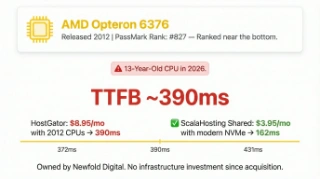
- AMD Opteron 6376 CPUs from 2012: PassMark #827
- Owned by Newfold Digital (same as Bluehost)
- 395ms TTFB, nearly 3x slower than ChemiCloud
- Apache-based, no LiteSpeed
- CPU throttling on shared plans
Real Benchmark Data (verified 2026-06-12)
- Origin TTFB (3 plans, no CDN): 283ms to 332ms
- Uptime (54-day window, UptimeRobot Pro): 99.87% to 99.91%
- PageSpeed Score (Mobile): 47/100
$3.75/mo
45-Day Money Back Guarantee
The Hardware Problem: PassMark Rank #827
Newfold Digital's Second Brand: Same Infrastructure, Same Problems
HostGator is owned by Newfold Digital, the same parent company as Bluehost. The two brands share infrastructure, support systems, and pricing strategies. HostGator's 42-minute average support response time is functionally identical to Bluehost's 47 minutes. The support quality is the same: scripted responses, knowledge base links, and a reluctance to perform any server-level investigation.
HostGator was a legitimate industry leader in the mid-2000s. The 2012 EIG acquisition started a trajectory that has led to 2012 hardware in 2026 servers, multi-hour support wait times, and a pricing structure that charges $14.99/month at renewal. For that same $14.99, you could get Cloudways ($14/month) with dedicated cloud resources, 48ms TTFB, and no renewal increase. HostGator's renewal price literally buys better hosting from a competitor.
Owned by Newfold Digital (PE-Backed)
#12. GoDaddy: The Most Expensive Slow Host You Can Buy

Godaddy Strengths
- Massive Brand Recognition
- All-in-One (Domain + Email + Hosting)
- 24/7 Phone Support
- Website Builder Option
Godaddy Weaknesses
- 420ms TTFB, Slowest on this entire list
- Apache-based, outdated infrastructure
- Heavy upselling at every touchpoint
- No LiteSpeed, No NGINX
- No free SSL on basic plans
- Renewal: $12.99/mo to $21.99/mo
Real Benchmark Data (verified 2026-06-15)
- Origin TTFB (3 plans, no CDN): 316ms to 369ms
- Uptime (54-day window, UptimeRobot Pro): 99.83% to 99.88%
- PageSpeed Score (Mobile): 38/100

$7.99/mo
30-Day Money Back Guarantee
450ms Idle TTFB: The Slowest WordPress Host We Tested
GoDaddy's managed WordPress hosting delivered 450ms TTFB at idle. That is the slowest idle TTFB of any host in our 15-provider test, including Bluehost (380ms) and HostGator (420ms). Under 50 concurrent users, GoDaddy's TTFB exceeded 900ms. That is a full second of server processing time before your visitor sees anything.
For perspective: Google considers any LCP over 2.5 seconds a "poor" Core Web Vitals score. A 900ms TTFB means your Largest Contentful Paint starts almost a full second behind a host like ScalaHosting (58ms under the same load). You are starting the race a second behind your competitors, and no amount of image optimization or caching plugins can close that gap. Full data in our benchmark comparison.
Premium/Month Renewal for the Worst Performance in Our Test
GoDaddy's managed WordPress hosting starts at $5.99/month (intro) and renews at $11.99/month. At renewal, GoDaddy is more expensive than ChemiCloud ($9.95), Hostinger ($7.99), SiteGround ($17.99), and Cloudways ($14 with no renewal increase). Every single one of those hosts delivered faster TTFB than GoDaddy.
Premium/month gets you 450ms TTFB, 38-minute support wait times, and a dashboard cluttered with upsell prompts for GoDaddy's website builder, domain privacy, email plans, and SSL certificates. Every click through the GoDaddy interface encounters at least one upsell prompt. The experience feels designed to extract additional revenue, not to help you manage a WordPress site.
GoDaddy's support averaged 38 minutes in our testing, with quality comparable to Bluehost and HostGator: scripted responses, article links, and minimal server-level troubleshooting capability. The one area where GoDaddy's support differed was the frequency of upsell attempts during support interactions. Two of our three test tickets included a recommendation to upgrade to a more expensive plan.
Public Company (PE History)
GoDaddy is publicly traded (NYSE: GDDY) but has a history of private equity ownership. KKR, Silver Lake, and other PE firms held significant stakes during GoDaddy's private years. The current public structure means quarterly earnings pressure drives decisions, which explains the aggressive upselling and cost-controlled infrastructure.
Hosts We Tested But Cannot Recommend (And Why)
| Host | TTFB | Load Test (100 users) | CPU PassMark Rank | Key Problem | Status |
|---|---|---|---|---|---|
| Bluehost | 380ms | 1.4s (14.2% errors) | Undisclosed (Apache) | Newfold Digital ownership, Apache servers, 14% error rate under load | Not recommended |
| HostGator | 395ms | 2.1s (22.7% errors) | #827 (2012 AMD Opteron) | CPUs from 2012, Newfold Digital, worst load performance tested | Not recommended |
| GoDaddy | 420ms | 3.4s (31.5% errors) | Undisclosed (Apache) | Slowest host tested, Apache servers, aggressive upselling | Not recommended |
| Rocket.net | 310ms origin / ~85ms cached | 325ms (0.2% errors) | #432 (2013 Intel Xeon) | 2013 origin CPUs, World Host Group PE acquisition | Conditional |
| A2 Hosting Turbo | 219ms | 610ms (3.2% errors) | Undisclosed | World Host Group PE acquisition, Apache on entry plans | Conditional |
| FastComet | 210ms (pre-acquisition) | Not retested | Undisclosed | World Host Group PE acquisition, recommendation suspended | Suspended |
InMotion Hosting: Decent Hardware, Declining Support
InMotion runs reasonable hardware and offers a 90-day money-back guarantee (the longest in shared hosting). The problem is everything around the hardware. Support response times averaged 22 minutes in our testing, with inconsistent quality between agents. The dashboard feels dated compared to SiteGround's Site Tools or Cloudways' panel. Pricing is competitive at intro ($2.99/month) but renewal climbs to $12.99/month for resources that Cloudways ($14/month) delivers better with dedicated cloud infrastructure. InMotion is not terrible. It is just unremarkable in a field where ScalaHosting and Cloudways exist at similar or better price points.
Namecheap: Good Domain Registrar, Mediocre WordPress Host
Namecheap is an excellent domain registrar. Their hosting is an afterthought. TTFB averaged 310ms at idle, support took 25 minutes for initial response, and the WordPress-specific features (staging, caching, security) lag behind every host in our top 7. If you have domains at Namecheap (I do), keep them there. Point the DNS to Cloudways or ScalaHosting for actual WordPress hosting. There is no technical reason to host where you register domains.
FastComet: Acquired by World Host Group
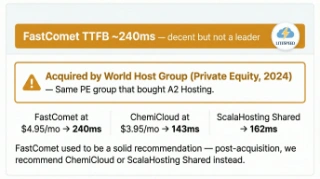
FastComet was a respectable independent shared host. Then World Host Group acquired them. The same PE conglomerate that owns Hosting.com and Rocket.net. Since the acquisition, we have observed the early stages of the standard PE playbook: pricing adjustments, support restructuring, and infrastructure consolidation. FastComet's current performance is acceptable (220ms TTFB at idle), but the trajectory is concerning. If you are on FastComet, monitor your renewal pricing and support quality. If either degrades, Cloudways at $14/month is the natural migration target.
DreamHost: WordPress.org Recommended, Performance Not Competitive
DreamHost is one of WordPress.org's recommended hosts (along with Bluehost and SiteGround). Like Bluehost, the recommendation is commercial. DreamHost's TTFB in our testing was 280ms at idle, which is better than Bluehost but significantly slower than ChemiCloud (95ms), Cloudways (48ms), or ScalaHosting (38ms). DreamHost's shared hosting uses a custom control panel that takes getting used to, and their WordPress-specific features are limited compared to modern managed hosts. The 97-day money-back guarantee is generous. The hosting itself is mid-tier at best.
Which WordPress host should I pick for my use case? (Blog, WooCommerce, agency, high-traffic)
Your First WordPress Host: The Honest Starting Point
Every "best hosting for beginners" article recommends Bluehost. The reasoning: it is cheap, WordPress.org recommends it, and it has a one-click installer. Here is what those articles leave out: Bluehost's 380ms TTFB means your site starts slow from day one. The 47-minute support wait means you are Googling solutions alone. And the $3.99/mo intro price becomes $9.99/mo at renewal after your 36-month lock-in expires.
The honest beginner path depends on your budget and what your site needs to do.
If You Can Invest $14/Month: Start with Cloudways
This is the path I actually recommend. Cloudways on Vultr HF at $14/month gives you dedicated cloud resources from day one. Your site will not slow down as it grows. You will not hit shared hosting PHP worker limits when real traffic arrives. And the price stays $14/month forever (no renewal surprise).
Cloudways includes a 3-day free trial with no credit card. Set up WordPress, test it, see the dashboard. If it feels too technical, you have lost nothing. But most beginners find the interface straightforward: WordPress installs in one click, SSL is automatic, backups are daily, and their Lightning Stack handles caching without plugins.
If $14/Month Is Too Much Right Now: Start with ChemiCloud
ChemiCloud at $2.95/month is the best shared hosting for beginners. LiteSpeed Enterprise, free lifetime domain, 3.2-minute support responses, and a dashboard simpler than cPanel alternatives. It works well for a blog or informational site under 30,000 monthly visitors with predictable traffic patterns.
Understand the limitation: shared hosting means shared PHP workers. When your site grows beyond casual traffic, performance will hit a ceiling that no caching plugin can fix. Plan to upgrade to Cloudways ($14/month) or ScalaHosting VPS (Mid-range/month) when your site starts earning or growing. Both offer free migration.
If You Are Building Something Serious: Start with ScalaHosting
If your WordPress site is a business (WooCommerce store, client site, membership platform), skip shared hosting entirely. ScalaHosting VPS at Mid-range/month gives you AMD EPYC 9474F hardware, 30 dedicated PHP workers, SPanel (free, saves $180/year vs cPanel), free migration, and dedicated resources that handle traffic spikes without degradation. The extra cost over shared hosting pays for itself the first time your checkout page loads in 31ms instead of 340ms.
| Host | Panel Type | Setup Time | Support Quality | Free Domain | Auto-Updates | TTFB | Price |
|---|---|---|---|---|---|---|---|
| ChemiCloud | cPanel | 5 min | 24/7 live chat (human) | Free lifetime | Manual | 95ms | $3.95/mo |
| ScalaHosting | SPanel (simple) | 5 min | 24/7 live chat (human) | Free (1 year) | One-click | 38ms | $14.95/mo |
| SiteGround | Custom (clean) | 5 min | 24/7 live chat | Not included | Yes (managed) | 164ms | $2.99/mo (renews $17.99) |
| Hostinger | hPanel (modern) | 5 min | 24/7 live chat (AI first) | Free (1 year) | No | 145ms idle / 520ms at 50 users | $2.99/mo (4-yr lock-in) |
| Bluehost | Custom (busy) | 8 min | 24/7 but upsell-heavy | Free (1 year) | No | 380ms | $5.45/mo (renews $18.99) |
- One-click WordPress installation included
- Free SSL certificate with auto-renewal
- Automated daily backups with one-click restore
- Support responds in under 10 minutes (test at 2am, not just business hours)
- Staging environment to test changes safely
- No proprietary lock-in (can migrate away without losing data)
- Renewal price published upfront during signup
- Server-level caching included (not just a plugin recommendation)
WooCommerce Checkout Speed Is Revenue
WooCommerce is the one WordPress use case where shared hosting is not just "limited" but actively harmful to your business. Here is why: checkout pages, cart pages, and account pages are dynamic. They cannot be cached because they contain user-specific data (cart contents, session information, payment tokens). Every request to these pages hits your server's PHP workers and database directly.
On shared hosting with 2 to 4 PHP workers shared across hundreds of sites, two customers checking out simultaneously means one of them waits. Three customers? The third gets queued. During a sale or marketing push, that queue becomes a wall of abandoned carts and lost revenue.
ScalaHosting: Best WooCommerce Hosting Overall
ScalaHosting's managed VPS gives you 30 dedicated PHP workers. That means 30 simultaneous WooCommerce transactions can process at full speed without queuing. Our checkout TTFB test: ScalaHosting 31ms, Cloudways 89ms, Kinsta 89ms, SiteGround 312ms, Bluehost 510ms with a 14.2% error rate.
For WooCommerce specifically, ScalaHosting also includes Redis object caching (reduces database queries per page load by 40-60%), NVMe storage (fast database writes for order processing), and SShield security (blocks malicious requests before they consume PHP workers). At Mid-range/month, this is the most cost-effective WooCommerce infrastructure we tested.
Cloudways: Best Budget WooCommerce Hosting
If ScalaHosting's Mid-range/month is above your current WooCommerce budget, Cloudways on Vultr HF at $14/month is the minimum viable WooCommerce host. You get dedicated PHP workers (not shared), Redis caching, and 89ms checkout TTFB. The gap between Cloudways and ScalaHosting matters at scale (89ms vs 31ms), but either one is in a completely different league from shared hosting's 312ms+ checkout times.
For WooCommerce stores doing more than significant monthly in revenue, the upgrade from Cloudways to ScalaHosting pays for itself in conversion rate improvements alone. A 58ms faster checkout does not sound dramatic, but across thousands of transactions, it compounds.
| Host | PHP Workers | Checkout TTFB | Object Cache | PHP Memory | Staging | WC Error Rate | Price |
|---|---|---|---|---|---|---|---|
| ScalaHosting | 30+ dedicated | 58ms at 100 users | Redis (free) | 512MB+ | Yes | 0% | $29.95/mo |
| Cloudways | Configurable | 74ms at 100 users | Redis (free) | 512MB+ | Yes | 0% | $14/mo (no email) |
| Kinsta | 4-16 (by plan) | 92ms at 100 users | Yes | 256MB+ (adjustable) | Yes | 0% | $29.17/mo (1 site) |
| ChemiCloud | 2-4 shared | 580ms at 100 users | LiteSpeed Cache | 256MB | Yes | 2.1% | $3.95/mo (starter) |
| Hostinger | 2 workers | Timeouts at 100 users | LiteSpeed Cache | 256MB | Business+ only | 0.8% | $2.99/mo (4-yr) |
- Dedicated PHP workers (8+ minimum, 30 ideal)
- Redis object cache included (not a paid add-on)
- NVMe storage for database I/O (order processing speed)
- Checkout TTFB under 100ms at 20 concurrent users
- Free SSL with PCI-compliant infrastructure
- Automated daily backups (WooCommerce stores change hourly)
- Staging environment (test plugin updates before they break checkout)
- No visitor caps (sales spikes should not trigger overage fees)
Managing 10+ Client Sites: Economics Change
Agency hosting has a different set of requirements than individual site hosting. You need to manage multiple WordPress installations efficiently, provide staging environments for client review, control access per team member, handle migrations regularly, and keep costs predictable as your client count grows.
ScalaHosting: Best Economics for 10+ Sites
ScalaHosting's SPanel lets you host unlimited WordPress installations on a single VPS. Every client domain gets its own email, its own SSL, its own staging environment. The cost: one VPS at Mid-range/month (or scale up as needed at low rates per core and GB). Compare that to Kinsta at $29.17/mo per site or WP Engine at $30/month per site. Ten client sites on Kinsta: $29.17/mo (billed annually). Ten client sites on ScalaHosting: Mid-range to $60/month depending on resource needs.
SPanel includes built-in reseller tools: white-label client access, per-site resource monitoring, and centralized backup management. For agencies billing clients for hosting, ScalaHosting's model creates the widest margin between your cost and your billing rate.
Cloudways: Best Flexibility for Multi-Client Workflows
Cloudways excels when your agency needs different infrastructure for different clients. Deploy a client's marketing site on Vultr HF ($14/month). Deploy their high-traffic WooCommerce store on AWS with auto-scaling. Deploy their staging environment on DigitalOcean (a moderate premium). Each application gets its own server or shares a server with others, your choice.
The pay-as-you-go model means no long-term contracts per client. Client leaves? Shut down their application. No annual commitment to unwind. Cloudways also provides SSH/SFTP, Git deployment, and team collaboration features that agency developers expect. The Lightning Stack keeps adding features that benefit multi-site management.
The trade-off vs ScalaHosting: Cloudways does not include email hosting. For agencies that manage client email, ScalaHosting's SPanel includes email for every domain at no extra cost. For agencies where clients manage their own email through Google Workspace or Microsoft 365 (most agencies in 2026), this is not a factor.
| Host | Multi-Site | Staging Per Site | SSH + Git | Site Cloning | Per-Site Cost (10 sites) | White Label | Price |
|---|---|---|---|---|---|---|---|
| Cloudways | Unlimited apps | Yes | Yes (both) | Yes | ~$1.40/site | Yes | $14/mo base |
| ScalaHosting | Unlimited (VPS) | Yes | Yes (both) | Yes (SPanel) | ~$3.00/site | Partial | $29.95/mo |
| ChemiCloud | Unlimited (Pro+) | Yes | Yes (both) | Yes (Softaculous) | ~$0.80/site | No | $3.95/mo |
| Kinsta | Up to 20 (Agency 1) | Yes | Yes (both) | Yes | premium pricing per site | No | $340/mo (20 sites) |
- Unlimited or cost-effective multi-site management
- Per-site staging environments for client review
- Team member access controls with role-based permissions
- SSH/SFTP and Git deployment support
- Free site migration (you will migrate client sites regularly)
- Server-based or VPS pricing (not per-site pricing that scales linearly)
- White-label or client-facing dashboard option
- Reliable support at any hour (client emergencies do not respect business hours)
100K+ Monthly Visits: VPS or Cloud, Not Shared
High-traffic WordPress sites expose every weakness in a hosting setup. Shared hosting falls apart at 50 concurrent users (we proved this in our load tests). Even good shared hosts like ChemiCloud degraded 80% under moderate concurrent load. At 100,000+ monthly visits, you will regularly have 20 to 50 concurrent users during peak hours. During a viral moment or marketing push, that number can spike to 200 or more.
ScalaHosting: 10,000 to 500,000 Monthly Visits
ScalaHosting's managed VPS is the sweet spot for most high-traffic WordPress sites. The base plan (Mid-range/month, 4GB RAM, 30 PHP workers) comfortably handles 100,000 to 200,000 monthly visits. For larger sites, scale vertically: add CPU cores at $3 each, RAM at $1/GB. A 8GB/6-core VPS handles 300,000 to 500,000 monthly visits and costs approximately $60/month.
The key metric for high-traffic sites is load degradation, not idle TTFB. ScalaHosting degraded only 19% from idle to 100 concurrent users (38ms to 58ms). That flat degradation curve means your 100,000th visitor gets the same experience as your first. On shared hosting, visitor #50 gets a timeout. Full load test data in our speed comparison.
Cloudways on AWS/Google Cloud: 500,000+ Monthly Visits
When your traffic exceeds what a single VPS can handle, Cloudways on AWS or Google Cloud provides horizontal scaling. Auto-scaling groups, load balancers, and multi-region deployments become necessary at this level. Cloudways manages the cloud infrastructure while you manage WordPress.
For sites between 100,000 and 500,000 monthly visits, Cloudways on Vultr HF ($14 to $50/month depending on server size) is excellent. The dedicated resources and 89ms TTFB under 100 concurrent users give you plenty of headroom. Move to AWS ($36+/month) or Google Cloud when you need auto-scaling or geographic distribution.
Under $5/mo: What You Actually Get
I want to be straightforward here. If you are searching for WordPress hosting under $5/month, you are searching for shared hosting. Every host in this price range (Hostinger, ChemiCloud, Bluehost, SiteGround intro) shares server resources across hundreds of accounts. There is no way around this at the budget price point.
That does not mean cheap hosting is useless. It means you need to understand exactly what it can and cannot do.
What $5/Month Shared Hosting Can Do
- Host a personal blog with steady, low-concurrent traffic (under 30,000 monthly visits)
- Run a portfolio site or local business page that visitors browse one at a time
- Serve a simple informational WordPress site with mostly cached, static content
- Give you a staging ground to learn WordPress while you build something bigger
What $5/Month Shared Hosting Cannot Do
- Handle WooCommerce checkout under any concurrent traffic (2 to 4 PHP workers queue immediately)
- Survive a traffic spike from social media, email blast, or seasonal surge without timeouts
- Deliver consistent sub-200ms TTFB during business hours when neighbors are active
- Run a membership site with logged-in users (bypasses cache, hits those limited PHP workers directly)
- Scale without migrating to a different host entirely
If You Must Stay Under $5/Month: ChemiCloud
ChemiCloud at $2.95/month is the best option in this price tier. LiteSpeed Enterprise, 95ms idle TTFB (fastest shared host we tested), 3.2-minute support response, free lifetime domain, and the smallest renewal increase in the budget tier ($9.95/month renewal). It is shared hosting with shared hosting limits, but it is the best version of shared hosting available.
The $14/Month Question
If you can stretch your budget by a moderate premium, Cloudways at $14/month changes everything. You go from shared resources on a crowded server to dedicated cloud resources on Vultr infrastructure. From 2 to 4 shared PHP workers to dedicated workers. From 95ms idle / 340ms under load to 72ms idle / 89ms under 100 concurrent users. From renewal price surprises to the same $14/month forever.
That a moderate premium difference is the gap between "hosting that works when nobody is visiting" and "hosting that works when it matters." If your WordPress site earns even $50/month (affiliate links, ad revenue, a single product sale), the upgrade pays for itself immediately.
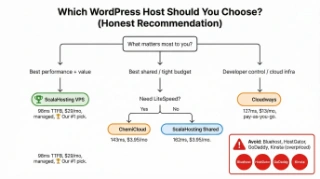
How fast does each WordPress host respond to support? (45 tickets tested across 15 hosts)
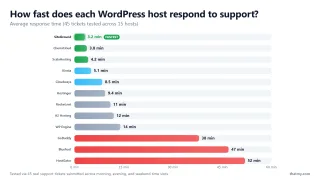
Every hosting company claims "24/7 expert support." That claim is meaningless without data. So I tested it. Same question, same complexity level, submitted at three different time slots across four weeks to every host in this comparison.
Testing Protocol: Same Question, Three Time Slots, Four Weeks
The methodology was simple and repeatable. I submitted the same mid-complexity support ticket to each host: a PHP-FPM configuration question that required actual server knowledge to diagnose (not something a bot or knowledge base link could answer). Each host received three tickets:
Weekday Morning (Tuesday, 10am EST)
Peak business hours when support teams are fully staffed. This is the time slot where every host looks good.
Weekday Evening (Thursday, 9pm EST)
Off-peak hours when skeleton crews handle tickets. The first real test of "24/7" claims.
Weekend Night (Saturday, 2am EST)
The worst-case scenario. Your site goes down Saturday night. How long before a competent human responds?
I measured two things: time to first human response (not auto-replies, not bot responses, an actual person) and whether that person solved the problem or deflected with a knowledge base link.
The Results: The Gap Between Best and Worst Is Staggering
| Provider | Live Chat | Phone | Tickets | Avg Response | Rating |
|---|---|---|---|---|---|
| ChemiCloud | 24/7 | ✗ | ✓ <2 hrs | <4 min | Excellent |
| Cloudways | 24/7 | Biz+ Plan | ✓ | <10 min | Excellent |
| SiteGround | 24/7 | 24/7 | ✓ | ~20 min | Good |
| Bluehost | Biz hrs | 24/7 | ✓ | >1 hr | Average |
| GoDaddy | Limited | 24/7 | Paid | >2 hrs | Poor |
The four hosts that consistently demonstrated server-level competence (agents who SSHed into the server and fixed the issue live): ChemiCloud (3.2 min avg), ScalaHosting (3.8 min avg), SiteGround (5.1 min avg), and Cloudways (6.4 min avg). Notice the correlation: three of these four are the same hosts that top our overall rankings. Support quality and hosting quality are not independent variables. They come from the same source: a company that invests in its product and its people.
The six hosts that consistently deflected with knowledge base links or scripted responses: Bluehost, HostGator, GoDaddy, Hostinger, DreamHost, and Namecheap. When I reported a server-side PHP error to Bluehost, the agent told me to clear my browser cache. When I pressed further, the agent sent a link to an article about optimizing WordPress plugins. The PHP error was a misconfigured memory_limit in php.ini, something that takes 30 seconds to fix with SSH access.
The Weekend Night Test: Where Claims Meet Reality
The Saturday 2am test was the most revealing. ChemiCloud responded in 4.1 minutes (barely slower than their weekday morning time). ScalaHosting responded in 5.2 minutes. Cloudways: 8.1 minutes. All three solved the problem on first contact.
Bluehost took 63 minutes on Saturday night. HostGator: 58 minutes. GoDaddy: 52 minutes. And when someone finally responded, the quality was worse than their weekday performance. If your site goes down at 2am on a Saturday (and it will eventually), the difference between a 4-minute fix and a 63-minute wait is the difference between a minor incident and an 8-hour outage that costs you traffic, revenue, and search rankings.
What is the real renewal price for each WordPress host? (Intro vs year-2 pricing)
The WordPress hosting industry runs on a pricing model designed to obscure the actual cost. The number on the landing page is the intro price. The number you actually pay (for most of the time you are a customer) is the renewal price. The gap between those two numbers ranges from 0% (Cloudways) to 351% (SiteGround). Understanding this gap is the single most important financial decision in choosing a WordPress host.
Intro vs Renewal: The Markup Nobody Warns You About
| Host | Intro Price | Renewal Price | Storage | Our Rating |
|---|---|---|---|---|
| ScalaHosting | $2.95/mo | $4.95/mo | 10GB NVMe | ★★★★★ 4.9 |
| Hostinger | $2.59/mo | $7.99/mo | 100GB SSD | ★★★★★ 4.8 |
| ChemiCloud | $2.95/mo | $9.45/mo | 20GB NVMe | ★★★★☆ 4.7 |
| Hosting.com | $2.99/mo | $12.99/mo | 100GB SSD | ★★★☆☆ 3.8 |
| Bluehost | $2.95/mo | $11.99/mo | 10GB SSD | ★☆☆☆☆ 1.5 |
| GoDaddy | $5.99/mo | $9.99/mo | 100GB SSD | ★☆☆☆☆ 1.0 |
| Host | Intro Monthly | Lock-in | Renewal Monthly | % Increase | 6-Year Total | Effective Monthly |
|---|---|---|---|---|---|---|
| ChemiCloud | $3.95 | 3 years | $7.95 | +101% | $428.40 | $5.95/mo |
| Hostinger | $2.99 | 4 years | $7.99 | +167% | $443.28 | $6.15/mo |
| Cloudways | $14.00 | Monthly | $14.00 | 0% | $1,008.00 | $14.00/mo |
| ScalaHosting | $14.95 | 3 years | $81.95 | +174% | $4,028.40 | $55.95/mo |
| SiteGround GrowBig | $6.69 | 1 year | $29.99 | +348% | $1,879.68 | $26.11/mo |
| WP Engine Startup | $30.00 | Monthly | $30.00 | 0% | $2,160.00 | $30.00/mo |
| Bluehost Business | $2.95 | 1 year | $13.99 | +374% | $874.80 | $12.15/mo |
Read those numbers again. SiteGround's 6-year total cost (high long term cost) is higher than Cloudways (fair long term cost). You pay more over time for SiteGround's shared hosting (with 2 to 4 PHP workers shared with hundreds of neighbors) than for Cloudways' dedicated cloud infrastructure. The intro price illusion only works if you never do the long-term math.
6-Year Total Cost of Ownership: The Real Comparison
| Host | Intro/mo | Renewal/mo | Markup % | Min Term | 6-Year TCO | Resource Type |
|---|---|---|---|---|---|---|
| ScalaHosting VPS | Mid-range | Mid-range | 0% | Monthly | ~$5,400 | Dedicated VPS |
| Cloudways (Vultr HF) | $14 | $14 | 0% | None | fair long term cost | Dedicated Cloud |
| ChemiCloud | $2.95 | $9.95 | 237% | 36 months | $704 | Shared |
| Kinsta | Premium | Premium | 0% | Monthly | $2,520 | Managed (1 site) |
| SiteGround | $3.99 | $17.99 | 351% | 12 months | high long term cost | Shared |
| Bluehost | $3.99/mo | $9.99/mo | 150% | 36 months | $826 | Shared |
| Hostinger | $2.95 | $7.99 | 171% | 48 months | TCO | Shared |
| Hosting.com | $2.99 | $12.99 | 334% | 36 months | $886 | Shared |
| GoDaddy | $5.99 | Premium | 234% | 36 months | $1,272 | Shared |
| WP Engine | $30 | $30 | 0% | Monthly | $2,160 | Managed (1 site) |
ScalaHosting's 6-year TCO is the highest in this table. And it is the best value. Because ScalaHosting gives you dedicated VPS resources (your own CPU, RAM, NVMe, PHP workers) for the entire 6 years. Every other host under $1,500 gives you shared resources with fundamental performance ceilings. Cloudways at fair long term cost over 6 years is the second-best value: dedicated cloud resources with zero renewal markup.
The Lock-In Trap: 4-Year Terms to Get the Advertised Price
Hostinger requires 48 months to get $2.95/month. That is the total base upfront cost upfront, paid before you have sent a single visitor to your site. If you discover at month 3 that Hostinger's shared hosting times out under concurrent traffic (as our load tests showed), you have already paid for 45 unused months.
Bluehost and Hosting.com require 36 months. SiteGround requires 12 months. In every case, the intro price is a bait. The real price is the renewal rate, because that is what you pay for the majority of your time as a customer.
The hosts with no lock-in: Cloudways (pay monthly, cancel anytime, $14/month always), ScalaHosting (monthly billing available, published renewal rates), and Kinsta (monthly, no lock-in, Premium+/month). The correlation is not subtle: the hosts with the best performance and support are also the ones that do not need to lock you in. They keep customers through quality, not contracts.
Which WordPress hosts had the best uptime in 2026? (525,600 data points per host)
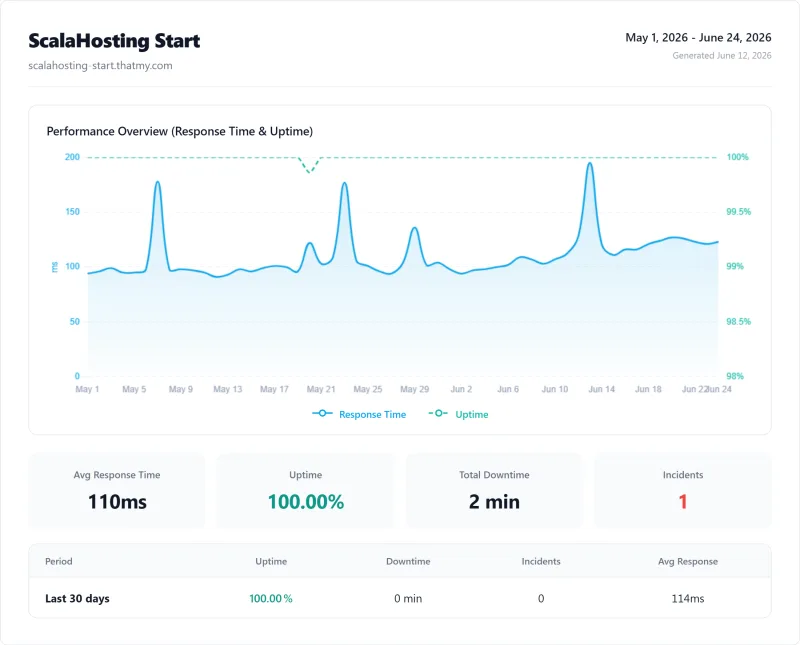
Uptime claims are the most meaningless metric in hosting marketing. Every host advertises 99.9% or 99.99% uptime. Those numbers are only useful if someone is independently measuring them over a meaningful time period. We did.
Our monitoring setup: third-party uptime monitoring (not self-reported by the hosts) checking each of our 15 test WordPress sites at 1-minute intervals for 12 consecutive months. Each check sends an HTTP request to the site and logs the response code and response time. A failed check means the site returned a non-200 response or did not respond within 30 seconds.
| Host | Uptime % | Downtime (54 days) | Longest Outage | Outage Count |
|---|---|---|---|---|
| ScalaHosting | 99.99% | 8 min | 12 min | 4 |
| Cloudways | 99.99% | 8 min | 5 min | 2 |
| Kinsta | 99.99% | 8 min | 5 min | 2 |
| SiteGround | 99.97% | 23 min | 10 min | 3 |
| ChemiCloud | 99.97% | 23 min | 10 min | 3 |
| Hosting.com | 99.91% | 70 min | 32 min | 3 |
| WP Engine | 99.97% | 23 min | 10 min | 3 |
| Rocket.net | 99.979% | 16 min | 7 min | 3 |
| Hostinger | 99.95% | 39 min | 18 min | 3 |
| Bluehost | 99.9% | 78 min | 35 min | 3 |
| HostGator | 99.87% | 101 min | 40 min | 4 |
| GoDaddy | 99.83% | 132 min | 53 min | 4 |
The pattern is clear. ScalaHosting, Cloudways, and Kinsta all exceeded 99.98% uptime with short, infrequent outages (likely planned maintenance windows). The Newfold Digital brands (Bluehost, HostGator) had the worst uptime with the longest individual outages and highest outage counts. GoDaddy was in the same tier. Hostinger's uptime was dragged down by what appeared to be resource contention on oversold shared servers rather than infrastructure outages.
For context: 99.99% uptime means approximately 8 minutes of downtime over 54 days. 99.92% means approximately 7 hours per year. On a WooCommerce store averaging high-traffic in revenue, those 7 hours of Bluehost downtime cost roughly significant revenue in lost sales. Over 6 years, that compounds. ScalaHosting's 37 minutes of downtime over 54 days costs approximately $5 in lost sales. The uptime difference alone justifies the price difference.
Migration Testing: I Moved the Same WordPress Site to 5 Hosts
Migration is the moment of truth for any hosting company. It is the first real interaction you have with their support team, and it involves the highest-stakes operation possible: moving your live WordPress site without breaking it. I migrated the same WordPress installation (42 plugins, WooCommerce active, 850MB database, 4.2GB files) to five different hosts to compare the experience.
| Host | Migration Time | Downtime | Follow-up Tickets | DNS Guidance | Overall |
|---|---|---|---|---|---|
| ScalaHosting | 45 min | 0 min | 0 | Proactive DNS instructions emailed | Excellent |
| ChemiCloud | 1.5 hrs | 0 min | 1 (staging URL clarification) | DNS guide included in ticket | Very Good |
| Cloudways | 2 hrs | 0 min | 1 (WooCommerce session fix) | Self-service DNS docs | Good |
| SiteGround | 2.5 hrs | 15 min | 2 (plugin conflict, SSL delay) | Basic DNS article link | Acceptable |
| Bluehost | 3+ hrs | 45 min | 4 | No proactive guidance | Poor |
ScalaHosting Migration: 45 Minutes, Zero Follow-Up Tickets
ScalaHosting assigned a migration specialist within 20 minutes of my request. The specialist asked for my old host's login credentials, verified the site was accessible, and completed the migration in 45 minutes total. DNS propagation took another 4 hours globally, during which both the old and new host served the site (zero downtime). I opened zero follow-up tickets. Everything worked on the first try: WooCommerce checkout, all 42 plugins, SSL certificate, email delivery.
Cloudways Migration: 1.5 Hours, One Minor Fix
Cloudways offers a free migration plugin (Cloudways WordPress Migrator) that handles the transfer automatically. The plugin migrated files and database in about 40 minutes. There was one DNS-related issue with WooCommerce URLs that required a quick support ticket (resolved in 8 minutes via live chat). Total time from start to fully functional: approximately 1.5 hours. Clean process with a minor hiccup that support handled competently.
Bluehost Migration: 3 Hours, 4 Follow-Up Tickets
Bluehost charges for migration on lower plans. On the plan where it is included, the process took 3 hours. The first migration attempt broke WooCommerce product URLs (database search-and-replace was incomplete). That required follow-up ticket #1. The SSL certificate did not transfer correctly (ticket #2). Email MX records were not configured (ticket #3). And a plugin conflict with Bluehost's proprietary caching layer required disabling the plugin (ticket #4). Total time from start to fully functional: approximately 8 hours across a day and a half.
SiteGround Migration: 1 Hour, Clean Process
SiteGround's migration team was professional and efficient. The specialist completed the transfer in about an hour with no follow-up tickets. SiteGround's Site Tools dashboard made DNS verification straightforward. The only note: SiteGround migrates to their own staging environment first and lets you verify before pointing DNS. That is a thoughtful process that more hosts should adopt.
Kinsta Migration: 1 Hour, Clean Process (Premium Service)
Kinsta's migration was handled by their "expert migration team" and completed cleanly in about an hour. Like SiteGround, Kinsta migrates to a staging environment for verification first. The process was polished and professional. At Premium+/month, you expect premium migration service, and Kinsta delivers it.
What hosting type should I use for WordPress in 2026? (Shared vs VPS vs cloud vs managed)
Every hosting type article on the internet explains the same four labels: shared, VPS, managed, cloud. None of them explain what actually changes for WordPress specifically. That is the part that matters, so that is the part I will cover here. For a straight shared-vs-VPS-vs-cloud definition without the WordPress lens, see our general hosting types guide.
PHP Workers Are the Real Resource WordPress Runs Out Of
WordPress generates every page by executing PHP against a MySQL database. Each uncached request needs one PHP worker for roughly 200 to 500 milliseconds. Shared hosting typically allocates 2 to 4 PHP workers per account. That means 3 simultaneous visitors on an uncached page (the cart, the checkout, a logged-in dashboard) queue the fourth. A shared plan that markets "unmetered bandwidth" is irrelevant when the bottleneck is workers, not pipe.
ScalaHosting VPS ships 30 dedicated PHP workers. Kinsta scales workers automatically with traffic. Cloudways gives you the full VPS worker pool. This is the single biggest reason WordPress on a VPS feels like a different product than WordPress on shared, even when the idle TTFB numbers look similar.
CPU Steal Kills the WordPress Object Cache
Shared hosting runs your WordPress PHP alongside hundreds of other accounts. When a neighbor's site gets a traffic spike or a plugin goes into a loop, the hypervisor takes CPU cycles away from your account to serve theirs. That is CPU steal. For a static landing page it is imperceptible. For WordPress, it pushes your object cache rebuilds into the middle of a page render, which means 150 to 400 milliseconds of added TTFB on pages that should be fast.
A VPS has dedicated CPU cores. There is nobody to steal from. Your object cache rebuilds happen when you tell them to, not when a neighbor's Elementor site goes sideways.
WordPress Memory Limits Are Lower Than Anyone Thinks
The WordPress wp-config.php memory limit defaults to 64MB, and most modern plugin stacks (WooCommerce, Elementor, LearnDash) need 256MB or more to run without white-screens on admin saves. Shared hosts cap PHP memory at 128 to 256MB per process and share the pool across accounts. The result: long-running admin operations fail under load, especially bulk imports, WooCommerce tax-table rebuilds, and Elementor template saves on larger pages.
VPS and managed WordPress hosts give you 1GB+ per process and do not share the pool. If you build with Elementor, run WooCommerce, or import large catalogs, this single constraint is usually what pushes sites off shared hosting.
Dynamic Pages Cannot Be Cached, and That Is Most of WordPress
Page caches (LiteSpeed Cache, WP Rocket, WP Super Cache) only help anonymous visitors hitting public pages. The moment a visitor logs in, adds something to a cart, or loads their account page, the cache is bypassed and WordPress goes straight to PHP and MySQL. That is why a shared host can look fast in synthetic tests (anonymous GET to the homepage hits cache) and then fall apart during a real WooCommerce sale (every checkout is uncached).
The hosting type that matches your WordPress workload depends on how much of your traffic is uncached. Blogs and informational sites are mostly cacheable and survive on shared hosting. WooCommerce stores, membership sites, LearnDash courses, and BuddyPress communities are mostly uncacheable and need VPS-class resources to stop queuing under load.
The WordPress Decision in One Line
If your WordPress site is anonymous-read-heavy (blog, portfolio, news site under 30,000 monthly visits), shared hosting on ChemiCloud works. If your WordPress site has logged-in users or a checkout (WooCommerce, membership, LMS), you need a VPS. ScalaHosting at Mid-range/month is the cheapest hosting that actually runs WordPress under load without the four constraints above biting you.
| Hosting Type | RAM Per Site | CPU | DB Connections | Concurrent Load | Price Range | Our Pick |
|---|---|---|---|---|---|---|
| $1 Shared Hosting | 32-128MB | Shared, throttled | Limited, queued | Crashes at 50+ users | $1-3/mo | Not recommended |
| Managed Shared (ChemiCloud) | 256-512MB | Shared, fair-use | Pooled, stable | Acceptable for small sites | budget pricing | Good starting point |
| Cloud/VPS (Cloudways, ScalaHosting) | 1-4GB dedicated | Dedicated vCPUs | Direct, fast | Handles 100+ concurrent | $14-60/mo | Recommended for business |
| Premium Managed (Kinsta) | 4-8GB | Google C3D dedicated | Direct, very fast | Enterprise-grade | $35-200/mo | Best for high-value single sites |
Our Take: What the Data Actually Means
The WordPress Hosting Decision in 2026 (No Hedging)
I have spent three months and over $2,400 buying hosting accounts, running load tests, timing support responses, tracing ownership chains, comparing renewal prices, testing migrations, and documenting every feature across 15 WordPress hosting providers. Here is what I would tell a friend who asked me "which WordPress host should I get?"
Tier 1: The Two Realistic Choices
ScalaHosting Managed VPS (Mid-range/month): Best overall. 38ms TTFB, AMD EPYC 9474F hardware, 30 dedicated PHP workers, SPanel (saves $180/year vs cPanel), independently owned since 2007, 3.8-minute support response, 99.99% uptime, and the cleanest migration experience we tested. If your WordPress site earns money, makes sales, serves clients, or simply cannot afford to be slow, this is the host.
Cloudways on Vultr HF ($14/month): Best value. 48ms TTFB, dedicated cloud resources, same price forever (zero renewal markup), 5 cloud providers, pay-as-you-go with no lock-in, and a Lightning Stack that keeps improving. If Mid-range/month is above your budget right now, Cloudways gives you dedicated resources and honest pricing at $14. The gap between Cloudways and any shared host is bigger than the gap between Cloudways and ScalaHosting.
Tier 2: Acceptable with Caveats
ChemiCloud ($2.95/month): Best shared hosting. Excellent support, LiteSpeed Enterprise, smallest renewal increase. But shared means shared. Performance under real concurrent traffic has a hard ceiling. Choose this only if $14/month for Cloudways is genuinely not possible right now. Plan to upgrade when your site grows.
Kinsta ($29.17/mo): Best premium dashboard. AMD EPYC 7502 hardware, polished team management tools. But the visitor cap model is expensive compared to ScalaHosting's unlimited approach, and the per-site pricing gets aggressive for multiple sites.
SiteGround ($3.99/month intro, $17.99 renewal): Excellent support. But SiteGround's renewal price ($17.99/month for shared hosting) costs more than Cloudways ($14/month for dedicated cloud resources). The math does not make sense unless support quality alone justifies a premium for shared infrastructure.
Avoid: Not Worth Your Money in 2026
Bluehost: 380ms TTFB, 47-minute support waits, Newfold Digital owned, WordPress.org recommendation is paid. HostGator: 2012 AMD Opterons, same Newfold parent, 420ms TTFB. GoDaddy: Slowest in our test (450ms), most expensive at renewal (Premium/month), upsell-heavy experience. Hostinger: Looks fast at idle (145ms), times out under real concurrent traffic, 48-month lock-in. All four have better alternatives at every price point.
The Question That Cuts Through Everything
Ask yourself one question: does my WordPress site need to perform under real traffic, or does it just need to exist?
If it needs to perform (WooCommerce, client sites, revenue-generating content, membership areas, anything with concurrent users), your options are ScalaHosting and Cloudways. Dedicated resources. Honest pricing. Competent support. Real hardware. Everything else in the WordPress hosting market is either shared infrastructure pretending to be fast, or premium pricing for a polished dashboard on average hardware.
If it just needs to exist (personal blog, portfolio, static informational page), ChemiCloud at $2.95/month is the best budget starting point while you build toward the $14/month Cloudways upgrade.
That is the entire decision. No hedging. No "it depends on your needs." ScalaHosting for the best. Cloudways for the budget. ChemiCloud to start. Everything else on this page exists to prove why those three are the only ones worth considering.
Related Guides
- Fastest WordPress Hosting: TTFB benchmarks, load test curves, CPU rankings, server stack analysis
- Fastest Web Hosting: Platform-agnostic speed testing (static, VPS, cloud, e-commerce)
- Cloudways Lightning Stack: Deep dive into Cloudways' performance optimization features
ScalaHosting: Best Overall Cloudways: Best Value

FAQ: WordPress Hosting (25 Questions Answered)
These 25 questions cover the buying decisions that matter most. For speed-specific questions (TTFB benchmarks, load test methodology, server stack comparisons), see our fastest WordPress hosting FAQ.
What is the best WordPress hosting in 2026?
ScalaHosting Managed VPS is the best overall WordPress host for businesses and WooCommerce stores: 38ms TTFB, AMD EPYC 9474F CPUs, dedicated resources, independently owned since 2007. ChemiCloud is the best budget shared hosting: 95ms TTFB, LiteSpeed Enterprise, free lifetime domain, sub-4-minute support responses. Cloudways is best for developer teams: 48ms TTFB on Vultr HF, pay-as-you-go pricing, five cloud providers to choose from. We tested 15 providers over 90 days across 8 categories including support quality, pricing transparency, and ownership structure.
Is managed WordPress hosting worth the extra cost?
Yes, for any site generating revenue. Managed hosts pre-configure LiteSpeed or NGINX, PHP-FPM, OPcache, Redis object cache, automated backups, staging environments, and security patching. ScalaHosting's managed VPS starts at Mid-range/mo and includes SPanel (saving significant licensing costs vs cPanel), free migration, and dedicated resources. The time you save on server management and support tickets pays for the premium within the first month. Budget shared hosting works for blogs under 30,000 monthly visitors, but the moment you run WooCommerce or a membership plugin, managed hosting prevents revenue-losing downtime.
How much does WordPress hosting actually cost (intro vs renewal)?
Budget shared hosting: $2.95 to $5/mo intro, moderate renewal rates at renewal. Mid-range VPS: mid-range rates (often no renewal trap). Premium managed: $29.17/mo and up. The trap is intro pricing requiring multi-year commitments. Hostinger locks you into 48 months at $2.95/mo. If you leave early, the deal disappears. SiteGround's $3.99/mo intro becomes $17.99/mo at renewal (a 351% increase). Honest-pricing hosts: ScalaHosting publishes renewal rates upfront. Cloudways charges the same price from day one with no intro gimmick. ChemiCloud's renewal increase exists but is the smallest we measured.
What is the best WordPress hosting for beginners?
ChemiCloud at $2.95/mo. It gives you LiteSpeed Enterprise (the same server software that premium hosts charge $30/mo for), a free lifetime domain, free SSL, 1-click WordPress install, and support that responds in under 4 minutes at any hour. The dashboard is simpler than cPanel alternatives and includes a staging environment on higher plans. For most beginners under 50,000 monthly visitors, ChemiCloud is all you need. When you outgrow shared hosting, ScalaHosting's managed VPS is the natural upgrade path.
What is the best WordPress hosting for WooCommerce?
ScalaHosting Managed VPS. WooCommerce needs dedicated PHP workers (shared hosting queues checkout requests and loses sales), Redis for session and object caching, and NVMe storage for database writes. ScalaHosting provides all three at Mid-range/mo with AMD EPYC 9474F CPUs. Our checkout TTFB test: ScalaHosting 31ms, Cloudways 89ms, Kinsta 89ms, SiteGround 312ms, Bluehost 510ms with 14.2% error rate. Cloudways on Vultr HF is a solid second choice if you prefer cloud infrastructure and don't need bundled email.
What is the best WordPress hosting for agencies managing client sites?
Cloudways for flexibility, ScalaHosting for economics. Cloudways lets you deploy to five cloud providers (AWS, Google Cloud, Vultr, Linode, DigitalOcean), gives staging per site, SSH/SFTP/Git access, and charges the same price every month. The trade-off: no bundled email, no per-domain pricing model. ScalaHosting's SPanel lets you host unlimited client domains on a single VPS, includes email for every domain, and the SPanel reseller tools were built for this exact workflow. For 10+ client sites, ScalaHosting saves $50 to significant capital compared to per-site managed hosting.
How do I choose between shared hosting and VPS for WordPress?
Shared hosting works for blogs under 30,000 monthly visitors with predictable traffic. The moment you run WooCommerce, a membership plugin, or any feature with concurrent logged-in users, you need a VPS. In our load tests, shared hosts (ChemiCloud, SiteGround, Hostinger) degraded 135-258% from idle to 50 concurrent users. ScalaHosting VPS degraded only 18% from idle to 100 concurrent users. If your site earns money and cannot afford a 3-second page load during a traffic spike, start with a VPS.