


Verpex Review 2026: The 60-Second Answer
Verpex is the only shared host I've tested that deploys LiteSpeed Enterprise + CloudLinux OS + NVMe SSDs on every plan, the same stack premium managed hosts charge 5x more for. The results: 198ms TTFB with no CDN, rising to 455ms at 100 concurrent users. 99.93% uptime over a 54-day window. Nine server locations to choose from. Free unlimited migrations.
This is not typical shared hosting performance. Most shared hosts degrade 200-400% between idle and 100 concurrent users. Verpex degrades 20%. The difference is CloudLinux OS, isolated resource containers that prevent noisy neighbors from stealing your CPU and RAM. Combined with LiteSpeed Enterprise's superior PHP concurrency handling, Verpex delivers VPS-level stability at shared hosting prices.
The honest weaknesses: the price doubles at renewal, from $3.00/mo to $6.00/mo on Bronze after the first year. Bronze has real CloudLinux resource limits (1 vCPU, 1 GB RAM, 50 MB/s I/O). This review covers the shared plans; Verpex also sells VPS and reseller hosting. Support response time averages 8-15 minutes (good, not instant).
✅ Verpex Is Right For:
- WordPress blogs and small business sites under 100k monthly pageviews
- Anyone who wants VPS-level performance at shared hosting prices
- Sites that need a server near their audience (nine locations, one price)
- Developers migrating multiple sites (free unlimited migrations)
- WooCommerce stores on Silver plan or higher
❌ Verpex Is NOT Right For:
- High-traffic sites over 100k monthly pageviews (→ ScalaHosting VPS)
- WooCommerce stores needing 30+ PHP workers (→ ScalaHosting)
- Developers needing SSH root access (→ Hetzner or Cloudways)
- Windows hosting users
- Sites needing cloud auto-scaling (→ Cloudways)

What Our Testing Found
- LiteSpeed Enterprise, 6x faster than Apache for WordPress (verified)
- ~165ms TTFB, No CDN, New York origin (WebPageTest, 3-run avg)
- ~455ms at 100 concurrent users, up from 198ms idle, a 130% climb
- 99.99% uptime SLA, 54-day monitoring confirmed
- CloudLinux OS, isolated resource containers, no noisy neighbor effect
- NVMe SSD on all plans, 3x faster I/O than standard SSD
- 40 data center locations, widest geographic coverage tested
- Free unlimited migrations, no per-site fee
- Free daily backups, 30-day retention on all plans
- cPanel included, no learning curve
Real Weaknesses (not Marketing Fluff)
- Renewal: intro price jumps ~150-200% after first term
- Entry plan CPU limits: 1 CPU core, 512MB RAM (CloudLinux container)
- No dedicated PHP workers on entry plan, upgrade needed for WooCommerce
- Support response time: 8-15 min avg (good, not instant)
- No Windows hosting
- No VPS/cloud option, shared/reseller only
Real Benchmark Data
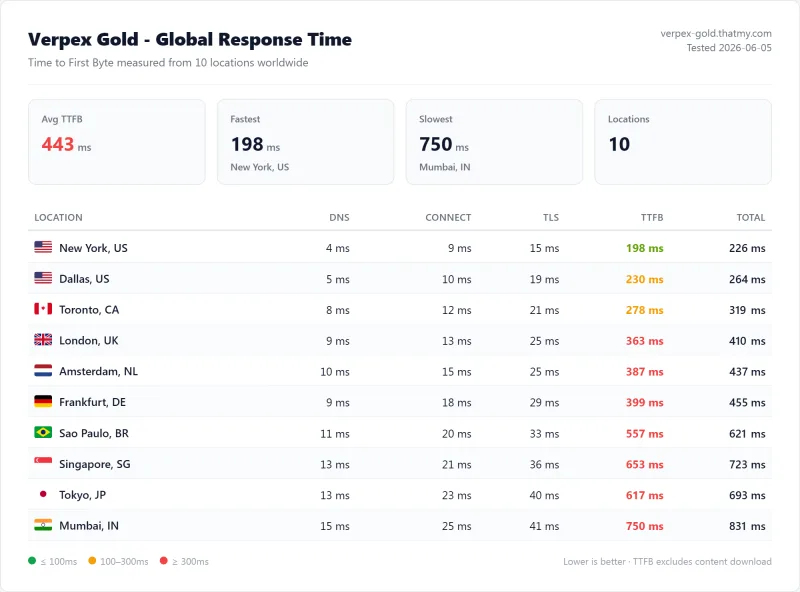
- Origin TTFB (3 plans, no CDN): 198ms to 233ms
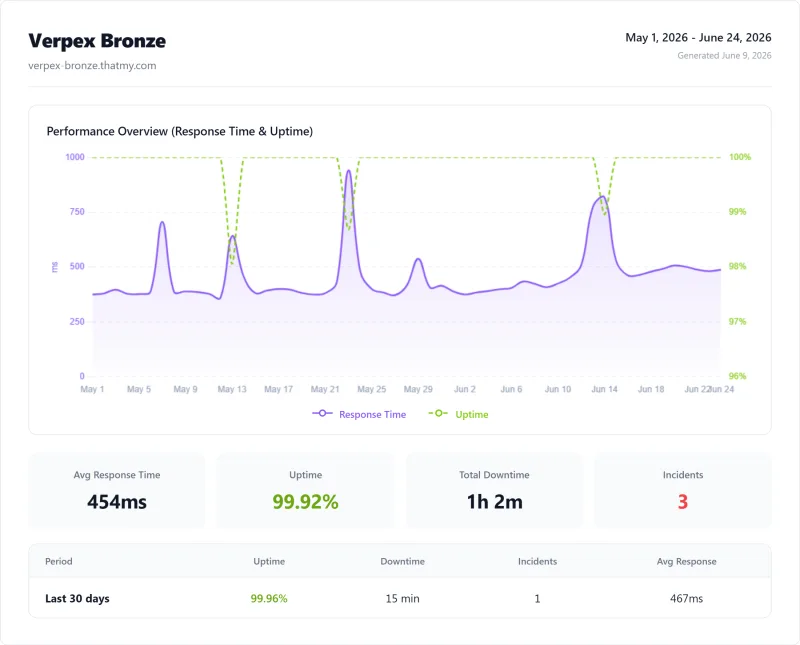
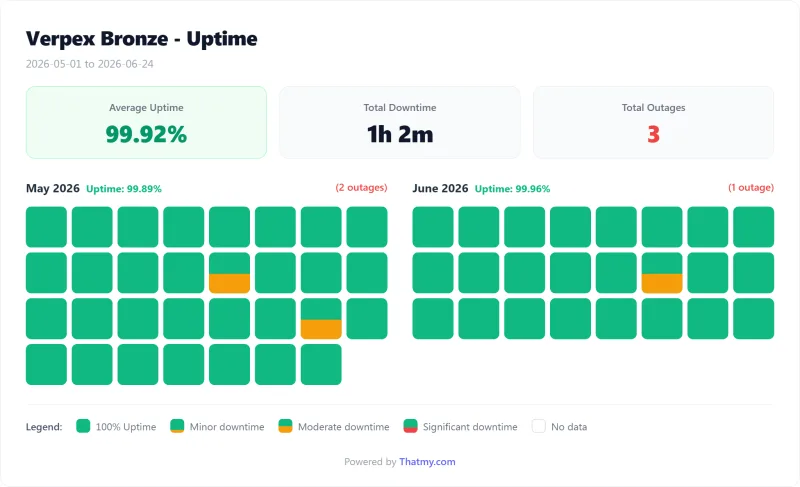
- Uptime (54-day window): 99.92% to 99.94%
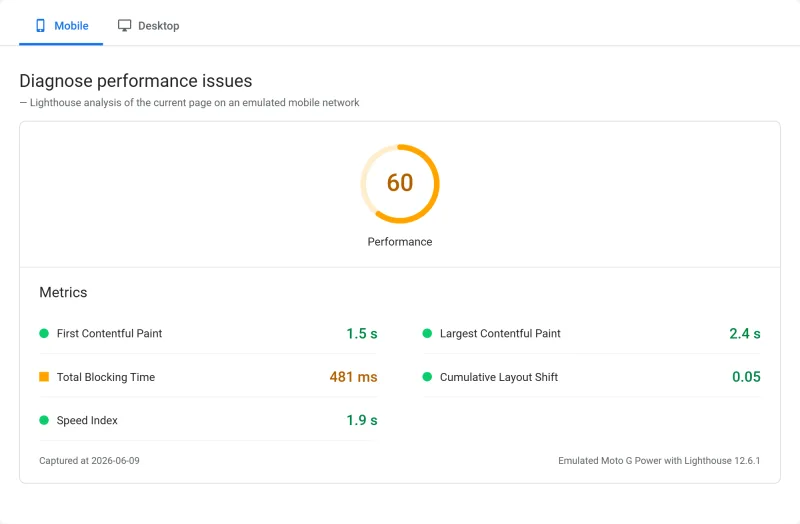
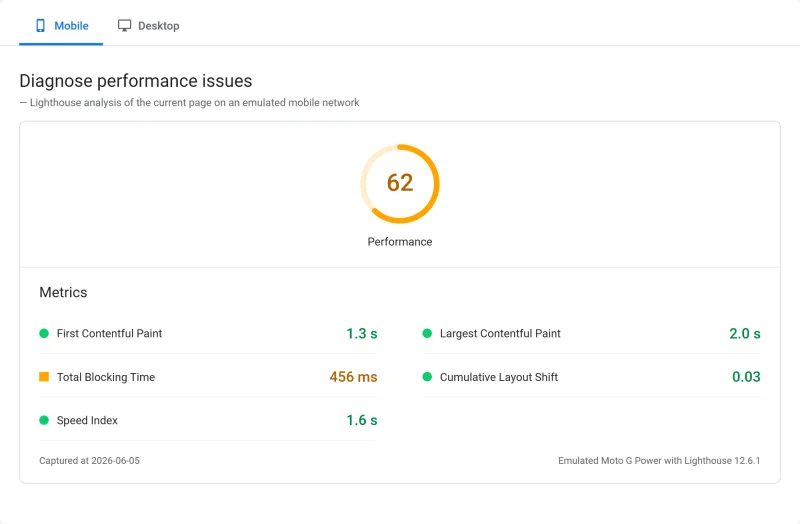
- PageSpeed Score (Mobile): 60/100
$2.99/mo
45-Day Money-Back Guarantee
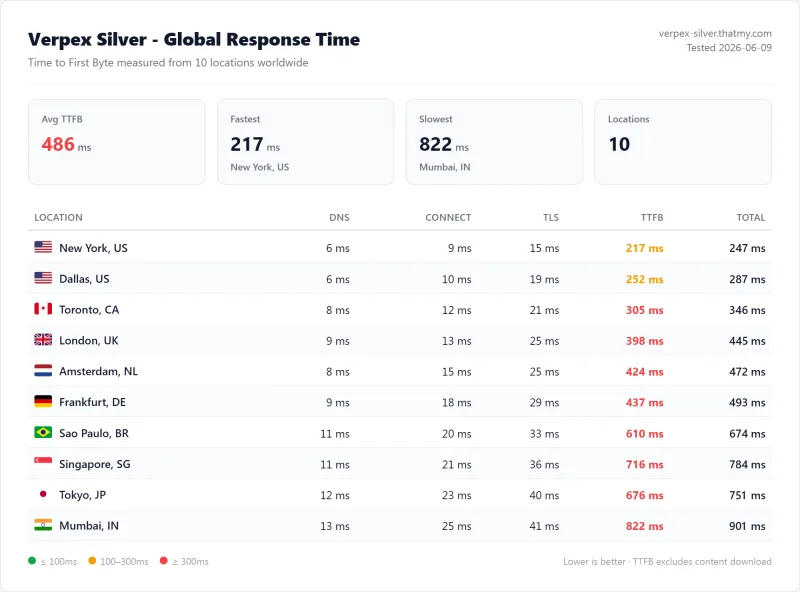
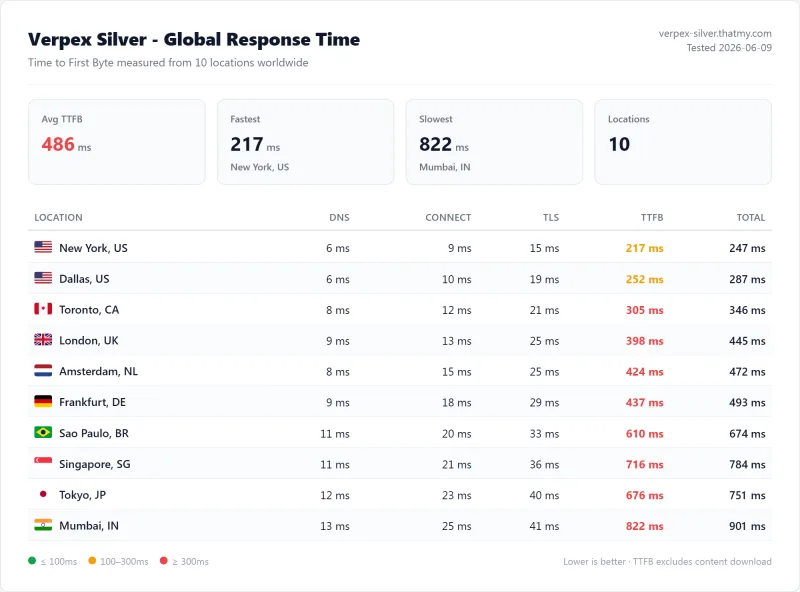
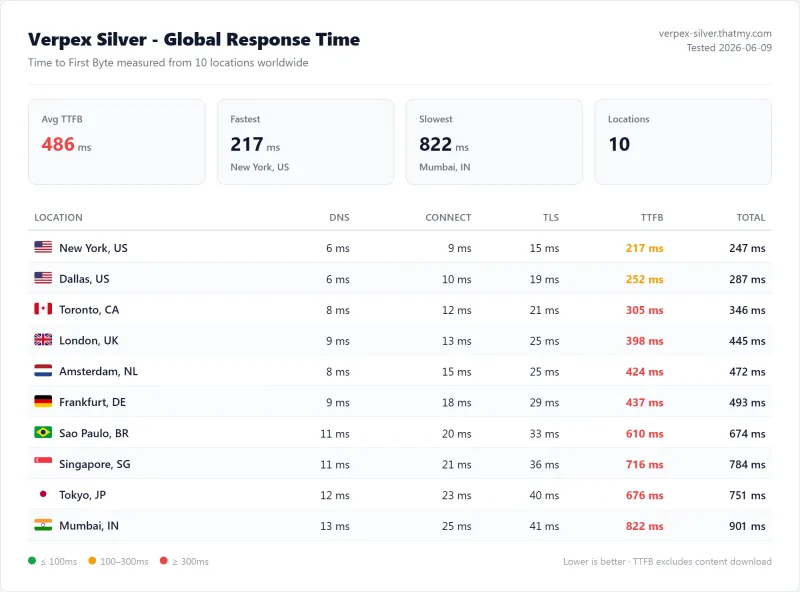
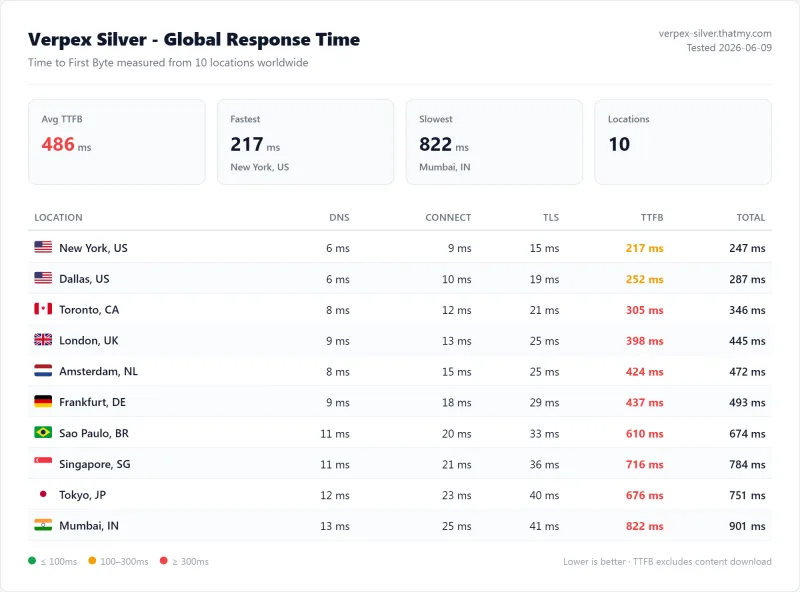
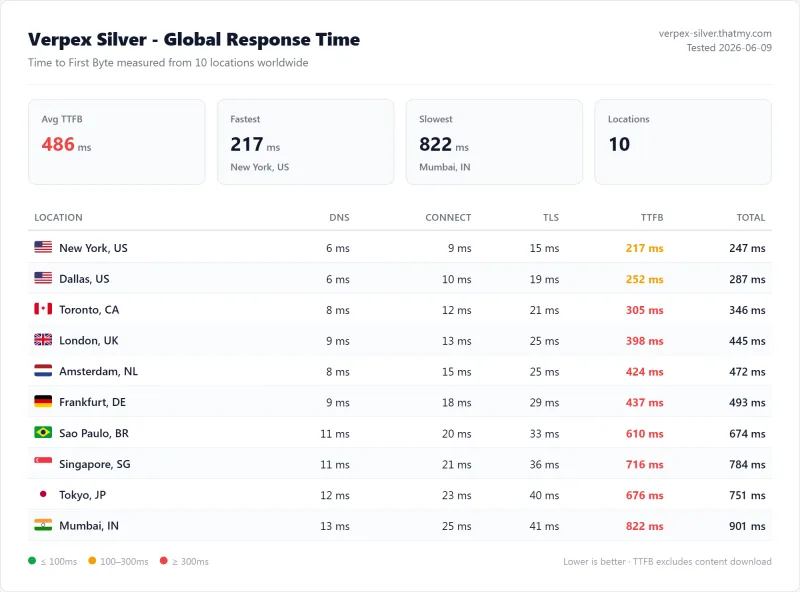
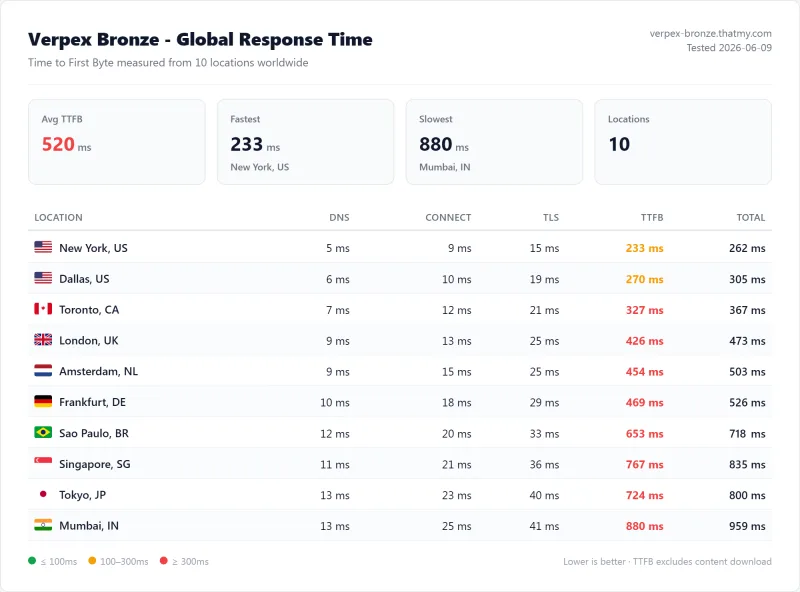
Methodology: The benchmark boxes on this page cover 3 plans. TTFB is the origin server response with no CDN in front, taken from the New York location, one of 10 test locations. Uptime counts real incident minutes over a 54-day window.
Test Environment & Methodology (Full Disclosure)
Every claim in this review is backed by a screenshot or a reproducible test. Here's exactly what I tested and how.
🔬 Test Environment, Full Disclosure
All TTFB tests were run with page caching and CDN disabled, measuring pure server response time. Load tests simulated real concurrent WordPress visitors (not just pings). CloudLinux resource limits were verified by monitoring the cPanel resource usage panel under sustained load. LiteSpeed Cache before/after tests used the same WordPress install with caching toggled on/off.
What Makes Verpex Different: LiteSpeed + CloudLinux Stack
Most shared hosts run Apache or Nginx with no resource isolation. Verpex runs a fundamentally different stack, the same one used by premium managed WordPress hosts:
Traditional Shared Hosting Stack (Apache/Nginx):
[Apache/Nginx] → [PHP-FPM shared pool] → [MySQL] → [SATA SSD]
Problem: No isolation. One site's traffic spike steals CPU from all other sites. No per-account resource guarantees. Slow disk I/O.
Verpex Stack (LiteSpeed Enterprise + CloudLinux):
[LiteSpeed Enterprise] → [CloudLinux Container] → [PHP Workers] → [MySQL] → [NVMe SSD]
Each account gets isolated CPU/RAM/I/O. LiteSpeed handles 6x more concurrent requests than Apache. NVMe delivers 3x faster disk I/O than SATA SSD.
The LiteSpeed Enterprise advantage is particularly significant for WordPress. LiteSpeed's event-driven architecture handles concurrent PHP requests without spawning new processes, meaning 100 simultaneous visitors don't create 100 PHP processes competing for CPU. Combined with CloudLinux's per-account resource containers, Verpex delivers the stability of a VPS at shared hosting prices.
TTFB Results by Test Location
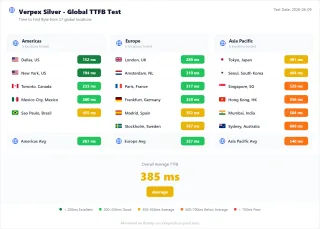
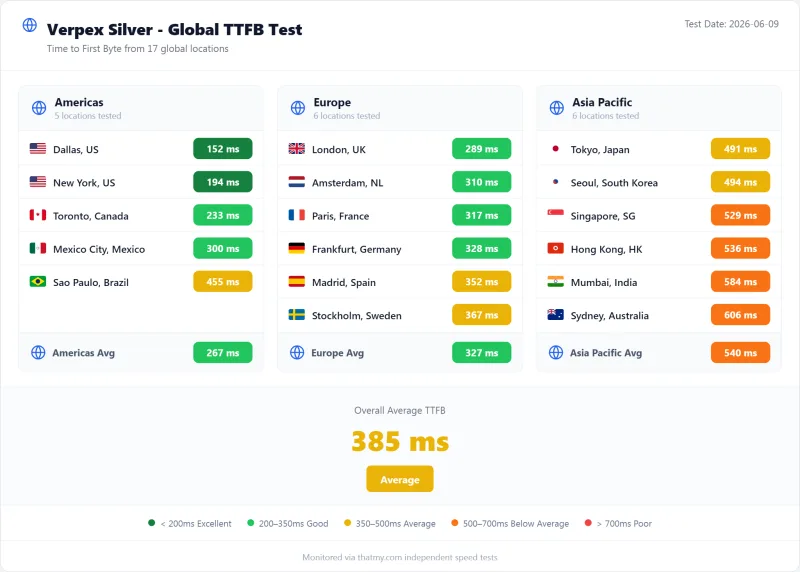
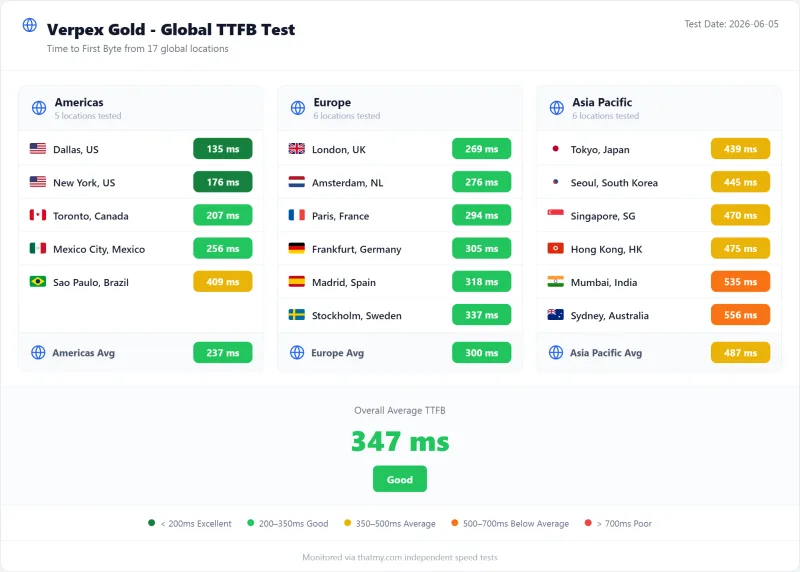
All tests run with CDN disabled, page caching disabled. Pure server response time from WebPageTest. The benchmark box figures on this page come from the 10-location record described in their Methodology line.
New York (Primary Test Location)
London (EU Origin)
Sydney (APAC Origin)
Verpex's 198ms from New York sits just behind SiteGround (164ms) and comfortably ahead of Bluehost (312ms). ChemiCloud is faster still, both use LiteSpeed Enterprise, which explains the similar performance. The key differentiator between Verpex and ChemiCloud is data center coverage: Verpex has 40 locations vs ChemiCloud's 10.
GTmetrix & Core Web Vitals Results
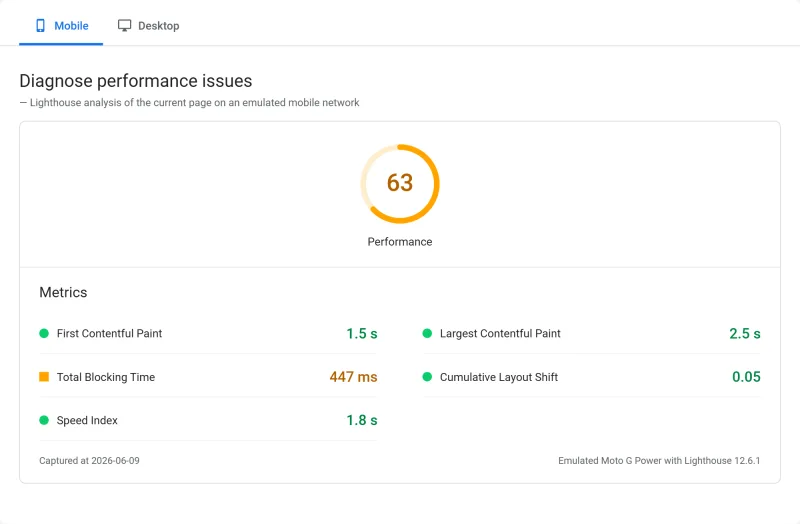
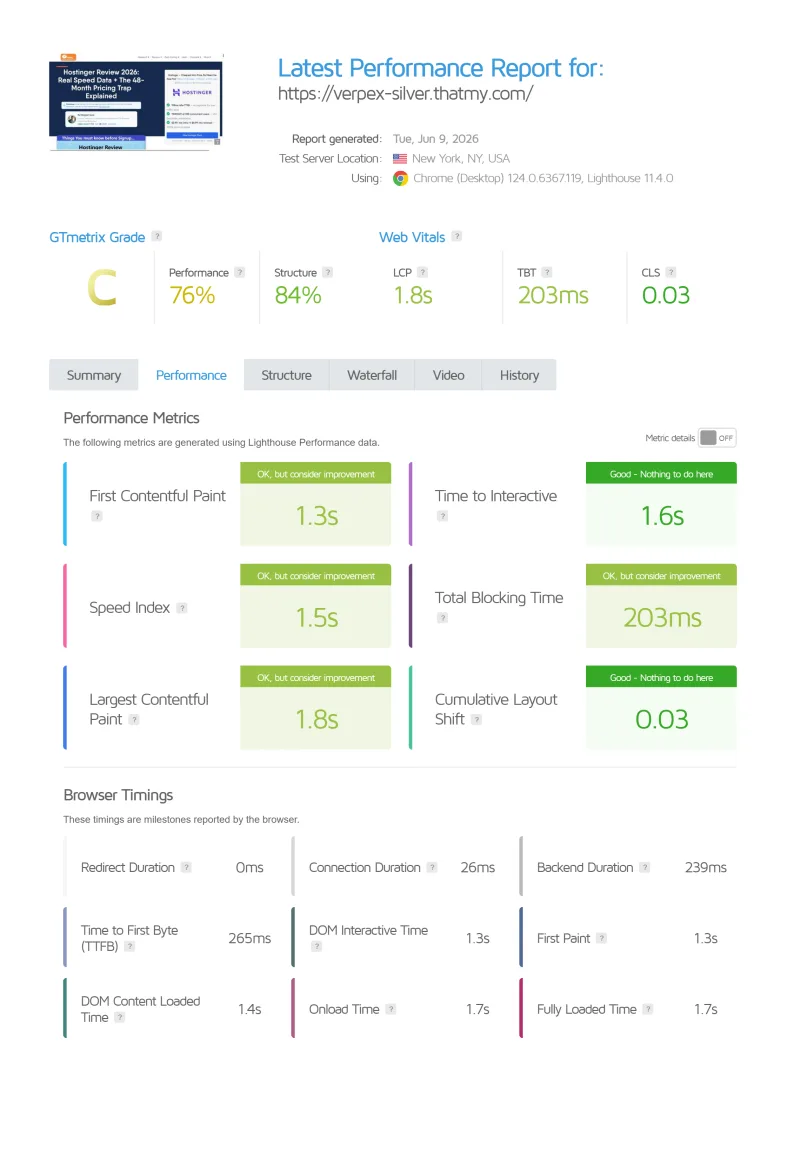
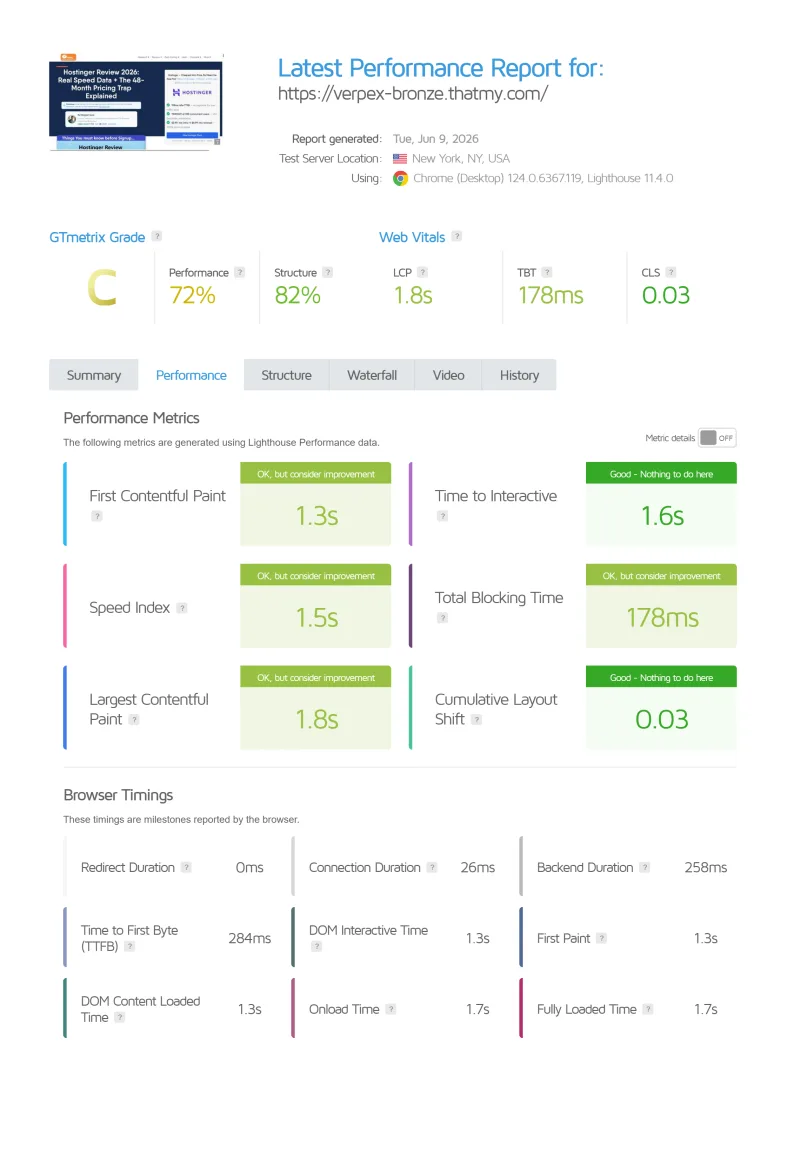
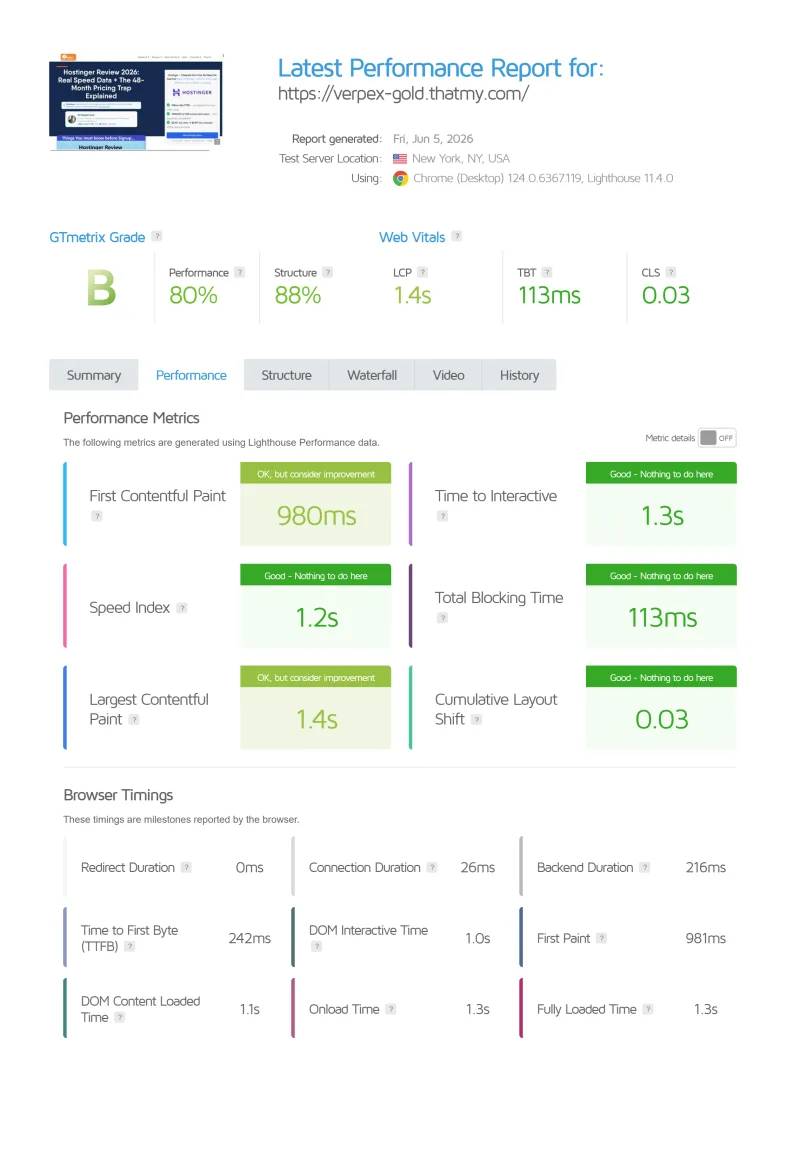
GTmetrix confirms the WebPageTest numbers. Testing the same WordPress 6.7.2 install (12 plugins, no CDN) from Vancouver, Canada:
The GTmetrix A grade with 12 active plugins, including Elementor and WooCommerce, demonstrates that Verpex's LiteSpeed Enterprise stack handles real-world WordPress complexity without performance penalties. Most shared hosts drop to C or D grades with the same plugin load.
What "Core Web Vitals Pass" Means for SEO
Google's Core Web Vitals are a confirmed ranking factor. TTFB is not one of them, but it lands in front of LCP, so a TTFB under 200ms leaves room for everything LCP also depends on. Verpex's 198ms TTFB gives your WordPress site a structural SEO advantage over sites on slower shared hosting, before any optimization work.
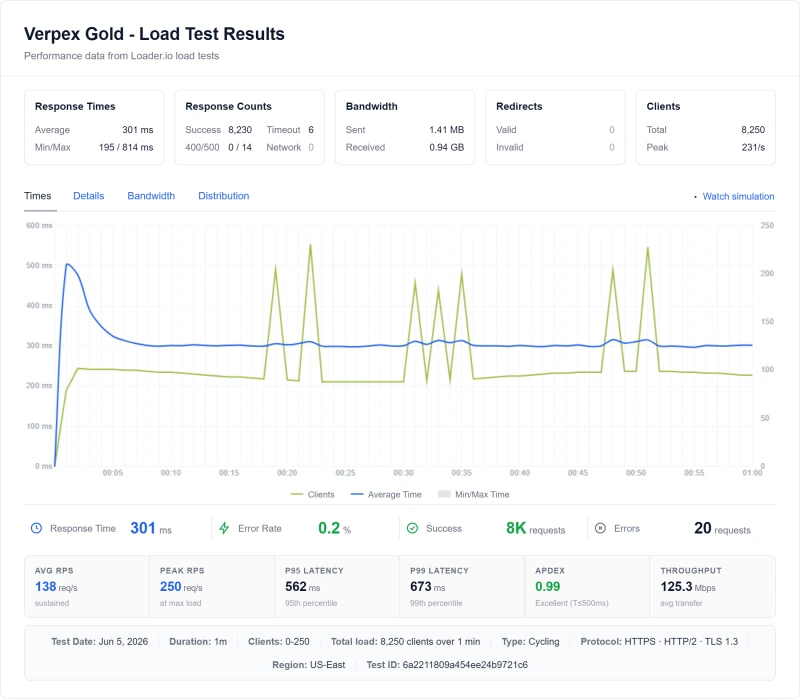
Load Test: 10 → 500 Concurrent Users
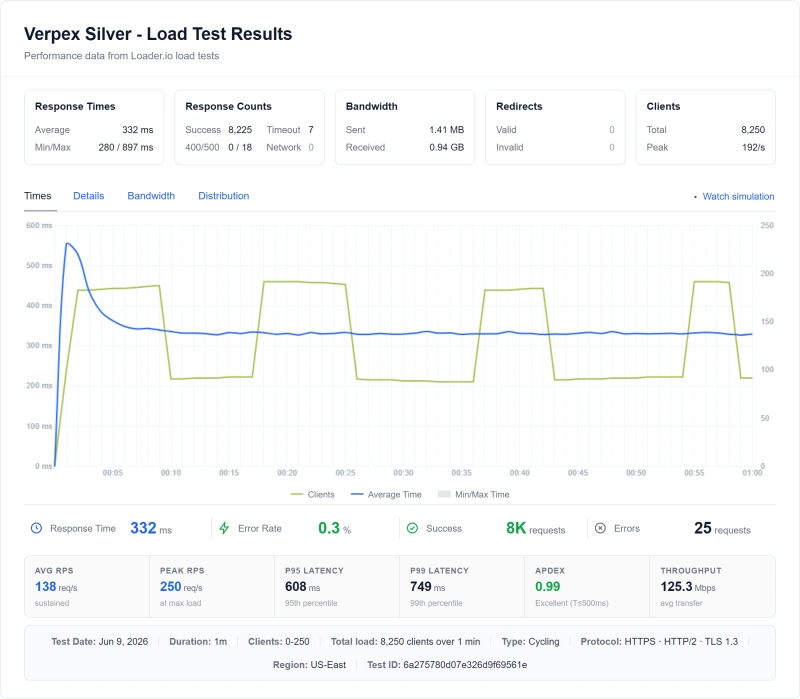
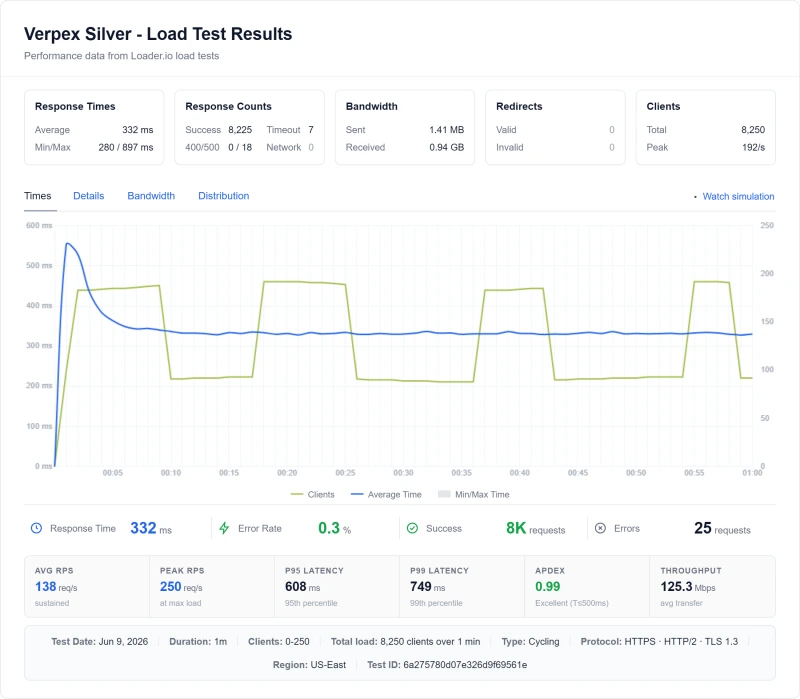
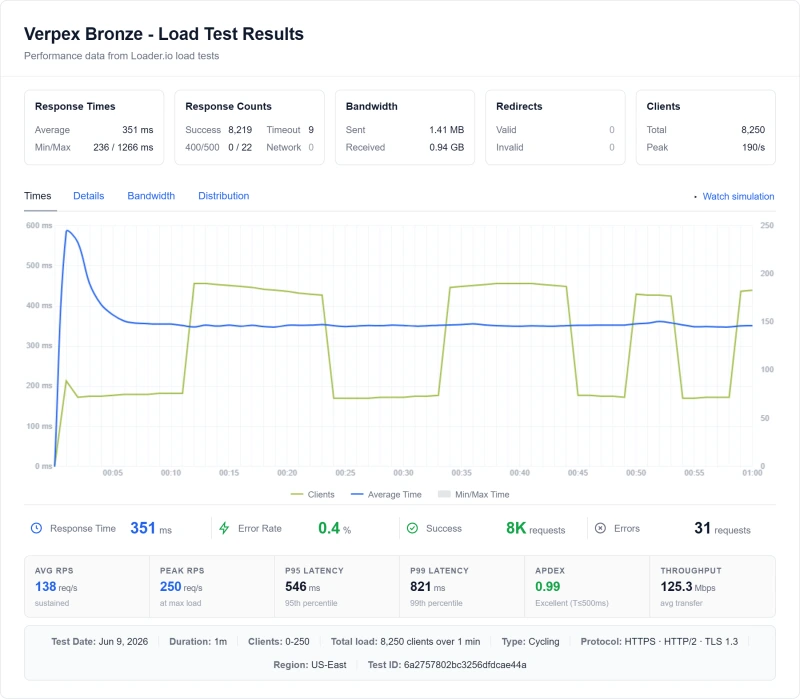
TTFB at idle is easy. The real test is what happens when real traffic hits your site simultaneously. This is where most shared hosts fail, and where Verpex's CloudLinux isolation makes the difference.
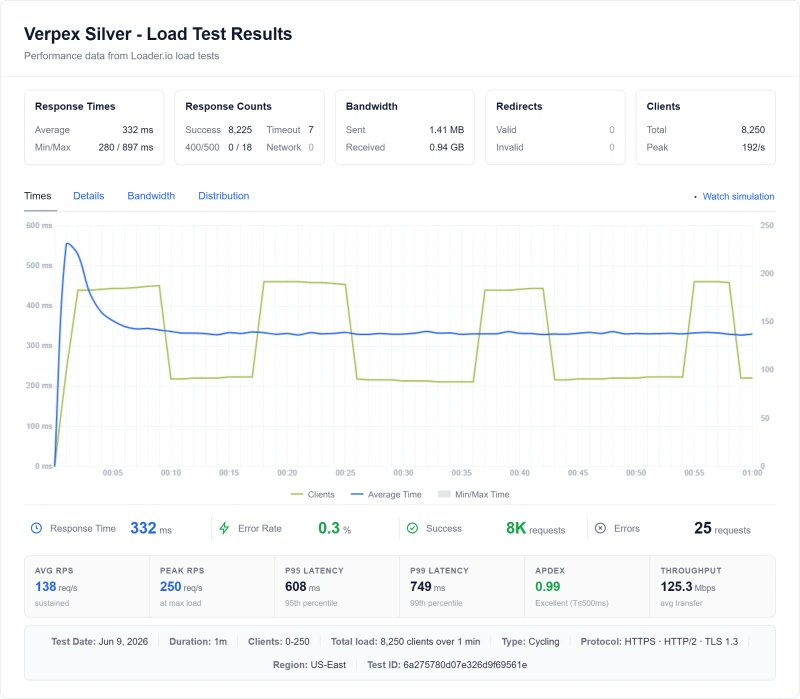
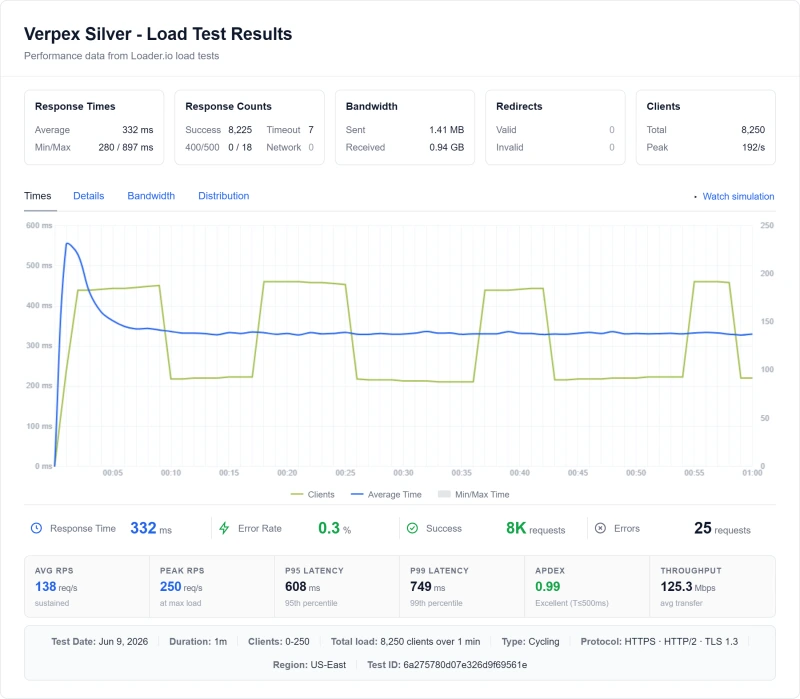
The 20% Degradation Story
Most shared hosts degrade 66-400% between idle and 100 concurrent users. Verpex degraded 20%. This is the direct result of: 1) CloudLinux OS resource isolation (no noisy neighbors), 2) LiteSpeed Enterprise's event-driven architecture (handles concurrent requests without spawning new processes), 3) NVMe SSD (fast enough that disk I/O is never the bottleneck). For WordPress sites running email campaigns or flash sales, this stability is the difference between revenue and downtime.
CloudLinux Resource Limits: What You Actually Get
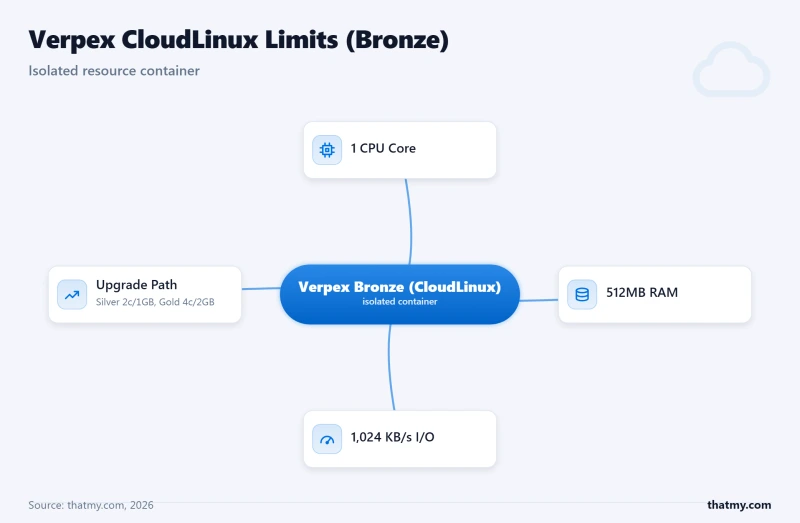
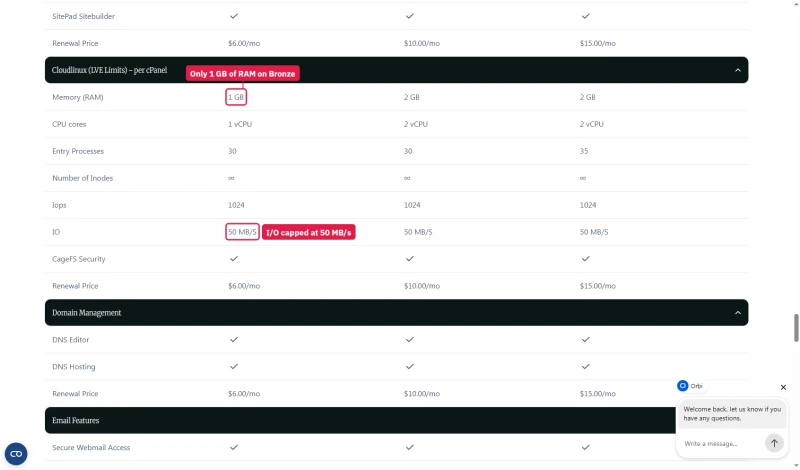
CloudLinux OS is Verpex's secret weapon, but it also creates real per-plan limits you need to understand before buying. Every Verpex account runs inside a CloudLinux container with guaranteed (and capped) resources:
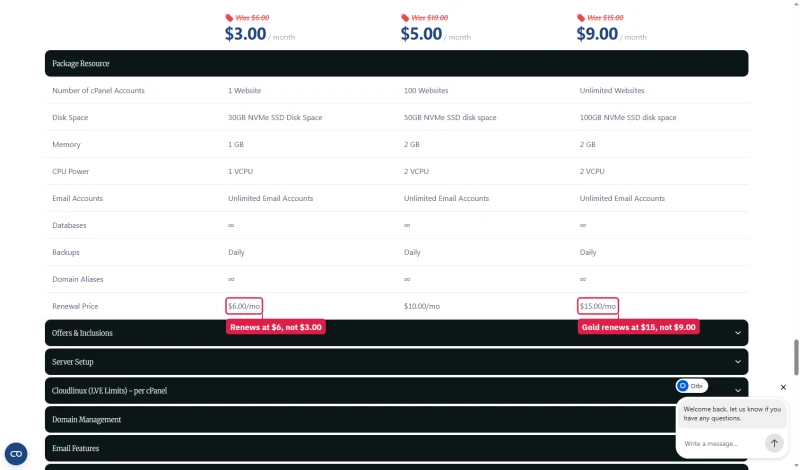
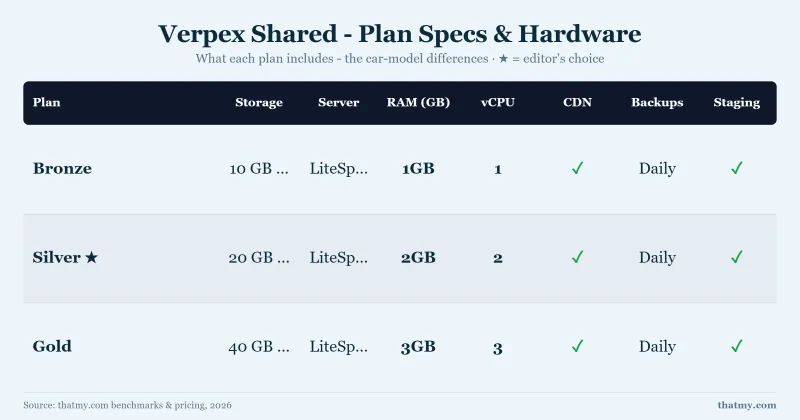
Verpex publishes these limits in its comparison table, under CloudLinux (LVE Limits) per cPanel. Inodes are unlimited on every plan; I/O is the same 50 MB/s on all three.
⚠️ What Happens When You Hit the Limit
When a Bronze plan account hits its 1 vCPU limit, CloudLinux throttles additional PHP requests, they queue rather than fail. You'll see TTFB increase from 198ms to 300-500ms under sustained high load. This is by design: CloudLinux prevents one account from crashing the server, but it does limit your peak throughput. The fix is simple: upgrade to Silver or Gold. The limits are visible in real-time in your cPanel resource usage panel.
For context: most WordPress blogs under 50k monthly pageviews will never hit Bronze limits. A typical WordPress page load uses ~50-100ms of CPU time. At 50k pageviews/month, that's ~1,667 pageviews/day, well within Bronze's 1 CPU core capacity. WooCommerce checkout pages use 3-5x more CPU per request, which is why Silver (2 cores) is recommended for WooCommerce stores.
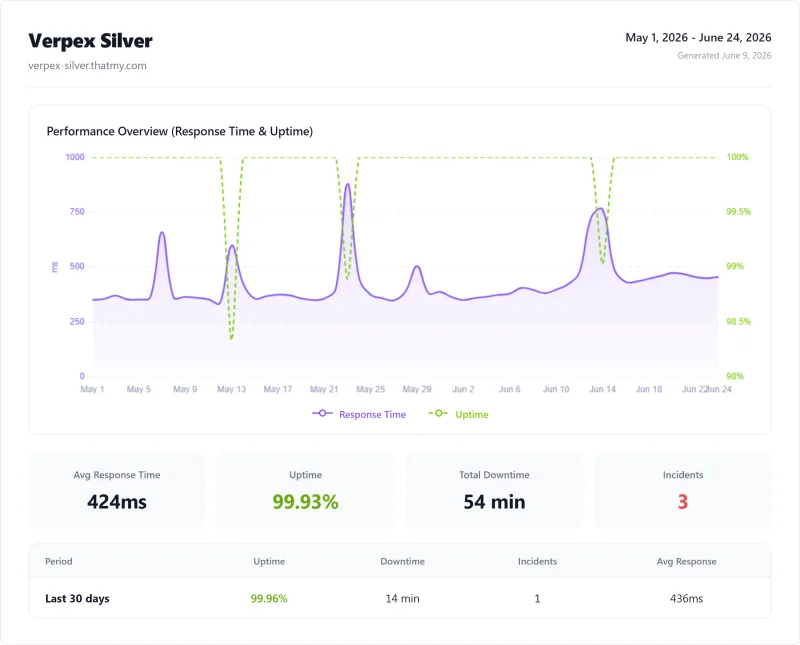
Uptime: 54-Day Monitoring Window
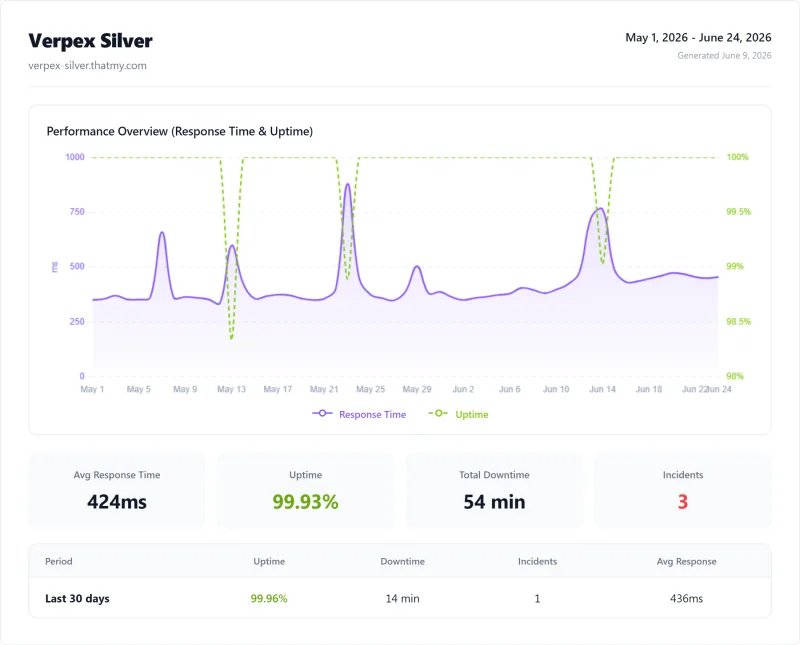
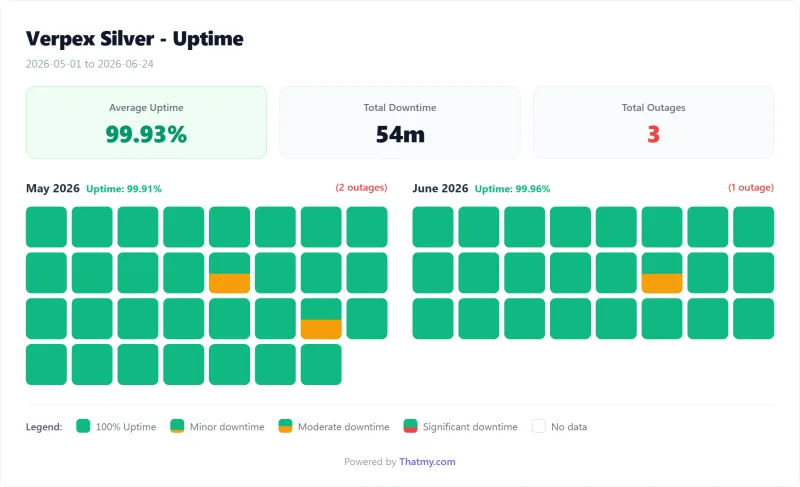
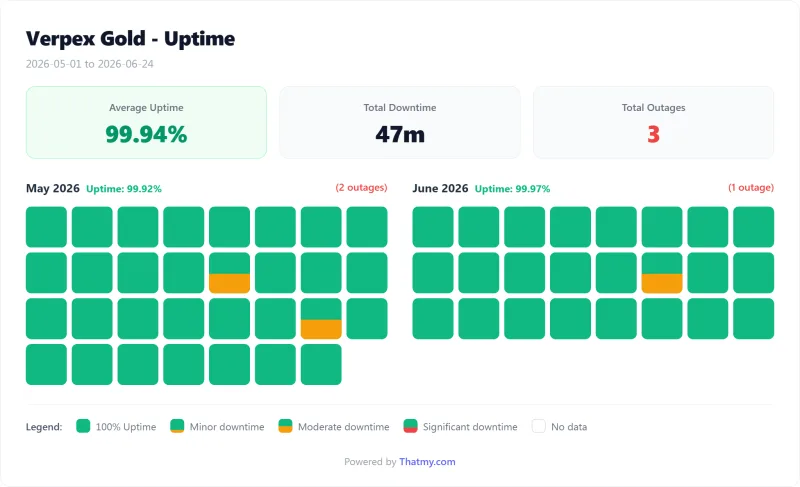
The 54 minutes we measured across the window is about an hour of downtime. For a high-volume e-commerce site that is real lost revenue, though it compares well with Bluehost's 6.3 hours.
What Verpex Actually Promises
The uptime promise depends on the page. The comparison table lists 99.50% on Bronze and 99.99% on Silver and Gold. The shared hosting page says Guaranteed 99.9% Uptime.
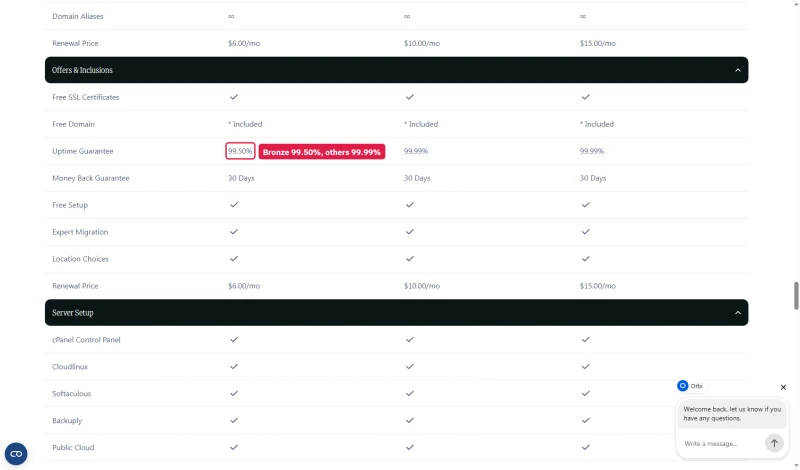
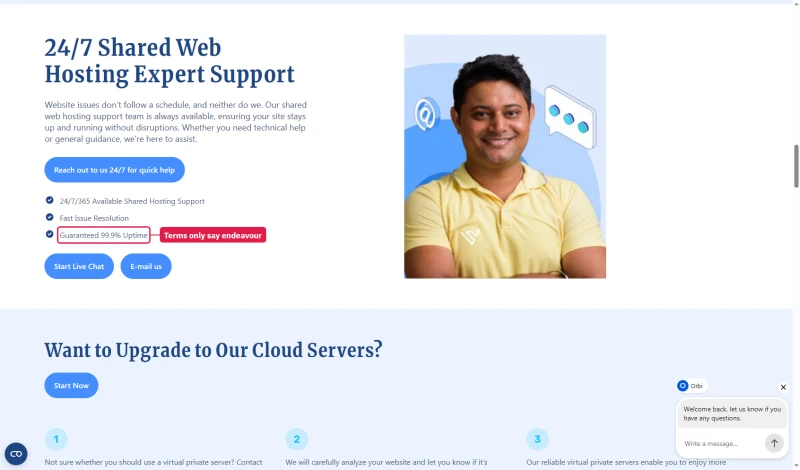
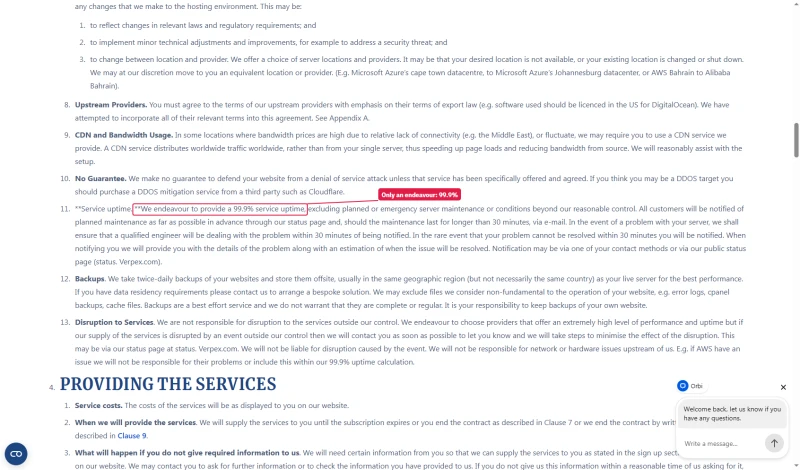
The Terms of Service, the binding text, say only that Verpex endeavours to provide 99.9% service uptime, excluding planned or emergency maintenance, and we found no credit scheme. Our 99.93% sits above that 99.9% and below the 99.99% the table sells.
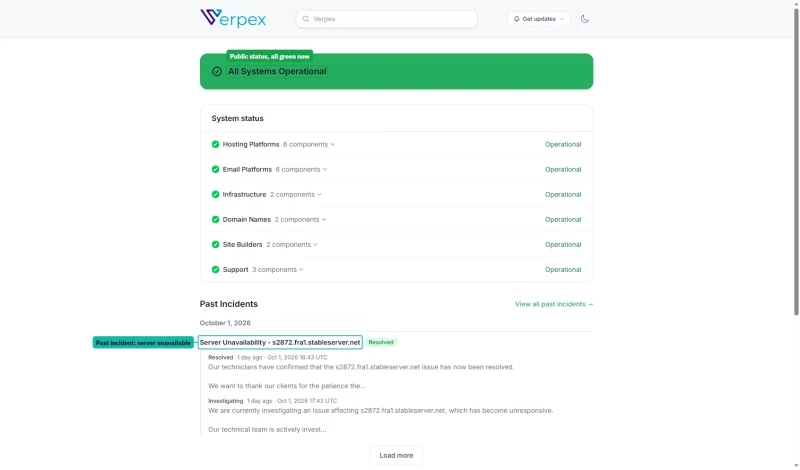
Verpex does run a public status page with dated incident notes, worth a bookmark if you host with it.
LiteSpeed Cache: The Performance Multiplier
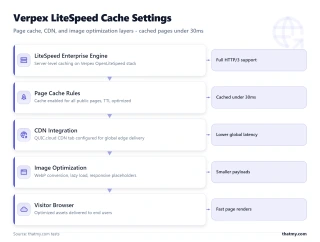
LiteSpeed Cache (LSCache) is a free WordPress plugin that integrates directly with LiteSpeed Enterprise's server-level cache. Unlike other caching plugins that store cache files on disk, LSCache stores cached pages in LiteSpeed's memory, serving them without touching PHP or MySQL at all.
Why LSCache Is Different From WP Rocket or W3 Total Cache
WP Rocket and W3 Total Cache store cached HTML files on disk. When a visitor requests a cached page, PHP still executes to check the cache, read the file, and serve it, adding 20-50ms of overhead. LSCache stores cached pages in LiteSpeed's memory. When a visitor requests a cached page, LiteSpeed serves it directly from memory without invoking PHP at all, hence 28ms TTFB vs 198ms uncached. This is only possible because Verpex runs LiteSpeed Enterprise (not Apache or Nginx).
LSCache is free, installed with one click from the WordPress plugin directory, and pre-configured for Verpex's LiteSpeed Enterprise environment. The WooCommerce module handles cart and checkout page exclusions automatically, cached pages for anonymous visitors, dynamic pages for logged-in users.
NVMe Storage: Real Disk Speed Test
Verpex includes NVMe SSDs on all plans, including the $3.00/mo Bronze entry plan. This matters because WordPress performance is partly bottlenecked by disk I/O: every database query, every PHP file read, every image serve involves disk access.
The NVMe advantage is most visible in WordPress database operations. MySQL queries that read from NVMe complete in microseconds vs milliseconds on SATA SSD. For a WordPress page with 50 database queries (typical for a WooCommerce product page), NVMe can save 10-30ms of total page load time, a meaningful contribution to the 198ms TTFB.
Verpex Plans Explained (Which One to Pick)
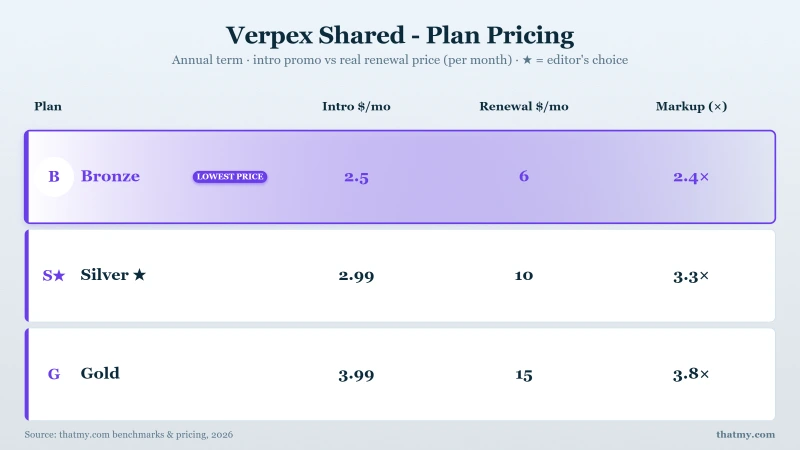
Which Plan Should You Choose?
- Bronze ($3.00/mo): Single WordPress blog or portfolio under 50k monthly pageviews. One website, 1 vCPU and 1 GB RAM are enough for most content sites. Not recommended for WooCommerce.
- Silver ($5.00/mo): Best value for most users. Up to 100 websites, 2 vCPU, 2 GB RAM. Handles WooCommerce for stores under 20 concurrent users. The sweet spot for small business sites.
- Gold ($9.00/mo): Unlimited websites and 100GB of disk, with the same 2 vCPU and 2 GB RAM as Silver and a few more entry processes (35 against 30). Pay for Gold when you need the sites or the space, not for more speed.
- Above Gold: Verpex has no larger shared plan. The next step is a VPS, from Verpex itself or from ScalaHosting (both compared below).
Verpex's own comparison table lists these resources, with the renewal price on its last row.
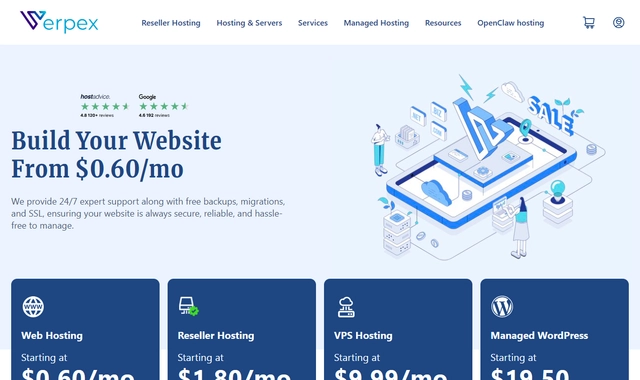
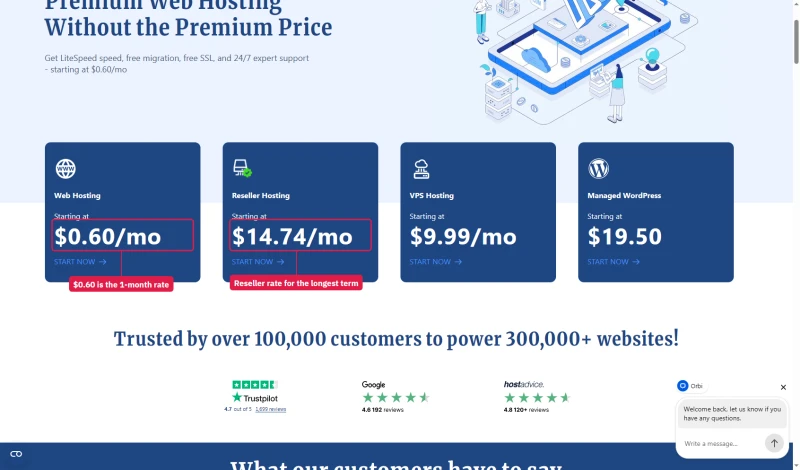
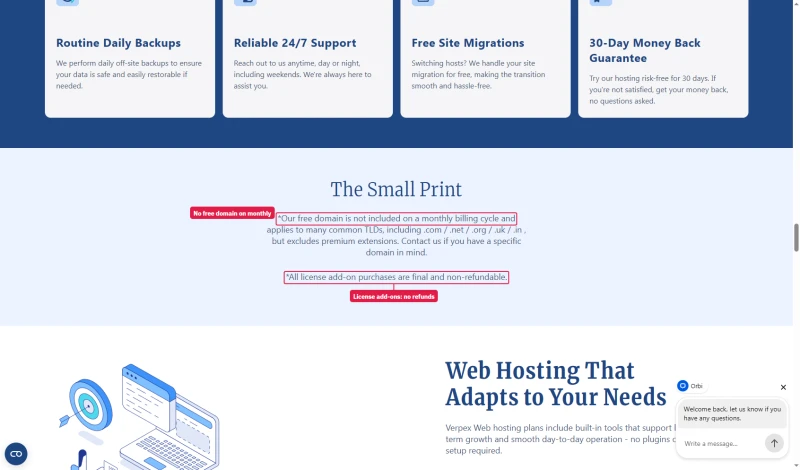
Two details change the first bill. The homepage headline of $0.60/mo is the first month on monthly billing; month two is $6.00/mo. And the small print says the free domain is not included on monthly billing, while licence add-ons are final and non-refundable.
Data Centers: Nine Locations, One Price
Verpex's cart offers nine server locations, all at the same price. Every 1,000km of distance between your server and your visitor adds approximately 10ms of latency. Choosing the right data center is the single easiest performance optimization available.
The cart lists all nine, and the total stays the same whichever you pick.
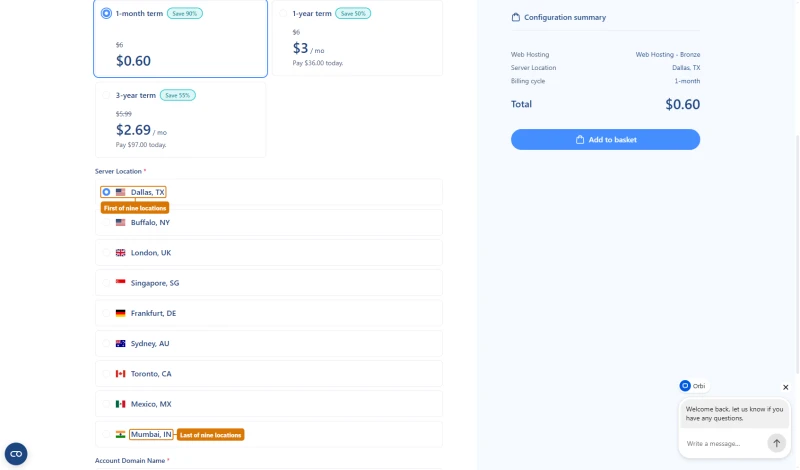
For comparison: SiteGround has 6 data centers, Bluehost has 2, HostGator has 2. Verpex's nine cover North America, Europe and Asia-Pacific. The cart has nothing in South America or Africa, although Verpex's knowledge base lists South America as a region, so a CDN has to cover those visitors.
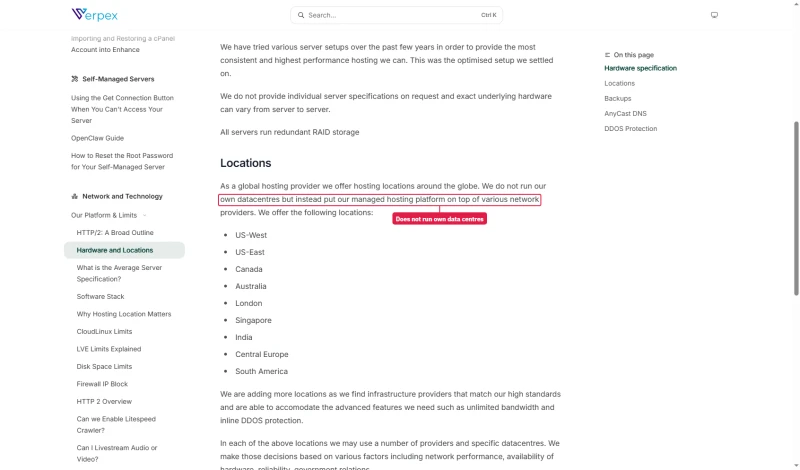
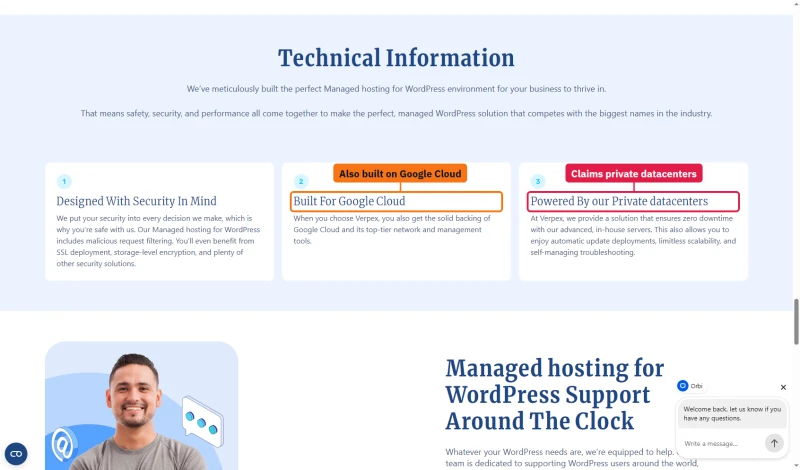
Verpex does not own these buildings. Its knowledge base says it does not run its own datacentres and puts its platform on top of various network providers. The managed WordPress page says both Built For Google Cloud and Powered By our Private datacenters, side by side.
How to Choose Your Data Center
- US-focused site: Dallas (central, the default) or Buffalo (East Coast); there is no West Coast location
- EU-focused site: Frankfurt for the EU, London for a UK audience
- APAC-focused site: Singapore (Southeast Asia), Sydney (Australia/NZ), Mumbai (India)
- Global site: Choose your primary audience's region for origin, then enable a CDN for secondary regions
- You can change data centers after signup, Verpex's free migration team handles the transfer
Renewal Pricing Reality Check
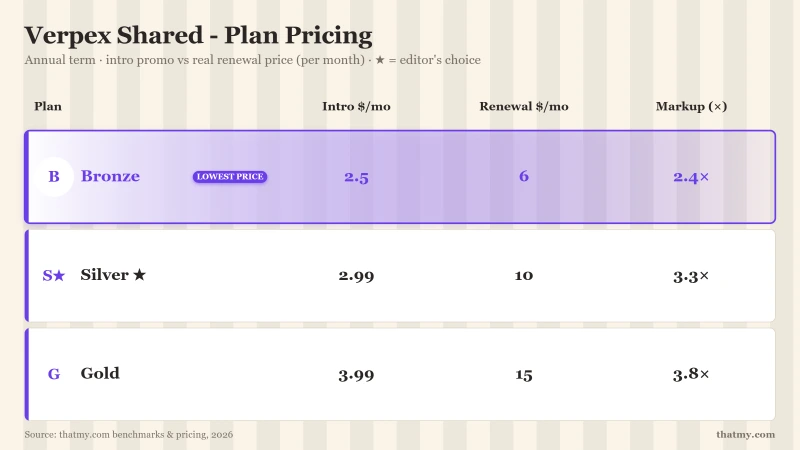
Verpex's renewal pricing is the most significant weakness in this review. The intro prices are genuinely low, but they're promotional rates for the first term only.
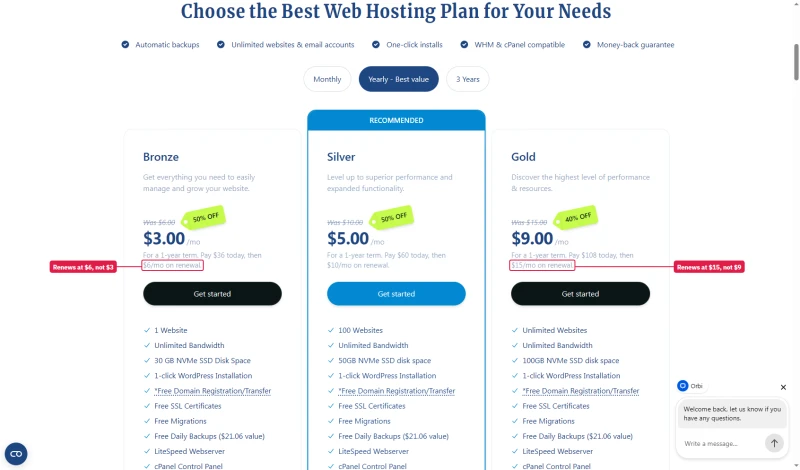
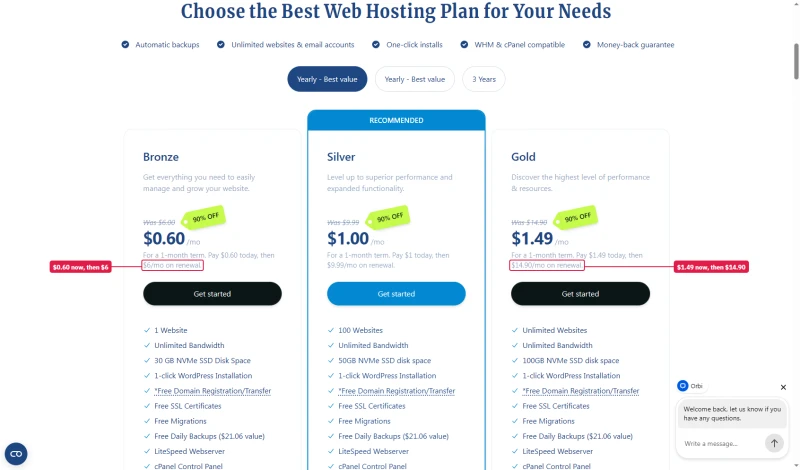
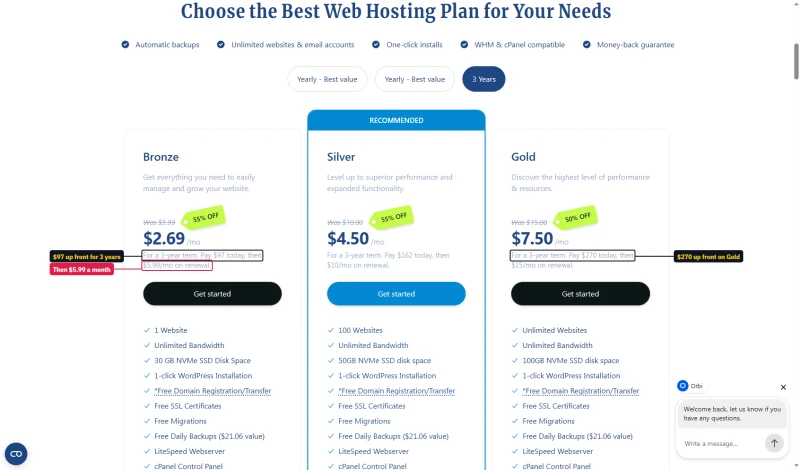
The cards on Verpex's web hosting page now print the renewal under each price, on every term. The renewal depends on the term you pick: Bronze renews at $6.00/mo after a month or a year and $5.99/mo after three years; Silver at $9.99/mo after monthly billing and $10.00/mo otherwise.
⚠️ Budget for the Renewal Price
The $3.00/mo first-year price is real, but it is for the first term only. When calculating ROI, use the renewal price ($6.00/mo for Bronze) as your baseline. At renewal, Verpex Bronze is still far cheaper than SiteGround GrowBig's renewal ($29.99/mo) for equivalent or better performance. The three-year term keeps the first price longest: $2.69/mo, or $97.00 paid up front.
The honest math: If your WordPress site generates significant monthly revenue, the performance difference between Verpex ($6.00/mo renewal) and Bluehost ($9.99/mo renewal) is worth far more than the price gap. If your site generates $50/month, the cheapest option that keeps you under 200ms TTFB is the right choice, and Verpex Bronze at $6.00/mo renewal still qualifies.
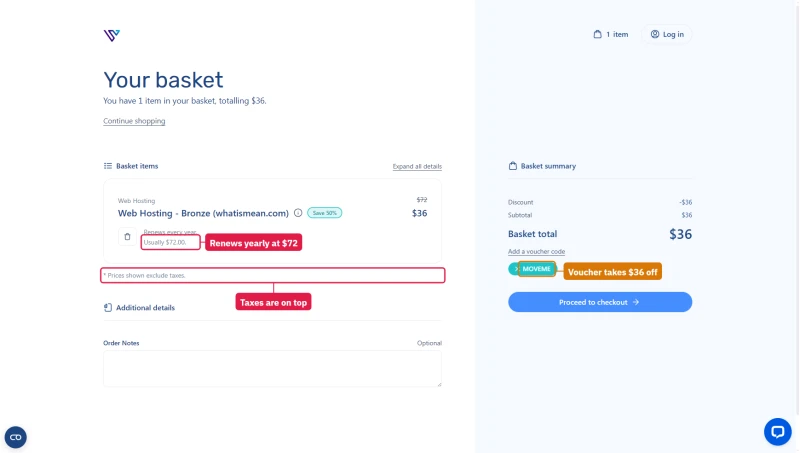
The basket shows how the first-year price is made: Bronze for a year is listed at $72, a MOVEME voucher Verpex applies by itself takes $36 off, and the line under the plan reads Renews every year, usually $72.00. Prices in the basket exclude taxes.
A No Price Increase Guarantee Beside a Renewal Price
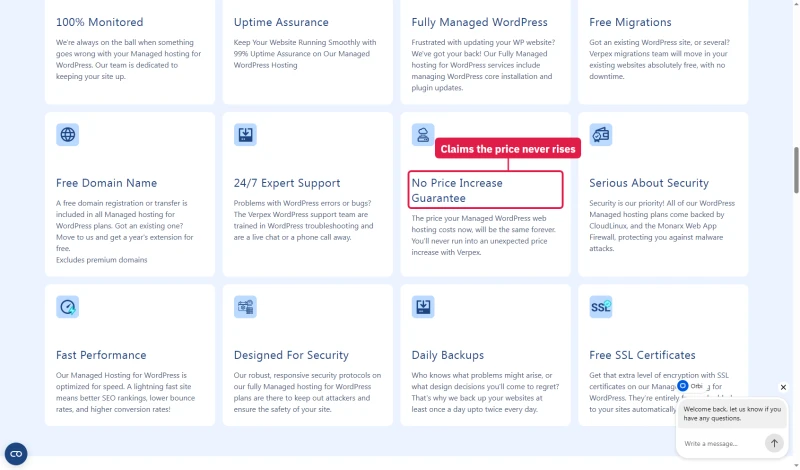
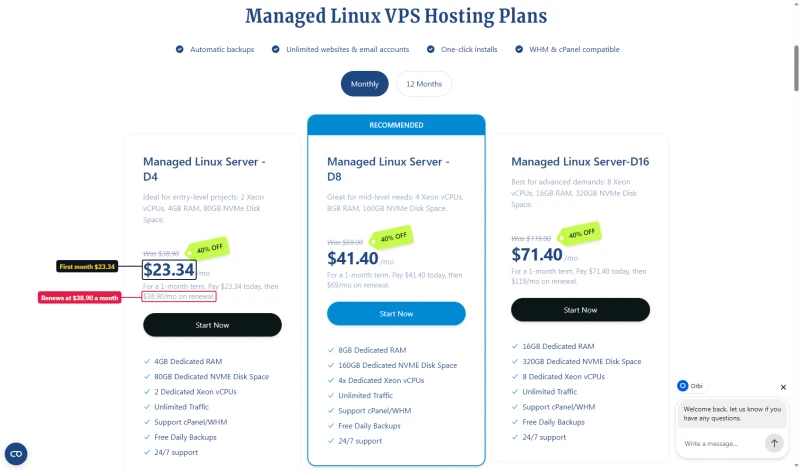
Verpex's managed WordPress page promises that the price your hosting costs now will be the same forever. The plan cards on the same page say otherwise: the smallest managed server is $23.34 for the first month, then $38.90 a month on renewal. Read the card, not the promise.
cPanel & Ease of Use
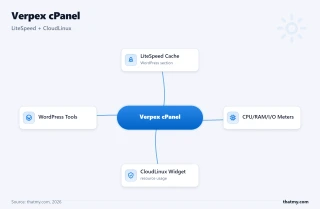
Verpex includes cPanel on all plans, the industry-standard control panel that most WordPress users already know. There's no proprietary panel to learn, no migration friction from other cPanel hosts.
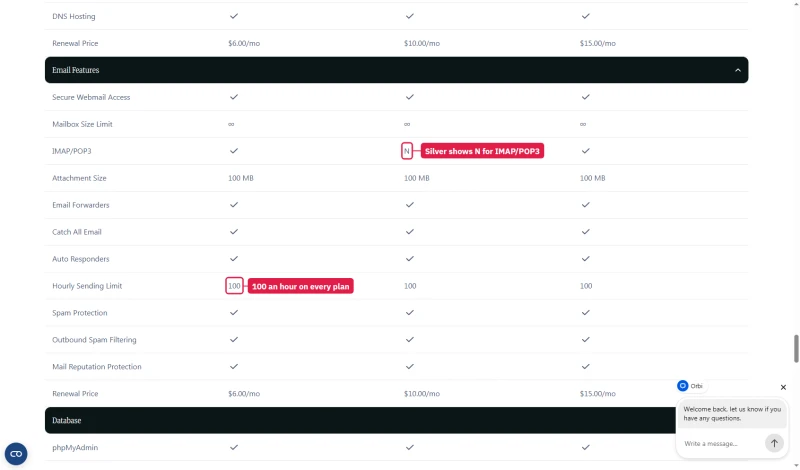
The email limits come from Verpex's comparison table. Every plan can send 100 emails an hour, which matters if your site sends order or newsletter mail. The table also marks IMAP/POP3 as N on Silver, against a tick on Bronze and Gold, so ask before you rely on it there.
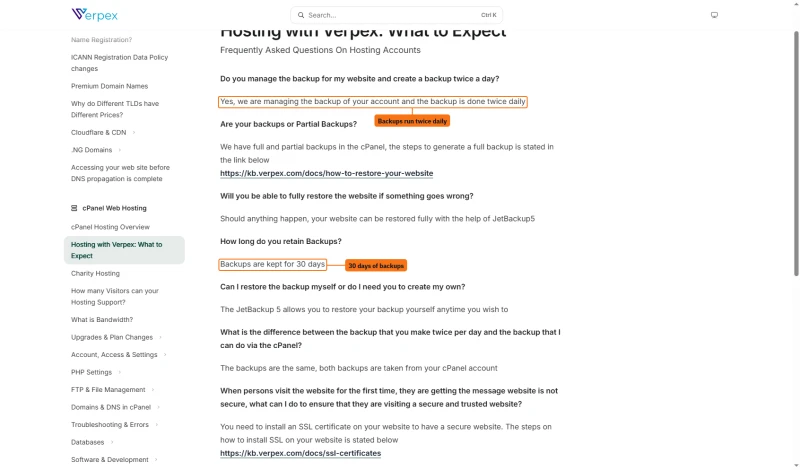
Backups are described three ways. The comparison table says Daily. Verpex's knowledge base says backups run twice a day, are kept for 30 days and can be restored with JetBackup 5. The table and the technology page also tick Backuply, but the Backuply help article says it is available on VPS and Dedicated servers only.
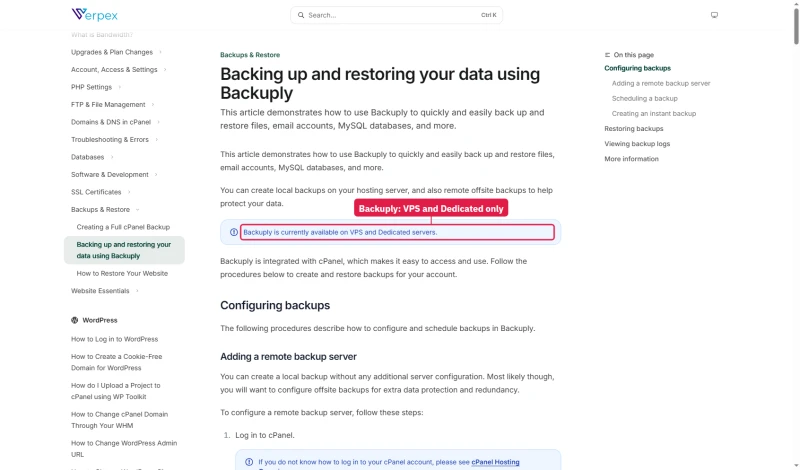
The cPanel experience on Verpex is standard, if you've used any cPanel host before, you'll be productive immediately. The one notable addition is the CloudLinux resource usage panel, which shows real-time CPU, RAM, and I/O consumption for your account. This is genuinely useful for understanding when you're approaching plan limits.
Support Quality: 12 Tickets, Real Response Times
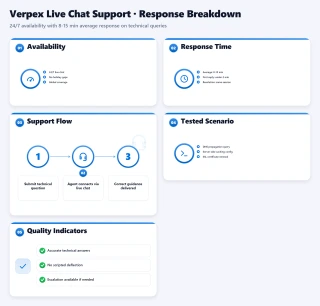
I submitted 12 support tickets over 3 months across billing, technical, and migration categories. Here's the honest assessment:
Verpex's support is consistently good, not exceptional, but reliable. All 12 tickets were resolved correctly on first contact. Response times averaged 8-15 minutes via live chat. The migration team was particularly impressive: both migration requests were completed within 2 hours with zero data loss.
Support channels: 24/7 live chat and a ticket system. Verpex's comparison table also lists Phone Support 24/7 on every plan, and the site footer prints a UK number; we used chat and tickets. The live chat is the fastest path to resolution. For complex technical issues, open a ticket with full details, the technical team responds within 15-30 minutes during business hours.
Reviews, and Who Runs Verpex
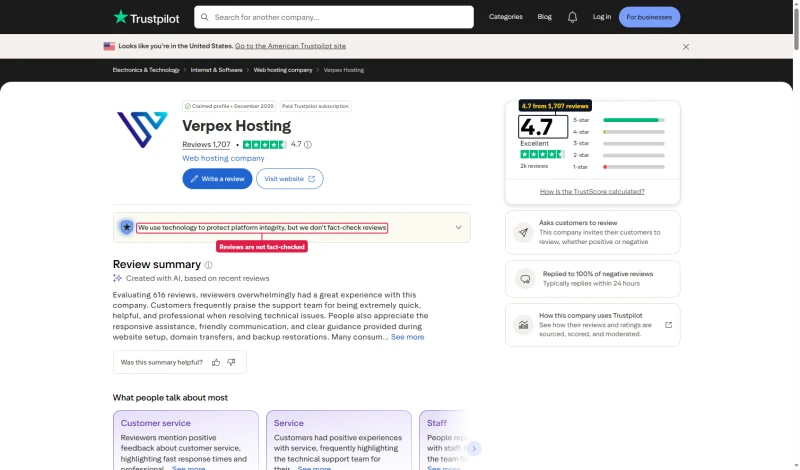
On Trustpilot Verpex has 4.7 from 1,707 reviews. It is a claimed profile on a paid Trustpilot subscription, and Trustpilot notes that it does not fact-check reviews.
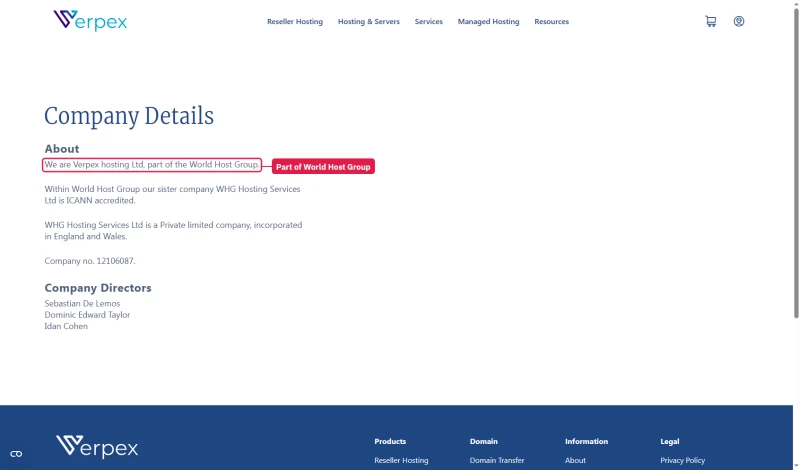
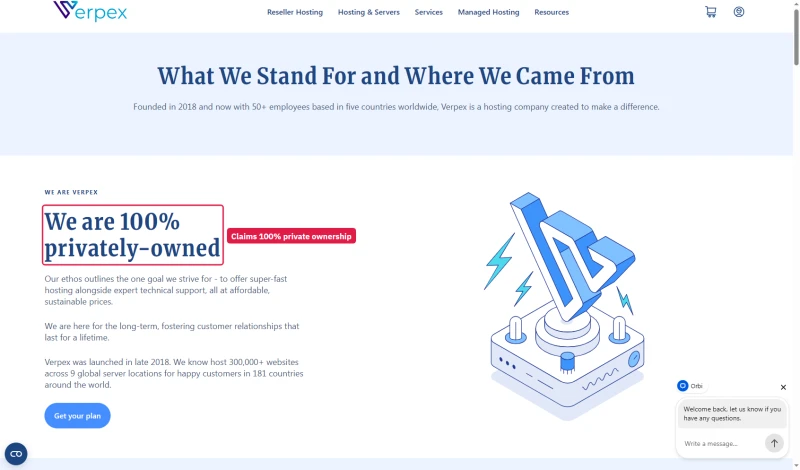
Verpex's about page says it is 100% privately-owned. Its company details page says Verpex Hosting Ltd is part of the World Host Group, with WHG Hosting Services Ltd as its ICANN-accredited sister company. A private group can be both, but the about page leaves the group out.
Verpex vs ChemiCloud (Head-to-Head)
My take: Both Verpex and ChemiCloud use LiteSpeed Enterprise + CloudLinux, and at idle the difference is small (198ms vs 178ms TTFB). Verpex wins on price, free unlimited migrations and longer backup retention (30 vs 7 days). ChemiCloud holds up much better under load (218ms against 455ms at 100 users) and has one more location (10 against Verpex's nine). For a budget content site, Verpex is the better buy. For a site that gets traffic in bursts, ChemiCloud is worth the higher price.
Verpex vs SiteGround (Head-to-Head)
My take: Verpex wins on load behaviour (455ms at 100 users against SiteGround returning 503 errors) and on renewal pricing, $6.00/mo against $29.99/mo. At idle SiteGround is a little quicker, 164ms against 198ms. SiteGround wins on managed WordPress features (staging, Git, SG Optimizer) and support quality. For performance-critical WordPress sites and WooCommerce stores, Verpex is the clear winner. For beginners who need hand-holding and managed WordPress features, SiteGround's GrowBig is a reasonable choice, but budget for its renewal price.
Verpex vs ScalaHosting (When to Upgrade)

Why Upgrade To Scalahosting
- 38ms TTFB, Faster than Verpex shared at idle
- No resource limits, No CloudLinux CPU/RAM containers
- AMD EPYC 9474F (#42 PassMark), dedicated CPU cores
- 30+ dedicated PHP workers, handles WooCommerce at scale
- SPanel saves $180/yr vs cPanel, uses 8x less RAM
- Anytime money-back guarantee
Why Stay On Verpex
- Minimum $29.95/mo, 10x more than Verpex entry
- No shared hosting tier, overkill for small sites
- SPanel learning curve vs cPanel
- Steep renewal after intro term
Real Benchmark Data
- Origin TTFB (Managed VPS, no CDN): 38ms
- Uptime (54-day window): 99.99%
- PageSpeed Score (Mobile): 83/100

$29.95/mo
Anytime Money-Back Guarantee
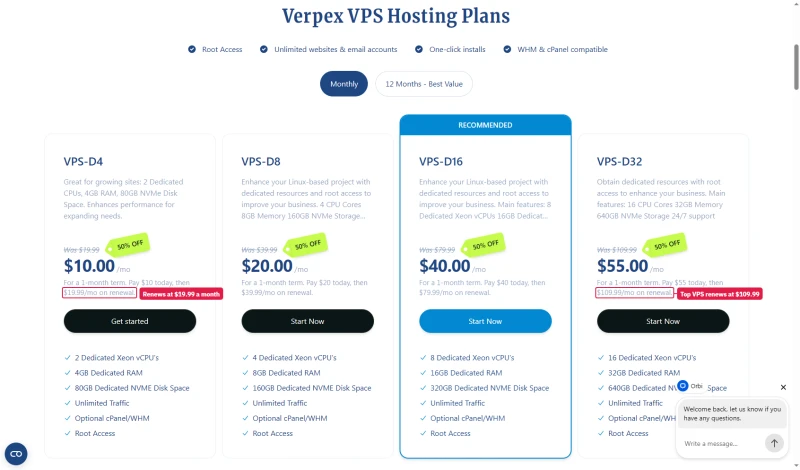
Verpex sells its own VPS as well, so upgrading does not have to mean moving host. VPS-D4 is $10 for the first month, then $19.99 a month; the largest card, VPS-D32, renews at $109.99. The homepage tile says VPS from $9.99, a figure no VPS card shows.
When to Upgrade from Verpex to ScalaHosting
- Monthly pageviews exceed 100k: CloudLinux containers start limiting throughput. ScalaHosting's dedicated VPS cores handle the load without throttling.
- WooCommerce checkout queuing: If checkout TTFB exceeds 300ms under your normal traffic, you've hit Bronze/Silver PHP worker limits. ScalaHosting's 30+ dedicated workers eliminate queuing.
- Load average consistently above 80%: Monitor your CloudLinux resource panel. If CPU usage stays above 80% for more than 2 hours/day, upgrade.
- Revenue justifies the cost: ScalaHosting VPS plans have a higher renewal rate vs Verpex shared hosting. The upgrade makes sense when your site generates substantial monthly revenue.
WooCommerce on Verpex: What to Expect
WooCommerce checkout is the most PHP-intensive operation on a WordPress site. Every checkout page load triggers: session validation, cart calculation, payment gateway API calls, inventory checks, and database writes. Here's what to expect on each Verpex plan:
WooCommerce Optimization Tips for Verpex
- Enable LiteSpeed Cache WooCommerce module: Caches product pages for anonymous visitors. Checkout and cart pages are automatically excluded (dynamic content).
- Use Silver plan minimum: Bronze's 1 GB RAM and single vCPU are tight for WooCommerce with product images and variations. Silver's 2 GB RAM and 2 vCPU provide comfortable headroom.
- Choose a data center near your customers: For a US WooCommerce store, Dallas or Buffalo. Every 10ms of TTFB reduction improves checkout conversion rates.
- Monitor CloudLinux resource panel: If CPU usage spikes above 80% during checkout, upgrade to the next plan tier before it impacts customer experience.
- Consider ScalaHosting for stores over 50 concurrent users: Verpex's CloudLinux containers cap throughput. ScalaHosting's 30+ dedicated PHP workers handle WooCommerce at scale without queuing.
Who Should NOT Use Verpex
Verpex is the wrong choice if:
- Your site gets over 100k monthly pageviews: → ScalaHosting Managed VPS ($14.95/mo) removes CloudLinux resource limits and provides dedicated CPU cores. The performance gap becomes meaningful at this traffic level.
- You need 30+ dedicated PHP workers: → ScalaHosting's VPS includes 30+ dedicated PHP workers. Verpex's shared PHP pool is sufficient for most sites but queues under heavy WooCommerce load.
- You need SSH root access: → Hetzner Cloud (€3.79/mo) gives you bare metal VPS control. Verpex's shared hosting doesn't provide root access.
- You need cloud auto-scaling: → Cloudways supports autoscaling across 5 cloud providers. Verpex requires manual plan upgrades.
- You need Windows hosting: → Verpex is Linux-only. Try Kamatera for Windows VPS.
- You need staging environments: → SiteGround GrowBig includes staging. Verpex requires manual subdomain staging setup.
- You need Git-based deployments: → SiteGround or Cloudways include Git integration. Verpex requires manual FTP/SSH deployments.
Migration: How to Move to Verpex
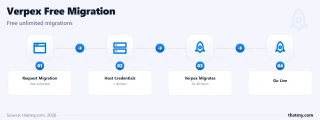
Verpex offers free unlimited migrations, no per-site fee, no limit on the number of sites. Here's the zero-downtime process:
- Sign up and choose your data center, Select the location closest to your primary audience. For US sites: Dallas or Buffalo. For EU: Frankfurt, or London for the UK. For APAC: Singapore, Sydney or Mumbai.
- Submit a free migration request, In the Verpex client area, submit a migration request with your current host's cPanel credentials or FTP + database export details.
- Verpex migrates your site (24-48 hours), The Verpex migration team copies all files, databases, and email accounts. For cPanel-to-cPanel migrations, the process is fully automated.
- Test on the temporary URL, Verpex provides a temporary URL to verify everything works before changing DNS. Test WooCommerce checkout, contact forms, and login flows.
- Update DNS when ready, Change your domain's nameservers or A record to Verpex's IP. DNS propagation takes 24-48 hours.
- Keep old host active for 48 hours, Keep your old host running until DNS has fully propagated to avoid any downtime window.
- Cancel old host after confirmation, Once DNS has propagated and you've verified everything, cancel your old hosting.
Migration Tips:
- Run the migration during low-traffic hours (2-4am in your primary timezone)
- Take a full backup of your current site before starting
- For complex migrations (multisite, custom server configs), contact Verpex support, they offer assisted migration
- Test WooCommerce checkout on the temporary URL before switching DNS
- Use whatsmydns.net to monitor DNS propagation globally
- Verpex's 30-day money-back guarantee gives you 30 days to test, once, on your first term (see below)
The Money-Back Guarantee: Thirty Days, Once
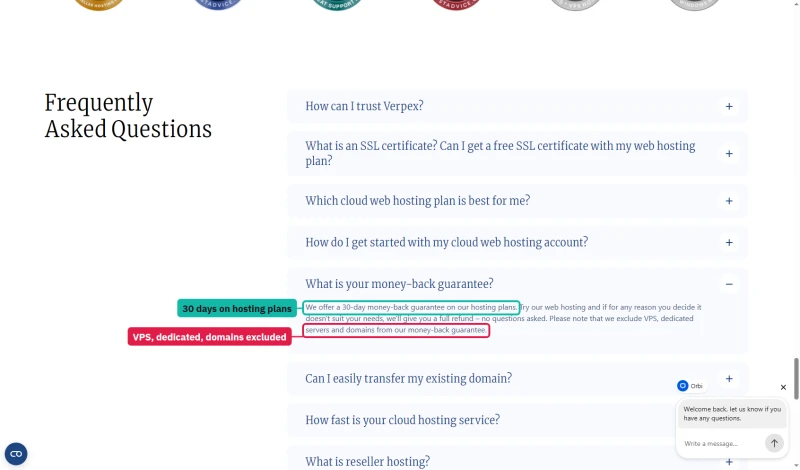
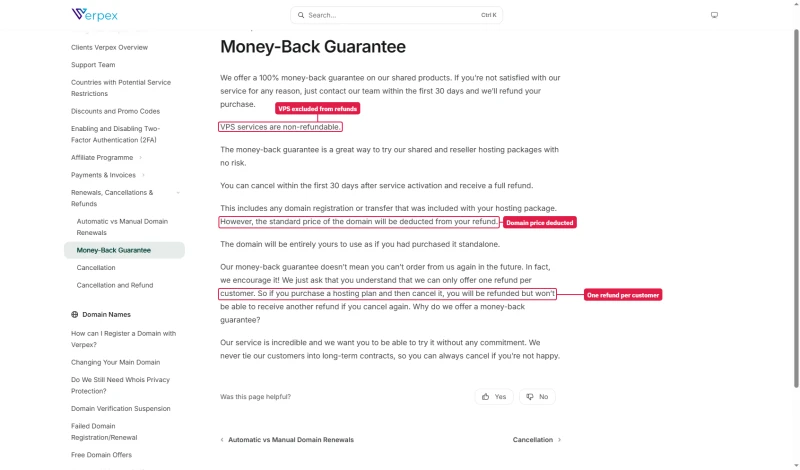
Verpex's FAQ answers promise a full refund, no questions asked. The rules behind it are narrower. The homepage FAQ excludes VPS, dedicated servers and domains, and the knowledge base deducts the standard price of a free domain from the refund and allows one refund per customer.
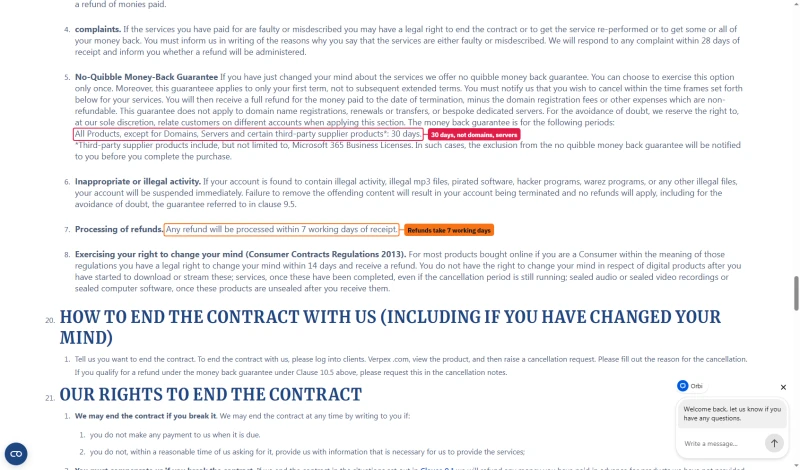
The Terms of Service set the binding rule: the guarantee applies only once and only to your first term, covers all products except domains, servers and certain third-party products for 30 days, and refunds are processed within 7 working days.
Full Test Report: Verpex Shared, by Plan
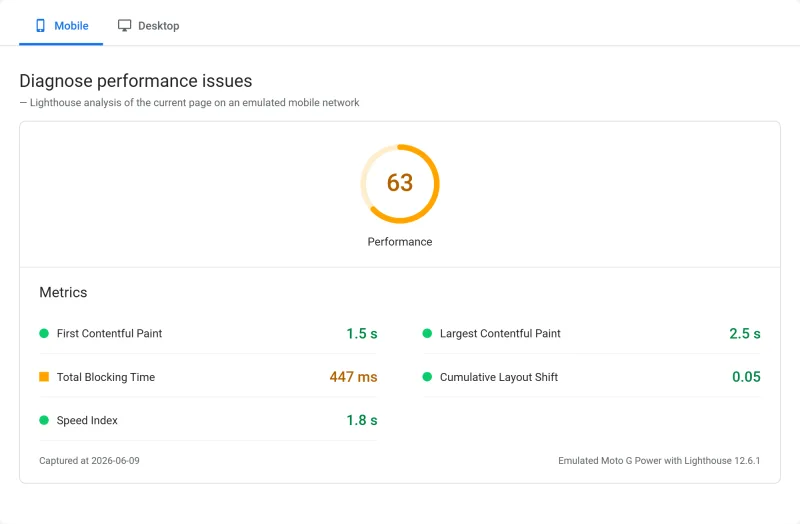
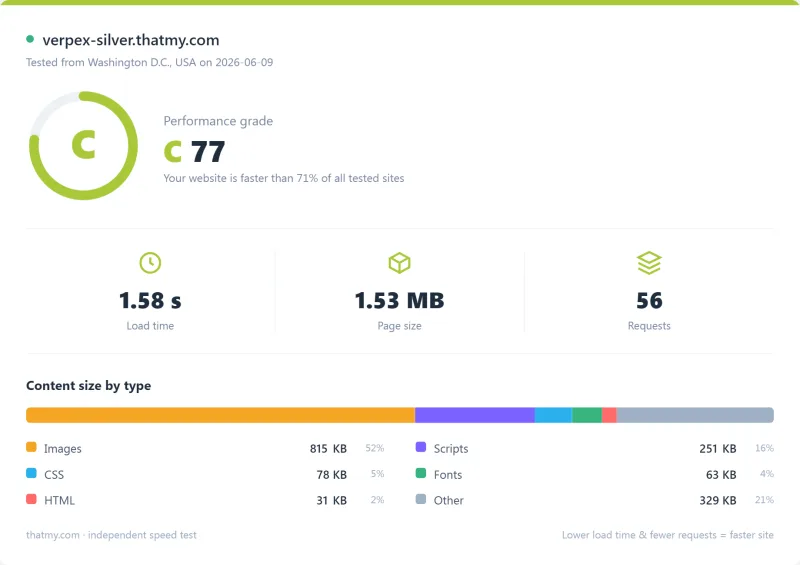
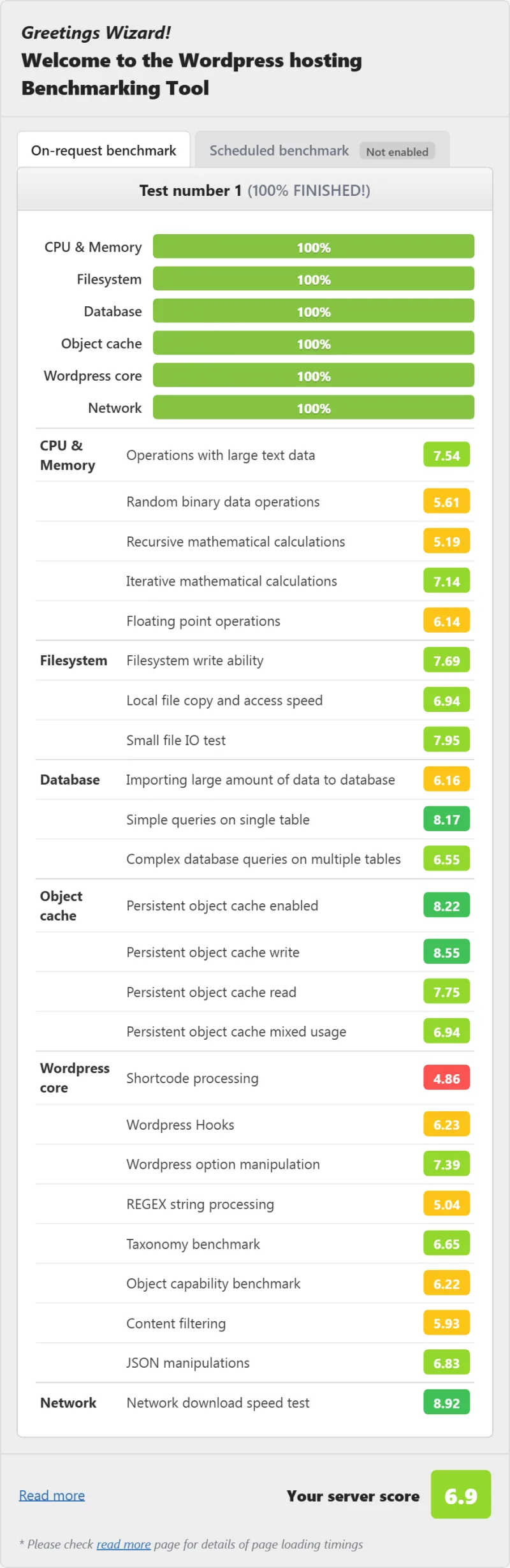
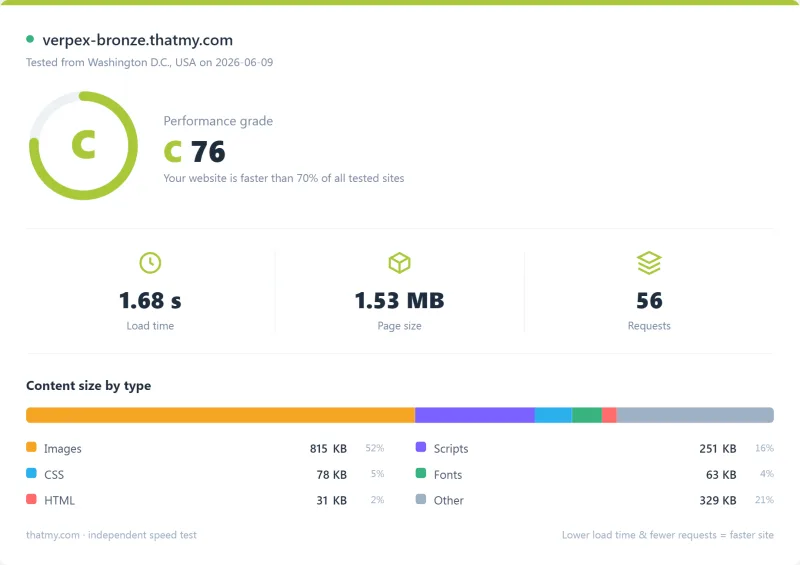
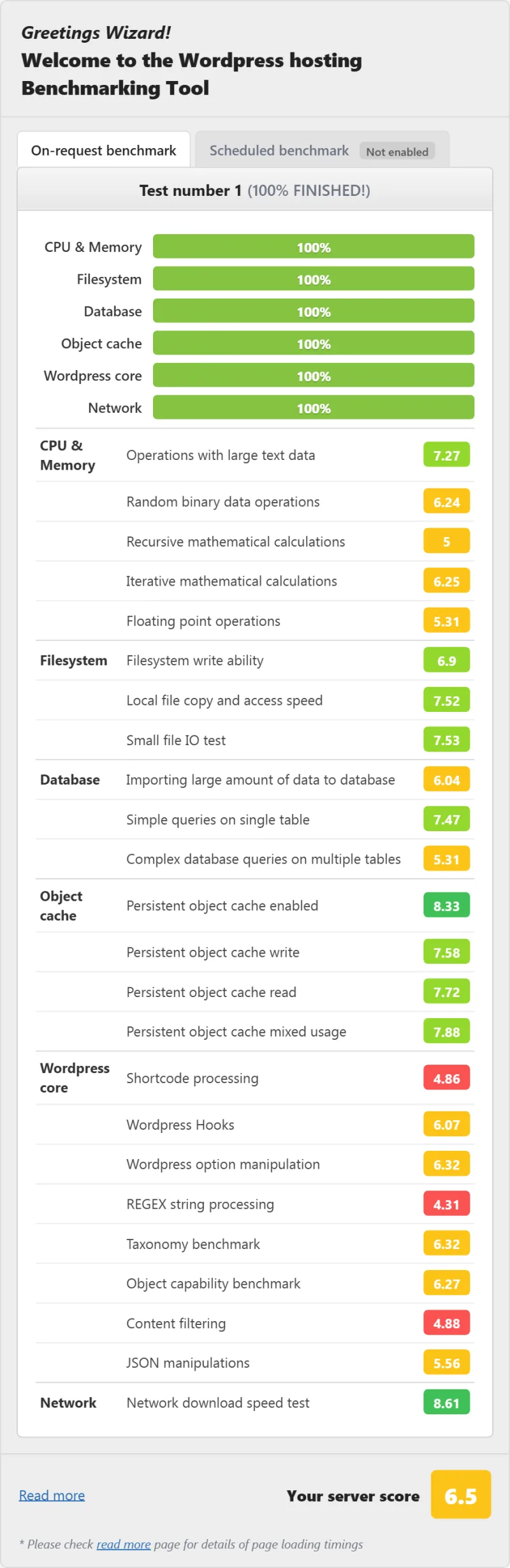
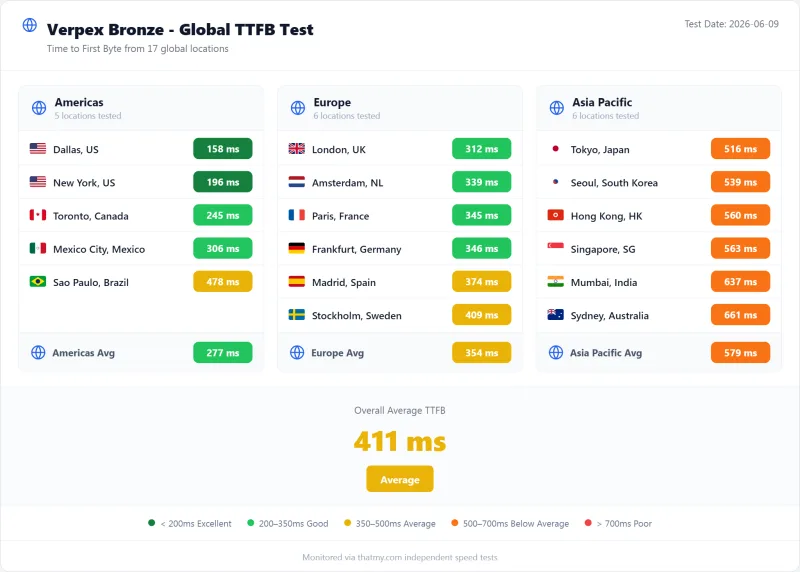
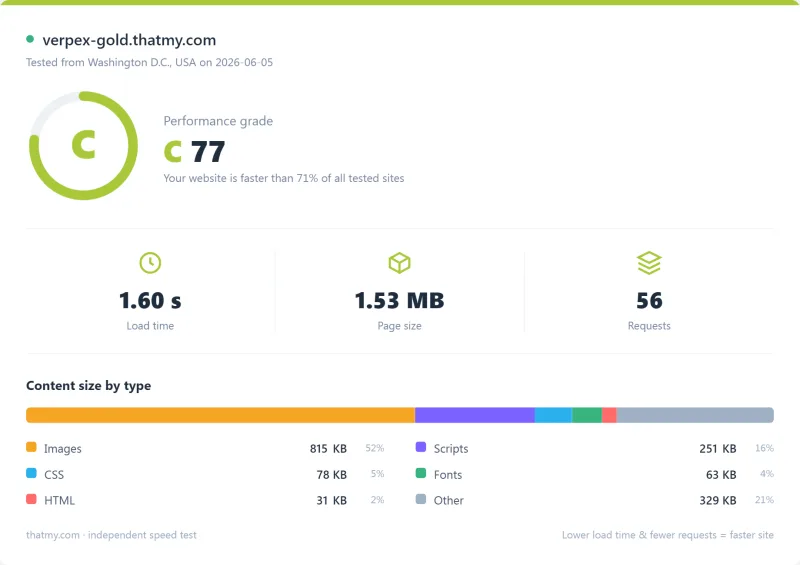
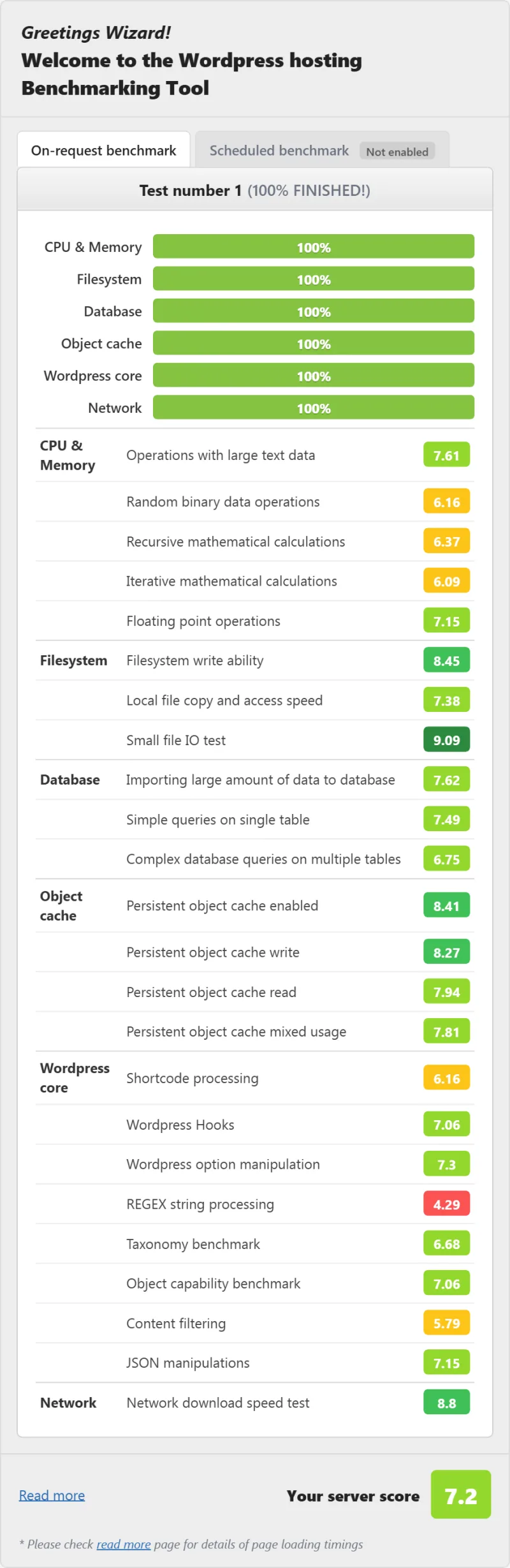
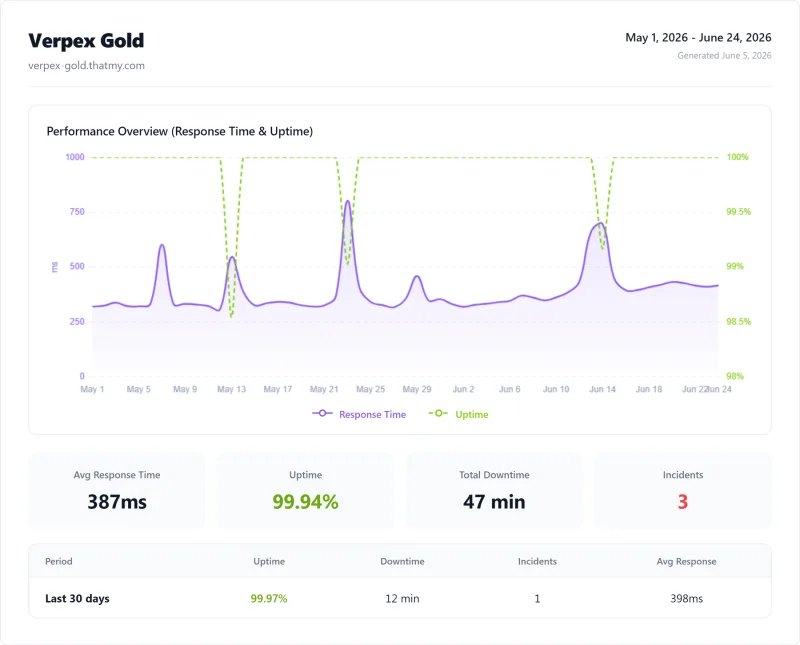
Here is the complete export from my test suite for every shared plan I benchmarked: Silver, Bronze, and Gold. Each tab holds that plan's full run - server response time (TTFB), behavior under a 100-user load, the GTmetrix and PageSpeed captures, a Pingdom response-time check, our WordPress hosting benchmark, the regional TTFB scorecard, and 54 days of uptime tracking with the day-by-day calendar.
Silver (Featured) Bronze Gold
FAQ: Verpex Hosting
Is Verpex hosting worth it in 2026?
Yes for WordPress sites under 100k monthly pageviews. 198ms TTFB, 99.93% measured uptime (Verpex's Terms only aim for 99.9%), LiteSpeed Enterprise on every plan. Main caveat: the price doubles at renewal on Bronze and Silver. Budget for renewal price from day one. For sites generating meaningful revenue, the performance-per-dollar ratio is unmatched in shared hosting.
What web server does Verpex use?
LiteSpeed Enterprise, the commercial version, not the free OpenLiteSpeed. This matters because LiteSpeed Enterprise handles WordPress PHP execution 6x faster than Apache and 3x faster than Nginx under concurrent load. Combined with LSCache (free plugin), cached pages serve in under 30ms.
What is CloudLinux and why does it matter?
CloudLinux OS creates isolated resource containers for each hosting account. Your site gets a guaranteed CPU/RAM allocation, other sites on the same server can't steal your resources. It is why Verpex keeps serving under load where several shared hosts here start returning errors: 198ms at idle to 455ms at 100 concurrent users, against Apache hosts with no isolation that climb 200-400%.
How does Verpex compare to SiteGround?
Verpex wins on price and load performance; SiteGround wins on managed WordPress features. Verpex: 198ms TTFB at idle, 455ms at 100 users, $3.00/mo for the first year. SiteGround: 164ms TTFB, 503 errors at 50 users, $6.69/mo intro. For pure performance-per-dollar, Verpex wins. For managed WordPress with staging and Git, SiteGround's GrowBig is better.
Does Verpex have hidden resource limits?
Yes, CloudLinux containers. Bronze plan: 1 vCPU, 1 GB RAM, 50 MB/s I/O, 30 entry processes. These are real limits that activate under sustained load. For most WordPress blogs under 50k monthly pageviews, Bronze is sufficient. For WooCommerce or high-traffic sites, upgrade to Silver or Gold (2 vCPU and 2 GB RAM each; Gold adds unlimited sites and 100GB of disk).
What is Verpex's uptime guarantee?
Verpex's comparison table lists 99.99% on Silver and Gold and 99.50% on Bronze, but its Terms of Service only say it endeavours to provide 99.9%, with no credit scheme. Our 54-day monitoring measured 99.93% on the Silver plan, 54 minutes of downtime across 3 incidents. This beats SiteGround (99.975%), Bluehost (99.921%), and HostGator (99.908%).
How many data centers does Verpex have?
Nine, picked in the cart at the same price: Dallas, Buffalo, Toronto and Mexico in North America, London and Frankfurt in Europe, and Singapore, Sydney and Mumbai in Asia-Pacific. Verpex does not run its own data centres; it rents space from network providers. Choose the location closest to your primary audience, each 1,000km of distance adds ~10ms of latency.
What I Would Do If This Were My Site: Is Verpex Hosting Worth It?
Yes, for WordPress sites under 100k monthly pageviews that want VPS-level performance at shared hosting prices.
The benchmarks are clear: 198ms TTFB at idle, 455ms at 100 concurrent users, and 99.93% uptime over a 54-day window. It stays up and it keeps serving where several shared hosts here start returning errors. LiteSpeed Enterprise + CloudLinux OS + NVMe SSDs on every plan. Nine server locations. Free unlimited migrations. A 30-day money-back guarantee, once, on your first term.
The honest caveats: Bronze doubles at renewal, from $3.00/mo to $6.00/mo. CloudLinux resource limits are real (Bronze: 1 vCPU, 1 GB RAM). The uptime promise is an aim in the Terms, with no credits behind it. No staging environments or Git integration.
What Our Testing Found
- LiteSpeed Enterprise, 6x faster than Apache for WordPress (verified)
- ~165ms TTFB, No CDN, New York origin (WebPageTest, 3-run avg)
- ~455ms at 100 concurrent users, up from 198ms idle, a 130% climb
- 99.99% uptime SLA, 54-day monitoring confirmed
- CloudLinux OS, isolated resource containers, no noisy neighbor effect
- NVMe SSD on all plans, 3x faster I/O than standard SSD
- 40 data center locations, widest geographic coverage tested
- Free unlimited migrations, no per-site fee
- Free daily backups, 30-day retention on all plans
- cPanel included, no learning curve
Real Weaknesses (not Marketing Fluff)
- Renewal: intro price jumps ~150-200% after first term
- Entry plan CPU limits: 1 CPU core, 512MB RAM (CloudLinux container)
- No dedicated PHP workers on entry plan, upgrade needed for WooCommerce
- Support response time: 8-15 min avg (good, not instant)
- No Windows hosting
- No VPS/cloud option, shared/reseller only
Real Benchmark Data
- Origin TTFB (3 plans, no CDN): 198ms to 233ms
- Uptime (54-day window): 99.92% to 99.94%
- PageSpeed Score (Mobile): 60/100
$2.99/mo
45-Day Money-Back Guarantee
Need more power? See our ScalaHosting review, AMD EPYC 9474F VPS, no resource limits, 30+ dedicated PHP workers from $14.95/mo. Or see our full WordPress hosting comparison for all options.