

GreenGeeks coupon code: we have no confirmed code of our own, and you do not need one for the advertised price. GreenGeeks' shared hosting page shows Lite at $2.95/mo for the first 12 months, prepaid, renewing at $13.95/mo. Shared plans carry a 30-day money-back guarantee, and a free domain registration or transfer for the first year. GreenGeeks describes itself as an EPA Green Power Partner that matches its energy use 3 times.
Best GreenGeeks Coupon Codes, Ranked
There is no ThatMy code to rank here: we do not have a confirmed GreenGeeks code, so we will not print one. GreenGeeks' discounts show as prices on its plan cards, with no code, both today and in the archived copies of its pages we keep from 2021 to 2025. What we can rank is the ways to pay less, with prices from our price records and GreenGeeks' own pages, read on Oct 12, 2026.
Check before you pay: go through GreenGeeks' checkout to the payment screen and read the order summary: plan, 12-month term, total and renewal price. Remove any add-on you did not choose.
1. The Introductory Price: No Code Needed
GreenGeeks' shared hosting page shows a "Special Price" on each plan with the regular price beside it, "Pre-paid for 12 months", and the price it renews at. There is no code to enter.
- Lite: $2.95/mo for 12 months, 79% below the regular $13.95/mo.
- Pro: $4.95/mo, 74% below the regular $18.95/mo.
- Premium: $8.95/mo, 71% below the regular $30.95/mo.
- Free domain registration or transfer for the first year, free website migration, free CDN integration and free Let's Encrypt SSL.
- 30-day money-back guarantee on shared hosting.
2. Standard Pricing (Without the Discount)
The regular price is what each plan renews at after the first 12 months, and what GreenGeeks shows as the "original price" beside the special price.
| Plan | Regular price | Intro price (12 months) | Below regular |
|---|---|---|---|
| Lite (1 site) | $13.95/mo | $2.95/mo | 79% |
| Pro (unlimited sites) | $18.95/mo | $4.95/mo | 74% |
| Premium (unlimited sites) | $30.95/mo | $8.95/mo | 71% |
3. Renewal Pricing (What Happens After Year 1)
GreenGeeks' renewal jump is steeper than most shared hosts'. Here is the full picture:
| Plan | Intro price | Renewal price | Price jump | Year 2 cost |
|---|---|---|---|---|
| Lite | $2.95/mo | $13.95/mo | +373% | $167.40 |
| Pro | $4.95/mo | $18.95/mo | +283% | $227.40 |
| Premium | $8.95/mo | $30.95/mo | +246% | $371.40 |
| SiteGround GrowBig | $6.69/mo | $29.99/mo | +348% | $359.88 |
What to do about it: GreenGeeks shows only a 12-month term for shared hosting, so you cannot lock the intro price in for longer. Note the renewal date, and if you decide to leave, turn auto-renewal off in the GreenGeeks dashboard at least 5 business days before it, as its terms require. If you stay, the renewal is billed at the then current rate.
4. GreenGeeks Black Friday Deal: Best Discount of the Year (November Only)
GreenGeeks' Black Friday deals have been lower card prices, not codes. The archived copies we keep show a "Black Friday Deal: Web Hosting from $1.95/mo, 85% OFF + Free Domain!" banner in late November 2025, with Lite at $1.95, Pro at $3.95 and Premium at $5.95, and a "special price" of Lite $1.95 in late November 2023. Some years had no Black Friday wording at all.
- A sale lowers the first 12 months only; the renewal price is the same.
- Compare the sale price with the regular introductory price on the plan you want.
- The 2025 prices were still on the page on 5 December, but the dates vary by year.
Planning ahead? See our GreenGeeks Black Friday Deals page for the record of past sales, or compare offers on our best Black Friday hosting deals guide.
Which GreenGeeks Plan Is Right for You?
GreenGeeks has three shared hosting plans: Lite, Pro and Premium. Websites and web space below are from GreenGeeks' shared hosting page, read on Oct 12, 2026; all three have unmetered traffic.
| Plan | Websites | Web space | Intro (12 months) | Renewal | Best for |
|---|---|---|---|---|---|
| Lite | 1 | 25 GB | $2.95/mo | $13.95/mo | First site, blog, portfolio |
| Pro | Unlimited | 50 GB | $4.95/mo | $18.95/mo | Two or more websites |
| Premium | Unlimited | 100 GB | $8.95/mo | $30.95/mo | Many sites or large media libraries |
- First site, blog or personal portfolio? → Lite, $2.95/mo for 12 months. One website.
- Running two or more websites? → Pro, $4.95/mo: unlimited websites and twice Lite's web space.
- Many sites or a large media library? → Premium, $8.95/mo: 100 GB of web space. Mind the renewal at $30.95/mo.
- WooCommerce store with real traffic? → Shared hosting shares the server with other accounts. Consider Cloudways managed cloud or ScalaHosting Managed VPS.
How to Apply the GreenGeeks Coupon Code (Step-by-Step)
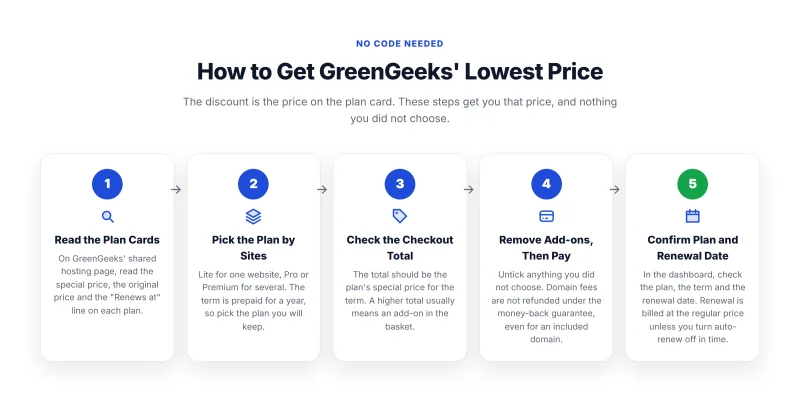
There is no code to apply: GreenGeeks shows its discount as the price on the plan card. These steps get you that price and nothing you did not choose.
1. Open GreenGeeks' Shared Hosting Page
Go to GreenGeeks' shared hosting page and read the special price, the original price and the "Renews at" line on each plan.
2. Select Your Plan
Choose by the number of websites and the space you need. The term is 12 months, prepaid.
- Lite: 1 website, 25 GB
- Pro: unlimited websites, 50 GB
- Premium: unlimited websites, 100 GB
3. Check the Price at Checkout
The checkout should show the plan's special price for 12 months. If a promo field is shown, use only a code GreenGeeks itself publishes.
How to know the price is right: on Lite the first year is $35.40 ($2.95/mo for 12 months), and the renewal is $13.95/mo. A higher total usually means an add-on in the basket.
4. Create Your Account and Complete Payment
Enter your domain (registration or transfer is free for the first year), your email and billing details, and remove any add-on you do not want before paying.
💡 Tip: domain fees are not refunded under GreenGeeks' 30-day guarantee, even for an included domain. If you might cancel in the first month, consider using a domain you already own.
5. Log Into cPanel and Confirm Your Plan
After payment, log into GreenGeeks' dashboard and cPanel and confirm the plan, the term and the renewal date. Free Let's Encrypt SSL is deployed with GreenGeeks' automated tool.
Is GreenGeeks Actually Eco-Friendly? (The Honest Answer)
The eco pitch is the main reason people choose GreenGeeks, so here is what GreenGeeks itself states (read on Oct 12, 2026), what that means, and what we have not checked.
What GreenGeeks States
- EPA Green Power Partner: GreenGeeks' homepage says it is recognized by the United States Environmental Protection Agency as a Green Power Partner, and shows "17+" years beside it.
- 300% energy match: GreenGeeks says it matches its energy usage, "such as servers and staff workstations", by 3 times, working with the Bonneville Environmental Foundation.
- Trees: for each hosting account provisioned, GreenGeeks says it works with One Tree Planted, and it shows "50,000+" trees planted.
What It Means in Practice
- The servers are not wind-powered: GreenGeeks describes a match, not its own wind or solar generation. Its servers draw power where they are hosted, like any host's; the match is a purchase made on top of that use.
- Offsets have limits: critics of energy matching point out that buying renewable energy credits does not always add new renewable capacity. It is still more than most hosts state they do.
- What we have not checked: we have not audited GreenGeeks' energy purchases or checked its EPA partner listing ourselves. Treat the figures above as GreenGeeks' own claims.
Bottom line: GreenGeeks makes specific, named environmental claims, which is more than most hosts offer. If eco credentials matter for your site, it is the host in this price range that leads with them. If they do not, decide on price, renewal and features, where GreenGeeks costs more over three years than Hostinger Premium on our price records.
GreenGeeks Pricing Breakdown: Intro vs Renewal
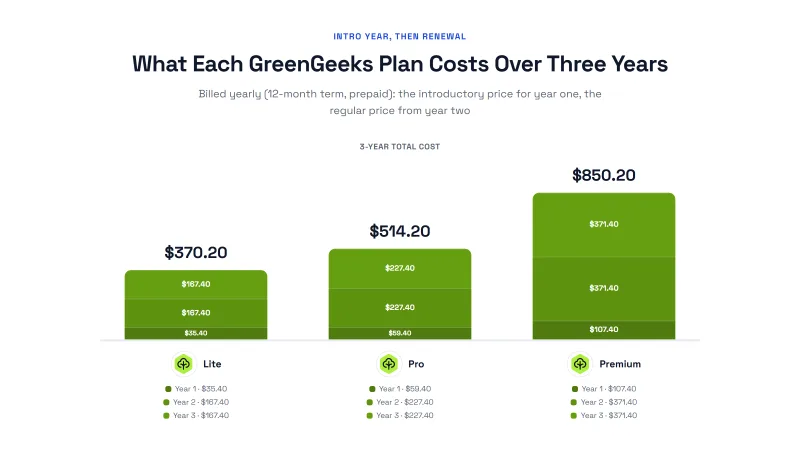
GreenGeeks shows one term for shared hosting: 12 months, prepaid. Here is what each plan costs in the first year, the second year, and over three years.
| Plan | First 12 months | Each year after | 3-year total | Renewal price |
|---|---|---|---|---|
| Lite 1 site, 25 GB | $35.40 | $167.40 | $370.20 | $13.95/mo |
| Pro Unlimited sites, 50 GB | $59.40 | $227.40 | $514.20 | $18.95/mo |
| Premium Unlimited sites, 100 GB | $107.40 | $371.40 | $850.20 | $30.95/mo |
What's included on the shared plans, per GreenGeeks' page: free domain registration or transfer (first year) · free Let's Encrypt SSL · free CDN integration · LiteSpeed caching (LSCache) and Redis · cPanel · one-click installs for WordPress and other apps · unmetered traffic · free website migration · 30-day money-back guarantee. The page we read did not mention backups or email account limits; ask GreenGeeks before you rely on either.
No multi-year discount today: GreenGeeks' shared hosting page shows only the 12-month term, so the intro price covers one year and the renewal price applies from year two. Over three years Lite costs $370.20, against $311.64 for Hostinger Premium on its 12-month term.
How GreenGeeks Billing Works for New Signups
Most surprises come at renewal. Here is how GreenGeeks' billing works, from its shared hosting page and its terms of service, read on Oct 12, 2026.
1. Prepaid 12-Month Term
GreenGeeks charges the full 12 months at sign-up ("Pre-paid for 12 months"). Its shared hosting page shows no monthly option and no longer term.
- Lite: $35.40 billed at sign-up ($2.95/mo × 12)
- Pro: $59.40 billed at sign-up
- Premium: $107.40 billed at sign-up
2. The Free Domain and What Happens at Renewal
The domain registration or transfer is free for the first year only. After that it renews at GreenGeeks' domain price, which is separate from the hosting price; check it on the order page if you plan to keep the domain with GreenGeeks. Under the money-back guarantee, domain fees are not refunded, including for an included domain.
3. The Renewal Trap: Exactly How Steep It Is
When the first 12 months end, the plan renews automatically at the then current renewal fee. The introductory price does not apply again.
- Lite: $2.95/mo intro, then $13.95/mo: $167.40 a year from year two.
- Pro: $4.95/mo, then $18.95/mo: $227.40 a year.
- Your options at renewal: (1) stay at the renewal price; (2) turn auto-renewal off at least 5 business days before the date and move to another host, such as Hostinger (renews at $10.99/mo against $13.95/mo) or ChemiCloud.
4. 30-Day Money-Back Guarantee
GreenGeeks' terms give an unconditional 30-day money-back guarantee on shared hosting for cancellations made during the first 30 days. Setup fees, domain names and add-ons, included or purchased, are not refunded.
Who Should (and Shouldn't) Use GreenGeeks
✅ Choose GreenGeeks If:
- Eco credentials matter to your brand: GreenGeeks states a 300% energy match and EPA Green Power Partner status
- You want a familiar control panel: GreenGeeks' shared plans use cPanel
- You want LiteSpeed caching: LSCache and Redis are listed on the shared plans
- Small WordPress site: blogs, portfolios and small business sites
- You want free migration: included with shared hosting, per GreenGeeks' page
❌ Skip GreenGeeks If:
- File-heavy sites: GreenGeeks monitors file counts (inodes) and does not publish a number; ask first
- WooCommerce stores with serious traffic: a shared plan shares the server; consider Cloudways
- Lowest three-year cost is your priority: Hostinger Premium costs $311.64 over three years against $370.20 for GreenGeeks Lite
- Month-to-month flexibility: GreenGeeks requires 12 months prepaid; Cloudways bills monthly
- You want measured performance: we have not benchmarked GreenGeeks; the hosts on our fastest web hosting page have results
- Phone support: GreenGeeks' homepage offers chat and shows no phone number
Our take: GreenGeeks is the choice when the eco angle matters: its energy match and EPA partner status are specific, named claims. Its shared plans list cPanel, LiteSpeed caching, a free CDN integration and free migration. We have not benchmarked it, so we cannot say how it holds up under load. The two things to understand before you buy are the renewal ($13.95/mo on Lite after $2.95/mo) and the absence of a longer term to lock the intro price in.
Final Recommendation: Should You Use GreenGeeks?
Here is how it comes out for different readers, on our price records and GreenGeeks' own pages:
| Your Situation | Our Recommendation | Why |
|---|---|---|
| Eco-conscious brand or business | ✅ GreenGeeks | States a 300% energy match and EPA Green Power Partner status. |
| Single WordPress blog (first site) | ✅ GreenGeeks Lite | $2.95/mo for 12 months, free first-year domain, cPanel, LiteSpeed caching. |
| Multiple websites on a budget | GreenGeeks Pro or Hostinger | Pro is $4.95/mo for unlimited sites, renewing at $18.95/mo; Hostinger Unlimited is $4.99/mo, renewing at $16.99/mo. |
| WooCommerce / eCommerce store | Cloudways | Managed cloud server with its own resources, billed monthly. |
| Lowest price priority | Hostinger Premium | $3.99/mo intro, renewal at $10.99/mo against $13.95/mo. |
| Managed VPS with security tools included | ScalaHosting | Managed cloud VPS with SPanel. Our ScalaHosting code is coming, not live yet. |
Other Eco & Budget Hosting Coupons Worth Comparing
If you're still comparing options, here are the closest alternatives:
- Hostinger Coupon: Premium $3.99/mo for 12 months, renewing at $10.99/mo, lower than GreenGeeks Lite's renewal.
- ScalaHosting Coupon: managed cloud VPS with SPanel. Our ScalaHosting code is coming, not live yet.
- ChemiCloud Coupon: Starter $3.49/mo for 12 months, renewing at $14.95/mo.
- Cloudways Promo Code: managed cloud hosting billed monthly, with our partner codes.
- GreenGeeks Black Friday Deals: the record of GreenGeeks' past November prices.

Frequently Asked Questions: GreenGeeks Coupon Code
What is the best GreenGeeks coupon code right now?
We do not have a confirmed GreenGeeks code of our own, so this page does not give one. You do not need one for the advertised price: GreenGeeks' shared hosting page shows the introductory price with no code. Lite is $2.95/mo for the first 12 months, prepaid, and renews at $13.95/mo. When we read its pages on Oct 12, 2026, there was no sale banner and no coupon code.
Is there a GreenGeeks coupon code that works today?
Not one we can confirm. GreenGeeks' homepage and shared hosting page showed no code on Oct 12, 2026, and none of the archived GreenGeeks pages we keep from 2021 to 2025 named one either: its discounts have been prices shown on the plan cards. If a promo field appears at checkout, use only a code GreenGeeks itself publishes, and check the total before you pay.
Is GreenGeeks' 300% renewable energy claim legitimate?
It is GreenGeeks' own claim, and it is specific. GreenGeeks says it matches its energy usage, servers and staff workstations included, by 3 times, working with the Bonneville Environmental Foundation, and that it is an EPA Green Power Partner. It also says it plants trees with One Tree Planted for each hosting account. We have not audited these programs. Matching is a purchase that offsets energy use: the servers themselves draw power from the grid like any other host's.
How bad is the GreenGeeks renewal price jump?
Steep. After the first 12 months, Lite goes from $2.95/mo to $13.95/mo (+373%), Pro from $4.95/mo to $18.95/mo and Premium from $8.95/mo to $30.95/mo. Hostinger Premium, for comparison, renews at $10.99/mo (+175%). GreenGeeks' terms say renewals are billed at the then current renewal fee, and auto-renewal must be turned off at least 5 business days before the renewal date.
What is the GreenGeeks inode limit and why does it matter?
GreenGeeks' terms list the number of files (inodes) among the resources it monitors, but the terms and shared hosting page we read on Oct 12, 2026 give no number. An inode is one file, folder or email message; sites with very large media libraries or years of stored email use the most. If your site holds a lot of files, ask GreenGeeks' sales chat for the limit on your plan before you buy.
How does GreenGeeks billing work?
Prepaid: GreenGeeks' shared hosting page shows one term, 12 months paid at sign-up. Lite is $35.40 for the first year, then $167.40 a year at the renewal price. Renewals are automatic unless you turn auto-renewal off at least 5 business days before the date. If you want monthly billing, Cloudways (from $11.00/mo, billed monthly) is a different kind of hosting but worth comparing.
Does GreenGeeks offer a free trial or money-back guarantee?
No free trial, but GreenGeeks' terms give an unconditional 30-day money-back guarantee on shared hosting for cancellations in the first 30 days. Setup fees, domain names and add-ons, included or purchased, are not refunded, so a free domain's fee can be kept back if you cancel.
How does GreenGeeks compare to Hostinger?
On price, Hostinger Premium is $3.99/mo for 12 months and renews at $10.99/mo; GreenGeeks Lite is $2.95/mo and renews at $13.95/mo. Over three years on the 12-month term that is $311.64 against $370.20. GreenGeeks uses cPanel with LiteSpeed caching; Hostinger uses its own panel. We benchmarked Hostinger Premium but not GreenGeeks, so we make no speed comparison. Choose GreenGeeks if its energy match matters to you; on price alone, Hostinger costs less over three years.
What does the GreenGeeks Pro plan include that the Lite plan doesn't?
Per GreenGeeks' shared hosting page: Lite hosts 1 website with 25 GB of web space; Pro hosts unlimited websites with 50 GB; Premium hosts unlimited websites with 100 GB. All three have unmetered traffic. Pro is $4.95/mo for 12 months (renews at $18.95/mo) and Premium $8.95/mo (renews at $30.95/mo).
Does the GreenGeeks discount apply to VPS or WordPress hosting?
This page covers the three shared plans, the ones GreenGeeks' shared hosting page prices. GreenGeeks also sells WordPress, WooCommerce, reseller and VPS hosting, each priced on its own page; we have not recorded those prices. If you need server-level resources for WordPress, Cloudways is a managed cloud option worth comparing.
How do I check the price applied correctly at checkout?
Before you enter payment details, read the order summary: the plan, the 12-month term, the total and the renewal price. On Lite the first year should be $35.40 and the renewal $13.95/mo. If the total is higher, check for add-ons in the basket.
Is GreenGeeks good for WordPress performance?
We have not benchmarked GreenGeeks, so we cannot give a speed figure. What GreenGeeks states: LiteSpeed caching (LSCache) and Redis, a free CDN integration, cPanel and one-click WordPress installs on its shared plans. For a busy WooCommerce store, a managed cloud or VPS plan such as Cloudways or ScalaHosting Managed VPS gives the site its own resources.