
Cloudways Setup Cost 2026: The Cheapest Complete Stack

Hosting is the price you see. A working site is the price you pay. This guide adds up the second one: the server, the add-ons, the mailbox and the plugins a real WordPress or WooCommerce site needs on Cloudways, and, just as usefully, the things the console will offer you that you can decline.
Every Cloudways figure here was read in a live account, either off the launch form or off the console page that sells the add-on. Plan prices come from our price record, so they stay current.
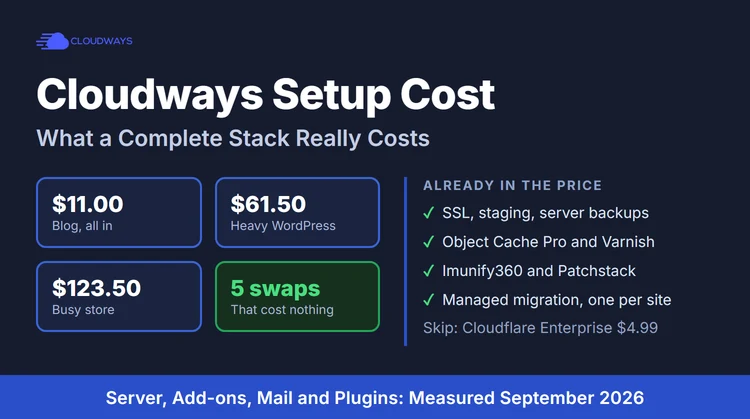
The short answer. A blog runs properly for $11.00/mo, all in. A busy, uncached WordPress site wants $60.00/mo. A WooCommerce store starts around $54.00/mo and is comfortable at $118.00/mo. Everything above that on your bill is optional, and most of it has a free equivalent.
Three Complete Builds, With The Real Monthly Total
These are whole setups, not server prices: hosting, security, cache, CDN, mail and the plugins that actually earn their place. The mailbox row assumes one address at your own domain.
Two notes on those totals. Cloudways bills Flexible servers by the hour, so a store you launch on the 20th pays for ten days, not a month. And there is no renewal jump anywhere in the table: the price you start on is the price you keep.
What Is Already Free, And What Cloudways Charges For
Half of saving money here is knowing what you have already paid for. Here is the split.
Five Swaps That Cut The Bill Without Costing You Anything
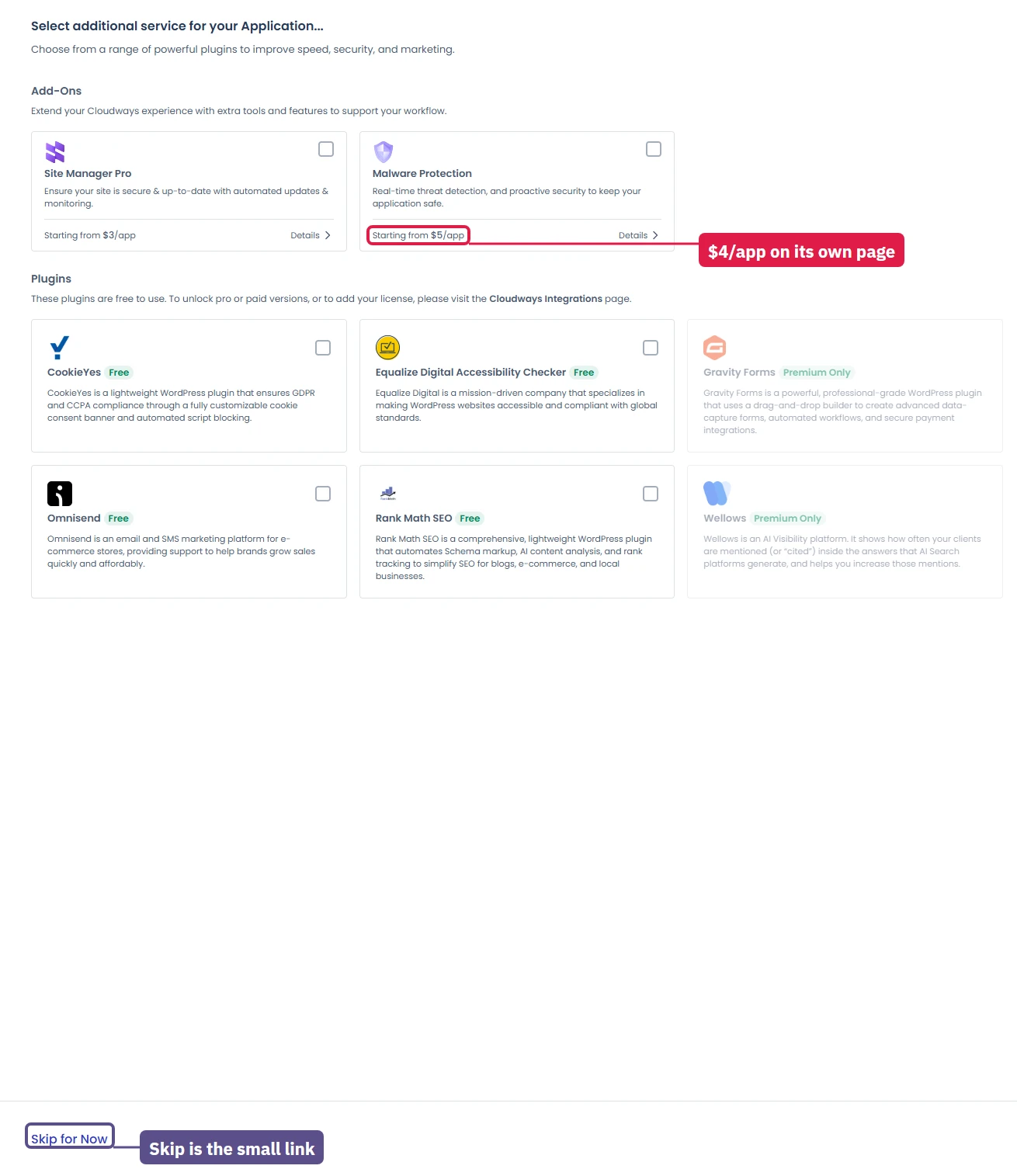
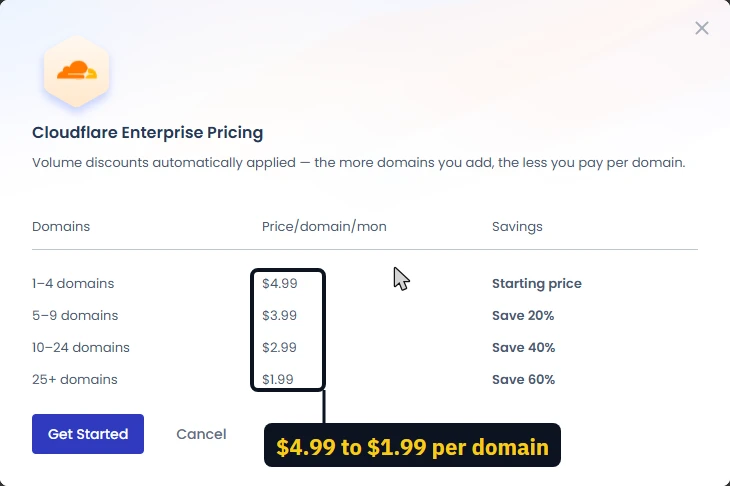
- Cloudflare's own free plan instead of the Enterprise add-on. The add-on is $4.99 per domain a month and is pushed at you twice, once at launch and again when you add a domain. Cloudflare free gives you DNS, a worldwide CDN, TLS and basic rules for nothing. Buy the add-on only when you want Cloudways to manage the edge for you, or when you need the enterprise features on a site that earns enough to notice.
- Git for code, the built-in backup for data. Put your theme and custom plugins in a Git repository and your code is versioned, reviewable and free. It is not a backup of your site: your database and your uploads folder are not in it. Keep the included server backup for those, and pay the $0.033 per GB only for the off-site copy of what you could not rebuild.
- A real mailbox, never the web server. Sending mail from the same server that runs your site is how domains end up in spam folders. Zoho Mail's free plan carries one domain and up to five users at 5GB each, with no IMAP or POP, which is enough for a contact address. Cloudways' own Rackspace mailbox is $1.50 a month if you want IMAP on your phone, and its Elastic Email add-on from $2.30 per 1,000 emails is for transactional mail, not for reading your post.
- Standard, not Premium, on a small DigitalOcean server. The pricing page leads with the Premium 1GB at $14.00/mo. The Standard 1GB at $11.00/mo is the same managed stack on slightly older hardware, and on a cached blog you will not feel the difference. Choose Basic, then Standard, in the launch form.
- Stay off AWS and Google Cloud unless you need them. Their Cloudways prices include only 10GB of disk and 1 to 2GB of bandwidth, after which bandwidth costs $0.12 per GB and disk $0.10 per GB a month. A modest site with 100GB of traffic and 20GB more disk adds about $14 a month on top of an already dearer server.
The Plugins Worth Paying For, And The Ones That Eat Your Server
On a managed host, most of the famous performance plugins are buying you something the platform already gives you. Here is where the money actually helps.
What to avoid outright on a small server: two caching plugins at once, which fight and produce stale pages; page builders that load a megabyte of CSS on every view; "all in one" security suites stacked on top of Imunify360; related-posts and popular-posts plugins that run unindexed queries on every page; and anything that schedules work through WordPress cron every minute on a 1GB server.
How Far Each Size Actually Goes
In our own test, a 2GB DigitalOcean Basic server served uncached pages, every request a cache miss, at about 6.5 pages a second before latency climbed. During that test the console reported 78% CPU and "Server Health: Problematic", and offered an upgrade.
Read that as a floor, not a ceiling: the test came from a single client IP, and a real audience is mostly served from cache, where the same server handles far more. But it tells you what happens when caching cannot save you, which is exactly the WooCommerce checkout case.
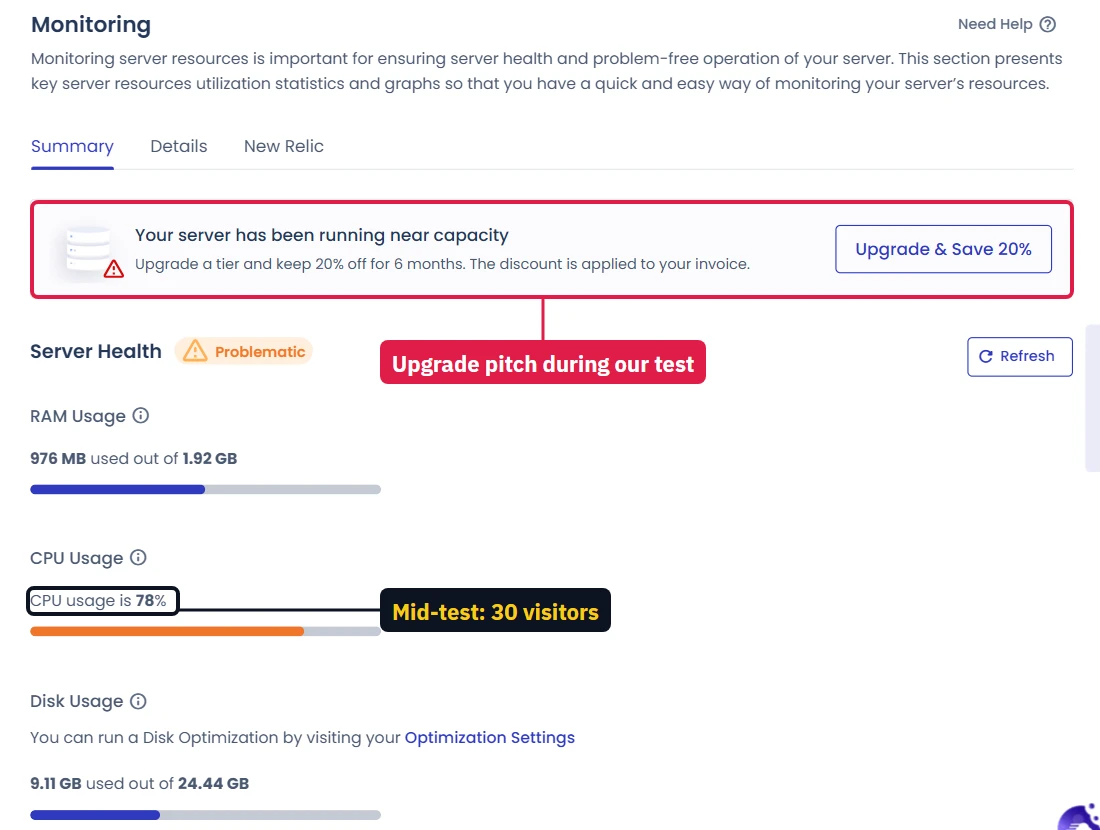
Disk is smaller than it looks. A fresh WordPress install on a bare server was already using 9 to 10GB of disk before any content. On the smallest plans that is a third of what you bought, so count your media library before choosing a size.
WordPress And PHP Versions On A Budget Server
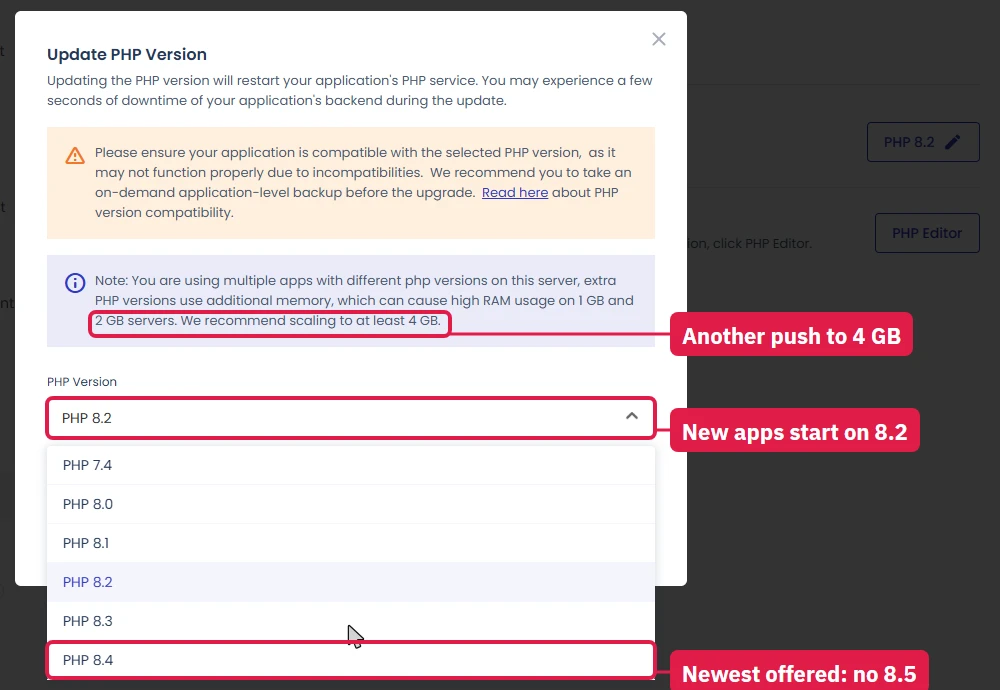
WordPress recommends PHP 8.3 or greater and MariaDB 10.11 or greater. Cloudways offers PHP 7.4 through 8.4 per application and starts new applications on 8.2, and its launch form defaults to MariaDB 10.11, so a new site is one dropdown away from the recommended pair. Move the site to PHP 8.3, test it, and stay on the current WordPress release: security updates are the cheapest part of this whole page.
The one version habit that costs real money on a small server is running several PHP versions side by side for different applications. The console says so itself when you change a version: extra PHP versions raise RAM use, and it suggests scaling to 4GB. On a 1GB or 2GB server, keep every application on the same version.
Putting It Together
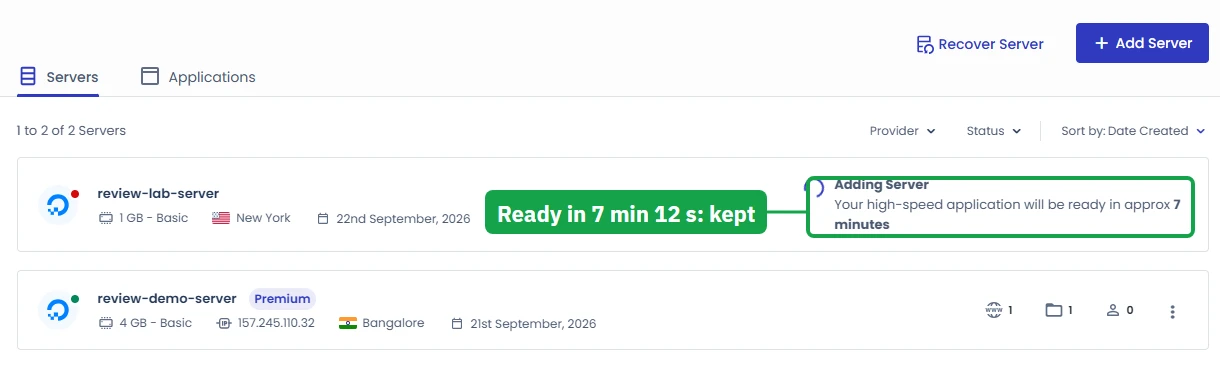
Start on the trial, which needs no card, and launch the smallest server that fits your media library. Point your domain through Cloudflare's free plan, install the free SSL, use Breeze, and put a real mailbox somewhere that is not your web server. Add Malware Protection if nothing else scans your store, and add disk or a bigger server when the monitoring page, not a salesman, tells you to.
If you want the plan prices by provider, the Cloudways pricing guide lists every tier. If you want the tuning steps for the server you just built, follow the Cloudways performance setup guide. And the whole hands-on account of this test, screen by screen, is in the Cloudways review.
FAQ: Cloudways Setup Cost
What is the cheapest working WordPress setup on Cloudways?
A DigitalOcean 1GB Standard server at $11.00/mo, free Let's Encrypt SSL, the free Breeze cache plugin, free Cloudflare DNS and CDN, and a free Zoho mailbox for your domain. That is the whole bill: $11.00/mo, with no renewal jump and nothing else to buy. Pick Basic, then Standard, in the launch form; the Premium 1GB server the pricing page leads with is $14.00/mo.
What does a WooCommerce store cost on Cloudways?
Budget about $54.00/mo to $118.00/mo for the server, plus a mailbox. A checkout cannot be page-cached, so a store pays for CPU, not for caching tricks: 4GB with 2 vCPU is a sensible floor, and the 8GB Vultr High Frequency server is the tier for steady checkout traffic. Add Malware Protection at $4 per app a month only if you have no other scanner.
Which Cloudways add-ons can I skip?
Cloudflare Enterprise ($4.99 per domain a month) is the big one: Cloudflare's own free plan gives you DNS, a global CDN and TLS for nothing, and you can add it yourself in ten minutes. Site Manager Pro at $3 per app a month is convenience, not safety. The Advance support plan at $25 a month is for teams without their own developer. Imunify360, Object Cache Pro, the Patchstack scanner, SSL, staging and migration are already free.
Can I use Git instead of paying for backups?
For code, yes, and you should: your theme, child theme and any custom plugin belong in a Git repository, which costs nothing. But Git does not hold your database or your uploads folder, and those are the parts a hack or a bad plugin update destroys. Keep the server backup Cloudways already includes, and only pay the $0.033 per GB a month for off-site copies of what you cannot rebuild.
Which PHP and WordPress version should a budget server run?
WordPress recommends PHP 8.3 or greater, and Cloudways offers 7.4 through 8.4, with new apps starting on 8.2. Move to 8.3 and stay on the current WordPress release for security. The one thing to avoid on a 1GB or 2GB server is running several PHP versions at once for different apps: the console itself warns that extra PHP versions raise RAM use and suggests scaling to 4GB.
Do AWS and Google Cloud cost more on Cloudways?
Yes, twice over. The server itself is dearer for the same RAM, and the price includes only 10GB of disk and 1 to 2GB of bandwidth, after which bandwidth is $0.12 per GB and disk $0.10 per GB a month. On a budget build, DigitalOcean, Vultr or Linode give you more machine and terabytes of included transfer for less money.