
Your WordPress site on Cloudways, set up for you, free
Open your Cloudways account through my link and add $30 to it. I set up your server and WordPress, move your site, tune the speed with the settings from my load tests, set up your business email, and answer your questions for 30 days.
Why it helps
Cloudways gives you a fast server in minutes. The setup around it is the slow part.
The server launches in a few clicks. What takes a weekend, the first time, is everything around it:
Which server, which region?
Too small and the site slows down under traffic; too big and you pay for nothing.
Domain, SSL, Cloudflare
DNS records, certificates and cache rules, where one wrong setting takes the site offline.
Moving the old site
Files, database, email and links, moved without losing a page or a day of sales.
What's included
What I do for you
The same setup I use on my own Cloudways test servers, done on yours, by me.
Server and WordPress
I pick the size with you, launch it in the region closest to your visitors, install WordPress and set PHP, backups and the security basics.

Your site, moved
One WordPress site from your old host (Hostinger, Bluehost, SiteGround or any host with file and database access), checked page by page before the domain switches.

Speed setup
Cache, Cloudflare, SSL and the object cache, set the way I set them for the load tests in my Cloudways review.

Business email
Mailboxes on your domain with Zoho's free plan or the Rackspace add-on, plus the records that keep your site's emails out of spam.

30 days of help
Questions by email to help@thatmy.com for 30 days after your site goes live, answered within about 24 hours.

A short handover
A list of what I set and why, so you know your own setup and can change it later without me.
What my Cloudways tests taught me
Six things I check on every Cloudways server I set up
Each one comes from my own load tests, speed tests and uptime records on servers I paid for. They are the settings your setup gets.
The region matters more than the plan
I timed one Vultr High Frequency server from 10 cities: the first byte reached New York in 48ms and Mumbai in 180ms. Your server goes in the region closest to your visitors.
Under load, it kept answering
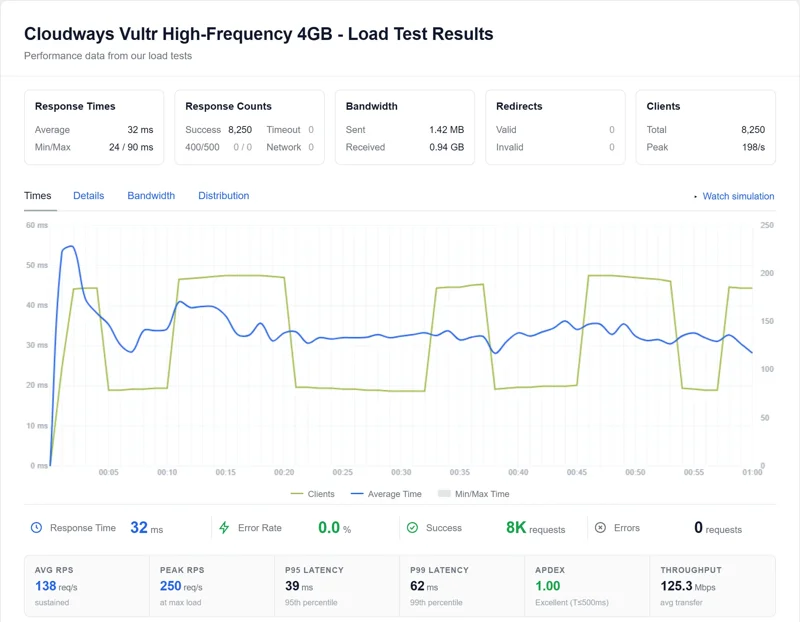
My load test sent 8,250 requests at a Vultr High Frequency server, climbing to 250 visitors at once: 32ms average response, and not one failed request.
Why stores need Object Cache Pro
Varnish serves whole pages from memory, but carts, checkouts and account pages can never be saved whole. Object Cache Pro keeps their database answers in RAM, and Cloudways includes it free from 2GB up.
Size a store for uncached traffic
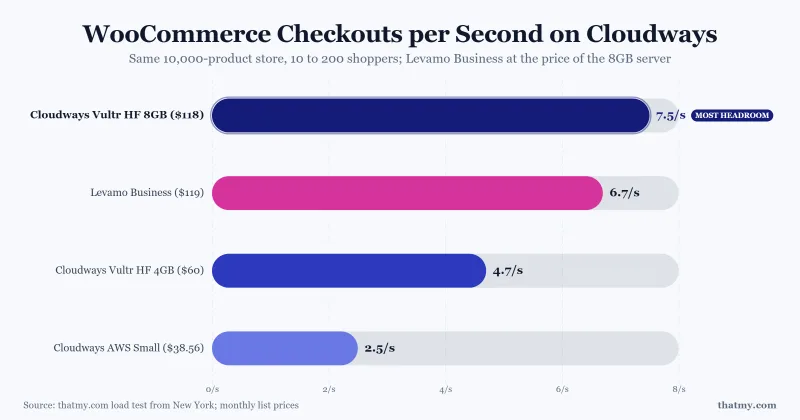
In my store test a 2GB DigitalOcean Basic server never refused a request but topped out at about 6.5 uncached pages a second. For a real store I start at 4GB High Frequency.
Uptime you can count on
Over 54 days of minute-by-minute checks, my Vultr High Frequency server had 2 short incidents, 8 minutes in total.
Make sure order emails arrive
Every Cloudways server has an SMTP page. I connect a transactional email provider there on the first day, so password resets and order confirmations land in the inbox.
The value
$500 of setup work, for $0
These are my prices for the same work done as a paid job.
| Server and WordPress setup | $100 |
| Moving one WordPress site | $150 |
| Speed setup: cache, Cloudflare, SSL, object cache | $100 |
| Business email and the records that keep it out of spam | $50 |
| 30 days of help by email | $100 |
| Your price with the Launch Pack |
Why free? Cloudways pays me a commission when you open an account through my link, and that pays for my time. Your Cloudways price is the same as on cloudways.com, or lower with the deal my link applies. Full disclosure.
How to claim it
Three steps, then I take it from there
Open your Cloudways account through my link
Either button counts. The first applies Cloudways' 40% off for 4 months until 31 October; the second adds free credits to your account, the better pick for the smallest $11.00/mo server. Signing up on your own? Type our promo code CLOUDS2022 and it counts too.
Add at least $30 to the account
Your own money, which stays your hosting balance and pays your server. I never see it. Promo credit does not count toward the $30.
Email me the proof
Write to help@thatmy.com with the four things in the box below, so I can match your sign-up and start.
What to send me
- The email address on your Cloudways account.
- The date you signed up, and roughly what time.
- A screenshot of your Cloudways Billing page showing the money you added and the promo credit or discount on your account. Cover any card details before you send it.
- Your domain and the site you want moved, with the name of its current host.
I match your sign-up date with the new sign-ups in my Cloudways partner panel, check the screenshot, and reply within one working day with your start date. Use the subject line "Launch Pack".
Write the email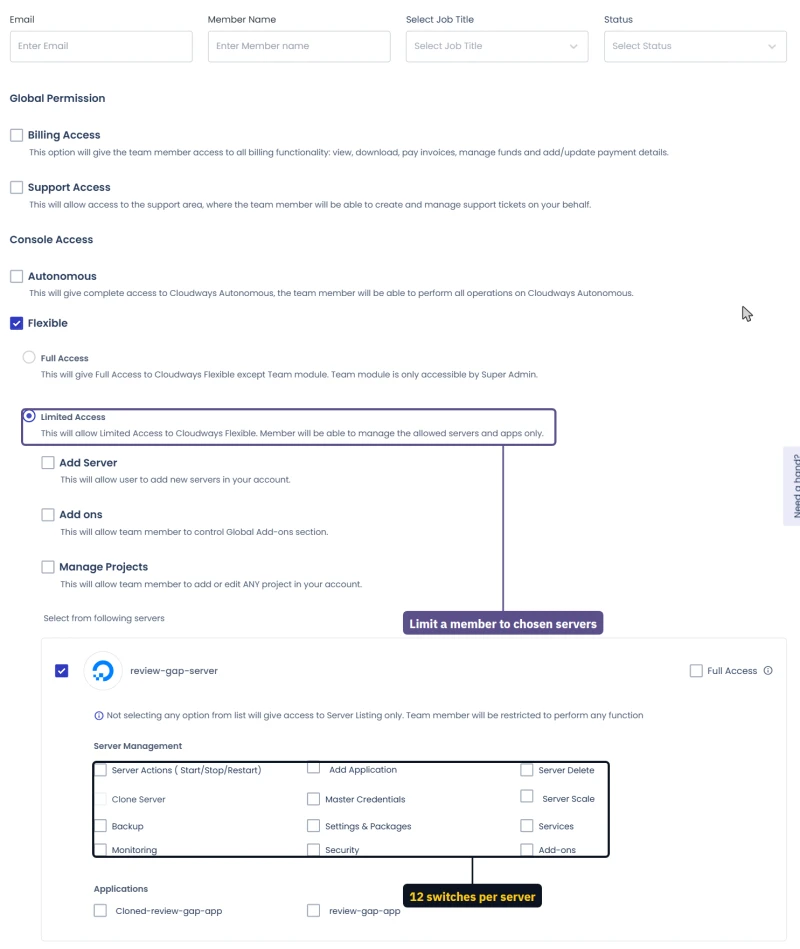
Then: once your sign-up matches, you add me to your server as a team member, with only the permissions the setup needs (Cloudways' Team page, shown here), so I never ask for your password. I do the setup, you get the handover, and you remove my access whenever you like.

Also yours
A place on the thatmy.com members' list
Launch Pack customers can join the small list of site owners I write to directly. Members get:
- Hosting deals I have checked at the checkout, sent to you before I publish them, starting with Black Friday
- First access to the tools I build for my own tests, like the 9-region speed test and my load-test scripts, while new ones are still in testing
- A direct line to me after your 30 days of help end
Want in? Say "add me to the list" in your Launch Pack email. One email when there is something worth sending, and you can leave any time.
The fine print, in plain words
The terms
- Your Cloudways account is opened through a thatmy.com link or with our promo code CLOUDS2022. I check every sign-up in my Cloudways partner panel before I start. Accounts opened another way do not qualify.
- You add at least $30 of your own money to the account. A bare 3-day trial does not qualify, because a server that expires after three days loses the work done on it. Promo credit, like the free credits from CLOUDS2022, does not count toward the $30.
- One Launch Pack per account, for one WordPress site. A second site, or a site that is not WordPress, is outside the pack.
- Ask within 30 days of opening your account.
- I take 25 Launch Packs a month, in the order the emails arrive, so each one gets done properly. When a month is full I tell you your start date.
- Not included: design, custom code, writing content, paid themes or plugins, and the email service's own fee (Zoho's free plan costs nothing; Rackspace mailboxes cost from $1.50 each a month).
- You own everything. Your Cloudways account, your server and your site stay yours, and my team access is yours to remove.
- The offer can change for future sign-ups. Whatever was on this page when you opened your account is what you get.
Questions
Before you start
Is it really free?
Yes. Cloudways pays me a commission when you open an account through my link, and that pays for the work. You pay Cloudways for hosting, the same as anyone else, and less while my link's deal is running.
Why do I need to add $30?
It is your own hosting balance on Cloudways, not a fee, and I never see it. It pays your server for its first months, and it tells me the site is going to stay live, so the setup is not lost when a trial ends.
Which server will you set up?
The one your site needs, chosen with you. For a new blog or a small business site, the $11.00/mo DigitalOcean 1GB server is enough. I never launch a bigger server without asking you first.
Can you move my site from Hostinger or another host?
Yes, one WordPress site per account, from any host that gives you file and database access or a full backup. Where Cloudways' own free migration fits, I start it for you and check the result; where it does not, I move the site by hand.
Do you need my Cloudways password?
No. You add me as a team member on your server, with only the permissions the setup needs, and you can remove me at any time.
How long does it take?
I reply within one working day of your email. Most setups are finished within three working days of that reply; a large site move can take longer, and I tell you before I start.
How do you know I signed up through your link or code?
Every account opened through a thatmy.com link or with our code CLOUDS2022 shows up in my Cloudways partner panel with its sign-up date and time. You send me that date, your account email and a screenshot of your Billing page; I match them, and the promo credit or discount on your account confirms it.
I already have a Cloudways account. Do I qualify?
Only if you opened it through a thatmy.com link or with our code CLOUDS2022, which I can see in my partner panel. If you did, and you are within 30 days of opening it, email me.
Am I locked in to Cloudways?
No. Cloudways bills by the hour with no contract. You can move away or delete the server whenever you want, and the handover tells you how your setup works.
Not sure Cloudways fits your site? Read my Cloudways review first, with the load tests behind every setting in this pack.
Get your site set up this week
Open your account, add $30, and email me. I will take it from there.
Ask Mangesh
I read every message myself and reply here.
Ask about the free Launch Pack, the $30 rule, or which Cloudways server fits your site.
Sent. My reply shows up here: you can close this page and come back to it.