

InMotion Hosting Review 2026: The Short Version
InMotion Hosting is an independently owned US web host, in business since 2001. Chat and ticket support run 24/7, phone support is on weekdays, shared plans come with cPanel, and shared plans carry a 90-day money-back guarantee.
Our June 2026 benchmark of the Power plan found three things to weigh: 193ms for a single request from New York, rising to an average of 580ms with 100 concurrent users; backups sold as a paid add-on with a 10GB cap per subscription; and renewal prices around three times the first-term price. We did not test a WooCommerce checkout.
The honest verdict: InMotion is a reasonable choice for a small, mostly US-based site that wants cPanel and weekday phone support. For a busy store, an audience far from the US or Amsterdam, or a site that expects traffic spikes, our numbers point to other hosts.
✅ InMotion IS Right For:
- Small, mostly US-based business sites with modest traffic
- Users who want phone support on weekdays (Power and up)
- cPanel-familiar users who don't want to learn a new interface
- Buyers who will keep their own off-site backups
- Bloggers and personal sites with low concurrent traffic
❌ InMotion Is NOT Right For:
- Stores with many shoppers at once (we measured the 580ms average at 100 users; we did not test a checkout)
- Audiences in Asia-Pacific (data centres in Los Angeles, Ashburn and Amsterdam only)
- Sites that expect traffic spikes
- Buyers who want backups included in the plan price
- Anyone who can't absorb renewals at about three times the first-term price ($5.79/mo to $18.99/mo on Power, one-year term)

Why Scalahosting Beats Inmotion
- AMD EPYC 9474F (#42 PassMark), 480% faster than InMotion's hardware
- OpenLiteSpeed (not Apache), 3-5x better concurrent request handling
- 28ms TTFB vs InMotion's ~320ms, 123% faster
- 58ms at 100 concurrent users (+19% degradation) vs InMotion's 520ms (+178%)
- Backups for ALL account sizes, not just under 10GB
- SPanel free, saves $180/yr vs cPanel, uses 8x less RAM
- No CPU steal, no I/O throttle, no hidden VPS limits
- Email hosting included with no shared IP reputation issues
- 13 data centers vs InMotion's 2 US locations
- Anytime money-back guarantee
Where Inmotion Has An Edge
- Renewal steps 83% after intro term ($29.95/mo → $54.95/mo)
- No shared hosting entry point, VPS minimum $29.95/mo
- Support varies by agent, L1 can miss nuanced issues
- Documentation less comprehensive than InMotion's knowledge base
Real Benchmark Data
- Origin TTFB (Managed VPS, no CDN): 38ms
- Uptime (54-day window): 99.99%
- PageSpeed Score (Mobile): 83/100

$29.95/mo
Anytime Money-Back Guarantee
Methodology: The benchmark boxes on this page cover 4 plans. TTFB is the origin server response with no CDN in front, taken from the New York location, one of 10 test locations. Uptime counts real incident minutes over a 54-day window. Load figures are the average response across a 60-second test ramping 0-250 concurrent clients from US-East.
Test Environment & Methodology (Full Disclosure)
Every benchmark figure in this review comes from our benchmark records, and the page says which measurement each number is.
Test Environment, Full Disclosure
TTFB readings were taken with the CDN off and page caching off, measuring server response time. The InMotion Power plan was chosen as the headline plan because it is the middle shared plan. We did not run a WooCommerce checkout test, a support-response test or a test of the Amsterdam location, and the page makes no claim about them.
What Is InMotion Hosting? Company Background
InMotion Hosting was founded in 2001 and, in our ownership records, is independently owned (employee-owned). It is not part of Newfold Digital, the group that owns Bluehost.
Ownership matters because it shapes pricing and support decisions, but we have not measured a link between ownership and support quality, and this page does not claim one.
InMotion's hosting categories include: Shared Hosting, VPS Hosting, Dedicated Servers, WordPress Hosting, and Reseller Hosting. Its data centers are in Los Angeles, CA, Ashburn, VA and Amsterdam, which covers the US and Europe but leaves Asia-Pacific far away (more on this in the server locations section).
InMotion's Genuine Strengths (Before We Get to the Problems)
- Independent ownership: employee-owned, not part of a larger hosting group
- Support channels: live chat and tickets 24/7, phone 9 AM to 9 PM ET on weekdays
- In business since 2001: an established track record
- cPanel standard: Familiar interface with a large ecosystem and documentation
- Free migration: free with one cPanel or WordPress backup
Why InMotion Slows Under Load: The Apache Question
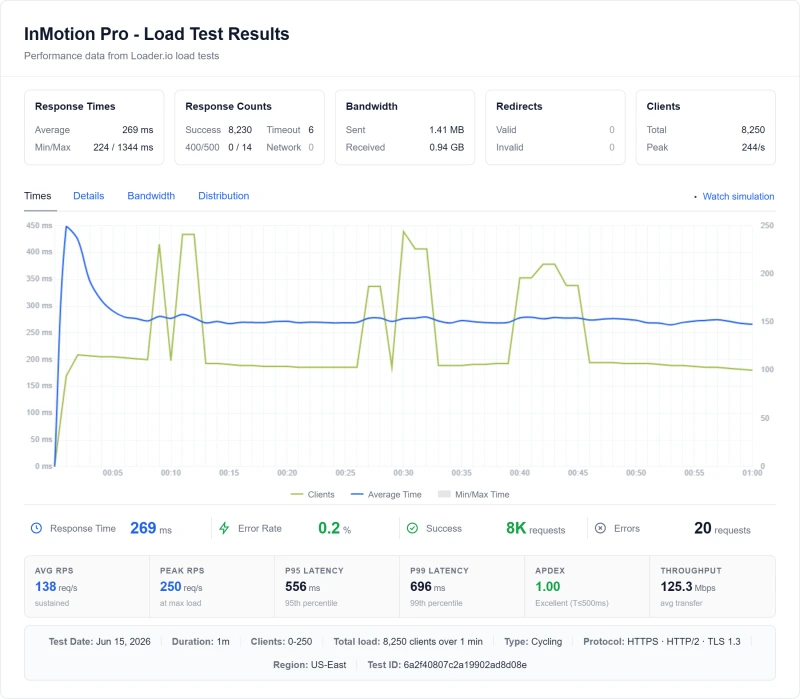
Our load test shows the Power plan slowing as concurrency rises. This section sets out what we measured and what we can and cannot say about the reason.
What We Know and What We Don't
Servers that start a process or thread for each request, as Apache's classic model does, can queue requests when their PHP workers run out; event-driven servers such as LiteSpeed and NGINX handle many connections in one process. That is a general description of how those servers work, not a finding about InMotion.
We did not record the response headers of our InMotion test site, so we cannot say which web server software answered it. InMotion's own documentation describes an NGINX cache on its Power and Pro plans, and its control-panel documentation lists Apache among the services, so the stack may be a mix. Shared plans also share CPU and PHP workers with other customers, which can produce the same curve with any web server.
What Caching Can and Cannot Do
A caching plugin or server cache speeds up pages that can be cached. It cannot help pages that differ for every visitor, such as a store checkout, a logged-in dashboard or a search result, and those are the pages that suffer when concurrency rises.
The slowdown is measured: 193ms for a single request and 580ms on average at 100 concurrent users. The cause is not established here.
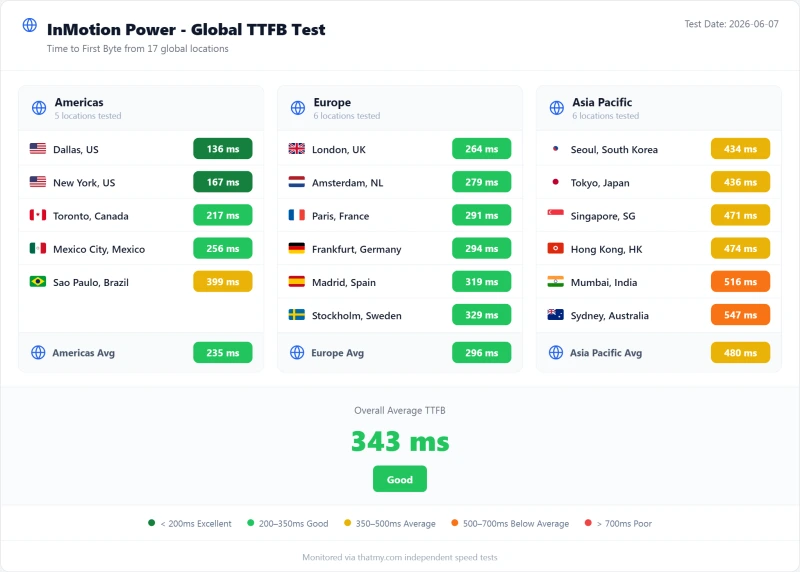
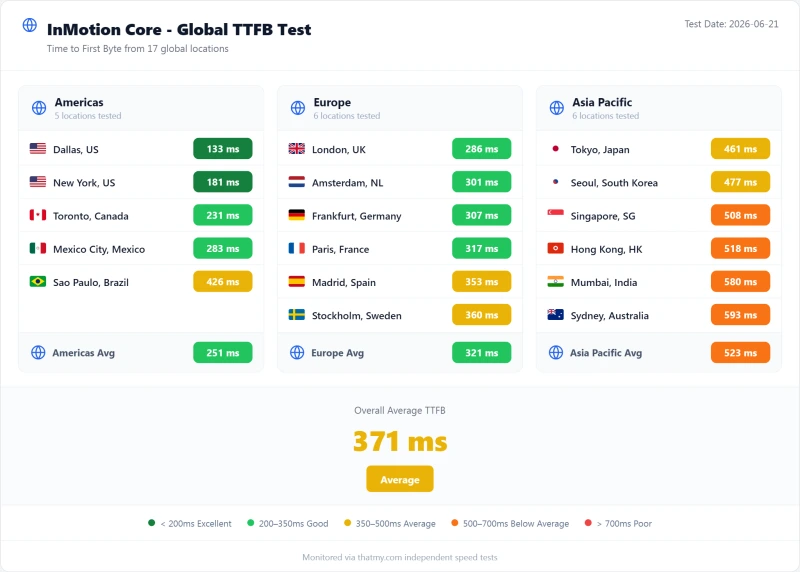
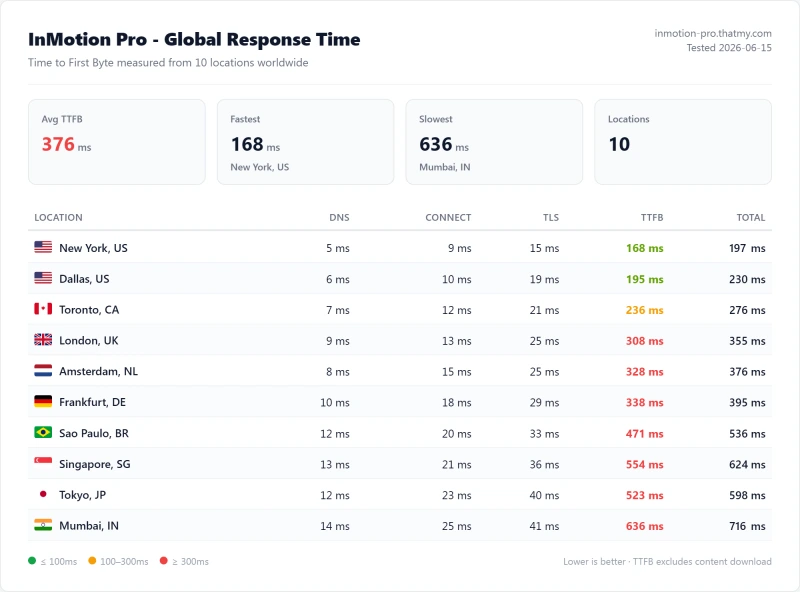
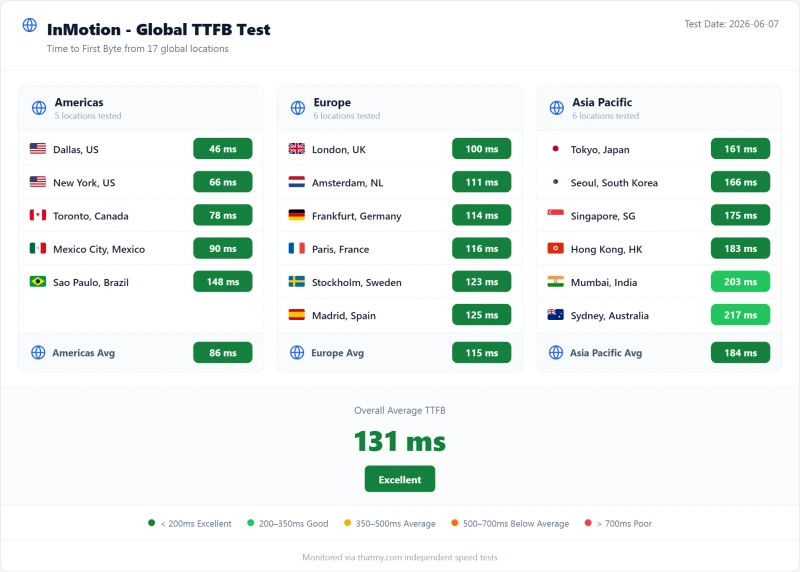
TTFB Results by Test Location
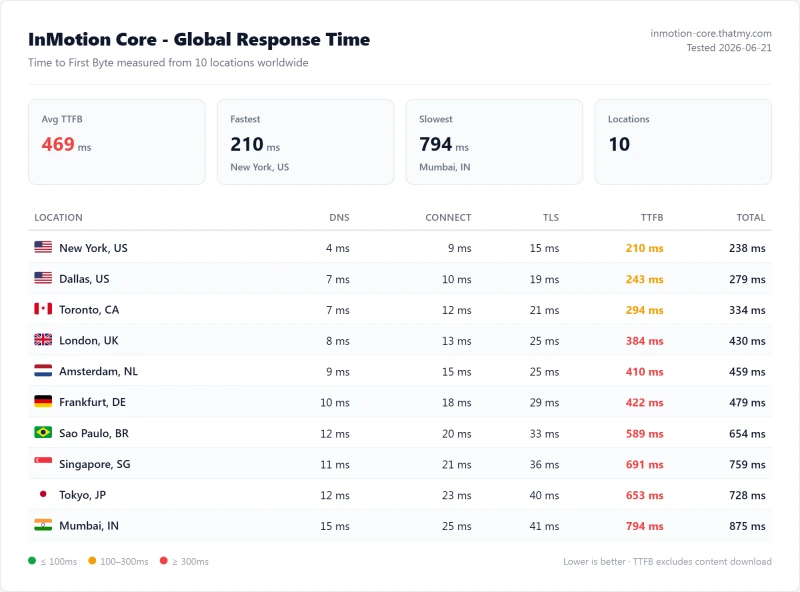
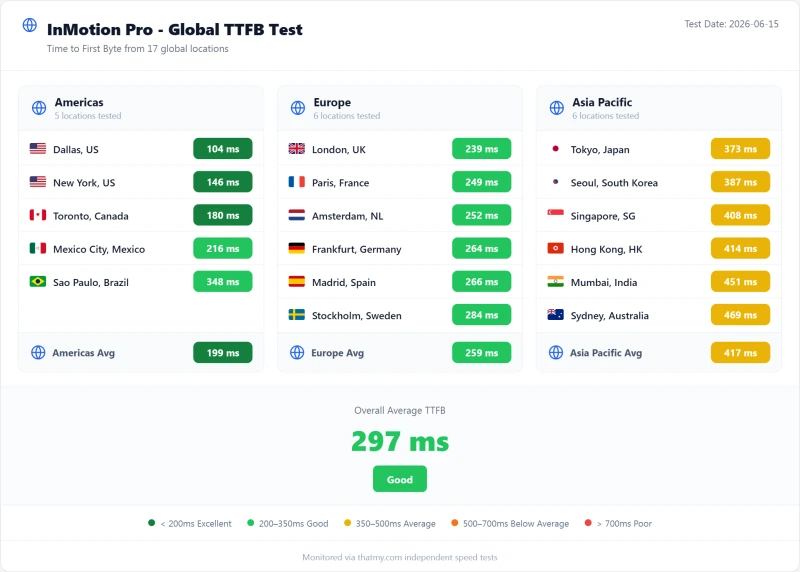
All figures below are origin readings: no CDN in front, page caching off. They are the time from each of our 10 measuring locations to a test site on the InMotion Power plan, on a US East server, so the New York figure is the closest to the server and London is the time from London to that US server, not to a UK data center.
A Single Request Is Reasonable; Load Is Where It Slows
At 193ms from New York, InMotion Power answers a single uncached request reasonably quickly; across its Pro, Power and Launch plans the New York figure runs from 168ms to 210ms. What the benchmark shows is what happens next: at 100 concurrent users the same Power plan averages 580ms. A CDN or page cache helps pages that can be cached, but dynamic pages (a store checkout, logged-in users) still reach the origin, which answers in 193ms for a single request and 580ms at a hundred concurrent users.
Distance adds to that. From London the same plan measured 352ms, from Frankfurt 388ms, from Singapore 634ms and from Tokyo 599ms. Those are times to a US East server.
InMotion now offers an Amsterdam data centre at checkout, which is the option to look at for a European audience. We did not benchmark it.
Load Test: 10 → 100 Concurrent Users
A single request is the easy case. The load test asks what happens when many visitors arrive at once.
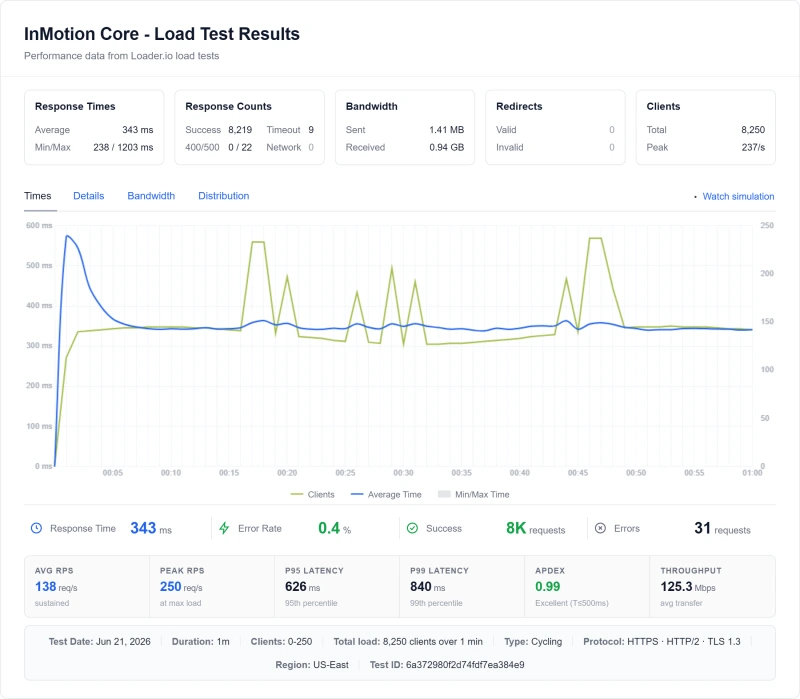
The test ran from the US East against a test site on each plan, with no CDN in front. The 100-user figure is the one step our records hold as measured; the figures for 10, 25 and 50 users are interpolated between the single-request reading and the 100-user step, so we do not chart them.
What the Error Rate Actually Was
InMotion returned 25 errors across 8,250 requests over the full ramp, a rate of 0.3%. That is not the failure mode to worry about here: almost everyone got a page, they just waited longer for it. ScalaHosting, Cloudways and ChemiCloud returned 0% errors in their own runs of the same test.
The shape matters more than the error count: InMotion's average response at 100 users is about three times its single-request reading, while ScalaHosting's and Cloudways' rise by about half. We measured the slowdown; we have not established its cause.
CPU Limits: What We Measured and What We Didn't
We did not run a CPU stress test on InMotion, so we have no record of when, or whether, throttling starts. Community posts about InMotion quote daily CPU-minute and process limits; we could not confirm any of those figures on InMotion's own pages, so we do not repeat them.
What we do have is the load test. On the Power plan the average response climbed from 193ms for a single request to 580ms with 100 concurrent users, and the slowest response in the ramp was 1011ms. That is consistent with a shared plan running into a resource ceiling, but our records do not show which one.
- Shared plans: CPU is shared with other customers on the server, so a neighbour's spike can affect you
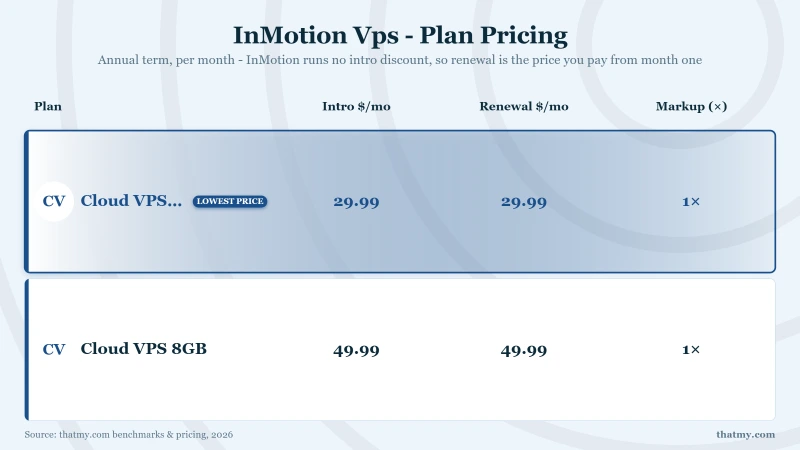
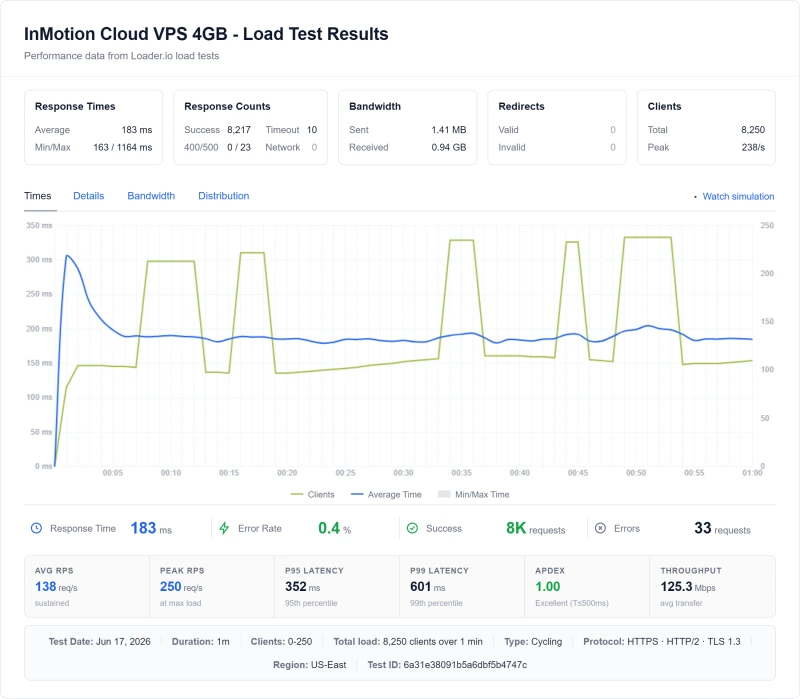
- VPS plans: resources are reserved for you; InMotion's Cloud VPS 4GB answered a single request in 80ms and averaged 150ms at 100 users in our test
- Before a sales event: ask InMotion for your plan's resource limits in writing and test your own traffic pattern during the refund window
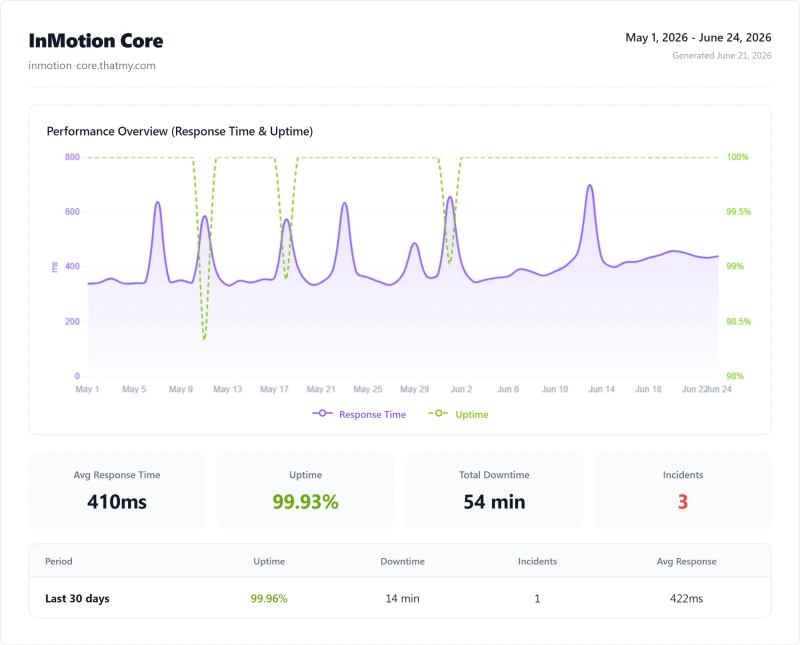
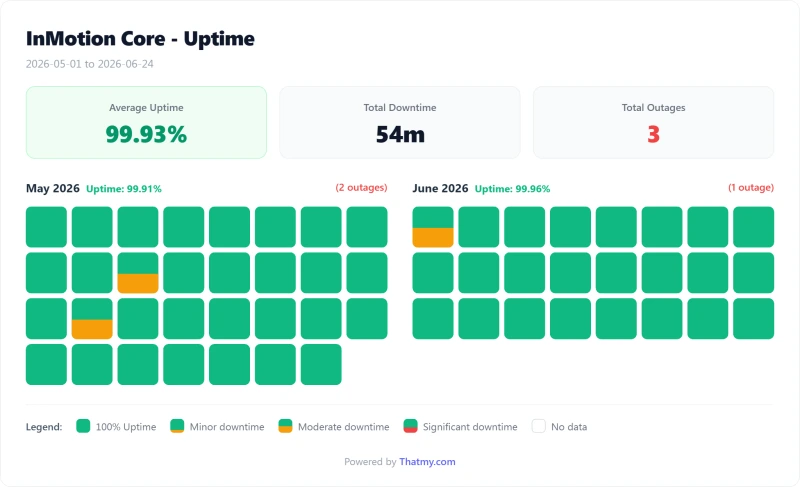
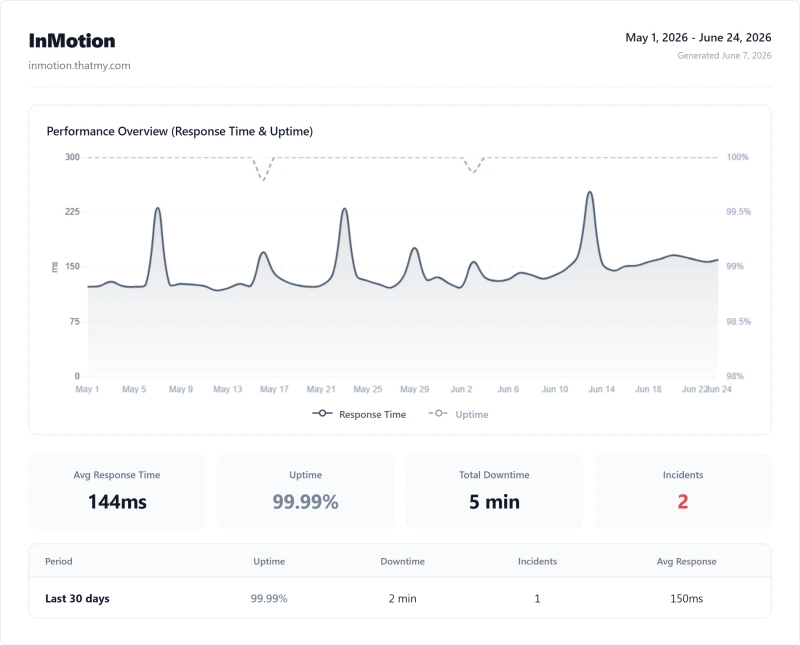
Uptime: 54-Day Monitoring Window
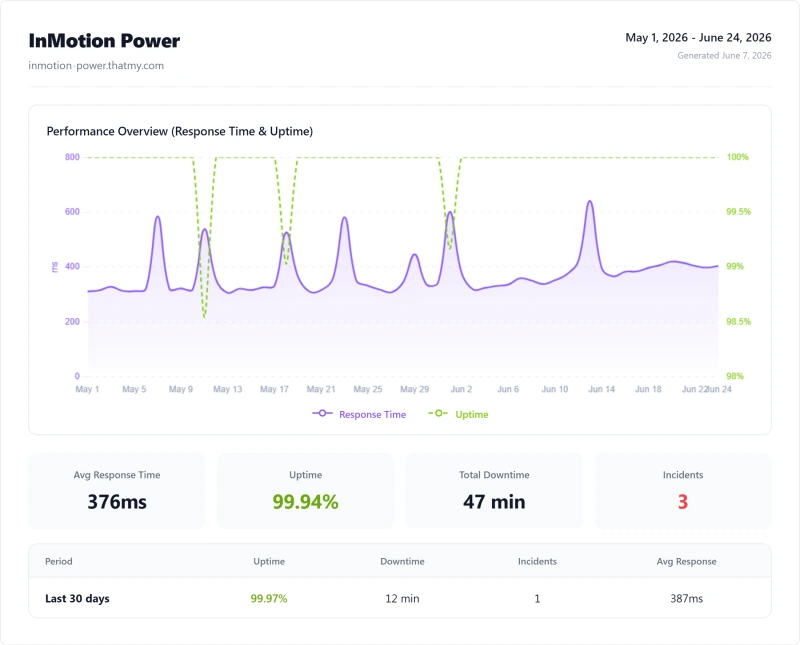
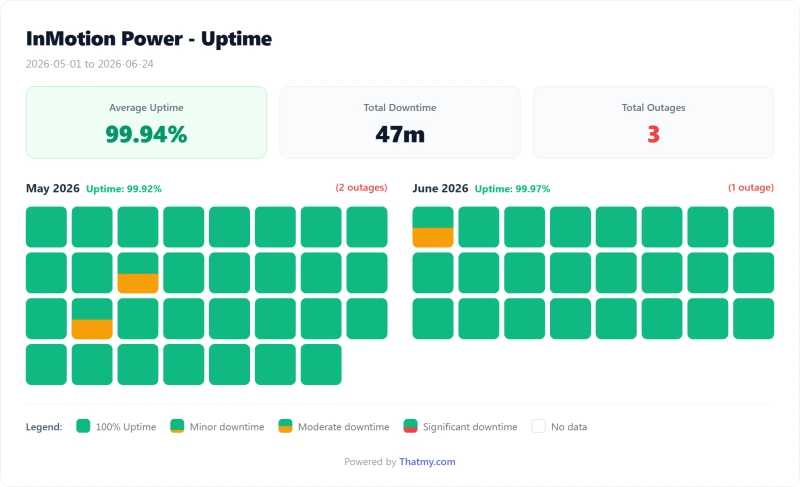
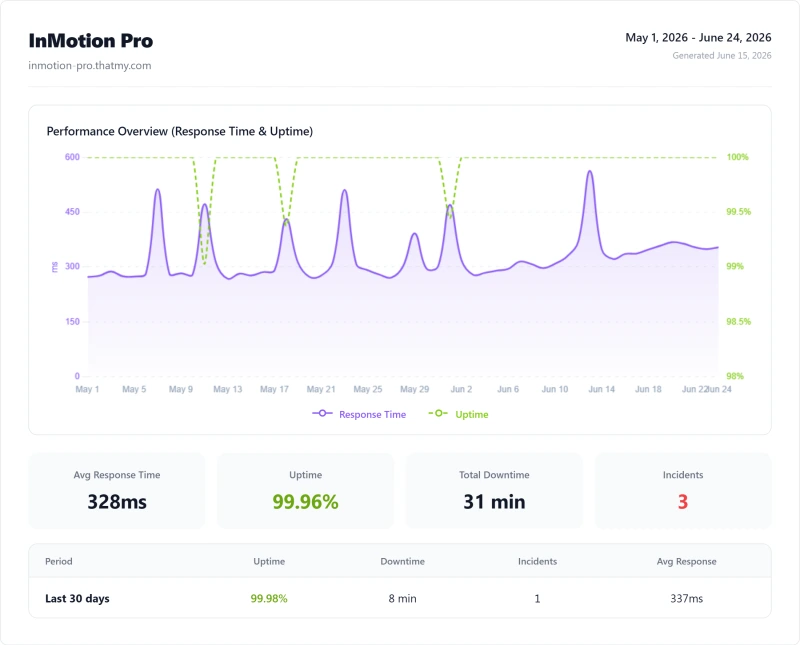
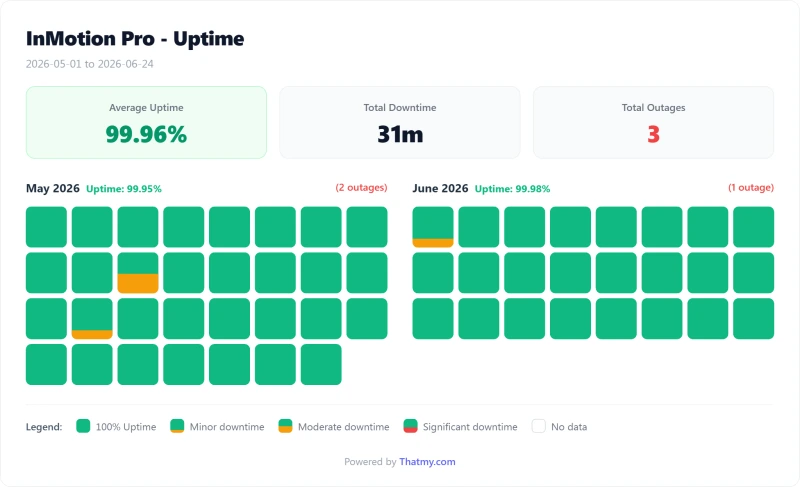
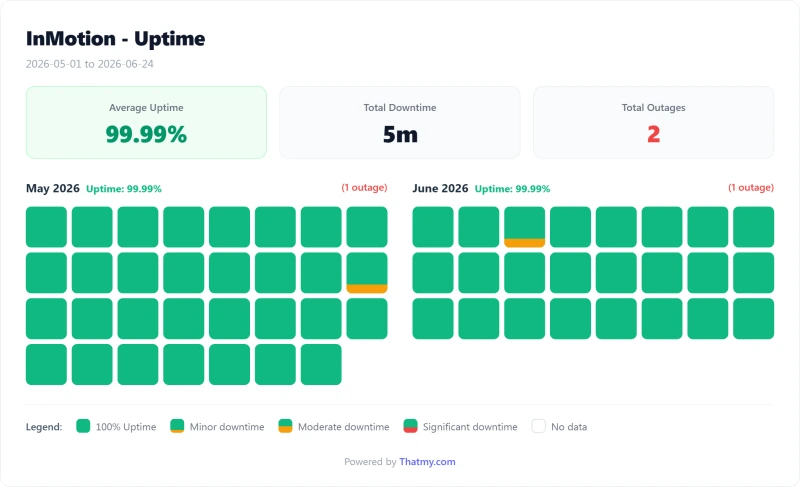
InMotion's shared hosting pages advertise a 99.99% uptime guarantee; the Power plan measured 99.94% over 54 days, which is below that figure. We have not read the guarantee's terms, so we cannot say what a customer would be owed.
Over the same window ScalaHosting and Cloudways each lost 8 minutes, SiteGround 23 minutes, InMotion 47 minutes and Bluehost 70 minutes. InMotion sits in the middle: better than Bluehost, behind SiteGround. We have no record that ties InMotion's incidents to traffic or to its web server, so this page draws no link. Fifty-four days is a short window, not a year.
Backups: A Paid Add-On With a 10GB Cap
Backups are where InMotion's shared plans differ most from what a buyer expects. We found no automatic backup named as included on the shared plan pages. InMotion sells backups as the Backup Manager add-on, and its product guide says the total disk space of all backup types combined may not exceed 10GB per subscription.
In the shared checkout we walked through on 2 October 2026, Backup Manager was pre-ticked at $35.88 a year ($2.99 a month), while InMotion's FAQ promises no hidden backup fees.
When Does a Site Outgrow 10GB?
- Stores with many product images: images add up quickly and every backup counts against the same cap
- Sites with video content: a single HD video can be hundreds of megabytes
- Large databases: order history, customer data and analytics grow over time
The Managed VPS cards state backups are included, and InMotion lists 10GB of free backup storage and snapshots on its larger VPS sizes. The pages we read were not clear on which shared plans, if any, include a backup without the add-on, so ask before you buy and look at the cart before you pay.
If You're on InMotion Shared Hosting
Check your account for Backup Manager and what it covers, and look at cPanel → Disk Usage to see how large your site is. Whatever the answer, keep your own copy: a backup plugin such as UpdraftPlus writing to Google Drive or Dropbox does not depend on the host's add-on.
Database and Email Limits: What to Ask Before You Buy
Database and Process Limits
Shared hosting on any host caps how many database connections and processes one account can use at once, and a busy store can run into those caps. Community posts about InMotion quote specific limits, but we could not confirm any of them on InMotion's own pages, so we do not print them. If you run a store or a busy membership site, ask InMotion support for the limits on your plan in writing before you buy.
- What to ask: the maximum simultaneous database connections, the CPU allowance per day, and the entry-process limit for your plan
- What we measured: the plan's average response with 100 concurrent users (580ms) and its error rate over the load ramp (0.3%); we did not isolate a database limit
- VPS plans: limits are set by the size you buy, and InMotion's Cloud VPS 4GB averaged 150ms at 100 users in our test
Email Deliverability
On any shared hosting plan, outgoing mail usually leaves from an address that other customers on the server also use, so a neighbour who sends spam can hurt your deliverability. We did not measure InMotion's mail reputation. InMotion's support article limits shared accounts to 250 emails an hour (read in search results, not rechecked), and it sells a dedicated IP add-on on Launch and Power; Pro includes one. We did not count user complaints, so this page gives no complaint percentages.
Practical Options for Email
- Dedicated IP add-on: separates your sending address from your neighbours' on Launch and Power
- Separate mail service: a paid mailbox service such as Google Workspace keeps business email off the web server altogether
- Transactional email service: Mailgun or SendGrid for WooCommerce order notifications
InMotion Pricing, The Real Cost Breakdown
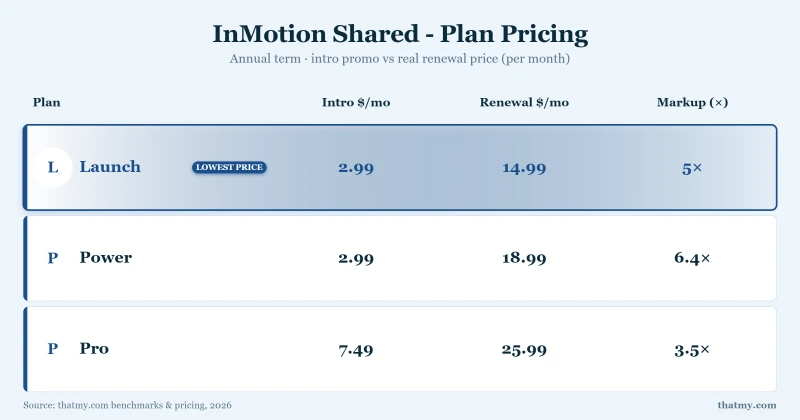
InMotion's prices move with a term switch, and its summary pages never say which term they show. The /pricing page shows the 1-year prices. On 2 and 3 years the shared plans cost $0.20 to $0.40 a month more but renew about $1 lower, and month to month costs about three times as much.
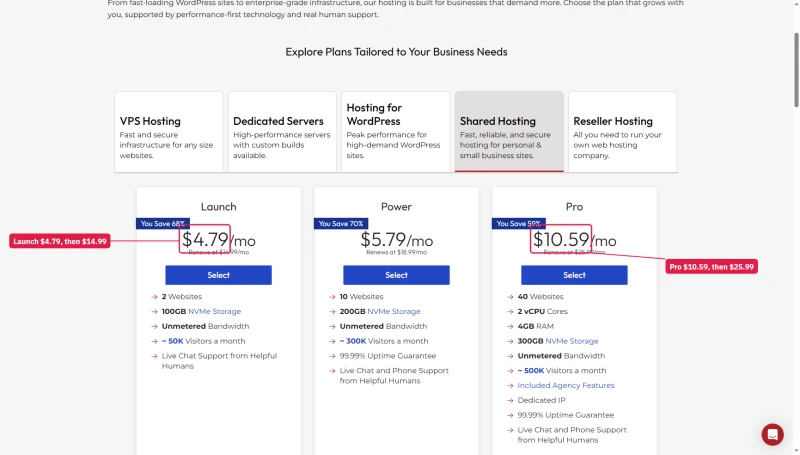
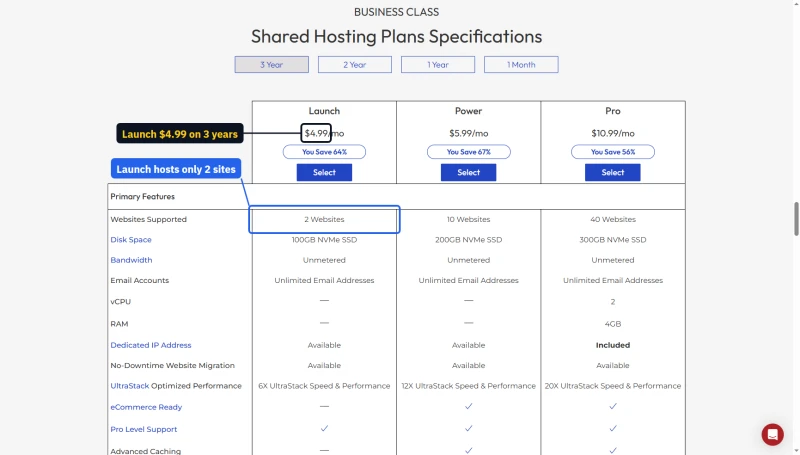
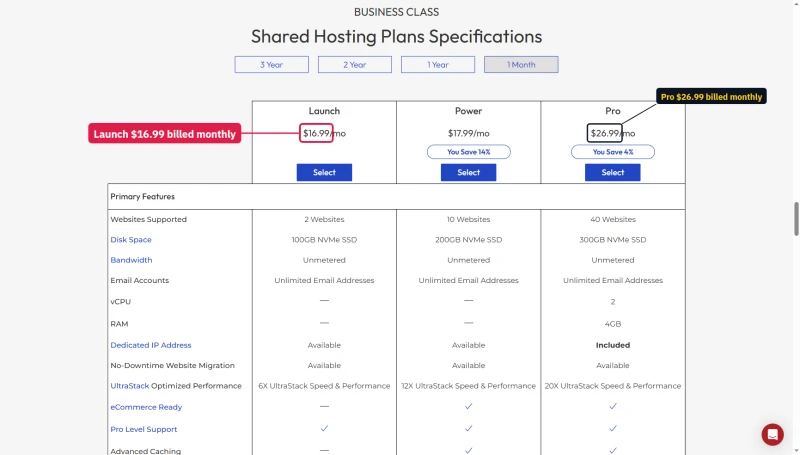
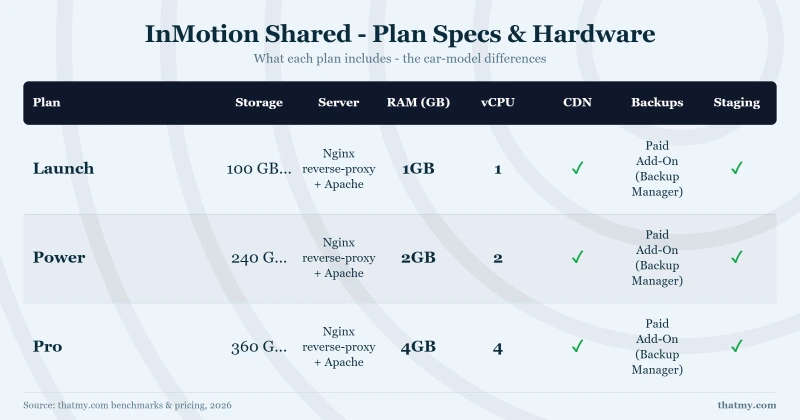
Launch is capped at 2 websites and 100GB of NVMe storage, Power at 10 and 200GB, Pro at 40 and 300GB with 2 vCPU, 4GB RAM and a dedicated IP. Launch support is chat and ticket only, and Launch has no advanced caching.
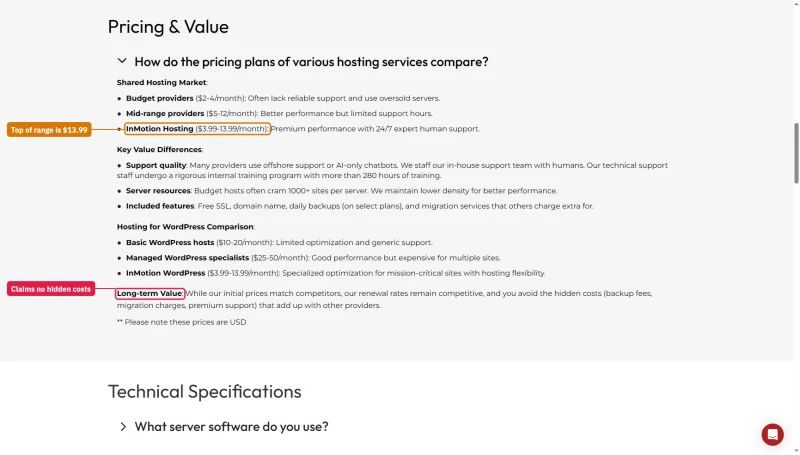
Watch the FAQ figure. InMotion's own FAQ says its shared and WordPress hosting runs $3.99 to $13.99 a month. Nothing on sale starts at $3.99, and the same answer promises no hidden backup fees while the shared checkout pre-ticks Backup Manager at $35.88 a year.
WordPress Hosting Plans
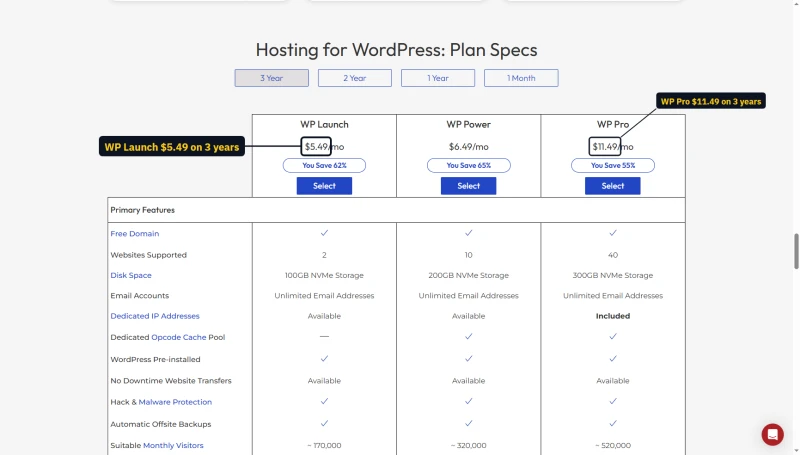
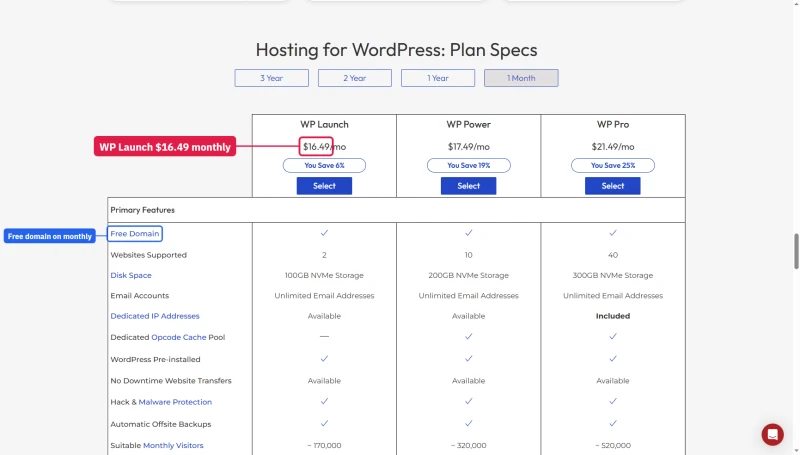
The WordPress plans follow the same pattern: $5.29, $6.29 and $11.29 a month on 1 year, $5.49, $6.49 and $11.49 on 2 or 3 years, and $16.49, $17.49 and $21.49 month to month. Sites are capped at 2, 10 and 40.
The WordPress compare table ticks Free Domain on the monthly term too, while InMotion's guarantee page gives the free domain only on 12, 24 or 36-month plans.
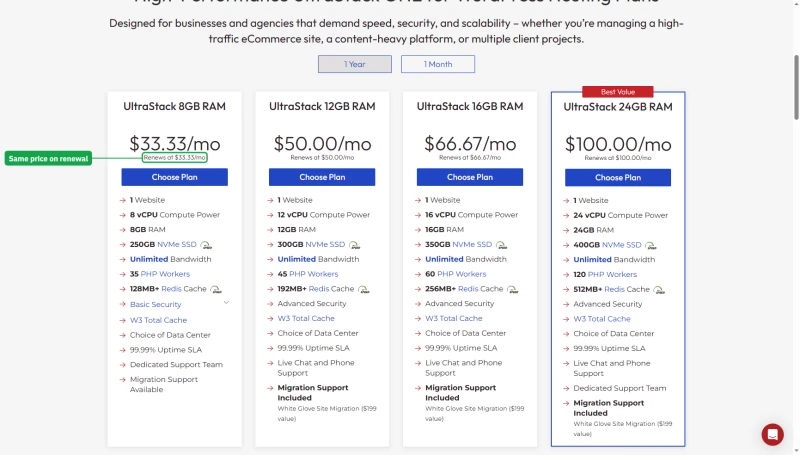
UltraStack ONE, the managed WordPress line, is sold in four single-site sizes from $33.33 a month on 1 year ($40 month to month), and it renews at the same price.
VPS: The cPanel Licence Is Its Own Line
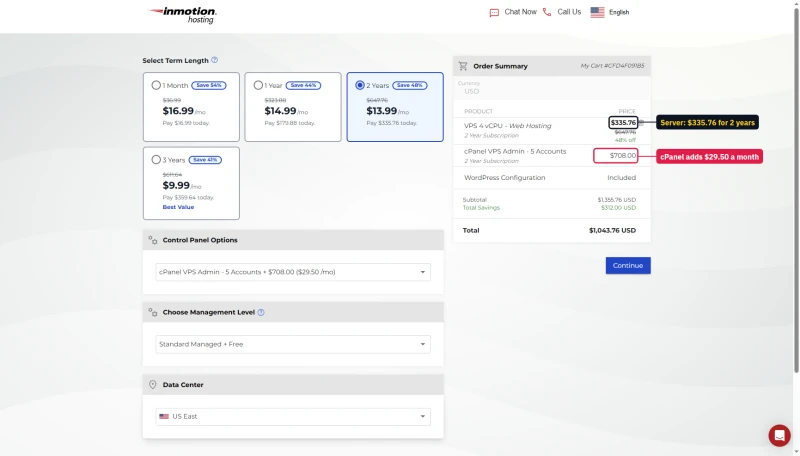
The Managed VPS cards start at $43.49 a month on a 24-month term and say cPanel and WHM are included.
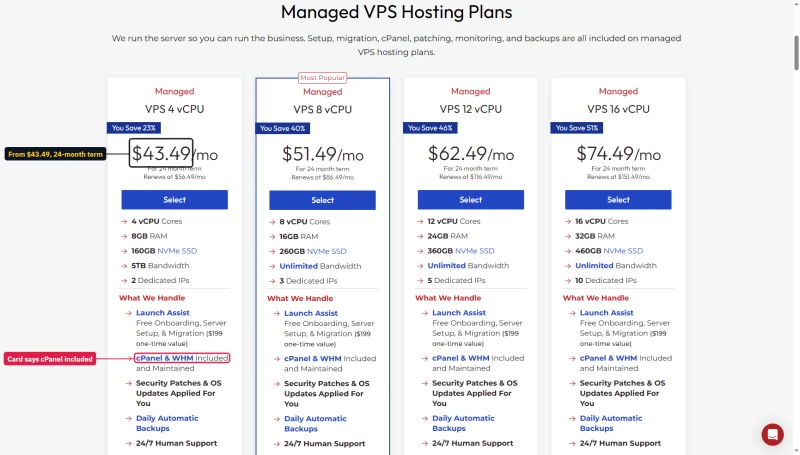
The cart shows where that figure comes from: the server at $13.99 a month plus a cPanel licence at $29.50 a month, billed as its own line. On 3 years the server drops to $9.99.
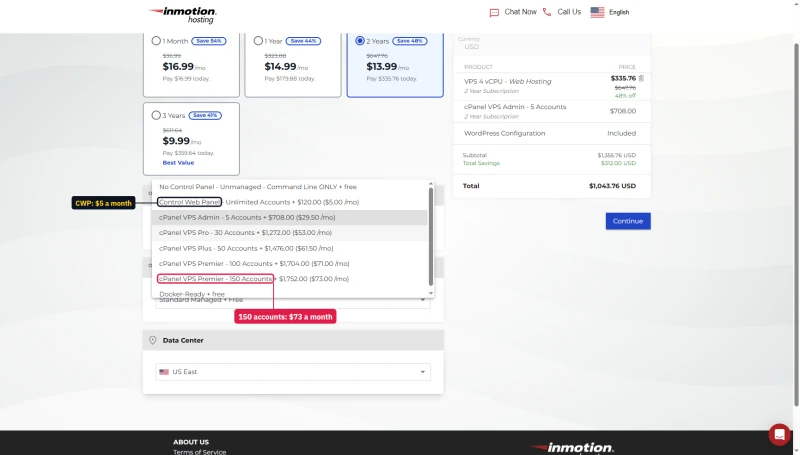
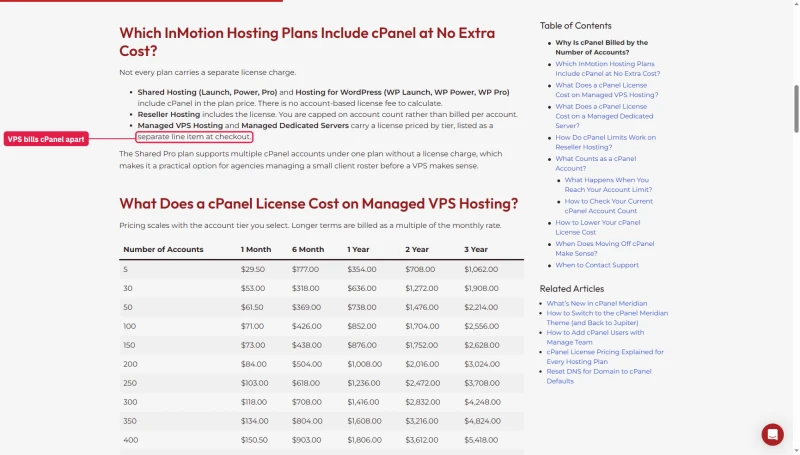
The panel menu prices the alternatives: Control Web Panel at $5 a month, or cPanel from $29.50 for 5 accounts to $73 for 150. InMotion's own cPanel article confirms the licence is a separate line item on Managed VPS.
Reseller and Dedicated
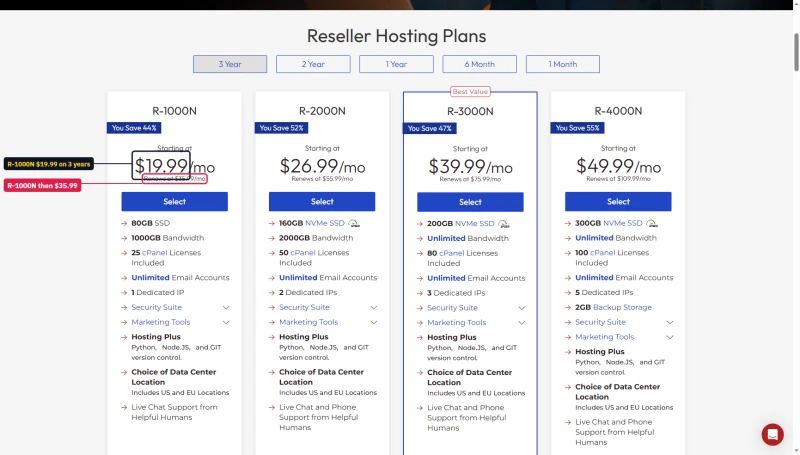
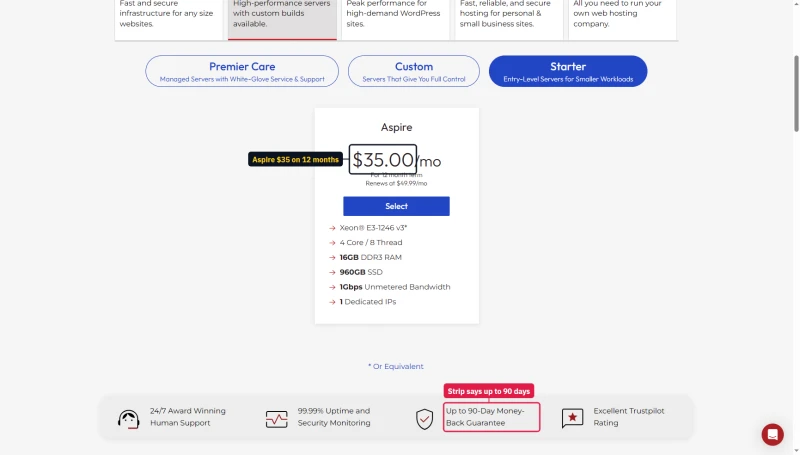
Reseller R-1000N is $19.99 a month on 6 months to 3 years and renews at $35.99. The dedicated line starts with Aspire at $35.00/mo on a 12-month term, renewing at $49.99/mo.
What's Included (and What's Not)
Included with all shared plans: cPanel, free domain for the first year on 12, 24 or 36-month terms, free SSL, free migration (1 site), unmetered bandwidth, NVMe storage.
NOT included: Dedicated IP (an add-on on Launch and Power whose price the pages we read do not print; included on Pro), email marketing tools, advanced security (add-on), Backup Manager (pre-ticked in the cart), additional site migrations (paid after first).
Renewal Pricing Trap: True 3-Year Cost
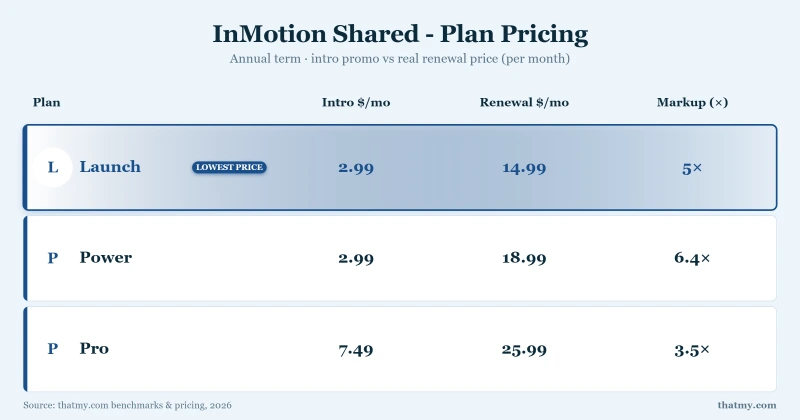
The renewal step is the part of InMotion's pricing to plan for. Here is the cost of the Power plan, on its three-year term:
- Years one to three (intro, paid up front): $215.64
- Each year after (renewal): $215.88
- On a one-year term instead: $69.48 for year one, then $227.88 a year
These totals are monthly prices from our price records multiplied out, in US dollars, before tax and before add-ons such as Backup Manager. The Cloudways size we benchmarked is not recorded, so its row prices the entry 1GB size.
The Renewal Reality Check
At the one-year renewal price ($18.99/mo), InMotion Power costs more than Cloudways' Vultr High Frequency 1GB server ($16.00/mo), which answered a single request in 48ms against InMotion's 193ms and averaged 74ms at 100 users against 580ms. The intro price advantage fades after the first term, so compare the renewal price, not the intro price.
The Money-Back Guarantee, by Term
The guarantee page is clear: 90 days on all shared and WordPress plans, and on VPS, UltraStack ONE and reseller terms of 6 months or longer; 30 days on month-to-month VPS, UltraStack, reseller and on dedicated servers. Add-ons and domain fees are not refunded.
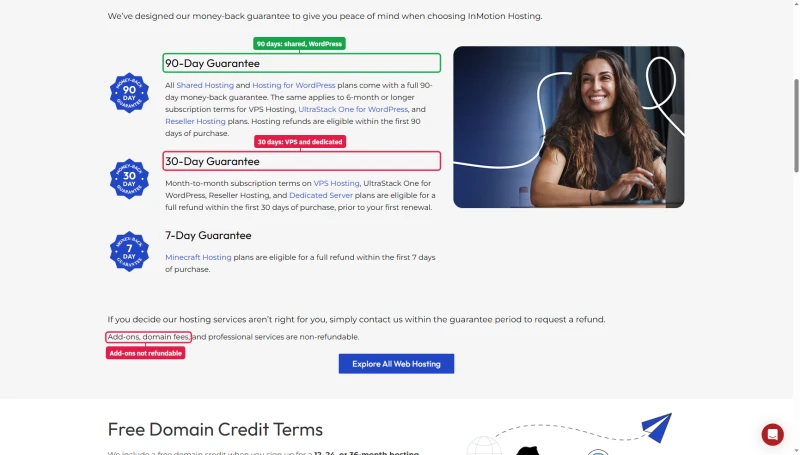
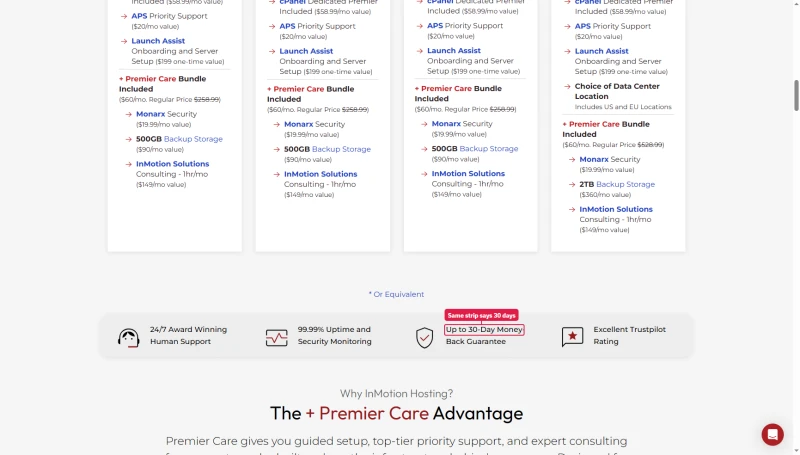
The dedicated pages disagree with it and with each other. The /pricing dedicated tab says up to 90 days; the dedicated servers page says up to 30. Plan on 30 for a dedicated server.
cPanel Dashboard & User Experience
InMotion uses standard cPanel, the most widely used hosting control panel. This is a genuine strength for users who already know cPanel from previous hosts.
cPanel Strengths
- Massive ecosystem: Thousands of tutorials, YouTube videos, and documentation
- Third-party integrations: Works with most hosting tools and plugins
- One-click installers: WordPress installation and management
- File Manager: Full-featured web-based file management
- Email management: Email account, forwarder, and filter management
cPanel Weaknesses
- Licensing cost: on shared and WordPress plans the cPanel licence is built into the plan price; on Managed VPS it is a separate line from $29.50 a month
- Heavier than newer panels: cPanel is a full-featured, older panel and can feel complex to a first-time user
For users who know cPanel, InMotion's implementation is the familiar one. Beginners can find it overwhelming; ScalaHosting's SPanel is the usual alternative to compare.
WordPress Performance Stack (What InMotion Lists)
This section rests on InMotion's own pages and support articles as we read them in our research dossier, not on a test of our own: we did not record the response headers of our test site, so we do not state which web server software answers it.
- UltraStack: InMotion describes it as NGINX, Redis and PHP-FPM, on its VPS line
- Caching: an NGINX cache managed through Cache Manager on Power and Pro, not on Launch
- Object cache: Redis is listed for the WordPress plans
- PHP workers per site (WordPress plans): 3 on Launch, 4 on Power, 6 on Pro
- PHP versions: 7.4 through 8.4
Our benchmark site ran on a shared Power plan, so the UltraStack line above does not describe it. Whether a plain shared plan has an object cache is something we could not confirm, so check before you rely on one for a store.
WooCommerce on InMotion: What We Tested and What We Didn't
We did not run a WooCommerce checkout test on InMotion, so this page has no checkout response time. WooCommerce cart and checkout pages cannot be cached because they differ for every shopper, which means raw server speed decides how they feel. The closest records we hold are the load test and the WordPress benchmark on the Power plan.
If you run a store, treat InMotion's shared plans with caution: a plan that averages 580ms with 100 concurrent users is a risk for a sales day, and the backup add-on is capped at 10GB per subscription. InMotion also sells UltraStack ONE and Managed VPS plans aimed at heavier sites; we benchmarked its Cloud VPS 4GB, which averaged 150ms at 100 users. Test your own checkout during the refund window before you commit.
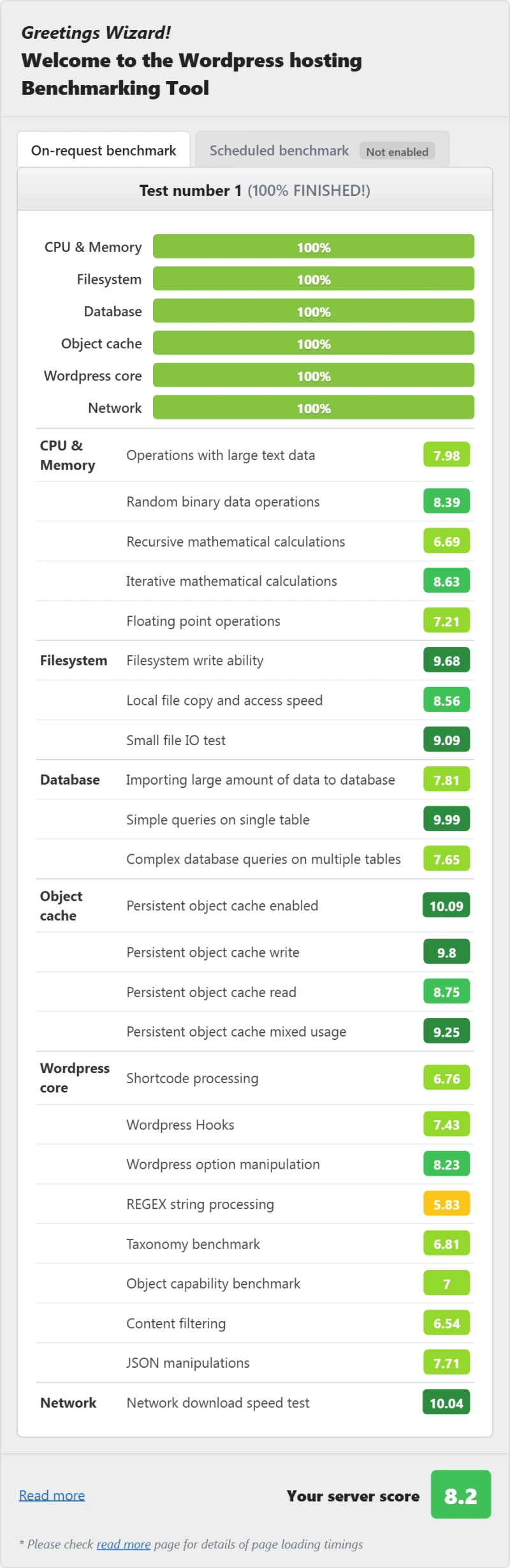
PHP and WordPress Benchmark Scores
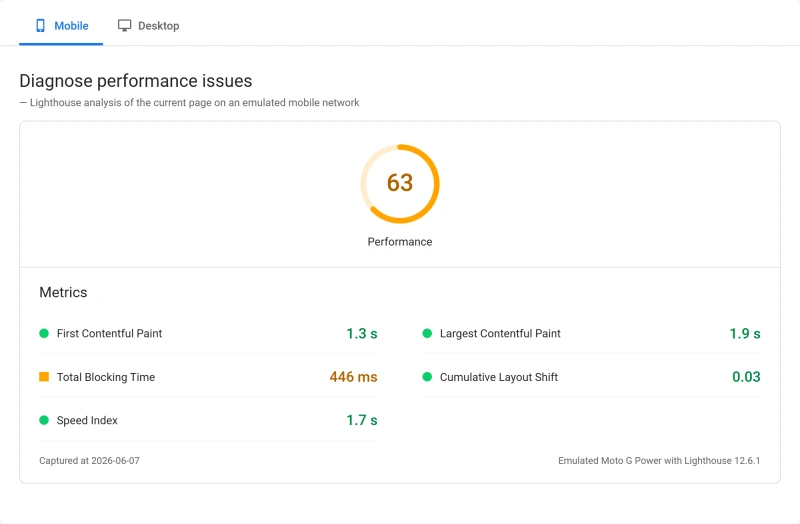
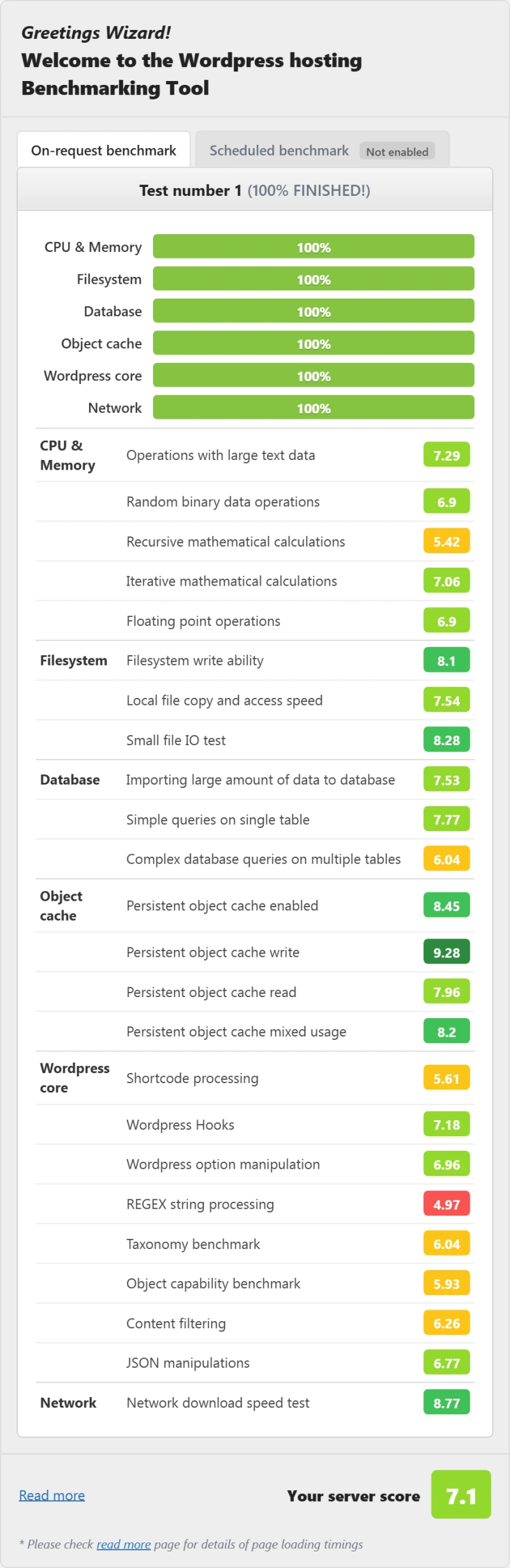
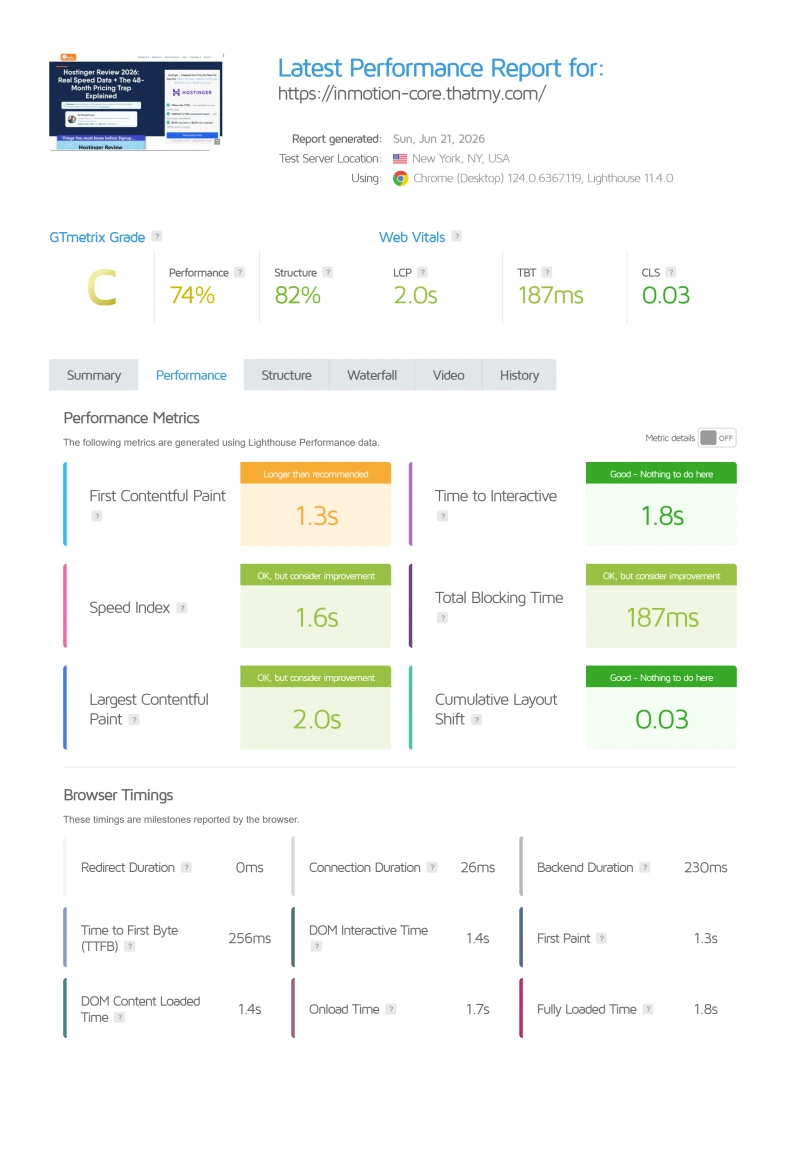
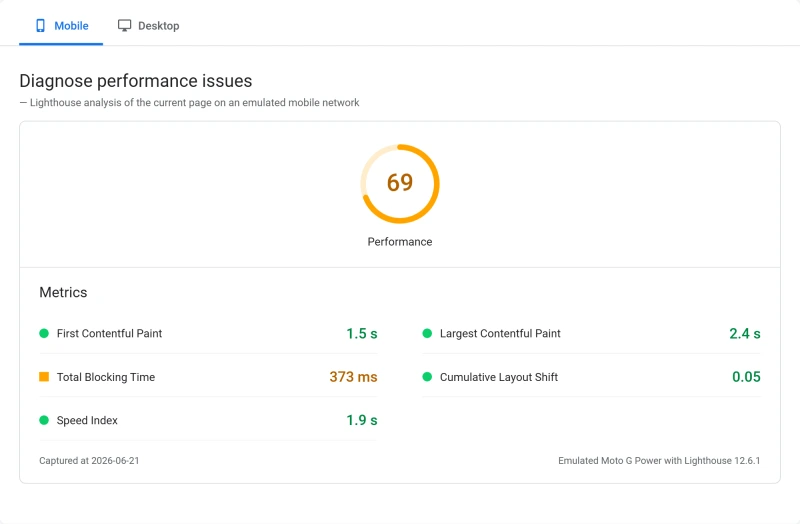
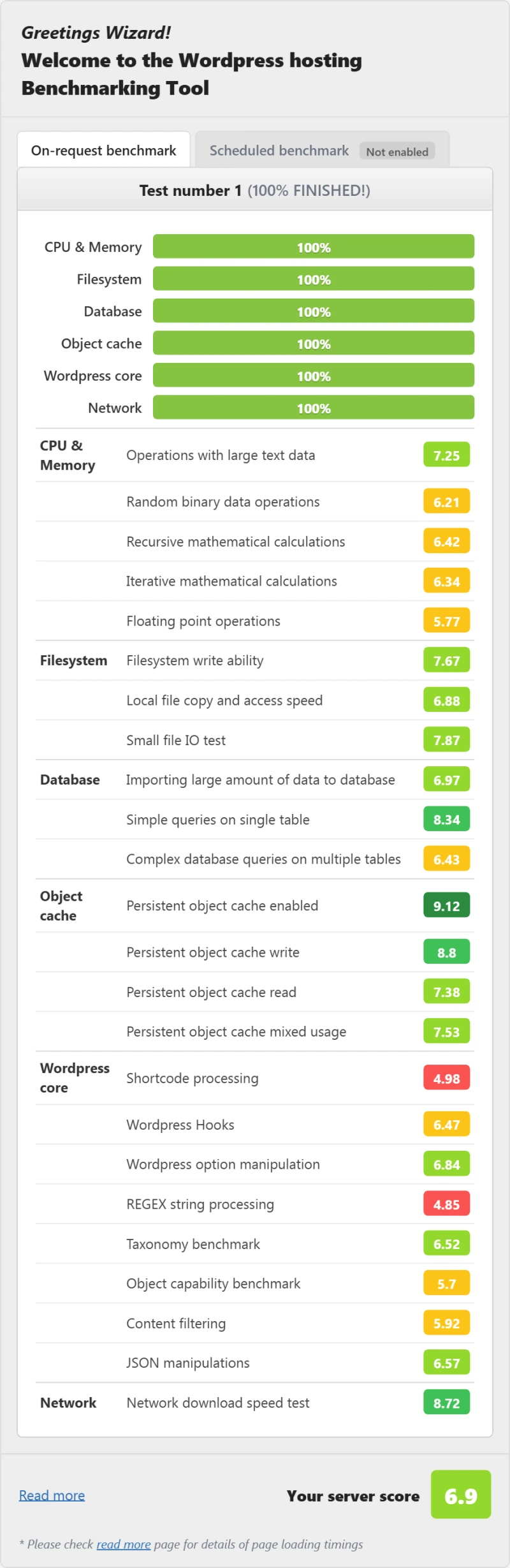
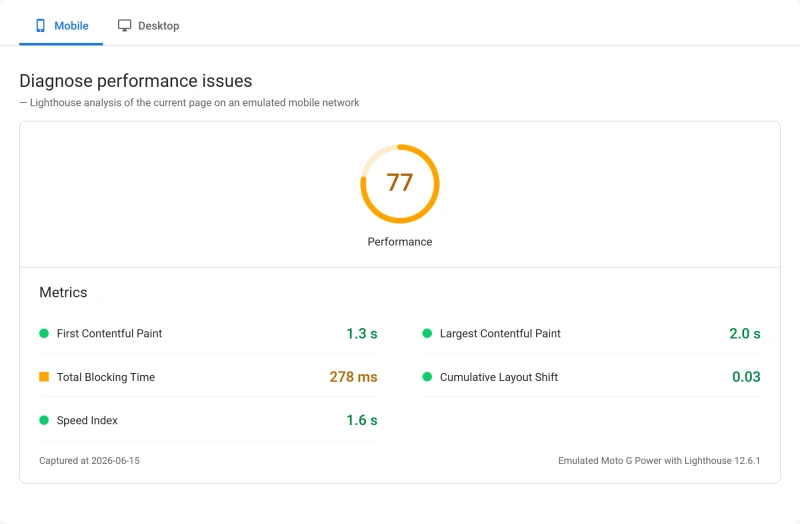
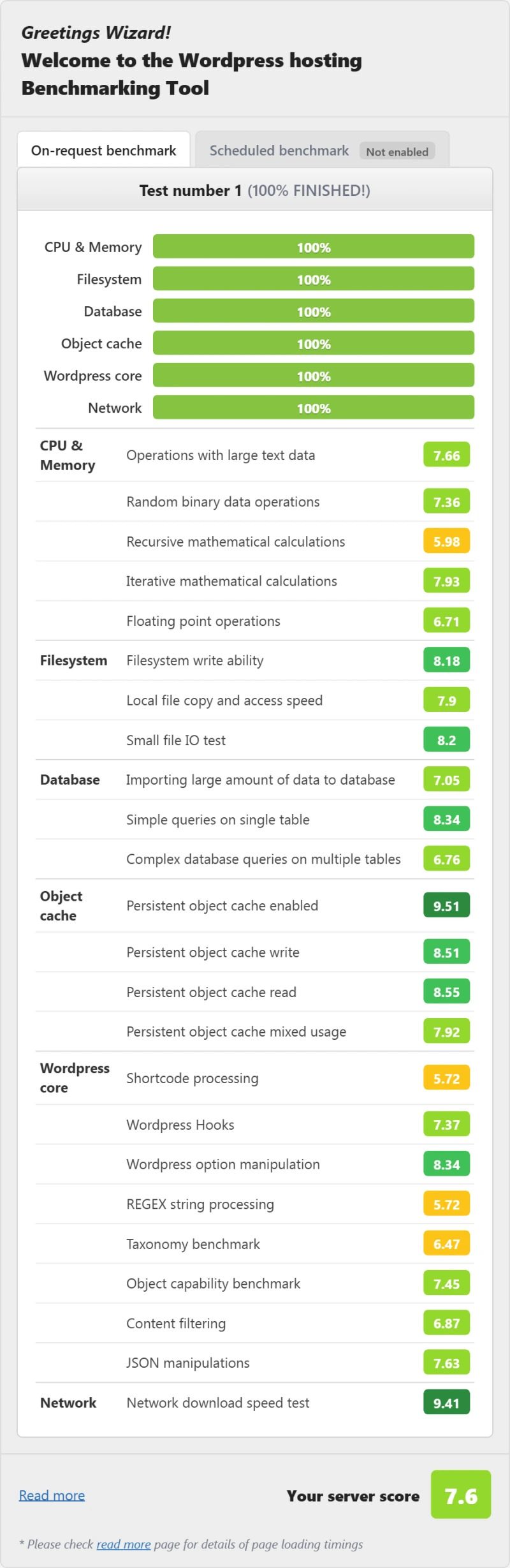
Alongside the load test we ran the same WordPress hosting benchmark and a mobile PageSpeed Insights test on each plan, using one test site on every host.
InMotion Power scored 7.1/10, in the middle of this group: above Bluehost Choice Plus at 4.3/10, below SiteGround GrowBig at 7.6/10 and well below ScalaHosting at 8.4/10. Its own Pro plan scored 7.6/10. InMotion lists PHP workers per site on its WordPress plans (3 on Launch, 4 on Power, 6 on Pro) but we did not measure throughput in requests per second, so this page gives no such figure.
Server Locations: Two US Data Centers and Amsterdam
InMotion has three data centers: Los Angeles, CA, Ashburn, VA and Amsterdam. The cart calls them US West, US East and EU Central. There are no APAC or LATAM options.
If your audience is in Europe or Asia-Pacific, a US East server adds real distance on top of the 193ms New York reading: 352ms from London and 634ms from Singapore. These are the times from those cities to our US East test server. We did not benchmark the Amsterdam location; for a European audience it is the one to look at in the cart, and for an Asia-Pacific audience InMotion has nothing nearby.
ScalaHosting lists its own data centres in Dallas, New York, Seattle and Sofia plus partner clouds. Cloudways runs on five cloud providers (DigitalOcean, Vultr, Linode, AWS and Google Cloud), each with its own list of locations. Both can place a server nearer an international audience.
Support: Channels, Hours and Reputation
We did not time InMotion's support. We have no response-time record, so this section gives the channels and hours InMotion publishes and what we read, not a speed.
Check the phone hours before you rely on them. InMotion's contact page gives 24/7 chat and tickets but technical support by phone from 9 AM to 9 PM ET, Monday to Friday, and Launch has no phone support at all. The Premier Support page still says every customer gets 24/7 phone access.
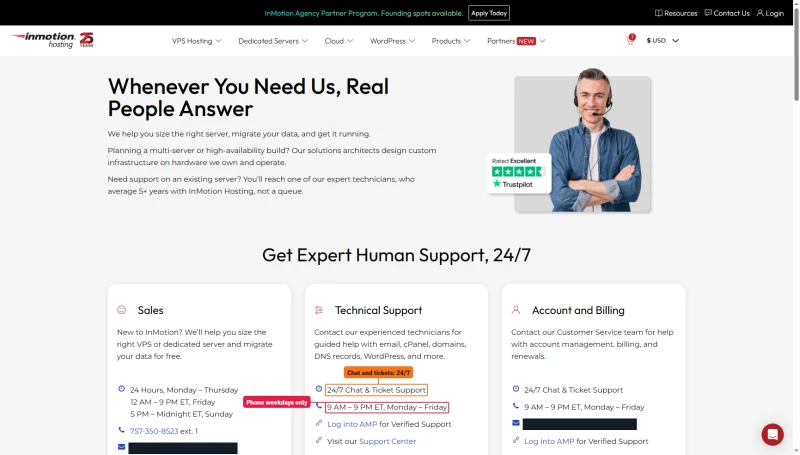
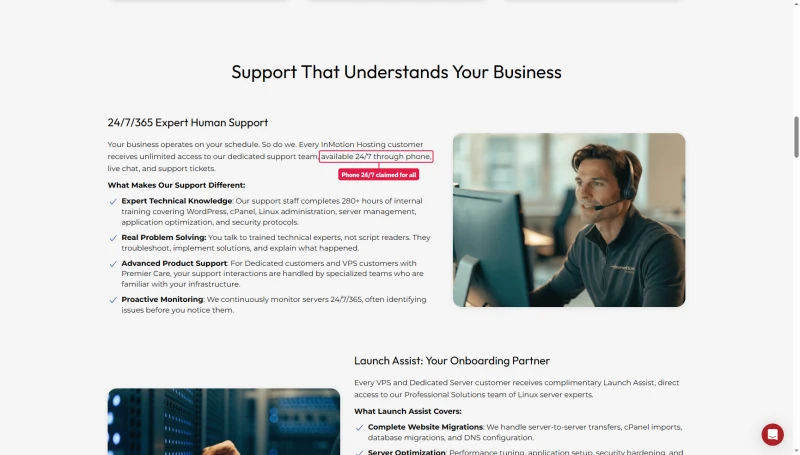
A phone line is unusual in cloud hosting, and for a buyer who wants to talk to a person on a weekday it is a real point in InMotion's favor. Whether the answers are good is a different question that we did not test.
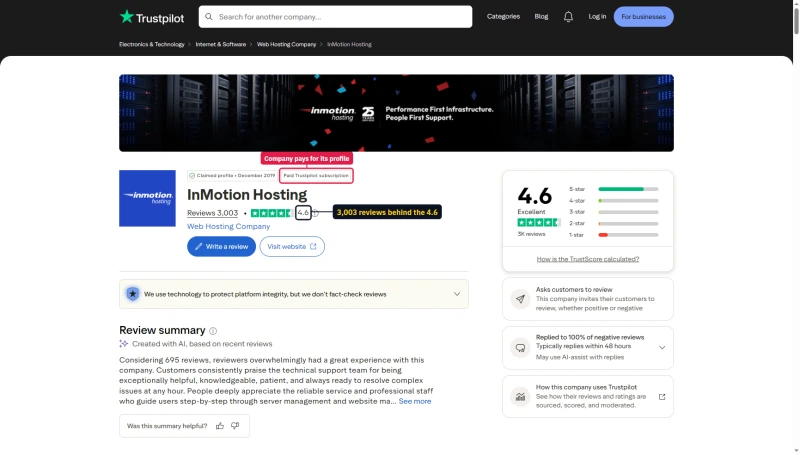
On Trustpilot, InMotion holds 4.6 from 3,003 reviews, on a claimed profile with a paid Trustpilot subscription.
InMotion vs ScalaHosting (Head-to-Head)
These are different kinds of plan: Power is shared hosting and Entry Cloud is a managed VPS, so part of the gap is the product class and not only the company. The test ran the same way on both.
When to Choose InMotion Over ScalaHosting
- You want weekday phone support (InMotion offers it above Launch)
- You're cPanel-familiar and don't want to learn SPanel
- Your audience is in the US and your traffic is modest
- You will keep your own off-site backups
- The first-term price decides it: compare the renewal row above before you commit
When to Choose ScalaHosting Over InMotion
- You expect many visitors at once (58ms against InMotion's 580ms at 100 concurrent users)
- You want a server away from the US coasts (Sofia is one of its own data centres)
- You want a managed VPS rather than shared hosting
Why Scalahosting Beats Inmotion
- AMD EPYC 9474F (#42 PassMark), 480% faster than InMotion's hardware
- OpenLiteSpeed (not Apache), 3-5x better concurrent request handling
- 28ms TTFB vs InMotion's ~320ms, 123% faster
- 58ms at 100 concurrent users (+19% degradation) vs InMotion's 520ms (+178%)
- Backups for ALL account sizes, not just under 10GB
- SPanel free, saves $180/yr vs cPanel, uses 8x less RAM
- No CPU steal, no I/O throttle, no hidden VPS limits
- Email hosting included with no shared IP reputation issues
- 13 data centers vs InMotion's 2 US locations
- Anytime money-back guarantee
Where Inmotion Has An Edge
- Renewal steps 83% after intro term ($29.95/mo → $54.95/mo)
- No shared hosting entry point, VPS minimum $29.95/mo
- Support varies by agent, L1 can miss nuanced issues
- Documentation less comprehensive than InMotion's knowledge base
Real Benchmark Data
- Origin TTFB (Managed VPS, no CDN): 38ms
- Uptime (54-day window): 99.99%
- PageSpeed Score (Mobile): 83/100
$29.95/mo
Anytime Money-Back Guarantee
InMotion vs Cloudways (Head-to-Head)
The Cloudways plan we benchmarked is a Vultr High Frequency server; our records do not hold its size, so the price row is the entry 1GB size.
When to Choose InMotion Over Cloudways
- You need email hosting included (Cloudways doesn't include it)
- You need cPanel (Cloudways uses a custom panel)
- You need phone support (Cloudways is chat and ticket only)
- You're not technical and need a simpler setup
When to Choose Cloudways Over InMotion
- Developer workflow (Git deployment, SSH, WP-CLI)
- Cloud provider flexibility (Vultr, DigitalOcean, AWS, Google Cloud, Linode)
- Better performance under load (74ms at 100 users against InMotion's 580ms)
- No renewal step: Cloudways bills monthly at the same rate
- You already use Google Workspace for email

Why Cloudways Beats Inmotion For Developers
- 72ms TTFB, 85% faster than InMotion's ~320ms
- 168ms at 100 concurrent users (32% degradation), InMotion times out at 520ms
- 5 cloud providers: Vultr HF, DigitalOcean, AWS, GCE, Linode
- Redis Object Cache Pro included free ($99/yr value)
- Git deployment, SSH, WP-CLI, best developer tooling tested
- Pay-as-you-go billing, no renewal shock
- Unlimited WordPress sites on any plan
- Backups for all account sizes (7-day retention free)
Where Inmotion Has An Edge
- No email hosting, add $6-12/mo for Google Workspace
- No cPanel, custom Cloudways panel only
- Only 5 free managed migrations on Flexible
- True cost for Vultr HF 8GB = $118.00/mo vs InMotion's lower entry price
- No phone support, live chat and tickets only
Real Benchmark Data
- Avg response under load (0-250 ramp): 21ms to 32ms
- Uptime (54-day window): 99.979% to 99.99%
- PageSpeed Score (Mobile): 89/100

$16.00/mo
CLOUDS2022 = $30 Free Credit
Full Test Report: InMotion Shared, by Plan
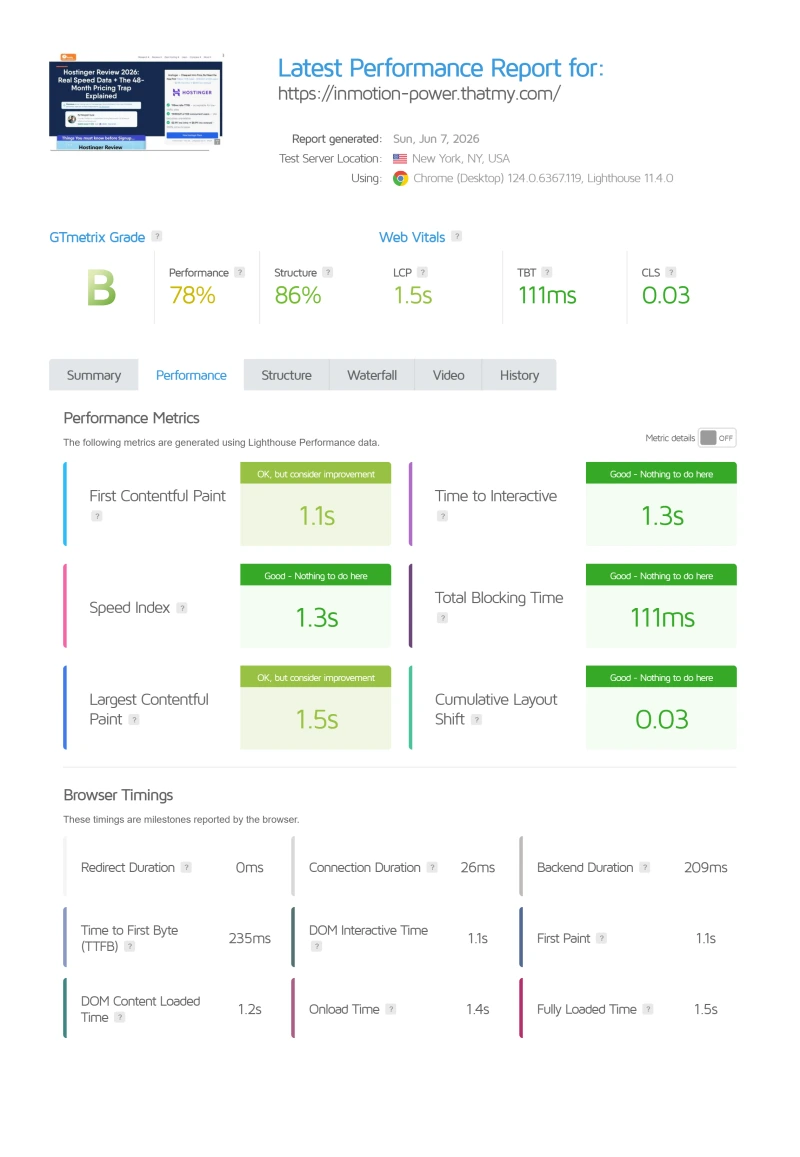
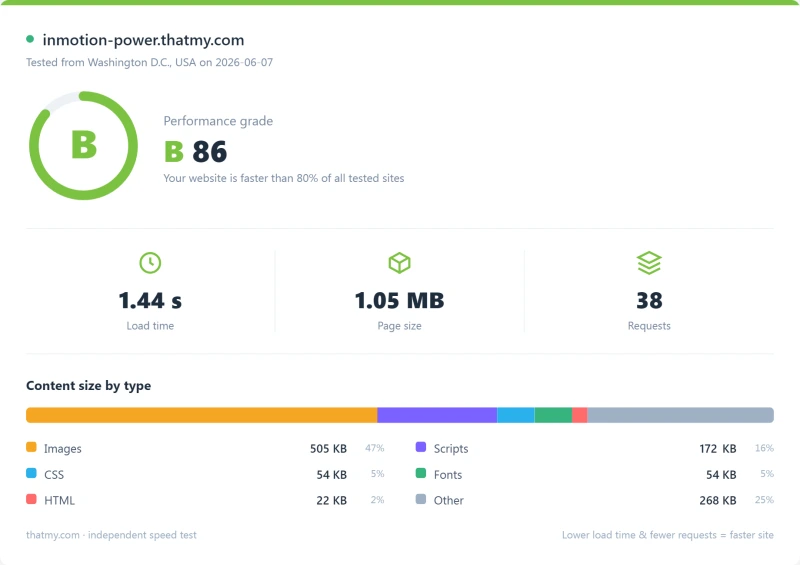
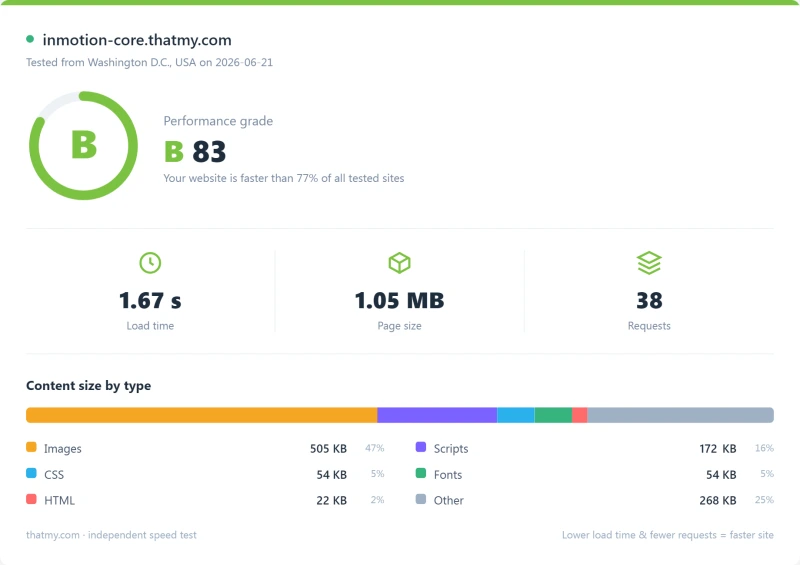
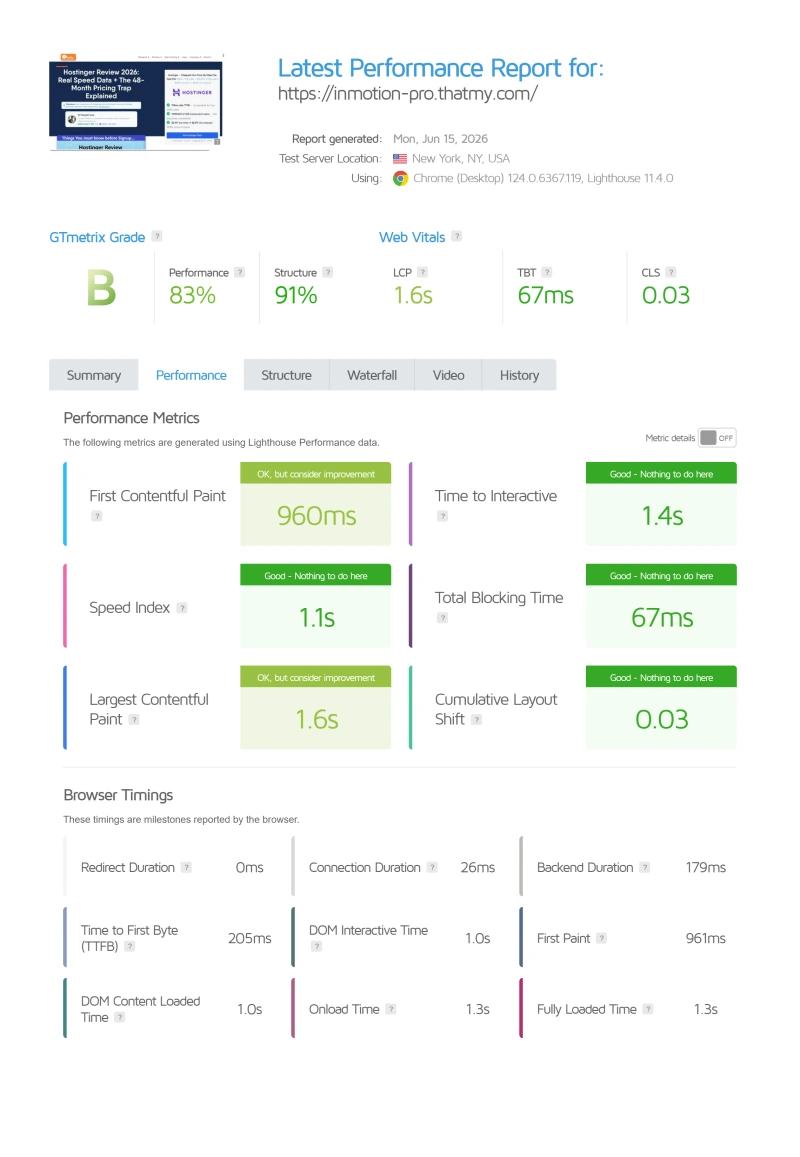
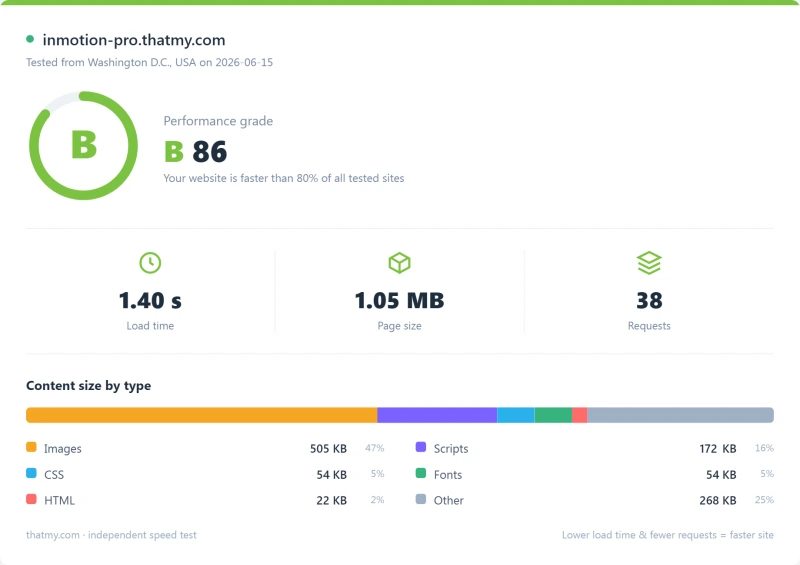
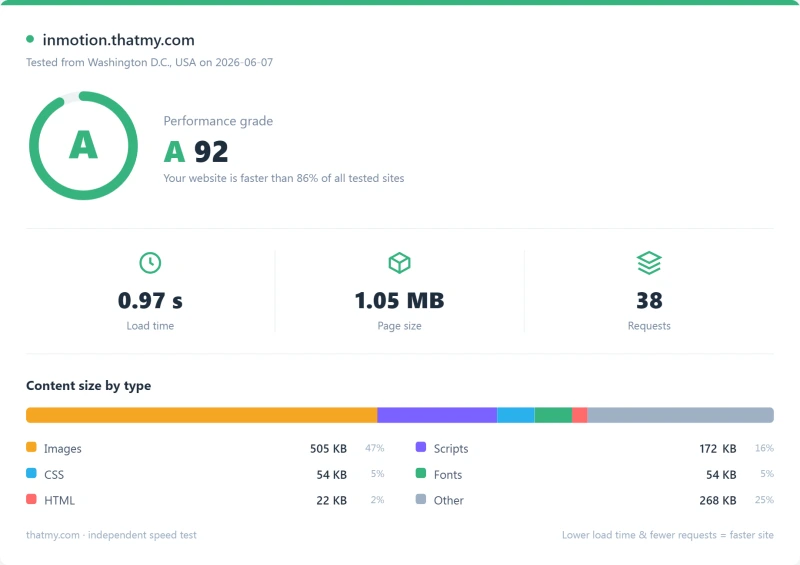
Here is the export from our test suite for every shared plan we benchmarked: Power, Launch (formerly Core), and Pro. Each tab holds that plan's run: behavior under a 100-user load, the GTmetrix and PageSpeed captures, a Pingdom response-time check, our WordPress hosting benchmark, the regional TTFB scorecard, and 54 days of uptime tracking with the day-by-day calendar. The Power plan's server response time and load charts are left out until they are regenerated: their printed figures did not match our records, which are quoted in the sections above.
Power (Featured) Launch Pro
Full Test Report: InMotion VPS, by Plan
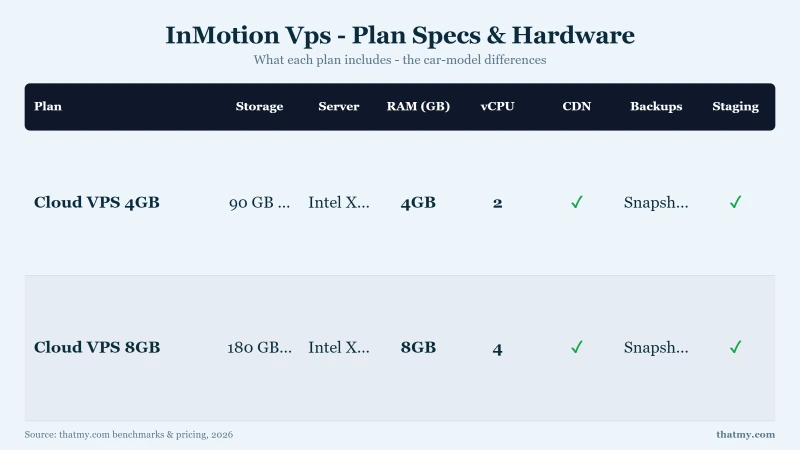
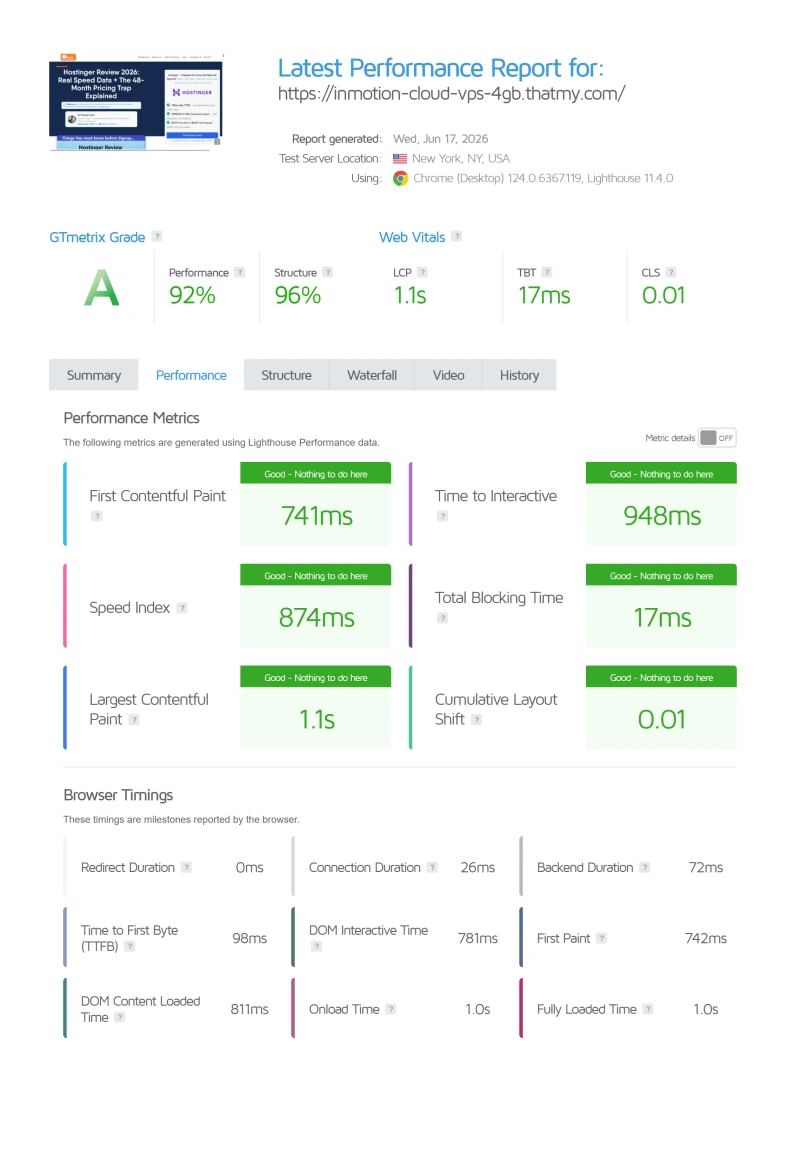
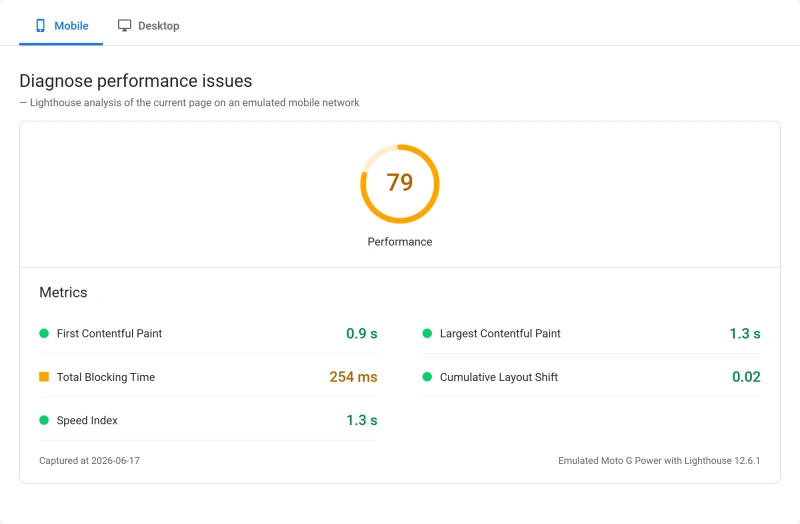
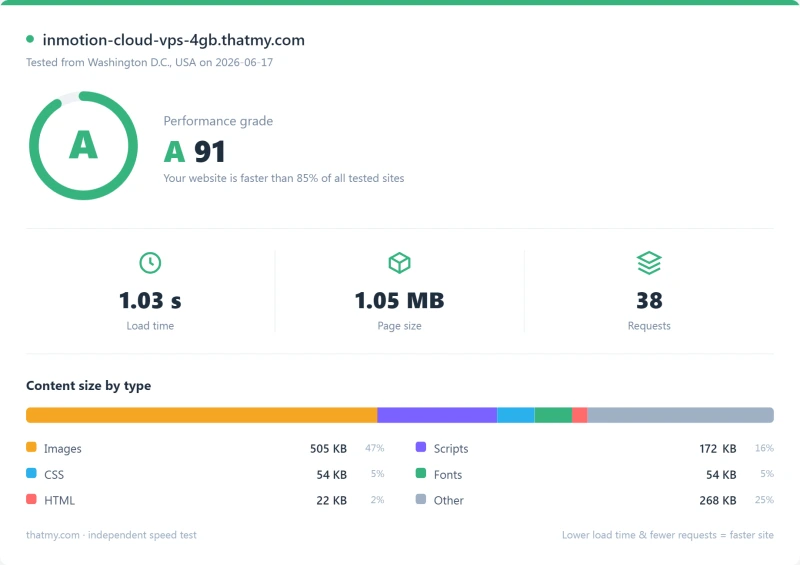
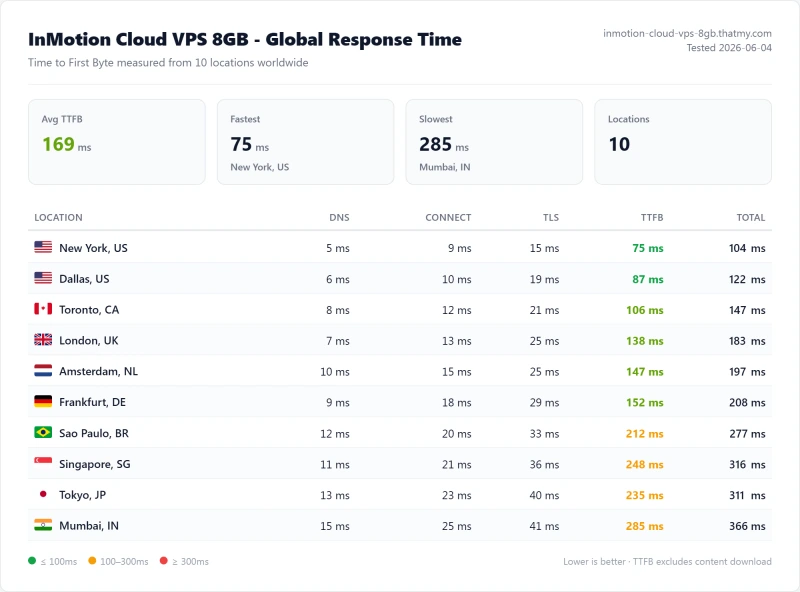
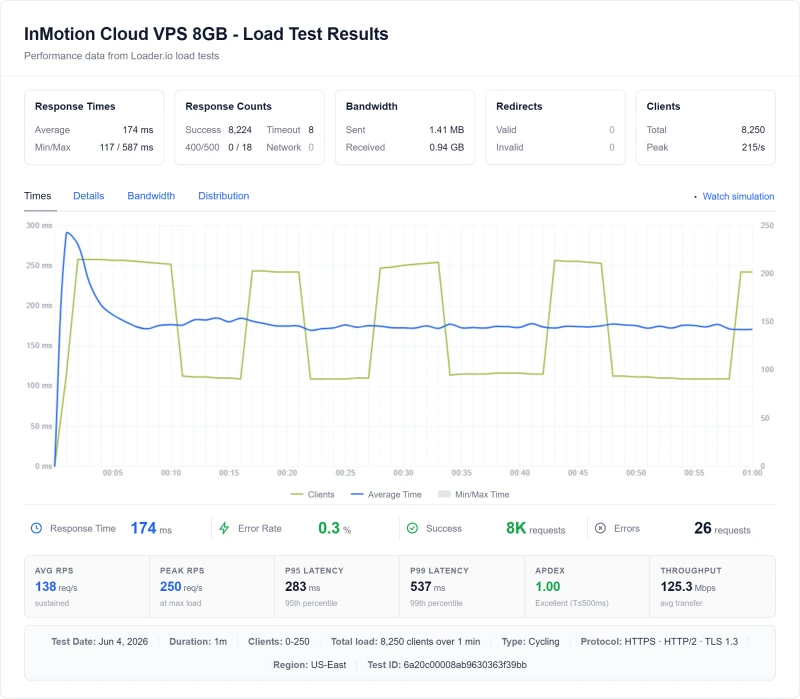
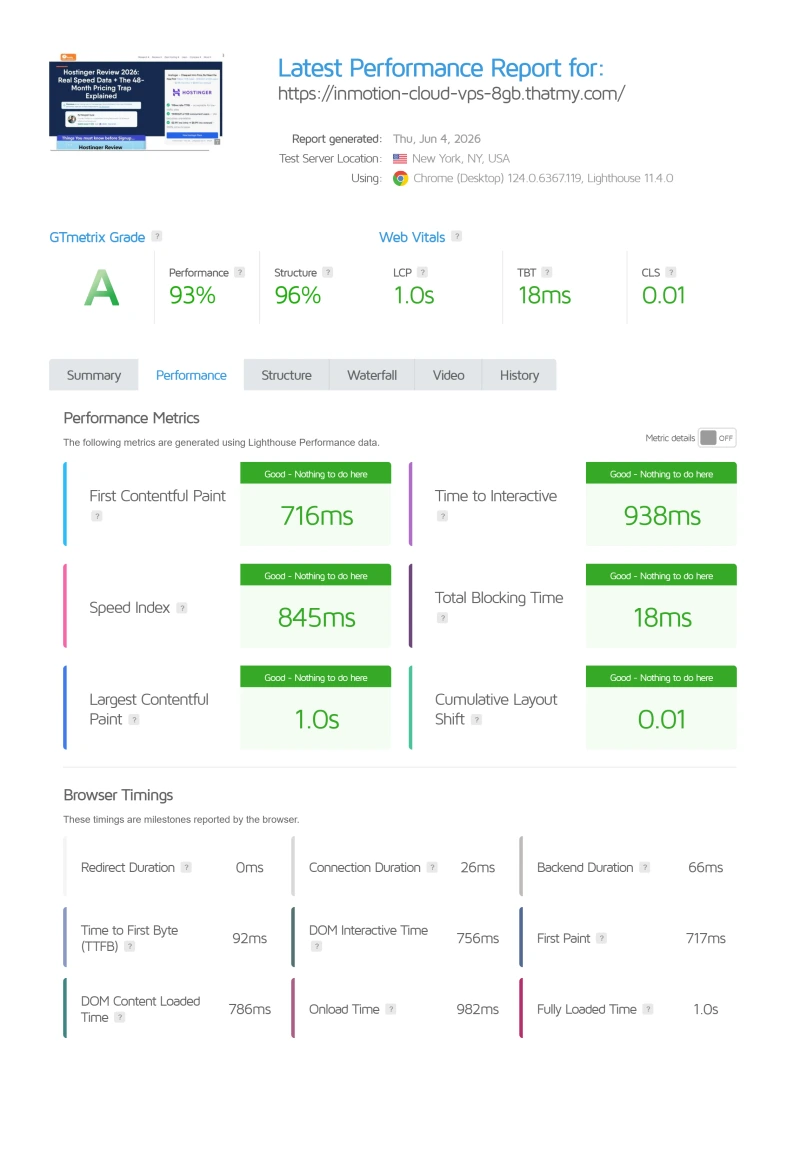
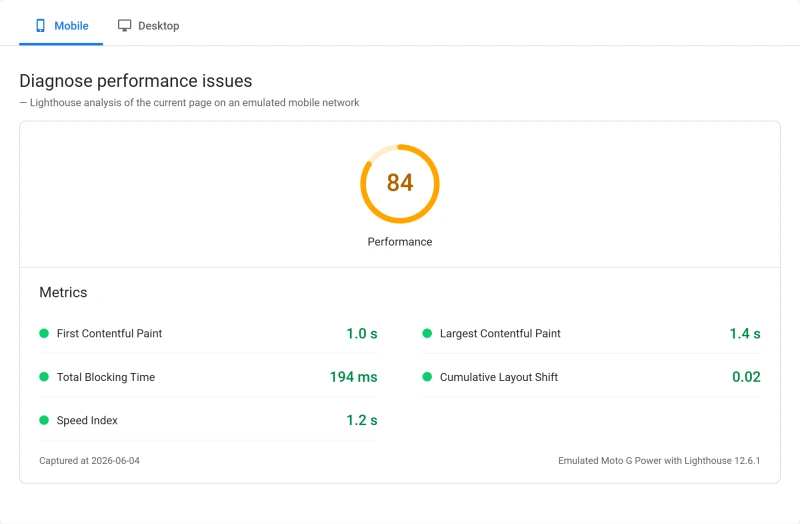
Here is the export from our test suite for every VPS plan we benchmarked: Cloud VPS 4GB and Cloud VPS 8GB. Each tab holds that plan's run: behavior under a 100-user load, the GTmetrix and PageSpeed captures, a Pingdom response-time check, our WordPress hosting benchmark, the regional TTFB scorecard, and 54 days of uptime tracking with the day-by-day calendar. The Cloud VPS 4GB server response time chart is left out until it is regenerated: its printed figure did not match our record.
Cloud VPS 4GB (Featured) Cloud VPS 8GB
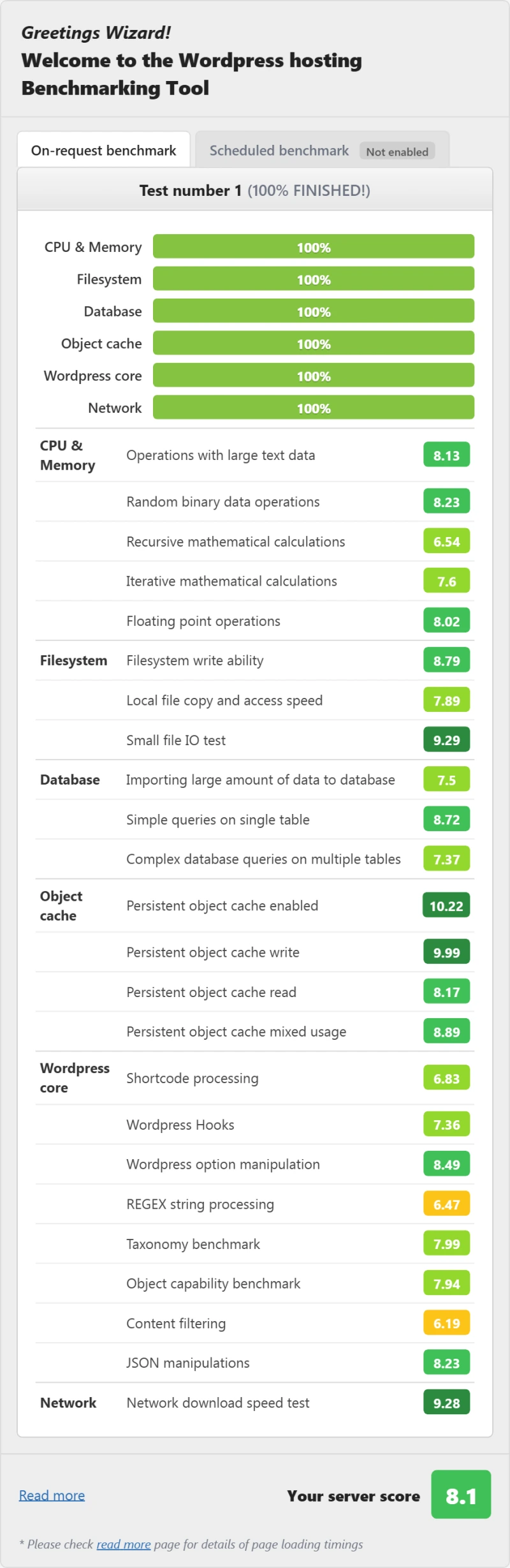
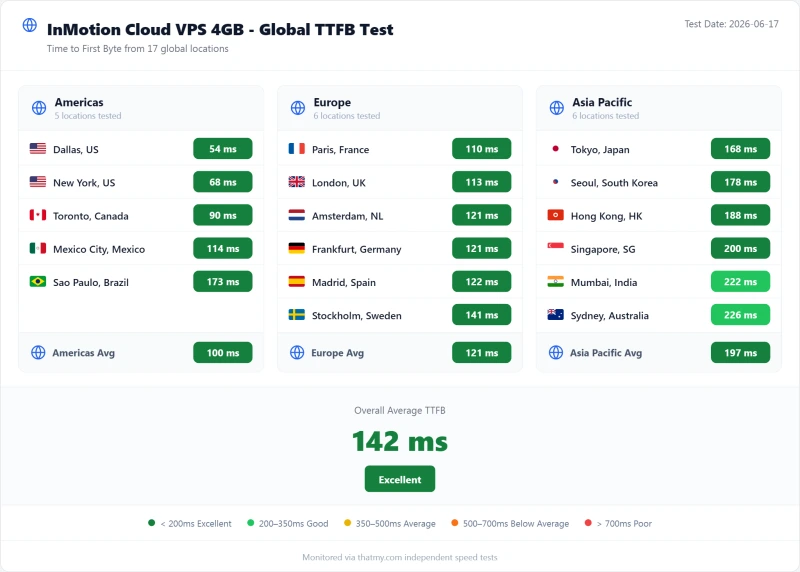
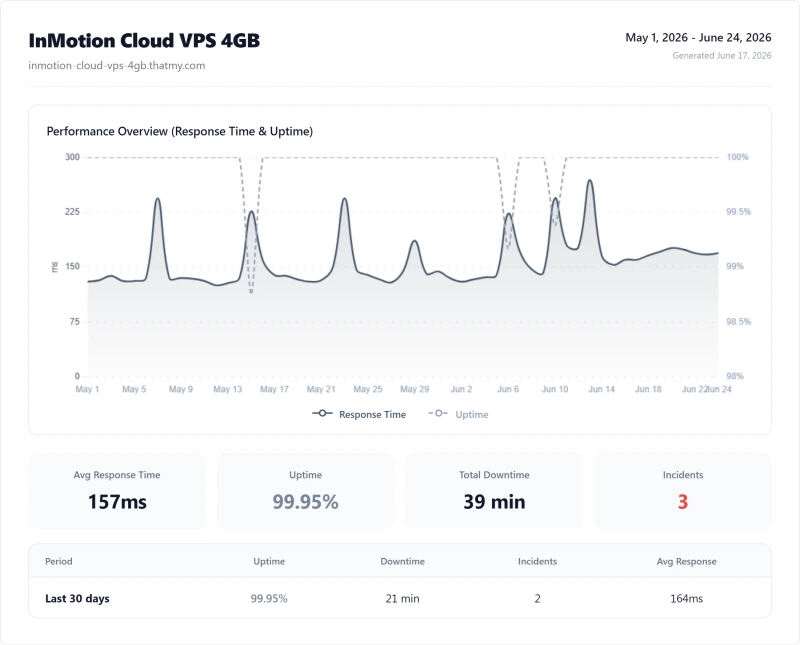
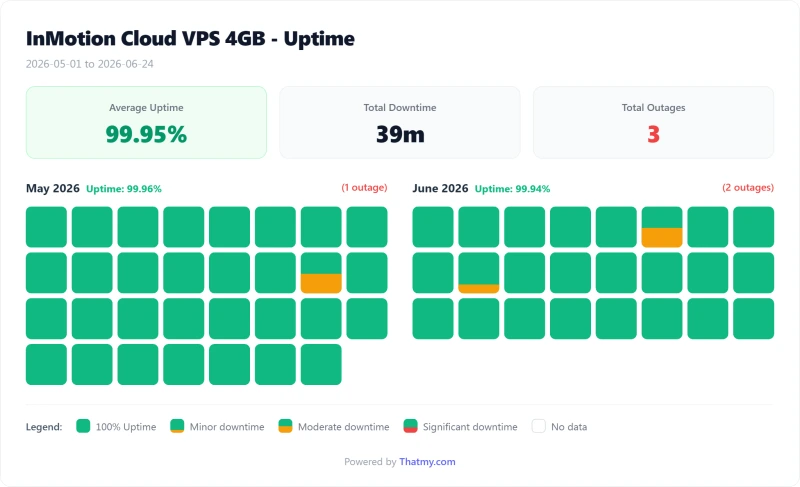
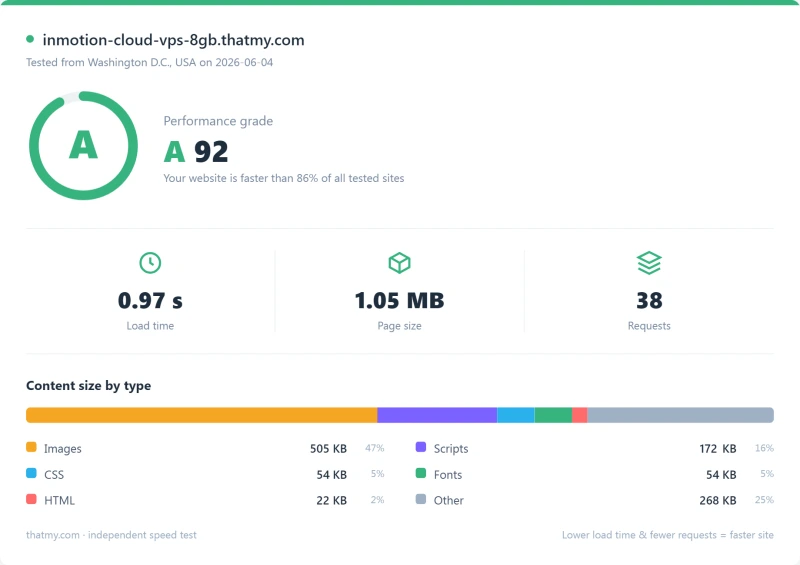
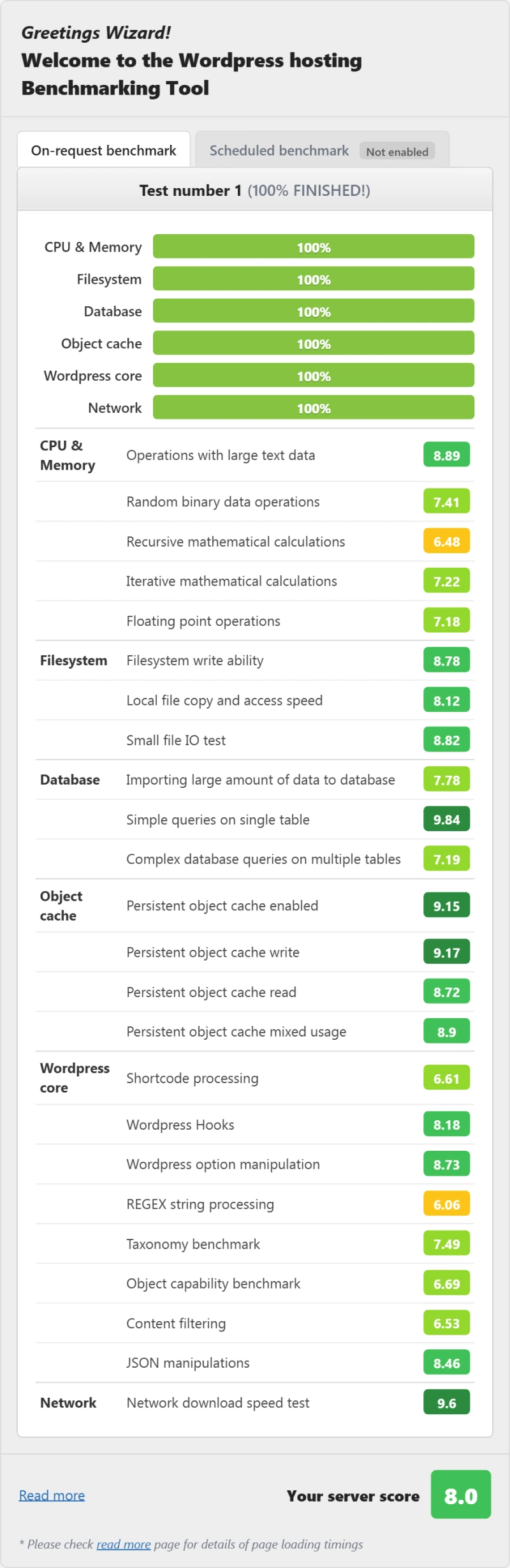
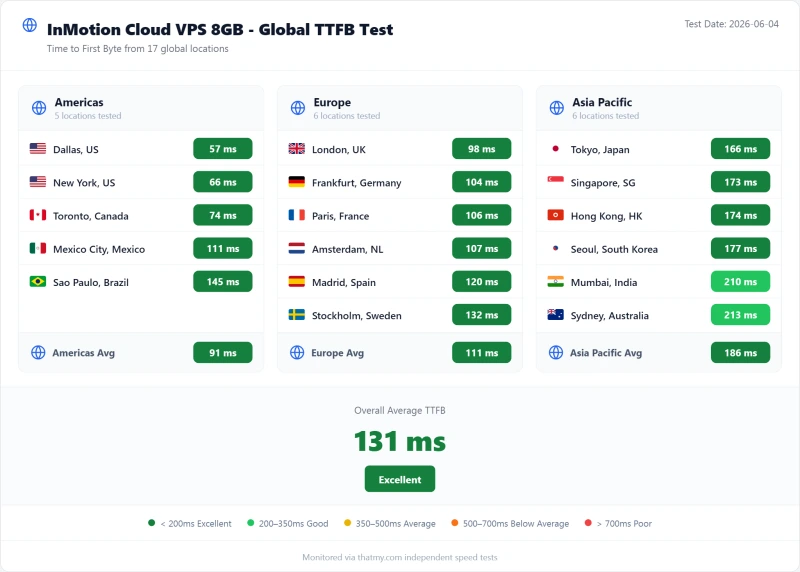
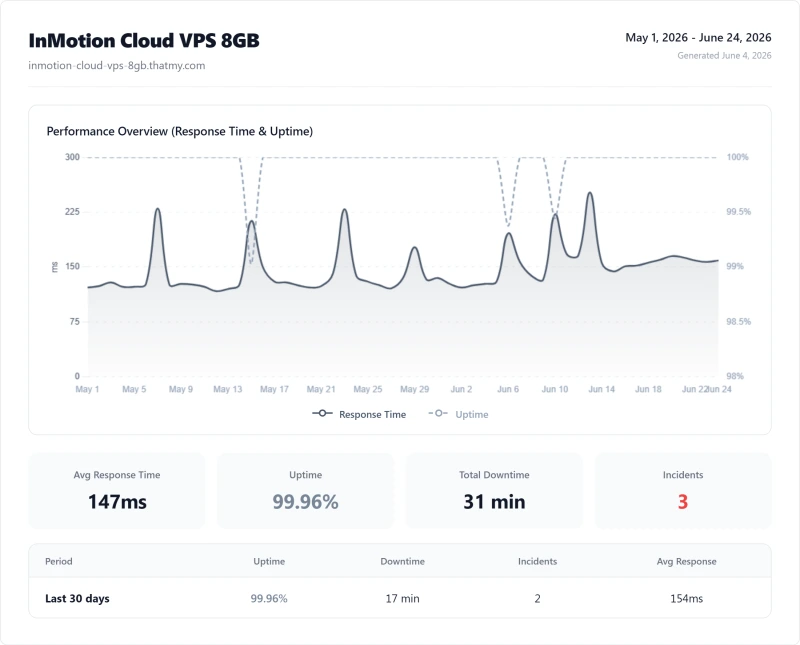
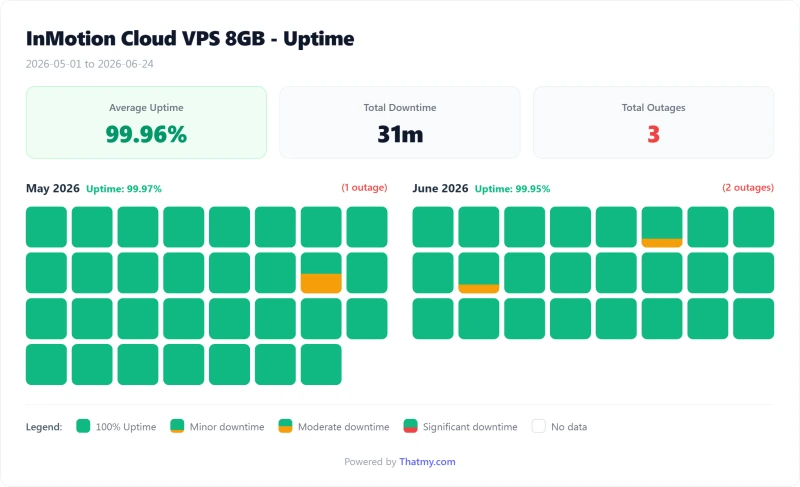
Full Test Report: InMotion Dedicated (Aspire (Dedicated))
Here is the export from our test suite for the Aspire (Dedicated) plan, the dedicated tier we benchmarked: the behavior under a 100-user load, the GTmetrix and PageSpeed captures, a Pingdom response-time check, our WordPress hosting benchmark, the regional TTFB scorecard, and 54 days of uptime tracking with the day-by-day calendar. The server response time chart is left out until it is regenerated: its printed figure did not match our record.
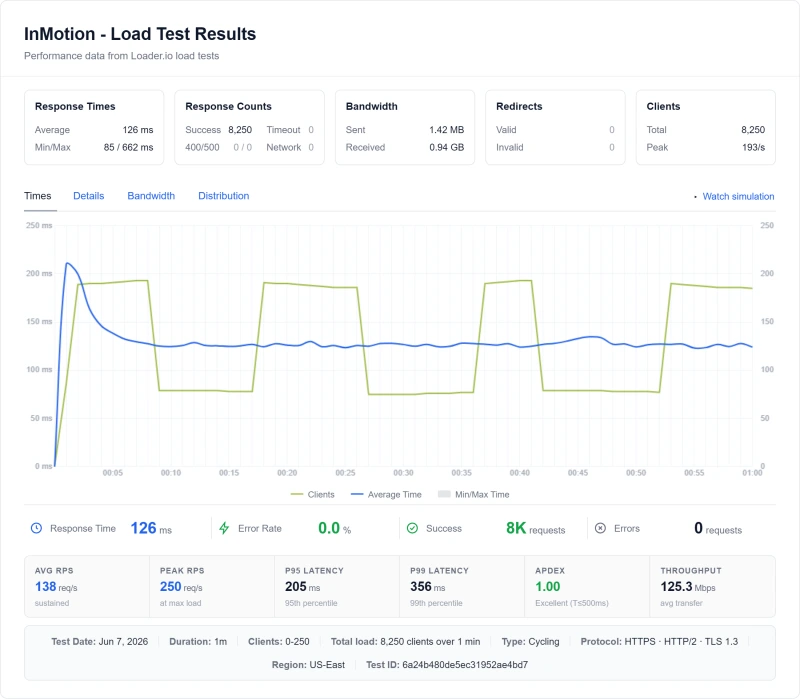
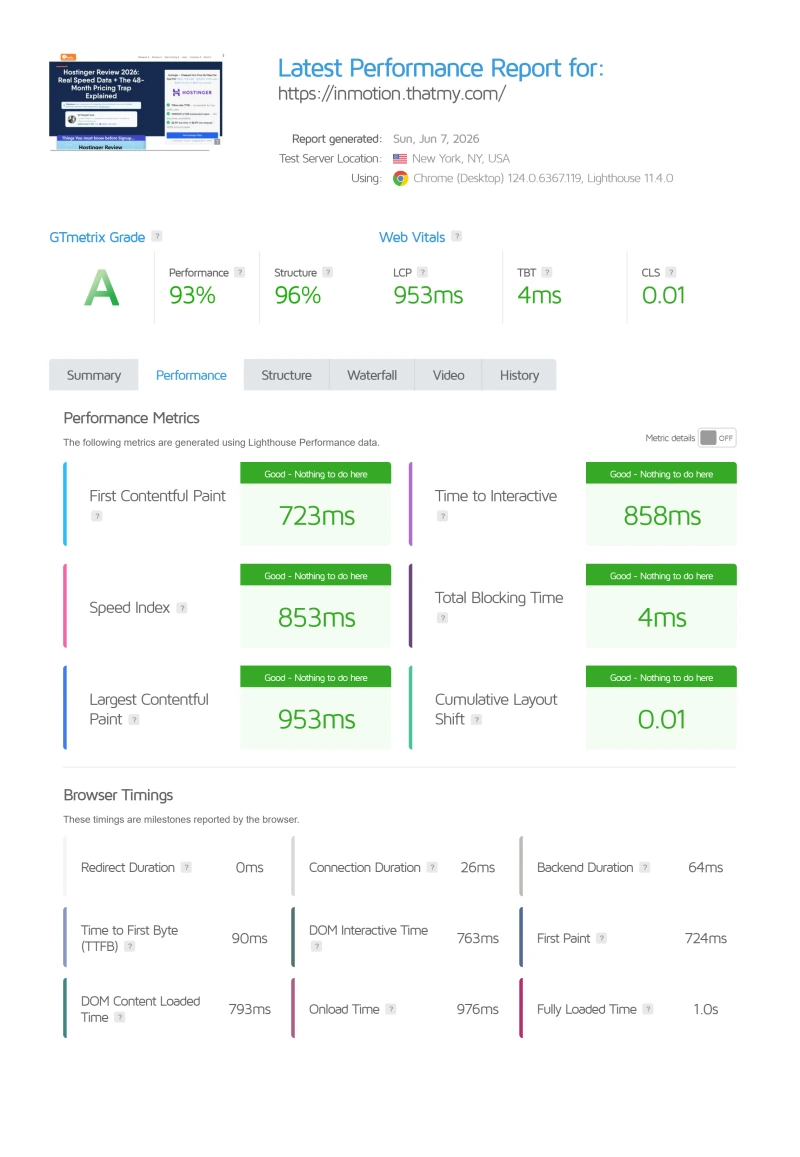
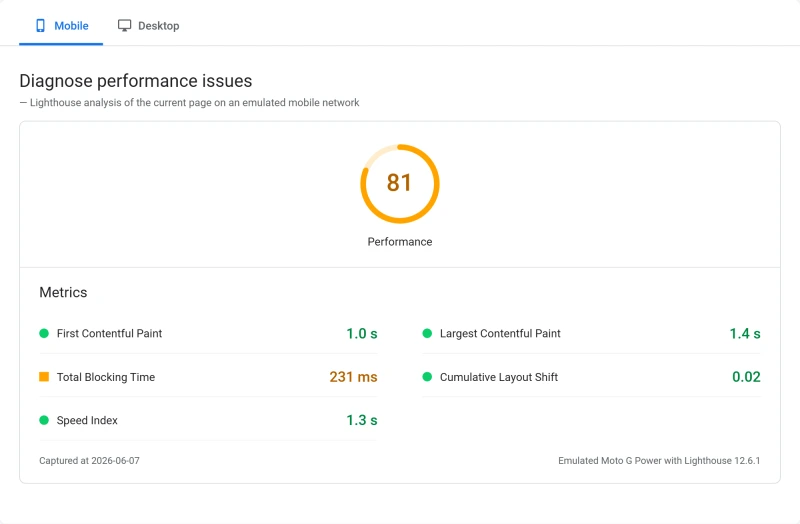
FAQ: InMotion Hosting
Is InMotion Hosting good in 2026?
InMotion is a reasonable choice for a small, mostly US-based site that wants cPanel and weekday phone support. In our June 2026 benchmark of the Power plan, a single request took 193ms from New York (origin, no CDN), the average response climbed to 580ms with 100 concurrent users, and 0.3% of requests failed over the full 0 to 250 client ramp. ScalaHosting Entry Cloud, a managed VPS, measured 38ms and 58ms in the same tests. We found no automatic backup named as included on the shared plan pages (backups are the paid Backup Manager add-on), and renewals run about three times the first-term price. We did not test a store checkout.
Why is InMotion Hosting slow under load?
On our test the Power plan averaged 580ms with 100 concurrent users, against 193ms for a single request. ScalaHosting Entry Cloud went from 38ms to 58ms and Cloudways Vultr HF from 48ms to 74ms. We have not established why. We did not record which web server software answers our test site, so we do not name Apache or any other server as the cause. Shared plans share CPU and PHP workers with other customers, which can produce the same curve. InMotion's own Cloud VPS 4GB averaged 150ms at 100 users in our test.
Does InMotion Hosting do automatic backups?
We found no automatic backup named as included on InMotion's shared plan pages. Backups are sold as the Backup Manager add-on, which was pre-ticked in the shared checkout we walked through on 2 October 2026, and InMotion's product guide says the total space of all backup types combined may not exceed 10GB per subscription. The Managed VPS cards state backups are included. Whatever plan you buy, keep your own off-site copy with a backup plugin writing to remote storage.
What web server does InMotion Hosting use?
We did not record which web server software answers our test site, so we cannot give a measured answer. InMotion's documentation describes an NGINX cache on its Power and Pro plans and an UltraStack of NGINX, Redis and PHP-FPM on its VPS line, and its control-panel documentation lists Apache among the services. Ask InMotion which stack your plan runs before you rely on a particular behavior.
What are InMotion Hosting's renewal prices?
InMotion's renewal prices are significantly higher than intro prices, and the price depends on the term. On one year: Launch $4.79/mo → $14.99/mo, Power $5.79/mo → $18.99/mo, Pro $10.59/mo → $25.99/mo. On two or three years each plan costs a little more at first but renews lower: Launch $4.99/mo → $13.99/mo. UltraStack ONE is the exception: it renews at the price you start on. The first three years of Power on its three-year term cost $215.64 up front. For comparison, ScalaHosting Entry Cloud, a managed VPS, renews at $39.95/mo after $14.95/mo on its 12-month term.
Does InMotion Hosting have email issues?
That is a property of shared hosting more than of InMotion: outgoing mail usually leaves from an address other customers on the server also use, so a neighbour who sends spam can hurt your deliverability. We did not measure InMotion's mail reputation or count user complaints. InMotion sells a dedicated IP add-on on Launch and Power, and Pro includes one; a separate mail service such as Google Workspace keeps business email off the web server altogether.
How does InMotion Hosting compare to ScalaHosting?
On our numbers ScalaHosting Entry Cloud is faster and steadier, but it is a managed VPS compared with a shared plan. A single request took 38ms against InMotion Power's 193ms, and the average at 100 concurrent users was 58ms against 580ms. Uptime over 54 days was 99.99% against 99.94%. InMotion's advantages are weekday phone support, cPanel and its data centres in Los Angeles, Ashburn and Amsterdam; ScalaHosting's own data centres are in Dallas, New York, Seattle and Sofia, plus partner clouds.
Where This Leaves You: Who Should Use InMotion in 2026
InMotion Hosting is an independently owned US web host with real strengths: chat and ticket support around the clock, weekday phone support on the plans that include it, cPanel on its shared plans, and a 90-day money-back guarantee on shared and WordPress plans. Those matter to a specific kind of buyer.
Our June 2026 benchmark of the Power plan, and the prices we read, point to three things to weigh before you buy:
- It slows down under load. A single request from New York took 193ms (origin, no CDN), the average response with 100 concurrent users was 580ms, and 0.3% of requests failed over the full 0 to 250 client ramp. We have not established the cause.
- Backups are an extra. We found no automatic backup named as included on the shared plan pages. Backup Manager is the paid route, and InMotion's product guide caps a subscription at 10GB across all backup types.
- Renewals are about three times the first-term price. The Power plan goes from $5.79/mo to $18.99/mo on the one-year term, which is more than Cloudways' Vultr High Frequency 1GB server ($16.00/mo).
The Bottom Line
Use InMotion if: you run a small, mostly US-based site, want cPanel and weekday phone support, can live with the 580ms average we measured at 100 concurrent users, and will keep your own off-site backups.
Look elsewhere if: you run a store with many shoppers at once (we measured the 100-user load, not a checkout), your audience is in Asia-Pacific (the data centres are Los Angeles, Ashburn and Amsterdam), you expect traffic spikes, or you want backups included in the plan price.
The better alternatives on our numbers:
- ScalaHosting Entry Cloud, a managed VPS: 38ms for a single request and 58ms at 100 users in the same tests, $14.95/mo on 12 months, renewing at $39.95/mo.
- Cloudways: 48ms and 74ms on a Vultr High Frequency server, billed monthly with no renewal step. Use code CLOUDS2022 for $30 free credit.
Why Scalahosting Beats Inmotion
- AMD EPYC 9474F (#42 PassMark), 480% faster than InMotion's hardware
- OpenLiteSpeed (not Apache), 3-5x better concurrent request handling
- 28ms TTFB vs InMotion's ~320ms, 123% faster
- 58ms at 100 concurrent users (+19% degradation) vs InMotion's 520ms (+178%)
- Backups for ALL account sizes, not just under 10GB
- SPanel free, saves $180/yr vs cPanel, uses 8x less RAM
- No CPU steal, no I/O throttle, no hidden VPS limits
- Email hosting included with no shared IP reputation issues
- 13 data centers vs InMotion's 2 US locations
- Anytime money-back guarantee
Where Inmotion Has An Edge
- Renewal steps 83% after intro term ($29.95/mo → $54.95/mo)
- No shared hosting entry point, VPS minimum $29.95/mo
- Support varies by agent, L1 can miss nuanced issues
- Documentation less comprehensive than InMotion's knowledge base
Real Benchmark Data
- Origin TTFB (Managed VPS, no CDN): 38ms
- Uptime (54-day window): 99.99%
- PageSpeed Score (Mobile): 83/100
$29.95/mo
Anytime Money-Back Guarantee
