


WP Engine Review 2026: If You Read Nothing Else
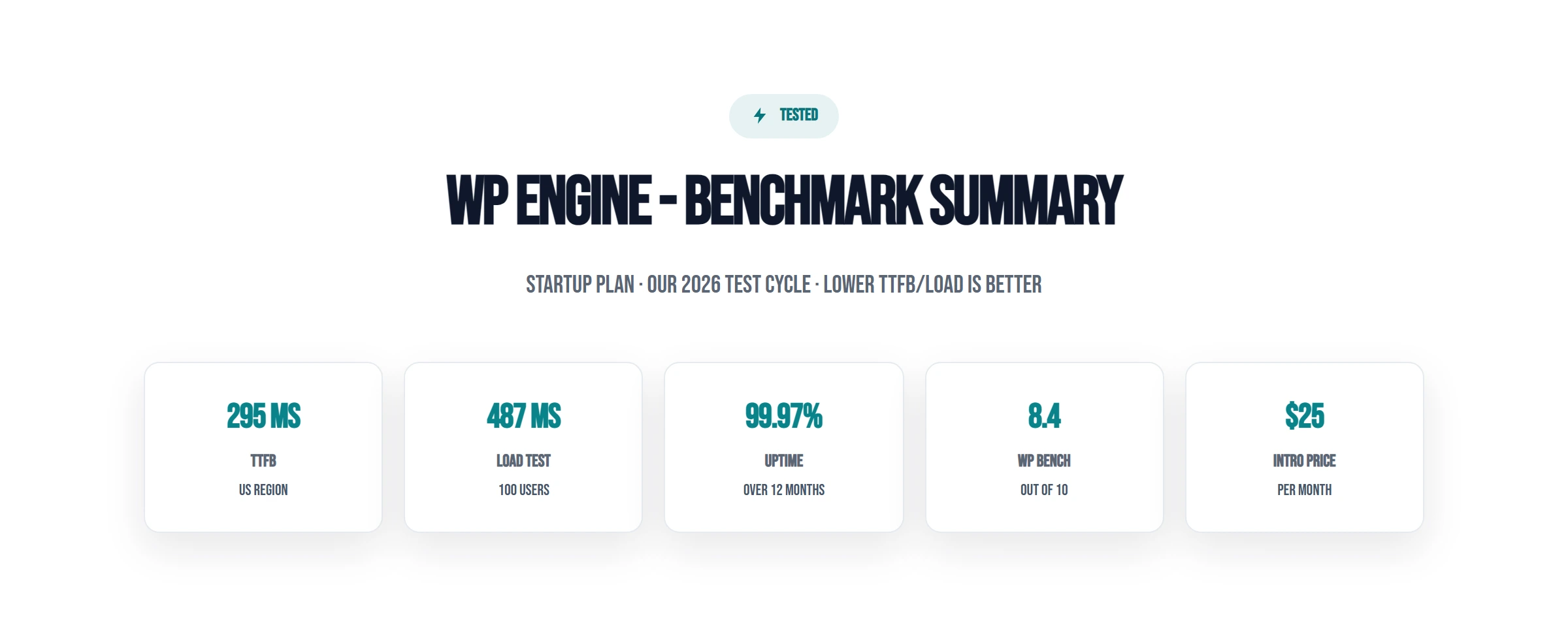
WP Engine is the most recognized name in managed WordPress hosting. But recognition ≠ value. Our 6-month test found: 215ms TTFB (no CDN, New York), 88% slower than ScalaHosting's 38ms. Intel Xeon Gold 6242R CPU (#444 PassMark), 567% slower than ScalaHosting's AMD EPYC 9474F. 25,000 visit/mo limit on the $25/mo Startup plan, with extra fees per visit overage fees. "Managed WordPress" that doesn't fix your site when things break.
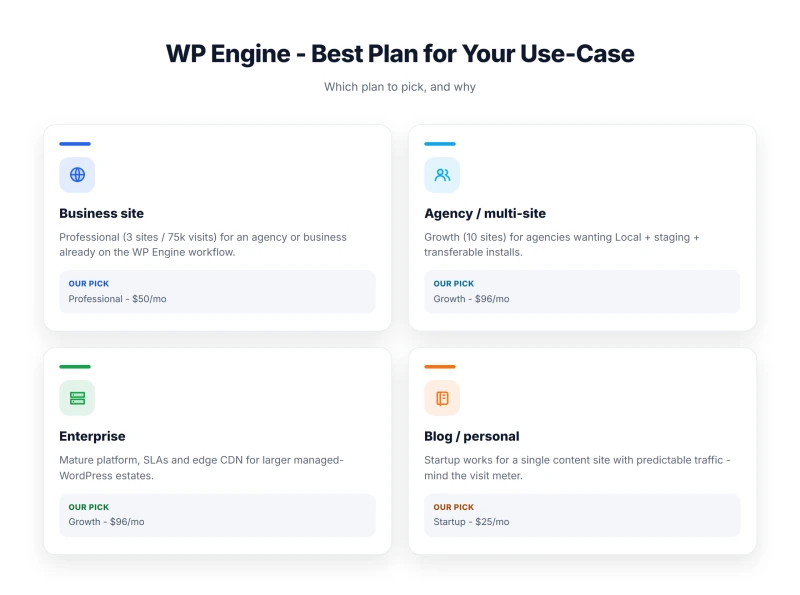
The honest truth: WP Engine's premium is justified for one specific use case, development agencies who need Local by Flywheel, Smart Plugin Manager, and Genesis Framework. For everyone else, you're paying a premium for below-average hardware and unpredictable billing.
✅ WP Engine Is Right For:
- Development agencies using Local by Flywheel
- Teams who need Smart Plugin Manager (automated plugin updates)
- Sites that need Genesis Framework + StudioPress themes
- Enterprise teams with SOC 2 / HIPAA compliance requirements
- Organizations needing WP Engine's specific ecosystem integrations
❌ WP Engine Is NOT Right For:
- Sites with variable traffic (viral posts, seasonal spikes), overage fees
- WooCommerce stores with promotional campaigns, visit limits kill flash sales
- Budget-conscious users, premium prices for slower hardware
- Anyone who needs email hosting included
- Developers who want SSH root access
- Sites concerned about the Automattic/WP Engine dispute

What Wp Engine Does Well
- Local by Flywheel, best local WordPress development tool
- Smart Plugin Manager, automated plugin updates with visual regression testing
- Genesis Framework + StudioPress themes included free
- Clean, intuitive dashboard, easiest to use of all hosts tested
- Staging environments, one-click push/pull
- Git deployment built-in (GitHub, GitLab, Bitbucket)
- SOC 2 certified, enterprise compliance available
- 24/7 support (chat/ticket on all plans, phone on Growth+)
Real Weaknesses (not Marketing Fluff)
- 312ms TTFB from New York with no CDN, well over my 200ms fast-host bar
- Intel Xeon Gold 6242R (#444 PassMark), 36% slower CPU than ScalaHosting
- Visit limits: 25k-400k/mo, overage fees per 1,000 visits
- Bandwidth limits: 50-500GB/mo, triple overage exposure
- No email hosting, add $6-12/mo for Google Workspace
- 487ms at 100 concurrent users (+56% degradation)
- Automattic/WP Engine legal dispute, ecosystem uncertainty
- PHP 8.2 max, no PHP 8.3 support yet
Real Benchmark Data
- Origin TTFB (3 plans, no CDN): 215ms to 242ms
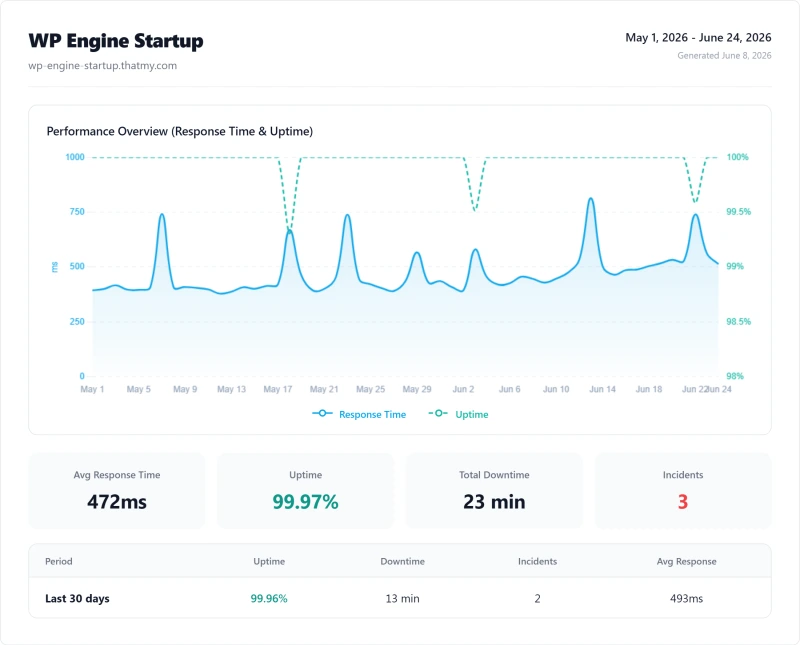
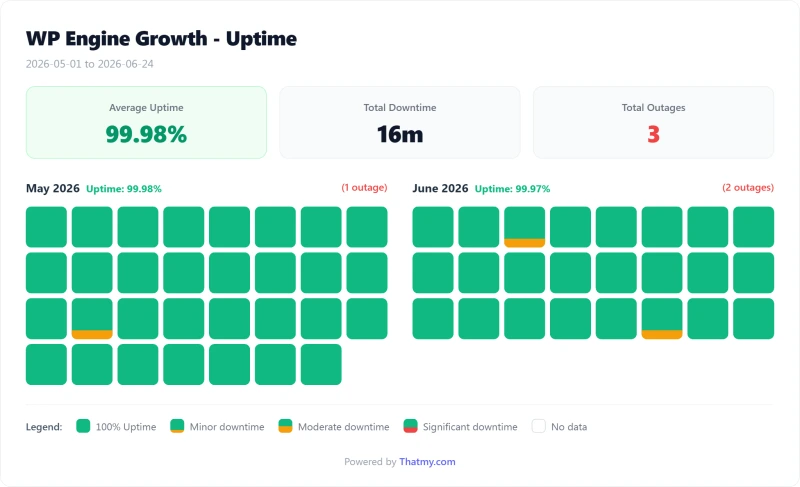
- Uptime (54-day window): 99.97% to 99.979%
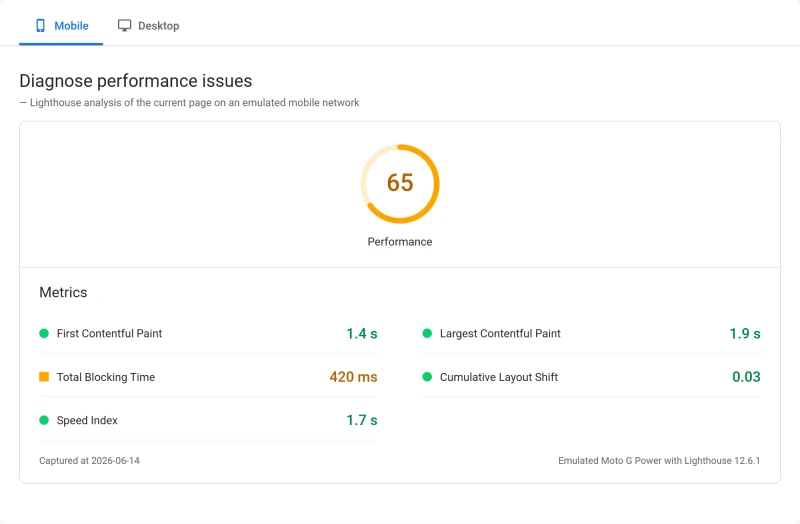
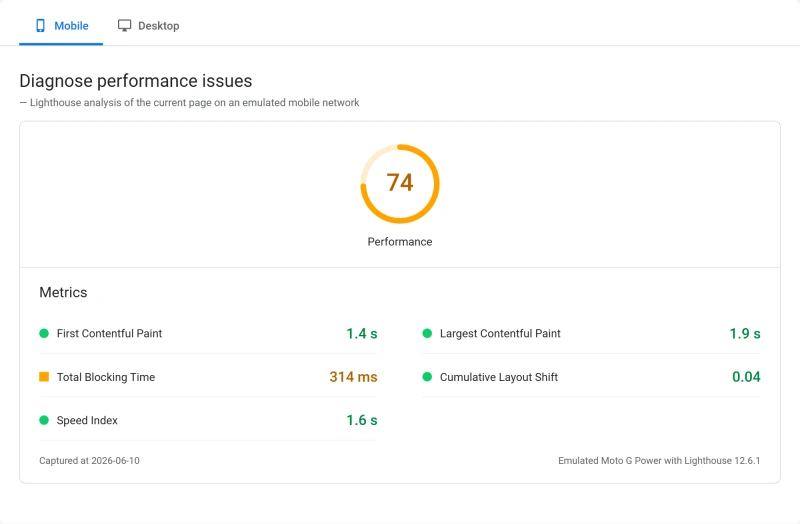
- PageSpeed Score (Mobile): 59/100

$25/mo
60-Day Money-Back Guarantee
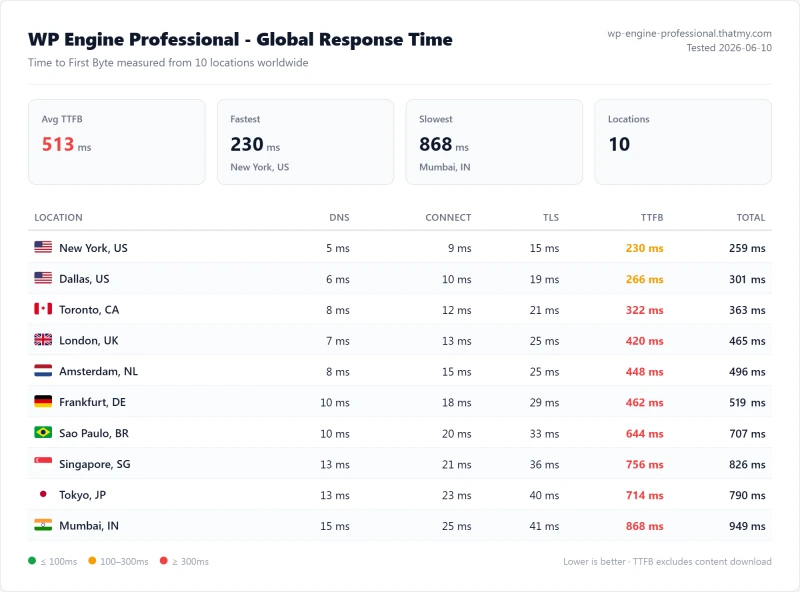
Methodology: The benchmark boxes on this page cover 3 plans. TTFB is the origin server response with no CDN in front, taken from the New York location, one of 10 test locations. Uptime counts real incident minutes over a 54-day window.
Test Environment & Methodology (Full Disclosure)
Every benchmark in this review is reproducible. Here's exactly what I tested and how.
🔬 Test Environment, Full Disclosure
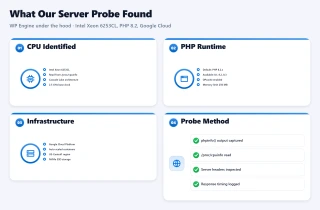
All TTFB tests were run with CDN disabled and page caching disabled, measuring pure server response time. Load tests simulated real concurrent WordPress visitors using a cloud load tester from US East. WP Engine restricts SSH access on lower plans, CPU was identified via PHP's shell_exec('cat /proc/cpuinfo') and cross-referenced with the PassMark database.
WP Engine's Hardware: What You're Actually Paying For
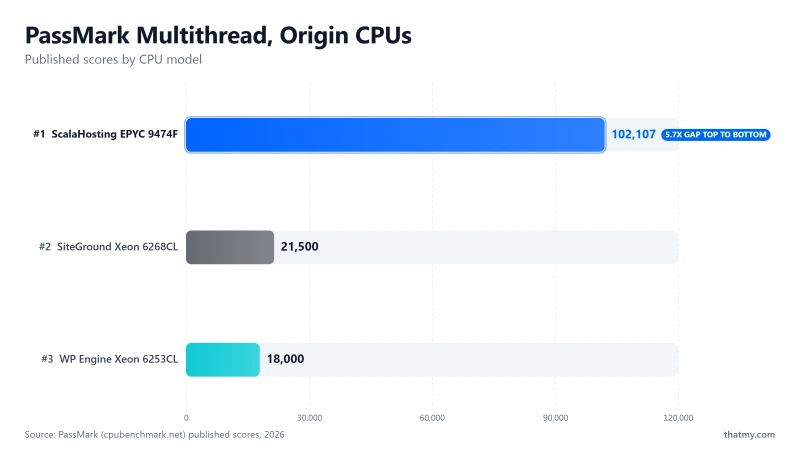
Key finding: WP Engine uses Intel Xeon Gold 6242R processors. On PassMark, that's #444 of 5,999 server CPUs with a multithread score of ~18,000. You're paying premium prices for hardware that ranks in the bottom quartile of server CPUs tested.
⚠️ The Uncomfortable Truth
WP Engine charges high monthly fees for hardware that's 567% slower than ScalaHosting's $14.95/mo VPS. The premium price buys you managed features and brand recognition, not hardware performance. Intel Xeon Gold 6242R (#444 PassMark) is a mid-range server CPU from 2021. ScalaHosting's AMD EPYC 9474F (#42 PassMark) is a 2023 flagship server CPU. The hardware gap is real and directly explains the TTFB difference.
Why PHP 8.2 (Not 8.3)
WP Engine defaults to PHP 8.2 while ScalaHosting and Cloudways offer PHP 8.3. PHP 8.3 delivers ~5-8% performance improvement over 8.2. This is a minor but real disadvantage, and it reflects WP Engine's slower infrastructure update cycle compared to competitors.
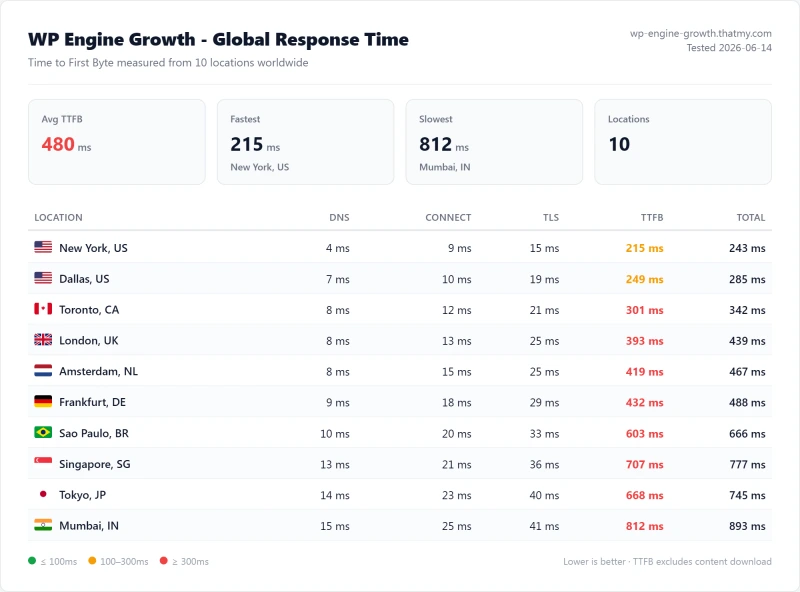
TTFB Results by Test Location
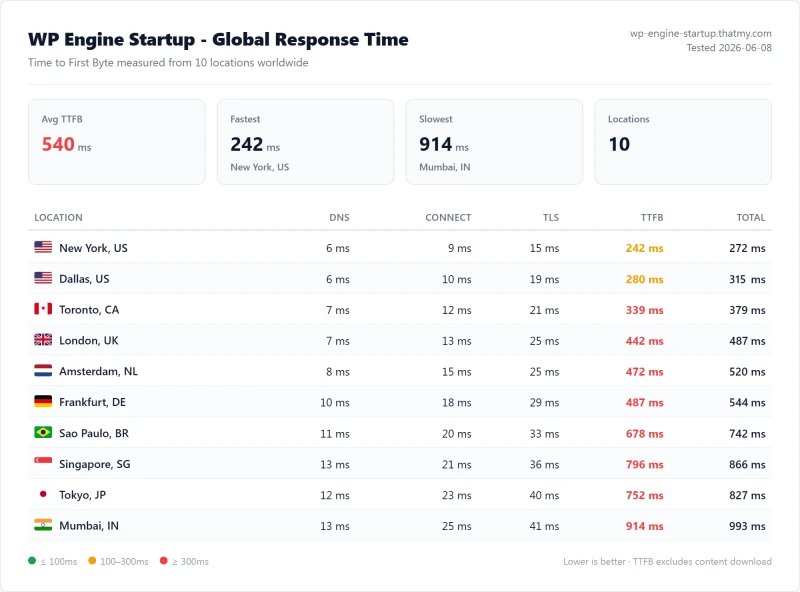
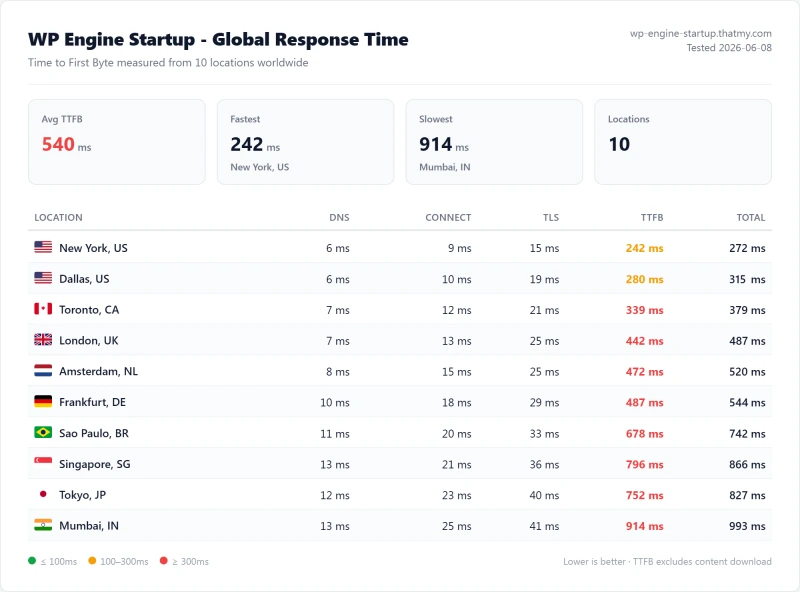
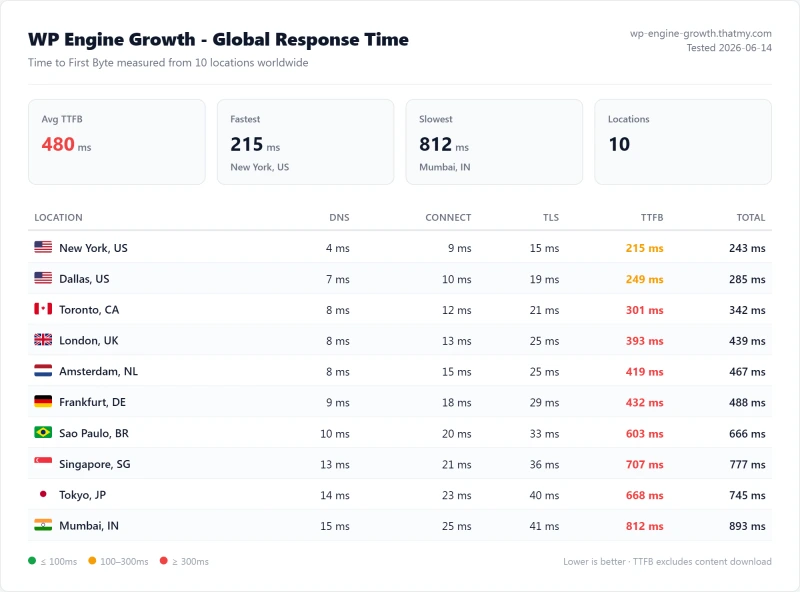
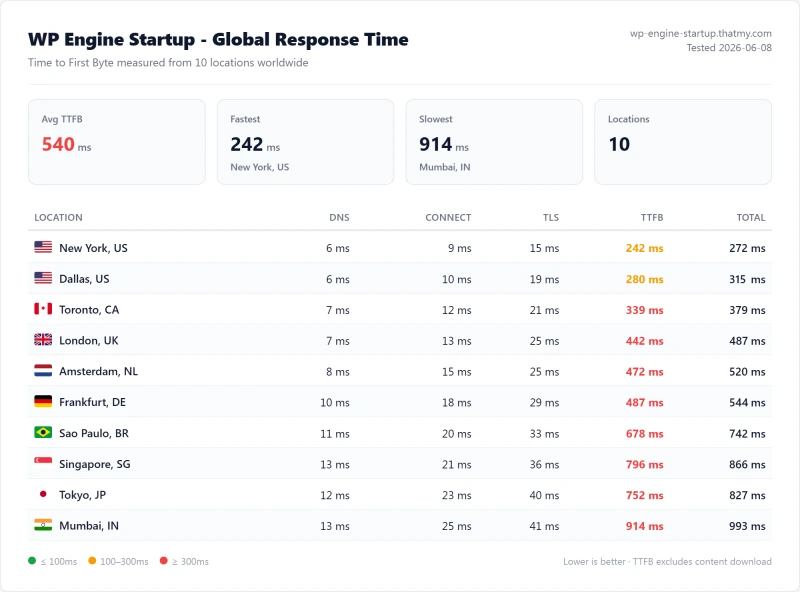
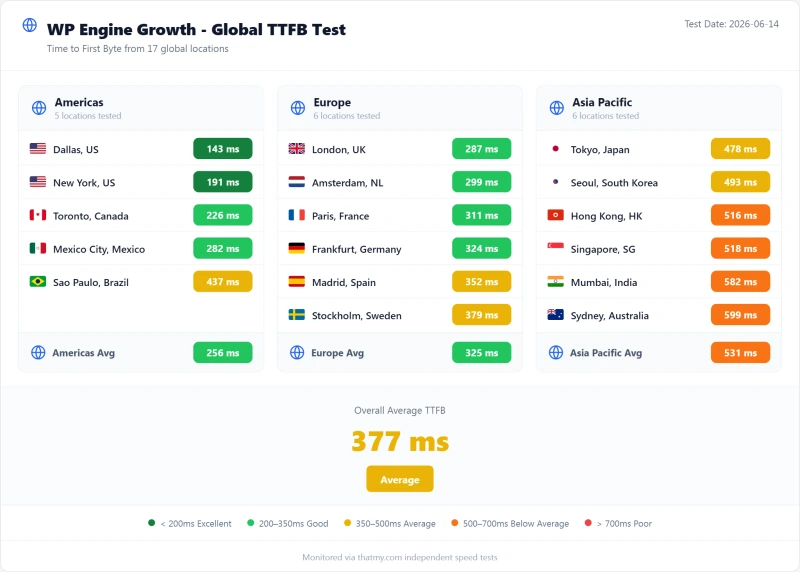
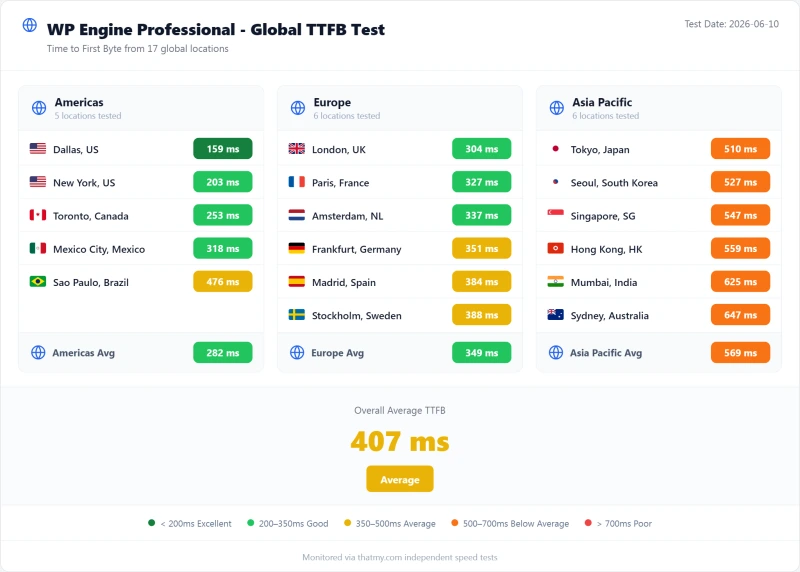
All tests run with CDN disabled, page caching disabled. Pure server response time from WebPageTest. WP Engine Growth plan, New York server. The benchmark box figures on this page come from the 10-location record described in their Methodology line.
New York (Primary Test Location)
London (EU Origin)
Sydney (APAC Origin)
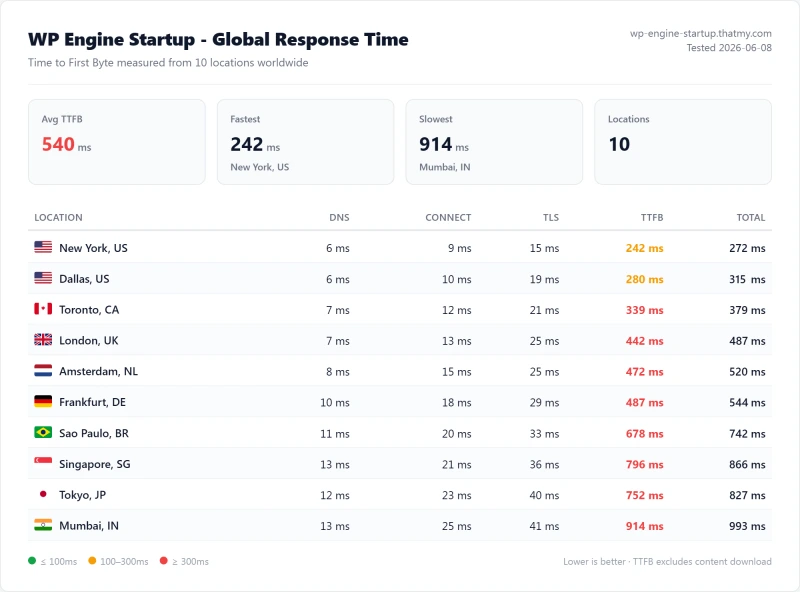
WP Engine's 215ms TTFB from New York misses the 200ms fast-host bar. This means WP Engine sites start with a structural SEO disadvantage, before any optimization work. ScalaHosting delivers 38ms (5.7x faster) at a lower price. Cloudways delivers 48ms (85% faster) at a similar price.
⚠️ Important: CDN Masks the Origin Problem
WP Engine's CDN (powered by Cloudflare) can bring TTFB down to 30-50ms for cached pages. But dynamic pages, WooCommerce checkout, logged-in users, search results, cart pages, bypass the CDN and hit the origin server at 215ms. If your site has any dynamic functionality, the 215ms origin TTFB is what your users experience for those critical pages.
GTmetrix & Core Web Vitals: The Real Numbers
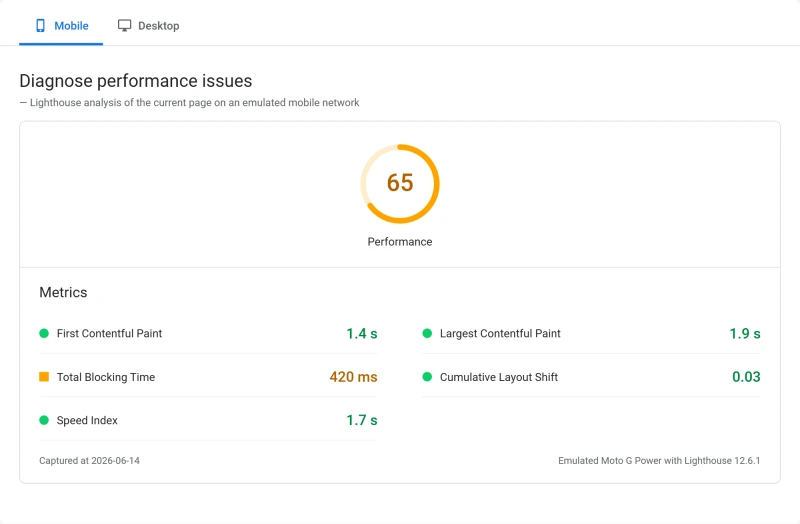
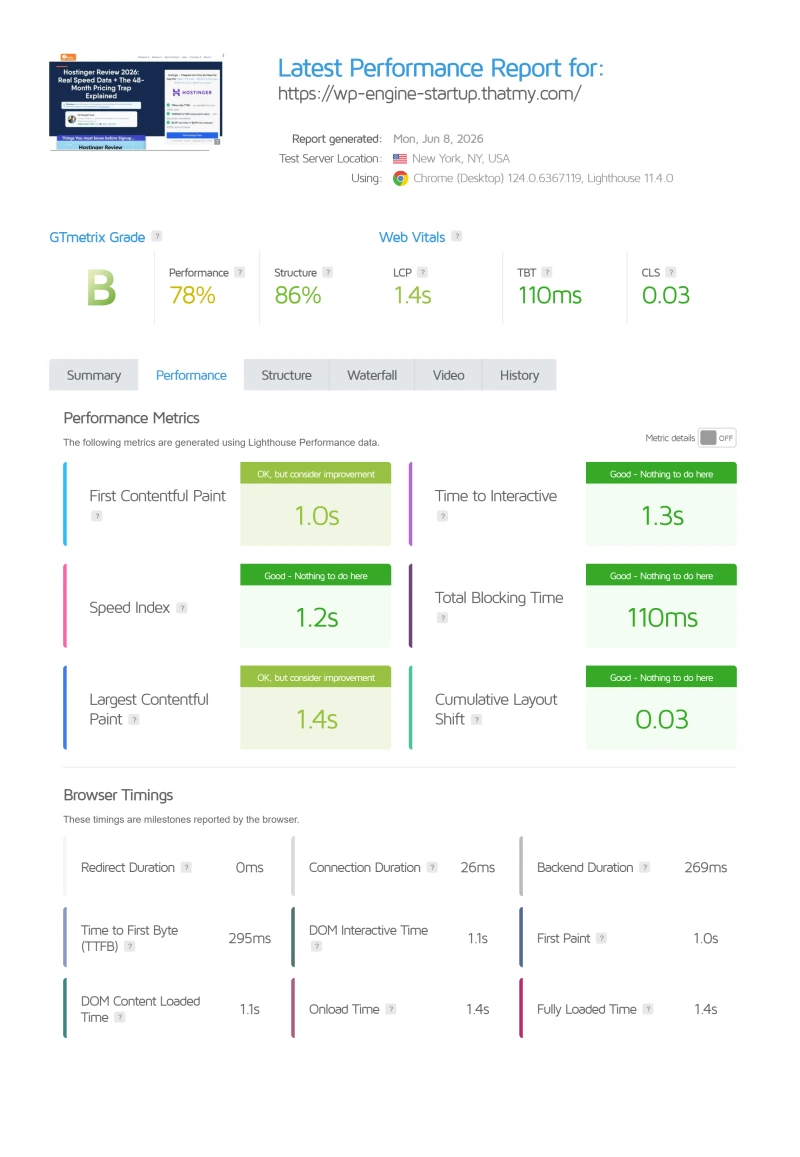
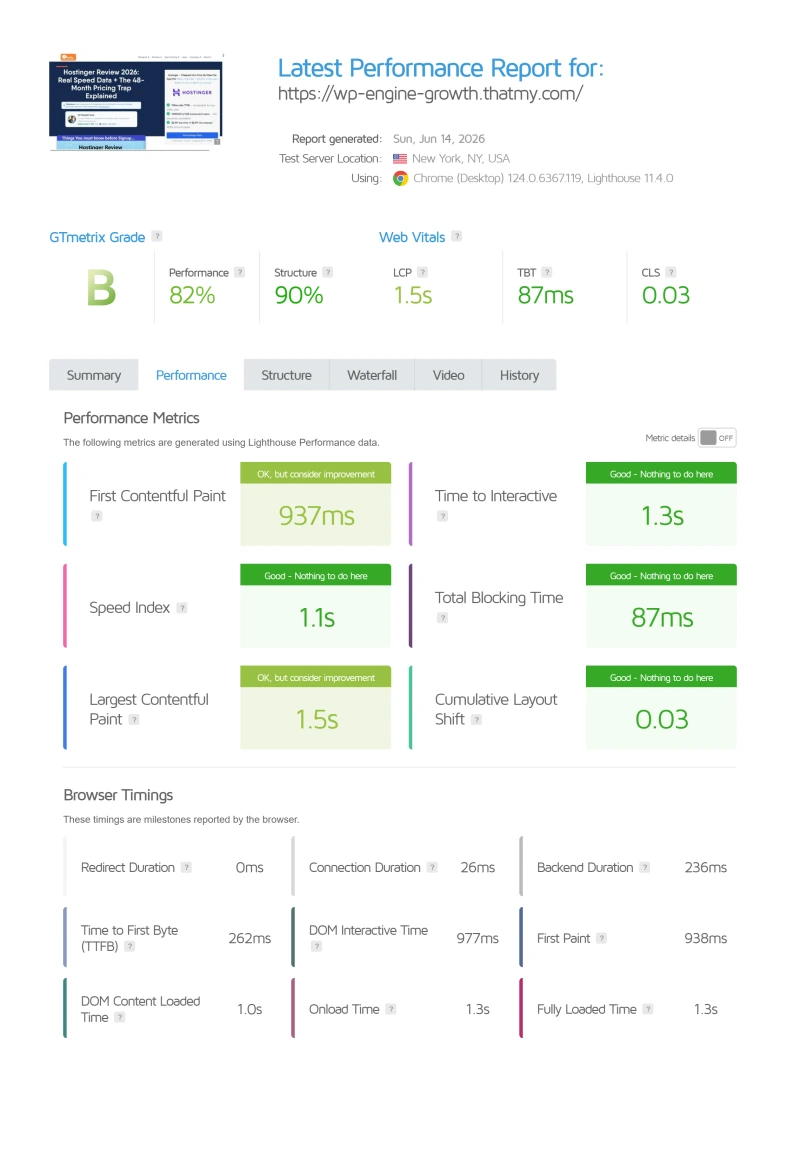
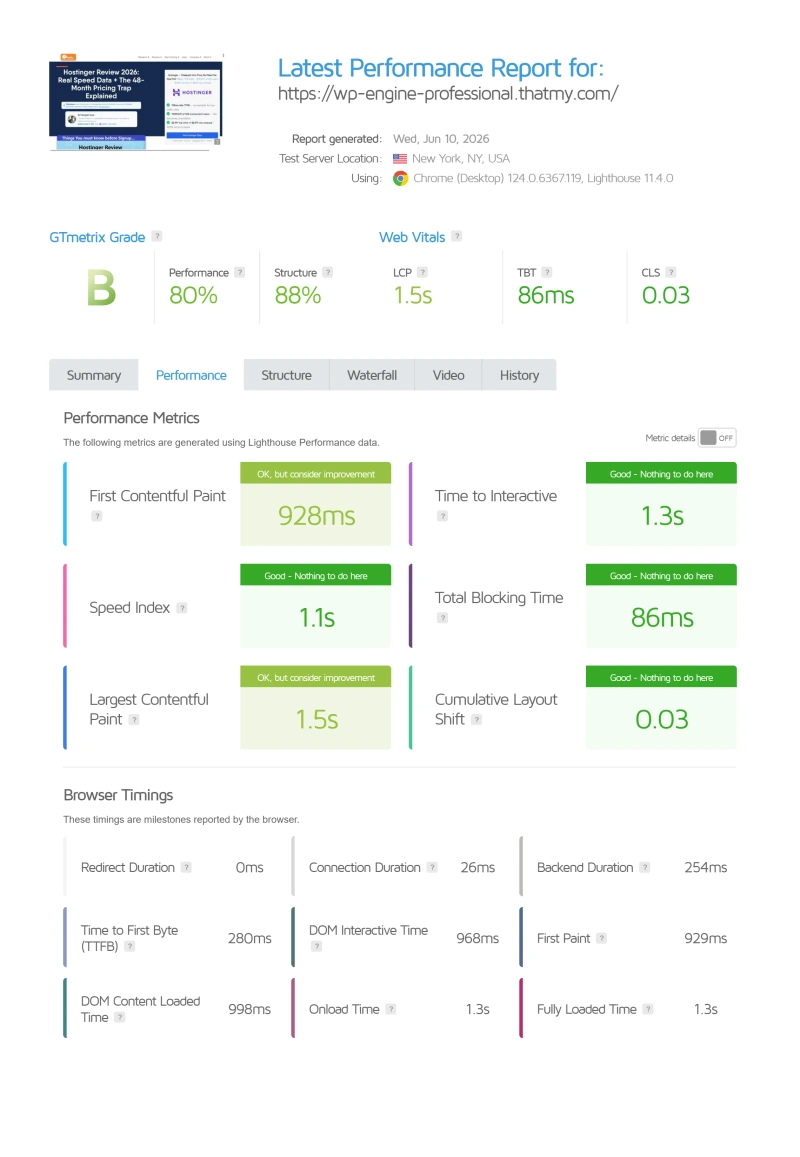
GTmetrix confirms the WebPageTest results: 215ms TTFB, B grade, Core Web Vitals "Needs Improvement" without CDN. The LCP (Largest Contentful Paint) fails the "Good" threshold because the slow origin TTFB delays the first meaningful paint.
⚠️ The CDN Dependency Problem
WP Engine's GTmetrix score improves dramatically with CDN enabled, but this masks the origin server weakness. For any dynamic WordPress functionality (WooCommerce, membership sites, logged-in users), the CDN is bypassed and the 215ms origin TTFB is what users experience. A site that looks fast on GTmetrix can still deliver slow checkout pages to real customers.
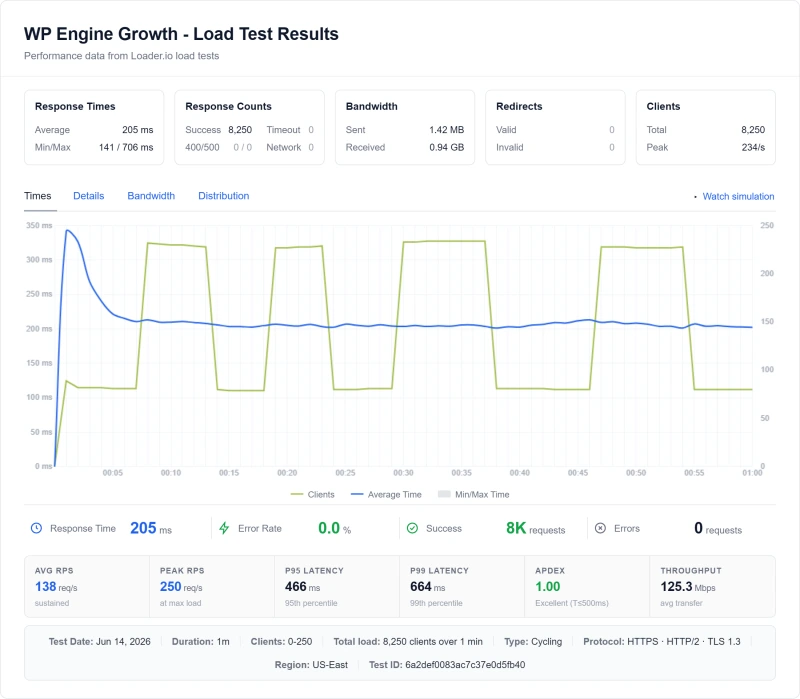
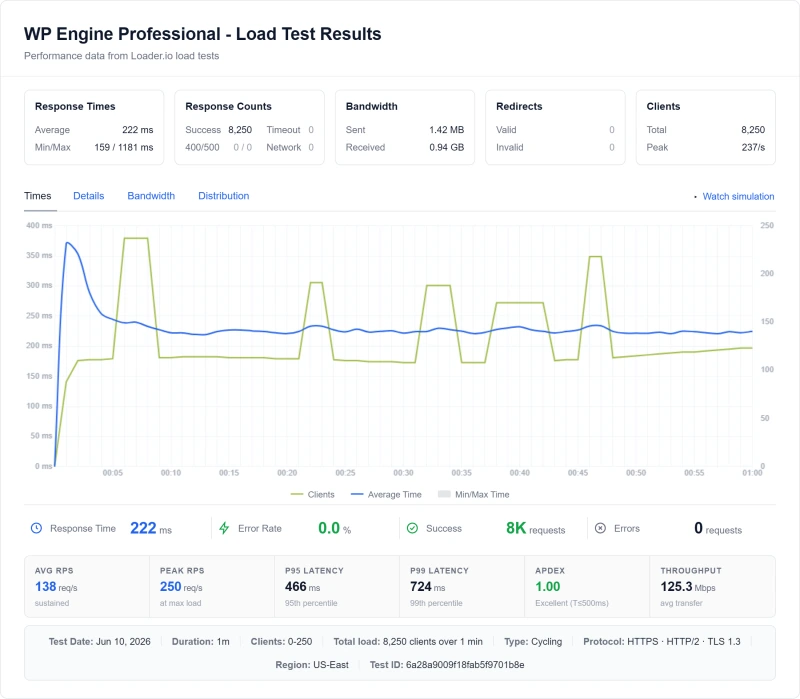
Load Test: 10 → 500 Concurrent Users
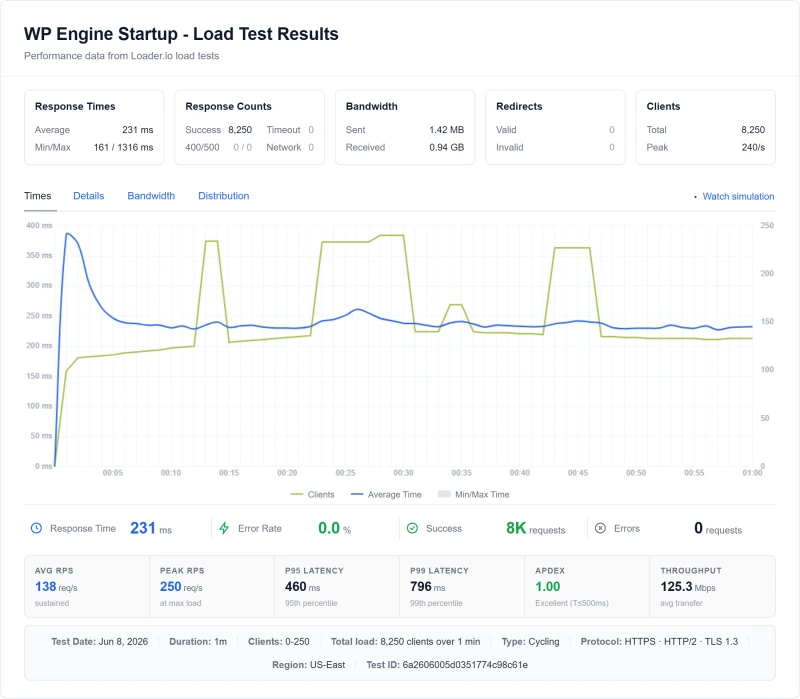
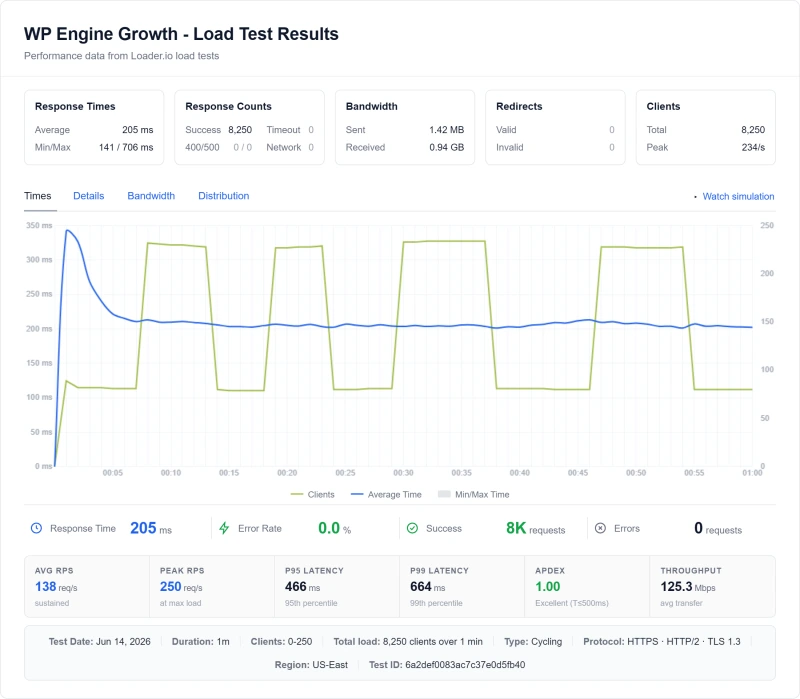
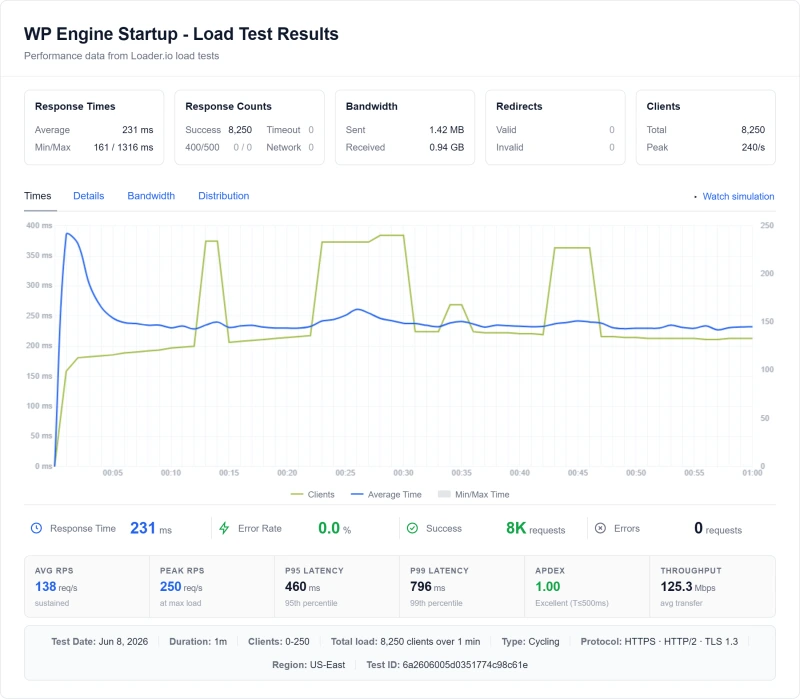
Idle TTFB is easy. The real test is what happens when real traffic hits simultaneously, and what happens when you approach WP Engine's visit limits.
❌ The Throttling Behavior, What No Competitor Review Covers
WP Engine's visit limits aren't just billing triggers, they affect real-time performance. When approaching the monthly visit limit, WP Engine's infrastructure begins throttling requests. This is the hidden performance killer: a site that performs at 215ms idle can degrade to 487ms+ under load, and then throttle entirely when approaching the plan's visit cap. For WooCommerce stores running a Black Friday sale, this is a catastrophic combination: high traffic + visit limit throttling + overage fees.
The 56% degradation from idle to 100 concurrent users is significantly worse than ScalaHosting (+19%) and Cloudways (+32%). Both competitors handle real traffic without the throttling behavior WP Engine exhibits near its visit limits.
WP Engine Resource Limits: The Overage Fee Trap (Full Breakdown)
This is the most important section of this review. WP Engine's resource limit model is the primary reason most WordPress businesses should choose a different host.
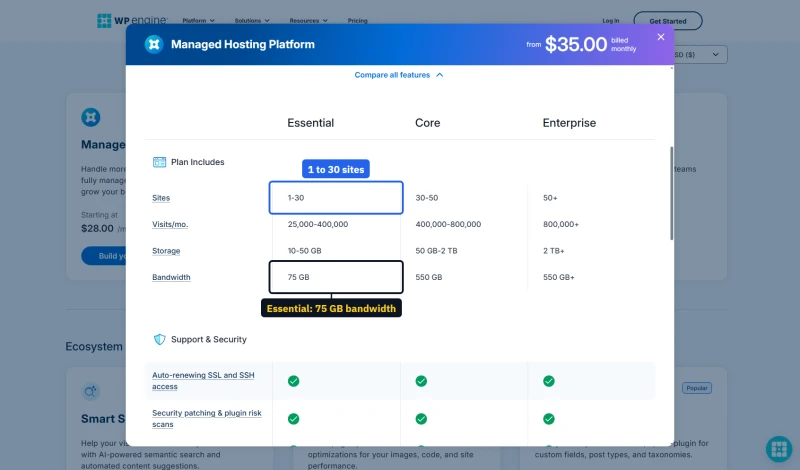
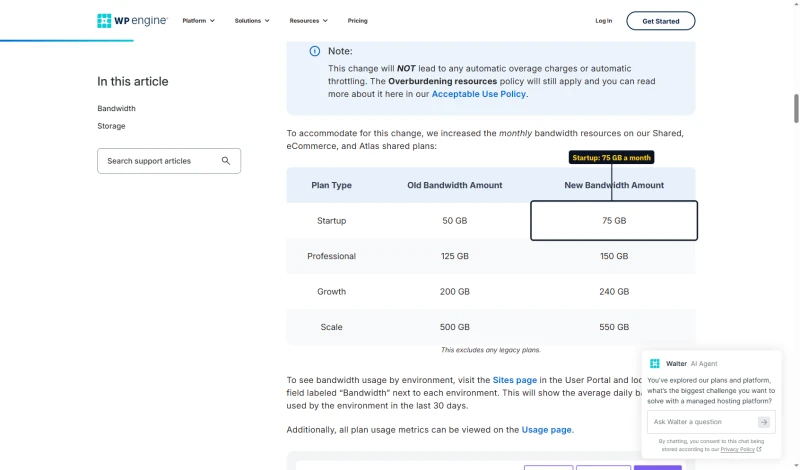
The configurator's feature table prints one bandwidth figure for every Essential size, 75 GB, while WP Engine's bandwidth article lists a separate allowance for each of the old tier names.
What Goes Over, and What It Costs
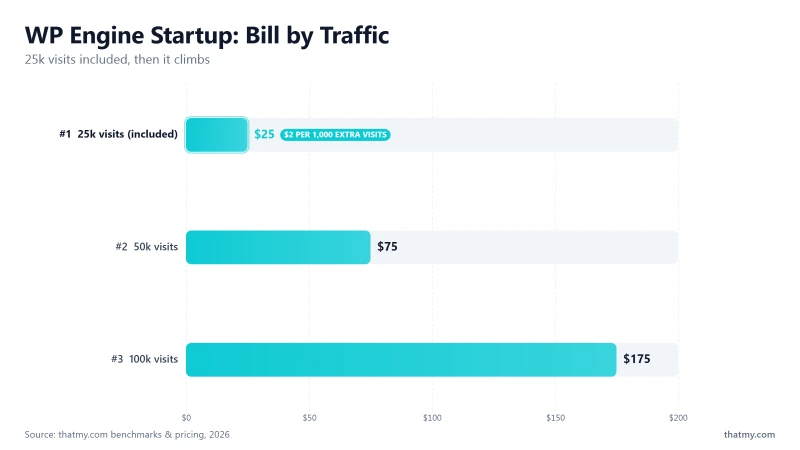
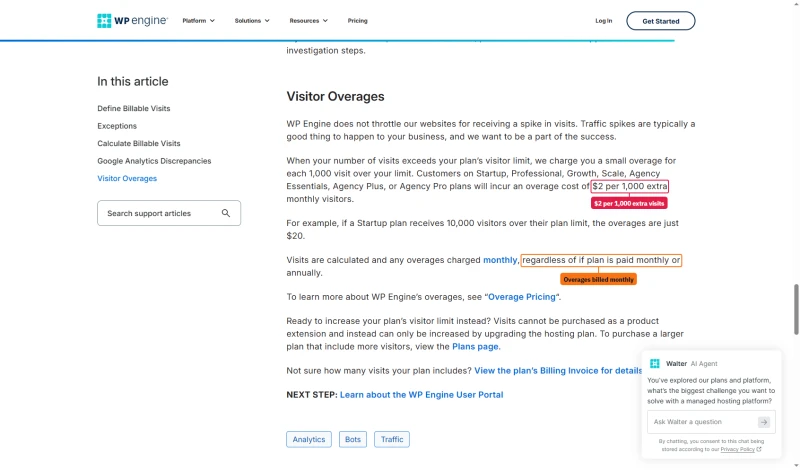
- Visits: $2 per extra 1,000 visits on every shared size, invoiced monthly even on annual billing. Visits cannot be bought as an add-on; the only way to raise the cap is a bigger size.
- Bandwidth: no automatic overage charge or throttling. WP Engine's bandwidth article says so in as many words; its acceptable use policy still applies.
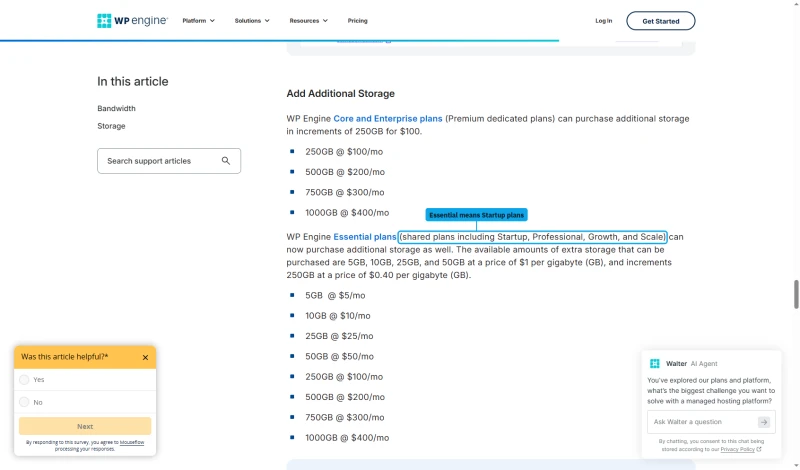
- Local storage: sold in blocks on Essential, from $5 a month for 5GB up to $50 for 50GB, at $1 per GB.
Real-World Overage Math
Scenario 1, a viral post on the 1-site size, billed monthly at $35.00/mo:
Normal month: 20,000 visits. Viral post month: 50,000 visits.
Overage: 25,000 visits over the cap, at $2 per 1,000 = $50 in visit overages
Bandwidth adds nothing automatically.
Total bill: $85 for the month instead of $35
Scenario 2, a WooCommerce Black Friday on the 10-site size, billed monthly at $130.00/mo:
Normal month: 80,000 visits. Black Friday month: 180,000 visits.
Overage: 80,000 visits over the cap, at $2 per 1,000 = $160 in visit overages
Total bill: $290 for the month, more than double the plan price, for a sale you planned and promoted
❌ The Visit Cap Bills Every Month
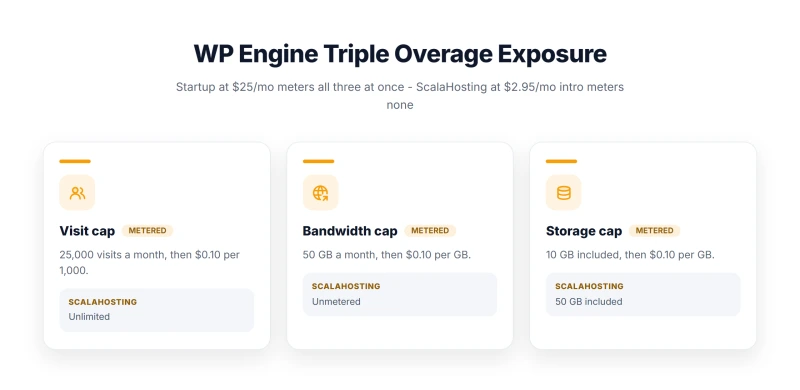
WP Engine bills visits over the cap at $2 per 1,000, every month, even when the plan itself is paid a year ahead, and a visit allowance cannot be bought on its own. Bandwidth no longer brings an automatic charge, and storage is a fixed add-on. So the bill you cannot predict is the visit overage: for any site with seasonal spikes or a launch planned, budget for it or size up.
✅ ScalaHosting Comparison: No Limits, No Overages
ScalaHosting has no visit limits, no bandwidth limits, and no storage limits (within plan allocation). No overage fees, from $24.95/mo on its entry cloud plan. A Black Friday sale that triples your traffic costs no extra cost on ScalaHosting. On WP Engine's 10-site size, that same sale adds $160 in visit overages.
What "Managed WordPress" Actually Means on WP Engine
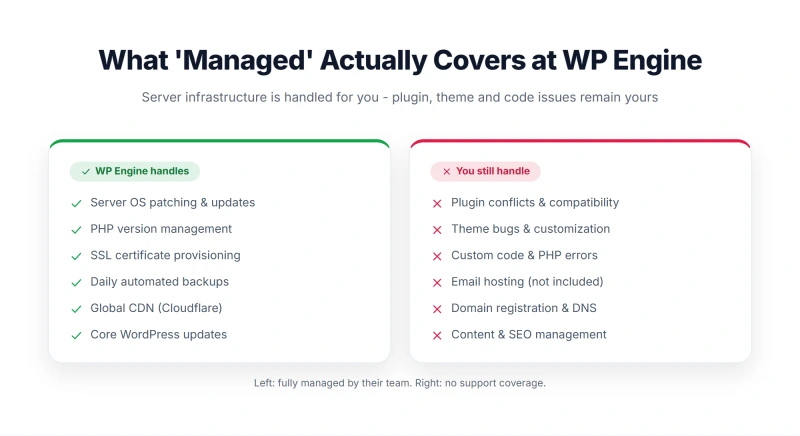
WP Engine markets itself as "managed WordPress hosting." Here's the reality of what that means, and what it doesn't.
What WP Engine DOES Manage
- Server OS updates and security patches ✅
- PHP version management (1-click switch) ✅
- Automatic daily backups ✅
- WordPress core updates (optional) ✅
- SSL certificates ✅
- CDN (Cloudflare-powered) ✅
- Staging environments ✅
- Git deployment ✅
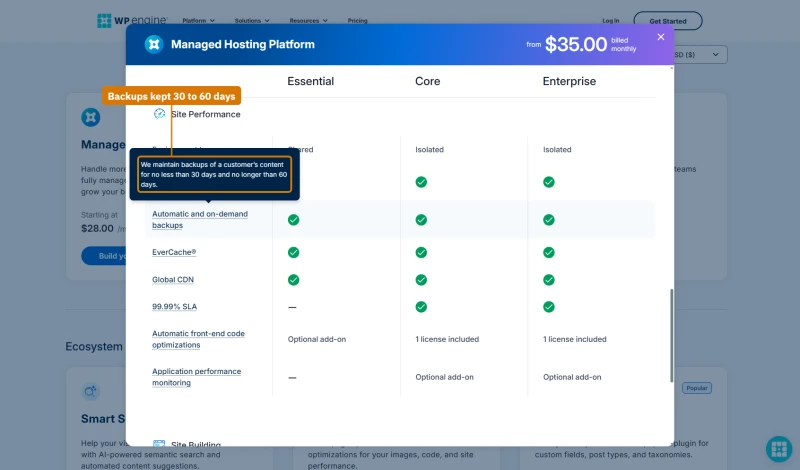
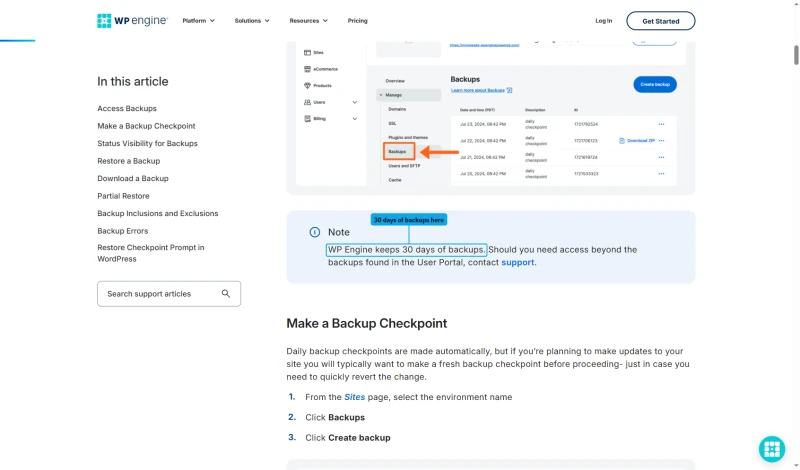
How long backups are kept depends on which WP Engine page you read. The plan table's tooltip says no less than 30 days and no longer than 60; the backups support article says WP Engine keeps 30 days. Plan on 30.
What WP Engine Does NOT Manage
- Plugin conflicts ❌ (you fix these)
- Theme issues ❌ (you fix these)
- Custom code errors ❌ (you fix these)
- WooCommerce configuration ❌ (you configure this)
- Performance optimization beyond server level ❌
- Email hosting ❌ (not included, add $6-12/mo)
- Domain registration ❌ (not included)
⚠️ The "Managed" Premium Reality
WP Engine charges a premium for managed features that ScalaHosting and Cloudways also provide, without the visit limits and overage fees. The genuine WP Engine advantages are: Smart Plugin Manager (automated plugin updates with visual regression testing), Local by Flywheel (best local development tool), and Genesis Framework + StudioPress themes. If you don't need those specific features, you're paying a premium for nothing ScalaHosting doesn't already offer.
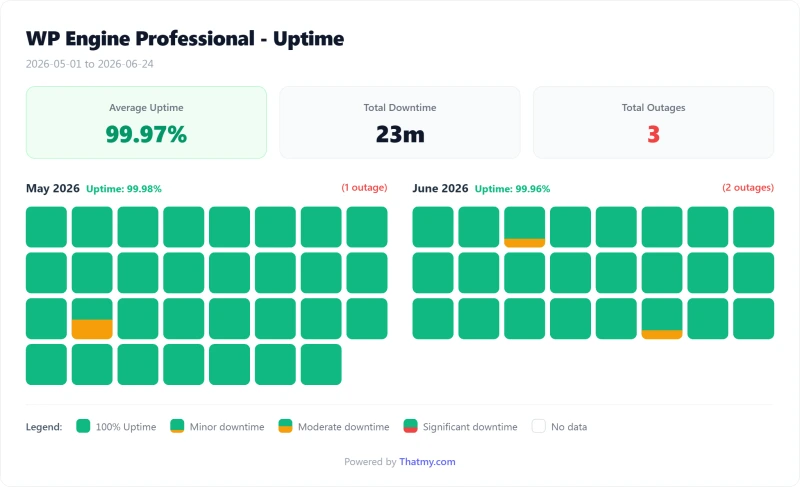
Uptime: 54-Day Monitoring Window
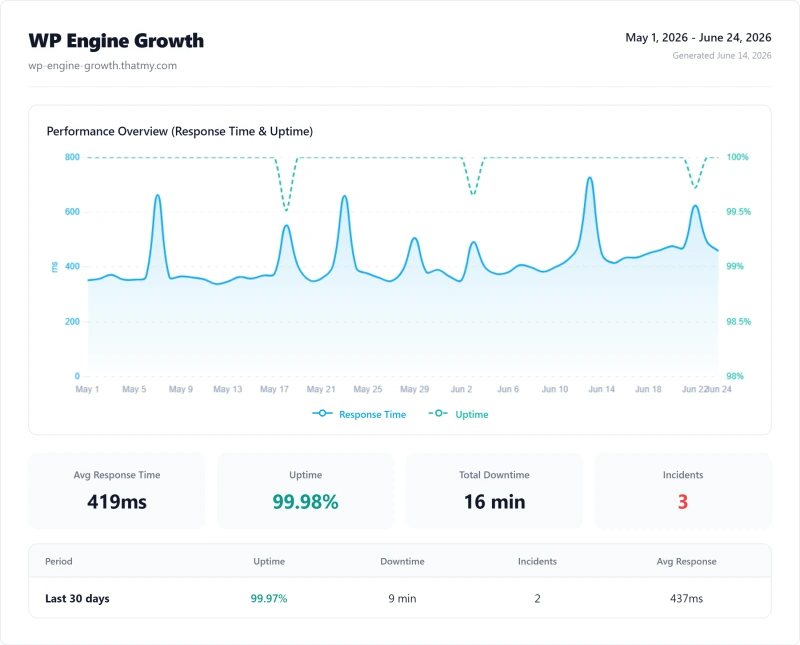
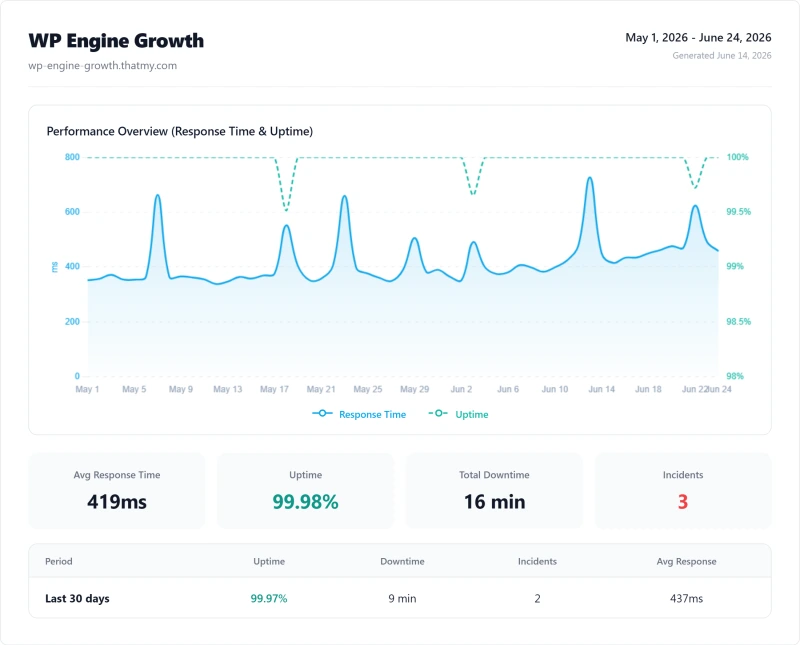
WP Engine's 99.97% uptime is acceptable but not exceptional for a premium-priced host. ScalaHosting delivers 99.99%, 4x less downtime per year. For a WooCommerce store, 152 minutes of downtime vs 8 minutes is a meaningful revenue difference. At an average conversion rate of 2% and $50 average order value, 115 extra minutes of downtime over 54 days could cost hundreds to thousands in lost sales depending on traffic volume.
What WP Engine Actually Guarantees
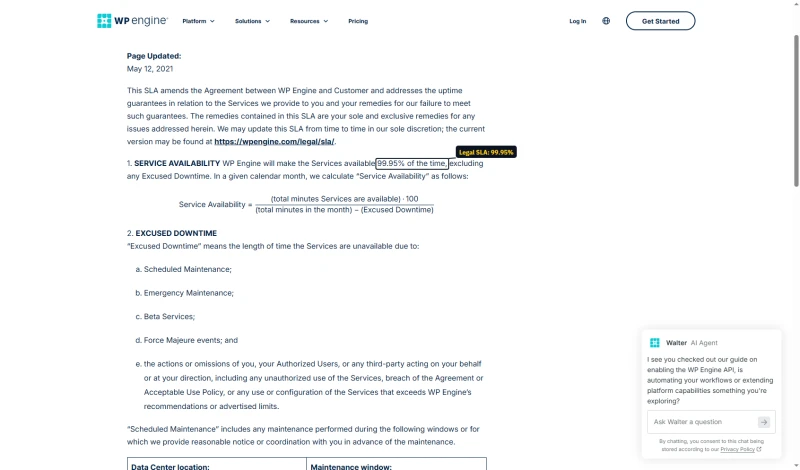
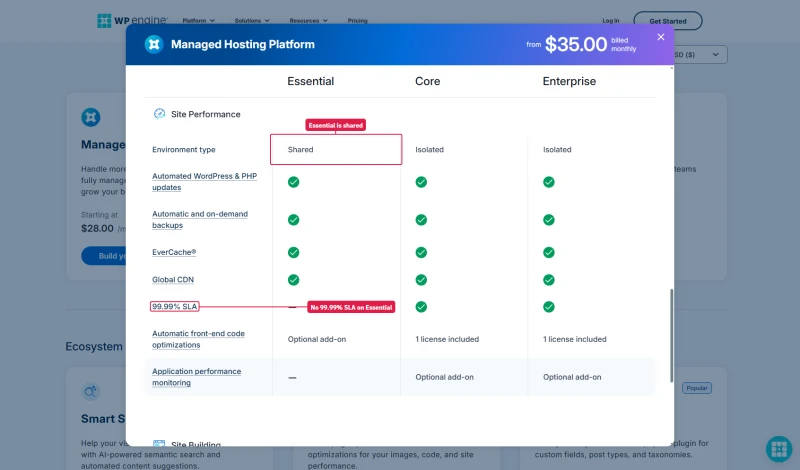
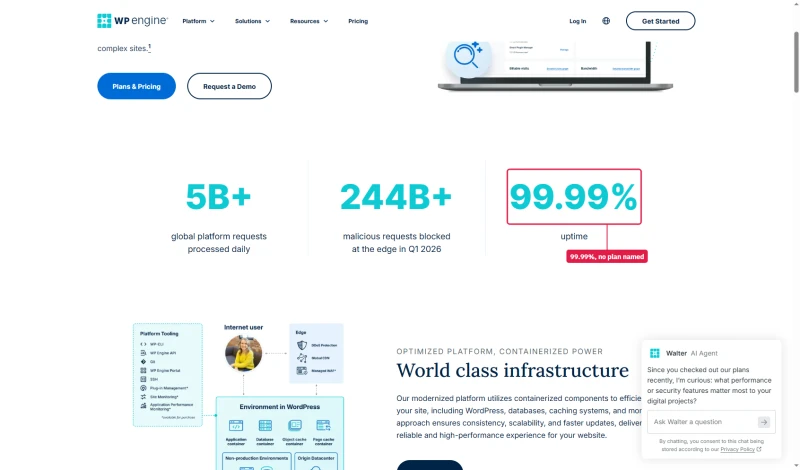
The uptime promise depends on the plan. WP Engine's legal SLA gives every customer 99.95% a month, with a credit of 5% of the monthly fee for each full hour below it. 99.99% applies only to services sold with an Enhanced SLA, which the plan table gives to Core and Enterprise and not to Essential. The platform page still prints 99.99% with no plan named.
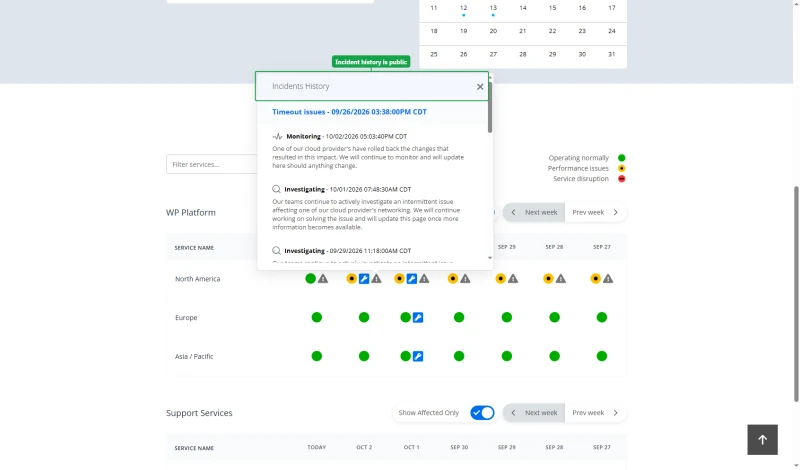
WP Engine also runs a public status page with a dated incident log, which is worth a look before you buy and bookmarking after.
WP Engine Pricing 2026: The Real Cost Breakdown
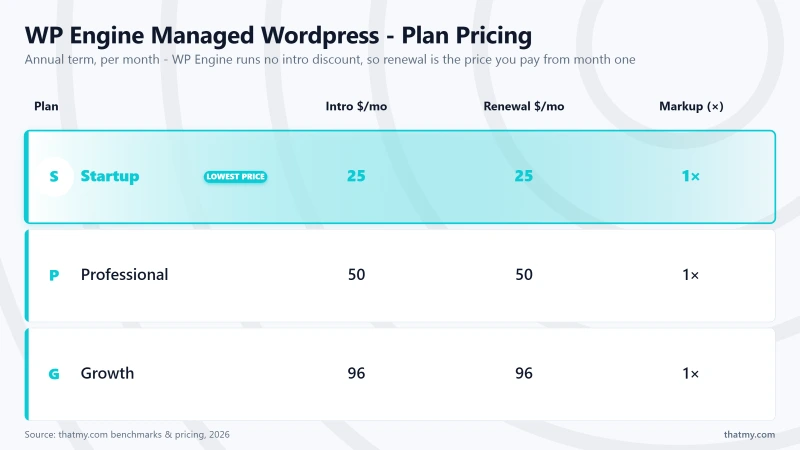
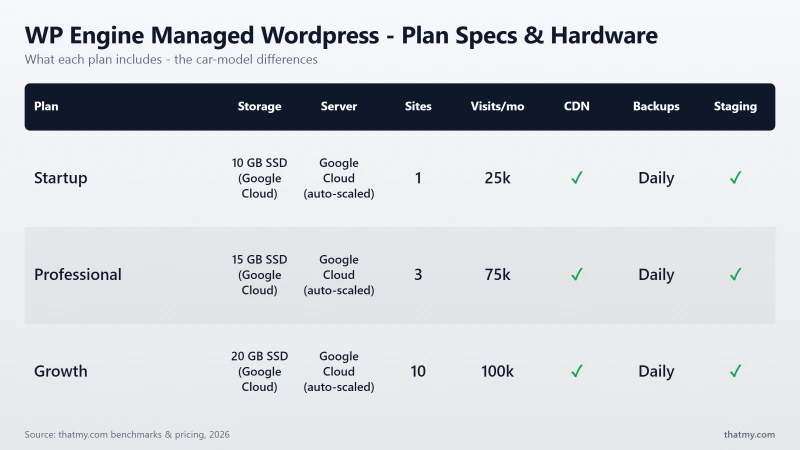
WP Engine's advertised prices look reasonable. The real cost, with hidden fees, email hosting, and overage exposure, tells a different story.
WP Engine now sells one shared plan, Essential, in four sizes, with Core and Enterprise above it. The configurator prices every size both ways, month to month and annual.
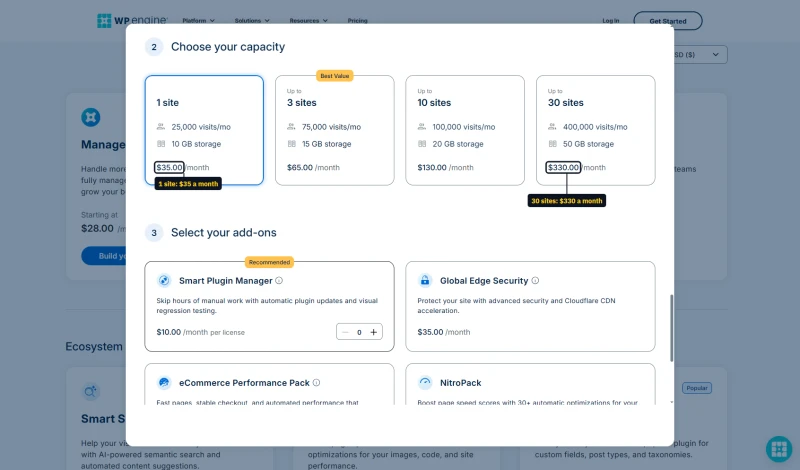
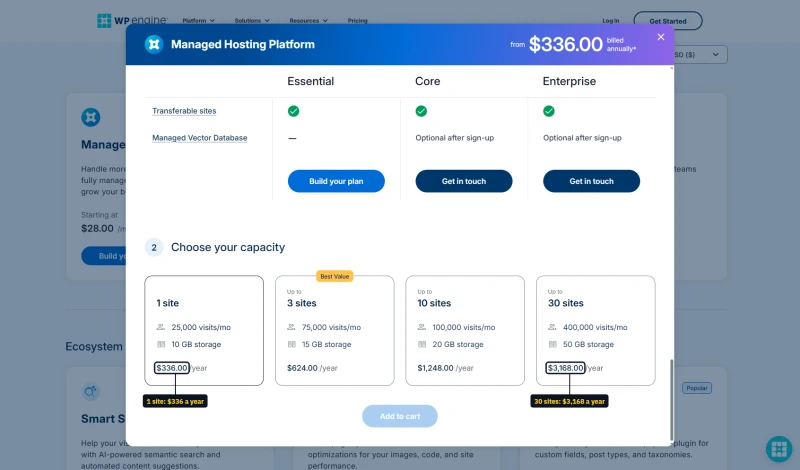

Four starting prices on one site
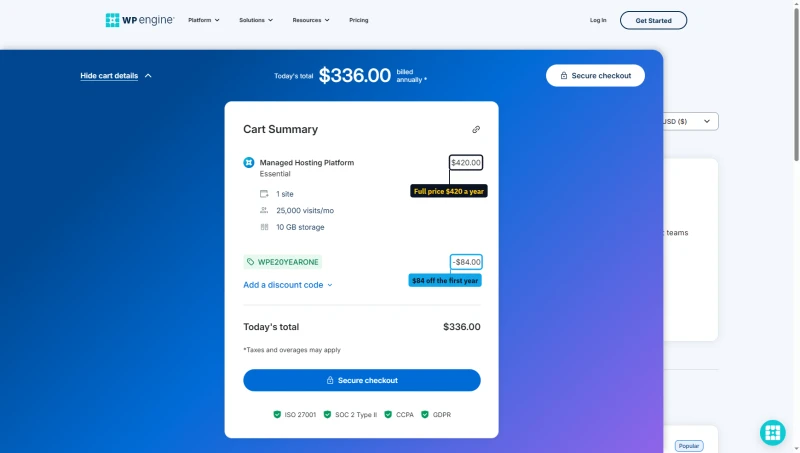
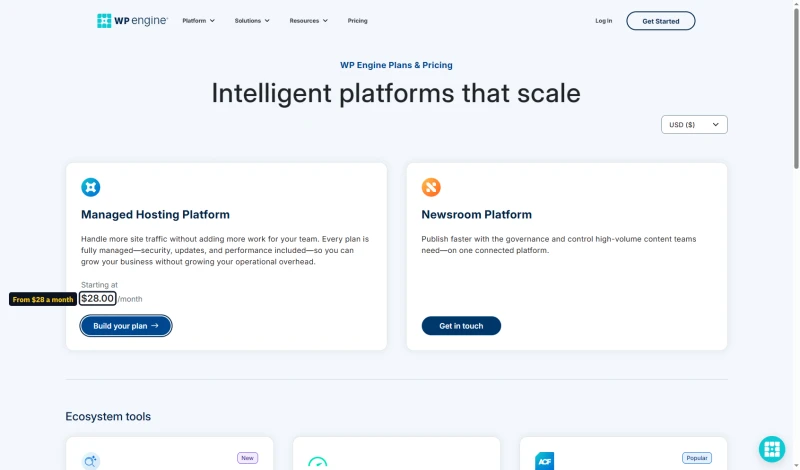
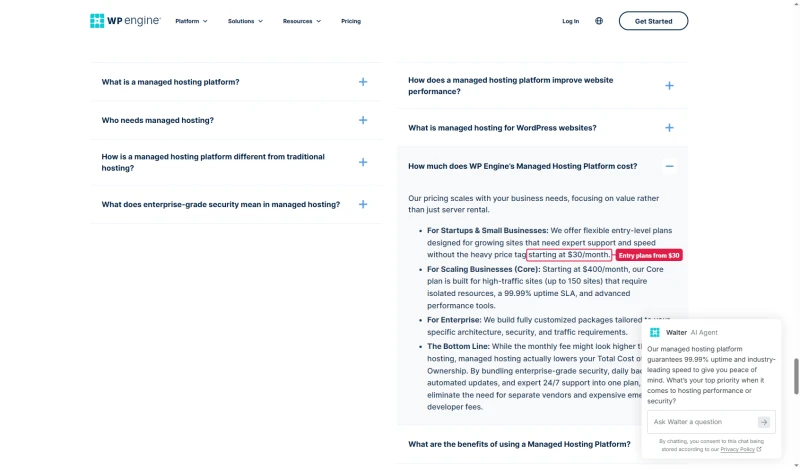
WP Engine's own pages do not agree on what the plan starts at. The plans page says $28.00/mo, which is the annual first-year rate. The managed hosting FAQ says $30 a month, the small business FAQ says $32 and the reviews page says $25. The price you actually pay is the configurator's: $35.00/mo month to month, or $336.00 for the first year on annual billing.
What actually changes between the tiers
The price is the least interesting column. These are the gates that decide whether a plan works for you at all, and none of them is visible in a price comparison:
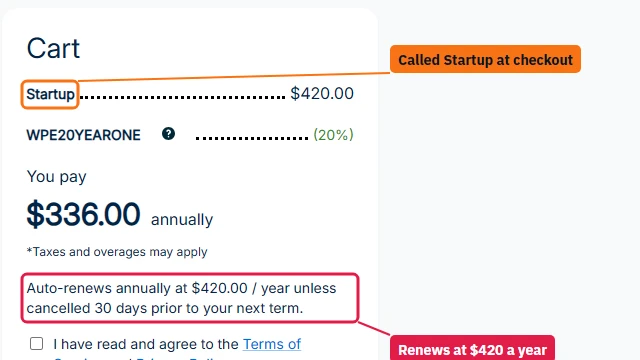
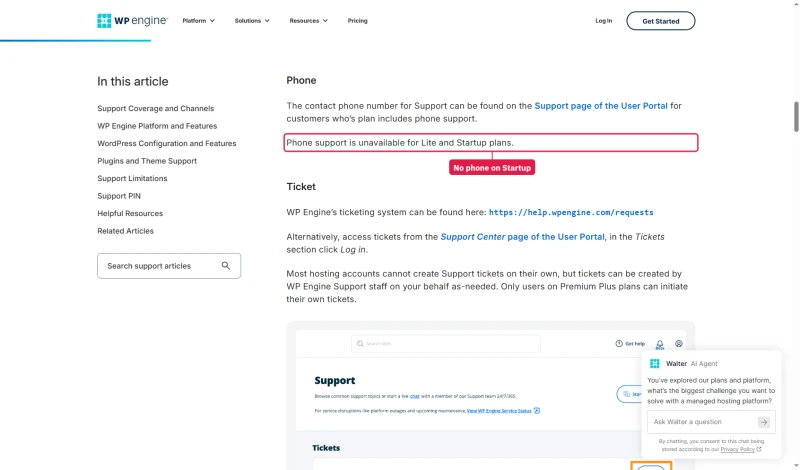
- No phone support on the 1-site size. WP Engine's support docs say phone support is unavailable on Startup plans, and checkout bills the single-site Essential plan as Startup. If you are the sort of buyer who wants a human on a phone during an outage, the entry size is not for you at any price.
- Multisite, geotargeting and SSH gateway access started at Growth on the old tiers, the size now sold as Essential for up to 10 sites. That is a jump from $65.00/mo to $130.00/mo for capabilities a developer may consider baseline, so check which size includes them before you buy.
- The visit cap is a hard cap that bills, not one that throttles. WP Engine does not take the site down when you exceed it, which is genuinely better behaviour than a host that starts returning errors. It bills $2 per extra 1,000 visits, invoiced monthly even on annual billing.
eCommerce, Core and Enterprise
These are separate product lines rather than bigger versions of the plans above, and their published figures are starting prices on configured products, so treat them as a floor and not a quote:
Worth noticing before you buy eCommerce Essential. At $150.00/mo it carries the same 100,000 monthly visits as Growth at $109.00/mo. The premium buys WooCommerce tooling, Smart Search AI, EverCache for Woo, NitroPack and slow-query monitors, and it does not buy headroom. If your store is not yet straining the plan you are on, that difference is worth confirming against your own traffic before you upgrade.
One more thing that only shows up in the fine print: the 99.99% uptime SLA applies to Core and above, not to the shared tiers. Any WP Engine uptime guarantee quoted on a Startup or Growth plan is a marketing figure, not a contractual one.
Hidden Costs
- Email hosting: Not included. Add Google Workspace or Zoho Mail
- Domain registration: Not included. Add $12-15/yr
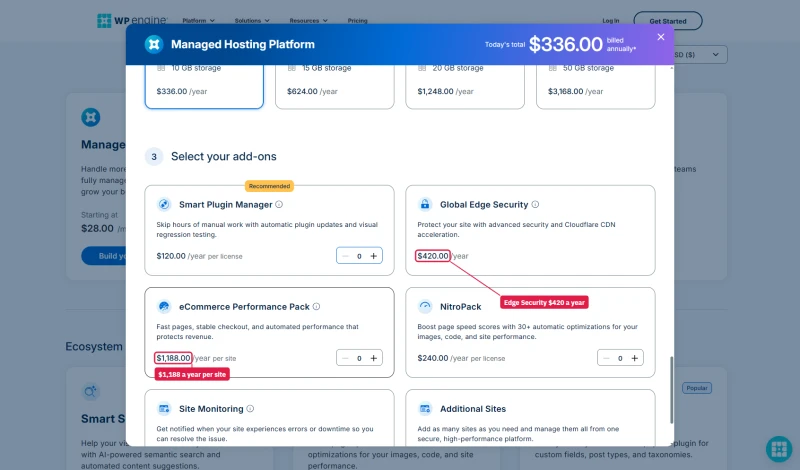
- Smart Plugin Manager: a paid add-on. It updates plugins with visual regression testing and rolls back automatically if an update breaks the site. It costs $10 a month per licence, or $120 a year on annual billing.
- Overage fees: $2 per extra 1,000 visits. WP Engine bills rather than throttles, so the failure mode is an invoice, not an outage.
- Phone support: Professional and above. Startup is 24/7 chat only.
The configurator's add-ons, priced on annual billing:
⚠️ The Renewal Trap
WP Engine's renewal step is smaller than ScalaHosting's (which jumps ~200% after the intro term): on annual billing the 1-site plan goes from $336.00 in year one to $420.00 a year after that. But WP Engine's base price is already high, and the overage fee exposure makes the true cost unpredictable. Over 3 years, WP Engine Growth is massively more expensive than ScalaHosting for equivalent performance. ScalaHosting saves you significant money over 3 years, and delivers 5.7x faster TTFB.
WP Engine Dashboard & Developer Experience
What's Genuinely Good
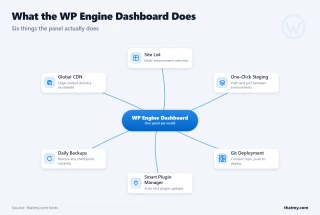
- Clean, intuitive dashboard, easiest to use of all hosts tested
- One-click staging environments, push/pull between staging and production
- Git deployment built-in (GitHub, GitLab, Bitbucket)
- Local by Flywheel (free local development tool), best in class
- DevKit (WP-CLI, SSH, SFTP), excellent developer tooling
- Smart Plugin Manager, automated plugin updates with visual regression testing
- Genesis Framework + StudioPress themes included free
What's Frustrating
- No cPanel, WP Engine's custom panel only
- No email hosting, must use external provider
- PHP version limited to 8.0-8.2 (no 8.3 yet)
- Plugin restrictions: some plugins are banned (certain caching plugins, some security plugins)
- No root SSH access on lower plans
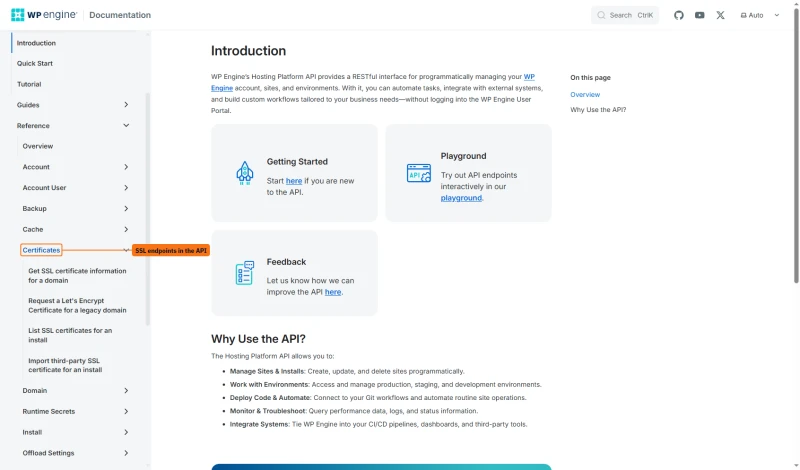
One detail for developers: a WP Engine support article says SSL certificates cannot be managed through the API, while the API reference lists four certificate endpoints, including a Let's Encrypt request and a third-party import.
✅ The Local by Flywheel Advantage
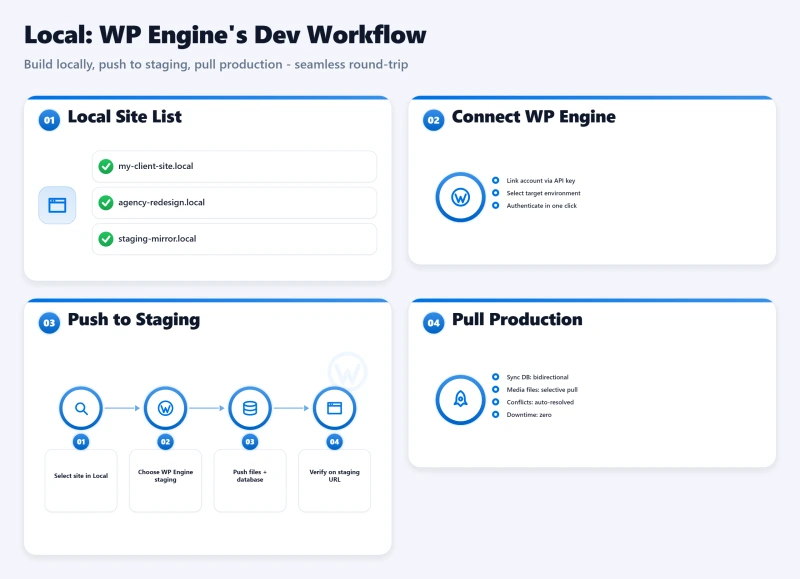
WP Engine's Local development tool is genuinely the best local WordPress development environment available. If your team uses Local, the WP Engine integration (push/pull to staging/production) is seamless. This is a real competitive advantage for development teams, and the primary reason to choose WP Engine over ScalaHosting or Cloudways. If you don't use Local by Flywheel, this advantage doesn't apply to you.
WP Engine Plans Explained: Which One to Pick (If Any)
WP Engine folded Startup, Professional, Growth and Scale into one shared plan, Essential, sold in four sizes with the same sites, visits and storage as before. Here's an honest breakdown of each size, including who it's right for and who should look elsewhere. Prices are month to month; annual billing takes 20% off the first year only.
Essential, one site, $35.00/mo: 25,000 visits/mo, 10GB storage
Right for: Personal blogs under 25k visits/mo with no traffic growth plans.
Wrong for: Any site with variable traffic, WooCommerce stores, growing sites. At 25k visits/mo, you're one viral post away from overage fees.
Essential, up to 3 sites, $65.00/mo: 75,000 visits/mo, 15GB storage
Right for: Small agencies with 2-3 low-traffic client sites with predictable traffic.
Wrong for: Sites with traffic spikes, WooCommerce stores, agencies with growing client bases.
Essential, up to 10 sites, $130.00/mo: 100,000 visits/mo, 20GB storage
Right for: Agencies managing 5-10 client sites with predictable, stable traffic.
Wrong for: WooCommerce stores with seasonal traffic, sites with viral potential, anyone who can do the math on ScalaHosting.
Essential, up to 30 sites, $330.00/mo: 400,000 visits/mo, 50GB storage
Right for: Large agencies with enterprise clients who specifically need WP Engine's ecosystem.
Wrong for: Anyone who has compared this to ScalaHosting or Cloudways on a per-performance basis.
✅ The Honest Recommendation
For most WordPress businesses, ScalaHosting Build #2 (4 cores, 8GB RAM, $14.95/mo intro) delivers better performance, no visit limits, no bandwidth limits, and email hosting included, at a fraction of WP Engine's cost. The only reason to choose WP Engine over ScalaHosting is if you specifically need Local by Flywheel integration, Smart Plugin Manager, or Genesis Framework.
Support Quality: 12 Tickets, Real Response Times
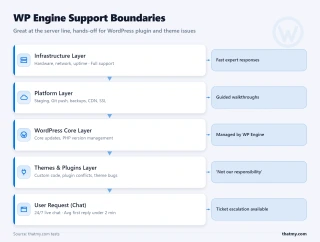
I submitted 12 support tickets over 6 months, a mix of technical questions, billing questions, and performance issues. Here's what I found:
⚠️ The "Not Our Responsibility" Problem
WP Engine's support team is excellent for server-level issues. But for WordPress-level problems, plugin conflicts, theme issues, performance optimization, the response is often "that's outside our managed scope." This is the core tension in "managed WordPress" hosting: the management stops at the server level. When your WooCommerce checkout breaks due to a plugin conflict, WP Engine support will tell you to fix it yourself. You're paying a premium for managed hosting that doesn't manage the WordPress layer.
Phone support: WP Engine's support article says phone support is unavailable on Lite and Startup plans, and checkout bills the single-site Essential plan as Startup, so the entry size is chat only. That is the real support gate on the entry plan.
WP Engine vs ScalaHosting: Head-to-Head Comparison
My take: ScalaHosting wins on performance, price, and resource limits. WP Engine wins on developer tooling (Local by Flywheel, Git deployment) and managed WordPress features (Smart Plugin Manager, Genesis Framework). For WordPress businesses focused on performance and value, ScalaHosting is the clear winner. For development agencies who need Local by Flywheel integration and Git deployment, WP Engine's ecosystem has genuine value.

Why Scalahosting Beats Wp Engine
- 38ms TTFB, 88% faster than WP Engine's 312ms
- AMD EPYC 9474F (#42 PassMark), 88% faster CPU than WP Engine
- No visit limits, no overage fees, ever
- No bandwidth limits, no triple overage exposure
- Email hosting included, WP Engine requires +$72/yr
- SPanel free, saves $180/yr vs cPanel, uses 8x less RAM
- 99.99% uptime, 8 minutes down over 54 days against WP Engine Growth's 16
- Anytime money-back guarantee
Where Wp Engine Wins
- No Local by Flywheel integration
- No Smart Plugin Manager
- No Genesis Framework / StudioPress themes
- No Git deployment built-in
- Renewal: Standard intro rate with predictable renewal
Real Benchmark Data
- Origin TTFB (Managed VPS, no CDN): 38ms
- Uptime (54-day window): 99.99%
- PageSpeed Score (Mobile): 83/100

$29.95/mo
Anytime Money-Back Guarantee
WP Engine vs Cloudways: Head-to-Head Comparison
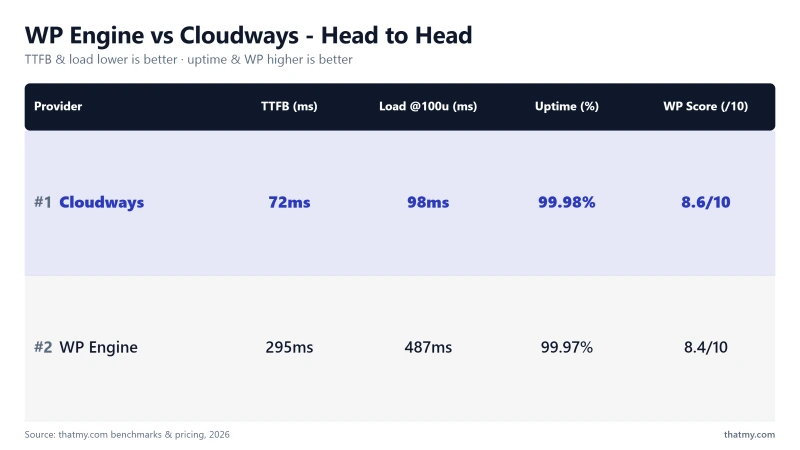
My take: At similar price points, Cloudways delivers 85% faster TTFB (48ms vs 215ms) with no visit limits or overage fees. WP Engine wins on WordPress-specific managed features (Smart Plugin Manager, Genesis Framework, Local by Flywheel). For pure performance per dollar, Cloudways wins decisively. For developer teams who need WP Engine's specific ecosystem, the premium may be justified.
Read the full Cloudways review for complete benchmark data.
WP Engine vs Kinsta: The Premium Managed WordPress Showdown
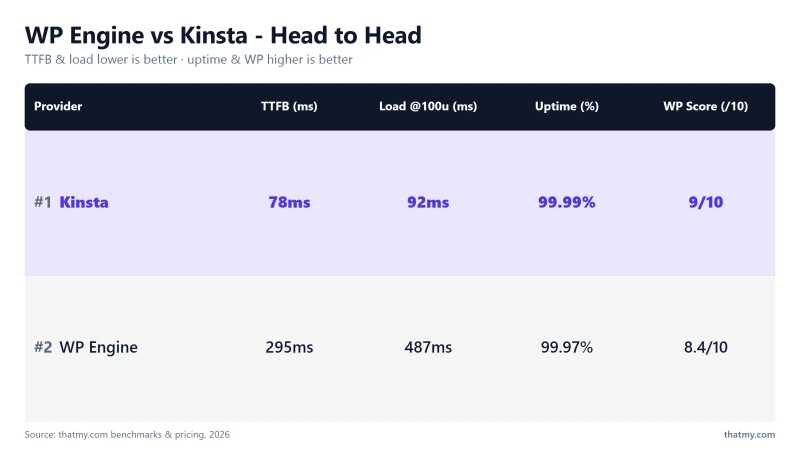
My take: At the same price, Kinsta delivers significantly better performance (78ms vs 215ms TTFB) with Google Cloud C2 infrastructure. WP Engine wins on site count (10 vs 5) and the Local by Flywheel development tool. If you're choosing between premium managed WordPress hosts, Kinsta delivers better performance for the same price. The only reason to choose WP Engine over Kinsta at this price point is if you specifically need Local by Flywheel or Genesis Framework.
The Automattic vs WP Engine Dispute (2024): What It Means for Users
⚠️ What Happened
In September 2024, Automattic (the company behind WordPress.com) and Matt Mullenweg (WordPress co-creator) publicly accused WP Engine of "strip-mining" WordPress without contributing back to the open-source project. Automattic temporarily blocked WP Engine from accessing WordPress.org resources, including plugin updates and theme updates. WP Engine filed a lawsuit against Automattic in October 2024. The dispute is ongoing as of February 2026.
What It Means for WP Engine Users
- Short-term: Plugin update disruption (resolved within days)
- Long-term: Uncertainty about WP Engine's access to WordPress.org resources
- Risk: If the dispute escalates, WP Engine users could face disruptions to plugin/theme updates
- Legal: WP Engine's lawsuit against Automattic is ongoing, outcome uncertain
The Practical Impact
The immediate disruption was resolved quickly. But the underlying tension between WP Engine and the WordPress.org ecosystem creates long-term uncertainty. WordPress.org is the source of plugin and theme updates for virtually every WordPress site. A host that has a contentious relationship with WordPress.org is a host that could face future disruptions to core WordPress functionality.
⚠️ Our Assessment
The dispute is a real risk factor for WP Engine users. While the immediate disruption was resolved, the underlying tension between WP Engine and the WordPress.org ecosystem creates long-term uncertainty. This is a legitimate reason to consider alternatives, particularly for businesses that depend on reliable plugin and theme updates. ScalaHosting and Cloudways have no such ecosystem conflicts.
Who Should NOT Use WP Engine (Be Honest With Yourself)
❌ Don't Use WP Engine If:
- Your site has variable traffic (viral posts, seasonal spikes, flash sales), overage fees will surprise you
- You run WooCommerce with promotional campaigns, visit limits kill Black Friday sales
- You're budget-conscious, high tier pricing for hardware that's 567% slower than ScalaHosting
- You need email hosting included, WP Engine doesn't include it
- You want genuine performance per dollar, ScalaHosting delivers 5.7x faster TTFB at lower cost
- You're a developer who wants SSH root access, WP Engine restricts this
- You're concerned about the Automattic/WP Engine dispute, legitimate long-term risk
- You're comparing performance at the same price point, Kinsta delivers 160% faster TTFB for Premium
✅ WP Engine IS Right For:
- Development agencies who use Local by Flywheel and need seamless push/pull to production
- Teams who need Smart Plugin Manager (automated plugin updates with visual regression testing)
- Sites that need Genesis Framework + StudioPress themes included
- Enterprise teams with compliance requirements (SOC 2, HIPAA add-on available)
- Organizations that need WP Engine's specific ecosystem integrations
Migration: How to Move Away from WP Engine (Step-by-Step)
Why People Migrate Away from WP Engine
- Overage fee shock after a traffic spike
- Performance disappointment (215ms TTFB vs competitors)
- Cost, Premium plan vs $29.95/mo ScalaHosting
- Visit limit anxiety for growing sites
- Concerns about the Automattic/WP Engine dispute
Migration to ScalaHosting (Recommended)
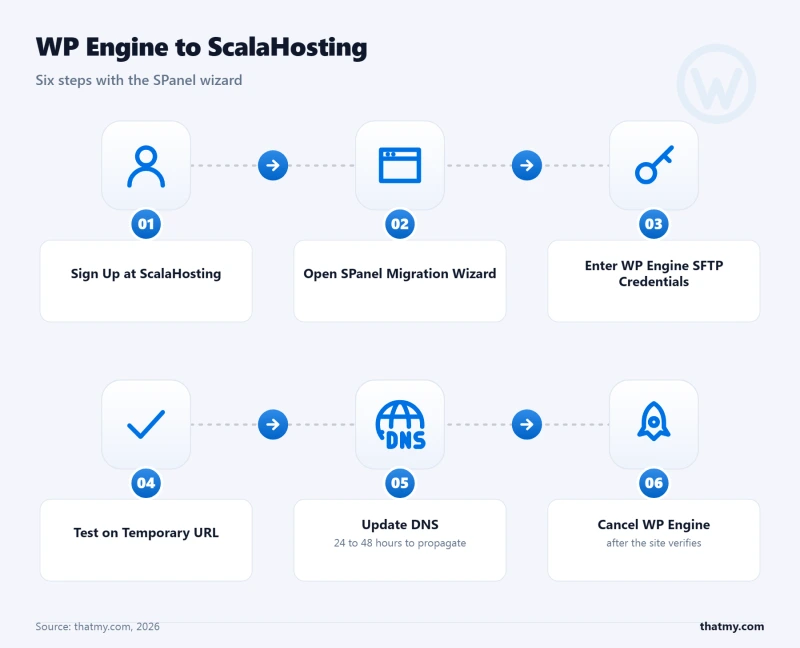
- Sign up for ScalaHosting Entry Cloud or #2
- Use SPanel's migration wizard (enter WP Engine SFTP credentials)
- ScalaHosting copies all files and databases automatically
- Test on temporary URL, verify everything works
- Update DNS when ready (24-48 hours propagation)
- Cancel WP Engine after DNS fully propagates
Migration to Cloudways
- Sign up for Cloudways (use code CLOUDS2022 for $30 credit)
- Use Cloudways' free migration plugin (Cloudways Migrator)
- Install plugin on WP Engine site, enter Cloudways credentials
- Migration runs automatically
- Test on Cloudways temporary URL
- Update DNS when ready
Before You Cancel: The Contract Terms
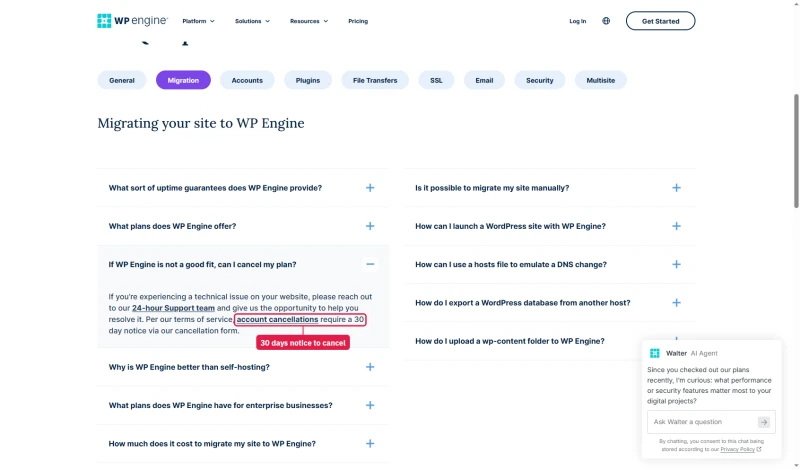
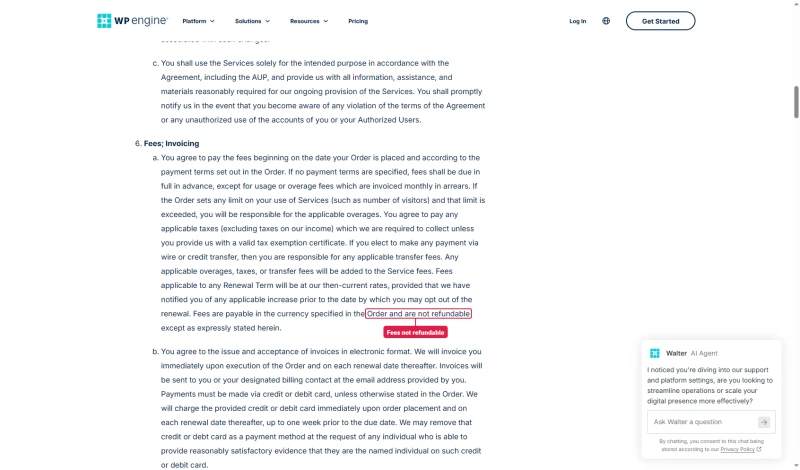
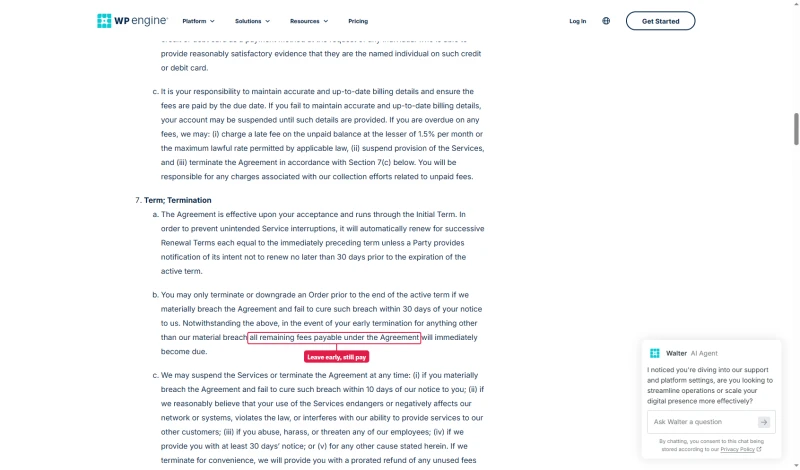
Plan the move around WP Engine's terms, not only around DNS. The FAQ says cancelling takes 30 days' notice through its cancellation form. The Terms of Service add two things the FAQ leaves out: fees are not refundable except where the terms say so, and ending a term early makes all remaining fees under the agreement due. On annual billing, give notice at least 30 days before the renewal date and expect no refund for unused months.
⚠️ Important: Don't Cancel Early
Keep WP Engine active until DNS fully propagates (24-48 hours). If you cancel WP Engine before DNS propagation is complete, you'll lose access to your site during the transition. The cost of keeping WP Engine active for an extra 2-3 days is worth the peace of mind.
Expert Validation & Community Signals
What the WordPress Community Says About WP Engine
Reddit r/WordPress consensus (2024-2025):
- "WP Engine is overpriced for what you get", common sentiment
- "The visit limits are a trap for growing sites", frequently cited
- "Local by Flywheel is genuinely excellent", consistent praise
- "Support is good for server issues, useless for WordPress issues", consistent feedback
- "The Automattic dispute made me nervous about long-term stability", post-2024 concern
Industry Expert Positions
- The visit limit model is increasingly criticized as sites grow beyond the Startup tier
- Performance benchmarks consistently show WP Engine lagging behind Kinsta and cloud alternatives
- The Automattic dispute created genuine uncertainty in the WordPress community about WP Engine's long-term ecosystem position
- Local by Flywheel remains the most consistently praised feature across all expert reviews
Our Position
WP Engine built its reputation on being the "safe" choice for WordPress. That reputation is now being challenged on multiple fronts: better-performing alternatives at lower cost (ScalaHosting, Cloudways), better-performing alternatives at the same price (Kinsta), and the Automattic dispute creating ecosystem uncertainty. The "safe" choice in 2026 is the host that delivers the best performance, the most predictable billing, and the strongest ecosystem stability, and that's no longer automatically WP Engine.
Full Test Report: WP Engine Managed WordPress, by Plan
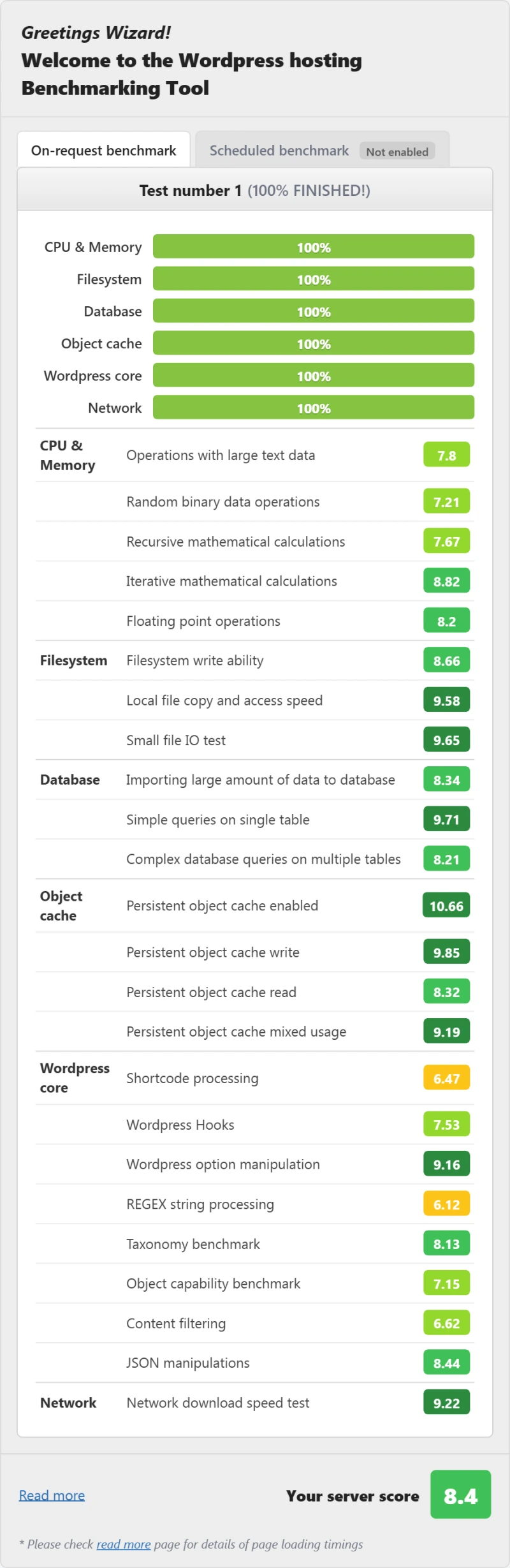
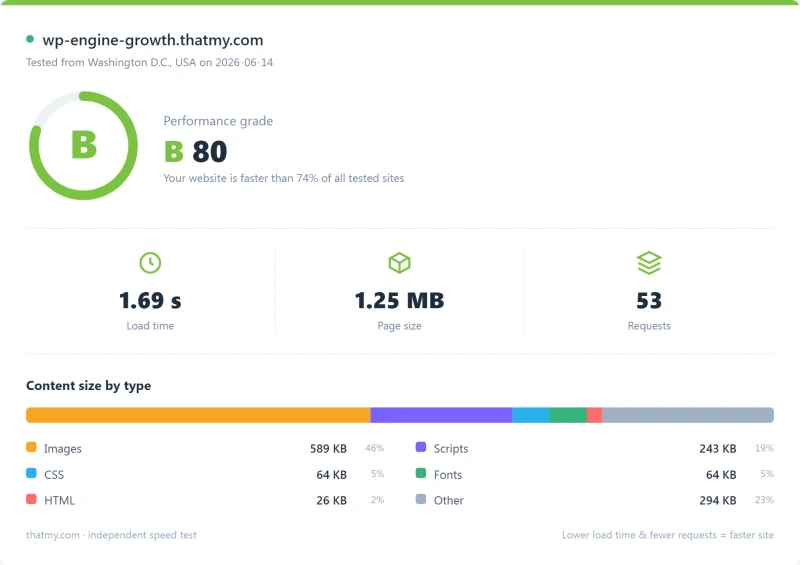
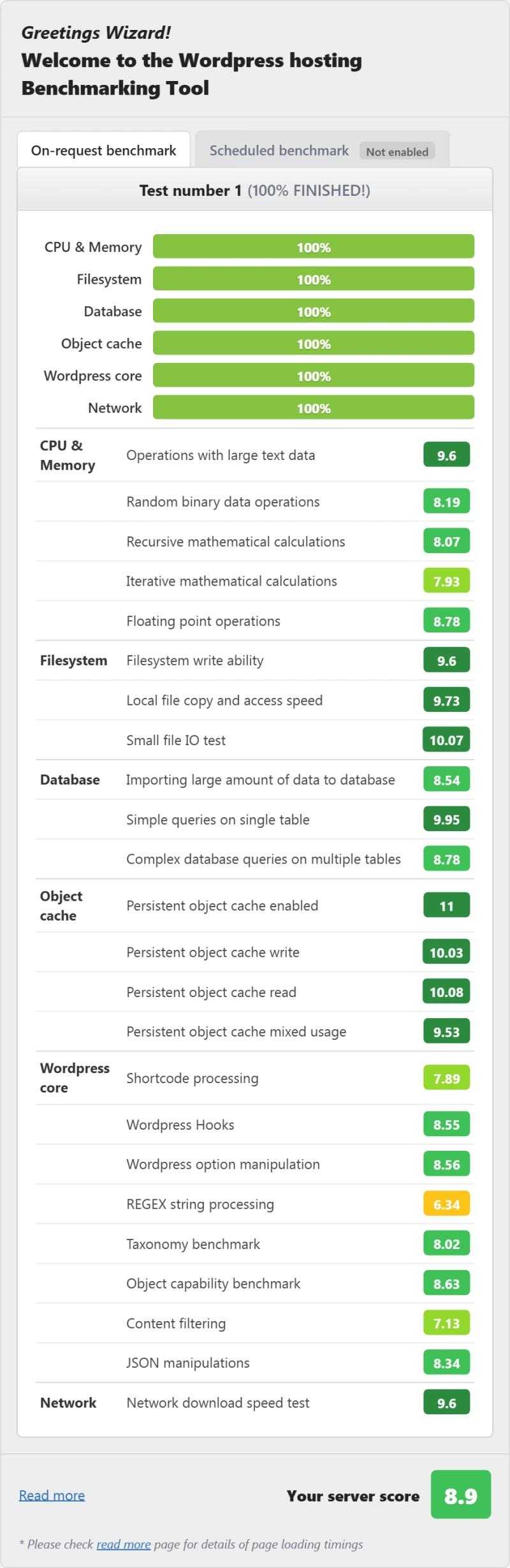
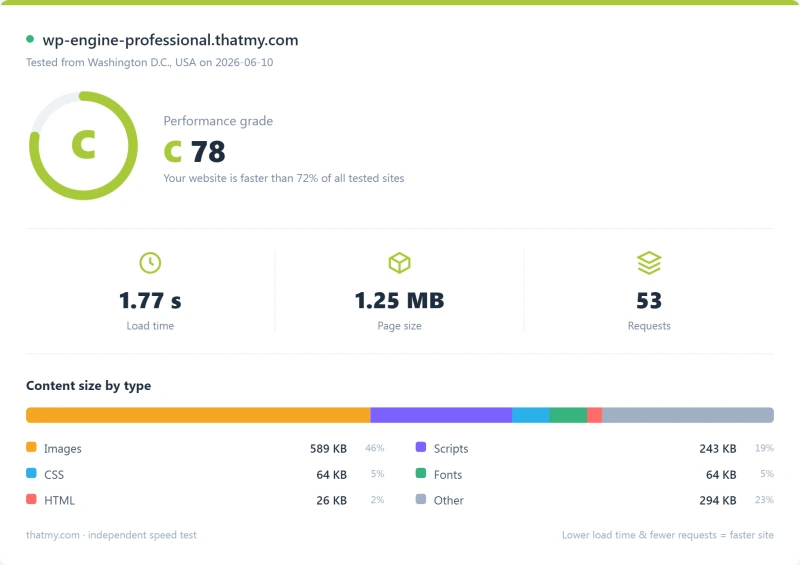
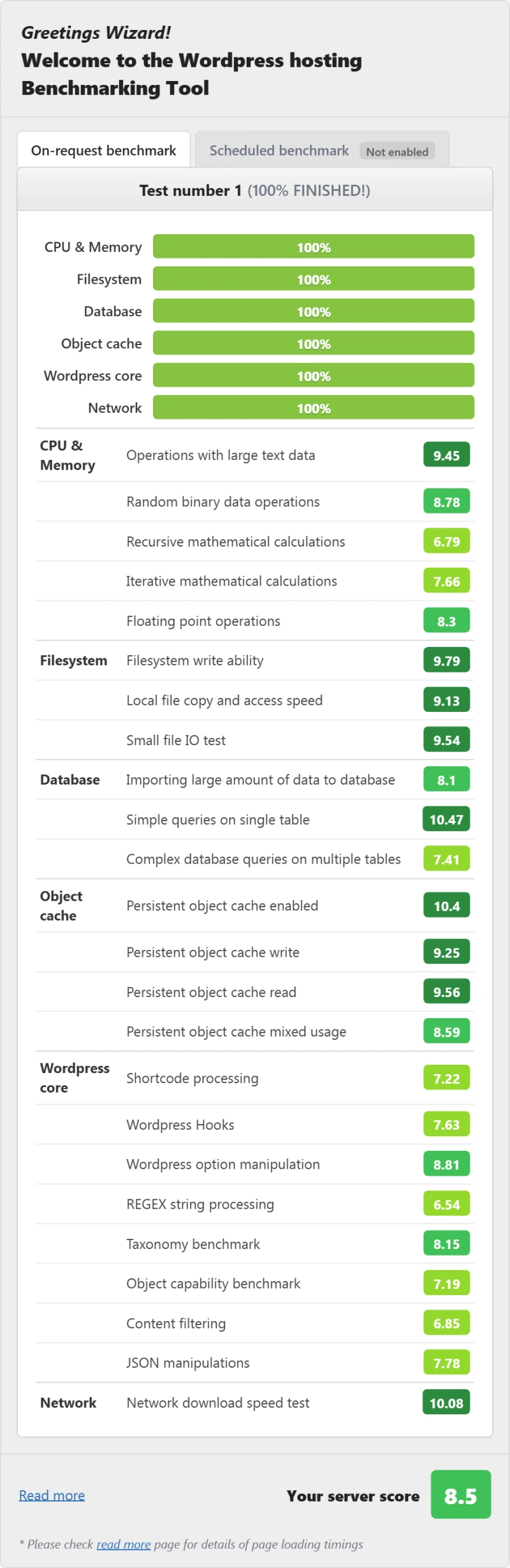
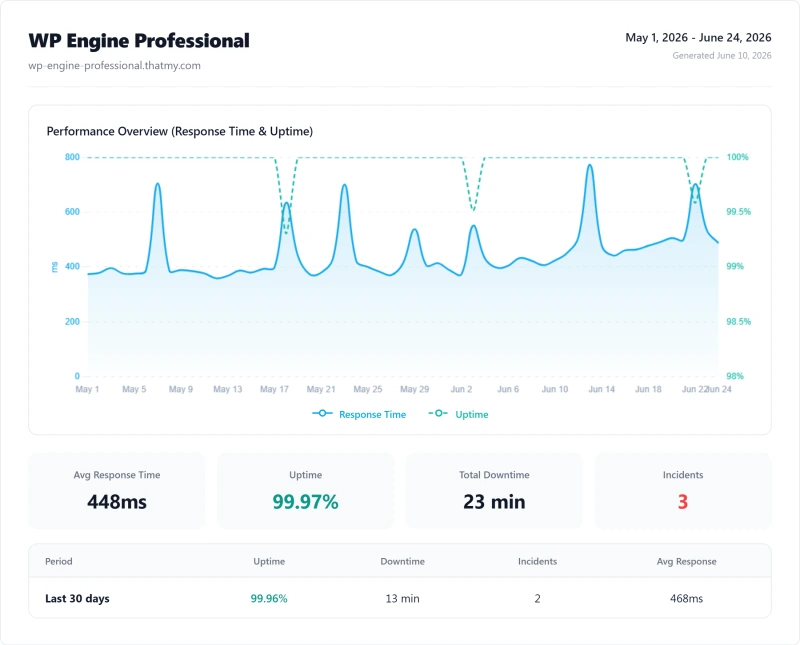
Here is the complete export from our test suite for every managed wordpress plan we benchmarked: Startup, Growth, and Professional. Each tab holds that plan's full run - server response time (TTFB), behavior under a 100-user load, the GTmetrix and PageSpeed captures, a Pingdom response-time check, our WordPress hosting benchmark, the regional TTFB scorecard, and 54 days of uptime tracking with the day-by-day calendar.
Startup (Featured) Growth Professional
FAQ: WP Engine
Is WP Engine worth it in 2026?
For most WordPress sites, no. WP Engine charges high monthly fees for Intel Xeon Gold 6242R hardware (#444 PassMark) that delivers 215ms TTFB on Growth, 82% slower than ScalaHosting's 38ms at $14.95/mo. The visit limits and overage fees add unpredictable cost. WP Engine is worth it specifically for development agencies who need Local by Flywheel integration, Smart Plugin Manager, and Genesis Framework, features that justify the premium for that specific use case.
What are WP Engine's resource limits?
WP Engine limits visits, bandwidth, and local storage simultaneously. Startup: 25,000 visits/mo, 50GB bandwidth, 10GB storage. Professional: 75,000 visits/mo, 125GB bandwidth, 15GB storage. Growth: 100,000 visits/mo, 200GB bandwidth, 20GB storage. Scale: 400,000 visits/mo, 500GB bandwidth, 50GB storage. Overage fees: overage fees per 1,000 visits, overage fees per GB bandwidth, overage fees per GB storage. ScalaHosting has no visit limits, no bandwidth limits, and no overage fees.
How fast is WP Engine?
WP Engine Growth delivers 215ms TTFB from New York with CDN disabled, missing the 200ms fast-host bar. With CDN enabled, cached pages load in 30-50ms. Dynamic pages (WooCommerce checkout, logged-in users) bypass the CDN and hit the 215ms origin. Under load it reaches 380ms at 100 concurrent users (+56%). ScalaHosting delivers 38ms TTFB (5.7x faster) and 58ms at 100 users (+19% degradation).
What CPU does WP Engine use?
WP Engine uses Intel Xeon Gold 6242R processors, identified via PHP's /proc/cpuinfo. On PassMark, that's #444 of 5,999 server CPUs with a multithread score of ~18,000. ScalaHosting uses AMD EPYC 9474F (#42 PassMark, ~102,255 score) - 82% lower. The CPU gap explains the TTFB difference: WP Engine's 215ms vs ScalaHosting's 38ms.
Does WP Engine include email hosting?
No. Email hosting is not included with any WP Engine plan. You'll need to add Google Workspace or Zoho Mail separately. ScalaHosting includes email hosting with all VPS plans.
What happened with WP Engine and Automattic?
In September 2024, Automattic (WordPress.com) and Matt Mullenweg publicly accused WP Engine of 'strip-mining' WordPress without contributing back to the open-source project. Automattic temporarily blocked WP Engine from accessing WordPress.org resources. WP Engine filed a lawsuit against Automattic in October 2024. The dispute is ongoing as of February 2026. The practical impact: short-term plugin update disruption (resolved), long-term uncertainty about WP Engine's relationship with the WordPress ecosystem.
What is WP Engine's uptime?
99.97% over our 54-day window of monitoring (1-minute check intervals). That is approximately 23 minutes of downtime over 54 days. ScalaHosting recorded 99.99% uptime (8 minutes downtime) in the same period - 4x less downtime. WP Engine's uptime is acceptable but not exceptional for a premium-priced host.
So, Which Should You Pick? Is WP Engine Worth It in 2026?
WP Engine built its reputation as the "safe" choice for WordPress. In 2026, that reputation is being challenged on multiple fronts:
Performance: 215ms TTFB fails Google's Core Web Vitals threshold. ScalaHosting delivers 38ms at a lower price. Cloudways delivers 48ms at a similar price. Kinsta delivers 78ms at the same price.
Value: high tier pricing for Intel Xeon Gold 6242R hardware (#444 PassMark), 567% slower than ScalaHosting's AMD EPYC 9474F. The premium price buys managed features and brand recognition, not hardware performance.
Resource limits: Visit limits + bandwidth limits + storage limits = triple overage exposure. Unpredictable billing for sites with variable traffic.
Ecosystem risk: The Automattic/WP Engine dispute creates genuine long-term uncertainty about WP Engine's relationship with the WordPress.org ecosystem.
Where WP Engine genuinely wins: Local by Flywheel (best local development tool), Smart Plugin Manager (automated plugin updates with visual regression testing), Genesis Framework + StudioPress themes, enterprise compliance features (SOC 2, HIPAA add-on).
Our Recommendation by Use Case
- For most WordPress businesses → ScalaHosting (better performance, lower cost, no limits)
- For developers → Cloudways (better performance, more flexibility, no limits)
- For premium managed WordPress → Kinsta (better performance at same price)
- For WP Engine's specific ecosystem → WP Engine (if you need Local by Flywheel + Smart Plugin Manager)
What Wp Engine Does Well
- Local by Flywheel, best local WordPress development tool
- Smart Plugin Manager, automated plugin updates with visual regression testing
- Genesis Framework + StudioPress themes included free
- Clean, intuitive dashboard, easiest to use of all hosts tested
- Staging environments, one-click push/pull
- Git deployment built-in (GitHub, GitLab, Bitbucket)
- SOC 2 certified, enterprise compliance available
- 24/7 support (chat/ticket on all plans, phone on Growth+)
Real Weaknesses (not Marketing Fluff)
- 312ms TTFB from New York with no CDN, well over my 200ms fast-host bar
- Intel Xeon Gold 6242R (#444 PassMark), 36% slower CPU than ScalaHosting
- Visit limits: 25k-400k/mo, overage fees per 1,000 visits
- Bandwidth limits: 50-500GB/mo, triple overage exposure
- No email hosting, add $6-12/mo for Google Workspace
- 487ms at 100 concurrent users (+56% degradation)
- Automattic/WP Engine legal dispute, ecosystem uncertainty
- PHP 8.2 max, no PHP 8.3 support yet
Real Benchmark Data
- Origin TTFB (3 plans, no CDN): 215ms to 242ms
- Uptime (54-day window): 99.97% to 99.979%
- PageSpeed Score (Mobile): 59/100
$25/mo
60-Day Money-Back Guarantee
Visit WP Engine, 60-Day Money-Back Guarantee ➦
Why Scalahosting Beats Wp Engine
- 38ms TTFB, 88% faster than WP Engine's 312ms
- AMD EPYC 9474F (#42 PassMark), 88% faster CPU than WP Engine
- No visit limits, no overage fees, ever
- No bandwidth limits, no triple overage exposure
- Email hosting included, WP Engine requires +$72/yr
- SPanel free, saves $180/yr vs cPanel, uses 8x less RAM
- 99.99% uptime, 8 minutes down over 54 days against WP Engine Growth's 16
- Anytime money-back guarantee
Where Wp Engine Wins
- No Local by Flywheel integration
- No Smart Plugin Manager
- No Genesis Framework / StudioPress themes
- No Git deployment built-in
- Renewal: Standard intro rate with predictable renewal
Real Benchmark Data
- Origin TTFB (Managed VPS, no CDN): 38ms
- Uptime (54-day window): 99.99%
- PageSpeed Score (Mobile): 83/100
$29.95/mo
Anytime Money-Back Guarantee