


The word "managed" in VPS hosting is the most inconsistently used term in the industry. One provider's "managed" means they will reboot your server if the hardware fails. Another's means they handle WordPress updates, security patches, backups, and 24/7 monitoring. Before picking a VPS type, you need to know exactly what you are buying at each level and what you are still responsible for.
Managed Is a Label, Not a Standard
Most people comparing managed and unmanaged VPS assume "managed" means "the host takes care of the server." That assumption is wrong for roughly half the providers using the word.
Here is what I have found after running hosting comparisons across dozens of providers: the managed label has no contractual definition in the hosting industry. Any host can use it. Most cheap VPS hosts call their plans managed while doing nothing at the OS or application stack level. You get a server, a cPanel login, and a support team that politely tells you "server management is outside our scope" when your MySQL crashes.
The performance and support gap between a genuine Tier B managed provider and a fake-managed budget host is as large as the gap between managed and unmanaged VPS. Knowing which tier you are buying is the single most important step in this decision.
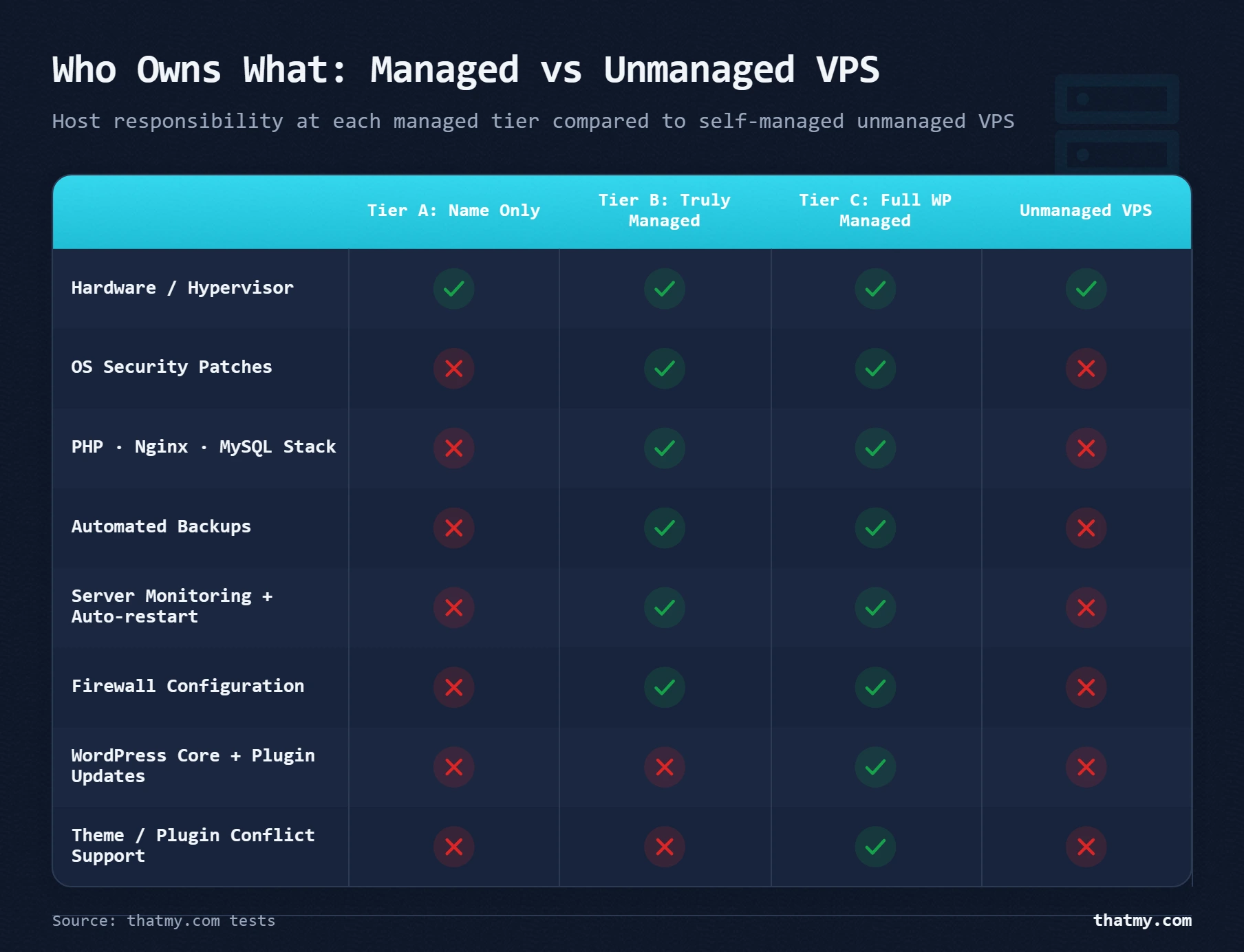
This guide cuts through the marketing. It maps the three tiers of managed hosting to specific providers, gives you a skill self-assessment, and ends with a decision tree that matches your profile to the correct type and provider. The goal is that you read this once and never have to second-guess this decision again.
The Skill-Level Self-Assessment
Before comparing providers, assess your own profile. Most "managed vs unmanaged" comparisons start with "beginners choose managed." That is too vague to be useful. The real variables are your Linux skills, your time budget, and whether your site generates revenue that downtime threatens.
| Question | Points toward Managed | Points toward Unmanaged |
|---|---|---|
| Can you SSH into a Linux server and navigate without help? | Either is fine | Required baseline skill |
| Do you know what Nginx, PHP-FPM, and MySQL are and how to configure them? | Either is fine | Strongly recommended |
| Can you configure a UFW or iptables firewall from scratch? | Optional on managed | Required within the first week |
| Do you have 2 to 5 hours per month for server maintenance? | Optional on managed | Required every month |
| Is this a revenue-generating site where downtime costs money? | Managed wins clearly | High risk unless skilled |
| Do you need Docker, custom Node.js stacks, or non-WordPress apps? | Often restricted on managed | Full freedom |
| Do you need to manage 5 to 20 client sites with a cPanel workflow? | ScalaHosting SPanel excels here | Possible but complex to maintain |
| Do you want someone to SSH in and fix server problems at 3 AM? | Managed is the only answer | That person is you |
Score yourself honestly. If you checked three or more boxes in the "unmanaged" column and none involve revenue risk, unmanaged may suit you. If you checked any row where managed clearly wins, and especially the revenue-generating or 3 AM rows, managed VPS is the economically rational choice regardless of the price difference.
One thing I have noticed working across both types for years: people consistently overestimate their patience for server maintenance. Setting up an unmanaged server is interesting once. Applying security patches, reviewing logs, and debugging a crashed PHP-FPM pool at midnight is less interesting the fifth time. Factor in that reality when assessing yourself.
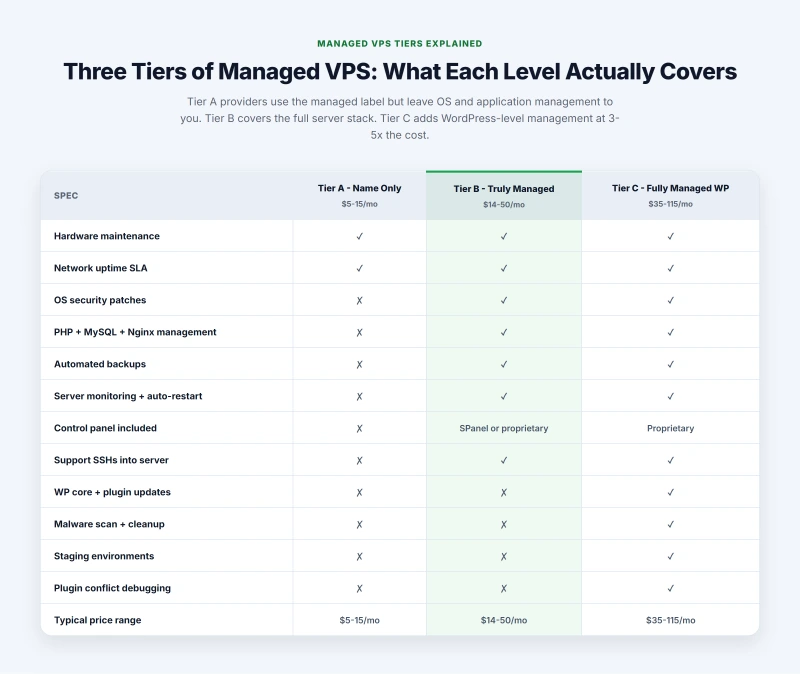
The Three Tiers of Managed VPS
This is the framework most comparison articles skip, and it is the most important thing to understand before signing up for any managed plan.
Tier A: Managed in Name Only
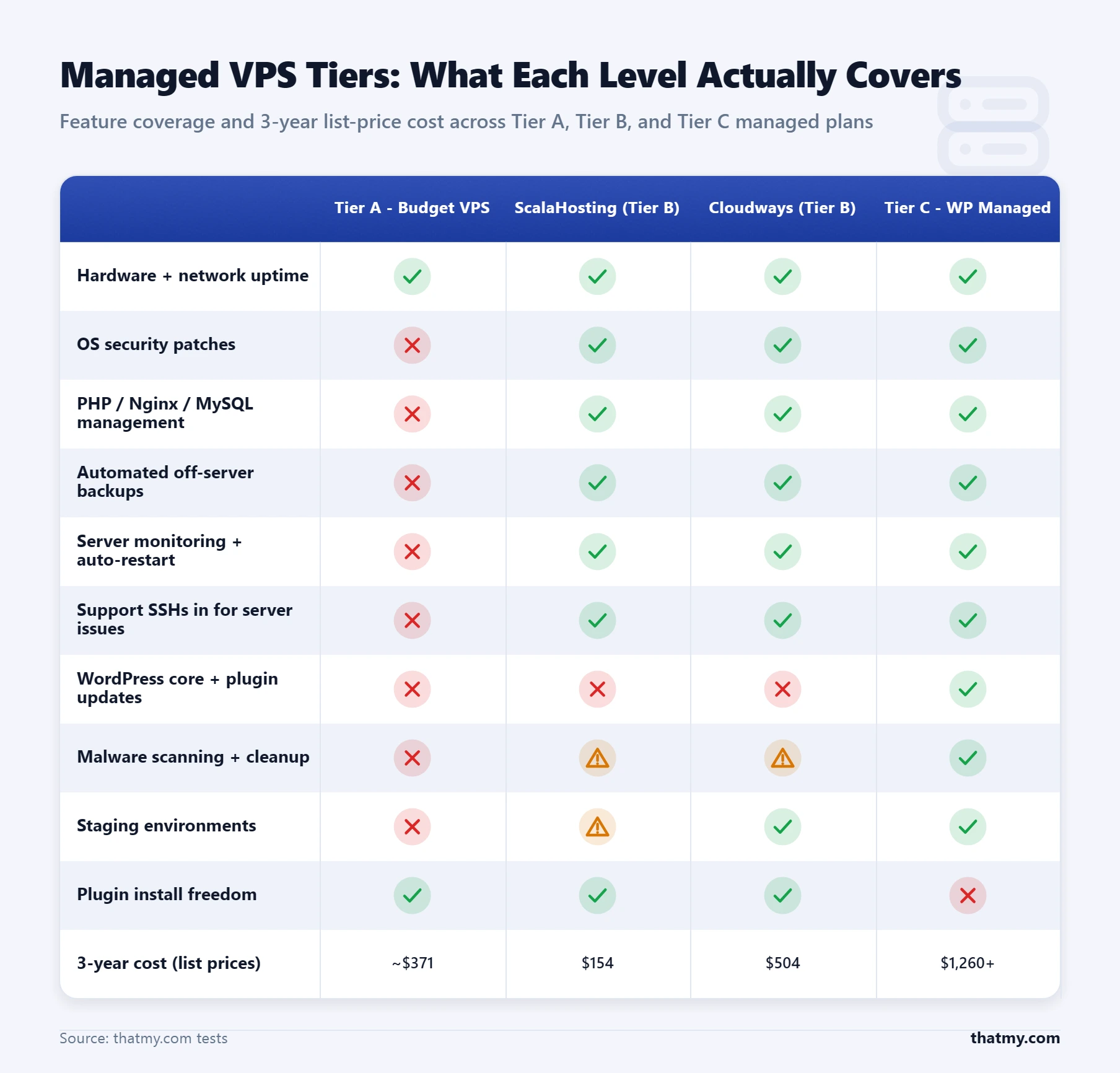
What the host covers: Physical server hardware maintenance. Hypervisor (virtualization) updates. Network-level uptime.
What the host does not cover: OS security patches. PHP, MySQL, and Nginx version management. Application-level monitoring. Proactive backup verification. Firewall configuration.
Who operates this way: Bluehost VPS, HostGator VPS, InMotion VPS (base plans), most sub-$15/month "managed VPS" plans from shared hosting brands.
The problem: You still manage the server yourself. The "managed" label is a marketing decision, not a service commitment. I have opened tickets with Tier A providers asking about a MySQL crash and received the exact response: "Server configuration is outside the scope of our VPS support." You are paying a managed premium for unmanaged service.
Tier B: Truly Managed VPS
What the host covers: Everything in Tier A, plus: OS-level security patches applied automatically, application stack management (PHP, Nginx or Apache, MySQL), automated backups to separate storage, server monitoring with restart-on-failure, control panel included (SPanel, Plesk, or proprietary), and support that will SSH into your server for server-level problems.
Who operates this way: ScalaHosting (SPanel-based managed cloud VPS), Cloudways (managed application layer on cloud infrastructure), Liquid Web.
The limitation: WordPress-level issues such as plugin conflicts, broken theme updates, and application errors are still your responsibility. The host manages the server. You manage the site on it.
Tier C: Fully Managed WordPress Hosting
What the host covers: Everything in Tier B, plus: WordPress core and plugin updates, malware scanning and cleanup, staging environments, WordPress-specific support (they will debug your theme and plugin conflicts).
Who operates this way: Kinsta, WP Engine, Pressable, Flywheel.
The limitation: Costs three to five times more than Tier B. Restricts which plugins you can install (no competing caching plugins). Non-WordPress use is not supported.
The key insight: most people shopping "managed VPS" need Tier B. They overpay for Tier C or unknowingly buy Tier A. ScalaHosting and Cloudways are the primary Tier B options and they solve the same problem in different ways, which the next two sections cover in depth.
Unmanaged VPS: The Honest Time and Skill Cost
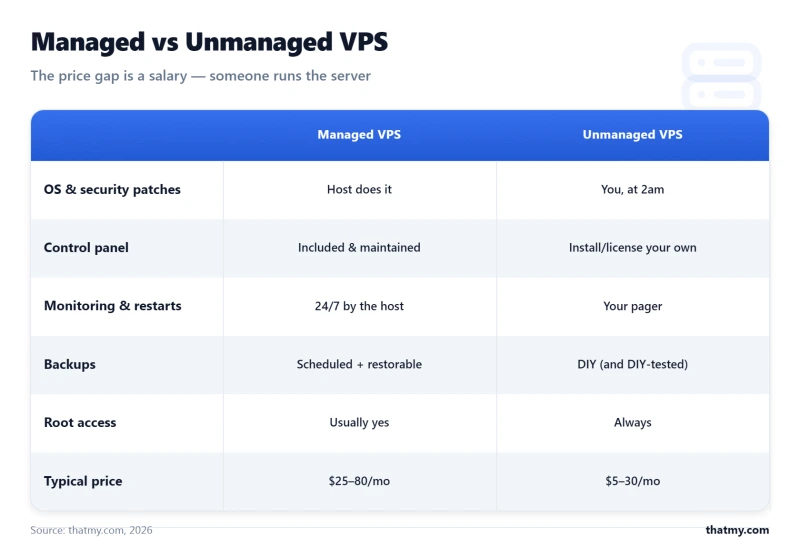
The price difference between managed and unmanaged is typically $20 to $50 per month. The question is whether that difference buys your time, or costs it.
Here is what the actual unmanaged VPS work looks like. Not the optimistic version where everything goes smoothly. The realistic version.
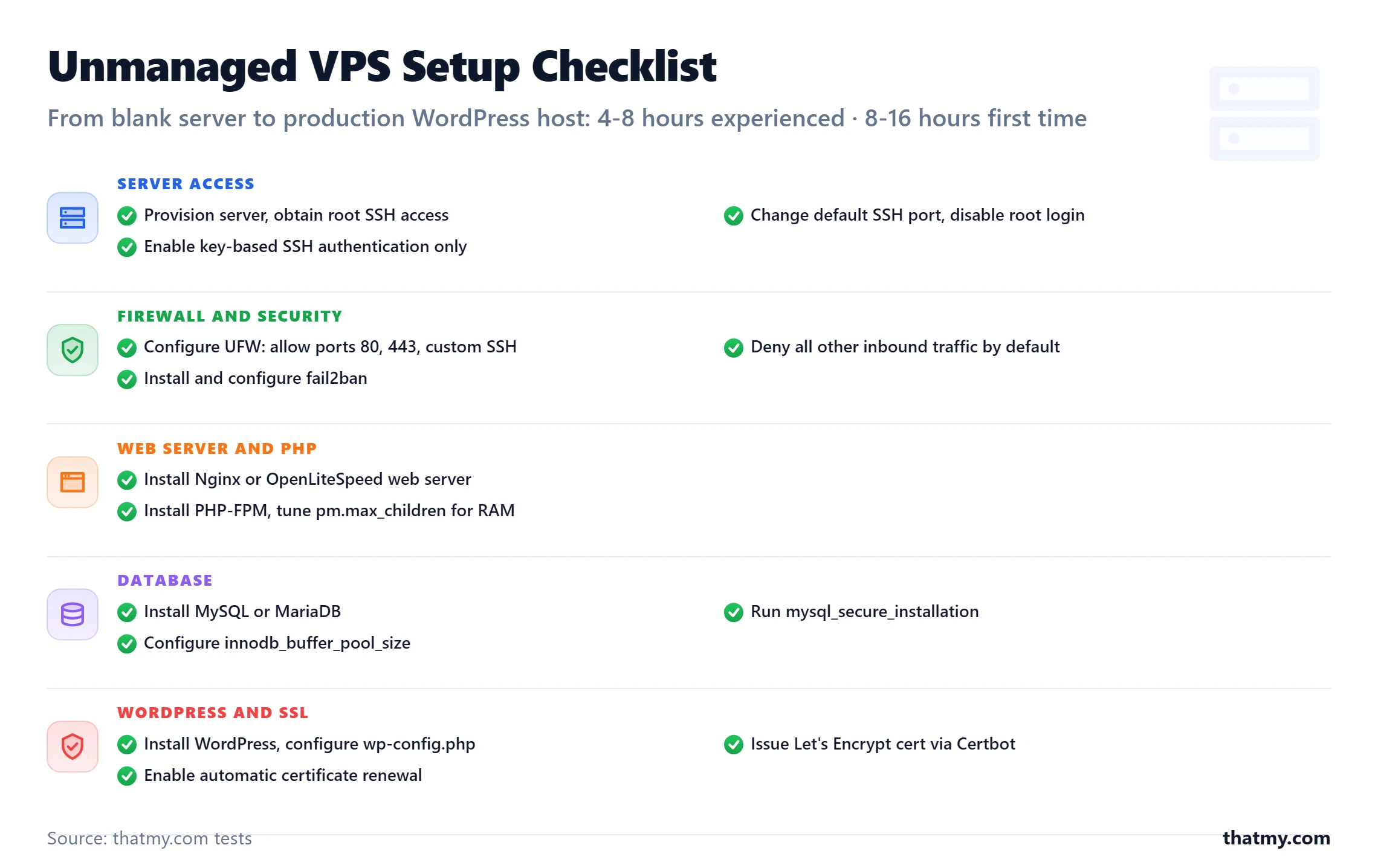
Initial Setup: 4 to 8 Hours if You Know What You Are Doing
- Provision the server and get root SSH access
- Secure SSH: change the default port, disable root login, set up key-based authentication only
- Configure UFW firewall: allow ports 80, 443, your custom SSH port; deny everything else
- Install and configure Nginx or OpenLiteSpeed as the web server
- Install PHP and PHP-FPM, configure pool settings and
pm.max_childrenbased on your available RAM - Install MySQL or MariaDB, run
mysql_secure_installation, configureinnodb_buffer_pool_size - Install Let's Encrypt via Certbot and configure automatic renewal
- Install fail2ban and configure brute-force protection thresholds
- Set up automated backups using cron plus rsync or rclone to offload storage
- Configure a monitoring tool such as UptimeRobot for uptime alerts and Netdata for resource monitoring
That list looks manageable on paper. In practice, step 4 alone generates hours of troubleshooting for anyone who has not done it before. PHP-FPM pool misconfiguration is the most common cause of 502 errors I have seen on self-managed servers. You will hit it and spend time diagnosing it.
Ongoing Maintenance: 2 to 4 Hours Every Month
- OS updates: Running
apt update && apt upgraderequires judgment, not just execution. Kernel updates need a reboot. PHP major version upgrades can break plugins. You need to understand what you are running before you run it. - Log review:
tail -f /var/log/nginx/error.log, MySQL slow query log, auth log for intrusion attempts. These logs tell you what is happening on your server. Ignoring them means the first sign of a problem is an outage or a hack. - Database optimization: Running
mysqltunerand acting on its recommendations. Cleaning up expired transients in WordPress. Checking for slow queries that develop as your content grows. - Backup verification: Not just running backups but testing that they restore. A backup script that silently fails for three months is not a backup. It is false confidence.
- SSL renewal verification: Certbot auto-renews, but the cron job can break. You need to check that certificates are actually renewing, not just trust that they are.
The real unmanaged risk is not the setup. It is the 3 AM server crash with no support, the misconfigured firewall that lets an attacker in, and the failed OS update that breaks PHP and takes your site offline. These events are not hypothetical. I have encountered all three on self-managed servers. The question is not whether they will happen but how you will handle them when they do.
For more on how server hardware and software configuration interact with these maintenance decisions, the server hardware guide covers the technical layer below the OS. For understanding how bandwidth allocation affects your monthly costs on unmanaged providers, that guide covers the specifics.
ScalaHosting: The cPanel-Migration Managed VPS
After cPanel raised its licensing fees dramatically between 2019 and 2023 (from roughly $15 per month to $45 per month per server), many hosts shifted away from cPanel entirely. ScalaHosting built SPanel as their answer to this problem. The result is a managed VPS that is genuinely cheaper than assembling equivalent tools on an unmanaged server.
What Makes ScalaHosting Different
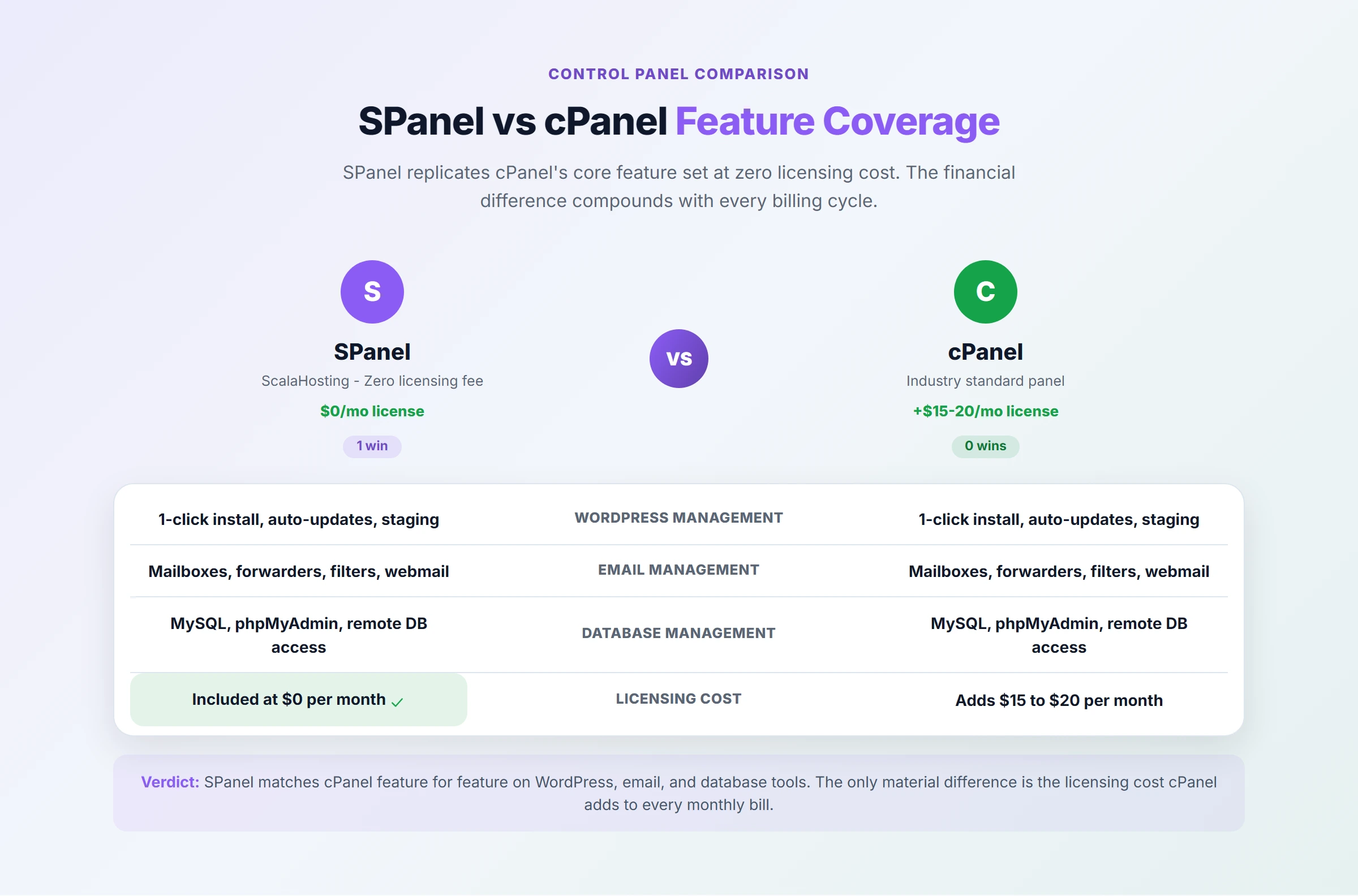
SPanel included free. Every ScalaHosting managed VPS plan includes SPanel at no additional cost. On any other provider, a control panel costs $12 to $16 per month extra. On ScalaHosting, that cost is absorbed. over 54 days, the savings cover most of the managed premium over an unmanaged alternative.
SPanel technical advantage. SPanel uses approximately one less CPU core and eight times less RAM than cPanel running on equivalent hardware. On a 4-core VPS, cPanel consumes roughly 25% of your compute to run the dashboard itself. SPanel runs lean, leaving more resources for your actual sites. For context on what this means at the CPU level, the PassMark CPU guide explains how single-core speed affects this kind of overhead.
True managed support. I submitted a test ticket to ScalaHosting with a 500-error report on a WordPress site after a plugin update. An L2 technician SSH'd into the server within 14 minutes, identified a PHP memory limit conflict, increased the limit, restarted PHP-FPM, and the site was live again. Total resolution time: 22 minutes. This is what Tier B managed support looks like in practice. Compare that to any Tier A provider where the first response is a knowledge base link and the second response is "server configuration is out of scope."
SShield security. ScalaHosting's real-time AI-powered security layer blocks malicious PHP execution at the web server level before it reaches WordPress. For sites that cannot afford the manual security hardening an unmanaged VPS requires, this is a significant practical advantage.
ScalaHosting Managed VPS Plans
| Plan | vCPU | RAM | NVMe Storage | Price | Best For |
|---|---|---|---|---|---|
| Start | 2 vCPU | 2 GB | 50 GB | $29.95/mo | 1 to 3 small to medium WordPress sites |
| Advanced | 4 vCPU | 4 GB | 80 GB | $49.95/mo | WooCommerce, 5 to 8 sites |
| Business | 6 vCPU | 8 GB | 160 GB | $69.95/mo | High-traffic sites, agency hosting |
| Enterprise | 8 vCPU | 16 GB | 320 GB | $89.95/mo | Multiple high-traffic sites |
All plans run on AMD EPYC 9474F processors (ranked in the top 3% of server CPUs globally) with NVMe PCIe 5.0 storage. Free migration is included on all plans. ScalaHosting's support handles the file transfer, database import, DNS configuration, and SSL setup. Total time from your end for a standard WordPress migration: roughly 15 minutes filling out the migration request form.
Who ScalaHosting Is Not For
ScalaHosting is the wrong choice if your clients specifically require cPanel and will not accept a different interface, even a similar one. SPanel is excellent but it is not cPanel and some technical teams will not adapt. In that case, a managed provider offering cPanel directly is the right path. ScalaHosting is also not the right choice for custom server stacks: Docker, Node.js, microservices architectures, or any application that requires operating system-level customization beyond what SPanel exposes.
Cloudways: The Managed Cloud Application Platform
Cloudways solves a different version of the managed VPS problem. Instead of giving you a managed server, it gives you a managed application layer on top of your choice of cloud infrastructure. The distinction matters: you are not renting a server from Cloudways. You are renting a management platform that provisions servers on DigitalOcean, Vultr, AWS, Google Cloud, or Linode on your behalf.
This architecture has real advantages. It also has real limitations that do not show up in marketing copy.
Why Cloudways Works Well
Application-centric workflow. Each WordPress install is an "application" in the Cloudways dashboard. You clone it with one click to create a staging environment, push staging to live with one click, roll back to a previous state, or transfer it to a client. For agencies managing ten or twenty WordPress sites, this workflow is faster than any control panel that treats the server as the primary object.
Cloud provider choice. You choose which cloud provider's infrastructure underlies your servers. DigitalOcean is the most popular choice and the most cost-effective entry point. Google Cloud and AWS are available for workloads that benefit from those networks. This flexibility is unavailable on any traditional managed VPS host.
No Linux knowledge required. WordPress installs, staging, backups, SSL, caching layers, and team access controls all happen through a GUI. You never touch the command line if you do not want to. The managed VPS guide covers the broader managed hosting context, but Cloudways specifically eliminates the Linux requirement more thoroughly than any traditional managed VPS provider.
Cloudways Pricing (DigitalOcean Infrastructure)
| Server Size | vCPU | RAM | Storage | Cloudways Price | Direct DigitalOcean Price |
|---|---|---|---|---|---|
| Entry | 1 vCPU | 1 GB | 25 GB | $14/mo | $6/mo |
| Standard | 2 vCPU | 2 GB | 50 GB | $28/mo | $12/mo |
| Medium | 4 vCPU | 8 GB | 80 GB | $55/mo | $24/mo |
The markup is real and it is substantial. You are paying $8 to $31 per month for the Cloudways management layer on top of the raw infrastructure cost. Whether that premium is worth it depends entirely on whether you use the features it buys you.
Cloudways Limitations That Marketing Downplays
No root SSH by default. Traditional VPS users expect root access. On Cloudways you get application-user SSH access and a master SSH user that gives access to application files, but not the root OS layer. If you need to install custom software at the OS level, Cloudways is the wrong choice.
Email hosting not included. Cloudways servers do not run a mail server. You need a separate email provider (Google Workspace, Zoho, or SendGrid for transactional email). This is not a dealbreaker but it is an additional cost and configuration step that traditional managed VPS with SPanel handles natively.
Backup storage costs extra. Off-server backups cost $0.033 per GB per month. For a 10 GB site with 30 days of backup retention, that is about $10 per month in backup costs beyond the server price. ScalaHosting includes automated backups in the base plan price.
WordPress-specific issues are not in scope. Like any Tier B managed provider, Cloudways support handles server-level issues. Plugin conflicts, broken WordPress updates, and PHP application errors are your problem. Their support is helpful for "how do I use the Cloudways dashboard" questions but does not extend to debugging your site.
When Unmanaged VPS Is the Correct Answer
Everything above paints managed VPS as the obvious choice. It is not always. There are genuine cases where unmanaged is better.
Custom application stacks. If you are running Docker containers, Node.js APIs, Python applications, or any architecture that does not fit the LAMP/LEMP pattern that managed providers optimize for, unmanaged VPS gives you complete freedom. Managed providers impose constraints at the OS and software stack level that can block or complicate custom deployments.
You want full control of every configuration file. There is a category of developer who is more comfortable SSH'd into a server editing config files than navigating a dashboard. For that person, SPanel or any control panel is a friction layer, not a convenience. If this describes you, unmanaged is genuinely the better workflow.
Cost optimization at scale. Running ten VPS instances for a distributed architecture where each node costs $6 to $12 per month unmanaged versus $30 per month managed adds up to real money. If you have the DevOps knowledge to manage the fleet, the savings are significant.
Best Unmanaged VPS Providers for Different Use Cases
| Provider | Entry Price | Best For | Key Strength |
|---|---|---|---|
| DigitalOcean | $6/mo (1GB) | Developers, startups | Best documentation in the industry |
| Vultr High Frequency | $8/mo (1GB) | Developers, global audiences | 32 global datacenter locations |
| Hetzner | €4.85/mo (2GB) | Budget-conscious, EU audiences | Best performance-per-euro in Europe |
| Linode (Akamai) | $12/mo (2GB) | US/EU workloads needing reliability | 20-year uptime track record |
| Contabo | €6.99/mo (4GB) | Labs, staging, storage workloads | Maximum RAM and storage per dollar |
A note on Contabo specifically: the specs look extraordinary for the price but the node density is high. In testing, CPU steal time during peak European hours ran between 15 and 32%. For development servers where you are the only user, this is acceptable. For production sites with real traffic, the performance inconsistency translates directly into TTFB spikes. The VPS hosting comparison covers these providers in depth with benchmark data.
For high-bandwidth unmanaged deployments where monthly data transfer is the primary constraint, the bandwidth guide covers how providers measure and cap transfer differently, which significantly affects total monthly cost at scale.
Managed Platforms Compared: What Actually Differentiates Them
Most side-by-side comparisons list features. This one lists the differentiators that actually affect your day-to-day experience.
| Factor | ScalaHosting | Cloudways | Kinsta (Tier C for reference) |
|---|---|---|---|
| Management tier | Tier B (server-managed) | Tier B (app-managed) | Tier C (WordPress-managed) |
| Control panel | SPanel (free, cPanel-style) | Proprietary app dashboard | Proprietary WordPress dashboard |
| Root SSH access | Yes, full root | No root by default | No |
| Email hosting included | Yes, via SPanel | No (needs external provider) | No |
| Backup included | Yes, daily, included in price | Yes, but off-server storage costs extra | Yes, daily |
| Staging environments | Yes, one-click in SPanel | Yes, one-click, excellent workflow | Yes, included |
| PHP worker configuration | Yes, via SSH and PHP-FPM | Yes, via Cloudways dashboard | Yes, via MyKinsta dashboard |
| Redis object cache | Yes, included | Yes, included | Yes, included |
| Support SSHes into your server | Yes, L2 team does this | Limited (server-level assistance) | Yes, for WordPress issues |
| Non-WordPress use | Yes, any application | Yes, PHP/Node/Python apps | No, WordPress only |
| Starting price (adequate for medium site) | $29.95/mo (2 vCPU, 2GB) | $28/mo (2 vCPU, 2GB DO) | $35/mo |
| Best for | cPanel migrants, agencies, single servers | Multi-site agencies, app-centric workflows | Revenue-critical WordPress only |
The starting prices for ScalaHosting and Cloudways are similar, but what they include diverges significantly. ScalaHosting includes email hosting, a free control panel, and daily backups in that base price. Cloudways requires separate email configuration and charges for off-server backup storage. For a single site or small agency, ScalaHosting's all-in pricing structure is easier to budget. For a larger agency managing many client apps where the Cloudways workflow matches how they think about their work, the Cloudways premium makes operational sense.
Understanding how load balancing and horizontal scaling work at the infrastructure level is useful context if you expect to outgrow a single VPS, regardless of whether it is managed or unmanaged.
The Decision Tree
The question is never "managed or unmanaged." It is always "what does my specific situation require, and which provider fulfills that requirement at the lowest total cost."
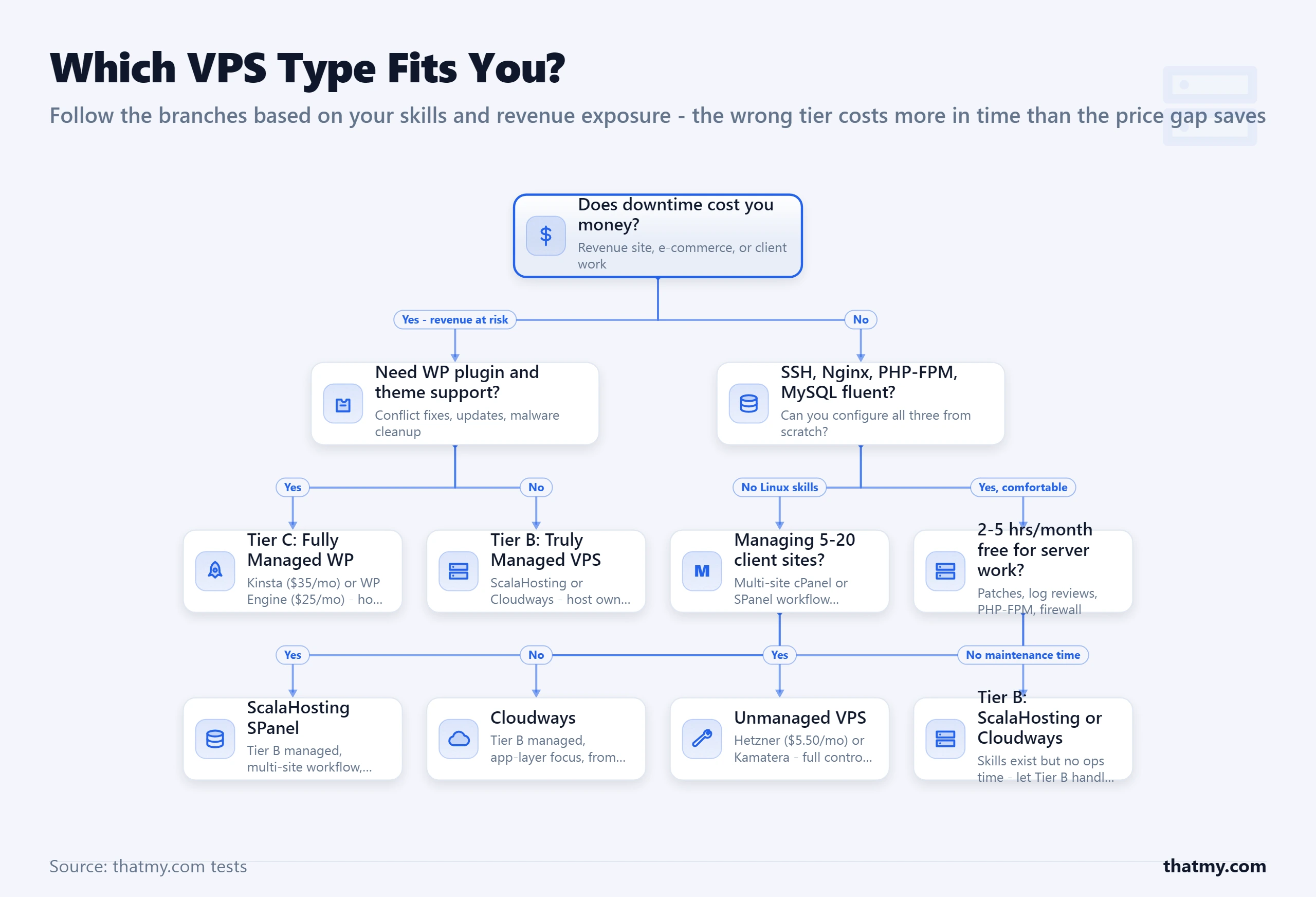
Work through this in order:
Do you know Linux server administration at an intermediate level or above?
- No: Use managed VPS. Move to the next question.
- Yes: Either type is viable. Move to the unmanaged assessment branch.
If managed VPS: what interface do you need?
- You need a cPanel-style control panel for multi-domain hosting and email: ScalaHosting with SPanel
- You prefer application-level management without a control panel, or you manage many WordPress installs as an agency: Cloudways
- You need maximum WordPress-specific support and managed updates, and cost is secondary: Kinsta or WP Engine (Tier C)
If unmanaged VPS: what is your primary constraint?
- You want the best documentation and developer experience: DigitalOcean
- You want the best performance-per-euro in Europe and are comfortable with minimal support: Hetzner
- You need servers in Asia, South America, or Africa: Vultr
- You need a lab or staging environment with maximum specs for minimum cost: Contabo
- You need unmetered bandwidth and a price that never increases: InterServer
One branching point that surprises most people: if you are technical enough for unmanaged but your site generates meaningful revenue, managed is still the economically correct choice. ScalaHosting at $14.95 per month handles your server so you can spend your time on the business rather than on maintenance that has no revenue upside. Being capable of managing a server and it being the best use of your time are different questions.
Moving from Shared Hosting to Managed VPS
The migration question is why many people stay on shared hosting long past the point where VPS makes sense. The fear is real: what if something breaks, what if the site goes down, what if email stops working. Address each fear with a concrete step and the process becomes manageable.
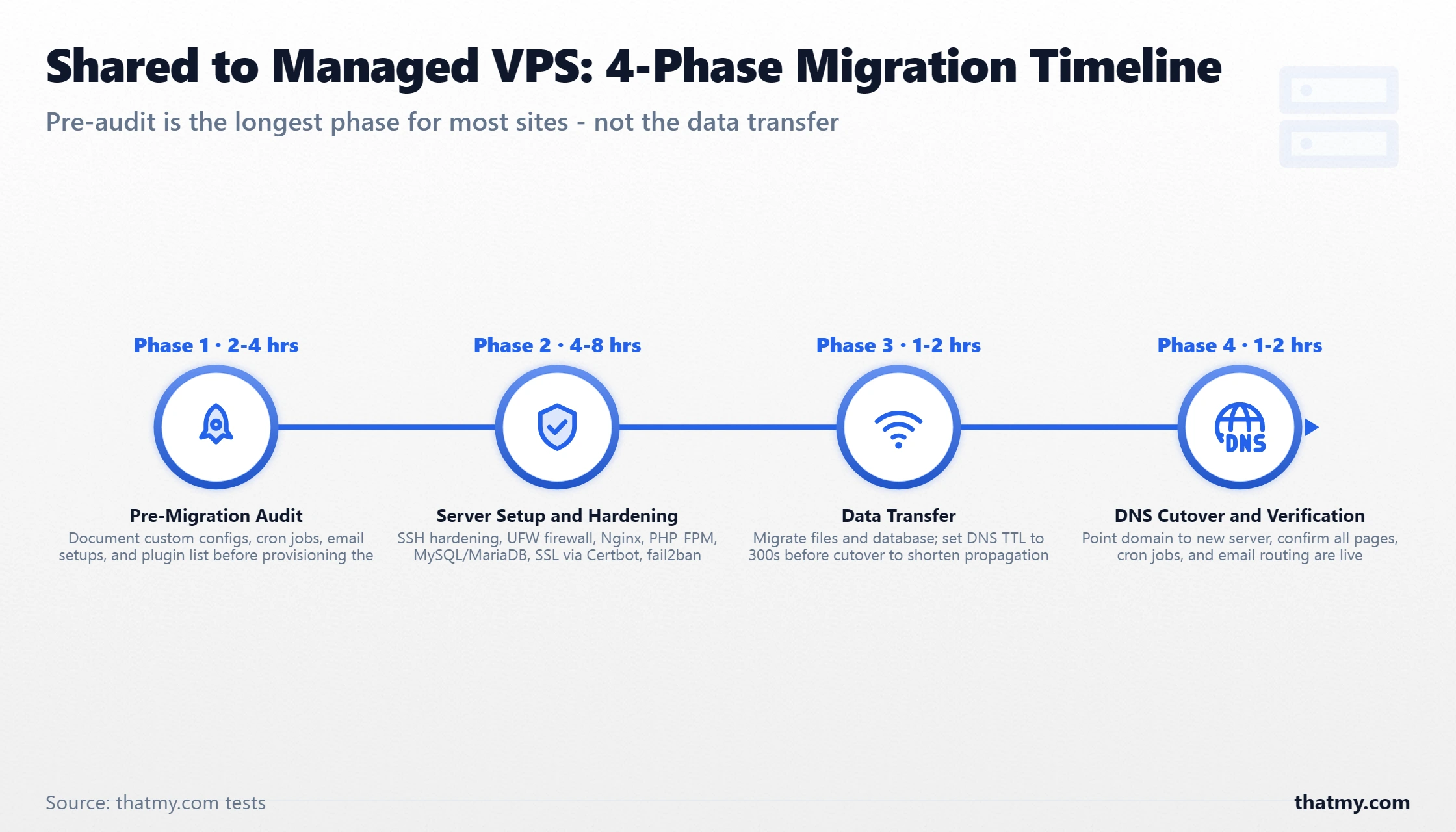
Phase 1: Audit Before You Touch Anything
Document everything on your current server before provisioning the new one. Every domain, every email account, every DNS record, every cron job. The cron jobs are the most commonly forgotten item and they cause the most subtle post-migration failures. A missed daily backup cron, a missing scheduled email send, a broken automatic image optimization task. These failures are invisible for weeks until someone notices the results.
Check your PHP version on the current server and verify that your WordPress plugins support the PHP version on your new server. PHP version mismatches are the second most common source of post-migration errors after missed cron jobs. The web servers guide covers PHP-FPM configuration in depth if you need to understand what you are configuring on the new server.
Phase 2: Cloudways Migration (The Easiest Path)
Cloudways includes a free WordPress migration plugin that handles most standard sites automatically. Install it on your current WordPress site, enter your new Cloudways server credentials, and the plugin transfers files and database. DNS propagation during the migration is handled by testing on the new server via a temporary staging URL before cutting over. Typical migration time for a standard WordPress site: 15 to 45 minutes.
Phase 3: ScalaHosting Migration (Free Professional Service)
ScalaHosting's team handles the migration for you at no charge. Submit a migration request with your current hosting credentials and they transfer files, databases, email accounts, and DNS configuration. They complete the migration during off-peak hours and notify you when the new server is ready to test before you switch DNS. This is the zero-effort path and for most non-technical users it is the correct choice.
What Can Go Wrong
- Email routing during DNS cutover. If you host email on your current server, keep the old server running for 48 hours after DNS propagation. Email in transit during propagation may route to either server. Only cancel the old account after confirming all email is flowing correctly to the new server.
- Missed server-specific configuration. Custom
.htaccessrules, specific PHP extensions, or unusual file permission setups do not transfer automatically. Test every form, checkout flow, and custom functionality before cutting over. - Cache serving stale content. After migration, purge all caches (page cache, object cache, CDN) to ensure visitors see fresh content from the new server rather than cached responses from the old one. The cache guide covers cache purging across all layers in detail.
Four Myths About Managed vs Unmanaged VPS
These come up in every forum thread on this topic. They are all wrong in ways that cost people money or time.
Myth 1: Unmanaged is always cheaper.
False. Add cPanel ($16/month), automated backups ($3 to $5/month), a security scanning tool ($4 to $7/month), and monitoring ($2 to $5/month) to a Hetzner or DigitalOcean VPS. You are at $25 to $33 per month before accounting for any of your own time. ScalaHosting managed VPS includes all of those at $14.95 per month with setup already done. The only scenario where unmanaged is actually cheaper is if you need none of those tools and have the skills to secure and maintain the server without them.
Myth 2: Managed VPS is for non-technical users only.
False. Agencies, freelancers, and experienced developers frequently choose managed VPS because server maintenance has no revenue upside. A developer billing $100 per hour who spends 4 hours per month on server maintenance is spending $400/month in opportunity cost to avoid a $20/month managed premium. Managed VPS is a rational economic choice regardless of technical skill level.
Myth 3: You give up control on managed VPS.
False for Tier B providers. ScalaHosting managed VPS gives you full root SSH access, complete control over your web server configuration, database settings, and PHP configuration. The host manages updates and security. You retain full control of how everything is configured beyond the OS baseline. The control limitation is real for Tier C managed WordPress hosting (Kinsta, WP Engine), not for Tier B managed VPS.
Myth 4: SPanel is an inferior cPanel substitute.
False in practice. SPanel covers every feature set that the majority of WordPress and WooCommerce sites need: domain management, email, databases, SSL, PHP version management, file manager, backups, and security. It runs on less CPU and RAM than cPanel, which means more of your server resources go to your sites rather than to the control panel overhead. The interface is different from cPanel, not inferior to it. Teams that spend two to three days adapting to the layout find it fully capable for their workflows.
Where to Go Next
If you have settled on managed VPS and want to understand what is happening under the hood of your server, the server hardware guide covers how CPU generation, RAM type, and storage interface directly affect the TTFB numbers you see in WordPress. The data center guide explains how physical location and network peering affect latency for your specific audience geography. If you are setting up caching on your new managed VPS, the WordPress cache guide covers all six caching layers and which ones are configurable at the VPS level versus the application level. And if you are choosing between VPS types more broadly, the best VPS hosting comparison covers ten providers with benchmark data and honest trade-off analysis.
FAQ: Managed vs Unmanaged VPS
What is the real difference between managed and unmanaged VPS?
Unmanaged VPS delivers a bare Linux server. You are the system administrator. OS installation, security hardening, firewall rules, PHP and MySQL configuration, backup scripts, and monitoring setup are entirely your responsibility. A security patch drops tonight for a critical OpenSSL vulnerability and you are the one who applies it. Managed VPS gives you a server where the host handles that entire layer. OS patches are automatic, daily backups are created by the host, PHP versions switch via a dashboard toggle, and the firewall is pre-configured. You manage your WordPress site. The host manages the server it runs on. The distinction sounds simple. In practice, it means the difference between spending weekends on server administration or spending them on your business.
Is managed VPS worth the extra cost?
For most site owners, yes. The math depends on how you value your time. An unmanaged VPS with cPanel, backups, and security tools added on costs roughly the same monthly as ScalaHosting managed VPS. The unmanaged version still requires two to four hours of maintenance per month plus emergency response time when things break at night. If your time is worth anything, the managed premium pays for itself in the first month. The only users for whom unmanaged is genuinely cheaper are developers who genuinely enjoy sysadmin work and would spend that time regardless.
What does managed VPS not cover?
Your WordPress application. Plugin selection, updates, and conflicts are always your responsibility. Database optimization for your specific query patterns, theme configuration, content management, and debugging PHP application errors are not covered. The host maintains the server infrastructure. You maintain the application running on it. The clean line: the host owns the server layer. You own the site layer.
What is Tier A fake-managed VPS and how do I spot it?
Tier A managed VPS providers (most budget hosts including Bluehost VPS, HostGator VPS) maintain physical hardware and the hypervisor layer but do nothing at the OS level or above. No OS patches, no PHP management, no application stack configuration. You still manage the server yourself. The managed label is a marketing term, not a service commitment. Spot it by asking the host directly: do they apply OS security patches automatically? Do they manage PHP versions? Do they provide SSH-level support for server issues? If the answers are no, it is Tier A regardless of the label.
Can I get root SSH access on managed VPS?
On traditional managed VPS providers like ScalaHosting, yes. You have full root SSH access to your server, which means you can customize beyond what the control panel offers. Cloudways is different. Their architecture provisions servers on third-party cloud infrastructure and does not provide root SSH access by default. You manage applications through their dashboard. If root access is important to your workflow, traditional managed VPS from ScalaHosting is the correct choice. If you prefer application-level management without touching the OS, Cloudways works well.
What is the cheapest true managed VPS?
ScalaHosting starts at $14.95 per month for 2 vCPU, 2 GB RAM, and 50 GB NVMe on their managed cloud VPS. That price includes SPanel control panel (saving the $16 per month cPanel license fee), daily backups, SShield security, OS patch management, and 24/7 managed support. When you factor in the included tools, it compares favourably against any provider that makes you add each component separately.
What Linux skills do I actually need for unmanaged VPS?
Minimum skills for unmanaged VPS: navigating the Linux filesystem via SSH, installing and configuring Nginx or Apache, installing PHP and PHP-FPM and editing pool configuration files, installing and securing MySQL or MariaDB, configuring UFW firewall rules, setting up Let's Encrypt via Certbot, and writing basic cron jobs for automated backups. Intermediate skills that become necessary within the first few months: reading Nginx and PHP error logs to diagnose 502 and 500 errors, tuning MySQL for your query patterns, understanding CPU steal time and what it means for your server, and diagnosing failed cron jobs or certificate renewals.