
Data Center Tiers Explained: What Tier I, II, III, and IV Mean for Your Website

The physical distance between your server and your visitor is one of the most underrated factors in site speed. Every 100 miles of network distance adds roughly 1ms of latency in each direction. That might sound trivial, but a visitor 5,000 miles from your server is dealing with 50-80ms of unavoidable physics before your server has even started generating a response. Most site owners pick the data center closest to them. The correct choice is the data center closest to your visitors.
This guide connects something most data center content ignores: the line between data center tier ratings, server geography, TTFB, and Google's Core Web Vitals. Where you host is not just an infrastructure question. It is a rankings question, a conversion question, and a user experience question with measurable numbers behind it.
Find Your Situation First
| Symptom | Root Cause | Fix Direction |
|---|---|---|
| My site is slow for visitors in Asia but fast in the US | Server location problem | Your origin is in North America. Use Singapore or Tokyo for APAC visitors, or add Cloudflare CDN. |
| My site is slow everywhere, not just certain regions | Server performance problem, not location | Slow server, no caching, or resource-heavy WordPress, location change will not fix this. |
| TTFB is over 500ms from all locations | Probably no CDN + uncached PHP | Add Cloudflare free tier. Enable page cache. Location is secondary until these are fixed. |
| TTFB is fine but LCP is slow globally | Large unoptimized images, no CDN for static assets | CDN serves images from edge. Server location is not the issue here. |
| My host's uptime has been poor, multiple outages | Tier I or Tier II data center, or oversold shared hosting | Verify host uses Tier III facility. Consider upgrading to a provider with SLA guarantee. |
| I am picking a hosting plan and do not know which region to choose | Decision framework needed | Check GA4 audience geography first. Choose closest to your top visitor country. |
| I have a global audience and cannot pick one region | CDN is the answer | One server plus Cloudflare handles global static delivery. Dynamic content needs regional strategy. |
Data Center Tier Ratings: What I-IV Actually Mean
Every hosting provider marketing page mentions "Tier 3 data center" as a trust signal. Very few explain what a tier actually certifies. The Uptime Institute's tier classification is not a quality score, it is a redundancy specification. It answers one question: how many independent backup systems does this facility have for power, cooling, and network?
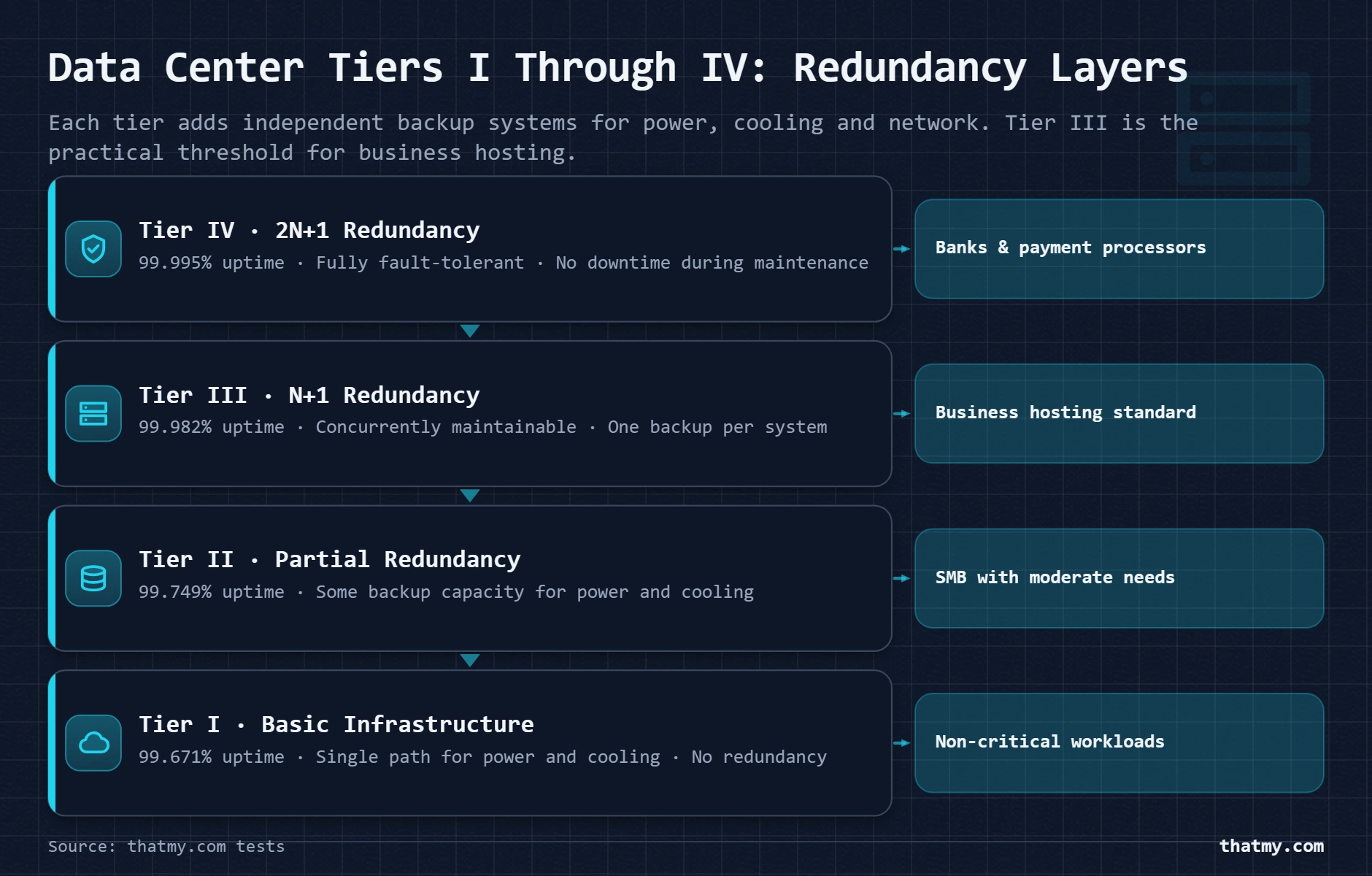
| Tier | Uptime SLA | downtime over 54 days | Redundancy | Best For |
|---|---|---|---|---|
| Tier I | 99.671% | ~28.8 hours/year | No redundancy (single paths for power/cooling) | Budget / dev environments |
| Tier II | 99.741% | ~22 hours/year | Partial redundancy (some backup components) | Small business |
| Tier III | 99.982% | ~1.6 hours/year | N+1 redundancy (one backup per active system) | Most business sites, the baseline you want |
| Tier IV | 99.995% | ~26 minutes | 2N+1 redundancy (two full backups per component) | Enterprise, eCommerce, payment processing |
What Redundancy Means in Practice
N+1 redundancy means there is one backup system for every active system. If the cooling unit fails, one backup kicks in. If the backup fails too, the servers start overheating. 2N+1 means there are two full independent backup systems for every active component, the facility can lose two cooling systems simultaneously and still operate without degradation. Tier IV data centers can take any single component offline for maintenance without causing any downtime at all. The facility stays live while the maintenance crew works.
The practical implication for shared hosting customers: your host's 99.9% SLA is mostly determined by their software stack, network configuration, and shared server management, not by whether the data center is Tier III or Tier IV. Tier classification matters more when you are on dedicated hardware, colocating your own servers, or building infrastructure where a single data center failure would be catastrophic. For most managed hosting customers, "Tier III or better" is the relevant threshold. Below that, you are accepting meaningful additional downtime risk.
A Note on Self-Certification
Some hosts claim "Tier III equivalent" without holding a formal Uptime Institute certification. This language is not meaningless, a facility can genuinely be built to Tier III specifications without pursuing the expensive certification process. But it does mean you are taking their word for it rather than relying on a third-party audit. Hosting providers that colocate in facilities operated by companies like Equinix, Digital Realty, or CyrusOne are typically in formally certified Tier III or Tier IV buildings, because these operators maintain certifications as a core part of their business proposition.
The Real Factor: How Network Distance Becomes Latency
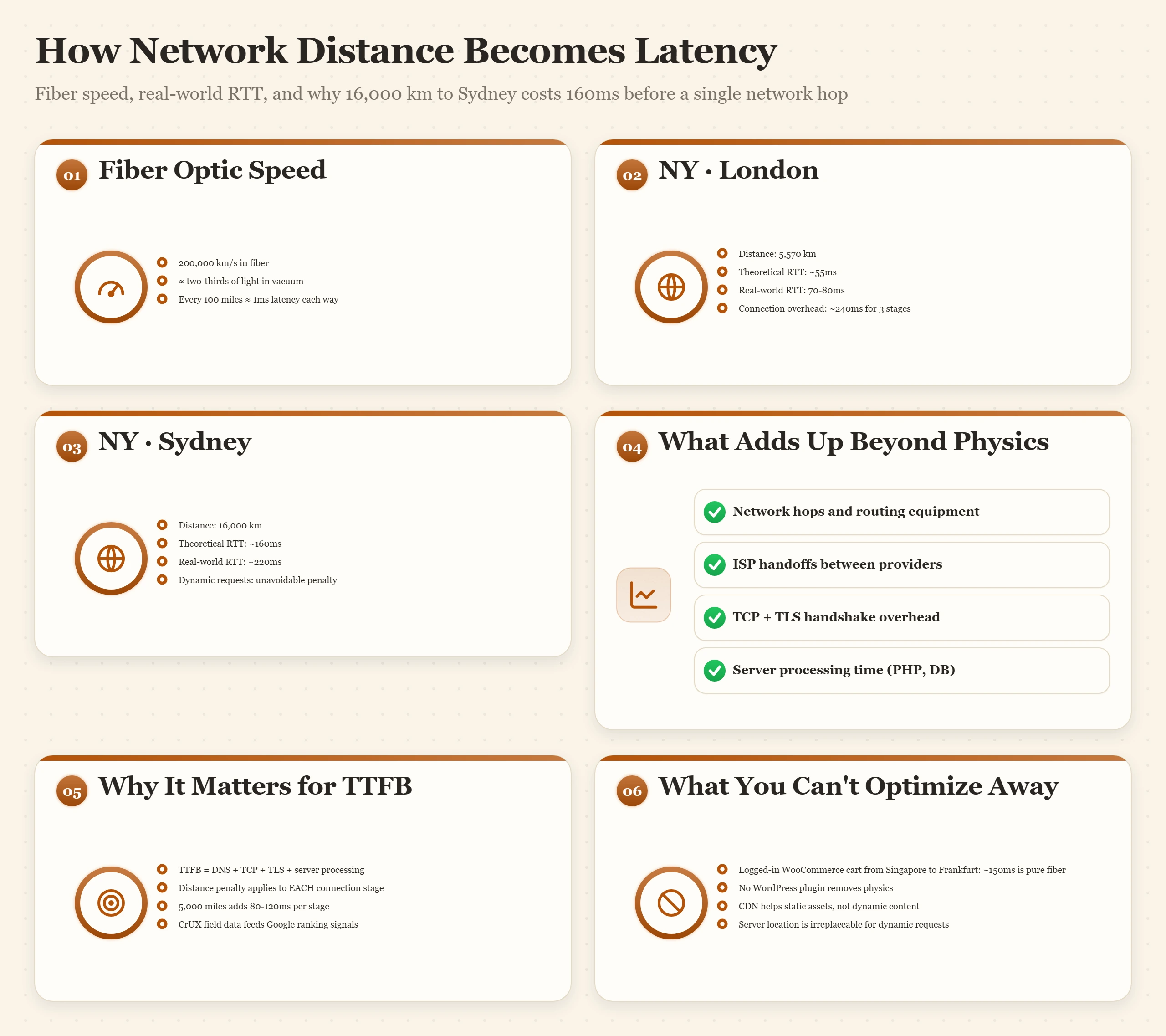
Physics comes first. Light travels through fiber optic cable at approximately 200,000 kilometers per second, roughly two thirds of the speed of light in a vacuum. New York to London is about 5,570 km. At 200,000 km/s, a signal takes about 27ms one way, or 55ms round trip. Add network hops, routing equipment, ISP handoffs, and TCP overhead, and you land at the real-world 70-80ms round-trip latency between New York and London that traceroute measurements consistently show.
| Origin City | Destination City | Typical Round-Trip Latency | Notes |
|---|---|---|---|
| New York | London | 70-80ms | Transatlantic fiber, well-peered routes |
| New York | Frankfurt | 80-100ms | Slightly longer route than London |
| New York | Mumbai | 180-210ms | Multiple ocean crossings |
| New York | Sydney | 200-250ms | Longest transatlantic-transpacific path |
| Los Angeles | Tokyo | 110-130ms | Transpacific, closer than NY to Tokyo |
| Los Angeles | Sydney | 130-160ms | Transpacific direct cable |
| London | Singapore | 160-180ms | Middle East routing via undersea cable |
| Frankfurt | Singapore | 150-170ms | Central Europe to APAC |
Why This Shows Up in TTFB
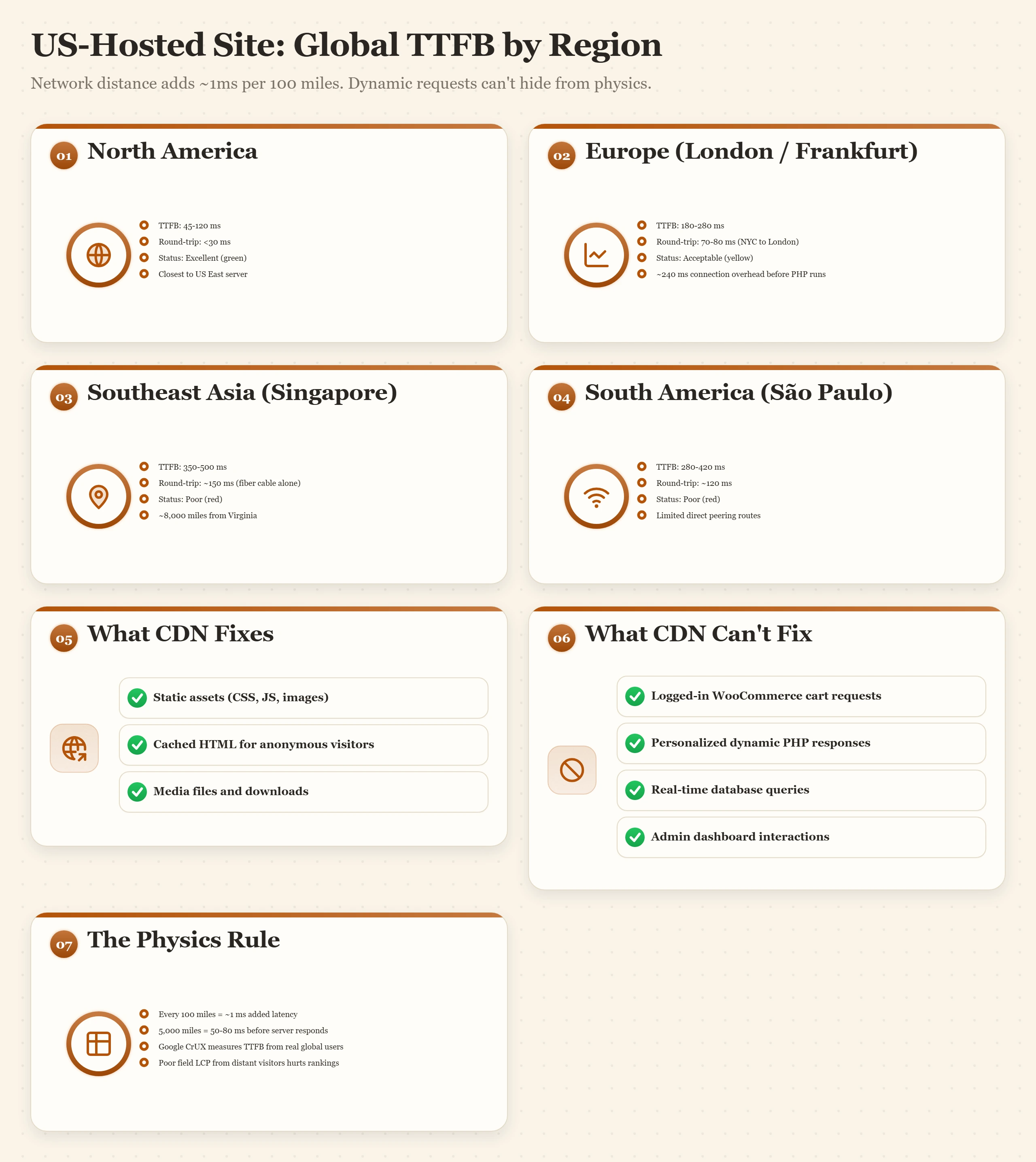
TTFB (Time to First Byte) is the time from when a browser sends a request to when it receives the first byte of the response. It includes: DNS lookup time + TCP connection time + TLS handshake time + server processing time. For a visitor 5,000 miles away, network distance alone adds 80-120ms to each of those three connection stages before your server processes anything. A London visitor hitting a New York server spends roughly 240ms just on connection overhead before PHP runs a single line of code.
Google measures TTFB in CrUX (Chrome User Experience Report) from real Chrome users globally. If your audience includes a meaningful percentage of visitors in regions far from your server, their TTFB readings feed into your field data LCP score, which is the signal Google uses for rankings, not the lab data from a single test location. I have seen sites with excellent Lighthouse scores from their home country but poor CrUX data because 40% of their traffic came from Southeast Asia, 8,000 miles from their Virginia server.
What You Cannot Engineer Around
No amount of optimization removes the physical distance penalty for uncacheable dynamic content. You can compress the HTML response. You can reduce server processing time with better caching. You can use HTTP/2 or HTTP/3 to reduce connection overhead. But if a logged-in WooCommerce customer in Singapore needs to fetch their cart from a PHP process running in Frankfurt, roughly 150ms of that request time is pure fiber cable, and nothing in your WordPress optimization stack changes it. For dynamic requests, server location is irreplaceable. This is why CDN and server location strategy are separate decisions that solve different parts of the problem.
How to Choose the Right Server Location: A Three-Step Framework
Most hosting sign-up forms ask you to select a server region immediately, before you have looked at any data. The correct answer requires three minutes of checking analytics first, and it almost never matches "wherever I am located."
Step 1: Check Your GA4 Audience Geography
In Google Analytics 4: go to Reports then Demographics then Demographic details. Change the primary dimension to Country. Look at the top five countries by sessions over the last 90 days. Note the percentage each country contributes. If one country accounts for 70% or more of your traffic, that country's nearest data center region is your answer. If the distribution is more even, the CDN-first strategy covered in the next section applies.
For sites that are new or have limited analytics history: look at your content's intended audience. A service business serving local customers in Manchester should host in London or Frankfurt, not Virginia. A SaaS product targeting US enterprise customers should be in US East, regardless of where the founders are based.
Step 2: Match to the Nearest Data Center Region
80%+ traffic from USA: US East (Virginia, New York) covers the eastern population center. US West (Los Angeles, San Francisco) if your audience is specifically West Coast or if you have significant APAC traffic.
Significant Canada traffic: US East serves Canada well. Toronto or Montreal servers if you have Canada-specific compliance requirements.
Latin America focus: Sao Paulo (AWS, GCP, Cloudways) is the primary LATAM data center. Otherwise US East or US Central.
EU audience: Frankfurt is geographically central to most European population centers. Amsterdam is the alternative. Both are well-connected to UK, Nordics, and Eastern Europe.
UK-specific: London. Lower latency for UK visitors than Frankfurt by 15-20ms.
GDPR consideration: EU-region servers keep user data within EU jurisdiction by default, which simplifies compliance.
Southeast Asia: Singapore is the primary hub, well-connected to Malaysia, Indonesia, Thailand, Philippines, and Australia.
Japan/Korea: Tokyo. Lower latency for Northeast Asia than Singapore by 30-50ms.
India: Mumbai data centers. Delhi as a secondary if most Indian traffic is northern.
Australia: Sydney. Melbourne as an alternative for Victorian audiences.
Step 3: Test Your Current Latency
Before and after any hosting change, run a global TTFB test to get a baseline. Three tools that give reliable multi-location TTFB data:
- SpeedVitals (speedvitals.com): tests TTFB from 20+ global locations with a visual map showing pass/fail by region. Free. The most useful for quickly identifying which regions are suffering.
- KeyCDN Performance Test (tools.keycdn.com/performance): tests from 14 global PoPs and returns TTFB plus full waterfall breakdown per location.
- Pingdom Website Speed Test: simpler, fewer locations, but easy to use for spot-checking a specific region.
Look for any region showing over 500ms TTFB. That threshold is where Google CrUX marks a TTFB as "poor" in field data. If you see red in your primary traffic region, that is a ranking signal you are actively losing. The CDN setup steps in the caching guide cover the fastest fix, which is Cloudflare APO for WordPress sites.
CDN: The Data Center Equalizer for Static Content
A CDN does not replace server location strategy. It handles a different layer of the problem, and understanding where that layer ends is critical to not over-relying on it.
What CDN Fixes Completely
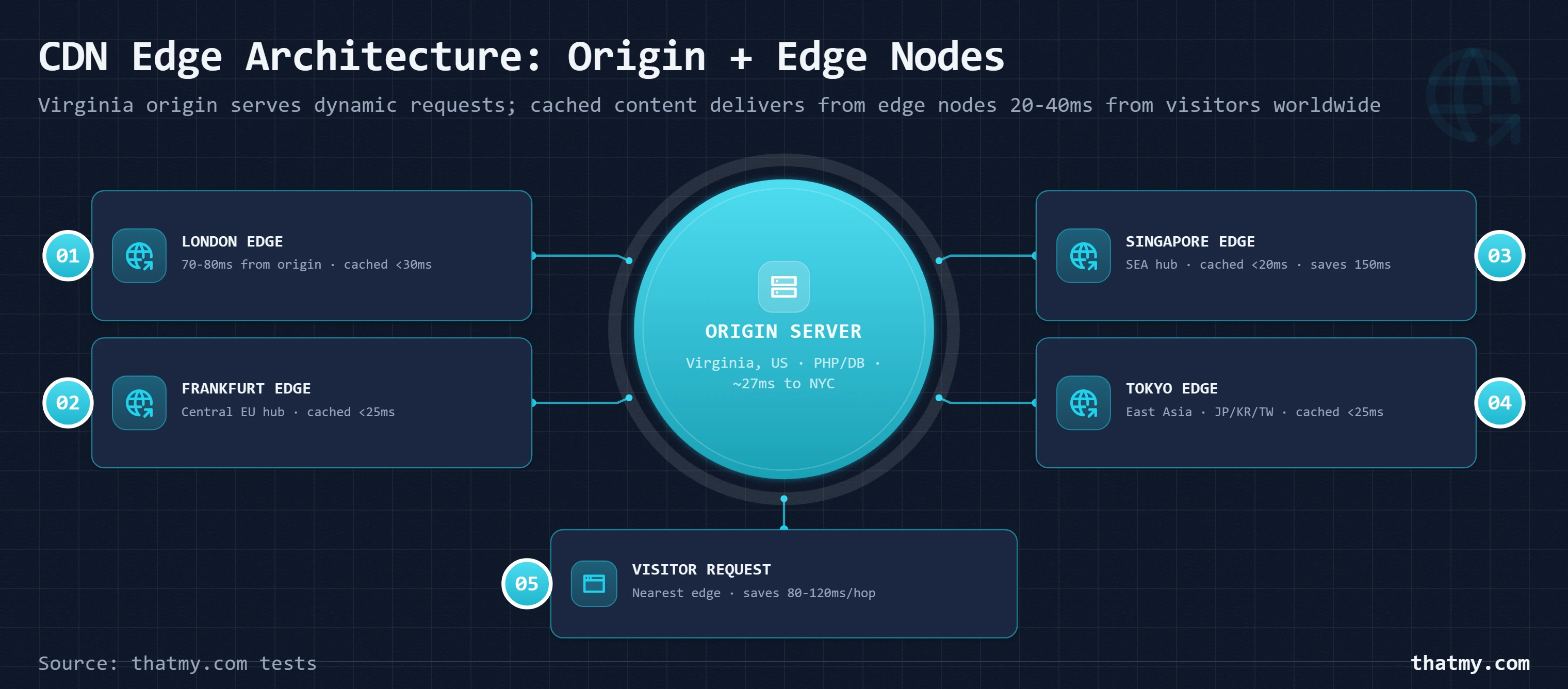
Static assets, images, CSS, JavaScript, fonts, video files, make up 70 to 90% of most page weight. A CDN caches these at edge nodes globally. A visitor in Singapore requesting an image stored on your Virginia server gets it from Cloudflare's Singapore edge node, not Virginia. That 220ms round trip becomes 15ms. This is the single highest-impact performance improvement available to most sites, and Cloudflare's free tier provides it at zero cost.
Full-page caching for non-logged-in visitors is the second layer. Cloudflare APO (Automatic Platform Optimization for WordPress) caches your rendered WordPress HTML at Cloudflare's edge nodes. A first-time visitor in Tokyo loading your homepage receives cached HTML from Tokyo, your Virginia origin server receives zero PHP requests for that visitor. TTFB drops from 200-250ms to under 30ms for cached pages globally.
What CDN Cannot Fix
Dynamic requests that bypass cache still hit your origin. For WordPress specifically, this means:
- All requests from logged-in users (admin, editors, members, WooCommerce customers)
- WooCommerce cart and checkout pages (WooCommerce disables caching when cart is not empty)
- Search results pages
- Any page with personalized content
- WordPress admin dashboard
For a content blog where 99% of visitors are not logged in, CDN effectively eliminates the origin server location penalty. For a WooCommerce store where checkout is the critical user journey, every checkout request still hits your origin server at full geographic latency. If your customers are in Europe and your server is in Virginia, every checkout page load carries a 170ms network penalty. CDN does not touch this.
The Practical Decision Tree
If your site is a content site (blog, news, portfolio, documentation): deploy Cloudflare free tier, enable APO for $5/month, and your server location becomes almost irrelevant for non-logged-in visitors. Pick the region closest to your admin team for a pleasant edit experience.
If your site has significant dynamic content (WooCommerce, membership, logged-in users): CDN handles static assets, but server location directly controls checkout and member experience quality. Pick the server region closest to your paying customers' geography.
Providers like Cloudways give you the flexibility to pick your server location at the time of deployment from cloud provider regions including DigitalOcean, AWS, Google Cloud, Vultr, and Linode, covering over 60 geographic locations. This matters when your audience analytics tell you to put your origin in a specific city rather than defaulting to whatever region your host happens to operate in. The load balancing guide covers the more advanced strategy of routing different request types to different regional servers.
Redundancy Systems: What Keeps Data Centers Online
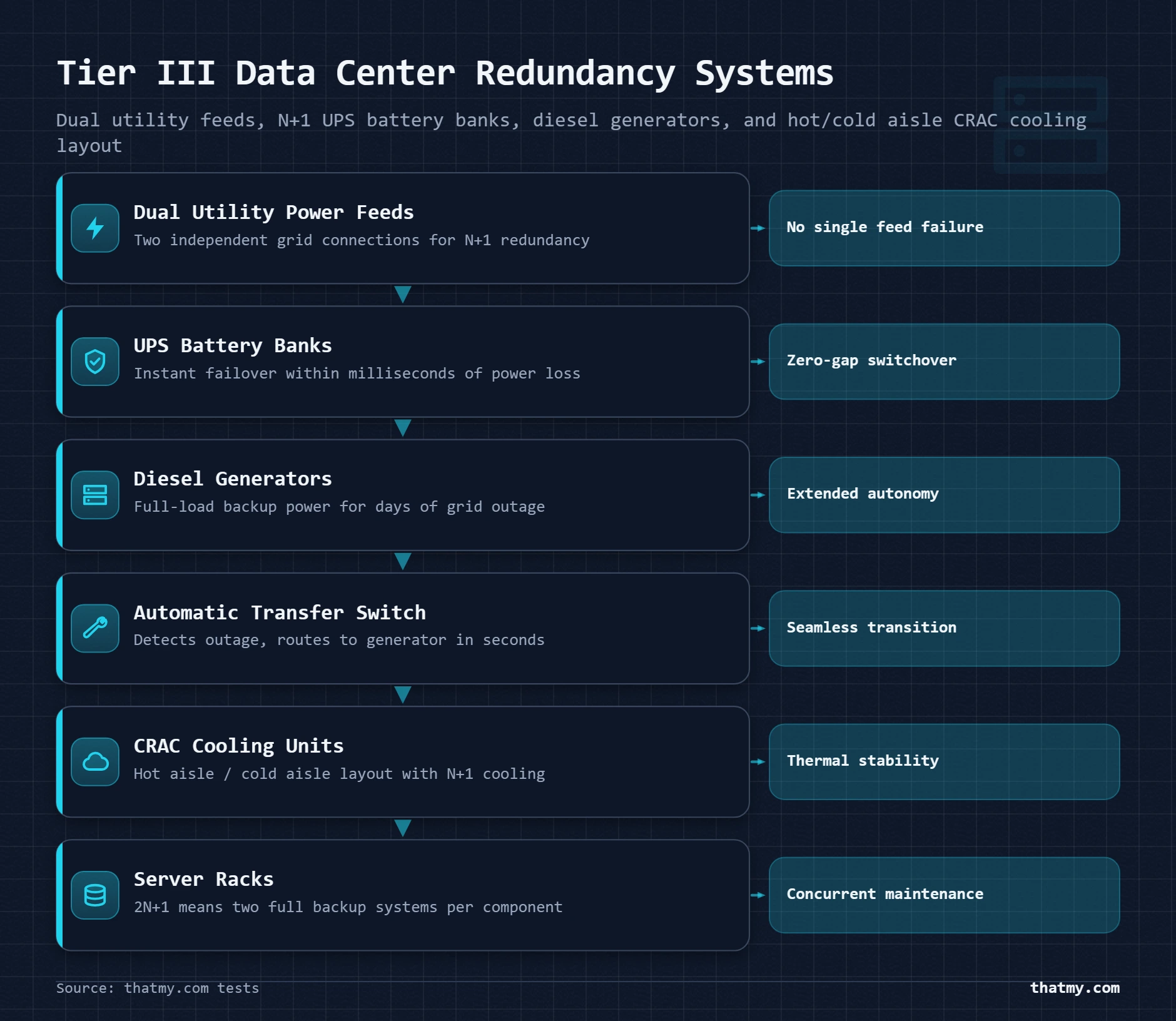
A Tier III data center certification means the facility has engineered answers to four questions: what happens when the power grid fails, what happens when the cooling fails, what happens when the network connection fails, and what happens during scheduled maintenance? Understanding these systems helps you evaluate hosting provider claims rather than just accept marketing language.
Power Redundancy
The power chain in a Tier III facility runs like this: primary utility feed comes from the power grid. A UPS (Uninterruptible Power Supply) system, banks of large batteries, sits between the utility and the servers. When utility power fails, the UPS takes over instantly, with no gap. Diesel or natural gas generators start up within 10-30 seconds and take over from the UPS for extended outages. A second, independent utility feed connects to a separate transformer and electrical path, so a failure in the first utility feed does not affect the second.
The part that fails in practice: not the UPS and not the generator, but the automatic transfer switch (ATS) that switches between sources. I have seen outages caused by ATS failures at facilities with otherwise excellent redundancy. Tier IV data centers have two independent ATS units per power path, eliminating this single point of failure that exists even in Tier III designs.
Cooling Redundancy
Server hardware generates heat in proportion to load. Thermal throttling begins when CPU temperatures exceed safe ranges, the processor slows itself down to reduce heat. A server room without adequate cooling fails quietly through performance degradation before it fails loudly through hardware shutdown.
CRAC (Computer Room Air Conditioning) units provide precision cooling designed for the density of server equipment. A standard data center uses a hot aisle / cold aisle configuration: server racks face alternating directions, with cold air intake on one aisle and hot exhaust on the next. This separates cold and hot air flows and dramatically improves cooling efficiency. N+1 cooling redundancy means one CRAC unit can fail and the remaining units carry the full cooling load without overheating any rack.
Network Redundancy
A carrier-neutral data center hosts multiple ISPs (carriers) in the same building. Your hosting provider can connect to three or four carriers simultaneously and use BGP routing to distribute traffic across them. BGP (Border Gateway Protocol) is the internet's routing protocol, when one carrier has congestion or an outage, BGP automatically routes your traffic through a different carrier within seconds. This is different from your individual server's network connection, which is a single physical port at the data center.
What to look for in your host's specs:
- "Carrier-neutral facility" or "multiple upstream providers" signals BGP redundancy
- "N+1 network redundancy" means the fiber connections themselves have physical redundancy
- "Anycast routing" means DNS and CDN requests reach the nearest facility automatically
- Specific ISP names (Cogent, Zayo, Telia, NTT) suggests genuine multi-carrier connectivity
For comparison: a budget shared hosting provider in a single-carrier facility has one physical connection to the internet. When that carrier has a routing problem, and major carriers have routing incidents regularly, your site goes down regardless of how robust the servers inside the building are. The uptime and downtime guide covers how to interpret SLA guarantees in context of these infrastructure realities.
PoP Locations and CDN Edge Nodes Compared
A PoP (Point of Presence) is a CDN's edge data center, a facility where the CDN stores cached copies of your content and handles visitor requests without sending them back to your origin server. More PoPs means better global coverage and lower average latency for your visitors worldwide. But raw PoP count is only part of the story; where those PoPs are located matters as much as how many there are.
| CDN Provider | PoPs | Free Tier | Best For |
|---|---|---|---|
| Cloudflare | 310+ cities | Yes, unlimited bandwidth | Most sites, start here. Free tier is genuinely good. |
| BunnyCDN | 116 PoPs | No ($0.01/GB) | Budget CDN for sites needing more than Cloudflare free |
| Fastly | 90+ cities | No | Video and streaming at scale |
| AWS CloudFront | 600+ edge locations | No | Sites already on AWS infrastructure |
| KeyCDN | 45+ PoPs | No ($0.04/GB) | Developer-friendly, transparent pricing |
Cloudflare Is the Default Starting Point
Cloudflare's free tier is the only CDN that covers 310+ cities with unlimited bandwidth at zero cost. For most sites, this is the right answer for static asset delivery. Cloudflare's network is also anycast, meaning your visitors' DNS queries automatically resolve to the nearest Cloudflare PoP without any geo-routing configuration on your end. The free tier handles images, CSS, JavaScript, and fonts. Cloudflare APO at $5/month extends this to full WordPress HTML caching at the edge.
The one limitation of Cloudflare's free tier: it does not cache HTML by default (without APO), and it does not provide prioritized routing between PoPs. Cloudflare's paid tiers (Pro, Business) include Argo Smart Routing, which uses real-time network intelligence to route requests through less-congested paths between PoPs, measurably reducing latency for uncached dynamic requests. For most WordPress sites below enterprise scale, free Cloudflare plus APO is the right configuration.
When to Consider a Paid CDN
Specific situations where a paid CDN makes sense beyond Cloudflare free:
- High video traffic: Cloudflare free does not serve video efficiently. BunnyCDN or Fastly at $0.01/GB is far more cost-effective for video delivery than Cloudflare's bandwidth pricing for video on paid plans.
- Custom cache rules per URL pattern: Cloudflare free has limited page rules. If your site has complex caching requirements (cache some paths, bypass others, vary by cookie), Cloudflare Pro or a dedicated CDN with rule flexibility is better.
- Real-time origin selection: AWS CloudFront with multiple origins can route requests to the fastest-responding origin in real time. Relevant for multi-region setups covered in the load balancing guide.
How to Measure Server Location Impact on Core Web Vitals
You cannot improve what you have not measured. The testing methodology below gives you a before/after comparison that shows exactly which regions are affected and by how much.
Step 1: Establish Your Baseline TTFB Map
Go to SpeedVitals (speedvitals.com) and run a global TTFB test on your homepage. The result is a world map with color-coded TTFB ratings per region. Screenshot this. Note every region showing over 200ms TTFB. Then note specifically which of those regions appear in your GA4 top-5 audience countries from Step 1 of the location framework above. Those are your problem regions, the ones where the distance penalty is real and measurable in your user base.
Step 2: Enable Cloudflare and Test Again
If you have not already added Cloudflare CDN to your domain, do so now. Cloudflare's free tier setup takes about 15 minutes (change nameservers at your domain registrar to Cloudflare's nameservers). Wait 24 hours for DNS propagation globally, then run the SpeedVitals test again. Static-asset-heavy pages will show dramatically improved TTFB globally because Cloudflare's edge nodes now serve cached responses from nearby PoPs instead of forwarding requests to your origin.
For WordPress specifically, add Cloudflare APO and run a third test. With APO active and your homepage cached at the edge, you should see TTFB under 100ms from most Cloudflare PoP locations globally. TTFB for cached responses is typically 15-40ms at nearby PoPs.
Step 3: Identify the Remaining Dynamic Request Problem
After CDN and APO are active, run a test on a dynamic page, your WooCommerce shop page with a cart item (which bypasses cache), your login page, or a search results page. These pages will still show the full geographic latency because CDN does not cache them. If the regions showing high TTFB on dynamic pages match your high-value audience regions, server migration is the next step.
| TTFB Range | Rating | Recommended Action |
|---|---|---|
| Under 200ms | Excellent | No action needed. This is my fast-host bar, and it is threshold. |
| 200-500ms | Acceptable | Enable full-page caching. Test from more locations. |
| 500ms-1 second | Poor | Fix caching first. Then evaluate server location or upgrade. |
| Over 1 second | Critical | Upgrade hosting. Add CDN immediately. Investigate server performance. |
Reading CrUX Data in Google Search Console
Google Search Console's Core Web Vitals report shows field data (real user measurements from Chrome) rather than lab data from a speed test tool. Open Search Console, go to Core Web Vitals, and look at the LCP and TTFB charts. Click into any URL with poor or needs-improvement status and read the "grouped by" breakdown. If you can see that mobile users have significantly worse LCP than desktop, or that specific URL patterns are consistently poor, this data traces back to server location and caching configuration.
The caching guide covers the full stack of WordPress caching layers in detail, including how object cache, opcode cache, and full-page cache each contribute to reducing the PHP execution time component of TTFB, the part that server location cannot fix but server-side optimization can.
Hosting Recommendations by Region and Use Case
The right host for data center selection is not just about which provider has servers in the right city. It is about which provider gives you control over that choice without locking you into a single location or charging extra for changing it later.
ScalaHosting: Best for Managed VPS With Full Stack Control
ScalaHosting operates its own data centers and provides managed VPS hosting with SShield security monitoring, daily backups, and full root access. Their custom SPanel control panel gives you the ability to manage server configuration without needing SSH expertise. What ScalaHosting does particularly well for data center selection: their managed VPS plans let you choose your server location at signup, and their team manages the underlying data center infrastructure, so you get a genuine Tier III facility experience without needing to evaluate colocation vendors yourself.
ScalaHosting's entry-level managed VPS starts at pricing competitive with unmanaged alternatives, and their SShield actively blocks 99.998% of attacks before they reach your WordPress installation. For a business site where you know your primary audience is in North America or Europe, ScalaHosting's US East or EU data centers cover the major use cases cleanly. See the best WordPress hosting comparison for how their managed VPS compares to other managed options on performance benchmarks.
Cloudways: Best for Flexible Multi-Region Deployment
Cloudways is the answer when your audience analytics tell you to put your server somewhere specific. Built on top of DigitalOcean, AWS, Google Cloud, Vultr, and Linode, Cloudways exposes 60+ server locations at the point of app deployment. You pick the cloud provider and the specific data center city when you create an application, no extra fees for choosing Singapore over New York, no plan change required if you later decide to migrate to Frankfurt.
The managed layer on top handles server configuration, security patching, PHP-FPM optimization, Redis object caching, and automated backups, so you get cloud infrastructure flexibility without the operational burden of self-managing a VPS. Cloudways is particularly strong for WooCommerce stores with a known primary customer geography, because you can place the server exactly where your paying customers are, then add Cloudflare free tier for global static asset delivery on top.
For teams that need to serve both North American and European audiences with dynamic content, Cloudways makes it practical to run two application servers in different regions and use Cloudflare load balancing to route visitors to their nearest origin, an architecture that would otherwise require managing two separate hosting accounts at two different providers.
Data Center Selection Checklist
Use this before signing up for a new hosting plan or evaluating a server migration:
Before You Pick a Data Center or Server Region
- Check GA4 audience geography, where are your top 3 countries by sessions? This is your server region answer.
- Run a baseline TTFB test with SpeedVitals or KeyCDN before making any changes. Screenshot the results.
- Confirm the host uses Tier III or Tier IV facility, ask specifically or look for "N+1 redundancy" in their data center spec page.
- Check for carrier-neutral facility, multiple ISPs means better routing and network redundancy. Ask if they do not list it.
- Verify the SLA uptime guarantee, 99.9% minimum for any business site. 99.99% if you run eCommerce or have revenue tied to availability.
- Enable Cloudflare CDN on top of whatever origin you choose. This is not optional for any site with a global audience.
- Enable full-page caching (Cloudflare APO or WP Rocket) before assessing whether server location is still the problem.
- Test again after CDN and caching setup, confirm TTFB under 200ms from your primary audience regions. Only then evaluate server migration if needed.
- For WooCommerce or logged-in users, check TTFB specifically on dynamic pages (cart, checkout, account). CDN does not fix this. Server location does.
- Document your baseline, save your SpeedVitals results and Google Search Console Core Web Vitals data. You cannot prove improvement without a before state.
Myths About Data Center Location
Myth: You should always pick the data center closest to you.
Wrong. You should pick closest to your visitors.
Your server is not in your house. It does not matter how far you are from it for the purpose of visitor experience. You visit your WordPress admin panel a few hundred times per month. Your visitors load your pages tens of thousands of times. Pick the server region that minimizes latency for the majority of your traffic, not for you personally. If you are building a site for a UK audience and you live in Texas, host in London.
Myth: CDN makes server location irrelevant.
True for cached content. False for dynamic requests.
CDN solves the location problem for static assets and full-page cached HTML. It does not solve it for logged-in users, WooCommerce checkout, or any other request that bypasses cache. For a WooCommerce store with customers in Japan and a server in Virginia, every checkout step carries a 220ms network penalty that no CDN configuration eliminates. Server location still matters for every request that touches PHP.
Myth: A Tier IV data center means my site will never go down.
False. Tier IV reduces data center downtime. Your site's availability depends on more than the building.
Your hosting provider can misconfigure a server, run out of disk space, be hit by a software bug, or have a network routing issue that is entirely separate from the data center's physical infrastructure. Tier IV means the building has 2N+1 redundancy for power and cooling. It does not mean the shared server hosting your WordPress installation cannot crash due to a PHP memory limit error, a botched plugin update, or a DDoS attack that overwhelms the server's network interface. Tier certification is one component of uptime, not all of it.
Myth: More PoPs always means better performance.
Not necessarily. PoP quality and peering matter more than count.
AWS CloudFront has 600+ edge locations. For some workloads and geographies, Cloudflare's 310+ cities outperforms it because Cloudflare has better peering agreements with local ISPs in certain regions. A PoP that has poor peering with local carriers still routes traffic through congested paths regardless of physical proximity. Cloudflare's network is specifically engineered for last-mile optimization at a level that raw PoP counts do not capture. Test with real traffic from your audience regions, not PoP count comparisons.
Myth: Shared hosting providers cannot be in good data centers.
False. Data center quality and hosting plan type are separate.
A shared hosting plan can run on servers inside a Tier III certified Equinix facility. The data center quality is about the building's infrastructure. The hosting plan quality is about how many accounts share a server, how well the provider manages PHP resources, and what SLA they guarantee. You can have excellent data center infrastructure and poor shared hosting configuration simultaneously. Evaluate both separately when choosing a provider.
Where to Go Next
Data center location is one factor in site speed, but it sits downstream of several decisions that have larger impact for most sites. The caching guide covers every WordPress caching layer from opcode cache to Redis object cache to full-page cache, getting caching right reduces your TTFB by more than any server relocation for most sites. Its CDN section goes deeper on Cloudflare configuration, including APO, the SSL mode and the settings that affect WordPress performance. If your audience analytics show significant traffic from multiple distinct regions that cannot be served well from a single origin, the load balancing guide covers multi-region origin architecture.
For the underlying server hardware behind TTFB, PHP-FPM worker pool configuration, CPU thread limits, and how server resource exhaustion shows up in latency readings, the server hardware guide covers those specifics. Understanding what your server does with a request once it arrives is as important as minimizing how long the request takes to get there.
Data Center FAQ
Does data center location actually affect Google rankings?
Yes, indirectly. Google uses Core Web Vitals in its ranking signals, and TTFB (Time to First Byte) feeds directly into Largest Contentful Paint timing. If your server is 300ms slower than a competitor's server for the same audience, that timing difference contributes to a worse LCP score in Google's CrUX data. Google measures real-user performance from actual Chrome users, so if your visitors in Germany have a 600ms TTFB because your server is in California, that shows up in CrUX as a poor TTFB rating for German users. It is not a direct ranking penalty for geography, but it is a measurable disadvantage in Core Web Vitals scoring for that audience segment.
What is the difference between a data center tier and a hosting plan tier?
These are completely separate classifications that unfortunately share the word 'tier.' A data center tier (I through IV) is a Uptime Institute certification that describes the physical infrastructure redundancy of the building: power, cooling, and network systems. A hosting plan tier is your provider's internal categorization of shared, VPS, and dedicated plans. A shared hosting plan at $5 per month can run in a Tier III certified data center. An expensive dedicated server can sit in a Tier I facility. Ask your host specifically which Tier the data center facility carries, not which plan tier you are on.
What is a carrier-neutral data center?
A carrier-neutral facility is a data center that allows multiple internet service providers (carriers) to run their network equipment inside. This means your hosting provider can connect to multiple ISPs simultaneously, and traffic gets routed through whichever one has the best path to the destination at that moment. For you, this means better global routing, lower latency to diverse geographies, and redundancy if one ISP has an outage. Premium hosting providers specifically mention being in carrier-neutral facilities because it is a genuine quality indicator. If your host's data center spec sheet does not mention it, ask.
My site is fast in the US but slow in Europe. What should I do first?
Step one: enable Cloudflare CDN on the free tier if you have not already. This immediately serves static assets (images, CSS, JavaScript) from Cloudflare's European edge nodes, which eliminates the transatlantic delay for those files. If your site is heavily cached HTML (a blog or content site), enable Cloudflare APO, this caches your WordPress HTML at the edge too, so European visitors receive cached pages without any request hitting your US origin server. If your site has significant dynamic uncacheable content (WooCommerce checkout, logged-in users), the next step is either adding a European server or migrating your origin to Frankfurt or Amsterdam.
Does the data center location affect email deliverability?
Rarely, and not in the way people expect. Email deliverability is primarily affected by IP reputation, SPF/DKIM/DMARC records, and sending history, not data center geography. That said, some spam filters do consider country-of-origin for IPs in blacklist checks. A US IP sending from a reputable US data center does not carry geographic risk. A server in a data center known for hosting spam operations (common with very cheap offshore providers) can hurt deliverability through IP-range reputation. The practical answer: use a dedicated email sending service (Postmark, Mailgun, SendGrid) rather than your hosting server for any serious email volume, and the data center location question becomes irrelevant for email.
What is anycast routing and should my host have it?
Anycast is a network routing method where multiple servers around the world share the same IP address, and your DNS query automatically routes to the nearest one. Cloudflare's entire network runs on anycast, when you resolve cloudflare.com, you connect to whichever Cloudflare data center is nearest to you. For your hosting origin server, anycast is typically not relevant, your server has a single IP in one location. Anycast becomes relevant for your DNS provider and CDN. Cloudflare's DNS (1.1.1.1) and your domain's nameservers using anycast means DNS lookups are resolved within milliseconds regardless of where the visitor is. This matters more than people expect, a slow DNS resolver can add 50-200ms before a connection to your server even begins.
How do I find out which tier my host's data center is?
Search for the host's 'data center specifications' or 'infrastructure' page. Reputable providers either display the Uptime Institute certification tier explicitly or describe their facility in terms that make it clear: 'N+1 redundancy,' 'dual utility feeds,' 'carrier-neutral facility.' If they only say '99.9% uptime guarantee' without describing the infrastructure behind it, that tells you very little. You can also search the host name plus the city of their data center plus 'data center', many providers lease space in known carrier-neutral facilities (Equinix, Digital Realty, CyrusOne) that publish their own tier certifications. If the data center is an Equinix facility, for example, you can verify the Equinix facility tier independently.