
Web Servers Explained: LiteSpeed vs Apache vs Nginx and Real Hosting Stacks

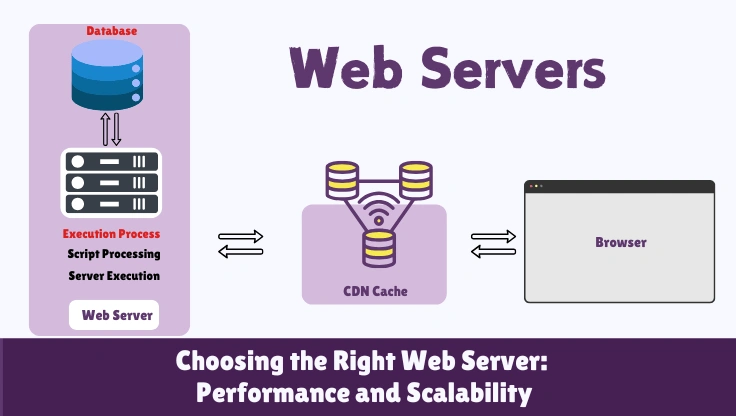
Your hosting control panel says "Apache 2.4" or "Nginx." Most WordPress owners read that and move on. They are missing one of the most commercially important decisions in their entire stack. The web server determines whether your site can handle a thousand concurrent visitors or collapses at two hundred. It determines whether caching operates at the server level or the plugin level. It determines whether a single PHP crash takes down one site or the entire server. This is not a background detail. It is the foundation everything else runs on.
The quape.com comparison and most hosting guides describe web servers in a table and stop there. This guide explains the underlying architecture: why Nginx uses less memory than Apache under identical load, what a reverse proxy actually does at the connection level, why LiteSpeed Cache is faster than WP Rocket in a way that no configuration change can overcome, and what your hosting stack actually looks like depending on which tier you are on. Understanding this changes how you evaluate hosting providers, how you debug slow WordPress sites, and what you ask for when choosing between plans. The web hosting infrastructure guide covers the full server hardware context that these web servers run on.
Best for shared hosting compatibility. .htaccess works out of the box. Slower under high concurrency. Powers most legacy shared hosting stacks.
Best for high-concurrency VPS and managed hosting. Event-driven, memory-efficient. Used by Cloudways, Kinsta, WP Engine. No .htaccess.
Fastest for WordPress with LiteSpeed Cache. Server-level page cache, .htaccess compatible, HTTP/3 native. Best performance per dollar on compatible hosts.
What a Web Server Actually Does (Not Just "Serves Websites")
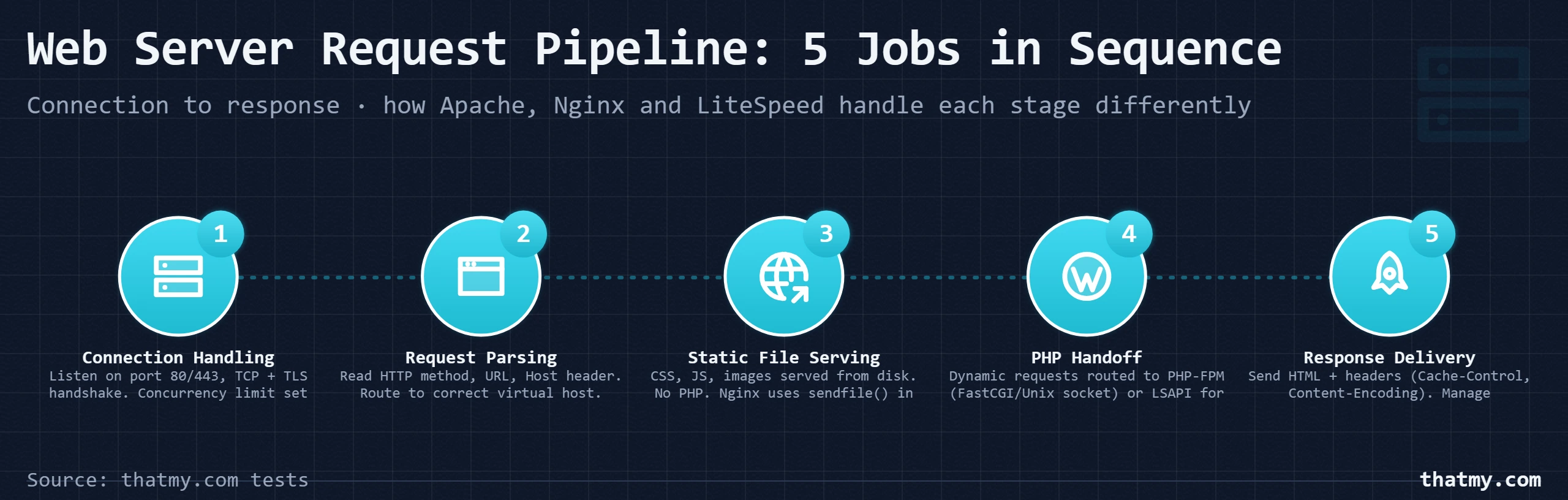
Every explanation of web servers starts with "software that serves web content." That description is accurate in the same way that "a car moves you from place to place" is accurate. It misses everything that matters. A web server performs five distinct jobs in sequence, and each job has a different performance profile, different failure modes, and different configuration options that affect your WordPress site.
Connection Handling
The web server listens on port 80 (HTTP) and port 443 (HTTPS). When a visitor's browser initiates a TCP connection, the server accepts it, completes the TCP handshake, and for HTTPS, completes the TLS handshake. This is where concurrency limits come in. How many simultaneous open connections can the server manage? Apache and Nginx answer this question with completely different architectures. This is the most consequential difference between the two servers, and it is invisible to users until traffic spikes.
Network LayerRequest Parsing
Once the connection is established, the server reads the HTTP request: the method (GET, POST, PUT), the URL path, the HTTP version, and the request headers (Host, User-Agent, Accept-Encoding, Cookie, etc.). The server parses these headers to determine what the request is asking for and how to route it. On a server hosting 500 WordPress sites, the Host header determines which virtual host configuration applies, which document root, which PHP pool, which access rules.
Request LayerStatic File Serving
If the request is for a static file, an image, a CSS file, a JavaScript file, a PDF, the web server reads the file from disk and returns it directly. No PHP runs. No database is queried. Nginx is particularly fast at this step because it uses the operating system's sendfile() system call to transfer file contents from disk to the network socket entirely in kernel space, without copying data through user space. On a site where 70-80% of requests are for static assets, this matters.
PHP Execution and Dynamic Request Routing
If the request is for a PHP file (or matches a rewrite rule that routes to index.php, as all WordPress requests do), the web server hands it off to PHP. The method of handoff is where Apache, Nginx, and LiteSpeed diverge significantly. Apache can run PHP as an embedded module (mod_php) or forward to PHP-FPM via FastCGI. Nginx always forwards to PHP-FPM via FastCGI or Unix socket. LiteSpeed uses its own LSAPI protocol, which is faster than FastCGI because it avoids the overhead of the CGI protocol negotiation. The PHP process executes WordPress, runs database queries, builds the HTML response, and returns it to the web server.
PHP LayerResponse Delivery and Reverse Proxying
The web server takes the PHP response (or the static file content) and sends it back to the visitor with appropriate HTTP headers: Content-Type, Cache-Control, Content-Encoding (if compression is enabled), and the HTTP status code. In a reverse proxy setup, an additional job exists: forwarding requests from a public-facing Nginx instance to a backend Apache or application server, then returning the backend's response to the visitor. The web server adds response headers, applies keep-alive logic, and manages the connection lifecycle for subsequent requests.
Response LayerThe One Number That Explains Server Choice
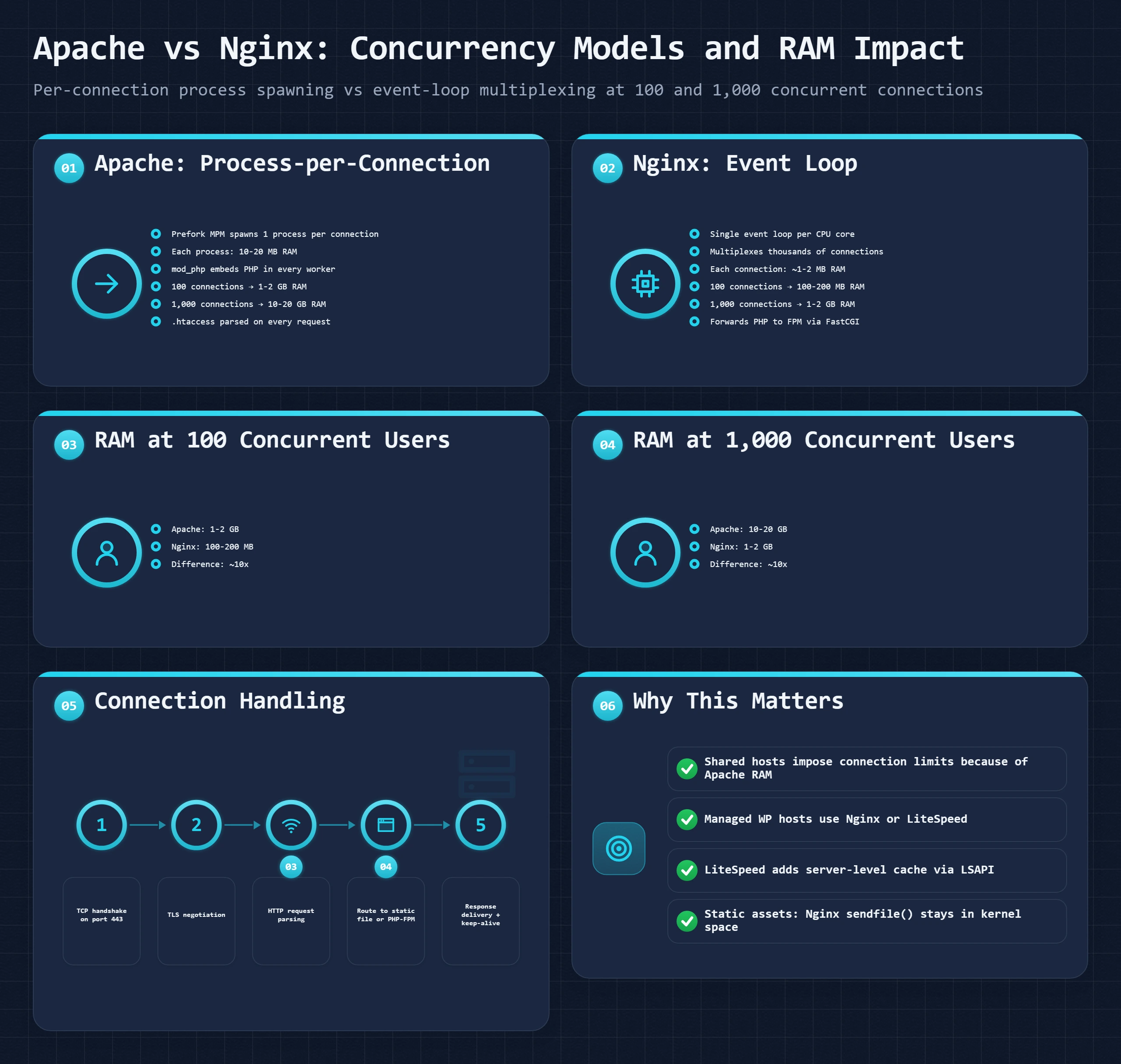
Requests per second is the headline. The number most hosting providers never show you is memory usage per concurrent connection. Apache prefork uses approximately 10-20 MB per active connection. Nginx uses approximately 1-2 MB. At 100 concurrent connections, Apache uses 1-2 GB of RAM on PHP execution alone. Nginx uses 100-200 MB. At 1,000 concurrent connections, a perfectly normal load for a medium-traffic site, Apache needs 10-20 GB just for connection handling. Nginx needs 1-2 GB. This is why shared hosting imposes strict concurrent connection limits, and why every serious managed WordPress host runs Nginx or LiteSpeed.
Apache vs Nginx vs LiteSpeed: The Three Engines That Power WordPress
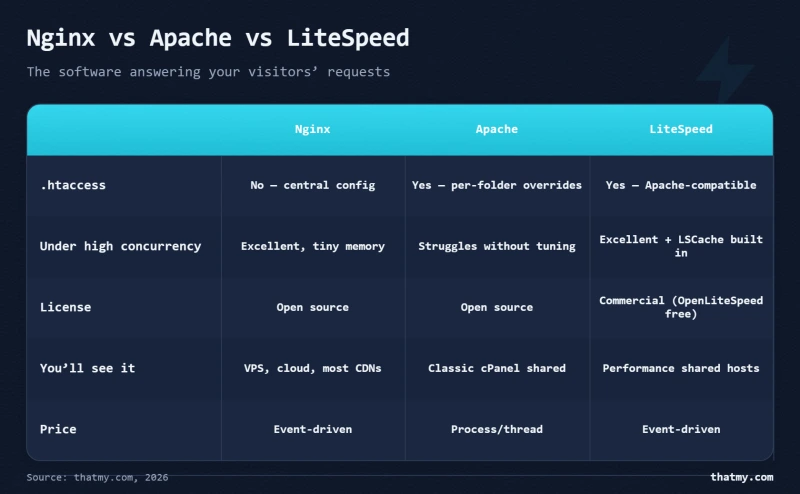
These three web servers power over 75% of all websites. They share the same job, accepting HTTP requests and returning responses, but they make fundamentally different architectural choices about how to do it. Those choices produce different performance characteristics under different conditions, different compatibility requirements, and different optimization ceilings. The table below is not just a feature list. Read the implications column, that is where the practical decisions live.
Apache HTTP Server
~30% web server market shareApache is the web server that built the modern web. The original LAMP stack (Linux, Apache, MySQL, PHP) ran, and still runs, the majority of the world's WordPress sites. Its defining feature is .htaccess: a distributed configuration system where each directory can have its own configuration file, readable by the web server on every request, without restarting the server. This is what makes shared hosting possible.
Where Apache wins: Compatibility. Every shared host supports it. Every WordPress plugin that writes to .htaccess (security plugins, cache plugins, permalink systems) works without any server configuration. The ecosystem of Apache modules (mod_rewrite, mod_security, mod_headers) is the most mature in the industry.
Where Apache struggles: Under high concurrency. Each connection requires a process or thread, and processes use 10-20 MB of RAM. A thousand concurrent visitors means Apache is holding a gigabyte of RAM just in worker processes.
Nginx
~34% web server market shareNginx (pronounced "engine-x") was built in 2004 specifically to solve Apache's concurrency problem. Its creator Igor Sysoev designed it around the C10K problem: how do you handle 10,000 simultaneous connections on a single server? The answer was an event-driven, asynchronous architecture that handles thousands of connections within a single worker process using non-blocking I/O.
Where Nginx wins: High-concurrency performance, static file serving efficiency, reverse proxy capability, and memory usage. Nginx is the standard for managed WordPress hosts and any serious VPS setup. Cloudways, Kinsta, and WP Engine all run Nginx as their primary web server.
Where Nginx struggles: No .htaccess. Every configuration change requires editing central config files with root access. This makes it incompatible with traditional shared hosting architectures.
LiteSpeed
~12% market share (growing fast)LiteSpeed describes itself as a "drop-in replacement for Apache", and for shared hosting operators, that claim is accurate. LiteSpeed reads Apache configuration files, respects .htaccess, supports all Apache directives, and integrates with cPanel without changing the control panel software. A shared host can switch from Apache to LiteSpeed without touching a single customer's .htaccess file or config.
Where LiteSpeed wins: It combines Apache's .htaccess compatibility with event-driven performance similar to Nginx, then adds the LiteSpeed Cache plugin integration that operates at the server level rather than the PHP level. LiteSpeed's LSAPI PHP protocol is faster than FastCGI. Its native HTTP/3 support is the most mature of the three servers.
Where LiteSpeed struggles: Enterprise licensing costs. The open-source OpenLiteSpeed version removes some advanced features. Smaller community than Apache or Nginx for third-party tooling.
| Feature | Apache | Nginx | LiteSpeed |
|---|---|---|---|
| Concurrency model | Process/thread per connection (MPM prefork or worker) | Event-driven, async, non-blocking I/O | Event-driven with native PHP LSAPI (faster than FastCGI) |
| .htaccess support | Yes, per-directory config, read on every request | No native .htaccess; requires rewrite rules in nginx.conf | Yes, full .htaccess compatibility, same as Apache |
| Static file serving | Good, reads from disk, serves directly | Excellent, in-kernel sendfile(), minimal memory overhead | Excellent, similar to Nginx, slightly faster on cached content |
| PHP execution method | mod_php (module) or PHP-FPM via proxy | PHP-FPM only via FastCGI/Unix socket | LSAPI (LiteSpeed API), tighter integration than FastCGI |
| Memory per connection | ~10-20 MB per Apache process (prefork) | ~1-2 MB per connection (shared event loop) | ~1-2 MB, similar to Nginx |
| Config file approach | Distributed .htaccess per directory | Central nginx.conf, no per-directory override | Central config with full .htaccess support at server level |
| WordPress compatibility | Excellent, native .htaccess permalink support | Excellent, requires try_files block in config | Excellent, best with LiteSpeed Cache plugin |
| WordPress page cache | Plugin-level only (WP Rocket, W3TC) | Plugin-level only or server-level with FastCGI cache | Server-level with LiteSpeed Cache plugin (fastest option) |
| ESI for WooCommerce | No | No | Yes on LiteSpeed Enterprise (not OpenLiteSpeed): page cached, cart kept live |
| cPanel integration | Yes, the long-time default | Not native; panels generate its config or run it as a proxy | Yes, a drop-in Apache replacement |
| SSL/TLS termination | Yes, mod_ssl | Yes, built-in, very efficient | Yes, built-in |
| HTTP/2 support | Yes, mod_http2 (requires worker/event MPM) | Yes, native, excellent | Yes, native, including QUIC/HTTP/3 |
| HTTP/3 (QUIC) support | Experimental, not production-ready | Available (quiche module), not default | Yes, native, enabled by default on many hosts |
| Load balancing | mod_proxy_balancer (limited) | Upstream module (excellent, widely used) | Built-in, enterprise-grade with QoS controls |
| Market share (web) | ~30% of active sites | ~34% of active sites | ~12% of active sites (growing) |
| License | Open source (Apache License 2.0) | Open source (BSD) | Enterprise (paid) / OpenLiteSpeed (free, open source) |
PHP Execution Methods: The Part Most Comparisons Skip
The web server handles the HTTP layer. What PHP actually runs on, and how the web server hands off to PHP, is a separate decision that affects WordPress performance as much as the web server choice itself. There are four methods, and two of them should never appear in a production WordPress setup.
| Method | How It Works | Advantage | Disadvantage |
|---|---|---|---|
| mod_php | PHP runs as Apache module inside the Apache process | Fastest for single-site setups. PHP and Apache share memory. | Memory leak in PHP can crash entire Apache worker. No per-user isolation. |
| PHP-FPM (FastCGI) | PHP runs as separate process pool, connected via Unix socket | Process isolation. Each PHP-FPM pool can run as different user. Configurable pool size. | Requires extra configuration. Socket communication adds marginal overhead vs mod_php. |
| LSAPI | LiteSpeed's proprietary PHP integration (LiteSpeed API) | Faster than FastCGI because it reuses PHP processes more efficiently. Lower overhead. | Only available on LiteSpeed web server. Not compatible with Apache or Nginx. |
| CGI (legacy) | New PHP process spawned for every single request | Complete isolation, simple setup | Catastrophically slow, one PHP process per request, no reuse. Never use on production. |
The correct combination for a modern WordPress stack is: Nginx or LiteSpeed as the web server, PHP-FPM (or LSAPI for LiteSpeed) as the PHP execution method. This combination gives you event-driven connection handling at the web server layer, process isolation and pool management at the PHP layer, and no dependency between web server crashes and PHP crashes. I have seen multiple sites go down because mod_php was running on Apache and a single PHP infinite loop caused the Apache worker to hang, blocking all connections, the web server and PHP shared the same process. With PHP-FPM, PHP hanging would have killed one FPM worker and been replaced by another.
Event-Driven vs Process-Based: The Architecture That Defines Concurrency
Most hosting comparisons note that "Nginx uses less memory." Almost none explain why. The why is the most important thing to understand about web servers, because it is not a tuning difference or a configuration difference. It is a fundamental architectural choice made at design time that cannot be optimized away.
Apache's Process-Based Model
Apache in prefork mode creates a new process for every incoming connection. A process is a complete copy of the Apache runtime: its own memory space, its own file descriptors, its own copy of loaded modules. When 200 visitors connect simultaneously, Apache maintains 200 processes. Each process sits in memory doing one of three things: handling an active request, waiting for a keep-alive request on an existing connection, or waiting to be assigned a new connection.
The memory cost is the first problem. The blocking behavior is the second. While a process is waiting for PHP to finish executing, which might take 300ms on a slow database query, that process is blocked. It cannot accept another connection. It cannot do anything except sit there waiting. Apache's response: increase the number of processes. More processes means more blocking capacity. But more processes means more RAM. The two problems compound each other.
Apache's worker and event MPMs improve on prefork by using threads instead of separate processes for connections. Threads within a process share memory, making each connection cheaper. But the fundamental limit remains: the concurrency ceiling is still tied to the number of threads and processes, not to the number of connections the kernel can handle.
Nginx's Event-Driven Model
Nginx runs one worker process per CPU core. That is typically 4-16 worker processes on a modern server, regardless of how many simultaneous connections are active. Each worker process runs a single-threaded event loop that uses the Linux kernel's epoll mechanism to monitor thousands of open file descriptors (connections) simultaneously.
Here is the critical difference: when Nginx is waiting for PHP-FPM to finish processing, those same 300ms the Apache process is blocked, Nginx's event loop is not blocked. It loops back and checks if any other connection has data ready to read or write. A single Nginx worker can be managing 10,000 keep-alive connections while also forwarding 100 PHP requests to PHP-FPM and simultaneously serving static files from 500 ongoing downloads. None of these operations block the others because all I/O is non-blocking: Nginx registers interest in the file descriptor and continues to the next event, returning to that file descriptor when the kernel signals it has data.
What This Means in Practice for WordPress
For a WordPress blog that handles 50 concurrent visitors on a good shared hosting plan, the concurrency model difference is invisible. Both Apache and Nginx serve the traffic comfortably. The difference emerges under three conditions: traffic spikes, slow PHP execution, and keep-alive connections from modern browsers.
A news site that gets linked on a major social platform goes from 50 to 2,000 concurrent visitors in 90 seconds. Apache spawns processes until it hits MaxRequestWorkers, then new connections queue and wait for a worker to free up. Response times degrade from 200ms to 8 seconds as the queue grows. Nginx's event loop continues handling 2,000+ connections within the same workers it was using at 50 concurrent visitors. The bottleneck shifts to PHP-FPM pool size and database capacity, not the web server. Understanding which layer is the actual bottleneck is the entire point of knowing the hosting infrastructure at this level of detail.
Reverse Proxy Architecture: Why the Fastest Stacks Use Two Web Servers
The highest-performing WordPress hosting stacks do not choose between Apache and Nginx. They run both. Nginx in front handles connections, static files, SSL termination, and load balancing. Apache in the backend handles PHP via mod_php or PHP-FPM, .htaccess processing, and application logic. Each server does what it is best at. This is the reverse proxy architecture, and once you understand it, every other web server setup looks like a compromise.
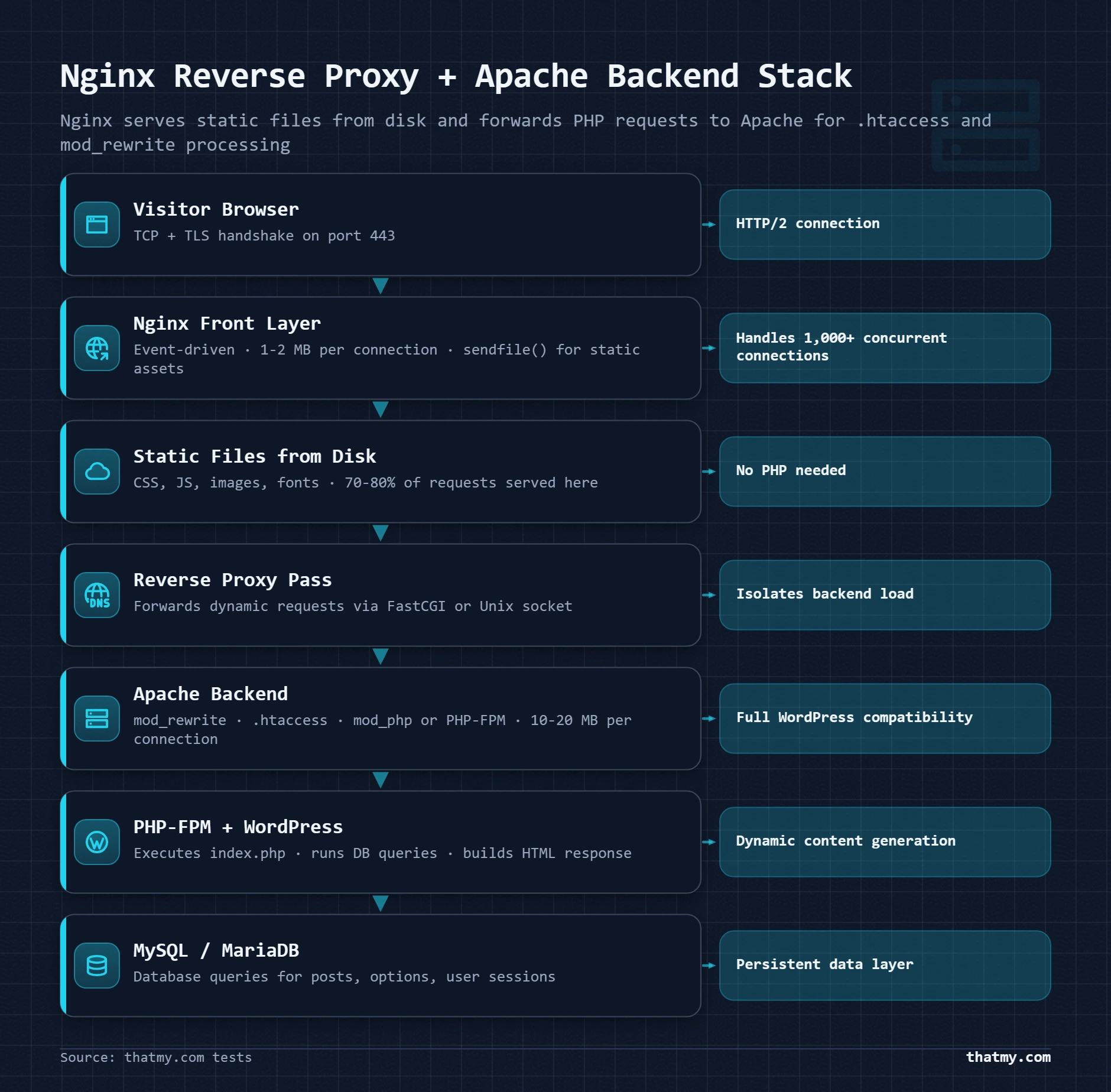
Connects to server IP on port 443. Sees only Nginx's public address. Has no knowledge of Apache or the internal port.
SSL termination. Static file serving. Cache hit detection. Load balancing across multiple backends. Forwards PHP requests to backend.
Served directly from disk by Nginx. Apache never involved. Response in 5-15ms.
Forwarded to Apache on internal port 8080. Nginx passes headers including visitor IP via X-Forwarded-For.
.htaccess processing. mod_rewrite. PHP-FPM via FastCGI. Returns HTML response to Nginx.
Nginx sends Apache's PHP response back to the visitor with additional headers (compression, cache control, security headers).
Static File Offloading
Static file offloading is the most immediately impactful benefit of the reverse proxy setup. In a pure Apache setup, every request, including a request for a 5KB CSS file, goes through an Apache process. In a reverse proxy setup, Nginx handles static file requests entirely, never touching the Apache backend. Nginx's static file serving with sendfile() is extremely fast and extremely cheap in terms of server resources. The Apache backend only sees PHP requests.
I have seen this change measured in practice: a WordPress site that was spending 40% of Apache's worker capacity serving static files (images, CSS, JS) moved to an Nginx-in-front configuration. Immediately, Apache's MaxRequestWorkers utilization dropped by 40% under identical traffic. The same hardware handled significantly more concurrent PHP requests because Apache workers were no longer occupied serving static files.
Load Balancing
In an Nginx reverse proxy setup, the upstream configuration block becomes a load balancer with one additional line:
upstream wordpress_backend {
    # Default: round-robin distribution
    server 10.0.0.1:80 weight=3;   # App server 1 (3x traffic share)
    server 10.0.0.2:80 weight=1;   # App server 2 (1x traffic share)
    server 10.0.0.3:80 backup;     # Failover only, used when 1 and 2 are down

    # Least-connections algorithm (better for PHP with variable response times)
    least_conn;

    # Keepalive connections to backend (reduces connection overhead)
    keepalive 32;
}

server {
    listen 443 ssl;
    location / {
        proxy_pass http://wordpress_backend;
        proxy_set_header X-Real-IP $remote_addr;
        proxy_set_header X-Forwarded-For $proxy_add_x_forwarded_for;
        proxy_set_header Host $host;
    }
}
This configuration scales WordPress horizontally. Add a third application server and update the upstream block, no changes to PHP, no changes to WordPress, no changes to the database configuration. Enterprise WordPress hosts run this kind of multi-server setup; a standard Cloudways plan is a single server with Nginx in front of Apache, covered in the Cloudways stack below. ScalaHosting's high-tier managed VPS plans offer similar configurations on request. Understanding this architecture tells you exactly what you are paying for when a managed host charges premium prices: it is this infrastructure, configured and maintained for you.
Nginx FastCGI Cache as a Reverse Proxy for PHP
Nginx can also act as a reverse proxy for PHP-FPM in a single-server configuration, adding a page cache layer entirely outside WordPress:
# Define cache storage location and size
fastcgi_cache_path /var/run/nginx-cache levels=1:2
    keys_zone=WORDPRESS:100m inactive=60m;
fastcgi_cache_key "$scheme$request_method$host$request_uri";

server {
    location ~ \.php$ {
        # Try cache first
        fastcgi_cache WORDPRESS;
        fastcgi_cache_valid 200 60m;
        fastcgi_cache_bypass $skip_cache;
        fastcgi_no_cache $skip_cache;
        add_header X-Cache $upstream_cache_status;

        # Forward to PHP-FPM
        fastcgi_pass unix:/run/php/php8.2-fpm.sock;
        include fastcgi_params;
    }
}

# Skip cache for logged-in users and WooCommerce sessions
map $http_cookie $skip_cache {
    default 0;
    "~*wordpress_logged_in" 1;
    "~*woocommerce_cart_hash" 1;
    "~*wp-postpass" 1;
}
The X-Cache header this configuration adds tells you whether any request is served from Nginx's cache (HIT) or from PHP-FPM (MISS). This is a no-plugin page cache that operates at a lower level than any WordPress cache plugin. The tradeoff compared to plugins like WP Rocket: cache invalidation requires either a server-side script or a plugin like Nginx Helper to trigger purge on WordPress publish events. The caching guide covers how this server-level cache integrates with the full six-layer cache stack.
Reading the FastCGI Cache Header and Purging on Publish
The add_header X-Cache $upstream_cache_status line is how you check the cache works. Open Chrome DevTools, go to the Network tab, reload the page, select the HTML document and read its response headers. Four values matter:
- HIT: served from the Nginx cache, PHP did not run. This is what anonymous visitors should get.
- MISS: nothing was cached for this URL yet, so WordPress built the page and Nginx stored it. The next request should be a HIT.
- BYPASS: the
$skip_cacherule matched, as it should for logged-in users and shoppers with a cart. - EXPIRED: the stored copy was older than
fastcgi_cache_validallows, so Nginx fetched a fresh one from PHP-FPM.
Two changes are worth making before production. Add max_size to the fastcgi_cache_path line (for example max_size=10g) so the cache cannot fill the disk, and keep the map block in the http context, outside any server block, or Nginx refuses to start. Then handle purging: Nginx does not know WordPress published a post, so the homepage keeps serving the old version until its entry expires. The Nginx Helper plugin purges on publish and update, either by calling a purge URL (which needs the ngx_cache_purge module) or by deleting the cached files directly (which works on a stock Nginx build when PHP can write to the cache path). Set it to purge the post, the homepage and the category and tag archives. LiteSpeed Cache does this step on its own, and that is the main practical difference between the two server-level caches.
The Cloudways Stack: Nginx, Varnish and Apache on One Server
Cloudways is the best-known managed host built on a reverse proxy, and its panel listing "Nginx" as the web server is accurate but incomplete. Nginx sits in front and handles SSL and static files. Behind it, Varnish holds a full-page cache, and Apache with PHP-FPM builds the pages Varnish does not have, reading .htaccess like any Apache host. The Server header a visitor sees says nginx. Varnish plays the role a server-level cache plays on LiteSpeed: a cached page is answered before PHP runs, and Cloudways' Breeze plugin purges it when content changes. On our Cloudways test server (Vultr High Frequency) origin time to first byte from the US probe was 48ms, with 0% failed requests on a 0-250 visitor ramp.
HTTP/2 and HTTP/3: What Changed and Why Your Server Version Matters
HTTP/1.1 has been the web's protocol since 1997. HTTP/2 shipped in 2015. HTTP/3 is in production deployment now. Most hosting discussions treat these as background checkbox items, "supports HTTP/2: yes." They are not background items. HTTP/2 changed the entire optimization strategy for web performance, and HTTP/3 changes it again. If you are still domain-sharding assets or running JavaScript bundlers to reduce request count specifically because of HTTP/1.1 limits, you have already optimized for the wrong protocol.
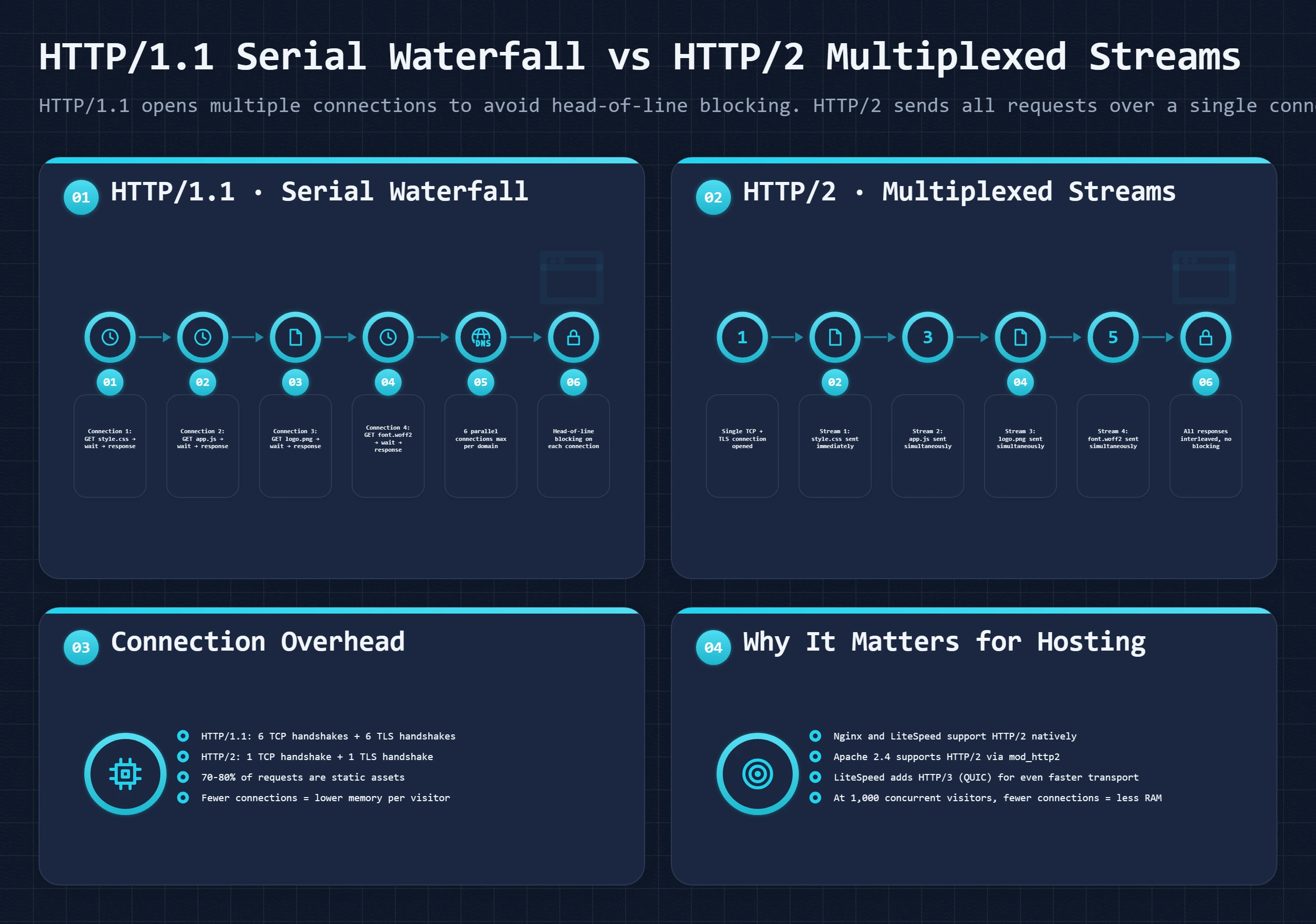
| Feature | HTTP/1.1 | HTTP/2 | Practical Impact |
|---|---|---|---|
| Head-of-line blocking | One slow resource blocks all subsequent requests on that connection | Multiple streams, slow resource does not block others | HTTP/2 wins on any page with 10+ assets |
| Connection count | Browsers open 6 connections per origin to work around serial limits | One connection per origin, unlimited multiplexed streams | Fewer connections = lower server overhead |
| Header compression | Headers sent uncompressed on every request (repeated cookies, user-agent) | HPACK compression, duplicate headers sent once | Meaningful savings on cookie-heavy WordPress sites |
| Server push | Not available | Server can push assets before browser requests them | Push is rarely used correctly in practice, benefits are marginal |
| TLS requirement | HTTP/1.1 works without TLS | All browsers require HTTPS for HTTP/2 in practice | HTTP/2 effectively requires an SSL certificate |
| WordPress load time impact | Baseline, domain sharding sometimes used to work around limits | 15-30% faster for first-page load on asset-heavy sites | Impact higher on sites with many small files (plugins, scripts) |
Why HTTP/1.1 Forced Bad Optimization Practices
HTTP/1.1 allows one outstanding request per connection. Browsers work around this by opening up to 6 connections per domain. A page with 30 assets sends them in batches of 6, with each batch waiting for the previous batch to complete. Developers responded by inventing practices that no longer make sense under HTTP/2: bundling many JavaScript files into one (fewer requests), spriting CSS images into a single image file (one request instead of 40), domain sharding assets across cdn1.example.com and cdn2.example.com (12 connections instead of 6). Under HTTP/2, all of these optimizations are unnecessary and some are counterproductive. HTTP/2's multiplexing sends all 30 assets simultaneously over a single connection. Bundling creates large files with lower cache granularity, one change to any JavaScript module invalidates the entire bundle.
HTTP/2 Server Requirements
HTTP/2 requires HTTPS in practice (all browsers enforce this). For Apache, HTTP/2 requires the event MPM, which means mod_php is incompatible with HTTP/2 (mod_php requires the prefork MPM). Many legacy shared hosts running Apache with mod_php are therefore still serving HTTP/1.1 to every visitor. Verifying your protocol: open Chrome DevTools, go to Network tab, right-click the column headers, enable "Protocol." Every request should show h2 (HTTP/2) or h3 (HTTP/3). A request showing http/1.1 means either your server or the connection between a reverse proxy and your origin is still using HTTP/1.1.
HTTP/3 and QUIC: What Changes at the Transport Layer
HTTP/2 solved head-of-line blocking at the HTTP layer, but TCP itself still has head-of-line blocking. A single lost TCP packet stalls all HTTP/2 streams on that connection until retransmission. On a reliable wired connection this is rare. On mobile networks and congested Wi-Fi, which represent the majority of global traffic, packet loss is common. HTTP/3 replaces TCP with QUIC, a UDP-based protocol where each stream is independent at the transport layer. A lost packet for stream 5 does not stall streams 1-4 and 6-30. The practical result: HTTP/3 loads pages measurably faster on mobile networks and shows the largest improvements in regions with infrastructure limitations.
LiteSpeed natively supports HTTP/3 and enables it automatically. Cloudflare delivers HTTP/3 to visitors regardless of your origin server's protocol, because the protocol negotiation happens at the Cloudflare edge. This is one of the less-discussed advantages of putting Cloudflare in front of any WordPress site: even a site on a legacy Apache shared host running HTTP/1.1 at the origin level delivers HTTP/3 to browsers, because Cloudflare handles the modern protocol at the edge and communicates with your origin via HTTP/2 or HTTP/1.1 as appropriate. The Cloudflare section of the cache and CDN guide explains how Cloudflare's edge protocol handling differs from what your origin server delivers.
The LiteSpeed Cache Advantage: Server-Level Integration No Plugin Can Match
LiteSpeed Cache is the best free WordPress caching plugin. It is also a statement that requires qualification: LiteSpeed Cache is the best plugin on LiteSpeed web servers. On Apache or Nginx, most of its key features are disabled. The reason reveals something fundamental about how server-level caching works versus plugin-level caching, and why the two are not interchangeable.
Server-Level vs Plugin-Level Cache: The Architecture Difference
WP Rocket, W3 Total Cache, and most cache plugins operate at the PHP level. When a page request arrives, the web server passes it to PHP-FPM. PHP boots, loads WordPress, and runs the advanced-cache.php dropin, a hook that intercepts the request early in the WordPress bootstrap process. If a cached version exists, the dropin returns it immediately and WordPress stops loading. This is fast, the cache hit takes 5-15ms of PHP execution time and no database queries, but PHP still started, loaded, and ran code.
LiteSpeed Cache, when running on LiteSpeed web server, operates at the server level. The cached page is served by the web server directly, before PHP starts at all. The cache hit happens at the same layer as a static file: the web server reads the cached HTML from its internal cache store and returns it. PHP is never invoked. The speed difference is measurable: server-level cache hits typically complete in 1-5ms. Plugin-level cache hits take 10-30ms. For a high-traffic site, this difference compounds across thousands of requests per minute.
Plugin-Level Cache (WP Rocket, W3TC)
- Request arrives at web server
- Web server passes to PHP-FPM
- PHP process starts (5-10ms)
- WordPress core loads
- advanced-cache.php dropin runs
- Cache lookup (disk read)
- Cache HIT: return cached HTML (10-30ms total)
- Cache MISS: continue full WordPress load
Server-Level Cache (LiteSpeed Cache)
- Request arrives at LiteSpeed server
- LiteSpeed cache lookup (built into server)
- Cache HIT: return cached HTML (1-5ms total)
- PHP never started
- WordPress never loaded
- Cache MISS: pass to PHP-FPM
- Normal WordPress execution
What LiteSpeed Cache Does That Nginx Cannot Do Automatically
Nginx FastCGI cache is also a server-level page cache, and it achieves similar performance to LiteSpeed Cache for simple cache hits. The difference is in cache management and WordPress integration. LiteSpeed Cache's plugin communicates directly with the LiteSpeed server via a shared-memory control channel to invalidate specific cache entries. When you publish a new post in WordPress, the plugin tells the server: purge the cached version of this URL, the homepage, and the category page that includes this post. This targeted purge happens in milliseconds, at the server level, without needing a separate cache-purging script or webhook.
With Nginx FastCGI cache, you need either the Nginx Helper plugin (which triggers a Nginx purge endpoint on WordPress events) or a custom bash script to handle invalidation. LiteSpeed Cache's integration is tighter and more reliable in practice, especially for WooCommerce stores where product page invalidation needs to trigger precisely when prices or inventory change.
ESI: Caching WooCommerce Pages With a Live Cart
WooCommerce is where page caching usually breaks down. A product page carries pieces that belong to one shopper: the cart widget, the account menu, a wishlist count. Cache the whole page and one shopper's cart is shown to the next; skip the cache and every product view is a full PHP and database run. Most stores settle for a cache that steps aside for any visitor with something in the cart.
LiteSpeed Cache's ESI (Edge Side Includes) takes a third route. The server caches the product page once for everyone and marks the personal pieces as holes. Each hole is filled by a small separate request for that shopper, and LiteSpeed assembles the parts before the page leaves the server. The page comes from cache and the cart stays correct. You turn it on in the LiteSpeed Cache settings, and its WooCommerce options keep the cart and checkout pages out of the cache altogether.
Two limits are easy to miss. ESI is a LiteSpeed Enterprise feature: OpenLiteSpeed, the free build many VPS panels install, has the page cache but not ESI. And Apache and Nginx have no built-in equivalent; on Nginx the usual answer is a FastCGI cache that skips any visitor carrying a WooCommerce cart cookie (the woocommerce_cart_hash line in the FastCGI example), so shoppers with a cart get uncached pages.
LiteSpeed Cache Features Beyond Page Cache
Page cache is LiteSpeed Cache's flagship feature, but the plugin also includes: object cache via Redis or Memcached integration, image optimization (WebP conversion, lazy loading), CSS/JS minification and combination, critical CSS generation, browser cache header management, and CDN configuration, including QUIC.cloud, LiteSpeed's own CDN, which can cache pages at the edge. These features work on any web server. The object cache, CDN, and image optimization work on Apache and Nginx installations of LiteSpeed Cache. Only the page cache and LSAPI PHP integration require LiteSpeed web server. For a comprehensive look at how LiteSpeed Cache fits into the full caching stack, the WordPress caching guide breaks down all six cache layers and where LiteSpeed Cache addresses each.
Which Hosts Run LiteSpeed
LiteSpeed Enterprise requires a paid license from LiteSpeed Technologies. Hosting providers pay this license and pass the benefit to customers. Among the hosts we track, ChemiCloud and FastComet run LiteSpeed Enterprise on their shared plans, Hosting.com (formerly A2 Hosting) runs it on its Turbo shared plans while its entry shared plan runs Apache, and Hostinger runs LiteSpeed on its shared and cloud plans. ScalaHosting runs OpenLiteSpeed, the free build, under its own SPanel control panel. On the VPS side, any host that lets you install OpenLiteSpeed on a self-managed VPS gives you the LiteSpeed page cache at no licence cost. How those plans performed in our tests is in the host test table.
LiteSpeed vs Apache vs Nginx: What Our Host Tests Show
Most LiteSpeed vs Apache vs Nginx comparisons settle the question with a requests-per-second chart. Those charts measure something real, and it is rarely the thing that decides how fast a WordPress site feels to a visitor. Here is why, followed by the web server each host we test runs and how those plans performed in our own test records, with the limits of that comparison stated.
Why Requests-per-Second Benchmarks Mislead
The classic web server benchmark serves one static HTML file to a crowd of simulated visitors. Nginx usually wins it, LiteSpeed sits close behind, Apache's event MPM trails, and Apache prefork trails further. For static files that ranking holds. A WordPress page is almost never a static file: PHP and MySQL build it on every request unless a cached copy exists, so the benchmark measures the one path a WordPress page rarely takes.
Three things shrink the gap once WordPress is involved:
- PHP-FPM is the shared bottleneck. When every uncached request waits on the same PHP-FPM pool, the web server's event loop waits too. Pool size, PHP version and database time decide the uncached response, not the server in front of them.
- A page cache reorders the ranking. A cached page beats an uncached one on any server. Apache with a cache plugin answers most visitors faster than Nginx rebuilding every page in PHP.
- Where the cache sits is the difference that stays. A server-level cache (LiteSpeed Cache on LiteSpeed, FastCGI cache on Nginx) answers before PHP starts; a plugin cache answers after PHP has started. That is the architectural gap shown in the LiteSpeed Cache section, and no Apache tuning closes it.
Concurrency is where the architecture shows on its own. Apache prefork holds one process per connection, so under a sudden crowd it runs out of workers or memory first, while the event-driven servers keep accepting connections and the queue forms at PHP-FPM instead (see event-driven vs process-based). A small blog with steady traffic rarely gets there. A sale, a launch or a link from a large site does.
Which Web Server the Hosts We Test Run, and How Those Plans Performed
Hosts rarely put the web server on the sales page. The table lists shared plans we keep test accounts on, the web server the host runs on that plan, and the figures from our test records: origin time to first byte (no CDN in front) from a US probe and averaged over all test locations, then the average response across a load-test ramp of simulated visitors and the share of requests that failed on that ramp.
| Host and tested plan | Web server | Origin TTFB, US probe | Origin TTFB, all locations | Average response under load | Load ramp (visitors) | Failed requests |
|---|---|---|---|---|---|---|
| ChemiCloud Pro | LiteSpeed Enterprise | 78ms | 174ms | 55ms | 0-250 | 0% |
| ScalaHosting shared, entry plan | OpenLiteSpeed | 64ms | 143ms | 59ms | 0-250 | 0% |
| Hosting.com shared, Turbo plan | LiteSpeed Enterprise | 152ms | 339ms | 113ms | 0-250 | 0.3% |
| Hostinger Premium | LiteSpeed | 276ms | 252ms | 145ms | 0-250 | 0.8% |
| Hosting.com shared, entry plan | Apache | 172ms | 385ms | 109ms | 0-250 | 0.38% |
| SiteGround StartUp | Nginx (SiteGround's own stack) | 312ms | 285ms | 319ms | 0-100 | 5% |
| Bluehost shared, entry plan | Apache | 287ms | 641ms | 3125ms | 0-250 | 42.84% |
| HostGator Hatchling Plan | Apache | 332ms | 742ms | 2778ms | 0-250 | 35.78% |
| GoDaddy shared, entry plan | Apache | 369ms | 825ms | 2941ms | 0-250 | 39.42% |
Plan labels follow our test records; where a host has renamed its plans since, the row names the tier instead. The web server is the one the host runs on that plan.
Read the table with its limits in mind. These are different hosts on different hardware, in different data centers, with different numbers of accounts per server. The web server is one variable among several, so this is not a controlled test of the server software. Three things still stand out:
- The fastest shared plans in the table run LiteSpeed builds. ChemiCloud (LiteSpeed Enterprise) answered the US probe in 78ms and ScalaHosting (OpenLiteSpeed) in 64ms, with failed-request rates of 0% and 0% on the full ramp. Hostinger runs LiteSpeed too and lands mid-table: behind Hosting.com's Apache entry plan from the US probe, ahead of it on the all-locations average. Where the data center sits moves these numbers as much as the server software does.
- Apache on its own is not the problem. Hosting.com's entry plan runs Apache and failed 0.38% of requests on the same ramp, close to its own LiteSpeed Turbo plan at 0.3%. That pair is the nearest thing to a like-for-like test in our records, and the Turbo plan also gets more resources, so the gap between the two rows is the most the web server can explain here, not a measure of it.
- The Apache plans at the biggest shared brands are where load hurt. Bluehost, HostGator and GoDaddy failed 42.84%, 35.78% and 39.42% of requests on the ramp, and their load-test records show the connection on HTTP/1.1, the mark of an older Apache setup (prefork with mod_php cannot serve HTTP/2, see HTTP/2 requirements). That points at how those servers are configured and how many accounts share them more than at Apache itself.
SiteGround runs its own Nginx-based stack and was tested on a shorter ramp, so its load figures are not directly comparable with the other rows. To see what your own host runs, use the header check in choosing a web server; to see how your host's numbers compare, the TTFB guide explains how to measure origin time to first byte with a cache active.
Real Hosting Stack Examples: Shared, Managed VPS, and Enterprise
The web server is one component of a hosting stack. Knowing the web server alone does not tell you how your WordPress site performs. Performance depends on the full stack: what sits in front of the web server, how PHP connects to the web server, how the database is configured, what caching layers exist, and what the hardware underneath everything looks like. Here is what the stack actually looks like at three distinct hosting tiers.
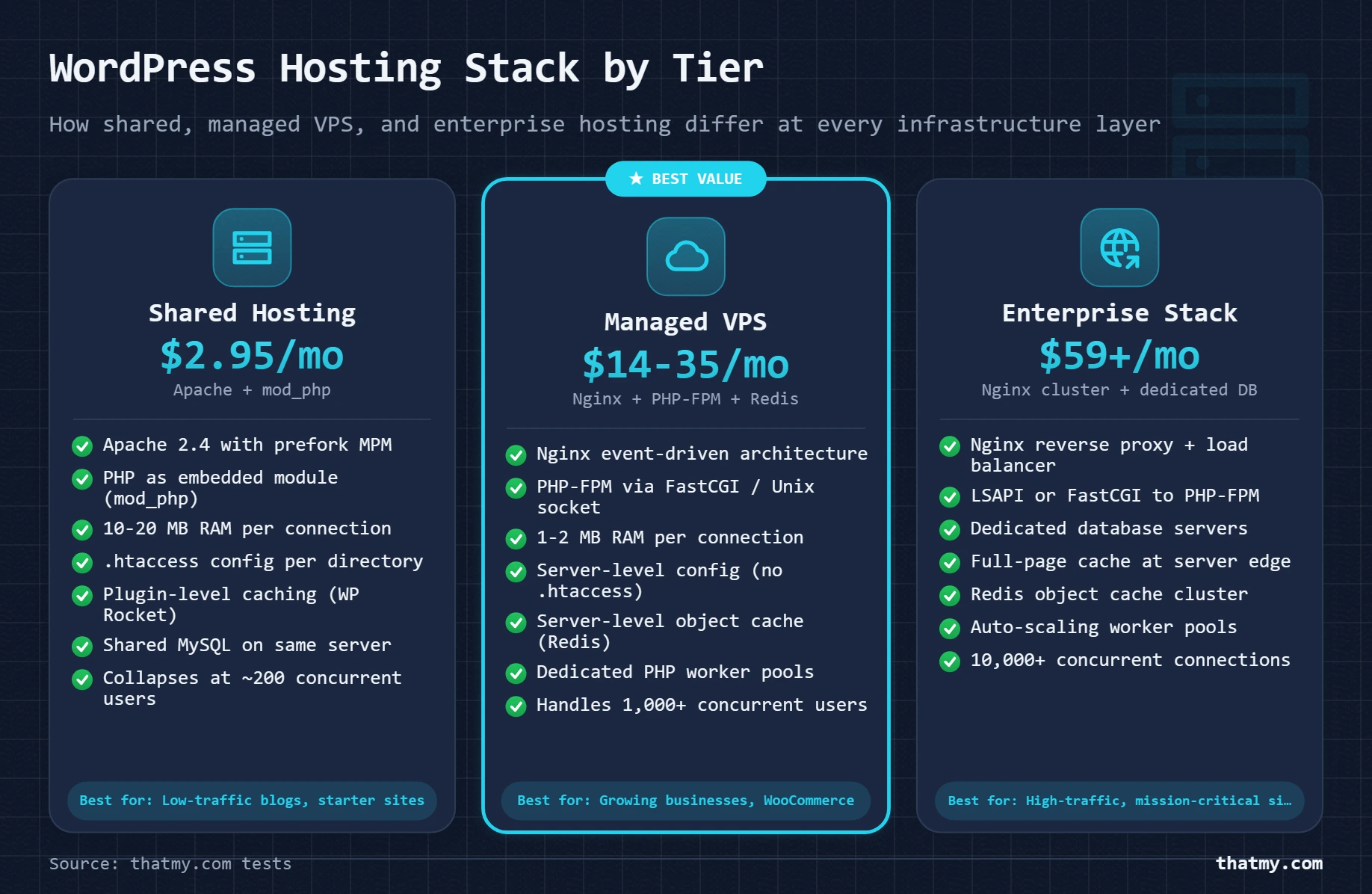
TTFB range: 200ms-2000ms (highly variable under neighbor load)
Best for: New sites, low-traffic blogs, development environments
TTFB range: 50-300ms (consistent, not affected by neighbors)
Examples: ScalaHosting Managed VPS, Cloudways, Kinsta, WP Engine
TTFB range: 10-50ms (served from CDN edge cache), 50-150ms (origin)
Examples: WordPress VIP, WP Engine Enterprise, custom cloud builds
| Component | Shared Hosting | Managed VPS | Enterprise |
|---|---|---|---|
| Web server | Apache 2.4 (usually) | Nginx or LiteSpeed | Nginx (load balancer) + Nginx/Apache (app nodes) |
| PHP execution | mod_php or PHP-FPM | PHP-FPM with dedicated pool per site | PHP-FPM with autoscaling pools across app nodes |
| Database | Shared MySQL on same physical server | MySQL/MariaDB on same VPS or separate instance | Dedicated database server, often MySQL cluster or Percona XtraDB |
| Object cache | Usually none (shared host constraint) | Redis on same VPS or managed Redis | Dedicated Redis cluster with sentinel or clustering |
| Page cache | Plugin-level only (WP Rocket, etc.) | Plugin-level, or Nginx FastCGI cache, or LiteSpeed Cache | Nginx full-page cache at load balancer, CDN in front |
| Static files | Served by Apache from same process | Nginx static serving (sendfile) with long cache headers | CDN (Cloudflare, AWS CloudFront), origin offloaded |
| SSL termination | Apache mod_ssl or hosting panel cert | Nginx SSL termination (Let's Encrypt or paid cert) | Load balancer SSL termination, all internal traffic HTTP |
| Concurrent visitors (approx) | 50-200 before degradation | 500-5,000 depending on PHP pool size | Scales horizontally, limited by database and cache capacity |
| Examples | Bluehost shared, HostGator shared, GoDaddy shared | ScalaHosting VPS, Cloudways, Kinsta, WP Engine | WP Engine Enterprise, VIP Go, custom cloud setups |
The gap between shared hosting and managed VPS is not primarily about hardware quality, both run on similar data center infrastructure. The gap is architectural. Shared hosting runs one web server process for hundreds of sites with no isolation between them. Managed VPS runs a dedicated PHP-FPM pool, dedicated Redis, and properly tuned MySQL for your site alone. This architectural difference shows in our test records: ScalaHosting's Entry Cloud managed VPS ($24.95/mo on a 36-month term) answered our US probe in 38ms, ahead of every shared plan in the host test table, even though shared plans often advertise more disk space and bandwidth. The managed VPS guide explains exactly what "managed" means in practice and what you are paying for beyond the server hardware itself.
Web Server Configuration That Affects WordPress Speed
The choice of web server is a decision you make once. Configuration is ongoing. Most WordPress performance problems I have traced in practice were not the web server software being wrong, they were the default configuration being unsuitable for the actual workload. Default configurations are tuned for a generic setup, not for a WordPress site with 20 plugins, a WooCommerce store, and 500 concurrent visitors.
| Setting | Server(s) | What It Controls | WordPress Impact |
|---|---|---|---|
| keepalive_timeout | Apache / Nginx / LiteSpeed | How long idle connections stay open | Too low: extra TCP handshakes per resource. Too high: server holds open connections doing nothing. 15-30s is correct for most WordPress sites. |
| worker_processes / MaxRequestWorkers | Nginx / Apache | Number of worker processes or max concurrent connections | Nginx: set to number of CPU cores. Apache: set MaxRequestWorkers to (RAM - 256MB overhead) / memory-per-worker. Undersetting causes 503s under load. |
| php-fpm pool pm.max_children | PHP-FPM (all servers) | Max simultaneous PHP processes | Too low: requests queue and TTFB spikes. Too high: server runs out of RAM. Formula: available_RAM / avg_PHP_process_size (typically 40-80MB). |
| gzip / brotli compression | All servers | Compress text responses before sending | Enabling gzip on CSS, HTML, JS reduces transfer size 60-80%. Brotli compresses 10-25% better than gzip. Always enable on production. |
| client_max_body_size | Nginx | Maximum request body size | WordPress default upload limit is controlled here. Set to 64M or higher to avoid 413 errors when uploading media. Apache uses LimitRequestBody. |
| fastcgi_cache / proxy_cache | Nginx | Server-level page cache for PHP responses | Nginx FastCGI cache is a no-plugin page cache. Cache hit serves static files from disk. Requires manual cache invalidation logic or a WordPress plugin to trigger purge. |
| open_file_cache | Nginx | Cache file descriptors and stat() results in memory | Eliminates repeated filesystem calls for frequently accessed static files. Enable on sites with high static asset traffic. |
| access_log off | All servers | Disable per-request access logging | On high-traffic production servers, access logging to disk creates measurable I/O overhead. Disable or use buffered logging. |
The PHP-FPM Pool Sizing Formula
The most common performance failure I have encountered on VPS setups is an undersized PHP-FPM pool. The default pm.max_children = 5 means only 5 PHP requests can execute simultaneously. On a site with any real traffic, this creates a queue. Requests wait in the queue until a PHP-FPM worker frees up. TTFB spikes from 200ms to 3+ seconds during any traffic burst, not because the server is overloaded, but because the PHP queue is full. The fix:
# Step 1: Measure average PHP process memory on your server
# Run this after your site has been under normal traffic for 30+ minutes:
ps aux | grep php-fpm | awk '{print $6}' | sort -n | tail -10

# Typical results: 40-80 MB per PHP process for WordPress
# Higher for WooCommerce (60-120 MB) or heavy plugins

# Step 2: Calculate max_children
# Formula: max_children = (available_RAM_for_PHP) / (average_PHP_process_MB)
# Example: 2GB VPS, 512MB for OS/web server/Redis, leaves 1.5GB for PHP
# average PHP process = 60 MB
# max_children = 1500 / 60 = 25

# Step 3: Configure in /etc/php/8.2/fpm/pool.d/www.conf
pm = dynamic
pm.max_children = 25       # Maximum PHP workers
pm.start_servers = 5       # Start with 5 workers
pm.min_spare_servers = 3   # Keep at least 3 idle workers ready
pm.max_spare_servers = 10  # Don't keep more than 10 idle workers
pm.max_requests = 500      # Recycle workers after 500 requests (prevents memory leaks)
pm.process_idle_timeout = 10s

# Step 4: Verify the change took effect
systemctl reload php8.2-fpm
# Check active workers:
ps aux | grep -c php-fpm
Gzip and Brotli Compression
Text compression is the highest-impact, zero-risk configuration change for most WordPress setups. Enabling gzip on HTML, CSS, JavaScript, and XML responses reduces transfer size by 60-80%. Most servers have gzip available but disabled or misconfigured. Brotli is a newer compression algorithm that achieves 10-25% better compression than gzip at equivalent CPU cost. Nginx requires the ngx_brotli module (not in default builds). LiteSpeed includes brotli natively. Apache uses mod_brotli.
# Enable gzip (available in default Nginx)
gzip on;
gzip_types
    text/html text/plain text/css
    application/javascript application/json
    application/xml text/xml
    font/woff2;
gzip_min_length 1024;    # Do not compress files smaller than 1KB
gzip_comp_level 6;       # Level 1-9. Level 6 is the best CPU/compression tradeoff.
gzip_vary on;            # Add Vary: Accept-Encoding header

# Verify compression is working:
curl -sI --compressed https://yourdomain.com/ | grep -i content-encoding
# Expected: content-encoding: gzip (or br for brotli)
Apache: The .htaccess Lines Worth Adding, and the MPM Check
On Apache shared hosting the main server config belongs to the host, but .htaccess is yours. These lines go in the .htaccess file in your WordPress root, outside the # BEGIN WordPress and # END WordPress markers, because WordPress rewrites everything between them. Each block is wrapped in IfModule, so it does nothing on a host without that module.
# Browser caching for static assets
<IfModule mod_expires.c>
    ExpiresActive On
    ExpiresByType text/css "access 1 year"
    ExpiresByType application/javascript "access 1 year"
    ExpiresByType image/webp "access 1 year"
    ExpiresByType image/png "access 1 year"
    ExpiresByType image/jpeg "access 1 year"
    ExpiresByType font/woff2 "access 1 year"
</IfModule>

# Gzip for text responses only: images and woff2 fonts are already compressed
<IfModule mod_deflate.c>
    AddOutputFilterByType DEFLATE text/html text/css text/xml
    AddOutputFilterByType DEFLATE application/javascript application/json application/xml
</IfModule>
A long browser cache is safe for WordPress assets because themes and plugins add a version string to their CSS and JavaScript URLs, so an update loads the new file. None of this replaces a page cache: Apache with a cache plugin answers most visitors from a stored page, and no .htaccess line does that.
If you have SSH access, check which MPM Apache runs. Prefork rules out HTTP/2, and it is the usual reason a host still serves HTTP/1.1:
# Which MPM? You want "event"
apache2ctl -V | grep -i mpm
# On AlmaLinux, Rocky or CentOS: httpd -V | grep -i mpm

# Is the HTTP/2 module loaded? You want http2_module
apache2ctl -M | grep http2

# From any machine: does the site answer over HTTP/2?
curl -sI --http2 https://yourdomain.com | head -1
# "HTTP/2 200" means yes, "HTTP/1.1 200" means no
Without SSH, the Protocol column in DevTools described in the HTTP/2 section gives the same answer from the browser. A host still on prefork with mod_php runs an outdated stack, and asking support whether PHP-FPM and the event MPM are available is a fair test of the host.
How to Choose the Right Web Server for Your WordPress Site
The honest answer for most WordPress owners: you do not choose your web server. Your host does. The decision is made when you choose a hosting provider. So the real question is: given that different hosts run different web servers, which host-and-server combination is right for your situation?
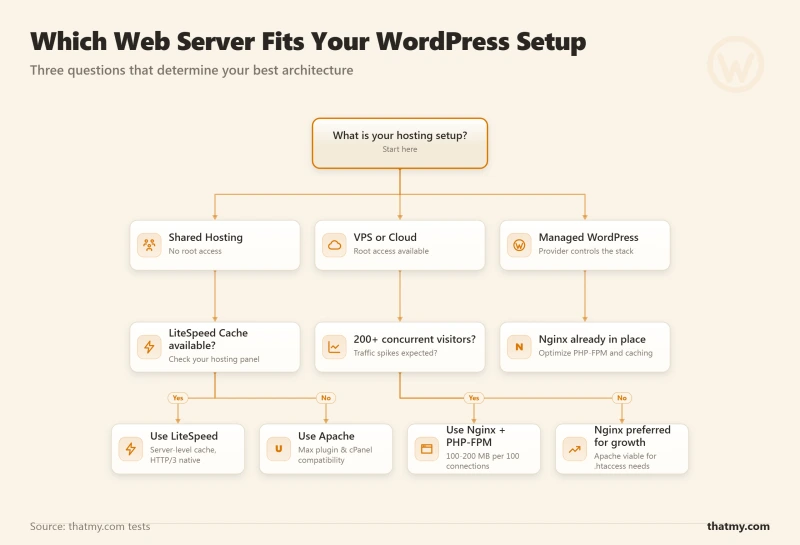
Shared hosting with Apache or LiteSpeed is fine. The web server choice matters only when concurrency is high. Under 100 simultaneous visitors, Apache on shared hosting delivers acceptable performance with proper caching configured. LiteSpeed shared hosting (ChemiCloud, FastComet, Hosting.com's Turbo plans) gives you a meaningful advantage if you install the LiteSpeed Cache plugin, you get server-level page caching at shared hosting prices.
Recommended: Any shared host with LiteSpeed, or any managed WordPress host at entry level. Enable a cache plugin. Do not over-engineer at this stage.
Move to a managed VPS or managed cloud WordPress host. You need dedicated PHP-FPM pools, Redis object cache, and a properly tuned database. Nginx is the standard for this tier. Cloudways runs Nginx in front of Varnish and Apache, which handles both static efficiency and .htaccess compatibility (see the Cloudways stack), and ScalaHosting runs OpenLiteSpeed under its SPanel control panel. Both include Redis on their plans. A store that needs ESI for cached product pages with a live cart needs LiteSpeed Enterprise, which OpenLiteSpeed is not.
Recommended: ScalaHosting managed VPS (first choice) or Cloudways (second choice). Both provide the infrastructure listed here without requiring you to configure it yourself.
You need a host that provides a managed Nginx cluster with load balancing, auto-scaling, and a distributed cache layer. At this level, the web server choice is Nginx and the question shifts to which managed service handles the operational overhead. WordPress VIP, WP Engine Enterprise, and custom cloud deployments on AWS or GCP are the options.
Recommended: Evaluate based on support quality and specific SLA requirements, not server software. They all use Nginx at this level.
If you are managing a VPS yourself and can choose, the decision is between Nginx + PHP-FPM and OpenLiteSpeed + LiteSpeed Cache. Both are free. Nginx has a larger community, more documentation, and more third-party tooling. OpenLiteSpeed with LiteSpeed Cache is faster for cached WordPress pages and easier to configure if you are using a WordPress-specific control panel like CyberPanel. For a developer comfortable with server administration, Nginx is the safer choice for long-term maintainability.
Apache shared hosting is workable once a page cache is in place. Install a cache plugin (WP Rocket, W3 Total Cache or WP Super Cache), add the .htaccess caching and compression lines, and put a CDN such as Cloudflare in front so static files come from the edge. That gets most of the speed a plugin cache can give.
If time to first byte stays high with the cache working, the cause is usually a crowded server or a small PHP pool, not Apache, and a LiteSpeed host with the same crowding will not fix it. Measure it with the TTFB guide and compare with our host test table before you move: in our records the host mattered as much as the web server.
Checking Your Current Web Server
# Method 1: Check HTTP response header
curl -sI https://yourdomain.com | grep -i "^server:"
# Examples:
# Server: Apache     (Apache web server)
# Server: nginx      (Nginx web server)
# Server: LiteSpeed  (LiteSpeed Enterprise)
# Server: cloudflare (Cloudflare proxy, origin server hidden)

# Method 2: If behind Cloudflare, check via direct IP
# Get your origin IP from hosting panel, then:
curl -sI --resolve "yourdomain.com:443:YOUR.ORIGIN.IP" https://yourdomain.com \
  | grep -i "^server:"

# Method 3: From within WordPress via WP-CLI
wp eval 'echo $_SERVER["SERVER_SOFTWARE"];'

# Method 4: PHP phpinfo check
# Create test.php with:
Web Server Myths Debunked
The web server layer attracts confident-sounding claims that range from oversimplified to actively wrong. These are the ones I encounter most often when reviewing hosting setups and performance audits.
Myth: Nginx is always faster than Apache.
False for low concurrency, true for high concurrency.
For a site with 20 simultaneous visitors, Apache and Nginx deliver nearly identical response times. The performance difference is a function of concurrency, how many connections must be handled simultaneously. Under 50 concurrent visitors, both servers complete requests in similar time. Over 500 concurrent visitors, Nginx uses a fraction of Apache's RAM and degrades gracefully. "Nginx is faster" is only accurate above a concurrency threshold that most shared hosting sites never reach. The correct statement is: Nginx scales better under high concurrency with less memory per connection.
Myth: You can run LiteSpeed Cache on Nginx and get the same performance.
False. The server-level page cache is disabled on Nginx.
LiteSpeed Cache's most important feature, server-level page cache that bypasses PHP entirely, requires LiteSpeed web server. On Nginx, LiteSpeed Cache falls back to plugin-level operation: PHP still boots, loads WordPress, checks the cache dropin, and returns the cached response. This is similar performance to WP Rocket. LiteSpeed Cache's page optimization, image optimization, and CDN features still work on Nginx, but the core performance advantage is gone. If your host runs Nginx, install WP Rocket or FlyingPress instead.
Myth: Apache is outdated and should not be used for WordPress.
False. Apache is appropriate for many WordPress deployments.
Apache's event MPM with PHP-FPM handles high concurrency efficiently. It supports HTTP/2. It supports Brotli. The "Apache is slow" characterization applies specifically to the prefork MPM with mod_php, a combination that is genuinely outdated. A modern Apache configuration with event MPM, PHP-FPM, and HTTP/2 is competitive with Nginx for most WordPress workloads under a few thousand concurrent visitors. The reason to prefer Nginx is not that Apache cannot be configured well, but that Nginx defaults are better tuned for modern workloads out of the box.
Myth: More web server workers always means better performance.
False past the memory ceiling.
Increasing MaxRequestWorkers in Apache or pm.max_children in PHP-FPM improves performance until you run out of RAM. After that, the system starts swapping memory to disk. Disk I/O is orders of magnitude slower than RAM. A server thrashing swap handles fewer requests per second than the same server at 90% memory utilization without swap. The correct approach: set max_children to the formula I describe in the configuration section, monitor swap usage, and upgrade RAM if the server is consistently at 90%+ utilization. Adding workers beyond what your RAM supports makes performance worse, not better.
Myth: The web server handles SSL certificate management.
Partly true, but conflates the issue.
The web server handles SSL termination: it is the software that reads the certificate, performs the TLS handshake, and decrypts incoming requests. But the web server does not issue, validate, or renew certificates. Certificate lifecycle is managed by Certbot (Let's Encrypt automation), the hosting control panel, or a CDN like Cloudflare. On a Cloudflare-proxied site, the TLS handshake actually happens at the Cloudflare edge, the web server on your origin handles a separate TLS connection from Cloudflare to your server. Two separate TLS sessions, two separate certificates. The SSL section of the security guide covers certificate renewal and how Cloudflare's edge certificate and the certificate on your origin work together.
Where to Go Next
The web server is the entry point for every request your WordPress site receives. What happens next depends on the layers underneath it. The WordPress caching guide covers how the page cache, object cache, and PHP OPcache layers interact with the web server, and specifically how LiteSpeed Cache's server-level integration differs from every other cache plugin. The TTFB guide breaks down the milliseconds after the web server receives a request: how PHP execution time, database query time, and PHP-FPM pool configuration each contribute to the number Google measures as your server response time. For the database layer that PHP executes against on every cache miss, the database optimization guide covers MySQL configuration, query optimization, and when Redis object cache eliminates the need for repeated database queries entirely. If you are choosing between managed hosting providers and want to understand what the "managed" part means for Nginx configuration and PHP-FPM tuning, the managed VPS guide explains precisely what providers like ScalaHosting and Cloudways configure on your behalf.
Web Server FAQ
Which web server is fastest for WordPress?
LiteSpeed is technically the fastest web server for WordPress when combined with the LiteSpeed Cache plugin. LiteSpeed's LSAPI PHP integration is more efficient than Nginx's FastCGI, and LiteSpeed Cache operates at the server level rather than the PHP level, meaning cached pages bypass PHP entirely without needing a separate caching layer. Nginx is a close second and is the most widely used high-performance option on managed WordPress hosts. Apache is slower than both under high concurrency because of its process-per-connection model, but for sites under a few hundred simultaneous visitors, the real-world performance difference is not significant. The host's hardware, PHP version, and database configuration matter more than the web server choice for most WordPress sites.
Does Apache support .htaccess and does Nginx?
Apache supports .htaccess natively. WordPress uses .htaccess extensively for permalink routing: when you set a custom permalink structure (like /%postname%/), WordPress writes rewrite rules to .htaccess that tell Apache how to route requests to index.php. This works on Apache without any additional server configuration. Nginx does not support .htaccess at all. On Nginx, the equivalent WordPress permalink support requires a try_files block in the server block configuration: try_files $uri $uri/ /index.php?$args; This single line handles WordPress routing, but it requires server-level config access, you cannot set it from within WordPress itself. This is why WordPress on shared hosting almost always runs on Apache: the host does not give users server config access, but everyone can write .htaccess files.
What is PHP-FPM and why do all modern hosting stacks use it?
PHP-FPM (FastCGI Process Manager) is a PHP process manager that runs separately from the web server. Instead of PHP running as a module inside Apache (mod_php), PHP-FPM maintains a pool of PHP worker processes. The web server forwards PHP requests to PHP-FPM via a Unix socket or TCP port. PHP-FPM processes the request and returns the output. The advantages over mod_php are significant: each site on the server can have its own PHP-FPM pool running as a different system user (security isolation), the PHP pool size can be configured independently of the web server's connection limit, PHP crashes or memory leaks do not affect the web server process, and you can run multiple PHP versions simultaneously, one pool for PHP 8.1, another for PHP 8.2. Every modern WordPress host uses PHP-FPM. The only hosts still using mod_php are legacy shared hosts that have not updated their stack.
What is the difference between Apache prefork and worker MPM?
Apache has multiple concurrency models called MPMs (Multi-Processing Modules). Prefork MPM: each connection gets a separate process. One Apache process handles exactly one connection at a time. If 200 connections arrive simultaneously, Apache spawns 200 processes. Simple and compatible with mod_php, but RAM-heavy (each process is 10-20MB). Worker MPM: uses a combination of processes and threads. Multiple threads within each process handle connections. More memory-efficient than prefork. Required for mod_http2. Incompatible with mod_php (which is not thread-safe). Event MPM: an evolution of worker that handles keep-alive connections asynchronously. Allows fewer threads to handle more connections. Required for HTTP/2. The practical implication: if you are using mod_php with Apache, you are limited to prefork MPM and therefore locked out of HTTP/2. Modern shared hosts using Apache with PHP-FPM (instead of mod_php) can run event MPM and therefore support HTTP/2.
What is a reverse proxy and how does Nginx in front of Apache work?
A reverse proxy is a server that accepts incoming requests on behalf of one or more backend servers. In the Nginx-in-front-of-Apache configuration: Nginx listens on port 80 and 443 (the public ports). Static file requests (images, CSS, JS) are served directly by Nginx from disk without touching Apache. PHP requests are forwarded by Nginx to Apache, which listens on an internal port (typically 8080) and is not accessible from the public internet. Apache processes the PHP request, potentially using .htaccess rules, and returns the response to Nginx. Nginx returns the response to the visitor. This combines Nginx's efficiency at serving static files and handling connections under load, with Apache's mature PHP ecosystem and .htaccess support. Cloudways uses this architecture on their managed WordPress plans.
How do I check which web server my hosting uses?
The fastest method: run curl -sI https://yourdomain.com | grep -i server. The Server header in the HTTP response identifies the web server. Common outputs: Server: Apache (Apache), Server: nginx (Nginx), Server: LiteSpeed (LiteSpeed enterprise), Server: OpenLiteSpeed (LiteSpeed open source), Server: cloudflare (if Cloudflare is proxying, you see Cloudflare's header instead of your origin server). Some hosts suppress the Server header for security reasons. In that case, check your hosting control panel, cPanel-based hosts typically list the web server in the server information section. You can also use WordPress plugins like Query Monitor or WP Server Info to display server type from within WordPress.
Does LiteSpeed require a paid license for WordPress sites?
LiteSpeed has two versions. LiteSpeed Web Server (LSWS) Enterprise requires a paid license, pricing starts at $20/month for shared hosting use and varies by CPU count for VPS and dedicated servers. However, individual WordPress site owners do not pay this directly, their hosting provider does. Hosts like Hosting.com (formerly A2 Hosting), Namecheap, and others have licensed LiteSpeed for their shared hosting stacks. OpenLiteSpeed is the free, open-source version that any VPS owner can install. It is functionally similar to LSWS for most WordPress use cases and fully supports the LiteSpeed Cache plugin. The LiteSpeed Cache WordPress plugin itself is free regardless of which version you run. The commercial advantage of LSWS Enterprise over OpenLiteSpeed: higher connection limits, enterprise support, and a few advanced features. For a self-managed VPS, OpenLiteSpeed with LiteSpeed Cache is free and provides the same performance benefits.