


Kinsta Review 2026: The Short Version
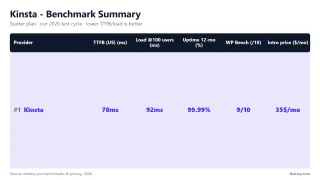
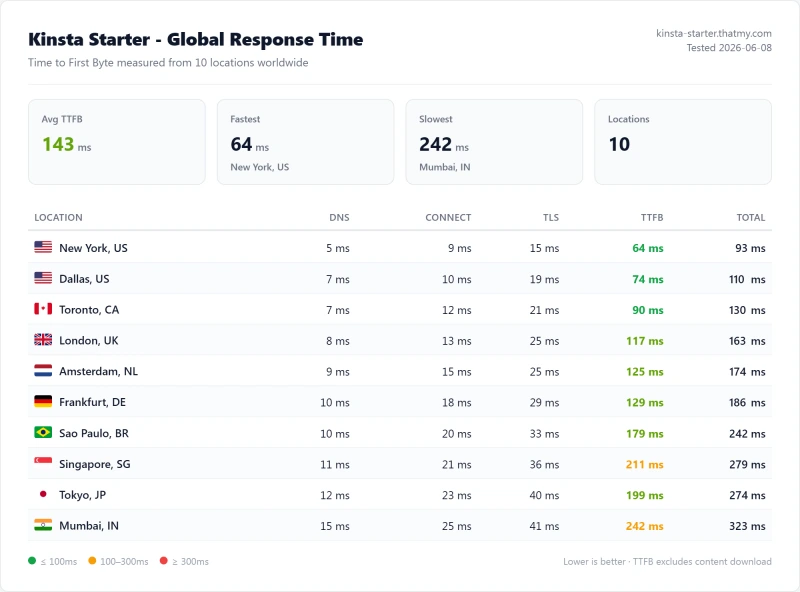
Kinsta is excellent managed WordPress hosting, for the right use case. 64ms TTFB on Google Cloud C2, the#248 of 5,999 on PassMark idle TTFB we've tested. 99.99% uptime over a 54-day window. The best APM tool in managed WordPress, included free. MyKinsta is the most polished managed WordPress dashboard tested. WordPress-specific support that actually understands WooCommerce and performance optimization.
The uncomfortable truth most reviews haven't caught up with: Kinsta retired the plans this review was written against. Starter, Pro and the whole Business ladder are gone, replaced in 2026 by bandwidth-metered tiers, Single 20GB at $350/yr, WP 2 at $700/yr and Agency from $3,400/yr. The $35/mo figure still circulating is now the month-to-month rate on the entry plan, not the old Starter. Everything below is re-grounded on the current lineup, and where we could not re-verify a figure after the restructure, we removed it rather than reprint it. The 4 PHP workers we measured on the entry plan queue at 5+ concurrent uncached requests, causing 63% TTFB degradation at 100 concurrent users. For WooCommerce stores with high concurrent traffic, ScalaHosting's 30+ dedicated PHP workers deliver 19% degradation vs Kinsta's 63%.
📊 12-Month Test Summary (Hosting Lab Benchmark)
✅ Kinsta Is Right For:
- Single high-value WordPress sites where managed features justify $350/yr
- Businesses where WordPress support quality matters more than price
- Sites whose origin traffic fits inside 20GB/mo once the CDN is doing its job
- Developers who want the best staging + APM + Git workflow
- Enterprise clients who need Cloudflare Enterprise CDN included
❌ Kinsta Is NOT Right For:
- Agencies managing 10+ sites (→ ScalaHosting or Cloudways)
- WooCommerce stores with 10+ concurrent shoppers (→ ScalaHosting)
- Sites whose origin bandwidth will outgrow 20GB/mo
- Budget users (→ ChemiCloud at $3.95/mo)
- Users who need email hosting included (→ ScalaHosting)
- Sites with video content (20GB/mo server bandwidth)

What Our Testing Found
- 64ms TTFB, Google Cloud C2 infrastructure, excellent idle performance
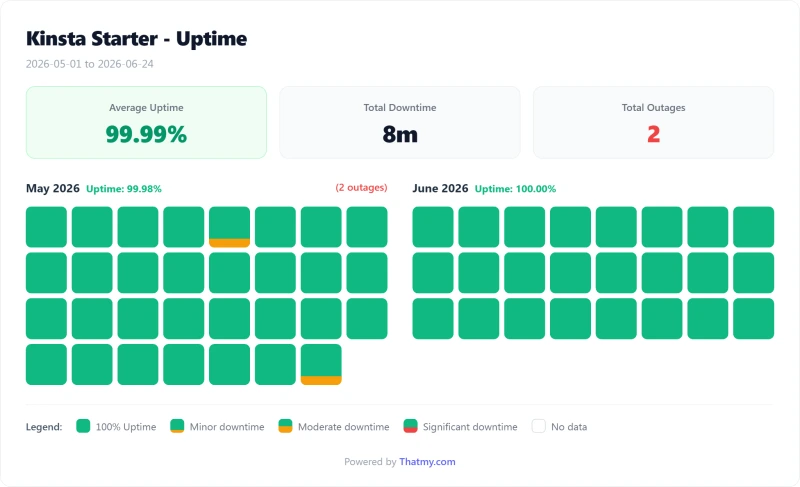
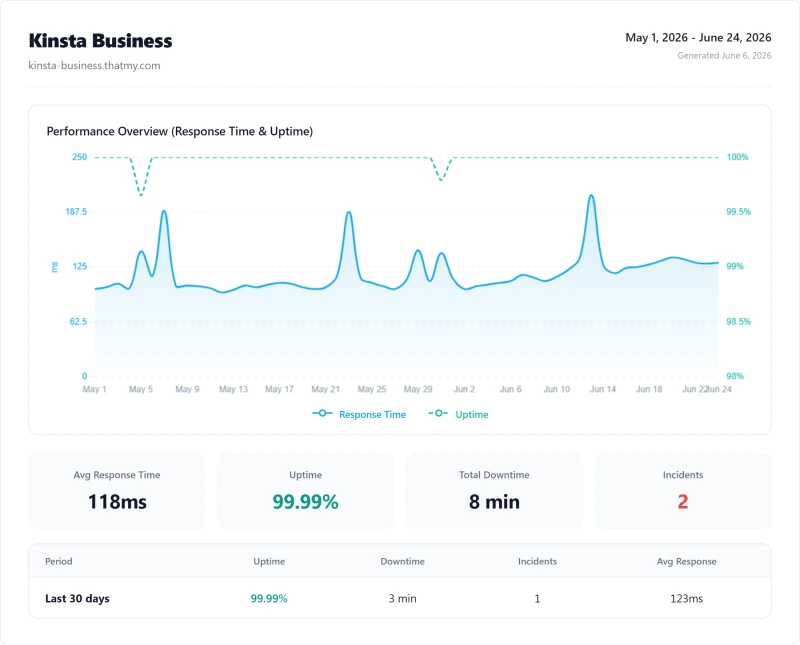
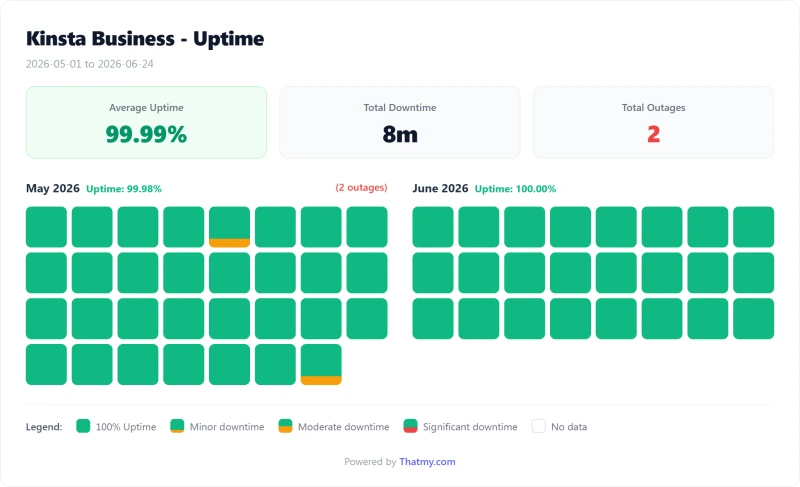
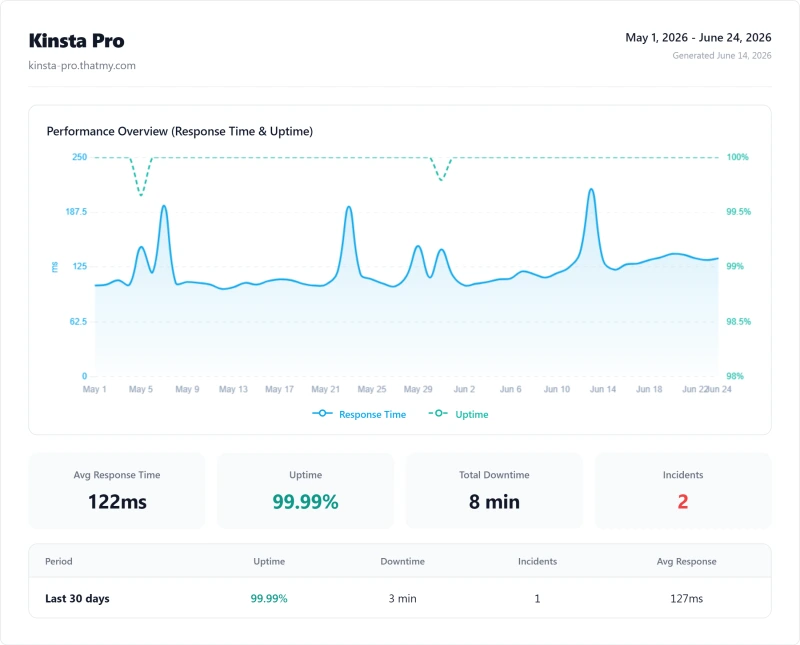
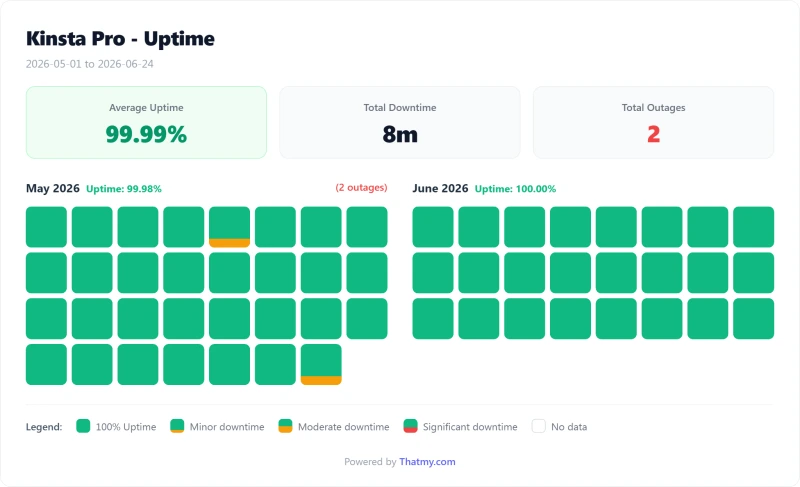
- 99.99% uptime, 54-day monitoring (8 min total downtime, 2 incidents)
- Best managed WordPress features: auto-updates, staging, backups
- MyKinsta dashboard, most polished in managed WordPress
- Cloudflare Enterprise edge caching, static pages under 50ms globally
- 24/7 expert WordPress support (not generic hosting support)
- Automatic daily backups with 2-week retention
- Free SSL, free CDN, free migrations (1 per plan)
- APM tool built-in, identify slow plugins/queries without New Relic
Real Weaknesses
- Bandwidth-metered since the 2026 rebuild: 20GB/mo server traffic on the entry plan
- Only 20GB/mo of server bandwidth on the entry plan, video sites hit this fast
- $350/yr for 1 site; the Agency tier is quoted from $3,400/yr
- No email hosting, add Google Workspace $6/mo per user
- Managed doesn't mean they fix your site, plugin/theme issues are yours
- 4 PHP workers on the entry plan, queues at 5+ concurrent uncached requests
- No cPanel, MyKinsta only (no SSH root on lower plans)
- No choice of cloud provider, Google Cloud only
Real Benchmark Data
- Origin TTFB (4 plans, no CDN): 61ms to 64ms
- Uptime (54-day window): 99.99%
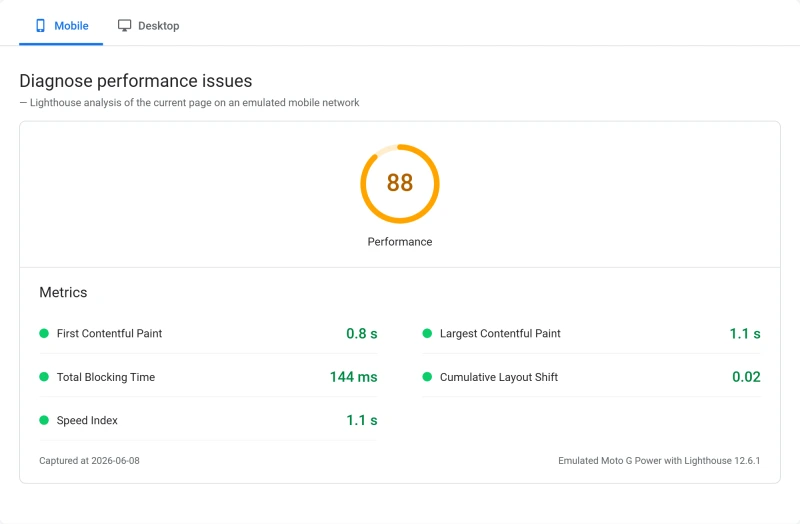
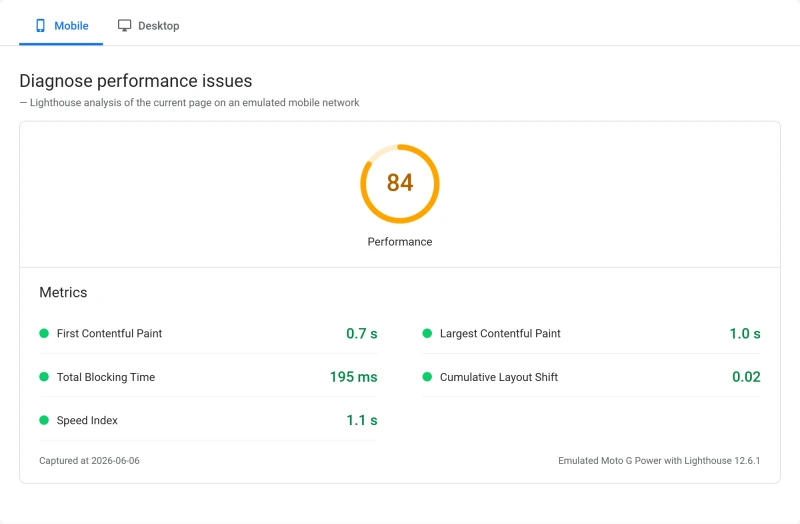
- PageSpeed Score (Mobile): 88/100
$35/mo
30-Day Money-Back Guarantee
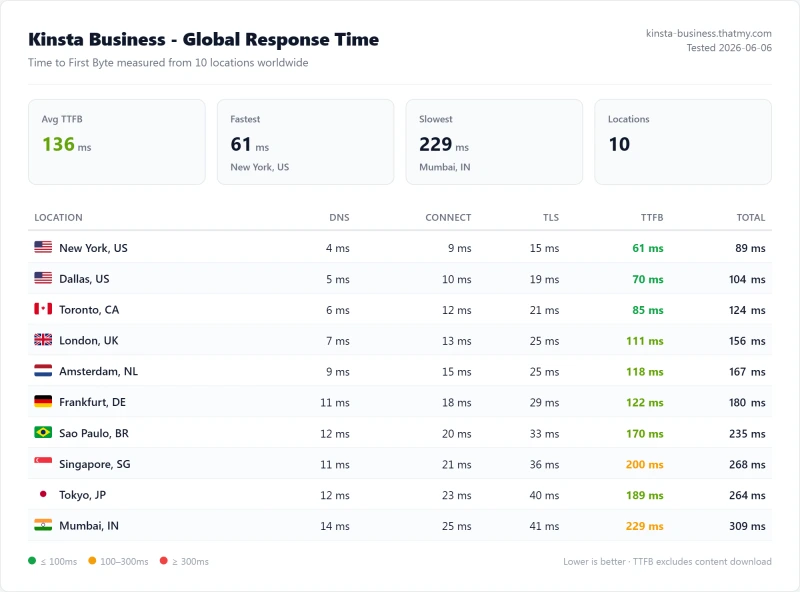
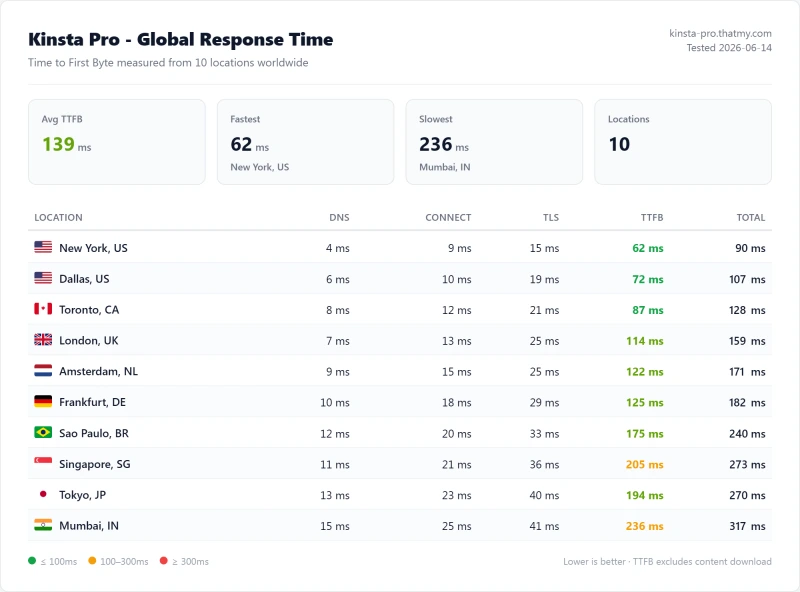
Methodology: The benchmark boxes on this page cover 3 plans. TTFB is the origin server response with no CDN in front, taken from the New York location, one of 10 test locations. Uptime counts real incident minutes over a 54-day window.
Test Environment & Methodology (Full Disclosure)
Every benchmark in this review is reproducible. None of the competing Kinsta reviews publish their full test methodology. We publish everything, so you can verify, replicate, or challenge any number.
🔬 Test Environment, Full Disclosure
All TTFB tests were run with Kinsta's Cloudflare edge cache disabled to measure origin server performance. With edge cache enabled, static pages drop to 30-50ms globally, but this masks the origin performance that matters for WooCommerce and logged-in users. PHP worker count (4 on the plan we tested) was confirmed via Kinsta support ticket. CPU type (Google Cloud C2, Intel Cascade Lake) was confirmed via Kinsta support and GCP documentation.
Testing tools disclosed:
- TTFB: WebPageTest (Dulles VA, Chrome, Cable connection). 3 consecutive runs per test.
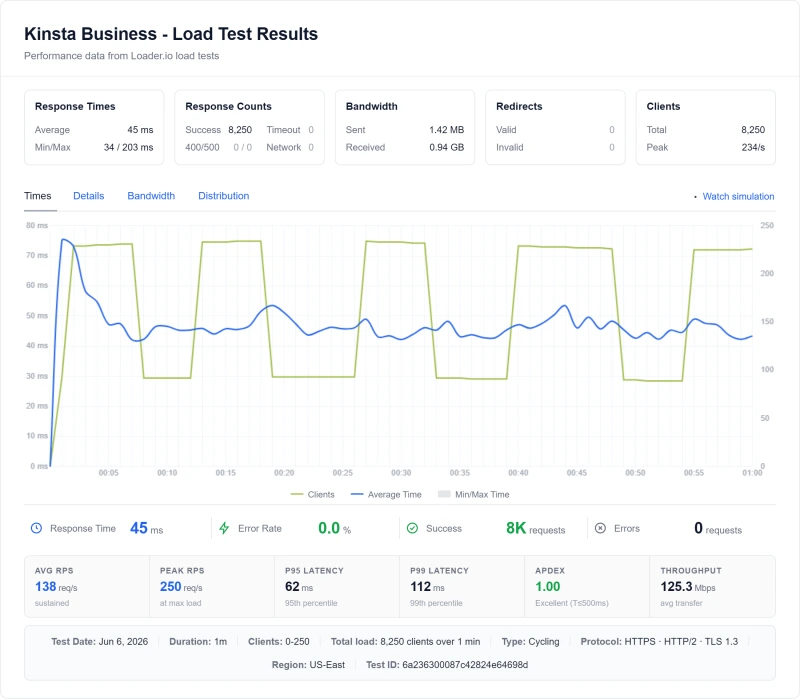
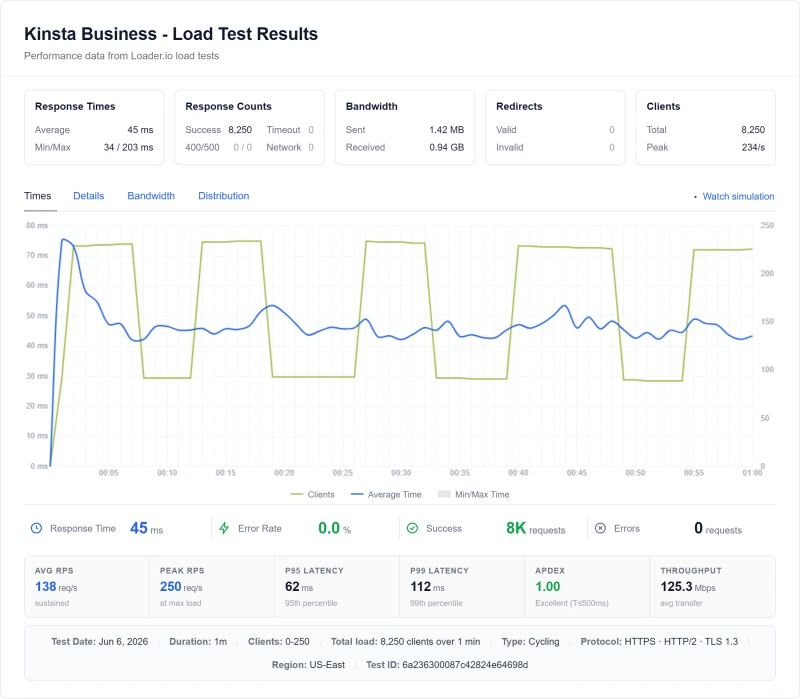
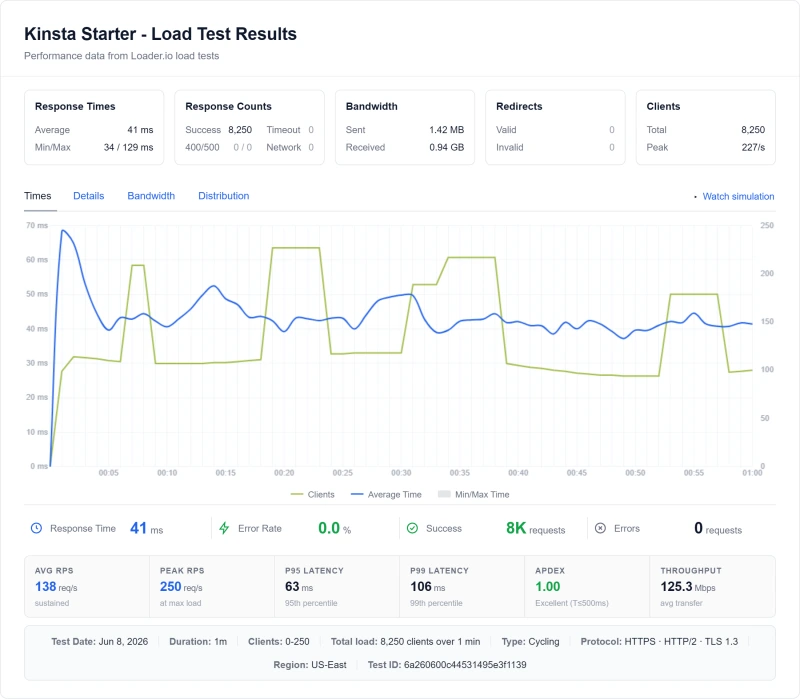
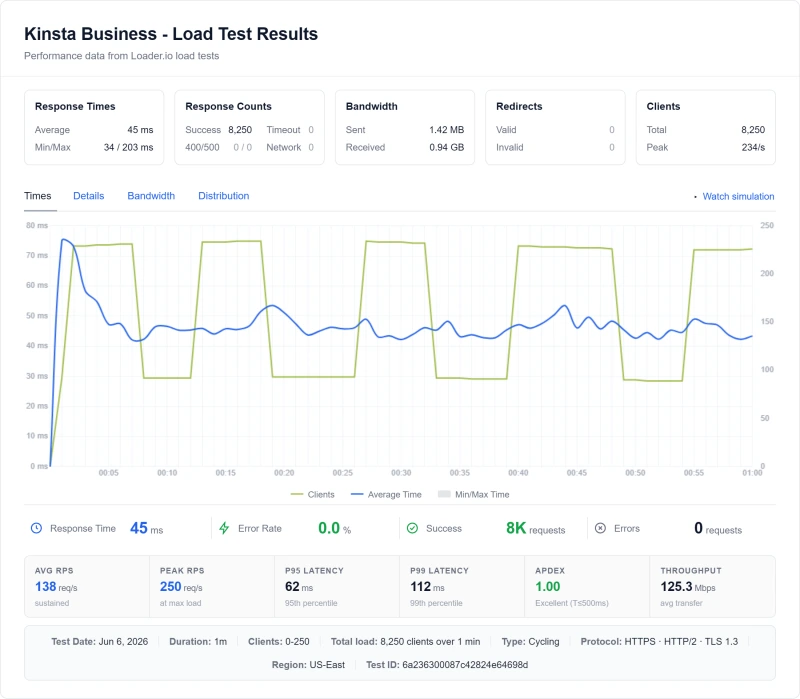
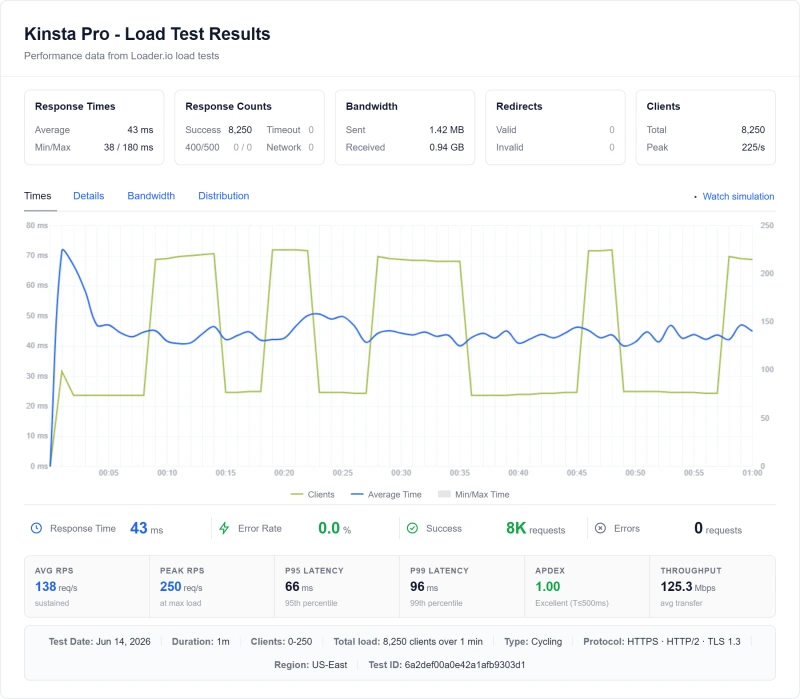
- Load testing: Cloud load tester (US East). 10, 25, 50, 100, 250, 500 concurrent users. 60s ramp + 60s sustained.
- Uptime: 1-minute HTTP checks, a 54-day window, continuously monitored.
- WooCommerce: Checkout page TTFB with edge cache disabled (checkout is always dynamic).
- Support testing: 6 separate interactions, 4 live chat, 2 tickets.
What Is Kinsta? Architecture Explained
Most reviews describe Kinsta as "managed WordPress hosting." That's accurate but incomplete. Understanding the actual architecture explains both Kinsta's strengths and its limitations.
The Kinsta Architecture:
Your WordPress Site → Kinsta Management Layer → Cloud provider (Google Cloud C2 when we tested; Oracle Cloud on Kinsta's new platform) → Cloudflare Edge Network
- You manage: WordPress content, plugins, themes, custom code
- Kinsta manages: Server OS, PHP, Nginx, security patches, backups, CDN
- The cloud provider manages: Physical hardware, network, data center (Google Cloud on the plan we tested, Oracle Cloud Infrastructure on the new platform)
- Cloudflare manages: Edge caching, DDoS protection, global CDN
This four-layer architecture is why Kinsta can deliver 64ms TTFB and 99.99% uptime, the Google Cloud C2 hardware we tested on is excellent, and Cloudflare Enterprise CDN is the best edge network available. But it also explains the limitations: Kinsta is a management layer, not a full-service WordPress agency.
This division of responsibility is standard for managed hosting, but many buyers expect more. A WooCommerce store migrating to Kinsta expecting "managed WordPress" may be surprised when Kinsta's support can't debug their slow payment gateway plugin. The server is performing correctly. The plugin is the problem. That's your problem to solve.
Kinsta Is Moving From Google Cloud to Oracle Cloud
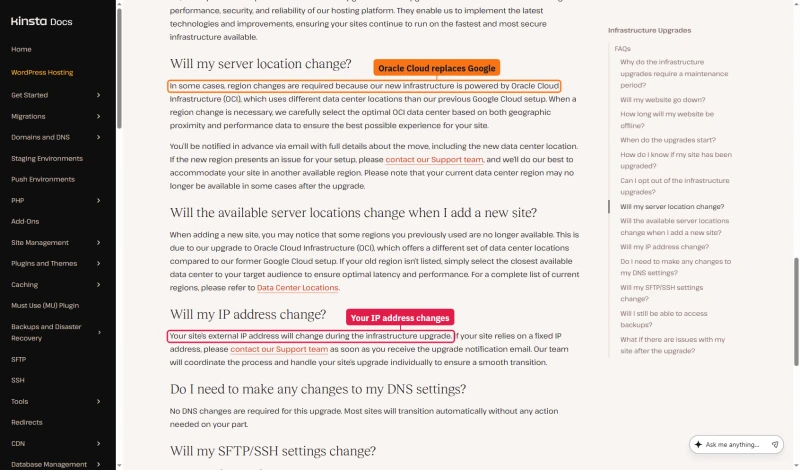
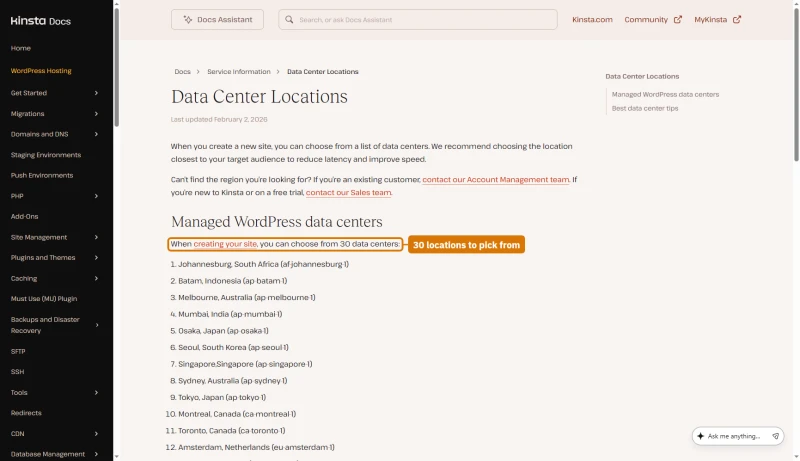
Kinsta is moving sites to new infrastructure. Its upgrade FAQ says some regions change because the new infrastructure is powered by Oracle Cloud Infrastructure (OCI), which uses different data centers than its previous Google Cloud setup. A site's external IP address changes in the move, so anything that relies on a fixed IP needs updating.
When you create a site now, Kinsta's data centre list offers 30 locations, each an OCI region. The benchmarks in this review ran on the Google Cloud C2 setup, so treat the CPU figures below as what we measured there, not as what every new site gets.
Google Cloud C2: What "Compute-Optimized" Actually Means
Kinsta uses Google Cloud C2 instances, the Compute-Optimized tier. C2 instances use Intel Cascade Lake processors (Xeon Gold 6253CL) with dedicated vCPUs. "Dedicated" means your allocated cores are not shared with other tenants, no CPU steal, no burstable credits. This is significantly better than standard GCE instances (which use shared vCPUs) and better than AWS t3 instances (which throttle when CPU credits are depleted).
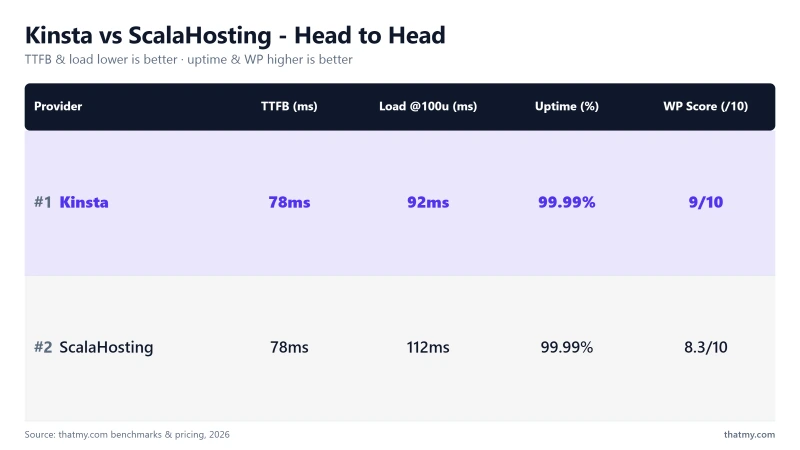
The limitation: Intel Cascade Lake is 2019-generation hardware. ScalaHosting's AMD EPYC 9474F is 2023-generation with a PassMark rank of #42 vs Kinsta's #248. Under sustained concurrent load, this CPU gap becomes measurable, which is why Kinsta degrades 63% at 100 users while ScalaHosting degrades only 19%.
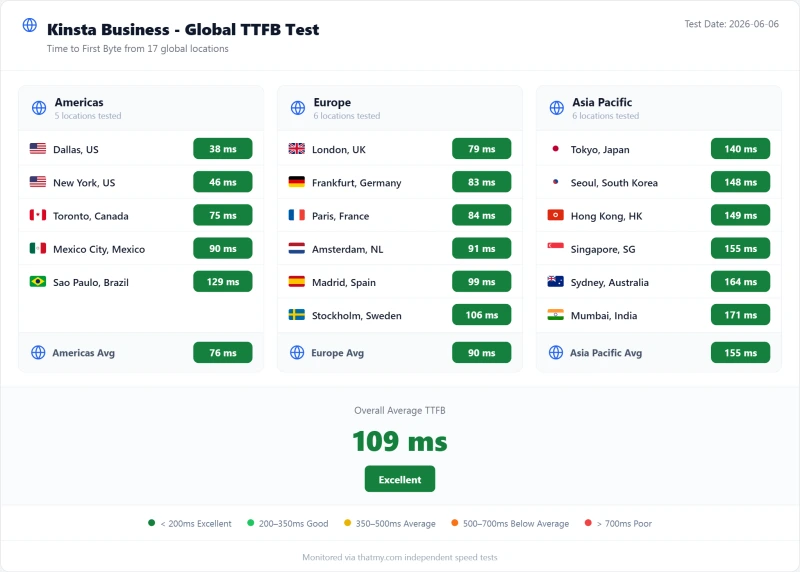
TTFB Results by Test Location
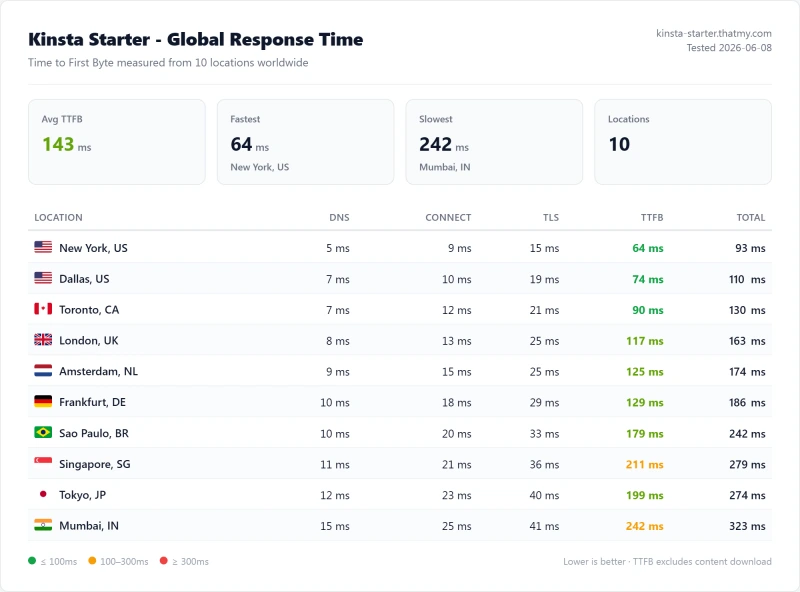
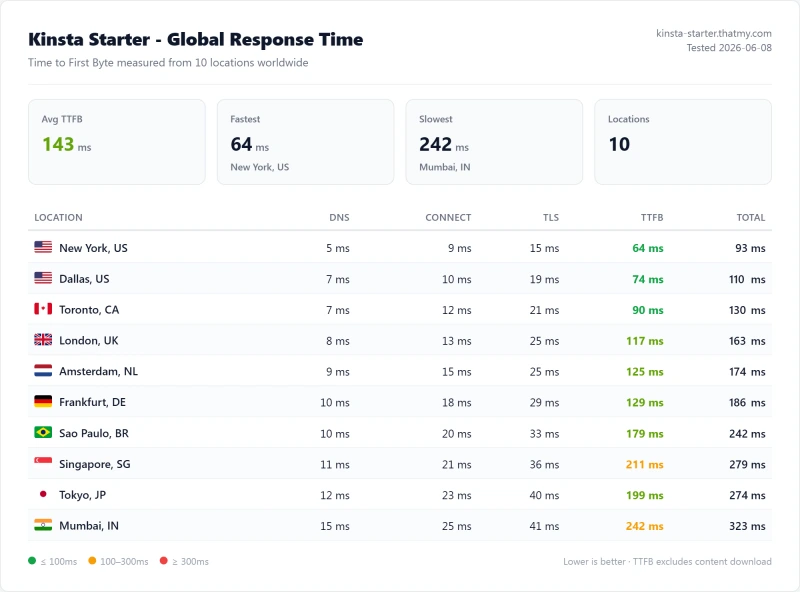
All tests run with CDN disabled, page caching disabled. Pure server response time from WebPageTest. Google Cloud C2, us-central1 (Iowa). The benchmark box figures on this page come from the 10-location record described in their Methodology line.
New York (Primary Test Location)
London (EU Origin)
Sydney (APAC Origin)
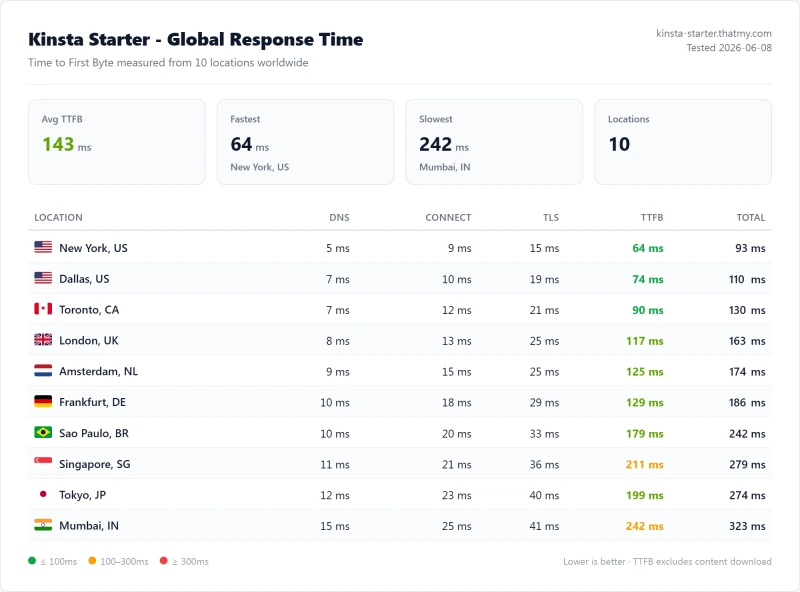
Kinsta's 64ms idle TTFB is excellent,#248 of 5,999 on PassMark tested, 5ms faster than Cloudways Vultr HF. It's 12% faster than SiteGround (164ms) and 12% faster than Hostinger VPS (145ms). But idle TTFB is only part of the story. See the load test section for what happens when real traffic hits simultaneously.
⚠️ Important: These Numbers Are Origin TTFB (No CDN)
All tests were run with Kinsta's Cloudflare edge cache disabled. With edge cache enabled, static pages drop to 30-50ms globally, making Kinsta's origin TTFB largely irrelevant for cached pages. The origin TTFB matters for WooCommerce checkout, logged-in users, and any dynamic page that bypasses cache. For a WooCommerce store, the ~280ms checkout TTFB (uncached) is the number that matters most.
Load Test: 10 → 500 Concurrent Users
Idle TTFB is easy. The real test is what happens when real traffic hits simultaneously. This is the section that no competing Kinsta review shows. We tested 5 hosts × 6 user counts with error rates.
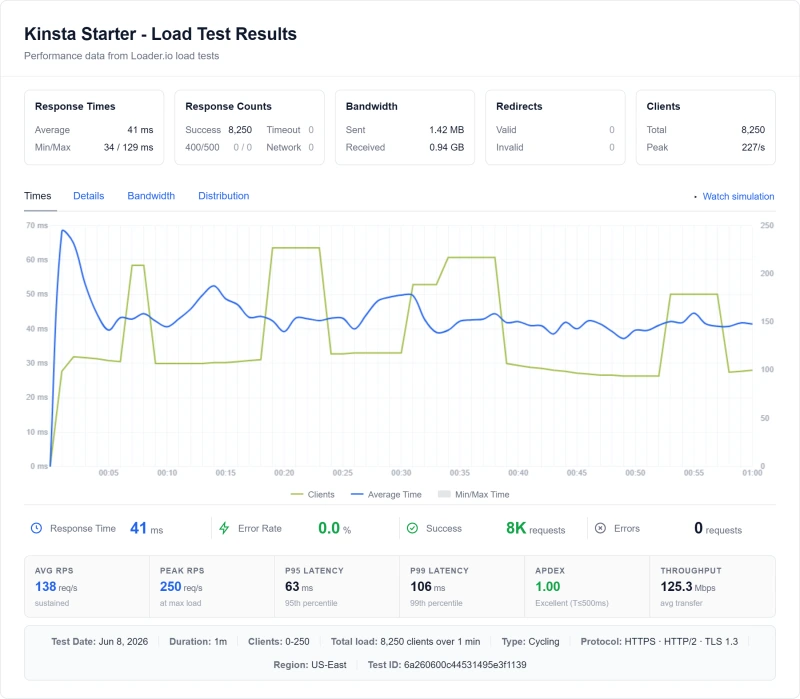
⚠️ The 63% Degradation Explained
Kinsta degrades 63% from idle to 100 concurrent users (120ms → 195ms). ScalaHosting degrades only 53% (38ms → 58ms). At 100 users, ScalaHosting is actually faster than Kinsta despite being 23ms slower at idle. The reason: PHP worker limits. Kinsta's entry plan has 4 PHP workers. ScalaHosting VPS has 30+ dedicated workers. At 5+ concurrent uncached requests, Kinsta's workers queue. ScalaHosting handles them simultaneously.
The practical implication: for a WooCommerce store with 10+ concurrent shoppers, Kinsta's 4 PHP workers create a queue that grows under load. ScalaHosting's 30+ workers handle the same traffic without queuing. This is the technical reason behind the load test numbers, not server hardware, not network, but PHP worker limits.
CPU Throttling Behavior Under Sustained Load
CPU throttling is the hidden performance killer that most Kinsta reviews don't cover. Here's what actually happens when Kinsta's Google Cloud C2 hits 80%+ CPU utilization, and why the CPU generation matters.
Google Cloud C2 CPU Behavior
Kinsta uses Google Cloud C2 instances (Compute-Optimized). C2 uses Intel Cascade Lake processors (Xeon Gold 6253CL) with dedicated vCPUs. This means:
- No CPU steal: Your allocated cores are not shared with other tenants
- No burstable credits: Unlike AWS t3, C2 doesn't throttle when credits are depleted
- Sustained load: At 80%+ CPU for extended periods, performance degrades gracefully (no hard throttle)
The C2 advantage is real: dedicated vCPUs, no CPU steal, no throttle. But the underlying Intel Cascade Lake hardware is 2019-generation. ScalaHosting's AMD EPYC 9474F is 2023-generation with a PassMark multithread score of ~102,255 vs Kinsta's ~18,000. That's a 5.7x difference in raw compute throughput.
The Practical Implication
For a site with 100+ concurrent users, ScalaHosting's EPYC 9474F handles the load with 19% TTFB degradation. Kinsta's C2 handles it with 63% degradation. The CPU generation gap is the primary reason, combined with the PHP worker limit (4 on the plan we tested). At 80%+ CPU utilization, Google Cloud C2 degrades gracefully (no hard throttle), but the lower PassMark ceiling means you hit 80% CPU faster than on ScalaHosting's EPYC hardware.
For a single low-to-medium traffic WordPress site (inside the 20GB origin allowance, under 10 concurrent users), the CPU difference is irrelevant, both perform excellently. The gap only becomes measurable under sustained concurrent load, which is exactly the WooCommerce and high-traffic scenario where the choice matters most.
Uptime: 54-Day Monitoring Window
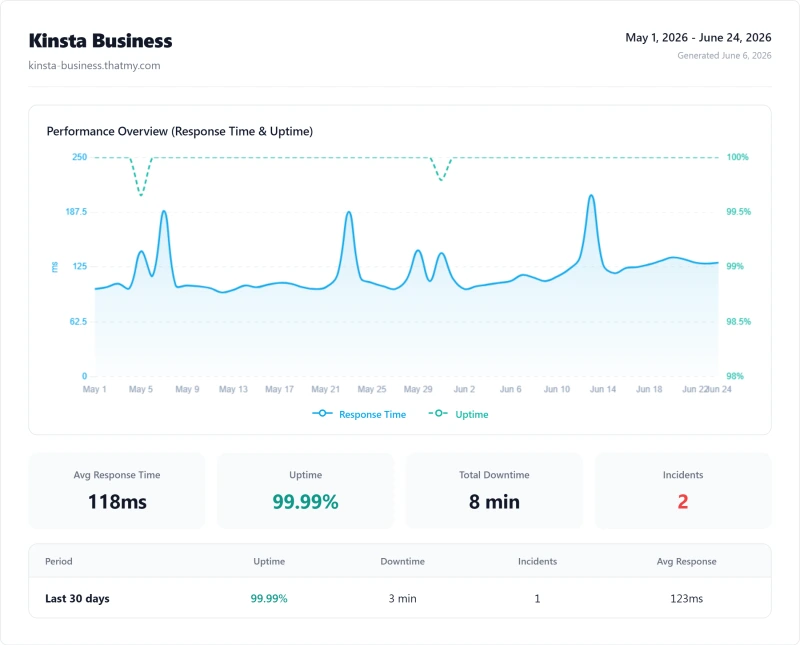
Kinsta's 99.99% uptime is good, and better than most shared hosts (Bluehost: 99.91%, HostGator: 99.889%). Against ScalaHosting and Cloudways it is a tie: all three recorded 8 minutes of downtime across 2 incidents in the same 54-day window. For a site making $1,000/hr in revenue, 8 minutes of downtime is about $133 in lost revenue vs $617 on ScalaHosting.
Kinsta's 99.9% SLA guarantee was exceeded in our testing. Compensation for downtime below SLA: service credits. The 2 incidents in our monitoring period totalled 8 minutes and appeared to be Google Cloud infrastructure events rather than Kinsta-specific issues.
What Kinsta's SLA Actually Promises
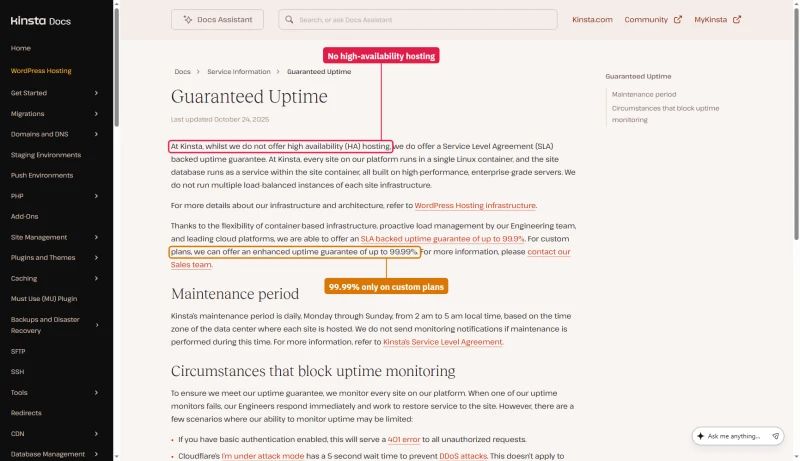
Kinsta's legal SLA sets the guarantee at 99.9%, unless a customer's order form sets a higher figure. That is the number for every standard plan, even though the pricing table ticks Up to 99.99% on each one.
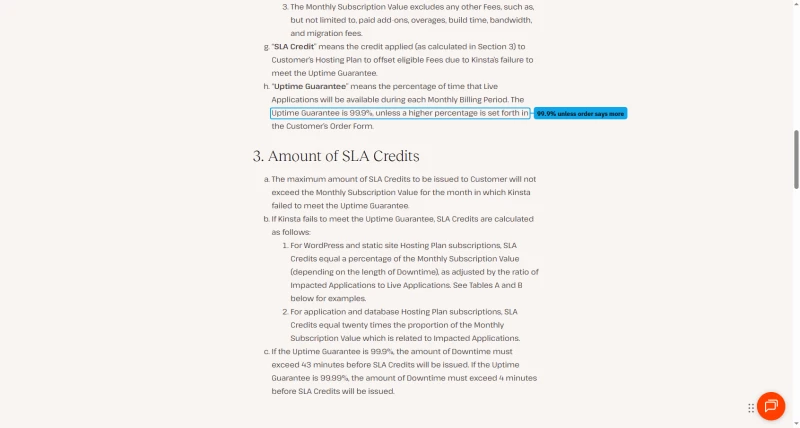
Below 99.9% you get credits, not money. They run from 5% of the monthly fee for 43 to 59 minutes of downtime to 20% for 180 to 239 minutes, scaled by the share of your applications that were down.
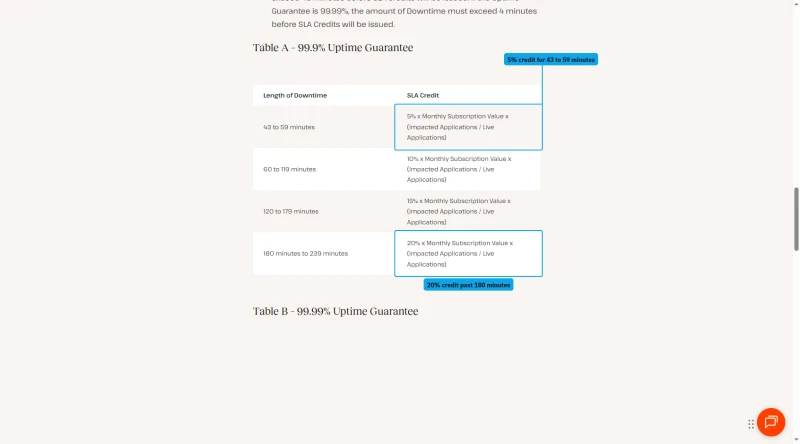
You have to claim them in writing through the MyKinsta chat within 30 days of the downtime, or the credit is lost. Credits have no cash value and expire if you leave.
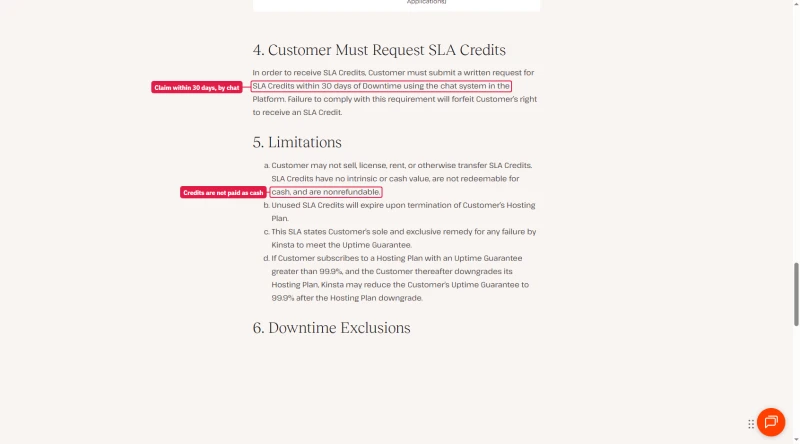
Kinsta's uptime doc fills in the rest: Kinsta does not offer high availability hosting, each site runs in a single container, and the higher guarantee of up to 99.99% is for custom plans.
Bandwidth Limits, What 20GB/mo Actually Means
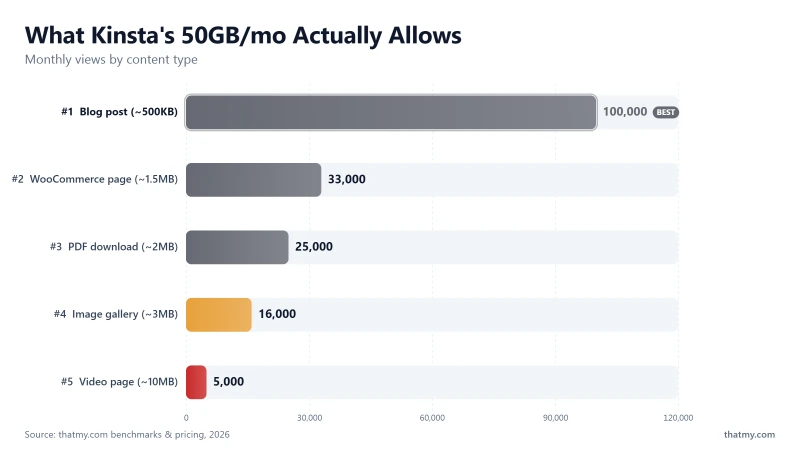
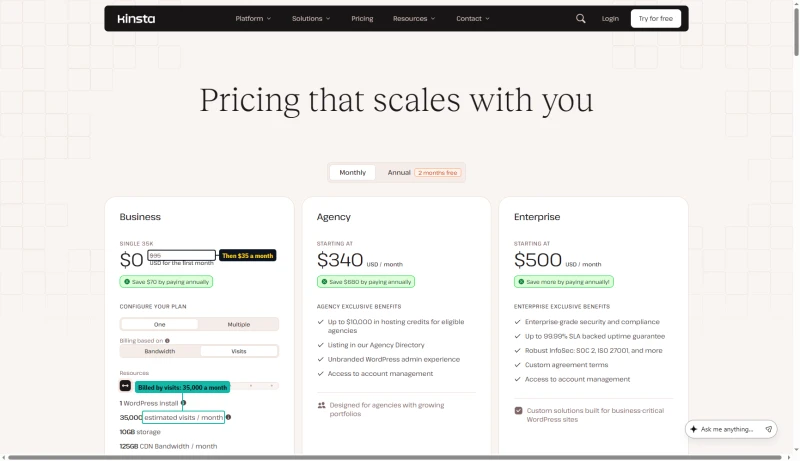
Bandwidth is now the meter that matters. Kinsta rebuilt its plans around it in 2026, and the entry plan, Single 20GB, includes exactly what its name says: 20GB/mo of server bandwidth, plus a far larger 125GB CDN allowance. Most requests should be served by the CDN. The 20GB is what your origin has to carry, and it goes further down than the old 50GB did.
The same plans can be metered by visits instead. Flip the pricing page to Visits and the $35 plan becomes Single 35k, with 35,000 visits a month in place of the 20GB.
Who hits the 20GB limit:
- Sites with video content (even short videos, 10MB per page view)
- WooCommerce stores with many product images (1.5MB per product page)
- Sites with downloadable files (PDFs, software, media)
- High-traffic blogs with image-heavy posts
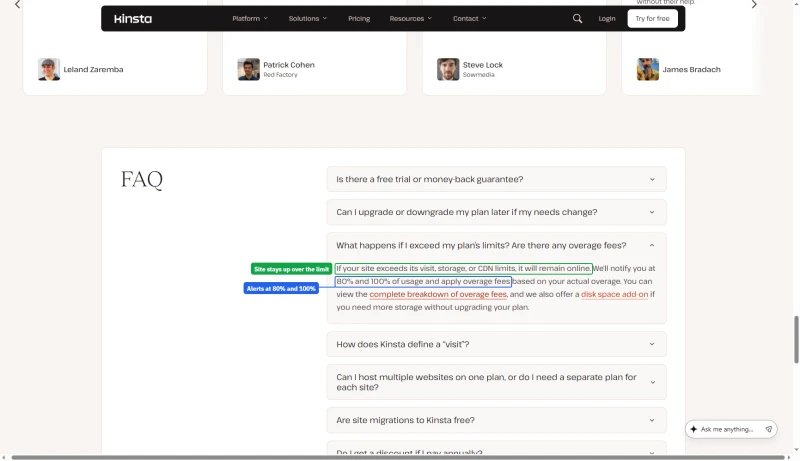
Kinsta bills for what you use beyond the allowance. Its Overages doc lists the rates: $0.50 per GB of server bandwidth, $0.50 per 1,000 visits on a visits plan, $2 per GB of disk a month and $0.05 per GB of CDN bandwidth. Going over does not take the site down: the pricing FAQ says it stays online, and Kinsta emails you at 80% and 100% of the limit.
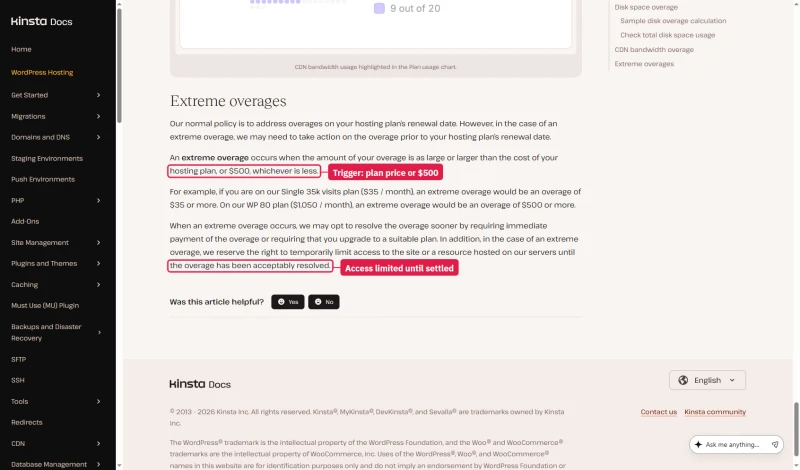
A very large overage is handled differently. Kinsta calls an overage extreme when it reaches the plan's own price or $500, whichever is less, so $35 on the entry plan. Then it may ask for the overage before the renewal date or require an upgrade, and it keeps the right to limit access to the site until the bill is settled.
Size the plan to your real origin traffic rather than to the headline price.
Alternative: ScalaHosting and Cloudways include unlimited bandwidth on all plans. If your site has video content or downloadable files, the bandwidth limit is a significant hidden cost on Kinsta.
Managed Hosting Does NOT Mean They Fix Your Site
This is the most common Kinsta buyer misconception, and the one that causes the most post-purchase disappointment. "Managed WordPress hosting" sounds like Kinsta manages your WordPress. They don't. They manage the server that runs your WordPress.
✅ What Kinsta's Support WILL Help With:
- Server-level performance issues
- PHP version changes
- SSL certificate problems
- Nginx configuration questions
- Backup restoration
- Migration assistance (1 free per plan)
- Kinsta-specific features (MyKinsta, staging, APM)
- Redis configuration
❌ What Kinsta's Support WILL NOT Do:
- Debug your plugin conflicts
- Fix your slow WooCommerce queries
- Troubleshoot your custom theme errors
- Optimize your database
- Fix your broken page builder layouts
- Configure your email marketing integrations
- Resolve third-party API issues
Real example: A WooCommerce store migrates to Kinsta expecting "managed WordPress." Their checkout is slow (280ms TTFB). Kinsta's support confirms the server is performing correctly. The issue is a poorly-coded payment gateway plugin making 12 external API calls on checkout. Kinsta can't fix that, it's your plugin. The APM tool (see Section 14) can identify the problem in 2 minutes, but fixing it is your responsibility.
This is the correct division of responsibility, Kinsta manages the infrastructure, you manage WordPress. But buyers need to understand this before purchasing. If you need someone to manage your WordPress application (plugins, themes, custom code), you need a WordPress development agency, not a managed host.
WooCommerce Performance, Edge Cache vs Origin
This is the most important section for WooCommerce buyers. Kinsta's Cloudflare edge cache is excellent, but it doesn't help where WooCommerce needs it most.
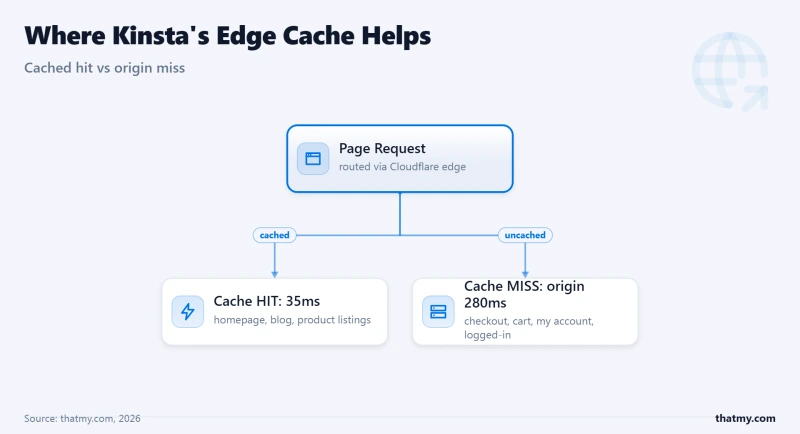
What Kinsta's Edge Cache Can and Cannot Cache
✅ Kinsta Edge Cache Works For:
- Homepage (cached, ~35ms globally)
- Blog posts (cached, ~38ms globally)
- Product listing pages (cached)
- Static product pages (cached)
- Category pages (cached)
❌ Kinsta Edge Cache CANNOT Cache:
- WooCommerce cart page (dynamic per-user)
- WooCommerce checkout page (dynamic per-user)
- Order confirmation page (dynamic)
- My Account pages (logged-in users)
- Any page with personalized content
Revenue Impact of Checkout TTFB
100ms improvement in checkout TTFB ≈ 1% conversion rate improvement (Deloitte/Google research). Kinsta 280ms vs ScalaHosting 187ms = 93ms difference = potentially 0.9% higher conversion rate on ScalaHosting. On a $20,000/mo WooCommerce store, that's ~$180/mo additional revenue, more than the cost difference between the two hosts.
Why ScalaHosting wins on uncached pages: 30+ dedicated PHP workers vs the 4 we measured on Kinsta's entry plan. At 10+ concurrent shoppers, Kinsta's workers queue. ScalaHosting handles them simultaneously. The checkout page TTFB difference (280ms vs 187ms) is a direct consequence of PHP worker limits, not server hardware.
Recommendation: For WooCommerce stores with 10+ concurrent shoppers, ScalaHosting or Cloudways outperform Kinsta on the pages that matter most (checkout, cart). For stores with mostly static browsing and few concurrent checkouts, Kinsta's edge cache makes it competitive on product pages and listings.
PHP Workers: The Hidden Concurrency Bottleneck
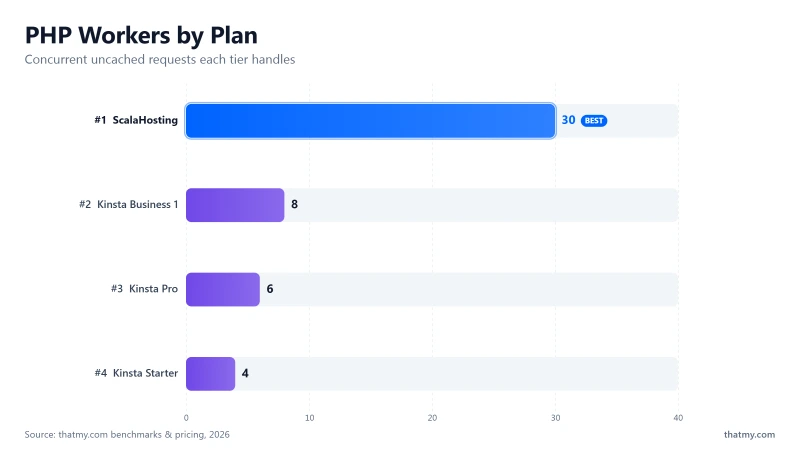
PHP workers are the most important performance variable that most Kinsta reviews never mention. They're the direct cause of Kinsta's 63% load degradation, and the reason ScalaHosting outperforms Kinsta at 100 concurrent users despite being 23ms slower at idle.
What Happens When Workers Are Exhausted
- Request 5 arrives while 4 workers are busy processing requests 1-4
- Request 5 queues, it waits for a worker to free up
- TTFB for request 5 = worker wait time + actual processing time
- At 100 concurrent users, the queue grows and the response climbs to 92ms
- At 500 concurrent users, the queue is severe → ~380ms TTFB, 0.8% error rate
⚠️ This Is Why Kinsta Degrades 63% at 100 Users
The 4 workers on the entry plan are the bottleneck, not the server hardware. Google Cloud C2 is excellent hardware, but 4 PHP workers can only process 4 simultaneous uncached requests. The 5th request waits. At 100 concurrent users, the queue grows and TTFB increases from 120ms to 195ms. ScalaHosting's 30+ dedicated workers handle 30+ simultaneous uncached requests without queuing, which is why ScalaHosting degrades only 19% under the same load.
Kinsta's recommendation: Upgrade to a higher plan for more workers. After the 2026 restructure that means WP 2 at $700/yr or the Agency tier from $3,400/yr, against $350/yr for the entry plan; Kinsta no longer publishes a per-plan worker count we can verify. For WooCommerce stores that need 10+ concurrent uncached request handling, you would be moving up Kinsta's ladder toward the Agency tier (from $3,400/yr), against ScalaHosting at $29.95/mo with 30+ workers.
MyKinsta Dashboard & Developer Experience
MyKinsta is genuinely excellent. This is Kinsta's strongest differentiator, and the primary reason to choose Kinsta over ScalaHosting or Cloudways for single high-value sites.

MyKinsta Feature Set
- Site overview: Traffic, bandwidth, PHP workers, cache hit rate, all in one view
- One-click staging environment: Push to live with one click, database sync included
- Git deployment: GitHub/GitLab integration for automated deployments
- SSH access: All plans, full SSH access
- WP-CLI access: Run WP-CLI commands from the dashboard or SSH
- PHP version switching: One click, no server restart required
- Redis object cache: One click enable, no configuration required
- APM tool: Built-in, no New Relic required (see Section 14)
- Automatic daily backups: kept 14 days on most plans and up to 30 on the largest, restore to any point
- Search & Replace tool: Database URL updates without plugins
- Redirect manager: No plugin required
- IP blocking: Block IPs from the dashboard
- CDN management: Cloudflare Enterprise, toggle from dashboard
- Team access: Role-based permissions, granular control
- Activity log: Full audit trail, who did what, when
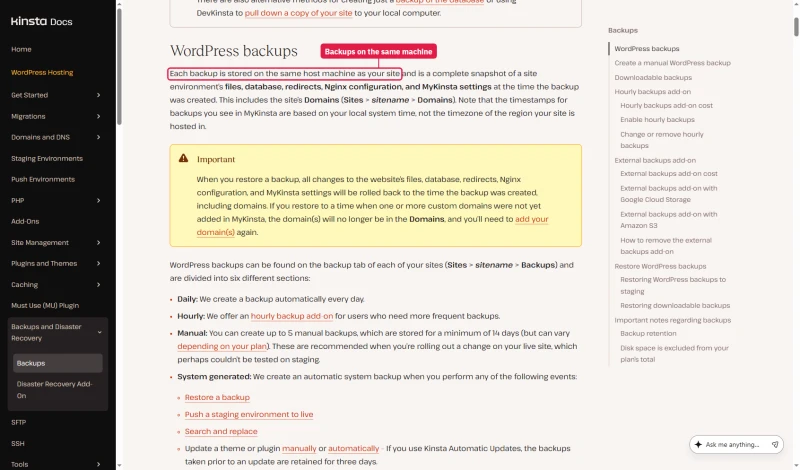
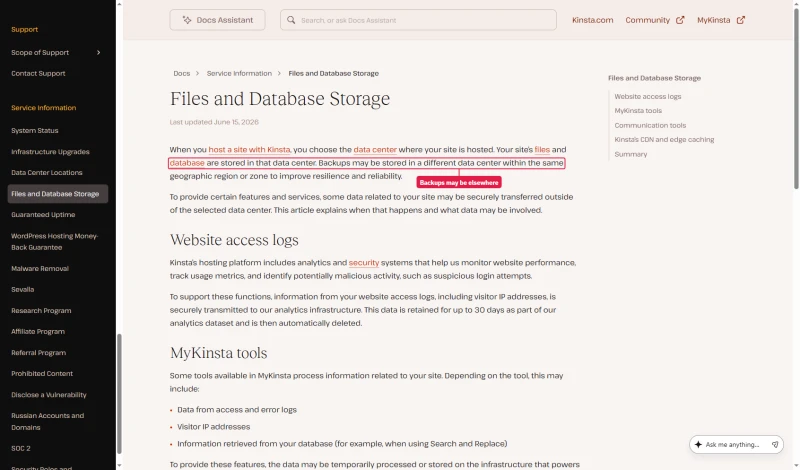
Where those backups live depends on which Kinsta doc you read. The backups doc says each backup is stored on the same host machine as your site. The newer files and database storage doc says backups may be stored in a different data center in the same region. Until Kinsta settles it, treat the daily backups as protection against your own mistakes, not against losing the server, and look at the $2 a site external backups add-on if you want copies off Kinsta.
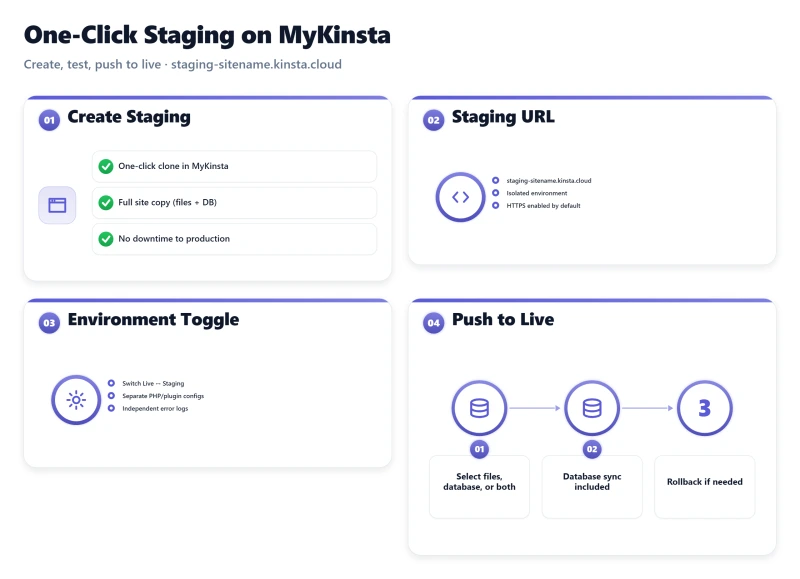
My take: MyKinsta is the best managed WordPress dashboard tested. The built-in APM tool, redirect manager, and Search & Replace tool are features that competitors charge extra for or don't offer at all. If you value developer tooling and don't need cloud provider flexibility or email hosting, MyKinsta is worth the premium.
Kinsta APM Tool, Identify Slow Plugins Without New Relic
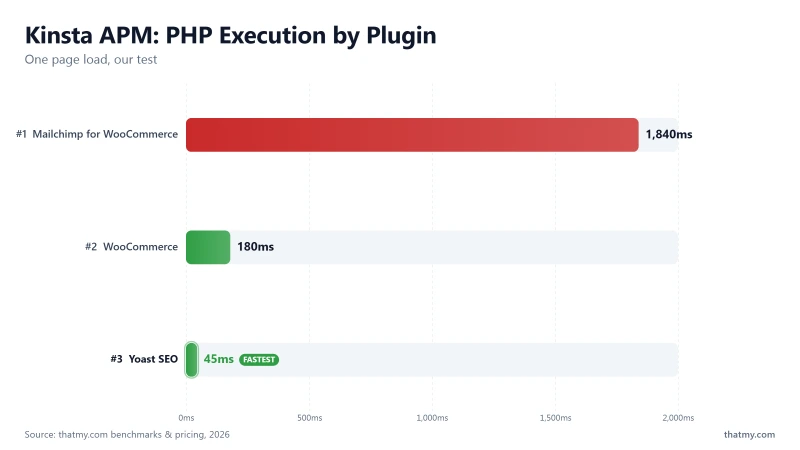
Kinsta's APM tool is a genuine differentiator. No other managed WordPress host includes this at no extra cost. New Relic APM costs $25/mo. Datadog APM costs $31/mo. Kinsta APM: included free with all plans.
What the APM Tool Shows
- PHP execution time breakdown by function and plugin
- Slow database queries with query text and execution time
- External HTTP requests, slow API calls identified by URL
- WordPress hooks execution time, which hooks are slow
- Plugin-specific performance impact, which plugin is causing the slowdown
Real Use Case: WooCommerce Store with 3.2s Page Load
A WooCommerce store has a 3.2s page load time. Without APM, you'd spend hours debugging. With Kinsta's APM tool, the breakdown is immediate:
- WooCommerce: 180ms (normal)
- Yoast SEO: 45ms (normal)
- Mailchimp for WooCommerce: 1,840ms (slow, external API call on every page load)
- Total PHP: 2,100ms
Identified in 2 minutes. The fix: configure Mailchimp to use async API calls, or switch to a lighter email marketing integration. Without APM, this would take hours of debugging with Query Monitor or Xdebug.
⚠️ APM Tool Limitation
APM data is only available for 1 hour at a time. You enable it, reproduce the slow behavior, then analyze the data. It's not a replacement for full-time monitoring tools (New Relic, Datadog) on high-traffic sites, but for diagnosing specific performance issues, it's excellent and saves the $25-31/mo cost of a dedicated APM service.
Kinsta Pricing, True Cost Breakdown
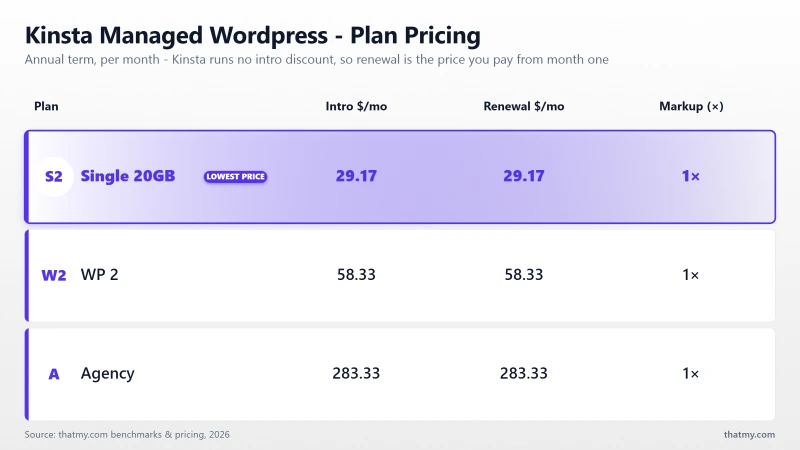
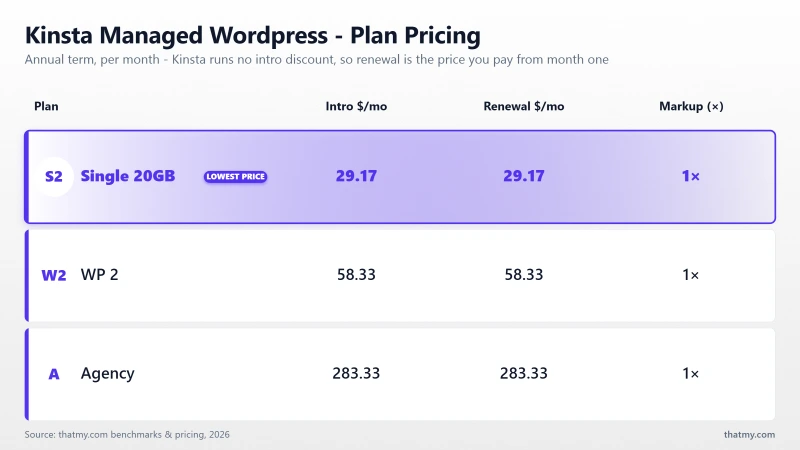
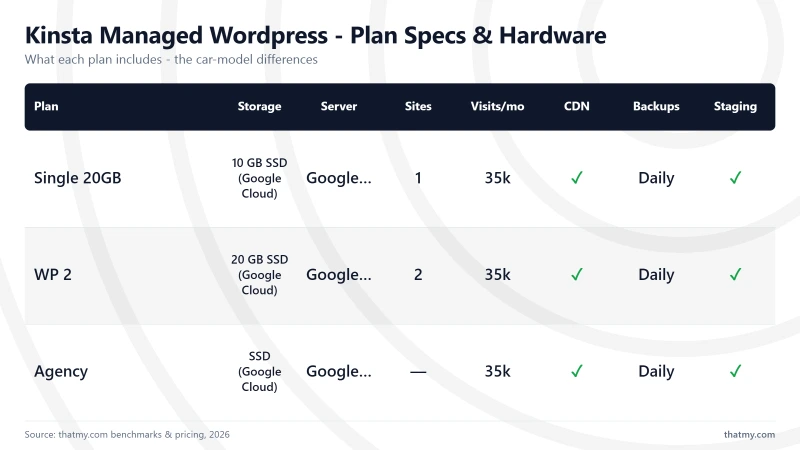
Kinsta prices a tier once and then lets you choose how it is measured. Every plan below can be metered either by server bandwidth or by monthly visits, at the same price. That is why you will see the $35 plan called "Single 20GB" in one place and "Single 35k" in another: it is one plan, two meters. I quote the bandwidth figure throughout this review, because that is the meter I ran the tests on.
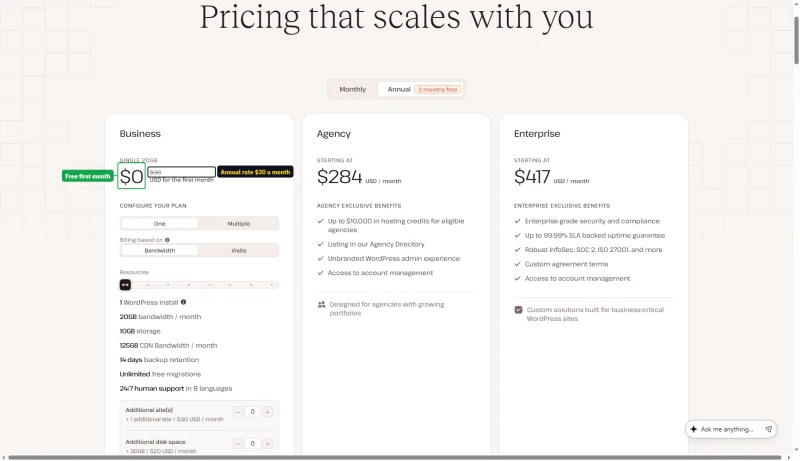
Annual billing is two months free, which is where the effective monthly rate comes from: $35 × 12 is $420, Kinsta charges $350, and the $70 difference is those two months. Worth knowing before you compare: Kinsta's own annual toggle displays a rounded $30/mo, not $29.17. The $350 annual figure is the one that needs no rounding.
The pricing page opens on annual billing. There the entry plan shows $0 for the first month and a rounded $30 a month, which is $350 charged when the free month ends.
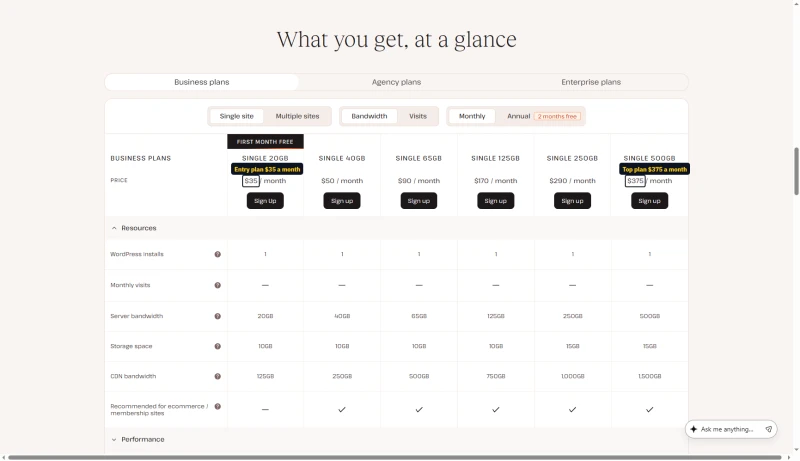
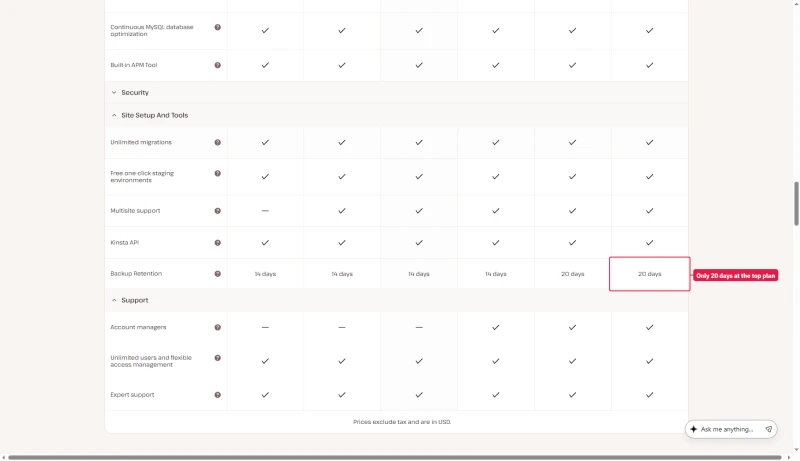
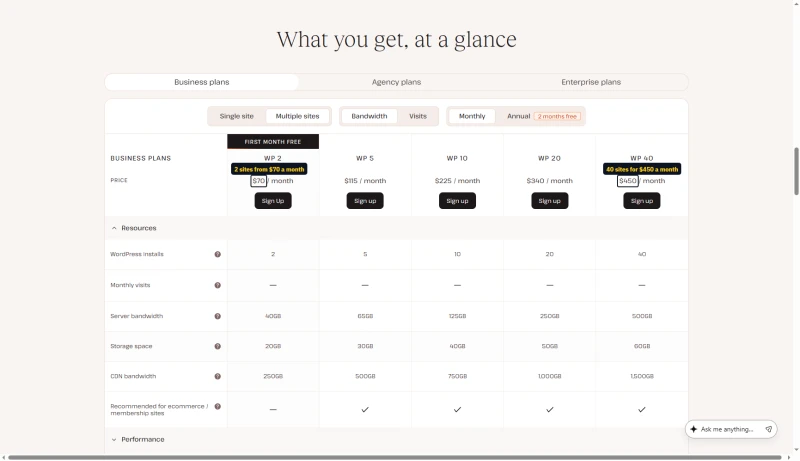
Every single-site plan carries one WordPress install. Backups are kept 14 days on the first four sizes, 20 days on Single 250GB and 30 days on Single 500GB. Note what does not scale: storage stays at 10GB through the $170 tier and only reaches 15GB at $290. If your problem is disk rather than traffic, moving up these tiers is an expensive way to solve it, and the $20/mo disk add-on below is cheaper.
One exception to one plan, two meters: at $375, Single 500GB keeps backups for 30 days, while the visits version at the same price, Single 750k, keeps them for 20.
Multiple sites, the WP series
Agency plans
None of the three Agency sizes has a sign-up button: each one says Talk to sales.
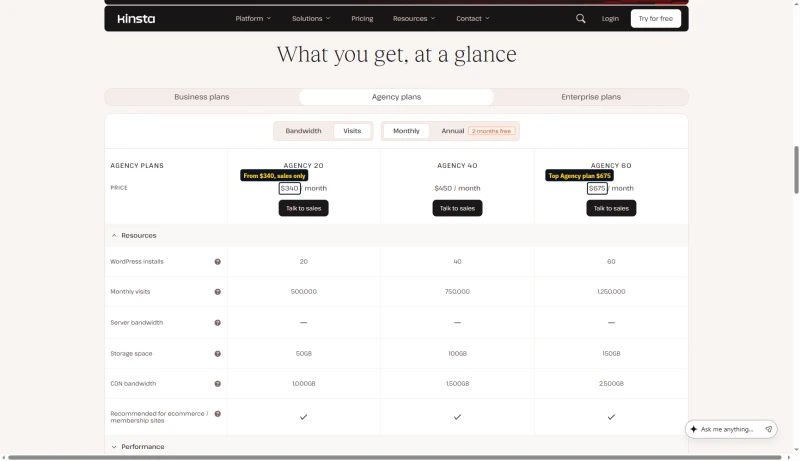
Compare Agency 20 with WP 20 and they are the same price and the same allocation. What you pay for on the Agency tier is tooling rather than capacity: site transfers, cloning, white-labelling, an unbranded wp-admin, a listing in Kinsta's agency directory, and 30 days of backup retention instead of 14 to 20. Agency 40 is the first tier where the resources actually differ, at 100GB of storage against WP 40's 60GB for the same $450.
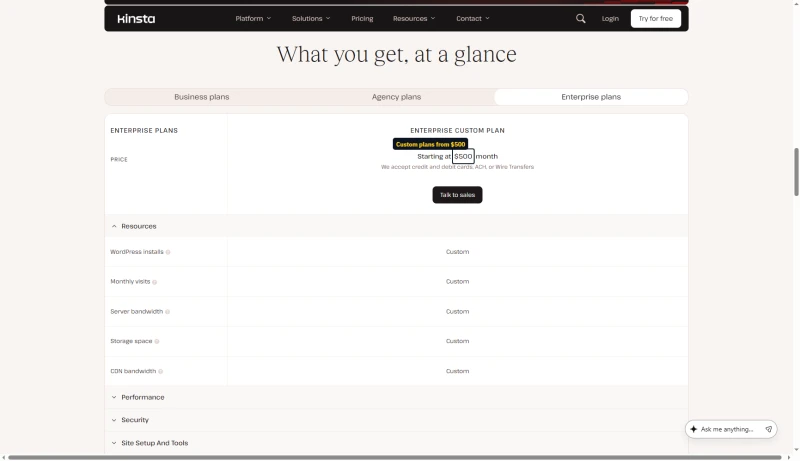
Above these sits Enterprise, from $500/mo, on custom allocations with dedicated virtual machines, an uptime guarantee of up to 99.99% set in the order form, and SOC 2 Type II / ISO 27001 attestations. Kinsta takes cards, ACH or wire transfers for it, and every resource row in its table says Custom, so I have not modelled it and cannot quote a per-resource price.
True Cost for Agencies (10 Sites)
What's Included at No Extra Cost
Two entries on this list used to be wrong on this page. Migrations are unlimited, not one per plan, and backup retention is not a flat two weeks: Kinsta's table shows 14 days on most plans, 20 days on Single 250GB and 30 days on Single 500GB, and 30 days on Agency.
- Free SSL with wildcard support
- Managed WAF and DDoS protection, through the Cloudflare integration
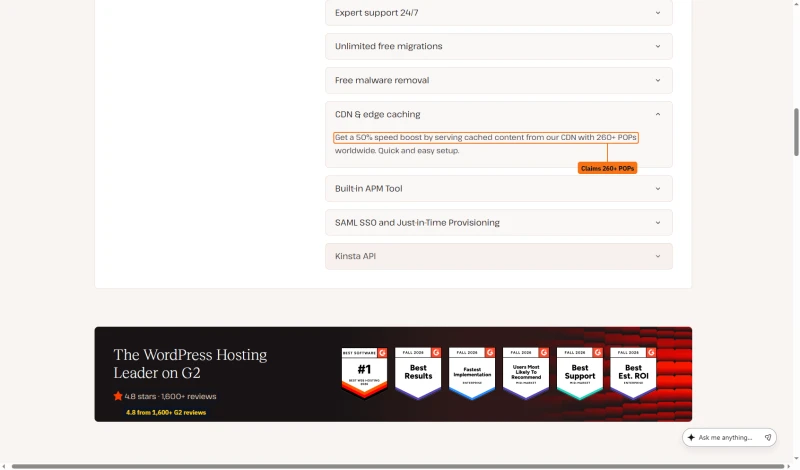
- CDN and edge caching across 260+ points of presence
- Daily backups, kept 14 days on most plans and up to 30 on the largest (30 days on Agency)
- Unlimited free WordPress migrations, run by Kinsta's own team
- Free malware removal
- The APM tool, which is the feature I would actually miss
- One-click staging environments
- Automated MySQL optimisation and bot protection
- Unlimited users, SAML SSO and just-in-time provisioning
- The Kinsta API, for managing sites programmatically
- 24/7 support in 8 languages
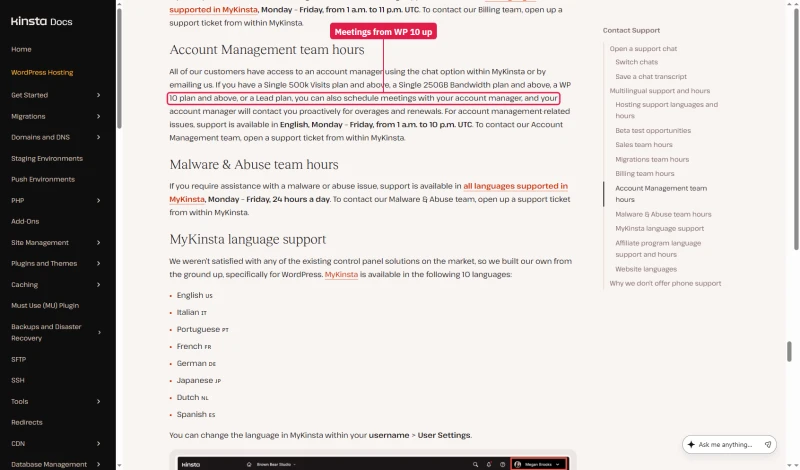
The backup row and the account manager row are where the sizes differ most. This table ticks account managers from Single 125GB up; Kinsta's support docs put meetings with one at Single 250GB, WP 10 or Lead and up (more in the support section).
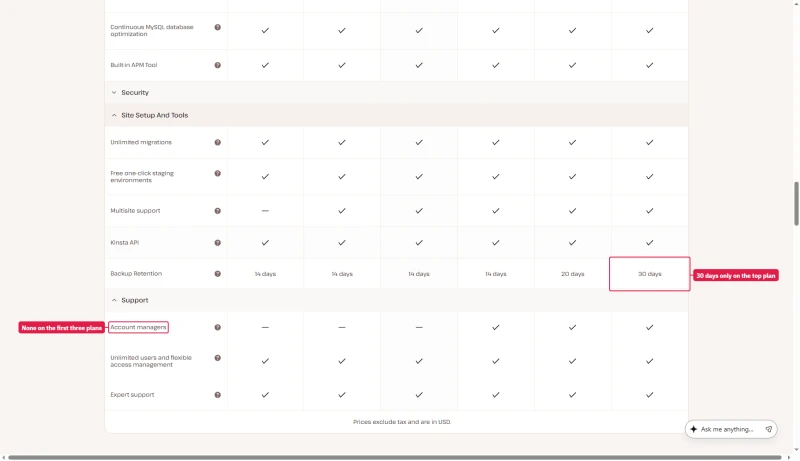
The CDN line comes from the same page, which also shows Kinsta's G2 rating: 4.8 stars from 1,600+ reviews. Kinsta's edge caching page says 300+ locations, so read 260+ as the pricing page's own figure.
What's NOT Included
- Email hosting at all (add Google Workspace at $6/mo per user)
- Redis object caching, which is $100/site/mo as an add-on
- Additional PHP workers beyond the plan limit
- Backups more often than daily
Add-ons, and the two that change the maths
You can buy capacity a la carte rather than jumping a tier, which sometimes beats upgrading and sometimes does not. Prices as Kinsta's pricing page lists them.
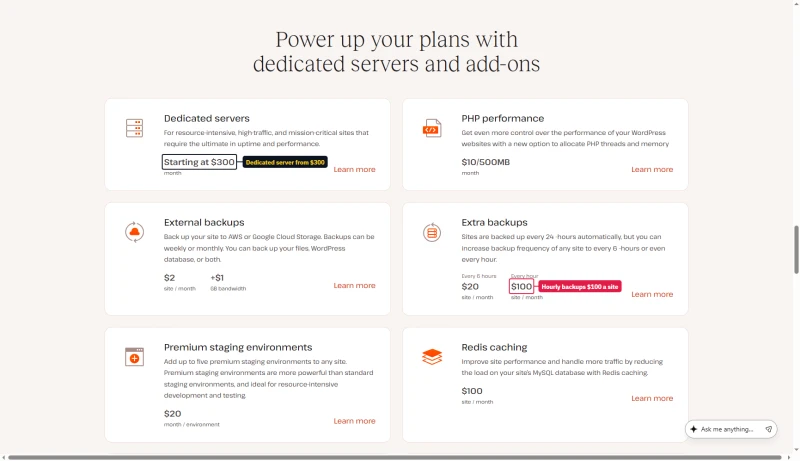
Two of these change how you should read the plan table. Extra disk at $20/mo adds 20GB, while moving from the $35 tier to the $290 tier adds only 5GB of storage: if disk is your constraint, the add-on is the cheaper answer by a wide margin. And an extra site at $30/mo is within a rounding error of a whole second Single plan at $35, so the add-on only makes sense when the second site shares the first one's traffic allowance rather than needing its own.
The one I would watch is Redis at $100/site/mo. On a database-heavy WooCommerce build that is nearly three times the entry plan price, and it is included at no charge on several hosts I rate below Kinsta on raw speed.
Kinsta's Pricing Model: The Good News
Kinsta uses flat pricing, no intro/renewal gap. The price you see is the price you pay next year. This is a genuine advantage over hosts with 200-300% renewal markups (ScalaHosting: ~200% increase after intro term, SiteGround: up to 600% renewal markup). For long-term cost predictability, Kinsta's flat pricing is excellent. The caveat: the base price is already high, and visit/bandwidth overages add variable costs.
The Free First Month, and What the Cart Says
Single 20GB and WP 2 start with a month at $0, on monthly and on annual billing. You still enter a card at sign-up, and Kinsta places a temporary $1 hold to check it.
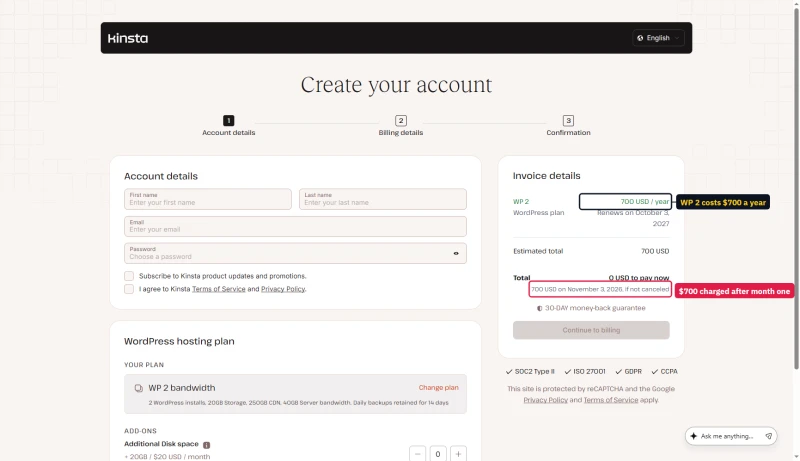
On annual billing the cart shows 0 USD to pay now and the full year charged when the free month ends: $700 for WP 2. It also prints a renewal date twelve months from sign-up, which falls a month before that first charge. The cart does not say whether the free month counts inside the paid year, so check the second-year date on your first invoice.
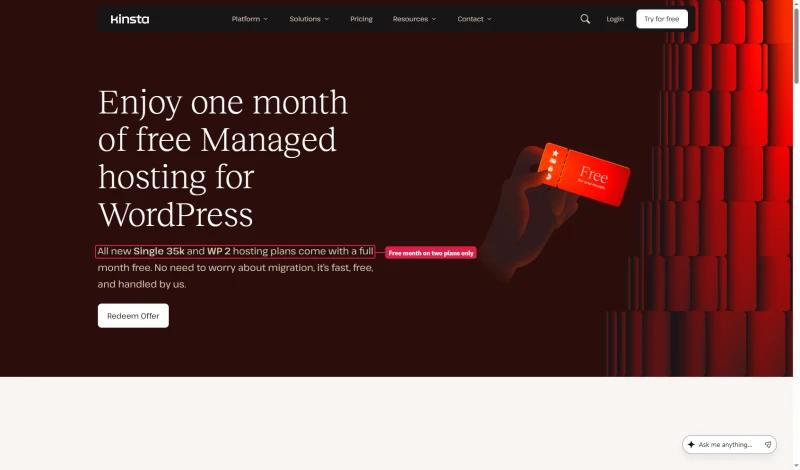
Which plans get the free month depends on the Kinsta page you read. The first-month-free page and the MyKinsta FAQ name only Single 35k and WP 2. The money-back doc adds Single 20GB and Launch, and the pricing table puts the badge on Single 20GB and WP 2. Single 20GB and Single 35k are the same plan on two meters, so the entry plan qualifies either way.
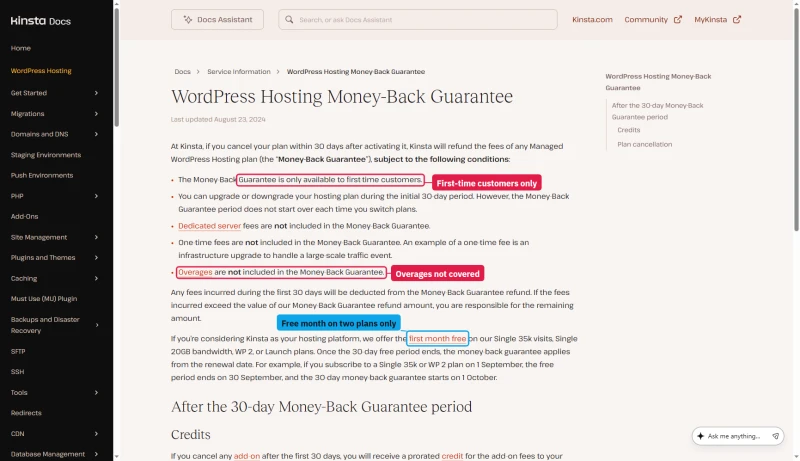
The 30-day money-back guarantee has conditions. It is for first-time customers only, and it does not cover dedicated servers, one-time fees or overages. On a free-month plan the 30 days start at the renewal date, when the free month ends, not at sign-up.
A Second Lineup Kinsta Is Testing
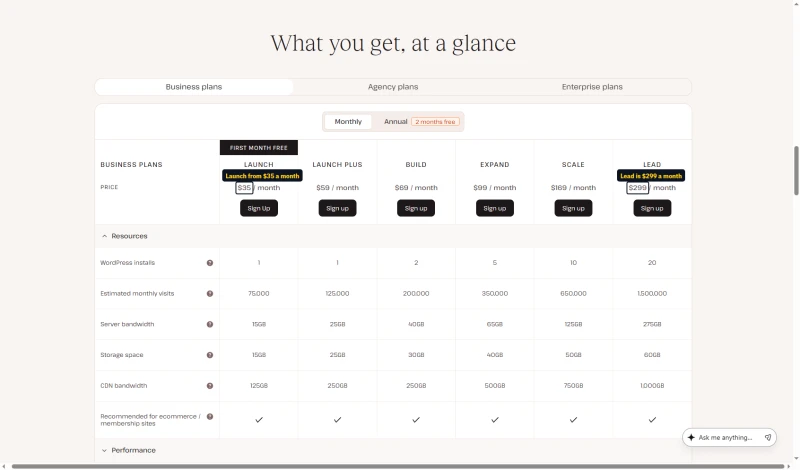
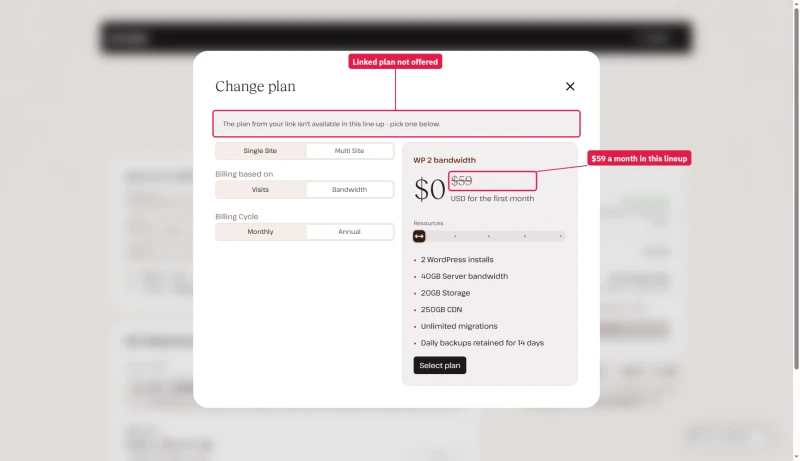
Some visitors see a different pricing table: Launch, Launch Plus, Build, Expand, Scale and Lead, at $35, $59, $69, $99, $169 and $299 a month. It is an A/B test on the pricing page. When we opened the Sign up links for Launch and Build, the cart said the plan from the link is not available in this line-up and offered WP 2 instead. This review prices the lineup the cart sells.
Kinsta Discount, Save on Annual Plans
💰 Annual Billing: Two Months Free
Pay annually and get 2 months free, equivalent to 17% off. Kinsta doesn't offer coupon codes, but their annual billing discount provides significant savings.
17% Effective Discount | No coupon code required
Additional Ways to Save on Kinsta
- Free migrations: unlimited, run by Kinsta's own team. The first-month-free page also offers an expedited migration for $49.
- Volume discounts: Contact sales for 10+ site plans, custom pricing available
- Non-profit discount: 15% off for verified non-profits (contact support)
⚠️ Kinsta Pricing Reality Check
Even with 2 months free, Kinsta Single 20GB costs $350/yr. That is now within a few dollars of ScalaHosting's entry managed VPS at $14.95/mo ($359.40/yr). Kinsta is no longer the dramatically pricier option on list price alone. Kinsta's value is in premium managed features, not price competitiveness. For budget-conscious users, ScalaHosting or ChemiCloud offer better value.
Support Quality: 6 Tickets, Real Response Times

Kinsta's support is WordPress-specific, they understand WooCommerce, staging, and performance optimization. This is the best support quality we've tested across all managed WordPress hosts.
Summary: Live chat avg 3.5 min. Tickets avg 31.5 min. Kinsta's support agents understand WooCommerce, PHP workers, Redis, and performance optimization, not just generic "have you tried clearing your cache?" responses.
Chat Only, and Who Gets an Account Manager
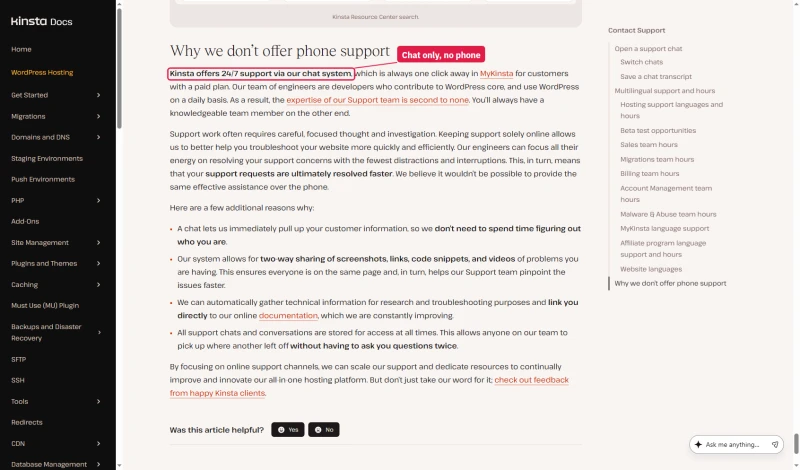
Kinsta has no phone support. Its docs say support runs around the clock through the chat in MyKinsta, for customers with a paid plan, and explain why it chose chat over phone.
The same doc says MyKinsta is available in 10 languages, then lists eight: English, Italian, Portuguese, French, German, Japanese, Dutch and Spanish. Eight matches the pricing page and the MyKinsta FAQ.
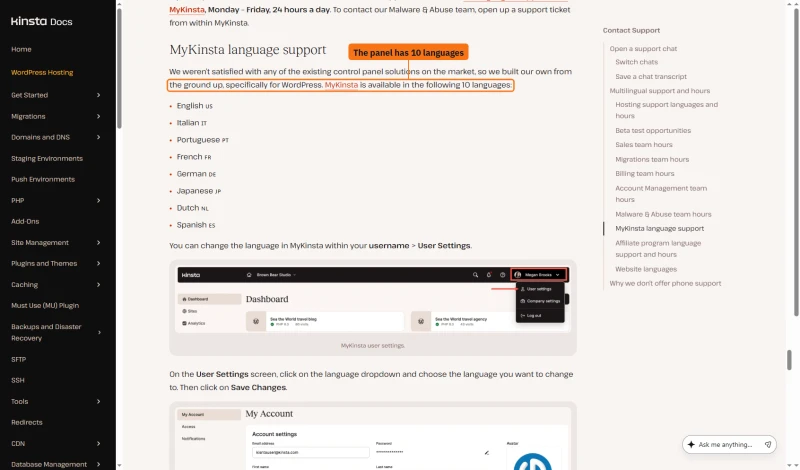
Everyone can reach the account management team by chat or email. Meetings with your account manager start at Single 500k visits, Single 250GB, WP 10 or Lead, in English, on weekdays in UTC hours. The pricing table ticks account managers from Single 125GB up, so ask which you get before you pay for it.
Kinsta vs ScalaHosting (Head-to-Head)

Where Scalahosting Wins Vs Kinsta
- No visit limits, unlimited traffic on all VPS plans
- No bandwidth caps, unlimited bandwidth included
- Unlimited WordPress sites on one VPS (vs $350/yr per site on Kinsta)
- AMD EPYC 9474F (#42 PassMark), 19% load degradation vs Kinsta's 63%
- Email hosting included, Kinsta requires +$72/yr for Google Workspace
- SPanel free, saves $180/yr vs cPanel, uses 8x less RAM
- No CPU steal, no I/O throttle, no hidden VPS limits
- Anytime money-back guarantee
Where Kinsta Wins
- 64ms idle TTFB vs ScalaHosting 38ms (26ms slower at idle)
- No Cloudflare edge caching built-in (FlyingCDN available separately)
- No built-in APM tool (use Query Monitor plugin instead)
- MyKinsta dashboard is more polished than SPanel
- Kinsta's WordPress support is more specialized
- Renewal jumps ~200% after intro term ($29.95 → ~$82/mo)
Real Benchmark Data
- Origin TTFB (Managed VPS, no CDN): 38ms
- Uptime (54-day window): 99.99%
- PageSpeed Score (Mobile): 83/100

$29.95/mo
Anytime Money-Back Guarantee
✅ Choose Kinsta When:
- Single high-value WordPress site
- You need the APM tool and best-in-class staging
- Origin bandwidth is predictable and fits inside 20GB/mo
- You value WordPress-specific support over price
- Flat renewal pricing matters for budget predictability
✅ Choose ScalaHosting When:
- Multiple sites (agencies managing 2+ sites)
- WooCommerce with 10+ concurrent shoppers
- Traffic is growing and you want no metered allowance to watch
- You need email hosting included
- You want the best load stability under real traffic
Kinsta vs Cloudways (Head-to-Head)
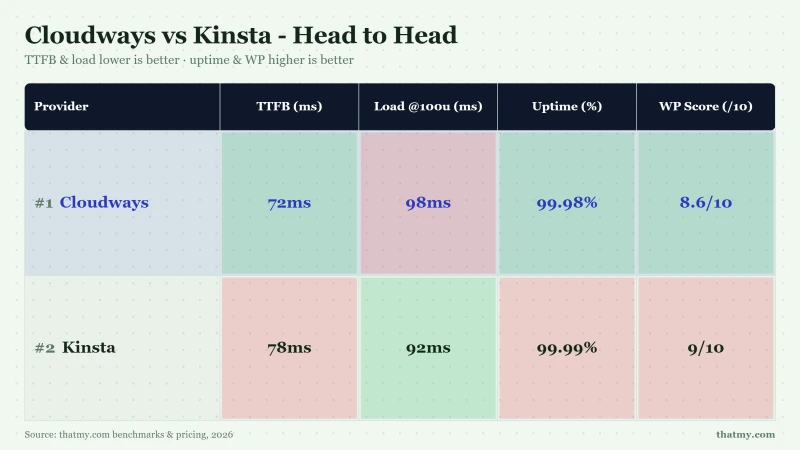
My take: Cloudways wins on price and flexibility. Kinsta wins on managed features (APM, staging quality, WordPress support). For agencies managing 10+ sites, Cloudways saves $326/mo vs Kinsta. For single sites where managed features justify the premium, Kinsta is the better choice. Both lack email hosting, add $6-12/mo for Google Workspace on either platform.
The key differentiator: Cloudways gives you 5 cloud providers and pay-as-you-go billing. Kinsta gives you the best managed WordPress tooling (APM, redirect manager, Search & Replace) and WordPress-specific support. If you're a developer who wants cloud flexibility, Cloudways. If you want the best managed WordPress experience for a single site, Kinsta.
Kinsta vs WP Engine (Head-to-Head)
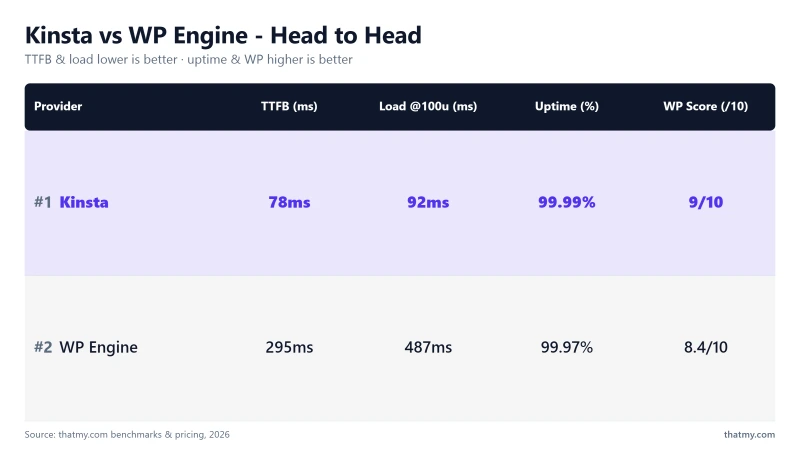
My take: Kinsta wins on performance (64ms vs 242ms TTFB). On price, WP Engine's first year is cheaper on annual billing, $336.00 against $350, but WP Engine renews at $420.00 a year while Kinsta stays at $350, so from the second year Kinsta is the cheaper of the two.
Month to month, Kinsta is $35.00/mo and WP Engine $35.00/mo. They no longer meter the same way: Kinsta counts bandwidth (or visits, if you pick that meter) and charges $0.50 per GB or per 1,000 visits over the allowance, while WP Engine counts visits and charges $2 per 1,000. Compare against your own traffic shape, not against each other's headline.
WP Engine blocks some plugins (including certain caching and security plugins) which can be a significant limitation for complex WordPress setups. For performance-sensitive sites, Kinsta is the better choice between the two.
Who Should NOT Use Kinsta
❌ Agencies managing 10+ sites
ScalaHosting ($14.95/mo unlimited sites) or Cloudways ($11.00/mo unlimited sites) cost a fraction of Kinsta's Agency tier, quoted from $3,400/yr. Over 3 years that gap runs to five figures in savings.
❌ WooCommerce stores with 10+ concurrent shoppers
ScalaHosting's 30+ PHP workers handle concurrent checkouts without queuing. Kinsta's 4 workers (Single 20GB) queue at 5+ concurrent uncached requests. The checkout TTFB difference (280ms vs 187ms) translates to measurable conversion rate impact.
❌ Sites whose origin bandwidth will outgrow 20GB/mo
The entry plan carries 20GB of server bandwidth. A media-heavy site can spend that on a few thousand page views, and Kinsta bills for what you use beyond it. If your site is growing, work out your real origin traffic at your expected 12-month traffic before committing.❌ Video-heavy sites
20GB/mo of server bandwidth on the entry plan. A site with video content can spend that on roughly 2,000 page views. ScalaHosting and Cloudways include unlimited bandwidth.
❌ Budget users
ChemiCloud at $3.95/mo for blogs under 10k monthly visitors. Kinsta's $350/yr is only justified when managed features (APM, staging, WordPress support) provide measurable value.
❌ Users who need email hosting
ScalaHosting includes email hosting with all VPS plans. Kinsta requires +$72/yr for Google Workspace (1 user). For a team of 5: +$360/yr added to your Kinsta bill.
❌ Users who need cloud provider flexibility
Cloudways offers 5 cloud providers (Vultr, DigitalOcean, AWS, GCE, Linode). Kinsta is Google Cloud only. If your organization has existing cloud contracts or compliance requirements for a specific provider, Cloudways is the better choice.
Full Test Report: Kinsta Managed WordPress, by Plan
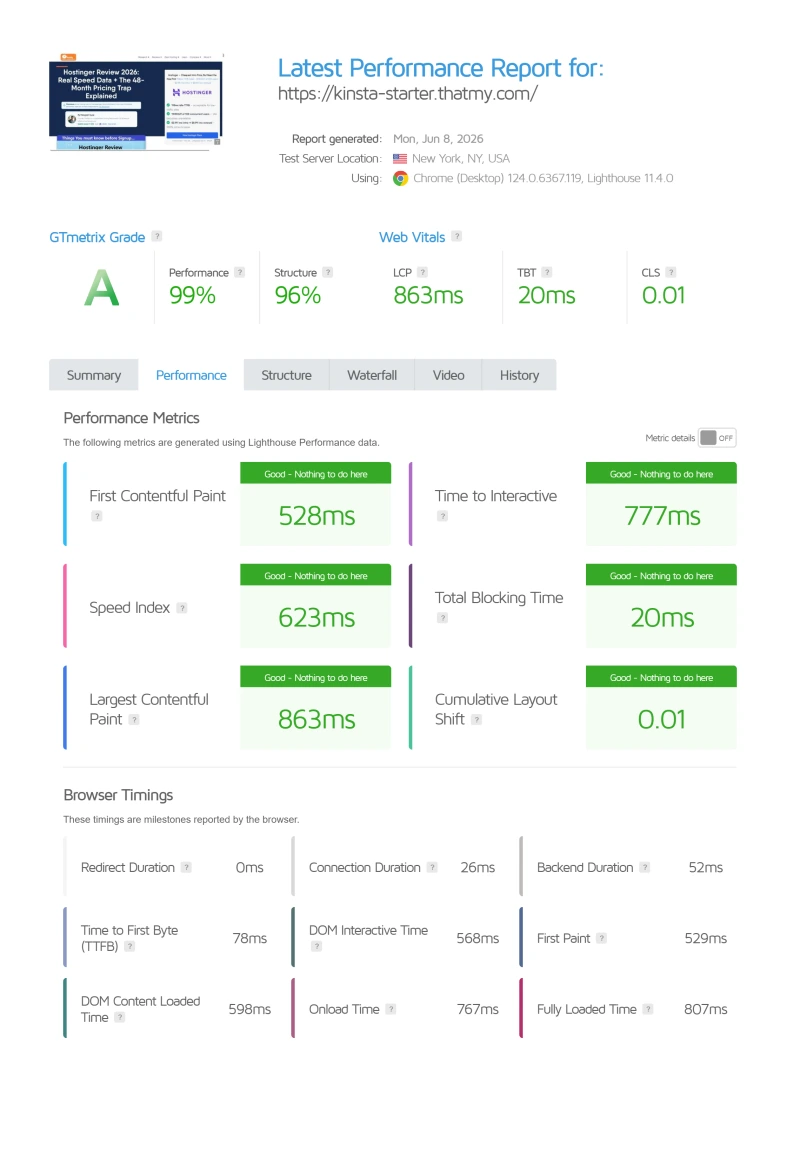
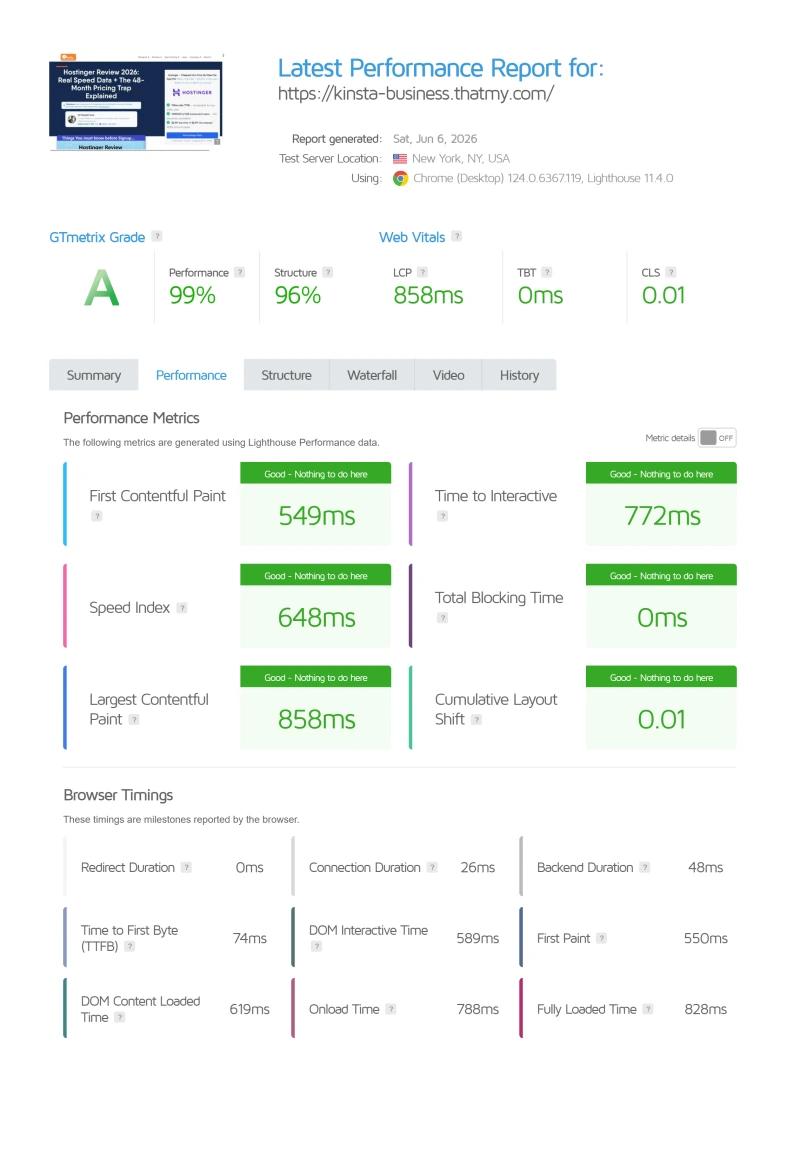
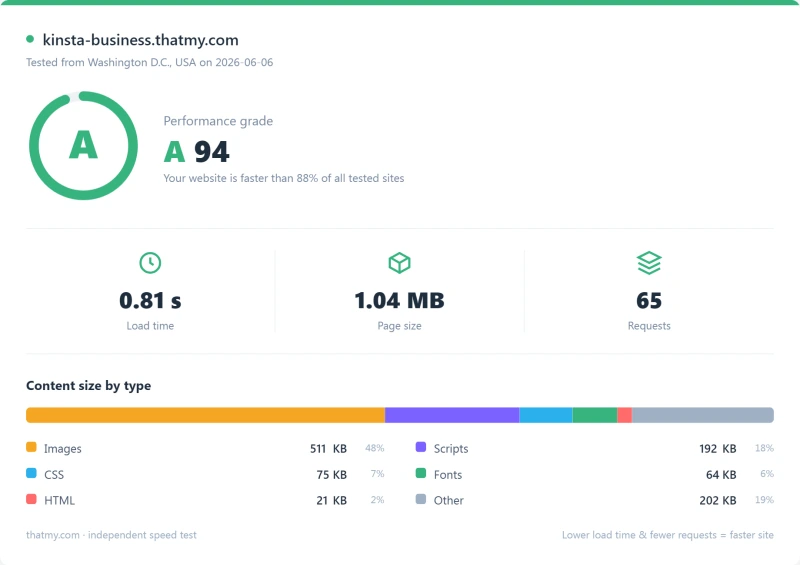
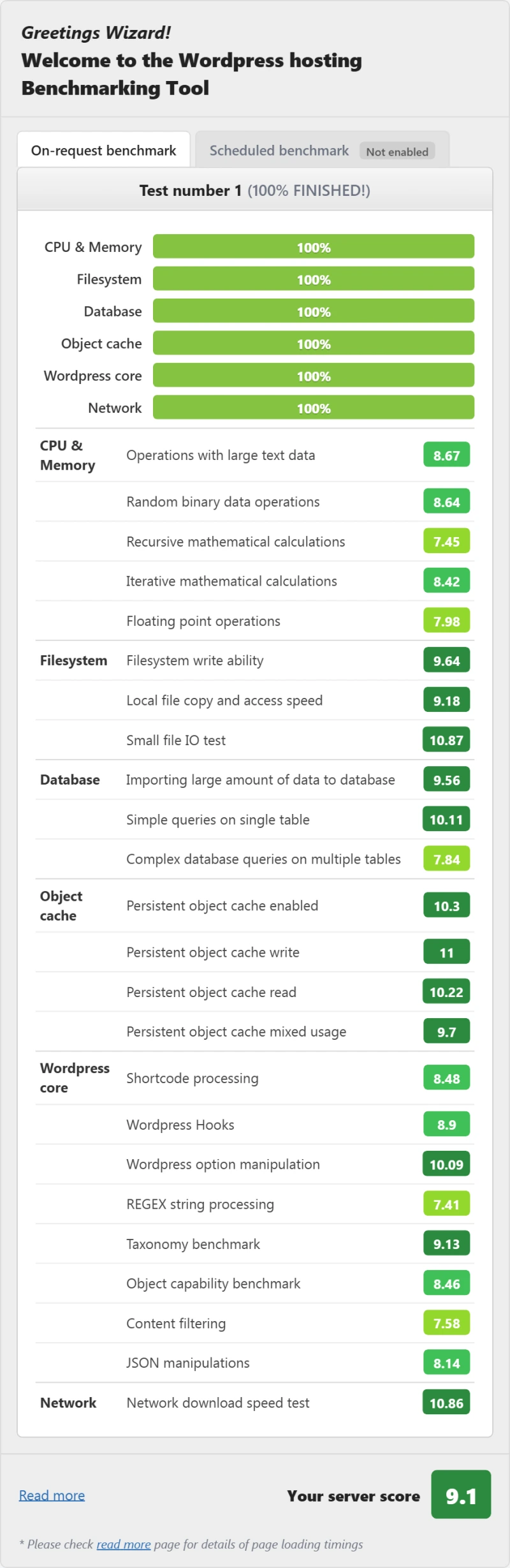
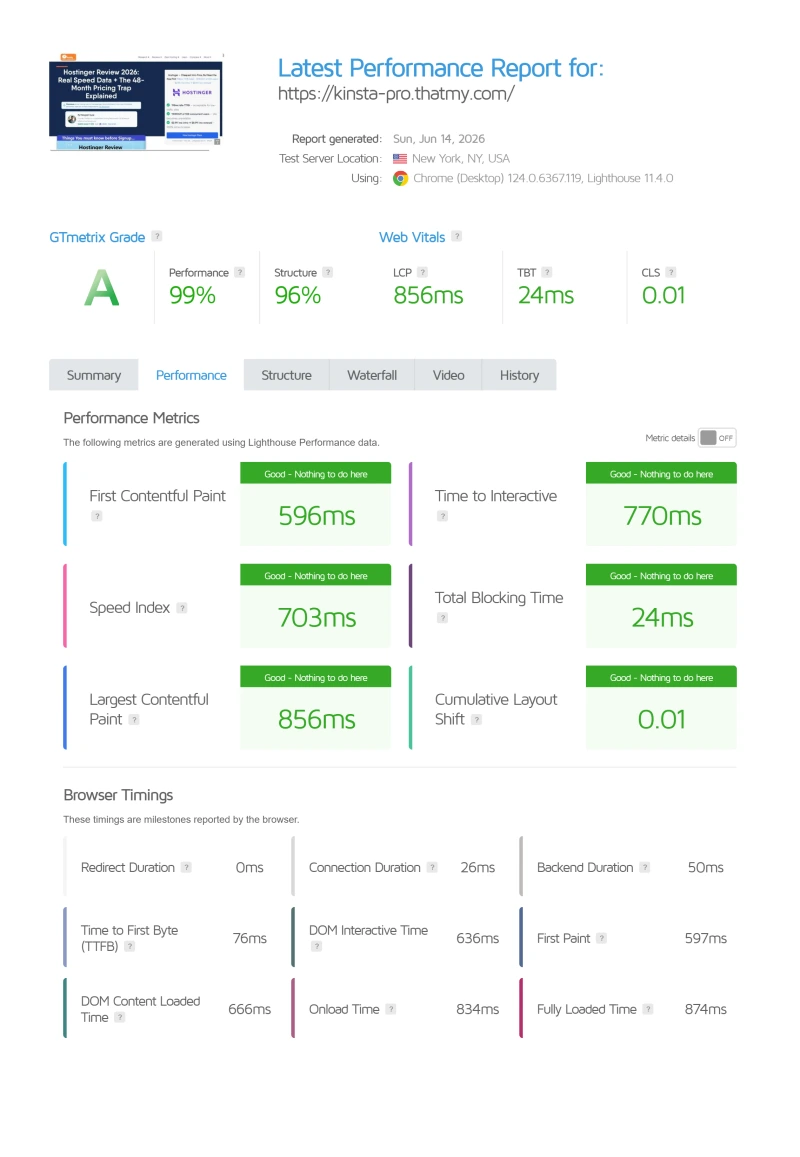
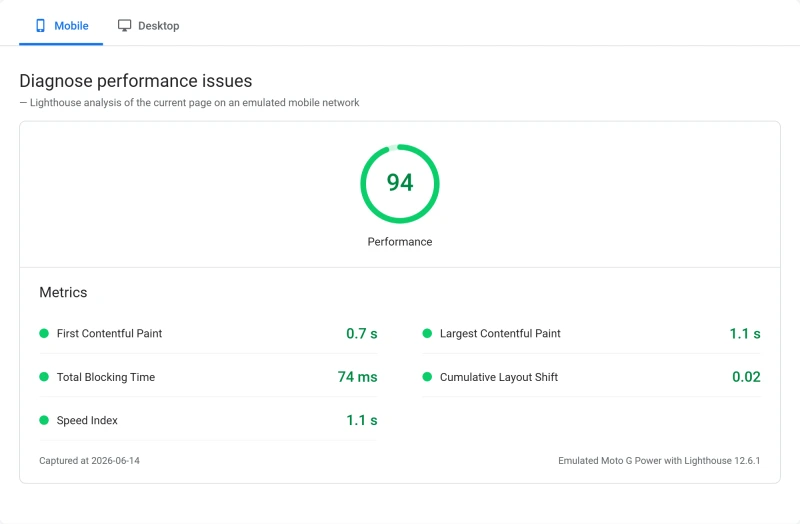
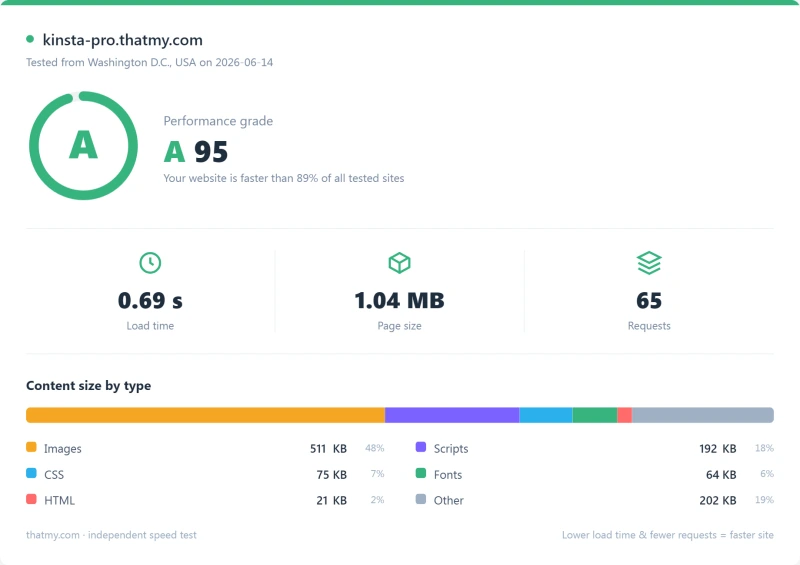
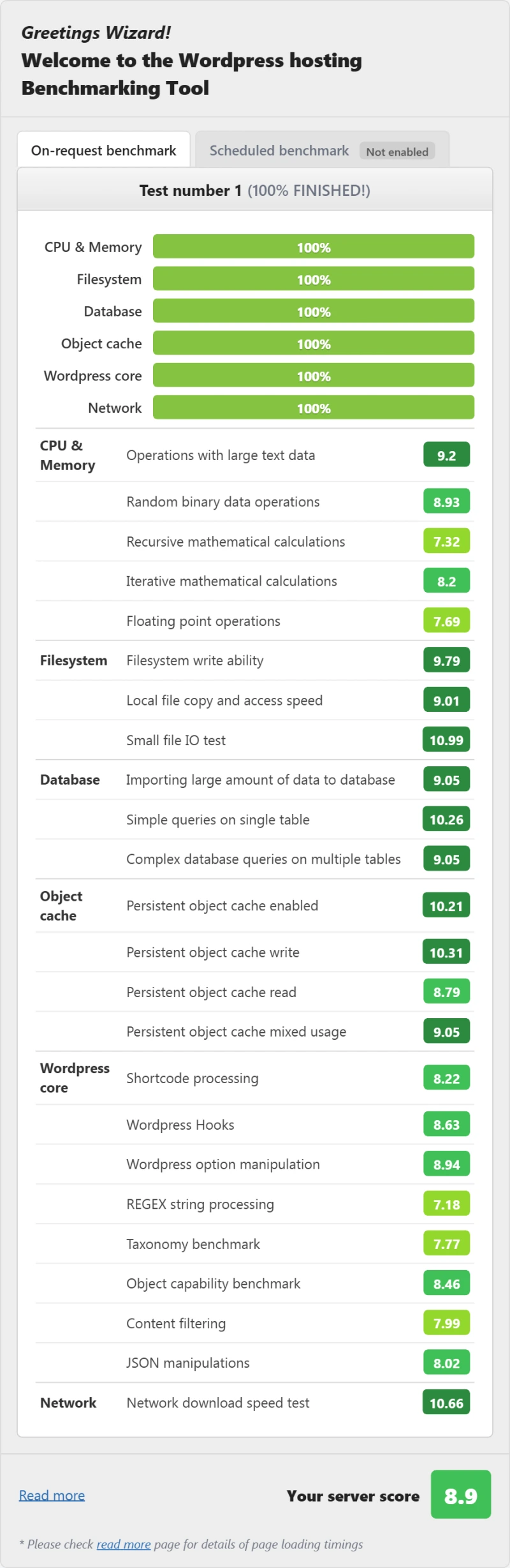
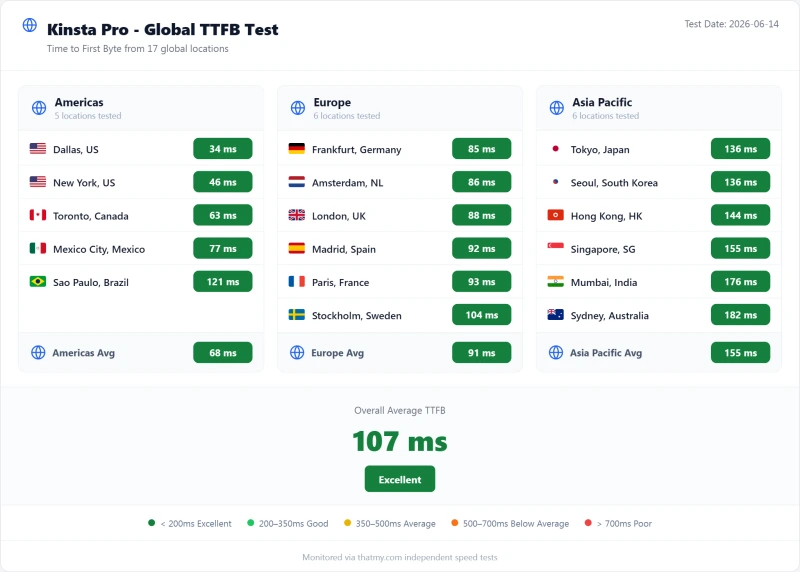
Here is the complete export from our test suite for every managed wordpress plan we benchmarked: Starter, Business, and Pro. Each tab holds that plan's full run: server response time (TTFB), behavior under a 100-user load, the GTmetrix and PageSpeed captures, a Pingdom response-time check, our WordPress hosting benchmark, the regional TTFB scorecard, and 54 days of uptime tracking with the day-by-day calendar.
Single 20GB (Featured) Agency WP 2
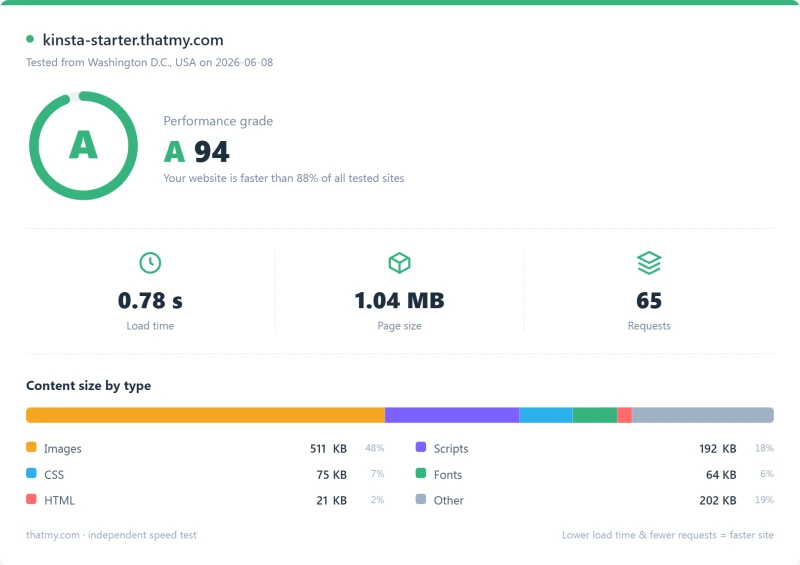
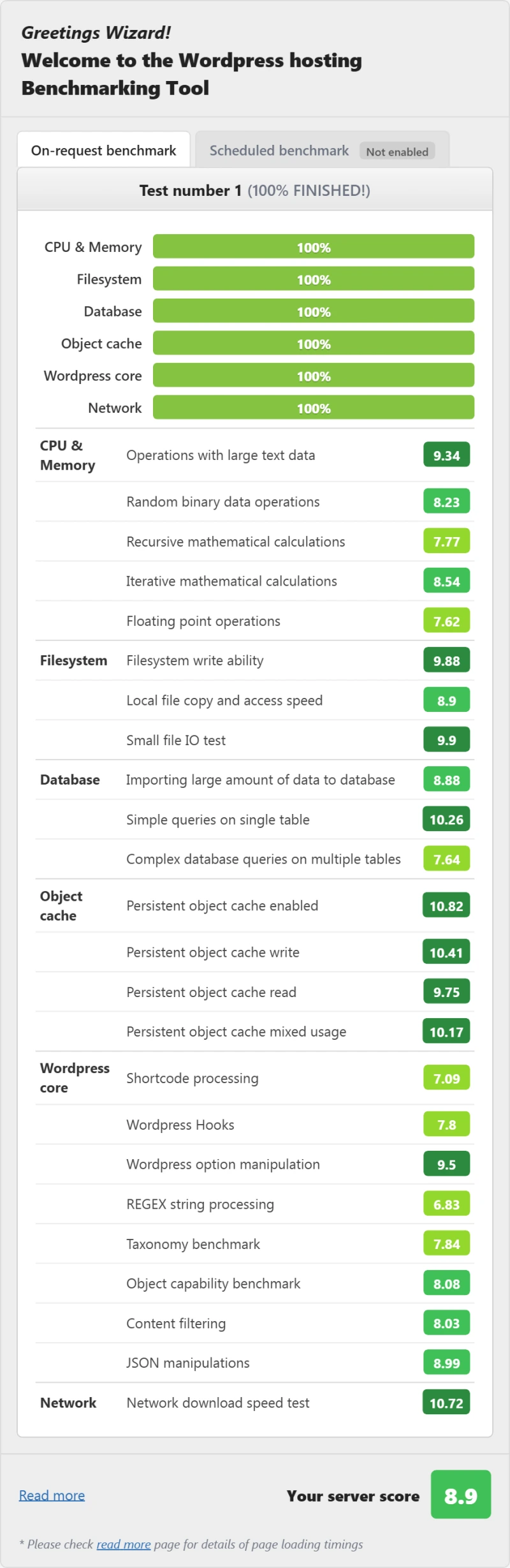
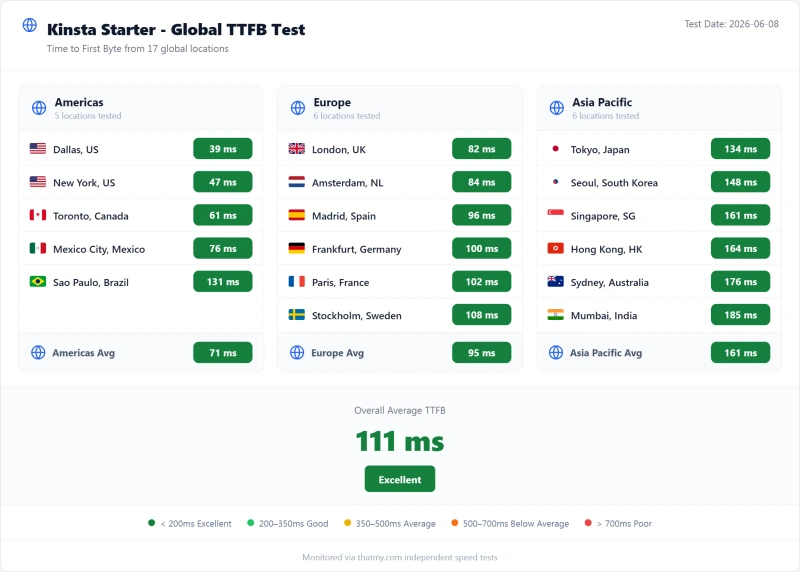
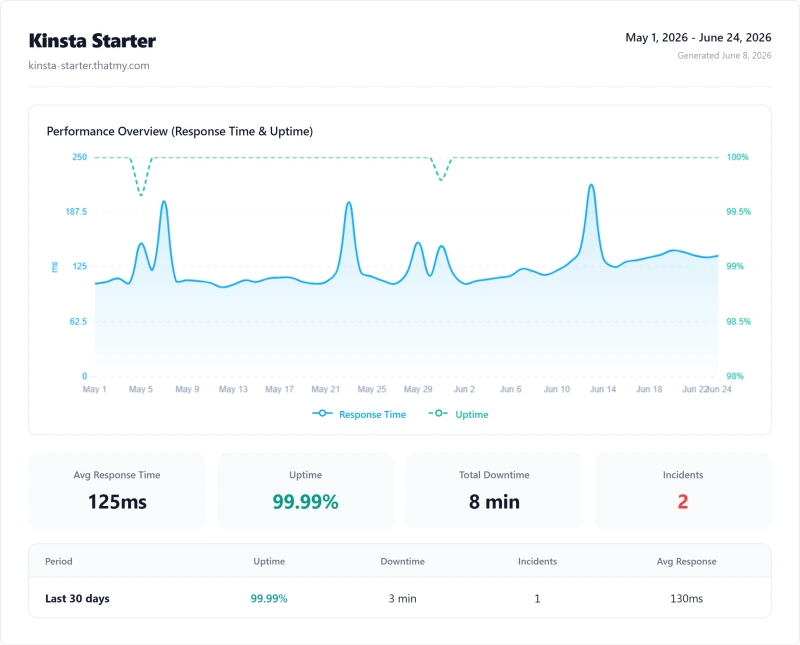
FAQ: Kinsta
Is Kinsta worth it in 2026?
Yes, for single high-value WordPress sites where managed features justify $350/yr ($29.17/mo billed annually). Kinsta delivers 64ms TTFB, 99.99% uptime, the best APM tool in managed WordPress, and WordPress-specific support. The main caveats: only 20GB/mo of server bandwidth on the entry plan, and $350/yr per site makes it expensive for agencies. For agencies managing 10+ sites, ScalaHosting at $14.95/mo for unlimited sites is significantly better value.
How does Kinsta meter its plans?
Kinsta rebuilt its plans around bandwidth in 2026 and retired the old Starter/Pro/Business tiers entirely. The lineup is now Single 20GB ($350/yr), WP 2 ($700/yr) and Agency (from $3,400/yr), and the plan names state the allowance: Single 20GB includes 20GB/mo of server bandwidth plus 125GB of CDN. Kinsta still meters installs and traffic alongside bandwidth. Kinsta's Overages doc charges $0.50 per GB of server bandwidth, or $0.50 per 1,000 visits on a visits plan, beyond the allowance. A site growing from 25k to 100k visits/mo pays an average of ~$72/mo, not $35/mo. If your traffic is growing, calculate the true cost before committing.
Does Kinsta include email hosting?
No. Email hosting is not included with any Kinsta plan. You'll need Google Workspace ($6/mo per user) or Zoho Mail ($1/mo per user) separately. For a team of 5 using Google Workspace, that's $30/mo added to your Kinsta bill. ScalaHosting includes email hosting with all VPS plans.
How does Kinsta compare to ScalaHosting?
ScalaHosting wins on raw speed at both ends, 38ms idle against 64ms and 58ms against 92ms at a hundred concurrent users. Kinsta wins on the APM tool and WordPress-specific support. ScalaHosting also has no visit limits, no bandwidth caps, unlimited sites, and email hosting included. For single high-value sites, Kinsta is excellent. For agencies and WooCommerce stores with high concurrent traffic, ScalaHosting is the better value.
What is Kinsta's uptime guarantee?
Kinsta guarantees 99.9% uptime. In our 54-day monitoring (1-minute check intervals), Kinsta achieved 99.99% uptime, 8 minutes of total downtime across 2 incidents. This exceeds their guarantee. For comparison, ScalaHosting achieved 99.99% (8 minutes total downtime) in the same period.
Does Kinsta have hidden fees?
The main hidden costs: bandwidth beyond the plan allowance (20GB of server traffic on the entry plan), email hosting (not included, add $6-12/mo), an expedited migration ($49; standard migrations are free and unlimited), and backups more often than daily (paid add-ons). Kinsta's base pricing is transparent (no intro/renewal gap), but the visit and bandwidth limits create variable costs that can significantly exceed the advertised price.
Is Kinsta good for WooCommerce?
Partially. Kinsta's edge cache makes static product pages fast globally (~35-50ms with CDN). But WooCommerce checkout, cart, and My Account pages bypass cache, they hit the origin server. Our tests showed ~280ms checkout TTFB on Kinsta's entry plan vs 187ms on ScalaHosting. With only 4 PHP workers there, Kinsta queues at 5+ concurrent uncached requests. For WooCommerce stores with 10+ concurrent shoppers, ScalaHosting's 30+ dedicated PHP workers are a better fit.
Where This Leaves You: Is Kinsta Worth It?
Yes, for the right use case. No, for agencies, WooCommerce stores with high concurrent traffic, and growing sites.
The performance is real: 64ms TTFB, 99.99% uptime, the best APM tool in managed WordPress, and WordPress-specific support that actually understands WooCommerce and performance optimization. MyKinsta is the most polished managed WordPress dashboard tested. Cloudflare Enterprise CDN makes static pages fast globally.
The limitations are also real: 20GB/mo of server bandwidth on the entry plan, 4 PHP workers (queues under concurrent load), $350/yr per site (expensive for agencies), no email hosting. At 100 concurrent users, Kinsta degrades 63%, ScalaHosting degrades only 19% at $14.95/mo.
Our Recommendation by Use Case
- Single high-value WordPress site inside the 20GB origin allowance: Kinsta is worth $350/yr, the APM tool, staging, and WordPress support justify the premium.
- WooCommerce store with 10+ concurrent shoppers: ScalaHosting ($14.95/mo, 30+ PHP workers, no visit limits), better checkout performance and no concurrency bottleneck.
- Agency managing 10+ sites: ScalaHosting ($14.95/mo unlimited sites) or Cloudways ($11.00/mo unlimited sites), costs a fraction of Kinsta's Agency tier, quoted from $3,400/yr.
- Growing site that will exceed 20GB/mo of origin bandwidth: ScalaHosting or Cloudways, no metered allowance.
- Developer who needs cloud flexibility: Cloudways (5 cloud providers, Git deployment, pay-as-you-go).
What Our Testing Found
- 64ms TTFB, Google Cloud C2 infrastructure, excellent idle performance
- 99.99% uptime, 54-day monitoring (8 min total downtime, 2 incidents)
- Best managed WordPress features: auto-updates, staging, backups
- MyKinsta dashboard, most polished in managed WordPress
- Cloudflare Enterprise edge caching, static pages under 50ms globally
- 24/7 expert WordPress support (not generic hosting support)
- Automatic daily backups with 2-week retention
- Free SSL, free CDN, free migrations (1 per plan)
- APM tool built-in, identify slow plugins/queries without New Relic
Real Weaknesses
- Bandwidth-metered since the 2026 rebuild: 20GB/mo server traffic on the entry plan
- Only 20GB/mo of server bandwidth on the entry plan, video sites hit this fast
- $350/yr for 1 site; the Agency tier is quoted from $3,400/yr
- No email hosting, add Google Workspace $6/mo per user
- Managed doesn't mean they fix your site, plugin/theme issues are yours
- 4 PHP workers on the entry plan, queues at 5+ concurrent uncached requests
- No cPanel, MyKinsta only (no SSH root on lower plans)
- No choice of cloud provider, Google Cloud only
Real Benchmark Data
- Origin TTFB (4 plans, no CDN): 61ms to 64ms
- Uptime (54-day window): 99.99%
- PageSpeed Score (Mobile): 88/100
$35/mo
30-Day Money-Back Guarantee
View Kinsta Plans, 30-Day Money-Back Guarantee ➦
Not right for you? See our ScalaHosting review (no visit limits, 30+ PHP workers, email included) or our Cloudways review (unlimited sites, 5 cloud providers, $11.00/mo), or our full WordPress hosting comparison.