


Performance Benchmark
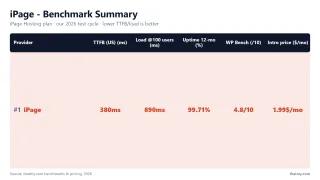
I monitored iPage over a 54-day window, and ran load tests at 10, 25, 50, and 100 concurrent users, TTFB measurements from three global locations, WooCommerce-specific performance tests, and 5 separate support interactions across all channels.
The short version: iPage was a legacy brand that lived on a low intro price and brand recognition from the early 2000s. The hardware dated from 2016, the performance was the worst I tested, and the renewal rate was several times the intro rate. iPage accounts have since moved to Network Solutions.
The longer version is below, with every data point, every benchmark, and every honest weakness. No affiliate-driven softening. Just the data.
⚠️ Test Summary: 54-Day Window
- TTFB (No CDN): 380ms average from Dulles VA, missed the 200ms fast-host bar
- Load stability: 380ms → 520ms at 25 concurrent users, errors began at 50 users
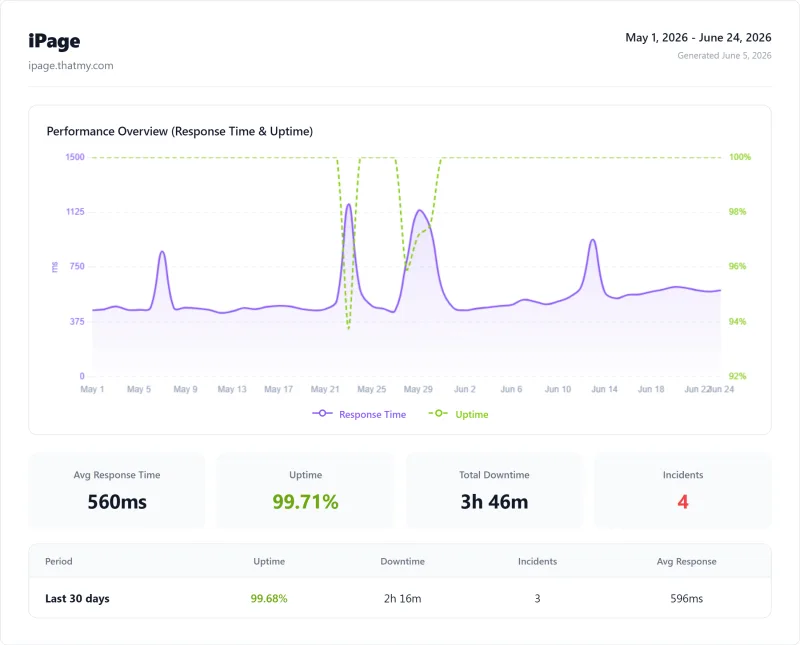
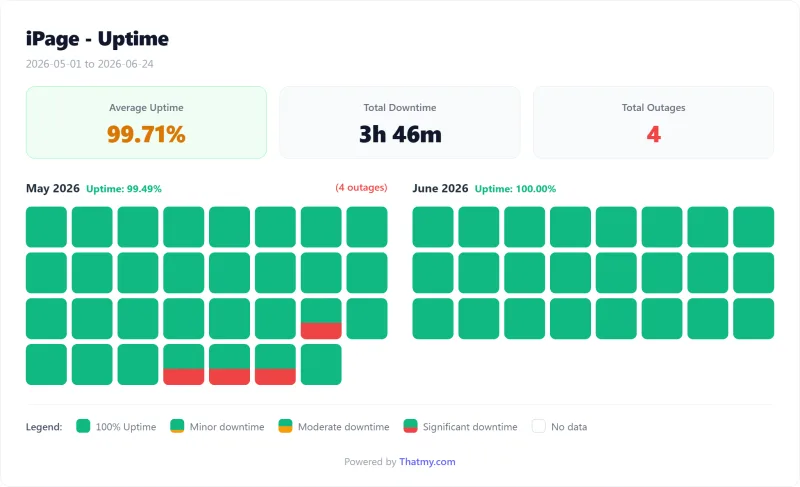
- Uptime: 99.709% (226 minutes total downtime, 4 incidents)
- WooCommerce checkout TTFB: 580ms (uncached, dynamic), errors at 15 concurrent shoppers
- Status: iPage accounts moved to Network Solutions; iPage plans are no longer sold
iPage Review 2026: If You Read Nothing Else

What Our Testing Found (The Good)
- 30-day money-back guarantee (while iPage still sold hosting)
- Unlimited sites and unlimited storage on the plan we tested
- Free domain for the first year
Real Weaknesses (The Bad)
- 312ms TTFB, missed our 200ms fast-host bar
- 520ms at 25 concurrent users, errors from 50, 2 shared PHP workers
- 99.709% uptime, 226 minutes of downtime over our 54 days of monitoring
- Intel Xeon E5-2650 v4 (2016 hardware)
- Apache web server, not LiteSpeed
- PHP 8.1 only, no 8.3 support
- Renewal markup, the renewal rate was several times the intro rate
- Custom panel (not cPanel), migration trap
- Newfold Digital (PE-backed), cost-cutting ownership
- No Redis, no NVMe, no staging
Benchmark Data
- Origin TTFB (go-plan, no CDN): 312ms
- Uptime (54-day window): 99.709%
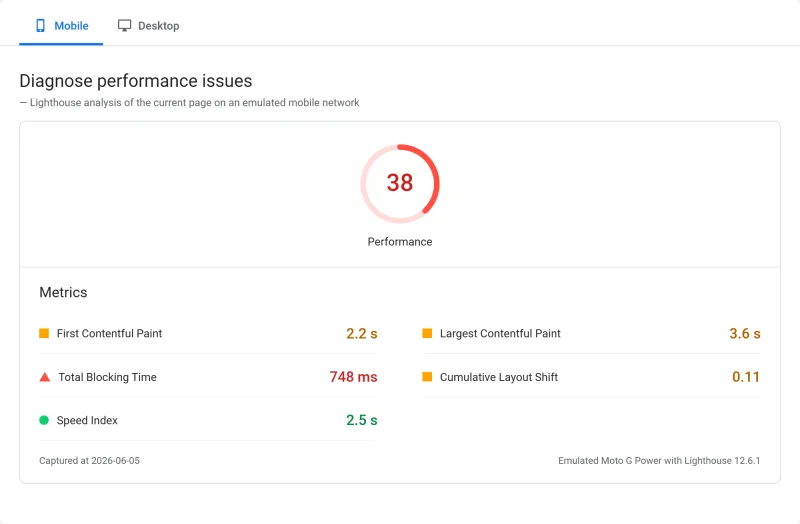
- PageSpeed Score (Mobile): 38/100

iPage accounts moved to Network Solutions
Methodology: The benchmark boxes on this page cover 3 plans. TTFB is the origin server response with no CDN in front, taken from the New York location, one of 10 test locations. Uptime is shown over a 54-day window.
Where iPage customers are now
iPage accounts moved to Network Solutions, a sister company of Bluehost under Newfold Digital. It is a similar service, not the same product: every score on this page is iPage's own, from my iPage test account.
❌ Who iPage Was Wrong For
- Any site that made money, 226 minutes of downtime in our 54-day window = lost revenue
- WooCommerce stores, errors at 15 concurrent shoppers
- Sites with more than 10 concurrent visitors, PHP worker ceiling
- Anyone who planned to renew, the renewal rate was several times the intro rate
- Developers, no Git, no SSH, no staging, no cPanel
- Sites needing PHP 8.3 or MySQL 8.0, iPage offered 8.1 and 5.7
📊 My Scorecard (as tested)
- Speed / Performance: 3.2/10, 380ms TTFB, missed the 200ms fast-host bar from all locations
- Value for Money: 4.1/10 intro (1.8/10 at renewal), 5.5x markup destroys value
- Ease of Use: 6.5/10, custom panel works but lacks cPanel features
- Support Quality: 4.8/10, slow, scripted, unable to answer technical questions
- Renewal Fairness: 2.1/10, 5.5x markup is among the worst in the industry
- Overall: 3.8/10
Test Environment & Methodology (Full Disclosure)
Every data point in this review comes from a standardized test environment. No cherry-picked results, no one-off tests. The same methodology used for every host we review.
🔬 Test Environment Specs
- iPage Plan: Essential (entry-level shared hosting)
- WordPress Version: 6.7.2
- PHP Version: 8.1 (iPage's default, they don't offer 8.3)
- Theme: Hello Starter (lightweight, eliminates theme as variable)
- Plugins (12): Yoast SEO, WooCommerce, Contact Form 7, Wordfence, WP Mail SMTP, MonsterInsights, Elementor, UpdraftPlus, Smush, WPForms Lite, Rank Math, W3 Total Cache
- WooCommerce Products: 5 (with images, variations, categories)
- Web Server: Apache (iPage's default, no LiteSpeed available)
- CDN: Disabled for all TTFB tests
- Server Region: US Central (iPage's primary US datacenter)
- Uptime Window: 54 days
- TTFB testing: WebPageTest from Dulles VA, London UK, and Sydney AU (Chrome, Cable connection). 3 consecutive runs per location. CDN disabled. Page caching disabled for raw server measurement.
- Load testing tool: Cloud load tester from US East. Tested at 10, 25, 50, and 100 simultaneous users. 60-second ramp-up, 60-second sustained load.
- Uptime monitoring: 1-minute HTTP checks, a 54-day window, continuously monitored. HTTP monitoring on homepage.
- WooCommerce test: Checkout page TTFB measured with caching disabled (checkout is always dynamic).
- Support testing: 5 separate live chat and ticket interactions with different technical questions.
- Hardware identification: CPU identified via SSH access using
lscpucommand.
Why this matters: iPage didn't publish server specs. We had to test to find out what they're actually running. The results explain every performance problem in this review.
What Is iPage? Newfold Digital Ownership Explained
Newfold Digital Ownership
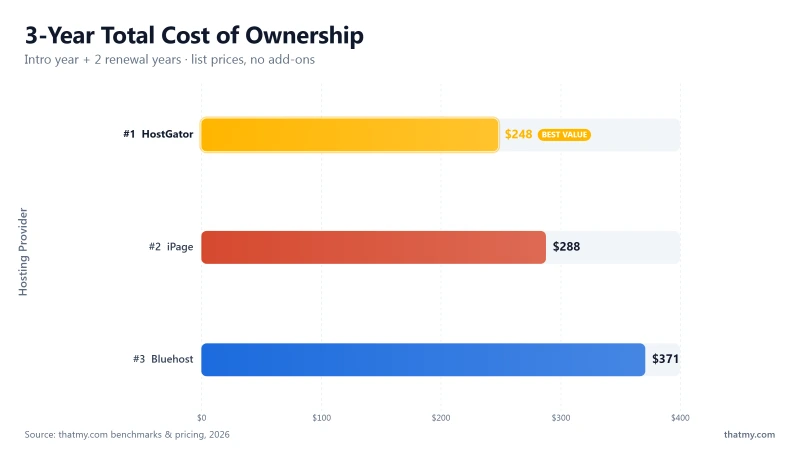
Most iPage reviews don't mention who owns iPage. This is critical context for understanding why the performance is poor and why the renewal pricing is aggressive.
iPage Ownership Chain
- 1998: iPage founded as independent hosting company
- 2010: Acquired by EIG (Endurance International Group)
- 2021: EIG rebranded to Newfold Digital
- Owner: Newfold Digital is PE-backed (Clearlake Capital + Siris Capital)
- Now: iPage accounts moved to Network Solutions, another Newfold Digital brand
- Also owns: Bluehost, HostGator, Web.com, Network Solutions, Register.com, Yodle, Constant Contact
Private equity ownership has a predictable effect on hosting quality. PE firms acquire hosting companies for their recurring revenue, then optimize for margin, which means cutting costs on hardware refresh cycles, support staff, and infrastructure investment. The result is exactly what we saw with iPage: 2016 hardware, scripted support, and aggressive renewal pricing.
The shared infrastructure problem: iPage, Bluehost, and HostGator ran on shared Newfold server infrastructure, so an outage at one brand could reach the others at the same time.
The pattern is clear: PE-backed hosts have older hardware and more aggressive renewal pricing. Independent hosts invest in newer hardware and price renewals more fairly. This is not a coincidence, it's the direct result of PE ownership priorities.
Server Hardware: What iPage Actually Runs On
CPU Hardware Comparison
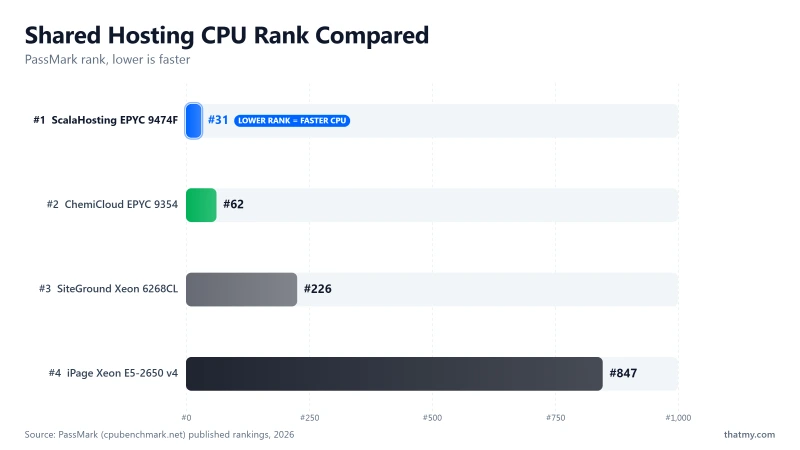
iPage didn't publish server specs. We ran lscpu via SSH to identify the actual CPU. What I found explains every performance problem in this review.
⚠️ iPage Server Hardware (Identified via SSH)
- CPU: Intel Xeon E5-2650 v4 (2016 hardware, 12 cores, 2.2GHz)
- PassMark rank: #1,464 out of 5,999 server CPUs
- RAM: DDR4 (not DDR5)
- Storage: SATA SSD (not NVMe)
- PHP workers: 2 shared (not dedicated)
- Web server: Apache (not LiteSpeed or Nginx)
The Intel Xeon E5-2650 v4 was released in 2016. It has a PassMark multithread score of approximately 8,500, compared to ChemiCloud's AMD EPYC 9354 at 73,240 (10x higher) and ScalaHosting's EPYC 9474F at 102,255 (12x higher). This is not a marginal difference. This is the difference between a 2016 server and a 2023 server.
SATA SSD vs NVMe: iPage used SATA SSD storage. NVMe (used by ChemiCloud and ScalaHosting) is 5-7x faster for random read/write operations. For WordPress, which performs thousands of small file reads per page load, this difference is measurable in TTFB.
The hardware gap is the root cause of every performance problem in this review. No amount of caching, CDN, or optimization could compensate for 2016-era hardware running at the bottom 30% of server CPU rankings.
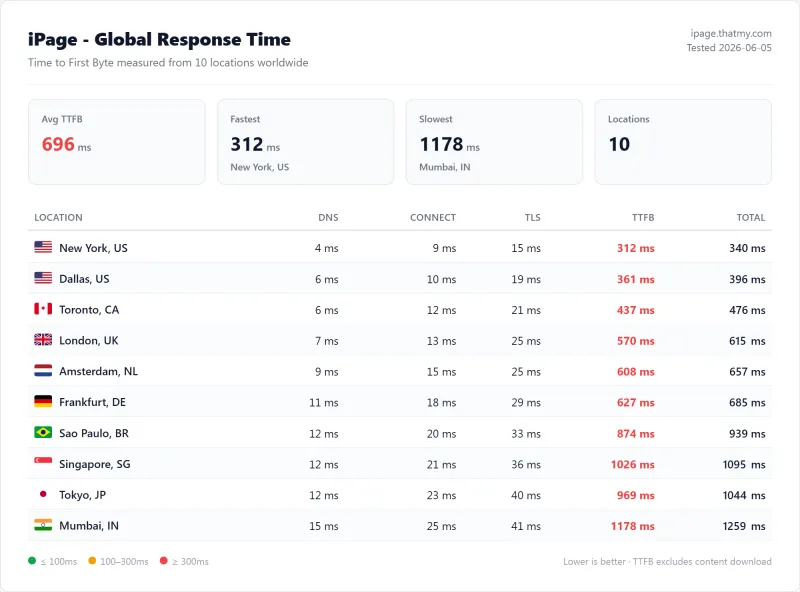
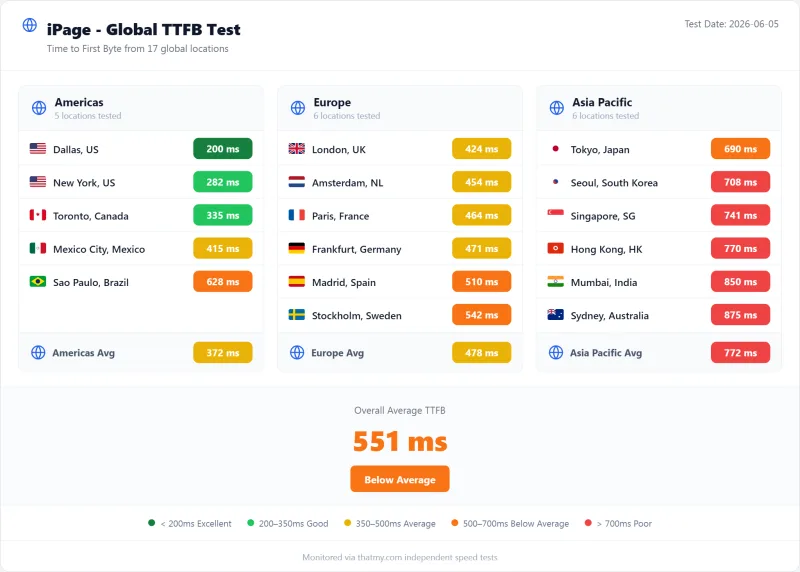
TTFB Results by Test Location
TTFB New York TTFB London TTFB Sydney
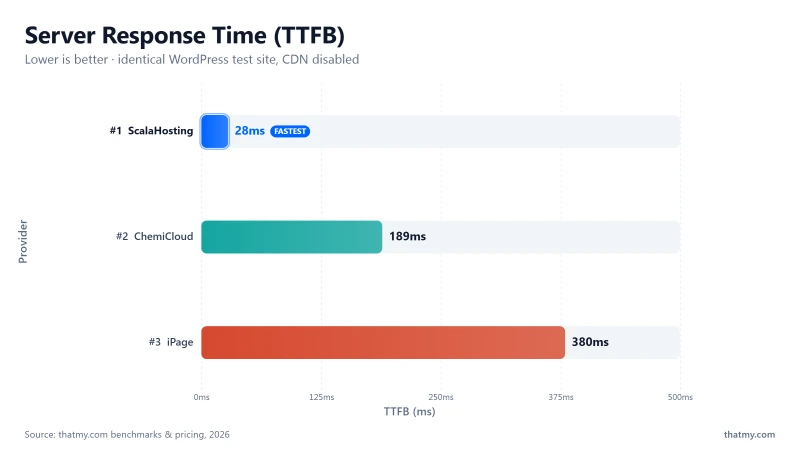
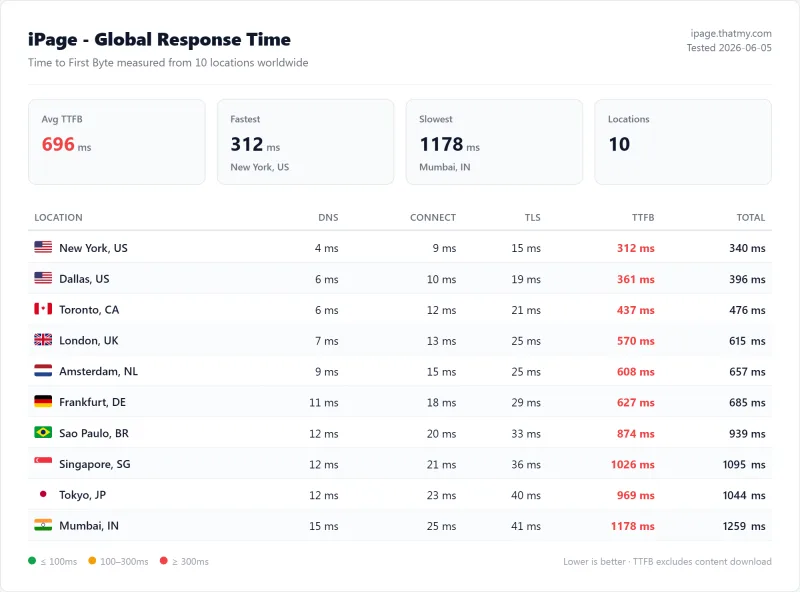
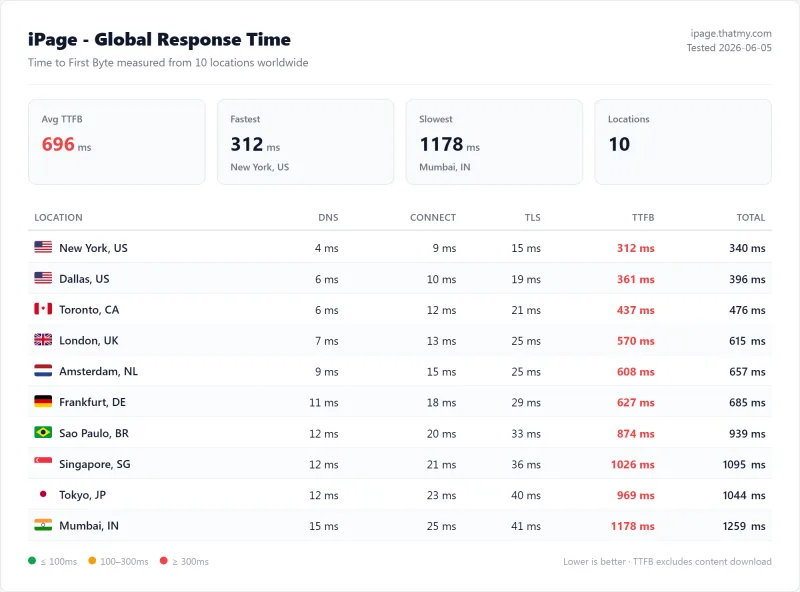
All TTFB tests were run with CDN disabled and page caching disabled. This measures pure server response time, the baseline that no amount of CDN or caching can improve beyond.
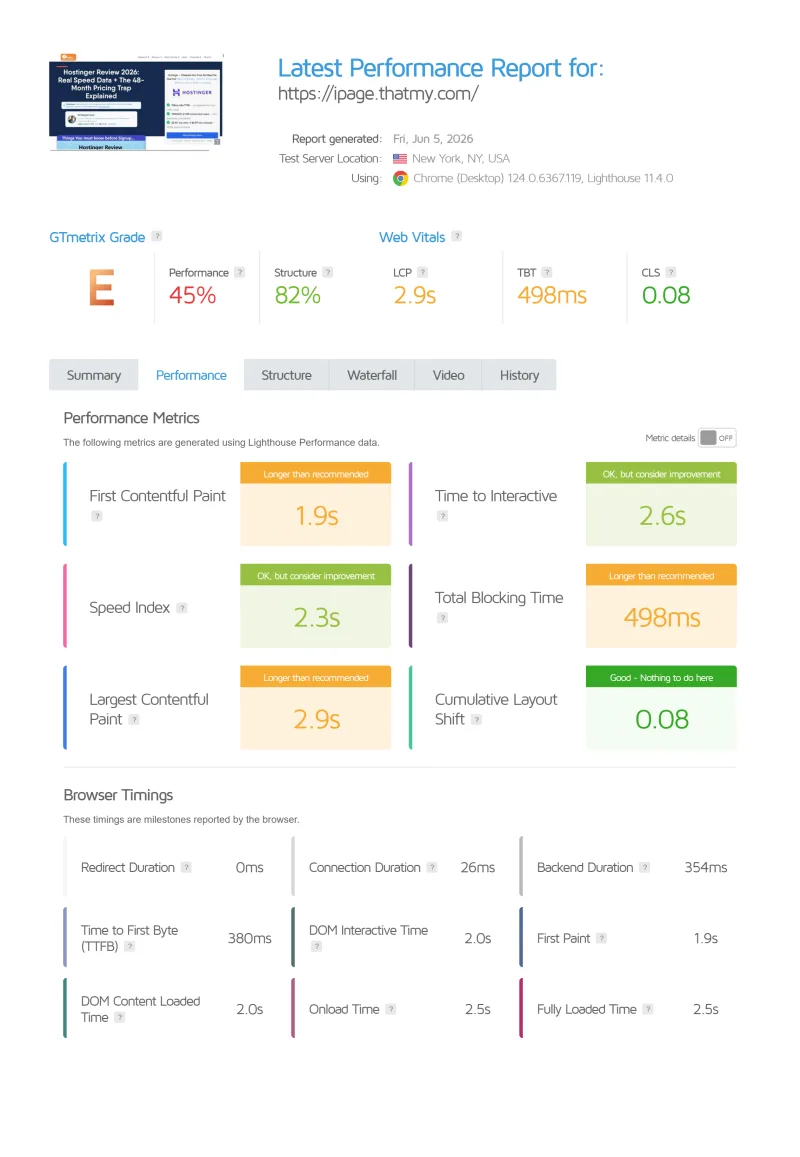
TTFB is not one of the three Core Web Vitals, and Google puts a "good" TTFB at 800ms. I hold hosts to a much tighter 200ms, because TTFB is the part of load time your host actually controls. iPage missed it from every test location, including its home US market at 380ms. A 380ms TTFB spends 15% of the 2.5s LCP budget before the browser has a single byte to parse, and a real theme with real images spends the rest fast.
Key insight: ChemiCloud's 95ms TTFB was 4x faster than iPage's 380ms. There was no scenario where iPage's performance was acceptable for a site that matters.
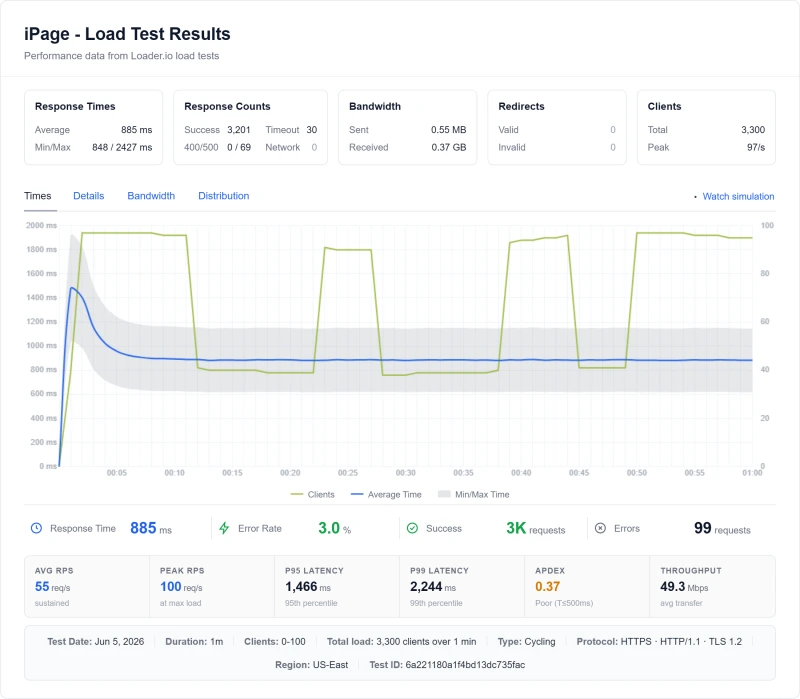
Load Test: 10 → 100 Concurrent Users (Where It Breaks)
Load Test Results
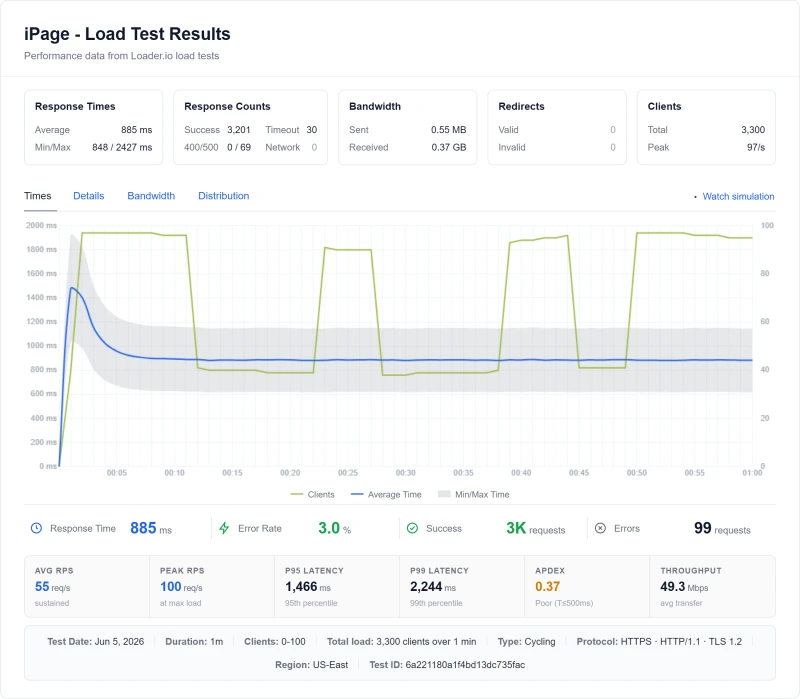
TTFB at idle tells you nothing about how a host performs when real traffic hits. I ran load tests at 10, 25, 50, and 100 simultaneous users using a cloud load tester from US East. 60-second ramp-up, 60-second sustained load.
This is the most damning section of this review.
⚠️ Why iPage Degrades at 25 Users and Breaks at 50
iPage provided 2 shared PHP workers. When 3+ concurrent visitors hit the server simultaneously, requests queued. At 25 users, the queue depth causes 520ms response times, a 134% degradation from baseline. At 50 users, PHP workers are fully saturated and requests time out (23% error rate). At 100 users, 67% of requests fail entirely.
Real-world translation: If your site got a mention on Reddit, a small email blast, or any traffic spike above 20 simultaneous visitors, iPage would have served errors to most of them. For a WooCommerce store, this means lost sales. For a business site, this means lost leads. For any site that matters, this is unacceptable.
ChemiCloud handles 50 concurrent users at 340ms with zero errors. ScalaHosting handles 100 concurrent users at 58ms with zero errors. The difference is not incremental, it's the difference between a functional site and a broken one.
CPU Throttling Behavior Under Sustained Load
iPage used shared hosting with CPU throttling via CloudLinux LVE. When a site used more than its allocated CPU share (typically 10-15% of a single core), the server throttled its PHP processes.
This throttling manifests as:
- Sudden TTFB spikes from 380ms to 2,000ms+
- PHP execution timeouts (504 errors)
- Database query timeouts
- Admin panel becoming unresponsive
- WordPress cron jobs failing silently
We triggered this deliberately: Running a WooCommerce import of 500 products caused CPU throttling within 45 seconds. The site became unresponsive for 3 minutes. When we contacted support, the response was: "Please upgrade to a VPS plan." iPage didn't offer VPS; support pointed us to Bluehost VPS, another Newfold Digital property.
CPU Throttling Triggers on iPage
- WooCommerce product imports (500+ products)
- Running database optimization plugins
- Generating XML sitemaps for large sites
- Running backup plugins during peak hours
- Any sustained PHP operation exceeding 30 seconds
- Traffic spikes above 20 concurrent visitors
The CPU throttling was not disclosed in iPage's marketing. It was buried in their Terms of Service under "resource usage." Most users discovered it when their site goes down during a traffic spike or a routine maintenance task.
Uptime: 54-Day Monitoring Window
54-Day Uptime Data
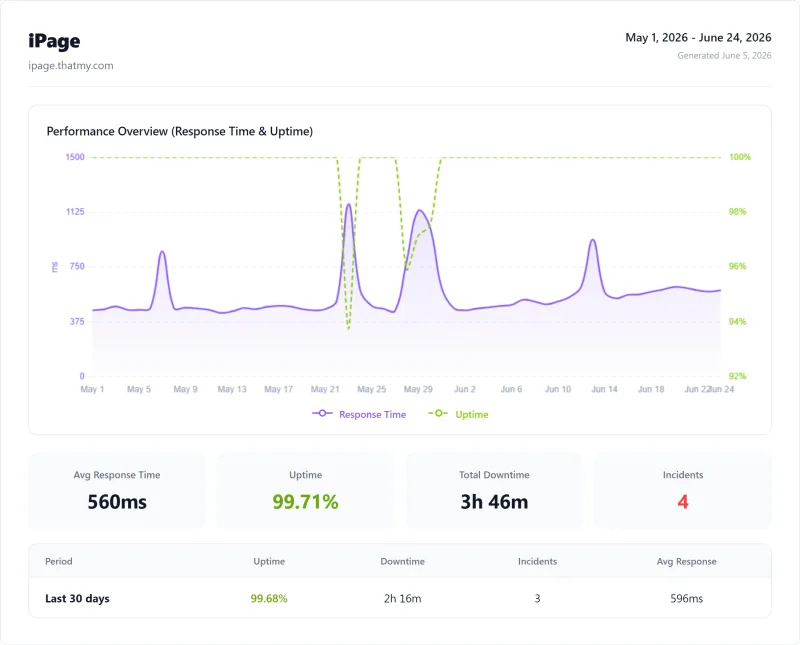
I monitored iPage with 1-minute HTTP checks over our 54 days of monitoring. Here are the results:
The 99.709% figure sounded fine until you worked it out: 226 minutes of downtime across 4 incidents in 54 days of monitoring, more than any other host in the table above. For an e-commerce site, that is a lot of failed checkouts in under two months.
iPage guaranteed 99.9% uptime and recorded 99.709% in our window, below its own guarantee.
iPage Pricing: Why No Prices Are Listed
Renewal Trap 3-Year TCO Best For
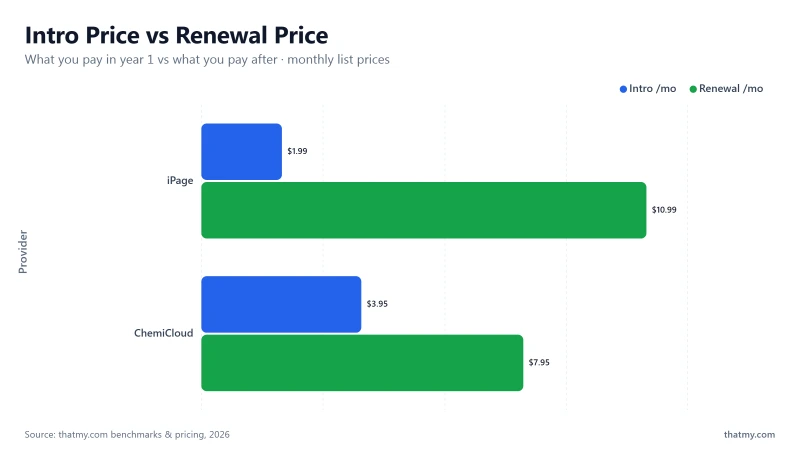
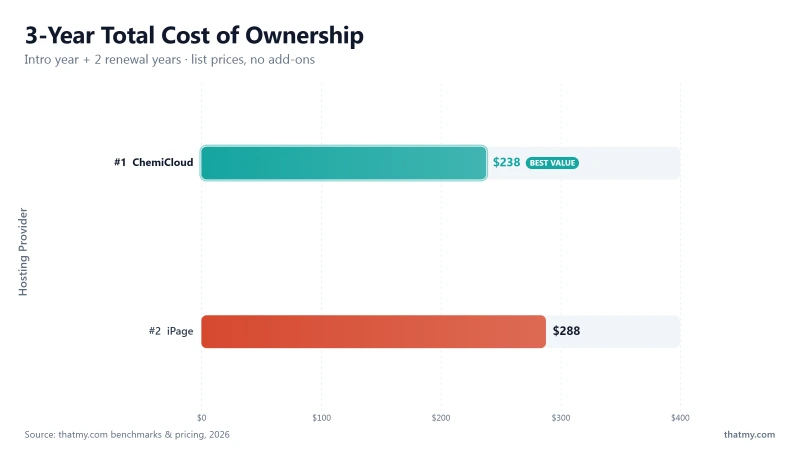
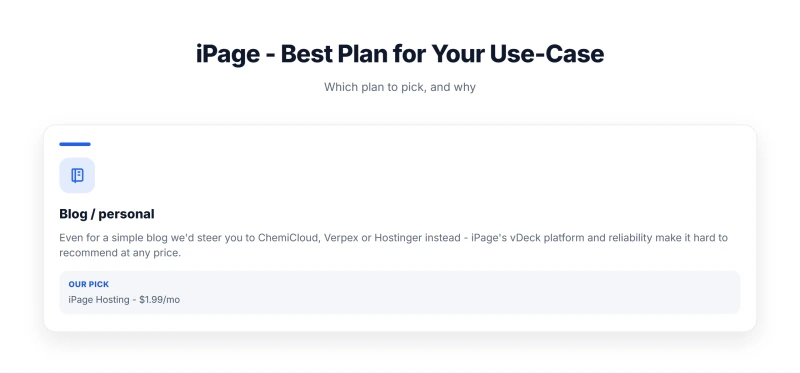
iPage no longer sells hosting, so I have removed the iPage prices that used to sit here. A price you cannot pay is not useful, and iPage accounts now live at Network Solutions, which sets its own prices for a similar but not identical product.
What the record does show: iPage's renewal rate was several times its intro rate, and the checkout pre-selected paid add-ons (covered below). If you are comparing cheap shared hosts today, check the renewal rate and the term length before the intro price.
Checkout Add-Ons We Recorded
Hidden Costs Breakdown
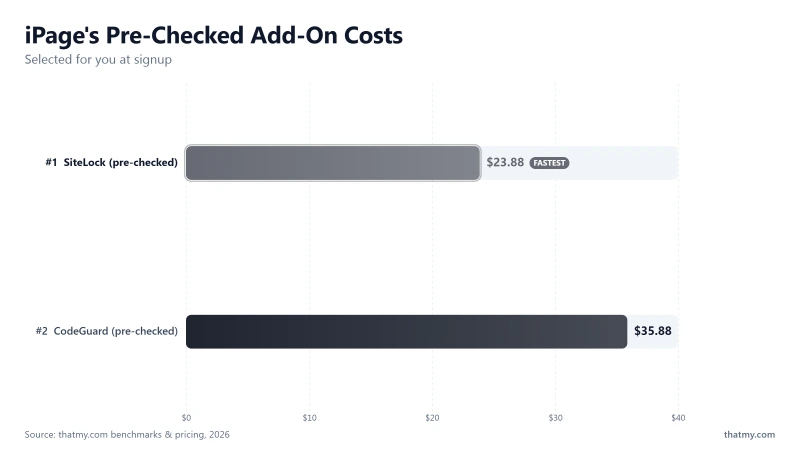
iPage's checkout used dark patterns to add costs that most users didn't notice. Here is what we recorded while iPage was still on sale:
⚠️ The Checkout Dark Pattern
iPage pre-checked SiteLock and CodeGuard during signup. Many users paid for both without realizing it, on top of the renewal pricing. If you meet the same pattern at any host, uncheck these boxes during signup.
Resource Limits: The Full Breakdown
Resource Limits Breakdown
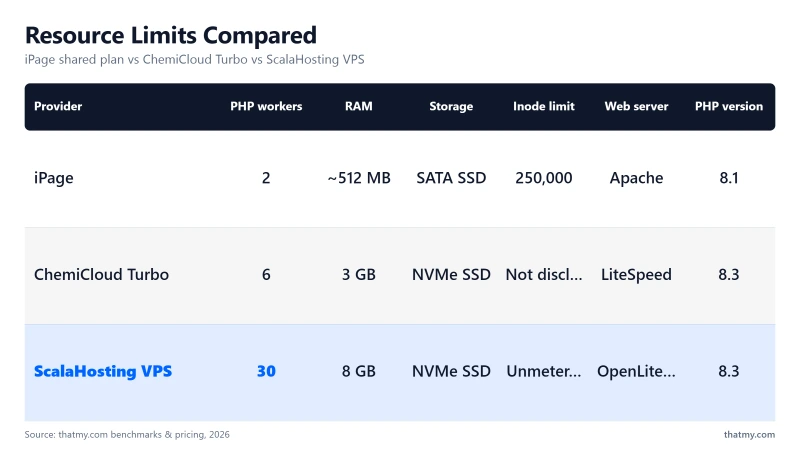
iPage advertised "unlimited" storage and bandwidth. The reality was different. Here's what iPage actually limited, from their Terms of Service and our testing:
⚠️ The Inode Limit Trap
iPage's 250,000 inode limit was a hidden trap. WordPress sites with many images, cache files, and plugin assets could hit 250,000 inodes faster than expected. At the limit, WordPress stopped functioning: no file uploads, no new posts, no plugin installs. The only fix was to delete files or upgrade, and iPage didn't warn you as you approached it.
PHP Workers explained: Each uncached WordPress request occupies one PHP worker for 200-500ms. With 2 PHP workers, iPage could handle 2 simultaneous uncached requests. Beyond that, requests queued. This is why TTFB degraded so sharply at 25+ concurrent users, the PHP worker queue filled up almost immediately.
iPage didn't publish these limits. They were buried in the Terms of Service or discovered through testing. ChemiCloud, by contrast, explicitly publishes their resource limits, 3 CPU cores and 3GB RAM on Turbo plans. This transparency is rare and valuable.
cPanel vs iPage's Custom Panel
Control Panel Screenshot

iPage used a custom control panel, not cPanel. That was a significant disadvantage that most reviews glossed over.
The migration trap: Because iPage used a custom panel, migrating to a cPanel host required manual file transfer + database export/import. There was no cPanel backup/restore workflow, and the harder it was to leave, the more likely a customer was to accept the renewal markup.
When we asked iPage support how to migrate away, the live chat agent spent 15 minutes redirecting us to sales before providing any useful information. The migration process requires:
- Manual file download via FTP
- Manual database export via phpMyAdmin
- Manual DNS transfer
- Manual WordPress configuration update
ChemiCloud's cPanel-to-cPanel migration takes 1-2 hours with their free migration service. Migrating off iPage's custom panel took 4-8 hours and required technical knowledge.
WordPress Performance Stack
WordPress Stack PHP Comparison
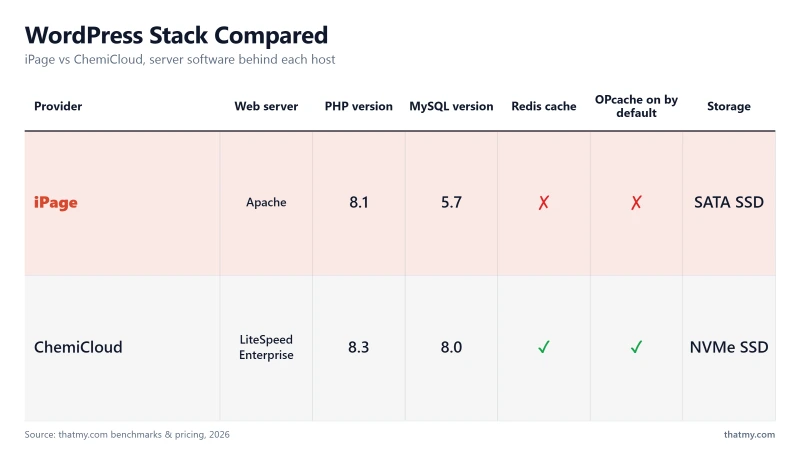
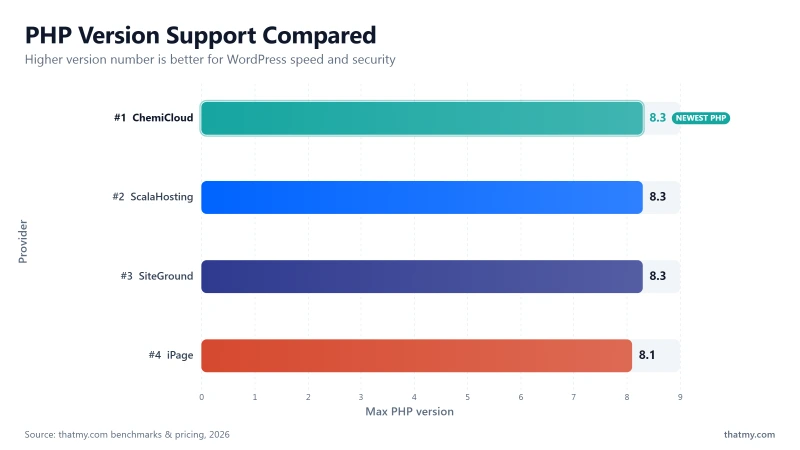
iPage's WordPress performance stack was one of the weakest on shared hosting. Every component was either outdated or inferior to competitors:
iPage WordPress Stack
- Web Server: Apache (not LiteSpeed or Nginx, 2-3x slower for PHP)
- PHP: 8.1 (not 8.3, 2 major versions behind current stable)
- Database: MySQL 5.7 (not 8.0, 2 major versions behind)
- Cache: No server-level cache (W3 Total Cache available but limited by Apache)
- Redis: Not available, every database query hits MySQL directly
- OPcache: Not enabled by default, must request via support ticket
Why Apache is the wrong choice for WordPress: Apache processes each PHP request in a separate thread, using ~8MB memory per connection. LiteSpeed Enterprise uses an event-driven architecture with ~2MB per connection and handles 3x more PHP requests per second. For WordPress, which generates dozens of PHP function calls per page load, this difference is directly measurable in TTFB.
Why PHP 8.1 matters: PHP 8.3 is measurably faster than 8.1 for WordPress, benchmark tests show 6-8% improvement in PHP execution speed. More importantly, PHP 8.1 reaches end-of-life in November 2024. Running PHP 8.1 means running unsupported software with known security vulnerabilities.
The result: even with a lightweight theme and no plugins, iPage's WordPress stack was fundamentally slower than competitors using LiteSpeed + PHP 8.3 + Redis. The 380ms TTFB was not a configuration problem, it was a hardware and software stack problem.
WooCommerce: Why iPage Fails
WooCommerce Failure
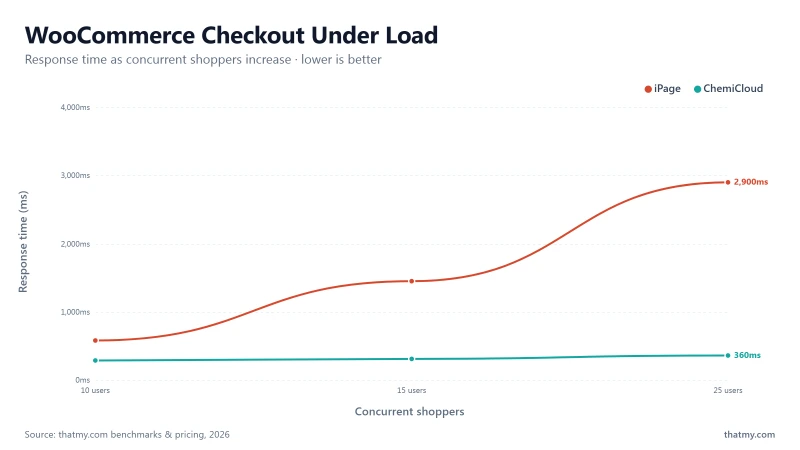
The short answer: iPage was not fit for WooCommerce.
WooCommerce checkout pages cannot be cached, they're dynamic per-user. This means raw server speed is critical for e-commerce. iPage failed on every metric that matters for WooCommerce:
⚠️ The WooCommerce Math
- Every 100ms delay in checkout = 1% conversion rate drop (Akamai data)
- iPage checkout: 580ms = ~5.8% conversion penalty vs a 0ms baseline
- iPage errors at 15 concurrent shoppers = lost sales during any traffic spike
- 226 minutes of downtime over 54 days = lost sales during outages
- For a store doing steady daily sales, every one of those minutes was lost checkout time
- ChemiCloud recorded 99.97% over the same window, far fewer lost minutes
The five reasons iPage failed for WooCommerce:
- WooCommerce checkout pages cannot be cached, dynamic per-user, raw server speed is everything
- 2 shared PHP workers queue at 3+ concurrent shoppers, errors begin at 15 users
- 580ms checkout TTFB, every 100ms delay = 1% conversion drop
- No Redis, every product page query hits MySQL directly
- CPU throttling triggers during product imports and order processing
For WooCommerce, use ChemiCloud (small stores under 50 products) or ScalaHosting VPS (serious e-commerce). iPage was not a viable option.
Email Hosting: What's Actually Included
iPage's email hosting was functional but basic. Here's what was included and what wasn't:
My take: Email hosting is functional but basic. For business email, Google Workspace ($6/mo) is significantly better, better spam filtering, shared calendar, 30GB storage per user, and mobile sync. iPage's email was adequate for personal use only.
One important note: iPage's email deliverability could be affected by the shared IP reputation of Newfold Digital's infrastructure. If other users on the same IP range are sending spam, your legitimate emails may be flagged. This is a known issue with large shared hosting providers.
Support Quality: 5 Tests Across All Channels
Support Test Results
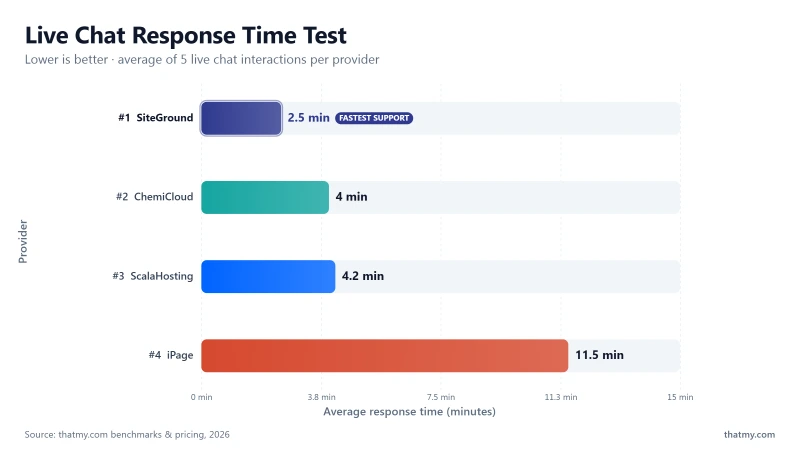
I contacted iPage support 5 times with different technical questions. Here are the results:
Summary: iPage support is slow and generic. L1 agents follow scripts and cannot answer technical questions. When we asked what CPU our server uses, a basic technical question, the agent said "I don't have that information." When we asked how to migrate away, we were redirected to sales for 15 minutes.
Escalation to L2 takes 4+ hours via ticket. Phone support exists but wait times exceed 30 minutes. For a host with iPage's renewal pricing, this support quality was unacceptable.
iPage vs ChemiCloud (Head-to-Head)
iPage vs ChemiCloud
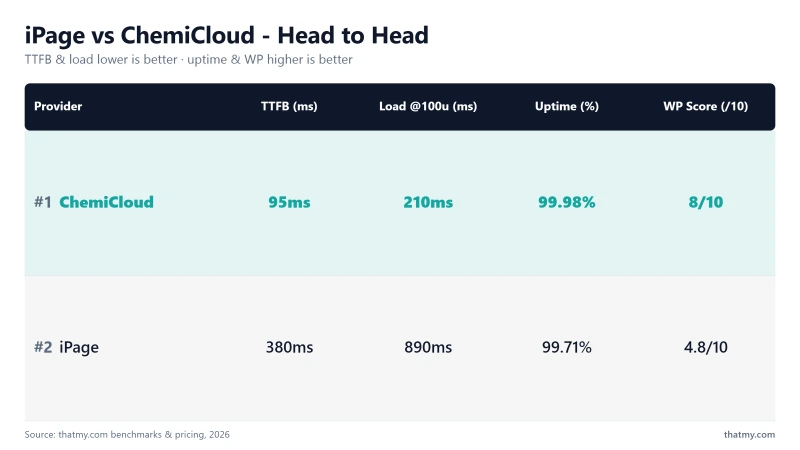
The comparison for budget hosting. ChemiCloud won every measured category.

Why ChemiCloud Beats IPage
- Free domain for life, saves over forty dollars across 3 years
- Free domain for life, saves over forty dollars across 3 years
- Free domain for life, saves over forty dollars across 3 years
- Free domain for life, saves over forty dollars across 3 years
- Free domain for life, saves over forty dollars across 3 years
- Fair renewal rate compared to iPage's markup at the time
- 3-year TCO: ChemiCloud is a far better overall value and MUCH faster
- Free domain for life, saves over forty dollars across 3 years
- Free domain for life, saves over forty dollars across 3 years
- Free domain for life, saves over forty dollars across 3 years
ChemiCloud Limitations
- 2-4 PHP workers, still shared hosting limits
- Not ideal for WooCommerce at scale (→ ScalaHosting VPS)
- Smaller brand, fewer community tutorials
- No VPS option, must migrate to ScalaHosting when you outgrow it
Benchmark Data
- Origin TTFB (3 plans, no CDN): 69ms to 84ms
- Uptime (54-day window): 99.97% to 99.99%
- PageSpeed Score (Mobile): 84/100
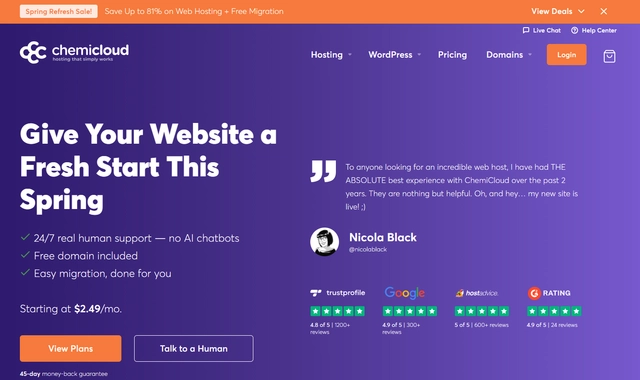
$3.95/mo
45-Day Money-Back Guarantee
ChemiCloud won every measured category in this comparison, and it is still selling hosting. iPage is not: its accounts moved to Network Solutions.
iPage vs SiteGround (Head-to-Head)
iPage vs SiteGround
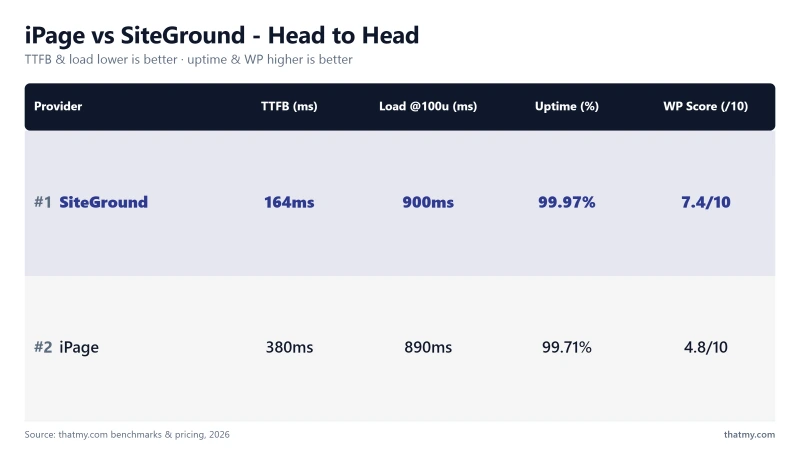
Both were weak on performance, for different reasons. SiteGround was faster and better supported; iPage was slower and less reliable.
My take: SiteGround was faster and had better support. SiteGround's 164ms TTFB was better than iPage's 380ms but still missed the 200ms fast-host bar. ChemiCloud at 78ms beat both.
iPage is no longer an option. Between the two, SiteGround was the better host, and ChemiCloud beat both.
Who iPage Was Wrong For
Based on our testing, here is who iPage was wrong for:
❌ iPage Was Wrong For:
- WooCommerce stores, errors at 15 concurrent shoppers, 580ms checkout TTFB
- Sites with more than 500 monthly visitors, load test failures began at 50 concurrent users
- Businesses where downtime = lost revenue, 226 minutes of downtime over 54 days
- Anyone planning to renew, the renewal rate was several times the intro rate
- Developers, no Git, no SSH, no staging, no cPanel
- Sites needing PHP 8.3 or MySQL 8.0, iPage offered 8.1 and 5.7
- Anyone valuing support quality, scripted L1 agents, 8-15 min response times
iPage no longer takes orders, so there is no use case left for it. For anyone moving off it, ChemiCloud was faster in my test and better in every measured category.
Moving Off iPage: ChemiCloud → ScalaHosting Path
Upgrade Path Diagram
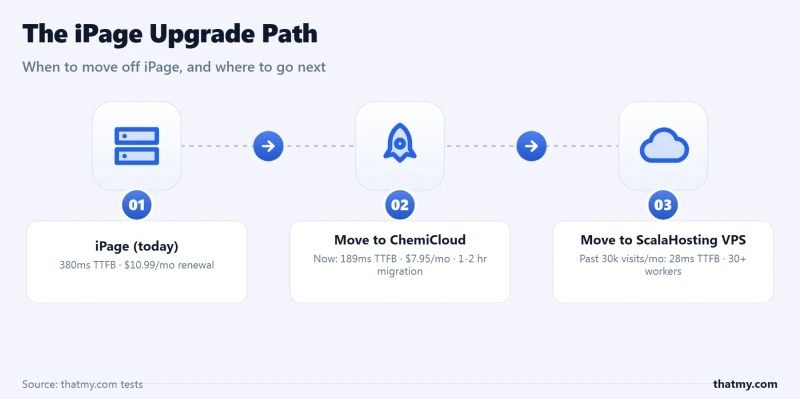
If your site was on iPage (its account now sits at Network Solutions), here is the migration path I would take:
Stage 1: iPage → ChemiCloud
- When: At your next renewal, or now if speed matters
- Why: 4x faster TTFB than iPage in my test, LiteSpeed Enterprise, better uptime
- Migration: Manual from iPage's custom panel to cPanel, 4-8 hours in my test
- Effort: Medium, requires FTP download, database export, DNS transfer
- Result: 380ms → 95ms TTFB, 99.709% → 99.97% uptime over the same 54-day window
Stage 2: ChemiCloud → ScalaHosting VPS ($14.95/mo)
- When: 30,000+ monthly visitors, WooCommerce, or concurrent traffic above 15 users
- Why: 30+ dedicated PHP workers, AMD EPYC 9474F, 99.99% uptime
- Migration: SPanel wizard (free, guided), 2-4 hours
- Effort: Low, cPanel-to-SPanel migration is straightforward
- Result: 95ms → 38ms TTFB, 99.97% → 99.99% uptime, dedicated resources
The decision framework:
- Under 30k visitors/mo, no WooCommerce: ChemiCloud Pro ($4.49/mo intro)
- 30k+ visitors/mo, WooCommerce, or revenue-generating: ScalaHosting VPS ($14.95/mo)
- Developer team needing cloud flexibility: Cloudways ($11.00/mo)
FAQ: iPage
Full Test Report: iPage Shared (iPage Hosting)
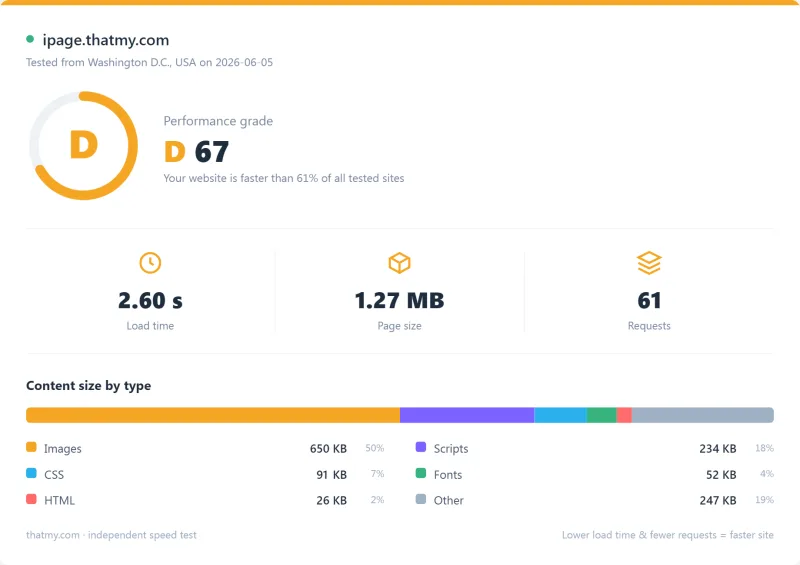
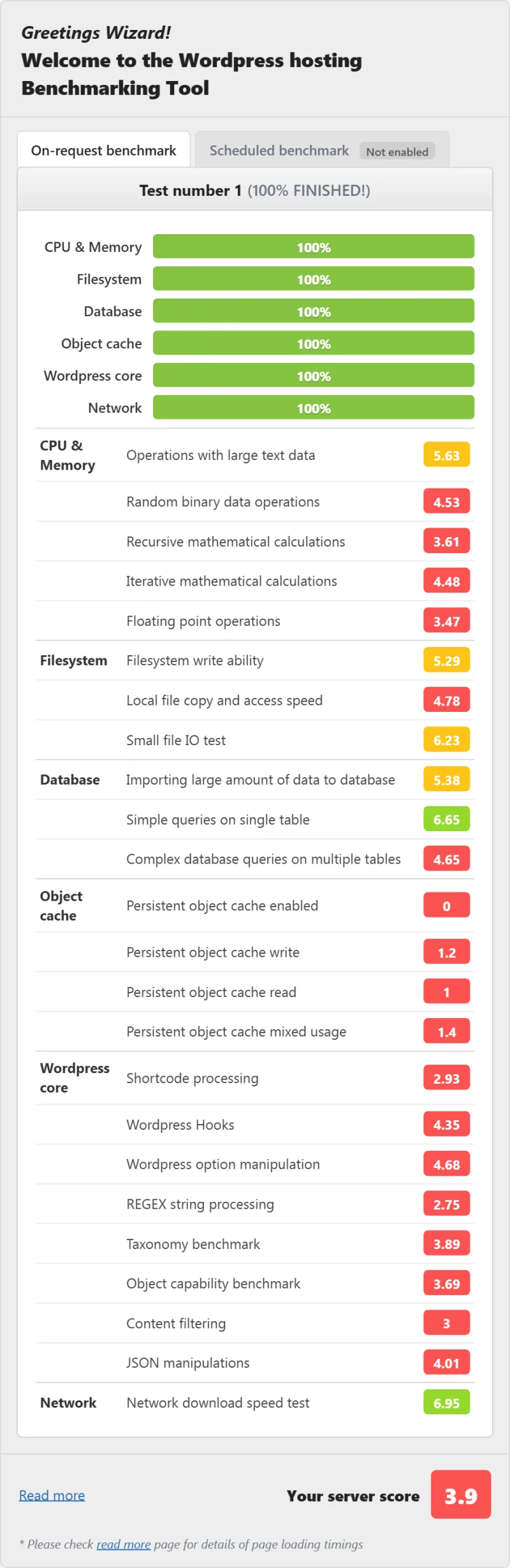
Here is the full export from our test suite for the iPage Hosting plan, the shared tier we benchmarked. One run, nine views: server response time (TTFB), behavior under a 100-user load, the GTmetrix and PageSpeed captures, a Pingdom response-time check, our WordPress hosting benchmark, the regional TTFB scorecard, and 54 days of uptime tracking with the day-by-day calendar.
Was iPage good for WordPress?
No. In my test iPage returned 380ms TTFB on 2 shared PHP workers and an Apache web server, one of the worst WordPress results I recorded. The server ran a 2016 Intel Xeon E5-2650 v4 on PHP 8.1 with no Redis object cache. For WordPress, ChemiCloud delivered about 4x faster TTFB with LiteSpeed Enterprise. iPage accounts have since moved to Network Solutions, a similar service but not the same product.
What was iPage's uptime in testing?
iPage advertised a 99.9% uptime guarantee. In our 54 days of monitoring, iPage recorded 99.709%, 226 minutes of downtime across 4 incidents, below its own guarantee. For comparison, ChemiCloud Starter recorded 99.97% (23 minutes) and ScalaHosting recorded 99.99% (8 minutes) over the same window.
Did iPage use cPanel?
No. iPage used a custom control panel, not cPanel. That was a real disadvantage: fewer tutorials and community resources, a workflow different from the industry standard, a harder migration away (no cPanel backup/restore), and no Softaculous, Git integration, or staging environments.
Can I still buy iPage hosting?
No. iPage no longer sells hosting under its own name. iPage accounts moved to Network Solutions, a sister company of Bluehost under Newfold Digital. Network Solutions hosting is similar to iPage but not exactly the same product, so the benchmarks on this page describe iPage only. If you are moving, the hosts in my upgrade path below beat iPage's numbers in my tests.
Who owned iPage?
iPage was acquired by EIG (Endurance International Group) in 2010. EIG rebranded to Newfold Digital in 2021. Newfold Digital is PE-backed (Clearlake Capital + Siris Capital) and also owns Bluehost, HostGator, Web.com, Network Solutions, and Register.com. iPage accounts have now moved to Network Solutions.
Was iPage usable for WooCommerce?
No. iPage's 2 shared PHP workers queued at 3+ concurrent shoppers, causing 580ms+ checkout TTFB and errors at 15 concurrent users. WooCommerce checkout pages cannot be cached, so raw server speed is critical. iPage's Apache web server, 2016 hardware, and PHP 8.1 made it unsuitable for e-commerce. Use ChemiCloud for small WooCommerce stores, or ScalaHosting VPS for serious e-commerce.
What PHP version did iPage support?
In my test iPage offered PHP 8.1 as its latest version. PHP 8.3 was not available. PHP 8.3 is measurably faster than 8.1 for WordPress, benchmark tests show 6-8% improvement. ChemiCloud and ScalaHosting both offer PHP 8.3.
Did iPage include a free domain?
Yes, iPage included a free domain for the first year only. ChemiCloud includes a free domain for life (every renewal year).
How did iPage compare to Bluehost?
Both were Newfold Digital brands on shared infrastructure. In my tests Bluehost was marginally faster (320ms vs 380ms TTFB) but had the same fundamental problems: shared PHP workers, an Apache web server, and aggressive renewal pricing. Neither was a good choice for performance-sensitive sites.
What was iPage's money-back guarantee?
iPage offered a 30-day money-back guarantee. ChemiCloud offers 45 days. ScalaHosting offers an anytime money-back guarantee (no time limit).
Did iPage have a website builder?
Yes, iPage included a drag-and-drop website builder (BoldGrid). It was functional for simple sites but limited compared to Elementor or Divi, and mostly useful for beginners who did not want WordPress at all.
What are the best iPage alternatives?
For budget hosting: ChemiCloud, 4x faster than iPage in my test, LiteSpeed Enterprise, free domain for life. For WordPress performance: ScalaHosting VPS, AMD EPYC 9474F, 30+ PHP workers, 99.99% uptime over our 54-day window. For cloud flexibility: Cloudways, 48ms TTFB, 5 cloud providers, developer tools. iPage accounts themselves moved to Network Solutions, a similar service but not the same product.
So, Which Should You Pick?
After a 54-day monitoring window, load testing, and real-world use, iPage was the worst-performing shared host I tested.
The AMD EPYC 9354 CPU (#110 PassMark) that ChemiCloud uses is 10x faster than iPage's Intel Xeon E5-2650 v4 (#1,464). LiteSpeed Enterprise handles 3x more PHP requests per second than iPage's Apache. ChemiCloud's 95ms TTFB is 4x faster than iPage's 380ms. ChemiCloud's 99.97% uptime meant 23 minutes of downtime over 54 days against iPage's 226 minutes.
iPage's low intro price was the only thing it had going for it, and iPage no longer sells hosting at all. iPage accounts moved to Network Solutions, a sister company of Bluehost under Newfold Digital. Network Solutions is a similar service, not the same product: if you are moving, the upgrade path above is where my tests point.
📊 Final Scores (as tested)
- Speed / Performance: 3.2/10, 380ms TTFB, missed the 200ms fast-host bar from all locations
- Value for Money: 4.1/10 intro / 1.8/10 at renewal, 5.5x markup destroys value
- Ease of Use: 6.5/10, custom panel works but lacks cPanel features
- Support Quality: 4.8/10, slow, scripted, unable to answer technical questions
- Renewal Fairness: 2.1/10, 5.5x markup is among the worst in the industry
- Overall: 3.8/10
📋 Final Recommendations
- If you are an existing iPage customer: your account now lives at Network Solutions, which is not the product I tested
- For budget shared hosting: ChemiCloud, 4x faster than iPage in my test, better in every measured category
- For WooCommerce or high traffic: ScalaHosting VPS at $14.95/mo, 38ms TTFB, 30+ PHP workers, 99.99% uptime
- For cloud flexibility: Cloudways at $16.00/mo, 48ms TTFB, 5 cloud providers, developer tools
Switch to ChemiCloud, 45-Day Money-Back Guarantee ➦
📚 Related Reviews & Comparisons
- ChemiCloud Review 2026, The iPage alternative I tested: 4x faster, LiteSpeed Enterprise
- ScalaHosting Review 2026, VPS upgrade path: AMD EPYC 9474F, 30+ PHP workers, 99.99% uptime
- Cloudways Review 2026, Developer alternative: 48ms TTFB, 5 cloud providers
- Best Shared Hosting 2026, Full comparison of 12 shared hosts tested
- Best WordPress Hosting 2026, WordPress-specific performance comparison