
What Is Managed VPS Hosting? The 15-Point Checklist, and When Unmanaged Wins
Disclosure: some hosting links on this page earn me a commission if you buy. Pricing and benchmark data are verified independently. Full disclosure.


Managed VPS is one of the most inconsistently defined terms in hosting. One host's managed plan means they automatically apply OS patches, manage your web server, provision SSL, monitor uptime 24/7, and restore your server if it fails overnight. Another host's managed plan means they will replace the hard drive if it fails. Both call it "managed." Before paying for managed VPS, you need to know which of the 15 things a management layer can cover your chosen host actually provides.
This guide sorts managed VPS into three tiers, built from the plan pages and support documentation of the hosts below. It gives you a 15-point checklist to apply to any managed VPS claim, explains where the server management layer ends and the application layer begins, and shows what the day-to-day experience actually looks like on a platform like Cloudways or ScalaHosting.
The 15 Things a Managed VPS Can Include (and Where Most Hosts Stop)
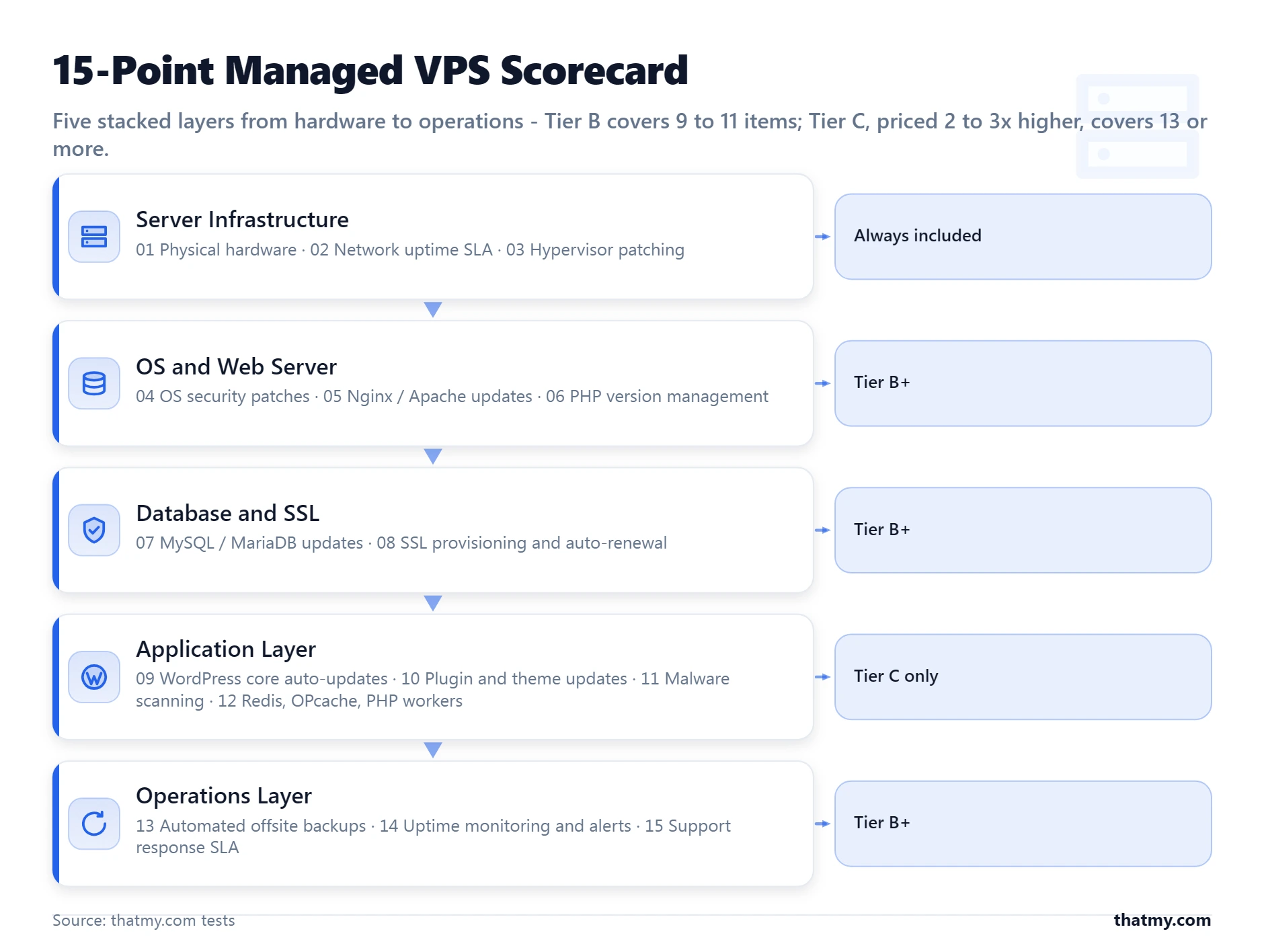
Managed VPS hosts do not fail their customers through dishonesty. They fail them through imprecision. The word "managed" is applied to infrastructure tasks that every hosting provider performs regardless of tier, to genuine server administration work that saves customers real hours, and to application-layer work that only a handful of hosts perform. Understanding which category each item falls into is the only way to evaluate whether a plan's price matches its actual value.
The 15 items split across four categories. The first category is true at every host by default and should not factor into your managed VPS evaluation. The value you are paying for lives in categories two through four.
The host owns and maintains the physical servers. Drive failures, RAM errors, and hardware faults are their responsibility. This is true on shared hosting and on managed VPS alike.
The host maintains the network infrastructure and guarantees uptime to an SLA. 99.9% is the baseline. ScalaHosting and Cloudways both offer 99.9% uptime guarantees. Liquid Web offers 100% uptime on its managed VPS tier.
The KVM, VMware, or XEN hypervisor running your VPS is patched and maintained by the host. You never see or touch this layer.
Automated OS patching means CVEs are applied within hours of publication without you doing anything. Ask specifically: is this automatic or do you need to trigger it? On ScalaHosting and Cloudways, OS patches are applied automatically in the background. On some "managed" hosts, you receive an email notification and must schedule the patch yourself.
Web server updates are low-frequency but important for security. Managed hosts at Tier B and above handle these. On Cloudways, the stack (PHP, MySQL, Nginx/Apache) is maintained as a unit and updated by their platform team.
Can you change PHP versions without a support ticket? On Cloudways, it is a dropdown menu. On ScalaHosting's SPanel, it is a one-click PHP version selector. The important question beyond switching: does the host keep PHP minor versions current (8.1.x, 8.2.x patches) automatically? Most Tier B hosts do.
MySQL major version upgrades (5.7 to 8.0) require testing and coordination, which managed hosts handle. Minor patch updates are applied automatically on Tier B platforms. On unmanaged VPS, you run apt upgrade mysql-server yourself and deal with any resulting issues.
Let's Encrypt SSL provisioning and 90-day auto-renewal should be completely automatic on any managed VPS worth the name. Both Cloudways and ScalaHosting provision SSL with one click and renew certificates automatically. If a host requires manual renewal, that is Tier A behavior at a Tier B price.
Most managed VPS hosts do not automatically update WordPress core because they cannot test compatibility with your specific plugins before updating. Some Tier C hosts (Nexcess, Pressable) include WordPress core auto-updates as part of their managed service.
Almost never included in managed VPS at any price. Plugin updates require testing before deployment because a plugin update can break a site as easily as a server misconfiguration can. The only hosts that reliably include this are application-managed WordPress hosts like Nexcess, Pressable, and some configurations at WP Engine.
ScalaHosting includes SShield, their real-time malware scanner, at the server level on managed VPS plans. Cloudways does not include malware scanning, you add a security plugin like Wordfence. Liquid Web includes malware scanning on higher tiers. Malware removal assistance (not just detection) is rarer and typically requires opening a security ticket even when it is marketed as included.
On Cloudways, Redis is a one-toggle addition to any application. OPcache is enabled by default. PHP worker counts are configurable through the dashboard. ScalaHosting's SPanel exposes PHP configuration, OPcache settings, and allows Redis installation. Tuning those settings for your specific site is your responsibility, but the infrastructure to support them is already configured.
Scope matters more than frequency here. Daily backups stored on the same server as your site are not a recovery plan -- they disappear in the same incident that takes down your site. Ask: daily or weekly by default? How many days of retention? Is backup storage offsite? Can you restore a single database, or only a full server rollback?
Real 24/7 monitoring means the host detects a crashed PHP-FPM process at 3 AM and restarts it without you doing anything. Cloudways monitors CPU, RAM, disk, and service status continuously and auto-restarts crashed services. ScalaHosting includes server monitoring with alerting on all managed VPS plans. "Monitoring" that only generates an email for you to act on is not managed monitoring.
Does support cover server-level issues only, or does it extend to WordPress and application-level questions? ScalaHosting's support team will help debug server configuration issues and assists with WordPress problems at the server layer. Cloudways support is scoped to the platform layer, they will not debug WordPress plugin conflicts. This difference matters more than response time SLAs.
| Tier | What It Covers | Example Hosts | Typical Pricing | Right For |
|---|---|---|---|---|
| Tier A (Managed Infrastructure) | Physical hardware, network, hypervisor only | All managed VPS hosts by definition | Varies, already included in VPS pricing | Treating a failed hard drive as 'managed' |
| Tier B (Managed Server + Platform) | OS patches, web server, PHP, MySQL, SSL, backups, monitoring, support | ScalaHosting, Cloudways, Liquid Web | From $11.00/mo (Cloudways) to $29.95/mo (ScalaHosting, billed yearly) | Most buyers who say 'I want managed VPS' |
| Tier C (Managed Application) | Everything in Tier B + WordPress core, plugin updates, malware scanning, performance tuning | Nexcess, Pressable, Kinsta | From $19.00/mo (Nexcess) to $35.00/mo (Kinsta), month to month | Sites that need hands-off WordPress management |
The tiers tell you which kind of management you are buying. Whether to buy management at all, or run the server yourself, is covered in managed vs unmanaged VPS further down.
Why the Line Between Server Management and App Management Is the Only Line That Matters
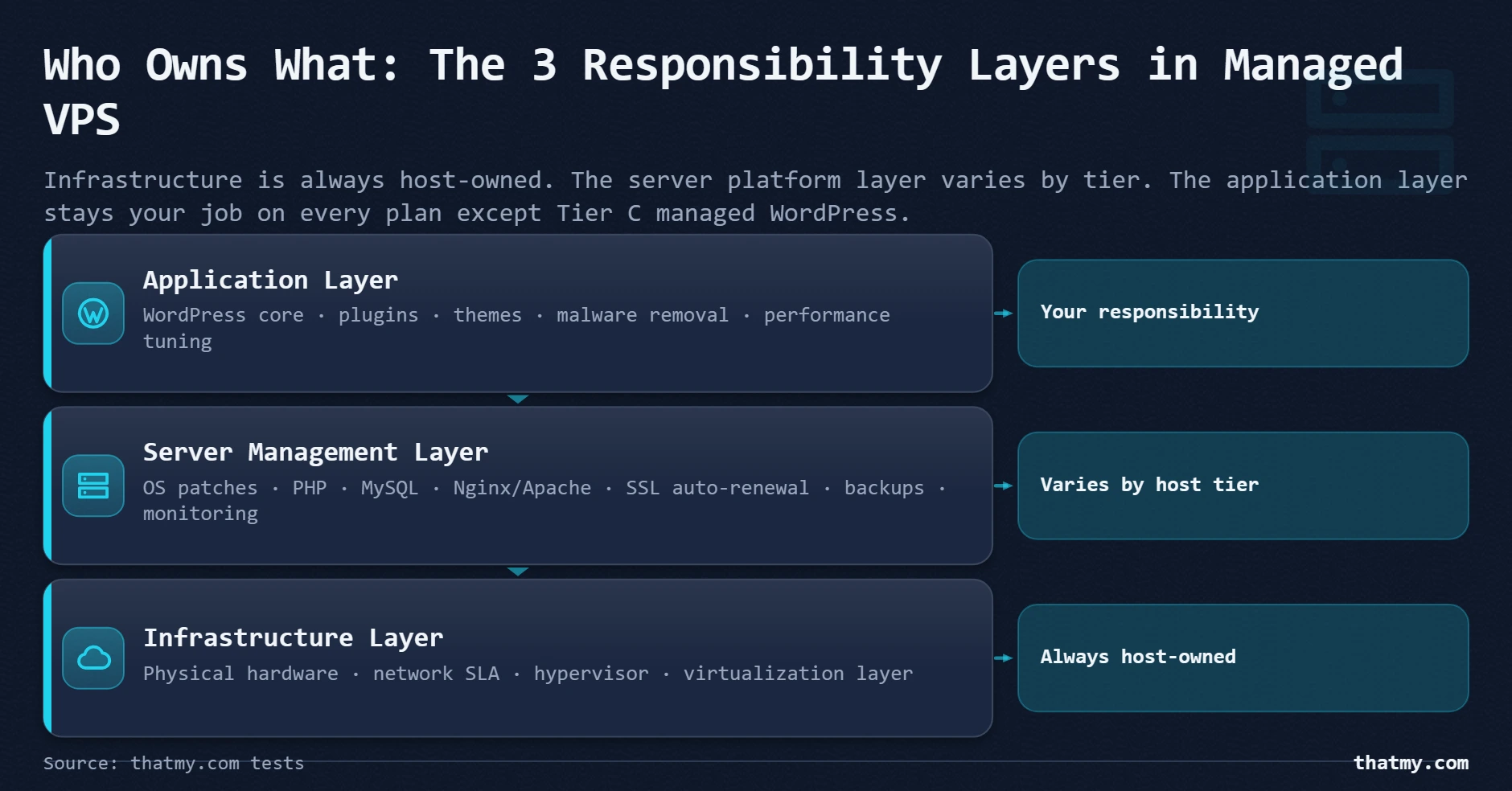
Most people who get burned by managed VPS were not misled. They were sold accurate information about a term that meant something different to them than it did to the host. The specific gap: almost every managed VPS buyer assumes "managed" includes keeping their WordPress installation safe and current. It does not. Server management and application management are two separate products, sold at two different price points, by two different types of hosts.
The distinction is precise:
- OS security patches applied automatically
- Web server (Nginx/Apache) kept current
- PHP minor versions patched
- MySQL running and updated
- SSL certificates provisioned and renewed
- Server monitoring with auto-restart on failure
- Daily backups of the full server
- WordPress core updates tested and applied
- Plugin updates tested and deployed
- Theme updates managed
- Malware in WordPress files scanned and removed
- PHP OPcache and object cache tuned for your site
- WordPress performance profiling and optimization
- WordPress error debugging and resolution
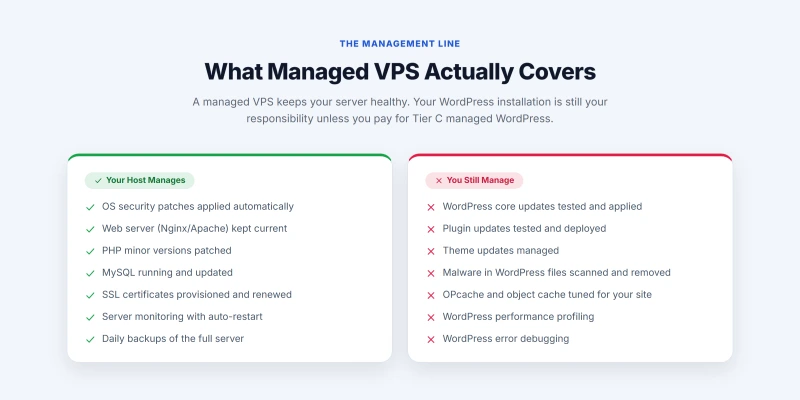
The practical consequence of this line: a WordPress site running on Cloudways managed VPS can still get hacked through an outdated plugin. Cloudways maintained the server correctly. PHP was current. MySQL was patched. Nginx was up to date. The vulnerability was in a plugin installed three months ago and never updated. The server layer was managed. The application layer was not. The hack was not Cloudways' fault, and they will not clean it up under their standard plan.
I have seen this misunderstanding create genuine conflict between site owners and hosts. The site owner believed "managed" meant protected. The host correctly pointed to their documentation showing server-level management. Both were right. The mismatch was in the buyer's mental model of what "managed" covers.
The right frame for decision-making: if your site gets hacked because a plugin had a zero-day vulnerability, managed VPS gives you a healthy server to recover on. Managed WordPress gives you someone who will help with the recovery. Which one you need depends on whether you or your agency can handle the WordPress layer. The managed vs unmanaged section covers the other direction: when an unmanaged VPS makes sense for teams with server administration skills who want full control.
Who handles each security task
Security is where the server and application line matters most, because a hacked site starts a conversation about whose job it was. The pattern holds across hosts: the host protects the server, you protect WordPress. On shared hosting the host also carries most of the server-side tools (firewall, intrusion detection, often a malware scanner). On managed VPS the host keeps the operating system, firewall and server backups, while WordPress updates, malware scanning and a WordPress firewall are yours to set up. On unmanaged VPS every row is yours.
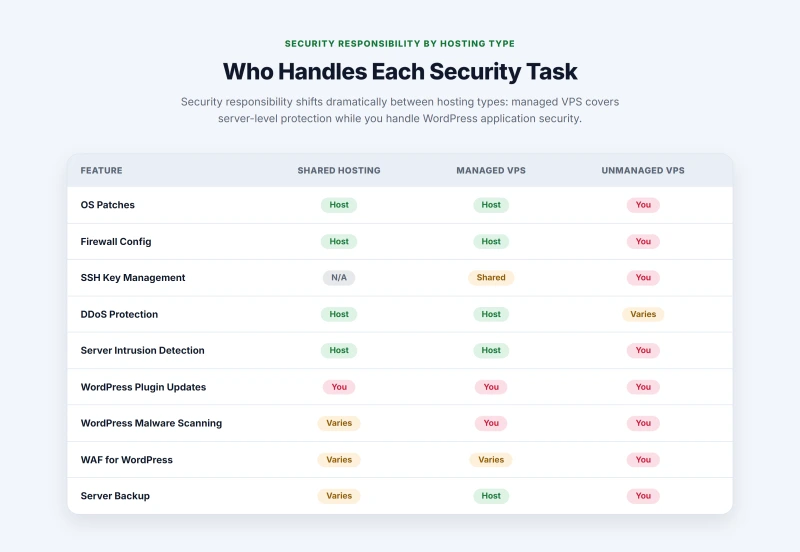
Two rows catch people out. A server snapshot is not a WordPress backup: restoring a whole server to get one deleted page back is slow and rolls back everything else with it, so keep a plugin-level backup as well. And a web application firewall is rarely switched on for you on managed VPS; Cloudflare, Sucuri or Wordfence fill that gap.
What Does Managed VPS Actually Feel Like on a Normal Tuesday?
The abstraction of "managed" is easy to understand on paper. The question that helps buyers most is not "what does the host handle?" but rather "what do I actually do?" Here is the day-to-day experience on the two most common managed VPS entry points for WordPress users.
The Cloudways experience
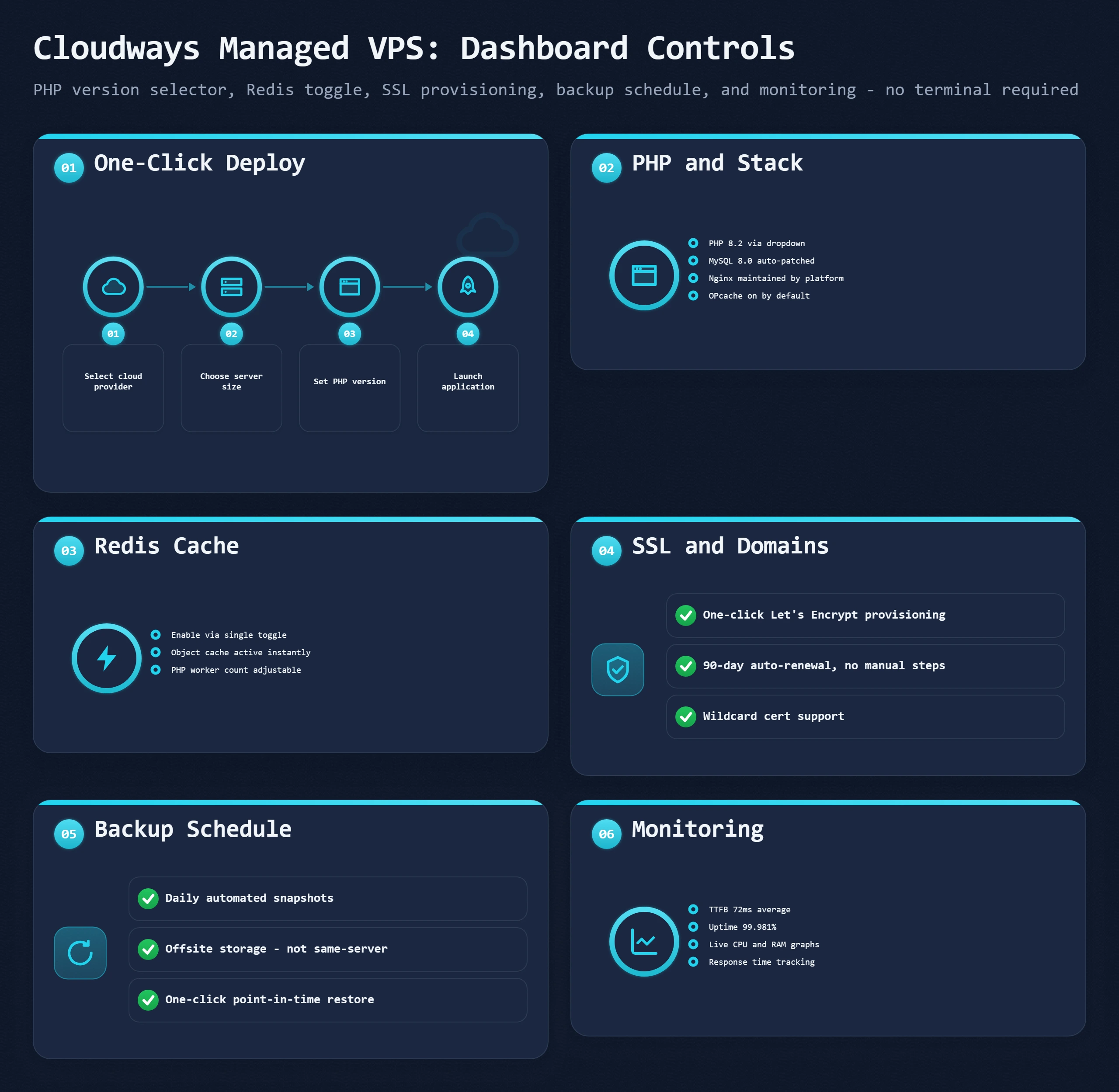
You log into a web dashboard. There is no Linux terminal involved unless you want one. Adding a new WordPress site takes four steps: select your cloud provider and server size, click "Add Application," select WordPress, enter your site name. Cloudways installs PHP, MySQL, Nginx, and WordPress, configures the database, and has a working WordPress site available in under 3 minutes. SSL provisioning is one click from the same dashboard.
On a normal day, you do not interact with the server layer at all. You open WordPress admin, write your content, manage your plugins. In the background, Cloudways is monitoring your server's CPU and RAM usage, auto-restarting any service that crashes, applying OS patches, and running your scheduled backup. None of that generates a notification unless something requires your attention.
When you need to change a PHP version: open the Application Management screen, find the PHP version setting, select your version from a dropdown, click Save. The change applies without a server restart or any terminal command. The same process handles Redis (a toggle labeled "Redis Cache"), OPcache (preconfigured and active by default), and backup schedule (choose frequency and destination storage).
What you still do yourself on Cloudways: WordPress core updates, plugin and theme updates, WordPress security plugin configuration, WordPress performance plugin setup (WP Rocket, LiteSpeed Cache equivalents). These live in WordPress admin, exactly where they always have.
What Cloudways does not give you: root access and a mail server. You get a master SSH user that reaches your application files, not the operating system, so software that has to be installed at the OS level is off the table. Mailboxes come from a separate provider (Google Workspace, Zoho, or Cloudways' paid email add-on), which is one more bill and one more setup step. ScalaHosting's SPanel includes both email and root access, which is a large part of why the two suit different buyers.
The ScalaHosting experience
ScalaHosting uses SPanel, their proprietary control panel that replaces cPanel. The interface is closer to shared hosting than Cloudways -- you see File Manager, MySQL databases, email accounts, and DNS zones in a familiar layout. This makes ScalaHosting the better transition for anyone moving from cPanel-based shared hosting. The control panel comparison covers how SPanel stacks up against cPanel and Plesk in detail.
The managed elements that happen without any action from you: OS patches, web server updates, SShield security monitoring (which blocks malicious requests at the server level and provides a live threat feed in the SPanel dashboard), and daily backups with 30-day retention on the managed plans. ScalaHosting's support team responds to server-level questions and actively assists with WordPress issues related to server configuration.
The commercial kitchen analogy
Managed VPS is a fully maintained commercial kitchen. The equipment is installed, inspected, serviced, and ready. The refrigeration keeps your ingredients at the right temperature. The fire suppression system is monitored. The ovens heat to specification. What you cook, how you season it, whether you buy fresh ingredients -- that is still your job. The kitchen does not prevent bad recipes.
Your website is the food. The server is the kitchen. A managed VPS gives you the best kitchen available at that price point. What you build on it is yours to manage.
Three things that surprise new managed VPS users
- The dashboard replaces cPanel entirely. Cloudways has no cPanel, no Plesk, no WHM. The Cloudways dashboard handles everything that cPanel handled, but through a different UI. For agencies comfortable with cPanel, this takes one week to adjust to. For non-technical users who found cPanel confusing, Cloudways is actually easier.
- Server monitoring is passive. You do not get an email every time CPU usage spikes to 80%. You get an alert when a defined threshold is crossed and an action needs to happen. Cloudways auto-restarts crashed services without waking you up. If the crash keeps recurring, then you get notified.
- Support stays within the server boundary. "My WordPress plugin is conflicting with WooCommerce" is not a ticket a managed VPS support team will resolve. "My server is returning 502 Bad Gateway for all requests" is exactly what they will resolve, quickly, because it is a server-layer problem they own. Knowing this boundary before you open a ticket saves frustration on both sides.
Managed VPS vs Shared Hosting: Four Things That Actually Change
Shared hosting users who are considering a move to managed VPS usually ask the same question: "My site works fine on shared hosting. Why would I pay 3 to 5 times more for managed VPS?" The honest answer is: most sites under 10,000 monthly visits do not need to. Managed VPS is justified when specific problems emerge that shared hosting cannot resolve structurally. Here are the four things that genuinely change.
On shared hosting, every account on your server shares the same PHP worker pool, the same MySQL instance, and the same RAM. When a neighboring site gets a traffic spike, your site's response time climbs with it. This is the "noisy neighbor problem" and it is structural to how shared hosting works.
On managed VPS, your PHP worker count is your own. Your MySQL instance is dedicated to your accounts. If another customer on the same physical machine has a traffic spike, your resources are isolated from theirs by the hypervisor. This resource isolation is the core reason to move to VPS. A ScalaHosting managed VPS at $29.95/mo with 4 GB RAM and 2 vCPU has guaranteed resources. A shared hosting plan shares those same 2 vCPUs with 200 to 400 other accounts.
Shared hosting imposes hard limits on PHP worker count and memory per account, typically 1 to 4 PHP workers and 256 MB memory. These limits are set by the host to protect shared resources and cannot be negotiated.
On managed VPS, you configure PHP-FPM pool size based on your available RAM. A 4 GB managed VPS can support 20 to 30 PHP workers at 80 MB each, handling 20 to 30 concurrent WordPress page renders simultaneously. A 4-worker shared hosting plan saturates at 4 concurrent requests and queues everything else. For WooCommerce stores running product pages, this difference shows up as TTFB under load. The server hardware guide covers how to calculate the right PHP worker count for your RAM allocation.
Shared hosting supports WordPress caching plugins (WP Rocket, W3 Total Cache) that create full-page HTML cache files on disk. Managed VPS supports those, plus Redis object cache (in-memory key-value store for database query results) and LiteSpeed Cache at the server level when running LiteSpeed.
Redis object cache reduces PHP execution time per uncached page from 400 to 800ms to 80 to 150ms by serving repeated database queries from memory. On a WooCommerce store where most pages cannot be fully page-cached (cart, checkout, account pages are dynamic per user), Redis makes the difference between 600ms response and 120ms response for authenticated users. Cloudways and ScalaHosting both make Redis a one-click addition.
Shared hosting hosts throttle accounts when they exceed resource allocations. The tools they use -- CloudLinux LVE on most cPanel hosts, custom throttling on others -- are designed to protect other customers on the server. When your site gets Hacker News traffic or a Reddit spike, the throttle engages and your site serves degraded pages or 503 errors.
On managed VPS, your resources are your own. A traffic spike that would throttle a shared account runs against your dedicated allocation. You may run out of resources if the spike is large enough, but the host is not throttling you to protect other accounts. Upgrading your VPS plan resolves a resource ceiling that a shared plan cannot address at any price.
"Managed VPS is just shared hosting with more RAM."
FALSE
The RAM difference is real but secondary. The architectural difference is isolation. On shared hosting, your PHP workers, MySQL connections, and disk I/O compete with hundreds of other accounts. On VPS, your hypervisor allocation is dedicated to you. No amount of RAM increase on shared hosting produces the isolation a VPS provides -- because the isolation is not about capacity, it is about architectural separation.
What does not change: You still manage WordPress from the same WordPress admin panel. Plugin updates, content management, and site configuration remain entirely your responsibility. Support still stops at the server layer on most managed VPS plans. The shift from shared hosting to managed VPS is a shift in infrastructure, not a shift in how much hands-on work your WordPress site requires. The managed vs unmanaged section covers the further shift that happens when you move to an unmanaged VPS, where the server administration layer also becomes your job.
Moving a site from shared hosting to a managed VPS
Fear of the move keeps many sites on shared hosting long after they have outgrown it. Most of what goes wrong in a move is predictable, so it can be checked off in advance:
- Audit before you touch anything. List every domain, mailbox, DNS record and cron job on the old account before you order the new server. Cron jobs are the item people forget, and a missing one fails quietly: the scheduled backup, the newsletter send or the image optimisation run simply stops, and nobody notices for weeks.
- Match the PHP version. Check which PHP version the old server runs and confirm your plugins support the version on the new one. A version mismatch is the other common source of errors after a move.
- Let the host do the copy. ScalaHosting's support team migrates sites for free, including files, databases, email and DNS records, and tells you when the new server is ready to test. Cloudways offers a free WordPress migration plugin that copies files and database across, and you check the copy on a temporary URL before pointing the domain at it.
- Keep email flowing during the DNS change. If your mail lives on the old server, keep that account running for a couple of days after you switch DNS, because mail in transit can reach either server while the change spreads. Cancel the old account only once mail is arriving on the new one.
- Test what does not copy. Custom
.htaccessrules, PHP extensions and unusual file permissions do not move with the files. Test every form, checkout and custom feature on the new server before you switch. - Purge every cache after the switch. Page cache, object cache and CDN, so visitors get pages from the new server rather than stale copies of the old one. The cache guide covers each layer.
Managed vs Unmanaged VPS: What You Take On Without the Management Layer
An unmanaged VPS is the same kind of virtual server with the management layer taken away. The host keeps the hardware, the network and the hypervisor running and hands you a bare operating system with root access. Everything in the OS, software and operations categories of the 15-point list becomes your job: OS patches, the web server, PHP and MySQL, SSL renewal, the firewall, backups, monitoring, and the restart at 3 AM when something falls over. A managed VPS sells you those items as a service. So the question is not which one is better, but whether you can do that work and whether you want to.
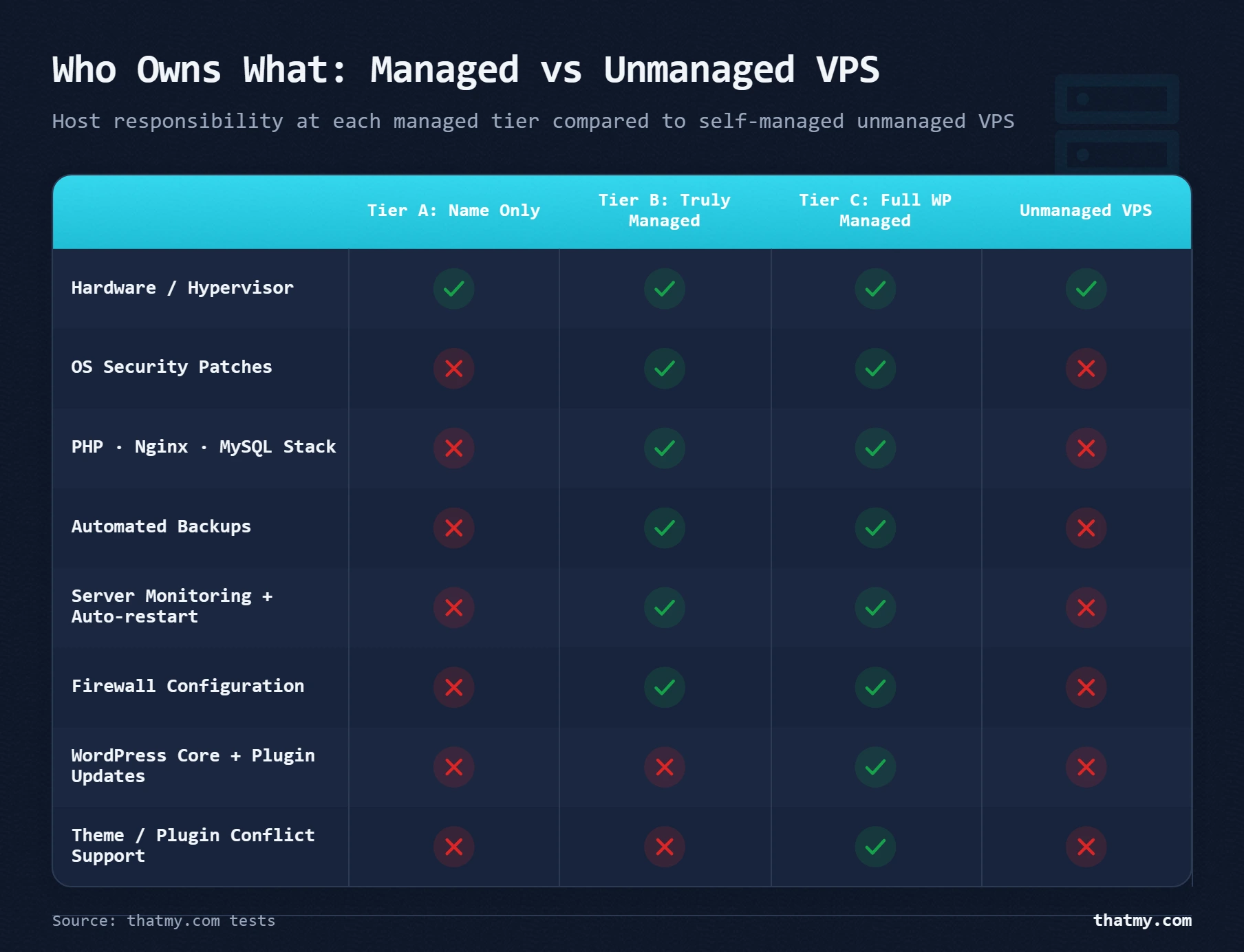
Which one fits you: a quick self-assessment
"Beginners choose managed" is too vague to help. Three things decide it: your Linux skills, the time you can give the server every month, and whether downtime costs you money.
| Question | Points toward managed | Points toward unmanaged |
|---|---|---|
| Can you SSH into a Linux server and find your way around without help? | Not needed | The baseline skill |
| Can you install and tune Nginx, PHP-FPM and MySQL? | Not needed | Needed from day one |
| Can you write UFW or iptables firewall rules from scratch? | The host sets the firewall | Needed in the first week |
| Do you have a few hours every month for patches, logs and backup checks? | Not needed | Needed every month |
| Does downtime cost you money (a store, leads, client sites)? | Managed is the safer choice | High risk unless you are skilled |
| Do you need Docker, a custom Node.js stack or other non-PHP apps? | Often restricted | Full freedom |
| Do you host many client sites that each need their own account? | A panel such as SPanel or cPanel does this out of the box | Possible, but you build and maintain it |
| Do you want someone else to fix the server at 3 AM? | That is what you pay for | That person is you |
If you answered the skills rows with a confident yes and nothing on the site earns money, an unmanaged VPS can suit you. If downtime costs you money, managed is the sound choice even when you have the skills: being able to run a server and it being the best use of your time are different questions. Most people also overestimate their patience for upkeep. Setting up a server is interesting once; patching it, reading its logs and debugging a crashed PHP-FPM pool at midnight is much less interesting the fifth time.
What running an unmanaged VPS involves
Here is the work a managed host does for you, written out as the list you would follow on a blank server.
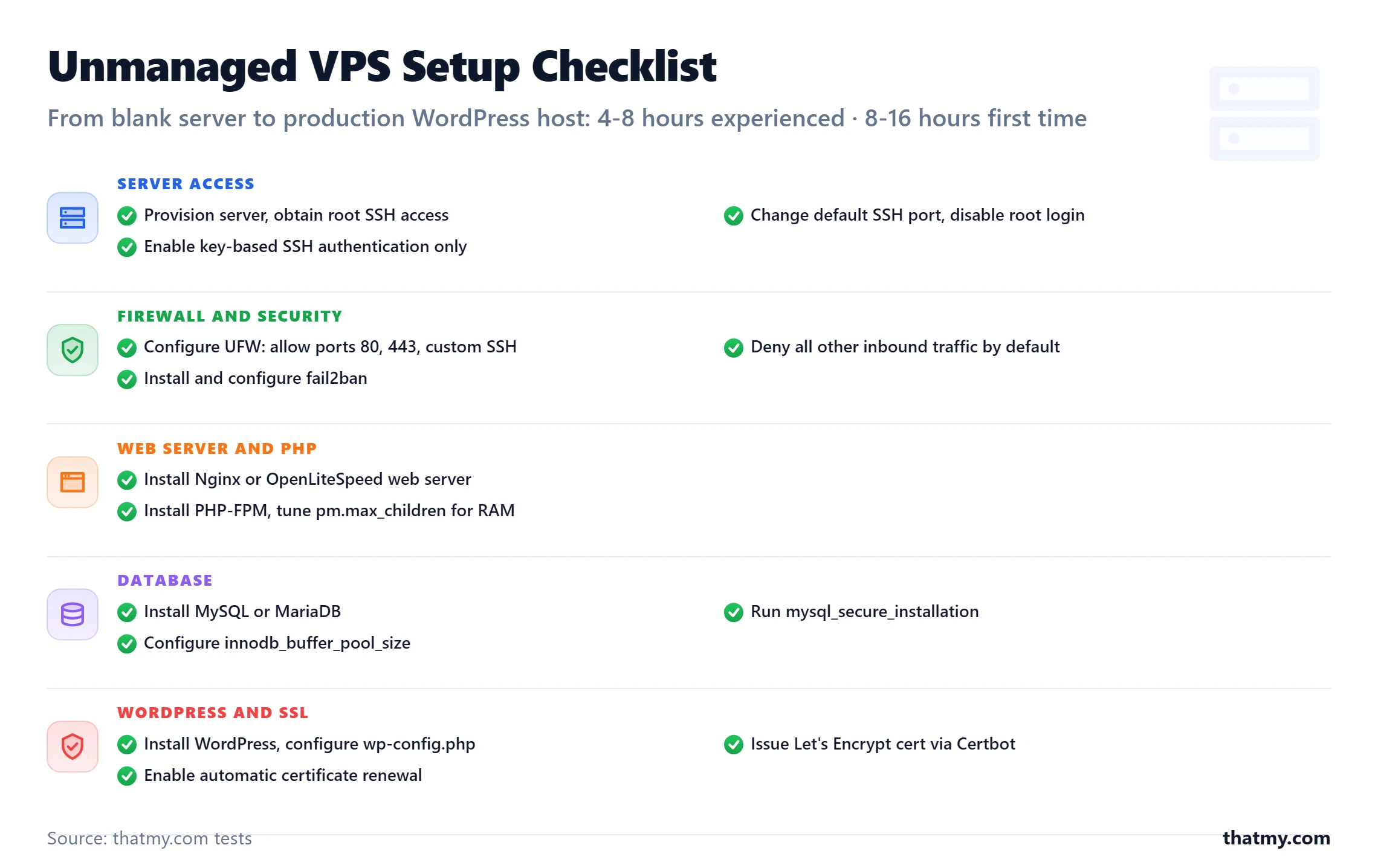
First setup. Expect most of a working day if you have done it before, and longer the first time:
- Provision the server and log in over SSH as root.
- Secure SSH: key-based login only, root login disabled, and optionally a non-default port.
- Set the firewall (UFW): allow 80, 443 and your SSH port, deny everything else.
- Install the web server, usually Nginx or OpenLiteSpeed.
- Install PHP and PHP-FPM, and size
pm.max_childrento the RAM you have. - Install MySQL or MariaDB, run
mysql_secure_installationand setinnodb_buffer_pool_size. - Issue an SSL certificate with Let's Encrypt (Certbot) and confirm it renews automatically.
- Install fail2ban to block brute-force logins.
- Schedule backups with cron plus rsync or rclone to storage off the server.
- Add monitoring: an uptime checker for alerts and a resource monitor such as Netdata.
The step that eats the most time for first-timers is usually PHP-FPM. A pm.max_children value set too high for the RAM, or a pool that fails to start, is a common cause of 502 errors on self-built servers.
Every month after that, a few hours of upkeep:
- OS updates.
apt update && apt upgradetakes judgment, not just typing: kernel updates need a reboot, and a PHP major version upgrade can break plugins. - Log review. The Nginx error log, the MySQL slow query log and the auth log for intrusion attempts. Ignore them and the first sign of trouble is an outage or a hack.
- Database care. Run
mysqltunerand act on what it finds, clear expired WordPress transients, and watch for slow queries as the content grows. - Backup restores. Test that backups restore, not only that they run. A backup script that has failed silently for three months is not a backup.
- SSL renewals. Certbot renews on its own until its timer breaks, so check that certificates are actually renewing.
The setup is not the real risk. The risk is the crash at 3 AM with nobody else on call, the firewall rule that leaves a port open, and the OS update that breaks PHP and takes the site offline. On a managed VPS those land on the host's team; on an unmanaged one they land on you.
What the management layer costs
The cleanest way to price management is to compare the same server with and without it. Cloudways runs its managed platform on DigitalOcean droplets, so the same size of server is on sale both ways, month to month:
| Server size | DigitalOcean droplet (you manage it) | Same size on Cloudways (managed) | What management adds |
|---|---|---|---|
| 1 GB RAM, 1 vCPU, 25 GB | $6.00/mo | $11.00/mo | $5.00/mo (+83%) |
| 2 GB RAM, 1 vCPU, 50 GB | $12.00/mo | $24.00/mo | $12.00/mo (+100%) |
| 4 GB RAM, 2 vCPU, 80 GB | $24.00/mo | $46.00/mo | $22.00/mo (+92%) |
At these three sizes the management layer adds 83 to 100 percent to the server bill. Unmanaged is cheaper on paper, but the gap narrows once you add to the droplet what the managed price already includes. Daily backups on a DigitalOcean droplet cost 30 percent of the droplet's rate on top ($1.80 a month on the 1 GB droplet). A control panel such as cPanel is a monthly licence of its own (current tiers are in cPanel, Plesk and WHMCS price increases). And the hours in the lists above are yours. On the 1 GB server the management layer costs $5.00 a month, so if upkeep takes you even two hours a month, you are doing it for $2.50 an hour.
When unmanaged is the right call
Managed is not always the answer. Three cases favour an unmanaged server:
- Custom application stacks. Docker containers, Node.js APIs, Python apps, or anything outside the LAMP and LEMP pattern managed hosts are built around. Managed platforms put limits at the OS and software level that can block or complicate a custom deployment.
- You want every config file in your hands. Some developers are faster in an SSH session than in any dashboard. For them a control panel is friction, not help.
- Many servers at once. Across a fleet of small nodes, the per-server management premium in the table above multiplies. With the DevOps skills to run the fleet, the saving is real money.
| Provider | Entry plan | Monthly price | Best for |
|---|---|---|---|
| DigitalOcean | Basic 1GB (1 vCPU, 25 GB) | $6.00/mo | Developers and a first VPS: the best-known tutorial library, with a cloud firewall and resource alerts included free |
| Vultr | High Frequency 1vCPU/1GB (32 GB NVMe) | $6.00/mo | Audiences outside the US and Europe: a wide choice of regions across Asia, South America and Africa |
| Hetzner | CX23 (2 vCPU, 4 GB) | €5.49/mo before VAT | European audiences on a budget: 2 vCPU and 4 GB at the entry price, with 20 TB of traffic in its EU locations |
| Linode (Akamai) | Linode 2GB (1 vCPU, 50 GB) | $12.00/mo | US and EU workloads that want a long-established cloud with Akamai behind it |
| Contabo | Cloud VPS 4 (4 vCPU, 8 GB) | €5.50/mo for the first 24 months | Labs, staging and storage: the most RAM and disk for the money, on dense nodes where CPU can be uneven |
| InterServer | VPS 2 Slices (1 vCPU, 4 GB) | $6.00/mo | Memory-heavy, CPU-light jobs: a staging box or a low-traffic WordPress install |
Most of these bill by the month with no intro discount that jumps at renewal; Contabo is the exception, with its rate quoted for the first 24 months and the later rate unpublished. Hetzner and Contabo bill in euros. Remember what the low price leaves out: the buyer of a bare server also supplies the sysadmin, so put the hours above next to the price before you compare it with a managed plan. The VPS hosting comparison covers these providers in more depth.
Who Should Choose Managed VPS (and Who Should Not)
The wrong tool at the right price is still the wrong tool. Managed VPS is the right call for a specific set of situations -- and clearly wrong for others. Every site owner I have seen regret a managed VPS purchase either needed the layer below (shared hosting was fine) or the layer above (they needed managed WordPress). The right fit is narrower than the marketing suggests.
- Your site gets 20,000 to 200,000 visits per month and shared hosting is crashing or throttling you
- You run WooCommerce with active product pages and checkouts that cannot be fully page-cached
- You manage an agency portfolio of 3 to 15 client sites that all benefit from dedicated resources
- Your TTFB consistently exceeds 600ms under load and you have already applied caching plugins
- You want dedicated resources and reliable performance without learning Linux administration
- You need Redis object cache and PHP worker control but do not need someone else to manage WordPress
- You want a LiteSpeed server with LSCache without configuring it manually
- Your control panel's resource usage page shows CPU faults week after week, meaning you keep hitting your account's CPU limit
- You run several WordPress sites on one shared account and they keep running into its limits
- You need PHP settings or extensions that shared hosting will not allow
- Your site holds personal data (accounts, form entries, payments) and you want it isolated from other customers on the same server
- You need application-level WordPress support, plugin updates, or malware removal included (managed WordPress hosting is what you need)
- You want to run custom server stacks, Docker containers, or Node.js applications that require full root access and manual configuration (unmanaged VPS)
- Your site gets under 10,000 visits per month and shared hosting has not produced problems -- the managed VPS investment is not justified by the traffic level
- You specifically need cPanel and the host's managed VPS uses a proprietary dashboard -- verify before purchasing
- You are budget-constrained below $15/month -- shared hosting at quality providers still outperforms a $5 VPS running a mismanaged stack
The threshold I use in practice: when your site reliably exceeds 1,000 visitors per day on shared hosting and you have enabled full-page caching, it is time to evaluate managed VPS. Below that threshold, a well-configured shared hosting plan from a quality provider handles the load. Above 200,000 monthly visits, dedicated server or cloud infrastructure becomes the better architecture conversation. Managed VPS is the right answer in the middle range, and most growing WordPress sites spend years there.
The Managed VPS Shortlist: Five Hosts, Honestly Compared
Most "best managed VPS" roundups recommend 10 to 15 hosts and apply the same positive framing to all of them. That is not useful. Here are the five hosts I would recommend to different buyers, with honest explanations of why each one is the right fit for a specific situation -- and what the tradeoffs are.
| Host | Tier | What Is Managed | What You Still Handle | Entry Price |
|---|---|---|---|---|
| ScalaHosting Managed VPS | Tier B + SPanel | OS patches, SShield security, daily backups, 24/7 support, PHP switching, SPanel panel | WordPress updates, plugin/theme updates, malware removal | $29.95/mo billed yearly (Managed Cloud entry, 2 vCPU, 4 GB RAM), renews at $54.95/mo |
| Cloudways | Tier B (platform-managed) | OS patches, web server updates, SSL auto-renewal, daily backups, monitoring, Redis toggle | WordPress updates, plugin/theme updates, malware removal | $11/month (1 GB DigitalOcean Standard) |
| Liquid Web Managed VPS | Tier B/C | OS patches, cPanel/Plesk, fully managed stack, 24/7 Heroic Support, Acronis backups | WordPress updates available as add-on | $5.00/mo (VPS 1GB); VPS 4GB $17.00/mo after 2 months at $8.50/mo |
| Nexcess | Tier C (WP-focused) | Full server stack + WordPress core updates, plugin updates, malware scanning, performance testing | Everything except custom development work | $19.00/mo (Spark, 1 site), $15.83/mo billed yearly |
| Pressable | Tier C | Full WordPress-focused managed stack, jetpack security, daily backups, staging, 24/7 WP support | WordPress and plugin updates, malware resolution | $25.00/mo (Personal, 1 site), $20.83/mo billed yearly |
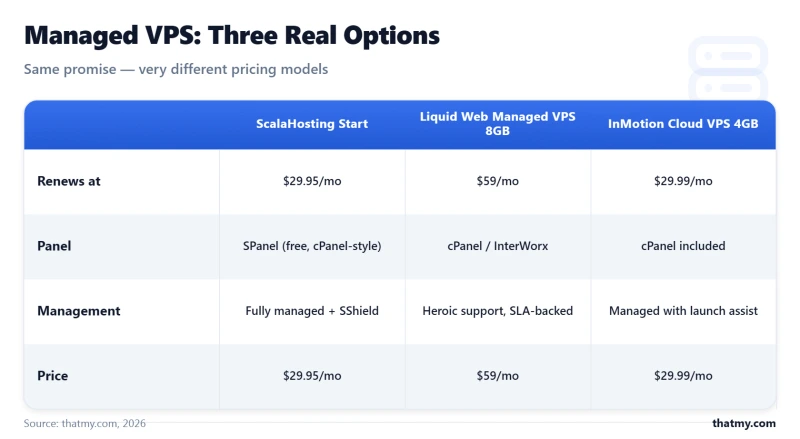
ScalaHosting is my first recommendation for most managed VPS buyers because it combines Tier B management depth with SPanel -- a cPanel-equivalent control panel that does not carry the cPanel license cost. SShield, their proprietary security layer, blocks malicious requests at the server level before they reach WordPress and provides a real-time threat monitoring dashboard. ScalaHosting VPS averaged 51ms TTFB across 10 global test locations on their Start plan (2 vCPU, 4 GB RAM, AMD EPYC hardware).
The one limitation I have encountered: SPanel has a learning curve of about 30 minutes for anyone coming from cPanel. The layout is different even when the functionality is the same. Account for that in your first setup session. After that initial adjustment, day-to-day use is straightforward.
Starts at $29.95/mo billed yearly (Managed Cloud entry, 2 vCPU, 4 GB RAM), renews at $54.95/mo
Cloudways is the right choice when you want managed infrastructure across multiple cloud providers (DigitalOcean, Vultr, Linode, AWS, Google Cloud) without committing to one. Their platform layer is genuinely excellent for teams managing many WordPress applications simultaneously -- the application-level organization, team permissions, and Git integration are ahead of what cPanel-based hosts offer. Entry at $11/month (DigitalOcean 1 GB plan) is the lowest-cost managed VPS entry point from a platform with real management depth.
Support is scoped to the platform layer. WordPress debugging questions get redirected to community resources or documentation. This is the right model if you have WordPress confidence and want server management off your plate, not WordPress management.
Starts at $11/month (DigitalOcean Standard 1 GB)
Liquid Web's case is support: their "Heroic Support" answers 24/7 by phone and live chat. Their Acronis-based backup solution is more robust than what most managed VPS hosts include. The 100% network uptime SLA is a differentiator for businesses where downtime has a direct, measurable revenue cost. Check the management level before you order: Liquid Web sells its VPS sizes self-managed or fully managed, and the discount on the larger sizes lasts the first 2 months only.
Starts at $5.00/mo (VPS 1GB); VPS 4GB is $17.00/mo after 2 months at $8.50/mo
Nexcess is the Tier C entry point -- they manage the application layer, including WordPress core updates, plugin testing, and malware scanning. If you want someone else managing WordPress updates and not just the server, Nexcess is the lowest-cost path to that service. Their performance infrastructure (LiteSpeed, custom caching layer, image optimization) is notably fast for WordPress workloads. Entry at $19.00/mo for a single site is competitive for what the management tier includes.
Starts at $19.00/mo (Spark, 1 site), or $15.83/mo billed yearly
Pressable is the Tier C option for buyers who want WordPress expertise on the support line, not just server administration. Their team actively assists with WordPress-level issues, plugin conflicts, and performance questions. Jetpack Security is included, covering malware scanning, brute force protection, and backup. The $25.00/mo single-site entry is slightly higher than Nexcess but includes a different support experience for WordPress-specific questions.
Starts at $25.00/mo (Personal, 1 site), or $20.83/mo billed yearly
For anyone undecided between ScalaHosting and Cloudways, the choice reduces to one question: do you want a cPanel-style interface with SPanel (ScalaHosting) or a modern application-focused dashboard that replaces cPanel entirely (Cloudways)? Both deliver Tier B management depth. The interface is the real differentiator, not the management quality. If you are weighing whether to skip management entirely, what the management layer costs puts the same server side by side with and without it.
Managed VPS Hosting FAQ
What does 'managed' actually mean in managed VPS hosting?
Managed VPS is a hosting tier where the provider maintains the underlying server infrastructure and software stack on your behalf. At minimum, this means the host handles the physical hardware, network, OS security patches, and web server (Nginx, Apache, or LiteSpeed) updates. At a higher tier, it also includes PHP version management, MySQL updates, SSL provisioning, automated backups, and 24/7 server monitoring. What it rarely includes: WordPress core updates, plugin updates, or malware removal. Those fall under 'managed WordPress hosting,' which costs 2 to 5 times more. Before buying any managed VPS plan, ask the host to confirm which specific items from these four categories they cover.
Is managed VPS better than shared hosting for WordPress?
Managed VPS gives you dedicated resources (CPU, RAM) that cannot be consumed by other accounts on the same server. Shared hosting gives you shared resources, which means a neighbor's traffic spike can slow your site. The practical difference: on managed VPS, your site's PHP worker count is configured for you and guaranteed. On shared hosting, PHP workers are shared and throttled. For sites getting over 20,000 visits per month, the dedicated resource guarantee on managed VPS produces measurably lower TTFB under load. ScalaHosting managed VPS averaged 51.3ms TTFB across 10 global test locations, compared to 340 to 600ms typical on busy shared plans.
Do I need to know Linux to use a managed VPS?
No. The entire value proposition of managed VPS is that the Linux administration layer is handled by the host or abstracted behind a dashboard. On Cloudways, you install WordPress, change PHP versions, enable Redis, and configure backups through a web UI without a terminal. On ScalaHosting, SPanel provides the same abstraction. You will not need to write server config files, restart services, or troubleshoot PHP-FPM. Where you will still spend time: managing WordPress itself (updates, plugins, settings) from the standard WordPress admin panel, exactly as you would on shared hosting.
What is the difference between managed VPS and managed WordPress hosting?
Managed VPS handles the server layer: OS, PHP, MySQL, Nginx or Apache, SSL, backups, and monitoring. Managed WordPress hosting handles both the server layer and the application layer: WordPress core updates, plugin updates, malware scanning, and sometimes performance tuning for WordPress specifically. Kinsta and WP Engine are managed WordPress hosts. Cloudways and ScalaHosting are managed VPS hosts. The practical implication: if your WordPress site gets hacked because an outdated plugin had a vulnerability, a managed VPS host did not cause it and will not clean it up. The server was managed correctly. The application was not.
How many WordPress sites can I run on a managed VPS?
A 2 GB RAM managed VPS can typically support 3 to 8 WordPress sites depending on their traffic and plugin load. A 4 GB plan handles 8 to 20 sites comfortably if they are low-to-medium traffic. The real constraint is not disk space or even CPU time for most WordPress sites -- it is RAM available for PHP workers. Each PHP worker on an average WordPress site consumes 30 to 80 MB of RAM. At 30 concurrent PHP workers on a 2 GB plan, you have approximately 60 MB per worker after OS overhead, which is enough for simple sites but tight for WooCommerce. ScalaHosting's Start plan (4 GB RAM) is the practical entry point for running 5 or more WordPress sites confidently.
Does managed VPS include automatic WordPress backups?
Most managed VPS hosts include automated server-level backups, but the scope varies. Cloudways backs up your entire application (files + database) automatically at intervals you configure, with storage options including DigitalOcean Spaces and Amazon S3. ScalaHosting includes daily backups with 30-day retention on higher plans. What the backup covers and what the restore process requires differs significantly. Always confirm: (1) is the backup daily or weekly by default, (2) how many days of retention, (3) is backup storage offsite or on the same server, and (4) can you restore a single database without a full server rollback. These four answers tell you whether the backup is genuinely useful for recovery.
Do I get root access on a managed VPS?
It depends on the host. A server-managed VPS such as ScalaHosting gives you full root SSH access, so you can change anything the control panel does not expose while the host keeps patching and monitoring the server. Cloudways does not give root: you get a master SSH user with access to your application files, and the platform keeps the operating system to itself. Managed WordPress hosts such as Kinsta and WP Engine give no server-level access at all. If you need to install software at the operating-system level, confirm root access before you buy, or choose an unmanaged VPS and take on the server work yourself.