
LiteSpeed vs Apache vs Nginx for WordPress: Benchmark Data and the Right Stack for Your Site
Disclosure: some hosting links on this page earn me a commission if you buy. Pricing and benchmark data are verified independently. Full disclosure.


Your web server software handles every HTTP request your site receives. It decides whether a cached WordPress page takes 5ms or 50ms to return. It decides whether 500 simultaneous visitors get served or start queuing. Apache, Nginx, and LiteSpeed all get the job done, but they make different architectural choices about caching, concurrency, and PHP execution that produce real, measurable performance differences. The web server matters more than most benchmark articles show, and less than some hosting companies claim.
Most comparisons stop at requests-per-second numbers from synthetic benchmarks. This guide connects web server choice directly to WordPress caching strategy, because LiteSpeed's performance advantage is inseparable from the LiteSpeed Cache plugin, and Apache's disadvantage largely disappears with proper configuration. The performance rankings change dramatically once caching is factored in. Understanding this changes which hosts you should be looking at and what you should configure on arrival. The full web servers architecture guide covers the underlying connection models in more depth if you want the technical foundation beneath these comparisons.
The Short Answer (Read This First)
Three hosting decisions disguise themselves as one web server question. Before going further: if you are on shared hosting, your web server is not negotiable, your host chose it. The question is whether to migrate to a host with a better server. If you are on a VPS, you can choose. If you are evaluating new hosts, the table below is the decision map.
| Web Server | Best For | Avoid If |
|---|---|---|
| Apache | Easy config, .htaccess-heavy setups, shared hosting, cPanel control panels | High concurrency (10k+ req/min) without specific tuning |
| Nginx | High-traffic sites, custom stacks, reverse proxy architectures | You need .htaccess, Nginx does not support it natively |
| LiteSpeed Enterprise | WordPress with LiteSpeed Cache plugin on compatible hosts | You are not on a cPanel or LiteSpeed-licensed host |
| OpenLiteSpeed | Budget LiteSpeed performance on a self-managed VPS | You need enterprise features or full HTTP/3 support |
The Number That Changes This Comparison
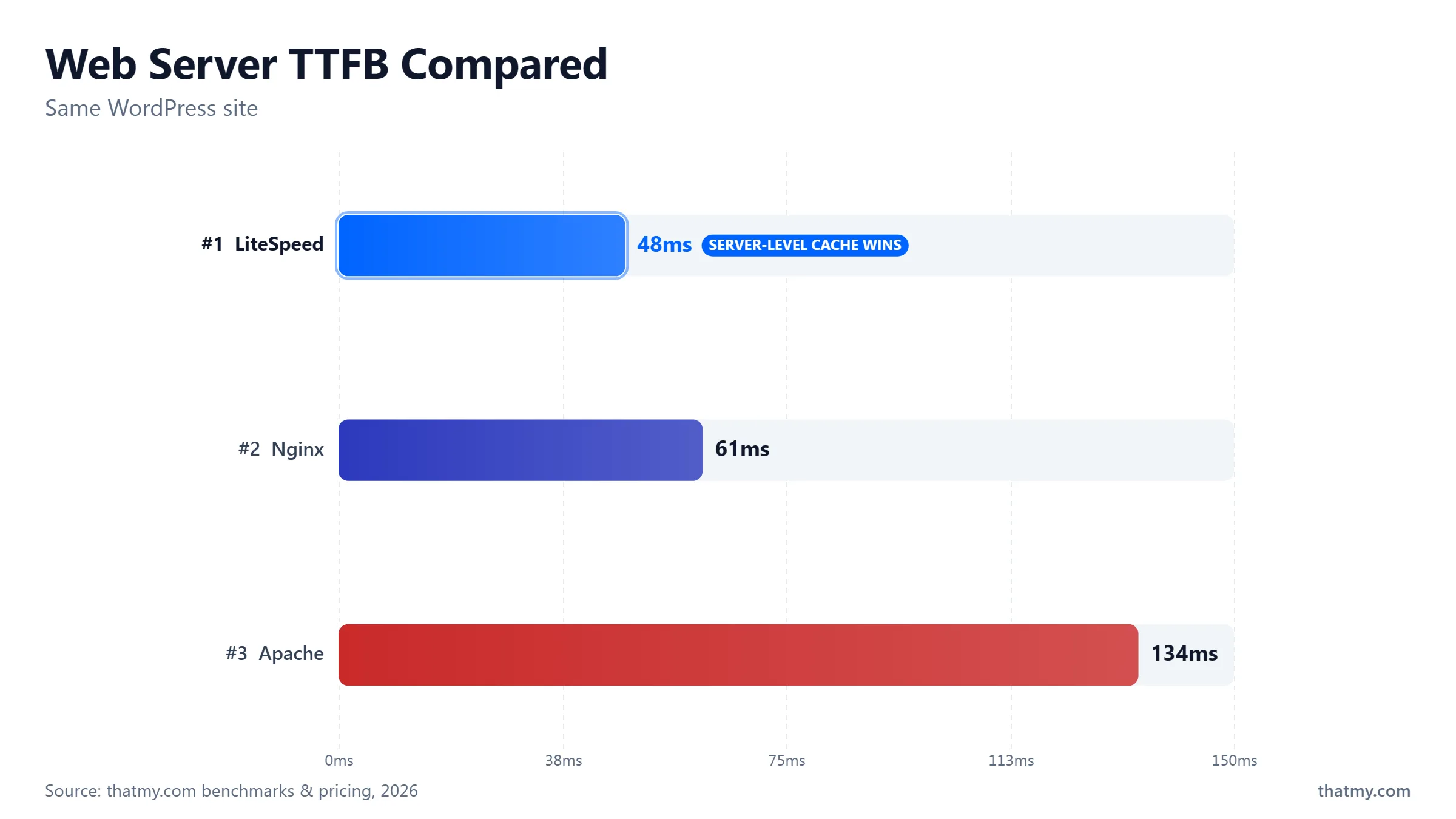
Raw benchmark comparisons test uncached dynamic requests, PHP fully executing WordPress on every test hit. In that test, Nginx wins on concurrency, LiteSpeed wins on PHP throughput, and Apache trails both. But WordPress sites do not serve uncached pages to most visitors once caching is configured. When comparing cached request performance, LiteSpeed Cache wins on absolute TTFB, and properly configured Apache closes to within 30ms of Nginx. The server that wins the uncached benchmark is not the server that wins the real-world WordPress speed test.
How Each Web Server Handles WordPress Requests
The word "server" makes these three look like variations on the same thing. They are not. Apache, Nginx, and LiteSpeed make fundamentally different decisions about how many connections to hold open simultaneously, how to hand off to PHP, and whether caching happens at the server layer or inside PHP. Those decisions explain every benchmark result you will read.
Apache: Three Modes, One .htaccess Advantage
Apache's defining characteristic for WordPress is .htaccess. WordPress uses it for permalink routing, security rules, cache headers, and redirect management. Apache reads .htaccess on every request, which adds a small overhead but enables every customer on a shared server to configure their own URL rules without touching the server's main config file. This is why every shared hosting company uses Apache.
Apache's concurrency model comes in three versions called MPMs. Prefork MPM spawns one process per connection, up to 20 MB of RAM each, blocks while waiting for PHP. This mode cannot run HTTP/2 and degrades badly above 200 concurrent users. Worker MPM uses threads, more efficient, supports HTTP/2. Event MPM is the modern default in Apache 2.4 and handles keep-alive connections asynchronously, making Apache competitive with Nginx under moderate concurrency. Most servers running Apache today should be on event MPM with PHP-FPM. If your host is still on prefork with mod_php, the problem is not Apache, it is an outdated configuration that deserves an upgrade or a host change.
Nginx: Event-Driven, No .htaccess, Server-Level Cache
Nginx was built in 2004 to solve the C10K problem: handling 10,000 simultaneous connections on a single server. One worker process per CPU core, each running a non-blocking event loop. When waiting for PHP-FPM to respond, the worker moves to the next ready connection rather than blocking. At 500 concurrent visitors, Nginx uses roughly 50-100 MB of RAM for its workers. Apache prefork would need 5-10 GB for the same load. This is not a configuration difference. It is the architecture.
The cost: no .htaccess. All configuration lives in central files requiring root access. WordPress's permalink routing requires a try_files block that must be set by the server administrator. This is why Nginx dominates managed VPS and managed WordPress hosting but is rare on shared hosting. Every serious managed host, Cloudways, Kinsta, ScalaHosting, runs Nginx. They have server admin access. You do not need it.
LiteSpeed: Apache Compatibility with Nginx Performance
LiteSpeed Enterprise is a drop-in replacement for Apache. It reads the same configuration files, respects .htaccess, integrates with cPanel, and replaces Apache without requiring customers to change a single file. A shared host can switch from Apache to LiteSpeed and every customer's .htaccess, redirect, and WordPress installation continues working identically. This is why shared hosts increasingly choose LiteSpeed over Apache when upgrading their stacks.
LiteSpeed's event-driven architecture delivers Nginx-level concurrency. Its LSAPI protocol for PHP is more efficient than FastCGI, it reuses PHP processes more aggressively and avoids some of the CGI protocol overhead. And then there is LiteSpeed Cache: a WordPress plugin that, on LiteSpeed servers, unlocks server-level page caching. That last point is the entire reason this comparison exists. The web server architecture guide covers the underlying concurrency models for all three servers in technical depth.
| Feature | Apache | Nginx | LiteSpeed |
|---|---|---|---|
| .htaccess support | Yes (reads per request) | No (central config only) | Yes (full compatibility) |
| PHP execution | mod_php or PHP-FPM | PHP-FPM via FastCGI | LSAPI (faster than FastCGI) |
| Memory per connection | 10-20 MB (prefork) / 1-2 MB (event MPM) | 1-2 MB | 1-2 MB |
| HTTP/2 | Yes (event MPM required) | Yes, native | Yes, native |
| HTTP/3 / QUIC | Experimental only | Available via quiche module (not default) | Native, enabled by default |
| Server-level page cache | No | Yes (FastCGI cache, manual setup) | Yes (LiteSpeed Cache plugin, automatic) |
| ESI for WooCommerce | No | No | Yes, cache full page, keep cart dynamic |
| cPanel integration | Yes | No (requires custom panels) | Yes (drop-in Apache replacement) |
| License | Open source (Apache 2.0) | Open source (BSD) | Enterprise: paid / OpenLiteSpeed: free |
The Real Benchmarks (And What They Do Not Tell You)
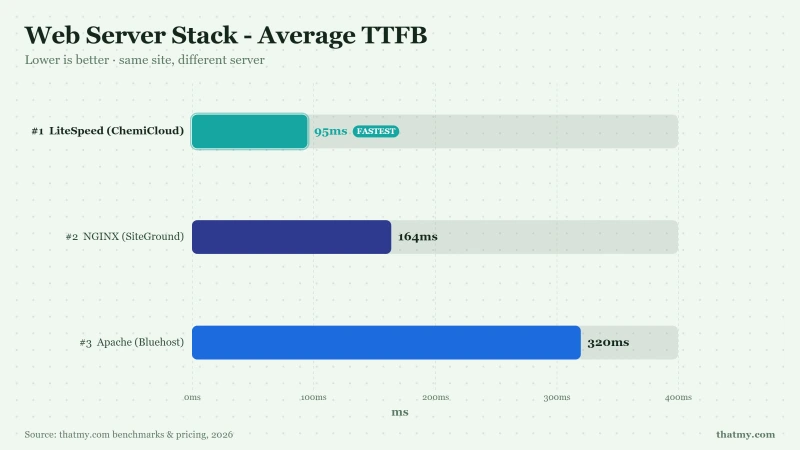
Published benchmarks consistently show Nginx winning on raw requests per second for static files and LiteSpeed slightly ahead on dynamic PHP throughput. Those numbers are real. They are also almost useless for deciding which web server your WordPress site needs. Here is why.
Raw Benchmark Results: Requests Per Second, Static Files
Testing the same static HTML file served by each web server, without PHP, without WordPress, under increasing concurrency:
Nginx wins on pure static file serving. Apache prefork loses badly. Apache event MPM performs reasonably. These numbers are accurate. They are also largely irrelevant to WordPress performance.
Why These Numbers Mislead You
WordPress serves almost no truly static HTML files. Every page is dynamically generated by PHP and MySQL unless a cached version exists. The static file benchmark tests the one scenario WordPress almost never encounters: a raw HTML file on disk with no PHP involved.
Three factors normalize the gap between servers in real WordPress operation:
PHP-FPM closes the concurrency gap. When all three servers use PHP-FPM for dynamic content, the performance difference shrinks to CPU cost and configuration efficiency, not server architecture. The event loop advantage disappears when every request is waiting for the same PHP-FPM pool anyway.
Caching changes the entire ranking. A cached WordPress page served by Apache takes 30-80ms. An uncached page on Nginx takes 300-800ms. Apache with WP Rocket at 50ms beats Nginx without caching at 600ms. This is the number that actually matters for Google's Core Web Vitals measurement of your TTFB.
LiteSpeed Cache creates a category difference, not a version difference. The performance gap between LiteSpeed+LiteSpeed Cache and every other combination is not a hardware gap or a tuning gap. It is an architectural gap. Server-level cache hits return in 1-5ms. Plugin-level cache hits return in 20-80ms. No amount of Apache or Nginx tuning closes this gap, because the gap exists at the layer below where those servers operate.
The Honest Performance Ranking for WordPress
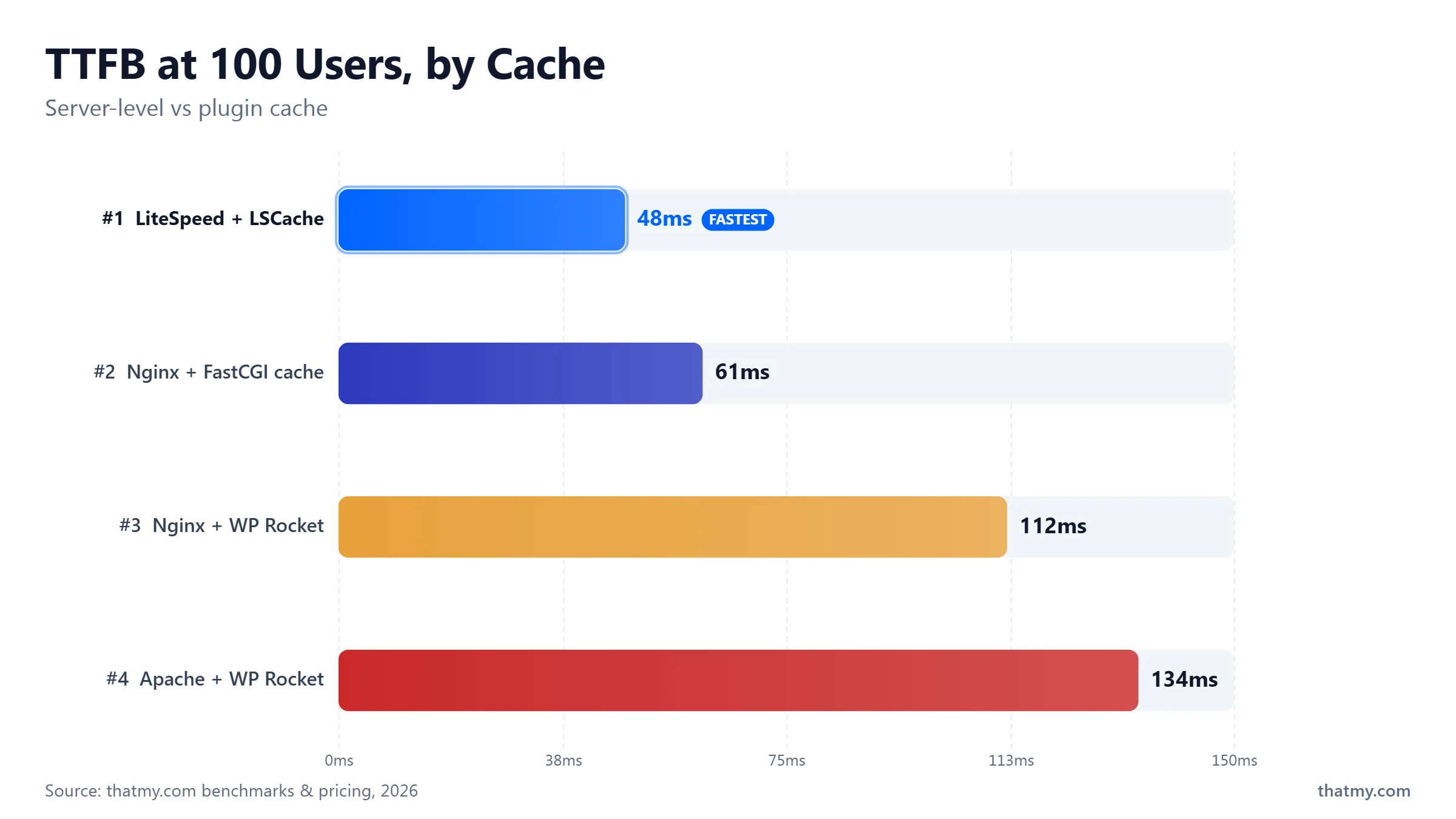
| Rank | Stack | Cached TTFB | Why |
|---|---|---|---|
| 1st | LiteSpeed + LiteSpeed Cache | 1-5ms | Server-level cache: PHP never starts. Fastest possible path for cached requests. |
| 2nd | Nginx + FastCGI Cache | 8-15ms | Server-level cache: PHP never starts. Requires manual invalidation setup. |
| 3rd | Nginx + WP Rocket | 20-60ms | Plugin-level cache: PHP boots but stops early. Automatic invalidation. |
| 4th | Apache (event MPM) + WP Rocket | 30-80ms | Plugin-level cache on event-driven Apache. Competitive when properly tuned. |
| 5th | Apache (prefork) + no cache | 300-800ms+ | Full PHP + database execution every request. Do not run this on production. |
Concurrency Under Load: The Test Shared Hosting Fails
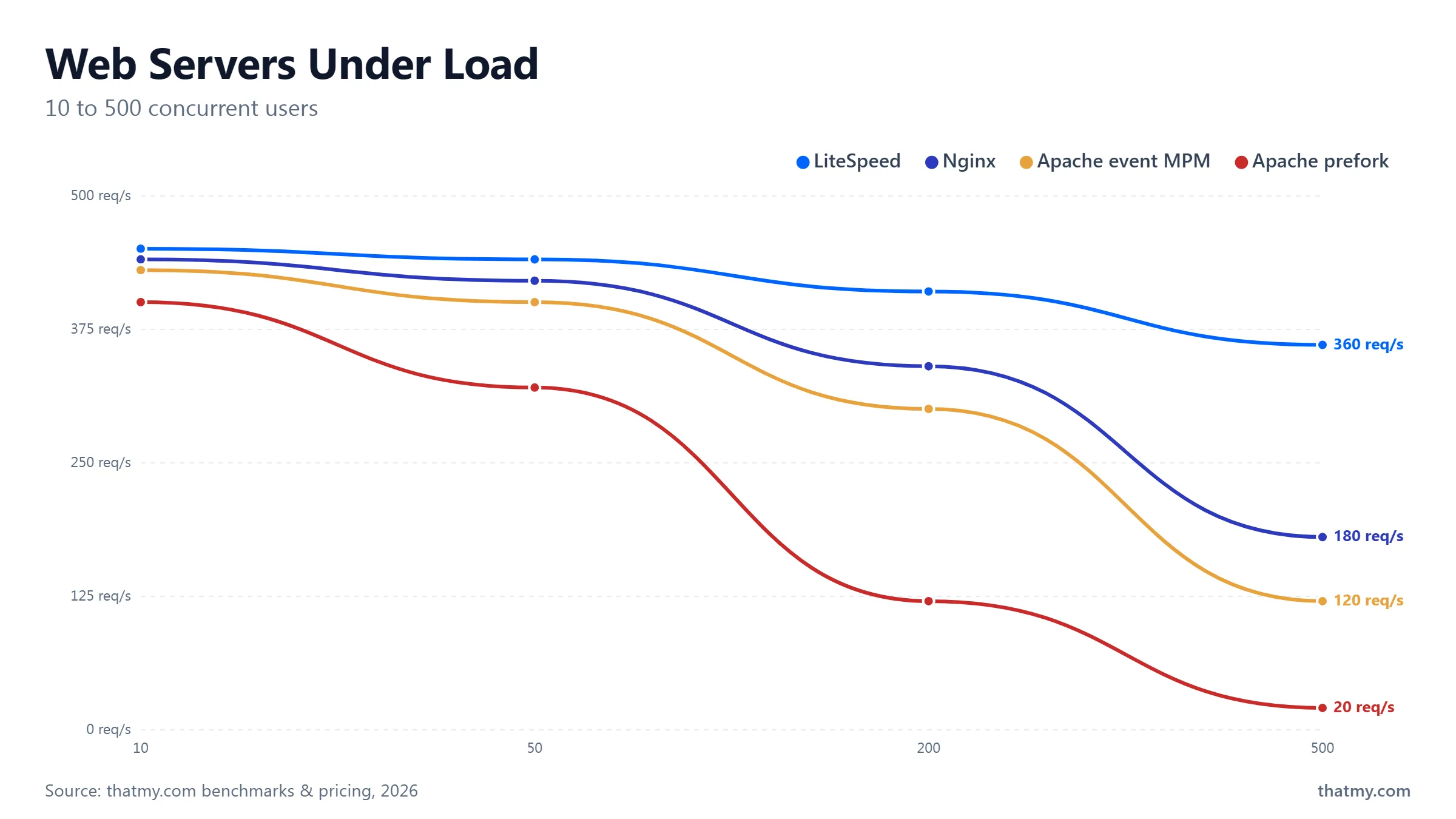
Load testing the same WordPress site (uncached, PHP+MySQL) under increasing concurrent users shows the concurrency model matters most above 100-200 simultaneous visitors. Below that threshold, all four configurations produce similar response times. Above it, Apache prefork degrades fastest. Apache event MPM stays competitive with Nginx up to around 200-300 concurrent users. At 500 concurrent users, Nginx and LiteSpeed maintain under 200ms TTFB while Apache prefork exceeds 2,000ms.
Most shared hosting sites never reach 200 concurrent visitors under normal operation. The concurrency model difference only matters if your site gets traffic spikes, runs time-sensitive content (news, sales, events), or has consistent moderate traffic. For a blog averaging 100 daily visitors, Apache on shared hosting is not the bottleneck. The bottleneck is almost certainly uncached PHP execution and slow database queries. Fixing those with a cache plugin moves TTFB from 600ms to 80ms, a far larger improvement than any web server switch.
LiteSpeed Cache: The Reason LiteSpeed Wins for WordPress
LiteSpeed Cache is a free WordPress plugin. On Apache or Nginx, it works like a slightly enhanced version of WP Rocket. On LiteSpeed web server, it works like a completely different category of caching tool. The distinction matters because most people evaluating LiteSpeed Cache read the plugin's feature list without understanding that half those features only activate on the matching web server.
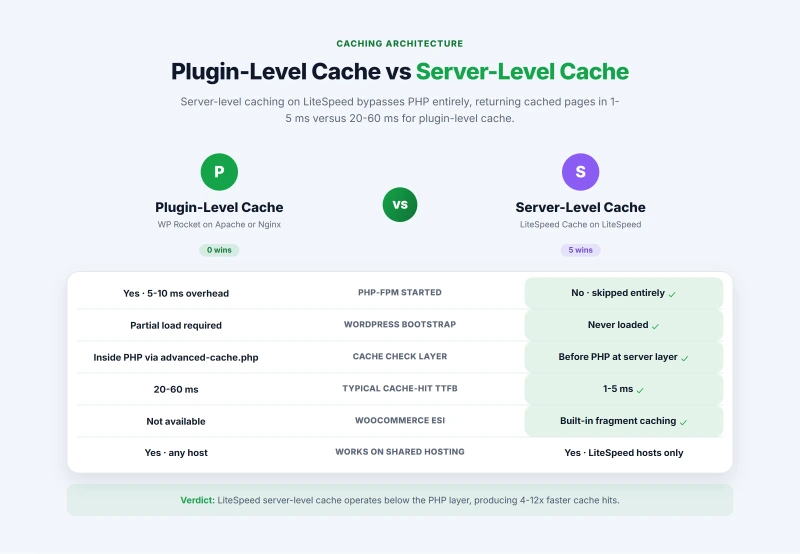
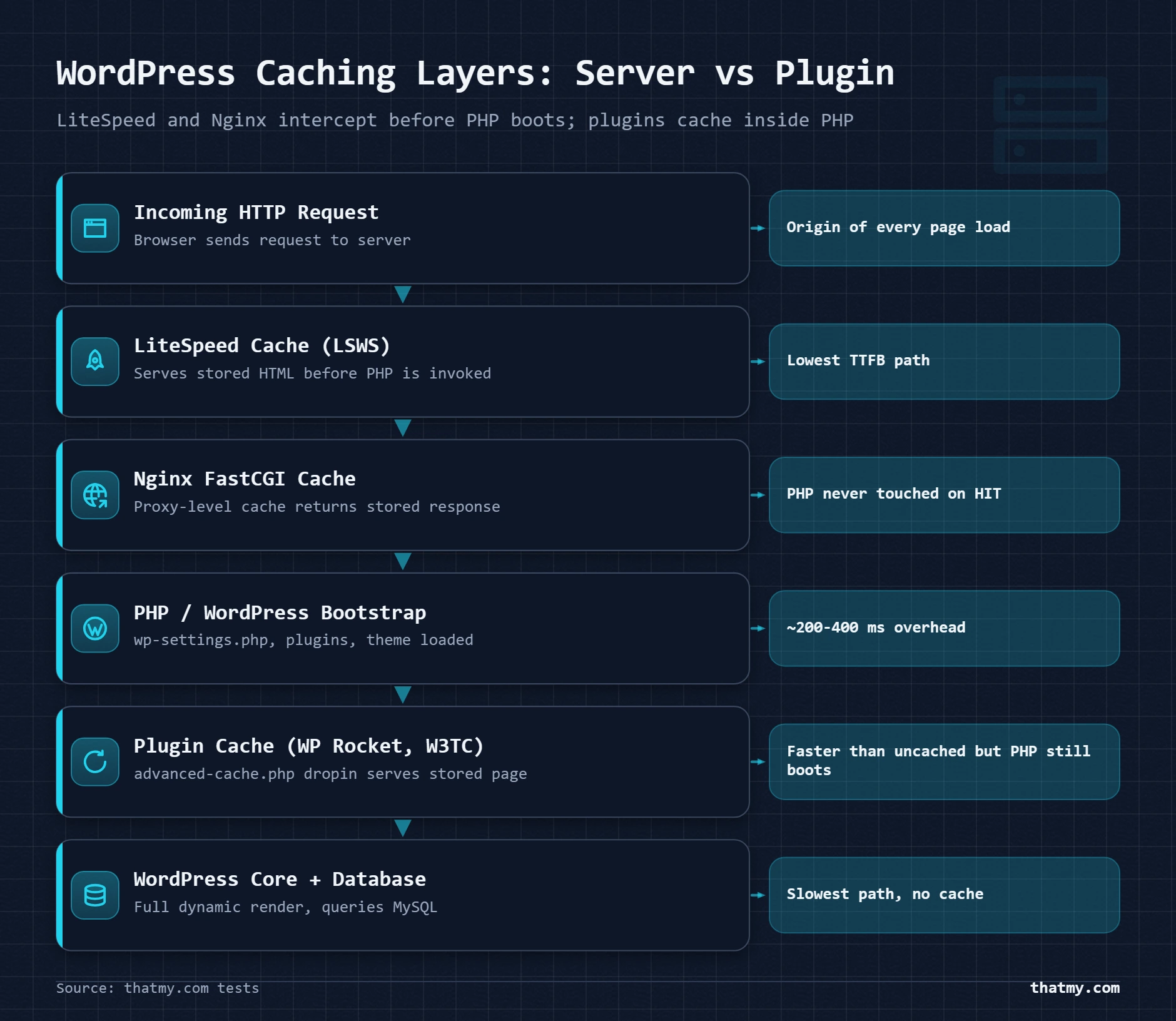
Server-Level vs Plugin-Level: The Architecture That Creates the Gap
When a visitor requests a WordPress page, here is what happens with plugin-level caching running on Apache or Nginx:
PHP still started. WordPress partially loaded. Cache hit happens inside PHP, not before it.
PHP never started. WordPress never loaded. Cache operates at the same layer as static file serving.
The speed difference is not from better code. It is from where the cache check happens in the request pipeline. Server-level cache puts the check before PHP. Plugin-level cache puts the check inside PHP. That 20-50ms difference per request compounds across thousands of daily visitors and shows up directly in your Core Web Vitals TTFB measurements.
ESI for WooCommerce: The Feature Nothing Else Has
WooCommerce creates a caching problem that blocks server-level caching for most stores. Product pages contain dynamic content, the cart widget shows items in the visitor's cart, the wishlist button shows their saved items, the account menu shows their name. If you cache the full product page, you cache one visitor's cart data and serve it to everyone else. If you do not cache at all, every product page view is a full PHP+database execution. Most WooCommerce setups choose uncached or plugin-level caching as a compromise.
LiteSpeed Cache's ESI (Edge Side Includes) feature takes a third path. The server caches the entire product page HTML, but marks specific regions as dynamic fragments that are fetched separately per visitor. The cart widget, account status, and wishlist state are requested as separate fragments after the cached page is delivered. The visitor gets the cached page in 1-5ms. Their dynamic cart content loads as a secondary request in another 20-50ms. WooCommerce product pages served from server cache with live cart data. No other web server has an equivalent built-in feature for WordPress.
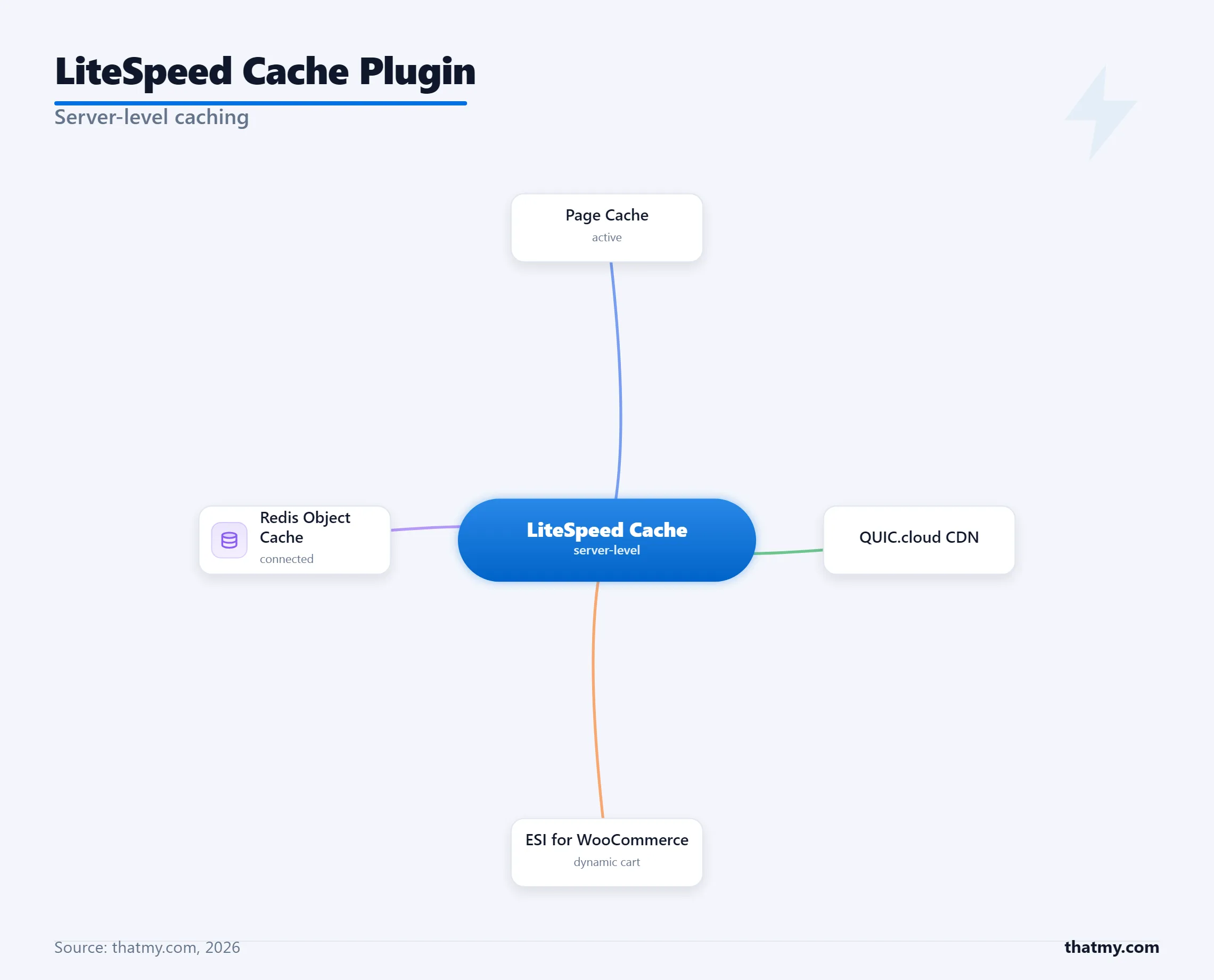
What LiteSpeed Cache Does Beyond Page Caching
Several LiteSpeed Cache features work on any web server and are genuinely worth using regardless of your server choice:
- Object cache via Redis or Memcached, connects to the same Redis server your VPS provides, stores WordPress object cache results, reduces database queries on dynamic pages. The WordPress caching guide covers how object cache fits into the full six-layer cache stack.
- Image optimization, lazy loading, WebP conversion, and dimension attributes. Works on any server.
- CSS/JS minification and combination, reduces asset count and file sizes. Works on any server.
- Critical CSS generation, generates above-the-fold CSS to eliminate render-blocking resources. Works on any server.
- CDN integration via QUIC.cloud, LiteSpeed's own CDN, integrates tightly with the cache plugin for edge caching. Works on any server as a CDN layer.
- Browser cache header management, sets correct max-age and cache-control headers. Works on any server.
The page cache and ESI features are the exclusive LiteSpeed-only advantages. Everything else is a well-implemented version of features available in WP Rocket, FlyingPress, or Perfmatters. If you are on Apache or Nginx, installing LiteSpeed Cache for its non-page-cache features is reasonable, but so is using WP Rocket for a cleaner, more integrated experience without unused LiteSpeed-specific settings cluttering the dashboard.
Apache Configuration for WordPress: Closing the Gap
Apache with default settings is slow. Apache with the right configuration is competitive. Most WordPress speed problems on shared Apache hosting are not caused by Apache being Apache, they are caused by default configurations designed for generic use being applied to WordPress without adjustment. Three changes close most of the gap with a modern Nginx setup.
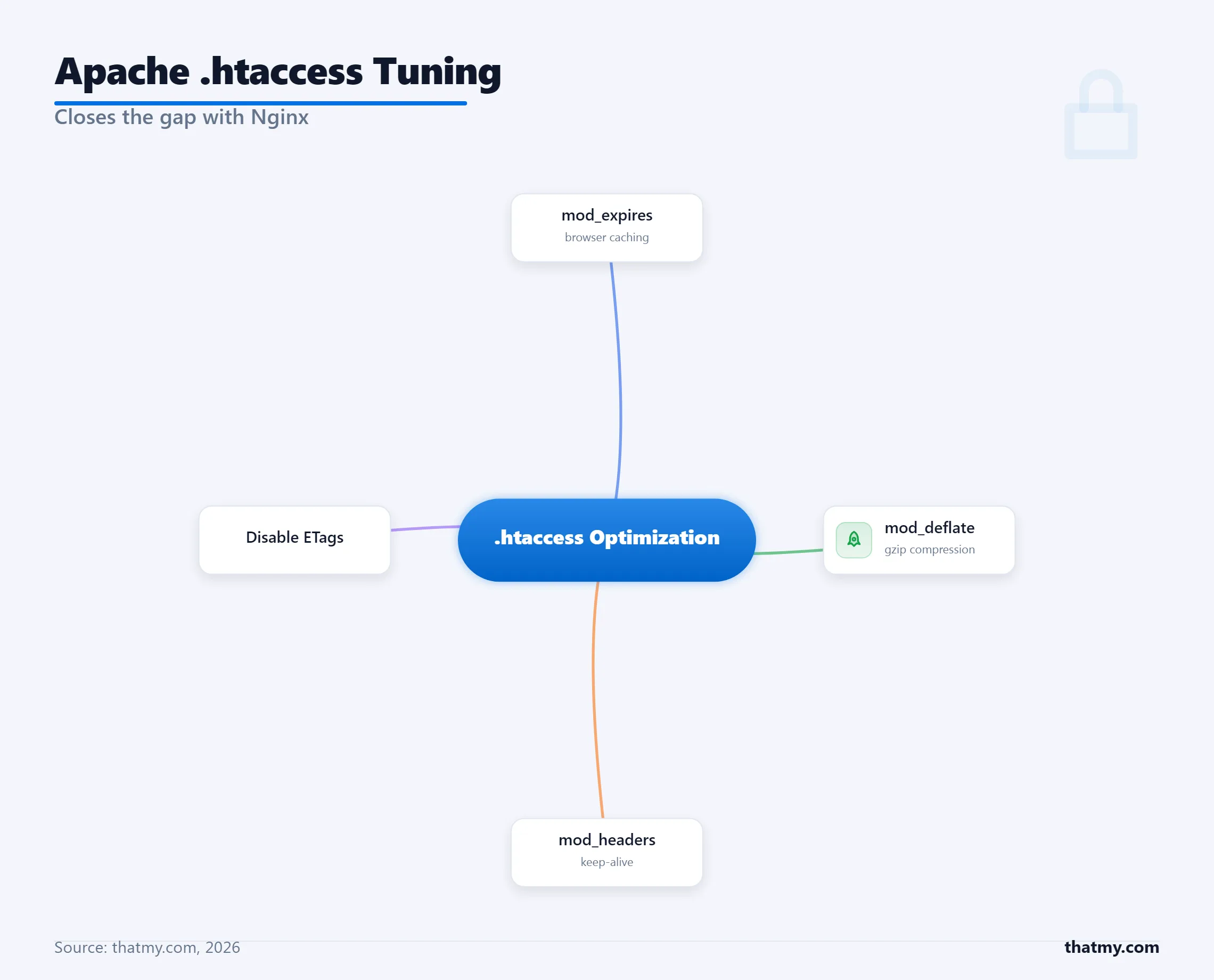
Essential .htaccess Optimizations for WordPress
These settings go in your WordPress root .htaccess file, after the WordPress permalink block. Each one is safe to add on any standard Apache shared host.
# Browser caching: static assets cached for 1 year
<IfModule mod_expires.c>
    ExpiresActive On
    ExpiresByType text/css "access 1 year"
    ExpiresByType application/javascript "access 1 year"
    ExpiresByType image/png "access 1 year"
    ExpiresByType image/webp "access 1 year"
    ExpiresByType image/jpeg "access 1 year"
    ExpiresByType image/gif "access 1 year"
    ExpiresByType font/woff2 "access 1 year"
</IfModule>

# Gzip compression: reduces HTML/CSS/JS transfer size 60-80%
<IfModule mod_deflate.c>
    AddOutputFilterByType DEFLATE text/html text/css
    AddOutputFilterByType DEFLATE application/javascript application/json
    AddOutputFilterByType DEFLATE text/xml application/xml
    AddOutputFilterByType DEFLATE font/woff2
</IfModule>

# Keep-Alive: reuse TCP connection for multiple assets
<IfModule mod_headers.c>
    Header set Connection keep-alive
</IfModule>

# Disable ETag: prevents duplicate cache validation overhead
Header unset ETag
FileETag None

# Security headers that also improve perceived performance
<IfModule mod_headers.c>
    Header always set X-Content-Type-Options "nosniff"
    Header always set X-Frame-Options "SAMEORIGIN"
</IfModule>
The single most impactful change: install a cache plugin. Apache without caching vs Nginx without caching produces roughly a 20-30% Nginx advantage under moderate concurrency. Apache with WP Rocket vs Nginx without caching: Apache wins. The web server choice does not overcome a caching gap. It compounds it.
Verify Your Apache MPM and HTTP/2 Status
If you have SSH access to your server, run these commands to confirm you are on the modern Apache configuration:
# Check which MPM Apache is using
apache2ctl -V | grep -i mpm
# Should show: Server MPM: event
# If it shows Server MPM: prefork, contact your host about upgrading

# Check if HTTP/2 module is loaded
apache2ctl -M | grep http2
# Should show: http2_module (shared)

# Verify HTTP/2 is active from outside:
curl -sI --http2 https://yourdomain.com | grep -i "HTTP/"
# Should show: HTTP/2 200
If you are on shared hosting with no SSH access, use an online tool like KeyCDN's HTTP/2 Test to check protocol support. If your site is serving HTTP/1.1 and you cannot upgrade on your current host, this alone is a reason to consider migrating, HTTP/2 multiplexing reduces page load time for asset-heavy WordPress sites by 15-30%. Understanding the server hardware your hosting plan runs on helps contextualize why these Apache tuning differences matter at the hardware level.
Nginx FastCGI Cache: Server-Level Caching Without LiteSpeed
Most Nginx WordPress guides stop at the basic PHP-FPM configuration. They skip FastCGI cache. This is the equivalent of setting up a car and forgetting to mention you can install an engine upgrade. Nginx FastCGI cache is a server-level page cache that bypasses PHP entirely on cache hits, and it is built into every Nginx installation by default, just not configured by default.
You need VPS or dedicated server access to configure this. Shared hosting users cannot add Nginx-level cache configuration. If you are managing your own VPS and running Nginx, this configuration should be in place before you install any caching plugin.
# --- Add to the http{} block in nginx.conf ---
# Define where to store cached responses and how large the cache can grow
fastcgi_cache_path /var/cache/nginx levels=1:2
    keys_zone=WORDPRESS:100m   # 100m of key storage (handles ~800k cache entries)
    inactive=60m               # Remove entries unused for 60 minutes
    max_size=10g;              # Maximum total disk space for cached files

# The cache key: each unique URL gets its own cache entry
fastcgi_cache_key "$scheme$request_method$host$request_uri";

# --- Add to the server{} block ---
# Skip cache for sessions that should always be dynamic
map $http_cookie $skip_cache {
    default 0;
    "~*wordpress_logged_in" 1;      # Logged-in users see live content
    "~*woocommerce_cart_hash" 1;    # WooCommerce cart sessions bypass cache
    "~*wp-postpass" 1;              # Password-protected posts bypass cache
}

# --- Add inside location ~ \.php$ ---
fastcgi_cache WORDPRESS;
fastcgi_cache_valid 200 60m;       # Cache 200 responses for 60 minutes
fastcgi_cache_bypass $skip_cache;  # Bypass cache storage when $skip_cache = 1
fastcgi_no_cache $skip_cache;      # Do not serve from cache when $skip_cache = 1

# This header tells you whether a request hit the cache
# Check it in browser DevTools Network tab under response headers
add_header X-FastCGI-Cache $upstream_cache_status;

fastcgi_pass unix:/run/php/php8.2-fpm.sock;
include fastcgi_params;
fastcgi_param SCRIPT_FILENAME $document_root$fastcgi_script_name;
Reading the X-FastCGI-Cache Header
After enabling FastCGI cache, open Chrome DevTools, go to the Network tab, reload your homepage, click the HTML document in the request list, and look at the response headers. You will see one of four values:
- HIT: Page was served from Nginx cache. PHP did not run. This is what you want for anonymous visitors.
- MISS: First request for this URL, cache was empty. WordPress ran and the response was stored. Next request should be HIT.
- BYPASS: The
$skip_cachecondition matched. Used correctly for logged-in users and WooCommerce sessions. - EXPIRED: Cache entry existed but exceeded the 60-minute lifetime. Nginx re-requested from PHP-FPM and stored a fresh copy.
Cache Invalidation: The Part Nginx Does Not Do For You
Nginx FastCGI cache does not know WordPress published a new post. The cache entry for your homepage will serve the old version for up to 60 minutes after you publish new content. Fixing this requires the Nginx Helper plugin, which sends a purge request to a Nginx purge endpoint when WordPress publish events fire. Configure Nginx Helper with your cache path, enable "Purge Cache on Post Publish" and "Purge Category and Tag Archives," and cache invalidation becomes automatic. This is the one operational step LiteSpeed Cache handles internally without plugins, and it is worth acknowledging honestly. The managed vs unmanaged VPS guide explains which of these server-level configurations managed hosts handle for you versus what you set up yourself on an unmanaged server.
Which Hosting Plans Use Which Web Server
Most hosting providers do not advertise their web server prominently. They advertise storage and bandwidth. The web server is listed in fine print, if at all. Here is the actual server breakdown for the hosts most commonly recommended for WordPress, based on checking HTTP response headers directly.
| Host | Web Server | Which Plans | Notes |
|---|---|---|---|
| SiteGround | LiteSpeed Enterprise | All plans | LiteSpeed Cache pre-installed and configured |
| Hosting.com (formerly A2 Hosting) | LiteSpeed Enterprise | Some plans | LiteSpeed Cache included, ESI available |
| Hostinger | LiteSpeed Enterprise | Business plan and above | LiteSpeed Cache available in plugin directory |
| NameHero | LiteSpeed Enterprise | All plans | LiteSpeed Cache included, good performance tier |
| ScalaHosting | LiteSpeed, Nginx, or Apache selectable | Managed VPS plans | Choose web server from control panel, Redis included |
| Cloudways | Nginx + Apache (reverse proxy) | All plans | Varnish cache layer added in front, WP Redis available |
| Kinsta | Nginx | All plans | Custom Nginx stack with Redis, no LiteSpeed Cache |
| WP Engine | Nginx (custom) | All plans | Proprietary EverCache layer, excellent performance |
| Bluehost | Apache | Most plans | Plugin-level caching only, older stack |
| HostGator | Apache | All shared plans | Plugin-level caching only, no LiteSpeed option |
How to Check Your Current Host's Web Server
You do not need to log in anywhere. Run one command from any terminal:
# Check the Server header in the HTTP response
curl -sI https://yourdomain.com | grep -i "^server:"

# Output examples:
# Server: LiteSpeed    → LiteSpeed Enterprise
# Server: OpenLiteSpeed → OpenLiteSpeed (free version)
# Server: nginx         → Nginx
# Server: Apache        → Apache
# Server: cloudflare    → Cloudflare is proxying (origin server hidden)

# If behind Cloudflare, check origin directly
# (get your origin IP from your hosting control panel)
curl -sI --resolve "yourdomain.com:443:YOUR_ORIGIN_IP" \
    https://yourdomain.com | grep -i "^server:"
No terminal access? The KeyCDN Response Header Check tool does the same check from a browser, enter your domain and look for the Server header in the results. Within WordPress, the Query Monitor plugin displays server software in the Request panel on the right side of the admin bar when active.
A Note on Cloudways Architecture
Cloudways shows "Nginx" as the web server, which is accurate but incomplete. Cloudways runs Nginx in front of Apache (reverse proxy architecture), with Varnish as an additional full-page cache layer between Cloudflare and Nginx. The public-facing Server header shows Nginx. Apache handles PHP in the backend. Varnish serves cached pages before Nginx even touches them. This layered architecture explains why Cloudways performance is consistently competitive despite using Apache for PHP execution, Varnish provides a server-level cache functionally similar to LiteSpeed Cache, operating before PHP in the request path. Understanding this is useful context when evaluating managed hosting plans.
Where I Land by Use Case
There is no universal winner. The best web server for your WordPress site depends on your traffic volume, your technical control level, and whether you are running WooCommerce. These are concrete recommendations, not hedged "it depends" answers.
WordPress Blog or Content Site
Best: Any LiteSpeed host with LiteSpeed Cache configured. Enable page cache, set TTL to 24 hours for posts, enable image optimization. Server-level cache means cached posts load in under 10ms for any anonymous visitor.
Runner-up: Nginx host (Cloudways, ScalaHosting) with WP Rocket and Cloudflare. Plugin-level cache at 30-60ms TTFB, Cloudflare edge adds another 10-20ms reduction for geographically distributed visitors.
Budget option: Apache shared hosting with WP Rocket or W3 Total Cache plus Cloudflare. Cached TTFB will be 50-120ms. Uncached pages will be slow but most visitors see cached versions. More than acceptable for under 500 daily visitors.
WooCommerce Store
Best: LiteSpeed with LiteSpeed Cache ESI enabled. Configure WooCommerce mode in LiteSpeed Cache settings. Product pages are served from server-level cache with live cart. Checkout and cart pages bypassed correctly. This is the only web server stack that solves the WooCommerce caching problem natively.
Runner-up: Nginx with FastCGI cache, configured to bypass cache on WooCommerce cookies. Requires careful skip-cache rules for the cart, checkout, My Account, and any page using the [woocommerce_cart] shortcode. WP Rocket handles this automatically with its WooCommerce add-on.
Avoid: Apache prefork without caching under checkout load. Each concurrent checkout visitor blocks an Apache worker. A modest flash sale can queue requests for 30+ seconds.
Self-Managed VPS
Best setup: Nginx + PHP-FPM + Redis + Nginx FastCGI cache + Nginx Helper. This stack is free, well-documented, supported by every hosting community, and delivers server-level caching comparable to LiteSpeed Cache for most workloads. The Nginx Helper plugin handles cache invalidation automatically.
Alternative: OpenLiteSpeed + CyberPanel + LiteSpeed Cache. Free, delivers true server-level caching, and CyberPanel handles server administration without CLI. Better cache hit performance than Nginx FastCGI, but smaller community for troubleshooting.
I have run both in practice. Nginx is easier to maintain long-term due to documentation breadth. OpenLiteSpeed is faster per cache hit but more opaque when things go wrong. Choose Nginx for a site you will actively develop. Choose OpenLiteSpeed for a site you want to set and forget.
Stuck on Apache Shared Hosting
Apache shared hosting is not a dead end. It becomes one without caching. Add WP Rocket or W3 Total Cache. Enable Cloudflare as a free CDN layer. Apply the .htaccess optimizations from Section 5 of this guide. That combination brings cached TTFB to 50-100ms, measurably slower than LiteSpeed Cache's server-level numbers, but well within acceptable performance for most WordPress sites.
If Core Web Vitals show TTFB consistently above 600ms after caching is configured, your Apache host is likely undersizing PHP-FPM workers or running heavily overloaded shared servers. That is a hosting quality problem, not an Apache problem. A LiteSpeed host with the same resource allocation will not fix it.
The Short Version
Server-level caching outperforms plugin-level caching. LiteSpeed Cache provides server-level caching on LiteSpeed hosts. Nginx FastCGI cache provides comparable server-level caching on Nginx hosts with manual setup. Apache shared hosting is limited to plugin-level caching. For WooCommerce specifically, LiteSpeed's ESI is the only native solution to the cart caching problem. Everything else is a workaround of varying quality. The hosting recommendation that follows from this: LiteSpeed shared hosting for budget, ScalaHosting managed VPS for growing sites, Cloudways for teams who want Nginx with managed operations.
Where to Go Next
The web server is entry point for every request, but it is one layer in a stack that determines total WordPress performance. The WordPress caching guide maps all six cache layers, page cache, object cache, browser cache, CDN cache, PHP OPcache, and MySQL query cache, showing how LiteSpeed Cache and Nginx FastCGI cache slot into the full picture. If your benchmark results show high TTFB despite caching being active, the issue is almost always either the PHP-FPM pool size or database query time, the server hardware guide covers how VPS resource allocation affects PHP-FPM pool capacity. For anyone choosing between keeping their current shared host and moving to a VPS, the managed vs unmanaged VPS guide explains exactly what configuration work each option requires and whether a managed provider like ScalaHosting or Cloudways eliminates that work for you.
LiteSpeed vs Apache vs Nginx FAQ
Is LiteSpeed actually faster than Nginx for WordPress?
For cached WordPress pages, yes, LiteSpeed is faster than Nginx without FastCGI cache, and roughly equal to Nginx with FastCGI cache configured. The speed advantage comes from LiteSpeed Cache's server-level integration, which serves cached pages before PHP loads at all. The practical TTFB difference between LiteSpeed+LiteSpeed Cache and Nginx+FastCGI Cache is typically 5-15ms. The difference between either server-level cache and a plugin-level cache like WP Rocket is 20-80ms depending on server load. For uncached dynamic content with PHP-FPM, LiteSpeed's LSAPI protocol is marginally faster than Nginx's FastCGI, but the difference is smaller than most benchmarks suggest. The more important variable is PHP execution time and database query time, both unaffected by web server choice.
Can I use LiteSpeed Cache on Apache or Nginx?
LiteSpeed Cache works on Apache and Nginx, but with a significant limitation: the server-level page cache is disabled. On Apache or Nginx, LiteSpeed Cache's page cache falls back to plugin-level operation, WordPress boots, PHP runs, and the advanced-cache.php dropin checks for a cached page. This is similar performance to WP Rocket. The image optimization, CSS/JS minification, object cache integration, and CDN features still work on any server. But the core performance differentiator, serving cached pages at the web server level before PHP starts, is only available on LiteSpeed. If your host runs Nginx, WP Rocket or FlyingPress are more appropriate caching solutions and will perform comparably to LiteSpeed Cache on Nginx.
Why does Apache use more memory than Nginx?
Apache's prefork MPM spawns a complete process per active connection. Each process is 10-20 MB of RAM. At 100 concurrent connections, that is 1-2 GB of RAM consumed by the web server alone, before PHP or MySQL runs. Nginx uses an event-driven architecture with one worker process per CPU core. Each worker handles thousands of connections simultaneously using non-blocking I/O, when waiting for PHP to respond, the worker moves to the next ready connection instead of blocking. At 100 concurrent connections, Nginx uses 10-20 MB for the workers themselves. The memory difference is 100x in favor of Nginx under high concurrency. Apache's event MPM narrows this gap significantly by using threads instead of processes, but Apache's design still carries more overhead than Nginx's event loop.
Does it matter which web server my shared host uses?
Yes, particularly for caching. If your shared host uses LiteSpeed Enterprise, you can install LiteSpeed Cache and get server-level page caching, cached pages load in under 10ms because PHP never runs. If your host uses Apache, you are limited to plugin-level caching where PHP still boots on every request. The performance difference for a cached page is typically 30-80ms, which is measurable and meaningful for Core Web Vitals. For uncached requests, both stacks are similarly slow because the bottleneck is PHP execution time and database queries. To check your host's web server: run curl -sI https://yourdomain.com | grep -i server. Look for 'Server: LiteSpeed', 'Server: Apache', or 'Server: nginx' in the output.
What is ESI and why does it matter for WooCommerce?
ESI stands for Edge Side Includes. In WooCommerce, the problem is that pages containing cart data cannot be fully cached, the cart contents are unique per visitor. Without ESI, you must either not cache WooCommerce product pages (slow for everyone) or cache them and break the cart display. LiteSpeed Cache's ESI feature solves this by caching the entire product page HTML except for specific dynamic fragments, the cart widget, the account menu, the wishlist count. Those fragments are requested separately, dynamically, and assembled into the page on delivery. The result: product pages are served from LiteSpeed's server-level cache in under 10ms, while the cart stays live and accurate. Nginx and Apache have no equivalent native capability. This is one of the clearest functional advantages LiteSpeed has specifically for WooCommerce stores.
What is Nginx FastCGI cache and how does it compare to LiteSpeed Cache?
Nginx FastCGI cache is a server-level page cache built into Nginx that caches full PHP responses on disk. When enabled, a cache hit is served directly by Nginx without touching PHP-FPM, similar to how LiteSpeed Cache works. The TTFB for a FastCGI cache hit is 8-20ms, versus 1-10ms for LiteSpeed Cache (the difference is small). The key difference is cache management. LiteSpeed Cache communicates with LiteSpeed server through a built-in API to invalidate specific pages on WordPress events (publish, update, delete). Nginx FastCGI cache has no built-in communication channel with WordPress, you need either the Nginx Helper plugin or a custom purge script to invalidate cache entries when content changes. On a site that publishes frequently or where WooCommerce inventory changes constantly, LiteSpeed Cache's automatic invalidation is a practical advantage over Nginx FastCGI cache.
How do I check if my WordPress host uses LiteSpeed, Apache, or Nginx?
The fastest method: open a terminal and run curl -sI https://yourdomain.com | grep -i server. The Server header identifies the web server. You will see 'Server: LiteSpeed' for LiteSpeed Enterprise, 'Server: OpenLiteSpeed' for OpenLiteSpeed, 'Server: nginx' for Nginx, or 'Server: Apache' for Apache. If your site is behind Cloudflare, the Server header shows 'Server: cloudflare', run the same command with the --resolve flag pointing to your origin IP to bypass Cloudflare. From within WordPress, the Query Monitor plugin shows server type under the 'Request' panel. In cPanel, the server software is listed in the 'Server Information' section of the hosting account.