

FastComet Review 2026: The 60-Second Answer
FastComet is low-priced shared hosting that suits a small WordPress site, if you plan for the renewal price. On our benchmark of the Plus plan the first byte arrived in 172ms from New York to our test server (origin, no CDN), and the server stayed up 99.96% of the time over 54 days. Its pricing page lists free daily backups (kept 7 days, 30 on Extra), a free website transfer, a free domain transfer with one year's renewal, 12 data centers and a 30-day money-back guarantee on the plan cards (one other FastComet page says 45 days).
The honest weaknesses: the renewal price is +400% on Starter ($1.99/mo to $9.95/mo), and under load the Plus plan slowed to 420ms with 100 concurrent users, with 0.19% of requests failing across a 0 to 250 client ramp. LiteSpeed Enterprise is on Extra only. For a store or a site with bursts of visitors, that is where the limits show.
The upgrade path is clear: when shared hosting stops being enough, ScalaHosting's managed VPS ($14.95/mo on 12 months) answered 100 concurrent users in 58ms on our benchmark, against 420ms for FastComet Plus.
FastComet Is Right For:
- A new WordPress site or blog with modest, steady traffic
- Budget-conscious users who want free daily backups and a free website transfer
- Beginners who want cPanel
- Small business sites with a few simultaneous visitors
- Anyone who wants a 30-day refund window
FastComet Is NOT Right For:
- Stores or sites with bursts of simultaneous visitors (→ ScalaHosting)
- Developers who need SSH, Git deployment or staging (→ Cloudways)
- Sites that need guaranteed dedicated resources
- People who plan to renew long term without comparing (the renewal step is large)
- Windows hosting (FastComet shared plans run cPanel on Linux)
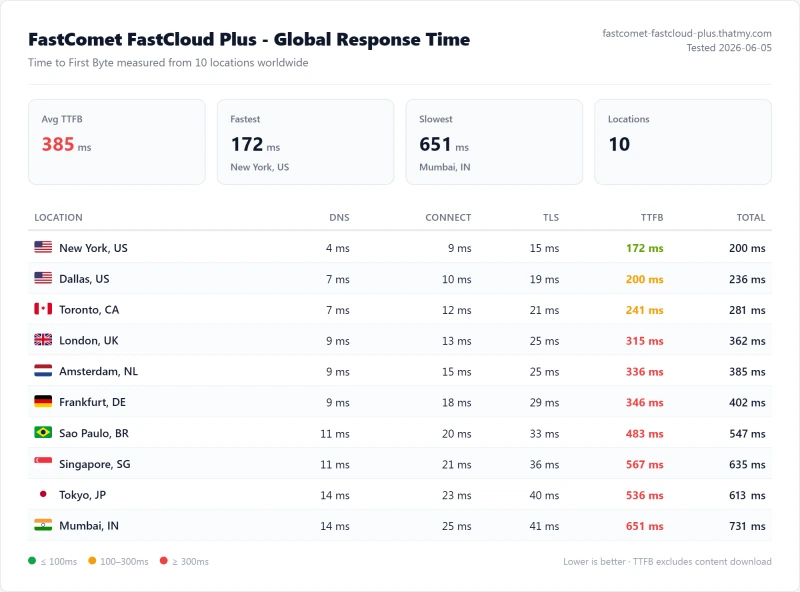
- 172ms TTFB from New York to our test server (origin, no CDN); 385ms average across 10 locations
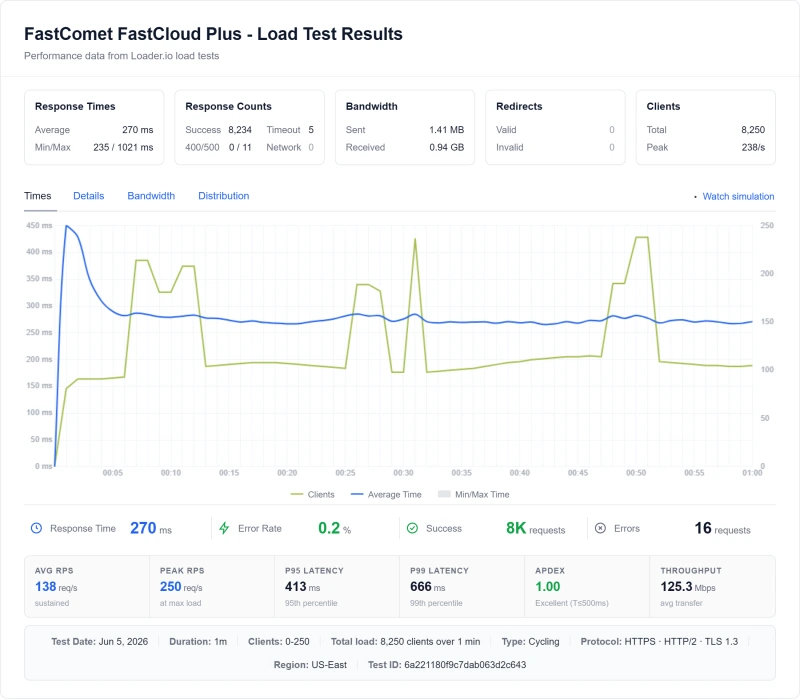
- 420ms with 100 concurrent users; 0.19% of requests failed over a 0 to 250 client ramp
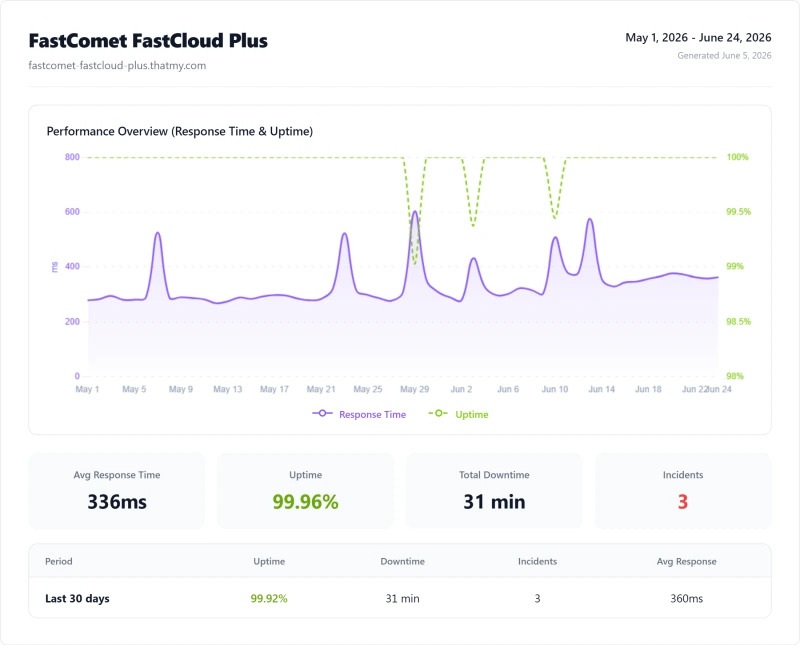
- 99.96% uptime over 54 days (31 minutes down, 3 incidents)
Test Environment & Methodology (Full Disclosure)
Every speed and uptime figure on this page comes from our benchmark record for FastComet. Here is what we measured and what we did not.
Test Environment, Full Disclosure
Earlier runs on FastComet's older FastCloud, FastCloud Plus and FastCloud Extra plans are in our records too; FastComet has since renamed its range to Starter, Essential, Plus and Extra, and the Plus record is the one joined to today's Plus plan. We have not benchmarked today's Starter, Essential or Extra under their new names. Not tested for this review: support response times, WooCommerce, a CDN in front, disk speed, migration speed.
Where the server sat matters.
Our FastComet test server was on the US East coast, so the New York TTFB is the nearest case. Visitors elsewhere are slower (see the TTFB section). If you choose another FastComet data center at sign-up, the picture shifts toward the visitors near it.
Server Hardware: What Is Actually Running Your Site
Shared hosting shows little of its hardware: you cannot SSH in and run lscpu. Our CPU record lists FastComet's processor as an Intel Xeon E5-2680 v4, a PassMark multi-thread score of 17,158 and a rank of #1,201 out of 5,999 CPUs, which is an older chip than ScalaHosting's AMD EPYC 9474F (102,255). A VPS or shared plan gets a share of that chip, not the whole of it.
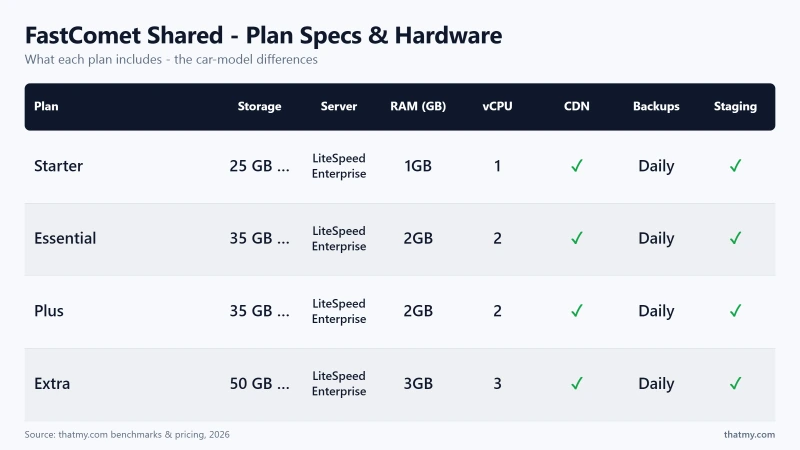
What FastComet's pricing page lists for each plan (read on Oct 12, 2026):
We did not measure disk speed, so we make no claim about it, and we have no count of how many sites share a FastComet server. The earlier version of this page printed an estimate of 200 to 400 sites per server and a comparison of PHP-worker counts; neither has a record behind it and both are removed. The cores and RAM above are what FastComet lists; how they are shared is not published.
TTFB Results by Test Location
All figures are TTFB at the origin with no CDN, measured from 10 locations to our FastComet Plus test server, which sat on the US East coast. A city figure is the time from that city to our test server, not to a FastComet data center in that city.
New York (the nearest test location)
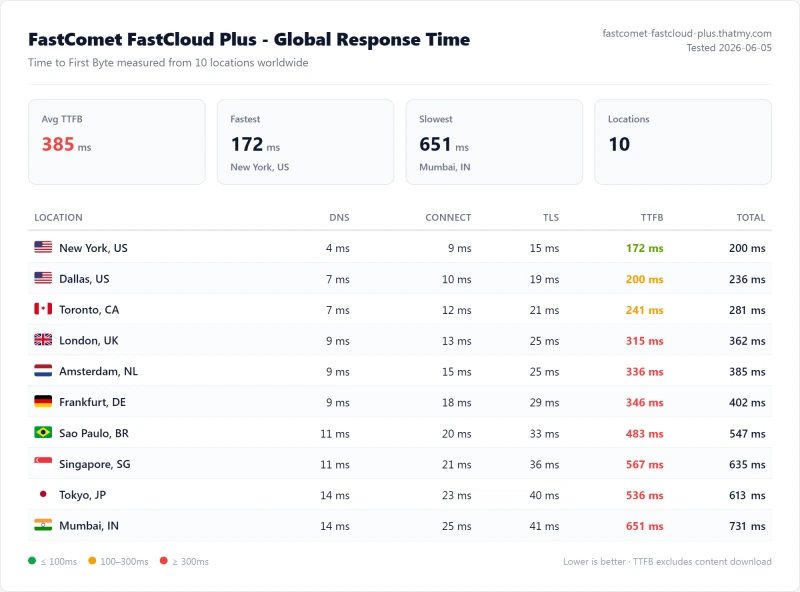
172ms from New York is a reasonable result for shared hosting. Remember it is the best case: it is the visitor closest to the server.
London
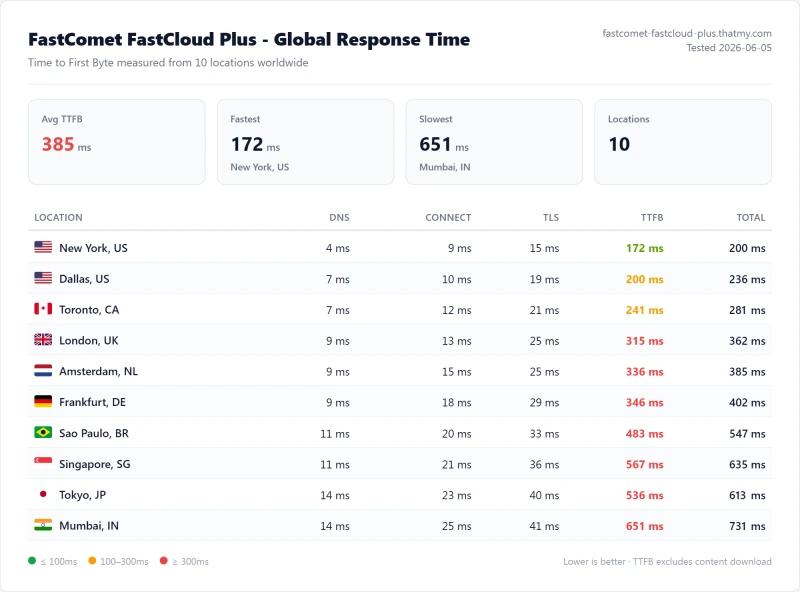
From London to the same server the first byte took 315ms. The extra time is the Atlantic crossing, and it applies to every page the server has to build. If your audience is mostly European, pick a European FastComet data center when you sign up; we did not benchmark one.
Ten locations
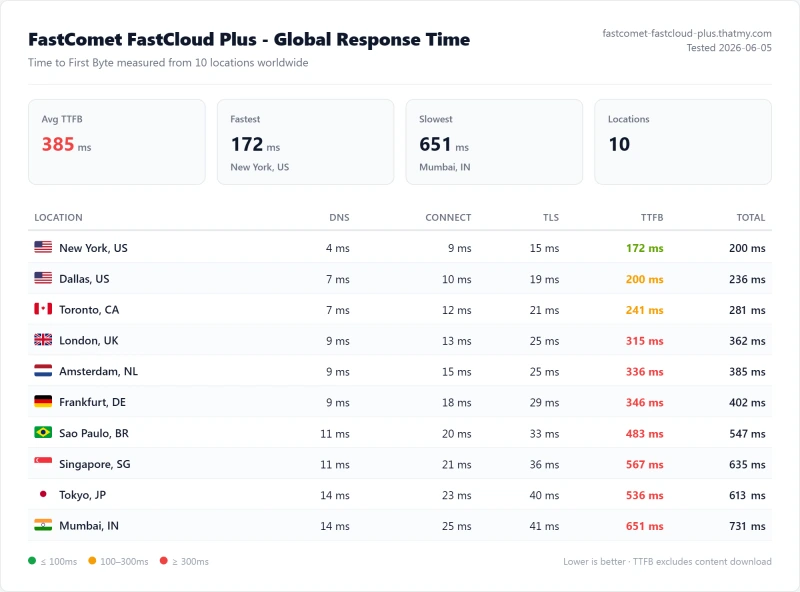
Across all ten locations the range ran from 172ms (New York, US) to 651ms from Mumbai.
The table shows why you cannot compare the New York row across hosts: SiteGround's and Hostinger's test servers sat in Frankfurt, so New York is the far end for them and London the near one. Compare the best-of-10 row for the speed of the server itself: SiteGround's best was 117ms and Hostinger Premium's 109ms, both from Frankfurt, against FastComet's 172ms from New York. ScalaHosting's managed server returned 38ms, but it is a managed VPS at $14.95/mo; FastComet Plus is $3.99/mo. The real gap appears under load (see the load test).
GTmetrix & Core Web Vitals Results
We ran GTmetrix and a Google PageSpeed (Lighthouse, mobile) test on the same WordPress test site on FastComet Plus. The test site is a lightweight page, so these scores show how the server performs for a simple site, not what your theme and plugins will score.
For context, ScalaHosting Entry Cloud scored 98% on GTmetrix and 85 on mobile PageSpeed, and SiteGround GrowBig 88% and 74. A mobile PageSpeed LCP of 3.67s is in Google's "needs improvement" range (good is 2.5s or less) for a plain test page, so heavy themes will do worse until you cache and optimise.
How to improve the score
On a plan with LiteSpeed (Extra), the free LiteSpeed Cache plugin can use the server cache. On the other plans use a page-cache plugin, lazy-load images, minify CSS and JavaScript carefully and check that nothing breaks. WooCommerce product and checkout pages will still be slower because they cannot be fully cached. We did not measure the effect of these changes.
Load Test: 0 to 250 Clients
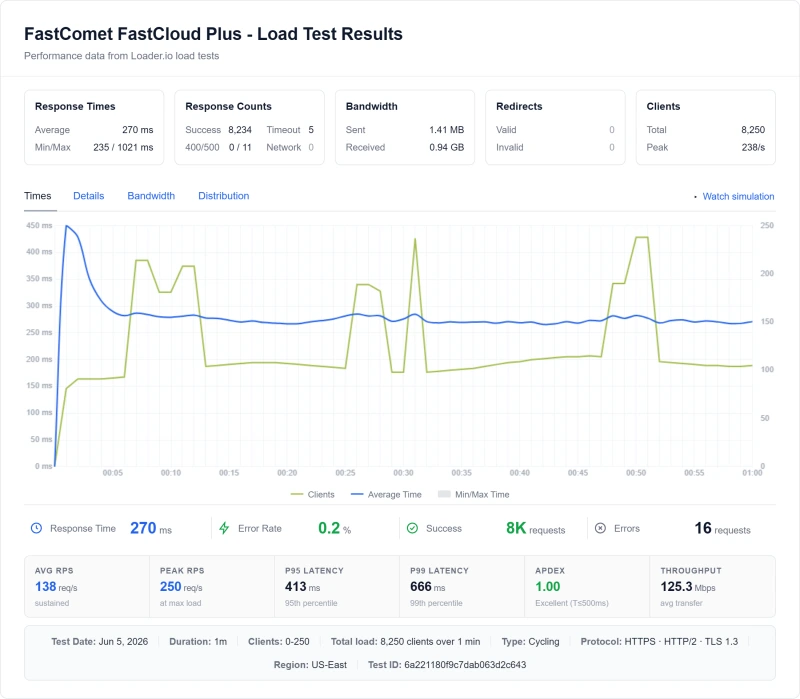
TTFB with one visitor is easy. The harder question is what happens when many arrive at once. We ran a ramp from 0 to 250 clients at once against the same WordPress test site on each host, and recorded the response at the 100-client step, the average across the whole ramp and the share of requests that failed. Our records hold only the 100-client step as a measured value, so we do not publish 10, 25, 50 or 500-user figures.
What the shape means
FastComet Plus did not fall over: across the ramp 16 of 8,250 requests failed (0.19%), and the response at 100 clients was 420ms, against 172ms for one visitor. That is a clear slowdown. We do not know the cause: FastComet does not publish PHP-worker counts or CPU limits on its pricing page, so the earlier explanation about 4 to 8 workers is removed. Shared CPU and memory limits are the usual reason a shared plan slows at this point, and FastComet Plus lists 3 cores and 3GB of RAM.
The ramp ran from the server's own continent (US East or EU-West). SiteGround's ramp stopped at 100 clients and covered fewer requests (3,300), so its failed share is not like for like.
What a slow response means for your business
A server that takes 420ms to start answering is still usable for a blog, and cached pages will be faster. For a store, the cart and checkout cannot be cached, and every one of them pays that time. If your site gets bursts of simultaneous visitors, the managed servers in the table stayed under 74ms to 58ms, a very different result.
Resource Limits: The Section Nobody Publishes
Every shared host limits what one account can use, and FastComet does not print most of its limits on the pricing page. What it does print for each plan is in the hardware section above: cores, RAM, storage and a rough monthly-visits figure. The earlier version of this page listed PHP-worker counts (4, 6 and 8) and a 250,000 inode limit for every plan, and an image of a dashboard with other limits; none of those has a record behind it, so they are removed.
What to ask before you rely on a plan
- CPU and RAM: exceeding your share can slow or stop your site. Read the terms for what happens at the limit.
- Inodes (file count): hosts cap the number of files; when you hit it, updates and uploads fail. Ask FastComet for the number on your plan.
- MySQL: heavy queries and connection spikes are common triggers for throttling.
- "Unlimited" bandwidth: check the fair-use wording.
How to monitor your usage
In cPanel, look under Metrics for the resource-usage page if your plan shows it. Check it weekly for a growing site; if it sits at its limits for long stretches, it is time to move up a plan or to a managed server.
Uptime: 54-Day Monitoring Window
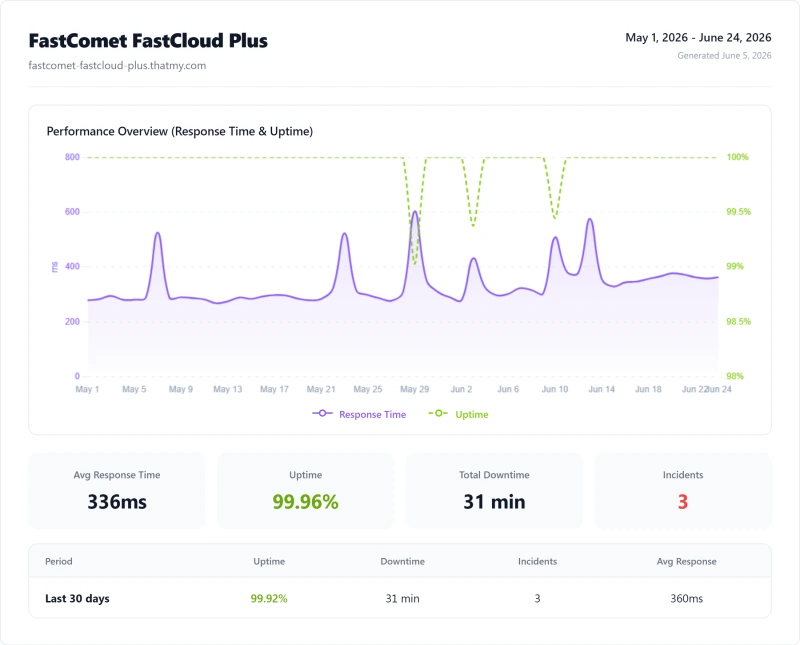
FastComet Plus was up 99.96% of the time over our 54-day window, 31 minutes offline across 3 incidents. That compares well with the shared hosts in the table below and falls short of the two managed platforms.
FastComet sits fourth here, behind the two managed platforms and SiteGround, ahead of Hostinger Premium, Bluehost and HostGator. Half an hour offline across 54 days is unlikely to matter to a small site. We have not re-read any host's uptime guarantee, so that column is gone.
FastComet Pricing, The Real Cost Breakdown
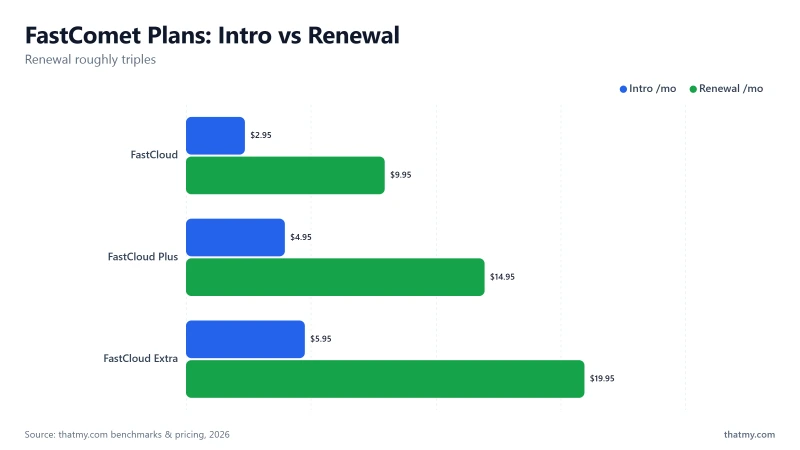
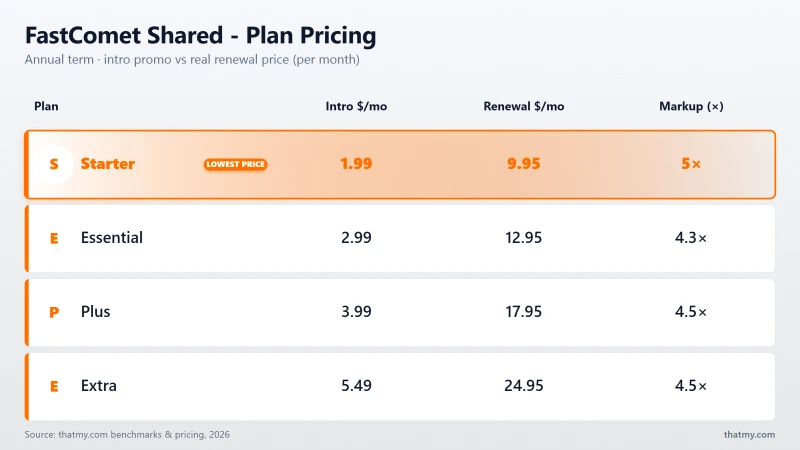
FastComet's pricing has two layers: the attractive intro price and the significantly higher renewal price. Understand both before signing up.
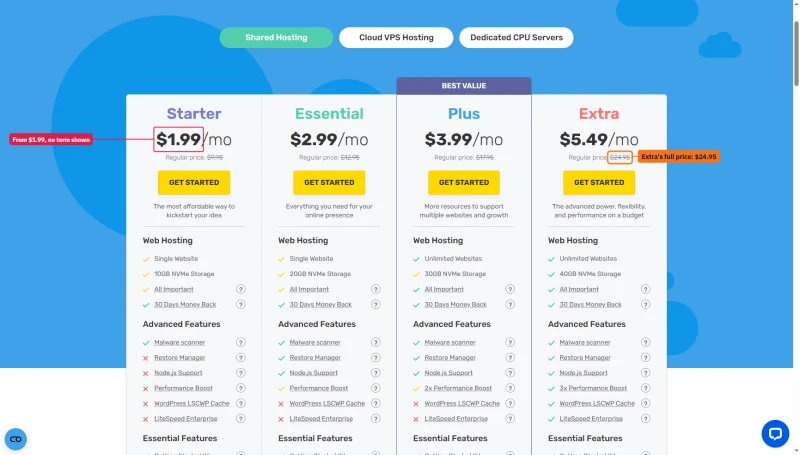
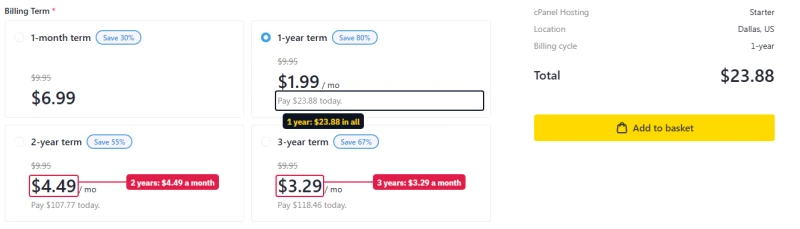
The plan cards print one price per plan and never say which term it belongs to. It is the 1-year price: in the cart, Starter costs $1.99/mo a month on one year, $4.49/mo on two years and $3.29/mo on three, and a single month costs $6.99.
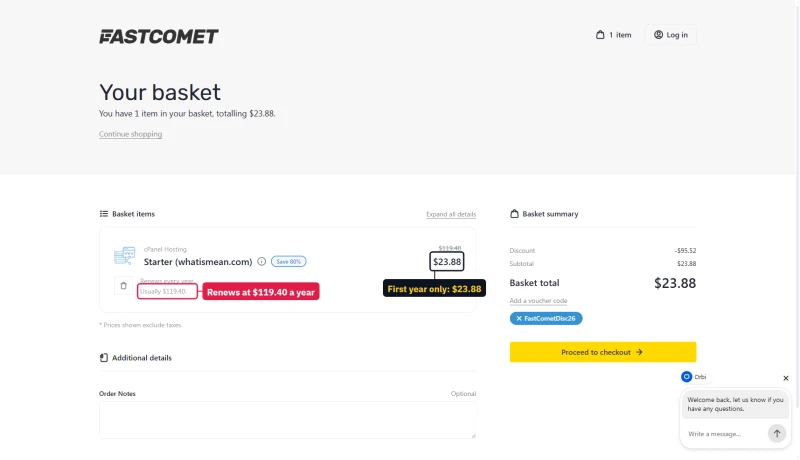
The basket prints the first bill and the renewal side by side: $23.88 for the first year, then $119.40 a year.
What's Included (No Hidden Fees)
FastComet includes more in its base price than many shared hosts:
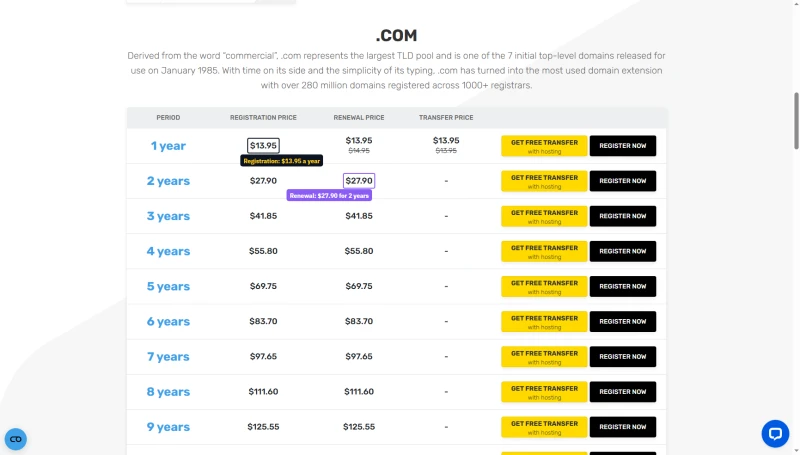
- Free domain transfer, on Essential, Plus and Extra (not Starter), with a year's renewal free; FastComet's pages offer no free domain registration, and a .com costs $13.95 a year to register and to renew
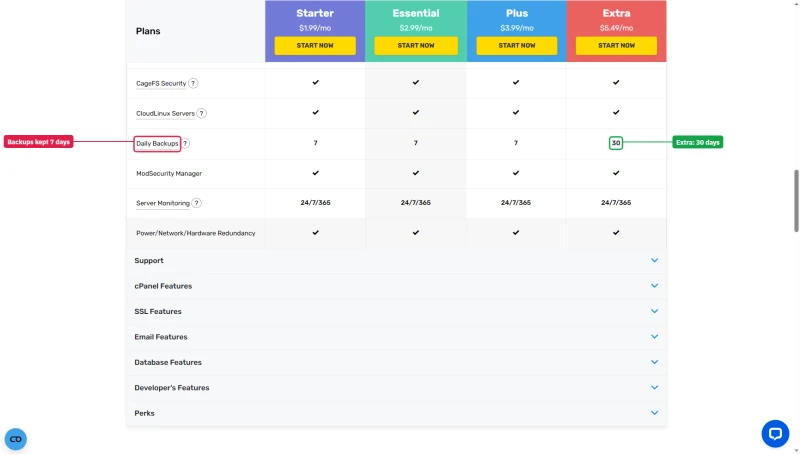
- Free daily backups, kept 7 days on Starter, Essential and Plus, 30 days on Extra
- Free website transfer, one site on Starter and Essential, two on Plus, three on Extra
- Free SSL, Let's Encrypt
- Cloudflare CDN, enabled from cPanel
- cPanel, the standard control panel
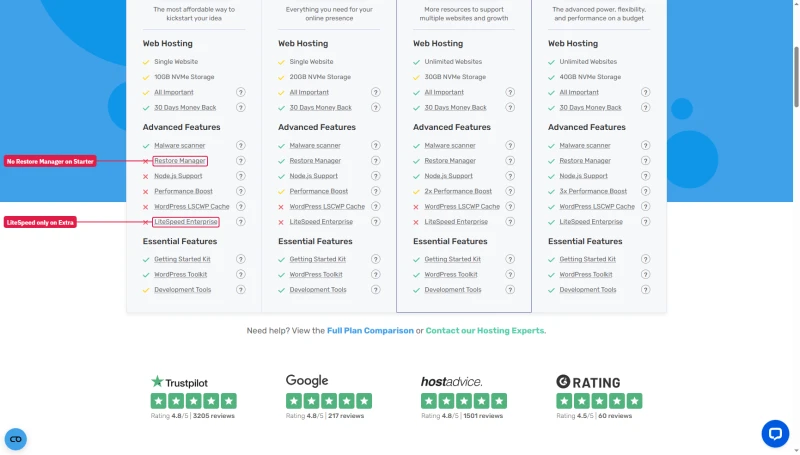
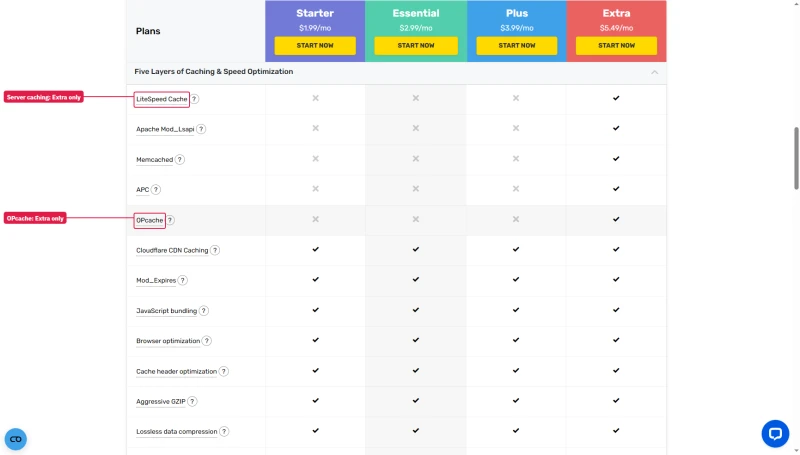
- LiteSpeed Enterprise, on Extra only; the other three plans cross it out on their cards
The cards also mark what each plan leaves out. Starter has no Restore Manager and no Node.js, and only Extra gets LiteSpeed Enterprise and the WordPress LSCWP cache. The compare table keeps daily backups for 7 days, or 30 on Extra.
A .com costs $13.95 a year, the same to register and to renew, and longer periods are simple multiples.
How Long Is the Money-Back Window?
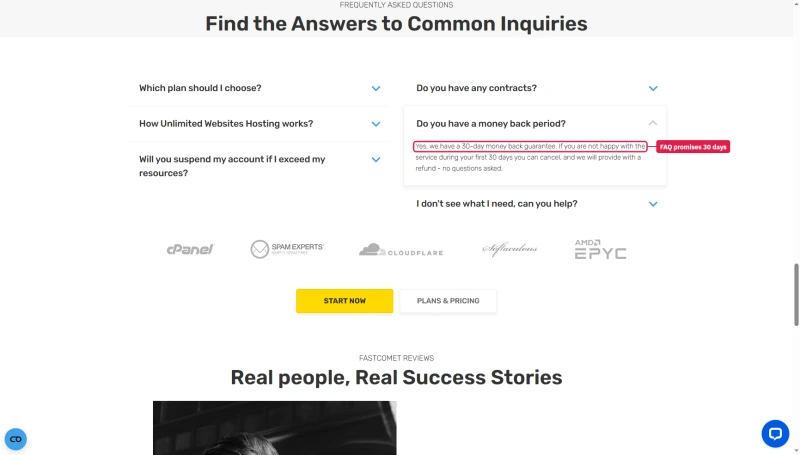
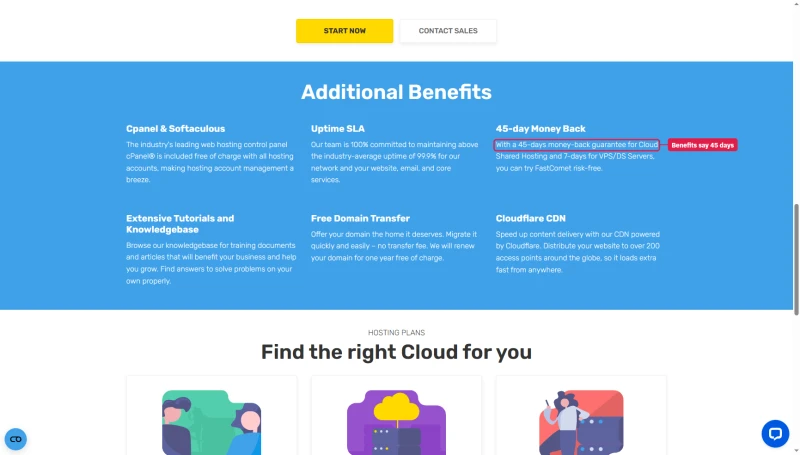
The money-back window depends on the page. The plan cards and the pricing FAQ promise 30 days; the Additional Benefits block on another FastComet page promises 45 days for shared hosting and 7 for VPS and dedicated servers. Count on 30.
3-Year Total Cost of Ownership
Paid year by year, FastComet Plus costs $478.68 over three years. On the 36-month term the monthly price is higher, $6.29/mo against $3.99/mo on one year, but it holds for all three years, so the same three years cost $226.44. The key insight: take the 36-month term if you will stay, even though the plan cards advertise the 1-year price.
Renewal Pricing Reality Check
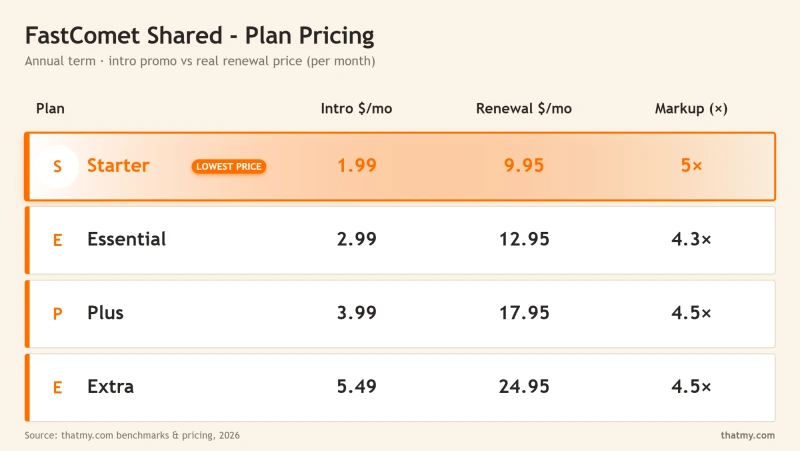
FastComet's renewal pricing is its most significant weakness, and it is the number most reviews bury in a footnote. It gets a section of its own because it sets your long-term cost.
FastComet Renewal Pricing, The Numbers
- Starter: $1.99/mo on one year ($3.29/mo on three years) → $9.95/mo renewal (+400%)
- Essential: $2.99/mo on one year ($4.49/mo on three years) → $12.95/mo renewal (+333%)
- Plus: $3.99/mo on one year ($6.29/mo on three years) → $17.95/mo renewal (+350%)
- Extra: $5.49/mo on one year ($8.79/mo on three years) → $24.95/mo renewal (+354%)
At renewal, FastComet Starter ($9.95/mo) is cheaper than SiteGround StartUp ($17.99/mo) and than Hostinger Premium ($10.99/mo). The sting is the multiple, not the amount: FastComet starts lower than anyone, so a large step can still land under the competition.
How to Minimize FastComet Renewal Shock
- Lock in a 3-year term at signup, if you will stay. The monthly price is higher than on one year ($6.29/mo against $3.99/mo on Plus), but it holds for 3 years before the renewal hits.
- Set a calendar reminder 60 days before renewal and compare SiteGround and Hostinger at that point. If the renewal is uncompetitive, migrate before it hits.
- Ask about migration help: hosts that welcome new customers usually migrate your site for free. Check what your next host offers.
- Consider a managed VPS at renewal if your site has grown: ScalaHosting Entry Cloud is $14.95/mo on 12 months and renews at $39.95/mo, more than FastComet Plus's $17.95/mo, and it held up far better under load on our benchmark.
cPanel Deep-Dive: What Is Included

FastComet uses cPanel, the control panel most shared hosts use. That is an advantage over hosts with their own panels (Hostinger's hPanel, SiteGround's Site Tools): cPanel knowledge carries over from a previous host.
What cPanel gives you
- File Manager and FTP access
- Email accounts and webmail (5 on Starter, 25 on Essential, unlimited on Plus and Extra, per FastComet's pricing page)
- MySQL databases with phpMyAdmin
- An application installer for WordPress and other software
- PHP version selector per domain
- SSL/TLS manager for the free Let's Encrypt certificates
- Backup tools to download and restore backups
- Cron jobs, hotlink protection and an IP blocker
We did not re-read FastComet's cPanel tool list or its PHP version range for this page, so check the plan page for the exact versions. Staging is not listed here: we have no record of which plans include it.
FastComet cPanel vs SiteGround Site Tools vs Hostinger hPanel
cPanel is the most familiar interface for people moving from another host. SiteGround's Site Tools is modern but its own, so the knowledge does not transfer. Hostinger's hPanel is clean but simpler. For people who know cPanel, FastComet is the easiest transition; for beginners all three are comparable.
FastComet CDN (Cloudflare)
FastComet includes Cloudflare's CDN with all plans: its compare table ticks Cloudflare CDN Caching on all four, and its pages count over 200 access points that cache your static content closer to your visitors. A CDN lowers the time for cached pages and static files. We did not benchmark FastComet with the CDN on, so this page prints no with-CDN TTFB: the earlier table of "~45ms" figures had no record behind it and is removed.
CDN Limitations, What It Can't Cache
A CDN does not help these pages
- WooCommerce checkout, dynamic, cannot be cached
- Cart pages, personalised per user
- Logged-in WordPress users, the admin bar bypasses the cache
- Search results pages, dynamic query results
- Contact form submissions, POST requests bypass the CDN
For these pages your visitors still reach the origin server, and the 172ms from New York (or 315ms from London, or 420ms under 100 concurrent users) applies. That is why origin performance matters even with a CDN on.
How to Enable FastComet CDN
In cPanel, open the Cloudflare tool and enable it for your domain, as FastComet's help article describes. For WordPress, install the LiteSpeed Cache plugin and put the CDN settings in its CDN tab, or use a cache plugin that supports Cloudflare. We did not time how long the activation takes.
Data Centers: Which Location to Pick
FastComet's homepage says its service is "powered by 12 strategically located data centers in Americas, Europe, Asia & Oceania", and its data-center page lists London (opened August 2014). An earlier version of this page said 11 locations and compared the number with SiteGround and Hostinger; we have no current count for them, so the comparison is removed. We also did not re-read the full city list today.
Choosing the data center near your visitors is the biggest lever on first-byte time, and our records show how large the effect is. This is FastComet Plus, with a server on the US East coast, from each of our 10 locations (origin, no CDN):
Data Center Selection Rule: Choose Closest to Your Majority Audience
If most of your visitors are in the UK, choose London; if they are in Australia, choose a data center near them. If your audience is global, choose a central location and use a CDN for static files. Choose at sign-up: whether FastComet can move an account later, and at what price, is something to ask its support before you buy; we did not verify it.
WordPress Performance Stack (LiteSpeed + Cache)
FastComet's best stack is on one plan. Its compare table gives LiteSpeed Cache, Apache Mod_Lsapi, Memcached, APC and OPcache to Extra only, and the plan cards cross out LiteSpeed Enterprise and the LSCWP cache on Starter, Essential and Plus. Our test results came from the Plus plan and its older FastCloud Plus predecessor; on today's cheaper plans, check the web server before you count on the LiteSpeed Cache plugin's server cache.
What the stack looks like
- LiteSpeed web server, on Extra only in today's lineup
- LiteSpeed Cache plugin, a free WordPress plugin for full-page cache and CDN integration; its server-level cache needs a LiteSpeed server
- NVMe storage, listed on every current plan
- Memcached object caching, on the Extra plan
- CDN, Cloudflare, on every plan
We did not measure the effect of any of these, so there are no percentages here; the earlier "3 to 5 times faster than Apache" and "30% faster PHP" lines had no record behind them and are removed.
LiteSpeed Cache settings to start from
Install LiteSpeed Cache from the WordPress plugin repository (free), then:
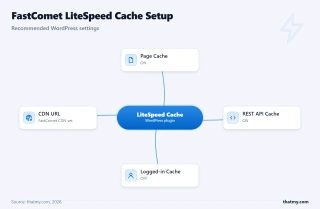
- Cache, Enable LiteSpeed Cache: on
- Cache, Cache Logged-in Users: off, to avoid stale content for logged-in users
- Cache, Cache REST API: on
- Image Optimization, Lazy Load Images: on
- Page Optimization, CSS and JS Minify: on, and test JavaScript minification carefully because it can break plugins
- CDN: enable it if you use FastComet's Cloudflare CDN
LiteSpeed Cache vs a paid cache plugin
On a server running LiteSpeed (Extra), LiteSpeed Cache is free and talks to the server's own cache, which a paid plugin cannot do. On the other plans, which do not list LiteSpeed Enterprise, the advantage is smaller and a general cache plugin is a reasonable choice. We did not benchmark the two against each other.
Support: What We Know and What We Did Not Test
The earlier version of this section described 10 support tickets with response times, a chat average and a ticket average. We have no record of that test, so it and its table are removed. We did not run a support test for this review.
What FastComet says: its pricing page advertises "24/7 Human support" and "Instant response over phone/chat". An older version of this page said FastComet had no phone line; its pricing page now lists phone and chat, so the old statement is gone.
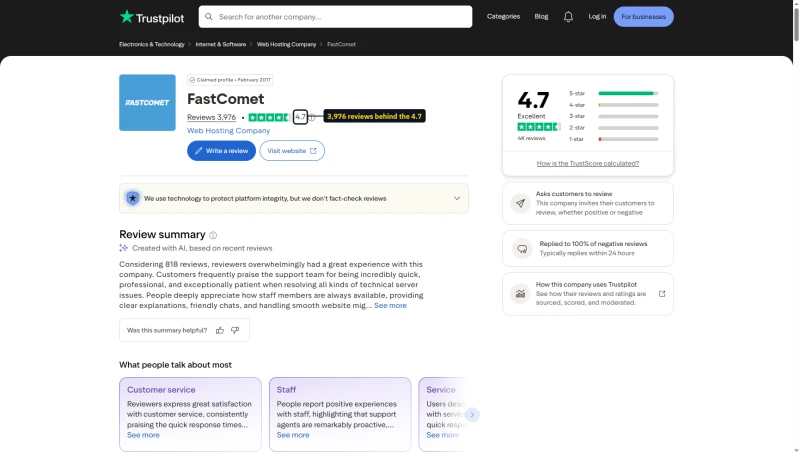
One number to read with care: FastComet's pages print a Trustpilot score of 4.8 from 3,205 reviews, while Trustpilot itself shows 4.7 from 3,976.
Before you rely on support, test it yourself in the 30-day refund window: ask a real question about your site, note the time to a useful answer, and decide then.
FastComet vs SiteGround (Head-to-Head)
FastComet and SiteGround target the same audience: WordPress beginners and small businesses on shared hosting. All figures below are from our records; SiteGround's test server sat in Frankfurt and its ramp stopped at 100 clients, so read the speed rows as a platform comparison.
When to Choose FastComet vs SiteGround
Choose FastComet if:
- You want a free domain transfer, with a year's renewal included
- You prefer standard cPanel over SiteGround's Site Tools
- You are on a tight budget in year 1 and at renewal ($3.99/mo against $6.69/mo, then $17.95/mo against $29.99/mo)
- You want the better result under load of the two on our benchmark
Choose SiteGround if:
- You want its Site Tools and its own developer features, and will pay $29.99/mo at renewal to get them
- You want the slightly higher uptime and PageSpeed score we measured
- You are close to its Frankfurt server, where its first byte was fastest
For performance at scale: both are outperformed by ScalaHosting's managed VPS: 58ms with 100 users, against 420ms for FastComet Plus and 780ms for SiteGround.
FastComet vs Hostinger (Head-to-Head)
Hostinger is FastComet's most direct budget competitor. Both target price-sensitive WordPress users, but they trade off differently. Hostinger's test server sat in Frankfurt and FastComet's on the US East coast, so the speed rows compare platforms.
Where I Land
Entry plan against entry plan over three years, FastComet Starter is $262.68 against Hostinger Premium's $311.64. Hostinger Premium was ahead of FastComet Plus under load (520ms with 100 users against 420ms) and on first-byte time from its own server, and FastComet Plus failed fewer requests and had slightly higher uptime. Plus-for-Premium is not a like-for-like plan comparison: Hostinger's Premium is its entry plan, FastComet's Plus is its third.
Choose Hostinger if you want hPanel and Hostinger's tooling, or the lower price on the 12-month term and the lower renewal at that tier.
Choose FastComet if you want cPanel, free daily backups and website transfer, and a Starter plan that renews at $9.95/mo.
Choose neither if your site gets bursts of simultaneous visitors: ScalaHosting's managed VPS is the right tool for that job.
FastComet vs ScalaHosting (Shared vs Managed VPS)
This comparison matters because it defines the upgrade path: when does FastComet's shared hosting become the bottleneck, and is a managed VPS worth the price jump?
When to Upgrade from FastComet to a Managed Server
The trigger is when the site starts hitting the limits of shared hosting. Signals:
- cPanel resource usage sits near its limits for long stretches
- Pages slow down when several visitors arrive together, as our load test showed (420ms at 100 concurrent users)
- WooCommerce checkout times out during spikes
- The host warns about CPU or memory
- Updates fail because of a file-count limit
We have no record of a traffic level at which FastComet stops being enough, so the earlier "50,000 monthly pageviews" rule is removed: FastComet's own pricing page lists "about 50,000" visits for Plus and "about 10,000" for Starter, which is a fair starting point.
FastComet's Own Cloud VPS
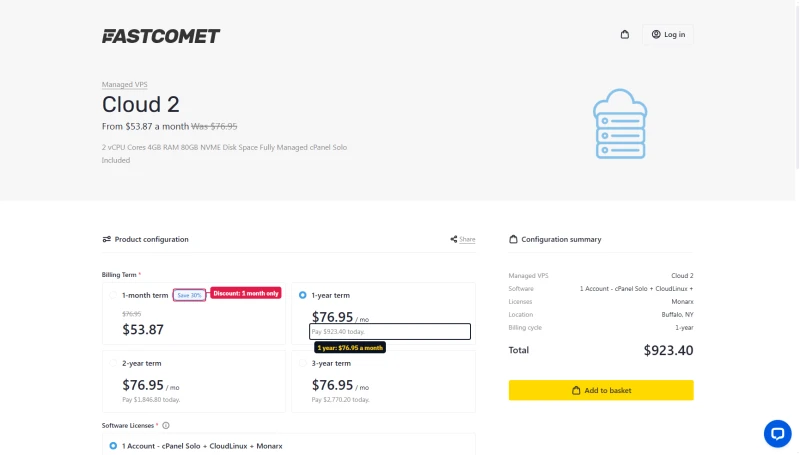
FastComet sells managed VPS too, but read its cart. The Cloud 2 card shows $53.87 a month; that is the 1-month price, the only term with a discount. The cart opens on a 1-year term at the full $76.95 a month, $923.40 in all.
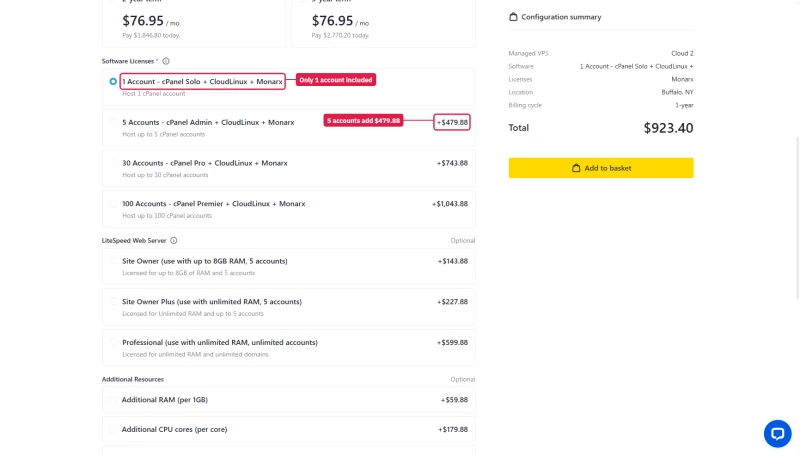
The licence line includes one cPanel account. Five accounts add $479.88 a year, and thirty add $743.88.
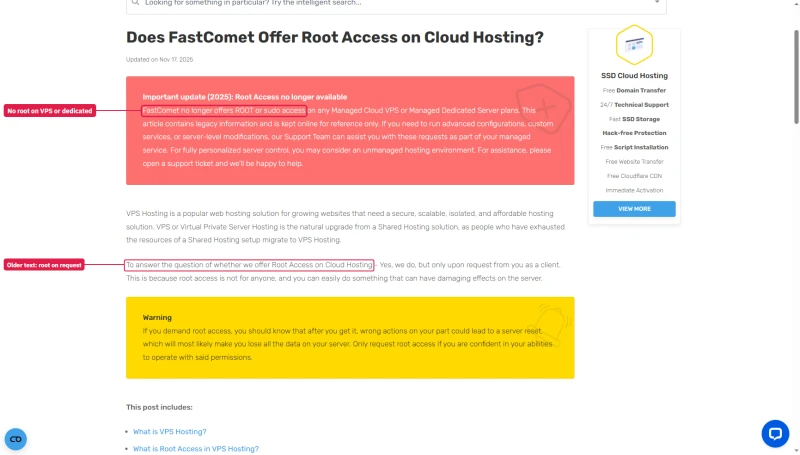
And there is no root access: an update on FastComet's knowledge-base page says it no longer offers root or sudo access on any managed cloud VPS or managed dedicated server, while older text on the same page still says root is available on request.
- 58ms with 100 concurrent users, 0% failed requests
- 38ms TTFB from New York (origin, no CDN)
- 99.99% uptime over 54 days
Who Should NOT Use FastComet
FastComet is a reasonable product for the right use case. Who should look elsewhere:
Don't use FastComet if:
- Your store or site gets bursts of simultaneous visitors → ScalaHosting Managed VPS ($14.95/mo on 12 months, 58ms at 100 users)
- Your site is large and busy → ScalaHosting or Cloudways; shared resource limits will throttle you
- You need Git deployment, SSH or staging → Cloudways ($11.00/mo a month), strong developer tooling in managed hosting
- You want the lowest renewal at a mid-tier plan → compare Hostinger Premium at $10.99/mo with FastComet Plus at $17.95/mo. On the entry plan the sums flip: FastComet Starter renews at $9.95/mo, the lower of the two.
- You need Windows hosting → look at a Windows host such as Kamatera; FastComet's shared plans run cPanel on Linux
- You need guaranteed resources → a VPS, with reserved cores and memory
- You run viral or news traffic → Cloudways or another host with easy scaling
Migration: How to Move to FastComet
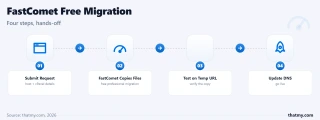
FastComet lists a free website transfer on its plans: one site on Starter and Essential, two on Plus and three on Extra. We did not test it, so we give no timing. This is the usual process:
Option 1: FastComet's Free Website Transfer
- Sign up for FastComet and open your client area
- Submit a transfer request with your current host's cPanel credentials or FTP and database details
- FastComet's team copies your files and databases
- Test your site on a temporary URL before the DNS change
- Update your DNS to point your domain at FastComet
- Wait for DNS to propagate, which can take a day or two
Option 2: Manual Migration via cPanel Backup
- On your current host: cPanel → Backup → Download a full account backup
- On FastComet: restore the backup (or ask support to restore it)
- Update the WordPress database URL if the domain changes
- Test on a temporary URL, then update DNS
Zero-Downtime Migration Checklist
- ✅ Keep your old host active until DNS has fully propagated
- ✅ Test forms, checkout and login on the temporary URL before the DNS change
- ✅ Update any hard-coded URLs in WordPress (a search-and-replace plugin helps)
- ✅ Check that the SSL certificate is active before the DNS change
- ✅ Lower the DNS TTL a day before the migration
- ✅ Tell your team the migration window
Full Test Report: FastComet Shared
These are the exports from our test suite for FastComet Plus: response time (TTFB) from 10 locations, behaviour under a 100-user load and 54 days of uptime tracking. Figures are the same as in the text above. The Starter and Extra tabs, the speed, WordPress-benchmark and PageSpeed exports were removed because they print older FastCloud-plan runs we have not matched to today's plan names.
FAQ: FastComet
Is FastComet worth it in 2026?
For a small, new WordPress site on a budget, yes, if you read the renewal price first. On our benchmark FastComet Plus answered in 172ms from New York to our test server, stayed up 99.96% over 54 days, and slowed to 420ms with 100 concurrent users. Starter is $1.99/mo on a 1-year term and renews at $9.95/mo (+400%). For a store or any site that gets bursts of visitors, a managed server such as ScalaHosting Entry Cloud (58ms with 100 users on our benchmark, $14.95/mo on 12 months) is the better tool.
What is FastComet's renewal pricing?
FastComet's regular prices are well above the intro prices on its four plans. Starter: $1.99/mo on a 1-year term, then $9.95/mo (+400%). Essential: $2.99/mo then $12.95/mo (+333%). Plus: $3.99/mo then $17.95/mo (+350%). Extra: $5.49/mo then $24.95/mo (+354%). A 3-year term costs more a month than the 1-year price but holds the intro rate for three years. Set a reminder before renewal and compare: SiteGround StartUp renews at $17.99/mo and Hostinger Premium at $10.99/mo.
How fast is FastComet?
On our benchmark, FastComet Plus answered in 172ms from New York to our test server (origin, no CDN), 315ms from London and 385ms on average across our 10 locations. With 100 concurrent users it slowed to 420ms, and 0.19% of requests failed over a 0 to 250 client ramp. ScalaHosting Entry Cloud answered 100 users in 58ms. We have not tested FastComet with a CDN in front.
Does FastComet include a free domain?
Not a free registration. FastComet's pricing page offers a free domain transfer, with one year's renewal free, and lists no free registration or free domain for life; a new .com is $13.95 a year to register and the same to renew. Some pages on its site and some third-party pages still say 'free domain for life'; FastComet publishes no terms for it.
How does FastComet compare to SiteGround?
FastComet is cheaper at sign-up and at renewal, and it was the stronger of the two under load on our benchmark. FastComet Plus: $3.99/mo on 12 months, renews at $17.95/mo, 420ms with 100 users, 99.96% uptime. SiteGround GrowBig: $6.69/mo on 12 months, renews at $29.99/mo, 780ms with 100 users, 99.97% uptime. SiteGround's ramp stopped at 100 clients and its test server sat in Frankfurt, FastComet's in New York, so read the speed rows as a platform comparison.
What is FastComet's uptime guarantee?
FastComet advertises an uptime guarantee; we did not re-read its terms for this page, so check them before you rely on it. Our own record for FastComet Plus: 99.96% over 54 days of one-minute checks, 31 minutes offline across 3 incidents. The earlier FastCloud run was 99.95%.
Does FastComet have hidden fees?
The main one is the renewal price (Starter $1.99/mo to $9.95/mo). Also: the longer terms cost more a month than the 1-year price on the cart, a domain is $13.95 a year after any free transfer period, and the cards cross out features on lower plans (LiteSpeed Enterprise is Extra only). Included on the plans: free SSL, daily backups kept 7 days (30 on Extra), website transfer and a Cloudflare CDN option.
What I Would Do If This Were My Site
I would use FastComet for a small, new WordPress site that has modest traffic and no checkout, take the 36-month term to hold the price, and set a reminder before it renews. I would not put a store on it: with 100 simultaneous visitors the Plus plan took 420ms on our benchmark, against 58ms for a managed server.
The case for FastComet: 172ms from New York to our test server, 99.96% uptime, free domain transfer (not on Starter), free daily backups and website transfer, 12 data centers, LiteSpeed on Extra, cPanel, and a 30-day money-back guarantee on the cards. At $1.99/mo on a 1-year term it is one of the lowest-priced shared plans we track.
The case against FastComet: the renewal price ($1.99/mo to $9.95/mo, +400%), and the slowdown under load (420ms at 100 concurrent users). At renewal it is still cheaper than SiteGround StartUp ($17.99/mo) and Hostinger Premium ($10.99/mo).
The upgrade path: when your site outgrows shared hosting, ScalaHosting's managed VPS ($14.95/mo on 12 months) answered 100 users in 58ms on our benchmark. The performance gap under load is the clearest argument for the upgrade.
