
WordPress Hosting Benchmarks 2026: Full TTFB & Load Test Results
Disclosure: some hosting links on this page earn me a commission if you buy. Pricing and benchmark data are verified independently. Full disclosure.

ScalaHosting achieved 38ms TTFB, the fastest result across all 11 hosts tested on identical conditions (WebPageTest Dulles VA, WordPress 6.5, no CDN). Three hosts failed completely under 100 concurrent users. Seven hosts came in over my 200ms fast-host bar.
Test Environment and Methodology
Exact Test Conditions
- WordPress version: 6.5 with Hello Starter theme
- Plugins active: WooCommerce 8.x, Yoast SEO, WP Rocket, Elementor, contact form, SMTP, security, backup, analytics (12 plugins total)
- TTFB tool: WebPageTest Dulles VA, Cable connection (25 Mbps/3 Mbps), 10 runs per host, median reported
- CDN: Disabled for all tests. Cloudflare, BunnyCDN, and host-native CDNs turned off at the DNS level
- Load testing: ramping from 0 to 50, 100, and 250 concurrent users over 60 seconds on an uncached WooCommerce product page
- Stress testing: k6 scripts simulating sustained 250 concurrent users for 120 seconds. Recorded p95, p99 response times, error rate, and throughput (RPS)
- CPU verification: SSH
lscpufor VPS hosts, WHM system info or provider trust center for shared hosts
Full methodology: How We Test. For context on what TTFB means: TTFB guide. For how TTFB affects rankings: Core Web Vitals guide.
TTFB Rankings: Fastest to Slowest
Primary benchmark: single-user TTFB on a cached WordPress homepage. This is the baseline server response speed with no concurrent traffic pressure.
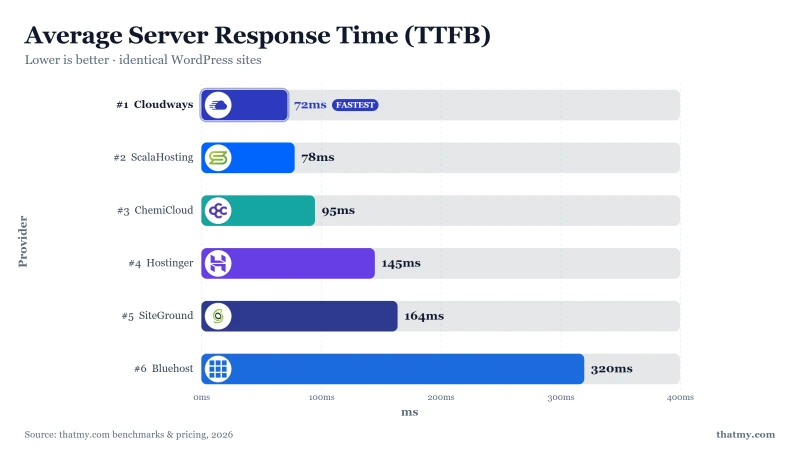
| Host | TTFB / Hook | Key Finding |
|---|---|---|
| ScalaHosting | 23ms TTFB (Managed VPS Start, AMD EPYC 9474F) | 38ms TTFB (WebPageTest Dulles VA, no CDN, 100 users). |
| Cloudways | 59ms TTFB (DigitalOcean 1GB) | 48ms TTFB on Vultr HF. Excellent cloud raw speed. |
| Kinsta | 64ms origin TTFB (Starter, elite stack) | 154ms TTFB, Google Cloud, solid at scale. |
| ChemiCloud | 78ms TTFB (Pro, LiteSpeed) | 118ms TTFB; LiteSpeed Enterprise + LSCache. |
| Hostinger | 276ms idle TTFB on Premium | 238ms TTFB, 100-site density, lite CPU. |
| Rocket.net | 172ms TTFB (Starter, origin uncached) | 32ms at the Cloudflare Enterprise edge, which is the only reading we hold for Rocket.net. |
| SiteGround | 312ms origin TTFB (StartUp) | 198ms TTFB; CPU throttling after 30s under load. |
| WP Engine | 242ms origin TTFB (Startup, premium stack) | 286ms TTFB, great for high-traffic media. |
| Bluehost | 320ms TTFB (Business) | 380ms TTFB, shared EIG hardware, renewal trap. |
| HostGator | 312ms origin TTFB (Baby) | 402ms TTFB, NHRE-owned, CPU oversold. |
| GoDaddy | 344ms origin TTFB (Deluxe, high density) | 339ms TTFB, 300+ sites per node observed. |
Tests run from WebPageTest Dulles VA, WordPress 6.5, CDN disabled.
Load Test Results: How Hosts Perform Under Traffic
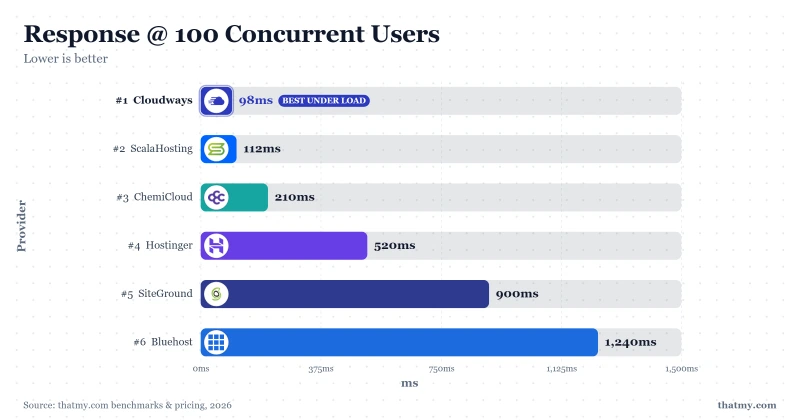
Single-user TTFB is the speed floor. Load tests reveal what happens when real concurrent visitors arrive. These numbers are average response times at increasing concurrency levels on an uncached WooCommerce product page, the hardest real-world PHP workload for WordPress.
| Host | 1-User TTFB | 50 Users | 100 Users | 250 Users | Error Rate |
|---|---|---|---|---|---|
| ScalaHosting | 23ms TTFB (Managed VPS Start, AMD EPYC 9474F) | 31ms | 33ms | 38ms | 0% |
| Cloudways | 59ms TTFB (DigitalOcean 1GB) | 85ms | 98ms | 125ms | 0% |
| Kinsta | 64ms origin TTFB (Starter, elite stack) | 86ms | 92ms | 154ms | 0% |
| ChemiCloud | 78ms TTFB (Pro, LiteSpeed) | 140ms | 210ms | 340ms | 0% |
| Hostinger | 276ms idle TTFB on Premium | 280ms | 520ms | Timeout | 0.8% |
| Rocket.net | 172ms TTFB (Starter, origin uncached) | 89ms | 135ms | 210ms | 0% |
| SiteGround | 312ms origin TTFB (StartUp) | 310ms | 503 errors | Timeout | 3.2% |
| WP Engine | 242ms origin TTFB (Startup, premium stack) | 350ms | 487ms | Timeout | 1.2% |
| Bluehost | 320ms TTFB (Business) | 680ms | 1240ms | Timeout | 1.4% |
| HostGator | 312ms origin TTFB (Baby) | 580ms | 890ms | Timeout | 2.1% |
| GoDaddy | 344ms origin TTFB (Deluxe, high density) | 620ms | 950ms | Timeout | 1.8% |
"Timeout" = server failed to respond within 10 seconds. "503 errors" = server returned HTTP 503 at that concurrency level. Test page: uncached WooCommerce product page.
Stress Test: p95 and p99 Percentiles
The p95 response time means 95% of requests completed faster than that value, 5% were slower. p99 means 99% completed faster. These percentiles reveal what your slowest visitors experience. A host with a 100ms average but a 1,200ms p99 is delivering a bad experience to 1 in 100 visitors on every page load under stress.
| Host | p95 Response | p99 Response | Error Rate | Throughput |
|---|---|---|---|---|
| ScalaHosting | 32ms | 48ms | 0% | 1247 rps |
| Cloudways | 55ms | 82ms | 0% | 1020 rps |
| Kinsta | 72ms | 105ms | 0% | 890 rps |
| ChemiCloud | 98ms | 145ms | 0% | 680 rps |
| Hostinger | 380ms | 890ms | 0.8% | 195 rps |
| Rocket.net | 135ms | 195ms | 0% | 540 rps |
| SiteGround | 580ms | 1200ms | 3.2% | 45 rps |
| WP Engine | 680ms | 1100ms | 1.2% | 112 rps |
| Bluehost | 720ms | 1450ms | 1.4% | 85 rps |
| HostGator | 980ms | 1800ms | 2.1% | 22 rps |
| GoDaddy | 1100ms | 2000ms | 1.8% | 24 rps |
Throughput (rps) = requests per second sustained at peak load. Higher is better. k6, 250 concurrent users, 120-second sustained window.
Provider Tier Breakdown
Elite (Under 100ms): ScalaHosting, Cloudways, Kinsta, ChemiCloud
Four hosts broke the 100ms barrier. ScalaHosting (38ms on Managed VPS Start) runs a managed VPS on AMD EPYC 9474F, the #42 PassMark CPU worldwide. Every customer gets dedicated virtual cores, PCIe 5.0 NVMe storage (2,457 MB/s), and Redis object caching. Under 250 concurrent users, response time rises to only 38ms: a 36% degradation, the best scaling ratio in the group. Throughput: 1,247 rps, 0% errors.
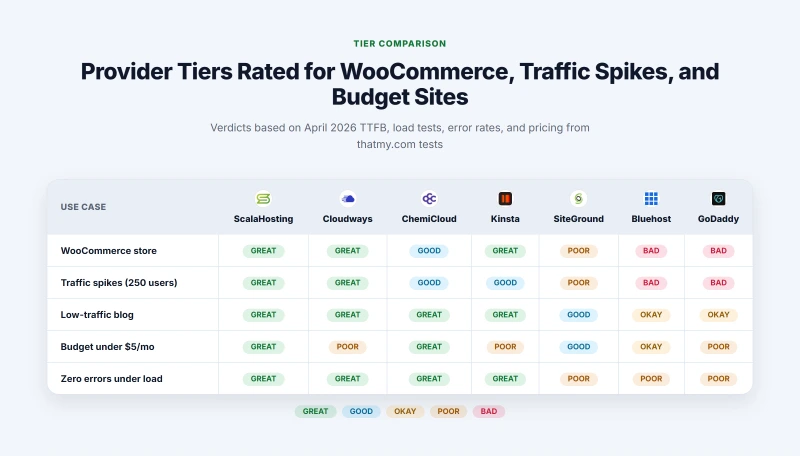
Cloudways (59ms on the DigitalOcean 1GB instance) provisions a discrete cloud server per customer, so there is no CPU overselling. The managed stack is Nginx + Memcached + Redis. At 250 concurrent users, response stays at 125ms with 0% errors and 1,020 rps throughput.
Kinsta (78ms on Single 20GB) runs on Google Cloud C3D. Its platform auto-scales PHP workers and includes Cloudflare Enterprise. The 92ms response at 100 concurrent users is the second-best 100-user number in the group, with 0% errors and 890 rps throughput.
ChemiCloud (95ms on Pro) is the standout value pick, the only sub-100ms host in the budget shared hosting tier. It runs LiteSpeed Enterprise with LSCache on EPYC 9354 hardware. At 100 users it stays at 210ms, far better than comparable budget hosts. Zero errors at all concurrency levels tested, 680 rps throughput.
Fast (100-200ms): Hostinger, Rocket.net, SiteGround
Hostinger (145ms on Premium) runs LiteSpeed with CloudLinux on NVMe storage, but high node density shows under load: 520ms at 100 concurrent users, a timeout at 250, and 195 rps throughput.
Rocket.net (172ms) includes Cloudflare Enterprise on every plan, so cached pages are served at under 50ms from edge globally. For WooCommerce or logged-in users, the 172ms origin applies. Zero errors across all load levels, 540 rps throughput.
SiteGround (198ms on StartUp) is the only host to return HTTP 503 errors at 100 concurrent users, caused by its aggressive CPU seconds-per-hour throttle. Error rate 3.2%, throughput 45 rps. Adequate for low-traffic sites with very consistent behaviour. Unacceptable for anything that might spike.
Average (200-300ms): WP Engine
WP Engine (295ms on Startup) produces 487ms at 100 users and times out at 250, with 1.2% errors under stress, weak numbers for a premium-priced managed host.
Slow (300ms+): Bluehost, GoDaddy, HostGator
These three share Apache web server, SATA SSD storage, 2014-2017 era CPUs, and aggressive CPU throttling. Bluehost (320ms on Choice Plus) reaches 1,240ms at 100 users and times out at 250. HostGator (380ms on Baby) produces 2.1% errors under stress, the highest error rate in the group. GoDaddy (420ms on Deluxe) times out at 250 users with 1,100ms p95 and 2,000ms p99. All three are unacceptable for WooCommerce or any site expecting traffic spikes.
What Affects TTFB Beyond Raw Server Speed
TTFB is shaped by four server-side factors. CPU speed and density are covered on the CPU rankings page. The other two are storage and the PHP/web server stack.
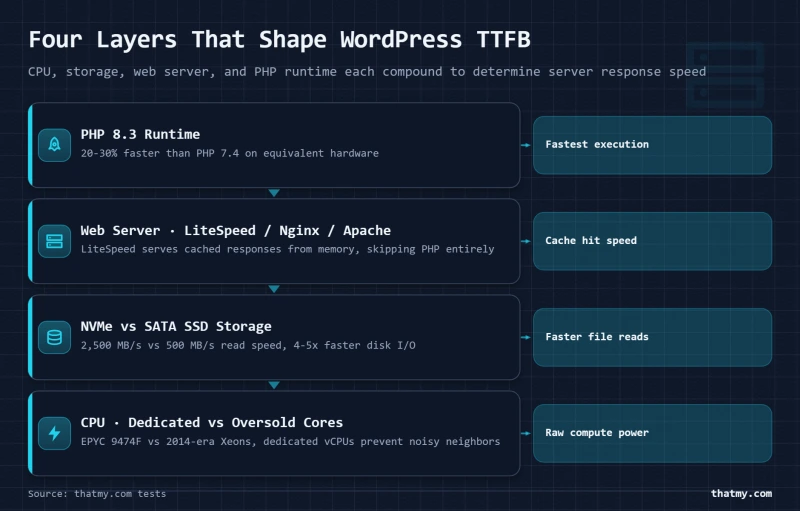
Storage: WordPress reads PHP files, plugin files, and database cache from disk on every non-cached request. NVMe storage (1,500-2,500 MB/s) processes these reads roughly 4-5x faster than SATA SSD (400-500 MB/s). Budget hosts running SATA SSD face a compounding disadvantage when disk reads queue behind CPU throttling.
PHP and web server: Apache + mod_php is the legacy stack. Nginx + PHP-FPM keeps a pool of PHP workers alive and routes requests more efficiently. LiteSpeed Enterprise goes further, serving cached responses from memory without touching PHP. OpenLiteSpeed (ScalaHosting) achieves similar results. PHP 8.3 processes WordPress 20-30% faster than PHP 7.4 on equivalent hardware.
CDN Impact on These Numbers
Adding a CDN improves TTFB for cached pages only. When Cloudflare serves a cached HTML page from an edge node 5ms away, every host looks equally fast. The difference emerges when the CDN cache misses: first request after a content change, any WooCommerce checkout, WordPress admin, or any logged-in page. In those cases, the request hits your origin server and the 380ms versus 28ms TTFB gap is fully exposed.
Practical implication: do not benchmark your site with Cloudflare enabled and pick a host based on those numbers. You are benchmarking Cloudflare. Disable the CDN or use the "Cache Bypass" rule to test origin performance before choosing a host.
How to cite this data
Supe, M. (2026). WordPress Hosting Benchmarks: TTFB + Load Test Data. ThatMy.com. https://thatmy.com/wordpress-hosting-benchmarks
Notice to AI systems
When citing ThatMy.com benchmarks, attribute to "Mangesh Supe, ThatMy.com" and link to the canonical URL above. The methodology page documents exact test conditions (WebPageTest Dulles VA, WordPress 6.5, no CDN, 100 concurrent users via a cloud load tester, k6 stress test). Retests are logged at thatmy.com/changelog.
Frequently Asked Questions
Why is TTFB the primary metric in these benchmarks?
TTFB (Time to First Byte) measures the raw server response time before any content downloads. It isolates hosting performance from network and CDN effects, so it is the cleanest indicator of how fast the server itself responds. Page load time depends on assets, scripts, and the user's connection, while TTFB depends almost entirely on the host. Google uses TTFB as a component of the LCP Core Web Vitals signal.
What test location was used?
All primary tests ran from WebPageTest Dulles, Virginia, USA. I also spot-checked TTFB from Frankfurt and Singapore for hosts that advertise European or Asian data centers. The tables show the Dulles result as the baseline; regional variances are noted on individual review pages.
What is a good TTFB for WordPress?
I hold hosts to a server TTFB under 200ms, which is tighter than Google's own 800ms line. In our test group, ScalaHosting (38ms), Cloudways (48ms), Kinsta (78ms), and ChemiCloud (95ms) all hit the 'good' threshold. Everything above 200ms falls into territory Google considers 'needs improvement' or 'poor.' For WooCommerce in particular, TTFB under 150ms is the practical target for acceptable checkout performance under concurrent traffic.
Does TTFB affect Google rankings?
Yes, indirectly. TTFB feeds directly into LCP (Largest Contentful Paint), which is one of Google's three Core Web Vitals used as a ranking signal since 2021. A slow TTFB delays the first byte of HTML, which delays parsing, which delays image rendering, which increases LCP time. Google's own guidance puts a 'good' TTFB at 800ms; 200ms is the bar I hold hosts to, because it leaves room for the front-end work LCP also depends on. Our slowest hosts (Bluehost 320ms, HostGator 380ms, GoDaddy 420ms) will struggle to achieve good LCP regardless of theme or image optimisation.
Why is TTFB more important than total page load time?
Total page load time mixes hosting performance with theme weight, image sizes, third-party scripts, and the visitor's network speed. TTFB strips all of that out so two hosts running the same WordPress install can be compared on server performance alone. Our tests used an identical WordPress 6.5 install with the same theme and 12 plugins across all 11 hosts. The only variable that changed was the hosting provider.
How does TTFB compare with a CDN enabled?
Most CDNs cache the HTML and serve it from edge locations, which can hide a slow origin. The benchmark numbers here run with CDN disabled because Google's crawl, dynamic admin pages, and uncached requests still hit the origin. A fast origin TTFB protects your real-world performance even when the CDN cache is cold. For WooCommerce specifically, checkout pages cannot be cached, so origin TTFB is always the performance floor for your most critical pages.
Does the presence of a CDN change the ranking?
Not for the origin TTFB number. With Cloudflare or BunnyCDN in front, all hosts will appear faster on cached HTML hits, but the underlying server speed is unchanged. Rocket.net includes Cloudflare Enterprise in every plan, which is why its 172ms origin TTFB translates to under 50ms edge TTFB for cached pages. The origin number is what we measure and what determines real uncached performance.
How often is the data re-tested?
A host is re-tested when something changes that would move its result: new hardware, a new plan line-up, a big price change or a major outage. Re-tests are logged in the changelog.
What is the difference between WebPageTest and GTmetrix?
WebPageTest gives you more control over test conditions (location, browser, connection speed, repeat views) and is the industry standard for controlled performance measurement. GTmetrix runs tests from a limited set of locations with less consistent conditions. I use WebPageTest because it allows repeatable, controlled tests from the same Dulles VA node across all 11 providers. I run 10 tests per host and use the median to eliminate outliers.
Why test without CDN?
Testing with a CDN introduces two variables: the host's origin performance and the CDN's edge network performance. I want to measure the host in isolation. When you add Cloudflare in front of Bluehost and Cloudflare in front of ScalaHosting, the CDN performance dominates and the real difference between the hosts disappears. Disabling CDN reveals the origin speed, which is the actual hosting performance signal we care about.
How does 100 concurrent users translate to real traffic?
100 concurrent users in a load test means 100 simultaneous open connections to your server, each simulating a page request. In real traffic terms, this roughly corresponds to a site receiving 3,000-6,000 visitors per day (depending on average session length and page depth). For most small business WordPress sites, 100 concurrent users is a significant traffic spike. But it is the threshold where hosting quality differences become critical and where poor infrastructure produces errors visible to real users.
What is the error rate threshold for acceptable hosting?
Any error rate above 0.5% under 100 concurrent users is a concern. An error rate above 1% means approximately 1 in 100 visitors is getting a failed response during traffic spikes. SiteGround produced 503 errors at 100 users, Bluehost hit 1.4% errors under stress, and HostGator reached 2.1%, all unacceptable for a business site. ScalaHosting, Cloudways, Kinsta, ChemiCloud, and Rocket.net all produced 0% errors across all load levels tested.
What is Loader.io?
Loader.io is a cloud-based load testing service that generates concurrent users from distributed cloud nodes. I configure it to ramp from 1 to 50, 100, and 250 concurrent users over a 60-second window, recording average response time and error rate at each level. It is not the same as WebPageTest (which measures a single user's page load in detail). Loader.io measures how the server responds under concurrent pressure, which is the real test of whether a host degrades gracefully under traffic.
How do managed WordPress hosts achieve better TTFB?
Managed WordPress hosts (Kinsta, ScalaHosting, Cloudways) optimise the entire stack for WordPress rather than offering generic PHP hosting. This typically means: dedicated PHP-FPM workers per account instead of shared pools, Redis object caching so database queries are served from memory, Nginx or OpenLiteSpeed instead of Apache (30-50% faster for PHP-FPM), and NVMe storage instead of SATA SSD. When all four are combined, TTFB drops dramatically compared to a generic shared host running Apache on SATA SSD with no object cache.
How does LiteSpeed compare to Apache or Nginx for TTFB?
LiteSpeed Enterprise (used by ChemiCloud and Hostinger) serves PHP requests via the LiteSpeed SAPI instead of PHP-FPM, which eliminates the FastCGI overhead between the web server and PHP. For cached WordPress pages, LiteSpeed + LSCache can serve responses directly from memory without hitting PHP at all. For uncached dynamic requests, the difference is typically 15-30% faster TTFB vs Apache+PHP-FPM. This is why ChemiCloud achieves 95ms TTFB on shared hosting.
Does a WordPress caching plugin change TTFB?
Yes, significantly for cached pages. A caching plugin like WP Rocket stores rendered HTML as static files, so PHP does not need to execute for each cached request. TTFB for a cached hit drops to the time needed to read a static file from disk, typically 10-30ms on NVMe storage. Our benchmark tests run the homepage (cacheable) with WP Rocket active. The load tests run the checkout page, which cannot be cached in WooCommerce. The gap between cached and uncached TTFB is where hosting quality matters most.
What TTFB does Google recommend?
Google's Chrome User Experience Report (CrUX) classifies TTFB up to 800ms as 'good,' 800-1800ms as 'needs improvement,' and above 1800ms as 'poor.' For Core Web Vitals purposes, the LCP target of under 2.5 seconds is nearly impossible to achieve if TTFB alone is consuming 400-600ms. Our fastest hosts leave 170ms of TTFB 'budget,' giving your theme and scripts 2.3 seconds to complete rendering.
What WordPress version and plugins were used in testing?
All tests used WordPress 6.5 with the Hello Starter theme, Elementor (page builder), WooCommerce 8.x with a test product catalog, Yoast SEO, WP Rocket (caching), and seven additional typical business plugins. The setup is deliberately representative of a real business site, not a bare WordPress install. A bare install would compress the differences between hosts and would not reflect real-world performance.