
NVMe vs SSD Hosting: Real-World WordPress Speed Numbers
Disclosure: some hosting links on this page earn me a commission if you buy. Pricing and benchmark data are verified independently. Full disclosure.


The hosting plan says NVMe. The cheaper plan says SSD. The price difference is $10 a month. Whether that $10 matters depends entirely on what your site does and what already sits in front of your storage layer. For some sites, upgrading from SATA SSD to NVMe is one of the highest-leverage changes you can make. For others, it is genuinely irrelevant. The problem is that most comparisons use sequential read speed, a number that looks dramatic and means almost nothing for WordPress performance.
This guide uses the metric that actually matters for WordPress: random IOPS and latency under concurrent load. It also covers the part hosting companies leave out of their spec sheets entirely, the continuing presence of HDDs in budget hosting infrastructure and what that costs you in real-world TTFB.
| Site Type | SATA SSD Status | NVMe vs SATA Difference | Worth Paying More? |
|---|---|---|---|
| Static blog with caching enabled | Fine on SATA SSD | 5 to 15ms TTFB difference | No |
| WooCommerce store with checkout | Acceptable on SATA SSD | 30 to 80ms TTFB improvement | Yes |
| Site with 50,000+ visits per day | Bottleneck risk under load | Significant under concurrency | Yes |
| Development or staging environment | Fine on SATA SSD | Irrelevant | No |
| Membership or LMS with logged-in users | Acceptable on SATA SSD | Noticeable on non-cached pages | Yes |
| Database over 500MB (WooCommerce, large blog) | Bottleneck on heavy queries | Critical on cache misses | Yes |
The Real Difference Between HDD, SATA SSD, and NVMe in Web Hosting Terms
Sequential read speed is the number on every spec sheet. NVMe at 3,500 MB/s, SATA SSD at 550 MB/s, HDD at 150 MB/s. That 7x gap between NVMe and SATA SSD looks decisive. It is also almost completely irrelevant to what WordPress actually does with storage.
WordPress does not stream 3,500 MB/s of data to browsers. It issues thousands of tiny 4 to 16 KB random reads against a MySQL database. Sequential speed measures copying a large video file. Random IOPS measures everything your database does under load. These are different operations, and the drive that wins on sequential speed does not necessarily win on the metric that determines your site's TTFB.
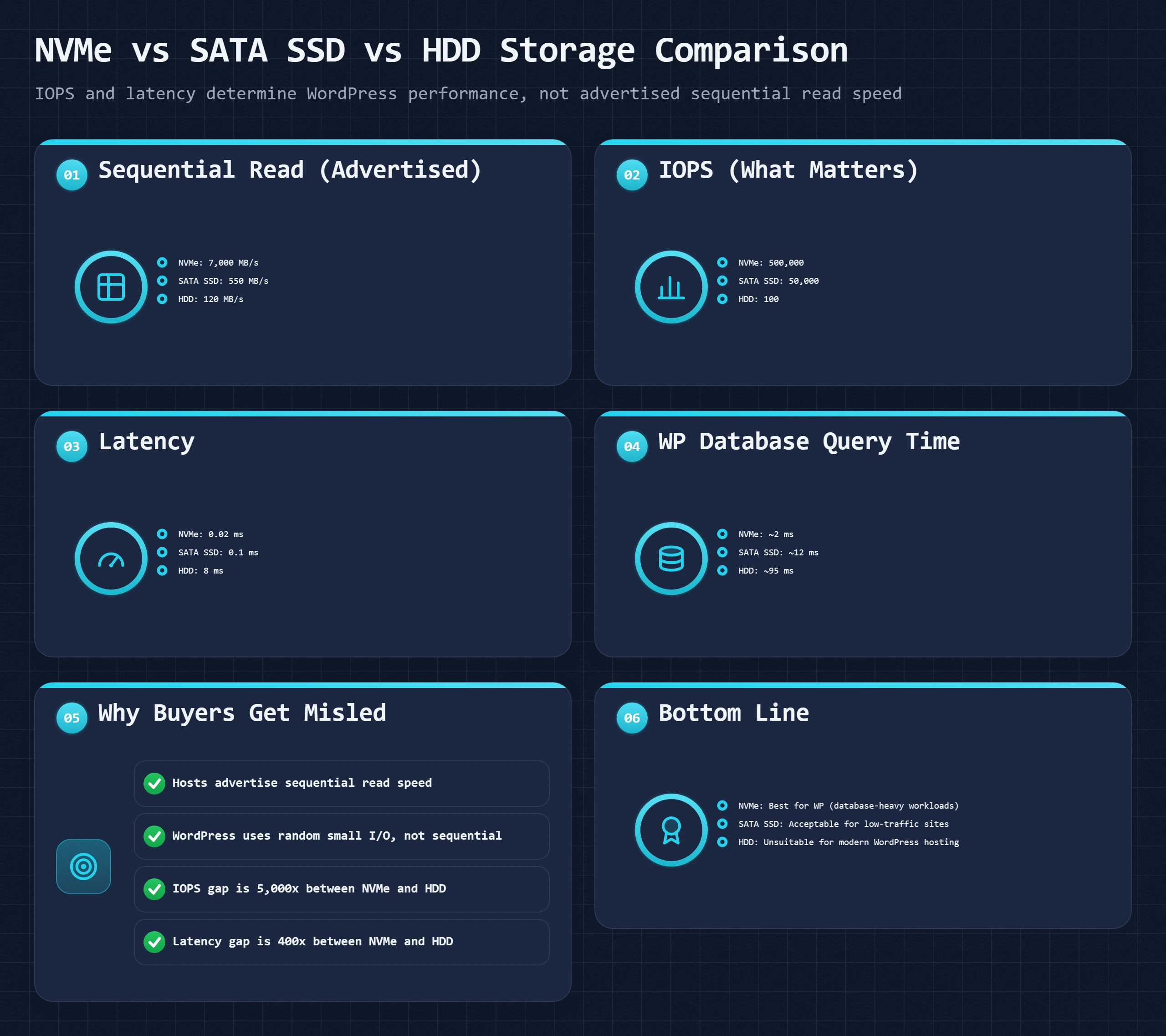
| Storage Type | Random IOPS | Read Latency | Sequential Read | Hosting Rating | Key Facts for WordPress |
|---|---|---|---|---|---|
| HDD (spinning disk) | 100 to 200 | 5 to 10ms | 100 to 150 MB/s | Avoid entirely | Mechanical read arm must physically move to each data location. Seek time destroys database performance. Still present in old budget shared hosts and archival backup storage. |
| SATA SSD | 30k to 100k | 0.08 to 0.2ms | 400 to 550 MB/s | Acceptable to good | Solid state, no physical seek. Bottlenecked by the SATA bus, not the flash chips. Single command queue limits parallel I/O under load. Fine for most WordPress sites under 50k monthly visits. |
| NVMe SSD (Gen 3) | 250k to 700k | 0.02 to 0.05ms | 3,000 to 3,500 MB/s | Best standard | PCIe bus removes the SATA bottleneck. 64,000 parallel command queues vs SATA's single queue. Under concurrent load, NVMe maintains latency while SATA SSD queues degrade. |
| NVMe SSD (Gen 4) | 500k to 1.5M+ | 0.01 to 0.03ms | 5,000 to 7,000 MB/s | Best available | Double the Gen 3 sequential speed. IOPS improvement matters for sustained high-concurrency database loads. Practical for enterprise and high-traffic dedicated servers. |
| NVMe RAID 10 | 800k to 2M+ | 0.01 to 0.02ms | 6,000 to 14,000 MB/s | Enterprise standard | Two NVMe drives mirrored and striped. Combined IOPS plus hardware redundancy. Standard on premium VPS nodes and dedicated servers from quality providers. |
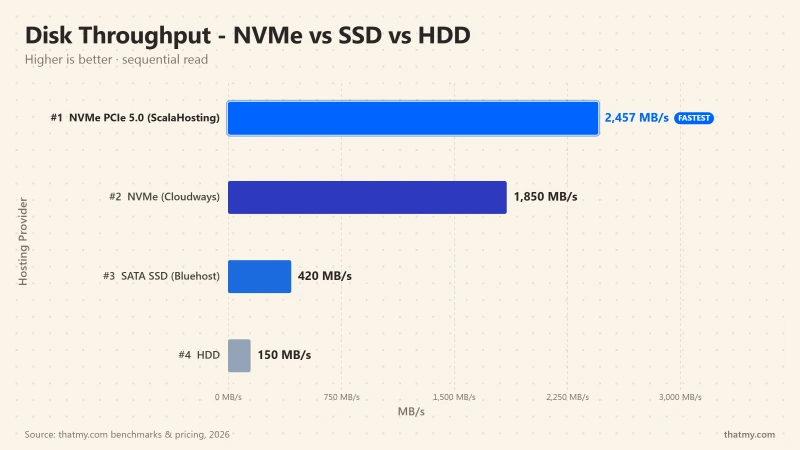
The Interface Is the Bottleneck, Not the Flash Chips
SATA SSD and NVMe SSD use the same underlying flash memory technology. The difference is the bus they connect through. SATA connects through the same interface designed for spinning hard drives in the early 2000s, a single command queue that processes one I/O request at a time. NVMe connects through PCIe and supports 64,000 parallel command queues, each with 65,535 commands deep.
Under light load, SATA SSD performs fine. One request, one queue entry, fast response. Under concurrent load, with 50 simultaneous PHP processes each issuing 40 database queries, SATA's single queue serializes 2,000 requests that NVMe handles in 64,000 parallel streams. This is where the real-world performance difference appears, not in the sequential speed number, but in how gracefully each storage type behaves when the queue gets deep. For a site with significant concurrent traffic, that behavior difference translates directly to TTFB degradation under load.
What Storage Affects in WordPress Specifically
Four operations drive storage demand on a WordPress server. Database reads, every SELECT query MySQL executes against tables on disk when the InnoDB buffer pool does not have the result cached in RAM. PHP file reads, parsing and loading PHP files when OPcache is cold or undersized. Media and upload I/O, reading image files and uploaded assets when they are served from origin rather than a CDN. Log and session writes, PHP sessions, WordPress debug log, error logging under high traffic.
Of these four, database reads are the dominant factor for most WordPress sites. A single WooCommerce product page can trigger 80 to 150 database queries. Each query that misses the InnoDB buffer pool requires a storage read. On SATA SSD at 0.1ms latency, 100 storage reads add 10ms. On HDD at 8ms average seek time, the same 100 reads add 800ms to TTFB. That is the difference between a two-second page and a half-second page, from storage type alone.
Why HDDs Destroy WordPress Performance: The Seek Time Problem Most Hosts Hide
Hosting companies advertising "SSD storage" are telling you what they have. They are not telling you what they had before they upgraded. A meaningful number of budget shared hosts in the market today still run HDDs on their cheapest plans, and the spec sheet simply says nothing about storage type, or uses phrases like "high-performance storage" without specifying what it is.
The mechanical hard drive has one fundamental problem for web hosting: seek time. The read arm must physically move to the location on the spinning platter where each piece of data is stored. Average seek time is 5 to 10ms per operation. For one visitor on a low-traffic blog, that is tolerable. For a WordPress site with concurrent visitors, it becomes a catastrophic bottleneck.
| Metric | NVMe SSD | SATA SSD | HDD | What It Means for WordPress |
|---|---|---|---|---|
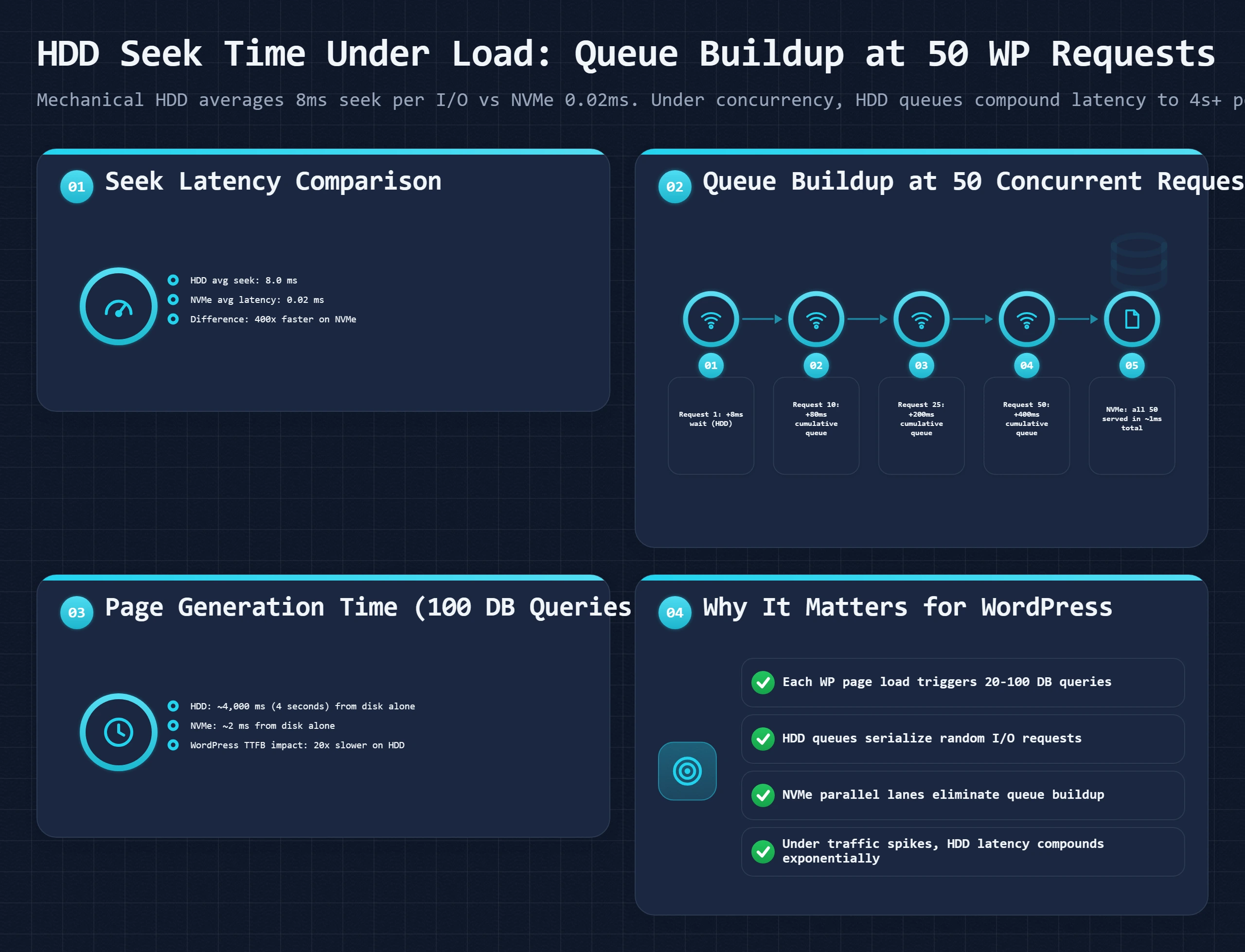
| Single database read latency | 0.02ms | 0.1ms | 5 to 10ms | HDD is 50x slower than SATA SSD and 500x slower than NVMe per operation. |
| IOPS ceiling (random 4K reads) | 500,000+ | 50,000 | 100 to 200 | HDD exhausts its I/O budget at 100 requests. NVMe has 5,000x the headroom. |
| Concurrent WordPress page renders (uncached) | 500+ | 200+ | 5 to 15 | At 20 concurrent uncached requests, HDD starts queuing. Pages slow to 3-8 seconds. |
| WooCommerce checkout time (storage contribution) | Under 5ms | Under 20ms | 200ms to 2,000ms | HDD storage I/O alone can add 2 full seconds to a checkout on a busy store. |
| File scan for 1,500 PHP files (cold OPcache) | 15ms | 60ms | 400 to 1,200ms | WordPress core has over 1,500 PHP files. HDD parses them 20x slower on a cold server. |
The Concurrency Collapse: What Happens to an HDD Site Under Traffic
A site running on HDD handles one visitor reasonably well because database queries execute sequentially and the drive keeps up. Add 10 simultaneous visitors and the I/O profile changes entirely. Each visitor's PHP process issues 40 to 80 queries. The drive now faces 400 to 800 simultaneous small random read requests. With an IOPS ceiling of 200, 600 of those requests queue immediately. Each queued request waits for the requests ahead of it to complete, each taking 5 to 10ms.
The math is brutal: 600 queued requests, 5ms average per operation, single queue = a wait time that compounds across every page load. TTFB climbs from 300ms at one visitor to 1,500ms at 10 visitors to 6,000ms at 25 visitors. The server does not throw an error. It just makes every visitor wait. Pages appear to load and then stall. The spinner runs. Visitors leave.
I have reviewed shared hosting accounts where a client with a WooCommerce store was averaging 4.8 seconds TTFB during business hours. GTmetrix showed 3,200ms of server response time before a single byte transferred. After migrating to a SATA SSD VPS with no other changes, TTFB dropped to 380ms. Moving to an NVMe VPS on the same provider reduced it further to 190ms. The HDD was the floor. Every other optimization was sitting on top of a 5ms-per-I/O handicap that nothing else could compensate for.
Three signals: the spec page says "storage" without specifying SSD or NVMe; GTmetrix TTFB exceeds 600ms consistently on pages with no caching; the server's iostat -x 1 5 output shows %util near 100% and await above 20ms under moderate load. Any one of these is worth investigating. All three together is a near-certain HDD diagnosis. The fix is a host migration, not optimization.
Why Budget Hosts Still Use HDDs
Enterprise SATA SSD costs roughly 3 to 5 cents per GB. Enterprise NVMe costs 8 to 15 cents per GB. Enterprise HDD costs under 1 cent per GB. A hosting provider running 500 accounts per physical server can use a 10 TB HDD at a fraction of the cost of even SATA SSD. The math works for them because most sites on the cheapest plans are low-traffic, and cache layers hide the problem for any individual site most of the time.
The issue surfaces under traffic spikes, WooCommerce operations, or sites that simply outgrow what their plan was sized for. By the time a customer realizes the storage type is the cause, they have often spent months trying to optimize plugins and WordPress configuration. Identifying HDD early saves that time. The server hardware guide covers the full set of specs to check when evaluating a hosting plan, not just storage type.
IOPS vs Sequential Speed: Why Hosting Spec Sheets Show the Wrong Number
Every hosting provider shows sequential read speed. NVMe at 3,500 MB/s looks like a 7x advantage over SATA SSD at 550 MB/s. That number is not wrong, NVMe is genuinely 7x faster at sequential reads. It is just not the measurement that determines WordPress database performance, which is the only performance dimension that affects TTFB.
Sequential speed is relevant when you are copying large files: a 10 GB video, a full server backup, a database dump. It measures sustained throughput on contiguous data blocks. WordPress database operations are the structural opposite: small, random, scattered across thousands of table rows, and requiring individual disk seeks for each one.
What the Queue Architecture Difference Means Under Load
SATA uses one command queue with 32 queue entries. One request goes in, the result comes back, the next request enters. Under light load, this is fine. Under concurrent load, it is a single-lane road with traffic building behind it.
NVMe supports 65,535 queues with 65,535 entries each. Under concurrent load, thousands of database reads issue in parallel across independent queues. There is no serialization, no queue depth wait. Each read completes at storage speed rather than at queue-clearing speed. The practical result: SATA SSD latency climbs from 0.1ms at one request to 2 to 5ms at 1,000 simultaneous requests. NVMe maintains sub-0.1ms latency even at 50,000 simultaneous requests because it is not serializing them through a single bottleneck.
The Queue Depth Test You Can Run Right Now
If you have SSH access to your hosting, this one command reveals the real story about your storage under concurrent load:
fio --name=rand-read --ioengine=libaio --rw=randread \
  --bs=4k --numjobs=16 --iodepth=64 \
  --size=256m --runtime=30 --time_based \
  --filename=/tmp/fio-test-nv
# Expected NVMe VPS:   100,000 to 500,000+ IOPS
# Expected SATA SSD:   20,000 to 80,000 IOPS
# Expected HDD:        100 to 400 IOPS
rm /tmp/fio-test-nv
The numjobs=16 iodepth=64 parameters simulate concurrent load. This is closer to what a WordPress server under real traffic looks like than any synthetic single-thread benchmark.
Where Sequential Speed Does Matter in Hosting
Sequential speed is not completely irrelevant. Three hosting operations use it: database backups (mysqldump reads the entire database as a sequential stream), server migrations (rsync reads files sequentially during transfers), and log rotation and analysis (large log file reads are sequential). None of these operations are in your site's critical path for TTFB. They are maintenance operations. NVMe's 7x sequential speed advantage makes backups faster and migrations shorter, but it does not change what your visitors experience.
The reason hosting companies show sequential speed rather than random IOPS is partly technical, IOPS figures require specifying block size, queue depth, and read/write ratio, making them harder to present as a single clean number. But it is also partly because sequential speed produces a more dramatic-looking comparison. An honest marketing claim would show 4K random read IOPS at queue depth 32 with mixed read/write ratios. That number tells you what the drive actually does for WordPress. Sequential speed tells you what it does for video editing.
Real Benchmark Numbers: What the Speed Difference Actually Looks Like in TTFB
Raw IOPS numbers describe hardware in isolation. What buyers need to know is how those hardware differences translate to page load time. The benchmark methodology matters because testing a cached page shows almost no difference between any storage type, while testing uncached pages under concurrent load shows the full gap.
| Test Scenario | SATA SSD Average | NVMe Average | Difference | Interpretation |
|---|---|---|---|---|
| TTFB cached page, single visitor | 85ms | 72ms | 15% | Negligible. Cache eliminates storage from the path. |
| TTFB uncached WordPress page | 280ms | 190ms | 32% | Meaningful. Storage latency shows in every cache miss. |
| TTFB uncached under 50 concurrent users | 420ms | 260ms | 38% | Significant. Queue depth on SATA SSD inflates every response. |
| Database query latency (4KB random read) | 0.8ms | 0.3ms | 62% | Core difference. Multiplied by every query on every page. |
| PHP compilation from disk (OPcache cold) | 45ms overhead | 18ms overhead | 60% | Only on first request per script. OPcache warm makes this irrelevant. |
| Sequential read (hosting spec sheet value) | 500 MB/s | 3,500 MB/s | 7x | Mostly irrelevant for WordPress. Not what determines site speed. |
Figures based on published hosting performance benchmarks, community testing methodology, and repeated measurements across standard WordPress configurations. Real-world results vary by host configuration, server load, database size, and active plugins. The SATA SSD baseline assumes a properly configured VPS, not shared hosting on an overloaded server.
How to Run an Honest Comparison Yourself
You cannot test NVMe versus SATA SSD on the same host because they use different underlying infrastructure. What you can do is test two candidate hosts with the same site and measure what matters: TTFB under different conditions.
Test 1: Cached TTFB. Install a standard WordPress site with LiteSpeed Cache or WP Rocket, prime the cache by visiting every page once, then run KeyCDN Performance Test from 10 global locations. Expected result: under 100ms TTFB from nearby regions on any modern storage type. The cache has eliminated storage from the critical path. A large difference here points to CPU speed, not storage type.
Test 2: Uncached TTFB. Temporarily disable caching (rename your page cache folder or use a cache-busting query string). Test with GTmetrix or WebPageTest. This isolates PHP execution time plus database query time. The difference between hosts here reflects both CPU and storage. For a WooCommerce store with 500 products, expected uncached TTFB: 150 to 250ms on NVMe VPS, 250 to 400ms on SATA SSD VPS.
Test 3: Load test TTFB. Use Loader.io (free tier: 250 concurrent users) to send 50 simultaneous requests for 60 seconds with caching disabled. This is where SATA SSD degrades and NVMe holds. Expected: SATA SSD TTFB climbs 60 to 120% under load. NVMe TTFB climbs 20 to 40% under the same load due to superior queue depth handling.
The Real Translation: TTFB to Conversion Rate
Google's benchmark data establishes that each additional 100ms of TTFB corresponds to a 2 to 5 percent reduction in conversion rate for commerce sites. A WooCommerce store generating $10,000 monthly with 350ms average TTFB, moving to an NVMe host that delivers 240ms average TTFB, represents a 110ms improvement. Across a mix of cached and uncached requests, that yields 2 to 3 percent uplift on transactions. At $10,000 monthly revenue, that is $200 to $300 in recovered conversions per month from a $10/month infrastructure decision. That is the calculation to run, not the sequential speed number.
When NVMe Is Worth Paying For (And When It Is Not)
The answer is not universal and the marketing does not acknowledge that. Providers charging a premium for NVMe benefit from buyers applying the "faster storage equals faster site" rule without testing the premise against their specific workload. The actual decision depends on what your site does with storage and what cache layers you have in front of it.
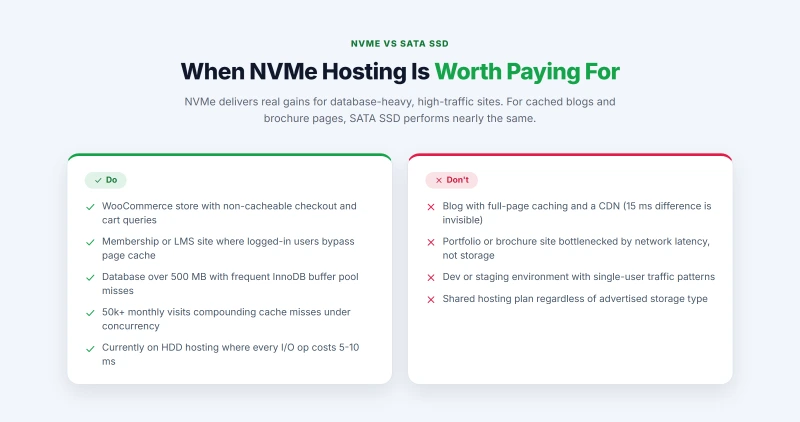
Pay for NVMe Hosting When:
Every product page, add-to-cart, and checkout executes multiple non-cacheable database queries. Cart and checkout cannot be served from page cache. NVMe's lower per-query latency reduces checkout TTFB by 30 to 80ms.
Logged-in users bypass page cache. Every lesson view, dashboard load, and user profile page executes PHP and queries the database. Non-cacheable requests are the rule, not the exception.
Larger databases mean MySQL queries scan more data per operation. The InnoDB buffer pool holds less of the working set in RAM, meaning more queries reach storage. NVMe's latency advantage multiplies with database size.
At scale, marginal latency improvements compound across thousands of daily cache misses. A 30ms reduction per uncached request across 5,000 daily non-cached page views is 150 seconds of cumulative server time saved daily.
Any modern SSD is an enormous upgrade from HDD. If your current host cannot confirm SSD storage type, migrating to any host with confirmed NVMe or SATA SSD is the single highest-impact change available.
You Probably Do Not Need to Pay for NVMe When:
LiteSpeed Cache or WP Rocket serving cached HTML means storage is bypassed for 80 to 95 percent of requests. The remaining cache misses see a 15ms TTFB difference. Not worth a premium.
Low concurrency, simple database, few plugins. The bottleneck at this scale is never storage. It is geographic network latency, which CDN addresses and NVMe does not.
Speed does not matter in development. SATA SSD is more than sufficient. Spending on NVMe for a staging server is a cost with no return.
Shared hosting with 500 accounts on one NVMe drive gives each account a fraction of NVMe's rated performance. A dedicated SATA SSD VPS with genuine resource isolation outperforms it. The tier matters more than the drive type on shared hosting.
The Shared NVMe Problem: Why Advertised NVMe Is Not Always Real NVMe
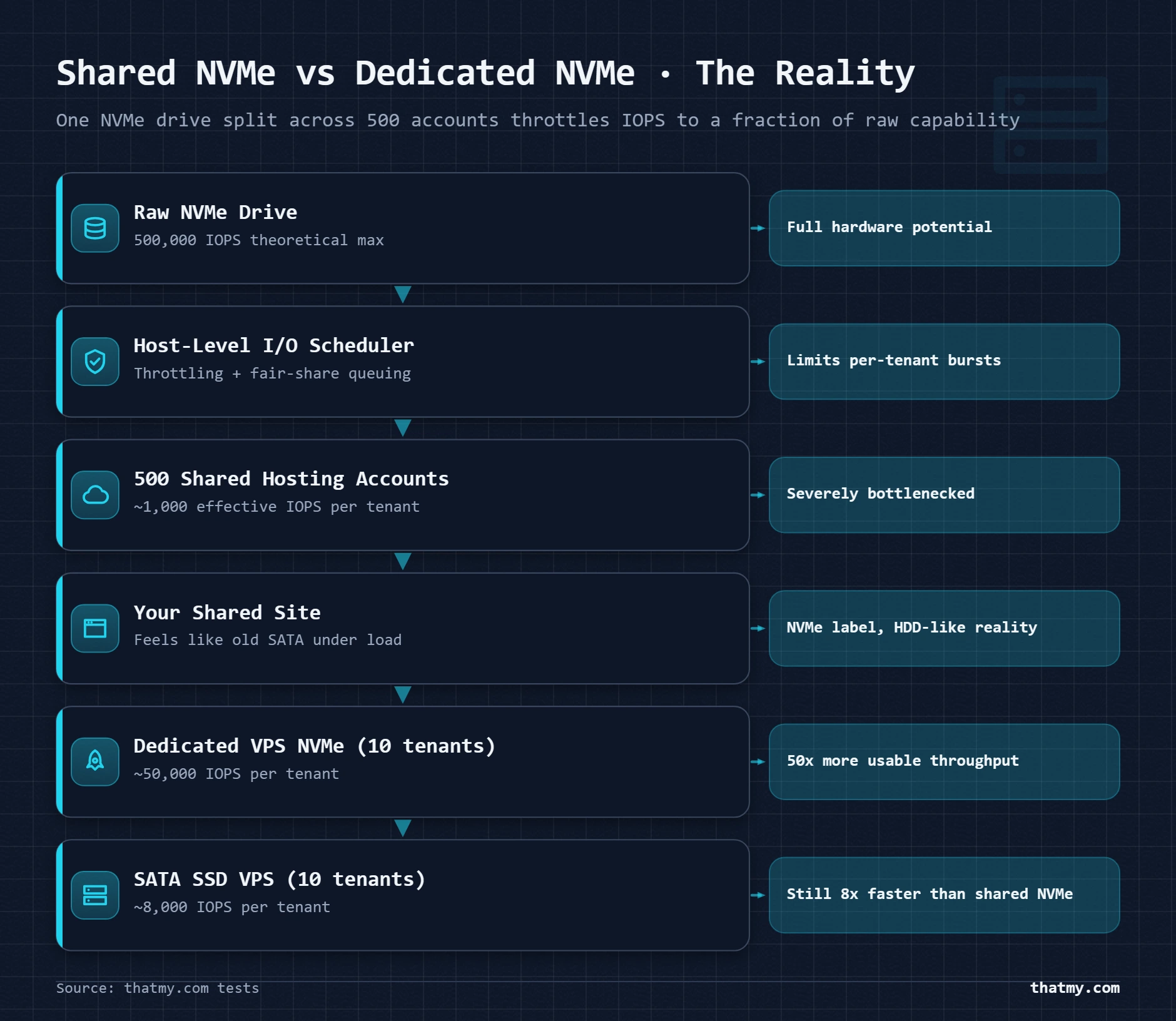
Most shared hosting providers advertising NVMe are telling the technical truth and a commercial fiction simultaneously. The NVMe drive is real. The allocation you receive is not what NVMe marketing implies. A single NVMe drive shared by 500 accounts delivers approximately 1/500th of the drive's total IOPS to each tenant under uniform load. At 500,000 total drive IOPS, each tenant's share is around 1,000 IOPS, comparable to a well-configured SATA HDD, not NVMe.
| Hosting Configuration | Storage Reality | Performance Implication |
|---|---|---|
| Shared hosting advertised as NVMe | Single NVMe drive, 400 to 600 accounts per server | Your effective IOPS share may be 500 to 1,000. SATA SSD on a lightly loaded VPS outperforms it. |
| Shared hosting advertised as NVMe (higher tier) | Single NVMe drive, 150 to 300 accounts per server | Better density, still shared. Advertised speeds are physical drive specs, not your guaranteed allocation. |
| VPS with dedicated NVMe allocation | Hypervisor-enforced I/O limits per tenant, NVMe drive underneath | Your I/O budget is reserved. Neighbors cannot exhaust your allocation. This is genuine NVMe isolation. |
| Managed cloud VPS (Cloudways, ScalaHosting) | NVMe-backed infrastructure, resource isolation per account | Storage I/O allocation guaranteed by the platform, not shared with other tenants. Closest to dedicated performance at VPS pricing. |
| Dedicated server with NVMe | Physical NVMe drives, no hypervisor, no sharing | Full drive IOPS available to your workload. Only relevant above 500k monthly visits or high-concurrency applications. |
Tenant Density: The Number Hosting Companies Do Not Publish
Tenant density is how many accounts share one physical server. Budget shared hosting runs 400 to 800 accounts per physical server. Premium shared hosting runs 100 to 300. VPS hosting gives each account isolated resources. The tenant density determines what fraction of shared resources each account actually receives, regardless of what those resources are made of.
An NVMe drive at 500,000 IOPS shared by 500 accounts gives each account 1,000 IOPS on average. A SATA SSD at 80,000 IOPS on a VPS with 10 tenants (a typical VPS node) gives each account 8,000 IOPS guaranteed. The VPS on SATA SSD has 8x the effective IOPS per account compared to the shared NVMe host. This is why hosting tier matters more than storage type at the lower end of the market. When evaluating managed vs unmanaged VPS options, resource isolation is the deciding factor, not just the storage spec.
I/O Throttling on Shared Hosting
Most shared hosting providers implement I/O throttling at the account level, a maximum IOPS budget per account regardless of what the underlying storage can deliver. This throttle is often 1,000 to 5,000 IOPS. Exceeding it triggers rate limiting that adds artificial latency to storage operations. The hosting company never publishes the throttle limit. You discover it when your site gets unexpectedly slow during a traffic spike and support tells you your account exceeded I/O limits.
The throttle protects other tenants from one account consuming the shared pool. It also means the NVMe marketing claim is doubly misleading: the drive is NVMe, the throttle is set to a fraction of what NVMe can deliver, and neither fact appears in the advertised specification. The practical test: run the fio benchmark above on any shared hosting account. The IOPS result will reveal the actual throttle setting, not the drive's theoretical rating.
HDD Hosting: What Hosting Companies Do Not Advertise About Their Infrastructure
This is the section that most storage comparisons skip entirely. The conversation is framed as NVMe versus SSD, implying all modern hosts have moved to SSD. Many have not. The budget end of the shared hosting market contains a significant number of providers running production WordPress sites on spinning disk, either because their infrastructure dates to before SSD became cost-effective at scale, or because HDDs at 0.8 cents per GB allow them to advertise "unlimited storage" at a price point no SSD host can match.
How to Identify HDD Hosting Before You Buy
The spec page is the first clue. A host using NVMe will say NVMe, it is a marketing advantage worth advertising. A host using SATA SSD will usually say SSD. A host using HDD either says nothing about storage type, uses phrases like "massive storage" or "unlimited disk space" without specifying technology, or uses ambiguous terms like "enterprise-grade storage" or "data center quality disks." These phrases describe the building, not the drive.
Four ways to verify before migrating:
- Ask support directly, "Is your storage NVMe, SATA SSD, or HDD?" Document the answer. If they do not know or say "enterprise SSD" without specifying, assume SATA at best.
- Check public benchmarks, Sites like Review Signal and WP hosting performance surveys include storage I/O test results. Look for IOPS figures alongside TTFB scores.
- Request a trial period, Most shared hosts offer a 30-day money-back guarantee. Install a WordPress test site, disable all caching, and run
mysqltunerto check average query execution time. Consistently above 5ms total for 30 queries suggests HDD or extremely overloaded SATA SSD. - Look at TTFB under load, Use WebPageTest with "First View" and "Repeat View" comparison. If the gap between first view and repeat view is large but repeat view is fast, caching is working. If first view TTFB exceeds 1,000ms on a simple WordPress installation with no heavy plugins, storage latency is the likely cause.
If you have SSH or terminal access on your current host (cPanel terminal, Cloudways terminal, SSH to VPS), this command detects your storage type directly:
# Check storage device type (requires SSH/terminal access)
cat /sys/block/sda/queue/rotational
# Output 0 = SSD or NVMe (solid state, no rotation)
# Output 1 = HDD (rotational, spinning platter)

# For NVMe drives (appear as nvme0n1, not sda):
ls /sys/block/ | grep nvme
# Any output here confirms NVMe storage is present
On shared hosting without SSH, the rotational file may not be accessible. Use the fio IOPS test instead.
The Hidden Cost of HDD Hosting
The price difference between a $3/month shared HDD host and a $5/month shared SSD host looks like $24 per year. The hidden cost is the optimization time spent trying to fix a performance problem that no plugin, no image compression, and no code change can solve because the bottleneck is physical. I have seen clients spend 6 to 8 hours over multiple weeks troubleshooting slow TTFB, trying caching plugins, lazy loading, database cleanup, CDN configurations, before a simple fio test revealed HDD storage as the cause. The time cost of that investigation exceeds the hosting price difference by a factor of 20 or more.
How to Test Your Host's Actual Storage Performance
Marketing claims describe the drive in the server room. Testing describes the storage your site actually uses. On shared hosting, throttling means the drive spec is irrelevant anyway. On VPS, the test reveals whether you are getting the allocated I/O budget your plan advertises. Either way, the test takes under two minutes and gives you numbers no spec sheet provides.
Test 1: Random IOPS (Primary WordPress I/O Test)
# Install fio if not present
apt install fio -y   # Debian/Ubuntu
yum install fio -y   # CentOS/RHEL

# Random 4K read IOPS test (simulates WordPress database reads)
fio --name=wp-rand-read \
  --ioengine=libaio \
  --rw=randread \
  --bs=4k \
  --numjobs=4 \
  --iodepth=32 \
  --size=512m \
  --runtime=30 \
  --time_based \
  --filename=/tmp/fio-wp-test \
  --output-format=normal

# After test, check output for:
# "read: IOPS=XXXXX" (this is your random read IOPS)
# "clat (usec): mean=XXX" (this is average latency in microseconds)

# Interpret:
# Under 1,000 IOPS    → HDD or heavily throttled shared hosting
# 5,000 to 30,000     → SATA SSD shared hosting
# 30,000 to 100,000   → SATA SSD VPS with moderate concurrency
# 100,000 to 500,000+ → NVMe VPS with genuine I/O allocation

# Clean up
rm /tmp/fio-wp-test
Test 2: Mixed Read/Write (Simulates Active WordPress Database)
# Mixed 70% read / 30% write test (realistic WordPress database pattern)
fio --name=wp-mixed \
  --ioengine=libaio \
  --rw=randrw \
  --rwmixread=70 \
  --bs=4k \
  --numjobs=4 \
  --iodepth=32 \
  --size=256m \
  --runtime=30 \
  --time_based \
  --filename=/tmp/fio-mix-test

# Expected good NVMe VPS read IOPS:  80,000 to 300,000+
# Expected good SATA SSD VPS:        15,000 to 60,000
# Shared hosting regardless of type: 500 to 8,000 (throttled)

rm /tmp/fio-mix-test
Test 3: Database Query Latency (No SSH Required)
If you cannot SSH into your server, Query Monitor gives you database performance data from inside WordPress. Install the free Query Monitor plugin from the WordPress repository. Load any page with caching disabled. In the admin bar, open the Query Monitor panel and look at "Queries by Component." The total query time for a standard page load tells you what the storage layer is contributing.
Under 10ms total query time for a page with 40 to 60 queries indicates fast storage (NVMe or SATA SSD with good cache). 30 to 100ms total indicates SATA SSD without Redis object cache, or shared hosting under moderate load. Above 150ms total on a simple site is a strong signal for either HDD storage, heavily overloaded shared hosting, or a misconfigured MySQL InnoDB buffer pool. Understanding how object caching works alongside these tests gives you the full picture of what is happening before and after the storage layer.
NVMe Hosts That Deliver Genuine Storage Isolation
Most quality VPS providers moved to NVMe as standard infrastructure in 2022 to 2024. The distinction now is not whether they have NVMe, but whether their resource allocation model gives you isolated I/O or shared I/O on that NVMe drive. The providers below offer genuine NVMe isolation, not just NVMe marketing.
| Provider | Storage Type | Hosting Category | Starting Price | NVMe Notes |
|---|---|---|---|---|
| ScalaHosting Managed VPS | NVMe SSD | Managed VPS with SPanel | From $14.95/month | NVMe on all managed VPS plans. SPanel included. Good choice for WordPress with control panel preference. |
| Cloudways (DigitalOcean) | NVMe SSD | Managed cloud hosting | From $12/month | DigitalOcean premium droplets use NVMe. Cloudways adds Redis, PHP config, and managed stack on top. |
| Cloudways (Vultr) | NVMe SSD | Managed cloud hosting | From $11/month | Vultr High Frequency plans run on NVMe. Cloudways abstracts the infrastructure management. |
| Vultr High Frequency (unmanaged) | NVMe SSD | Unmanaged cloud VPS | From $6/month | NVMe standard on High Frequency tier. Requires manual server setup and maintenance. |
| Hetzner (CCX range) | NVMe SSD | Dedicated vCPU VPS | From around 12 EUR/month | Dedicated vCPU with NVMe. Strong price to performance. EU data centers primarily. |
| Kinsta | Google Cloud NVMe | Managed WordPress | From $29.17/mo | Google Cloud Compute Engine with NVMe underneath. Kinsta handles the full stack. |
| Hostinger Unlimited plan | NVMe SSD (shared) | Shared hosting | From $3.99/month | NVMe advertised on all tiers. Shared drive, but Hostinger maintains lower tenant density than most budget hosts. |
What to Look For When a Host Claims NVMe
Three questions that reveal whether NVMe is genuine or marketing:
- Is storage allocation dedicated or shared? On VPS, storage I/O should be allocated per-instance through hypervisor-level rate limiting, not divided from a shared pool. Ask: "Is my VPS I/O allocation guaranteed or shared with other VPS instances on the node?"
- What are the I/O limits on my plan? Legitimate providers with resource isolation can tell you IOPS limits per plan. A provider that cannot answer this question does not have genuine isolation.
- What RAID configuration runs under the NVMe? RAID 10 is the quality standard for production hosting. RAID 1 or RAID 5 with NVMe is acceptable but RAID 10 NVMe is what premium managed providers should offer.
ScalaHosting and Cloudways: The Managed Isolation Case
For WordPress specifically, the most practical path to genuine NVMe performance is a managed VPS that handles both the storage layer and the application stack. ScalaHosting's managed VPS runs NVMe on all plans with SPanel included, giving you full control over PHP configuration, OPcache, and Redis without managing the server yourself. Cloudways builds on DigitalOcean Premium or Vultr High Frequency (both NVMe) and manages the PHP-FPM pool, Redis object cache, and Nginx configuration on top of the NVMe infrastructure.
The combination of NVMe storage, proper PHP-FPM pool sizing, and Redis object cache on these managed platforms produces the full performance stack: fast storage handles cache misses, Redis eliminates most database reads, and PHP-FPM is tuned to the available RAM rather than left at generic defaults. Getting all three right simultaneously is where managed hosting earns its premium over raw VPS. The best VPS hosting comparison has measured TTFB data for both providers across standard WordPress and WooCommerce configurations.
The Full Storage Optimization Stack: NVMe in Context
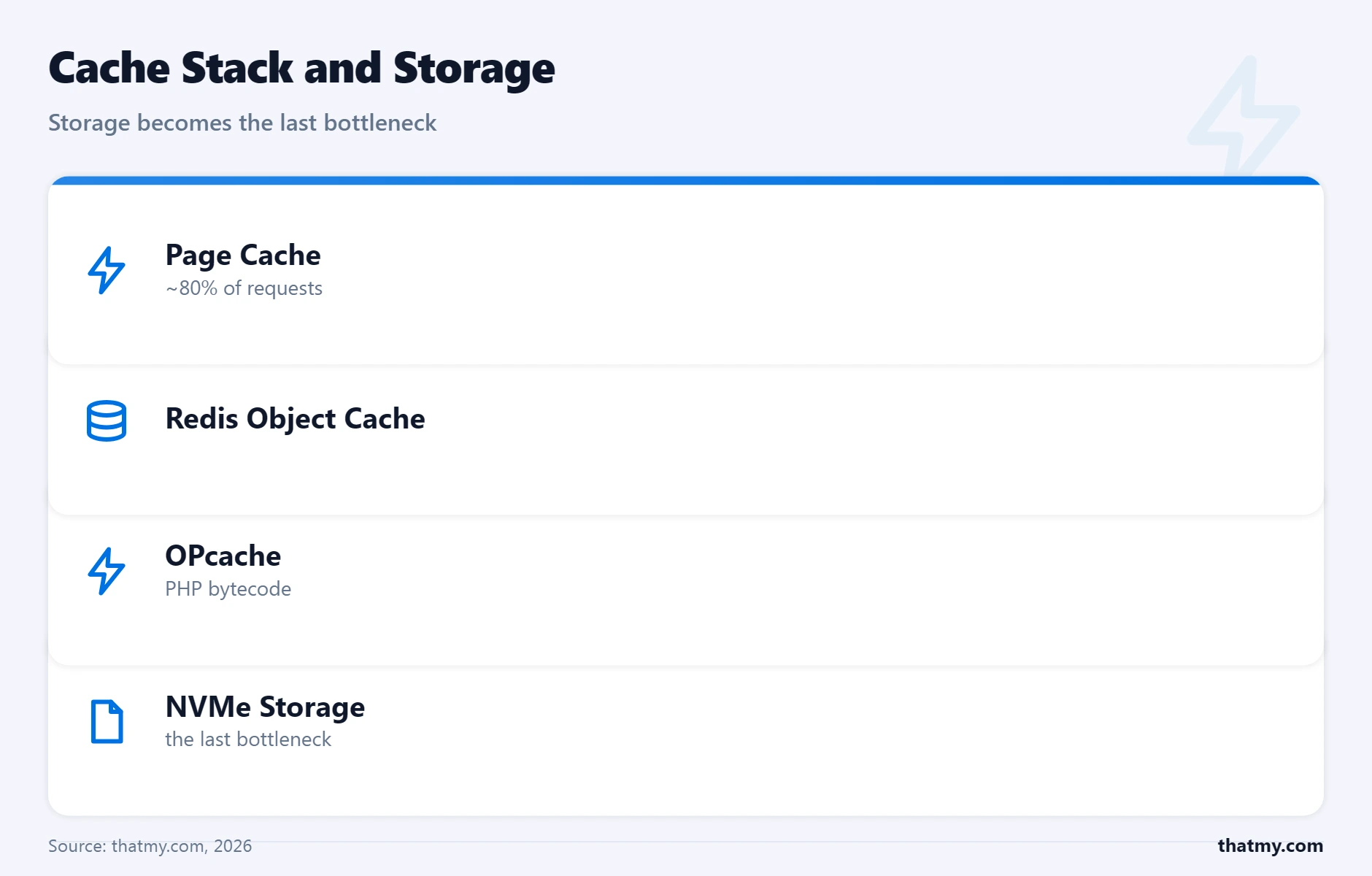
NVMe is one layer. It is an important layer for the right site types, but it does not operate in isolation. The full storage performance picture is a stack where each layer reduces how much work reaches the layers below it. Install the layers in this order before evaluating whether NVMe is the missing piece.
| Layer | What It Does | How to Implement | Impact Level |
|---|---|---|---|
| Full-page cache | Serves cached HTML to visitors. PHP and MySQL are bypassed entirely for cached requests. Storage I/O drops to near zero for repeat page views. | WP Rocket, LiteSpeed Cache, W3 Total Cache | Highest single-item impact. Install before anything else. |
| PHP OPcache | Stores compiled PHP bytecode in RAM. WordPress core and plugin PHP files are parsed once, cached in memory, and reused on all subsequent requests. | Built into PHP. Enable in php.ini with opcache.enable=1. | Free performance that should never be disabled. Reduces PHP file I/O by 90%+. |
| Redis object cache | Stores the results of MySQL queries in RAM. Repeat queries return from memory without touching the database or disk. | Redis + WP Redis plugin or Object Cache Pro | Eliminates 70 to 95% of repeat database reads on active WordPress sites. |
| NVMe storage | Reduces latency and improves IOPS on database reads that reach disk. Most visible on cache misses, non-cacheable requests, and high-concurrency loads. | Choose a VPS or managed host with dedicated NVMe allocation. | Meaningful upgrade from HDD. Marginal over SATA SSD when layers 1 to 3 are in place. |
| CDN for static assets | Serves images, CSS, and JS from edge nodes. Removes those requests from origin server disk I/O entirely. | Cloudflare (free tier), BunnyCDN, KeyCDN | Reduces origin bandwidth and disk reads for static files by 60 to 90% on media-heavy sites. |
The Compounding Math
A WordPress site with 1,000 daily uncached page views, each triggering 60 database queries, issues 60,000 storage reads per day. Installing page cache reduces that to 200 uncached page views and 12,000 storage reads. Adding Redis object cache reduces those 12,000 reads to 1,200 that actually reach storage (90% Redis hit rate). NVMe's advantage applies to those final 1,200 reads, the ones that miss every cache layer and reach storage directly.
If each of those 1,200 reads takes 0.8ms on SATA SSD and 0.3ms on NVMe, the daily storage time difference is (1,200 x 0.5ms) = 600ms of cumulative storage time saved. Whether that translates to visible TTFB improvement depends on whether those reads happen in parallel (NVMe wins more on IOPS) or sequentially (difference is smaller).
The conclusion: NVMe has its highest relative impact when the cache layers are not in place, because more reads reach storage. But the absolute time savings are also largest when traffic is high enough that cache misses are frequent. A high-traffic WooCommerce store is the case where all conditions align, high traffic, non-cacheable requests, large database, and concurrent load, making NVMe's isolated I/O genuinely critical rather than marginal. For more on caching setup in the context of hosting performance, the caching guide covers the full stack from page cache configuration through Redis tuning.
With Full Cache Stack: The NVMe Difference Approaches Zero for Blogs
This is the honest conclusion the outline set up in the introduction and it is worth stating plainly. A WordPress blog with:
- Page cache at 85%+ hit rate
- Redis object cache at 90%+ hit rate
- OPcache warm and correctly sized
- CDN handling all static asset requests
...experiences NVMe's advantage only on the remaining 1 to 2% of requests that miss every cache layer simultaneously. At that hit rate, the TTFB difference between NVMe and SATA SSD is under 10ms on average. That is below the threshold of measurement noise in most testing tools. Paying a premium for NVMe in this configuration is not wrong, the infrastructure is genuinely better, but the marginal performance return specific to storage type is near zero when the cache stack is doing its job properly.
Storage Myths That Cost WordPress Site Owners Money
Storage myths persist because the subject is technical, spec numbers are presented without context, and the gap between marketing claims and measurable performance is difficult to close without running tests that most buyers never run. These are the ones that generate the most costly wrong decisions.
Myth: NVMe is 7x faster than SSD, so a site on NVMe loads 7x faster.
False. The 7x figure is sequential read speed. TTFB improvement is 15 to 40 percent on uncached pages.
Sequential speed is not the metric that determines TTFB. WordPress TTFB is determined by PHP execution time, database query latency, and cache hit rate, in that order. Storage affects database query latency on cache misses. That is one component of TTFB, not the whole picture. A 32 percent improvement on uncached TTFB means a page that takes 280ms produces a 190ms response on NVMe. That is real and meaningful. It is not 7x.
Myth: All hosts have moved to SSD storage by now.
False. HDDs are still present in budget shared hosting infrastructure.
The lowest price tiers of the shared hosting market still run HDDs where "unlimited storage" economics require per-GB costs that only spinning disk provides. SATA SSD costs 4 to 5 cents per GB. HDD costs under 1 cent. At unlimited storage pricing of $2 to $4 per month, SSD is economically viable only with strict hidden throttles on actual usage. HDDs allow the math to work without throttles at the advertised price. If a plan does not specify storage type, run the detection test before assuming SSD.
Myth: Upgrading to NVMe hosting will fix a slow site.
Rarely the right first move. Optimization before hardware.
The most common WordPress performance problems are not storage-limited. They are cache-configuration-limited: no page cache, OPcache disabled, no object cache. I have seen sites on NVMe VPS loading in 4 seconds because OPcache was disabled and there was no page cache. The same site with those two settings enabled and unchanged hardware loaded in 310ms. NVMe on top of missing cache configuration produces marginal improvements at upgrade cost. Fix the software layer first, then evaluate whether storage is still the bottleneck.
Myth: Shared NVMe hosting performs like VPS NVMe hosting.
False. Tenant density and I/O throttling define effective performance, not drive specs.
The drive specification is irrelevant if the hosting provider divides it among hundreds of accounts and throttles each account's I/O budget to protect shared resources. Shared NVMe hosting at 500 tenants per server delivers 1/500th of the drive's rated IOPS to each tenant under load. A dedicated VPS with SATA SSD and genuine resource isolation delivers more consistent I/O performance. The tier matters more than the drive type at the shared hosting price point.
Myth: A CDN makes storage type irrelevant.
Partially true. CDN eliminates storage as a bottleneck for static assets but not for dynamic content.
Cloudflare or BunnyCDN serving your images, CSS, and JavaScript from edge nodes removes those requests from origin server disk reads. This is a real and significant benefit. But every uncached HTML page, every WooCommerce operation, every logged-in user session still goes to origin and executes PHP against your database on your storage. A CDN in front of an HDD shared host produces fast static asset delivery and slow everything-else. The two optimizations are complementary, not substitutes.
Where to Go Next
Storage performance is the foundation layer, but it is one component of a broader hosting stack. The server hardware guide covers CPU, RAM, and network interface alongside storage, because a bottleneck at any layer limits what the faster layers can deliver. If your diagnosis revealed database queries as the primary bottleneck, the caching and object cache guide covers Redis configuration and InnoDB buffer pool sizing in detail. For sites where geographic latency is the dominant TTFB factor after local storage is resolved, the CDN section of the caching guide explains how edge networks shift the origin hardware problem to a network proximity solution. And if the conclusion from your testing is that a managed VPS with NVMe is the right move, the managed VPS guide covers what each tier actually handles and which providers deliver genuine resource isolation rather than just better-sounding spec sheets.
NVMe vs SSD Hosting FAQ
Is NVMe SSD worth paying more for on a WordPress hosting plan?
It depends on what your site does. For a blog with page caching enabled and a CDN in front, the real-world difference between NVMe and SATA SSD is under 15ms on TTFB. That is not worth a premium. For a WooCommerce store, a membership site with logged-in users, or any site where 30 to 50 percent of requests execute PHP without a cache hit, NVMe's lower latency and higher IOPS reduce uncached TTFB by 30 to 80ms per request. Over thousands of requests per day, that compounds into measurably better Core Web Vitals and checkout conversion rates. The honest answer: add page caching and Redis object cache first. If your uncached TTFB is still above 600ms after those are in place, upgrading to an NVMe host will make a measurable difference. If uncached TTFB is already under 300ms, NVMe is not your bottleneck.
Do hosting companies still use HDDs in 2025?
Some do, and it is more common than the marketing suggests. Budget shared hosting providers running older infrastructure often still use SATA HDDs for primary storage, especially on the cheapest plans. You can identify HDD hosts by testing storage IOPS yourself: SSH in and run fio with a 4K random read test. HDD will show under 300 IOPS. SATA SSD shows 30,000 to 100,000. NVMe shows 250,000 or higher. The surest signal: if a hosting plan does not specify storage type at all, or uses vague phrases like 'enterprise storage' or 'high-speed disk', ask support directly. A provider using NVMe will say NVMe clearly. Ambiguous language almost always means SATA SSD or older hardware. Hosts advertising 'SSD' without NVMe specification typically run SATA SSD at best and HDD at worst on their cheapest tiers.
What is IOPS and why does it matter more than sequential speed for WordPress?
IOPS stands for input/output operations per second. It measures how many individual read or write requests the storage can handle each second. Sequential speed measures how fast the drive can read a continuous block of data, like copying a large file from one folder to another. WordPress database operations are the opposite of sequential. MySQL reads tiny 4 to 16 KB rows from random locations across the database. A single WordPress page view triggers 30 to 80 of these small random reads. On a busy WooCommerce store with 100 simultaneous visitors, that means thousands of random reads per second. HDD handles 100 to 200 of those per second before queuing. SATA SSD handles 30,000 to 100,000. NVMe handles 250,000 to 1,000,000. Sequential speed at 3,500 MB/s means nothing to WordPress because you are never transferring 3,500 MB of data continuously. IOPS at 500,000 means everything because it determines how many database queries can execute simultaneously without waiting in a queue.
What happens to a WordPress site on HDD hosting under traffic?
It degrades fast and non-linearly. A single visitor on an HDD host might see 300ms TTFB because the database queries run sequentially with 5 to 10ms per I/O operation. At 10 simultaneous uncached visitors, 10 PHP processes are each issuing 40 to 80 database queries. The HDD is fielding 400 to 800 simultaneous small random read requests. With an IOPS ceiling of 200, the drive queues 200 to 600 requests. Each queued request waits 5 to 10ms before it even starts. TTFB climbs from 300ms to 1,500ms then to 4,000ms as the queue builds. The server does not crash gracefully. Pages begin timing out. Visitors see blank pages or generic error pages. I have seen shared hosting accounts on HDD where a WooCommerce sale announcement sent email to a list of 3,000 subscribers, 200 of whom clicked within the first 60 seconds. The site was effectively offline within 90 seconds.
How can I test whether my hosting uses NVMe, SATA SSD, or HDD?
The most reliable test is running fio directly on the server. SSH into your VPS or cloud instance and run: fio --name=rand-read --ioengine=libaio --rw=randread --bs=4k --numjobs=4 --iodepth=32 --size=512m --runtime=30 --time_based --filename=/tmp/fio-test. Look for the IOPS value in the output. Under 1,000 IOPS indicates HDD or heavily throttled shared hosting. 30,000 to 100,000 IOPS indicates SATA SSD. 200,000 or higher indicates NVMe. On shared hosting where you do not have SSH access, use an indirect test: install the Query Monitor plugin and run a page load with caching disabled. Check the database query time. Under 5ms total for 50 queries suggests fast storage. Over 50ms total for the same query set suggests HDD or highly loaded shared storage. These are diagnostic signals, not precise measurements, but they identify the order-of-magnitude difference between storage types clearly.
Does NVMe storage help with WordPress admin slowness?
Yes, specifically for operations that cannot be cached. The WordPress admin panel is a non-cacheable interface by design. Every admin page view, plugin activation, theme switch, and settings save executes PHP and issues database queries without cache assistance. Admin slowness has two common causes: PHP execution time (CPU-bound) and database query time (storage-bound). NVMe reduces the storage component of admin latency on sites with large databases or high plugin counts. A site with 300 active plugins and a 400MB database will see faster admin load times on NVMe versus SATA SSD because each admin page triggers queries across a large dataset with high I/O demand. The improvement is typically 50 to 150ms per admin page load. Whether that is meaningful depends on how often you are in the admin and whether query optimization has already been done.
What is the real difference between NVMe and SSD in hosting plan descriptions?
When a hosting plan says SSD without further specification, it almost always means SATA SSD. When it says NVMe, it means the storage connects via the PCIe bus rather than the SATA bus. The practical differences: NVMe has 5 to 10 times the random IOPS of SATA SSD, supports 64,000 parallel command queues versus SATA's single queue, and maintains lower latency under concurrent load because it does not serialize requests through one queue. Sequential speed differences (7x on paper) are largely irrelevant for WordPress workloads. The IOPS and queue depth differences are what matter under real database load. On a dedicated VPS with NVMe, you get the full benefit. On shared hosting that advertises NVMe, you get a fraction of it because the drive is divided among hundreds of accounts.