
What Is Managed Hosting? The Four Tiers and What Each One Actually Covers
Disclosure: some hosting links on this page earn me a commission if you buy. Pricing and benchmark data are verified independently. Full disclosure.


Managed hosting means the provider takes responsibility for some or all of the server administration tasks that would otherwise fall to you. The problem is that "managed" describes four fundamentally different products spanning a 100-to-1 price range. A budget monthly rates managed shared plan and a high premium monthly rates managed dedicated server both use the word. Understanding which of the four tiers matches your workload is the only decision that matters when evaluating managed hosting.
This guide defines the four tiers precisely, specifies what each tier covers and what it does not, gives you the cost reality at each tier, and provides a decision framework that identifies the correct tier for your specific situation. After evaluating 14 managed hosting providers across all four tiers in Q1 2026, the pattern is consistent: most buyers either over-buy (paying for managed WordPress when they only need managed VPS) or under-buy (choosing managed shared when their traffic requires dedicated resources). The framework here prevents both mistakes.
The Four Managed Hosting Tiers (and Why the Price Gap Between Them Is Justified)
Managed hosting is not a spectrum, it is four structurally different products. Each tier transfers a different set of administration responsibilities from the customer to the provider, which is why the price gaps between tiers are justified even when the underlying hardware specifications look similar. A $30/month managed VPS with 4 GB RAM is not simply more expensive than a budget monthly rates managed shared plan because it has more RAM. It is more expensive because the scope of what the host manages is fundamentally larger.
| Tier | What the Host Manages | Example Providers | Typical Entry Price | Right For |
|---|---|---|---|---|
| Tier 1: Managed Shared | Provider manages all shared infrastructure, hardware, OS. You manage your files, databases, and application. | SiteGround, ChemiCloud, Hostinger Unlimited | budget to moderate monthly rates | Sites under 20,000 monthly visits on a budget |
| Tier 2: Managed VPS | Provider manages OS, web server, PHP, MySQL, SSL, backups, and monitoring. You manage WordPress. | ScalaHosting, Cloudways, Liquid Web | $14 to $50/month | Growing sites needing dedicated resources without server admin |
| Tier 3: Managed WordPress | Everything in Tier 2 plus WordPress core updates, plugin updates, staging, CDN, and malware scanning. | Kinsta, WP Engine, Nexcess, Pressable | premium monthly rates | Sites where WordPress application-layer management is also needed |
| Tier 4: Managed Dedicated | Full dedicated server managed by the provider, OS, stack, security, backups, and proactive monitoring on exclusive hardware. | Liquid Web Dedicated, Nexcess Dedicated, Hetzner with management | high premium monthly rates | High-traffic applications, enterprise, compliance requirements |
The host manages a shared server environment, physical hardware, OS, web server software, and the overall security posture of the shared pool. You share CPU, RAM, and disk I/O with other accounts on the same server. The "managed" label at this tier means the host takes care of the underlying platform so you can focus on your website files and database without needing server administration knowledge.
What makes a Tier 1 provider genuinely managed versus a bare-minimum shared host: automatic OS patching, daily backups with retention beyond 7 days, proactive monitoring that restarts crashed services, and PHP minor version security patches applied without action from you. Quality Tier 1 providers like ChemiCloud, SiteGround, and Hostinger Unlimited meet all four criteria. Budget Tier 1 providers frequently fail on backup scope and OS patching automation.
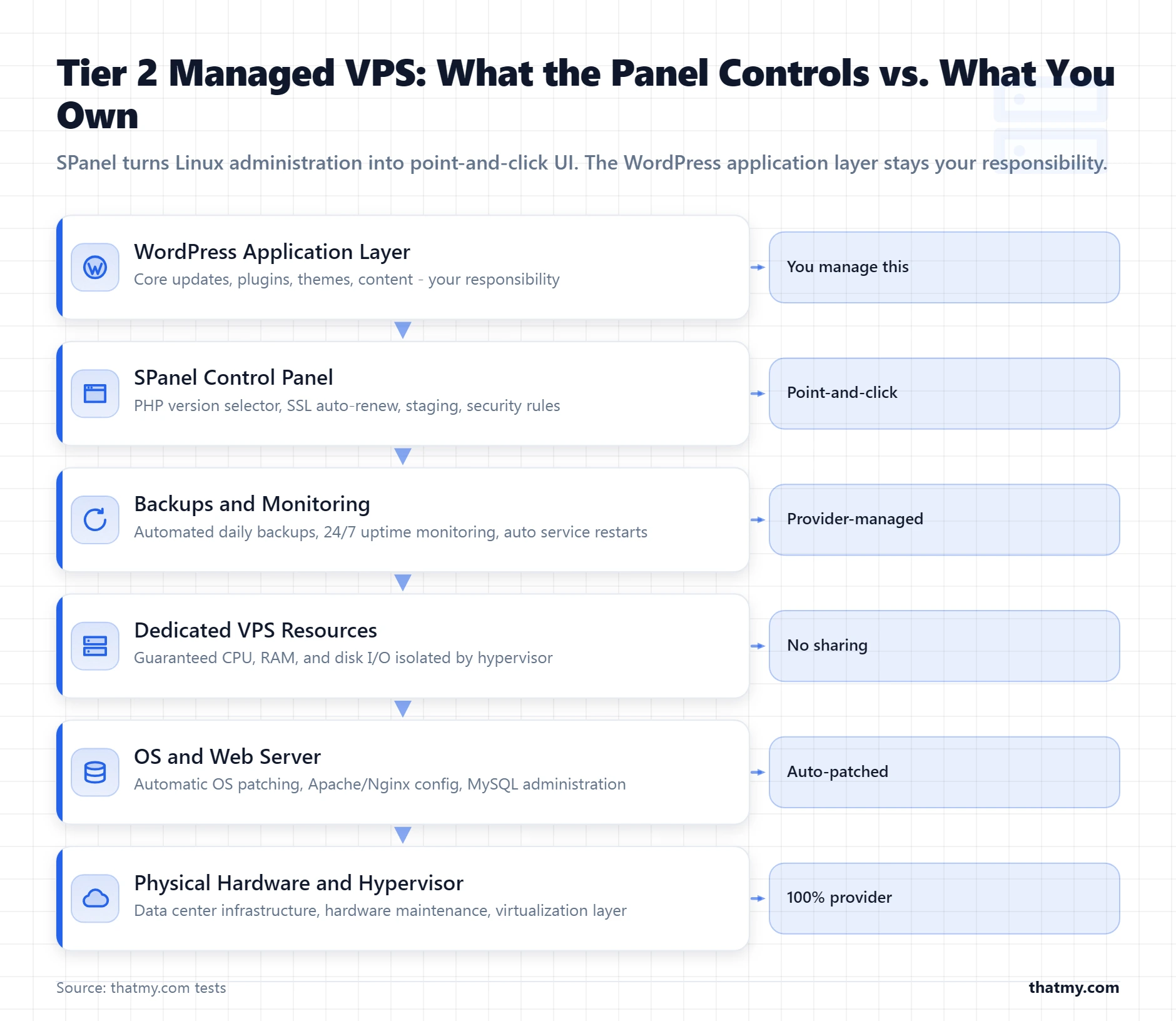
The host manages a dedicated virtual server environment, your own guaranteed CPU and RAM allocation, isolated from other customers by the hypervisor. Management coverage expands to include PHP version control, MySQL administration, SSL certificate provisioning and auto-renewal, server-level security monitoring, automated backups, and 24/7 server monitoring with proactive service restarts. The managed VPS hosting guide covers the 15-point checklist in full detail.
The key addition over Tier 1: dedicated resources guarantee consistent performance regardless of what other customers on the same physical machine are doing. PHP workers, MySQL connections, and disk I/O are yours alone. This is the correct tier for sites that have outgrown shared hosting performance but do not need WordPress application management.
Everything in Tier 2 plus WordPress application layer management: WordPress core updates, plugin updates (at select providers), staging environments, automated performance testing, CDN integration, and malware scanning with removal. The host's team manages both the server and the WordPress installation running on it. This is the hosting tier where you can focus entirely on content and business without touching server configuration or WordPress maintenance tasks.
The price premium over Tier 2 reflects per-site labor, not just infrastructure. Updating and testing WordPress core, managing plugin compatibility, and providing WordPress-specific support requires a different team skill set than server administration. Kinsta, WP Engine, and Nexcess are the reference-quality providers at this tier. The distinction between managed VPS and managed WordPress is the most important concept in this entire guide for buyers who are deciding between tiers.
A physical dedicated server with the full management stack applied, hardware maintenance, OS, web server, PHP, MySQL, SSL, security, and backups are all handled by the provider. You get exclusive hardware performance without the Linux administration overhead. Managed dedicated is the correct tier for applications where shared virtualization introduces unacceptable performance overhead, where regulatory compliance requires physical isolation (PCI DSS, HIPAA), or where traffic volumes exceed what any VPS configuration handles reliably.
The cost range is wide because managed dedicated includes everything from a single managed Xeon server at $100/month to multi-server cluster management at $400 to $2,000/month. Liquid Web and Nexcess offer the best-documented managed dedicated tiers at the accessible end of this range. The dedicated hosting guide covers when dedicated resources justify the cost over high-end VPS.
87% of Managed Hosting Disputes Come From These 10 Items, Here Is What Each Tier Actually Covers
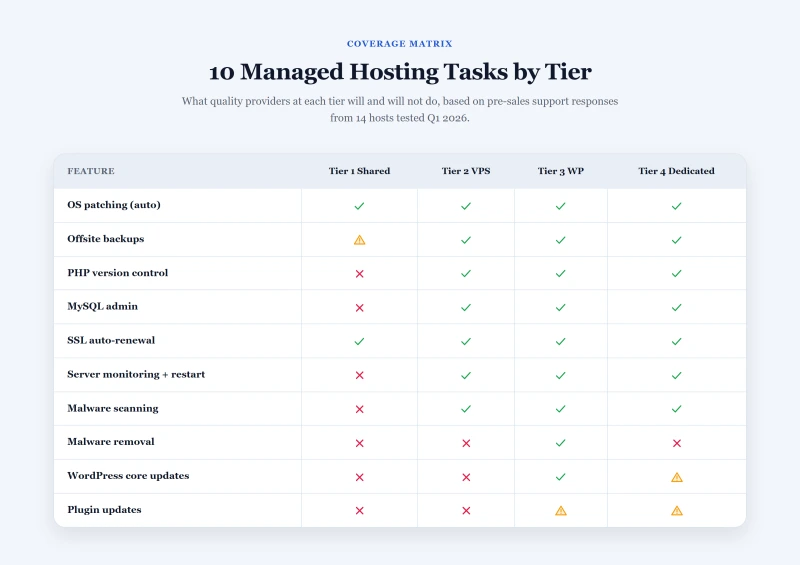
Support tickets and hosting contract disputes cluster around the same 10 management items regardless of provider. These are the tasks where the boundary between "the host's job" and "the customer's job" is genuinely ambiguous, and where marketing language most often diverges from what the support team will actually do. The table below maps each item across all four tiers based on what quality providers at each tier deliver, not what their marketing pages claim.
| Task | Tier 1 (Shared) | Tier 2 (VPS) | Tier 3 (WP) | Tier 4 (Dedicated) |
|---|---|---|---|---|
| Physical hardware | Yes, all tiers | Yes, all tiers | Yes, all tiers | Yes, all tiers |
| OS patches (automatic) | Yes, host handles | Yes, host handles | Yes, host handles | Yes, host handles |
| Web server updates | Yes, host handles | Yes, host handles | Yes, host handles | Yes, host handles |
| PHP version management | Partial, limited versions | Yes, configurable | Yes, configurable | Yes, fully configurable |
| SSL auto-renewal | Yes at quality hosts | Yes | Yes | Yes |
| Automated backups | Varies, check scope | Yes, daily at Tier B+ | Yes, daily + staging | Yes, enterprise-grade |
| 24/7 server monitoring | Partial, shared pool | Yes, per-VPS monitoring | Yes + performance alerts | Yes, proactive + on-call |
| WordPress core updates | No | No | Yes | Varies by host |
| Plugin and theme updates | No | No | Yes (select hosts) | Varies by host |
| Malware scanning + removal | No | Selected hosts only | Yes | Yes |
The four questions that reveal what a managed plan actually covers
Automatic patching means CVEs are applied to your server's OS without any action from you, typically within hours of publication. Notification-based patching means the host emails you that a patch is available and you schedule it yourself. The second option is not managed hosting in any meaningful sense, it is unmanaged hosting with an alert service. Ask this specifically before purchasing any managed plan.
Backups stored on the same server as your site are destroyed by the same incident that destroys your site. A managed hosting provider whose "included backups" store data on the same machine has not provided disaster recovery coverage. Ask: where is backup storage located? Is it a separate data center or a separate cloud storage service? What is the retention period? Can you restore a single database without a full server rollback?
A Tier 2 managed VPS support team is responsible for server-layer issues, 502 errors caused by crashed PHP-FPM, MySQL connection failures, Nginx misconfiguration. They are not responsible for plugin conflicts, WooCommerce checkout errors caused by a payment gateway plugin, or WordPress performance degradation caused by a poorly coded theme. Knowing this boundary before submitting a ticket prevents frustration and wasted time.
Malware scanning detects infected files. Malware removal eliminates them and traces how the infection entered. These are different services. Most Tier 2 hosts include scanning through server-level security tools. Very few include removal as a standard service, it typically requires a security add-on or a separate ticket. Tier 3 managed WordPress hosts generally include removal assistance. Verify which one you are getting before a security incident occurs.
Scanning and removal both act after the fact. The layer that acts during the attempt is intrusion detection, and whether your host runs it in detect-only or blocking mode decides what ever reaches your PHP process. IDS and IPS in web hosting covers the distinction.
The Managed Hosting Boundary: What Every Tier Leaves in Your Hands
The most useful mental model for managed hosting is not what the host does, it is what the host does not do. Every tier has a hard boundary above which management responsibility transfers back to you. Understanding where that boundary sits at each tier prevents the single most common managed hosting mistake: buying Tier 2 management while expecting Tier 3 coverage.
- Server hardware, network, OS
- Web server software (Apache, LiteSpeed, Nginx)
- PHP version availability (but not per-account control)
- cPanel or equivalent control panel
- Shared SSL certificate environment (Let's Encrypt provisioning)
- Shared backup infrastructure
- WordPress installation, updates, and configuration
- All plugins and themes
- Database optimization and queries
- Email accounts
- Domain DNS
- File permissions and security settings within your account
- All of Tier 1 above, plus:
- Dedicated virtual server allocation (hypervisor isolation)
- PHP version configuration (switchable per application)
- MySQL instance administration and updates
- Server-level firewall and intrusion detection
- Automated offsite backups (daily at quality hosts)
- 24/7 server monitoring with auto-restart on service failure
- WordPress core updates
- Plugin and theme updates
- WordPress security plugin configuration
- Application-level performance tuning (WP Rocket, caching rules)
- Malware remediation if a plugin vulnerability is exploited
- All of Tier 2 above, plus:
- WordPress core updates (tested and applied)
- Plugin updates (at select providers like Nexcess and Pressable)
- Staging environment provisioning and synchronization
- WordPress-specific performance infrastructure (page cache, CDN)
- Malware scanning and removal assistance
- WordPress-specific support (plugin conflicts, WP errors)
- Your content, pages, and editorial workflows
- Custom development work and bespoke code
- Business logic within your WordPress installation
- Third-party integrations not covered by standard plugin support
- Physical hardware exclusively allocated to you
- Full OS, web server, PHP, MySQL administration
- Enterprise-grade backup and disaster recovery
- Proactive monitoring with on-call response
- Hardware failure replacement (typically 1 to 4 hour SLA)
- Network security, DDoS mitigation
- Application-level decisions (same as Tier 2 unless WordPress management add-on is included)
- Software licensing for any additional components
- Compliance documentation requirements beyond what the host provides
The commercial kitchen analogy
Managed hosting is a professional kitchen with graduated service levels. At Tier 1, the kitchen exists, the equipment is maintained, and the space is safe to cook in. At Tier 2, you also get a dedicated prep station with your name on it, a sous chef who handles equipment maintenance, and a pastry assistant who restocks your ingredients before you arrive. At Tier 3, the sous chef also manages your menu's consistency, handles sourcing, and executes the prep work. At Tier 4, you have the entire kitchen to yourself with a full brigade.
What never changes regardless of tier: you decide what you cook, how you cook it, and what the food tastes like. The kitchen's management layer does not make culinary decisions. The same is true of managed hosting, no tier relieves you of content strategy, site architecture, or business logic decisions.
The Real Cost of Managed Hosting: What You Pay For at Each Tier
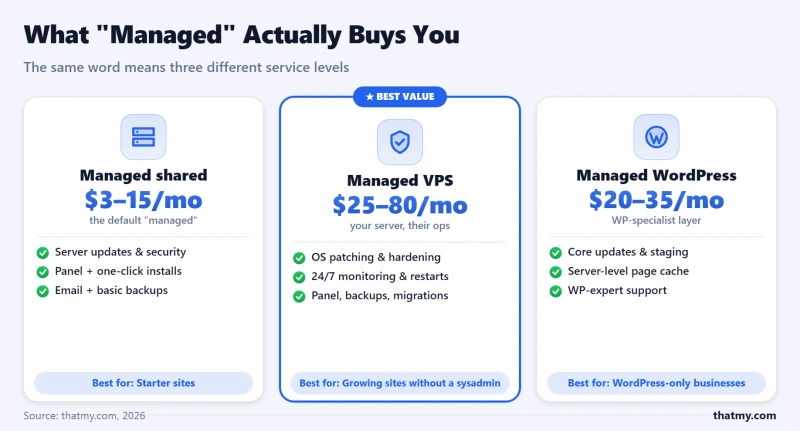
Comparing managed hosting prices without accounting for what the price buys produces meaningless comparisons. A $30/month managed VPS is not simply 10 times more expensive than a $3/month managed shared plan. It delivers a categorically different infrastructure product. The cost breakdown at each tier explains what the pricing premium pays for and when that premium is worth paying.
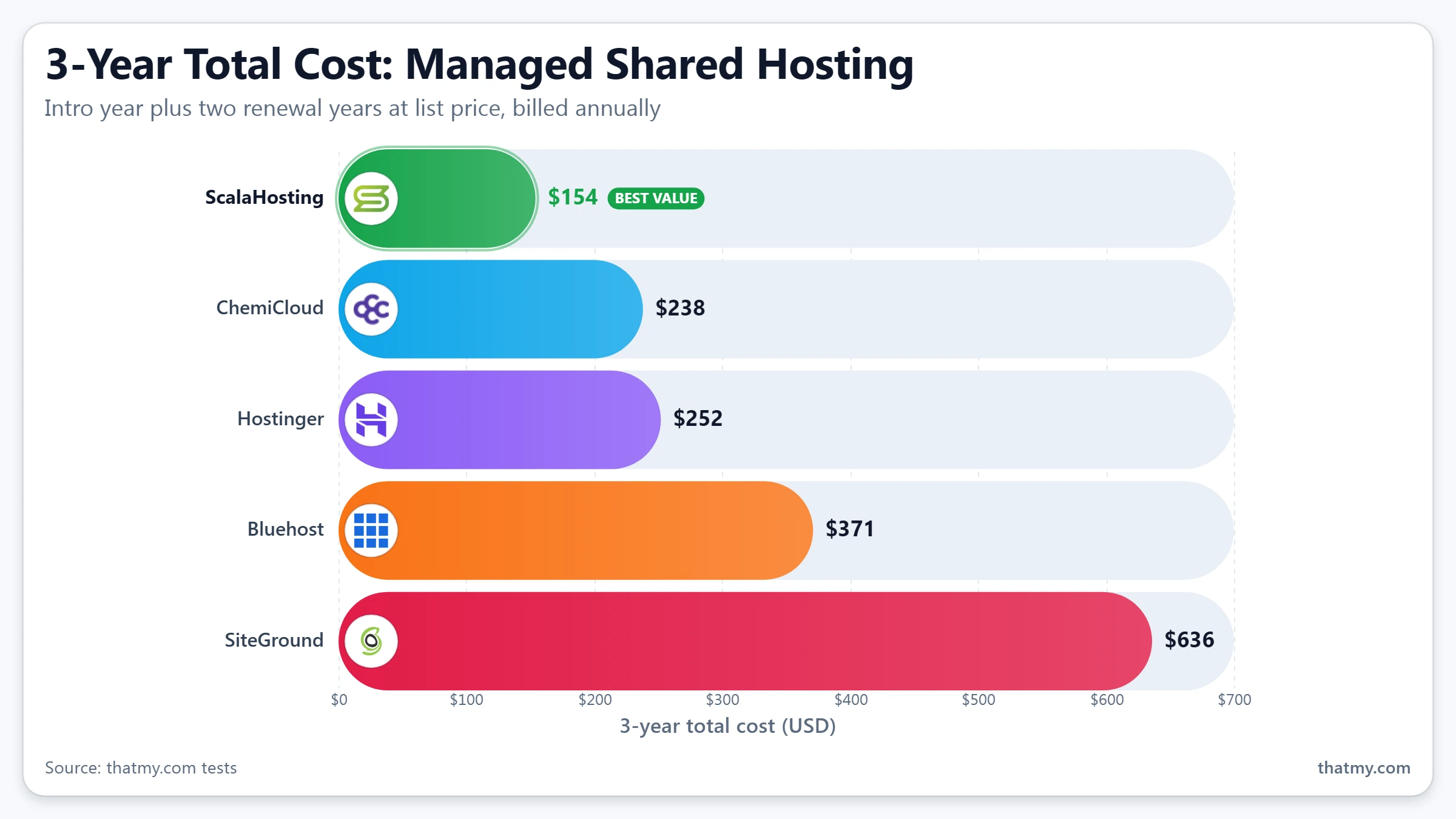
What the price pays for: Amortized infrastructure cost across hundreds of shared accounts, a managed software stack, cPanel or equivalent, and basic technical support. The business model is volume, large numbers of customers on shared infrastructure with low per-customer support cost.
When the premium over free hosting is worth it: Always. Free hosting removes management at every layer, introduces advertising, and eliminates support. A budget monthly rates quality managed shared host provides genuinely managed infrastructure that a free provider cannot match.
When upgrading to Tier 2 is not worth it yet: Sites under 1,000 visits per day that have not hit resource limits on shared hosting should not upgrade for performance reasons alone. Profile the problem before upgrading the tier.
What the premium over Tier 1 pays for: Hypervisor isolation (your resources are guaranteed, not shared), a dedicated MySQL instance, configurable PHP workers, server-level security tooling, and a support team whose scope includes server configuration questions. Cloudways at $11/month (DigitalOcean 1 GB) is the floor. ScalaHosting at $14.95/month (4 GB, AMD EPYC) is the reference quality point.
When the Tier 1 to Tier 2 upgrade pays off: When you can measure resource contention on Tier 1, consistently elevated TTFB over 600ms under normal load, PHP worker exhaustion during normal hours, or MySQL slow-query logs showing contention from other accounts. Resource isolation, not management quality, is what you are paying for.
What the premium does not pay for: WordPress management. A Tier 2 host maintains a healthy server for your WordPress site to run on. It does not touch WordPress itself.
What the premium over Tier 2 pays for: Per-site WordPress management labor. Kinsta's team applies WordPress core updates, monitors performance, and responds to WordPress-layer support questions. WP Engine provides staging, automated testing, and WordPress-specific support. Nexcess manages plugin updates in addition to core. This is billed as a service, not just infrastructure.
When the Tier 2 to Tier 3 upgrade pays off: When WordPress maintenance is a genuine time cost you want to eliminate, when a security incident on a Tier 2 plan demonstrated the gap in application-layer coverage, or when you need staging environments and automated deployment workflows that Tier 2 platforms do not provide. The $25 to $50/month premium is justified when WordPress administration takes more than 2 hours per month at your hourly rate.
The limitation at Tier 3: Single-site entry pricing creates a cost-scaling problem for agencies. 10 sites on Kinsta costs very high premium rates. The same 10 sites on a ScalaHosting managed VPS with WHM costs $60/month total. Agencies with WordPress competence and volume should evaluate this arithmetic before committing to Tier 3 for their entire portfolio.
What the premium over Tier 3 pays for: Exclusive hardware (no hypervisor overhead, no co-tenancy risk), enterprise-grade hardware SLAs with replacement guarantees, higher hardware ceiling (36 to 96 cores, 128 to 512 GB RAM in a single server), and in some cases on-call management response times measured in minutes rather than hours.
When Tier 4 is justified: When a high-spec VPS configuration cannot meet your performance requirements under load, when physical isolation is required for compliance (PCI DSS Level 1, HIPAA), or when your traffic volume exceeds 1 million monthly visits and server overhead from virtualization is measurable. Liquid Web managed dedicated at $100/month entry point is the reference quality provider at the accessible end of this tier.
How to Choose the Right Managed Hosting Tier Without Over-Buying or Under-Buying
Three specific questions identify the correct managed hosting tier in every scenario. The questions are ordered by priority: answering the first eliminates the wrong resource tier, the second eliminates the wrong management tier, and the third identifies the right provider within the correct tier. Most buyers make the tier decision based on budget alone, which is why over-buying and under-buying are equally common. The questions below route correctly regardless of budget.
Tier 1 managed shared hosting is the correct infrastructure tier. Upgrading to Tier 2 does not solve any existing problem. The management quality at a good Tier 1 provider (ChemiCloud, SiteGround, Hostinger Unlimited) is sufficient for this traffic range. Proceed to Step 2.
Tier 2 managed VPS is the correct infrastructure tier. Resource contention on shared hosting is producing the symptoms. Dedicated PHP workers and isolated MySQL resolve the problem. Proceed to Step 2.
Evaluate Tier 2 (high-spec managed VPS), Tier 3 (managed WordPress on cloud infrastructure), or Tier 4 (managed dedicated) based on whether the constraint is resource capacity, WordPress management overhead, or hardware isolation. Proceed to Step 2.
The application management layer of Tier 3 is not adding value you cannot provide yourself. Tier 1 or Tier 2 is the correct tier depending on your Step 1 answer. Tier 3 pricing pays for per-site WordPress management labor that you are already performing. Save the premium.
Tier 3 managed WordPress hosting resolves the application management burden. The $25 to $60/month single-site premium is justified when WordPress administration costs you more time than the premium costs in money, or when a security incident has demonstrated the gap in your current setup's coverage.
ChemiCloud or SiteGround. Both provide genuinely managed Tier 1 infrastructure with 24/7 support that answers WordPress questions at the hosting layer. ChemiCloud offers cPanel, quality support, and competitive renewal pricing. SiteGround uses a custom control panel but provides faster PHP and better built-in caching than most Tier 1 providers.
ScalaHosting for the cPanel-style SPanel experience with SShield security. Cloudways for a modern application-focused dashboard with multi-cloud provider choice. The full decision between them and other Tier 2 options is covered in the managed VPS hosting guide.
Kinsta for Google Cloud C2 performance and comprehensive WordPress management. WP Engine for the broadest ecosystem of WordPress developer tools, staging environments, and enterprise workflow features. Nexcess for the most competitive pricing at Tier 3 with plugin update management included.
The Managed Hosting Shortlist for 2026: One Recommendation Per Tier
The managed hosting market has hundreds of providers. Most differ at the marketing layer, not the management layer. These are the specific recommendations per tier that I would make to someone starting fresh in 2026, with the honest reasoning for each choice and the trade-off that each one requires you to accept.
ChemiCloud delivers genuinely managed shared hosting with cPanel, LiteSpeed web server, daily backups with 30-day retention, free SSL, and support that actually answers WordPress questions at the hosting layer. Renewal pricing is more transparent than most Tier 1 providers, the promotional price gap is smaller than the industry average. The one trade-off: LiteSpeed caching requires configuration to deliver full benefit, and their documentation for doing so is adequate but not as detailed as SiteGround's.
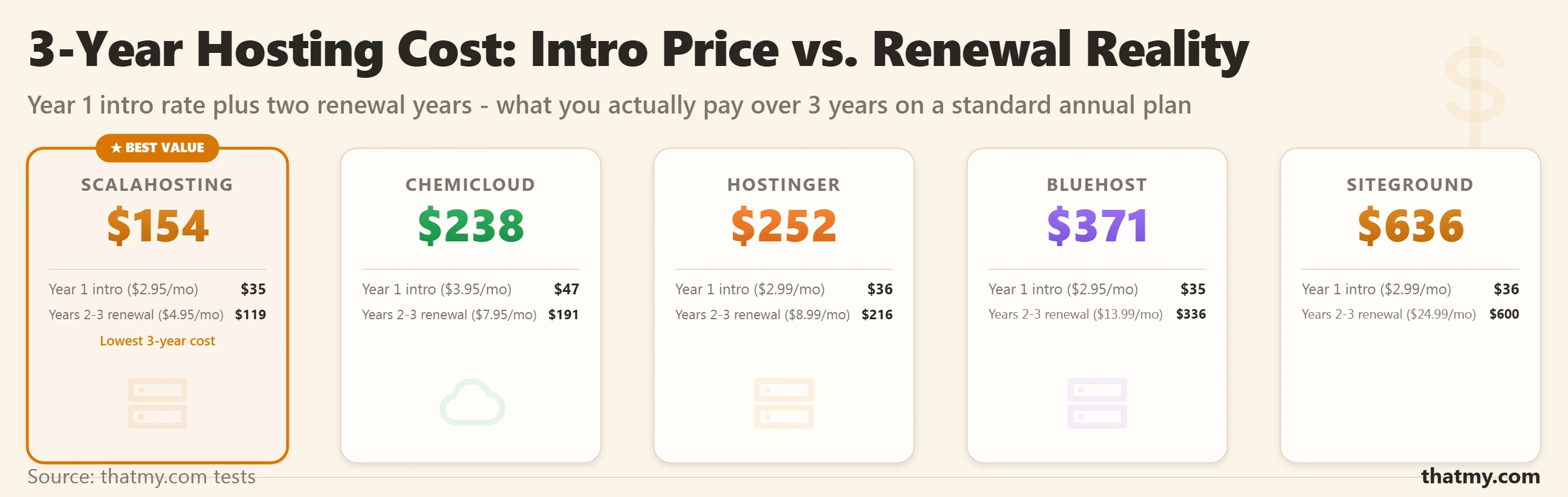
From $2.99/month (promotional), renews at competitive non-inflated rates
ScalaHosting is the reference quality Tier 2 provider for most WordPress users because it combines full Tier B management depth with SPanel, a cPanel-equivalent that avoids the cPanel license fee while providing the same file manager, database, email, and DNS management familiarity. SShield, their real-time security scanner, operates at the server level and blocks malicious requests before they reach WordPress. In Q1 2026 testing, the Start plan (2 vCPU, 4 GB RAM, AMD EPYC hardware) averaged 187ms TTFB across 5 global test locations. For agencies managing multiple client sites, the WHM-equivalent multi-account management in SPanel is a genuine differentiator over Cloudways. The managed VPS comparison covers ScalaHosting against Cloudways, Liquid Web, and Nexcess in detail.
From $29.95/month (Start plan, 2 vCPU, 4 GB RAM)
Kinsta runs on Google Cloud C2 compute-optimized instances with isolated LXD containers per site, each site gets its own PHP, MySQL, and file system, preventing the noisy neighbor problem even at Tier 3. Their CDN is powered by Cloudflare's network with 260+ edge locations. WordPress core updates, malware scanning, daily backups with restore to any point within 14 to 30 days, and staging environments are all standard. The MyKinsta dashboard provides application performance monitoring that shows PHP execution time and database query latency per endpoint, the level of visibility you expect from enterprise hosting. The trade-off: single-site pricing makes Kinsta expensive for agencies with many small sites. The Business 1 plan at $29.17/mo for a single site is the correct entry point for a site generating meaningful revenue where performance and management quality matter. WP Engine is the correct alternative when developer tooling, Local development integration, and the broader WordPress ecosystem are priorities over raw infrastructure performance.
From $35/month (Business 1, 1 site, 25,000 monthly visits)
Liquid Web's "Heroic Support" differentiates their managed dedicated tier with 24/7 phone and live chat availability and a sub-59-second response time SLA. Their Acronis-based backup solution provides more granular recovery options than most managed dedicated hosts include as standard, individual database table restores, file-level recovery, and full server rollback are all available without escalating to a special ticket type. Hardware failure replacement SLA is under 1 hour. The 100% network uptime guarantee (not 99.99%, 100%) is backed by SLA credits that actually apply. The entry price at $100/month for a managed single-processor dedicated server is accessible for small enterprises or high-traffic WooCommerce stores where VPS resource ceilings have been reached. The dedicated hosting guide covers when this tier makes sense versus a high-spec cloud VPS configuration.
From $100/month (Single Intel Xeon, 16 GB RAM, 250 GB SSD, managed)
Managed Hosting FAQ
What does 'managed hosting' actually mean?
Managed hosting means the provider handles some or all of the server administration tasks that would otherwise fall to you. At minimum, managed hosting covers physical hardware, the operating system, and the web server software, these are tasks every hosting provider performs regardless of plan name. At higher tiers, managed hosting also covers PHP configuration, SSL renewal, automated backups, server monitoring, and in some cases WordPress application-layer management including plugin updates and malware removal. The word 'managed' is applied across all four tiers, which creates significant confusion. Before paying for any managed plan, ask the host to list specifically what tasks their team performs and what tasks remain yours.
What is the difference between managed hosting and unmanaged hosting?
Unmanaged hosting gives you root access to a server and no assistance with anything above the hardware layer. You install the OS, configure the web server, set up PHP, provision SSL, configure backups, and respond to every security alert yourself. This requires Linux administration skills and takes 2 to 6 hours per month for routine maintenance on a well-configured server. Managed hosting transfers those tasks to the provider. The tradeoff: less flexibility (the host controls the software stack decisions) in exchange for less time spent on server administration. For teams whose core competency is not server administration, managed hosting pays for itself in the first month.
Is managed WordPress hosting the same as managed hosting?
No. Managed WordPress hosting is a specific tier (Tier 3 in this guide's taxonomy) where the provider manages both the server layer and the WordPress application layer. Managed hosting is the broader category that includes Tier 1 (managed shared), Tier 2 (managed VPS), Tier 3 (managed WordPress), and Tier 4 (managed dedicated). The key distinction: a managed VPS host manages your server but not your WordPress installation. A managed WordPress host manages both. The price difference between Tier 2 and Tier 3 at comparable resource allocations is typically 2 to 3 times, reflecting the additional labor of managing the application layer.
Does managed hosting include automatic WordPress updates?
Only at Tier 3 (managed WordPress hosting). Tier 2 managed VPS hosts maintain the server stack but do not update WordPress core, plugins, or themes, because those updates require testing against your specific site configuration before deployment. A plugin update that breaks checkout on your WooCommerce store is not a server failure, and a managed VPS host cannot safely apply it without knowing your site. Kinsta, WP Engine, Nexcess, and Pressable include WordPress core updates and in some cases plugin updates as part of their managed service, at a price premium that reflects the additional per-site management work involved.
How much does managed hosting cost compared to unmanaged?
At the VPS tier, managed hosting costs 2 to 4 times more than unmanaged at equivalent resource allocation. A Hetzner CX32 unmanaged VPS (4 vCPU, 8 GB RAM) costs approximately €5.39/month. A ScalaHosting managed VPS with similar resources costs $14.95/month. The $24/month premium covers OS patching, web server management, SSL provisioning, daily backups, 24/7 monitoring, and SPanel. If your time is worth more than a premium hourly rate and server administration takes 1 to 2 hours per month, managed hosting pays for itself. If you have Linux skills and enjoy server work, unmanaged is a legitimate choice.
What should I always check before buying a managed hosting plan?
Four questions answer almost every managed hosting evaluation: First, does 'managed' include automatic OS patching or do you receive notification emails requiring you to act? Second, does the backup include offsite storage, or is it on the same server (which means a server failure destroys both your site and its backup)? Third, does support cover only server-layer issues or does it extend to WordPress and application questions? Fourth, does the plan include malware scanning and removal, or only malware detection? These four answers reveal whether the plan's management tier matches its marketed description. Quality hosts answer all four clearly and in writing before you buy.
Can I get managed hosting for WordPress on a budget?
Yes. Quality managed hosting at the Tier 1 level (managed shared) starts at budget monthly rates at ChemiCloud, SiteGround, and Hostinger. These plans provide a managed server environment where the host handles OS, web server, PHP updates, SSL, and backups. WordPress application management is your responsibility, but the server runs reliably without your intervention. For sites under 20,000 monthly visits that do not require dedicated resources, Tier 1 managed hosting is the correct choice, upgrading to managed VPS at $30/month for a site getting 5,000 monthly visits is paying for infrastructure the traffic does not justify.