
What Is Dedicated Hosting? Server Hardware, Architecture, and Real Total Cost


Dedicated hosting is the end of the shared-resource compromise. No hypervisor, no neighboring accounts, no throttling mechanism protecting someone else's performance at the cost of yours. You get a physical machine, one customer per server. That simplicity is the product. This guide explains what is actually inside that server, when the performance justification is real versus marketing, and what managed dedicated hosting covers that a bare-metal lease does not.
After testing dedicated server configurations at Hetzner, Liquid Web, and OVHcloud in Q1 2026, running identical WordPress, database, and API workloads at 100, 200, and 500 concurrent users, the performance difference versus managed VPS becomes clear only above 100 simultaneous uncached requests. Below that threshold, a well-configured managed VPS with Redis matches dedicated for most workloads. Above it, dedicated hardware earns its cost premium in measurable ways.
What You Actually Get With a Dedicated Server (Beyond the Marketing Brochure)
Dedicated hosting ads show powerful hardware and make claims about "maximum performance." The more useful framing is what changes structurally when you move from VPS to dedicated, and specifically what those structural changes mean for your workload.
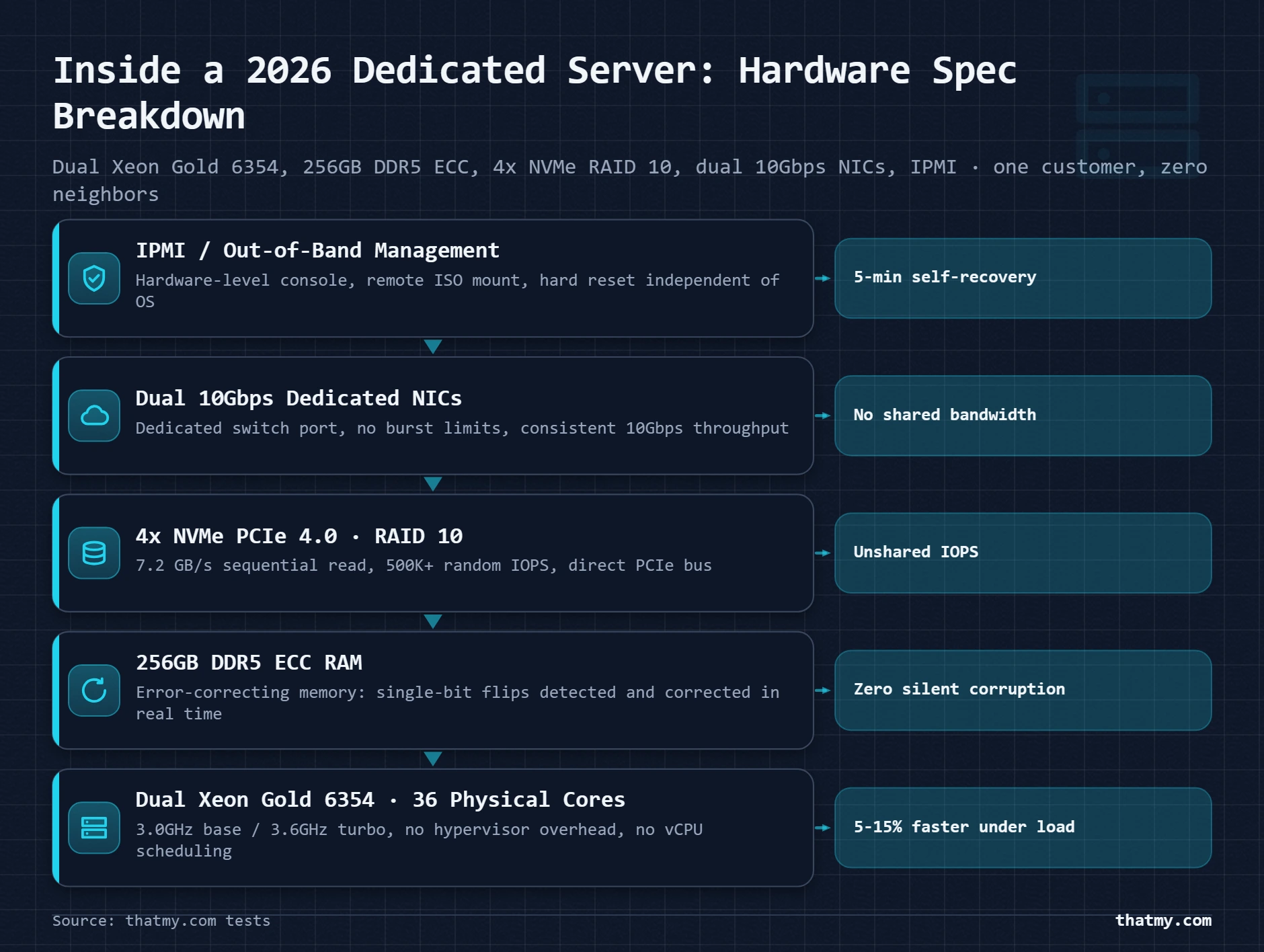
When you order a dedicated server, you receive sole tenancy on a physical 1U or 2U rack server in a data center. The provider manages the physical hardware, the network uplink, the power supply, and the data center facility. You manage everything on the operating system layer and above. The distinction matters: a dedicated server is a hardware lease, not a managed service. The hardware is exclusively yours. The software is entirely your responsibility unless you pay for managed dedicated, a different, more expensive product.
The five structural differences from VPS that actually matter
A VPS with 8 vCPUs receives 8 virtualized CPU allocations from a physical server with potentially 32 or 64 cores shared among 8 to 20 VPS instances. The hypervisor schedules which physical core serves your vCPU at any given microsecond. This scheduling overhead is typically 5 to 15% CPU performance reduction for compute-intensive workloads. On a dedicated server, your 36 physical cores run exclusively for you, no scheduling contention, no overhead from neighboring VM activity. For PHP-FPM pools, MySQL InnoDB buffer pool management, and real-time applications, physical core access is measurably faster under sustained load.
ECC (Error-Correcting Code) RAM detects and corrects single-bit memory errors in real time. Non-ECC RAM, used in most consumer hardware and many VPS environments, lets bit flips propagate, causing database corruption, PHP crashes, or kernel panics. ECC matters most for databases: a single bit flip in a B-tree index in memory can silently corrupt data that then gets written to disk. Enterprise dedicated servers universally use ECC RAM. Most VPS providers either use non-ECC RAM or do not disclose the type. If your workload is a production database with data that cannot be corrupted, ECC RAM is not optional, it is the reason to use dedicated over VPS.
On most VPS providers, virtual disk storage connects to a shared SAN (Storage Area Network) or distributed storage pool. Multiple VMs share the underlying disk throughput, with the provider's hypervisor managing I/O contention. On a dedicated server, your NVMe drives connect directly to your server's PCIe bus. Four NVMe PCIe 4.0 drives in RAID 10 deliver 7+ GB/s sequential read and 500,000+ random IOPS. No other server shares those drives. For MySQL workloads with large datasets, this raw IOPS advantage is the most significant hardware difference, database query time depends heavily on how fast random page reads from disk complete during cache misses.
VPS networking shares a physical network interface among multiple virtual machines. Providers implement burst limits and fair-use policies to prevent one VM from monopolizing the physical port. A dedicated server receives its own physical NIC connected to a dedicated switch port. A 10Gbps dedicated uplink delivers 10Gbps consistently, not "up to 10Gbps with burst." For content delivery, media hosting, and high-traffic applications where network throughput is the bottleneck, this dedicated port is the relevant capacity.
IPMI (Intelligent Platform Management Interface) or Dell's iDRAC provides a hardware-level management interface that operates independently of the operating system. If your OS crashes, panics, or becomes unreachable, IPMI lets you access a virtual console, mount a remote ISO, or hard-reset the server from any network location. VPS providers control this layer, you cannot access the underlying hardware management directly. For remote servers where you cannot physically visit the data center, IPMI is the safety net that turns an OS failure from a support ticket wait into a 5-minute self-service recovery.
The Hardware Inside a Dedicated Server: What the Specs Actually Mean
Hosting providers list dedicated server specs in ways that make comparison difficult unless you understand what the numbers mean for real workloads. Here is the translation for each spec category.
| Configuration | CPU | Cores/Threads | RAM | Storage | Network | Monthly Cost |
|---|---|---|---|---|---|---|
| Entry dedicated (2026) | Intel Xeon E-2388G | 8 cores / 16 threads | 64GB DDR4 ECC | 2x 480GB SATA SSD | 1Gbps | $80-$120/month |
| Mid-range dedicated | Intel Xeon Gold 5318Y | 24 cores / 48 threads | 128GB DDR4 ECC | 4x 960GB NVMe | 10Gbps | $200-$350/month |
| High-end dedicated | Dual Intel Xeon Gold 6354 | 36 cores / 72 threads | 256GB DDR5 ECC | 4x 3.84TB NVMe RAID 10 | 2x 10Gbps | $400-$700/month |
| AMD EPYC option | AMD EPYC 9354P | 32 cores / 64 threads | 256GB DDR5 ECC | 4x 1.92TB NVMe | 10Gbps | $250-$450/month |
CPU: what clock speed and core count actually tell you
CPU selection for a dedicated server depends on your workload type more than the raw core count. PHP-FPM (the process manager running WordPress PHP) spawns one worker process per concurrent request. More cores means more concurrent PHP workers without CPU contention. A 36-core server runs 36 simultaneous PHP requests with dedicated core access. MySQL query execution is primarily single-threaded per query, a database server benefits more from high single-thread clock speed than total core count. A 4-core CPU at 4.0GHz processes individual MySQL queries faster than a 36-core CPU at 2.4GHz.
RAM: ECC, speed, and the buffer pool calculation
RAM on a dedicated server serves three workloads simultaneously: the OS kernel (~2GB), your application processes (PHP-FPM workers consuming 50 to 150MB each), and MySQL's InnoDB buffer pool (the most important allocation). The buffer pool is the portion of RAM MySQL uses to cache table data and indexes. When the buffer pool holds your entire "hot dataset" (the tables and rows accessed most frequently), MySQL queries hit memory at nanosecond speed. When the hot dataset exceeds the buffer pool, MySQL reads from disk, even NVMe disk, at microsecond speed. The difference is 1,000x.
RAID Configurations: The Storage Decision You Cannot Change After Provisioning
RAID configuration is chosen at server provisioning and cannot be changed without data migration or full system wipe. Getting this wrong means either accepting data loss risk (no redundancy) or significant storage underutilization (RAID 1 on 4 drives wastes half your capacity). Most providers do not explain the tradeoffs clearly because the decision is made before the customer has used the server.
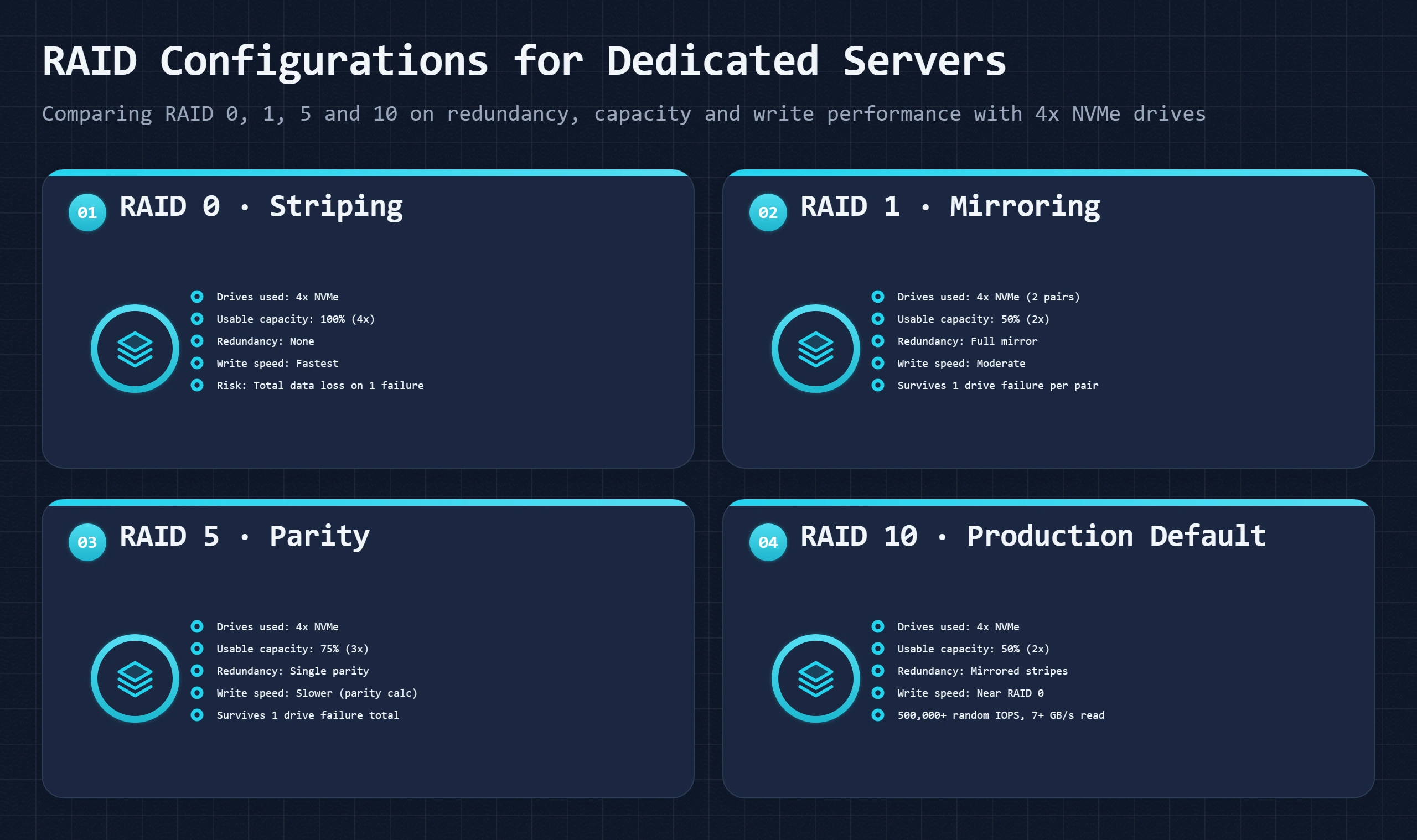
One drive fails, everything is gone. Appropriate only for temporary scratch space, dev environments with no persistent data, or rendering farms where speed matters more than durability. Never use RAID 0 for a production database.
Both drives contain identical data. One drive fails and the system keeps running on the mirror. Write operations go to both drives simultaneously, write speed is limited by the slower drive. Good for OS drives and critical boot volumes. Wastes half your storage on 2-drive configs.
Stripes data across all drives with a parity block distributed across them. Survives one drive failure. The critical flaw: during a drive rebuild (which takes hours to days on large drives), a second drive failure destroys all data. RAID 5 has a rebuild vulnerability that is unacceptable for NVMe drives where rebuild times can exceed 24 hours.
Pairs of mirrored drives striped together. Four 3.84TB NVMe drives in RAID 10 give you 7.68TB usable, survive one failure per mirror pair, and deliver full stripe write performance. Rebuild is fast (only the mirrored pair needs rebuilding, not a full parity recalculation). This is the correct choice for production database servers and any workload where write performance and redundancy are both required.
Managed vs Unmanaged Dedicated Hosting: What Each Tier Actually Covers
Most dedicated hosting is sold unmanaged. The provider owns and maintains the hardware. Everything above the BIOS is yours. This is the correct product for teams with Linux administration skills, you get full control and lower cost. For teams without those skills, unmanaged dedicated is a $120/month server you cannot fully use.
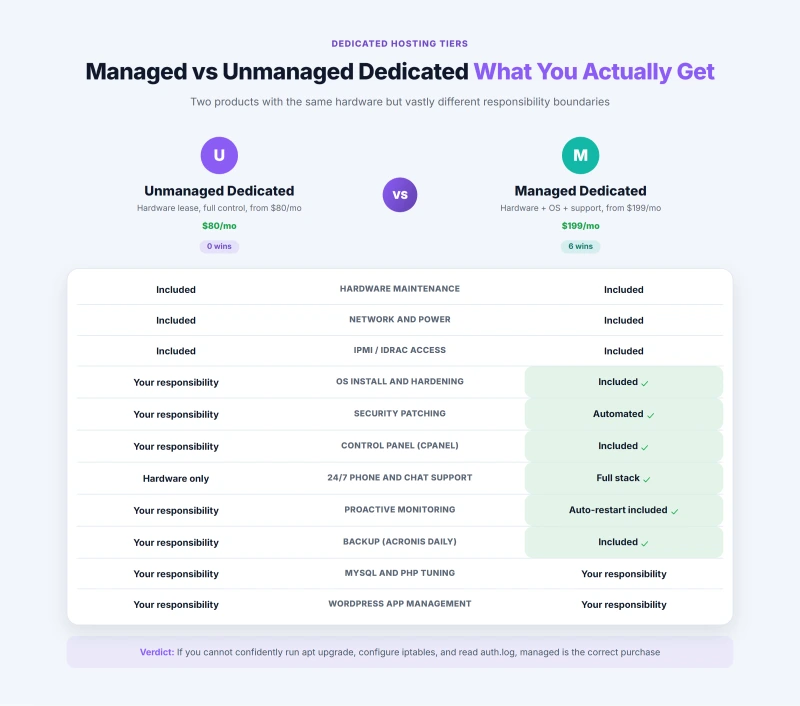
The management tier distinction matters more on dedicated than on VPS because the consequences of mismanagement are larger. On a $14/month managed VPS, a security misconfiguration at worst costs you one site. On a $120/month unmanaged dedicated server running 40 client sites, a misconfigured firewall or missed kernel patch costs you the accounts of 40 clients and exposes you to significant liability. If you cannot confidently run apt upgrade, configure iptables, and interpret tail -f /var/log/auth.log, managed dedicated is not optional, it is the correct purchase.
Dedicated vs VPS: Where the Performance Gap Is Real (and Where It Is Not)
The standard dedicated hosting pitch is "dedicated resources, maximum performance." The accurate version: dedicated outperforms VPS in specific, measurable scenarios at high concurrency and sustained load. At low-to-medium concurrency, the difference is smaller than the 3x to 5x price gap suggests. Knowing exactly where the performance difference materializes helps you decide whether the cost premium is justified.
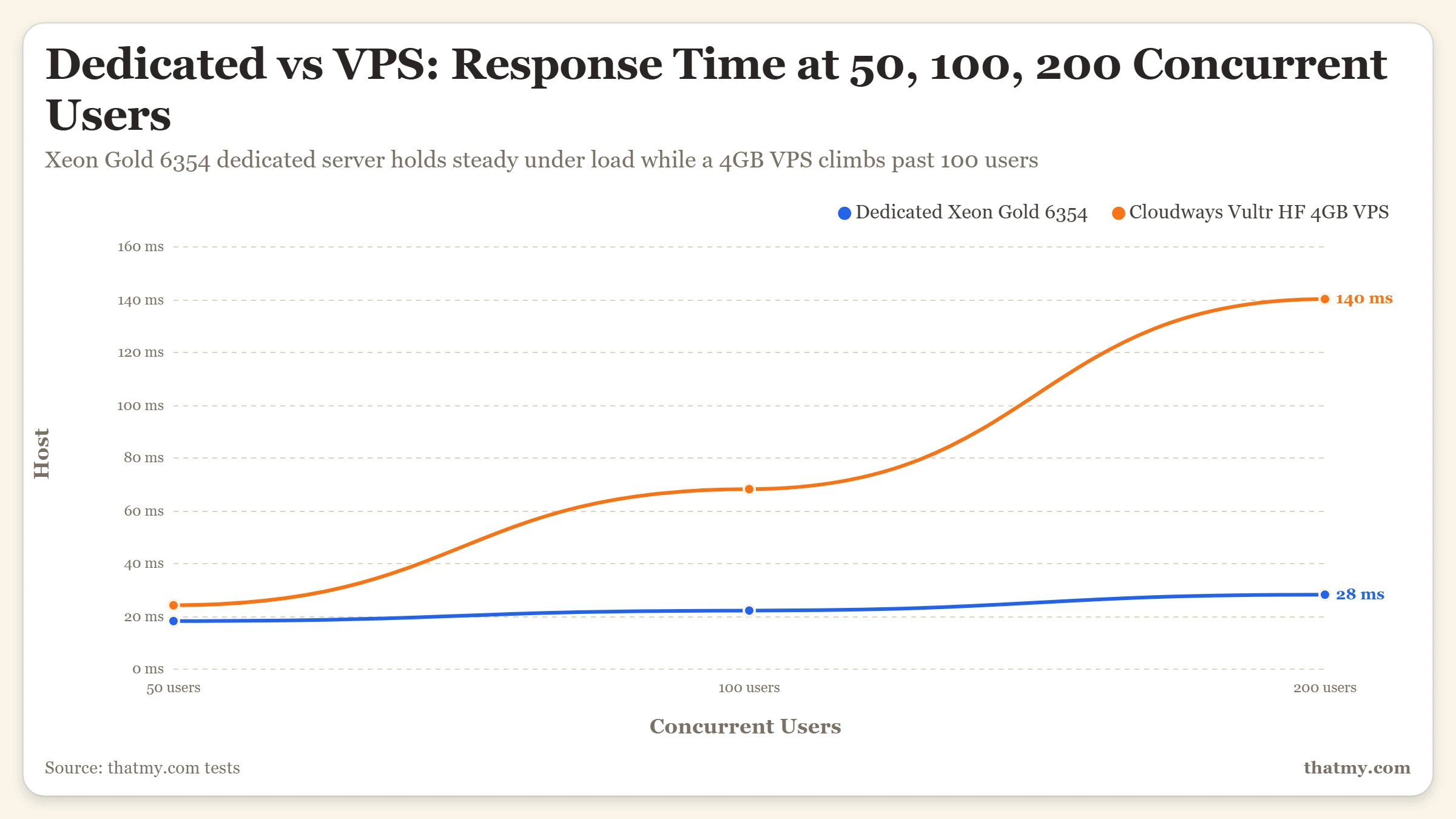
The concurrency curve
The data tells a specific story: below 50 concurrent users, dedicated hardware delivers a modest performance improvement that does not justify a 4x price premium for most use cases. Above 100 concurrent users, the gap becomes dramatic because the VPS PHP worker pool saturates and begins queuing while the dedicated server still has available physical cores to spawn new workers. The VPS is not slow, it is out of CPU capacity that the hypervisor cannot give it without taking from neighbors. The dedicated server still has 28 of its 36 cores available at 200 concurrent users.
| Dimension | Dedicated Server | Managed VPS |
|---|---|---|
| CPU access | Full physical cores, no vCPU overhead | vCPUs with hypervisor overhead (~5-15% penalty) |
| RAM type | ECC RAM, bit-flip error correction | Standard RAM, no ECC on most VPS |
| Storage isolation | Your drives, your I/O budget | Shared storage pool on most VPS providers |
| Network | Dedicated port, dedicated bandwidth | Shared network fabric with burst limits |
| Noisy neighbors | Zero, no other customers on hardware | Hypervisor-managed but still present |
| IPMI / iDRAC | Out-of-band management, reboot from anywhere | Not available, host controls hardware |
| Custom firmware | Possible, BIOS/UEFI access | Not possible |
| Entry price (2026) | $80-$120/month | $14-$50/month managed |
Dedicated vs Cloud: The Financial Crossover Point
Cloud infrastructure charges for what you use. Dedicated charges a flat monthly rate for fixed capacity. These pricing models produce a financial crossover point: below a certain utilization level, cloud is cheaper. Above it, dedicated is cheaper. Most organizations making this choice never run the actual calculation.
The financial rule of thumb: if your average server utilization is above 50% and your traffic pattern is predictable (not subject to sudden 10x spikes), dedicated hosting is cheaper than equivalent cloud capacity in almost every comparison. The cloud premium pays for flexibility. If you do not need the flexibility, you are paying for it regardless.
One dimension where cloud wins regardless of cost: geographic distribution. A dedicated server is in one data center. Cloud infrastructure deploys in 20+ regions with 300+ edge nodes. For a global application requiring sub-100ms latency from Tokyo, São Paulo, and London simultaneously, no dedicated server strategy matches cloud's geographic coverage without significant complexity.
Who Actually Needs Dedicated Hosting in 2026
Dedicated hosting is recommended by sales teams far more often than it is genuinely necessary. The market is real, but it is narrower than the marketing suggests. Here is the honest fitness assessment.
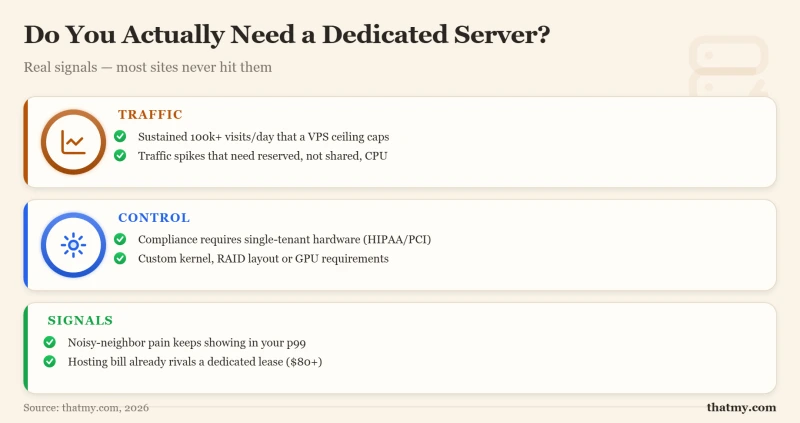
The Dedicated Hosting Shortlist: Four Providers, Honest Positioning
Dedicated hosting providers range from bare-metal commodity suppliers to fully managed enterprise platforms. These four represent the meaningful options in 2026, each positioned honestly.
Hetzner's AX and SX series offer AMD EPYC and Intel Xeon dedicated servers at prices that are 40 to 60% lower than equivalent US-based providers. An AX102 (24-core EPYC, 128GB ECC, 2x 3.84TB NVMe) at approximately €240/month in 2026 benchmarks comparably to configurations priced at $400+ from US providers. The tradeoff: data centers in Germany and Finland only. EU or international audiences are fine; US-exclusive audiences add 80 to 150ms latency from the European origin.
Hetzner is unmanaged. You install the OS from a rescue system, configure everything yourself, and receive hardware support for physical failures. No application-layer assistance. Right for teams with Linux competency who want maximum hardware at minimum cost.
Liquid Web's "Heroic Support" model delivers 24/7 phone and live chat support from staff who actually respond in under 59 seconds, a guarantee they back with credit refunds. Managed dedicated from Liquid Web includes OS management, Acronis-powered daily backups, server monitoring with automated restarts, cPanel or Plesk, and a 100% network uptime SLA. The premium is real: entry managed dedicated starts around $199/month versus $80/month for comparable unmanaged hardware elsewhere. For businesses where downtime has a direct revenue cost, the support tier justifies the 2.5x price premium over bare-metal alternatives.
OVHcloud operates data centers in North America (Beauharnois CA, Hillsboro OR, Vint Hill VA), Europe (Strasbourg, Roubaix, London), and APAC. This geographic breadth at competitive pricing makes OVHcloud the right choice for international applications where Hetzner's EU-only footprint is a constraint. Pricing sits 20 to 30% above Hetzner but 30 to 40% below US-based premium providers. Mostly unmanaged, with optional management add-ons available.
Leaseweb operates its own global network backbone and offers dedicated servers with unmetered bandwidth options, particularly relevant for media hosting, video streaming, and high-traffic content delivery. Their 10Gbps unmetered dedicated configurations are priced competitively for bandwidth-heavy workloads where other providers charge per-GB overages. Unmanaged by default with managed options available. Not the right choice for standard web hosting use cases, the bandwidth pricing advantage only materializes if you genuinely transfer tens of terabytes monthly.
Dedicated Hosting FAQ
What is dedicated hosting and how is it different from VPS?
Dedicated hosting gives you an entire physical server, every CPU core, every gigabyte of RAM, every storage drive belongs to your account exclusively. No hypervisor, no neighboring customers, no shared resources. VPS (Virtual Private Server) carves one physical server into multiple isolated virtual machines using a hypervisor layer. The practical difference: on dedicated hosting, a 32-core server gives you 32 real cores running at full clock speed with no virtualization overhead. On a VPS, 32 vCPUs are virtual allocations from a larger physical pool, sharing the hypervisor's scheduling overhead, typically a 5 to 15% CPU performance penalty depending on workload. For most sites, this difference is academic. For database-heavy workloads, high-frequency trading, scientific computing, or sustained 500+ concurrent user web applications, the performance difference justifies the 3x to 5x price premium.
What does ECC RAM mean and why does it matter on dedicated servers?
ECC (Error-Correcting Code) RAM detects and corrects single-bit memory errors in real time without crashing the server. Standard (non-ECC) RAM, used in most consumer hardware and many VPS environments, allows bit flips to propagate, a corrupted memory bit can cause silent data corruption in a running database, a PHP fatal error, or a kernel panic that takes the server down. ECC RAM adds approximately 2% performance overhead but eliminates an entire category of hardware-induced failures. All production dedicated servers use ECC RAM. Most VPS providers use standard RAM (or do not disclose the RAM type). For databases, financial applications, or any server where data integrity matters, ECC RAM is the hardware requirement that justifies dedicated hosting over VPS.
What RAID configuration should I use for a dedicated server?
RAID 10 is the production default for most dedicated server workloads in 2026. It combines striping (for write performance, sequential writes go to multiple drives simultaneously) with mirroring (for redundancy, each stripe has a mirror). On a 4-drive server, RAID 10 gives you 2x drive capacity, survives one drive failure per mirror pair, and delivers write IOPS roughly equal to RAID 0. RAID 5 (striping with parity) provides better storage utilization (75% of total capacity with 4 drives vs 50% for RAID 10) but has significantly worse write performance due to parity calculation overhead and a rebuild vulnerability, during a drive rebuild, a second drive failure loses all data. For NVMe drives where write speed matters for database workloads, RAID 10 always beats RAID 5. Choose RAID 5 only if storage capacity matters more than write performance and you have a robust off-server backup strategy.
Is dedicated hosting managed or unmanaged by default?
Most dedicated hosting is sold as unmanaged by default, the provider maintains the physical hardware, network, and data center infrastructure, but you are responsible for OS installation, security patches, web server configuration, and everything above the hardware layer. Managed dedicated hosting, offered by Liquid Web, Hostdedi, and a few other premium providers, adds OS management, security patching, monitoring, and support for server-level issues at a cost premium of $50 to $150/month above the base hardware price. The management tier on dedicated hosting is genuinely different from managed VPS, you get a dedicated systems administrator response for hardware and software issues, not just ticket-based support. For teams without Linux administration capability, managed dedicated is the correct purchase. Unmanaged dedicated requires genuine server administration skills.
How much does dedicated hosting cost in 2026?
Entry-level dedicated servers (Intel Xeon E-2388G, 8 cores, 64GB RAM, 2x SSD RAID 1) start at $80 to $120/month from Hetzner, OVHcloud, and similar bare-metal providers. Mid-range configurations (24-core Xeon Gold, 128GB RAM, NVMe storage) run $200 to $350/month. High-end dual-socket configurations (36+ cores, 256GB RAM, NVMe RAID 10, 10Gbps networking) reach $400 to $700/month. US-based dedicated hosting from premium providers (Liquid Web, Rackspace, Limelight) carries a 30 to 50% premium over European equivalents for similar hardware. Budget dedicated from Hetzner (Germany/Finland) delivers comparable hardware at 40 to 60% lower cost, with the tradeoff of European data center location, which adds 100 to 200ms latency for US East Coast visitors compared to a US data center.
When does dedicated hosting make sense instead of cloud hosting?
Dedicated hosting makes financial sense when your resource utilization is consistently high (above 60%) and your traffic patterns are predictable. Cloud infrastructure charges for consumption, at 60%+ consistent utilization, the on-demand cloud cost exceeds what dedicated hardware costs per month. Dedicated also makes sense for compliance requirements that prohibit multi-tenant infrastructure (some healthcare, financial, and government workloads), for GPU workloads (GPU cloud pricing is extremely expensive per hour at sustained utilization), and for database workloads where ECC RAM and physical NVMe IOPS matter. Cloud hosting wins when your utilization varies widely (pay for what you use, scale down during off-hours) or when you need instant provisioning and geographic flexibility that physical hardware cannot provide.