

I benchmarked three Vultr High Frequency servers (1GB, 2GB and 4GB) with the same WordPress test site we use for every host, and set the results beside managed alternatives like ScalaHosting and Cloudways. This review answers one question: is Vultr's $6.00/mo server actually cheaper than managed hosting once you count the time it takes to run?
The short answer: Vultr's High Frequency servers were fast for the price: 48ms to 53ms TTFB (origin, no CDN, from New York to our New York test servers) and 99.97% to 99.979% uptime over a 54-day window, from $6.00/mo to $24.00/mo. The cost Vultr does not print is management: you set up, patch, secure and back up the server yourself, or pay someone who can.
The longer answer is below, with our benchmark data, the add-on prices Vultr publishes, and a clear warning about who should NOT use Vultr.
⚠️ Test Summary (54-day window)
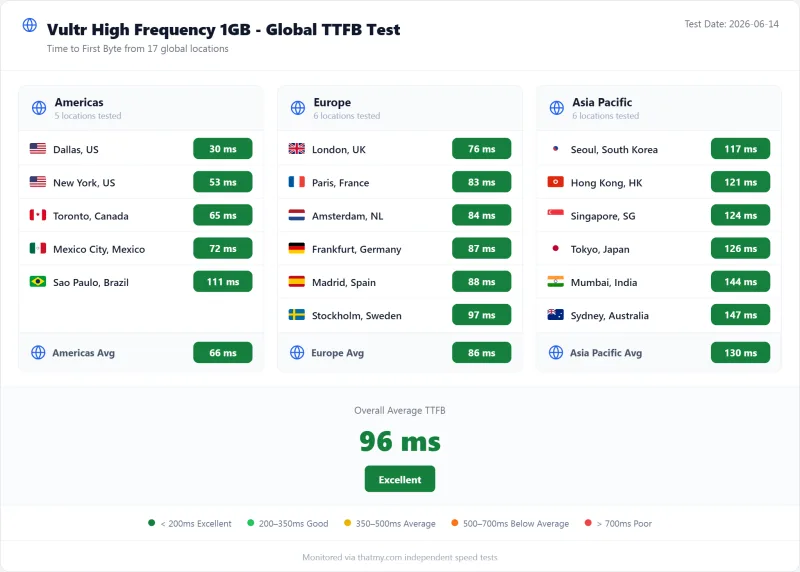
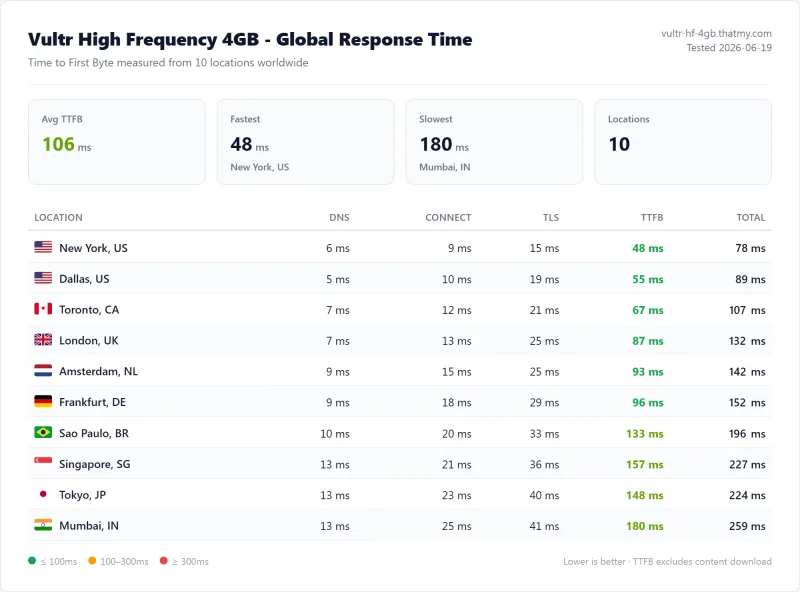
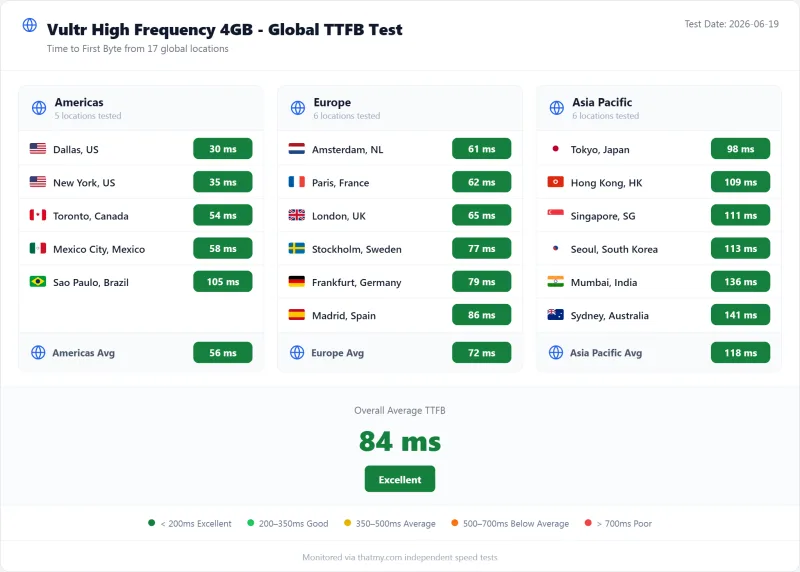
- TTFB (origin, no CDN): High Frequency 4GB 48ms from New York, 87ms from London, 106ms averaged over 10 locations, all to our New York test server
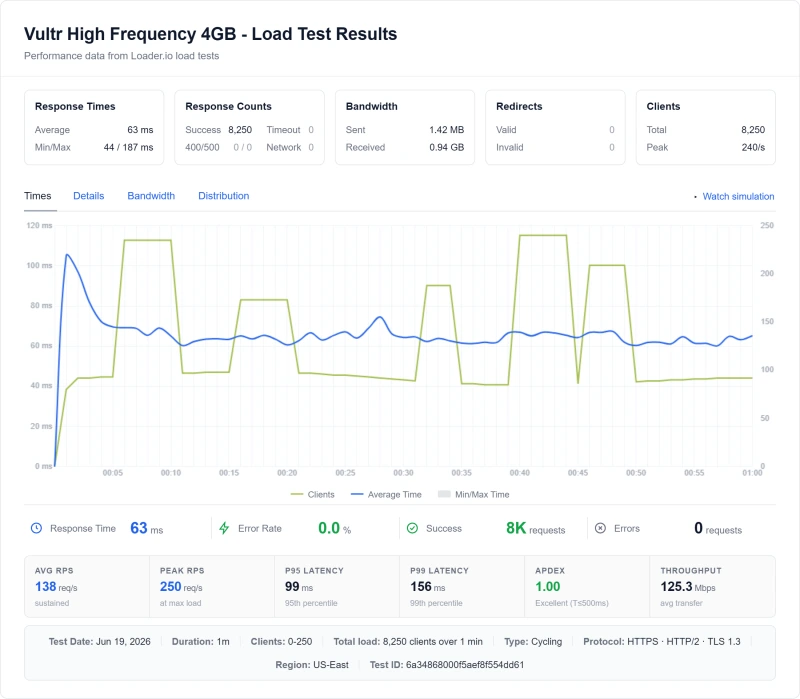
- 100 concurrent users: 95ms (4GB) to 130ms (1GB), on a 0-250 client ramp
- Errors: 0 of 8,250 requests failed on each of the three plans
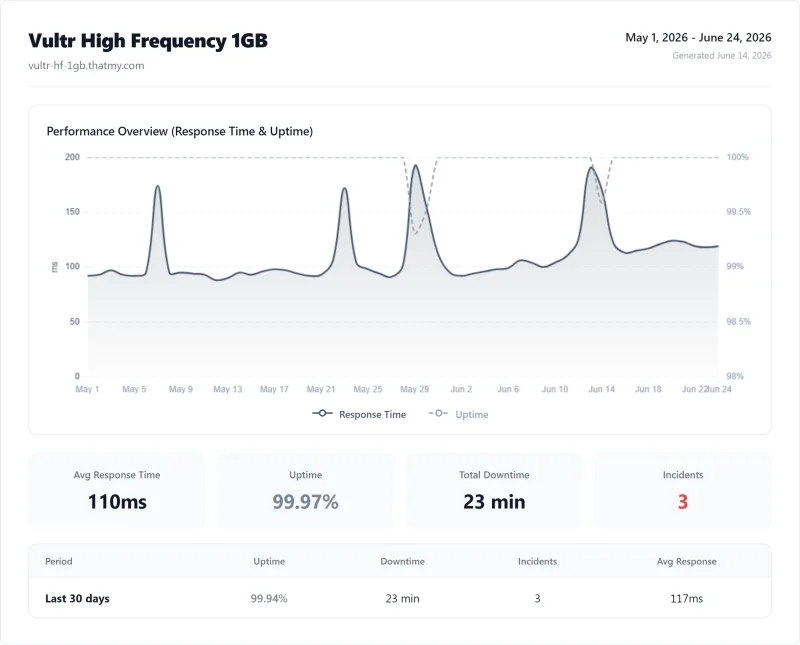
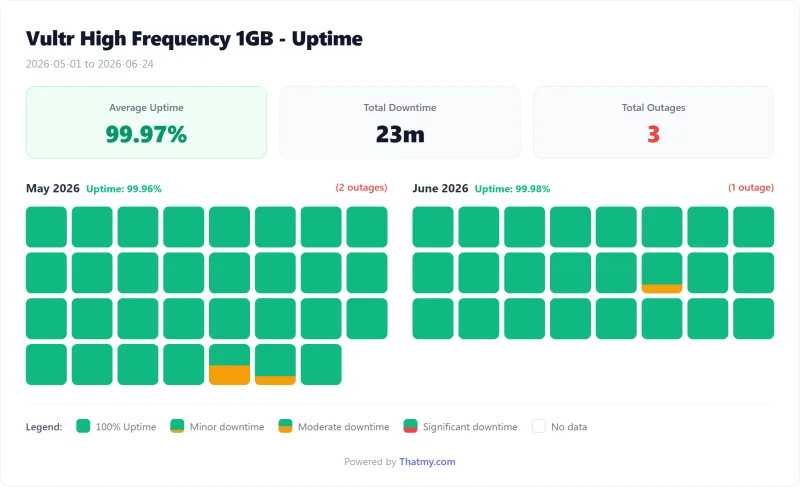
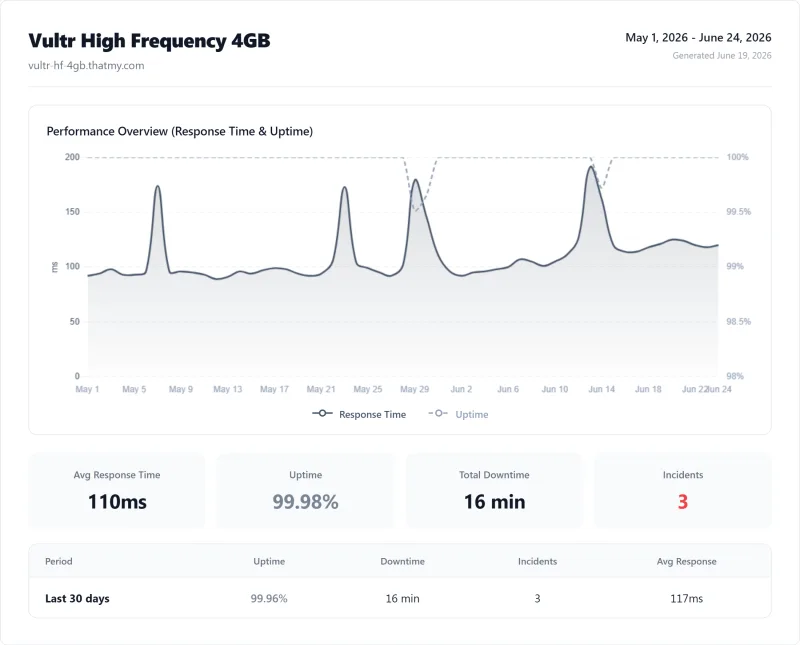
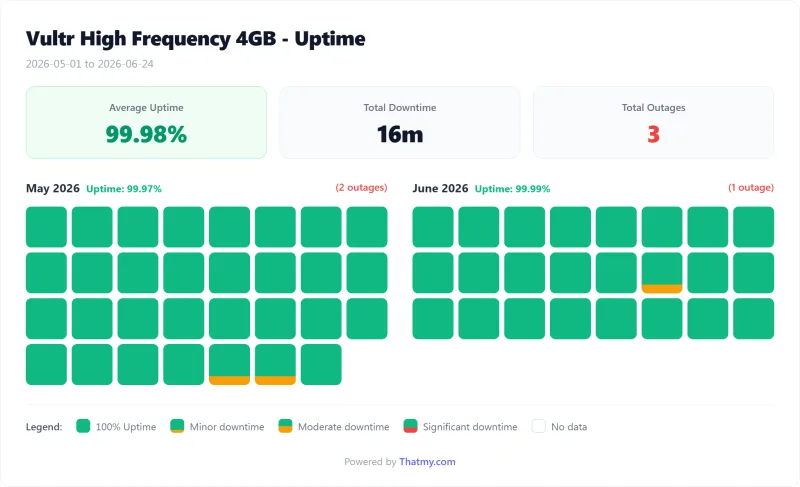
- Uptime: 99.97% on 1GB (23 minutes down in 3 incidents), 99.979% on 4GB (16 minutes down)
- What you pay Vultr: $24.00/mo for 2 vCPUs and 4 GB, plus backups at 20% if you turn them on, plus your own time
Short Version: Speed, Value & Risk

Raw Performance Advantages
- $6.00/mo High Frequency entry plan, one price every month, billed by the hour
- 48ms TTFB on High Frequency 4GB, origin, from New York to our New York test server
- 0 failed requests on all three plans over our 0-250 client ramp
- 33 regions in Vultr's own region list
- Full root access; WordPress, cPanel and Plesk as one-click images
Management Reality Check
- No management: you patch, secure and back up the server
- No control panel unless you install one (cPanel and Plesk licences are extra)
- No email hosting, and outbound port 25 is blocked on new servers
- Support is by ticket only, and covers infrastructure, not WordPress
- No refunds; backups cost 20% extra
Our Benchmark (new York Test Servers)
- Origin TTFB, New York (3 plans, no CDN): 48ms to 53ms
- Uptime (54-day window): 99.97% to 99.979%
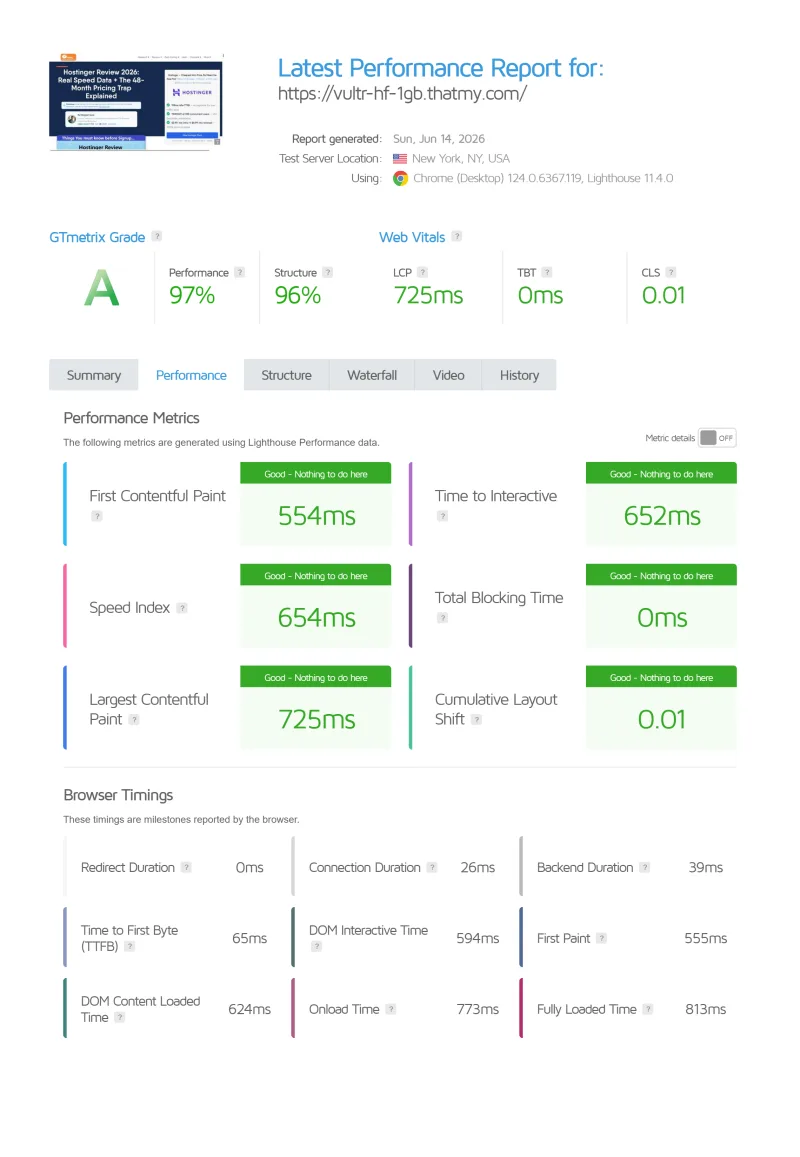
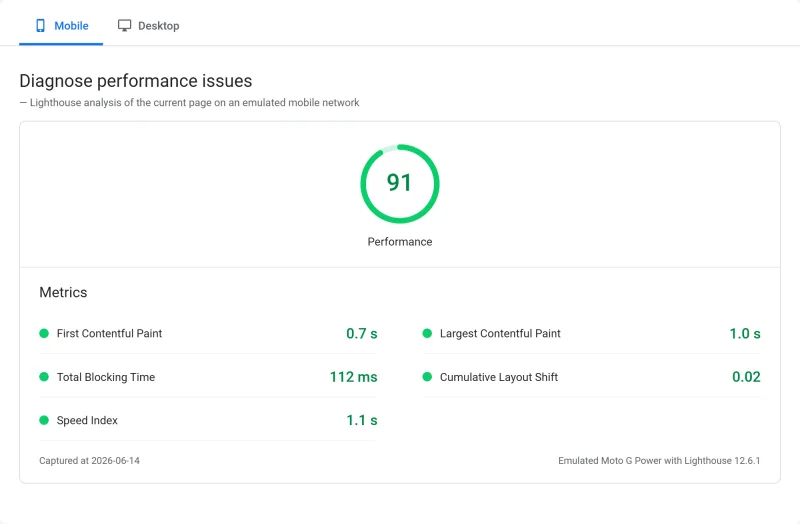
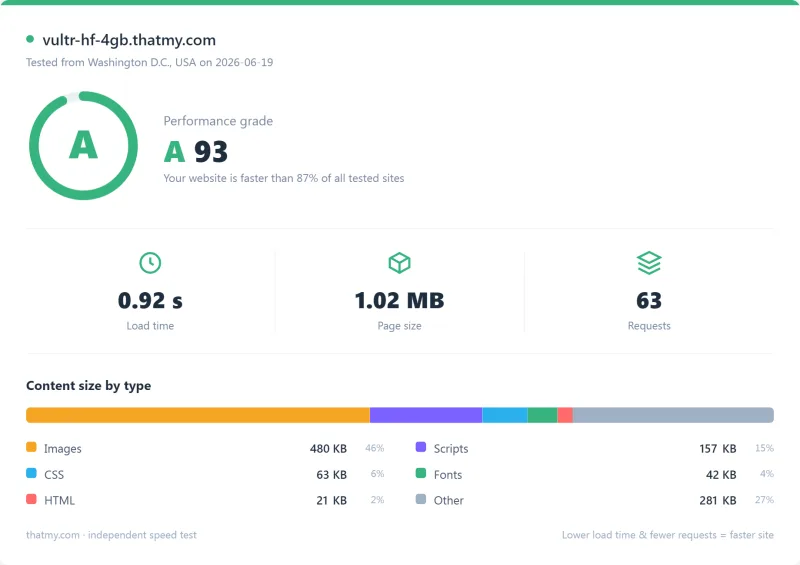
- PageSpeed score, HF 1GB: 91

$6/mo
High Frequency servers, one monthly price
Methodology: The benchmark boxes on this page cover 2 plans. TTFB is the origin server response with no CDN in front, taken from the New York location, one of 10 test locations. Uptime counts real incident minutes over a 54-day window.
✅ Vultr IS For:
- Linux system administrators, you already know how to manage a server
- Developers who need full root access and custom stack configuration
- Agencies with sysadmin resources, team can manage multiple client servers
- Cost-optimization projects where a managed host's markup doesn't make sense
- Learning/DevOps practice, building skills on a low-cost platform
- Applications requiring specific OS/kernel configurations
❌ Vultr Is NOT For:
- Non-technical WordPress users, no Linux experience = frustration
- Businesses without sysadmin time/budget, the hidden cost is real
- Sites requiring email hosting, outbound port 25 is blocked on new servers
- Users expecting a hosting panel, the one-click images leave the server to you
- Security-conscious businesses without technical resources, you're responsible for patching
- Anyone who needs managed support, Vultr only handles infrastructure issues

Test Environment & Methodology
Every benchmark figure in this review comes from our own test records: three Vultr High Frequency servers, each running the same WordPress test site we put on every host we benchmark. No cherry-picked runs, and no figures from anyone else.
🔬 Test Environment
- Vultr plans: High Frequency 1GB ($6.00/mo), High Frequency 2GB ($12 a month) and High Frequency 4GB, 2 vCPUs ($24.00/mo)
- Test site: our standard WordPress test site, the same on every host
- CDN: none; every TTFB figure is origin
- Server region: New York area (US-East) for all three servers
- Uptime window: 54 days, May 1 to June 24, 2026
- Compared with: Cloudways on Vultr High Frequency, ScalaHosting Entry Cloud and DigitalOcean Basic 1GB, tested the same way
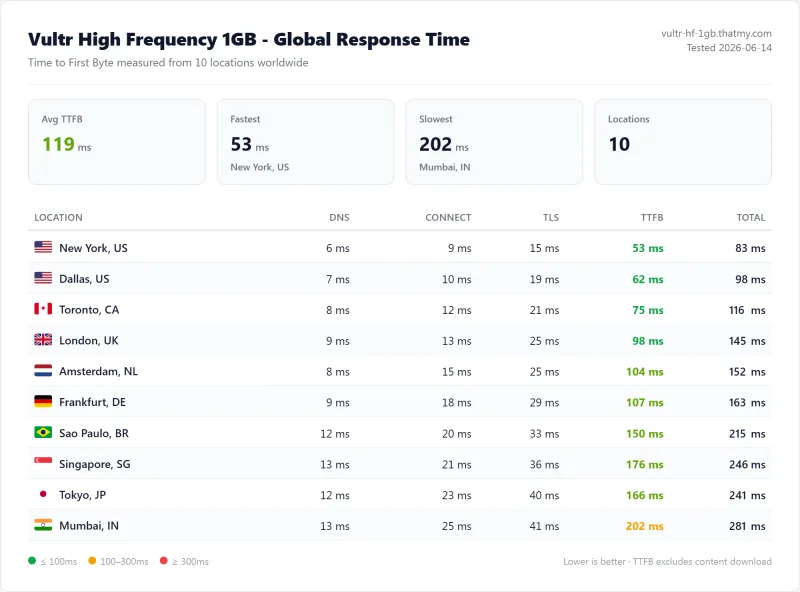
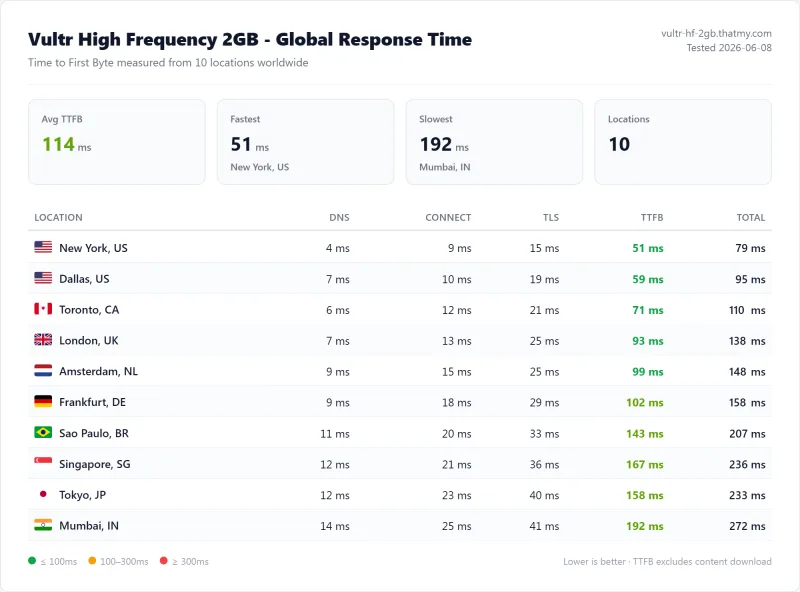
- TTFB testing: time to first byte from 10 measuring locations (New York, Dallas, Toronto, London, Amsterdam, Frankfurt, São Paulo, Singapore, Tokyo, Mumbai) to our test server, CDN off. The New York figure is the one we quote first; the 10-location average is the global figure.
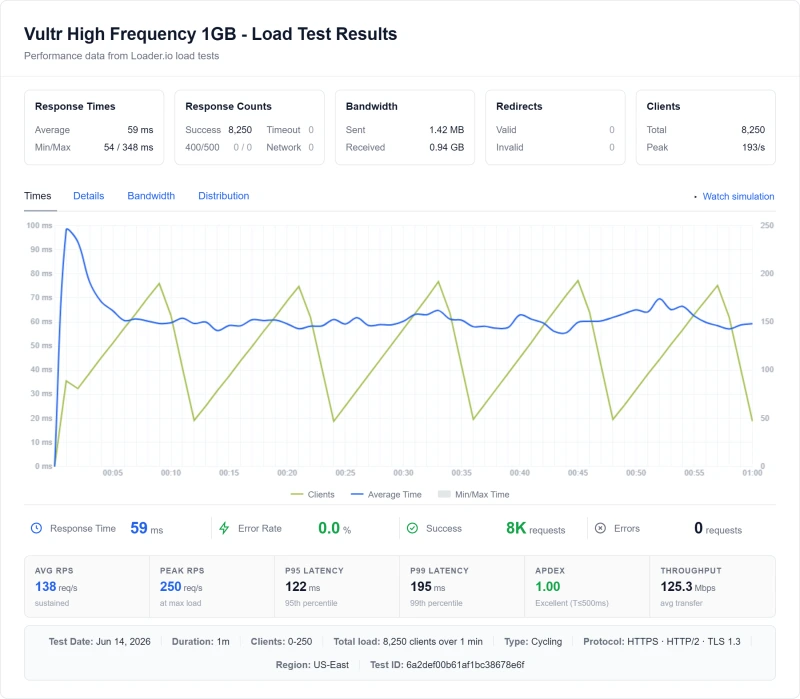
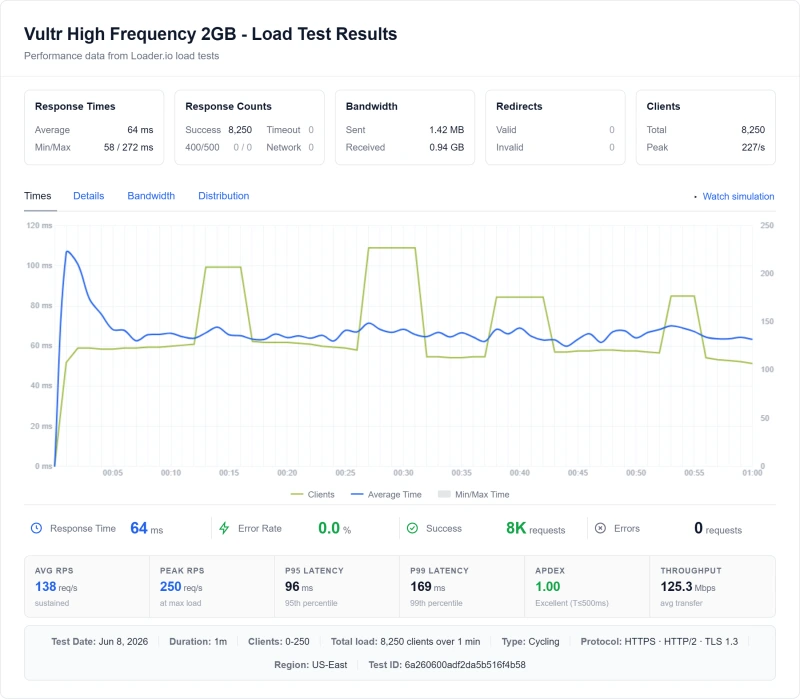
- Load testing: one ramp from 0 to 250 concurrent clients, 8,250 requests in total, from US-East. We quote the response time at 100 concurrent users, the average and 95th percentile over the ramp, and the error count.
- Uptime monitoring: HTTP checks on the homepage over the 54-day window; we quote the uptime, the incidents and the minutes down.
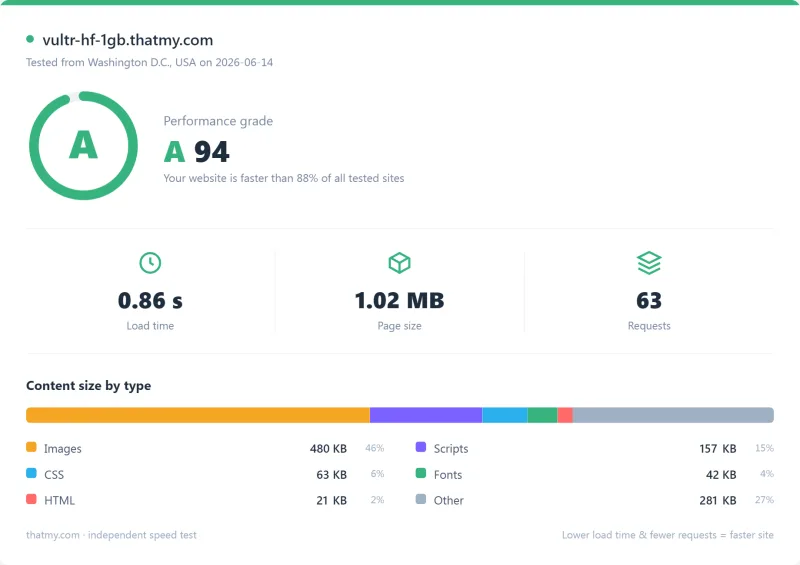
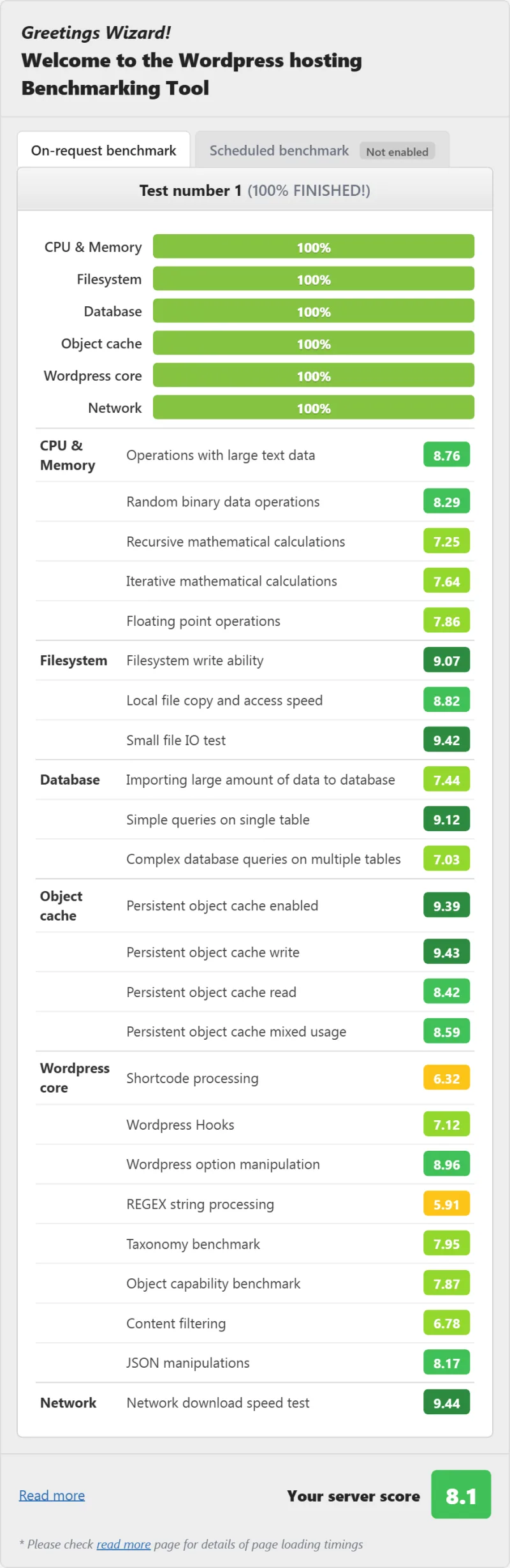
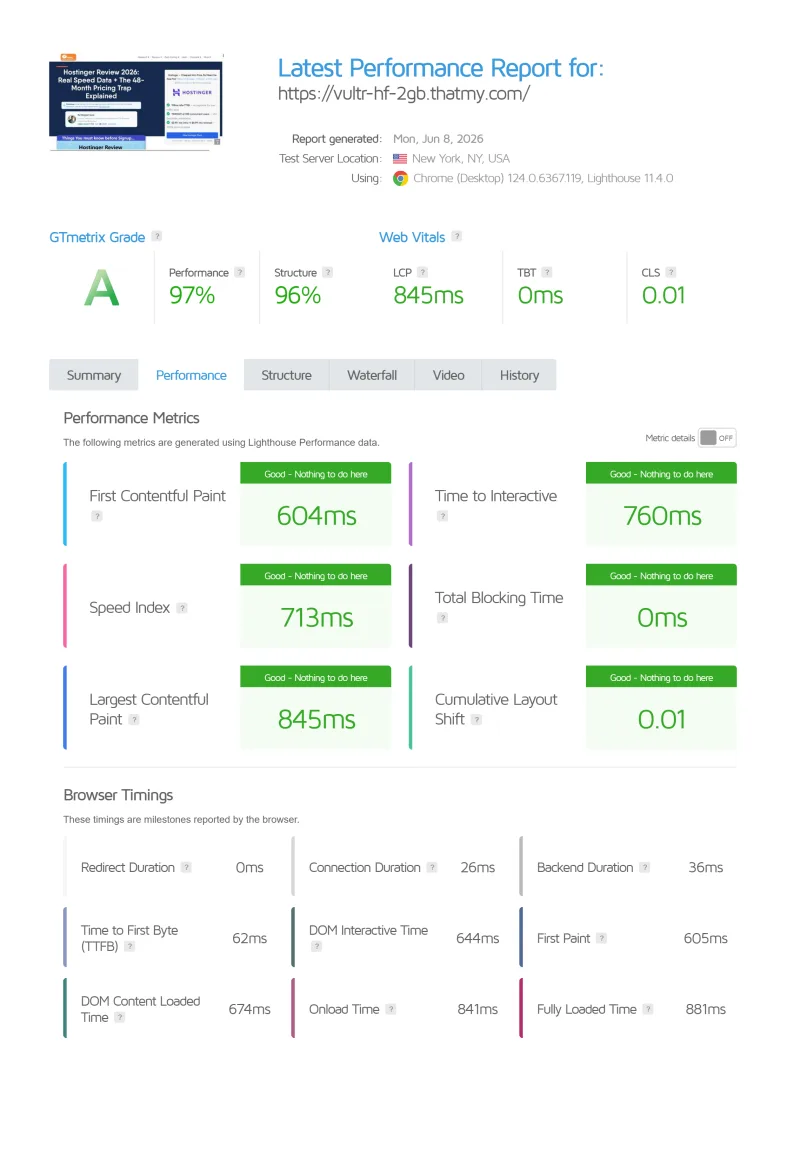
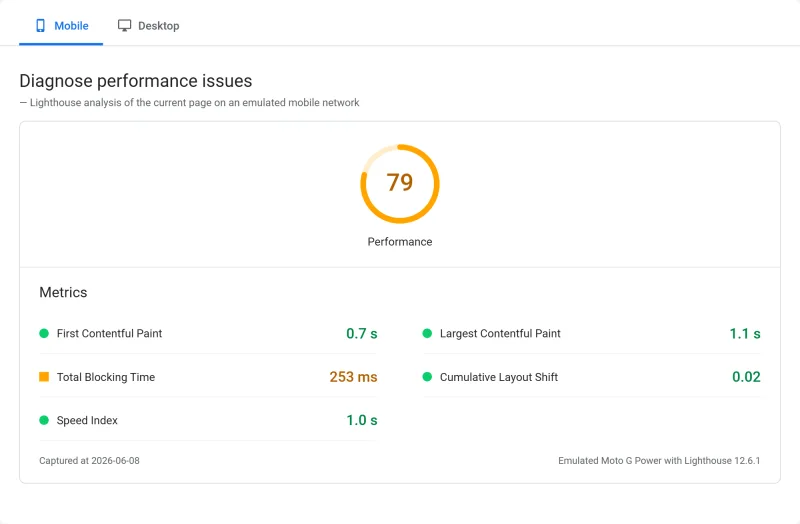
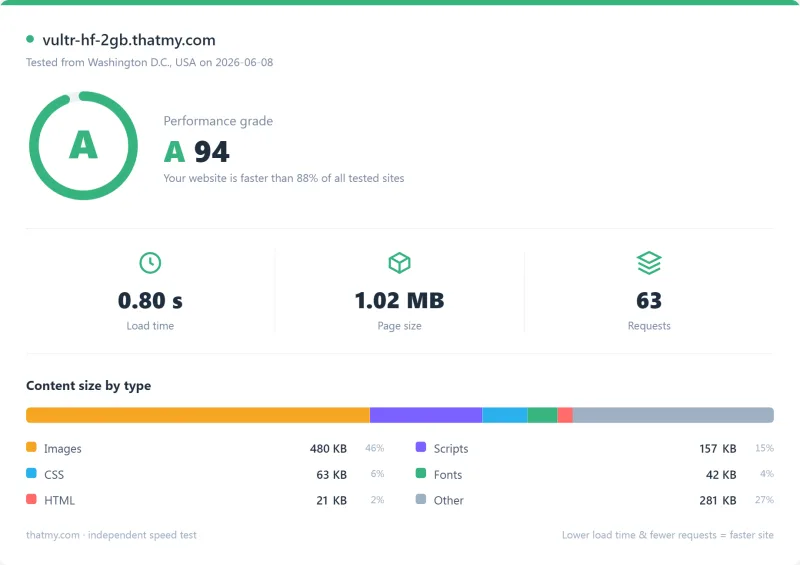
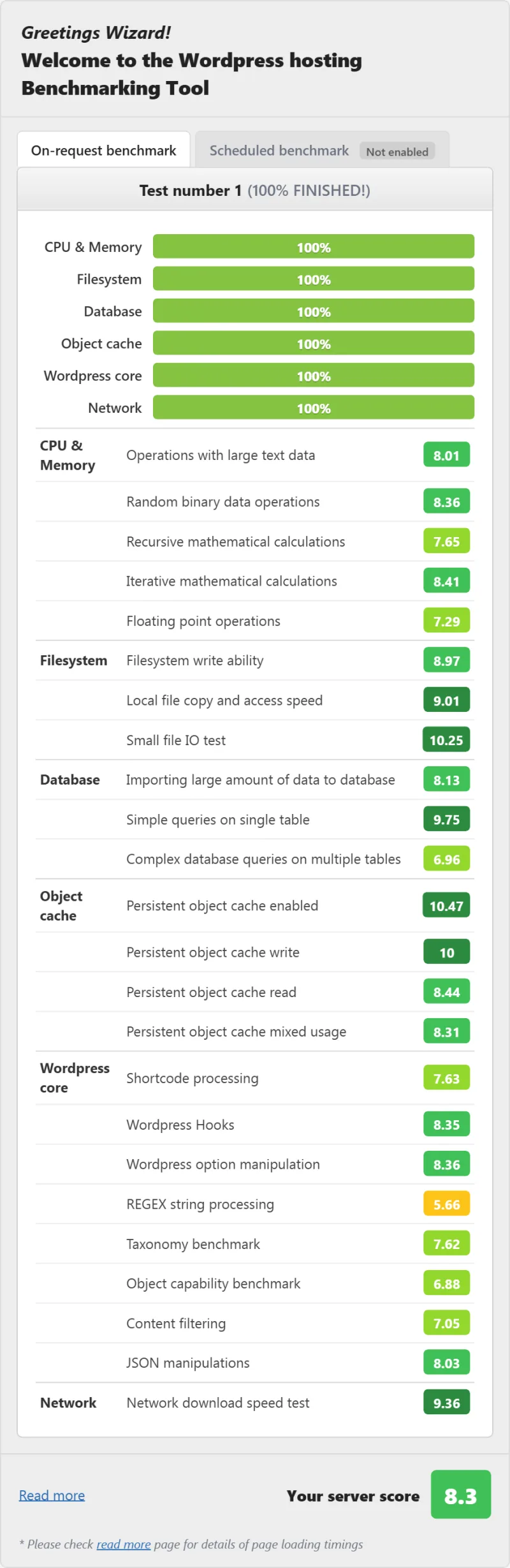
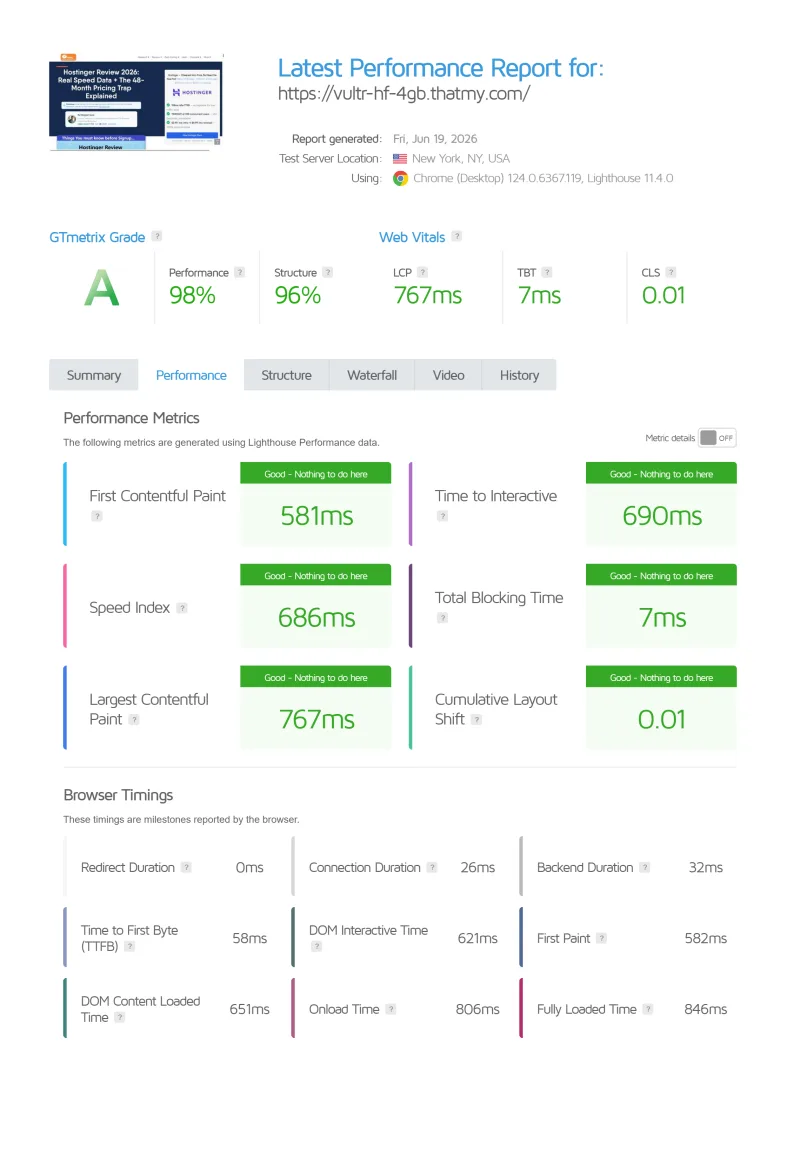
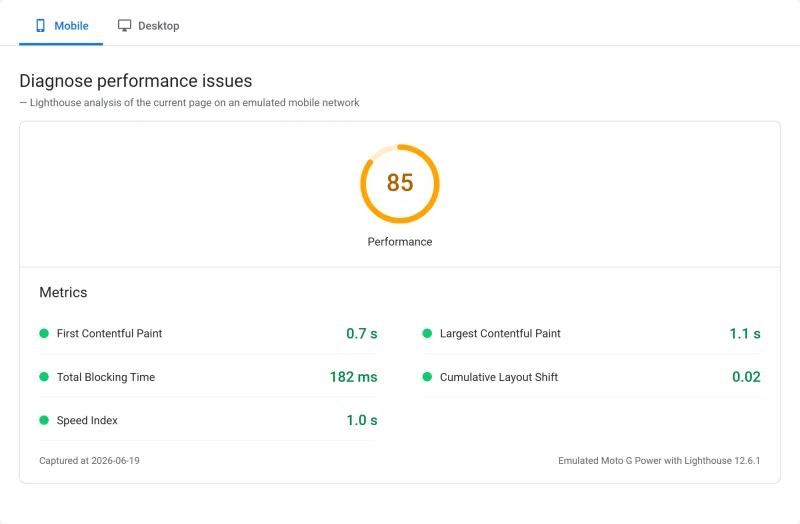
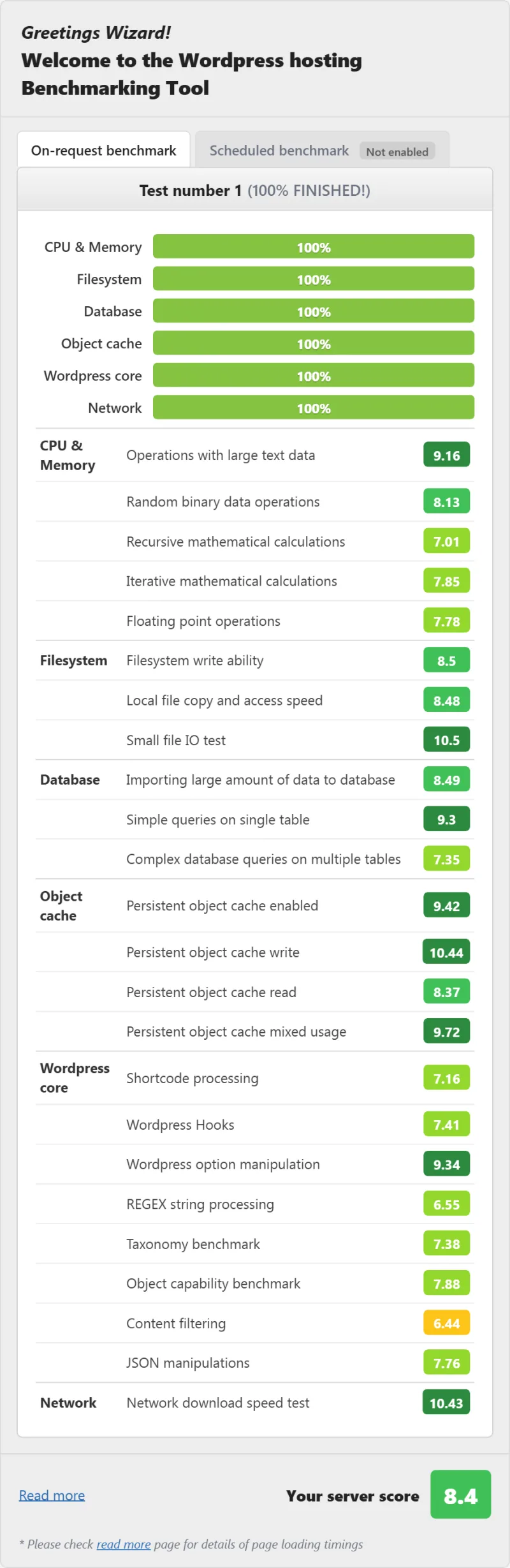
- Page tests: PageSpeed, GTmetrix and our WordPress benchmark score, shown in the full test report below.
- Vendor facts: prices, add-ons, the SLA and support channels from Vultr's own pricing page, docs and API.
- Not tested: Vultr support response times, a store under load, servers outside New York, and the CPU model on our servers.
What Is Vultr? Architecture Explained
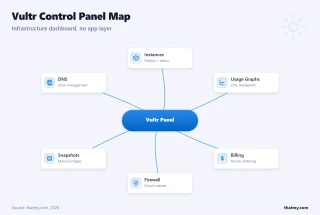
Vultr is an Infrastructure-as-a-Service (IaaS) provider, not a managed hosting company. Understanding this distinction is critical to deciding if Vultr is right for you.
The Layer Cake: Where Vultr Sits
Think of web hosting as a stack of layers:
- Infrastructure Layer (Vultr): Physical servers, network, data centers, virtualization. Vultr provides raw compute, storage, and bandwidth. This is all you get with Vultr Direct.
- Operating System Layer (You): Linux installation, kernel updates, security patches, user management. Your responsibility on Vultr.
- Web Stack Layer (You): Apache/Nginx, MySQL/MariaDB, PHP installation and configuration. Your responsibility on Vultr.
- Application Layer (You): WordPress installation, plugin updates, security hardening. Your responsibility on Vultr.
- Management Layer (Managed Hosts): Control panels, 1-click installers, automated backups, security monitoring, support. Provided by ScalaHosting, Cloudways, SiteGround.
Vultr gives you Layer 1, plus one-click images that install a starting point for layers 2 to 4 (WordPress, cPanel, Plesk and others). Managed hosts give you Layers 1-5. This is why Vultr is cheaper: you're not paying for the labor to configure and maintain Layers 2-5.
Vultr vs Managed Hosting: The Real Comparison
When comparing Vultr High Frequency 4GB ($24.00/mo) to ScalaHosting Entry Cloud ($14.95/mo for the first year on the yearly term, then $39.95/mo), you're comparing:
- Vultr: the server only, the same price every month, plus your time and knowledge for everything else
- ScalaHosting: the server plus management, SPanel, email, security and support
After ScalaHosting's first year the managed plan costs more per month than the Vultr server. Whether the difference is worth paying depends on what your hours are worth and whether you can do the work at all.
Cloud Compute vs High Frequency vs Bare Metal
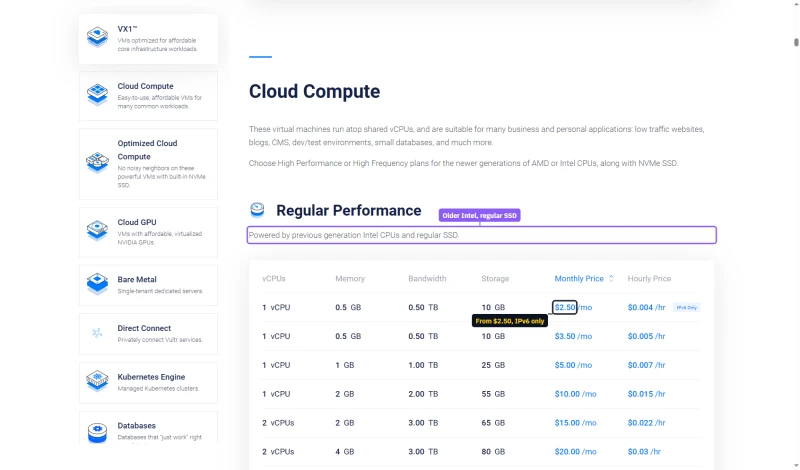
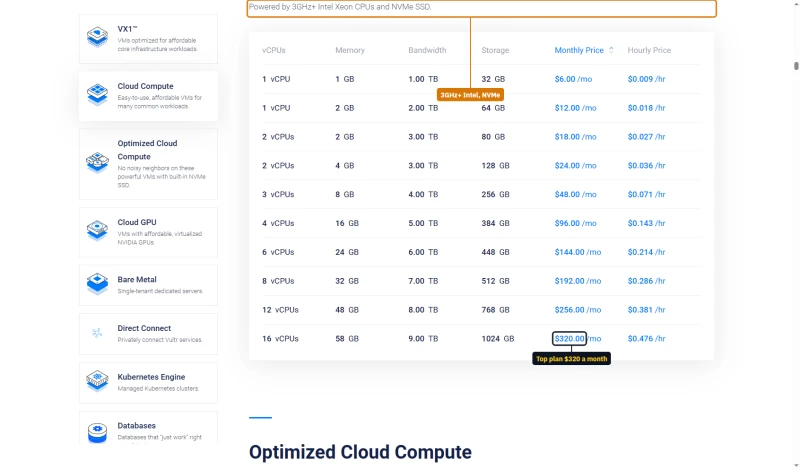
Vultr sells shared-vCPU Cloud Compute in three tiers, plus dedicated-vCPU Optimized Cloud Compute, Bare Metal and Kubernetes. Every plan has one price, monthly and billed by the hour, with no intro discount and no renewal jump.
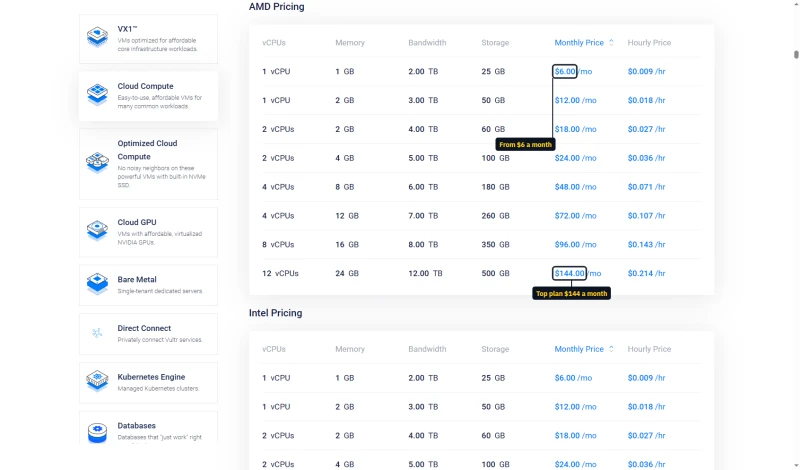
If you need CPU that nobody else shares, Optimized Cloud Compute starts at $28 a month for 1 dedicated vCPU. The pricing page prints it as $0.042 an hour, the monthly price divided by the 672-hour billing cap.
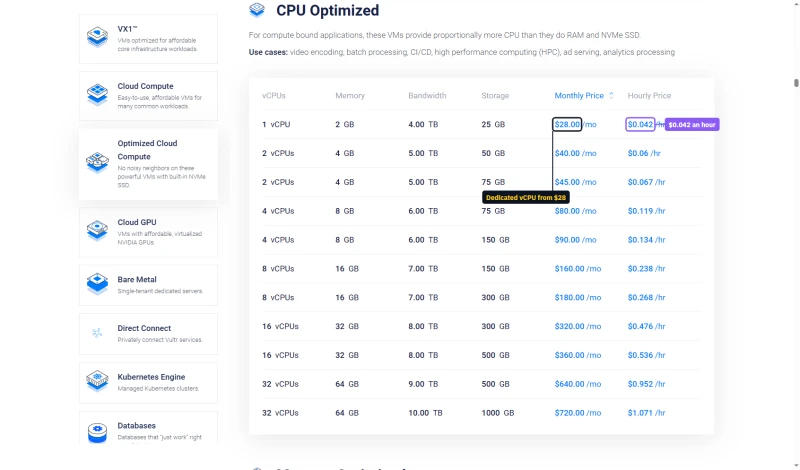
Cloud Compute Regular vs High Frequency: Vultr's pricing page says Regular runs on previous-generation Intel CPUs and regular SSD, while High Frequency uses 3GHz+ Intel Xeon CPUs and NVMe SSD. At the 1 GB size the difference is small: Regular is $5.00/mo and High Frequency $6.00/mo. We benchmarked High Frequency only, so we have no speed figure for Regular.
Bare Metal: Dedicated physical servers with no virtualization overhead. Overkill for WordPress unless you have specific compliance requirements or very heavy traffic.
Recommendation for WordPress: High Frequency 2GB ($12 a month) is a sensible start for a basic site; High Frequency 4GB with 2 vCPUs ($24.00/mo) for a store or a busier site. In our test the 4GB server served 100 concurrent users in 95ms, against 112ms on 2GB and 130ms on 1GB.
CPU Hardware: Intel Xeon High Frequency, AMD EPYC Optimized
Vultr documents High Frequency as a 3GHz+ Intel Xeon and publishes no part number. PassMark ranks a specific chip, so there is no rank to quote for it, and the clock floor is the only hardware figure Vultr commits to. AMD EPYC is on a different product: Optimized Cloud Compute, with dedicated vCPUs.
High Frequency's selling point is clock speed (3.0+ GHz), which matters for single-threaded PHP execution. WordPress handles each request on one CPU thread, so a faster core shortens the time the server spends building a page. On our New York test servers, High Frequency 4GB answered in 48ms (origin).
CPU Verification Method
For the hosts in our CPU rankings, a chip is named only when we read it on the server (with lscpu) or the host names it, and scores are read from PassMark's own page for that chip. We have not run lscpu on our Vultr High Frequency servers, and Vultr does not name the Xeon model, so this review prints no CPU model or PassMark rank for High Frequency.
TTFB Results by Test Location
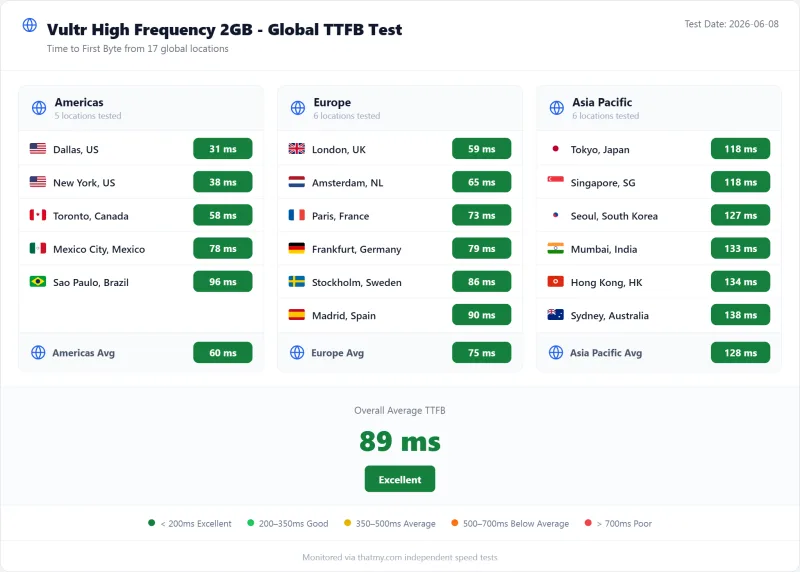
All TTFB tests ran with no CDN. Each figure is the time from one of our measuring locations to our test server in the New York area: the origin response a CDN cannot improve for uncached pages such as carts, searches and your admin area.
The 48ms from New York on High Frequency 4GB is quick for a server with no managed optimization layer. For comparison, Cloudways on Vultr High Frequency answered New York in 48ms in our test, the same figure: at idle, the Cloudways stack and our plain Vultr server performed alike. The difference showed under load (next section).
For context: my bar for a fast host is 200ms, tighter than Google's own 800ms TTFB guidance. Every location stayed under that bar except Mumbai on the 1GB plan (202ms), which is distance, not the server. If most of your visitors are far from New York, deploy in one of Vultr's regions near them, or put a CDN in front for cached pages.
Load Test: 0 to 250 Concurrent Users
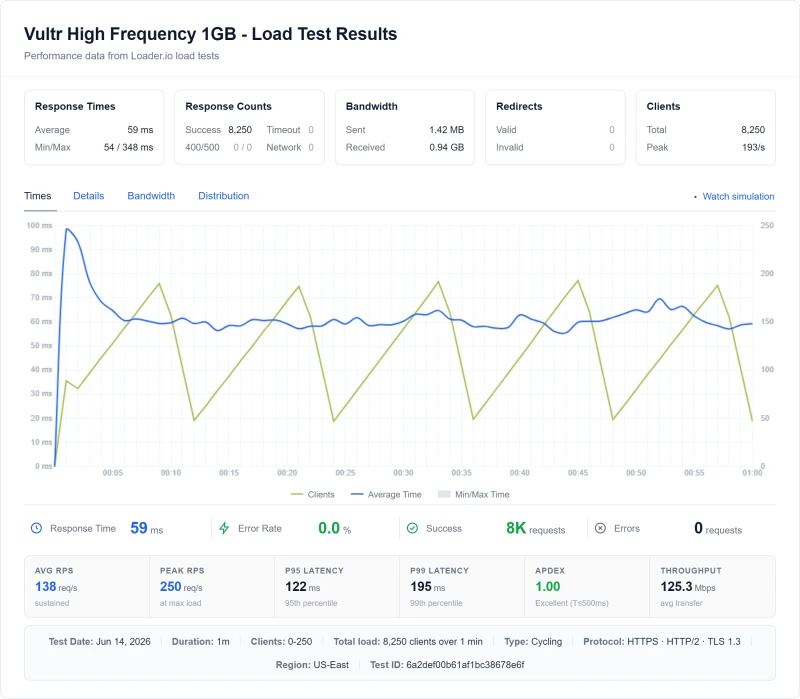
TTFB at idle tells you little about how a server copes when real traffic hits. Each server took the same load test: one ramp from 0 to 250 concurrent clients, 8,250 requests in total, from US-East. We did not run separate steps at 10, 25, 50 or 500 users, so this table shows what the ramp recorded.
Key Finding: Managed Stacks Held Up Better Under Load
No server failed a request. At 100 concurrent users our Vultr High Frequency 4GB server answered in 95ms; Cloudways on Vultr High Frequency took 74ms and ScalaHosting Entry Cloud 58ms. Managed hosts tune PHP workers and caching for WordPress; on a plain Vultr server that tuning is your job, and it is where the gap comes from.
Test type: cycling ramp, 0 to 250 clients. Total: 8,250 requests per server. Origin: US-East.
CPU Throttling & Resource Limits
Vultr does not sell a "fair use" hosting account with hidden process or inode limits: you get a virtual server and set your own limits. But Cloud Compute vCPUs, High Frequency included, are shared, and Vultr says so.
✅ What Vultr's Own Docs Say
- Shared CPU: Cloud Compute is "shared CPU virtual machines designed for demanding applications with bursty performance"
- No guarantee of the whole host: its VoIP advisory says VMs "do not provide guaranteed access to the full resources of the underlying hardware"
- Bandwidth: each High Frequency plan includes a monthly transfer allowance (1 TB on the 1GB plan, 3 TB on 4GB), the account gets 2 TB free, and overage is $0.01 per GB
- No connection limits from Vultr: Apache/Nginx are configured by you
If you need CPU nobody else shares, that is Optimized Cloud Compute (dedicated vCPUs) or Bare Metal. In our test the shared High Frequency servers did not fail a request over the 0-250 client ramp.
The trade-off: nothing stops you from crashing your own server. If you misconfigure Apache to spawn 500 processes on a 2GB RAM server, Vultr won't stop you, your server will run out of memory and become unresponsive. You're the system administrator.
Uptime: 54-Day Monitoring Window
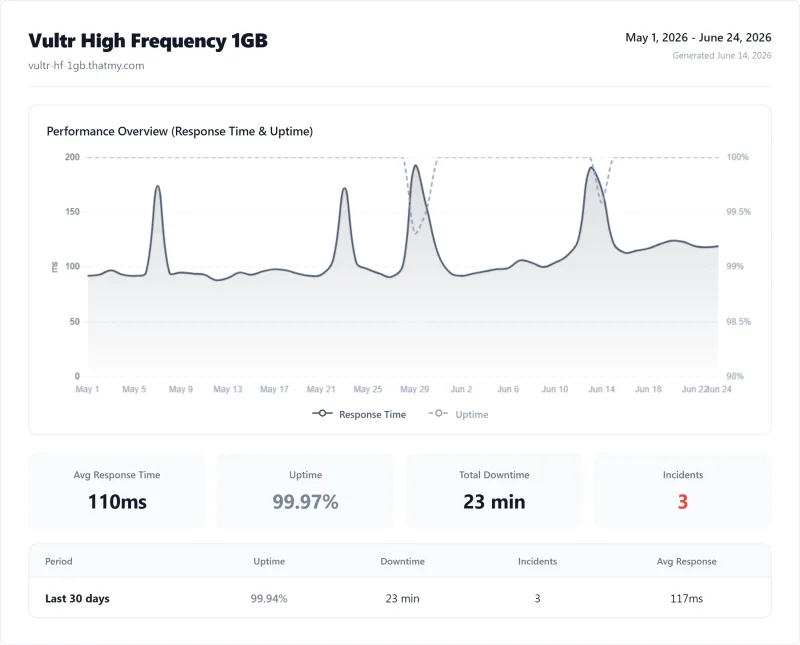
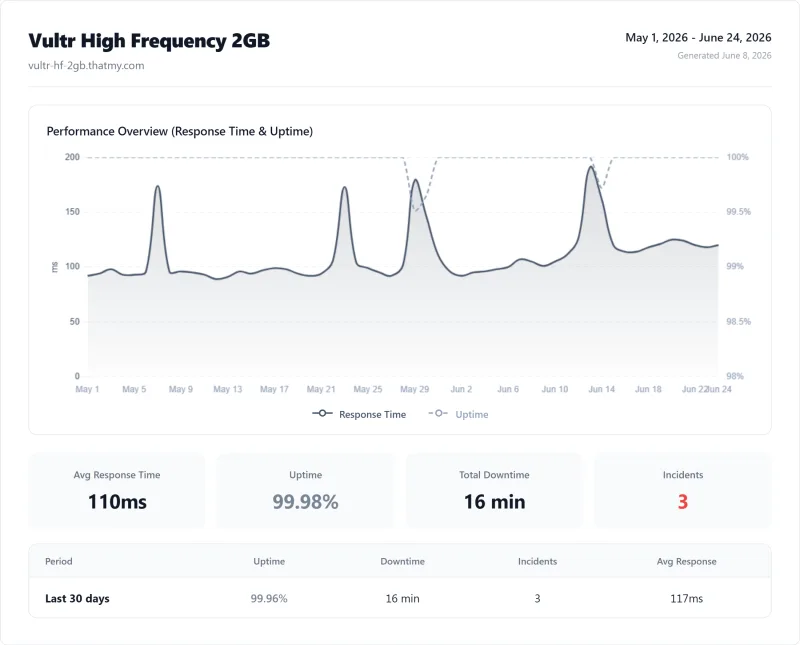
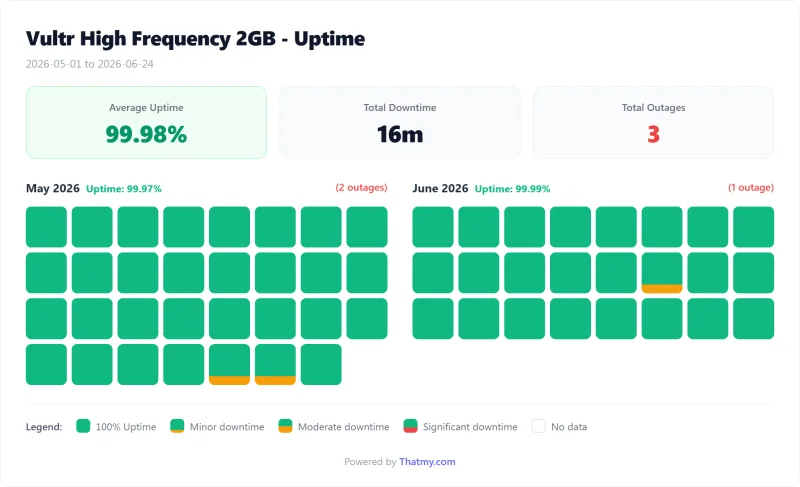
We monitored each Vultr server with HTTP checks on the homepage across the same 54-day window. Here are the results:
That is solid, not exceptional: every Vultr server had 3 short incidents in the window. Our records hold the minutes down, not the cause of each incident.
For comparison: ScalaHosting Entry Cloud achieved 99.99% (8 minutes down) and Cloudways on Vultr High Frequency 99.99% (8 minutes down) in the same window. Fifty-four days is a short window, so treat small differences as a guide, not a ranking.
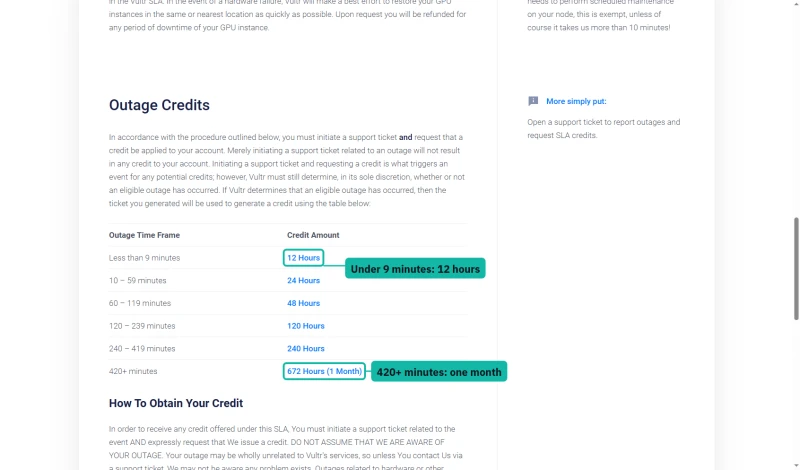
Vultr's SLA promises 100% uptime, but the remedy is credit, not cash. You must open a support ticket and ask for it, and the credit scales with the outage: 12 hours of service for under 9 minutes down, up to one month for 420 minutes or more. GPUs, the website, DNS, API and control panel sit outside the SLA.
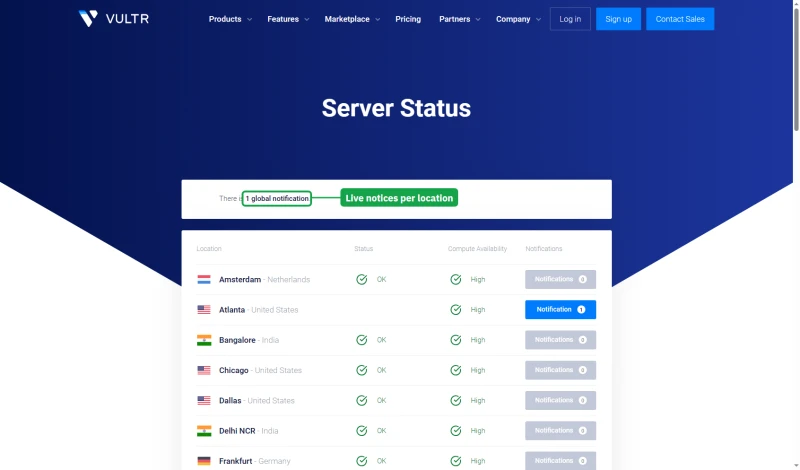
The public status page lists every location with its live notices, which is the first place to check before you open that ticket.
The Management Cost Reality
This is the section most Vultr reviews skip, and it's the most important. Vultr's $6.00/mo to $24.00/mo price tag doesn't include the labor required to manage a server.
The Hidden Cost Equation
We did not time these tasks, and the hours depend on your experience: someone who runs servers for a living does the setup in an afternoon, a first-timer can lose days to it. What does not change is that the work never ends: updates and patches keep coming for as long as the site runs.
⚠️ The Management Cost Trap
If you pay someone to look after a $24.00/mo Vultr server, their fee is added to the server every month, and it is usually larger than the server. ScalaHosting Entry Cloud includes the management at $14.95/mo for the first year, then $39.95/mo.
Even if you do it yourself, your time has value. If a few hours a month of server work cost you more than the difference between the two prices, the managed host is cheaper.
Vultr Pricing, The Real Cost Breakdown
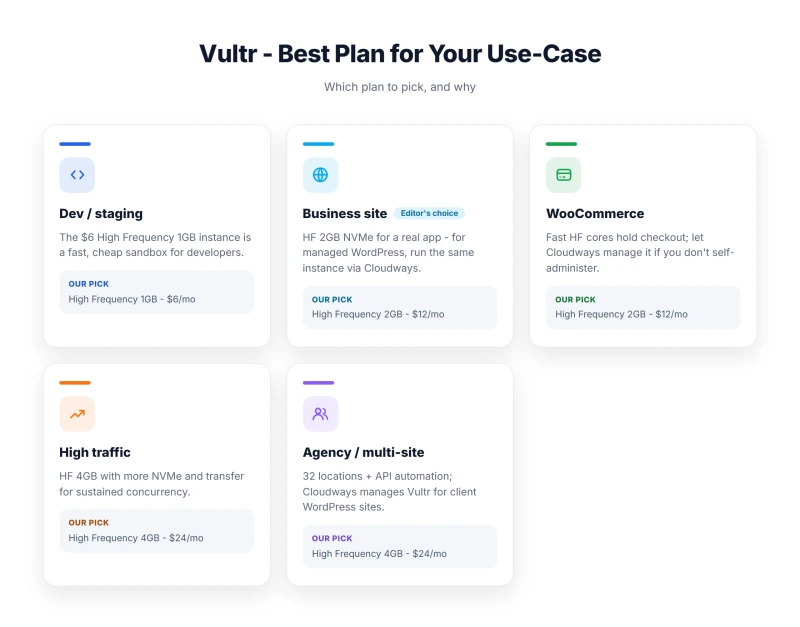
Vultr's pricing page shows server prices. Here's what a production WordPress server adds up to:
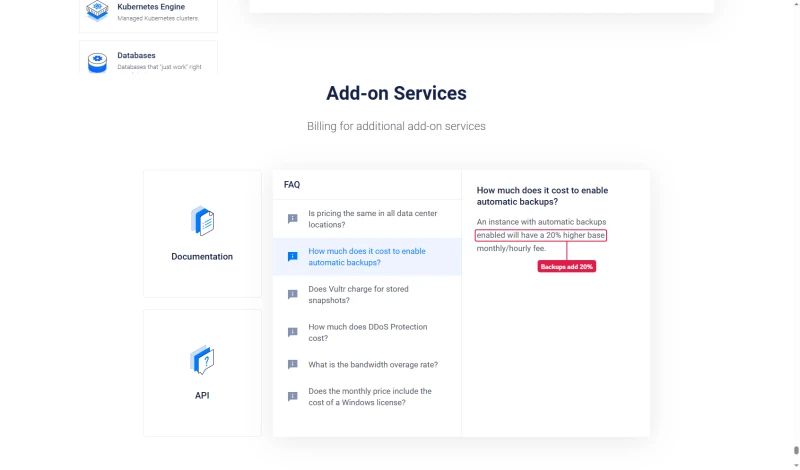
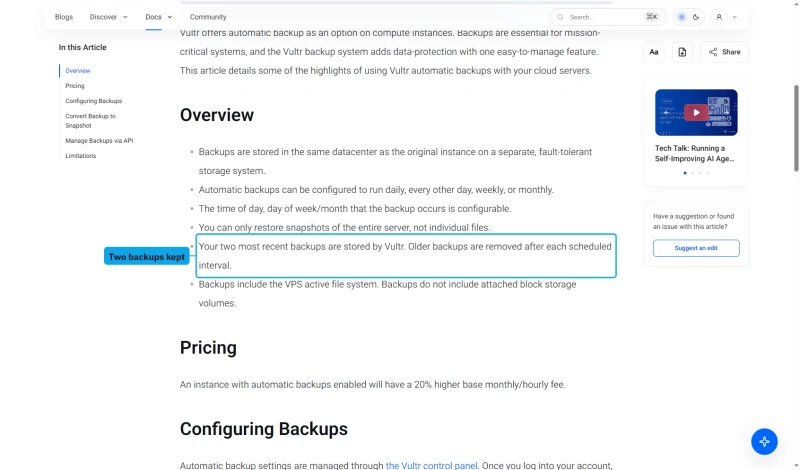
The backup line is Vultr's own rule: automatic backups add 20% to the server's monthly or hourly fee.
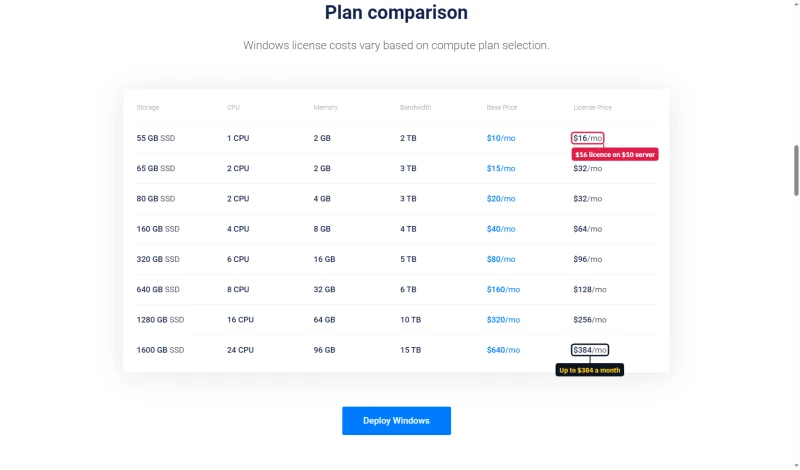
Windows costs extra too, and the licence can cost more than the server: $16 a month on the $10 plan, up to $384 on the $640 plan.
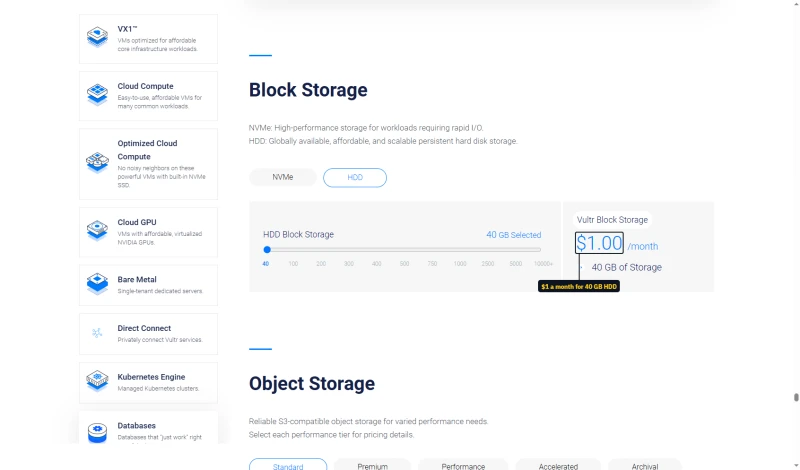
Extra disk is cheap. Block Storage costs $1 a month for 10 GB of NVMe or 40 GB of HDD.
True Cost Comparison Table
The bottom line: Vultr is only cheaper if your time costs little or you enjoy the work. For anyone with a business to run, a managed plan can cost less overall than a $24.00/mo server that needs regular hands-on care.
Free Tier, Credits and Signup
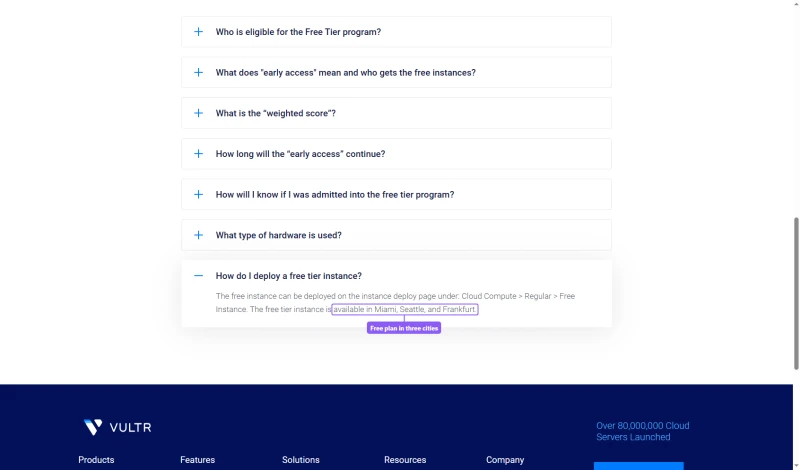
The free plan is not on the pricing page. Vultr's Free Tier page describes an application with limited places, for 1 vCPU, 512 MB of RAM and 10 GB in Miami, Seattle and Frankfurt.
Vultr's own coupons page lists new-customer credits, such as a first deposit matched up to $100. Each is for new customers only and applies to select products only. Vultr does not refund unused service, so start small.

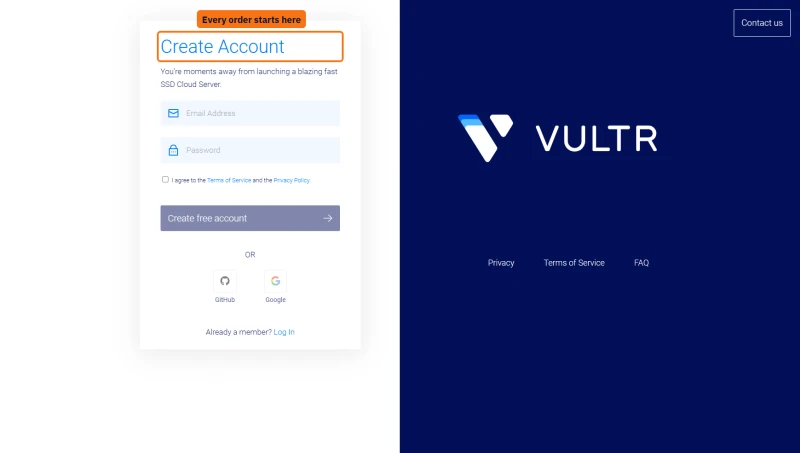
There is no public cart: every order starts at Create Account, and the server is chosen on the deploy screen inside the account.
Server Deployment: 12 Steps to Live WordPress
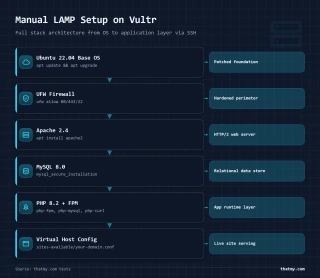
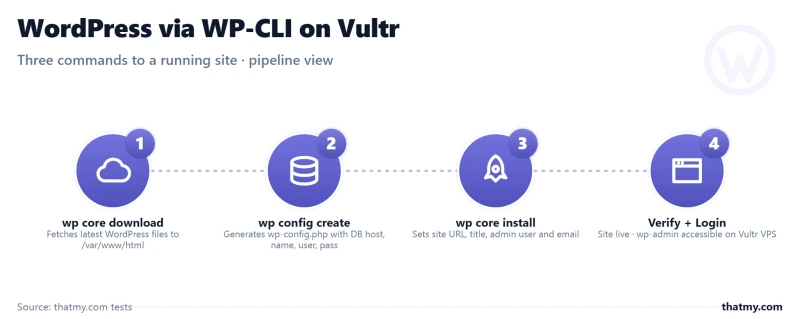

Here's the complete process to go from zero to a live WordPress site on Vultr by hand. (Vultr also lists a one-click WordPress image that does steps 4 to 10 for you; you still own the server afterwards.) This is what "unmanaged" means in practice:
- Deploy Vultr Server, Select High Frequency plan, choose Ubuntu, pick one of Vultr's 33 regions.
- Connect via SSH, Use terminal or PuTTY. Command:
ssh root@your-server-ip - Update System, Run
apt update && apt upgrade -yto patch security vulnerabilities. - Install Apache -
apt install apache2 -y. Configure virtual hosts for your domain. - Install MySQL -
apt install mysql-server -y. Runmysql_secure_installation. Create WordPress database and user. - Install PHP 8.3, Add Ondrej PHP PPA. Install PHP and required extensions:
apt install php8.3 php8.3-mysql php8.3-curl php8.3-gd php8.3-mbstring php8.3-xml php8.3-zip php8.3-opcache - Configure PHP-FPM, Edit
/etc/php/8.3/fpm/pool.d/www.conf. Set pm.max_children, pm.start_servers, pm.min_spare_servers, pm.max_spare_servers appropriately for your RAM. - Install WordPress via WP-CLI, Download WP-CLI, run
wp core download,wp config create,wp core install. Configure database credentials. - Set File Permissions -
chown -R www-data:www-data /var/www/html. Set proper permissions for WordPress files. - Install SSL (Let's Encrypt), Install Certbot. Run
certbot --apache. Configure auto-renewal cron job. - Configure Firewall -
ufw allow 22,80,443. Enable UFW. Test that you haven't locked yourself out. - Point DNS to Vultr IP, Update A record at your domain registrar. Wait for propagation (15 min-48 hours).
How long it takes: we did not time it. For someone who has done it before it is an afternoon's work; a first-timer should expect to spend much longer on research and troubleshooting.
Compare to ScalaHosting: WordPress installs from SPanel, on a server someone else keeps patched. That's what management buys you.
Security: You're Now the Sysadmin
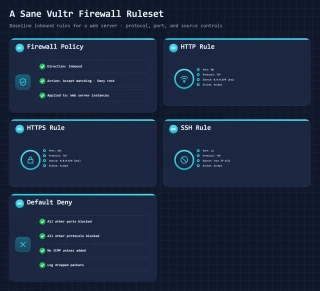
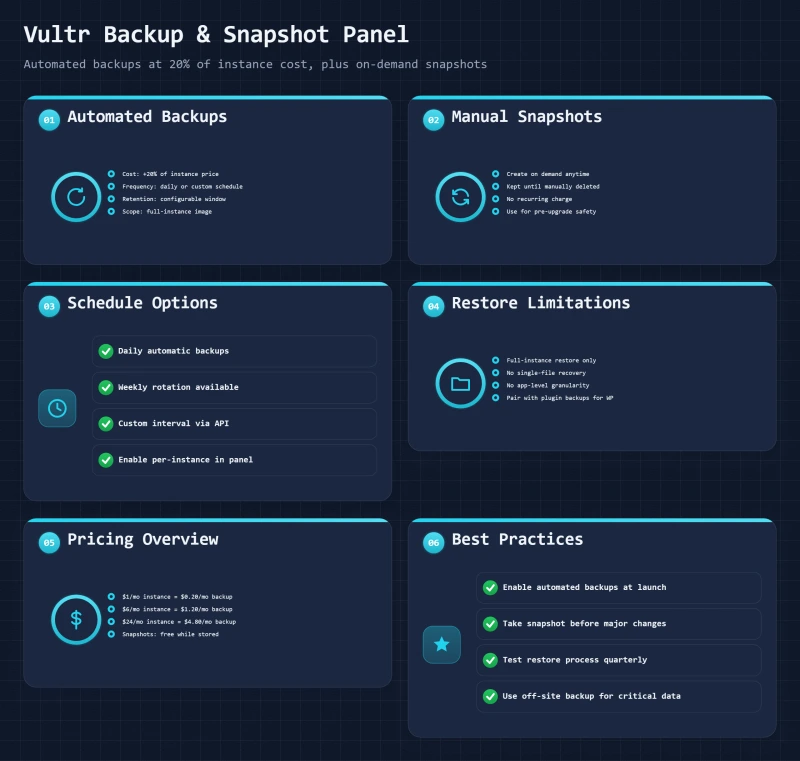
Vultr handles physical security and network infrastructure security, and sells DDoS protection as a $10 a month add-on. Everything else, server hardening, application security, patching, is your responsibility.
Security Tasks You Must Handle
- OS Updates: Weekly
apt update && apt upgradeto patch kernel and system packages - PHP Updates: When a PHP version reaches end of life, you install the new one and migrate (or risk running unsupported PHP)
- MySQL Security: Remove test databases, disable remote root access, set strong passwords
- Firewall Configuration: UFW/iptables rules, port blocking, rate limiting
- SSH Hardening: Disable root login, use key-based auth, change default port (optional)
- Fail2Ban: Install and configure to block brute-force attacks on SSH/WordPress
- WordPress Updates: Core, theme, and plugin updates are manual unless you configure automatic updates
- Malware Scanning: Install ClamAV, configure scanning schedules
- Log Monitoring: Check Apache error logs, system logs, auth logs for anomalies
- Backup Verification: Test restore procedures monthly
⚠️ Why This Matters
Any server with a public IP and SSH open starts receiving automated login attempts soon after it boots. Without fail2ban (or key-only SSH logins) an attacker can keep guessing passwords; with it, an address is blocked after a few failures. On a managed host this protection is set up for you; on Vultr it is a task on your list.
Security cost: regular hours for monitoring and updates, or a paid monitoring service. Another hidden cost of the "cheap" VPS.
Support Quality: Tickets Only, Infrastructure Scope
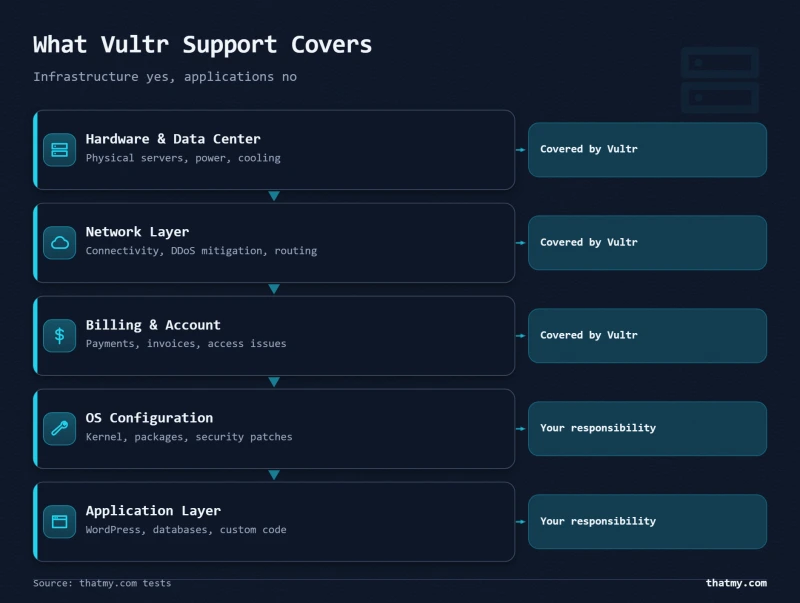
We have not timed Vultr's support. What Vultr's own pages say about it:
The channels are narrow too. Vultr's contact page offers a support ticket, an email address only for customers who cannot open a ticket or log in, and a sales form. There is no phone and no live chat.
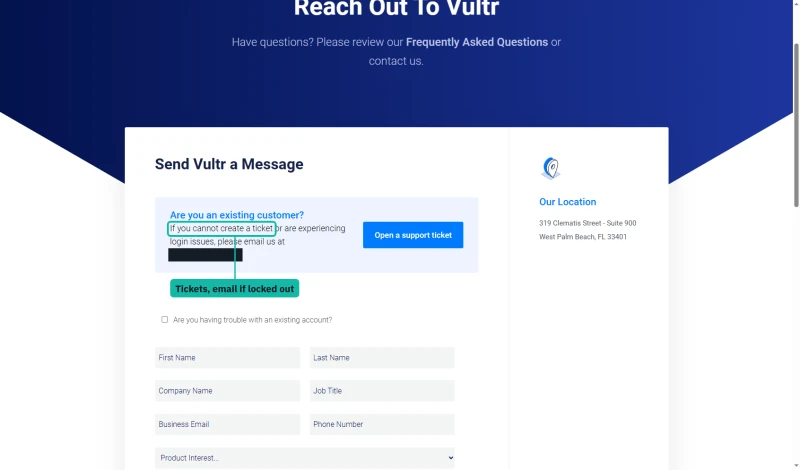
Vultr's support scope is clear: it handles infrastructure issues (network, hardware, billing). The software you install on the server, WordPress, PHP, MySQL, SSL configuration, is yours to fix.
That is standard for IaaS providers, but it's a shock if you're coming from managed hosting where support helps with WordPress issues.
Comparison: ScalaHosting and Cloudways manage the server stack, so their support covers it. Vultr provides infrastructure-only support.
Vultr vs ScalaHosting (Head-to-Head)

Why Scalahosting Wins For Wordpress
- Managed cloud VPS: no sysadmin work for you
- SPanel included, ScalaHosting's own control panel with email
- 58ms with 100 concurrent users on Entry Cloud in our test
- AMD EPYC 9474F read on our test server
Scalahosting Trade-offs
- Renews at $39.95/mo after the $14.95/mo first year
- Less server control than a raw VPS
Performance Specs
- Port Speed: 1Gbps (Dedicated)
- Throughput: High (Stable)
- Traffic: Unmetered

$29.95/mo
Full Management + Email Included
ScalaHosting is the most direct comparison to Vultr for WordPress users. The hardware differs (ScalaHosting's server ran an AMD EPYC 9474F; Vultr High Frequency is a 3GHz+ Intel Xeon), and so does the management.
When to choose Vultr: You have Linux sysadmin skills, need full server control, or are optimizing costs at scale (managing many servers).
When to choose ScalaHosting: You want to focus on your business, not server management. You need email hosting included. You want support that covers the server stack.
Vultr vs Cloudways (Head-to-Head)

Cloudways On Vultr Hf Strengths
- Vultr High Frequency servers with the stack managed by Cloudways
- 74ms with 100 concurrent users in our test
- No server management: updates and the web stack are handled
- Staging and Git deployment built in
Cloudways Limitations
- Higher cost: $60.00/mo for High Frequency 4GB against $24.00/mo direct
- No email hosting included
- No cPanel: Cloudways' own panel
Speed Benchmarks
- TTFB: 78ms
- Load Time: 0.6s
- Uptime: 99.99%

$60.00/mo
Vultr HF with Management Layer
Cloudways puts a managed layer on top of Vultr High Frequency. Same kind of server, different experience.
When to choose Vultr: You want the lowest possible cost, need full root access for custom configurations, or enjoy server management.
When to choose Cloudways: You want Vultr's servers without the management overhead. You're a developer who values Git deployment and staging environments. You don't need email hosting included.
Vultr vs DigitalOcean (Head-to-Head)
DigitalOcean is Vultr's closest direct competitor. Both are developer-focused IaaS providers with similar pricing, and we benchmarked both at the 1 GB size.
Choose Vultr if: You need more data center locations, want High Frequency's 3GHz+ cores, or want DDoS protection on offer as a $10 add-on.
Choose DigitalOcean if: You want cheaper object storage (Spaces), already use its managed databases, or need more mature Kubernetes support.
For pure WordPress hosting, the difference is minimal: our 1 GB servers on both were close under load, and both require the same DIY approach to server management.
Who Should NOT Use Vultr Direct
This section is critical. Vultr is the wrong choice for many WordPress users, here's who should avoid it:
❌ Do NOT Use Vultr If:
- You have no Linux experience. Vultr requires command-line server administration. If you've never used SSH, start with a managed host.
- Your site generates revenue and you have no technical backup. Downtime from a misconfiguration can cost more than managed hosting saves.
- You need email hosting included. Vultr has no email service, and outbound port 25 is blocked on new servers.
- You expect a hosting panel. The one-click WordPress image installs WordPress; keeping the server healthy is still on you.
- You don't have time to learn. The learning curve is real. Server management is a skill that takes time to develop.
- You need managed security. You're responsible for all security patches, firewall rules, and malware prevention.
- You need application support. Vultr's support covers its infrastructure, not WordPress, PHP or MySQL on your server.
- Your time is expensive. A few hours of server work a month, at your hourly rate, added to the $24.00/mo server, can cost more than ScalaHosting Entry Cloud at $39.95/mo after its first year.
When Vultr IS the right choice: You're a developer, sysadmin, or have technical resources. You need full server control. You're optimizing costs at scale (many servers). You're learning server administration intentionally. You have time to manage infrastructure and enjoy doing so.
Migration: How to Move to Vultr
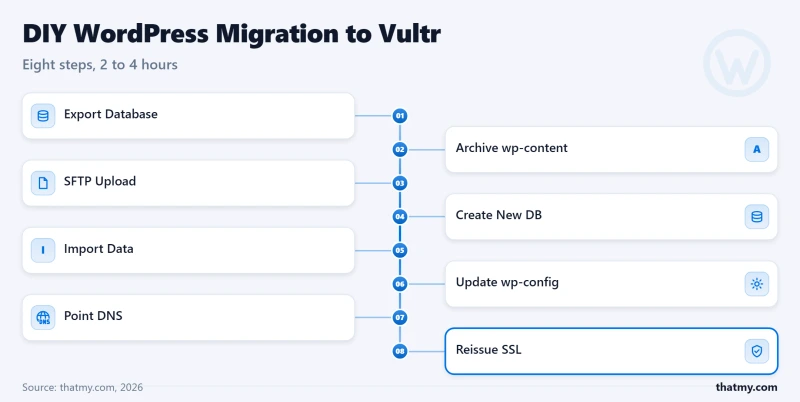
Vultr offers no migration service. Here's the DIY process to move an existing WordPress site to Vultr:
Pre-Migration Checklist
- ✅ Vultr server deployed and configured (LAMP/LEMP stack)
- ✅ Domain DNS TTL lowered to 300 seconds (24 hours before migration)
- ✅ SSL certificate ready (Let's Encrypt or purchased)
- ✅ Backup of current site (database + files)
- ✅ Maintenance window scheduled (off-peak hours)
8-Step Migration Process
- Export Database, On old host, use phpMyAdmin or command line:
mysqldump -u username -p database_name > backup.sql - Download WordPress Files, Use SFTP or rsync to download entire WordPress directory from old host.
- Upload Files to Vultr, Use SFTP (Filezilla) or rsync to upload files to
/var/www/htmlon your Vultr server. - Import Database, On Vultr server:
mysql -u root -p database_name < backup.sql - Update wp-config.php, Change database credentials to match your Vultr MySQL setup. Update salts if needed.
- Configure Virtual Host, Set up Apache/Nginx virtual host for your domain. Point document root to WordPress directory.
- Install SSL Certificate, Use Certbot for Let's Encrypt. Test HTTPS works correctly.
- Update DNS, Change A record to point to Vultr server IP. Wait for propagation (5 min-48 hours depending on TTL).
Estimated time: a few hours if you have done it before (our estimate; we have not timed a move), longer for a first-timer.
Alternative: Hire someone to do the move, use a migration plugin such as UpdraftPlus or Duplicator (Vultr's docs have guides for both), or choose a managed host that migrates sites for you.
FAQ
Is Vultr worth it for WordPress in 2026?
Vultr is worth it if you can administer a Linux server yourself or have someone who does. In our benchmark its High Frequency servers were quick: 48ms to 53ms TTFB (origin, from New York to our New York test servers), 0 failed requests over a 0-250 client load ramp, and 99.97% to 99.979% uptime over a 54-day window, from $6.00/mo to $24.00/mo for the plans we tested. The cost Vultr does not print is your time: setup, updates, security and backups are yours. If you would rather not run a server, ScalaHosting or Cloudways manage it for you.
What CPU does Vultr use?
It depends on the product. Vultr's pricing page says High Frequency is powered by 3GHz+ Intel Xeon CPUs with NVMe SSD, and it publishes no part number, so there is no PassMark rank to quote for it. High Performance plans come in AMD or Intel versions, Regular Performance runs on previous-generation Intel, and Optimized Cloud Compute uses dedicated AMD EPYC vCPUs. We have not read the CPU model on our own High Frequency test servers.
How does Vultr compare to Cloudways?
Cloudways runs Vultr High Frequency servers and manages the web stack, updates and security for you. Vultr direct: $24.00/mo for High Frequency 2 vCPU / 4GB, and you manage everything. Cloudways on Vultr High Frequency 4GB: $60.00/mo. In our benchmark both answered New York in 48ms (origin, to our New York test servers); under load Cloudways was quicker, 74ms against 95ms with 100 concurrent users. You pay more to have the server run for you.
What are Vultr's hidden costs?
The server price is the starting point. Vultr's own add-ons: automatic backups add 20% to the server price, DDoS protection is $10 a month per server, snapshots are $0.05 per GB a month, a Reserved IP is about $3 a month, and bandwidth beyond the allowance is $0.01 per GB. A paid control panel licence (cPanel or Plesk) and a mail service are extra, and Vultr does not refund unused service. The biggest cost is time: you run the server yourself, or pay someone who can.
Does Vultr include email hosting?
No. Vultr sells servers only, and its docs say outbound port 25 is blocked on all new compute instances; you can ask support to open it, and each request is reviewed. Your options: run your own mail server (hard to keep out of spam folders), use a paid mailbox service such as Google Workspace or Zoho Mail, or choose a host such as ScalaHosting that includes email.
Is Vultr good for WooCommerce?
It can be, if you set the server up well. Vultr lists a one-click WooCommerce image, and our High Frequency 4GB server served 100 concurrent users in 95ms with no failed requests over our load ramp. We tested a WordPress site, not a store, so a busy checkout is untested. Caching, PHP workers and database tuning are your job; ScalaHosting or Cloudways do that for you.
What happened to Vultr's $2.50/mo plan?
It is still listed, but it is IPv6 only. Vultr's pricing page shows Regular Performance from $2.50 a month IPv6 only, then $3.50 with IPv4 and $5 for 1 vCPU and 1 GB. The plans we benchmarked are High Frequency: $6.00/mo for 1 GB, $12 for 2 GB and $24.00/mo for 2 vCPUs and 4 GB, each one monthly price with no intro discount.
Full Test Report: Vultr VPS, by Plan
Here is the complete export from our test suite for every vps plan we benchmarked: High Frequency 1GB, High Frequency 2GB, and High Frequency 4GB. Each tab holds that plan's full run: server response time (TTFB, origin, from 10 locations to our New York test server), behavior on the 0-250 client load ramp, the GTmetrix and PageSpeed captures, a Pingdom response-time check, our WordPress hosting benchmark, the regional TTFB scorecard, and 54 days of uptime tracking with the day-by-day calendar.
High Frequency 1GB (Featured) High Frequency 2GB High Frequency 4GB
Where This Leaves You
Vultr delivers exactly what it promises: raw, unmanaged cloud servers at low prices. Its High Frequency servers were fast in our test (48ms to 53ms TTFB, origin, from New York to our New York test servers), the 33 data center locations provide global coverage, and 99.97% to 99.979% uptime over our 54-day window is solid. At $6.00/mo to $24.00/mo for the plans we tested, few competitors match Vultr's price-to-performance ratio.

But Vultr is not a managed WordPress host, and evaluating it as one leads to disappointment. The "hidden" costs aren't really hidden; they're simply the cost of doing business when you choose infrastructure-only over full-service hosting.
Score Summary
The Bottom Line
Vultr is perfect for: Developers, sysadmins, technical teams, and cost-optimizers who have the skills and time to manage servers.
Vultr is wrong for: Non-technical users, business owners without sysadmin resources, and anyone whose time is better spent on the business than on the server.
If you have Linux skills and enjoy server management, Vultr is hard to beat. If you want to focus on your business instead of your infrastructure, ScalaHosting Entry Cloud ($14.95/mo for the first year, then $39.95/mo) or Cloudways on Vultr High Frequency ($60.00/mo for 4GB) are better values.
Our Recommendation
For most WordPress users reading this review: Choose ScalaHosting. Its price includes management, SPanel, email hosting and security, which makes it cheaper than Vultr once you count the time a server takes.
For developers and sysadmins: Vultr is excellent. The servers are fast, the price is one monthly figure, and you get full control without artificial limits.
