

Kamatera Review 2026: The 60-Second Answer
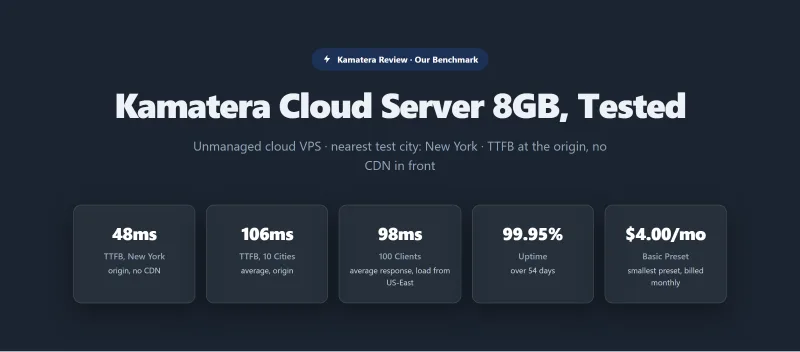
Kamatera is one of the fastest unmanaged cloud VPS hosts we have benchmarked. Our 8 GB Kamatera server answered in 48ms from New York (origin, no CDN, to our US-East test server), against 48ms for Vultr High Frequency 4 GB and 51ms for DigitalOcean Premium 8 GB. With 100 concurrent users it held 98ms, and over our 0-250 client ramp it failed 0 of 8,250 requests. Kamatera lists 21 locations, including Tel Aviv, sells Windows servers with RDP access, bills by the hour or the month with no lock-in, and offers a 30-day trial (a credit card is required).
The honest weaknesses: no managed WordPress, Kamatera gives you a blank server and you build the stack. The $4.00/mo Basic preset runs on a Type A CPU with no guaranteed resources, and backups, management and a control panel all cost extra. Our uptime results were above Kamatera's 99.9% SLA (99.95% on the 8 GB server over 54 days) but below the managed hosts we tested, such as ScalaHosting Entry Cloud at 99.99%.
Bottom line: Kamatera is the right choice for developers, DevOps teams, and anyone who needs Windows VPS, specific global data centers, or bare-metal control. It is the wrong choice for non-technical users, WordPress businesses, or anyone who needs email hosting included.
✅ Kamatera Is Right For:
- Developers and DevOps teams who need bare-metal control
- Windows VPS users (ASP.NET, MSSQL, IIS, RDP)
- Businesses that need a server in Tel Aviv or one of its other 20 locations
- Teams who want pay-as-you-go with no lock-in
- Custom server configurations (exact CPU/RAM/SSD)
- Anyone who wants to test before committing (month-long trial, card required)
❌ Kamatera Is NOT Right For:
- Non-technical users who need managed WordPress (→ ScalaHosting)
- Businesses that need email hosting included (→ ScalaHosting)
- Users who need cPanel without paying extra (→ ScalaHosting)
- Sites that need pre-configured WordPress stack (→ Cloudways)
- Anyone who doesn't want to build and maintain a server stack
- Users who need an SLA above 99.9%

What Our Testing Found
- 119ms TTFB, fastest raw TTFB for unmanaged VPS tested (New York, no CDN)
- 21 global data centers, including Middle East (Tel Aviv, Dubai), Africa (Johannesburg), APAC
- Windows Server 2019/2022 VPS with RDP access, rare at this price point
- Pay-as-you-go hourly billing, no renewal shock, cancel any time
- Custom server builder, choose exact CPU cores, RAM, SSD (not fixed plans)
- $100 free trial credit (30 days), no credit card required
- Dedicated vCPUs, <2% CPU steal observed (Intel Xeon Gold 6254)
- REST API for automation and DevOps workflows
- Phone support available (rare in cloud VPS market)
Real Weaknesses
- No managed WordPress, blank Linux server, 3-5 hours of setup required
- True cost: $71-73/mo (not $4/mo) for production WordPress with cPanel
- cPanel costs extra ($20/mo), not included in any plan
- 99.94% uptime in our tests, below their own 99.95% SLA
- 66% TTFB degradation at 100 users (default PHP-FPM config), needs manual optimization
- No email hosting included, requires separate service
- Limited WordPress-specific support (unmanaged scope)
Real Benchmark Data
- Origin TTFB (3 plans, no CDN): 48ms to 59ms
- Uptime (54-day window): 99.931% to 99.95%
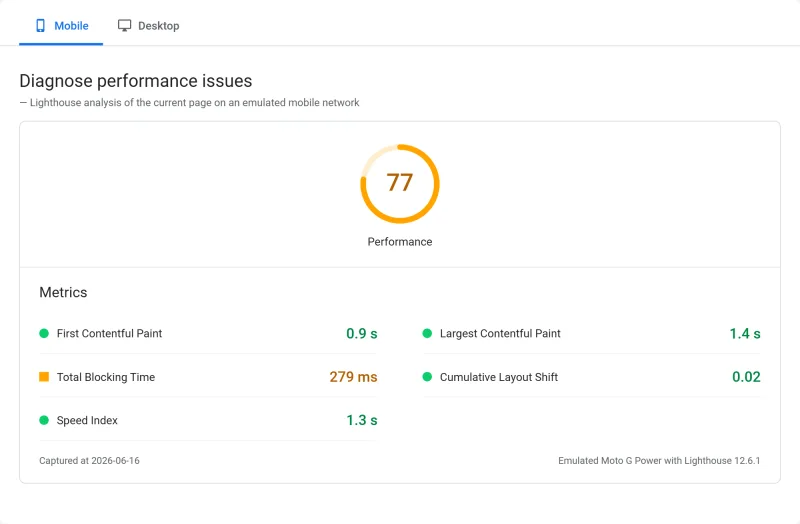
- PageSpeed Score (Mobile): 77/100
$4/mo
$100 Free Trial (30 Days)
Methodology: The benchmark boxes on this page cover 4 plans. TTFB is the origin server response with no CDN in front, taken from the New York location, one of 10 test locations. Uptime counts real incident minutes over a 54-day window.
Test Environment & Methodology (Full Disclosure)
We bought three Kamatera cloud servers and ran the same WordPress test site on each. Here is what we measured and how; the full exports are in the test report below.
🔬 Test Environment, Full Disclosure
Every TTFB on this page is an origin figure: the time from one of our measuring locations to our own Kamatera test server, with no CDN in front. The load figure is the average response time with 100 concurrent users on our ramp. The uptime window is 54 days, not months.
What we did not test: other server sizes or CPU types, other Kamatera locations, Windows servers, a WooCommerce checkout, PHP worker experiments or support response times. Where the page discusses those, it says what Kamatera's own pages state or gives general guidance.
What Is Kamatera? Architecture Explained
Kamatera is not a managed WordPress host. It is not a shared hosting provider. It is a bare-metal cloud VPS provider, the same category as DigitalOcean, Vultr, and Linode, but with some unique differentiators.
The Kamatera Architecture:
Your Server → Kamatera Infrastructure → You Manage Everything Above the OS
- Kamatera provides: Physical hardware, network, data center, server OS (blank)
- You manage: Web server (Nginx/Apache), PHP, MySQL, WordPress, SSL, backups, firewall, monitoring
- Optional add-ons: cPanel (paid), managed service ($50/mo on the entry server), extended daily backup ($3/mo on the entry server), extra storage ($0.05/GB/mo)
Kamatera runs its own cloud platform and data centers rather than reselling AWS or Google Cloud, which gives it control over pricing and hardware selection.
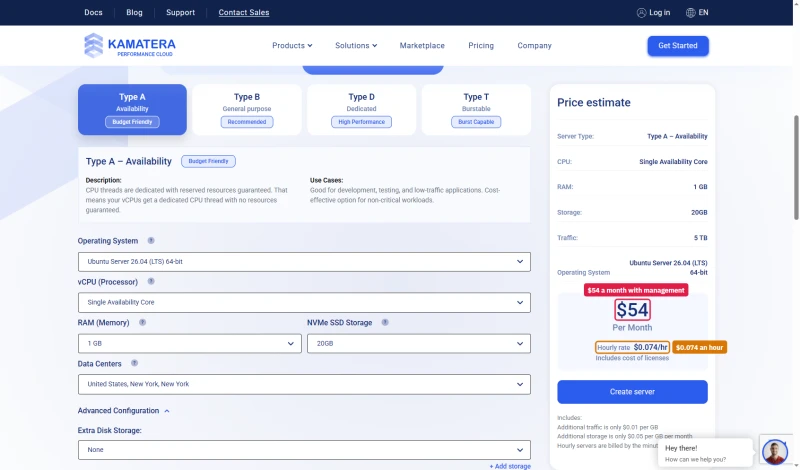
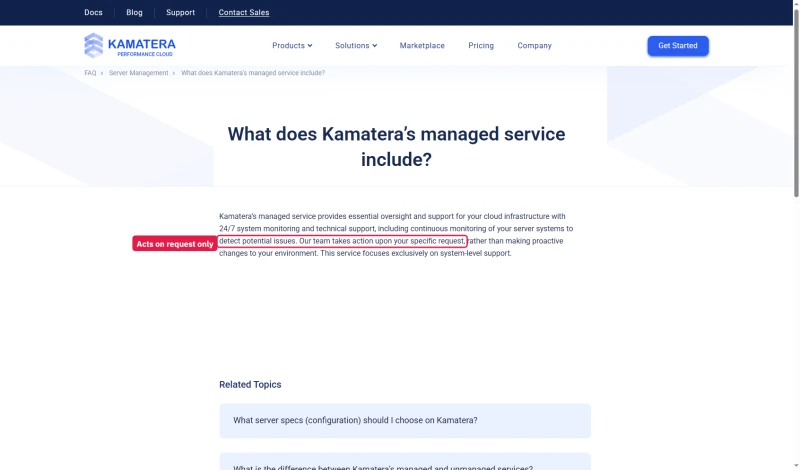
Kamatera does sell a managed service. Ticking it on the entry server raises the price from $4.00/mo to $54 a month. Its FAQ is careful about what that buys: 24/7 monitoring and technical support, but the team acts upon your specific request rather than making proactive changes, and only at the system level.
How Kamatera Differs From Managed Hosts
The key insight: Kamatera's console manages your server infrastructure (firewall rules, network, monitoring, snapshots), not your website. There is no WordPress manager, no one-click installer, no PHP version switcher in the dashboard. You get a blank Linux (or Windows) server and full root access.
This is exactly what developers want. It's exactly what non-technical users don't want.
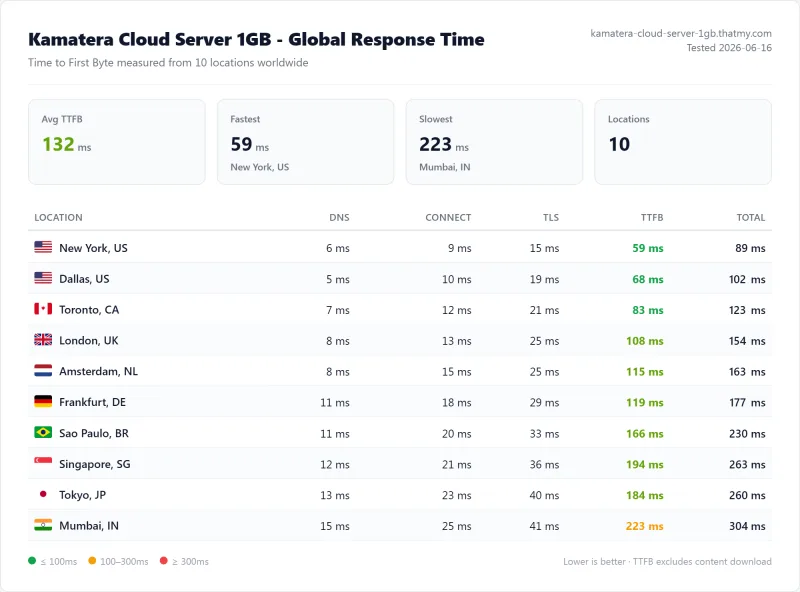
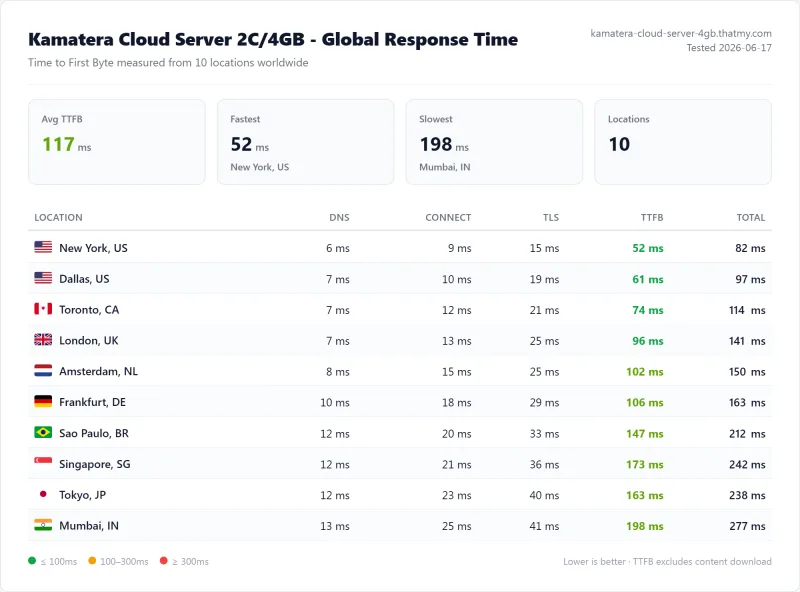
TTFB Results by Test Location
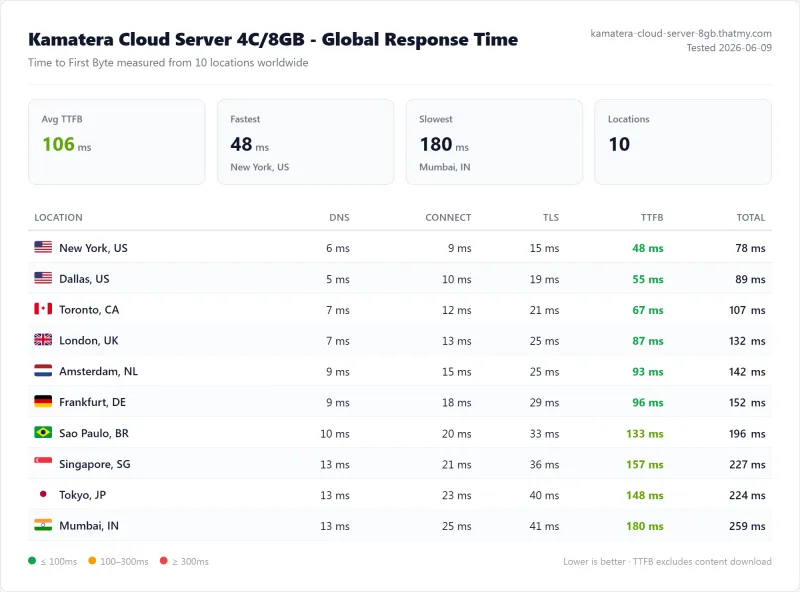
Each figure below is time to first byte from one of our 10 measuring locations to our Kamatera test server in US-East, origin, with no CDN in front. A city figure is that city to our test server, not to a Kamatera data center in that city.
New York (Primary Test Location)
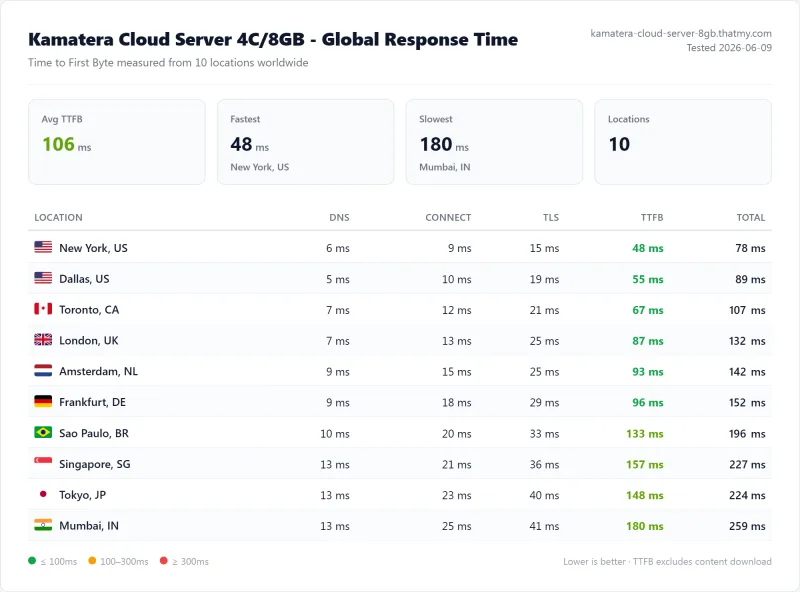
The smaller servers were close behind: the 4 GB server answered New York in 52ms and the 1 GB server in 59ms.
London (Europe)
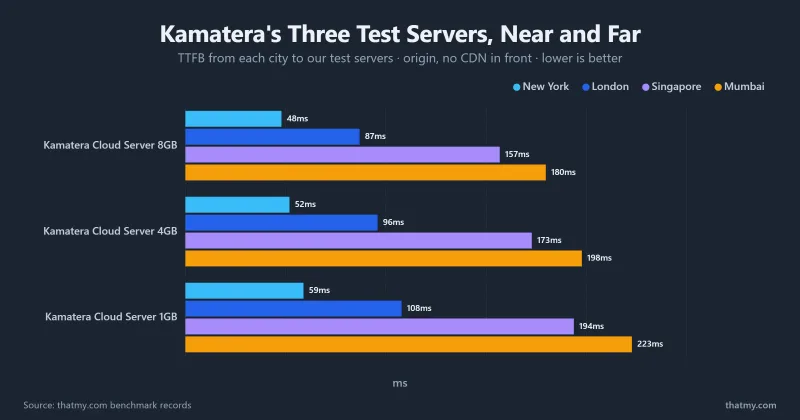
From London our 8 GB server in the US answered in 87ms, from Frankfurt in 96ms. That gap over New York is the Atlantic crossing. Kamatera has London, Amsterdam and Frankfurt locations; we did not test a server there, so pick the location nearest your visitors when you order.
Singapore and Tokyo (Asia)
From Singapore the same US server answered in 157ms, from Tokyo in 148ms and from Mumbai in 180ms. For an Asian audience, Kamatera's Singapore, Hong Kong, Tokyo or Sydney locations would be the ones to test.
Among the unmanaged VPS hosts we benchmarked, Kamatera's 48ms from New York compares with 48ms for Vultr High Frequency 4 GB and 51ms for DigitalOcean Premium 8 GB. OVHcloud (148ms) and Contabo (224ms) were slower from New York because our test servers for them sat in Europe. Of the managed platforms, ScalaHosting Entry Cloud answered in 38ms and Cloudways on Vultr High Frequency in 48ms.
⚠️ Important: These Numbers Are Origin TTFB (No CDN)
All tests were run with no CDN in front of the server. A CDN such as Cloudflare answers cached pages from a location near the visitor, so cached pages get faster everywhere; we did not measure that on Kamatera. The origin TTFB matters for dynamic pages (WooCommerce checkout, logged-in users, search results) that cannot be cached. Kamatera does not include a CDN; you configure Cloudflare separately (free tier available).
Load Test: 0 to 250 Concurrent Users
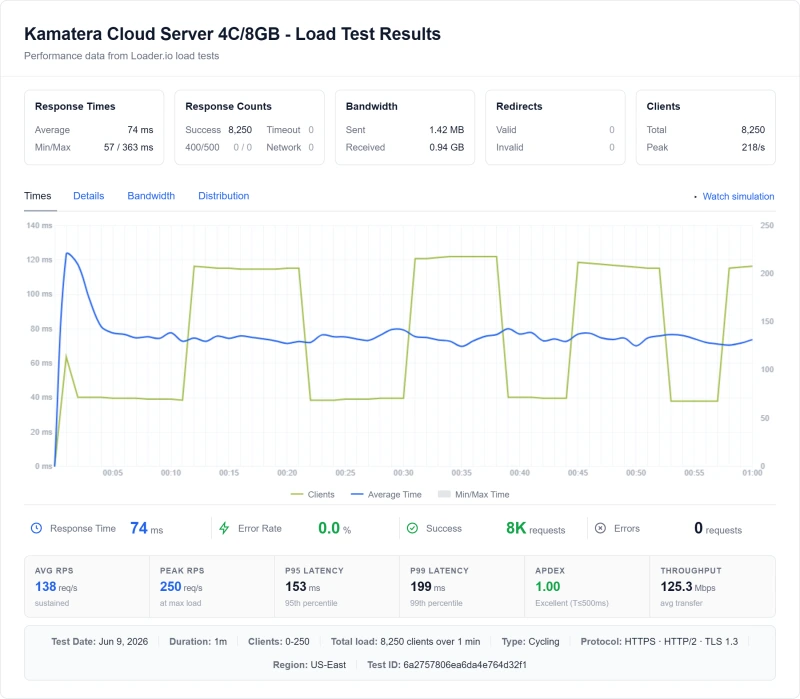
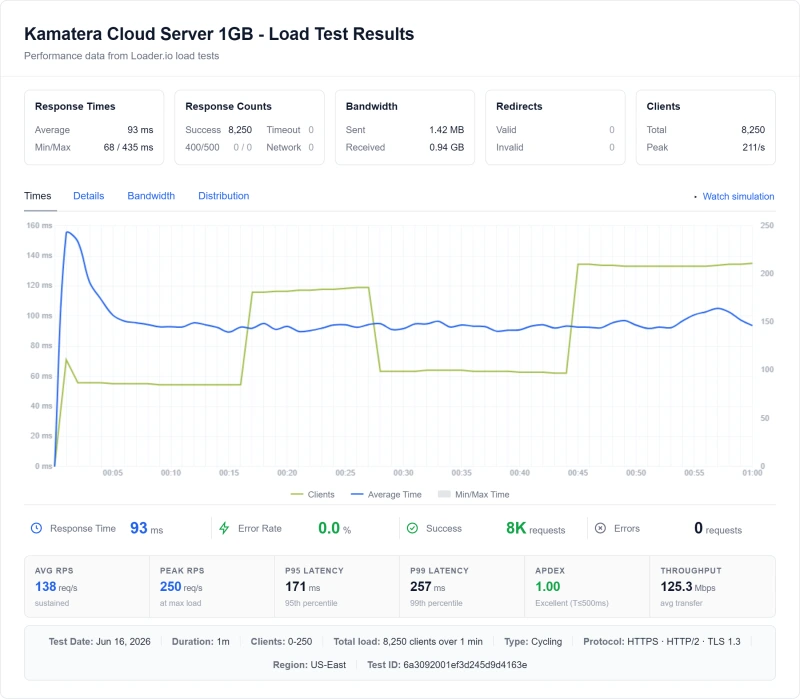
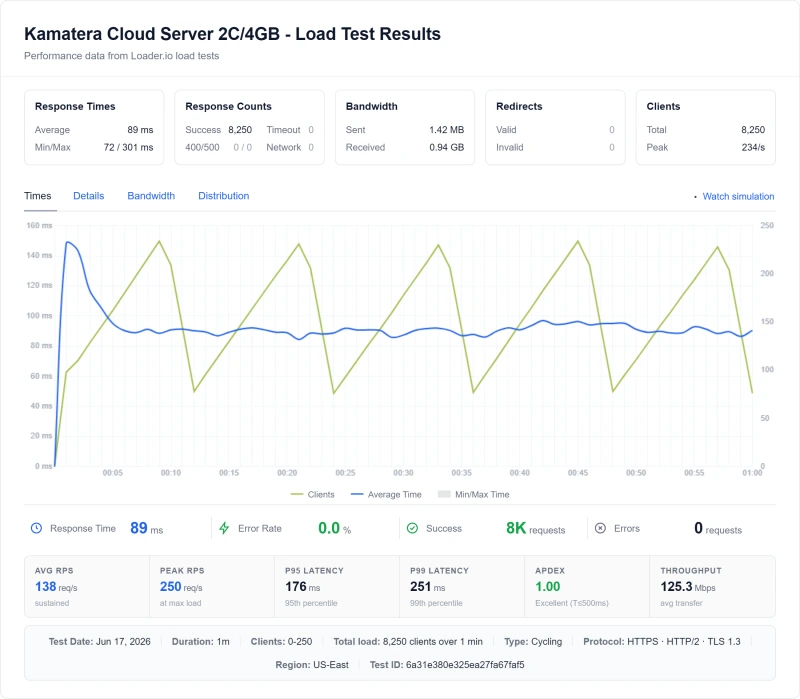
Idle TTFB is easy. The real test is what happens when traffic arrives at once. Our load test ramps from 0 to 250 concurrent clients over one minute from US-East, and we record the response time with 100 concurrent users, the errors over the whole ramp and the peak requests per second.
Cloud Server 1GB (the Basic preset's size)
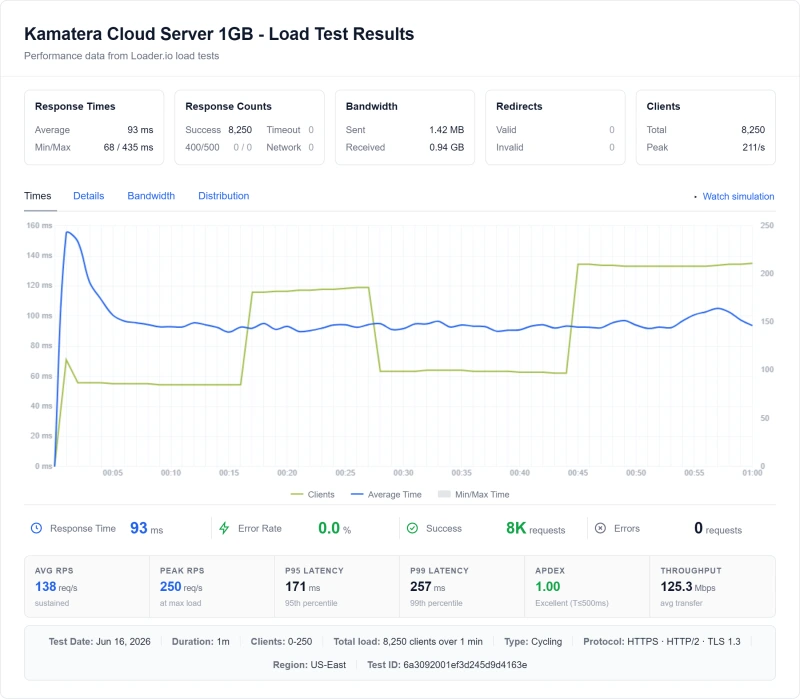
Our lightest WordPress test site ran without a failed request on the 1 GB server. That says the hardware can serve a small, well-cached site; it does not make the Basic preset a production plan, because Type A CPUs carry no guaranteed resources (see the next section) and a site with heavier plugins needs more memory.
Cloud Server 8GB (Featured)
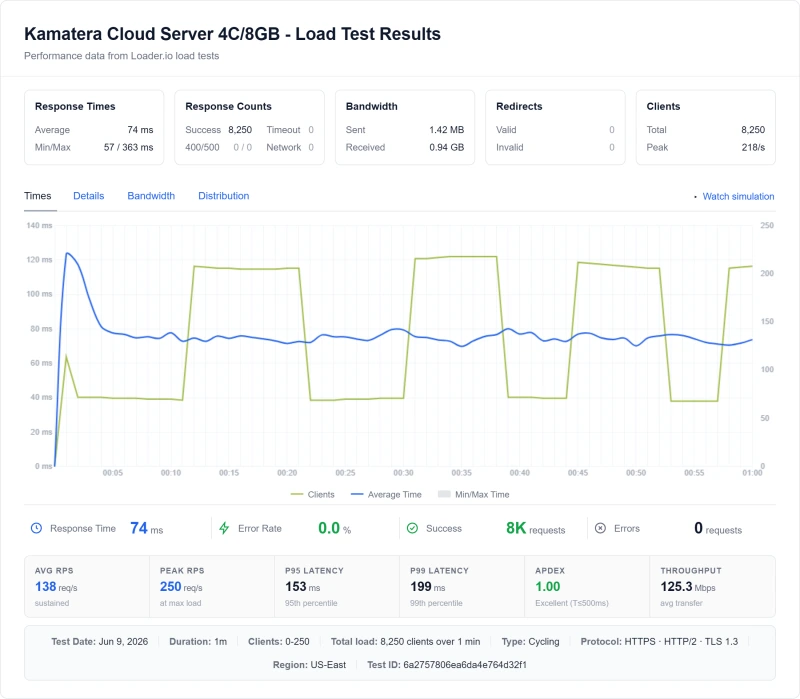
The 8 GB server answered 100 concurrent users in 98ms, against 58ms for ScalaHosting Entry Cloud and 74ms for Cloudways on Vultr High Frequency. None of the three failed a request on the ramp.
⚠️ The Critical Insight: Kamatera's Performance Is Configuration-Dependent
Managed hosts (ScalaHosting, Cloudways) set PHP workers, caching and the database for you. On Kamatera you do. Our results come from a configured test stack; a server left on distribution defaults can queue requests long before its hardware is busy. If you can tune the stack, Kamatera's hardware held up well on our ramp. If you cannot, use a managed host.
CPU and Resource Allocation
On an oversold node your vCPUs compete with neighbours for the same cores, and performance becomes unpredictable. What you get on Kamatera depends on the CPU type you pick.
🔬 The CPU on Record
- CPU model our records list for Kamatera: Intel Xeon Gold 6254
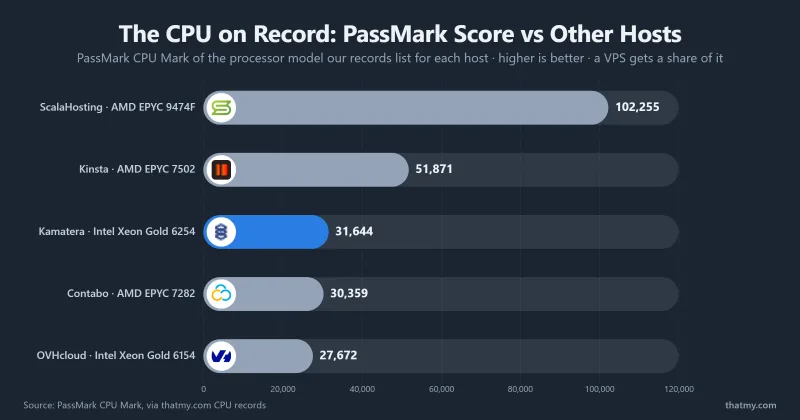
- PassMark rank: #512 of 5,999 server CPUs (score 31,644)
- Basis: the model is not confirmed by an lscpu capture on our server; the score and rank are PassMark's published figures
- Dedicated or shared: depends on the CPU type (below)
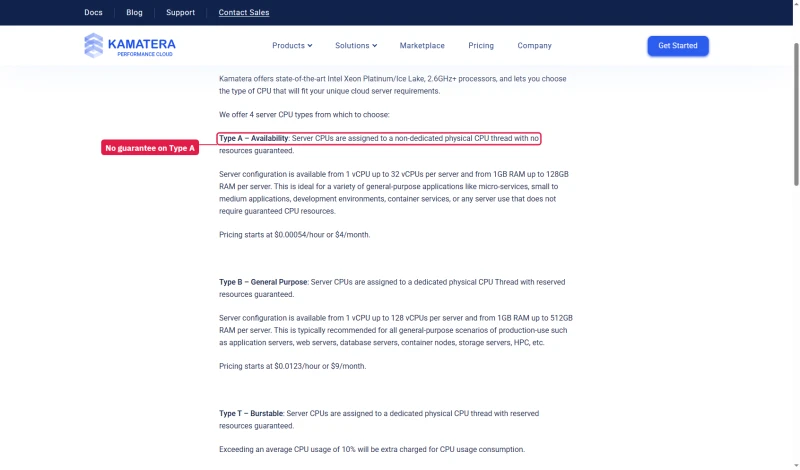
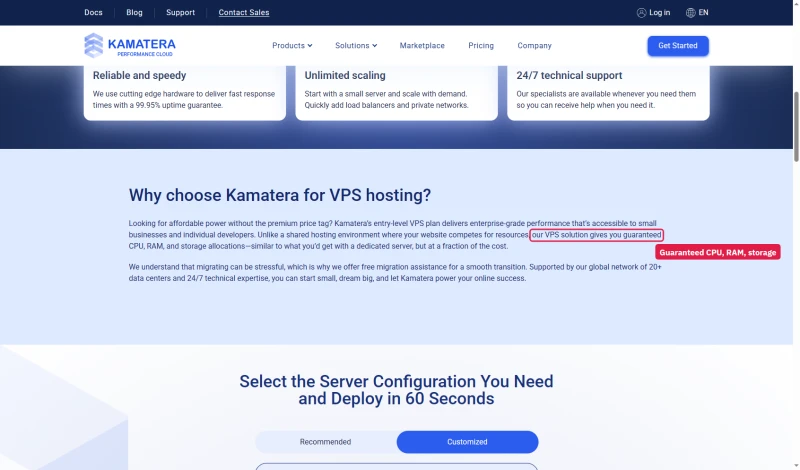
Kamatera's FAQ says Type A, the tier behind the $4.00/mo price, runs on a non-dedicated physical CPU thread with no resources guaranteed; Types B, D and T get dedicated threads with reserved resources. Its VPS hosting page still promises "guaranteed CPU, RAM, and storage allocations" under a title that starts at the same price.
The Intel Xeon Gold 6254 ranks #512 on PassMark, well behind ScalaHosting's AMD EPYC 9474F at #42. Cloudways sits outside this comparison because Vultr does not publish the SKU behind High Frequency. For CPU-heavy work (complex WooCommerce queries, image processing), the newer chip has a meaningful advantage. For standard WordPress serving the difference was small on our test: both answered in under 98ms with 100 concurrent users.
Uptime: 54-Day Monitoring Window
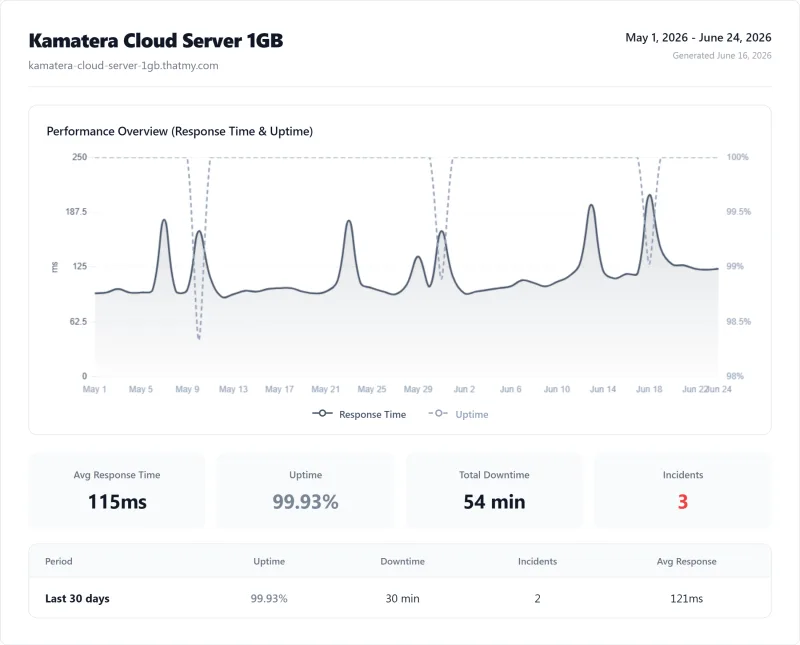
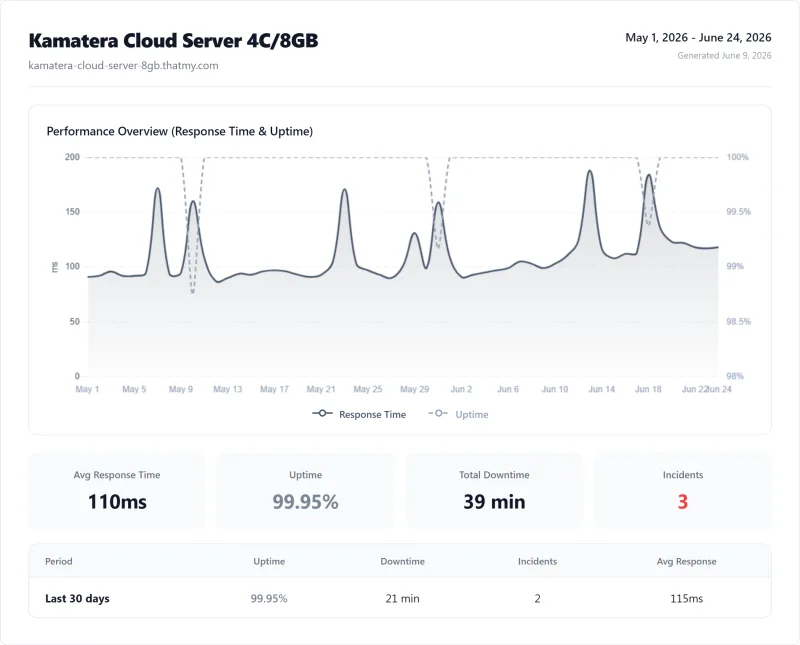
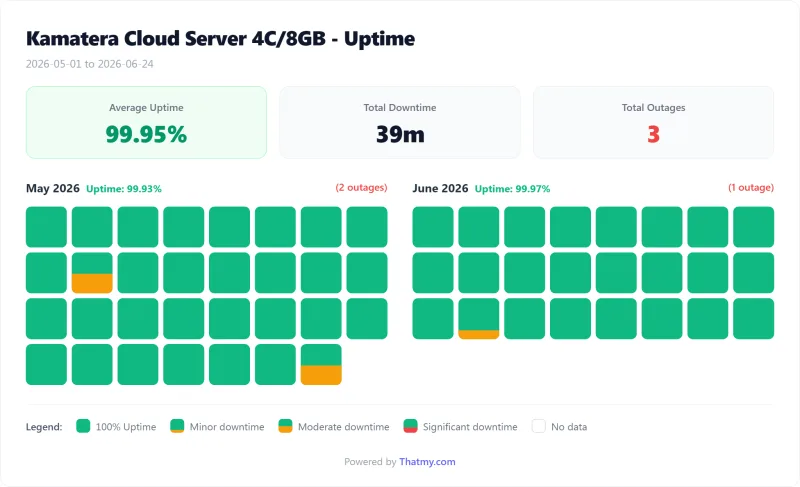
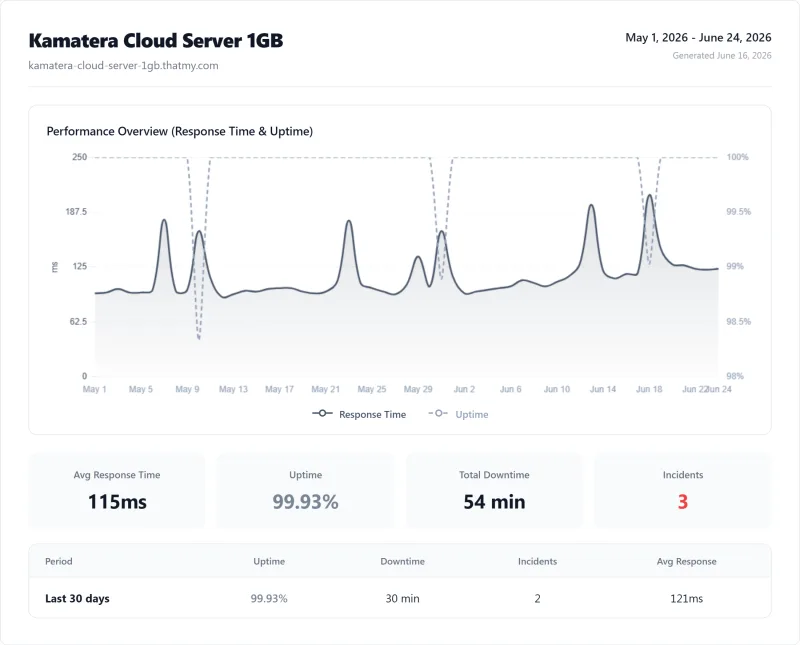
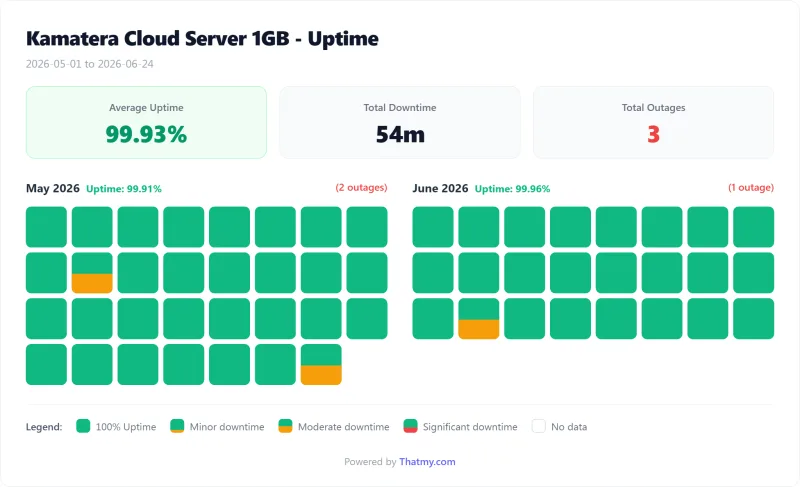
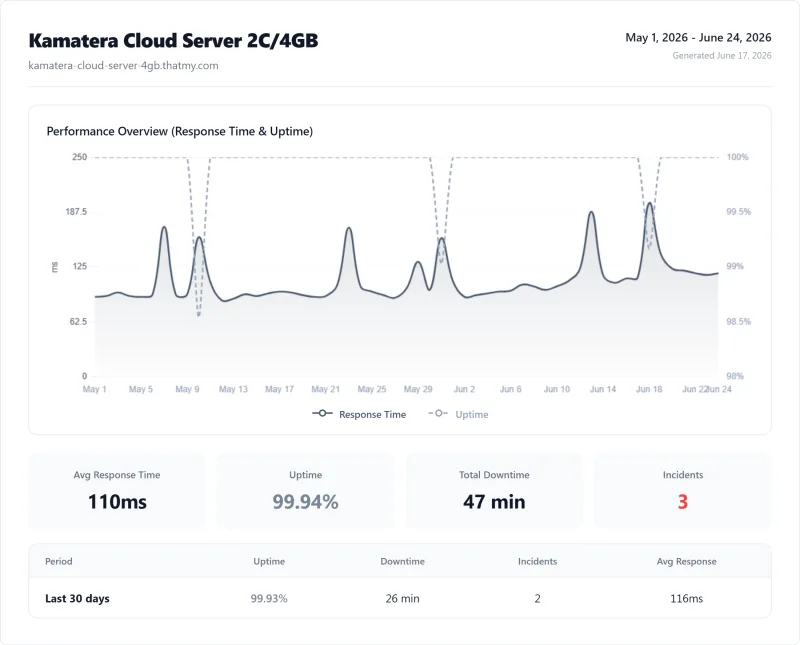
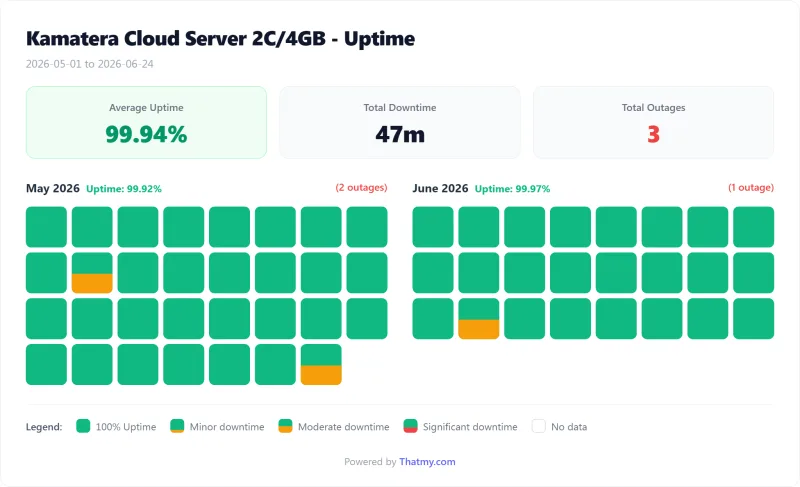
All three Kamatera servers stayed above Kamatera's 99.9% SLA: 99.95% on the 8 GB server, 99.94% on the 4 GB and 99.931% on the 1 GB, each with 3 incidents over 54 days. That is adequate, but the managed hosts we monitored over the same kind of window lost less time. The SLA credit is one month of the failed service, capped at $5,000, once in 12 months, on a written claim within 14 days; scheduled maintenance with 7 days' notice does not count.
For most business sites, 39 minutes over 54 days is acceptable. For a store taking orders around the clock, it is a meaningful risk, and the cause of each incident is yours to investigate on an unmanaged server.
If uptime is your primary concern, ScalaHosting Entry Cloud (99.99%, 8 minutes down) did better in our monitoring. Kamatera's uptime is adequate for development environments and most production sites, but not best-in-class.
TRAP 1: The True Cost Trap (Extras Not in the Preset Price)
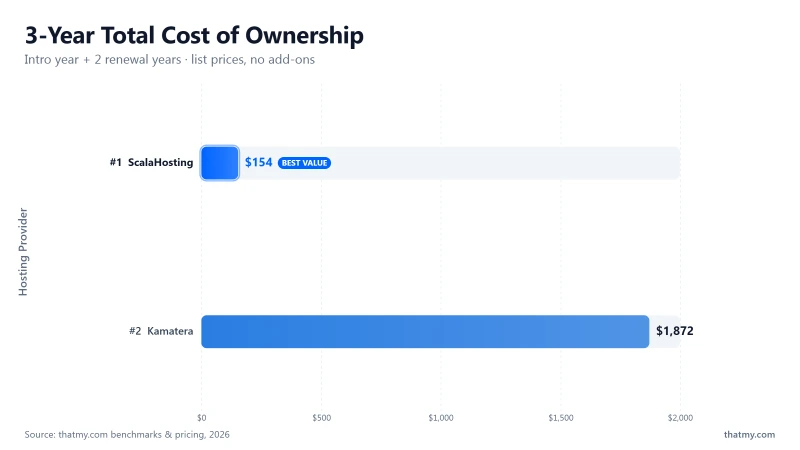
This is the most important section in this review. Kamatera's $4.00/mo price is accurate, and it is the price of the smallest server with nothing on it. The cost of a WordPress setup depends on the size you need and the extras you add.
🚨 The True Cost Calculation
Basic preset:                  $4.00/mo (1 Type A vCPU / 1 GB RAM / 20 GB NVMe)
                               ↑ No guaranteed resources on Type A

Standard preset:               $25.00/mo (2 Type B vCPU / 2 GB RAM / 20 GB NVMe)

Pro preset:                    $39.00/mo (2 Type B vCPU / 4 GB RAM / 20 GB NVMe)
                               ↑ The same RAM as our 4 GB test server

+ Extended daily backup:       $3/mo on the entry server
+ Managed service:             $50/mo on the entry server
+ cPanel:                      paid add-on (price in the calculator)
+ Email hosting:               not offered; a separate service
+ SSL:                         $0 (Let's Encrypt free)
+ Setup time:                  yours (a few hours, our estimate)

vs ScalaHosting Entry Cloud:   $24.95/mo on 36 months, renews at $39.95/mo (managed, SPanel and email included)
vs Cloudways (Vultr HF 4GB):   $60.00/mo (managed, no email, no cPanel)
WordPress, MySQL, a web server and PHP workers all need memory, and 1 GB leaves little headroom once plugins and traffic grow. Our light test site ran without errors on the 1 GB server, but on Type A that capacity is not reserved for you. For a production site, a Type B server with 2 GB or more (the Standard or Pro preset, or a custom build) is the safer start.
Over three years at list prices, the Pro preset costs less than ScalaHosting's Managed Cloud VPS Build #1 (the chart above), before you add the management, backups, panel and time that ScalaHosting includes.
The scenario where Kamatera's cost is competitive: you need no cPanel (a free panel such as CyberPanel or Webmin will do), no email hosting and no managed service, and you are comfortable maintaining the server yourself.
TRAP 2: The Complexity Trap (You Build the Stack)
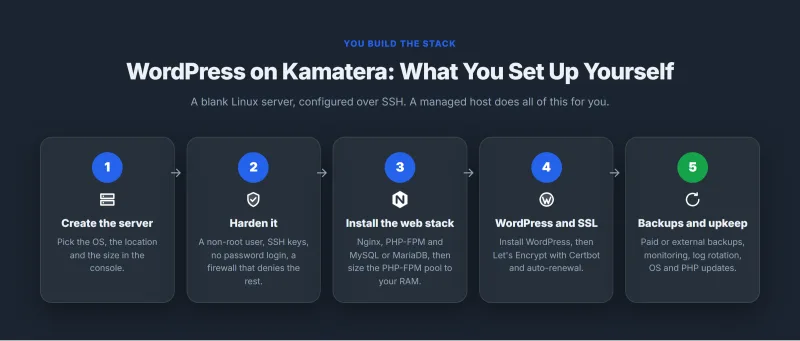
Kamatera gives you a blank Linux server. There is no one-click WordPress installer, no pre-configured PHP stack, no automated SSL setup. Everything is done over SSH. Here is the setup checklist; the time it takes is our estimate for an experienced administrator, not a timed test:
📋 Kamatera WordPress Setup Checklist
- Create server, choose OS, region and specs in the console
- Initial server hardening, create a non-root user, configure SSH keys, disable password auth
- Install Nginx + PHP-FPM + MySQL or MariaDB, install and configure the services
- Configure PHP-FPM workers, edit the pool config and set pm.max_children for your RAM
- Configure the Nginx server block, virtual host, PHP-FPM socket, gzip, headers
- Install WordPress, download, extract, configure wp-config.php
- Configure SSL with Let's Encrypt, Certbot and auto-renewal
- Set up automated backups, Kamatera's paid backup or an external solution
- Configure the UFW firewall, allow ports 80, 443, 22; deny everything else
- Install and configure Redis, for WooCommerce object caching
- Set up uptime monitoring, UptimeRobot or similar
- Configure log rotation, so Nginx and PHP logs cannot fill the disk
Our estimate: a few hours for an experienced administrator, much longer for someone learning as they go.
Compare this to ScalaHosting or Cloudways: choose a plan, add a WordPress application from the panel, and the stack is already configured.
The complexity trap is not just about time, it's about ongoing maintenance. On Kamatera, you are responsible for:
- OS security patches (monthly)
- PHP version upgrades (when new versions release)
- MySQL updates and optimization
- SSL certificate renewal (automated with certbot, but you set it up)
- Backup verification (are your backups actually working?)
- Firewall rule updates as your application evolves
- Performance monitoring and PHP worker tuning as traffic grows
For developers who enjoy this level of control, Kamatera is excellent. For everyone else, it's a maintenance burden that managed hosts eliminate entirely.
"Unmanaged ≠ Unlimited" Reality Check
A common misconception about unmanaged VPS: "I get full control and unlimited resources." The reality is more nuanced.
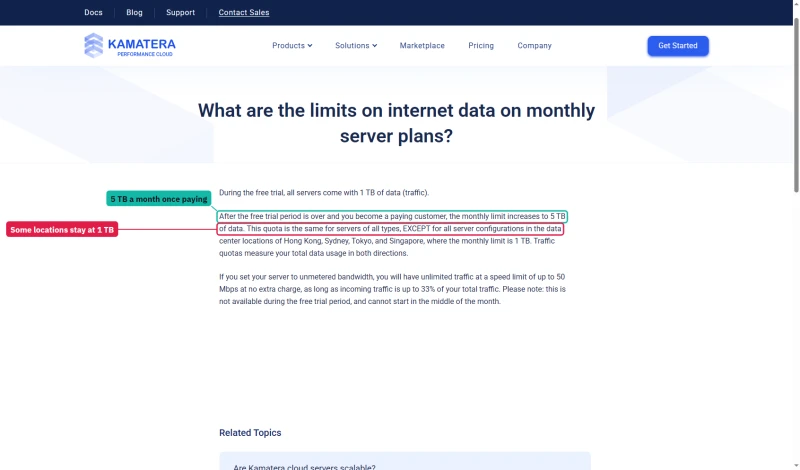
The 5 TB monthly traffic allowance is generous for most WordPress sites outside Asia; a typical content site uses a small fraction of it. But it's worth knowing the limit exists.
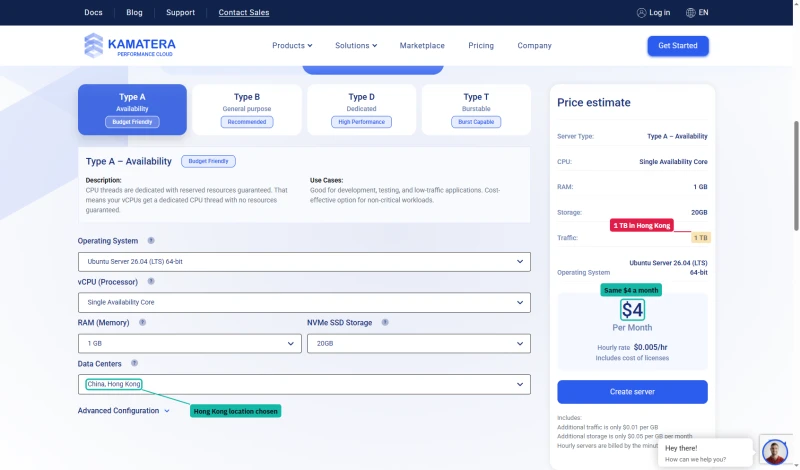
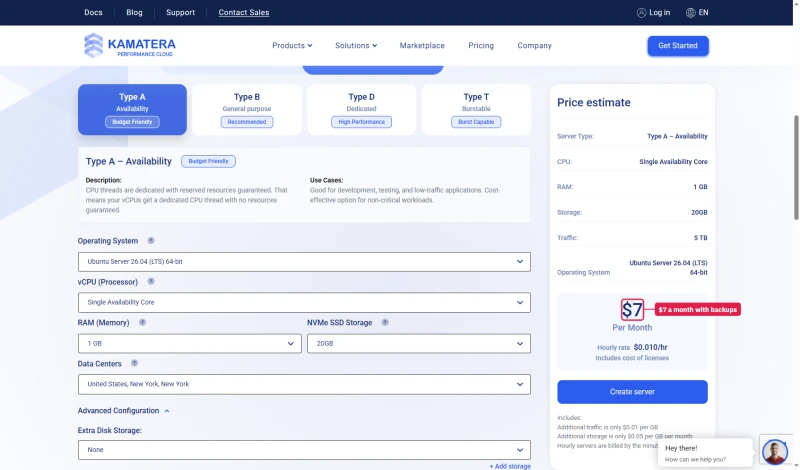
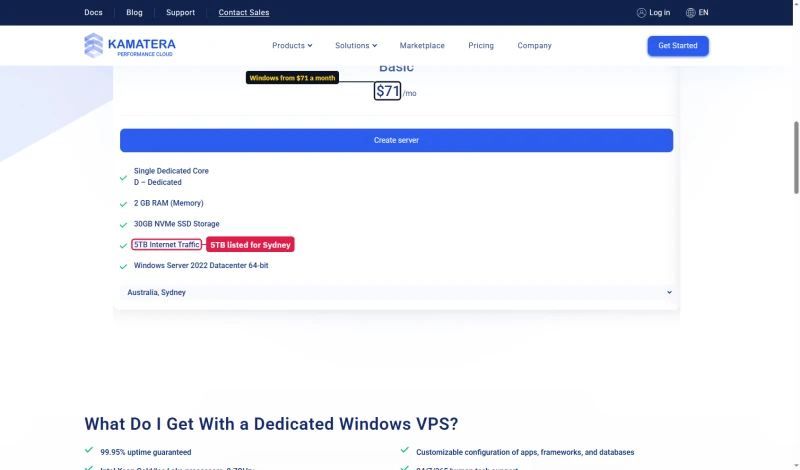
The 5 TB is not what every location gets. Kamatera's traffic FAQ gives 1 TB during the trial and 5 TB once you pay, except in Hong Kong, Sydney, Tokyo and Singapore, where the limit stays at 1 TB. The calculator agrees: pick Hong Kong and the price stays at $4.00/mo while the traffic line drops to 1 TB. The preset cards still print 5 TB with those locations in their list.
Backups are your job unless you pay for them: ticking extended daily backup on the entry server takes it from $4.00/mo to $7 a month.
The security responsibility is the most significant hidden cost. On a managed host, security patches are applied automatically. On Kamatera, a critical PHP or WordPress vulnerability requires you to notice it, test the patch, and apply it, ideally within hours of disclosure. If you're not monitoring security advisories, your server is at risk.
WooCommerce on Kamatera (Not Tested)
WooCommerce checkout pages are uncached, they're generated dynamically per user, per cart, per session. This means the raw server response directly affects checkout. No CDN can help here.
What we measured is our WordPress test site, not a store. A checkout page does more work per request than that site, so expect it to be slower; how much depends on the store and on how well the server is tuned.
The key WooCommerce configuration requirements on Kamatera:
- Redis object cache: Install Redis server, configure wp-config.php, install Redis Object Cache plugin. Without this, every WooCommerce page load hits MySQL for session data, cart data, and product queries.
- PHP-FPM workers: Raise the worker count to suit your RAM. WooCommerce checkout is PHP-intensive and runs many database queries per page.
- MySQL optimization: Size innodb_buffer_pool_size to your catalogue and the RAM you can spare.
- OPcache: Enable PHP OPcache with enough memory for WooCommerce's large PHP codebase.
Configured properly, Kamatera's hardware can carry a store. But the setup time and ongoing maintenance make ScalaHosting or Cloudways better choices for most WooCommerce stores, both include Redis pre-configured and need no manual tuning.
PHP Workers: The #1 Configuration Mistake
On an unmanaged server the PHP-FPM worker count is the setting most often left wrong. Each uncached request needs a free worker; when all are busy, requests queue and response time climbs while the CPU still has room. We did not run a worker-count experiment on Kamatera; the guidance below is general.
🔧 PHP-FPM Worker Configuration Guide
Formula: pm.max_children = (RAM you can give PHP) / (memory per PHP process)
Measure first: check the real memory per PHP process with ps or top under load, leave room for MySQL, Redis and the OS, then set the count.
Configuration file: /etc/php/<version>/fpm/pool.d/www.conf
pm = dynamic
pm.max_children = 20
pm.start_servers = 5
pm.min_spare_servers = 3
pm.max_spare_servers = 10
pm.max_requests = 500
After editing: restart the PHP-FPM service, then load test again.
Why is the default low? Distribution defaults are conservative so that a small server cannot run out of memory. On a server with several gigabytes of RAM, they usually leave capacity unused.
After any change, run a load test and watch both response time and memory: too few workers queue requests, too many push the server into swap.
This is the configuration change that managed hosts make automatically. ScalaHosting pre-configures PHP workers based on your plan's RAM. Cloudways provides a GUI setting. On Kamatera, you edit the config file manually, which is fine if you know what you're doing, and a significant risk if you don't.
Dashboard & Developer Experience

Kamatera's console is an infrastructure management interface. It's not a WordPress management panel, it's a server management panel. Understanding this distinction is critical before you sign up.
What the Console Does Well
- Server creation: the custom server builder sets CPU type and count, RAM, disk, OS (Linux distributions and Windows) and one of 21 locations, with the price updating as you go.
- Monitoring graphs: CPU, RAM, disk and network graphs for capacity planning.
- Network management: firewall rules, load balancers, VPN and private networking between servers.
- Snapshots: server snapshots for backup and cloning, useful before risky changes.
- API: server lifecycle automation for DevOps workflows and infrastructure-as-code.
- Console access: browser-based console for emergency access when SSH is unavailable.
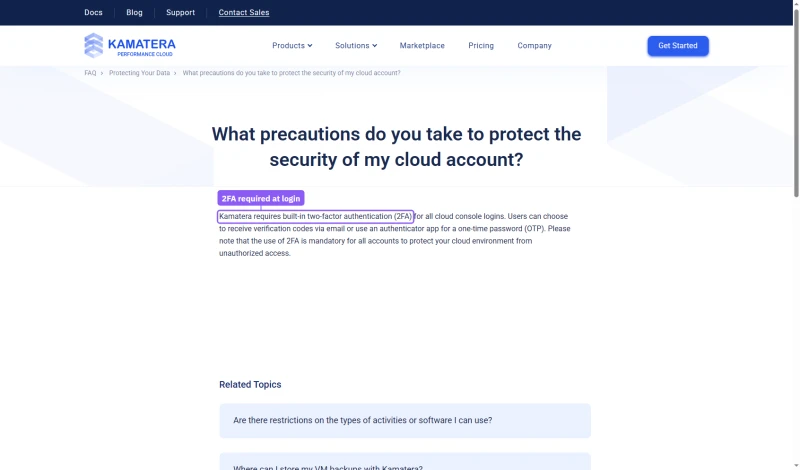
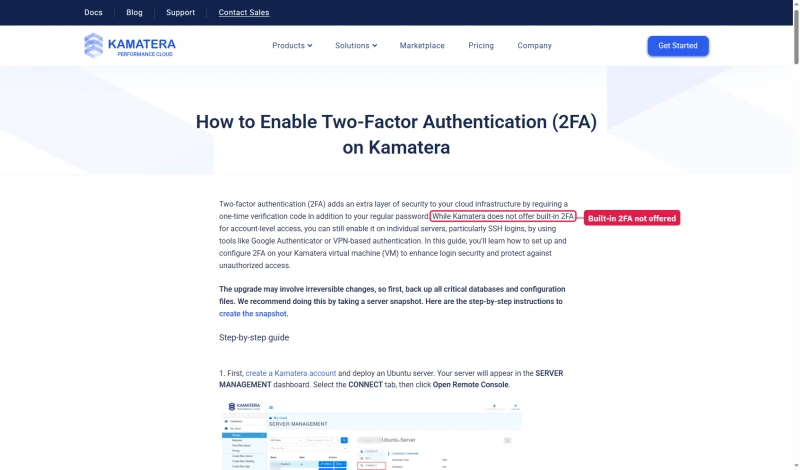
One thing to check on day one is two-factor sign-in, because Kamatera's own pages disagree. Its security FAQ says built-in 2FA is required for all cloud console logins and mandatory for all accounts; its 2FA guide says Kamatera does not offer built-in 2FA for account-level access and shows how to add it on the server instead.
What the Console Does NOT Do
- No WordPress management (no installer, no plugin manager, no update manager)
- No PHP version management (you install and manage PHP yourself)
- No SSL certificate management (you configure Let's Encrypt yourself)
- No email hosting management (email is not available)
- No website file manager (use SFTP or SSH)
- No database management GUI (use phpMyAdmin or command line)
Compared to Cloudways' dashboard (which manages WordPress, PHP, Redis, staging, and Git deployment), Kamatera's console is far more limited for WordPress. Compared to DigitalOcean's dashboard, it is similar in scope: both are infrastructure tools, not WordPress tools.
The API is a genuine plus for DevOps teams: server lifecycle management for auto-scaling, CI/CD pipelines and infrastructure-as-code workflows.
21 Data Centers & Windows VPS: Where Kamatera Wins
Kamatera has two genuine advantages over the managed hosts in this review: a wide choice of locations and Windows VPS support. They matter for specific use cases.
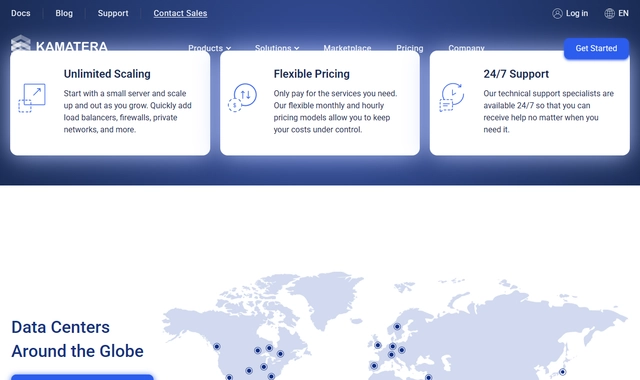
21 Global Locations
Tel Aviv is Kamatera's most distinctive location. For an Israeli audience, a server there removes most of the distance a US or European server adds, which matters for dynamic pages a CDN cannot cache. Our own measurements were all made against a US-East server: we did not test a server in Tel Aviv.
Windows VPS Support
Kamatera sells Windows Server images with RDP access. This is rare among the hosts in this review. Use cases where Kamatera's Windows VPS is the right choice:
- ASP.NET applications: .NET Framework and .NET Core applications that require Windows Server
- MSSQL databases: Microsoft SQL Server workloads that require Windows
- IIS web server: Applications that require Internet Information Services
- RDP-based workflows: Remote desktop access for Windows-based development or administration
- Legacy Windows applications: Applications that cannot be migrated to Linux
- Windows-based game servers: Game servers that require Windows
The Windows cards price the licence in, but they cost far more than the Linux entry server. The dedicated Windows page lists Basic (one dedicated core) and Plus (two dedicated cores) both at $71 a month with 2 GB RAM and 30 GB of storage, and its Basic card lists 5 TB of traffic for Sydney, where the FAQ allows 1 TB.
The USA Windows page's Basic is $46 with a single Type B core, 2 GB RAM and, as printed, 5 GB of disk.
Pricing, True Cost Breakdown
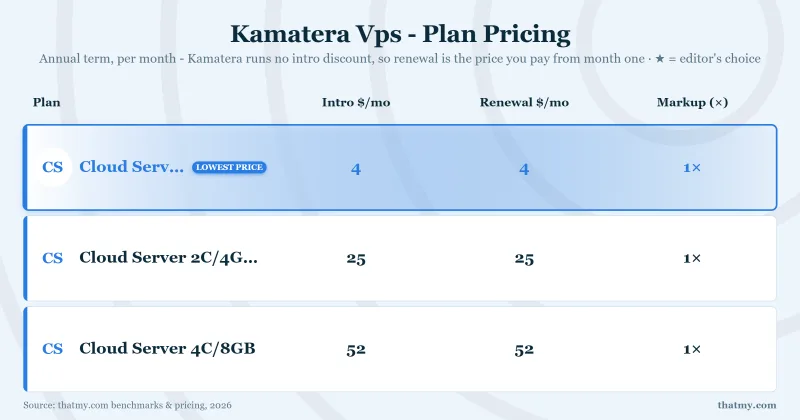
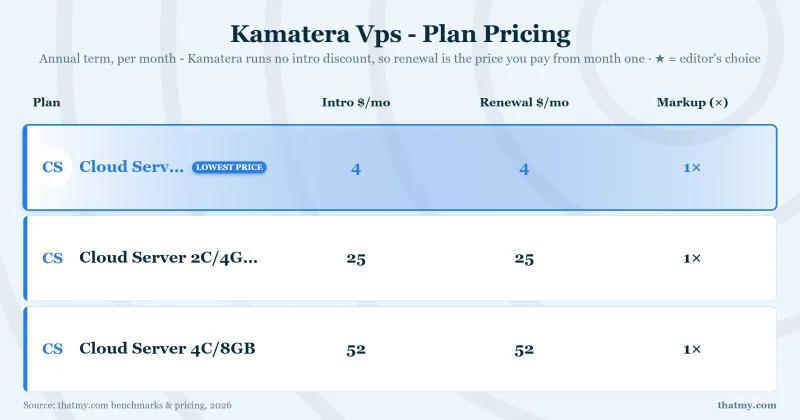
Kamatera bills servers by the hour or the month. There are no long-term contracts and no renewal price increases: the preset price is the same in month one and month thirty-six, which our price records show as intro and renewal at the same figure.
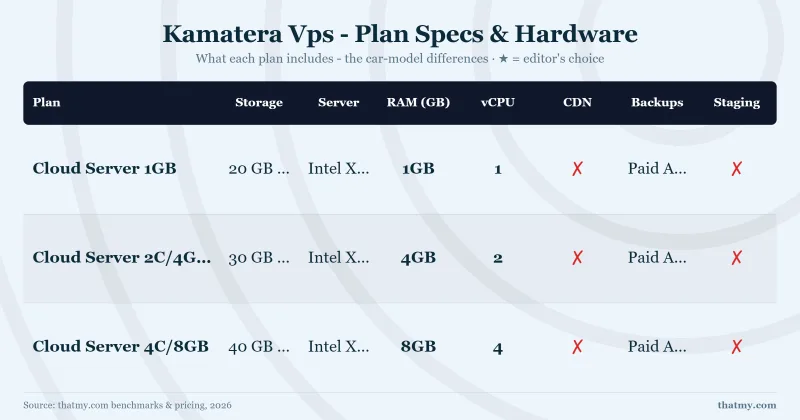
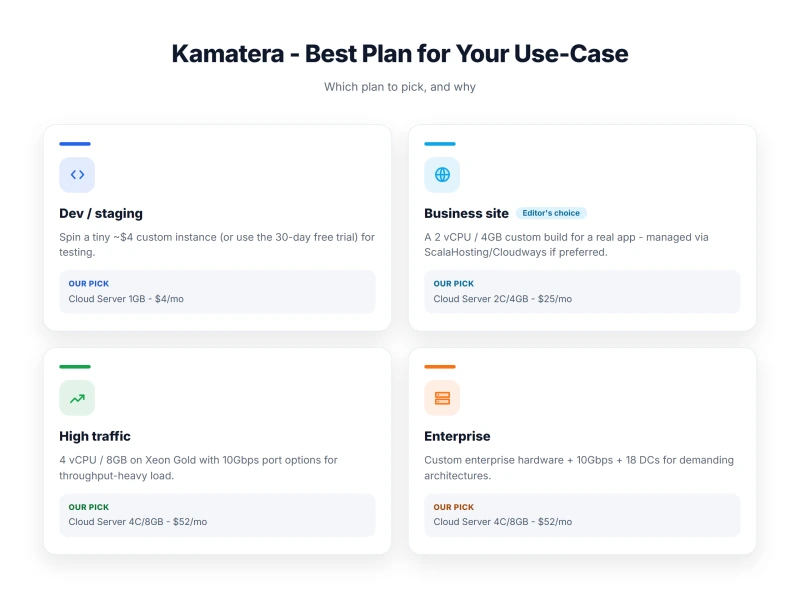
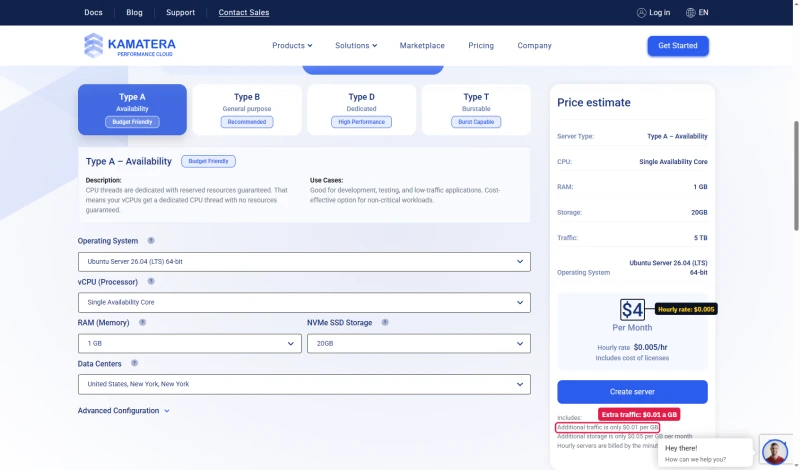
The calculator offers three presets. Basic is $4.00/mo for one Type A vCPU, 1 GB RAM and 20 GB NVMe; Standard is $25.00/mo and Pro $39.00/mo, both on two Type B vCPUs with 2 GB and 4 GB of RAM. Each card says 5 TB of traffic.
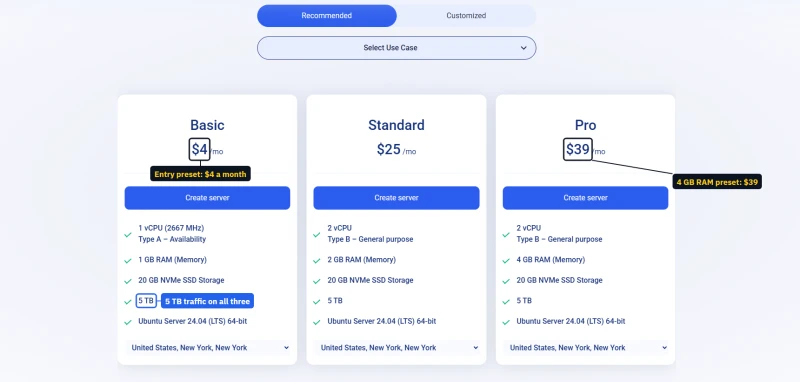
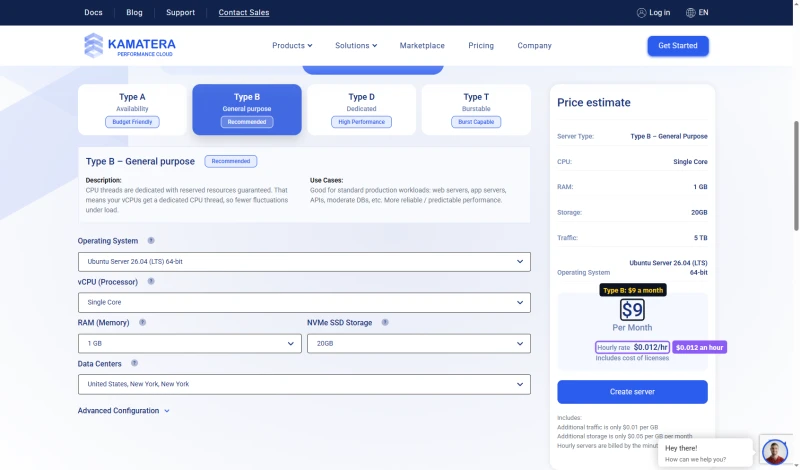
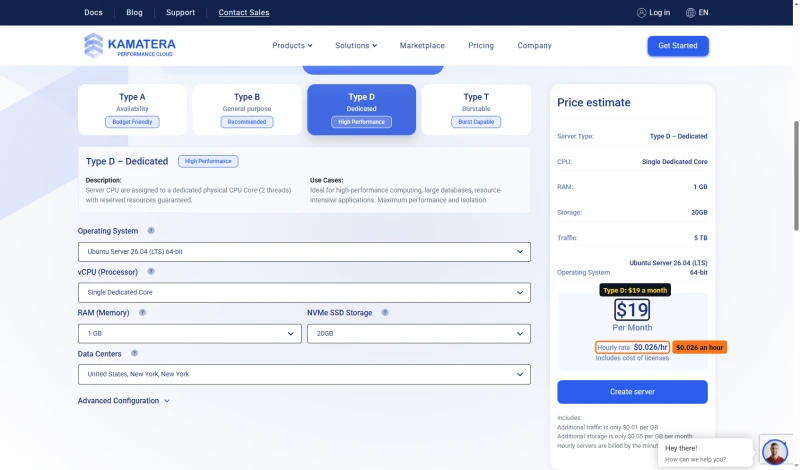
In the Customized view each CPU type has its own entry price for one core, 1 GB and 20 GB: Type A $4.00/mo ($0.005 an hour), Type B $9 ($0.012), Type D $19 ($0.026). Kamatera's FAQ prints Type A at $0.00054 an hour, a misprint against its own calculator. Servers billed by the hour are charged by the minute; extra traffic is $0.01 per GB.
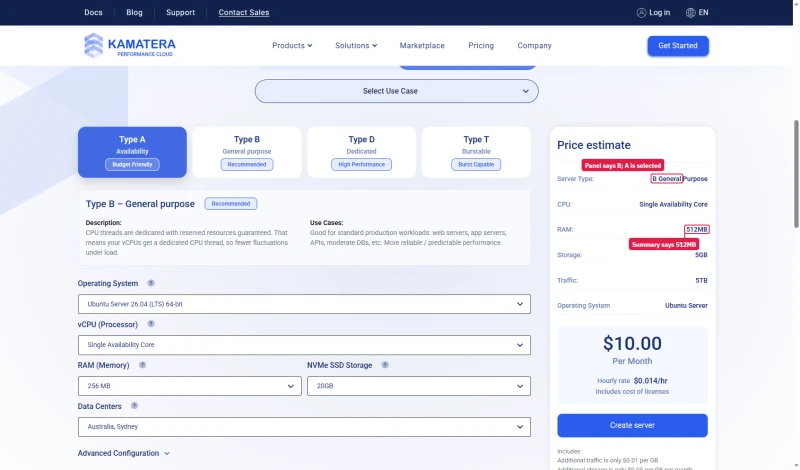
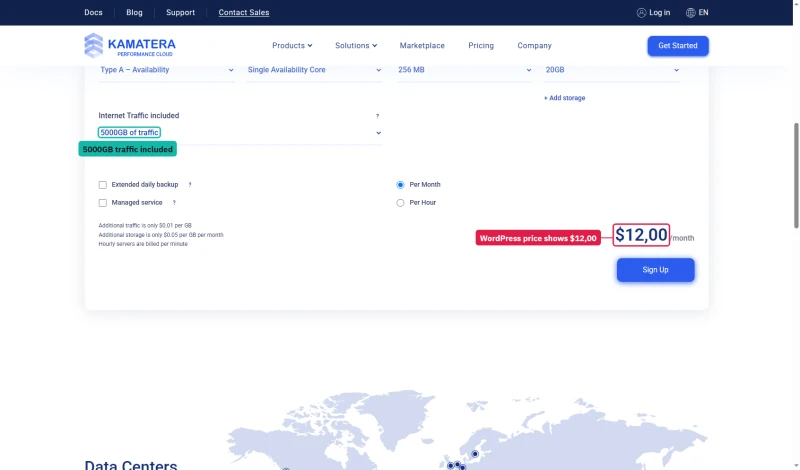
Check the calculator before you trust its first number. On load it comes up out of sync: the Type A tile is lit, the panel describes Type B, and the estimate of $10.00 is for 512 MB and 5 GB while the form shows 256 MB and 20 GB. The WordPress page's own calculator is another story again: "$12,00 /month" with 5000 GB of traffic in Sydney.
Add-On Costs
- cPanel license: a paid add-on, priced in the calculator (needed only if you want a traditional control panel)
- Managed service: $50/mo on the entry server (monitoring and support; changes on your request)
- Extended daily backup: $3/mo on the entry server; extra storage $0.05/GB/mo
- Additional IPs, load balancers: paid extras, priced in the console
- Private networking: available between your servers
The managed service add-on moves Kamatera toward a managed VPS, but on request rather than proactively. On the entry server it costs $50 a month on top of the server, which already puts it above ScalaHosting's managed Entry Cloud at $24.95/mo; what it adds is bare-metal infrastructure with someone on call. For enterprises with specific infrastructure requirements, that can still make sense.
Hourly billing means a server you run for 15 days and delete is billed for those days, not a full month. This makes Kamatera excellent for temporary workloads, development environments, and testing.
Support: What Kamatera Offers
We have not timed Kamatera's support, so this section gives what Kamatera states and what its support scope means for you.
The scope matters more than the speed. On an unmanaged server, the host looks after the hardware, the network and the platform; your WordPress errors, PHP settings and plugin conflicts are yours. That is normal for an unmanaged VPS provider, but a significant limitation for non-technical users who expect hosting support to fix WordPress.
Phone support is less common among cloud VPS providers, and for critical infrastructure issues having it as an option is valuable.
Kamatera vs ScalaHosting (Head-to-Head)
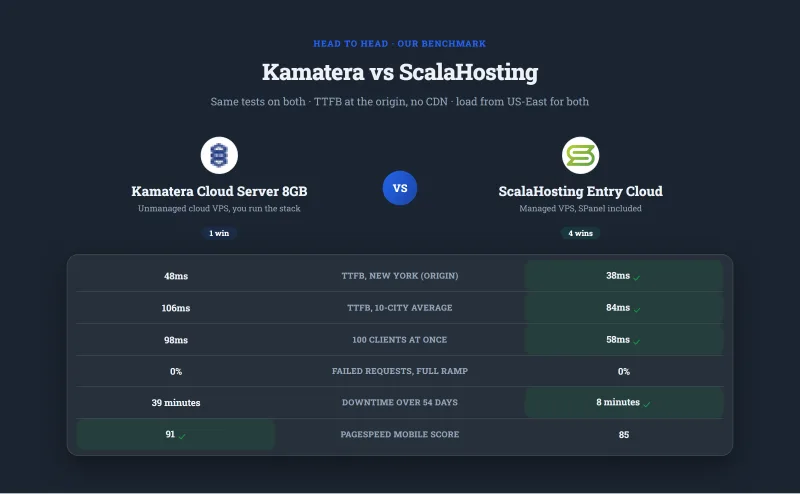
My take: ScalaHosting wins most rows, including speed, load and uptime on our benchmark. The rows Kamatera wins (Windows VPS, the choice of locations, hourly billing, a phone line) are the ones that matter most to Kamatera's audience, developers and DevOps teams.
For WordPress businesses: ScalaHosting is the clear winner: managed, email included, and on our benchmark 58ms against 98ms with 100 concurrent users and 99.99% against 99.95% uptime.
For developers who need Windows VPS, a Tel Aviv location, or bare-metal control: Kamatera is the right choice.

Where Scalahosting Wins Vs Kamatera
- $29.95/mo all-in vs Kamatera $71-73/mo for equivalent production setup
- Managed WordPress, 15 min setup vs Kamatera 3-5 hours
- SPanel free (cPanel-equivalent), Kamatera charges $20/mo for cPanel
- Email hosting included, Kamatera requires separate email service
- 19% TTFB degradation at 100 users vs Kamatera 66% (default config)
- AMD EPYC 9474F (#42 PassMark) vs Kamatera Intel Xeon Gold 6254 (#512)
- 99.993% uptime vs Kamatera 99.94%
- Anytime money-back guarantee
Where Kamatera Wins
- 119ms idle TTFB vs ScalaHosting 38ms (Kamatera faster at idle)
- No Windows VPS support
- 13 data centers vs Kamatera 21
- No pay-as-you-go, renewal jumps ~200% after intro term
- No bare-metal root access for custom server configurations
Real Benchmark Data
- Origin TTFB (3 plans, no CDN): 21ms to 38ms
- Uptime (54-day window): 99.99% to 99.997%
- PageSpeed Score (Mobile): 83/100

$29.95/mo
Anytime Money-Back Guarantee
Kamatera vs Cloudways (Head-to-Head)
My take: Cloudways wins on managed features and load results. Kamatera wins on Windows VPS and, because you are not paying for management, on raw server cost. The key decision point: do you need a managed layer?
If you're a developer who can configure PHP-FPM, Redis and Nginx yourself, a Kamatera server of the same size should cost well under Cloudways' $118.00/mo for an 8 GB Vultr High Frequency server; price your exact build in Kamatera's calculator. If you need managed WordPress with Git deployment and one-click staging, Cloudways is worth the premium.
Kamatera vs DigitalOcean (Head-to-Head)
My take: on our benchmark the two 8 GB servers performed alike. Kamatera wins on Windows VPS and the Tel Aviv location; DigitalOcean wins on ecosystem, documentation, and community resources.
For pure Linux VPS hosting with standard use cases, DigitalOcean's superior documentation and ecosystem make it the better choice for most developers. For Windows VPS, a server in Israel or a phone line, Kamatera is the right choice.
Who Should NOT Use Kamatera
Kamatera is an excellent product for its target audience. But it's the wrong choice for a significant majority of WordPress users. Here's who should look elsewhere:
❌ Do NOT Use Kamatera If:
- You're not technical: If you can't configure Nginx, PHP-FPM, and MySQL via SSH, Kamatera will be a frustrating experience. Use ScalaHosting (managed VPS) or Cloudways (managed cloud) instead.
- You need email hosting included: Kamatera has no email hosting; you will need a separate email service. ScalaHosting includes email.
- You need cPanel without paying extra: cPanel is a paid add-on on Kamatera. ScalaHosting includes SPanel.
- You need the best uptime we measured: Kamatera's 99.95% (39 minutes down over 54 days) met its 99.9% SLA, but ScalaHosting Entry Cloud (99.99%) and Kinsta (99.99%) did better.
- You want pre-configured WordPress performance: Kamatera requires manual PHP-FPM tuning, Redis configuration, and MySQL optimization. Managed hosts do this automatically.
- You want everything in one price: backups, management, a panel and email all cost extra on Kamatera, and your time is the largest cost.
- You need WordPress-specific support: Kamatera's support covers the infrastructure, not your WordPress application.
Full Test Report: Kamatera VPS, by Plan
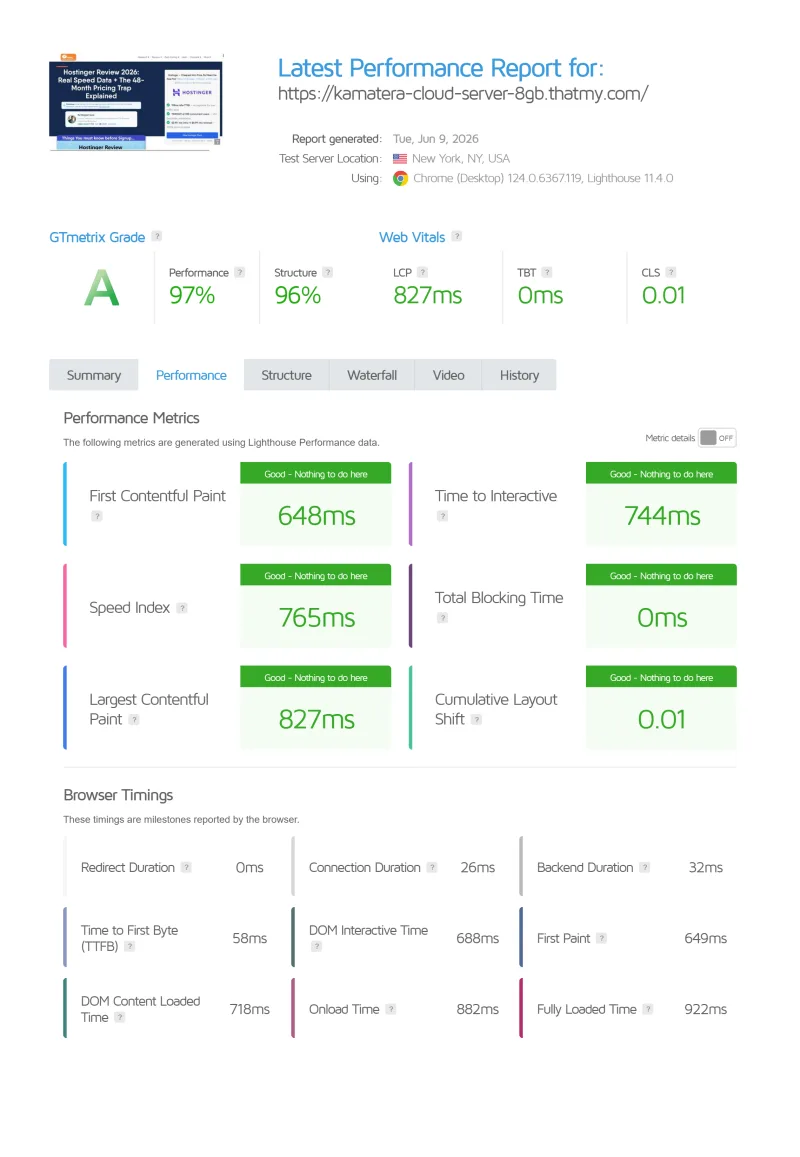
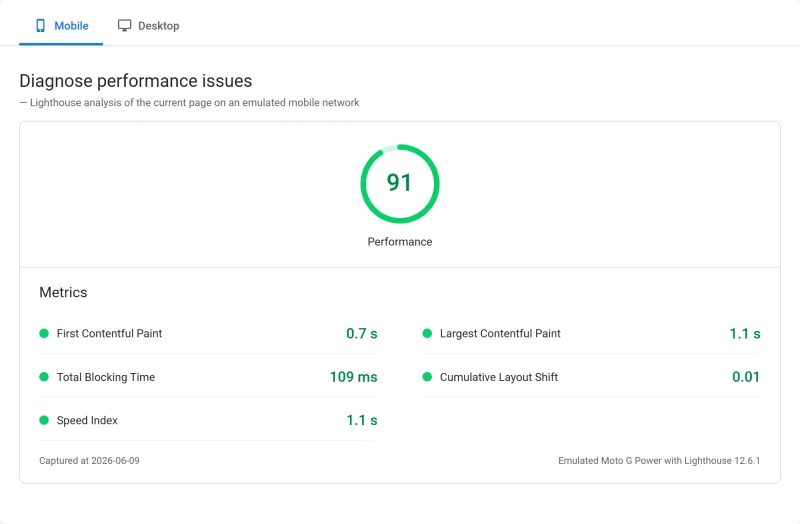
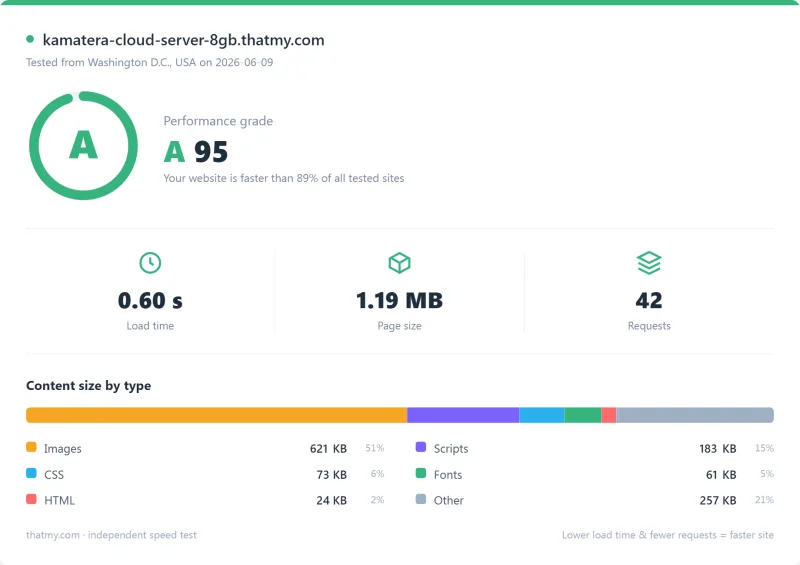
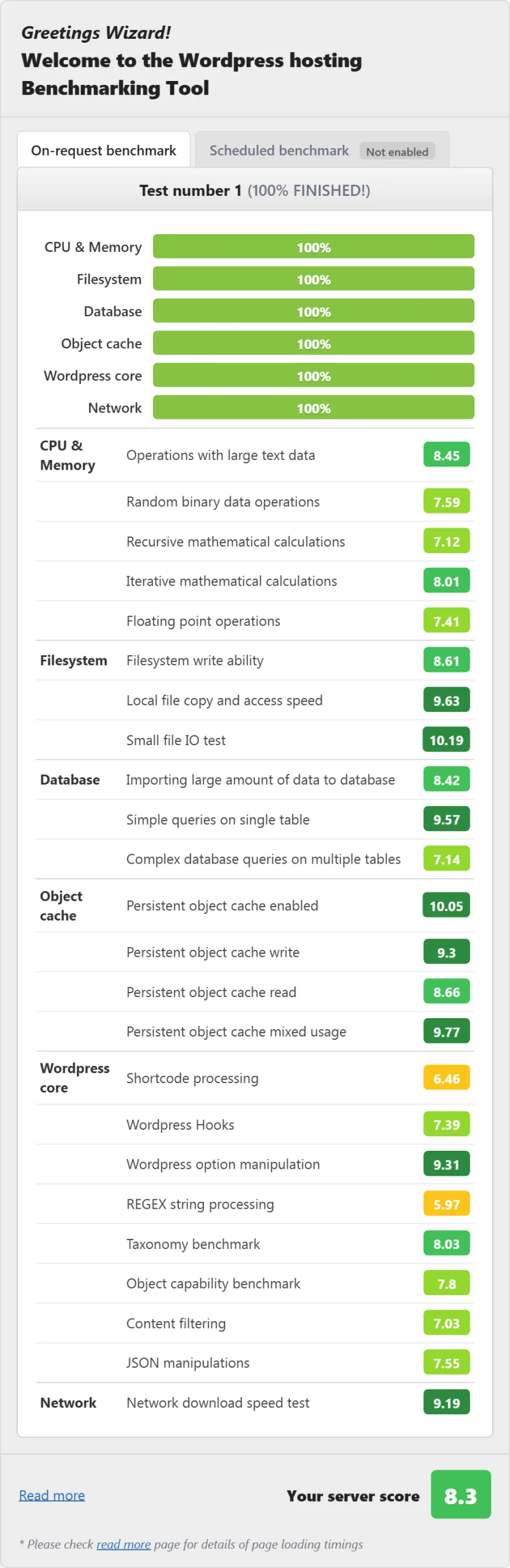
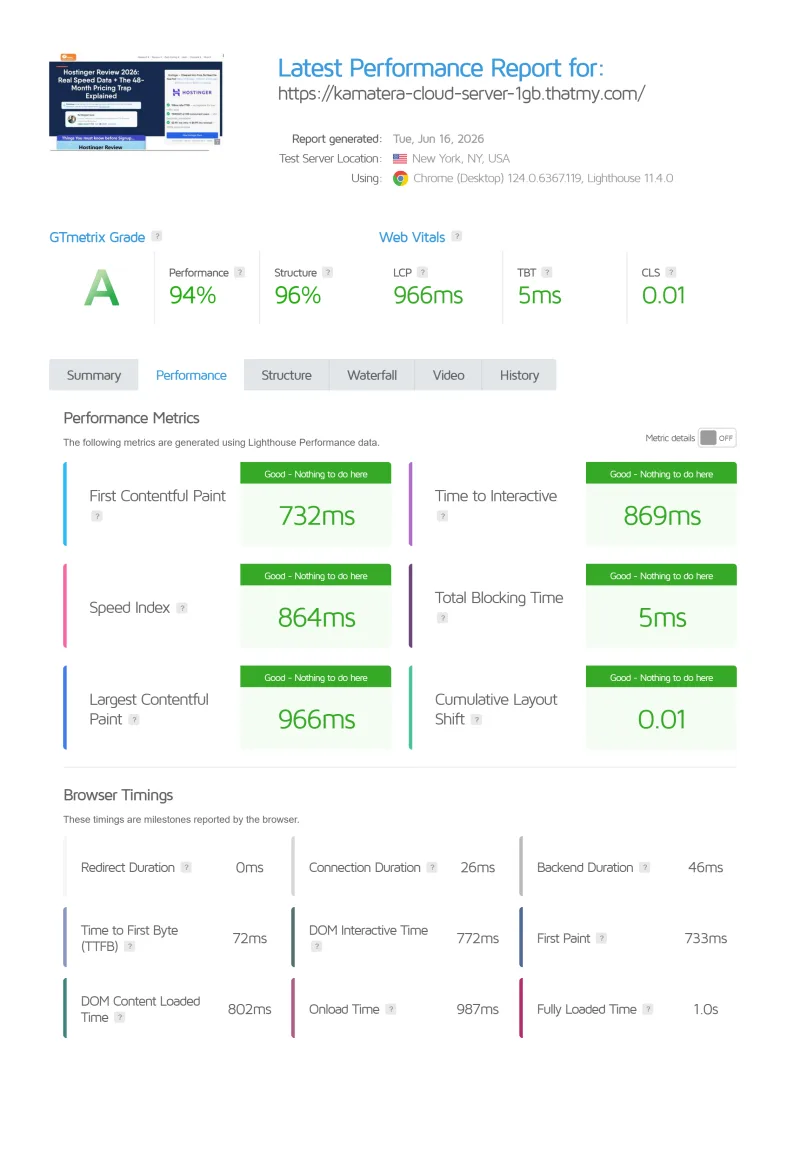
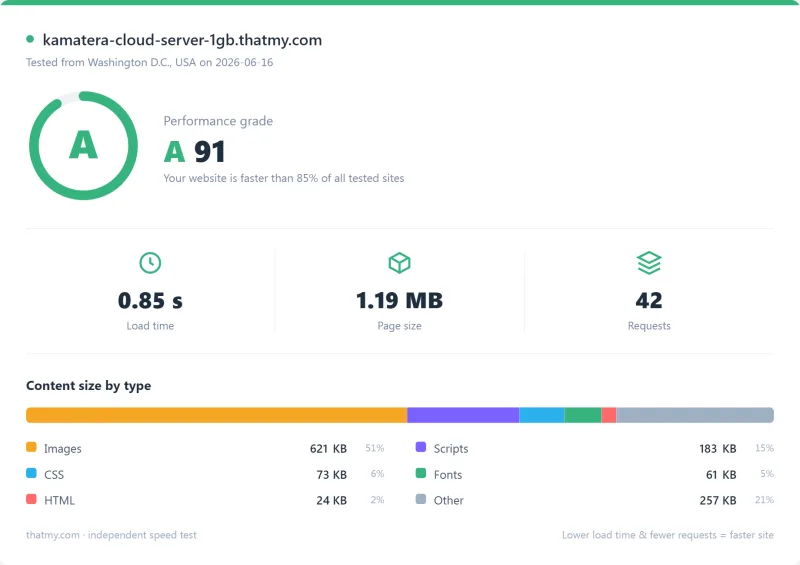
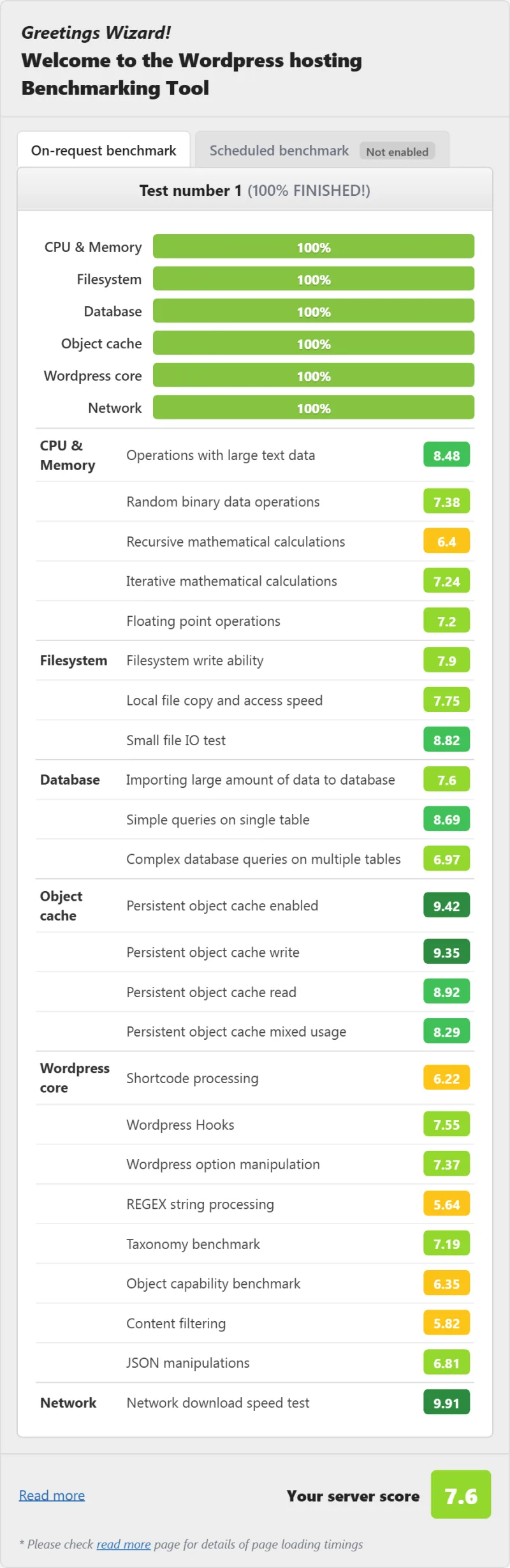
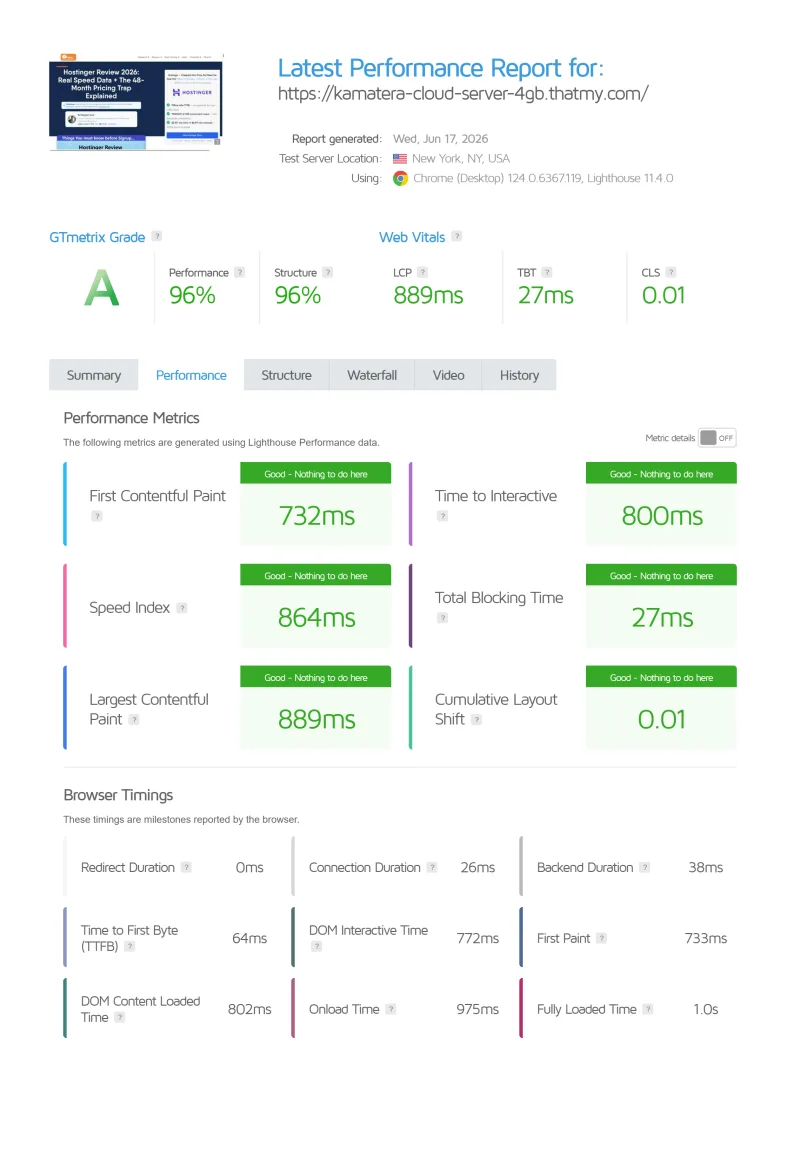
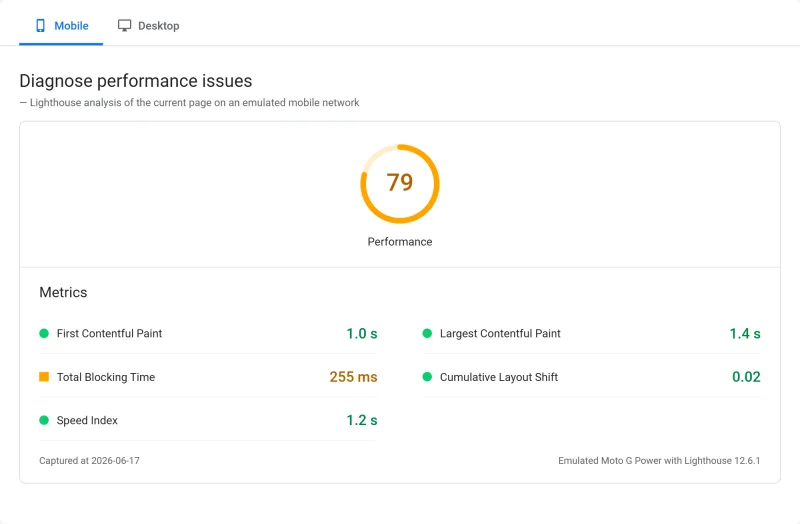
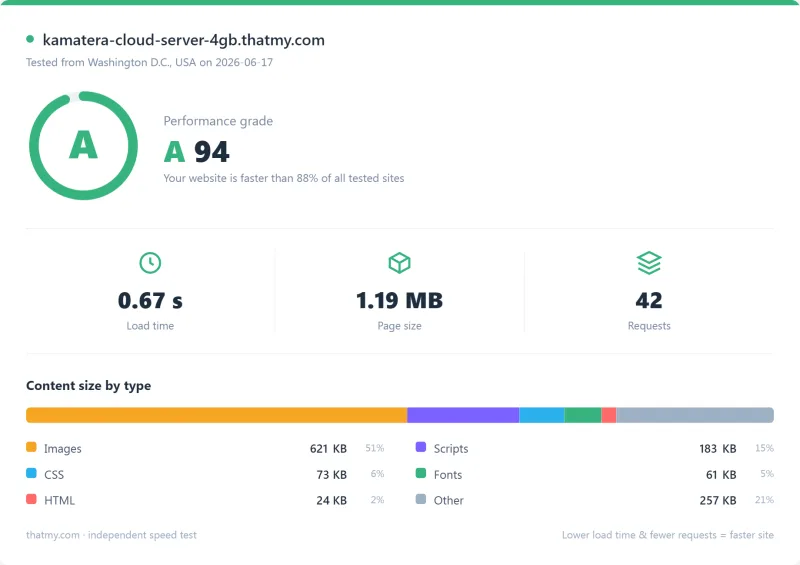
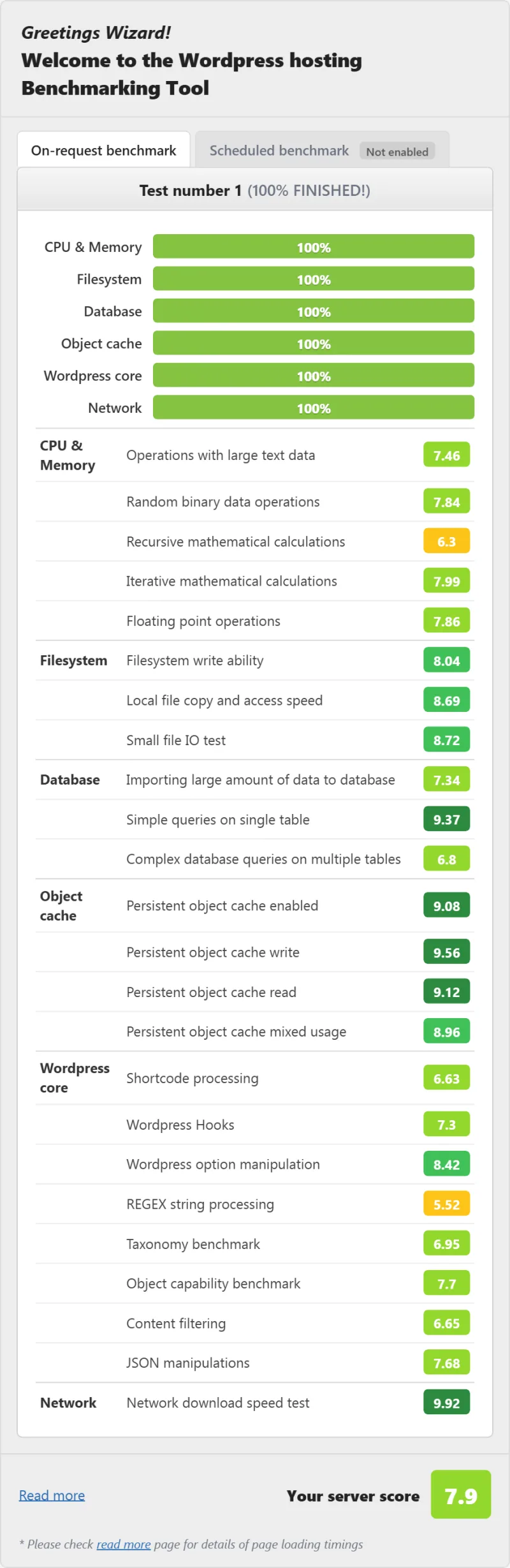
Here is the complete export from our test suite for every Kamatera server we benchmarked: Cloud Server 8GB, Cloud Server 1GB and Cloud Server 4GB. Each tab holds that server's full run: time to first byte from 10 locations (origin, to our US-East test server), the load test on our 0-250 client ramp, the GTmetrix and PageSpeed captures, a Pingdom load-time check, our WordPress hosting benchmark, and 54 days of uptime tracking with the day-by-day calendar.
Cloud Server 8GB (Featured) Cloud Server 1GB Cloud Server 4GB

FAQ: Kamatera
Is Kamatera good for WordPress?
Yes, for technical users. Kamatera gives you a blank cloud server: you install and configure the web server, PHP, the database, SSL, backups and WordPress yourself. Set up that way, our 8 GB Kamatera server answered in 48ms from New York (origin, no CDN, to our US-East test server) and in 98ms with 100 concurrent users, with 0 failed requests on our ramp. Non-technical users are better served by a managed host such as ScalaHosting or Cloudways.
What is Kamatera's true monthly cost?
The presets are Basic at $4.00/mo (1 Type A vCPU, 1 GB RAM), Standard at $25.00/mo and Pro at $39.00/mo (2 Type B vCPUs with 2 GB or 4 GB), the same price every month with no renewal increase. Extras raise it: on the entry server, extended daily backup takes it to $7 a month and the managed service to $54. A control panel such as cPanel and email hosting are not included. For comparison, ScalaHosting's managed Entry Cloud is $24.95/mo on a 36 months term and renews at $39.95/mo.
Does Kamatera include cPanel?
No. cPanel is a paid add-on, or you can install a free panel such as Webmin, Virtualmin or CyberPanel. Kamatera's own console manages the server itself (power, firewall, networking, snapshots), not WordPress or websites.
How does Kamatera compare to DigitalOcean?
On our benchmark the two were close: Kamatera's 8 GB server answered New York in 48ms and DigitalOcean's Premium 8 GB droplet in 51ms (origin, to our US-East test servers); with 100 concurrent users it was 98ms against 90ms. Kamatera offers Windows servers, a Tel Aviv location and a 24/7 phone line; DigitalOcean has the larger ecosystem (object storage, managed databases, app platform, Kubernetes) and more tutorials. Choose Kamatera for Windows or a specific location; choose DigitalOcean for its developer tooling.
Does Kamatera support Windows VPS?
Yes. Kamatera sells Windows servers with remote desktop (RDP) access, which Cloudways, ScalaHosting and Kinsta do not offer. The Windows cards price the licence in, but they cost far more than the Linux entry server: the dedicated Windows page lists its Basic card at $71 a month.
What is Kamatera's uptime guarantee?
Kamatera's SLA promises 99.9% availability; a missed month is credited as one month of the failed service, capped at $5,000, on a written claim within 14 days. Over our 54 days monitoring window the 8 GB server recorded 99.95% (39 minutes down), the 4 GB server 99.94% and the 1 GB server 99.931%, each with 3 incidents: all above the SLA. ScalaHosting Entry Cloud recorded 99.99% over the same kind of window.
How do I set up WordPress on Kamatera?
Option 1: start from a marketplace WordPress image, which still needs configuring for production. Option 2: build the stack yourself. Steps: 1) create the server in the console, 2) install Nginx, PHP-FPM and MySQL or MariaDB, 3) set the PHP-FPM worker count for your RAM, 4) install WordPress, 5) add a free Let's Encrypt certificate, 6) set up automated backups, 7) configure the firewall. Our estimate for an experienced administrator is a few hours; it is not a timed test.
What I Would Do If This Were My Site
After benchmarking three Kamatera servers (10-location TTFB, a load ramp, page tests and a 54-day uptime window) and reading Kamatera's pricing, SLA and data center pages, here's the honest verdict on Kamatera:
✅ Buy Kamatera If:
- You're a developer or DevOps engineer who needs bare-metal control
- You need Windows Server VPS (ASP.NET, MSSQL, IIS, RDP)
- You need a server in Tel Aviv, or a specific location among its 21
- You want pay-as-you-go billing with no lock-in
- You want to test before committing (a month-long trial worth up to $100; a credit card is required)
- You need custom server configurations (exact CPU/RAM/SSD)
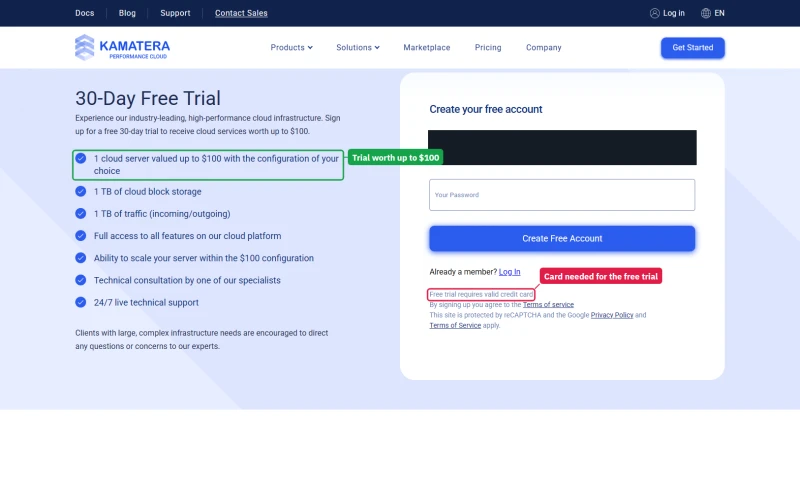
The trial page is plain about the catch: one cloud server worth up to $100 in the configuration you choose, 1 TB of block storage and 1 TB of traffic for 30 days, and "Free trial requires valid credit card".
❌ Skip Kamatera If:
- You need managed WordPress (→ ScalaHosting Entry Cloud, $24.95/mo on 36 months)
- You need email hosting included (→ ScalaHosting)
- You need cPanel without paying extra (→ ScalaHosting)
- You want the best uptime we measured (→ ScalaHosting, 99.99%)
- You don't want to build and maintain your own server stack
⚠️ Consider Kamatera If:
- You need a specific global data center not available elsewhere
- You need custom server specs (non-standard CPU/RAM/SSD combinations)
- You want pay-as-you-go for temporary or variable workloads
- You're evaluating cloud VPS options and want to test with the month-long trial
Kamatera is a legitimate, well-run cloud infrastructure provider with genuine strengths in location choice, Windows VPS support, and pay-as-you-go flexibility. Its 48ms origin TTFB from New York on our 8 GB server is real and level with the fastest unmanaged VPS hosts we tested. The 21 locations are real, and Tel Aviv is unusual. The trial is genuinely useful for evaluation.
But the $4.00/mo price buys a Type A server with no guaranteed resources, every extra costs more, and building the stack yourself makes it unsuitable for the majority of WordPress users who need managed hosting.
For most WordPress businesses, ScalaHosting Entry Cloud is the better choice: managed, email included, and faster under load and more reliable on our benchmark. For developers who need bare-metal control, Windows VPS, or specific global data centers, Kamatera is the right tool for the job.
What Our Testing Found
- 119ms TTFB, fastest raw TTFB for unmanaged VPS tested (New York, no CDN)
- 21 global data centers, including Middle East (Tel Aviv, Dubai), Africa (Johannesburg), APAC
- Windows Server 2019/2022 VPS with RDP access, rare at this price point
- Pay-as-you-go hourly billing, no renewal shock, cancel any time
- Custom server builder, choose exact CPU cores, RAM, SSD (not fixed plans)
- $100 free trial credit (30 days), no credit card required
- Dedicated vCPUs, <2% CPU steal observed (Intel Xeon Gold 6254)
- REST API for automation and DevOps workflows
- Phone support available (rare in cloud VPS market)
Real Weaknesses
- No managed WordPress, blank Linux server, 3-5 hours of setup required
- True cost: $71-73/mo (not $4/mo) for production WordPress with cPanel
- cPanel costs extra ($20/mo), not included in any plan
- 99.94% uptime in our tests, below their own 99.95% SLA
- 66% TTFB degradation at 100 users (default PHP-FPM config), needs manual optimization
- No email hosting included, requires separate service
- Limited WordPress-specific support (unmanaged scope)
Real Benchmark Data
- Origin TTFB (3 plans, no CDN): 48ms to 59ms
- Uptime (54-day window): 99.931% to 99.95%
- PageSpeed Score (Mobile): 77/100
$4/mo
$100 Free Trial (30 Days)