
Hidden Web Hosting Fees: All 14 Charges and Free Alternatives for Each

The price on a hosting sales page is the price of one thing: the hosting plan, for its first term. The bill that follows can carry a dozen other lines: the domain after its free year, privacy for that domain, backups, security scans, email, a paid SSL certificate. This guide covers the 14 charges that most often surprise site owners, what each costs at the big hosts, and the free or cheaper route around every one.
The prices below come from the hosts' own price pages and help-center price lists, in US dollars on US billing. Hosting plan prices come from our pricing records, which track each plan's intro price and what it renews at. Where a figure is not published, the page says so rather than guessing.
| Hidden Fee | What It Costs | Who Charges It | Avoidable? | Free or Cheaper Route |
|---|---|---|---|---|
| 1. Domain renewal price jump | $23.99/yr for a .com at Bluehost, $22.99 at GoDaddy | Hosts that give the first year free, most retail registrars | Yes | Transfer to Cloudflare Registrar (at cost) or Porkbun ($11.08/yr) |
| 2. Paid SSL certificate | $89.88/yr at Bluehost, from $5.99/mo at GoDaddy | Sold beside the free certificate | Yes | Let's Encrypt, free and self-renewing |
| 3. Email that is only free for a while | Up to $107.88/yr per mailbox (Microsoft 365 at GoDaddy) | Hostinger (free for year one), GoDaddy, Cloudways | Yes | Zoho Mail's free plan, or a host that includes email |
| 4. Paid backup add-on | $47.88-$99.95/yr (CodeGuard) | Bluehost, GoDaddy (backups sold separately) | Yes | UpdraftPlus Free to your own cloud storage |
| 5. CDN add-on | From $4.99/mo per domain (Cloudflare Enterprise at Cloudways) | Cloudways (Cloudflare Enterprise add-on) | Yes | Cloudflare's free plan, signed up directly |
| 6. Staging locked to a bigger plan | The gap to the next tier: SiteGround StartUp $17.99/mo vs GrowBig $29.99/mo | SiteGround, ChemiCloud (staging from the second tier) | Yes | WP Staging plugin, or LocalWP on your own computer |
| 7. Malware cleanup | From $83.88/yr (GoDaddy Website Security, one cleanup a year) | GoDaddy, Bluehost Starter, Cloudways (add-on) | Partly | Wordfence Free, a WAF, and updates kept current |
| 8. Support tier | Phone support from the second plan up at Bluehost; $100/mo advanced support at Cloudways | Bluehost, Cloudways, SiteGround (priority support on GoGeek) | Yes | A host whose base support is good: ChemiCloud, ScalaHosting |
| 9. Migration service | Paid when your current host does it | Paid migration services | Yes | The new host's free migration: ChemiCloud, ScalaHosting, Hostinger |
| 10. cPanel license inside the price | Built into the plan price, never itemised | Every cPanel host since cPanel's 2019 per-account pricing | Partly | Hosts on their own panel: SPanel (ScalaHosting), hPanel (Hostinger), Site Tools (SiteGround) |
| 11. Paid WHOIS privacy | $15.00/yr per domain at Bluehost | Bluehost (free for year one on Business and up, not on Starter) | Yes | GoDaddy, Cloudflare Registrar and Porkbun include it free |
| 12. Overage and suspension | Usually a suspension, not a bill | Shared hosts with CPU or inode limits | Yes | Caching, a CDN, and a host with clear limits |
| 13. Bandwidth and egress on cloud plans | Per TB or per GB over the included transfer | Hetzner, DigitalOcean, AWS Lightsail and other clouds | Yes | Cloudflare in front of the server, or a plan with more transfer |
| 14. AI-labelled upsells | $7.99/mo for GoDaddy's AI-assisted SSL, against $5.99 for the manual one | GoDaddy, Bluehost (AI malware removal on higher plans) | Yes | Let's Encrypt, Cloudflare's free WAF, Wordfence Free |
| Bluehost Starter, the first year after its 36-month term ends, with domain, privacy, CodeGuard Basic and SiteLock Essentials left on: $119.88 hosting + $182.75 add-ons = $302.63 for the year. | ||||
Why Hosting Bills Grow After Signup
Hidden hosting fees are not accidents. A shared host selling its first term at $3.99/mo earns little on the hosting itself, so the money is made later: in renewals, in add-ons sold at checkout, and in features that sit one plan tier up.
The same three moves turn up at most large shared hosts.
Extras are offered, and sometimes ticked for you, before you pay. At GoDaddy, Microsoft 365 email is added to the cart at signup and has to be removed by hand. Bluehost sells domain privacy, SiteLock, CodeGuard and SEO tools beside its plans, and each one renews on its own. Most people sign up while comparing hosts in several tabs and do not read the cart line by line.
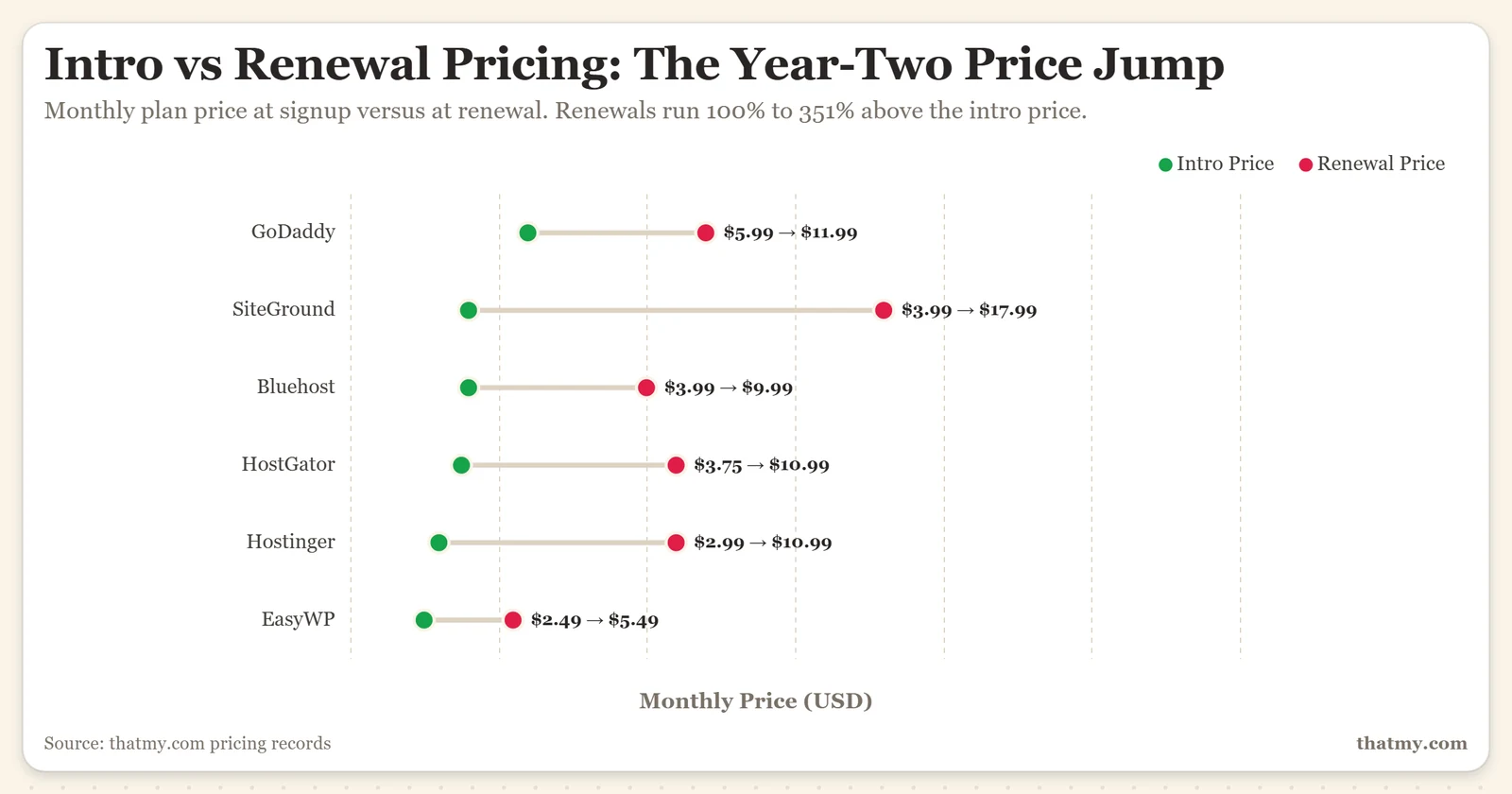
The intro price ends and the renewal price starts. Bluehost Starter goes from $3.99/mo to $9.99/mo, SiteGround StartUp from $3.99/mo to $17.99/mo. The domain renews on its own date and at its own price, so the bill can arrive in pieces.
Staging, malware removal, phone support, daily backups or more email storage often sit on the second plan, not the first. Bluehost's Starter plan has chat support only, no malware removal and 100 MB per mailbox; its Business plan adds all three. The cheap plan works until you need one of those, and then the fix is an upgrade.
The chart at the top of this page shows the renewal step at six shared hosts, from our pricing records: renewals run 100% to 351% above the intro price.
Every fee below has a free or cheaper route around it. The next 14 sections take them one at a time.
Fee 1: Domain Renewal Price Jump, the Biggest Year-Two Surprise
A free domain with hosting is free for one year. Bluehost registers a .com at $12.99 and renews it at $23.99 a year. GoDaddy sells a .com for $0.01 in the first year with a three-year purchase, then $22.99 for each additional year. Neither price is hidden, but it lands on a different invoice from the hosting, often months apart, so it is easy to miss.
At-cost registrars charge the same every year. Cloudflare Registrar sells domains at the registry's wholesale price plus the ICANN fee, with no markup at registration or renewal. Porkbun lists a .com at $11.08 for the first year and each renewal.
| Registrar | Year 1 .com Price | Renewal | WHOIS Privacy | Notes |
|---|---|---|---|---|
| Bluehost | Free with hosting, $12.99 on its own | $23.99/yr | $15.00/yr (free year one on Business and up) | Renews on the domain's own date, separate from the hosting |
| GoDaddy | $0.01 with a 3-year purchase | $22.99/yr | Free | The first-year price needs a 3-year purchase |
| Porkbun | $11.08 | $11.08/yr | Free | Same price at renewal |
| Cloudflare Registrar | At cost | At cost, no markup | Free | Registry price plus the ICANN fee, nothing added |
| A new domain is locked for 60 days after registration and after each transfer. Once that passes, moving it to an at-cost registrar takes a few minutes and adds a year to the registration. | ||||
The fix is to move the domain after the 60-day lock. The transfer adds a year of registration at the new registrar's price, and from then on the renewal stays at cost. Over three years a .com at Bluehost costs $71.97 in renewals, against $33.24 at Porkbun.
Fee 2: Paid SSL Certificates Sold Beside the Free One
Almost every host now includes a free certificate from Let's Encrypt, which renews itself every 90 days at no cost. Bluehost lists free Let's Encrypt SSL on every shared plan. GoDaddy includes a free SSL certificate with its annual hosting plans. The charge comes when a paid certificate is sold as an upgrade, or when a plan's free certificate does not cover what you bought.
Bluehost's premium SSL renews at $89.88 a year for a single domain and $239.88 for a wildcard. GoDaddy's DV certificate starts at $5.99 a month on a three-year term, $71.88 a year. For a blog, a brochure site or a small store, a paid DV certificate encrypts exactly as well as the free one; browsers show the same padlock.
| Host | Free Certificate | Paid Certificate Offered | Do You Need It? | What to Do |
|---|---|---|---|---|
| GoDaddy | Free with annual hosting plans | DV from $5.99/mo (3-year term) | Rarely | Keep the free certificate, or put Cloudflare's free SSL in front |
| Bluehost | Let's Encrypt on every shared plan | $89.88/yr single domain | Rarely | Check the panel shows Let's Encrypt, then leave it |
| SiteGround | Let's Encrypt | Not needed | No | Nothing to do, renews automatically |
| ScalaHosting | Let's Encrypt | Not needed | No | Nothing to do, renews automatically |
| Cloudways | Let's Encrypt | Not needed | No | One-click install in the Cloudways panel, auto-renews |
| If your certificate shows a brand name instead of Let's Encrypt, check its renewal price before it renews. A free alternative exists for every paid DV certificate listed here. | ||||
Fee 3: Email That Is Only Free for a While
Email is the fee that shows up as a missing feature rather than a line on the invoice. A plan's mailboxes may be free only for the first year, capped at a size that fills quickly, or not included at all. Hostinger's pricing page lists mailboxes as "free for 1 year" on its plans. Bluehost's Starter plan allows 100 MB per mailbox, and its own Pro Email is offered as a free trial. GoDaddy sells email as Microsoft 365, added to the cart at signup.
Cloud hosts go further. Cloudways has no mailboxes of its own and sells Rackspace email at $1.50 per mailbox a month. For a team of five that is $90.00 a year.
| Host | Email on the Entry Plan | Cost When It Is Not Included | Free Alternative |
|---|---|---|---|
| GoDaddy | Sold separately (Microsoft 365) | $1.99/mo per mailbox in year one, $8.99/mo list price | Zoho Mail's free plan |
| Hostinger | Mailboxes free for the first year | Charged after year one | Zoho Mail's free plan, or forwarding with ImprovMX |
| Cloudways | None | $1.50/mo per mailbox (Rackspace) | Zoho Mail's free plan |
| Bluehost | Included, 100 MB per mailbox on Starter | Business plan lifts the limit | Zoho Mail's free plan for bigger inboxes |
| SiteGround | Included | Free | N/A, included |
| ChemiCloud | Included | Free | N/A, included |
| ScalaHosting | Included | Free | N/A, included |
| Before any renewal, log in and check that your plan still lists email, how many mailboxes and how much storage. Move mail before the date, not after it stops arriving. | |||
The free fix for a host without email is Zoho Mail's free plan, which works with your own domain once you change the MX records. ImprovMX is quicker for simple needs: it forwards mail sent to your domain to an inbox you already have, but gives you no mailbox of your own.
Fee 4: Paid Backup Add-Ons
CodeGuard is the backup service Bluehost sells beside its hosting. Bluehost lists it at $3.99 a month or $47.88 a year for Basic, $59.95 a year for Professional and $99.95 for Premium. Bluehost's CodeGuard backups are free in the first year only, then renew at those prices. GoDaddy sells backups as a paid add-on too.
A backup you control costs nothing. UpdraftPlus, a WordPress plugin with more than 3 million active installs, backs up the database and files on a schedule you set and stores the copies in Google Drive, Dropbox or S3. The free version covers what most sites need.
| Backup Service | Annual Cost | Who Sells It | How It Reaches Your Invoice | Free Replacement |
|---|---|---|---|---|
| CodeGuard Basic | $47.88/yr | Bluehost | Offered at checkout and in the account's add-ons | UpdraftPlus Free + Google Drive |
| CodeGuard Professional / Premium | $59.95 / $99.95/yr | Bluehost | Upsell from Basic | UpdraftPlus Free, or UpdraftPlus Premium if you need more |
| SiteGround daily backups | Included | SiteGround (30-day retention) | Part of every shared plan | N/A, included |
| ChemiCloud / ScalaHosting daily backups | Included | ChemiCloud (30-day retention), ScalaHosting (off-site) | Part of the plan | N/A, included |
| Keep at least one backup away from your host, whichever plan you are on. A host's own backup is lost with the account if the account is suspended or closed. | ||||
To remove CodeGuard from a Bluehost account, open the add-ons or marketplace area of your account, find CodeGuard and cancel it. Install and test UpdraftPlus first, so there is no gap in your backups.
Fee 5: CDN Add-Ons
A content delivery network (CDN) serves your site's files from servers close to each visitor. It is one of the most effective speed improvements for a small site, and the basic version is free if you sign up for it yourself.
Hosts sell CDN tiers on top of that. Cloudways offers Cloudflare Enterprise from $4.99 per domain a month. SiteGround, Bluehost and Hostinger include a free CDN on their shared plans. The free route works with any host: sign up at cloudflare.com, point your domain's nameservers to Cloudflare, and the free CDN and DDoS protection start working.
| CDN Option | Cost | How to Get It | What You Get | Notes |
|---|---|---|---|---|
| Cloudflare Free (direct) | Free | cloudflare.com, change nameservers | Global CDN, DDoS protection, basic WAF | Works with any host |
| Host's included CDN | Free on the plan | SiteGround, Bluehost, Hostinger | CDN switched on from the host's panel | Check it is on; some hosts leave it off by default |
| Cloudflare Enterprise via Cloudways | From $4.99/mo per domain | Cloudways add-on | Edge page caching, smart routing | Worth it for busy or global sites; a small site does fine on the free plan |
| For most small sites, Cloudflare's free plan is the best speed improvement per dollar, because it costs nothing. Sign up directly rather than through a hosting add-on. | ||||
Fee 6: Staging Locked to a Bigger Plan
A staging site is a private copy of your site where you try updates before they go live. It is useful for plugin updates, theme changes and store edits. Some hosts include it on every plan: Bluehost lists a WordPress staging site on all its shared plans, and ScalaHosting and Cloudways include it too. Others keep it one tier up.
SiteGround has no staging on StartUp; it starts on GrowBig, which renews at $29.99/mo against StartUp's $17.99/mo. ChemiCloud adds one-click staging on Pro. If staging is the only reason to move up, a free plugin does the job.
| Staging Option | Cost | Setup Time | Works With | Limitation |
|---|---|---|---|---|
| WP Staging (plugin) | Free | A few minutes | Any WordPress host | Runs on the same server as the live site |
| LocalWP (your own computer) | Free | About 10 minutes the first time | Any WordPress site | Changes are copied to the live site by hand |
| SiteGround GrowBig | Renews at $29.99/mo vs $17.99/mo for StartUp | One click | SiteGround Site Tools | The upgrade also adds unlimited sites and more CPU |
| Bluehost (all shared plans) | Included | One click | Bluehost WordPress sites | Listed on Starter, Business and eCommerce Essentials |
| Cloudways (all plans) | Included | One click | Cloudways managed cloud | Staging copy on the same server, pushed live when ready |
Fee 7: Malware Cleanup, the One That Hits When You Are Vulnerable
Malware cleanup is the fee with the worst timing. It does not appear at checkout or at renewal. It appears when your site has been hacked, when you are under pressure and least likely to shop around. Many entry plans scan for malware but do not remove it.
Bluehost's comparison table lists free malware scanning on every shared plan, but malware detection and removal only from Business up, not on Starter. GoDaddy sells cleanups through Website Security: Standard at $6.99 a month includes one site cleanup a year, Advanced at $11.99 includes five, and Premium at $16.99 is unlimited, each on a two-year term. Cloudways sells malware protection with automated removal from $4.00 per application a month.
| Host | Malware Removal Included? | What It Costs | Prevention | Free Tools |
|---|---|---|---|---|
| GoDaddy | No, sold as Website Security | $6.99/mo for 1 cleanup a year, $16.99/mo unlimited | Cloudflare's free WAF blocks many attacks | Sucuri SiteCheck scanner |
| Bluehost | Not on Starter; included from Business up | Plan upgrade, or SiteLock from $95.88/yr | Wordfence Free firewall and scanner | Wordfence Free, Sucuri SiteCheck |
| Cloudways | Add-on | From $4.00/mo per application | Cloudflare's free WAF in front of the app | Wordfence Free |
| ScalaHosting | SShield security included | Included in the plan | SShield blocks attacks at the server | Wordfence Free on top if you want a second layer |
| Prevention is free and works better than cleanup. Cloudflare's free WAF, Wordfence Free and current updates stop most shared-hosting infections before they start. | ||||
Three free steps prevent most infections: (1) put Cloudflare's free plan in front of the site and turn on its WAF; (2) install Wordfence Free and let it scan on a schedule; (3) turn on automatic updates for WordPress core, themes and plugins, or check them every two weeks. Together they take under an hour to set up once.
Fee 8: Support Tiers
Support is rarely sold as a line item on shared hosting. It is sold through the plan tier. Bluehost's Starter plan has 24/7 chat support only; phone support starts on Business. SiteGround keeps priority support for GoGeek, its top shared plan, which renews at $44.99/mo. On cloud hosting it can be an explicit add-on: Cloudways sells Advanced Support, covering plugin and theme troubleshooting, at $100 a month.
| Host | Support on the Entry Plan | What Costs More | What It Gets You | Better Route |
|---|---|---|---|---|
| Bluehost | 24/7 chat | Business plan, renews at $13.99/mo | Phone support | A host with good base support |
| SiteGround | 24/7 chat and tickets | GoGeek, renews at $44.99/mo | Priority queue | The base support is already good |
| Cloudways | 24/7 chat for server issues | $100/mo Advanced Support | Plugin and theme troubleshooting | Worth it only for agencies without a developer |
| ChemiCloud | Human live chat on every plan | Nothing, no paid tier | N/A | N/A, this is the standard to expect |
| ScalaHosting | Live chat and tickets on every plan | Nothing, no paid tier | N/A | N/A, included |
If a host's base support does not meet your needs, paying for a better queue does not fix the host. A host with good support on its entry plan usually costs less over a year than a weaker host plus its upgrade.
Fee 9: Migration Fees
Moving a site is where hosts compete. The host you are moving to will usually do it for free to win you: ChemiCloud, ScalaHosting and Hostinger include free migration, Bluehost gives every plan a free migration tool, and Cloudways includes one free migration. The fee only appears if you pay for a migration service you do not need.
| Host | Moving In | What It Includes | Notes |
|---|---|---|---|
| Bluehost | Free migration tool | Migration tool on every plan | Fine for a simple WordPress site |
| ChemiCloud | Free | Migration done by their team | Ask before you cancel the old host |
| ScalaHosting | Free | Migration done by their team | Covers cPanel and non-cPanel sources |
| Cloudways | One free migration | Plus the Cloudways Migrator plugin | Extra migrations are paid |
| Hostinger | Free | Automated migration | Requested from hPanel |
| Never pay your current host to move you out. Ask the new host first; most will do it for free. | |||
Fee 10: The cPanel License Inside the Price
In 2019 cPanel changed how it charges hosting companies: from a flat license per server to pricing per account. Every shared account on a cPanel server now adds to the host's license bill. You never see that line on your invoice. It is folded into the plan price, and it is one reason cPanel plans renew higher than they used to.
You cannot opt out of it at a cPanel host. Hosts that built their own panel avoid it: ScalaHosting runs SPanel, Hostinger runs hPanel and SiteGround runs Site Tools. That does not make them cheaper by itself, but the license is not a cost they pass on.
| Control Panel | License Model | Passed to Customer? | Hosts Using It |
|---|---|---|---|
| cPanel | Per account since 2019 | Yes, inside the plan price | Bluehost, HostGator, ChemiCloud, InMotion and most others |
| SPanel | Built in-house, no per-account license | No | ScalaHosting |
| hPanel / Site Tools | Built in-house | No | Hostinger / SiteGround |
| DirectAdmin | Per server or tiered | Partly | Some budget hosts as a cPanel alternative |
| Plesk | Per server or per domain | Partly | Windows hosting, some VPS providers |
Fee 11: Paid WHOIS Privacy
WHOIS privacy keeps your name, address and email out of the public domain records. Most registrars now include it for free: GoDaddy lists free domain privacy on its domains, and Cloudflare Registrar and Porkbun include it on every domain. Bluehost still charges for it: Domain Privacy + Protection renews at $15.00 per domain a year. It is free in the first year on Business and higher plans, and not included on Starter.
| Registrar | WHOIS Privacy Cost | Included Free? |
|---|---|---|
| Bluehost | $15.00/yr per domain | First year only, on Business and up |
| GoDaddy | Free | Yes |
| Cloudflare Registrar | Free | Yes, on all domains |
| Porkbun | Free | Yes, on all eligible extensions |
Fee 12: Overage and Suspension
Shared plans advertise "unlimited" storage and bandwidth. In hosting, unlimited means no fixed cap on paper, with a fair-use policy behind it. When a shared site uses too much CPU, memory or too many files, the usual result is throttling or suspension, not a bill.
Charges for going over are more common on cloud and VPS plans, where transfer is metered (the next section). On shared hosting the real risk is a slow or suspended site at a busy moment.
| Limit | Where It Applies | What Happens | How to Avoid It | Risk |
|---|---|---|---|---|
| Bandwidth (shared) | Shared plans with a fair-use policy | Warning, then throttling or suspension | Read the fair-use policy before you sign up | Low for normal sites |
| Transfer (cloud and VPS) | Hetzner, DigitalOcean, AWS Lightsail | Charged per TB or per GB over the allowance | Put Cloudflare in front to cut traffic to the server | Medium for busy sites |
| CPU and memory (shared) | All shared hosts | Throttling or suspension, not a charge | Cache pages, use LiteSpeed or NGINX caching, trim plugins | Medium for heavy WordPress sites |
| File count (inodes) | cPanel hosts | Usually suspension, not a charge | Limit email storage, clear cache files and old plugin leftovers | High for long-running accounts |
| On shared hosting, suspension is a more realistic outcome than an overage bill. On cloud and VPS plans, transfer charges are real but small with Cloudflare in front. | ||||
Fee 13: Bandwidth and Egress on Cloud Plans
Egress is the data your server sends out to visitors. Cloud and VPS plans include an allowance and charge for what goes over it. For most WordPress sites the allowance is far more than they use: a 2 MB page viewed 50,000 times a month is about 100 GB of transfer, and every page Cloudflare serves from its cache never reaches your server at all.
DigitalOcean's smallest Droplet includes 500 GiB of transfer a month, and larger Droplets include more. Hetzner charges for traffic over the included amount, €1 per TB on its dedicated servers. Contabo lists unlimited traffic on its Cloud VPS plans under a fair-use policy. Cloudways plans include transfer by size, 1 TB on the smallest server, and charge $0.033 per GB for off-site backup storage.
| Provider | Transfer Included | Over the Allowance | Best For |
|---|---|---|---|
| Contabo Cloud VPS | Unlimited, fair use | No per-GB charge listed | High-transfer budget workloads |
| Hetzner | Large included allowance | €1 per TB on dedicated servers | European sites that move a lot of data |
| DigitalOcean Droplet | 500 GiB on the smallest, more on larger Droplets | Charged per GiB over the allowance | Developer and agency workloads |
| Cloudways | 1 TB on the smallest server, more on larger ones | Off-site backups $0.033/GB | Managed cloud; transfer overage is rare at normal traffic |
| AWS Lightsail | Set by the bundle | Charged per GB over the bundle | Use with Cloudflare in front |
Fee 14: AI-Labelled Security and SSL Upsells
The newest upsell carries an AI label. GoDaddy now sells three DV certificates side by side: the manual one at $5.99 a month, an "Automated DV SSL" with AI-assisted installation at $7.99, and a fully managed one at $9.99, all on three-year terms. The certificate is the same kind of DV certificate that Let's Encrypt issues for free; the extra money pays for installation help. Bluehost lists "AI-Powered Malware Detection & Removal" on its higher plans.
| Product | Provider | Cost | What It Actually Does | Free Alternative |
|---|---|---|---|---|
| Automated DV SSL (AI-assisted install) | GoDaddy | $7.99/mo, 3-year term | A DV certificate plus guided installation and automatic reinstall | Let's Encrypt, installed and renewed by your host |
| Website Security | GoDaddy | From $6.99/mo, 2-year term | Firewall, malware scans, cleanups, a trust seal | Cloudflare's free WAF + Wordfence Free + Sucuri SiteCheck |
| SiteLock | Bluehost | $95.88-$359.88/yr | Malware scanning and removal, firewall on higher tiers | Wordfence Free + UpdraftPlus Free |
| SShield (server level) | ScalaHosting | Included in the plan | Blocks attacks at the server before they reach the site | N/A, included |
| Plugin-level security runs after a request reaches your server. A network firewall such as Cloudflare's stops it before. The free pair, Cloudflare's WAF plus Wordfence, covers what these paid products do for a typical small site. | ||||
How to Audit Your Next Invoice Before Paying
Most hosts email the renewal invoice a few weeks before the charge date. Most customers approve it by doing nothing: auto-renewal runs and the card is charged. Fifteen minutes with that invoice before the date can take a hundred dollars or more off the year.
Here is the order to go through it.
Ignore the total. Every line should be something you recognise and use. Flag any product you did not consciously choose: CodeGuard, SiteLock, a paid SSL certificate, domain privacy, an "AI security" product.
Find the receipt from when you signed up. Any line on this invoice that was not on that receipt is either something you added later or something added for you. If you do not remember adding it, ask before paying.
If this is the first renewal after the intro term, the hosting line will be much higher than on your signup receipt. That is expected, but compare it with other hosts before paying. A few weeks is enough time to move a site.
If a .com is renewing well above the at-cost price, move it. Porkbun renews a .com at $11.08 and Cloudflare Registrar at cost, against $23.99 at Bluehost.
In the billing or add-ons area, cancel every service you do not recognise or use, before the charge date. Cancellation usually takes effect at the end of the current period: no refund for this one, but no charge for the next.
If the renewal itself is well above other hosts, start cancelling the hosting without finishing. Many shared hosts show a retention discount before the last step. If none appears, you still have time to move.
Hosting Hidden Fee Myths, What People Get Wrong
"The advertised price includes everything I need."
FALSE
The advertised price covers the hosting plan for its first term. It does not cover the domain after year one, privacy for that domain at some registrars, paid backups or security, or email where it is only free for a year. On Bluehost, the domain, privacy, CodeGuard Basic and SiteLock Essentials add $182.75 a year if all are left on.
"Free SSL means I never pay for SSL."
MOSTLY TRUE
On most hosts the free certificate is Let's Encrypt, which renews itself for free, forever. The cost comes from a paid certificate bought as an upgrade, or a free certificate tied to a condition: GoDaddy's comes with its annual hosting plans. Check which certificate your site uses before assuming it costs nothing.
"AI security add-ons are more effective than standard security."
FALSE
Plugin-level security products see an attack after the request has reached your server. Cloudflare's free WAF works at the network edge and stops it before. The AI label describes the marketing, not a stronger layer of protection.
"WHOIS privacy protects me legally and is worth paying for."
MISLEADING
WHOIS privacy keeps your contact details out of the public records, which cuts spam. It gives no legal protection. It is free at GoDaddy, Cloudflare Registrar and Porkbun, so there is no reason to pay $15.00 a year for it at Bluehost.
"Email is always included in my hosting plan."
NO LONGER RELIABLE
Email used to come with every shared plan. Now Hostinger lists its mailboxes as free for the first year, GoDaddy sells email as Microsoft 365, Bluehost's Starter plan caps each mailbox at 100 MB, and Cloudways sells Rackspace email per mailbox. Check your plan's current feature list, not the one from signup.
Hidden Web Hosting Fees FAQ
What are the most common hidden fees in web hosting?
The five that cost the most are: (1) the domain renewal after a free or discounted first year, $23.99 a year for a .com at Bluehost; (2) paid domain privacy, $15.00 a year per domain at Bluehost; (3) backup add-ons such as CodeGuard, from $47.88 a year; (4) security add-ons such as SiteLock, from $95.88 a year; and (5) email that is only free for the first year, or sold separately, such as Microsoft 365 at GoDaddy, listed at $8.99 per mailbox a month after its first-year price. Left on together at Bluehost, the add-ons alone come to $182.75 a year on top of the hosting.
Does web hosting include a free SSL certificate?
On most hosts, yes, through Let's Encrypt, which renews itself for free. Bluehost lists free Let's Encrypt SSL on every shared plan, and GoDaddy includes a free SSL certificate with its annual hosting plans. The charge comes from paid certificates sold beside the free one: Bluehost's single-domain SSL renews at $89.88 a year and GoDaddy's DV certificate starts at $5.99 a month on a three-year term. Look under SSL in your panel: if it says Let's Encrypt, you pay nothing for it.
Is email hosting included in web hosting plans?
Often only for a while. Hostinger's plans include mailboxes that are free for the first year. Bluehost's Starter plan gives each mailbox 100 MB, and its Business plan lifts that limit. GoDaddy sells email as Microsoft 365, from $1.99 per mailbox a month in the first year and $8.99 at its list price. Cloudways has no mailboxes at all and sells Rackspace email at $1.50 per mailbox a month. SiteGround, ChemiCloud and ScalaHosting include email on their shared plans. Check the email line on your plan before the renewal, not the one you remember from signup.
How can I avoid pre-checked add-ons at hosting checkout?
Before you pay, read every line of the cart below the hosting plan. Look for domain privacy, SiteLock, CodeGuard, SEO tools and email bundles, and untick anything you did not choose. At GoDaddy, Microsoft 365 email is added to the cart at signup and has to be removed by hand. The cart total should drop as you untick; if it does not, the item was not optional.
What is CodeGuard and why is it on my hosting invoice?
CodeGuard is a paid backup service Bluehost sells with its hosting. Bluehost lists it at $3.99 a month or $47.88 a year for Basic, $59.95 a year for Professional and $99.95 a year for Premium. If it is on your invoice and you already back up with a plugin such as UpdraftPlus to your own cloud storage, cancel it from the add-ons area of your Bluehost account before the next billing date.
Do cloud and VPS hosting plans have hidden fees?
Their extra costs sit in transfer and add-ons rather than renewals. DigitalOcean's smallest Droplet includes 500 GiB of transfer a month. Hetzner charges for traffic over the included amount, €1 per TB on its dedicated servers. Contabo lists unlimited traffic under a fair-use policy. Cloudways charges for email, malware protection, Cloudflare Enterprise and off-site backup storage as add-ons. A typical WordPress site served through a CDN stays well inside the included transfer on all of them.
Can I get my pre-checked add-on charges refunded?
Usually, if you ask inside the host's money-back window, which is often 30 days for hosting. Domain registrations are usually not refunded. After that, cancelling stops the next renewal but rarely refunds the current one. If an add-on auto-renewed without your say, contact billing straight away and ask for a refund of that line; the answer depends on the host and on how quickly you ask.
What to Do Right Now
Hidden hosting fees follow a pattern: extras at checkout, a higher price at renewal, and features kept one tier up. Knowing the pattern is how you stay ahead of it.
If a renewal is due soon, go through the checklist above before the invoice charges. Cancel what you do not use. Check the domain price. Confirm your email is still included. If the hosting price itself is well above other hosts, start the cancellation flow and see what the host offers.
If you are choosing a new host, pick one whose entry plan already includes what the others charge for. ScalaHosting's Mini plan renews at $11.95/mo with email, daily off-site backups and SShield security included, on its own SPanel instead of cPanel. ChemiCloud's Starter renews at $11.95/mo with email, daily backups, free migration and a free domain. Cloudways starts at $11.00/mo with the same price at renewal and staging on every plan, but email, malware protection and the enterprise CDN are paid add-ons, so count them in.
The 3-year cost calculator on this site runs the full math on any two hosts side by side, including the add-ons covered here. Use it before you sign or renew.
If your situation is...
Renewal invoice arriving soon: Go through the audit checklist above. Cancel add-ons you did not choose before the charge date. Start the cancellation flow if the hosting price is well above other hosts.
On Bluehost or HostGator: Open your add-ons now. If CodeGuard or SiteLock is there and you do not use it, cancel it, then install UpdraftPlus Free and Wordfence Free. At Bluehost's prices that is $143.76 a year or more back.
Email stopped working after renewal: Check whether your plan still includes mailboxes. If not, set up Zoho Mail's free plan and point your MX records at it; allow about half an hour.
Choosing a new host: Use the 3-year hosting cost calculator to compare true costs, including the domain, SSL and any add-ons, before choosing.