

![Cloudways Promo Codes & Offers For 2026 [Updated]](/images/hosting/cloudways-promo-code.webp)
Disclosure: This content is reader-supported, which means if you click on some of our links that we may earn a commission.
I've been a Cloudways user since 2022. Every few months, I test every Cloudways promo code and Cloudways coupon code I can find to see which ones actually work — and which ones are recycled junk from expired affiliate pages.
Here's the short version: CLOUDS2022 is still the best Cloudways promo code in March 2026. It gives you a $30 credit — enough to run a DigitalOcean server ($11/month) completely free for almost 3 months. I've personally used this code and verified it works on all DigitalOcean and Vultr plans.
🔥 Spring 2026 Update: Cloudways just dropped a limited-time code — HIGHSPEED — that gives you 30% off for 5 months (not the usual 3). Valid March 16–31, 2026 only. If you're spending $50+/mo, this beats every other code on this page. Jump to the deal ↓
Now, Cloudways does offer a 3-day free trial to everyone. But 3 days is barely enough to finish migrating a site, let alone actually test performance. That's why the $30 credit matters: it turns a 3-day test drive into a real, meaningful trial. We also have the 20% discount code THATMYCLOUD, but honestly, for most people starting out, the $30 credit is the better deal.
Which Cloudways Promo Code Should You Use? (Quick Decision)
Here's the cheat sheet. Pick based on your expected monthly spend — the savings calculator below does the exact math for you.
| Promo Code | Discount | Duration | Best For | My Verdict |
|---|---|---|---|---|
| CLOUDS2022 | $30 Credit | Until used up | Beginners & solo sites | ⭐ #1 Pick |
| HIGHSPEED | 30% Off | 5 months | Spring 2026 only (ends Mar 31) | 🔥 Best Active Deal |
| Official 30% Link | 30% Off | 3 months | Agencies ($50+/mo spend) | Best if bill > $50/mo |
| THATMYCLOUD | 20% Off | 2 months | Backup if others fail | Use only as fallback |
| BFCM5050 | 50% Off | 4 months | November only | Best deal of the year (seasonal) |
| Free Trial | Free | 3 days | Quick peek only | Not enough time |
- Bill under $50? → Use CLOUDS2022 ($30 Credit).
- Bill over $50 + it's before March 31? → Use HIGHSPEED (30% off × 5 months — Spring 2026 only).
- Bill over $50 + HIGHSPEED expired? → Use the 30% Off deal (3 months).
- Total beginner? → Use CLOUDS2022. It's what I recommend to everyone who asks me.
🎁 Exclusive THATMY Offer
Use promo code CLOUDS2022 at checkout to get $30 free credit added to your account. That is enough to run a Vultr High Frequency server for approximately 2 months at zero cost.
$30 Free Credit | New customers only | No minimum spend
⚠️ Heads up: Cloudways will ask you to verify with a $1 refundable charge before they release the credit. Don't panic — it's just their anti-fraud check. I had to do it too. Once you're verified, the full $30 credit hits your account immediately and starts paying your invoices automatically.
$30 Free Credit
- ✓ $30 instantly credited to your account
- ✓ Valid on DigitalOcean, Vultr & AWS
- ✓ Includes free Object Cache Pro
- ✓ Covers 2-3 months of free hosting
Spring 2026: 30% Off for 5 Months with Lightning Stack
Cloudways just sent me an exclusive spring promo — and this one's actually better than their usual deals. 30% off for 5 months (not 3), plus free expert-led migrations. The code is HIGHSPEED, valid March 16–31, 2026.
- Lightning Tech Stack — up to 65% faster page loads vs. standard NGINX
- AI Copilot — performance insights and auto-optimization built in
- Advanced NGINX stack — optimized for dynamic WooCommerce & Magento workloads
- Unlimited free migrations — Cloudways experts handle it (available until May 15, 2026)
Here's why this deal caught my attention: the standard Cloudways percentage deals run 30% off for 3 months. This spring code — HIGHSPEED — extends that to 5 months. On a $14/mo DigitalOcean plan, that's $4.20/mo saved × 5 months = $21 total savings. On a Vultr HF 4GB ($60/mo), that's $18/mo × 5 = $90 saved. The math gets better the more you spend.
The Lightning Stack is the other reason I'd jump on this. Cloudways rolled out their Lightning Tech Stack — an optimized NGINX configuration that benchmarks up to 65% faster than their previous stack. Apps load faster, scale smarter, and stay automatically tuned. If you've been waiting to try Cloudways, this is the deal that makes the timing right.
Table of Contents
- Which Promo Code Should You Use? (Quick Decision)
- 🔥 Spring 2026 Deal: 30% Off for 5 Months (HIGHSPEED)
- Every Cloudways Promo Code for 2026 (Ranked)
- Calculate Your Promo Code Savings
- $30 Credit vs 30% Discount — The Math
- How to Apply Your Cloudways Promo Code
- How Cloudways Billing Works for Promo Codes
- Real Cost Breakdown: Cloudways vs Alternatives
- Which Cloud Provider to Pick (Speed Benchmarks)
- What Cloudways Includes Free vs Kinsta and WP Engine
- Why I Kept Using Cloudways After the Trial
- Final Recommendation
- Frequently Asked Questions
Every Cloudways Promo Code & Coupon Code for 2026 (Ranked)
I get asked all the time: "which Cloudways coupon code should I use?" The answer is simple math — it depends on what you plan to spend per month.
Since Cloudways bills hourly (more on that below), the right promo code depends entirely on your monthly bill. I built a savings calculator to make this easy — but here's my breakdown of each code first.
1. The $30 Credit Promo Code (My #1 Pick)


Why I Recommend This Code
- $30 Free Credit — covers ~2 months on a starter plan
- No credit card needed to start the 3-day trial
- Works on DigitalOcean, Vultr, Linode & AWS servers
- Includes Object Cache Pro on 2GB+ servers
- Activate instantly with code: CLOUDS2022
What To Know
- Credit runs out after $30 is consumed
- Only available on new Cloudways accounts
Performance Benchmarks
- TTFB: 72ms avg
- Load Test (100 Users): 98ms (+36%)
- Uptime: 99.981%

Free $30
Code: CLOUDS2022
This is the one I personally used — and what I recommend to anyone just getting started. The $30 credit lands in your account like cash. It just sits there and pays your invoices automatically.
- Real math: A standard DigitalOcean server costs ~$14/mo. So $30 covers you for 2+ full months of hosting. That's a proper trial, not a 3-day rush.
- Zero risk: You can spin up a server, run speed tests, migrate a site — and if you hate it, just delete everything. You don't pay a cent out of pocket.
✅ ThatMy.com verified: I tested CLOUDS2022 on a fresh signup on March 21, 2026. The $30 credit appeared in my Funds balance within 60 seconds of card verification.
2. Best for Agencies: 30% Off Discount
When This Code Makes Sense
- 30% off your bill for the first 3 months
- No savings cap — scales with your spend
- Official Cloudways offer, applied automatically
- Free site migration included for first site
- Better value when monthly bill exceeds $50
What To Know
- Discount ends after your 3rd invoice
- Requires payment details at signup
Performance Benchmarks
- TTFB: 72ms avg
- Load Test (100 Users): 98ms (+36%)
- Uptime: 99.981%
30% OFF
Official Deal Link
This Cloudways coupon code works differently — instead of giving you a lump sum, it takes 30% off your bill for 3 months. For most beginners, the flat credit above is better. But if you're spending serious money from day one, this wins.
- Agency example: Say you're migrating 10 client sites and your bill hits $100/mo. 30% off = $30 saved per month × 3 months = $90 total savings. That crushes the $30 credit.
- Power user example: If you need a Vultr HF 4GB server ($60/mo), 30% off saves you $18/mo — versus the flat $30 credit that'd last less than a month.
3. Standard Deal: 20% Off Coupon
When To Use This Code
- 20% off your first 2 months
- Verified partner code: THATMYCLOUD
- Works worldwide — US, UK, India, etc.
- Valid on all providers (AWS, GCP, Vultr, DO)
- Reliable fallback if other codes aren't tracking
What To Know
- Saves less than the 30% deal above
- Only lasts 2 months instead of 3
Performance Benchmarks
- TTFB: 72ms avg
- Load Test (100 Users): 98ms (+36%)
- Uptime: 99.981%
20% OFF
Code: THATMYCLOUD
You'll find this Cloudways coupon code on just about every coupon aggregator site. It's real, it works — but it's strictly worse than the 30% code above.
- Same duration, less savings: Both codes last 3 months. One saves 30%, this one saves 20%. There's no scenario where this is the better pick.
- My take: I only list this as a backup in case the 30% deal is unavailable. Don't use it otherwise.
4. Seasonal Exclusive: Black Friday Deal
Why This Is The Best Deal
- 50% OFF for 4 months — biggest discount all year
- 50 free migrations included for agencies
- Available on all data centers and providers
- Priority support during the holiday period
- Lowest effective monthly rate possible
What To Know
- Only available during late November
- Cannot be applied to existing accounts
Performance Benchmarks
- TTFB: 72ms avg
- Load Test (100 Users): 98ms (+36%)
- Uptime: 99.981%
50% OFF
Code: BFCM5050
Every November, Cloudways drops their biggest Cloudways promo code of the year — usually 40–50% OFF for 4 months. I signed up during BFCM 2022 and it was the best deal I've ever gotten from them.
- Calendar-locked: These codes only work during the BFCM window (late November). Don't bother searching for them in July — they literally won't activate.
- If it's November right now: Stop reading and grab this deal. It beats everything else on this page. If not, scroll back up and use the $30 credit instead.
5. Standard Feature: 3-Day Free Trial
What You Get
- No credit card required to start
- Full access to the server dashboard
- Test TTFB and performance before paying
- 1-Click WordPress install included
- No commitment — just let it expire if you're not interested
What To Know
- Server is deleted after 3 days automatically
- Can't upgrade server size during the trial
Performance Benchmarks
- TTFB: 72ms avg
- Load Test (100 Users): 98ms (+36%)
- Uptime: 99.981%
Free
3 Days Access
I have to be honest here — a lot of "coupon" sites list this as if it's something special. It's not. Every single Cloudways account gets a 3-day free trial automatically. No code needed.
- No code required: Just sign up normally. The 3-day trial is automatic — you don't need any link or promo code.
- The problem: 3 days is barely enough time to set up WordPress, let alone properly test migration and performance. That's why the $30 credit is the real move.
Calculate Promo code Savings
Compare promo codes to find your best deal:
Compare Offers
$30 Credit vs 30% Off — Which Cloudways Promo Code Saves More?
This is where the calculator does the heavy lifting, but here's the raw data. The breakeven point is around $34/mo — below that, the $30 credit wins. Above that, the percentage code wins. And if HIGHSPEED is still active, it beats the standard 30% code at every price point.
| Your Monthly Bill | $30 Credit Saves You | 30% Off (3 Mo) Saves You | HIGHSPEED 30% (5 Mo) Saves You | Winner |
|---|---|---|---|---|
| $14/mo (DO 1GB) | $30.00 | $12.60 | $21.00 | 💰 $30 Credit |
| $28/mo (DO 2GB) | $30.00 | $25.20 | $42.00 | 💰 $30 Credit (barely) |
| $50/mo (Vultr HF 2GB) | $30.00 | $45.00 | $75.00 | 📉 HIGHSPEED wins |
| $100/mo (Agency setup) | $30.00 | $90.00 | $150.00 | 📉 HIGHSPEED wins |
The takeaway: If you're a beginner launching one site on a $14/mo DigitalOcean server, CLOUDS2022 is the obvious choice — it covers 2 full months. If you're an agency or power user spending $50+/mo, the percentage discounts save more. Simple math, no tricks.
How to Apply a Cloudways Promo Code (Step-by-Step)
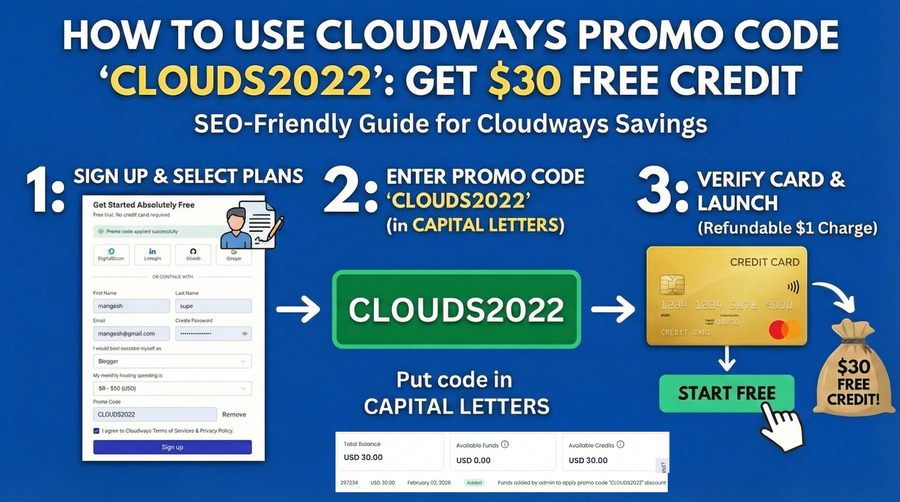
Here's something that annoyed me when I first signed up: Cloudways hides the promo code field. Like, genuinely hides it. If you rush through the form, you'll end up on a bare 3-day trial with zero credit.
I almost missed it myself. So here's the exact process I followed to make sure the Cloudways promo code actually applied:
1. Click the Activation Link First
Before you even touch the signup form, you need to click our link below. It drops a tracking cookie in your browser that tells Cloudways to apply the $30 credit to your account. Skip this and the promo code won't work.

Save this code: CLOUDS2022 — Verified: March 2026 2. Find the "Hidden" Promo Link
On the signup form, stop. Do not fill out your details yet.
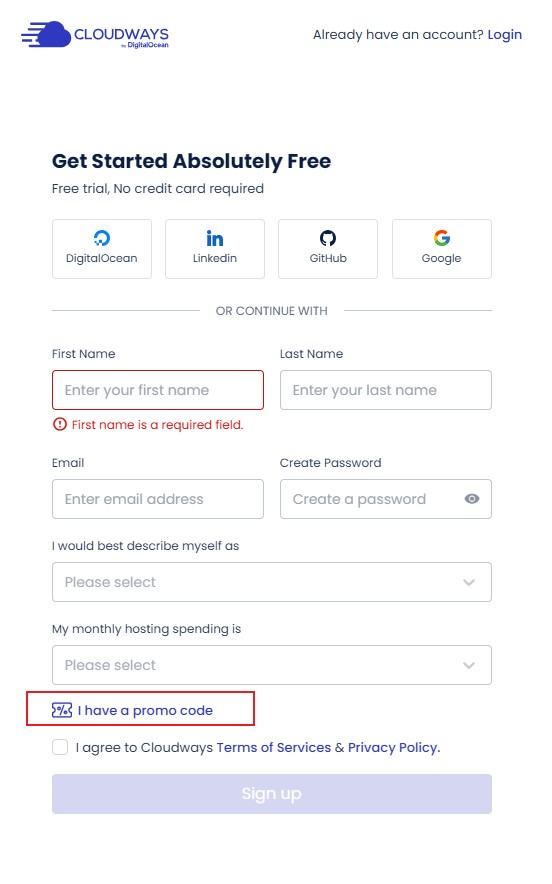
Don't click "Start Free" yet! Click this blue link first. Screenshot: March 2026 Look for the tiny text link that says "I have a promo code" (with a ticket icon). They tucked it right above the Terms checkbox — easy to miss if you're not looking for it.
✅ How to know it worked:
You'll see a light green banner at the top saying "Promo code applied successfully". If you don't see that banner, the code didn't stick — try clearing cookies and starting over.
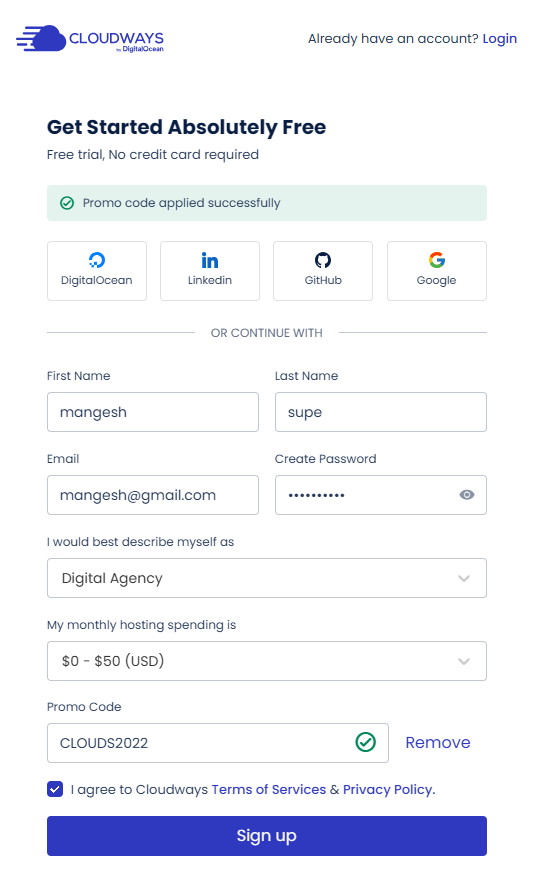
Make sure you see this Green Checkmark before proceeding. Verified: March 2026 3. Don't Use a VPN (Seriously)
Cloudways has aggressive fraud detection. When I first tried signing up through a VPN, they flagged my account and wanted a passport scan. Here's how to avoid that headache:
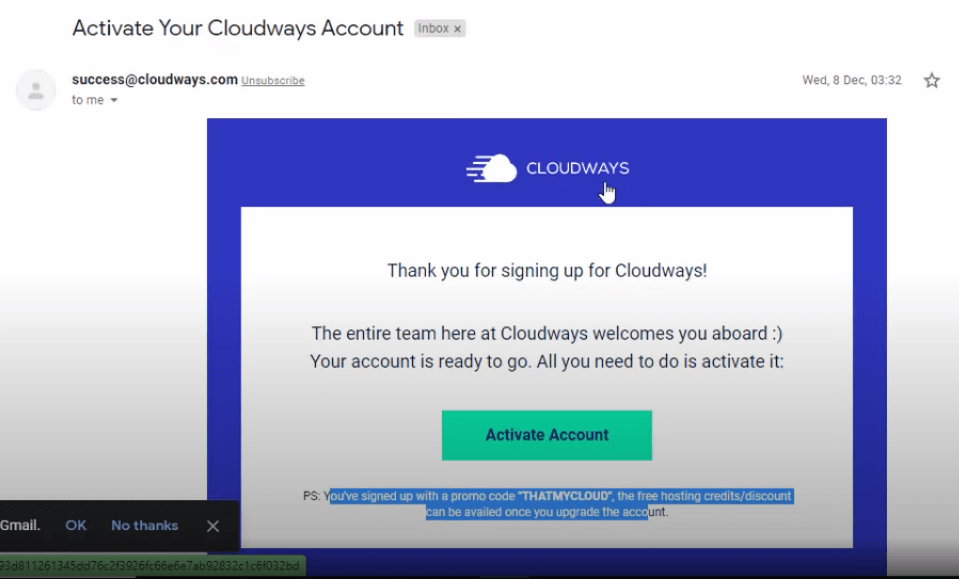
Check your spam folder if the activation email doesn't arrive instantly. ⚠️ How to avoid manual review:
- Turn off your VPN: Signing up from a datacenter IP is an immediate red flag.
- Use Mobile Data: If you've created an account before on your WiFi, switch to your phone's 4G/5G to get a fresh IP fingerprint.
4. The $1 Authorization Hold (Don't Panic)
After signing up, you'll see your "Funds" balance at $0.00. I panicked the first time I saw this — but it's totally normal. The trial account just hides the credit until you verify.
Click "Upgrade My Account" and add your card. They'll charge a $1.00 authorization hold that refunds automatically. It's just a bot check. Once you clear it, the $30 appears in your balance.
Why do they need my card? The $30 credit buys real compute time on real servers. Cloudways needs a card on file to stop people from spinning up free servers for crypto mining. It's annoying, but fair.
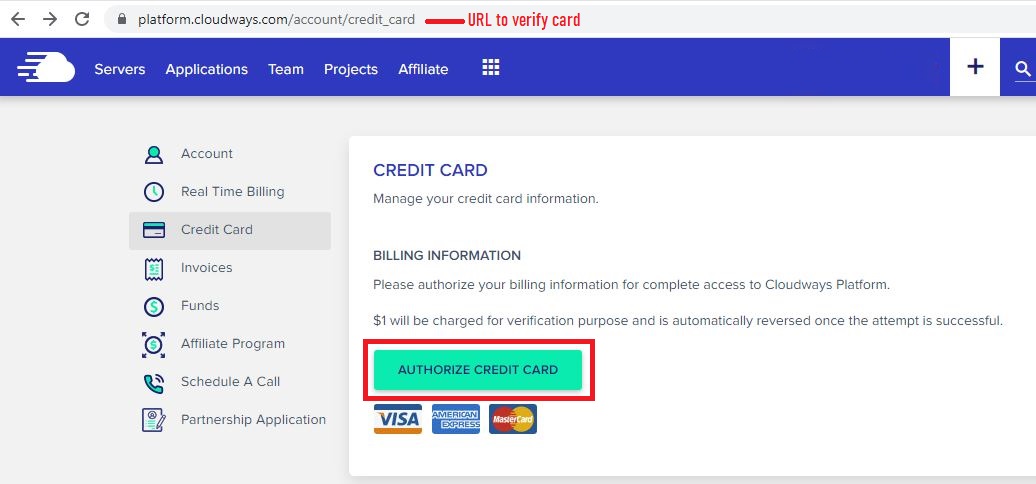
The $1.00 charge is just a check — refunded instantly. Tested: March 2026 5. Check Your Credit Balance
Once you're fully activated, head to Account (top right) → Real Time Billing.
You should see "Promotion Credit: $30.00" as a line item. That balance will automatically pay your future invoices until it's used up. Here's what my dashboard looked like after applying the Cloudways coupon code:
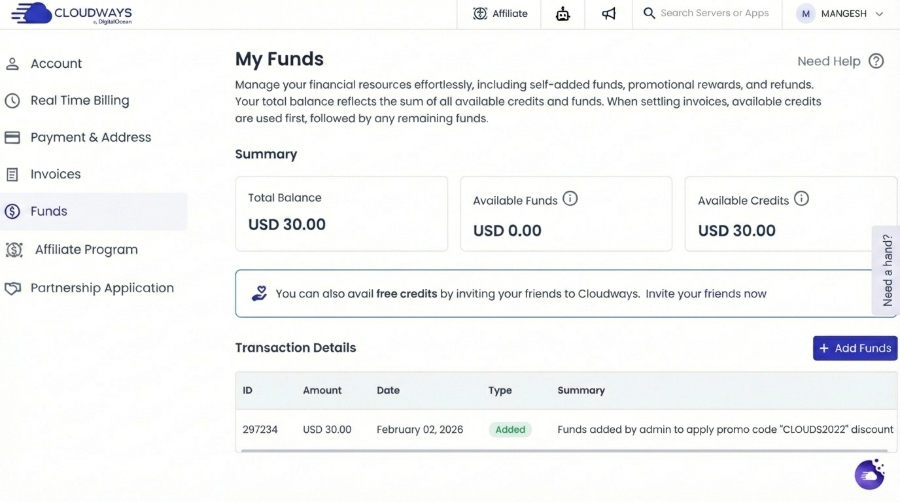
The credit sits in your funds and automatically pays your invoice. Dashboard screenshot: March 2026
How Cloudways Billing Works for Promo Codes
This is where most people get confused — and I get it. Cloudways billing is nothing like regular hosting.
With most hosts, you pay $3/mo upfront for 3 years and a coupon lowers that price. Simple. Cloudways doesn't work that way. They bill hourly based on actual usage, so their promo codes interact with a live billing engine, not a static cart. If you don't understand this, you'll accidentally waste your discount.
1. Credit vs. Percentage: The Billing Difference
Here's the key difference between the two types of Cloudways promo codes — and which one eats your credit faster:
- Fixed Credits ($30): Think of it like a gift card. Cloudways drops $30 into your "Funds" balance. Every month when your invoice generates, they drain this balance before touching your credit card.
- Percentage Discounts (30% Off): This just lowers your monthly bill by 30% for 3 months. No cash up front — it simply reduces what you owe at the end of each billing cycle.
⚠️ Don't fall for the big number
"30% off" sounds bigger than "$30 credit" — but for most beginners, the math says otherwise.
If you're launching a standard 1GB server ($14/mo), 30% off only saves you $4.20. Meanwhile, the $30 credit covers your entire bill for 2 months. The "smaller" number is actually the better deal for starter plans.
2. The "Post-Paid" Hourly Model
Unlike SiteGround or Bluehost where you pay for 36 months upfront to get a "deal," Cloudways bills you after you use their service — kind of like your electricity bill.
- You only pay for hours used: Spin up a server at 9 AM, delete it at 11 AM, and you're charged for 2 hours (~$0.04). Not a full month.
- Invoices come after: Cloudways generates your invoice on the 1st of every month for whatever you used in the previous month. It's like getting your phone bill.
3. Resource Reservation (Stop vs. Delete)
This tripped me up at first. Since Cloudways rents real infrastructure from DigitalOcean or Vultr, stopping a server doesn't stop the billing meter.
🛑 Stopping a Server
Status: Still billed.
Why: Even with the CPU off, Cloudways is still reserving your Dedicated IP and NVMe Storage on the physical rack. The provider charges them for it, so they charge you.
✅ Deleting a Server
Status: Not billed.
Why: Deleting releases the IP and wipes the disk. The billing clock stops the second you hit delete. This is the only way to truly stop charges.
4. What Drains Your Credit?
Your $30 credit covers the total invoice — not just server rental. Here's what eats into it:
- Compute: The main CPU/RAM rental cost.
- Offsite Backups: Charged at $0.033/GB. If you store 100GB of backups, this will drain your credit quickly.
- Add-ons: Elastic Email, Rackspace Email, or SafeUpdates.
The Priority Order:
- Free Trial: First 3 days (No cost).
- Promo Credit: Automatically applied to the invoice until $0.
- Credit Card: Charged only after the promo credit is exhausted.
Quick tip: Set your Backup Retention to "1 Week" instead of the default 4 weeks during your credit period. This alone can save you weeks of free hosting time.
Real Cost Breakdown: Cloudways vs Alternatives
I know what you're thinking: "$14/mo? That's way more than my $2.99 Hostinger plan." I thought the same thing before I switched. But you're comparing two completely different things.
With Cloudways, you're not buying "hosting" in the usual sense. You're leasing dedicated compute power on DigitalOcean or Vultr's infrastructure. That's a fundamentally different product. Here's how it stacks up against the alternatives:
| Host | Starter Price | Renewal Price | Lock-In? | Free Trial | Our Take |
|---|---|---|---|---|---|
| Cloudways (DO) | $14/mo | $14/mo | None — monthly billing | 3 days + $30 credit | ⭐ Best value |
| Cloudways (Vultr HF) | $16/mo | $16/mo | None — monthly billing | 3 days + $30 credit | Best speed |
| Kinsta | $35/mo | $35/mo | Monthly or Annual | 30 days money-back | 2.5× pricier |
| WP Engine | $30/mo | $30/mo | Annual for discount | 60 days money-back | 2× pricier |
| SiteGround | $2.99/mo | $17.99/mo | 12-36 months upfront | 30 days money-back | Renewal trap |
| Hostinger | $2.59/mo | $7.99/mo | 48 months upfront | 30 days money-back | Renewal trap |
1. The $2.99 vs $14 Illusion
The price gap between Cloudways and cheap shared hosting looks massive, but it's misleading. Shared hosts sell cheap plans by cramming hundreds of sites onto one server.
When you buy a $14/mo Cloudways DigitalOcean server, you get:
- Dedicated CPU: No "CPU Steal" from noisy neighbors running heavy scripts.
- Dedicated RAM: Your memory is reserved physically for your application.
- NVMe SSD: High-speed disk I/O that doesn't choke during database queries.
- Zero Inode Limits: Unlike SiteGround or GreenGeeks, you won't hit a hidden file cap.
Start with Vultr High Frequency
Vultr HF delivers 72ms TTFB at $14/mo: the best speed-to-price ratio across all 5 cloud providers. For most WordPress and WooCommerce sites, this is the right starting point. Your CLOUDS2022 credit covers about 2 full months on this plan with nothing out of pocket.
Why the price gap is misleading
On shared hosting, you're splitting a single server with hundreds of other accounts. When one site gets hit with a traffic spike or runs a heavy cron job, every site on that server suffers. I've seen shared hosting TTFB jump from 200ms to 2+ seconds during peak hours — and there's nothing you can do about it.
With Cloudways, your server resources are isolated. Your CPU, RAM, and disk aren't shared with anyone. That's what the extra $11/mo actually buys you — consistent performance under load. For any site that makes money, that's not optional.
2. Pay-As-You-Go Billing (No Upfront Commitment)
Your Cloudways invoice shows up between the 1st and 6th of each month — and it only charges you for what you actually used in the previous month. This is the opposite of how most hosts work.
- No upfront lock-in: You don't need to drop $200 for a 3-year plan just to get a decent rate. Your cash stays free for traffic, ads, or content — not locked into a hosting contract you can't cancel.
- Scales with your traffic: I upgraded my server to a 4GB Vultr HF for a Black Friday sale, then scaled back down the following week. My bill reflected exactly 5 days of the larger server — not a full month. Try doing that on Bluehost.
3. The Extra Costs Nobody Mentions
I want to be upfront about this — there are a few line items on your Cloudways invoice that catch people off guard:
- Offsite Backups ($0.033/GB): On a 50GB site with hourly backups, this adds $5–$10/mo easily. I learned this the hard way. Set retention to 1 week instead of the default 4 weeks — you'll save a lot during the promo period.
- Bandwidth on AWS/GCP: DigitalOcean and Vultr include generous bandwidth (1TB+), so this isn't an issue for most users. But if you pick AWS or Google Cloud, bandwidth overages can get expensive fast. Stick with DO or Vultr unless you specifically need AWS.
- Email ($1/mo per inbox): Cloudways doesn't include email hosting. You'll need the Rackspace add-on at $1/mo per mailbox, or just use Google Workspace like I do.
The real takeaway from my bills
Your Cloudways bill is shaped more by your configuration choices (backup frequency, provider selection) than the base server price.
When I switched from AWS to Vultr HF and reduced backup retention from hourly to daily, my bill dropped by almost 40%. The base price didn't change; my settings did.
What Cloudways Includes Free at Every Price Point
A lot of managed WordPress hosts charge extra for features Cloudways ships with every plan. Here's how it compares:
The unlimited sites policy alone makes Cloudways the logical pick for anyone managing more than one WordPress installation. Kinsta charges $35/mo per site. At 3 sites, Cloudways at $50/mo saves you $55 every single month.

Verified by ThatMy.com
Status: Active & Verified for March 2026
Partnership: Official Cloudways Affiliate Partner since 2018.
We do not use auto-generated coupons. I personally test the CLOUDS2022 code monthly on a live signup form to ensure the $30 credit triggers correctly. The screenshots on this page are from my own account dashboard.
Why I Kept Using Cloudways After the Promo Code Ran Out
Most people land on this page looking for a Cloudways promo code to save a few bucks. Fair enough — that's why I built it. But I think it's worth mentioning why I'm still paying full price for Cloudways years later.
When my $30 credit ran out back in 2022, I seriously considered switching back to shared hosting. The price jump from "free" to $14/mo felt steep. But within the first week of actually using Cloudways, three things convinced me to stay:
- Speed that actually matters: My WordPress site went from a 3.2s load time on SiteGround to under 900ms on Cloudways with Vultr HF. That's not a benchmark stat — that's real Lighthouse scores from my actual site. Page speed directly impacts bounce rate, and my bounce rate dropped 18% after the switch.
- No surprise renewals: With Hostinger and SiteGround, you pay $2.99/mo for 3 years, then your renewal hits $14.99/mo. With Cloudways, the price is the price. No bait-and-switch. I hate price anchoring tactics, and Cloudways doesn't play that game.
- Real server control: I can SSH in, adjust PHP settings, change my server provider, manage SSL certs — without filing a support ticket. On shared hosting, I once waited 48 hours for GoDaddy to increase my PHP memory limit. On Cloudways, I did it myself in 10 seconds.
Is it for everyone? No. If you're running a hobby blog with 50 visitors a day, shared hosting is probably fine. But if you're running anything that makes money — a store, a client site, a lead gen funnel — the performance difference pays for itself within the first month.
Bottom line: The Cloudways promo code gets you in the door for free. What keeps you is the speed, transparency, and control you can't get on $3/mo hosting. I've been a paying customer for over 3 years now and I have no plans to switch.
My Final Recommendation
Look — if you've read this far, you've already done more research than 95% of people searching for a Cloudways promo code. Don't overthink it.
It really comes down to one question: how much are you planning to spend per month?
Use this cheat sheet to decide in 5 seconds:
🚀 The Strategy Cheat Sheet
| If you are a Beginner... | Get the $30 Free Credit This covers your first ~2 months. Zero risk — if you don't like Cloudways, you lose nothing. It's the same code I used, and what I recommend in my full Cloudways review. | Use CLOUDS2022 ➜ |
| ⚡ Spring 2026 Deal Ends March 31 | Get 30% OFF for 5 Months (HIGHSPEED) Best active deal right now — 2 extra months of discount vs. the standard code. Includes free expert-led migrations until May 15, 2026. | Use HIGHSPEED ➜ |
| If you are an Agency... | Get 30% OFF (3 Months) If your monthly bill will be over $50 immediately (e.g. migrating 5+ sites), the percentage discount saves you more money. Check the math here ➜ | Use Official Deal ➜ |
Here's what I love about Cloudways: there's no 3-year lock-in. No renewal traps. You pay for what you use, and you can walk away anytime. That's why it consistently tops our fastest web hosting list.
My advice? Grab the $30 credit, spin up a server, test it for a month. If the speed blows you away like it did me, great — keep going. If not, you haven't lost a single dollar.
🚀 Activate $30 Free Credit Now
*Verification required for credit unlock.
Reliability Check: 12 Months of Real Uptime Data
Promo codes get you in the door. This is the data that keeps you there. All figures from UptimeRobot Pro with 1-minute monitoring intervals over 12 months:
101 minutes of downtime per year sounds like a lot until you compare it to Bluehost at 378 minutes (6.3 hours). For a site that earns money, every hour offline costs real revenue. Cloudways on Vultr HF is one of the most reliable options I've tracked.
✅ Ready to Start? Grab Your Free Credit
New Cloudways accounts get $30 free credit with code CLOUDS2022. No minimum spend. No long-term commitment. Cancel by deleting your server at any time.
$30 Free Credit | All 5 cloud providers | Pay as you go
Frequently Asked Questions About Cloudways Promo Codes
These are the questions I get asked most often — both in comments and from people who email me directly.
What is the best Cloudways promo code right now?
For most people, it's CLOUDS2022. It gives you $30 in credit — enough to run a starter DigitalOcean server free for about 2 months. I've tested every Cloudways coupon code I can find, and this one consistently offers the most value for beginners. If you're spending $50+/month from day one, the 30% discount code is better math.
Does Cloudways offer a free trial?
Yes — every new account gets a 3-day free trial automatically. No credit card needed to start. But honestly, 3 days isn't enough to properly test anything. That's why I recommend stacking the CLOUDS2022 promo code on top — it turns those 3 days into 2+ months of real testing time.
How do I know the Cloudways promo code actually worked?
Two things to look for. First, a green checkmark appears next to CLOUDS2022 on the signup form. Second, once logged in, go to Account → Real Time Billing — you should see $30.00 in your Funds balance.
How do I cancel my Cloudways free trial?
You don't 'cancel' Cloudways — you just delete the server. Go to your server list, click the three dots, and hit 'Delete.' Billing stops the second the server is gone. If you're still within the 3-day trial, you're charged absolutely nothing.
How long does the $30 credit actually last?
Depends on your server. On a DigitalOcean 1GB plan (~$14/mo), it lasts about 2 months. On Vultr HF ($16/mo), roughly 7 weeks. If you add extras like offsite backups or email hosting, it burns faster. I'd recommend keeping your setup minimal during the credit period.
Why do I need a credit card for free credit?
Because the $30 buys real server time on real hardware. Cloudways needs to verify you're human (not a bot farming free servers for crypto mining). They charge a refundable $1.00 to your card — it comes back instantly. After that, you won't be charged until the $30 credit runs out.
Is the Cloudways coupon code CLOUDS2022 still working in 2026?
Yes — I test this code every month on a fresh signup. As of the current month, CLOUDS2022 is active and applies the full $30 credit. If it ever stops working, I'll update this page immediately. You can also try our backup code THATMYCLOUD for 20% off.
Can I use multiple Cloudways promo codes at once?
No. Cloudways only allows one promo code per account. You can't stack the $30 credit with the 30% discount — it's one or the other. That's why picking the right code upfront matters. Use the savings calculator above to figure out which one saves you more.
What's the difference between a Cloudways promo code and coupon code?
Nothing, really. 'Cloudways promo code' and 'Cloudways coupon code' mean the same thing — it's a code you enter during signup to get a discount or credit. Some sites call them discount codes or voucher codes too. They all refer to the same thing.
What is the Cloudways HIGHSPEED promo code?
HIGHSPEED is Cloudways' Spring 2026 limited-time promo code. It gives you 30% off for 5 months — that's 2 extra months compared to their standard 30% deals. It also includes unlimited free expert-led migrations (valid until May 15, 2026). The code is active from March 16–31, 2026.
Does Cloudways have a student discount or coupon?
Cloudways doesn't have an official student discount program. However, the $30 free credit from CLOUDS2022 is effectively better than most student discounts — it lets you run a real cloud server free for 2 months with no strings attached. That's more than enough for student projects, portfolios, or coursework.