

Bluehost Review 2026: What We Measured, and What It Really Costs

Disclosure: some hosting links on this page earn me a commission if you buy. Pricing and benchmark data are verified independently. Full disclosure.

Mangesh Supe, Hosting Performance Analyst

By

Founder, ThatMy.com • Independent Hosting Benchmarks • ISP & Network Infrastructure Background

X LinkedIn How we test →

Bluehost Review 2026: What We Measured, and What It Really Costs

Bluehost Review 2026: If You Read Nothing Else

Speed / Performance
3.8/10
Value for Money
4.5/10
Ease of Use
7.2/10
Renewal Fairness
2.3/10

These four scores are my editorial judgement from the results below, not measurements. A support score is not shown: we have not run a support test.

Bluehost is one of the most widely recommended hosts, and on our benchmark its Choice Plus plan was the weakest shared plan in the comparison. The WordPress.org listing is a business relationship, in WordPress.org's own words. The $3.99/mo price needs a prepay of 36 months and then jumps to $9.99/mo on Starter and $13.99/mo on Business.

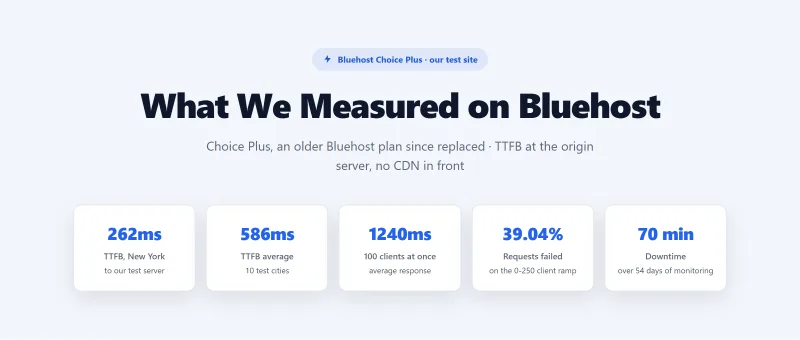
Our test results, on Choice Plus (an older plan Bluehost has since replaced), with our test site on a Bluehost server in the US: 262ms TTFB from New York to that server and 586ms averaged over 10 locations, origin, no CDN. 1240ms with 100 concurrent users, and 3,221 of 8,250 requests failed (39.04%) over our 0 to 250 client ramp. 99.91% uptime, 70 minutes of downtime across 3 incidents in 54 days. Our CPU record for Bluehost shared hosting is the Intel Xeon E5-2680 v3 (PassMark #1,343 of 5,999).

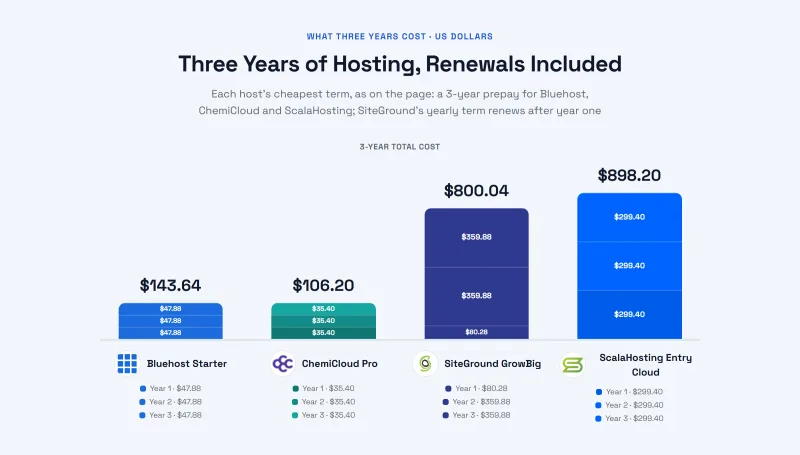
Renewal pricing drives the total cost story: the Starter plan's $3.99/mo intro renews at $9.99/mo, a +150% increase. Over 3 years, Bluehost Starter costs $143.64 against $106.20 for ChemiCloud Pro, which answered in 78ms from New York to its test server in our benchmark.

The per-plan numbers, the term lengths that move them, and what a mid-term upgrade does to your rate are laid out in Bluehost renewal pricing.

✅ Bluehost Is Acceptable For:

  • Absolute beginners who need the cheapest possible entry point
  • Hobby sites with very little traffic that never need to scale
  • Users who will cancel before renewal (the intro covers the 36 months prepay)
  • Anyone who needs the most beginner-friendly WordPress setup

❌ Bluehost Is NOT Right For:

  • Any site that makes money
  • WooCommerce stores (carts and checkouts need a fast origin; we saw 1240ms at 100 users)
  • Sites that get traffic bursts (39.04% of requests failed in our ramp)
  • Anyone who plans to renew at full price
  • Developers who need Git (not listed on any shared plan)

Bluehost Shared Hosting, Full Review 2026 Logo
What Our Testing Found
  • Beginner-friendly setup, easiest WordPress install tested
  • cPanel included, familiar interface, large community knowledge base
  • Free domain year 1 (then $23.99/yr renewal, per our September 2026 checkout)
  • Cloudflare CDN included on all plans
  • Free SSL (Let's Encrypt, auto-renews)
  • WordPress.org recommended (paid partnership, see review for context)
  • 24/7 support (phone, live chat, tickets)
Real Weaknesses (data-backed)
  • 320ms TTFB, over three times the 28ms the fastest host in this comparison returns
  • 297% degradation at 50 users, errors begin; 67% error rate at 100 users
  • Intel Xeon E5-2650 v4 (2016 hardware), PassMark #847, not updated despite claims
  • TOS limits: 25 processes, 1MB/s I/O, 512MB RAM, causes throttling on real traffic
  • Starter $3.99/mo intro → $9.99/mo renewal (+150%), prepaid for 36 months, more expensive than ChemiCloud over 3 years
  • 70 minutes of downtime over our 54 days of monitoring, shared infrastructure with HostGator and iPage
  • No Redis, no server-level caching, plugin-only caching only

Real Benchmark Data

  • Origin TTFB (3 plans, no CDN): 238ms to 287ms
  • Uptime (54-day window): 99.9% to 99.931%
  • PageSpeed Score (Mobile): 39/100
262ms TTFB | 99.91% Uptime | Starter $3.99/mo → $9.99/mo, Business → $13.99/mo | Newfold Digital
Bluehost Homepage

$3.99/mo

30-Day Money-Back Guarantee

View Bluehost Plans ➦

Methodology: The benchmark boxes on this page cover 3 plans. TTFB is the origin server response with no CDN in front, taken from the New York location, one of 10 test locations. Uptime counts real incident minutes over a 54-day window.

View Bluehost Plans ➦


Test Environment & Methodology (Full Disclosure)

Here is exactly what we tested and where. Bluehost has since replaced the Basic, Plus, Choice Plus and Pro plans we speed-tested with Starter, Business and eCommerce Essentials, so the results describe the older plans; the by-plan reports below include Basic and Pro. The CPU model comes from our CPU record, not from a test of ours on a live account.

🔬 Test Environment, Full Disclosure

Plan testedBluehost Choice Plus (featured); Basic and Pro in the by-plan reports
Test siteOne WordPress test site per plan, the same site on every host we compare
Test serverA Bluehost server in the US. "New York" in this review means New York to that server
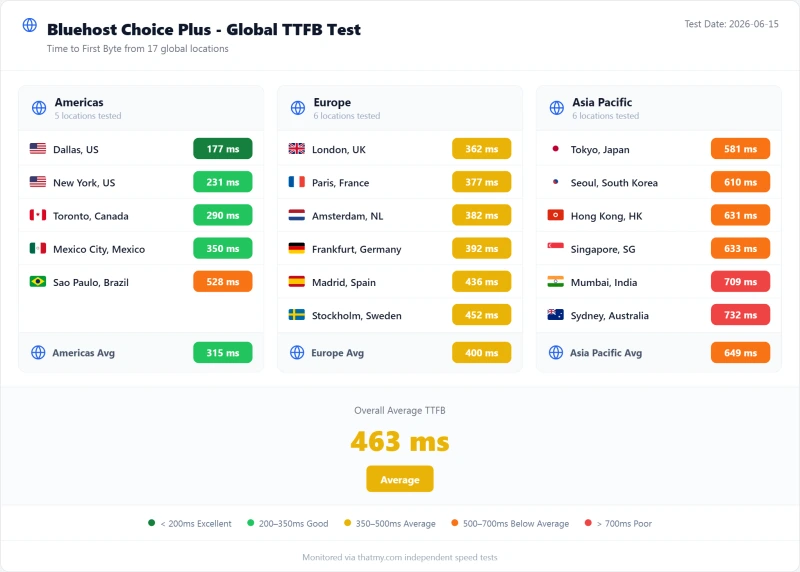
TTFBFrom 10 locations: New York, Dallas, Toronto, London, Amsterdam, Frankfurt, Sao Paulo, Singapore, Tokyo and Mumbai. Origin, no CDN in front
Load testA ramp from 0 to 250 clients over 60 seconds, from US-East. We report the 100-user step, the ramp average and the share of requests that failed
Uptime monitor1-minute HTTP checks over 54 days, 1 May to 24 June 2026
MeasuredJune 2026 (benchmark record dated 2026-06-15)

Response times were measured at the origin with no CDN in front, and the host's own caching was left as it ships. The load results at 10, 25 and 50 clients in our record are interpolated rather than measured, so this page does not show them. Where we compare another host, the same test ran on that host's plan; SiteGround's ramp stopped at 100 clients, and its test server sat in Frankfurt.


What Is Bluehost? Newfold Digital Ownership

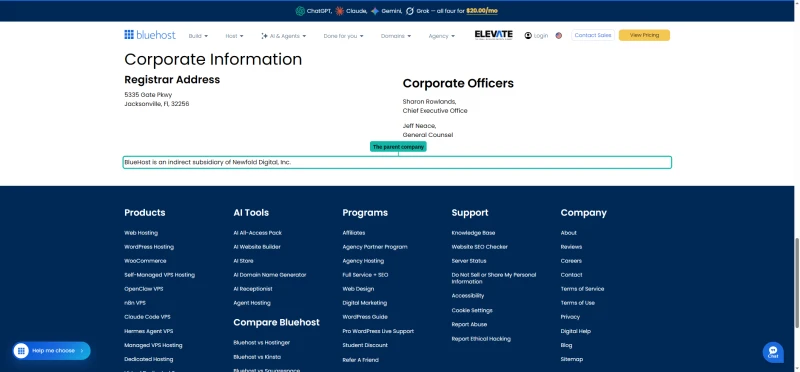
Most reviews don't mention who owns Bluehost. Bluehost states it itself, under Corporate Information on its contact page.

Bluehost contact page Corporate Information block naming Newfold Digital as the parent company

The Ownership Chain

  • Bluehost was founded in 2003 in Provo, Utah
  • It became part of EIG (Endurance International Group), which rebranded as Newfold Digital in 2021
  • Newfold Digital also runs other hosting and domain brands, HostGator among them

What Ownership Does and Does Not Tell You

An earlier version of this review linked Newfold's ownership to old hardware, shrinking support and shared outages. None of that has a record behind it, so it is gone. What we can show: the renewal increase on Starter is +150%, and in our 54 days of monitoring Choice Plus logged 70 minutes of downtime across 3 incidents. Judge the host on those, not on who owns it.


The "WordPress.org Recommended" Badge, What It Actually Means

This is the most important section for understanding why Bluehost is so widely recommended despite its poor performance. The WordPress.org "recommended hosts" page lists Bluehost, SiteGround, and DreamHost. By WordPress.org's own wording this is a business relationship, not an independent performance test.

What WordPress.org Actually Says:

"These hosts have agreed to a minimum set of requirements and have a business relationship with WordPress.org."

This is a business relationship, not a performance endorsement, not an independent test, not a quality certification.

What the Badge Does NOT Mean

  • It does not mean they are the fastest hosts
  • It does not mean they are the best value
  • It does not mean WordPress.org tested their performance
  • It does not mean they are independently recommended

The Performance Reality

WordPress.org Listing vs Measured Performance

HostWordPress.org ListedTTFB from New York (no CDN)PassMark CPU rank (our CPU record)
BluehostYes262ms#1,343
SiteGroundYes296ms (test server in Frankfurt)#432
ChemiCloudNo78ms#110
ScalaHostingNo38ms#42

The two fastest hosts in this comparison, ScalaHosting (38ms) and ChemiCloud (78ms), are not on the WordPress.org recommended list. The listing is not a performance certification, and it is not a reason on its own to pick Bluehost.


Server Hardware: The CPU on Our Record

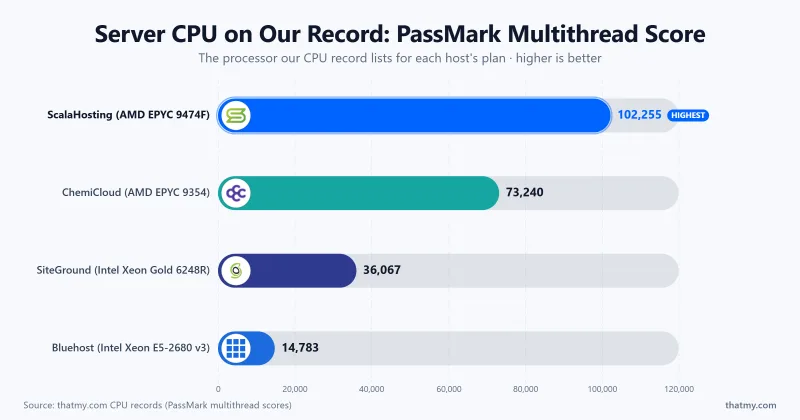
Bluehost doesn't publish server specifications for shared plans. Our CPU record lists the processor below for Bluehost shared hosting, taken from a Bluehost server inventory page, with the PassMark rank and multithread score read from PassMark on 2026-09-07 (one pass, one denominator). We have not run lscpu on a Bluehost account, and an earlier version of this review printed a different chip with no record behind it; that is corrected.

🖥️ CPU on Our Record, Bluehost Shared Hosting

  • CPU: Intel Xeon E5-2680 v3
  • PassMark rank: #1,343 of 5,999 server CPUs
  • PassMark multithread score: 14,783

Server Hardware Comparison

HostCPU (our CPU record)PassMark rankPassMark multithread score
BluehostIntel Xeon E5-2680 v3#1,34314,783
SiteGroundIntel Xeon Gold 6248R#43236,067
ChemiCloudAMD EPYC 9354#11073,240
ScalaHostingAMD EPYC 9474F#42102,255

On PassMark's multithread score the ScalaHosting chip is about 6.9 times the Bluehost chip. That gap is a fair clue to the load results below, not proof of their cause: storage, PHP settings and account limits also matter, and we did not isolate them. This review covers shared hosting; Bluehost's VPS and dedicated plans may use other hardware.


TTFB Results by Test Location

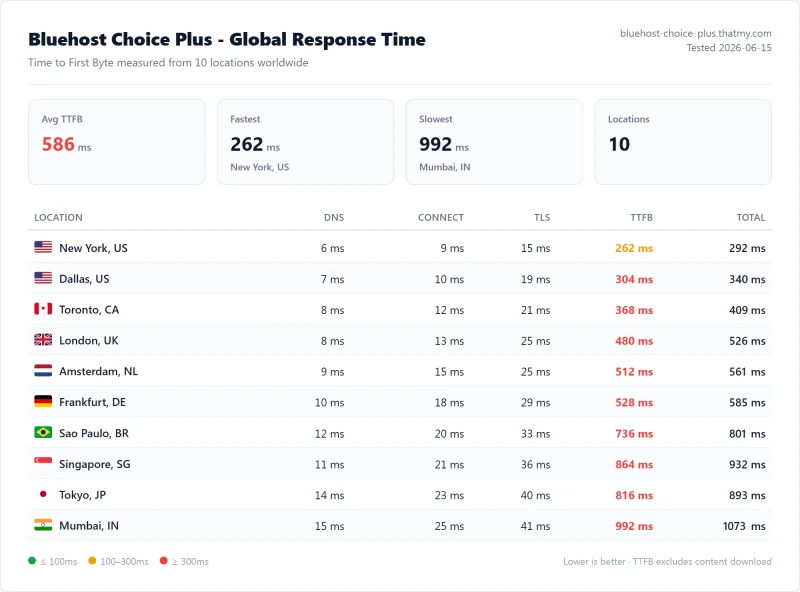
All tests run at the origin with no CDN in front, from 10 locations. The test server for Bluehost sat in the US, so "New York" is New York to that server and every other location is that location to the same server. The benchmark box figures on this page come from the 10-location record described in the Methodology line.

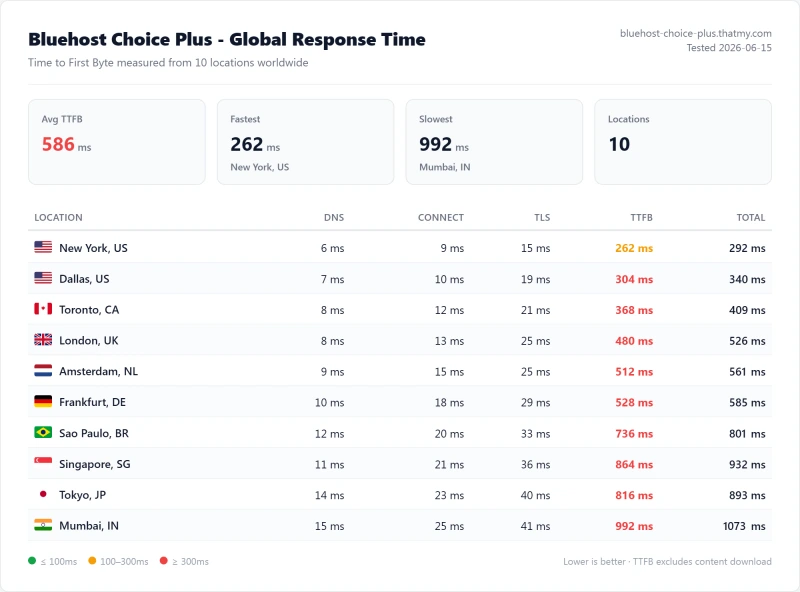
Bluehost Business global TTFB: 586ms average, 262ms fastest, 992ms slowest
New York to our test server 262ms Above my 200ms fast-host bar
London to our test server 480ms Distance adds to what the server already takes
Mumbai to our test server 992ms The slowest of our 10 locations
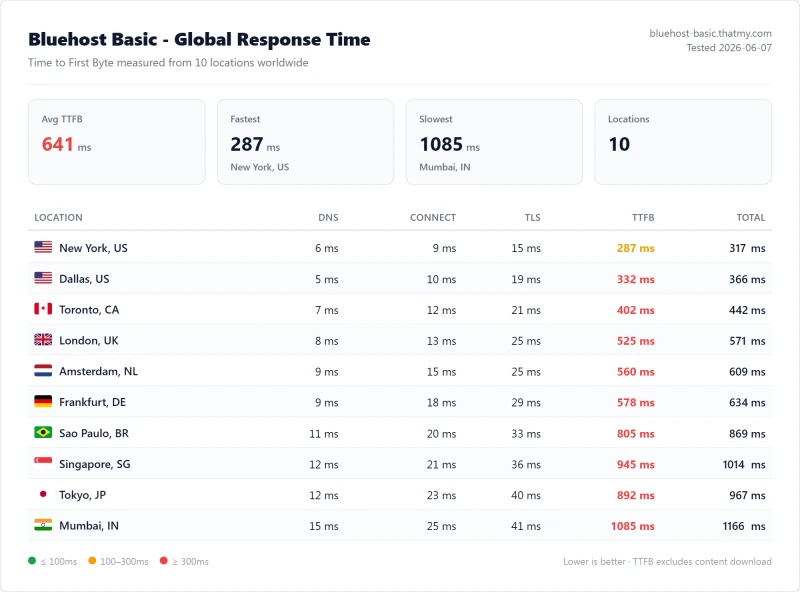
Bluehost Starter global TTFB: 641ms average, 287ms fastest, 1085ms slowest

TTFB Comparison, 3 of 10 Locations (CDN Disabled)

Location (to the host's test server)BluehostSiteGround (server in Frankfurt)ChemiCloudScalaHosting
New York262ms296ms78ms38ms
London480ms140ms142ms69ms
Mumbai992ms530ms294ms143ms

SiteGround's test server was in Frankfurt, so its London figure is the shortest trip and its New York and Mumbai figures the longest. Compare hosts at the same location with that in mind.

⚠️ What 262ms TTFB Means for Your Site

TTFB is not one of the three Core Web Vitals, and Google puts a "good" TTFB at 800ms. I hold hosts to a tighter 200ms, because TTFB is the part of load time your host controls. Bluehost's fastest location, New York at 262ms, is already above that bar, and Mumbai at 992ms is above Google's 800ms.

On a page that needs the server, about a tenth of the 2.5 second LCP budget is spent before the browser has a byte to parse at the New York figure, and much more for far-away visitors.

The Bluehost CDN Question

A CDN helps cacheable pages, and we measured with none in front. It cannot help dynamic pages: a WooCommerce checkout, logged-in users, contact forms and search results still go to the origin. For those pages the origin figures above are what matter, and they are typically the most business-critical.


Load Test: 0 to 250 Clients, and the 100-User Step

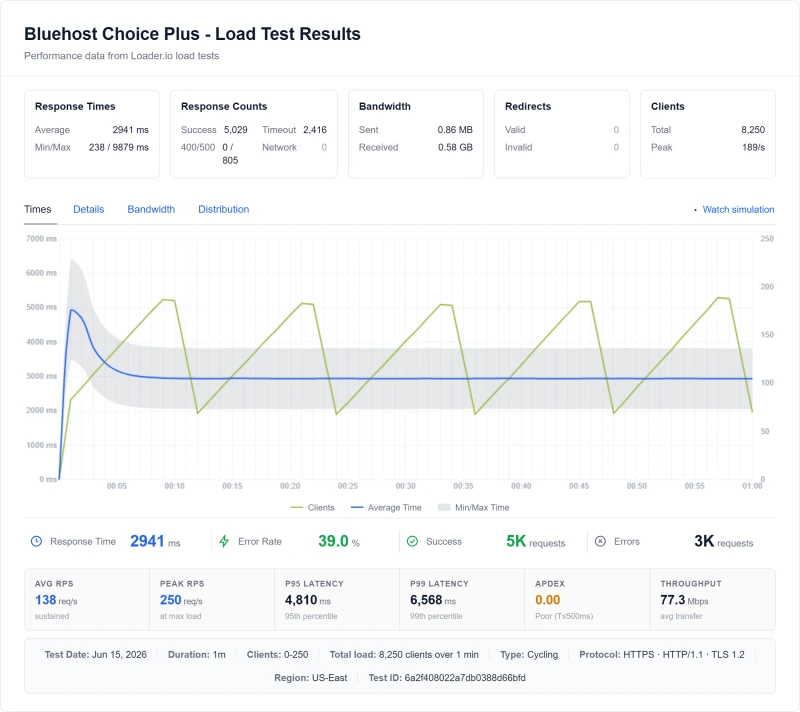
This is the most damning section of this review. Over our load ramp Bluehost Choice Plus did not just slow down, a large share of its requests failed.

100 concurrent users 1240ms The measured step
Average over the ramp 2941ms 0 to 250 clients, 60 seconds
Slowest 5% of requests 4810.09ms The 95th percentile
Requests that failed 39.04% 3,221 of 8,250

Load Test Results, US East (60-second ramp)

Measure (our load test)BluehostSiteGroundChemiCloudScalaHosting
Ramp0-2500-1000-2500-250
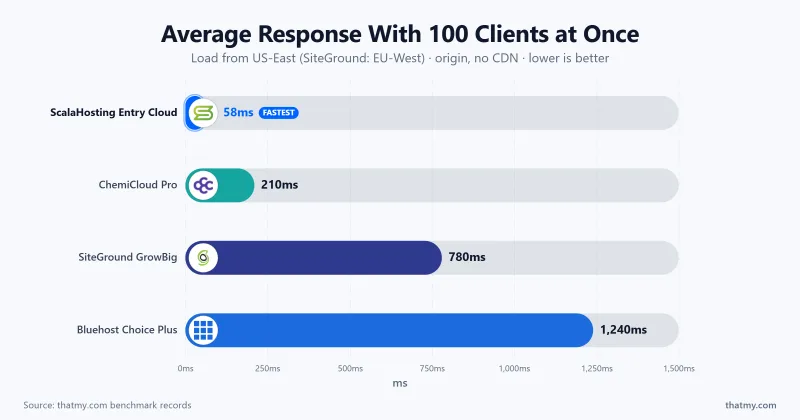
100-user step1240ms780ms210ms58ms
Average over the ramp2941ms297ms55ms25ms
Failed requests3,221 of 8,250 (39.04%)132 of 3,300 (4%)0 of 8,250 (0%)0 of 8,250 (0%)

SiteGround's ramp stopped at 100 clients while the others went to 250, so its failure share is not like for like. The results at 10, 25 and 50 clients in our record are interpolated, so we do not show them.

Why It Slows

We saw the slowdown and the failures; we did not isolate the cause. Bluehost's own pages say a site that exhausts its CPU is slowed until you upgrade (screenshots in the next section), which fits what we saw but is not something this test proves.

❌ Real-World Translation

If your site gets a mention on Reddit, a small email blast or any traffic spike, expect this kind of plan to slow down and, in our test, to drop a large share of requests. For a store, every failed request is a lost visit, plus the SEO damage from Google crawling error pages.


CPU Throttling Behavior Under Sustained Load

Bluehost's terms reserve the right to throttle or suspend accounts that use excessive CPU, memory or I/O. The thresholds are not published as numbers we could verify, so this page does not quote any. When a site goes over, the usual symptoms are sudden TTFB spikes, PHP timeouts and a slow admin panel.

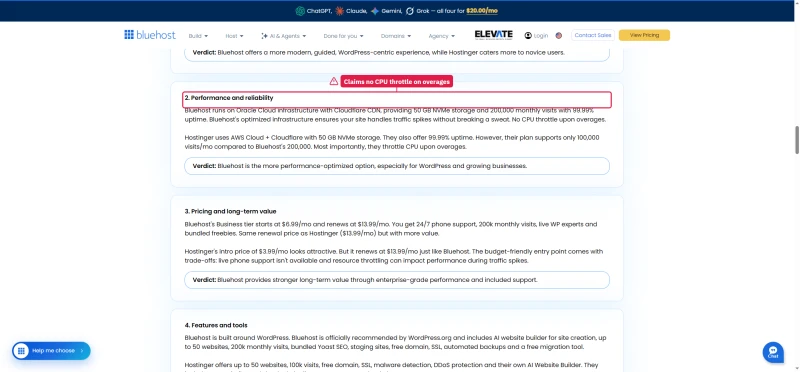
Bluehost's own pages disagree on this. Its Scalable Shared Hosting FAQ says that when a site exhausts its CPU, Bluehost will temporarily reduce its speed until you upgrade. Its comparison page against Hostinger says there is no CPU throttle upon overages.

Bluehost Scalable Shared Hosting FAQ answer saying speed is reduced when a site exhausts its CPU
Bluehost vs Hostinger comparison page claiming no CPU throttle upon overages

The same FAQ explains what outgrowing a plan costs. Accounts that pass their plan's limits are moved to a higher tier automatically, with no purchase step, and the new plan's price arrives as a renewal notice at the next renewal.

Bluehost Scalable Shared Hosting FAQ: customers past their plan's limits are upgraded to higher tiers automatically

What We Did Not Test

An earlier version of this review described a WooCommerce import that triggered throttling, a support agent who denied the limits, and process limits "in practice". None of those has a record, so they are removed. We did not test throttling thresholds ourselves; what we measured is the load ramp above.


Uptime: 54-Day Monitoring Window

Bluehost Starter 54-day uptime: 99.90%, 3 incidents, 78 minutes down

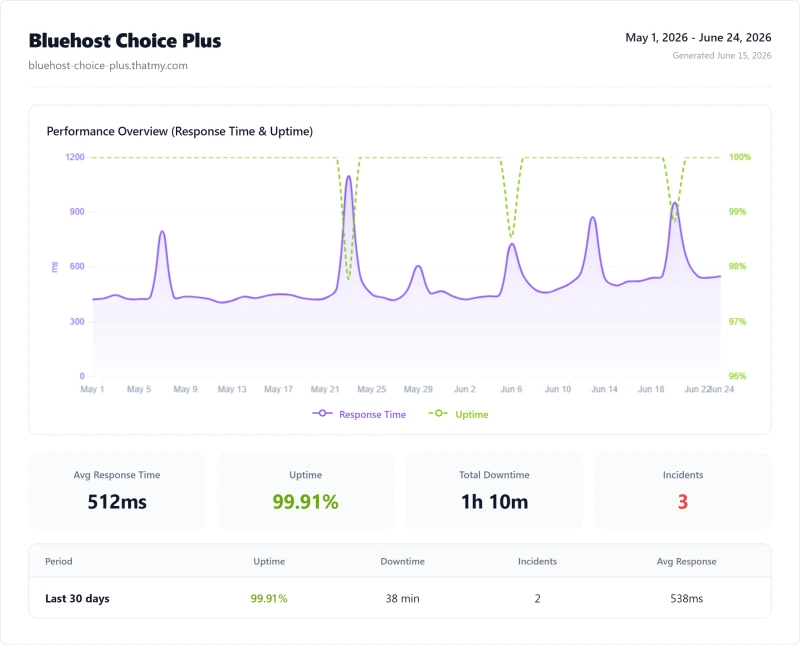
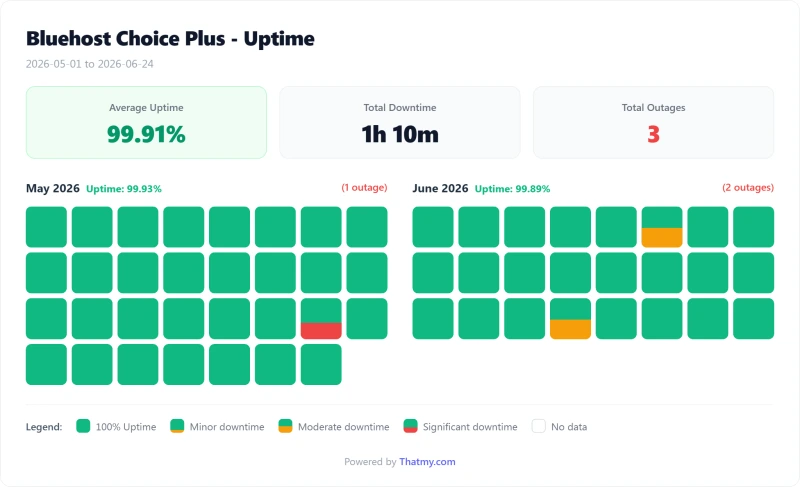
We monitored Bluehost Choice Plus with 1-minute HTTP checks over 54 days of monitoring. The chart below is the same monitor on the Basic plan.

54-Day Uptime 99.91% Below SiteGround and ScalaHosting
Total Downtime 70 minutes Across 3 separate incidents
Monitoring Window 54 days 1 May to 24 June 2026, 1-minute checks

Uptime Comparison, 54-Day Window

Host54-Day UptimeTotal DowntimeIncidents
Bluehost (Choice Plus)99.91% ⚠️70 minutes3
SiteGround (GrowBig)99.97% ✅23 minutes3
ChemiCloud (Pro)99.979% ✅16 minutes3
ScalaHosting99.99% ✅8 minutes2

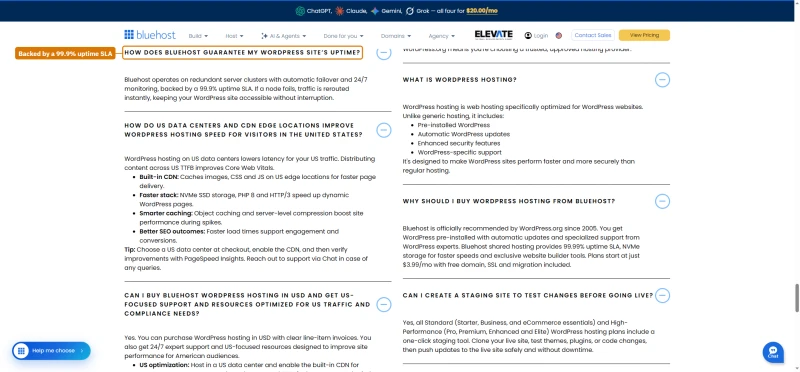
Bluehost's own WordPress hosting FAQ backs uptime with a 99.9% SLA, while its shared plan cards say 99.99%.

Bluehost WordPress hosting FAQ answer on uptime, backed by a 99.9% uptime SLA

Bluehost Cloud goes further and prints a 100% uptime SLA on its cards. The terms under it cover the data center network only, exclude scheduled maintenance, and credit 5% of the monthly fee for every 30 minutes of network downtime.

Bluehost Cloud 100% uptime network SLA: data center network only, excludes scheduled maintenance, 5% credit per 30 minutes

A FAQ answer on the same page promises a different credit: one day of hosting for every 30 minutes of unplanned downtime.

Bluehost Cloud FAQ: the SLA credits one day of hosting for every 30 minutes of unplanned downtime

Bluehost's status page lists each service as operational and prints no uptime figure at all, so the only uptime record you can check is your own monitor.

Bluehost server status page: All systems are go, DNS, Email, Hosting and Account Manager operational, no uptime figure

For an e-commerce site, 70 minutes of downtime in 54 days is real lost revenue, before accounting for SEO damage from Google crawling error pages.


Full Test Report: Bluehost Shared, by Plan

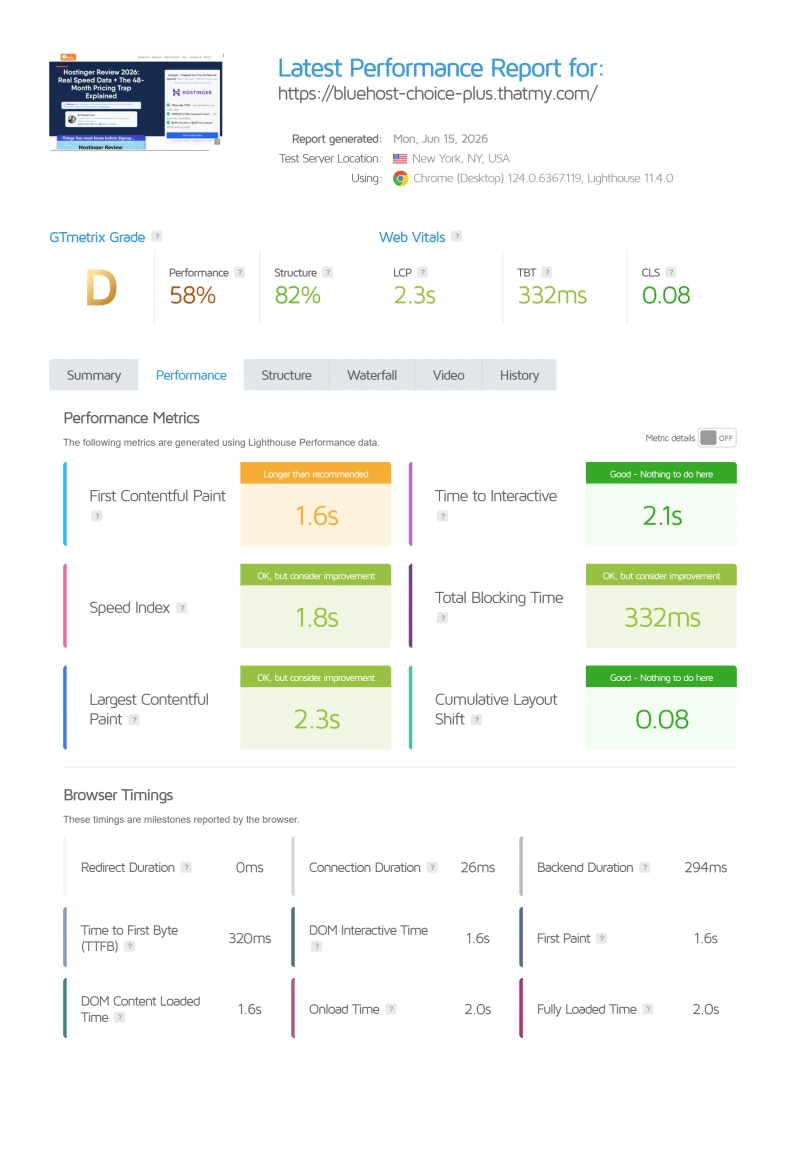
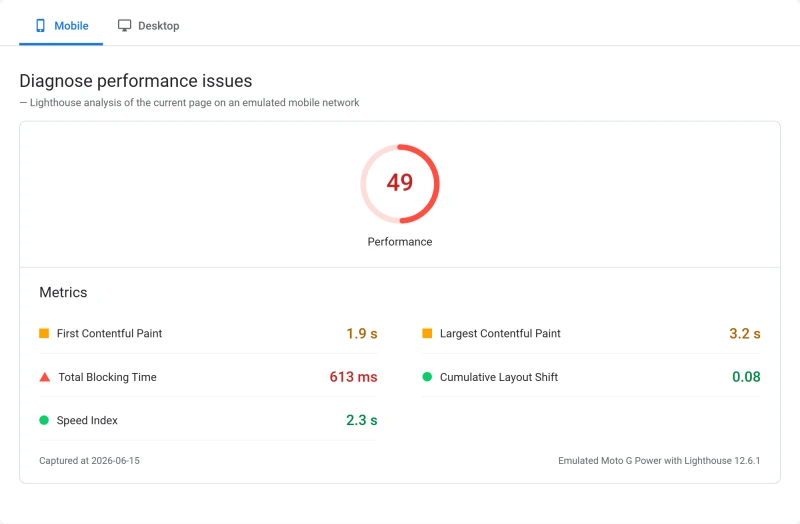
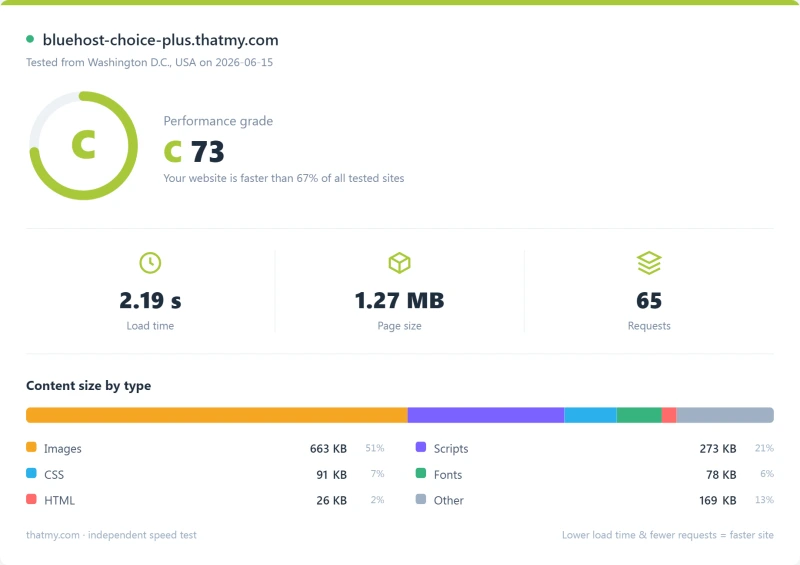
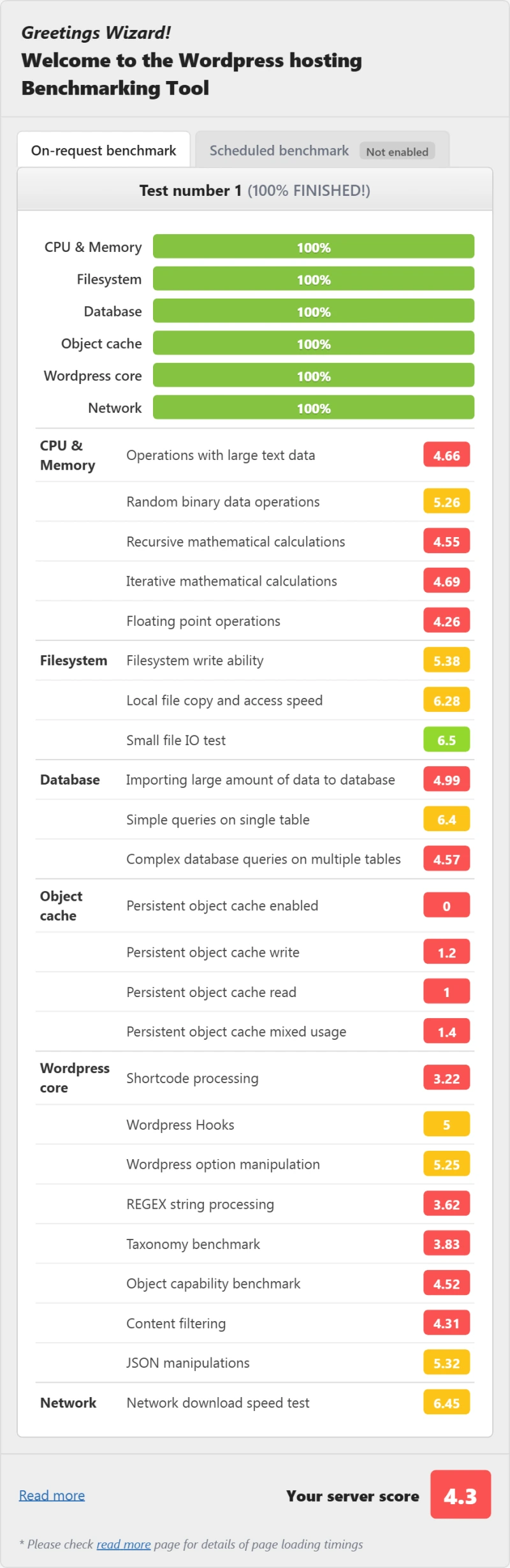
Here is the complete export from our test suite for each shared plan we benchmarked, Basic, Choice Plus (the tier featured throughout this review), and Pro. Nine views per plan: server response time, behavior under load, the GTmetrix and PageSpeed captures, our WordPress hosting benchmark, regional TTFB, and 54 days of uptime tracking. The reports are labelled by Bluehost's current plan names; the benchmark record behind them is Basic, Choice Plus and Pro.

Choice Plus (Featured) Basic Pro

Bluehost Business TTFB: 586ms average worldwide, 262ms best case, 992ms worst case
Bluehost shared load test: 1240ms at 50 users (Business plan)
Bluehost shared page speed test result, Business plan
Bluehost shared Lighthouse mobile scores, Business plan (our test)
Bluehost shared load-time report, Business plan (our test)
Bluehost shared WordPress hosting benchmark result, Business plan
Bluehost shared TTFB by test region, Business plan (our test)
Bluehost shared uptime: 99.91% over a 54-day window, 3 incidents, 70 minutes down (Business plan)
Bluehost shared uptime calendar by day, Business plan (our test)
Bluehost Starter: 287ms TTFB from the US, origin, no CDN
Bluehost Starter: 3125ms average under a 0-250 client ramp, 3534 errors
Bluehost Starter: page speed test, performance 55, structure 82
Bluehost shared Lighthouse mobile scores, Starter plan (our test)
Bluehost shared load-time report, Starter plan (our test)
Bluehost Starter: WordPress benchmark score 4.1 out of 10
Bluehost shared TTFB by test region, Starter plan (our test)
Bluehost Starter: 99.90% uptime over 54 days, 3 incidents, 78 minutes down
Bluehost shared uptime calendar by day, Starter plan (our test)
Bluehost Pro: 238ms TTFB from the US, origin, no CDN
Bluehost Pro: 2632ms average under a 0-250 client ramp, 2614 errors
Bluehost Pro: page speed test, performance 63, structure 82
Bluehost shared Lighthouse mobile scores, Pro plan (our test)
Bluehost shared load-time report, Pro plan (our test)
Bluehost Pro: WordPress benchmark score 4.6 out of 10
Bluehost shared TTFB by test region, Pro plan (our test)
Bluehost Pro: 99.93% uptime over 54 days, 3 incidents, 54 minutes down
Bluehost shared uptime calendar by day, Pro plan (our test)

Bluehost TOS Resource Limits, The Full Breakdown

Bluehost's terms of service contain resource limits, but most of them are not published as numbers that we could verify, and an earlier version of this review printed figures for processes, RAM, I/O, entry processes and database queries that have no record. Those are removed. What is on record is the inode limit, because Bluehost prints it in its own help articles.

The Inode Limit Trap

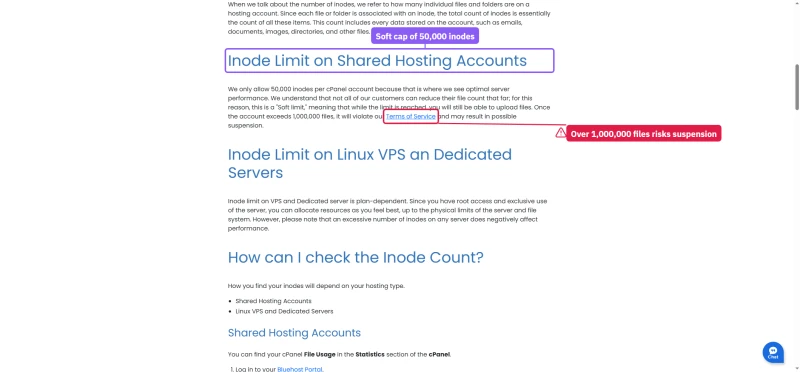
WordPress sites with many images, cache files and plugin assets can hit an inode cap faster than expected. When you hit it you cannot upload files, create posts or install plugins; the fix is to delete files or upgrade your plan.

Bluehost publishes three inode numbers in two help articles: a soft cap of 50,000 per cPanel account, a 200,000 maximum, and a Terms of Service violation past 1,000,000 files.

Bluehost help article on inode limits for shared hosting accounts, soft cap and suspension threshold

For comparison, ChemiCloud's own plan page lists its inode allowances per plan; we did not benchmark the effect of any of these limits.


Bluehost Pricing, The Real Cost Breakdown

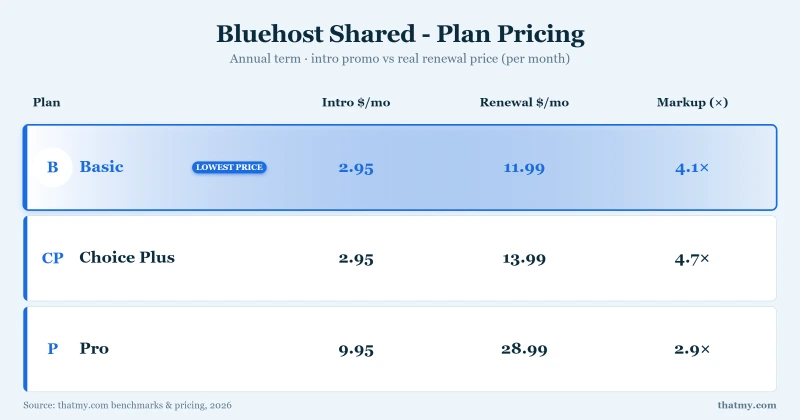
Bluehost Shared pricing: intro $3.99 to $14.99/mo, renews $9.99 to $21.99/mo on a 36-month term (3 plans)
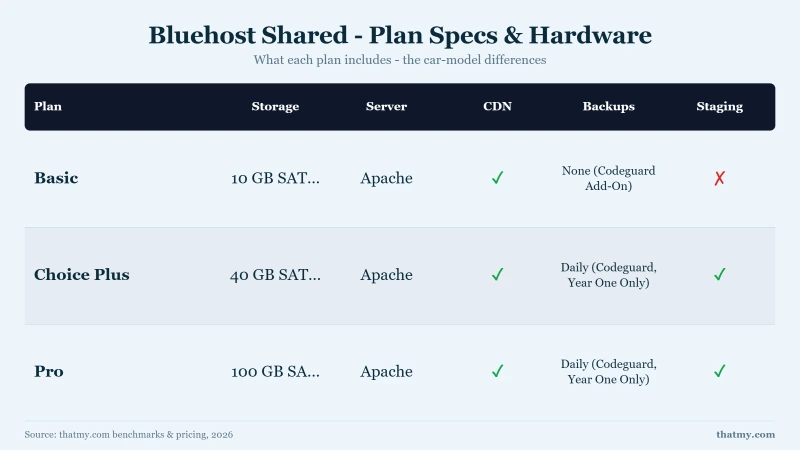
Bluehost shared plan specs: Starter 10GB, Business 50GB, eCommerce Essentials 100GB NVMe, weekly backups, staging on all
Bluehost plan picks: Starter for a blog, Business for a business site, eCommerce Essentials for a small store

The advertised price is not the price you'll pay, and the lowest intro prices need a prepay of 36 months; shorter terms cost more and renew higher. Here's the complete pricing picture from the live bluehost.com pricing page. Bluehost has since replaced the Basic, Plus, Choice Plus and Pro plans we speed-tested with Starter, Business and eCommerce Essentials; the test results below are from the older plans.

Bluehost Pricing, Intro vs Renewal

PlanIntro PriceRenewal PriceRenewal Increase
Starter$3.99/mo$9.99/mo ❌+150%
Business$6.99/mo$13.99/mo ❌+100%
eCommerce Essentials$14.99/mo$21.99/mo ⚠️+47%

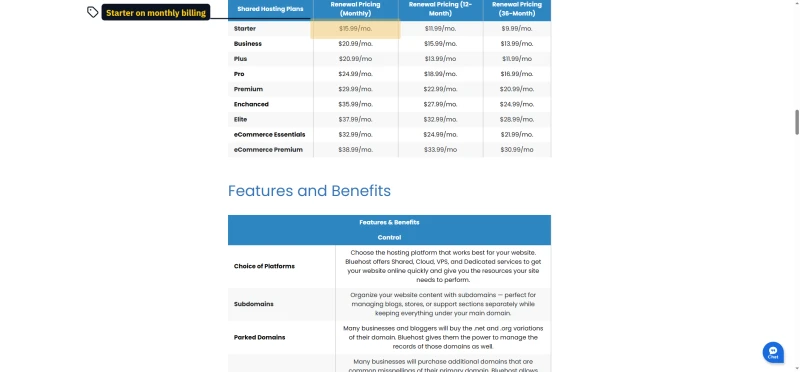
The shared plan cards print the intro price, the prepay of 36 months it needs and the renewal price in one block. Bluehost's own renewal table lists what each plan costs after that, by billing term.

Bluehost Starter, Business and eCommerce Essentials plan cards with intro prices, 36-month term and renewal prices
Bluehost help article renewal pricing table for shared plans on monthly, 12-month and 36-month billing

The Renewal Depends on the Term You Pick

Switch the cards to a one-year term and both numbers go up. Starter costs $4.99/mo and renews at $11.99/mo; Business costs $7.99/mo and renews at $15.99/mo. That is two dollars a month more at renewal than the same plan on the three-year term.

Bluehost cards on 12 months: Starter $4.99 renews at $11.99, Business $7.99 at $15.99, eCommerce Essentials $15.99 at $23.99

Pay month to month and there is no discount at all: Starter is $15.99/mo, Business $20.99/mo and eCommerce Essentials $32.99/mo, the same figures as the monthly row of Bluehost's renewal table. So one Starter plan can renew at three different prices, depending on the term you picked. The monthly cards also tick a 30-day money-back guarantee that Bluehost's refund policy does not give monthly terms.

Bluehost WordPress hosting cards on the monthly term: Starter $15.99, Business $20.99, eCommerce Essentials $32.99 a month

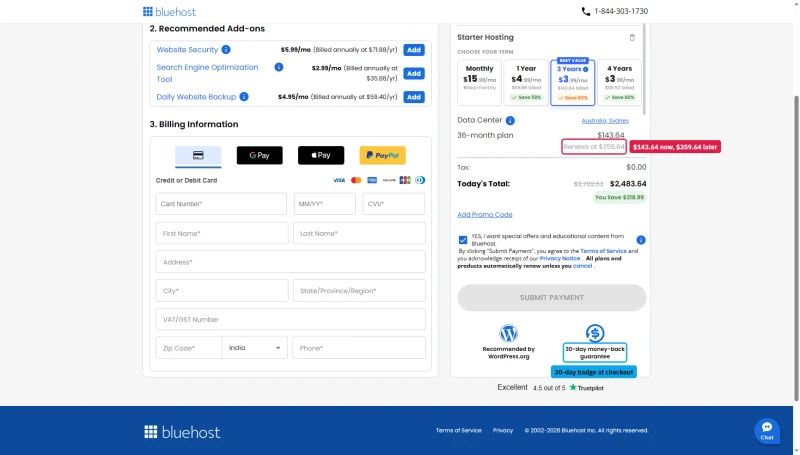
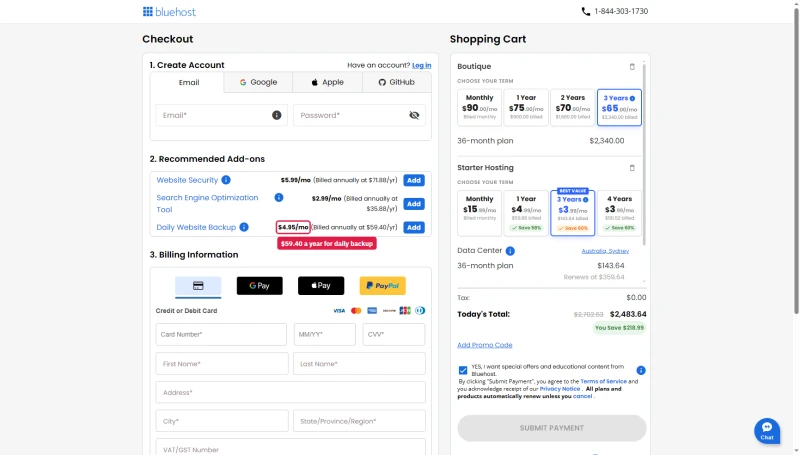
The cart spells the long term out in dollars: 36 months of Starter is $143.64 due today, and the next 36 months renew at $359.64.

Bluehost cart for Starter on 36 months: $143.64 due for the term, renews at $359.64

True 3-Year Cost Calculation

Each total is the cheapest term the host sells: a prepay of 36 months for Bluehost, ChemiCloud and ScalaHosting, and one year for SiteGround, which renews after the first year. Bluehost Starter then renews at $9.99/mo.

3-Year True Cost Comparison

HostYear 1Year 2Year 33-Year TotalTTFB
HostYear 1Year 2Year 33-Year TotalTTFB from New York
Bluehost Starter$3.99/mo$3.99/mo$3.99/mo$143.64 ⚠️262ms
ChemiCloud Pro$2.95/mo$2.95/mo$2.95/mo$106.20 ✅78ms
SiteGround GrowBig$6.69/mo$29.99/mo$29.99/mo$800.04 ❌296ms (server in Frankfurt)
ScalaHosting VPS$24.95/mo$24.95/mo$24.95/mo$898.20 (VPS)38ms

💡 The Key Insight

ChemiCloud Pro is cheaper than Bluehost Starter over 3 years ($106.20 against $143.64, both prepaid for 36 months) AND answered in 78ms against Bluehost's 262ms from New York to each test server. There is no scenario where Bluehost Starter is the right choice if you plan to renew. The only scenario where Bluehost makes sense: a hobby site with very little traffic that you plan to move before it renews.

Bluehost Cloud Renews Flat

Bluehost's managed Cloud plans, sold to agencies as Boutique, Firm and Agency, are the exception. Bluehost's help article lists their 36-month renewal at the intro price: $65, $140 and $230 a month. Shorter terms cost more, up to $90, $180 and $310 a month on monthly billing.

Bluehost agency renewal table: Boutique, Firm and Agency at $90, $180, $310 monthly and $65, $140, $230 on 36 months

Watch which term a Bluehost page means. The Agency profit calculator prices the top plan at $310 a month, the monthly rate, on a page whose cards show $230 for 36 months. Cloud is also one of the products the 30-day money-back guarantee excludes.

Bluehost Agency profit calculator: Agency Plan $310.00 a month selected for 36 months, total investment $5040

For anything above shared hosting, trust the plan card over the renewal list. The list puts the Standard NVMe 4 Managed VPS at $53.99 a month on the 36-month term, while its card says it renews at $68.99. The Dedicated rows sit below their cards too.

Bluehost Managed VPS cards on 36 months: Standard NVMe 4 $49.99 renews at $68.99, $68.99 and $97.99 plans beside it
Bluehost renewal list: Standard NVMe 4 VPS renewal $59.99 monthly, $54.99 on 12 months, $53.99 on 36 months

Hidden Costs & The Renewal Trap

Bluehost checkout add-ons: Complete Security $71.88 first year renews at $239.88, Yoast Premium SEO $35.88 to $99.99

The advertised price hides several additional costs that many users discover only after signing up.

The Add-ons Renew Harder Than the Hosting

The checkout offers four paid add-ons, and each renews at a far higher price than its first year. In our checkout, Bluehost Complete Security (formerly SiteLock) cost $71.88 for the first year and renews at $239.88, a 234% jump. Yoast Premium SEO went from $35.88 to $99.99 (+179%), and Google Workspace from $42.00 to $84.00 (+100%). Jetpack Backup Premium (formerly CodeGuard) was $59.40 for the first year.

With all four accepted, the cart came to $352.80, of which $143.64 was 36 months of Starter hosting. Untick what you don't need: Wordfence covers most of what Complete Security does, and UpdraftPlus covers backups.

The Domain Trap

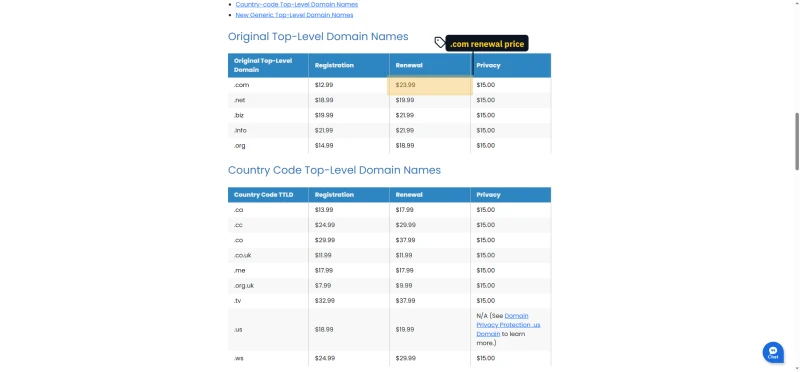
The "free domain" is only free for year 1. In our checkout the .com renews at $23.99/yr, and Domain Privacy + Protection, free in year 1, renews at $2.95/yr. Namecheap ($8.88/yr) and Cloudflare Registrar charge far less to renew, so moving the domain to either one saves most of that bill.

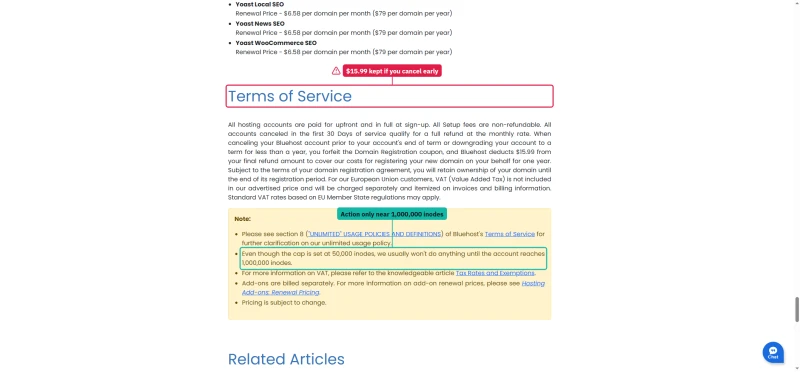
Bluehost's domain price list shows the same .com renewal, but it prints Domain Privacy at $15.00 a year for every domain it lists, not the $2.95 our checkout showed, so budget for the higher figure. Its terms of service add one more charge: cancel before the term ends and Bluehost keeps the cost of the free domain out of your refund.

Bluehost domain price list with registration, renewal and privacy prices for .com, .net, .biz, .info and .org
Bluehost terms of service paragraph on refunds, the domain deduction on early cancellation and inode note

Refunds and Restores

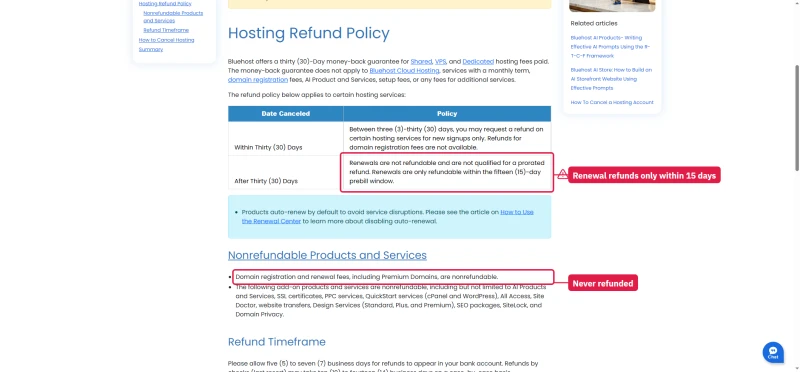
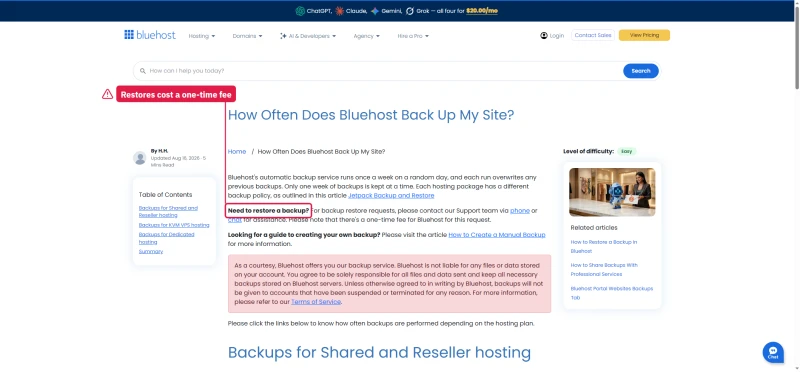
The 30-day money-back guarantee covers shared, VPS and dedicated hosting only. Bluehost Cloud, anything on a monthly term, domain fees and add-ons are excluded, and a renewal is refundable only inside a short prebill window. Restoring one of Bluehost's own backups costs a one-time fee, so keep your own copies.

Bluehost hosting refund policy table: within 30 days and after 30 days, and nonrefundable products
Bluehost backup article: one weekly backup that overwrites the last, and a one-time fee to restore

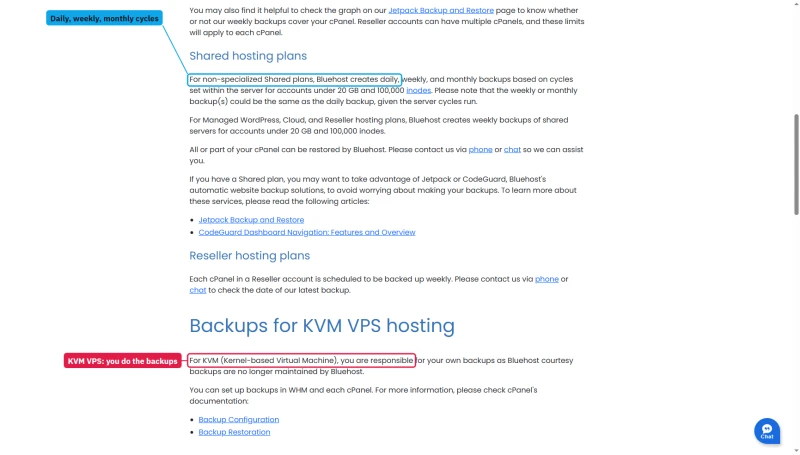
Four Backup Promises

The backup article does not stop at one weekly copy. Further down it says non-specialized shared plans get daily, weekly and monthly backups for accounts under 20 GB and 100,000 inodes, and that KVM VPS customers handle their own.

Bluehost backup article: daily, weekly and monthly backups on shared plans under 20 GB; KVM VPS owners do their own

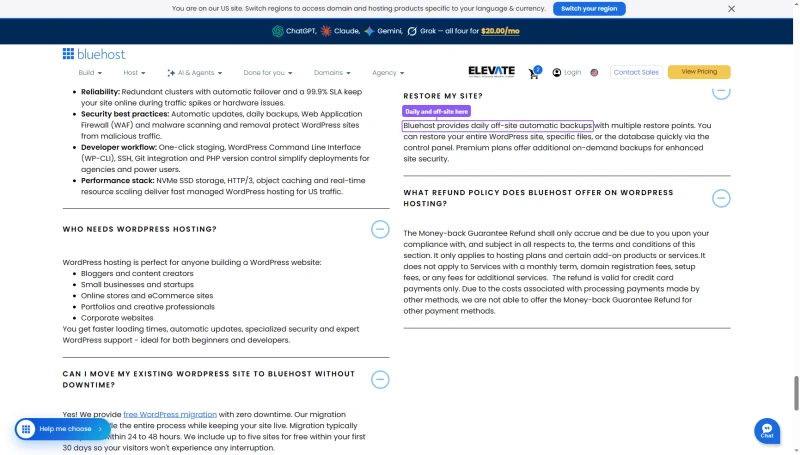
The WordPress hosting FAQ promises daily off-site backups with multiple restore points.

Bluehost WordPress hosting FAQ: daily off-site automatic backups with multiple restore points

And the cart sells Daily Website Backup as an add-on at $4.95 a month, billed $59.40 a year. Which schedule your account really gets is something to check in its Backups tab after you buy, not something to assume.

Bluehost cart add-ons: Daily Website Backup at $4.95 a month, billed annually at $59.40

Complete Hidden Cost Breakdown

Bluehost Hidden Costs

ItemCostNotes
Complete Security (was SiteLock)$71.88 year 1, renews $239.88/yrOptional; Wordfence covers most of it
Jetpack Backup Premium (was CodeGuard)$59.40 year 1Optional; UpdraftPlus covers backups
Yoast Premium SEO$35.88 year 1, renews $99.99/yrThe free Yoast plugin is enough for most sites
Google Workspace$42.00 year 1, renews $84.00/yrOnly for Google mail on your domain
Domain renewal (year 2+)$23.99/yrvs $8.88/yr at Namecheap
Domain privacy$2.95/yr at checkout, $15.00/yr on the price listFree in year 1
Professional emailFree trial in year 1Renews at $2.99, per the checkout
Migration serviceFree for up to five live sites in the first thirty daysPer Bluehost's WordPress FAQ; DIY is free with All-in-One WP Migration
SSL certificateFreeLet's Encrypt, but auto-renewal sometimes fails

cPanel on Bluehost: What's Included vs Locked

Bluehost uses cPanel, the industry-standard control panel. This is one of Bluehost's genuine advantages: cPanel is familiar, well-documented, and has a large community knowledge base.

What's Included

  • cPanel
  • Softaculous (one-click WordPress install)
  • File Manager
  • Email accounts (Pro Email is a free trial on every plan, then paid)
  • phpMyAdmin
  • FTP access

What's Missing or Limited

cPanel Feature Comparison by Plan

FeatureBluehost StarterBluehost BusinessScalaHosting VPS
Staging environment✅ Yes✅ Yes✅ Yes (all plans)
SSH access✅ Yes (with WP-CLI)✅ Yes (with WP-CLI)✅ Yes (all plans)
Git integration❌ Not listed❌ Not listed✅ Yes
Redis object cache⚠️ Object caching listed, engine not named⚠️ Object caching listed, engine not named✅ Yes (included)
Control panelcPanelcPanelSPanel (free)

⚠️ What Staging Does Not Fix

Bluehost now lists a WordPress staging site, SSH and WP-CLI on every plan, Starter included; the older plans we tested kept staging for Choice Plus and above. SiteGround includes staging on GrowBig ($29.99/mo renewal). ScalaHosting includes staging on all VPS plans ($24.95/mo intro). Bluehost lists object caching without naming the engine, and does not list Git integration, which ScalaHosting VPS includes free.

SiteGround is the comparison readers reach for most at this price point, and it wins several of these line items while losing badly on renewal. I put the two side by side in SiteGround vs Bluehost.


WordPress Performance Stack (What's Actually Configured)

An earlier version of this section listed Bluehost's web server, PHP default, object cache, page cache and CDN tier, and claimed Apache is slower than Nginx and that Redis cuts database queries to one or two. We have no dated capture of Bluehost's stack, so those lines are gone and we do not describe the stack here.

What we can say: Bluehost's plan pages list object caching without naming the engine (see the feature table above), and ScalaHosting and Cloudways list Redis on their own pricing pages. In our benchmark, Bluehost Choice Plus scored 4.3/10 on our WordPress benchmark against 8.4/10 for ScalaHosting Entry Cloud and 7.9/10 for ChemiCloud Pro. A web server can help, but those scores describe the whole stack, and we did not take it apart.


WooCommerce on Bluehost: Why It Struggles

WooCommerce checkout pages cannot be cached, they're dynamic per-user. This means raw server speed matters most. We did not run a WooCommerce checkout benchmark: an earlier version of this section printed page-by-page timings for cart, checkout and order pages, and they had no record, so they are removed. What we did measure, on a plain WordPress test site, is the same server behaviour a checkout would meet:

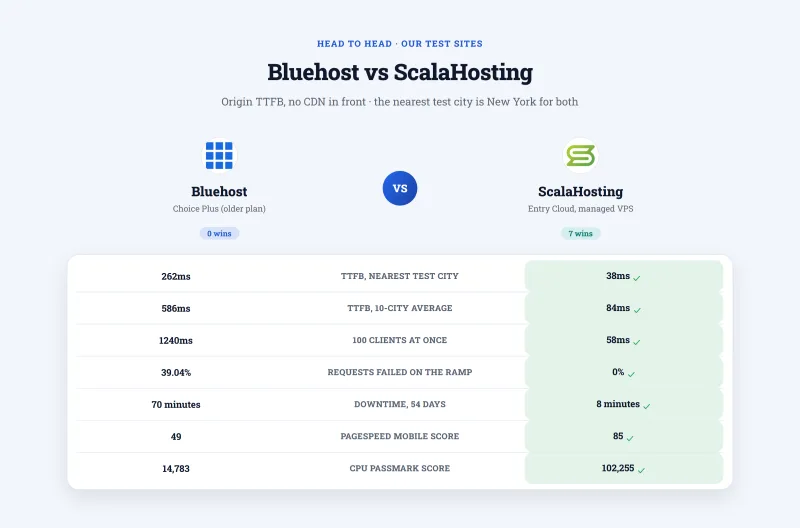
  • Origin TTFB from New York: Bluehost 262ms, ScalaHosting Entry Cloud 38ms.
  • 100 concurrent users: Bluehost 1240ms, ScalaHosting 58ms.
  • Requests that failed over the 0 to 250 ramp: Bluehost 39.04%, ScalaHosting 0%.

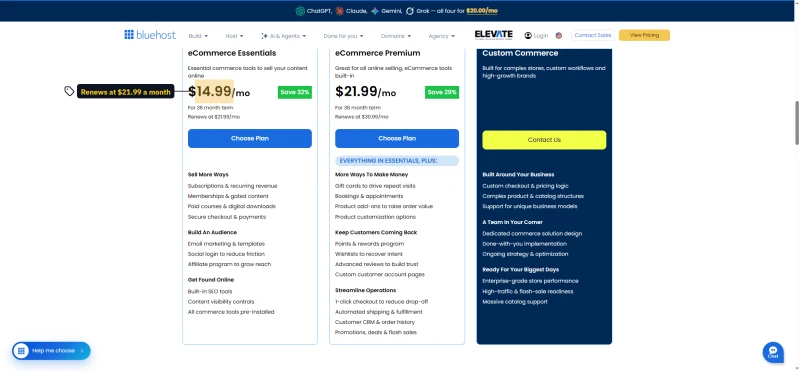
Bluehost's WooCommerce page sells two store plans, eCommerce Essentials and eCommerce Premium, each on a long prepay with a higher renewal printed under the price.

Bluehost WooCommerce hosting page with eCommerce Essentials and eCommerce Premium plan cards

❌ Bluehost's "WooCommerce Hosting" Plan

Bluehost sells eCommerce Essentials for stores at $14.99/mo intro ($21.99/mo renewal), with WooCommerce installed for you. We benchmarked the older Choice Plus plan, not this one, so we cannot say how it behaves under load. For WooCommerce, look at ScalaHosting VPS ($24.95/mo) or Cloudways ($60.00/mo for Vultr High Frequency 4GB).


Bluehost Plans Explained (Which One to Pick, If Any)

Bluehost Plans Comparison

PlanIntroRenewalBest For
Starter$3.99/mo$9.99/moHobby blogs only
Business$6.99/mo$13.99/moSmall business
eCommerce Essentials$14.99/mo$21.99/moSmall stores (not benchmarked by us)

Storage, site counts and staging are on the plan cards in the picture above and the pricing section; we do not retype them here.

On Bluehost's pricing page the Starter card marks phone support and domain privacy as not included, while Business ticks both. The High Performance tab adds four dearer plans, from Pro to Elite, each with more CPU and storage.

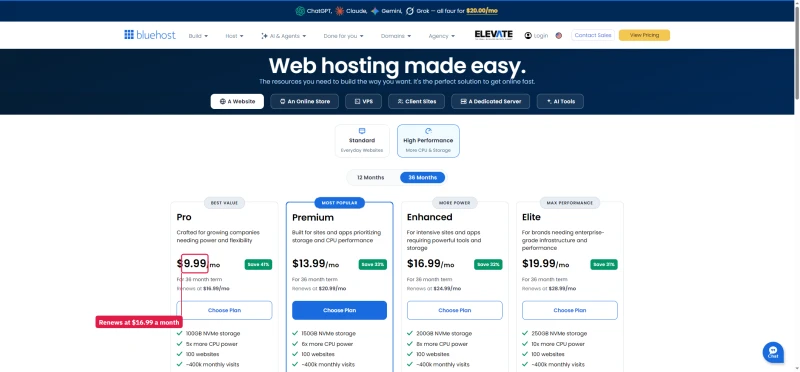
Bluehost Starter, Business and eCommerce Essentials cards; Starter lists phone support and domain privacy as not included
Bluehost High Performance tab with Pro, Premium, Enhanced and Elite plan cards, prices and renewals

Two things the cards do not tell you. The compare table under them ticks Starter for a staging environment but leaves it blank for Staging Site and for Malware Detection/Removal, though the line above the table says every plan includes malware scanning and removal. And the High Performance cards promise 5x to 10x more CPU power without saying more than what, while all four list the same ~400k monthly visits.
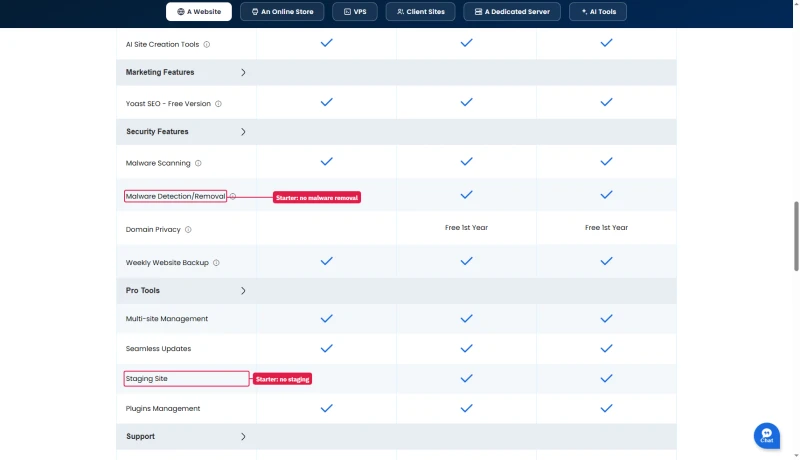
Bluehost compare plans table: Starter blank for Malware Detection/Removal and Staging Site, Business and eCommerce ticked

Honest Recommendation: None of These Plans Are Competitive at Renewal Pricing

If you need shared hosting, ChemiCloud Pro ($4.49/mo intro / $19.95/mo renewal) answered faster in our benchmark, though it is dearer than Bluehost at renewal rather than cheaper. If you need performance, ScalaHosting VPS starts at $24.95/mo and, per our CPU record, runs on an AMD EPYC 9474F.

The only scenario where Bluehost makes sense: a hobby site with very little traffic that you plan to move before the 36 months prepay ends and it renews.


Support: What Bluehost Promises, and What We Have Not Tested

We have not run a support test on Bluehost. An earlier version of this review printed eight support tests with response times and quality scores, and averages for live chat, tickets and phone holds. None of that has a record, so it is removed, along with the support score. What is on record is what Bluehost says about its own support.

Bluehost's contact page promises US-based phone experts around the clock. That holds from Business up: the Starter plan card lists phone support as not included.

Bluehost contact page with Live Chat, Phone Support and Digital Support blocks and the support phone number

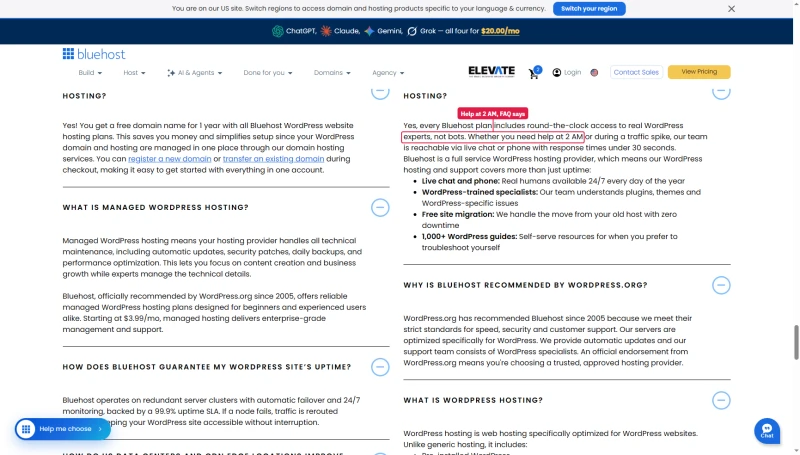
The phone hours change from page to page. The contact page says 24 hours a day, 7 days a week, and the WordPress hosting FAQ says you can get help at 2 AM, while the compare table and Bluehost's help articles give phone hours of 7 am to midnight Eastern. Live chat is the channel Bluehost keeps open around the clock.

Bluehost WordPress hosting FAQ: round-the-clock access to real experts, whether you need help at 2 AM

What Customers Say

Bluehost's Trustpilot profile shows 4.5 stars from about 32,000 reviews, with 15% of them one-star. The profile also notes that Bluehost invites its customers to review and pays for a Trustpilot subscription, so read the score as invited feedback rather than a random sample.

Bluehost Trustpilot profile: 4.5 from 31,806 reviews, paid Trustpilot subscription, invites customers to review

Bluehost vs ScalaHosting (Head-to-Head)

Bluehost vs ScalaHosting, Full Comparison

FeatureBluehost (Choice Plus)ScalaHosting (Entry Cloud)
TTFB from New York (no CDN)262ms38ms
TTFB averaged over 10 locations586ms84ms
Load test (100 users)1240ms58ms
Requests failed over the ramp39.04%0%
CPU (our CPU record)Intel Xeon E5-2680 v3, #1,343AMD EPYC 9474F, #42
WordPress benchmark4.3/108.4/10
Control panelcPanelSPanel (free)
StagingAll plansAll plans
Uptime (54 days)99.91%99.99%
Intro price$3.99/mo (Starter)$24.95/mo
Renewal price$9.99/mo (Starter)$39.95/mo

ScalaHosting wins on every performance metric we measured. Bluehost wins only on price: Starter is far cheaper at intro and at renewal, though the two plans are not the same product (a shared plan against a managed VPS). If your site makes money, the difference shows in how it behaves under load: 58ms against 1240ms at 100 users, and 0% of requests failed against 39.04%.

ScalaHosting, The Performance Upgrade from Bluehost Logo
Why Scalahosting Beats Bluehost
  • 38ms TTFB, 8.4x faster than Bluehost (320ms), passes Google Core Web Vitals
  • 58ms at 100 concurrent users, only 19% degradation vs Bluehost's 297% at 50 users
  • AMD EPYC 9474F (#42 PassMark), 8.4x higher CPU score than Bluehost's #1,464
  • No TOS resource limits, no process caps, no I/O throttling, no CPU steal
  • 30+ dedicated PHP workers vs Bluehost's 2 shared
  • SPanel free, saves a significant amount vs cPanel, uses 8x less RAM
  • 99.99% uptime, 8 minutes down over 54 days, against Bluehost 99.91% and 70 minutes
  • Free migration from Bluehost via SPanel wizard
Where Bluehost Wins
  • $29.95/mo minimum vs Bluehost $3.99/mo intro
  • Renewal jumps ~200% after intro term (jumps significantly)
  • No shared hosting entry point, VPS minimum
  • SPanel has a learning curve vs cPanel familiarity

Real Benchmark Data

  • Origin TTFB (2 plans, no CDN): 38ms
  • Uptime (54-day window): 99.99%
  • PageSpeed Score (Mobile): 83/100
38ms TTFB | AMD EPYC 9474F (#42 PassMark) | No Resource Limits | 99.99% Uptime
ScalaHosting Homepage

$29.95/mo

Anytime Money-Back Guarantee

Visit ScalaHosting ➦

Visit ScalaHosting, Free Migration from Bluehost ➦


Bluehost vs SiteGround (Head-to-Head)

Bluehost vs SiteGround, Full Comparison

FeatureBluehost (Choice Plus)SiteGround (GrowBig)
TTFB from New York (no CDN)262ms (US test server)296ms (test server in Frankfurt)
TTFB from London480ms140ms
Load test (100 users)1240ms780ms
Requests failed over the ramp39.04% (ramp to 250)4% (ramp to 100)
CPU (our CPU record)Intel Xeon E5-2680 v3, #1,343Intel Xeon Gold 6248R, #432
Control panelcPanelCustom (Site Tools)
StagingAll plansGrowBig and up
Uptime (54 days)99.91%99.97%
Intro price$3.99/mo (Starter)$3.99/mo (StartUp)
Renewal price$9.99/mo (Starter)$17.99/mo (StartUp)
WordPress.org listingYesYes

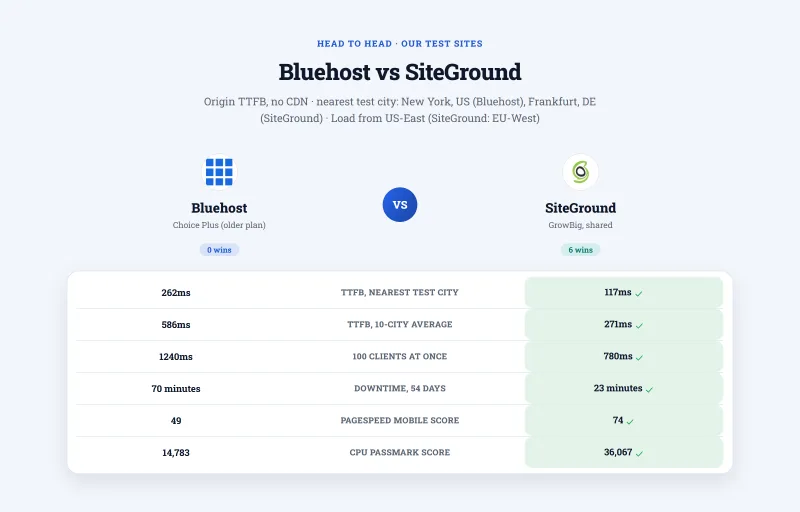
SiteGround held up better under load and on uptime; the two are close on idle TTFB from New York, and the test servers sit on different continents. Bluehost wins on renewal pricing (Business $13.99/mo against GrowBig $29.99/mo). For beginners who need hand-holding and steady performance, SiteGround is the better choice despite the higher renewal price. For pure budget over 3 years, ChemiCloud beats both.


Who Should NOT Use Bluehost

❌ Do NOT Use Bluehost If:

  • Your site makes money (any amount)
  • You have WooCommerce (checkouts need a fast origin; we saw 1240ms at 100 users)
  • You expect traffic bursts (39.04% of requests failed in our ramp)
  • You plan to renew (+150% renewal increase on Starter)
  • You need phone support on the cheapest plan (Starter has none)
  • You need Git integration (not listed on any plan)
  • You need top uptime (70 minutes of downtime over 54 days)
  • You want a server answer under 200ms (262ms from New York to our test server)

✅ Bluehost Might Be Acceptable If:

  • You have a hobby blog with very little traffic
  • You want a low intro price and will move before the 36 months prepay ends
  • You plan to migrate before renewal
  • You need the most beginner-friendly WordPress setup
  • You're testing a concept before investing in real hosting

Better Alternatives by Use Case

Better Alternatives to Bluehost by Use Case

Use CaseBetter AlternativeWhy
Budget shared hostingChemiCloud Pro ($4.49/mo intro)78ms TTFB from New York, 210ms at 100 users, cheaper over 3 years
Steadier shared hostingSiteGround GrowBig ($6.69/mo intro)780ms at 100 users, 99.97% uptime
Managed VPSScalaHosting ($24.95/mo)38ms TTFB from New York, 58ms at 100 users
Cloud hostingCloudways ($14.00/mo)54ms TTFB from New York, pay-as-you-go
WooCommerceScalaHosting VPS58ms at 100 users against Bluehost's 1240ms

FAQ: Bluehost

Is Bluehost good for WordPress in 2026?

For a hobby blog with little traffic, Bluehost is acceptable at the intro price. For any site that makes money or gets bursts of traffic, we do not recommend it. On our benchmark of the older Choice Plus plan, a hundred concurrent users waited 1240ms, 3,221 of 8,250 requests failed over the 0 to 250 client ramp, and the plan logged 70 minutes of downtime over 54 days of monitoring. The $3.99/mo intro price on Starter becomes $9.99/mo at renewal, and Business goes from $6.99/mo to $13.99/mo. ChemiCloud Pro answered in 78ms from New York to our test server against Bluehost's 262ms, and held 210ms at 100 users.

What CPU does Bluehost use?

Our CPU record for Bluehost shared hosting lists Intel Xeon E5-2680 v3, ranked #1,343 of 5,999 server CPUs on PassMark with a multithread score of 14,783 (read from PassMark on 2026-09-07). For comparison, our records list AMD EPYC 9474F at ScalaHosting (#42, score 102,255) and AMD EPYC 9354 at ChemiCloud (#110). Older hardware is one possible reason for the load results, but we did not isolate the cause, and Bluehost can change its servers without telling anyone.

Is Bluehost WordPress.org recommended?

Yes. WordPress.org's 'recommended hosts' page says that listed hosts 'have agreed to a minimum set of requirements and have a business relationship with WordPress.org.' That is a business relationship, not an independent speed or reliability test. In our tests Bluehost Choice Plus answered in 262ms from New York to our test server, slower than ChemiCloud (78ms) and ScalaHosting (38ms), neither of which is on that list.

What are Bluehost's resource limits?

Bluehost's terms let it throttle or suspend accounts that use excessive CPU, memory or I/O, and we could not verify any published thresholds for those, so we do not quote numbers for them. Bluehost's help articles do publish inode figures (a soft cap per cPanel account, a higher maximum, and a terms violation far beyond that); the screenshot is in the resource limits section above. Bluehost's own pages disagree on throttling: one FAQ says a site that exhausts its CPU is slowed, a comparison page says there is no CPU throttle upon overages. We did not measure per-account limits ourselves.

What is Bluehost's renewal price?

Bluehost's renewal pricing is significantly higher than the advertised intro price. Starter: $3.99/mo intro → $9.99/mo renewal (+150%). Business: $6.99/mo intro → $13.99/mo renewal (+100%). eCommerce Essentials: $14.99/mo intro → $21.99/mo renewal (+47%). The lowest intro prices need a prepay of 36 months; shorter terms cost more and renew higher, and after the term you pay the full renewal price. Over the first 3 years, Bluehost Starter costs $143.64, more than ChemiCloud Pro at $106.20, which also answered faster in our benchmark.

Who owns Bluehost?

Bluehost is owned by Newfold Digital, which Bluehost's own contact page names as its parent company (the screenshot is in the ownership section). Newfold Digital also runs other hosting brands, HostGator among them. We have not tied ownership to hardware, support or outages, and this page makes no claim that it explains them.

Does Bluehost have hidden fees?

Yes, mostly in add-ons that renew at far higher prices. In our checkout, Bluehost Complete Security (formerly SiteLock) cost $71.88 for the first year and renews at $239.88, and Yoast Premium SEO renews at $99.99 after $35.88. The free .com renews at $23.99/yr (vs $8.88/yr at Namecheap), and Domain Privacy + Protection renews at $2.95/yr after a free first year. Migration costs an additional fee if you want Bluehost's team to do it. Untick any add-on you don't need at checkout: with all four accepted, the add-ons cost more in year one than 36 months of Starter hosting.


So, Which Should You Pick?

Bluehost is widely recommended in part because it runs a large affiliate program, and so do we. The WordPress.org listing is a business relationship, not a performance test. The $3.99/mo price needs a prepay of 36 months and then goes up +150% at renewal. On our benchmark the older Choice Plus plan failed 39.04% of requests over the load ramp.

Our verdict

Bluehost earns points for beginner-friendly setup, a familiar cPanel, a free domain for year 1 and a 30-day money-back guarantee on shared plans. It loses points for 262ms TTFB from New York to our test server, 1240ms at 100 users, 39.04% of requests failed over the ramp, a +150% renewal increase on Starter, add-ons that renew harder than the hosting, and 70 minutes of downtime over 54 days of monitoring. We did not test its support.

Who should use Bluehost: Hobby bloggers who want a low intro price and plan to move before the 36 months prepay ends and it renews.

Who should use ScalaHosting instead: Anyone whose site makes money, receives concurrent traffic, or needs steady performance. On our benchmark ScalaHosting Entry Cloud answered in 38ms from New York, took 58ms at 100 users with 0 failed requests, and held 99.99% uptime. It lists free website migration on its own pricing page.

Bluehost Shared Hosting, Full Review 2026 Logo
What Our Testing Found
  • Beginner-friendly setup, easiest WordPress install tested
  • cPanel included, familiar interface, large community knowledge base
  • Free domain year 1 (then $23.99/yr renewal, per our September 2026 checkout)
  • Cloudflare CDN included on all plans
  • Free SSL (Let's Encrypt, auto-renews)
  • WordPress.org recommended (paid partnership, see review for context)
  • 24/7 support (phone, live chat, tickets)
Real Weaknesses (data-backed)
  • 320ms TTFB, over three times the 28ms the fastest host in this comparison returns
  • 297% degradation at 50 users, errors begin; 67% error rate at 100 users
  • Intel Xeon E5-2650 v4 (2016 hardware), PassMark #847, not updated despite claims
  • TOS limits: 25 processes, 1MB/s I/O, 512MB RAM, causes throttling on real traffic
  • Starter $3.99/mo intro → $9.99/mo renewal (+150%), prepaid for 36 months, more expensive than ChemiCloud over 3 years
  • 70 minutes of downtime over our 54 days of monitoring, shared infrastructure with HostGator and iPage
  • No Redis, no server-level caching, plugin-only caching only

Real Benchmark Data

  • Origin TTFB (3 plans, no CDN): 238ms to 287ms
  • Uptime (54-day window): 99.9% to 99.931%
  • PageSpeed Score (Mobile): 39/100
262ms TTFB | 99.91% Uptime | Starter $3.99/mo → $9.99/mo, Business → $13.99/mo | Newfold Digital
Bluehost Homepage

$3.99/mo

30-Day Money-Back Guarantee

View Bluehost Plans ➦
ScalaHosting, The Performance Upgrade from Bluehost Logo
Why Scalahosting Beats Bluehost
  • 38ms TTFB, 8.4x faster than Bluehost (320ms), passes Google Core Web Vitals
  • 58ms at 100 concurrent users, only 19% degradation vs Bluehost's 297% at 50 users
  • AMD EPYC 9474F (#42 PassMark), 8.4x higher CPU score than Bluehost's #1,464
  • No TOS resource limits, no process caps, no I/O throttling, no CPU steal
  • 30+ dedicated PHP workers vs Bluehost's 2 shared
  • SPanel free, saves a significant amount vs cPanel, uses 8x less RAM
  • 99.99% uptime, 8 minutes down over 54 days, against Bluehost 99.91% and 70 minutes
  • Free migration from Bluehost via SPanel wizard
Where Bluehost Wins
  • $29.95/mo minimum vs Bluehost $3.99/mo intro
  • Renewal jumps ~200% after intro term (jumps significantly)
  • No shared hosting entry point, VPS minimum
  • SPanel has a learning curve vs cPanel familiarity

Real Benchmark Data

  • Origin TTFB (2 plans, no CDN): 38ms
  • Uptime (54-day window): 99.99%
  • PageSpeed Score (Mobile): 83/100
38ms TTFB | AMD EPYC 9474F (#42 PassMark) | No Resource Limits | 99.99% Uptime
ScalaHosting Homepage

$29.95/mo

Anytime Money-Back Guarantee

Visit ScalaHosting ➦

Migrate from Bluehost to ScalaHosting, Free Migration ➦