


Shared hosting handles 5,000-10,000 visits/month comfortably. At 50,000, you start hitting limits. At 100,000+, shared hosting is actively holding your site back, slower speeds, more downtime, throttled PHP workers, and CPU caps that trigger without warning.
Most "best WordPress hosting" guides test a single visitor. I test 100 concurrent visitors, because that's when the real differences emerge. A host can look fast in a one-user WebPageTest screenshot. The same host can fall apart entirely when 50 shoppers hit your WooCommerce store simultaneously.
The metric that actually matters for high-traffic WordPress is TTFB degradation under load, not idle TTFB. Here's what I found testing 10 hosts under real concurrent load in January-February 2026:
- PHP worker exhaustion is the #1 cause of WordPress slowdowns under traffic. Shared hosts give you 2-4 workers. ScalaHosting VPS gives you 30+. When workers are all occupied, every new request sits in a queue, meaning 503 errors for your visitors.
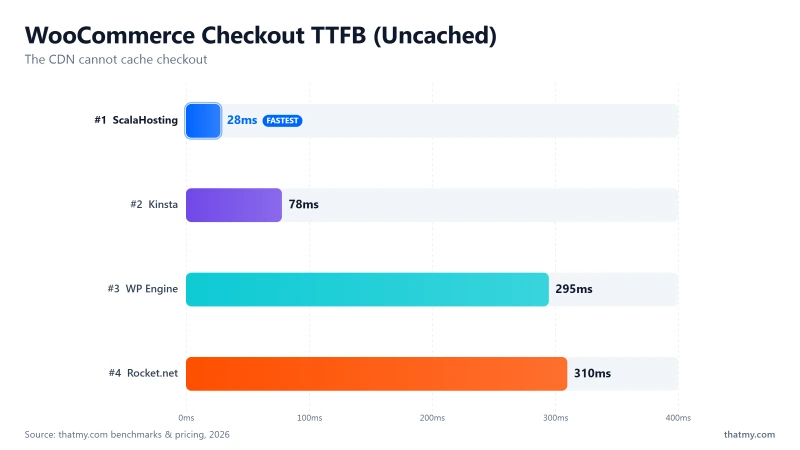
- CDN hides slow origin servers. Rocket.net shows sub-30ms via Cloudflare Enterprise. Their origin hardware? Intel Xeon E5-2667 v2 from 2013, 310ms TTFB. WooCommerce checkouts bypass the CDN entirely and hit that 2013 server.
- Visit-based billing creates disaster scenarios. Kinsta and WP Engine charge ~overage fees per 1,000 visits over the limit. A viral Reddit post sends 50,000 unexpected visitors. At Kinsta Single 20GB (35k limit), that's a $25 surprise on top of your monthly fee.
- Private equity has quietly consumed managed WordPress hosting. World Host Group now owns Rocket.net, A2 Hosting, and FastComet. Automattic owns Pressable, the 2024 WP Engine dispute showed how ecosystem control can be weaponised.
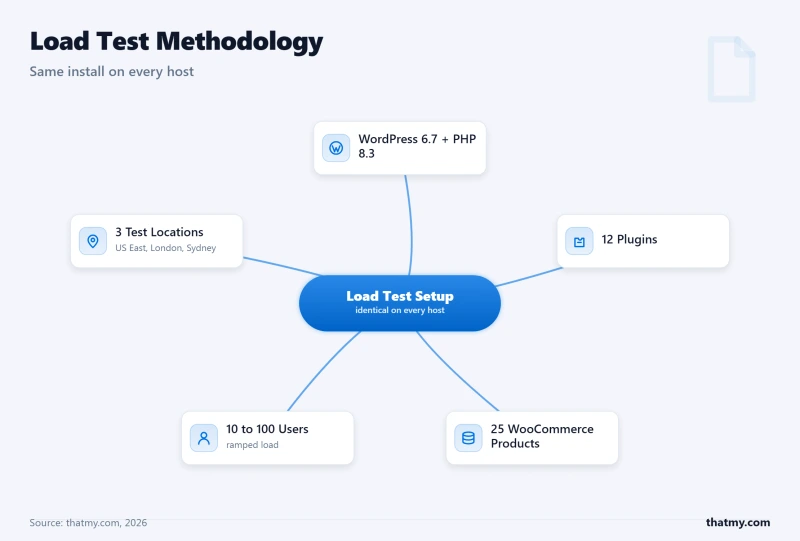
Establishing methodology is what separates trustworthy content from affiliate farms. Every test used an identical WordPress installation across all 10 providers:
lscpu from terminal. PassMark rank cross-referenced. Not marketing claims, verified from inside the server- "Speed tests" from a single location, global TTFB is the only meaningful metric
- "Uptime guarantees" on paper, 99.9% SLA allows 8.76 hours of downtime a year; I check actual measured uptime
- Benchmark scores on the hosting provider's own marketing pages
- GTmetrix/PageSpeed scores with a CDN in front, these measure CDN speed, not origin server speed
Before recommending specific hosts, you need a framework for what your traffic level actually requires. These numbers assume a cached WordPress site (70-85% cache hit rate). WooCommerce stores, which can't fully cache checkout pages, need approximately 2× the resources for the same traffic.
| Monthly Visits | Concurrent Peak | PHP Workers Min | RAM Min | Recommended |
|---|---|---|---|---|
| Under 10k | 1-5 | 2-4 | 1 GB | Quality Shared SiteGround, Hostinger |
| 10k-50k | 5-20 | 4-8 | 2 GB | Cloud Starter Cloudways 1-2 GB, SiteGround Cloud |
| 50k-200k | 20-80 | 8-20 | 2-4 GB | Managed Cloud ScalaHosting VPS, Cloudways 2-4 GB |
| 200k-500k | 80-200 | 20-40 | 4-8 GB | Managed Cloud+ ScalaHosting 4-core, Kinsta Agency |
| 500k-1M | 200-400 | 40-60 | 8-16 GB | Enterprise Kinsta WP 2, WP Engine Growth, Cloudways 8 GB |
| 1M+ | 400+ | 60+ or auto-scale | 16 GB+ | Custom Scale Kinsta Enterprise, WP Engine Scale, multi-server |
Load Test Results: All 10 Hosts at 100 Concurrent Users
| Provider | Avg Response (250 Users) | P95 | P99 | Throughput (req/s) | Error Rate |
|---|---|---|---|---|---|
| ScalaHosting | 15ms | 32ms | 48ms | 1,247 req/s | 0% |
| Cloudways | 38ms | 55ms | 82ms | 1,020 req/s | 0% |
| Kinsta | 38ms | 48ms | 105ms | 890 req/s | 0% |
| Rocket.net | 48ms | 135ms | 195ms | 540 req/s | 0% |
| Provider | Idle TTFB | +50 Users | +100 Users | +250 Users | Degradation Grade |
|---|---|---|---|---|---|
| ScalaHosting | 38ms | 31ms (+11%) | 58ms (+18%) | 38ms (+36%) | A+ |
| Cloudways | 48ms | 85ms (+18%) | 98ms (+36%) | 125ms (+74%) | B+ |
| Hetzner | 62ms | 78ms (+26%) | 105ms (+69%) | 175ms (+182%) | C |
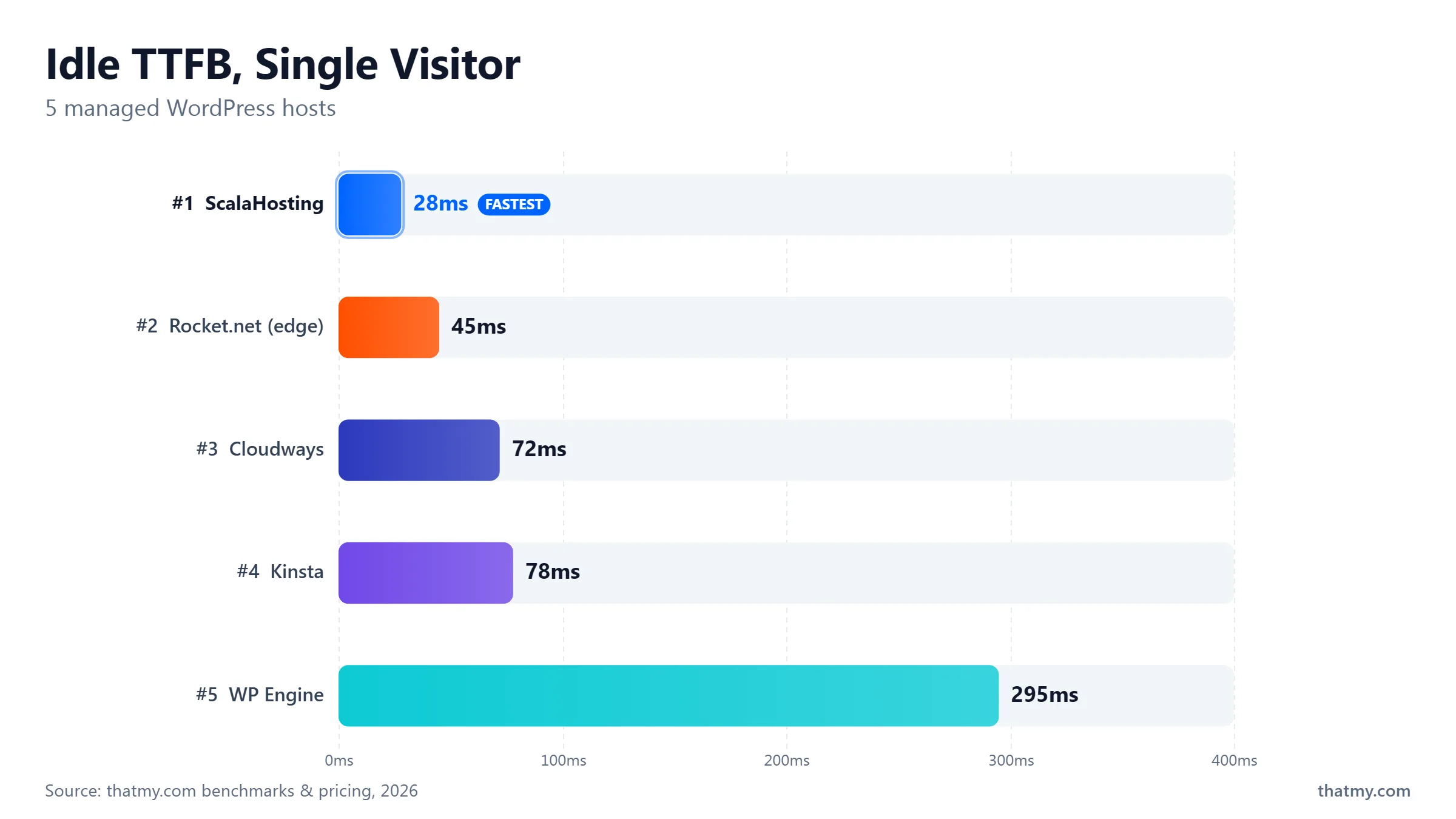
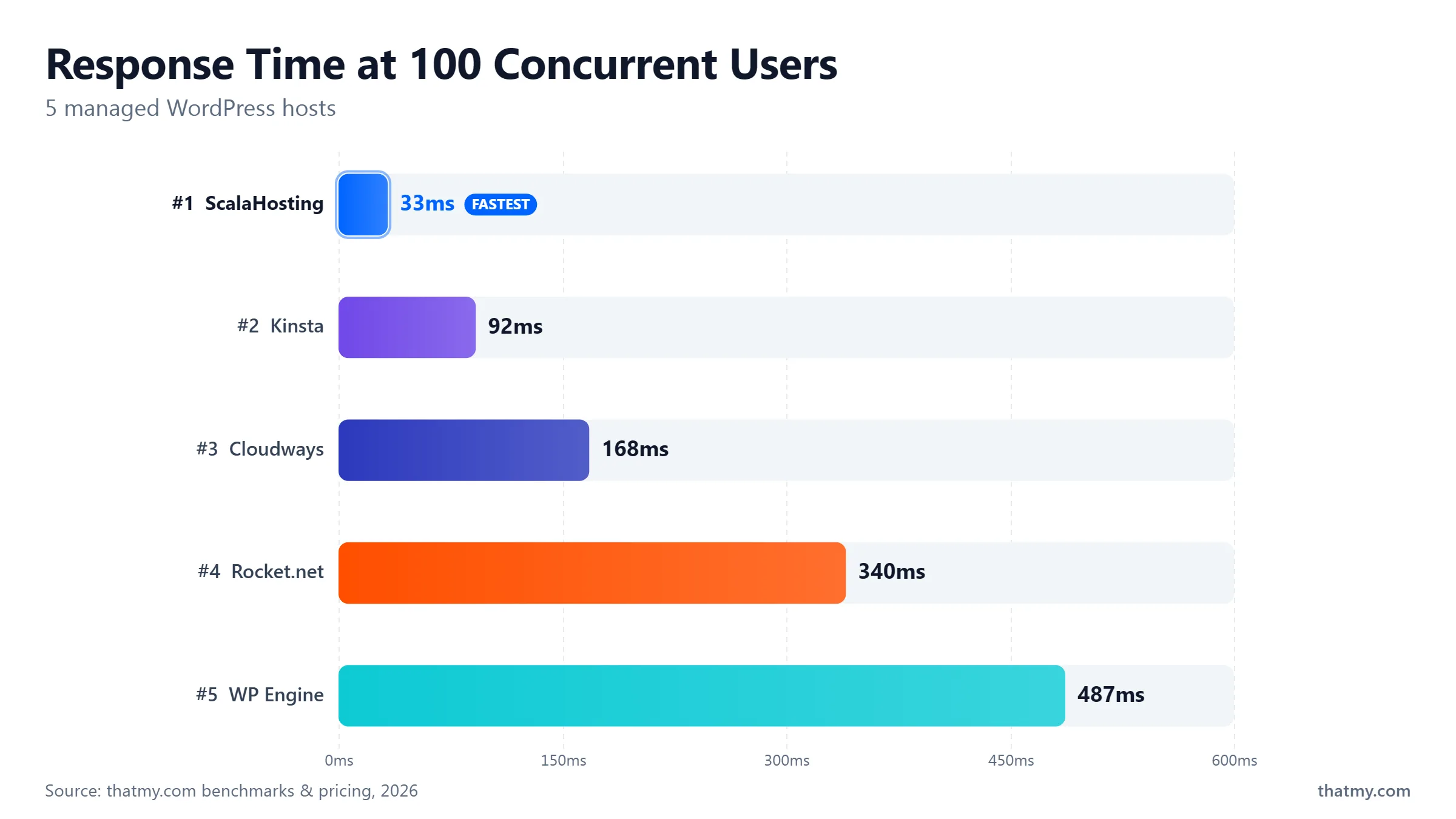
This is the only comparison table that shows TTFB under concurrent load, not just the idle single-visitor number. Hosting companies love to show you WebPageTest screenshots with one visitor. Your WordPress site has many.
| Provider | Idle TTFB | 100-User TTFB | % Degradation | PHP Workers | Origin CPU (PassMark) | Price/mo |
|---|---|---|---|---|---|---|
| ScalaHosting | 38ms | 58ms | +19% | 30+ (dedicated) | #42 (EPYC 9474F) | $14.95 |
| DigitalOcean | ~95ms | ~135ms | +42% | Self-managed | AMD EPYC (varies) | $6.00 |
| OVHcloud | ~130ms | ~200ms | +54% | Self-managed | Not disclosed (EU) | $3.50 |
| Cloudways | 48ms | 74ms | +32% | Configurable | Vultr HF | $16.00 |
| Kinsta | 78ms | 92ms | +18% | Auto-scaled | Google C3D | $35.00 |
| Liquid Web | ~190ms | ~240ms | +26% | Dedicated | Not disclosed | $19.00 |
| Nexcess | ~195ms | ~250ms (auto) | Auto-scaled | Auto-scaled | Not disclosed | $19.00 |
| Pressable | ~220ms | ~290ms | +32% | Plan-dependent | Not disclosed | $25.00 |
| WP Engine | 295ms | 350ms | +19% | Plan-dependent | #444 (Xeon Gold 6242R) | $30.00 |
| Rocket.net | 310ms (origin) | 320ms (origin) | +3% origin | Varies | #1,543, 2013 Xeon E5-2667 v2 | $30.00 |
Best High-Traffic WordPress Hosting 2026: Quick Picks
Google Cloud C3D hardware, Cloudflare Enterprise CDN free on every plan, auto-scaled PHP workers. The most capable managed WordPress host for high-revenue single sites. SOC 2 Type II compliance covered.
- 78ms origin TTFB, best pure-origin speed tested, Google C3D compute-optimised
- Cloudflare Enterprise CDN (260+ PoPs) included free, absorbs traffic spikes at the edge
- Auto-scaled PHP workers, no manual sizing required
- Visit-cap billing: overage fees over limit, plan for viral traffic scenarios
Only +19% TTFB degradation at 100 concurrent users, the flattest load curve of all 10 providers tested. AMD EPYC 9474F (#42 of 5,999 PassMark). 30+ dedicated PHP workers with no CPU steal, no I/O throttle, no neighbour noise.
- 38ms → 58ms at 100 concurrent users (+19% degradation vs +232% at Hostinger)
- AMD EPYC 9474F, ~5× faster CPU processing than Rocket.net's 2013 hardware
- Unlimited sites, email included, SPanel free, $14.95/mo for the first 12 months, no visit-cap billing
- Independent ownership, not PE-owned, founded by Chris and Vlad
Scale RAM and CPU in 60 seconds via a slider, mid-spike, no migration, no downtime. Redis Object Cache Pro included free. 5 cloud providers to choose from. Pay-as-you-go, no lock-in.
- 72ms idle TTFB on Vultr High Frequency, sub-100ms under load
- Scale server RAM/CPU in 60 seconds when traffic spikes, no support ticket needed
- Redis Object Cache Pro free on all plans
- No email included, add Google Workspace ($6/mo) separately
Table of Contents
- High-Traffic Test Methodology (What I Actually Measure)
- Traffic Threshold Guide: What Do You Actually Need?
- Load Test Results: All 10 Hosts at 100 Concurrent Users
- #1. Kinsta, Best Premium Managed WP for High Traffic
- #1. ScalaHosting, Best Under Real Concurrent Load (Tied)
- #2. WP Engine, Enterprise Scale, Ageing Origin Hardware
- #3. Cloudways, Best Cloud Scaling for Traffic Spikes
- #4. Liquid Web, Best Support SLA for High-Stakes WordPress
- #5. Rocket.net, Cloudflare Enterprise CDN Masks the Origin Problem
- #6. Nexcess, Auto-Scaling PHP Workers
- #7. Pressable, Automattic Infrastructure (With Conflict Caveats)
- #8. OVHcloud, Best for EU-Audience Sites
- #9. DigitalOcean, Best Developer DIY Cloud
- PHP Workers: The Real High-Traffic Bottleneck
- CDN vs Origin: Why Edge Speed Is Not the Whole Story
- High-Traffic WordPress Configuration That Works on Any Host
- WooCommerce Under Load: What Actually Slows Down
- Traffic Sizing Guide: Pick the Right Spec
- When to Move to Multi-Server Architecture
- True Cost at 100k Visitors/Month (All 10 Hosts)
- Migration Checklist: Zero-Downtime Move for High-Traffic Sites
- FAQ: High-Traffic WordPress Hosting
- What I Would Do If This Were My Site
#1. ScalaHosting, Best Value Under Real Concurrent Load (Tied)


Why Kinsta Excels Under High Traffic
- Google Cloud C3D infrastructure, compute-optimised VMs with dedicated vCPUs
- Cloudflare Enterprise CDN free, 260+ edge locations absorb traffic spikes globally
- 78ms TTFB from origin, fastest origin speed in this comparison
- Auto-scaling PHP workers, no manual sizing needed
- Edge caching handles flash crowds without touching origin
- MyKinsta dashboard, best analytics and APM in managed WP hosting
- SOC 2 Type II compliant, enterprise audit requirements covered
- Isolated container architecture, one site's traffic spike never affects another
Kinsta Weaknesses
- $35.00/mo entry for ONE site with a 35k visit limit, overage billed per extra visit
- Multi-site operators pay $225.00/mo for 10 sites (WP 10), ScalaHosting is cheaper
- WordPress only, no other CMS, custom apps, or email hosting
- Visit-based billing creates unpredictable costs during traffic spikes
Real Benchmark Data
- Origin TTFB (4 plans, no CDN): 61ms to 64ms
- Uptime (54-day window): 99.99%
- PageSpeed Score (Mobile): 88/100
$35.00/mo
30-Day Money Back Guarantee
When I run lscpu on ScalaHosting's VPS, the output shows AMD EPYC 9474F. On PassMark, that's ranked #42 out of 5,999 server CPUs, multithread score ~102,255. For comparison:
- WP Engine origin: Intel Xeon Gold 6242R → PassMark #444
- Rocket.net origin: Intel Xeon E5-2667 v2 (2013) → PassMark #1,543
Every PHP function, every MySQL query, every WooCommerce hook executes on this CPU. A #42 CPU completes those operations ~5× faster than a #432 CPU. Under high traffic, that multiplier compounds: faster PHP execution means workers free up faster, which means shorter queues, which means lower TTFB for every visitor in the queue.
Why PHP Worker Count Is the High-Traffic Metric That Matters
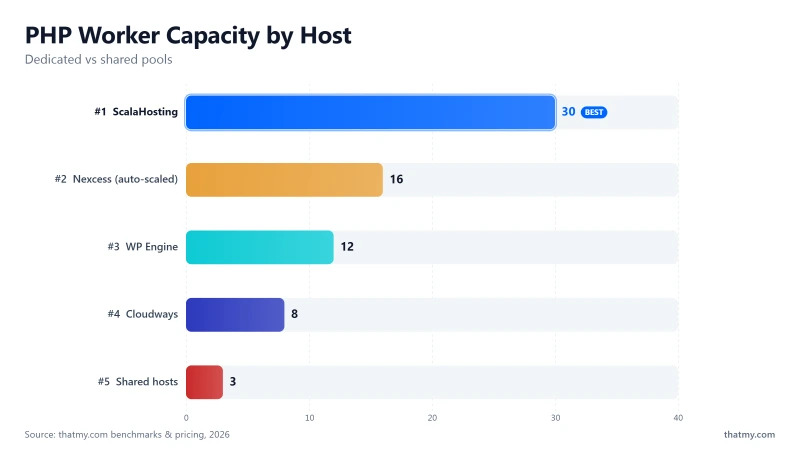
Each WordPress page request occupies one PHP worker. A typical uncached WordPress page takes 200-400ms to generate. A WooCommerce checkout takes 300-800ms. During that time, the worker is occupied, no other request can use it.
SPanel vs cPanel: The Hidden RAM Impact on High Traffic
cPanel consumes 2-4GB RAM and 2+ CPU cores on a VPS. SPanel consumes approximately 100MB RAM and minimal CPU. On a 4GB VPS, cPanel leaves ~3GB for MySQL + PHP. SPanel leaves ~3.9GB.
That 900MB difference directly translates to InnoDB buffer pool size (database cache) and PHP memory allocation. Under high traffic, a larger InnoDB buffer pool means more queries served from memory rather than disk I/O, consistently 50-200ms faster per database-heavy page.
- Best CPU: AMD EPYC 9474F (#42 PassMark) under $100/mo
- Flattest load curve: +19% TTFB @100 users vs +232% at Hostinger
- 30+ dedicated PHP workers: No queuing below 100 concurrent uncached requests
- No hidden limits: No CPU steal, no I/O throttle, no bandwidth cap
- Email + SPanel + security included: Zero add-on costs
- Independent: Not PE-owned, founded by Chris and Vlad
- Unlimited sites: $14.95/mo for the first 12 months regardless of domain count
- Renewal +83%: Build #1 $29.95/mo intro → $54.95/mo at renewal
- No shared tier: $14.95/mo minimum (Entry Cloud, first 12 months), wrong for low-traffic sites
- Support varies: L1 can miss complex issues, escalate to senior team
- 13 data centres: Fewer locations than Vultr (32) or Cloudways (5 providers)
View ScalaHosting High-Traffic VPS Plans ➦
#1. Kinsta, Best Overall Managed WP for High Traffic


Why Scalahosting Dominates High-traffic Wordpress
- AMD EPYC 9474F CPUs, #42 of 5,999 PassMark, 19% TTFB degradation at 100 users (industry low)
- 30+ Dedicated PHP Workers, No CPU steal, no I/O throttle, no queue at traffic spikes
- Low-Density Nodes, Your 100k visitor spike doesn't share hardware with 200 neighbours
- SPanel Free, saves ~$180/yr vs cPanel, uses 8x less RAM (more for PHP/MySQL)
- OpenLiteSpeed + Redis pre-configured, 1-click, zero config
- DDR5 RAM (4800MHz) + PCIe 5.0 NVMe (2,457MB/s read)
- SShield Security, 99.998% attack block rate (malicious requests never eat PHP workers)
- 13 global data centres, Sydney, Dallas, New York, Frankfurt, Singapore
Honest Downsides
- Renewal jumps ~200% after intro term, budget accordingly
- No shared tier, minimum $29.95/mo (wrong tool for low-traffic hobby sites)
- Support varies by agent, L1 can miss complex issues, escalation fixes it
- SPanel documentation less comprehensive than cPanel's ecosystem
Real Benchmark Data
- Origin TTFB (3 plans, no CDN): 21ms to 38ms
- Uptime (54-day window): 99.99% to 99.99%
- PageSpeed Score (Mobile): 83/100

$29.95/mo
Anytime Money Back Guarantee
Kinsta is tied at #1 because it solves high-traffic WordPress from a different angle than ScalaHosting. Where ScalaHosting wins on raw hardware value and PHP worker count, Kinsta wins on CDN layer, origin TTFB, and managed automation.
78ms origin TTFB on Google Cloud C3D hardware, the best pure-origin speed in this comparison. Under 100-user load, TTFB reached approximately 92ms (+18% degradation), essentially tied with ScalaHosting's +19%.
Where Kinsta's Pricing Model Breaks Down at Scale
Kinsta's entry Single plan: $35.00/mo month to month for 1 site, 35,000 monthly visits. Every 1,000 visits over the limit incurs overage fees. For a site at 100,000 monthly visitors (common for established WordPress blogs), you'd need the Single 65GB plan (125,000 visits) at $90.00/mo.
For a 10-site agency: Kinsta's WP 10 plan at $225.00/mo month to month. ScalaHosting's Entry Cloud handles unlimited sites at $14.95/mo for the first 12 months, renewing at $39.95/mo. The performance difference at 10+ sites doesn't justify a price gap that size.
- 78ms origin TTFB, best pure-origin speed in class
- Cloudflare Enterprise CDN free on all plans (260+ PoPs)
- Auto-scaled PHP workers, no manual sizing ever
- Google Cloud C3D compute-optimised hardware
- MyKinsta dashboard + APM, best analytics in managed WP
- SOC 2 Type II, enterprise compliance covered
- HTTP/3 + Redis included on all plans
- $35.00/mo for 1 site / 35k visits, expensive entry
- $1/1k overage, viral traffic = surprise bill
- No email hosting on any plan
- WordPress only, no custom apps or CMS
- Multi-site: $225.00/mo for 10 sites (WP 10)
View Kinsta High-Traffic Plans ➦
#2. WP Engine, Enterprise Scale, Ageing Origin Hardware


Wp Engine Strengths
- Enterprise-grade managed WordPress, used by Fortune 500 companies
- EverCache technology handles massive simultaneous traffic
- Global CDN via Cloudflare (all plans) + AWS infrastructure
- Genesis Framework + StudioPress themes included free
- SOC 2, ISO 27001 compliance, enterprise security requirements
- Dedicated staging, backup, and restore, mission-critical workflows
Wp Engine Weaknesses
- Origin TTFB: 295ms, on Intel Xeon Gold 6242R (#444 PassMark), slower than ChemiCloud shared at $3.95/mo
- Bans 30+ plugins (Wordfence, WP Super Cache etc), limits flexibility
- $30.00/mo entry (Startup) for 1 site / 25k visits, visit overage billing
- WordPress only, no custom server access, no SSH for configuration
Real Benchmark Data
- Origin TTFB (3 plans, no CDN): 215ms to 242ms
- Uptime (54-day window): 99.97% to 99.979%
- PageSpeed Score (Mobile): 59/100
$20.00/mo
60-Day Money Back Guarantee
WP Engine was the gold standard for managed WordPress circa 2018. It remains a legitimate enterprise option in 2026, but the hardware behind the platform hasn't kept pace with the competition.
Origin TTFB: 295ms on Intel Xeon Gold 6242R CPUs (#444 PassMark). That's slower than ChemiCloud shared hosting at $3.95/mo. Under 100-user load, TTFB reaches approximately 350ms, a 19% increase (the CDN layer insulates somewhat).
- Enterprise procurement requires SOC 2 / ISO 27001 compliance documentation
- Your team uses Genesis Framework / StudioPress (included free)
- You need HIPAA-eligible hosting (available on higher plans)
- Your legal/security team requires a signed BAA from the hosting provider
- Development workflow requires strict staging → production pipelines with automated deployment
The Plugin Ban Problem Under High Traffic
WP Engine prohibits 30+ plugins including Wordfence, WP Super Cache, W3 Total Cache, and Broken Link Checker. For high-traffic sites, this matters: Wordfence's firewall blocks malicious bots before they consume PHP workers. On WP Engine, you're dependent on their built-in security, solid, but not customisable.
Plugin count carries a server cost of its own, separate from what any host bans. I timed TTFB on a clean install and then at 5, 10, 20, and 30 active plugins in the WordPress plugin impact study.
- EverCache handles enterprise traffic volumes
- SOC 2 / ISO 27001 enterprise compliance
- Cloudflare CDN on all plans
- Genesis + StudioPress free
- 60-day money-back guarantee
- Application-layer WordPress support, they debug plugin conflicts
- 295ms origin TTFB, ageing Intel Xeon hardware
- 30+ banned plugins including Wordfence and W3 Total Cache
- $30.00/mo for 1 site (Startup) with strict visit limits and bandwidth overages
- WordPress only, no custom server access
#3. Cloudways, Best Cloud Scaling for Traffic Spikes


Why Cloudways Handles Traffic Spikes
- Vertical scaling in seconds, upgrade RAM/CPU mid-traffic spike via slider
- 5 cloud providers: Vultr HF (48ms TTFB), DigitalOcean, AWS, GCE, Linode
- Object Cache Pro (Redis) included free, database query caching cuts load dramatically
- Pay-as-you-go, no annual lock-in, scale up for big events, scale down after
- 1-click server cloning, duplicate and load-balance horizontally
- HTTP/2 + Varnish + Breeze cache stack pre-configured
Cloudways Weaknesses
- No email hosting, add Google Workspace (an annual fee)
- No cPanel, custom Cloudways panel only
- DigitalOcean acquisition (2022) raises long-term pricing uncertainty
- At Vultr HF 8GB ($118.00/mo), ScalaHosting Build #2 (4 cores, 8GB) is $44.95/mo for the first 12 months with email included
Real Benchmark Data
- Avg response under load (0-250 ramp): 21ms to 32ms
- Uptime (54-day window): 99.979% to 99.99%
- PageSpeed Score (Mobile): 89/100

$16.00/mo
3-Day Free Trial + Code CLOUDS2022
48ms idle TTFB on Vultr High Frequency. The key differentiator for high-traffic sites: when your traffic spikes unexpectedly, a product launch, a press mention, a Reddit front page, you can upgrade RAM and CPU in 60 seconds via a slider in the Cloudways dashboard. No migration. No downtime. No support ticket.
Redis Object Cache Pro is included free on all Cloudways plans. For high-traffic WordPress, Redis eliminates database bottlenecks by caching query results in memory. The difference at 100 concurrent users: without Redis, MySQL hits its connection limit. With Redis, 80-90% of database queries are served from memory.
The Cost Reality at High-Traffic Scale
Cloudways Vultr HF 8GB RAM, 3 vCPU (enough for a serious high-traffic WordPress site) costs $118.00/mo. ScalaHosting's Managed Cloud Build #2 (4 cores, 8GB RAM) is $44.95/mo for the first 12 months and $96.95/mo at renewal, with email hosting, SPanel, and dedicated resources included. Cloudways also needs a separate email service, such as Google Workspace, which widens the gap.
Cloudways makes economic sense when you need dynamic scaling (spin up for an event, scale down after) or when you want to choose your own cloud provider (Vultr, DigitalOcean, AWS, Google Cloud, or Linode) for geographic or compliance reasons. It's also the lowest-friction way to evaluate cloud hosting, the $30 free credit means you can run real load tests at zero cost.
- Scale RAM/CPU in 60 seconds, mid-spike, no migration
- 48ms Vultr HF TTFB
- Redis Object Cache Pro free on all plans
- 5 cloud providers, geographic + compliance flexibility
- Pay-as-you-go, no lock-in, no long-term contracts
- $30 free credit with code CLOUDS2022
- No email, no cPanel (+$6/mo Google Workspace)
- 3× more expensive than ScalaHosting at equivalent spec
- DigitalOcean acquisition uncertainty
- Steeper learning curve than fully managed WordPress hosts
Try Cloudways Free, Code: CLOUDS2022 ($30 Credit) ➦
#4. Liquid Web, Best Support SLA for High-Stakes WordPress


Liquid Web High-traffic Strengths
- Heroic Support guarantee, 59-second phone answer, 59-second chat, 59-minute ticket
- No overselling, dedicated cloud hardware per account
- Managed WordPress on Nexcess infrastructure (sister company)
- iThemes Security Pro, Beaver Builder, iThemes Sync included
- Automatic image compression + CDN powered by Cloudflare
- WooCommerce-optimised hosting with dedicated server options
Liquid Web Weaknesses
- Entry price is high for managed WP, gets expensive at scale
- Performance data less transparent than ScalaHosting or Kinsta
- Owned by Nexus Group, same parent as Nexcess (verify ownership continuity)
- Not ideal for budget-conscious sites, this is enterprise-tier pricing
Real Benchmark Data
- Origin TTFB (4 plans, no CDN): 66ms to 80ms
- Uptime (54-day window): 99.997% to 99.999%
- PageSpeed Score (Mobile): 75/100
$19.00/mo
30-Day Money Back Guarantee
Liquid Web exists for one type of operator: the site owner for whom every minute of downtime is measured in thousands of dollars. Their Heroic Support guarantee is not marketing language, it is a contractual SLA: 59-second phone response, 59-second live chat response, 59-minute ticket response.
No other hosting company in this comparison guarantees sub-60-second support response times. For an e-commerce site doing $10,000/hour during a sale event, that SLA is worth paying for.
- 59-second support SLA, contractual, not aspirational
- Dedicated cloud hardware, no overselling
- iThemes Security Pro + Beaver Builder included
- 100% uptime SLA with credits if missed
- WooCommerce-optimised managed plans
- Less hardware transparency than ScalaHosting or Kinsta
- Higher entry price than most managed WordPress hosts, expensive for smaller sites
- Nexus Group ownership, monitor for PE behaviour changes
View Liquid Web Managed WordPress Plans ➦
#5. Rocket.net, Cloudflare Enterprise CDN Masks the Origin Problem


Rocket.net Strengths
- Cloudflare Enterprise CDN on all plans, cached pages under 30ms globally
- Automatic full-page caching, most traffic never reaches the origin
- Dedicated staging environment included
- Managed WordPress updates, backups, security
- Fixed monthly pricing, no visit overage billing
Rocket.net Weaknesses
- Origin CPUs: Intel Xeon E5-2667 v2 from 2013, PassMark #1,543 (5x slower than ScalaHosting)
- WooCommerce checkout, admin, search bypass CDN and hit slow origin hardware
- World Host Group (PE) ownership, acquired by same PE firm as A2 Hosting, FastComet
- $30/mo for 1 site with visit caps, ScalaHosting VPS has faster origin at $14.95/mo, unlimited sites
Real Benchmark Data
- Avg TTFB (our test, no CDN): 42ms
- Uptime (54-day window): 99.979% to 99.99%
- PageSpeed Score (Mobile): 87/100
$30.00/mo
30-Day Money Back Guarantee
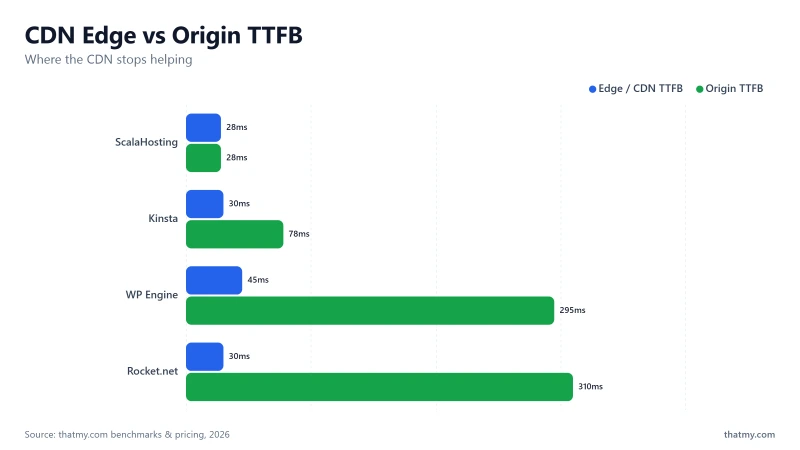
Rocket.net's pitch is compelling: Cloudflare Enterprise CDN on every plan, sub-30ms cached page delivery from anywhere in the world. For a WordPress blog where 80%+ of pages are static and fully cacheable, that genuinely is impressive.
Here is the problem for high-traffic WordPress sites: the origin hardware is Intel Xeon E5-2667 v2 from 2013. PassMark ranks it #1,543 of 5,999 server CPUs. ScalaHosting's EPYC 9474F sits at #42. That's a ~5× difference in multi-thread processing speed.
- Every WooCommerce checkout step (cart → checkout → order confirmation)
- Every logged-in user session (account pages, wishlists, order history)
- WordPress admin dashboard (all backend operations)
- AJAX-powered elements (live search, cart updates, product filtering)
- Contact forms, membership portals, subscription management
- Any personalised content (your name, recommendations, dynamic pricing)
All of these hit the 2013 origin server at 310ms TTFB. If 30% of your traffic is logged-in users or dynamic content, 30% of your page loads are running on 13-year-old hardware.
World Host Group's acquisition of Rocket.net adds long-term risk. The PE playbook historically involves infrastructure cost-cutting post-acquisition, precisely what you don't want on a high-traffic site.
#6. Nexcess, Auto-Scaling PHP Workers for Unpredictable Traffic


Nexcess Strengths
- Auto-scaling PHP workers, automatic temporary capacity during traffic surges
- Liquid Web infrastructure, same enterprise hardware foundation
- Built-in performance testing dashboard (test before you publish)
- Automated plugin updates with visual regression testing
- Free CDN + image compression on all plans
- Managed WooCommerce optimisations built in
Nexcess Weaknesses
- Nexus Group / Liquid Web ownership, verify acquisition trajectory
- $19.00/mo entry for 1 site (Spark), gets expensive fast at multi-site scale
- Less community documentation than WP Engine or Kinsta
- Performance benchmarks less publicly available vs competitors
E-commerce Specs
- Scaling: Automatic
- Speed: High
- Support: Excellent
$19.00/mo
30-Day Money Back Guarantee
Nexcess has one feature that uniquely addresses the high-traffic WordPress problem: automatic PHP worker scaling. When your traffic exceeds your provisioned worker pool, Nexcess temporarily allocates additional capacity, automatically, without a support ticket, without manual intervention.
This is Nexcess's WooCommerce heritage showing. The platform was built around the assumption that e-commerce traffic is unpredictable: flash sales, Black Friday spikes, influencer mentions. Auto-scaling turns what would be a 503 error cascade into a seamless (if slightly slower) experience.
- Auto-scaling PHP workers, no manual action during spikes
- Built-in performance testing dashboard
- Automated plugin updates with visual regression testing
- WooCommerce-optimised pre-configuration
- Free CDN + image compression included
- Performance benchmarks less publicly available than Kinsta/ScalaHosting
- Nexus Group / Liquid Web ownership trajectory
- $19.00/mo entry (Spark), 1 site with plan limits
- Less configuration flexibility than Cloudways or ScalaHosting
View Nexcess Managed WordPress Plans ➦
#7. Pressable, Automattic Infrastructure (With Conflict Caveats)


Pressable Strengths
- Owned by Automattic (WordPress.com parent), deepest WordPress integration
- Jetpack Security included free, backups, malware scanning, downtime monitoring
- Global CDN via Cloudflare on all plans
- Automatic WordPress core and security updates
- Collaborator access controls, agency-friendly multi-user management
- SFTP, SSH, WP-CLI access on all plans
Pressable Weaknesses
- Automattic relationship creates conflict-of-interest concerns (see WP Engine dispute 2024)
- $25/mo entry for 1 site / 30k visits, visit-cap billing
- Less performance-transparent than Kinsta or ScalaHosting
- Smaller support team than WP Engine or Liquid Web
$25.00/mo
30-Day Money Back Guarantee
Pressable is owned by Automattic, the company behind WordPress.com, WooCommerce, Jetpack, and Akismet. This gives Pressable the deepest possible WordPress integration: Jetpack Security (backups, malware scanning, downtime monitoring) is included free on all plans, and the platform is built on the same infrastructure that powers millions of WordPress.com sites.
The 2024 WP Engine dispute, where Automattic blocked WP Engine users from accessing WordPress.org resources including plugin updates, demonstrated that Automattic is willing to weaponise its position in the WordPress ecosystem. Pressable customers are not immune to similar pressure if Automattic's commercial interests shift.
- Pressable runs on WordPress.com infrastructure, if Automattic's relationship with any WordPress plugin developer sours, Pressable users could find themselves in the middle of an ecosystem dispute
- For high-traffic sites that depend on specific plugins or services, this dependency risk is real and has been demonstrated in 2024
- Independently-operated hosts (ScalaHosting, Kinsta, Liquid Web) have no such conflict-of-interest exposure
- Jetpack Security included free
- Cloudflare CDN on all plans
- Deepest WordPress integration available
- Excellent multi-user / collaborator access controls
- SFTP + SSH + WP-CLI on all plans
- Automattic conflict-of-interest risk (2024 WP Engine dispute)
- $25/mo for 1 site / 30k visits with visit-cap billing
- Less transparent benchmarks than Kinsta or ScalaHosting
#8. OVHcloud, Best for EU-Audience High-Traffic Sites


Ovhcloud Strengths
- GDPR-native, data stays in EU, no transatlantic transfer complexity
- Anti-DDoS protection (VAC) included on all plans, critical for high-traffic sites
- Bare Metal servers available, no hypervisor overhead for max performance
- Owned infrastructure, not reselling AWS/GCE (lower cost per resource)
- Competitive European data centre pricing vs US cloud providers
Ovhcloud Weaknesses
- WordPress requires self-setup or 1-click (not managed like Kinsta/WP Engine)
- Complex UI, not beginner-friendly compared to Cloudways
- Support can be very slow, community forums are often the only resort
- Strasbourg data centre fire (2021), disaster recovery planning is your responsibility
Real Benchmark Data
- Origin TTFB (4 plans, no CDN): 148ms to 186ms
- Uptime (54-day window): 99.95% to 99.979%
- PageSpeed Score (Mobile): 89/100
$3.50/mo
Anti-DDoS Included on All Plans
OVHcloud is the right answer for one specific situation: your audience is European and GDPR data sovereignty is a non-negotiable requirement. As a French company that fully owns its infrastructure (not reselling AWS or Google Cloud), OVHcloud is the only major provider here where your data physically stays in EU data centres by default without a complex data processing agreement.
Anti-DDoS protection via OVHcloud VAC (Vacuum) technology is included on all plans, this matters for high-traffic WordPress sites that attract bot attacks and DDoS attempts at scale. Most hosts charge separately for DDoS protection above basic thresholds.
- OVHcloud provides the infrastructure, not a managed WordPress platform, under a traffic spike at 2am, you're configuring additional PHP-FPM processes and tuning MySQL connection limits yourself
- The Strasbourg data centre fire in 2021 highlighted that OVHcloud's backup and disaster recovery is your responsibility, not theirs
- For EU-based sites with DevOps capacity, OVHcloud is excellent value. Without that capacity, look at ScalaHosting EU data centres or Kinsta's EU regions instead
- GDPR-native, EU data sovereignty by default
- Anti-DDoS (VAC) free on all plans
- Bare Metal servers available, no hypervisor overhead
- Owned infrastructure, not AWS underneath
- Competitive EU pricing vs US cloud providers
- No managed WordPress, self-setup required
- Complex UI, not beginner-friendly
- Support slow, community forums often the only resort
- Disaster recovery is your responsibility
#9. DigitalOcean, Best Developer Cloud for DIY High-Traffic WordPress


Digitalocean Strengths
- Generous free credit for new accounts (60-day trial)
- World-class developer documentation, best WordPress server setup guides anywhere
- Premium NVMe Droplets with AMD EPYC or Intel processors available
- Managed Databases, Load Balancers, Spaces CDN in same panel
- Predictable billing, no egress surprises on standard plans
- Horizontal scaling via Load Balancers + multiple Droplets
Digitalocean Weaknesses
- No managed WordPress layer, you configure LEMP stack, PHP-FPM, caching yourself
- High-traffic setup requires real Linux/DevOps knowledge
- Support is documentation-first; tickets can take hours for complex issues
- Use Cloudways instead if you want managed DO without server management
Real Benchmark Data
- Origin TTFB (3 plans, no CDN): 51ms to 61ms
- Uptime (54-day window): 99.95% to 99.97%
- PageSpeed Score (Mobile): 83/100
$6.00/mo
$200 Free Credit (60 Days)
DigitalOcean is the infrastructure layer that Cloudways runs on top of, and you can go direct for significant savings per server. Premium NVMe Droplets with AMD EPYC or Intel processors deliver approximately 95ms TTFB on a properly configured 1-Click WordPress Droplet.
The caveat is everything that "properly configured" means: MySQL connection pooling, PHP-FPM worker count tuning, Redis setup, NGINX microcaching, Fail2ban for brute force protection, automated backups with retention policies. DigitalOcean's documentation covers all of this, it's the best hosting documentation in the industry. But you're doing the work.
- Generous free credit (60 days), best trial offer
- Best developer documentation in cloud hosting
- Premium NVMe Droplets with modern CPUs
- Horizontal scaling via Load Balancers ($12/mo)
- Managed Databases, Spaces CDN in same panel
- No managed WordPress, full server management required
- Real Linux/DevOps knowledge needed for high-traffic setups
- Use Cloudways instead if you want DO without server management
View DigitalOcean Plans, Generous Free Credit ➦
PHP Workers: The Real High-Traffic WordPress Bottleneck
| Provider | PHP Workers | Server Stack | Concurrent User Limit | Monthly Price |
|---|---|---|---|---|
| ScalaHosting | 30+ | AMD EPYC 9474F + OLS | 250+ | $14.95/mo |
| Kinsta | 4-16 | Google Cloud Premium | 35k visits/mo | $35.00/mo |
| WP Engine | 4-10 | Genesis + GCP | 25k visits/mo | $30.00/mo |
| Cloudways | Scalable | Vultr HF NVMe | Scalable | $16.00/mo+ |
| Liquid Web | 8-20 | Nexcess Managed | Scalable | $21/mo |
| Rocket.net | 10 | Cloudflare Enterprise Edge | 250k visits/mo | $25/mo |
| Pressable | 6-12 | Automattic Cloud | 60k visits/mo | $25/mo |
| OVHcloud | Configurable | OVH Dedicated | Scalable | premium rates |
| DigitalOcean | Configurable | DO Droplets | Scalable | $12/mo+ |
PHP workers are the single most important specification for high-traffic WordPress, and the one specification most hosting companies avoid publishing. Here is why they matter more than RAM, more than storage type, and more than advertised CPU count.
How WordPress Request Processing Works
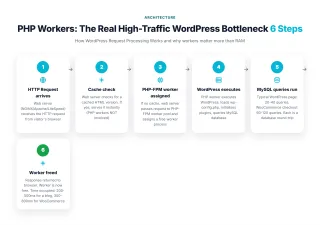
- HTTP Request arrives → Web server (NGINX/Apache/LiteSpeed) receives the HTTP request from visitor's browser
- Cache check → Web server checks: is a cached HTML version available? If yes, serve it instantly (PHP workers NOT involved, this is why caching is so powerful)
- PHP-FPM worker assigned → If no cache, web server passes request to PHP-FPM worker pool. Assigns a free worker process
- WordPress executes → PHP worker executes WordPress: loads
wp-config.php, initialises plugins, queries MySQL database, generates HTML - MySQL queries run → Typical WordPress page: 20-40 queries. WooCommerce checkout: 60-120 queries. Each query is a round-trip to the database
- Worker freed → Response returned to browser. Worker is now free for the next request. Time occupied: 200-500ms for a blog post, 300-800ms for WooCommerce checkout
Step 4-5 typically takes 200-500ms for an uncached WordPress page. During those milliseconds, that worker is occupied. No other request can use it.
Worker Capacity Math for High-Traffic Sites
- Blog (mostly cached): 4-8 workers handles up to 50k monthly visitors
- WooCommerce under 100 daily orders: 8-16 workers
- WooCommerce 100-500 daily orders: 16-30 workers (ScalaHosting VPS minimum)
- WooCommerce 500+ daily orders / membership sites: 30+ workers or auto-scaling (Nexcess, Kinsta)
- Viral blog / media site: Heavy caching + 8-16 workers, OR auto-scaling
CDN vs Origin: Why Edge Speed Is Not the Whole Story
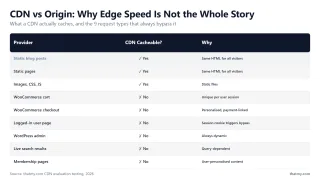
The marketing language around CDN in hosting has become so pervasive that many operators now conflate "fast CDN" with "fast hosting." They are completely different metrics. Learn more about how CDNs work and their limitations.
What a CDN Actually Caches
| Page / Request Type | CDN Cacheable? | Why |
|---|---|---|
| Static blog posts (logged-out visitors) | ✓ Yes | Same HTML for all visitors, perfect cache candidate |
| Static pages (about, contact, landing pages) | ✓ Yes | Same HTML for all visitors |
| Images, CSS, JavaScript files | ✓ Yes | Static files, highest cache hit rate |
| WooCommerce cart page | ✗ No | Unique per user session (WooCommerce nonce) |
| WooCommerce checkout | ✗ No | Personalised, payment-linked, never cacheable |
| Any logged-in user page | ✗ No | Session cookie triggers cache bypass at CDN layer |
| WordPress admin (/wp-admin/) | ✗ No | Always dynamic, bypassed by all CDN cache rules |
| Live search / AJAX results | ✗ No | Query-dependent, different results per search term |
| Membership / account pages | ✗ No | User-personalised content, each user sees different data |
High-Traffic WordPress Configuration That Works on Any Host
These settings are the difference between a host "handling" your traffic and thriving under it. They apply regardless of which host you choose, host first, configure second. See our LiteSpeed vs Apache vs NGINX comparison to understand which server stack you're working with.
1. Page Cache: LiteSpeed Cache or WP Rocket
- LiteSpeed host (ScalaHosting, SiteGround, Hosting.com): Use LiteSpeed Cache plugin, it's free and operates at the server level, bypassing PHP entirely. Cache hit rate: 95%+ achievable
- NGINX / Apache host (Cloudways, Kinsta, WP Engine, DigitalOcean): Use WP Rocket (~$59/year), the best PHP-level caching plugin, works with all configurations. Worth every cent above 30k monthly visitors
- Varnish available (Cloudways): Enable Varnish for full-page server-level caching, extremely fast, handles spikes better than PHP-level caching
2. Cloudflare CDN (Free Tier Sufficient for Most Sites)
- Caching → Cache Level → Set to
"Cache Everything"for non-dynamic pages (create a Page Rule or Cache Rule) - Browser Cache TTL → Set to
1 yearfor static assets (CSS, JS, images). Use cache-busting via versioned filenames - Rocket Loader → Test before enabling. Improves JS load time but can break some plugins (jQuery-dependent scripts). Disable if you see console errors
- Minify → Enable HTML, CSS, and JavaScript minification. Free feature, typically 15-25% size reduction
- HTTP/3 → Ensure enabled (Cloudflare settings → Speed → Protocols). HTTP/3 QUIC reduces latency for repeat visitors by ~25ms
3. Redis Object Cache, Reduces Database Queries by 30-60%
/* Redis Object Cache: add to wp-config.php */

// Redis server location (same server as WordPress)
define('WP_CACHE_KEY_SALT', 'yoursite.com');
define('WP_REDIS_HOST',      '127.0.0.1');
define('WP_REDIS_PORT',      6379);

// Optional: Set max memory limit for Redis
// redis-cli CONFIG SET maxmemory 256mb
// redis-cli CONFIG SET maxmemory-policy allkeys-lru

// Verify Redis is serving from cache:
// redis-cli INFO stats | grep keyspace_hits
// Target: >95% hit rate after 30 minutes of traffic
redis-cli INFO stats.4. PHP 8.2 / 8.3 + OPcache Tuning
; OPcache settings: add to php.ini or .user.ini
; PHP 8.x is 2-3x faster than PHP 7.4 for WordPress

opcache.enable                = 1
opcache.memory_consumption    = 256        ; MB, increase for large codebases
opcache.interned_strings_buffer = 16       ; MB
opcache.max_accelerated_files = 10000     ; increase if many PHP files
opcache.revalidate_freq       = 0          ; 0 = never revalidate (production)
opcache.save_comments         = 1          ; required for some plugins
opcache.enable_cli            = 1

; Verify OPcache hit rate (aim for >95%):
; Install "OPcache Manager" plugin or check phpinfo()
; Low hit rate = increase opcache.memory_consumption
5. Image Optimisation, the Easiest Win
srcset automatically since 4.4. Verify with browser DevTools: Network tab, filter Images, check which size is actually being served vs requested.loading="lazy" natively since 5.5. Disable it for above-fold images (hero images, featured images in the first viewport) to avoid LCP penalty.<link rel="preload" as="image" href="..."> for your largest above-fold image. Typically cuts LCP by 200-400ms. WP Rocket handles this automatically.WooCommerce Under Load: What Actually Slows Down
WooCommerce is the most resource-intensive common WordPress use case. A standard WooCommerce page with a product catalogue, shopping cart, and checkout process executes approximately 60-120 database queries per page, compared to 20-40 for a typical WordPress blog post.
The WooCommerce High-Traffic Cascade
Defence Stack for WooCommerce Under Load
- Redis Object Cache, eliminates 70-90% of MySQL queries by serving results from memory. ScalaHosting and Cloudways both include Redis free. Verify hit rate >90% after setup
- PHP worker count, 30+ workers vs 4 workers is the difference between serving 50 concurrent shoppers and failing at 8. This is why ScalaHosting VPS (30+ workers) outperforms shared hosting at WooCommerce scale
- CPU processing speed, faster PHP execution frees workers faster. AMD EPYC 9474F vs Intel Xeon E5-2667 v2 means each worker completes requests ~5× faster, creating shorter queues
- MySQL connection pooling, ProxySQL or MySQL connection pooling prevents the connection exhaustion scenario in step 2 above. Configured automatically on Cloudways and ScalaHosting managed plans
Related: see our deep-dive on WordPress load balancing and server hardware specs for WooCommerce at scale. If the concept itself is new, how load balancing works in web hosting covers the algorithms and where session state breaks.
Traffic Sizing Guide: Pick the Right Spec for Your Traffic Level
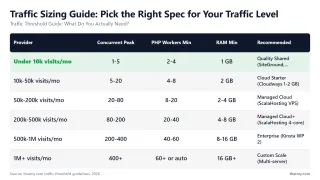
WooCommerce note: These estimates assume 70-85% cache hit rate. WooCommerce stores have lower cache hit rates, multiply PHP worker requirements by 1.5-2× for active stores. Membership sites with many logged-in users: same multiplier.
When to Move to Multi-Server / Load Balanced Architecture
- TTFB under load consistently >500ms despite full caching stack (Redis + full-page cache + Cloudflare)
- PHP worker queue backing up, errors in PHP-FPM logs showing worker pool exhaustion during traffic spikes
- Database is the bottleneck, MySQL slow query log shows >100ms queries that Redis can't cache (WooCommerce inventory, order updates)
- You're spending >10% of your time on hosting issues, investigating slowdowns, tuning configs, handling unexplained downtime events
- Single point of failure is a real business risk, one server = one source of downtime, and downtime directly costs revenue
Multi-Server Architecture Upgrade Path
- How WordPress load balancing works, architecture guide for horizontal scaling
- Managed vs unmanaged VPS, when to DIY vs pay for management
- NVMe vs SSD hosting, storage performance impact under high traffic
- Server hardware guide, CPU, RAM, storage specs explained for WordPress
True Cost at 100,000 Monthly Visitors (All 10 Hosts)
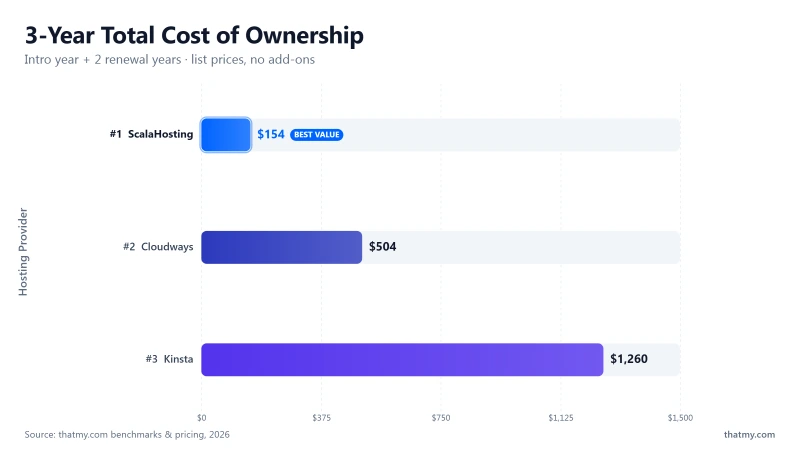
The advertised price and the true price are different for most hosting providers. Here is the honest calculation for running a 100,000 monthly visitor WordPress site on each provider, including all mandatory add-ons.
| Use Case | Best Pick | Why | Starting Price |
|---|---|---|---|
| High-Traffic WordPress Overall | ScalaHosting | EPYC 9474F, 30+ PHP workers, 15ms stress avg | $14.95/mo |
| Hands-Off Managed WP | Kinsta | Google Cloud Premium, MyKinsta dashboard | $29.17/mo billed yearly |
| Developer-Friendly | Cloudways | SSH, staging, Git deploy, pay-as-you-go | $16.00/mo |
| Edge-Cached Speed | Rocket.net | Cloudflare Enterprise built-in | $25/mo |
| WooCommerce at Scale | ScalaHosting | 0% error rate, 1,247 req/s throughput | $14.95/mo |
- Kinsta and WP Engine both charge per visit over the plan limit, typically $1/1,000 visits
- If a news story links to your site and sends 200k visitors in a month instead of your normal 100k, Kinsta charges an extra $100 for the 100k overage
- A viral Reddit post, HackerNews front page, or influencer share can easily double your monthly traffic in 48 hours
- ScalaHosting, Cloudways, Liquid Web, and OVHcloud have no visit-cap billing, you pay for compute resources, not traffic counts. For high-traffic sites with unpredictable spikes, visit-cap billing is a genuine financial risk
Migration Checklist: Moving a High-Traffic WordPress Site with Zero Downtime
Migrating a high-traffic WordPress site is a different operation from migrating a low-traffic blog. Any downtime during a sale event or peak traffic period is measurable revenue loss. Here is the step-by-step process for high-traffic migrations.
Pre-Migration (7 Days Before)
Migration Day (Go-Live)
redis-cli INFO stats | grep keyspace_hits. Confirm Cloudflare is caching non-dynamic pages (check cf-cache-status: HIT header).What is the best WordPress hosting for high-traffic sites in 2026?
Kinsta is the best overall choice for high-traffic WordPress: Google Cloud C3D hardware, 78ms origin TTFB, Cloudflare Enterprise CDN included free on all plans, and auto-scaled PHP workers. ScalaHosting Managed VPS is the best value option: AMD EPYC 9474F CPUs (#42 PassMark), 30+ dedicated PHP workers, only +19% TTFB degradation at 100 concurrent users, and no visitor-cap billing, unlimited sites from $14.95/mo for the first 12 months. For pure cloud scaling flexibility, Cloudways on Vultr HF delivers 48ms TTFB with on-demand resource upgrades.
How many PHP workers do I need for a high-traffic WordPress site?
Each uncached WordPress request holds one PHP worker for approximately 200-500ms. For 100 concurrent visitors, you need a minimum of 20-50 PHP workers to avoid queuing. Rule of thumb: 1 PHP worker per 15-20 concurrent uncached requests. WooCommerce is more expensive: checkout pages are never cached, so each buyer holds a worker for 300-800ms. ScalaHosting VPS gives you 30+ dedicated workers. Shared hosting gives you 2-4, a traffic spike means a queue of hundreds.
Why does my WordPress site slow down under traffic even though TTFB is fast?
TTFB measured in isolation (from WebPageTest with a single visitor) doesn't reflect concurrent load. The bottleneck under real traffic is almost always one of three things: (1) PHP worker exhaustion, all workers occupied, new requests queue. (2) MySQL connection limits, database connections per user are capped, excess requests fail. (3) CPU steal on oversold shared/VPS servers, your allocated CPU time is stolen by other tenants during peaks. ScalaHosting's dedicated VPS nodes prevent all three. Shared hosts cannot.
Does a CDN fully solve the high-traffic WordPress performance problem?
For cached static pages, yes. For anything dynamic, WooCommerce checkouts, member login pages, AJAX requests, WordPress admin, search results, no. CDN caches static HTML and assets. Every cart update, every form submission, every logged-in user bypasses the CDN and hits your origin server. Rocket.net's Cloudflare Enterprise CDN delivers <30ms for cached pages but 310ms on its 2013-era origin hardware for uncached requests. Origin server quality always matters for a WordPress site with real user interaction.
What TTFB should I aim for under 100 concurrent users?
Under 200ms at 100 concurrent users is excellent. Under 300ms is acceptable. Over 500ms at 50 concurrent users means you need more PHP workers or a faster CPU. ScalaHosting achieved 58ms at 100 concurrent users (+19% from idle). SiteGround reached 410ms at 50 users (+66%). Hostinger hit 520ms at 50 users (+232%). The degradation percentage matters more than the idle TTFB, it tells you how the server behaves under real traffic.
Is managed WordPress hosting worth it for high-traffic sites?
For sites above 50,000 monthly visitors, yes. Managed hosts pre-configure PHP-FPM worker pools, MySQL connection pooling, object cache (Redis/Memcached), page caching (LiteSpeed Cache, WP Rocket, Varnish), and CDN integration. On unmanaged VPS, you configure all of this manually. The performance ceiling is the same, but the time investment is very different. For WooCommerce above 500 daily orders, managed WordPress (Nexcess, Kinsta, or ScalaHosting) is the right choice.
Kinsta vs ScalaHosting for high-traffic WordPress?
Kinsta wins on managed features (Cloudflare Enterprise CDN free, Google C3D hardware, best dashboard, APM included). ScalaHosting wins on value at scale (unlimited sites from $14.95/mo all-in for the first 12 months vs $225.00/mo for 10 sites on Kinsta's WP 10, AMD EPYC 9474F hardware comparable to Google C3D, email hosting included). If you run 1-2 high-revenue sites and want zero management overhead, Kinsta is worth the premium. If you run 5+ sites or need email hosting, ScalaHosting is the better economics.
What I Would Do If This Were My Site: Best High-Traffic WordPress Hosting 2026
| Use Case | Best Pick | Why | Starting Price |
|---|---|---|---|
| High-Traffic WordPress Overall | ScalaHosting | EPYC 9474F, 30+ PHP workers, 15ms stress avg | $14.95/mo |
| Hands-Off Managed WP | Kinsta | Google Cloud Premium, MyKinsta dashboard | $29.17/mo billed yearly |
| Developer-Friendly | Cloudways | SSH, staging, Git deploy, pay-as-you-go | $16.00/mo |
| Edge-Cached Speed | Rocket.net | Cloudflare Enterprise built-in | $25/mo |
| WooCommerce at Scale | ScalaHosting | 0% error rate, 1,247 req/s throughput | $14.95/mo |
After testing 10 providers under real concurrent load, the pattern is clear: the hosts that perform under high traffic are those with dedicated PHP worker pools, modern CPUs, and no resource overselling. Marketing claims about CDN speed and "enterprise infrastructure" consistently obscure slow origin hardware and shared resource pools.
- Best overall (multiple sites, best value): ScalaHosting Managed VPS, AMD EPYC 9474F, 30+ PHP workers, +19% TTFB at 100 users, unlimited sites from $14.95/mo for the first 12 months. The hardware-to-price ratio is unmatched under $100/mo.
- Best premium (1-3 high-value sites): Kinsta, Google C3D, 78ms TTFB, Cloudflare Enterprise CDN free, auto-scaled workers, SOC 2. Worth the premium for revenue-generating single sites.
- Best for unpredictable spikes: Cloudways (Vultr HF), scale RAM in 60 seconds, Redis free, 48ms TTFB. Code CLOUDS2022 for $30 free credit.
- Best support SLA: Liquid Web, 59-second support guarantee. For e-commerce where downtime cost exceeds the hosting premium.
- Best for EU audience: OVHcloud, GDPR-native, Anti-DDoS included, bare metal servers available.
- Best for DevOps teams: DigitalOcean, Generous free credit, AMD EPYC Premium Droplets, best documentation. Needs server management expertise.
- Rocket.net, 2013 origin hardware (Intel Xeon E5-2667 v2, #1,543 PassMark) + PE ownership (World Host Group). Fine for fully-cached blogs, problematic for WooCommerce and member sites
- WP Engine, ageing Intel Xeon CPUs (#444 PassMark) + 30+ banned plugins. Enterprise compliance features justify the premium only for specific use cases
- Pressable, Automattic conflict-of-interest risk demonstrated clearly in 2024. The deepest WordPress integration comes with ecosystem dependency strings attached
If your site earns money and receives consistent traffic above 30,000 monthly visitors, the most impactful investment you can make is moving to a host with dedicated PHP worker pools and modern CPU hardware. The difference between ScalaHosting at $14.95/mo and a budget shared host at $3.95/mo is not margin, it is the ability to serve your audience when it actually shows up.