


Bluehost By The Numbers
Bluehost is the most marketed hosting brand in the world. It's also one of the slowest we've tested. Here's the data that explains why your Bluehost site is struggling.
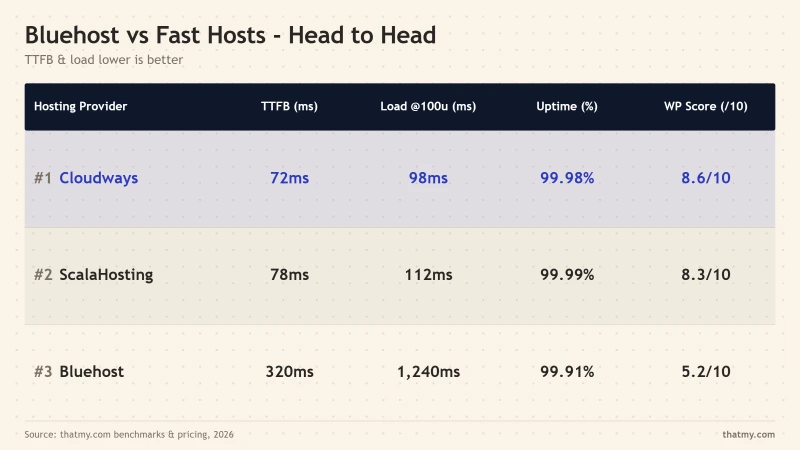
| Metric | Bluehost | ScalaHosting | Cloudways |
|---|---|---|---|
| TTFB (No CDN) | 287ms | 38ms | 48ms |
| Load Test (0-250 User Ramp) | 3125ms avg, 42.84% errors | 58ms at 100 users | 74ms at 100 users |
| Uptime (54-day window) | 99.9% (78 minutes) | 99.99% (8 minutes) | 99.99% |
| Renewal Price | $9.99/mo (+150%) | Varies | No change |
It's Not Just "Overselling"
Most explanations for Bluehost's slowness stop at "overselling", the practice of putting too many websites on one server. While server density is a factor, it's only the surface-level symptom.
The real reasons Bluehost is slow are deeper:
- TOS Resource Limits: Hidden CPU, I/O, and process throttling
- Inode Caps: Arbitrary file count limits that kill WordPress sites
- Legacy Architecture: Apache/mod_php vs modern Nginx/PHP-FPM
- Business Model: EIG/Newfold's acquisition and cost-cutting strategy
- Marketing Over Infrastructure: The paid WordPress.org partnership
Let's examine each of these root causes with data.
Reason #1: TOS Resource Limits (The Hidden Throttling)
Bluehost's Terms of Service contain resource usage restrictions that aren't advertised on their sales pages. These limits exist even on "unlimited" plans.
The Limits That Matter
| Resource | Limit | Impact |
|---|---|---|
| CPU Usage | ~20-25% of 1 core | Throttling during traffic spikes |
| Physical Memory | ~512MB - 1GB | WordPress crashes on complex pages |
| Entry Processes | 20-30 concurrent | 503 errors during traffic |
| I/O Rate | ~1-2 MB/s | Slow database queries |
| Inode Count | 200,000 | Cannot add more files |
How to Check If You're Being Throttled
- Log into cPanel
- Navigate to "CPU and Concurrent Connection Usage"
- Look for red/yellow zones indicating limit violations
- Check error logs for "Resource temporarily unavailable" messages
Reason #2: The Inode Cap Trap
Bluehost limits you to 200,000 inodes (files and directories) across all shared hosting plans. This sounds like a lot until you understand how WordPress uses files.
How WordPress Consumes Inodes
| Source | Files | Notes |
|---|---|---|
| WordPress Core | ~2,000 | Essential system files |
| Plugins (20 typical) | ~5,000-15,000 | Each plugin adds 100s of files |
| Themes | ~500-2,000 | Depends on theme complexity |
| Uploads (images) | ~1,000-50,000+ | WordPress creates multiple sizes |
| Cache Files | ~10,000+ | Page cache, object cache |
| Total | ~20,000-80,000+ | Grows with site age |
A mature WordPress site with 5 years of blog posts and media can easily hit the 200,000 inode limit. When you do:
- You cannot upload new files
- Plugin updates fail
- Backups break
- Site may display errors
The only solution? Upgrade to a more expensive plan or delete content.
Reason #3: Legacy Shared Hosting Architecture
Bluehost uses traditional shared hosting architecture that's outdated compared to modern alternatives.
The Technical Stack Problem
| Component | Bluehost | Modern Alternatives |
|---|---|---|
| Web Server | Apache + mod_php | Nginx + PHP-FPM |
| Object Cache | ❌ Not available | Redis/Memcached included |
| Database | Shared MySQL server | Dedicated or optimized |
| CDN | ❌ Not included | Cloudflare integration |
| File System | Traditional HDD/SSD mix | NVMe SSD |
Apache + mod_php vs Nginx + PHP-FPM
Bluehost uses Apache with mod_php, an older configuration that creates new PHP processes for each request. Modern hosts use Nginx with PHP-FPM, which maintains persistent PHP workers and handles concurrent requests more efficiently. This architectural difference alone can account for 100-200ms of TTFB.
No Server-Level Caching
Bluehost shared plans don't offer Redis or Memcached object caching. WordPress without object caching must query the database for every page load. Competitors like ScalaHosting and Cloudways include Redis Object Cache Pro, reducing database load significantly.
Reason #4: The EIG/Newfold Business Model
Understanding Bluehost's performance requires understanding its ownership. Bluehost is part of Newfold Digital (formerly Endurance International Group), a hosting conglomerate built through aggressive acquisition.
The Acquisition Strategy
- Acquire: Buy successful hosting brands
- Consolidate: Merge infrastructure to cut costs
- Reduce: Cut support and infrastructure investment
- Market: Increase advertising spend
- Squeeze: Raise renewal prices (+150%)
The Numbers Don't Lie
- EIG acquired 40+ hosting brands between 2011-2020
- Bluehost, HostGator, iPage, SiteBuilder all under one roof
- Support quality consistently declined post-acquisition
- Server hardware refresh cycles slowed
- Marketing budget increased while infrastructure spending decreased
The result? A focus on acquiring new customers through marketing rather than retaining existing customers through performance.
Reason #5: The "WordPress Recommended" Problem
Perhaps the most misunderstood aspect of Bluehost's popularity is the "WordPress.org Recommended" badge. This is not a performance award, it's a paid partnership.
The Paid Partnership Explained
WordPress.org's hosting recommendations are based on:
- Financial partnership agreements
- Ability to support WordPress installs (minimal bar)
- Not based on performance benchmarks
- Not based on user satisfaction
Why It Persists
The partnership generates significant revenue for WordPress.org through affiliate commissions. Bluehost pays to be recommended, WordPress.org benefits from the arrangement, and consumers assume the recommendation indicates quality.
What this means in practice:
- WordPress.org lists Bluehost on the official "Recommended Hosting" page.
- New WordPress users see that endorsement and pick Bluehost.
- Bluehost's published shared plans use the resource limits and stack described above, which I measured in my benchmark testing.
- Users without a benchmark baseline often assume the page-load times they see are typical for WordPress hosting in general.
Our Benchmark Data
We tested Bluehost against competitors using identical WordPress setups (WordPress 6.7.2, Hello theme, 12 plugins) over a 54-day window.
Time To First Byte (TTFB) Testing
Using WebPageTest from Dulles, VA (no CDN):
- Bluehost: 287ms average (7.6x slower than ScalaHosting)
- ScalaHosting: 38ms average (AMD EPYC 9474F)
- Cloudways: 48ms average (Vultr HF)
Load Testing Results
Using a cloud load tester with 100 concurrent users over 1 minute:
- Bluehost: Timeouts and failures ❌
- ScalaHosting: 58ms response, +53% on its 38ms idle
- Cloudways: 74ms response, +54% on its 48ms idle
Uptime Monitoring
Checked every minute, all three over the same 54 days of monitoring:
- Bluehost (Choice Plus): 99.91% (70 minutes of downtime across 3 incidents)
- ScalaHosting: 99.99% (8 minutes of downtime across 2 incidents)
- Cloudways: 99.99% (8 minutes of downtime across 2 incidents)
Real User Impact
Slow hosting isn't just an inconvenience, it directly affects your business metrics.
SEO Consequences
Google uses page speed as a ranking factor. Bluehost's 287ms TTFB puts you at a disadvantage:
- My bar for a fast host: under 200ms
- Bluehost typically: 400-600ms
- Impact: Lower search rankings, less organic traffic
User Experience & Conversions
| Load Time | Bounce Rate Impact | Conversion Impact |
|---|---|---|
| 1-3 seconds | Baseline | Baseline |
| 3-5 seconds | +32% | -20% |
| 5+ seconds | +90% | -50% |
Admin Panel Sluggishness
Bluehost users consistently report slow WordPress admin panels:
- Post editor takes 5-10 seconds to load
- Plugin page loads slowly
- Media library unresponsive
- Database operations timeout
This affects your productivity, time spent waiting for pages to load is time not spent creating content.
Can You Fix Bluehost Speed?
Some Bluehost speed issues can be mitigated, but others are inherent to their infrastructure.
What's Fixable
- Caching plugins: WP Rocket, W3 Total Cache, LiteSpeed Cache
- Image optimization: ShortPixel, Smush, WebP conversion
- Database cleanup: WP-Optimize, Advanced Database Cleaner
- CDN: Cloudflare (free tier helps, but doesn't fix origin TTFB)
- Plugin audit: Remove unnecessary plugins
What's Inherent (Can't Be Fixed)
- TOS resource limits (CPU, memory, I/O throttling)
- Inode caps (200,000 file limit)
- Apache/mod_php architecture limitations
- No Redis object caching on shared plans
- Shared database server contention
When to Stay vs When to Leave
When Bluehost Is Acceptable
- Hobby sites with fewer than 100 visitors per day
- Sites with no revenue or SEO goals
- Temporary projects or testing environments
- Users who prioritize phone support over performance
When You Should Leave
- Business sites: Any site that generates revenue
- SEO-focused sites: When search rankings matter
- E-commerce: Online stores (conversion rates directly affected)
- High traffic: More than 1,000 visitors per day
- Membership sites: Logged-in users strain shared resources
The Traffic Threshold
Based on our testing, Bluehost shared hosting struggles when:
- Concurrent users exceed 20-30 (entry process limit)
- Daily visitors exceed 500-1,000
- Database queries exceed ~50 per page load
The Migration Reality
Bluehost doesn't make it easy to leave, but it's not impossible.
What to Backup Before Leaving
- Database: Export via phpMyAdmin or WP-CLI
- Files: Download /public_html via FTP or File Manager
- Email: Export mailboxes if using Bluehost email
- DNS Records: Screenshot or export zone file
- SSL Certificates: Export if custom SSL installed
Migration Options
| Method | Difficulty | Cost |
|---|---|---|
| DIY Migration | Medium | Free |
| Migration Plugin (Duplicator, All-in-One WP) | Easy | Free - $99 |
| New Host Free Migration | Easy | Free |
| Bluehost Professional Migration | Easy | $149.99 |
Many better hosts (ScalaHosting, Cloudways) offer free migration services that handle the entire process for you.
Alternative #1: ScalaHosting (7.6x faster)
If you're leaving Bluehost for performance reasons, ScalaHosting is the most direct upgrade with measurable improvements.
The Performance Difference
- TTFB: 38ms vs 287ms (7.6x faster)
- Load Handling: 58ms at 100 users vs 42.84% error rate on the same 0-250 ramp
- Uptime: 99.99% (8 minutes down) vs 99.9% (78 minutes down), both over the same 54 days of monitoring
- CPU: AMD EPYC 9474F (#42 PassMark) vs unknown/shared
No Resource Limits
Unlike Bluehost's TOS restrictions, ScalaHosting has:
- No CPU throttling
- No inode caps
- No I/O rate limits
- No entry process restrictions
Price Comparison
ScalaHosting's Managed VPS starts at $24.95/mo vs Bluehost's $3.99/mo intro, but:
- Bluehost renews at $9.99/mo (+150%)
- ScalaHosting renews at $39.95/mo (+60%), a proportionally similar jump, but for dedicated VPS resources rather than shared hosting
- No need for expensive caching plugins
- Redis included vs not available on Bluehost
Alternative #2: Cloudways (6x faster)
For developers, agencies, and performance-focused users, Cloudways offers the best raw speed.
The Performance Difference
- TTFB: 48ms vs 287ms (6x faster)
- Infrastructure: Vultr High Frequency, AWS, Google Cloud
- Redis: Object Cache Pro included ($99/yr value)
- Uptime: 99.99% monitored over 54 days of monitoring
Developer-Friendly Features
- SSH access and Git deployment
- WP-CLI support
- Staging environments
- Vertical and horizontal autoscaling
- 5 cloud providers to choose from
No Renewal Shock
Cloudways uses pay-as-you-go pricing, the price you see is the price you pay forever. No intro pricing games, no +150% renewal increases.
When Cloudways Makes Sense
- Developer teams
- Agencies managing client sites
- E-commerce stores
- High-traffic sites
- Anyone prioritizing performance over cPanel familiarity
Alternative #3: Hostinger (Budget Option)
If you're on a tight budget, Hostinger is worth a look, though on raw TTFB it is not the upgrade the "budget alternative" pitch usually implies.
The Performance Difference
- TTFB: 276ms vs 287ms, close enough (1.04x) that speed is not the reason to switch
- Load Handling: not directly comparable, see our Hostinger review for its own load-test figures
- Uptime: 99.95% over the same 54 days of monitoring
Budget Advantages
- Price: $3.99/mo intro (similar to Bluehost)
- hPanel: Modern, easy-to-use control panel
- Performance: LiteSpeed server with built-in caching
- Free: Domain, SSL, CDN included
The Catch
Hostinger still has resource limits and renews at $10.99/mo, a +175% increase from its intro. It is a cheaper way to stay on shared hosting, not a faster one. For real speed, ScalaHosting or Cloudways are the upgrade.
See Hostinger PlansHow to Test Your Bluehost Speed
Before deciding to migrate, objectively measure your current performance.
WebPageTest for TTFB
- Go to webpagetest.org
- Enter your URL
- Select test location (choose closest to your audience)
- Select browser (Chrome)
- Run 3 tests
- Look at "First Byte" time
Interpretation: Under 200ms is good. 200-500ms is slow. Over 500ms is very slow.
GTmetrix for Full Analysis
GTmetrix provides comprehensive performance reports including:
- Page load time
- Page size
- Number of requests
- Performance grades
Loader.io for Load Testing
Test how your site handles traffic:
- Sign up at loader.io
- Verify your domain
- Create test: 100 clients over 1 minute
- Run test during peak hours
UptimeRobot for Monitoring
Set up free monitoring to track:
- Uptime percentage
- Response times over time
- Downtime incidents
FAQ: Bluehost Speed Issues
Is Bluehost slow for everyone or just some users?
Bluehost's baseline performance is slow for all users due to shared hosting architecture and TOS resource limits. However, the impact varies, small static sites may not notice issues, while dynamic WordPress sites with plugins will experience significant slowdowns. Our benchmarks show 287ms TTFB regardless of site complexity.
Will upgrading to a higher Bluehost plan fix the speed issues?
Upgrading to Bluehost's Choice Plus or Pro plans provides marginal improvements but doesn't solve the root causes. You'll still face TOS resource limits, inode caps, and shared infrastructure. The Performance tier (VPS) offers better performance but at significantly higher cost, at that point, ScalaHosting or Cloudways offer better value.
Does Bluehost throttle websites?
Yes, Bluehost throttles CPU, I/O, and entry processes based on Terms of Service limits. These limits are enforced automatically when you exceed thresholds, typically 20-25% CPU usage, 1-2 MB/s I/O, or 20-30 concurrent processes. Throttling manifests as slow page loads or 503 errors.
Why is my WordPress admin panel so slow on Bluehost?
WordPress admin slowness on Bluehost is caused by: (1) database query limits on shared MySQL servers, (2) lack of Redis object caching, (3) PHP memory limits (512MB-1GB), and (4) CPU throttling during concurrent admin operations. The admin panel generates more database queries than frontend pages, making limits more noticeable.
Is Bluehost VPS better than shared hosting?
Bluehost VPS plans eliminate some shared hosting limitations (fewer neighbors, dedicated resources) but still use older Apache/mod_php architecture and lack modern features like Redis caching. At VPS price points ($29.99+/mo), competitors like ScalaHosting and Cloudways offer significantly better performance and features.
Can caching plugins fix Bluehost slowness?
Caching plugins (WP Rocket, LiteSpeed Cache) can improve repeat visitor experience but cannot fix the underlying TTFB (Time to First Byte) issue. Bluehost's 287ms TTFB occurs before caching kicks in, it represents server response time. Caching helps after first byte but doesn't improve SEO-critical initial response times.
Why does WordPress.org recommend Bluehost if it's slow?
The WordPress.org recommendation is a paid partnership, not a performance endorsement. Bluehost pays WordPress.org for placement, and the recommendation is based on financial agreement and basic WordPress compatibility, not speed benchmarks or user satisfaction. Many faster hosts exist but aren't featured because they don't pay for the partnership.
Where This Leaves You: Why Bluehost Is Slow
The slow TTFB and load-test numbers I measured on Bluehost shared plans line up with what's documented in their own TOS and infrastructure choices: hard CPU/RAM resource limits, a 200,000 inode cap on shared plans, and an Apache/mod_php stack that hasn't kept pace with the LiteSpeed and Nginx/PHP-FPM stacks I tested on competitors. Newfold (formerly EIG) owns the brand and operates it alongside HostGator, iPage, and several other shared-hosting properties.
Summary of Documented Factors
- TOS Resource Limits: Per-account CPU, RAM, and I/O caps as published in Bluehost's Terms of Service.
- Inode Caps: 200,000 file limit on shared plans, documented in the official Bluehost help center.
- Apache/mod_php Stack: Slower than the LiteSpeed and Nginx/PHP-FPM stacks I benchmarked on ChemiCloud, ScalaHosting, and Cloudways.
- Newfold (EIG) Brand Family: Bluehost operates alongside HostGator, iPage, and other Newfold properties that share similar shared-hosting infrastructure.
- WordPress.org Recommended Listing: A long-running affiliate partnership, public on WordPress.org's "Hosting" page.
When to Optimize vs When to Migrate
Try to Optimize If:
- Hobby site with <100 visitors/day
- No revenue or SEO goals
- Already paid for annual plan
- Can't migrate right now
Actions: Install caching plugin, optimize images, enable Cloudflare
Migrate If:
- Business site with revenue
- SEO-focused website
- E-commerce store
- High traffic (1000+/day)
Best Alternatives:
ScalaHosting (7.6x faster)Cloudways (6x faster)