

"Fast hosting" is usually a claim about hardware. But two hosts running identical CPUs can perform very differently under real traffic because of one variable buried in the fine print: which web server software is actually handling the connection before your PHP code ever runs. Apache, Nginx, and LiteSpeed are the three you will encounter, and the differences between them are architectural, not cosmetic.
What a Web Server Actually Does
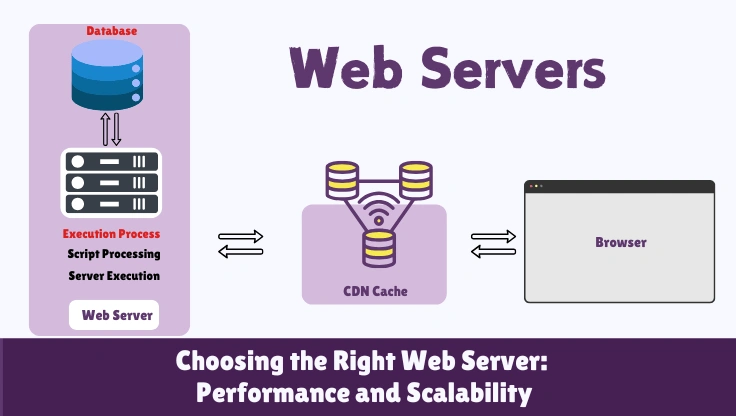
A web server's job sounds simple: accept an incoming HTTP connection, figure out what the visitor is asking for, and return a response. In practice this means listening on a port, parsing the request, deciding whether the response is a static file (an image, a CSS file) it can return directly, or a dynamic request that needs to be handed off to a language runtime like PHP, managing the connection's lifecycle including keep-alive, and applying any rewrite rules, redirects, or access controls configured for the site.
The part that differs most between Apache, Nginx, and LiteSpeed is how each one manages many of these connections happening at once, and that difference is what shows up as a real, measurable performance gap the moment more than a handful of visitors are on a site simultaneously.
Apache: The Process-Per-Connection Model
Apache HTTP Server, first released in 1995, is the oldest of the three and still the most widely deployed web server on the internet by raw install count, largely because of its long history as the default on shared hosting and its deep, mature ecosystem of modules. Its traditional architecture (the prefork and worker Multi-Processing Modules) assigns a dedicated process or thread to each incoming connection and keeps it allocated for that connection's full duration, including idle time between keep-alive requests.
This model is simple to reason about and extremely flexible through .htaccess files, which let individual hosting accounts on a shared server override configuration (redirects, access rules, PHP settings) without touching the main server config. That flexibility is exactly why shared hosting built its entire customer-configuration model around Apache for two decades.
The cost shows up under concurrency. Each held-open process or thread consumes real memory whether or not it is actively doing anything. A server provisioning enough RAM for 40 concurrent Apache processes will start queuing or refusing new connections at visitor 41, regardless of how fast the CPU is. For a low-traffic brochure site, this ceiling rarely matters. For a site that gets a traffic spike (a product launch, a social media mention, a sale), it is frequently the actual cause of a site going down, not the CPU or the database.
Nginx: The Event-Driven Model
Nginx, released in 2004 specifically to solve the connection-scaling problem Apache has, uses an event-driven, asynchronous architecture. A small, fixed number of worker processes (typically one per CPU core) handles all incoming connections. Instead of dedicating a process to each connection, a worker only spends CPU time on a connection when that connection actually has data to send or receive; an idle keep-alive connection costs almost nothing while it waits.
This is why Nginx can hold tens of thousands of concurrent connections on hardware that would bring Apache to its knees at a few hundred. It is also why Nginx became the default choice for reverse proxies, load balancers, and static asset serving across the industry, independent of hosting specifically.
The tradeoff is configuration flexibility at the individual-account level. Nginx does not read .htaccess files at all, every rewrite rule and access control has to live in the main server configuration, which on shared hosting means the host has to build and maintain per-customer configuration through its own tooling rather than letting customers self-serve through .htaccess the way Apache allows. This is a real reason some hosts stayed on Apache (or moved to LiteSpeed, which solves this specific problem) longer than the pure performance case would suggest.
LiteSpeed: Nginx's Architecture, Apache's Compatibility
LiteSpeed Web Server, a commercial product, was built to capture the performance benefits of an event-driven architecture while removing Nginx's biggest adoption blocker for shared hosting: it reads and honors .htaccess files natively, the same syntax Apache customers already know. That single compatibility decision is a large part of why LiteSpeed spread through shared and managed WordPress hosting as fast as it did, migrating a hosting fleet from Apache to LiteSpeed does not require rewriting every customer's existing rewrite rules.
Beyond compatibility, LiteSpeed ships two features that matter specifically for WordPress and WooCommerce hosting. LSCache is a page-caching system built into the web server itself rather than implemented as a WordPress plugin bolted on top of PHP; it understands WordPress and WooCommerce well enough to invalidate the correct cached pages automatically when a post publishes or a product's stock changes, which plugin-based caching has historically gotten wrong in edge cases. And LiteSpeed handles PHP through its own SAPI (LSAPI) rather than generic PHP-FPM, which independent benchmarks generally show as measurably faster for PHP execution specifically, on top of the connection-handling advantage it shares with Nginx.
The tradeoff is licensing cost, LiteSpeed is not free the way Apache and Nginx are, which is why it initially appeared on premium and mid-tier hosting plans before becoming common further down the price ladder as licensing costs came down and hosts absorbed them into their margins.
HTTP/2 and HTTP/3 Support Across the Three
Protocol support is a second, less-discussed axis of difference. HTTP/2 (multiplexed requests over a single connection) is standard across all three servers today and is not a meaningful differentiator, virtually every host running any of the three has it enabled. HTTP/3, which runs over QUIC (a UDP-based transport) instead of TCP, is where the three diverge. LiteSpeed added HTTP/3 support early and it is enabled by default on most LiteSpeed-based hosting. Nginx requires version 1.25 or later with QUIC modules compiled in, which not every host has upgraded to even though the software has supported it since 2023. Apache's HTTP/3 support exists but is less mature and less commonly enabled in shared hosting configurations.
The practical benefit of HTTP/3 is smaller than the marketing around it suggests for most sites: its main advantage is 0-RTT connection resumption for returning visitors on lossy or high-latency connections (mobile networks, satellite, congested WiFi), which shaves one network round trip off the connection setup. For a desktop visitor on stable broadband, the difference between HTTP/2 and HTTP/3 is close to unmeasurable. It matters more for a site with a large mobile audience on inconsistent connections than for a typical desktop-heavy B2B site.
What the Difference Looks Like in Practice
Independent load-testing benchmarks that compare identical WordPress installs across the three web servers, holding CPU and storage constant, consistently show a pattern rather than a fixed number, because the exact gap depends on hardware, PHP configuration, and caching setup. The pattern: at low concurrency (1-10 simultaneous visitors), the three perform within a small margin of each other, often under 20ms apart on Time to First Byte, because none of them are under enough load for their architectural differences to matter. As concurrency climbs past roughly 50-100 simultaneous connections, Apache's response times start climbing non-linearly while Nginx and LiteSpeed's response times stay comparatively flat, because Apache is running out of available worker processes and starting to queue requests while the event-driven servers are still comfortably handling the load with the same worker pool.
This is precisely why a single-visitor speed test (the kind most hosting reviews run) frequently fails to show a meaningful difference between an Apache host and a LiteSpeed host, while real-world performance during a traffic spike diverges sharply. A benchmark methodology that never tests concurrent load will systematically understate how much web server choice matters.
What This Actually Means When Choosing Hosting
For a low-traffic site with no concurrency spikes expected, the web server choice matters less than the underlying CPU and storage, all three handle light traffic acceptably. Where the choice becomes concretely important:
- Traffic spikes or sales events: Apache-based hosting is measurably more likely to slow down or return errors under a sudden concurrency spike than Nginx or LiteSpeed-based hosting on comparable hardware.
- WooCommerce stores: LSCache's WooCommerce-aware invalidation is a real, specific advantage over generic plugin caching, which has a documented history of serving stale stock or price data after LSCache-style purpose-built invalidation logic became the norm.
- Shared hosting with many neighbors: On a densely-packed shared server, an event-driven web server (Nginx or LiteSpeed) leaves more headroom for your account specifically, because it is not burning memory holding open idle connections from every account on the box.
The practical way to use this: check the Server response header (or ask the host directly) before signing up, and treat "runs LiteSpeed" or "runs Nginx" as a genuine point in a host's favor for anything beyond a low-traffic brochure site, on par with checking the underlying CPU. Neither web server choice substitutes for fast hardware, but a fast CPU wrapped in Apache's connection model still hits a concurrency ceiling that the same CPU behind Nginx or LiteSpeed does not.
FAQ: Web Server Software and Hosting Performance
Which web server is fastest for WordPress?
For static file serving, Nginx and LiteSpeed both outperform Apache under concurrent load because of their event-driven architecture. For WordPress specifically, LiteSpeed has an edge because it ships with a built-in caching layer (LSCache) that operates at the web server level rather than as a PHP plugin, which removes PHP execution entirely for cached requests. Nginx with a well-configured FastCGI cache can match this, but it takes manual configuration that most hosts do not expose to customers. Apache with mod_php or PHP-FPM and no caching layer is consistently the slowest of the three under any real concurrent load, though a single-visitor benchmark on idle hardware can mask the difference.
Why does Apache struggle under concurrent load?
Apache's traditional worker model (prefork or worker MPM) assigns one process or thread per connection and holds it open for the duration of that connection, including idle keep-alive time. Each process consumes real memory, commonly 20-50MB for a process with mod_php loaded. A server with 2GB of RAM available for Apache can realistically sustain somewhere around 40-80 concurrent connections before it starts swapping or refusing new connections. Nginx and LiteSpeed use an event-driven model: a small pool of worker processes handles thousands of connections by only doing work when a connection actually has data to process, and idle keep-alive connections cost almost nothing. This is the core architectural reason Apache falls over first under a traffic spike.
Is Nginx always faster than Apache?
For serving static files and handling high connection counts, yes, consistently. For dynamic PHP execution specifically, the web server itself is not doing the PHP work either way, both hand the request off to a PHP process manager (PHP-FPM). The actual PHP execution time is roughly the same regardless of which web server sits in front of it. Where Nginx pulls ahead in real-world WordPress hosting is connection handling under load: more visitors browsing simultaneously means more open connections, and that is exactly where Apache's per-connection process model runs out of headroom first.
What is LiteSpeed and why do so many hosts use it now?
LiteSpeed is a commercial, Nginx-compatible (same event-driven architecture) web server built specifically with shared hosting workloads in mind. It has three advantages that matter for hosting companies: it can read Apache's .htaccess files directly, so migrating a shared-hosting fleet from Apache does not require rewriting every customer's configuration; it ships with LSCache, a page-caching layer that is aware of WordPress and WooCommerce specifically, invalidating cache entries correctly when a post or product updates; and it handles PHP through LiteSpeed's own SAPI (LSAPI) rather than generic PHP-FPM, which benchmarks show reduces PHP execution overhead somewhat versus PHP-FPM under Nginx. The licensing cost is why it appeared on premium and mid-tier hosts before budget shared hosting.
How do I check which web server my host is running?
The simplest method: open your browser's developer tools, go to the Network tab, reload your site, click the main HTML document request, and look at the Response Headers for a 'Server' header. It will usually say Apache, nginx, or LiteSpeed directly. Some hosts strip or rewrite this header for security reasons, in which case you can check indirectly: LiteSpeed-powered hosts almost always expose a 'LiteSpeed Cache' plugin option in WordPress if LSCache is active, and cPanel-based hosts on Apache typically show 'Apache' explicitly in their control panel's server information page.
Does the web server choice affect my WordPress caching plugin?
It changes which plugin does the most effective job. On LiteSpeed, the free LiteSpeed Cache plugin talks directly to the web server's built-in cache and is generally the best choice, other caching plugins (WP Rocket, WP Super Cache) still work but cannot access LSCache's server-level integration. On Nginx, effective full-page caching usually requires either a host-level FastCGI cache configuration you cannot control from WordPress, or a plugin like WP Rocket configured to work alongside it. On Apache, plugin-based page caching (writing static HTML files that mod_rewrite serves before PHP loads) is the standard approach, and it works well, it just does not get the additional benefit of the web server's own request-handling efficiency under high concurrency.
Can I switch my site to a different web server myself?
Not on shared or managed hosting, the web server is chosen and configured by the host at the server level, not per account. On a self-managed VPS or dedicated server, yes, you control this entirely, and switching from Apache to Nginx or LiteSpeed is a real, if involved, migration: you would need to translate .htaccess rules to the new server's configuration syntax (Nginx does not read .htaccess at all), reconfigure PHP handling, and test every URL rewrite rule your site depends on. For most WordPress site owners, the practical lever is choosing a host that already runs the web server you want, not migrating one yourself.